

Page 1
PlayLimit.com PlayLimit.com
PlayLimit
User Guide
The
Smart
Way
to Let Kids
Play
PLAY
LIMI T
Page 2

PlayLimit.com PlayLimit.com
Contents
Safety Messages ........................................................................................................1
Overview .....................................................................................................................2
Setup............................................................................................................................4
Operation..................................................................................................................10
Troubleshooting........................................................................................................14
Service .......................................................................................................................16
Suggestions & Strategies ........................................................................................17
FAQs ..........................................................................................................................19
Safety Messages
Use only the power supply included with the PlayLimit. Other power supplies
may damage the PlayLimit.
Insert only PlayLimit tokens in the token slot. Smaller coins will not work.
Larger coins will not fit. Wider coins could become jammed in the token slot.
Never take the PlayLimit console apart to access a jammed token slot. Only
the front door and rear security panel are designed to be removed from the
PlayLimit console. Further disassembly of the PlayLimit console may cause
damage.
Choking Hazard: Small parts. PlayLimit tokens are not for children under 3
years.
This symbol indicates a caution
or warning. Follow the
instructions carefully to avoid
damaging the equipment or
hurting yourself.
This symbol indicates a note
containing a tip or advice.
1
Page 3
PlayLimit.com PlayLimit.com
Overview
PlayLimit is a simple device that connects to televisions and game systems and allows
parents to set limits for the amount of time their children spend watching TV and playing
video games. The PlayLimit has a slot for tokens, and each token allows the TV or game
system to operate for a certain time increment.
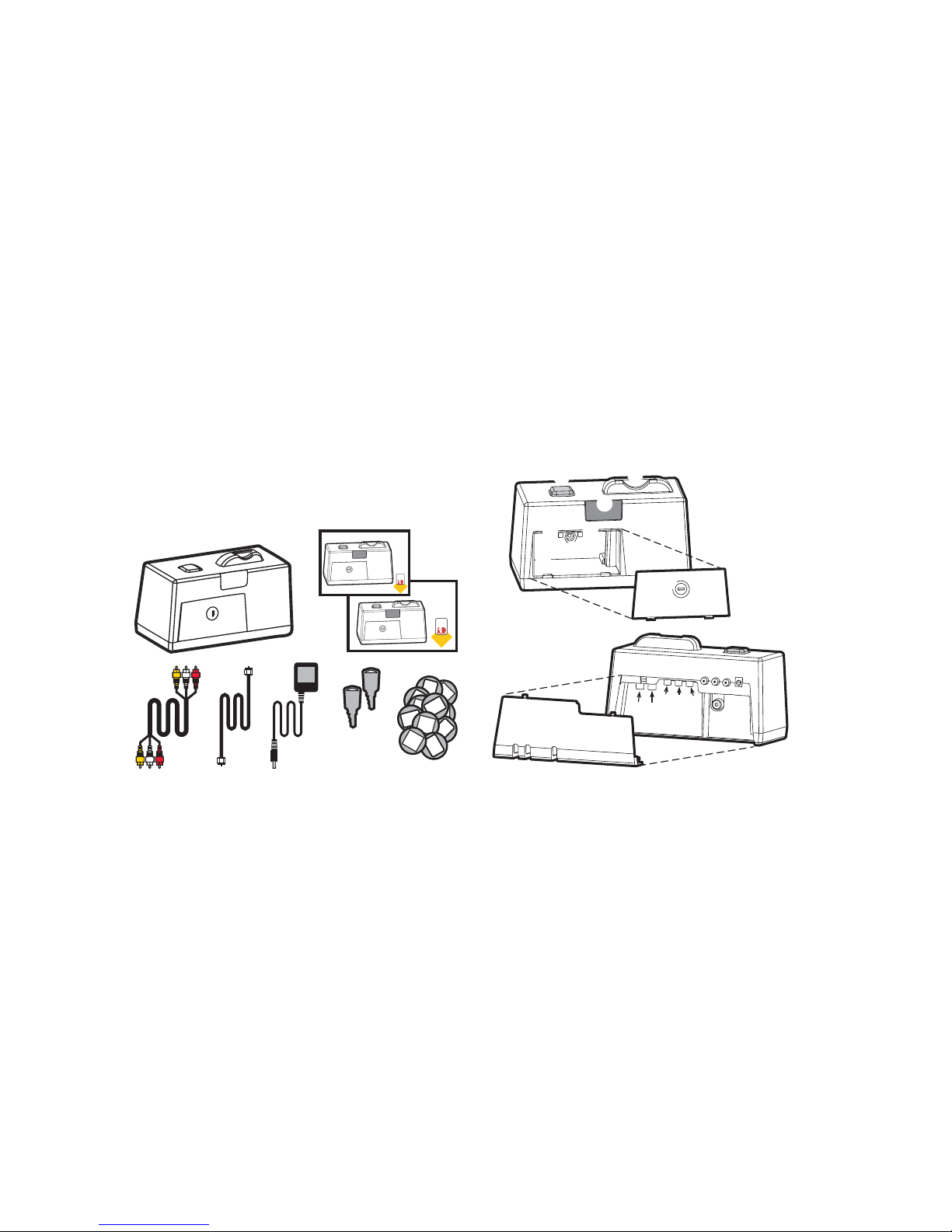
A PlayLimit System contains the
following items:
Ê PlayLimit Console (1)
Ë PlayLimit User Guide (1)
Ì PlayLimit Quick Setup Sheet (1)
Í Composite Cable (1, 6 foot)
Î Coaxial Cable (1, 6 foot)
Ï Power Supply Cable (1, 6 foot)
Ð Coin Box Keys (2)
Ñ PlayLimit Tokens (30)
Ê
2 3
15
PLAY
LIMIT
15
PLAY
LIMIT
15
15
PLAY
LIMIT
15
15
PLAY
LIM
IT
15
PLAY
LIMIT
15
15
PLAY
LIMIT
15
15
Ë
Ì
ÍÎÏ ÐÑ
À
Token Slot. Where you insert tokens.
Á
Pause Button. Pauses the PlayLimit timer.
Â
Time Display. Shows the play time
remaining.
Ã
Door Lock. For parents to access coin
box.
Ä
Mode Switch. Sets the PlayLimit
operation mode: TOKEN/OFF/ON
Å
Control Switch. Sets the devices
controlled by PlayLimit: GAME/TV/BOTH
Æ
Coin Box. Where inserted tokens are
stored.
Ç
Security Panel Screw. Secures the back
PlayLimit panel.
Ê
Security Panel. Ensures the cables from
games console and cable TV are locked.
Ë
Coax-In. From TV picture source.
Ì
Coax-Out. To TV.
Í
Audio-Right In. From Game Console
Î
Audio-Left In. From Game Console
Ï
Video In. From Game Console
Ð
Audio-Right Out. To TV.
Ñ
Audio-Left Out. To TV.
Ò
Video Out. To TV.
Ó
DC Power Terminal. For Power Supply
cable.
Front View
Rear View
À
Á
Â
Ã
Ä
Å
Æ
Ç
Ê
Ë
Ì
Í
Î
Ï
Ð
Ñ
Ò
Ó
PlayLimit
Quick Setup
Sheet
The
Smart
Way
to Let Kids
Play
PLAY
LIMIT
Read This First!
PlayLimit
User Guide
The
Smart
Way
to Let Kids
Play
PLAY
LIMIT
Page 4
PlayLimit.com PlayLimit.com
54
Setup
You can connect PlayLimit to your audio/visual equipment in many different combinations.
This section contains setup instructions for the three most typical setups: one game
console, one game console and VCR/DVD, and multiple game consoles.
One Game Console Setup
For information on non-typical
PlayLimit setups, go to
http://www.playlimit.com/setup
Minimum TV Requirements:
The TV you connect PlayLimit to
must have one set of composite
jacks (colored red, white, and
yellow).
You cannot connect PlayLimit
to an S-video jack or component
video jacks (colored green, blue,
and red).
Use only the power supply
included with the PlayLimit.
Other power supplies may
damage the PlayLimit.
Setup the PlayLimit on a flat,
level surface so that tokens can
drop through properly.
If the TV has only one jack for
audio, connect the right (red)
component cable plug.
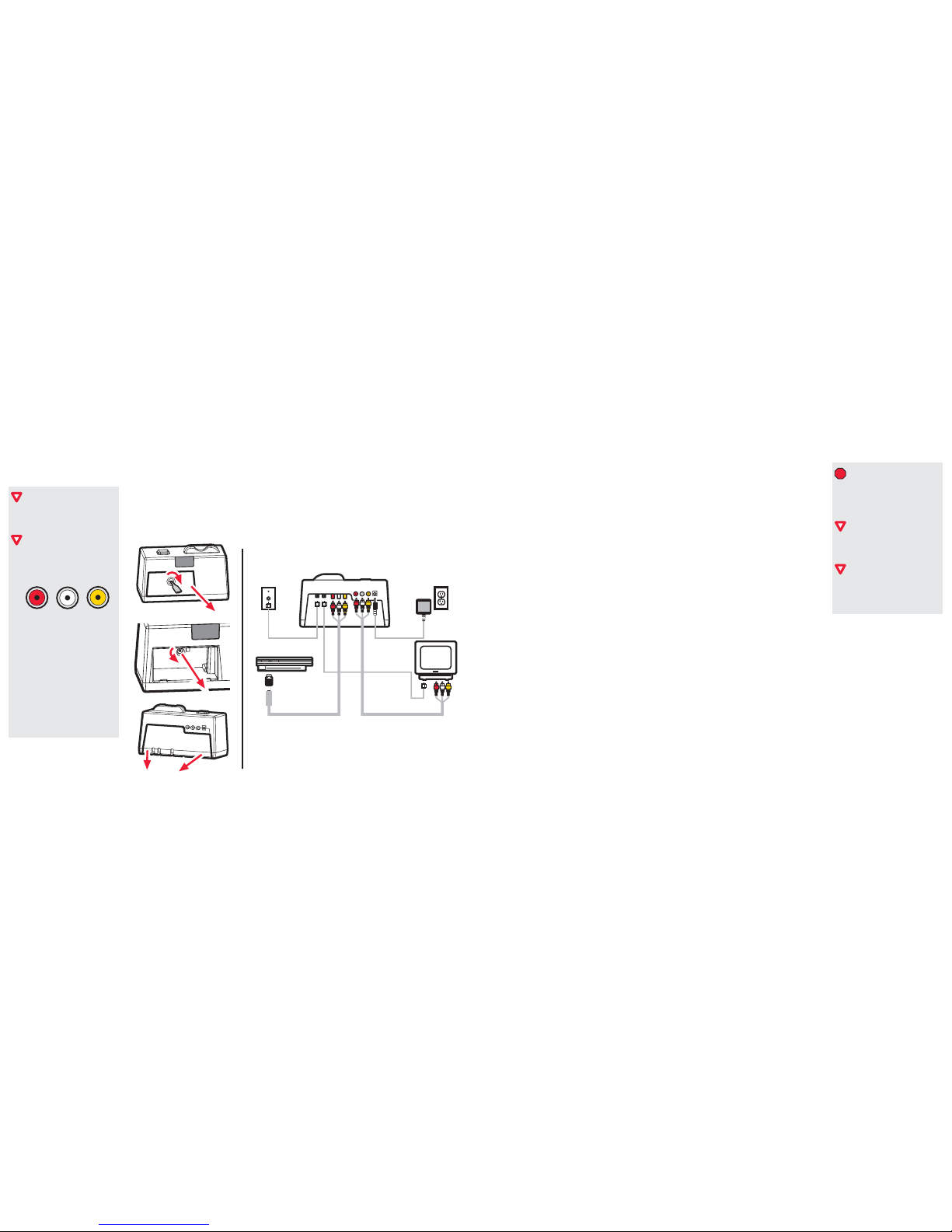
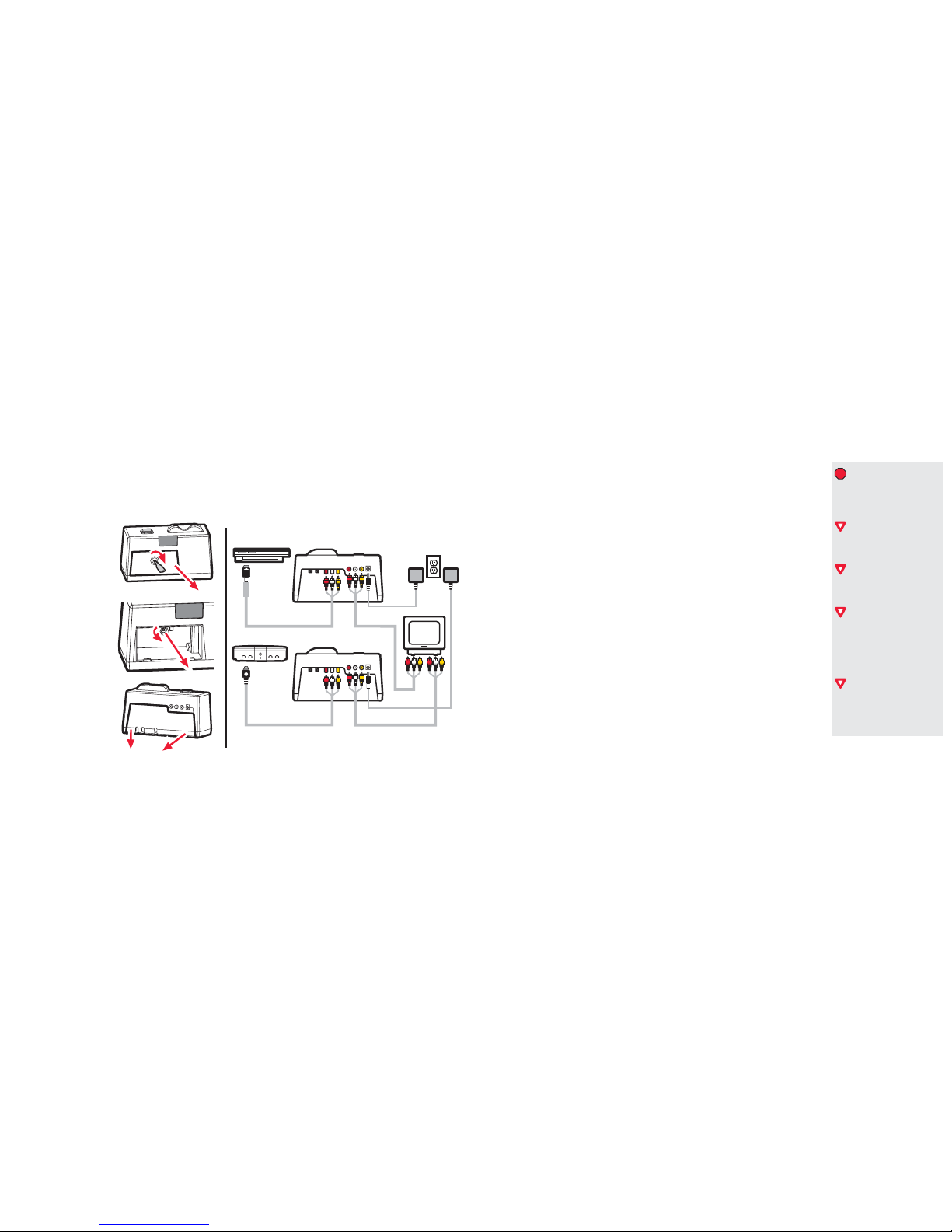
1 Remove the Security Panel.
Use a Coin Box key to open the front door. Use a Phillips-head screwdriver (not supplied) to remove the
Security Panel screw. Pull down on the Security Panel to detach it.
2 Connect the Game Consoles component cable to the PlayLimit.
3 Connect the coaxial cable from a TV source (such as cable or satellite TV) to the PlayLimit, and
connect the coaxial cable (supplied) from the PlayLimit to the TV.
4 Reattach the Security Panel.
Align the tabs and slide the panel into place, making sure cables fit through the slots without pinching.
5 Insert and tighten the Security Panel screw.
6 Connect the composite cable (supplied) from the PlayLimit to the TV.
7 Connect the power supply cable (supplied) and plug the power supply into an AC outlet.
8 Put the Mode Switch to TOKEN.
9 Set the Control Switch:
If you only connected a game console, put the switch to GAME.
If you only connected a T V source, put the switch to TV.
If you connected both a game console and a T V source, put the switch to BOTH.
10 Close and lock the Coin Box door.
11 Test the system:
For a T V source, start the TV. The TV shows a blank screen. Insert tokens to begin viewing.
For a game console, star t the game console and TV. On the TV, select the video input for
the game console. The TV shows a blue screen with OUT OF TIME on it. Insert tokens to
begin play.
PlayLimit
Game Console
TV
Source
110 AC
Outlet
TV
Coaxial Cable
Composite Cable
Game Console
Composite Cable
Power
Supply
Page 5
PlayLimit.com PlayLimit.com
76
One Game Console and VCR Setup
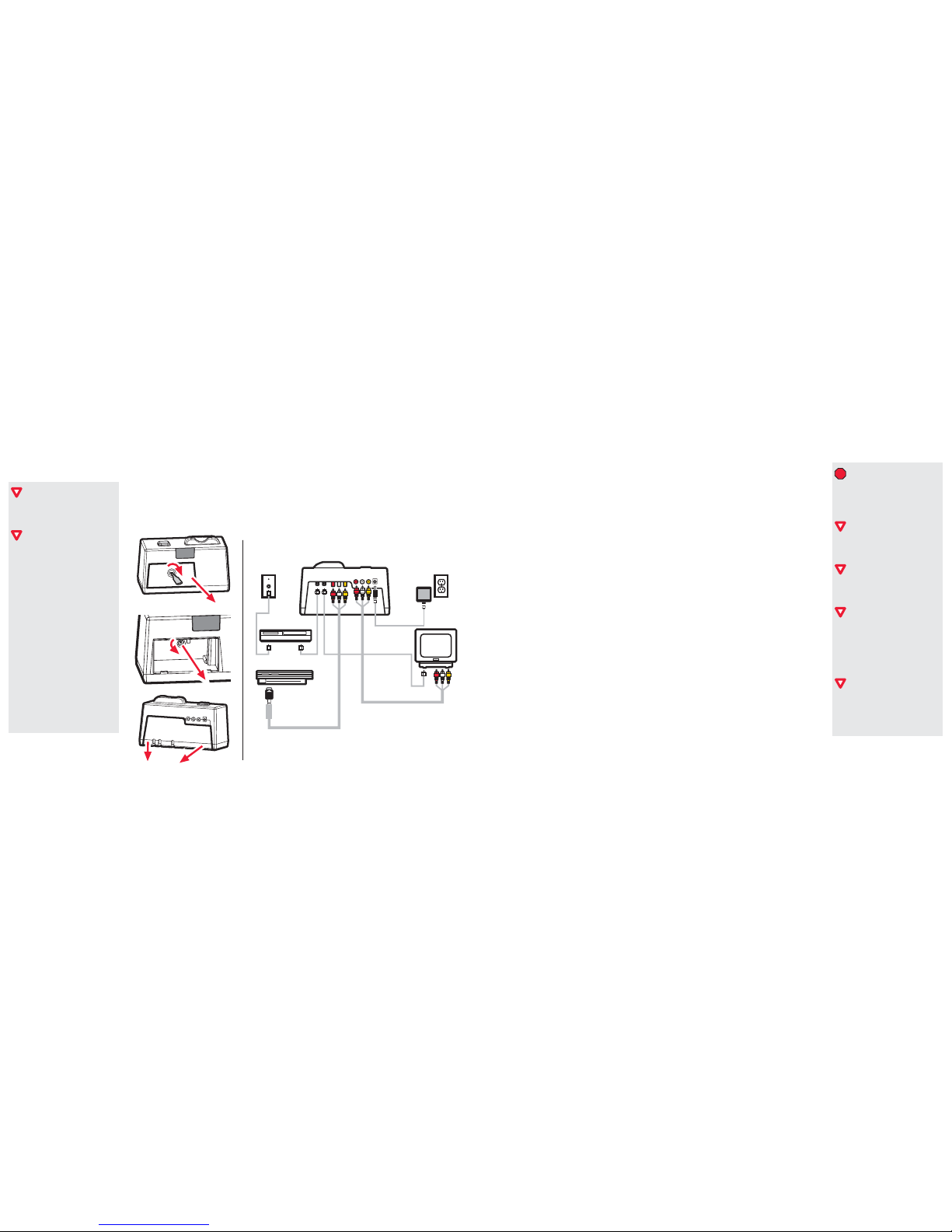
1 Remove the Security Panel.
Use a Coin Box key to open the front door. Use a Phillips-head screwdriver (not supplied) to remove the
Security Panel screw. Pull down on the Security Panel to detach it.
This manual uses VCR to refer
to VCRs, DVD players, or a
VCR/DVD combination units.
For setups that include multiple
VCRs or DVRs (Digital Video
Recorders), go to
http://www.playlimit.com/setup
Use only the power supply
included with the PlayLimit.
Other power supplies may
damage the PlayLimit.
Setup the PlayLimit on a flat,
level surface so that tokens can
drop through properly.
If the TV has only one jack for
audio, connect the right (red)
component cable plug.
If you control VCR viewing with
game viewing, the game console
cable is not secured within the
PlayLimit and can be easily
plugged directly into the TV,
bypassing the PlayLimit.
If you control VCR viewing with
TV viewing, you must put the TV
to either Channel 3 or 4 to view.
2 Pick a setup strategy:
Control VCR viewing with T V viewing: Connect the coaxial cable from a TV source (such
as cable or satellite TV) to the VCR. Connect the VCR to the PlayLimit with a coaxial cable
(not supplied). Connect a coaxial cable (supplied) from the PlayLimit to the TV. Connect the
Game Console composite cable to the PlayLimit and then connect the PlayLimit composite
cable (supplied) to the TV.
Control VCR viewing with game viewing: Connect the game console cable to the VCR
inputs. Connect the VCR composite cable (not supplied) to the PlayLimit and then connect
the PlayLimit composite cable (supplied) to the TV. Connect the coaxial cable from a TV
source (such as cable or satellite TV) to the PlayLimit, and connect the coaxial cable (supplied)
from the PlayLimit to the TV.
Do not control VCR viewing: Connect the VCR directly to the TV and then follow the
instructions for One Game Console Setup on Page 4.
3 Reattach the Security Panel.
Align the tabs and slide the panel into place, making sure cables fit through the slots without pinching.
4 Insert and tighten the Security Panel screw.
5 Connect the power supply cable (supplied) and plug the power supply into an AC outlet.
6 Put the Mode Switch to TOKEN.
7 Put the Control Switch to BOTH.
8 Close and lock the Coin Box door.
9 Test the system:
a) Start the VCR and TV and turn the TV channel to the video input for the VCR. Inser t a tape
or disc in the VCR and press PLAY. The TV shows a blank screen. Insert tokens to begin viewing.
b) Start the game console. On the TV, select the video input for the game console. The TV shows
a blue screen with OUT OF TIME on it. Insert tokens to begin play.
PlayLimit
Game Console
TV
Source
110 AC
Outlet
TV
Coaxial Cable
Composite Cable
Game Console
Composite Cable
Power
Supply
VCR
Page 6
PlayLimit.com PlayLimit.com
98
Multiple Game Consoles Setup
1 Remove the Security Panel.
Use a Coin Box key to open the front door. Use a Phillips-head screwdriver (not supplied) to remove the
Security Panel screw. Pull down on the Security Panel to detach it.
Use only the power supply
included with the PlayLimit.
Other power supplies may
damage the PlayLimit.
Setup the PlayLimit on a flat,
level surface so that tokens can
drop through properly.
If the TV has only one jack for
audio, connect the right (red)
component cable plug.
If you control VCR viewing with
game viewing, the game console
cable is not secured within the
PlayLimit and can be easily
plugged directly into the TV,
bypassing the PlayLimit.
If you control VCR viewing with
TV viewing, you must put the TV
to either Channel 3 or 4 to view.
2 Pick a setup strategy:
Have one PlayLimit for each game console (if your T V has multiple composite jacks).
Connect each Game Console composite cable to a PlayLimit and then connect each PlayLimit
composite cable (supplied) to a set of composite jacks on the TV.
Combine the game consoles into a single PlayLimit. Connect each Game Console composite
cable to a 3-way audio/video selector (not supplied) and then connect the PlayLimit composite
cable (supplied) to the TV.
3 If needed, connect the coaxial cable from a TV source (such as cable or satellite TV) to a PlayLimit,
and connect the coaxial cable (supplied) from the PlayLimit to the TV.
4 Reattach the Security Panel.
Align the tabs and slide the panel into place, making sure cables fit through the slots without pinching.
5 Insert and tighten the Security Panel screw.
6 Connect the power supply cable (supplied) and plug the power supply into an AC outlet.
7 Put the Mode Switch to TOKEN.
8 Set the Control Switch:
If you only connected game consoles, put the switch to GAME.
If you connected both a game console and a T V source, put the switch to BOTH.
9 Close and lock the Coin Box door.
10 Test the system:
For a T V source, start the TV. The TV shows a blank screen. Insert tokens to begin viewing.
For a game console, star t a game console and the TV. On the TV, select the video input for
the game console. The TV shows a blue screen with OUT OF TIME on it. Insert tokens to
begin play.
PlayLimit 1Game Console 1
110 AC
Outlet
TV
Composite
Cable
Game Console
Composite Cable
Power
Supply
PlayLimit 2Game Console 2
Composite Cable
Game Console
Composite Cable
Power Supply
Page 7
PlayLimit.com PlayLimit.com
1110
Operation
PlayLimit has three operation modes (Token, On, and Off) and are described in this section.
Token (Typical)
In this mode, PlayLimit allows content to appear on the TV only by inserting tokens into
the token slot.
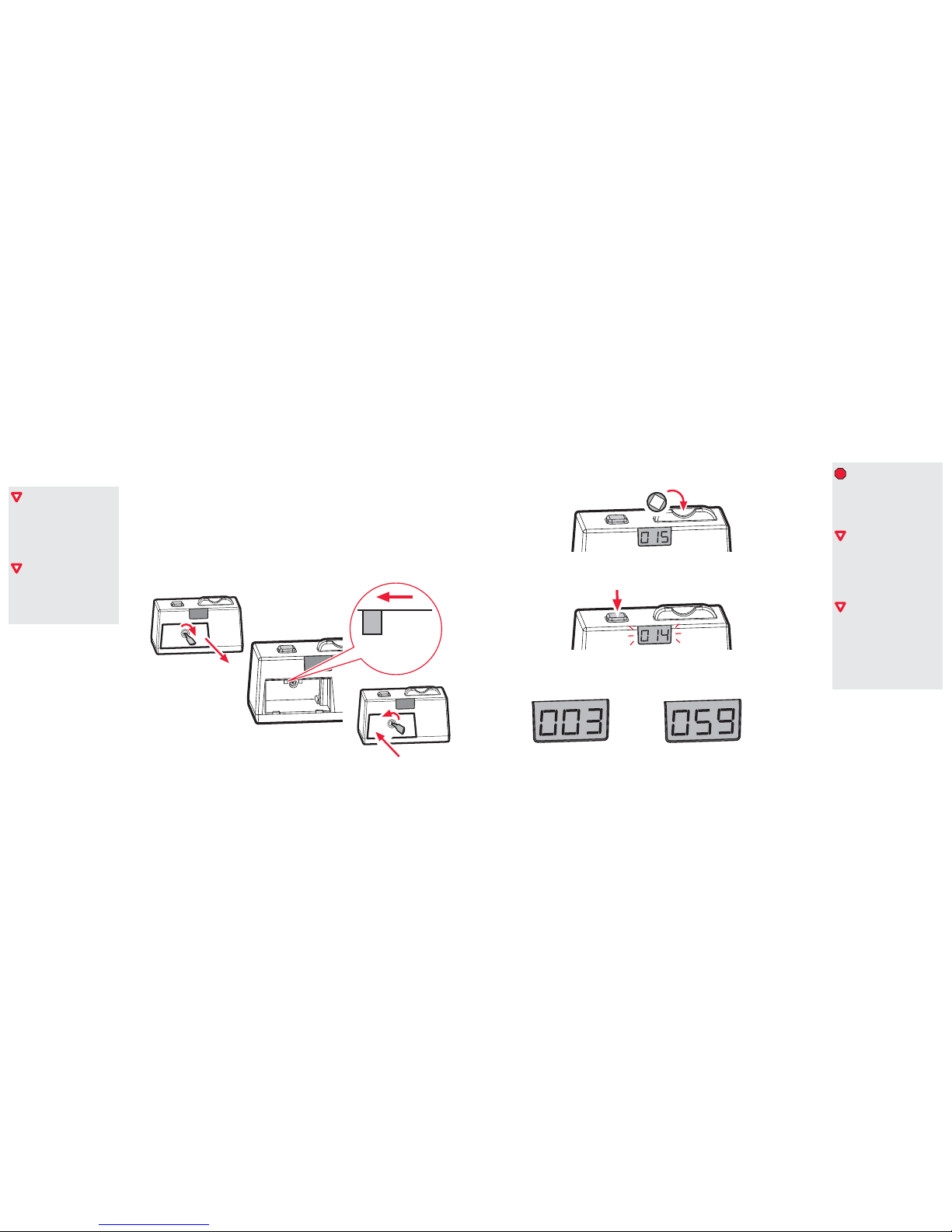
1 Set the Mode switch.
Use a Coin Box key to open the front door, put the Mode switch to TOKEN, and close and lock the front
door.
2 Turn on the game console and the TV.
These operation instructions
are for parents. See
Suggestions & Strategies on
Page 17 for examples of how
to approach teaching PlayLimit
operation to your children.
PlayLimit does not have a
power switch. After the
PlayLimit is setup, it is ready
for operation.
Insert only PlayLimit tokens.
Smaller coins will not register
time. Larger coins will not fit in
the slot. Thicker coins could jam
the slot.
The Coin Box holds
approximately 100 tokens at a
time. There is no warning device
to let you know when its full,
so you must periodically remove
used tokens.
The Time Display shows the
remaining time in minutes. (For
example, 100 is 100 minutes,
not one hour.) However, when
the time is less than one minute,
it shows time in seconds.
3 Put tokens in the token slot.
Each token adds 15 minutes of play time. The Time Display shows the amount of play time remaining.
The timer starts immediately after you put in the first token.
4 If you need to stop playing temporarily, press the Pause button at any time.
PlayLimit puts a PAUSE screen on the TV and the timer stops. The Time Display flashes the remaining
time. Press the Pause button again to begin play.
5 When PlayLimit warns you that your time is running out, you can either add more tokens
or save and quit your game before the time runs out.
PlayLimit causes the TV to beep when game time remaining is at three minutes and again at one minute.
When less than one minute remains, the Time Display counts down in seconds.
TOKEN ON OFF
15
3 minutes Less than a minute
Page 8
PlayLimit.com PlayLimit.com
1312
On (Bypass)
In this mode, PlayLimit allows unlimited play and TV viewing.
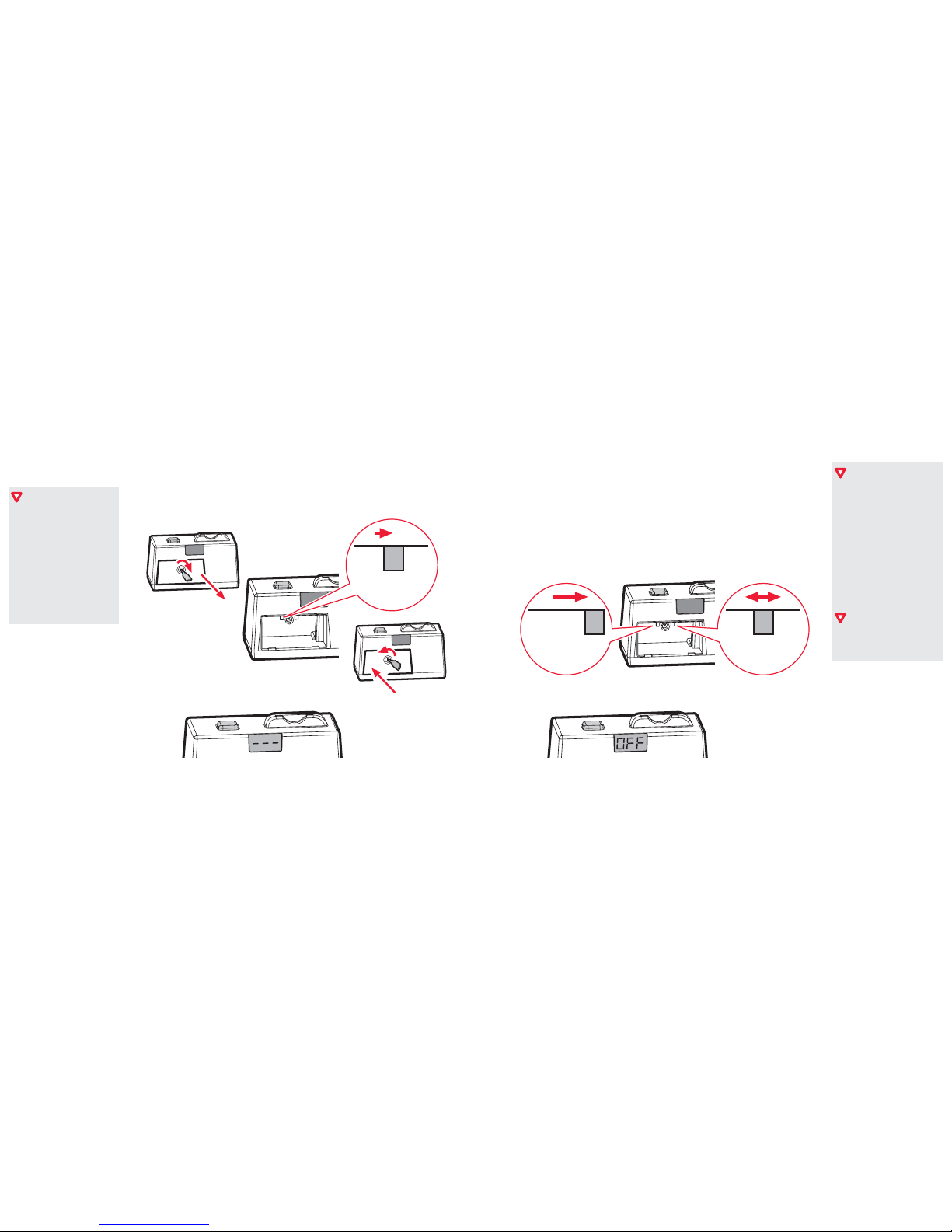
1 Set the Mode switch.
Use a Coin Box key to open the front door, put the Mode switch to ON, and close and lock the
front door.
2 Start the game console and the TV.
3 The video signal is unblocked the Timer Display shows - - -.
Here are a couple of examples
of when you would want to use
On (Bypass) mode:
Your children are not using
the game console, and you
want to use it without having
to put tokens in.
Your children have friends
over, and you dont want
them to have to supply
everybody with tokens.
Here are a couple of examples
of when you would want to use
Off (Lock) mode:
Your children has a school
project due, and you want to
make sure they are not
tempted to waste time
playing games.
You are going to be out of
the house, and you want to
make sure nobody will use
the game console.
PlayLimit blocks the video
signal only. The audio signals
are not blocked.
Off (Lock)
In this mode, PlayLimit does not allow any play or TV viewing.
1 Set the Mode switch.
Use a Coin Box key to open the front door and put the Mode switch to OFF.
2 Set the Control switch.
If you want the to allow TV viewing but not game playing, set the switch to GAME.
If you want the to allow game playing but not TV viewing, set the switch to TV.
If you do not want the to allow TV viewing and game playing, set the switch to BOTH.
3 Close and lock the front door and, if needed, start the game console or the TV.
4 The video signal is blocked the TV and the Timer Display show OFF.
TOKEN ON OFF
TOKEN ON OFF GAME TV BOTH
Page 9
PlayLimit.com PlayLimit.com
1514
Troubleshooting
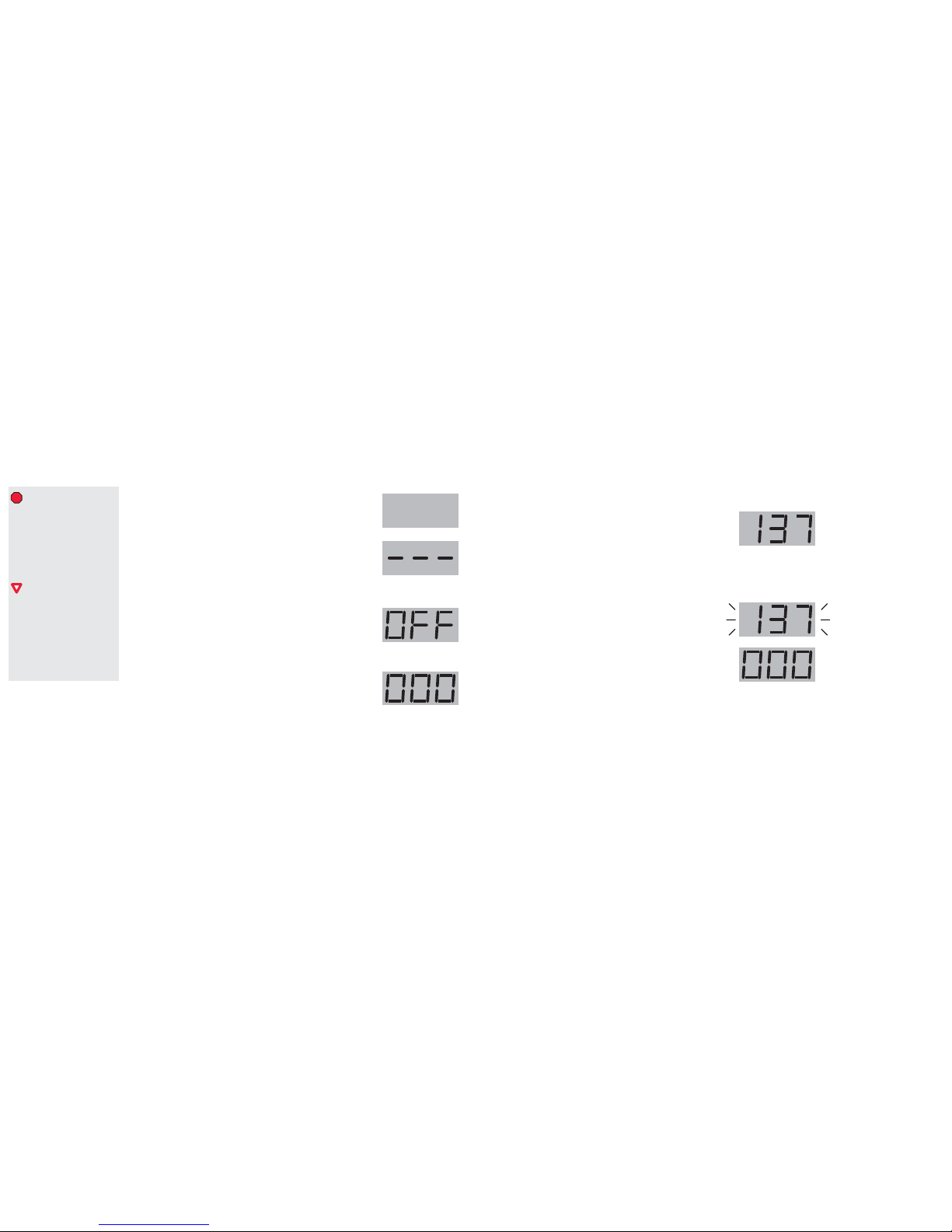
The Time Display is blank (no numbers or letters).
The PlayLimit console does not have power. Check the AC/DC
Adapter at the connector and at the outlet.
The Time Display shows - - - and inserting tokens
does not add time.
The PlayLimits Mode switch is in the ON position. If you want to
use tokens, use a Coin Box key to open the front door, put the
Mode switch to TOKEN, and close and lock the front door.
The Time Display shows OFF and inserting tokens
does not add time.
The PlayLimits Mode switch is in the OFF position. If you want
to use tokens, use a Coin Box key to open the front door, put the
Mode switch to TOKEN, and close and lock the front door.
The Time Display shows 000 but does not block
the video on the TV.
The PlayLimits Control switch is in the wrong position. Use a
Coin Box key to open the front door, put the Mode switch the
needed position, and close and lock the front door.
If you have only a TV connected to the PlayLimit, put the
switch to TV.
If you have only a game console connected to the PlayLimit,
Never take the PlayLimit console
apart to access a jammed token
slot. Only the front door and
rear security panel are designed
to be removed from the
PlayLimit console. Further
disassembly of the PlayLimit
console may cause damage.
PlayLimit is part of an
entertainment system. If you
are experiencing problems, you
should also consult the
Troubleshooting sections of the
manuals for the other
components (such as game
consoles and TVs).
put the switch to GAME.
If you have a TV connected and a game console to the
PlayLimit, put the switch to BOTH.
The Time Display shows a number but adding tokens
does not add time.
The Coin Box is full.
Use a Coin Box key to open the front door, remove the tokens,
and close and lock the front door.
The Token Slide is jammed.
Contact PlayLimit. See Service on page 16.
The Time Display shows a number, but it is blinking.
The Pause button has been pressed.
Press the Pause button (on top of the PlayLimit) to resume play.
The Time Display was showing a number, but it reset
to 000.
Power was removed from PlayLimit console and then it was again
applied. The PlayLimit timer will always reset in this case. The
only way to get the time back is to insert tokens.
Page 10

PlayLimit.com PlayLimit.com
1716
Service
If you are having any operating problems with your PlayLimit, please use the following
steps until you are able to resolve the problem:
1 Use this User Guide to identify the problem. See Troubleshooting on Page 14.
2 Check the PlayLimit website for the most recent service information. Go to:
http://www.playlimit.com/service
3 Contact the PlayLimit Service Department by Email at [email protected]
Please include the following information:
Location and date you purchased your PlayLimit
A description of your setup (whats connected to your PlayLimit)
A detailed description of the problem you are experiencing
Your name and email address
4 Contact the PlayLimit Service Depar tment by Phone at 1-800-555-1234.
Service Department hours are between 9:00AM and 5:00PM EST, Monday through Friday.
__________________________
Other service notes:
To clean the PlayLimit console, wipe it with a clean, dry towel.
Lost your coin box keys? Need additional tokens? Order more at our website. Go to:
http://www.playlimit.com/service
Need additional cables? Go to your local electronics store.
If you purchased your PlayLimit
in a store, do not return
PlayLimit to the store. Follow
the procedure on this page. If
your PlayLimit is under
warranty and you need to send
it to us, we will issue you an
RMA.
When setting up your PlayLimit,
remember to keep the console
low enough so kids can easily
insert tokens, and high enough
so kids can easily see its Time
Display.
Suggestions & Strategies
Purpose of PlayLimit
PlayLimit allows busy parents a simple and convenient way of limiting the time their
children spend in front of a TV. Study after study has shown that too much TV is bad for
children. Even educational video games and programs, if not restricted, can reduce a
childrens ability to think and learn for themselves.
How can PlayLimit help? Simple. By giving kids tokens for a certain time period, parents
set a definite limit on how much TV they can watch. Whats more, the tokens empower
kids to manage their own time, so parents no longer have to be the times up! police.
Once children understand their TV limits, parents can encourage other activities such as
reading, drawing, and sports to fill the void. And thats the ultimate purpose of PlayLimit
to be a positive experience for both parents and children.
Introducing PlayLimit to Your Kids
PlayLimit is quite flexible you can be as strict or as lenient as you want. But regardless
of your approach, you should talk with your kids about PlayLimit before installing it.
Demostrate how PlayLimit works and explain how you intend for them to use PlayLimit
to access video game and/or TV viewing time. There are two basic approaches:
Tokens as an Allowance. Give your children a certain amount of tokens over a given
time period. For example, four tokens per day. In this case, the children would know
that they have only one hour per day for TV time. If they would like to play a video
game for two hours, they would have to save tokens for two days.
Page 11

PlayLimit.com PlayLimit.com
1918
Tokens as a Reward System. Give your children a certain amount of tokens after
they complete tasks or reach goals. For example, 32 tokens for a good report card.
In this case, the children would know that they earn 8 hours of TV time by getting
good grades for a marking period
Using Other Operation Modes
You will no doubt have instances when the standard token for time operation will not
be what you want. Here are a few situations when you might want to use other operation
modes:
When you want to allow unlimited access, put the Mode switch to ON.
When you want to block all access, put the Mode switch OFF.
When you want to block game access but allow unblocked access to the TV, put the
Mode switch to TOKEN and the Control switch to GAME.
When you want to block TV access but allow unblocked access to the game console,
put the Mode switch to TOKEN and the Control switch to TV.
Avoiding Temptations to Cheat
Here are a few things you can do to reduce the chance of kids trying to bypass PlayLimit:
Make sure you put all coin box keys in places where children wont be tempted to take
them.
Encourage children to take care of their tokens in the same way they would take care
of their money.
Dont have extra game console AV composite cables available.
FAQs
Does PlayLimit block Internet connections?
No. PlayLimit has no inputs for networks, so it does not have special controls for games
played over the Internet.
Can I order more tokens or coin box keys?
Sure! Go to http://www.playlimit.order.htm
If I have more than one PlayLimit, are the tokens or coin box keys different?
No. All PlayLimit tokens and locks are the same, so you only need one key.
Is PlayLimit a content control system?
No. In fact, PlayLimit only blocks video content when time is up. Audio content, inappropriate
or otherwise, is not blocked.
What is the target age group for PlayLimit?
Ages 5 to 12, although it is certainly possible to use PlayLimit with teenagers.
Does PlayLimit have outputs for HDTV (High Definition Television)?
No, not at this time. Game consoles typically do not have high-resolution outputs and
very few games are written to take advantage of HDTV.
See the most up-to-date list of
frequently asked questions at
http://www.playlimit.com/faq.
htm
Page 12

PlayLimit.com PlayLimit.com
20
FCC Compliance
This equipment has been tested and found to comply with the limits for a Class B digital device, pursuant to
Part 15 of the FCC Rules. These limits are designed to provide reasonable protection against harmful interference
in a residential installation.
This equipment generates, uses, and can radiate radio frequency energy and, if not installed or used in
accordance with the instructions, may cause harmful interference to radio communications. However, there
is no guarantee that interference will not occur in a particular installation.
If this equipment does cause harmful interference to radio or television reception, which can be determined
by turning the equipment off and on, the user is encouraged to try to correct the interference by one or more
of the following measures:
Reorient or relocate the receiving antenna
Increase the separation between the equipment and the receiver
Connect the equipment to an outlet on a circuit different from that to which the receiver is connected
Consult the dealer or an experienced radio/TV technician for additional suggestions
Limited Warranty (or Disclaimer/Limitation on Liability)
SpinDance, Inc. warrants to the original consumer purchaser that the PlayLimit System and all component
parts shall be free from defects in material workmanship for a period of 90 days from the date of purchase.
If a defect covered by this limited warranty occurs during this 90-day warranty period, SpinDance will repair
or replace the defective system or component part, at its option, free of charge. This limited warranty does
not apply if the PlayLimit is used with products not distributed or licensed by SpinDance , or if the defects have
been caused by negligence, accident, unreasonable use, modification, tampering or any other causes not
related to defective materials or workmanship. Additionally, this warranty shall not be valid if the serial number
of the PlayLimit System unit has been altered, defaced or removed in any way. Please retain the original or a
photocopy of your dated sales receipt to easily establish the date of purchase for in-warranty repairs.
© 2004 SpinDance, Inc. All rights reserved. PlayLimit is a trademark of SpinDance, Inc.
Will PlayLimit work with other coins?
No. PlayLimit is designed to work only with PlayLimit tokens. Other coins may slide through
without registering time or become jammed inside.
What stops somebody from plugging the game system directly into the TV?
Game systems have special cables with a unique connector on one end (which connects
to the game console) and red, white, yellow composite connectors of the other end. The
composite connector is locked inside the PlayLimit.
Is there a special price for ordering more than one PlayLimit?
???
Does PlayLimit come with a money-back guarantee?
???
Does PlayLimit come with a manufacturers warranty?
???
How do I return a PlayLimit?
See the procedure under Service on Page 16.
Page 13

PlayLimit.com PlayLimit.com
For more information, please visit our website:
www.playlimit.com 8/2004
The
Smart
Way
to Let Kids
Play
PLAY
LIMI T
 Loading...