

Page 1
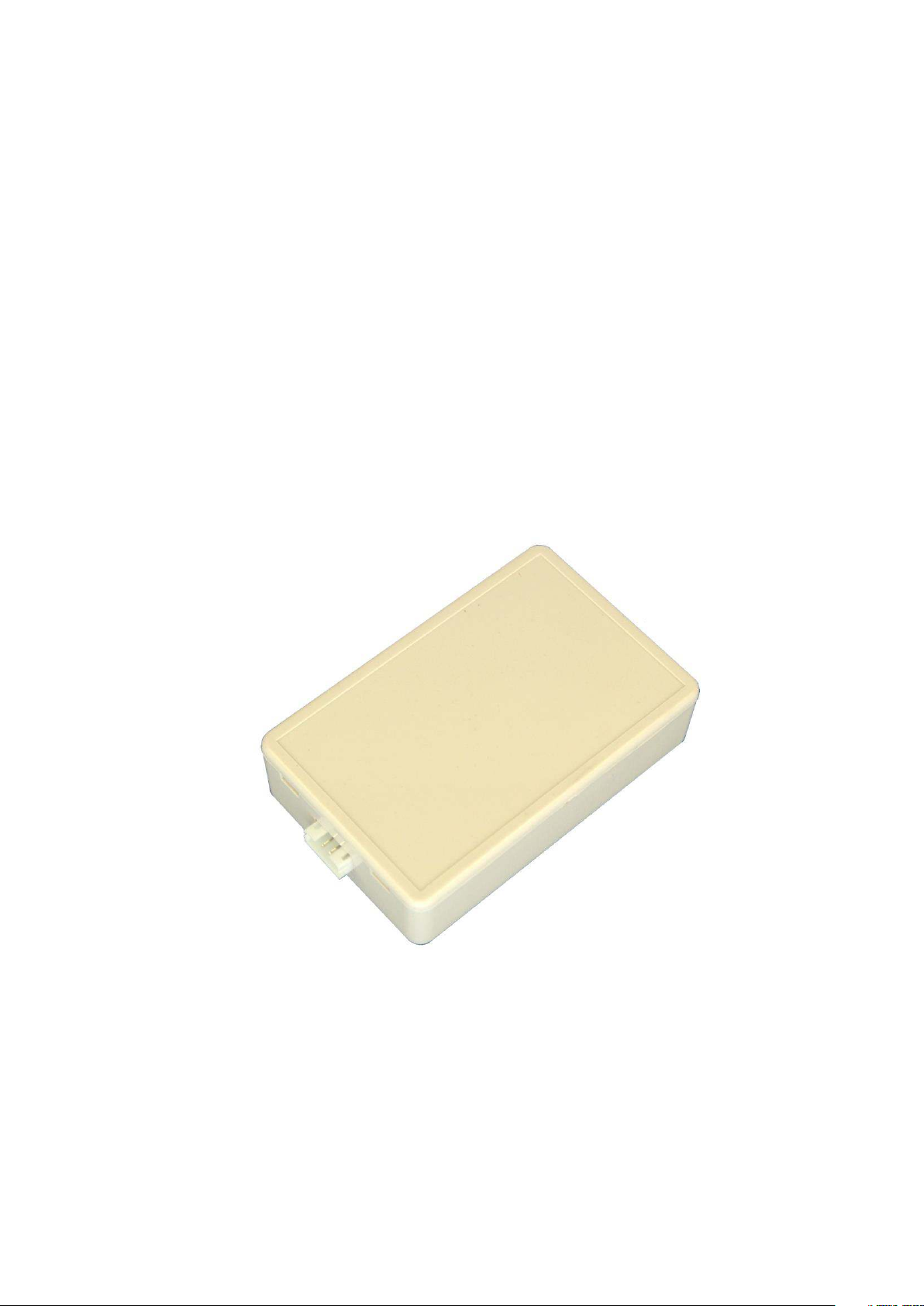
GPS-tracker
with built-in GPS and GSM antennas
Spider TR-304
User manual
Page 2

Mobile Electronics co.
Key features:
No external antennas. It saves time and money for installation. It also fits well for
hidden installation and keeps device less vulnerable to sabotage.
Compact design makes installation simplest and easiest ever possible. Hidden
installation prevents sabotage and helps to rise up the security.
Intelligent track- drawing - device registers changes in speed, course, voltage,
acceleration or braking, shocks, falls etc. No events or useful info will be missed,
while no useless track-points will bother you.
Vehicle blocking (using auxiliary output) via web-service/phone call/SMS can be
used. You can block, unblock or block safely (blocking will activate automatically on
stop) engine, for example.
Additional external battery (12V VRLA type) can be optionally attached if needed
Extensive modes list (online/periodic/stealth/moto/cargo) gives you freedom to
choose best balance between accuracy and actuality of tracking data and power saving
of vehicle and tracker’s battery.
All the device configuring (if needed) can be done remotely via user account on web
server
Simple and intuitive usage – just plug device on and insert a SIM-card.
1
Page 3
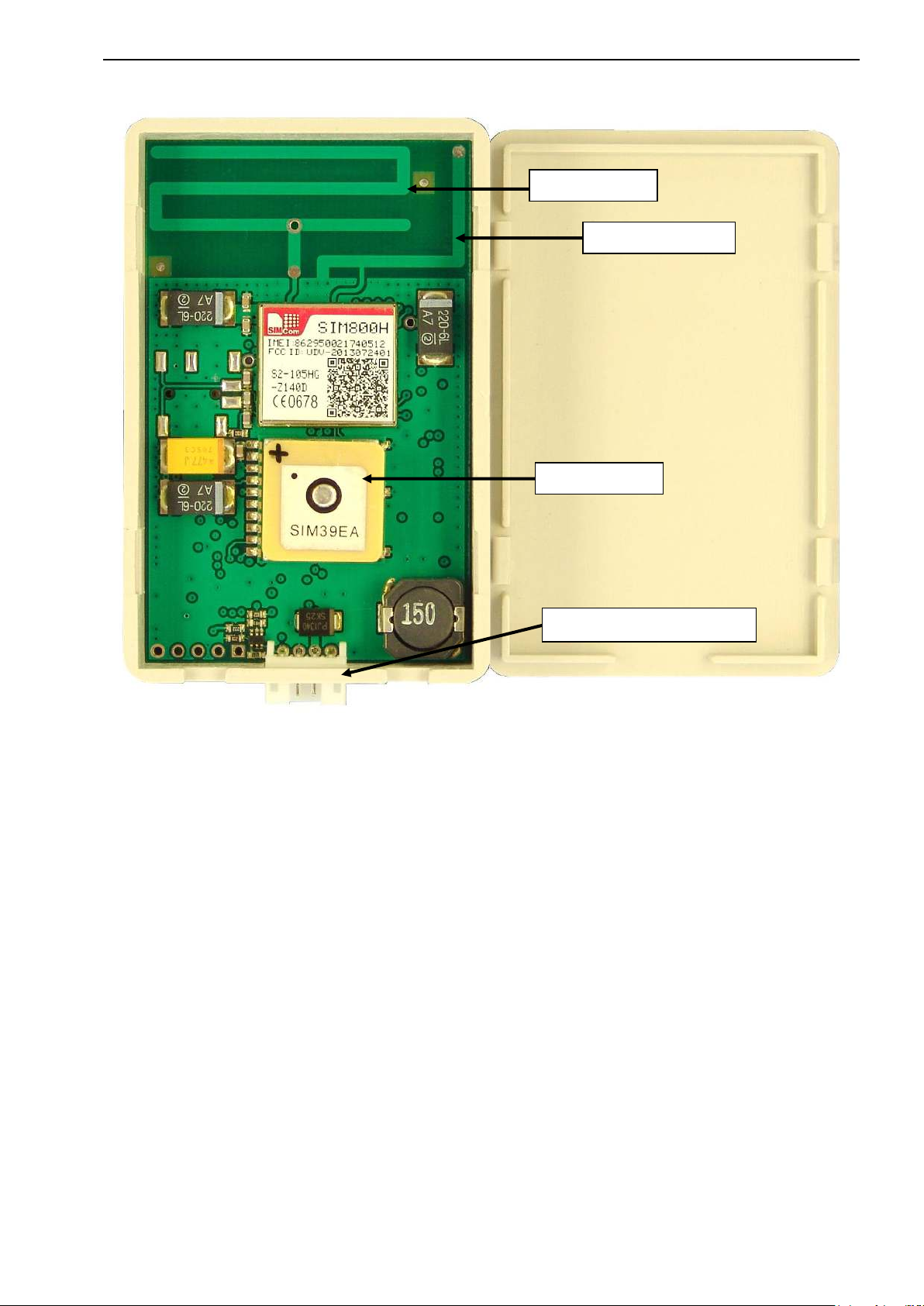
Device view (with cover removed):
GSM antenna
GPS antenna
System connector
Bluetooth antenna
Mobile Electronics co.
Technical characteristics:
Positioning type GPS
extra positioning (where satellite signal cannot be received) GSM Cell-location
Tracking data transmission media GSM900/1800/1900
FLASH-memory storage capacity 80000 points (~10 000 km)
Server connection protocol Compressed, encrypted
Multifunctional I/O interface line can be used as:
Digital input: Emergency-button / sec. alarm / extension line
Digital output: O.C., 30V, 0.1A
Main Power voltage 6… 30V
Reserved power voltage (LA battery) 12V
Operating temperature range -25 … +85ºC
Storage temperature range -35 … +95ºC
Size (l х w х h) 69 х 48 х 16
Weight 0,045 kg
2
Page 4
Mobile Electronics co.
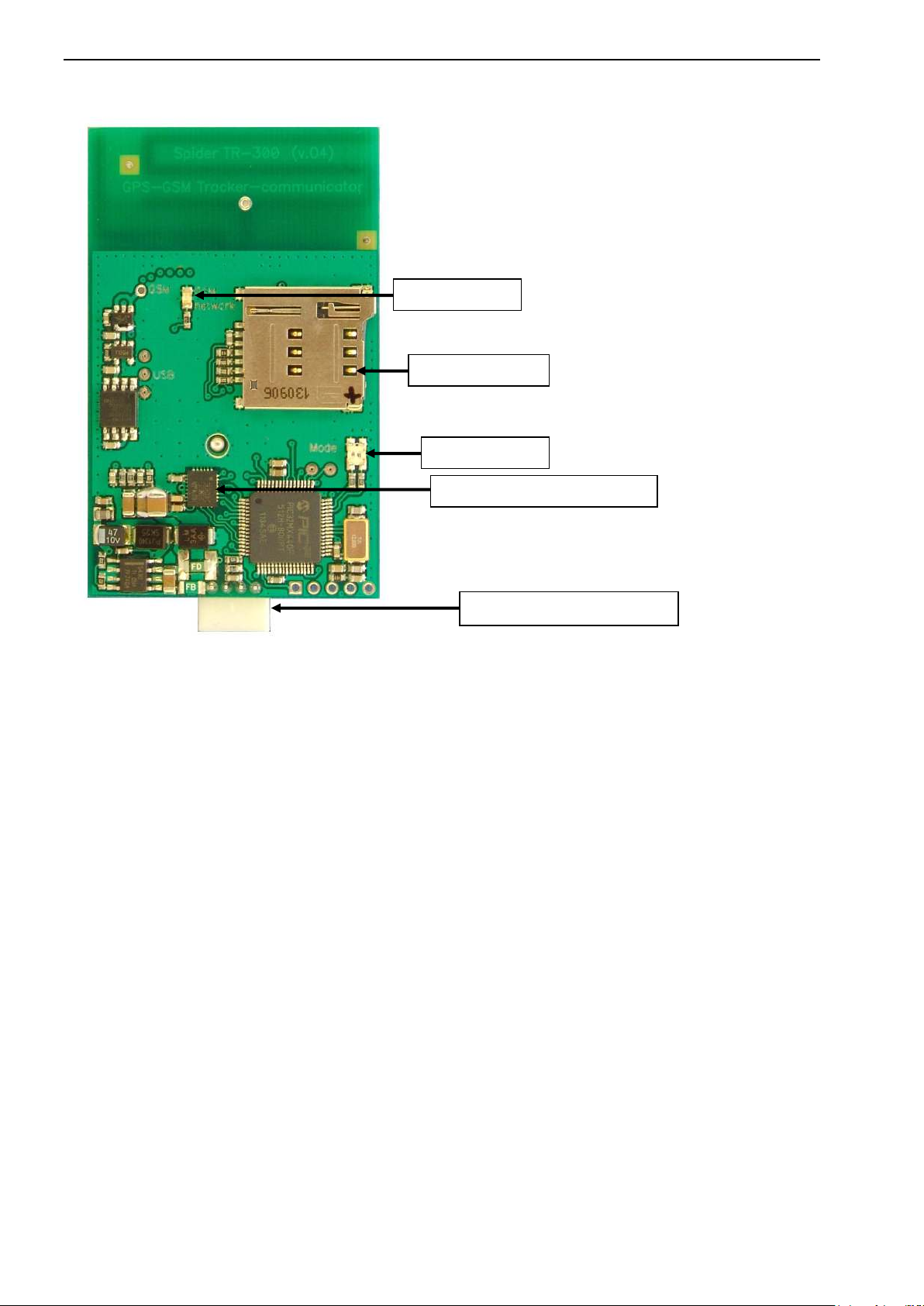
GSM LED
SIM card holder
System connector
MODE LED
3-D accelerometer + 3-axis gyro
Device view (reverse side):
GSM LED off GSM-modem is off
1 blink per 1 second Network registration in progress (or impossible)
1 blink per 3 seconds Network registration is o.k.
MODE LED off (constantly) device is in Sleep mode
green for 0.5s (every 10s) Active mode
green for 2s Waking up
red for 2s Sleeping down
green for 0.5s (once) SIM inserted
red for 0.5s (once) SIM removed
red for 0.2s new “point” added to log
yellow for 0.2s new “point” sent to server
yellow for >0.2s few new “points” sent to server
green blinking firmware downloading
yellow blinking firmware updating
red blinking FLASH formatting
3
Page 5
Mobile Electronics co.
SIM-card preparing
1. SIM-card must be valid. There should be money on pre-paid account. If card became inactive (or limited
in service by an operator) tracker TR-304 will store all the data in internal FLASH-memory. This data will be
sent to server as soon as connection will be restored.
2. PIN must be disabled.
The rest is optional…
3. You can optionally use contacts from address book of SIM-card
Remove all the unnecessary (“trash”) contacts from SIM-card first. Then you can add to 8 registered users
(and up to 20 contacts, including special setups).
Registered users:
- get the ability to control device via SMS
- get the ability to use audio port of device and take control via DTMF-menu
- will receive SMS notifications on Alarms and Emergency-button engaging
Registered users contacts should have international number format and can have any name of contact, except
special ones (see below).
Spider TR-304 has an operators database for APN-setups and USSD codes for automatic balance check for
many countries. It does not usually demand any manual programming. Nevertheless these setups can be
overridden by registering contacts on SIM-card with special names:
3.1. Contact Name «$» can contain USSD-code for checking balance (if needed) in Contact Number
(ex. *111#)
3.2. Contact Name, beginning from «*» will be interpreted as APN name. Contact Number can be left
empty for it. If APN name does not fit into one contact, you can use more contacts, beginning
from «*»-symbol. Device will glue the text together.
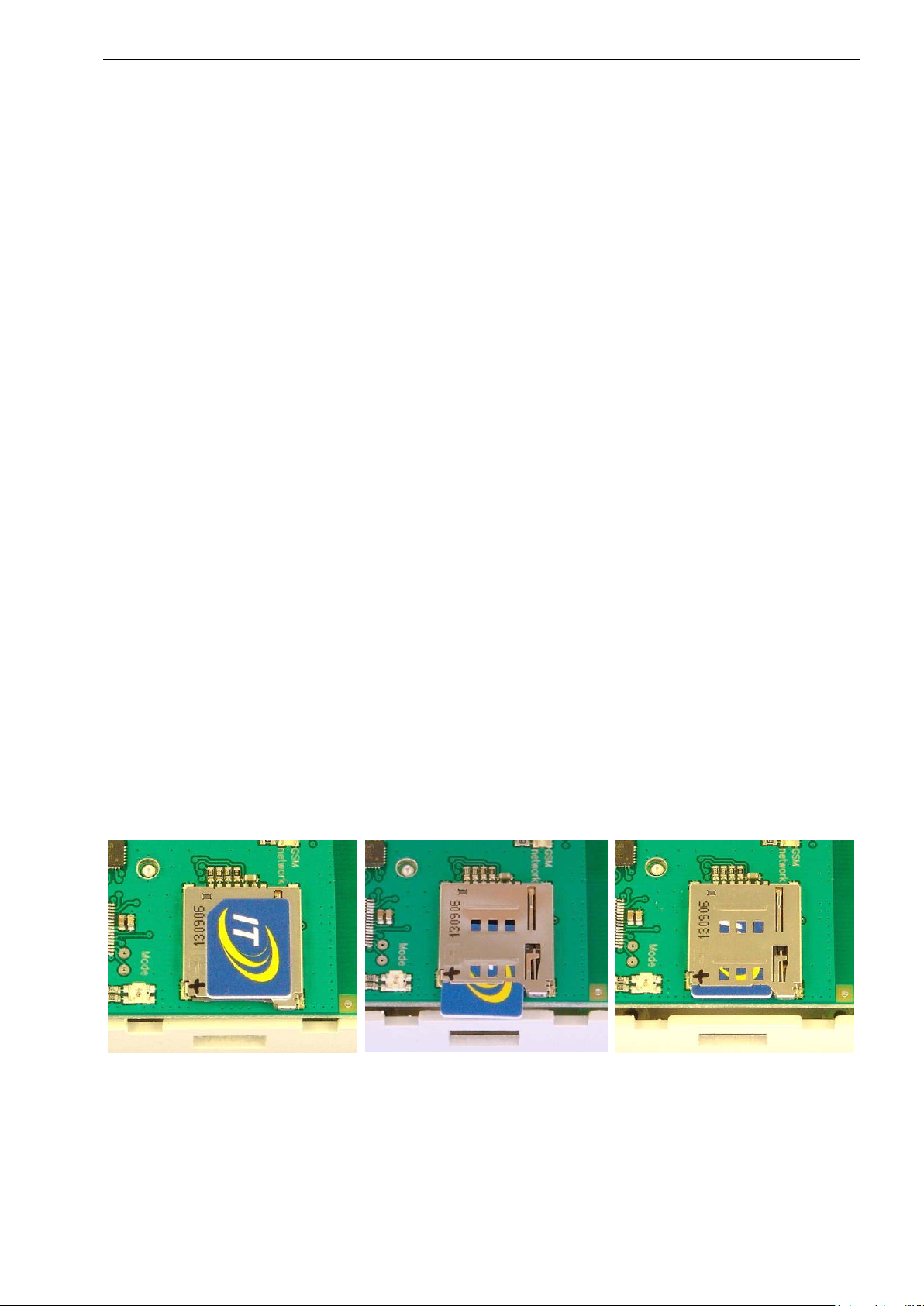
SIM-card installation
Take TR-304 PCB out of the box,
insert SIM-card (micro-size) into the slot with contacts down as shown
and push it until the click:
To release SIM-card just push it again.
4
Page 6
Mobile Electronics co.
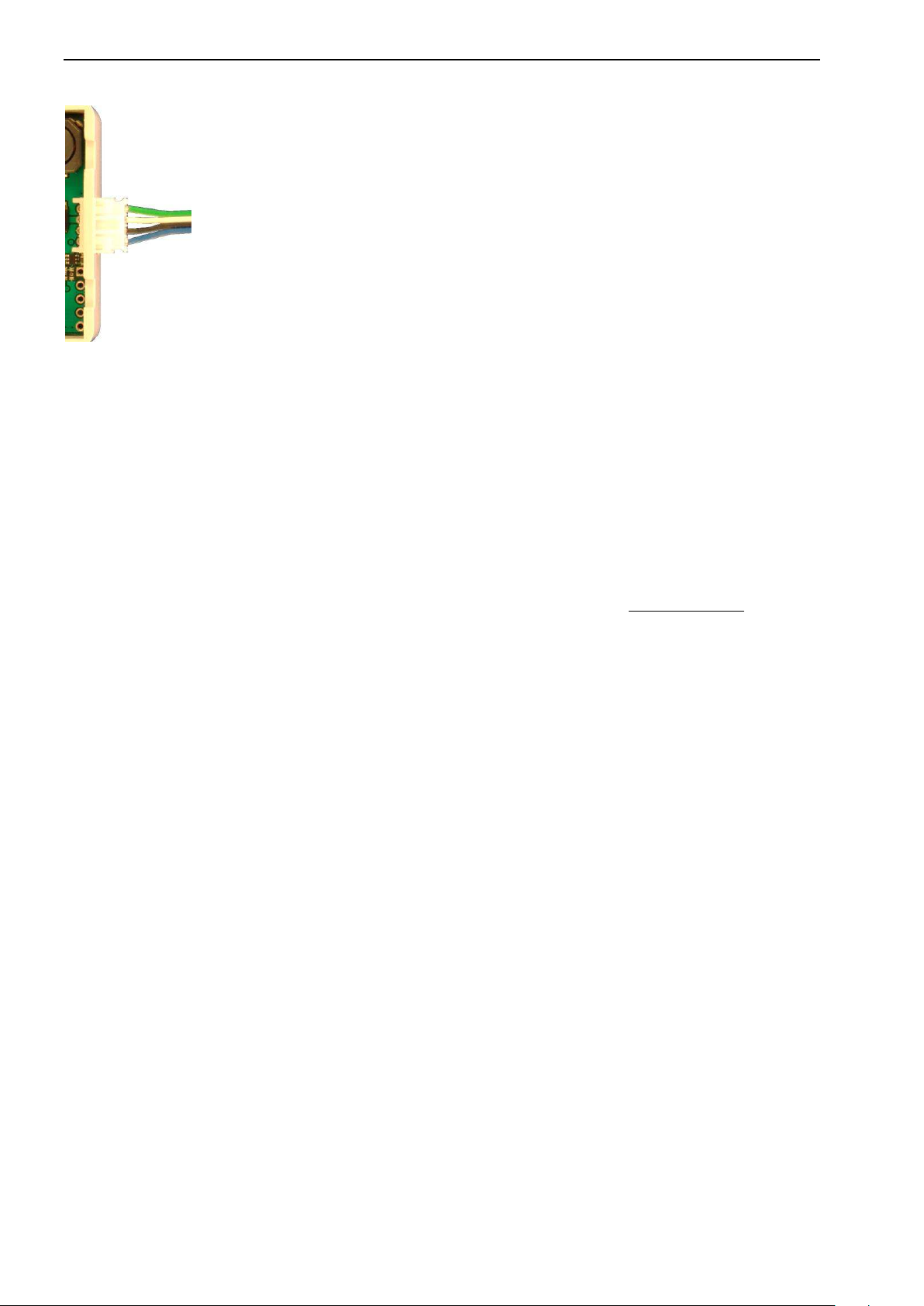
System connector pinout:
GREEN External VRLA battery (optional) (+), 1.3/2.2 A*h
WHITE Power* (+ 6…30 V)
BLACK GND
BLUE Multifunctional I/O line
Detailed installation recommendations and connection schematics for specific vehicles
(if needed) are available on demand. Contact our support team.
Powering the device
To power up TR-304 tracker must be powered constantly for proper operation.
It controls a vehicle engine running via power voltage changes.
Tracker saves energy, especially in Cargo and Moto modes, entering the sleep and awakes on starting an
engine or movement. But power must be supplied constantly.
External Battery
TR-304 is a compact-design cost-effective tracker. That is why it does not contain internal battery.
Nevertheless external battery can be optionally added if necessary. Use 12 V sealed VRLA (Valve Regulated
Lead Acid ) / AGM (Absorbent Glass Mat ). 1.3 of 2.2 A*h batteries can be used (on 12 V vehicles).
Multifunctional I/O
TR-304 has a multifunctional I/O line, which can be configured with device setups as:
- Emergency-button input
- Security alarm input
- “Busy/in operation” input (for taxi or other commercial applications)
- Engine blocking output
- Extension Communication line (to connect o temperature sensors, TPMS system etc.)
Vehicle blocking
Blocking can be implemented using auxiliary output of Spider TR-304. It can be controlled:
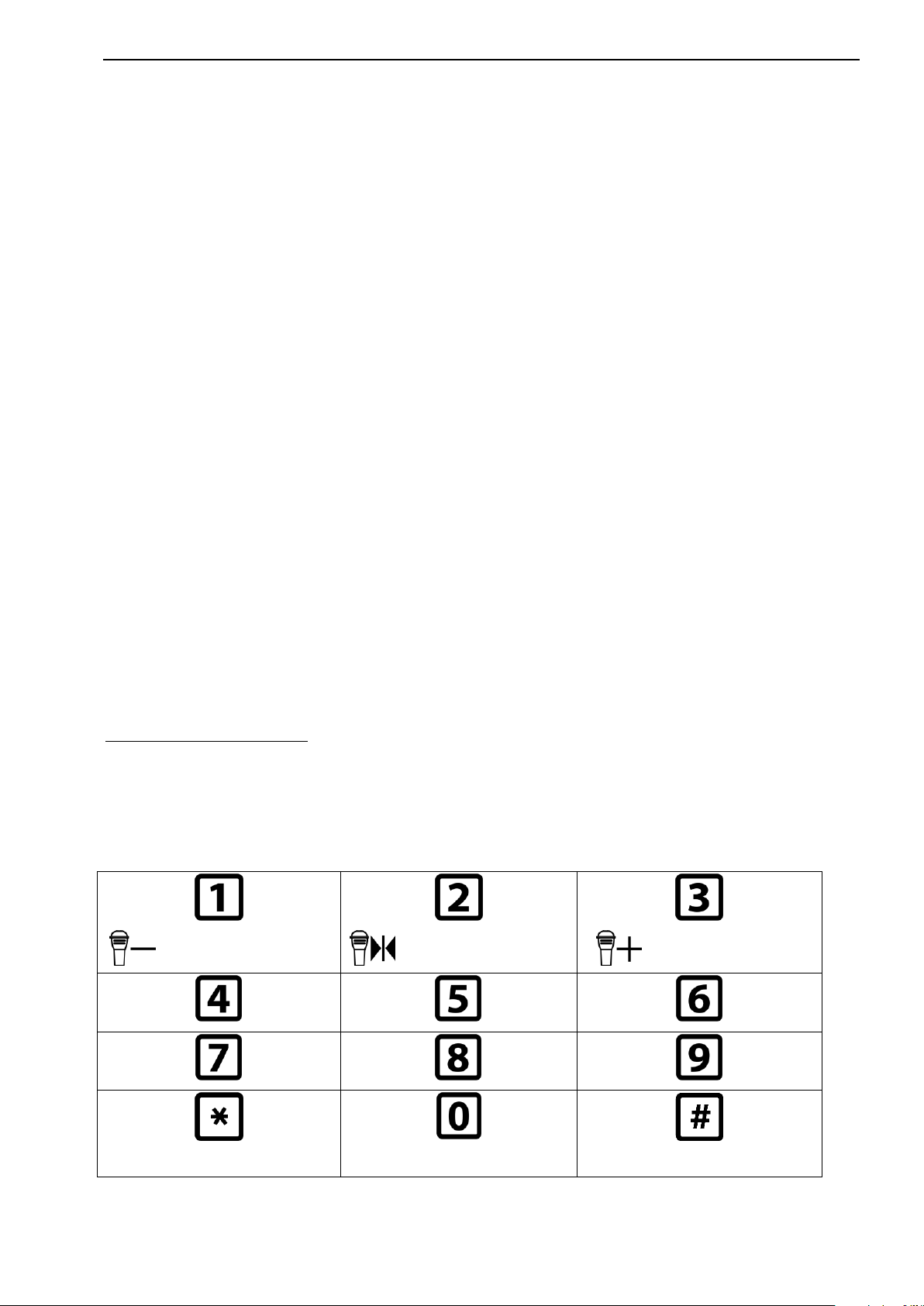
1) Via DTMF-menu (buttons [*], [0] [#])
2) Via SMS commands (block, blocksafe unblock) from registered user
3) Via WEB server commands (block, blocksafe unblock) from user’s account
block – engages output immediately;
blocksafe – will wait until vehicle stops then engages
Polarity of blocking can be programmed as Normally opened (no blocking with tracker removed) or
Normally Closed (removing of tracker will block the vehicle).
Emergency button
Depressing EMERGENCY button generates system Emergency event which is transmitted to server as soon
as possible. Emergency events have the highest priority and can be sent even in roaming connection-limited
modes or tracker sleep mode with automatic waking up.
Emergency events are duplicated with SMS messages to all the registered on TR-304 SIM cards contacts (up
to 8). Message will contain text: "EMERGENCY! <date, time>, <Location>, <google maps direct link>".
This link can be opened in phone’s browser.
5
Page 7
Mobile Electronics co.
Decrease mic.
sensitivity
Set mic.sens. to
middle
Increase mic.
sensitivity
BLOCK
BLOCK safely
UNBLOCK
Registering on WEB server
Use internet browser to go to server page www.track-me.org
(we recommend Google Chrome, Opera, Firefox)
If you do not have an account – please register.
You can also use free access DEMO account (but it is available to everybody, so plan to register eventually)
When registering, have in mind few things: Minimal login length is 8 symbols. System will prevent you from
inputting wrong with background color:
rose — unacceptable login / low security password
ты — medium level password
ы — acceptable login / good password
Keep your authorization data safe. Because of your access to your data depends on it.
After registering tell our support team ID of your device and account (login name) you want to tie it to.
You can use e-mail, skype or phone to contact support personally. You can also send this info via your dealer.
Configuring device
You can configure TR-304 setups:
1) with SMS commands
2) using online configuration tool on web-server track-me.org
We recommend you to use online configuration, which is simple and convenient.
Other methods configuring info is available on demand (contact support service if necessary)
Firmware update
There are 2 ways of firmware updating TR-304:
- using service connector (contact your dealer)
- remote update via web server (automatically)
To update FW via web server this option must be enabled it setups. Being notified with new FW available,
TR-304 will download FW file from server and will update itself on next parking (to avoid tracking loss).
Everything will be done automatically.
Audio port and DTMF-menu
During phone call Spider TR-304 will react on DTMF-tones:
6
Page 8

Mobile Electronics co.
Warranty
As well as all products of Mobile Electronics co., Spider® TR-304 trackers are covered with lifetime
warranty.
Any component, material or manufacturing defect (if found while installation or using the product) will be
repaired free of charge. If repair is impossible – device will be replaced.
This warranty does not cover malfunction caused by mechanical, chemical, electrical or any other damage
caused by improper installation use in harsh surrounding beyond operation conditions. In these cases repair
can be done for charge.
Wearable parts (like frequently used joints or connectors) and chemical power sources (batteries and
accumulators) are covered with time-limited warranty – 2 years.
This warranty applies to Spider® product and it’s functionality, but does not cover any other damages, direct
or indirect, arising from product operation or the impossibility of product use.
Firmware updates, including functionality improvements are free of charge for any legal owner of our
products.
Contacts
WEB:
Online monitoring:
Technical info: http://www.mobileelectronics.com.ua
Support forum: http://mobileelectronics.com.ua/forum/
If any difficulties in getting support met –feel free to use direct phone number:
https://track-me.org/
+38 095 0100015
7
 Loading...