

Page 1

Vacuum Meter
840064
Instruction Manual
SPER
SCIENTIFIC
LTD.
Page 2

CONTENTS
Title Page
1. Introduction .............................................................................. 2
2. Meter Description .................................................................... 3
3. Operating Instructions
3-A Notes - Read Before First Use ...................................... 4
3-B Measurement Procedures ............................................. 4
3-C Hold ............................................................................... 4
3-D Maximum / Minimum Recording ................................... 4
3-E Automatic Shut Off ........................................................ 5
3-F Battery Replacement .................................................... 5
3-G Optional Accessories .................................................... 5
3-H RS232 PC Serial Interface ............................................ 6
4. Specifications .......................................................................... 7
5. Warranty .................................................................................. 8
INTRODUCTION
Portable meter for absolute vacuum pressure measurements in hospital
labs, crystal growing, solvent recovery, distillation, and rotary evaporation.
Also used in HVAC, automotive and other industrial applications. Includes
a detachable heavy-duty probe with ¼ PS connector for liquid, air, oil and
gas.
Features a large display, min-max, hold, low battery indicator, auto power
off, an RS232 computer interface, and 8 units of measure: torr, mm Hg,
micron, mbar, KPa, PA, inch Hg, and PSI.
Comes ready to use in a foam-lined, hard-shell carrying case, with 9V
battery and instructions.
- 2 -
Page 3
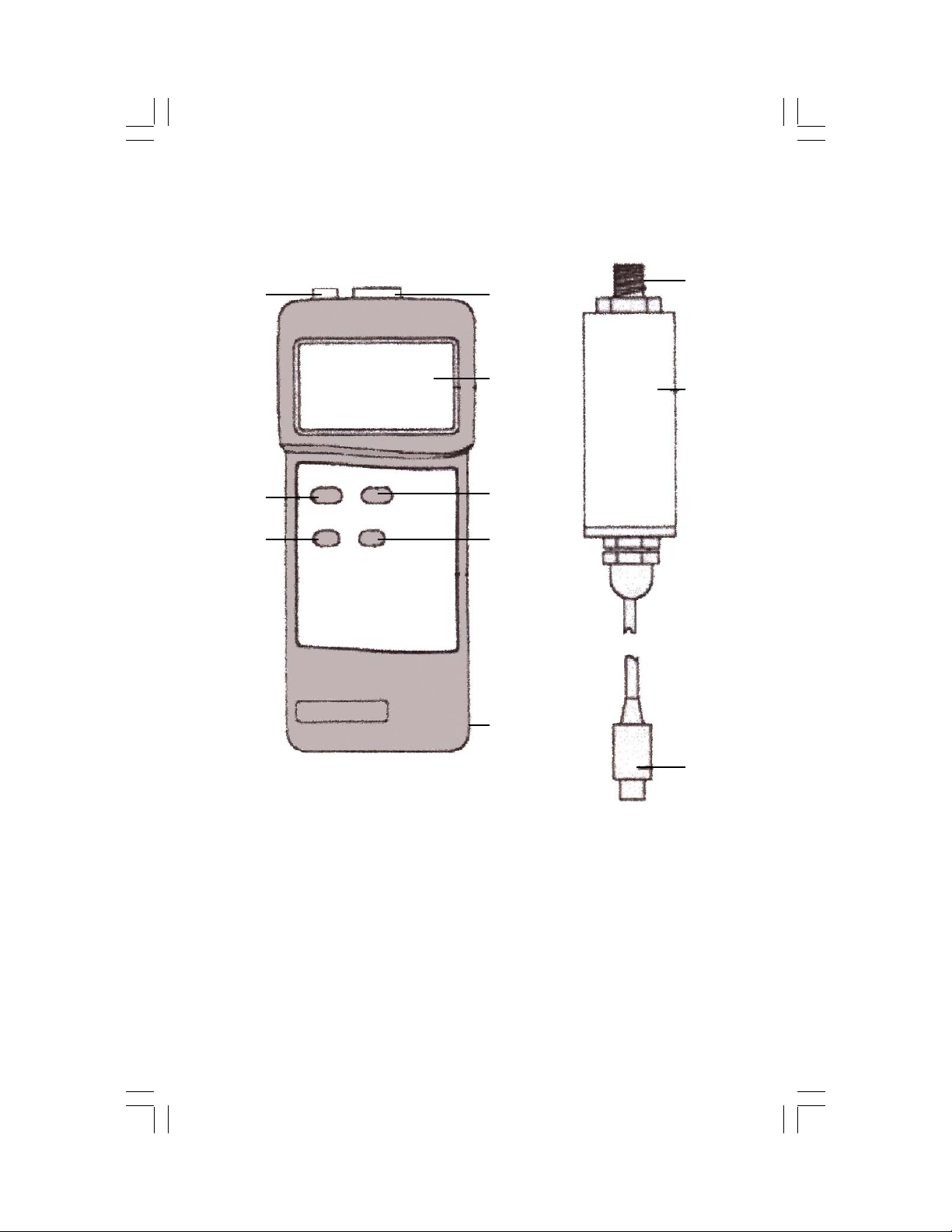
2. METER DESCRIPTION
1
2
3
4
5
6
7
8
9
10
11
1. RS232 Output Terminal 7. Unit Button
2. Power Button 8. Battery Compartment (back)
3. Max/Min Button 9. Sensor Input
4. Input Socket 10. Sensor Body
5. Display 11. Probe Plug
6. Hold
- 3 -
Page 4

3. OPERATING INSTRUCTIONS - See item 2 on page 3 for button
locations and description.
3-A. NOTES - READ BEFORE FIRST USE
• Do not insert objects into the Sensor Input (9) or the diaphragm
can be damaged and the warranty voided.
• The sensor is compatible with industrial gases and liquids that are
also compatible with ceramic material.
• The sensor must be attached to the meter in order to display the
ambient barometric pressure (in/Hg). Otherwise, "0" will be displayed.
•
3-B. MEASUREMENT PROCEDURES
• Connect the Probe Plug (11) to the meter's Input Socket (4).
• Press the Power (2) button to turn on the meter.
• Press the Unit (7) button to select one of the eight units of measure:
torr, mm Hg, micron (uH9), mbar, KPa (- - PA), PA, inch Hg (in/Hg),
or PSI.
• Remove the protective cap and connect the threaded Sensor Input
(10) to the vacuum source to be measured.
• The measurement will appear on the Display (5).
3-C. HOLD
• Press the Hold (6) button during measurement to freeze the
displayed reading. "HOLD" and the reading are displayed.
• Press the Hold (6) button a second time to resume measurement.
3-D. MAXIMUM / MINIMUM RECORDING
• Press the Max/Min (3) button once. The LCD display will indicate
"REC" as the data recording function begins.
• Press the Max/Min (3) and "REC Max" (along with the maximum
recorded reading) will appear on the LCD display.
• Press the Max/Min (3) again and "REC Min" (along with the
minimum recorded reading) will appear on the display.
• Press and hold the Max/Min (3) for approximately 2 seconds to exit
this function and resume measurment.
- 4 -
Page 5

3-E. AUTOMATIC SHUT OFF
• This unit has a built-in automatic shut off function to prolong battery
life. The meter will shut off automatically if no buttons are pressed
within 10 minutes.
• To deactivate this feature, press the Max/Min (3) button.
• When "REC" is displayed, automatic shut off is not available.
3-F. BATTERY REPLACEMENT
• Replace the battery when the low battery icon is displayed in the left corner of LCD.
• In-spec measurements may be made for several hours after the low
battery indicator appears.
• Slide the battery cover away from the meter, remove the battery and
replace it with a 9V battery (alkaline or heavy duty type).
• Close the battery cover.
3-G. OPTIONAL ACCESSORIES
• 850080 Software
• 840094 RS232 to USB Adaptor Cable
• 840055 48" RS232 Cable (required for use w/software)
• 840090 Water Resistant Instrument Pouch
- 5 -
Page 6
3-H. RS232 PC SERIAL INTERFACE
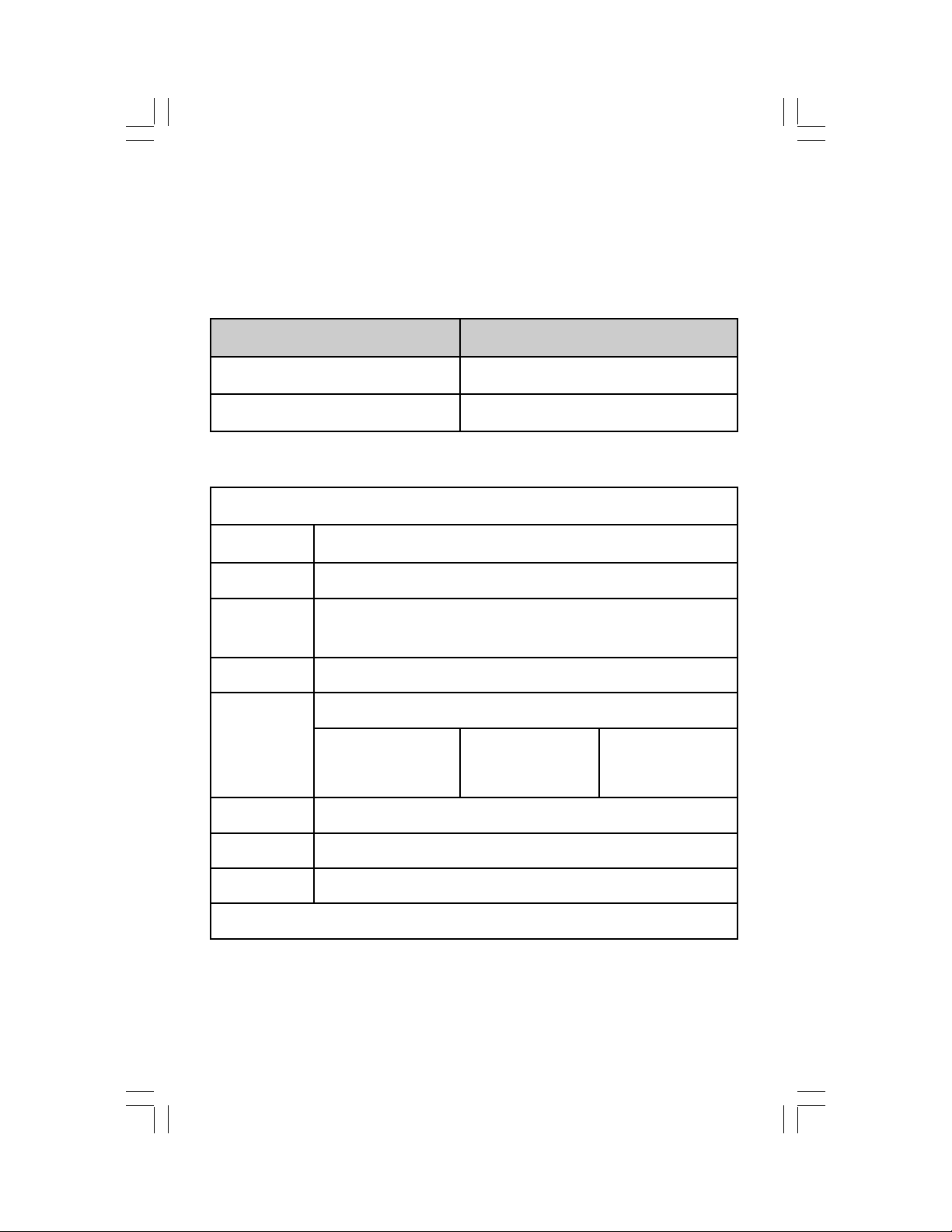
The unit features an RS232 output via 3.5 mm Terminal. The output is a
16 digit data stream which can be utilized by user's specific application. An
RS232 lead with the following connection will be required to link the
insrument with the PC serial input.
Meter (3.5 mm jack plug)
PC (9W "D" Connector)
Center Pin Pin 2
Ground/Shield Pin 5
The 16 digit data stream will be displayed in the following format.
D15 D14 D13 D12 D11 D10 D9 D8 D7 D6 D5 D4 D3 D2 D1
DO End Word
D1 to D8 Display reading, D1=LSD, D8=MSD
D9 Decimal Point(DP), position from right to the left
0 = No DP, 1 = 1 DP, 2 = 2 DP, 3 = 3 DP
D10 Polarity: 0 = Positive, 1 = Negative
D11 & D12
Annunciator for Display
Psi = 23
mbar = 86
uHg = 77
mm/Hg = 78
Pa = 87
torr = 90
D13 1
D14 4
D15 Start Word
RS232 FORMAT: 9600, N, 8, 1
- 6 -
inch/Hg = 25
K Pa = 88
Page 7
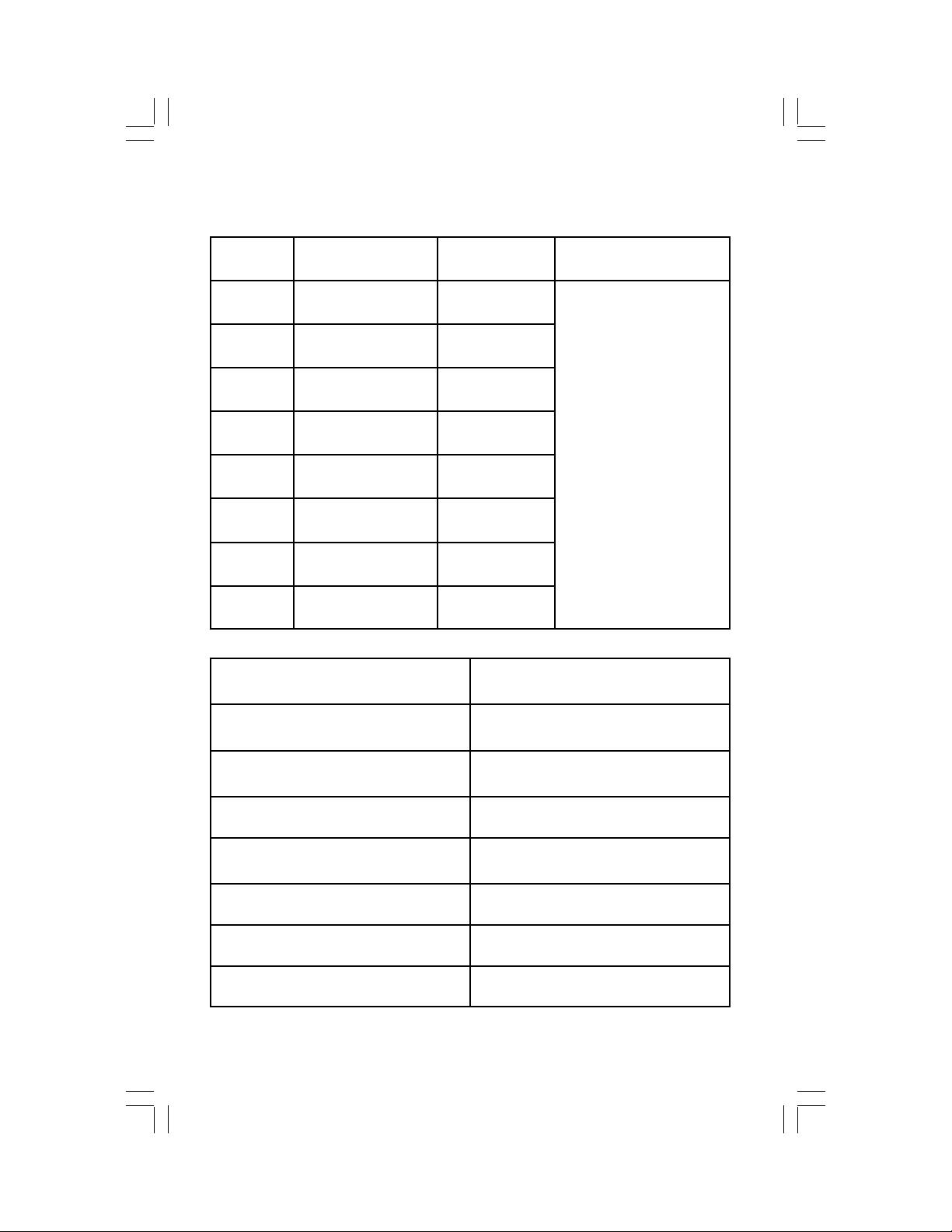
4. SPECIFICATIONS
Unit Range Resolution Accuracy
mbar 0~1500 mbar 1 mbar
Kpa 0~150.0 Kpa 0.1 Kpa
Pa 0~150,000 Pa 100 Pa
torr 0~1125 torr 1 torr
mm Hg 0~1125 mmHg 1 mm Hg
micron
In Hg 0~44.30 inch Hg 0.02 inch Hg
PSI 0~21.75 psi 0.01 psi
Dimension Meter: 7×3×1 ½" (180×75×35 mm)
Display 61 mm x 34 mm super large LCD
Weight Meter with battery: 8 oz (220 g)
Sampling time Approx. 0.8 second
Operating conditions Temperature: 32~122°F (0~50°C)
0~1125,000 micron
1000 micron
Probe cord: 49" (125 cm)
display. 15 mm (0.6") digit size
Probe: 6 oz (170 g)
Humidity: Less than 80% RH
± 1% Full Scale
(at 23°C ±5°C)
including linearity,
hysteresis and
repeatability
Power supply Alkaline/heavy duty DC 9V battery
Power consumption Approx. DC 6 mA
Circuit Exclusive microcomputer circuit
- 7 -
Page 8

WARRANTY
Sper Scientific warrants this product against defects in materials and
workmanship for a period of five (5) years from the date of purchase,
and agrees to repair or replace any defective unit without charge. If your
model has since been discontinued, an equivalent Sper Scientific product will be substituted if available. This warranty does not cover probes,
batteries, or damage resulting from accident, misuse, or abuse of the
product. In order to obtain warranty service, simply ship the unit postage
prepaid to:
SPER SCIENTIFIC. 7720 East Redfield, Suite 7 Scottsdale, AZ 85260
(480) 948-4448, [email protected], www.sperscientific.com
The defective unit must be accompanied by a description of the problem
and your return address. Register your product online or return your
warranty card within 10 days of purchase.
Rev. 05/17/06
Check our website for the most recent version.
- 8 -
 Loading...