

Page 1

8. WARRANTY
Sper Scientific warrants this product against
defects in materials and workmanship for a
period of 1 year from the date of purchase,
and agrees to repair or replace any
defective unit without charge. If your model
has since been discontinued, an equivalent
Sper Scientific product will be substituted if
available. This warranty does not cover
probes, batteries, or damage resulting from
accident, misuse, or abuse of the product.
In order to obtain warranty service, ship the
unit postage prepaid to:
SPER SCIENTIFIC
7720 E Redfield Rd, Suite 7
Scottsdale, AZ 85260
Include a description of the problem and
your return address along with the returned
item. Return your warranty card within 10
days of purchase or register online at:
email: [email protected]
www.sperscientific.com
POCKET DIGITAL
REFRACTOMETERS
300050 ~ 300055
INSTRUCTION MANUAL
rev 03/03/09
SPER
SCIENTIFIC LTD.
- 12 -
Page 2
CONTENTS
1. Introduction.................................. 2
2. Panel Description ........................ 3-4
3. Notes and Precautions……………5
4. Calibration ................................... 5-6
5. Measurement .............................. 6-7
• Models with Multiple Scales..... 7-8
• Erratic Readings....................... 8-9
5. Zero Checking.............................. 9
6. Battery Replacement................... 9
7. Specifications .............................. 10-11
8. Warranty...................................... 12
1. INTRODUCTION
Our Pocket Digital Refractometers measure
Brix, salinity or other parameters with
laboratory accuracy. The digital readout
eliminates uncertainties, while the water
resistant design facilitates clean ups and
protects the electronics from moisture.
Features:
• Automatic Temperature Compensation
• Zero Calibration
• Automatic shut off
• Instantaneous reading
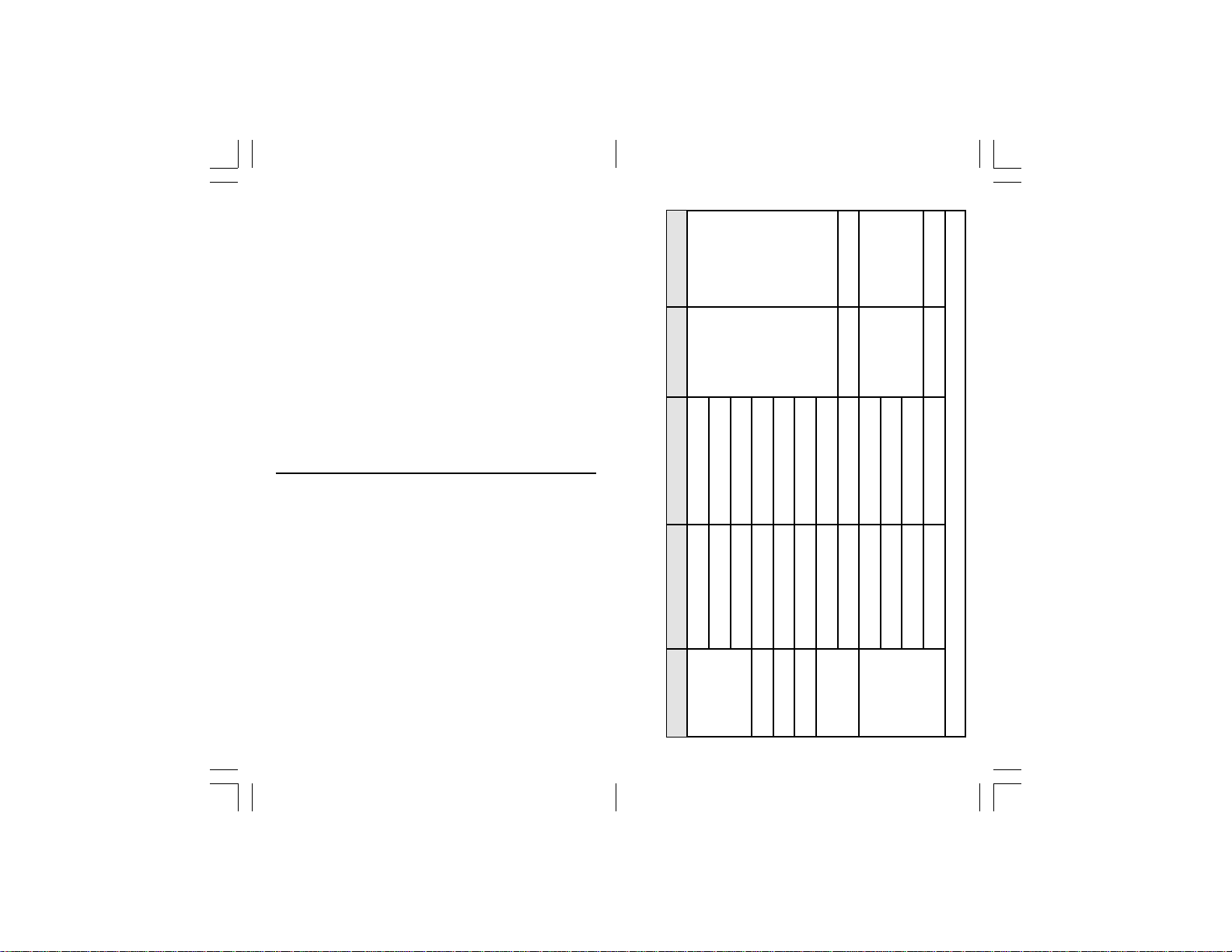
Be’ 28~48
Model Scale Range Res. Accuracy
7. SPECIFICATIONS (continued)
Brix 40~95%
Water 10~45%
300050
0.1% ±0.2%
300051 Brix% 0~65%
300052 Brix% 40~95%
- 11 -
Salinity% 0~28%
300053 Brix% 0~95%
(14)~(-40)°F
Cleaner
Salinity ppt 0~280ppt 1ppt ±2ppt
300054
0.1°F ±2.0°F
(32)~(-50)°F
(32)~(-50)°F
Ethylene Glycol
Propylene Glycol
300055
1.000~1.500sg 0.001sg ±0.005sg
Battery
Use pure distilled water as the calibration solution for all models.
Page 3
7. SPECIFICATIONS
Weight 5.3 oz, 150 grams
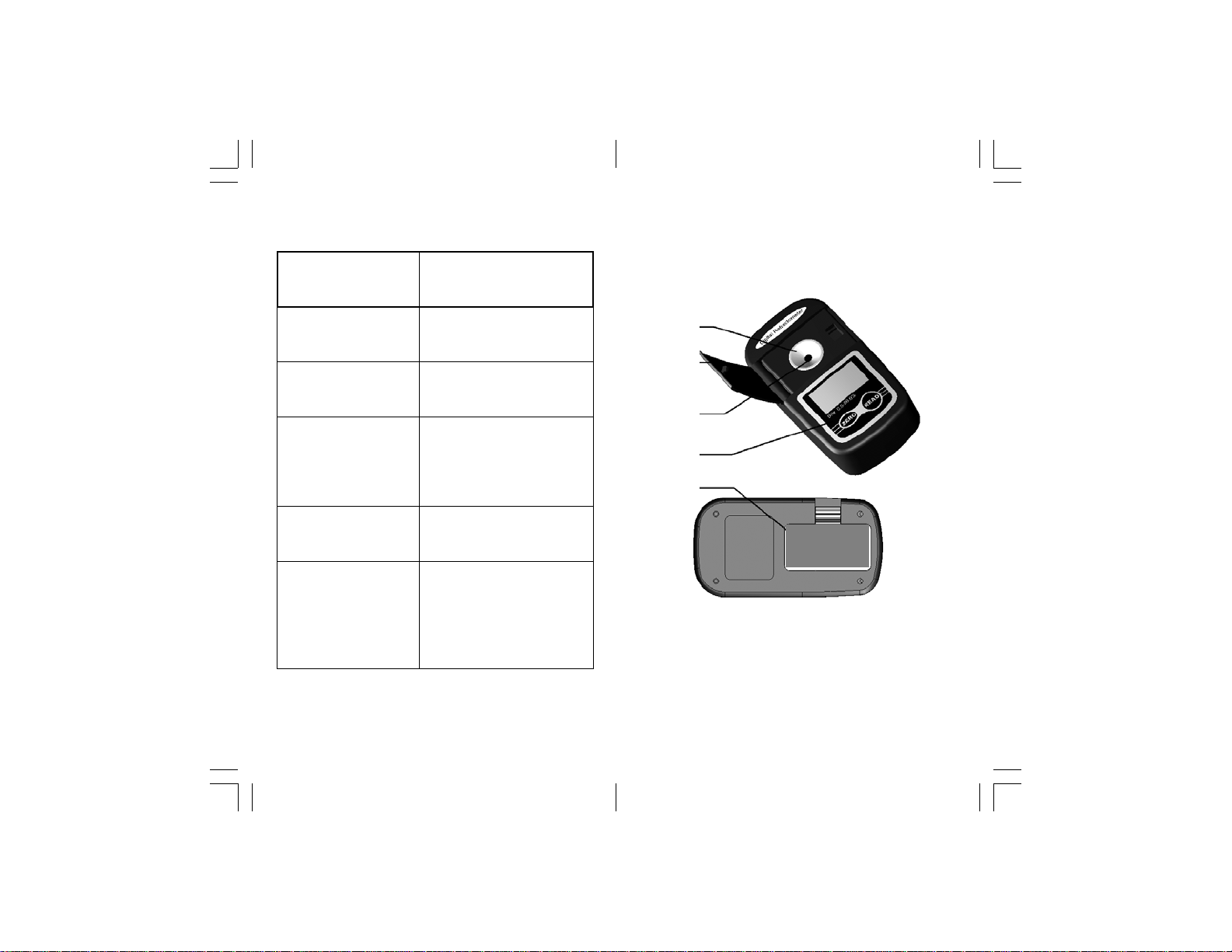
2. PANEL DESCRIPTION
Dimensions
Storage
Environment
Operating
Environment
Battery Life Approx. 8000 tests
Included
5" x 2 1/2" x 1 1/4"
120 x 65 x 30 mm
14~122°F (–10~50°C)
Below 90% RH
Below 2000m sea level
32~104°F (0~40°C)
Protective Case
1.5V AAA Battery
Distilled Water
Transfer-Pipette
- 10 -
1
2
3
4
5
1. Stainless Steel Sample Plate
2. Cover
3. Prism
4. Keypad
5. Battery Compartment
- 3 -
Page 4
6
7
▼
8
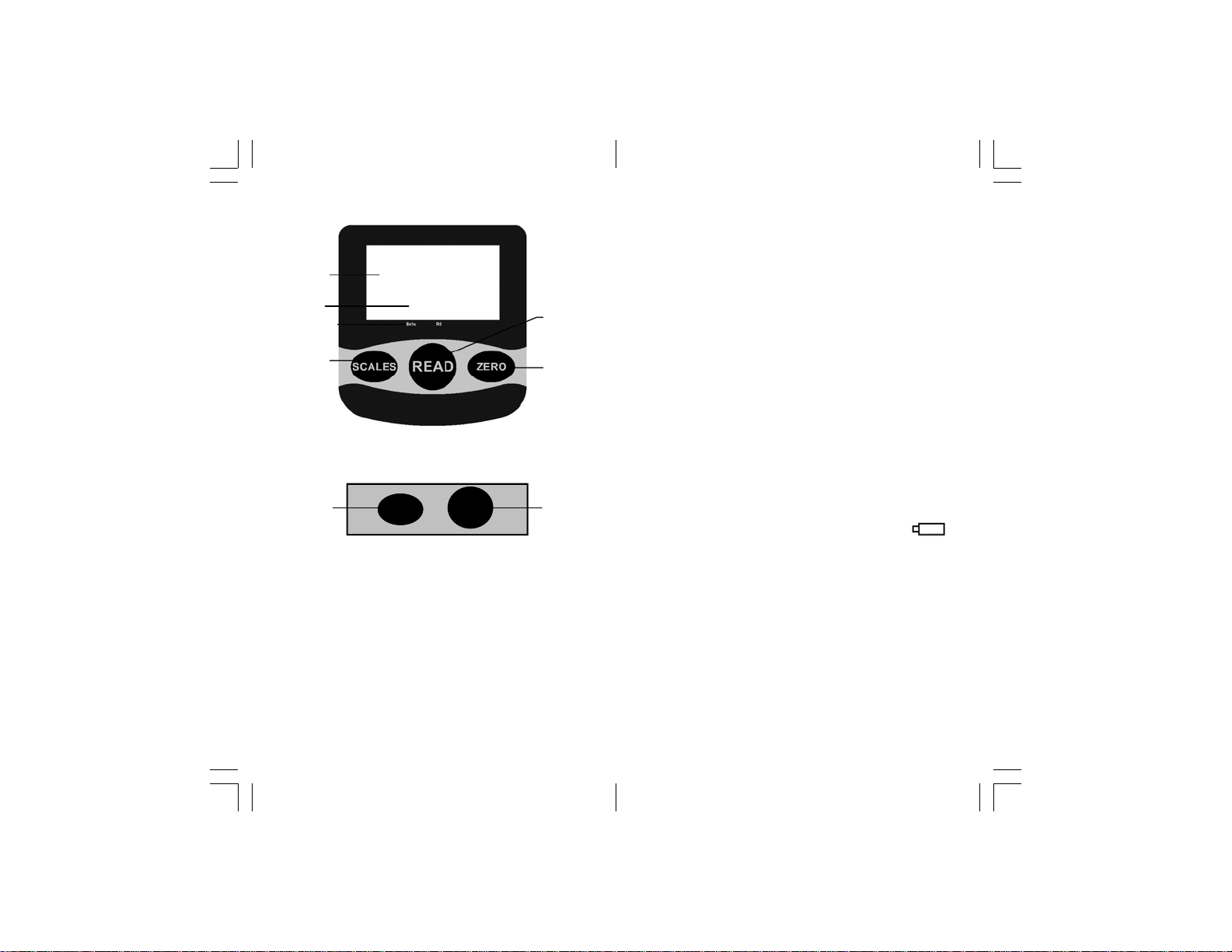
Keypad for Single-Scale Models
10 9
ZERO READ
6. Display
7. Active Scale Indicator
8. SCALES button
9. READ button
10. ZERO button
- 4 -
9
10
make sure to close the COVER on the
PRISM during measurement.
• After about 3000 tests, turn the unit off for 5
to 10 minutes to rest the battery.
6. ZERO CHECKING
Use this function to check the nD value of the
zero setting for distilled water.
• Fill the PRISM (3) with a standard solution
of distilled water (0.0) that is the same
temperature as the solution to be tested.
• Close the COVER (2).
• Press the READ (4) button to turn the
refractometer on and obtain a temperature
reading.
• Quickly press the ZERO (5) button
once.
• The nD value of the solution is displayed.
• This information can be viewed at any time
to show the last calibration value.
7. BATTERY REPLACEMENT
When the low-battery symbol is displayed,
push the tab to open the BATTERY
COMPARTMENT (5) and replace the 1.5V
AAA battery with a fresh alkaline battery.
- 9 -
Page 5

(page 6), then press the SCALES (8)
button and hold the button for 1 second to
cycle through the options.
• "- - -" is displayed and the ACTIVE
SCALE (7) indicator "▼" points to the
selected scale.
• With the desired scale selected, press the
READ (9) button to obtain the results.
Erratic Readings
If the readings are significantly above or
below the expected results, consider the
following:
• Sample contains more than one dissolved
solid. For example, if the sample contains
both salt and sugar, a Brix refractometer
will not display the true sugar content
because the salt content will skew the brix
measurement.
• When diluting samples, be sure to use a
pure solution such as distilled water.
• Sample contains suspended solids. Filter
and thoroughly mix the sample before
testing.
• Perform a calibration.
• Replace the battery.
• Outside light can cause erratic readings,
- 8 -
3. NOTES AND PRECAUTIONS
• The refractometer will automatically shut
off after about 3 minutes of inactivity.
• After each use, clean the SAMPLE
PLATE (1) and PRISM (3) with distilled
water on a soft cloth, and wipe dry.
• If a film develops on the PRISM (3) it will
repel test samples and affect readings.
If this occurs, clean with a mild detergent.
• The prism is easily scratched, never use
abrasive cleaning materials.
• Never submerge.
• Avoid spills around the unit.
• Avoid prolonged use or storage in
extreme temperatures.
• Do not use in corrosive environments.
• Do not drop or shake the unit.
• Use the protective carrying case to
prevent physical damage.
4. CALIBRATION
Calibration should be performed daily before
sample testing begins or when you suspect
that the reading may be inaccurate. For
best results, perform the calibration in a
controlled environment of 68°F (20°C).
- 5 -
Page 6

• Allow the refractometer and the distilled
water to acclimate to the ambient
environment.
• Clean the PRISM (3) before and after
every use. There should be no spots or
film on the prism.
• Drop at least 1.0 ml of distilled water (0.0)
onto the PRISM (3).
• Close the COVER (2).
• Press the READ (9) button to turn on the
refractometer.
• Press the ZERO (10) button for 3 seconds
to enter calibration mode.
• "CAL" flashes on the display. There will
be a red flash in the PRISM (3).
• The calibration is complete after "End" is
displayed.
5. MEASUREMENT
• Clean the SAMPLE PLATE (1) and
PRISM (3) before and after every use.
There should be no film or spots on the
prism. If residue remains from a previous
test, it will affect the accuracy of the unit.
• When the temperature difference between
the ambient temperature and the
refractometer is greater than 10°F (5°C),
place the refractometer in the lab and
allow it to adjust to the ambient
temperature. Allow apx. 30 minutes for
every 5°F (10°C)
difference in temperature.
• Press the READ (9) button to turn the unit
on and display the temperature. This unit
features Automatic Temperature Compensation (ATC) within the range of 41~104°F
(5~40°C), eliminating the need for manual
temperature correction.
• Perform a calibration (pg 6) before the
day's first use or after extended daily use.
• Fill the PRISM (3) with about 1.0ml of the
sample solution.
• Close the COVER (2).
• Press the READ (9) button immediately to
obtain a reading. Delays may cause the
sample to evaporate.
• Within 1 second, the value is displayed.
• When the reading is under-range, the low
indicator (LLL) is displayed. The high
indicator (HHH) is displayed when the
reading is over-range.
Models with Multiple Scales
• Follow the measurement instructions
- 6 -
- 7 -
 Loading...