

Page 1
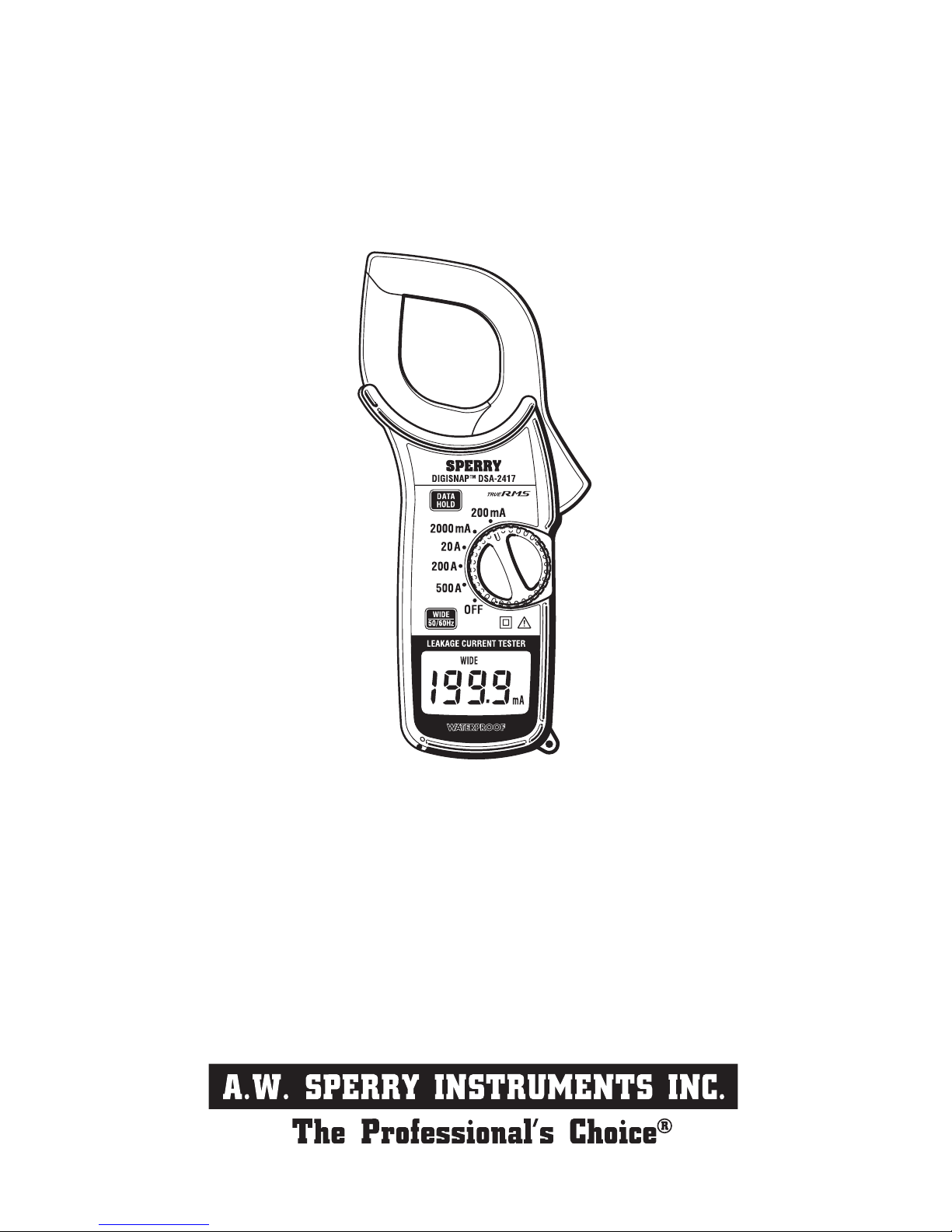
ALL WEATHER DIGITAL LEAKAGE CURRENT TESTER
DSA-2417
OPERATING INSTRUCTIONS
7/05 FORM#352
Page 2

CONTENTS
1. SAFETY WARNINGS ……………………………………………………………………1
2. FEATURES ………………………………………………………………………………3
3. SPECIFICATIONS ………………………………………………………………………4
4. INSTRUMENT LAYOUT ………………………………………………………………6
5. PREPARATION FOR TESTS …………………………………………………………8
6. OPERATING INSTRUCTIONS …………………………………………………………9
6-1 CURRENT MEASUREMENTS …………………………………………………9
6-2 FREQUENCY SELECTOR SWITCH ……………………………………………11
6-3 DATA HOLD ……………………………………………………………………13
6-4 AUTOMATIC POWER OFF ………………………………………………………13
7. BATTERY REPLACEMENT ……………………………………………………………14
Page 3

− 1 −
1. Safety Warnings
This instruction manual contains warnings and safety rules which must be observed
by the user to ensure safe operation of the instrument and retain it in safe condition.
Therefore, read these operating instructions thoroughly and completely before using
the instrument.
The symbol
on the instrument means that the user must refer to the relevant
section of this instruction manual for safe operation of the instrument.
Pay particular attention to all WARNINGS and CAUTIONS in this instruction manual.
WARNING indicates warnings to avoid electrical shock and CAUTION indicates
cautions to avoid damage to the instrument.
1. Do not ope n th e ba t te r y co mpa r tme n t co ve r wh e n m a k in g
measurements.
2. Always inspect your instrument and accessories for any sign of damage
or abnormality before every use. If any abnormal conditions exist (eg.
cracked cases, display not reading, etc.), do not attempt to carry out
any measurements.
3. Never ground yourself when conducting electrical tests. Do not touch
exposed metal pipes, outlets, fixtures, etc., which might be at ground
potential. Keep your body isolated from ground by using dry clothing,
rubber shoes, shoes, rubber mars , or any approved insulating material.
4. Never make measurements on a circuit above 600V AC.
5. Never exceed the maximum allowable input of any function when making
measurements.
6. Always set the Power/Frequency Selector Switch to the OFF position
after use.
7. The transformer jaws are made of metal and their tips are not insulated.
Be especially careful about the hazard of possible shorting where the
equipment under test has exposed metal parts.
Page 4

− 2 −
8. Do not make measurements in an explosive atmosphere (i.e. in the
presence of flammable gasses or fumes, vapor or dust).
9. Calibration and repair of any instrument should only be performed by
qualified and trained service technicians. Do not attempt calibration
or service unless another person capable of rendering first aid and
resuscitation is present.
10. Do not install substitute parts or perform any unauthorized modification
of the instrument. Return the instrument to your distributor or
authorized service center for service and repair to insure that safety
features are maintained.
11. The instrument must be used by a competent, trained person and
operated in strict accordance with the instructions. A.W.Sperry
Instruments Inc. will not accept liability for any damage or injury caused
by misuse or noncompliance with the instructions or safety procedures.
It is essential to read and understand the safety rules contained in the
instructions. They must be observed when using the instrument.
12. Do not expose the instrument to the direct sun, extreme temperature of
more than 50℃ or dew fall.
13. When not in use for a long period of time, place the instrument in
storage after removing the batteries from it.
14. Use a damp cloth and detergent for cleaning the case of the instrument.
Do not use abrasives or solvents.
Page 5

− 3 −
DSA-2417 offers True RMS measurement capability.
Designed for measurements of AC leakage and AC current with five ranges from
200mA to 500A. AC 200mA range provides a high resolution of 0.1mA.
Least affected by external magnetic field.
Provides dual frequency responses of fundamental 50/60 Hz only or up to 1 kHz.
The frequency response of up to 1 kHz permits measurements of current with
harmonics superimposed on the fundamental frequency. High frequency current
from appliances such as inverters, switching regulators etc. can therefore be
measured.
Data hold function to allow for easy readings in dimly lit or hard-to-reach locations.
Large easy-to-read LCD display
Automatic power off within 30 minutes to conserve battery life.
Designed to international safety standard(IEC348).
2. Features
Page 6
− 4 −
3. SPECIFICATIONS
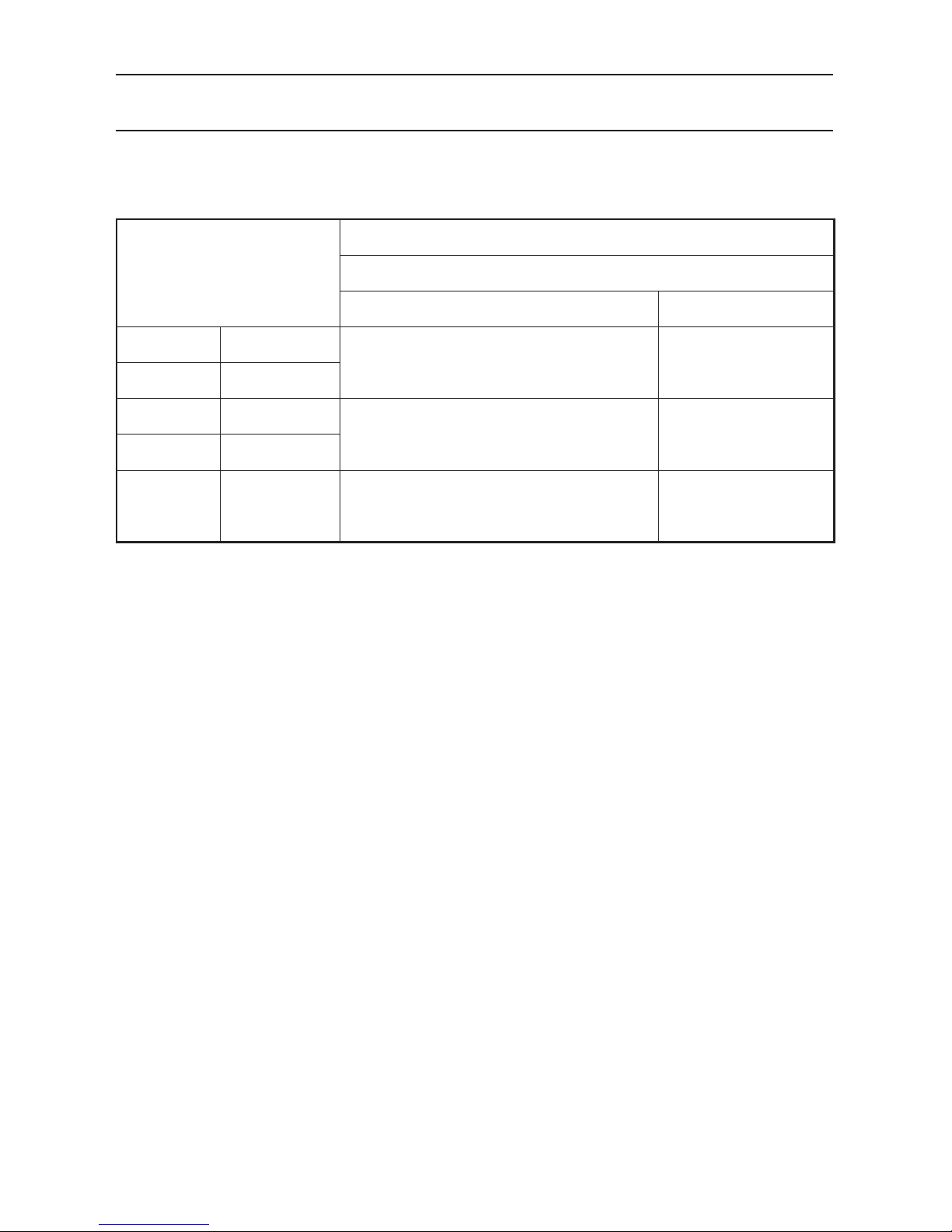
• AC current ranges
at 23±10℃ , 85% relative humidity
Operating System: Dual lntegration
Sensing: True RMS sensing
Digital Display: 3-1/2 digit liquid crystal display with maximum reading of
1999
Overrange Indication: Numeral 1on the highest digit flashes
Response Time: Approx.2 second
Sample Rate: Approx. three times per second
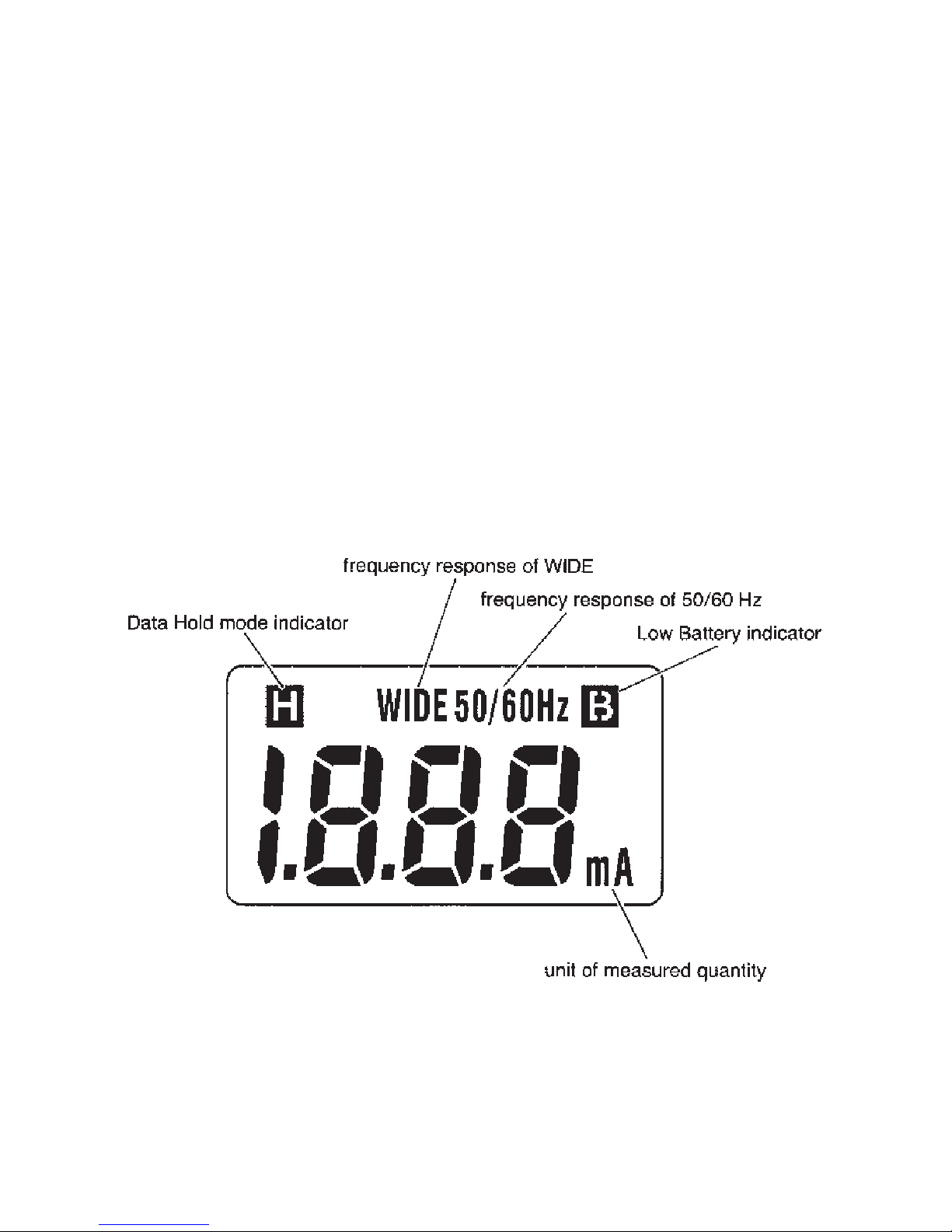
Data Hold: For all ranges. In Data Hold mode,Hsymbol is displayed
on the digital display
Low Battery Indicator: Bsymbol is displayed on the digital display.
Storage Temperature -10℃〜 50℃ at 75% max. relative humidity without
and Humidity: condensing
Operating Temperature
: 0 〜 40℃
Power Source: one 6F22(DC9V) battery or equivalent
Current Consumption:Approx. 4 mA
Auto Power Off: Automatically turns power off in approx. 30minutes after the
instrument is powered
Ranges
Accuracy
Frequency Selector Switch
WIDE(40Hz 〜 1kHz)position 50/60Hz position
200mA 0-199.9mA
±1.0% rdg±4 dgt (50/60Hz)
±3.0% rdg±4 dgt (40Hz 〜 1kHz)
±1.5 % rdg±6dgt
2000mA 0-1999mA
20A 0-19.99A
±1.5 % rdg±4 dgt (50/60Hz)
±3.5% rdg±4 dgt (40Hz 〜 1kHz)
±2.0% rdg±6 dgt
200A 0-199.9A
500A 0-500A
±2.0% rdg±4 dgt (50/60Hz)
±4.0% rdg±4 dgt (40Hz 〜 1kHz)
±2.5% rdg±6 dgt
Page 7

− 5 −
Insulation Resistance: 10MΩ min. at 1000V between electrical circuit and housing
case, and electrical circuit and transformer jaws
Withstand Voltage: 3700V AC for 1 minute between electrical circuit and housing
case as well as electrical circuit and transformer jaws
Conductor Size: Approx. 40 mm diameter max.
Dimensions: 209(L)×96(W)×45(D)mm
Weight: 450g approx. (battery included)
Accessories: 6F22 battery
Carrying Case
Instruction manual
Page 8
− 6 −
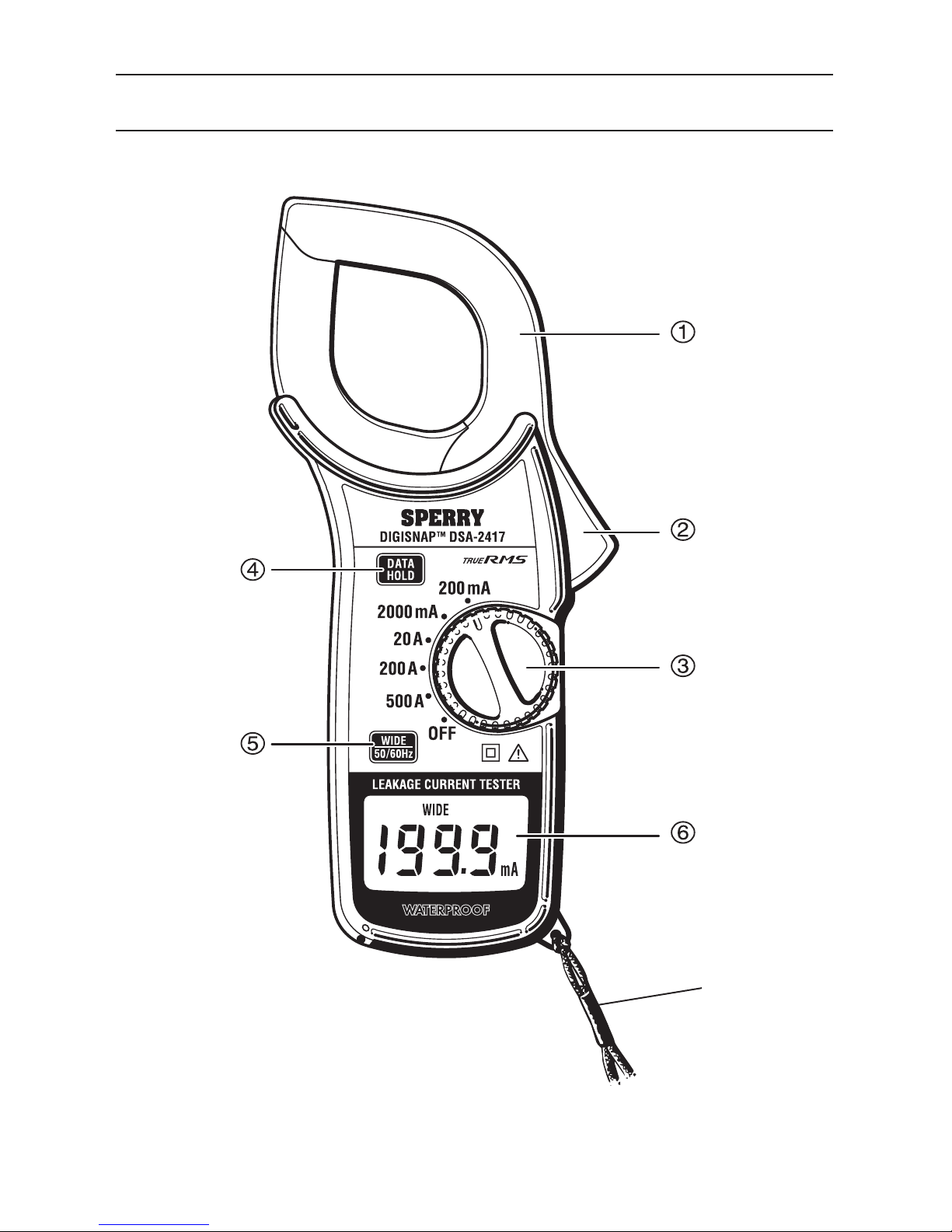
4. INSTRUMENT LAYOUT
⑦
Fig.1
Page 9
− 7 −
① Transformer Jaws
Pick up current flowing through the conductor.
② Jaw Trigger
Operates the transformer jaws. Press to open them.
③
Power/Range Switch
Selects ranges. Also, turns power on. Always turn the switch to off after use.
④
Data Hold Push Button
Push to freeze a reading and push again to release it. In Data Hold mode, His
displayed on the digital display.
⑤ Frequency Selector Switch
Selects frequency response of 50/60Hz or up to 1kHz WIDE.
⑥
Digital Display
Function symbols and decimal point are displayed according to the Range Switch
position.
⑦
Safety Hand Strap
Fig.2
Page 10
− 8 −
5. PREPARATIONS FOR TESTS
WARNING
Always inspect your instrument and accessories for any sign of damage
or abnormality before every use. If any abnormal conditions exist (eg.
cracked cases, display not reading, etc.), do not attempt to conduct any
tests.
5-1 Battery Check
To check the battery voltage set the Power/Range Selector Switch to OFF position. If
the display is clear without symbol Bshowing, battery voltage is OK. If the display
blanks or Bis indicated, replace the battery according to section 7 for Battery
replacement.
NOTE
The instrument automatically turns power off approximately 30 minutes after
it is turned on. Therefore the display may be blank with the Power/Range
Selector Switch set to On position. To operate the instrument, set the switch
back to OFF position and then ON position.
5-2 Data Hold Switchn
If the Data Hold Switch is pressed in (DATA HOLD mode), Press to release it.
Otherwise, the display remains frozen. When the instrument is in DATA HOLA mode,
Hsymbol is indicated on the display.
Page 11
− 9 −
6-1 Current Measurements
WARNING
• Do not make measurements where the potential is greater than 600V
AC. This may cause shock hazard and damage to the instrument or
equipment under test.
• The Transformer Jaws are made of metal and their tips are not
insulated. Be especially careful about the hazard of possible shorting
where the equipment under test exposed metal parts.
• Do n ot o pen the b at ter y co mpartme nt c over wh en m aki ng
measurements.
CAUTION
• Take sufficient care to avoid shock, vibration or excessive force when
handing the instrument. Otherwise, precisely adjusted Transformer
Jaws will be damaged.
• When Transformer Jaws do not fully close, never try to close them
by force, but make them free to move and try again. If a foreign
substance is stuck in the jaw tips, remove it. If the jaw tips have been
deformed, correct so that each tip is properly aligned.
Otherwise, the jaws will be damaged and warranty may not cover the
repair cost.
6. OPERATING INSTRUCTIONS
Page 12
− 10 −
NOTE
• When making current measurements, keep the Transformer Jaws fully
closed. Otherwise, accurate measurements cannot be taken. Maximum
conductor size is 40mm in diameter.
• When measuring larger current, the Transformer Jaws may buzz. This is not
a fault and does not affect the accuracy either.
⑴Set the Range Switch to the desired Aor mAposition.
⑵ Select the desired frequency response, WIDO or 50/60 Hz, with the Frequency
Selector Switch. (see section 6-2 for Frequency Selector Switch)
⑶ Press the Trigger to open the Transformer Jaws and clamp onto conductor or
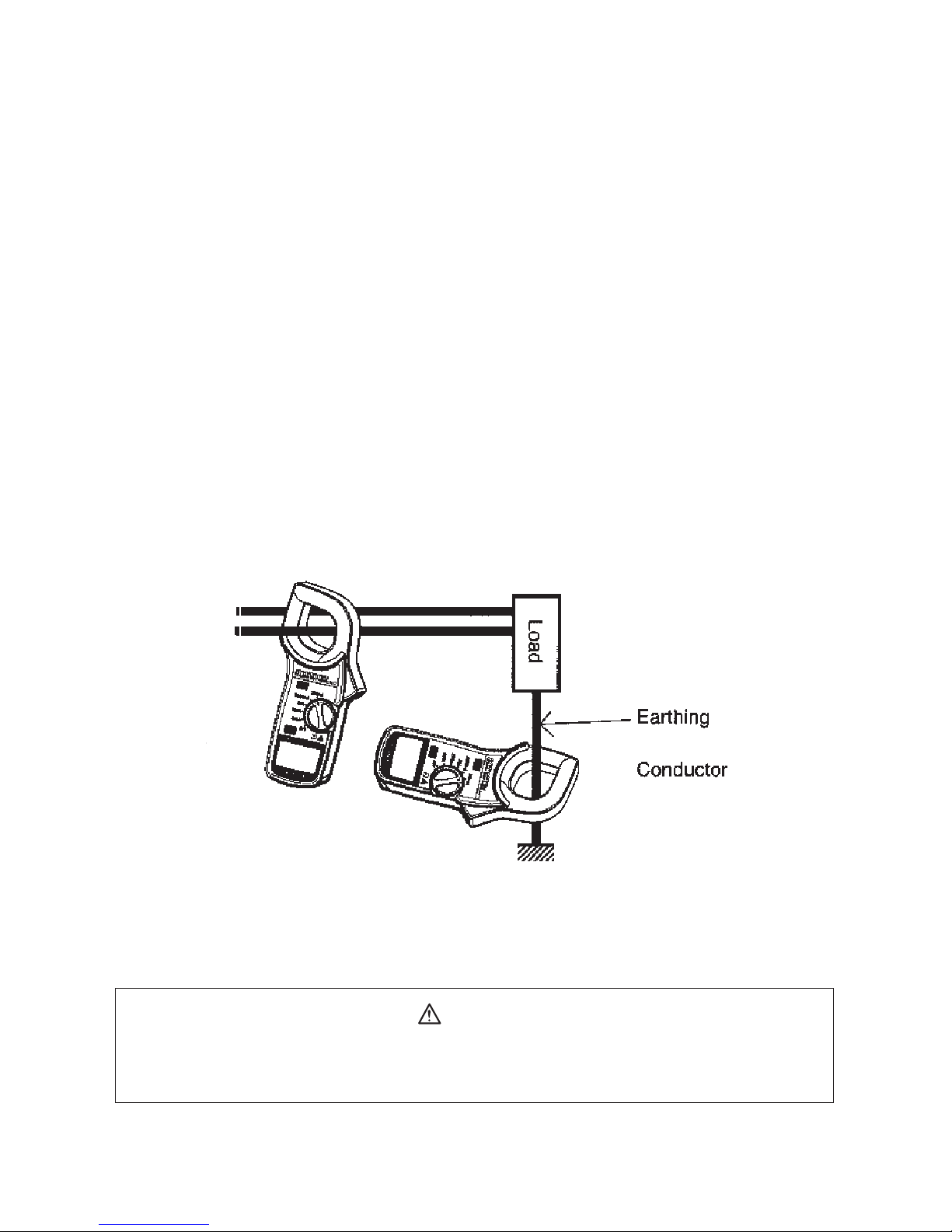
conductors as shown in Fig.3. Take the reading on the a display . (This method also
permits measurements of leakage current flowing through earthing conductors and
very small current.)
CAUTION
Do not exceed maximum allowable current on each current range. (see
section 3 for Specifications)
Fig.3
Page 13
− 11 −
NOTE
• For more accurate measurements, place the conductor at the center of the
closed jaws.
• When measuring current on a line or a grounded wire, clamp onto one
conductor only.
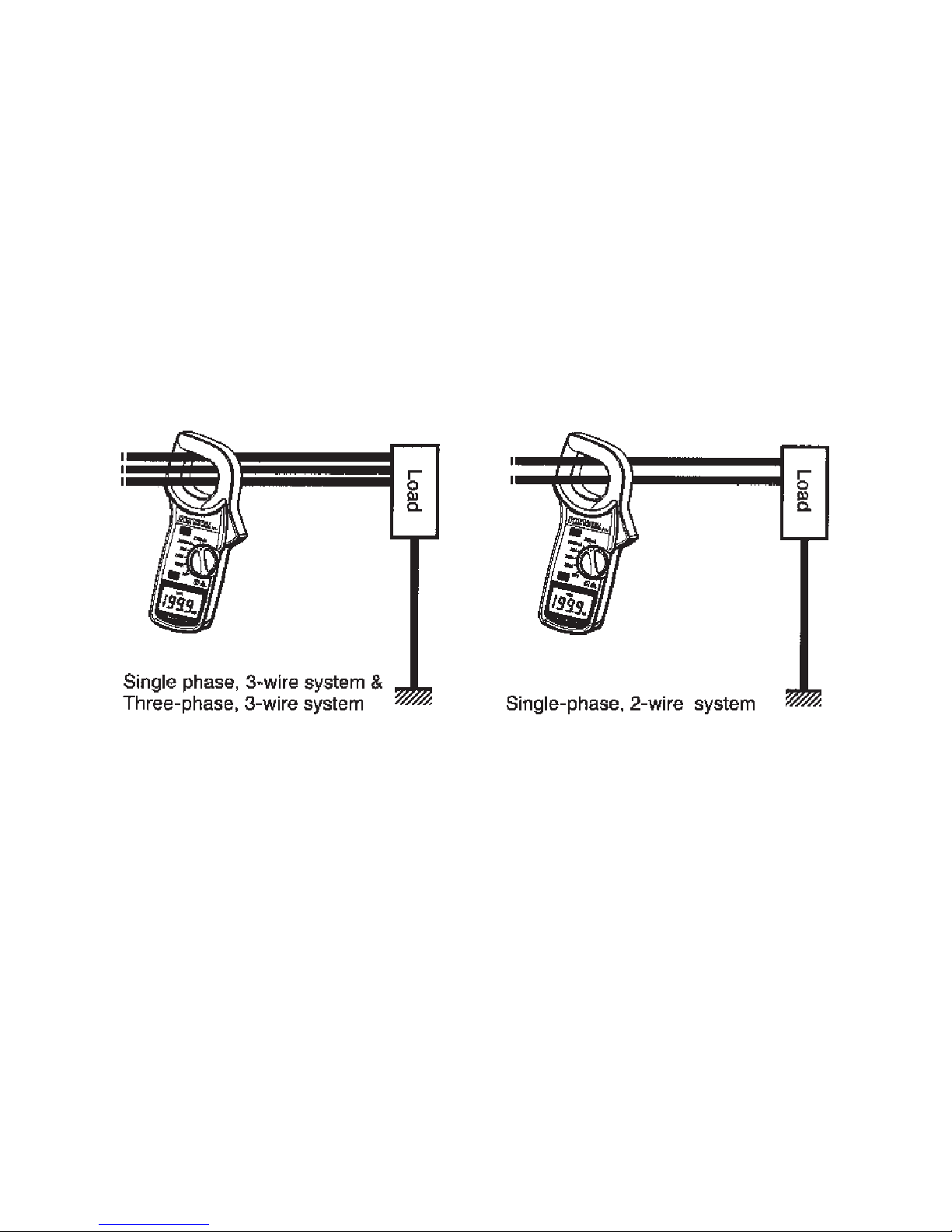
⑷ When measuring out of balance leakage current, clamp onto all conductors except a
grounded wire as shown in Fig. 4.
6-2 Frequency Selector Switch
Model 2417 measures AC currents of:
⑴ 50/60 Hz fundamental frequency only with the Frequency Selector Switch set to the
50/60 Hz position(50/60Hzis indicated on the display), or
⑵ 40Hz to 1kHz with the Frequency Selector Switch set to the WIDE position(WIDE
is indicated on the display)
Fig.4
Page 14

− 12 −
Frequency response of 40 Hz to 1 kHz permits measurements of current with
harmonics superimposed on the fundamental frequency. High frequency current from
appliances such as inverters, switching regulators etc. can therefore be measured.
NOTE
• DSA-2417 has a very good frequency response due to the electrical
property of the transformer jaws used for the instruments. Therefore, it
measures AC current of not only 50 Hz or 60 Hz fundamental wave form but
also of higher frequencies and harmonics superimposed on the fundamental
frequency when present in the circuit under test. To eliminate the effect of
noise from the high frequency and measure AC current of 50Hz or 60Hz
fundamental frequency, a filter circuit is incorporated into DSA-2417 which
works when the frequency selector switch is set to the 50/60Hz position.
It is designed to attenuate frequencies starting from around 100Hz with an
attenuation characteristic of approx. -24dB/octave (signal strength declines
to one sixteenth of that at the initial frequency when it doubled). Recently
there has been increased usage of power through inverters, switching
regulators, etc. When the high frequency noise from such appliances leaks
or flows into the ground through capacitors not filtering completely, the
earth leakage breaker may not trip. In such a case the instruments may
not give current readings with the frequency selector switch at the 50/60
Hz position. Therefore, it is necessary to make current measurements
with the switch at theWIDEposition. When in doubt as to the presence
of high frequencies and harmonics that affect AC current measurements,
take current readings with the switch at the 50/60Hz and WIDEpositions
respectively and then compare the results obtained.
Page 15

− 13 −
6-3 Data Hold
Push the Data Hold Switch Button to freeze the reading. Hsymbol is displayed on
the digital display to indicate that the instrument is in Data Hold mode.
Push the button again to exit from Data Hold mode.
6-4 Automatic Power Off
DSA-2417 automatically turns power off in approx. 30 minutes after it is turned on. To
operate the instrument, set the Frequency Selector Switch back to OFF position and
than ON position.
Page 16
− 14 −
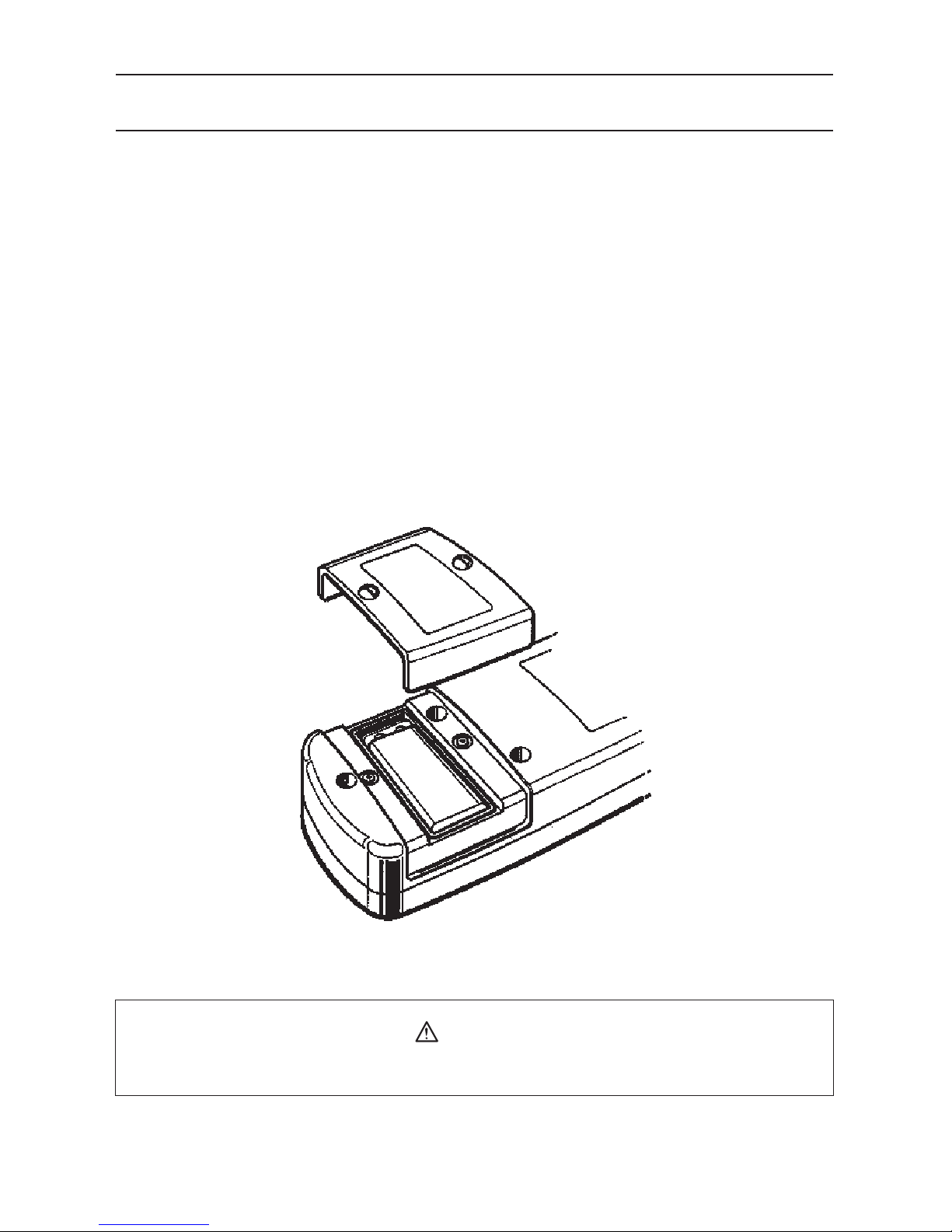
7. BATTERY REPLACEMENT
7-1 When to replace the battery
⑴When Bsymbol is displayed on the digital display.
⑵ When the digital display does not read with the Power/Range Selector Switch set to
ON position.
7-2 Battery replacement
⑴Set the Power /Range Selector Switch to OFF position.
⑵Unscrew and remove the battery compartment cover as shown in Fig. 5.
⑶ Replace the battery with a new 9 V battery type 6F22 or equivalent, observing
correct polarity.
(4)Screw the battery compartment cover.
WARNING
Never replace the battery during measurement.
Fig.5
Page 17

− 15 −
Lifetime Limited Warranty
The attention to detail of this fine snap-around instrument is further enhanced by
the application of A.W. Sperrys unmatched service and concern for detail and
reliability. These A.W. Sperry snap-arounds are internationally accepted by craftsmen
and servicemen for their unmatched performance. All A.W. Sperrys snap-around
instruments are unconditionally warranted against defects in material and workmanship
under normal conditions of use and service; our obligation under this warranty being
limited to repairing or replacing free of charge, at A.W. Sperry snap-around instrument
that malfunctions under normal operating conditions at rated use.
1
Replacement procedure
Securely wrap the instrument and its accessories in a box or mailing bag and ship
prepaid to the address below. Be sure to include your name and address, as well the
name of the distributor, with a copy of your invoice from whom the unit was purchased,
clearly identifying the model number and date of purchase.
A.W.SPERRY INSTRUMENTS INC.
ATT: Customer service dept.
2150 Joshuas Path, Suite 302,
Hauppauge, NY 11788
1
The warranty is not applicable if the instrument has been: misused, abused, subjected
to loads in excess of specifications, has had unauthorized repair or has been
improperly assembled or used.
*Note: Recommended calibration interval should not exceed one year. Calibration
service charges are not covered terms and conditions of warranty.
Page 18

− 16 −
MEMO
Page 19

− 17 −
MEMO
Page 20

 Loading...