

Page 1

SpeedStream
5260
ADSL LAN Modem
Installation Guide
Part No. 007-5260-002, Rev B
Page 2

Copyright 1999-2000, Efficient Networks, Inc.
All rights reserved. Printed in the U.S.A.
Product names mentioned herein may be trademarks and/or registered trademarks of their respective companies. Efficient Networks, Inc. sh all not be liable for technical or e ditorial errors or omissions in this document; nor for inc idental or consequential damages resultin g from the furnis hing, perfor ma nce , or use of this material.
Efficient Networks, Inc. – Software License and Warranty
This documentation and the accompanying computer programs (collectively, the Software) are licensed, not sold, to
the End User by EFFICIENT NETWORKS, INC. (“ENI”) for use only under the following terms. ENI reserves any
right not expressly granted to the End User. The End User owns the media on which the Software is recorded but ENI
retains ownership of all copies of the Sof tware itself. The End User assumes sole res ponsibil ity for the i nstallation,
use, and results obtained from use of the Software. If the product that you acquired is an upgrade, then the terms and
conditions of this agreement apply equally to the upgraded product.
1. License
2. Restrictions
ware contains trade secrets and to protect them, the End User may NOT decompile, reverse engineer, disassemble,
or otherwise reduce the Software to a human perceivable form. The End User may not modify, adapt, trans late,
rent, lease, loan, resell for profit, distribute, or otherwise assign or transfer the software, or create derivative
works based upon the software or any part thereof.
3. Protection and Security
without limitation the obje ct c ode of the Software, to any party other than its au thor iz ed e mpl oye e s, exc ep t for purposes specifically related to the End User’s authorized use of the Software on ENI Products, without the prior written
consent of ENI. The End User agrees to use its best efforts and to take all reasonable steps to safeguard the Software
to ensure that no unauthorized person shall have access thereto and that no unauthorized copy, publication, disclosure
or distribution in whole or in part, in any form, shall be made. The End User ac knowledges that the Software contains
valuable confidential information and trade secrets and that unauthorized use and/or copying are harmful to ENI.
4. Termination.
from ENI if the End User fails to comply with any of its provisions. Upon termination, the End User must destroy the
Software and all copies thereof, and the End User may termina te this License at any time by doing so .
5. Export Law Assurances.
transferred or exported, directly or indirectly, into any country prohibited by the U.S. Export Administration Act and
the regulations thereunder or will be used for any purpose prohi bite d by that Act.
6. Limited Warranty.
substantially in accordance with the published functional specifications current at the time o f shipment. If a defect
appears, during the warra nty period, ENI will use its best efforts to co rrec t the defect within a re aso na ble ti me a ft er
notification. The End User agrees that the foregoing constitutes the End User’s sole and exclusive remedy for breach
by ENI under any warranties made under this Agreement. This warranty does not cover any Software that has been
altered or changed in any way by anyone other than ENI. ENI is not responsible for changes made after ordering the
Software to computer hardware, operating systems or test equipment, or for problems in the interaction of the Software with software not furnished by ENI.
The Warranty and remedy provided above are exclusive and in lieu of all other warranties, express or implied, including but not limited to the implied warranties of merchantability a nd fitness for a particular purpose. The End User
assumes all risk as to the s uita bility, quality, and perform anc e o f the s oftware. In no event will EN I, or its directors,
officers, employees or a ffiliates , be li able to the E nd User for any consequ ential, inc idental , indirect, s pecial or exemplary damages (including damages for loss of business prof its, business interrupt ion, loss of data or business information, and the like) arising out of the use of or inability to use the software or accompanying written materials,
even if ENI or an authorized ENI representative has been advised of the possibility of such damages. ENI’s liability
to the End User (if any) for actual dire ct damages f or any cause whatsoever, and regardless of the f orm of t he acti on,
will be limited to, and shall not exceed, the amount paid for the License of the Software that c aused the da ma ges.
No oral or written information or advice given by ENI or its dealers, distributors, employees or agents shall in any
way extend, modify or add to the foregoing warranty.
7. No Other Rights Granted.
implied, by estoppel or otherwise, is granted to any copyright, patent, trademark, trade secret, or other proprietar y
. This License allows the End User, together with its authorized employees, to do only the following:
(a) Install and archive the Software on one (and o nly one) Remote Access Unit, IBM PC, Sun Work station, or
compatible equivalent personal computer or w orkstation for electronic transf er to, and use and execution on
and with one (and only one) module or product of ENI equipment for use only by the End User.
(b) Make one (and only one) copy in machine-readable form solely for backup or archival purposes for the com-
puter on which the Software is installed. The Software is protected by copyright law. As an express condition
of this license, the End User must reproduce on the copy the ENI copyright notice and any other proprietary
legends on the original copy supplied by ENI. This restriction on copying the Software expires upon the expiration of all underlying copyrights.
. The End User may NOT sublicense, assign, or distribute copies of the Software to others. The Soft-
. The End User agrees not to deliver or otherwise make available the Software, including
This License is effective until terminated. This License will terminate immediatel y without notice
The End User agrees that neither the Software nor any direct product thereof will be
ENI warrants that, for ninety (90) days from the date of shipment, the Software shall operate
Other than the limited license expressly granted herein, no license, whether express or
Efficient Networks, Inc.
1
Page 3

rights of ENI.
8. Licensee Responsibility And Indemnification.
sponsible for the use it makes of the Software. Accordingly, the End User agrees to indemnify and hold ENI harmless
from any demands, claims or suits by a third party for loss, damages or expens es (includ ing attorney’s fees) arising
out of or related to use of the Software by the End User.
9.Enhancements.
hancements or improvements to the Software and/or new releases of the Software (collectively, Enhancements), and
may license the End User to use such Enhancements to the Software upon payment of such prices therefore as may
then be established by ENI and in effect. All such Enhancements to the Software provided to the End User shall also
be governed by the terms of this License.
10.General.
shall inure to the benefit of ENI and its successor, assignees and legal representatives. If any provision of this license
is held by a court of competent jurisdiction to be invalid or unenforceable to any extent under applicable law, that
provision will be enforced to the maximum ex te nt permis s ible , and the remaining provisions of this License will remain in full force and effect. Any notices or other communications to be sent to ENI must be mailed by certified mail
to the following address:
Efficient Networks, Inc.
4849 Alpha Road
Dallas, Texas 75244
This Agreement constitutes the entire agreement between the parties with respect to the subject matter hereof, and all
prior proposals, agreements, representations, statements and undertakings are hereby expressly canceled and superseded. This Agreement may not be changed or amended except by a written instrument executed by a duly authorized
officer of ENI.
11.Acknowledgment.
agree to be bound by its terms and condi tions. Should you have any questions concerning thi s License , con tact ENI
at the address shown above.
From time to time ENI may, in its sole discretion, advise the End User of updates, upgrades, en-
This License will be covered by and construed in accor dance with the laws of the Stat e of Texas, and
By opening this package, you acknowledge that you have read this License, understand it, and
The End User understands and acknowledges that it is solely re-
Efficient Networks, Inc. Hardware Warranty
Efficient Networks, Inc. (EFNT) warrants this LAN modem for a period of 1 year against defects in material or
workmanship from the date of purchase. This warranty extends to the original consumer of this product. If the unit
does not function as warranted during the warranty period, Efficient Networks, Inc. will either repair the defective
product or replace it with a new or remanufactured functionally equivalent product of equal value
2
Efficient Networks, Inc.
Page 4

Introduction
About the 5260 LAN Modem
The SpeedStream 5260 ADSL LAN modem provides high-speed
connectivity between a local Ethernet network segment and an
Asymmetric Digital Subscriber Line (ADSL) seg ment.
The ADSL segment provides for a single Asynchronous Transfer Mode
(ATM) permanent virtual circuit (PVC) used for connectivity to Wide
Area Network (WAN) devices.
The 5260 is designed to “plug and play.” Setup of the 5260 is as simple as
connecting it to a PC that is equipped with an Ethernet adapter card or to a
hub on an Ethernet LAN and then connecting it to a DSL wall jack.
ADSL Data Rate Support
The 5260 uses Discrete Multi Tone (DMT) data transmission technology.
When the unit is powered on, it will connect to your s ervice provider.
Once this connection is est ablished, the unit will n egotiate the highest
possible data rate. This pr ocess is transparent to the user and rates
achieved are dependent upon the data rates supported by your service
provider.
What Systems are Supported?
The 5260 can be connected to any 10Base-T Ethernet networking device
such as a hub, PC, workstation, or laptop equipped with an Ethernet
network interface card (NIC). The 5260 also requires a telephone line that
supports ADSL.
Efficient Networks, Inc. About the 5260 LAN Modem
3
Page 5

5260 Configuration Settings
The following table shows the factory-default configuration of the 5260.
These settings are not user-configurable.
ATM Interface • One Permanent Virtual Circuit supported
• F4/F5 loo back cells supported
• Logical Link Control (LLC)/ Subnetwork Access
Protocol (SNA P) encapsulation ov er ATM per RFC
1483, Multiprotocol Encapsulation over ATM Adapter
Layer 5
Ethernet Interface Up to 10 M bps, def ault is ha lf duplex communica tion
mode
Bridging • LLC encapsulation of Ethernet packets to/from the
ATM interface
• LLC duplication supported (forwards frames whose
source address and destination address a re the same)
• Supports learning of up to 1024 MAC addresses
4
5260 Configuration Settings
Efficient Networks, Inc.
Page 6

Hardware
Installation
Installation Requirements
To install the 5260 ADSL LAN modem, you will need the following:
• A computer equipped with an Ethernet network interface card (NIC) or
an Ethernet hub
• A DSL-ready telephone line installed at the de sired installation site
Package Contents
Your package should contain the items listed below. If anything is missing
or damaged, please contact the dealer from whom the equipment was
purchas ed.
• 5260 LAN modem unit
• Power supply
• One RJ11 unshielded twisted pair (UTP) cable (for the DSL connection)
• One RJ45 UTP straight-through cable (for direct connection to a PC
with a NIC installed)
• Installation Guid e, Safety and Certification booklet, and Release Notes
(if applicable).
Efficient Networks, Inc.
Installation Requirements
5
Page 7
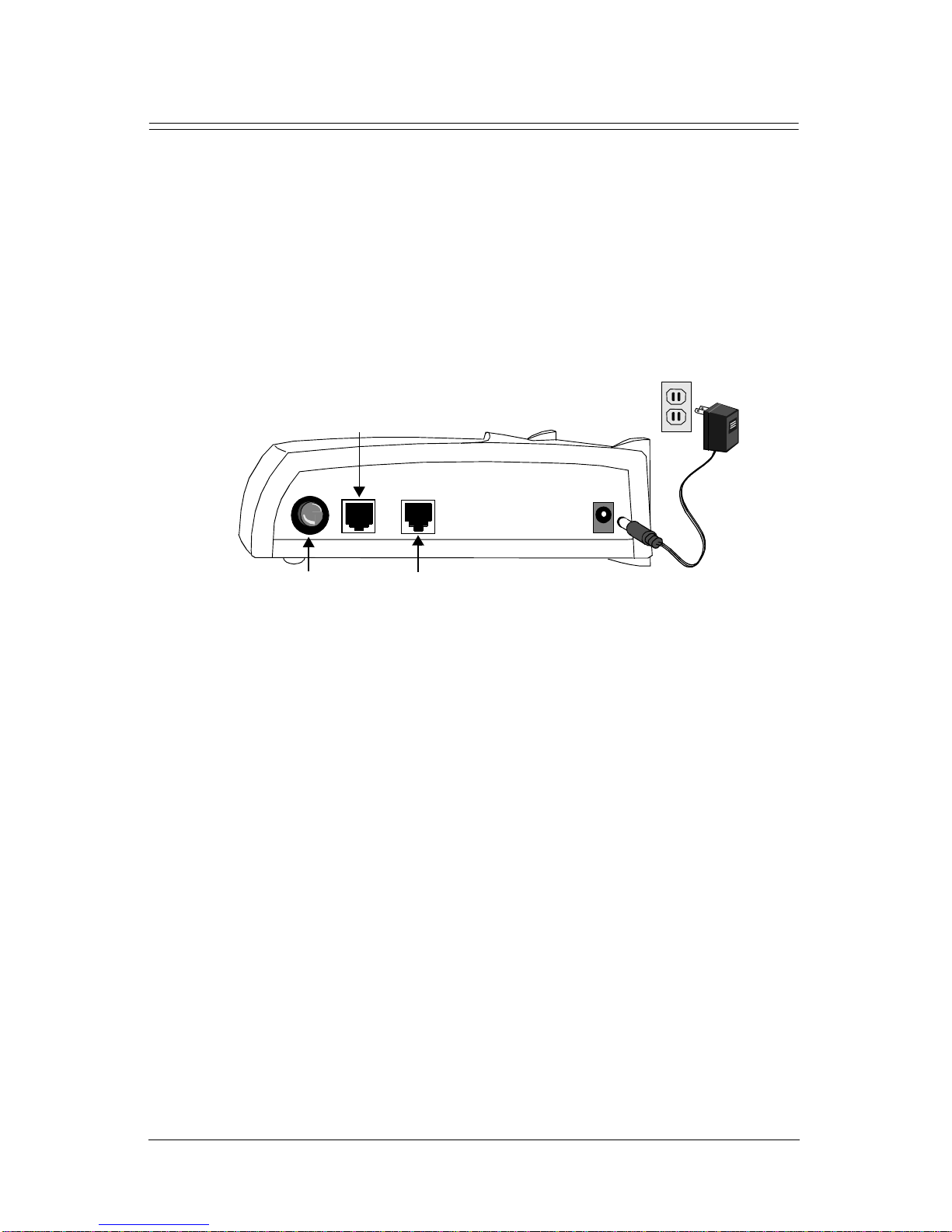
Instal lation Instructions
NOTE: The labels for the back panel of the 5260 are located on the
underside of the unit.
1 Be sure the Power button is in th e OFF position.
2 Plug the power cable into the power connection on the back of the
unit; then connect it t o a power outlet.
DSL
Connection
Power
(Out=OFF, In=ON)
Ethernet
Connection
Power
Connection
3 Connect the Ethernet port (ENET) on the 5260 to the Ethernet port on
your computer using the gray-colored RJ45 cable provided. To
connect the Ethernet port to a hub, you must use a crossover cable
(not included).
4 Use the RJ11 cable to connect the 5260’s DSL port to the DSL
service port (wall jack) installed by your DSL service provider.
5 Press the Power button to turn on the unit.
6 Check the front panel LEDs (described in the next section) for proper
functioning .
6
Installation Instructions Efficient Networks, Inc.
Page 8
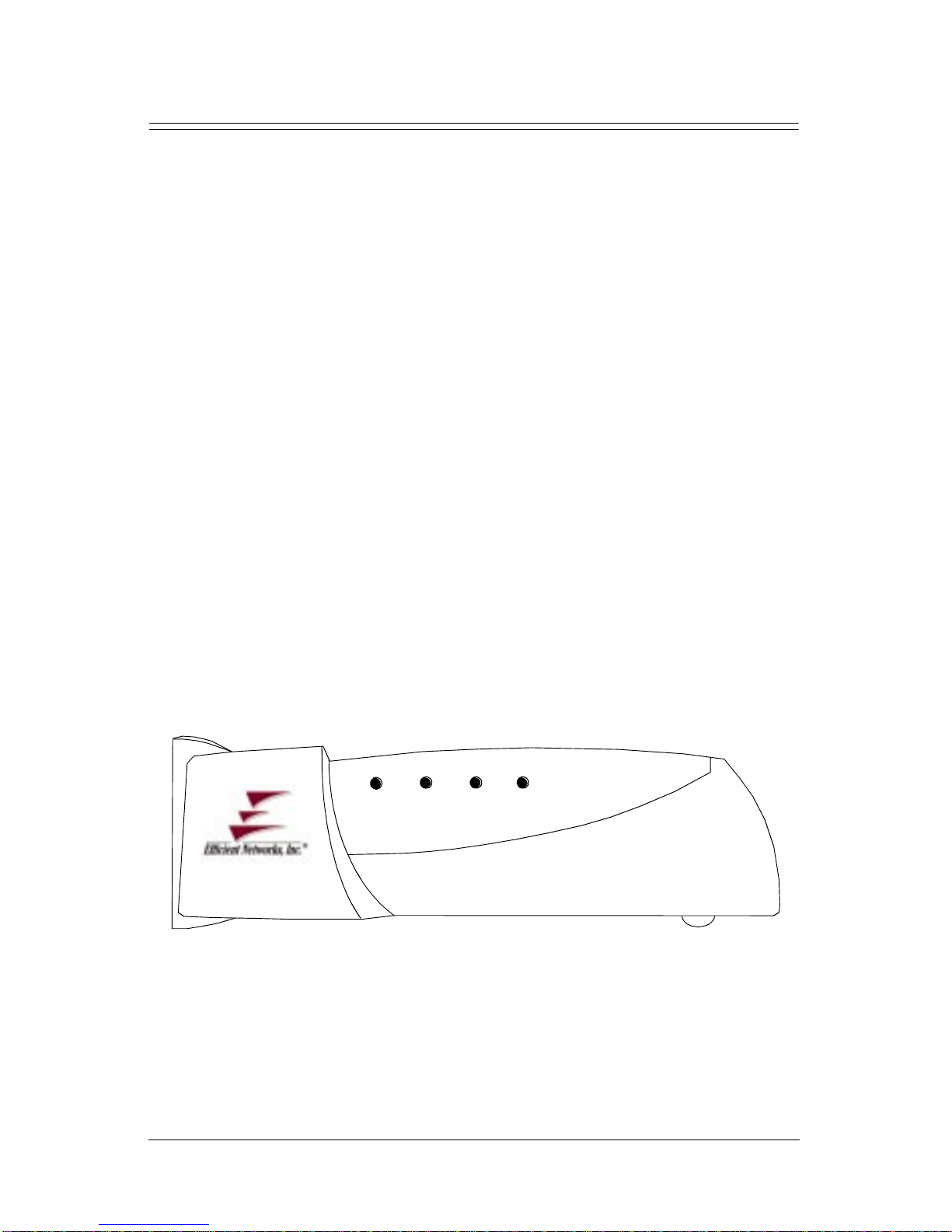
5260 Front Panel
The 5260 is equipped with four LEDs on the front panel: the System LED
(sys), ATM LED (atm), D SL LED (dsl), and Et hernet LED (enet).
1 First, the sys LED will come on. It turns solid green when the unit
has finished pass ing diagnostic tests .
2 The enet LED will then begin to flash green when Ethernet traffic is
detected.
3 The 5260 will begin negotiation of the optimum transmission rate and
attempt to train the line at the high est rate available. This process
usually only takes a minute, but if renegotiation o f data rates is
necessary, it may take several minutes during which time the 5260 is
not yet operational.
4 While the unit negotiates the D SL line rate, the DSL LED will blink
yellow/green alternately. The LED will turn solid green when a link is
established.
5 The dsl LED will show solid green when it is ready to transmit data.
The atm LED will flash green indicating traffic flow on the WAN
interface.
sys atm dsl enet
SpeedStream
Efficient Networks, Inc.
5260 Front Panel
7
Page 9

Table 1 5260 LED Indicator Desc riptions
LED Unlit Red Yellow Green
sys Power not applie d Power on self test
(POST) error
occurred; call
customer sup port to
report problem
atm • Power not a pplied
• No ATM cell
delineation
dsl Far-e nd signal not
detected; check
cable connection
enet Power not applie d No Et hernet li nk
ATM diagnostic
failure
• DSL error has
occurred
• LAN modem is not
configure d correctly
detected; check cable
connection , ensure
correct cable was
used.
Power on self test
(POST) in progress
N/A Blinking: ATM
Line not yet tra ined
Blinking: Attempting
to train line
N/A Blinking:
Normal system
operatio n
cell delineation
and traffic flow
Solid: ATM
ready
Blinking:
Attempting to
train line
Solid:Line is
trained and ready
for data traffic
Ethernet traffic
flow
Solid: Ethernet
ready
8
5260 Front Panel Efficient Networks, Inc.
Page 10

Technical
Reference
SpeedStream 5260 LAN Modem Specifications
Size 5.5W in. x 7D in. x 1.5H in.
( 14W cm x 17.8D cm x 3.8H cm)
Weight 1.25 lbs Bridg e Only (0.57 Kg)
Power Wall-mount 1 2 watt AC to DC adapter. 12 -18vDC @ 1.1 amp
output. AC input to meet country specific input requirements.
North America: 115 Vac, 60 Hz, .2 amp max
Europe: 220 Vac, 50 Hz, .1 amp max
Other: 230 Va c, 60 Hz, .1 a mp max
Temperature Operating: 0 to 40° C
Non-Operating, storage: -10 to 85 ° C
Humidity 10% to 90% noncondensing
Ethernet Interface
Cabling Unshielded Twisted Pair (UTP) Category 3, 4, or 5 (IEEE 802.3
Standard Compliant)
Connector Eight-contact, shielded RJ45
DSL Interface
Connector Two-contact, shielded R J11 (pin s 3 & 4) iso lation per IEC 950
Operating distance 18,000 feet maximum on standa rd 26 AWG copp er pair wire
Efficient Networks, Inc.
SpeedStream 5260 LAN Modem Specifications
9
Page 11

10
SpeedStream 5260 LAN Modem Specifications Efficient Networks, Inc.
 Loading...