

Page 1
D
GB
F
E
I
Bedienungsanleitung
User’s Guide
Mode d’emploi
Manual de uso
Manuale di istruzioni
BACKLIGHT KEYBBOARD
M u l t i m e d i a s l i m l i n e d e s i g n
SL-6451-PWT
Page 2

Page 3

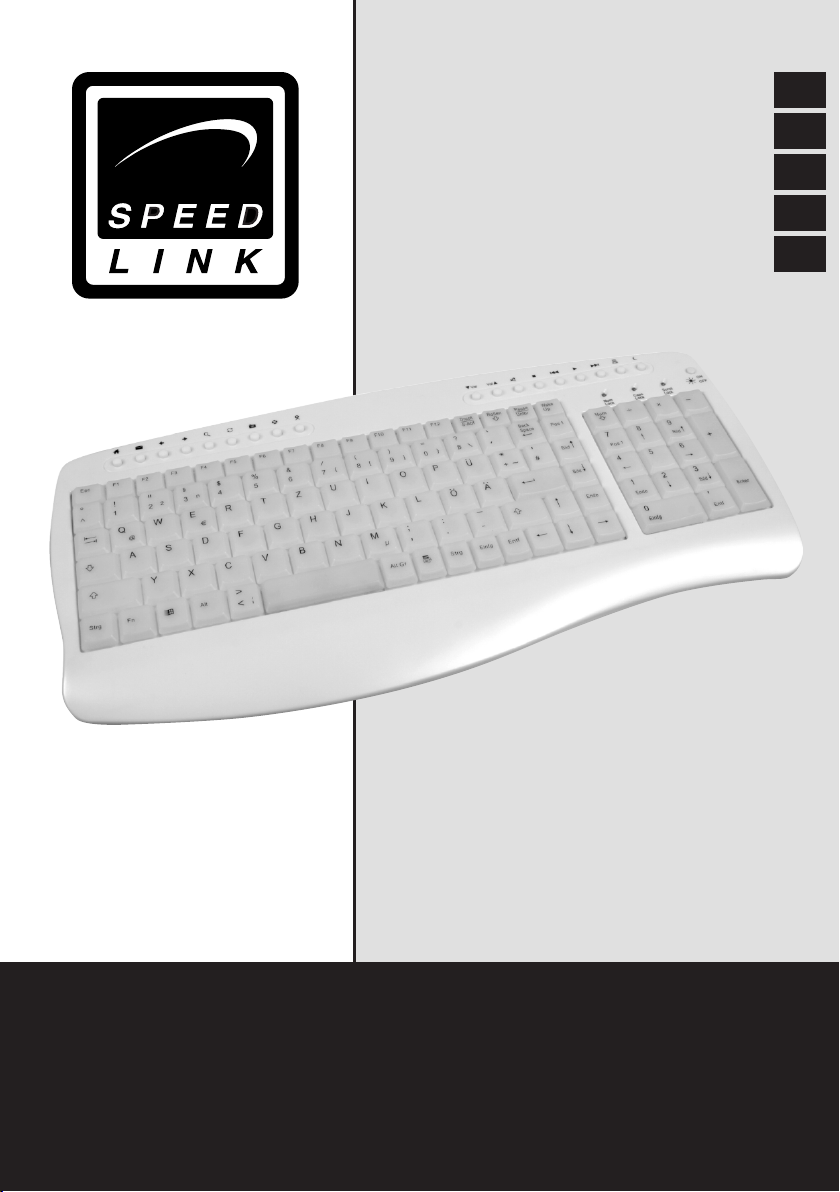
Vielen Dank für den Kauf der Backlight Tastatur. Diese Tastatur ist
aufgrund der einschaltbaren Hintergrundbeleuchtung ideal für Nachtschwärmer geeignet und ermöglicht so auch im Dunkeln eine einfache
Befehlseingabe. Ideal für Spiele im Dunkeln!
Produkteigenschaften
1. Kompaktes Design in edel glänzendem Pearl-Look
2. Zahlreiche Multimedia-Tasten
3. Ein-/Ausschaltbare Hintergrundbeleuchtung
4. Integrierte Handballenauage
Lieferumfang
• Tastatur
• Bedienungsanleitung
Systemvoraussetzungen
• Windows 98/98SE/2000/ME/XP
• USB-Port
Software-Installation unter Windows 98/98SE/2000
Um die Funktionsfähigkeit der Multimedia-Tasten zu gewährleisten, laden
Sie sich bitte die notwendige Software von unserer Internetseite herunter: http://www.speed-link.com
D
GB
F
E
I
Software-Installation unter Windows XP/ME
Bei Verwendung von Windows XP ist es nicht notwendig Software zu
installieren, da die Multimedia-Tasten auch ohne Software-Installation
funktionieren werden.
Inbetriebnahme
Anschluss an den USB-Port
Hinweis: Bitte beachten Sie, dass USB-Betrieb nicht von Windows 95/
NT unterstützt wird.
1. Schließen Sie den USB-Stecker an den entsprechenden USBAnschluss Ihres Computers an. Die Plug& Play-Funktion Ihres
Systems wird automatisch feststellen, dass ein neues Gerät
angeschlossen wurde.
2. Das Betriebssystem wird Sie ggf. auffordern die Windows
Installations-CD einzulegen. Folgen Sie den Anweisungen auf dem
Bildschirm.
3
Page 4
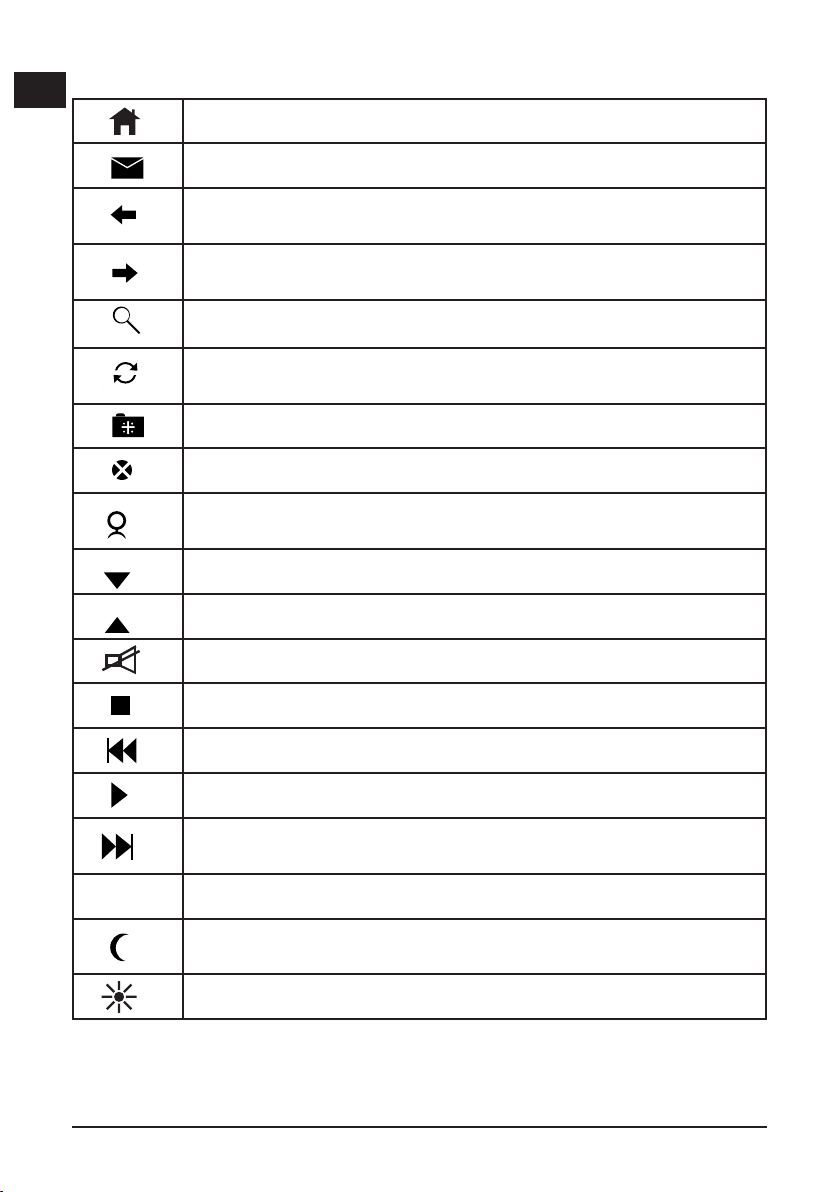
Funktionsbeschreibung
D
Öffnet die Startseite in Ihrem Internet Browser
GB
F
E
I
Öffnet Ihr Standard-E-Mail-Programm (z.B. Outlook)
Wechselt im Internet Browser zu der zuletzt gewählten
Internetseite.
Wechselt im Internet Browser zur nächsten bereits einmal
gewählten Internetseite.
Öffnet die Suchfunktion im Internet-Browser
Aktualisiert die gewählte Internetseite
Öffnet die Favoriten in Ihrem Internet Browser
Stoppt das Laden einer Web-Seite
Öffnet einen installierten Media-Player (CD-/MP3/DVDPlayer etc)
Verringert die Lautstärke
Erhöht die Lautstärke
Schaltet die Medien-Wiedergabe stumm
:
Stoppt die Medienwiedergabe
Wechselt zum vorherigen Titel
Startet die Medienwiedergabe Ihres CD/DVD/MP3-Players
Wechselt zum nächsten Titel
Öffnet den „Arbeitsplatz“ auf Ihrem PC
Versetzt den PC in Standby-Modus, durch erneutes
Drücken der Taste wird der PC wieder aktiviert.
Schaltet die Hintergrundbeleuchtung ein und aus.
4
Page 5

Sicherheitshinweise
• Versuchen Sie nicht, das Gerät selbst zu warten oder zu reparieren.
• Überlassen Sie jegliche Wartungsarbeiten dem zuständigen Fachpersonal.
• Verwenden Sie das Gerät nicht in der Nähe von Wasser (z.B.
Waschbecken, Badewannen oder Schwimmbecken), und halten Sie es
von Feuchtigkeit, tropfenden oder spritzenden Flüssigkeiten sowie Regen
fern.
Technische Daten
Artikelnummer: SL-6451
Abmessungen: Höhe: 1,5cm
Breite: 39cm
Tiefe: 19,5cm
Schnittstelle: USB
Garantie
Für dieses Produkt gewähren wir Ihnen eine Garantie von zwei Jahren ab
Kaufdatum auf Verarbeitung und alle eingebauten Teile.
Falls Sie Hilfe benötigen...
Bei technischen Problemen wenden Sie sich bitte an unseren
technischen Support. Die Hotline-Nummer nden Sie auf der Rückseite
dieser Bedienungsanleitung.
D
GB
F
E
I
5
Page 6

Thank you for purchasing the Backlight Keyboard. With its switchable
D
background illumination, this keyboard is perfect for night owls and enables easy input of commands even in low light. Ideal for games in the
GB
dark!
F
Features
E
1. Compact design with classy radiant pearl look
2. Numerous multimedia keys
I
3. Background illumination switches on/off
4. Integrated wrist support
Package content:
• Keyboard
• User’s guide
System requirements
• Windows 98/98SE/2000/ME/XP
• USB port
Software-Installation unter Windows 98/98SE/2000
To ensure the multimedia buttons will work properly, we recommend that
you download the necessary software from our website:
http://www.speed-link.com
Software Installation for Windows XP/ME
For use with Windows XP there is no need to install software as the
multimedia keys will function without software installation.
Hardware installation
USB connection
Note: Please note that Windows 95/NT do not support USB devices.
1. Connect the USB cable to the corresponding USB port of your
computer. The plug&play function of your computer will detect the
new device automatically.
2. Windows may ask you to insert the Windows Installation CD. Follow
the instructions on the screen.
6
Page 7
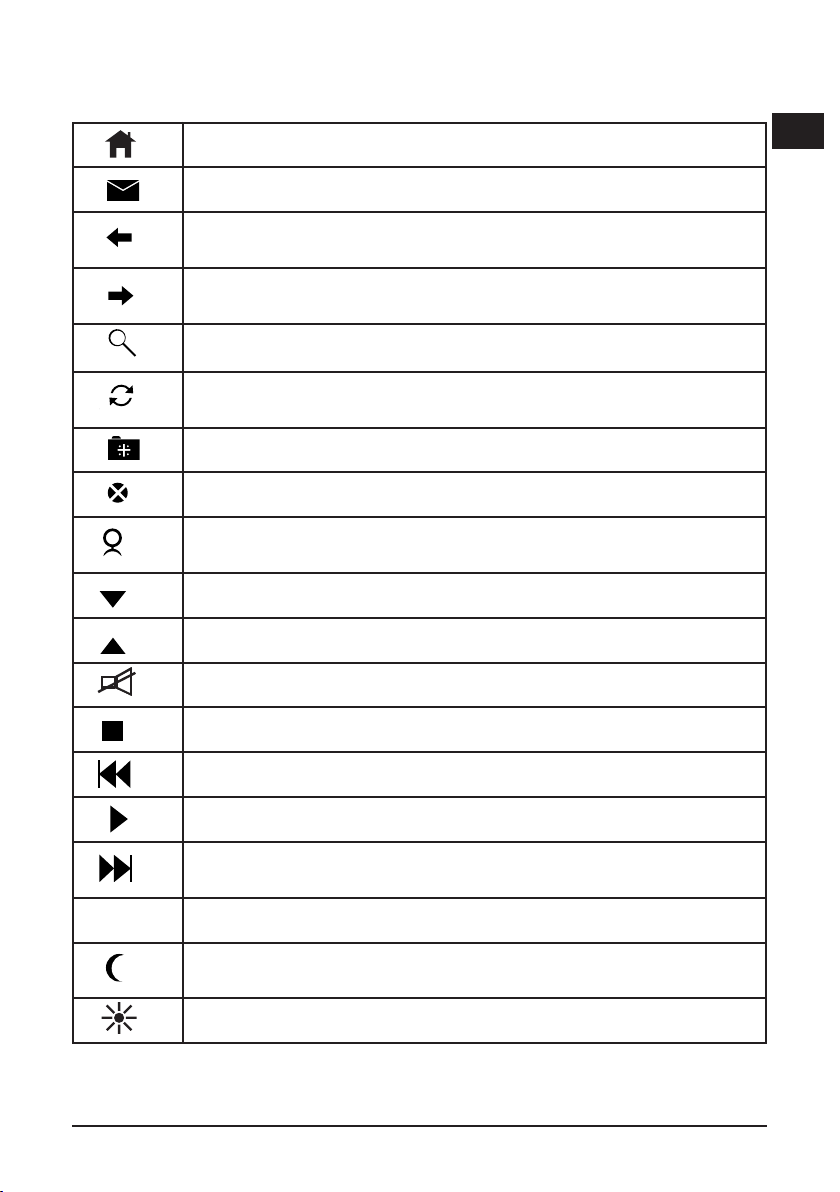
Hotkey function
D
Opens the home page in your Internet browser
Opens your default e-mail program (e.g. Outlook)
Changes to an earlier web page you have already visited in
the Internet Browser
Changes to the next web page you have already visited in
the Internet Browser.
Opens the search function in your Internet browser
Updates the selected web page
Opens your favourite sites in the Internet browser
Stops the current web page loading
Opens an installed media player (CD/MP3/DVD player,
etc.)
Reduces the volume
Increases the volume
Mutes the media playback
GB
F
E
I
:
Stops the media playback
Changes to the previous track
Starts reproduction of your CD/DVD/MP3 player
Changes to the next track
Opens “My Computer” on your PC
Puts the PC into standby mode, pressing the button again
reactivates the PC
Switches the background illumination on and off
7
Page 8

Important Advice
D
• Do not take the device apart.
• Do not attempt to service or repair the device yourself. Refer all
GB
servicing to qualied service personnel.
F
• Do not attempt to modify the device in any way. Doing so could
invalidate your warranty. Do not use this apparatus near water (for
E
example, sinks, baths, pools) or expose it to rain, moisture, or dripping
or splashing liquids.
I
Specications
Article n°: SL-6451
Dimensions: Height: 1,5cm
Width: 39cm
Depth: 19,5cm
Interface: USB
Guarantee
We guarantee this product in respect of workmanship and all built-in
components for a period of two years from date of purchase.
If you need help...
In case of technical problems don‘t hesitate to contact our technical
support. The hotline number is given on the back page of this manual.
8
Page 9

Merci d’avoir choisi ce clavier Backlight. Grâce à son rétro-éclairage
commutable, il est idéal pour les noctambules et facilite la saisie, même
dans l’obscurité. Le périphérique parfait pour jouer dans le noir !
D
GB
Caractéristiques du produit
1. Design compact et surface satinée rafnée
2. Nombreuses touches multimédias
3. Rétroéclairage commutable
4. Repose-poignets intégré
Fournitures
• Clavier
• Mode d’emploi
Conguration système requise:
• Windows 98/ME/2000/XP
• Port USB
Installation du logiciel pour Windows 98/98SE/2000
Pour garantir le bon fonctionnement des touches multimédias, nous vous
invitons à télécharger le logiciel nécessaire qui se trouve sur notre site
Internet http://www.speed-link.com.
Installation du logiciel pour Windows XP/ME
Sous Windows XP il n’est pas nécessaire d’installer du logiciel.
Installation du matériel
Raccordement sur la prise USB
Remarque: Veuillez noter que Windows 95/NT ne supporte pas le mode
USB.
F
E
I
1. Reliez la che USB au port USB correspondant de l’ordinateur. La
fonction Plug& Play de votre ordinateur détectera automatiquement le
nouveau périphérique.
2. Le cas échéant le système d’exploitation vous demandera d’insérer
le CD d’installation de Windows. Suiveze les instructions qui s’afchet
à l’écran.
9
Page 10
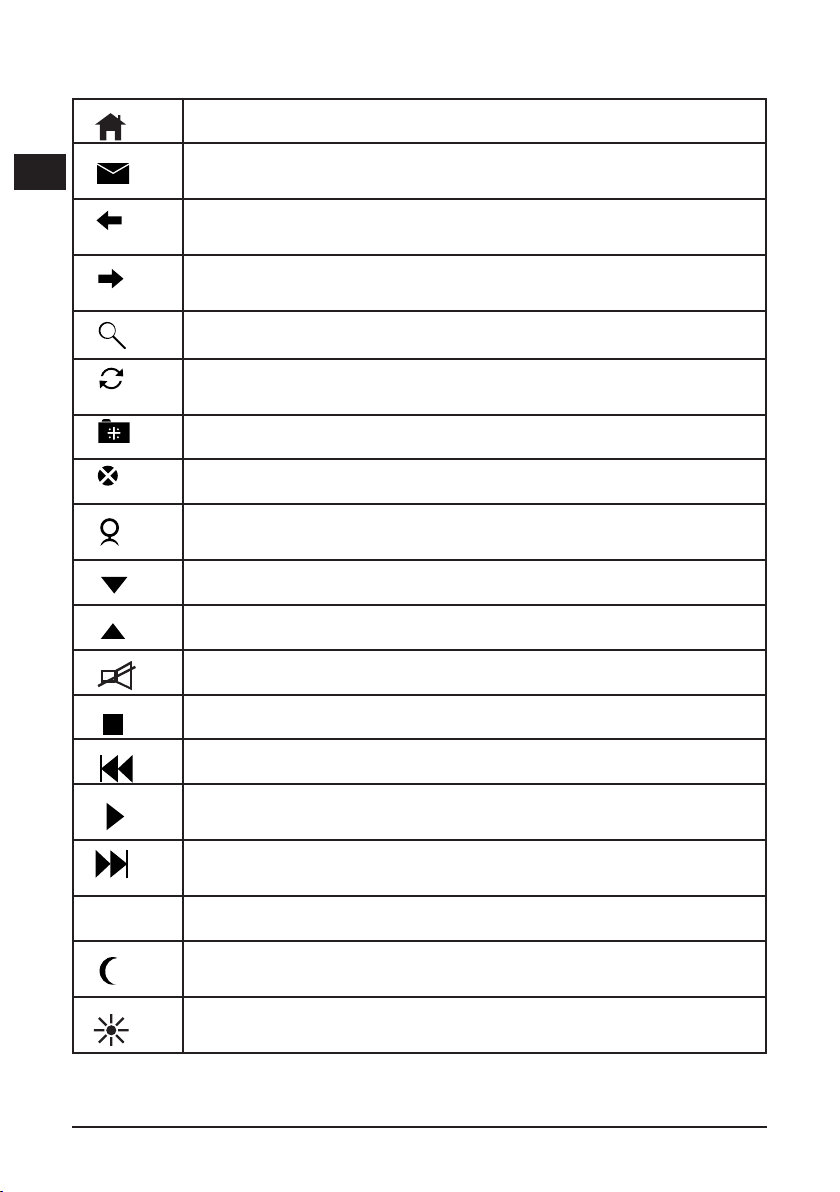
Fonction Hotkey
D
GB
F
E
I
Ouvre la page d’accueil dans votre navigateur Internet
Ouvre votre programme de messagerie par défaut (par
exemple Outlook)
Revient à la page Internet précédente dans le navigateur
Internet
Passe à la page suivante déjà ouverte dans le navigateur
Internet
Ouvre la fonction de recherche dans le navigateur Internet
Rafraîchit la page Internet sélectionnée
Ouvre la liste des Favoris dans votre navigateur Internet
Arrête le chargement d’un site Web
Ouvre un lecteur multimédia installé sur l’ordinateur (lecteur
de CD/MP3/DVD, etc.)
Baisse le volume
Augmente le volume
Met la lecture du média en sourdine
Arrête la lecture du média
Revient au titre précédent
Met en marche la reproduction de votre lecteur CD/DVD/
MP3
Passe au titre suivant
:
Ouvre le « Poste de travail » sur votre ordinateur
Met l’ordinateur en veille ; appuyez de nouveau sur la touche pour réactiver l’ordinateur
Allume et éteint le rétro-éclairage
10
Page 11

Instructions de sécurité importantes
• Ne tenez pas d’effectuer vous-même l’entretien du dispositif ni de le
réparer. Pour les opérations d’entretien, adressez-vous à du personnel
qualié.
• N’essayez jamais d’apporter une quelconque modication au dispositif.
Cela pourrait annuler votre garantie.
• Évitez d’utiliser l’appareil à proximité de l’eau (évier, baignoire ou
piscine par ex.) ou de l’exposer aux intempéries, à l’humidité, ou à des
écoulements ou des projections de liquides.
Spécications
N° d’article: SL-6451
Dimensions: Hauteur: 1,5cm
Largeur: 39cm
Profondité: 19,5cm
Interface: USB
Garantie
Ce produit est garanti pour une période de deux ans pour les pièces et la
main-d’œuvre, a partir de la date d’achat, contre une fabrication et des
matériaux défectueux.
Si vous avez besoin d‘aide..
En cas de problèmes techniques, n‘hésitez pas de contacter notre
support technique. Le numéro de téléphone est indiqué au revers de ce
manuel.
D
GB
F
E
I
11
Page 12

Muchas gracias por la compra de este teclado con luz de fondo. Gracias
D
a la iluminación conectable de este teclado el periférico es ideal para
amantes de la noche. Facilita la escritura y pulsación de comandos en la
GB
oscuridad. ¡Ideal para jugar de noche!
F
Características del producto
E
1. Diseño compacto en elegante color perla brillante
2. Cantidad de teclas multimedia
I
3. Iluminación de fondo conectable y desconectable
4. Reposamuñecas integrado
El suministro contiene:
• Teclado
• Instrucciones de manejo
Requerimientos del sistema:
• Compatible con Windows 98/2000/ME/XP
• Puerto USB
Software-Installation unter Windows 98/98SE/2000
Para garantizar el buen funcionamiento de los botones multimedia, es
preciso descargar el software correspondiente que obtendrás a través
de nuestra página web: http://www.speed-link.com.
Instalación del software bajo Windows XP/ME
Windows XP no exige una instalación del software, cómo las teclas de
acceso directo funcionarán sin software adicional.
Conexión del teclado
Conexión a través del USB
A Tener muy en cuenta: Windows 95/NT no soportan el sistema USB.
1. Conecte el cable USB al puerto USB de su ordenador. La función
plug & play de su equipo detecta automáticamente que ha conectado
un nuevo dispositivo.
2. El sistema operativo puede que emita un aviso para que vuelva
colocar el CD en el que está el sistema Windows con el que opera.
Siga las instrucciones que aparecen en pantalla
12
Page 13
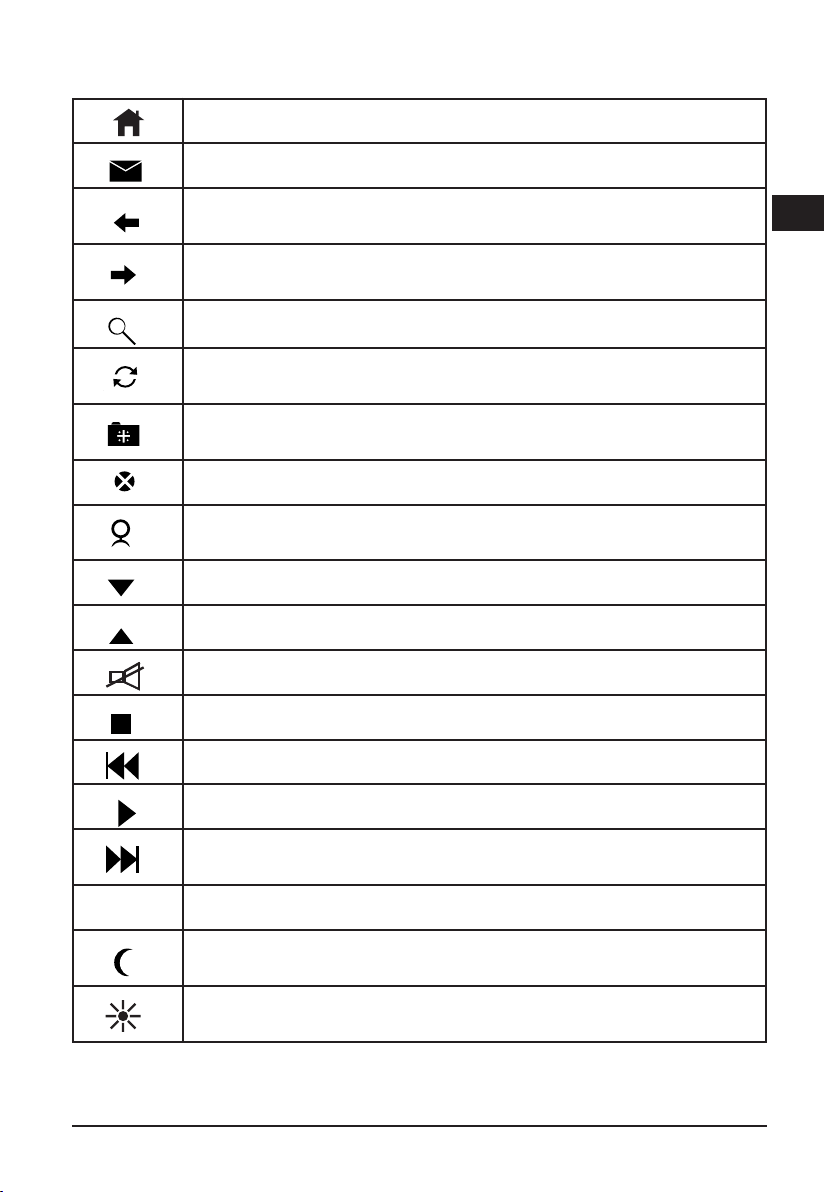
Función Hotkey (teclas de acceso directo)
Abre la página de inicio de tu navegador de Internet
Abre el programa estándar de e-mail. (p. ej. Outlook)
Cambia en el navegador de Internet a la página anteriormente seleccionada
Cambia en el navegador de Internet a la página siguiente ya
seleccionada anteriormente
Abre la función de búsqueda del navegador
Actualiza la página de Internet seleccionada
Abre la página favoritos de tu navegador de Internet
Detiene la carga de una página Web
Abre un reproductor de multimedia instalado ((CD-/MP3/
DVD-Player, etc)
Disminuye el volumen
Aumenta el volumen
D
GB
F
E
I
:
La reproducción de medios enmudece
Detiene la reproducción de medios
Vuelve al título o pista anterior
Inicia la reproducción del reproductor CD/DVD/MP3
Va al título o pista siguiente
Abre la pantalla “Escritorio” de tu PC
Coloca el PC en modo de reposo, al volver a pulsar esta
tecla se vuelve a activar el PC
Conecta y desconecta la iluminación de fondo del teclado
13
Page 14

Medidas de seguridad
D
• No intente en ningún caso reparar o mantener este sistema.
• Deje cualquier trabajo de mantenimiento en manos de personal
GB
especializado.
F
• No utilice el aparato cerca del agua (p .ej. lavabos, bañeras o piscinas)
y manténgalo alejado de la humedad, líquidos que salpiquen, goteen o
E
de la lluvia.
I
Datos técnicos
N° serial: SL-6451
Medidas: Altura: 1,5cm
Ancho: 39cm
Fondo: 19,5cm
Interfaz: USB
Garantía
Este producto tiene una garantía de dos años a partir de la fecha de
compra tanto para defectos de fabricación como de sus componentes.
Si precisa ayuda...
En caso de surgir cualquier problema técnico, acuda a los especialistas
que le proporcionarán todo tipo de soporte técnico. El número de
nuestra línea Hotline, se encuentra al dorso de estas instrucciones de
manejo.
14
Page 15

Vi ringraziamo per l’acquisto della tastiera Backlight. Grazie alla retroilluminazione azionabile tramite interruttore, questa tastiera è l’ideale
per chi ama lavorare di notte e può essere utilizzata facilmente anche al
buio. Ideale anche per giocare al buio!
Caratteristiche del prodotto
1. Design compatto in rafnato perlato brillante
2. Numerosi tasti multimedia
3. Retroilluminazione azionabile tramite interruttore (on/off)
4. Supporto per i polsi integrato
Contenuto fornitura:
• tastiera
• istruzioni per l’uso
Presupposti di sistema:
• compatibile con Windows 98/2000/ME/XP
• porta USB
Installazione software (Windows 98/98SE/2000)
Per garantire la funzionalità dei tasti multimediali, scaricare il realativo
software dalla nostra pagina Internet: http://www.speed-link.com.
Installazione software (Windows XP/ME)
Per Windows XP la tastiera può venire utilizzata senza installare software.
D
GB
F
E
I
Collegamento della tastiera
Collegamento tramite USB
Nota bene: Si prega di osservare che le funzioni USB non
sono supportate da Windows 95/NT.
1. Allacciare il connettore USB al rispettivo collegamento USB del
computer. La funzione Plug&Play del sistema riconoscerà automaticamente che una nuova unità è stata connessa.
2. Il sistema operativo richiederà l’inseriment del CD di installazione
Windows. Seguire le istruzioni sul monitor.
15
Page 16
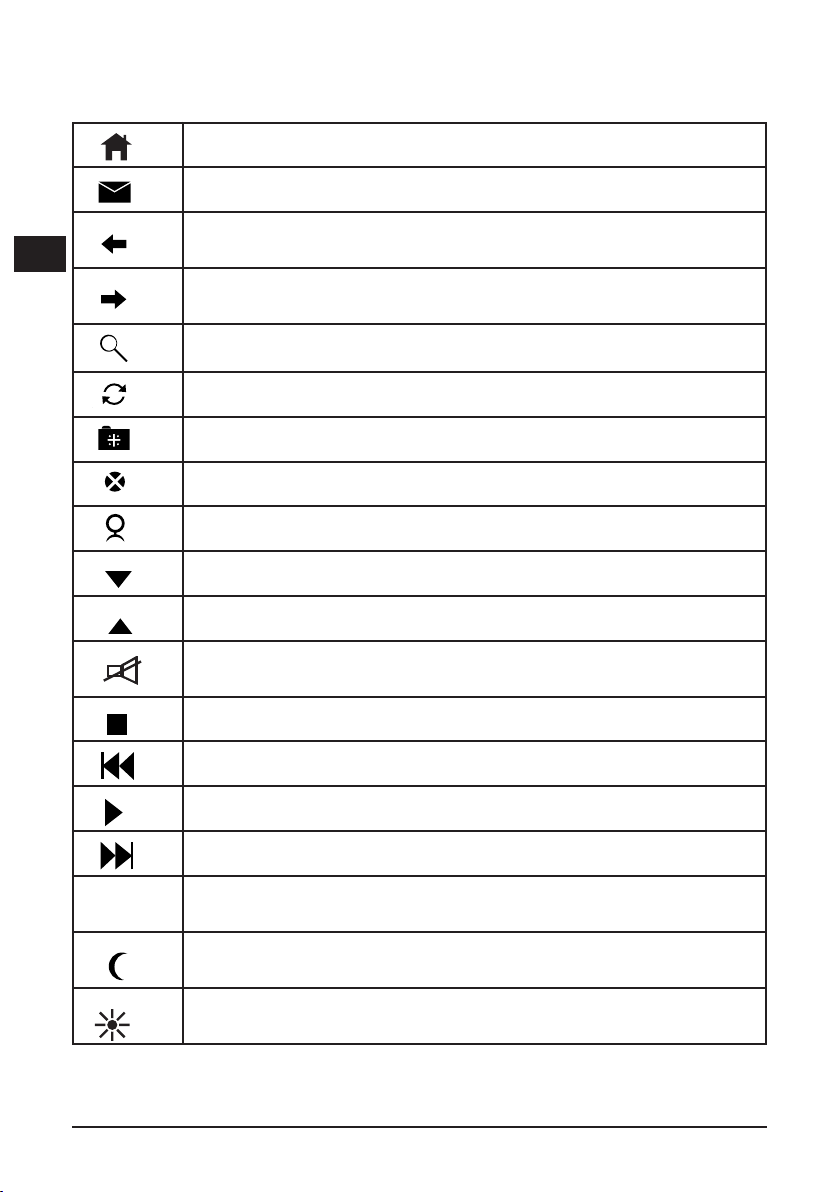
Descirzione degli hot key (tasti di scelta rapida)
D
GB
F
E
I
Apre la pagina di avvio nel browser Internet
Apre il programma E-mail standard (per es. Outlook)
Passa nel browser Internet alla pagina precedentemente
selezionata
Passa nel browser Internet alla pagina successiva già
selezionata
Apre la funzione di ricerca nel browser Internet
Attualizza la pagina Internet selezionata
Apre i preferiti nel browser Internet
Blocca il caricamento di una pagina web
Apre un Media Player installato (CD/MP3/DVD Player ecc)
Abbassa il volume
Alza il volume
Disattiva la funzione audio del Media Player
Blocca il Media Player
:
Passa al titolo precedente
Inizia la riproduzione audio o video dei lettori CD/DVD/MP3
Passa al titolo successivo
Apre le „Risorse del computer“ sul PC
Imposta il modo standby. Per riattivare il PC, premere
nuovamente il tasto
Accende/spegne la retroilluminazione
16
Page 17

Avvertenze di sicurezza
• Non provare a sottoporre da soli l’apparecchio manutenzione o a
riparazione.
• Qualunque tipo di lavoro di manutenzione deve essere svolto dal
personale specializzato competente.
• Non usare l’apparecchio nelle vicinanze di acqua (ad es. lavandini,
vasche da bagno o piscine), e proteggerlo dall’umidità, da gocce o
spruzzi e dalla pioggia.
Speciche tecniche
Numero di articolo: SL-6451
Dimensioni: Altezza: 1,5 cm
Larghezza: 39 cm
Profondità: 19,5 cm
Interfaccia: USB
Garanzia
Con questo prodotto vi offriamo una garanzia di due anni a partire dalla
data d’acquisto per la lavorazione e per tutti i pezzi incorporati.
Se vi occorre aiuto...
In caso di problemi tecnici rivolgersi al nostro supporto tecnico. Il
numero hotline si trova sul retro delle istruzioni per l’uso.
D
GB
F
E
I
17
Page 18

Page 19

Page 20
SL-6451-PWT
 Loading...