

Page 1
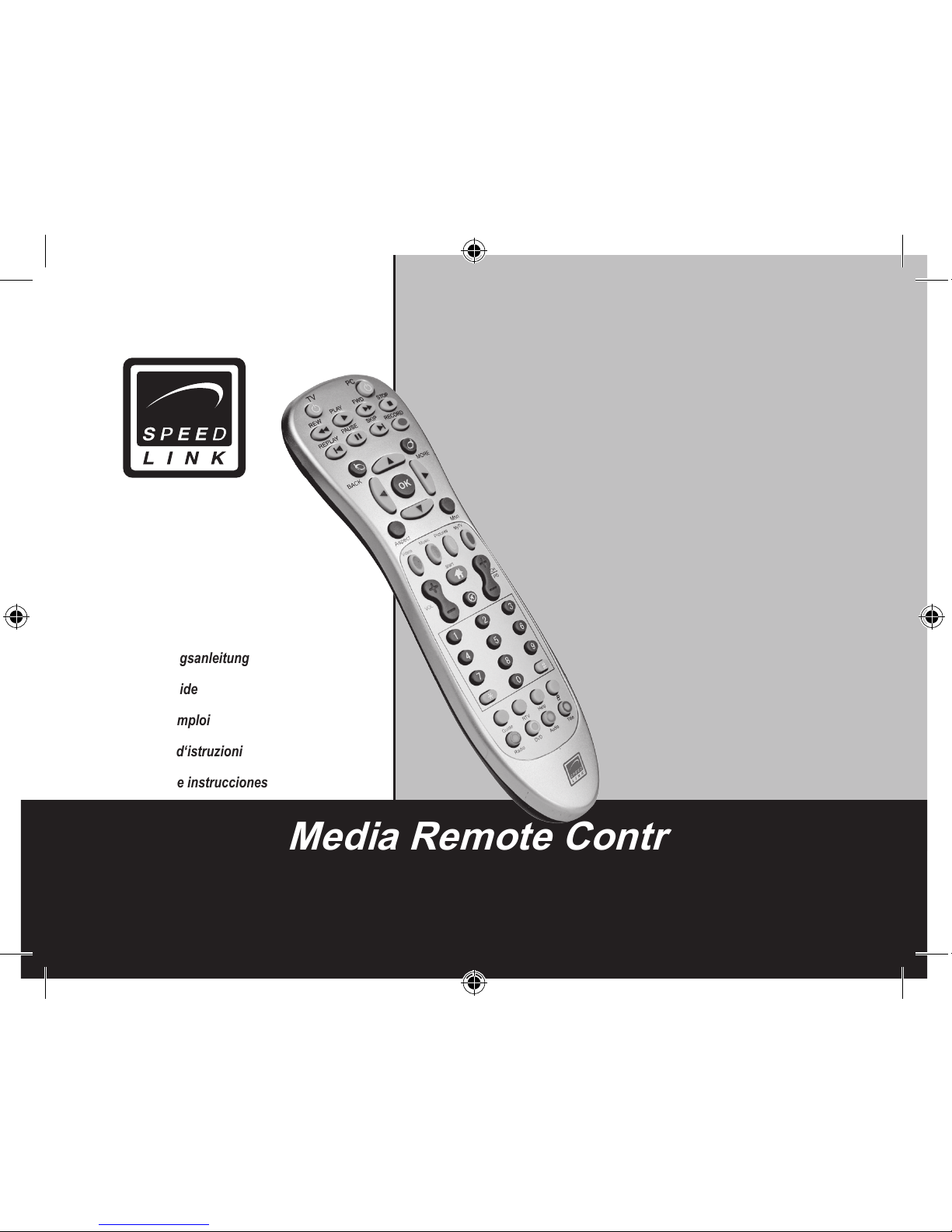
Media Remote Control
SL-6399
Bedienungsanleitung
User‘s guide
Mode d‘emploi
Manuale d‘istruzioni
Manual de instrucciones
Page 2

Page 3
3
D
GB
F
E
I
Bevor Sie dieses Produkt verwenden, lesen
Sie bitte die Sicherheitshinweise im Handbuch.
Bewahren Sie dieses Handbuch auf, um zu
einem späteren Zeitpunkt darauf zurückgreifen
zu können
Haftungsausschluss
Die Jöllenbeck GmbH übernimmt keine Haftung
für Schäden am Produkt oder Verletzungen
von Personen aufgrund von unachtsamer,
unsachgemäßer, falscher oder nicht dem vom
Hersteller angegebenen Zweck entsprechender
Verwendung des Produkts.
Fehlerbeseitigung/Reparatur
Versuchen Sie nicht, das Gerät selbst zu
warten oder zu reparieren. Überlassen Sie
jegliche Wartungsarbeiten dem zuständigen
Fachpersonal. Nehmen Sie keine Veränderungen
am Gerät vor. Dadurch verlieren Sie jegliche
Garantieansprüche.
Feuchtigkeit/Wärmequellen
Verwenden Sie das Gerät nicht in der Nähe von
Wasser (z. B. Waschbecken, Badewannen etc.),
und halten Sie es von Feuchtigkeit, tropfenden
oder spritzenden Flüssigkeiten sowie Regen
fern. Setzen Sie das Gerät keinen hohen
Temperaturen, hoher Luftfeuchtigkeit oder
direktem Sonnenlicht aus.
Reinigung
Verwenden Sie zum Reinigen des Gerätes bitte
ein weiches, trockenes Tuch. Lassen Sie das
Gerät nie mit Benzol, Verdünner oder anderen
Chemikalien in Berührung kommen.
Batteriehinweise
Bewahren Sie Batterien außerhalb der
Reichweite von Kindern auf
Ersetzen Sie alte oder schwache Batterien
immer sofort
Entsorgen und recyceln Sie verbrauchte
Batterien gemäß den örtlichen
Bestimmungen
Bestimmungsgemäßer Gebrauch
Das Gerät darf nur mit den dafür
vorgesehenen Originalteilen verwendet
werden.
Das Produkt darf nur in geschlossenen und
trockenen Räumen verwendet werden.
Die bestimmungsgemäße Verwendung
beinhaltet das Vorgehen gemäß der
Installationsanleitung. Für Schäden, die
durch unsachgemäßen Gebrauch entstehen,
übernimmt der Hersteller keine Haftung
Sicherheitshinweise
Page 4
4
D
GB
F
E
I
Einführung
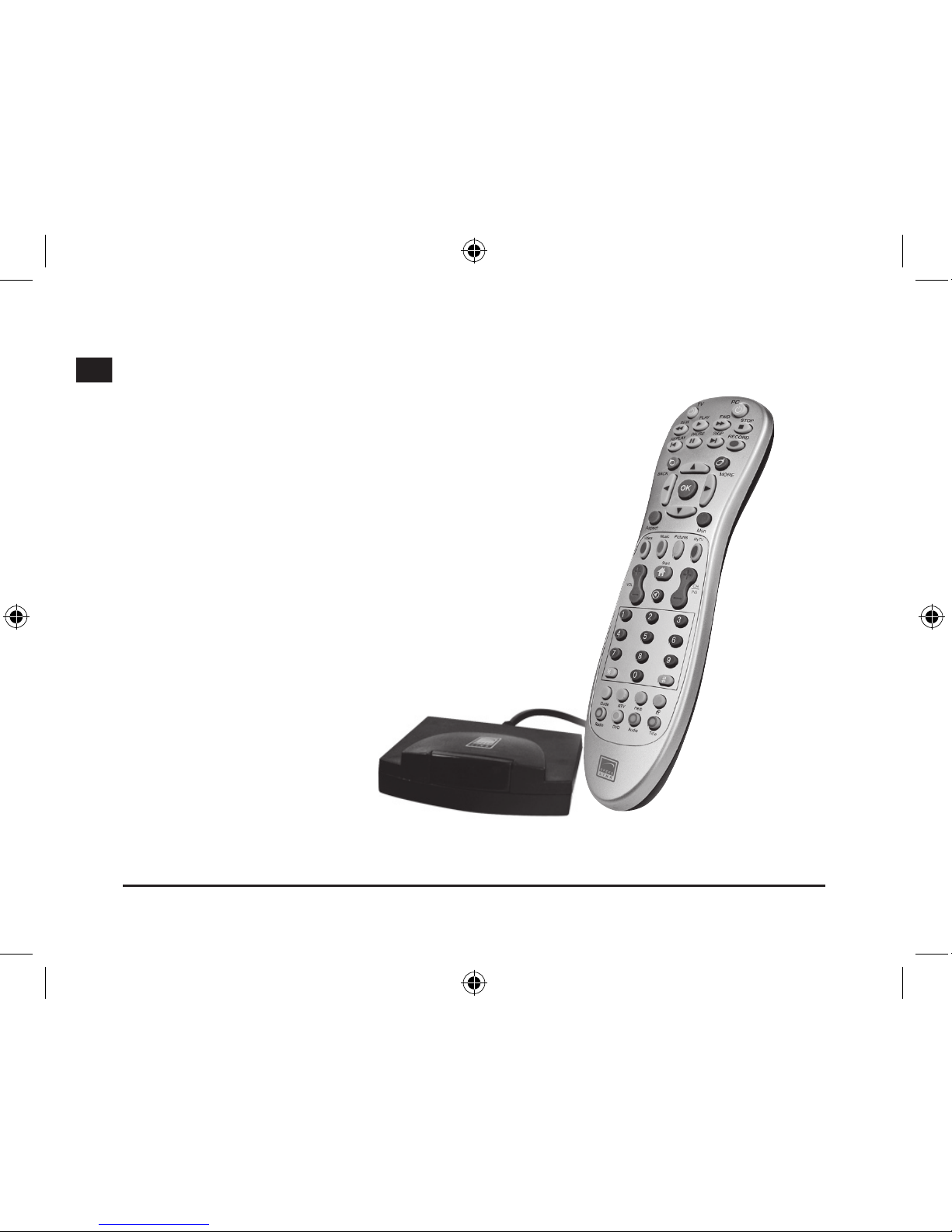
Vielen Dank, dass Sie sich für die Media
Center Fernbedienung entschieden haben. Per
Knopfdruck können Sie direkt auf das Media
Center Ihres PCs zugreifen und haben so volle
Kontrolle über alle TV- und Video-Funktionen.
Die Vorteile
• Per Knopfdruck das Media Center starten
• Volle Kontrolle über alle TV- und Video
Funktionen
• Sofort-Wiederholung für Videos und aufgezeichnete Filme
• Direkter Zugriff auf den Bilderspeicher
• Kehren Sie bequem auf Ihren PC-Desktop
zurück
• Sendungstitel, Albumtitel, Songtitel, Interpret, Untertitel - per Knopfdruck anzeigen
• Linke und rechte Maustaste
• Batterien inklusive
Das ist dabei
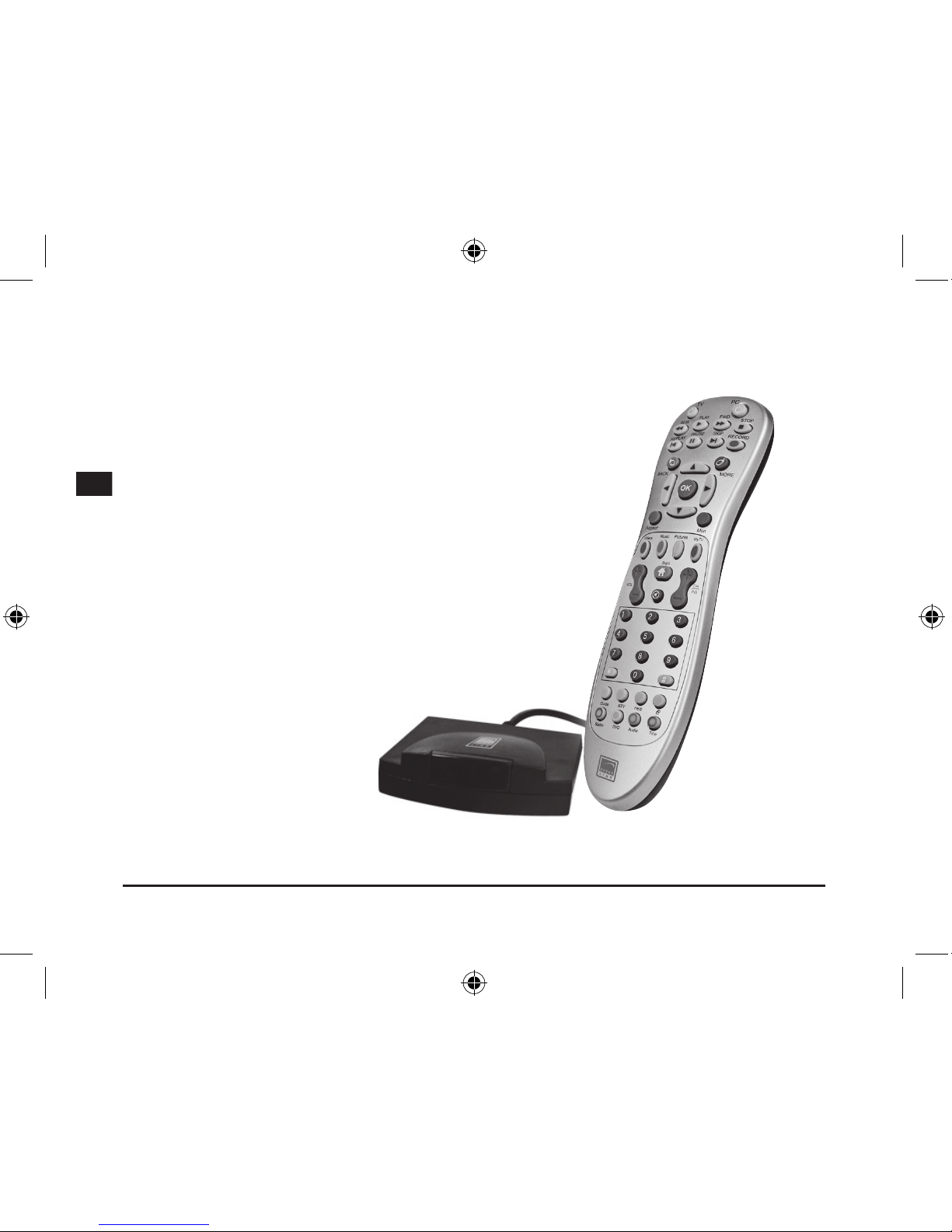
• Media Center Fernbedienung
• USB-Empfänger
• Handbuch
Systemanforderungen
• Windows XP/Vista Media Center Edition
Page 5
5
D
GB
F
E
I
Anschluss
Einlegen der Batterien
Öffnen Sie das Batterie-Fach auf der Unterseite
des Geräts. Legen Sie die beiliegenden Batterien
gemäß der im Fach eingeprägten Zeichnung ein.
Verbindung herstellen
Verbinden Sie den USBEmpfänger mit einer freien USBSchnittstelle Ihres PCs. Drücken
Sie nun die Tasten Rauf/Runter/
Rechts/Links. Sobald die LED
des Empfängers blinkt,besteht
eine Verbindung zwischen
Fernbedienung und Empfänger.
Hinweis: Schließen Sie den
Empfänger an eine USBSchnittstelle direkt an Ihrem PC.
USB-Hubs sind ungeeignet.
Funktionen
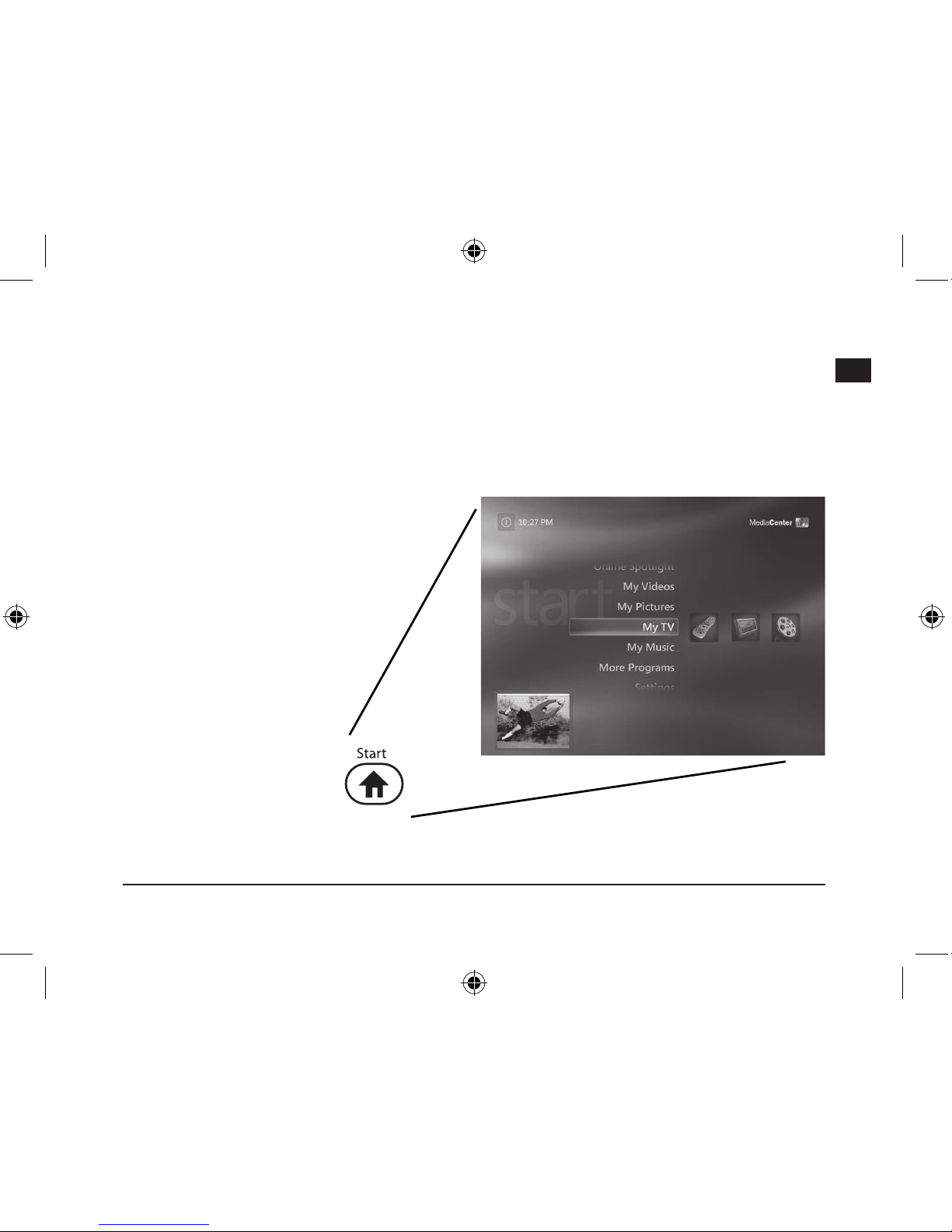
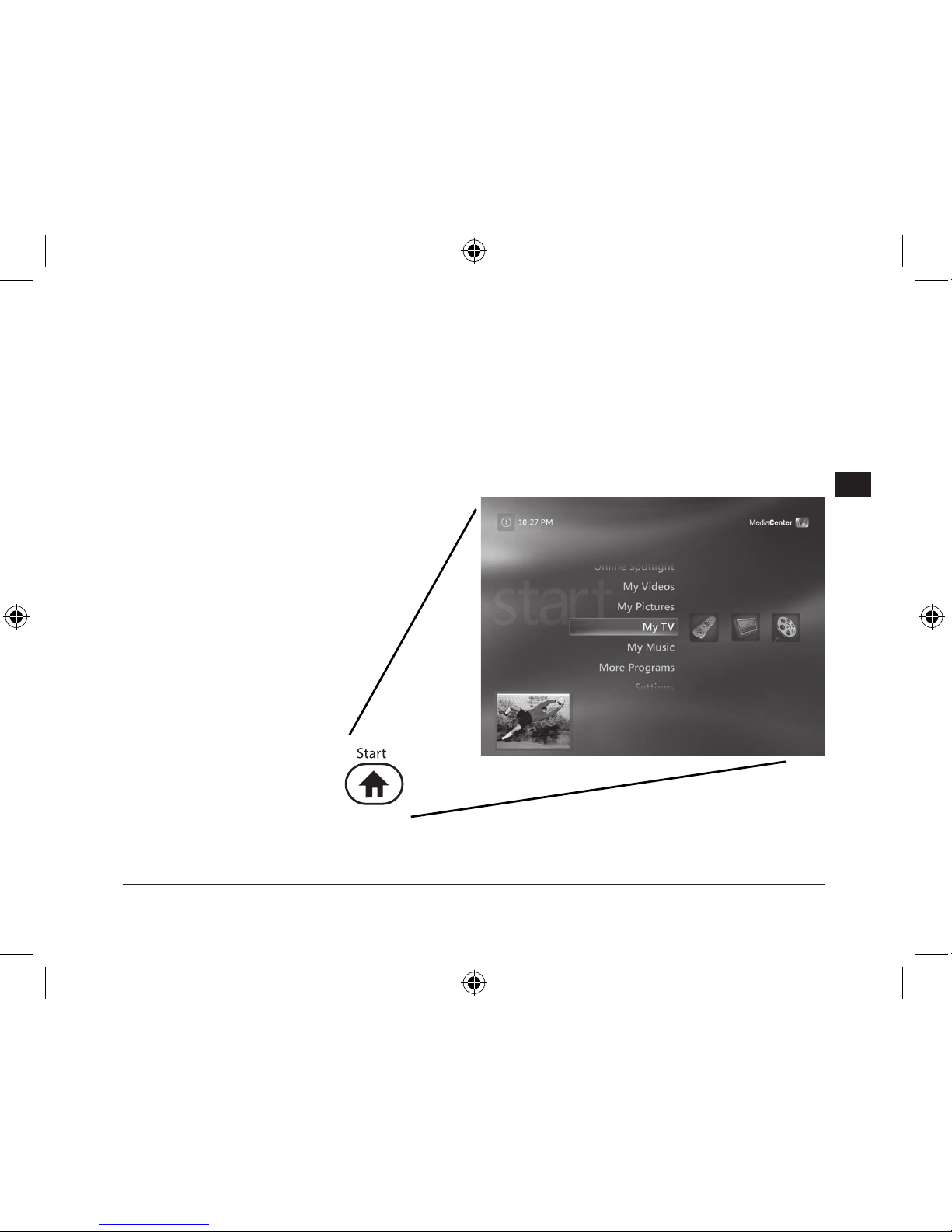
Starten Sie per Knopfdruck
das Windows Media Center
und genießen Sie die
bequeme Navigation über die
Fernbedienung
Page 6
6
D
GB
F
E
I
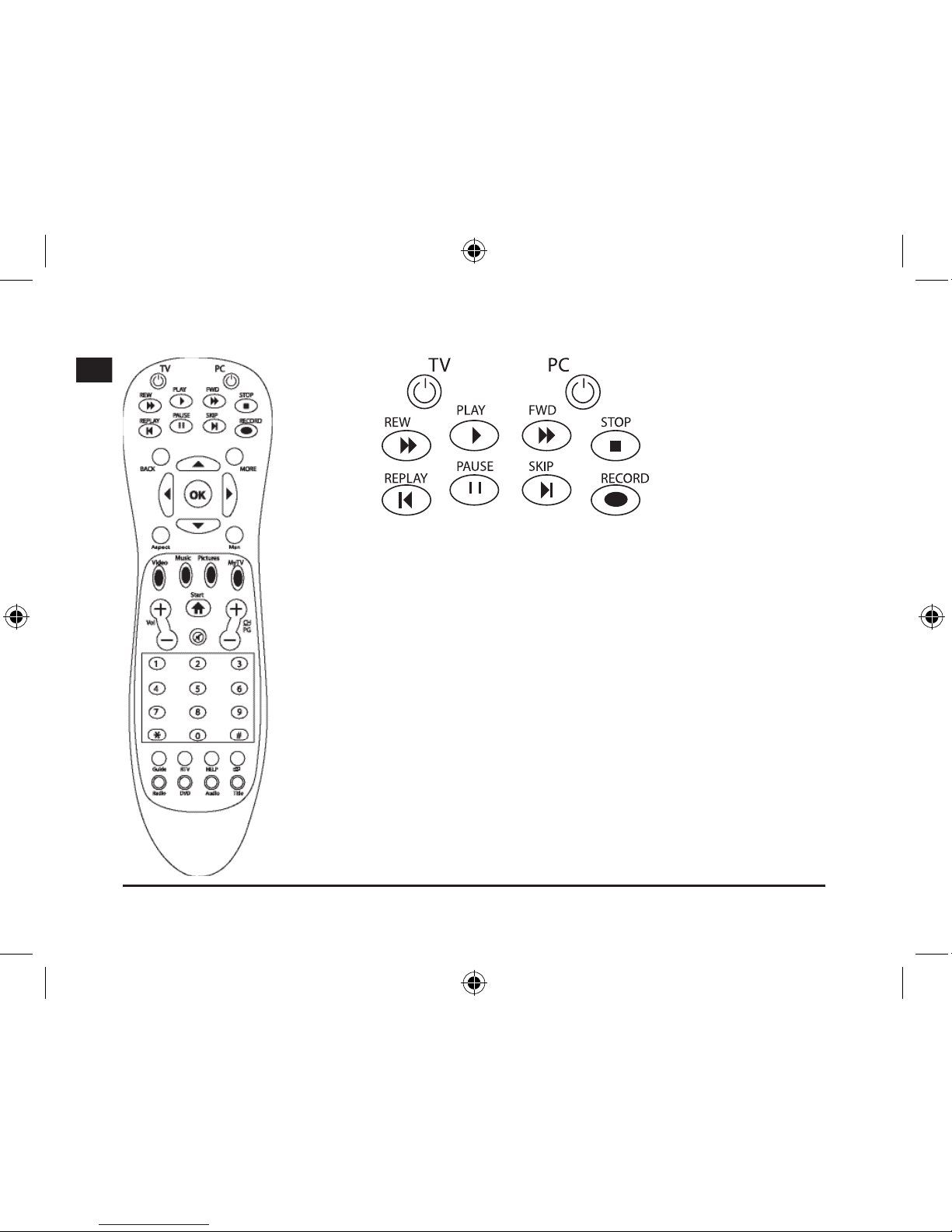
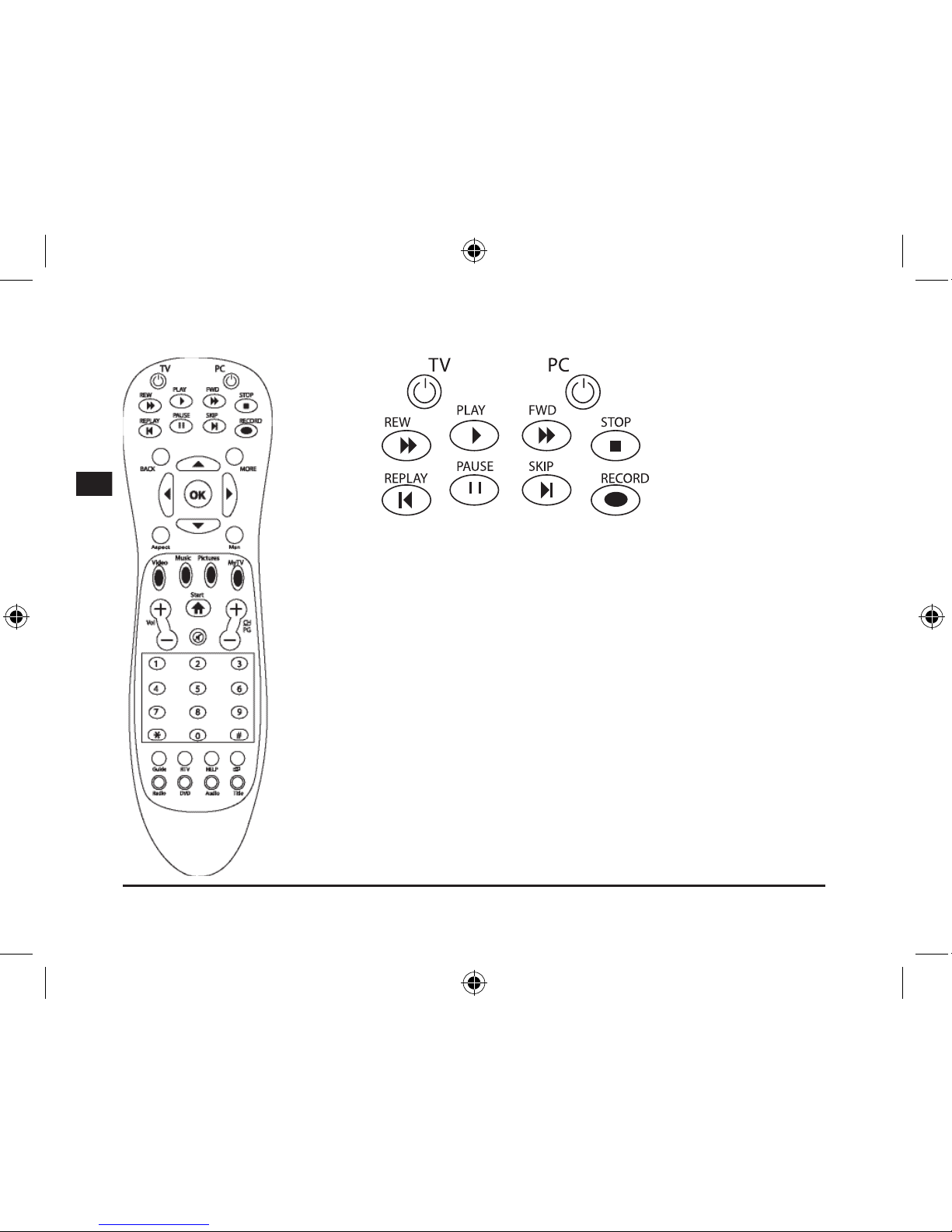
TV: Vollbildmodus
PC: Herunterfahren des PCs, schaltet das Media Center aus
Rew: Rückspulfunktion
Play: Abspielfunktion
Fwd: Vorspulfunktion
Stop: Unterbrechen der Aufnahme
Replay: Vorheriges Kapitel
Pause: Pause
Skip: Nächstes Kapitel
Record: TV und Radio Aufnahme unter Media Center
Page 7
7
D
GB
F
E
I
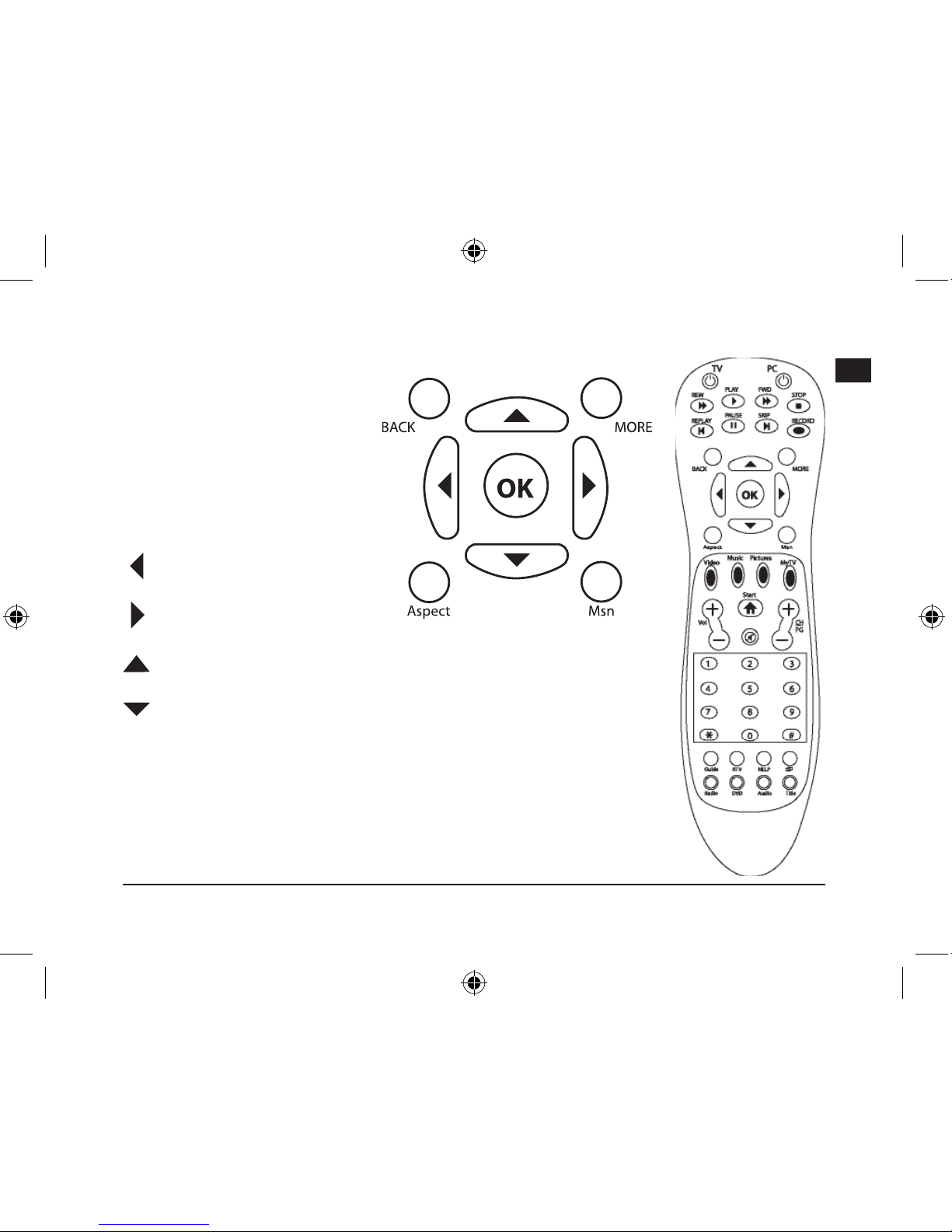
Back: Linke Maustaste /
zurück
More: Rechte Maustaste
OK: Enter / Eingabe
Aspect: Ändern des Formats
für die Video/DVD
Wiedergabe
Msn: nicht belegt
: Tastenfeld nach links
: Tastenfeld nach rechts
: Tastenfeld nach oben / In der Website scrollen
: Tastenfeld nach unten
Page 8

8
D
GB
F
E
I
Video: Direkter Zugriff auf die Videobibliothek
Music: Direkter Zugriff auf die Musikbibliothek
Pictures: Direkter Zugriff auf die Bildbibliothek
MyTV: Direkter Zugriff auf die TV-Aufzeichnungen
Start: Öffnet das Windows Media Center
Vol +/-: Lautstärkeregelung
CH/PG: Sender- und Programmregelung / Bildtaste hoch/runter
Mute: Stummschaltung
Page 9
9
D
GB
F
E
I
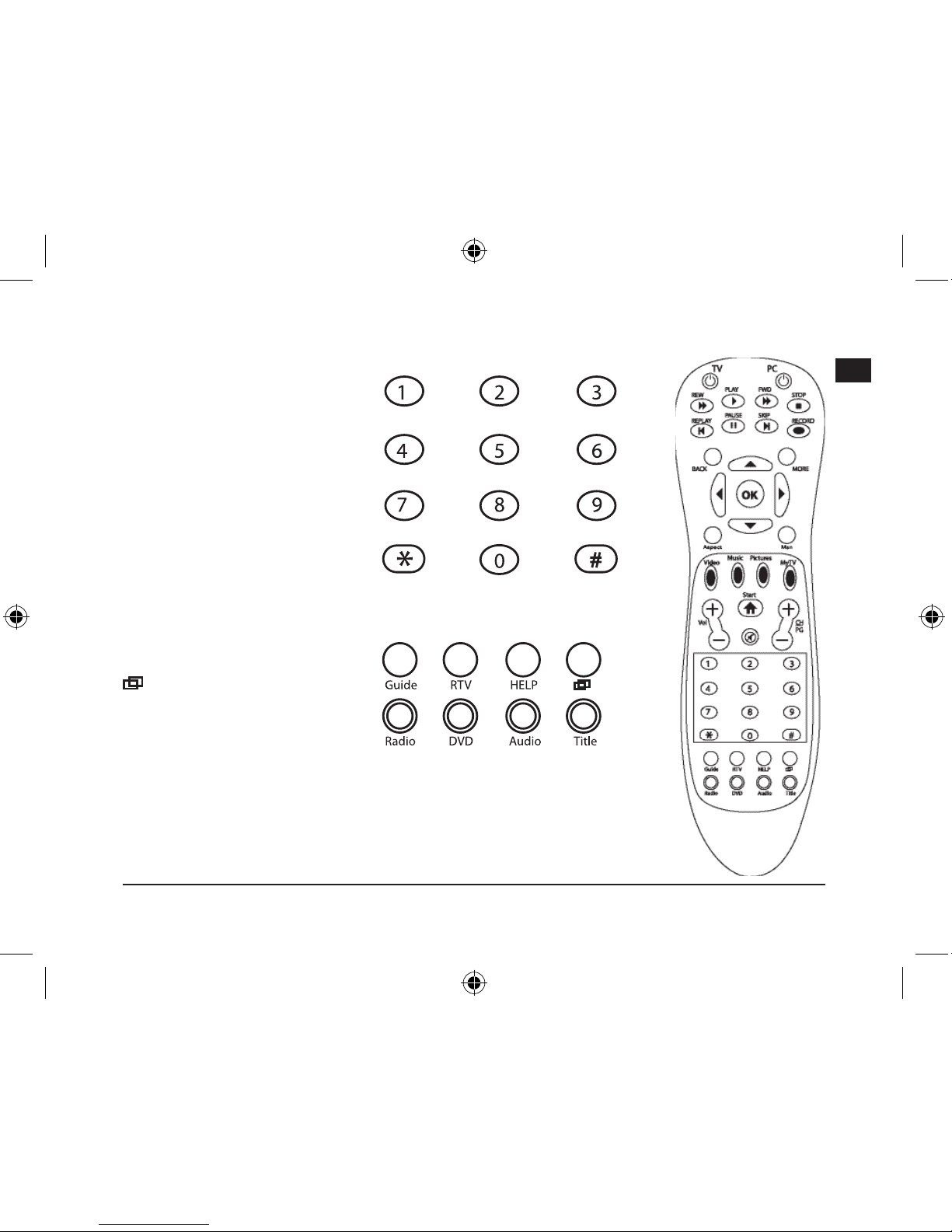
Tasten 1 - 0: Manuelles
wählen eines Fernsehkanals,
Musikstückes oder Kapitel.
z.B.: Taschenrechner oder
Zahleneingabe in der
Textverarbeitung
Guide: Öffnet das Menü
Fernsehprogramm.
Hinweis: Bitte programmieren Sie
vorher Fernsehkanäle ein
RTV: Aufgezeichnete Filme
Help: Hilfefunktion des
Betriebssystems
: Schaltet das Media Center in
den Hintergrund, um auf andere
Fenster auf dem PC-Desktop
zuzugreifen.
Radio: Nicht belegt
DVD: Direktzugriff auf das DVD-Menü.
Audio: Untertitel und Spracheinstellungen, während des Abspielens
Title: Zeigt Album-, Film-, und Musiktitel oder Interpret an.
Page 10
10
D
GB
F
E
I
Problemlösung
Eine Taste reagiert nicht korrekt.
Auch wenn eine Funktion nicht sofort ausgeführt wird, warten Sie einen Moment nach Betätigen der
Taste. Manche Funktionen reagieren zeitverzögert. Drücken Sie eine Taste nicht öfter nacheinander,
sonst verlängert sich die Reaktionszeit des Computers.
Die Fernbedienung reagiert gar nicht.
Bitte prüfen Sie, ob die Batterien noch ausreichend Strom ausgeben. Wechseln Sie sie gegebenenfalls
aus. Wenn Sie die Fernbedienung für längere Zeit nicht verwenden, entfernen Sie die Batterien aus dem
Gerät. So verlängern Sie die Lebensdauer der Batterien.
Aus welcher Entfernung kann ich mit der Fernbedienung arbeiten?
Der Infrarot-Sensor funktioniert aus bis zu zehn Metern Entfernung. Dabei sollte das Sichtfeld zwischen
Fernbedienung und Empfänger nicht verstellt sein. Beachten Sie, dass die Empfangsdistanz bei
niedrigem Batteriestatus kleiner wird.
Garantie
Für dieses Produkt gewähren wir Ihnen eine Garantie von zwei Jahren ab Kaufdatum auf Verarbeitung
und alle eingebauten Teile.
Entsorgung
Bitte entsorgen Sie dieses Gerät am Ende seiner Nutzungsdauer bei Ihrer örtlichen
kommunalen Sammelstelle oder im Recycling Center.
Falls Sie Hilfe benötigen…
Bei technischen Problemen wenden Sie sich bitte an unseren technischen Support. Die Hotline-Nummer
nden Sie auf der Rückseite dieser Bedienungsanleitung.
Page 11
11
D
GB
F
E
I
Before using this product, read the instruction
manual for important safety information. Please
retain this manual for future reference and
warranty information.
Excemption from Liability
No liability will attach to Jöllenbeck GmbH if
any damage, injury or accident is attributable to
inattentive, inappropriate, negligent or incorrect
operation of the machinery whether or not
caused deliberately.
Troubleshooting & Servicing
Do not attempt to service or repair the device
yourself. Refer all servicing to qualied service
personnel. Do not attempt to modify the device in
any way. Doing so could invalidate your warranty.
Moisture and heat sources
Do not use this apparatus near water (for
example, sinks, baths, pools) or expose it to rain,
moisture, or dripping or splashing liquids. Do
not expose the unit to high temperatures, high
humidity or direct sunlight.
Cleaning
When cleaning the device, please use a soft, dry
cloth. Never use benzine, paint thinner, or other
chemicals on the device.
Location
Place the device in a stable location, so it will not
fall causing damage to the device or bodily harm.
Note on handling batteries
Keep batteries out of children’s reach
Do not mix old and new batteries or use
different types of battery
Replace old or weak batteries promptly
Dispose of and recycle your old batteries in
accordance with local regulations
Intended use
The product may only be used with the
original parts intended for it
The product may only be used in closed and
dry rooms
The intended use includes ad-herence to
the specied installation instructions. The
manufacturer accepts no liability for damage
arising due to improper use
Important Safety Information
Page 12
12
D
GB
F
E
I
Introduction
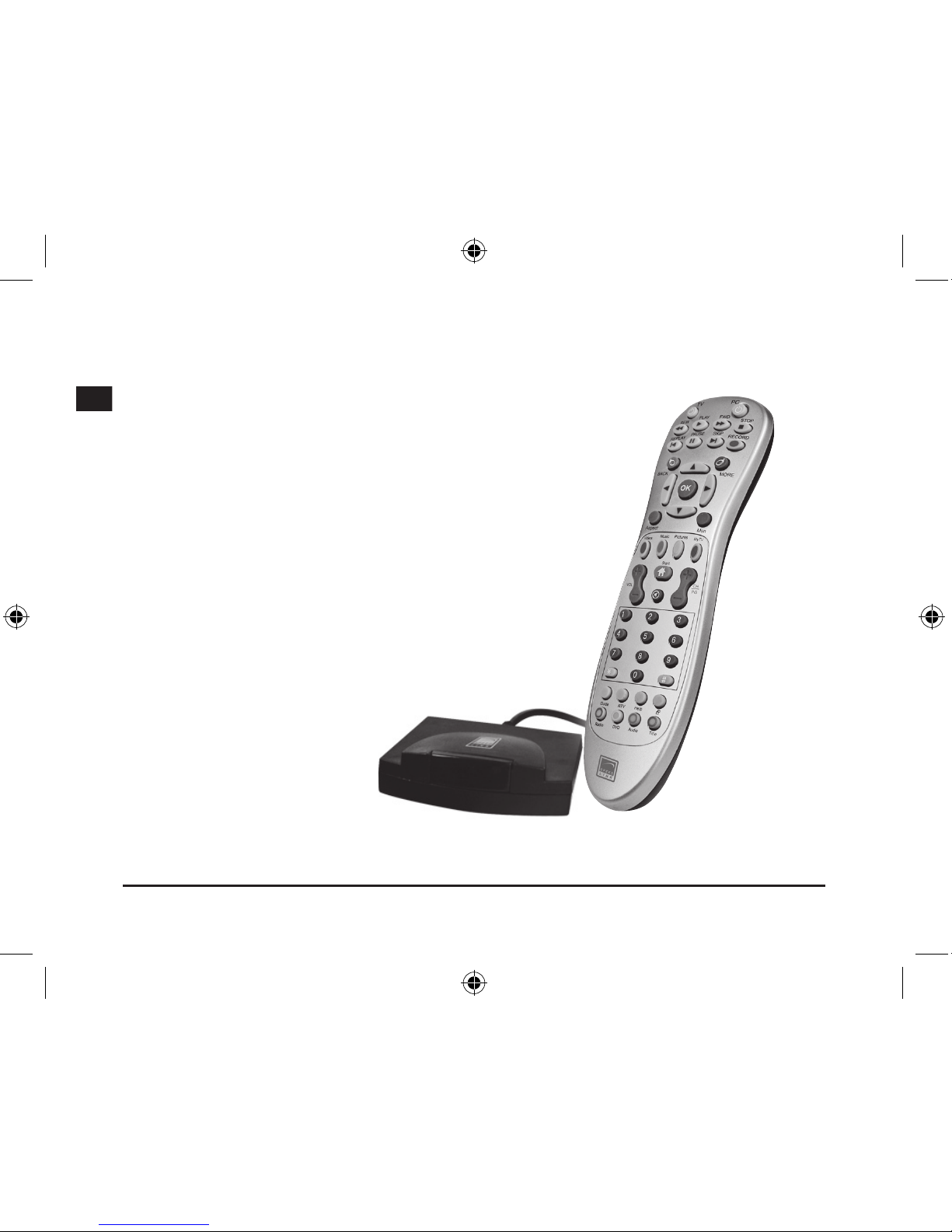
Thank you for purchasing the Media Center Remote Control. The
remote control allows you to access the Media Center of your PC
at the press of a button and gives you complete control over all TV
and video functions.
The Advantages
• Start Media Center at the press of a button
• Complete control over all TV and video functions
• Instant playback of videos and recorded lms
• Direct access to the picture storage location
• Easily switch back to your PC desktop
• Display the programme title, album title, song title,
artist name or subtitles - all at the press of a button
• Left and right mouse buttons
• Batteries included
What’s Included
• Media Center remote control
• USB receiver
• Manual
System Requirements
• Windows XP/Vista Media Center
Edition
Page 13
13
D
GB
F
E
I
Connecting
Inserting the batteries
Open the battery cover on the underside of the device. Insert the accompanying batteries according to
the diagram embossed in the battery compartment.
Establishing a Connection
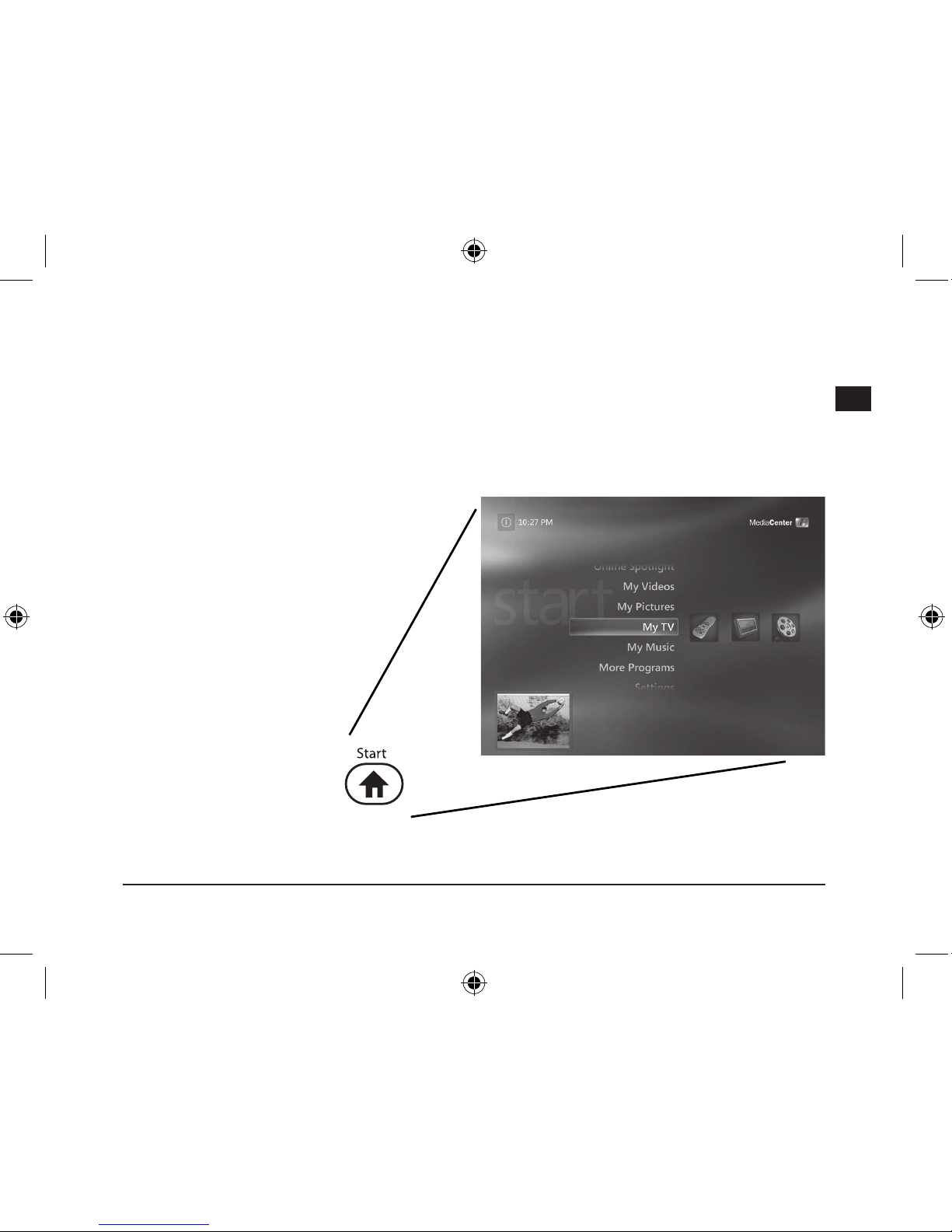
Plug the USB receiver into a free
USB port on your PC. Now press
the buttons Up/Down/Right/Left.
The remote control and receiver
are connected as soon as the
LED ashes on the receiver.
Note: Only plug the USB receiver
directly into a USB port on your
computer. USB hubs are not
suitable.
Functions
Start Windows Media Center
at the press of a button and
enjoy easy navigation using the
remote control.
Page 14
14
D
GB
F
E
I
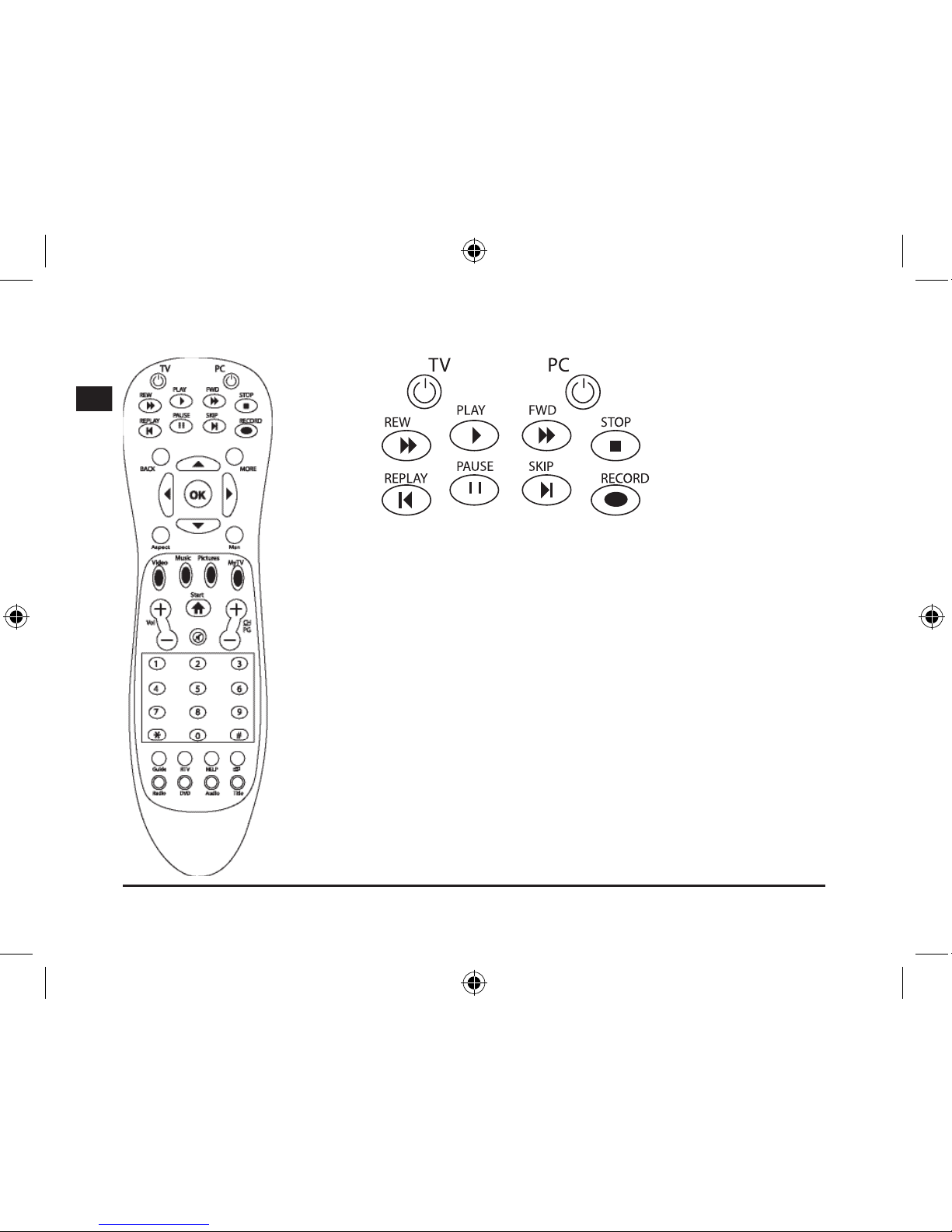
TV: Full screen mode
PC: Turn off the PC, switches Media Center off
Rew: Rewind function
Play: Play function
Fwd: Fast forward function
Stop: Stops recording
Replay: Previous chapter
Pause: Pause function
Skip: Next chapter
Record: Record TV and radio using Media Center
Page 15
15
D
GB
F
E
I
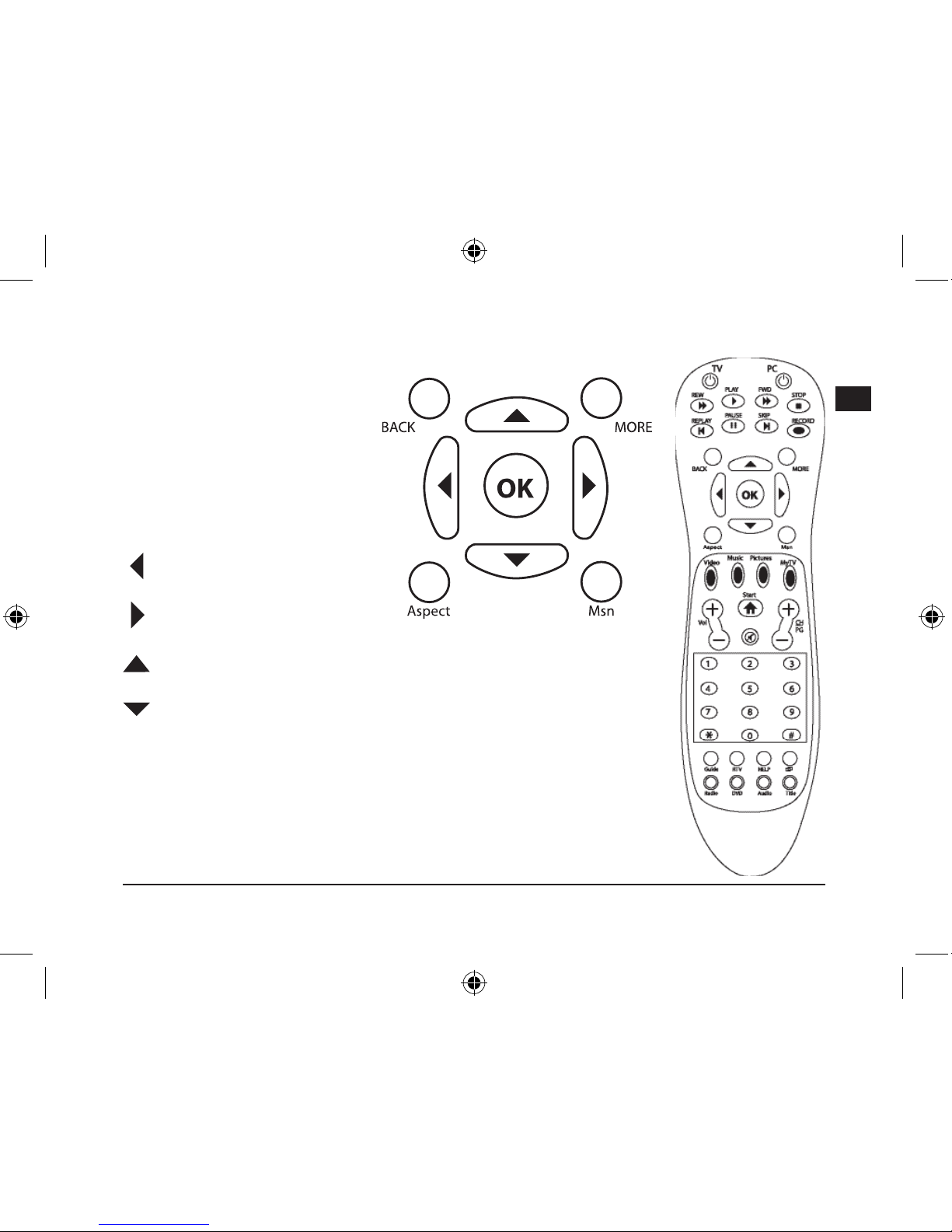
Back: Left mouse button / back
More: Right mouse button
OK: Enter
Aspect: Change the aspect ratio
for video/DVD playback
Msn: Not used
: Keypad function left
: Keypad function right
: Keypad function up/scroll the website
: Keypad function down
Page 16
16
D
GB
F
E
I
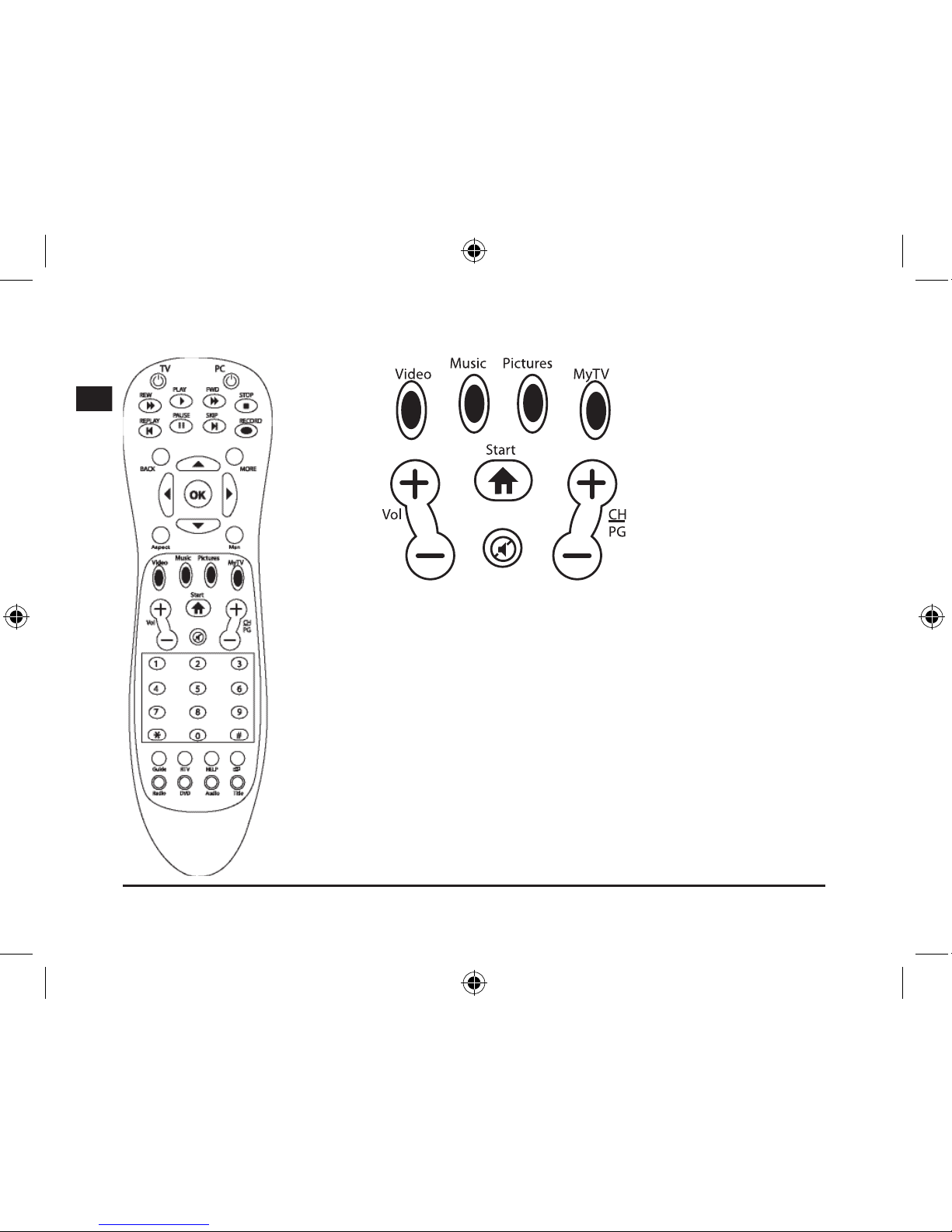
Video: Direct access to the video library
Music: Direct access to the music library
Pictures: Direct access to the picture library
MyTV:
Direct access to TV recordings
Start: Opens Windows Media Center
Vol +/-: Volume adjustment
CH/PG: Channel and programme control / picture button up/down
Mute: Mute function
Page 17
17
D
GB
F
E
I
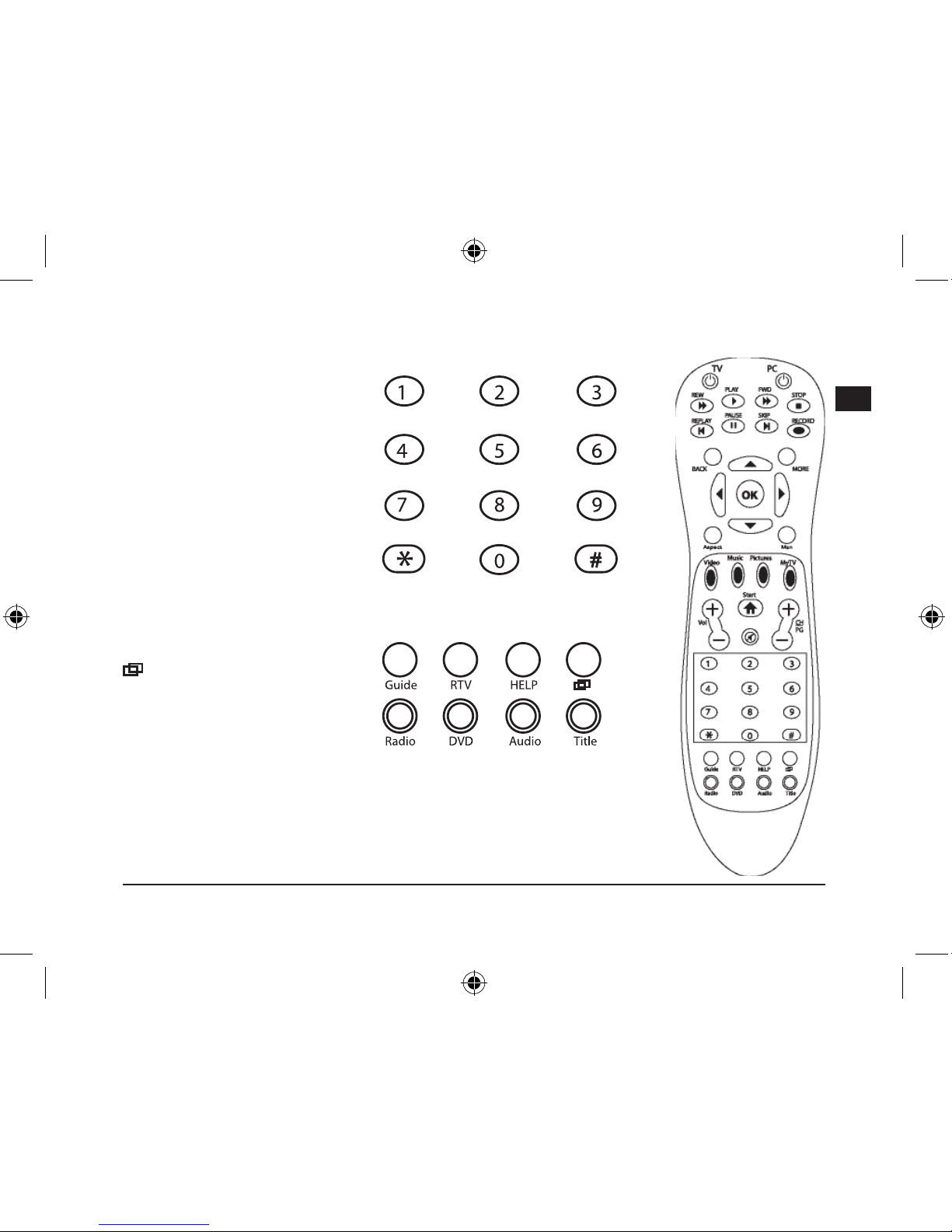
Buttons 1 - 0: Manual selection of
a TV channel, track or chapter.
E.g.: Use with a calculator
program or number input for word
processing
Guide: Opens the television
programme menu.
Note: Please program in your
television channels beforehand
RTV: Recorded lms
Help: Operating system help
function
: Sends Media Center to
the background so that other
windows on the PC desktop can
be accessed.
Radio: Not used
DVD: Direct access to the DVD menu.
Audio: Access subtitles and language settings during playback.
Title: Displays the album, lm and music title or artist.
Page 18
18
D
GB
F
E
I
Problem Solving
One of the buttons is not responding correctly.
Please wait a moment before pressing the button again even if a function has not been immediately
carried out. Some functions incorporate a time delay. Do not repeatedly press a button as the computer’s
response time will otherwise slow down.
The remote control doesn’t respond at all.
Please check if the batteries are providing sufcient power. If necessary, change the batteries. If you do
not intend to use the remote control for a long period of time remove the batteries from the device. This
way you increase the
lifespan of the batteries.
Up to what distance can I use the remote control?
The infrared sensor works at distances of up to 10 metres. To make use of this feature the line of sight
between the remote control and receiver must not be obstructed. Please note that the reception distance
decreases as the battery level drops.
Warranty
We guarantee this product to be free of defects in workmanship and materials for a period of two years
from the original date of purchase.
Disposal
Please correctly dispose of this product at the end of its useful life by taking it to your local
municipal collection point or recycling centre.
Should you need assistance...
Our technical support team will be happy to help with any technical problems. The hotline number can be
found on the back of this manual.
Page 19
19
D
GB
F
E
I
Important!
Avant d‘utiliser ce produit, consultez le manuel
d‘instructions. Vous y trouverez des informations
impor-tantes sur la sécurité. Conservez ce
manuel pour référence ultérieure.
Entretien
Ne tenez pas d‘effectuer vous-même l’entretien
du dispositif ni de le réparer. Pour les opérations
d’entretien, adressez-vous à du personnel quali-
é. N‘essayez jamais d‘apporter une quelconque
modication au dispositif. Cela pourrait annuler
votre garantie.
Humidité et sources de chaleur
Évitez d’utiliser l’appareil à proximité de l’eau
(évier, baignoire ou piscine par ex.) ou de
l’exposer aux intempéries, à l’humidité, ou à des
écoulements ou des projections de liquides.
N‘exposez pas le dispositif à une température
élevée, une humidité excessive ou au rayonnement direct du soleil.
Nettoyer l‘unité
Pour nettoyer l‘unité, veuillez utilisez un chiffon
doux et sec. N‘appliquez jamais de benzine, de
diluant ou autre produit chimique sur le dispositif.
Remarques relatives aux piles
Conservez les piles hors de portée des
enfants.
N’utilisez pas en même temps des piles
usées et neuves ou différentes sortes de
piles.
Dès que les piles sont usées, elles doivent
être remplacées.
Éliminez et recyclez les piles usées
conformément aux directives locales.
Utilisation conforme
L’appareil ne doit être utilisé qu’avec les
pièces originales prévues à cet effet.
Le produit ne doit être utilisé que dans des
locaux fermés et secs.
L’utilisation conforme implique de respecter
les instructions d’installation.
Le fabricant décline toute responsabilité
en cas de dommages dus à une utilisation
incorrecte.
Instructions de sécurité
Page 20
20
D
GB
F
E
I
Introduction
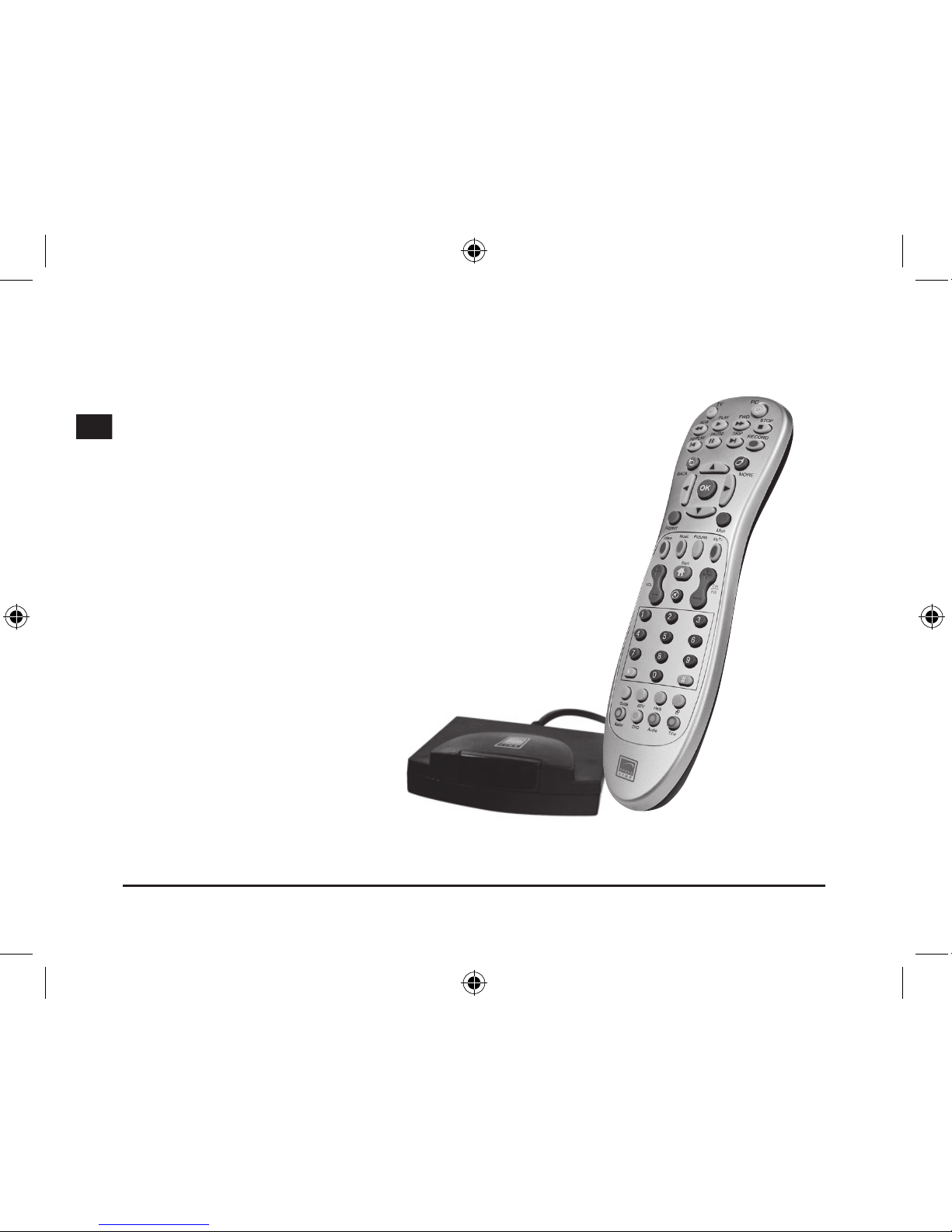
Merci d’avoir choisi la télécommande Media Center. Vous avez
ainsi directement accès au Media Center de votre ordinateur d’une
simple pression de touche et contrôlez parfaitement toutes les
fonctions TV et vidéo.
Les avantages
• Lancement du Media Center d’une simple pression de touche
• Contrôle total de toutes les fonctions TV et vidéo
• Répétition immédiate des vidéos et lms enregistrés
• Accès direct à la mémoire d’images
• Retour aisé au Bureau de l’ordinateur
• Afchage du titre de l’émission, de l’album, du morceau, de
l’interprète et des sous-titres d’une simple pression de touche
• Bouton de souris gauche et droit
• Piles fournies
Fournis
• Télécommande Media Center
• Récepteur USB
• Manuel
Conguration système requise
• Windows XP/Vista édition Media
Center
Page 21
21
D
GB
F
E
I
Raccordement
Mise en place des piles
Ouvrez le compartiment à piles sur la face inférieure de l’appareil. Insérez les piles fournies
conformément au dessin qui se trouve dans le compartiment à piles.
Établir la liaison
Reliez le récepteur USB à
une prise USB libre de votre
ordinateur. Appuyez sur les
touches Haut/Bas/Droite/Gauche.
Dès que le voyant du récepteur
se met à clignoter, cela signie
que la liaison est établie entre la
télécommande et le récepteur.
Remarque : reliez le récepteur
à un port USB qui se trouve
directement sur votre ordinateur.
N’utilisez pas de hub USB.
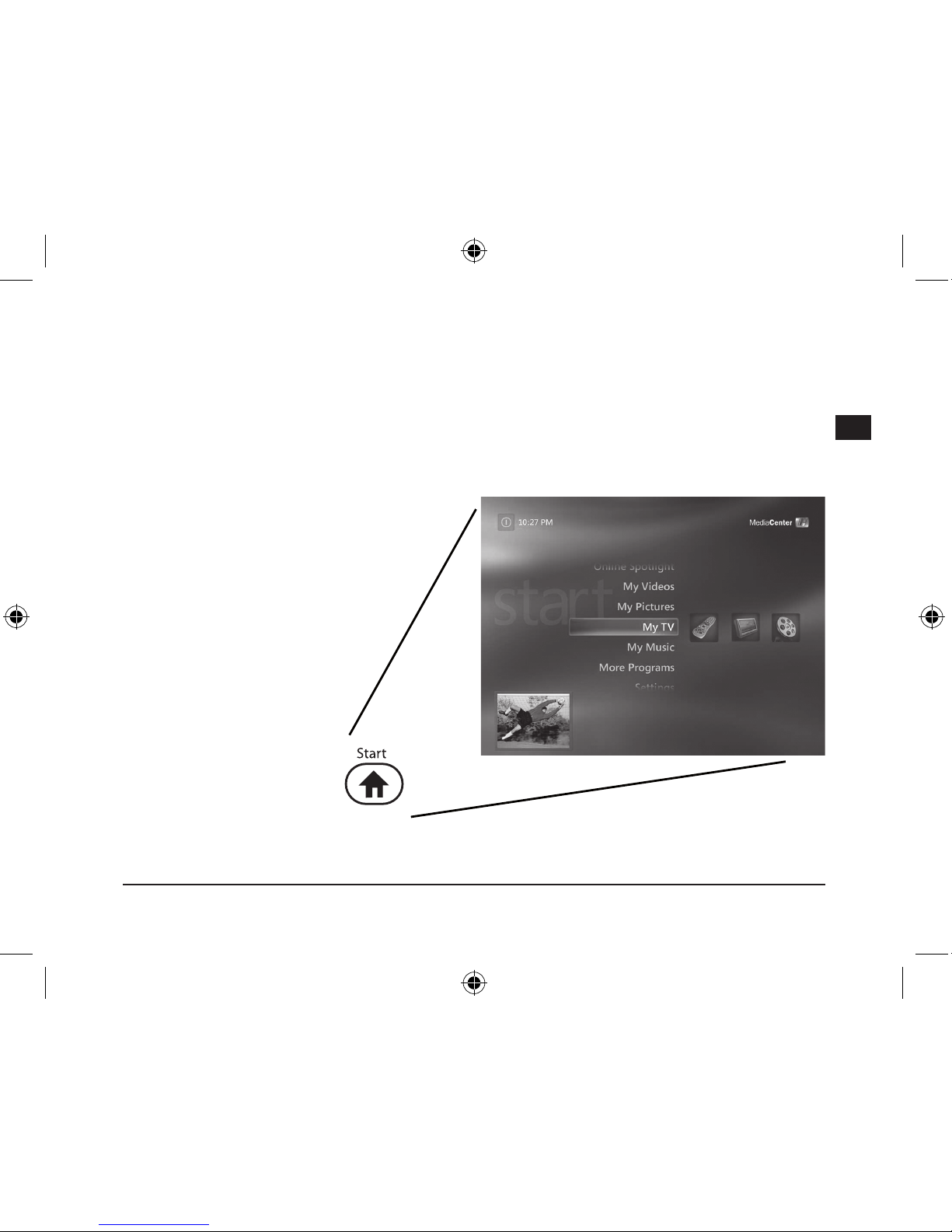
Fonctions
Lancez Windows Media
Center d’une simple pression
de touche et protez du
confort de navigation avec la
télécommande.
Page 22
22
D
GB
F
E
I
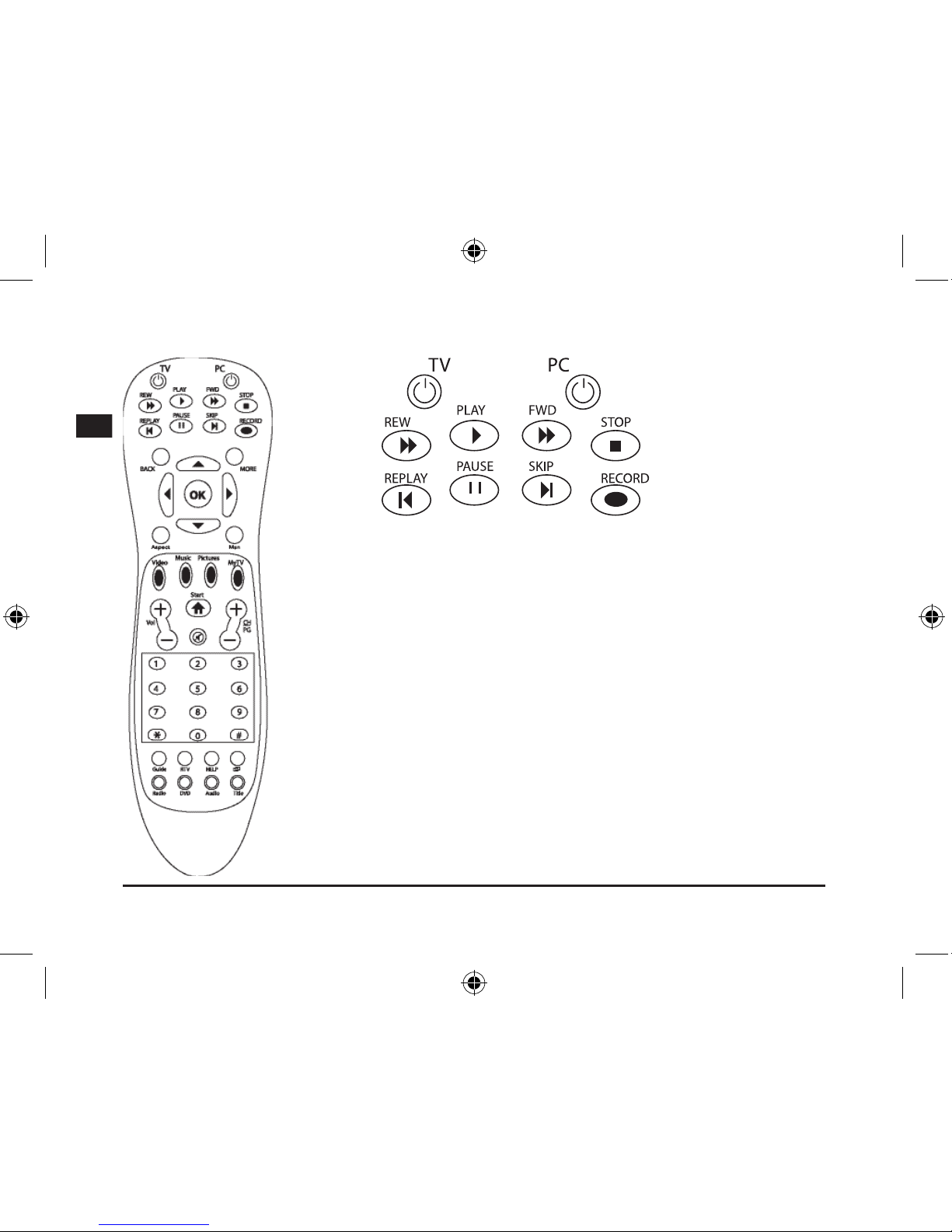
TV : mode plein écran
PC : éteindre l’ordinateur, désactiver le Media Center
Rew : fonction de retour rapide
Play : fonction de lecture
Fwd : fonction d’avance rapide
Stop :
interrompre l’enregistrement
Replay : chapitre précédent
Pause : pause
Skip : chapitre suivant
Record :
enregistrement de la télévision et de la radio dans Media Center
Page 23
23
D
GB
F
E
I
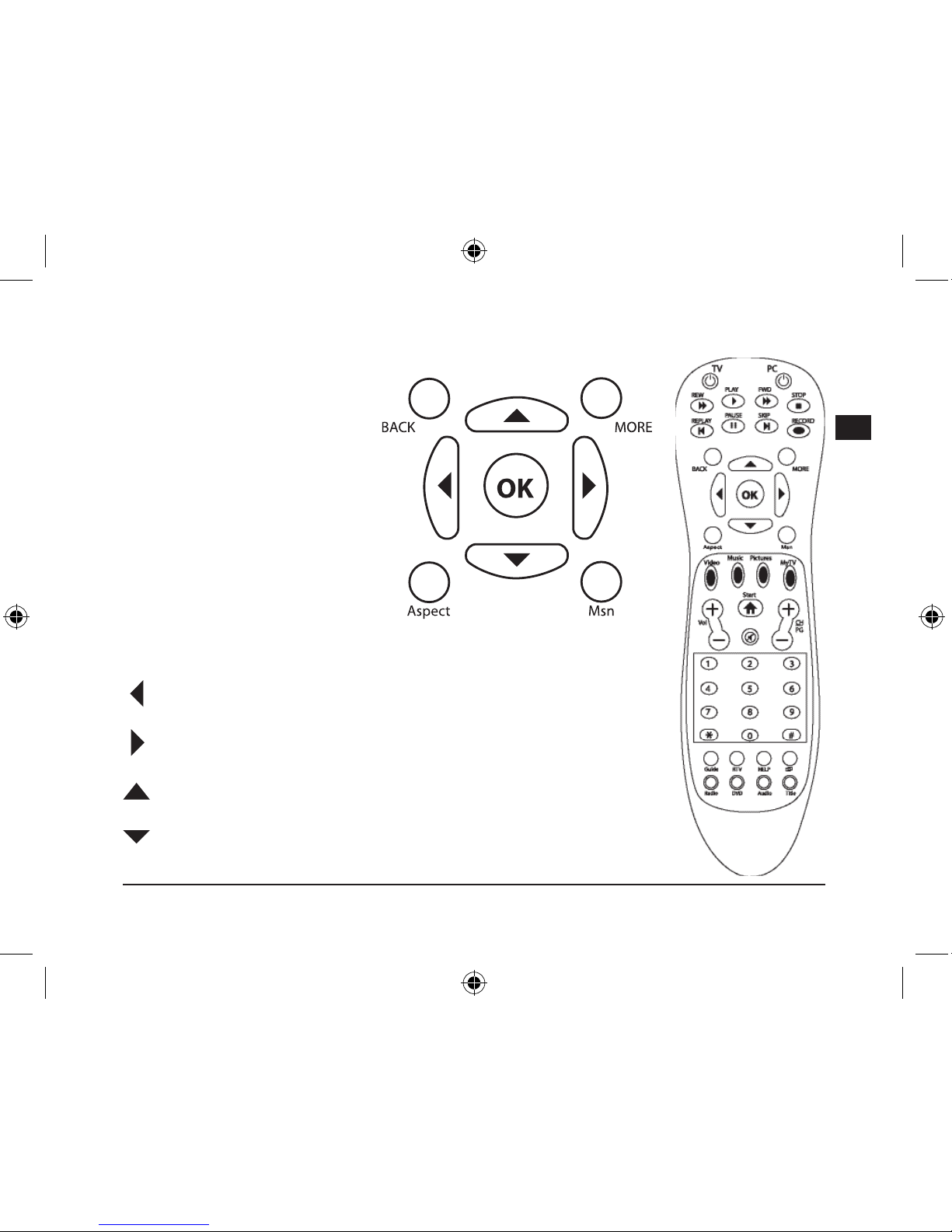
Back : bouton gauche de la souris
/ retour
More :
bouton droit de la souris
OK :
entrée / saisie
Aspect :
modication du format
pour la lecture de vidéos/DVD
Msn :
sans fonction
: champ de touches vers la gauche
: champ de touches vers la droite
: champ de touches vers le haut/se déplacer dans le site Web par délement
: champ de touches vers le bas
Page 24
24
D
GB
F
E
I
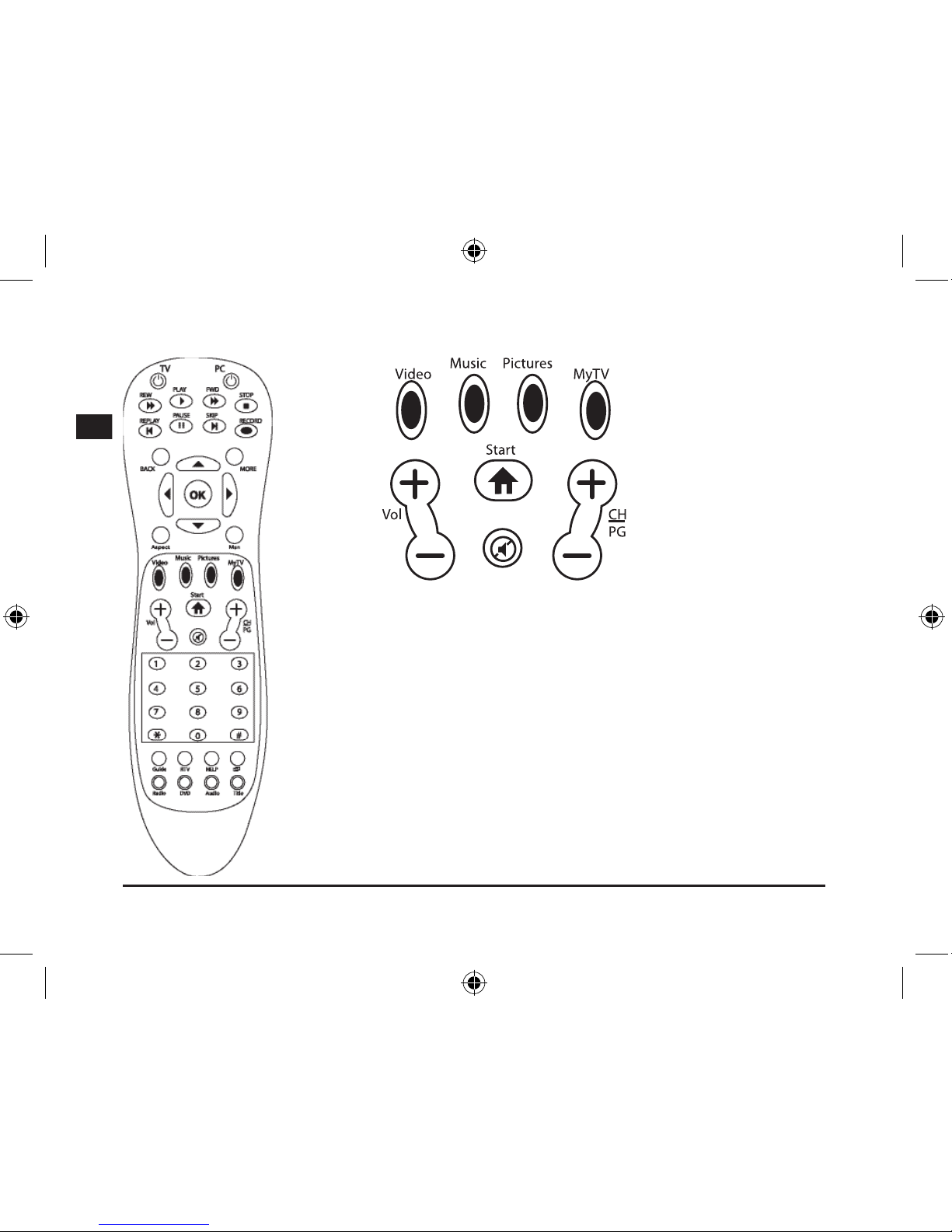
Video : accès direct à la bibliothèque vidéo
Music : accès direct à la bibliothèque musicale
Pictures : accès direct à la bibliothèque d’images
MyTV : accès direct aux enregistrements TV
Start : ouvrir Windows Media Center
Vol +/- : commande du volume
CH/PG : réglage des chaînes et des programmes/faire déler
l’image vers le haut/vers le bas
Mute : mise en sourdine
Page 25
25
D
GB
F
E
I
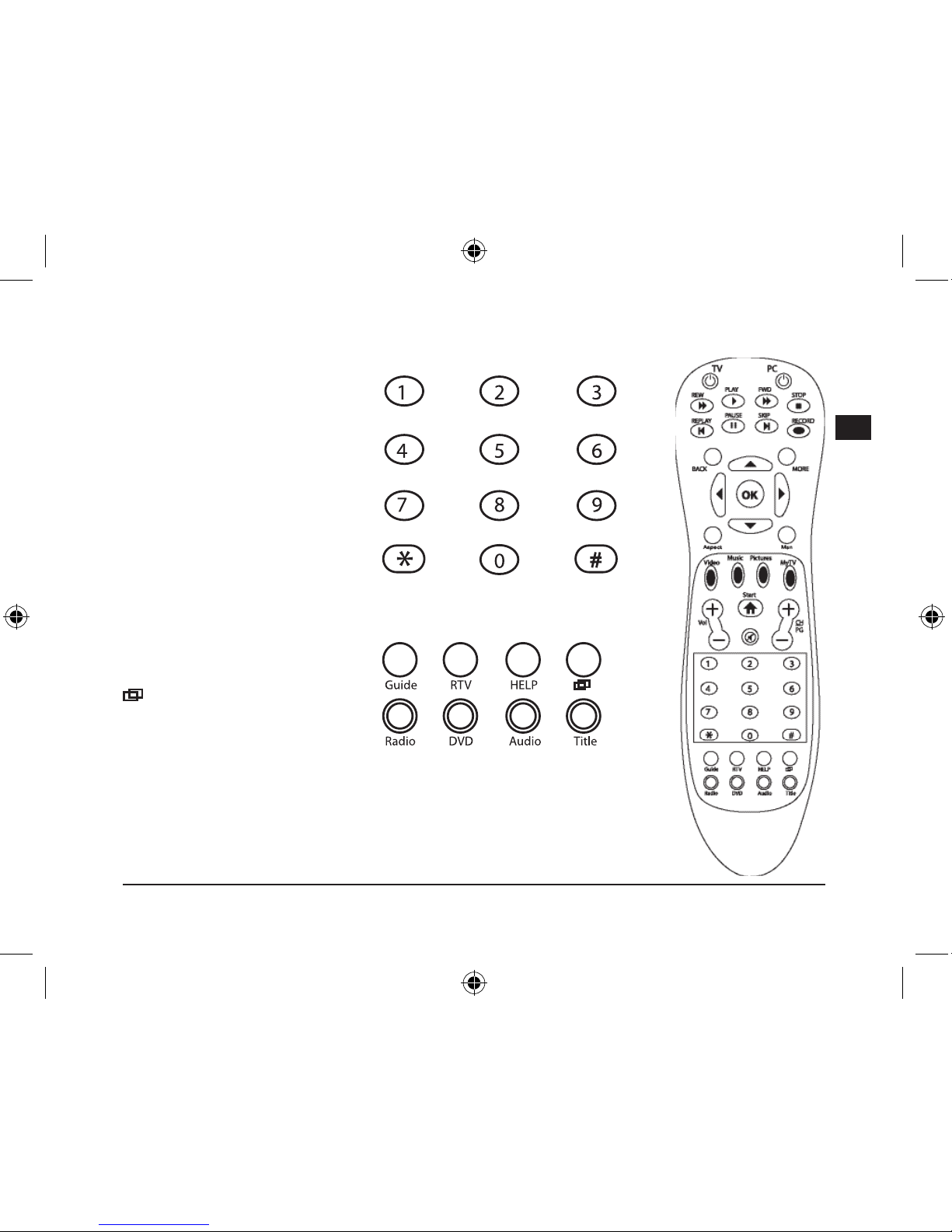
Touches 1-0 : sélectionner
manuellement une chaîne de
télévision, un morceau de musique
ou un chapitre
Par exemple : calculette ou saisie
de nombres dans le traitement
de texte
Guide : ouvrir le menu des
programmes télévisés
Remarque :
vous devez avoir
préalablement programmé vos
chaînes de télévision.
RTV :
lms enregistrés
Help :
fonction d’aide du système
d’exploitation
: passer le Media Center
en arrière-plan pour accéder à
d’autres fenêtres sur le Bureau.
Radio :
sans fonction
DVD :
accès direct au menu du DVD.
Audio : sous-titres et réglages de la langue durant la lecture
Title :
afcher le titre de l’album, du lm, du morceau ou l’interprète.
Page 26
26
D
GB
F
E
I
En cas de problème
Une touche ne réagit pas correctement.
Si une fonction ne réagit pas immédiatement, attendez un moment après avoir appuyé sur la touche.
Certaines fonctions réagissent avec un temps de retard. N’appuyez pas plusieurs fois de suite sur une
touche, car cela ralentit la vitesse de réaction de l’ordinateur.
La télécommande ne réagit pas.
Assurez-vous que les piles fournissent encore sufsamment de courant. Changez-les au besoin. Si vous
n’utilisez pas la télécommande de manière prolongée, retirez les piles de l’appareil. Vous prolongerez
ainsi leur durée de vie.
Jusqu’à quelle distance puis-je utiliser la télécommande ?
Le capteur infrarouges fonctionne jusqu’à dix mètres de distance. Il ne doit y avoir aucun obstacle entre
la télécommande et le récepteur. Nous attirons votre attention sur le fait que la distance diminue lorsque
les piles sont usées.
Garantie
Nous accordons sur ce produit une garantie de deux ans à compter de la date d’achat couvrant les
défauts de fabrication et tous les composants.
Élimination de l’appareil
Veuillez rapporter l’appareil usagé à la borne de collecte municipale ou au centre de
recyclage.
Si vous avez besoin d’aide…
En cas de problèmes techniques, veuillez vous adresser à notre service d’assistance technique. Vous
trouverez le numéro de téléphone au dos de ce mode d’emploi.
Page 27
27
D
GB
F
E
I
Importante!
Antes de utilizar este producto, lea el manual
de instrucciones para obtener informaciones
importantes acerca de la seguridad. Guarde el
manual de instrucciones para consultas en el
futuro.
Soluciòn de problemas
No intente reparar el dispositivo usted mismo.
Remita todas las reparaciones al personal de
servicio cualicado. No intente modicar el
dispositivo de ninguna manera. Si lo hace, la
garantía perdería validez.
Humedad y fuentes de calor
No utilice este aparato en lugares cercanos
a agua (por ejemplo, fregadores, bañeras,
piscinas, etc.) ni lo exponga a lluvia, humedad ni
líquidos que pueden gotear o salpicar. Evite exponer la unidad a altas temperaturas, humedad
excesiva o rayos del sol.
Limpiar el dispositivo
Cuando limpie el dispositivo, por favor utilice
un paño suave y seco. Nunca utilice bencina,
removedor u otro químico para limpiarlo.
Nota sobre pilas
Guarda siempre las pilas fuera del alcance
de los niños.
No utilices pilas viejas junto con nuevas, ni
tampoco tipos de pilas distintos.
Remplaza de inmediato las pilas gastadas o
con poca carga por otras nuevas.
Recoge y recicla las pilas usadas en los
contenedores que tu comunidad haya
destinado para la recogida.
Uso según instrucciones
El dispositivo sólo se puede usar con las
piezas originales correspondientes.
El producto se utilizará siempre en espacios
cerrados y secos.
El uso según las instrucciones incluye un
procedimiento de instalación según las mismas instrucciones. El fabricante no se hace
responsable de los daños que pudieran derivarse de un uso inadecuado del producto.
Notas Importantes Sobre La Seguridad
Page 28
28
D
GB
F
E
I
Introducción
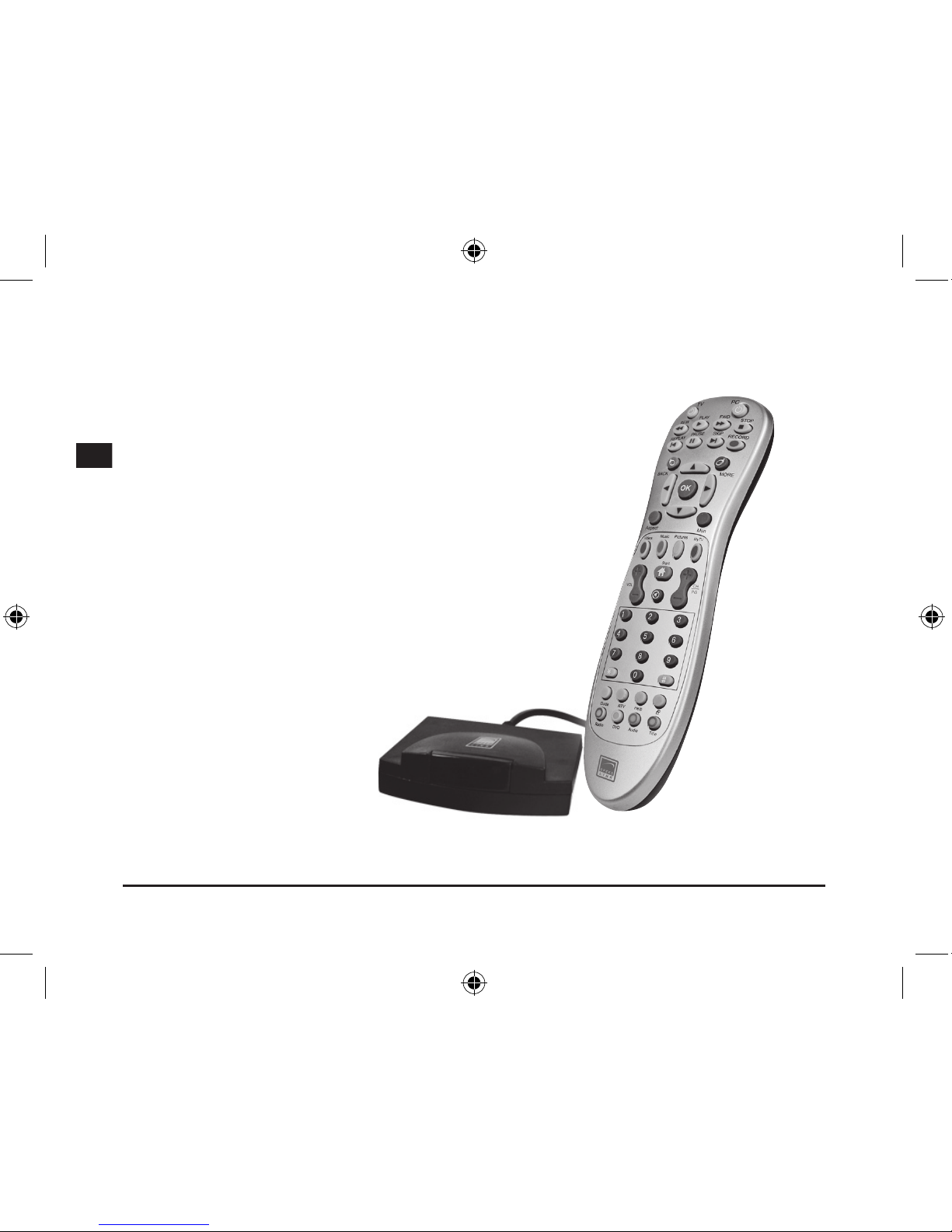
Muchas gracias por la compra del Mando a distancia Media
Center. Con sólo pulsar un botón del Media Center tienes
acceso directo a tu ordenador y el control total de todas
funciones de TV y vídeo.
Las ventajas
• Pulsas un botón e inicias el Media Center
• Control total de todas las funciones vídeo y TV
• Repetición inmediata de vídeos y películas grabadas
• Acceso directo a la memoria de imágenes y secuencias
• Vuelves cómodamente a tu escritorio del ordenador
• Títulos de programas, de álbumes, de canciones,
interpretes, subtítulos: con sólo pulsar un botón
Indicadores
• Botones izquierdo y derecho del ratón
• Pilas incluidas
Aquí encontrarás
• Mando a distancia Media Center
• Receptor USB
• Las instrucciones
Requerimientos del sistema
• Windows XP/Vista Media Center
Edition
Page 29
29
D
GB
F
E
I
Conexión
Cómo colocar las pilas
Retira la tapa del compartimento de pilas que está
debajo del mando. Coloca las pilas adjuntas según
viene indicado en el compartimento.
Establecer contacto
Conecta el receptor USB a un
puerto USB que esté libre en
tu ordenador. Pulsa el botón
arriba/abajo/derecha/izquierda.
En cuanto el LED del receptor
parpadea, ya hay conexión entre
el mando y el receptor.
Aviso: Conecta el receptor
directamente a uno de los
puertos USB libres de tu
ordenador. No son adecuados
los hubs-USB
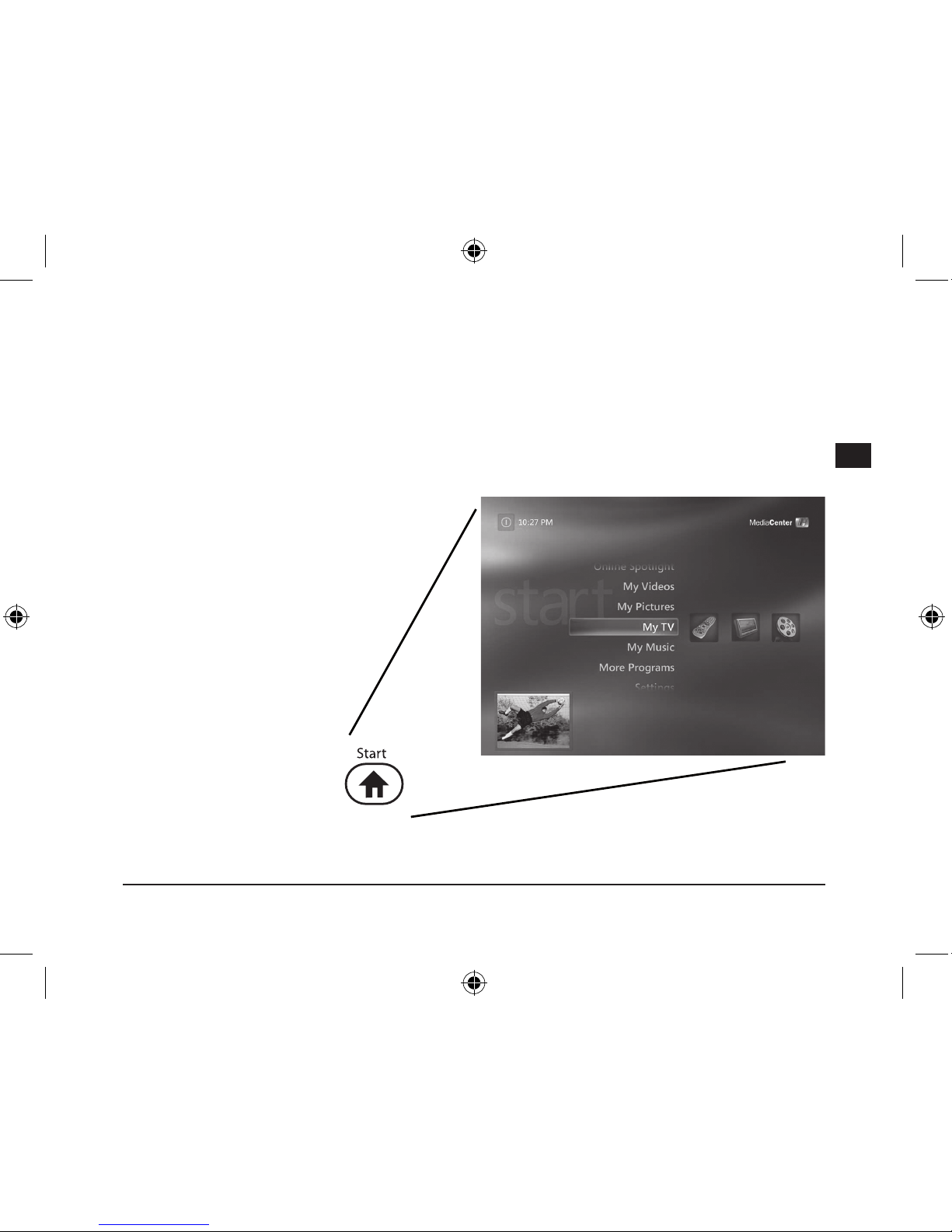
Funciones
Pulsando un botón inicias
el Windows Media Center,
navegas a placer a través del
mando a distancia
Page 30
30
D
GB
F
E
I
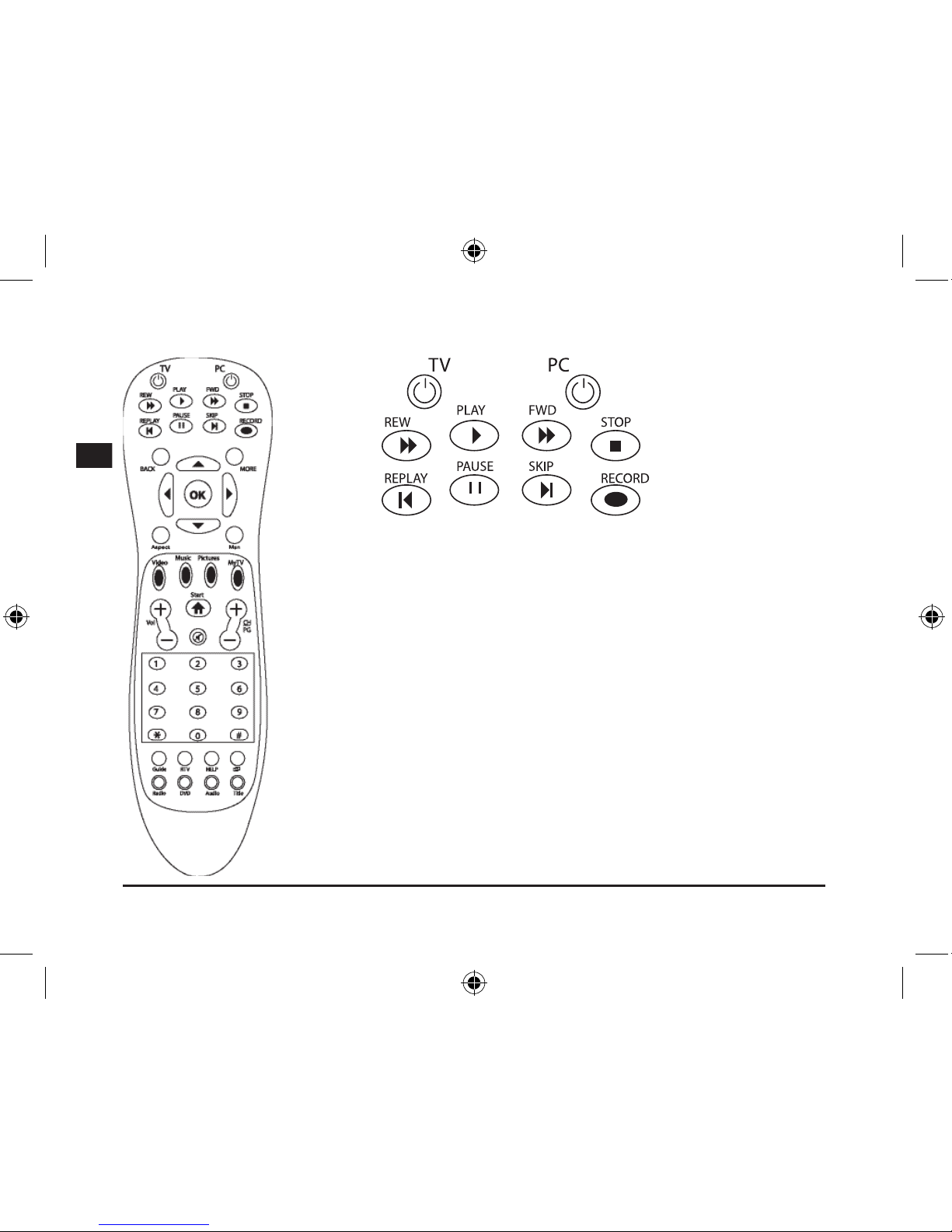
TV: Modo imagen total
PC: Salir del PC o apagarlo, desconecta el Media Center
Rew: Función de rebobinado
Play: Función de reproducción
Fwd: Función de avance rápido
Stop: Cancela una grabación
Replay: Capítulo anterior
Pause: Detener
Skip: Capítulo siguiente
Record: Grabación de TV o radio en el Media Center
Page 31
31
D
GB
F
E
I
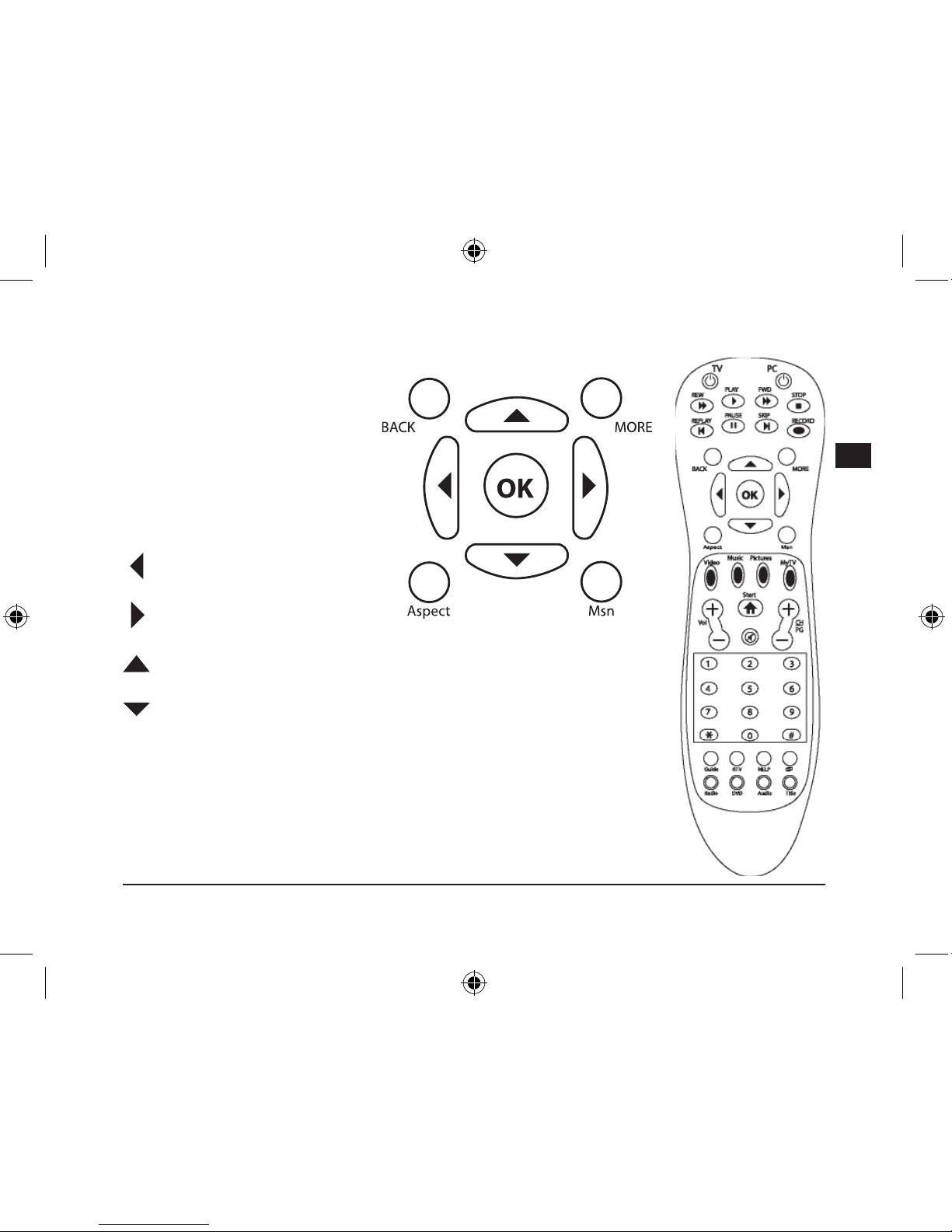
Volver: Botón izq. ratón / atrás
Más: Botón dcho. ratón
OK: Enter / Insertar
Aspect: Modica el formato de
reproducción de vídeo/DVD
Msn: No asignado
: Botones a la izq.
: Botones a la dcha.
: Botones arriba / scroll en la pág. web
: Botones abajo
Page 32
32
D
GB
F
E
I
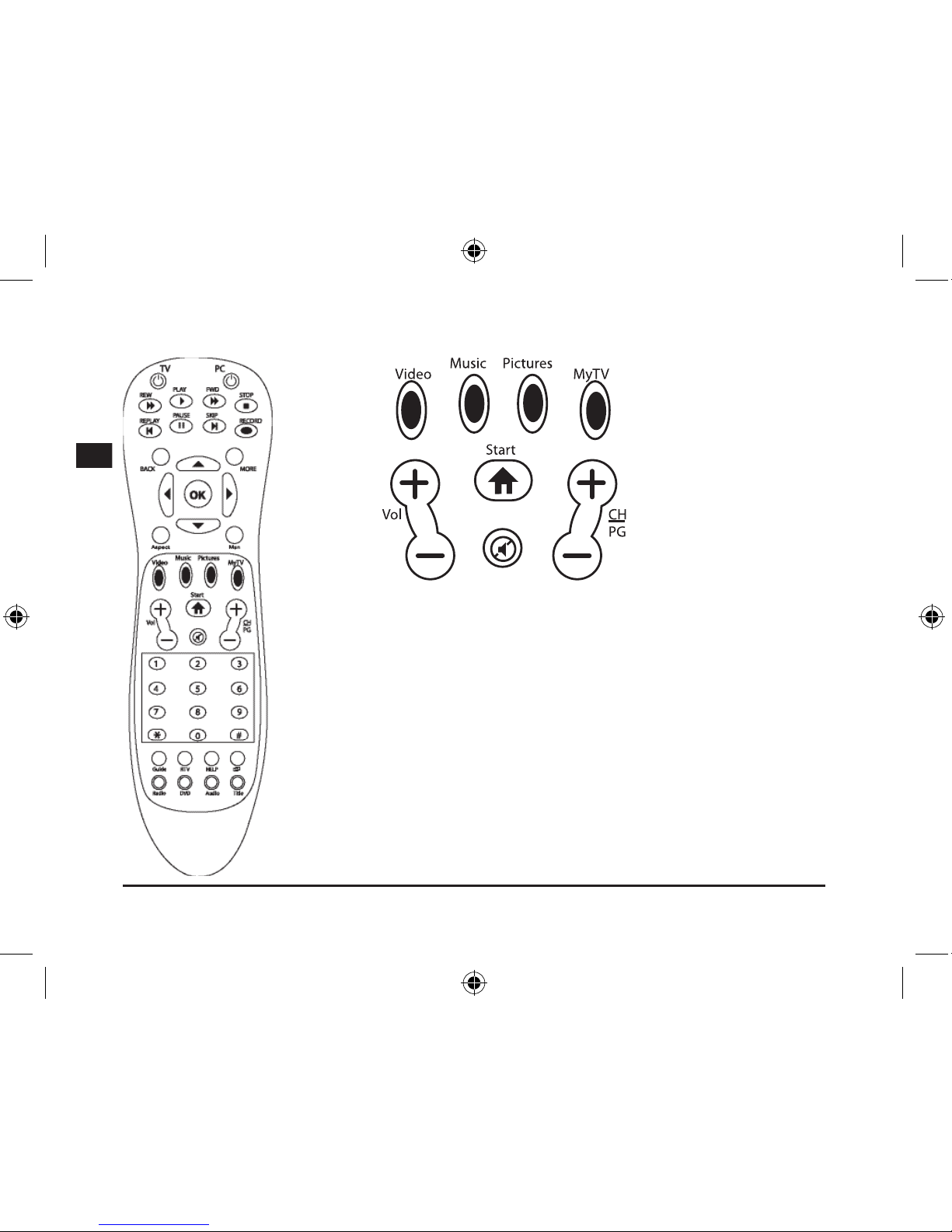
Vídeo: Acceso directo a la biblioteca de vídeos
Música: Acceso directo a la biblioteca de músicas
Imágenes: Acceso directo a la biblioteca de imágenes
Mi TV: Acceso directo a las grabaciones de TV
Inicio: Abres el Windows Media Center
Vol +/-: Regula el volumen
CH/PG: Regula las emisoras y los programas /botón imagen arriba/abajo
Silencio: Pulsando se hace el silencio
Page 33
33
D
GB
F
E
I
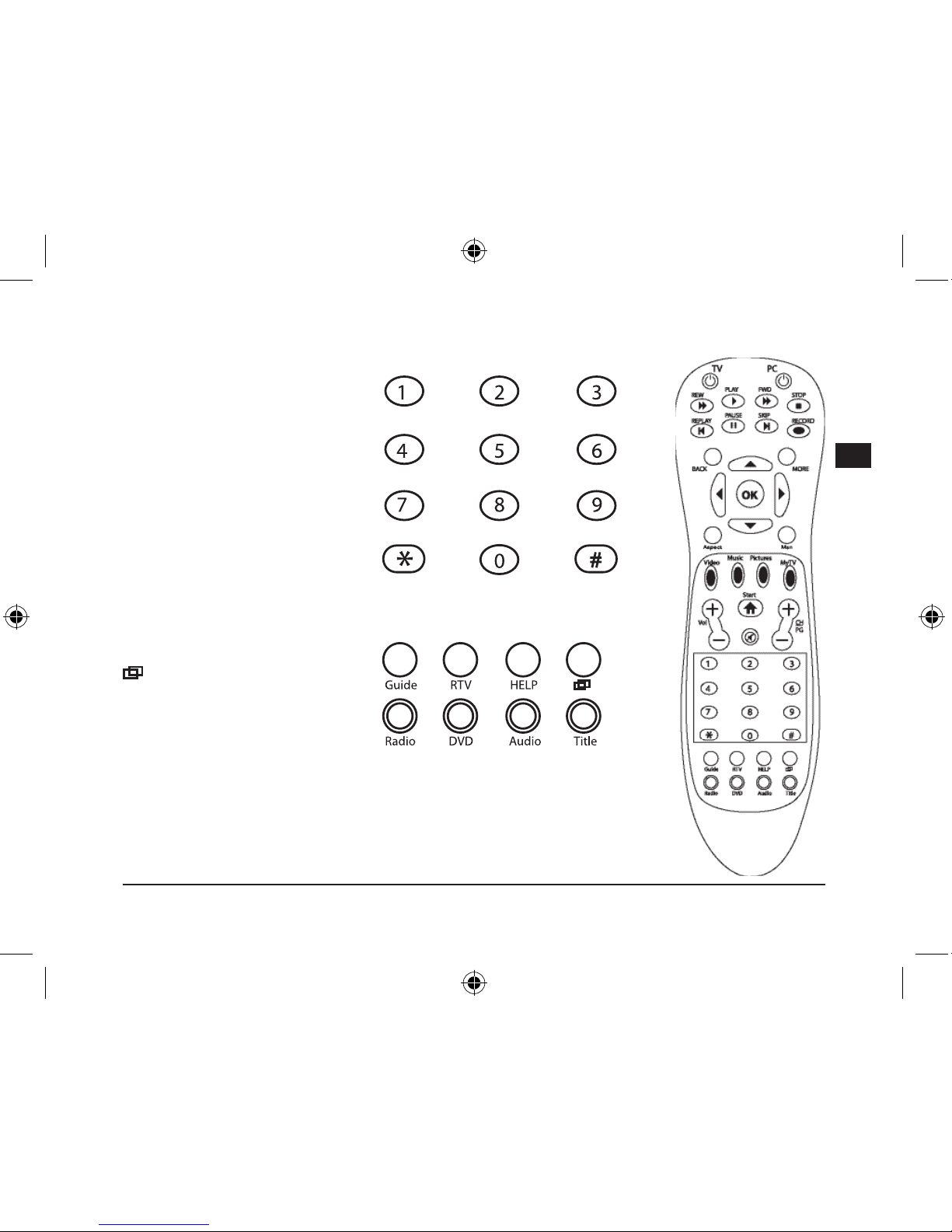
Botones I - 0: Selección manual
de un canal de TV, pieza musical
o capítulo.
p. ej. Calculadora o introducción
de números en la edición de un
texto
Guía: Abre el menú programas
de TV
Aviso: No olvides de programar
antes los diferentes canales de TV
RTV: Películas grabadas
Ayuda: Función de ayuda para el
sistema operativo
: El Media Center queda
de fondo para poder acceder a
otra ventana del escritorio del
ordenador
Radio: No asignado
DVD: Abre directamente el menú del DVD
Audio:
Subtítulos y selección de idiomas, durante la reproducción
Título: Muestra los títulos de álbumes, películas y músicas o interpretes
Page 34
34
D
GB
F
E
I
Soluciones a problemas
Un botón no responde correctamente.
Aunque una función no se active inmediatamente, espera un momento después de pulsar el botón.
Algunas de las funciones llevan retardo de tiempo. No pulses un botón después de otro sin parar,
estarás retardando el tiempo de reacción del ordenador.
El mando a distancia no responde.
Comprueba si están bien las pilas y si dan suciente carga. Si no fuese así cámbialas por otras nuevas
Cuando no vayas a utilizar durante mucho tiempo el mando a distancia, saca las pilas del interior. De
este modo prolongas
la vida útil de las mismas.
¿Desde qué distancia puedo enviar ordenes utilizando el mando?
El sensor de infrarrojos funciona perfectamente hasta una distancia de diez metros. Pero no olvides que
el camino entre el mando y el receptor no puede quedar oculto o tapado. Ten en cuenta que la distancia
de recepción se reduce si las pilas están algo bajas.
Garantía
Este producto tiene una garantía de dos años a partir de la fecha de compra tanto para defectos de
fabricación como de sus componentes.
Reciclaje
La recogida y reciclaje de este periférico al nal de su vida útil debe realizarse en los
contenedores y puntos limpios de tu Comunidad o en centros de reciclaje.
Si precisas ayuda...
En caso de surgir cualquier problema técnico, acude a los especialistas que te proporcionarán todo
tipo de soporte técnico. El número de nuestra línea directa (Hotline), se encuentra al dorso de estas
instrucciones de manejo.
Page 35
35
D
GB
F
E
I
Importante!
Prima di utilizzare il prodotto, è necessario
leggere attentamente nel manuale d’istruzione
le avvertenze sulla sicurezza, nonché generali.
Conservare accuratamente il presente manuale
d‘istruzioni al ne di poterlo successivamente
consultare nuovamente:
Ricerca guasti/riparazione
Non riparate l’apparecchio e non effettuate la
manutenzione da soli. Per lavori di riparazione o
manutenzione rivolgeteVi a personale competente specializzato. Non apportate da soli
nessuna modica all’apparecchio. Facendo ciò,
perderete ogni diritto di garanzia.
Umidità e fonti di calore
Non utilizzate l’apparecchio in prossimità d’acqua
(p. es. in prossimità di lavandini, vasche da bagno o piscine) e tenetelo lontano da luoghi umidi,
da sprizzi o gocce d’acqua, nonché dalla pioggia.
Non esporre il dispositivo ad alte temperature,
umidità o luce solare diretta.
Pulitura
Pulire il dispositivo utilizzando un panno morbido
e asciutto. Non usare mai benzina, diluenti o altri
prodotti chimici.
Avvertenze sulle batterie
Conservare le batterie lontano dalla portata
dei bambini.
Non utilizzare contemporaneamente batterie
vecchie e nuove o batterie di tipo diverso.
Sostituire immediatamente batterie vecchie o
scariche.
Smaltire e riciclare le batterie usate secondo
le norme vigenti locali.
Uso appropriato dei dispositivi
È consentito utilizzare il dispositivo solo ed
esclusivamente con i componenti originali
previsti.
È consentito utilizzare il prodotto solo ed
esclusivamente in ambienti chiusi, nonché
asciutti.
Un uso appropriato del dispositivo implica
un procedimento conforme alle disposizioni
di installazione. Il costruttore esclude ogni
tipo di responsabilità per danni derivanti da
un uso improprio del dispositivo.
Importanti informazioni in materia di sicurezza
Page 36
36
D
GB
F
E
I
Introduzione
Vi ringraziamo per aver scelto il telecomando Media Center.
Premendo un tasto potete accedere direttamente al Media
Center del vostro PC per comandare tutte le funzioni TV e
video.
Ivantaggi
• Avviare il Media Center premendo un tasto
• Pieno controllo su tutte le funzioni TV e video
• Ripetizione immediata per video e lm registrati
• Accesso diretto alla memoria immagini
• Tornare comodamente al desktop del PC
• Visualizzare titoli di trasmissioni, di album, di canzoni,
interpreti e sottotitoli premendo semplicemente un tasto
• Tasto sinistro/destro del mouse
• Batterie incluse
In dotazione
• Telecomando Media Center
• Ricevitore USB
• Manuale
Requisiti di sistema
• Windows XP/Vista Media Center
Edition
Page 37
37
D
GB
F
E
I
Collegamento
Inserimento batterie
Aprire il vano batterie sul lato inferiore del dispositivo. Inserire le batterie in dotazione rispettando la
polarità indicata nel vano.
Creare una connessione
Collegare il ricevitore USB ad
una porta USB libera del PC.
Premere ora i tasti Su/Giù/
Destra/Sinistra. Appena il LED
del ricevitore lampeggia, la
connessione tra telecomando e
ricevitore è attiva.
Nota bene:
collegare il ricevitore
ad una porta USB direttamente
sul PC. Hub USB non sono
adatti.
Funzioni
Avviate il Windows Media
Center premendo un tasto
e godetevi la comoda
navigazione mediante il
telecomando
Page 38
38
D
GB
F
E
I
TV: modalità schermo intero
PC: l’arresto del PC disattiva il Media Center
Rew: funzione di riavvolgimento
Play: riproduzione
Fwd: funzione di avanzamento
Stop: interruzione della registrazione
Replay: capitolo precedente
Pause: pausa
Skip: capitolo seguente
Record: registrazione TV e radio in Media Center
Page 39
39
D
GB
F
E
I
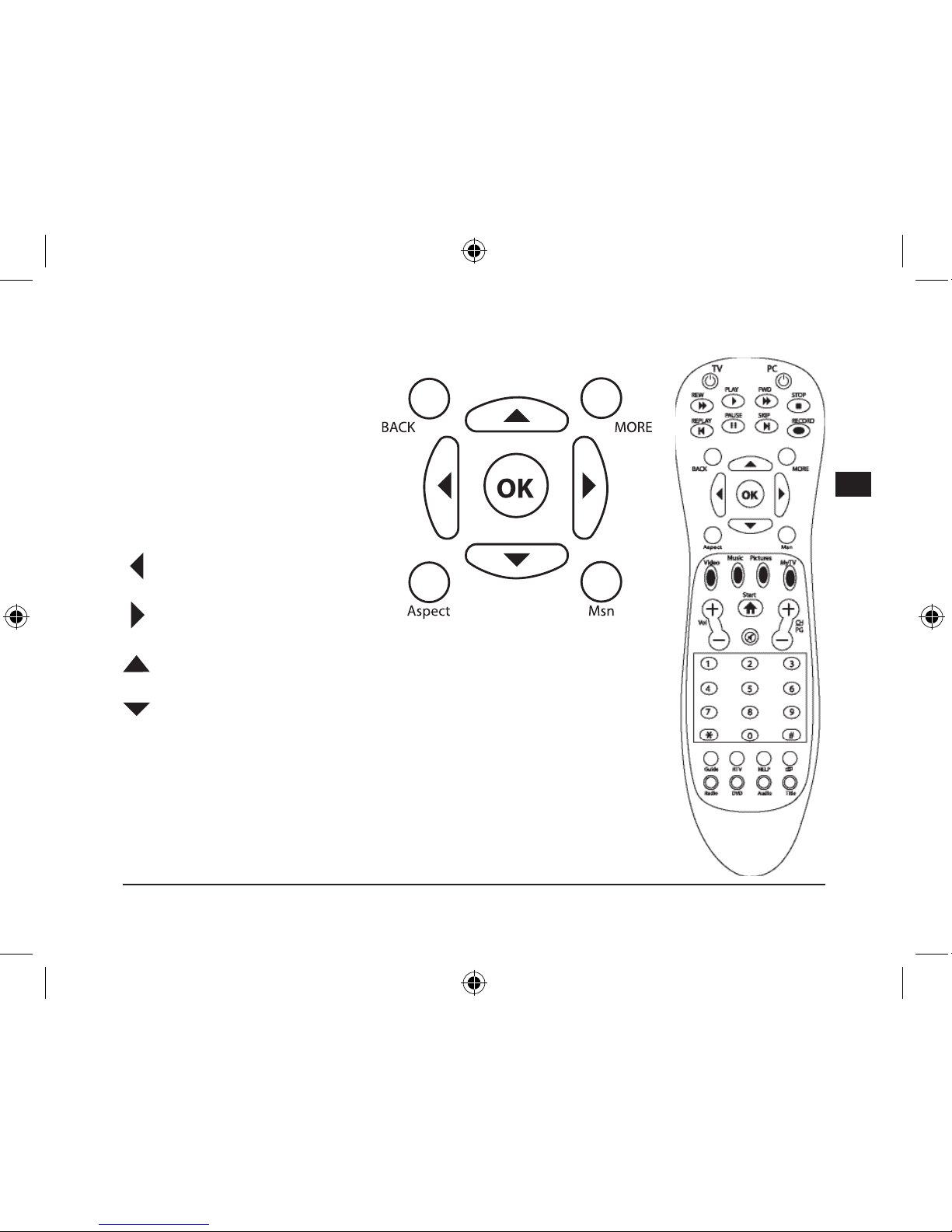
Back: tasto sinistro del mouse /
indietro
More: tasto destro del mouse
OK: Enter / Input
Aspect: cambiare il formato per la
riproduzione Video/DVD
Msn: non assegnato
: tasto a sinistra
: tasto a destra
: tasto in su / scrollare nel sito web
: tasto in giù
Page 40
40
D
GB
F
E
I
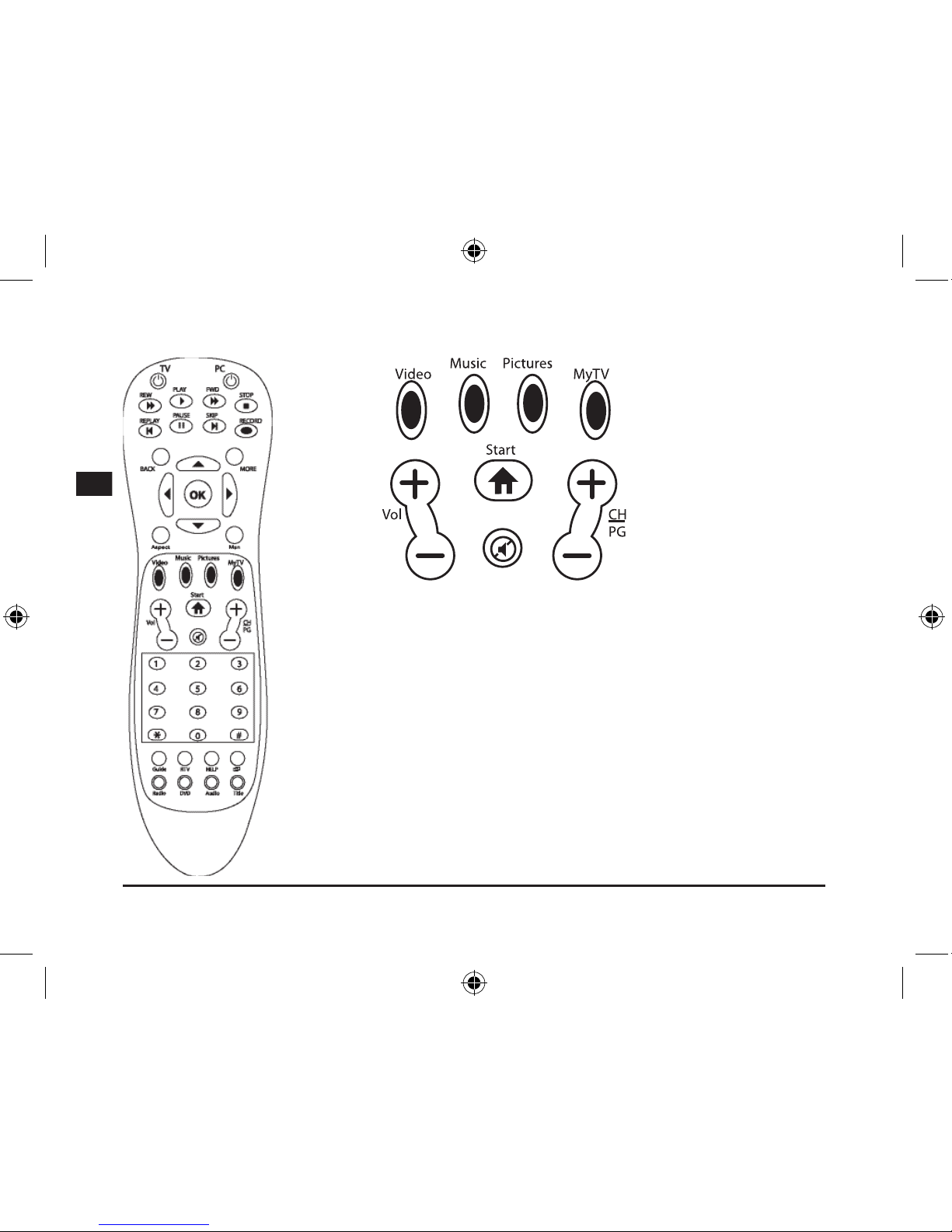
Video: accesso diretto al catalogo video
Music: accesso diretto al catalogo musicale
Pictures: accesso diretto al catalogo immagini
MyTV: accesso diretto alle registrazioni TV
Start: apre il Windows Media Center
Vol +/-: regolazione del volume
CH/PG: impostazione dei canali e dei programmi / tasto immagine in su/in giù
Mute: disattivazione audio
Page 41
41
D
GB
F
E
I
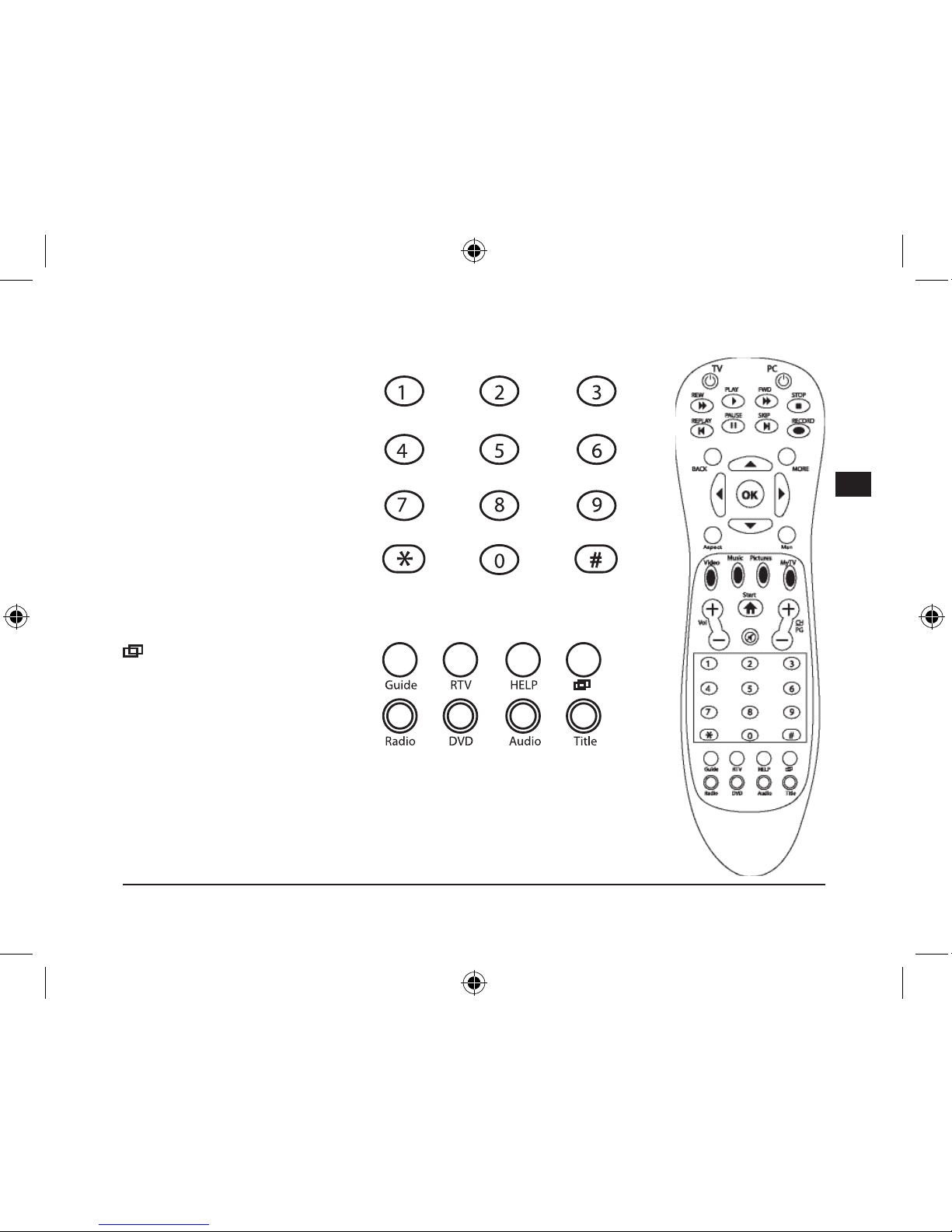
Tasti 1 – 0: selezione manuale di
un canale TV, un brano musicale o
un capitolo
p.e.: calcolatrice o immissione di
numeri nell’elaborazione testi
Guide: apre il menu Programma
televisivo
Nota bene: programmare prima i
canali TV
RTV: lm registrati
Help: Guida in linea del sistema
operativo
: mette il Media Center in
background per poter accedere
ad altre nestre sul desktop del
PC.
Radio: non assegnato
DVD: accesso diretto al menu DVD
Audio:
impostazione sottotitoli e lingua durante la riproduzione
Title: mostra titoli di album, lm e musica o l’interprete
Page 42
42
D
GB
F
E
I
Risoluzione di problemi
Un tasto non funziona correttamente.
Anche se la funzione non viene immediatamente eseguita, aspettare un momento dopo aver azionato il
tasto. Alcune funzioni reagiscono con ritardo. Non premere il tasto ripetutamente, altrimenti si prolunga il
tempo di risposta del computer.
Il telecomando non reagisce.
Accertarsi che le batterie siano ancora sufcientemente cariche. All’occorrenza sostituirle. Quando non
usate il telecomando per un periodo più lungo, togliete le batterie dal dispositivo. In tal modo prolungate
la durata delle batterie.
A che distanza posso adoperare il telecomando?
Il sensore ad infrarossi funziona no ad una distanza di dieci metri. Il campo visivo tra telecomando
e ricevitore deve essere libero. Tener conto che la distanza di ricezione diminuisce quando il livello di
carica delle batterie è basso.
Garanzia
Per questo prodotto concediamo una garanzia della durata di due anni a partire dalla data di acquisto.
La garanzia copre i difetti di fabbricazione, nonché quelli dei componenti integrati.
Smaltimento
Si prega di smaltire questo dispositivo presso i centri di raccolta comunali locali o un centro di
riciclaggio alla ne della sua durata.
In caso di supporto tecnico...
Nel caso in cui dovessero vericarsi problemi tecnici, preghiamo di voler contattare i nostri tecnici. A tale
proposito, troverete sul retro di questo manuale di istruzioni il numero del servizio di assistenza tecnica.
Page 43

43
D
GB
F
E
I
Page 44
44
D
GB
F
E
I
SL-6399 Version 1.0
© 2006 Jöllenbeck GmbH. All rights reserved. All product names mentioned in this manual may be trademarks or
registered trademarks and are the property of their respective owners. The signs ® or ™ are not mentioned in each case
in this manual. Information contained herein is subject to change without notice.
 Loading...