

Page 1
Exclusively distributed by LANCHIYA TECHNOLOGY USA / Speakal.
Address: 5555 Inglewood Blvd Suite 205. Culver City, CA 90230. USA
www.speakal.com
Speakal
User Guide
iPom
Please read this guide carefully before use
Page 2
WELCOME
PROPERTY RIGHTS INFORMATION:
The trademark Amethyst and all the developed products with this label are registered
patents, and belong to Foshan LANCHIYA Digital Technology Co., Ltd. Our company
reserves all rights and will not allow reprinting. Other concerned trademarks all belong
to their proprietors. As to the constant update and development of the products, our
company reserves the right to change and rework our products without notice.
R
SAFETY INSTRUCTIONS
To ensure your safety and enjoyment, read and follow the safety
instructions and use in the directed manner. Keep this manual for future
reference.
WARNING: To prevent any fire or electrical hazards, do not remove
or dissemble any parts from this unit. There are no user serviceable
parts inside the unit. Please use qualified service personnel or
qualified service shops.
Do not expose the unit to rain, water or moisture
Do not place liquid on or close to unit
Do not place unit on or near fire or sources of fire such as candles or
naked flames
Keep away from heat, dust and vibrations
Place unit on a stable and level platform
Do not place any items on top of unit
Refrain from using excessive force when using the unit buttons
Secure and Protect the power cord
Do not attempt to pull the power cord from a distance to shut the power
Secure all cords and connections and do not use pinched or defected
ones
Unplug the power cord if the unit is left unused for extended periods
If cleaning is required, use dry soft cloth or a damp cloth without
solvents
Page 3
TROUBLESHOOTING
PACKAGE CONTENTS
Symptom
No power
Cannot
locally
play
Cannot
line-out
play
The
induction
operation is
invalid
Sound is off
and on
No sound
no tweeter
sound
Sound is
too small
cannot
select
music track
Reason
1. The power plug is not on the proper
place.
2. DC power plug is not on the proper
place.
3. The power switch is not on the
turn-on place.
1. No card insert
2. Without MP3 music file in the card.
3. Have virus file in the card
4. The card is shattered.
5. Have connected line-out speaker .
1. The audio connection line is
connected in a wrong way.
2. The line-out player is under
abnormal playing mode.
1. Finger touches a wrong place.
2. Touch more than two keys
simultaneously.
1. Flower shape speaker connection is
not on the proper place.
2. There is no right MP3 document in
the card .
1. Under the standby mode.
2. under the mute mode.
3. Volume is minimal.
4. No MP3 music document inside the
card.
5. Cannot play on the state of out-line
speaker or no out-line speaker .
1. Have connected the outer pedestal
but no connection with flower shape
speaker.
1. Volume is minimal
2. Out-line speaker is on the state of
minimum volume
1. There is only one piece of music file
in the card.
Solution
1. Plug into the power supply in
correct way.
2. Plug into the DC power adaptor in
correct way.
3. Place the power switch on the
turn-on place.
1. Insert proper SD or MMC card.
2. Recopy right MP3 document.
3. manage virus-killing process.
4. replace a right card.
5. Cut off the line-out speaker .
1. Resume connection according to
the quick guide.
2. Operate the line-out player again.
1. Touch the right place.
2. Touch one key at one time.
1. Reconnect the flower shape
speaker.
2. Recopy the right music document .
1. Startup again.
2. Consume playing
3. Adjust the volume to a proper place.
4. Recopy the right MP3 music
document.
5. Correctly operate the out-line
speaker.
1. Connect the flower shape speaker
correctly to the outer pedestal.
1. Readjust the volume to the proper
place.
2. Replay the out-line speaker .
1. Copy more music files according to
the storage of the card.
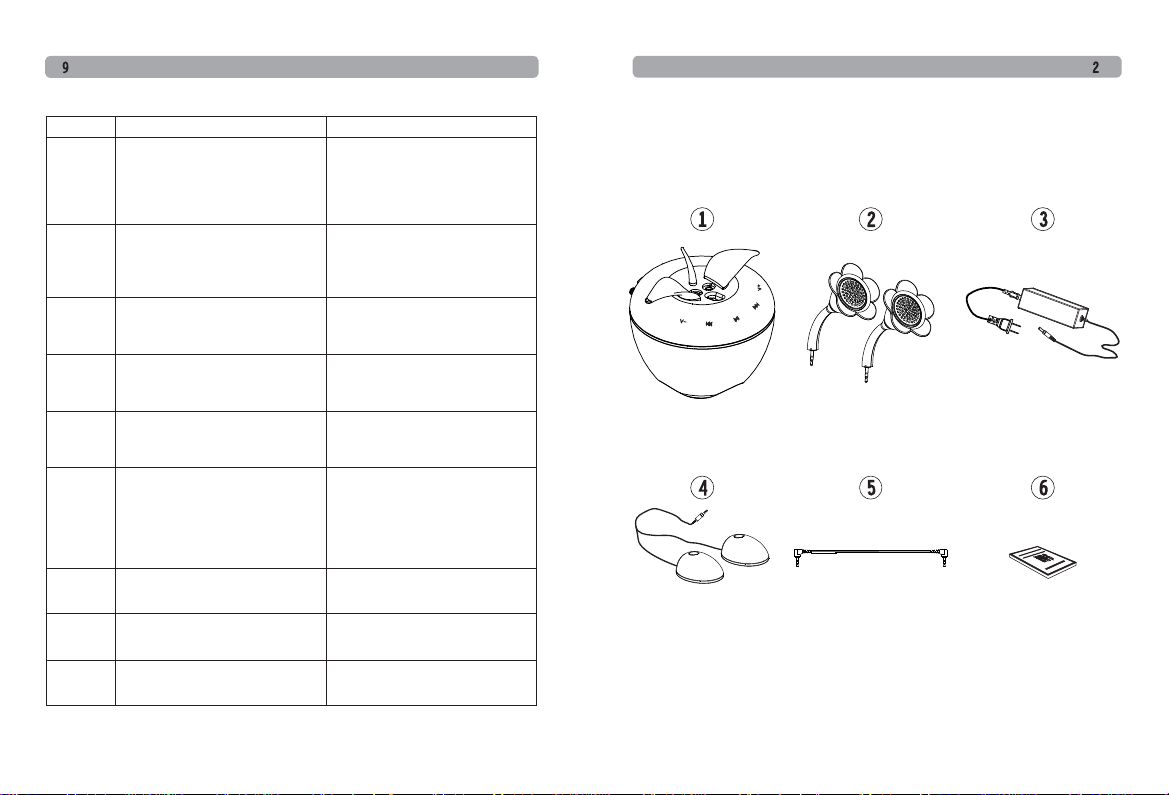
1. A-7 Digital Active Speaker: one set
2. A-7 flower-shape speaker: one pair
3. Power supply : one piece
4. A-7 outer pedestal: one pair
5. Audio connection line: one piece
6. User guide
Page 4
QUICK START
SPECIFICATION
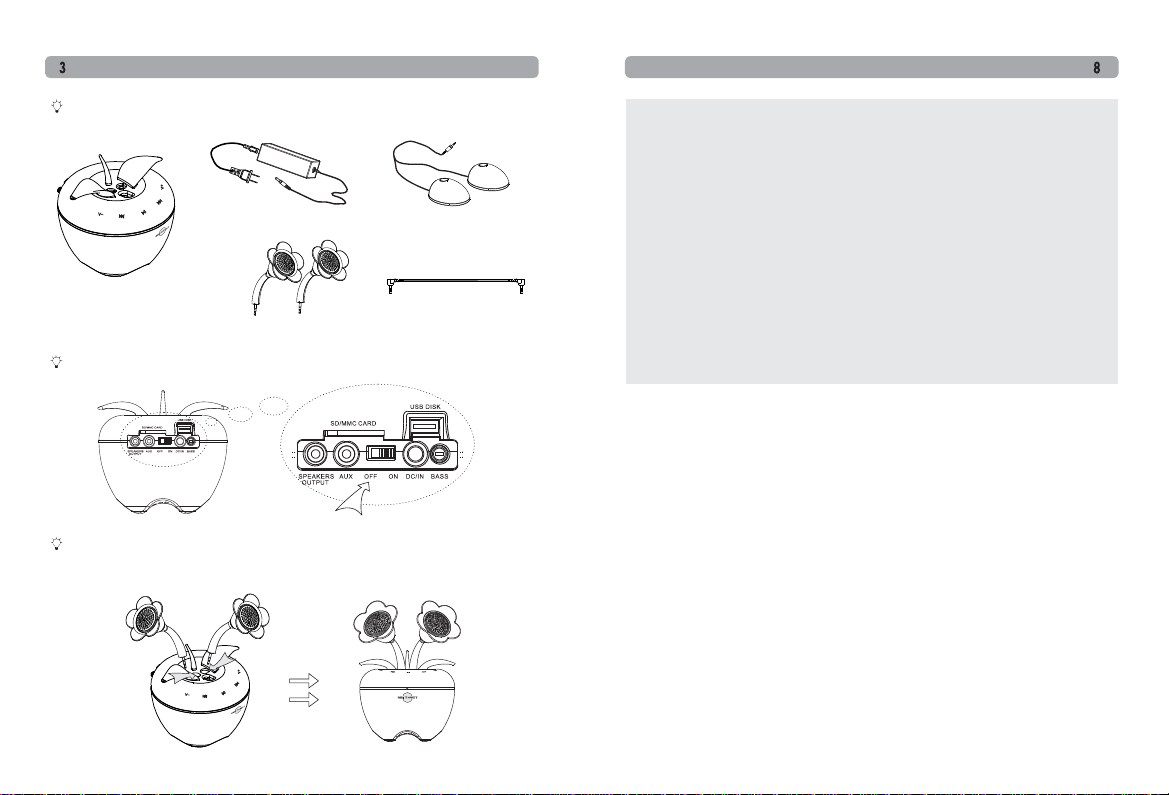
Take A-7 and its accessories out of the package, and put on a proper and
safe place.
Power adapter Outer pedestal
A-7 Digital Active Loudspeaker
Flower-shape speaker
Audio connection line
Check and keep the power switch of A-7 is on the place OFF.
Please fix the two flower shape speaker into the socket between the two
leaves on the top of A-7 in the correct direction, pay attention to put them on
the proper place.
Product name: Digital Active Loudspeaker
Product model: A-7
Frequency response: 100Hz-20KHz
Amplifier output power: left/right 3W。チ2, subwoofer 12W。チ1
Amplifier input sensitivity: 。ワ400mV
Amplifier SNR: 。ン82dB
Amplifier Distortion: 。ワ0.7%
Amplifier track isolation: 。ン60dB
Speaker units: tweeter ヲオ26mm subwoofer ヲオ68mm
Power voltage: AC110~240V, 50/60Hz
Specification: L135mm。チW143mm。チH178mm
Product weight: 1.2Kg
Package specification: L270mm。チW230mm。チH150mm
Package weight: 1.7Kg
Page 5
QUICK START
QUICK START
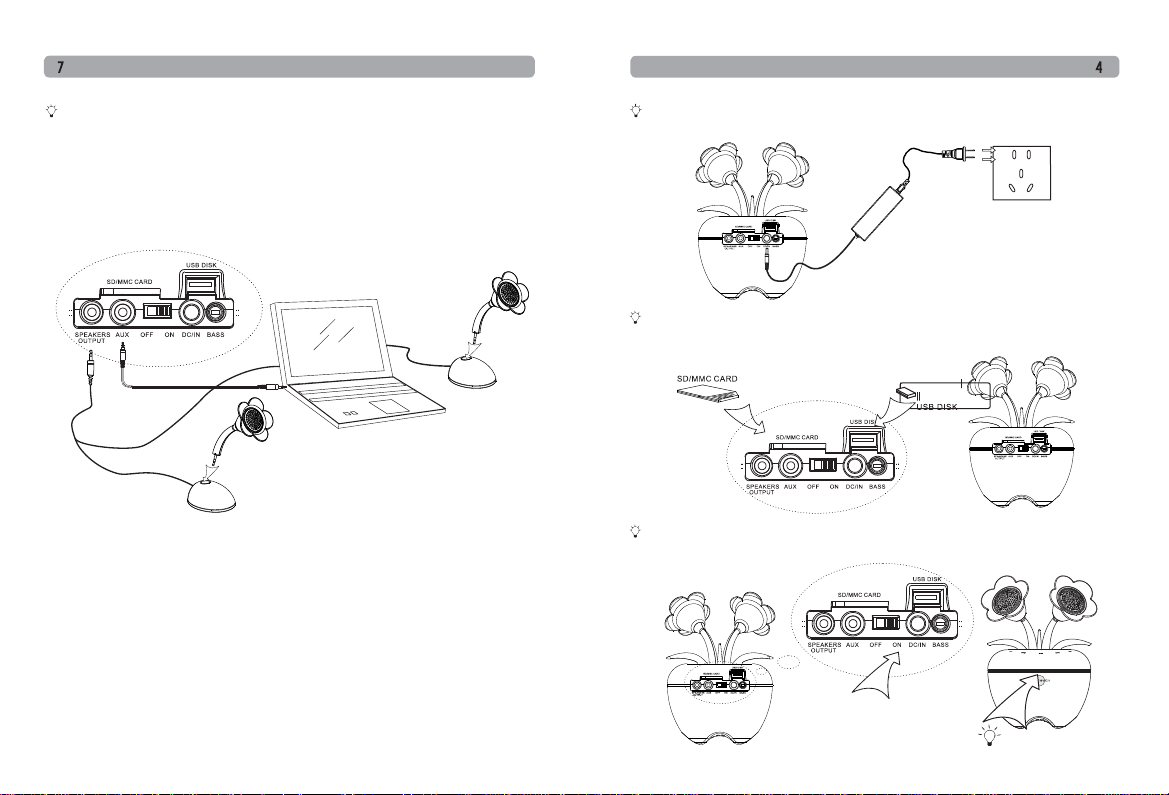
There is outer pedestal along with A-7. if you need to use it, please power off
the device, place the outer pedestal in the proper place (for example, on the
two sides of laptop), then take off flower-shape speaker from the cabinet and
fix them into the fixing holes on the top of pedestal according to the direction
of orientation slot , and finally connect flower shape speaker line of pedestal
to "SPEAKERS OUTPUT" on the back of A-7.
Connect A-7 to power adaptor, and connect the adapter to local power
supply.
power supply
If you want to play music, please insert the SD card or USB disk with copied
music back upward into the slot at the backside of the head of A-7, and make
itself lock automatically.
Dial the power switch on back panel of A-5. When it is on the place of "ON",
the red indication light in front will be lighted .
Indication
Page 6
QUICK START
QUICK START
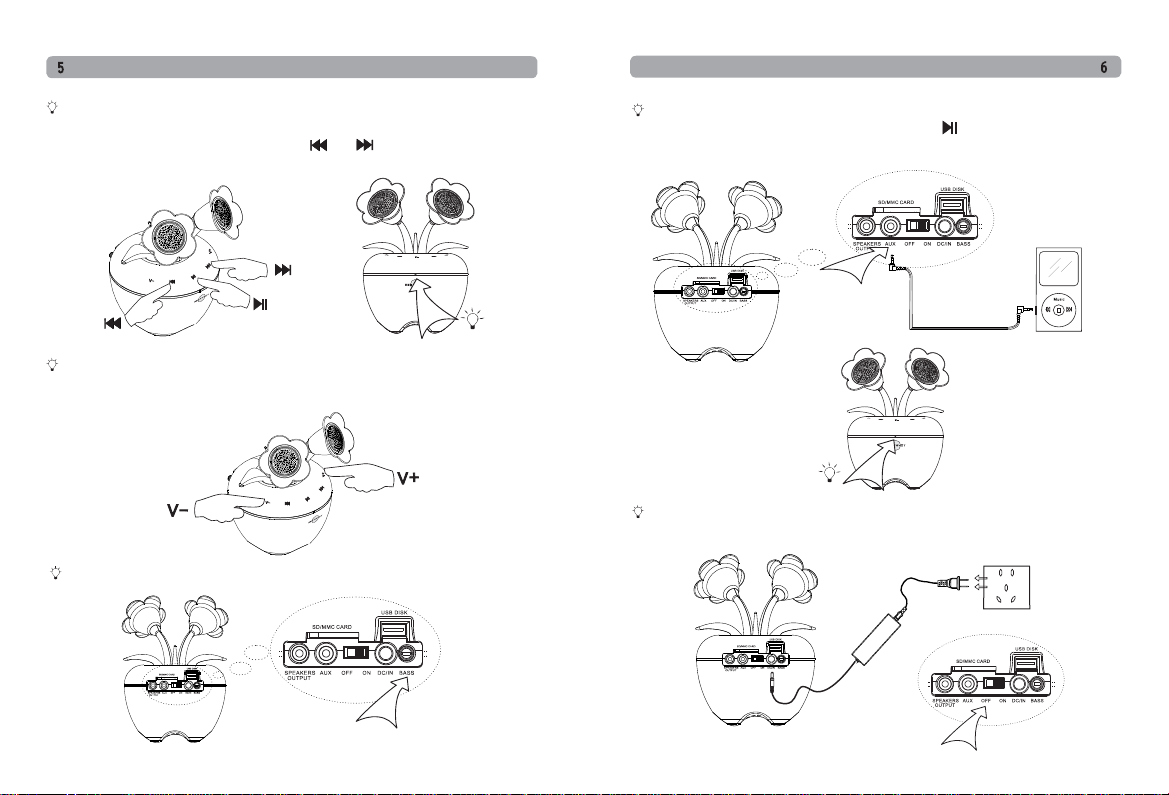
If you want to play music, please insert the SD card and USB disk on the
back of A-7, the USB mode will be selected as default music source. And
the indicate light will be green. Press" "or " "on control panel to select
next &preview.
Indicate light
If you need adjust the volume, please gently touch "v+" or "v-" on the operation
zone of A-7 to turn up or turn down the volume, the indication light will flash
in the course of operation.
Clockwise rotate the "BASS" on the back of A-7 to adjust woofer to be proper.
If you want to play music from external source, please connect the external
source to A-7 by audio cable. Keep touching " " for 6 seconds to select
audio source between AUX,SD or U disc.
Audio play
Indicate light
If you do not want to use it during a long time, please dial the power switch
on the back panel of A-7 on place of "OFF" and cut off the power supply.
power supply
 Loading...