

Page 1
How to...
1. POWER On/Off
Long press and releas e
[ On/off sound beeps ]
2. Enter PIN code (If any)
[ Insert SIM card’s PIN code ]
Enter PIN code using 0 - 9 keys
and validate with
[ On sound beeps ]
If wrong PIN code, enter again
your PIN code. After 3 tr ies you
must enter a PUK code .
[ On sound beeps ]
3. Lock / unlock keypad
Long press and releas e
[ Beep / Beep ]
4. Make a call
Enter the phone number using
the keypad and press
[ Keypad sound + All repeat ]
5. End a call
Press and release
[ Quiet Beep ]
6. Answer a call
When the phone rings, pres s
[ Ringtone ]
7. Reject a call
When the phone rings, pres s
[ Stop Ringtone ]
8. Accept / End a second call
In the event of a second incoming
call, press to accept second
call. Press again to s witch to
the first call or press t o finish
the second call.
[ Beep ]
9. Redial
To redial the last incoming or
outgoing call, press t wo
times.
[ Keypad number plays ]
10. Earpiece volume
There are t wo volume levels,
press to adjust .
[ Beep ]
2
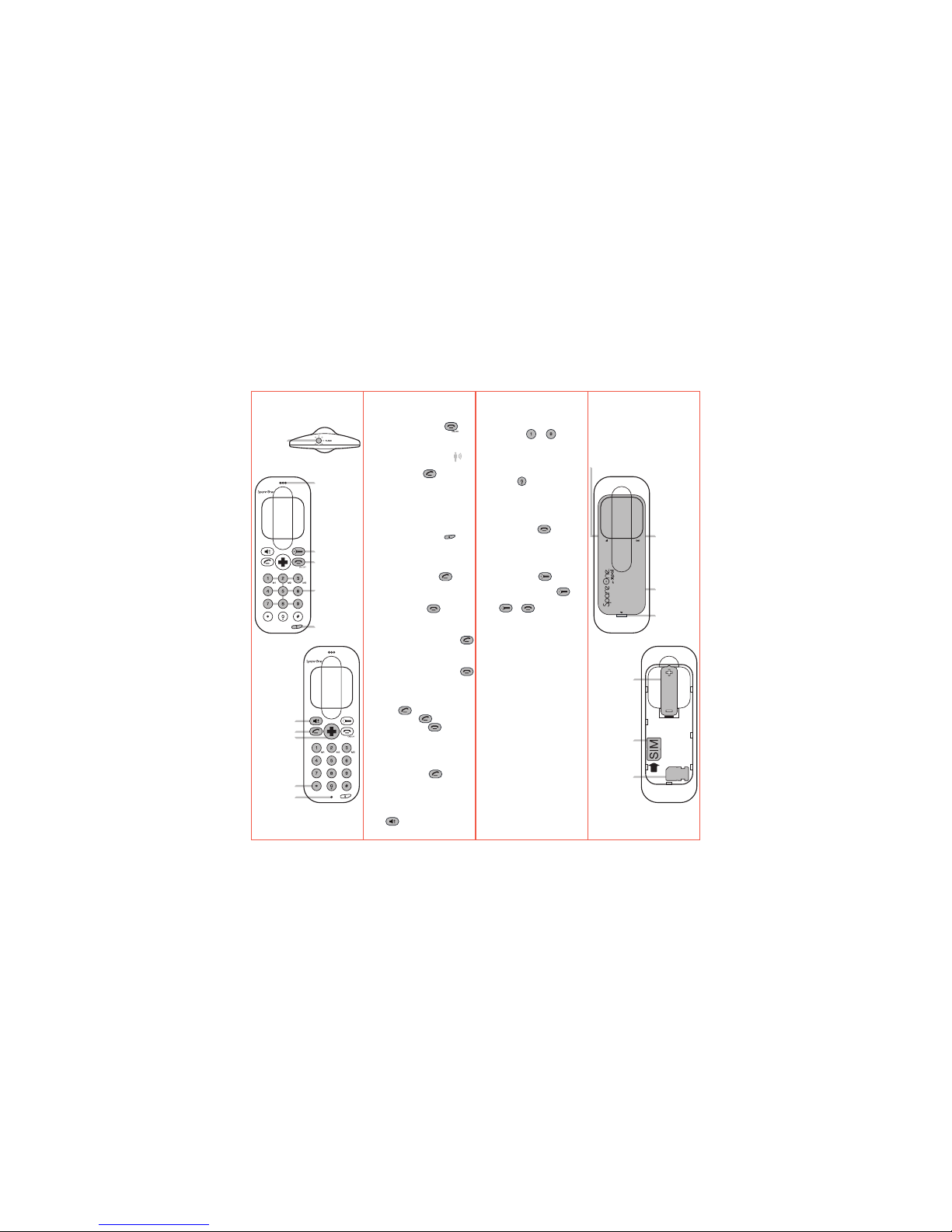
Discover your phone
The front / Top
Light
Speed Dial
Lock, unlock
Earpiece
On,Off
/ End Call
Volume
Torch light
Dial
Microphone
Call
Emergency
services
1
How to...
11. Speed dial
a) You can set nine numbers on
the speed dial to
To set up a speed dial, enter a
phone number by using 0 - 9
keys and then long press 1 - 9
keys for 5 seconds.
[ Validation Beep ]
Long press to compos e +
[ i-e: +123 456 789 ]
b) To call M1 - M9, simply long
press on the desired number.
12. Clear memory
Press and release
[ Restore to factory setting (M1 M9, Center key, Volume level, last
call, by pressing *#1234# ]
13. Use the torch light
Press and release
[ Light on ]
Long press and releas e
[ Keep light on ]
Press or
[ Turn off ]
SMS ...
1. Call me back SMS
You can send a “call me back”
SMS with your SpareOne to
numbers stored in speed dial
memories: Long pre ss * then long
press speed the desired r ecipient
on 1 - 9 (See “How to ... Set speed
dial” on the back of this user
manual).
[ Positive tone if SMS sent, Error
tone if no phone number have
been set up before ]
2. Auto reply SMS
In the event of a receiv ed SMS,
SpareOne will automatically
respond. [ to deactivate this
function press *#12345# ]
This function works only if the SIM
card has space to stor e SMS.
Please delete any unus ed SMS
before use.
3
AA battery
Storage for
2nd SIM card
or Micro SIM
adapter
SIM card slot
Discover your phone
The back
*battery door open
Battery
LED Light
Battery door
Open battery
door
Antenna / Networ k LED light
4
User Manual SpareOne FRONT
Retail Concierge Version
ENGLISH
Page 2
FCC Radiation Exposure
Statement:
This equipment complies with FCC
radiation exposure limits se t forth
for an uncontrolled environmen t .
This transmitter mus t not be
co-located or operating in
conjunction with any other
antenna or transmitte r.
CTPGUWISA141400-0-WI
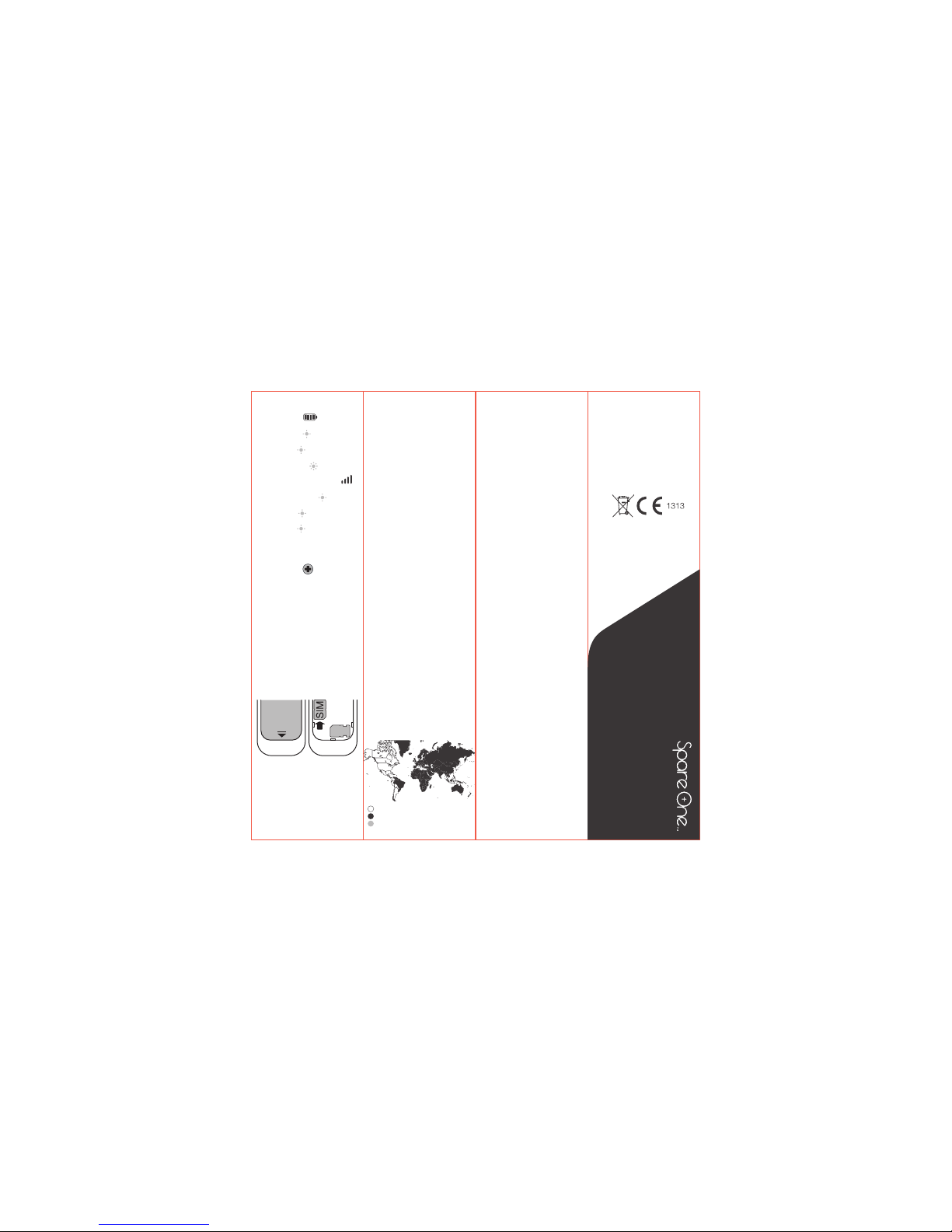
LED ...
1. Battery LED
Battery level f rom 100% to 40%
[ Blinks Green ]
Battery level f rom 40% to 20%
[ Blinks Red ]
Change your battery
[ Blinks Fast red ]
2. Antenna / Networ k LED
Searching for net work
[ Blinks Blue & Red ]
Connected to net work
[ Blinks Blue ]
Network not f ound
[ Blinks Red ]
Center key ...
1. Emergency/Service Call
The center key is set up t o call
a factory st ored number, long
press it in case of need.
[ Even with no SIM card, you can
always call emergency by dialing:
911, 999, 112... ]
SIM card...
1. Insert SIM card
Open the battery door, and insert
SIM card. Make sure the metallic
contact is facing the S pareOne
[ You can use the second SIM card
slot as a storage for a 2nd SIM
card ]
2. Micro SIM card
You can also insert micro SIM card
by using a micro SIM card
adaptor [ If supplied ]
Power ...
1. Power capacity
SpareOne works with AA batter ies
[ Alkaline, NIMH or Lithium. For
better performances, use Lithium ]
Do NOT use Carbon batter ies
2. Warning
Risk of fire. Battery can e xplode or
leak and cause injury if installed
backwards, disa ssembled,
charged, crushed, mixed with
used or other battery t ypes, or
exposed to fire or high
temperature . Keep out of reach of
children, keep in original pack age
until ready to use. Dispos e of
used batterie s promptly.
Service ...
1. One year warranty
Your SpareOne is under 1 year
warranty, if y ou have any
enquiry please contact the
service cent er
[ www.spareonephone.com ]
2. Visit our website, Like us on
facebook
User guide, pictures, que stions ...
[ www.spareonephone.com ]
All the latest eve nts and news are
waiting for you!
[ SpareOne Phone page ]
4. Where can i use my SpareOne?
Two different versions of the
SpareOne are available, s ee the
map bellow.
[ Visit www.spareonephone.com
for more informations ]
5 6
User Manual SpareOne BACK
Retail Concierge Version
ENGLISH
1900 / 850
900 / 1800
Not available
Legals ...
Manufactured
SpareOne is manufactured by :
TennRich International
Corporation.
[ XPAL Power Inc.
Costa Mesa, CA 92626 ]
SpareOne ™ is a trademark f rom
TennRich International Corp.
© 2011 TennRich International
Corp.
Energizer and other marks ar e
trademarks of Energi zer.
Made in china
FCC Warning ...
Any Changes or modifications not
expressly appro ved by the party
responsible for compliance could
void the user’s authorit y to
operate the equipment.
This device complies with par t 15
of the FCC Rules. Operation is
subject to the following t wo
conditions: (1) This device may
not cause harmful inter ference,
and (2) this device must accept
any interfe rence received,
including interf erence that may
cause undesired operation .
The SAR limit of USA (FCC) is
1.6W/kg averaged over on e
gram of tissue.
Product, model number:
Spare One (FCC ID:
A2ZSPAREONE) has also been
tested against this S AR limit.
The highest SAR value r eported
under this standard during
product certification for u se at the
head is 0.373W/kg.
The use of belt clips, holder s and
similar accessories should not
contain metallic compone nts in its
assembly.
The use of accessor ies that do
not satisfy these requirements
may not comply with FCC RF
exposure requireme nts, and
should be avoided.
7
 Loading...