

Page 1

Introduction
Soyntec thanks you for purchasing your new webcam Joinsee.
We wish you enjoy using it.
The Joinsee are a VGA webcams with built-in microphone which
provides an easy way to enjoy videoconference using a USB
connection to your computer.
We suggest reading this user manual for enjoying this product is a safe
way and with the best performance.
Main features
- Built-in microphone with audio via USB.
- Innovative design suitable for both laptop and desktop computers.
- Manual adjustable focus.
- Automatic exposure and gain control.
- Still image resolution: VGA 640x480.
- Video resolution: VGA 640x480.
Specifications are subject to change without notice.
© 2008/09 by Soyntec. All rights reserved.
Page 1 / 8
Page 2

- Capture speed: Up to 30 fps (QVGA) and up to 15 fps (VGA).
- Includes special button for taking photos.
- Features status LED indicator.
- USB 2.0/1.1/1.0 connection.
- Compatible with Windows VISTA / XP / 2000 / 98SE / ME.
Product contents
- Webcam.
- CD with drivers and softwares.
- User manual.
Specifications are subject to change without notice.
© 2008/09 by Soyntec. All rights reserved.
Page 2 / 8
Page 3
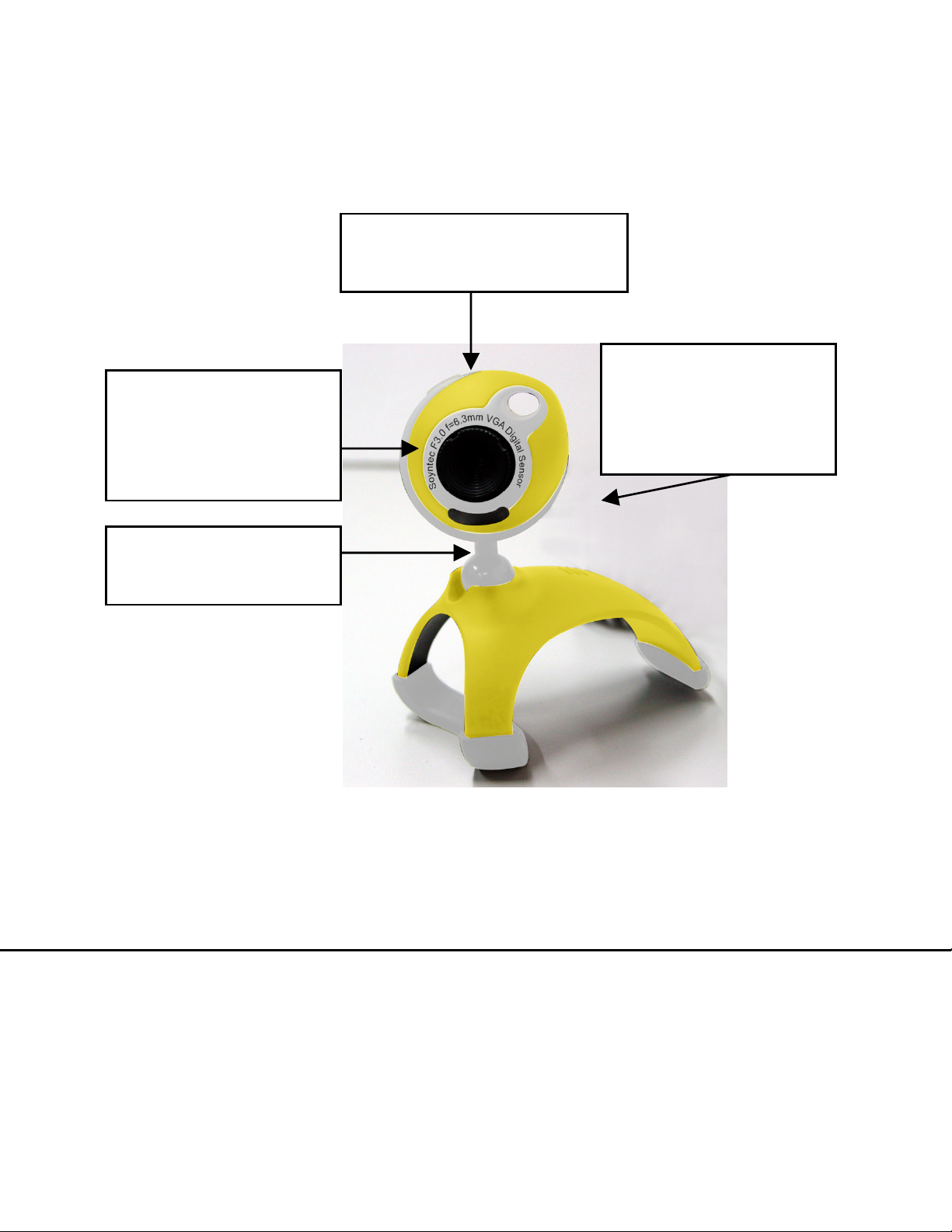
Product overview
The following picture shows the main parts of the webcam:
Lens with manual
adjustable focus
Adjustable neck
Snapshot button
Status LED
indicator
Figura A: Webcam JOINSEE 350 Yellow exemple main parts
Specifications are subject to change without notice.
© 2008/09 by Soyntec. All rights reserved.
Page 3 / 8
Page 4

Webcam installation
Please note that in order to install the webcam you need a free USB
connector in your computer.
Follow these steps to install the webcam:
1. Insert the provided drivers CD and select “Install Joinsee Driver”.
2. Click the “Next” button.
3. Click “Finish” to close the installation wizard.
4. Connect the webcam to a free USB connector. The operating system
will detect the webcam and it will be ready to use.
5. Press the snapshot button on top of the webcam to launch the
monitoring software and check that the webcam has been properly
installed.
Specifications are subject to change without notice.
© 2008/09 by Soyntec. All rights reserved.
Page 4 / 8
Page 5

ArcSoft ArcSoft Magic-i software installation
1. Insert the provided drivers CD and select “ArcSoft Magic-i”.
2. Select the installation language.
3. Click the “Next” button.
4. The license contract will appear. Click “Yes”.
5. The installation folder can be modified. It is recommended to leave
the default folder. Click the “Next” button.
6. The new program group can also be modified. Just leave the default
program group and click “Next”. The copy of files will start.
7. Click “Finish” to close the installation wizard.
Specifications are subject to change without notice.
© 2008/09 by Soyntec. All rights reserved.
Page 5 / 8
Page 6

ArcSoft WebCam Companion 2 software installation
1. Insert the provided drivers CD and select “ArcSoft WebCam
Companion 2”.
2. Select the installation language.
3. Click the “Next” button.
4. The license contract will appear. Click “Yes”.
5. The installation folder can be modified. It is recommended to leave
the default folder. Click the “Next” button.
6. The new program group can also be modified. Just leave the default
program group and click “Next”. The copy of files will start.
7. Click “Finish” to close the installation wizard.
Specifications are subject to change without notice.
© 2008/09 by Soyntec. All rights reserved.
Page 6 / 8
Page 7

Special guarantee
Energy Sistem guarantees that your product does not have any
material, design or manufacture defect and provides a 36 month
guarantee.
Guarantee procedure:
- Visit the Support section at http://support.soyntec.com and select
your product to view the FAQ (Frequently Asked Questions). The
solution to your problem is very likely to have been already published
there. You will also be able to download user manuals, user guides,
drivers and updates.
- If you cannot find an appropriate solution in the Support section, you
may send us your enquiry or warranty service request using this mail:
- Alternatively, you may prefer to contact the distributor from which
you purchased the product, presenting them the receipt or invoice.
Specifications are subject to change without notice.
© 2008/09 by Soyntec. All rights reserved.
Page 7 / 8
Page 8
Specifications are subject to change without notice.
© 2008 by Energy Sistem Soyntec. All rights reserved.
Trademarks
All company, brand and product names are trademarks or registered
trademarks of their respective companies.
DECLARATION OF CONFORMITY
Supplier Name: Energy Sistem Soyntec S. A.
Address: Pol. Ind. Finestrat C/ Calpe esq. C/ Alicante S/N, 03509 Finestrat
Alicante - Tel: 902 388 388 - Fax: 902 119 034
NIF: A53107488
We declare under our own exclusive responsability the product
conformity:
Soyntec® WebCam VGA Joinsee™ 350 series, Video-surveillance,
Duo and Built-in microphone.
Manufacturing country: China
Specifications are subject to change without notice.
© 2008/09 by Soyntec. All rights reserved.
Page 8 / 8
 Loading...