

Page 1
Page 2
Page 3
EA-BT Series Access Controller
Color
Description
Red
12VDC
Black
GND
Yellow
Relay – Common
Blue
Relay – Normally Open
White/yellow
CMD Output #1
White/orange
CMD Output #2
Grey
reserved (do not use)
White/red
Door Status Sensor (not active)
White
DATA1 input
Green
DATA0 input
White/brown
reserved (do not use)
White/black
reserved (do not use)
Brown
reserved (do not use)
Orange
reserved (do not use)
Southco EML
Relay (NO)
CMD Output
R4-EM 1 & 2 Series
R4-EM 4 & 6 Series
R4-EM 5 & 7 Series
R4-EM 8 Series
R4-EM 9 Series
H3-EM Series
EM-10 Series
EM-05 Series
Quick Install Guide
Package Contents
EA-BT Series Access Controller
Serial Number and Checksum Label
Quick Install Guide
EA-BT Series Access Controller
1. Admin Button
Features
Multi-door output
Wiegand DATA inputs for external reader connection
Back-lit admin button for controller status
For indoor use only
Specifications
Supply Voltage: 12VDC
Standby Current: 20mA typical at 12VDC
Operating Current: 50mA maximum at 12VDC
Relay Output (x1): 750mA @ 12/24VDC/AC
CMD Output (x2): 15mA, up to 9VDC (each)
Read Distance: up to 30 feet
DATA Signal Voltage: 5VDC
DATA Pulse Interval Time: 40µs
DATA Signal Delay: 2ms
DATA Length: 26 and 35 bits
Overall Dimensions: 108.95 x 45 x 19.5 mm
Step 1 - Mounting and Installation
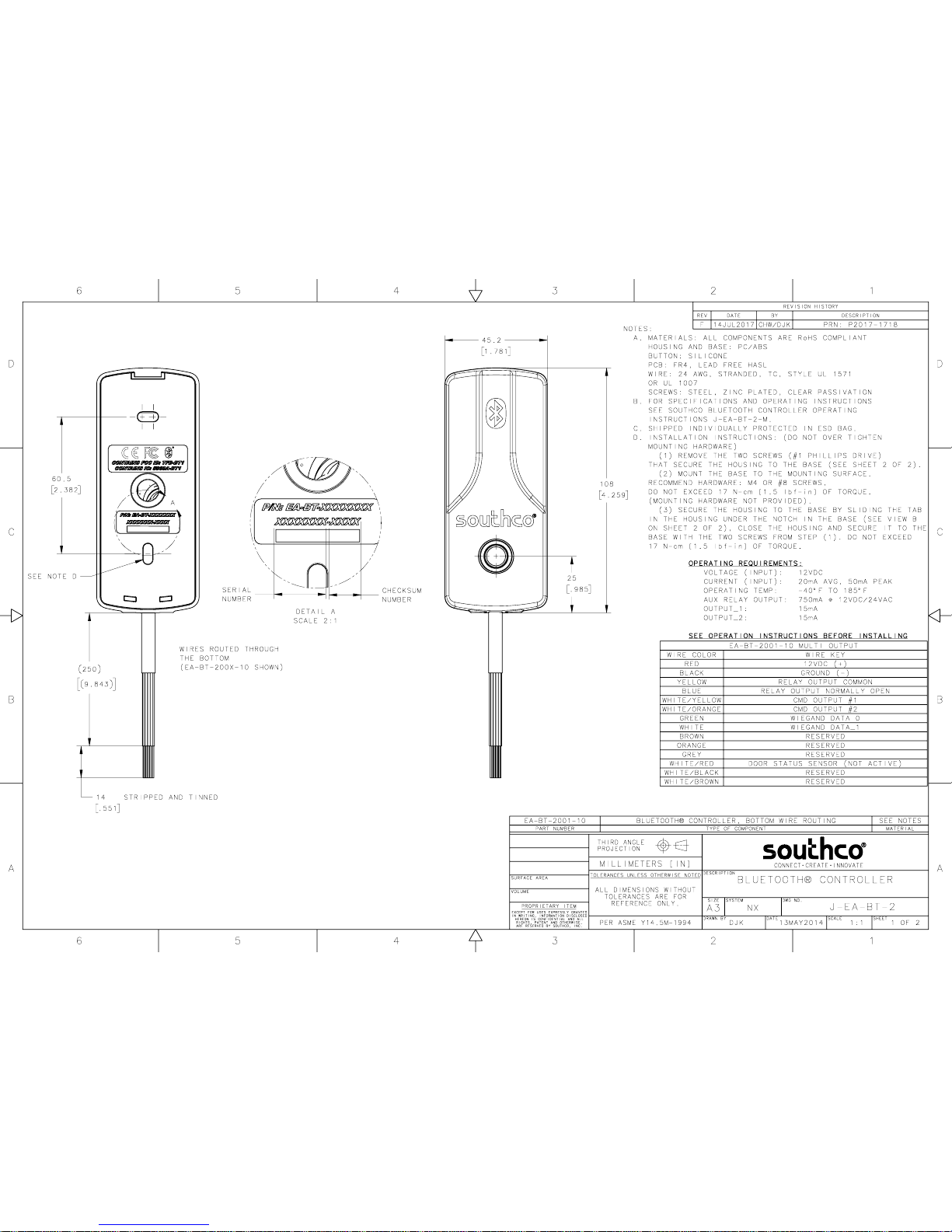
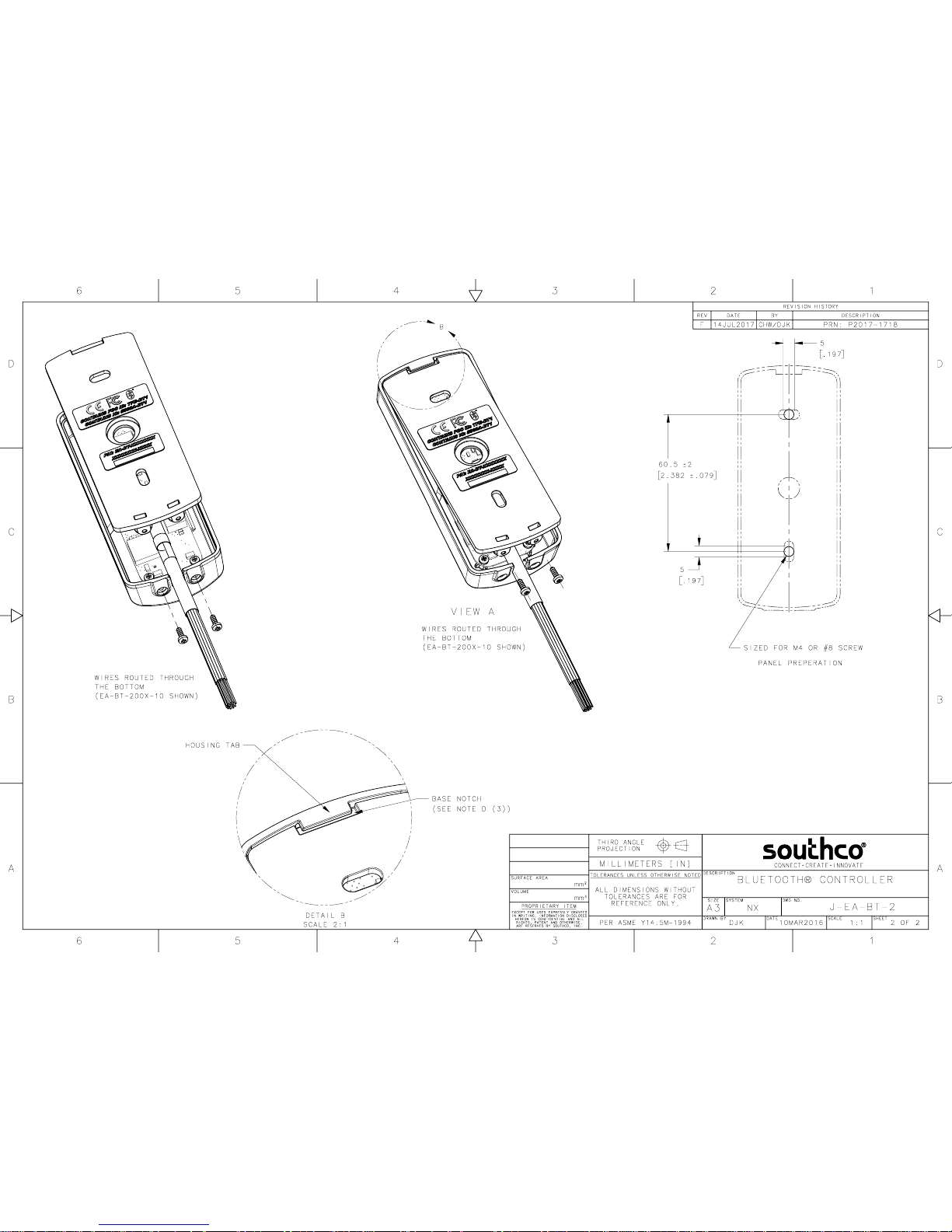
Please refer to Southco trade drawing J-EA-BT-2.
NOTE: Be sure to record the 7-digit serial number and 4 character
checksum (81xxxxx-xxxx) on the label included with the controller. The
serial number and checksum are also on the rear of the controller and the
box it is shipped in.
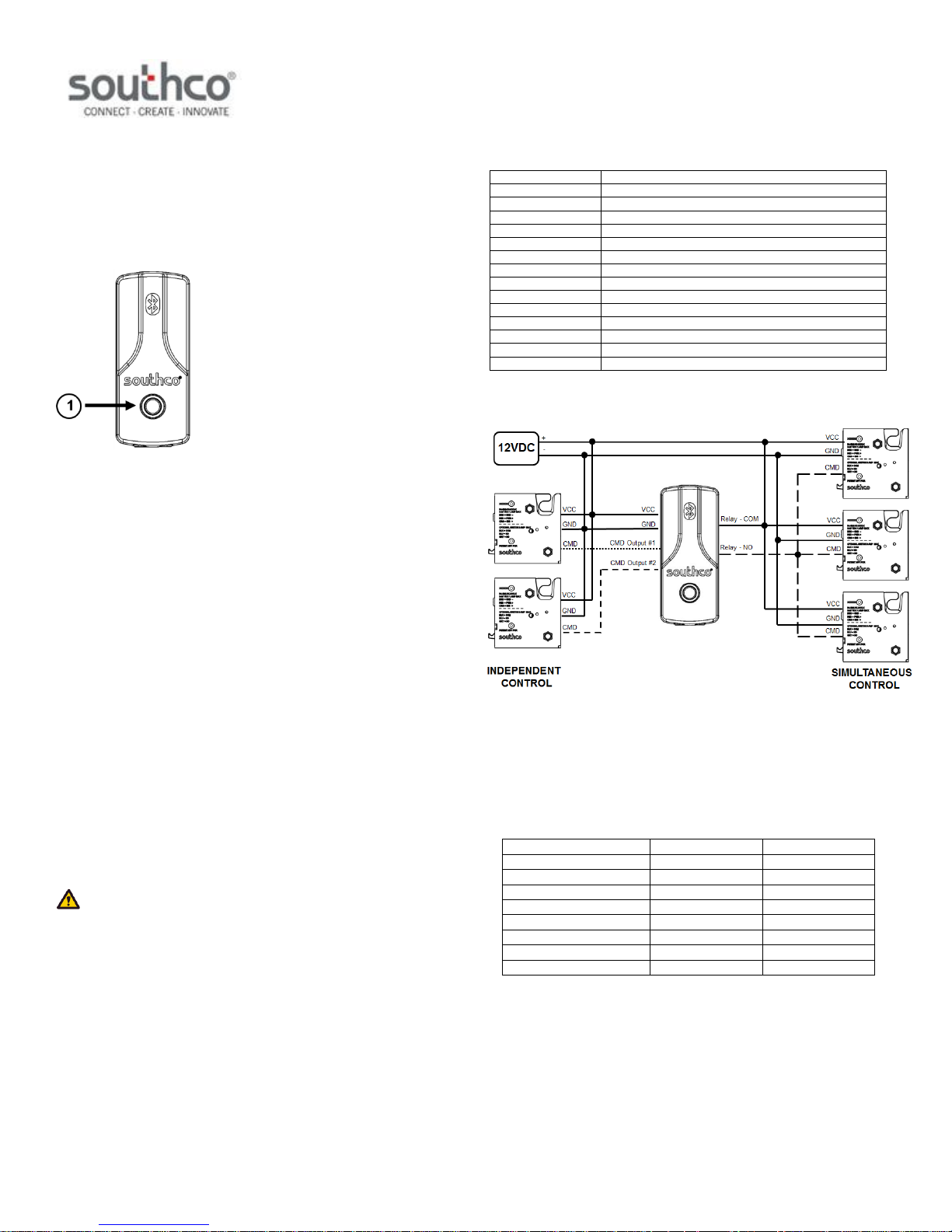
The EA-BT has a 14-wire stripped and tinned harness, as described below:
An example connection diagram is shown below.
Using the above connection diagram, the electromechanical latches are
operated independently and simultaneously.
Independent control – An electromechanical latch’s command input can be
connected to one of the two CMD outputs.
Simultaneous control – Multiple electromechanical latches’ command
inputs can be connected to the Relay (NO) output.
EA-BT Output / Latch Compatibility
J-EA-BT-2-M_revC Page 1 of 2
PRN P2017-1718 (WJB/DJK)
Page 4
EA-BT Series Access Controller
iOS 8 or above
ANDROID OS 5.0 or above
FCC Compliance Statement
For technical support of this product contact: [email protected]
Quick Install Guide
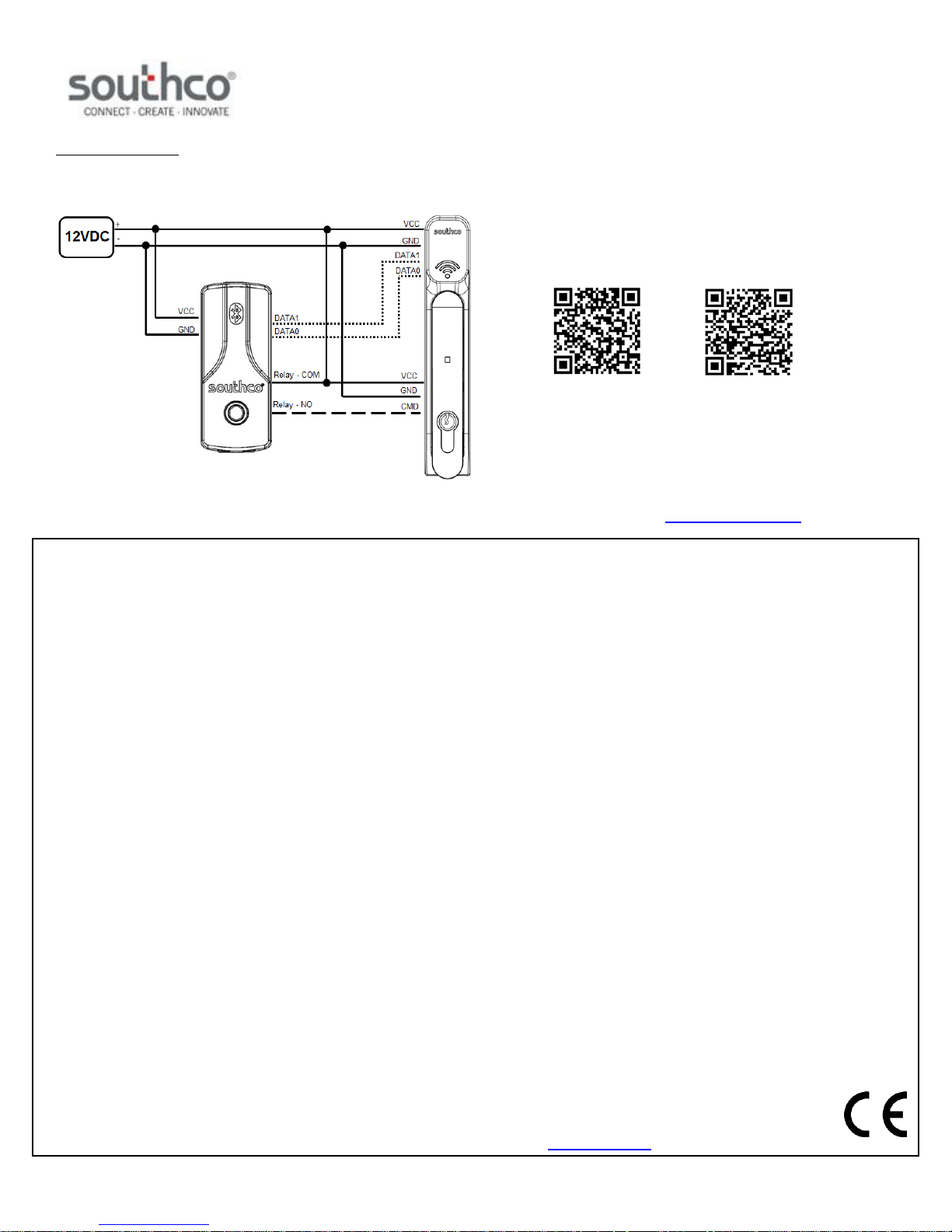
Wiegand DATA Inputs
The DATA1 and DATA0 Wiegand data inputs can be used to connect the
EA-BT to an external reader, as shown below, for prox card authentication
and access control.
This device complies with Part 15 of the FCC Rules. Operation is subject to the following two conditions: (1) This device may not cause harmful interference,
and (2) this device must accept any interference received, including interference that may cause undesired operation.
Note: This equipment has been tested and found to comply with the limits for a Class B digital device, pursuant to Part 15 of the FCC Rules. These limits are
designed to provide reasonable protection against harmful interference in a residential installation. This equipment generates, uses and can radiate radio
frequency energy and, if not installed and used in accordance with the instructions, may cause harmful interference to radio communications. However, there
is no guarantee that interference will not occur in a particular installation. If this equipment does cause harmful interference to radio or television reception,
which can be determined by turning the equipment off and on, the user is encouraged to try to correct the interference by one or more of the following
measures:
Reorient or relocate the receiving antenna.
Increase the separation between the equipment and receiver.
Connect the equipment into an outlet on a circuit different from that to which the receiver is connected.
Consult the dealer or an experienced radio/television technician for help.
Changes and modifications not expressly approved by the manufacturer or registrant of this equipment can void your authority to operate this equipment
under Federal Communications Commission rules.
Industry Canada Compliance Statement
CAN ICES-3(B)/NMB-3(B)
This device complies with Industry Canada licence-exempt RSS standard(s). Operation is subject to the following two conditions: (1) this device may not
cause interference, and (2) this device must accept any interference, including interference that may cause undesired operation of the device.
Le présent appareil est conforme aux CNR d’Industrie Canada applicables aux appareils radio exempts de licence. L’exploitation est autorisée aux deux
conditions suivantes: (1) l’appareil ne doit pas produire de brouillage, et (2) l’utilisateur de l’appareil doit accepter tout brouillage radioélectrique subi, même
si le brouillage est susceptible d’en compromettre le fonctionnement.
Trademark Statements
ANDROID is a trademark of Google Inc.
iOS is a trademark of Apple Inc.
VIZpin is a registered trademark of ECKey® Corporation.
The BLUETOOTH® word mark and logos are registered trademarks owned by Bluetooth SIG, Inc. and use is under license.
Step 2 – Download the Mobile App
The EA-BT is configured to be used with the VIZpin® cloud-based access
control system.
To get started:
1. Ensure EA-BT installation is complete.
2. Download the VIZpin® mobile application and register using the
QR code below or search “VIZpin Smart” on the App Store or
Google Play store.
NOTE: BLUETOOTH® LE or BLUETOOTH Smart phone only.
(ver 4.2, or higher)
Step 3 – Sign up for VIZpin® Partner Account Access
If purchased from a Southco partner, please contact your partner for
account access, otherwise, go to www.southco.com/vizpin to request your
Partner portal login.
J-EA-BT-2-M_revC Page 2 of 2
PRN P2017-1718 (WJB/DJK)
 Loading...