

Page 1
iVide PLUS THERMAL
CIRCULATOR
USER GUIDE / BENUTZERHANDBUCH / MANUALE D’ISTRUZIONI
/ NOTICE D’UTILISATION / MANUAL DEL USUARIO / MANUAL
DO USUÁRIO / ΟΔΗΓΙΕΣ ΧΡΗΣΗΣ / MANUAL DE INSTRUCȚIUNI
/ INSTRUKCJA OBSŁUGI / GEBRUIKERSHANDLEIDING /
BRUKERMANUAL / ANVÄNDARMANUAL / BRUGERVEJLEDNING
Page 2

CONTENTS / INHALT / INDICE / TABLE DES MATIÈRES / CONTENIDO / CONTEÚDO /
EN // USER GUIDE
About the iVide 4
Safety 4
Technical Parameters 5
Product Function 5-6
Product Structure 7
Control with the APP 8
Operating Instructions 9
Maintenance 9
How to Clean 10
Troubleshooting 10
Warranty and After Sales Service 11
DE // BENUTZERHANDBUCH
Der iVide 12
Sicherheit 12
Technische Parameter 13
Produktfunktion 13-14
Produktaufbau 15
Kontrolle über die App 16
Anleitung 17
Instandhaltung 17
Reinigung 18
Fehlerbehebung 18
Garantie und Kundendienst 19
IT // MANUALE D’ISTRUZIONI
Chi siamo 20
Sicurezza 20
Informazioni tecniche 21
Funzioni 21-22
Componenti 23
Utilizzo tramite applicazione 24
Istruzioni operative 25
Manutenzione 25
Pulizia 26
Risoluzione problemi 26
Garanzia e servizio post vendita 27
FR // NOTICE D’UTILISATION
A propos de iVide 28
Conseils de sécurité 28
Spécications 29
Description de l’appareil 29-30
Schéma de l’appareil 31
Pilotage depuis l’application 32
Instructions d’utilisation 33
Entretien 33
Comment nettoyer ? 34
Anomalies de fonctionnement 34
Garantie et SAV 35
ES // MANUAL DEL USUARIO
Sobre iVide 36
Seguridad 36
Parametros Tecnicos 37
Función Del Producto 37-38
Estructura Del Producto 39
Control con la Aplicación 40
Instrucciones De Uso 41
Mantenimiento 41
Limpieza Y Almacenamiento 42
Solución de Problemas 42
Garantía & servicios postventa 43
PT // MANUAL DO USUÁRIO
Sobre o iVide 44
Segurança 44
Parâmetros Técnicos 45
Função do Produto 45-46
Estrutura do Produto 47
Controle com o APP (Aplicativo) 48
Instruções de Operação 49
Manutenção 49
Como Limpar 50
Solução de Problemas 50
Garantia e Serviço Pós-venda 51
2
Page 3

ΠΕΡΙΕΧΟΜΕΝΑ / MANUAL DE INSTRUCȚIUNI
SPIS TRESCI / INHOUD // INNHOLD /
INNEHÅLL / INDHOLDSFORTEGNELSE
GR // ΟΔΗΓΙΕΣ ΧΡΗΣΗΣ
Σχετικά με το iVide 52
Ασφάλεια 52
Τεχνικά Χαρακτηριστικά 53
Λειτουργία Προϊόντος 53-54
Δομή Προϊόντος 55
Χρήση Μέσω της Εφαρμογής 56
Οδηγίες Λειτουργίας 57
Συντήρηση Προϊόντος 57
Πως Καθαρίζεται 58
Επίλυση Προβλημάτων 58
Έγγυηση και Υπηρεσίες μετά την Πώληση 59
RO // MANUAL DE INSTRUCȚIUNI
Despre iVide 60
Siguranță 60
Parametrii Tehnici 61
Funcțiile Produsului 61-62
Structura Produsului 63
Controlul cu Aplicația 64
Instrucțiuni de Operare 65
Întreținere 65
Cum să-l curățați 66
Depanare 66
Garanție și Serviciu Clienți 67
PL // INSTRUKCJA OBSŁUGI
O iVide 68
Bezpieczeństwo 68
Parametry techniczne 69
Funkcje produktu 69-70
Struktura produktu 71
Kontrola za pomocą aplikacji (APP) 72
Instrukcja obsługi 73
Konserwacja 73
Jak czyścić? 74
Rozwiazywanie problemów 74
Serwis gwarancyjny i pogwarancyjny 75
NL// GEBRUIKERSHANDLEIDING
Over de iVide 76
Veiligheid 76
Technische Waardes 77
Product functie 77-78
Product structuur 79
Bediening met de APP 80
Bedieningsinstructies 81
Onderhoud 81
Schoonmaken 82
Probleemoplossing 82
Garantie en After Sales Service 83
NO // BRUKERMANUAL
Om iVide 84
Sikkerhet 84
Teknisk Informasjon 85
Funksjoner 85-86
Produktstruktur 87
Kontroller med Appen 88
Hvordan bruke produktet 89
Vedlikehold 89
Rengjøring 90
Feilsøking 90
Garanti og Service 91
SE // ANVÄNDARMANUAL
Om iVide 92
Säkerhet 92
Tekniska parametrar 93
Funktion 93-94
Struktur 95
Kontroll via APP 96
Användarinstruktioner 97
Underhåll 97
Rengöring 98
Problemsökning 98
Garanti- och service efter försäljning 99
DK // BRUGERVEJLEDNING
Om IVide 100
Sikkerhed 100
Tekniske parametre 101
Produkt Funktion 101-102
Produkt Struktur 103
Kontrollér med APPen 104
Betjeningsvejledning 105
Vedligeholdelse 105
Rengøringsvejledning 106
Fejlnding 106
Garanti og Kundeservice 107
3
Page 4

EN // USER GUIDE
ABOUT THE IVIDE
Founded in 2011, SousVideTools.com are a food and technology company on a mission to help people cook
smarter #clevercooking. Furthermore, we are the leading authority on our chosen subject, having produced 2
cook books, a sous vide calculator, an APP and a training guide in conjunction with the Campden BRI, the UK’s
leading provider of practical scientic, technical and advisory services and now the World's market leading
sous vide cooker.
Our team is made up of 15 voices — and we all come to work each day with one thing in mind: working to
create better tools that turn cooking stress into dinnertime success. (We call this “#clevercooking.”) Why?
Because the more you know about cooking, the better you get at it. Our research chefs are constantly cooking,
and you get to reap the benets in the name of R&D.
So why the iVide Cooker? We want to make it easy for sous vide novices and experts alike to cook restaurant
quality food at home, with the perfect nish every time. So say goodbye to overcooked dry food that tastes like
cardboard and say hello gourmet dinner.
The SousVideTools iVide Plus Thermal Circulator with a high resolution 4.5 inch wide touch screen interface.
It is WIFI enabled meaning you can control it remotely from anywhere via our APP, it's also designed to ensure
food safety. With an 80 litre capacity it guarantees a temperature stability of 0.07°C between 40°C to 100°C.
2 year warranty.
The iVide Plus is the rst water proof device for the commercial kitchen, certied to IPX7. Under the IPX7
designation, the iVide Plus Sous Vide cooker will be able to withstand immersion in water up to 1 meter for up
to 30 minutes. This means should an accident happen, and the device is splashed or submerged it will not cause
damage, but prolonged exposure — such as placing in a dishwasher — would be harmful.
SAFETY
Please follow these safety precautions:
• Operate the iVide Plus Thermal Circulator according to the user manual only. Failure to do so may result
in damage to the machine.
• Connect the power supply shown on the rating label only.
• Connect with the safe grounded supply only.
• Turn off the power supply before removing the machine.
• Do not touch the liquid directly to check the temperature. Please use the temperature display or thermometer.
• The water level must be between the lowest water level "MIN" and the highest
water level "MAX". Failure to do so may result in damage to the machine.
• Do not touch any hot surfaces on the iVide Plus Thermal Circulator during or immediately after use.
• If liquid is on the top of the iVide Plus Thermal Circulator (above the MAX water level), turn off the power
and dry it befcore use.
• We recommend users of the iVide Plus Thermal Circulator are given full instructions before prior use or are
supervised by an experience user.
• Keep liquid away from the power receptacle and fan on the back of the iVide Plus Thermal Circulator.
Failure to do so may result in damage to the machine and the user.
4
Page 5
EN // USER GUIDE
TECHNICAL PARAMETERS
Rated voltage 220-240V~
Rated frequency 50HZ
Rated power 2300W
Temperature setting range 5 - 95°C / 41 - 203°F
Time setting range 5 min - 99 hours 59 minutes
Display accuracy 0.1
Size 5.5”x5.6”x11.9”(140x143x302mm)
Weight 2.2Kg
PRODUCT FUNCTION
6
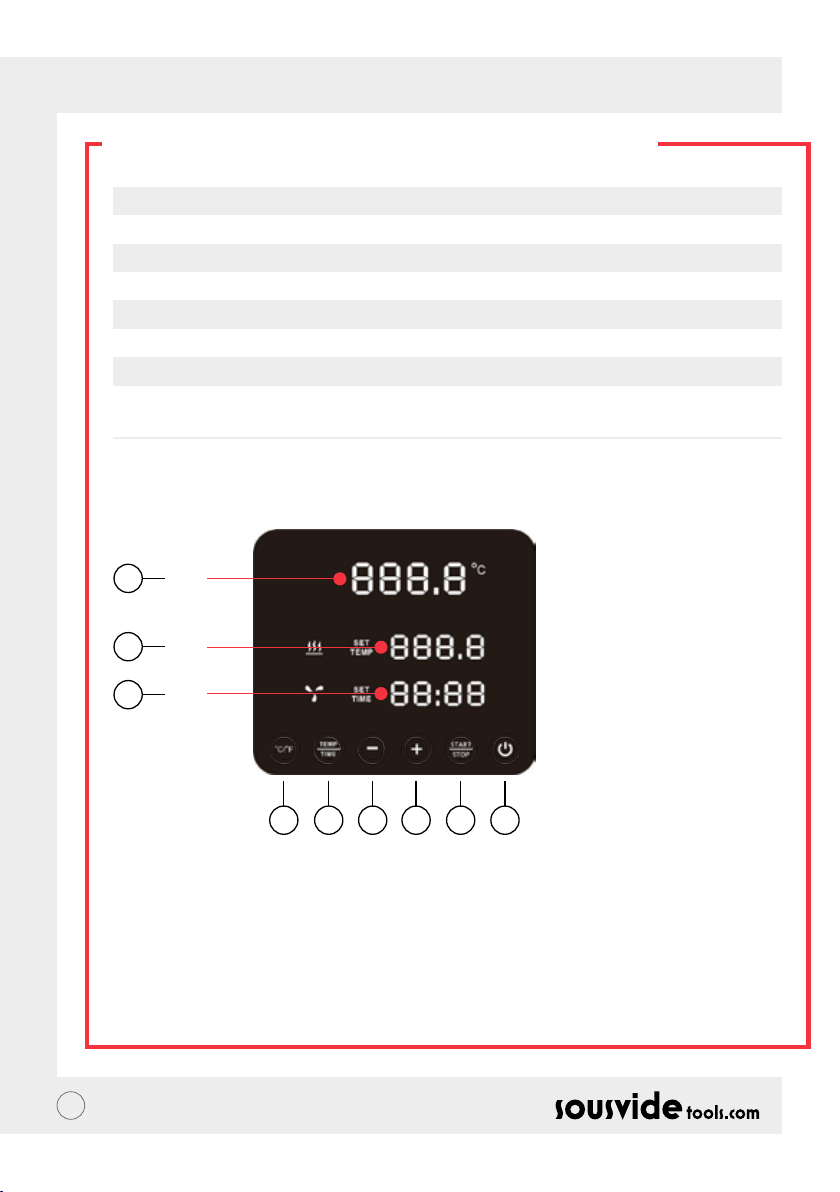
A
7
B
8
C
145532
1. Power
• When the power is turned on, the button and indicator light will display. The machine will switch to the
power saving mode after 2 seconds.
• In the power saving mode, press the power button to wake up the machine and enter standby mode. At this
time, the digital reading (A) shows the current water temperature, the digital reading (B) shows the previous
one. The target temperature set in the working process, the digital reading (C) shows the last working
process’ set working hours.
• In ON mode (the button indicator is fully illuminated), press this button to enter the power saving mode.
This can also be pressed during the cooking process to enter the power saving mode directly.
5
Page 6

EN // USER GUIDE
PRODUCT FUNCTION
2. °C/°F
Temperature unit switch button
• Click on °C / °F to select the temperature display unit of the machine. Please select celsius or fahrenheit.
3. TEMP / TIME
Temperature, time adjustment switch button
• Click on TEMP / TIME to toggle the temperature or time setting. When the temperature digital reading (B)
is ashing, set the desired target temperature with + and -. When the time digital reading (C) is ashing, the
desired target time can be set with + and -.
* If no time or temperature has been set after the digital reading ashes 10 times, the iVide Plus Thermal
Circulator will exit the TEMP / TIME option. If you need to reset click TEMP / TIME again to enter the
required details.
* To display the set time and temperature, press the TEMP / TIME button for 3 seconds.
4. START / STOP
Start/stop button
• In standby mode, click START/STOP to start working.
• In work mode, click START/STOP to stop working.
5. + -
Adjustment button
• To adjust the temperature or time, click on TEMP / TIME, select your required option and use the + and -
buttons to adjust.
6. Temperature Digital Reading (A)
• Display real time working temperature.
7. Temperature Digital Reading (B)
• Display the set operating temperature.
8. Time Digital Reading (C)
• In standby mode, the set target time is displayed.
• In working mode, the remaining working time is displayed.
6
Page 7
EN // USER GUIDE
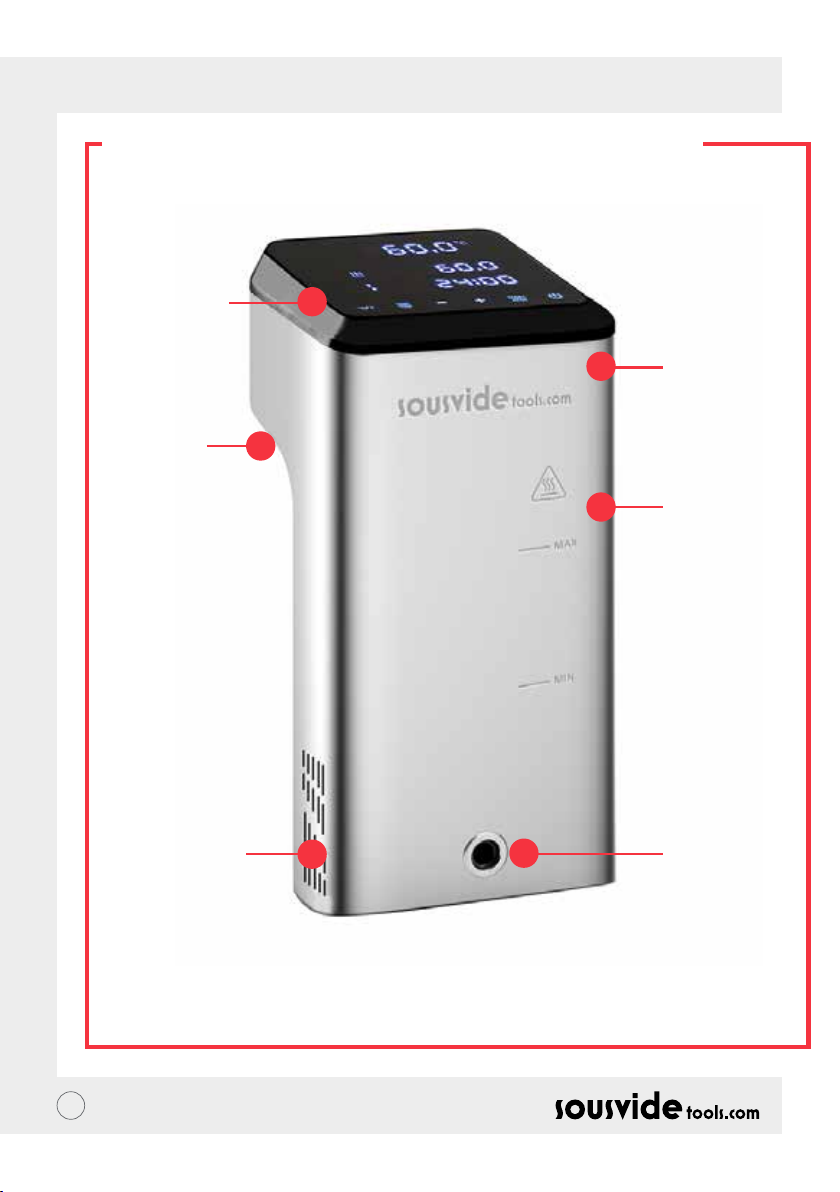
PRODUCT STRUCTURE
1. Control
panel
5. Fixed
handle
2. Upper
cover
3. Main
body
6. The water
inlet
7
4. Water
outlet
Page 8
EN // USER GUIDE
THE APP
Downloading The iVide Plus Thermal Circulator APP
If the iVide Plus Thermal Circulator APP has not yet been downloaded, it can be downloaded from the Apple
Store (IOS) or Google Play (Android). It is compatible with IOS version 9.3.5 and later. It is compatible with
Android version 4.3 and later.
Note: Please check with your mobile phone or device’s manufacturer if you have aquestion about downloading
APP.
Six Steps To Congure The iVide Plus Thermal Circulator APP
Installing theiVide Plus Thermal Circulator APP is quick, in contrast to some other apps. The iVide APPS allows
instant use, providing the necessary information exactly when you need it. We have developed a completely
new approach to this kind of applications because every moment in the kitchen should be unforgettable. The
APP is compatible with the iVide Plus Thermal Circulator with Wi-Fi. The App makes cooking with the iVide
Plus Thermal Circulator incredibly easy. Simply select the food, adjust the settings, and press Start.
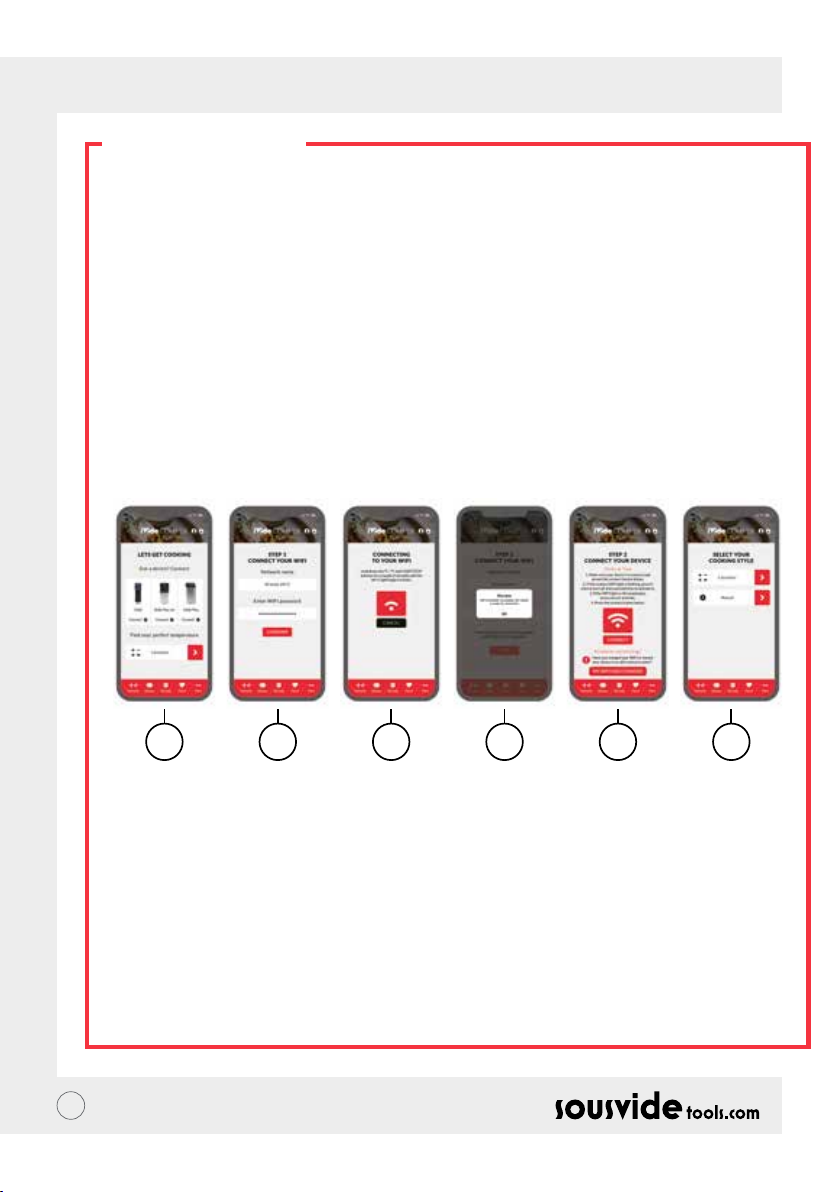
Six Easy Steps
1 2 3 4 5 6
1 Select the appliance you want to use, and press “CONNECT”.
2 The app will detect a connected Wi-Fi network. Enter the password and press ‘Conrm’.
3 The application starts searching for the iVide Plus Thermal Circulator. Hold down the °C / °F and START/
STOP buttons for a couple of seconds until the Wi-Fi light begins to ash. Wait until the appliance nishes
automatic conguration.
4 At the end, you will see a message conrming the appliance is ready to be connected.
5 Make sure the Wi-Fi light has stopped ashing and then press the ‘Connect’ button. If you need help, read
the hints and tips on the display.
6 Congratulations! The iVide Plus Thermal Circulator has just been congured! Enjoy your cooking!
Note:The Apple and iPhone logos are trademarks of Apple Inc., registered in the USA and other countries. Apple
Store is a service mark of Apple Inc. Android; Google Play and Google Play logo are trademarks of Google Inc.
8
Page 9

EN // USER GUIDE
OPERATING INSTRUCTIONS
1 Start by attaching the iVide Plus Thermal Circulator to the cooking vessel. Turn the knob counterclockwise,
form a gap between the main body and the knob, insert the machine into the cooking vessel and tighten the
knob clockwise to secure the machine.
2 Add water to the cooking vessel, ensuring the water level is between the minimum water level and the max
water level.
3 Connect the power to turn on and illuminate the digital display. The iVide Plus Thermal Circulator will enter
the power saving mode after 2 seconds. After this time, press the power button to put the machine into ON
mode.
4 Click °C/°F to select the temperature display unit. The default is °C. Your selected temperature unit will be
remembered for next time you use the machine.
5 Click TEMP /TIME to select the temperature or time and set the target value with the + and - keys.
6 After the setting is complete, click START/STOP to start the machine. After the temperature in the cooking
vessel reaches the required temperature, the time digital reading (C) starts counting down - now add your
vacuum packed food for constant temperature cooking.
7 After the cooking is nished, the iVide Plus Thermal Circulator will beep. Click START/ STOP to turn off.
Note: If there is no operation, the machine will emit a continuous beep after 20 seconds, while the water
temperature will remain at the preset temperature.
8 Take your vacuum packed food out. The food is now ready for the next process.
9 After using the iVide Plus Thermal Circulator, turn off and store in a safe place.
DON'T FORGET: Before Sous Vide cooking, the food must be vacuum packed. The water level (after the food
is put in) should be higher than the MIN, but lower than the MAX marked on the machine. To avoid damaging
the machine, drain the water after use and clean the water bath.
MAINTENANCE
To avoid burning, please make sure that the iVide Plus Thermal Circulator is turned off and cooled down to
room temperature before cleaning.
1 Place the iVide Plus Thermal Circulator vertically after cleaning, do not place it horizontally or upside down.
2 During cleaning, do not damage the components inside the machine. Once the components are damaged,
please ask a specialist to check and repair. Do not attempt unauthorised repairs as this may result in an
accident.
3 Empty the old water after each use. Rell with fresh water when you next use the iVide Plus Thermal
Circulator. If the water is reused, mineral substance may damage the components.
4 Remove the back cover of the iVide Plus Thermal Circulator to clean the heat tube and probe if the
discharge capacity reduces or the components have collected dirt. It is recommended to clean the iVide
Plus Thermal Circulator every 20 times or after 100 hours of use.
5 Do not put a hot iVide Plus Thermal Circulator in to cool water as this may cause damage. The iVide Plus
Thermal Circulator should be cooled down to room temperature and put into cold water to use.
9
Page 10

EN // USER GUIDE
HOW TO CLEAN
Preparation
iVide Plus Thermal Circulator can be cleaned with food grade vinegar (white vinegar, apple vinegar, etc.)
Why the need to clean?
Normal tap water contains minerals which when the water is heated to a certain temperature will create a
scale on the heater or surface of the machine. In this case, the scale will affect the performance of the machine.
It is recommended to clean the machine every 20 times or after 100 hours of use. You can clean the machine
according to your actual needs due to different water in different areas.
How to clean
1 Fill the container (up to the MAX line) with water. Add 5g vinegar into the water.
2 Turn on the iVide Plus Thermal Circulator, set the working temperature to 80°C (176°F) and the time to 3
hours (03:00). Click START/STOP. After 3 hours, the machine will beep and switch off .
*Quick cleaning procedure: Hold down the START/STOP and - buttons. The digital reading (B) will show
the set temperature 80°C, the digital reading (C) will show the set time 3:00. Release the button and
the digital reading (B) & (C) will ash 10 times. Click the START/STOP button to start the cleaning
operation.
3 Check if the machine is clean. If the machine is not clean then add more vinegar and start the process again.
If the machine is clean, please drain the vinegar from the machine, wash the machine with fresh water, dry
and store away.
TROUBLESHOOTING
Error code
E01
E02
LP
** During the use of the machine, if any other problems arise, please speak to a specialist. Do not attempt
unauthorised repairs as this may result in an accident.
10
Cause of issue
The water level is lower than the
lowest water level or higher than the
highest water level
1. Whether the heating pipe is normal;
2. Whether the internal wiring of the
machine is normal;
3. Is the temperature sensor normal?
The machine suddenly loses power
during normal cooking
Troubleshooting
Turn off the power. If the water level is too low,
add the right amount of water to the container;
if the water level is too high, remove the water
from the container.
Need to ask a professional for repair
Page 11
EN // USER GUIDE
WARRANTY & AFTER
SALES SERVICE
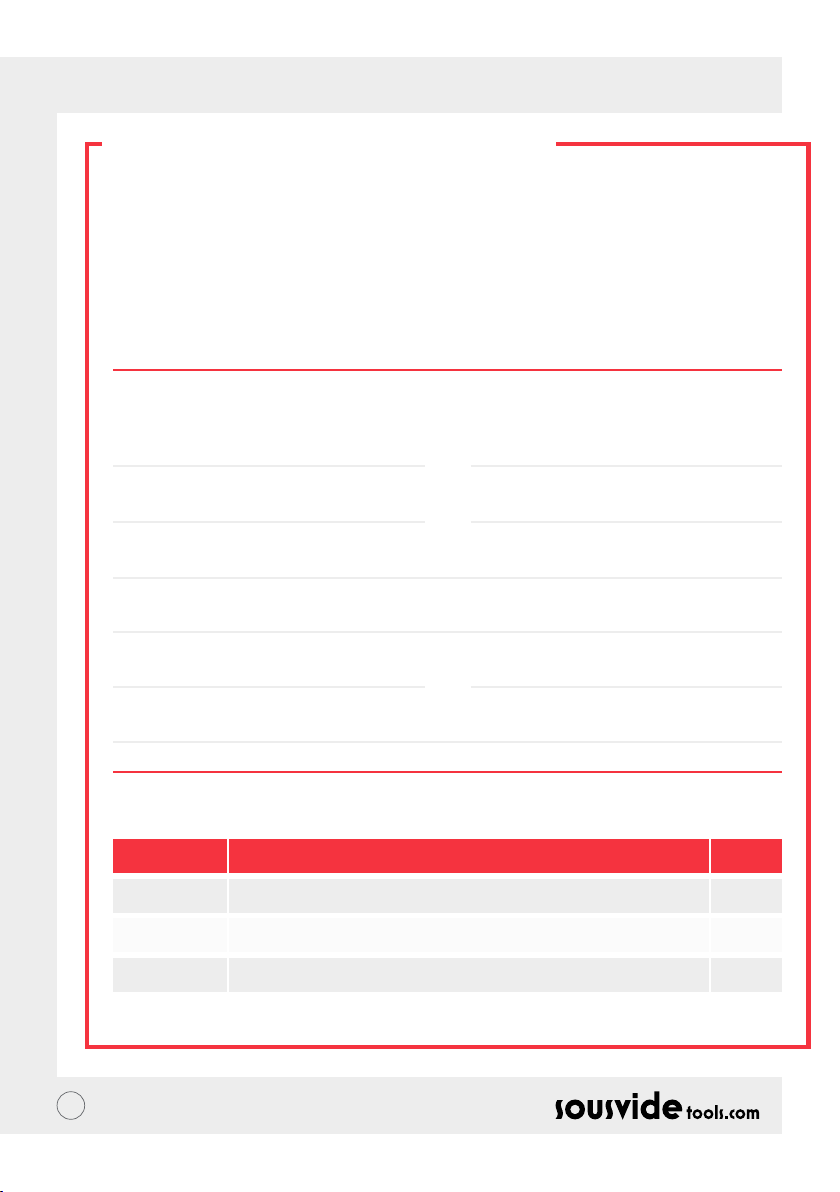
1 Make sure the working platform is at, clean and tidy.
2 Warranty is limited to damage caused by production defects.
3 The cost of parts and maintenance will be charged due to improper use or other non-product
quality problems.
4 Please keep the purchase vouchers.
Maintenance Card
First Name:
Phone:
Address:
Machine Model:
Supplier:
Last Name:
Email:
Purchase Date:
Repair Record
Date Cause By
11
Page 12

DE // BENUTZERHANDBUCH
ÜBER DEN IVIDE
Sousvidetools.com, ein in 2011 gegründetes Lebensmittel- und Technologieunternehmen, hat es sich
zur Aufgabe gemacht, Menschen zu helfen smarter zu kochen #clevercooking. Mit zwei veröffentlichten
Kochbüchern, einem Sous-Vide Rechner, einer App und einem Handbuch zusammen mit dem Camden BRI,
Großbritanniens führendem Anbieter von praktischen, wissenschaftlichen, technischen und beratenden
Dienstleistungen, sind wir in diesem Bereich führende Autorität und nun auch weltweit Marktführer mit dem
Sous-Vide Garer.
Unser Team besteht aus 15 Stimmen die täglich mit einem Gedanken zur Arbeit kommen: bessere Geräte zu
kreieren die den abendlichen Kochstress in ein Erfolgserlebnis verwandeln. (Wir nennen das #clevercooking.“)
Warum? Nun: je mehr Sie über das Kochen wissen, desto besser werden Sie darin. Unsere Forschungsköche
kochen kontinuierlich damit Sie im Namen von R&D die Lorbeeren einheimsen können.
Warum also der iVide Garer? Wir möchten es Sous-Vide Novizen wie Experten gleichermaßen erleichtern
auch zuhause auf Restaurantniveau zu kochen- mit gleichbleibendem, perfektem Finish. Sagen Sie „Adieu“
zu verkochtem, trockenem, nach Pappe schmeckendem Essen und stattdessen „Hallo, Gourmet Dinner“. Der
SousVideTools iVide Plus Thermal Zirkulator mit hochauösender 4.5 inch Touchscreen-Oberäche ist WIFI-
fähig, d.h. Sie können ihn mit Hilfe der App von überall bedienen. Zudem ist er konzipiert um die Sicherheit der
Lebensmittel zu gewähren. Mit einem Fassungsvermögen von 80 Litern ist Temperaturstabilität von 0.07°C
zwischen 40°C und 100°C garantiert. 2 Jahre Garantie.
Der iVide Plus ist das erste IPX7 zertizierte, wasserfeste Gerät für die Großküche. Unter der IPX7 Bezeichnung
hält der iVide Plus Sous-Vide Garer dem Eintauchen in Wasser von bis zu einem Meter Höhe bis zu 30 Minuten
stand. Sollte also ein Unfall passieren bei dem das Gerät bespritzt oder eingetaucht wird, verursacht dies keine
Schäden. Wird es kontinuierlich Wasser ausgesetzt- wie in der Spülmaschine- kann es zu Schäden führen.
SICHERHEIT
Bitte halten Sie sich an folgende Sicherheitshinweise:
• Benutzen Sie den iVide Plus Thermal Zirkulator nur wie im Handbuch beschrieben. Andernfalls kann das
Gerät Schaden nehmen.
• Die Netzspannung mussder aufdemTypenschilddes Gerätes angegebenenSpannung entsprechen.
• Schließen Sie das Gerät nur an die vorschriftsmäßig geerdete Spannungsversorgung an.
• Schalten Sie die Stromversorgung aus bevor Sie das Gerät entfernen.
• Prüfen Sie die Temperatur nicht durch Berühren der Flüssigkeit. Benutzen Sie bitte die Temperaturanzeige
oder das Thermometer.
• Der Wasserstand muss sich zwischen dem niedrigsten Stand „MIN“ und dem höchsten Stand „MAX
benden. Abweichungen davon können Schäden verursachen.
• Berühren Sie keine heißen Oberächen des iVide Plus Thermal Zirkulators während oder nach des
Gebrauchs.
• Bendet sich Flüssigkeit auf dem iVide Plus Thermal Zirkulator (über dem „MAX“ Wasserstand) schalten
Sie das Gerät vor Gebrauch aus und trocknen Sie es.
• Wir empfehlen Nutzern des iVide Plus Thermal Zirkulators sich vor Erstgebrauch komplett mit der
Handhabung vertraut zu machen oder sich von einem erfahrenen Nutzer beaufsichtigen zu lassen.
• Halten Sie Flüssigkeit von Stromanschluss und Lüftung an der Rückseite des iVide Plus Thermal Zirkulators
fern. Nichtbeachtung kann zu Schäden an Gerät und Personen führen.
12
Page 13
DE // BENUTZERHANDBUCH
TECHNISCHE PARAMETER
Nennspannung 220-240V~
Nennfrequenz 50HZ
Nennleistung 2300W
Temperatureinstellbereich 5 - 95°C / 41 - 203°F
Zeiteinstellbereich 5 Min. - 99 Stunden 59 Minuten
Anzeigegenauigkeit 0.1
Maße 5.5”x5.6”x11.9”(140x143x302mm)
Gewicht 2.2Kg
PRODUKTFUNKTION
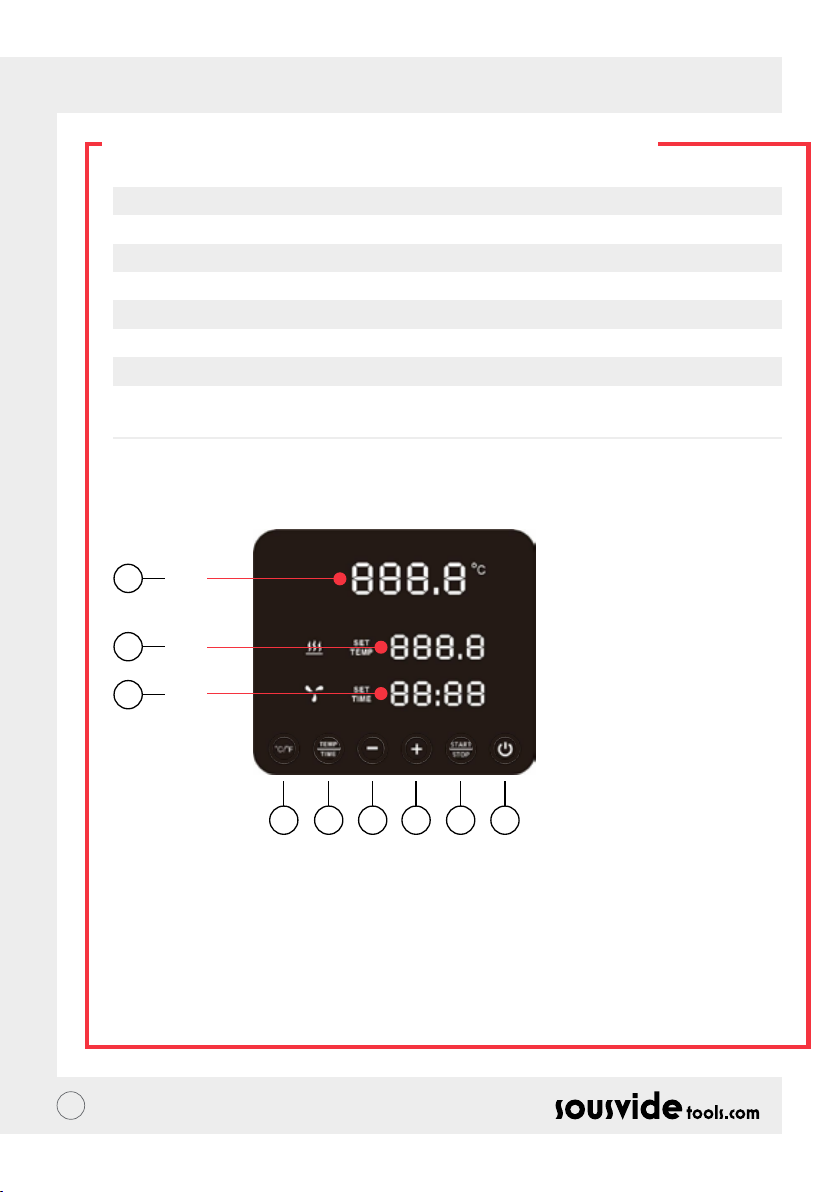
6
A
7
B
8
C
145532
1. Stromversorgung
• Sobald Sie das Gerät anschalten leuchten die Tasten und die Kontrolleuchte auf. Nach zwei Sekunden
schaltet sich das Gerät in den Energiesparmodus. Drücken Sie im Energiesparmodus die Einschalttaste
um das Gerät zu starten und in den Standbymodus zu gelangen. Die Digitalanzeige (A) zeigt nun die aktuelle
Wassertemperatur an, die Digitalanzeige(B) zeigt die letzte Temperatur. Die im Arbeitsprozess eingestellte
Zieltemperatur, die Digitalanzeige (C) zeigt die beim letzten Arbeitsprozess eingestellten Arbeitsstunden.
• Im ON-Modus (der -knopf leuchtet), drücken Sie diesen Knopf um in den Energiesparmodus zu gelangen.
Dieser kann auch während des Kochvorgangs betätigt werden um direkt in den Energiesparmodus zu
wechseln.
13
Page 14

DE // BENUTZERHANDBUCH
PRODUKTFUNKTION
2. °C/°F
Temperatureinstellungsschalter
• Drücken Sie °C / °F für die Temperaturanzeige des Gerätes. Wählen Sie zwischen Celsius und Fahrenheit.
3. TEMP / TIME
Temperatur- und Zeiteinstellungsschalter
• Drücken Sie TEMP / TIME um die Temperatur oder Zeit einzustellen. Sobald die digitale Temperaturangabe
(B) aueuchtet, stellen Sie die gewünschte Zieltemperatur mit + und - ein. Sobald die digitale Zeitangabe (C)
aueuchtet können Sie die gewünschte Zielzeit mit + und - einstellen.
* Wurde nachdem die Digitalanzeige 10 mal aufgeleuchtet hat keine Zeit oder Temperatur eingestellt,
verlässt der iVide Plus Thermal Zirkulator die TEMP/TIME Option. Müssen Sie das Gerät neu starten,
drücken Sie TEMP / TIME erneut um die gewünschten Angaben einzusehen.
* Um die voreingestellte Zeit und Temperatur anzuzeigen, drücken Sie den TEMP / TIME-Knopf für 3
Sekunden.
4. START / STOP
Start/Stop-Knopf
• Drücken Sie START/STOP im Standby-Modus um den Vorgang zu beginnen.
• Drücken Sie START/STOP im Arbeitsmodus um den Vorgang zu stoppen.
5. + -
Einstellknopf
• Um die Temperatur und die Zeit einzustellen, drücken Sie TEMP / TIME, wählen die gewünschte Option und
nutzen die + und - Knöpfe.
6. Digitale Temperaturangabe (A)
• Zeigt die Echtzeit-Arbeitstemperatur an.
7. Digitale Temperaturangabe (B)
• Zeigt die eingestellte Betriebstemperatur an.
8. Digitale Zeitangabe (C)
• Im Standbymodus wird die voreingestellte Zeit angezeigt, im Arbeitsmodus die verbleibende Restzeit.
14
Page 15
DE // BENUTZERHANDBUCH
PRODUKTAUFBAU
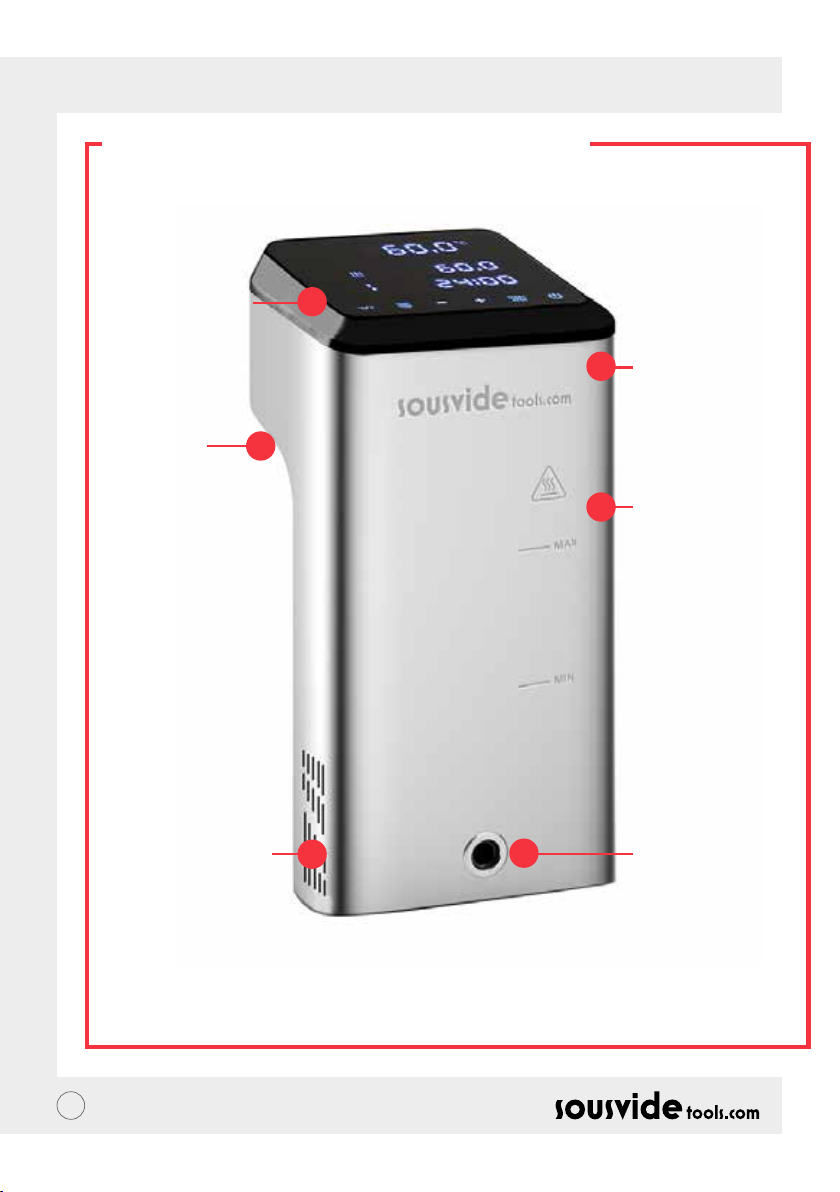
1. Bedienfeld
5. Fester
Griff
2. Obere
Abdeckung
3. Hauptelement
6. Wassereinlass
15
4. Wasserauslass
Page 16
DE // BENUTZERHANDBUCH
DIE APP
Download der iVide Plus Thermal Zirkulator APP
Die iVide Plus Thermal Zirkulator App kann im Apple Store (IOS) oder bei Google Play (Android) herunterladen
werden. Sie ist mit der IOS Version 9.3.5 und Nachfolgenden sowie der Android Version 4.3 kompatibel.
Hinweis: Falls Sie Fragen zum Download der App haben wenden Sie sich bitte an den Hersteller ihres
Mobiltelefons oder Geräts.
Konguration der iVide Plus Thermalzirkulator APP in sechs Schritten
Im Gegensatz zu manch anderen Apps ist das Installieren der iVide Plus App kinderleicht. Die iVide App kann
sofort genutzt werden und liefert Ihnen die notwendigen Informationen wenn Sie sie brauchen. Wir haben
hier einen komplett neuen Ansatz verfolgt, denn jeder Moment in der Küche sollte unvergesslich sein. Die App
ist über WiFi mit dem iVide Plus Thermal Zirkulator kompatibel und macht das Kochen mit dem iVide Plus
Thermal Zirkulator unglaublich einfach. Wählen Sie einfach die Lebensmittel, nehmen Sie die Einstellungen vor
und drücken Sie Start.
Sechs einfache Schritte
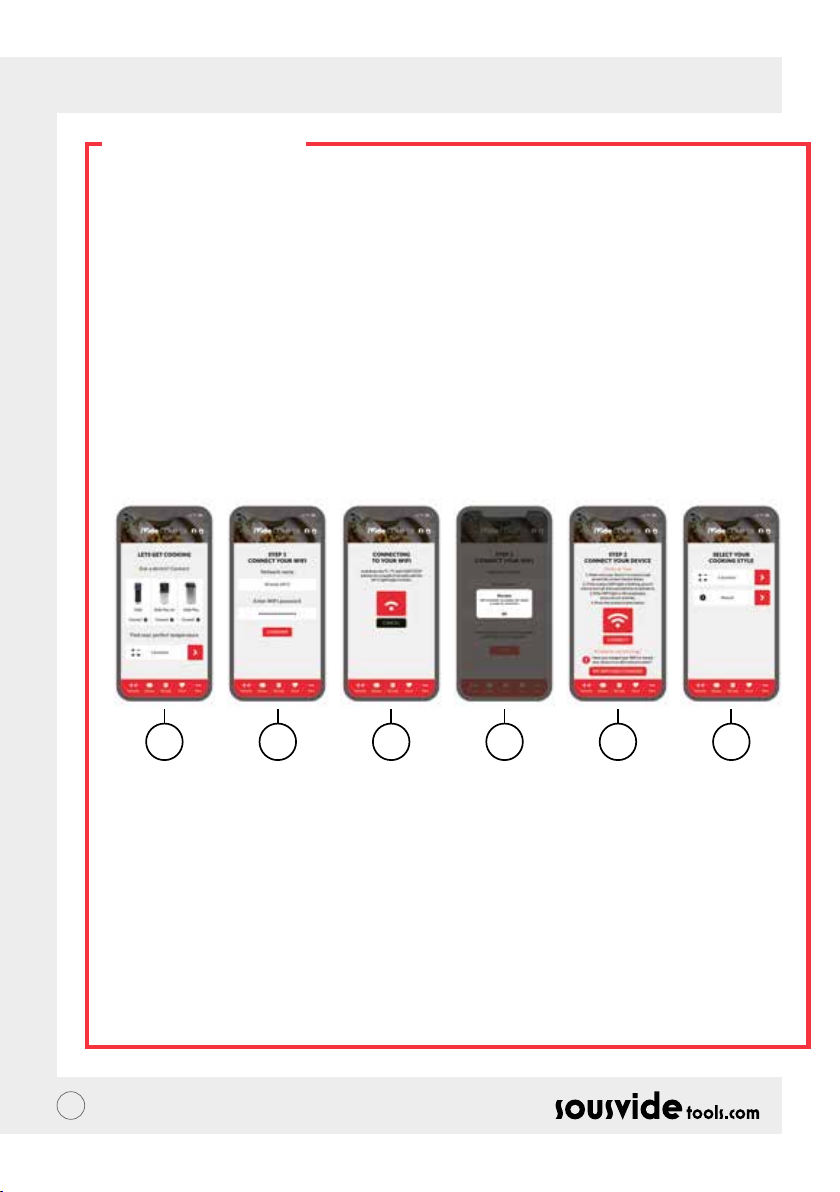
1 2 3 4 5 6
1 Wählen Sie die gewünschte Anwendung und drücken „CONNECT“.
2 Die App erkennt das verbundene WiFi-Netzwerk. Geben Sie das Passwort ein und drücken „Conrm“.
3 Die Anwendung beginnt nach dem iVide Plus Thermal Zirkulator zu suchen. Halten Sie die °C / °F und
die Start/Stop Knöpfe für einige Sekunden gedrückt bis das Wi-Fi Licht blinkt. Warten Sie bis die
automatische Konguration abgeschlossen ist.
4 Am Ende erscheint eine Nachricht die bestätigt dass die Anwendung bereit zum Verbinden ist.
5 Vergewissern Sie sich dass das WiFi Licht nicht mehr blinkt. Drücken Sie anschließend „Connect“.
Benötigen Sie Hilfe, richten Sie sich nach den Hinweisen und Tipps auf dem Display.
6 Glückwunsch! Der iVide Plus Thermal Zirkulator wurde soeben konguriert! Genießen Sie Ihr Kocherlebnis!
Hinweis: Die Apple und iPhone Firmenlogos sind eingetragene Marken der Apple Inc. (USA und andere Länder).
Apple Store ist eine Dienstleistungsmarke der Apple Inc. Android; Google Play und Google Play Logo sind
Marken der Google Inc.
16
Page 17

DE // BENUTZERHANDBUCH
ANLEITUNG
1 Starten Sie indem Sie den iVide Plus Thermal Zirkulator am Kochgefäß befestigen. Drehen Sie den Griff
gegen den Uhrzeigersinn bis eine Lücke zwischen Hauptteil und Griff entsteht, führen Sie das Gerät ein und
ziehen Sie den Griff im Uhrzeigersinn fest sodass das Gerät xiert ist.
2 Befallen Sie das Kochgefäß mit Wasser und stellen Sie sicher dass sich der Wasserstand zwischen dem
Mindest- und dem Maximallevel bendet.
3 Schalten Sie den Strom ein- die Digitalanzeige schaltet sich ein und leuchtet auf. Der iVide Plus Thermal
Zirkulator versetzt sich nach zwei Sekunden in den Energiesparmodus. Drücken Sie danach den Ein-/Aus Knopf um das Gerät in den On-Modus zu versetzen.
4 Drücken Sie °C/°F um die Temperaturanzeigeeinheit auszuwählen. Der Standardwert ist °C. Ihre gewählte
Temperatureinheit wird für den nächsten Gebrauch gespeichert.
5 Drücken Sie TEMP /TIME um die Temperatur oder die Zeit auszuwählen und stellen den gewünschten
Richtwert mit den + und - Tasten ein.
6 Nachdem das Einrichten abgeschlossen ist, drücken Sie START/STOP um das Gerät anzuschalten. Nachdem
die gewünschte Temperatur erreicht ist, beginnt die digitale Zeitanzeige (C) abwärts zu zählen - für einen
Kochprozess mit konstanter Kochtemperatur fügen Sie nun Ihre vakuumverpackten Lebensmittel zu.
7 Nachdem der Kochprozess abgeschlossen ist beginnt der iVide Plus Thermal Zirkulator zu piepen. Drücken
Sie START/STOP um ihn auszuschalten.
Hinweis: Wird keine Aktion ausgeführt, ertönt nach 20 Sekunden ein durchgehender Piepton, während die
Wassertemperatur auf der voreingestellten Temperatur bleibt.
8 Entnehmen Sie Ihre vakuumverpackten Lebensmittel. Das Essen ist nun bereit zur Weiterverarbeitung
9 Schalten sie den iVide Plus Thermal Zirkulator nach Gebrauch aus und verstauen Sie ihn an einem sicheren Platz.
ACHTUNG: Die Lebensmittel müssen vakuumverpackt sein bevor sie Sous Vide gekocht werden. Der
Wasserstand sollte, bevor die Lebensmittel zugefügt werden, höher als die MIN- aber niedriger als die MAX-
Markierung auf dem Gerät sein.
INSTANDHALTUNG
Um Verbrennungen zu vermeiden, stellen Sie sicher dass der iVide Plus Thermal Zirkulator vor der Reinigung
ausgeschaltet und auf Raumtemperatur abgekühlt ist.
1 Stellen Sie den iVide Plus Thermal Zirkulator nach dem Reinigen vertikal, nicht horizontal oder
umgedreht auf. Achten Sie während des Reinigungsprozesses darauf dass die Bestandteile im Gerät keinen
Schaden nehmen. Sollten Bestandteile des Geräts beschädigt sein, kontaktieren Sie bitte einen Fachmann.
Unautorisierte Reparaturversuche können zu Unfällen führen.
2 Entfernen Sie das gebrauchte Wasser nach jeder Nutzung. Beim nächsten Mal befüllen Sie den iVide Plus
Thermal Zirkulator wieder mit frischem Wasser. Wiederverwendetes Wasser kann durch Mineralien
Schäden an einzelnen Bestandteilen verursachen.
3 Entfernen Sie die Rückwand des iVide Plus Thermal Zirkulators um das Heizrohr zu reinigen und überprüfen
Sie ob die Ableitfähigkeit gesunken ist oder die einzelnen Bestandteile Schmutz angesetzt haben. Es wird
empfohlen das Gerät nach jedem 20.Gebrauch oder nach 100 Stunden Einsatzzeit zu reinigen.
4 Vermeiden Sie es den erhitzten iVide Plus Thermal Zirkulator in kaltes Wasser zu stellen da dies zu Schäden
führen kann. Der iVide Plus Thermal Zirkulator muss zuerst auf Raumtemperatur abgekühlt und in kaltes
Wasser gestellt werden um wieder benutzt zu werden.
17
Page 18
DE // BENUTZERHANDBUCH
REINIGUNG
Vorbereitung
Der iVide Plus Thermal Zirkulator kann mit jedem beliebigen Speiseessig Weissweinessig, Apfelessig usw.)
gereinigt werden.
Warum reinigen?
Normales Leitungswasser enthält Mineralien die beim Erhitzen auf eine bestimmte Temperatur Ablagerungen
auf dem Heizkörper oder der Oberäche des Geräts entstehen lassen. Dies beeinträchtigt die Leistung des
Geräts. Daher wird empfohlen das Gerät nach jedem 20.Gebrauch oder nach 100 Stunden Einsatzzeit zu
reinigen. Sie können das Gerät nach Bedarf- je nach Wasserqualität in den verschiedenen Regionen- reinigen.
Reinigungsvorgang
1 Füllen Sie das Gefäß (bis zur MAX-Linie) mit Wasser. Geben Sie 5g Essig ins Wasser.
2 Schalten Sie den iVide Plus Thermal Zirkulator an, stellen Sie die Arbeitstemperatur auf 80°C (176°F) und die
Zeit auf 3 Stunden (03:00). Drücken Sie START/STOP. Nach 3 Stunden piept das Gerät und schaltet sich aus.
*Schnellreinigung: Halten Sie den START/STOP-Knopf und die - Knöpfe gedrückt. Die Digitalanzeige (B)
zeigt die eingestellte Temperatur von 80°C, die Digitalanzeige (C) die eingestellte Zeit von 3 Stunden an.
Nach Loslassen des Knopfes blinken beide Anzeigen (B) & (C) 10 Mal. Drücken Sie den START/STOP-Knopf
um den Reinigungsprozess zu starten.
3 Prüfen Sie ob das Gerät sauber ist. Ist dies nicht der Fall, fügen Sie mehr Essig hinzu und starten sie erneut.
Ist das Gerät sauber, entfernen Sie bitte den Essig, reinigen es mit frischem Wasser, trocknen und verstauen
es anschließend.
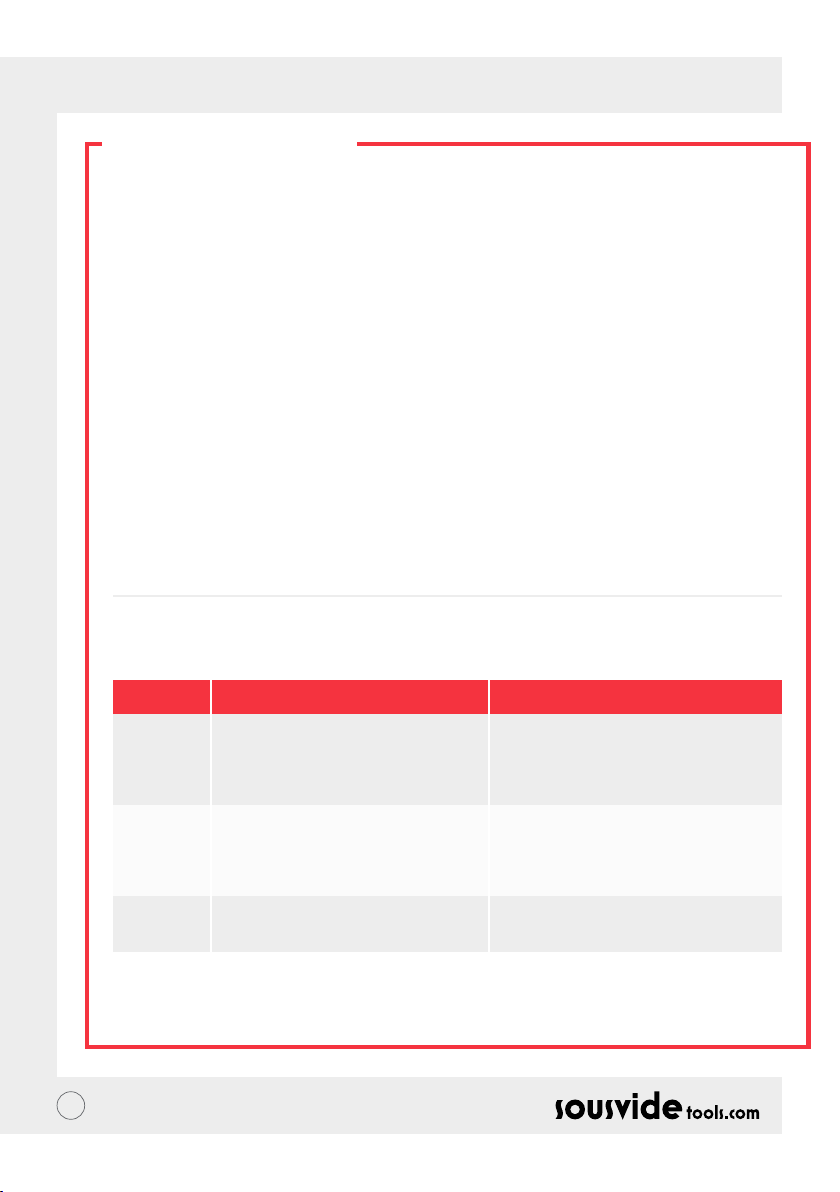
FEHLERBEHEBUNG
Fehlercode
E01
E02
LP
** Falls während des Gebrauchs weitere Probleme auftreten sollten, wenden Sie sich bitte an einen Experten.
Unautorisierte Reparaturversuche können zu Unfällen führen.
18
Grund des Problems
Der Wasserstand ist niedriger als der
niedrigste Wasserstand oder höher als der
Höchste.
1. Funktioniert die Wärmeleitung normal?
2. Funktioniert die Innenverdrahtung
des Geräts normal? 3. Funktioniert der
Temperatursensor normal?
Das Gerät bekommt während des
Kochvorgangs plötzlich keinen Strom mehr.
Fehlerbehebung
Schalten Sie das Gerät aus. Ist der Wasserstand
zu niedrig, fügen Sie die richtige Menge an
Wasser hinzu; ist der Wasserstand zu hoch,
entfernen Sie das Wasser aus dem Behälter.
Wenden Sie sich an einen Experten zur
Reparatur.
Page 19
DE // BENUTZERHANDBUCH
GARANTIE UND
KUNDENSERVICE
1 Vergewissern Sie sich dass die Arbeitsäche eben, sauber und aufgeräumt ist.
2 Die Garantie beschränkt sich auf durch Produktionsfehler verursachte Schäden.
3 Kosten für Ersatzteile und Wartung, die auf unsachgemäße Handhabung oder andere Probleme, die nichts
mit der Produktqualität zu tun haben, zurückzuführen sind, werden in Rechnung gestellt.
4 Bewahren Sie den Kaufbeleg auf.
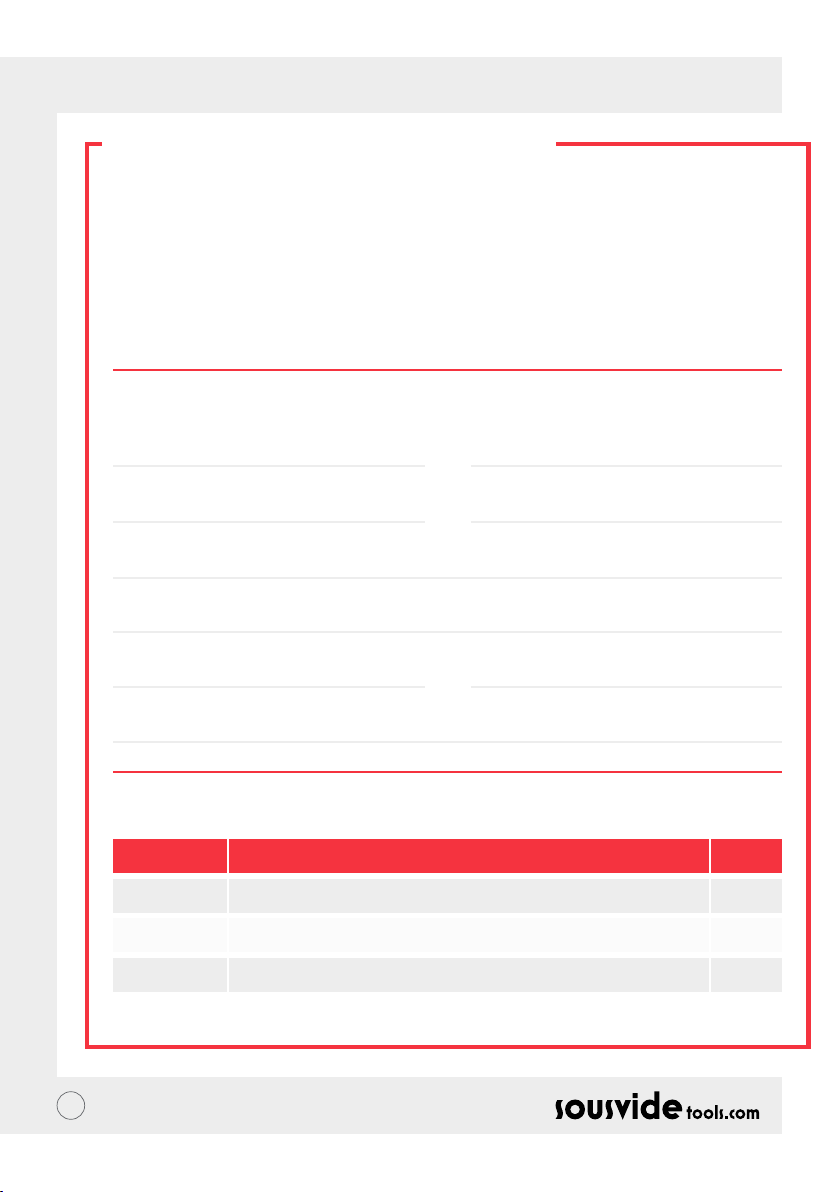
Wartungskarte
Vorname:
Telefon:
Adresse:
Gerätemodell:
Lieferant:
Nachname:
Email:
Kaufdatum:
Reparaturprotokoll
Datum Grund Durch
19
Page 20

IT // MANUALE D’ISTRUZIONI
CHI SIAMO
Fondata nel 2011, Sousvidetools.com è un’azienda che opera nei settori della gastronomia e della tecnologia
e la sua missione è quella di aiutare a cucinare in maniera più intelligente #cucinaintelligente. Inoltre siamo
un’azienda leader del settore, avendo pubblicato 2 libri di cucina, un calcolatore, un’applicazione e una guida in
collaborazione con l’istituto Campden BRI, fornitore leader di consigli pratici a livello scientico e tecnico, ed
essendo adesso i produttori della pentola sous vide più venduta al mondo.
Il nostro team è composto da 15 persone e tutti noi andiamo al lavoro ogni giorno con una sola cosa in
mente: lavorare per creare strumenti migliori che trasformino lo stress del cucinare in una cena perfetta. (Lo
chiamiamo "#cucinaintelligente".) Perché? Perché più sai cucinare, meglio riesci a farlo. I nostri chef cucinano
continuamente in nome della ricerca e dello sviluppo, e dei beneci che i nostri clienti possono ottenere.
Allora perché scegliere la pentola iVide? Sia per chi si approccia alla cottura sotto vuoto per la prima volta,
sia per chi è già un esperto, vogliamo sia facile cucinare a casa cibo che abbia la stessa qualità di quello del
ristorante, con un risultato nale perfetto ogni volta. Quindi dì addio al cibo secco stracotto che sa di cartone e
dì benvenuta alla cena gourmet.
Il circolatore termico SousVideTools iVide Plus presenta un'interfaccia touch screen da 4.5 pollici ad alta
risoluzione. Supporta la connessione WIFI, il che signica che puoi controllarlo da remoto ovunque tramite la
nostra applicazione ed è anche progettato per garantire la sicurezza degli alimenti. Con una capacità di 80 litri
garantisce una stabilità della temperatura di 0,07 ° C tra 40 ° C e 100 ° C. Garanzia di 2 anni.
IVide Plus è il primo dispositivo impermeabile per la cucina commerciale, certicato IPX7. Con la certicazione
IPX7, la pentola iVide Plus Sous Vide sarà in grado di resistere all'immersione in acqua no a 1 metro per un
massimo di 30 minuti. Ciò signica che se si vericasse un incidente e se il dispositivo venisse bagnato o immerso, ciò
non causerà danni, anche se un'esposizione prolungata all’acqua, ad esempio in lavastoviglie, sarebbe dannosa.
SICUREZZA
Vi consigliamo di seguire le seguenti istruzioni:
• Utilizzare il circolatore termico iVide Plus secondo il manuale. In caso contrario, si potrebbe danneggiare la
macchina.
• Collegare l’alimentazione secondo le disposizioni elencate sull’etichetta.
• Collegare solo se l’alimentazione a terra è presente.
• Scollegare l’alimentazione prima di spostare la macchina.
• Non toccare direttamente il liquido per controllarne la temperatura. Si prega di visualizzare la temperatura
sul display o di utilizzare un termometro.
• Il livello dell'acqua deve essere compreso tra il livello più basso "MIN" e quello più alto "MAX". In caso
contrario, si potrebbe danneggiare la macchina.
• Non toccare le superci calde del circolatore termico iVide Plus durante o immediatamente dopo il suo
utilizzo.
• Se il liquido si trova sulla parte superiore del circolatore termico iVide Plus (sopra il livello massimo “MAX”),
spegnere la macchina e rimuovere il liquido in eccesso prima dell'uso.
• Consigliamo agli utilizzatori del circolatore termico iVide Plus di leggere le istruzioni complete prima
dell’uso, o di avvalersi della supervisione di un utente esperto.
• Tenere il liquido lontano dalla presa di alimentazione e dalla ventola sul retro del circolatore termico iVide
Plus. In caso contrario, potrebbero vericarsi danni alla macchina e all’utilizzatore.
20
Page 21
IT // MANUALE D’ISTRUZIONI
INFORMAZIONI TECNICHE
Tensione nominale 220-240V~
Frequenza nominale 50HZ
Potenza nominale 2300W
Intervallo regolazione temperatura 5 - 95°C / 41 - 203°F
Intervallo impostazione timer 5 min - 99 ore 59 minuti
Precisione display 0.1
Dimensioni 5.5”x5.6”x11.9”(140x143x302mm)
Peso 2.2Kg
FUNZIONI PRODOTTO
6
A
7
B
8
C
145532
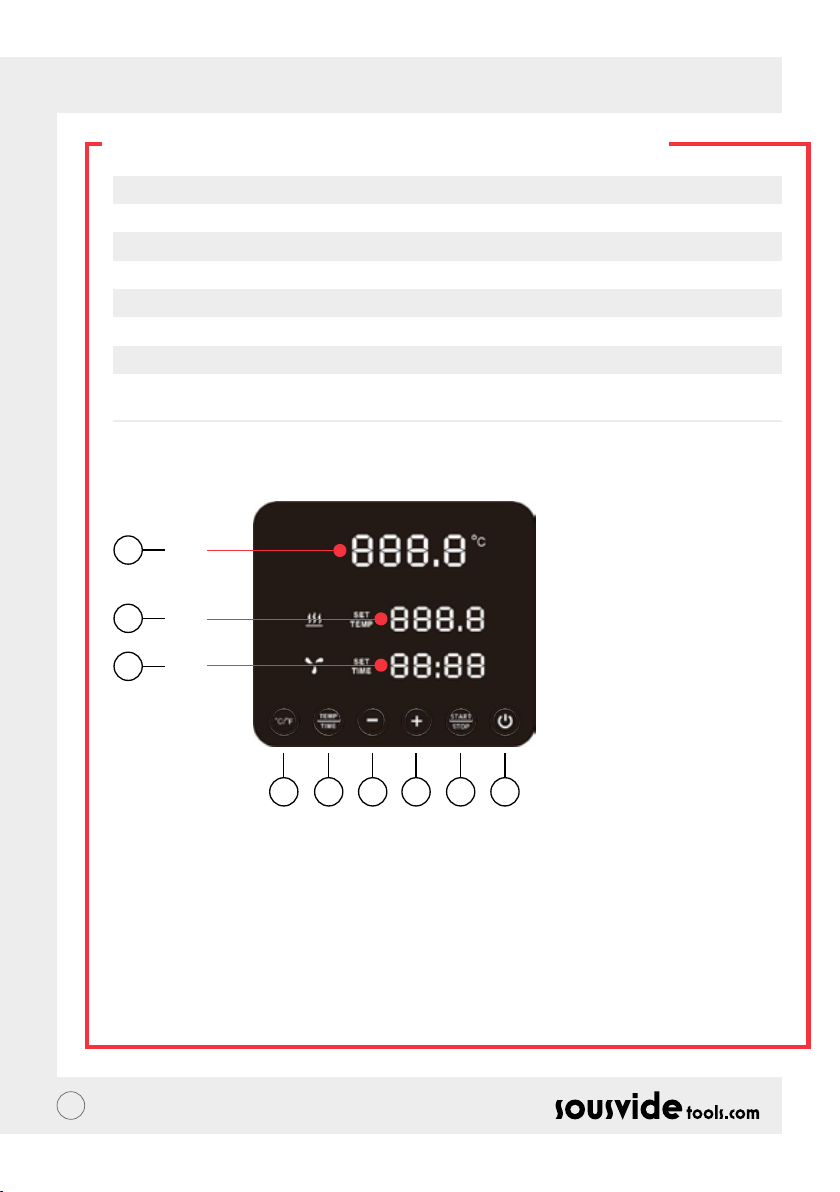
1. Accensione
• Quando la macchina viene accesa, il pulsante e la spia si illuminano. La macchina entrerà in modalità
risparmio energetico dopo 2 secondi.
• Nella modalità risparmio energetico, premere il pulsante di accensione per riaccendere la macchina e
selezionare la modalità stand by. In quel momento, sul display (A) verrà visualizzata la temperatura
dell’acqua, e la temperatura registrata in precedenza (B).
• La temperatura desiderata viene impostata durante il procedimento, sul display (C) viene indicato il tempo
di lavoro impostato nell’ultima lavorazione effettuata.
• Quando la macchina è accesa (il pulsante è del tutto illuminato), premere questo pulsante per impostare la
modalità di risparmio energetico. Può essere premuto anche durante la cottura per impostare la modalità di
risparmio energetico direttamente.
21
Page 22

IT // MANUALE D’ISTRUZIONI
FUNZIONI PRODOTTO
2. °Celsius / °Fahrenheit
Pulsante per scegliere l’unità di temperatura
• Cliccare su °C / °F per selezionare l’unità di temperatura della macchina. Selezionare Celsius o Fahrenheit.
3. TEMPERATURA / TEMPO
Pulsante per regolare la temperatura e il tempo
• Cliccare su TEMP / TIME per selezionare la temperatura o il tempo. Quando il display della temperatura
lampeggia (B), impostare la temperatura desiderata con + e -. Quando il display del timer lampeggia (C), il
tempo può essere impostato con + e -.
* Se il tempo o la temperatura non vengono impostati dopo che il display ha lampeggiato per 10 volte, il
circolatore termico iVide Plus uscirà dalla funzione TEMP / TIME. Se si vuole reimpostare temperatura e
tempo, cliccare nuovamente su TEMP / TIME per inserire i dati necessari.
* Per visualizzare la temperatura e il tempo impostati, tenere premuto il pulsante TEMP / TIME per 3 secondi.
4. START / STOP
Pulsante Start/stop
• Nella modalità stand by, cliccare su START/STOP per iniziare a lavorare.
• Nella modalità lavoro, cliccare su START/STOP per smettere di lavorare.
5. + -
Pulsante di regolazione
• Per regolare la temperatura o il tempo, cliccare su TEMP / TIME, selezionare l’opzione desiderata ed
utilizzare + e - per eseguire la regolazione.
6. Lettore digitale di temperatura (A)
• Mostra la temperatura raggiunta durante la lavorazione in tempo reale.
7. Lettore digitale di temperatura (B)
• Mostra la temperatura impostata.
8. Lettore digitale tempo (C)
• Nella modalità di standby, viene mostrato il tempo impostato.
• Nella modalità lavoro, viene mostrato il tempo di lavorazione rimanente.
22
Page 23

IT // MANUALE D’ISTRUZIONI
COMPONENTI
1. Pannello
di controllo
5. Maniglia
ssa
2. Coperchio
superiore
3. Corpo
centrale
23
6. Ingresso
acqua
4. Uscita
acqua
Page 24
IT // MANUALE D’ISTRUZIONI
APPLICAZIONE
Scaricare l’applicazione per circolatore termico iVide Plus
Se non avete ancora scaricato l’applicazione, potete farlo dall’Apple Store (IOS) o da Google Play (Android). È
compatibile con IOS versione 9.3.5 e successive e con Android versione 4.3 e successive.
Nota: se avete domande a proposito del download dell’applicazione, contattate il produttore del vostro
telefono cellulare o dispositivo.
Sei passi per congurare l’applicazione per circolatore termico iVide Plus
Rispetto ad altre applicazioni, installare quella per circolatore termico iVide Plus sarà facile e veloce. Questa
applicazione consente un uso immediato, fornendo informazioni nel preciso istante in cui sono necessarie.
Abbiamo sviluppato un nuovo approccio a questo tipo di applicazioni in modo che ogni momento passato in
cucina sia indimenticabile. L’applicazione è compatibile con il circolatore grazie alla connessione Wi-Fi e ne rende
l’utilizzo incredibilmente facile. Basta selezionare il tipo di cibo, regolare le impostazioni e premere Start.
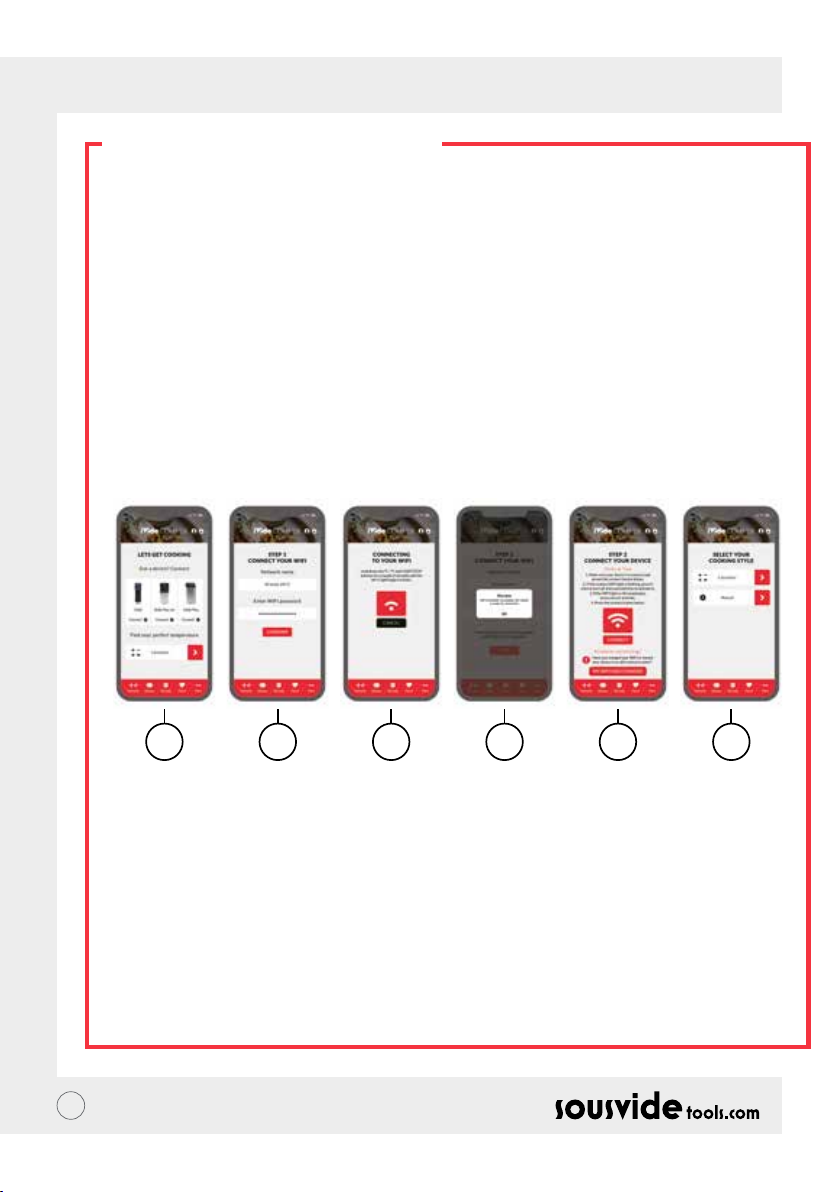
Sei semplici passi
1 2 3 4 5 6
1 Selezionare il dispositivo che si vuole utilizzare e premere “CONNETTI”.
2 L’applicazione riconoscerà la rete Wi-Fi. Inserire la password e premere “Conferma”.
3 L’applicazione inizierà a cercare il circolatore termico iVide Plus. Premere il pulsante °C / °F e start/
stop per un paio di secondi nché la spia del Wi-Fi inizia a lampeggiare. Aspettare che il dispositivo nisca
la congurazione automatica.
4 Alla ne, comparirà un messaggio che conferma che il dispositivo è pronto per essere connesso.
5 Assicurarsi che la spia del Wi-Fi abbia smesso di lampeggiare e poi premere il pulsante “Connect”. Se avete
bisogno di aiuto, leggete I suggerimenti sul display.
6 Congratulationi! Il circolatore termico iVide Plus è appena stato congurato! Siete pronti per cucinare!
Nota: I loghi The Apple and iPhone sono marchi registrati della Apple Inc., registrata negli Stati Uniti e altri stati.
Apple Store è un servizio della Apple Inc. Android: i loghi Google Play e Google Play sono marchi registrati di
Google Inc.
24
Page 25

IT // MANUALE D’ISTRUZIONI
ISTRUZIONI OPERATIVE
1 Iniziare collegando il circolatore termico iVide Plus al recipiente di cottura. Ruotare la manopola in senso
antiorario, formare uno spazio tra il corpo principale e la manopola, inserire la macchina nel recipiente di
cottura e serrare la manopola in senso orario per ssare la macchina.
2 Aggiungere acqua al recipiente di cottura, accertandosi che il livello dell'acqua sia compreso tra il livello
minimo e quello massimo.
3 Collegare l'alimentazione per accendere e illuminare il display digitale. Il circolatore termico iVide Plus
entrerà in modalità risparmio energetico dopo 2 secondi. Trascorso questo tempo, premere il pulsante di
accensione per mettere la macchina in modalità ON.
4 Fare clic su ° C / ° F per selezionare l'unità di visualizzazione della temperatura. L'impostazione predenita è
° C. L'unità di temperatura selezionata verrà memorizzata per la volta successiva in cui si utilizza la macchina.
5 Fare clic su TEMP / TIME per selezionare la temperatura o l'ora e impostare il valore desiderato con i tasti + e -.
6 Una volta che la macchina è stata impostata, fare clic su START / STOP per avviarla. Quando la temperatura
nel recipiente di cottura raggiunge la temperatura richiesta, la lettura digitale del tempo (C) inizia il conto
alla rovescia - ora aggiungi il cibo sottovuoto per una cottura a temperatura costante.
7 Al termine della cottura, il circolatore termico iVide Plus emetterà un segnale acustico. Fare clic su START /
STOP per spegnerlo.
Nota: se non viene eseguita alcuna operazione, la macchina emetterà un segnale acustico continuo dopo 20
secondi, mentre l’acqua rimarrà alla temperatura preimpostata.
8 Togli il cibo sottovuoto. Il cibo è ora pronto per la prossima fase.
9 Dopo aver utilizzato il circolatore termico iVide Plus, spegnere e tenere in un luogo sicuro.
NOTA BENE: Prima della cottura, il cibo deve essere messo sotto vuoto. Il livello dell’acqua (dopo che il cibo è
stato inserito) dovrebbe essere più alto del livello minimo MIN, ma più basso di quello massimo indicato come
MAX. Per evitare di danneggiare la macchina, svuotare tutta l’acqua dopo l’uso e pulire il recipiente.
MANUTENZIONE
Per evitare scottature, assicurarsi che il circolatore termico iVide Plus sia spento e a temperatura ambiente
prima di pulirlo.
1 Posizionare verticalmente il circolatore termico iVide Plus dopo la pulizia, non posizionarlo orizzontalmente
o a testa in giù.
2 Durante la pulizia, non danneggiare i componenti all'interno della macchina. Una volta che i componenti
sono danneggiati, si prega di chiedere ad uno specialista di controllare e riparare la macchina. Non tentare
riparazioni non autorizzate, in quanto ciò potrebbe causare incidenti.
3 Svuotare l'acqua dopo ogni utilizzo. Riempire con acqua pulita quando si utilizza il circolatore termico iVide
Plus. Se l'acqua viene riutilizzata, i minerali presenti al suo interno possono danneggiare i componenti.
4 Rimuovere il coperchio posteriore del circolatore termico iVide Plus per pulire il tubo di calore e la sonda se
la capacità di scarico si riduce o i componenti si sono sporcati. Si consiglia di pulire il circolatore termico
iVide Plus ogni 20 utilizzi o dopo 100 ore di utilizzo.
5 Non mettere il circolatore termico iVide Plus caldo in acqua fredda poiché ciò potrebbe causare danni. Il
circolatore termico iVide Plus deve essere raffreddato a temperatura ambiente e messo in acqua fredda per
l'uso.
25
Page 26
IT // MANUALE D’ISTRUZIONI
PULIZIA
Preparazione
Il circolatore termico iVide Plus può essere pulito con aceto (aceto bianco, aceto di mele ecc.)
Perché pulirlo?
L’acqua del rubinetto contiene minerali che, ad alte temperature, creano calcare sulla resistenza o sulla
supercie della macchina. In questo caso, il calcare pregiudicherà il funzionamento della macchina. Si consiglia
di pulire la macchina ogni 20 utilizzi o 100 ore di utilizzo. Potete pulire la macchina secondo necessità e la
durezza della vostra acqua.
Come pulirlo
1 Riempire il contenitore (no alla linea MAX) con acqua. Aggiungere 5 g di aceto all'acqua.
2 Accendere il circolatore termico iVide Plus, impostare la temperatura di lavoro su 80 ° C (176 ° F) e il tempo
su 3 ore (03:00). Fai clic su START / STOP. Dopo 3 ore, la macchina emetterà un segnale acustico e si spegnerà.
* Pulizia rapida: tenere premuti i pulsanti START / STOP e -. La lettura digitale (B) mostrerà la temperatura
impostata 80 ° C, la lettura digitale (C) mostrerà il tempo impostato 3:00. Rilascia il pulsante e la lettura
digitale (B) e (C) lampeggerà 10 volte. Fare clic sul pulsante START / STOP per avviare l'operazione di pulizia.
3 Controllare se la macchina è pulita. Se la macchina non è pulita, aggiungere altro aceto e avviare
nuovamente il procedimento. Se la macchina è pulita, rimuovere l'aceto dalla macchina, lavarla con acqua
pulita, asciugarla e riporla.
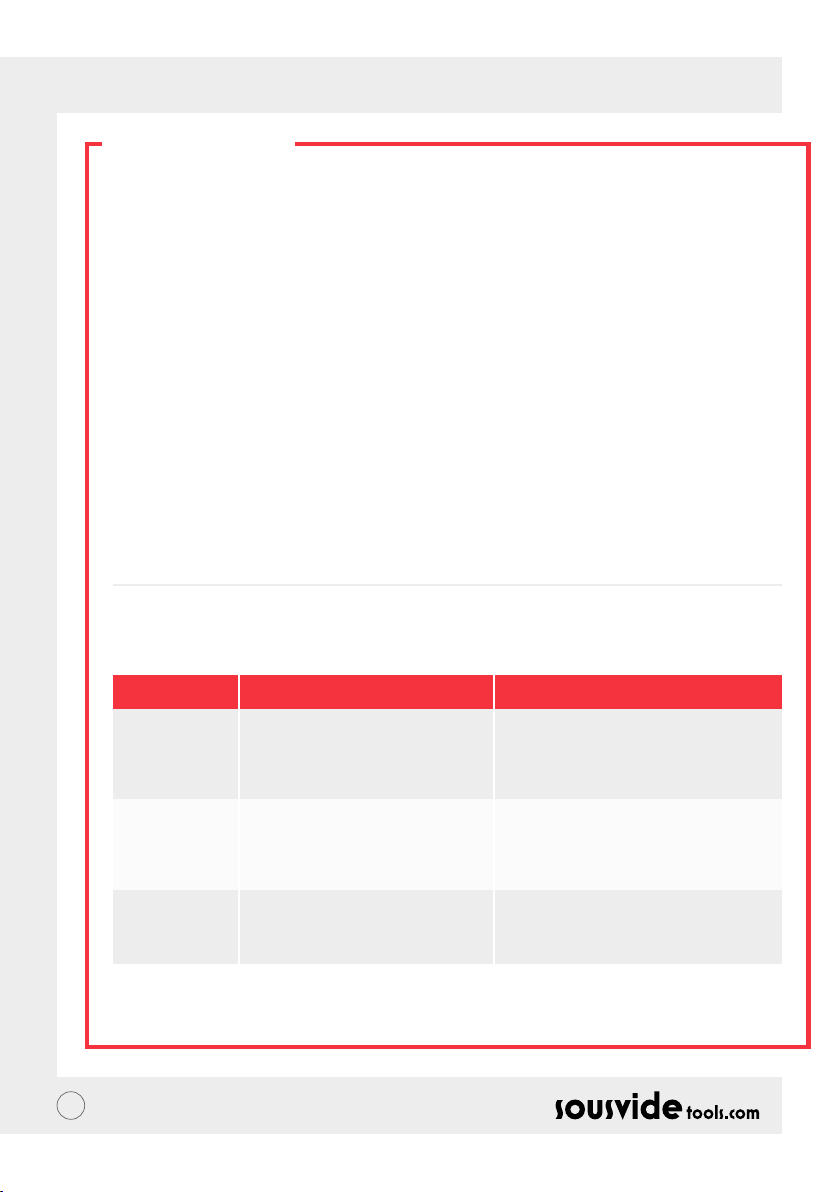
RISOLUZIONE PROBLEMI
Codici di errore
E01
E02
LP
** Durante l’uso della macchina, se si presenta qualsiasi altro problema, contattare un professionista. Non
tentare riparazioni non autorizzate per evitare incidenti.
26
Cause dell’errore
Il livello dell’acqua è al di sotto del
livello minimo o al di sopra di quello
massimo.
1. Se il tubo di riscaldamento è normale;
2. Se il cablaggio interno della macchina
è normale;
3. Il sensore di temperatura è normale?
La macchina perde potenza
all’improvviso durante il normale
processo di cottura.
Risoluzione errore
Spegnere la macchina. Se il livello dell’acqua
è troppo basso, aggiungere la quantità
necessaria; se il livello dell’acqua è troppo alto,
rimuovere l’acqua in eccesso dal contenitore.
Contattare un professionista per la
riparazione.
Page 27
IT // MANUALE D’ISTRUZIONI
GARANZIA E SERVIZIO
POST VENDITA
1 Assicurarsi che la supercie di lavoro sia piatta, pulita e in ordine.
2 La garanzia è limitata a danni causati da difetti di produzione.
3 Il costo di parti di ricambio e manutenzione saranno a carico dell’utilizzatore se dovuti ad uso improprio o
altri problemi non legati alla qualità del prodotto.
4 Tenere gli scontrini e le ricevute.
Dati per la manutenzione
Nome di battesimo:
Telefono:
Indirizzo:
Modello di macchina:
Fornitore:
Cognome:
Email:
Data di acquisto:
Registro riparazioni
Data Causa Di
27
Page 28

FR // NOTICE D’UTILISATION
A PROPOS DE IVIDE
Fondée en 2011, Sousvidetools.com est une entreprise d’appareils de cuisine High-tech ayant pour but d’aider
les gens à cuisiner plus intelligemment #clevercooking. Par ailleurs notre entreprise se présente comme le fer
de lance de ce domaine. En effet, nous sommes avons produit 2 livres de cuisine, un calculateur de durées de
cuisson, une application ainsi qu’un manuel de formation en collaboration avec Campden BRI, une référence
en termes d’accompagnement d’entreprises alimentaires mais aussi le leader du marché mondial des appareils
de cuisson sous vide.
Notre équipe est composée de 15 personnes avec un seul objectif commun : transformer le stress de la cuisine
en bonheur à table. (On appelle ça “#clevercooking”). Pourquoi ? Parce que plus vous en savez sur la cuisine,
meilleurs vous y devenez. Notre équipe de recherche est composée de chefs cuisiniers constamment aux
fourneaux, et c’est vous qui en tirez les bénéces.
Alors, pourquoi le cuiseur iVide ? Nous voulons que les adeptes du sous vide, qu’ils soient novices ou experts,
puissent cuisiner tous les jours chez eux des plats dignes d’un grand restaurant. Alors dites adieu à la
nourriture immangeable, trop cuite et commencez à proter de repas gastronomiques.
L’appareil de cuisson sous-vide iVide Plus Thermal Circulator de SousVideTools dispose d’un écran tactile HD
de 114.3mm. La WIFI intégrée vous permet de le contrôler depuis n’importe où à l’aide de notre application.
Il est bien sûr conçu pour garantir la sécurité alimentaire. Entre 40°C et 100°C il garantit une stabilité de la
température à 0,07°C près et présente une capacité de 80L. Il est garanti 2 ans.
Le iVide Plus est le premier appareil waterproof pour les cuisines commerciales, certié IPX7. La qualication
IPX7 certie que le iVide Plus Sous Vide cooker est capable de supporter une immersion jusqu’à 1 mètre de
profondeur durant 30 minutes. Ainsi, en cas d’incident qui ferait que l’appareil est éclaboussé ou immergé,
l’appareil resterait intact. En revanche, une exposition prolongée (passage dans un lave-vaisselle par exemple)
pourrait l’endommager.
CONSEILS DE SÉCURITÉ
Merci de suivre ces précautions d’utilisation:
• Se conformer au manuel d’utilisation pour toute utilisation de l’iVide Plus Thermal Circulator. Dans le cas
contraire cela pourrait endommager l’appareil.
• Se conformer aux installations électriques correspondantes aux caractéristiques mentionnées dans ce
manuel ou sur la plaque signalétique de l’appareil.
• Ne le brancher qu’a des prises reliées à la terre.
• Avant de déplacer l’appareil, s’assurer qu’il soit bien débranché.
• Ne pas toucher directement l’eau pour vérier la température. Utiliser l’afchage de température de
l’appareil ou un thermomètre.
• Le niveau d’eau doit être compris entre les indications de niveau “MIN” et “MAX”. Autrement cela pourrait
détériorer l’appareil.
• Ne pas toucher de surface chaude sur le iVide Plus Thermal Circulator durant ou immédiatement après
utilisation.
• S’il y a de l’eau sur le haut de l’appareil (au-dessus du niveau MAX), éteindre celui-ci et le sécher.
• Nous recommandons que les utilisateurs du iVide Plus Thermal Circulator soient formés avant d’utiliser
l’appareil ou soient supervisés par un utilisateur aguerri.
• Tenir les liquides à l’écart de l’alimentation et du ventilateur à l’arrière du iVide Plus Thermal Circulator.
Autrement cela pourrait détériorer l’appareil.
28
Page 29
FR // NOTICE D’UTILISATION
SPÉCIFICATIONS
Tension nominale 220-240V~
Fréquence nominale 50HZ
Puissance nominale 2300W
Plage de réglage de la température 5 - 95°C / 41 - 203°F
Plage de réglage de la minuterie 5 min - 99 heures 59 minutes
Précision de l’afchage 0.1
Dimensions 5.5”x5.6”x11.9”(140x143x302mm)
Poids 2.2Kg
DESCRIPTION DE L’APPAREIL
6
A
7
B
8
C
145532
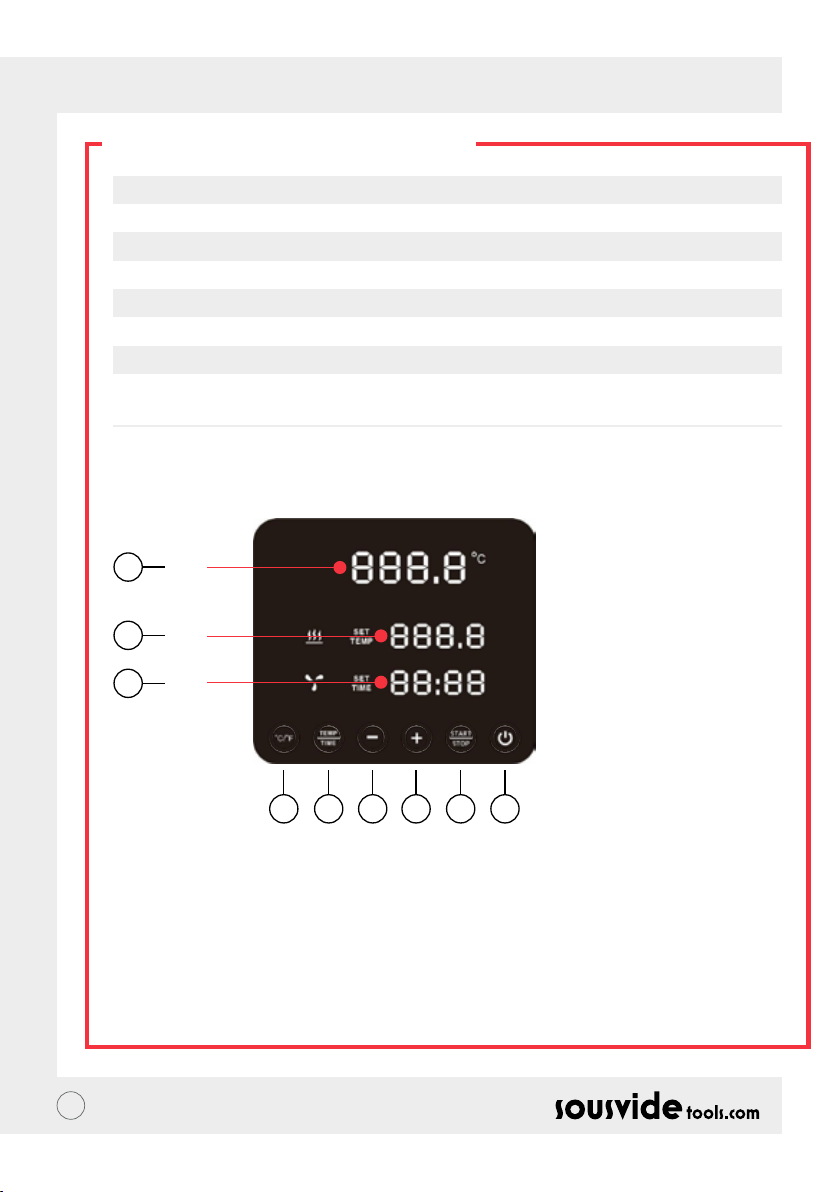
1. Bouton “Power”
• Lorsque l’appareil est allumé, le bouton ainsi que le voyant lumineux s’afcheront. L’appareil passera en
mode Economie d’énergie après 2 secondes.
• En mode économie d’énergie, appuyer sur le bouton “power” pour réveiller l’appareil et passer en mode
StandBy. A ce moment-là l’écran afchera la température actuelle de l’eau (A), et la température précédente
(B). La température cible est paramétrée via le processus, l’afchage montre les heures paramétrées lors du
dernier processus utilisé.
• En mode ON (le bouton est totalement allumé), appuyer sur ce bouton pour passer en mode économie
d’énergie. Il est aussi possible d’appuyer sur le bouton durant le processus de cuisson de manière à entrer
directement en mode Economie d’énergie.
29
Page 30

FR // NOTICE D’UTILISATION
DESCRIPTION DE L’APPAREIL
2. °C/°F
Bouton de sélection des unités de température
• Appuyer sur °C / °F l’unité de température utilisée par la machine : degrés Celsius ou Fahrenheit.
3. TEMP / TIME
Bouton de sélection du paramétrage de la Température et de la durée
• Cliquer sur le bouton TEMP / TIME pour basculer entre le paramétrage de la température ou de la durée.
Quand l’afchage de température (B) clignote, choisissez la température voulue avec les touches “-“ et “+”.
Quand l’afchage de durée (C) clignote, choisissez la durée voulue avec les touches “-“ et “+”.
* Si aucune durée ou température n’a été paramétrée après que l’afchage ait clignoté 10 fois, le iVide Plus
Thermal Circulator sortira de la fonction de paramétrage TEMP/TIME. Si vous souhaitez reparamétrer les
données, appuyez de nouveau sur TEMP / TIME pour entrer les valeurs souhaitées.
* Pour afcher les valeurs de durée et température choisies, appuyer sur le bouton TEMP/TIME pendant 3
secondes.
4. START / STOP
Bouton Start/stop
• En mode standby, appuyez sur START/STOP pour démarrer.
• Lors du fonctionnement, appuyez sur START/STOP pour l’arrêter.
5. + -
Bouton d’ajustement
• Pour ajuster la température ou la durée, appuyez sur TEMP / TIME, choisissez l’option voulue puis utilisez
les boutons “-“ et “+” pour sélectionner la valeur voulue.
6. Afchage de la température actuelle (A)
• Afche la valeur actuelle de température de fonctionnement.
7. Afchage de la température paramétrée (B)
• Afche la température de fonctionnement paramétrée.
8. Afchage de la durée (C)
• En mode StandBye, la durée paramétrée est afchée.
• En fonctionnement, la durée restante est afchée.
30
Page 31
FR // NOTICE D’UTILISATION
SCHÉMA DE L’APPAREIL
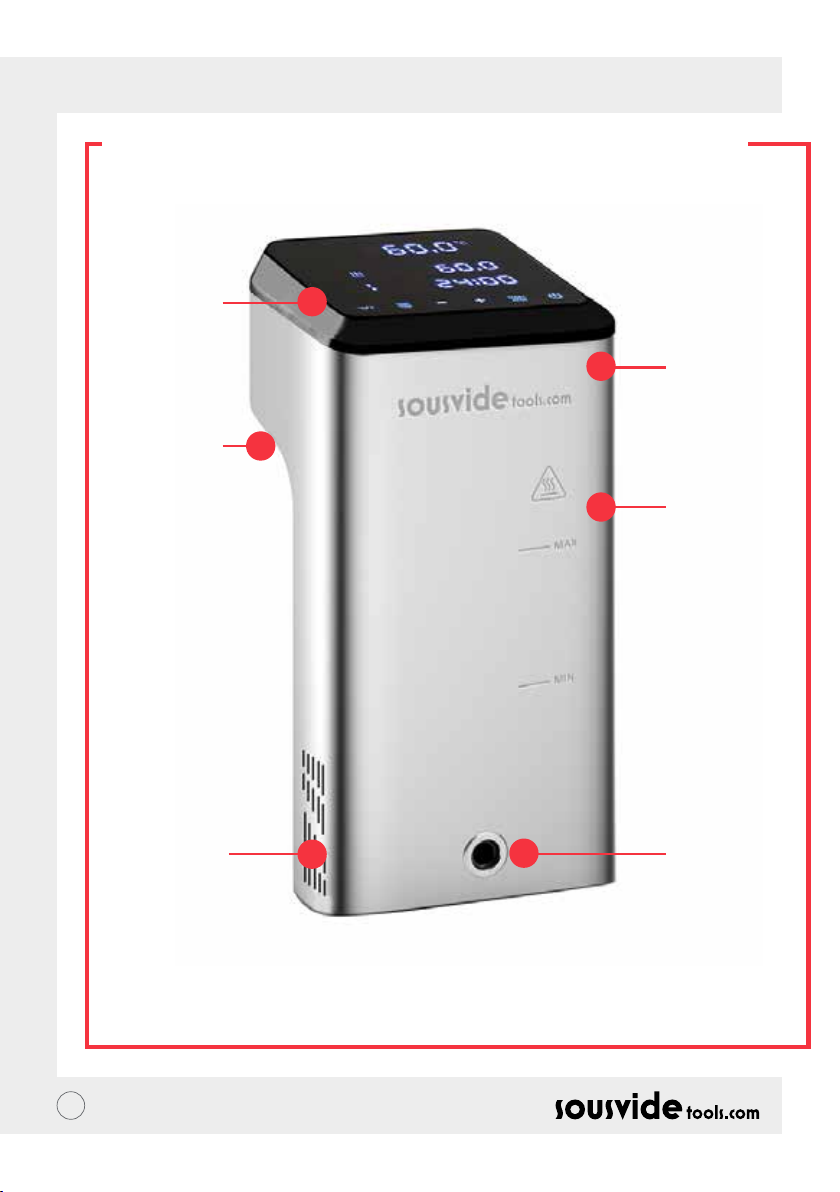
1. Ecran de
contrôle
5. Poignée
2. Couvercle
3. Récipient
principal
31
6. Arrivée
d’eau
4. Evacuation
d’eau
Page 32
FR // NOTICE D’UTILISATION
L’APPLICATION
Télécharger l’application iVide Plus Thermal Circulator
Si vous n’avez pas encore téléchargé l’application iVide Plus Thermal Circulator, vous pouvez le faire depuis
l’Apple Store (IOS) ou Play Store (Android). Elle est compatible avec la version IOS 9.3.5 ou ultérieures. Elle est
compatible avec Android 4.3 ou versions ultérieures.
Note : Si vous avez des questions concernant le téléchargement de l’application, veuillez contacter le fabricant
de votre appareil.
Six étapes pour congurer l’application iVide Plus Thermal Circulator
Contrairement à d’autres, l’installation de l’application iVide Plus Thermal est rapide. Les applications iVide
permettent une utilisation immédiate en donnant les informations nécessaires lorsque vous en avez besoin.
Nous avons développé une toute nouvelle approche pour ce genre d’application car selon nous chaque instant
dans une cuisine doit être inoubliable. L’application communique avec l’appareil via Wi-Fi. Elle rend la cuisine
avec iVide Plus Thermal Circulator d’une facilité déconcertante. Sélectionnez simplement la nourriture,
dénissez les paramètres et appuyez sur Start.
Six étapes simples
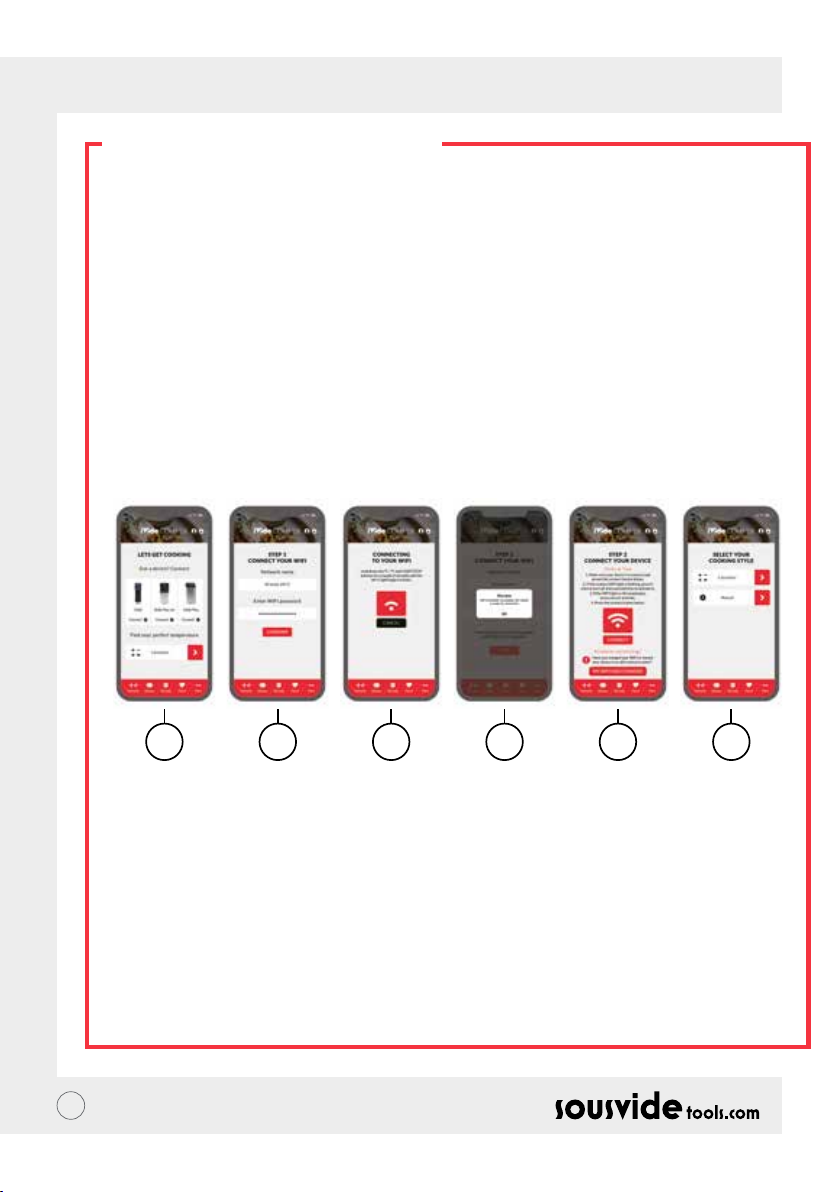
1 2 3 4 5 6
1 Sélectionnez l’appareil que vous souhaitez utiliser et appuyez sur “CONNECTER”.
2 L’application détectera un réseau Wi-Fi connecté. Entrez le mot de passe et appuyez sur “Conrmer”.
3 L’application commence à rechercher le iVide Plus Thermal Circulator. Restez appuyé simultanément sur
les boutons °C / °F et start/stop pendant quelques secondes jusqu’à ce que l’indicateur Wi-Fi commence à
clignoter. Attendez ensuite jusqu’à ce que l’appareil nisse la conguration automatique.
4 A la n un message conrmant que l’appareil est prêt à être connecté apparaîtra.
5 Assurez-vous que l’indicateur Wi-Fi ne clignote plus et appuyez sur le bouton “Connecter”. Si vous avez
besoin d’aide, suivez les conseils afchés à l’écran.
6 Félicitations ! Vous venez de congurer votre iVide Plus Thermal Circulator. Protez de votre cuisine !
Note : Les logos Apple et IPhone sont des marques déposées de Apple Inc., enregistrée aux USA et dans d’autres
pays. L’apple Store est une marque de Apple Inc. Android ; Play Store and Play Store logo sont des marques
déposées de Google Inc.
32
Page 33

FR // NOTICE D’UTILISATION
INSTRUCTIONS D’UTILISATION
1 Commencez par attacher le iVide Plus Thermal Circulator au récipient principal. Tournez la poignée dans
le sens anti-horaire, créez un espace entre le corps principal et la poignée, insérez la machine dans le
récipient principal et resserrez la poignée dans le sens horaire pour sécuriser l’ensemble.
2 Ajoutez de l’eau au récipient principal, en vous assurant que le niveau est compris entre le minimum et le
maximum.
3 Branchez l’appareil, l’écran doit s’allumer. Le iVide Plus Thermal Circulator passera en mode veille après 2
secondes. Ensuite appuyez sur le bouton Power pour allumer la machine.
4 Appuyez sur °C/°F pour sélectionner l’unité de température. Par défaut le système est en °C. Votre choix
d’unité reste en mémoire pour l’utilisation suivante.
5 Appuyez sur TEMP /TIME pour paramétrer la température et la durée, à l’aide des touches “-“ et “+”.
6 Une fois le paramétrage terminé appuyez sur START/STOP pour démarrer l’appareil. Une fois que le
récipient principal atteint la température souhaitée, l’afcheur de durée va débuter son compte à rebours.
Vous pouvez désormais ajouter votre packet de nourriture sous-vide pour une cuisson à température
constante.
7 Une fois la cuisson terminée, le iVide Plus Thermal Circulator sonnera. Appuyez sur START/STOP pour
l’éteindre.
Note : Si rien n’est fait après 20 secondes, l’appareil va bipper d’une manière continue et la nourriture sera
maintenue à la température sélectionnée.
8 Sortez votre paquet de nourriture. La nourriture est désormais prête pour l’étape suivante.
9 Après utilisation du iVide Plus Thermal Circulator, éteignez-le et entreposez-le dans un endroit adapté.
N’oubliez pas: Avant la cuisson sous vide, la nourriture doit être emballée sous vide. Le niveau d’eau (après que
la nourriture y ait été mise) doit impérativement être comprise entre les indicateurs MAX et MIN indiqués sur
l’appareil. Pour éviter d’endommager la machine, videz-la après utilisation et nettoyez le récipient.
ENTRETIEN
Pour éviter de vous brûler, assurez-vous que le iVide Plus Thermal Circulator soit éteint et refroidi à
température ambiante avant de le nettoyer.
1 Entreposez le iVide Plus Thermal Circulator verticalement après nettoyage, ne pas le mettre à l’horizontale
ou renversé.
2 Durant le nettoyage, ne pas abîmer les composants à l’intérieur de l’appareil. Si ceux-ci sont endommagés,
faites-les réparer par un professionnel. Pour éviter tout accident n’essayez pas de les réparer vous-mêmes.
3 Videz l’eau utilisée après usage. Remplissez avec de l’eau claire lors de l’utilisation suivante. Réutiliser la
même eau pourrait entraîner un endommagement de l’appareil.
4 Enlever la partie arrière du iVide Plus Thermal Circulator pour nettoyer le tube chauffant et examiner
l’ensemble si celui-ci montre des signes de faiblesse ou si les composants se salissent. Nous vous
recommandons de nettoyer l’appareil toutes les 20 utilisation ou après 100 heures d’utilisation.
5 Ne pas mettre de l’eau fraîche dans votre iVide Plus Thermal Circulator encore chaud car cela pourrait
endommager l’appareil. Laissez-le d’abord refroidir à température ambiante.
33
Page 34
FR // NOTICE D’UTILISATION
COMMENT NETTOYER ?
Préparation
Le iVide Plus Thermal Circulator peut être nettoyé à l’aide de vinaigre alimentaire (vinaigre blanc, vinaigre de
pomme, etc…).
Pourquoi le nettoyer ?
L’eau du robinet contient des minéraux qui à partir d’une certaine température se déposeront sur le tube
chauffant ou les parois de l’appareil et affecteront les performances de l’appareil. Il est recommandé de
nettoyer la machine toutes les 20 utilisation ou 100 heures de fonctionnement. Ces recommandations doivent
être adaptées suivant la dureté de l’eau dans votre région.
Comment nettoyer ?
1 Remplissez le récipient au maximum avec de l’eau et y ajouter 5 grammes de vinaigre.
2 Allumer l’appareil, paramétrez la température sur 80°C (176°F) et la durée sur 3 heures (03:00). Appuyez
sur START/STOP. Après 3 heures le iVide Plus Thermal Circulator va bipper et s’éteindre.
*Méthode de nettoyage rapide : Rester appuyé sur les boutons START/STOP et “-“. L’afchage de
température (B) va afcher la température paramétrée à 80°C, l’afchage digital de durée quant à lui va
afcher une durée de 3:00. Relâchez les boutons et les deux afchages mentionnés vont clignoter une
dizaine de fois. Appuyez sur START/STOP pour lancer l’opération de nettoyage.
3 Vériez que l’appareil soit propre. S’il reste du dépôt rajoutez du vinaigre et recommencez la procédure. Si
la machine est propre vous pouvez vider le vinaigre, la rincer avec de l’eau claire , la sécher et la ranger.
ANOMALIES DE FONCTIONNEMENT
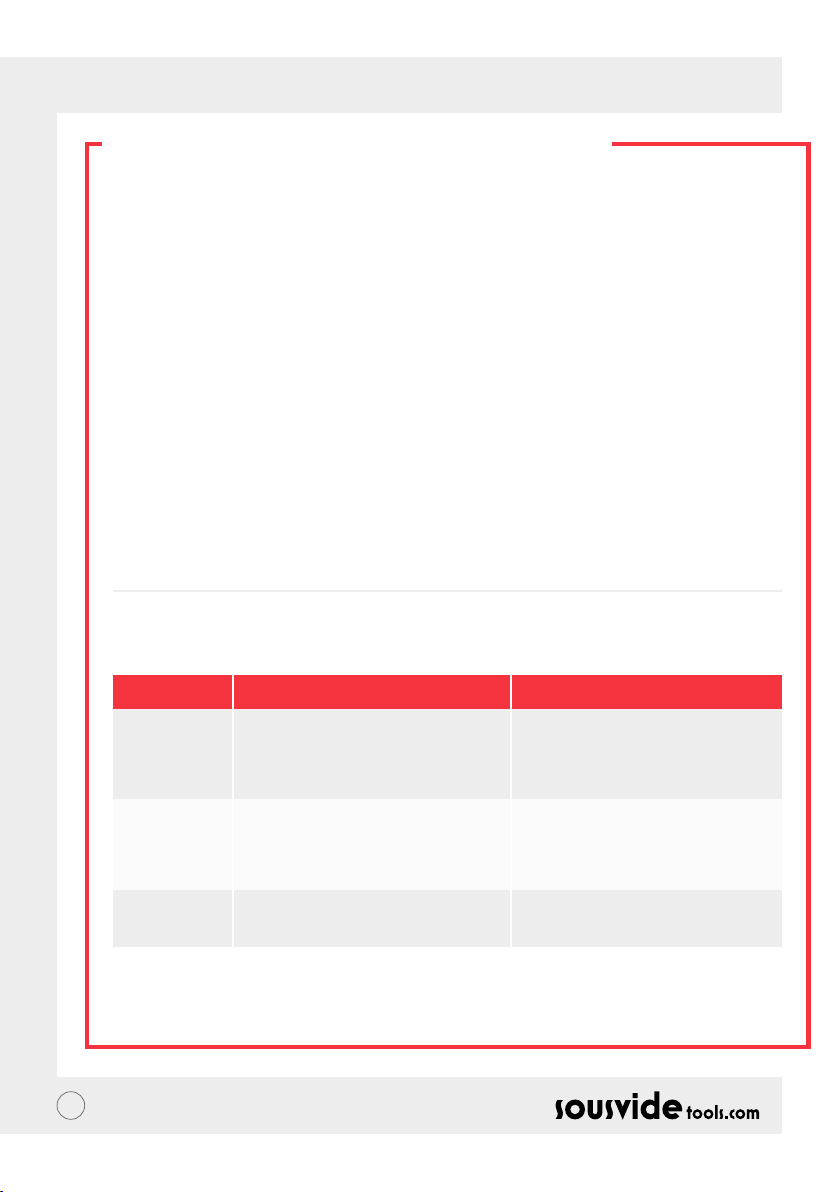
Code d’erreur
E01
E02
LP
** Si durant l’utilisation de la machine d’autres problèmes surviennent, adressez-vous à un professionnel. Pour
votre sécurité n’essayez pas de la réparer vous-même.
34
Cause du problème
Le niveau d’eau est inférieur à la
graduation MIN ou supérieur à la
graduation MAX
1. Si le tuyau chauffant est normal ; 2. Si le
câblage interne de la machine est normal ;
3. Est-ce que le capteur de température
est normal ?
L’appareil a subi une coupure de courant/a
été débranché durant une cuisson.
Solution
Eteindre la machine. Si le niveau d’eau
est trop bas, ajoutez de l’eau au moins
jusqu’à MIN, s’il est trop haut, videz un
peu le contenant.
S’adresser à un professionnel pour
réparation.
Page 35
FR // NOTICE D’UTILISATION
GARANTIE ET SAV
1 Assurez-vous que le plan de travail est plat, propre et rangé.
2 La garantie ne s’applique qu’aux problèmes liés à un défaut de production.
3 Le coût des pièces et de la réparation seront facturés pour tout usage détourné de l’appareil ou tout
problème de qualité non-lié au produit.
4 Conservez les preuves d’achat s’il vous plaît.
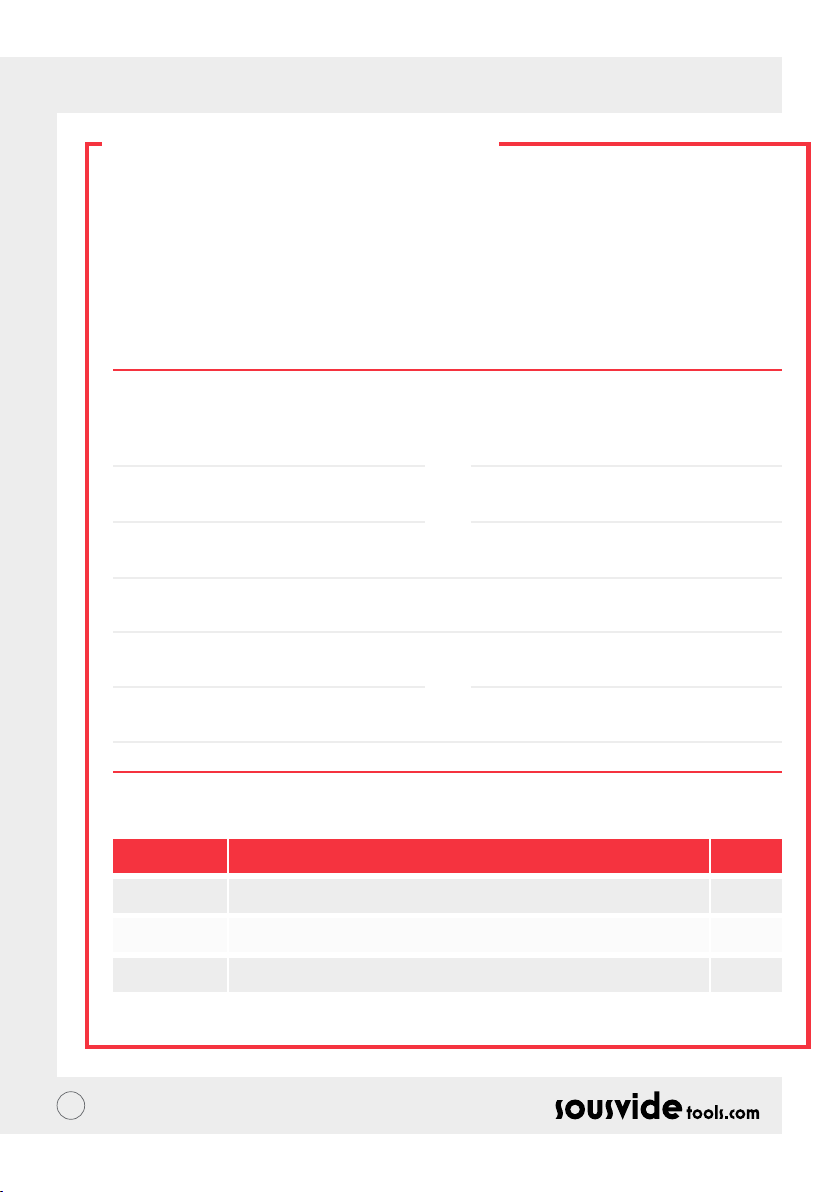
Carte d’entretien
Prénom:
Téléphone:
Adresse:
Modèle:
Fournisseur :
Nom:
Email:
Date d’achat:
Journal de réparations
Date Cause Par
35
Page 36

ES // MANUAL DEL USUARIO
SOBRE IVIDE
Fúndada en 2011, Sousvidetools.com es una empresa de alimentos y tecnología con la misión de ayudar a
las personas a cocinar de una manera mas inteligente #clevercooking. Ademas, somos la autoridad lider en
nuestro campo, habiendo creado 2 libros de cocina, una calculadora sous vide, una APP y guías de capacitación
en conjunto con Campden BRI, proveedor lider de prácticas cientícas en Reino Unido, servicios técnicos,
asesoría y ahora líder mundial en el mercado de cocinas sous vide.
Nuestro equipo esta conformado por 15 voces —y todos nosotros venimos al trabajo con una cosa en mente:
trabajar duro para crear mejores herramientas que conviertan el estrés de cocinar en una cena exitosa (a esto
lo llamamos #clevercooking). ¿Por qué? Porqué mientras más sabe sobre cocinar, mejor lo hace. Nuestros chefs
investigadores están constántemente cocinandó para que usted obtenga los benecios en nombre de I+D.
Entonces porque la iVide Cooker? Nosotros queremos hacer que sea fácil para nuestros usuarios de sous vide
tanto novatos como expertos preparar comidas de calidad de restaurante en la comodidad de su casa. Con la
perfecta cocción cada vez. Entonces dile adiós a esas comidas pasadas de cocción con sabor a cartón y dile hola
a las cenas gourmet. La SousVideTools iVide Plus Thermal Circulator cuenta con una interfaz de pantalla táctil
de alta resolución de 4.5 pulgadas. Cuenta con conexión WIFI lo que signica que puede ser controlado desde
cualquier lugar a través de nuestra APP. También esta diseñado para asegurar integridad de la comida. Con una
capacidad de 80 litros garantiza una temperatura estable de 0.07°C entre 40°C hasta 100°C. 2 Años de garantía.
La iVide plus es el primer dispositivo a prueba de agua para la cocina comercial, certicado para IPX7. Bajo
la designación de IPX7. La iVide Plus Sous Vide cooker es capaz de soportar la inmersión hasta 1 metro de
profundidad por 30 minutos. Esto signica que en caso de que ocurra un accidente, y el dispositivo entra en
contacto con agua o es sumergido esto no causara daño alguno, pero una exposición prolongada — como
colocarlo en un lavaplatos podría ser perjudicial.
SEGURIDAD
Por favor, siga estas precauciones de seguridad:
• Maneje La iVide Plus thermal circulator de acuerdo con el manual del usuario. De lo contrario podria dañar
la maquina.
• Conecte la fuente de alimentacion mostrada en la etiqueta unicamente.
• Conecte sólo al suministro a tierra.
• Apague la fuente de alimentación antes de remover la maquina.
• No toque el agua directamente para vericar la temperatura, por favor utilice la interfaz de temperatura o
un termómetro.
• El nivel del agua debe oscilar entre el el limite minimo de agua “MIN” y el limite maximo de agua “MAX”, de
lo contrario podria resultar en daños para la maquina.
• No toque ninguna de las supercies de la iVide plus thermal circulator durante o justo despues de usarse.
• Si hay liquido en la parte superior de la iVide plus thermal circulator (sobre el limite MAX), apague el
dispositivo y este debe estar seco antes de usarse.
• Recomendamos a nuestros usuarios de la iVide Plus thermal circulator que reciban instrucciones completas
antes del primer uso o que este sea supervisado por un usuario con experiencia.
• Mantenga el liquido lejos del receptaculo de alimentación y el disipador de calor en la parte trasera de la
iVide Plus thermal circulator, de lo contrario podria producir daños al dispositivo y al usuario.
36
Page 37
ES // MANUAL DEL USUARIO
PARAMETROS TÉCNICOS
Voltaje 220-240V~
Frecúencia 50HZ
alimentación 2300W
Temperatura de ajuste 5 – 95°C / 41 – 203°F
Tiempo de ajuste 5 min – 99 horas 59 minutos
Precision del monitor 0.1
Tamaño 5.5”x5.6”x11.9” (140x143x302mm)
Peso 2.2Kg
FUNCIONAMIENTO DEL PRODUCTO
6
A
7
B
8
C
145532
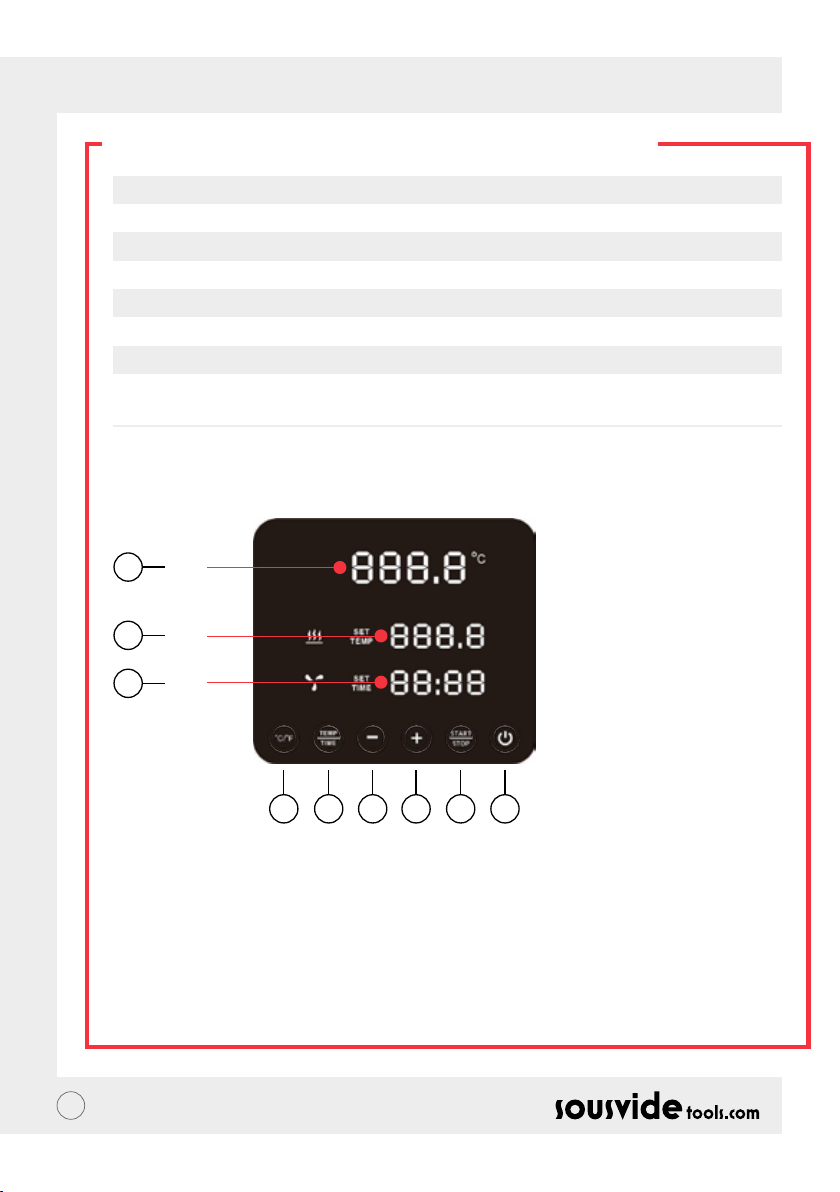
1. Alimentación
• Cuando el fuente de alimentación este encendida, el botón y la luz indicadora se mostraran. El dispositivo
cambiara a ahorro de energia despues de 2 segundos.
• En el modo de ahorro de energia, presione el botón de encendido para activar la maquina e ingresar al modo
de espera. En este momento, la lectura digital (A) muestra la temperatura actual del agua, la lectura digital
(B) muestra la anterior. La temperatura objetivo establecida en el proceso de trabajo, la lectura digital (C)
muestra las últimas horas de trabajo establecidas del proceso de trabajo
• En el modo encendido (el botón estara completamente iluminado) presione este botón para entrar al modo
de ahorro de energía. Este tambien puede ser presionado durante el proceso de cocción para entrar al modo
ahorro de energia directamente.
37
Page 38

ES // MANUAL DEL USUARIO
FUNCIONAMIENTO DEL PRODUCTO
2. °C/°F
Botón interruptor de la unidad de temperatura
• Haga click en °C / °F para seleccionar las opciones de la unidad de temperatura del dispositivo. Por favor
seleccione Celsius o Fahrenheit.
3. TEMP / TIME
Botón interruptor de la unida de tiempo
• Haga click en TEMP / TIME para cambiar la conguración de la temperatura o tiempo. Cuando la lectura
digital de temperatura (B) este parpadeando, seleccione la temperatura deseada con + y -. Cuando la lectura
digital de tiempo (C) este parpadeando, puede congurar el tiempo deseado usando + y -.
* Si no se ha establecido el tiempo o temperatura despues de que este parpadee 10 veces, el iVide Plus
Thermal Circulator saldra de la opcion TEMP/TIME. Si necesita restablecer haga clic nuevamente en TEMP
/ TIME para ingresar los detalles requeridos.
* Para mostrar el tiempo y temperatura establecidos, presione TEMP / TIME por 3 segundos.
4. START / STOP
Botón START/STOP
• En el modo de espera, presione el botón START/STOP para comenzar.
• En modo de uso, presione START/STOP para detener el dispositvo.
5. + -
Botón de conguración
• Para congurar la temperatura o tiempo, presione el botón TEMP/TIME, seleccione la opcion requerida y
utilize use + y – para ajustarlo.
6. Lectura Digital de Temperatura (A)
• Muestra en tiempo real la temperatura actual del dispositivo.
7. Lectura Digital de Temperatura (B)
• Muestra la temperatura congurada por el usuario.
8. Lectura Digital de Tiempo (C)
• En modo de espera, Muestra el tiempo congurado por el usuario.
• En modo de uso, Muestra el tiempo restante para culminar el proceso.
38
Page 39
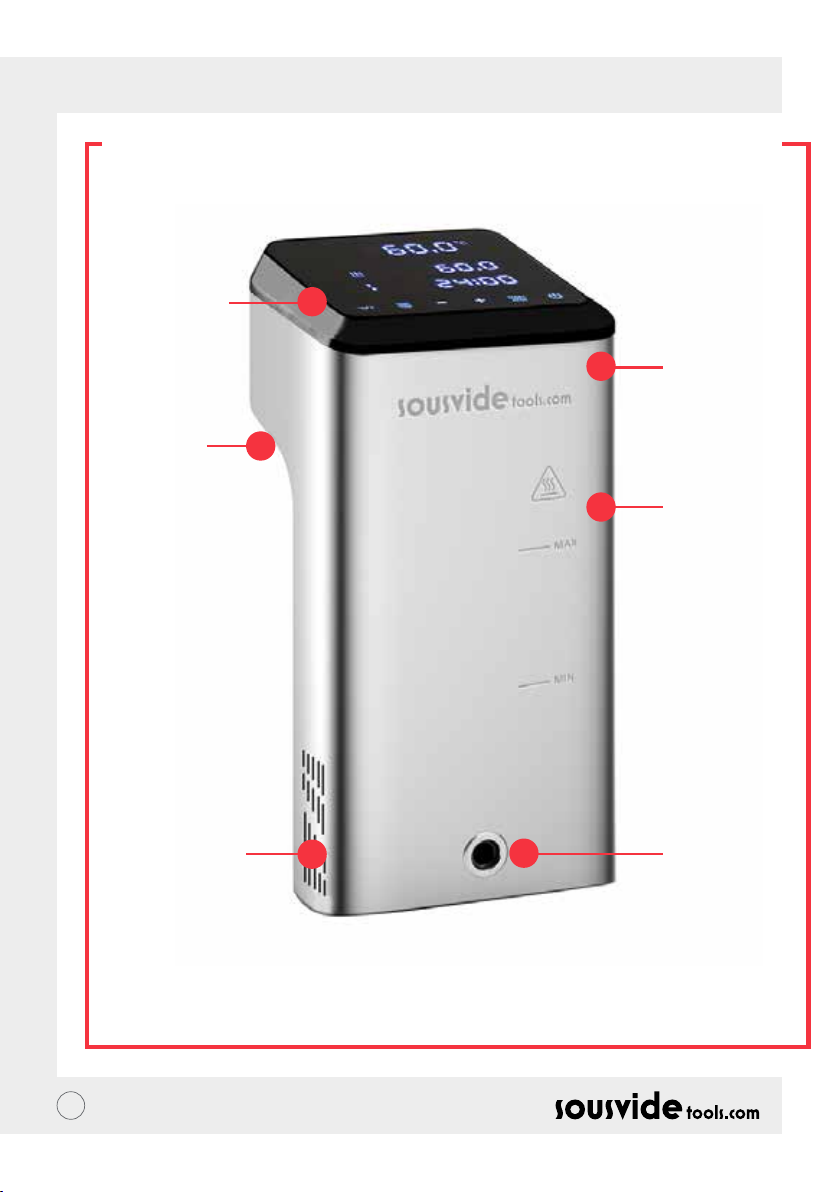
ES // MANUAL DEL USUARIO
ESTRUCTURA DEL PRODUCTO
1. Panel de
Control
5. Manilla
Fija
2. Cubierta
superior
3. Cuerpo
Principal
6. Entrada de
agua
39
4. Salida de
agua
Page 40
ES // MANUAL DEL USUARIO
LA APLICACIÓN
Descargando la aplicación iVide Plus Thermal Circulator
Si la aplicación del iVide Plus Thermal Circulator aún no se ha descargado, se puede descargar desde la
apple store (IOS) o Google Play Store (Android). Es compatible con las versión de IOS 9.3.5 y posteriores. Es
compatible con las versiones de Android 4.3 y posteriores.
Nota: Si tienes preguntas acerca de la Aplicación por favor verica con tu telefono movil o con el fabricante.
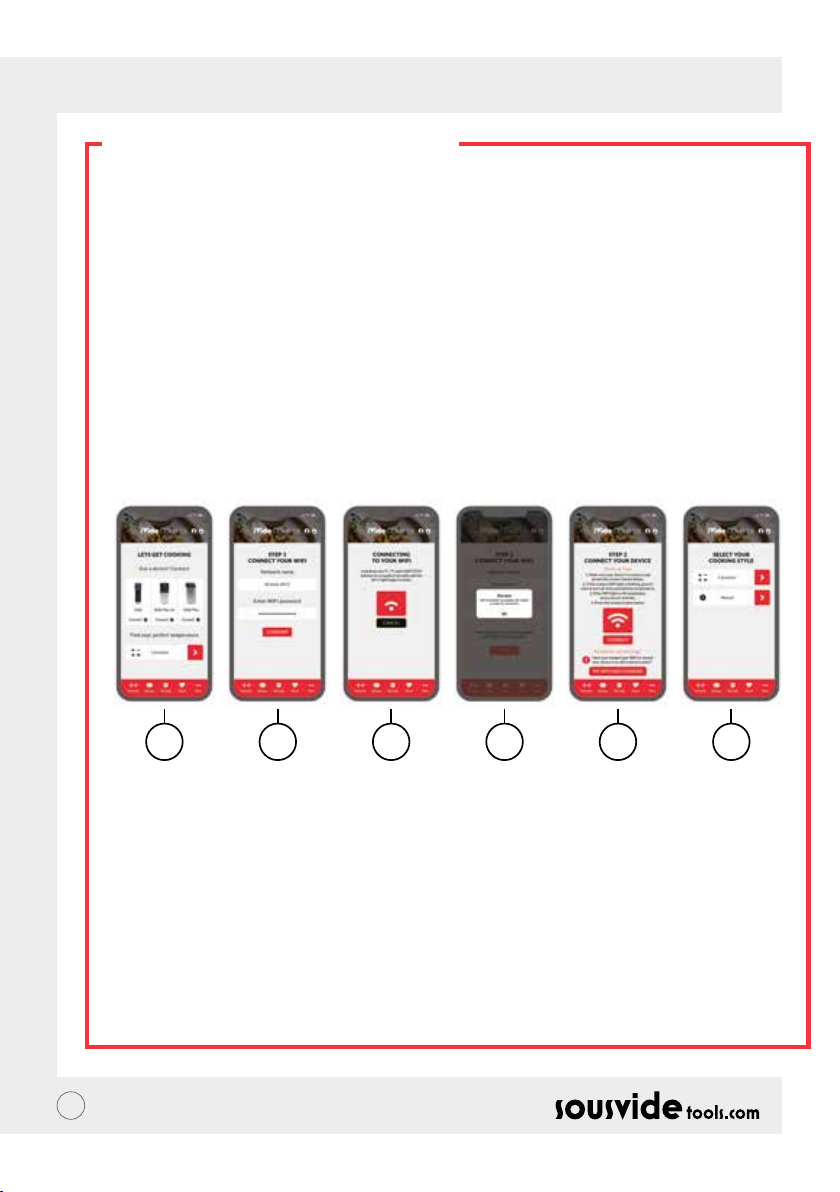
Seis pasos para congurar la APP del iVide PlusThermal Circulator
Instalar la aplicación del iVide Plus Thermal Circulator es rapido, en contraste con otras aplicaciones. The iVide
APPS permiten uso instantaneo, proporcionando la información necesaria exactamente cuando la necesitas.
Hemos desarrollado un enfoque completamente nuevo para este tipo de aplicaciococina debe ser inolvidable.
La APP es compatible con el iVide Plunes porque cada momento en la s Thermal Circulator atraves de WIFI. La
APP hace que cocinar con el iVide Plus Thermal Circulator sea increiblemente facil. Simplemente selecciona la
comida, ajusta la conguración y presiona el botón de Start.
Seis Sencillos Pasos.
1 2 3 4 5 6
1 Seleccione el dispositivo que desea usar y presione “CONNECT”.
2 La Aplicación detectara una conexión WIFI. Ingrese la contraseña y presione ‘Conrm‘.
3 La aplicación empezara a buscar el iVide Plus Thermal Circulator. Mantenga Presionado los botones de
°C / °F y Start / Stop durate unos segundos hasta que la luz del WIFI empieze a parpadear. Espere hasta que
el dispositivo termine con la conguración automatica.
4 A la nal, usted vera un mensaje conrmando que el dispositivo esta listo para conectarse.
5 Asegurese de que la luz indicador de WIFI ha parado de parpadear y luego presione el botón ‘Connect‘. Si
necesita ayuda, lea los consejos y sugerencias en la pantalla.
6 Felicitaciones! El iVide Plus Thermal Circulator ha sido congurado! Disfruta de tu cocina!
Nota: The Apple y iPhone logos son marcas registradas de Apple inc, registradas en USA y otros países. Apple
Store es una marca de servicios de Apple Inc. Android; Google Play y Google Play logo son marcas registradas de
Google Inc.
40
Page 41

ES // MANUAL DEL USUARIO
INSTRUCCIONES DE USO
1 Comience por conectar el iVide Plus Thermal Circulator al recipiente de cocción. Gire la perilla en sentido
contrario a las agujas del reloj , forme un espacio entre el cuerpo principal y la perilla, inserte la máquina en
el recipiente de cocción y apriete la perilla en sentido de las agujas del reloj para asegurar la maquina.
2 Agregue agua al recipiente de cocción, asegurandose de que la cantidada del agua se encuentre entre el
nivel minimo y el maximo.
3 Conecte la fuente de poder para encender e iluminar la pantalla digital. El iVide Plus Thermal Circulator
entrara en modo de ahorro de energia despues de 2 segundos. Despues de este tiempo, prensione el botón
de encendido para encender la maquina.
4 Haga click en °C/°F para seleccionar la unidad de visualización de temperatura. El valor predeterminado de
°C se recordara para la proxima vez que utilize la maquina.
5 Haga click en el botón TEMP/ TIME para seleccionar la temperatura o tiempo deseados con las teclas + y -.
6 Despues la conguración esta completa, haga click en el botón START/STOP para iniciar la maquina.
Despues de que la temperatura en el recipiente de cocción alcanza la temperatura requerida, la lectura
digital de tiempo (C) comienza el conteo regresivo – ahora agregue sus alimentos empaquetados al vacio
para una cocción a temperatura constante.
7 Despues de que la cocción ha terminado, El iVide Plus Thermal Circulator emitira un sonido. Haga click en el
botón de START/STOP para apagarlo.
Nota: Si no se realiza ninguna operación, el dispositivo emitira un sonido durante 20 segundos, mientras que la
temperatura se mantendra constante.
8 Retire su comida empaquetada al vacío de la maquina. La comida ahora esta lista para la siguite preparación.
9 Despues de usar el iVide Plus Thermal Circulator, apaguelo y guardelo.
!RECUERDA!: Antes de cocinar Sous Vide, la comida debe empaquetarse al vacío. El nivel del agua (despues
de que la comida esta dentro) debe ser mayor al limite MIN, pero menor al limite MAX de agua marcado en la
maquina. Para evitar dañar la maquina, drene el agua despues de su uso y limpie el recipiente de cocción.
MANTENIMIENTO
Para evitar quemaduras, por favor asegurese de que el iVide Plus Thermal Circulator esta apagado y enfriado
antes de limpiar.
1 Coloque el iVide Plus Thermal Circulator verticalmente despues de limpiar, No lo coloque en posición
horizontal o al revés.
2 Durante la limpieza, no dañe los componentes internos de la maquina. Una vez los componentes esten
dañados, consulte con un especialista para que los revise y repare. No intente realizar reparciones no
autorizadas ya que esto podria resultar en un accidente.
3 Vacíe el agua despues de cada uso. Vuelva a llenar con agua fresca la proxima vez que utilize el iVide Plus
Thermal Circulator. Si se reutiliza el agua, residuos minerales podrian dañar los componentes internos.
4 Retire la cubierta posterior del iVide Plus Thermal Circulator para limpiar el tubo de calor y prueba si la
capacidad de descarga se reduce o si los componentes han acumulado suciedad. Es recomendable efectuar
una limpieza al iVide Plus Thermal Circulator cada 20 usos o cada 100 horas de uso.
5 No introduzca el iVide Plus Thermal Circulator en agua fria debido a que esto podria causar daños al mismo.
El iVide Plus Thermal Circulator debe enfriarse a temperatura ambiente y puesto en agua fria para usarse.
41
Page 42
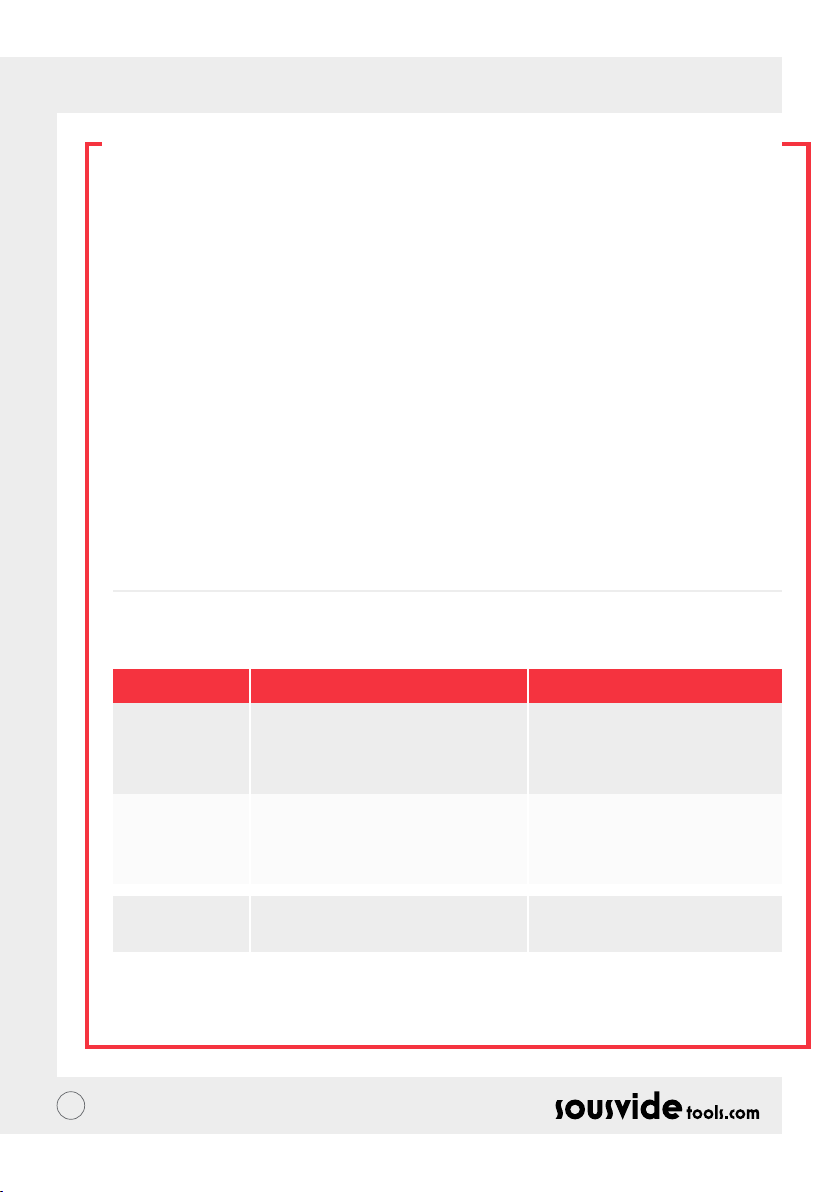
ES // MANUAL DEL USUARIO
LIMPIEZA Y ALMACENAMIENTO
Preparación
iVide Plus Thermal Circulator puede ser limpiado vinagre (vinagre blanco, vinagre de manzana,etc.)
Por que la necesidad de limpiar?
Normalmente el agua contiene minerales que cuando son calentados a cierta temperatura crean una capa
de sedimento que recubre el calentador o la supercie de la maquina. En estos casos la capa de sedimento
afecta el redimiento de la maquina. Es recomendable limpiar la maquina cada 20 veces o despues de 100 horas
de uso. Usted puede limpiar la maquina de acuerdo a sus necesidades y dependiendo del tipo de agua en las
diferentes areas.
Como Limpiar
1 Llene el recipiente con agua (hasta la linea MAX). Agregue 5g de vinagre en el agua.
2 Encienda el iVide plus Thermal Circulator, ajuste la temperatura a 80°C (176°F) y el tiempo a 3 horas
(03:00). Haga click START/STOP. Despues de 3 horas, la maquina emitira un sonido y se apagara.
*Procedimiento rapido de limpieza: mantenga presionado los botónes START/STOP y -. La lectura digital
(B) mostrara la temperatura seleccionada 80°C, la lectura digital (C) mostrara el tiempo seleccionado 3:00.
Suelte el botón y la lectura digital (B) & (C) parpadearan 10 veces. Haga click en el botón de START/STOP
para empezar el proceso de limpieza.
3 Verique si la maquina esta limpia. Si la maquina no esta limpia agregue mas vinagre y repita el proceso. Si la
maquina esta limpia, por favor drene el vinagre de la maquina, y lavela con agua fresca, deje secar y guarde.
SOLUCIÓN DE PROBLEMAS
Error De Codigo
E01
E02
LP
** Durante el uso de la máquina, Si surge algún otro problema, por favor hable con un especialista. No intente
realizar reparaciones sin autorización debido a que esto podria causar un accidente.
42
Causa Del Problema
El nivel del agua es mas bajo que el nivel
MIN de agua o mayor al nivel MAX de
agua.
1. La tuberia de calefacción se encuentra
en buenas condiciones:
2. El cableado interno se encuentra en
buenas condiciones:
3. Esta el sensor de temperatura calibrado?
La máquina repentinamente pierde
energia durante el proceso de cocción
Solución De Problema
Apague la maquina. Si el nivel del agua
es muy bajo, agregue la cantidad justa
de agua al recipiente, Si el nivel de agua
es muy alto, remueva agua del recipiente.
Es necesario la asistencia de un
profesional para las reparaciones
Page 43
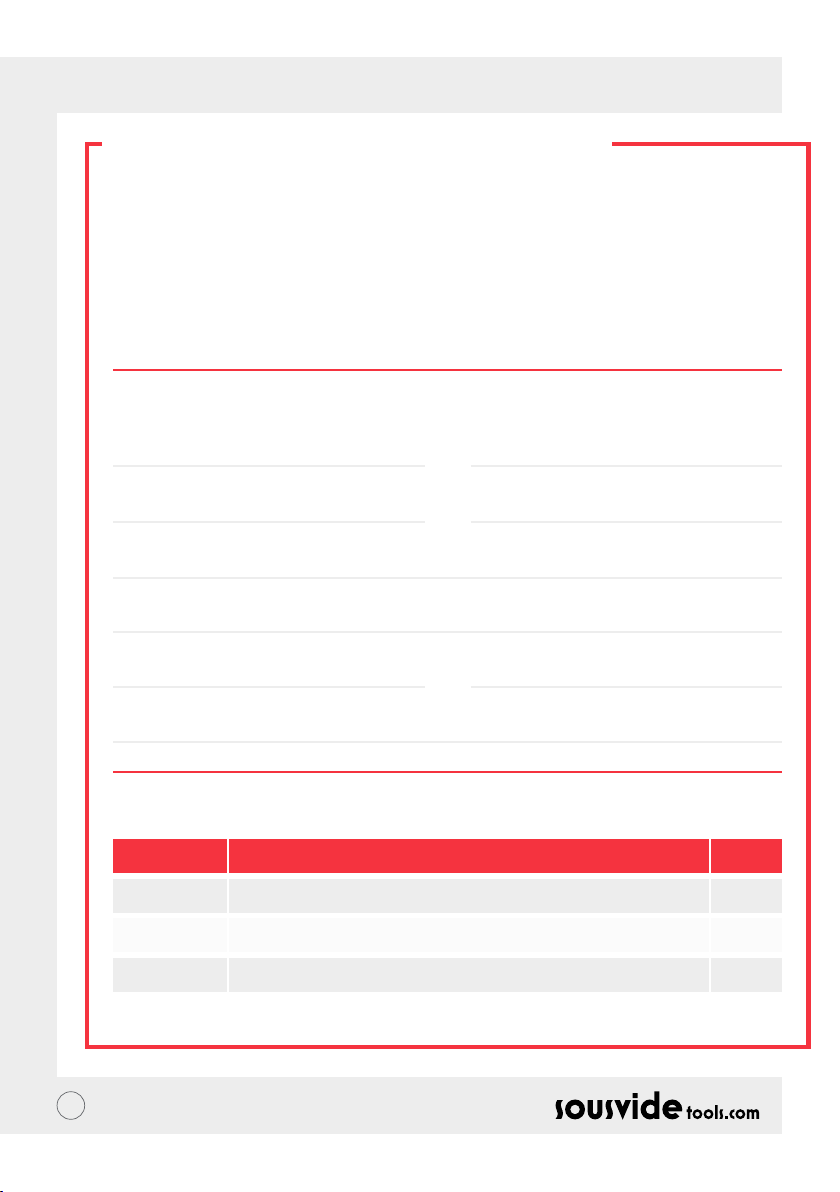
ES // MANUAL DEL USUARIO
GARANTÍA & SERVICIO
POSTVENTA
1 Asegurese de que la plataforma de trabajo este plana, limpia y ordenada.
2 La garantía esta limitada a daños causados por defectos de fabrica.
3 El costo de las partes y mantenimiento se cobrará debido al uso inadecuado o otros problemas de calidad
que no sean del producto.
4 Por favor conserve la factura.
Tarjeta de mantenimiento
Nombre:
Telefono:
Dirección:
Modelo de la Máquina:
Proveedor:
Apellido:
Correo Electronico:
Fecha de Compra:
Registro de Reparación
Fecha Causa Por
43
Page 44

PT // MANUAL DO USUÁRIO
SOBRE O IVIDE
Fundada em 2011, a Sousvidetools.com é uma empresa de alimentos e tecnologia com a missão de ajudar
pessoas a cozinharem de maneira mais inteligente #clevercooking. Além disso, somos a principal autoridade
em nosso campo de atuação, tendo produzido 2 livros de culinária, uma calculadora sous vide, um APP e um
guia de treinamento em conjunto com a Campden BRI, líder de fornecimento de serviços práticos cientícos,
técnicos e consultivos no Reino Unido e agora o fogão sous vide, líder do mercado mundial.
Nossa equipe é composta por 15 vozes - e todos nós vamos trabalhar todos os dias com uma coisa em mente:
trabalhar para criar melhores ferramentas que transformam o estresse do preparo em um sucesso na hora
do jantar. (Nós chamamos isso de “#clevercooking.”) Por quê? Pois quanto mais você souber sobre cozinhar,
melhor você cará nessa empreitada. Nossos chefs de pesquisa estão constantemente cozinhando, e você é
quem pode colher os benefícios em nome desta I&D.
Então por que o fogão iVide? Queremos tornar tudo mais fácil para os novatos e especialistas da sous vide,
para que possam cozinhar comida de qualidade em suas casas, sempre com um acabamento perfeito. Então
diga adeus à comida cozinhada excessivamente e seca, com gosto de papelão e diga “olá” a jantares gourmet.
O Circulador Térmico SousVideTools iVide Plus com uma tela sensível ao toque de alta resolução com 4.5
polegadas de largura. Funciona com WIFI, o que signica que você pode controlá-lo remotamente de qualquer
lugar através do nosso aplicativo, também é projetado para garantir a segurança alimentar. Com uma capacidade
de 80 litros, garante uma estabilidade de temperatura de 0,07 °C entre 40 °C e 100 °C. e 2 anos de garantia.
O iVide Plus é o primeiro dispositivo à prova de água para a cozinha comercial, com certicado IPX7. Sob a
designação IPX7, o fogão iVide Plus Sous Vide será capaz de suportar imersão em água de até 1 metro por até 30
minutos. Isso signica que, caso um acidente aconteça, e o dispositivo esteja borrifado ou submerso, ele não sofrerá
danos, porém a exposição prolongada - como a colocação em uma máquina de lavar louça - seria prejudicial.
SEGURANÇA
Por favor, siga estas precauções de segurança:
• Opere o Circulador Térmico iVide Plus apenas de acordo com o manual do usuário. Não fazer isso pode
resultar em danos à máquina.
• Conecte a fonte de alimentação mostrada somente na etiqueta de classicação.
• Conecte apenas com o aterramento.
• Desligue a fonte de alimentação antes de remover a máquina.
• Não toque diretamente no líquido para vericar a temperatura. Por favor, use o display de temperatura ou
termômetro.
• O nível da água deve estar entre o nível de água mais baixo "MIN" e o nível de água mais alto "MAX". Não
fazer isso pode resultar em danos à máquina.
• Não toque em nenhuma superfície quente do Circulador Térmico iVide Plus durante ou imediatamente após
o uso.
• Se o líquido estiver no topo do Circulador Térmico iVide Plus (acima do nível de água MÁX), desligue a
energia e seque-o antes de usar.
• Recomendamos que os usuários do Circulador Térmico iVide Plus sejam previamente completamente
instruídos antes do uso ou sejam supervisionados por um usuário experiente.
• Mantenha o líquido longe do receptáculo de energia e do ventilador na parte traseira do Circulador Térmico
iVide Plus. Não fazer isso pode resultar em danos à máquina e ao usuário.
44
Page 45
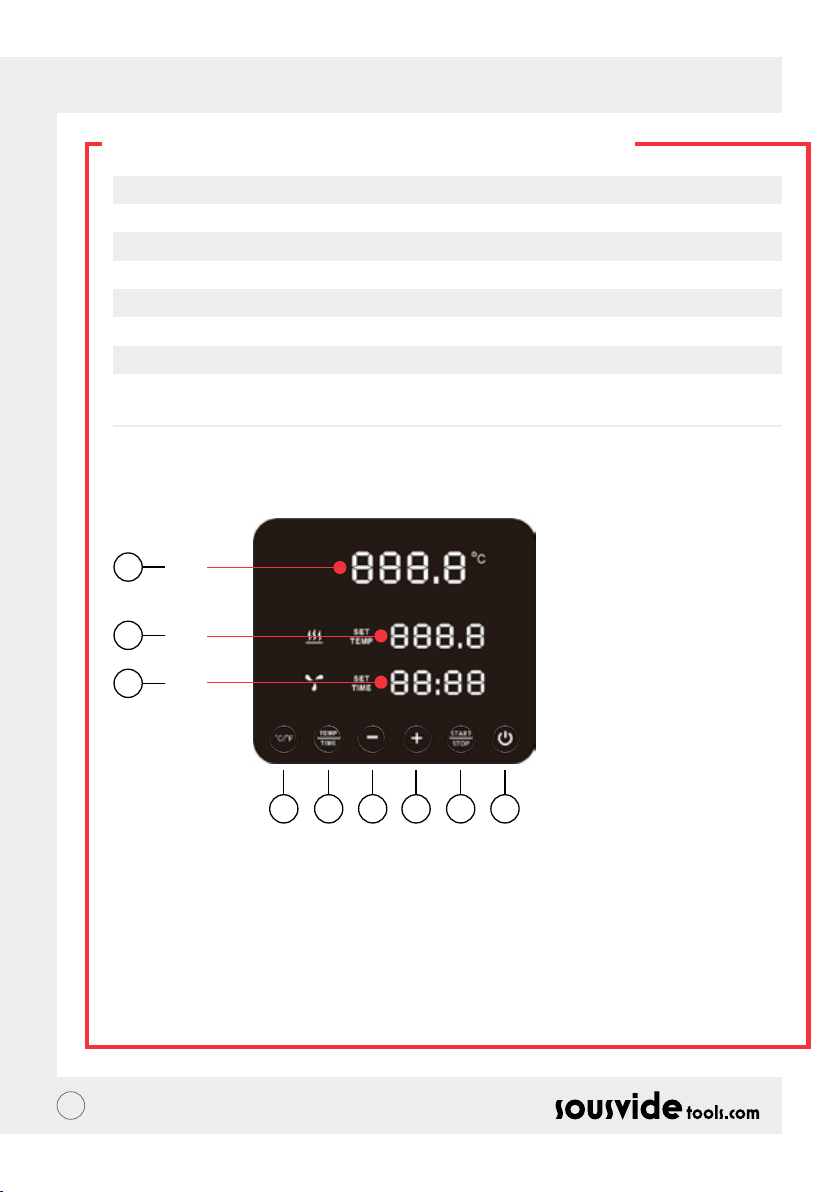
PT // MANUAL DO USUÁRIO
PARÂMETROS TÉCNICOS
Tensão nominal 220-240V~
Frequência nominal 50HZ
Potência nominal 2300W
Faixa de ajuste de temperatura 5 - 95°C / 41 - 203°F
Faixa de ajuste de tempo 5 min - 99 hours 59 minutes
Faixa de ajuste de tempo 0.1
Dimensões 5.5”x5.6”x11.9” (140x143x302mm)
Peso 2.2Kg
FUNÇÃO DO PRODUTO
6
A
7
B
8
C
145532
1. Potência
• Quando a energia estiver ligada, o botão e a luz indicadora demonstrarão. A máquina mudará para o modo
de economia de energia após 2 segundos.
• No modo de economia de energia, pressione o botão de energia para ativar a máquina e entrar no modo de
espera. Neste momento, a leitura digital (A) mostra a temperatura atual da água, a leitura digital (B) mostra
a anterior. A temperatura denida no procedimento, a leitura digital (C), mostra o horário de trabalho
denido do último procedimento.
• No modo ON (o indicador do botão está totalmente iluminado), pressione este botão para entrar no modo
de economia de energia. Também pode ser pressionado durante o processo de cozimento para entrar assim
diretamente no modo de economia de energia.
45
Page 46

PT // MANUAL DO USUÁRIO
FUNÇÃO DO PRODUTO
2. °C/°F
Botão interruptor de temperatura
• Clique em °C/°F para selecionar a unidade de exibição de temperatura da máquina. Por favor selecione
celsius ou fahrenheit.
3. TEMP / TIME (TEMP. / TEMPO)
Botão de ajuste de ajuste de tempo e temperatura
• Clique em TEMP / TIME para alterar a temperatura ou a hora. Quando a leitura digital da temperatura
(B) estiver piscando, ajuste a temperatura desejada com + e -. Quando a leitura digital do tempo (C) estiver
piscando, o tempo desejado pode ser denido com + e -.
* Se não houver tempo nem temperatura denidos após a leitura digital piscar 10 vezes, o Circulador Térmico
iVide Plus sairá da opção TEMP / TIME. Se você precisar redenir, clique em TEMP / TIME novamente para
inserir os detalhes necessários.
* Para exibir o tempo e a temperatura denidos, pressione o botão TEMP / TIME por 3 segundos.
4. START / STOP (INICIAR / PARAR)
Botão Start/Stop
• No modo de espera, clique em START / STOP para começar a trabalhar.
• No modo de trabalho, clique em START / STOP para parar de trabalhar
5. + -
Botão de ajuste
• Para ajustar a temperatura ou o tempo, clique em TEMP / TIME, selecione a opção desejada e use os botões
+ e - para ajustar.
6. Leitura Digital de Temperatura (A)
• Exibe a temperatura de trabalho em tempo real.
7. Leitura Digital de Temperatura (B)
• Exibe a temperatura ajustada para a operação.
8. Leitura Digital de Tempo (C)
• No modo de espera, o tempo denido é exibido.
• No modo de trabalho, o tempo de trabalho restante é exibido.
46
Page 47
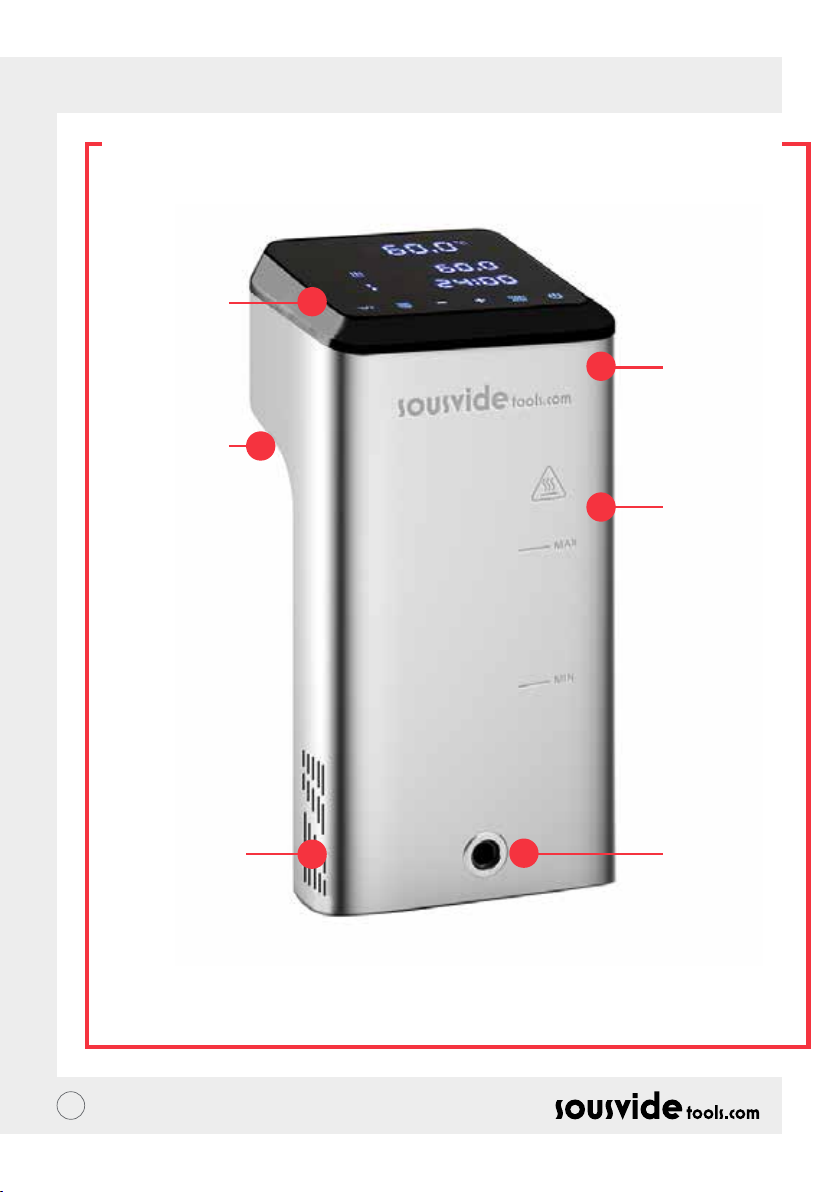
PT // MANUAL DO USUÁRIO
ESTRUTURA DO PRODUTO
1. Painel de
controle
5. Alavanca
xa
2. Tampa
superior
3. Corpo
principal
6. Entrada de
água
47
4. Saída de
água
Page 48
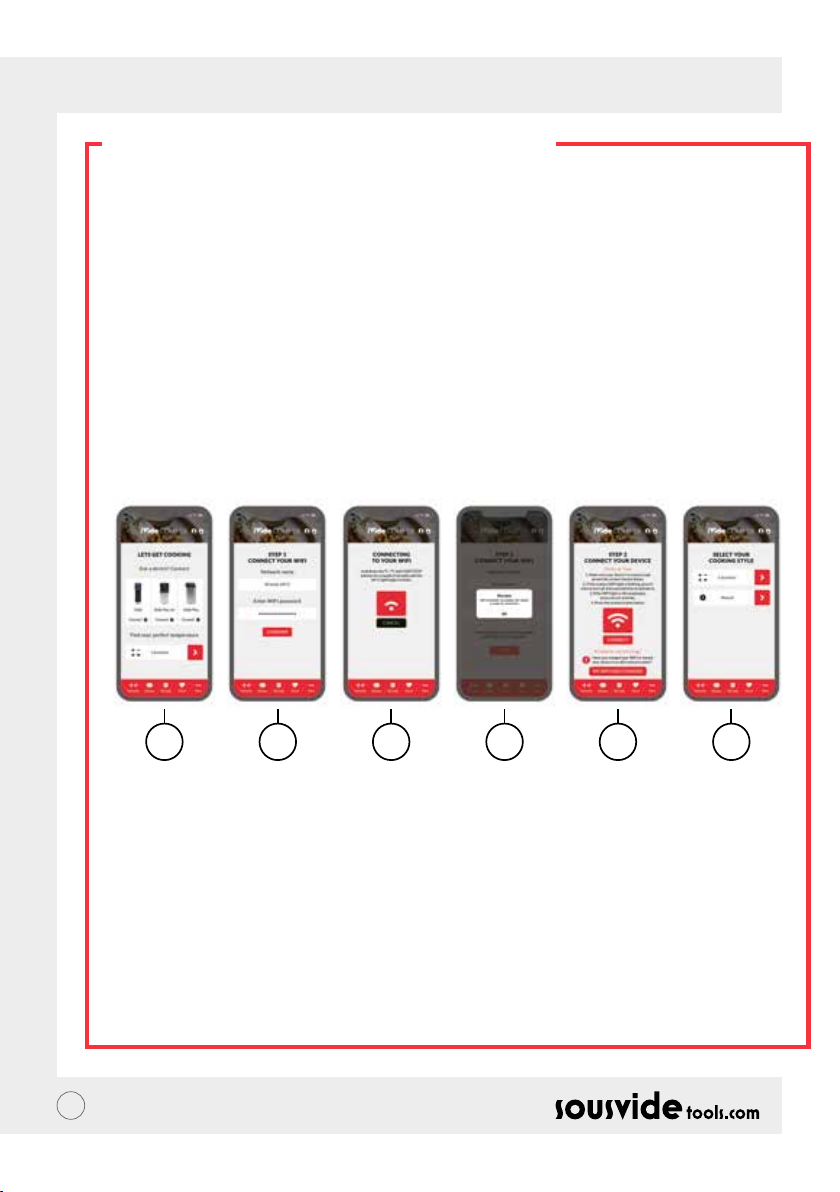
PT // MANUAL DO USUÁRIO
O APP (APLICATIVO)
Fazendo o download do aplicativo do Circulador Térmico iVide Plus
Se o aplicativo do Circulador Térmico iVide Plus ainda não tiver sido baixado, ele poderá ser baixado na Apple
Store (IOS) ou no Google Play (Android). É compatível com o IOS versão 9.3.5 e posterior. É compatível com a
versão Android 4.3 e posterior.
Nota: Consulte o fabricante do seu celular ou dispositivo se tiver dúvidas sobre o download de aplicativos.
Seis passos para congurar o aplicativo do Circulador Térmico iVide Plus
Instalar o aplicativo do Circulador Térmico iVide Plus é rápido, em comparação a outros aplicativos. Os
aplicativos iVide permitem o seu uso instantâneo, fornecendo as informações necessárias exatamente quando
você precisar. Desenvolvemos uma abordagem completamente nova para esse tipo de aplicativos, porque cada
momento na cozinha deve ser inesquecível. O aplicativo é compatível com o Circulador Térmico iVide Plus
equipado com Wi-Fi. O aplicativo torna o ato de cozinhar com o Circulador Térmico iVide Plus incrivelmente
fácil. Basta selecionar a comida, ajustar as congurações e pressionar iniciar.
Seis Passos Fáceis
1 2 3 4 5 6
1 Selecione o aparelho que você deseja usar e pressione “CONNECT” (Conectar).
2 O aplicativo detectará uma rede Wi-Fi com conexão. Insira a senha e aperte ‘Conrm’ (Conrmar).
3 O aplicativo então começará a procurar o Circulador Térmico iVide Plus. Mantenha pressionados os botões
° C / ° F e start/stop (iniciar/parar) por alguns segundos até que a luz do Wi-Fi comece a piscar. Aguarde até
que o aparelho conclua a conguração automática.
4 No nal, você verá uma mensagem conrmando que o aparelho está pronto para ser conectado.
5 Certique-se de que a luz do Wi-Fi parou de piscar e pressione o botão "Conectar". Se precisar de ajuda,
leia as dicas e sugestões no visor.
6 Parabéns! O Circulador Térmico iVide Plus acaba de ser congurado! Desfrute de seu cozinhar!
Nota: Os logotipos da Apple e do iPhone são marcas comerciais da Apple Inc., registradas nos EUA e em outros
países. Apple Store é uma marca de serviço da Apple Inc. Android; Google Play e seu logotipo são uma marca
comercial da Google Inc.
48
Page 49

PT // MANUAL DO USUÁRIO
INSTRUÇÕES DE OPERAÇÃO
1 Comece ligando o Circulador Térmico iVide Plus ao recipiente de cozedura. Gire o botão no sentido anti-
horário, forme um espaço entre o corpo principal e o botão, insira a máquina no recipiente de cozimento e
aperte o botão girando no sentido horário para xar a máquina.
2 Adicione água ao recipiente de cozimento, certicando-se de que o nível de água esteja entre o nível mínimo
de água e o nível máximo de água.
3 Conecte à energia para ligar e iluminar o mostrador digital. O Circulador Térmico iVide Plus entrará no
modo de economia de energia após 2 segundos. Após esse tempo, pressione o botão de energia para colocar
a máquina no modo ON (LIGADO).
4 Clique em °C/ F para selecionar a unidade de exibição de temperatura. O padrão é ° C. Sua unidade de
temperatura selecionada será lembrada para a próxima vez que você usar a máquina.
5 Clique em TEMP/TIME para selecionar a temperatura ou a hora e dena o valor desejado com as teclas + e -.
6 Após a conclusão da conguração, clique em START/STOP para iniciar a máquina. Depois que a temperatura
no recipiente de cozimento atingir a temperatura desejada, a leitura digital do tempo (C) começará a
contagem decrescente - agora adicione seu alimento embalado a vácuo para cozinhar em temperatura
constante.
7 Depois de terminado o cozimento, o Circulador Térmico iVide Plus emitirá um sinal sonoro. Clique em
START / STOP para desligar.
Nota: Se não estiver em operação, a máquina emitirá um bipe contínuo após 20 segundos, durante isso a
temperatura da água permanecerá na temperatura predenida.
8 Tire o seu alimento embalado a vácuo. A comida agora está pronta para o próximo procedimento.
9 Depois de usar o Circulador Térmico iVide Plus, desligue e guarde-o em local seguro.
NÃO SE ESQUEÇA: Antes de cozinhar com a Sous Vide, o alimento deve ser embalado a vácuo. O nível da água
(após a colocação do alimento) deve ser maior que o MIN (mínimo), mas menor que o MAX (máximo) marcado
na máquina. Para evitar danos à máquina, drene a água após o uso e limpe o recipiente.
MANUTENÇÃO
Para evitar queimaduras, certique-se de que o Circulador Térmico iVide Plus esteja desligado e resfriado até
a temperatura ambiente antes de limpar.
1 Coloque o Circulador Térmico iVide Plus verticalmente após a limpeza, não o coloque horizontalmente ou
de cabeça para baixo.
2 Durante a limpeza, não danique os componentes dentro da máquina. Se os componentes forem
danicados, peça a um especialista para vericar e consertar. Não tente efetuar reparos não autorizados,
pois isso pode resultar em um acidente.
3 Esvazie a água velha depois de cada uso. Volte a enchê-lo com água fresca quando for utilizar o Circulador
Térmico iVide Plus. Se a água for reutilizada, a substância mineral pode danicar os componentes.
4 Remova a tampa traseira do Circulador Térmico iVide Plus para limpar o tubo de calor e a sonda se a
capacidade de descarga diminuir ou os componentes tiverem coletado sujeira. Recomenda-se a limpar o
circulador térmico iVide Plus a cada 20 usos ou após 100 horas de utilização.
5 Não coloque um Circulador Térmico iVide Plus quente em água fria, pois isso pode causar danos. O
Circulador Térmico iVide Plus deve ser resfriado à temperatura ambiente e água fria deve ser colocada nele
para uso.
49
Page 50
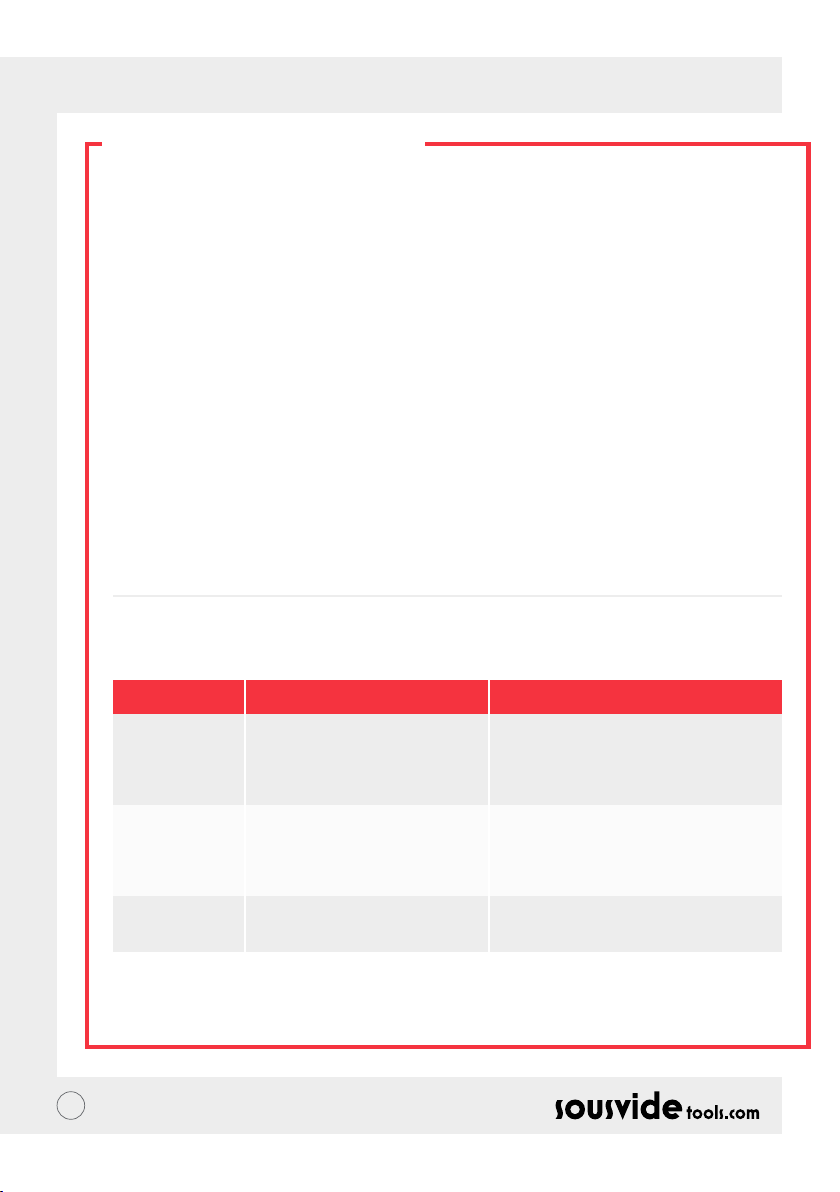
PT // MANUAL DO USUÁRIO
COMO LIMPAR
Preparação
O Circulador Térmico iVide Plus pode ser limpo com vinagre de qualidade alimentar (vinagre branco, vinagre
de maçã, etc.)
Por que a necessidade de limpar?
A água normal da torneira contém minerais que, quando a água é aquecida a uma certa temperatura, criam
uma crosta no aquecedor ou na superfície da máquina. Neste caso, a crosta afetará o desempenho da máquina.
Recomenda-se limpar a máquina a cada 20 usos ou após 100 horas de uso. Você pode limpar a máquina de
acordo com suas necessidades reais devido aos diferentes tipos de água em diferentes áreas.
Como limpar
1 Encha o recipiente (até a linha MAX) com água. Adicione 5g de vinagre à água.
2 Ligue o Circulador Térmico iVide Plus, dena a temperatura de trabalho para 80°C (176 ° F) e o tempo para
3 horas (03:00). Clique em START/STOP. Após 3 horas, a máquina apitará e desligará.
* Procedimento de limpeza rápida: Mantenha pressionados os botões START/STOP e -. A leitura digital (B)
mostrará a temperatura ajustada 80°C, a leitura digital (C) mostrará o tempo ajustado de 3:00. Solte o botão
e a leitura digital (B) e (C) piscará 10 vezes. Clique no botão START/STOP para iniciar a operação de limpeza.
3 Verique se a máquina está limpa. Se a máquina não estiver limpa, adicione mais vinagre e inicie o processo
novamente. Se a máquina estiver limpa, drene o vinagre da máquina, lave a máquina com água fresca, seque
e guarde.
SOLUÇÃO DE PROBLEMAS
Código de erro
E01
E02
LP
** Se surgir algum outro problema durante o uso da máquina, fale com um especialista. Não tente efetuar
reparos não autorizados, pois isso pode resultar em um acidente.
50
Causa do problema
O nível de água é menor que o nível
de água mais baixo ou maior que o
nível de água mais alto
1. Se o tubo de aquecimento estiver
normal; 2 Se a ação interna da
máquina estiver normal; 3. O sensor
de temperatura está normal?
A máquina de repente perde energia
durante a cozedura normal
Solução de Problemas
Desligue a energia. Se o nível da água estiver
muito baixo, adicione a quantidade certa de
água ao recipiente; se o nível da água estiver
muito alto, remova a água do recipiente.
Precisa perguntar a um prossional para
obter reparos
Page 51
PT // MANUAL DO USUÁRIO
GARANTIA E SERVIÇO
PÓS-VENDA
1 Certique-se de que a plataforma de trabalho seja plana, esteja limpa e arrumada.
2 A garantia é limitada a danos causados por defeitos de produção.
3 O custo de peças e manutenção será cobrado devido ao uso inadequado ou outros problemas de qualidade
não relacionados ao produto.
4 Por favor, guarde os comprovantes de compra.
Cartão de Manutenção
Nome:
Telefone:
Endereço:
Modelo da Máquina:
Fornecedor:
Sobrenome:
E-mail:
Data da Compra:
Registro de Reparos
Data Causa Por
51
Page 52

GR // ΟΔΗΓΙΕΣ ΧΡΗΣΗΣ
ΣΧΕΤΙΚΑ ΜΕ ΤΟ IVIDE
Η Sousvidetools.com είναι μια εταιρεία τεχνολογίας και τροφίμων που ιδρύθηκε το 2011 με στόχο να βοηθήσει τους
ανθρώπους να μαγειρεύουν εξυπνότερα #clevercooking. Επιπλέον, είμαστε η κορυφαία εταιρεία στο αντικείμενο
μας, έχοντας ήδη δημιουργήσει 2 βιβλία μαγειρικής, έναν μετρητή sous vide, μία εφαρμογή και έναν οδηγό
εκπαίδευσης σε συνεργασία με το Campden BRI. Τον ηγετικό πάροχο τεχνικών, πρακτικών και συμβουλευτικών
υπηρεσιών της Μ.Βρετανίας και πλέον της Παγκόσμιας αγοράς των sous vide cookers.
H ομάδα μας αποτελείται από 15 άτομα που μοιραζόμαστε καθημερινά τον ίδιο σκοπό, ‘‘Να δημιουργήσουμε
το καλύτερο εργαλείο που θα μετατρέπει το άγχος της μαγειρικής σε ένα επιτυχημένο δείπνο’’, (#clevercooking).
Γιατί έχουμε αυτόν τον σκοπό; Επειδή όσο καλύτερα γνωρίζεις την μαγειρική τόσο καλύτερος μάγειρας γίνεσαι! Οι
chefs ερευνητές μας μαγειρεύουν ασταμάτητα και εκμεταλλεύονται πλήρώς τα πλεονεκτήματα της έρευνας και
ανάπτυξης σε μια συνεχόμενη βελτίωση (R&D).
Ωστόσο, γιατί το iVide Cooker; Θέλουμε να κάνουμε την δουλεία των αρχάριων και επαγγελματιών Sous Chefs
ευκολότερη ούτως ώστε κάθε φορά να μαγειρεύουν στο σπίτι φαγήτο εξαιρετικής ποιότητας και με άψογο
τελείωμα. Οπότε πείτε αντίο στα παραμαγειρεμένα και στεγνά φαγητά και που έχουν γεύση πλαστικού και
καλοδεχτείτε φαγητά gourmet!
Το SousVideTools iVide Plus Thermal Circulator έχει οθόνη αφής 4.5 ιντσών υψηλής ευκρίνειας, σύνδεση WIFI όπου
σας επιτρέπει να το ελέγξεται από όπου θέλετε μέσω της εφαρμογής, και είναι σχεδιασμένο για να διασφαλίζει
την ασφάλεια του φαγητού. Η χωριτικότητα 80 λίτρων εγγυάται σταθερότητα θερμοκρασίας 0.07°C σε συνθήκες
θερμοκρασίων μετάξυ 40°C με 100°C, ακόμη, έχει εγγύηση 2 ετών.
Το iVide Plus είναι η πρώτη αδιάβροχη συσκευή επαγγελματικής κουζίνας, πιστοποιημένο με IPX7. Με τον
σχεδιασμός IPX7 το iVide Plus Sous Vide cooker μπορεί να αντέξει σε εμβύθιση 1 μέτρου νερού εώς και 30 λεπτά.
Με τέτοιες συνθήκες σημαίνει ότι ατυχήματα μπορούν να συμβούν αλλά λόγω του ότι η συσκευή είναι κάτω απο το
νερό δεν προκαλεί κάποια ζημιά.
ΑΣΦΑΛΕΙΑ
Παρακαλώ ακολουθήστε τις οδηγίες προφύλαξης :
• Χειριστήτε το the iVide Plus Thermal Circulator σύμφωνα με τις οδηγίες χρήσης. Ο λανθασμένος χειρισμός του
μπορεί να προκαλέσει ζημία στο μηχάνημα.
• Συνδέστε την ηλεκτροδότηση μόνο στην ενδεικτική πινακίδα.
• Σύνδεση μόνο σε επίπεδη παροχή.
• Απενεργοποιήστε την ηλεκτροδότηση πριν να αφαιρέσετε την μηχανή.
• Μην ακουμπήσετε απευθείας το νερό για να ελέγξετε την θερμοκρασία, αλλά χρησιμοποιήστε το θερμόμετρο ή
την οθόνη θερμοκρασίας.
• Το επίπεδο νερού πρέπει να είναι μεταξύ του ελάχιστου επιπέδου (Μin) και του μέγιστου επιπέδου (Μax). Η
λανθασμένη χρήση μπορεί να προκαλέσει ζημία στο μηχάνημα.
• Μην ακουμπήσετε το iVide Plus Thermal Circulator κατά την διάρκεια λειτουργίας ή άμεσα μετά την χρήση του.
• Εάν το επίπεδο νερού του iVide Plus Thermal Circulato είναι πάνω απο το επιτρεπόμενο όριο (Max water level)
τότε απενεργοποιήστε και στεγνώστε το πριν την χρήση.
• Παρακαλείστε να διάβασετε πλήρως τις οδηγίες ή να το λειτουργήσετε μαζί με κάποιο έμπειρο χειριστή πριν την
πρώτη χρήση.
• Κρατήστε το νερό μακρία από το δοχείο και τον ανεμιστήρα που είναι στο πίσω μέρους του iVide Plus Thermal
Circulator. Η λανθασμένη χρήση μπορεί να προκαλέσει ζημία στο μηχάνημα και στον χειριστή του.
52
Page 53
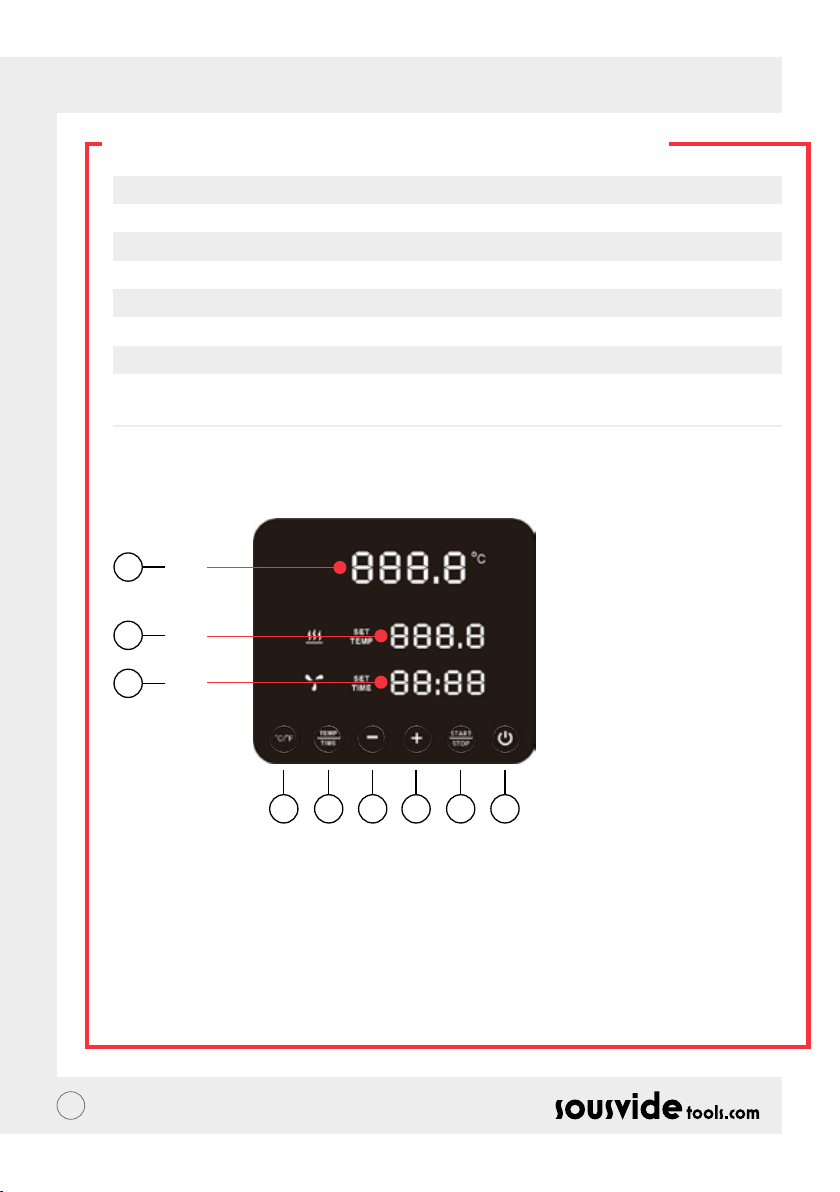
GR // ΟΔΗΓΙΕΣ ΧΡΗΣΗΣ
ΤΕΧΝΙΚΑ ΧΑΡΑΚΤΗΡΙΣΤΙΚΑ
Τροφοδοσία 220-240V~
Δείκτης συχνότητας 50HZ
Ισχύς 2300W
Εμβέλεια θερμοκρασίας 5 - 95°C / 41 - 203°F
Εμβέλεια χρόνου 5 λεπτά εώς 99 ώρες και 59 λεπτά
Aκρίβεια οθόνης 0.1
Μέγεθος 5.5”x5.6”x11.9”(140x143x302mm)
Βάρος 2.2Kg
ΛΕΙΤΟΥΡΓΙΑ ΠΡΟΪΟΝΤΟΣ
6
A
7
B
8
C
145532
1. Λειτουργία
• Όταν η λειτουργία είναι ενεργοποιημένη τότε το πλήκτρο εκκίνησης και η αντίστοιχη φωτεινή ένδειξη ανάβουν.
Το μηχάνημα μπαίνει αυτόματα σε λειτουργία εξοικονόμησης μπαταρίας σε 2 δευτερόλεπτα.
• Όταν είναι στην λειτουργία εξοικονόμησης μπαταρίας πατήστε το πλήκτρο εκκίνησης για να επαναφέρετε το
μηχάνημα και για να μπεί σε λειτουργία αναμονής. Σε αυτή τη χρονική περίοδο το ψηφιακό εικονίδιο (A) δείχνει
την τρέχον θερμοκρασία νερού, το ψηφιακό εικονίδιο (B) δείχνει την προηγούμενη θερμοκρασία νερού και το
ψηφιακό εικονίδιο (C) δείχνει τον χρόνο λειτουργίας της τελευταίας χρήσης. Η επιλεγμένη θερμοκρασία είναι σε
διαδικασία εφαρμογής.
• Όταν η λειτουργία είναι ενεργοποιημένη (το πλήκτρο είναι φωτισμένο), πατήστε το πλήκτρο εξοικονόμησης
μπαταρίας, επίσης, μπορείτε να το πατήσετε κατα την διάρκεια μαγειρέματος.
53
Page 54

GR // ΟΔΗΓΙΕΣ ΧΡΗΣΗΣ
ΛΕΙΤΟΥΡΓΙΑ ΠΡΟΪΟΝΤΟΣ
2. °C/°F
Πλήκτρο αλλαγής κλίμακας θερμοκρασία
• Επιλέξτε ποιά κλίμακα θερμοκρασίας θέλετε να εμφανίζεται στην οθόνη, μεταξύ βαθμών κελσίου (°C) και
φαρενάιτ (°F).
3. TEMP / TIME
Θερμοκρασία/Χρόνος
• Πατήστε στο TEMP / TIME για να ρυθμίσετε την θερμοκρασία ή τον χρόνο. Όταν το ψηφιακό εικονίδιο
(B) αναβοσβήνει ρυθμίστε την επιθυμητή θερμοκρασία με τα πλήκτρα (+) (-). Όταν το ψηφιακό εικονίδιο (C)
αναβοσβήνει ρυθμίστε τον επιθυμητο χρόνο με τα πλήκτρα (+) (-).
* Άν αναβοσβήσουν τα ψηφιακά εικονίδια 10 φορές χωρίς να επιλεγεί η θερμοκρασία ή ο χρόνος τότε αυτή η
επιλογή θα φύγει αυτόματα. Άν θέλετε να ξανα ρυθμίσετε τον χρόνο ή την θερμοκρασία τις επαναλάβετε την
διαδικασία.
* Για να εμφανιστεί η θερμοκρασία και ο χρόνος πιέστε το πλήκτρο TEMP / TIME για τρία δευτερόλεπτα.
4. Εκκίνηση/Τερματισμός
Πλήκτρο εκκίνησης και τερματισμού
• Σε λειτουργία αναμονής πατήστε το πλήκτρο START/STOP για εκκίνηση του μηχανήματος.
• Όταν το μηχάνημα είναι σε λειτουργία πατήστε το πλήκτρο START/STOP για τερματισμό του μηχανήματος.
5. + -
Πλήκτρο αλλαγής
• Για να αλλάξετε την θερμοκρασία ή τον χρόνο πατήστε το TEMP / TIME και επιλέξτε την επιθυμητή επιλογή και
χρησιμοποιήστε τα πλήκτρα + και – για αλλαγές.
6. Ψηφιακό εικονίδιο θερμοκρασίας (Α)
• Εμφανίζει την πραγματική θερμοκρασία λειτουργίας.
7. Ψηφιακό εικονίδιο θερμοκρασίας (Β)
• Εμφανίστε τη ρυθμισμένη θερμοκρασία λειτουργίας.
8. Χρόνος ψηφιακής ανάγνωσης (C)
• Σε λειτουργία αναμονής ο επιλεγμένος χρόνος λειτουργίας εμφανίζεται.
• Όταν το μηχάνημα είναι σε λειτουργία ο υπολειπόμενος χρόνος λειτουργίας εμφανίζεται.
54
Page 55
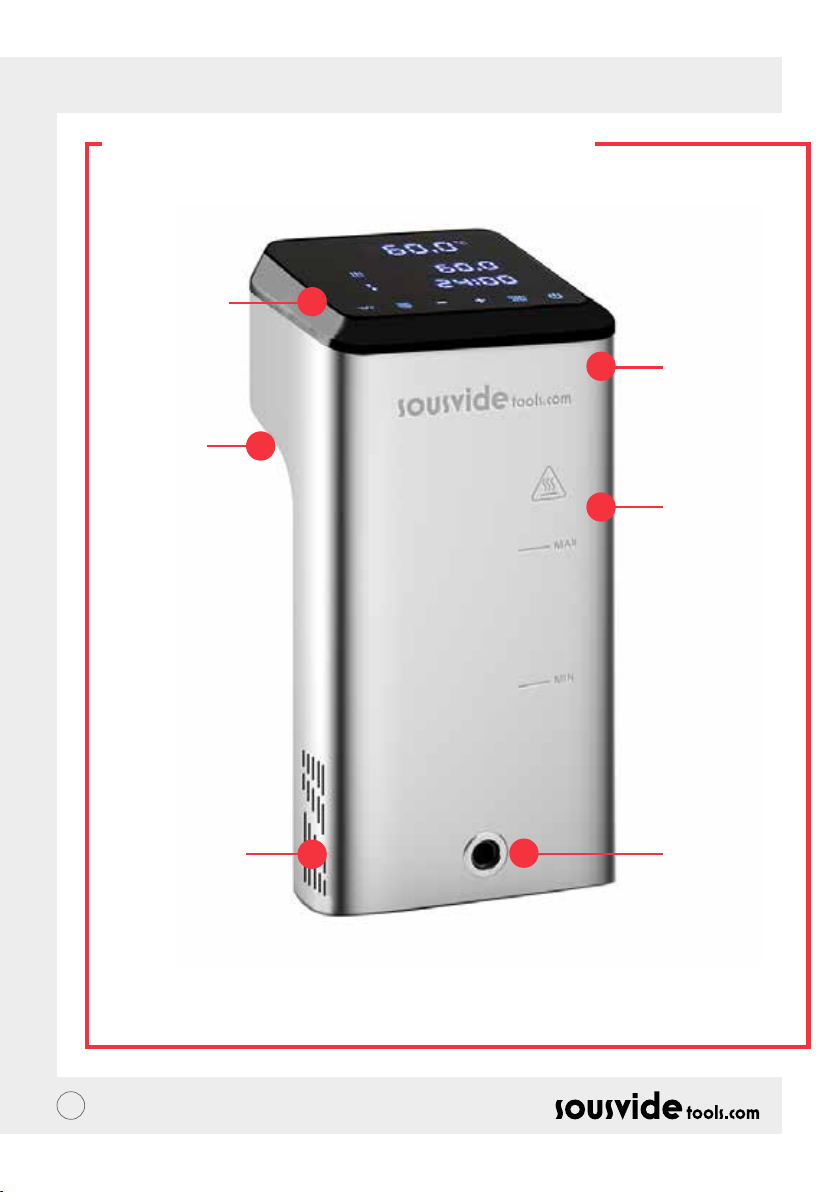
GR // ΟΔΗΓΙΕΣ ΧΡΗΣΗΣ
ΔΟΜΗ ΠΡΟΪΟΝΤΟΣ
1. Πίνακας
Ελέγχου
5. Σταθερή
λαβή
2. Ανώτατο
κάλυμμα
3. Κύριο
σώμα
6. Εισαγωγή
νερού
55
4.Έξοδος
νερού
Page 56
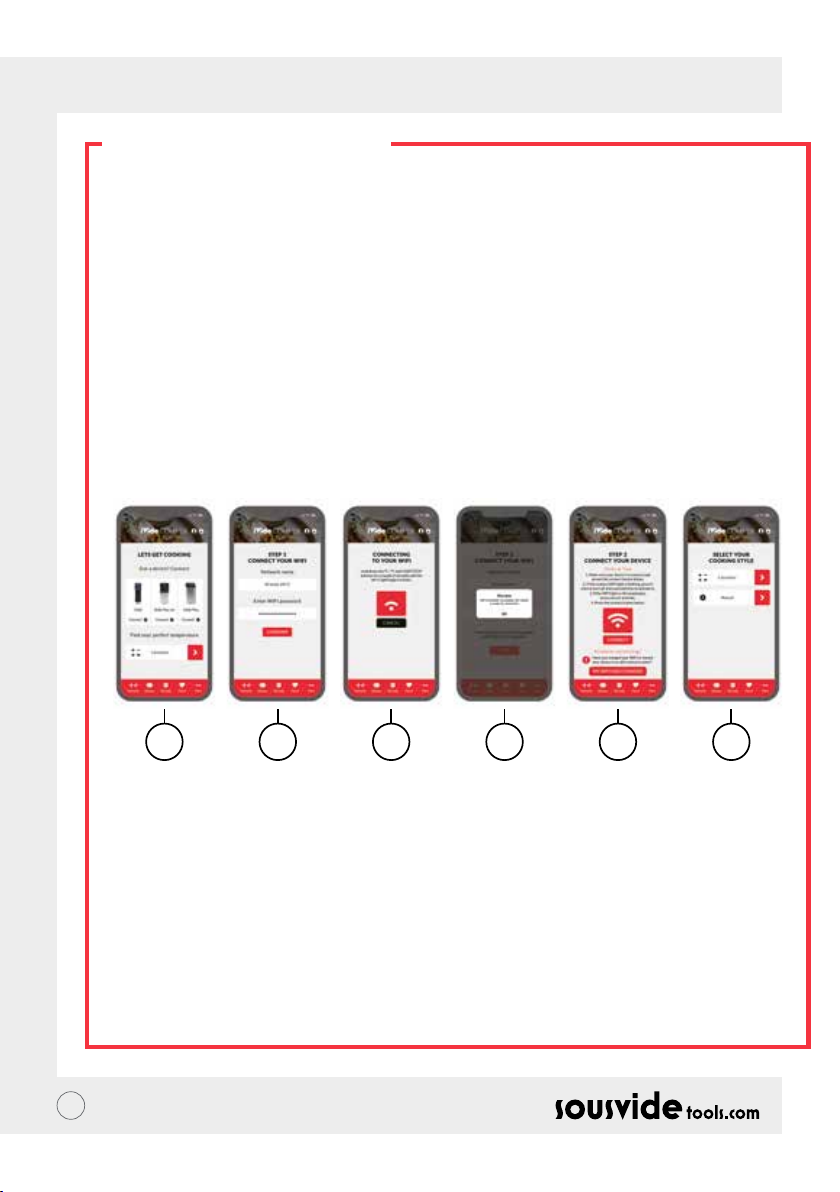
GR // ΟΔΗΓΙΕΣ ΧΡΗΣΗΣ
Η ΕΦΑΡΜΟΓΗ
Κατεβάστε την εφαρμογή The iVide Plus Thermal Circulator APP
Άν δεν έχετε ήδη κατεβάσει την εφαρμογή, μπορείτε να την κατεβάσετε από το Apple Store (IOS) ή Google Play
(Android). Η εφαρμογή είναι συμβατή σε IOS version 9.3.5 και Android version 4.3 και σε νεότερα λογισμικά τους.
Σημείωση: Παρακαλώ επικοινωνήστε με την κατασκευάστρια εταιρία του κινητού τηλεφώνου ή της συσκευής σας
αν έχετε απορίες σχετικά με την λήψη της εφαρμογής.
Τα έξι βήματα εγκατάστασης της εφαρμογής
Συγκριτικά με άλλες εφαρμογές η εγκατάσταση του the iVide Plus Thermal Circulator APP είναι πολύ απλή. Το iVide
APP επιτρέπει άμεση χρήση προσφέροντας τις απαραίτητες πληροφορίες όταν τις χρειάζεστε. Δημιουργήσαμε μια
καινούργια προσέγγιση επειδή κάθε στιγμή στην κουζίνα πρέπει να είναι μοναδική! Η εφαρμογή ειναι συμβατή
με το iVide Plus Thermal Circulator και συνδέεται μέσω Wi-Fi. Η εφαρμογή μαζί με το iVide Plus Thermal Circulator
incredibly κάνουν το μαγείρεμα μια εύκολη υπόθεση. Πολύ απλά, διαλέξτε φαγητό, αλλάξτε τις ρυθμίσεις και
πατήστε εκκίνηση!
Τα έξι απλά βήματα
1 2 3 4 5 6
1 Επιλέξτε την οικιακή συσκευή που θέλετε να χρησιμοποιήσετε και πατήστε σύνδεση (CONNECT).
2 Η εφαρμογή θα εντοπίσει τα δίκτυα Wi-Fi, επίλέξτε το δίκτυο που επιθυμείτε και πληκτρολογήστε τον κωδικό
σύνδεσης (Password) και έπειτα πατήστε επαλήθευση (Conrm).
3 Η εφαρμογή αυτόματα θα αναζητεί το iVide Plus Thermal Circulator, πιέστε αδιάκοπα τα πλήκτρα C / °F
και start/stop για λίγα δευτερόλεπτα μέχρι να ανάψει η φωτεινή ένδειξη του Wi-Fi, περιμένετε μέχρι να γίνει η
εγκατάσταση.
4 Στο τέλος, θα δείτε ένα μήνυμα επιβαιβέωσης ότι η εφαρμογή είναι έτοιμη για χρήση.
5 Βεβαιωθείτε ότι η φωτεινή ένδειξη του Wi-Fi έχει σταματήσει να αναβοσβήνει και πατήστε το πλήκτρο
σύνδεσης (Connect), άν χρειάζεστε κάποια βοήθεια, διαβάστε τις υποδείξεις από την οθόνη.
6 Συγχαρητήρια! Το iVide Plus Thermal Circulator έχει εγκατασταθεί! Απολάυστε ένα τέλειο μαγείρεμα!
Σημείωση: Τα λογότυπα της Apple και iPhone είναι εμπορικά σήματα της Apple Inc, και είναι καταχωρημένα στις
Η.Π.Α. και σε άλλες χώρες στον κόσμου. Το Apple Store είναι σήμα υπηρεσιών της Apple Inc. Android; Το Google Play
και το λογότυπο του Google Play logo ειναι σήματα υπηρεσιών της of Google Inc.
56
Page 57

GR // ΟΔΗΓΙΕΣ ΧΡΗΣΗΣ
ΟΔΗΓΙΕΣ ΛΕΙΤΟΥΡΓΙΑΣ
1 Συνδέστε το iVide Plus Thermal Circulator με το μαγειρικό σκεύος, γυρίστε τον διακόπτη αριστερόστροφα,
αφήστε λίγη απόσταση μεταξύ του διάκοπτη και του σκεύους, βάλτε το μηχάνημα μέσα στο μαγειρικό σκεύος και
γυρίστε τον διακόπτη δεξιόστροφα για να ασφαλίσετε το μηχάνημα.
2 Προσθέστε νερό μέσα στο μαγειρικό σκεύος και βεβαιωθείτε ότι το νερό είναι μεταξύ του ελάχιστου και του
μέγιστου επιπέδου νερού.
3 Ενεργοποιήστε το μηχάνημα και ανάψτε την οθόνη, το iVide Plus Thermal Circulator θα μπεί σε λειτουργία
εξοικονόμησης μπαταρίας σε 2 δευτερόλεπτα, μετά, πατήστε το πλήκτρο λειτουργίας (Power Button) για να μπεί το
μηχάνημα σε κατάσταση λειτουργίας.
4 Πατήστε το °C/°F για να επιλέξετε θερμοκρασία, η επιλογή βαθμοί κελσίου °C είναι προεπιλεγμένη για εσάς, για
την επόμενη χρήση το μηχάνημα θα επιλέξει αυτόματα την επιλογή σας.
5 Πατήστε το TEMP/TIME για να επιλέξετε θερμοκρασία και χρόνο και ρυθμίστε τα με το +/-.
6 Όταν οι τελειώσετε με τις ρυθμίσεις, πατήστε το πλήκτρο START/STOP για να ξεκινήσετε το μηχάνημα, όταν η
θερμοκρασία του μαγειρικού σκεύους θα φτάσει το επιθυμητό επίπεδο τότε το ψηφιακό εικονίδιο (C) ξεκινάει την
αντίστροφη μέτρηση. Εκείνη την στιγμή μπορείτε να βάλετε τη σακούλα με το συσκευασμένο φαγητό για ψήσιμο
σε σταθερή θερμοκρασία.
7 Όταν τελειώσει το μαγείρεμα το iVide Plus Thermal Circulator θα κάνει ένα χαρακτηριστικό μπιπ. Πατήστε το
πλήκτρο START/STOP για να το απενεργοποιήσετε.
Σημείωση: Αν δεν απενεργοποιήσετε το μηχάνημα τότε το χαρακτηριστικό μπιπ θα ηχεί για 20 δευτερόλεπτα και
το νερό θα παραμείνει στην ίδια θερμοκρασία.
8 Βγάλτε έξω τη σακούλα με το συσκευασμένο φαγητό, το φαγητό είναι έτοιμο για την επόμενη ενέργεια.
9 Μετά τη χρήση του iVide Plus Thermal Circulator απενεργοποιήστε το και φυλάξτε το σε ασφαλές μέρος.
ΠΡΟΣΟΧΗ! Το φαγήτο πρέπει να είναι συσκευασμένο σε σακούλα πριν να μαγειρευτεί στο Sous Vide. Όταν
τοποθετηθεί το φαγητό μέσα στο μαγειρικό σκεύος, το επίπεδο νερού πρέπει είναι μεγαλύτερο από το ελάχιστο
(ΜIN) και μικρότερο απο το μέγιστο (MAX) όπως αυτά αναγράφονται μέσα στο μηχάνημα. Για να αποφύγετε
οποιαδήποτε ζημιά, χύστε το νέρο και καθαρίστε το μηχάνημα.
ΣΥΝΤΗΡΗΣΗ ΠΡΟΪΟΝΤΟΣ
Για να αποφύγετε τυχόν κάψιμο, πριν το καθαρίσετε σιγουρευτείτε ότι το iVide Plus Thermal Circulator έχει
απενεργοποιηθεί και έχει πάρει θερμοκρασία δωματίου.
1 Τοποθετήστε το iVide Plus Thermal Circulator κάθετα και όχι οριζόντια ή ανάποδα μετά το καθάρισμα.
2 Καθαρίστε το μηχάνημα προσεχτικά για να μην καταστραφεί κάποιο εξάρτημα στο εσωτερικό του μηχανήματος.
Σε περίπτωση ζημιάς ζητήστε από κάποιον ειδικό να το επιδιορθώσει. Μη εξειδικευμένη επιδιόρθωση μπορεί να
προκαλέσει ατύχημα.
3 Χύστε το χρησιμοποιημένο νερό μετά από κάθε χρήση. Για την επόμενη χρήση γεμίστε το iVide Plus Thermal
Circulator με φρέσκο νέρο. Τα εξαρτήματα μπορεί να καταστραφούν αν χρησιμοποιηθεί ξανά το παλιό νερό.
4 Αν μειωθεί η απόδοση ή τα εξαρτήματα πιάσουν βρωμιά τότε αφαιρέστε το πίσω κάλυμμα του iVide Plus
Thermal Circulator για να καθαρίσετε τον σωλήνα θερμότητας. Συνιστάται ο καθαρισμός του iVide Plus Thermal
Circulator μετά από 20 χρήσεις ή μετά από 100 ώρες λειτουργίας.
5 Σε περίπτωση που το iVide Plus Thermal Circulator είναι ζεστό μην το τοποθετήσετε σε κρύο νερό. Το iVide Plus
Thermal Circulator πρέπει να πάρει θερμοκρασία δωματίου για να μπορεί να μπεί σε κρύο νερό.
57
Page 58
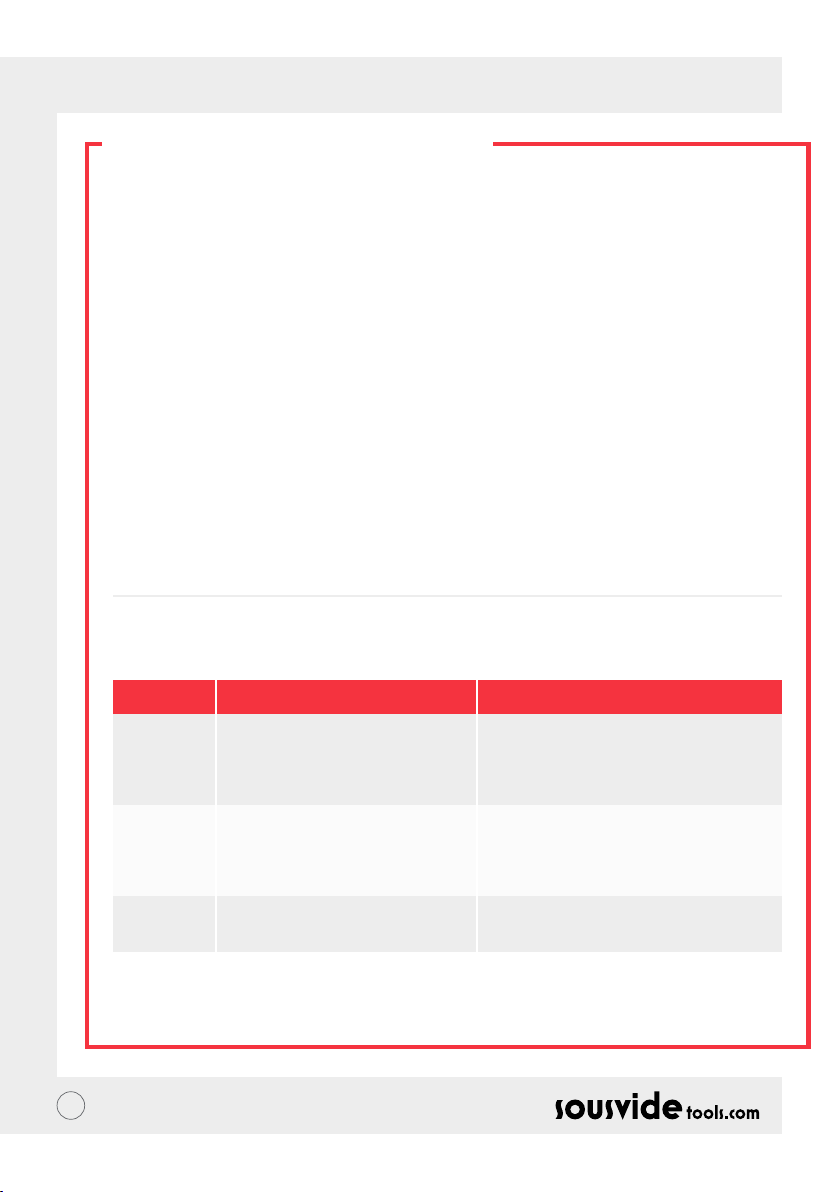
GR // ΟΔΗΓΙΕΣ ΧΡΗΣΗΣ
ΠΩΣ ΚΑΘΑΡΙΖΕΤΑΙ
Προετοιμασία
Το iVide Plus Thermal Circulator μπορεί να καθαριστεί με ξίδι φαγητού, όπως λευκό ξίδι, ξίδι μήλου κτλ.
Γιατί πρέπει να καθαριστεί;
Το νερό βρύσης περιέχει μέταλλα τα οποία όταν ζεσταίνονται σε συγκεκριμένη θερμοκρασία δημιουργούν πέτρα
στην επιφάνεια του μηχανήματος. Σε αυτή την περίπτωση η πέτρα επηρεάζει την δράση του μηχανήματος.
Συνιστάται ο καθαρισμός του μηχανήματος μετά από 20 χρήσεις ή μετά από 100 ώρες λειτουργίας. Η συχνότητα
καθαρισμού εξαρτάται από το είδος νερού το οποίο διαφέρει σε κάθε περιοχή.
Πως καθαρίζεται
1 Γεμίστε το δοχείο μέχρι το μέγιστο επίπεδο με νερό και προσθέστε 5γρ. ξίδι.
2 Ενεργοποιήστε το iVide Plus Thermal Circulator και ρυθμίστε την θερμοκρασία στους 80 °C (176°F) και το χρόνο
στις 3 ώρες (03:00), έπειτα πατήστε το πλήκτρο της εκκίνησης. Μετά από 3 ώρες το μηχάνημα θα ηχήσει τον
χαραχτηριστικό μπιπ και τότε πρέπει να απενεργοποιηθεί το μηχάνημα.
*Για γρήγορο καθάρισμα: Πιέστε αδιάκοπα τα πλήκτρα START/STOP και το πλήκτρο -, τότε αυτόματα το ψηφιακό
εικονίδιο (B) θα δείξει την θερμοκρασία στους 80°C, το ψηφιακό εικονίδιο (C) θα δείξει τον χρόνο στις 3 ώρες
(03:00). Αφήστε τα πλήκτρα και τότε τα ψηφιακά εικονίδια (B) και (C) θα αναβοσβήσουν 10 φορές. Πατήστε το
πλήκτρο εκκίνησης START/STOP για να ξεκινήσει η διαδικασία καθαρισμού.
3 Ελέγξτε αν το μηχάνημα έχει καθαριστέι, σε περίπτωση που δεν έχει καθαριστεί πλήρως προσθέστε
περισσότερο ξίδι και επαναλάβετε την διαδικασία. Έαν έχει καθαριστέι τότε στεγνώστε καλά το ξίδι, πλύντε με
καθαρό νερό, στεγνώστε και φυλάξτε το μηχάνημα.
ΕΠΙΛΥΣΗ ΠΡΟΒΛΗΜΑΤΩΝ
Κωδικός
σφάλματος
E01
E02
LP
** Όταν το μηχάνημα είναι σε λειτουργία και κάποιο πρόβλημα προκύψει, παρακαλώ απευθυνθείτε σε κάποιον
ειδικό. Μην επιχειρήσετε μη εξουσιοδοτημένες επισκευή γιατί μπορεί να προκαλέσετε κάποιο ατύχημα.
58
Αιτία προβλήματος
Το επίπεδο νερού είναι μικρότερο από
το ελάχιστο επίπεδο ή είναι μεγαλύτερο
από το μέγιστο επίπεδο νερού.
1.Είτε ο σωλήνας θερμότητας είναι
εντάξει, 2. Είτε το εσωτερικό καλώδιο
της μηχανής είναι εντάξει. 3.Είναι όμως η
θερμοκρασία του αισθητήρα η σωστή;
Το μηχάνημα ξαφνικά χάνει την δύναμη
του κατά την διάρκεια του μαγειρέματος.
Επίλυση προβλήματος
Σε περίπτωση που το επίπεδο νερού είναι χαμηλό,
απενεργοποιήστε το μηχάνημα και προσθέστε την σωστή
ποσότηρα νερού, σε περίπτωση που το επίπεδο νερού
είναι μεγαλύτερο τότε αφερέστε νερό από το δοχείο.
Πρέπει να ζητήσετε από ένα ειδικό να σας το
επισκευάσει.
Page 59
GR // ΟΔΗΓΙΕΣ ΧΡΗΣΗΣ
ΕΓΓΥΗΣΗ ΚΑΙ ΥΠΗΡΕΣΙΕΣ
ΜΕΤΑ ΤΗΝ ΠΩΛΗΣΗ
1 Βεβαιωθείτε ότι ο πάγκος εργασίας είναι επίπεδος, καθαρός και συγυρισμένος.
2 Η εγγύηση ισχύει για ζημιές που προκλήθηκαν από ελαττωματικά προϊόντα.
3 Το κόστος εξαρτημάτων και συντήρησης θα χρεωθούν σε περίπτωση λανθασμένης χρήσης ή λόγω κακής
ποιότητας προϊόντων.
4 Φυλάξτε το παραστατικό αγοράς.
Κάρτα Συντήρησης
Όνομα :
Αριθμός Τηλεφώνου :
Διεύθυνση:
Μοντέλο Μηχανήματος:
Προμηθευτής:
Επώνυμο:
Email:
Ημερομηνία Αγοράς:
Ιστορικό επιδιορθώσεων
Ημερομηνία Αίτια Δηλών
59
Page 60

RO // MANUAL DE INSTRUCȚIUNI
DESPRE IVIDE
Înințată în 2011, Sousvidetools.com este o compania de produse alimentare și tehnologie, care este într-o misiune
de-a ajuta oamenii să gătească mai deștept #gătitinteligent. Mai mult, suntem autoritatea principală în ceea ce
privește domeniul nostru ales, având două cărți de bucate, un calculator sous vide, o apicație mobilă și un ghid
de formare în colaborare cu Campden BRI, cel mai important furnizor de servicii stiințice practice, tehnice și de
consultanță din Marea Britanie, și acum în fruntea Pieței Mondiale, apartul de gătit al sous vide.
Echipa noastră este formată din 15 voci – și toți venim să lucrăm în ecare zi cu un singur lucru în minte: să muncim
pentru a crea unelte mai bune care să transforme stresul gătitului în succesul cinei. (Numim asta „#gătitinteligent”)
De ce? Pentru că cu cât știți mai multe despre gătit, cu atât mai buni deveniți la gătit. Bucătarii noștri cercetători
gătesc continuu, iar dumneavoastră obțineți beneciile în numele cercetării și dezvoltării.
Deci, de ce aparatul de gătit iVide? Vrem să facem mai ușor pentru novicii și experții sous vide deopotrivă, să
gătească mâncare, la nivelul calității restaurantelor, acasă cu nalul perfect de ecare dată. Așa că spuneți la
revedere mâncării arse și uscate care are gust de carton și spune bună cinei gourmet.
Circulatorul Termic iVide Plus al SousVideTools are o interfață cu ecran tactil, lată de 11,43cm cu o rezoluție înaltă.
Este dotat cu WIFI, însemnând că-l puteți controla de la distanță de oriunde cu ajutorul aplicației noastre, este
deasemenea proiectat să asigure siguranța mâncării. Cu o capacítate de 80 litri, garantează o temperatura stabilă
de 0,07°C între 40°C și 100°C. 2 ani garanție.
iVide Plus este primul dispozitiv rezistent la apă pentru bucătăria comercială, certicat de IPX7. Sub desemnarea
IPX7, aparatul de gătit iVide Plus Sous Vide va capabil să suporte imersiunea în apă până la 1 metru pentru până la
30 minute. Asta înseamnă că dacă un accident va avea loc și dispozitivul este stropit sau scufundat, aparatul nu va
avea nicio defecțiune, dar expunerea îndelungată — cum ar plasarea în mașina de spălat vase — va dăunătoare.
SIGURANȚĂ
Vă rugăm să respectați aceste măsuri de siguranță:
• Utilizați Circulatorul Termic iVide Plus doar conform manualului de instrucțiuni. Nerespectarea acestui lucru
poate duce la deteriorarea mașinii.
• Conectați alimentarea electrică așată numai pe etichetă.
• Conectați-vă numai la sursa de alimentare cu împământare.
• Opriți sursa de alimentare înainte de a scoate aparatul.
• Nu atingeți lichidul direct pentru a verica temperatura. Utilizați așajul temperaturii sau termometrul.
• Nivelul apei trebuie să e între nivelul minim de apă "MIN" și cel mai înalt nivel de apă "MAX". Nerespectarea
acestui lucru poate duce la deteriorarea mașinii
• Nu atingeți nicio suprafață de pe Circulatorul Termic iVide Plus în timpul sau imediat după utilizare.
• Dacă există lichid deasupra Circulatorului Termic iVide Plus (deasupra nivelului MAX al apei), opriți alimentarea și
uscați-l înainte de utilizare.
• Recomandăm utilizatorilor Circulatorului Termic iVide Plus să le e date toate instrucțiunile înainte de utilizare
sau să e supervizați de către un utilizator cu experiență.
• Păstrați lichidul departe de priza de alimentare și ventilatorul de pe partea din spate a Circulator Termic iVide
Plus. Nerespectarea acestui lucru poate duce la deteriorarea mașinii și vătămarea utilizatorului.
60
Page 61
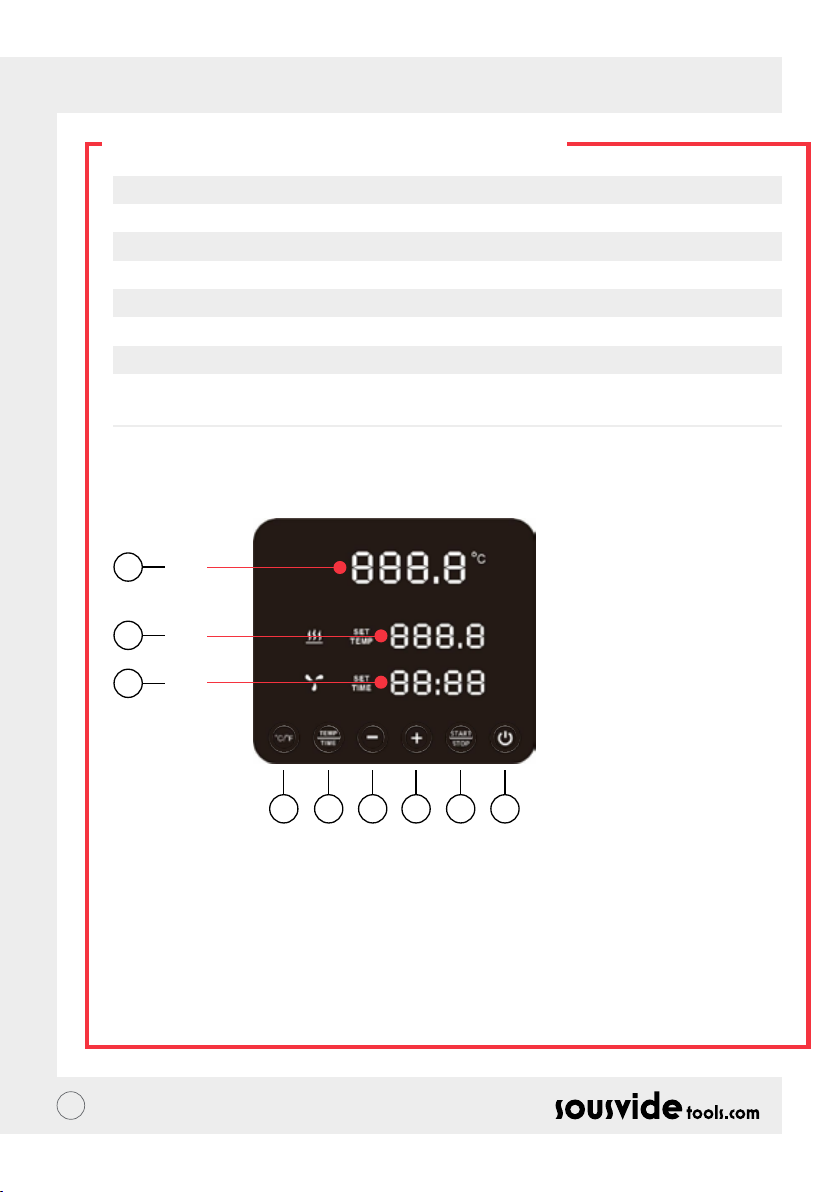
RO // MANUAL DE INSTRUCȚIUNI
PARAMETRII TEHNICI
Voltajul nominal 220-240V~
Frecvența nominală 50HZ
Puterea nominală 2300W
Intervalul de reglare a temperaturii 5 - 95°C / 41 - 203°F
Intervalul de reglare a timpului 5 min - 99 hours 59 minutes
Acuratețea așării 0.1
Mărime 5.5”x5.6”x11.9”(140x143x302mm)
Greutate 2.2Kg
FUNCȚIILE PRODUSULUI
6
A
7
B
8
C
145532
1. Putere
• Atunci când alimentarea este pornită, se va așa butonul și indicatorul luminos. Aparatul va trece la modul
de economisire a energiei după 2 secunde.
• În modul de economisire a energiei, apăsați butonul de alimentare pentru a porni aparatul și pentru a intra în
modul de așteptare. În acest moment, indicatorul digital (A) arată temperatura curentă a apei, indicatorul digital
(B) indică temperatura anterioară. Temperatura țintă stabilită în procesul de lucru, indicatorul digital (C) arată
ultímele ore de lucru setate ale ultimul proces de lucru.
• În modul ON (indicatorul luminos al butonului este complet iluminat), apăsați acest buton pentru a intra în
modul de economisire a energiei. Acest buton poate de asemenea apăsat în timpul procesului de gătire
pentru a intra direct în modul de economisire a energiei.
61
Page 62

RO // MANUAL DE INSTRUCȚIUNI
FUNCȚIILE PRODUSULUI
2. °C/°F
Butonul de comutare a unității temperaturii
• Faceți clic pe ° C / ° F pentru a selecta unitatea de așare a temperaturii aparatului. Selectați Celsius sau
Fahrenheit.
3. TEMPERATURĂ / TIMP
Temperatură, butonul de reglare al timpului
• Faceți clic pe TEMP / TIME pentru a comuta temperatura sau setarea de timp. Când indicatorul digital de
temperatură (B) clipește, setați temperatura țintă dorită cu + și -. Când indicatorul digital a timpului (C) clipește,
timpul dorit poate setat cu + și -.
* Dacă nu a fost setat niciun timp sau temperatură după ce indicatorul digital clipește de 10 ori, Circuitul Termic
iVide Plus va ieși din opțiunea TEMP / TIME. Dacă trebuie să resetați apăsați TEMP / TIME din nou pentru a
introduce detaliile necesare.
* Pentru a așa ora și temperatura setate, apăsați butonul TEMP / TIME timp de 3 secunde.
4. START / STOP
Butonul start/stop
• În modul de așteptare, faceți clic pe START / STOP pentru a porni aparatul.
• În modul de lucru, faceți clic pe START / STOP pentru a opri aparatul.
5. + -
Butonul de ajustare
• Pentru a regla temperatura sau timpul, faceți clic pe TEMP / TIME, selectați opțiunea dorită și folosiți butoanele +
și - pentru a regla.
6. Indicatorul Digital de Citire a Temperaturii(A)
• Așează temperatura de lucru în timp real.
7. Indicatorul Digital de Citire a Temperaturii (B)
• Așează temperatura de funcționare setată.
8. Indicatorul Digital de Citire a Timpului
• În modul de așteptare, se așează ora țintă setată.
• În modul de lucru, este așat timpul de lucru rămas.
62
Page 63
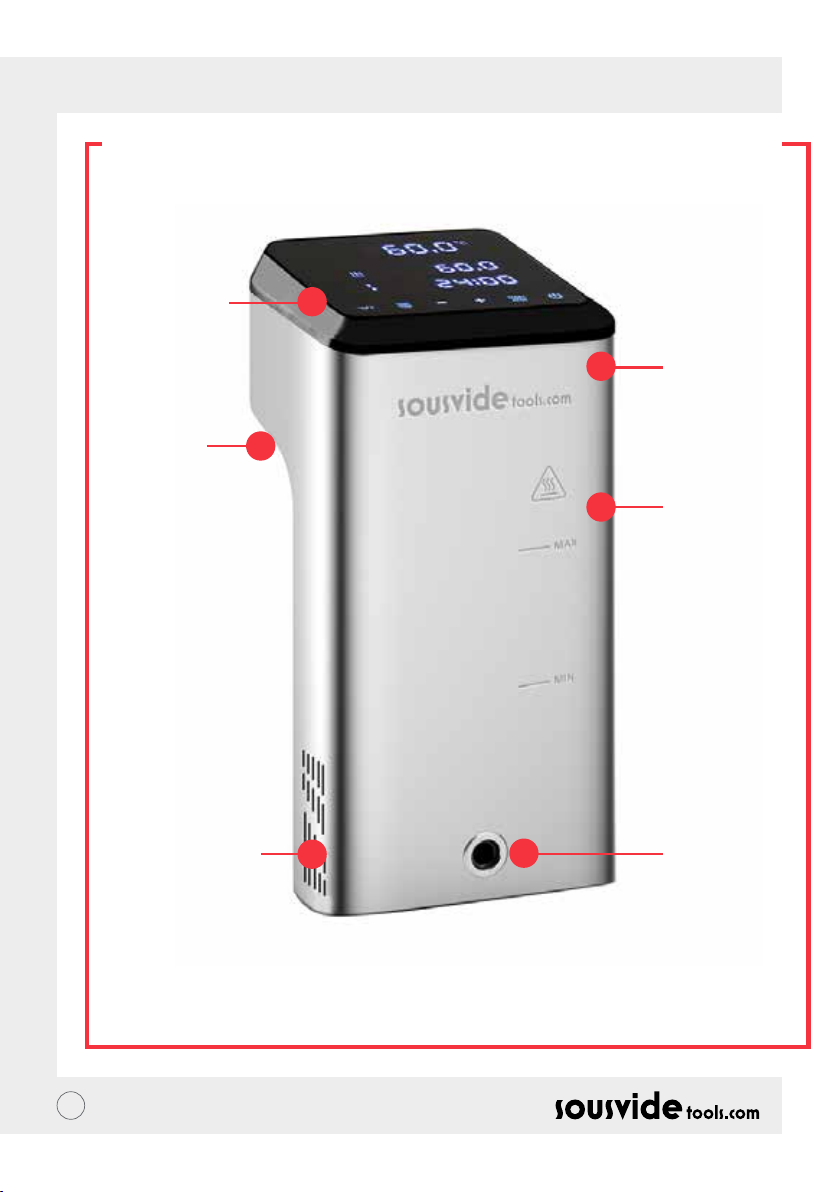
RO // MANUAL DE INSTRUCȚIUNI
STRUCTURA PRODUSULUI
1. Panoul de
control
5. Mâner
x
2. Capacul
superior
3. Corpul
principal
6. Alimentarea
cu apă
63
4. Evacuarea
apei
Page 64
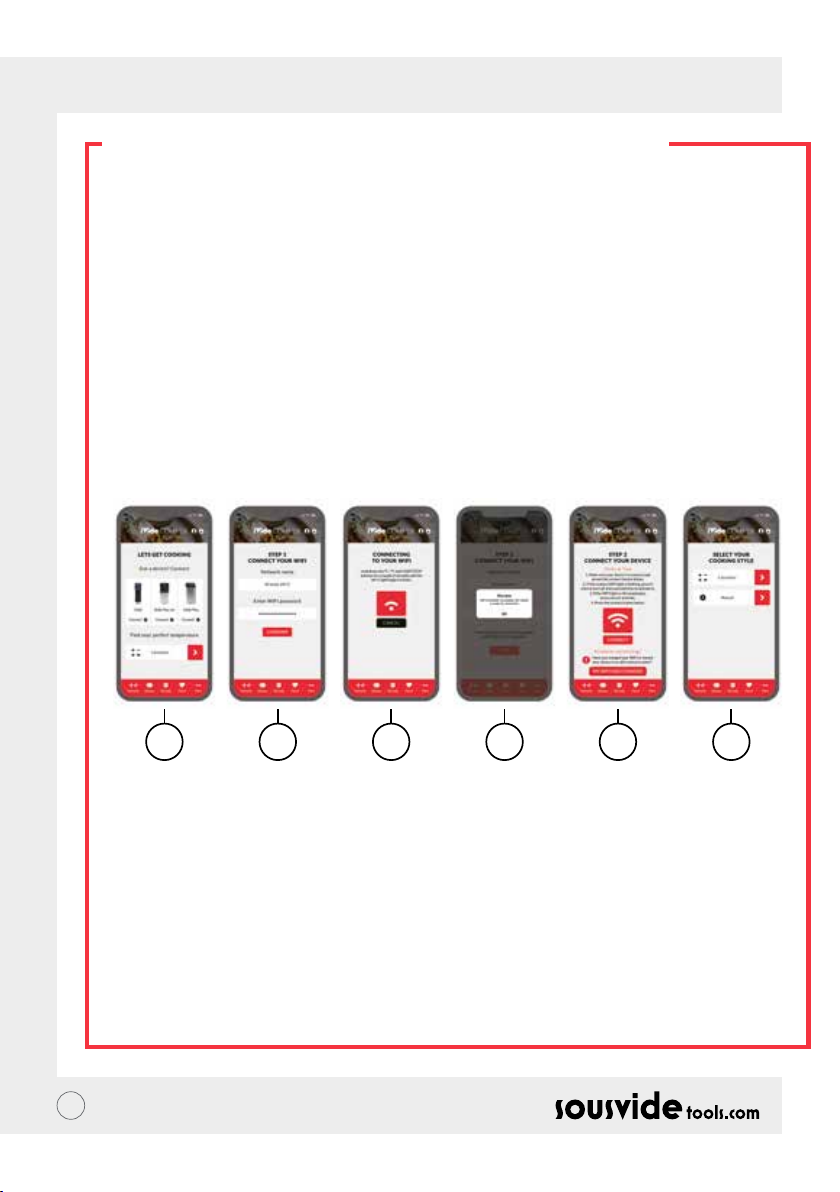
RO // MANUAL DE INSTRUCȚIUNI
APLICAȚIA MOBILĂ
Descărcarea aplicației Circulatorului Termic iVide Plus
Dacă aplicația iVide Plus Thermal Circulator (Circulator Termic iVide Plus) nu a fost încă descărcată, poate
descărcată de la Apple Store (IOS) sau Google Play (Android). Este compatibil cu versiunea IOS 9.3.5 și ulterioară.
Este compatibil cu versiunea Android 4.3 și ulterioară.
Observație: Vă rugăm, consultați-vă cu producătorul dumneavoastră mobil dacă aveți orice întrebare legată de
descărcarea aplicației.
Șase pași pentru congurarea aplicației Circulatorului Termic iVide Plus
Instalarea aplicației Circulatorului Termic iVide Plus este rapidă, spre deosebire de alte aplicații. Aplicațiile iVide
permit utilizarea instantanee, furnizând informațiile necesare exact atunci când aveți nevoie de ea. Am dezvoltat
o abordare complet nouă pentru acest tip de aplicații, deoarece ecare moment în bucătărie ar trebui să e de
neuitat.
Șase Pași Ușori
1 2 3 4 5 6
1 Selectați aparatul pe care doriți să-l utilizați și apăsați pe "CONNECT".
2 Aplicația va detecta o rețea Wi-Fi conectată. Introduceți parola și apăsați pe 'Conrm'.
3 Aplicația începe să caute Circulatorul termic iVide Plus. Țineți apăsat butonul ° C / ° F și butonul start/stop
pentru câteva secunde până când indicatorul Wi-Fi începe să clipească. Așteptați până când aparatul nalizează
congurarea automată.
4 În nal, veți vedea un mesaj care conrmă că aparatul este pregătit să se conecteze.
5 Asigurați-vă că indicatorul Wi-Fi nu mai clipește, apoi apăsați butonul "Conectare". Dacă aveți nevoie de ajutor,
citiți indiciile și sfaturile de pe ecran.
6 Felicitări! Circulatorul Termic iVide Plus tocmai a fost congurat! Bucură-te de gătit!
Observație: Siglele Apple și iPhone sunt mărci ale Apple Inc., înregistrate în SUA și în alte țări. Apple Store este o marcă
de serviciu al Apple Inc. Android; Google Play și logo-ul Google Play sunt mărci ale Google Inc.
64
Page 65

RO // MANUAL DE INSTRUCȚIUNI
INSTRUCȚIUNI DE OPERARE
1 Începeți prin atașarea Circulatorului Termic iVide Plus la vasul de gătit. Rotiți butonul în sens invers acelor de
ceasornic, formați un spațiu între corpul principal și buton, introduceți aparatul în vasul de gătit și strângeți
butonul în sensul acelor de ceasornic pentru a xa aparatul.
2 Adăugați apă în vasul de gătit, asigurându-vă că nivelul apei este între nivelul minim al apei și nivelul maxim al
apei.
3 Conectați alimentarea pentru a porni și a ilumina așajul digital. Circuitul termic iVide Plus va intra în modul de
economisire a energiei după 2 secunde. După acest timp, apăsați butonul de alimentare pentru a pune aparatul
în modul ON.
4 Faceți clic pe °C / °F pentru a selecta unitatea de așare a temperaturii. Valoarea implicită este ° C. Unitatea dvs.
de temperatură selectată va reținută pentru următoarea utilizare a aparatului.
5 Faceți clic pe TEMP / TIME pentru a selecta temperatura sau ora și setați valoarea țintă cu tastele + și -.
6 După ce setarea este nalizată, faceți clic pe START / STOP pentru a porni aparatul. După ce temperatura din
vasul de gătit atinge temperatura necesară, indicatorul digital de citire a timpului (C) începe numărătoarea
inversă - acum adăugați alimentele ambalate în vid pentru prepararea la temperatură constantă.
7 După terminarea gătitului, Circulatorul termic iVide Plus va emite un semnal sonor. Faceți clic pe START / STOP
pentru a opri.
Observație: Dacă nu există nici o operație, aparatul va emite un semnal sonor continuu după 20 de secunde, în
timp ce temperatura apei va rămâne la temperatura presetată.
8 Ele sunt acum gata pentru următorul proces.
9 După utilizarea Circulatorului Termic iVibe Plus, opriți-l și depozitați-l într-un loc sigur.
NU UITAȚI: Înaintea gătirii Sous Vide, alimentele trebuie să e ambalate în vid.Nivelul apei (după ce alimentele
sunt puse înăuntru) ar trebui să e mai mare decât MIN, dar mai mic decât MAX marcat pe aparat. Pentru a evita
degradarea aparatului, scurgeți apa după utilizare și curățați bazinul.
ÎNTREȚINERE
Pentru a evita arderea, vă rugăm, asigurați-vă că Circulatorul Termic iVide Plus este oprit și răcit la temperatura
camerei înainte de curățare.
1 Puneți Circulatorul Termic iVide Plus în poziție verticală după curățare, nu-l poziționați orizontal sau cu susul în
jos.
2 În timpul curățării, nu deteriorați componentele interioare ale aparatului. Odată ce componentele sunt
deteriorate, vă rugăm să apelați la un specialist pentru a verica și repara. Nu încercați reparații neautorizate
deoarece acest lucru poate duce la un accident.
3 Goliți apa veche după ecare ultilizare. Reumpleți cu apă proaspătă următoarea dată când folosiți Circulatorul
Termic iVide Plus. Dacă apa este refolosită, subsanțele minerale pot afecta componentele.
4 Scoateți capacul din spate al Circulatorului Termic iVide Plus pentru a curăța tubul de încălzire și vedea
dacă capacitatea de descărcare este redusă sau componentele au colectat murdărie. Se recomandă curățarea
cCirculatorului Termic iVide Plus la ecare 20 de ori sau după 100 de ore de utilizare.
5 Nu puneți un Circulator Termic iVide Plus erbinte în apă rece, deoarece acest lucru poate provoca daune.
Circulatorul Termic iVide Plus trebuie răcit până la temperatura camerei și introdus în apă rece pentru utilizare.
65
Page 66
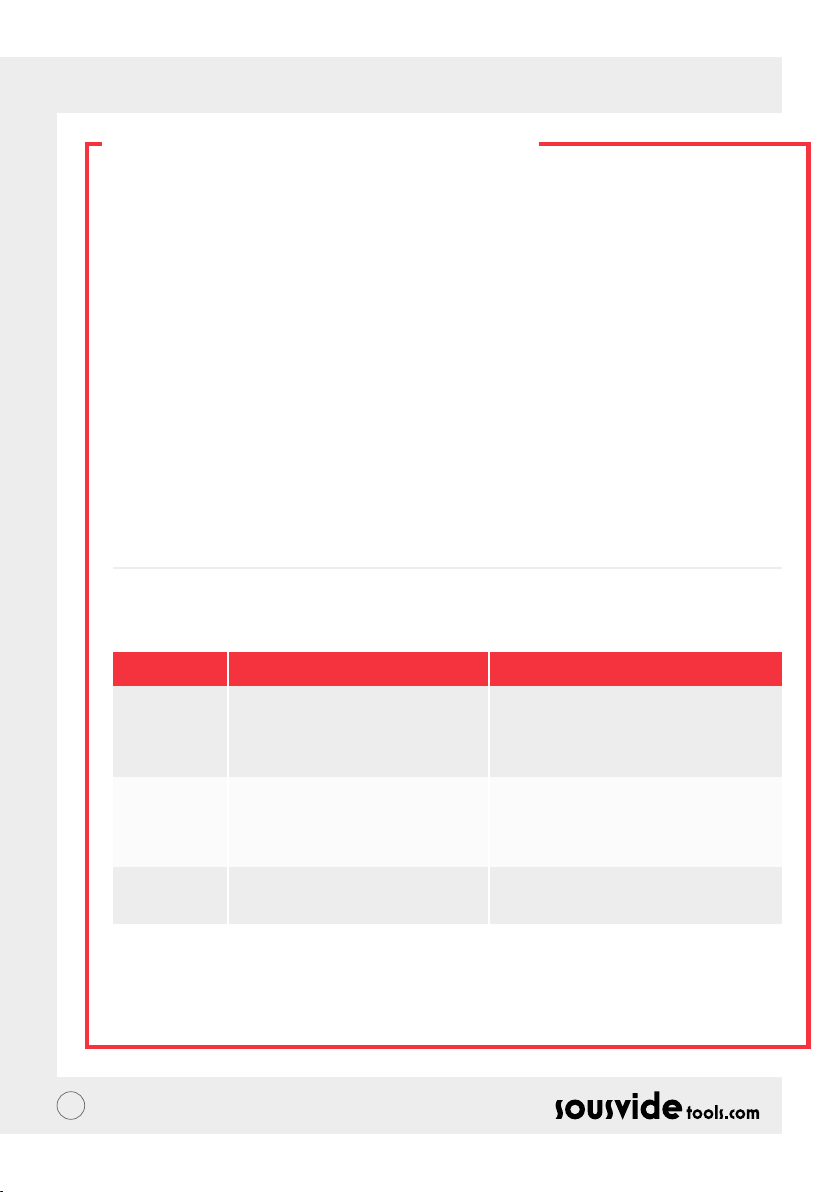
RO // MANUAL DE INSTRUCȚIUNI
CUM SĂ-L CURĂȚAȚI
Pregătire
Circulatorul Termic iVide Plus poate curățat cu oțet alimentar (oțet alb, oțet de mere, etc.)
De ce trebuie curățat?
Apa normală de la robinet conține minerale care, atunci când apa este încălzită la o anumită temperatură, va
crea calcar pe încălzitor sau pe suprafața aparatului. În acest caz, calcarul va afecta performanța aparatului. Se
recomandă curățarea aparatlui la ecare 20 de ori sau după 100 de ore de utilizare. Puteți curăța aparatul în funcție
de nevoile dumneavoastră reale datorită diferitelor ape în diferite zone.
Cum să-l curățați?
1 Umpleți recipientul (până la linia lui MAX) cu apă. Adăugați 5g oțet în apă.
2 Porniți Circulatorul Termic iVide Plus, setați temperatura de lucru la 80°C (176°F) și timpul la 3 ore (03:00). Apăsați
pe START/STOP. După 3 ore. Aparatul va emite un semnal sonor și opri.
*Procedură rapidă de curățare: Tineți apăsat pe butonul START/STOP și butonul -. Indicatorul digital (B) va arăta
temperatura setată de 80°C, indicatorul digital (C) va arăta timpul setat de 3:00. Eliberați butonul și indicatoarele
digitale (B) & (C) vor clipi de 10 ori. Apăsați pe butonul START/STOP pentru a începe operația de curățare.
3 Vericați dacă mașina este curată. Dacă mașina nu este curată, adăugați mai mult oțet și porniți din nou procesul.
Dacă mașina este curată, scoateți oțetul din mașină, spălați mașina cu apă proaspătă, uscați-o și depozitați-o.
DEPANARE
Codul erorii
E01
E02
LP
** În timpul utilizării aparatului, dacă apar alte probleme, vă rugăm să discutați cu un specialist. Nu încercați
reparații neautorizate deoarece acest lucru poate duce la un accident.
66
Cauza problemei
Nivelul apei este mai mic decât nivelul
cel mai scăzut al apei sau este mai mare
decât cel mai înalt nivel al apei.
1. Dacă tubul de încălzire este normal;
2. Dacă cablajul intern al aparatului este
normal;
3. Este senzorul temperaturii normal?
Aparatul pierde brusc energie în timpul
gătitului normal
Depanarea
Opriți alimentarea. Dacă nivelul apei este prea
scăzut, adăugați cantitatea potrivită de apă
în recipient; dacă nivelul apei este prea mare,
îndepărtați apa din recipient.
Trebuie să apelați la un profesionist pentru
reparare.
Page 67
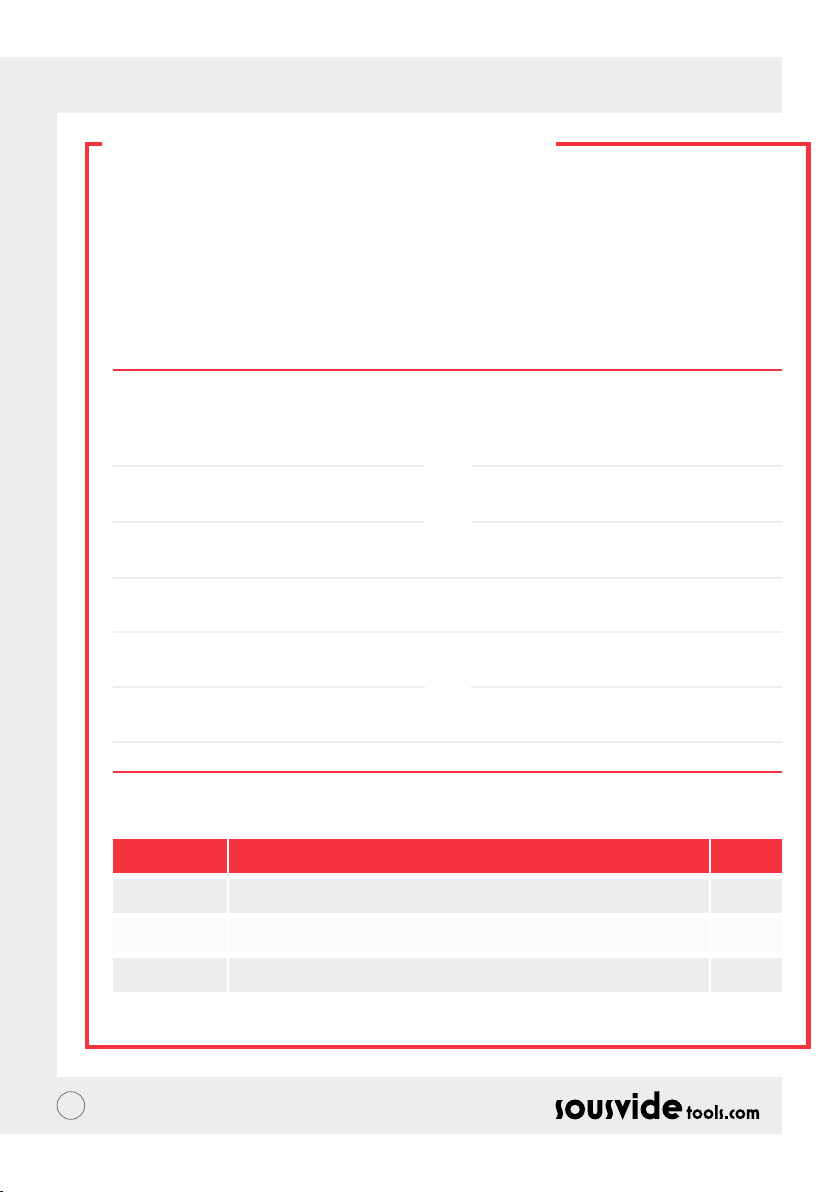
RO // MANUAL DE INSTRUCȚIUNI
GARANȚIE ȘI
SERVICIU CLIENȚI
1 Asigurați-vă că platforma de lucru este plată, curată și ordonată.
2 Garanția este limitată la deteriorarea cauzată de defectele de producție.
3 Costul pieselor și al întreținerii vor percepute ca urmare a utilizării necorespunzătoare sau a altor probleme
nelegate de calitatea produsului.
4 Vă rugăm să păstrați bonul scal sau factura
Card de Întreținere
Prenume:
Telefon:
Adresă:
Modelul aparatului:
Furnizor:
Nume:
Email:
Data achiziției:
Înregistrarea Reparării
Dată Cauză De către
67
Page 68

PL // INSTRUKCJA OBSŁUGI
O IVIDE
Założona w 2011 roku, Sousvidetools.com to rma z branży spożywczej i technologicznej, której misją jest
pomaganie ludziom gotować mądrzej #clevercooking. Ponadto, jesteśmy wiodącym autorytetem w wybranym
przez nas temacie, wyprodukowaliśmy 2 książki kucharskie, kalkulator Sous Vide, aplikacje (APP) i przewodnik
szkoleniowy w połączeniu z Campden BRI, który jest wiodącym brytyjskim dostawcą praktycznych usług
naukowych, technicznych i doradczych, a obecnie wiodąca na światowym rynku kuchenka sous vide cooker.
Nasz zespół składa się z 15 głosów - i wszyscy przychodzimy do pracy każdego dnia z myślą o jednej rzeczy:
pracy nad stworzeniem lepszych narzędzi, które zamienią stres związany z gotowaniem w sukces obiadowy.
(Nazywamy to "gotowaniem #clevercooking.") Dlaczego? Ponieważ im więcej wiesz o gotowaniu, tym lepiej
sobie z tym radzisz. Nasi szefowie kuchni zajmujący się badaniami naukowymi stale gotują, a Ty czerpiesz
korzyści w imię badań i rozwoju.
Więc dlaczego kuchenka iVide? Chcemy ułatwić sous vide nowicjuszom, jak i ekspertom, by gotowanie w
domu było takie samo jak jedzenie z wysokiej jakości potraw z doskonałym wykończeniem jak w restauracji za
każdym razem, gdy będzie gotować.
Więc pożegnaj się z ugotowanym suchym jedzeniem, które smakuje jak karton i przywitaj się z wykwintnym obiadem.
SousVideTools iVide Plus Thermal Circulator z 4.5-calowym szerokim ekranem dotykowym o wysokiej rozdzielczości.
Jest obsługiwany przez WIFI, co oznacza, że można sterować nim zdalnie z dowolnego miejsca za pośrednictwem
naszej aplikacji (APP), jest on również zaprojektowany w celu zapewnienia bezpieczeństwa żywności. Pojemność 80
litrów gwarantuje stabilność temperaturową na poziomie 0,07°C w zakresie od 40°C do 100°C. 2 lata gwarancji.
iVide Plus jest pierwszym wodoszczelnym urządzeniem dla kuchni komercyjnej, posiadającym certykat IPX7.
Pod oznaczeniem IPX7 kuchenka iVide Plus Sous Vide będzie w stanie wytrzymać zanurzenie w wodzie do
1 metra na okres do 30 minut. Oznacza to, że jeżeli zdarzy się wypadek, a urządzenie zostanie spryskane lub
zanurzone, nie spowoduje to uszkodzenia, ale dłuższe przebywanie w zmywarce byłoby szkodliwe.
BEZPIECZEŃSTWO
Proszę przestrzegać tych środków ostrożności:
• Cyrkulator termiczny iVide Plus należy eksploatować wyłącznie zgodnie z instrukcją obsługi. W
przeciwnym razie może dojść do uszkodzenia urządzenia.
• Podłączyć tylko zasilanie pokazane na etykiecie klasykacyjnej.
• Podłączać tylko z bezpiecznym uziemionym zasilaczem.
• Wyłączyć zasilanie przed odłączeniem urządzenia.
• Nie dotykać bezpośrednio cieczy w celu sprawdzenia temperatury. Należy stosować wskaźnik temperatury
lub termometr.
• Poziom wody musi mieścić się pomiędzy najniższym poziomem wody "MIN" a najwyższym poziomem wody
"MAX". Niezastosowanie się do tego wymogu może spowodować uszkodzenie urządzenia.
• Nie dotykać gorących powierzchni cyrkulatora termicznego iVide Plus podczas lub bezpośrednio po użyciu.
• Jeśli ciecz znajduje się na górze cyrkulatora termicznego iVide Plus (powyżej poziomu wody MAX), należy
wyłączyć zasilanie i wysuszyć go przed użyciem.
• Zalecamy, aby użytkownicy cyrkulatora termicznego iVide Plus otrzymali pełne instrukcje przed
rozpoczęciem użytkowania lub by byli nadzorowani przez doświadczonego użytkownika.
• Ciecz należy przechowywać z dala od gniazda zasilania i wentylatora z tyłu cyrkulatora termicznego iVide
Plus. Niezastosowanie się do tego wymogu może spowodować uszkodzenie urządzenia i użytkownika.
68
Page 69
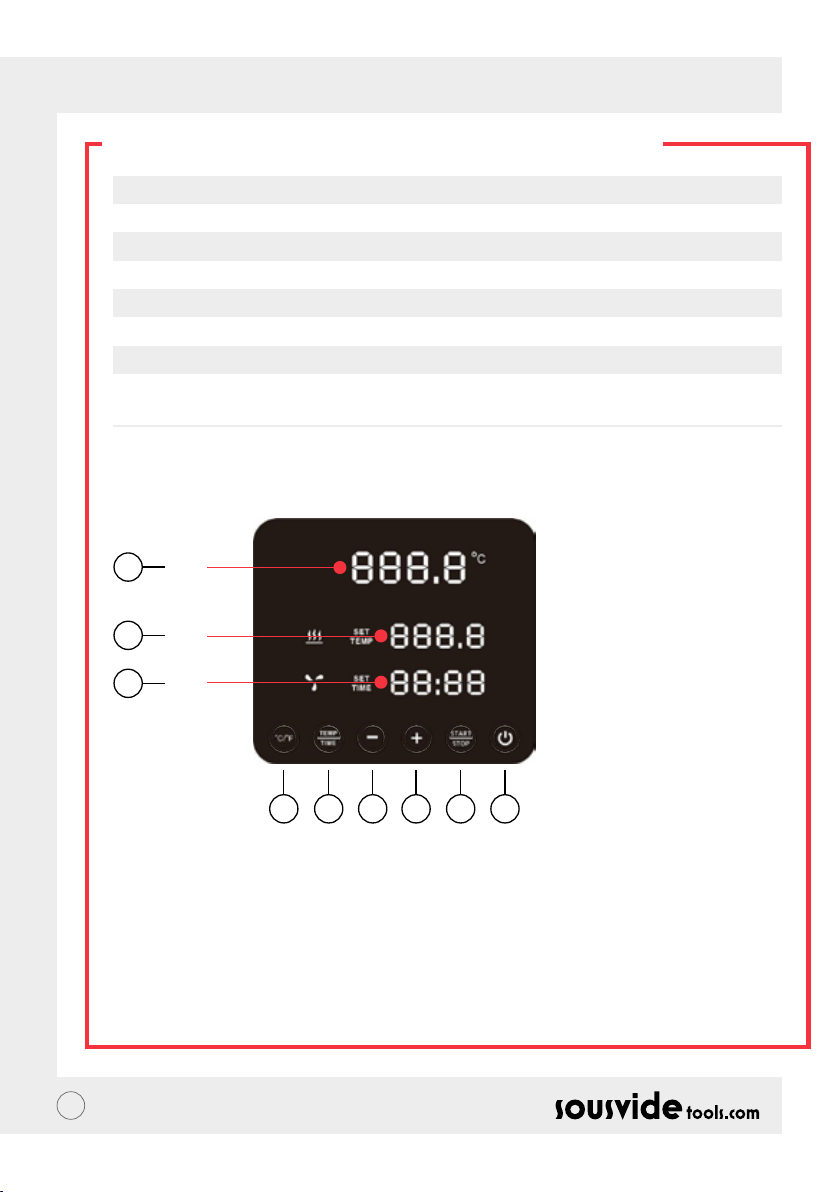
PL // INSTRUKCJA OBSŁUGI
PARAMETRY TECHNICZNE
Napięcie znamionowe 220-240V~
Częstotliwość znamionowa 50HZ
Moc znamionowa 2300W
Zakres nastawy temperatury 5 - 95°C / 41 - 203°F
Zakres nastawy czasu 5 min - 99 godzin 59 minut
Dokładność wyświetlania 0.1
Rozmiar 5.5”x5.6”x11.9” (140x143x302mm)
Waga 2.2Kg
FUNKCJE PRODUKTU
6
A
7
B
8
C
145532
1. Moc
• Gdy zasilanie jest włączone, na wyświetlaczu pojawi się przycisk i wskaźnik. Po 2 sekundach urządzenie
przełączy się w tryb oszczędzania energii.
• W trybie oszczędzania energii, naciśnij przycisk zasilania, aby obudzić maszynę i przejść w tryb czuwania.
W tym czasie odczyt cyfrowy (A) pokazuje aktualną temperaturę wody, odczyt cyfrowy (B) pokazuje
poprzedni. Temperatura zadana, ustawiona w procesie pracy, odczyt cyfrowy (C) pokazuje ostatnio
ustawione godziny pracy.
• W trybie ON (wskaźnik przycisku jest w pełni podświetlony), należy nacisnąć ten przycisk, aby przejść do
trybu oszczędzania energii. Można go również nacisnąć podczas procesu pieczenia, aby bezpośrednio wejść
w tryb oszczędzania energii.
69
Page 70

PL // INSTRUKCJA OBSŁUGI
FUNKCJE PRODUKTU
2. °C/°F
Przycisk przełącznika jednostki temperatury
• Kliknij na °C / °F, aby wybrać jednostkę wyświetlania temperatury maszyny. Proszę wybrać Celsius lub
Fahrenheit.
3. TEMP / TIME
Przycisk regulacji temperatury, regulacji czasu, przełącznik czasowy
• Kliknij na TEMP / TIME, aby przełączyć ustawienie temperatury lub czasu. Gdy cyfrowy odczyt temperatury
(B) miga, ustaw żądaną temperaturę zadaną za pomocą + i -. Gdy cyfrowy odczyt czasu (C) miga, żądany czas
docelowy można ustawić za pomocą + i -.
* Jeśli po 10-krotnym mignięciu odczytu cyfrowego nie został ustawiony żaden czas ani temperatura,
cyrkulator termiczny iVide Plus wyjdzie z opcji TEMP / TIME. Jeśli chcesz zresetować, kliknij ponownie
przycisk TEMP / TIME, aby wprowadzić wymagane szczegóły.
* Aby wyświetlić ustawiony czas i temperaturę, należy nacisnąć przycisk TEMP / TIME przez 3 sekundy
4. START / STOP
Przycisk Start/stop
• W trybie czuwania kliknij przycisk START/STOP, aby rozpocząć pracę.
• W trybie pracy kliknij przycisk START/STOP, aby przerwać pracę.
5. + -
Przycisk regulacji
• Aby wyregulować temperaturę lub czas, kliknij na TEMP / TIME, wybierz wymaganą opcję i użyj przycisków
+ i - aby wyregulować.
6. Temperatura Odczyt cyfrowy (A)
• Wyświetlanie temperatury roboczej w czasie rzeczywistym.
7. Temperatura Odczyt cyfrowy (B)
• Wyświetlanie zadanej temperatury operacyjnej.
8. Cyfrowy odczyt czasu (C)
• W trybie czuwania wyświetlany jest ustawiony czas docelowy.
• W trybie pracy wyświetlany jest pozostały czas pracy.
70
Page 71
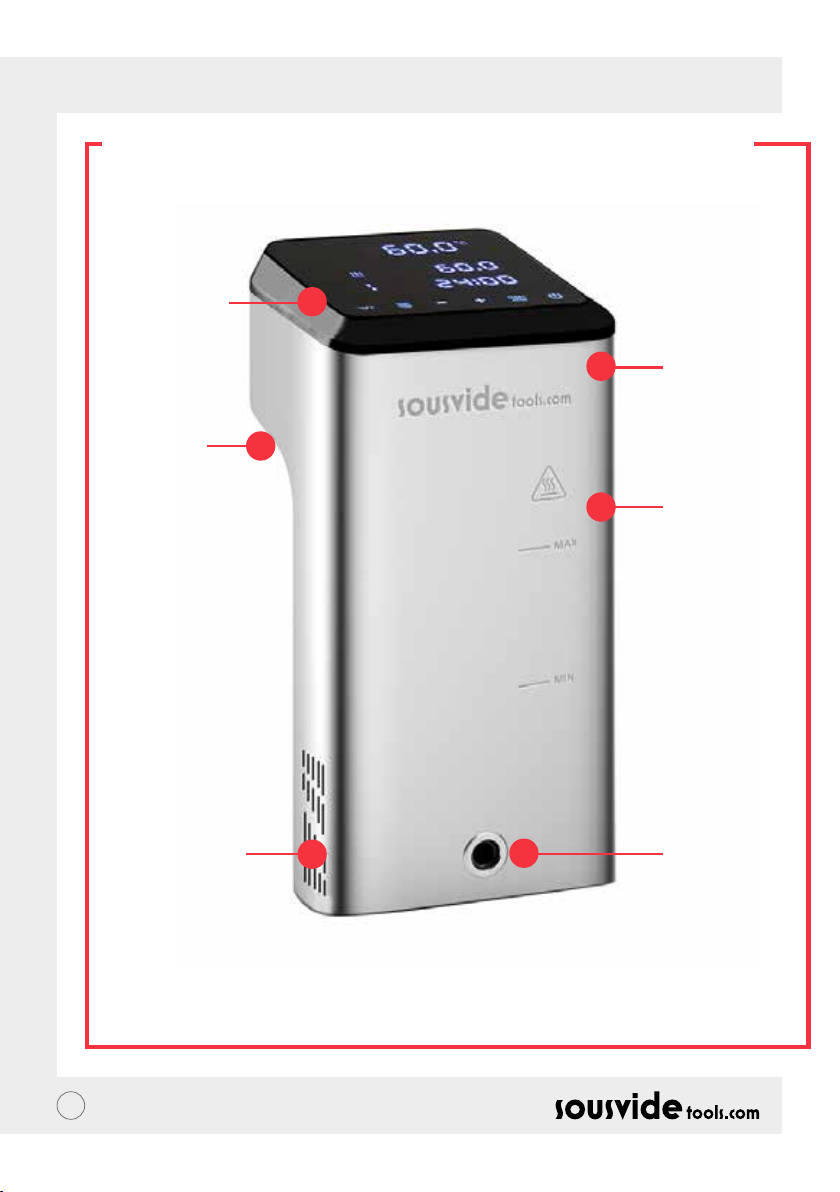
PL // INSTRUKCJA OBSŁUGI
STRUKTURA PRODUKTU
1. Panel
sterowania
5. Uchwyt
stały
2. Górna
pokrywa
3. Główna
część
6. Wlew wody
71
4. Ujście
wody
Page 72
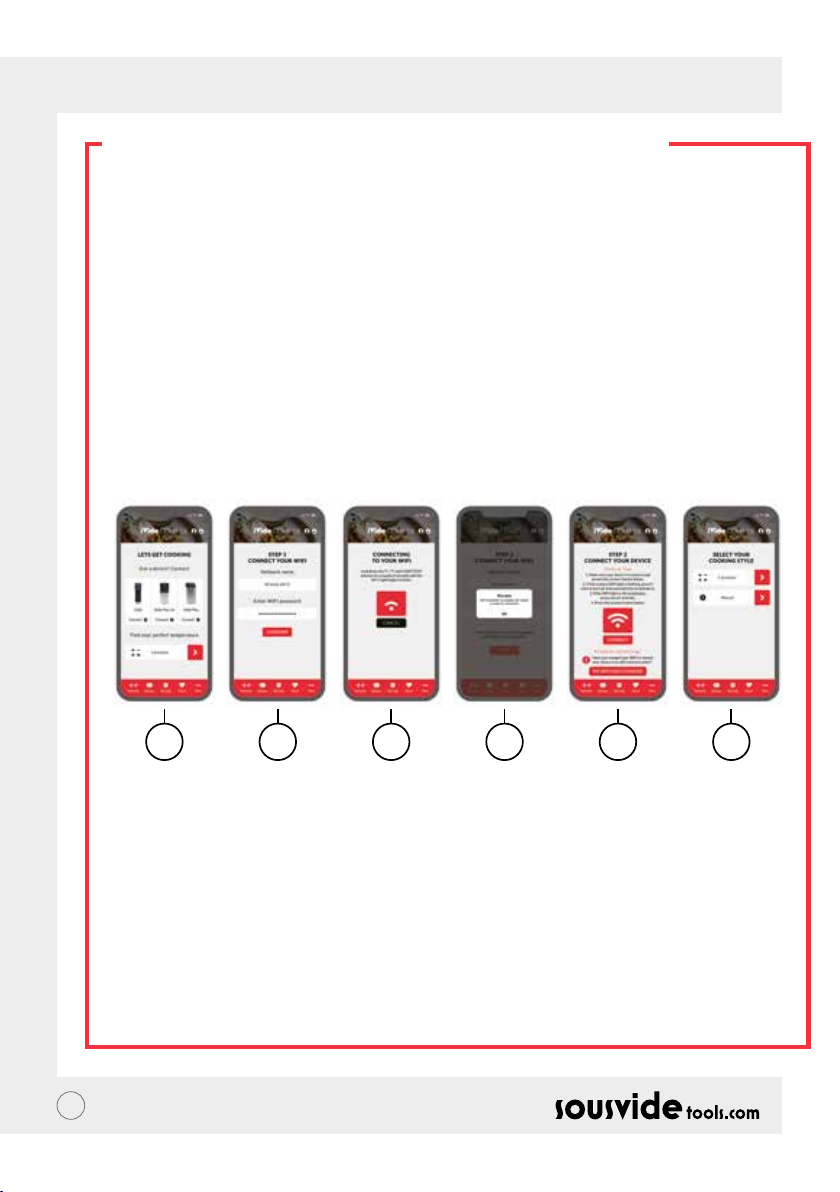
PL // INSTRUKCJA OBSŁUGI
APLIKACJA (APP)
Pobieranie (APP) aplikacji Cyrkulatora termicznego iVide Plus
Jeśli aplikacja iVide Plus Thermal Circulator APP nie została jeszcze pobrana, można ją pobrać z Apple Store
(IOS) lub Google Play (Android). Jest kompatybilny z systemem IOS w wersji 9.3.5 i nowszej. Jest kompatybilny
z systemem Android w wersji 4.3 i nowszej.
Uwaga: Jeśli masz pytania dotyczące pobierania aplikacji, skontaktuj się z producentem telefonu
komórkowego lub urządzenia.
Sześć kroków do skongurowania aplikacji iVide Plus Thermal Circulator APP
Instalacja iVide Plus Thermal Circulator APP jest szybka, w przeciwieństwie do niektórych innych aplikacji.
Aplikacja iVide APP umożliwia natychmiastowe użycie, dostarczając niezbędnych informacji dokładnie
wtedy, gdy są one potrzebne. Opracowaliśmy zupełnie nowe podejście do tego typu aplikacji, ponieważ każdy
moment w kuchni powinien być niezapomniany. Aplikacja jest kompatybilna z cyrkulatorem termicznym iVide
Plus z Wi-Fi. Aplikacja sprawia, że gotowanie z cyrkulatorem termicznym iVide Plus jest niezwykle proste.
Wystarczy wybrać potrawę, dostosować ustawienia i nacisnąć przycisk Start.
Sześć łatwych kroków
1 2 3 4 5 6
1 Wybierz urządzenie, którego chcesz używać i naciśnij przycisk "CONNECT" (Polacz).
2 Aplikacja wykryje podłączoną sieć Wi-Fi. Wprowadź hasło i naciśnij ‘Conrm’ (Potwierdź).
3 Aplikacja rozpocznie wyszukiwanie cyrkulatora termicznego iVide Plus. Przytrzymaj przyciski °C / °F i
włącz/wyłącz przez kilka sekund, aż do momentu, gdy zacznie migać kontrolka Wi-Fi. Poczekaj, aż
urządzenie zakończy automatyczną kongurację.
4 Na końcu pojawi się komunikat potwierdzający, że urządzenie jest gotowe do podłączenia.
5 Upewnij się, że kontrolka Wi-Fi przestała migać, a następnie naciśnij przycisk "Connect". Jeśli potrzebujesz
pomocy, przeczytaj wskazówki i wskazówki na wyświetlaczu.
6 Gratulacje! Cyrkulator termiczny iVide Plus został właśnie skongurowany! Miłego gotowania!!
Uwaga: Logo Apple i iPhone są znakami towarowymi Apple Inc. zarejestrowanymi w USA i innych krajach. Apple
Store jest znakiem usługowym Apple Inc. Android; Google Play i logo Google Play są znakami towarowymi
Google Inc.
72
Page 73

PL // INSTRUKCJA OBSŁUGI
INSTRUKCJA OBSŁUGI
1 Rozpocząć od podłączenia cyrkulatora termicznego iVide Plus do naczynia do gotowania. Obrócić
pokrętło w kierunku przeciwnym do ruchu wskazówek zegara, utworzyć szczelinę pomiędzy główna częścią
a pokrętłem, włożyć urządzenie do naczynia do gotowania i dokręcić pokrętło w kierunku zgodnym z
ruchem wskazówek zegara, aby zabezpieczyć urządzenie.
2 Wlać wodę do naczynia do gotowania, upewniając się, że poziom wody znajduje się pomiędzy minimalnym
poziomem wody a maksymalnym poziomem wody.
3 Podłączyć zasilanie, aby włączyć i podświetlić wyświetlacz cyfrowy. Cyrkulator termiczny iVide Plus
wejdzie w tryb oszczędzania energii po 2 sekundach. Po tym czasie należy nacisnąć przycisk zasilania, aby
włączyć urządzenie.
4 Kliknąć przycisk °C/°F, aby wybrać jednostkę wyświetlania temperatury. Wartość domyślna to °C. Wybrana
jednostka temperatury zostanie zapamiętana przy następnym użyciu urządzenia.
5 Kliknąć przycisk TEMP /TIME, aby wybrać temperaturę lub czas i ustawić wartość zadaną za pomocą
przycisków + i -.
6 Po zakończeniu ustawiania kliknąć przycisk START/STOP, aby uruchomić maszynę. Gdy temperatura w
zbiorniku do gotowania osiągnie wymaganą temperaturę, cyfrowy odczyt czasu (C) zaczyna odliczać - teraz
dodaj pakowane próżniowo potrawy do gotowania w stałej temperaturze.
7 Po zakończeniu gotowania cyrkulator termiczny iVide Plus wyemituje sygnał dźwiękowy. Kliknij przycisk
START/STOP, aby wyłączyć.
Uwaga: Jeśli nie ma żadnej operacji, urządzenie wyemituje ciągły sygnał dźwiękowy po 20 sekundach,
podczas gdy temperatura wody pozostanie na ustawionej temperaturze.
8 Wyjąć pakowane próżniowo jedzenie. Żywność jest teraz gotowa do następnego procesu.
9 Po użyciu cyrkulatora termicznego iVide Plus należy go wyłączyć i przechowywać w bezpiecznym miejscu.
NIE ZAPOMNIJ: Przed gotowaniem Sous Vide, jedzenie musi być pakowane próżniowo. Poziom wody (po
włożeniu potrawy) powinien być wyższy niż MIN, ale niższy niż MAX oznaczony na maszynie. Aby uniknąć
uszkodzenia urządzenia, należy po użyciu opróżnić wodę i oczyścić łaźnię wodną.
KONSERWACJA
Aby uniknąć przypalenia, przed czyszczeniem należy upewnić się, że cyrkulator termiczny iVide Plus jest
wyłączony i schłodzony do temperatury pokojowej.
1 Po zakończeniu czyszczenia należy umieścić cyrkulator termiczny iVide Plus pionowo, nie należy
umieszczać go poziomo lub do góry nogami.
2 Podczas czyszczenia nie wolno uszkadzać elementów znajdujących się wewnątrz urządzenia. Po
uszkodzeniu komponentów należy zwrócić się do specjalisty o sprawdzenie i naprawę. Nie należy
podejmować prób nieautoryzowanych napraw, ponieważ może to spowodować wypadek.
3 Po każdym użyciu opróżnij starą wodę. Uzupełnić świeżą wodą podczas następnego użycia cyrkulatora
termicznego iVide Plus. Jeśli woda zostanie ponownie użyta, substancje mineralne mogą uszkodzić
komponenty.
4 Zdejmij tylną pokrywę cyrkulatora termicznego iVide Plus, aby oczyścić rurkę cieplną i sondę, jeśli
pojemność wylotowa zmniejszy się lub elementy składowe zebrały brud. Zaleca się czyszczenie cyrkulatora
termicznego iVide Plus co 20 razy lub po 100 godzinach pracy.
5 Nie wkładać gorącego cyrkulatora termicznego iVide Plus do chłodnej wody, ponieważ może to
spowodować uszkodzenie. Cyrkulator termiczny iVide Plus należy schłodzić do temperatury pokojowej i
umieścić w zimnej wodzie w celu użycia.
73
Page 74
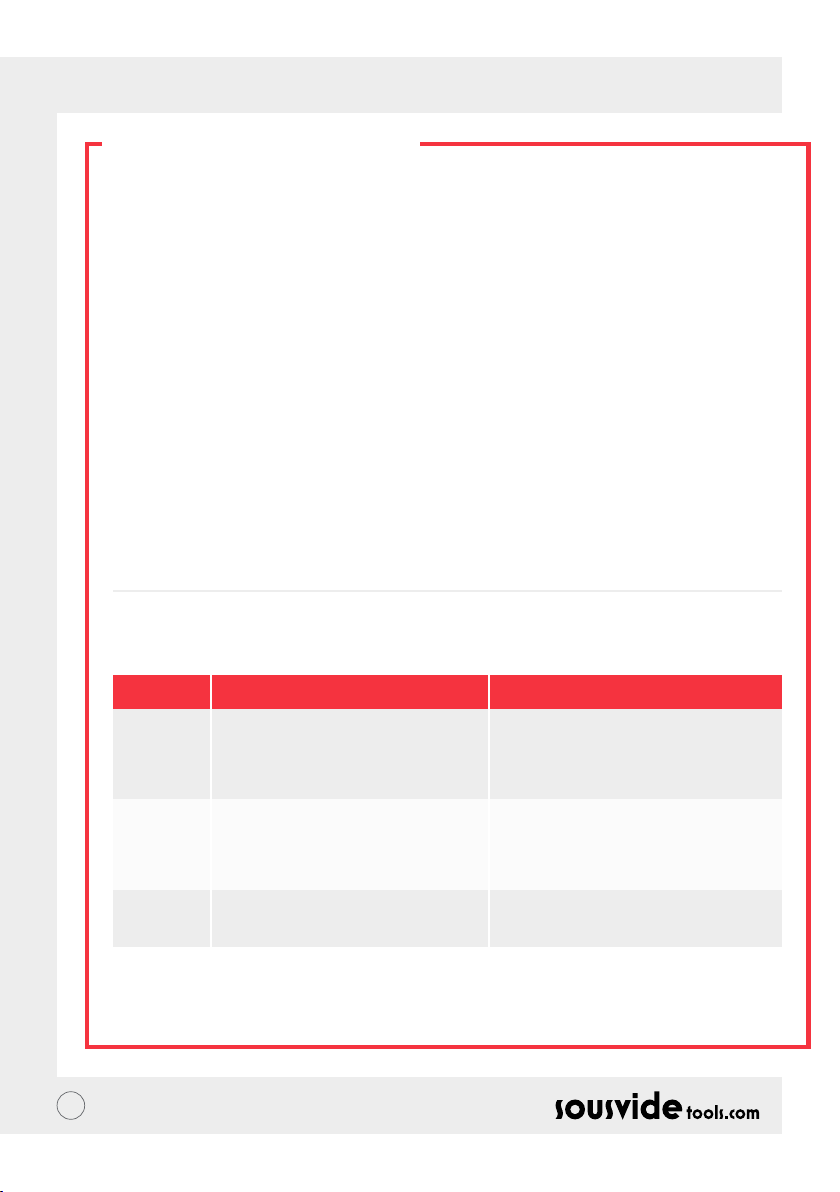
PL // INSTRUKCJA OBSŁUGI
JAK CZYŚCIĆ?
Przygotowanie
Cyrkulator termiczny iVide Plus można czyścić octem spożywczym (ocet biały, ocet jabłkowy itp.)
Dlaczego trzeba czyścić?
Normalna woda z kranu zawiera minerały, które po podgrzaniu wody do określonej temperatury tworzą skalę
na grzałce lub powierzchni maszyny. W tym przypadku, skala będzie miała wpływ na wydajność urządzenia.
Zaleca się czyszczenie maszyny co 20 razy lub po 100 godzinach pracy. Maszynę można czyścić zgodnie z
rzeczywistymi potrzebami z powodu różnych ilości wody w różnych miejscach.
Jak czyścić?
1 Napełnić zbiornik (do linii MAX) wodą. Dodać 5 g octu do wody.
2 Włączyć cyrkulator termiczny iVide Plus, ustawić temperaturę pracy na 80°C (176°F) i czas do 3 godzin
(03:00). Kliknij przycisk START/STOP. Po 3 godzinach urządzenie wyda sygnał dźwiękowy i wyłączy się.
* Procedura szybkiego czyszczenia: Przytrzymać przyciski START/STOP i -. Odczyt cyfrowy (B) pokaże
ustawioną temperaturę 80°C, odczyt cyfrowy (C) pokaże ustawiony czas 3:00. Zwolnij przycisk, a odczyt
cyfrowy (B) i (C) będzie migał 10 razy. Kliknij przycisk START/STOP, aby rozpocząć czyszczenie.
3 Sprawdzić, czy maszyna jest czysta. Jeśli maszyna nie jest czysta, należy dodać więcej octu i rozpocząć
proces ponownie. Jeśli maszyna jest czysta, proszę opróżnić ocet z maszyny, umyć maszynę świeżą wodą,
osuszyć i przechować.
ROZWIAZYWANIE PROBLEMÓW
Kod błędu
E01
E02
LP
** Podczas pracy z maszyną, jeśli pojawią się inne problemy, należy zwrócić się do specjalisty. Nie należy
podejmować prób nieautoryzowanych napraw, ponieważ może to prowadzić do wypadku.
74
Przyczyna emisji
Poziom wody jest niższy niż najniższy
poziom wody lub wyższy niż najwyższy
poziom wody.
1. Jeśli rura grzewcza jest normalna;
2. Jeśli wewnętrzne okablowanie
maszyny jest normalne;
3. Czy czujnik temperatury jest normalny?
Maszyna nagle traci moc podczas
normalnego gotowania.
Rozwiązywanie problemów
Wyłączyć zasilanie. Jeśli poziom wody jest
zbyt niski, dodaj odpowiednią ilość wody
do pojemnika; jeśli poziom wody jest zbyt
wysoki, usuń wodę z pojemnika.
Konieczność zwrócenia się o naprawę do
specjalisty
Page 75
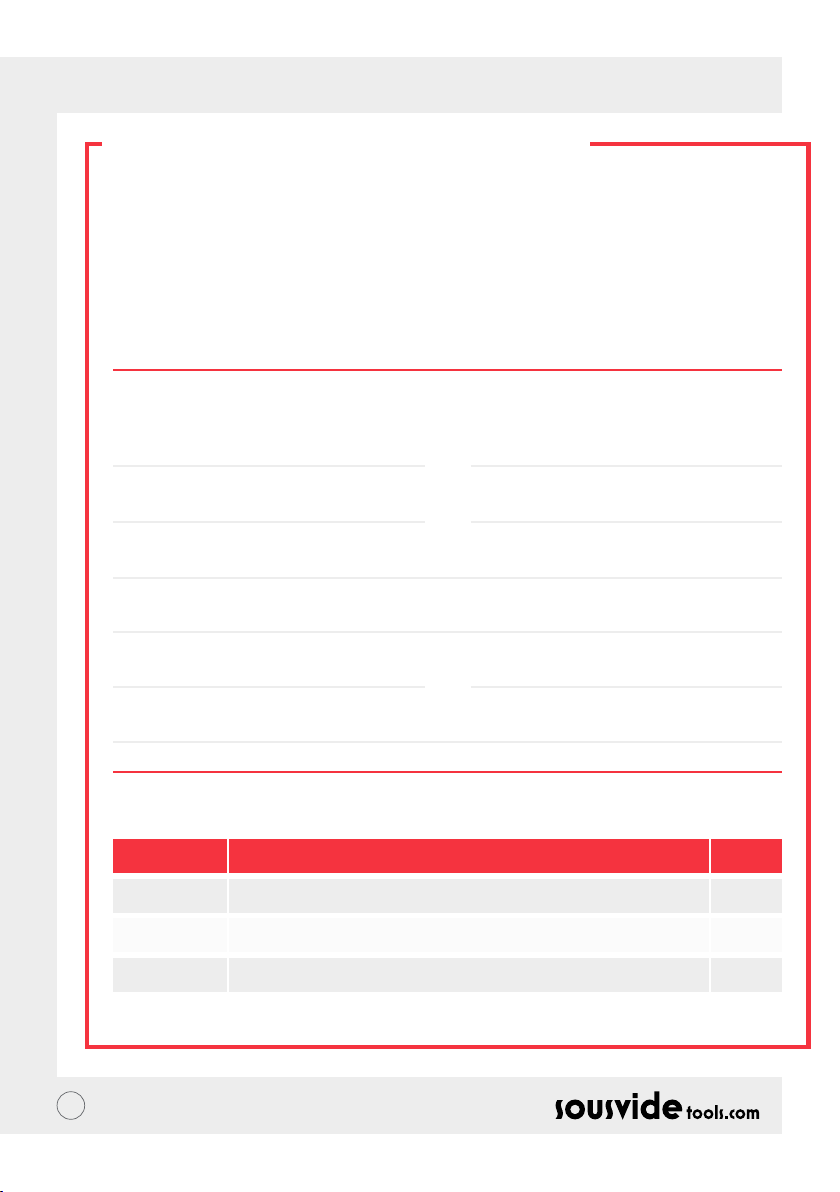
PL // INSTRUKCJA OBSŁUGI
GWARANCJA I SERWIS
POGWARANCYJNY
1 Upewnij się, że płaszczyzna pracy jest równa, gładka i czysta.
2 Gwarancja ogranicza się do szkód spowodowanych wadami produkcyjnymi.
3 Koszty części i konserwacji zostaną naliczone z powodu niewłaściwego użytkowania lub innych problemów
związanych z jakością nie produktu.
4 Prosimy o zachowanie kwitków zakupu.
Karta Serwisowa
Imię:
Telefon:
Adres:
Model maszyny:
Dostawca:
Nazwisko:
Email:
Data zakupu:
Rekord Naprawy
Data Powód Przez
75
Page 76

NL // GEBRUIKERSHANDLEIDING
OVER DE IVIDE
Opgericht in 2011, Sousvidetools.com is een food en technologiebedrijf met de missie mensen slimmer te laten
koken #clevercooking.Bovendien zijn wij de marktleider in het door ons gekozen gebied, hebben wij twee
kookboeken gemaakt, een sous vide meter, een APP en een trainingsgids in samenwerking met de Campden
BRI, Engelands toonaangevende aanbieder van praktische, wetenschappelijke, technische en raadgevende
services en nu ook 's werelds toonaangevende sous vide apparaat.
Ons team bestaat uit 15 mensen - en wij gaan elke dag naar ons werk met een ding aan ons hoofd: het creëren
van betere benodigdheden die kookstress omzetten naar etenstijd succes. (Wij noemen dit "#clevercooking.")
Waarom? Omdat hoe meer je weet over koken, des te beter word je erin. Onze onderzoek chefs zijn constant
bezig met koken, en u plukt daar de vruchten van in de naam van O&O.
Waarom de iVide Cooker? Wij willen het makkelijk maken voor zowel sous vide beginners als experts om
thuis restaurant kwaliteit eten te bereiden, met elke keer een perfect eindresultaat. Dus zeg maar dag tegen
overgaar voedsel dat naar karton smaakt en zeg hallo tegen gastronomisch eten.
The SousVideTools iVide Plus Thermische Circulatiepomp met hoge resolutie 11.43cm breed touch screen
bedieningsscherm. Het is uitgerust met Wi zodat u het overal op afstand kan besturen via onze APP, ook
is het ontwikkeld om voedselveiligheid te garanderen. Met een capaciteit van 80 liter garandeert het een
stabiele temperatuur van 0.07°C tussen 40°C tot 100°C. 2 jaar garantie.
De iVide Plus is het eerste waterdichte apparaat voor de commerciële keuken, gecerticeerd met IPX7. Met
toewijzing van IPX7, is de iVide Plus Sous Vide bestand tegen onderdompeling in water tot 1 meter tot 30
minuten. Dit betekent dat in het geval van een ongeluk, en het apparaat wordt nat of ondergedompeld, dit niet tot
schade leidt, echter langdurige blootstelling aan water – zoals het plaatsen in de vaatwasser - zal schadelijk zijn.
VEILIGHEID
Volg alstublieft deze veiligheidsmaatregelen:
• Bedien de iVide Plus Thermische Circulatiepomp alleen volgens de gebruikers handleiding. Het niet volgen
van de handleiding kan resulteren in het beschadigen van de machine.
• Sluit de voeding aan zoals getoond op het classicatie-etiket.
• Sluit alleen aan met de veilig geaarde voeding.
• Sluit de stroomvoorziening af alvorens het verwijderen van het apparaat.
• Raak de vloeistof niet direct aan om de temperatuur te controleren. Gebruik het temperatuur display of een
thermometer.
• Het water niveau moet tussen het laagste level “MIN” en het hoogste level “MAX” in staan. Het negeren
hiervan kan resulteren in schade aan het apparaat.
• Raak geen hete oppervlakken aan op de iVide Plus Thermische Circulatiepomp (boven het MAX water
level), schakel de stroom uit en droog voor gebruik.
• Wij raden aan dat gebruikers van de iVide Plus Thermische Circulatiepomp volledige instructies krijgen
voorafgaand gebruik of onder supervisie van een ervaren gebruiker staan.
• Houd vloeistof uit de buurt van stroomcontainer en ventilator op de achterkant van de iVide Plus
Thermische Circulatiepomp. Het negeren hiervan kan resulteren in schade aan het apparaat en de gebruiker.
76
Page 77
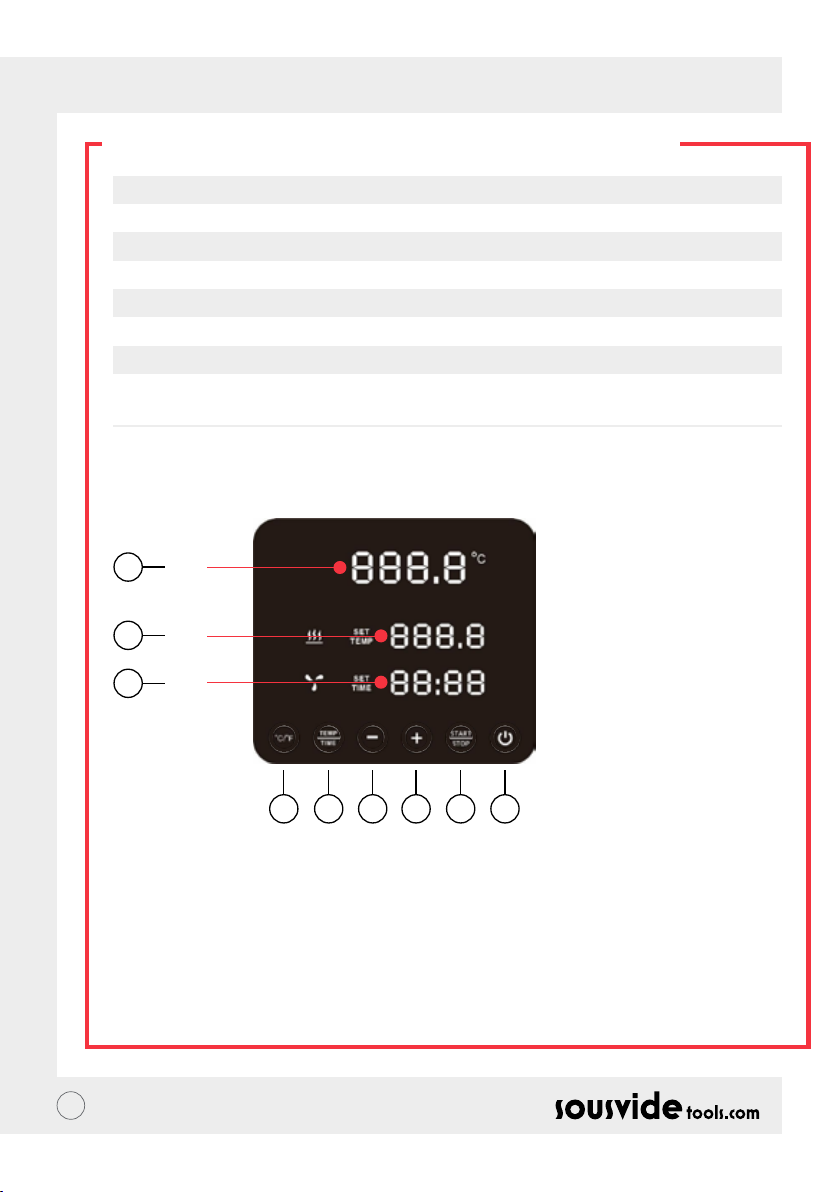
NL // GEBRUIKERSHANDLEIDING
TECHNISCHE MAATSTAVEN
Nominale spanning 220 - 240V~
Nominale frequentie 50HZ
Nominale stroom 2300W
Temperatuur instelbereik 5 - 95°C / 41- 203°F
Tijd instelbereik 5 min – 99 uur 59 minuten
Weergave nauwkeurigheid 0.1
Maat 5.5”x5.6”x11.9”( 140x143x302mm)
Gewicht 2.2Kg
PRODUCTFUNCTIE
6
A
7
B
8
C
145532
1. Power
• Als de stroomtoevoer wordt ingeschakeld, worden de knop en het indicatielampje weergegeven. Het
apparaat schakelt na 2 seconden over naar de energiebesparende modus.
• In de energie bespaarstand, druk op de aan / uit knop om het apparaat te activeren en naar de stand-by
modus te gaan. Op dit moment geeft de digitale aezing (A) de huidige water temperatuur weer, de digitale
aezing (B) geeft de vorige weer. De doeltemperatuur ingesteld in het werkproces, de digitale aezing (C)
toont de ingestelde werktijden van het laatste werkproces.
• In de ON-modus ( de knop indicator is volledig verlicht), drukt u op deze knop om naar de
energiebesparende modus te gaan. Dit kan ook tijdens het kookproces worden ingedrukt om rechtstreeks
naar de energiebesparende modus te gaan.
77
Page 78

NL // GEBRUIKERSHANDLEIDING
PRODUCTFUNCTIE
2. °C/°F
Temperatuureenheid schakelknop
• Klik op °C / °F om de temperatuurweergave-eenheid van de machine te selecteren. Selecteer alstublieft
Celsius of Fahrenheit.
3. TEMP. / TIJD
Temperatuur, tijd aanpassing schakelknop
• Klik op TEMP / Time om de temperatuur of tijd in te stellen. Wanneer de digitale temperatuur lezer (B)
knippert, stelt u de gewenste doeltemperatuur in met + en -. Wanneer de digitale tijd lezer (C) knippert, kan
de gewenste tijd worden ingesteld met + en -.
* Als na 10 keer nadat de digitale lezer heeft geknipperd geen tijd is ingesteld, zal de iVide Plus Thermische
Circulatiepomp de TEMP / TIME optie verlaten. Als u opnieuw wilt instellen, klikt u nogmaals op TEMP /
TIME om de vereiste gegevens in te voeren.
* Druk gedurende 3 seconde op de knop TEMP / TIME om de ingestelde tijd en temperatuur weer te geven.
4. START / STOP
Start/stop knop
• Klik in de stand-by-modus op START / STOP om te beginnen met werken.
• Klik in de werkmodus op START / STOP om te stoppen met werken.
5. + -
Aanpassingsknop
• Om de temperatuur of tijd aan te passen, klik op TEMP / TIME, selecteer de gewenste optie en gebruik de +
en – knop om aan te passen.
6. Digitale temperatuur lezer (A)
• Toont de real-time werktemperatuur.
7. Digitale temperatuur lezer (B)
• Toont de ingestelde werktemperatuur.
8. Digitale tijd lezer (C)
• In stand-by mode, de ingestelde doeltemperatuur wordt weergegeven.
• In werk mode, de resterende werktijd wordt weergegeven.
78
Page 79
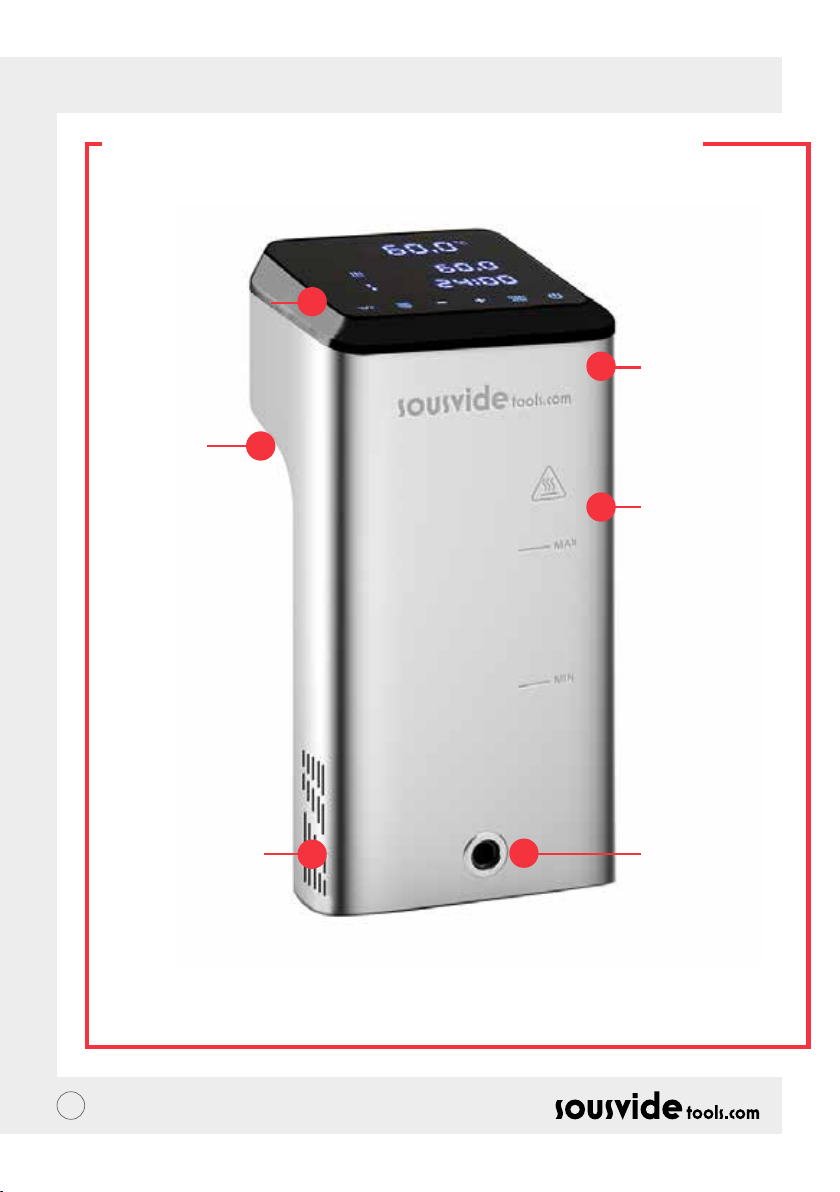
NL // GEBRUIKERSHANDLEIDING
PRODUCT STRUCTUUR
1. Controlepaneel
5. Vaste
handgreep
2. Bovendeksel
3.
Hoofdonderdeel
6. Water invoer
79
4. Waterafvoer
Page 80
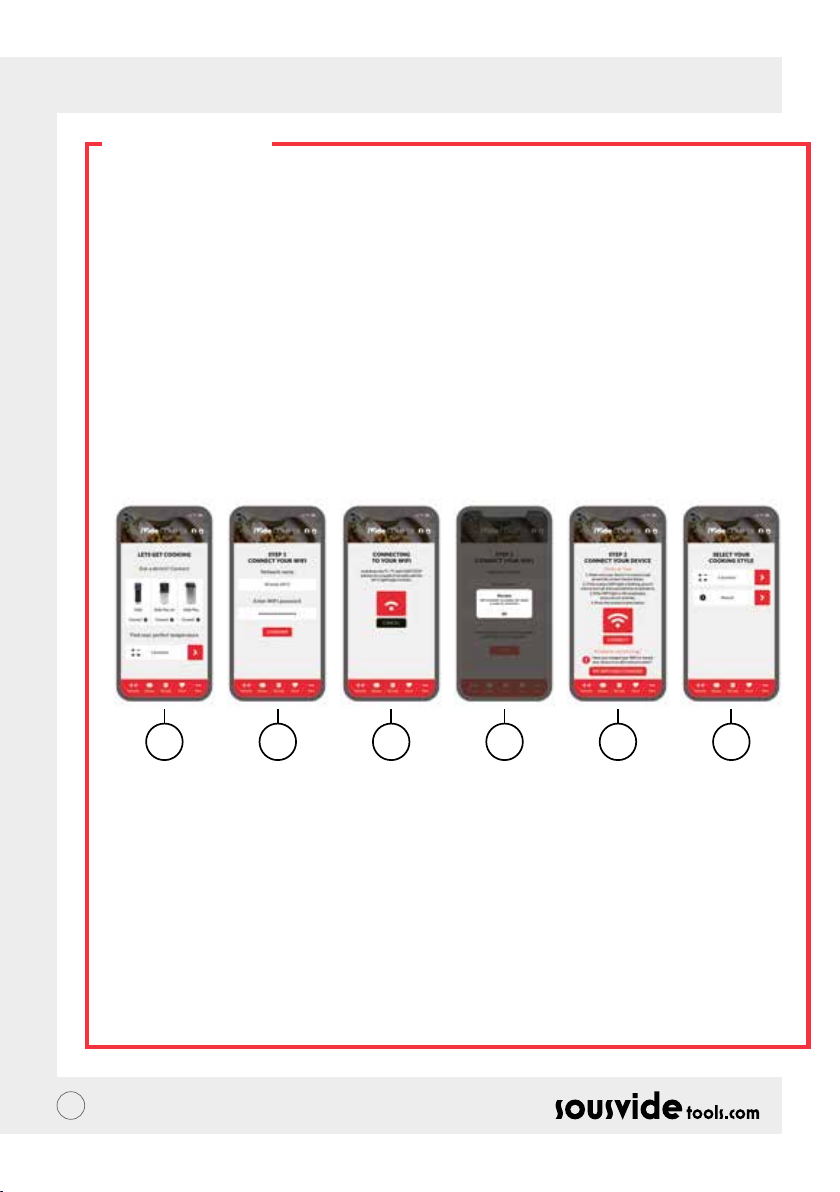
NL // GEBRUIKERSHANDLEIDING
DE APP
Downloaden van de iVide Plus Thermische Circulatiepomp APP
Als de iVide Plus Thermische Circulatiepomp APP nog niet gedownload is, kan deze gedownload worden van
de Apple Store (IOS) of Google Play (Android). Deze is verenigbaar met de IOS versie 9.3.5 en latere versies en
voor Android met versie 4.3 en latere versies.
Opmerking: Neem contact op met de fabrikant van uw mobiele telefoon of apparaat als u vragen heeft over
het downloaden van de APP.
Zes stappen om te congureren met de iVide Plus Thermische Circulatiepomp APP
Het installeren van de iVide Plus Thermische Circulatiepomp APP is snel, in tegenstelling tot sommige andere
apps. De iVide APPS maakt direct gebruik mogelijk en voorziet u van de benodigde informatie precies als u
het nodig heeft. Wij hebben een compleet nieuwe aanpak ontwikkeld op dit soort applicaties omdat iedere
moment in de keuken onvergetelijk zou moeten zijn. De APP is verenigbaar met de iVide Plus Thermische
Circulatiepomp met Wi-Fi. De APP maakt koken met de iVide Plus Thermische Circulatiepomp ongelooijk
makkelijk. Kies eenvoudig het product, pas de instellingen aan en druk op start.
Zes makkelijke stappen
1 2 3 4 5 6
1 Selecteer het toestel dat u wilt gebruiken en druk op “VERBINDEN”
2 De app detecteert een verbonden Wi-Fi netwerk. Voer het wachtwoord in en druk op ‘bevestigen’.
3 De applicatie zoekt naar de iVide Plus Thermische Circulatiepomp. Houdt voor een paar seconde de °C
/ °F en start/stop ingedrukt tot het Wi-Fi licht begint te knipperen. Wacht tot het toestel de automatische
conguratie beëindigt.
4 Aan het eind ziet u het bericht dat het toestel klaar is om te verbinden.
5 Controleer of het Wi-Fi lampje niet meer knippert en druk vervolgens op de knop ‘Verbinden’. Als u hulp
nodig heeft, leest u de hints en tips op het scherm.
6 Gefeliciteerd! De iVide Plus Thermische Circulatiepomp is zojuist gecongureerd! Geniet van je
kookkunsten!
Opmerking: De Apple en iPhone logo’s zijn handelsmerken van Apple Inc., geregistreerd in Amerika en andere
landen. Apple store is een servicemerk van Apple Inc. Android; Google Play en het Google Play logo zijn
handelsmerken van Google Inc.
80
Page 81

NL // GEBRUIKERSHANDLEIDING
HANDLEIDING
1 Begin bij de iVide Plus Thermische Circulatiepomp vast te maken aan het waterreservoir. Draai de knop
tegen de klok in, zodat er een opening vormt tussen het hoofdgedeelte en de knop, plaats het apparaat in
het reservoir en draai de knop met de klok mee vast.
2 Voeg water toe aan het reservoir, zorg ervoor dat het waterniveau tussen het minimum waterniveau en het
maximale waterniveau ligt.
3 Zet de stroom aan om aan te zetten en het digitale display te verlichten. De iVide Plus Thermische
Circulatiepomp zal na 2 seconde naar de energiebesparingsmodus overschakelen. Druk na deze tijd op de
aan / uit-knop om de machine in de ON-modus te zetten.
4 Klik op ° C / ° F om de temperatuurweergave-eenheid te selecteren. De standaardinstelling is ° C. De
geselecteerde temperatuureenheid wordt onthouden voor de volgende keer dat u de machine gebruikt.
5 Klik op TEMP / TIME om de temperatuur of tijd te selecteren en stel de doelwaarde in met de + en – toetsen.
6 Nadat de instelling is voltooid, klikt u op START / STOP om de machine te starten. Nadat de temperatuur in
het reservoir de gewenste temperatuur heeft bereikt, begint de tijd van het digitaal lezen (C) te lopen - voeg nu
uw vacuümverpakte voedsel toe voor het koken op constante temperatuur.
7 Nadat het koken is voltooid, geeft de iVide Plus Thermische Circulatiepomp een pieptoon. Klik op START /
STOP om uit te schakelen.
Opmerking: Als er geen bewerking plaatsvindt, laat het apparaat na 20 seconden een continue pieptoon
horen, terwijl de watertemperatuur op de vooraf ingestelde temperatuur blijft.
8 Haal uw vacuümverpakte voedsel eruit. Het eten is nu klaar voor het volgende proces.
9 Schakel na gebruik de iVide Thermische Circulatiepomp uit en bewaar deze op een veilige plaats.
VERGEET NIET: Voordat Sous Vide wordt gekookt, moet het voedsel vacuüm worden verpakt. Het
waterniveau (nadat het voedsel is ingebracht) moet hoger zijn dan MIN, maar lager dan MAX op de machine
Om de machine niet te beschadigen, laat u het water na gebruik leeglopen en maakt u het waterbad schoon.
ONDERHOUD
Om brand te voorkomen, moet u ervoor zorgen dat de iVide Plus Thermische Circulatiepomp is uitgeschakeld
en afgekoeld tot kamertemperatuur voordat u deze reinigt.
1 Plaats de iVide Plus Thermische Circulatiepomp na het reinigen verticaal, plaats hem niet horizontaal of
ondersteboven.
2 Beschadig de componenten in de machine tijdens het reinigen niet. Als de componenten beschadigd zijn,
vraag dan een specialist om deze te controleren en te repareren. Probeer geen ongeoorloofde reparaties,
dit kan ongelukken tot gevolg hebben.
3 Leeg het oude water na elk gebruik. Vul opnieuw met vers water bij het volgende gebruik van de iVide Plus
Thermische Circulatiepomp. Als het water wordt hergebruikt, kan de minerale substantie de componenten
beschadigen.
4 Verwijder de achterklep van de iVide Plus Thermische Circulatiepomp om de warmtebuis en sonde schoon
te maken als de ontlaadcapaciteit vermindert of als de componenten vuil hebben verzameld. Het wordt
aanbevolen om de iVide Plus Thermische Circulatiepomp elke 20 keer of na 100 gebruiksuren te reinigen.
5 Plaats geen hete iVide Plus Thermische Circulatiepomp in het water om af te koelen, want dit kan schade
veroorzaken. De iVide Plus Thermische Circulatiepomp moet worden afgekoeld tot kamertemperatuur en
in koud water worden gezet om te gebruiken.
81
Page 82
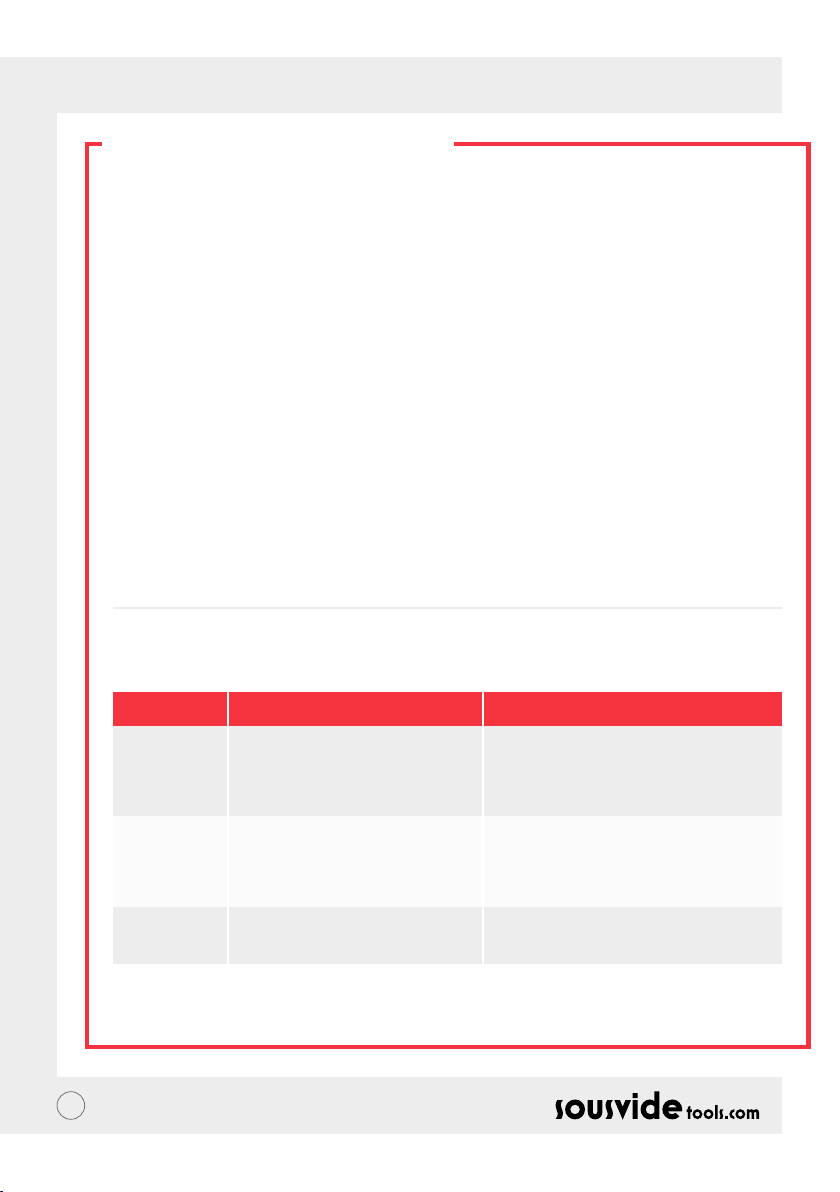
NL // GEBRUIKERSHANDLEIDING
SCHOONMAKEN
Voorbereiding
De iVide Plus Thermische Circulatiepomp kan worden schoongemaakt met voedselkwaliteit azijn (witte
wijnazijn, appelazijn, enz.)
Waarom de noodzaak om schoon te maken?
Normaal kraanwater bevat mineralen die wanneer het water verwarmd wordt tot een bepaalde temperatuur,
een afzetting op de verwarming of op het oppervlak van het apparaat zullen creëren. In dat geval heeft deze
afzetting invloed op de prestaties van het apparaat. Het wordt aanbevolen om de machine om de 20 keer te
reinigen of na 100 uur gebruik. U kunt het apparaat op basis van uw werkelijke behoeften reinigen als gevolg
van verschillend water in verschillende gebieden.
Schoonmaken
1 Vul de container (tot de MAX-lijn) met water. Voeg 5g azijn toe aan het water.
2 Zet de iVide Plus Thermische Circulatiepomp aan, stel de werktemperatuur in op 80°C (176°F) en tijd op 3
uur (03:00). Klik op START/STOP. Na 3 uur piept en schakelt de machine zich uit.
*Snelle schoonmaak procedure: Houd de START/STOP en – knoppen ingedrukt. De digitale aezing (B)
geeft de ingestelde temperatuur 80°C aan, de digitale aezing (C) geeft de ingestelde tijd 3.00 aan. Laat de
knop los en de digitale meting (B) & (C) zal 10 keer knipperen. Klik op de START/STOP-knop om het reinigen
te starten.
3 Check of het apparaat schoon is. Als het apparaat niet schoon is, voeg dan meer azijn toe en start het proces
opnieuw. Als het apparaat schoon is, moet u de azijn uit het apparaat legen, het apparaat met vers water
wassen, drogen en opbergen.
PROBLEEMOPLOSSING
Foutmelding
E01
E02
LP
** Als zich tijdens het gebruik van het apparaat andere problemen voordoen, neem dan contact op met een
specialist. Probeer geen ongeoorloofde reparaties, dit kan ongelukken tot gevolg hebben.
82
Oorzaak
Het waterniveau is lager dan het
laagste waterniveau of hoger dan het
hoogste waterniveau.
1. Of de verwarmingsbuis normaal
is; 2. Of de interne bedrading van
de machine normaal is; 3. Is de
temperatuursensor normaal.
De machine verliest plotseling stroom
tijdens het normale koken.
Probleemoplossing
Schakel de stroom uit. Als het waterniveau
te laag is, voeg dan de juiste hoeveelheid
water toe aan het reservoir; als het water te
hoog is, verwijder het water uit het reservoir.
Noodzaak om een professional te vragen
voor reparatie.
Page 83
NL // GEBRUIKERSHANDLEIDING
GARANTIE & AFTER
SALES SERVICE
1 Zorg ervoor dat het platform waarop u werkt plat, schoon en opgeruimd is.
2 Garantie is beperkt tot schade veroorzaakt door productiefouten.
3 De kosten van onderdelen en onderhoud worden in rekening gebracht als gevolg van oneigenlijk gebruik of
andere niet-productkwaliteitsproblemen.
4 Bewaar de aankoopbonnen.
Onderhoudskaart
Voornaam:
Telefoon:
Adres:
Machinemodel:
Leverancier:
Achternaam:
Email:
Aankoopdatum:
Reparatie Document
Datum Oorzaak Door
83
Page 84

NO // BRUKERMANUAL
OM IVIDE
Opprettet i 2011, Sousvidetools.com er et mat- og teknologirma som ønsker å hjelpe folk lage mat smartere
#clevercooking. Vi er et ledende rma innen vårt felt, vi har produsert 2 kokebøker, en sous vide kalkulator,
en app, og en treningsguide i samarbeid med Campden BRI, Storbritannias ledende leverandør av praktisk
vitenskapelig, teknisk og rådgivende tjenester, og nå verdensmarkedets ledende sous vide sirkulator
Vårt team består av 15 stemmer — og vi kommer alle på jobb hver dag, med én ting i tankene: jobbe for å lage
bedre redskaper for å gjøre matlagingsstress, til middagssuksess. (Vi kaller dette #clevercooking) Hvorfor?
Fordi jo mer du vet om matlaging, jo bedre blir du på det. Våre forskningskokker lager alltid mat, og du får
høste fruktene i forskningens og utviklingens navn.
Hvorfor iVide sirkulatoren? Vi ønsker å gjøre det enkelt for både sous vide nybegynnere, og ekspertene, å lage
kvalitetsmat hjemme, med perfekt nish hver gang. Så si farvel til overkokt, tørr mat som smaker papp, og si hei
til gourmetmat.
Med en høyoppløsnings 4.5 tommer berøringsskjerm, er SousVide Tools iVide Plus Thermal Circulator mulig å
koble til trådløst nett, så du kan fjernkontrollere den fra hvor som helst gjennom appen. Den er også designet
for å forsikre matsikkerhet, med en 80 liters kapasitet, garanterer den en stabilitet på 0.07 grader, mellom
40°C og 100°C. 2 års garanti
iVide Plus er den første vanntette maskinen for det profesjonelle kjøkken, sertisert til IPX7. Under IPX7
beskrivelsen, vil iVide Plus Sous Vide sirkulatoren kunne senkes ned opp til 1 meter under vann, i opptil 30
minutter. Dette betyr at skulle et uhell oppstå, og man søler på, eller mister sirkulatoren i vannet, så vil det ikke
gjøre noen skade, men langvarig utsettelse for vann, som for eksempel i en oppvaskmaskin, vil være skadelig.
SIKKERHET
Vennligst følg disse forhåndsreglene:
• Bruk iVide Plus Thermal Cirkulator som beskrevet i brukermanualen. Annen bruk kan føre til skade på
maskinen.
• Bruk kun strømforsyningen som vises på energietiketten
• Koble kun til med en trygg, jordet kabel.
• Skru av strømforsyningen før du fjerner maskinen
• Ikke stikk ngeren i vannet for å sjekke temperaturen. Vennligst bruk temperaturdisplayet eller et
termometer.
• Vannivået må være mellom laveste nivå "MIN", og høyeste nivå "MAX". Er det ikke det kan det føre til skade
på maskinen.
• Ikke ta på noen varme overater på iVide Plus Thermal Circulator under, eller rett etter bruk.
• Om det er væske på toppen av iVide Plus Thermal Circulator (over MAX vannivå), skru den av og tørk den
før bruk.
• Vi anbefaler at brukere av iVide Plus Thermal Circulator gis fulle instruksjoner før bruk, eller er under
oppsyn av en erfaren bruker
• Hold ytende unna strømuttaket og viften bak på iVide Plus Thermal Circulator. Gjør man ikke det kan det
føre til skade på maskinen og brukeren.
84
Page 85
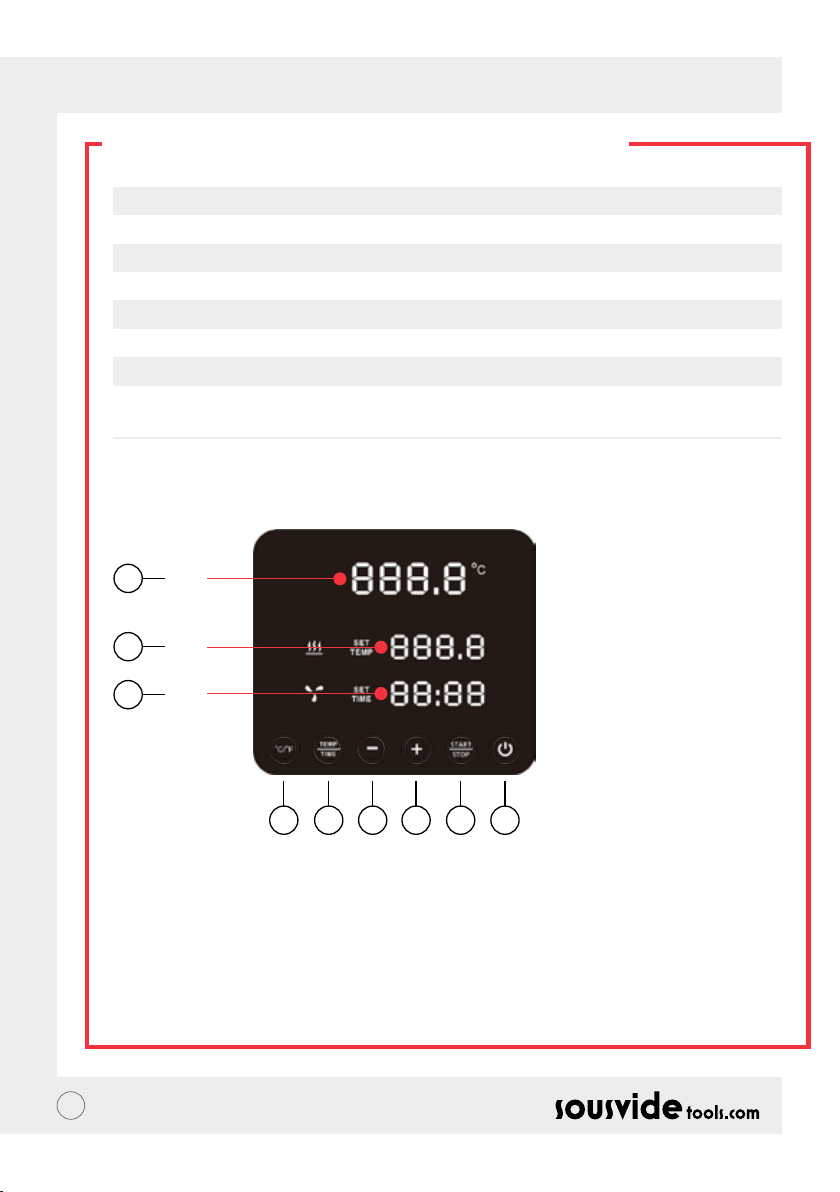
NO // BRUKERMANUAL
TEKNISK INFORMASJON
Strømforsyning 220-240V~
Frekvens 50HZ
Effekt (Watt) 2300W
Temperaturinstilling 5 - 95°C / 41 - 203°F
Tidsinstilling 5 min - 99 timer og 59 minutter
Displaynøyaktighet 0.1
Størrelse 5.5”x5.6”x11.9”(140x143x302mm)
Vekt 2.2Kg
FUNKSJONER
6
A
7
B
8
C
145532
1. Strøm/ På
• Når maskinen er på, vil knappen og indikatorlampen lyse. Maskinen vil gå over i strømsparingsmodus etter
2 sekunder
• I strømsparingsmodus trykk på "På" knappen for å vekke maskinen, og sette den i standby modus. Nå vil
den vise (A) nåværende vanntemperatur, (B) forrige avleste temperatur. Innstilt måltemperatur. Den
digitale avleseren (C) viser antall arbeidstimer for siste økt.
• Når maskinen er PÅ (knappen er fullt opplyst), trykk på denne knappen for å sette den i strømsparingsmodus.
Dette kan også gjøres mens den er i bruk for å sette den direkte i strømsparingsmodus.
85
Page 86

NO // BRUKERMANUAL
PRODUCT FUNCTION
2. °C/°F
Endre temperaturmåleenhet
• Trykk på °C / °F for å velge temperaturmåleenhet for maskinen. Vennligst velg celsius eller fahrenheit
3. TEMP / TIME
Temperatur- og tidinnstillingsknapp
• Trykk på TEMP / TIME for å endre temperatur eller tidsinnstilling. Når avleseren (B) blinker, velg ønsket
temperatur med + og -.
* Hvis ingen tid eller temperatur er valgt innen avleseren har blinket 10 ganger, vil iVide Plus Thermal
Circulator gå ut av TEMP / TIME velgeren. For å tilbakestille, trykk på TEMP / TIME igjen for å velge tid /
temperatur.
* For å vise valgt tid og temperatur, trykk ned TEMP / TIME knappen i 3 sekunder.
4. START / STOP
Start-/ stoppknappen
• I standby modus, trykk på START/STOP for å begynne.
• I arbeidsmodus, trykk på START/STOP for å stoppe.
5. + -
Knapp
• For å justere temperatur eller tid, trykk på TEMP / TIME, velg ønsket valg, og bruk + og - for å velge.
6. Temperaturavleseren (A)
• Viser temperatur i sanntid
7. Temperaturavleser (B)
• Viser valgt temperatur.
8. Tidsavleseren (C)
• I standby modus vises valgt tid
• I arbeidsmodus vises gjenstående tid
86
Page 87
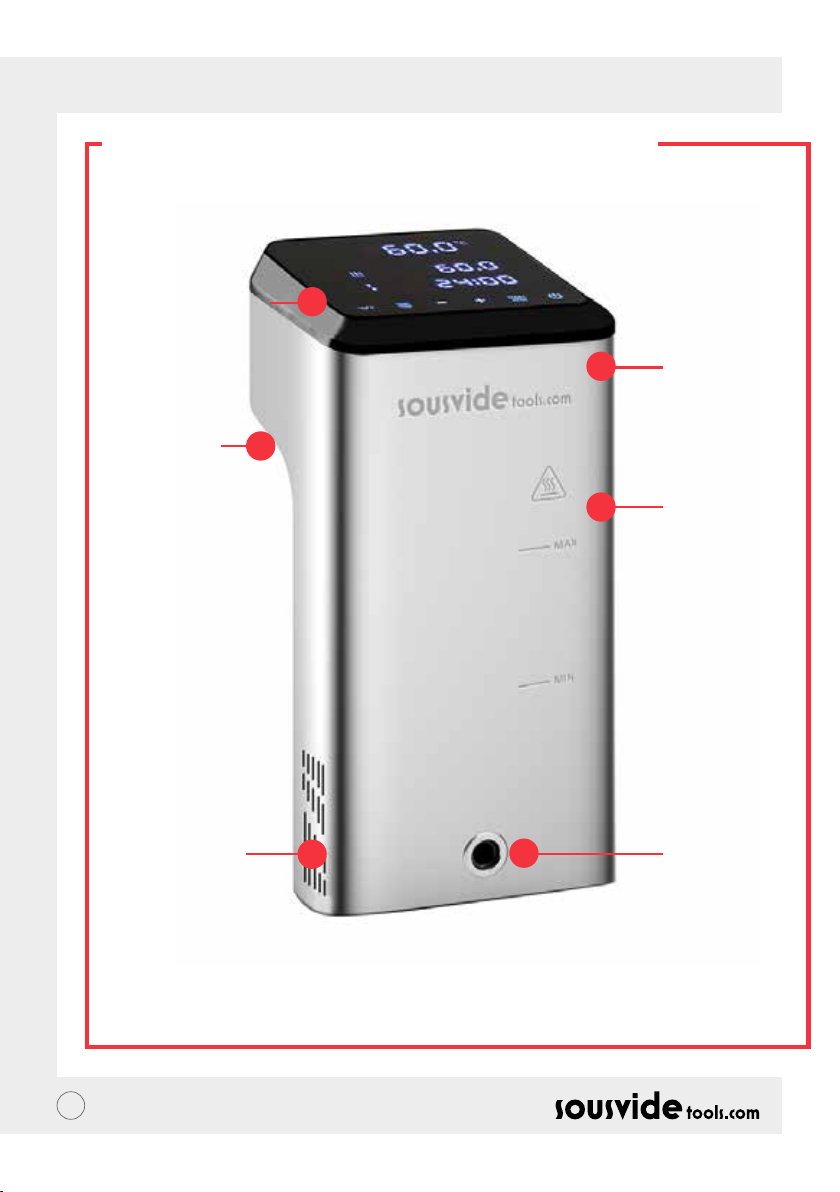
NO // BRUKERMANUAL
PRODUKTSTRUKTUR
1. Kontrollpanel
5. Håndtak
2. Deksel
3. Hoveddel
6. Vanninntak
87
4. Vannuttak
Page 88
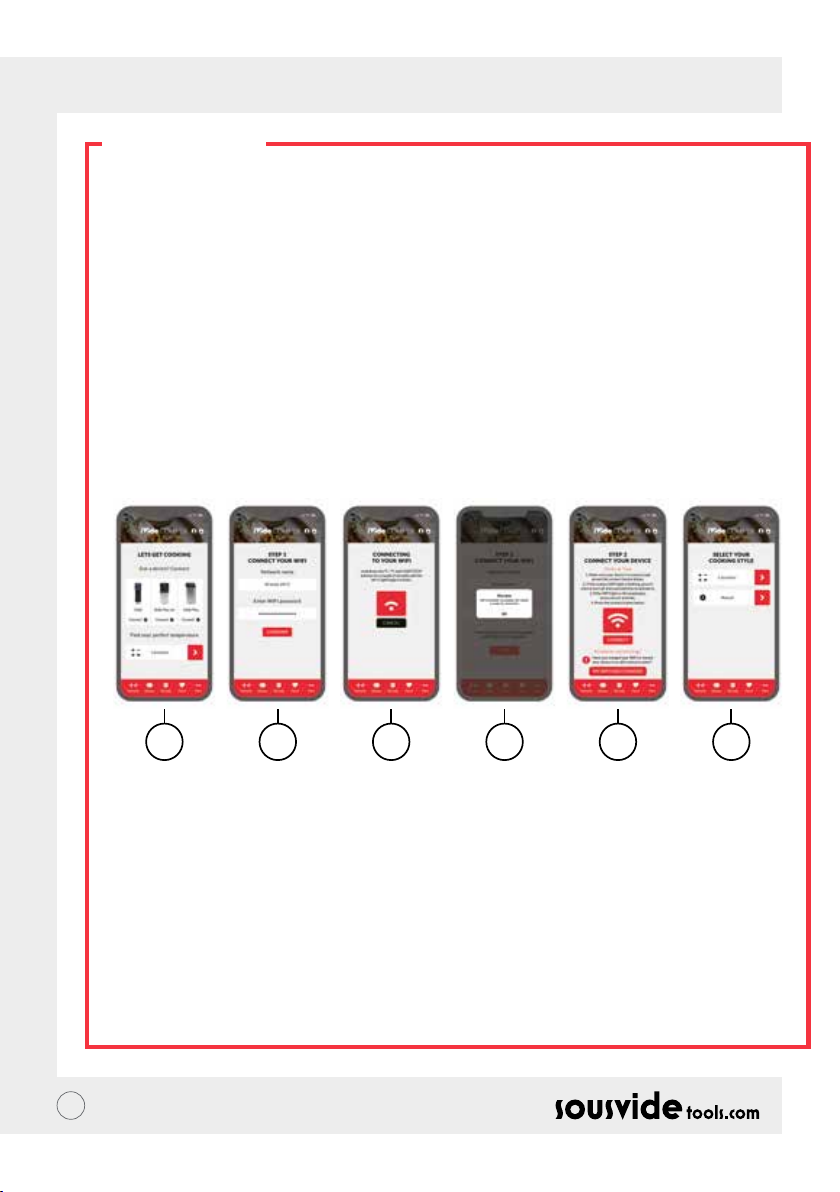
NO // BRUKERMANUAL
APPEN
Laste ned iVide Plus Thermal Circulator appen
Om du ikke har lastet ned iVide Plus Thermal Circulator appen enda, kan den lasts ned fra Apple Store (IOS),
eller Google Play (Android). Den er kompatibel med IOS versjon 9.3.5 og senere. Den er kompatibel med
Android versjon 4.3 og senere.
Notat: Vennligst sjekk med din mobil- eller enhetsprodusent om du har spørsmål angående nedlasting av
appen.
Seks steg for å kongurere iVide Plus Thermal Circulator appen
Å installere iVide Plus Thermal Circulator appen går raskt, i forhold til noen andre apper. iVide appene er klare
for bruk umiddelbart, og gir deg den nødvendige informasjonen akkurat når du trenger det. Vi har utviklet
en helt ny fremgangsmåte for denne typen applikasjoner, fordi hvert øyeblikk på kjøkkenet burde være
uforglemmelig. Appen er kompatibel med iVide Plus Thermal Circulator med Wi-Fi. Appen gjør det å lage mat
med iVide Plus Thermal Circulator utrolig enkelt. Bare velg mat, still den inn, og trykk på start.
Seks enkle steg
1 2 3 4 5 6
1 Velg enheten du ønsker å bruke, og trykk på “CONNECT”.
2 Appen vil oppdage tilkoblet nettverk. Tast inn passord og trykk på ‘Conrm’.
3 Appen begynner å søke etter iVide Plus Thermal Circulator. Hold inne °C / °F og START/STOP knappene
i et par sekunder, til Wi-Fi lampen begynner å blinke. Vent til maskinen er ferdig med den automatiske
kongurasjonen.
4 Til slutt vil du få en bekreftelse på at maskinen er klar til å bli tilkoblet.
5 Forsikre deg om at Wi-Fi lampen har sluttet å blinke, og trykk på ‘Connect’. Om du trenger hjelp, les hint og
tips på displayet.
6 Gratulerer! iVide Plus Thermal Circulator er blitt kongurert! Nyt matlagingen!
Notat: Apple og iPhone logoene er varemerkene til Apple Inc. Registrert i USA og andre land. Apple Store er
en servicetjeneste levert av Apple Inc. Android; Google Play og Google Play logoen er varemerker tilhørende
Google Inc.
88
Page 89

NO // BRUKERMANUAL
HVORDAN BRUKE PRODUKTET
1 Begynn med å feste iVide Plus Thermal Circulator til beholderen. Skru knotten mot klokkeretningen, lag
et mellomrom mellom hoveddelen og knotten, senk maskinen ned i beholderen og skru fast knotten med
klokkeretningen for å sikre maskinen.
2 Tilsett vann I beholderen, forsikre deg om at vannivået er mellom minimum og maximum
3 Koble til strøm for å skru på og lyse opp displayet. iVide Plus Thermal Circulator går inn i
strømsparingsmodus etter 2 sekunder. Etter dette, trykk på av/på knappen for å sette den i PÅ modus.
4 Trykk på °C/°F for å velge temperaturenhet. Standard er °C. Maskinen vil huske valgt temperaturenhet til
neste gang du bruker den
5 Trykk på TEMP /TIME for å velge temperatur eller og velg med + and -.
6 Etter oppsett er ferdig, trykk på START/STOP for å starte maskinen. Når temperaturen i beholderen når
ønsket temperatur, vil avleser (C) starte nedtellingen – tilsett nå vakuumpakket mat for å tilberede den i en
stabil temperatur
7 iVide Plus Thermal Circulator vil gi lyd når maten er klar. Trykk på START/STOP for å skru av
Notat: Hvis ingen handling er tatt, vil maskinen gi en lang lyd etter 20 sekunder, mens den holder
vanntemperaturen.
8 Ta ut vakuumpakket mat. Maten er nå klar for neste steg.
9 Etter bruk av iVide Plus Thermal Circulator, skru av maskinen og sett den et trygt sted.
IKKE GLEM: Maten må være vakuumpakket før Sous Vide tilberedning. Vannivået (etter maten er lagt i
vannet) skal være over MIN, og under MAX merket på maskinen. For å unngå skade på maskinen, tøm ut
vannet etter bruk, og rens vannbadet
VEDLIKEHOLD
For å unngå brannskader, sørg for at iVide Plus Thermal Circulator er av, og avkjølt til romtemperatur før vask
1 Etter vask, plasser iVide Plus Thermal Circulator vertikalt, ikke horisontalt eller opp ned
2 Sørg for å ikke skade komponentene inne i maskinen under vask. Skulle de bli skadet, kontakt profesjonell
reparatør. Ikke forsøk uautorisert reparasjon, da dette kan lede til uhell.
3 Tøm ut vannet etter hver bruk. Fyll med rent vann neste gang du bruker iVide Plus Thermal Circulator.
Brukes vannet igjen, kan oppsamlede mineraler i vannet skade maskinen.
4 Fjern dekselet bak på iVide Plus Thermal Circulator for å rense varmerøret og sonden, om effekten
reduseres eller det har samlet seg skitt på komponentene. Det anbefales å rense iVide Plus Thermal
Circulator hver 20. bruk, eller etter 100 timers bruk.
5 Ikke sett en varm iVide Plus Thermal Circulator I kaldt vann, da dette kan føre til skade på maskinen. iVide
Plus Thermal Circulator bør avkjøles til romtemperatur før den settes i kaldt vann for bruk igjen.
89
Page 90
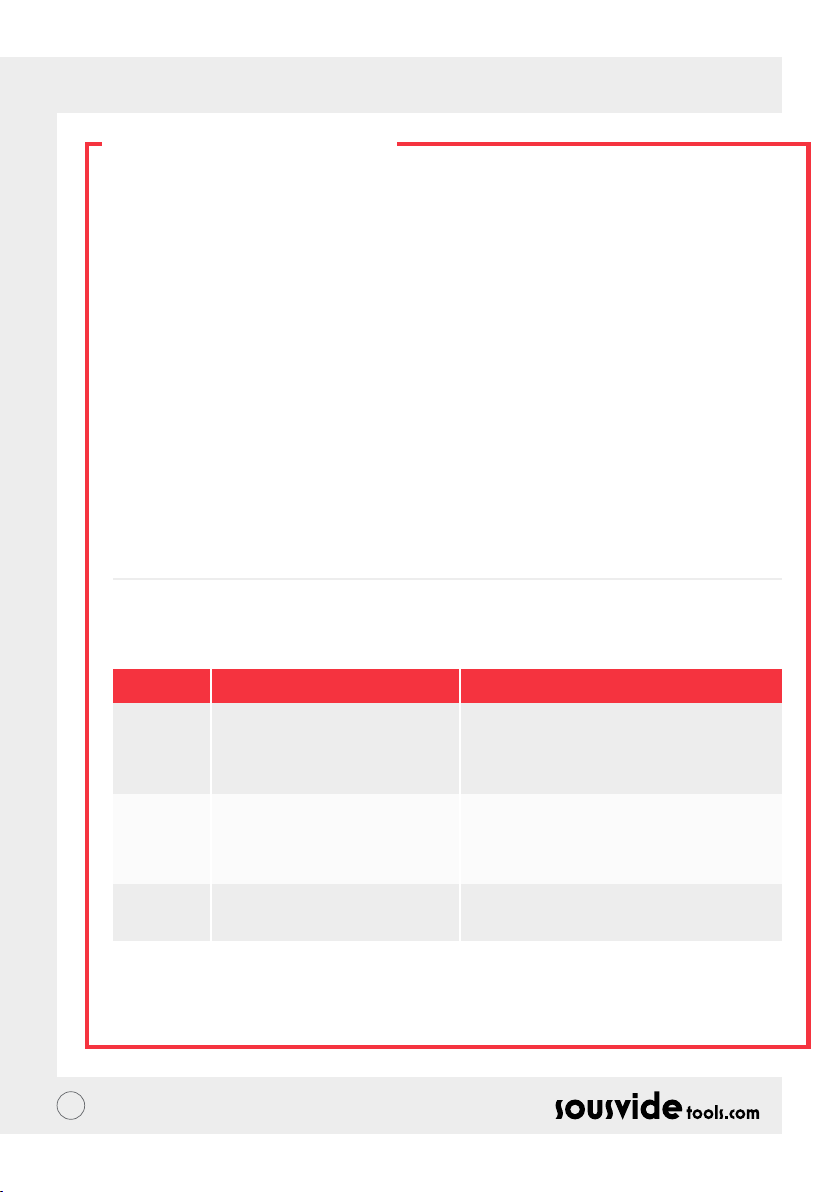
NO // BRUKERMANUAL
RENGJØRING
Forberedelse
iVide Plus Thermal Circulator kan vaskes med mateddik (hvit eddik, eplesidereddik osv.)
Hvorfor trenger den vaskes?
Vanlig springvann inneholder mineraler, som når vannet varmes til en viss temperatur, vil føre til en
oppbygning på varmeelementet og/eller overaten på maskinen. I så tilfelle, vil denne oppbygningen føre til
redusert effekt av maskinen. Det anbefales å rengjøre maskinen etter hver 20. bruk, eller 100 brukstimer. Du
kan rengjøre maskinen etter eget behov basert på vannet i forskjellige områder.
Hvordan rengjøre
1 Fyll beholderen opp til MAX med vann, og tilsett 5g eddik i vannet.
2 Skru på iVide Plus Thermal Circulator, still inn temperaturen til 80°C (176°F), og tiden til 3 timer (03:00).
Trykk på START/STOP. Etter 3 timer vil maskinen gi lyd og skru seg av.
*Rask rengjøring: Hold inne START/STOP og - knappene. Avleser (B) vil vise 80°C, avleser (C) vil vise 3:00
timer. Slipp knappen, og avleser (B) og (C) vil blinke 10 ganger. Trykk på START/STOP knappen for å starte
rengjøringsprosessen.
3 Sjekk at maskinen er ren. Hvis maskinen ikke er ren, tilsett mer eddik og start på nytt. Er maskinen ren, tøm
ut eddikvannet fra maskinen, vask maskinen med rent vann, tørk og sett vekk.
FEILSØKING
Feilkoder
E01
E02
LP
** Under bruk av maskinen, om andre problemer oppstår, vennligst prat med en spesialist. Ikke forsøk
uautorisert reparasjon, da dette kan føre til uhell.
90
Årsak til problemet
Vannivået er for høyt eller for lavt
1. Om varmerøret er normalt;
2. Om de innvendige koblingene er
normale;
3. Er temperatursensoren normal?
Maskinen mister plutselig effekt
under normal bruk
Feilsøking
Skru av maskinen. Hvis vannivået er for lavt,
tilsett mer vann. Hvis vannivået er for høyt, tøm
ut litt av vannet til det er under MAX merket
Oppsøk profesjonell reparatør
Page 91

NO // BRUKERMANUAL
GARANTI & SERVICE
1 Sørg for at arbeidsoveraten er at, ren og ryddig.
2 Garantien er begrenset til skade forårsaket av feil på produktet.
3 Kostnaden av deler og vedlikehold vil bli belastet om det er grunnet feil bruk eller andre kvalitetsproblemer
ikke forårsaket av produktet.
4 Vennligst ta vare på kvitteringen.
Vedlikeholds kort
Fornavn:
Telefon:
Adresse:
Maskin Modell:
Leverandør:
Etternavn:
Email:
Kjøpsdato:
Reparasjonslogg
Dato Årsak Av
91
Page 92

SE // ANVÄNDARMANUAL
OM IVIDE
Sousvidetools.com grundades 2011 och är ett livsmedel- och teknikföretag med uppdrag att hjälpa
människor laga mat smartare #clevercooking. Utöver det är vi ledande inom vårt område och har producerat
2 kokböcker, en sous vide-kalkylator, en APP och en träningsguide i samarbete med Campden BRI som är
Storbritanniens ledande leverantör av praktiskt vetenskapliga, tekniska och rådgivande tjänster, och nu även
den världsledande sous vide-kokaren.
Vårt team består av 15 personer som alla kommer in till arbetet varje dag med en sak i åtanke; att skapa
bättre verktyg som gör matlagningsstress till en middagssuccé! (Vi kallar detta "#clevercooking.") Varför? Jo,
eftersom ju mer du vet om matlagning, desto bättre blir du på det. Våra forskningskockar lagar konstant mat
och du får sedan skörda fördelarna genom FoU.
Så varför iVide kokaren? Vi vill göra det enkelt för både nybörjare och experter inom sous vide att laga
restaurangliknande kvalitetsmat hemma med den perfekta nishen varje gång. Så säg hej då till överkokt torr
mat med smak av kartong och säg hej till gourmetmiddag!
En SousVideTools iVide Plus värmecirkulator med högupplöst 4.5 tums bred pekskärm. Den är
uppkopplad med WiFi vilket innebär att du kan styra den på distans från var som helst via vår app. iVide
Plus är även utformad för att garantera hygiensäkerhet. Med en kapacitet på 80-liter garanterar den en
temperaturstabilitet på 0,07 ° C mellan 40 ° C och 100 ° C. 2 års garanti.
iVide Plus är den första vattentäta enheten för det kommersiella köket, certierat till IPX7. Under IPX7-
beteckningen kan iVide Plus Sous Vide-kokaren motstå nedsänkning i vatten upp till 1 meter under ett
maximum av 30 minuter. Detta innebär att om en olycka inträffar och enheten stänks ner eller hamnar
under vattenytan, så kommer inte detta att orsaka skador. Långvarig exponering, som till exempel placering i
diskmaskin, skulle dock skada enheten.
SÄKERHET
Vänligen följ dessa säkerhetsåtgärder:
• Använd endast iVide Plus värmecirkulator enligt bruksanvisningen. Att ej att göra det kan leda till skador på
maskinen.
• Anslut endast med den strömstyrka som visas på enhetens märkning.
• Anslut endast till en säker jordad koppling.
• Stäng av strömmen innan du tar bort maskinen.
• Vidrör inte direkt vid vätskan för att kontrollera temperaturen. Använd temperaturdisplayen eller en
termometer.
• Vattennivån måste vara mellan lägsta vattennivå "MIN" och högsta vattennivå "MAX". Att ej följa detta kan
leda till skador på maskinen.
• Rör inte ytor som kan blivit varma på iVide Plus värmecirkulatorn under, eller omedelbart efter, användning.
• Om det nns vätska uppe på iVide Plus-värmecirkulatorn (över MAX-vattennivån), stäng av strömmen och
torka av den innan användning.
• Vi rekommenderar att användarna av iVide Plus-värmecirkulator ges fullständiga instruktioner innan de
används, alternativt övervakas av en erfaren användare.
• Håll borta fukt från eluttaget samt från äkten på baksidan av iVide Plus värmecirkulator. Att ej göra det
kan leda till skador både på maskin och användare.
92
Page 93
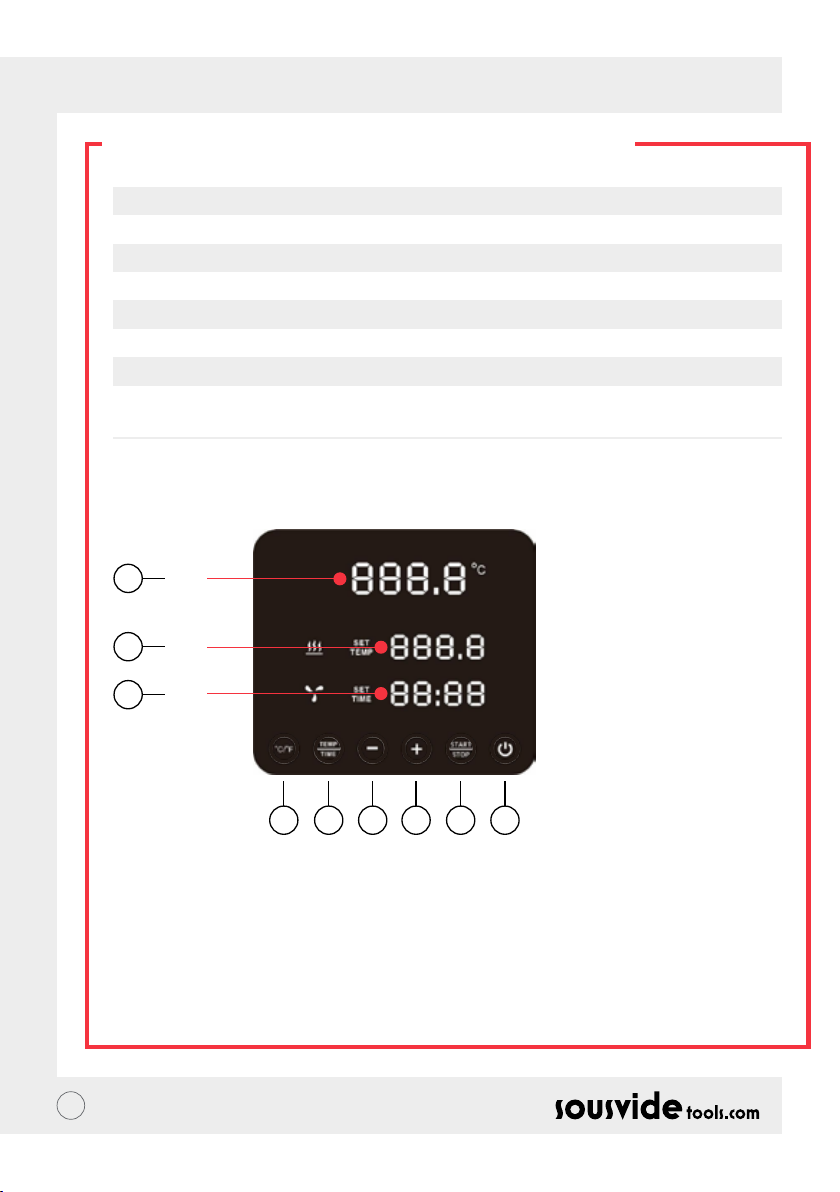
SE // ANVÄNDARMANUAL
TEKNISKA PARAMETRAR
Märkspänning 220-240V~
Frekvens 50HZ
Strömstyrka 300W
Temperaturskala 5 - 95°C / 41 - 203°F
Tidsskala 5 min - 99 timmar 59 minuter
Noggrannhet display 0.1
Storlek 5.5”x5.6”x11.9”(140x143x302mm)
Vikt 2.2Kg
FUNKTION
6
A
7
B
8
C
145532
1. Ström
• När strömmen är påslagen lyser knappen och indikatorn. Maskinen växlar till energisparläge efter 2 sekunder.
• I energisparläget trycker du bara på strömbrytaren för att väcka maskinen och gå in i standby-läge. I det
läget visar den digitala avläsningen (A) aktuell vattentemperatur och den digitala avläsningen (B) visar
den föregående. Måltemperaturen som ställts in i arbetsprocessen visas också samt (C) den sista
arbetsprocessens inställda arbetstid.
• I läget ON (då knappen och indikatorn lyser fullt ), kan du trycka på knappen för att gå in i energisparläget.
Detta kan också utföras under själva matlagningsprocessen för att då gå in i energisparläget direkt.
93
Page 94

SE // ANVÄNDARMANUAL
FUNKTION
2. °C/°F
Knapp för att ändra temperaturenhet
• Klicka på °C / °F to för att välja vilken temperaturenhet maskinen ska visa. Välj mellan Celsius eller
Fahrenheit.
3. TEMP / TID
Knapp för att ändra temperatur och tid
• Klicka på TEMP / TID för att växla mellan temperatur- eller tidsinställning. När den digitala avläsningen av
temperatur (B) blinkar ställer du in önskad måltemperatur med + och -. När den digitala avläsningen av tid
(C) blinkar kan önskad sluttid ställas in med + och -.
* Om ingen tid eller temperatur har ställts in efter att den digitala avläsningen blinkat 10 gånger, avbryter
iVide Plus värmecirkulator TEMP / TID-alternativet. Om du behöver ställa om klickar du på TEMP / TID
igen för att ange önskad information.
* För att visa inställd tid och temperatur, håll in TEMP / TID knappen i 3 sekunder..
4. START / STOPP
Start/stopp knappen
• I standby-läge, klicka på START/STOPP för att starta igång.
• In aktivt läge, klicka START/STOP för att stänga av.
5. + -
Justeringsknapp
• För att justera temperaturen eller tiden, klicka på TEMP / TID och välj önskat alternativ. Använd sedan
knapparna + och - för att justera.
6. Digital läsning av temperatur (A)
• Visar arbetstemperatur i realtid.
7. Digital läsning av temperatur (B)
• Visa inställd arbetstemperatur.
8. Digital läsning av tid (C)
• I standby-läge visas inställd sluttid.
• I aktivt läget visas den återstående arbetstiden.
94
Page 95
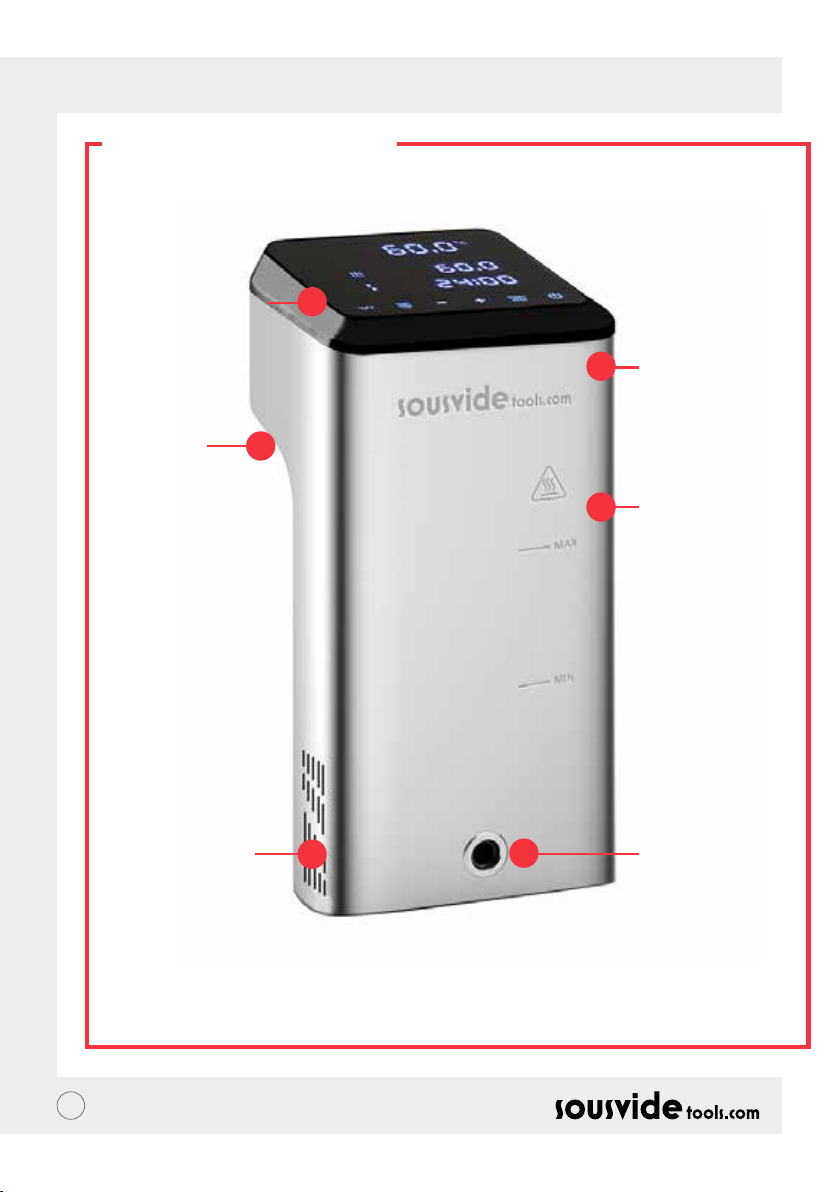
SE // ANVÄNDARMANUAL
STRUKTUR
1. Kontrollpanel
5. Fixerat
handtag
2. Överskydd
3. Huvuddel
6. Vattenintag
95
4. Vattenutsläpp
Page 96
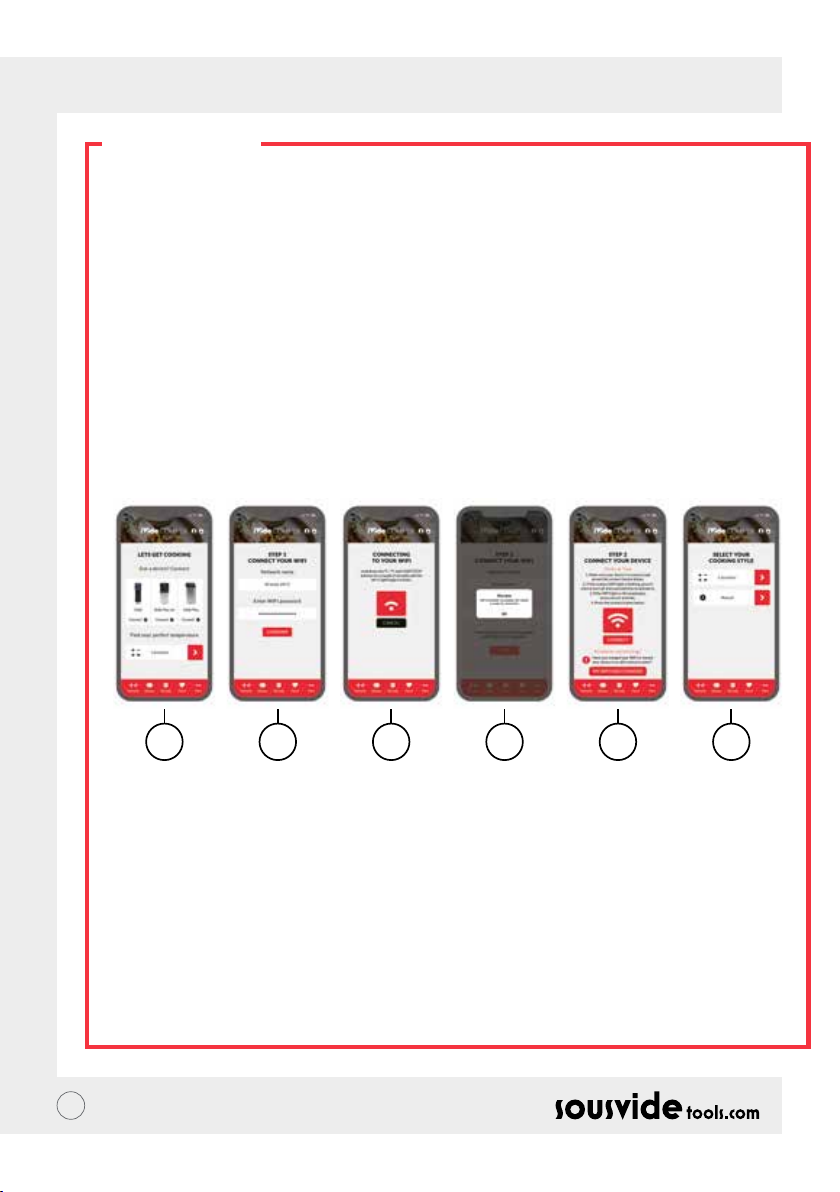
SE // ANVÄNDARMANUAL
APPEN
Nedladdning av iVide Plus värmecirkulator App
Om appen för iVide Plus- värmecirkulator inte har laddats ner, kan den hämtas från Apple Store (IOS) eller
Google Play (Android). Den är kompatibel med IOS version 9.3.5 och senare upplagor samt med Android
version 4.3 och senare.
Obs! Ta kontakt med tillverkaren av din mobiltelefon eller annan eventuell enhet om du har frågor kring
nedladdningen av appar.
Sex steg för att kongurera iVide Plus-värmecirkulator App
Att installera iVide Plus värmecirkulator App går snabbt i motsats till många andra appar. iVide appen
möjliggör omedelbar användning samt tillhandahåller nödvändig information exakt när du behöver den. Vi har
utvecklat ett helt nytt tillvägagångssätt för denna typ av applikationer eftersom varje ögonblick i köket bör
vara oförglömligt. App är kompatibel med iVide Plus värmecirkulator med Wi-Fi och appen gör matlagning
med iVide Plus-värmecirkulator oerhört lätt. Välj bara mat, justera inställningarna och tryck på Start.
Sex enkla steg
1 2 3 4 5 6
1 Välj den enhet du vill använda och tryck på "ANSLUT".
2 Appen kommer att upptäcka ett anslutet Wi-Fi-nätverk. Ange lösenordet och tryck på 'Bekräfta'.
3 Applikationen börjar söka efter iVide Plus värmecirkulator. Håll ned knapparna ° C / ° F och start / stopp i
några sekunder tills Wi-Fi-lampan börjar blinka. Vänta tills apparaten avslutar automatisk konguration.
4 Efter ett tag visas ett meddelande som bekräftar att apparaten är klar att anslutas.
5 Kontrollera att Wi-Fi-lampan har slutat blinka och tryck sedan på "Anslut" -knappen. Om du behöver hjälp
läser du vägledning och tips på skärmen.
6 Grattis! iVide Plus värmecirkulator har just blivit kongurerad! Njut av din matlagning!
Vänligen notera: Apple- och iPhone-logotyperna är varumärken som tillhör Apple Inc. och är registrerade i USA
samt andra länder. Apple Store är ett servicemärke från Apple Inc. Android; Google Play och Google Playlogotypen är varumärken som tillhör Google Inc.
96
Page 97

SE // ANVÄNDARMANUAL
ANVÄNDARINSTRUKTION
1 Börja med att fästa iVide Plus värmecirkulator i matlagningskärlet. Vrid vredet moturs och skapa ett
mellanrum mellan huvuddelen och vredet. Sätt sedan in maskinen i matlagningskärlet och dra åt vredet
medurs för att säkra maskinen.
2 Tillsätt vatten i matlagningskärlet, se till att vattennivån är mellan mini- och maxnivå.
3 Anslut strömmen för att starta och tända den digitala displayen. iVide Plus värmecirkulator kommer in i
energispararläge efter 2 sekunder. Efter det trycker du på strömbrytaren för att maskinen i “ON“ läge.
4 Klicka på ° C / ° F för att välja temperaturenhet. Standardvärdet är ° C. Din valda temperaturenhet kommer
vara inställd nästa gång du använder maskinen.
5 Klicka på TEMP / TID för att välja temperatur eller tid och ställ in målvärdet med + och - tangenterna.
6 När inställningen är klar klickar du på START / STOPP för att sätta igång maskinen. När temperaturen
i matlagningskärlet når önskad nivå börjar den digitala tidsavläsningen (C) att räkna ner. Lägg nu i din
vakuumförpackade mat för att laga den med en konstant temperatur.
7 När matlagningen är klar piper iVide Plus värmecirkulator. Klicka på START / STOPP för att stänga av.
Notera: Om maskinenen inte arbetar kommer den börja avge en kontinuerlig pipande efter 20 sekunder.
Vattentemperaturen förblir vid förinställd temperatur.
8 Ta ut din vakuumförpackade mat. Maten är nu klar för nästa process.
9 Stäng av iVide Plus värmecirkulator efter användning och försvara på ett säkert ställe.
OBSERVERA: Innan man lagar mat med Souse Vide-teknologi så måste maten vara vakuumförpackad
Vattennivån (efter att maten har lagts i) bör vara högre än MIN, men lägre än MAX markerad på maskinen. För
att undvika att maskinen skadas, dränera vattnet efter användning och rengör vattenbadet.
UNDERHÅLL
För att undvika vidbränning, se till att iVide Plus värmecirkulator är avstängd och nedkyld till rumstemperatur
före rengöring.
1 Placera iVide Plus värmecirkulator vertikalt efter rengöring, placera den aldrig horisontellt eller upp och ner.
2 Skada inte komponenterna inuti maskinen vid rengöring. Om komponenterna blir skadade så anlita alltid
en specialist för att kontrollera och reparera. Försök inte utföra obehöriga reparationer då detta kan leda
till olycka.
3 Töm ut gammalt vatten efter varje användning och fyll på med nytt när du använder iVide Plus-
värmecirkulator. Om vattnet återanvänds kan mineralämnen skada komponenterna.
4 Ta bort baksidan av iVide Plus-värmecirkulator för att rengöra värmecylindern och sonden om kapaciteten
minskar eller komponenterna har samlat smuts. Det rekommenderas att rengöra iVide Plus värmecirkulator
var 20: e gång eller efter 100 timmars användning.
5 Placera inte en varm iVide Plus värmecirkulator i kallvatten eftersom detta kan orsaka skador. iVide Plus
värmecirkulator ska kylas ner till rumstemperatur och läggas i kallt vatten vi användning.
97
Page 98
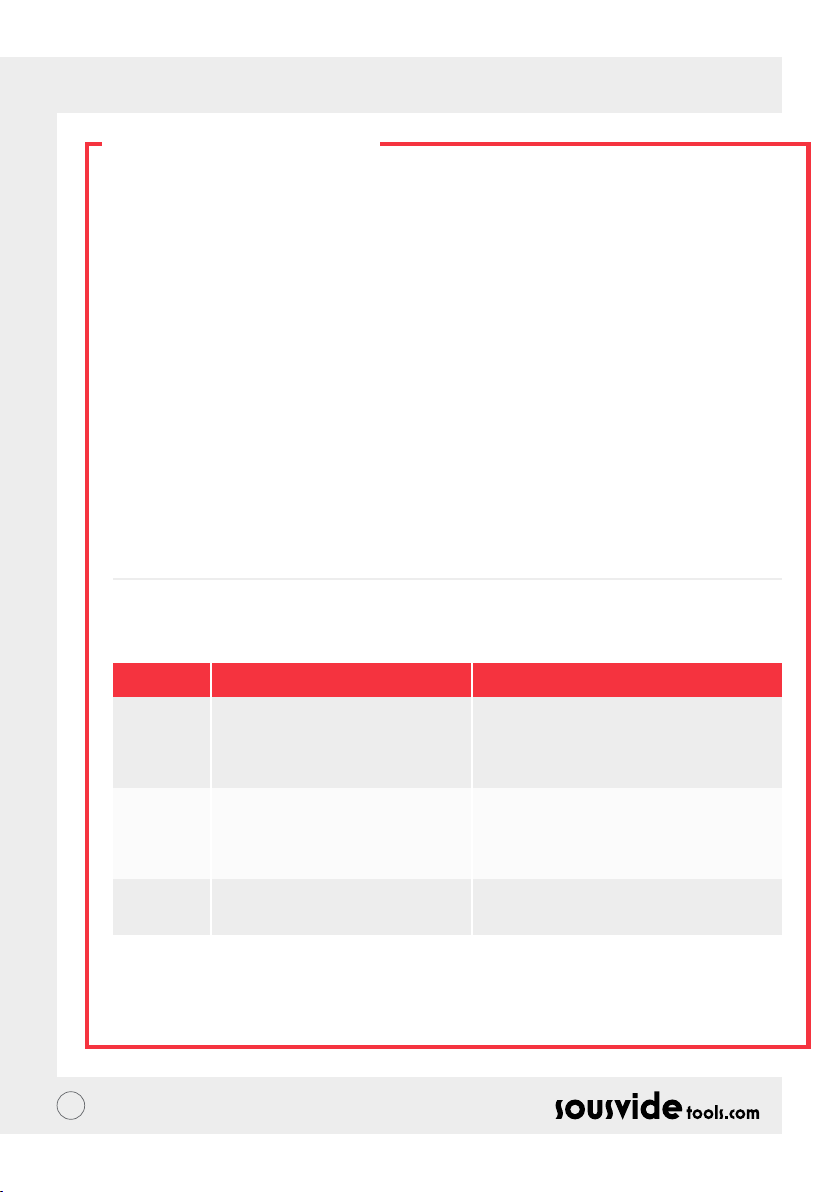
SE // ANVÄNDARMANUAL
RENGÖRING
Förberedelse
iVide Plus värmecirkulator kan rengöras med ättika (vitvinäger, äppelcidervinäger, etc..)
Varför behövs rengöring?
Vanligt kranvatten innehåller mineraler som kan lämna en avlagring när vattnet värms till en viss temperatur.
Bildas det en avlagring på värmesystemet eller maskinens yta kan detta påverka maskinens prestanda. Det
rekommenderas att rengöra maskinen var 20: e gång eller efter 100 timmars användning. Du kan behöva
rengöra maskinen efter annat schema då vattnet kan te sig annorlunda i olika områden.
Hur man rengör enheten
1 Fyll behållaren (upp till MAX-linjen) med vatten. Tillsätt 5 g ättika.
2 Sätt på iVide Plus-värmecirkulator och sätt arbetstemperaturen på 80 ° C (176 ° F) och ställ in 3 timmar
(03:00). Klicka på START / STOPP. Efter 3 timmar piper maskinen och stänger av sig.
* Snabbrengöring: Håll ned START / STOPP-knapparna. Den digitala avläsningen (B) visar då den förinställd
temperaturen 80 ° C och den digitala avläsningen (C) visar 3:00 timmar. Släpp knappen och båda
avläsningarna (B) & (C) blinkar 10 gånger. Klicka på START / STOPP-knappen för att starta rengöringen.
3 Kontrollera om maskinen är ren. Är den inte det så lägg till mer ättika och starta processen igen. Om
maskinen är ren, dränera maskinen och tvätta av den med rent vatten, torka och ställ undan.
PROBLEMSÖKNING
Felkod
E01
E02
LP
** Om några andra problem uppstår vid användning av maskinen, kontakta en specialist. Försök inte utföra
obehöriga reparationer eftersom det kan leda till en olycka.
98
Problemanledning
Vattennivån är lägre än den lägsta
vattennivån eller högre än den högsta
vattennivån
1. Om värmeledningen är normal; 2.
Huruvida maskinens interna ledningar
är normala;
3. Om temperatursensorn är normal.
Maskinen förlorar plötsligt ström
under normal användning.
Problemsökning
Stäng av strömmen. Om vattennivån är för låg,
häll på mer vatten. Om vattennivån är för hög,
häll ut vatten.
Fråga professionell reparatör
Page 99
SE // ANVÄNDARMANUAL
GARANTI- OCH SERVICE
EFTER FÖRSÄLJNING
1 Se till att arbetsytan är at, ren och städad.
2 Garantin är begränsad till skador som orsakas av produktionsfel.
3 Kostnaden för delar och underhåll kommer att debiteras på grund av felaktig användning eller andra
kvalitetsproblem som inte är av produktkvalitet.
4 Var god behåll kvitton
Underhållskort
Förnamn:
Telefon:
Adress:
Maskinmodell:
Leverantör:
Efternamn:
E-post:
Inköpsdatum:
Reparation registrering
Datum Orsak Av
99
Page 100

DK // BRUGERVEJLEDNING
OM IVIDE
Grundlagt I 2011, Sousvidetools.com er en mad og teknologi virksomhed med en mission om at hjælpe folk til
at lave på en smartere måde #klogeremadlavning. Vi er desuden den førende myndighed på det valgte emne,
med produktionen af 2 kogebøger, en sous vide udregner, en APP og en træningsguide I samarbejde med
Campden BRI, UKs førende udbyder af praktisk videnskabelig, teknisk og rådgivende tjenester og nu verdens
førende sous vide cooker.
Vores team består af 15 personer – og vi går alle på arbejde hver dag med ét formål: at skabe bedre redskaber,
som laver madlavningsstress om til aftensmadsucces. (Vi kalder det “#Klogeremadlavning.”) Hvorfor? Fordi jo
mere du ved om madlavning jo bedre bliver du til det. Vores udviklingskokke laver konstant mad, og du får lov
til at nyde fordelene på vegne af R&D.
Så hvorfor lige IVide Cooker? Vi stræber efter at gøre det nemt for sous vide nybegyndere, eksperter og
derimellem at lave mad I restaurant kvalitet der hjemme, med den perfekte nish hver gang. Så sig farvel til
overtilberedt tør mad, som smager af pap og velkommen gourmet middag.
SousVideTools’ IVide Plus Stav (Cirkulator) med en 11,43cm bred høj opløsnings touch skærm. Der er
mulighed for at tilkoble Wi, hvilket betyder at du kan kontrollere den uanset hvor du bender dig ved hjælp af
vores APP, som desuden er designet til at sikre fødevare sikkerhed. Med en 80 liters kapacitet garanterer den
temperatur stabilitet på 0,07°C mellem 40°C og 100°C. 2 års garanti.
IVide Plus er det første IPX7 certicerede vandfaste apparat til det kommercielle køkken. Med IPX7
klassiceringen, kan IVide Plus sous vide cookeren tåle nedsænkning i op til 1 meter vand i op til 30 minutter.
Dette betyder at apparatet ikke vil tage skade af at blive udsat for vand, skulle uheldet være ude. Yderligere
eksponering – så som at komme det I en opvaskemaskine – ville derimod være skadeligt.
SIKKERHED
Følg venligst disse sikkerhedsinstruktioner:
• Anvend IVide Plus Staven som angivet i vejledningen. Forkert anvendelse kan føre til skade af apparatet.
• Vær sikker på at den elektriske spænding stemmer overens mellem IVide Plus Stav og el-installation.
• Sluk for strømforsyningen før du ytter apparatet.
• Rør ikke direkte ved væsken for at tjekke temperaturen. Benyt venligst temperatur displayet eller et
termometer.
• Vand niveauet skal være mellem det laveste vand niveau “MIN” og det højeste vand niveau “MAX”. Hvis
ovenstående ikke overholdes kan det føre til skade på apparatet.
• Rør aldrig ved varmelegemet mens staven er I brug, men vent til den er slukket og afkølet.
• Hvis vandstanden overstiger det højeste vand niveau “MAX” , sluk da apparatet og tør det før videre
anvendelse.
• Vi anbefaler at IVide Plus staven benyttes af folk som har fået fuld instruktion I anvendelsen eller bliver
vejledt af en erfaren bruger.
• Undgå væske I nærheden af strømforsyningen og blæseren på bagsiden af IVide Plus staven.
Overholdes dette ikke, kan det føre til skade på apparatet eller brugeren.
100
 Loading...