

Page 1

SoundPoint®IP501QuickStartGuide
UnpackingtheSoundPoint®IP501
SoundPoint®IP501QuickStartGuide
Thankyouforchoosingthefull-duplex,
handsfreeSoundPoint®IP501,atele-
phonethatprovidesbusinesstelephony
featuresandfunctionssuchasMultiple
CallAppearances,CallHold,Transfer,and
ConferencingoveranIPnetwork.
Handsetand
Cord
PowerAdapter
(Countryspecific)
BaseStand
Network/PowerCable
SoundPoint®IP501
BaseUnit
Thefollowingitemsareincludedinyour
SoundPoint®IP501package.Check
thislistbeforeinstallationtoensurethat
youhavereceivedeachitem.Ifyouare
missinganyitems,pleasecontactyour
SoundPoint®IP501reseller.
Tohelpusserveyoubetter,pleasetakea
momentnowtocompleteandmailyour
registrationcard.
WindowedKeycaps
BlankLabelSheet
QuickStartGuideand
RegistrationCard
Wallmount
Bracket
(notincludedwith
thispackagebut
maybepurchased
fromyourreseller)
Hold
Del
Sel
1 3
DEF
5
JKL4GHI6MNO
8
TUV7PQRS9WXYZ
0
OPER
*
#
2
ABC
Hold
Del
Sel
Menu
Voice Mail
Do Not Disturb
ABC21DEF
3
54
MNOJKLGHI
6
TUV
87
WXYZ
9
OPER
PQRS
0
Directories
Services
Call Lists
Speed Dial
Conference
Transfer
Redial
Page 2
SoundPoint®IP501QuickStartGuide
LANPCHEADSET HANDSET
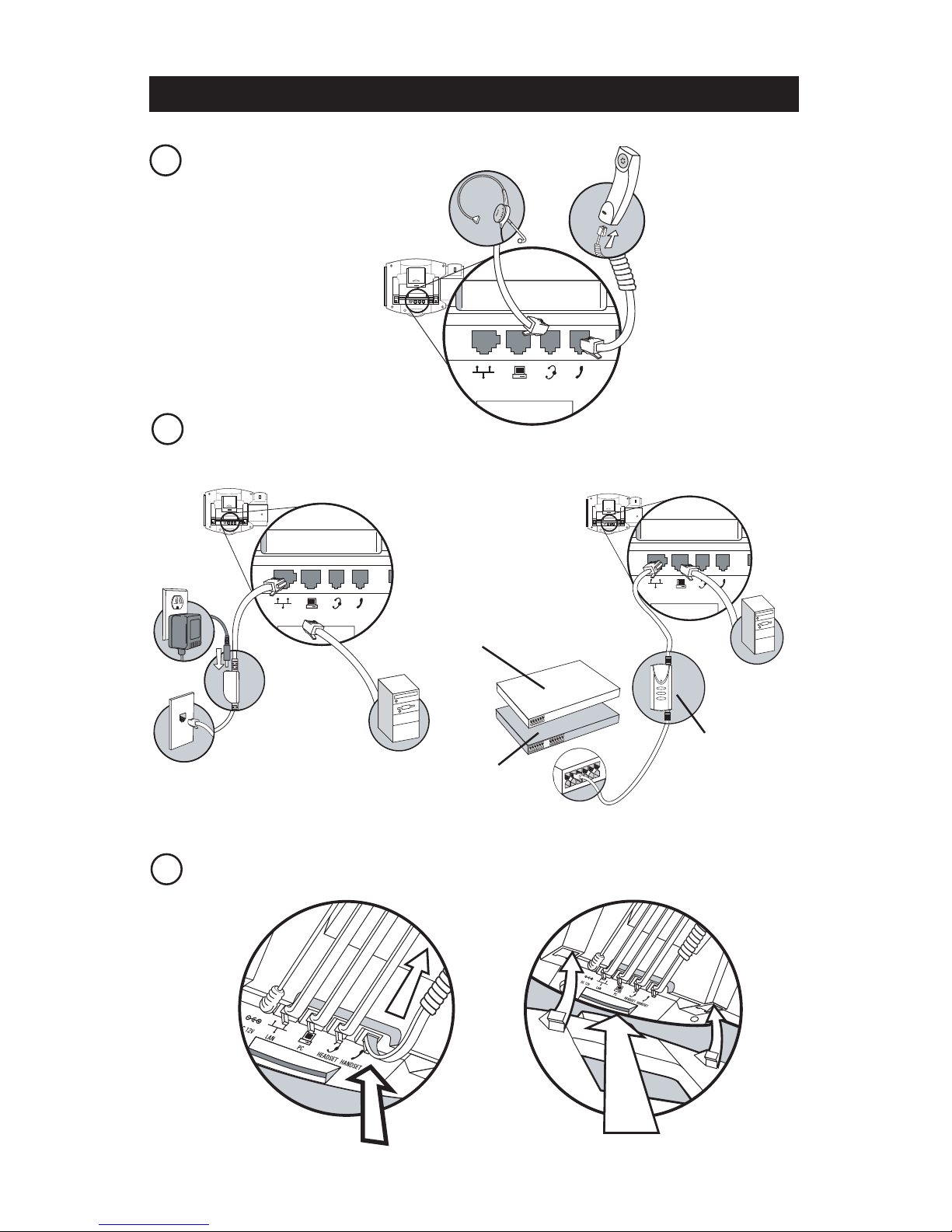
Installation
AttachingtheBase:
3
1ConnectingHeadsetandHandset
2
ConnectingNetworkandPower
ACPowerOption:
LANPCHEADSET
HANDSET
LANPCHEADSET
HANDSET
LANPCHEADSET
HANDSET
In-LinePowerOption:
Cisco™In-LinePowerCable
or
IEEE802.3afIn-LinePowerCable
Cisco™Catalyst™In-LinePowerSwitch
IEEE802.3afcompliant
In-LinePowerSwitch
Page 3
SoundPoint®IP501QuickStartGuide
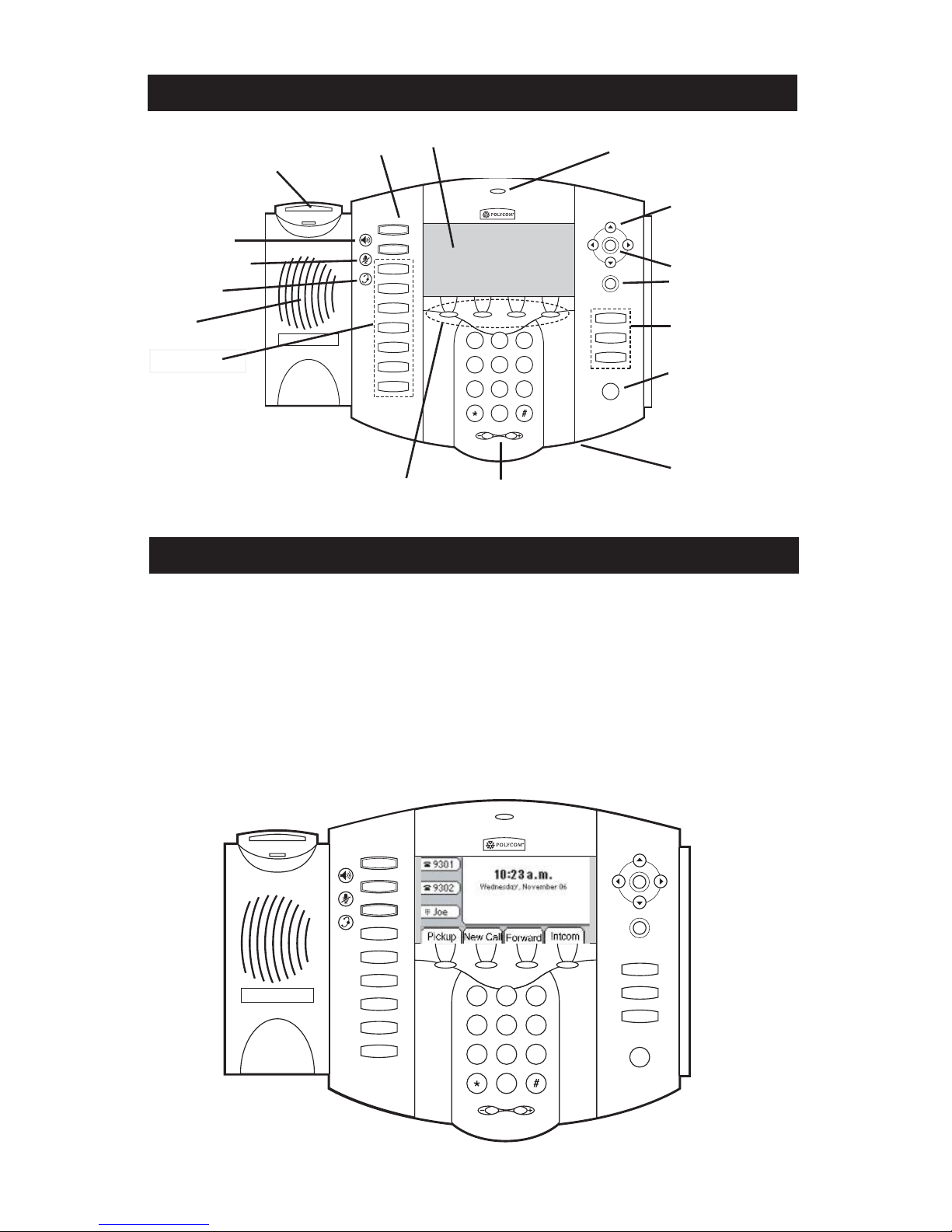
SoundPoint®IP501FeaturesandFunctions
LineKeys
Hookswitch
Speaker
FeatureKeys
HoldKey
VolumeKeys
HandsfreeMicrophone
Speakerphone
HeadsetKey
MicrophoneMute
FeatureKeys
DeleteKey
SelectKey
DisplayControlKeys
Call/MessageIndicator
SoundPoint®IP501StartUp
TheSoundPoint®IP501telephonestarts
upassoonaspowerisapplied.Several
verificationstepsfollow(dependingon
howthetelephonehasbeenconfiguredby
yourSystemAdministrator):
1.Obtainnetworksettings(DHCP,SNTP,
etc.).
2.LoadConfigurableApplicationsand
Services.
3.Loadmainsoftware.
TheSoundPoint®IP501isreadytouse
whenascreensimilartobelowappears.
Forfurtherinstructionsonhowtouseyour
newSoundPoint®IP501,pleaseconsult
theUserGuidefortheparticularsoftware
runningonthetelephone.
Context-sensitiveSoftKeys
LargeGraphicalDisplay
Hold
Del
Sel
1 3
DEF
5
JKL
4
GHI
6
MNO
8
TUV
7
PQRS
9
WXYZ
0
OPER
*
#
2
ABC
Hold
Del
Sel
Menu
Voice Mail
Do Not Disturb
ABC21DEF
3
54
MNOJKLGHI
6
TUV
87
WXYZ
9
OPER
PQRS
0
Directories
Services
Call Lists
Speed Dial
Conference
Transfer
Redial
Hold
Del
Sel
1 3
DEF
5
JKL
4
GHI
6
MNO
8
TUV
7
PQRS
9
WXYZ
0
OPER
*
#
2
ABC
Hold
Del
Sel
Menu
Messages
Do Not Disturb
ABC21DEF
3
54
MNOJKLGHI
6
TUV
87
WXYZ
9
OPER
PQRS
0
Directories
Services
Call Lists
Conference
Transfer
Redial
 Loading...