

Page 1
Manual Core
DE Weitere Sprachen online verfügbar
FR Plus de langues disponibles en ligne
IT Sono disponibili più lingue online
ES Más idiomas disponibles online
他の言語もオンラインで確認できます
线上有更多语言版本
JP
KO
ZH-HANS
ZH-HANT
English
www.soundbrenner.com/start
Page 2

Index
Contents
What’s in the box
Navigating the device
Smart watch
Vibrating metronome
Contact tuner
Decibel meter
Other apps
Troubleshooting
Safety
1
6
11
12
18
20
21
22
23
Page 3
First steps
1
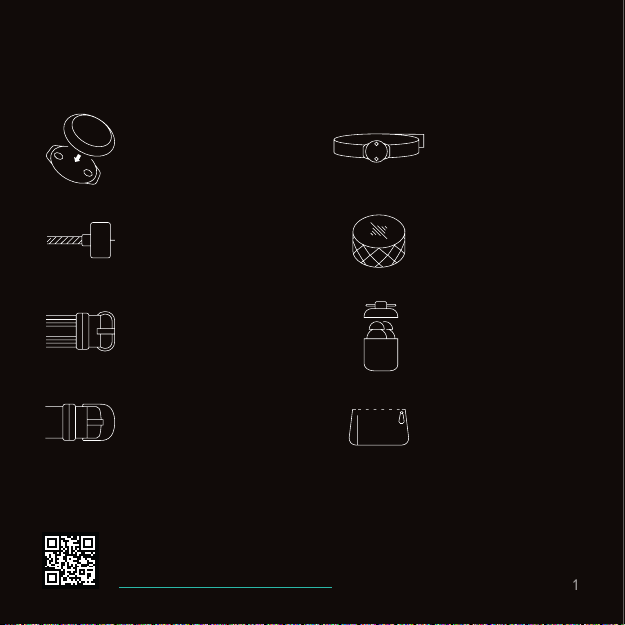
What’s in the box.
Soundbrenner Core
Watch strap rig
Charging cable
Silicone strap
Core Steel only. Core Steel only.
Italian leather strap
Video: Getting started
www.snbr.io/sbc-gettingstarted
Body strap
Body strap rig
Magnetic tuner mount
Earplugs
Carrying pouch
Page 4
First steps
2
Charging the Core.
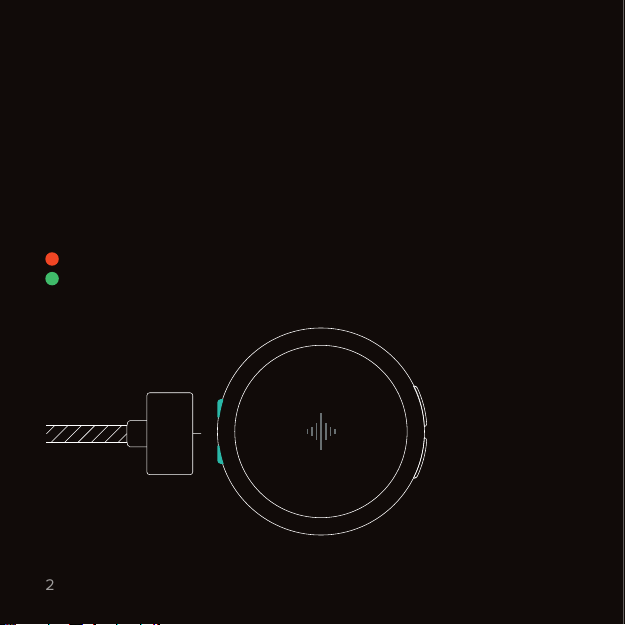
To charge your Core, attach the cable to the magnetic port located
on the side of the device. The Core takes 1.5 hours to fully charge.
Battery life
• 3 days of regular usage or
• 2.5 hours of non-stop vibrating metronome usage
Charging light
= Charging
= Fully charged
Page 5
First steps
3
App & compatibility.
To ensure your Core has the latest firmware, you need to activate the device
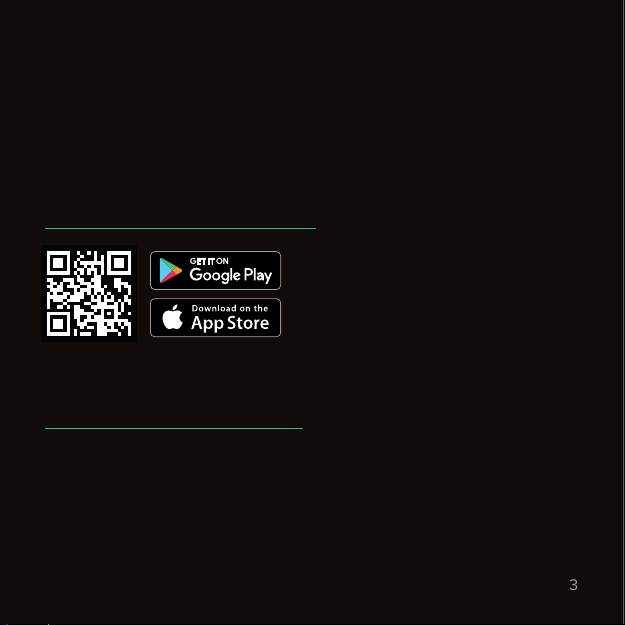
in our app first. Download our app by visiting the website below, or search for
“Soundbrenner” in the Google Play or iOS App Store.
Download app
The Metronome by Soundbrenner
www.soundbrenner.com/download-app
Compatibility:
Requires an iPhone, iPod, iPad or Android phone. More info on:
www.soundbrenner.com/compatibility
Page 6
First steps
4
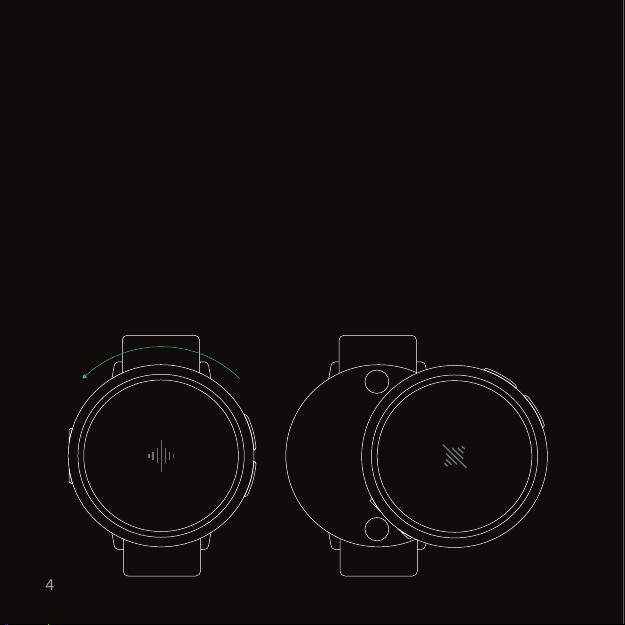
Magnetic lock system.
To put the Core on its rig, hover it right above the rig and let go. Once the
Core drops on the rig, it will magnetically snap into place.
When placing the Core on its rig, make sure the buttons point towards the
direction of your hand. To wear the Core on your other wrist, you can change
the orientation of the screen in our mobile app.
To remove the Core from its rig, twist it counterclockwise and take it o.
Tip: our lock system has multiple mechanical and magnetic
safeguards, so you don’t have to worry about it ever falling o.
Page 7
First steps
5
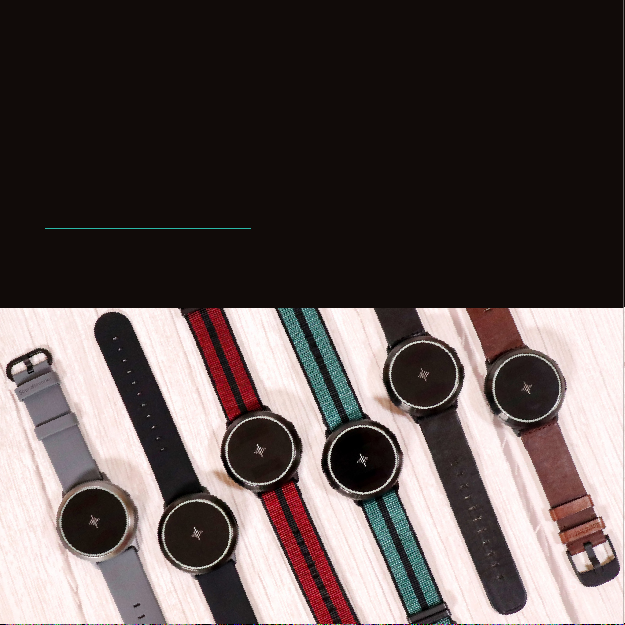
Changing watch straps.
To change your watch strap, simply turn the device on its back and open the
two rivets on each side.
We’ve created a range of stylish strap options for the Soundbrenner Core.
They’re made from the finest materials such as silicone, woven nylon or
Italian leather. Explore our latest collection on:
www.soundbrenner.com/shop
Designed by Soundbrenner for musicians.
Page 8
Navigating the device
6
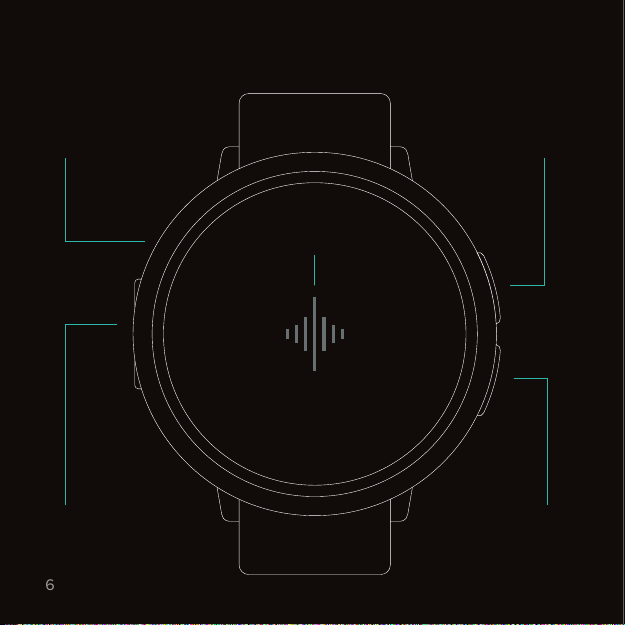
Device overview.
Wheel
Magnetic port
Top button
Touch surface
(soundwave)
Bottom button
Page 9

Navigating the device
7
Device controls.
1. Top button 2. Bottom button
• Go forwards
• Start editing selection
• Open app menu
• Go backwards
• Stop editing selection
• Power on & o (long press)
3. Wheel
• Navigate the app menu
• Change values while editing
a selection (turn slowly!)
Video: Navigating the device
www.snbr.io/sbc-navigating
4. Touch surface
• Tap the soundwave twice
quickly to start or pause a
feature while inside an app
• Tap the soundwave three or
more times to tap tempo while
inside the Metronome app
Page 10
Navigating the device
8
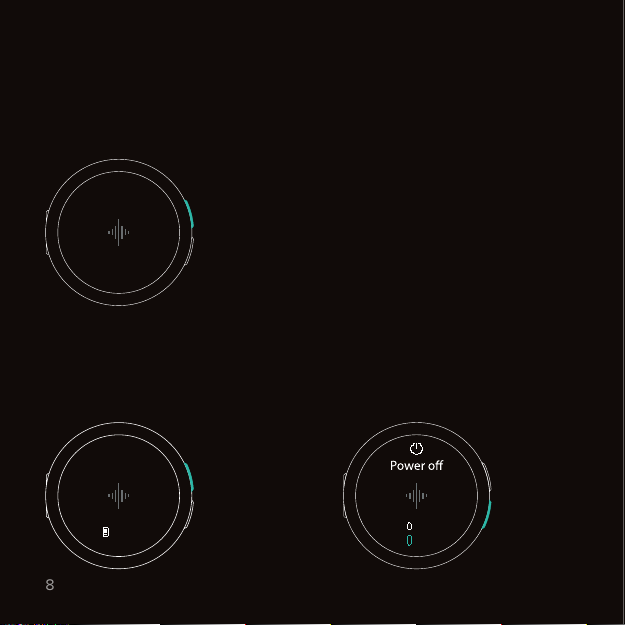
Power on & o.
Power on
Hold the top button for 1 second to
turn on the Core.
1s
Power o
Hold the top button for 3 seconds
until the power o prompt appears.
12:00
Sat. 10 Oct
3s
Select yes, by pressing the
bottom button.
100 %
No
Yes
Page 11
Navigating the device
9
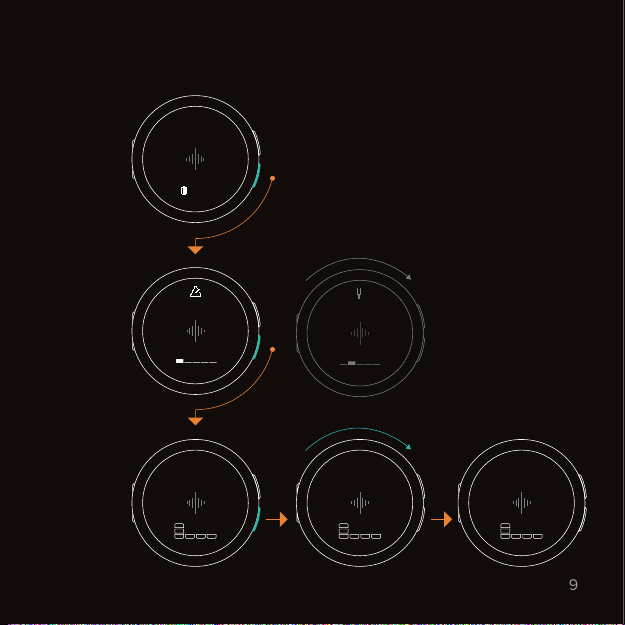
Menu hierarchy.
12:00
Sat. 10 Oct
Watch face
100 %
App menu
App
Metronome
4
60
q
4
60
Tuner
4
q
4
120
4
q
4
Page 12
Navigating the device
10
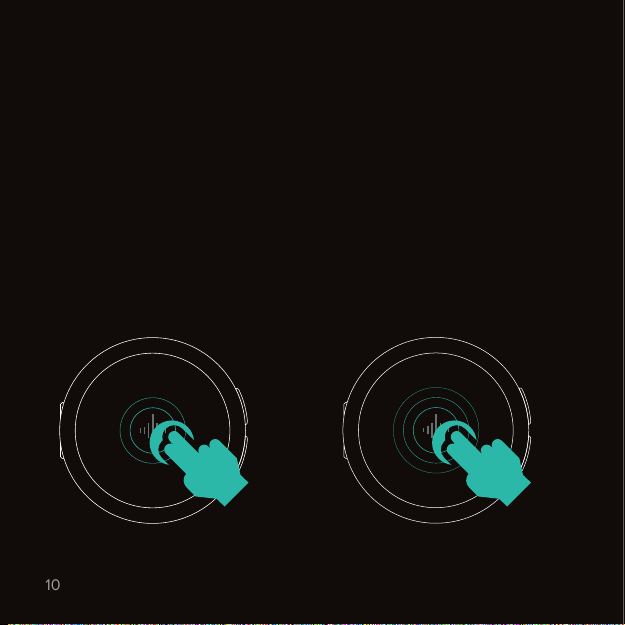
Touch interactions.
The Core features a capacitive touch surface. To ensure it can reliably detect
your inputs, make sure that you use two fingers flat across the surface. Don’t
just use your fingertips!
Start or pause a feature
Tap the soundwave twice
quickly to start or pause certain
features. Works in Metronome,
Timer & Stopwatch.
2 taps
Tap tempo
Tap the soundwave three times
or more at a steady pace. The
Core will set a new tempo that
matches the average pace of your
taps. Works in Metronome only.
3+ taps
Page 13
Smart watch
11
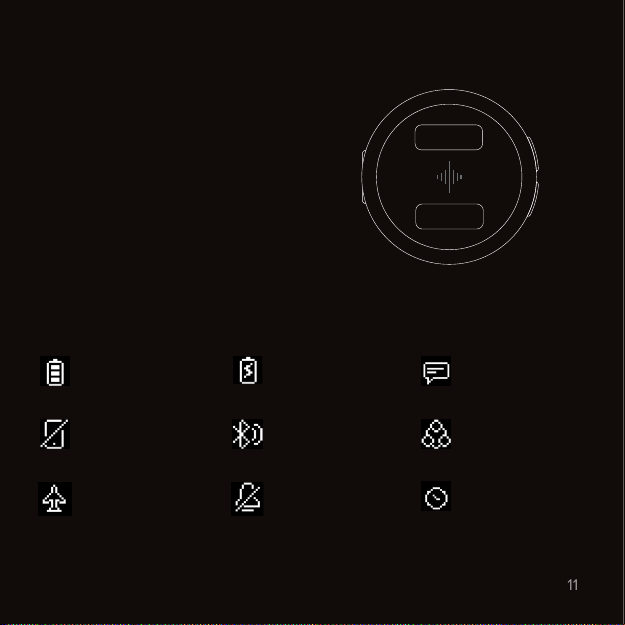
Time & notification features.
Time notation
Use the app to change the time
notation from AM/PM to 24h clock
and vice versa.
Time/date
Smart notifications
Available after software update in
December 2019.
Status icons
Some status icons may not be
available until a later update.
Battery status
Paired mobile
device out of range
Airplane mode
Battery charging
Ready to pair
Do not disturb
mode
Status
New notification
Multi-player sync
Timer active
Page 14
Vibrating metronome
12
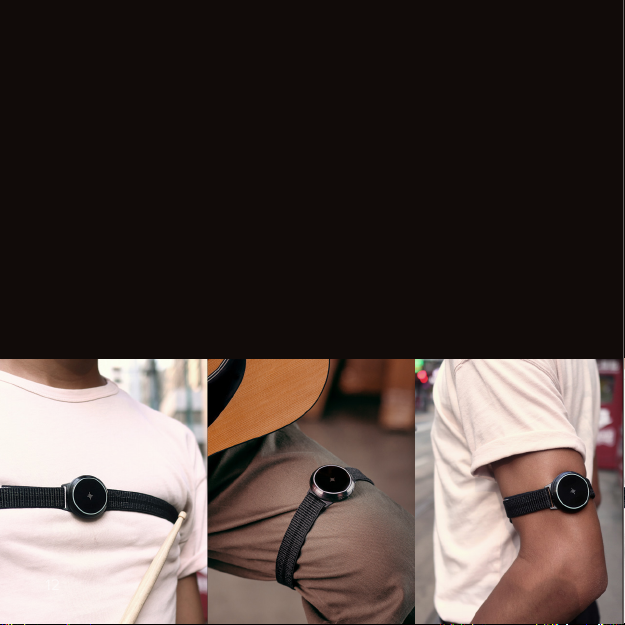
Body strap.
Where you place the Core on your body can have a big impact on your
experience. What works best is dierent for each musician.
The included body strap and body strap rig allow you to wear the Core on
your arm, shoulder or ankle. Add the included extension piece to wear it on
your thigh or chest.
Tip: for your first few sessions, try out dierent locations to see which one
feels best. Wearing it on the chest is usually the most eective location.
Remember to keep the strap tight – the tighter the strap, the stronger the
feeling of the vibrations.
Page 15
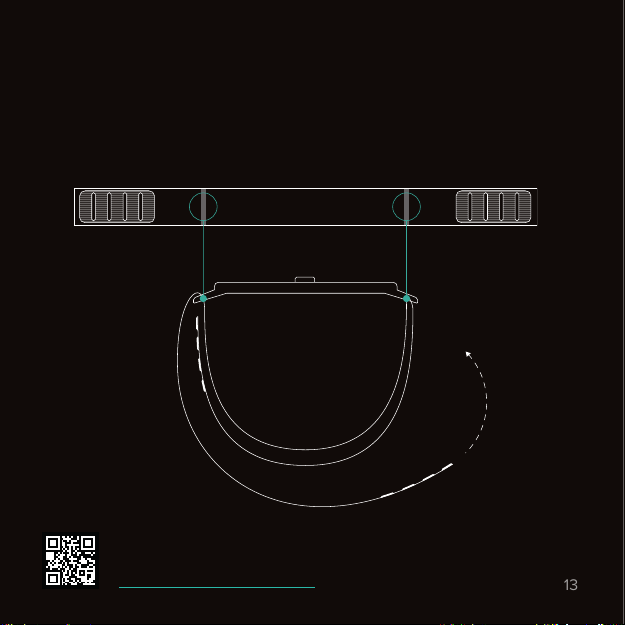
If you have thin arms or ankles
13
To set the body strap to its smallest setting, align the arms of the rig with the
markings on the strap as shown in the illustration below.
Video: Metronome
www.snbr.io/sbc-metronome
Page 16
Vibrating metronome
14
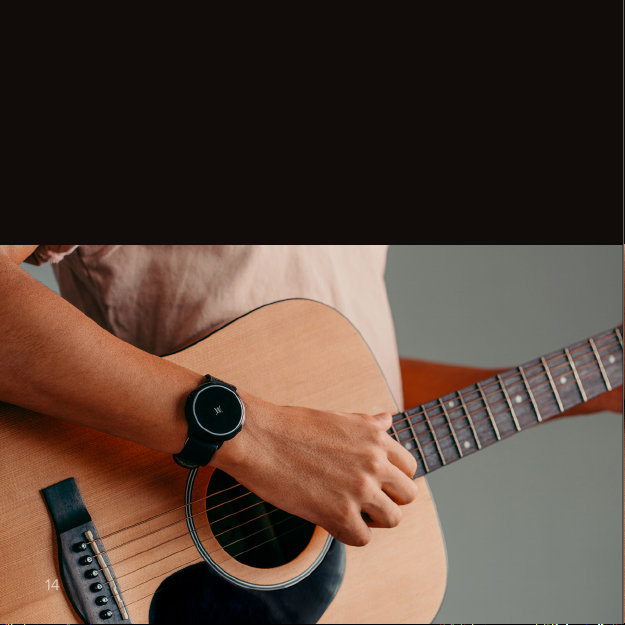
How to feel the beat.
Using a vibrational metronome is dierent. When you first start using the
Core, you need to get used to it first. Don’t give up - you’ll get better over
time. It’s just like learning to practice with a traditional metronome!
Over time, the vibration can even become a subconscious feeling that helps
you keep the beat without thinking about it.
Page 17
Vibrating metronome
15
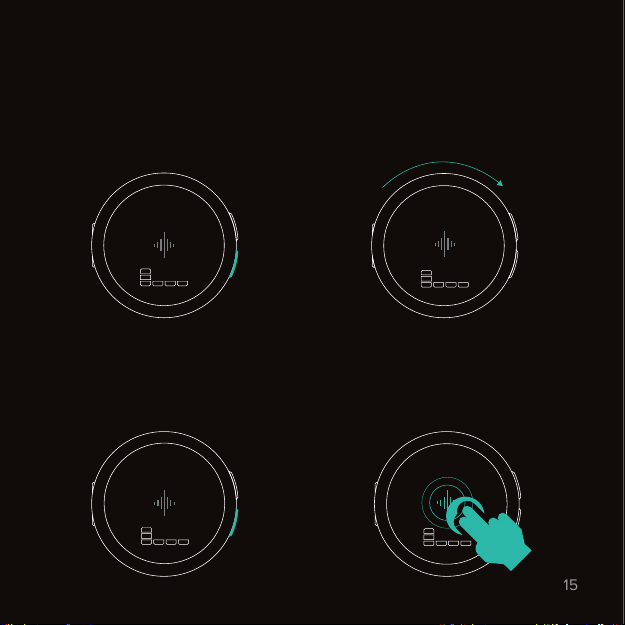
Setting up a rhythm.
1. Press the bottom button to select
the first value.
4
60
q
4
3. Press the bottom button again to
edit the next value. Press the top
button to go back.
8
60
q
4
2. While selected, use the wheel
to change the value. Remember to
turn the wheel slowly.
4
90
q
4
4. Tap the soundwave twice quickly
to start or pause the metronome.
4
90
q
4
2 taps
Page 18
Vibrating metronome
16
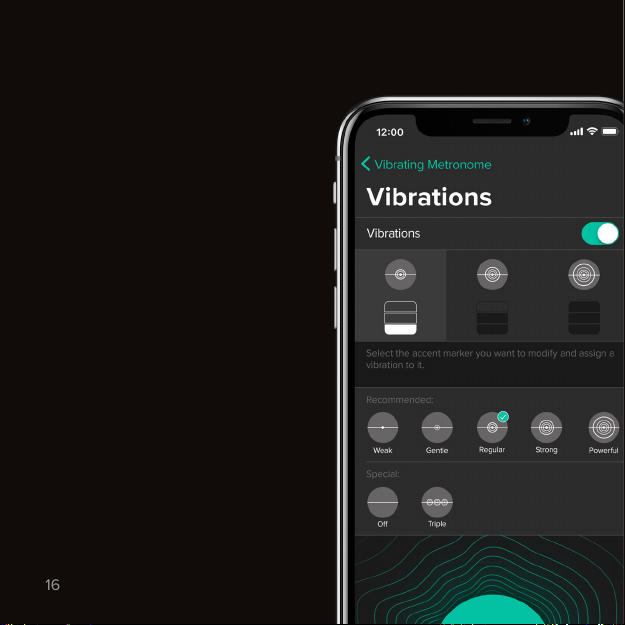
Change lights, vibrations & sounds.
Because we know every musician
is dierent, you can customize
the Core to your own liking with
our app.
Lights & vibrations
To customize or turn o the lights
and vibrations, open our mobile
app and go to Settings → Tap on
your device → Metronome → Lights/
Vibrations.
We recommend to experiment with
dierent vibration intensities and
durations to find out what works
best for you!
Sounds
To customize or turn o the metronome sounds, open our mobile app
and go to Settings → App Settings →
Sounds.
Page 19
Vibrating metronome
17
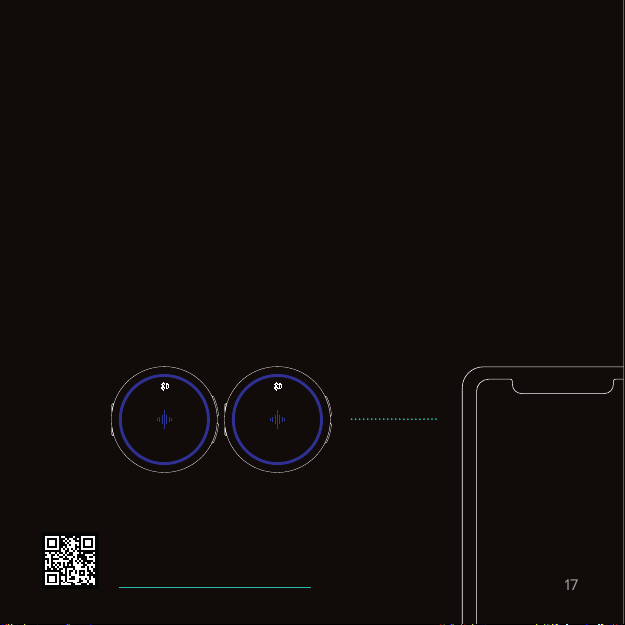
Multi-player sync.
The Core can be synced to other Core or Pulse wearables by connecting all
of them to the same mobile device. You can sync up to a total of five devices,
allowing you to feel the beat together.
If you want to connect a Core to a dierent mobile device, you need to
unpair it from the existing mobile device first. To bring up the unpairing
prompt, open the Settings app on your Core, navigate to Bluetooth and press
the bottom button.
Once the Core is ready to pair, open the Soundbrenner app on the mobile
device you want to use to sync the wearables. Inside the app navigate to
Settings → Add a Pulse or Core → Tap on a new device.
Ready to pairReady to pair
SB Core 1
SB Core 2
SB Core 3
Video: Multi-player sync
www.snbr.io/sbc-multiplayer
Page 20
Contact tuner
18
Tuning your instrument.
You can use the magnetic contact tuner with your guitar, bass guitar
or ukulele.
Attaching the magnetic tuner mount
The included tuner mount has an adhesive pre-applied. Peel o the thin
layer on the back of the tuner mount and stick it on the headstock of your
instrument. The tuner mount is designed to be left on permanently.
Don’t worry - should you ever want to remove it, the adhesive leaves no
residue behind.
Tip: we included a few extra adhesives in the manual holder, just in case you
need them. If you want to purchase additional tuner mounts, go to:
www.soundbrenner.com/shop
E
Guitar
Bass guitar
Ukelele
-10Cents 440Hz
Chromatic
Page 21
How to use the tuner
19
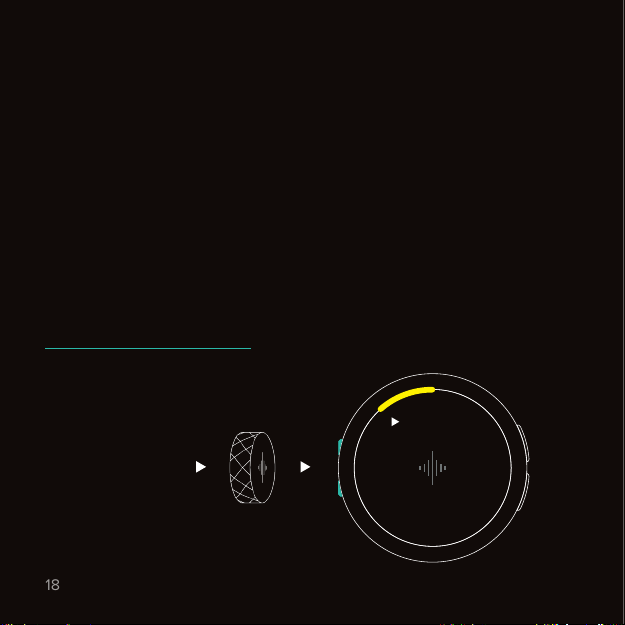
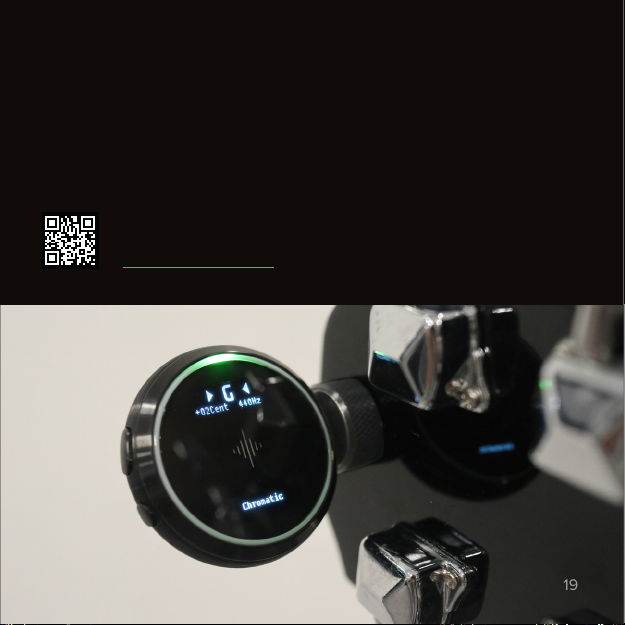
First, open the Tuner app on your Core. Next, take the device o its rig by
twisting it counterclockwise. Finally, stick the magnetic port located on the
side of the Core to the tuner mount. Once you play a string, the LED ring and
the screen of the Core will light up. Happy tuning!
Video: Tuner
www.snbr.io/sbc-tuner
Page 22
Decibel meter
20
Sound levels & volume alarm.
Tip: for a more accurate reading, we recommend to take the Core o its rig
and place it on a soft surface (e.g. a cloth or your hand) before opening the
Decibels app.
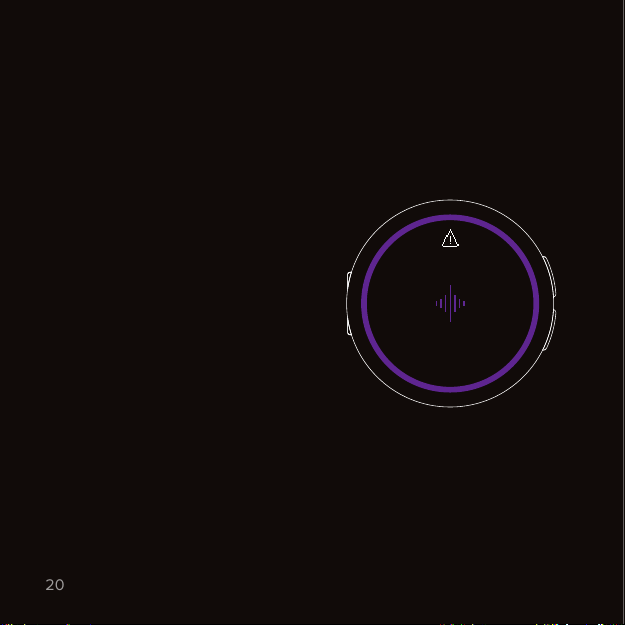
Volume alarm
The Core automatically measures
the sound levels every 10 seconds.
Once the volume reaches a risky
level, the Core will alert you.
To know what’s risky, we follow
ocial health recommendations
and also take the duration of
exposure into account.
Don’t worry - we respect your
privacy and no audio is ever
recorded and stored.
To turn o the volume alarm and all
background measurements, open
our mobile app and go to Settings →
Tap on your device → Decibel meter.
Warning
Protect your
ears
Page 23

Other apps
21
Timer.
Press the bottom button to select if you want to edit the hours, minutes or
seconds. Once selected, use the wheel to edit the time. Tap the soundwave
twice quickly to start or pause the timer.
Stopwatch.
Tap the soundwave twice quickly to start or pause the stopwatch.
Settings.
Airplane mode
Disable all radio signals such as Bluetooth. While Airplane mode is on, your
Core won’t be able to communicate with your mobile device.
Bluetooth
Shows your current connection status. Press the bottom button to unpair and
make your Core ready to pair again.
Factory reset
This will erase all data and preferences and reset the Core back to factory
settings. The device will be locked until the setup is completed with the
Soundbrenner app.
Page 24
Troubleshooting
22
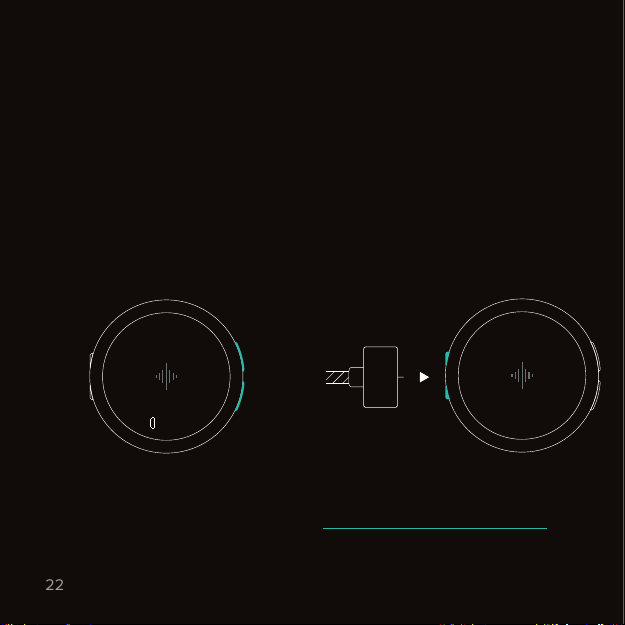
Get help.
If your Core shows unexpected behavior, perform the following two steps:
Soft restart
Hold both buttons for 5 seconds
and keep them pressed until
Recovery mode launches. Select
Restart with the bottom button to
soft restart. If your problem isn’t
solved, try performing a hard restart.
Recovery
mode
30s
Restart
Hard restart
Make sure the charging cable is
connected to a power source. Then
attach the charging cable to the
magnetic port. Detach it and attach
the charging cable a second time to
complete the hard restart.
2x
Support options
Still need help? We’re here for you. Visit www.soundbrenner.com/support to
e-mail our support team, find the answer to frequently asked questions or
watch more how-to videos.
Page 25

Safety
23
Warning: medical conditions
If you currently have a medical
condition or have a history of
medical conditions that may be
aected by the Soundbrenner
Core, consult with your physician
before using the product. Medical
conditions include (but are not
limited to):
• White Knuckle Syndrome
• Hand-Arm Vibration Syndrome
• Blackouts
• Epilepsy
• Postural Hypertension
• Allergic Reactions to Silicone
• Any other heart, neurological, or
skin conditions
Warning: medical device
interference
If you use any medical device
that may be aected by the
Soundbrenner Core, consult with
your physician before using the
product.
Medical devices include (but are not
limited to):
• Coronary Stents
• Defibrillators
• Pacemakers
• Any other implanted medical
device
Stop using the Soundbrenner Core
if you suspect that it is interfering
with your medical device or if you
experience any discomfort.
Warning: frequent and prolonged
usage
Frequent and prolonged use of the
Soundbrenner Core may cause
skin irritation in some users. If you
experience itchiness, redness,
and/or swelling while using the
Soundbrenner Core, remove the
device immediately and stop using
it until your skin returns to normal.
Consult your doctor should any of
the symptoms persist.
Page 26

Safety
24
Caution: electrical equipment Caution: batteries
Your Soundbrenner Core and its
charging cable are electrical devices
and should be handled with care.
Never use your device in extremely
low or high temperatures.
Substances in this product and
battery may harm the environment
or cause injury if handled or
disposed of improperly.
Remove your Soundbrenner Core if
it feels warm or hot.
Caution: magnets
The Soundbrenner Core, the
charging cable and the tuner mount
contain magnets. All credit cards,
key cards, and any other object
containing a magnetic stripe should
be stowed safely away from those
products.
Use only an authorized
Soundbrenner charging cable to
charge your device to avoid any
safety or electrical hazards.
Do not attempt to change the
battery on your own. This will void
the warranty and could cause injury.
Always disconnect the charging
cable from the electrical socket as
soon as your device is fully charged.
Never charge your device when
moisture is present.
Never put your device or charging
cable near any inflammable or
explosive materials.
Page 27

Safety
25
Caution: water
Even though your Soundbrenner
Core is sweatproof and partially
water-resistant, it should never be
submerged in water under any
circumstances.
Make sure you regularly clean your
device with a damp cloth to maintain
good hygiene.
Never wash your device in
the sink.
Do not use your device in the rain or
in wet environments for prolonged
periods.
Maintaining your
Soundbrenner Core
For optimal performance, we
recommend that you don’t use your
device until it is fully charged.
Take care when using skincare
products, as they may aect the
color or usability of the included
bands.
Store your Soundbrenner Core in a
well-ventilated and dry environment
when not in use.
Warranty
This Limited Warranty does not
cover the following:
• Our mobile apps and desktop
software
• Damage arising from negligence
or improper use
• Unauthorized modification
Soundbrenner will either
repair, replace or refund your
Soundbrenner Core at its own
discretion. Warranty benefits are
in addition to rights provided
under local consumer laws. You
are required to provide proof of
purchase details when making a
claim under this warranty.
Page 28

Safety
262728
Terms of use
Soundbrenner’s terms of use can be
viewed at:
https://www.soundbrenner.com/
the-metronome-terms-of-use
Privacy policy
Soundbrenner’s privacy policy can
be viewed at:
https://www.soundbrenner.com/
the-metronome-privacy-policy
Disposal and recyling information
Your product should be disposed
at a recycling center due to the
device’s electronic nature in order
to encourage sustainable reuse and
conservation of resources.
EU compliance statement
Soundbrenner Limited hereby
declares that the Soundbrenner
Core is in compliance with the
essential requirements and other
relevant provisions of Directive
1995/5/EC.
FCC compliance statement
The device complies with part 15 of
the FCC rules. Operation is subject
to the following two conditions:
• This device may not cause
harmful interference
• This device must accept any
interference received, including
interference that may cause
undesired operation
Bluetooth information
The Bluetooth® word mark and
logos are registered trademarks
owned by Bluetooth SIG, Inc.
and any use of such marks by
Soundbrenner Limited is under
license. Other trademarks and trade
names are those of their respective
owners. This product contains QD
ID 78915. Declaration ID D029964.
TM and © 2019 Soundbrenner
Limited. All Rights Reserved.
Page 29
Page 30

Page 31

Designed
29
for musicians
by Soundbrenner.
Page 32

 Loading...