

Page 1
tX-USBexp installation guide Rev1.2
Precaution
Please read these instruction carefully before use.
◼ Do not attempt to disassemble or modify the product.
◼ Keep the product away from external shocks or vibrations.
◼ Do not use damaged or peeled cables.
◼ Do not use the unit outdoors.
◼ Product specifications and features are subject to change without notice.
Warranty Information
◼ Free warranty service
⚫ In the case that a defect is found which is caused by a design or the production flaw while using the device properly, the
manufacturer is responsible for the faulty product and there is free warranty service for 1 year from the date of purchasing.
⚫ Even during the warranty service period, malfunction or damage of products caused by inevitable incidents such as a natural
disaster is not subject to the free warranty service.
◼ Warranty service at a cost
⚫ The free warranty service period is expired.
⚫ Malfunction of the product caused by a user’s fault.
⚫ Malfunction of the product caused by incidents.
⚫ Malfunction of the product caused by a natural disaster such as earthquake, flood, lightning, etc.
⚫ In case of the warranty service at a cost, the customer should cover the shipping costs.
◼ Samples of a user’s fault
⚫ In case of attempts to disassemble or modify the device.
⚫ In case of not following the instructions in this manual.
◼ Please read these operating instructions and the Q&A board on our website carefully before asking for the warranty service.
Supplied Components
◼ tX-USBexp with slim size bracket
◼ Standard size bracket
◼ tX-USBexp installation guide
Specifications
◼ PCI express USB interface chip set
- USB 3.0 Compliant xHCI host controller
- Support SS(5Gbps),HS(480 Mbps),FS (12 Mbps),LS
(1.5 Mbps)
- PCIe x1 Gen2 interface
◼ Internal power input
- Input voltage : +12.0V(+0.5V, -0.5V)
- Input current : 2A
- 4pin IDE power connector
◼ External power input
- Input voltage : +6.5V ~ +9Vdc
- Input current : 2A max
- 5.5mm OD, 2.1mm ID DC adaptor jack
◼ USB port output power
- Output voltage : +5.0V(+0.5V, -0.25V)
- Over current protection : 1.5A at 20°C
- Recommend output current : 0.5A >
◼ Operating environment
- Operating temperature: 0 ~ 30℃
- Storage temperature: -10 ~ +50℃
- Operating & storage humidity : 10% ~ 90%
◼ OS support
- Windows 7 or higher version
- Linux
The formal operating instruction and Windows OS device
driver are available through tX-USBexp product page,
www.sotm-audio.com.
www.sotm-audio.com
Ultimate High Performance Audio
Page 2
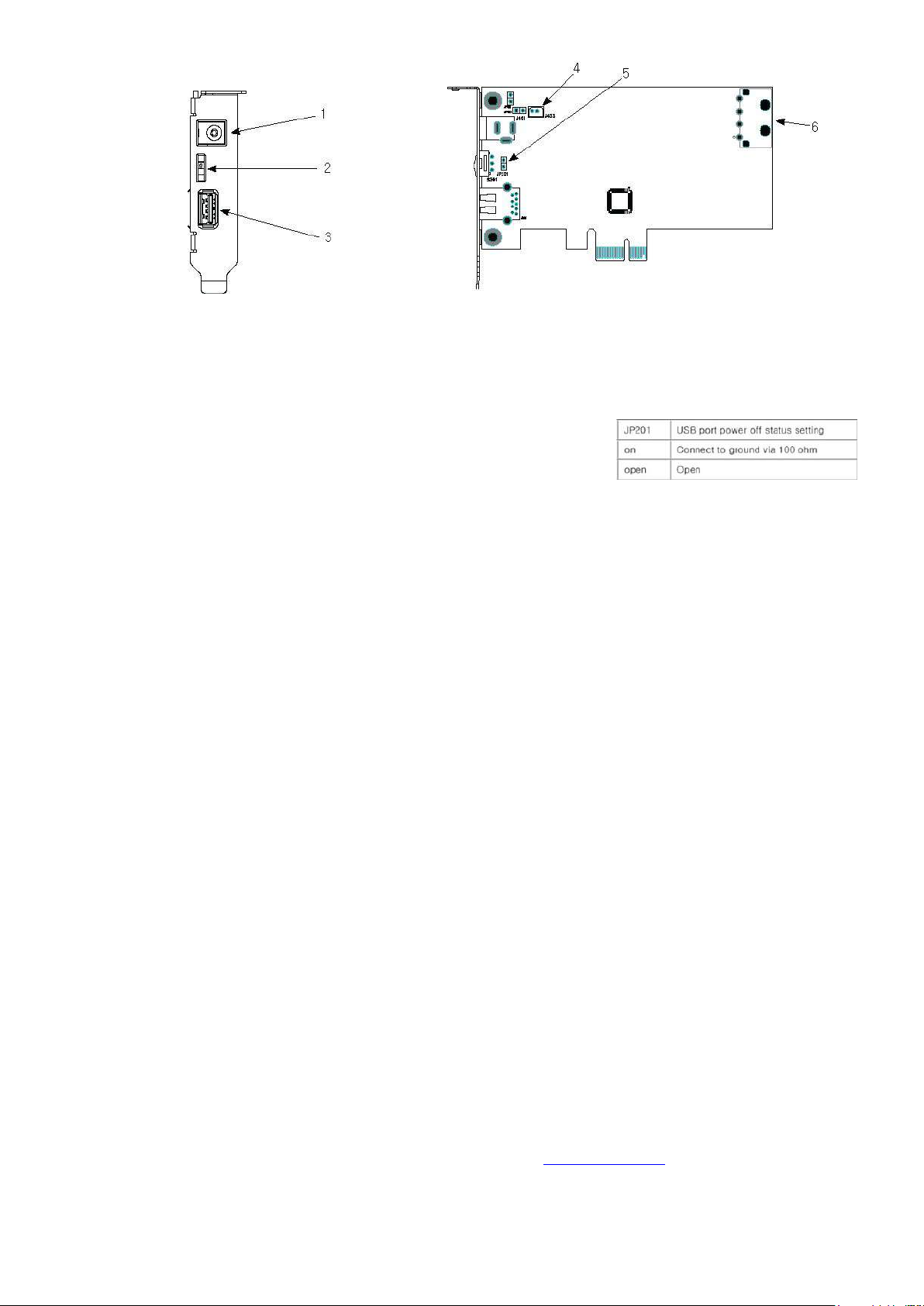
Product outline
① External power input jack.
② USB port power switch (Part number : S201) : This switch is to control the USB port power(on/off).
③ USB port connector.
Caution: The recommended output current of a USB port is less than 0.5A. Be careful not to use the device exceeding current of 0.5A as possible.
④ J403, Internal auxiliary power connector : This is an auxiliary power connector which is connected to the external power input jack.
⑤ JP201, USB port power off status setting : This is to set up the status of USB port power off.
⑥ Internal power input connector : Connect to the IDE 4pin power cable of PC power supply.
Caution: Do not use or change the settings of undescribed connectors and jumper pins.
Installation
- Precautions when installing the tX-USBexp
◼ Please read these instructions carefully before you install the product.
◼ Some of USB cables don’t support high-speed transmission, so please use a certified USB2.0 or USB 3.0 cable if you are using USB
3.0 device.
◼ If the tX-USBexp is powered by the external power input, make sure not to cut off the external power while the PC is powered on.
If the external power is suddenly cut off, the internal parts of the tX-USBexp or the PC may be damaged.
◼ To prevent the damage of internal parts of the tX-USBexp or PC when the external power is suddenly cut off, connect the IDE
power cable inside of PC to the IDE power input connector of the tX-USBexp at all times even though the tX-USBexp may be
getting power from the external power input.
◼ The specifications of OS or PC have effect on the audio performance of the tX-USBexp.
◼ The maximum output current for USB ports is 1A, but it is highly recommended that do not use products which need more than
0.5A because of some parts heating on the tX-USBexp, and it could degrade the sound quality.
- How to install the tX-USBexp
◼ Turn off the PC power.
◼ Disconnect the AC power cord from the PC and open the PC case.
◼ Insert the tX-USBexp to an empty PCI express slot and make sure the tX-USBexp is fully inserted.
◼ Fasten the bracket of tX-USBexp and the PC case with screws.
◼ Connect the 4-pin IDE power cable of the PC power supply to the internal power input connector of the tX-USBexp.
◼ If you use an external power supply, connect the external power cable to the external power input jack of tX-USBexp
◼ Close the PC case and connect the AC power cord, then turn on the PC power.
◼ If you use Windows OS, please install the windows OS driver.
From Windows 10 OS, the windows driver is installed and excuted automatically.
If you use Linux OS, you don’t need to install the Windowos OS device driver.
◼ Play music files by using a music player software like Foobar2000, JRiver, Jplay.
- How to install Windows OS device driver
◼ Download the Windows OS device driver on the tX-USBexp product page, www.sotm-audio.com.
◼ Unzip the downloaded file and open the Texas_Instruments_xHCI_Driver_v1.16.3. folder and then execute Setup.exe file.
◼ The driver installation will be started. Select Next buttons to go to the next steps.
◼ Wait untill the installation is completed.
 Loading...