

Page 1
COMFORT GADGET
Humidity and Temperature display for better comfort
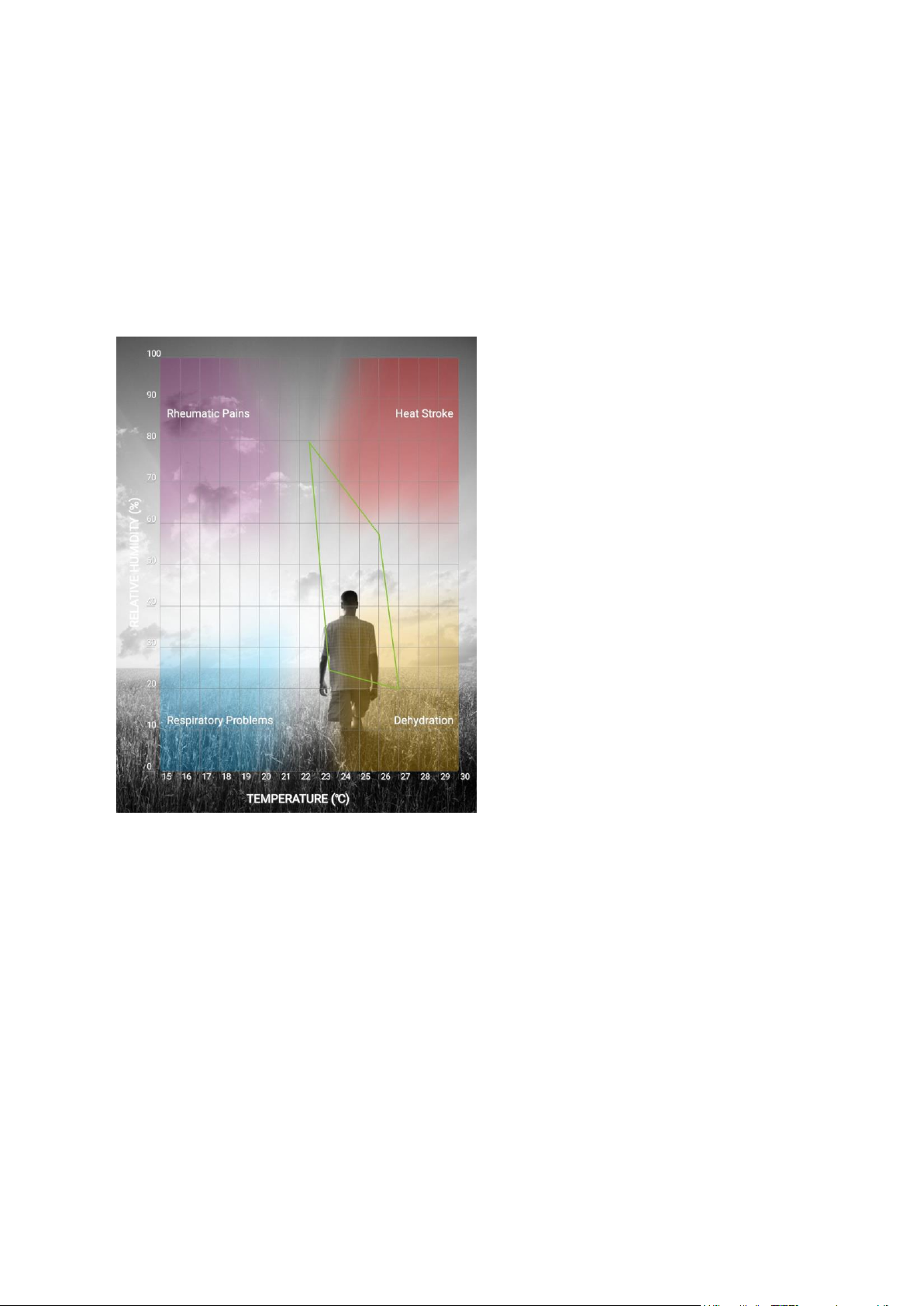
The COMFORT GADGET is a simple yet helpful device which helps you to keep your
environment in so called “comfort zone” or within “thermal comfort”. This thermal comfort
zone is defined as a temperature and humidity combination which helps humans to keep
their metabolic processes run smoothly and stay in good mood. To stay within comfort zone
is also very important in order to avoid Rheumatic Pains, Heat Stroke, Respiratory Problems
and Dehydration.
Pic.1 Comfort zone (inside green polygon, source: SENSIRION Android application)
According to this picture there are 4 dangerous zones defined:
1. Combination of too Low Temperature and too Low Humidity may cause Respiratory
problems
2. Combination of too Low Temperature and too High Humidity may cause Rheumatic
pains
3. Combination of too High Temperature and too High Humidity may cause Heat Stroke
4. Combination of too High Temperature and too Low Humidity may cause Dehydration
Setup Instructions: To switch on the device please remove the plastic band with orange
marking on the back of the device and let the temperature and humidity values stabilise for
few minutes. Please do not touch the sensor and make sure the device is placed close to
you where the temperature and humidity is the same as around you, e.g. on the table.
Basic operation: this is the default operating mode, in this mode the device shows Humidity
in %RH and Temperature in °C and periodically shows warnings if the Temperature or
Page 2

Humidity is out of Comfort zone. To switch temperature values into °F please press MD
(MODE) button shortly. If you want to see the Dew Point value, please press MD button
again. Press MD button again to get back in Basic operation mode. You can use backlight
(BL button) in poor light conditions or during night to see the values on the display. The
backlight is switched on for 5s after BL button is pressed. The small arrow shows RH or T
values are out of Comfort Zone range and RH or T should be adjusted in the room up or
down.
Battery replacement: the battery is expected to run the device at least one year (depends
on backlight usage). To change the battery please remove the old one and replace with the
fresh one. Take care of polarity of the battery, plus pole is marked with “+” symbol on the
back of the device. Please use only Lithium Thionyl Chloride 3,6V AA size batteries to
power the device (e.g. SAFT LS14500 or TADIRAN TL4903/S, EVE ER14505 or XENO XL060F)
Warning: Humidity and Temperature sensors are highly accurate environmental sensors
and as such they are not ordinary electronic components. The opening in the package
exposes the sensor to the environment and makes it susceptible to pollutants. While
applying sensors in the field in ambient environment is not critical, pollutants are known to
occur in manufacturing environments and during storage. The sensor shall not get in close
contact with volatile chemicals such as solvents or other organic compounds. Especially high
concentration and long exposure must be avoided. Ketenes, Acetone, Ethanol, Isopropyl
Alcohol, Toluene, etc. are known to cause drift of the humidity reading – irreversibly in most
of the cases. Please note that such chemicals are integral part of epoxies, glues, adhesives,
etc. and outgas during baking and curing. These chemicals are also added as plasticisers
into plastics, used for packaging materials, and do out-gas for some period. Acids and bases
may affect the sensor irreversibly and shall be avoided: HCl, H2SO4, HNO3, NH3 etc. Also
Ozone in high concentration or H2O2 have the same effect and therefore shall be avoided.
Please note, that above examples represent no complete list of harmful substances. The
sensor shall not get in contact with cleaning agents (e.g. PCB board wash after soldering) or
strong air blasts from an air-pistol (not oil-free air). Applying cleaning agents to the sensor
may lead to drift of the reading or complete breakdown of the sensor. Ensure good
ventilation (fresh air supply) to avoid high concentrations of volatile chemicals (solvents, e.g.
ethanol, isopropanol, methanol, acetone, cleaning solutions, detergents…).
Information for makers:
This device is Arduino based, which means anybody can freely modify the source code. For
hackers, please visit
https://drive.google.com/open?id=1hPk31YAgmxmFq20SVffK6nRQS2UdpRDc
for complete documentation, source code and hacking instructions or email to
 Loading...