

Page 1

ENGLISH –
1
TABLE OF CONTENTS
1. Introduction.................................................................................5
2. Indication.....................................................................................5
3. Warnings and precautions.........................................................5
3.1. Warnings ...........................................................................5
3.2. Safety Precautions...........................................................6
3.3. Precautions for safe operation .......................................6
4. familiarise yourself with your SMARTVIEW monitor ..............7
4.1. Package contents.............................................................7
4.2. Description........................................................................8
4.3. Meaning of the lights and buttons..................................9
5. Using your SMARTVIEW monitor .............................................10
5.1. Setting-up your SMARTVIEW monitor ...........................10
5.2. Complete the installation with communication
setup..................................................................................12
5.3. Operational usage............................................................13
5.4. On-demand operation......................................................13
6. Travelling.....................................................................................13
7. Moving home...............................................................................14
8. SMARTVIEW monitor basic care...............................................14
9. Maintenance and Recycling ......................................................14
10. FAQ ..............................................................................................15
11. Technical specifications ............................................................16
12. Data protection ...........................................................................17
13. Declaration of conformity ..........................................................17
Page 2

2
– ENGLISH
14. Guidance and manufacturer’s declaration...............................19
14.1. Electromagnetic emissions.............................................19
14.2. Electromagnetic immunity ..............................................20
14.3. Recommended separation distances between
portable and mobile RF communications
equipment and the SMARTVIEW monitor......................23
15. Technical assistance....................................................................24
Page 3
ENGLISH –
3
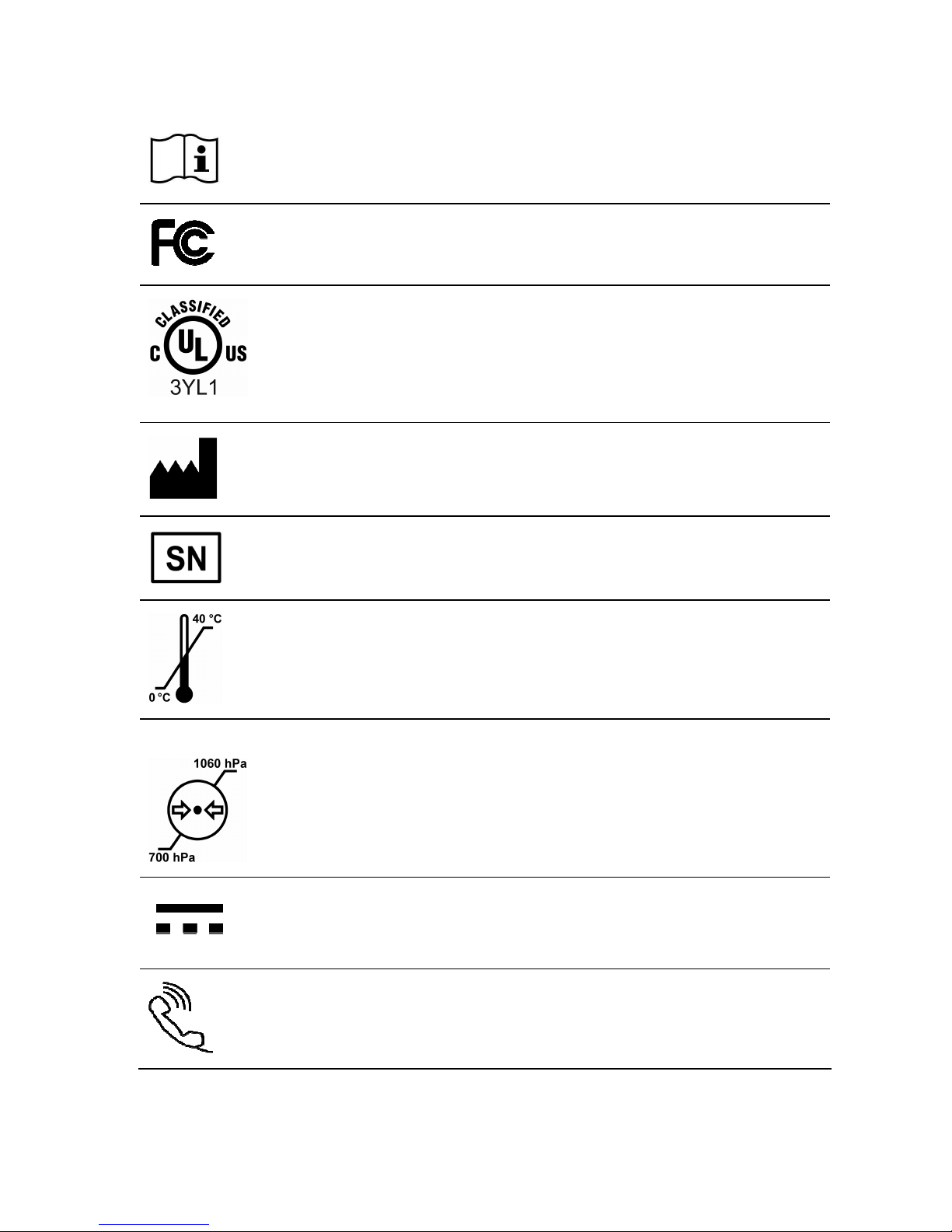
LIST OF SYMBOLS
This symbol is used to encourage you to consult the documentation and
manual enclosed in the packaging.
This symbol confers the approval of the US Federal Communications
Commission.
This symbol indicates that the device meets UL requirements.
Remote Cardiac Monitor (Medical Equipment) WITH RESPECT TO ELECTRIC
SHOCK, FIRE AND MECHANICAL HAZARDS ONLY IN ACCORDANCE WITH
IEC 60601-1, CAN/CSA 60601-1, ANSI/AAMI ES 60601-1.
Name and address of the manufacturer
Serial number
Temperature limits
Atmospheric air-pressure limits
Direct current
This symbol indicates the phone line connection.
Page 4
4
– ENGLISH
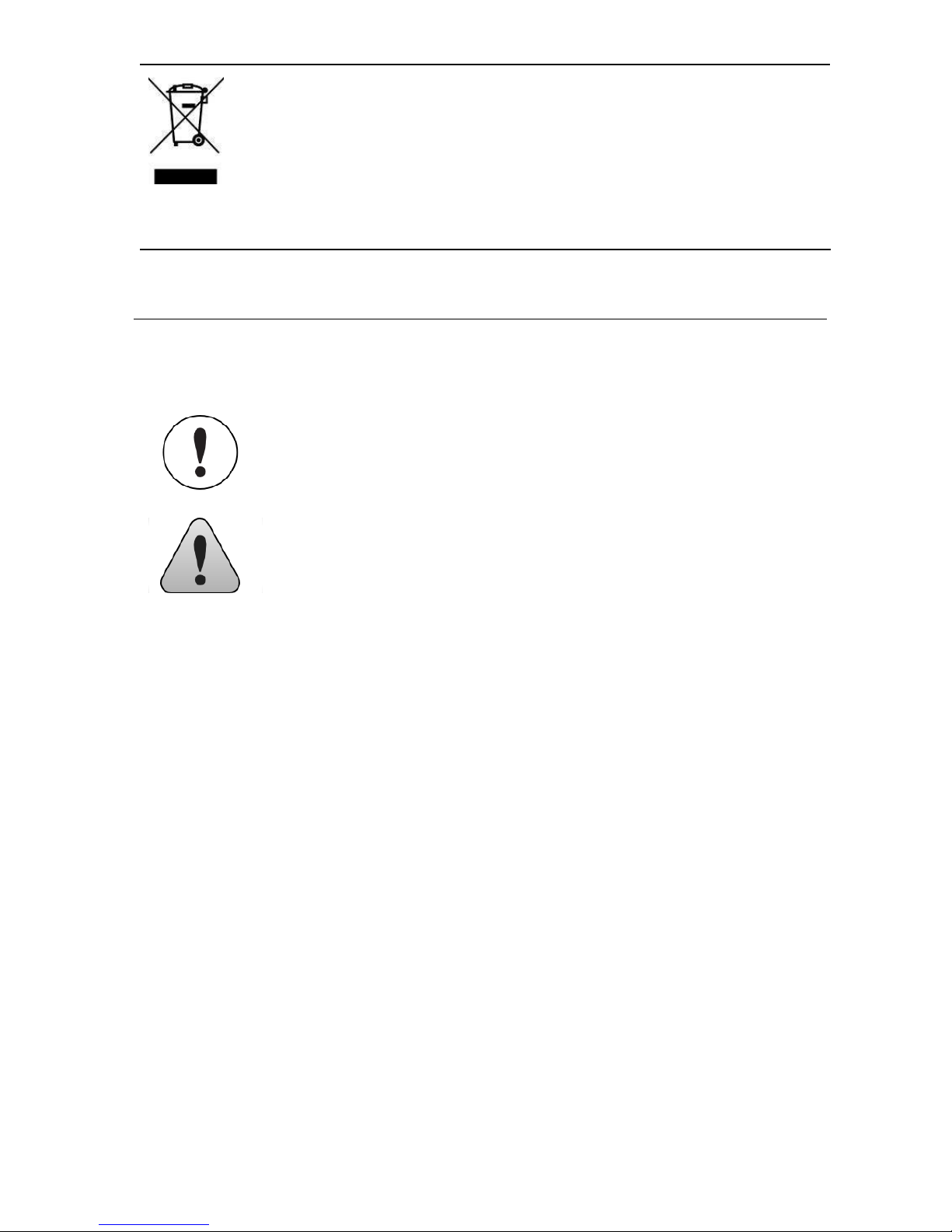
This electronic product is subject to disposal and recycling regulations that vary
by country and region.
Many countries prohibit the disposal of waste electronic equipment in standard
waste receptacles. For more details, please refer to the European Directive
2002/96/CEE.
IP21
Degree of protection provided by the enclosure
SYMBOLS USED IN THIS MANUAL
This icon is used to call your attention to a particularly
important point.
This icon alerts you to a hazard that may result in
equipment damage or personal injury. Carefully read
the instructions provided with this icon.
ABOUT THIS MANUAL
Your doctor should be your first source of information regarding your health.
This manual addresses many of the questions you or your family may
have about your SMARTVIEW monitor and its use.
If you have technical or usage questions that are not covered in this manual
or you want more in-depth information, please contact the Sorin CRM tollfree technical assistance.
Page 5
ENGLISH –
5
1. INTRODUCTION
The SMARTVIEW monitor you received is part of the SMARTVIEW Remote
Monitoring System. This system has been specially designed to transmit
information stored in your Sorin CRM implanted cardiac device to your
doctor on a regular basis. Your Sorin CRM cardiac device is equipped with a
transmitter which sends clinical information and device parameters to your
doctor through the SMARTVIEW monitor using Radio Frequency wireless
technology. The data retrieved by your SMARTVIEW monitor is routed
through the phone line, synthesized and reported to your doctor.
The SMARTVIEW Remote Monitoring System designed by Sorin CRM
is a fully automated system which does not need any specific
interaction in operational mode. It can, however, also be used manually
but only on your doctor’s instruction.
2. INDICATION
The SMARTVIEW monitor is designed for use with:
− the Sorin CRM radio frequency implanted cardiac device only.
− any household traditional (analog type) telephone land line. It will
not operate with other lines such as and not limited to digital, ADSL
or optical.
3. WARNINGS AND PRECAUTIONS
3.1. WARNINGS
If at any time you feel that you need a fast response,
CALL YOUR LOCAL EMERGENCY SERVICE
IMMEDIATELY.
The SMARTVIEW Remote Monitoring System is not
intended as an emergency response system.
Page 6

6
– ENGLISH
3.2. SAFETY PRECAUTIONS
Alteration – Your SMARTVIEW monitor and supplied accessories shall
not be modified, altered, or changed in any way without signed written
permission from SORIN. Unauthorized modification may void the
equipment authorization from the FCC and will void the SORIN
warranty. Use only Sorin CRM supplied accessories.
Keep Children Away – Do not let children touch the SMARTVIEW
monitor.
Environmental factors - To reduce the risk of fire, electric shock and
personal injury, do not expose this appliance to rain, moisture or
extreme temperatures and avoid any installation or On-Demand
operation during an electrical storm. If the SMARTVIEW monitor is
damaged due to a shock or liquid exposure, do not plug it in again and
call our toll-free technical assistance.
3.3. PRECAUTIONS FOR SAFE OPERATION
Location – Preferably the SMARTVIEW monitor should be placed in a
stable position on the nightstand of the patient, as close as possible to
the side of the bed the patient usually sleeps.
Power supply – The SMARTVIEW monitor should be connected
exclusively to a Sorin CRM power adaptor.
Power supply protection – Power adaptors should be routed so they
are not likely to be walked on or pinched by items placed on or against
them.
Power supply disconnection – The power socket must be near the
SMARTVIEW monitor and easily accessible. You can only remove power
from the SMARTVIEW monitor by disconnecting the power adaptor from the
outlet. Always carefully disconnect all plugs by pulling on the plug and not on
the cord.
Page 7
ENGLISH –
7
Interferences – The SMARTVIEW monitor can be influenced by other
household appliances (such as alarm clock, mobile phone). If possible, you
should avoid placing electrical appliances next to the SMARTVIEW monitor.
Check button - Do not press the Check button on the bottom of the
transmitter unless requested to do so by our toll-free technical
assistance.
4. FAMILIARISE YOURSELF WITH YOUR
SMARTVIEW MONITOR
4.1. PACKAGE CONTENTS
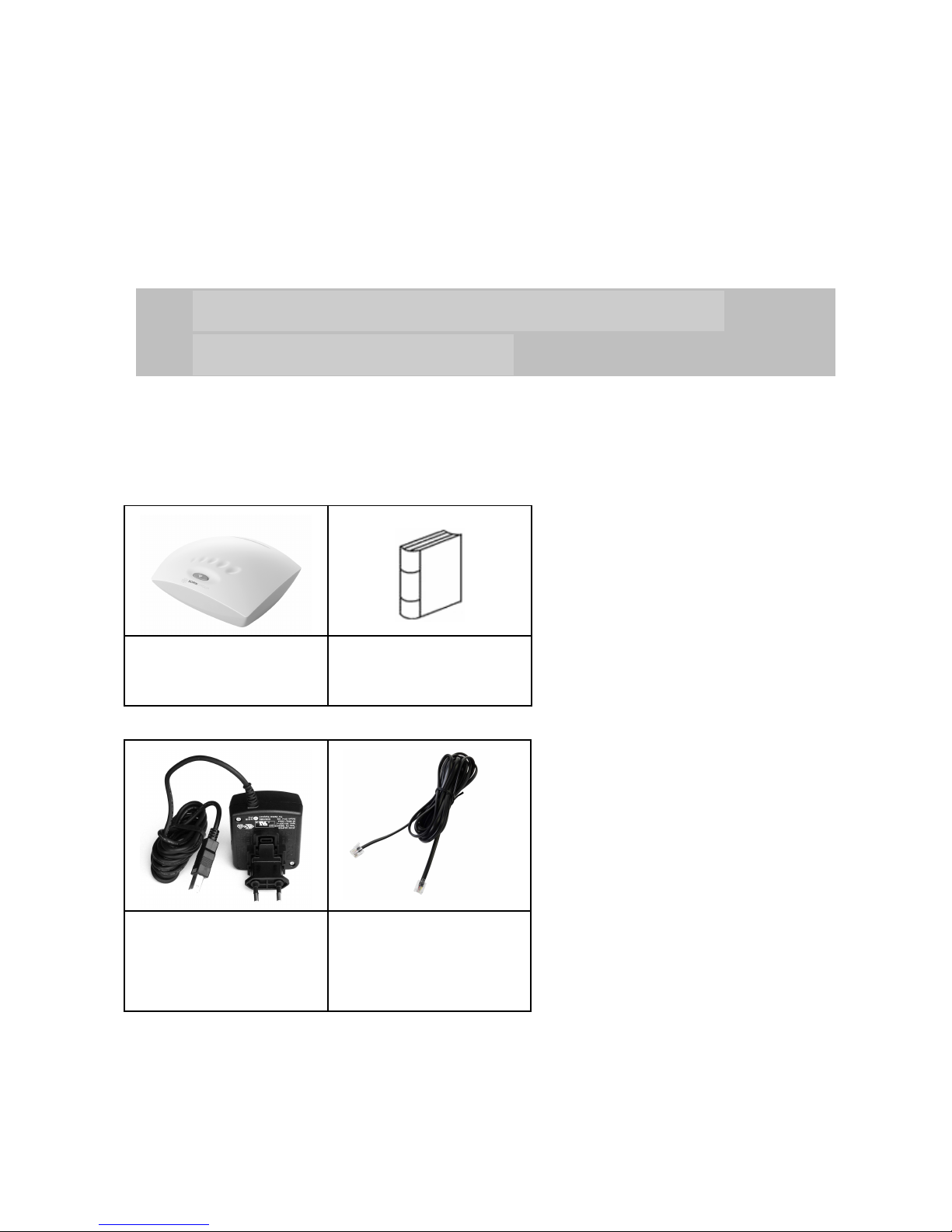
Inside the box you will find:
1 SMARTVIEW
monitor
User’s manual
1 Power adaptor 1 RJ11
Telephone cable
(5 meters)
Page 8
8
– ENGLISH
Do not use any other parts than the ones supplied with
the SMARTVIEW monitor, as this may result in
increased emissions or decreased immunity of the
equipment.
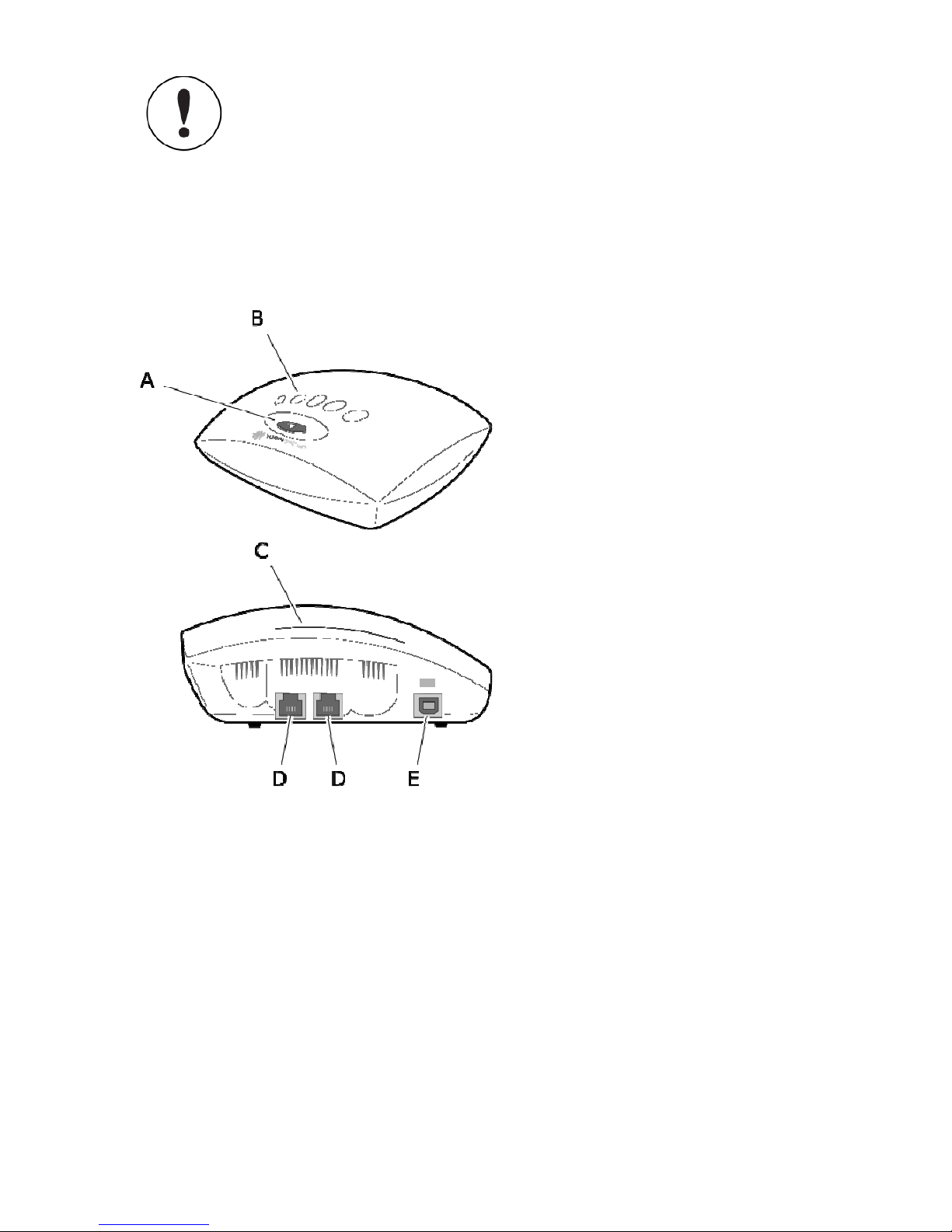
4.2. DESCRIPTION
A/ On-Demand button
B/ Progress bar
C/ Status light
D/ Telephone ports 1 and 2
E/ Power supply inlet
(cable with the orange mark)
Page 9
ENGLISH –
9
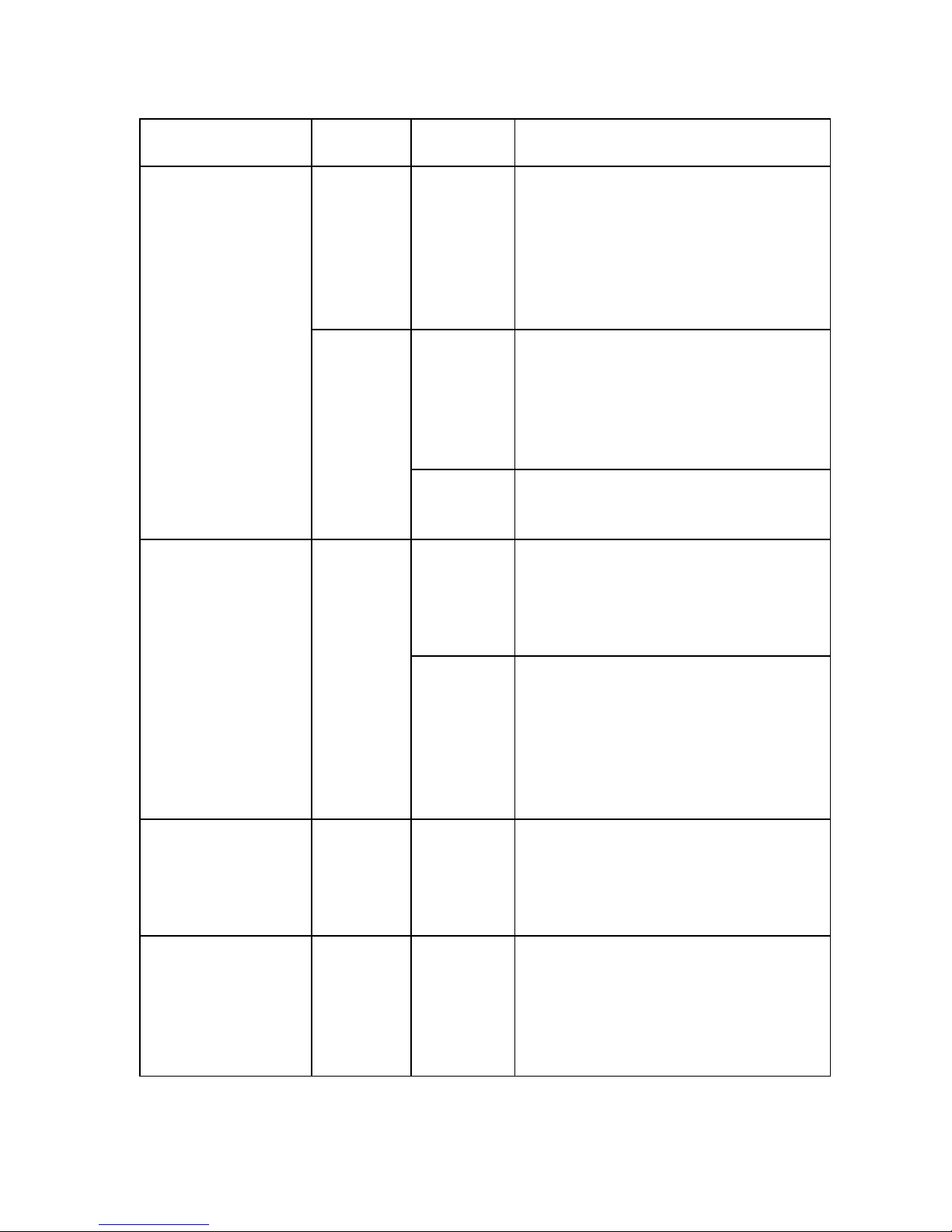
4.3. MEANING OF THE LIGHTS AND BUTTONS
Light or button State Colour Meaning
OFF No colour The SMARTVIEW monitor is not
properly plugged in or not connected to
the telephone network. Please check
the connections. If the status light
remains off, please contact our toll-free
technical assistance.
Constant
amber
You have just connected the
SMARTVIEW monitor to the wall
socket. The SMARTVIEW monitor is
setting up. Please wait. This process
takes less than 5 minutes.
Status light
ON
Constant
green
The SMARTVIEW monitor is operational.
Green The SMARTVIEW monitor is gathering
data. Stay as close as possible to the
SMARTVIEW monitor and don’t
disconnect it.
On-Demand button Flashing
Red The SMARTVIEW monitor could not gather
the information stored in your implanted
defibrillator. Come closer to the
SMARTVIEW monitor and restart the
process. If the button turns red again, please
contact our toll-free technical assistance.
ON Green You pushed the button to request an On-
Demand transmission. The SMARTVIEW
monitor is checking that the function is
active before performing the transmission.
Progress lights Progress Green The SMARTVIEW monitor is gathering
information from your implanted
defibrillator. Stay as close as possible
to the SMARTVIEW monitor and don’t
disconnect it.
Page 10

10
– ENGLISH
5. USING YOUR SMARTVIEW MONITOR
The Sorin CRM SMARTVIEW monitor works automatically. Therefore, you
will have no interaction with it except at installation and only on your doctor’s
request.
5.1. SETTING-UP YOUR SMARTVIEW MONITOR
In order to perform the installation of your SMARTVIEW monitor in a quickly,
easily and safely way, we recommend you to call our technical assistance
(see toll-free phone numbers at the end of this manual). Our technicians will
assist you. It is free and takes little time.
Step Operation
1
Take all the items out of the box.
2
Place your SMARTVIEW monitor in a stable position,
preferably on your nightstand, as close as possible to the
side of the bed you usually sleep on.
3
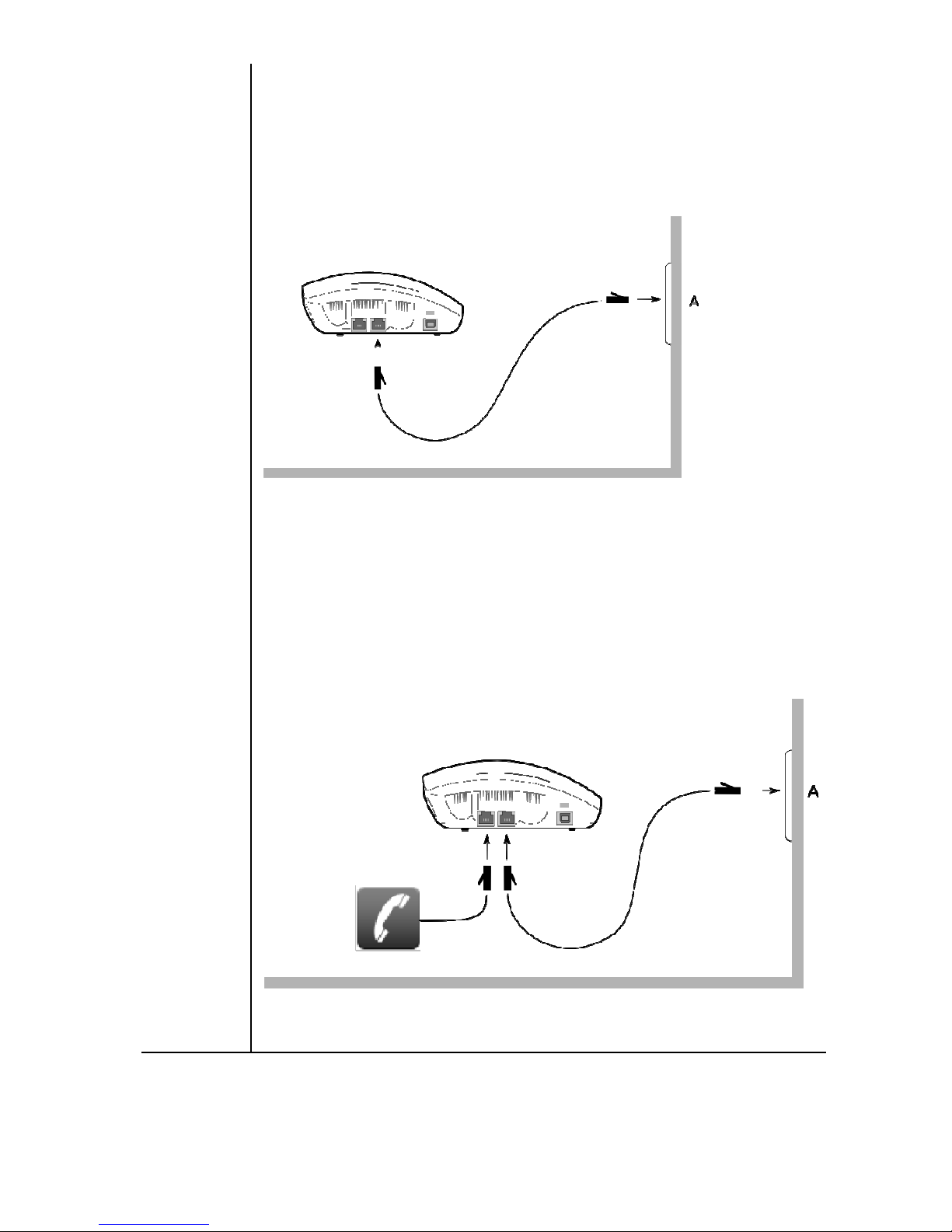
To connect the SMARTVIEW monitor to the phone line:
Page 11
ENGLISH –
11
wall socket, use the Sorin CRM black telephone cable to
connect the SMARTVIEW monitor to the telephone wall
socket as shown in the picture below:
- if your phone is already plugged into the telephone wall
socket, unplug your own telephone cable from the telephone
wall socket and plug it into one of the telephone ports at the
back of the SMARTVIEW monitor. Use the Sorin CRM black
telephone cable to connect the SMARTVIEW monitor to the
wall socket as shown in the picture below:
Page 12
12
– ENGLISH
4
Remove the power adaptor from the little white box and
plug the end of the cable with the orange mark into the
appropriate inlet in the SMARTVIEW monitor identified
with the same orange mark.
5
Plug the power supply block into the mains. A green light
turns ON immediately on this block.
6
You should observe the following:
The status light turns stable amber for around 45 seconds
and then turns green. Your SMARTVIEW monitor is now
ready for the next step: Communication.
7
The On-Demand button is now flashing green. It will continue
flashing as long as you do not press this button.
To operate properly, your SMARTVIEW monitor
should always be connected to your phone line and
the main power outlet.
5.2. COMPLETE THE INSTALLATION WITH
COMMUNICATION SETUP
At this stage, your SMARTVIEW monitor will need to “talk” with your
Sorin CRM implanted device. You will not feel anything as it is fully
independent of your clinical treatment.
Press the On-Demand button gently until you feel a click. You will see
the On-Demand button constant green for between 30 seconds and 1
minute. Wait until the green light turns completely OFF.
Your SMARTVIEW monitor is fully operational and your doctor has
already been notified that the installation has run successfully. Your
Sorin CRM implanted device is now being monitored.
Page 13
ENGLISH –
13
The communication setup is requested at first
installation only. Disconnecting and reconnecting the
SMARTVIEW monitor does not require setting up the
communication again.
5.3. OPERATIONAL USAGE
In order to reduce any inconvenience, your SMARTVIEW monitor is set
up to read your Sorin CRM implanted device at night while you sleep.
If the status light is OFF, check all connections. If the problem persists,
call our toll-free technical assistance..
During the transmission, your phone line will be busy.
Should you need to use your phone for emergency
reasons, temporarily unplug your SMARTVIEW monitor.
Should you be on the phone while the SMARTVIEW
monitor gathers data, you may hear some noises or
disruptions on the phone line.
5.4. ON-DEMAND OPERATION
Your doctor may ask you to press the On-Demand button. Follow his
instructions closely, but do not use this button unless your doctor requests it.
6. TRAVELLING
If you are planning to travel, you should inform your doctor of your dates of
absence. Some of the scheduled events may need to be temporarily changed.
To know whether your SMARTVIEW monitor will
operate in the country where you travel, please call
our toll-free technical assistance who will give you
relevant instructions.
Page 14

14
– ENGLISH
7. MOVING HOME
If you move home, you will have to re-install your SMARTVIEW monitor in
your new home by following the installation procedure. Please call our tollfree technical assistance.
8. SMARTVIEW MONITOR BASIC CARE
Your SMARTVIEW monitor has been designed to successfully pass the
safety and regulatory standards. To ensure that it works, always protect your
SMARTVIEW monitor from being splashed with any kind of liquid. If you
need to clean it, please use only a soft dry cloth. Any other cleaning method
could damage your SMARTVIEW monitor. Do not use any kind of
detergents even dry ones.
9. MAINTENANCE AND RECYCLING
Your SMARTVIEW monitor remains property of Sorin CRM.
It requires no maintenance.
As with all electronic devices recycling your SMARTVIEW monitor is
mandatory, therefore please return it to Sorin CRM if you do not use or
need it anymore.
Please contact our toll-free technical assistance for more information on
the collecting procedure. Sorin CRM will be in charge of collecting and
recycling it in compliance with European Directive 2002/96/CEE.
Page 15

ENGLISH –
15
10. FAQ
Why do I need to be monitored?
You have been advised to install Sorin CRM's SMARTVIEW monitor in your
home so that your doctor can closely follow your heart disease and identify
potential needs for adjustments to your treatment. Should you have any
questions or need further information, please contact your doctor.
What shall I do if I do not feel well?
When experiencing symptoms, you should call your doctor or your local
emergency service. Our technology does not replace them under any
circumstances.
Is there a risk due to Radio Frequency?
No, because the SMARTVIEW monitor has successfully passed the
security tests regarding normative level of radiation.
Does the communication cost me anything?
The communication won’t cost you anything within the country where
the first connection has been initiated.
Our SMARTVIEW monitor uses toll-free phone numbers to transfer
information to your doctor. If you use the SMARTVIEW Monitor abroad
then communication costs will not be covered by Sorin CRM.
Page 16
16
– ENGLISH
11. TECHNICAL SPECIFICATIONS
If you suspect any kind of default, please call our toll-free technical
assistance. Our technicians will help you and run investigations if needed.
Part number KA960
Dimensions Height: 59 mm
Width: 156 mm
Depth: 122 mm
Weight 250 g
Power supply AC input : 100-240 V~ 50-60 Hz 250 mA
(to wall socket)
Operating conditions from 0°C to +40°C
from 5% to 93% RH non condensing
Transport and storage
conditions
from -15°C to +70°C
from 5% to 95% RH non condensing
Atmospheric air-pressure
limits
Min: 700 hPa
Max: 1060 hPa
IP21 Degree of protection provided by the enclosure
Transmitter frequency 2400-2483 MHz (ISM)
402-405 MHz (MedRadio)
Characteristics of the
transmitters
ISM: uses frequency hoping,
ERP = 100 mW max, OOK modulation.
MedRadio: uses Listen Before Talk algorithm, ERP =
25 µW max, FSK modulation.
Receiver frequency 402-405 MHz (MedRadio)
Page 17
ENGLISH –
17
Modem Standard ITU-T V.92/V.90/56K SocketModem module
for PSTN subscriber line.
Telecom approved in more than 50 countries.
The SMARTVIEW monitor may be interfered with by other equipment, even
if that other equipment complies with CISPR emission requirements.
12. DATA PROTECTION
Any clinical data is fully secured with restricted access. You have the
right to access this information at any time and ask for any change by
request only. Please contact your doctor or our toll-free technical
assistance.
13. DECLARATION OF CONFORMITY
Sorin CRM declares that this device:
− is in conformity with the essential requirements of Directive 1999/5/EC on Radio and
Telecommunications Terminal Equipment, with the mutual recognition of their conformity
(R&TTE) and with the Directive 90/385/EEC on Active Implantable Medical Devices and,
− carries the CE marking accordingly.
Sorin CRM declares that this device conforms to the following Product Specifications:
Safety - IEC 60601-1:2005 (Ed. 3) - Medical electrical equipment - Part 1: General
requirements for basic safety and essential performance.
EMC -IEC 60601-1-2:2007 (Ed. 3) - Medical electrical equipment - Part 1-2: General requirements
for basic safety and essential performance - Collateral standard: Electromagnetic compatibility Requirements and Tests.
EN 50371:2002 - Generic standard to demonstrate the compliance of low power electronic and
electrical apparatus with the basic restrictions related to human exposure to electromagnetic fields
(10 MHz - 300 GHz).
EN 50385:2002 - Product standard to demonstrate the compliance of radio base stations
and fixed terminal stations for wireless telecommunication systems with the basic restrictions
or the reference levels related.
EN 301 489 v1.8.1 - Electromagnetic compatibility and Radio spectrum Matters (ERM);
Electromagnetic Compatibility (EMC) standard for radio equipment and services.
Page 18

18
– ENGLISH
Federal Communication Commission Interference Statement 47 CFR Section 15.105(a)
- The FCC Product ID is YSGKA960.
This equipment has been tested and found to comply with the limits for a Class B or A digital
device, pursuant to Part 15 of the FCC Rules. These limits are designed to provide
reasonable protection against harmful interference in a residential installation. This
equipment generates uses and can radiate radio frequency energy and, if not installed and used
in accordance with the instructions, may cause harmful interference to radio communications.
However, there is no guarantee that interference will not occur in a particular installation.
If this equipment does cause harmful interference to radio or television reception, which can
be determined by turning the equipment off and on, the user is encouraged to try to correct
the interference by one of the following measures:
− Reorient or relocate the receiving antenna.
− Increase the separation between the equipment and receiver.
− Connect the equipment into an outlet on a circuit different from that to which the receiver is
connected.
− Consult the dealer or an experienced radio/TV technician for help.
FCC Interference Statement 47 CFR Section 15.21 - No Unauthorized Modifications
CAUTION: This equipment may not be modified, altered, or changed in any way without
signed written permission from SORIN. Unauthorized modification may void the equipment
authorization from the FCC and will void the SORIN warranty.
Identification of the equipment according Section 2.925 and 15.19 (a)(1)
This device complies with part 15 of the FCC Rules. Operation is subject to the following two
conditions: (1) This device may not cause harmful interference, and (2) this device must
accept any interference received, including interference that may cause undesired operation.
This device may not interfere with stations operating in the 400.150–406.000 MHz band in
the Meteorological Aids, Meteorological Satellite, and Earth Exploration Satellite Services
and must accept any interference received, including interference that may cause undesired
operation.
Page 19
ENGLISH –
19
14. GUIDANCE AND MANUFACTURER’S
DECLARATION
14.1. ELECTROMAGNETIC EMISSIONS
The SMARTVIEW monitor is intended for use in the electromagnetic environment specified below.
The customer or the user of the SMARTVIEW monitor should assure that it is used in such an
environment.
Emissions test Compliance Electromagnetic environment - guidance
RF emissions
CISPR 11
Group 1 The SMARTVIEW monitor uses RF energy only
for its internal function. Therefore, its RF
emissions are very low and are not likely to
cause any interference in nearby electronic
equipment.
RF emissions
CISPR 11
Class B
Harmonic
emissions
IEC 61000-3-2
Class A
Voltage fluctuations
/ flicker emissions
IEC 61000-3-3
Complies
The SMARTVIEW monitor is suitable for use in
all establishments, including domestic
establishments and those directly connected to
the public low voltage power supply network that
supplies buildings used for domestic purposes.
Page 20

20
– ENGLISH
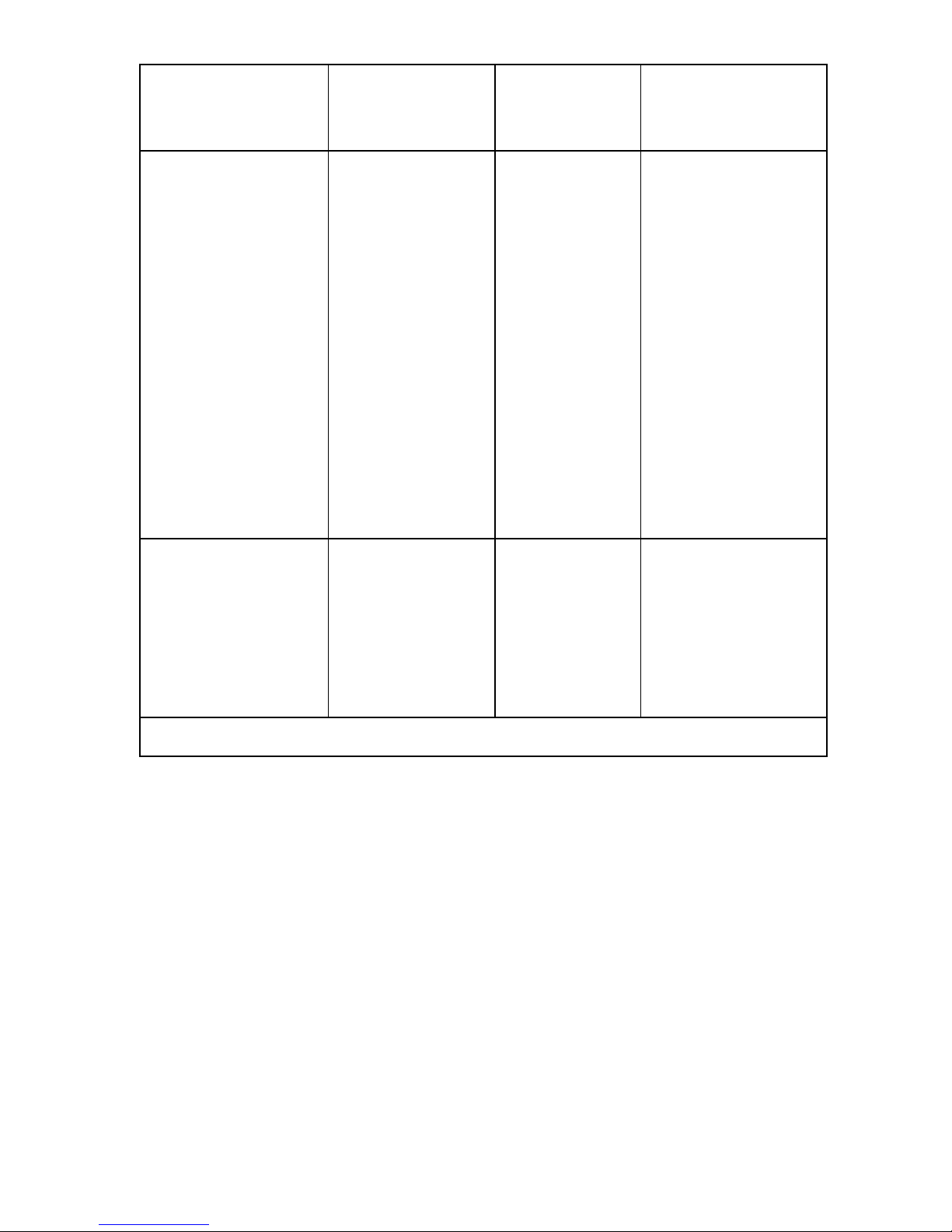
14.2. ELECTROMAGNETIC IMMUNITY
The SMARTVIEW monitor is intended for use in the electromagnetic environment specified below.
The user of the SMARTVIEW monitor should assure that it is used in such an environment.
Immunity test IEC 60601 test
level
Compliance
level
Electromagnetic
environment guidance
Electrostatic discharge
(ESD)
IEC 61000-4-2
± 6 kV contact
± 8 kV air
± 6 kV contact
± 8 kV air
Floors should be
wood, concrete or
ceramic tile. If floors
are covered with
synthetic material, the
relative humidity
should be at least
30 %.
Electrical fast
transient/burst
IEC 61000-4-4
± 2 kV for power
supply lines
± 1 kV for
input/output lines
± 2 kV for
power supply
lines
± 1 kV for
input/output
lines
Mains power quality
should be that of a
typical home
environment.
Surge
IEC 61000-4-5
± 1 kV line(s) to
line(s)
± 2 kV line(s) to
earth
± 1 kV line(s) to
line(s)
± 2 kV line(s) to
earth
Mains power quality
should be that of a
typical home
environment.
Page 21
ENGLISH –
21
Immunity test IEC 60601 test
level
Compliance
level
Electromagnetic
environment guidance
Voltage dips, short
interruptions and
voltage variations on
power supply input
lines
IEC 61000-4-11
<5 % UT
(>95 % dip in UT)
for 0,5 cycle
40 % UT
(60 % dip in UT)
for 5 cycles
70 % UT
(30 % dip in UT)
for 25 cycles
<5 % UT
(>95 % dip in UT)
for 5 s
<5 % UT
(>95 % dip in
UT)
for 0,5 cycle
40 % UT
(60 % dip in UT)
for 5 cycles
70 % UT
(30 % dip in UT)
for 25 cycles
<5 % UT
(>95 % dip in
UT)
for 5 s
Mains power quality
should be that of a
typical home
environment. If the
user of the
SMARTVIEW monitor
requires continued
operation during
power mains
interruptions, it is
recommended that
the SMARTVIEW
monitor be powered
from an
uninterruptible power
supply or a battery.
Power frequency
(50/60 Hz) magnetic
field
IEC 61000-4-8
3 A/m 3 A/m Power frequency
magnetic fields should
be at levels
characteristic of a
typical bedroom in a
typical home
environment.
NOTE: UT is the a.c. mains voltage prior to application of the test level.
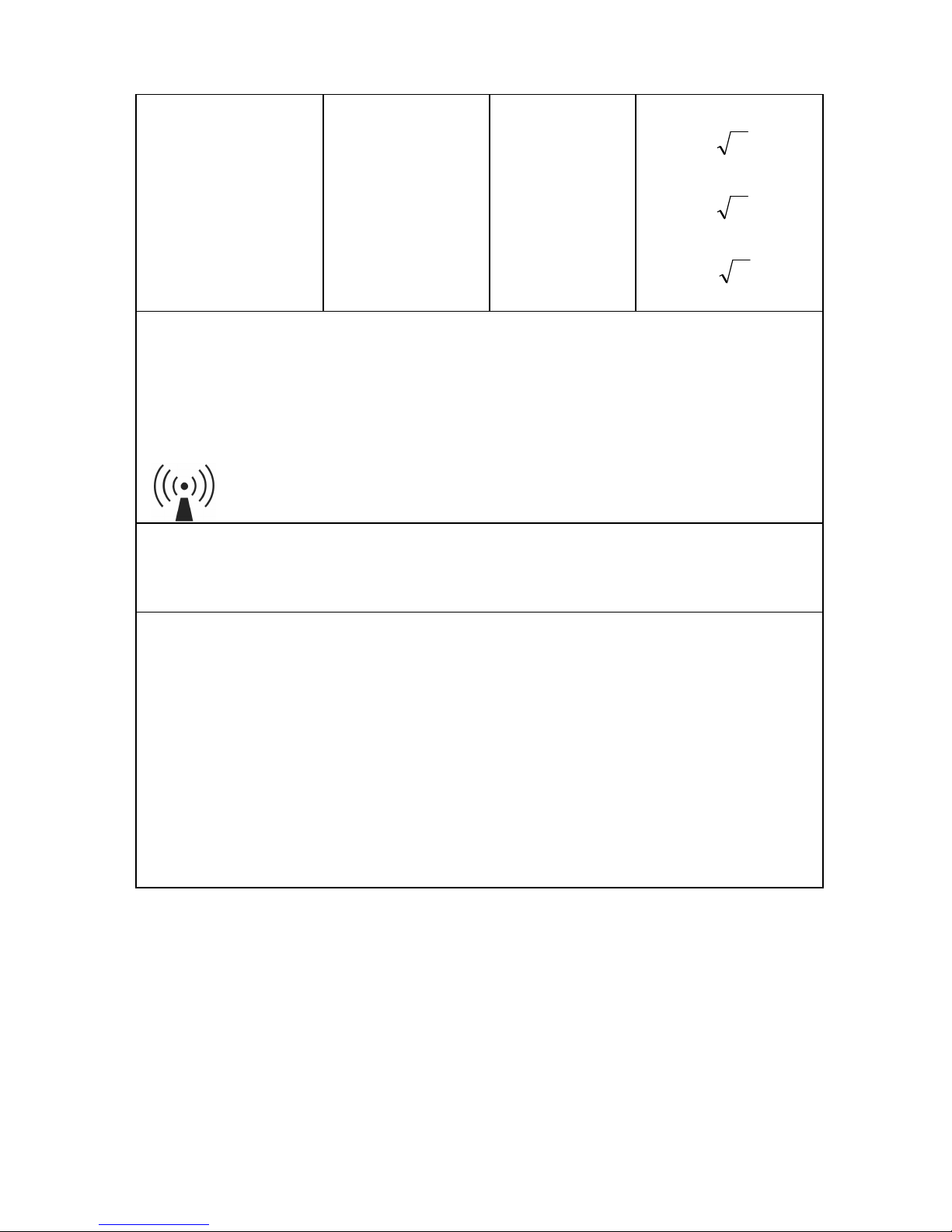
The SMARTVIEW monitor is intended for use in the electromagnetic environment specified
below. The customer or the user of the SMARTVIEW monitor should assure that it is used in
such an environment.
Portable and mobile RF communications equipment should be used no closer to the
SMARTVIEW monitor, including cables, than the recommended separation distance
calculated from the equation applicable to the frequency of the transmitter.
Page 22
22
– ENGLISH
Recommended separation distance
:
Conducted RF
IEC 61000-4-6
3 Vrms
150 kHz to
80 MHz
3 V
Pd 2.1=
Radiated RF
IEC 61000-4-3
3 V/m
80 MHz to
2.5 GHz
3 V/m
Pd 2.1=
80 to
800 MHz
Pd 3.2=
800 MHz to 2.5 GHz
where P is the maximum output power rating of the transmitter in watts (W) according to the
transmitter manufacturer and d is the recommended separation distance in metres (m).
Field strengths from fixed RF transmitters, as determined by an electromagnetic site
survey,a should be less than the compliance level in each frequency range.b
Interference may occur in the vicinity of equipment marked with the following symbol:
NOTE 1: At 80 MHz and 800 MHz, the higher frequency range applies.
NOTE 2: These guidelines may not apply in all situations. Electromagnetic propagation
is affected by absorption and reflection from structures, objects and people.
a
Field strengths from fixed transmitters, such as base stations for radio
(cellular/cordless) telephones and land mobile radios, amateur radio, AM and FM radio
broadcast and TV broadcast cannot be predicted theoretically with accuracy. To assess
the electromagnetic environment due to fixed RF transmitters, an electromagnetic site
survey should be considered. If the measured field strength in the location in which the
SMARTVIEW monitor is used exceeds the applicable RF compliance level above, the
SMARTVIEW monitor should be observed to verify normal operation. If abnormal
performance is observed, additional measures may be necessary, such as re-orienting
or relocating the SMARTVIEW monitor.
b
Over the frequency range 150 kHz to 80 MHz, field strengths should be less than
3 V/m.
Page 23
ENGLISH –
23
14.3. RECOMMENDED SEPARATION DISTANCES
BETWEEN PORTABLE AND MOBILE RF
COMMUNICATIONS EQUIPMENT AND THE
SMARTVIEW MONITOR
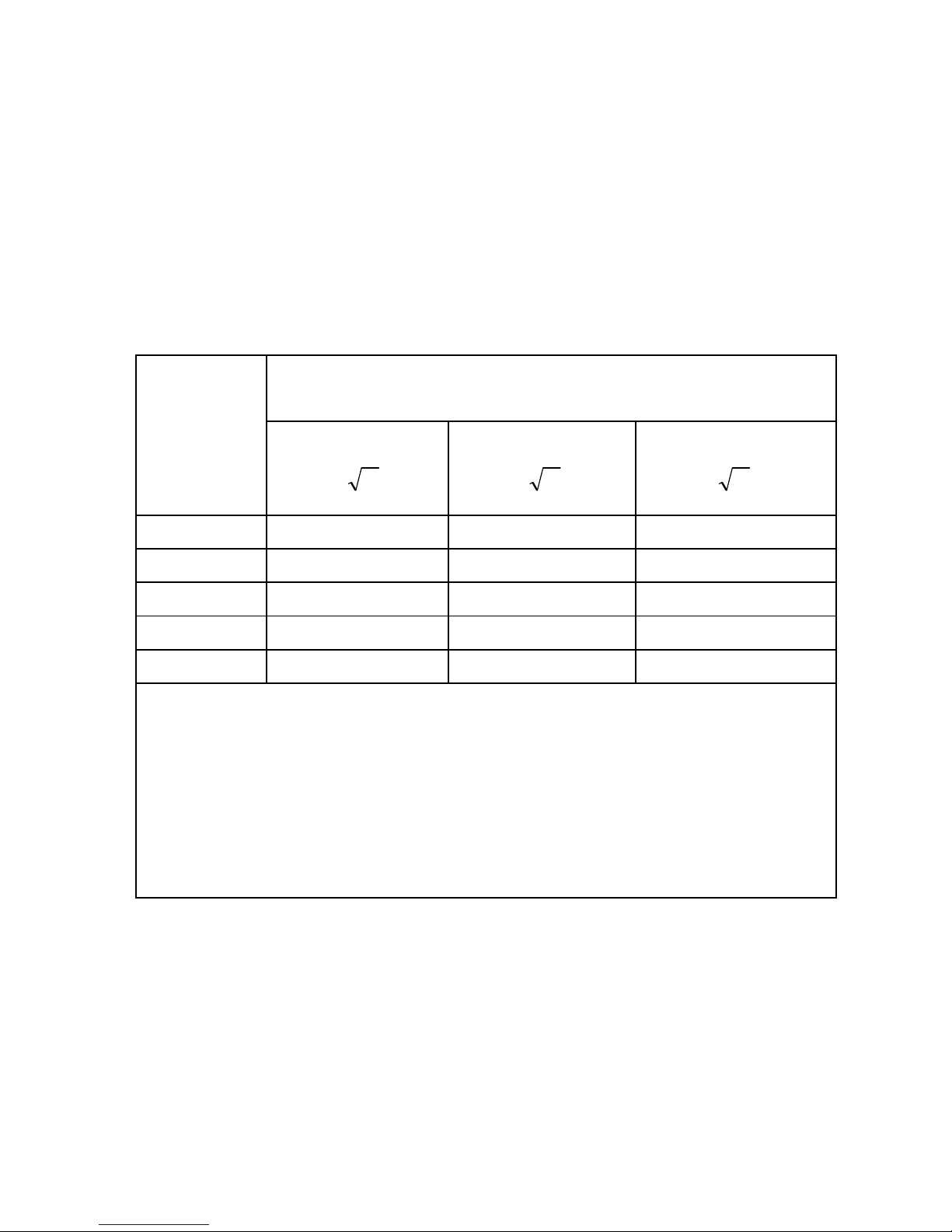
The SMARTVIEW monitor is intended for use in an electromagnetic environment in which radiated
RF disturbances are controlled. The user of the SMARTVIEW monitor can help prevent
electromagnetic interference by maintaining a minimum distance between portable and mobile RF
communications equipment (transmitters) and the SMARTVIEW monitor as recommended below,
according to the maximum output power of the communications equipment.
Separation distance according to frequency of transmitter
m
Rated
maximum
output
power of
transmitter
W
150 kHz to 80 MHz
Pd 2.1=
80 MHz to 800 MHz
Pd 2.1=
800 MHz to 2.5 GHz
Pd 3.2=
0.01 0.12 0.12 0.23
0.1 0.38 0.38 0.73
1 1.2 1.2 2.3
10 3.8 3.8 7.3
100 12 12 23
For transmitters rated at a maximum output power not listed above, the recommended
separation distance d in meters (m) can be estimated using the equation applicable to the
frequency of the transmitter, where P is the maximum output power rating of the
transmitter in watts (W) according to the transmitter manufacturer.
NOTE 1: At 80 MHz and 800 MHz, the separation distance for the higher frequency range
applies.
NOTE 2: These guidelines may not apply in all situations. Electromagnetic propagation is
affected by absorption and reflection from structures, objects and people.
Page 24

24
– ENGLISH
15. TECHNICAL ASSISTANCE
For any assistance or question you may have about your SMARTVIEW
monitor, please call our toll-free Sorin technical assistance.
Our technical assistance desk is open from Monday to Friday from 8:00
am to 6:00 pm local time, except weekends.
855 877 3899
Last revision date of this manual: 2011-07
 Loading...