

Page 1

Music Remote Control
MRC-60
English
Español
繁體中文
简体中文
This is the Internet version of the User’s guide. © Print only for private use.
Page 2

Music Remote Control
2
MRC-60
User Guide
Guía del usuario
使用手冊
用户指南
FCC statement
This device complies with Part 15 of the FCC rules. Operation is subject
to the following two conditions: (1) This device may not cause harmful
interference, and (2) This device must accept any interference received,
including interference that may cause undesired operation.
Sony Ericsson MRC-60
This manual is published by Sony Ericsson Mobile Communications AB,
without any warranty. Improvements and changes to this manual
necessitated by typographical erro rs, inaccuracies of current information,
or improvements to programs and/or equipment, may be made by
Sony Ericsson Mobile Communications AB at any time and without
notice. Such changes will, however, be incorporated into new editions
of this manual. All rights reserved.
©Sony Ericsson Mobile Communications AB, 2007
Publication number: LZT 126 1507/4 R2A
The Sony Ericsson marble logo is the trademark or registered
trademark of Sony Ericsson Mobile Communications AB. Sony is the
trademark or registered trademark of Sony Corporation. Ericsson is the
trademark or registered trademark of Telefonaktiebolaget LM Ericsson.
This product is halogenfree.
This is the Internet version of the User’s guide. © Print only for private use.
Page 3

Introduction
3
Introducción
簡介
简介
Music remote control MRC-60
The music remote control MRC-60 enables you to
connect your mobile phone to a stereo and use the media
player and radio. Included is music cable MMC-60,
a cradle, a remote control and a standard charger.
Control remoto para música MRC-60
El control remoto para música MRC-60 sirve para
conectar el teléfono móvil a un equipo estéreo y utilizar
el reproductor multimedia y la radio. El producto consta
de un cable para transferencia de música MMC-60,
un soporte, un control remoto y un cargador estándar.
音樂遙控器 MRC-60
MRC-60 音樂遙控器連結手機及音響設備,以使用手
機的媒體播放器及收音機功能。本產品內含一條音響
纜線 MMC-60、一個機座、一只遙控器及一組標準
充電器。
音乐远程控制器 MRC-60
音乐远程控制器 MRC-60 可以将手机连接到立体声音
响,并使用手机的媒体播放器和收音机功能。 盒内所
附为音乐传输线 MMC-60、支架、远程控制器和标准
充电器各一个。
This is the Internet version of the User’s guide. © Print only for private use.
Page 4

Important compatibility information
4
Información importante sobre
compatibilidad
相容性相關的說明
重要兼容性信息
The supported functionality of the MRC-60 is strongly
dependant of the phone that is used. All parts of this
User guide where radio functionality is mentioned only
apply when using a phone that supports radio. Other
functions are also dependant on compatibility. For latest
compatibility go to
www.sonyericsson.com/support.
Las funciones que admite el MRC-60 dependen en gran
medida del teléfono utilizado. Todas las funciones de
radio incluidas en la presente guía del usuario sólo
serán válidas con un teléfono compatible con la radio.
Del mismo modo, otras funciones dependerán de
la compatibilidad del teléfono. Para consultar las
compatibilidades más recientes, visite
www.sonyericsson.com/support.
MRC-60 所支援的功能與所用的手機密切相關。
本使用手冊各章節所述之收音機功能,僅適用於
支援收音機功能的手機。 其他功能亦視相容性而
異, 有關相容性的最新資料,請參閱
www.sonyericsson.com/support 網站。
This is the Internet version of the User’s guide. © Print only for private use.
Page 5

MRC-60 所支持的功能完全取决于所使用的
5
手机。 本用户指南中所提及的有关收音机功能
的介绍仅适用于支持收音机功能的手机。 其他功能
仍取决于兼容性。 有关兼容性的最新信息,请访问
www.sonyericsson.com/cn。
This is the Internet version of the User’s guide. © Print only for private use.
Page 6
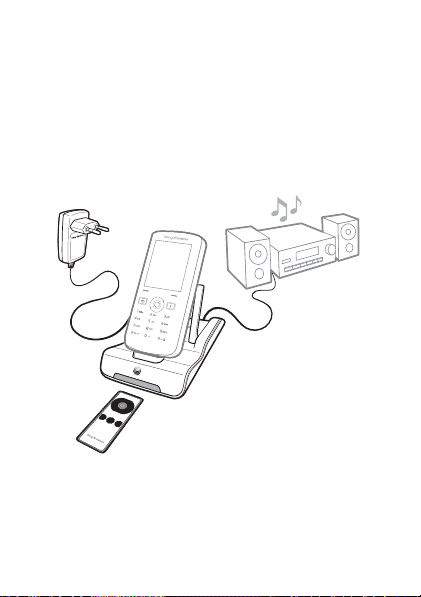
Overview of content
6
Descripción del contenido
組件清單
内容概述
Standard charger
Cargador estándar
標準充電器
标准充电器
Music cable MMC-60
Cable para
transferencia de música
MMC-60
音響纜線 MMC-60
Cradle
Soporte
機座
Remote control
Control remoto
遙控器
远程控制器
This is the Internet version of the User’s guide. © Print only for private use.
支架
音乐传输线 MMC-60
Page 7
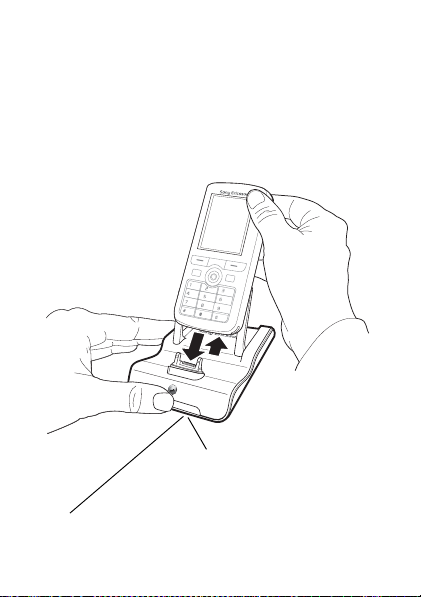
Connecting the phone to the cradle
7
Conexión del teléfono al soporte
將手機插入機座
将手机连接至支架
Infrared port
Puerto de infrarrojos
紅外線埠
红外
The blue light indicates that th e phone is connected.
La luz azul indica que el teléfono está conectado.
藍色指示燈代表手機已連結。
蓝色灯亮表明手机已连接。
This is the Internet version of the User’s guide. © Print only for private use.
Page 8
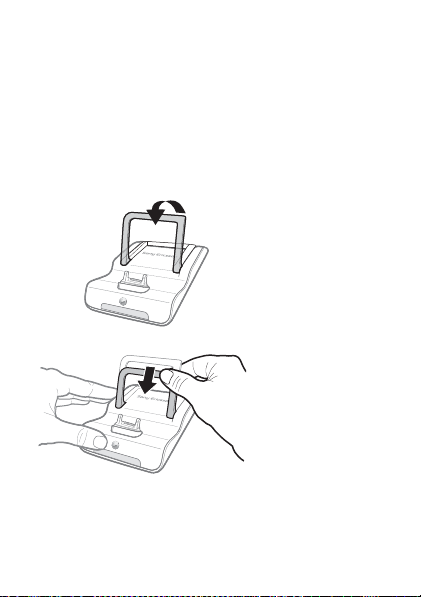
Cradle and support arc usage
8
Utilización del soporte y del puente de apoyo
機座及支架用法
支架及支撑拱架的用途
Lift the support arc up
Levante el puente de apoyo
立起支架
掀起支撑拱架
Press the support arc downwards to lock it in an upright position.
Apriételo hacia abajo hasta encajarlo en posición vertical.
將支架向下壓,使其鎖定到直立的位置。
向下按支撑拱架将其锁定在垂直位置。
This is the Internet version of the User’s guide. © Print only for private use.
Page 9
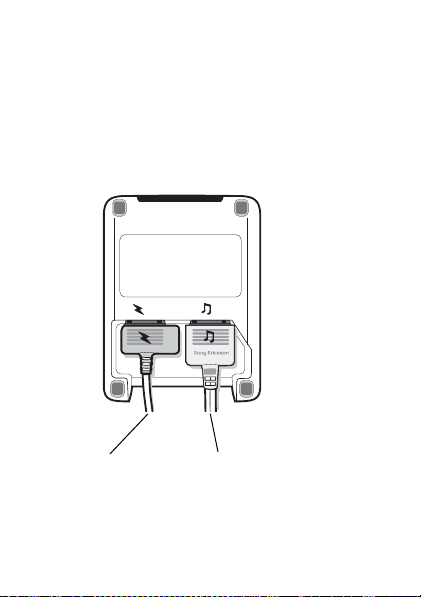
Connecting the power and music cables
Conexión de los cables de alimentación
y para transferencia de música
插入電源線及音響纜線
连接电源和音乐传输线
9
Power cable
Cable de alimentación
電源線
电源线
This is the Internet version of the User’s guide. © Print only for private use.
Music cable MMC-60
Cable para transferencia de
música MMC-60
音響纜線 MMC-60
音乐传输线 MMC-60
Page 10
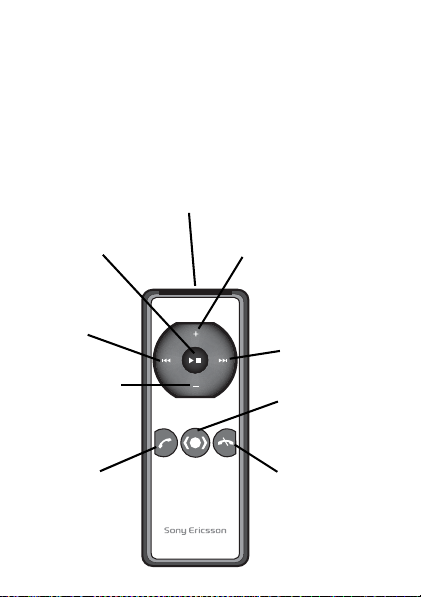
Remote control keys and infrared port
10
Teclas del control remoto y puerto de
infrarrojos
遙控器按鍵及紅外線埠
远程控制器按键和红外
Infrared port
Puerto de infrarrojos
Play/stop
Reproducir /
Parar
播放 / 停止
播放 / 停止
Previous
Anterior
上一個
上一个
Lower volume
Bajar el volumen
降低音量
减小音量
Accept call
Aceptar llamada
接聽來電
接听来电
This is the Internet version of the User’s guide. © Print only for private use.
紅外線埠
红外
Raise volume
Subir el volumen
放大音量
增大音量
Next
Siguiente
下一個
下一个
Source
Fuente
來源
来源
Reject call
Rechazar llamada
拒接來電
拒绝来电
Page 11

11
Key
Function
Teclas
Función
按鍵
功能
按键
功能
Raises the volume.
Sube el volumen.
放大音量。
增大音量。
Lowers the volume.
Baja el volumen.
降低音量。
减小音量。
Skips to the next media player track or changes the radio
channel to a higher frequency.
Pasa a la siguiente pista del reproductor multimedia o aumenta
la frecuencia de la emisora de radio.
轉到媒體播放器的下一個曲目,或收音機較高頻率的
電台。
跳至音乐播放器中的下一首曲目,或者将收音机调到下
一个更高频段的频道。
Skips to the previous media player track or changes the radio
channel to a lower frequency.
Pasa a la anterior pista del reproductor multimedia o disminuye
la frecuencia de la emisora de radio.
轉到媒體播放器的上一個曲目,或收音機較低頻率的
電台。
跳至音乐播放器中的上一首曲目,或者将收音机调到下
一个更低频段的频道。
This is the Internet version of the User’s guide. © Print only for private use.
Page 12
12
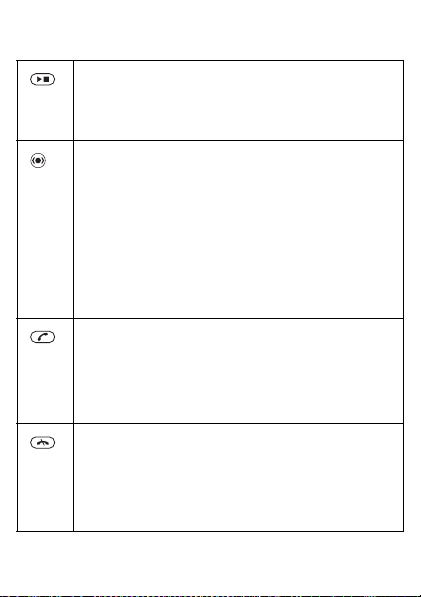
Starts or stops the media player or the radio.
Enciende o apaga el reproductor multimedia o la radio.
開始或停止媒體播放器或收音機。
开始或停止媒体播放器或收音机。
Activates the media player, stops the media player and radio,
and switches between media player and radio. This requires the
phone to support source button functionality.
Activa el reproductor multimedia, detiene el reproductor
multimedia y la radio, y cambia entre el reproductor multimedia
y la radio. Para ello, el teléfono debe ser compatible con las
funciones de botón de origen.
啟動媒體播放器、停止媒體播放器及收音機、切換媒體
播放器或收音機。手機須支援來源鈕功能。
启动媒体播放器,停止媒体播放器或收音机,以及在播放
器和收音机之间切换。 此操作需要手机支持媒体来源按钮
功能。
Answers a phone call. This requires the phone to support
speaker phone functionality.
Responde las llamadas telefónicas. Para ello, el teléfono debe
ser compatible con las funciones de altavoz.
接聽來電。手機項有擴音功能。
接听来电。 此操作需要手机支持扬声器功能。
Rejects a phone call or ends an ongoing call.
Rechaza las llamadas telefónicas o finaliza una llamada
en curso.
接聽來電。手機項有擴音功能。
拒绝来电或结束当前通话。
This is the Internet version of the User’s guide. © Print only for private use.
Page 13
Using the media player
13
Utilización del reproductor multimedia
使用媒體播放器
使用媒体播放器
Put your mobile phone in the cradle. The blue light
indicates when the phone is connected. Press to
turn on the media player and play a track.
Coloque el teléfono móvil en el soporte. La luz azul
indica que el teléfono está conectado. Pulse para
encender el reproductor multimedia y reproducir
una pista.
將手機插入機座,藍色指示燈表示手機已連結。
按 ,開啟媒體播放器並開始播放樂曲。
将手机放到支架上。 蓝色灯亮起时表明手机已连
接。 按 可打开媒体播放器并开始播放曲目。
This is the Internet version of the User’s guide. © Print only for private use.
Page 14
Playing and stopping a track
14
Iniciar y detener la reproducción de
una pista
開始及停止播放樂曲
播放和停止播放曲目
Press to play a track and to stop a track that is
being played.
Pulse para reproducir una pista y para detener
una reproducción en curso.
按 ,播放樂曲或停止播放中的樂曲。
按 可播放曲目,或停止正在播放的曲目。
Skipping to another track
Cambiar a otra pista
轉到另一樂曲
跳至另一曲目
Press to skip to the next track. Press to skip
to the previous track.
Pulse para cambiar a la siguiente pista. Pulse
para cambiar a la pista anterior.
按 ,轉到下一個樂曲。按 ,轉到上一個樂曲。
按 可跳至下一曲目。按 可跳至上一曲目。
This is the Internet version of the User’s guide. © Print only for private use.
Page 15

Fast forward and rewinding a track
15
Avanzar o retroceder rápidamente por una
pista
快速前轉及倒轉
快进或快退曲目
Press and hold down to fast forward a track.
Press and hold down to rewind a track.
Mantenga pulsada para avanzar rápidamente por
una pista. Mantenga pulsada para retroceder
rápidamente por una pista.
按住 ,快速前轉。按住 ,倒轉。
按住 可快进曲目。 按住 可快退曲目。
Turning off the media player
Apagar el reproductor multimedia
關閉媒體播放器
关闭媒体播放器
Press and hold down to turn off the media player.
This requires the phone to support the source button.
Mantenga pulsada para apagar el reproductor
multimedia. Para ello, el teléfono debe ser compatible
con el botón de origen.
按住 ,關閉媒體播放器。 手機須支援來源鈕功能。
按住 可关闭媒体播放器。 此操作需要手机支持
来源按钮。
This is the Internet version of the User’s guide. © Print only for private use.
Page 16

Switching to the radio
16
Alternar con la radio
改為收音機
切换到收音机
Press to switch from the media player to the radio.
Note: This requires that both the source button and radio
are supported by the phone.
Pulse para alternar entre el reproductor multimedia
yla radio.
Nota: Para ello es necesario que el teléfono sea
compatible con el botón de origen y la radio.
按 ,從媒體播放器改為收音機。
手機須支援來源鈕及收音機功能。
注意:
按 可从媒体播放器切换到收音机。
此操作需要手机同时支持来源按钮和收音机
注意:
功能。
This is the Internet version of the User’s guide. © Print only for private use.
Page 17

Using the radio
17
Utilización de la radio
使用收音機
使用收音机
Increasing radio frequency
1. A short press on the key will either increase the
radio frequency with 0.1 MHz or change frequency
to the next preset channel. You set this option in the
accessories menu in your phone. The accessories menu
is described on page 22.
2. Press and hold down to search for a higher
radio frequency.
Decreasing radio frequency
1. A short press on the key will either decrease the
radio frequency with 0.1 MHz or change frequency to
the previous preset channel. You set this option in the
accessories menu in your phone.
2. Press and hold down to search for a lower
frequency.
Note: For best radio performance, keep the music cable
connected at all times.
This is the Internet version of the User’s guide. © Print only for private use.
Page 18

Aumentar la frecuencia de la radio
18
1. Pulsando brevemente la tecla se aumenta la
frecuencia de la radio en 0,1 MHz o se cambia la
frecuencia a la siguiente emisora predeterminada.
Esta opción se establece en el menú de accesorios
del teléfono, que se describe en la página 22.
2. Mantenga pulsada para localizar una frecuencia
de radio mayor.
Reducir la frecuencia de la radio
1. Pulsando brevemente la tecla se reduce la
frecuencia de la radio en 0,1 MHz o se cambia la
frecuencia a la anterior emisora predeterminada.
Esta opción se configura en el menú de accesorios
del teléfono.
2. Mantenga pulsada para localizar una frecuencia
de radio menor.
Nota: Para que la radio funcione de forma óptima,
conecte siempre el cable para transferencia de música.
調高收音機頻率
1. 輕按 ,使收音機頻率向上調 0.1 MHz 或改為下
一個頻道。您可用手機的配件目錄設定此一選項。
配件目錄的說明請參閱頁 22。
2. 按住 ,搜尋頻率較大的頻道。
This is the Internet version of the User’s guide. © Print only for private use.
Page 19

調低收音機頻率
19
1. 輕按 ,使收音機頻率向下調 0.1 MHz 或改
為上一個頻道。您可用手機的配件目錄設定此一
選項。
2. 按住 ,搜尋頻率較小的頻道。
請隨時插入音響纜線使收聽效果最佳化。
注意:
调高收音机频率
1. 快速按 键可以将频率增大 0.1 MHz 或者转到下
一个预设频道。 您可以在手机的附件菜单中设定此
选项。 关于附件菜单的描述在第 22 页。
2. 按住 可搜索更高频段的收音机电台。
降低收音机频率
1. 快速按 键可以将频率降低 0.1 MHz 或者转到上
一个预设频道。 您可以在手机的附件菜单中设定此
选项。
2. 按住 可搜索更低的频段。
为取得最佳的收音机效果,请确保音乐传输线
注意:
一直保持连接。
This is the Internet version of the User’s guide. © Print only for private use.
Page 20
Turning off the radio
20
Apagar la radio
關閉收音機
关闭收音机
Press to turn off the radio.
Para apagar la radio, pulse .
按 ,關閉收音機。
按 可关闭收音机。
This is the Internet version of the User’s guide. © Print only for private use.
Page 21

Switching to the media player
21
Alternar con el reproductor multimedia
改為媒體播放器
切换到媒体播放器
Press to switch from the radio to the media player.
Note: This requires the phone to support the source button
functionality.
Pulse para alternar entre la radio y el reproductor
multimedia.
Nota: Para ello, el teléfono debe ser compatible con las
funciones del botón de origen.
按 ,自收音機改為媒體播放器。
手機須支援來源鈕功能。
注意:
按 可从收音机切换到媒体播放器。
此操作需要手机支持来源按钮功能。
注意:
This is the Internet version of the User’s guide. © Print only for private use.
Page 22

Accessories menu
22
Menú de accesorios
配件目錄
配件菜单
When connected to the cradle, two submenus are shown
in the accessories menu:
•Radio search mode
• Service information.
See your phone User guide for more information about
the accessories menu.
Cuando está conectado al soporte, aparecen dos
submenús en el menú de accesorios:
• Modo de radiobúsqueda
• Datos del servicio.
Consulte la Guía del usuario de su teléfono para ampliar
información sobre el menú de accesorios.
手機插入機座後,配件目錄會出現兩個子目錄:
• Radio search mode ( 收音機搜尋模式 )
• Service information ( 服務資訊 )。
有關配件目錄的詳細說明,請參考手機使用手冊。
接入传输线之后,配件菜单中会显示两个子菜单:
• 收音机搜索模式
• 服务信息
有关配件菜单的更多信息,请参阅手机的用户
指南。
This is the Internet version of the User’s guide. © Print only for private use.
Page 23

Radio search mode menu
23
Menú Modo de radiobúsqueda
Radio search mode ( 收音機搜尋模式 ) 目錄
收音机搜索模式菜单
The Radio search mode menu has two options, Manual
search and Preset. The selected option controls what
happens when you make a short press on or .
If Manual search is selected, the frequency will
increase or decrease with 0.1 MHz for each short press.
If Preset is selected, the next or previous preset
channel will be played. The default selected value
is Manual search.
El menú Modo de radiobúsqueda incluye dos
opciones: Búsqueda manual y Predefinido. La opción
seleccionada determina qué sucede cuando se pulsa
brevemente o . Si selecciona la opción
Búsqueda manual, la frecuencia de la radio aumentará
o disminuirá en 0,1 MHz con cada pulsación breve.
Si selecciona la opción Predefinido, pasará
directamente a la siguiente o anterior emisora
predeterminada. La opción predeterminada es
Búsqueda manual.
This is the Internet version of the User’s guide. © Print only for private use.
Page 24
Radio search mode (收音機搜尋模式)目錄有
24
Manual search (手動搜尋)及 Preset (預設)
兩個選項。各選項分別決定輕按 或 的結果。
選擇 Manual search (手動搜尋)時,每按一次該
鍵會增減 0.1 MHz 的頻率。選擇 Preset (預設)
時,前或後一個預設頻道會顯示出來。預設值為
Manual search (手動搜尋)。
收音机搜索模式菜单包含手动搜索和预设两个选
项。 所选选项决定了您快速按 或 时所执行
的操作。 如果选择的是手动搜索,每次快速按键时
会增加或降低 0.1 MHz。 若选择的是预设,则会
跳至上一个或下一个预设频道。 默认选项是手动
搜索。
Service information menu
Menú Datos del servicio
Service information ( 服務資訊 ) 目錄
服务信息菜单
When selecting the Service information menu the
following information is shown:
• Hardware version
• Software version
This information is important to have in case further
support is needed.
This is the Internet version of the User’s guide. © Print only for private use.
Page 25

Cuando se selecciona el menú Datos del servicio,
25
aparecen los siguientes datos:
• Versión de hardware
• Versión de software
Es importante conocer estos datos para solicitar
asistencia adicional.
選擇 Service information (服務資訊)目錄後會
顯示下列資訊:
• 硬體版本
• 軟體版本
上述資訊在需要支援時很有用處。
选择服务信息菜单后会显示下列信息:
• 硬件版本
• 软件版本
需要进一步的支持时,此信息将非常重要。
This is the Internet version of the User’s guide. © Print only for private use.
Page 26

Handling phone calls
26
Gestión de llamadas telefónicas
處理通話
处理通话
With your phone connected to the MRC-60, it is easy to
handle phone calls.
Note: This requires the phone to support speaker phone
functionality.
Resulta muy fácil gestionar las llamadas telefónicas con
el teléfono conectado al MRC-60.
Nota: Para ello, el teléfono debe ser compatible con
las funciones de altavoz.
手機連上 MRC-60 後,通話很容易處理。
手機須有擴音功能。
注意:
手机连接 MRC-60 之后,处理通话将变得非常
简单。
此操作需要手机支持扬声器功能。
注意:
This is the Internet version of the User’s guide. © Print only for private use.
Page 27

Accepting calls
27
Aceptar llamadas
接聽來電
接听来电
Press to answer a phone call.
Para contestar una llamada, pulse la tecla .
按 ,接聽來電。
按 可接听来电。
Rejecting and ending calls
Rechazar y finalizar llamadas
拒接來電
拒绝来电和结束通话
Press to reject and end a phone call.
Para rechazar o finalizar una llamada, pulse .
按 ,拒接來電並結束通話。
按 可拒绝来电或结束通话。
This is the Internet version of the User’s guide. © Print only for private use.
Page 28
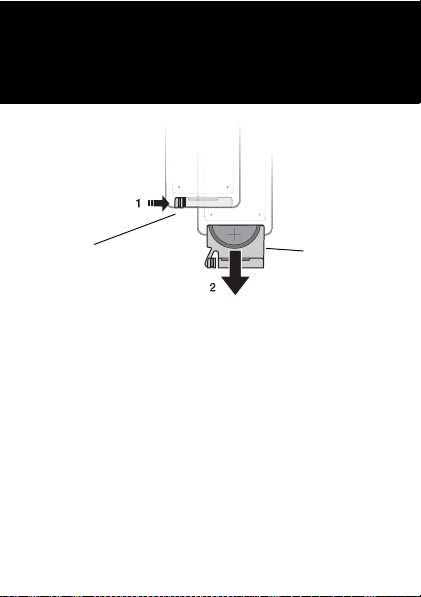
Replacing the battery in the remote control
Sustitución de la batería del control remoto
更換遙控器電池
更换远程控制器的电池
28
Catch
Pestillo
電池扣拴
电池卡扣
Battery holder
Compartimento
de la batería
電池插槽
电池舱
1. Slide the catch to the right.
2. Pull out the battery holder and replace the battery.
Place the battery with the positive (+) side up.
1. Deslice el pestillo hacia la derecha.
2. Saque el compartimento de la batería y sustitúyala.
Coloque la batería con el polo positivo (+) hacia arriba.
1. 將電池扣拴向右滑動。
2. 取出電池槽座,更換電池。
電池正極 (+ 號標示 ) 面朝上。
This is the Internet version of the User’s guide. © Print only for private use.
Page 29

1. 向右滑动电池卡扣。
29
2. 拉出电池舱,更换电池。
电池的正极面 (+) 朝上。
California use only. Perchlorate Material - special
handling may apply.
www.dtsc.ca.gov/hazardouswaste/perchlorate.
See
Perchlorate Material: Lithium battery contains
perchlorate.
Sólo para utilización en California. Material con
perclorato: manejar con precauciones especiales.
Consulte
www.dtsc.ca.gov/hazardouswaste/perchlorate.
Material con perclorato: las baterías de litio contienen
perclorato.
美國加州適用。過氯酸鹽物質 - 可能須按特殊法規
處理。
www.dtsc.ca.gov/hazardouswaste/perchlorate。
請參閱
過氯酸鹽物質:鋰電池含過氯酸鹽物質。
仅供加利福尼亚使用。 高氯酸盐材料 - 可能需要
特殊处理。
详情参见
www.dtsc.ca.gov/hazardouswaste/perchlorate。
高氯酸盐材料: 锂电池中含有高氯酸盐。
This is the Internet version of the User’s guide. © Print only for private use.
Page 30

Disposing of the battery
30
Eliminación de la batería
電池的處理
废弃电池的处理
Please check local regulations for disposal of batteries
or call your local Sony Ericsson Call Center for
information. The battery should never be placed in
municipal waste. Use a battery disposal facility if
available.
Consulte la normativa local sobre desecho de productos
electrónicos o pida información en el Servicio de
Atención al Cliente de Sony Ericsson local. No tire
la batería a un vertedero de basura municipal. Utilice
un depósito de residuos de baterías si existe.
請按當地的法規處理廢電池,或請洽詢各地的
Sony Ericsson Call Center。廢電池切勿混入住家
垃圾。請儘量使用電池處理設施。
请参考当地有关废弃电池处理的规定,或致电当地
的索尼爱立信呼叫中心 (Sony Ericsson Call Center) 以
了解相关信息。电池不能当作普通城市垃圾处理。
请尽量使用电池处理设施。
This is the Internet version of the User’s guide. © Print only for private use.
Page 31

Troubleshooting
31
Resolución de problemas
疑難排解
疑难解答
The blue light is not on
This indicates that the phone is not connected to the
cradle. Make sure the phone is switched on, fully
charged and placed in the cradle.
The remote control does not work
Make sure the battery in the remote control is working, if
not, replace it. See further instructions on how to replace
the battery on page 28. Make sure both infrared ports are
in line of sight with no obstacles in between.
No music or radio is heard
Make sure the music cable is connected to the cradle and
to a stereo.
La luz azul no se enciende
Significa que el teléfono no está conectado al soporte.
Compruebe que el teléfono está encendido, cargado
y bien colocado en el soporte.
El control remoto no funciona
Compruebe que la batería del control remoto funciona;
en caso contrario, sustitúyala. Encontrará más
información sobre cómo cambiar la batería en la página
28. Compruebe que los dos puertos de infrarrojos están
alineados sin obstáculos entre ambos.
This is the Internet version of the User’s guide. © Print only for private use.
Page 32

No se oye la música o la radio
32
Compruebe que el cable para transferencia de
música está conectado al soporte y al equipo estéreo.
藍色指示燈不亮
這代表手機未與機座連結。請檢查手機是否開機、
充電且插入機座。
遙控器無法操作
請檢查遙控器的電池是否正常,否則請即更換電
池。更換電池的方法,請參閱 28 頁的詳細說明。
請檢查紅外線埠是否對準且中間無阻礙。
聽不到音樂或收音機廣播
請檢查音響纜線是否插入機座及音響設備。
蓝色指示灯不亮
这种情况说明手机未与支架连接。 请确保手机已开
机,电池电量充足且已放置在支架上。
远程控制器不起作用
确保远程控制器中的电池完好,若是电量不足等
问题,请换用新电池。 有关如何更换电池的详细
说明,请参阅第 28 页。 确保两个红外已靠近对准,
且中间无阻隔物。
听不到音乐和广播
确保音乐传输线已连接支架和立体声音响。
This is the Internet version of the User’s guide. © Print only for private use.
Page 33

Further support
33
Asistencia adicional
更多的支援
更多支持
For further support see:
www.sonyericsson.com/support
Puede solicitar asistencia adicional en:
www.sonyericsson.com/support
更多的支援請參閱
www.sonyericsson.com/support 網站。
有关更多支持的信息,请访问:
www.sonyericsson.com/cn
This is the Internet version of the User’s guide. © Print only for private use.
Page 34

Declaration of substances
Toxic or hazardous substances Part name
Accessories and charger
Lead (Pb) X
Mercury (Hg) 0
Cadmium (Cd) 0
Hexavalent chromium (Cr6+)
Polybrominated biphenyls (PBB) 0
Polybrominated diphenylethers (PBDE) 0
0: Indicates that this toxic or hazardous substance contained in all of the
homogenous materials for this part is below the limit requirement in SJ/T
11363-2006.
X: Indicates that this toxic or hazardous substance contained in at least one
of the homogeneous materials used for this part is above the limit
requirement in SJ/T 11363-2006 (currently there are no alternative
technologies available).
This is the Internet version of the User’s guide. © Print only for private use.
0
34
Page 35

Declaration of conformity
35
We, Sony Ericsson Mobile Communications AB of
Nya Vattentornet
SE-221 88 Lund, Sweden
declare under our sole responsibility that our products
Sony Ericsson type CCA-0002026 and
Sony Ericsson type EFA-0002001
to which this declaration relates are in conformity with
the appropriate standards EN 301 489-7 and EN 60950,
following the provisions of EMC directive 89/336/EEC
and Low Voltage directive 73/23/EEC.
Lund, March 2007
Jacob Sten, Head of Product Business Unit Accessories
This is the Internet version of the User’s guide. © Print only for private use.
Page 36

www.sonyericsson.com
Sony Ericsson Mobile Communications AB
SE-221 88 Lund, Sweden
LZT 126 1507/4 R2A
Printed in XXX
This is the Internet version of the User’s guide. © Print only for private use.
 Loading...