

Page 1
ビデオ
プロジェクター
4-689-007-01 (1)
取扱説明書
VPL-VW535
お買い上げいただきありがとうございます。
電気製品は安全のための注意事項を守らないと、
この取扱説明書と付属のクイックリファレンスマニュアルをよくお読みのうえ、
製品を安全にお使いください。お読みになったあとは、
いつでも見られるところに必ず保管してください。
火災や人身事故になることがあります。
Page 2

目次
各部の名前
本機前面/右側面...............................................3
本機後面/左側面/底面 ..............................4
リモコン ....................................................................5
接続と準備
本機を設置する....................................................7
画面の位置を調整する....................................8
ビデオ機器やパソコンをつなぐ........... 13
見る
映像を投写する................................................. 15
電源を切る ...................................................15
3D 映像を楽しむ ..............................................16
3D メガネを使う ......................................16
ピクチャーポジションを使う................. 17
映像に合わせてアスペクト比を切り替
える.......................................................................19
画質を選ぶ............................................................22
メニュー画面で調整や設定を
する
メニュー操作のしかた................................. 23
画質設定メニュー............................................25
画質詳細設定メニュー................................. 34
スクリーン設定メニュー ...........................35
初期設定メニュー............................................38
機能設定メニュー............................................40
セッティングロックによってロック
される項目 ..............................................43
設置設定メニュー............................................44
情報メニュー.......................................................47
プリセットメモリーについて........ 47
ネットワーク機能を利用する
ウェブブラウザで本機のコントロール
画面を開く .......................................................48
コントロール画面を操作する .................49
ページを切り替える ..............................49
アクセス制限を設定する....................49
本機の状態を確認する.........................50
困ったときは
故障かな?と思ったら .................................51
警告ランプの見かた.......................................54
メッセージ一覧..................................................55
保証書とアフターサービス.......................57
その他
アップデート機能を利用する .................58
HDR(ハイダイナミックレンジ)につ
いて........................................................................58
x.v.Color(エックスブイ・カラー)に
ついて ..................................................................58
シミュレーテッド 3D 機能に
ついて ..................................................................58
ランプを交換する ............................................59
お手入れ..................................................................62
主な仕様..................................................................63
プリセット信号一覧 ..............................65
入力信号と調整・設定項目..............67
対応 3D 信号一覧 .....................................69
3D 信号と調整/設定項目.................69
アスペクトモード....................................71
モーションフロー....................................72
調整/設定項目の保存条件..............73
投写距離とレンズシフト量.......................76
寸法図 .......................................................................80
ソフトウェアに関するお知らせ............83
索引.............................................................................98
2
Page 3
各部の名前
本機前面/右側面
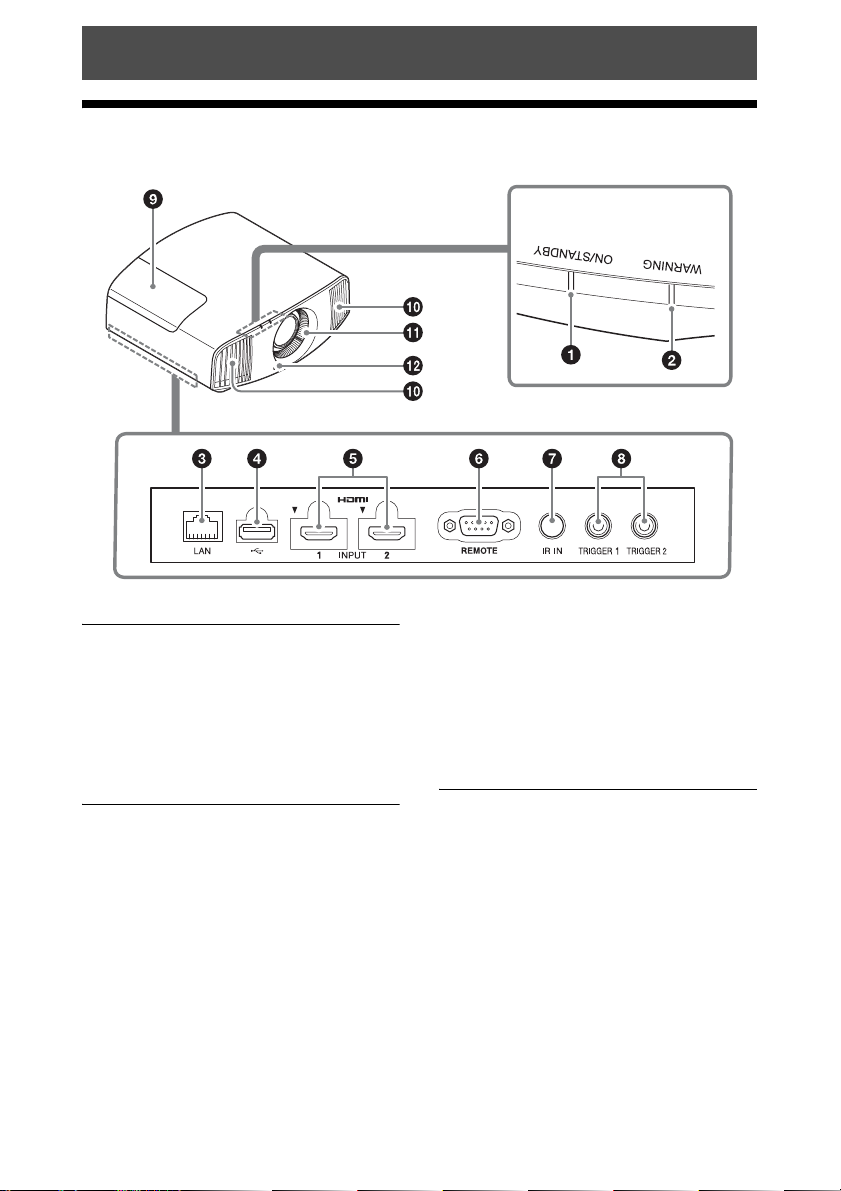
警告ランプ
警告ランプ
a ON/STANDBY(オン/スタン
バイ)ランプ(54 ページ)
b WARNING(ワーニング)ラン
プ(54 ページ)
接続端子
c LAN 端子(48 ページ)
d USB 端子(58 ページ)
e HDMI1/HDMI2 端子(13 ペー
ジ)
f REMOTE(リモート)端子
制御用パソコンなどをつなぎます。
g IRIN(アイアールイン)端子
本機を制御するための信号を入力し
ます。
h TRIGGER1/TRIGGER2(トリ
ガー 1/ トリガー 2)端子(44
ページ)
その他
i 光源用ランプカバー(59 ページ)
j 排気口
k 吸気口(61 ページ)
l リモコン受光部(8 ページ)
3
Page 4
本機後面/左側面/底面
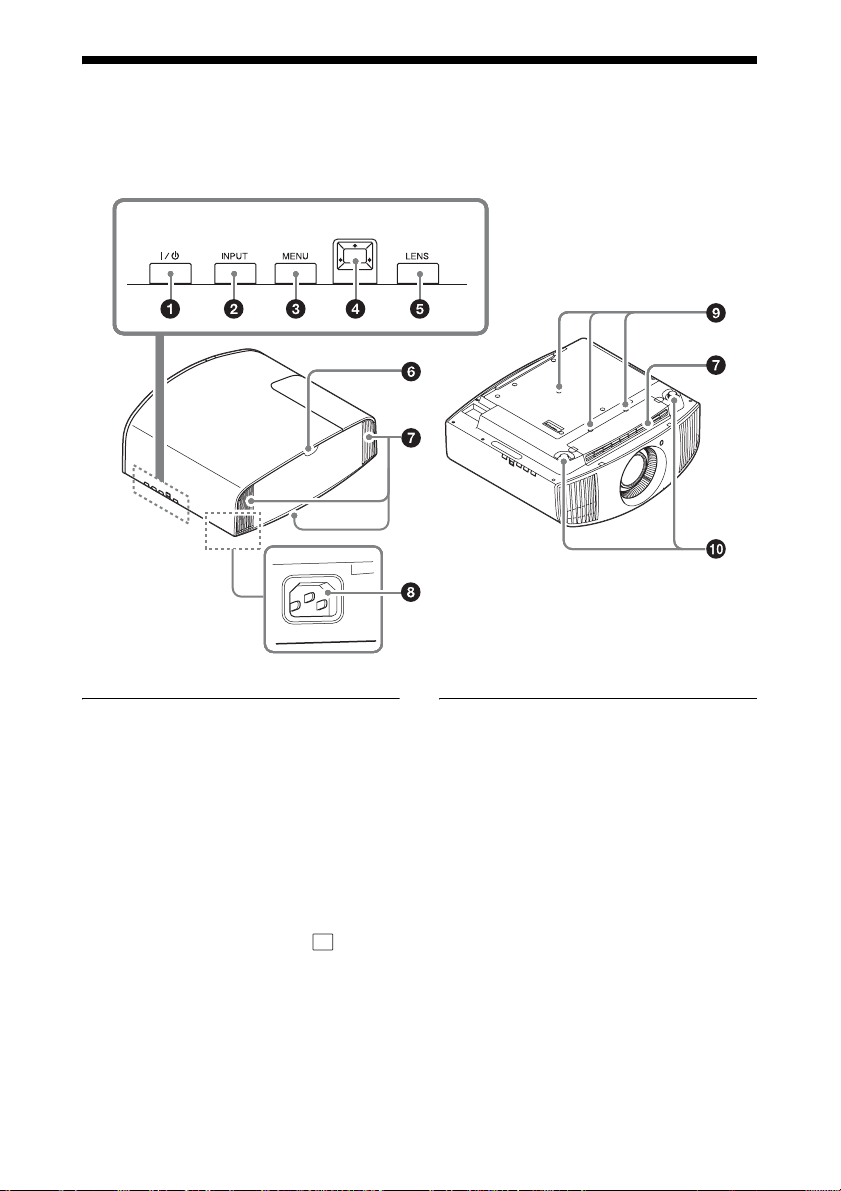
本機のコントロールパネルのボタンはリモコンの同名称のボタンと同じ働きをしま
す。
コントロールパネル
コントロールパネル
a [/1(オン/スタンバイ)ボタン
(8 ページ)
b INPUT(インプット)(入力切
換)ボタン(15 ページ)
c MENU(メニュー)ボタン(23
ページ)
d M/m/</,(矢印)/ (確定)
ボタン(23 ページ)
e LENS(レンズ)ボタン(8 ペー
ジ)
その他
f リモコン受光部(8 ページ)
g 吸気口(61 ページ)
h ACIN(電源端子)(8 ページ)
i プロジェクターサスペンションサ
ポート取り付け穴(81 ページ)
j 前脚部(調整可)(11 ページ)
4
Page 5
リモコン
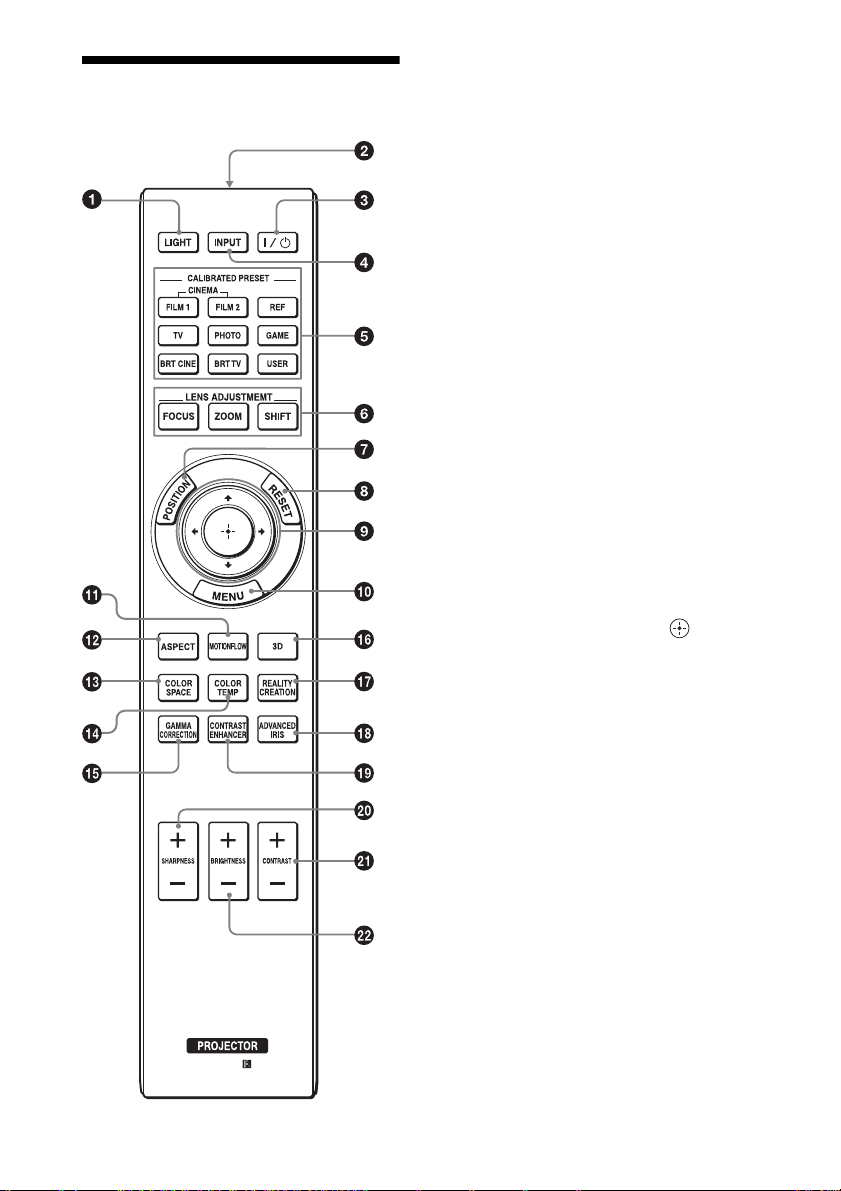
a LIGHT(ライト)ボタン
押すとリモコンのボタンが光りま
す。
b リモコン発光部
c [/1(オン/スタンバイ)ボタン
(8 ページ)
d INPUT(インプット)(入力切
換)ボタン(15 ページ)
e CALIBRATEDPRESET(キャ
リブレイテドプリセット)ボタン
(22 ページ)
f LENSADJUSTMENT(レンズ
アジャストメント)ボタン(9
ページ)
g POSITION(ポジション)ボタ
ン(17 ページ)
h RESET(リセット)ボタン(24
ページ)
i M/m/</,(矢印)/ (確定)
ボタン(23 ページ)
j MENU(メニュー)ボタン(23
ページ)
k MOTIONFLOW(モーションフ
ロー)ボタン(28 ページ)
l ASPECT(アスペクト)ボタン
(19 ページ)
m COLORSPACE(カラースペー
ス)ボタン(33 ページ)
n COLORTEMP(カラーテンパラ
チャー)ボタン(29 ページ)
o GAMMACORRECTION(ガン
マコレクション)ボタン(31
ページ)
5
Page 6

p 3D(スリーディー)ボタン(16
ページ)
q REALITYCREATION(リアリ
ティークリエーション)ボタン
(26 ページ)
r ADVANCEDIRIS(アドバンス
トアイリス)ボタン(27 ペー
ジ)
s CONTRASTENHANCER(コ
ントラストエンハンサー)ボタン
(27 ページ)
t SHARPNESS(シャープネス)
+/−ボタン(29 ページ)
u CONTRAST(コントラスト)
+/−ボタン(28 ページ)
v BRIGHTNESS(ブライトネス)
+/−ボタン(28 ページ)
6
Page 7
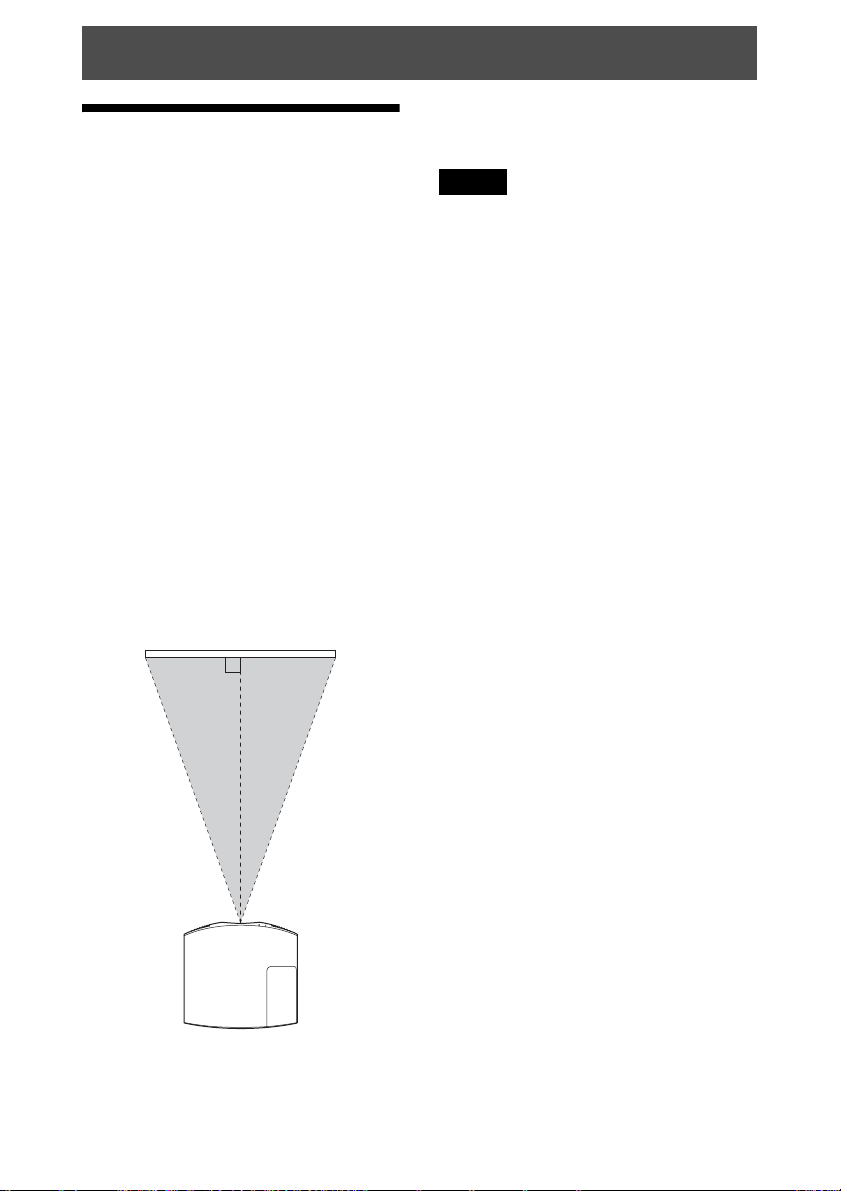
接続と準備
本機を設置する
2 スクリーンに画像を映して画面の
位置を調整する。(8 ページ)
本機はレンズシフトにより、置き場所
を広範囲に選べて簡単に美しい映像を
ご覧いただけます。
お使いになるスクリーンの大きさ(投
影サイズ)やレンズシフト使用の有無
によって、スクリーンと本機との位置
関係が変わります。スクリーンサイズ
に合うように本機を設置してください。
スクリーンまでの距離(投写距離)と
投写される映像の大きさについて詳し
くは、「投写距離とレンズシフト量」
(76 ページ)をご覧ください。
1 レンズがスクリーンに平行になる
ように本機を置く。
上から見た図
スクリーン
ご注意
表面に凹凸のあるスクリーンを使用する
と、本機とスクリーン間の距離やズーム
倍率によっては、まれに画面上に縞模様
が現れることがあります。これは本機の
故障ではありません。
7
Page 8
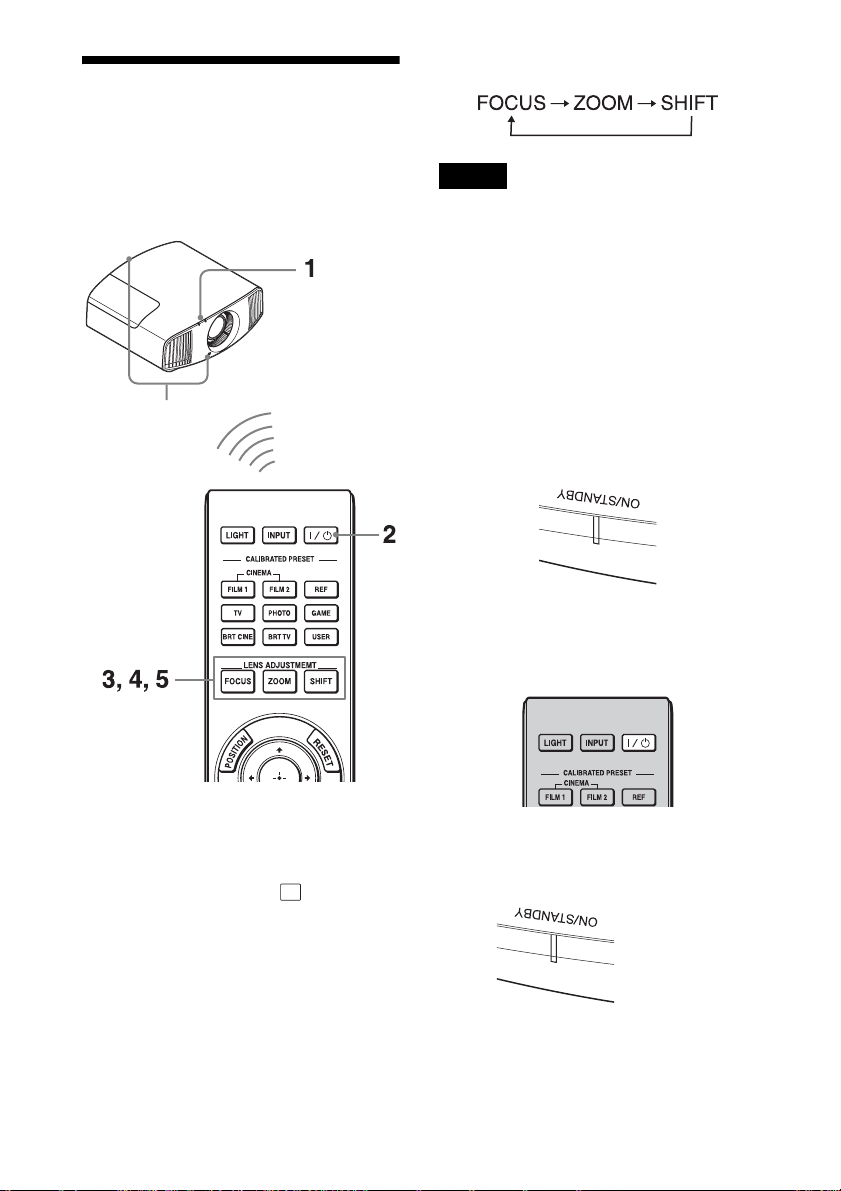
画面の位置を調整す
る
たびに調整機能が切り替わります。
スクリーンに画像を映して画面の位置
を調整します。
リモコン受光部
ご注意
設置場所によってはリモコンで操作でき
ないことがまれにあります。その場合は、
リモコンを本機リモコン受光部またはス
クリーンに向けて操作してください。
1 電源コードを本機につないでか
ら、電源プラグをコンセントに差
し込む。
ON/STANDBY ランプが赤く点灯
し、スタンバイ状態になります。
赤く点灯
2 [/1(オン/スタンバイ)ボタン
を押して電源を入れる。
ちょっと一言
・ 本体側面の [/1(オン/スタンバイ)、
INPUT(インプット)、MENU(メ
ニュー)、M/m/</,/ (ジョイス
ティック)ボタンは、リモコンの同じ
名前のボタンと同じ働きをし、LENS
(レンズ)ボタンはリモコンの LENS
ADJUSTMENT ボタン(FOCUS、
ZOOM、SHIFT)と同じ働きをします。
・ 本体のコントロールパネルでレンズを
調整する場合は、LENS ボタンを押す
ON/STANDBY ランプが緑色に点
滅したあと、点灯します。
数十秒間点滅した
のち点灯(緑色)
8
Page 9
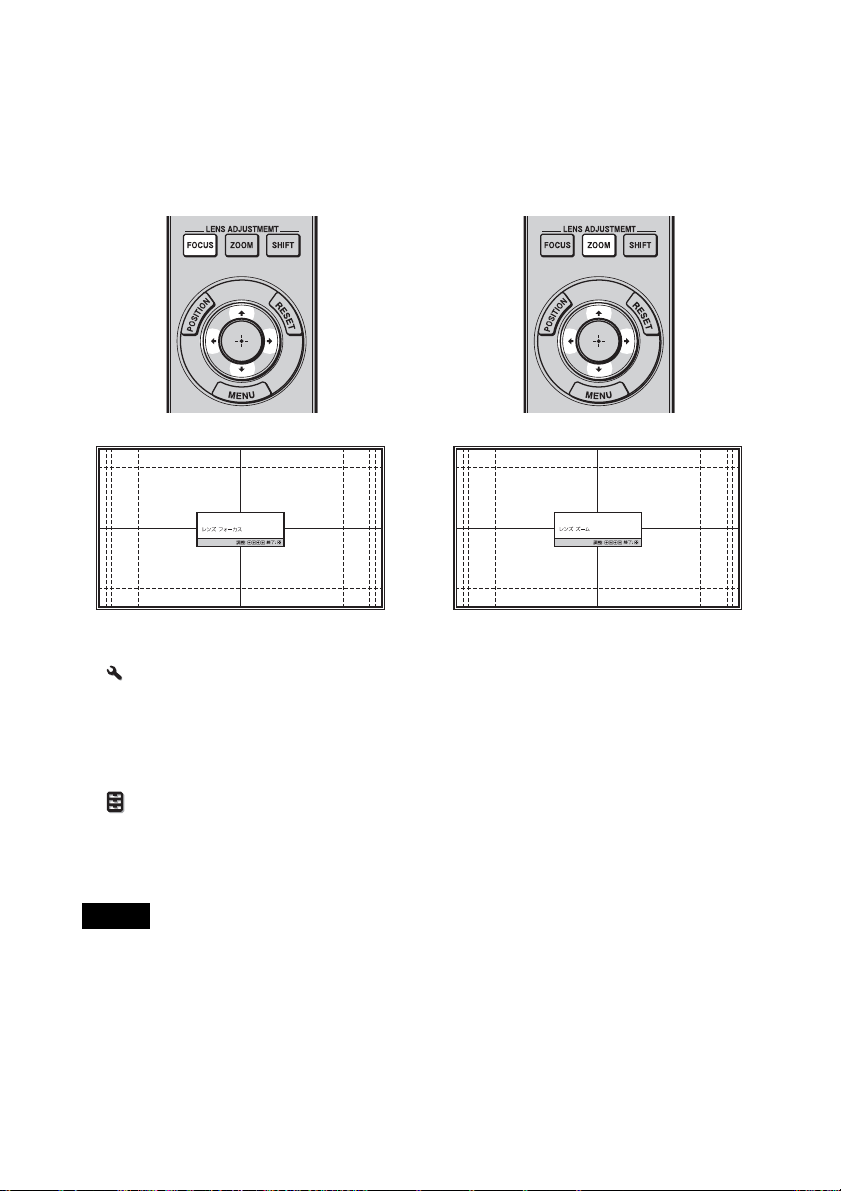
3 LENSADJUSTMENT ボタン
(FOCUS)を押してレンズ調整
画面(パターン画面)を表示し、
M/m/</, ボタンで画面のピン
トを合わせる。
4 LENSADJUSTMENT ボタン
(ZOOM)を押してレンズ調整画
面(パターン画面)を表示し、
M/m/</, ボタンで画面の大き
さを合わせる。
ちょっと一言
・「 設置設定」メニューの「レンズコ
ントロール」が「切」に設定されてい
る場合は、FOCUS ボタンや ZOOM ボ
タン、SHIFT ボタンによる調整ができ
ません。(44 ページ)
・「 機能設定」メニューの「テストパ
ターン」が「切」に設定されている場
合は、「パターン画面」が表示されませ
ん。(42 ページ)
ご注意
レンズの調整は、リモコンまたは本体の
コントロールパネルのボタンで行ってく
ださい。レンズを直接手で回すことは破
損や故障の原因となりますので、おやめ
ください。
M/, ボタンを押すと、画面は大き
くなります。
m/< ボタンを押すと、画面は小さ
くなります。
9
Page 10

5 LENSADJUSTMENT ボタン
(SHIFT)を押してレンズ調整画
面(パターン画面)を表示し、
M/m/</, ボタンで画面の位置
を合わせる。
ちょっと一言
ボタンを押すと、いつでもパターン画
面を消すことができます。
ご注意
画面の位置を調整するときは、指をはさ
む恐れがありますので、レンズには手を
触れないようにしてください。
左右の位置を合わせるには
</, ボタンを押す。
レンズの中心から左右に、それぞれ画
面幅の最大 31% 画面ずつ投影画面を移
動できます。
上から見た図
31% 1 画面 31%
:左レンズシフトを最大にしたときの
画面位置
:右レンズシフトを最大にしたときの
画面位置
SHIFT のレンズ調整画面が表示されて
いるときにリモコンの RESET ボタン
を押すと、レンズのセンター位置(出
荷時の状態)に戻ります。(ZOOM と
FOCUS は変わりません。)
10
Page 11
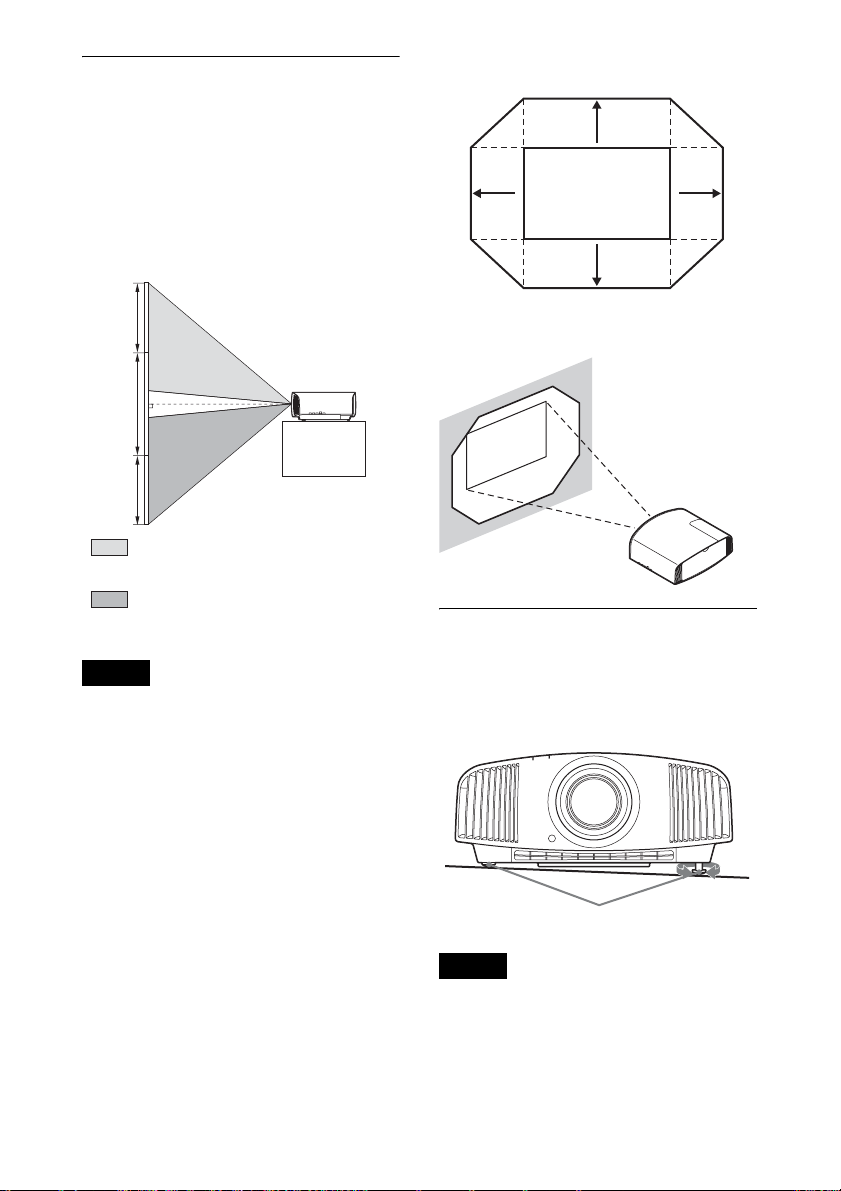
上下の位置を合わせるには
投影画面の移動範囲
M/m ボタンを押す。
レンズの中心から上下に、それぞれ画
面高さの最大上に 85%、下に 80% 投影
画面を移動できます。
横から見た図
85%
1画面
80%
:上レンズシフトを最大にしたときの
画面位置
:下レンズシフトを最大にしたときの
画面位置
ご注意
投影画面の移動は、次の図のような 8 角
形の範囲内でのみ調整できます。詳細は
「投写距離とレンズシフト量」(76 ペー
ジ)をご覧ください。
0.85V
0.31H
投影画面
0.8V
H:投影画面幅のサイズ
V:投影画面高さのサイズ
0.31H
設置面の傾きを調整するには
本機を置く台などが水平でない場合は、
前脚部(調整可)を使って調整できま
す。
前脚部(調整可)
ご注意
・ 本体を垂直方向に傾けると、投影画面
が台形に歪みますのでご注意ください。
・ 前脚部(調整可)を回す際は、手を挟
まないようご注意ください。
11
回す
Page 12
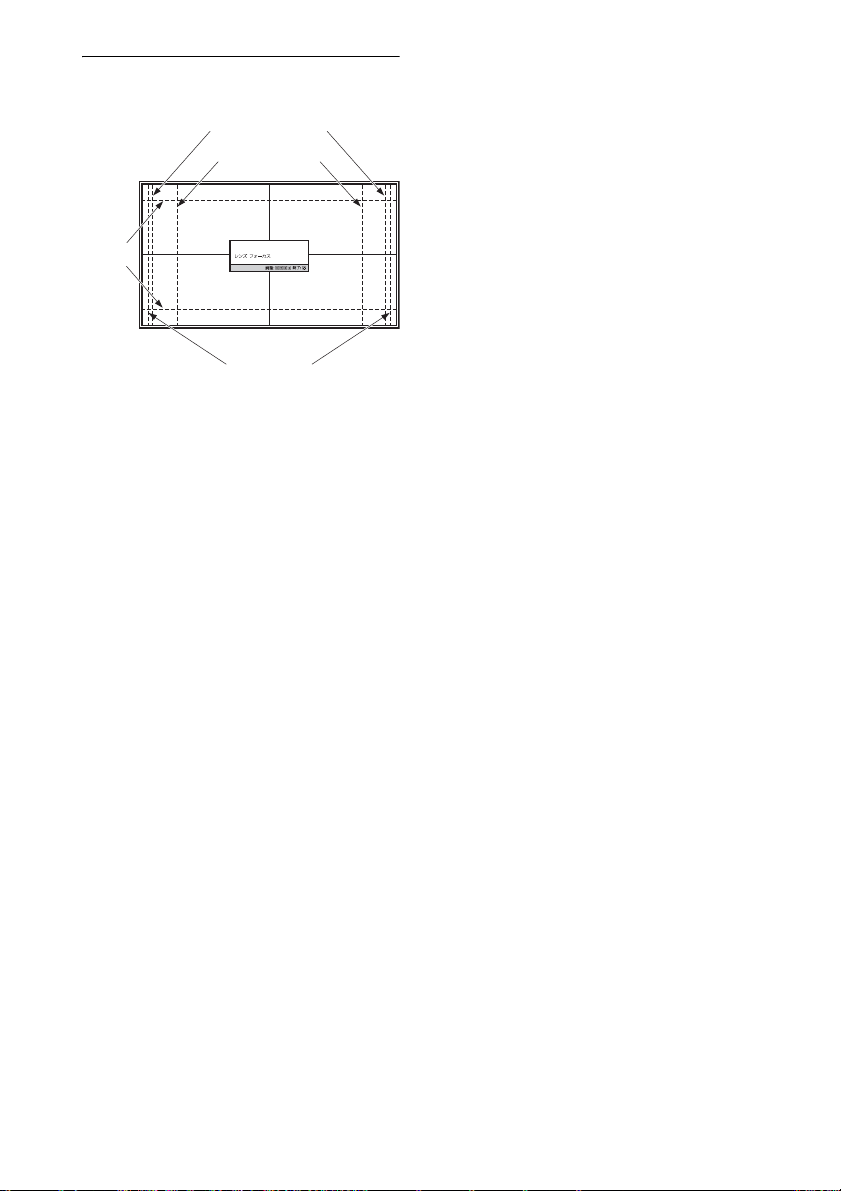
レンズ調整画面(パターン画面)
1.78:1(16:9)
1.33:1(4:3)
2.35:1
1.85:1
破線は各アスペクト比の画角を示しています。
12
Page 13
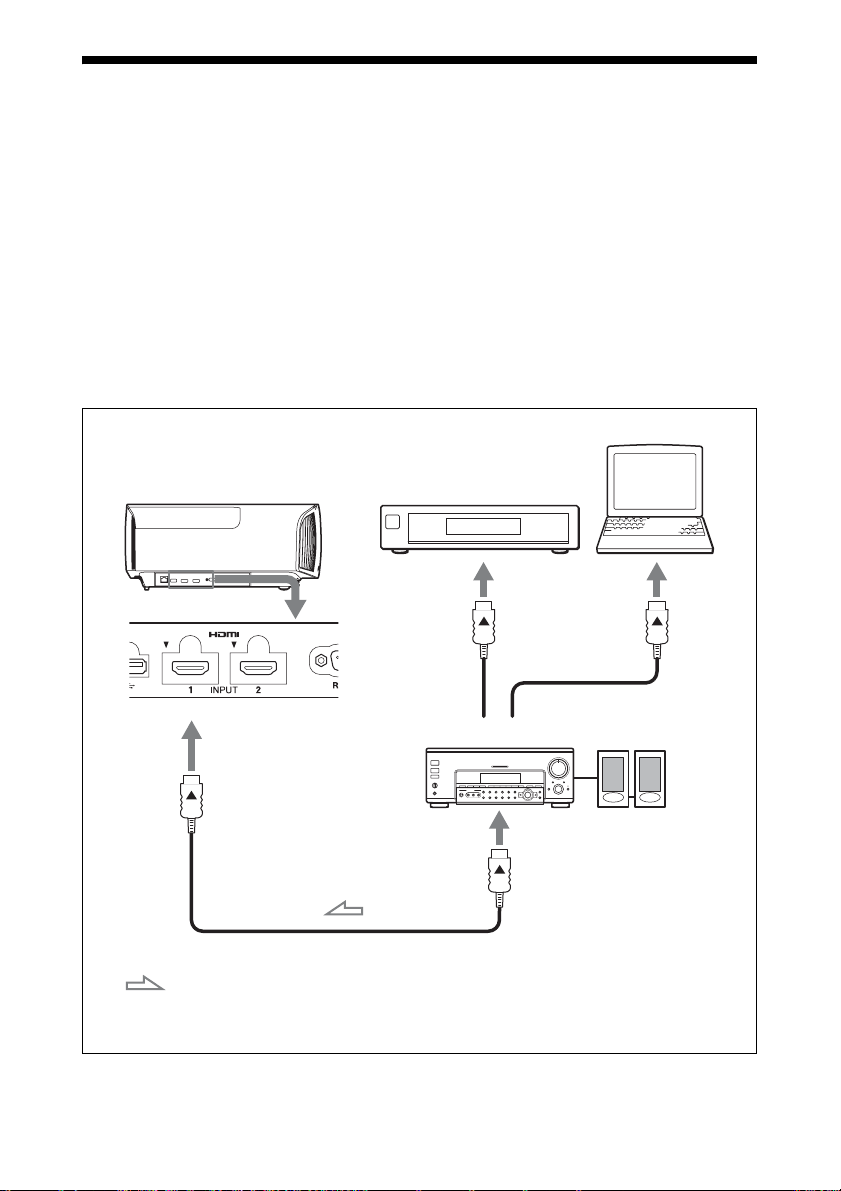
ビデオ機器やパソコンをつなぐ
HDMI 出力端子のある DVD プレーヤー/レコーダー、ブルーレイディスク(BD)
プレーヤー/レコーダー、プレイステーション
つなぐと高品質の映像をお楽しみいただけます。
接続するときは
・ 各機器の電源を切った状態で接続してください。
・ 接続ケーブルは、それぞれの端子の形状に合った正しいものを選んでください。
・ プラグはしっかり差し込んでください。不充分な接続は動作不良、画質不良の原
因になります。抜くときは、必ずプラグを持って抜いてください。
・ 接続する機器の取扱説明書もあわせてご覧ください。
HDMI 出力端子の
本機右側面
ある機器
®
などは、本機の HDMI 入力端子に
パソコン
オーディオアンプ
HDMI 出力端子
HDMI ケーブル(別売り)
:映像信号の流れ HDMI ケーブルは、ケーブルタイプロゴの明記された「High
Speed」または「PremiumHighSpeed」ケーブルをご使用く
ださい。
13
スピーカー
Page 14

ご注意
・ HDMI ケーブルは「HighSpeed」または「PremiumHighSpeed」タイプをご使用くだ
さい。「Standard」タイプを使用すると、1080p、DeepColor、3D の映像、4K の映像が
正しく表示できない場合があります。
・ HDMI ケーブルをつなぐ際は、本機端子の上部にある V とケーブル端子部の v が向か
い合うように接続してください。
・ HDMI ケーブルでつないだ機器の映像が正しく映らない場合は、つないだ機器の設定
を確認してください。
・ ノート型のパソコンで、出力信号をパソコンの液晶ディスプレイと外部モニターの両
方に出力するように設定すると、本機に正しく映像が出ない場合があります。この場
合は、外部モニターのみに信号が出力されるように、パソコンを設定してください。
パソコンの設定については、パソコンのメーカーへお問い合わせください。
14
Page 15
見る
映像を投写する
1 本機と、本機に接続した機器の電
源を入れる。
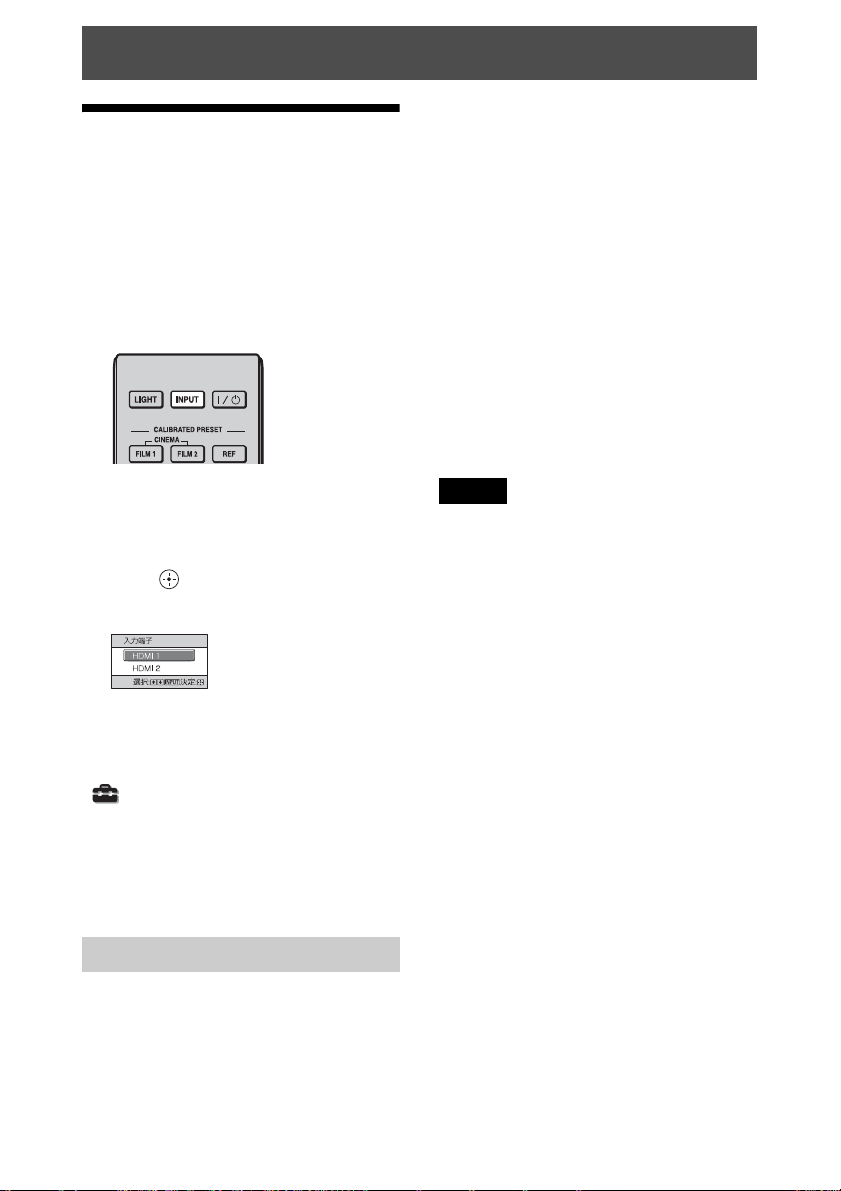
2 INPUT ボタンを押して、スク
リーンに入力選択パレットを表示
させる。
2 メッセージが消える前に ?/1(オ
ン/スタンバイ)ボタンをもう一
度押す。
ON/STANDBY ランプが緑色に点
滅し、本機内部の温度を下げるため
に、ファンが回り続けます。
ファンが止まり、ON/STANDBY
ランプが緑色の点滅から赤色の点灯
に変わります。
以上で電源が切れました。電源コード
を抜くことができます。
3 スクリーンに映したい機器を選
ぶ。
INPUT ボタンを繰り返し押すか、
M/m/ (確定)ボタンで映したい
機器を選びます。
例:本機の HDMI1 端子につないだビデオ
の画像を見る
ちょっと一言
「 初期設定」メニューの「画面表示」
が「切」に設定されている場合は、入力
選択パレットは表示されません。INPUT
ボタンを押すと、順に入力端子が切り替
わります。
電源を切る
1 ?/1(オン/スタンバイ)ボタン
を押す。
「パワーオフしますか?」という
メッセージが表示されます。
ご注意
ランプの点滅中は、電源コードを抜かな
いでください。
ちょっと一言
上記の手順のかわりに ?/1(オン/ス
タンバイ)ボタンを約 1 秒押したまま
にしても電源が切れます。
15
Page 16

3D 映像を楽しむ
本機では別売りのアクティブ 3D メガ
ネ(TDG-BT500A)を使って、3D テ
レビゲームや 3D ブルーレイディスク
などの迫力ある 3D 映像をお楽しみい
ただけます。
1 接続した 3D 対応の HDMI 機器の
電源を入れ、3D コンテンツを再
生する。
3D コンテンツの再生方法について
は、各機器の取扱説明書をご覧くだ
さい。
2 本機の電源を入れ、スクリーンに
3D 映像を映す。
映像の映しかたについて詳しくは、
「映像を投写する」(15 ページ)を
ご覧ください。
3 3D メガネの電源を入れ、3D メガ
ネを正しく装着する。
3D メガネの使いかたについて詳し
くは、「3D メガネを使う」(16 ペー
ジ)をご覧ください。
ちょっと一言
・ 本機は、3D 信号を検出したときに自動
的に 3D 映像を映すよう、お買い上げ時
に「2D-3D 表示選択」を「オート」に
設定しています。
・ 3D 映像を 2D 映像でご覧になりたいと
きは、「2D-3D 表示選択」を「2D」に設
定してください。(40 ページ)
ご注意
・ 信号の種類によっては、自動的に 3D 映
像は表示されません。視聴する映像の
3D フォーマットを確認して「2D-3D 表
示選択」を「3D」に、「3D フォーマッ
ト」を「左右分割方式」または「上下
分割方式」に設定してください。(40
ページ)
・ 3D メガネの受信範囲をご確認のうえ、
ご使用ください。(17 ページ)
・ 3D 映像の見えかたには個人差がありま
す。
・ 使用環境の温度が低いときは、3D 効果
が出にくいことがあります。
3D の調整と設定
3D の調整と設定は、リモコンの 3D ボ
タンおよび「 機能設定」メニューの
「3D 設定」で行います。詳しくは、
「3D 設定」をご覧ください。(40 ペー
ジ)
3D メガネを使う
1 3D メガネの電源を入れ、本機に
3D メガネを登録する。
登録の手順については、3D メガネ
の取扱説明書をご覧ください。
2 3D メガネをかける。
3 スクリーンの方向へ向く。
使用上のご注意
以下の場合に正しく動作しないことが
あります。
・ 視聴している場所がプロジェクター
から離れすぎている場合。
・ 無線 LAN(IEEE802.11b/g/n)や電
子レンジなどの 2.4GHz 帯の機器が
近くにある場合。
16
Page 17
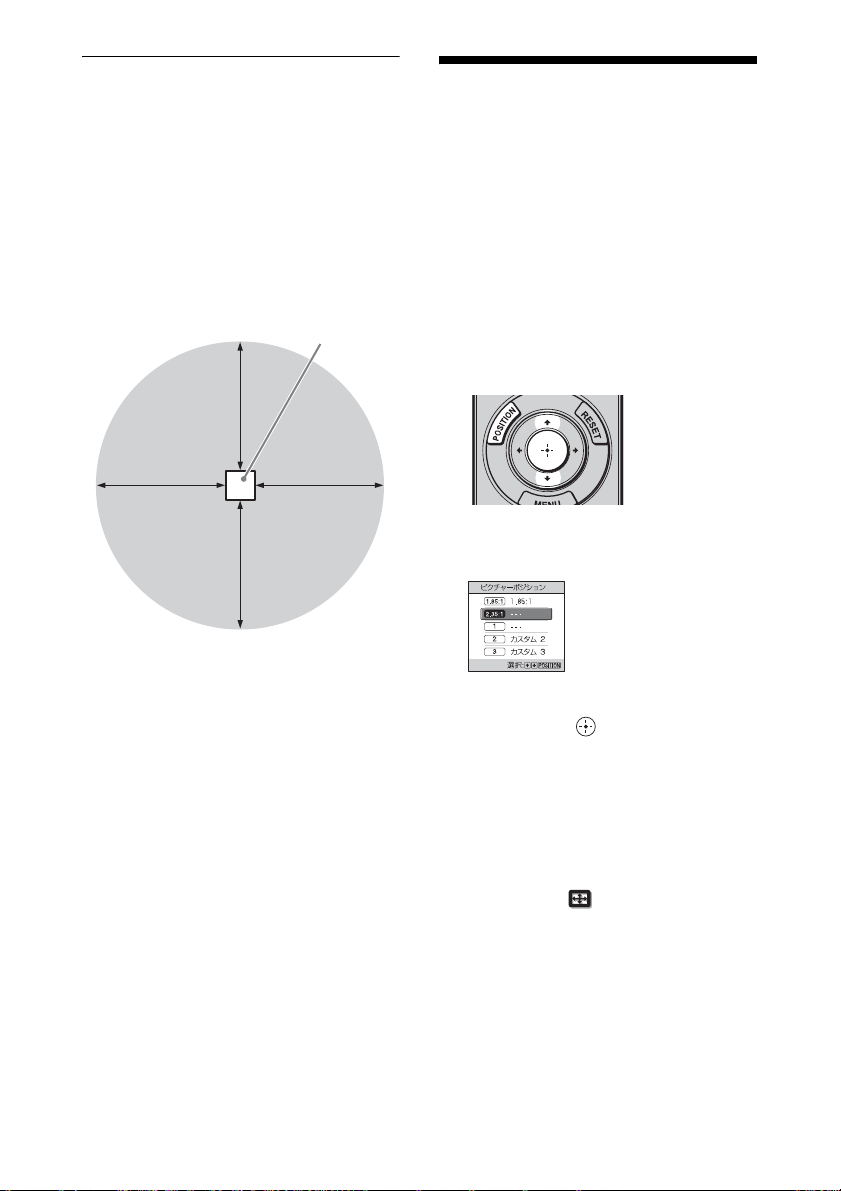
3D メガネの動作範囲
以下の図は、3D メガネの動作範囲の目
安です。動作範囲を超えて視聴したり、
本機を設置すると 3D メガネは動作し
にくくなります。また、距離は部屋の
環境や本機の設置状況によって異なり
ます。
上または横から見た図
プロジェクター
10m
10m10m
10m
ピクチャーポジショ
ンを使う
レンズの設定(フォーカス、画面の大
きさ、画面位置)とアスペクト比、ブ
ランキングの組み合わせを 5 つまで保
存、呼び出すことができます。
出荷時は、ピクチャーポジションは保
存されていません。
1 POSITION ボタンを押す。
ピクチャーポジション選択パレット
が表示されます。
2 POSITION ボタンを繰り返し押
すか、M/m/ ボタンを押してポ
ジションを選ぶ。
選んだポジションが呼び出されま
す。
レンズの設定とアスペクト比、ブラ
ンキングを保存する、または削除す
るときは、「 スクリーン設定」
メニューの「ピクチャーポジショ
ン」で行います。(35 ページ)
レンズの設定とアスペクト比、ブラ
ンキングが保存されていないポジ
ションは「 --- 」と表示されます。
17
Page 18
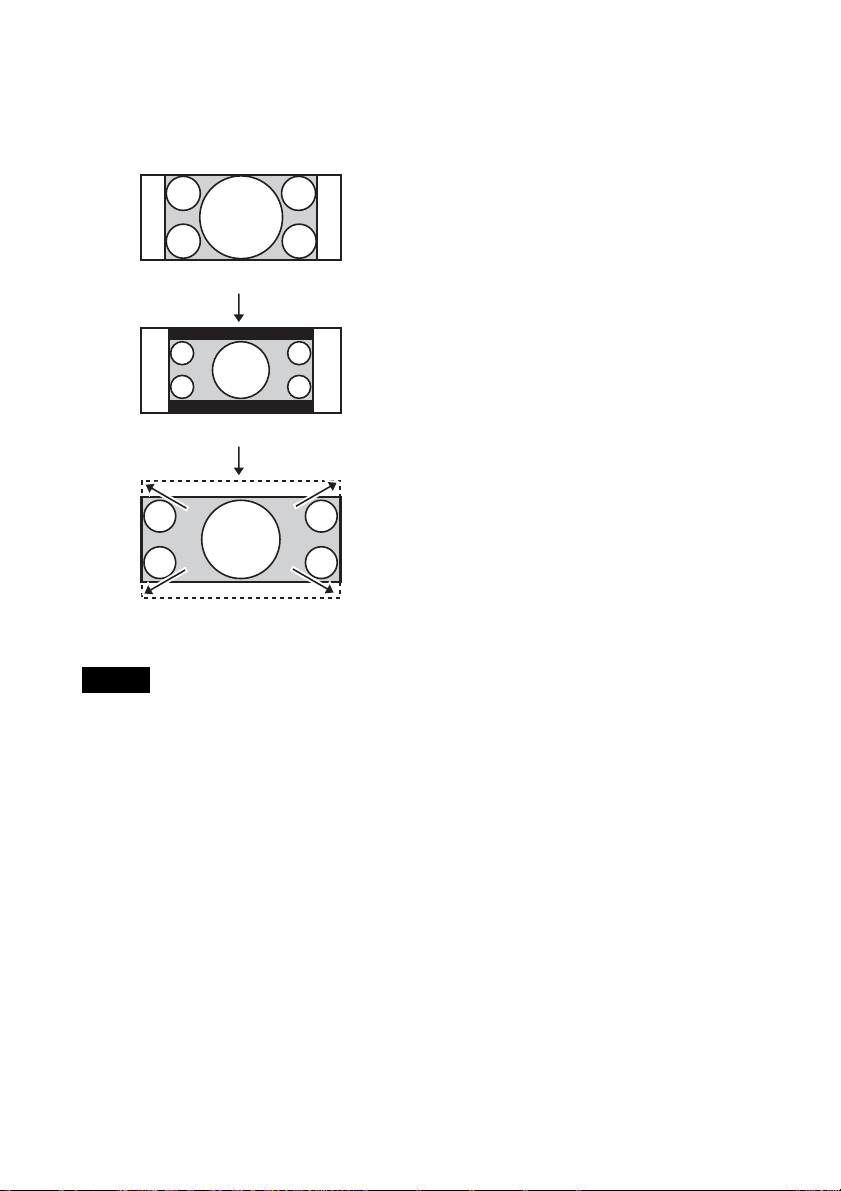
レンズの動きのイメージ
ここでは、2.35:1 スクリーンに 1.78:1
(16:9)と 2.35:1 のアスペクト映像を複
数投写する場合を例としています。
1.78:1(16:9)映像を入力した状態
でもレンズシフトの範囲に制約が生じ
る場合があります。
2.35:1 映像を入力した状態
2.35:1 映像がスクリーンいっぱいまで
拡大されます。
ご注意
POSITION ボタン
を押す。
・ ポジションを選択、確定するとレンズ
が動き出します。レンズ付近に物を置
いたり、触れたりしないでください。
けがや故障の原因になります。
・ 動作中にリモコンや本体のボタンを押
すと、動作が停止します。その場合は
再度ポジションを選択するか、レンズ
の調整を行ってください。
・ ピクチャーポジション機能は、レンズ
設定状態の再現を 100% 保証するもので
はありません。
・ レンズズームを使って、複数のアスペ
クトのスクリーン画角を併用するとき
は、投写距離表(77 ページ)を参照し
て本機を範囲内に設置してください。
設定位置によっては、この表の範囲内
18
Page 19
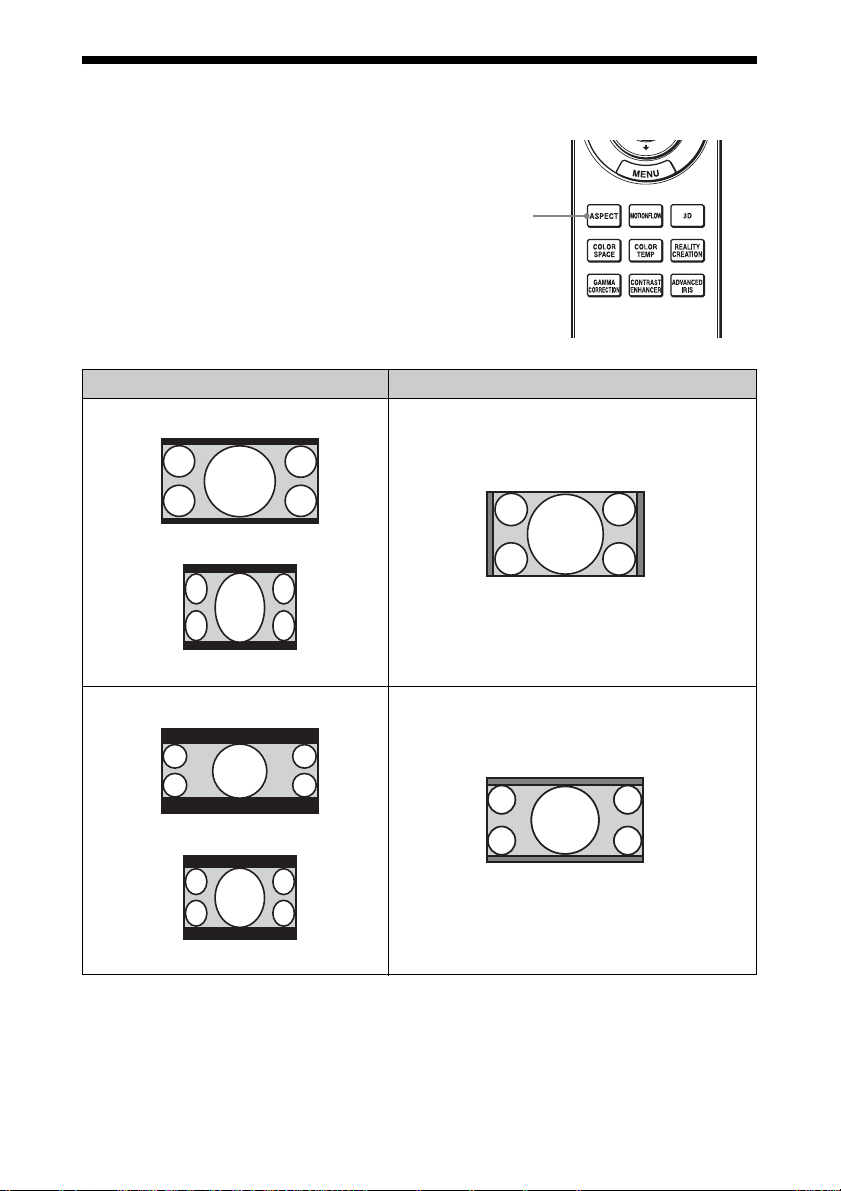
映像に合わせてアスペクト比を切り替える
お好みのアスペクト比を選べます。
ASPECT ボタンを押す。
押すたびに、「アスペクト」の設定が順
次切り替わります。メニューでも選べ
ASPECT
(アスペクト)
ボタン
ます。(36 ページ)
オリジナル映像 おすすめの設定とそのときに投写される映像
「1.85:1 ズーム」
1.85:1
スクイーズ 1.85:1
「2.35:1 ズーム」
2.35:1
スクイーズ 2.35:1
19
Page 20
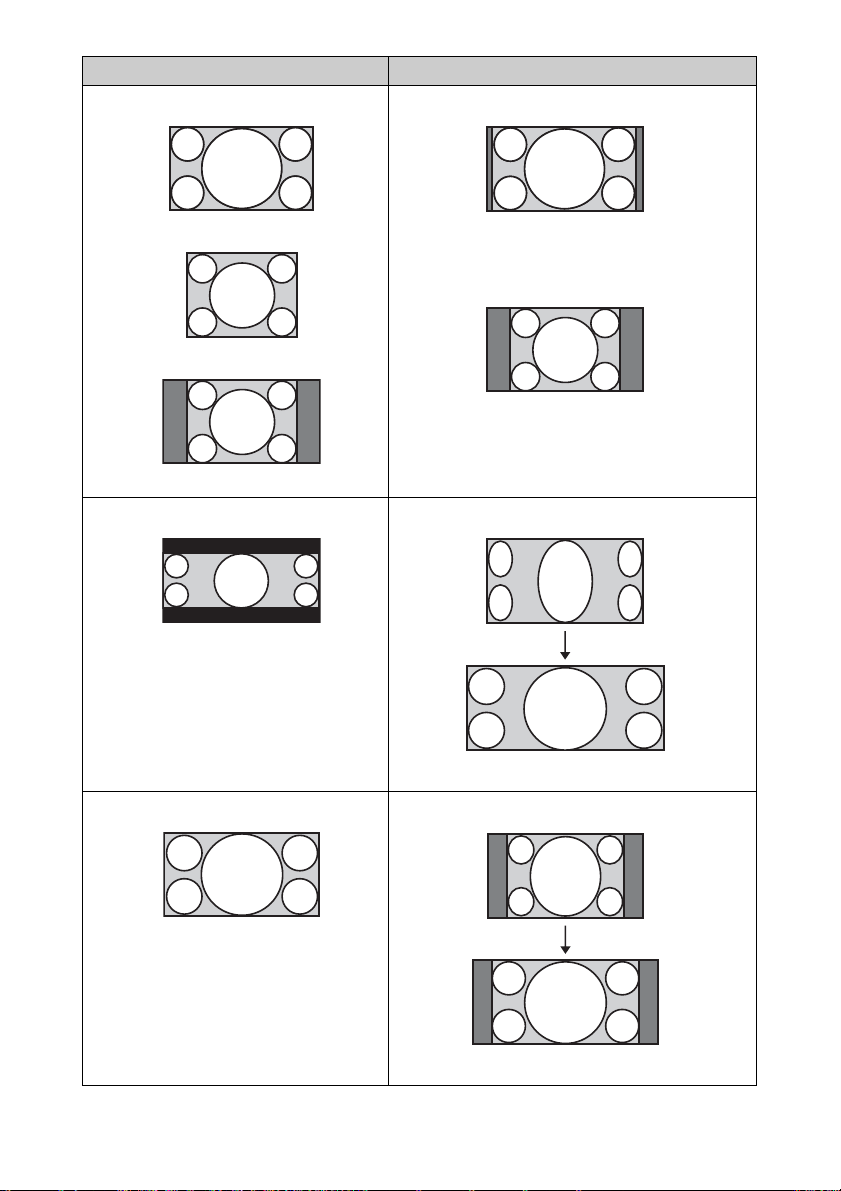
オリジナル映像 おすすめの設定とそのときに投写される映像
「ノーマル」
1.78:1(16:9)
1.33:1(4:3)
サイドパネル付き 1.33:1(4:3)
「V ストレッチ」
2.35:1
16:9
アナモフィックレンズをお使いの場合
「スクイーズ」
アナモフィックレンズをお使いの場合
20
Page 21
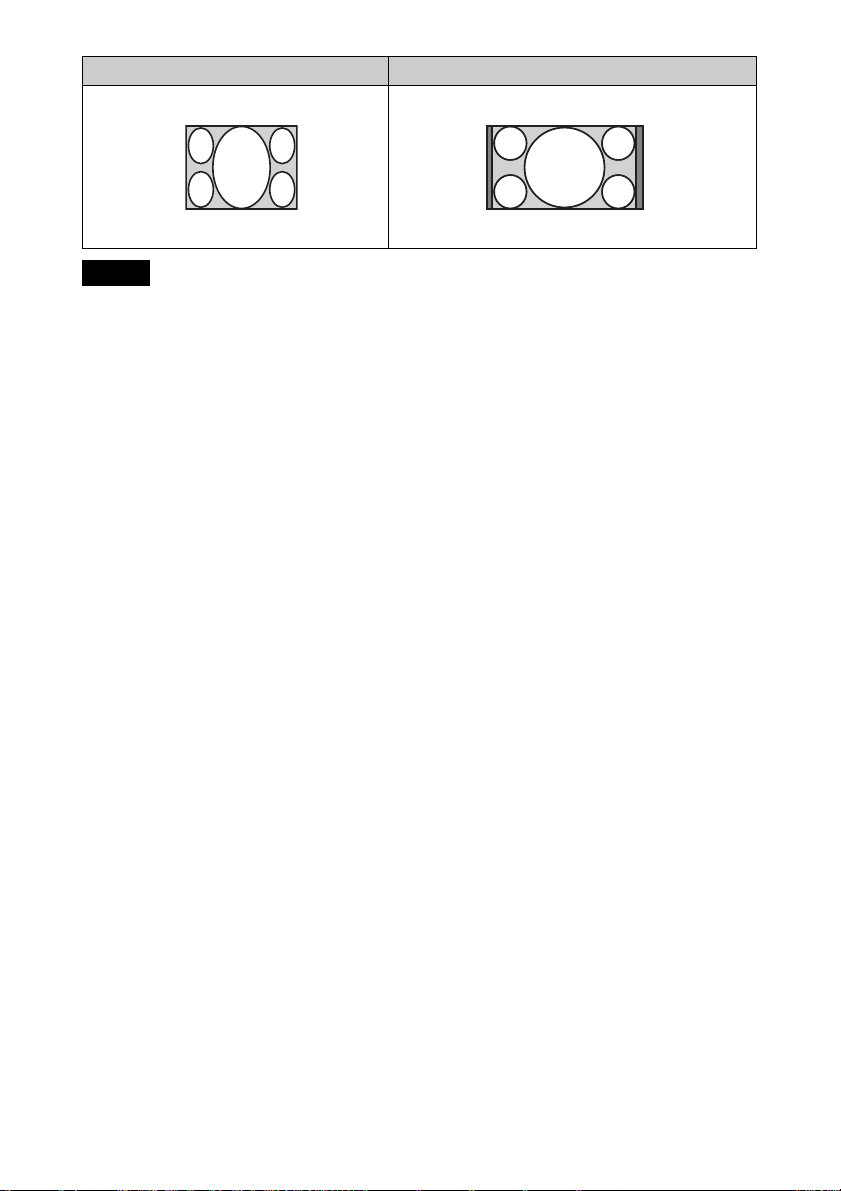
オリジナル映像 おすすめの設定とそのときに投写される映像
「ストレッチ」
スクイーズ
ご注意
・ 入力信号によって、選択できる項目が
異なります。(71 ページ)
・ コンピューター信号入力時、解像度
4096 × 2160 信号(65 ページ)入力時
は、アスペクトは選択できません。
アスペクト切換時のご注意
・ テレビ番組などソフトの映像比率と
異なるモードを選択すると、オリジ
ナルの映像と見えかたに差が出ます。
この点にご注意してアスペクトを選
択してください。
・ 営利目的、また公衆に視聴させるこ
とを目的として、喫茶店、ホテルな
どにおいて、アスペクト切り替え機
能などを利用して、面積の分割表示
や圧縮、引き伸ばしなどを行います
と、著作権法上で保護されている著
作者の権利を侵害する恐れがありま
すので、ご注意ください。
21
Page 22
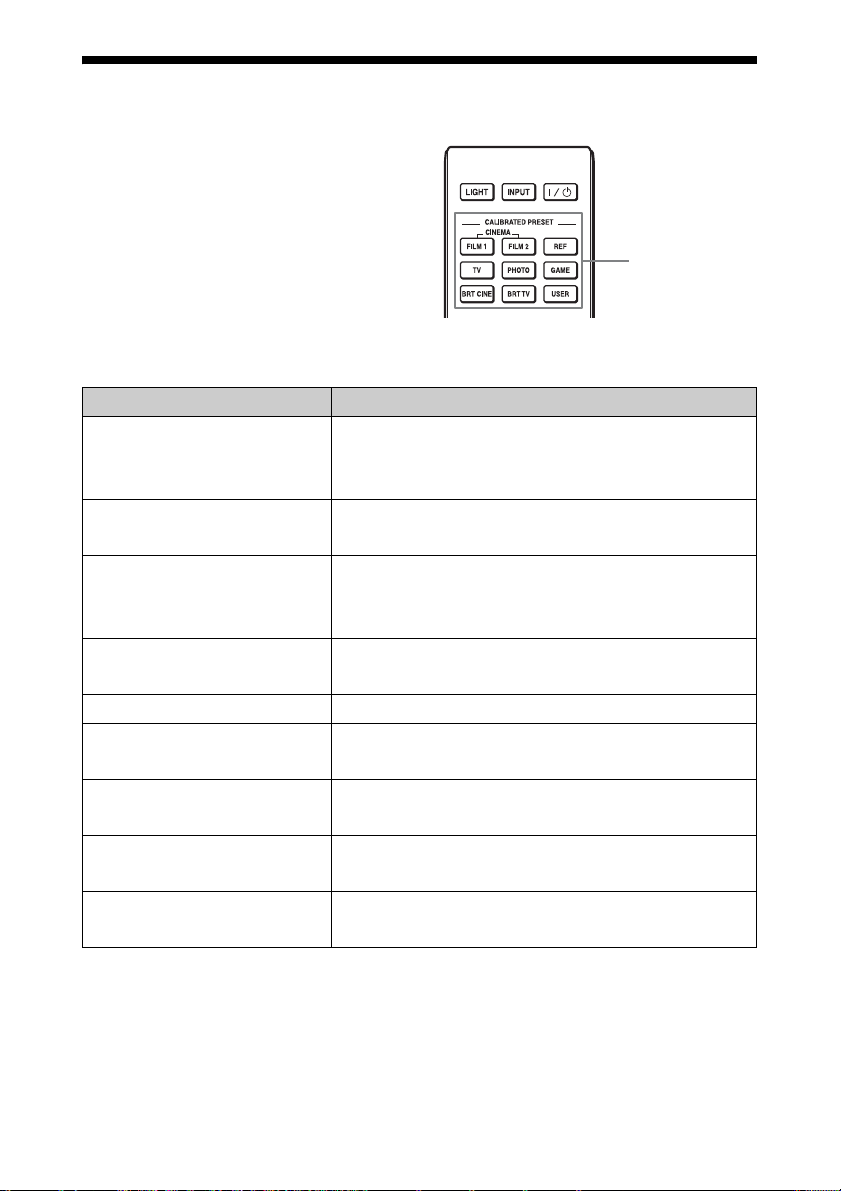
画質を選ぶ
使用する場所や映像ソースに合った画
質を選ぶことができます。
各プリセットモードは、2D/3D それぞ
れで異なる設定を保存、使用すること
ができます。
CALIBRATEDPRESET ボタンを
押す。
設定モード 説明
CINEMAFILM1
(シネマフィルム 1)
CINEMAFILM2
(シネマフィルム 2)
REF(リファレンス) コンテンツの持つ画質そのものを忠実に再現したい場
TV(TV) テレビ番組やスポーツ、コンサート等のビデオ映像に
PHOTO(フォト) デジタルカメラなどの静止画に適した画質設定
GAME(ゲーム) ゲーム用にメリハリある色再現や応答性に優れた画質
BRTCINE(ブライトシネマ) リビングルームなどの明るい環境で、映画を見るのに
BRTTV(ブライト TV) リビングルームなどの明るい環境で、テレビ番組やス
USER(ユーザー) お好みに合わせた画質に調整、設定し保存。お買い上
最高画質といわれるマスターポジフィルム(ダイナ
ミックレンジの広い、透明感のある画質)を再現する
画質設定
「シネマフィルム 1」をベースにした、実際の映画館
の映像美を再現する画質設定
合や、調整のない素直な画質を楽しむのに適した画質
設定
適した画質設定
設定
適した画質設定
ポーツ、コンサート等のビデオ映像に適した画質設定
げ時は「リファレンス」と同じ設定
CALIBRATED
PRESET
(キャリブレイテ
ドプリセット)
ボタン
22
Page 23
メニュー画面で調整や設定をする
ご注意
説明で使用している画面はイメージです。実際の画面とは異なることがあります。あら
かじめご了承ください。
メニュー操作のしか
た
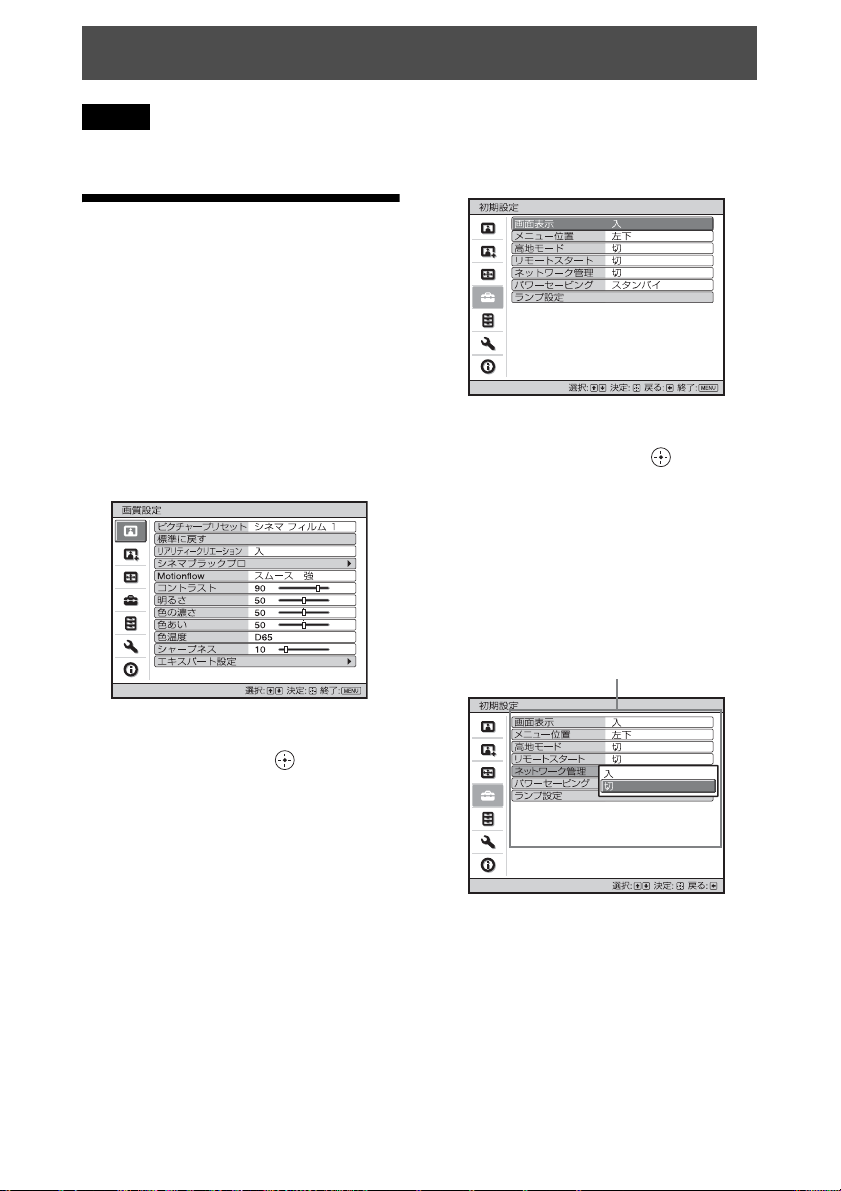
本機では、各種調整や設定をメニュー
画面で行います。項目名の後ろに矢印
(B)が付いた項目を選ぶと、次の階層
に設定できる項目が表示されます。
1 MENU ボタンを押す。
メニュー画面が表示されます。
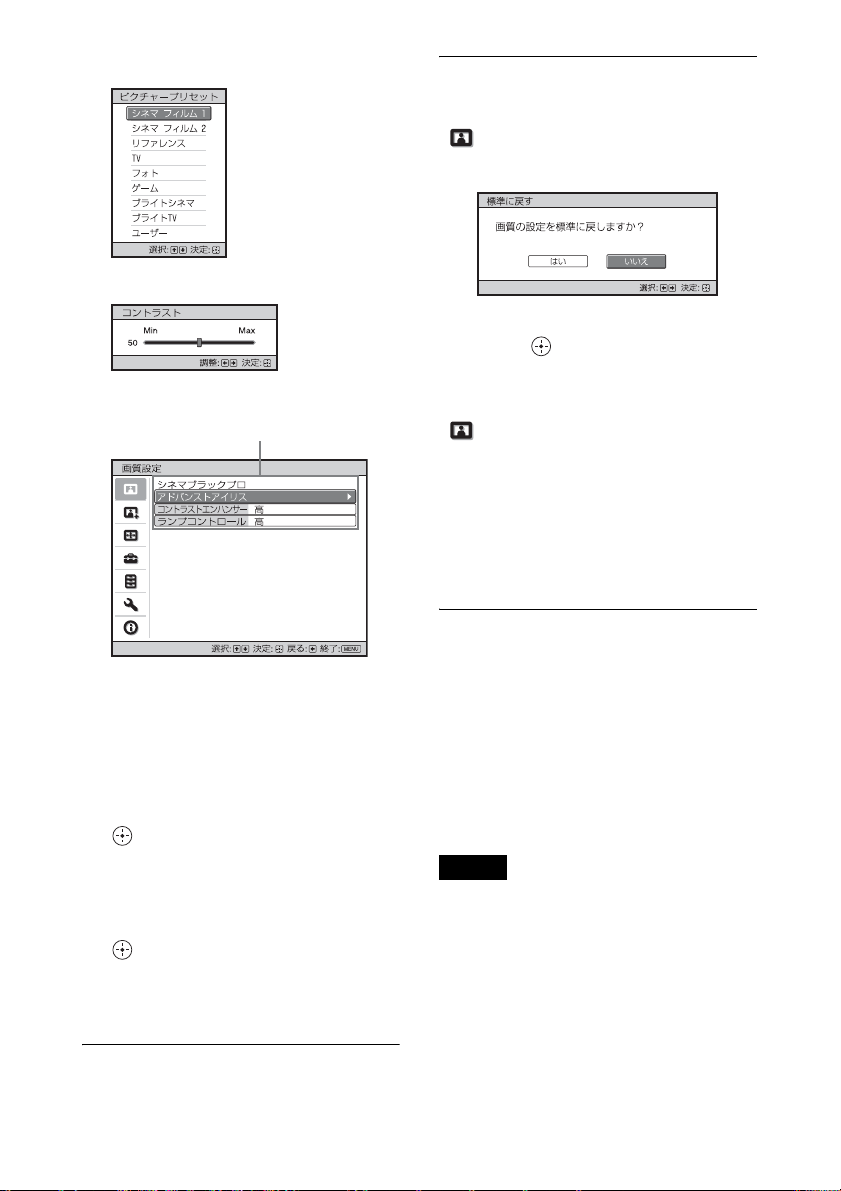
3 M/mボタンを押して設定したい項
目を選び、, または ボタンを
押す。
設定できる項目が、ポップアップメ
ニュー、設定メニュー、調整メ
ニューまたは次の階層に表示されま
す。
ポップアップメニュー
設定できる項目
2 M/mボタンを押してメニュー項目
を選び、, または ボタンを押
す。
調整/設定できる項目が表示され、
現在選ばれている項目が白色で表示
されます。
23
Page 24
設定メニュー
調整メニュー
次の階層に表示された画面
設定できる項目
調整した画質をお買い上げ時の値に
戻すには
「 画質設定」メニューから「標準に
戻す」を選択する。
画面表示されたら < ボタンで「はい」
を選択して ボタンを押す。
次の全項目の設定値がお買い上げ時の
値に戻ります。
「 画質設定」メニューの「リアリ
ティークリエーション」、「シネマブ
ラックプロ」、「Motionflow」、「コント
ラスト」、「明るさ」、「色の濃さ」、「色
あい」、「色温度」、「シャープネス」お
よび「エキスパート設定」の各項目
調整、設定した項目をお買い上げ時
の値に戻すには
4 調整や設定をする。
数値を変更する項目の場合は
数値を大きくしたいときは、M/,
ボタンを押し、数値を小さくしたい
ときは、m/< ボタンを押します。
ボタンを押すと設定が確定し、
元の画面に戻ります。
設定を変更する項目の場合は
M/m ボタンを押して設定を選ぶ。
ボタンを押すと元の画面に戻り
ます。ただし項目によっては < ボ
タンでも元の画面に戻ります。
メニュー画面を消すには
MENU ボタンを押す。
メニュー画面で項目を選び、ポップ
アップメニュー、設定メニュー、調整
メニューを表示する。
リモコンの RESET ボタンを押すと、
選択した項目のみお買い上げ時の値に
戻ります。
ご注意
リモコンの RESET ボタンは、調整メ
ニューまたは設定メニューが選択されて
いる状態でのみ有効です。
24
Page 25
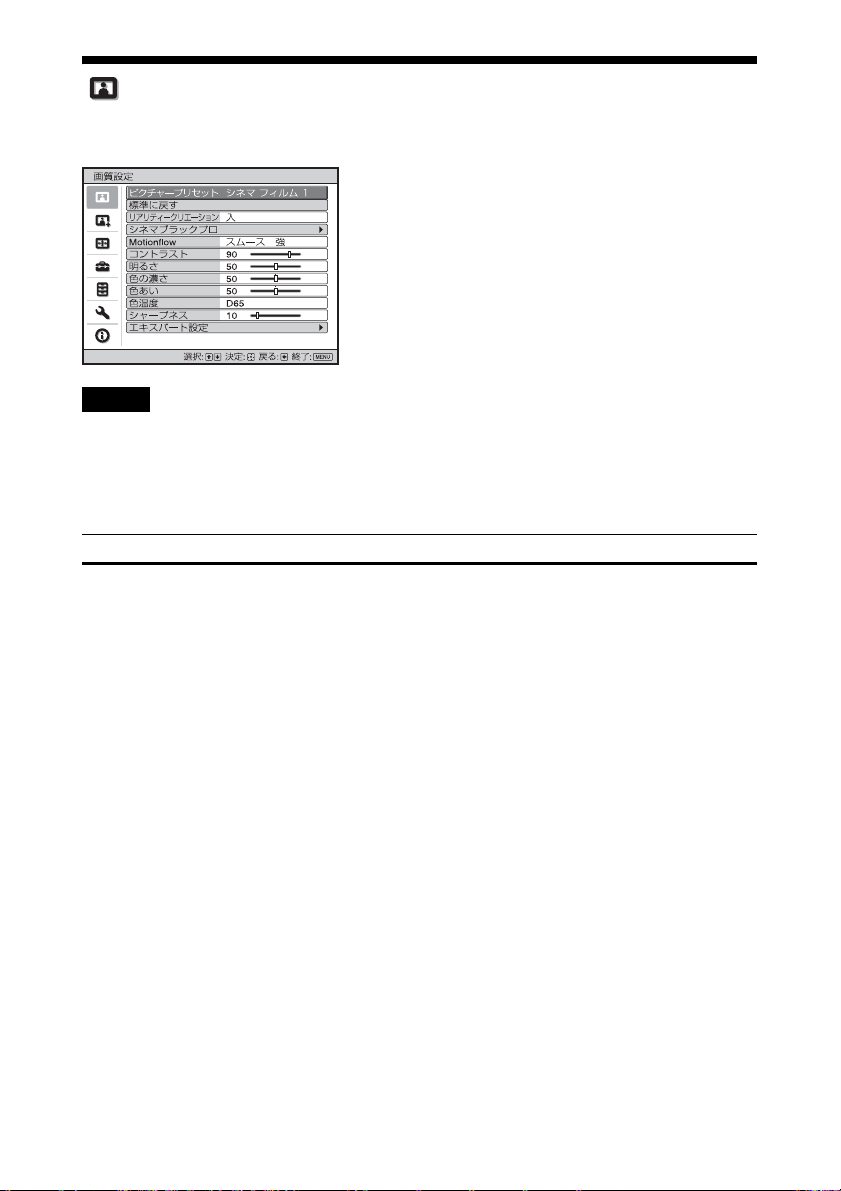
画質設定メニュー
画質を調整するメニューです。
ご注意
入力する信号の種類によっては、調整/設定できない、または表示されない項目があり
ます。詳しくは、「入力信号と調整・設定項目」(67 ページ)をご覧ください。
[] 内の項目名はリモコン記載の名称です。
設定項目 項目説明
ピクチャープリセッ
ト
[CALIBRATED
PRESET]
使用する場所や映像ソースに合った画質を選ぶことができます。
各プリセットモードは、2D / 3D それぞれで異なる設定を保存、
使用することができます。
「シネマフィルム 1」:最高画質といわれるマスターポジフィル
ム(ダイナミックレンジの広い、透明感のある画質)を再現す
る画質設定です。
「シネマフィルム 2」:「シネマフィルム 1」をベースにした、実
際の映画館の映像美を再現する画質設定です。
「リファレンス」:コンテンツの持つ画質そのものを忠実に再現
したい場合や、調整のない素直な画質を楽しむのに適した画質
設定です。
「TV」:テレビ番組やスポーツ、コンサート等のビデオ映像に適
した画質設定です。
「フォト」:デジタルカメラなどの静止画に適した画質設定です。
「ゲーム」:ゲーム用にメリハリある色再現や応答性に優れた画
質設定です。
「ブライトシネマ」:リビングルームなどの明るい環境で、映画
を見るのに適した画質設定です。
25
Page 26

設定項目 項目説明
「ブライト TV」:リビングルームなどの明るい環境で、テレビ番
組やスポーツ、コンサート等のビデオ映像を見るのに適した画
質設定です。
「ユーザー」:お好みに合わせた画質に調整、設定し、保存でき
ます。お買い上げ時は「リファレンス」と同じ設定になってい
ます。
ちょっと一言
画質を調整した場合はその設定が入力端子ごとに保存されます。
標準に戻す 現在選択しているプリセットモードの設定を、すべてお買い上
げ時の設定に戻します。(24 ページ)
ちょっと一言
「色温度」の調整値は保持されます。
リアリティークリ
エーション
[REALITY
CREATION]
精細度とノイズ処理を調整してリアルな画像にします。(超解像
機能)
「入」:リアリティークリエーションの設定を変更できます。
「データベース」:「ノーマル」または「Masteredin4K」を選
びます。
「Masteredin4K」は、ソニー・ピクチャーズエンタテインメ
ント製の Blu-rayDisc™(Masteredin4K)に適した画質にな
ります。
「精細度」:設定値を上げると、質感やディテール感が向上し、
鮮鋭感のある映像になります。
「ノイズ処理」:設定値を上げると、ザラツキ等のノイズが目
立たなくなります。
「入 / 切比較」:「入」「切」が一定周期で切り替わり、リアリ
ティークリエーションの効果を確認することができます。
ちょっと一言
比較中のステータスの表示位置は「メニュー位置」(38 ペー
ジ)の設定に連動します。
「切」:リアリティークリエーション機能をオフにします。
26
Page 27

設定項目 項目説明
シネマブラックプロ
アドバンストア
イリス
[ADVANCED
IRIS]
「ダイナミックコントロール」:アイリス(絞り)の可動範囲を
変更できます。
「フル」:入力ソースの輝度レベルに応じてアイリス(絞り)
と信号処理を自動で調整して光量を最適化します。明るく、
高いコントラストによる力強い映像が特徴です。
「リミテッド」:「フル」よりアイリス(絞り)の動きや明るさ
を抑え、暗室での視聴に適した設定になります。
「切」:ダイナミックコントロール機能をオフにします。
「明るさ」:設定値を大きくすると明るくなり、小さくすると暗
くなります。
ちょっと一言
視聴する映像の明るさや部屋の明るさに応じて「明るさ」を調
整し、お好みに合わせて「ダイナミックコントロール」の設定
を選択してください。
コントラストエ
ンハンサー
[CONTRAST
ENHANCER]
シーンに応じた最適なコントラストが得られるよう、明部・暗
部のレベルを自動的に補正します。
映像のメリハリが増し、躍動感のある映像になります。
「強」、「中」、「弱」:コントラストエンハンサーの効果を変更で
きます。
「切」:コントラストエンハンサー機能をオフにします。
ランプコント
ロール
ランプ出力を切り替えます。
「高」:輝度が上がり、明るい画面になります。
「低」:輝度が下がり、明るさを抑え黒を引き締めます。
ちょっと一言
「低」にするとファンの回転音や消費電力が下がり、またランプ
の寿命を延ばすことができます。
27
Page 28

設定項目 項目説明
Motionflow
[MOTIONFLOW]
「インパルス」:元映像を忠実に再現します。映画館同様の映像
表現に適していますが、画面がちらつくことがあります。
「コンビネーション」:明るさは保ちつつ、動きの速い映像のぼ
やけを軽減します。
「スムース強」:動きを滑らかにします。特に映画などに効果的
です。
「スムース弱」:動きが滑らかな標準的な映像にします。
「TrueCinema」:毎秒 24 フレームで作成されたムービーなど
の画像をオリジナルのフレームレートで再現します。
「切」:モーションフロー機能をオフにします。
ちょっと一言
・「スムース強」や「スムース弱」、「インパルス」、「コンビネー
ション」、「TrueCinema」を設定して画乱れなどが発生する場
合は、この設定を「切」にしてください。
・ 映像により、設定を変更しても効果が表れない場合がありま
す。
コントラスト
[CONTRAST]
映像のコントラストを調整します。
設定値を大きくすると映像のメリハリが強くなり、小さくする
と弱くなります。
リモコンの CONTRAST+ /−ボタンで調整できます。
「HDR」が「入」または「オート」で HDR 信号が入力されたと
き、表示は「コントラスト (HDR)」になります。
明るさ
[BRIGHTNESS]
映像の明るさ(輝度)を調整します。
設定値を大きくすると明るくなり、小さくすると暗くなります。
リモコンの BRIGHTNESS+ /−ボタンで調整できます。
色の濃さ 色の濃さを調整します。
設定値を大きくすると濃くなり、小さくすると薄くなります。
色あい 色あいを調整します。
設定値を大きくすると緑がかり、小さくすると赤みがかります。
28
Page 29

設定項目 項目説明
色温度
[COLORTEMP]
色温度を調整します。
「D93」:一部のテレビで標準的に用いられる 9,300K 相当の色
温度です。白い部分が青みがかった冷たい色調になります。
「D75」:補助標準光とされる 7,500K 相当の色温度です。「D93」
と「D65」の中間の色調になります。
「D65」:標準光とされる 6,500K 相当の色温度です。白い部分
が赤みがかった暖かい色調になります。
「D55」:補助標準光とされる 5,500K 相当の色温度です。白い
部分がさらに赤みがかった暖かい色調になります。
「カスタム1 〜 5」:好みに合わせた色温度を調整、設定、保存
できます。
お買い上げ時は、以下のように設定されています。
カスタム 1:色温度は「D93」と同じ設定
カスタム 2:色温度は「D75」と同じ設定
カスタム 3:色温度は「D65」と同じ設定
カスタム 4:色温度は「D55」と同じ設定
カスタム 5:明るさを優先した設定
ちょっと一言
すべてお好みに合わせた色温度に調整可能です。
シャープネス
[SHARPNESS]
映像の輪郭をはっきりさせたり、ノイズを目立たなくします。
設定値を大きくすると輪郭がくっきりし、小さくすると柔らか
くなりノイズを目立たなくします。
リモコンの SHARPNESS+/−ボタンで調整できます。
エキスパート設定
NR(ノイズリ
ダクション)
映像のざらつきやノイズを軽減します。
「オート」:入力ソースのノイズレベルを検出し、自動でざらつ
きやノイズを軽減します。
「強」、「中」、「弱」:入力ソースのざらつきやノイズに応じて選
択してください。
「切」:NR(ノイズリダクション)機能をオフにします。
ちょっと一言
入力ソースによっては、「オート」でノイズレベルを正しく検出
できない場合があります。「オート」で映像に違和感がある場合
は、「強」、「中」、「弱」、「切」の中から好みに応じて選択してく
ださい。
29
Page 30

設定項目 項目説明
MPEGNR
(MPEG ノイズ
リダクション)
デジタル特有のブロックノイズやモスキートノイズを軽減しま
す。
「オート」:入力ソースのノイズレベルを検出し、自動でブロッ
クノイズやモスキートノイズを軽減します。
「強」、「中」、「弱」:入力ソースのブロックノイズやモスキート
ノイズに応じて選択してください。
「切」:MPEGNR(MPEG ノイズリダクション)機能をオフにし
ます。
ちょっと一言
入力ソースによっては、「オート」でノイズレベルを正しく検出
できない場合があります。「オート」で映像に違和感がある場合
は、「強」、「中」、「弱」、「切」の中から好みに応じて選択してく
ださい。
スムースグラ
デーション
画像の平坦部のグラデーションを滑らかにします。
「強」、「中」、「弱」:スムースグラデーションの効果を変更でき
ます。
「切」:スムースグラデーション機能をオフにします。
フィルムモード 映像の素材にあわせて、再生する方法を設定します。
「オート」:映画オリジナルの動きを再現するのに適しています。
通常は「オート」のままお使いください。
「切」:上記自動検出を行わず、プログレッシブ再生のみ行いま
す。
30
Page 31
設定項目 項目説明
ガンマ補正
[GAMMA
CORRECTION]
補正映像の階調の応答特性を設定します。
好みに合わせて 10 通りの階調の中から選択できます。
「1.8」:明 全体的に明るい映像になります。
「2.0」
「2.1」
「2.2」
「2.4」
「2.6」:暗 全体的に暗い映像になります。
「ガンマ 7」:フィルムのガンマカーブに準じた設定になってい
ます。
「ガンマ 8」:メリハリのある画質になります。リビングルーム
などの少し明るめの環境でご覧になる場合に選択してください。
「ガンマ 9」:「ガンマ 8」をより明るくした画質になります。
「ガンマ 10」:メリハリのある画質になります。リビングルーム
などの少し明るめの環境でテレビ番組などをご覧になる場合に
選択してください。
「切」:ガンマ補正機能をオフにします。
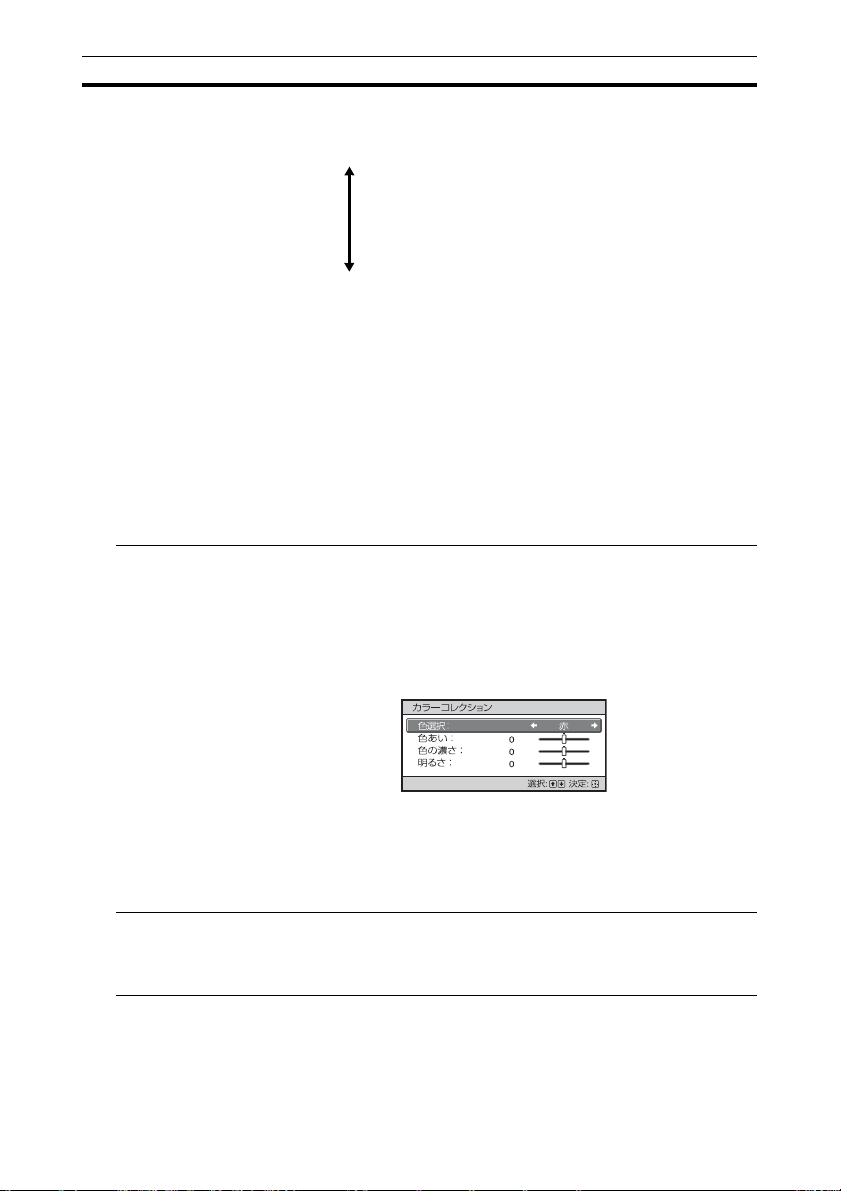
カラーコレク
ション
「入」:選択した色の色あい、色の濃さ、明るさを調整します。
下記の 1、2 を繰り返して調整したい色を決めます。
1 M/m ボタンで「色選択」を選び、</, ボタンで、調整した
い色を「赤」、「黄」、「緑」、「シアン」、「青」、「マゼンタ」か
ら選ぶ。
2M/m ボタンで「色あい」、「色の濃さ」または「明るさ」を選
び、投影画面を見ながら </, ボタンでお好みの色になるよ
うに調整する。
「切」:カラーコレクション機能をオフにします。
クリアホワイト お好みに合わせて、白の鮮明さを強調できます。
「強」、「弱」:クリアホワイトの効果を変更できます。
「切」:クリアホワイト機能をオフにします。
31
Page 32

設定項目 項目説明
x.v.Color x.v.Color に対応した機器を接続し、x.v.Color 映像信号を再生す
る場合に設定します。
「入」:x.v.Color 映像信号を再生できます。
「切」:x.v.Color 機能をオフにします。
x.v.Color について詳しくは、「x.v.Color(エックスブイ・カ
ラー)について」(58 ページ)をご覧ください。
ちょっと一言
x.v.Color が「入」のときは、ガンマ補正は調整できません。
HDR HDR コンテンツを再生する方法を設定します。
「オート」:自動で HDR コンテンツを判別して最適な画質設定に
します。
信号が BT.2020 に対応しているとき、「カラースペース」は自動
で「BT.2020」に設定されます。BT.2020以外の信号のときは
「カラースペース」で設定したモードに設定されます。(このと
き「BT.2020」は選択できません。)
「入」:HDR コンテンツを再生する場合に設定します。
「切」:HDR コンテンツ以外を再生する場合に設定します。
「入」または「切」のときは、「カラースペース」は自動設定さ
れません。
ご注意
入力したコンテンツに対して設定が合っていないと明るい部分
や暗い部分の映像が明るくなりすぎたり暗くなりすぎたりしま
す。
32
Page 33
設定項目 項目説明
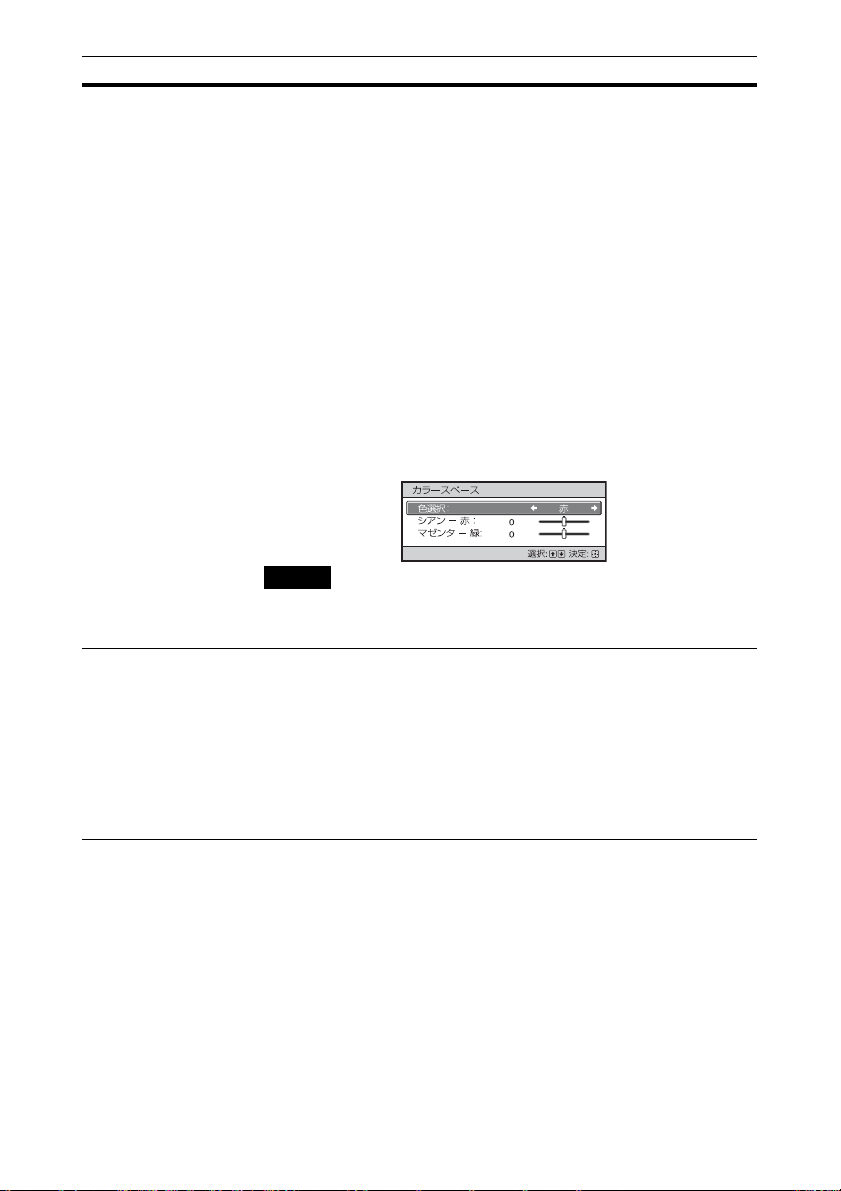
カラースペース
[COLOR
SPACE]
色空間を切り替えます。
「BT.709」:ハイビジョン放送やブルーレイディスクに用いら
れる HDTV規格 ITU-RBT.709 の色空間です。sRGB と同等の
色空間となります。
「BT.2020」:BT.709 よりも広い色空間となります。HDR コン
テンツの再生時にご使用ください。
「カラースペース 1」:テレビ番組やスポーツ、コンサート等の
ビデオ映像に適した色空間です。
「カラースペース 2」:リビングルームなどの明るい環境で、テ
レビ番組やスポーツ、コンサート等のビデオ映像を見るのに適
した色空間です。
「カラースペース 3」:リビングルームなどの明るい環境で、映
画を見るのに適した色空間です。
「カスタム」:お好みの色空間に調整できます。
ご注意
「HDR」を「オート」に設定した場合、信号の種類によって選択
できるモードが変わります(32 ページ)。
遅延低減 映像の表示遅延を低減します。
「入」:動きの速い映像を、残像感を少なく、なめらかに再現し
ます。
「切」:遅延低減機能をオフにします。
ちょっと一言
「遅延低減」が「入」のときは、Motionflow、NR、MPEGNR は
設定できません。
33
Page 34
画質詳細設定メニュー
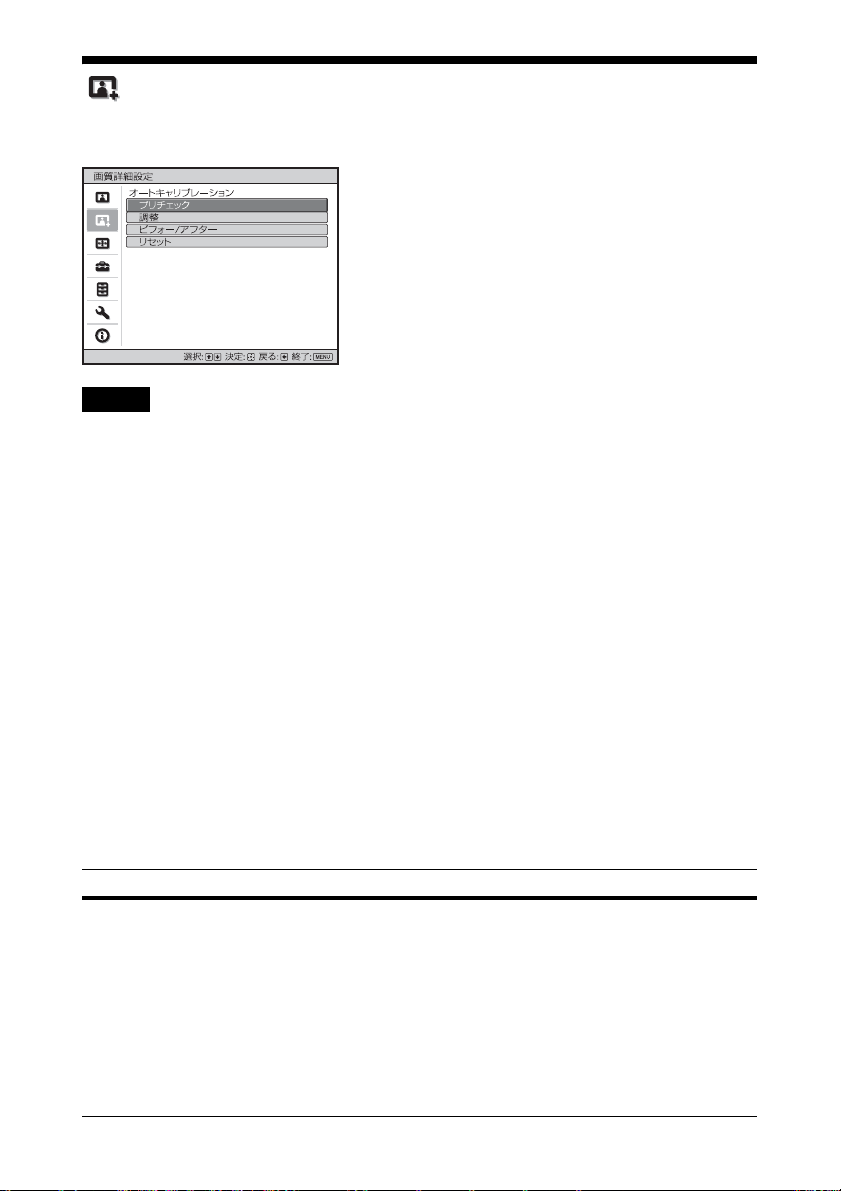
本機を長時間使用することで発生する色の変化(ズレ)を補正することができます。
ご注意
・ 本機能は簡易的なキャリブレーション機能です。本機能により、必ずしもお買い上げ
時と同じ色になることを保証するものではありません。
・「プリチェック」や「調整」実行中は、自動的に各色が投影されますが異常ではありま
せん。
・「プリチェック」や「調整」実行中は、電源を切ったりリモコンやコントロールパネル
を操作すると「プリチェック」や「調整」がキャンセルされますのでご注意ください。
ちょっと一言
・ dE は色の変化を表す指標です。dE が小さいほど色の変化が少ないことを示しています。
・ 本機の電源を入れてから 30 分以上経ってから実施してください。
・「プリチェック」や「調整」を開始すると終了するまでに数分かかります。
・「プリチェック」や「調整」を開始すると、レンズが工場出荷時の位置に自動的に戻るた
め、画面の位置が動く場合があります。終了後に画面は元の位置に自動的に戻ります。
・「プリチェック」や「調整」実行中に、部屋の明るさなど外部環境を変えると適切な結
果が得られないことがあります。
・「プリチェック」、「調整」は失敗することがあります。そのときはもう一度実施してく
ださい。
設定項目 項目説明
オートキャリブ
レーション
「プリチェック」:キャリブレーションの前に、お買い上げ時から
の色差をチェックします。
「調整」:オートキャリブレーションを実施します。
「ビフォー / アフター」:お買い上げ時の設定とキャリブレーショ
ン後の設定が一定の周期で切り替わり、実際の映像を見ながら
キャリブレーションの効果を確認できます。
「リセット」:キャリブレーション結果がリセットされ、お買い上
げ時の設定に戻ります。
34
Page 35
スクリーン設定メニュー
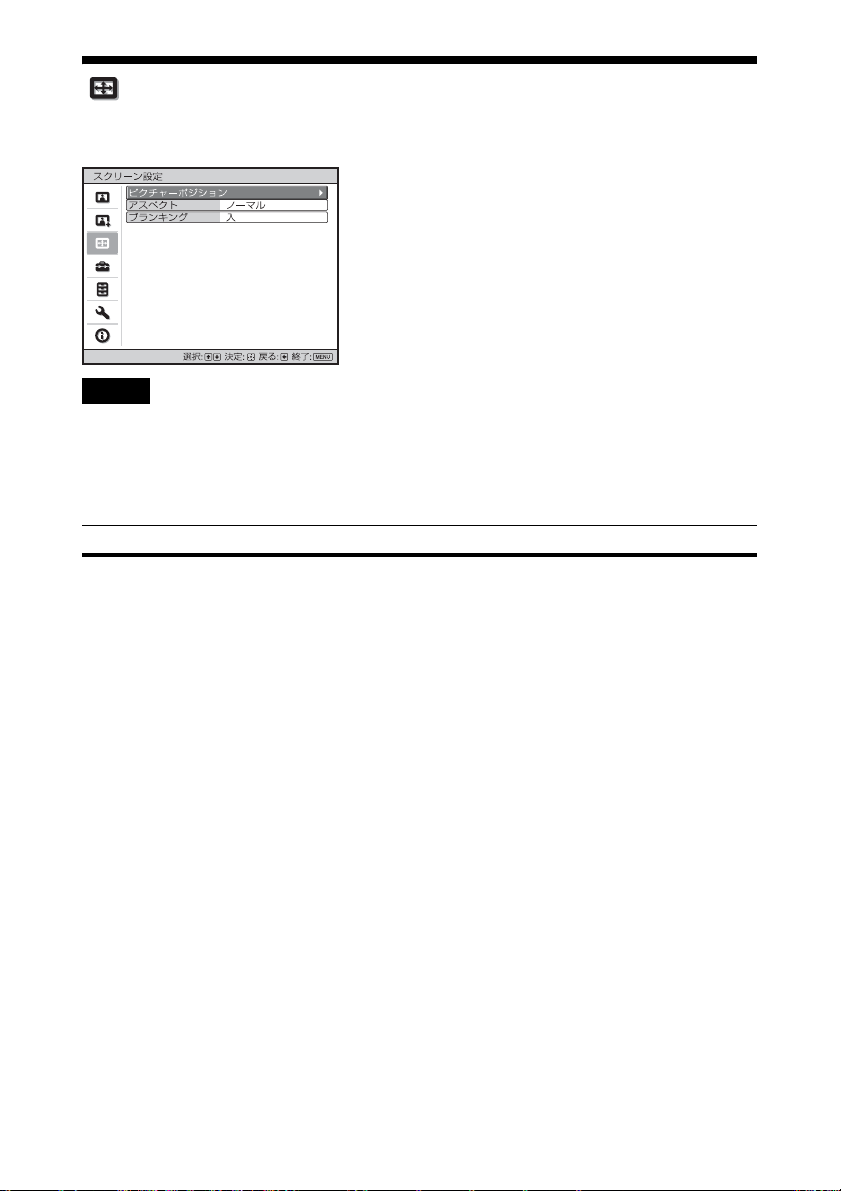
画面のサイズやアスペクト切り替えなどを設定できます。
ご注意
入力する信号の種類によっては、調整/設定できない項目があります。詳しくは、「入力
信号と調整・設定項目」(67 ページ)をご覧ください。
[] 内の項目名はリモコン記載の名称です。
設定項目 項目説明
ピクチャーポジ
ション
[POSITION]
レンズの設定とアスペクト比、ブランキングの組み合わせを 5 つ
まで保存することができます。
レンズとアスペクト、ブランキングを設定後、調整したスクリー
ン画角に合わせて「1.85:1」、「2.35:1」、「カスタム 1」〜「カスタム
3」の中からお好みのポジションを選択、確定したあと、「保存」、
「削除」、または「選択」を行ってください。
「保存」:現在のレンズの設定(フォーカス、画面の大きさ、画面
位置)を、選択したポジションに保存します。すでに調整状態が
保存されている場合は上書きします。
「削除」:保存されている調整状態を削除します。削除されると、
「1.85:1」、「2.35:1」、「カスタム 1」〜「カスタム 3」の表示が
「---」に変わります。
「選択」:選択したポジションが呼び出されます。
ちょっと一言
・ 各ピクチャーポジションには、最適なアスペクトがあらかじめ
登録されています。これらのアスペクトはピクチャーポジショ
ンごとに変更、保存することができます。
・ ピクチャーポジションを保存するとき、保存したい位置から一
旦下方向に 5cm 以上動かします。次に上方向に動かしてから保
存すると、呼び出したときのピクチャーポジションの精度が向
上します。
35
Page 36

設定項目 項目説明
ご注意
・ ポジションを選択、確定するとレンズが動き出します。レンズ
付近に触れないでください。けがや故障の原因になります。
・ 動作中にリモコンや本体のボタンを押すと動作が停止します。
その場合は再度ポジションを選択するか、レンズの調整を行っ
てください。
・ ピクチャーポジション機能を使って 2.35:1 と 16:9 のスクリーン
画角を併用する場合は、本機の設置位置にご注意ください。(17
ページ)
・ ピクチャーポジション機能は、レンズ調整状態の再現を 100%
保証するものではありません。
アスペクト
[ASPECT]
入力信号に対して、どのような縦横比の映像を投影するかを設定
します。(19 ページ)
解像度 4096 × 2160 を除く動画信号入力時に設定できます。
「1.85:1 ズーム」:1.85:1 映像の上下の黒帯が表示されないように
縦横比を維持したまま画面いっぱいに映します。
「2.35:1 ズーム」:2.35:1 映像の上下の黒帯の表示範囲が小さくな
るように縦横比を維持したまま画面いっぱいに映します。
「 設置設定」メニューの「トリガー切替 1/2」で「2.35:1 ズー
ム」を選ぶと、TRIGGER1/TRIGGER2 端子から 12V の信号が
出力されます。(44 ページ)
「ノーマル」:入力映像の縦横比を維持したまま画面いっぱいに映
します。1.78:1(16:9)、1.33:1(4:3)映像におすすめの設定です。
「V ストレッチ」:市販のアナモフィックレンズを用いて、2.35:1 映
像を 2.35:1 スクリーンで見る場合に最適なモードです。「設置
設定」メニューの「トリガー切替 1/2」で「V ストレッチ」を選
ぶと、TRIGGER1/TRIGGER2 端子から 12V の信号が出力され
ます。(44 ページ)
「スクイーズ」:市販のアナモフィックレンズを用いて、1.78:1
(16:9)や 1.33:1(4:3)映像を見る場合に、正しい縦横比で映しま
す。
「ストレッチ」:1.33:1(4:3)にスクイーズされた映像を 1.78:1
(16:9)の縦横比で映します。
36
Page 37
設定項目 項目説明
ちょっと一言
・「V ストレッチ」、「スクイーズ」選択時は、「 設置設定」メ
ニューの「アナモフィックレンズ」で、ご使用になるアナモ
フィックレンズに合わせてタイプを選択してください。
・ 入力信号によって、選択できる項目が異なります。(71 ページ)
・ コンピューター信号や解像度 4096 × 2160 信号入力時は、アス
ペクトは選択できません。(65 〜 67、71 ページ)
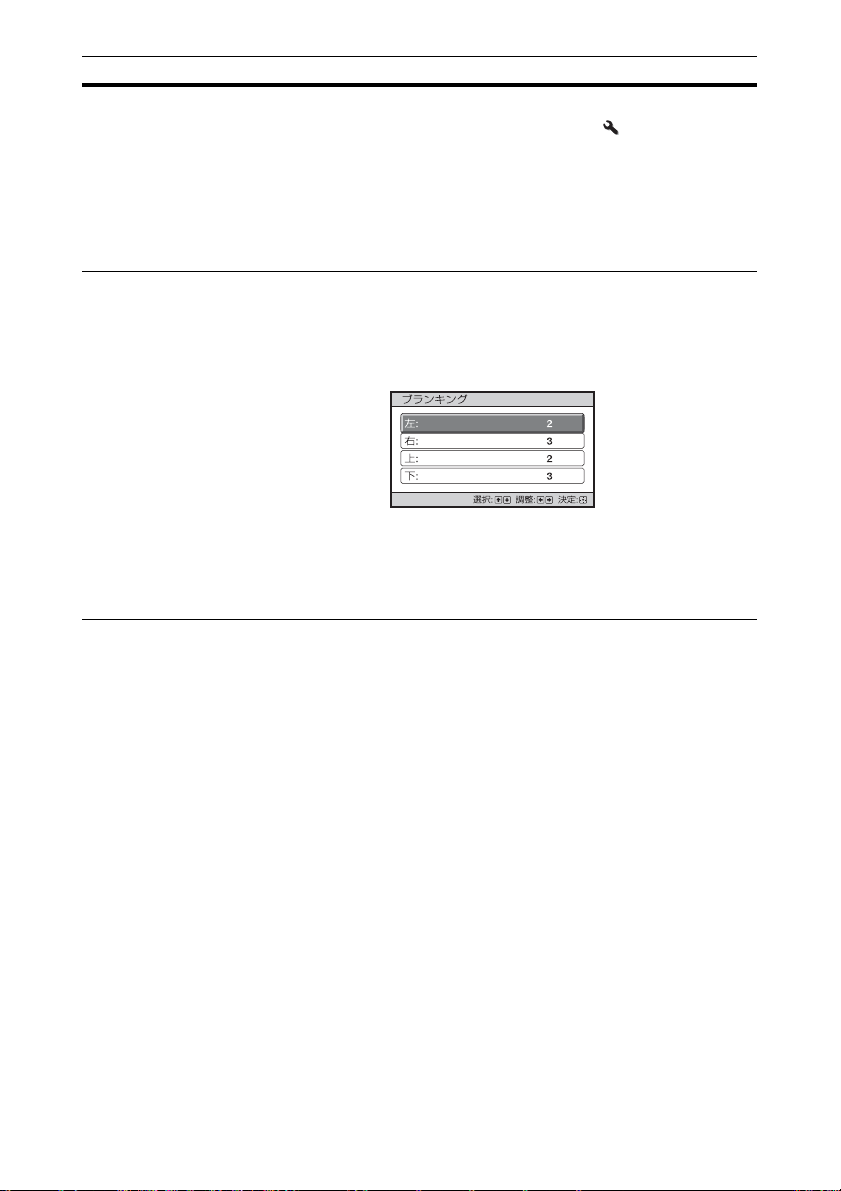
ブランキング 画面の上下左右の表示領域を調整します。
「入」:M/m ボタンで変更をしたいスクリーンの側面を「左/右/
上/下」の中から選択します。
</, ボタンでブランキング量を調整します。
「切」:ブランキング機能をオフにします。
ちょっと一言
アスペクト設定によっては、左右にブランキングがかからない場
合があります。
37
Page 38
初期設定メニュー
お買い上げ時の設定などを変更するメニューです。
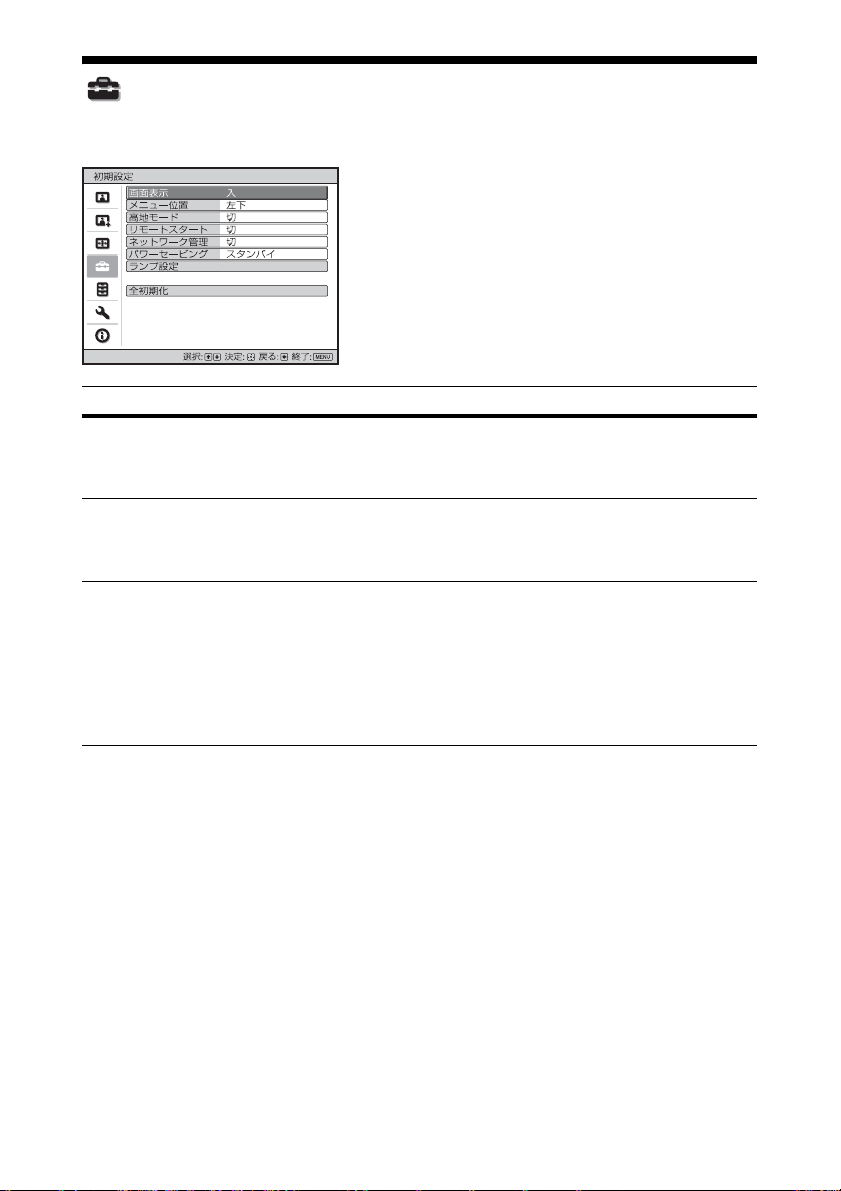
設定項目 項目説明
画面表示 メッセージなどを表示するかを設定します。
「切」に設定すると、一部のメニューの表示、電源を切るときの確
認メッセージ、警告メッセージ以外の画面表示が出なくなります。
メニュー位置 画面上のメニューの表示位置を変えることができます。
「左下」:メニューを画面の左下に表示します。
「中央」:メニューを画面の中央に表示します。
高地モード 気圧に応じて設定します。
「入」:1,500m 以上の高地で使用する場合に設定します。
「切」:平地での使用時に設定します。
ちょっと一言
設定を「入」にした場合、ファンの回転数が上がるため、音が少
し大きくなります。
38
Page 39

設定項目 項目説明
リモートスタート リモートスタートを設定します。
「入」:ネットワーク接続されている環境で、パソコンなどから本
機の電源を入れることができます。
「切」:リモートスタート機能をオフにします。
ちょっと一言
・ あらかじめ、ネットワーク設定(46 ページ)を正しく設定し、
本機がネットワークに接続されている必要があります。
・ リモートスタート機能で本機の電源を入れるには、パソコンな
どから特殊コマンドを送信する必要があります。詳しくはソ
ニーの相談窓口にご相談ください。
ご注意
リモートスタートを「入」にするとスタンバイ時の待機電力が増
えます。また、ネットワーク管理を「入」にすると、リモートス
タートの設定は自動で「入」に設定され、設定変更できません。
また、メニューにも表示されません。
ネットワーク管理 「入」:ネットワーク接続されている環境で、プロジェクター制御
機器との通信を常時行う際に設定します。
ご注意
ネットワーク管理を「入」にすると常時ネットワーク機能が有効
になります。通常は「切」のまま利用してください。「入」に設定
した場合、消費電力が増加します。
パワーセービング
(節電モード)
パワーセービングを設定します。
「スタンバイ」:本体に信号が入力されない状態が 10 分以上続くと
自動的に電源が切れ、スタンバイ状態になります。
「切」:パワーセービング機能を無効にします。
ランプ設定 光源用ランプ交換をしたときに、設定します。(59 ページ)
全初期化 すべての設定をお買い上げ時の状態に戻します。
「 情報」メニューの「ランプ使用時間」はリセットされません。
39
Page 40
機能設定メニュー
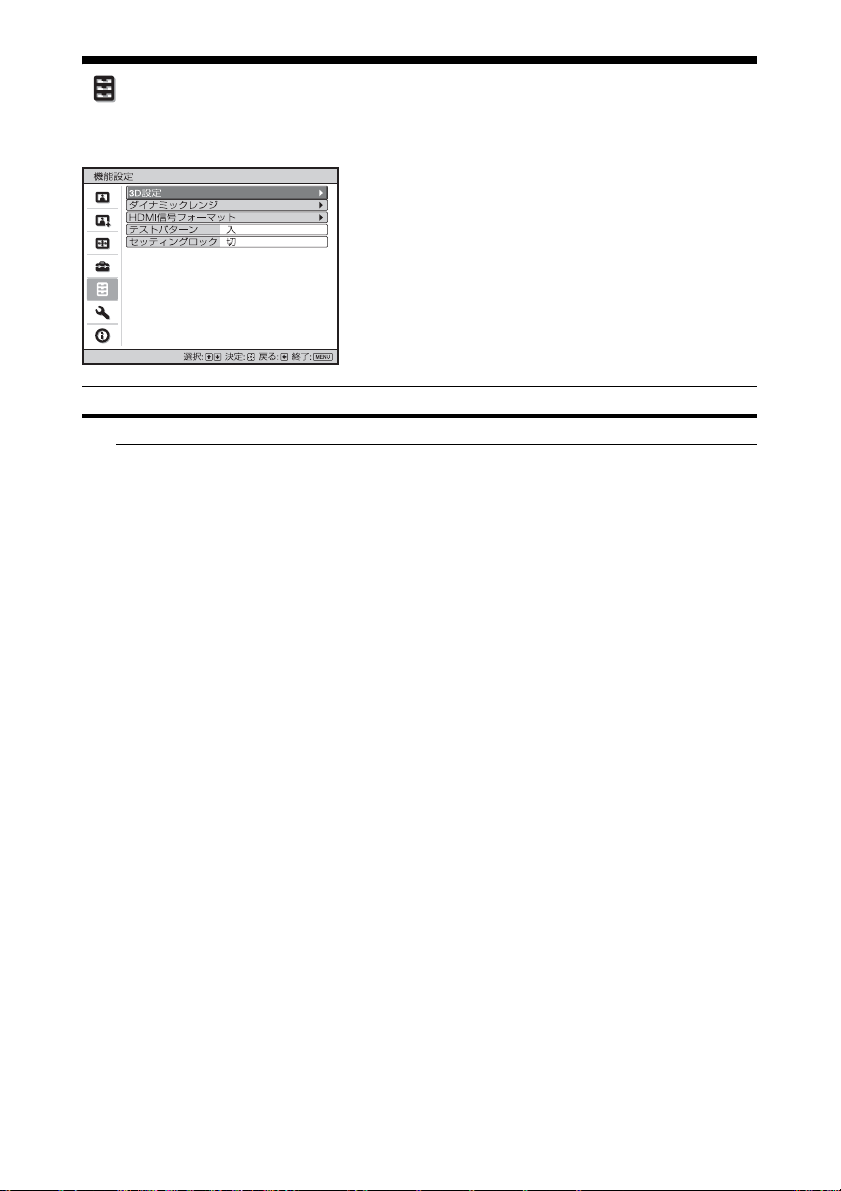
本機の機能の設定を変更するメニューです。
設定項目 項目説明
3D 設定 3D に関する設定を変更できます。
2D-3D 表示選択映像の表示を 2D と 3D に切り替えます。
「オート」:3D 情報 * が含まれる HDMI 信号を入力したときは 3D
で表示し、それ以外の信号のときは 2D で表示します。
「3D」:「3D フォーマット」で選択した 3D 方式で表示します。た
だし、3D 情報が含まれる HDMI 信号を入力した場合は、信号に
含まれる 3D 情報の形式に従って表示します。
「2D」:常に 2D で表示します。
* 3D 情報とは、3D を識別する付加情報です。HDMI 信号には、
3D を識別する付加情報が含まれる信号と、含まれない信号があ
ります。
「3D フォーマット」: 3D 情報を含まない信号を受信したとき、ど
のフォーマットに従って映像を 3D 表示するかを設定します。
「シミュレーテッド 3D」:通常の 2D 映像を 3D 映像に変換し
ます。HD 信号のときのみ設定可能です。
映像ソースによっては 3D 効果が現れにくい場合があります。
3D 映像の見えかたには個人差があります。
「左右分割方式」:類似の映像が左右に並んで表示される 3D 方
式のときに選びます。
「上下分割方式」:類似の映像が上下に並んで表示される 3D 方
式のときに選びます。
40
Page 41
設定項目 項目説明
ちょっと一言
・ 映像のソースによっては「2D-3D 表示選択」を「3D」に設定で
きません。対応している 3D 信号については「対応 3D 信号一
覧」(69 ページ)をご覧ください。
・ スクリーンサイズ(100 〜 120 インチを推奨)や映像のソースに
よっては 3D効果が現れにくいことがあります。
・ 3D 表示中は、メニュー画面が二重に見える場合があります。そ
の場合は、3D メガネをかけてメニュー画面を操作してくださ
い。
3D 明るさ 3D 表示時の画面の明るさを調整します。
「明」「標準」の 2 段階から選択できます。
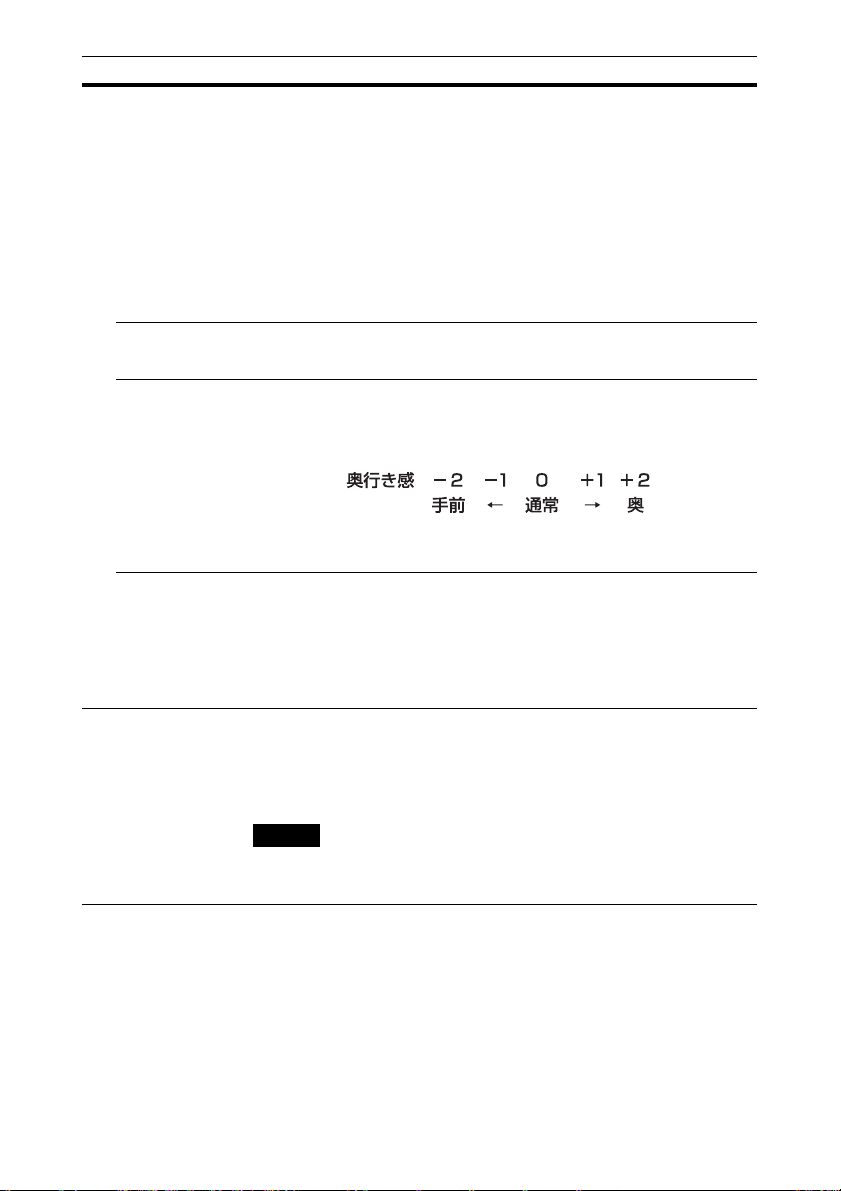
3D 奥行き調整 画面上の 3D 表示の奥行きを調整します。
「シミュレーテッド 3D」以外の方式で 3D 表示している場合に調
整できます。
通常は「0」がおすすめです。設定によっては 3D として見えにく
くなります。
シミュレー
テッド 3D 効
果
2D コンテンツを 3D に変換しているときの 3D 効果を調整します。
「強」「中」「弱」の3段階から選択できます。
ちょっと一言
シミュレーテッド 3D機能による 3D映像の見えかたには個人差が
あります。
ダイナミックレンジHDMI1/HDMI2 端子の映像入力レベルを設定します。
「オート」:自動で映像入力レベルを判別します。
「リミテッド」:映像入力レベルが、16-235 のときに設定します。
「フル」:映像入力レベルが、0-255 のときに設定します
ご注意
HDMI 接続機器の映像出力設定が合っていないと、明るい部分や
暗い部分の映像が明るくなりすぎたり暗くなりすぎたりします。
41
Page 42

設定項目 項目説明
HDMI 信号フォー
マット
4K の映像信号フォーマットを切り替えます。
「標準フォーマット」:標準的な HDMI フォーマットで映像を表示
します。通常はこの設定をご使用ください。
「拡張フォーマット」:より高精細な HDMI フォーマットで映像を
表示します。対応機器を使用するときのみ、この設定をご使用く
ださい。
ちょっと一言
・「拡張フォーマット」選択時に映像や音声が正常に出力されない
ことがあります。その場合は「標準フォーマット」に設定して
ください。
・「拡張フォーマット」は対応機器を使用するときのみ設定してく
ださい。
テストパターン テストパターン表示の有無を選択します。
「入」:レンズのフォーカス、ズーム、シフト調整時に、テストパ
ターンが表示されます。
「切」:テストパターンが表示されません。
ちょっと一言
テストパターン表示時は、フォーカスが合わせやすいように緑単
色の表示となります。
セッティングロック誤って操作することを防ぐために、メニューの調整、または設定
項目をロックします。(43 ページ)
「切」:セッティングロックを解除します。
「レベル A」:下記のグループ 1 の項目は、メニューに表示されな
くなり、操作ができなくなります。
「レベル B」:下記のグループ 1 と 2 の項目は、メニューに表示さ
れなくなり、操作ができなくなります。
42
Page 43

セッティングロックによってロックされる項目
グループ 1 グループ 2
画質設定メニュー
標準に戻す
リアリティークリエーション
アドバンストアイリス
コントラストエンハンサー
ランプコントロール
Motionflow
コントラスト
明るさ
色の濃さ
色あい
色温度
シャープネス
NR
MEPGNR
スムースグラデーション
フィルムモード
ガンマ補正
カラーコレクション
クリアホワイト
x.v.Color
HDR
カラースペース
遅延低減
画質詳細設定メニュー
オートキャリブレーション
初期設定メニュー
画面表示
メニュー位置
高地モード
リモートスタート
ネットワーク管理
パワーセービング
ランプ設定
全初期化
機能設定メニュー
ダイナミックレンジ
テストパターン
設置設定メニュー
画像反転
レンズコントロール
アナモフィックレンズ
トリガー切替
リモコン受光部
パネルアライメント
ネットワーク設定
43
Page 44
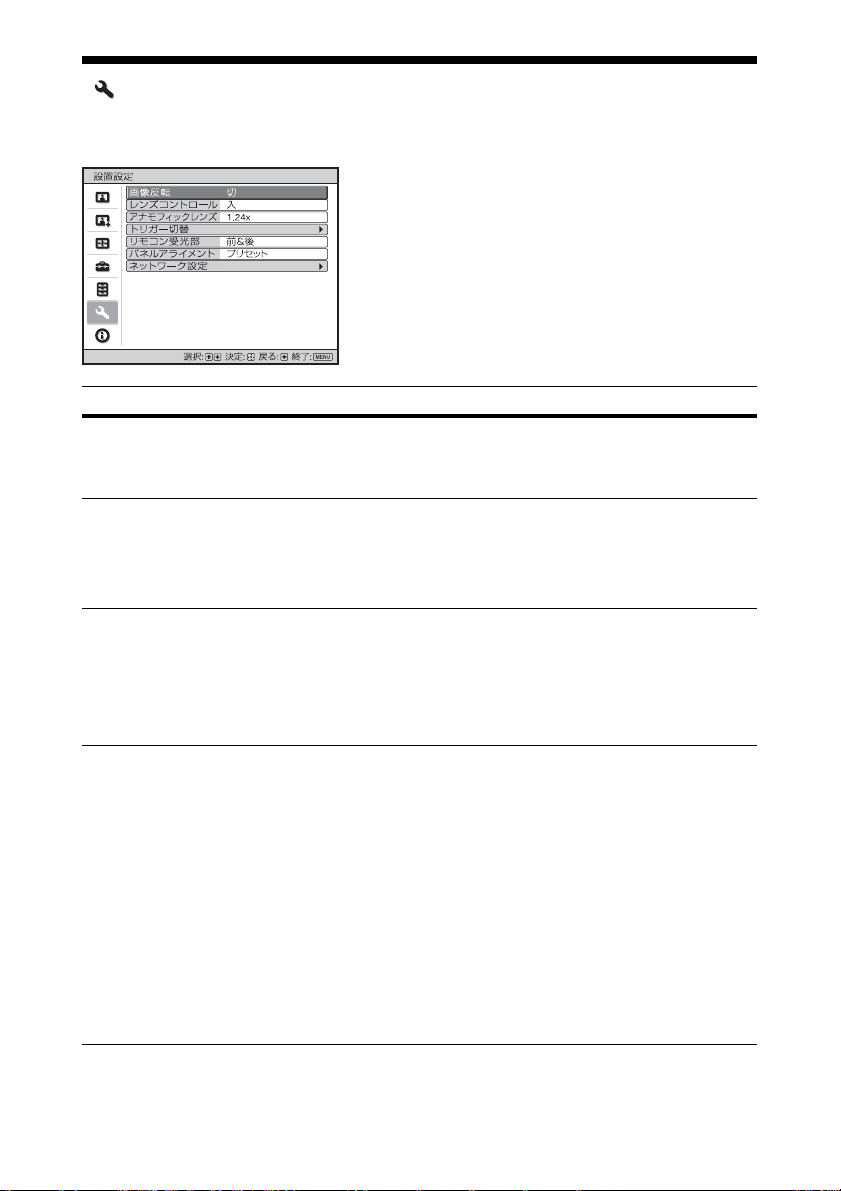
設置設定メニュー
設置設定を変更するメニューです。
設定項目 項目説明
画像反転 画像を水平または垂直方向に反転します。
「切」、「上下左右」、「左右」、「上下」があり、天井つり設置やスク
リーンの裏面投射設置するときなどに使用します。
レンズコントロールレンズ関連の調整(「レンズフォーカス」、「レンズズーム」、「レン
ズシフト」)を誤って変更しないようにします。
「入」:レンズの調整ができます。
「切」:レンズの調整ができません。
アナモフィックレンズアナモフィックレンズの変換倍率に合わせて選択します。
「1.24x」:水平 1.24 倍のアナモフィックレンズ使用の場合に選択
します。
「1.32x」:水平 1.32 倍のアナモフィックレンズ使用の場合に選択
します。
トリガー切替 TRIGGER1/TRIGGER2 端子の出力機能を切り替えます。
「切」:トリガー端子の機能をオフにします。
「電源」:本機の電源が入っているとき、TRIGGER1、TRIGGER2
端子から 12V の信号を出力します。本機がスタンバイ状態のとき
は、信号は出力されません。
「V ストレッチ」:「アスペクト」(36 ページ)の「V ストレッチ」
選択時に連動して TRIGGER1、TRIGGER2 端子から 12V の信号
を出力します。
「2.35:1 ズーム」:「アスペクト」(36 ページ)の「2.35:1 ズーム」
選択時に連動して TRIGGER1、TRIGGER2 端子から 12Vの信号
を出力します。
44
Page 45
設定項目 項目説明
リモコン受光部 リモコンの効きが悪いとき、本体前面と後面にあるリモコン受光
部を切り替えます。
「前&後」:前面と後面のリモコン受光部を両方働かせます。
「前」:前面のリモコン受光部のみを働かせます。
「後」:後面のリモコン受光部のみを働かせます。
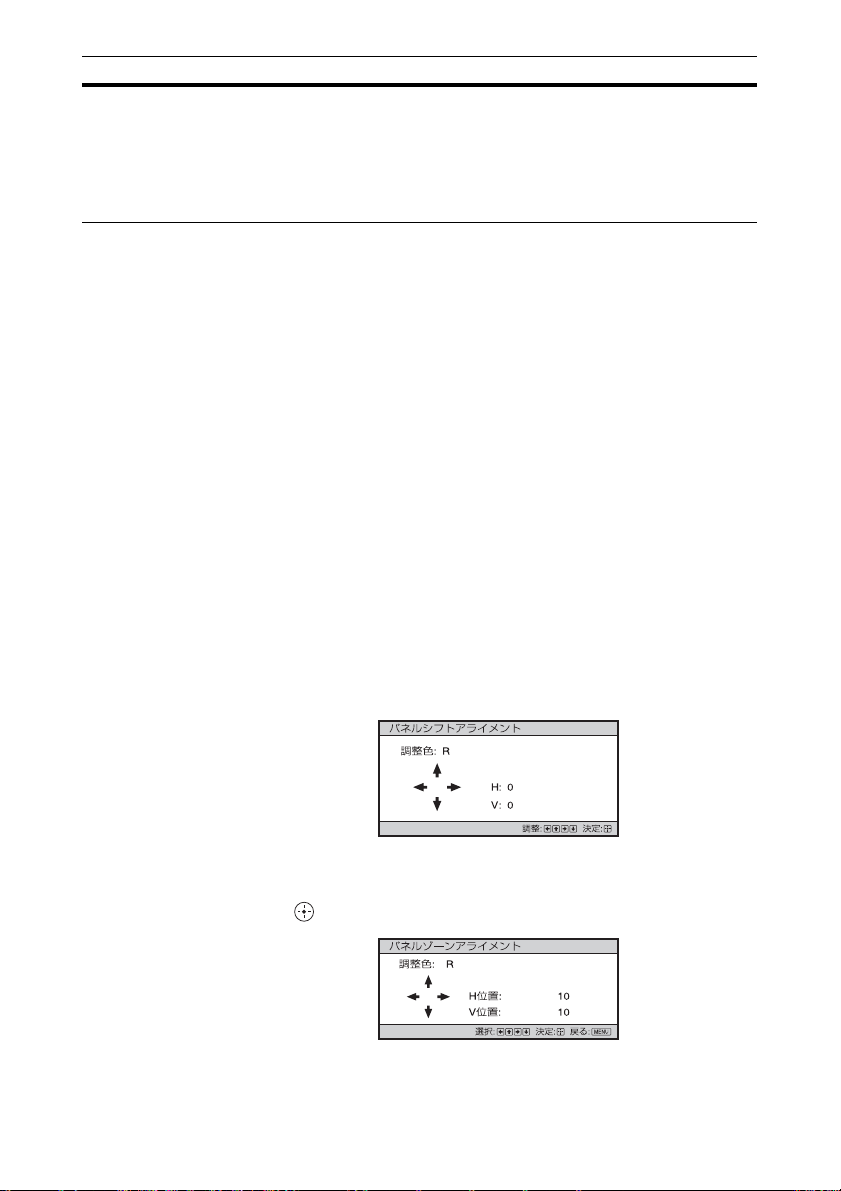
パネルアライメントスクリーン上の文字や映像の色ずれを微調整します。
「調整」:「調整色」と「調整アイテム」を選択して、色ずれを調整
できます。
「調整アイテム」:調整方法を以下より選択します。
「シフト」:画面全体をシフトして調整します。
「ゾーン」:調整したい範囲を指定して調整します。
「調整色」:色ずれの気になる色を指定します。「G」(緑)を基
準に調整するため、「R」(赤)または「B」(青)を選択しま
す。
「調整パターン色」:「調整色」が「R」(赤)の場合は、「R/G」
(赤と緑)または「R/G/B」(白、全色)を選択します。「調整
色」が「B」(青)の場合は、「B/G」(青と緑)または、「R/G/
B」(白、全色)を選択します。
「調整」:「調整色」で選択した色のシフト調整およびゾーン調
整を、</,、M/m ボタンで行います。
「シフト」選択時:シフト調整画面で </, ボタンで水平
方向(H)、M/m ボタンで垂直方向(V)の調整量を設定し
ます。
「ゾーン」選択時:調整する位置を、</, ボタンで水平位
置(H 位置)、M/mボタンで垂直位置(V 位置)を選択し、
ボタンを押します。
45
Page 46
設定項目 項目説明
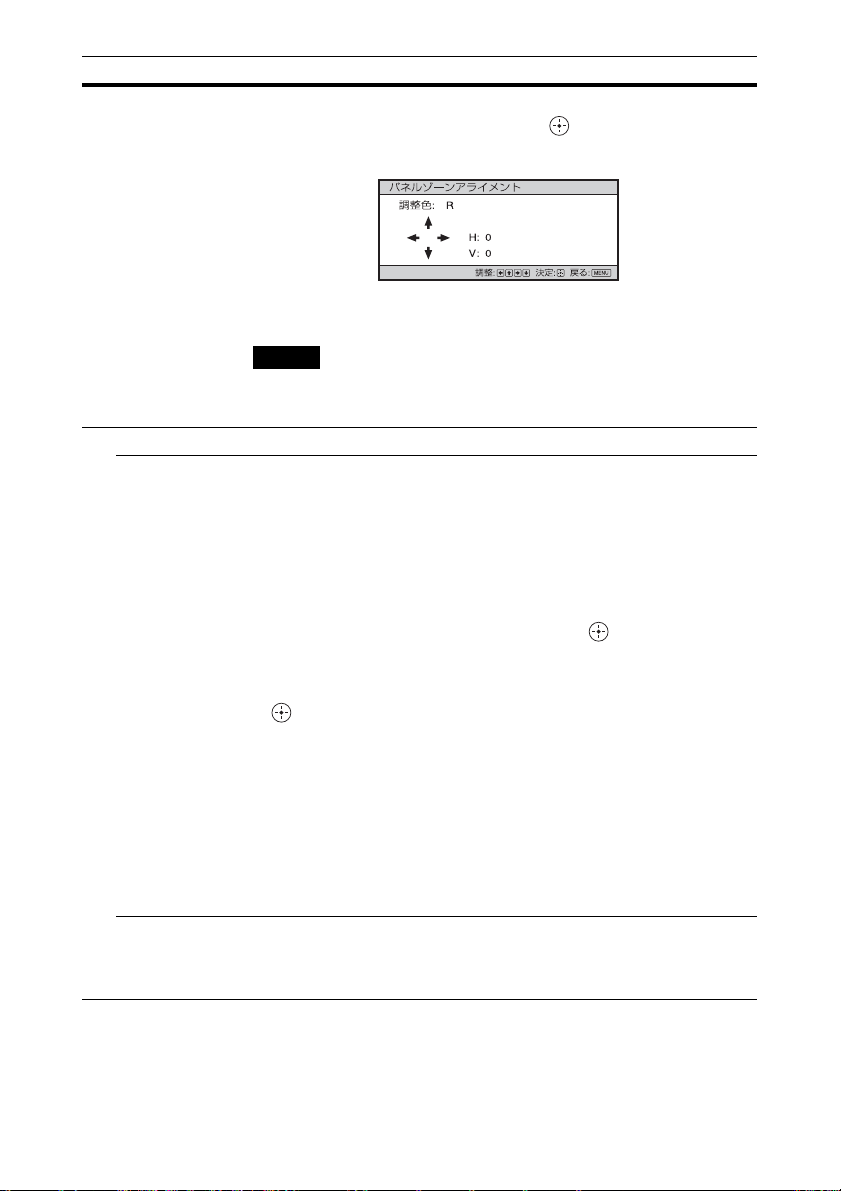
</, ボタンで水平方向(H 方向)、M/m ボタンで垂直方向
(V 方向)の調整量を設定します。 ボタンを押すと、調整
する位置を再度選択できます。
「リセット」:設定がお買い上げ時の値に戻ります。
「プリセット」:補正データがプリセットされています。
ご注意
調整値によっては、色付きや解像感に変化が生じる場合がありま
す。
ネットワーク設定 インターネットプロトコル設定を行います。
IPv4 設定 「IP アドレス設定」:IP アドレスの設定方法を選択します。
「自動(DHCP)」:ルーターなどの DHCP サーバー機能によ
り、自動でネットワークの設定を割り当てます。
「手動」:
手動でネットワークを設定します。
「IP アドレス設定」で「手動」を選択したときには、「IP アドレ
ス」、「サブネットマスク」、「デフォルトゲートウェイ」を入力
します。
す。その後、
M/m
ボタンで各項目を選択して、 ボタンを押しま
</,
ボタンで入力する枠を選び、M/mボタン
で値を入力します。全ての設定が終了したら、「適用」を選び、
ボタンを押すと設定が有効になります。
「IP アドレス」:本機の IP アドレスを設定します。
「サブネットマスク」:本機のサブネットマスクを設定します。
「デフォルトゲートウェイ」:本機のデフォルトゲートウェイを設
定します。
「MAC アドレス」:本機の MAC アドレスを表示します。変更は
できません。
「適用」:手動で設定した IP アドレスを有効にします。
IPv6 情報 IPv6 アドレス情報を表示します。
IPv6 アドレス設定を行う場合は、ウェブブラウザから設定してく
ださい。(48 ページ)
46
Page 47
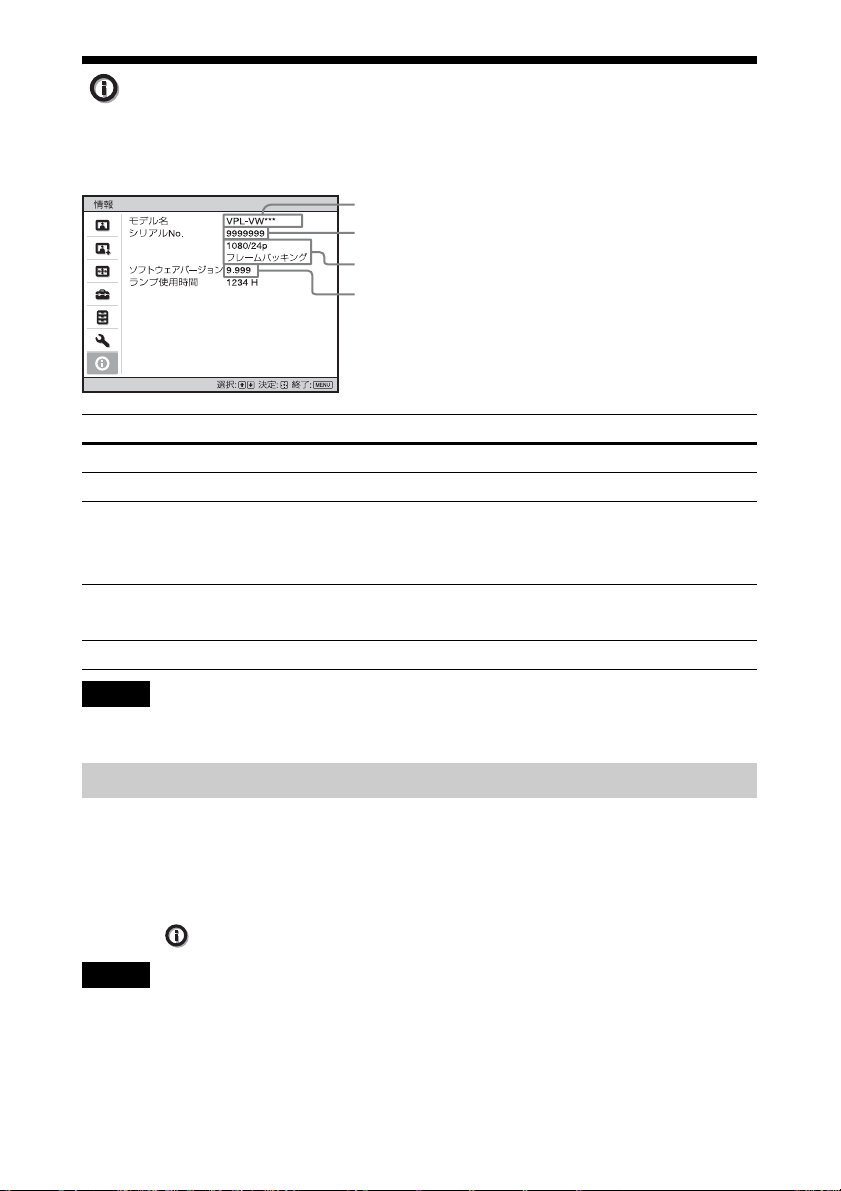
情報メニュー
本機の機種名、シリアルナンバー、投影時の画像の信号種類、ソフトウェアバー
ジョンやランプ使用時間などの情報を見ることができます。
機種名
シリアルナンバー
信号種類
ソフトウェアのバージョン
項目 項目説明
モデル名 機種名を表示します。
シリアル No. シリアルナンバーを表示します。
信号種類 入力信号の解像度を表示します。入力信号に 3D 情報が含まれて
いる場合は、解像度と 3D フォーマットの形式を表示します。ま
た、入力信号が HDR 対応の場合は「HDR」と表示されます。
ソフトウェアバー
ジョン
ランプ使用時間 ランプの使用時間を累積して表示します。
ソフトウェアのバージョンを表示します。
ご注意
上記の項目は調整や変更できません。
プリセットメモリーについて
本機では、お買い上げ時に、「プリセット信号一覧」(65 ページ)に記載されている
信号に対して最適な表示となるよう映像データがあらかじめ設定されています(プ
リセットメモリー)。これらの信号を入力したときは、本機が入力信号を自動的に
判別し、プリセットメモリー内のデータを呼び出し、最適な映像でスクリーンに映
します。「 情報」メニューの画面に入力信号の種類が表示されます。
ご注意
入力するコンピューター信号によっては、画面の一部が欠けたり正しく表示されない場
合があります。
47
Page 48
ネットワーク機能を利用する
本機をネットワークに接続することで、
以下のことができます。
・ ウェブブラウザを利用して本機の現
在の状況を確認する。
・ 本機のネットワーク設定を行う。
・ 各種ネットワーク監視、制御プロト
コル(SDAP(Advertisement)、
SDCP(PJTalk)、DDDP(AMX)、
CrestronRoomView、Control4)を
使用したコントロールを行う。
ご注意
・ 本機をネットワークに接続する際には、
ネットワークを設定した人にご相談く
ださい。また、セキュリティ対策され
たネットワーク環境でご使用ください。
・ プロジェクターをネットワークに接続
してご使用になる際は、ブラウザでコ
ントロール画面にアクセスし、アクセ
ス制限設定を工場出荷時の設定から変
更してください(50 ページ)。また、定
期的にパスワードを変更することを推
奨します。
・ ブラウザでの設定作業が完了したら、
ログアウトするためにブラウザを閉じ
てください。
・ 説明で使用している画面はイメージで
す。ご使用になっている機種によって
は異なる場合があります。あらかじめ
ご了承ください。
・ 使用できるウェブブラウザは、Internet
Explorer8/9/10/11 です。
・ 表示可能言語は英語のみです。
・ コンピューターから本機にアクセスす
る際、ブラウザの設定が「プロキシ
サーバーを使用する」になっている場
合は、チェックマークをクリックし、
プロキシサーバーを使用しない設定に
してください。
・ AMXDDDP は IPv6 に非対応です。
・ これらのネットワーク機能は本機の電
源が入っているときに有効となります。
ウェブブラウザで本
機のコントロール画
面を開く
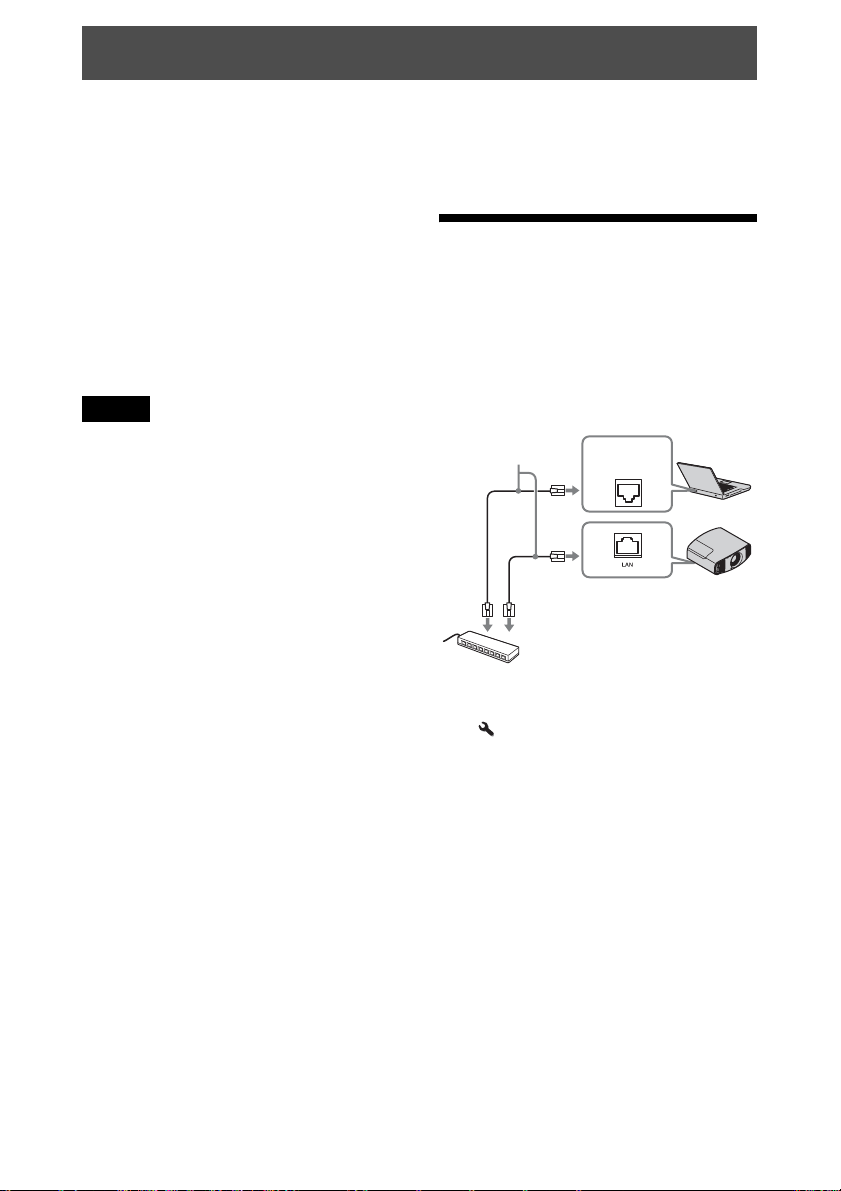
1 LAN ケーブルをつなぐ。
LAN ケーブル
(ストレート)
(別売)
ハブまたはルーターなど
2 本機のネットワーク設定を行う。
「 設置設定」メニューの「ネット
ワーク設定」で本機のネットワーク
設定を行ってください。(46 ペー
ジ)
3 ウェブブラウザを起動し、アドレ
ス欄に以下を入力し Enter キー
を押す。
http://xxx.xxx.xxx.xxx
(xxx.xxx.xxx.xxx:本機の IP アド
レス)
IPv6 アドレスで接続する場合
http://[xxxx:xxxx: 〜xxxx]
LAN 端子
48
Page 49
本機の IP アドレスは、「 設置設
定」メニューの「ネットワーク設
定」で確認できます。
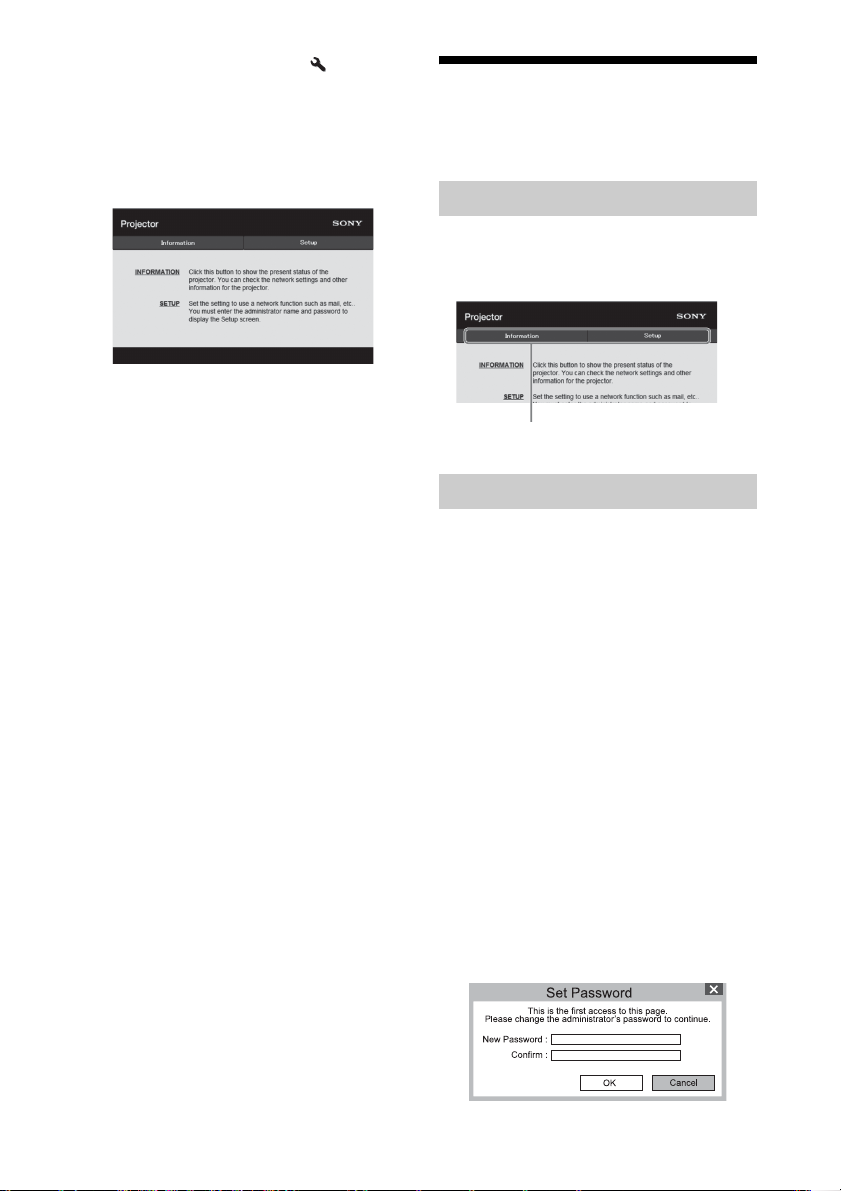
ブラウザに以下のようなコントロー
ル画面が表示されます。
一度ネットワーク設定を行えば、次
回からは手順 3 の操作だけでコント
ロール画面を表示できます。
コントロール画面を
操作する
ページを切り替える
ページ切替えボタンをクリックして、
設定したいページを表示してください。
ページ切替えボタン
アクセス制限を設定する
各ページの利用者を次のように制限で
きます。
管理者:すべてのページにアクセス
可能。
ユーザー:Setup ページ以外にアク
セス可能。
初めて Setup ページにアクセスすると
きは、認証ダイアログのユーザー名に
「root」、パスワードに「Projector」を
入力してください。
初めてログインすると、パスワードの
変更を求める画面が表示されます。画
面に表示される手順に沿ってパスワー
ドを変更してください。
なお、管理者の名前は「root」に固定
されています。
49
Page 50
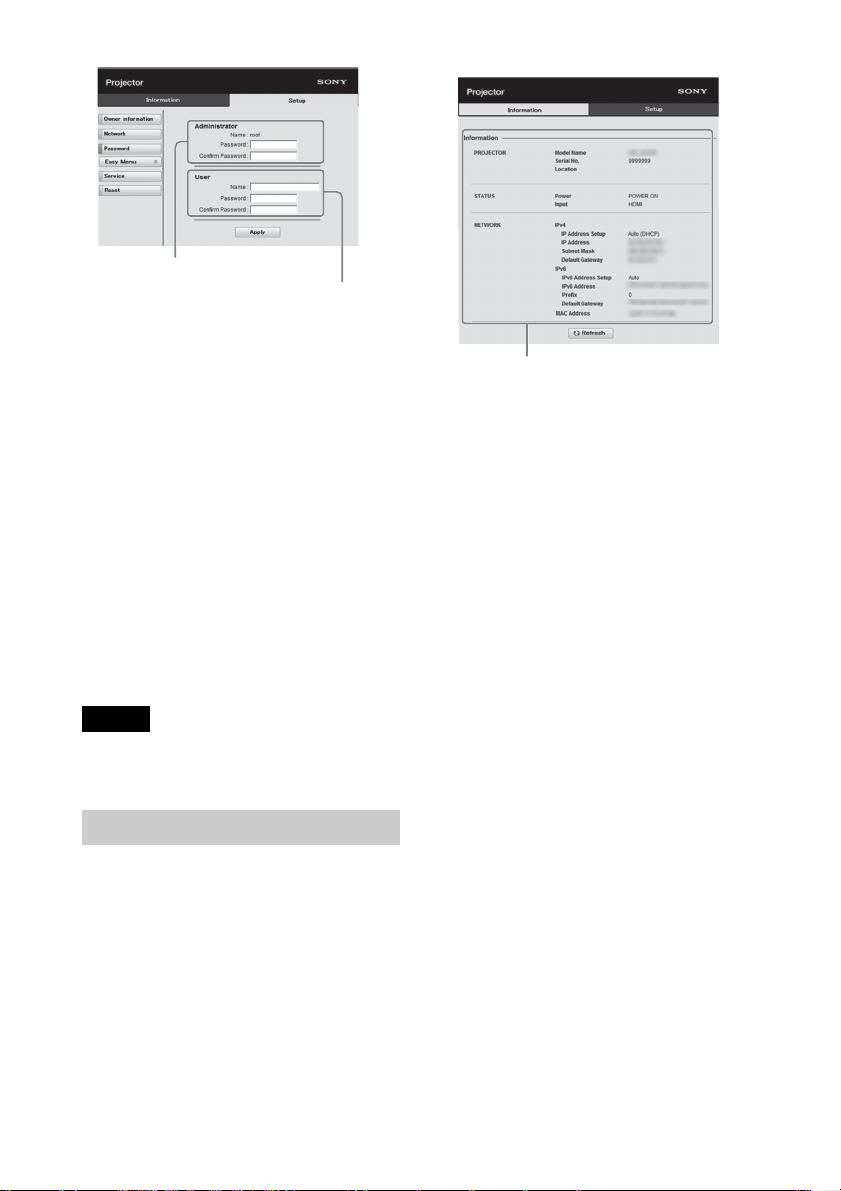
「管理者」権限の入力エリア
「ユーザー」権限の入力エリア
パスワードは、Setup ページ内の
Password ページから変更できます。
パスワードを変更する場合は、設定さ
れているパスワード(*****)を削除して
から、新しいパスワードを入力してく
ださい。
管理者、ユーザーパスワードは、英字
と数字の両方を含む 8 桁以上 16 桁以内
で設定してください。英字の大文字、
小文字は区別されます。
初期パスワード「Projector」を新しい
パスワードとして設定することはでき
ません。
ご注意
パスワードを忘れた時は、ソニーの相談
窓口へお問い合わせください。
本機の状態を確認する
情報エリア
Information ページを開くと、本機の現
在の状態を確認できます。
50
Page 51

困ったときは
故障かな?と思ったら
修理に出す前に、もう一度次の点検をしてください。以下の対処を行っても直らな
い場合は、ソニーの相談窓口にお問い合わせください。
電源に関する項目
症状 原因と対処 ページ
電源が入らない。
突然電源が切れた。 「 初期設定」メニューの「パワーセービング」の
[/1(オン/スタンバイ)ボタンで電源を切った後す
ぐに電源を入れた場合に、電源が入らないことがあ
ります。約 1 分たってから電源を入れてください。
光源用ランプカバーをしっかりはめて、ネジをしめ
てください。
警告ランプを確認してください。 54
設定が「スタンバイ」になっていないか確認してく
ださい。
「パワーセービング」を「切」に設定してください。 39
映像に関する項目
−
60
39
症状 原因と対処 ページ
映像が映らない。 再生する機器との間の接続ケーブルがしっかりと差
し込まれていることを確認してください。
INPUT ボタンで入力を正しく選んでください。 15
コンピューターの出力設定が外部モニター出力に
なっていることを確認してください。
ノート型のコンピューターなどで、出力信号をコン
ピューターの液晶ディスプレイと外部モニターの両
方に出力するように設定すると、外部モニターに正
しく映像が出ない場合があります。この場合は、外
部モニターにのみ信号が出力されるように、コン
ピューターを設定してください。
映像が 2 重に見える 3D 表示されています。3D メガネを使用してご覧く
ださい。または、「2D-3D 表示選択」を「3D」に設定
してください。
2D 表示でご覧になりたい場合は、「2D-3D 表示選択」
を「2D」に設定してください。
51
13
−
16、40
Page 52
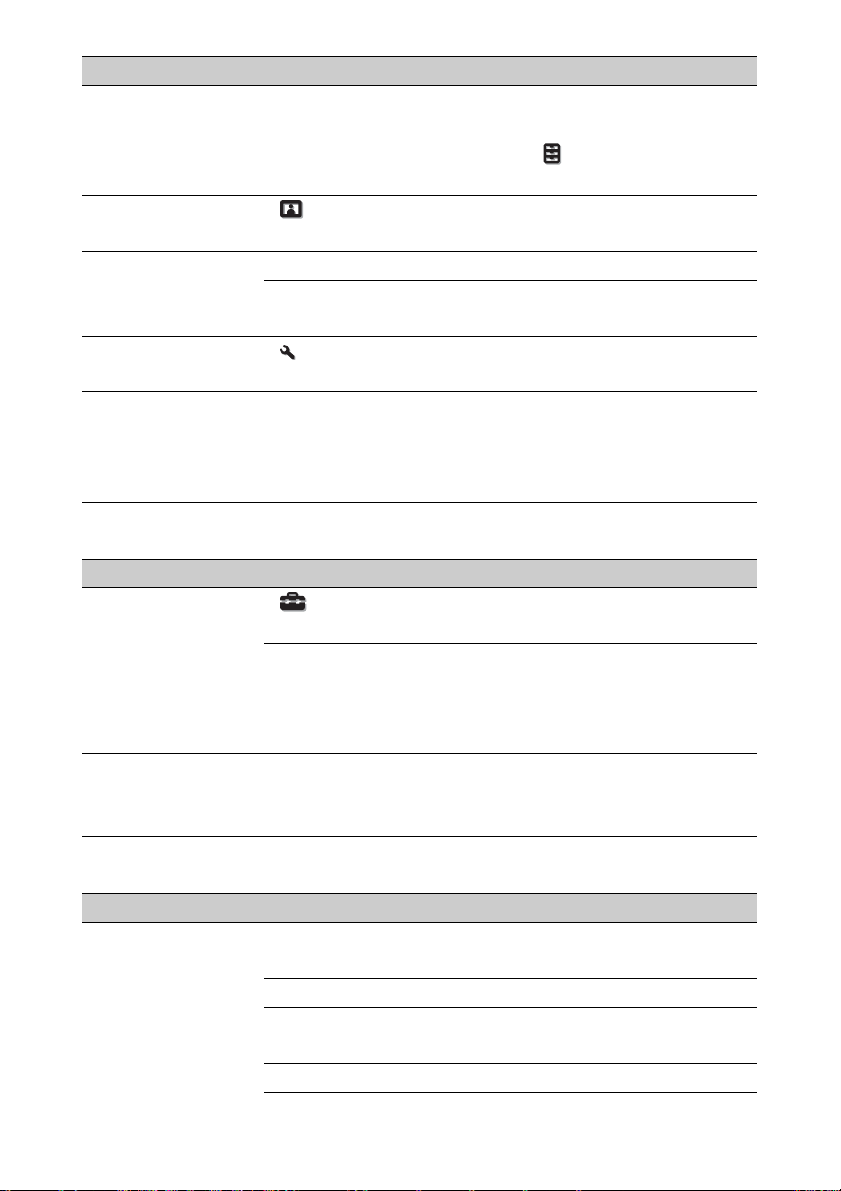
症状 原因と対処 ページ
明るい部分や暗い部
分の映像が明るくな
りすぎたり暗くなり
過ぎる。
画面が暗い。 「 画質設定」メニューで「コントラスト」、「明る
画面がぼやける。 画面のフォーカスを合わせてください。 9
文字や映像の色ずれ
が気になる。
画面に残像が現れる。 画面の同じ位置にコントラストの強い静止画を長時
HDMI 規格からはずれた信号レベルで入力されたと
きに症状が出る場合があります。つないだ機器の出
力レベルを切り替えるか、本機の「 機能設定」メ
ニューでダイナミックレンジを切り替えてください。
さ」を正しく設定してください。
結露でレンズが曇った場合、電源を入れたまま約 2
時間放置してください。
「 設置設定」メニューの「パネルアライメント」で
調整してください。
間表示し続けると、一時的な残像が現れることがあ
ります。いったん電源を切り、しばらくすると残像
は自然に消えます。
41
28
−
45
−
表示に関する項目
症状 原因と対処 ページ
画面表示が出ない。 「 初期設定」メニューで「画面表示」の設定を
「入」にしてください。
ON/STANDBY ランプが緑に点滅していないか確認
してください。緑色に点滅しているときは本機が起
動途中です。緑色の点灯に変わるまでお待ちくださ
い。
画面にモデル名が表
示され続ける。
お買い上げ時に本機の展示モードが設定されている
ことがあります。お買い上げ店、またはソニーの相
談窓口にご相談ください。
38
−
8
リモコンに関する項目
症状 原因と対処 ページ
リモコンが働かない。 電池が消耗しています。新しい電池と交換してくだ
さい。
電池の eE を正しく入れてください。 −
リモコン受光部の近くに蛍光灯があると誤動作する
ことがあります。
本機のリモコン受光部の位置を確認してください。 3、4
52
−
−
Page 53

症状 原因と対処 ページ
「 設置設定」メニューで「リモコン受光部」の設定
を「前&後」にしてください。
45
3D に関する項目
症状 原因と対処 ページ
映像が 3D に見えない。3D メガネの電源が入っているか確認してください。 16
3D メガネの電池が消耗していないか、または充電さ
れているか確認してください。
「2D-3D 表示選択」を「オート」または「3D」に設定
してください。
3D 対応の信号か確認してください。 69
再生する機器や接続している AV セレクター/オー
ディオアンプの仕様により、本機に 3D 信号が入力さ
れない場合があります。その場合は、再生する機器
や AV セレクター/オーディオアンプの仕様や設定
を確認してください。
視聴位置が本機から離れすぎている場合は 3D メガネ
が動作しにくくなります。
スクリーンサイズが適切でない可能性があります。
レンズズームの倍率を小さくするか、スクリーンか
ら離れて視聴してください。
「3D メガネを使う」の「使用上のご注意」を参照し
てください。
−
40
−
17
76
16
その他
症状 原因と対処 ページ
ファンの音が気になる。「高地モード」を確認してください。 38
室温が高くないか確認してください。 −
−
11、76
レンズシフトが動か
ない。
本機の設置条件を確認してください。
部品の信頼性を保つために、常温より室温が高くな
るとファンの回転数が上がり、音が大きくなります。
常温の目安は 25 ℃です。
レンズシフトは可動範囲を超える方向へは動きませ
ん。可動範囲内でご使用ください。
53
Page 54
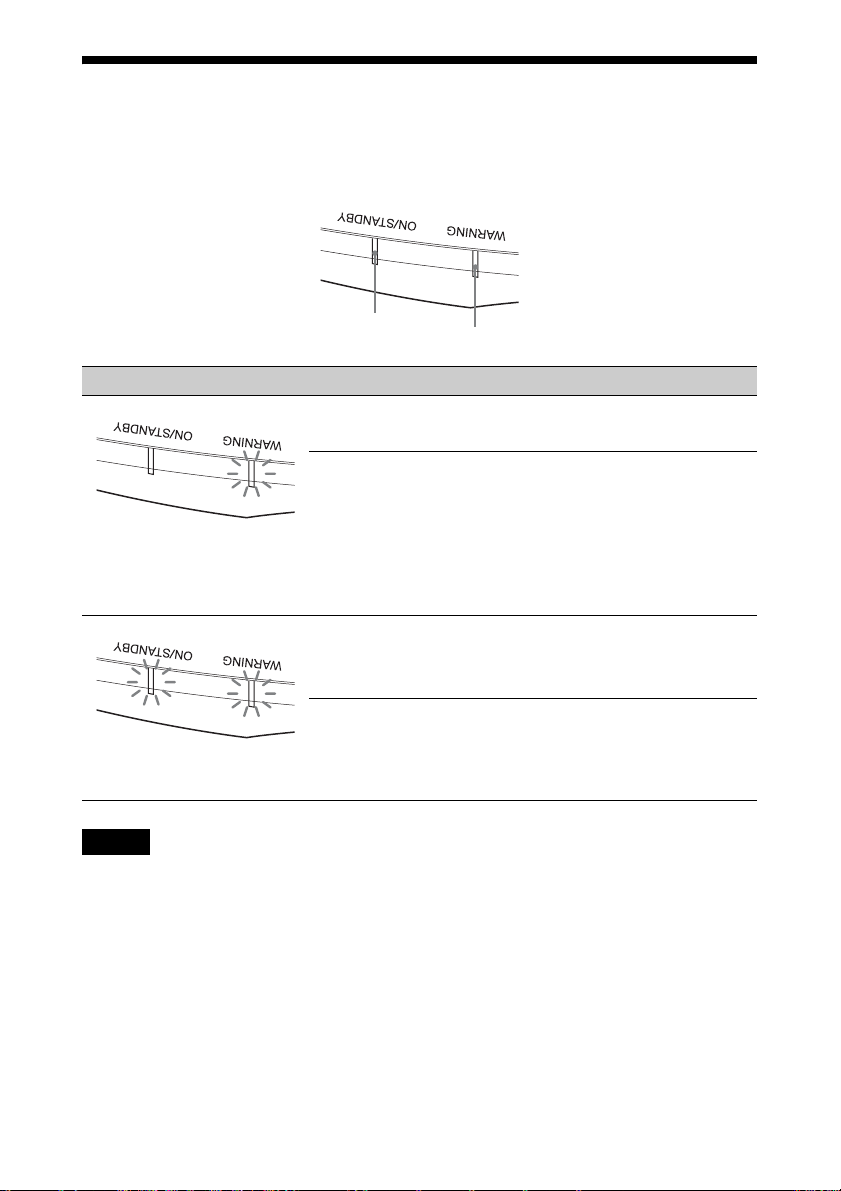
警告ランプの見かた
本機では、本体前面の ON/STANDBY ランプと WARNING ランプの点灯または点
滅で不具合をお知らせします。
ON/STANDBY ランプ
点滅/点灯状態 点滅回数 原因と対処
2 回 光源用ランプカバーをしっかりはめて、ネジ
3 回 ランプが高温になっています。電源を切り、
(赤点滅)
(59 ページ)
2 回 本体内部温度が高温になっています。排気口、
3 回 ファンが故障しています。ソニーの相談窓口
(赤点滅)(赤点滅)
同時に点滅
ご注意
上記以外の警告ランプ点滅ならびに上記対応を行っても解決しない場合は、ソニーの相
談窓口にご相談ください。
WARNING ランプ
をしめてください。(60 ページ)
ランプが冷えてからもう一度電源を入れてく
ださい。
症状が再発する場合は、ランプ消耗が考えら
れます。新しいランプに交換してください。
吸気口がふさがれていないか、標高が高い場
所で使用していないか確認してください。
にご相談ください。
54
Page 55

メッセージ一覧
警告メッセージ
メッセージ 意味と対処 ページ
「セット内部温度が高
いです。1 分後にラン
プオフします。」
「入力信号の周波数が
対応範囲をこえてい
ます!」
「ランプを交換してく
ださい。」
「本機内部の温度が高
くなっていますので、
高地モードを入に切
り替えます。高地で
ご使用の際は、高地
モードは入でお使い
ください。」
「パワーセービングが
設定されています。
1分後に自動的にス
タンバイになりま
す。」
電源を切ってください。 −
排気口、吸気口がふさがっていないか確認してくだ
さい。
入力信号の周波数範囲を超えています。対応範囲内
の信号を入力してください。
光源用ランプの交換時期がきました。光源用ランプ
を交換してください。
光源用ランプ交換後も表示される場合は、光源用ラ
ンプを交換するときの手順を確認してください。
ご注意
画面に表示されるメッセージを消す場合は、リモコ
ンまたはコントロールパネルの任意のボタンを1回
押してください。
排気口、吸気口がふさがっていないか確認してくだ
さい。
高地で使用しているときは、「高地モード」を「入」
にしてください。
ご注意
機内部温度が下がらないと、1 分後に「高地モード」
が「入」に切り替わり、ファンの回転数が上がりま
す。
「パワーセービング」が「スタンバイ」に設定されて
います。
ご注意
入力信号がない場合、1分後に電源がオフし、スタ
ンバイ状態となります。
3、4
3、4
65
59
38
39
55
Page 56

注意メッセージ
メッセージ 意味と対処 ページ
x
選択されている入力端子に何も入力されていません。
接続を確認してください。
「無効キーが押されま
した!」
「セッティングロック
中です。」
正しいボタンで操作してください。
操作を受け付けないボタンを押しました。
「セッティングロック」が「レベル A」または「レベ
ル B」に設定されています。
13
−
42
56
Page 57

保証書とアフター
サービス
保証期間経過後の修理は
修理によって機能が維持できる場合は、
ご要望により有料修理させていただき
ます。
保証書
・ この製品には保証書が添付されてい
ますので、お買い上げの際お受け取
りください。
・ 所定事項の記入および記載内容をお
確かめのうえ、大切に保存してくだ
さい。
アフターサービス
調子が悪いときはまずチェックを
「故障かな?と思ったら」の項を参考に
して、故障かどうかをお調べください。
それでも具合の悪いときは
ソニーの相談窓口にご相談ください
(裏表紙)。
部品の交換について
この商品は修理の際、交換した部品を
再生、再利用する場合があります。そ
の際、交換した部品は回収させていた
だきます。
部品の保有期間について
当社では本取扱説明書に記載している
すべての製品と部品(製品補修用性能
部品を含む)を、製造打ち切り後 8 年
間保有しています。この部品保有期間
を修理可能の期間とさせていただきま
す。ただし、故障の状況その他の事情
により、修理に代えて製品交換をする
場合がありますのでご了承ください。
ご相談になるときは、次のことをお知
らせください。
製品:VPL-VW535
製造番号:本体側面または保証書に記
載されています。
故障の状態:できるだけくわしく
購入年月日:
お買い上げ店
保証期間中の修理は
保証書の記載内容に基づいて修理させ
ていただきます。ただし、本機には消
耗部品が含まれております。保証期間
中でも、長時間使用による消耗部品の
交換は有料になる場合があります。
詳しくは保証書をご覧ください。
57
Page 58

その他
アップデート機能を
利用する
アップデート用のファイルをパソコン
にダウンロードし、USB メモリーに
ファイルをコピーして本機の USB 端子
に差し込むことで、本機のアップデー
トを行うことができます。
ご利用には、お客様ご自身で「USB メ
モリーを用意」していただき、お持ち
のパソコンがインターネットに接続で
き、USB メモリーにアップデートファ
イルを書き込むことが可能な環境が必
要となります。
アップデートファイルはソニーのホー
ムページからダウンロードすることが
できます。
詳細な手順はホームページをご覧くだ
さい。
http://www.sony.jp/video-projector/
ご注意
使用する USB メモリーによっては非対
応の場合があります。詳細は上記ホー
ムページにてご確認ください。
HDR(ハイダイナ
ミックレンジ)につい
て
x.v.Color(エックス
ブ イ・カ ラ ー )につい
て
・x.v.Colorとは、xvYCC 規格に対
応し、従来以上の広色域表現が可能
な機器に付す名称としてソニーが提
案している商標です。
・ xvYCC 規格とは、ビデオ映像信号の
色空間の国際規格のひとつです。現
行の放送などで使われている規格よ
り広い色彩が表現できます。
シミュレーテッド
3D 機能について
・ シミュレーテッド 3D 機能を使うと、
本機は 2D 映像を 3D 表示へ映像変換
を行います。そのため、オリジナル
の映像とは見えかたに差が出ます。
この点にご留意のうえ、シミュレー
テッド 3D 機能をお使いください。
・ 営利目的、または公衆に視聴させる
ことを目的として喫茶店、ホテルな
どにおいて、シミュレーテッド機能
を利用して 2D 映像を 3D 表示に変換
した場合、著作権法上保護されてい
る著作者の権利を害する恐れがあり
ます。
HDR は、従来よりも暗所から明所まで
の表現力が向上した映像表現を示しま
す。
58
Page 59

ランプを交換する
光源用ランプには寿命があります。画
面が暗くなったり色がおかしくなった
場合、または画面に「ランプを交換し
てください。」というメッセージが出た
ときは、光源用ランプが消耗していま
す。新しい光源用ランプ(別売り)と
交換してください。
ちょっと一言
光源用ランプの寿命は設置環境や使用
状況によって変化することがあります。
ランプ点灯直後、数分間以内でのパ
ワーオフを避けることにより、ランプ
をより長く使っていただくことができ
ます。
用意するもの:
・ プロジェクターランプ LMP-H280
(別売り)
・ 標準プラスドライバー
・ 布(傷防止)
・ 天井つりした状態で光源用ランプを
交換するときは、ランプカバーの斜
め下に立ち、ランプドア(内蓋)を
外すときはなるべく傾けないでくだ
さい。万一光源用ランプが破裂して
いる場合に、光源用ランプの破片が
飛び出し、けがの原因となることが
あります。
・ 光源用ランプを取り出すときは、光
源用ランプを水平に持ち上げ、傾け
ないでください。光源用ランプを傾
けて持つと、万一光源用ランプが破
損した場合に、光源用ランプの破片
が飛び出し、けがの原因となること
があります。
ご注意
・ 新しい光源用ランプは、必ず交換用ラ
ンプLMP-H280 をお使いください。そ
れ以外のものをお使いになると、故障
の原因になります。
・ 光源用ランプを交換する前に必ず本機
の電源を切り、電源プラグをコンセン
トから抜いて、ON/STANDBY ランプ
の消灯を確認してください。
・ [/1(オン/スタンバイ)ボタンで電
源を切った直後は光源用ランプが高
温になっており、さわるとやけどの
原因となることがあります。光源用
ランプを充分に冷やすため、光源用
ランプ交換は、本機の電源を切って
から 1 時間以上たってから行ってく
ださい。
・ 交換ランプのガラス面は触らないで
ください。もし汚れが付着した場合
は乾いた柔かい布でふき取ってくだ
さい。
・ 天井つりした状態での光源用ランプ
交換は充分注意してください。
1 本機の電源を切り、電源コードを
コンセントから抜く。
2 床置きの場合は本機や机などに傷
がつかないように布などを敷き、
本機を布の上に置く。
ご注意
本機は不安定な場所には置かないでく
ださい。
3 光源用ランプカバーの図の 部分
を押しながらカバーをずらし
(1)、光源用ランプカバーを開け
る(2)。
59
Page 60
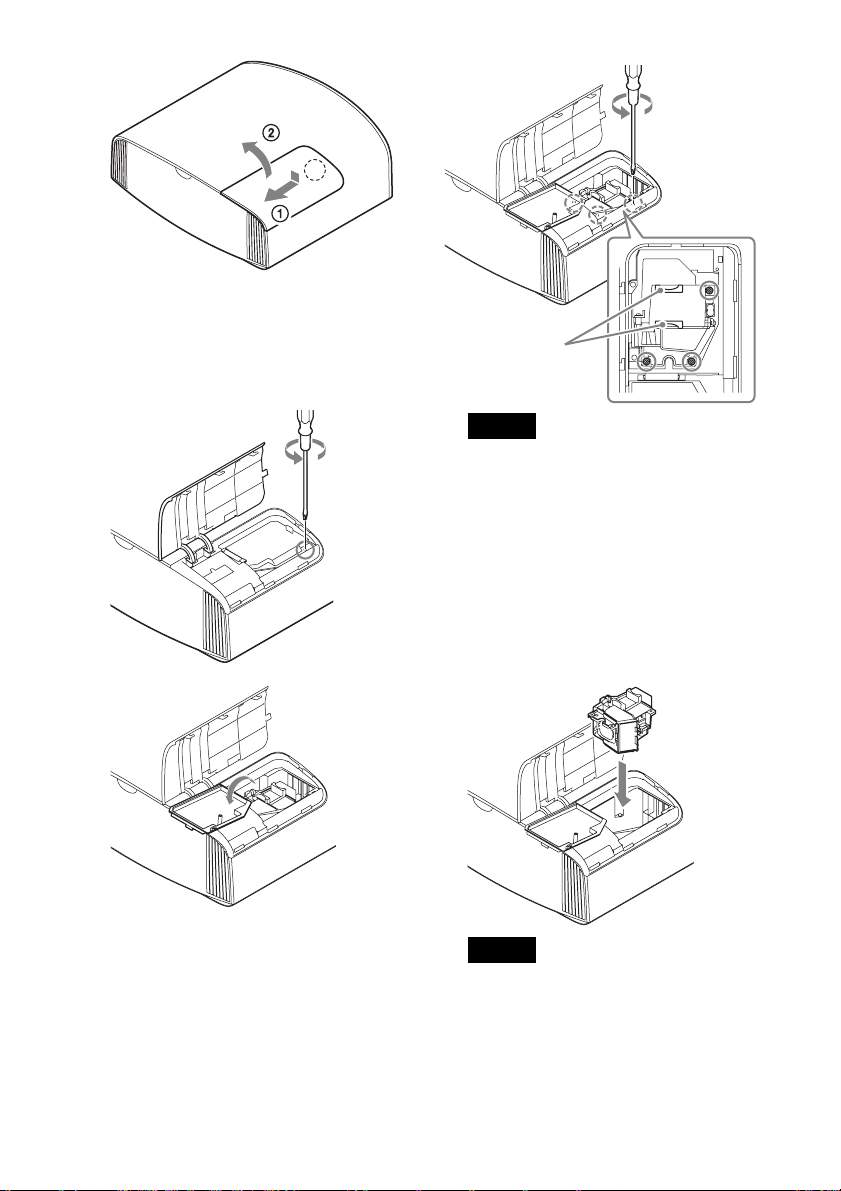
4 ランプドア(内蓋)を固定してい
るネジ(1か所)をプラスドライ
バーでゆるめ、ランプドアを開け
る。
取っ手
ご注意
・ この 3 か所以外のネジをゆるめない
でください。
・ 光源用ランプは取っ手を持って、取
り外し、取り付けを行ってくださ
い。
6 新しい光源用ランプの取っ手を
持って奥まで確実に押し込み、ネ
ジ(3 か所)を締める。
5 光源用ランプを固定しているネジ
(3 か所)をプラスドライバーで
ゆるめ、取っ手を持って光源用ラ
ンプを上に引き出す。
ご注意
光学ブロックには手をふれないでくだ
さい。
7 ランプドア(内蓋)を閉め、ネジ
を締める。
60
Page 61
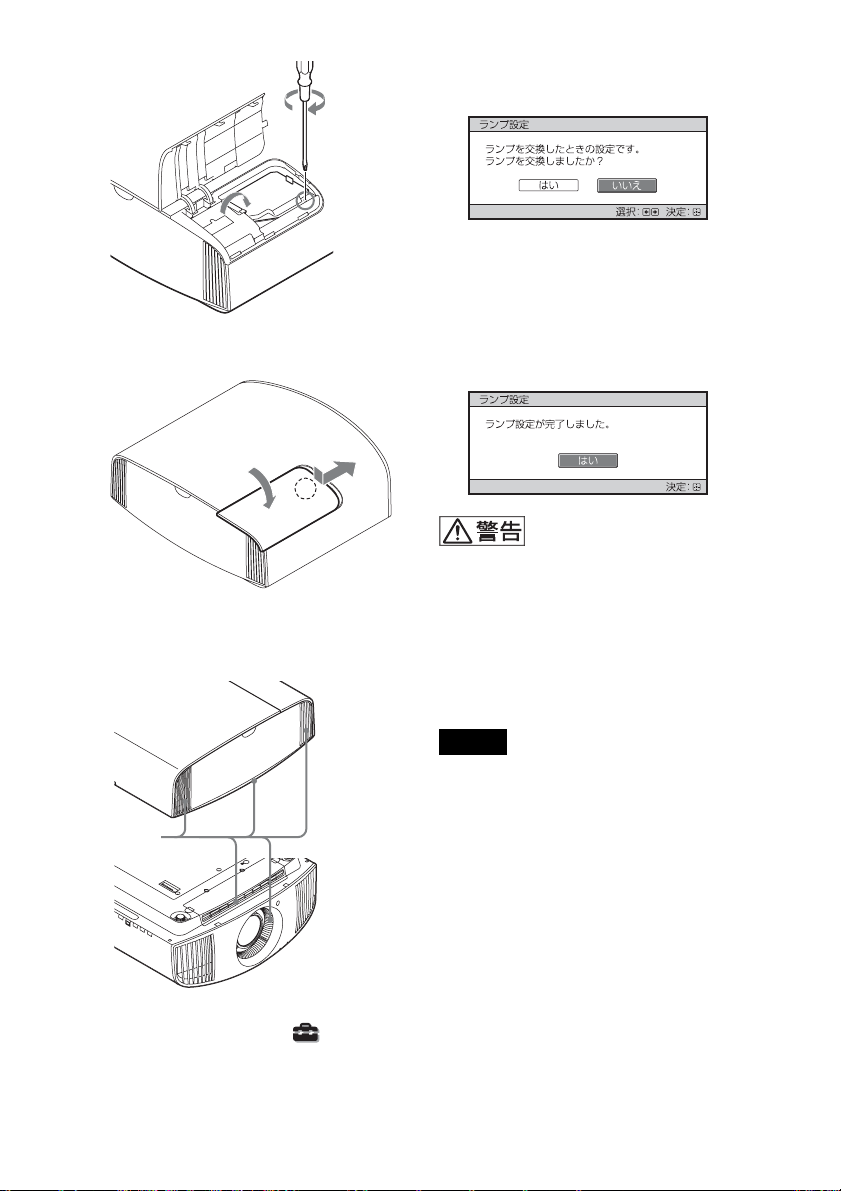
8 光源用ランプカバーを閉める。
9 吸気口に付着したほこりをやわら
かい布でふきとる。
以下のようなメニュー画面が表示さ
れます。
ちょっと一言
「セッティングロック」(42 ページ)
を「レベル B」に設定している場合
は、いったん「切」にします。
11「はい」を選択する。
光源用ランプを外したあとのランプの
収納部に金属類や燃えやすい物などの
異物を入れないでください。火災や感
電の原因となります。また、やけどの
危険がありますので手を入れないでく
ださい。
吸気口
10本機の電源を入れ、「 初期設
定」メニューのランプ設定項目を
選択する。
ご注意
・ 光源用ランプが確実に装着されていな
いと、電源が入りません。
・ 光源用ランプカバーが確実に閉まって
いないと、電源が入りません。
・ 画面に表示されるメッセージを消す場
合は、リモコンまたはコントロールパ
ネルの任意のボタンを 1 回押してくだ
さい。
天井つり状態での不点灯ランプ交換時
のご注意
光源用ランプの破損時に発生した光源
用ランプの破片が飛び、けがの原因と
なることがあります。
61
Page 62
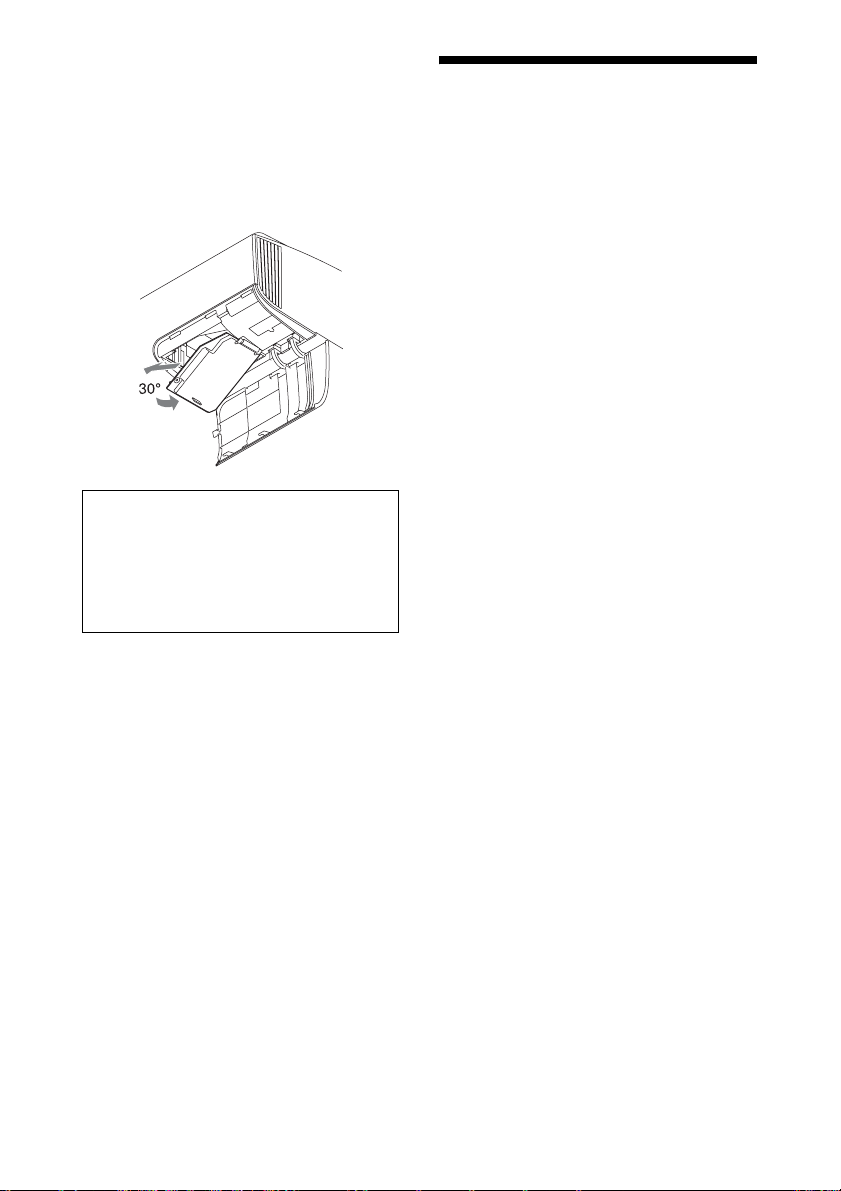
天井つりした状態のときは、ランプド
ア(内蓋)を 30 度ほど開いた状態で少
しランプドア(内蓋)を持ち上げてか
らゆっくりと横にスライドして外しま
す。ランプドア(内蓋)をなるべく傾
けないようにしてください。
お願い
本機の光源用ランプの中には水銀が含
まれています。使用済みの光源用ラン
プは、地域の蛍光管の廃棄のルールに
従って廃棄してください。
お手入れ
外装のお手入れについて
・ 外装の汚れを拭きとるときは、乾い
た柔らかい布で拭きとってください。
外装の汚れがひどいときは、薄い中
性洗剤溶液を少し含ませた布で拭き
とり、乾いた布でカラ拭きしてくだ
さい。
・ アルコールやベンジン、シンナーな
どは使わないでください。表面の仕
上げを傷めたり、表示が消えてしま
うことがあります。
・ 布にゴミが付着したまま強く拭いた
場合、傷が付くことがあります。
・ 殺虫剤のような揮発性のものをかけ
たり、ゴムやビニール製品に長時間
接触させると、変質したり、塗装が
はげたりすることがあります。
62
Page 63

主な仕様
項目 項目説明
投写方式 SXRD パネル、3 原色液晶シャッター投写方式
表示素子 有効表示サイズ 0.74 型(18.8mm)SXRD
有効画素数 26,542,080 画素(8,847,360×3)
投写レンズ 2.06 倍ズームレンズ(電動)
f21.7 〜 44.7mm
F3.0 〜 4.0
光源 高圧水銀ランプ 280W 型
画面サイズ 60 〜 300 型(1,524mm 〜 7,620mm)
対応デジタル信号 480/60p、576/50p、720/60p、720/50p、1080/
60i、1080/50i、1080/60p、1080/50p、1080/24p、
3840×2160/24p、3840×2160/25p、3840×
2160/30p、3840×2160/50p、3840×2160/60p、
4096×2160/24p、4096×2160/25p、4096×
2160/30p、4096×2160/50p、4096×2160/60p
HDMI 入力(2 系統)HDCP 対応 RGB
YP
B/CBPR/CR
その他入出力 TRIGGER
(2 系統)
REMOTE RS-232C:D-sub9 ピン(凹)
LAN RJ45、10BASE-T/100BASE-TX
IRIN ミニジャック
USB DC5V、最大 500mA
標準外形寸法(幅/高さ/奥行き) 495.6mm×195.3mm×463.6mm(突起部含ま
質量 約 14kg
電源 AC100V、4.1A、50/60Hz
消費電力 410W
待機電力 (スタンバイ
モード)
(ネットワーク
スタンバイモー
ド)
使用温度 5 ℃〜 35 ℃
使用湿度 35%〜 85%(結露なきこと)
ミニジャック、DC12V、最大 100mA
ず)
0.3W(リモートスタート「切」時)
1.0W(LAN)(リモートスタート「入」時)
LAN 端子が接続されていない場合は低消費電力
モード(0.5W)になります。
63
Page 64

項目 項目説明
保存温度 − 20 ℃〜+ 60 ℃
保存湿度 10%〜 90%
付属品 クイックリファレンスマニュアルの「付属品を確
かめる」をご覧ください。
別売りアクセサリー プロジェクターランプ:LMP-H280(交換用)
プロジェクターサスペンションサポート:PSSH10
アクティブ 3D メガネ:TDG-BT500A
ご注意
・ 表示している外形寸法、質量は概寸です。
・ 別売りアクセサリーの中には、国・地域によって販売されていないものがあります。
ソニーの相談窓口に確認してください。
・ ここに記載されている別売りアクセサリーは、2016 年 9 月現在のものです。
本機の仕様、外観および別売りアクセサリーは改良のため予告なく変更することが
ありますが、ご了承ください。
64
Page 65

プリセット信号一覧
下記は、本機で投影可能な信号の種類・フォーマットの一覧表です。
これ以外の信号に対しては、正しい投影ができなくなる場合がありますので、ご注
意ください。
プリセット
メモリー
ナンバー
5 480/60p 480/60p
6 576/50p 576/50p
7 1080/60i 1080/60i
8 1080/50i 1080/50i
10 720/60p 720/60p
11 720/50p 720/50p
12 1080/60p 1080/60p
13 1080/50p 1080/50p
14 1080/24p 1080/24p
18 720/60p
(フレームパッキング)
19 720/50p
(フレームパッキング)
20 1080/24p
(フレームパッキング)
26 640 × 480 VESA60 31.469 59.940 H- 負
32 800 × 600 VESA60 37.879 60.317 H- 正
37 1024 × 768 VESA60 48.363 60.004 H- 負
プリセット信号
(解像度)
(倍速 NTSC)
(720×480p)
(倍速 PAL)
(720×576p)
(1920×1080i)
(1920×1080i)
(1280×720p)
(1280×720p)
(1920×1080p)
(1920×1080p)
(1920×1080p)
720/60p
(1280×720p)
720/50p
(1280×720p)
1080/24p
(1920×1080p)
fH
(kHz)
31.470 60.000 −
31.250 50.000 −
33.750 60.000 −
28.130 50.000 −
45.000 60.000 −
37.500 50.000 −
67.500 60.000 −
56.260 50.000 −
26.973 23.976 −
90.000 60.000 −
75.000 50.000 −
53.946 23.976 −
fV(Hz) 同期
V- 負
V- 正
V- 負
65
Page 66

プリセット
メモリー
ナンバー
45 1280 × 960 VESA60 60.000 60.000 H- 正
47 1280 × 1024 VESA60 63.974 60.013 H- 正
50 1400 × 1050 SXGA + 65.317 59.978 H- 負
55 1280 × 768 1280 × 768/60 47.776 59.87 H- 負
71 1920 × 1080/60i
(フレームパッキング)
72 1920 × 1080/50i
(フレームパッキング)
74* 3840 × 2160/60p 3840 × 2160/60p
75* 3840 × 2160/50p 3840 × 2160/50p
76* 4096 × 2160/60p 4096 × 2160/60p
77* 4096 × 2160/50p 4096 × 2160/50p
78 4096 × 2160/30p 4096 × 2160/30p
79 4096 × 2160/25p 4096 × 2160/25p
93 3840 × 2160/24p 3840 × 2160/24p
94 3840 × 2160/25p 3840 × 2160/25p
95 3840 × 2160/30p 3840 × 2160/30p
96 4096 × 2160/24p 4096 × 2160/24p
プリセット信号
(解像度)
1080/60i
(1920 × 1080i)
1080/50i
(1920 × 1080i)
(3840 × 2160)
(3840 × 2160)
(4096 × 2160)
(4096 × 2160)
(4096 × 2160)
(4096 × 2160)
(3840 × 2160)
(3840 × 2160)
(3840 × 2160)
(4096 × 2160)
fH
(kHz)
67.500 60.000 −
56.250 50.000 −
135.000 60.000 −
112.500 50.000 −
135.000 60.000 −
112.500 50.000 −
67.500 30.000 −
56.250 25.000 −
53.946 23.976 −
56.25 25 −
67.4325 29.97 −
54 24 −
fV(Hz) 同期
V- 正
V- 正
V- 正
V- 正
*YCbCr4:2:0 のみ対応
66
Page 67
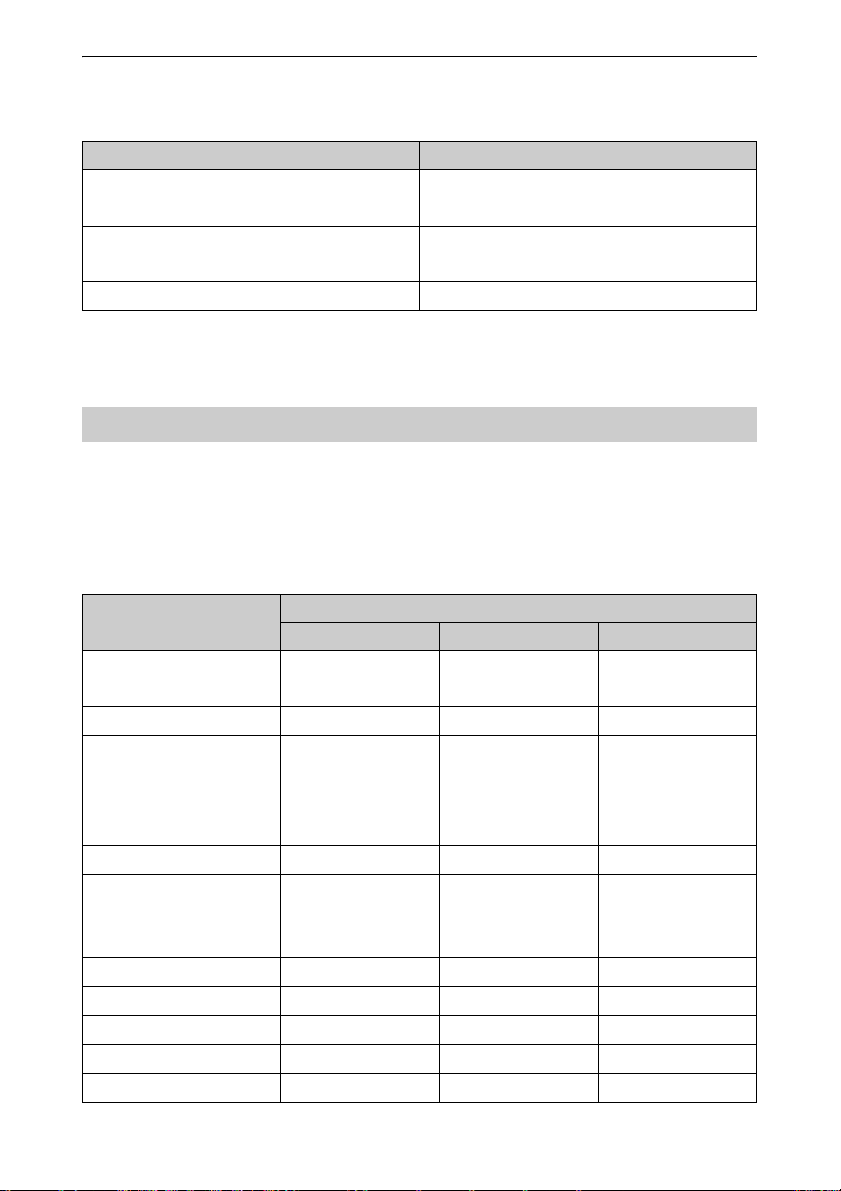
入力信号種別ごとの対応プリセットメモリーナンバー
デジタル信号
信号 プリセットメモリーナンバー
コンポーネント信号(HDMI1、2 端子) 5 〜 8、10 〜 14、18 〜 20、71、72、74 〜
79、93 〜 96
ビデオ GBR 信号(HDMI1、2 端子) 5 〜 8、10 〜 14、18 〜 20、71、72、78、
79、93 〜 96
コンピューター信号(HDMI1、2 端子) 10 〜 13*、26、32、37、45、47、50、55
* デジタル入力のコンピューター信号の中には、コンポーネント信号あるいはビデオ
GBR 信号のプリセットメモリーナンバーとして表示される入力信号があります。
入力信号と調整・設定項目
メニューによっては、入力信号の種類によって調整/設定できる項目が異なりま
す。詳しくは下の表をご覧ください。調整/設定できない項目はメニューに表示さ
れません。
画質設定メニュー
項目
リアリティークリエー
ション
アドバンストアイリス ○ ○ ○
コントラストエンハンサー○(プリセットメ
ランプコントロール ○ ○ ○
Motionflow*
コントラスト ○ ○ ○
明るさ ○○○
色の濃さ ○ ○ ×
色あい ○○×
色温度 ○○○
1
コンポーネント信号 ビデオ GBR 信号 コンピューター信号
○○×
モリーナンバー 74
〜 79、93 〜 96 を
除く)
○(プリセットメ
モリーナンバー 19
を除く)
67
入力信号
○(プリセットメ
モリーナンバー
78、79、93 〜 96
を除く)
○(プリセットメ
モリーナンバー 19
を除く)
×
×
Page 68
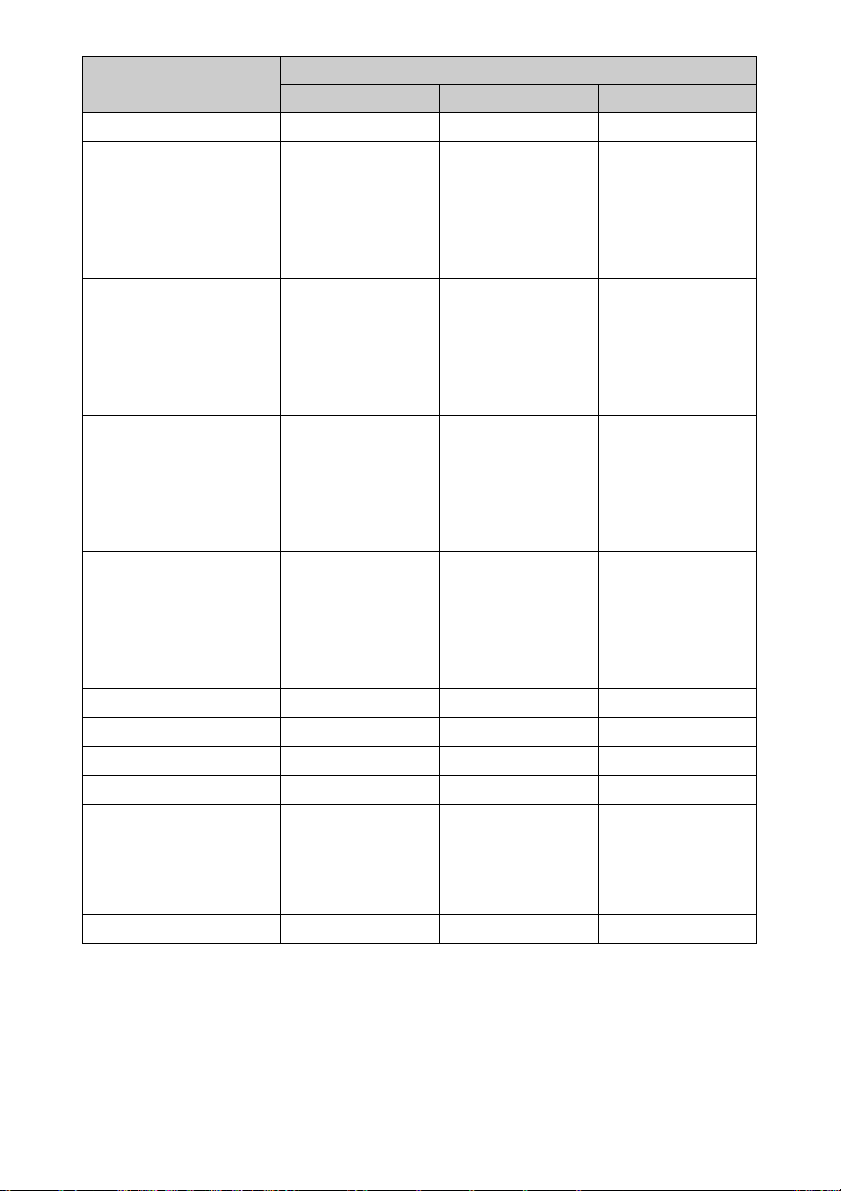
項目
コンポーネント信号 ビデオ GBR 信号 コンピューター信号
入力信号
シャープネス ○ ○ ×
NR ○(プリセットメ
モリーナンバー 18
〜 20、71、72、74
〜 79、93 〜 96 を
除く)
MPEGNR ○(プリセットメ
モリーナンバー 18
〜 20、71、72、74
〜 79、93 〜 96 を
除く)
スムースグラデーション○(プリセットメ
モリーナンバー 18
〜 20、71、72、74
〜 79、93 〜 96 を
除く)
フィルムモード ○(プリセットメ
モリーナンバー 5、
6、10 〜 14、18 〜
20、74 〜 79、93
〜 96 を除く)
○(プリセットメ
モリーナンバー 18
〜 20、71、72、
78、79、93 〜 96
を除く)
○(プリセットメ
モリーナンバー 18
〜 20、71、72、
78、79、93 〜 96
を除く)
○(プリセットメ
モリーナンバー 18
〜 20、71、72、
78、79、93 〜 96
を除く)
○(プリセットメ
モリーナンバー 5、
6、10 〜 14、18 〜
20、78、79、93 〜
96 を除く)
×
×
×
×
ガンマ補正 ○ ○ ○
カラーコレクション ○ ○ ○
クリアホワイト ○ ○ ○
x.v.Color ○ × ×
HDR ○(プリセットメ
モリーナンバー
74、75、93、94、
95 のみ)
○(プリセットメ
モリーナンバー
74、75、93、94、
95 のみ)
×
カラースペース ○ ○ ○
○:調整/設定できる項目
×:調整/設定できない項目
*1:詳細は「モーションフロー」の表を参照してください。(72 ページ)
68
Page 69
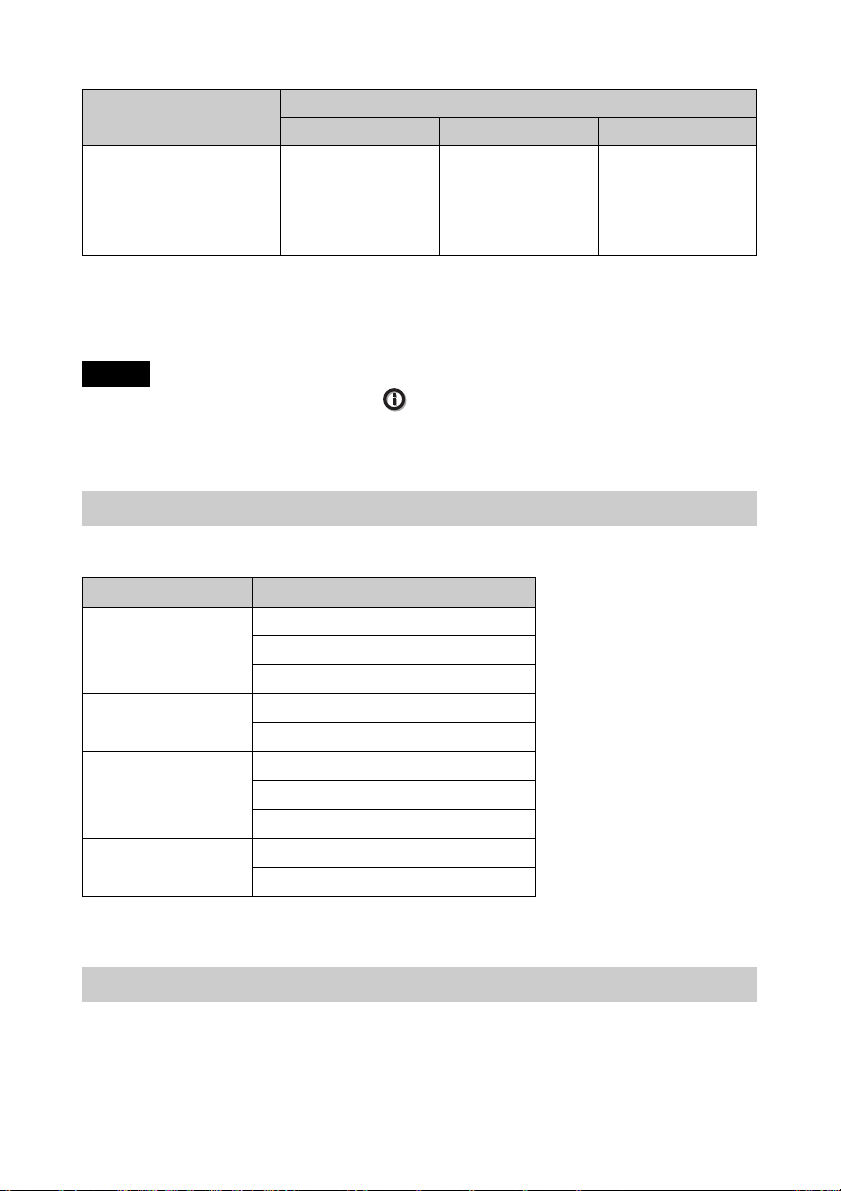
スクリーン設定メニュー
項目
アスペクト *
○:調整/設定できる項目
×:調整/設定できない項目
*1:詳細は「アスペクトモード」の表を参照してください。(71 ページ)
ご注意
HDMI などのケーブルを接続した際、「 情報メニュー」(47 ページ)および「デジタ
ル信号」(67 ページ)にて信号種類を確認して、調整/設定できる項目を確認してくだ
さい。
1
コンポーネント信号 ビデオ GBR 信号 コンピューター信号
○(プリセットメ
モリーナンバー 76
〜 79、96 を除く)
入力信号
○(プリセットメ
モリーナンバー
78、79、96 を除
く)
×
対応 3D 信号一覧
本機は以下の 3D 信号に対応しています。
解像度 3D 信号のフォーマット
720/60p、720/50p 左右分割方式
上下分割方式 *
フレームパッキング *
1080/60i、1080/50i 左右分割方式 *
フレームパッキング
1080/24p 左右分割方式
上下分割方式 *
フレームパッキング *
1080/60p、1080/50p 左右分割方式
上下分割方式
*:HDMI 規格の 3DMandatory フォーマット
3D 信号と調整/設定項目
3D 信号の種類によっては、調整または設定できない項目があります。調整/設定
できない項目は、メニューに表示されません。詳しくは、以下の表をご覧くださ
い。
69
Page 70
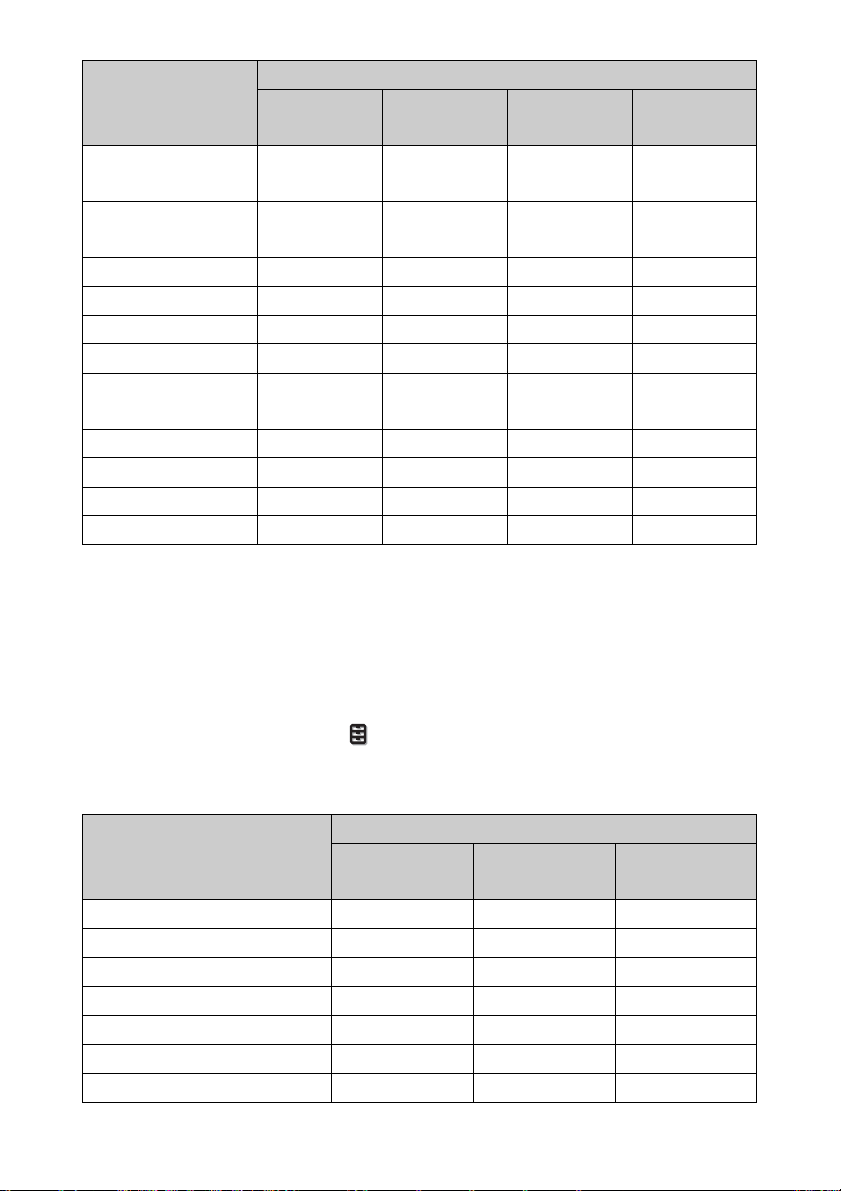
3D 信号
項目
リアリティークリ
720/60p、
720/50p
1080/60i、
1080/50i
1080/24p
1080/60p、
1080/50p
○○○○
エーション
アドバンストアイリ
××××
ス
ランプコントロール ○ ○ ○ ○
Motionflow*
1
○○○○
NR ××××
MPEGNR ××××
スムースグラデー
××××
ション
フィルムモード × ○ × ×
x.v.Color ○ ○ ○ ○
HDR × × × ×
アスペクト *
2
○○○○
○:調整/設定できる項目
×:調整/設定できない項目
*1:720/60p のフレームパッキング/上下分割方式、1080/60p の上下分割方式では選択
できません。
*2:詳細は「アスペクトモード」の表を参照してください。(71 ページ)
2D 映像を 3D で表示する場合、「 機能設定」メニューの「3D フォーマット」の
設定によっては、調整または設定できない項目があります。調整/設定できない項
目はメニューに表示されません。詳しくは、以下の表をご覧ください。
3D フォーマット
項目
上下分割方式 左右分割方式
シミュレーテッ
ド3D
リアリティークリエーション ○ ○ ○
アドバンストアイリス × × ×
ランプコントロール ○ ○ ○
Motionflow*
1
○○○
NR × × ○
MPEGNR × × ○
スムースグラデーション × × ○
70
Page 71
3D フォーマット
項目
フィルムモード *
上下分割方式 左右分割方式
2
×○○
シミュレーテッ
ド3D
x.v.Color ○ ○ ○
HDR × × ×
アスペクト *
3
○○○
○:調整/設定できる項目
×:調整/設定できない項目
*1:720/60p の上下分割方式、1080/60p の上下分割方式では選択できません。
*2:720/60p と 1080/60p の上下分割方式では選択できません。
*3:詳細は「アスペクトモード」の表を参照してください。(71 ページ)
アスペクトモード
入力される信号の解像度や 3D フォーマットによって、選択できない項目がありま
す。詳しくは下の表をご覧ください。選択できない項目は、メニューに表示されま
せん。
2D
対応解像度
プリセットメモ
リーナンバー
(65 ページ)
4096×
2160
76 〜
79、96
3840×
2160
74、75、
93 〜 95
1920×1080
1280×720
7、8、
10 〜 14
720×480
720×576
5、6
26、32、
37、45、
47、50、55
1.85:1 ズーム × × ○ ○ ×
2.35:1 ズーム × ○ ○ ○ ×
ノーマル ○ *
1
○○ ○○*
V ストレッチ × × ○ ○ ×
スクイーズ × × ○ ○ ×
ストレッチ × × × ○ ×
*1:ノーマル固定のためメニューには表示されません。
71
その他
1
Page 72
3D
対応解像度 1920×1080、1280×720
3D フォーマット 左右分割方式 上下分割方式
プリセットメモリーナ
ンバー(65 ページ)
1.85:1ズーム ○○○○
2.35:1ズーム ○○○○
ノーマル ○○○○
Vストレッチ ○○○○
スクイーズ ○○○○
ストレッチ ××××
7、8、
10 〜 14
10 〜 14
フレームパッ
キング
18 〜 20、
71、72
シミュレー
テッド 3D
7、8、
10 〜 14
モーションフロー
入力される信号の解像度や 3D フォーマットによって、選択できない項目がありま
す。詳しくは下の表をご覧ください。選択できない項目は、メニューに表示されま
せん。
2D
1920×1080
対応解像度
プリセットメモリーナンバー
(65 ページ)
インパルス ○ ○ ×
コンビネーション ○ × ×
スムース強 ○ × ×
スムース弱 ○ × ×
TrueCinema ○ × ×
1280×720
720×480
720×576
5〜8、
10 〜 14
3840×2160
4096×2160
74 〜 79、
93 〜 96
その他
26、32、37、
45、47、50、55
72
Page 73
3D
対応解像度 1920×1080、1280×720
3D フォーマット フレームパッキング 上下分割方式
プリセットメモ
リーナンバー
(65 ページ)
インパルス × × × × × × × ×
コンビネーション × × × × × × × ×
スムース強 × × ○ × × ○ ○ ○
スムース弱 × ○ ○ × ○ ○ ○ ○
TrueCinema × × × × × × × ×
18 19
20、71、7210、1211、
13
左右分割方式シミュレー
7、8、
14
10 〜 14
テッド 3D
7、8、
10 〜 14
調整/設定項目の保存条件
各調整/設定項目は、入力端子ごとに個別に保存されます。詳しくは下の表をご覧
ください。
入力ごとの対応プリセットメモリーナンバー
入力 プリセットメモリーナンバー
HDMI1(2D) 5 〜 8、10 〜 14、26、32、37、45、47、50、55、74 〜 79、
HDMI2(2D)
HDMI1(3D) 7、8、10 〜 14、18 〜 20、71、72
HDMI2(3D)
93 〜 96
画質設定メニュー
項目 保存条件
ピクチャープリセット 入力端子ごと
73
Page 74
項目 保存条件
標準に戻す 入力端子、かつピクチャープリセットごと
リアリティークリエーション
アドバンストアイリス
コントラストエンハンサー
ランプコントロール
Motionflow
コントラスト
明るさ
色の濃さ
色あい
色温度
D93 〜 D55
カスタム 1 〜 5
ゲイン R 色温度 D93 〜 D55、カスタム 1 〜 5 ごと
ゲイン G
ゲイン B
バイアス R
バイアス G
バイアス B
シャープネス 入力端子、かつピクチャープリセットごと
NR
MPEGNR
スムースグラデーション
フィルムモード
ガンマ補正
カラーコレクション
クリアホワイト
x.v.Color
HDR
カラースペース
74
Page 75
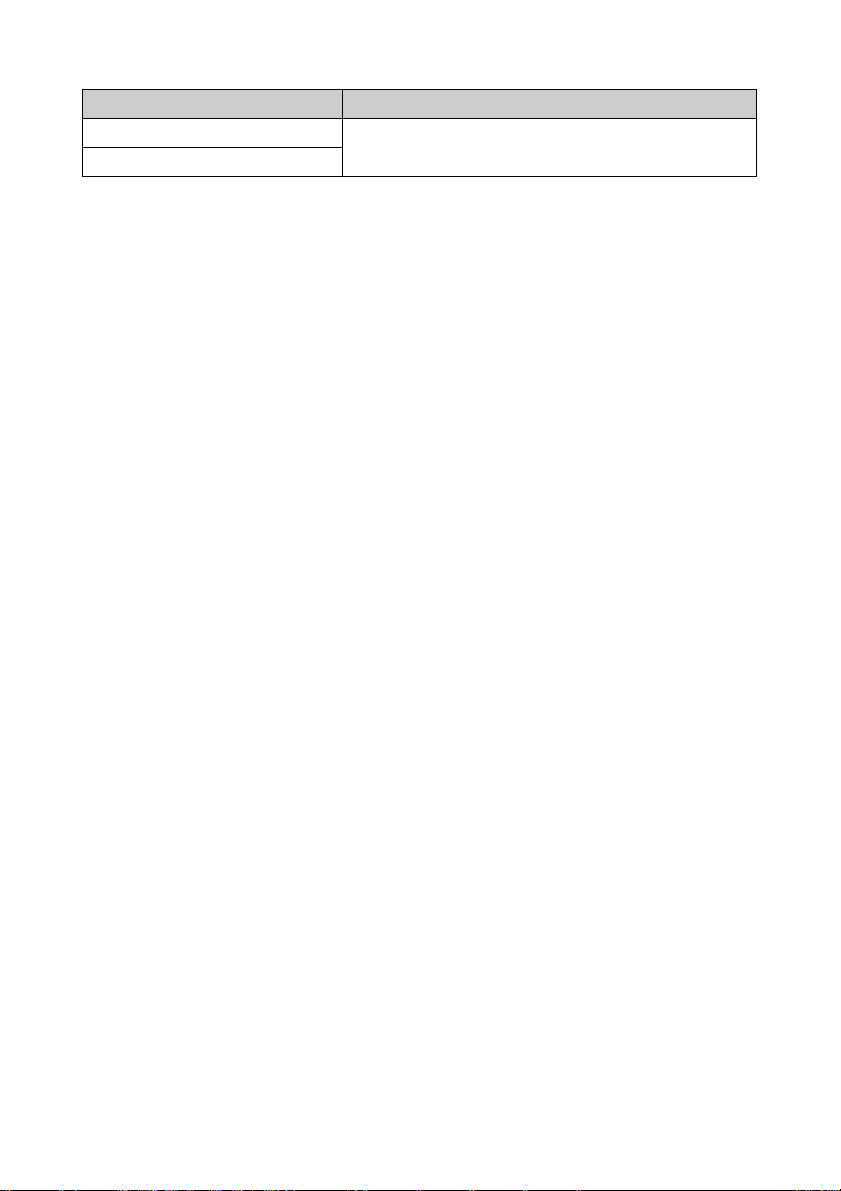
スクリーン設定メニュー
項目 保存条件
アスペクト ピクチャーポジション 1.85:1、2.35:1、カスタム 1 〜
ブランキング
3ごと
75
Page 76
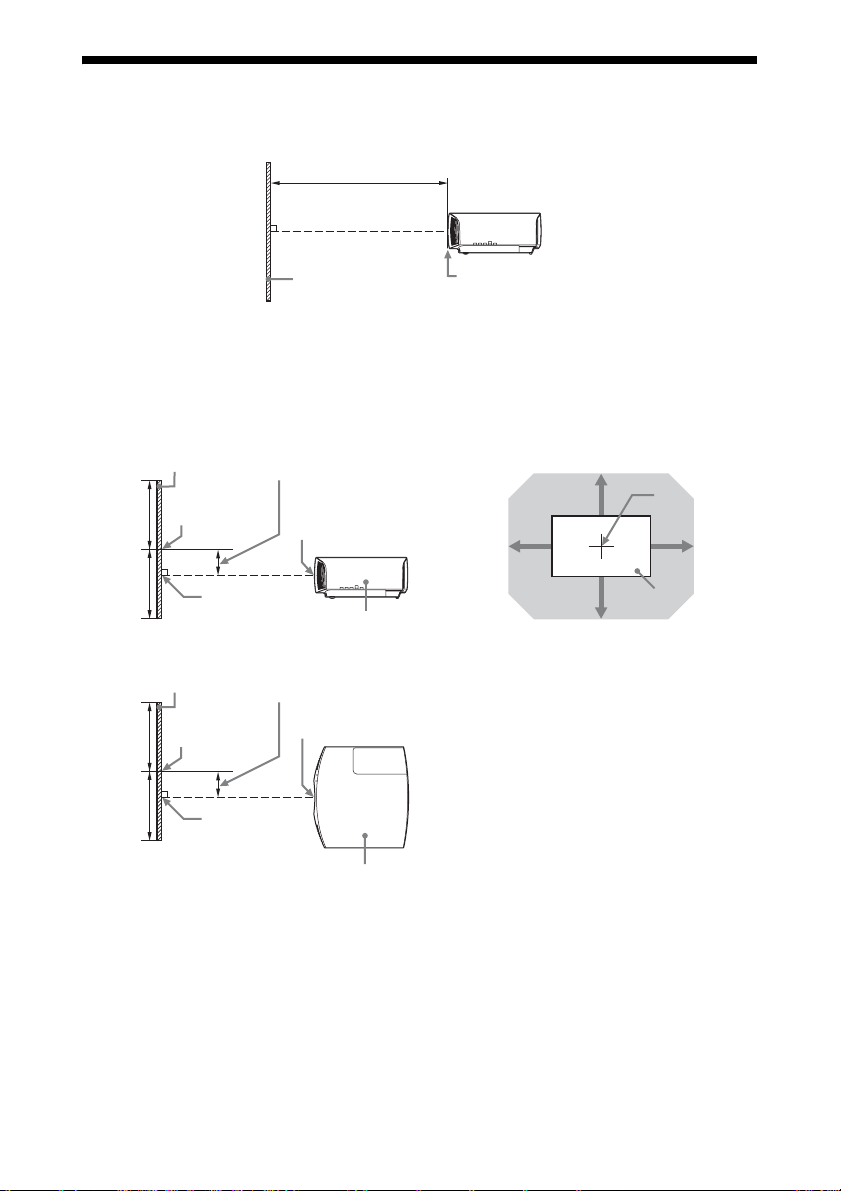
投写距離とレンズシフト量
投写距離は、レンズ前面から投写面までの距離です。
投写距離 L
投写画面
レンズ前面
レンズシフト量は、レンズの中心から投写する面に対して垂直に引いた線と投写す
る面が交差する位置(図中 A)と、投写画面の中心が同じ場合を「0」とした場
合、そこからどれくらい動かせるかを、投写画面の「全高」または「全幅」を
100% とし、その距離をパーセントで表します。
50%
50%
投写画面
投写画面の
中心
A
レンズシフト量
レンズ中心
本体側面
VS +
HS − HS +
VS −
レンズ中心
投写画面
網掛け:移動できる範囲
50%
50%
投写画面
投写画面の
中心
A
レンズシフト量
レンズ中心
本体天面
VS+:垂直レンズシフト量(上)[%]
VS−:垂直レンズシフト量(下)[%]
HS+:水平レンズシフト量(右)[%]
HS−:水平レンズシフト量(左)[%]
76
Page 77
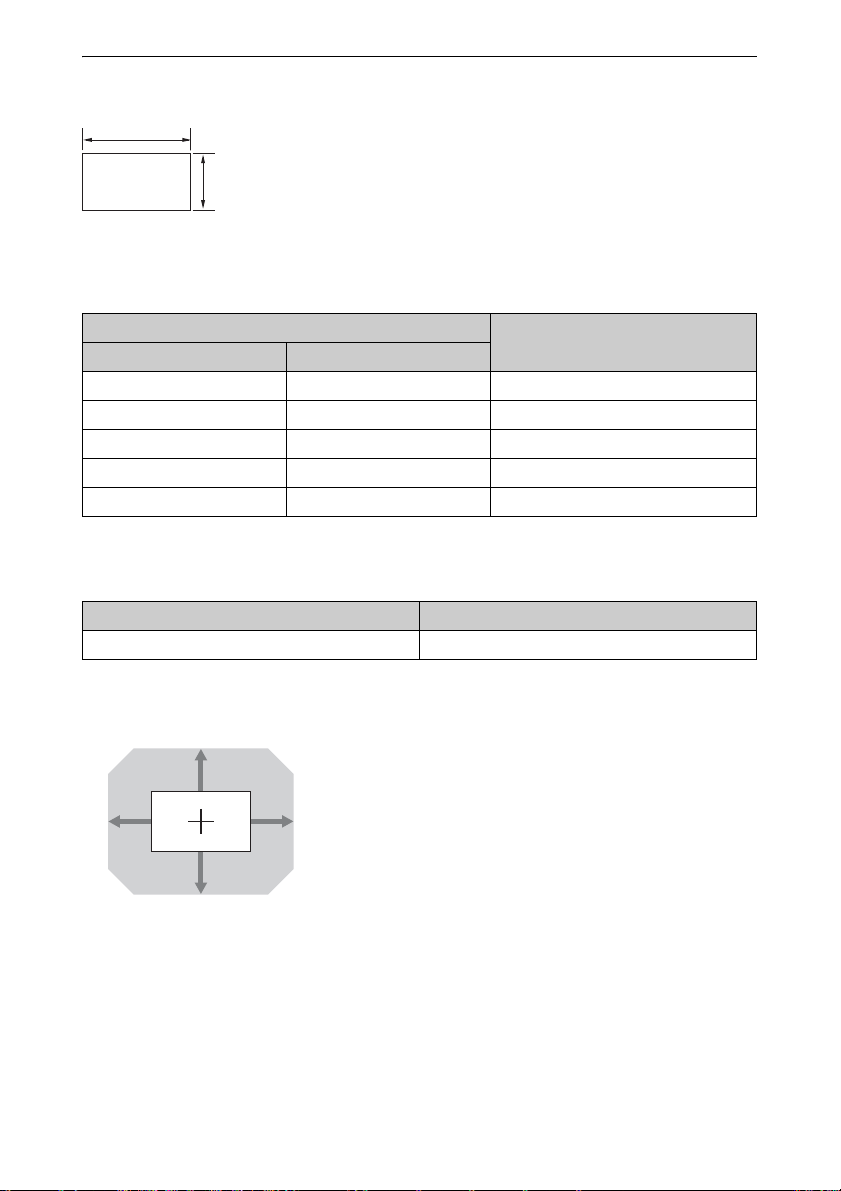
1.90:1(ネイティブフル表示 17:9)投影時
1.90
1
投写距離表
単位:m
画面サイズ
対角 D 横×縦
80 型(2.03) 1.80×0.95 2.32−4.77
100 型(2.54) 2.25×1.18 2.90−5.97
120 型(3.05) 2.70×1.42 3.49−7.18
150 型(3.81) 3.37×1.78 4.38−8.98
200 型(5.08) 4.49×2.37 5.85−11.99
投写距離 L
投写距離計算式
D:投写画面サイズ(対角) 単位:m
投写距離 L(最短) 投写距離 L(最長)
L=0.029432×D − 0.0434 L=0.060197×D − 0.0420
レンズシフト量
85%
VS+=85−2.742×(HS+もしくは HS−)[%]
31%31%
VS−=80−2.742×(HS+もしくは HS−)[%]
HS+=HS−=31−0.365×(VS+もしくは VS−)
[%]
80%
77
Page 78
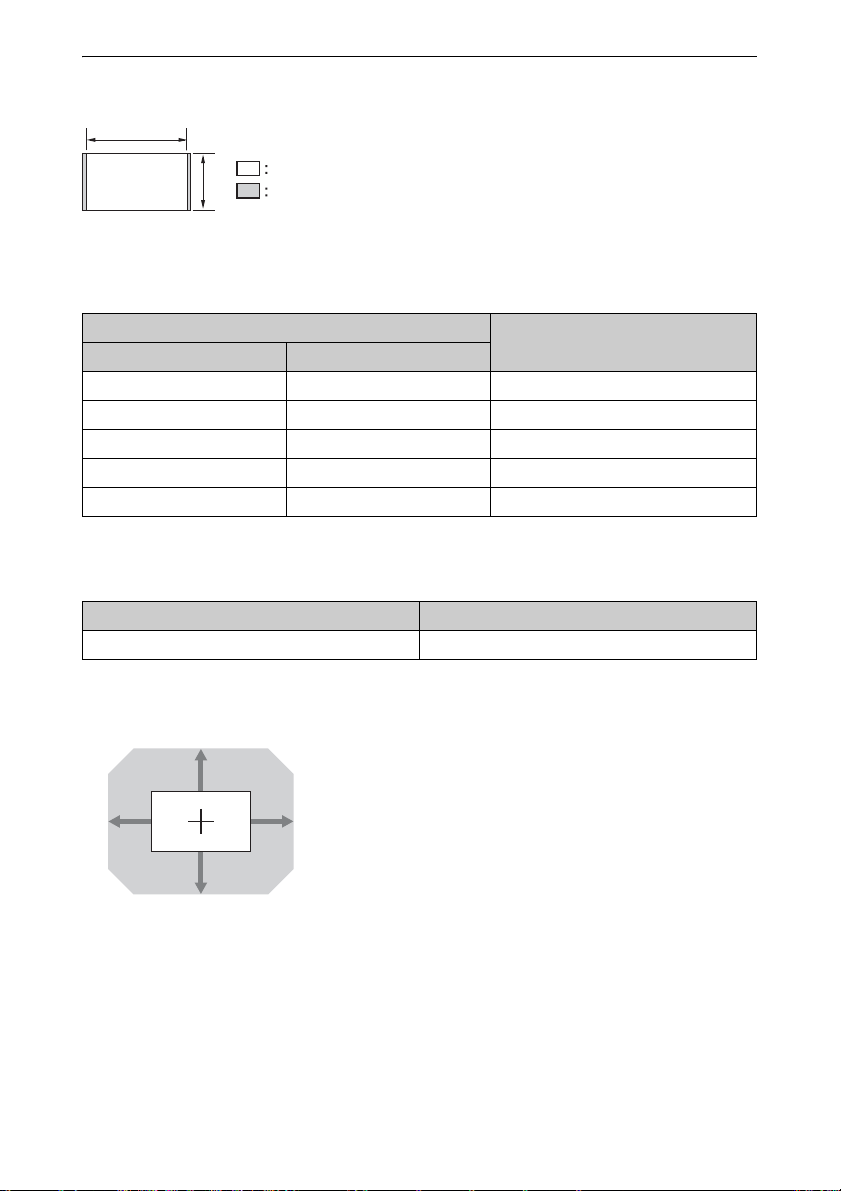
1.78:1(16:9)投影時
1.78
1
映像表示エリア
投影エリア
投写距離表
単位:m
画面サイズ
対角 D 横×縦
投写距離 L
80 型(2.03) 1.77×1.00 2.44−5.01
100 型(2.54) 2.21×1.25 3.05−6.28
120 型(3.05) 2.66×1.49 3.67−7.55
150 型(3.81) 3.32×1.87 4.60−9.44
200 型(5.08) 4.43× 2.49 6.15−12.61
投写距離計算式
D:投写画面サイズ(対角) 単位:m
投写距離 L(最短) 投写距離 L(最長)
L=0.030934×D − 0.0434 L=0.063269×D − 0.0420
レンズシフト量
85%
80%
VS+=85−2.576×(HS+もしくは HS−)[%]
33%33%
VS−=80−2.576×(HS+もしくは HS−)[%]
HS+=HS−=33−0.388×(VS+もしくは VS−)
[%]
78
Page 79
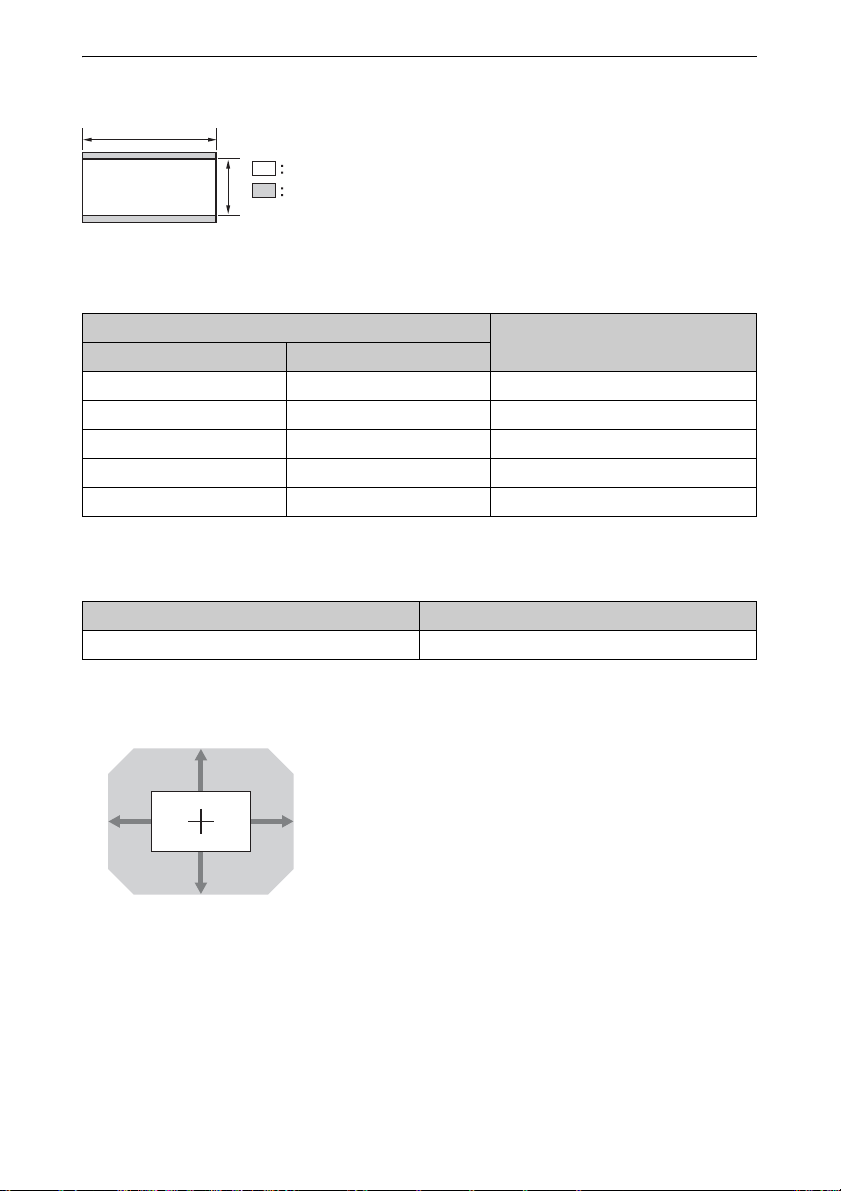
2.35:1 投影時
2.35
投写距離表
1
映像表示エリア
投影エリア
単位:m
画面サイズ
対角 D 横×縦
投写距離 L
80 型(2.03) 1.87×0.80 2.41−4.96
100 型(2.54) 2.34×0.99 3.02−6.22
120 型(3.05) 2.80×1.19 3.64−7.47
150 型(3.81) 3.51×1.49 4.55−9.35
200 型(5.08) 4.67×1.99 6.08−12.48
投写距離計算式
D:投写画面サイズ(対角) 単位:m
投写距離 L(最短) 投写距離 L(最長)
L=0.030617×D − 0.0434 L=0.062621×D − 0.0420
レンズシフト量
105%
VS+=105−3.387×(HS+もしくは HS−)[%]
31%31%
VS−=99−3.387×(HS+もしくは HS−)[%]
HS+=HS−=31−0.295×(VS+もしくは VS−)
[%]
99%
79
Page 80
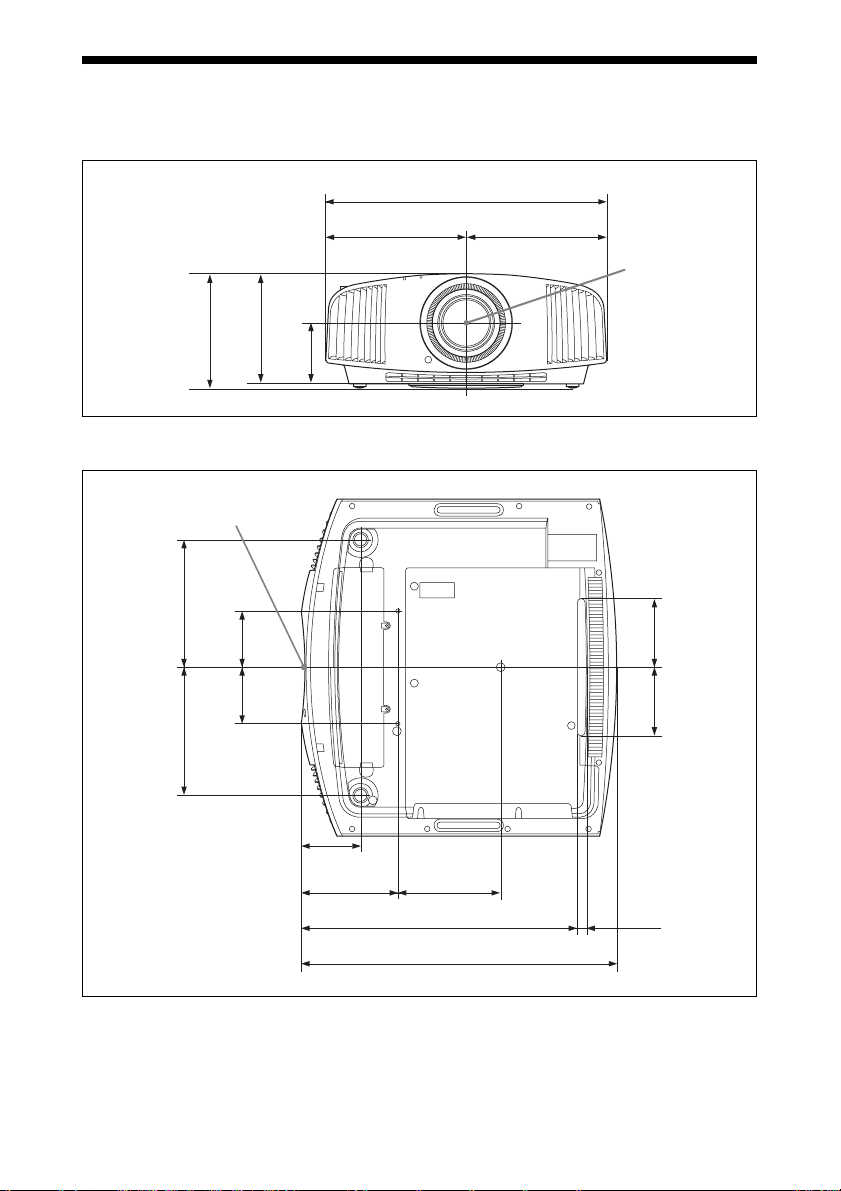
寸法図
本体前面
本体底面
202.3
キャビネット前面
187.9187.9
81.5 81.5
単位:mm
495.6
247.8 247.8
レンズの中心
195.3
108
単位:mm
9898
87.3
142.8 150.6
408.9
80
7.5
463.6
Page 81
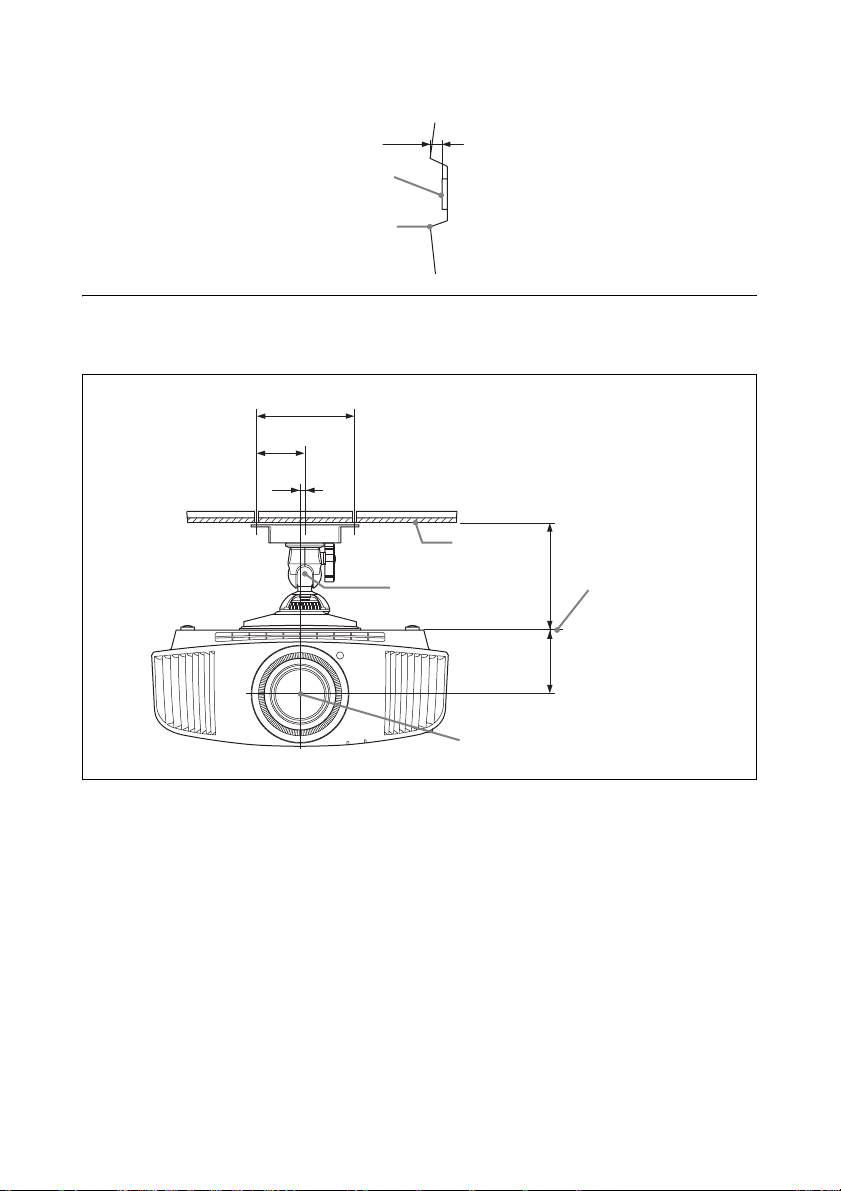
レンズ前面からキャビネット前面までの距離
36.8
レンズ前面
キャビネット前面
プロジェクターサスペンションサポート PSS-H10 を使用した場合
単位:mm
前から見た図
単位:mm
150
75
8
天井
プロジェクター
支柱の中心
175
マウントブラケット
取り付け面
108
レンズ中心
81
Page 82
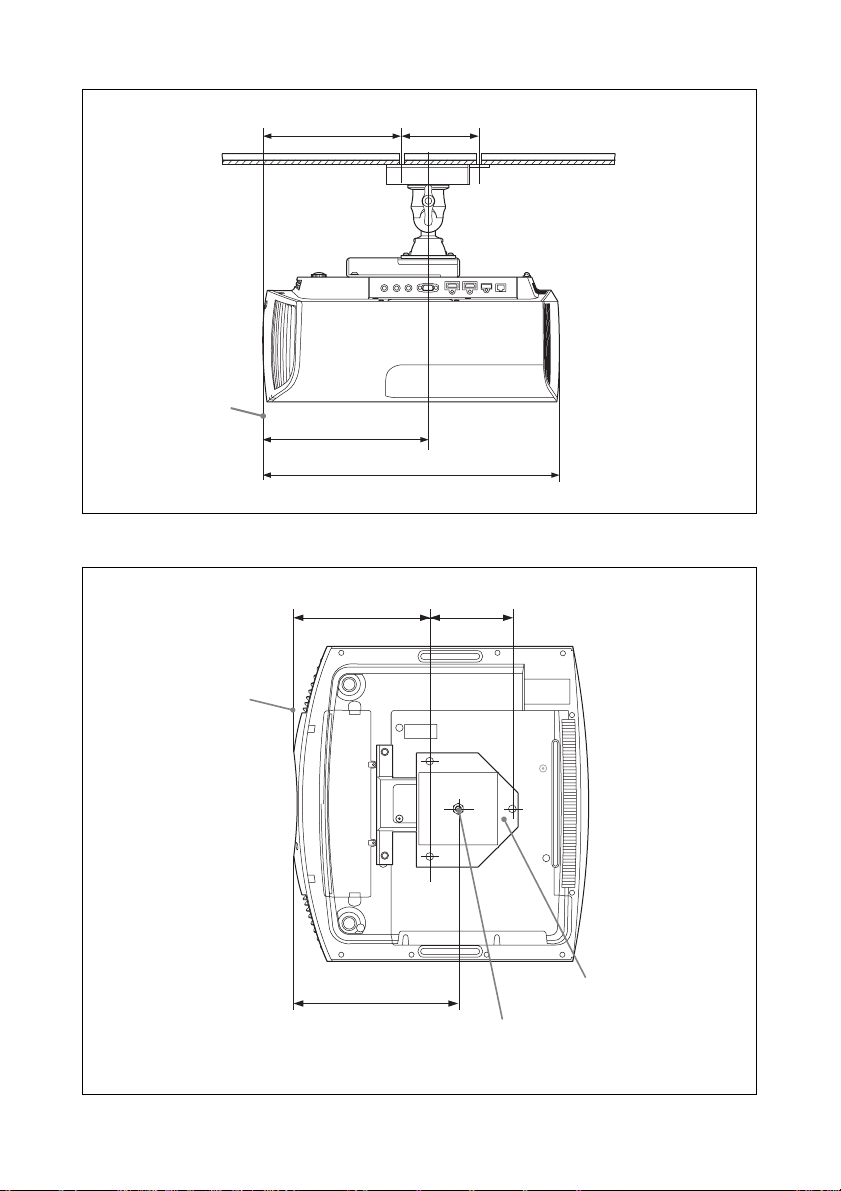
横から見た図
キャビネット前面
単位:mm
213.5 130
258.5
463.6
上から見た図
キャビネット前面
213.4 130
258.5
支柱の中心(支柱は、本体中心とは異なります。)
単位:mm
天井用マウント
ブラケット
82
Page 83

ソフトウェアに関す
るお知らせ
GNUGPL/LGPL適用ソフトウェアに関す
るお知らせ
本製品には、以下の GNUGeneralPublic
License( 以下「GPL」とします )または GNU
LesserGeneralPublicLicense( 以下「LGPL」
とします )の適用を受けるソフトウェアが含ま
れております。
お客様は添付の GPL/LGPL の条件に従いこれ
らのソフトウェアのソースコードの入手、改
変、再配布の権利があることをお知らせいたし
ます。
パッケージリスト
linux-kernel
alsa-lib
busybox
crypto
directfb
dosfstools
e2fsprogs
exceptionmonitor
fuse
gdisk
glib
glibc
iptables
libmicrohttpd
libnuma (in numactl)
procps
pump-autoip
XZ utils
これらのソースコードは、Webでご提供して
おります。
ダウンロードする際には、以下の URLにアク
セスしてください。
http://oss.sony.net/Products/Linux/
なお、ソースコードの中身についてのお問い合
わせはご遠慮ください。
GNU GENERAL PUBLIC LICENSE
Version 2, June 1991
Copyright (C) 1989, 1991 Free Software Foundation,
Inc.
59 Temple Place, Suite 330, Boston, MA 02111-1307
USA
Everyone is permitted to copy and distribute verbatim
copies of this license document, but changing it is not
allowed.
Preamble
The licenses for most software are designed to take
away your freedom to share and change it. By
contrast, the GNU General
Public License is intended to guarantee your freedom
to share and change free software--to make sure the
software is free for all its users. This General Public
License applies to most of the
Free Software Foundation’s software and to any other
program whose authors commit to using it. (Some
other Free Software Foundation software is covered
by the GNU Library General Public License instead.)
You can apply it to your programs, too.
When we speak of free software, we are referring to
freedom, not price.
Our General Public Licenses are designed to make
sure that you have the freedom to distribute copies of
free software (and charge for this service if you wish),
that you receive source code or can get it if you want
it, that you can change the software or use pieces of it
in new free programs; and that you know you can do
these things.
To protect your rights, we need to make restrictions
that forbid anyone to deny you these rights or to ask
you to surrender the rights.
These restrictions translate to certain responsibilities
for you if you distribute copies of the software, or if
you modify it.
For example, if you distribute copies of such a
program, whether gratis or for a fee, you must give
the recipients all the rights that you have. You must
make sure that they, too, receive or can get the source
code. And you must show them these terms so they
know their rights.
We protect your rights with two steps: (1) copyright
the software, and (2) offer you this license which
gives you legal permission to copy, distribute and/or
modify the software.
Also, for each author’s protection and ours, we want
to make certain that everyone understands that there
is no warranty for this free software. If the software is
modified by someone else and passed on, we want its
recipients to know that what they have is not the
original, so that any problems introduced by others
will not reflect on the original authors’ reputations.
Finally, any free program is threatened constantly by
software patents. We wish to avoid the danger that
redistributors of a free program will individually
obtain patent licenses, in effect making the program
proprietary. To prevent this, we have made it clear that
any patent must be licensed for everyone’s free use or
not licensed at all.
The precise terms and conditions for copying,
distribution and modification follow.
TERMS AND CONDITIONS FOR COPYING,
DISTRIBUTION AND MODIFICATION
0. This License applies to any program or other work
which contains a notice placed by the copyright
holder saying it may be distributed under the terms of
this General Public License.
83
Page 84

The “Program”, below, refers to any such program or
work, and a “work based on the Program” means
either the Program or any derivative work under
copyright law: that is to say, a work containing the
Program or a portion of it, either verbatim or with
modifications and/or translated into another
language. (Hereinafter, translation is included
without limitation in the term “modification”.) Each
licensee is addressed as “you”.
Activities other than copying, distribution and
modification are not covered by this License; they are
outside its scope. The act of running the Program is
not restricted, and the output from the Program is
covered only if its contents constitut e a work based on
the Program (independent of having been made by
running the Program). Whether that is true depends
on what the Program does.
1. You may copy and distribute verbatim copies of the
Program’s source code as you receive it, in any
medium, provided that you conspicuously and
appropriately publish on each copy an appropriate
copyright notice and disclaimer of warranty; keep
intact all the notices that refer to this License and to
the absence of any warranty; and give any other
recipients of the Program a copy of this License along
with the Program.
You may charge a fee for the physical act of
transferring a copy, and you may at your option offer
warranty protection in exchange for a fee.
2. You may modify your copy or copies of the
Program or any portion of it, thus forming a work
based on the Program, and copy and distribute such
modifications or work under the terms of Section 1
above, provided that you also meet all of these
conditions:
a) You must cause the modified files to carry
prominent notices stating that you changed the files
and the date of any change.
b) You must cause any work that you distribute or
publish, that in whole or in part contains or is derived
from the Program or any part thereof, to be licensed
as a whole at no charge to all third parties under the
terms of this License.
c) If the modified program normally reads commands
interactively when run, you must cause it, when
started running for such interactive use in the most
ordinary way, to print or display an announcement
including an appropriat e copyright notice and a notice
that there is no warranty (or else, saying that you
provide a warranty) and that users may redistribute
the program under these conditions, and telling the
user how to view a copy of this License. (Exception:
if the Program itself is interactive but does not
normally print such an announcement, your work
based on the Program is not required to print an
announcement.)
These requirements apply to the modified work as a
whole. If identifiable sections of that work are not
derived from the Program, and can be reasonably
considered independent and separate works in
themselves, then this License, and its terms, do not
apply to those sections when you distribute them as
separate works. But when you distribute the same
sections as part of a whole which is a work based on
the Program, the distribution of the whole must be on
the terms of this License, whose permi ssions for other
licensees extend to the entire whole, and thus to each
and every part regardless of who wrote it.
Thus, it is not the intent of this section to claim rights
or contest your rights to work written entirely by you;
rather, the intent is to exercise the right to control the
distribution of derivative or collective works based on
the Program.
In addition, mere aggregation of another work not
based on the Program with the Program (or with a
work based on the Program) on a volume of a storage
or distribution medium does not bring the other work
under the scope of this License.
3. You may copy and distribute the Program (or a
work based on it, under Section 2) in object code or
executable form under the terms of Sections 1 and 2
above provided that you also do one of the following:
a) Accompany it with the complete corresponding
machine-readable source code, which must be
distributed under the terms of Sections 1 and 2 above
on a medium customarily used for software
interchange; or,
b) Accompany it with a written offer, valid for at least
three years, to give any third party, for a charge no
more than your cost of physically performing source
distribution, a complete mach ine-readable copy of the
corresponding source code, to be distributed under
the terms of Sections 1 and 2 above on a medium
customarily used for software interchange; or,
c) Accompany it with the information you received as
to the offer to distribute corresponding source code.
(This alternative is allowed only for noncommercial
distribution and only if you received the program in
object code or executable form with such an offer, in
accord with Subsection b above.)
The source code for a work means the preferred form
of the work for making modifications to it. For an
executable work, complete source code means all the
source code for all modules it contains, plus any
associated interface definition files, plus the scripts
used to control compilation and installation of the
executable. However, as a special exception, the
source code distributed need not in clude anything that
is normally distributed (in either source or binary
form) with the major components (compiler, kernel,
and so on) of the operating system on which the
executable runs, unless that component itself
accompanies the executable. If distribution of
executable or object code is made by offering access
to copy from a designated place, then offering
equivalent access to copy the source code from the
same place counts as distribution of the source code,
even though third parties are not compelled to copy
the source along with the object code.
4. You may not copy, modify, sublicense, or distribute
the Program except as expressly provided under this
License. Any attempt otherwise to copy, modify,
sublicense or distribute the Program is void, and will
automatically terminate your rights under this
84
Page 85

License. However, parties who have received copies,
or rights, from you under this License will not have
their licenses terminated so long as such parties
remain in full compliance.
5. You are not required to accept this License, since
you have not signed it. However, nothing else grants
you permission to modify or distribute the Prog ram or
its derivative works. These actions are prohibited by
law if you do not accept this License.
Therefore, by modifying or distributing the Program
(or any work based on the Program), you indicate
your acceptance of this License to do so, and all its
terms and conditions for copying, distributing or
modifying the Program or works based on it.
6. Each time you redistribute the Program (or any
work based on the Program), the recipient
automatically receives a license from the original
licensor to copy, distribute or modify the Program
subject to these terms and conditions. You may not
impose any further restrictions on the recipients’
exercise of the rights granted herein. You are not
responsible for enforcing compliance by third parties
to this License.
7. If, as a consequence of a court judgment or
allegation of patent infringement or for any other
reason (not limited to patent issues), conditions are
imposed on you (whether by court order, agreement
or otherwise) that contradict the conditions of this
License, they do not excuse you from the conditions
of this License. If you cannot distribute so as to
satisfy simultaneously your obligations under this
License and any other pertinent obligations, then as a
consequence you may not distribute the Program at
all. For example, if a patent license would not permit
royalty-free redistribution of the Program by all those
who receive copies directly or indirectly through you,
then the only way you could satisfy both it and this
License would be to refrain entirely from distribution
of the Program.
If any portion of this section is held invalid or
unenforceable under any particular circumstance, the
balance of the section is intended to apply and the
section as a whole is intended to apply in other
circumstances.
It is not the purpose of this section to induce you to
infringe any patents or other property right claims or
to contest validity of any such claims; this section has
the sole purpose of protecting the integrity of the free
software distribution system, which is implemented
by public license practices.
Many people have made generous contributions to the
wide range of software distributed through that
system in reliance on consistent application of that
system; it is up to the author/donor to decide if he or
she is willing to distribute software through any other
system and a licensee cannot impose that choice.
This section is intended to make thoroughly clear
what is believed to be a consequence of the rest of this
License.
8. If the distribution and/or use of the Program is
restricted in certain countries either by patents or by
copyrighted interfaces, the original copyright holder
who places the Program under this License may add
an explicit geographical distribution limitation
excluding those countries, so that distribution is
permitted only in or among countries not thus
excluded. In such case, this License incorporates the
limitation as if written in the body of this License.
9. The Free Software Foundation may publish revised
and/or new versions of the General Public License
from time to time.
Such new versions will be similar in spirit to the
present version, but may differ in detail to address
new problems or concerns.
Each version is given a distinguishing version
number. If the Program specifies a version number of
this License which applies to it and “any later
version”, you have the option of following the terms
and conditions either of that version or of any later
version published by the Free Software Foundation. I f
the Program does not specify a version number of this
License, you may choose any version ever published
by the Free Software Foundation.
10. If you wish to incorporate parts of the Program
into other free programs whose distribution
conditions are different, write to the author to ask for
permission. For software which is copyrighted by the
Free Software Foundation, write to the Free Software
Foundation; we sometimes make exceptions for this.
Our decision will be guided by the two goals of
preserving the free status of all derivatives of our free
software and of promoting the sharing and reuse of
software generally.
NO WARRANTY
11. BECAUSE THE PROGRAM IS LICENSED
FREE OF CHARGE, THERE IS NO WARRANTY
FOR THE PROGRAM, TO THE EXTENT
PERMITTED BY APPLICABLE LAW. EXCEPT
WHEN OTHERWISE STATED IN WRITING THE
COPYRIGHT HOLDERS AND/OR OTHER
PARTIES PROVIDE THE PROGRAM “AS IS”
WITHOUT WARRANTY OF ANY KIND, EITHER
EXPRESSED OR IMPLIED, INCLUDING, BUT
NOT LIMITED TO, THE IMPLIED WARRANTIE S
OF MERCHANTABILITY AND FITNESS FOR A
PARTICULAR PURPOSE. THE ENTIRE RISK AS
TO THE QUALITY AND PERFORMANCE OF
THE PROGRAM IS WITH YOU. SHOULD THE
PROGRAM PROVE DEFECTIVE, YOU ASSUME
THE COST OF ALL NECESSARY SERVICING,
REPAIR OR CORRECTION.
12. IN NO EVENT UNLESS REQUIRED BY
APPLICABLE LAW OR AGREED TO IN
WRITING WILL ANY COPYRIGHT HOLDER,
OR ANY OTHER PARTY WHO MAY MODIFY
AND/OR REDISTRIBUTE THE PROGRAM AS
PERMITTED ABOVE, BE LIABLE TO YOU FOR
DAMAGES, INCLUDING ANY GENERAL,
SPECIAL, INCIDENTAL OR CONSEQUENTIAL
DAMAGES ARISING OUT OF THE USE OR
INABILITY TO USE THE PROGRAM
(INCLUDING BUT NOT LIMITED TO LOSS OF
DATA OR DATA BEING RENDERED
INACCURATE OR LOSSES SUSTAINED BY YOU
85
Page 86

OR THIRD PARTIES OR A FAILURE OF THE
PROGRAM TO OPERATE WITH ANY OTHER
PROGRAMS), EVEN IF SUCH HOLDER OR
OTHER PARTY HAS BEEN ADVISED OF THE
POSSIBILITY OF SUCH DAMAGES.
END OF TERMS AND CONDITIONS
How to Apply These Terms to Your New
Programs
If you develop a new program, and you want it to be
of the greatest possible use to the public, the best way
to achieve this is to make it free software which
everyone can redistribute and change under these
terms.
To do so, attach the following notices to the program.
It is safest to attach them to the start of each source
file to most effectively convey the exclusion of
warranty; and each file should have at least the
“copyright” line and a pointer to where the full notice
is found.
<one line to give the program’s name and a brief idea
of what it does.>
Copyright (C) <year> <name of author>
This program is free software; you can redistribute it
and/or modify it under the terms of the GNU General
Public License as published by the Free Software
Foundation; either version 2 of the License, or (at
your option) any later version.
This program is distributed in the hope that it will be
useful, but WITHOUT ANY WARRANTY; without
even the implied warranty of MERCHANTABILITY
or FITNESS FOR A PARTICULAR PURPOSE. See
the GNU General Public License for more details.
You should have received a copy of the GNU General
Public License along with this program; if not, write
to the Free Software Foundation, Inc., 59 Temple
Place, Suite 330, Boston, MA 02111-1307 USA
Also add information on how to contact you by
electronic and paper mail.
If the program is interactive, make it output a short
notice like this when it starts in an interactive mode:
Gnomovision version 69, Copyright (C) year name of
author
Gnomovision comes with ABSOLUTELY NO
WARRANTY; for details type `show w’.
This is free software, and you are welcome to
redistribute it under certain conditions; type `show c’
for details.
The hypothetical commands `show w’ and `show c’
should show the appropriate parts of the General
Public License. Of course, the commands you use
may be called something other than `show w’ and
`show c’; they could even be mouse-clicks or menu
items--whatever suits your program.
You should also get your employer (if you work as a
programmer) or your school, if any, to sign a
“copyright disclaimer” for the program, if necessary.
Here is a sample;
alter the names:
Yoyodyne, Inc., hereby disclaims all copyright
interest in the program `Gnomovision’ (which makes
passes at compilers) written by James Hacker.
<signature of Ty Coon>, 1 April 1989
Ty Coon, President of Vice
This General Public License does not permit
incorporating your program into proprietary
programs. If your program is a subroutine library, you
may consider it more useful to permit linking
proprietary applications with the library. If this is
what you want to do, use the GNU Library General
Public License instead of this License.
GNU LESSER GENERAL PUBLIC
LICENSE
Version 2.1, February 1999
Copyright (C) 1991, 1999 Free Software Foundation,
Inc.
59 Temple Place, Suite 330, Boston, MA 02111-1307
USA
Everyone is permitted to copy and distribute verbatim
copies of this license document, but changing it is not
allowed.
[This is the first released version of the Lesser GPL.
It also counts as the successor of the GNU Library
Public License, version 2, hence the version number
2.1.]
Preamble
The licenses for most software are designed to take
away your freedom to share and change it. By
contrast, the GNU General Public Licenses are
intended to guarantee your freedom to share and
change free software--to make sure the software is
free for all its users.
This license, the Lesser General Public License,
applies to some specially designated software
packages--typically libraries--of the Free Software
Foundation and other authors who decide to use it.
You can use it too, but we suggest you first think
carefully about whether this license or the ordinary
General Public License is the better strategy to use in
any particular case, based on the explanations below.
When we speak of free software, we are referring to
freedom of use, not price. Our General Public
Licenses are designed to make sure that you have the
freedom to distribute copies of free software (and
charge for this service if you wish); that you receive
source code or can get it if you want it; that you can
change the software and use pieces of it in new free
programs; and that you are informed that you can do
these things.
To protect your rights, we need to make restrictions
that forbid distributors to deny you these rights or to
ask you to surrender these rights. These restrictions
translate to certain responsibilities for you if you
distribute copies of the library or if you modify it.
For example, if you distribute copies of the library,
whether gratis or for a fee, you must give the
recipients all the rights that we gave you. You must
make sure that they, too, receive or can get the source
code. If you link other code with the library, you must
provide complete object files to the recipients, so that
they can relink them with the library after making
changes to the library and recompiling it. And you
must show them these terms so they know their rights.
86
Page 87

We protect your rights with a two-step metho d: (1) we
copyright the library, and (2) we offer you this
license, which gives you legal permission to copy,
distribute and/or modify the library.
To protect each distributor, we want to make it very
clear that there is no warranty for the free library.
Also, if the library is modified by someone else and
passed on, the recipients should know that what they
have is not the original version, so that the original
author’s reputation will not be affected by problems
that might be introduced by others.
Finally, software patents pose a constant threat to the
existence of any free program. We wish to make sure
that a company cannot effectively restrict the users of
a free program by obtaining a restrictive license from
a patent holder.
Therefore, we insist that any patent license obtained
for a version of the library must be consistent with the
full freedom of use specified in this license.
Most GNU software, including some libraries, is
covered by the ordinary GNU General Public
License. This license, the GNU Lesser General
Public License, applies to certain designated libraries,
and is quite different from the ordinary General
Public License. We use this license for certain
libraries in order to permit linking those libraries into
non-free programs.
When a program is linked with a library, whether
statically or using a shared library, the combination of
the two is legally speaking a combined work, a
derivative of the original library.
The ordinary General Public License therefore
permits such linking only if the entire combination
fits its criteria of freedom. The Lesser General Public
License permits more lax criteria for linking other
code with the library.
We call this license the “Lesser” General Public
License because it does Less to protect the user’s
freedom than the ordinary General Public License. It
also provides other free software developers Less of
an advantage over competing non-free programs.
These disadvantages are the reason we use the
ordinary General Public License for many libraries.
However, the Lesser license provides advantages in
certain special circumstances.
For example, on rare occasions, there may be a
special need to encourage the widest possible use of a
certain library, so that it becomes a de-facto standard.
To achieve this, non-free programs must be allowed
to use the library. A more frequent case is that a free
library does the same job as widely used non-free
libraries. In this case, there is little to gain by limiting
the free library to free software only, so we use the
Lesser General Public License.
In other cases, permission to use a particular library
in non-free programs enables a greater number of
people to use a large body of free software. For
example, permission to use the GNU C Library in
non-free programs enables many more people to use
the whole GNU operating system, as well as its
variant, the GNU/Linux operating system.
Although the Lesser General Public License is Less
protective of the users’ freedom, it does ensure that
the user of a program that is linked with the Library
has the freedom and the wherewithal to run that
program using a modified version of the Library.
The precise terms and conditions for copying,
distribution and modification follow. Pay close
attention to the difference between a “work based on
the library” and a “work that uses the library”. The
former contains code derived from the library,
whereas the latter must be combined with the library
in order to run.
TERMS AND CONDITIONS FOR COPYING,
DISTRIBUTION AND MODIFICATION
0. This License Agreement applies to any software
library or other program which contains a notice
placed by the copyright holder or other authorized
party saying it may be distributed under the terms of
this Lesser General Public License (also called “this
License”). Each licensee is addressed as “you”.
A “library” means a collection of software functions
and/or data prepared so as to be conveniently linked
with application programs (which use some of those
functions and data) to form executables.
The “Library”, below, refers to any such software
library or work which has been distributed under
these terms. A “work based on the Library” means
either the Library or any derivative work under
copyright law: that is to say, a work containing the
Library or a portion of it, either verbatim or with
modifications and/or translat ed straightforwardly into
another language.
(Hereinafter, translation is included without
limitation in the
term “modification”.)
“Source code” for a work means t he preferred form of
the work for making modifications to it. For a library,
complete source code means all the source code for
all modules it contains, plus any associated interface
definition files, plus the scripts used to control
compilation and installation of the library.
Activities other than copying, distribution and
modification are not covered by this License; they are
outside its scope. The act of running a program using
the Library is not restricted, and output from such a
program is covered only if its contents constitute a
work based on the Library (independent of the use of
the Library in a tool for writing it). Whether that is
true depends on what the Library does and what the
program that uses the Library does.
1. You may copy and distribute verbatim copies of the
Library’s complete source code as you receive it, in
any medium, provided that you conspicuously and
appropriately publish on each copy an appropriate
copyright notice and disclaimer of warranty; keep
intact all the notices that refer to this License and to
the absence of any warranty; and distribute a copy of
this License along with the Library.
You may charge a fee for the physical act of
transferring a copy, and you may at your option offer
warranty protection in exchange for a fee.
87
Page 88

2. You may modify your copy or copies of the Library
or any portion of it, thus forming a work based on the
Library, and copy and distribute such modifications
or work under the terms of Section 1 above, provided
that you also meet all of these conditions:
a) The modified work must itself be a software
library.
b) You must cause the files modified to carry
prominent notices stating that you changed the files
and the date of any change.
c) You must cause the whole of the work to be
licensed at no charge to all third parties under the
terms of this License.
d) If a facility in the modified Library refers to a
function or a table of data to be supplied by an
application program that uses the facility, other than
as an argument passed when the facility is invoked,
then you must make a good faith effort to ensure that,
in the event an application does not supply such
function or table, the facility still operates, and
performs
whatever part of its purpose remains meaningful.
(For example, a function in a library to compute
square roots has a purpose that is entirely welldefined independent of the application. Therefore,
Subsection 2d requires that any application-supplied
function or table used by this function must be
optional: if the application does not supply it, the
square root function must still compute square roots.)
These requirements apply to the modified work as a
whole. If identifiable sections of that work are not
derived from the Library, and can be reasonably
considered independent and separate works in
themselves, then this License, and its terms, do not
apply to those sections when you distribute them as
separate works. But when you distribute the same
sections as part of a whole which is a work based on
the Library, the distribution of the whole must be on
the terms of this License, whose permissions for other
licensees extend to the entire whole, and thus to each
and every part regardless of who wrote it.
Thus, it is not the intent of this section to claim rights
or contest your rights to work written entirely by you;
rather, the intent is to exercise the right to control the
distribution of derivative or collective works based on
the Library.
In addition, mere aggregation of another work not
based on the Library with the Library (or with a work
based on the Library) on a volume of a storage or
distribution medium does not bring the other work
under the scope of this License.
3. You may opt to apply the terms of the ordinary
GNU General Public License instead of this License
to a given copy of the Library. To do this, you must
alter all the notices that refer to this License, so that
they refer to the ordinary GNU General Public
License, version 2, instead of to this License. (If a
newer version than version 2 of the ordinary GNU
General Public License has appeared, then you can
specify that version instead if you wish.) Do no t make
any other change in these notices.
Once this change is made in a given copy, it is
irreversible for that copy, so the ordinary GNU
General Public License applies to all subsequent
copies and derivative works made from that copy.
This option is useful when you wish to copy part of
the code of the Library into a program that is not a
library.
4. You may copy and distribute the Library (or a
portion or derivative of it, under Section 2) in object
code or executable form under the terms of Sections
1 and 2 above provided that you accompany it with
the complete corresponding machine-readable source
code, which must be distributed under the terms of
Sections 1 and 2 above on a medium customarily used
for software interchange.
If distribution of object code is made by offering
access to copy from a designated place, then offering
equivalent access to copy the source code from the
same place satisfies the requirement to distribute the
source code, even though third parties are not
compelled to copy the source along with the object
code.
5. A program that contains no derivative of any
portion of the Library, but is designed to work with
the Library by being compiled or linked with it, is
called a “work that uses the Library”. Such a work, in
isolation, is not a derivative work of the Library, and
therefore falls outside the scope of this License.
However, linking a “work that uses the Library” with
the Library creates an executable that is a derivative
of the Library (because it contains portions of the
Library), rather than a “work that uses the library”.
The executable is therefore covered by this License.
Section 6 states terms for distribution of such
executables.
When a “work that uses the Library” uses material
from a header file that is part of th e Library, the ob ject
code for the work may be a derivative work of the
Library even though the source code is not. Whether
this is true is especially significant if the work can be
linked without the Library, or if the work is itself a
library. The threshold for this to be true is not
precisely defined by law.
If such an object file uses only numerical parameters,
data structure layouts and accessors, and small
macros and small inline functions (ten lines or less in
length), then the use of the object file is unrestricted,
regardless of whether it is legally a derivative work.
(Executables containing this object code plus
portions of the Library will still fall under Section 6.)
Otherwise, if the work is a derivative of the Library,
you may distribute the object code for the work under
the terms of Section 6. Any executables containing
that work also fall under Section 6, whether or not
they are linked directly with the Library itself.
6. As an exception to the Sections above, you may
also combine or link a “work that uses the Library”
with the Library to produce a work containing
portions of the Library, and distribute that work under
terms of your choice, provided that the terms permit
modification of the work for the customer’s own use
88
Page 89

and reverse engineering for debugging such
modifications.
Yo u must give prominent notice with each copy of the
work that the Library is used in it and that the Library
and its use are covered by this License. You must
supply a copy of this License.
If the work during execution displays copyright
notices, you must include the copyright notice for the
Library among them, as well as a reference directing
the user to the copy of this License. Also, you must do
one of these things:
a) Accompany the work with the complete
corresponding machine-readable source code for the
Library including whatever changes were used in the
work (which must be distributed under Sections 1 and
2 above); and, if the work is an executable linked with
the Library, with the complete machine-readable
“work that uses the Library”, as object code and/or
source code, so that the user can modify the Library
and then relink to produce a modified executable
containing the modified Library. (It is understood that
the user who changes the contents of definitions files
in the Library will not necessarily be able to
recompile the application to use the modified
definitions.)
b) Use a suitable shared library mechanism for
linking with the Library. A suitable mechanism is one
that (1) uses at run time a copy of the library already
present on the user’s computer system, rather than
copying library functions into the executable, and (2)
will operate properly with a modified version of the
library, if the user installs one, as long as the modified
version is interface-compatible with the version that
the work was made with.
c) Accompany the work with a written offer, valid for
at least three years, to give the same user the material s
specified in Subsection 6a, above, for a charge no
more than the cost of performing this distribution.
d) If distribution of the work is made by offering
access to copy from a designated place, offer
equivalent access to copy the above specified
materials from the same place.
e) Verify that the user has already received a copy of
these materials or that you have already sent this user
a copy.
For an executable, the required form of the “work that
uses the Library” must include any data and utility
programs needed for reproducing the executable from
it. However, as a special exception, the materials to be
distributed need not include anything that is normally
distributed (in either source or binary form) with the
major components (compiler, kernel, and so on) of
the operating system on which the executable runs,
unless that component itself accompanies the
executable.
It may happen that this requirement contradicts the
license restrictions of other proprietary libraries that
do not normally accompany the operating system.
Such a contradiction me ans you cannot use both them
and the Library together in an executable that you
distribute.
7. You may place library facilities that are a work
based on the Library side-by-side in a single library
together with other library facilities not covered by
this License, and distribute such a combined library,
provided that the separate distribution of the work
based on the Library and of the other library facilities
is otherwise permitted, an d provided that you do these
two things:
a) Accompany the combined library with a copy of
the same work based on the Library, uncombined
with any other library facilities. This must be
distributed under the terms of the Sections above.
b) Give prominent notice with the combined library
of the fact that part of it is a work based on the
Library, and explaining where to find the
accompanying uncombined form of the same work.
8. You may not copy, modify, sublicense, link with, or
distribute the Library except as expressly provided
under this License.
Any attempt otherwise to copy, modify, sublicense,
link with, or distribute the Library is void, and will
automatically terminate your rights under this
License. However, parties who have received copies,
or rights, from you under this License will not have
their licenses terminated so long as such parties
remain in full compliance.
9. You are not required to accept this License, since
you have not signed it. However, nothing else grants
you permission to modify or distribute the Library or
its derivative works. These actions are prohibited by
law if you do not accept this License.
Therefore, by modifying or distributing the Library
(or any work based on the Library), you indicate your
acceptance of this License to do so, and all its terms
and conditions for copying, distributing or modifying
the Library or works based on it.
10. Each time you redistribute the Library (or any
work based on the Library), the recipient
automatically receives a license from the original
licensor to copy, distribute, link with or modify the
Library subject to these terms and conditions. You
may not impose any further restrictions on the
recipients’ exercise of the rights granted herein. You
are not responsible
for enforcing compliance by third parties with this
License.
11. If, as a consequence of a court judgment or
allegation of patent infringement or for any other
reason (not limited to patent issues), conditions are
imposed on you (whether by court order, agreement
or otherwise) that contradict the conditions of this
License, they do not excuse you from the conditions
of this License. If you cannot distribute so as to
satisfy simultaneously your obligations under this
License and any other pertinent obligations, then as a
consequence you may not distribute the Library at all.
For example, if a patent license would not permit
royalty-free redistribution of the Library by all those
who receive copies directly or indirectly through you,
then the only way you could satisfy both it and this
License would be to refrain entirely from distribution
of the Library.
89
Page 90

If any portion of this section is held invalid or
unenforceable under any particular circumstance, the
balance of the section is intended to apply, and the
section as a whole is intended to apply in other
circumstances.
It is not the purpose of this section to induce you to
infringe any patents or other property right claims or
to contest validity of any such claims; this section has
the sole purpose of protecting the integrity of the free
software distribution system which is implemented
by public license practices.
Many people have made generous contributions to the
wide range of software distributed through that
system in reliance on consistent application of that
system; it is up to the author/donor to decide if he or
she is willing to distribute software through any other
system and a licensee cannot impose that choice.
This section is intended to make thoroughly clear
what is believed to be a consequence of the rest of this
License.
12. If the distribution and/or use of the Library is
restricted in certain countries either by patents or by
copyrighted interfaces, the original copyright holder
who places the Library under this License may add an
explicit geographical distribution limitation
excluding those countries, so that distribution is
permitted only in or among countries not thus
excluded. In such case, this License incorporates the
limitation as if written in the body of this License.
13. The Free Software Foundation may publish
revised and/or new versions of the Lesser General
Public License from time to time. Such new versions
will be similar in spirit to the present version, but may
differ in detail to address new problems or concerns.
Each version is given a distinguishing version
number. If the Library specifies a version number of
this License which applies to it and “any later
version”, you have the option of following the terms
and conditions either of that version or of any later
version published by the Free Software Foundati on. If
the Library does not specify a license versi on number,
you may choose any version ever published by the
Free Software Foundation.
14. If you wish to incorporate parts of the Library into
other free programs whose distribution conditions are
incompatible with these, write to the author to ask for
permission. For software which is copyrighted by the
Free Software Foundation, write to the Free Software
Foundation; we sometimes make exceptions for this.
Our decision will be guided by the two goals of
preserving the free status of all derivatives of our free
software and of promoting the sharing and reuse of
software generally.
NO WARRANTY
15. BECAUSE THE LIBRARY IS LICENSED
FREE OF CHARGE, THERE IS NO WARRANTY
FOR THE LIBRARY, TO THE EXTENT
PERMITTED BY APPLICABLE LAW. EXCEPT
WHEN OTHERWISE STATED IN WRITING THE
COPYRIGHT HOLDERS AND/OR OTHER
PARTIES PROVIDE THE LIBRARY “AS IS”
WITHOUT WARRANTY OF ANY KIND, EITHER
EXPRESSED OR IMPLIED, INCLUDING, BUT
NOT LIMITED TO, THE IMPLIED WARRANTIE S
OF MERCHANTABILITY AND FITNESS FOR A
PARTICULAR PURPOSE. THE ENTIRE RISK AS
TO THE QUALITY AND PERFORMANCE OF
THE LIBRARY IS WITH YOU. SHOULD THE
LIBRARY PROVE DEFECTIVE, YOU ASSUME
THE COST OF ALL NECESSARY SERVICING,
REPAIR OR CORRECTION.
16. IN NO EVENT UNLESS REQUIRED BY
APPLICABLE LAW OR AGREED TO IN
WRITING WILL ANY COPYRIGHT HOLDER,
OR ANY OTHER PARTY WHO MAY MODIFY
AND/OR REDISTRIBUTE THE LIBRARY AS
PERMITTED ABOVE, BE LIABLE TO YOU FOR
DAMAGES, INCLUDING ANY GENERAL,
SPECIAL, INCIDENTAL OR CONSEQUENTIAL
DAMAGES ARISING OUT OF THE USE OR
INABILITY TO USE THE LIBRARY
(INCLUDING BUT NOT LIMITED TO LOSS OF
DATA OR DATA BEING RENDERED
INACCURATE OR LOSSES SUSTAINED BY YOU
OR THIRD PARTIES OR A FAILURE OF THE
LIBRARY TO OPERATE WITH ANY OTHER
SOFTWARE), EVEN IF SUCH HOLDER OR
OTHER PARTY HAS BEEN ADVISED OF THE
POSSIBILITY OF SUCH DAMAGES.
END OF TERMS AND CONDITIONS
How to Apply These Terms to Your New
Libraries
If you develop a new library, and you want it to be of
the greatest possible us e to the public, we recommend
making it free software that everyone can redistribute
and change. You can do so by permitting
redistribution under these terms (or, alternatively,
under the terms of the ordinary General Public
License).
To apply these terms, attach the following notices to
the library. It is safest to attach them to the start of
each source file to most effectively convey the
exclusion of warranty; and each file should have at
least the “copyright” line and a pointer to where the
full notice is found.
<one line to give the library’s name and a brief idea of
what it does.>
Copyright (C) <year> <name of author>
This library is free software; you can redistribute it
and/or modify it under the terms of the GNU Lesser
General Public License as published by the Free
Software Foundation; either version 2.1 of the
License, or (at your option) any later version.
This library is distributed in the hope that it will be
useful, but WITHOUT ANY WARRANTY; without
even the implied warranty of MERCHANTABILITY
or FITNESS FOR A PARTICULAR PURPOSE. See
the GNU Lesser General Public License for more
details.
You should have received a copy of the GNU Lesser
General Public License along with this library; if not,
write to the Free Software Foundation, Inc., 59
90
Page 91

Temple Place, Suite 330, Boston, MA 02111-1307
USA
Also add information on how to contact you by
electronic and paper mail.
You should also get your employer (if you work as a
programmer) or your school, if any, to sign a
“copyright disclaimer” for the library, if necessary.
Here is a sample; alter the names:
Yoyodyne, Inc., hereby disclaims all copyright
interest in the library `Frob’ (a library for tweaking
knobs) written by James Random Hacker.
<signature of Ty Coon>, 1 April 1990
Ty Coon, President of Vice
That’s all there is to it!
BSD に関するお知らせ
Copyright (c) 1994-2004 The NetBSD Foundation,
Inc. All rights reserved.
Redistribution and use in source and binary forms,
with or without modification, are permitted provided
that the following conditions are met:
1. Redistributions of source code must retain the
above copyright notice, this list of conditions and the
following disclaimer.
2. Redistributions in binary form must reproduce the
above copyright notice, this list of conditions and the
following disclaimer in the documentation and/or
other materials provided with the distribution.
3. All advertising materials mentioning features or
use of this software must display the following
acknowledgement: This product includes software
developed by the NetBSD Foundation, Inc. and its
contributors.
4. Neither the name of The NetBSD Foundation nor
the names of its contributors may be used to endorse
or promote products derived from this software
without specific prior written permission.
THIS SOFTWARE IS PROVIDED BY THE
REGENTS AND CONTRIBUTORS “AS IS” AND
ANY EXPRESS OR IMPLIED WARRANTIES,
INCLUDING, BUT NOT LIMITED TO, THE
IMPLIED WARRANTIES OF
MERCHANTABILITY AND FITNESS FOR A
PARTICULAR PURPOSE ARE DISCLAIMED. IN
NO EVENT SHALL THE REGENTS OR
CONTRIBUTORS BE LIABLE FOR ANY
DIRECT, INDIRECT, INCIDENTAL, SPECIAL,
EXEMPLARY, OR CONSEQUENTIAL
DAMAGES (INCLUDING, BUT NOT LIMITED
TO, PROCUREMENT OF SUBSTITUTE GOODS
OR SERVICES; LOSS OF USE, DATA, OR
PROFITS; OR BUSINESS INTERRUPTION)
HOWEVER CAUSED AND ON ANY THEORY OF
LIABILITY, WHETHER IN CONTRACT, STRICT
LIABILITY, OR TORT (INCLUDING
NEGLIGENCE OR OTHERWISE) ARISING IN
ANY WAY OUT OF THE USE OF THIS
SOFTWARE, EVEN IF ADVISED OF THE
POSSIBILITY OF SUCH DAMAGE.
The following notices are required to satisfy the
license terms of the software that we have mentioned
in this document:
This product includes software developed by the
NetBSD Foundation, Inc. and its contributors.
This product includes software developed by the
University of California, Berkeley and its
contributors.
This product includes software developed for the
NetBSD Project. See http://www.NetBSD.org/ for
information about NetBSD.
This product includes s oftware developed by Christos
Zoulas.
This product includes software developed by Niels
Provos.
This product includes software developed by the
University of California, Lawrence Berkeley
Laboratory.
This product includes software developed by WIDE
Project and its contributors.
This product includes software developed by Brian
Aker.
This product includes software developed by Danga
Interactive, Inc.
以上
JPEG に関するお知らせ
本製品の一部には、IndependentJPEGGroup
の研究成果を使用しています。
以上
SOFTWAREDEVELOPEDBYTHE
OPENSSLPROJECTFORUSEINTHE
SSLTOOLKIT
LICENSE ISSUES
===============================
The OpenSSL toolkit stays under a dual license, i.e.
both the conditions of the OpenSSL License and the
original SSLeay license apply to the toolkit. See
below for the actual license texts. Actually both
licenses are BSD-style Open Source licenses. In case
of any license issues related to OpenSSL please
contact [email protected].
OpenSSL License
---------------------===============================
Copyright (c) 1998-2011 The OpenSSL Project. All
rights reserved.
Redistribution and use in source and binary forms,
with or without modification, are permitted provided
that the following conditions are met:
1. Redistributions of source code must retain the
above copyright notice, this list of conditions and the
following disclaimer.
2. Redistributions in binary form must reproduce the
above copyright notice, this list of conditions and the
following disclaimer in the documentation and/or
other materials provided with the distribution.
3. All advertising materials mentioning features or
use of this software must display the following
acknowledgment: “This product includes software
91
Page 92

developed by the OpenSSL Project for use in the
OpenSSL Toolkit. (http://www.openssl.org/)”
4. The names “OpenSSL Toolkit” and “OpenSSL
Project” must not be used to endorse or promote
products derived from this software without prior
written permission. For written permission, please
contact [email protected].
5. Products derived from this software may not be
called “OpenSSL” nor may “OpenSSL” appear in
their names without prior written permission of the
OpenSSL Project.
6. Redistributions of any form whatsoever must retain
the following acknowledgment: “This product
includes software developed by the OpenSSL Project
for use in the OpenSSL Toolkit (http://
www.openssl.org/)”
THIS SOFTWARE IS PROVIDED BY THE
OpenSSL PROJECT “AS IS” AND ANY
EXPRESSED OR IMPLIED WARRANTIES,
INCLUDING, BUT NOT LIMITED TO, THE
IMPLIED WARRANTIES OF
MERCHANTABILITY AND FITNESS FOR A
PARTICULAR PURPOSE ARE DISCLAIMED. IN
NO EVENT SHALL THE OpenSSL PROJECT OR
ITS CONTRIBUTORS BE LIABLE FOR ANY
DIRECT, INDIRECT, INCIDENTAL, SPECIAL,
EXEMPLARY, OR CONSEQUENTIAL
DAMAGES (INCLUDING, BUT NOT LIMITED
TO, PROCUREMENT OF SUBSTITUTE GOODS
OR SERVICES; LOSS OF USE, DATA, OR
PROFITS; OR BUSINESS INTERRUPTION)
HOWEVER CAUSED AND ON ANY THEORY OF
LIABILITY, WHETHER IN CONTRACT, STRICT
LIABILITY, OR TORT (INCLUDING
NEGLIGENCE OR OTHERWISE) ARISING IN
ANY WAY OUT OF THE USE OF THIS
SOFTWARE, EVEN IF ADVISED OF THE
POSSIBILITY OF SUCH DAMAGE.
===============================
This product includes cryptographic software written
by Eric Young ([email protected]). This product
includes software written by Tim Hudson
([email protected]).
Original SSLeay License
---------------------Copyright (C) 1995-1998 Eric Young
([email protected])
All rights reserved.
This package is an SSL implementation written by
Eric Young ([email protected]).
The implementation was written so as to conform
with Netscapes SSL.
This library is free for commercial and noncommercial use as long as the following conditions
are aheared to. The following conditions apply to all
code found in this distribution, be it the RC4, RSA,
lhash, DES, etc., code; not just the SSL code. The
SSL documentation included with this distribution is
covered by the same copyright terms except that the
holder is Tim Hudson ([email protected]).
Copyright remains Eric Young’s, and as such any
Copyright notices in the code are not to be removed.
If this package is used in a product, Eric Young
should be given attribution as the author of the parts
of the library used.
This can be in the form of a textual message at
program startup or in documentation (online or
textual) provided with the package.
Redistribution and use in source and binary forms,
with or without modification, are permitted provided
that the following conditions are met:
1. Redistributions of source code must retain the
copyright notice, this list of conditions and the
following disclaimer.
2. Redistributions in binary form must reproduce the
above copyright notice, this list of conditions and the
following disclaimer in the documentation and/or
other materials provided with the distribution.
3. All advertising materials mentioning features or
use of this software must display the following
acknowledgement: “This product includes
cryptographic software written by Eric Young
([email protected])” The word ‘cryptographic’ can
be left out if the rouines from the library being used
are not cryptographic related :-).
4. If you include any Windows specific code (or a
derivative thereof) from the apps directory
(application code) you must include an
acknowledgement: “This product includes software
written by Tim Hudson ([email protected])”
THIS SOFTWARE IS PROVIDED BY ERIC
YOUNG “AS IS” AND ANY EXPRESS OR
IMPLIED WARRANTIES, INCLUDING, BUT
NOT LIMITED TO, THE IMPLIED WARRANTIE S
OF MERCHANTABILITY AND FITNESS FOR A
PARTICULAR PURPOSE ARE DISCLAIMED. IN
NO EVENT SHALL THE AUTHOR OR
CONTRIBUTORS BE LIABLE FOR ANY
DIRECT, INDIRECT, INCIDENTAL, SPECIAL,
EXEMPLARY, OR CONSEQUENTIAL
DAMAGES (INCLUDING, BUT NOT LIMITED
TO, PROCUREMENT OF SUBSTITUTE GOODS
OR SERVICES; LOSS OF USE, DATA, OR
PROFITS; OR BUSINESS INTERRUPTION)
HOWEVER CAUSED AND ON ANY THEORY O F
LIABILITY, WHETHER IN CONTRACT, STRICT
LIABILITY, OR TORT (INCLUDING
NEGLIGENCE OR OTHERWISE) ARISING IN
ANY WAY OUT OF THE USE OF THIS
SOFTWARE, EVEN IF ADVISED OF THE
POSSIBILITY OF SUCH DAMAGE.
The licence and distribution terms for any publically
available version or derivative of this code cannot be
changed. i.e. this code cannot simply be copied and
put under another distribution licence [including the
GNU Public Licence.]
以上
FreeType2 に関するお知らせ
This software is based in part of the work of the
FreeType Team.
以上
92
Page 93

MIT に関するお知らせ
EXPAT
Copyright (c) 1998, 1999, 2000 Thai Open Source
Software Center Ltd and Clark Cooper
Copyright (c) 2001, 2002, 2003, 2004, 2005, 2006
Expat maintainers.
JSONcpp Copyright (c) 2007-2010 Baptiste
Lepilleur
yaml-cpp Copyright (c) 2008 Jesse Beder.
cJSON Copyright (c) 2009 Dave Gamble
GIFLIB Copyright (c) 1997 Eric S. Raymond
PyYAML Copyright (c) 2006 Kirill Simonov
Parson Copyright (c) 2012 - 2014 Krzysztof Gabis
Permission is hereby granted, free of charge, to any
person obtaining a copy of this software and
associated documentation files (the “Software”), to
deal in the Software without restriction, including
without limitation the rights to use, copy, modify,
merge, publish, distribute, sublicense, and/or sell
copies of the Software, and to permit persons to
whom the Software is furnished to do so, subject to
the following conditions:
The above copyright notice and this permission
notice shall be included in all copies or substantial
portions of the Software.
THE SOFTWARE IS PROVIDED “AS IS”,
WITHOUT WARRANTY OF ANY KIND,
EXPRESS OR IMPLIED, INCLUDING BUT NOT
LIMITED TO THE WARRANTIES OF
MERCHANTABILITY, FITNESS FOR A
PARTICULAR PURPOSE AND
NONINFRINGEMENT. IN NO EVENT SHALL
THE AUTHORS OR COPYRIGHT HOLDERS BE
LIABLE FOR ANY CLAIM, DAMAGES OR
OTHER LIABILITY, WHETHER IN AN ACTION
OF CONTRACT, TORT OR OTHERWISE,
ARISING FROM, OUT OF OR IN CONNECTION
WITH THE SOFTWARE OR THE USE OR OTHER
DEALINGS IN THE SOFTWARE.
以上
CURL に関するお知らせ
COPYRIGHT AND PERMISSION NOTICE
Copyright (c) 1996 - 2009, Daniel Stenberg,
<[email protected]>.
All rights reserved.
Permission to use, copy, modify, and distribute this
software for any purpose with or without fee is hereby
granted, provided that the above copyright notice and
this permission notice appear in all copies.
THE SOFTWARE IS PROVIDED “AS IS”,
WITHOUT WARRANTY OF ANY KIND,
EXPRESS OR IMPLIED, INCLUDING BUT NOT
LIMITED TO THE WARRANTIES OF
MERCHANTABILITY, FITNESS FOR A
PARTICULAR PURPOSE AND
NONINFRINGEMENT OF THIRD PARTY
RIGHTS. IN NO EVENT SHALL THE AUTHORS
OR COPYRIGHT HOLDERS BE LIABLE FOR
ANY CLAIM, DAMAGES OR OTHER LIABILITY,
WHETHER IN AN ACTION OF CONTRACT,
TORT OR OTHERWISE, ARISING FROM, OUT
OF OR IN CONNECTION WITH THE SOFTWARE
OR THE USE OR OTHER DEALINGS IN THE
SOFTWARE.
Except as contained in this notice, the name of a
copyright holder shall not be used in advertising or
otherwise to promote the sale, use or other dealings in
this Software without prior written authorization of
the copyright holder.
以上
klibcandjemalloc に関するお知らせ
All of the documentation and s oftware included in the
4.4BSD and 4.4BSD-Lite Releases is copyrighted by
The Regents of the University of California.
Copyright 1979, 1980, 1983, 1986, 1988, 19 89, 1991,
1992, 1993, 1994 The Regents of the University of
California.
All rights reserved.
Redistribution and use in source and binary forms,
with or without modification, are permitted provided
that the following conditions are met:
Redistributions of source code must retain the above
copyright notice, this list of conditions and the
following disclaimer.
Redistributions in binary form must reproduce the
above copyright notice, this list of conditions and the
following disclaimer in the documentation and/or
other materials provided with the distribution.
All advertising materials mentioning features or use
of this software must display the following
acknowledgement:
This product includes software developed by the
University of California, Berkeley and its
contributors.
Neither the name of the University nor the names of
its contributors may be used to endorse or promote
products derived from this software without specific
prior written permission.
THIS SOFTWARE IS PROVIDED BY THE
REGENTS AND CONTRIBUTORS “AS IS’’ AND
ANY EXPRESS OR IMPLIED WARRANTIES,
INCLUDING, BUT NOT LIMITED TO, THE
IMPLIED WARRANTIES OF
MERCHANTABILITY AND FITNESS FOR A
PARTICULAR PURPOSE ARE DISCLAIMED. IN
NO EVENT SHALL THE REGENTS OR
CONTRIBUTORS BE LIABLE FOR ANY
DIRECT, INDIRECT, INCIDENTAL, SPECIAL,
EXEMPLARY, OR CONSEQUENTIAL
DAMAGES (INCLUDING, BUT NOT LIMITED
TO, PROCUREMENT OF SUBSTITUTE GOODS
OR SERVICES; LOSS OF USE, DATA, OR
PROFITS; OR BUSINESS INTERRUPTION)
HOWEVER CAUSED AND ON ANY THEORY O F
LIABILITY, WHETHER IN CONTRACT, STRICT
LIABILITY, OR TORT (INCLUDING
NEGLIGENCE OR OTHERWISE) ARISING IN
ANY WAY OUT OF THE USE OF THIS
SOFTWARE, EVEN IF ADVISED OF THE
POSSIBILITY OF SUCH DAMAGE.
93
Page 94

The Institute of Electrical and Electronics Engineers
and the American National Standards Committee X3,
on Information Processing Systems have given us
permission to reprint portions of their documentation.
In the following statement, the phrase “this text’’
refers
to portions of the system documentation.
Portions of this text are reprinted and reproduced in
electronic form in the second BSD Networking
Software Release, from IEEE Std 1003.1-1988, IEEE
Standard Portable Operating System Interface for
Computer Environments (POSIX), copyright C 1988
by the Institute of Electrical and Electronics
Engineers, Inc. In the event of any discrepancy
between these versions and the original IEEE
Standard, the original IEEE Standard is the referee
document.
In the following statement, the phrase “This
material’’ refers to portions of the system
documentation.
This material is reproduced with permission from
American National Standards Committee X3, on
Information Processing Systems. Computer and
Business Equipment Manufacturers Association
(CBEMA), 311 First St., NW, Suite 500, Washington,
DC
20001-2178. The developmental work of
Programming Language C was completed by the
X3J11 Technical Committee.
The views and conclusions contained in the software
and documentation are those of the authors and
should not be interpreted as representing official
policies, either expressed or implied, of the Regents
of the University of California.
以上
Big5Font(DynaComware) に関するお
知らせ
The DynaFont used on the screen display are solely
develop by DynaComware.
以上
icu(libic) に関するお知らせ
ICU License - ICU 1.8.1 and later
COPYRIGHT AND PERMISSION NOTICE
Copyright (c) 1995-2012 International Business
Machines Corporation and others
All rights reserved.
Permission is hereby granted, free of charge, to any
person obtaining a copy of this software and
associated documentation files (the “Software”), to
deal in the Software without restriction, including
without limitation the rights to use, copy, modify,
merge, publish, distribute, and/or sell copies of the
Software, and to permit persons to whom the
Software is furnished to do so, provided that the
above copyright notice(s) and this permission notice
appear in all copies of the Software and that both the
above copyright notice(s) and this permission notice
appear in supporting documentation.
THE SOFTWARE IS PROVIDED “AS IS”,
WITHOUT WARRANTY OF ANY KIND,
EXPRESS OR IMPLIED, INCLUDING BUT NOT
LIMITED TO THE WARRANTIES OF
MERCHANTABILITY, FITNESS FOR A
PARTICULAR PURPOSE AND
NONINFRINGEMENT OF THIRD PARTY
RIGHTS. IN NO EVENT SHALL THE
COPYRIGHT HOLDER OR HOLDERS
INCLUDED IN THIS NOTICE BE LIABLE FOR
ANY CLAIM, OR ANY SPECIAL INDIRECT OR
CONSEQUENTIAL DAMAGES, OR ANY
DAMAGES WHATSOEVER RESULTING FROM
LOSS OF USE, DATA OR PROFITS, WHETHER
IN AN ACTION OF CONTRACT, NEGLIGENCE
OR OTHER TORTIOUS ACTION, ARISING OUT
OF OR IN CONNECTION WITH THE USE OR
PERFORMANCE OF THIS SOFTWARE.
Except as contained in this notice, the name of a
copyright holder shall not be used in advertising or
otherwise to promote the sale, use or other dealings in
this Software without prior written authorization of
the copyright holder.
-------------------------------------------All trademarks and registered trademarks mentioned
herein are the property of their respective owners.
以上
dhcpd に関するお知らせ
Copyright (c) 2004-2011 by Internet Systems
Consortium, Inc. (“ISC”)
Copyright (c) 1995-2003 by Internet Software
Consortium
Permission to use, copy, modify, and distribute this
software for any purpose with or without fe e is hereby
granted, provided that the above copyright notice and
this permission notice appear in all copies.
THE SOFTWARE IS PROVIDED “AS IS” AND ISC
DISCLAIMS ALL WARRANTIES WITH
REGARD TO THIS SOFTWARE INCLUDING
ALL IMPLIED WARRANTIES OF
MERCHANTABILITY AND FITNESS. IN NO
EVENT SHALL ISC BE LIABLE FOR ANY
SPECIAL, DIRECT, INDIRECT, OR
CONSEQUENTIAL DAMAGES OR ANY
DAMAGES WHATSOEVER RESULTING FROM
LOSS OF USE, DATA OR PROFITS, WHETHER
IN AN ACTION OF CONTRACT, NEGLIGENCE
OR OTHER TORTIOUS ACTION, ARISING OUT
OF OR IN CONNECTION WITH THE USE OR
PERFORMANCE OF THIS SOFTWARE.
Internet Systems Consortium, Inc.
950 Charter Street
Redwood City, CA 94063
[email protected]
https://www.isc.org/
以上
94
Page 95

libevent に関するお知らせ
Libevent is available for use under the following
license, commonly known as the 3-clause (or
“modified”) BSD license:
==============
Copyright (c) 2000-2007 Niels Provos
<[email protected]>
Copyright (c) 2007-2010 Niels Provos and Nick
Mathewson
Redistribution and use in source and binary forms,
with or without modification, are permitted provided
that the following conditions are met:
1. Redistributions of source code must retain the
above copyright notice, this list of conditions and the
following disclaimer.
2. Redistributions in binary form must reproduce the
above copyright notice, this list of conditions and the
following disclaimer in the documentation and/or
other materials provided with the distribution.
3. The name of the author may not be used to endorse
or promote products derived from this software
without specific prior written permission.
THIS SOFTWARE IS PROVIDED BY THE
AUTHOR “AS IS” AND ANY EXPRESS OR
IMPLIED WARRANTIES, INCLUDING, BUT
NOT LIMITED TO, THE IMPLIED WARRANTI ES
OF MERCHANTABILITY AND FITNESS FOR A
PARTICULAR PURPOSE ARE DISCLAIMED.
IN NO EVENT SHALL THE AUTHOR BE
LIABLE FOR ANY DIRECT, INDIRECT,
INCIDENTAL, SPECIAL, EXEMPLARY, OR
CONSEQUENTIAL DAMAGES (INCLUDING,
BUT NOT LIMITED TO, PROCUREMENT OF
SUBSTITUTE GOODS OR SERVICES; LOSS OF
USE, DATA, OR PROFITS; OR BUSINESS
INTERRUPTION) HOWEVER CAUSED AND ON
ANY THEORY OF LIABILITY, WHETHER IN
CONTRACT, STRICT LIABILITY, OR TORT
(INCLUDING NEGLIGENCE OR OTHERWISE)
ARISING IN ANY WAY OUT OF THE USE OF
THIS SOFTWARE, EVEN IF ADVISED OF THE
POSSIBILITY OF SUCH DAMAGE.
==============
Portions of Libevent are based on works by others,
also made available by them under the three-clause
BSD license above. The copyright notices are
available in the corresponding source files; the license
is as above.
Here’s a list:
log.c:
Copyright (c) 2000 Dug Song
<[email protected]>
Copyright (c) 1993 The Regents of the University of
California.
strlcpy.c:
Copyright (c) 1998 Todd C. Miller
<[email protected]>
win32select.c:
Copyright (c) 2003 Michael A. Davis
<[email protected]>
evport.c:
Copyright (c) 2007 Sun Microsystems
ht-internal.h:
Copyright (c) 2002 Christopher Clark
minheap-internal.h:
Copyright (c) 2006 Maxim Yegorushkin
<[email protected]>
==============
The arc4module is available under the following,
sometimes called the “OpenBSD” license:
Copyright (c) 1996, David Mazieres <[email protected]>
Copyright (c) 2008, Damien Miller
<[email protected]>
Permission to use, copy, modify, and distribute this
software for any purpose with or without fe e is hereby
granted, provided that the above copyright notice and
this permission notice appear in all copies.
THE SOFTWARE IS PROVIDED “AS IS” AND
THE AUTHOR DISCLAIMS ALL WARRANTIES
WITH REGARD TO THIS SOFTWARE
INCLUDING ALL IMPLIED WARRANTIES OF
MERCHANTABILITY AND FITNESS. IN NO
EVENT SHALL THE AUTHOR BE LIABLE FOR
ANY SPECIAL, DIRECT, INDIRECT, OR
CONSEQUENTIAL DAMAGES OR ANY
DAMAGES WHATSOEVER RESULTING FROM
LOSS OF USE, DATA OR PROFITS, WHETHER
IN AN ACTION OF CONTRACT, NEGLIGENCE
OR OTHER TORTIOUS ACTION, ARISING OUT
OF OR IN CONNECTION WITH THE USE OR
PERFORMANCE OF THIS SOFTWARE.
以上
boost に関するお知らせ
Boost Software License - Version 1.0 - August 17th,
2003
Permission is hereby granted, free of charge, to any
person or organization obtaining a copy of the
software and accompanying documentation covered
by this license (the “Software”) to use, reproduce,
display, distribute, execute, and transmit the
Software, and to prepare derivative works of the
Software, and to permit third-parties to whom the
Software is furnished to do so, all subject to the
following:
The copyright notices in the Software and this entire
statement, including the above license grant, this
restriction and the following disclaimer, must be
included in all copies of the Software, in whole or in
part, and all derivative works of the Software, unless
such copies or derivative works are solely in the form
of machine-executable object code generated by a
source language processor.
THE SOFTWARE IS PROVIDED “AS IS”,
WITHOUT WARRANTY OF ANY KIND,
EXPRESS OR IMPLIED, INCLUDING BUT NOT
LIMITED TO THE WARRANTIES OF
MERCHANTABILITY, FITNESS FOR A
PARTICULAR PURPOSE, TITLE AND NONINFRINGEMENT. IN NO EVENT SHALL THE
COPYRIGHT HOLDERS OR ANYONE
DISTRIBUTING THE SOFTWARE BE LIABLE
FOR ANY DAMAGES OR OTHER LIABILITY,
WHETHER IN CONTRACT, TORT OR
95
Page 96

OTHERWISE, ARISING FROM, OUT OF OR IN
CONNECTION WITH THE SOFTWARE OR THE
USE OR OTHER DEALINGS IN THE
SOFTWARE.
以上
ppp に関するお知らせ
Copyrights:
***********
All of the code can be freely used and redistributed.
The individual source files each have their own
copyright and permission notice.
Pppd, pppstats and pppdump are under BSD-style
notices. Some of the pppd plugins are GPL’d. Chat is
public domain.
以上
ntp に関するお知らせ
Copyright (c) University of Delaware 1992-2012.
Permission to use, copy, modify, and distribute this
software and its documentation for any purpose with
or without fee is hereby granted, provided that the
above copyright notice appears in all copies and that
both the copyright notice and this permission notice
appear in supporting documentation, and that the
name University of Delaware not be used in
advertising or publicity pertaining to distribution of
the software without specific, written prior
permission. The University of Delaware makes no
representations about the suitability this software for
any purpose. It is provided “as is” without express or
implied warranty.
以上
libcap に関するお知らせ
Unless otherwise *explicitly* stated, the following
text describes the licensed conditions under which the
contents of this libcap release may be used and
distributed:
Redistribution and use in source and binary forms of
libcap, with or without modification, are permitted
provided that the following conditions are met:
1. Redistributions of source code must retain any
existing copyright notice, and this entire permission
notice in its entirety, including the disclaimer of
warranties.
2. Redistributions in binary form must reproduce all
prior and current copyright notices, this list of
conditions, and the following disclaimer in the
documentation and/or other materials provided with
the distribution.
3. The name of any author may not be used to endorse
or promote products derived from this software
without their specific prior written permission.
ALTERNATIVELY, this product may be distributed
under the terms of the GNU General Public License,
in which case the provisions of the GNU GPL are
required INSTEAD OF the above restrictions. (This
clause is necessary due to a p otential conflict between
the GNU GPL and the restrictions contained in a
BSD-style copyright.)
THIS SOFTWARE IS PROVIDED “AS IS’’ AND
ANY EXPRESS OR IMPLIED WARRANTIES,
INCLUDING, BUT NOT LIMITED TO, THE
IMPLIED WARRANTIES OF
MERCHANTABILITY AND FITNESS FOR A
PARTICULAR PURPOSE ARE DISCLAIMED. IN
NO EVENT SHALL THE AUTHOR(S) BE LIABLE
FOR ANY DIRECT, INDIRECT, INCIDENTAL,
SPECIAL, EXEMPLARY, OR CONSEQUENTIAL
DAMAGES (INCLUDING, BUT NOT LIMITED
TO, PROCUREMENT OF SUBSTITUTE GOODS
OR SERVICES; LOSS OF USE, DATA, OR
PROFITS; OR BUSINESS INTERRUPTION)
HOWEVER CAUSED AND ON ANY THEORY O F
LIABILITY, WHETHER IN CONTRACT, STRICT
LIABILITY, OR TORT (INCLUDING
NEGLIGENCE OR OTHERWISE) ARISING IN
ANY WAY OUT OF THE USE OF THIS
SOFTWARE, EVEN IF ADVISED OF THE
POSSIBILITY OF SUCH DAMAGE.
以上
Python® に関するお知らせ
Python® is a registered trademark of the Python
Software Foundation.
以上
lighttpd
Copyright (c) 2004, Jan Kneschke, incremental All
rights reserved.
Redistribution and use in source and binary forms,
with or without modification, are permitted provided
that the following conditions are met:
– Redistributions of source code must retain the
above copyright notice, this list of conditions and
the following disclaimer.
– Redistributions in binary form must reproduce the
above copyright notice, this list of conditions and
the following disclaimer in the documentation and/
or other materials provided with the distribution.
– Neither the name of the ‘incremental’ nor the
names of its contributors may be used to endorse
or promote products derived from this software
without specific prior written permission.
THIS SOFTWARE IS PROVIDED BY THE
COPYRIGHT HOLDERS AND CONTRIBUTORS
“AS IS” AND ANY EXPRESS OR IMPLIED
WARRANTIES, INCLUDING, BUT NOT
LIMITED TO, THE IMPLIED WARRANTIES OF
MERCHANTABILITY AND FITNESS FOR A
PARTICULAR PURPOSE ARE DISCLAIMED. IN
NO EVENT SHALL THE COPYRIGHT OWNER
OR CONTRIBUTORS BE LIABLE FOR ANY
DIRECT, INDIRECT, INCIDENTAL, SPECIAL,
EXEMPLARY, OR CONSEQUENTIAL
DAMAGES (INCLUDING, BUT NOT LIMITED
TO, PROCUREMENT OF SUBSTITUTE GOODS
OR SERVICES; LOSS OF USE, DATA, OR
PROFITS; OR BUSINESS INTERRUPTION)
96
Page 97

HOWEVER CAUSED AND ON ANY THEORY OF
LIABILITY, WHETHER IN CONTRACT, STRICT
LIABILITY, OR TORT (INCLUDING
NEGLIGENCE OR OTHERWISE) ARISING IN
ANY WAY OUT OF THE USE OF THIS
SOFTWARE, EVEN IF ADVISED OF THE
POSSIBILITY OF SUCH DAMAGE.
===============================
pcre
PCRE LICENCE
-----------PCRE is a library of functions to support regular
expressions whose syntax and semantics are as close
as possible to those of the Perl 5 language.
Release 8 of PCRE is distributed under the terms of
the “BSD” licence, as specified below. The
documentation for PCRE, supplied in the “doc”
directory, is distributed under the same terms as the
software itself.
The basic library functions are written in C and are
freestanding. Also included in the distribution is a set
of C++ wrapper functions.
THE BASIC LIBRARY FUNCTIONS
--------------------------Written by: Philip Hazel
Email local part: ph10
Email domain: cam.ac.uk
University of Cambridge Computing Service,
Cambridge, England.
Copyright (c) 1997-2010 University of Cambridge
All rights reserved.
THIS SOFTWARE IS PROVIDED BY THE
COPYRIGHT HOLDERS AND CONTRIBUTORS
“AS IS” AND ANY EXPRESS OR IMPLIED
WARRANTIES, INCLUDING, BUT NOT
LIMITED TO, THE IMPLIED WARRANTIES OF
MERCHANTABILITY AND FITNESS FOR A
PARTICULAR PURPOSE ARE DISCLAIMED. IN
NO EVENT SHALL THE COPYRIGHT OWNER
OR CONTRIBUTORS BE LIABLE FOR ANY
DIRECT, INDIRECT, INCIDENTAL, SPECIAL,
EXEMPLARY, OR CONSEQUENTIAL
DAMAGES (INCLUDING, BUT NOT LIMITED
TO, PROCUREMENT OF SUBSTITUTE GOODS
OR SERVICES; LOSS OF USE, DATA, OR
PROFITS; OR BUSINESS INTERRUPTION)
HOWEVER CAUSED AND ON ANY THEORY O F
LIABILITY, WHETHER IN CONTRACT, STRICT
LIABILITY, OR TORT (INCLUDING
NEGLIGENCE OR OTHERWISE) ARISING IN
ANY WAY OUT OF THE USE OF THIS
SOFTWARE, EVEN IF ADVISED OF THE
POSSIBILITY OF SUCH DAMAGE.
End
THE C++ WRAPPER FUNCTIONS
------------------------Contributed by: Google Inc.
Copyright (c) 2007-2010, Google Inc. All rights
reserved.
THE “BSD” LICENCE
----------------Redistribution and use in source and binary forms,
with or without modification, are permitted provided
that the following conditions are met:
* Redistributions of source code must retain the
above copyright notice, this list of conditions and
the following disclaimer.
* Redistributions in binary form must reproduce the
above copyright notice, this list of conditions and
the following disclaimer in the documentation and/
or other materials provided with the distribution.
* Neither the name of the University of Cambridge
nor the name of Google Inc. nor the names of their
contributors may be used to endorse or promote
products derived from this software without
specific prior written permission.
97
Page 98

索引
あ
「明るさ」....................................................................... 28
アスペクト
「スクイーズ」 .........................................20,36
「ストレッチ」 .........................................21,36
「ノーマル」...............................................20,36
「1.85:1 ズーム」......................................19,36
「2.35:1 ズーム」......................................19,36
「V ストレッチ」....................................20,36
アップデート機能 ................................................. 58
「アドバンストアイリス」................................. 27
「アナモフィックレンズ」................................. 44
「色あい」....................................................................... 28
「色温度」....................................................................... 29
「色の濃さ」.................................................................. 28
映像を投写する....................................................... 15
「エキスパート設定」............................................ 29
「オートキャリブレーション」 ......................34
お買い上げ時の値に戻す................................. 24
お手入れ....................................................................... 62
か
各部の名前
後面/左側面/底面 ....................................4
前面/右側面 .................................................... 3
「画像反転」.................................................................. 44
画面位置の調整..........................................................8
「画面表示」.................................................................. 38
「カラーコレクション」 ......................................31
「カラースペース」 ................................................. 33
「ガンマ補正」 ............................................................ 31
「クリアホワイト」 ................................................. 31
警告ランプ.............................................................3,54
光源用ランプの交換............................................59
「高地モード」 ............................................................ 38
故障かな?と思ったら ...................................... 51
「コントラスト」....................................................... 28
「コントラストエンハンサー」 ......................27
コントロールパネル...............................................4
さ
「シネマブラックプロ」 ......................................27
「シャープネス」 .......................................................29
仕様 ..................................................................................63
「信号種類」..................................................................47
「スムースグラデーション」............................30
寸法図.............................................................................80
接続端子 ......................................................................... 3
「セッティングロック」.......................................42
「全初期化」..................................................................39
「ソフトウェアバージョン」............................47
た
対応 3D 信号一覧...................................................69
「ダイナミックレンジ」.......................................41
「遅延低減」..................................................................33
「テストパターン」..................................................42
電源を入れる............................................................... 8
電源を切る..................................................................15
投射距離とレンズシフト量 ............................76
投写距離表................................................. 77,78,79
「トリガー切替」 .......................................................44
な
入力信号と調整・設定項目 ............................67
「ネットワーク管理」 ............................................39
「ネットワーク設定」 ............................................46
は
パターン画面.............................................................12
「パネルアライメント」.......................................45
「パワーセービング」 ............................................39
「ピクチャープリセット」
「ゲーム」.............................................................25
「シネマフィルム 1」.................................25
「シネマフィルム 2」.................................25
「フォト」.............................................................25
「ブライトシネマ」.......................................25
「ブライト TV」..............................................26
「ユーザー」 .......................................................26
「リファレンス」 ............................................25
「TV」.....................................................................25
ピクチャーポジション
「ピクチャーポジション」.......................35
ピクチャーポジションを使う............17
ビデオ機器やパソコンをつなぐ .................13
「標準に戻す」.............................................................26
98
Page 99

「フィルムモード」 ................................................. 30
「ブランキング」....................................................... 37
プリセット信号....................................................... 65
プリセットメモリー............................................47
プリセットモード
BRTCINE.......................................................22
BRTTV ............................................................ 22
CINEMAFILM1 ........................................22
CINEMAFILM2 ........................................22
GAME................................................................. 22
PHOTO..............................................................22
REF....................................................................... 22
TV.......................................................................... 22
USER ................................................................... 22
ま
メッセージ
警告メッセージ............................................55
注意メッセージ............................................56
メニュー
画質詳細設定 ................................................. 34
画質設定 ............................................................ 25
機能設定 ............................................................ 40
情報.......................................................................47
初期設定 ............................................................ 38
スクリーン設定............................................35
設置設定 ............................................................ 44
操作のしかた ................................................. 23
「メニュー位置」....................................................... 38
ら
「ランプコントロール」 ......................................27
「ランプ使用時間」 ................................................. 47
「ランプ設定」 ............................................................ 39
「リアリティークリエーション」................. 26
「リモートスタート」............................................ 39
リモコン..........................................................................5
リモコン受光部.................................................... 3,4
「リモコン受光部」 ................................................. 45
「レンズコントロール」 ......................................44
数字
3D 映像..........................................................................16
「3D 設定」
「シミュレーテッド 3D 効果」............. 41
「2D-3D 表示選択」.......................................40
「3D 明るさ」 ....................................................41
「3D 奥行き調整」..........................................41
「3D フォーマット」....................................40
3D メガネ
3D メガネの動作範囲...............................17
3D メガネを使う..........................................16
アルファベット
「HDMI 信号フォーマット」............................42
「HDR」............................................................................32
LAN 端子............................................................... 3,48
「Motionflow」 ............................................................28
「MPEGNR(MPEG ノイズリダクショ
ン)」...............................................................................30
「NR(ノイズリダクション)」 .......................29
x.v.Color(エックスブイ・カラー)
.................................................................................32,58
商標について
・「プレイステーション」は株式会社ソ
ニー・コンピュータエンタテインメ
ントの登録商標です。
・ HDMI、HDMIHigh-Definition
MultimediaInterface および HDMI
ロゴは、HDMILicensingLLC の商
標もしくは米国およびその他の国に
おける登録商標です。
・「ブルーレイ」、「ブルーレイディス
ク」は Blu-rayDiscAssociation の商
標です。
............................................................................................
本機は、HDMI の DeepColor、
x.v.Color、LipSync、コンピューター入
力信号、3D 信号、4K 信号に対応して
おります。また HDCP に対応しており
ます。
99
Page 100
© 2016 Sony Corporation
 Loading...