

Page 1

视频投影机
5-031-134-71 (1)
使⽤说明书
使⽤产品前请仔细阅读本书和附带的快速参考⼿册,并请妥善保管。
VPL-VW298
Page 2

⽬录
控制器的位置
前⾯ / 右侧 ...................3
后⾯ / 左侧 / 底部 .............4
遥控器 .......................5
连接和准备
安装本产品 ...................6
调整图像位置 .................6
连接⾄视频设备或电脑 ........ 10
投影
投影图像 ....................12
关闭电源 ................. 12
观看 3D 影像 .................13
使⽤ 3D 眼镜 .............. 13
根据视频信号选择纵横⽐ ...... 14
选择图像观看模式 ............ 17
使⽤菜单
通过菜单操作 ................18
图像设定菜单 ................20
屏幕设定菜单 ................26
设置菜单 ....................28
功能设定菜单 ................30
被设定锁定功能锁定的
项⽬ ...................32
安装设定菜单 ................33
信息菜单 ....................36
有关预设存储器 ........... 36
使⽤⽹络功能
通过⽹络浏览器显⽰本机的控制
窗⼝ .......................37
操作控制窗⼝ ................38
切换页⾯ .................38
设定访问限制 .............38
确认本机相关信息 .........39
错误处理
故障排除 ....................40
警告指⽰灯 ..................43
信息⼀览表 ..................44
其他
更新软件 ....................45
关于 HDR (⾼动态范围) .......45
关于模拟 3D 功能 .............45
更换投影灯 ..................45
清洁 ........................48
规格 ........................49
预设信号 .................50
输⼊信号和可调整 / 设定
项⽬ ....................52
兼容的 3D 信号 ............53
3D 信号和可调整 / 设定
项⽬ ....................53
纵横⽐模式 ...............55
Motionflow ...............55
可调整 / 设定项⽬的存储
条件 ....................56
投影距离和镜头移位范围 ......58
尺⼨ ........................62
本产品所使⽤软件的声明和
许可 .......................66
2
Page 3
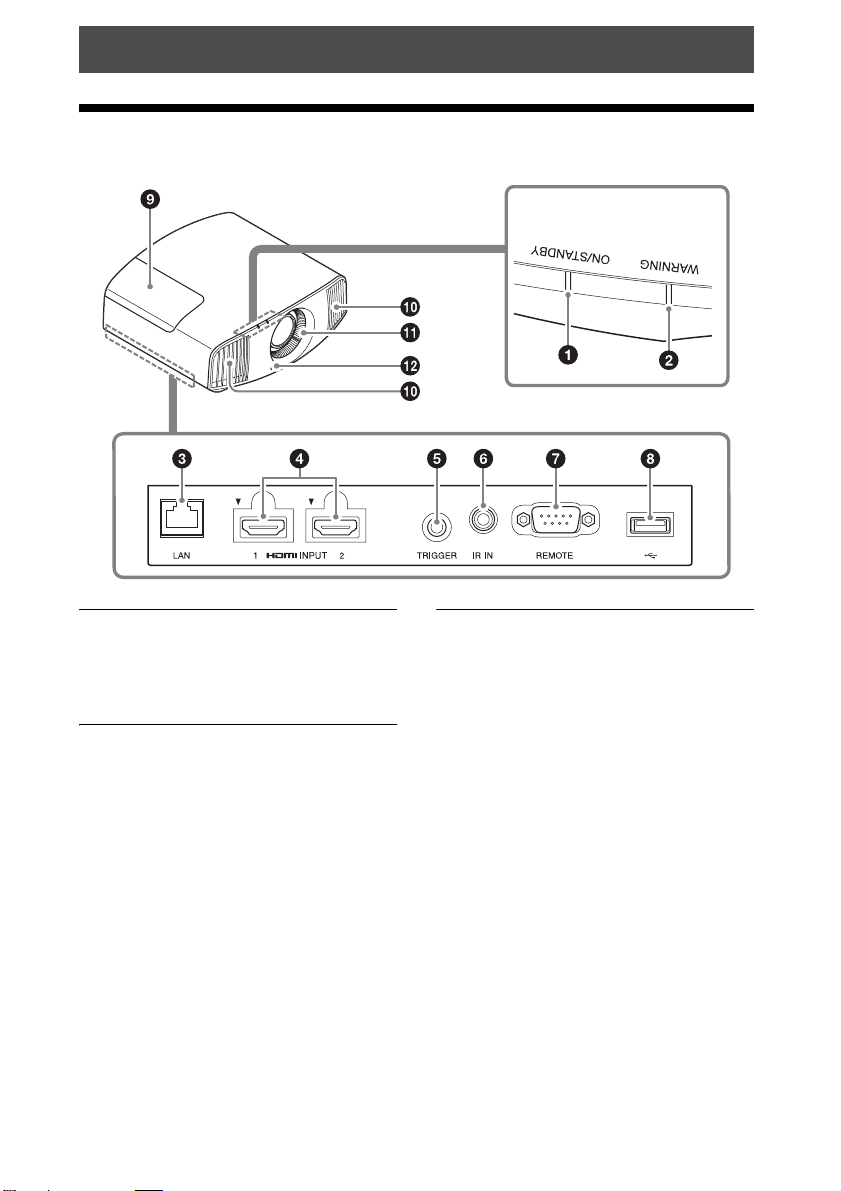
控制器的位置
前⾯ / 右侧
警告指⽰灯
警告指⽰灯
a ON/STANDBY 指⽰灯 (第 43 页)
b WARNING 指⽰灯 (第 43 页)
端⼦
c LAN接⼝(第37页)
d HDMI 1/HDMI 2 接⼝ (第 10 页)
e TRIGGER 接⼝ (第 33 页)
f IR IN 接⼝
输⼊信号以控制本机。
g REMOTE 接⼝
连接到电脑等,⽤于遥控。
h USB接⼝(第45页)
其他
i 投影灯盖 (第 45 页)
j 通风孔 (排⽓)
k 通风孔 (进⽓)(第 47 页)
l 遥控探测器 (第 6 页)
3
Page 4
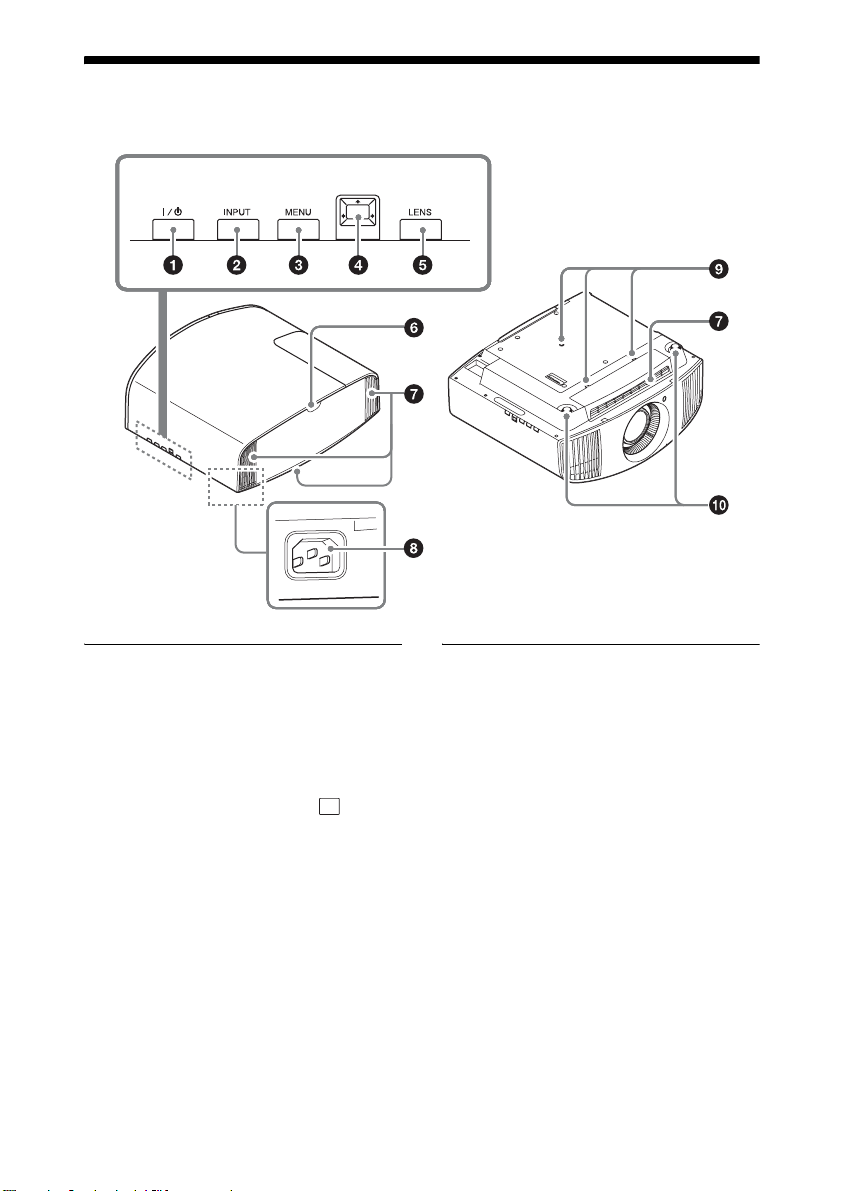
后⾯ / 左侧 / 底部
控制⾯板上的按钮名称与遥控器上的相同。
控制⾯板
控制⾯板
a ?/1(开机 / 待机)按钮(第 7 页)
b INPUT 按钮 (第 12 页)
c MENU 按钮 (第 18 页)
d M/m/</, (箭头)/ (确
定)按钮 (第 18 页)
e LENS 按钮 (第 6 页)
其他
f 遥控探测器 (第 6 页)
g 通风孔 (进⽓)(第 47 页)
h 交流输⼊插孔 (第 7 页)
i 投影机悬挂⽀架安装孔(第 63 页)
j 前撑脚 (可调节)(第 9 页)
4
Page 5
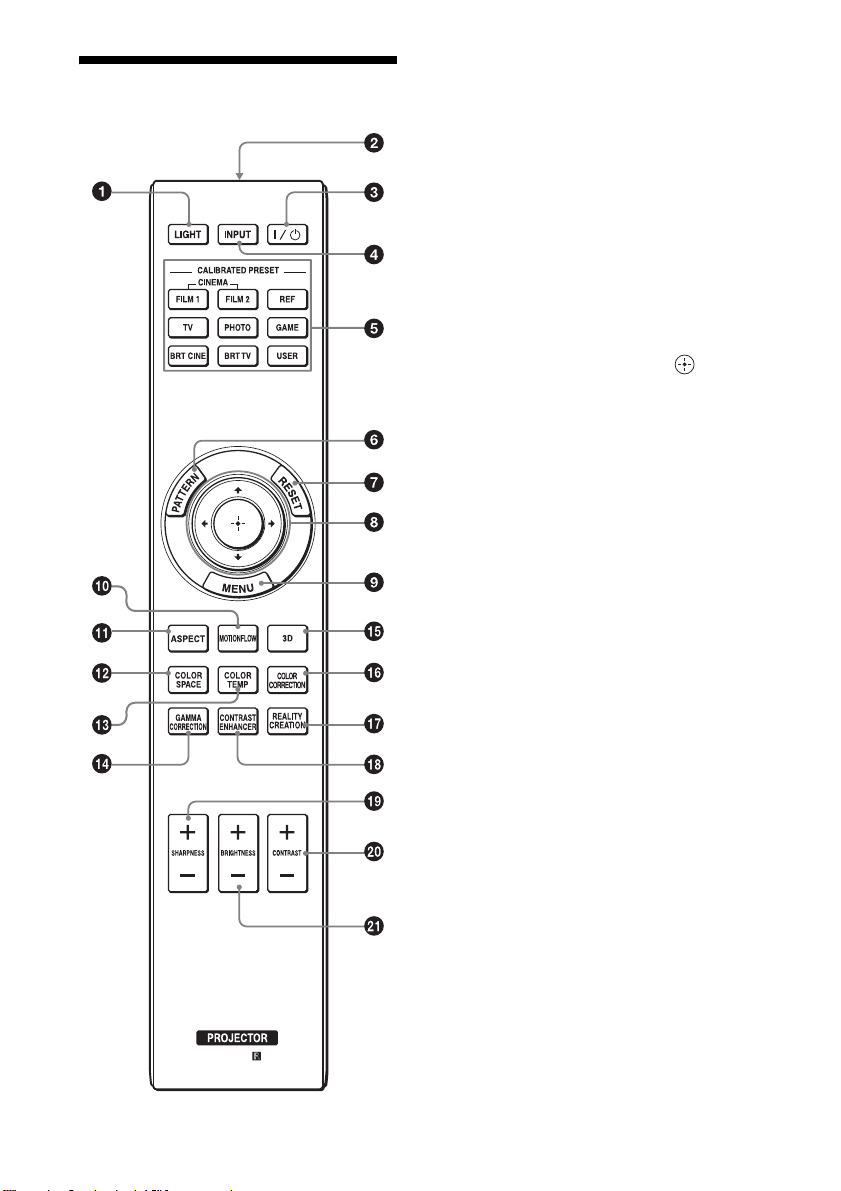
遥控器
a LIGHT 按钮
照亮遥控器上的按钮。
b 红外发射器
c ?/1(开机 / 待机)按钮(第 7 页)
d INPUT 按钮 (第 12 页)
e CALIBRATED PRESET 按钮 (第 17
页)
f PATTERN按钮(第7页)
g RESET 按钮 (第 19 页)
h M/m/</, (箭头)/ (确
定)按钮 (第 18 页)
i MENU 按钮 (第 18 页)
j MOTIONFLOW 按钮 (第 21 页)
k ASPECT 按钮 (第 14 页)
l COLOR SPACE 按钮 (第 24 页)
m COLOR TEMP 按钮 (第 22 页)
n GAMMA CORRECTION 按钮(第 23 页)
o 3D 按钮 (第 13 页)
p COLOR CORRECTION 按钮(第 23 页)
q REALITY CREATION 按钮(第 21 页)
r CONTRAST ENHANCER 按钮 (第 21
页)
s SHARPNESS +/- 按钮 (第 22 页)
t CONTRAST +/- 按钮 (第 22 页)
u BRIGHTNESS +/- 按钮 (第 22 页)
5
Page 6
连接和准备
安装本产品
本机与屏幕之间的安装距离根据屏幕尺
⼨不同或是否使⽤镜头移位功能⽽异。
安装本机时使其符合屏幕尺⼨。有关本
机和屏幕之间的距离 (投影距离)和所
投影视频尺⼨的详细内容,请参见 “投
影距离和镜头移位范围”(第 58 页)。
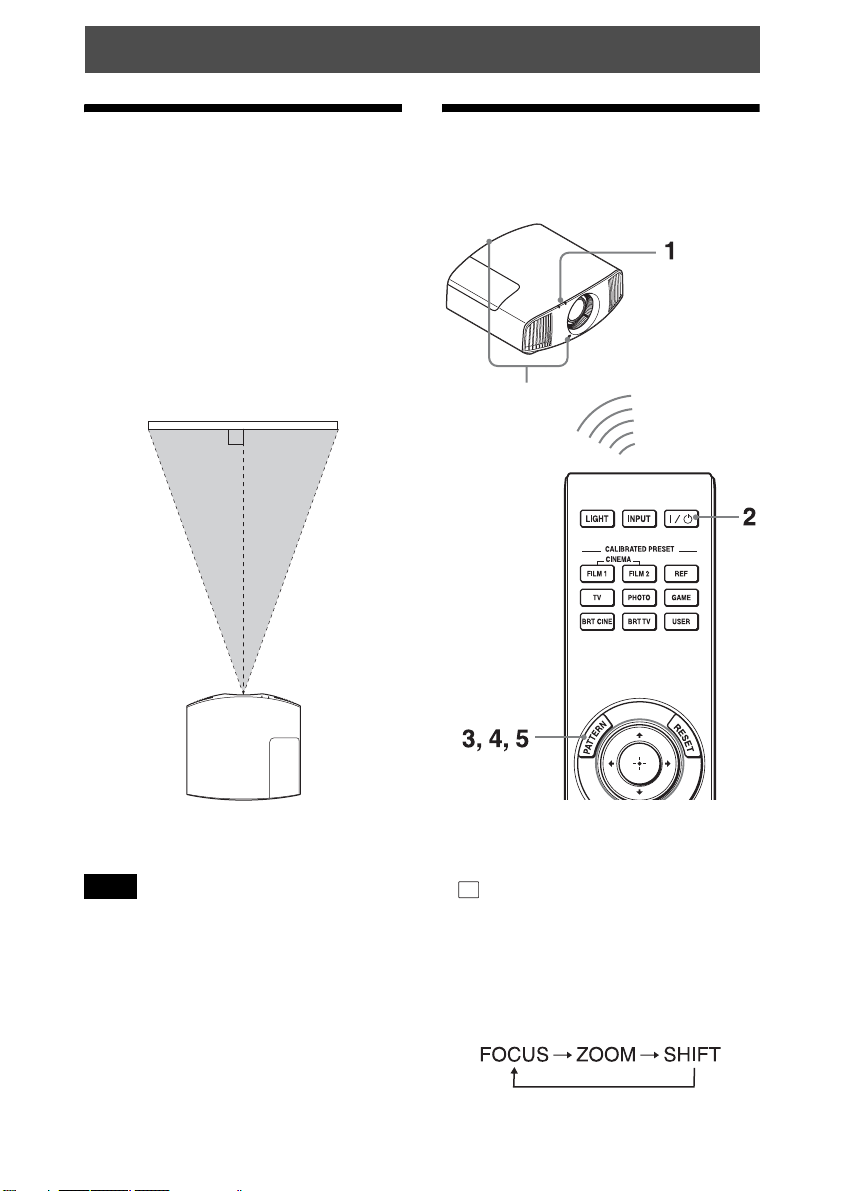
1 将本机放置在镜头与屏幕平⾏的位
置。
顶视图
屏幕
调整图像位置
在屏幕上投影影像,然后调整图像位
置。
遥控探测器
2 将影像投影在屏幕上并进⾏调整,
使影像匹配于屏幕 (第 6 页)。
注意
当在不平整的表⾯上使⽤屏幕时,根据
屏幕与本机之间的距离或变焦放⼤倍数
的不同,偶尔可能会在屏幕上出现条纹
图案。这并⾮本机的故障。
提⽰
• 在本机侧⾯板上的 ?/1 (开机 / 待
机)、INPUT、MENU、和 M/m/</,/
(控制杆)按钮与遥控器上的相应
按钮具有相同功能。LENS 按钮的作⽤
与遥控器上的 PATTERN 按钮的作⽤相
同。
• 当调节镜头时,每按⼀次本机上的
LENS 按钮,镜头调节功能会在 “透镜
焦点”、“透镜变点”和 “透镜移位”
之间切换。
6
Page 7
注意
根据本机安装位置的不同,您可能⽆法
使⽤遥控器控制本机。此种情况下,请
将遥控器指向本机或屏幕的遥控探测
器。
1 将交流电源线连接⾄本机之后,请
将交流电源线插⼊墙上的电源插
座。
ON/STANDBY 指⽰灯以红⾊点亮,同
时本机进⼊待机模式。
以红⾊点亮。
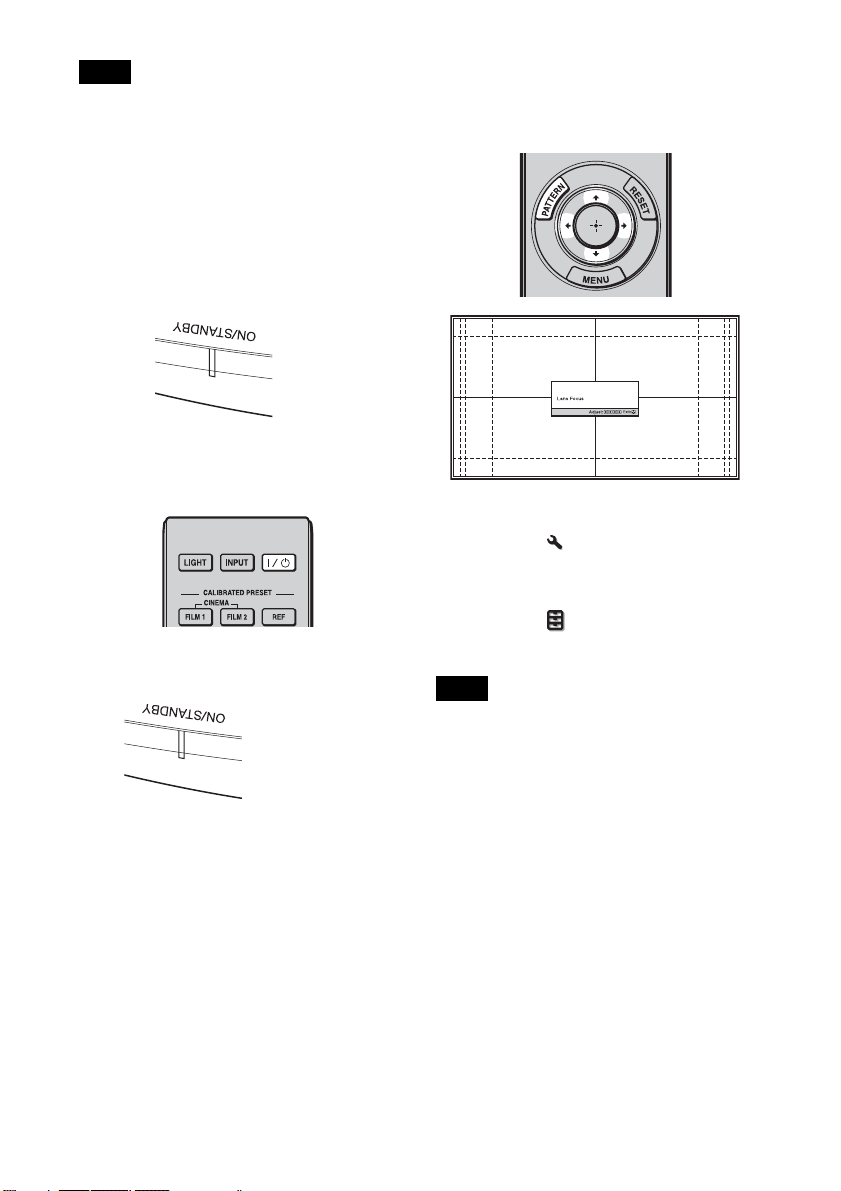
2 按 ?/1 (开机 / 待机)按钮接通本
机电源。
ON/STANDBY 指⽰灯以绿⾊闪烁,然
后以绿⾊点亮。
以绿⾊闪烁数⼗秒
钟,然后以绿⾊点
亮。
3 调整对焦。
反复按 PATTERN 按钮显⽰透镜焦点调
整窗⼝ (测试图案)。然后通过按
M/m/</, 按钮调整图像的对焦。
提⽰
• 当安装设定 菜单上的 “透镜控制”
设定为 “关”时,⽆法调节镜头
(FOCUS、ZOOM 或 SHIFT)(第 33
页)。
• 当功能设定 菜单上的 “测试图案”
设定为 “关”时,不显⽰测试图案
(第 31 页)。
注意
使⽤遥控器或本机控制⾯板上的按钮调
节镜头。切勿通过直接⽤⼿转动镜头进
⾏调节,否则可能会造成本机损坏或故
障。
7
Page 8
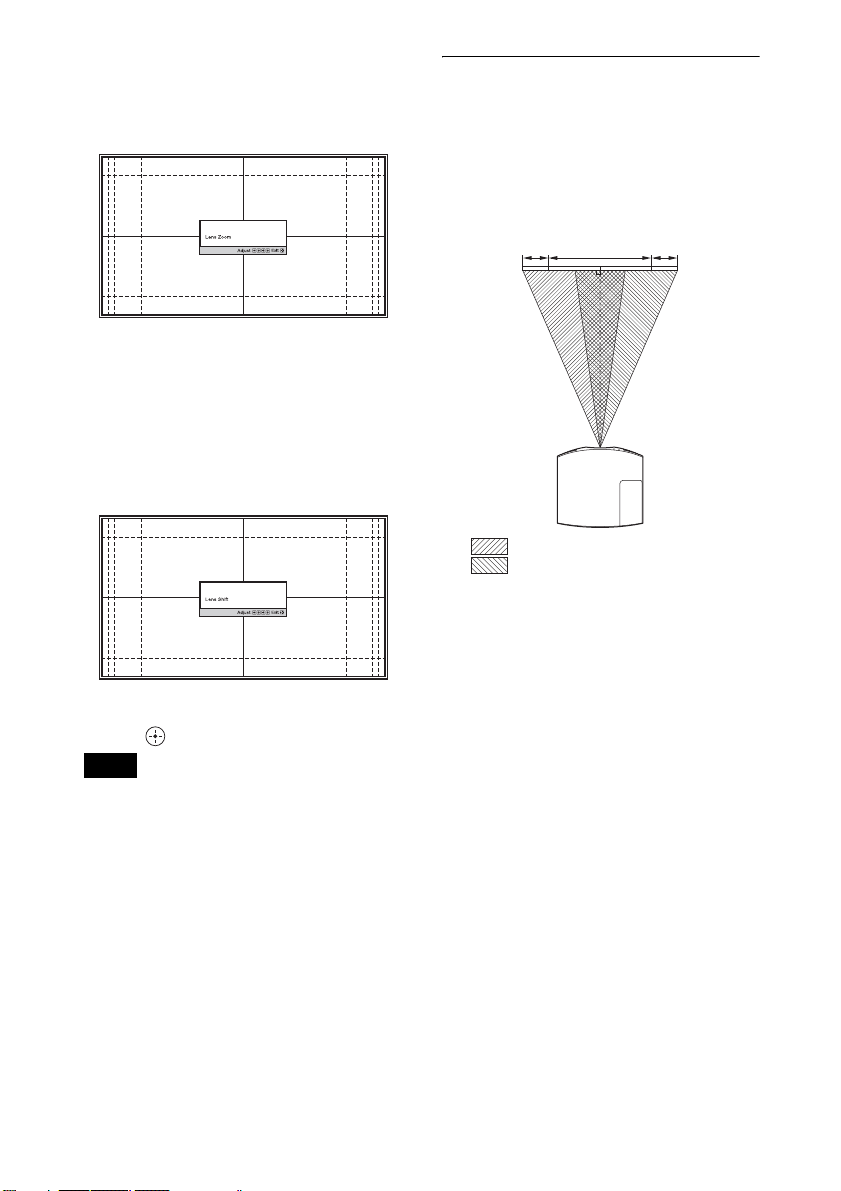
4 调整图像尺⼨。
反复按 PATTERN 按钮显⽰透镜变点调
整窗⼝ (测试图案)。然后通过按
M/m/</, 按钮调整图像的尺⼨。
要使图像变⼤时,按 M/,。
要使图像变⼩时,按 m/<。
5 调整图像位置。
反复按 PATTERN 按钮显⽰透镜移位调
整窗⼝ (测试图案)。然后通过按
M/m/</, 按钮调整图像的合适位
置。
要调整⽔平⽅向的位置时
按 </,。
以镜头中央为中⼼,投影在屏幕上的图
像最⼤可向右或向左移动屏幕宽度的
31%。
顶视图
31% 31%1屏幕宽
:可向左移动图像的最⼤位置
:可向右移动图像的最⼤位置
提⽰
每次按 按钮时,测试图案消失。
注意
当调整窗⼝位置时,请勿触摸镜头装
置,否则⼿指可能会被活动部件夹住。
8
Page 9
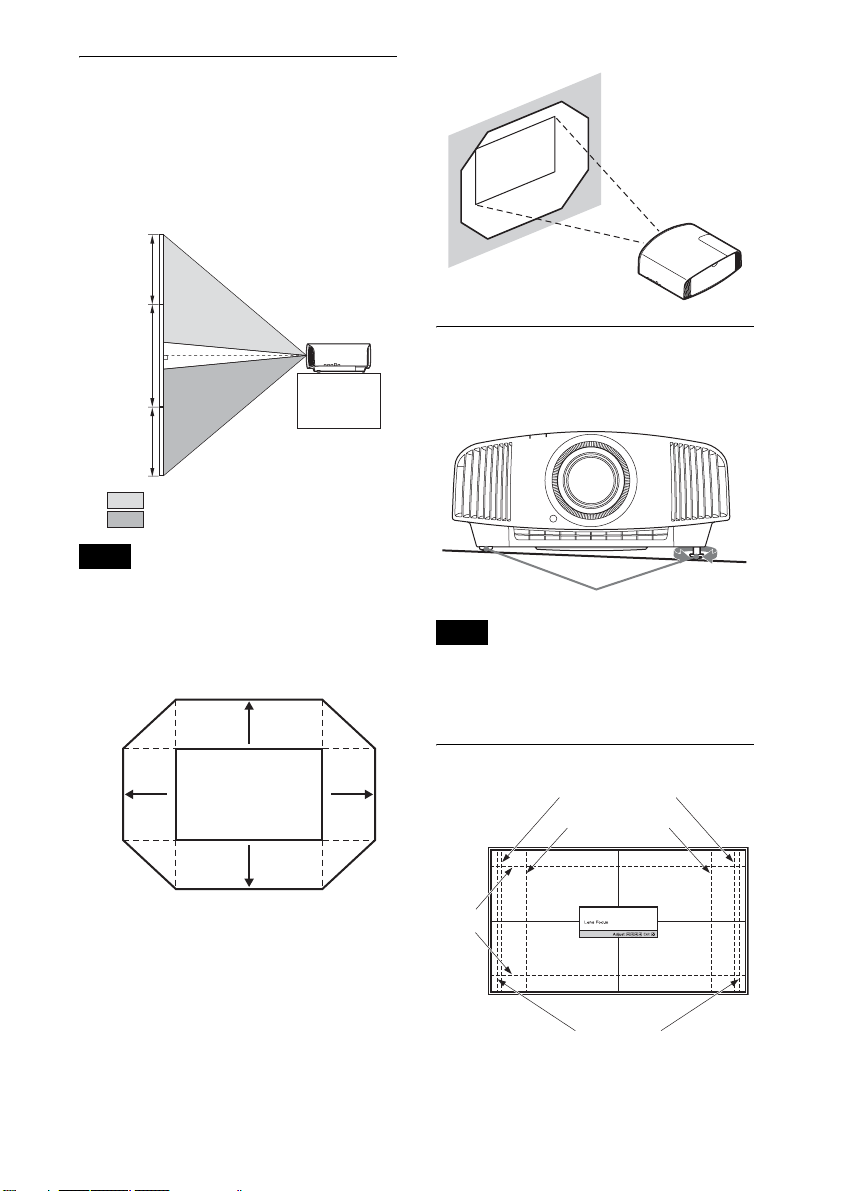
要调整垂直⽅向的位置时
按 M/m。
以镜头中央为中⼼,投影在屏幕上的图
像最⼤可向上移动屏幕⾼度的 85% 或向
下移动 80%。
侧视图
85%
1屏幕⾼
80%
:可向上移动图像的最⼤位置
:可向下移动图像的最⼤位置
注意
只能在下图所⽰的⼋⾓形区域范围内移
动投影在屏幕上的图像。有关详细说
明,请参见 “投影距离和镜头移位范
围”(第 58 页)。
投影图像的移动范围
0.85V
0.31H
投影图像
0.8V
H:投影图像的宽度
V:投影图像的⾼度
0.31H
要调整安装表⾯的倾斜度时
如果将本机安装在不平坦的表⾯,请使
⽤前撑脚 (可调节)保持本机处于⽔平
状态。
转动进
前撑脚 (可调节)
⾏调节。
注意
• 如果本机向上或向下倾斜,则投影的
影像可能会呈梯形。
• 转动前撑脚 (可调节)时,注意不要
夹住⼿指。
镜头调整窗⼝ (测试图案)
1.78:1 (16:9)
1.33:1 (4:3)
2.35:1
1.85:1
虚线表⽰各纵横⽐的屏幕尺⼨。
9
Page 10
连接⾄视频设备或电脑
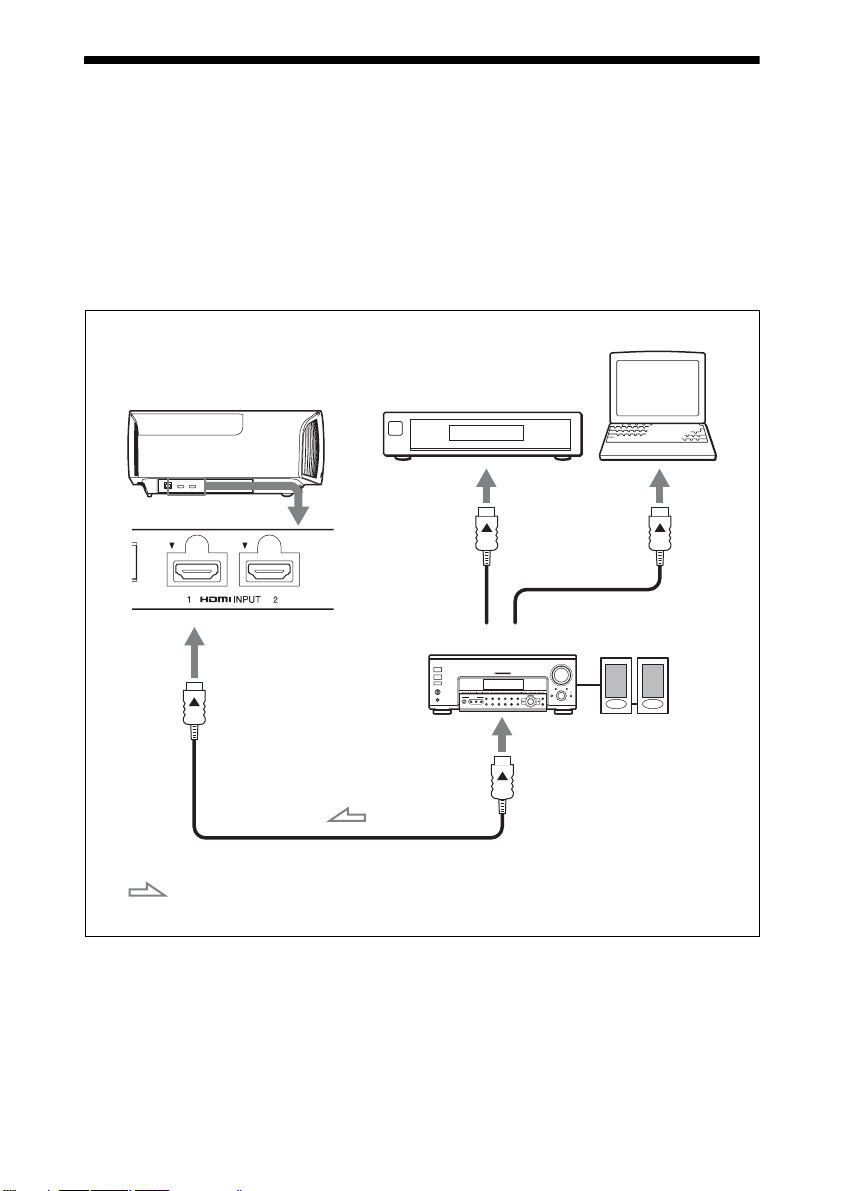
通过将装备有 HDMI 输出的 DVD 播放机 / 录像机、Blu-ray Disc 播放器 / 录像机或
PlayStation
®
连接⾄本机的 HDMI 输⼊,能够欣赏到⾼品质图像。
当进⾏连接时,请务必进⾏下述操作:
• 进⾏任何连接前关闭所有设备。
• 正确使⽤各连接⽤的电缆。
• 正确地插⼊电缆插头;插头连接不牢固时可能会导致故障或图像质量下降。在拔出
电缆时,务必拔插头,不可拉扯电缆本⾝。
• 请参照所连接设备的使⽤说明书。
电脑
本机的右侧
装备有 HDMI 输出接⼝的
设备
⾳频视频放⼤器
扬声器
⾄ HDMI 输出
HDMI 电缆 (⾮附带)
:视频信号流动⽅向 使⽤指定了电缆类型标志的优质⾼速 HDMI 电缆。
10
Page 11

注意
• 使⽤优质⾼速 HDMI 电缆。使⽤其他类型的电缆时,可能⽆法正确显⽰ 4K 视频。
• 将 HDMI 电缆连接⾄本机时,请确保本机的 HDMI 输⼊端⼝上部的 V 标记与电缆接⼝上
的 v 标记位于相同位置。
• 如果使⽤ HDMI 电缆连接⾄本机的设备的图像不正确,请检查所连接设备的设置。
• 如果将电脑 (例如笔记本类型)设定为同时向电脑显⽰器和本设备输出信号,本设
备的图像可能不会正确显⽰。将电脑设定为仅向外接显⽰器输出信号。有关详细说
明,请参见随电脑附带的电脑使⽤说明书。有关电脑的设置,请向电脑的制造商咨
询。
当通过⽹络监视和控制投影仪时,可通过⽹页浏览器访问投影仪的 Setup 页⾯ (第
37 页),并启⽤所需控制协议。
11
Page 12
投影
投影图像
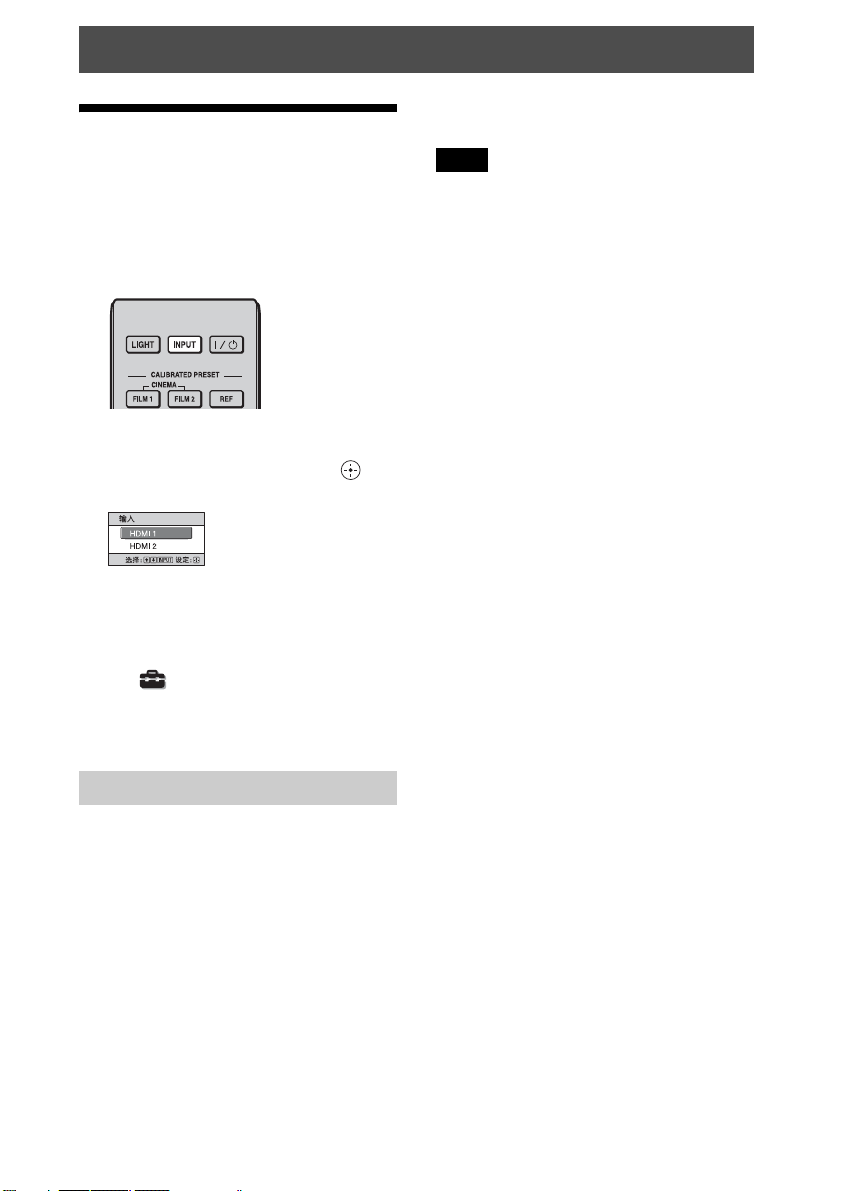
1 打开本机和与本机相连的设备的电
源。
2 按 INPUT 按钮在屏幕上显⽰输⼊选
择窗⼝。
3 选择您要⽤来显⽰图像的设备。
反复按 INPUT 按钮或按 M/m/(确
定)按钮选择⽤于投影的设备。
⽰例:要观看来⾃连接在本机的
HDMI 1 接⼝上的视频设备
的图像时。
电源完全关闭,之后您可以断开电源线
连接。
注意
切勿在指⽰灯闪烁时断开电源线连接。
提⽰
您可以通过按住 ?/1 (开机 / 待机)按
钮约 1 秒钟关闭本机,⽽不需要执⾏以
上步骤。
提⽰
当设置 菜单中的 “状态”设定为
“关”时,不会显⽰输⼊选择窗⼝。按
INPUT 按钮依次在输⼊端⼦之间进⾏切
换。
关闭电源
1 按 ?/1 (开机 / 待机)按钮。
屏幕上出现 “电源关闭 ?”信息。
2 在信息消失前再次按 ?/1 (开机 /
待机)按钮。
ON/STANDBY 指⽰灯以绿⾊闪烁,冷
却扇将继续运转以减少内部蓄热。最
初 ON/STANDBY 指⽰灯快速闪烁,在
此期间您将⽆法使⽤ ?/1 (开机 /
待机)按钮点亮 ON/STANDBY 指⽰
灯。
冷却扇停⽌运转,且 ON/STANDBY 指
⽰灯从绿⾊闪烁变为保持红⾊亮起。
12
Page 13
观看 3D 影像
可使⽤主动式 3D 眼镜欣赏 3D 游戏和 3D
Blu-ray Disc 中扣⼈⼼弦的 3D 影像。
1 打开与本机相连的兼容 3D 功能的
HDMI 设备,然后播放 3D 内容。
有关如何播放 3D 内容的详细说明,
请参见相连设备的使⽤说明书。
2 打开本机的电源,然后将 3D 影像投
射到屏幕上。
有关投射影像的详细说明,请参见
“投影图像”(第 12 页)。
3 打开 3D 眼镜的电源,然后舒适佩
戴。
有关使⽤ 3D 眼镜的详细说明,请参
见 “使⽤ 3D 眼镜”(第 13 页)。
提⽰
“2D-3D 显⽰选择”的出⼚默认设定为
“⾃动”,该设定可允许本机检测到 3D
信号时⾃动投射 3D 影像。
注意
• 视信号类型⽽定,可能⽆法显⽰ 3D 影
像。将 “2D-3D 显⽰选择”设定为
“3D”,并将 “3D 格式”设定为 “并
排”或 “上下”,以匹配您所要观看
的 3D 内容的格式 (第 30 页)。
• 在通信范围内使⽤ 3D 眼镜(第 13 页)。
• 每个⼈对 3D 影像的感知都有所差异。
• 当使⽤环境温度较低时,3D 效果可能
会下降。
使⽤ 3D 眼镜
1 打开 3D 眼镜,注册到本机。
有关如何注册 3D 眼镜的详细说明,
请参见随 3D 眼镜附带的使⽤说明
书。
2 戴上 3D 眼镜。
3 转向屏幕。
使⽤注意事项
以下情况可能引发误操作:
• 观看位置离投影机太远
• 本机附近有其他通信装置,如⽆线局
域⽹ (IEEE802.11 b/g/n)或带宽
2.4 GHz 的微波
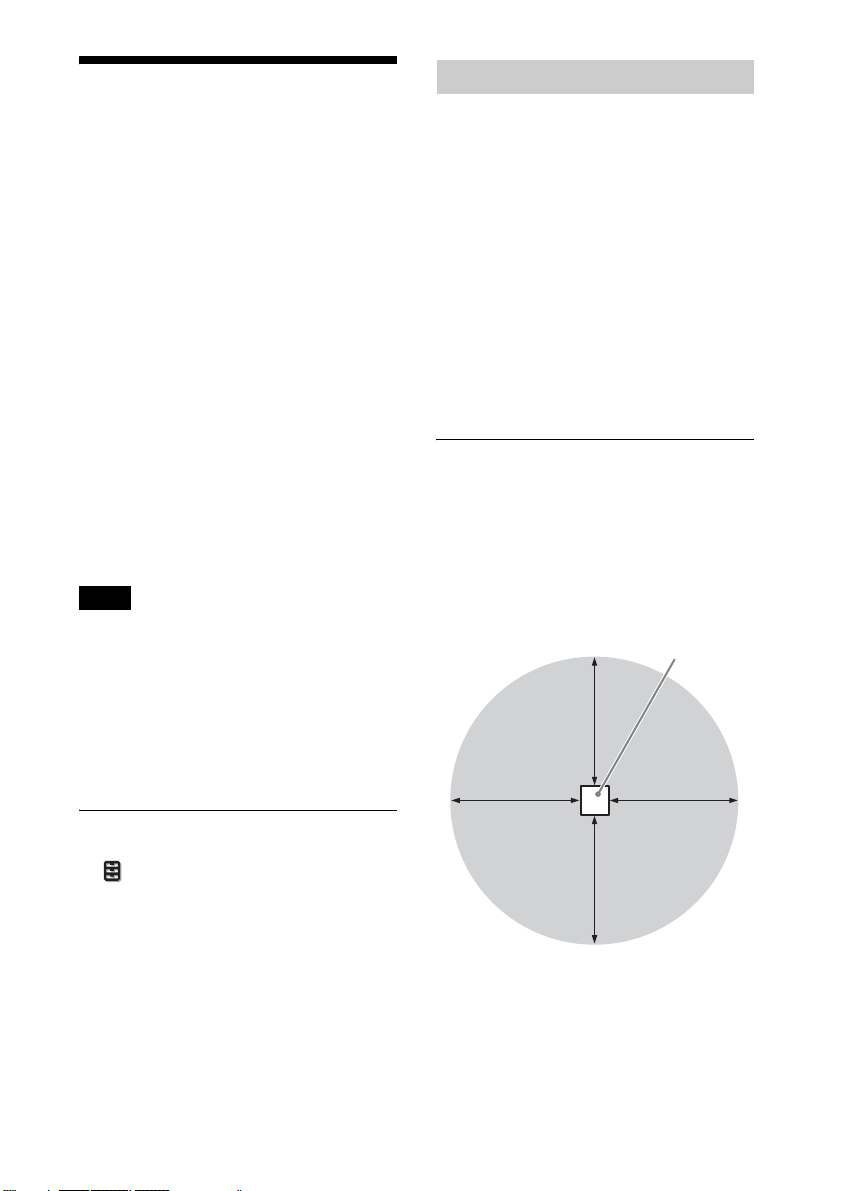
3D 眼镜通信范围
下图表⽰ 3D 眼镜的通信范围。如果试图
在通信范围以外的距离观看 3D 影像,或
将本机安装在通信范围以外的位置,则
3D 眼镜可能⽆法正确显⽰影像。此外,
可变⾓度和距离根据屏幕类型、室内环
境和本机的安装环境⽽变化。
俯视图或侧视图
投影机
10 m
10 m 10 m
调节/设定3D功能
通过按遥控器上的 3D 按钮或使⽤功能设
定 菜单的 “3D 设定”可以调节 / 设
定 3D 功能。详细说明,请参见 “3D 设
定”(第 30 页)。
10 m
13
Page 14
根据视频信号选择纵横⽐
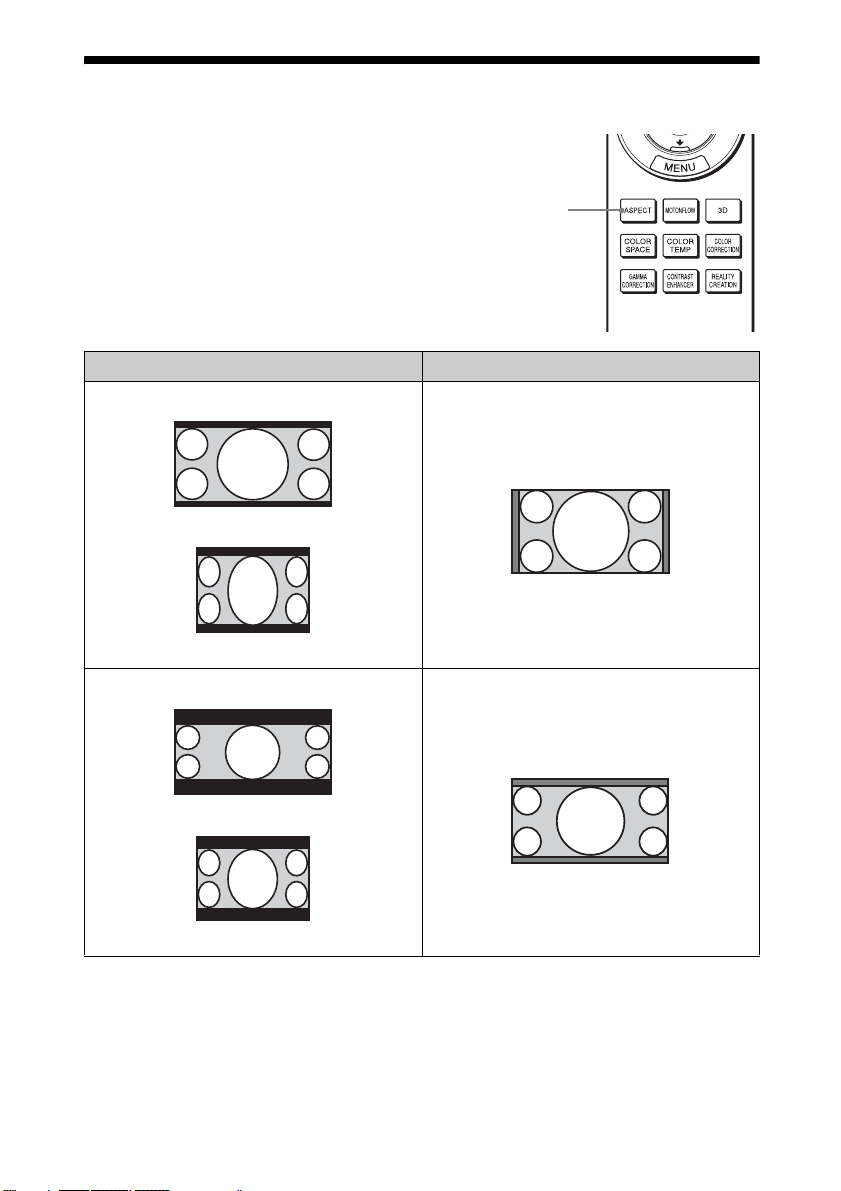
您可以选择最适合所接收视频信号的纵
横⽐。
按 ASPECT。
每按⼀次该按钮可选择 “纵横⽐”设
ASPECT
按钮
置。您还可以使⽤菜单选择纵横⽐
(第 26 页)。
原始影像 建议的设置和⽣成的影像
1.85:1 放⼤
1.85:1
压缩 1.85:1
2.35:1 放⼤
2.35:1
压缩 2.35:1
14
Page 15
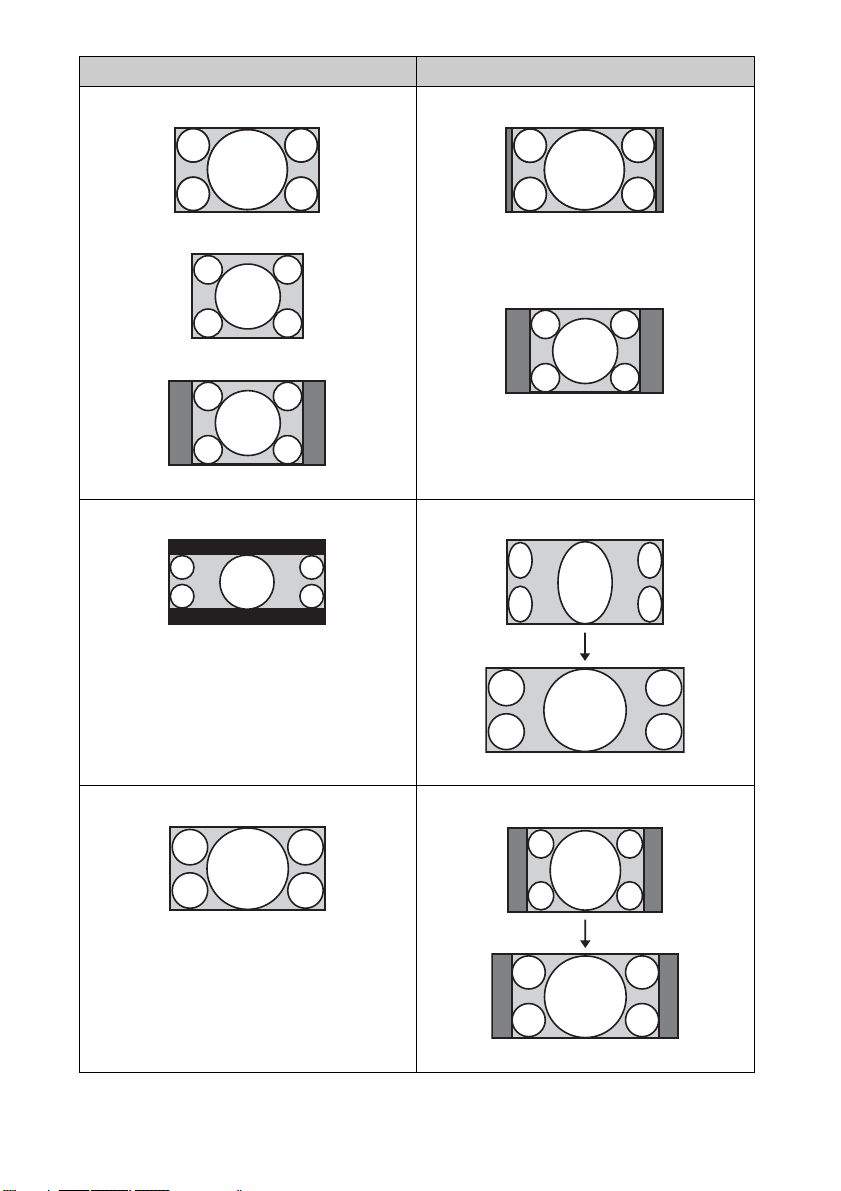
原始影像 建议的设置和⽣成的影像
标准
1.78:1 (16:9)
1.33:1 (4:3)
1.33:1 (4:3),带边栏
垂直拉伸
2.35:1
16:9
使⽤变形透镜时
挤压
使⽤变形透镜时
15
Page 16
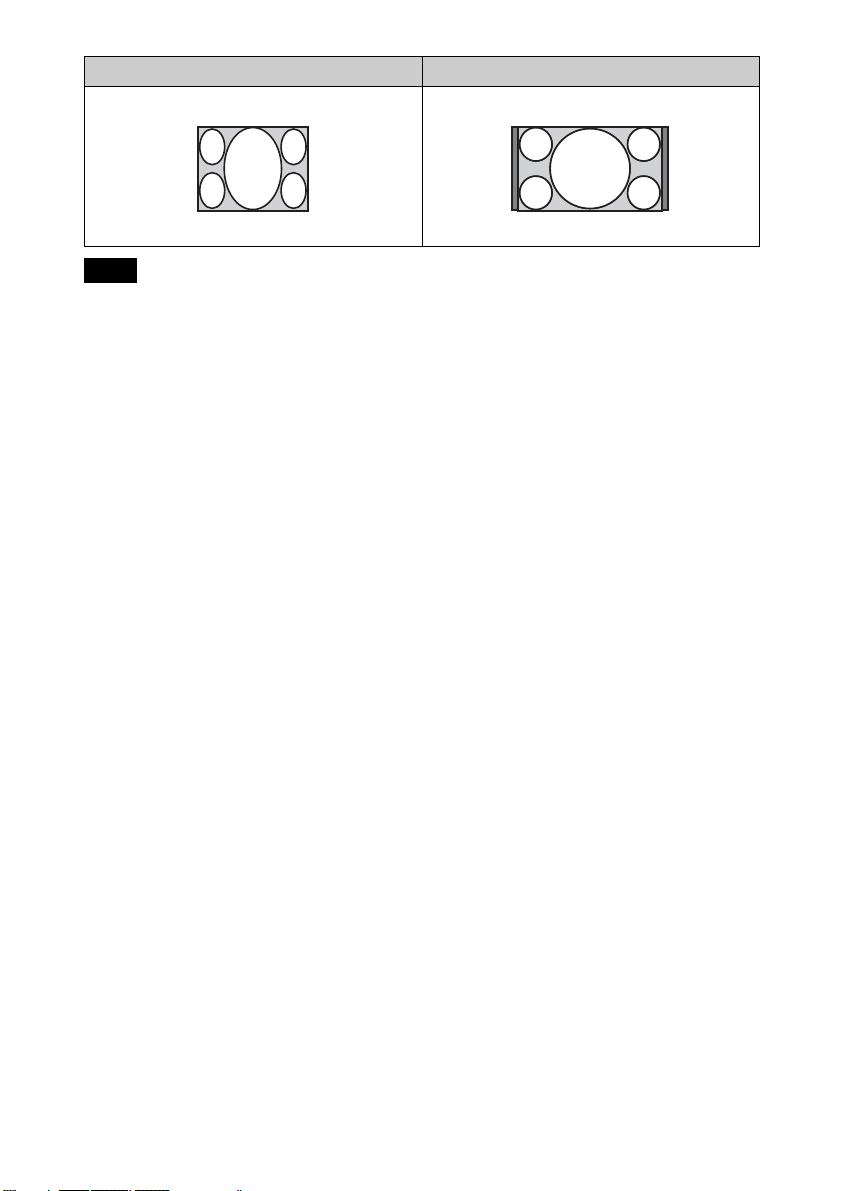
原始影像 建议的设置和⽣成的影像
拉伸
挤压
注意
• 可选纵横⽐模式因输⼊信号⽽异 (第
55 页)。
• 输⼊电脑信号时,⽆法选择纵横⽐模
式。
关于切换 “纵横⽐”设置的注意事项
• 选择纵横⽐模式应考虑到,改变原始
图像的纵横⽐将会使图像的外观与原
始影像不同。
• 请注意,如果以营利或公共观赏为⽬
的使⽤本机,因切换纵横⽐⽽改变原
始图像可能会侵犯图像作者或制作者
受法律保护的权利。
16
Page 17
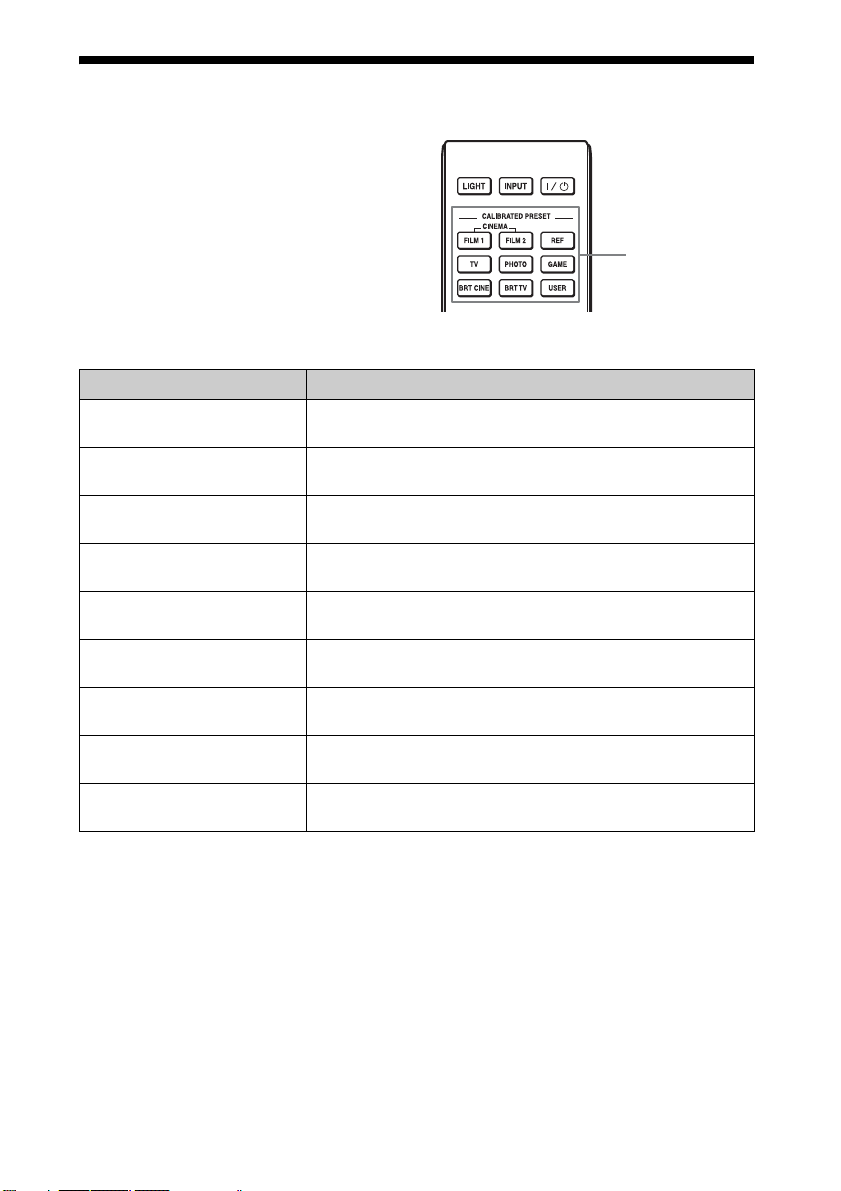
选择图像观看模式
可以选择最适合视频源或房间环境的图
像观看模式。
可分别为 2D/3D/HDR 保存和使⽤不同的
预设模式。
按 CALIBRATED PRESET 按钮之⼀。
设定项⽬ 说明
CINEMA FILM 1
(电影胶⽚ 1)
CINEMA FILM 2
(电影胶⽚ 2)
REF
(原始)
TV
(TV)
PHOTO
(照⽚)
GAME
(游戏)
BRT CINE
(明亮电影)
BRT TV
(明亮 TV)
USER
(⽤户)
图像质量适合于再现典型正⽚电影的⾼度动态和清晰影
像。
这种图像质量通常适⽤于基于电影胶⽚ 1 再现电影院的
丰富⾊调和⾊彩。
图像质量设定适合于忠实再现原始影像质量,或⽆需调
整即可欣赏图像质量。
图像质量适合于观看电视节⽬、体育⽐赛、⾳乐会和其
他视频影像。
⾮常适合投影⽤数码照相机拍摄的静⽌影像。
图像质量适合于玩游戏,⾊彩绚丽且响应迅速。
图像质量适合于在客厅等明亮环境中观看电影。
图像质量适合于在客厅等明亮环境中观看电视节⽬、体
育⽐赛、⾳乐会和其他视频影像。
按照您的喜好调整图像质量,然后保存设定。出⼚默认
设定与 “原始”相同。
CALIBRATED
PRESET 按钮
17
Page 18
使⽤菜单
注意
⽤于说明的菜单显⽰可能与实际菜单显⽰不同。
通过菜单操作
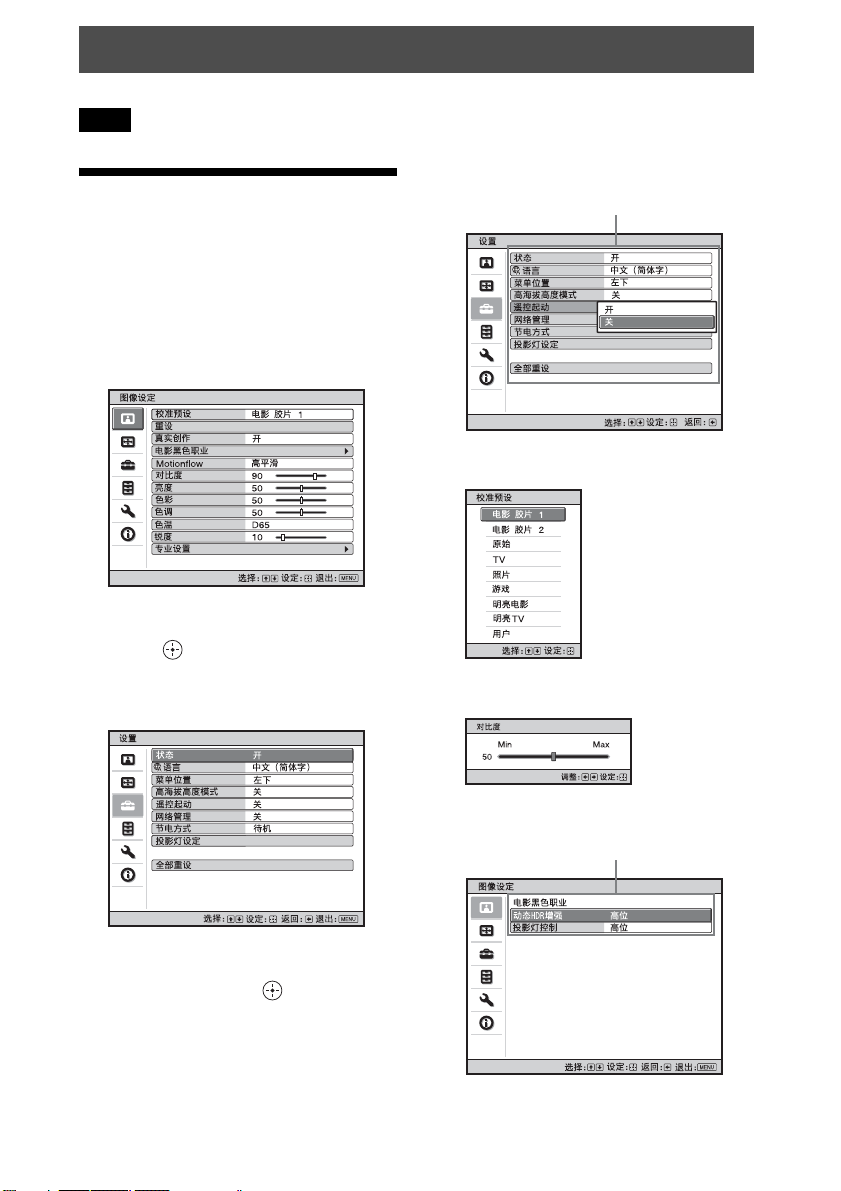
本机装备有屏幕显⽰菜单,可⽤来进⾏
多种调整和设定。如果选择项⽬名带有
箭头 (B)的项⽬,会出现设定项⽬的
下⼀个菜单窗⼝。
1 按 MENU。
出现菜单窗⼝。
2 按 M/m 选择⼀个菜单项⽬,然后按
, 或 。
出现可以使⽤所选菜单进⾏设定或调
整的项⽬。当前选择的项⽬显⽰为⽩
⾊。
弹出菜单
设定项⽬
设定菜单
调整菜单
3 按M/m选择您想要设定或调整的项
⽬,然后按 , 或 。
设定项⽬显⽰在弹出菜单、设定菜
单、调整菜单或下⼀个菜单窗⼝中。
下⼀个菜单窗⼝
设定项⽬
18
Page 19
4 对项⽬进⾏设定或调整。
当改变调节量时
按 M/, 增⼤数值,按 m/< 减⼩
数值。
按 保存设置,并恢复原来的菜单
画⾯。
修改设置时
按 M/m 改变设置。
按 可恢复原来的画⾯。
根据所选项⽬的不同,您可以使⽤
< 恢复原来的画⾯。
要清除菜单时
按 MENU。
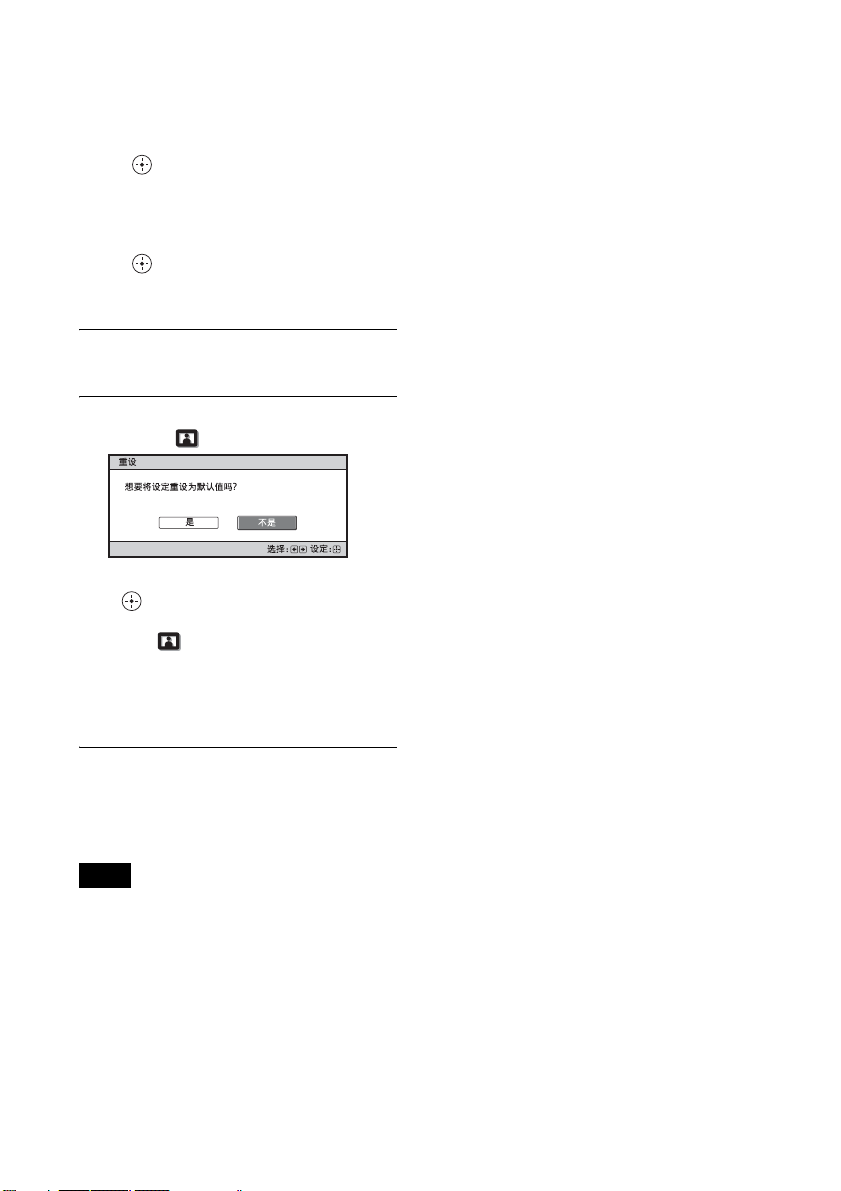
要重设被调整过的图像设定值时
从图像设定 菜单中选择 “重设”。
当出现屏幕显⽰时,⽤ < 选择 “是”
并按 。
下述所有设定被重设为出⼚预设值:
图像设定 菜单上的 “真实创作”、
“电影⿊⾊职业”、“Motionflow”、
“对⽐度”、“亮度”、“⾊彩”、“⾊
调”、“⾊温”、“锐度”和 “专业设
置”
要重设被调整过的项⽬时
在菜单画⾯中选择⼀个项⽬,然后显⽰
弹出菜单、设定菜单或调整菜单。
按遥控器上的 RESET 以仅将所选设定重
设为出⼚预设值。
注意
仅当选择了调整菜单或设定菜单时,遥
控器上的 RESET 按钮有效。
19
Page 20
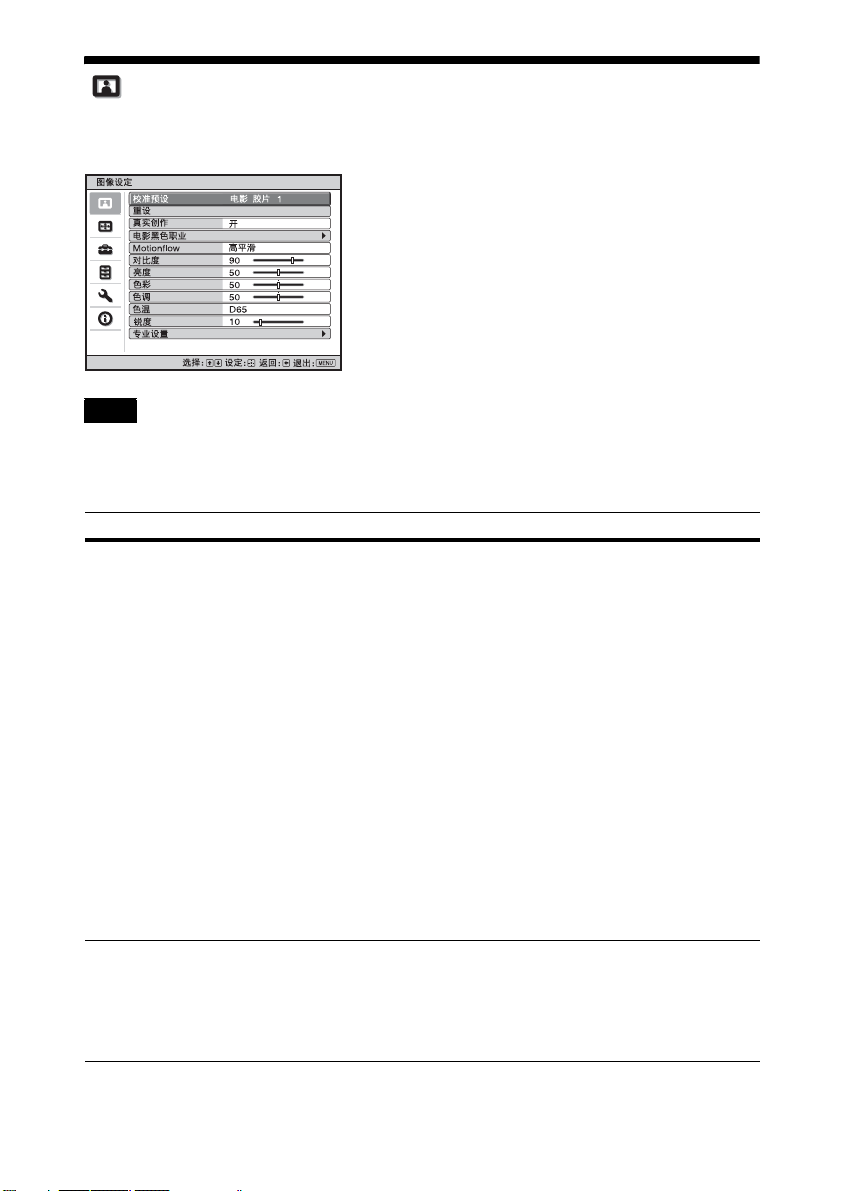
图像设定菜单
图像设定菜单⽤于调整图像。
注意
根据输⼊信号的类型,可能⽆法调整或配置这些项⽬。有关详细说明,请参见 “输⼊
信号和可调整 / 设定项⽬”(第 52 页)。
括号中的项⽬名称代表遥控器上所印的项⽬名称。
设定项⽬ 说明
校准预设
[CALIBRATED
PRESET]
可以选择最适合视频源类型或环境的图像观看模式。
可分别为 2D/3D/HDR 保存和使⽤不同的预设模式。
电影胶⽚ 1:图像质量适合于再现典型正⽚电影的⾼度动态和
清晰影像。
电影胶⽚ 2:这种图像质量通常适⽤于基于电影胶⽚ 1 再现电
影院的丰富⾊调和⾊彩。
原始:图像质量设定适合于忠实再现原始影像质量,或⽆需调
整即可欣赏图像质量。
TV:图像质量适合于观看电视节⽬、体育⽐赛、⾳乐会和其他
视频影像。
照⽚:⾮常适合投影⽤数码相机拍摄的静⽌图像。
游戏:图像质量适合于玩游戏,⾊彩绚丽且响应迅速。
明亮电影:图像质量适合于在客厅等明亮环境中观看电影。
明亮 TV:图像质量适合于在客厅等明亮环境中观看电视节⽬、
体育⽐赛、⾳乐会和其他视频影像。
⽤户:按照您的喜好调整图像质量,然后保存设置。出⼚默认
设定与 “原始”相同。
提⽰
对图像质量设置所做的任何调整即被保存到各输⼊。
重设 将所有当前选择的校准预设模式设置重设为预设值 (第 19
页)。
提⽰
重设操作不会影响 “⾊温”的特制 1 ⾄特制 5 项⽬所保存的设
置。
20
Page 21

设定项⽬ 说明
真实创作 [REALITY
CREATION]
调节图像的细节和杂讯处理。(超分辨率功能)
开:调整 “真实创作”设置。
数据库:选择 “标准”或 “Mastered in 4K”。
“Mastered in 4K”提供 Sony 影视娱乐有限公司发布的适合
Blu-ray Disc
分辨率:当增加设置值时,图像的纹理和细节变得更加清
晰。
杂讯过滤:当增加设置值时,杂讯 (图像粗糙程度)变得不
明显。
测试:开 / 关:在特定频率变更 “开”和 “关”,检查 “真
实创作”效果。
提⽰
测试期间的状态显⽰位置与 “菜单位置”设置 (第 28 页)
⼀起运⾏。
关:不应⽤ “真实创作”功能。
电影⿊⾊职业
动态 HDR 增强
[CONTRAST
ENHANCER]
对于 HDR 内容,将根据场景,⾃动调整明暗部分的信号等级,
以优化对⽐度。
提⾼图像锐度,使图像有动感。
以下情况出现 “对⽐度增强”⽽不是 “动态 HDR 增强”,并执
⾏适合 SDR 信号的图像处理:
- 以 HDR 设定为 “⾃动”输⼊ SDR 信号时
- 当 “HDR”设定为 “关”时
⾼位 / 中位 / 低位:可以调整动态 HDR 增强 / 对⽐度增强设
定。
关:不应⽤动态 HDR 增强功能。
投影灯控制 切换投影灯输出。
⾼位:增加亮度,并投影更明亮的图像。
低位:降低亮度,并通过将亮度调⾄最低来增强⿊⾊。
™ “Mastered in 4K”的图像质量。
Motionflow
[MOTIONFLOW]
提⽰
设定 “低位”减⼩冷却扇的噪⾳,同时也可降低能耗,使投影
灯寿命更长。
⾼平滑:提供更平滑的图像移动;对基于胶⽚的内容尤其有
效。
低平滑:为标准使⽤提供更平滑的图像移动。
True Cinema:以原始帧率再现图像 (例如以每秒 24 帧创建的
动画)。
关:不应⽤ “Motionflow”功能。
提⽰
• 如果已选的 “⾼平滑”、“低平滑”或 “True Cinema”导致
图像失真,则选择 “关”。
• 视图像内容⽽定,可能即使更改了设置也⽆法直观地看到效
果。
21
Page 22

设定项⽬ 说明
对⽐度
[CONTRAST]
调整对⽐度。
更⾼的值将增加图像的锐度;更低的值将降低锐度。
可以通过按遥控器上的 CONTRAST +/- 进⾏调整。
以下情况出现 “对⽐度 (HDR)”⽽不是 “对⽐度”:
- 以 HDR 设定为 “⾃动”输⼊ HDR 信号时
- “HDR”设定为 “HDR10”、“HDR 原始”或 “HLG”时
亮度
[BRIGHTNESS]
调整图像的亮度。
设定值越⾼,图像越亮。设定值越低,图像越暗。
可以通过按遥控器上的 BRIGHTNESS +/- 进⾏调整。
⾊彩 调整⾊彩浓度。
设定值越⾼,浓度越⾼。设定值越低,浓度越低。
⾊调 调整⾊调。
设定值越⾼,图像越偏绿⾊。设定值越低,图像越偏红⾊。
⾊温
[COLOR TEMP]
调整⾊温。
D93:与电视机⼀般使⽤的 9300 K ⾊温等同。赋予⽩⾊蓝⾊⾊
调。
D75:与作为辅助标准光源使⽤的 7500 K ⾊温等同。赋予
“D93”和 “D65”之间的⼀个中间⾊调。
D65:与作为标准光源使⽤的 6500 K ⾊温等同。赋予⽩⾊红⾊
⾊调。
D55:与作为辅助标准光源使⽤的 5500 K ⾊温等同。赋予⽩⾊
更偏红的⾊调。
特制 1 ⾄ 5:可以调整、设定和存储您喜好的⾊温。
出⼚预设设置如下。
特制 1:与 “D93”⾊温设置相同。
特制 2:与 “D75”⾊温设置相同。
特制 3:与 “D65”⾊温设置相同。
特制 4:与 “D55”⾊温设置相同。
特制 5:优先处理亮度的设定。
提⽰
您可以根据偏好将各项调整为⼀种⾊温。
锐度
[SHARPNESS]
使图像的轮廓变得清晰,或减少杂讯。
设定值越⾼,图像越清晰。设定值越低,图像越柔和,因此可
减少杂讯。
可以通过按遥控器上的 SHARPNESS +/- 进⾏调整。
专业设置
NR (降噪) 减少图像的粗糙程度或杂讯。
⾃动:检测噪声等级以⾃动减少图像的粗糙程度或杂讯。
⾼位 / 中位 / 低位:根据输⼊信号源的粗糙程度或杂讯选择设
定。
关:不应⽤ NR (降噪)功能。
提⽰
视输⼊信号源⽽定,⽤ “⾃动”可能⽆法精确检测噪声等级。
如果图像不接受 “⾃动”,则从 “⾼位”、“中位”、“低位”
或 “关”中选择⼀个设定。
22
Page 23

设定项⽬ 说明
MPEG NR (MPEG
降噪)
降低块噪声和蚊式噪声,特别是数字信号中的。
⾃动:检测噪声等级以⾃动减少图像的块噪声和蚊式噪声。
⾼位 / 中位 / 低位:根据输⼊信号源的块噪声和蚊式噪声选择
设定。
关:不应⽤ MPEG NR (MPEG 降噪)功能。
提⽰
视输⼊信号源⽽定,⽤ “⾃动”可能⽆法精确检测噪声等级。
如果图像不接受 “⾃动”,则从 “⾼位”、“中位”、“低位”
或 “关”中选择⼀个设定。
缓和⾊阶 缓和图像平⾯部分的⾊阶。
⾼位 / 中位 / 低位:可以调整缓和⾊阶效果。
关:不应⽤缓和⾊阶功能。
电影模式 根据您所选择的电影信号源,设定播放⽤的设置。
⾃动:适合再现原始图像运动。通常将此项设定为 “⾃动”。
关:不⾃动检测视频信号,以逐⾏扫描格式播放图像。
迦玛校正
[GAMMA
CORRECTION]
调整图像明暗的响应特性。
可以从下述 10 种选项中选择您喜好的明暗。
1.8:亮 产⽣整体上较亮的图像。
2.0
2.1
2.2
2.4
2.6:暗 产⽣整体上较暗的图像。
迦玛 7:通过加强较暗部分,增加图像锐度。
迦玛 8:产⽣⽐迦玛 7 更明亮的图像。在明亮的环境 (例如客
厅)观看时选择此项。
迦玛 9:产⽣⽐迦玛 8 更明亮的图像。
迦玛 10:增加图像锐度。在明亮的环境 (例如客厅)观看电
视节⽬等时选择此项。
关:不应⽤ “迦玛校正”功能。
⾊彩校正
[COLOR
CORRECTION]
开:调整已选颜⾊的⾊调、⾊彩或亮度。
重复以下说明的步骤 1 和 2 指定⽬标⾊彩。
1 按 M/m 选择 “⾊彩选择”,然后按 </, 以从 “红”、
“黄”、“绿”、“青”、“蓝”和 “品红”中选择想要调整
的⾊彩。
2 观看投影图像时,按 M/m 选择 “⾊调”、“饱和度”或“亮
度”,然后按照您的喜好使⽤ </, 进⾏调整。
关:不应⽤ “⾊彩校正”效果。
纯⽩⾊ 强调⽣动的⽩⾊。
⾼位 / 低位:可以调整 “纯⽩⾊”效果。
关:不应⽤ “纯⽩⾊”效果。
23
Page 24

设定项⽬ 说明
x.v.Color 当将本机连接到⽀持 x.v.Color 的设备并播放 x.v.Color 视频
信号时,设定该项⽬。
开:可以播放 x.v.Color 视频信号。
关:不应⽤ “x.v.Color”功能。
提⽰
将 x.v.Color 设定为 “开”将禁⽤迦玛调整。
HDR 设定如何播放 HDR 内容。
⾃动:⾃动区分 HDR 内容并应⽤最佳图像质量。您可以更改在
区分出 HDR10 兼容内容时⾃动选择的 HDR 设定。
HDR10/HLG:当输⼊信号⽀持 HDR10 时,将应⽤ “HDR10”设
定,⽽当输⼊信号⽀持 HLG 时,将应⽤ “HLG”设定。
HDR 原始 /HLG:当输⼊信号⽀持 HDR10 时,将应⽤ “HDR 原
始”设定,当输⼊信号⽀持 HLG 时,将应⽤ “HLG”设定。
当输⼊信号⽀持 BT.2020 时,“彩⾊空间”将⾃动设置为
“BT.2020”。当输⼊ BT.2020 以外的信号时,将应⽤ “彩⾊空
间”中设置的模式。(此时,“BT.2020”不可⽤。)
HDR10:播放 HDR10 兼容内容时设定为此项。
HDR 原始:此模式适合播放最⼤亮度为 1000 尼特的 HDR10 兼容
内容。
HLG:播放 HLG 兼容内容时设定为此项。
关:当播放⾮ HDR 内容时设置为此项。
当选择了 “HDR10”、“HDR 原始”、“HLG”或 “关”时,“彩
⾊空间”的所有模式均可选。
注意
• 如果设置不适合输⼊内容,视频的明亮和⿊暗区域可能会显
⽰得过亮或过暗。
• 当设定 “HDR10”或 “HDR 原始”时,在两种模式中对⽐图像
质量,并选择适合显⽰明亮部分的平均亮度和⾊调的设定。
彩⾊空间
[COLOR SPACE]
转换彩⾊空间。
BT.709:ITU-R BT.709 彩⾊空间,⽤于⾼清电视播送或 Bluray Disc。彩⾊空间相当于 sRGB。
BT.2020:彩⾊空间宽于 BT.709。播放 HDR 内容时使⽤此设
置。
彩⾊空间 1:适合观看电视节⽬和体育⽐赛、⾳乐会等视频影
像的彩⾊空间。
彩⾊空间 2:适合在客厅等明亮环境中观看电视节⽬、体育⽐
赛、⾳乐会和其它视频影像的彩⾊空间。
彩⾊空间 3:适合在客厅等明亮环境中观看电影的彩⾊空间。
特制:可以调整彩⾊空间设定。
注意
当 “HDR”设置为 “⾃动”时,可选模式会根据信号类型⽽改
变(第24页)。
24
Page 25

设定项⽬ 说明
减少输⼊延迟 减少视频显⽰的延迟。
开:缩短显⽰输⼊视频图像的时间;适合在使⽤外部控制器等
装置时提⾼显⽰响应速度的表现。
关:关闭减少输⼊延迟功能。
提⽰
当 “减少输⼊延迟”设定为 “开”时,⽆法设定
Motionflow、NR 和 MPEG NR。
25
Page 26
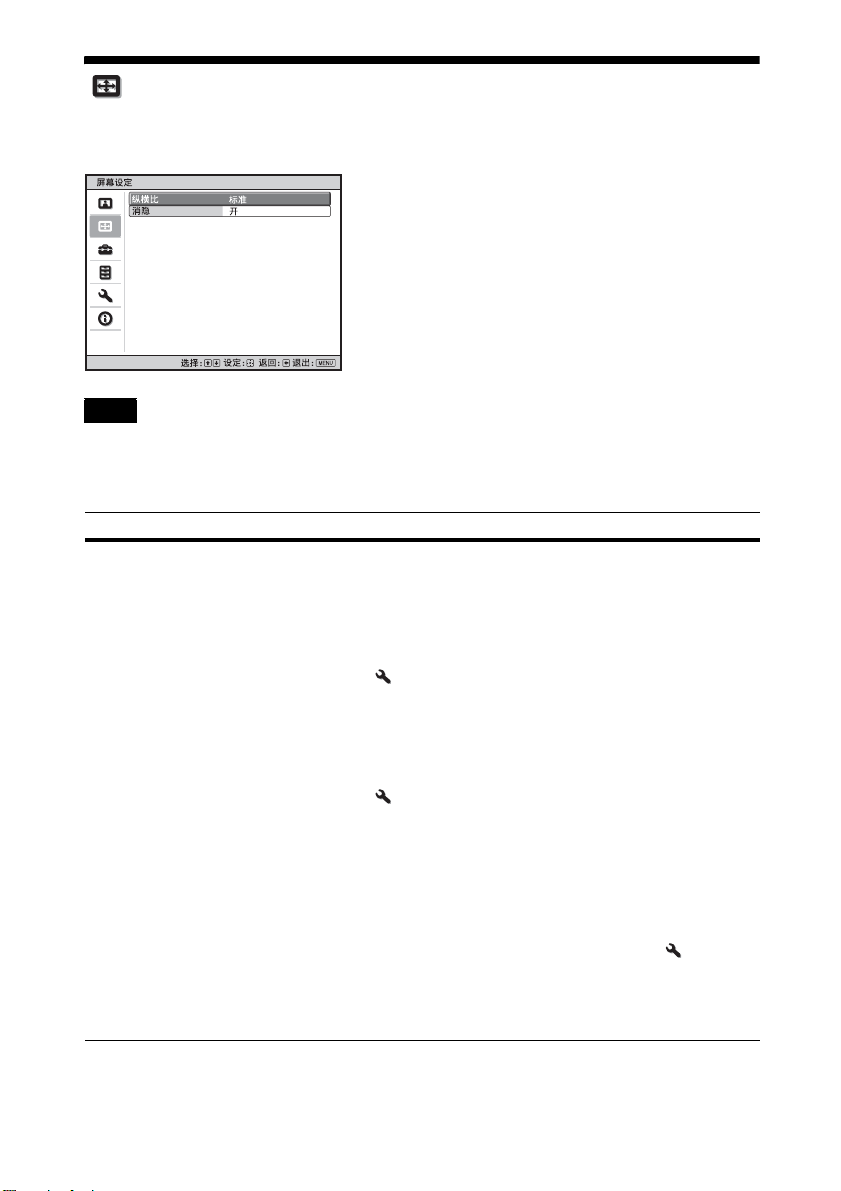
屏幕设定菜单
可以设定图像尺⼨、纵横⽐模式等。
注意
根据输⼊信号的类型,可能⽆法使⽤这些项⽬。有关详细说明,请参见 “输⼊信号和
可调整 / 设定项⽬”(第 52 页)。
括号中的项⽬名称代表遥控器上所印的项⽬名称。
设定项⽬ 说明
纵横⽐
[ASPECT]
您可以设定显⽰当前输⼊信号的图像的纵横⽐ (第 14 页)。
仅当输⼊视频信号时,您才可以设定此功能。
1.85:1 放⼤:以原始纵横⽐显⽰ 1.85:1 纵横⽐图像,该图像
被放⼤,因此屏幕顶部和底部不会出现⿊带。
2.35:1 放⼤:以原始纵横⽐显⽰ 2.35:1 纵横⽐图像,该图像
被放⼤,因此屏幕顶部和底部的⿊带尽可能⼩。
当从安装设定 菜单的 “触发器选择 1/2”选择 “2.35:1 放
⼤”时,将从 TRIGGER 接⼝输出 12 V 信号 (第 33 页)。
标准:以原始纵横⽐显⽰输⼊视频,该视频被放⼤以充满屏
幕。此模式适合观看 1.78:1 (16:9)和 1.33:1 (4:3)视频。
垂直拉伸:这是使⽤市售的变形透镜通过 2.35:1 屏幕观看
2.35:1 视频的最合适模式。
当从安装设定 菜单的 “触发器选择 1/2”选择 “垂直拉
伸”时,将从 TRIGGER 接⼝输出 12 V 信号 (第 33 页)。
挤压:通过此设定,当使⽤市售的变形镜头时,将以正确的纵
横⽐显⽰ 1.78:1 (16:9)和 1.33:1 (4:3)视频。
拉伸:将已被压缩为 1.33:1 (4:3)的视频显⽰为 1.78:1
(16:9)纵横⽐。
提⽰
• 选择 “垂直拉伸”或 “挤压”时,请在安装设定 菜单的
“变形透镜”中选择变形镜头类型。
• 可选纵横⽐模式因输⼊信号⽽异 (第 55 页)。
• ⽆法为来⾃电脑的输⼊信号或分辨率为 4096 × 2160(第 50、
51、55 页)的输⼊信号选择纵横⽐。
26
Page 27
设定项⽬ 说明
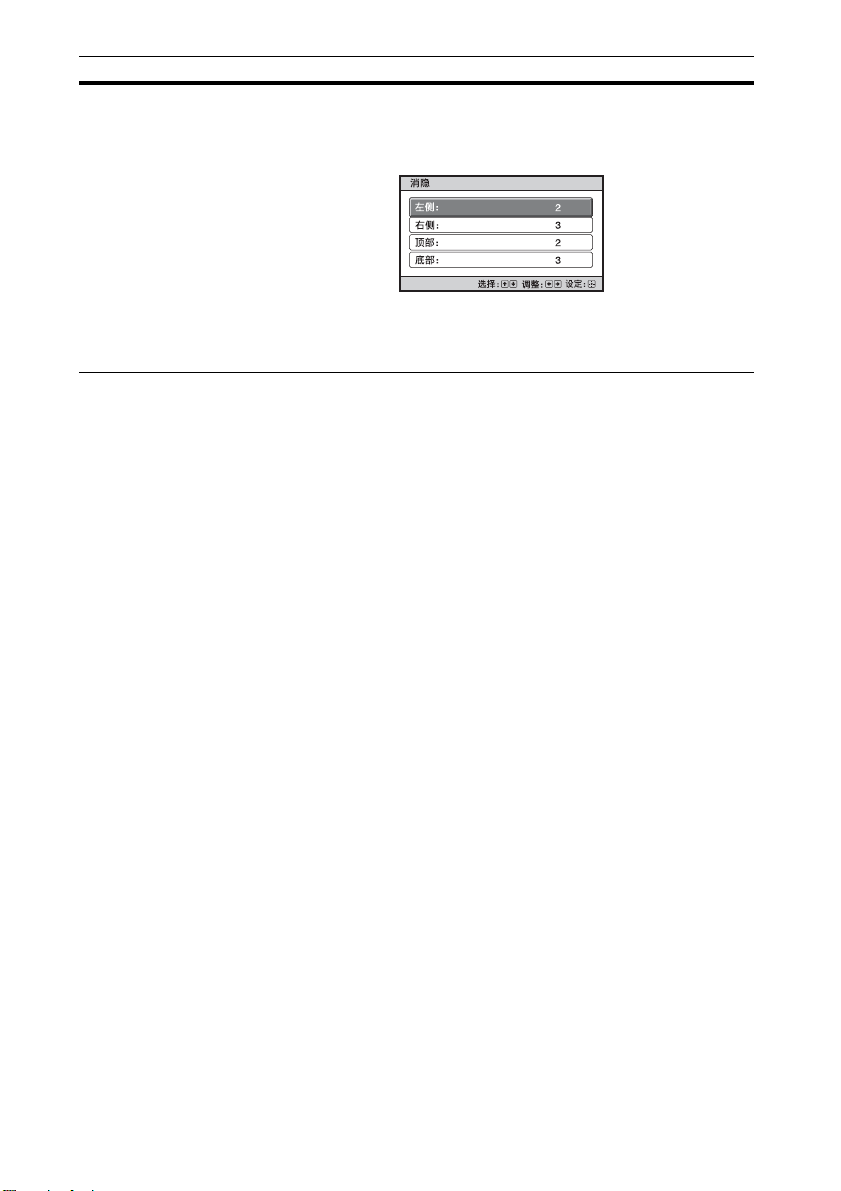
消隐 此功能允许您在屏幕的四个⽅向内调整可显⽰区域。
开:使⽤ M/m 按钮突出显⽰ “左侧”、“右侧”、“顶部”或
“底部”,以选择要调整的边缘。
使⽤ </, 按钮调整消隐值。
关:关闭消隐功能。
提⽰
视纵横⽐设置⽽定,可能⽆法使⽤右侧 / 左侧消隐。
27
Page 28
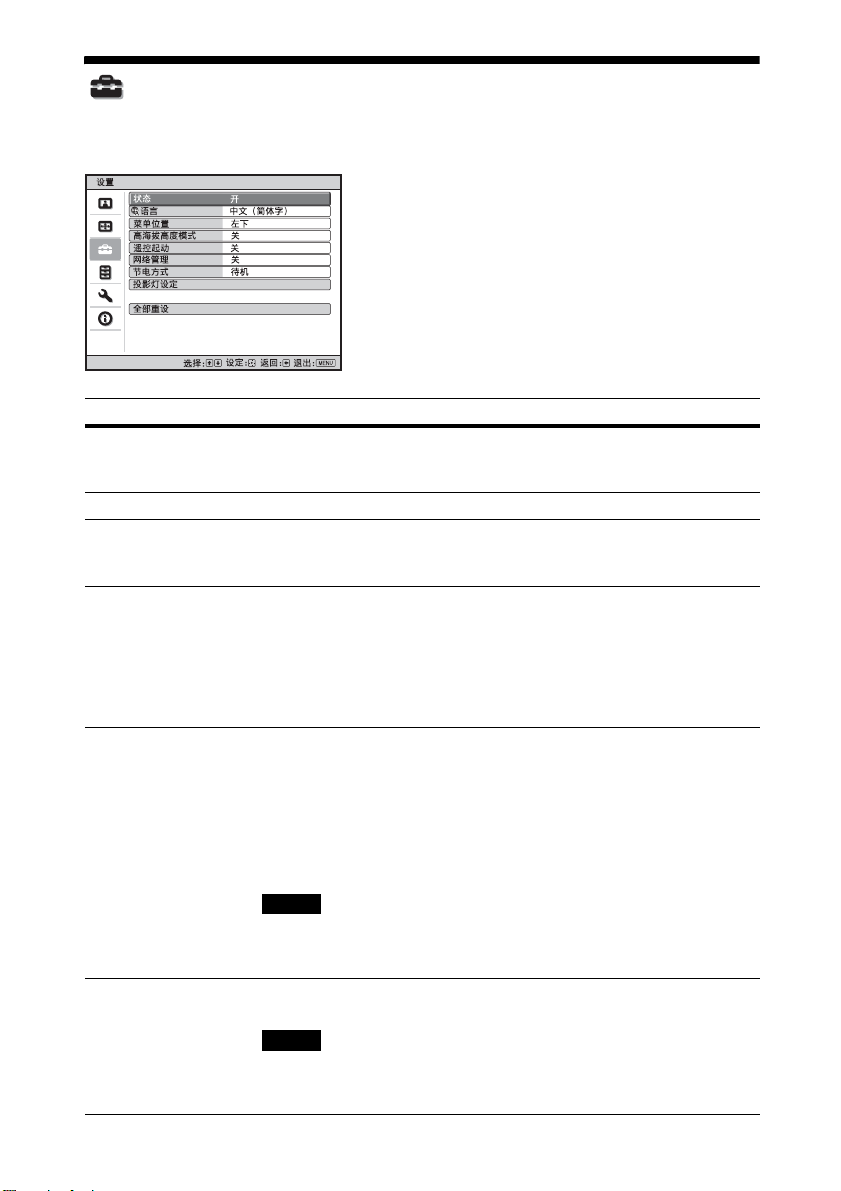
设置菜单
设置菜单⽤于改变出⼚预设设定等。
设定项⽬ 说明
状态 设定是否显⽰屏幕显⽰。
语⾔ 选择在菜单中和屏幕显⽰时所⽤的语⾔。
菜单位置 您可以改变在屏幕上显⽰菜单的位置。
⾼海拔⾼度模式 设置本机以便在当前⼤⽓压⼒下⼯作。
设定为 “关”以关闭除某些菜单、关闭电源时的信息和警告信
息以外的屏幕显⽰。
左下 : 在屏幕的左下⽅显⽰菜单。
中:在屏幕中央显⽰菜单。
开:当在海拔 1500 m 以上的⾼度使⽤本机时使⽤此设定。
关:在通常海拔⾼度使⽤本机时,使⽤此设定。
提⽰
当此项⽬设定为 “开”时,由于冷却扇的速度变快,冷却扇的
噪⾳稍微增⼤。
遥控起动 设定遥控起动设定。
⽹络管理 开:当连接到⽹络且持续与投影机控制设备通信时,设定此
开:可以从连接⾄⽹络的 PC 或终端打开电源。
关:关闭遥控起动功能。
提⽰
• 若要使⽤此功能,应将本机预先连接到⽹络 (第 35 页)。
• 若要⽤遥控起动功能打开电源,应从 PC 或终端发送特定指
令。有关详细说明,请向 Sony 专业技术⼈员咨询。
注意
当遥控起动设定为 “开”时,待机电源要求将提⾼。当⽹络管
理设定为 “开”时,遥控起动设定⾃动设定为 “开”,且⽆法
更改设定。另外,菜单上不会显⽰此项。
项。
注意
当⽹络管理设定为 “开”时,⽹络功能将持续启⽤。当本机未
持续连接⽹络时,请将⽹络管理设定为 “关”。如果设定为
“开”,耗电量会增加。
28
Page 29

设定项⽬ 说明
节电⽅式 设定节电⽅式。
待机:如果约 10 分钟没有信号输⼊,电源将⾃动关闭且投影
机进⼊待机模式。
关:禁⽤节电功能。
投影灯设定 更换投影灯时,设置想要的投影灯设定 (第 45 页)。
全部重设 所有设置将初始化为出⼚预设值。
菜单中的 “投影灯操作时间”不会重设。
信息
29
Page 30
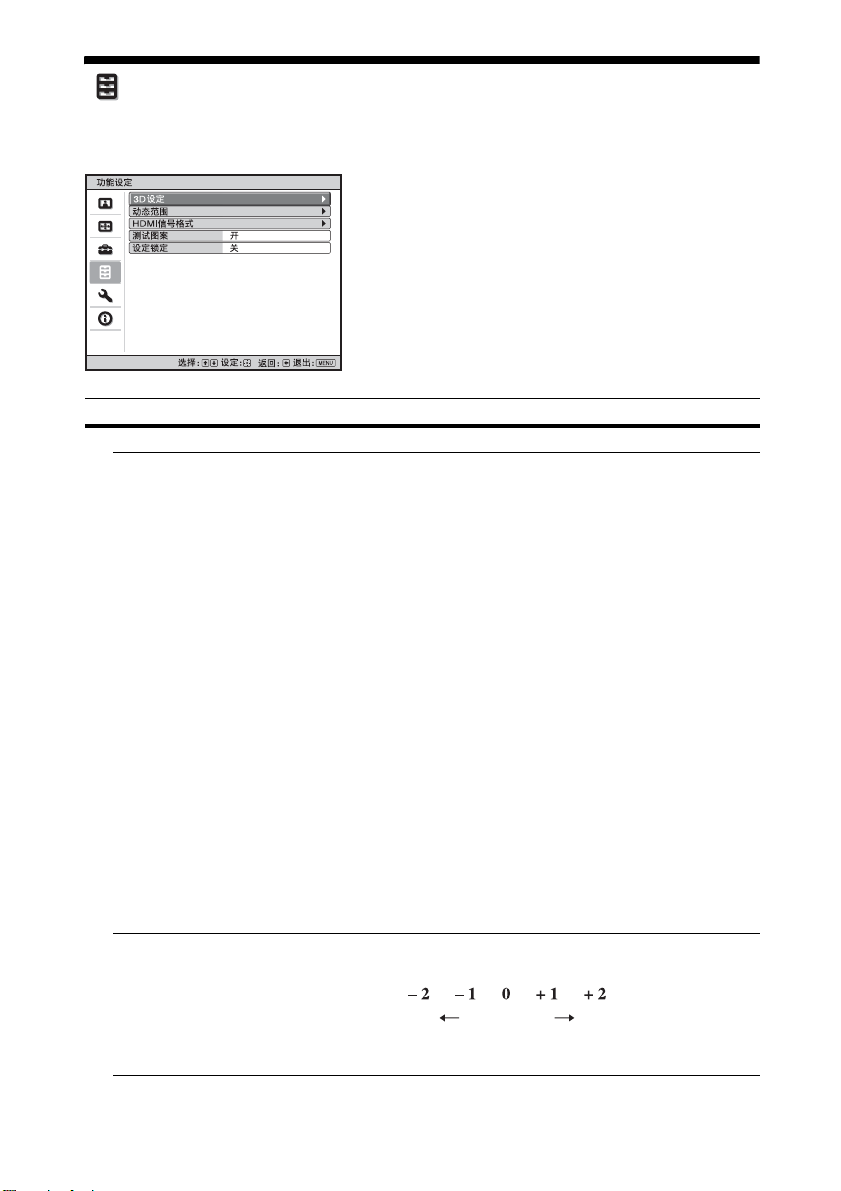
功能设定菜单
功能设定菜单⽤于改变本机的各种功能设置。
设定项⽬ 说明
3D 设定 可改变 3D 功能的设定。
2D-3D 显⽰选择 ⽤于在 “2D”和 “3D”之间切换影像。
⾃动:在输⼊带有 3D 信息 * 的 HDMI 信号时,显⽰ 3D 影像。
在输⼊其它信号时,显⽰ 2D 影像。
3D:根据 “3D 格式”中所选择的 3D 系统显⽰ 3D 影像。但是,
当带有 3D 信息的 HDMI 信号输⼊本机时,将根据这些 HDMI 信
号的 3D 系统显⽰ 3D 影像。
* 3D 信息为附加信息,⽤于区分 3D。有些 HDMI 信号带有附加信
息以区分 3D,⽽有些 HDMI 信号则没有。
3D 格式:当输⼊的 HDMI 信号不含 3D 信息时,设定 3D 系统。
模拟 3D:将 2D 影像转换为 3D 影像。只可对输⼊的 HD 信号
进⾏此设定。
根据视频源⽽定,模拟 3D 功能的效果可能会受到限制。
每个⼈对 3D 影像的感知都有所差异。
并排:选择此项将 3D 影像并排显⽰为两个相似影像。
上下:选择此项将 3D 影像显⽰为上下两个相似影像。
提⽰
• 对于某些视频源,⽆法将 “2D-3D 显⽰选择”设定为 “3D”。
关于可⽤的 3D 信号,请参见 “兼容的 3D 信号”(第 53
页)。
• 视屏幕尺⼨(建议 100 ⾄ 120 英⼨)和视频源⽽定,模拟 3D 功
能的效果可能会受到限制。
• 显⽰ 3D 影像时,菜单显⽰也会带有叠影效果,最好使⽤ 3D 眼
镜进⾏观看。
3D 深度调节 ⽤于调节屏幕上 3D 影像的深度。仅当选择了 “模拟 3D”以外
的 3D 格式时,才可进⾏此设定。
深度
标准前⾯ 深度
建议您将 “3D 深度调节”设定为 “0”。视 “3D 深度调节”
的设定⽽定,可能很难感觉到 3D 影像效果。
30
Page 31

设定项⽬ 说明
模拟 3D 效果 ⽤于调节将 2D 内容转换为 3D 影像时的 3D 效果。可在 “⾼
位”、“中位”和 “低位”之中选择效果。
提⽰
每个⼈对于由模拟 3D 功能转换⽽来的 3D 影像感知会有所差
异。
动态范围 设定 HDMI 1 和 HDMI 2 接⼝的视频输⼊电平。
⾃动:⾃动设定视频输⼊电平。
有限:为相当于 16-235 的信号设定视频输⼊电平。
全屏幕:为相当于 0-255 的信号设定视频输⼊电平。
注意
如果未正确设定所连接 HDMI 设备的视频输出设定,则视频的
亮部和暗部可能会显得过亮或过暗。
HDMI 信号格式 切换 4K 的视频信号格式。
标准格式:以标准 HDMI 格式显⽰图像。
增强格式:以更详细的 HDMI 格式显⽰图像。
提⽰
• 当选择 “增强格式”时,图像或声⾳可能⽆法正常输出。此
时,请设置为 “标准格式”。
• 切换视频信号格式后,可能需要⼀些时间才能显⽰图像。
测试图案 根据设置显⽰测试图案。
开:使⽤ “透镜焦点”、“透镜变点”和 “透镜移位”调整镜
头时,所使⽤的屏幕上出现测试图案。
关:不出现测试图案。
提⽰
为使您能够轻松地调整对焦,在显⽰测试图案期间,仅以绿⾊
显⽰。
设定锁定 锁定菜单项⽬设定,以防操作错误 (第 32 页)。
关:取消设定锁定。
等级 A:组 1 项⽬ (下)未显⽰在菜单中,为不可⽤。
等级 B:组 1 和组 2 项⽬ (下)未显⽰在菜单中,为不可⽤。
31
Page 32

被设定锁定功能锁定的项⽬
组1 组2
图像设定菜单
重设
真实创作
动态 HDR 增强
投影灯控制
Motionflow
对⽐度
亮度
⾊彩
⾊调
⾊温
锐度
NR
MPEG NR
缓和⾊阶
电影模式
迦玛校正
⾊彩校正
纯⽩⾊
x.v.Color
HDR
彩⾊空间
减少输⼊延迟
设置菜单
功能设定菜单
安装设定菜单
状态
语⾔
菜单位置
⾼海拔⾼度模式
遥控起动
⽹络管理
节电⽅式
投影灯设定
动态范围
测试图案
翻转图像
透镜控制
变形透镜
触发器选择
红外线接收器
⾯板调整
⽹络设定
32
Page 33
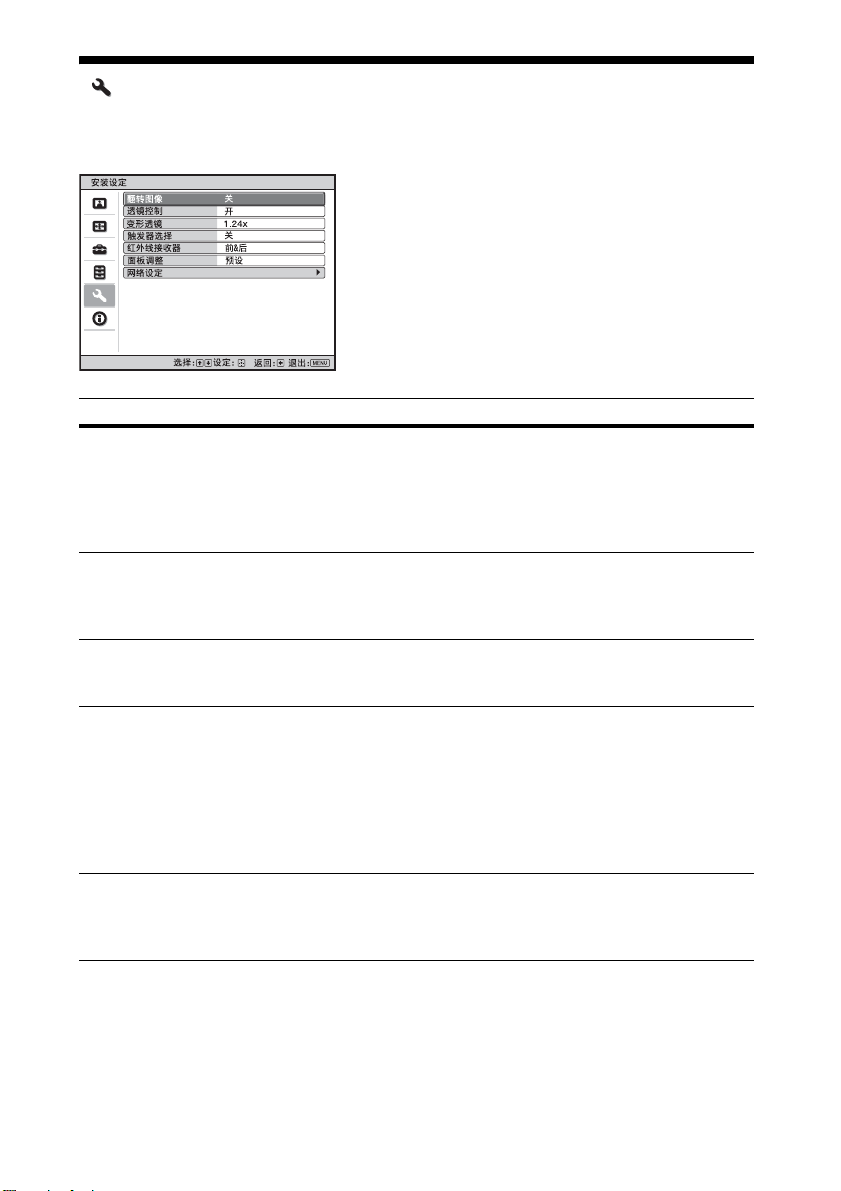
安装设定菜单
安装设定菜单⽤于改变安装设定。
设定项⽬ 说明
翻转图像 在屏幕上⽔平和 / 或垂直翻转图像。
透镜控制 避免任何错误的镜头操作,如 “透镜焦点”、“透镜变点”和
变形透镜 选择符合变形镜头转换⽐的设置。
触发器选择 切换 TRIGGER 接⼝的输出功能。
红外线接收器 选择本机前后的遥控探测器 (红外线接收器)。
HV:⽔平和垂直翻转图像。
H:⽔平翻转图像。
V:垂直翻转图像。
关:图像不翻转。
进⾏后⽅投影安装或天花板安装时,请使⽤此项⽬。
“透镜移位”。
开:启⽤镜头调整。
关:阻⽌镜头调整。
1.24x:当使⽤⽔平⽐为 1.24 ×的变形镜头时选择此项。
1.32x:当使⽤⽔平⽐为 1.32 ×的变形镜头时选择此项。
关:关闭 TRIGGER 接⼝功能。
电源:当本机的电源开启时,从 TRIGGER 接⼝输出 12 V 信号。
当本机处于待机状态时,TRIGGER 接⼝不会输出任何信号。
垂直拉伸:与 “纵横⽐”设定的 “垂直拉伸”(第 26 页)配
合使⽤并从 TRIGGER 接⼝输出 12 V 信号。
2.35:1 放⼤:与 “纵横⽐”设定的 “2.35:1 放⼤”(第 26
页)配合使⽤并从 TRIGGER 接⼝输出 12 V 信号。
前&后:激活前后双⽅的探测器。
前:仅激活前⾯的探测器。
后:仅激活后⾯的探测器。
33
Page 34
设定项⽬ 说明
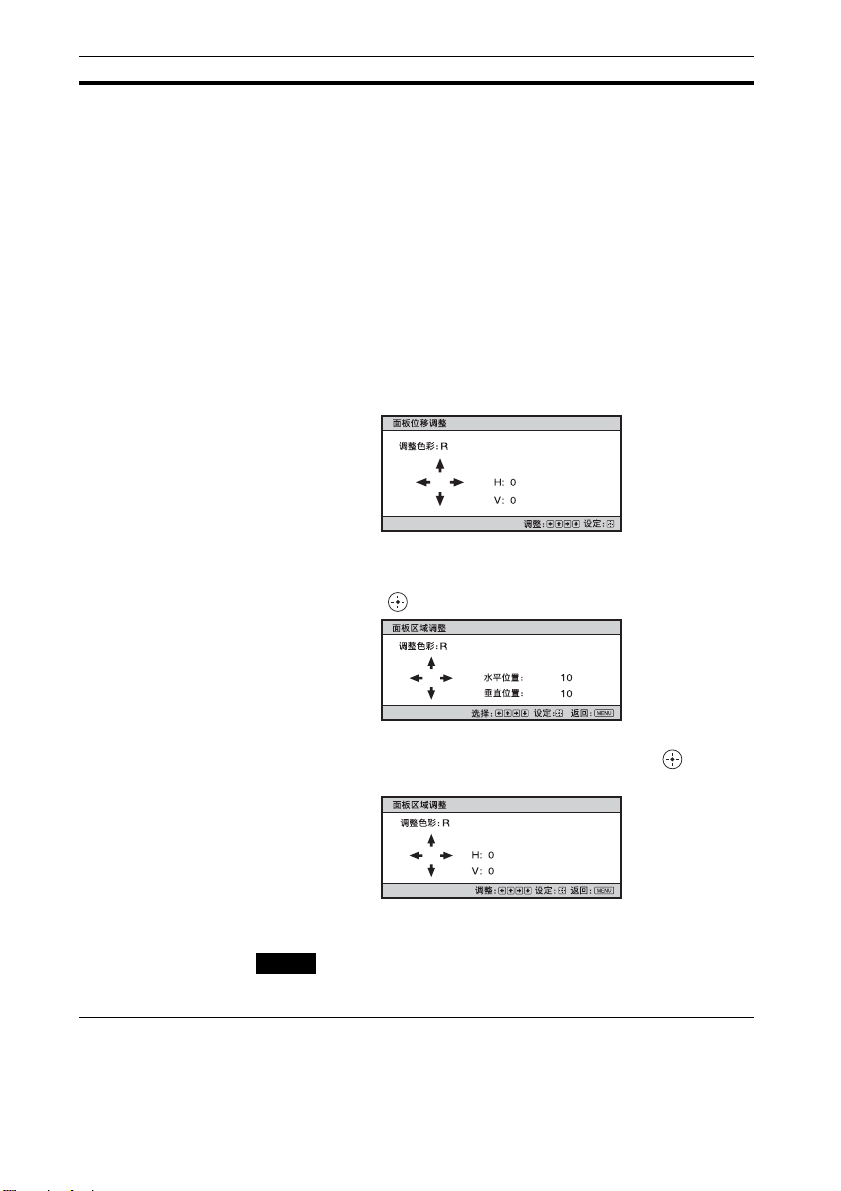
⾯板调整 此功能使您能够调整屏幕上字符或图像⾊彩的差异。
调整:选择 “调整⾊彩”或 “调整项⽬”调整⾊彩差异。
调整项⽬:从如下项⽬中选择进⾏调整的⽅法。
移位:移位整个图像并进⾏调整。
区域:选择想要的范围并进⾏调整。
调整⾊彩:指定想要的⾊彩以调整⾊彩差异。选择 “R”
(红)或 “B”(蓝)以根据 “G”(绿)进⾏调整。
图案⾊彩:当 “调整⾊彩”为 “R”(红)时,选择 “R/G”
(红和绿)或 “R/G/B”(⽩、所有颜⾊)。当 “调整⾊彩”
为“B”(蓝)时,选择 “B/G”(蓝和绿)或 “R/G/B”
(⽩、所有颜⾊)。
调整:可以⽤ </,、 M/m 按钮对在 “调整⾊彩”中选择
的⾊彩进⾏移位调整和区域调整。
当选择 “移位”时:在移位调整画⾯上⽤ </, 按钮指定
⽔平⽅向 (H)的设置,⽤ M/m 按钮指定垂直⽅向 (V) 的
设置。
当选择 “区域”时:⽤ </, 按钮选择要调整的⽔平位置
(H 位置),⽤ M/m 按钮选择要调整的垂直位置 (V 位
置),然后按 。
⽤ </, 按钮设定⽔平⽅向 (H ⽅向)的调整量,⽤ M/m
按钮设定垂直⽅向 (V ⽅向)的调整量。通过按 ,您可
以再次选择要调整的位置。
重设:返回出⼚设置。
预设:已预设优化数据。
注意
根据以上进⾏的调整,⾊彩可能会变得不均匀或分辨率可能发
⽣变化。
34
Page 35

设定项⽬ 说明
⽹络设定 执⾏互联⽹协议设置。
IPv4 设置 IP 地址设置:选择 IP 地址设置⽅式。
⾃动 (DHCP):从路由器等 DHCP 服务器⾃动指定 IP 地址。
⼿动:⼿动指定 IP 地址。
当 “IP 地址设置”选择为 “⼿动”时,输⼊ “IP 地址”、
“⼦⽹掩码”和 “默认⽹关”。通过 M/m 按钮选择各项,然
后按 按钮。通过 </, 按钮选择要输⼊的框,并通过
M/m 按钮输⼊数值。输⼊所有项⽬后,选择 “应⽤”,然后
按 按钮。将注册输⼊的设置。
IP 地址:设置本机的 IP 地址。
⼦⽹掩码:设置本机的⼦⽹掩码。
默认⽹关:设置本机的默认⽹关。
MAC 地址:显⽰本机的 MAC 地址。此项⽆法更改。
应⽤:启⽤⼿动设置的 IP 地址。
IPv6 信息 显⽰ IPv6 信息。
设置 IPv6 IP 地址时,请在⽹络浏览器上进⾏设置 (第 37
页)。
35
Page 36
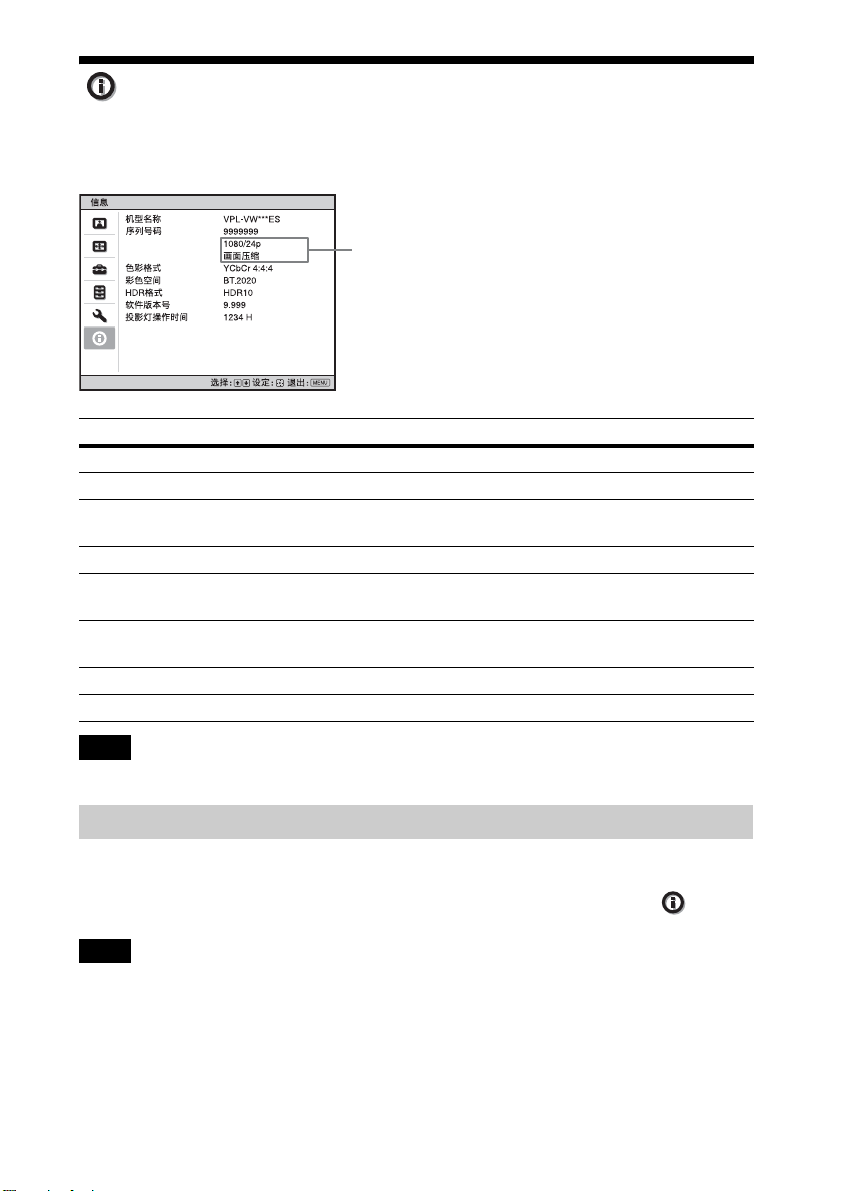
信息菜单
信息菜单显⽰机型名称、序列号码、输⼊信号的类型 / 格式、软件版本号以及投影灯
的累计使⽤时间。
信号类型
项⽬ 说明
机型名称 显⽰机型名称。
序列号码 显⽰序列号码。
信号类型 显⽰你选择的输⼊信号的分辨率。当输⼊带 3D 信息的输⼊信
号时,显⽰输⼊信号类型和 3D 格式。
⾊彩格式 显⽰你选择的输⼊信号的⾊彩格式。
彩⾊空间 显⽰你选择的输⼊信号的彩⾊空间 (“BT.601”,“BT.709”
或 “BT.2020”)。
HDR 格式 如果输⼊信号与 HDR 兼容,则 “HDR10”或 “HLG”会根据输
⼊信号进⾏显⽰。
软件版本号 显⽰软件版本号。
投影灯操作时间 显⽰投影灯已经点亮的时间 (总使⽤时间)。
注意
您⽆法调整或改变以上各项显⽰内容。
有关预设存储器
本机内有默认影像数据,可根据 “预设信号”(第 50 页)(预设存储器)中显⽰的信
号正确调整输⼊信号的预设数据。输⼊预设信号时本机⾃动检测信号类型,并从预设
存储器中调⽤该信号的数据调整该信号以获得合适图像。信号类型在信息 菜单中
显⽰。
注意
视电脑输⼊信号⽽定,部分屏幕可能会被隐藏或显⽰不正确。
36
Page 37
使⽤⽹络功能
连接到⽹络可操作以下功能。
在仅启⽤必要功能的情况下使⽤投影
机。
• 通过⽹络浏览器检查本机的当前状
态。
• 对本机进⾏⽹络设定。
• 通过控制协议 (Advertisement、
ADCP、AMX DDDP (Dynamic Device
Discovery Protocol)、Crestron
RoomView、Control4)进⾏⽹络监
视和控制。
注意
• 当通过⽹络连接本投影机时,请咨询
⽹络管理员。⽹络必须受到安全保护。
• 当使⽤连接到⽹络的本投影机时,通
过⽹络浏览器访问控制窗⼝并更改访
问限制的出⼚预设值 (第 39 页)。建
议定期更改密码。
• 当完成⽹络浏览器上的设定时,关闭
⽹络浏览器以便注销。
• ⽤于以下说明的菜单显⽰可能因使⽤
的型号⽽异。
• ⽀持的⽹络浏览器是 Internet
Explorer (版本 11 或更新)、Safari
和 Chrome。
• 菜单仅显⽰英⽂。
• 从电脑访问本机时,如果电脑的浏览
器设定为 [ 使⽤代理服务器 ],请单击
勾选标记,设定为不通过代理服务器
访问。
• AMX DDDP 不兼容 IPv6。
• 当本机开启时,这些⽹络功能可⽤。
通过⽹络浏览器显⽰
本机的控制窗⼝
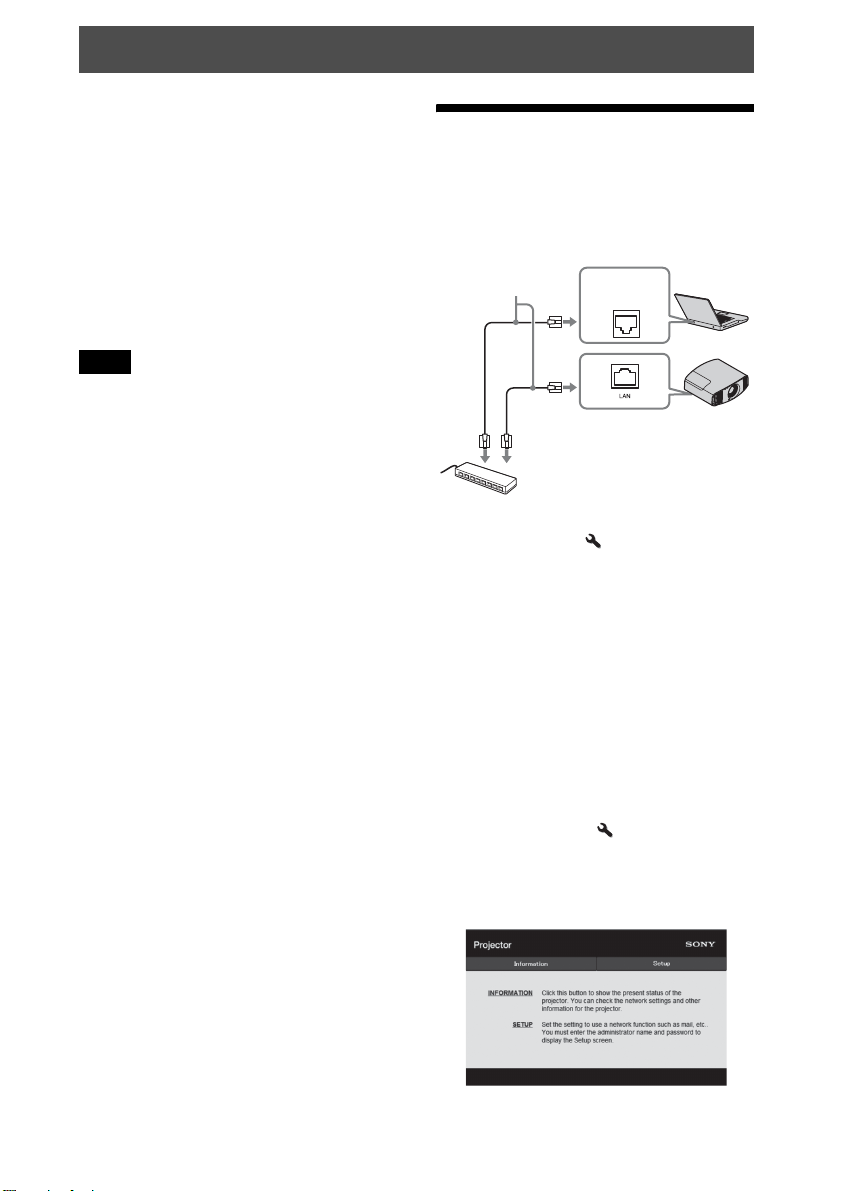
1 连接 LAN 电缆。
LAN 电缆
(直型)
(⾮附带)
集线器、路由器等
2 使⽤安装设定 菜单上的 “⽹络
设定”(第 35 页)设定本机的⽹
络设定。
3 启动电脑上的⽹络浏览器,在地址
字段输⼊以下内容,然后按电脑上
的 Enter 键。
http://xxx.xxx.xxx.xxx
(xxx.xxx.xxx.xxx:本机的 IP 地
址)
通过 IPv6 地址连接时
http://[xxxx:xxxx:- xxxx]
LAN 接⼝
可以在安装设定 菜单上的 “⽹络
设定”下确认本机的 IP 地址。
⽹络浏览器中出现以下窗⼝:
37
Page 38
⼀旦进⾏⽹络连接后,只有执⾏本程
序的步骤 3 才能打开控制窗⼝。
操作控制窗⼝
切换页⾯
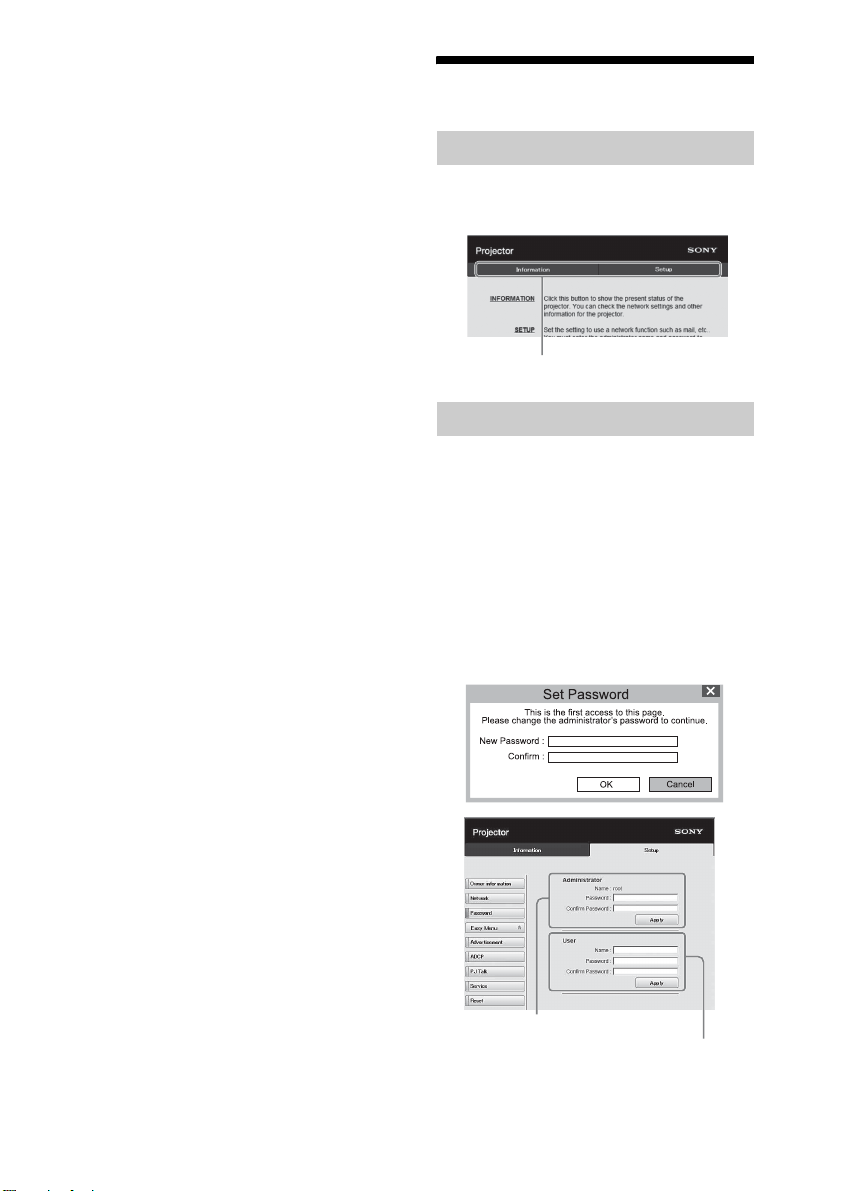
单击⼀个页⾯切换按钮显⽰想要的设定
页⾯。
页⾯切换按钮
设定访问限制
可以限制⽤户访问任何特殊页⾯。
Administrator:允许访问所有页⾯
User:允许访问除 Setup 页⾯以外的
所有页⾯
⾸次访问 Setup 页⾯时,请在认证对话
框的⽤户名称框中输⼊ “root”,在密
码框中输⼊ “Projector”。
⾸次登录时会显⽰提⽰您更改密码的窗
⼝。请按照屏幕上的指令更改密码。
Administrator 中的 Name 预设为
“root”。
[Administrator] 的输⼊区域
[User] 的输⼊区域
您可以在 Setup 页⾯中的 Password 页⾯
更改密码。
38
Page 39
当您更改密码时,请输⼊新密码。
Administrator 和 User 的密码必须是包
括字⺟和数字的 8 ⾄ 16 位字符。
字⺟区分⼤⼩写。
默认密码 “Projector”不能被设置为
新密码。
注意
如果您忘记了密码,请咨询 Sony 公司专
业技术⼈员。
密码将在您允许的情况下重设。
确认本机相关信息
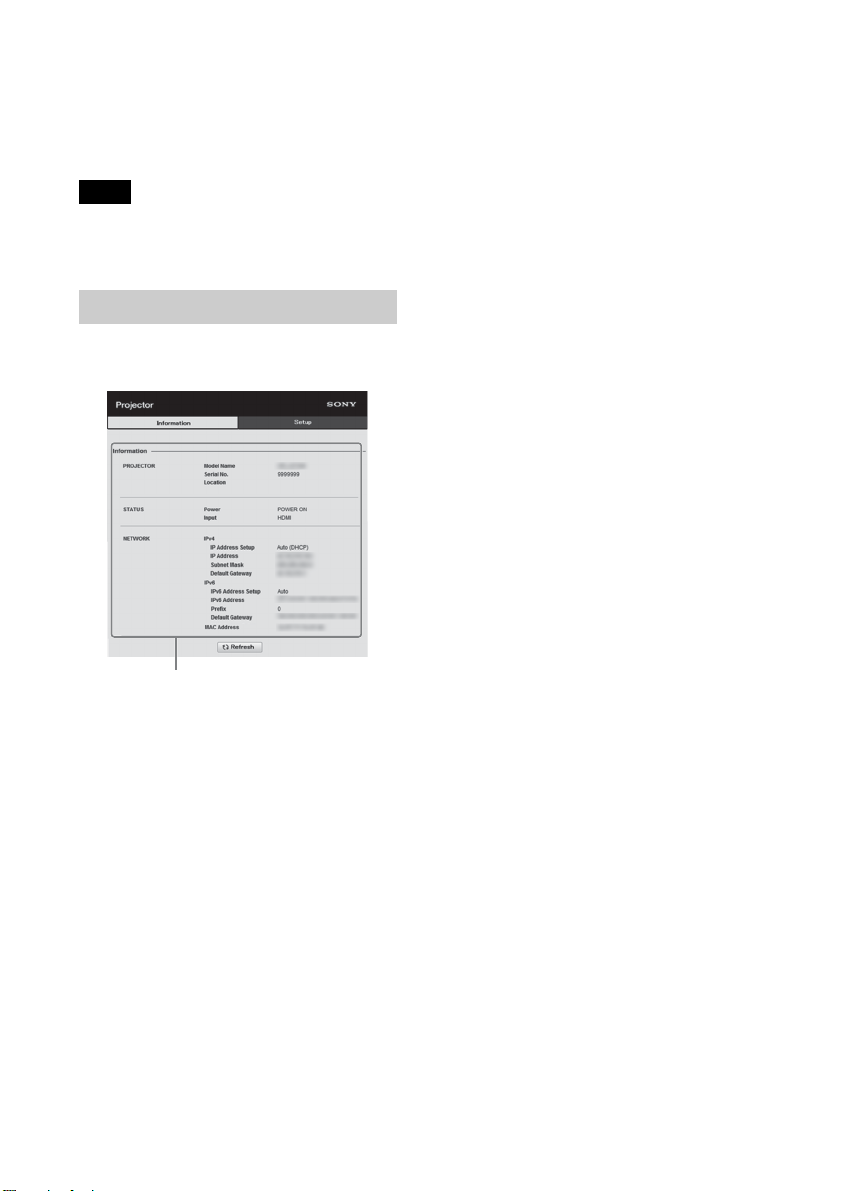
可以在 Information 页⾯上确认本机的
当前设置。
信息区域
39
Page 40
错误处理
故障排除
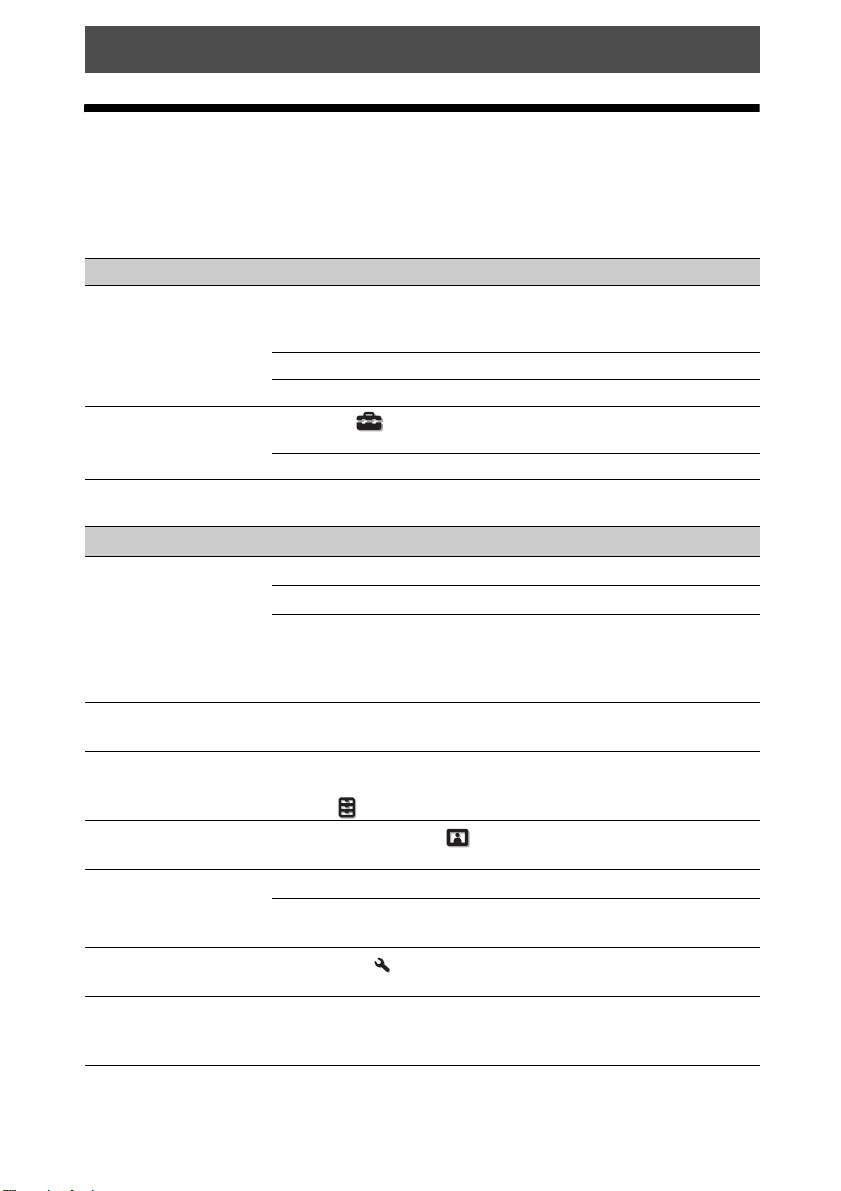
如果发现本机⼯作不正常,请使⽤下述说明尝试诊断并解决问题。如果问题依然存
在,请向 Sony 专业技术⼈员咨询。
电源
症状 原因和对策 页码
⽆法接通电源。 如果⽤ ?/1 (开机 / 待机)按钮关闭电源并在短时
间后重新接通电源,电源可能⽆法接通。⼤约 1 分
钟后,接通电源。
关严投影灯盖,然后牢固地拧紧螺丝。 46
检查警告指⽰灯。 43
电源突然关闭。 检查设置 菜单中的 “节电⽅式”是否设定为
“待机”。
将 “节电⽅式”设定为 “关”。29
图像设定
症状 原因和对策 页码
⽆图像。 检查连接电缆是否正确连接到外接设备。 10
使⽤ INPUT 按钮正确选择输⼊源。 12
检查电脑信号是否设置为输出到外接显⽰器。
如果笔记本电脑等信号输出到其显⽰器和外接显⽰
器,则可能⽆法正确显⽰外接显⽰器的影像。将电
脑设定为仅向外接显⽰器输出信号。
影像带有叠影。 影像采⽤ 3D 形式显⽰。使⽤ 3D 眼镜观看 3D 影像,
然后将 “2D-3D 显⽰选择”设定为 “3D”。
视频的亮部和暗部显
得过亮或过暗。
图像太暗。 正确地调整图像设定 菜单的 “对⽐度”或 “亮
图像不清晰。 调整对焦。 7
字符或图像的⾊彩不
正确。
屏幕上留有图像。
(残留影像)
当输⼊ HDMI 标准以外的信号电平时可能会发⽣这种
现象。切换所连接设备的输出电平,或切换本机功
能设定 菜单的动态范围。
度”。
如果镜头上有⽔⽓凝聚,请接通本机电源并放置约
2 ⼩时。
在安装设定 菜单的 “⾯板调整”中选择想要的
彩⾊基准。
长时间显⽰⾼对⽐度的⾮活动影像后,屏幕上可能
会有⼀些残留影像。这种现象是暂时的。将电源关
闭⼀段时间后,残留影像将会消失。
29
13, 30
31
22
34
–
–
–
–
40
Page 41

症状 原因和对策 页码
启动后⼤约 1 ⾄ 3 分
钟,图像部分出现粉
红⾊或绿⾊。
这可能是由于使⽤环境的原因。
请在电源开启状态下等待约 5 分钟。颜⾊将⾃⾏消
失。
屏幕显⽰
症状 原因和对策 页码
不出现屏幕显⽰。 将设置 菜单中的 “状态”设定为 “开”。 28
查看 ON/STANDBY 指⽰灯是否以绿⾊点亮。当 ON/
STANDBY 指⽰灯以绿⾊闪烁时,本机正在开机。请
等待,直⾄指⽰灯停⽌闪烁并保持绿⾊点亮。
屏幕上的机型名称不
消失。
可能在购买时设定了本机的展⽰模式。请向当地的
经销商或 Sony 专业技术⼈员咨询。
遥控器
症状 原因和对策 页码
遥控器不⼯作。 电池可能没电了。换上新电池。
按照正确的极性插⼊电池。
如果遥控探测器附近有荧光灯管,本机可能会⼯作
异常或发⽣错误操作。
确认本机上遥控探测器的位置。 3, 4
将安装设定 菜单上的 “红外线接收器”设定为
“前 & 后”。
确保电缆未连接⾄ IR IN 连接器。 3
–
7
–
–
–
–
33
3D 影像
症状 原因和对策 页码
影像看上去不像 3D 影像。查看 3D 眼镜的电源是否开启。 13
确认 3D 眼镜中的电池是否即将耗尽或充满电。
将 “2D-3D 显⽰选择”设定为 “⾃动”或 “3D”。30
查看输⼊信号是否兼容 3D 信号。 53
视所连 AV 选择器 /AV 放⼤器 / 外接设备⽽定,可能
不会输⼊ 3D 信号。如果未输⼊ 3D 信号,请确认 AV
选择器 /AV 放⼤器 / 外接设备的规格和 / 或设定。
当观看位置与本机太远时,3D 眼镜可能⽆法正常显
⽰影像。
屏幕尺⼨不合适。降低变焦倍数,或从远离屏幕的
位置观看影像。
有关详细说明,请参见 “使⽤ 3D 眼镜”的 “使⽤
注意事项”。
41
–
–
13
58
13
Page 42
其他
症状 原因和对策 页码
冷却扇噪⾳⼤。 检查设置 菜单中 “⾼海拔⾼度模式”的设定。 28
确认房间温度不会太⾼。
检查本机的安装要求。
为维持投影机组件产品的可靠性,当房间温度⾼于
标准温度时,冷却扇的转速会升⾼。冷却扇的噪⾳
会稍微增⼤。合适的正常温度为 25°C。
⽆法调整镜头移位。 ⽆法超出移动范围调整镜头移位。请在移动范围内
9, 58
调整镜头移位。
–
–
42
Page 43
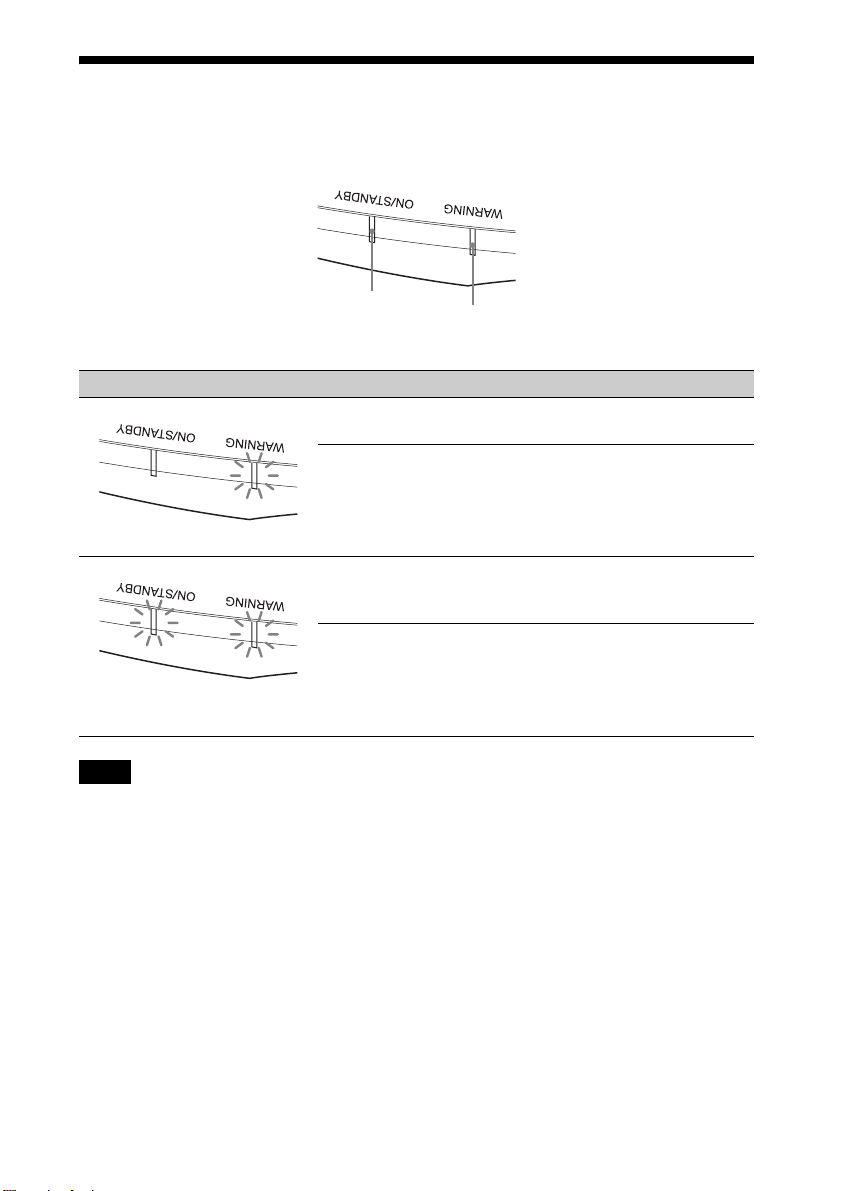
警告指⽰灯
如果投影机有故障,则 ON/STANDBY 或 WARNING 指⽰灯点亮或闪烁。
ON/STANDBY
指⽰灯
WARNING
指⽰灯
闪烁 / 点亮指⽰灯 闪烁次数 原因和对策
两次 关严投影灯盖,然后牢固地拧紧螺丝
(第 46 页)。
三次 投影灯的温度异常⾼。关闭电源并等
待投影灯冷却,然后再次打开电源。
如果症状仍然存在,则投影灯可能已
(以红⾊闪烁)(发出红光)
达到了使⽤寿命。这种情况下,请更
换为新的投影灯 (第 45 页)。
两次 内部温度异常⾼。检查并确认通风孔
是否被物品堵塞或是否正在⾼海拔⾼
度使⽤本机。
三次 冷却扇损坏。请向 Sony 专业技术⼈
员咨询。
(以红⾊闪烁)
两个指⽰灯均闪烁
(以红⾊闪烁)
注意
如果在采取上述⽅法后症状依然存在,请咨询合格的⼯作 Sony ⼯作⼈员。
如果指⽰灯闪烁的⽅式不是上述任何⼀种,请⽤本产品遥控器或控制⾯板上的
[/1 (开机 / 待机)按钮关闭电源,然后再打开电源。
如果症状再次出现,请咨询合格的 Sony ⼯作⼈员。
43
Page 44
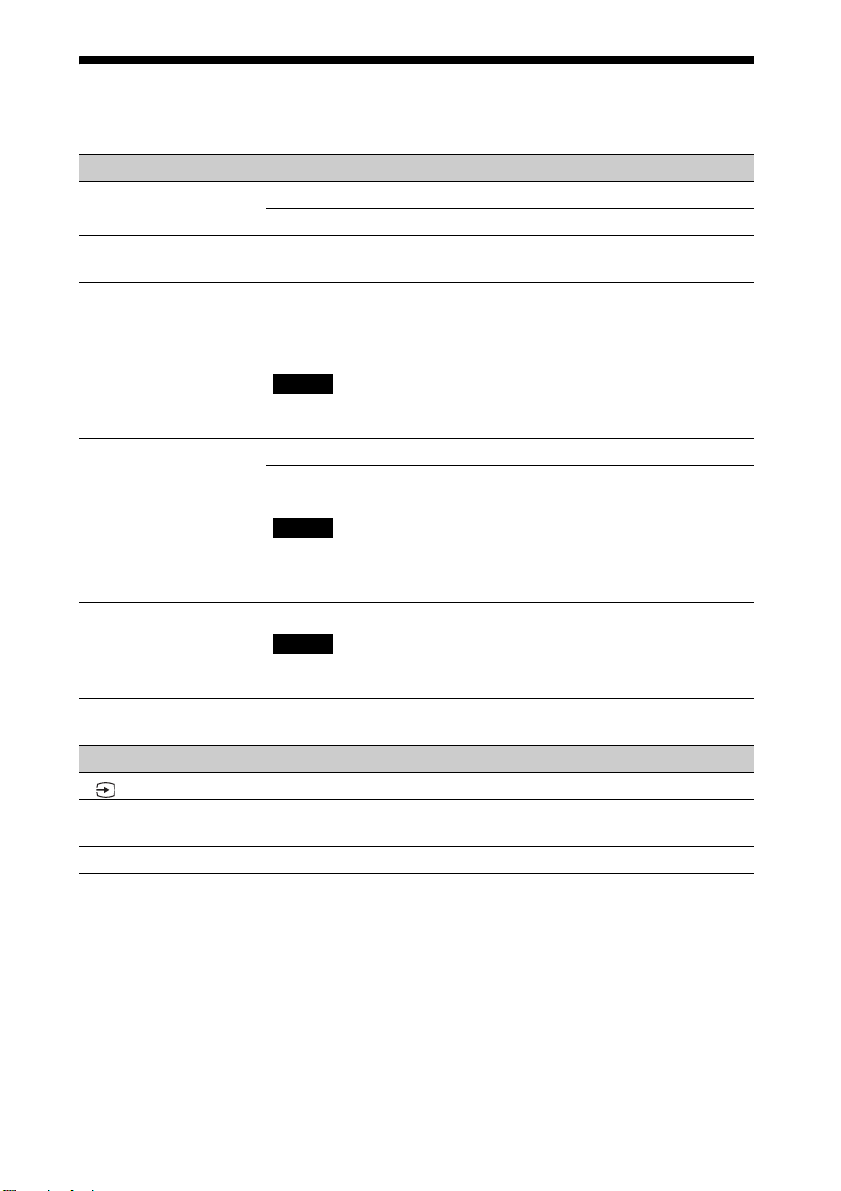
信息⼀览表
警告信息
症状 原因和对策 页码
操作温度过⾼ ! 将在
1 分钟之后关灯。
频率在接受范围之外 ! 频率超出规定范围。输⼊本机频率接收范围内的信
请更换灯泡。 已到达更换投影灯的时间了。更换投影灯。
投影机温度过⾼。如
果投影机在⾼海拔环
境下使⽤,⾼海拔⾼
度模式应为 “开”。
设定为节电模式。投
影机将在 1 分钟之后
⾃动进⼊待机模式。
关闭电源。
检查并确认没有物品堵塞通风孔。 3, 4
号。
更换投影灯后如果再次出现同样的信息,表明投影
灯更换处理尚未完成。请检查投影灯更换处理步
骤。
注意
要删除此信息时,按遥控器或本机控制⾯板上的任
意按钮。
检查并确认没有物品堵塞通风孔。 3, 4
当在⾼海拔地区使⽤本机时,请将 “⾼海拔⾼度模
式”设定为 “开”。
注意
当本机内部的温度仍然很⾼时,“⾼海拔⾼度模式”
将在 1 分钟后切换为 “开”,然后冷却扇的速度变
快。
“节电⽅式”设定为 “待机”。
注意
如果没有信号输⼊,电源将在 1 分钟后关闭,且投
影机进⼊待机模式。
–
50
45
28
29
注意信息
症状 原因和对策 页码
x
不适⽤! 请按适当的按钮。
设定锁定启⽤。 将 “设定锁定”设定为 “等级 A”或 “等级 B”。31
所选的输⼊端⽆信号输⼊。请检查连接。 10
–
⽤该按钮激活的操作当前被禁⽌使⽤。
44
Page 45

其他
更新软件
可以下载⽂件以更新本机的软件。将下
载的⽂件复制到您的 USB 存储器,将
USB 存储器插⼊到本机的 USB 端⼦,然
后执⾏更新。
若要使⽤更新后的功能,则将 USB 存储
设备插⼊已连接互联⽹的 PC 中。
从以下 Sony ⽹站下载更新⽂件:
https://www.pro.sony.eu/
⽹站上也有说明如何安装更新。
注意
有些 USB 存储器并不⽀持使⽤。有关详
细说明,请参见上⽅⽹站。
关于 HDR (⾼动态范
围)
HDR 是⼀种视频表现⽅式,相较于以前
的视频表现⽅式,可提升暗区和亮区的
表现⼒。
关于模拟 3D 功能
• 使⽤模拟 3D 功能时,应考虑到显⽰的
影像可能与原始影像不同,因为此功
能可转换视频影像。
• 请注意,如果将本机⽤于盈利或公开
放映,则通过转换为模拟 3D 将 2D 影
像显⽰为 3D 影像可能会造成对作者或
制作⼈的侵权,⽽这些权利是受到法
律保护的。
更换投影灯
⽤作光源的投影灯具有⼀定的使⽤寿
命。当投影灯变暗、图像的⾊彩平衡异
常或屏幕上出现 “请更换灯泡。”信息
时,表明投影灯可能已经达到其使⽤寿
命。请及时更换新的投影灯 (⾮附
带)。
提⽰
根据安装环境或使⽤条件,作为光源的
投影灯使⽤寿命会产⽣变化。开灯后请
等待数分钟再关灯,可以延长投影灯的
使⽤寿命。
开始⼯作所需要的⼯具:
• 投影机灯泡 LMP-H220 (选购)
• 标准⼗字螺丝⼑
• 布 (防⽌擦伤⽤)
注意
• ⽤ ?/1(开机 / 待机)按钮关闭本机的
电源后,投影灯的温度仍然很⾼。如
果触摸投影灯,⼿指可能会被烫伤。
更换投影灯时,请⾄少等候 1 个⼩时
让投影灯冷却。
• 请勿触摸镜头表⾯。如果触摸了镜头
表⾯,请⽤软布擦去指纹。
• 本机安装在天花板上时,更换投影灯
时需格外注意。
• 更换天花板上本机的投影灯时,请勿
站在投影灯盖正下⽅。拆卸投影灯门
(内盖)时,避免扭绞。如果投影灯爆
炸,碎⽚可能会造成⼈⾝伤害。
• 拆下投影灯单元时,令投影灯单元处
于⽔平状态,然后将其径直拉出。请
勿倾斜投影灯单元。如果在倾斜状态
下拉出投影灯单元,万⼀投影灯损坏,
碎⽚可能散落并导致⼈⾝伤害。
注意
• 请务必使⽤ LMP-H220 投影机灯泡进⾏
更换。如果使⽤ LMP-H220 之外的投影
灯,本机可能发⽣故障。
• 在更换投影灯之前,请务必关闭本机
电源并拔下电源线,然后检查 ON/
STANDBY 指⽰灯是否已经熄灭。
1 关闭本机电源并拔下交流电源线。
45
Page 46
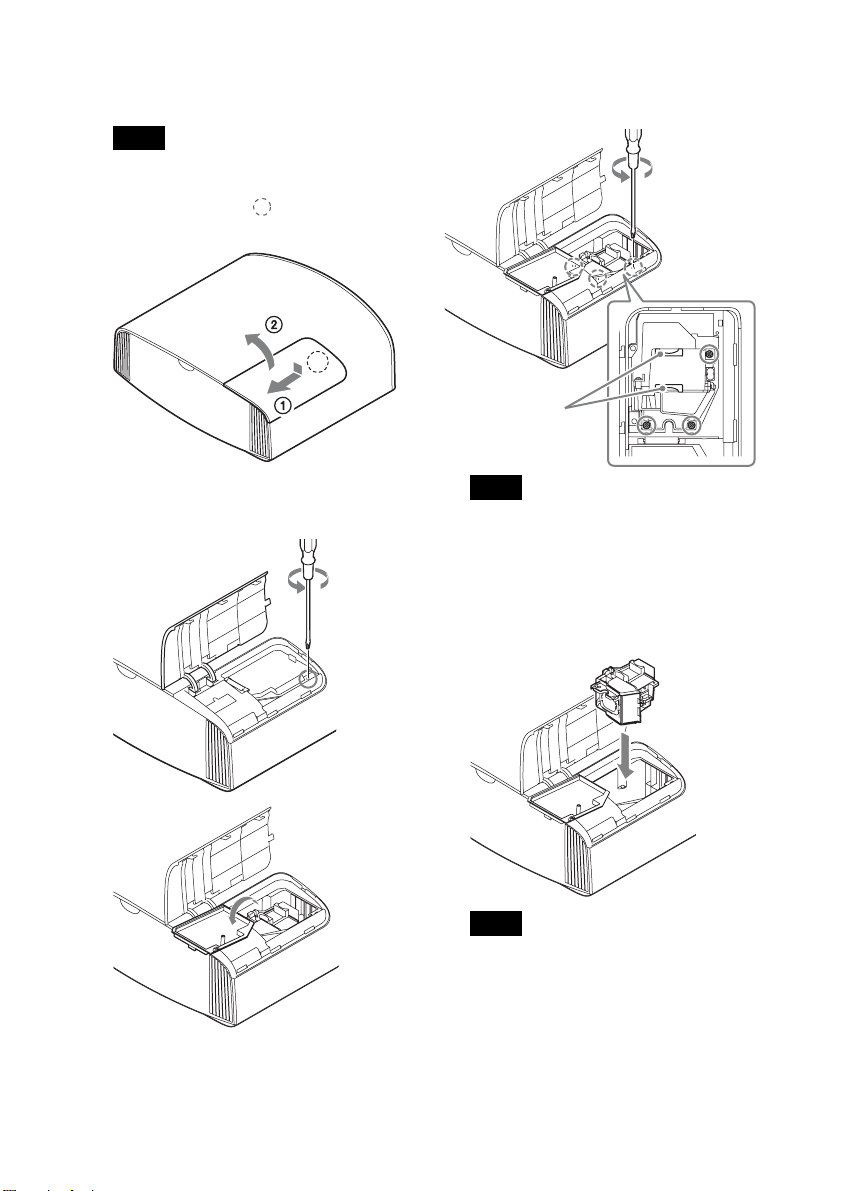
2 当在诸如桌⼦⼀类的平坦的表⾯上
放置本机时,为防⽌表⾯擦伤,请
铺上⼀块布。将本机放在布上。
注意
请务必将本机放在平稳的表⾯。
3 按投影灯盖图⽰ 部位,同时滑
动 1,然后打开 2 投影灯盖。
5 ⽤⼗字螺丝⼑拧松投影灯上的 3 个
螺丝。抓住⼿柄,然后将投影灯径
直地拉出。
⼿柄
4 ⽤⼗字螺丝⼑拧松投影灯门 (内
盖)螺丝,然后打开投影灯门。
注意
• 请勿拧松除 3 个指定螺丝以外的螺
丝。
• 请通过⼿柄拿住投影灯进⾏拆卸和
安装。
6 通过⼿柄将新投影灯牢固地推⼊到
底,然后拧紧 3 个螺丝。
注意
请注意不要触摸本机内部的光学器
件。
46
Page 47
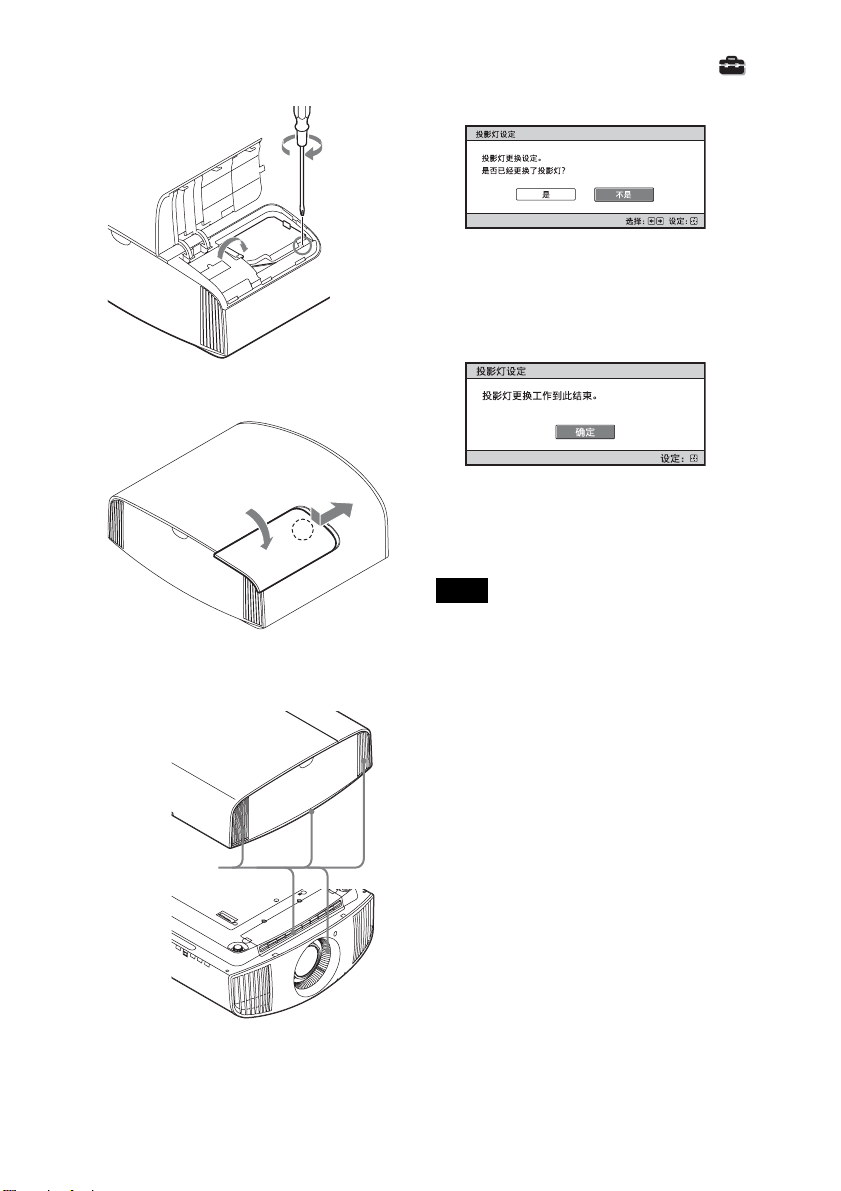
7 关上投影灯门 (内盖),然后拧紧
螺丝。
8 关上投影灯盖。
9 ⽤⼀块软布擦掉通风孔 (进⽓)
上的灰尘。
10接通本机的电源,然后在设置
菜单上选择投影灯设定项⽬。
将会出现下⾯的菜单画⾯。
提⽰
如果 “设定锁定”设定为 “等级
B”,则将设定为 “关”⼀次。
11选择 “是”。
注意
请勿将⼿放进投影灯更换插槽,也不要
让任何液体或其它物品落⼊插槽内,以
免触电或发⽣⽕灾。
注意
• 如果投影灯没有牢固安装到位,本机
将不会接通电源。
• 如果投影灯盖没有关严,本机将不会
接通电源。
• 要取消显⽰在屏幕上的信息时,请按
遥控器上的按钮或本机控制⾯板上的
按钮。
通风孔 (进⽓)
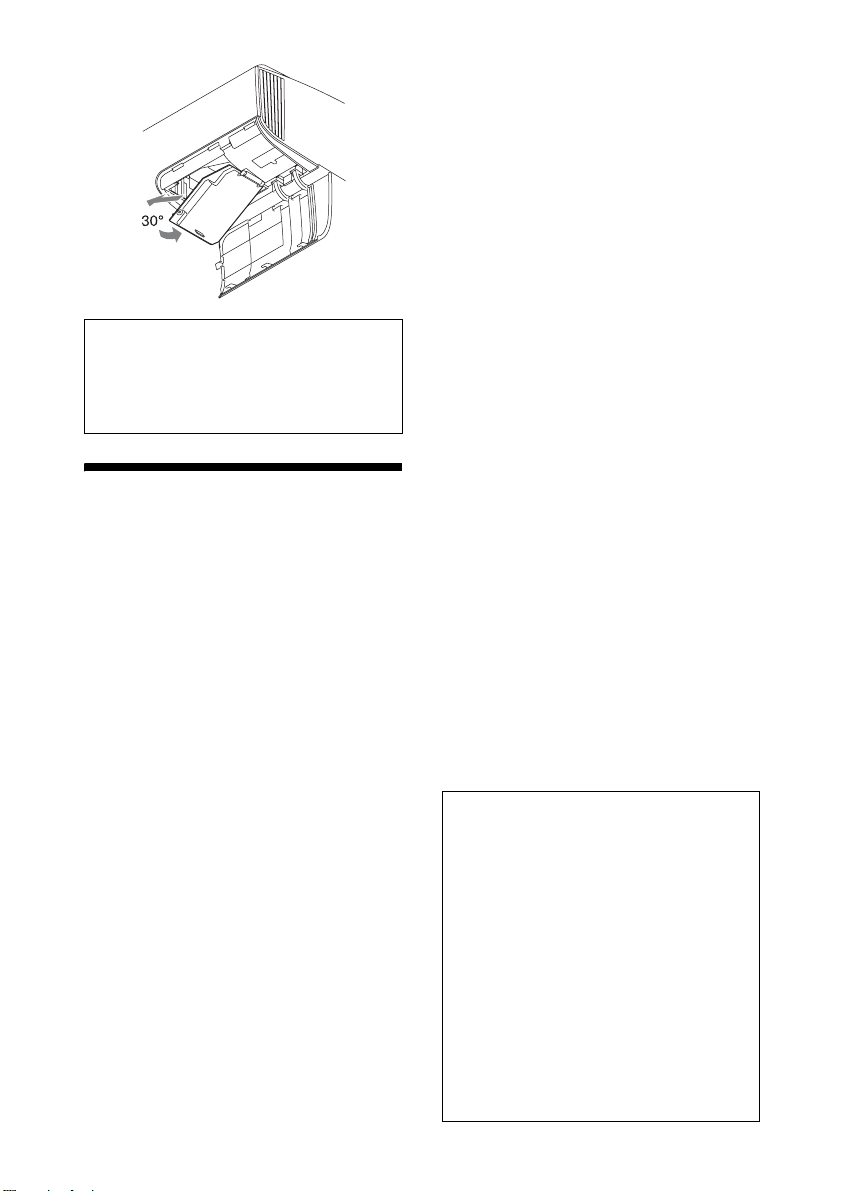
天花板安装时更换破碎投影灯的注意事
项
如果投影灯破碎,投影灯碎⽚可能散落
并导致⼈⾝伤害。
在天花板上安装本机时,请将投影灯门
(内盖)抬起打开 30 度后,慢慢⽔平滑
动拆下。避免扭绞投影灯门 (内盖)。
47
Page 48
注意
本投影灯内含⽔银。根据您所居住的
地区不同,废弃荧光灯管的处理规定
各异。请遵照您所在地区的废物处理
⽅针。
清洁
清洁机壳
• 若要清除机壳上的灰尘,请⽤软布轻
轻擦拭。如果灰尘较顽固,请⽤稍蘸
稀释的中性洗涤剂的软布擦拭。
• 请勿使⽤任何类型的研磨垫、碱 / 酸清
洁剂、擦洗粉或挥发溶剂 (如酒精、
苯、稀释剂或杀⾍剂)。
• ⽤⼲净的布清洁本机。⽤脏布擦拭可
能会擦伤本机。
• 如果使⽤这些材料或长时间与橡胶或
塑料原料接触,可能会损坏屏幕表⾯
和机壳原料。
商标信息
• “PlayStation”是Sony Interactive
Entertainment Inc. 的注册商标。
• HDMI、HDMI ⾼清晰度多媒体接⼝以及
HDMI 标志是 HDMI Licensing
Administrator, Inc. 在美国和其他
国家的商标或注册商标。
• “Blu-ray”和 “Blu-ray Disc”是
Blu-ray Disc Association 的商标。
• “x.v.Color (x.v.Colour)”、
“Motionflow”和其各⾃标识是 Sony
Corporation 的商标。
........................................................................
本投影机⽀持 HDMI 标准的 DeepColor、
x.v.Color、LipSync、电脑输⼊信号、
3D 信号和 4K 信号。它还⽀持 HDCP。
48
Page 49

规格
项⽬ 说明
显⽰系统 SXRD ⾯板、投影系统
显⽰设备 有效显⽰区域尺⼨0.74 英⼨ (18.8 mm)SXRD
像素数 26542080 像素 (8847360 像素× 3)
投影镜头 2.06 倍变焦镜头 (电动)
光源 超⾼压投影灯泡 225 W 型
屏幕尺⼨ 60 英⼨⾄ 300 英⼨ (1524 mm ⾄ 7620 mm)(对
接受的数字信号 请参阅 “预设信号”(第 50 页)。
HDMI (2 个输⼊),符合 HDCP RGB
其他输⼊ / 输出 TRIGGER 微型插孔,直流 12 V,最⼤ 100 mA
REMOTE RS-232C:D-sub 9 芯 (公)
LAN RJ45,10BASE-T/100BASE-TX
IR IN 微型插孔
USB 直流 5 V,最⼤ 500 mA
外部尺⼨ (宽 / ⾼ / 深) 495.6 mm × 205.3 mm × 463.6 mm (不含突出
质量 约 14 kg
电源要求 交流 100 V ⾄ 240 V,4.0 A ⾄ 1.7 A,50/60 Hz
功耗 390 W
功耗 待机模式 0.4 W ( 当 “遥控起动”设定为 “关”时 )
连⽹待机模式 1.0 W (LAN) ( 当 “遥控起动”设定为 “开”
⼯作温度 5°C⾄35°C
⼯作湿度 35%⾄ 85% (⽆结露)
存放温度 -20°C⾄+60°C
存放湿度 10%⾄ 90%
随机附件 请参阅附带快速参考⼿册上的 “检查随机附
选购附件 投影机灯泡:LMP-H220 (⽤于更换)
f = 21.7 mm ⾄ 44.7 mm
F3.0 ⾄ F4.0
⾓线测量)
B/CB PR/CR
Y P
部分)
时)
当 LAN 端⼦未连接时,会变为低功耗模式
(0.5 W)。
件”。
投影机悬挂⽀架:PSS-H10
49
Page 50
注意
• 质量和尺⼨的值为近似值。
• 某些选购附件并⾮在所有国家和地区有售。请与当地 Sony 授权经销商确认。
• 本说明书中的附件信息截⾄ 2021 年 4 ⽉。
本机和其选购附件的设计和规格如有变更,恕不另⾏通知。
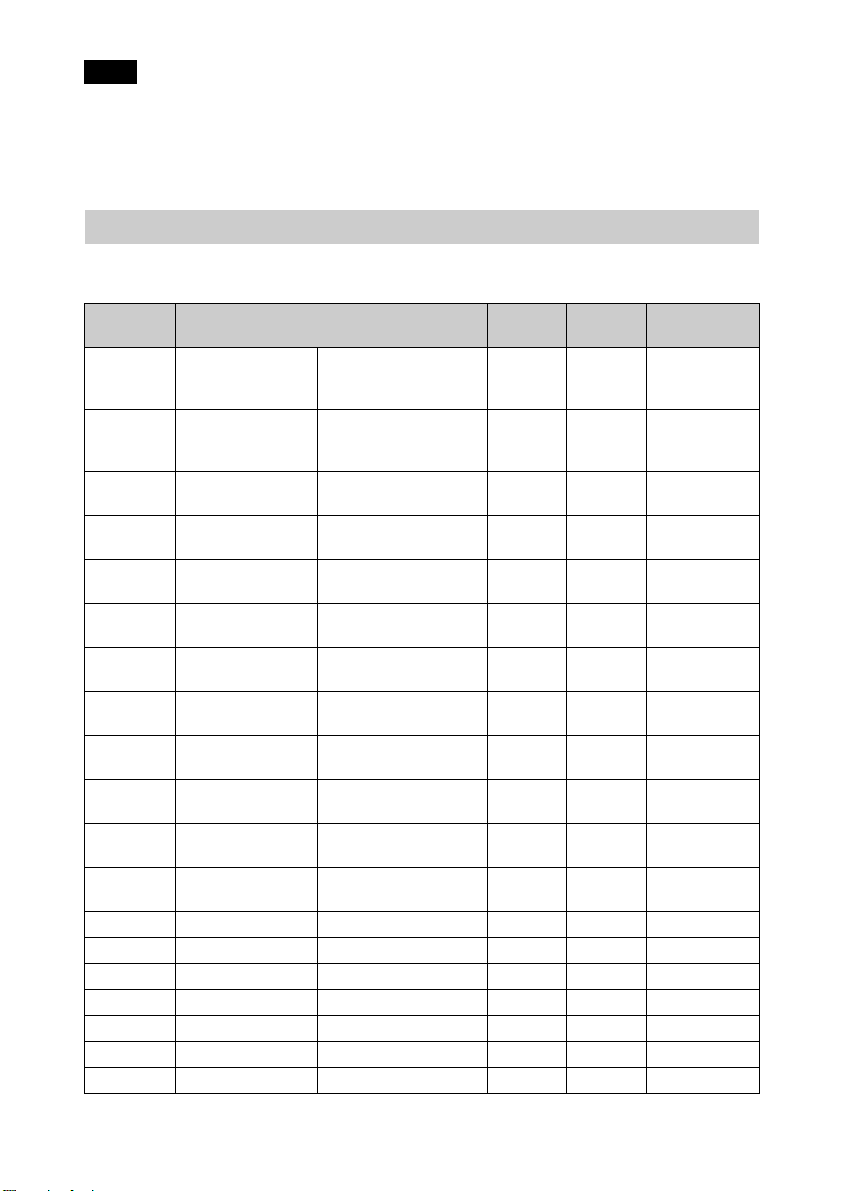
预设信号
下表显⽰您可以使⽤本机进⾏投影的信号和视频格式。
当输⼊下述预设信号以外的信号时,图像可能⽆法正常显⽰。
预设存储
器号码
5 480/60p 480/60p
6 576/50p 576/50p
7 1080/60i 1080/60i
8 1080/50i 1080/50i
10 720/60p 720/60p
11 720/50p 720/50p
12 1080/60p 1080/60p
13 1080/50p 1080/50p
14 1080/24p 1080/24p
18 720/60p
(画⾯压缩)
19 720/50p
(画⾯压缩)
20 1080/24p
(画⾯压缩)
26 640 × 480 VESA 60 31.469 59.940 H- 负、V- 负
32 800 × 600 VESA 60 37.879 60.317 H- 正、V- 正
37 1024 × 768 VESA 60 48.363 60.004 H- 负、V- 负
45 1280 × 960 VESA 60 60.000 60.000 H- 正、V- 正
47 1280 × 1024 VESA 60 63.974 60.013 H- 正、V- 正
50 1400 × 1050 SXGA+ 65.317 59.978 H- 负、V- 正
55 1280 × 768 1280 × 768/60 47.776 59.870 H- 负、V- 正
预设信号 (分辨率)
(逐⾏ NTSC)
(720 × 480p)
(逐⾏ PAL)
(720 × 576p)
(1920 × 1080i)
(1920 × 1080i)
(1280 × 720p)
(1280 × 720p)
(1920 × 1080p)
(1920 × 1080p)
(1920 × 1080p)
720/60p
(1280 × 720p)
720/50p
(1280 × 720p)
1080/24p
(1920 × 1080p)
⾏频
(kHz)场频(Hz)
31.470 60.000
31.250 50.000
33.750 60.000
28.130 50.000
45.000 60.000
37.500 50.000
67.500 60.000
56.260 50.000
26.973 23.976
90.000 60.000
75.000 50.000
53.946 23.976
同步
–
–
–
–
–
–
–
–
–
–
–
–
50
Page 51
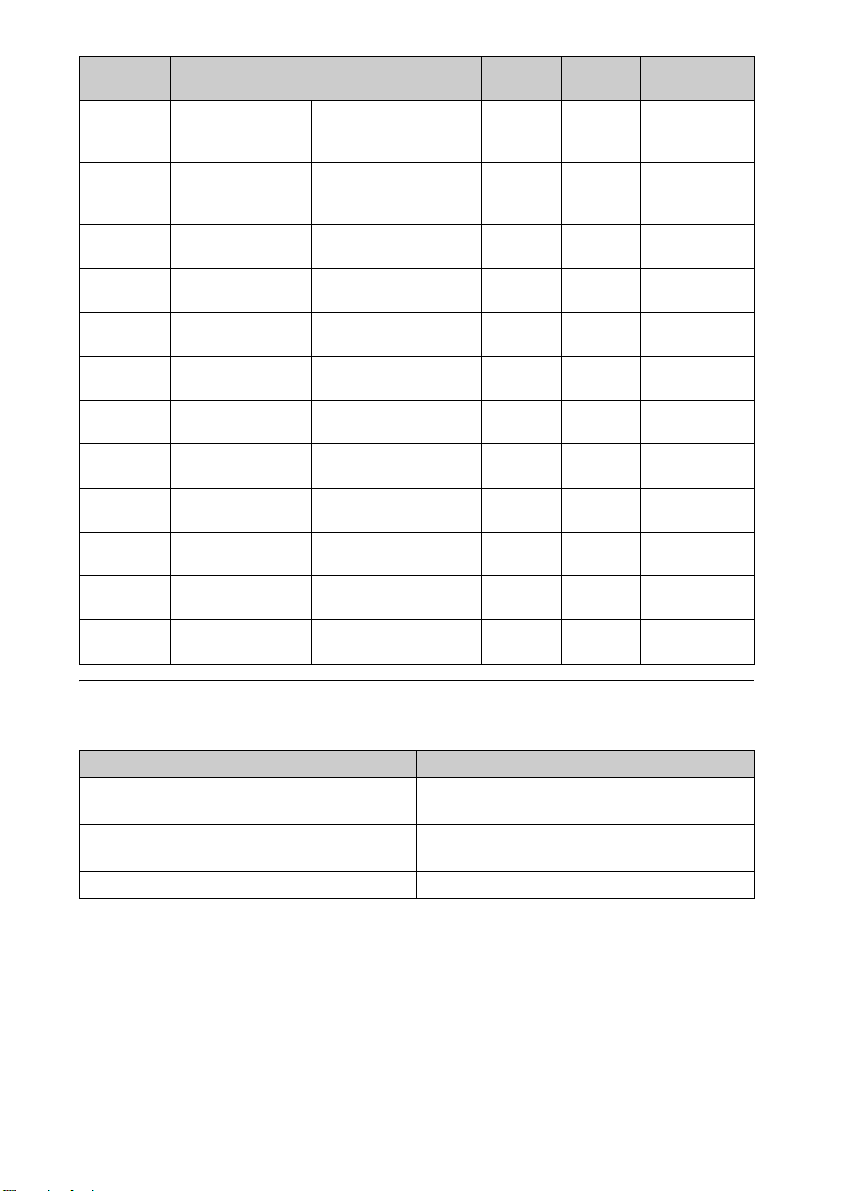
预设存储
器号码
预设信号 (分辨率)
71 1920 × 1080/
60i
(画⾯压缩)
72 1920 × 1080/
50i
(画⾯压缩)
74 3840 × 2160/
60p
75 3840 × 2160/
50p
76 4096 × 2160/
60p
77 4096 × 2160/
50p
78 4096 × 2160/
30p
79 4096 × 2160/
25p
93 3840 × 2160/
24p
94 3840 × 2160/
25p
95 3840 × 2160/
30p
96 4096 × 2160/
24p
1080/60i
(1920 × 1080i)
1080/50i
(1920 × 1080i)
3840 × 2160/60p
(3840 × 2160)
3840 × 2160/50p
(3840 × 2160)
4096 × 2160/60p
(4096 × 2160)
4096 × 2160/50p
(4096 × 2160)
4096 × 2160/30p
(4096 × 2160)
4096 × 2160/25p
(4096 × 2160)
3840 × 2160/24p
(3840 × 2160)
3840 × 2160/25p
(3840 × 2160)
3840 × 2160/30p
(3840 × 2160)
4096 × 2160/24p
(4096 × 2160)
⾏频
(kHz)场频(Hz)
67.500 60.000
56.250 50.000
135.000 60.000
112.500 50.000
135.000 60.000
112.500 50.000
67.500 30.000
56.250 25.000
53.946 23.976
56.250 25.000
67.433 29.970
54.000 24.000
同步
–
–
–
–
–
–
–
–
–
–
–
–
各输⼊信号的预设存储器号码
数字信号
信号 预设存储器号码
分量信号 (HDMI 1、2 接⼝) 5 ⾄ 8,10 ⾄ 14,18 ⾄ 20,71、72、74
⾄79,93⾄96
视频 GBR 信号 (HDMI 1、2 接⼝) 5 ⾄ 8,10 ⾄ 14,18 ⾄ 20,71、72、74
⾄79,93⾄96
电脑信号 (HDMI 1、2 接⼝) 10*、12*、26、32、37、45、47、50、55
* 某些从电脑输⼊的数码信号可能显⽰为分量或视频 GBR 信号的预设存储器号码。
51
Page 52
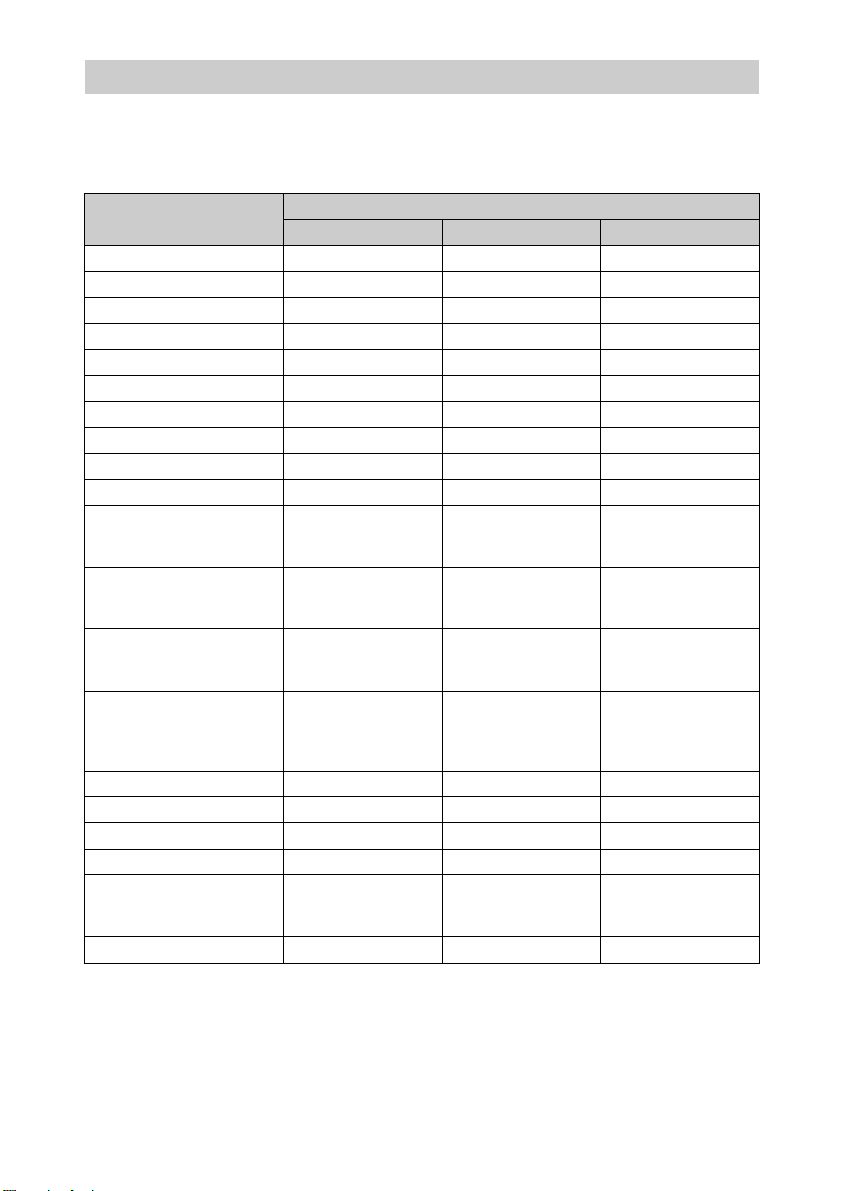
输⼊信号和可调整 / 设定项⽬
根据输⼊信号的不同,菜单中可调整的项⽬有所不同。下表列出这些项⽬。⽆法调
整 / 设定的项⽬不显⽰在菜单中。
图像设定菜单
项⽬
真实创作
动态 HDR 增强
投影灯控制
Motionflow
*1
对⽐度
亮度
⾊彩
⾊调
⾊温
锐度
分量信号 视频 GBR 信号 电脑信号
zz –
zz –
zzz
zz –
zzz
zzz
zz –
zz –
zzz
zz –
NR z (不包括预设记
忆号 18 ⾄ 20、71
和72)
MPEG NR z (不包括预设记
忆号 18 ⾄ 20、71
和72)
缓和⾊阶 z (不包括预设记
忆号 18 ⾄ 20、71
和72)
电影模式 z (不包括预设记
忆号 5、6、10 ⾄
14、18 ⾄ 20、74
⾄ 79 及 93 ⾄ 96)
迦玛校正
⾊彩校正
纯⽩⾊
x.v.Color
zzz
zzz
zzz
z ––
HDR z (只限预设存储
器号码 74 ⾄ 79 和
93 ⾄ 96)
彩⾊空间
zzz
输⼊信号
z (不包括预设记
忆号 18 ⾄ 20、71
和72)
z (不包括预设记
忆号 18 ⾄ 20、71
和72)
z (不包括预设记
忆号 18 ⾄ 20、71
和72)
z (不包括预设记
忆号 5、6、10 ⾄
14、18 ⾄ 20、74
⾄79及93⾄96)
z (只限预设存储
器号码 74 ⾄ 79 和
93 ⾄ 96)
–
–
–
–
–
z: 可调整 / 能设定
-: 不可调整 / 不能设定
*1: 有关更多详细说明,请参见 “Motionflow”(第 55 页)中的表格。
52
Page 53
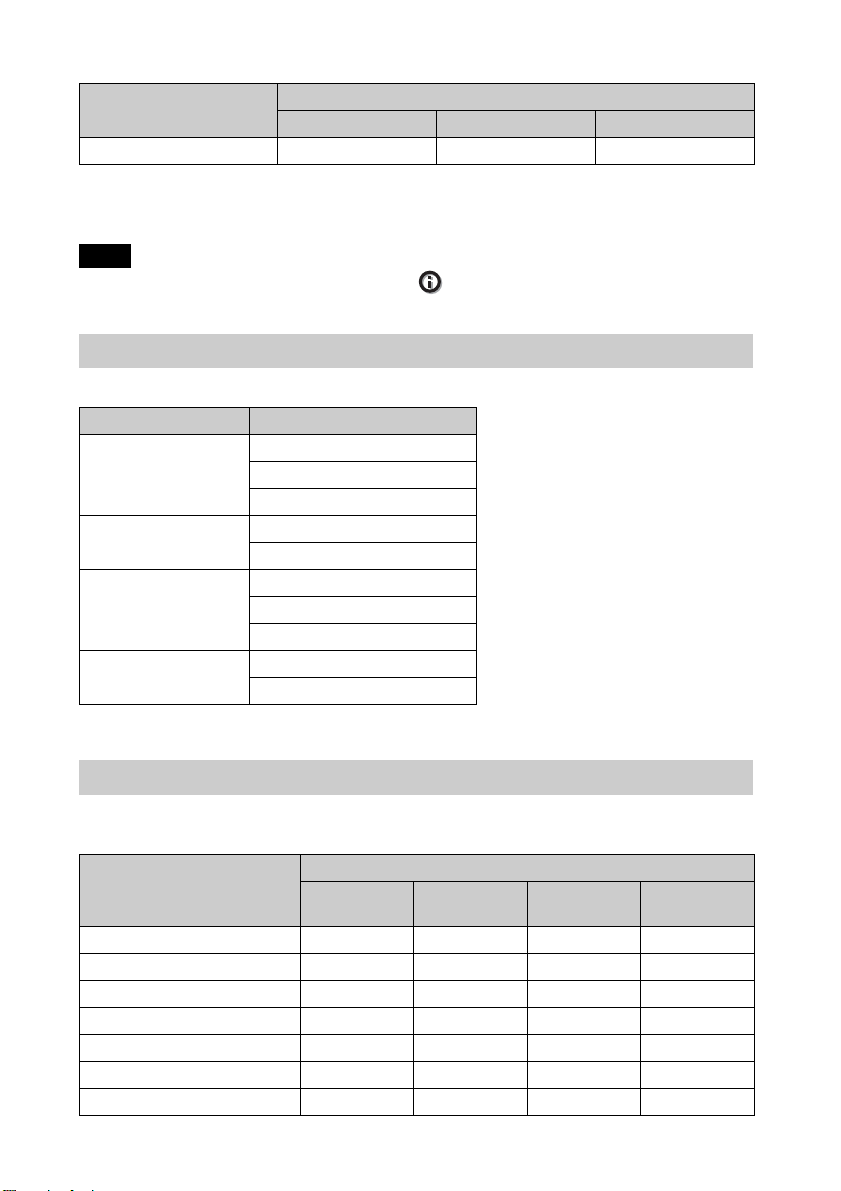
屏幕设定菜单
项⽬
纵横⽐ *
z: 可调整 / 能设定
-: 不可调整 / 不能设定
*1: 有关更多详细说明,请参见 “纵横⽐模式”(第 55 页)中的表格。
注意
当连接诸如 HDMI 电缆等电缆时,请在信息 菜单 (第 36 页)和 “数字信号”(第
51 页)中查看信号的类型,并查看可调节 / 能设定的项⽬。
1
分量信号 视频 GBR 信号 电脑信号
zz –
输⼊信号
兼容的 3D 信号
本机接受以下 3D 信号类型。
分辨率 3D 信号格式
720/60p、720/50p 并排格式
上下格式 *
画⾯压缩 *
1080/60i、
1080/50i
1080/24P 并排格式
1080/60p、
1080/50p
并排格式 *
画⾯压缩
上下格式 *
画⾯压缩 *
并排格式
上下格式
*:HDMI 标准的指定 3D 格式。
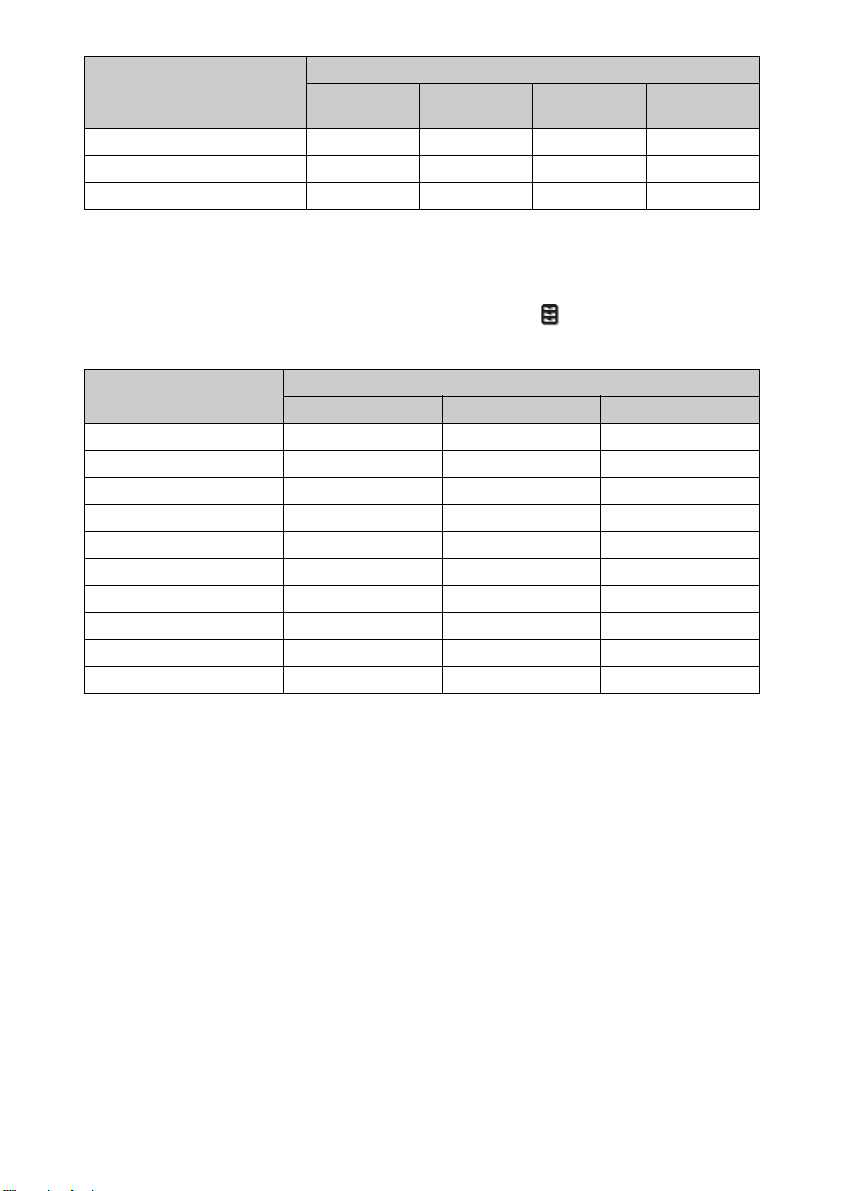
3D 信号和可调整 / 设定项⽬
根据 3D 信号的不同,菜单上的某些项⽬可能⽆法调整 / 设定。
⽆法调整的项⽬不显⽰在菜单中。下表列出这些项⽬。
3D 信号
项⽬
真实创作
投影灯控制
Motionflow
NR
MPEG NR
缓和⾊阶
电影模式
720/60p、
720/50p
zzzz
zzzz
zzzz
––––
––––
––––
– z ––
1080/60i、
1080/50i
53
1080/24p 1080/60p、
1080/50p
Page 54
3D 信号
x.v.Color
HDR
纵横⽐ *
项⽬
1
720/60p、
720/50p
1080/60i、
1080/50i
1080/24p 1080/60p、
1080/50p
zzzz
––––
zzzz
z: 可调整 / 能设定
-: 不可调整 / 不能设定
*1: 有关更多详细说明,请参见 “纵横⽐模式”(第 55 页)中的表格。
当本机设定为将 2D 影像转换为 3D 影像时,根据功能设定 菜单上 “3D 格式”设定
的不同,菜单上的某些项⽬可能⽆法调整 / 设定。⽆法调整的项⽬不显⽰在菜单中。
下表列出这些项⽬。
3D 信号
真实创作
投影灯控制
Motionflow
NR
MPEG NR
缓和⾊阶
电影模式 *
x.v.Color
HDR
纵横⽐ *
2
项⽬
1
上下 并排 模拟 3D
zzz
zzz
zzz
––z
––z
zzz
– zz
zzz
–––
zzz
z: 可调整 / 能设定
-: 不可调整 / 不能设定
*1: 仅在 1080/60i 或 1080/50i 信号为输⼊信号时,该项⽬才可⽤。
*2: 有关更多详细说明,请参见 “纵横⽐模式”(第 55 页)中的表格。
54
Page 55
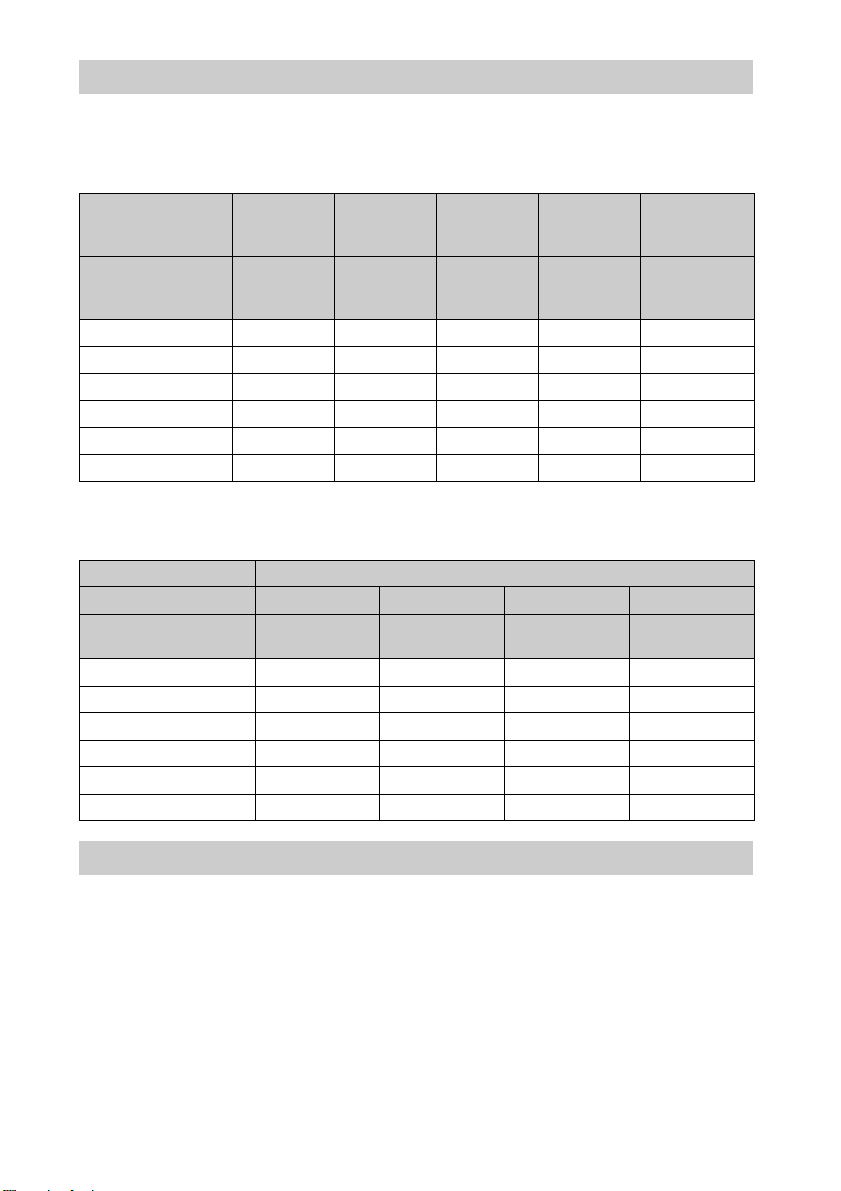
纵横⽐模式
可选择的项⽬根据输⼊信号的类型或 3D 格式⽽异。
有关详细说明,请参见下表。⽆法选择的项⽬在菜单中不显⽰。
2D
可接受的信号
预设存储器号码
(第 50 页)
1.85:1 放⼤
2.35:1 放⼤
标准
垂直拉伸
挤压
拉伸
4096 ×
2160
3840 ×
2160
76 ⾄ 79、9674、75、93
⾄95
– zzz –
– zzz –
zzzzz*
zzzz –
zzzz –
–––z –
1920 ×
1080
1280 × 720
7、8、10
⾄14
720 × 480
720 × 576
5, 6
其他
26, 32, 37,
45, 47, 50,
55
*1: 因为固定为标准,所以菜单中不显⽰。
3D
可接受的信号 1920 × 1080, 1280 × 720
3D 格式 并排 上下 画⾯压缩 模拟 3D
预设存储器号码
(第 50 页)
1.85:1 放⼤
2.35:1 放⼤
标准
垂直拉伸
挤压
拉伸
7、8、10 ⾄
14
10 ⾄ 14
18 ⾄ 20、71、727、8、10 ⾄
14
zzzz
zzzz
zzzz
zzzz
zzzz
––––
1
Motionflow
可选择的项⽬根据输⼊信号的类型或 3D 格式⽽异。
有关详细说明,请参见下表。⽆法选择的项⽬在菜单中不显⽰。
55
Page 56
2D
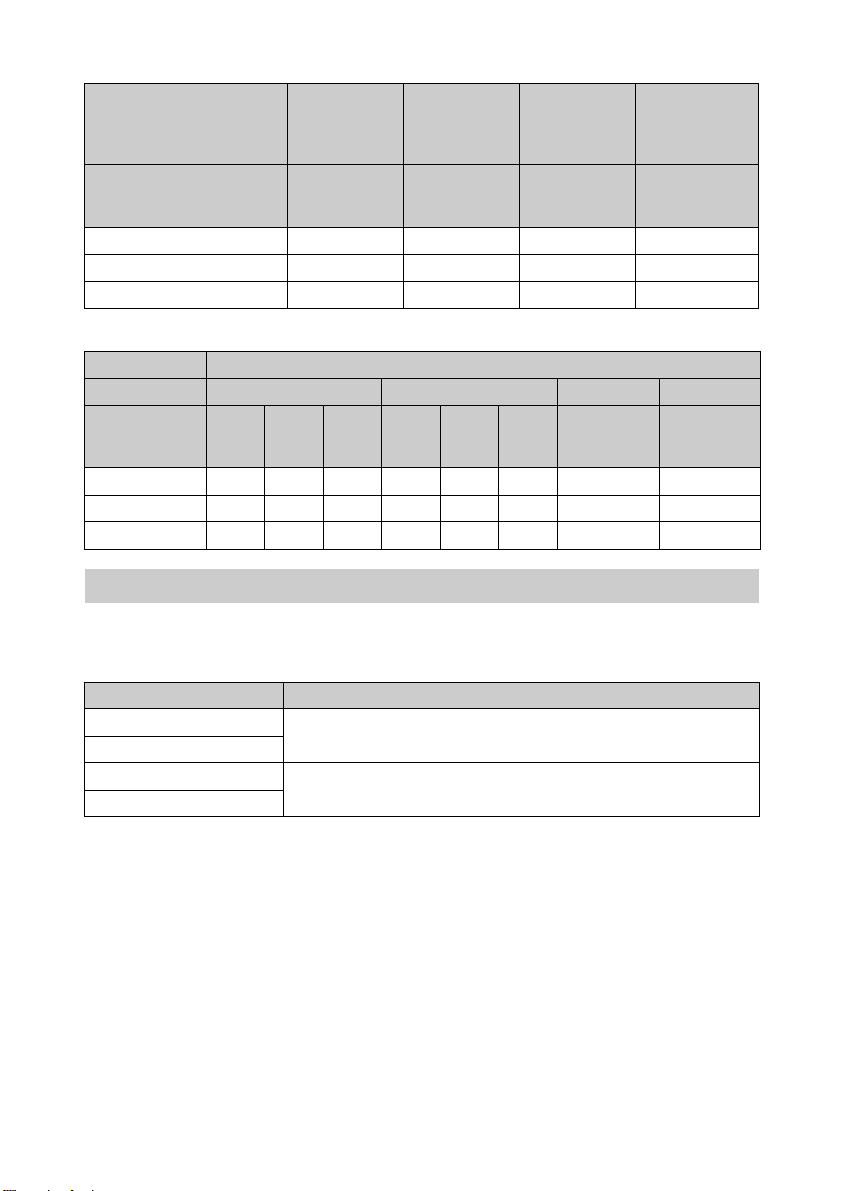
1920 × 1080
可接受的信号
预设存储器号码
(第 50 页)
⾼平滑
低平滑
True Cinema
3D
可接受的信号 1920 × 1080, 1280 × 720
3D 格式 画⾯压缩 上下 并排 模拟 3D
预设存储器号
码(第50
页)
⾼平滑
低平滑
True Cinema
18 19
––z ––zz z
– zz – zz z z
–––––– – –
1280 × 720
720 × 480
720 × 576
5⾄8、10⾄1474、75、93
zz ––
zz ––
zz ––
20、
71、
72
3840 × 2160 4096 × 2160 其他
26, 32, 37,
45, 47, 50,
⾄14
⾄95
10、1211、
13
76 ⾄ 79、96
7、8、10
14
55
7、8、10
⾄14
可调整 / 设定项⽬的存储条件
分别为每个输⼊接⼝存储各个可调节 / 设定项⽬。有关更多详细说明,请参见下表。
各输⼊信号的预设存储器号码
输⼊ 预设存储器号码
HDMI 1 (2D) 5 ⾄ 8,10 ⾄ 14,26、32、37、45、47、50、55、74 ⾄
HDMI 2 (2D)
HDMI 1 (3D) 7、8、10 ⾄ 14,18 ⾄ 20、71、72
HDMI 2 (3D)
79,93 ⾄ 96
56
Page 57
图像设定菜单
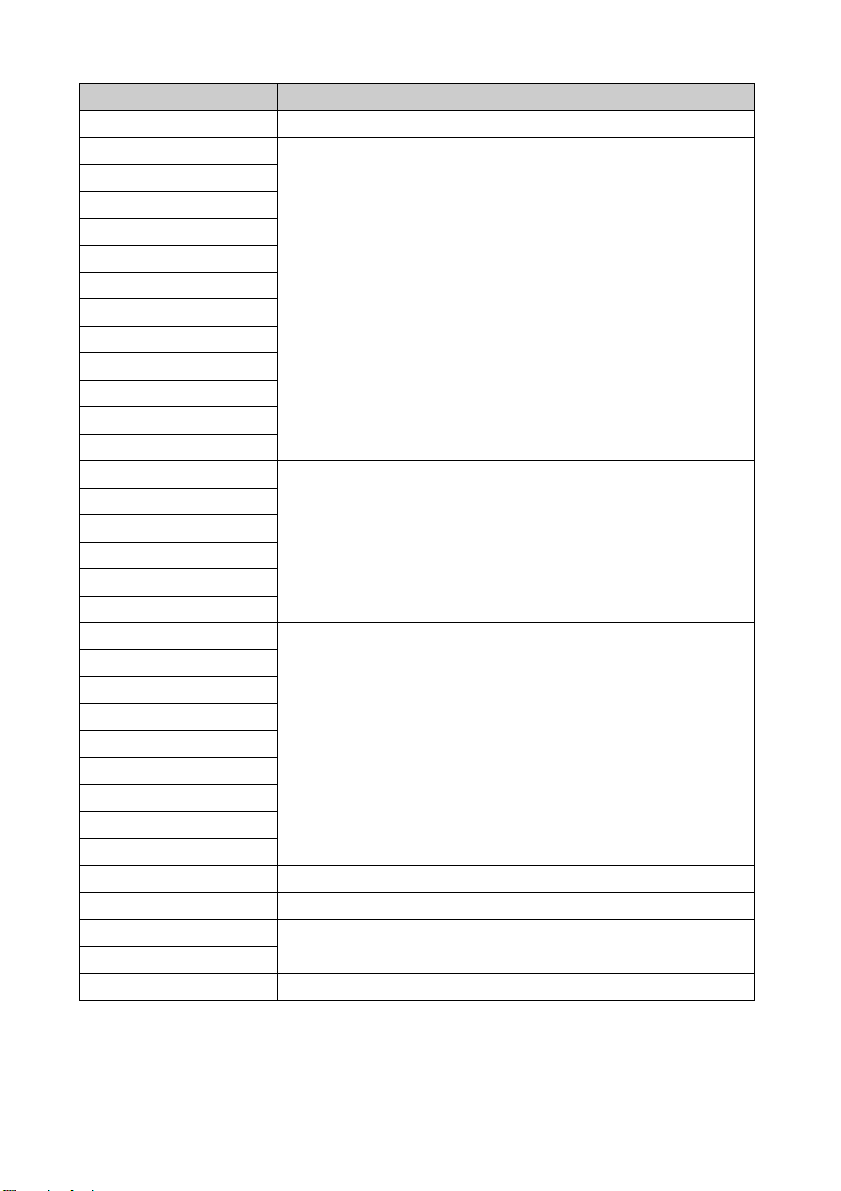
项⽬ 存储条件
校准预设 针对每个输⼊连接器和 2D/3D/HDR
重设 针对每个输⼊连接器、2D/3D、HDR/SDR*1和校准预设
真实创作
动态 HDR 增强
投影灯控制
Motionflow
对⽐度
亮度
⾊彩
⾊调
⾊温
D93-D55
特制 1-5
增益 R ⽤于各⾊温、D93-D55 和特制 1-5
增益 G
增益 B
偏置 R
偏置 G
偏置 B
锐度 针对每个输⼊连接器、2D/3D、HDR/SDR
*1
和校准预设
NR
MPEG NR
缓和⾊阶
电影模式
迦玛校正
⾊彩校正
纯⽩⾊
x.v.Color
HDR 针对每个输⼊连接器和校准预设
彩⾊空间 针对每个输⼊连接器、2D/3D、HDR/SDR*1和校准预设
青 - 红 针对每个彩⾊空间
品红 - 绿
减少输⼊延迟 针对每个输⼊连接器、2D/3D、HDR/SDR
*1
和校准预设
*1:HDR/SDR
HDR:以 HDR 设定为 “⾃动”输⼊ HDR 信号时
“HDR”设定为 “HDR10”、“HDR 原始”或 “HLG”时
SDR:上述以外的设置
57
Page 58
投影距离和镜头移位范围
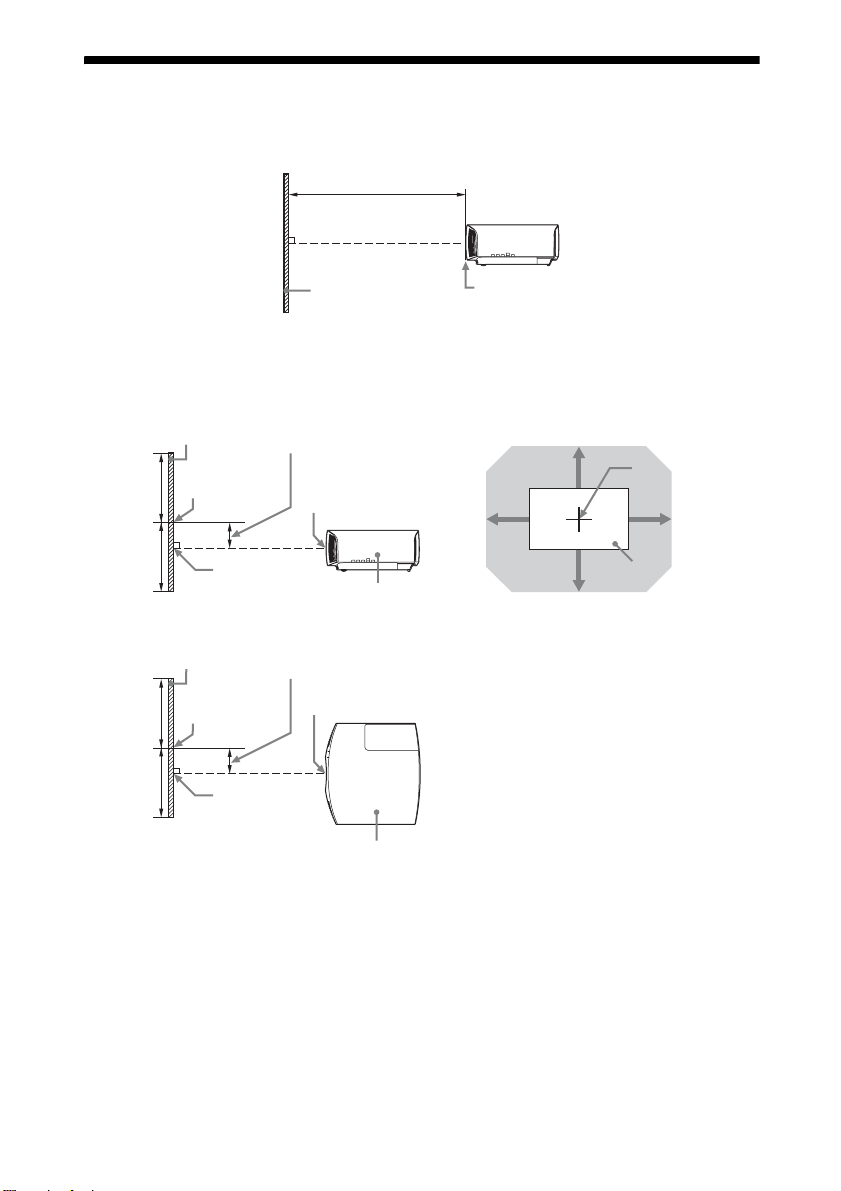
投影距离是指镜头的前缘与投影⾯之间的距离。
投影距离 L
投影图像
镜头的前缘
镜头移位范围⽤百分⽐ (%)表⽰镜头从投影图像的中⼼起可以移位的距离。当图中
的点 A (从镜头中⼼起始的直线与投影图像直⾓交叉的点)与投影图像的中⼼对齐
时,镜头移位范围被当作 0%,投影图像的总宽度或总⾼度被当作是 100%。
50%
50%
50%
50%
投影图像
投影图像中⼼
A
投影图像
投影图像中⼼
A
镜头移位范围
镜头中⼼
本机侧⾯
镜头移位范围
镜头中⼼
本机顶部
VS +
HS -HS +
VS -
阴影区域:镜头移位范围
投影图像
镜头中⼼
VS +:垂直镜头移位范围 (向上)[%]
VS -:垂直镜头移位范围 (向下)[%]
HS +:⽔平镜头移位范围 (向右)[%]
HS -:⽔平镜头移位范围 (向左)[%]
58
Page 59
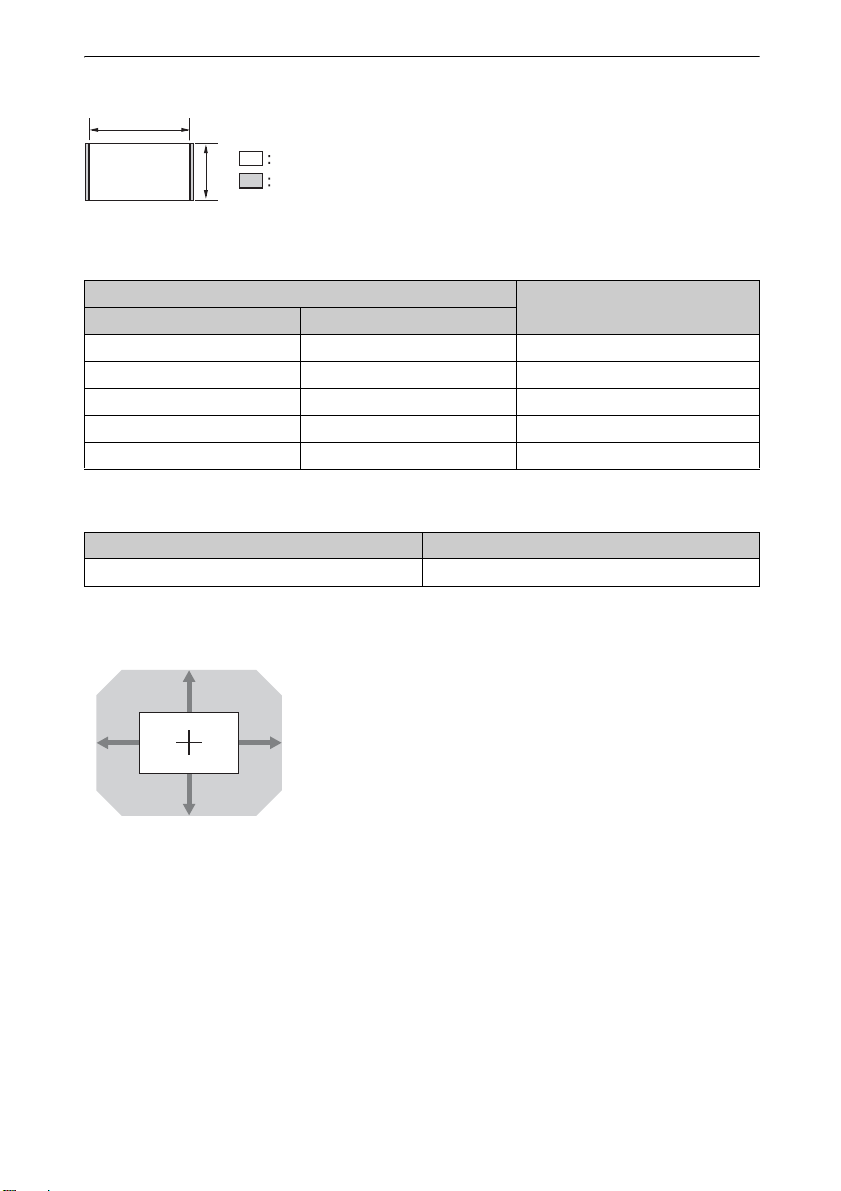
以 1.90:1 (原始全屏显⽰ 17:9)格式投影时
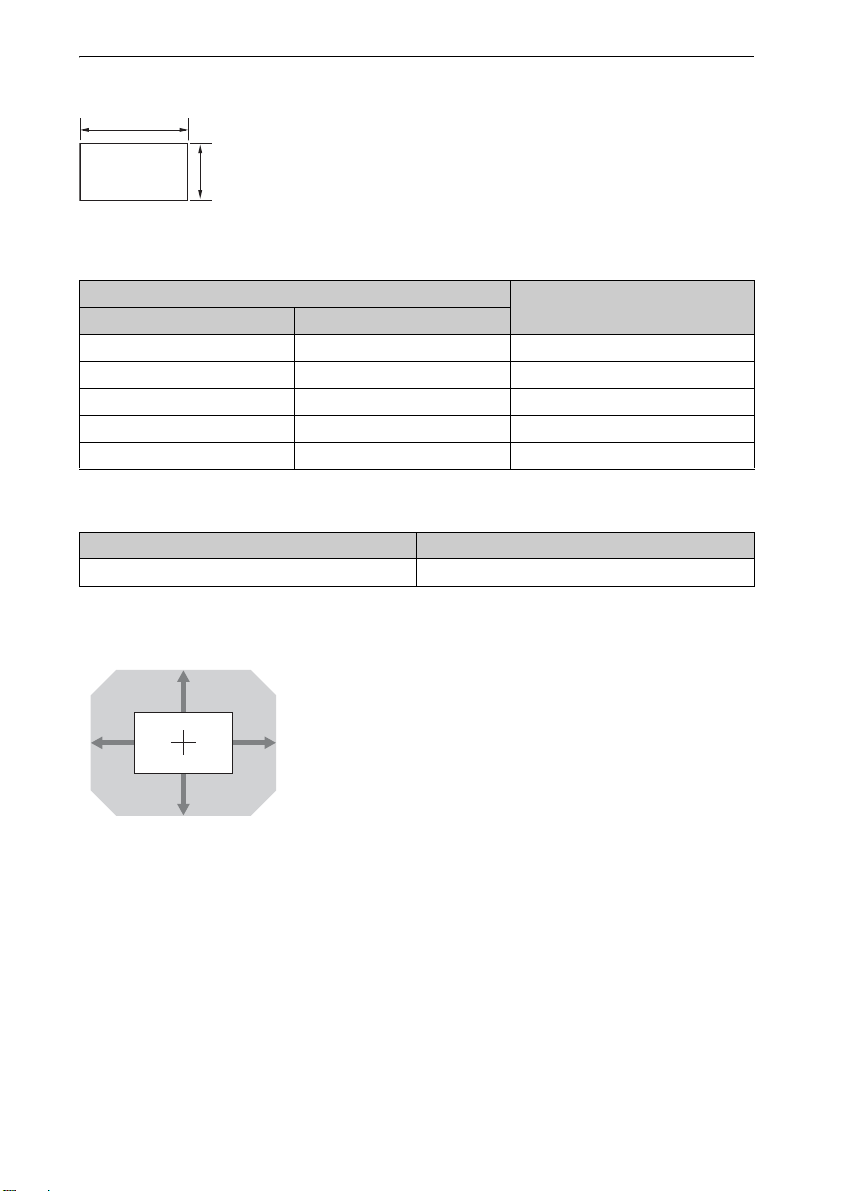
1.90
1
投影距离
单位:m
投影影像尺⼨
对⾓线 宽度×⾼度
投影距离 L
80 英⼨ (2.03 m) 1.80 × 0.95 2.32 - 4.77
100 英⼨ (2.54 m) 2.25 × 1.18 2.90 - 5.97
120 英⼨ (3.05 m) 2.70 × 1.42 3.49 - 7.18
150 英⼨ (3.81 m) 3.37 × 1.78 4.38 - 8.98
200 英⼨ (5.08 m) 4.49 × 2.37 5.85 - 11.99
投影距离公式
D:投影影像尺⼨ (对⾓线) 单位:m
投影距离 L (最短距离) 投影距离 L (最长距离)
L = 0.029432 × D - 0.0434 L = 0.060197 × D - 0.0420
镜头移位范围
85%
31% 31%
80%
VS + = 85 - 2.742 × (HS + 或 HS -)[%]
VS - = 80 - 2.742 × (HS + 或 HS -)[%]
HS + = HS - = 31 - 0.365 × (VS + 或 VS -)[%]
59
Page 60
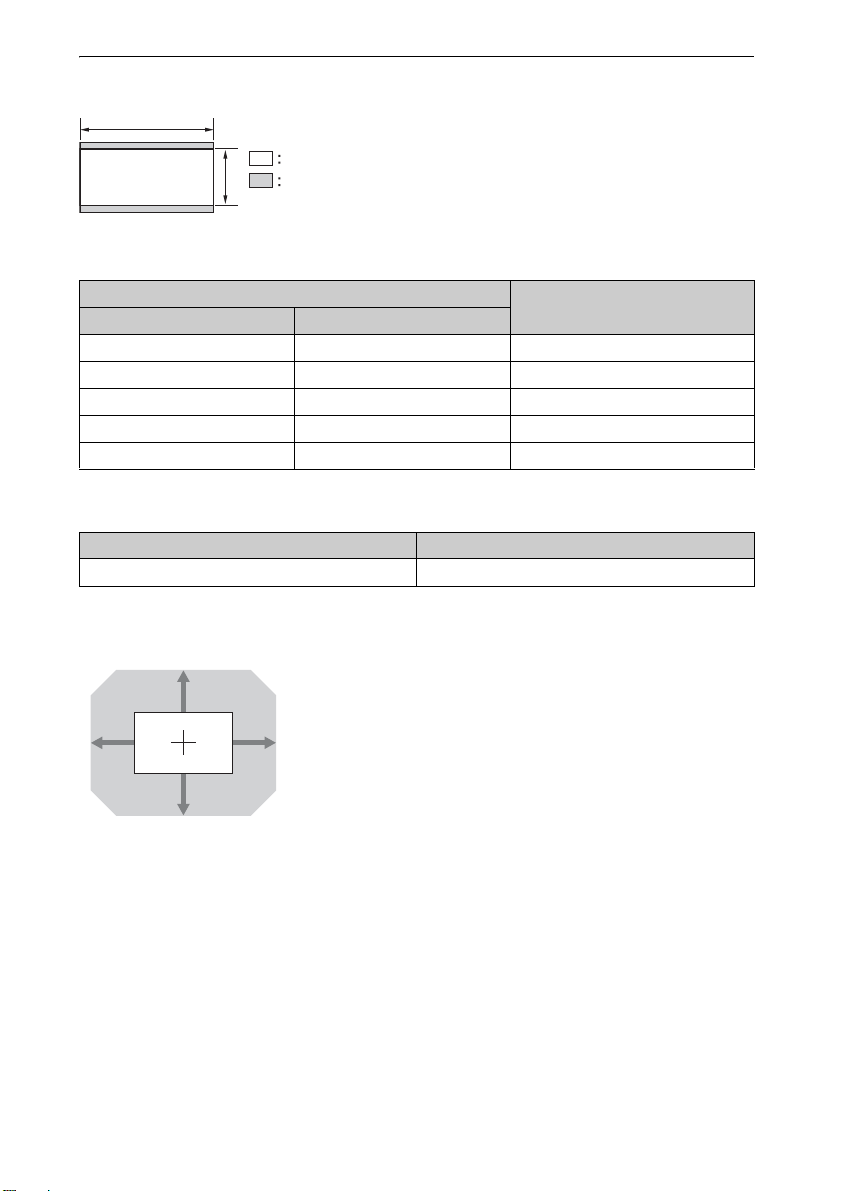
以 1.78:1 (16:9)格式投影时
1.78
1
视频显⽰区域
投影区域
投影距离
单位:m
投影影像尺⼨
对⾓线 宽度×⾼度
投影距离 L
80 英⼨ (2.03 m) 1.77 × 1.00 2.44 - 5.01
100 英⼨ (2.54 m) 2.21 × 1.25 3.05 - 6.28
120 英⼨ (3.05 m) 2.66 × 1.49 3.67 - 7.55
150 英⼨ (3.81 m) 3.32 × 1.87 4.60 - 9.44
200 英⼨ (5.08 m) 4.43 × 2.49 6.15 - 12.61
投影距离公式
D:投影影像尺⼨ (对⾓线) 单位:m
投影距离 L (最短距离) 投影距离 L (最长距离)
L = 0.030934 × D - 0.0434 L = 0.063269 × D - 0.0420
镜头移位范围
85%
33% 33%
VS + = 85 - 2.576 × (HS + 或 HS -)[%]
VS - = 80 - 2.576 × (HS + 或 HS -)[%]
HS + = HS - = 33 - 0.388 × (VS + 或 VS -)[%]
80%
60
Page 61
以 2.35:1 格式投影时
2.35
视频显⽰区域
1
投影区域
投影距离
单位:m
投影影像尺⼨
对⾓线 宽度×⾼度
投影距离 L
80 英⼨ (2.03 m) 1.87 × 0.80 2.41 - 4.96
100 英⼨ (2.54 m) 2.34 × 0.99 3.02 - 6.22
120 英⼨ (3.05 m) 2.80 × 1.19 3.64 - 7.47
150 英⼨ (3.81 m) 3.51 × 1.49 4.55 - 9.35
200 英⼨ (5.08 m) 4.67 × 1.99 6.08 - 12.48
投影距离公式
D:投影影像尺⼨ (对⾓线) 单位:m
投影距离 L (最短距离) 投影距离 L (最长距离)
L = 0.030617 × D - 0.0434 L = 0.062621 × D - 0.0420
镜头移位范围
105%
31% 31%
99%
VS + = 105 - 3.387 × (HS + 或 HS -)[%]
VS - = 99 - 3.387 × (HS + 或 HS -)[%]
HS + = HS - = 31 - 0.295 × (VS + 或 VS -)[%]
61
Page 62
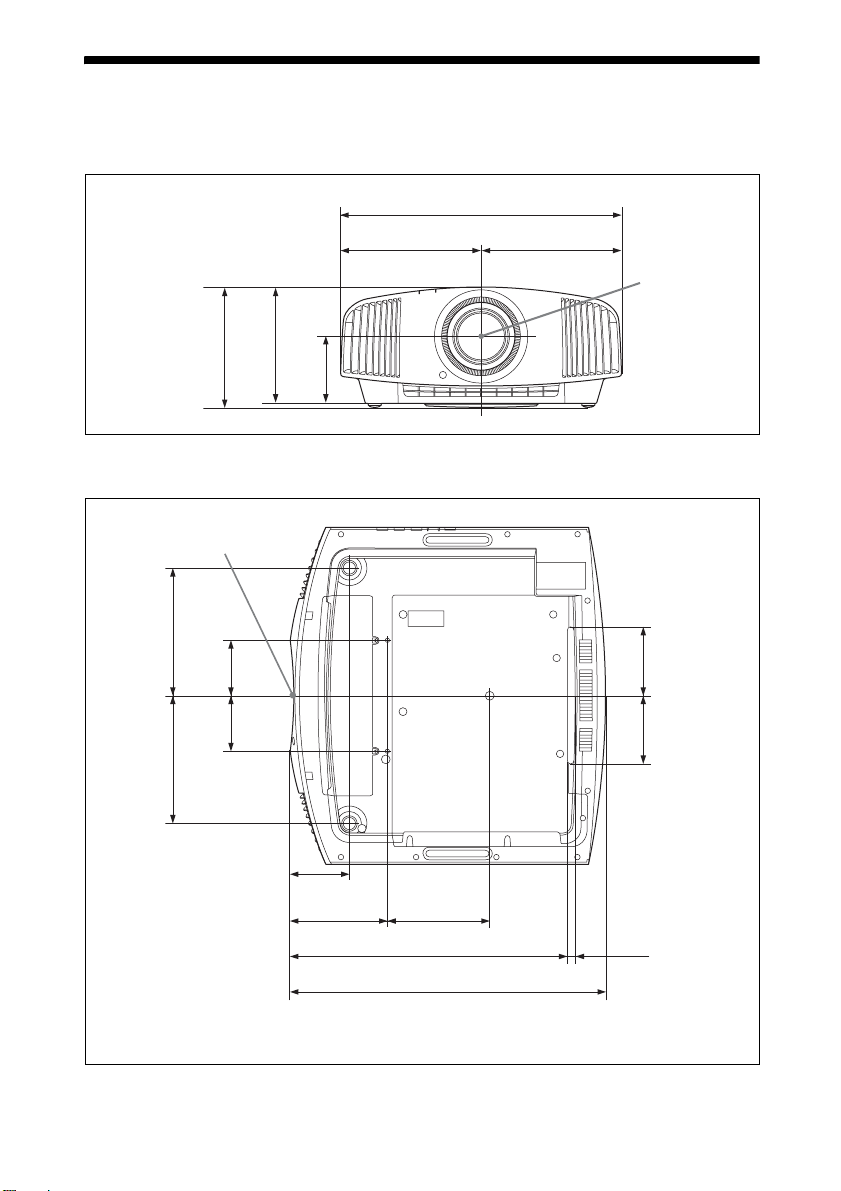
尺⼨
前⾯
底部
机壳的前缘
187.9
单位:mm
495.6
247.8 247.8
镜头中⼼
205.3
212.3
118
单位:mm
81.5
98
81.5
187.9
87.4
142.9 150.6
409.3
463.6
98
7.5
62
Page 63
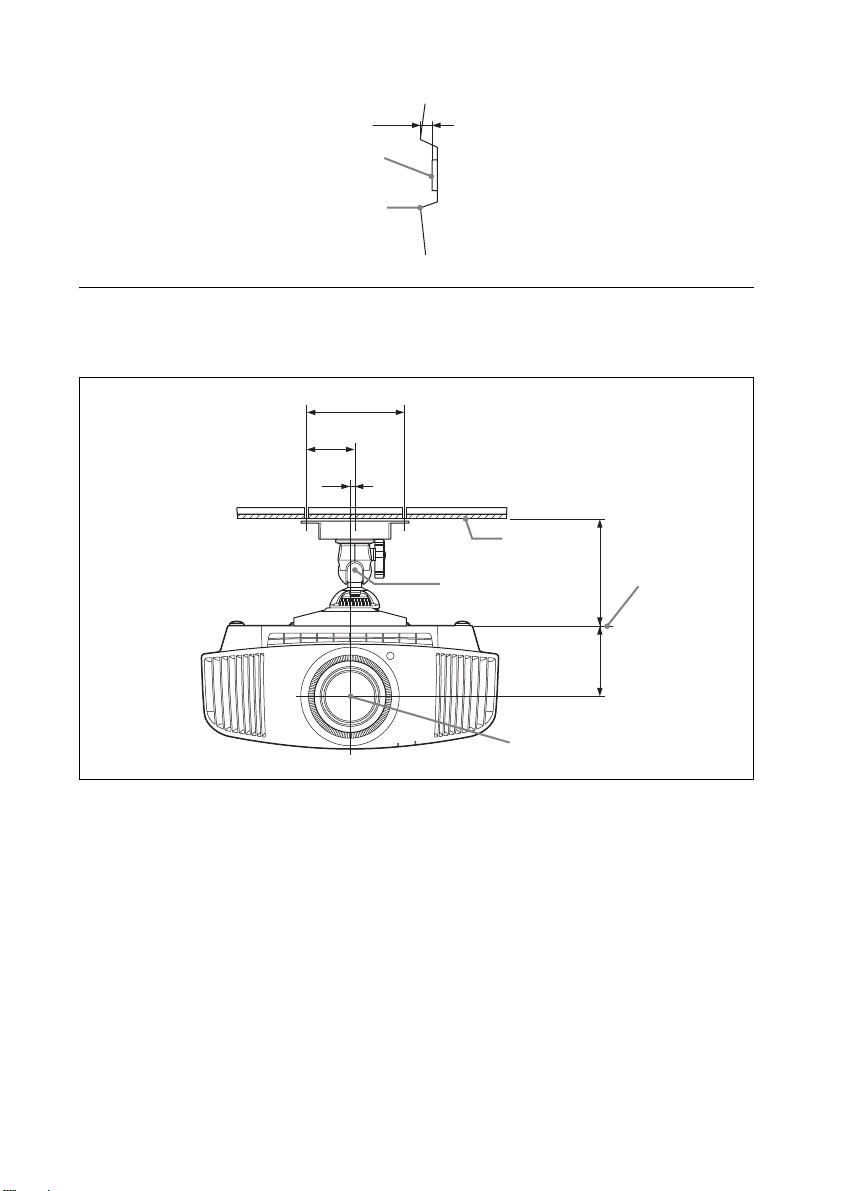
镜头的前缘与机壳的前缘之间的距离
镜头的前缘
机壳的前缘
安装 PSS-H10 投影机悬挂⽀架
前视图
150
75
8
单位:mm
36.8
单位:mm
天花板
⽀撑柱的中⼼
镜头中⼼
175
118
安装架的底⾯
63
Page 64
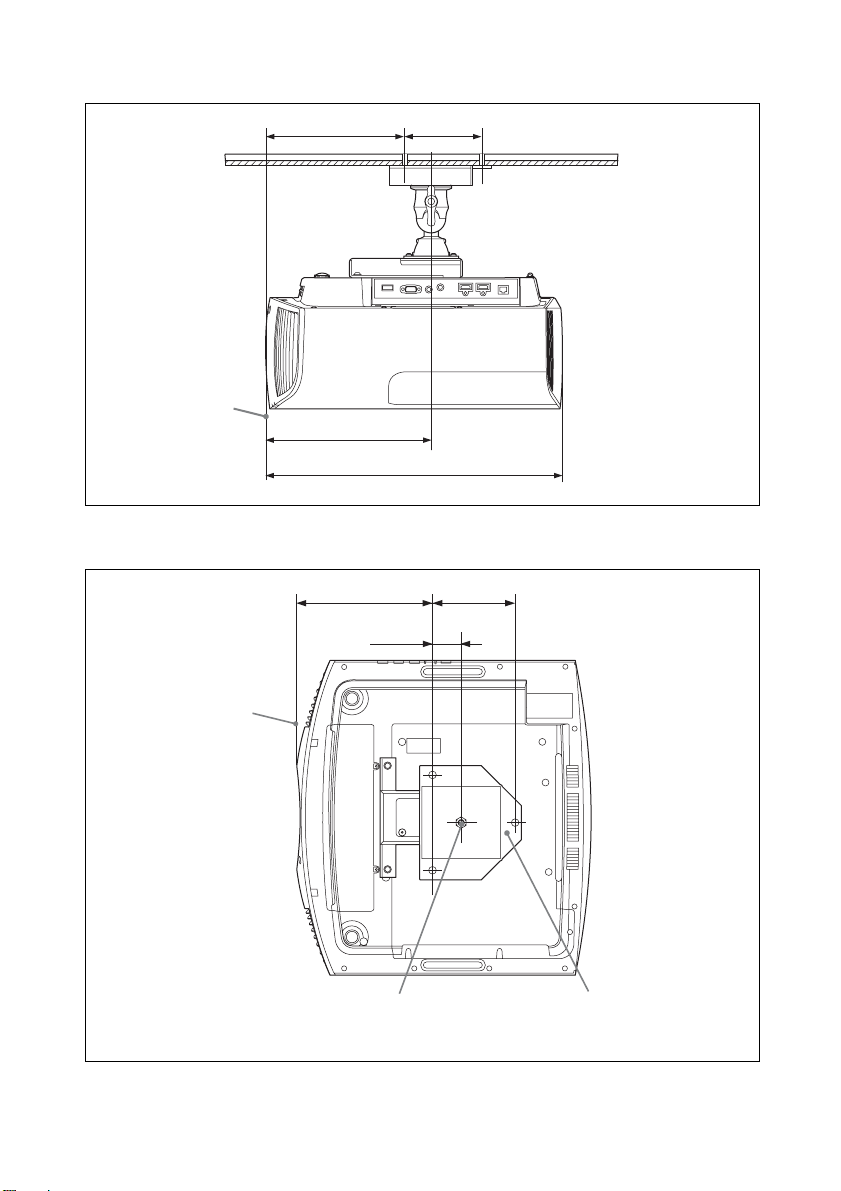
侧视图
顶视图
单位:mm
213.4 130
机壳的前缘
258.4
463.6
单位:mm
213.4 130
45
机壳的前缘
⽀撑柱的中⼼ (⽀撑柱的中⼼不同于本机的
中⼼。)
64
上天花板安装⽀架
Page 65
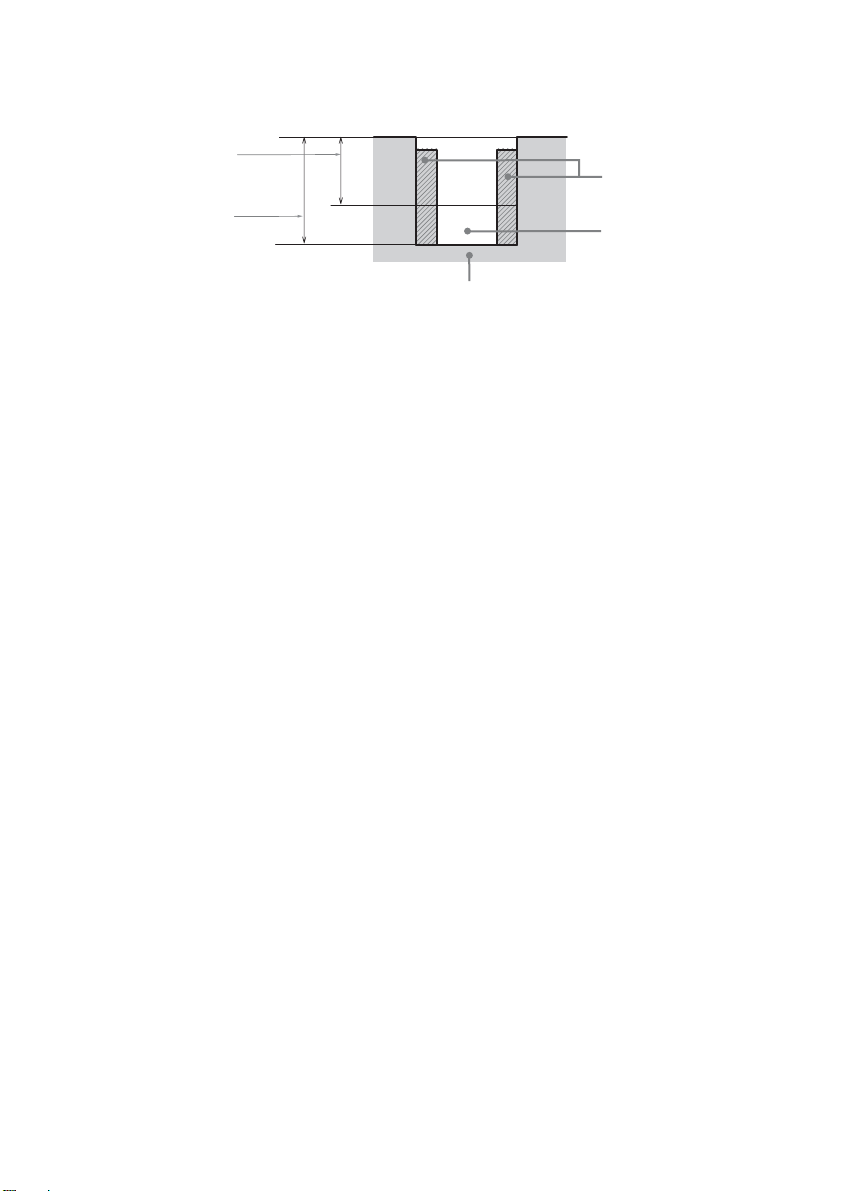
天花板安装孔
使⽤长度为 5.3 mm (最⼩值)⾄ 7.6 mm (最⼤值)的螺丝进⾏天花板安装。
建议的扭矩 (朝旋转⽅向转动螺丝时的扭⼒):1.4 ± 0.2 N-m
螺丝的最⼩长度
插⼊螺⺟ (M5)
螺丝的最⼤长度
螺丝孔
本机
单位:mm
65
Page 66

本产品所使⽤软件的声明和许可
GPL/LGPL 许可软件
本产品中使⽤的 GPL 可执⾏⽂件和 LGPL
库遵守 GPL/LGPL 许可协议,该协议作为
本⽂档的⼀部分:
组件清单:
linux-kernel
alsa-lib
busybox
crypto
directfb
dosfstools
e2fsprogs
exceptionmonitor
fuse
gdisk
glib
glibc
iptables
libmicrohttpd
libnuma (in numactl)
procps
pump-autoip
XZ utils
可通过以下链接获得这些可执⾏⽂件和
库的源代码以及其他可执⾏⽂件和库:
http://oss.sony.net/Products/Linux
===============================
GNU GENERAL PUBLIC LICENSE
Version 2, June 1991
Copyright (C) 1989, 1991 Free Software Foundation,
Inc., 51 Franklin Street, Fifth Floor, Boston, MA
02110-1301, USA. Everyone is permitted to copy and
distribute verbatim copies of this license document,
but changing it is not allowed.
Preamble
The licenses for most software are designed to take
away your freedom to share and change it. By
contrast, the GNU General Public License is intended
to guarantee your freedom to share and change free
software--to make sure the software is free for all its
users. This General Public License applies to most of
the Free Software Foundation’s software and to any
other program whose authors commit to using it.
(Some other Free Software Foundation software is
covered by the GNU Library General Public License
instead.) You can apply it to your programs, too.
When we speak of free software, we are referring to
freedom, not price. Our General Public Licenses are
designed to make sure that you have the freedom to
distribute copies of free software (and charge for this
service if you wish), that you receive source code or
can get it if you want it, that you can change the
software or use pieces of it in new free programs; and
that you know you can do these things.
To protect your rights, we need to make restrictions
that forbid anyone to deny you these rights or to ask
you to surrender the rights. These restrictions
translate to certain responsibilities for you if you
distribute copies of the software, or if you modify it.
For example, if you distribute copies of such a
program, whether gratis or for a fee, you must give
the recipients all the rights that you have. You must
make sure that they, too, receive or can get the source
code. And you must show them these terms so they
know their rights.
We protect your rights with two steps: (1) copyright
the software, and (2) offer you this license which
gives you legal permission to copy, distribute and/or
modify the software.
Also, for each author’s protection and ours, we want
to make certain that everyone understands that there
is no warranty for this free software. If the software is
modified by someone else and passed on, we want its
recipients to know that what they have is not the
original, so that any problems introduced by others
will not reflect on the original authors’ reputations.
Finally, any free program is threatened constantly by
software patents. We wish to avoid the danger that
redistributors of a free program will individually
obtain patent licenses, in effect making the program
proprietary. To prevent this, we have made it clear that
any patent must be licensed for everyone’s free use or
not licensed at all.
The precise terms and conditions for copying,
distribution and modification follow.
GNU GENERAL PUBLIC LICENSE TERMS
AND CONDITIONS FOR COPYING,
DISTRIBUTION AND MODIFICATION
0. This License applies to any program or other work
which contains a notice placed by the copyright
holder saying it may be distributed under the terms of
this General Public License. The “Program”, below,
refers to any such program or work, and a “work
based on the Program” means either the Program or
any derivative work under copyright law: that is to
say, a work containing the Program or a portion of it,
either verbatim or with modifications and/or
translated into another language. (Hereinafter,
translation is included without limitation in the term
“modification”.) Each licensee is addressed as “you”.
Activities other than copying, distribution and
modification are not covered by this Li cense; they are
66
Page 67

outside its scope. The act of running the Program is
not restricted, and the output from the Program is
covered only if its contents consti tute a work based on
the Program (independent of having been made by
running the Program). Whether that is true depends
on what the Program does.
1. You may copy an d distribute ve rbatim copies of the
Program’s source code as you receive it, in any
medium, provided that you conspicuously and
appropriately publish on each copy an appropriate
copyright notice and disclaimer of warranty; keep
intact all the notices that refer to this License and to
the absence of any warranty; and give any other
recipients of the Program a copy of this License along
with the Program.
You may charge a fee for the physical act of
transferring a copy, and you may at your option offer
warranty protection in exchange for a fee.
2. You may modify your copy or copies of the
Program or any portion of it, thus forming a work
based on the Program, and copy and distribute such
modifications or work under the terms of Section 1
above, provided that you also meet all of these
conditions:
a) You must cause the modified files to carry
prominent notices stating that you changed the files
and the date of any change.
b) You must cause any work that you distribute or
publish, that in whole or in part contains or is derived
from the Program or any part thereof, to be licensed
as a whole at no charge to all third parties under the
terms of this License.
c) If the modified program normally reads com mands
interactively when run, you must cause it, when
started running for such interactive use in the most
ordinary way, to print or display an announcement
including an appropria te copyright notice and a notice
that there is no warranty (or else, saying that you
provide a warranty) and that users may redistribute
the program under these conditions, and telling the
user how to view a copy of this License. (Exception:
if the Program itself is interactive but does not
normally print such an announcement, your work
based on the Program is not required to print an
announcement.)
These requirements apply to the modified work as a
whole. If identifiable sections of that work are not
derived from the Program, and can be reasonably
considered independent and separate works in
themselves, then this License, and its terms, do not
apply to those sections when you distribute them as
separate works. But when you distribute the same
sections as part of a whole which is a work based on
the Program, the distribution of the whole must be on
the terms of this License, wh ose permissions for other
licensees extend to the entire whole, and thus to each
and every part regardless of who wrote it.
Thus, it is not the intent of this section to claim rights
or contest your rights to work written entirely by you;
rather, the intent is to exercise the right to control the
distribution of derivative or collective works based on
the Program.
In addition, mere aggregation of another work not
based on the Program with the Program (or with a
work based on the Program) on a volume of a storage
or distribution medium does not bring the other work
under the scope of this License.
3. You may copy and distribute the Program (or a
work based on it, under Section 2) in object code or
executable form under the terms of Sections 1 and 2
above provided that you also do one of the following:
a) Accompany it with the complete corresponding
machine-readable source code, which must be
distributed under the terms of Sections 1 and 2 above
on a medium customarily used for software
interchange; or,
b) Accompany it wit h a written offer, valid for at least
three years, to give any third party, for a charge no
more than your cost of physically performing source
distribution, a complete m achine-readable copy of the
corresponding source code, to be distributed under
the terms of Sections 1 and 2 above on a medium
customarily used for software interchange; or,
c) Accompany it with the information yo u received as
to the offer to distribute corresponding source code.
(This alternative is allowed only for noncommercial
distribution and only if you received the program in
object code or executable form with such an offer, in
accord with Subsection b above.)
The source code for a work means the preferred form
of the work for making modifications to it. For an
executable work, complete source code means all the
source code for all modules it contains, plus any
associated interface definition files, plus the scripts
used to control compilation and installation of the
executable. However, as a special exception, the
source code distributed need not include anything that
is normally distributed (in either source or binary
form) with the major components (compiler, kernel,
and so on) of the operating system on which the
executable
runs, unless that component itself accompanies the
executable.
If distribution of executable or object code is made by
offering access to copy from a designated place, then
offering equivalent access to copy the source code
from the same place counts as distribution of the
source code, even though third parties are not
compelled to copy the source along with the object
code.
4. You may not copy, modify, sublicense, or distribute
the Program except as expressly provided under this
License. Any attempt otherwise to copy, modify,
sublicense or distribute the Program is void, and will
automatically terminate your rights under this
License.
However, parties who have received copies, or rights,
from you under this License will not have their
67
Page 68

licenses terminated so long as such parties remain in
full compliance.
5. You are not required to accept this License, since
you have not signed it. However, nothing else grants
you permission to modify or distri bute the Program or
its derivative works. These actions are prohibited by
law if you do not accept this License. Therefore, by
modifying or distributing the Program (or any work
based on the Program), you indicate your acceptance
of this License to do so, and all its terms and
conditions for copying, distributing or modifying the
Program or works based on it.
6. Each time you redistribute the Program (or any
work based on the Program), the recipient
automatically receives a license from the original
licensor to copy, distribute or modify the Program
subject to these terms and conditions. You may not
impose any further restrictions on the recipients’
exercise of the rights granted herein. You are not
responsible for enforcing compliance by third parties
to this License.
7. If, as a consequence of a court judgment or
allegation of patent infringement or for any other
reason (not limited to patent issues), conditions are
imposed on you (whether by court order, agreement
or otherwise) that contradict the conditions of this
License, they do not excuse you from the conditions
of this License. If you cannot distribute so as to
satisfy simultaneously your obligations under this
License and any other pertinent obligations, then as a
consequence you may not distribute the Program at
all. For example, if a patent license would not permit
royalty-free redistribution of the Program by all those
who receive copies directly or i ndirectly through you,
then the only way you could satisfy both it and this
License would be to refrain entirely from distribution
of the Program.
If any portion of this section is held invalid or
unenforceable under any particular circumstance, the
balance of the section is intended to apply and the
section as a whole is intended to apply in other
circumstances. It is not the purpose of this section to
induce you to infringe any patents or other property
right claims or to contest validity of any such claims;
this section has the sole purpose of protecting the
integrity of the free software distribution system,
which is implemented by public license practices.
Many people have made generous cont ributions to the
wide range of software distributed through that
system in reliance on consistent application of that
system; it is up to the author/donor to decide if he or
she is willing to distribute software through any other
system and a licensee cannot impose that choice.
This section is intended to make thoroughly clear
what is believed to be a con sequence of the rest of this
License.
8. If the distribution and/or use of the Program is
restricted in certain countries either by patents or by
copyrighted interfaces, the original copyright holder
who places the Program under this License may add
an explicit geographical distribution limitation
excluding those countries, so that distribution is
permitted only in or among countries not thus
excluded. In such case, this License incorporates the
limitation as if written in the body of this License.
9. The Free Software Foundation may publish revised
and/or new versions of the General Public License
from time to time. Such new versions will be similar
in spirit to the present version, but may differ in detail
to address new problems or concerns.
Each version is given a distinguishing version
number.
If the Program specifies a version number of this
License which applies to it and “any later version”,
you have the option of following the terms and
conditions either of that version or of any later
version published by the Free Software Foundation. If
the Program does not specify a version number of this
License, you may choose any version ever published
by the Free Software Foundation.
10. If you wish to incorporate parts of the Program
into other free programs whose distribution
conditions are different, write to the author to ask for
permission. For software which is copyrighted by the
Free Software Foundation, write to the Free Software
Foundation; we sometimes make exceptions for this.
Our decision will be guided by the two goals of
preserving the free status of all derivatives of our free
software and of promoting the sharing and reuse of
software generally.
NO WARRANTY
BECAUSE THE PROGRAM IS LICENSED FREE
OF CHARGE, THERE IS NO WARRANTY FOR
THE PROGRAM, TO THE EXTENT PERMITTED
BY APPLICABLE LAW. EXCEPT WHEN
OTHERWISE STATED IN WRITING THE
COPYRIGHT HOLDERS AND/OR OTHER
PARTIES PROVIDE THE PROGRAM “AS IS”
WITHOUT WARRANTY OF ANY KIND, EITHER
EXPRESSED OR IMPLIED, INCLUDING, BUT
NOT LIMITED TO, THE IMPLIED WARRANTIES
OF MERCHANTABILITY AND FITNESS FOR A
PARTICULAR PURPOSE. THE ENTIRE RISK AS
TO THE QUALITY AND PERFORMANCE OF
THE PROGRAM IS WITH YOU.
SHOULD THE PROGRAM PROVE DEFECTIVE,
YOU ASSUME THE COST OF ALL NECESSARY
SERVICING, REPAIR OR CORRECTION.
IN NO EVENT UNLESS REQUIRED BY
APPLICABLE LAW OR AGREED TO IN
WRITING WILL ANY COPYRIGHT HOLDER,
OR ANY OTHER PARTY WHO MAY MODIFY
AND/OR REDISTRIBUTE THE PROGRAM AS
PERMITTED ABOVE, BE LIABLE TO YOU FOR
DAMAGES, INCLUDING ANY GENERAL,
SPECIAL, INCIDENTAL OR CONSEQUENTIAL
DAMAGES ARISING OUT OF THE USE OR
68
Page 69

INABILITY TO USE THE PROGRAM
(INCLUDING BUT NOT LIMITED TO LOSS OF
DATA OR DATA BEING RENDERED
INACCURATE OR LOSSES SUSTAINED BY YOU
OR THIRD PARTIES OR A FAILURE OF THE
PROGRAM TO OPERATE WITH ANY OTHER
PROGRAMS), EVEN IF SUCH HOLDER OR
OTHER PARTY HAS BEEN ADVISED OF THE
POSSIBILITY OF SUCH DAMAGES.
END OF TERMS AND CONDITIONS
How to Apply These Terms to Your New
Programs
If you develop a new program, and you want it to be
of the greatest possible use to the public, the best way
to achieve this is to make it free software which
everyone can redistribute and change under these
terms.
To do so, attach the following notices to the program.
It is safest to attach them to the start of each source
file to most effectively convey the exclusion of
warranty; and each file should have at least the
“copyright” line and a pointer to where the full notice
is found.
<one line to give the program’s name and a brief idea
of what it does.> Copyright (C) <year> <name of
author>
This program is free software; you can redistribute it
and/or modify it under the terms of the GNU General
Public License as published by the Free Software
Foundation; either version 2 of the License, or (at
your option) any later version.
This program is distributed in the hope that it will be
useful, but WITHOUT ANY WARRANTY; without
even the implied warranty of MERCHANTABILITY
or FITNESS FOR A PARTICULAR PURPOSE. See
the GNU General Public License for more details.
You should have received a copy of the GNU General
Public License along with this program; if not, write
to the Free Software Foundation, Inc., 51 Franklin
Street, Fifth Floor, Boston, MA 02110-1301, USA.
Also add information on how to contact you by
electronic and paper mail.
If the program is interactive, make it output a short
notice like this when it starts in an interactive mode:
Gnomovision version 69, Copyright (C) year name of
author Gnomovision comes with ABSOLUTELY NO
WARRANTY; for details type ‘show w’.
This is free software, and you are welcome to
redistribute it under certain conditions; type ‘show c’
for details.
The hypothetical commands ‘show w’ and ‘show c’
should show the appropriate parts of the General
Public License. Of course, the commands you use
may be called something other than ‘show w’ and
‘show c’; they could even be mouse-clicks or menu
items--whatever suits your program.
You should also get your employer (if you work as a
programmer) or your school, if any, to sign a
“copyright disclaimer” for the program, if necessary.
Here is a sample; alter the names:
Yoyodyne, Inc., hereby disclaims all copyright
interest in the program ‘Gnomovision’ (which makes
passes at compilers) written by James Hacker.
<signature of Ty Coon>, 1 April 1989
Ty Coon, President of Vice
This General Public License does not permit
incorporating your program into proprietary
programs.
If your program is a subroutine library, you may
consider it more useful to permit linking proprietary
applications with the library. If this is what you want
to do, use the GNU Library General Public License
instead of this License.
===============================
GNU LESSER GENERAL PUBLIC
LICENSE
Version 2.1, February 1999
Copyright (C) 1991, 1999 Free Software Foundation,
Inc. 51 Franklin Street, Fifth Floor, Boston, MA
02110-1301, USA. Everyone is permitted to copy an d
distribute verbatim copies of this license document,
but changing it is not allowed.
[This is the first released version of the Lesser GPL.
It also counts as the successor of the GNU Library
Public License, version 2, hence the version number
2.1.]
Preamble
The licenses for most software are designed to take
away your freedom to share and change it. By
contrast, the GNU General Public Licenses are
intended to guarantee your freedom to share and
change free software-to make sure the software is free
for all its users.
This license, the Lesser General Public License,
applies to some specially designated software
packagestypically libraries--of the Free Software
Foundation and other authors who decide to use it.
You can use it too, but we suggest you first think
carefully about whether this license or the ordinary
General Public License is the better strategy to use in
any particular case, based on the explanations below.
When we speak of free software, we are referring to
freedom of use, not price. Our General Public
Licenses are designed to make sure that you have the
freedom to distribute copies of free software (and
charge for this service if you wish); that you receive
source code or can get it if you want it; that you can
change the software and use pieces of it in new free
programs; and that you are informed that you can do
these things.
To protect your rights, we need to make restrictions
that forbid distributors to deny you these rights or to
ask you to surrender these rights. These restrictions
translate to certain responsibilities for you if you
69
Page 70

distribute copies of the library or if you modify it.
For example, if you distribute copies of the library,
whether gratis or for a fee, you must give the
recipients all the rights that we gave you. You must
make sure that they, too, receive or can get the source
code. If you link other code with the library, you must
provide complete object files to the recipients, so that
they can relink them with the library after making
changes to the library and recompiling it. And you
must show them these terms so they know their rights.
We protect your rights with a two-step method: (1) we
copyright the library, and (2) we offer you this
license, which gives you legal permission to copy,
distribute and/or modify the library.
To protect each distributor, we want to make it very
clear that there is no warranty for the free library.
Also, if the library is modified by someone else and
passed on, the recipients should know that what they
have is not the original version, so that the original
author’s reputation will not be affected by problems
that might be introduced by others.
Finally, software patents pose a constant threat to the
existence of any free program. We wish to make sure
that a company cannot effectively restrict the users of
a free program by obtaining a restrictive license from
a patent holder. Therefore, we insist that any patent
license obtained for a version of the library must be
consistent with the full freedom of use specified in
this license.
Most GNU software, including some libraries, is
covered by the ordinary GNU General Public
License. This license, the GNU Lesser General
Public License, ap plies to certain designated lib raries,
and is quite different from the ordinary General
Public License. We use this license for certain
libraries in order to permit linking those libraries into
non-free programs.
When a program is linked with a library, whether
statically or us ing a shared library, the combination of
the two is legally speaking a combined work, a
derivative of the original library. The ordinary
General Public License therefore permits such
linking only if the entire combination fits its criteria
of freedom. The Lesser General Public License
permits more lax criteria for linking other code with
the library.
We call this license the “Lesser” General Public
License because it does Less to protect the user’s
freedom than the ordinary General Public License. It
also provides other free software developers Less of
an advantage over competing non-free programs.
These disadvantages are the reason we use the
ordinary General Public License for many libraries.
However, the Lesser license provides advantages in
certain special circumstances.
For example, on rare occasions, there may be a
special need to encourage the widest possible use of a
certain library, so that it becomes a de-facto standard.
To achieve this, non-free programs must be allowed
to use the library. A more frequent case is that a free
library does the same job as widely used non-free
libraries. In this case, there is little to gain by limiting
the free library to free software only, so we use the
Lesser General Public License.
In other cases, permission to use a particular library
in non-free programs enables a greater number of
people to use a large body of free software. For
example, permission to use the GNU C Library in
non-free programs enables many more people to use
the whole GNU operating system, as well as its
variant, the GNU/Linux operating system.
Although the Lesser General Public License is Less
protective of the users’ freedom, it does ensure that
the user of a program that is linked with the Library
has the freedom and the wherewithal to run that
program using a modified version of the Library.
The precise terms and conditions for copying,
distribution and modification follow. Pay close
attention to the difference between a “work based on
the library” and a “work that uses the library”. The
former contains code derived from the library,
whereas the latter must be combined with the library
in order to run.
GNU LESSER GENERAL PUBLIC
LICENSE TERMS AND CONDITIONS FOR
COPYING, DISTRIBUTION AND
MODIFICATION
0. This License Agreement applies to any software
library or other program which contains a notice
placed by the copyright holder or other authorized
party saying it may be distributed under the terms of
this Lesser General Public License (also called “this
License”). Each licensee is addressed as “you”.
A “library” means a collection of software functions
and/or data prepared so as to be conveniently linked
with application programs (which use some of those
functions and data) to form executables.
The “Library”, below, refers to any such software
library or work which has been distributed under
these terms.
A “work based on the Library” means either the
Library or any derivative work under copyright law:
that is to say, a work containing the Library or a
portion of it, either verbatim or with modifications
and/or translated straightforwardly into another
language. (Hereinafter, translation is included
without limitation in the term “modification”.)
“Source code” for a work means the preferred form of
the work for making modifications to it. For a library,
complete source code means all the source code for
all modules it contains, plus any associated interface
definition files, plus the scripts used to control
compilation and installation of the library.
Activities other than copying, distribution and
modification are not covered by this Li cense; they are
outside its scope. The act of running a program using
the Library is not restricted, and output from such a
70
Page 71

program is covered only if its contents constitute a
work based on the Library (independent of the use of
the Library in a tool for writing it). Whether that is
true depends on what the Library does and what the
program that uses the Library does.
1. You may copy an d distribute ve rbatim copies of the
Library’s complete source code as you receive it, in
any medium, provided that you conspicuously and
appropriately publish on each copy an appropriate
copyright notice and disclaimer of warranty; keep
intact all the notices that refer to this License and to
the absence of any warranty; and distribute a copy of
this License along with the Library.
You may charge a fee for the physical act of
transferring a copy, and you may at your option offer
warranty protection in exchange for a fee.
2. You may modi fy your copy or copies of the Library
or any portion of it, thus forming a work based on the
Library, and copy and distribute such modifications
or work under the terms of Section 1 above, provided
that you also meet all of these conditions:
a) The modified work must itself be a software
library.
b) You must cause the files modified to carry
prominent notices stating that you changed the files
and the date of any change.
c) You must cause the whole of the work to be
licensed at no charge to all third parties under the
terms of this License.
d) If a facility in the modified Library refers to a
function or a table of data to be supplied by an
application program that uses the facility, other than
as an argument passed when the facility is invoked,
then you must make a good faith effort to ensure that,
in the event an application does not supply such
function or table, the facility still operates, and
performs whatever part of its purpose remains
meaningful.
(For example, a function in a library to compute
square roots has a purpose that is entirely welldefined independent of the application. Therefore,
Subsection 2d requires that any application-supplied
function or table used by this function must be
optional: if the application does not supply it, the
square root function must still compute square roots.)
These requirements apply to the modified work as a
whole. If identifiable sections of that work are not
derived from the Library, and can be reasonably
considered independent and separate works in
themselves, then this License, and its terms, do not
apply to those sections when you distribute them as
separate works. But when you distribute the same
sections as part of a whole which is a work based on
the Library, the distribution of the whole must be on
the terms of this License, wh ose permissions for other
licensees extend to the entire whole, and thus to each
and every part regardless of who wrote it.
Thus, it is not the intent of this section to claim rights
or contest your rights to work written entirely by you;
rather, the intent is to exercise the right to control the
distribution of derivative or collective works based on
the Library.
In addition, mere aggregation of another work not
based on the Library with the Library (or with a work
based on the Library) on a volume of a storage or
distribution medium does not bring the other work
under the scope of this License.
3. You may opt to apply the terms of the ordinary
GNU General Public License instead of this License
to a given copy of the Library. To do this, you must
alter all the notices that refer to this License, so that
they refer to the ordinary GNU General Public
License, version 2, instead of to this License. (If a
newer version than version 2 of the ordinary GNU
General Public License has appeared, then you can
specify that version instead if you wish.) Do not make
any other change in these notices.
Once this change is made in a given copy, it is
irreversible for that copy, so the ordinary GNU
General Public License applies to all subsequent
copies and derivative works made from that copy.
This option is useful when you wish to copy part of
the code of the Library into a program that is not a
library.
4. You may copy and distribute the Library (or a
portion or derivative of it, under Section 2) in object
code or executable form under the terms of Sections
1 and 2 above provided that you accompany it with
the complete corresponding machine-readable source
code, which must be distributed under the terms of
Sections 1 and 2 above on a medium customarily used
for software interchange.
If distribution of object code is made by offering
access to copy from a designated place, then offering
equivalent access to copy the source code from the
same place satisfies the requirement to distribute the
source code, even though third parties are not
compelled to copy the source along with the object
code.
5. A program that contains no derivative of any
portion of the Library, but is designed to work with
the Library by being compiled or linked with it, is
called a “work that uses the Library”. Such a work, in
isolation, is not a derivative work of the Library, and
therefore falls outside the scope of this License.
However, linking a “work that uses the Library” with
the Library creates an executable that is a derivative
of the Library (because it contains portions of the
Library), rather than a “work that uses the library”.
The executable is therefore covered by this License.
Section 6 states terms for distribution of such
executables.
When a “work that uses the Library” uses material
from a header file that is part of the Library, the object
code for the work may be a derivative work of the
Library even though the source code is not. Whether
this is true is especially significant if the work can be
linked without the Library, or if the work is itself a
71
Page 72

library. The threshold for this to be true is not
precisely defined by law.
If such an object file uses only numerical parameters,
data structure layouts and accessors, and small
macros and small inline functions (ten lines or less in
length), then the use of the object file is unrestricted,
regardless of whether it is legally a derivative work.
(Executables containing this object code plus
portions of the Library will still fall under Section 6.)
Otherwise, if the work is a derivative of the Library,
you may distribute the object code for the work under
the terms of Section 6. Any executables containing
that work also fall under Section 6, whether or not
they are linked directly with the Library itself.
6. As an exception to the Sections above, you may
also combine or link a “work that uses the Library”
with the Library to produce a work containing
portions of the Libra ry, and distribute that work under
terms of your choice, provided that the terms permit
modification of the work for the customer’s own use
and reverse engineering for debugging such
modifications.
Yo u must give prominent notice with each copy of the
work that the Library is used in it and that the Library
and its use are covered by this License. You must
supply a copy of this License. If the work during
execution displays copyright notices, you must
include the copyright notice for the Library among
them, as well as a reference directing the user to the
copy of this License. Also, you must do one of these
things:
a) Accompany the work with the complete
corresponding machine-readable source code for the
Library including whatever changes were used in the
work (which must be distri buted under Sections 1 an d
2 above); and, if the work is an executable linked with
the Library, with the complete machine-readable
“work that uses the Library”, as object code and/or
source code, so that the user can modify the Library
and then relink to produce a modified executable
containing the modified Library. (It is understood tha t
the user who changes the contents of definitions files
in the Library will not necessarily be able to
recompile the application to use the modified
definitions.)
b) Use a suitable shared library mechanism for
linking with the Library. A suitable mechanism is one
that (1) uses at run time a copy of the library already
present on the user’s computer system, rather than
copying library functions into the executable, and (2)
will operate properly with a modified version of the
library, if the user installs one, as long as the modified
version is interface-compatible with the version that
the work was made with.
c) Accompany the work with a written offer, valid for
at least three years, to give the same user the materials
specified in Subsection 6a, above, for a charge no
more than the cost of performing this distribution.
d) If distribution of the work is made by offering
access to copy from a designated place, offer
equivalent access to copy the above specified
materials from the same place.
e) Verify that the user has already received a copy of
these materials or that you have already sent this user
a copy.
For an executable, th e required form of the “work that
uses the Library” must include any data and utility
programs needed for reproducin g the executable from
it. However, as a special exception, the materials to be
distributed need not include anything that is normally
distributed (in either source or binary form) with the
major components (compiler, kernel, and so on) of
the operating system on which the executable runs,
unless that component itself accompanies the
executable.
It may happen that this requirement contradicts the
license restrictions of other proprietary libraries that
do not normally accompany the operating system.
Such a contradiction m eans you cannot use both them
and the Library together in an executable that you
distribute.
7. You may place library facilities that are a work
based on the Library side-by-side in a single library
together with other library facilities not covered by
this License, and distribute such a combined library,
provided that the separate distribution of the work
based on the Library and of the other library facilities
is otherwise permit ted, and provided that you do these
two things:
a) Accompany the combined library with a copy of
the same work based on the Library, uncombined
with any other library facilities. This must be
distributed under the terms of the Sections above.
b) Give prominent notice with the combined library
of the fact that part of it is a work based on the
Library, and explaining where to find the
accompanying uncombined form of the same work.
8. Yo u m ay not copy, modify, sublicense, link with, or
distribute the Library except as expressly provided
under this License. Any attempt otherwise to copy,
modify, sublicense, link with, or distribute the
Library is void, and will automatically terminate your
rights under this License. However, parties who have
received copies, or rights, from you under this
License will not have their licenses terminated so
long as such parties remain in full compliance.
9. You are not required to accept this License, since
you have not signed it. However, nothing else grants
you permission to modify or distribute the Library or
its derivative works. These actions are prohibited by
law if you do not accept this License. Therefore, by
modifying or distributing the Library (or any work
based on the Library), you indicate your acceptance
of this License to do so, and all its terms and
conditions for copying, distributing or modifying the
Library or works based on it.
10. Each time you redistribute the Library (or any
work based on the Library), the recipient
72
Page 73

automatically receives a license from the original
licensor to copy, distribute, link with or modify the
Library subject to these terms and conditions. You
may not impose any further restrictions on the
recipients’ exercise of the rights granted herein. You
are not responsible for enforcing compliance by third
parties with this License.
11. If, as a consequence of a court judgment or
allegation of patent infringement or for any other
reason (not limited to patent issues), conditions are
imposed on you (whether by court order, agreement
or otherwise) that contradict the conditions of this
License, they do not excuse you from the conditions
of this License. If you cannot distribute so as to
satisfy simultaneously your obligations under this
License and any other pertinent obligations, then as a
consequence you may not distribute the Library at all.
For example, if a patent license would not permit
royalty-free redistribution of the Library by all those
who receive copies directly or indirectly through you,
then the only way you could satisfy both it and this
License would be to refrain entirely from distribution
of the Library.
If any portion of this section is held invalid or
unenforceable under any particular circumstance, the
balance of the section is intended to apply, and the
section as a whole is intended to apply in other
circumstances.
It is not the purpose of this section to induce you to
infringe any patents or other property right claims or
to contest validity of any such claims; this section has
the sole purpose of protecting the integrity of the free
software distribution system which is implemented
by public license practices. Many people have made
generous contributions to the wide range of software
distributed through that system in reliance on
consistent application of that system; it is up to the
author/donor to decide if he or she is willing to
distribute software through any other system and a
licensee cannot impose that choice.
This section is intended to make thoroughly clear
what is believed to be a co nsequence of the rest of this
License.
12. If the distribution and/or use of the Library is
restricted in certain countries either by patents or by
copyrighted interfaces, the original copyright holder
who places the Library under this License may add an
explicit geographical distribution limitation
excluding those countries, so that distribution is
permitted only in or among countries not thus
excluded. In such case, this License incorporates the
limitation as if written in the body of this License.
13. The Free Software Foundation may publish
revised and/or new versions of the Lesser General
Public License from time to time. Such new versions
will be similar in spirit to the present version, but may
differ in detail to address new problems or concerns.
Each version is given a distinguishing version
number.
If the Library specifies a version number of this
License which applies to it and “any later version”,
you have the option of following the terms and
conditions either of that version or of any later
version published by the Fre e Software Foundation. If
the Library does not specify a license versi on number,
you may choose any version ever published by the
Free Software Foundation.
14. If you wish to incorporate parts of the Library
into other free programs whose distribution
conditions are incompatible with these, write to the
author to ask for permission. For software which is
copyrighted by the Free Software Foundation, write
to the Free Software Foundation; we some times make
exceptions for this. Our decision will be guided by the
two goals of preserving the free status of all
derivatives of our free software and of promoting the
sharing and reuse of software generally.
NO WARRANTY
15. BECAUSE THE LIBRARY IS LICENSED
FREE OF CHARGE, THERE IS NO WARRANTY
FOR THE LIBRARY, TO THE EXTENT
PERMITTED BY APPLICABLE LAW.
EXCEPT WHEN OTHERWISE STATED IN
WRITING THE COPYRIGHT HOLDERS AND/
OR OTHER PARTIES PROVIDE THE LIBRARY
“AS IS” WITHOUT WARRANTY OF ANY KIND,
EITHER EXPRESSED OR IMPLIED,
INCLUDING, BUT NOT LIMITED TO, THE
IMPLIED WARRANTIES OF
MERCHANTABILITY AND FITNESS FOR A
PARTICULAR PURPOSE. THE ENTIRE RISK AS
TO THE QUALITY AND PERFORMANCE OF
THE LIBRARY IS WITH YOU. SHOULD THE
LIBRARY PROVE DEFECTIVE, YOU ASSUME
THE COST OF ALL NECESSARY SERVICING,
REPAIR OR CORRECTION.
16. IN NO EVENT UNLESS REQUIRED BY
APPLICABLE LAW OR AGREED TO IN
WRITING WILL ANY COPYRIGHT HOLDER,
OR ANY OTHER PARTY WHO MAY MODIFY
AND/OR REDISTRIBUTE THE LIBRARY AS
PERMITTED ABOVE, BE LIABLE TO YOU FOR
DAMAGES, INCLUDING ANY GENERAL,
SPECIAL, INCIDENTAL OR CONSEQUENTIAL
DAMAGES ARISING OUT OF THE USE OR
INABILITY TO USE THE LIBRARY
(INCLUDING BUT NOT LIMITED TO LOSS OF
DATA OR DATA BEING RENDERED
INACCURATE OR LOSSES SUSTAINED BY YOU
OR THIRD PARTIES OR A FAILURE OF THE
LIBRARY TO OPERATE WITH ANY OTHER
SOFTWARE), EVEN IF SUCH HOLDER OR
OTHER PARTY HAS BEEN ADVISED OF THE
POSSIBILITY OF SUCH DAMAGES.
73
Page 74

END OF TERMS AND CONDITIONS
How to Apply These Terms to Your New
Libraries
If you develop a new library, and you want it to be of
the greatest possible use to the public, we recommend
making it free software that everyone can redistribute
and change. You can do so by permitting
redistribution under these terms (or, alternatively,
under the terms of the ordinary General Public
License).
To apply these terms, attach the following notices to
the library. It is safest to attach them to the start of
each source file to most effectively convey the
exclusion of warranty; and each file should have at
least the “copyright” line and a pointer to where the
full notice is found.
<one line to give the library’s name and a brief idea of
what it does.>
Copyright (C) <year> <name of author>
This library is free software; you can redistribute it
and/or modify it under the terms of the GNU Lesser
General Public license as published by the Free
Software Foundation; either version 2.1 of the
License, or (at your option) any later version.
This library is distributed in the hope that it will be
useful, but WITHOUT ANY WARRANTY; without
even the implied warranty of MERCHANTABILITY
or FITNESS FOR A PARTICULAR PURPOSE. See
the GNU Lesser General Public License for more
details.
You should have received a copy of the GNU Lesser
General Public License along with this library; if not,
write to the Free Software Foundation, Inc., 51
Franklin Street, Fifth Floor, Boston, MA 021101301, USA.
Also add information on how to contact you by
electronic and paper mail.
You should also get your employer (if you work as a
programmer) or your school, if any, to sign a
“copyright disclaimer” for the library, if necessary.
Here is a sample; alter the names:
Yoyodyne, Inc., hereby disclaims all copyright
interest in the library ‘Frob’ (a library for tweaking
knobs) written by James Random Hacker.
<signature of Ty Coon>, 1 April 1990
Ty Coon, President of Vice
===============================
Notification of BSD
Redistribution and use in source and binary forms,
with or without modification, are permitted provided
that the following conditions are met:
1. Redistributions of source code must retain the
above copyright notice, this list of conditions and the
following disclaimer.
2. Redistributions in binary form must reproduce the
above copyright notice, this list of conditions and the
following disclaimer in the documentation and/or
other materials provided with the distribution.
3. All advertising materials mentioning features or
use of this software must display the following
acknowledgement:
4. Neither the name of the following developers nor
the names of its contributors may be used to endorse
or promote products derived from this software
without specific prior written permission.
THIS SOFTWARE IS PROVIDED BY THE
REGENTS AND CONTRIBUTORS “AS IS” AND
ANY EXPRESS OR IMPLIED WARRANTIES,
INCLUDING, BUT NOT LIMITED TO, THE
IMPLIED WARRANTIES OF
MERCHANTABILITY AND FITNESS FOR A
PARTICULAR PURPOSE ARE DISCLAIMED. IN
NO EVENT SHALL THE REGENTS OR
CONTRIBUTORS BE LIABLE FOR ANY
DIRECT, INDIRECT, INCIDENTAL, SPECIAL,
EXEMPLARY, OR CONSEQUENTIAL
DAMAGES (INCLUDING, BUT NOT LIMITED
TO, PROCUREMENT OF SUBSTITUTE GOODS
OR SERVICES; LOSS OF USE, DATA, OR
PROFITS; OR BUSINESS INTERRUPTION)
HOWEVER CAUSED AND ON ANY THEORY OF
LIABILITY, WHETHER IN CONTRACT, STRICT
LIABILITY, OR TORT (INCLUDING
NEGLIGENCE OR OTHERWISE) ARISING IN
ANY WAY OUT OF THE USE OF THIS
SOFTWARE, EVEN IF ADVISED OF THE
POSSIBILITY OF SUCH DAMAGE.
The following notices are required to satisfy the
license terms of the software that we have mentioned
in this document:
This product includes software developed by the
NetBSD Foundation, Inc. and its contributors.
This product includes software developed by the
University of California, Berkeley and its
contributors.
This product includes software developed for the
NetBSD Project. See http://www.NetBSD.org/ for
information about NetBSD.
This product includes software developed by Christos
Zoulas.
This product includes software developed by Niels
Provos.
This product includes software developed by the
University of California, Lawrence Berkeley
Laboratory.
This product includes software developed by WIDE
Project and its contributors.
This product includes software developed by Brian
Aker.
This product includes software developed by Danga
Interactive, Inc.
===============================
74
Page 75

INDEPENDENT JPEG GROUP
SOFTWARE
This software is based in part on the work of the
Independent JPEG Group.
===============================
SOFTWARE DEVELOPED BY THE
OPENSSL PROJECT FOR USE IN THE
SSL TOOLKIT
LICENSE ISSUES
===============================
The OpenSSL toolkit stays under a dual license, i.e.
both the conditions of the OpenSSL License and the
original SSLeay license apply to the toolkit. See
below for the actual license texts. Actually both
licenses are BSD-style Open Source licenses. In case
of any license issues related to OpenSSL please
contact [email protected].
OpenSSL License
---------------------===============================
Copyright (c) 1998-2011 The OpenSSL Project. All
rights reserved.
Redistribution and use in source and binary forms,
with or without modification, are permitted provided
that the following conditions are met:
1. Redistributions of source code must retain the
above copyright notice, this list of conditions and the
following disclaimer.
2. Redistributions in binary form must reproduce the
above copyright notice, this list of conditions and the
following disclaimer in the documentation and/or
other materials provided with the distribution.
3. All advertising materials mentioning features or
use of this software must display the following
acknowledgment: “This product includes software
developed by the OpenSSL Project for use in the
OpenSSL Toolkit. (http://www.openssl.org/)”
4. The names “OpenSSL Toolkit” and “OpenSSL
Project” must not be used to endorse or promote
products derived from this software without prior
written permission. For written permission, please
contact [email protected].
5. Products derived from this software may not be
called “OpenSSL” nor may “OpenSSL” appear in
their names without prior written permission of the
OpenSSL Project.
6. Redistributions of any form whats oever must retain
the following acknowledgment: “This product
includes software developed by the OpenSSL Project
for use in the OpenSSL Toolkit (http://
www.openssl.org/)”
THIS SOFTWARE IS PROVIDED BY THE
OpenSSL PROJECT “AS IS” AND ANY
EXPRESSED OR IMPLIED WARRANTIES,
INCLUDING, BUT NOT LIMITED TO, THE
IMPLIED WARRANTIES OF
MERCHANTABILITY AND FITNESS FOR A
PARTICULAR PURPOSE ARE DISCLAIMED. IN
NO EVENT SHALL THE OpenSSL PROJECT OR
ITS CONTRIBUTORS BE LIABLE FOR ANY
DIRECT, INDIRECT, INCIDENTAL, SPECIAL,
EXEMPLARY, OR CONSEQUENTIAL
DAMAGES (INCLUDING, BUT NOT LIMITED
TO, PROCUREMENT OF SUBSTITUTE GOODS
OR SERVICES; LOSS OF USE, DATA, OR
PROFITS; OR BUSINESS INTERRUPTION)
HOWEVER CAUSED AND ON ANY THEORY OF
LIABILITY, WHETHER IN CONTRACT, STRICT
LIABILITY, OR TORT (INCLUDING
NEGLIGENCE OR OTHERWISE) ARISING IN
ANY WAY OUT OF THE USE OF THIS
SOFTWARE, EVEN IF ADVISED OF THE
POSSIBILITY OF SUCH DAMAGE.
===============================
This product includes cryptographic software written
by Eric Young ([email protected]). This product
includes software written by Tim Hudson
([email protected]).
Original SSLeay License
---------------------Copyright (C) 1995-1998 Eric Young
([email protected])
All rights reserved.
This package is an SSL implementation written by
Eric Young ([email protected]).
The implementation was written so as to conform
with Netscapes SSL.
This library is free for commercial and noncommercial use as long as the following conditions
are aheared to. The following conditions apply to all
code found in this distribution, be it the RC4, RSA,
lhash, DES, etc., code; not just the SSL code. The
SSL documentation included with this distribution is
covered by the same copyright terms except that the
holder is Tim Hudson ([email protected]).
Copyright remains Eric Young’s, and as such any
Copyright notices in the code are not to be removed.
If this package is used in a product, Eric Young
should be given attribution as the author of the parts
of the library used.
This can be in the form of a textual message at
program startup or in documentation (online or
textual) provided with the package.
Redistribution and use in source and binary forms,
with or without modification, are permitted provided
that the following conditions are met:
1. Redistributions of source code must retain the
copyright notice, this list of conditions and the
following disclaimer.
2. Redistributions in binary form must reproduce the
above copyright notice, this list of conditions and the
following disclaimer in the documentation and/or
other materials provided with the distribution.
3. All advertising materials mentioning features or
75
Page 76

use of this software must display the following
acknowledgement: “This product includes
cryptographic software written by Eric Young
([email protected])” The word ‘cryptographic’ can
be left out if the rouines from the library being used
are not cryptographic related :-).
4. If you include any Windows specific code (or a
derivative thereof) from the apps directory
(application code) you must include an
acknowledgement: “This product includes software
written by Tim Hudson ([email protected])”
THIS SOFTWARE IS PROVIDED BY ERIC
YOUNG “AS IS” AND ANY EXPRESS OR
IMPLIED WARRANTIES, INCLUDING, BUT
NOT LIMITED TO, THE IMPLIED WARRANTIES
OF MERCHANTABILITY AND FITNESS FOR A
PARTICULAR PURPOSE ARE DISCLAIMED. IN
NO EVENT SHALL THE AUTHOR OR
CONTRIBUTORS BE LIABLE FOR ANY
DIRECT, INDIRECT, INCIDENTAL, SPECIAL,
EXEMPLARY, OR CONSEQUENTIAL
DAMAGES (INCLUDING, BUT NOT LIMITED
TO, PROCUREMENT OF SUBSTITUTE GOODS
OR SERVICES; LOSS OF USE, DATA, OR
PROFITS; OR BUSINESS INTERRUPTION)
HOWEVER CAUSED AND ON ANY THEORY OF
LIABILITY, WHETHER IN CONTRACT, STRICT
LIABILITY, OR TORT (INCLUDING
NEGLIGENCE OR OTHERWISE) ARISING IN
ANY WAY OUT OF THE USE OF THIS
SOFTWARE, EVEN IF ADVISED OF THE
POSSIBILITY OF SUCH DAMAGE.
The licence and distribution terms for any publically
available version or derivative of this code cannot be
changed. i.e. this code cannot simply be copied and
put under another distribution licence [including the
GNU Public Licence.]
===============================
FREETYPE/FREETYPE2 SOFTWARE
The software is based in part of the work of the
FreeType Team.
===============================
Notification of MIT
EXPAT
Copyright (c) 1998, 1999, 2000 Thai Open Source
Software Center Ltd and Clark Cooper
Copyright (c) 2001, 2002, 2003, 2004, 2005, 2006
Expat maintainers.
JSONcpp Copyright (c) 2007-2010 Baptiste
Lepilleur
yaml-cpp Copyright (c) 2008 Jesse Beder.
cJSON Copyright (c) 2009 Dave Gamble
GIFLIB Copyright (c) 1997 Eric S. Raymond
PyYAML Copyright (c) 2006 Kirill Simonov
Parson Copyright (c) 2012 - 2014 Krzysztof Gabis
Permission is hereby granted, free of charge, to any
person obtaining a copy of this software and
associated documentation files (the “Software”), to
deal in the Software without restriction, including
without limitation the rights to use, copy, modify,
merge, publish, distribute, sublicense, and/or sell
copies of the Software, and to permit persons to
whom the Software is furnished to do so, subject to
the following conditions:
The above copyright notice and this permission
notice shall be included in all copies or substantial
portions of the Software.
THE SOFTWARE IS PROVIDED “AS IS”,
WITHOUT WARRANTY OF ANY KIND,
EXPRESS OR IMPLIED, INCLUDING BUT NOT
LIMITED TO THE WARRANTIES OF
MERCHANTABILITY, FITNESS FOR A
PARTICULAR PURPOSE AND
NONINFRINGEMENT. IN NO EVENT SHALL
THE AUTHORS OR COPYRIGHT HOLDERS BE
LIABLE FOR ANY CLAIM, DAMAGES OR
OTHER LIABILITY, WHETHER IN AN ACTION
OF CONTRACT, TORT OR OTHERWISE,
ARISING FROM, OUT OF OR IN CONNECTION
WITH THE SOFTWARE OR THE USE OR OTHER
DEALINGS IN THE SOFTWARE.
===============================
CURL SOFTWARE
COPYRIGHT AND PERMISSION NOTICE.
Copyright (c)
1996 - 2012, Daniel Stenberg, <[email protected]>.
All rights reserved.
Permission to use, copy, modify, and distribute this
software for any purpose with or without fee is here by
granted, provided that the above copyright notice and
this permission notice appear in all copies.
THE SOFTWARE IS PROVIDED “AS IS”,
WITHOUT WARRANTY OF ANY KIND,
EXPRESS OR IMPLIED, INCLUDING BUT NOT
LIMITED TO THE WARRANTIES OF
MERCHANTABILITY, FITNESS FOR A
PARTICULAR PURPOSE AND
NONINFRINGEMENT OF THIRD PARTY
RIGHTS. IN NO EVENT SHALL THE AUTHORS
OR COPYRIGHT HOLDERS BE LIABLE FOR
ANY CLAIM, DAMAGES OR OTHER LIABILITY,
WHETHER IN AN ACTION OF CONTRACT,
TORT OR OTHERWISE, ARISING FROM, OUT
OF OR IN CONNECTION WITH THE SOFTWAR E
OR THE USE OR OTHER DEALINGS IN THE
SOFTWARE. Except as contained in this notice, the
name of a copyright holder shall not be used in
advertising or otherwise to promote the sale, use or
other dealings in this Software without prior written
authorization of the copyright holder.
===============================
76
Page 77

klibc and jemalloc
All of the documenta tion and software included in the
4.4BSD and 4.4BSD-Lite Releases is copyrighted by
The Regents of the University of California.
Copyright 1979, 1980, 1983, 1986, 1 988, 1989, 1991,
1992, 1993, 1994 The Regents of the University of
California.
All rights reserved.
Redistribution and use in source and binary forms,
with or without modification, are permitted provided
that the following conditions are met:
Redistributions of source code must retain the above
copyright notice, this list of conditions and the
following disclaimer.
Redistributions in binary form must reproduce the
above copyright notice, this list of conditions and the
following disclaimer in the documentation and/or
other materials provided with the distribution.
All advertising materials mentioning features or use
of this software must display the following
acknowledgement:
This product includes software developed by the
University of California, Berkeley and its
contributors.
Neither the name of the University nor the names of
its contributors may be used to endorse or promote
products derived from this software without specific
prior written permission.
THIS SOFTWARE IS PROVIDED BY THE
REGENTS AND CONTRIBUTORS “AS IS’’ AND
ANY EXPRESS OR IMPLIED WARRANTIES,
INCLUDING, BUT NOT LIMITED TO, THE
IMPLIED WARRANTIES OF
MERCHANTABILITY AND FITNESS FOR A
PARTICULAR PURPOSE ARE DISCLAIMED. IN
NO EVENT SHALL THE REGENTS OR
CONTRIBUTORS BE LIABLE FOR ANY
DIRECT, INDIRECT, INCIDENTAL, SPECIAL,
EXEMPLARY, OR CONSEQUENTIAL
DAMAGES (INCLUDING, BUT NOT LIMITED
TO, PROCUREMENT OF SUBSTITUTE GOODS
OR SERVICES; LOSS OF USE, DATA, OR
PROFITS; OR BUSINESS INTERRUPTION)
HOWEVER CAUSED AND ON ANY THEORY OF
LIABILITY, WHETHER IN CONTRACT, STRICT
LIABILITY, OR TORT (INCLUDING
NEGLIGENCE OR OTHERWISE) ARISING IN
ANY WAY OUT OF THE USE OF THIS
SOFTWARE, EVEN IF ADVISED OF THE
POSSIBILITY OF SUCH DAMAGE.
The Institute of Electrical and Electronics Engineers
and the American National Standards Committee X3,
on Information Processing Systems have given us
permission to reprint portions of their documentation.
In the following statement, the phrase “this text’’
refers
to portions of the system documentation.
Portions of this text are reprinted and reproduced in
electronic form in the second BSD Networking
Software Release, from IEEE Std 1003.1-1988, IEEE
Standard Portable Operating System Interface for
Computer Environments (POSIX), copyright C 1988
by the Institute of Electrical and Electronics
Engineers, Inc. In the event of any discrepancy
between these versions and the original IEEE
Standard, the original IEEE Standard is the referee
document.
In the following statement, the phrase “This
material’’ refers to portions of the system
documentation.
This material is reproduced with permission from
American National Standards Committee X3, on
Information Processing Systems. Computer and
Business Equipment Manufacturers Association
(CBEMA), 311 First St., NW, Suite 500, Washington,
DC
20001-2178. The developmental work of
Programming Language C was completed by the
X3J11 Technical Committee.
The views and conclusions contained in the software
and documentation are those of the authors and
should not be interpreted as representing official
policies, either expressed or implied, of the Regents
of the University of California.
===============================
Big5 Font(DynaComware)
The DynaFont used on the screen display are solely
develop by DynaComware.
===============================
icu(libic)
ICU License - ICU 1.8.1 and later
COPYRIGHT AND PERMISSION NOTICE
Copyright (c) 1995-2012 International Business
Machines Corporation and others
All rights reserved.
Permission is hereby granted, free of charge, to any
person obtaining a copy of this software and
associated documentation files (the “Software”), to
deal in the Software without restriction, including
without limitation the rights to use, copy, modify,
merge, publish, distribute, and/or sell copies of the
Software, and to permit persons to whom the
Software is furnished to do so, provided that the
above copyright notice(s) and this permission notice
appear in all copies of the Software and that both the
above copyright notice(s) and this permission notice
appear in supporting documentation.
THE SOFTWARE IS PROVIDED “AS IS”,
WITHOUT WARRANTY OF ANY KIND,
EXPRESS OR IMPLIED, INCLUDING BUT NOT
LIMITED TO THE WARRANTIES OF
MERCHANTABILITY, FITNESS FOR A
PARTICULAR PURPOSE AND
NONINFRINGEMENT OF THIRD PARTY
77
Page 78

RIGHTS. IN NO EVENT SHALL THE
COPYRIGHT HOLDER OR HOLDERS
INCLUDED IN THIS NOTICE BE LIABLE FOR
ANY CLAIM, OR ANY SPECIAL INDIRECT OR
CONSEQUENTIAL DAMAGES, OR ANY
DAMAGES WHATSOEVER RESULTING FROM
LOSS OF USE, DATA OR PROFITS, WHETHER
IN AN ACTION OF CONTRACT, NEGLIGENCE
OR OTHER TORTIOUS ACTION, ARISING OUT
OF OR IN CONNECTION WITH THE USE OR
PERFORMANCE OF THIS SOFTWARE.
Except as contained in this notice, the name of a
copyright holder shall not be used in advertising or
otherwise to promote the sale, use or other dealings in
this Software without prior written authorization of
the copyright holder.
-------------------------------------------All trademarks and registered trademarks mentioned
herein are the property of their respective owners.
===============================
dhcpd
Copyright (c) 2004-2011 by Internet Systems
Consortium, Inc. (“ISC”)
Copyright (c) 1995-2003 by Internet Software
Consortium
Permission to use, copy, modify, and distribute this
software for any purpose with or without fee is he reby
granted, provided that the above copyright notice and
this permission notice appear in all copies.
THE SOFTWARE IS PROVIDED “AS IS” AND ISC
DISCLAIMS ALL WARRANTIES WITH
REGARD TO THIS SOFTWARE INCLUDING
ALL IMPLIED WARRANTIES OF
MERCHANTABILITY AND FITNESS. IN NO
EVENT SHALL ISC BE LIABLE FOR ANY
SPECIAL, DIRECT, INDIRECT, OR
CONSEQUENTIAL DAMAGES OR ANY
DAMAGES WHATSOEVER RESULTING FROM
LOSS OF USE, DATA OR PROFITS, WHETHER
IN AN ACTION OF CONTRACT, NEGLIGENCE
OR OTHER TORTIOUS ACTION, ARISING OUT
OF OR IN CONNECTION WITH THE USE OR
PERFORMANCE OF THIS SOFTWARE.
Internet Systems Consortium, Inc.
950 Charter Street
Redwood City, CA 94063
[email protected]
https://www.isc.org/
===============================
libevent
Libevent is available for use under the following
license, commonly known as the 3-clause (or
“modified”) BSD license:
==============
Copyright (c) 2000-2007 Niels Provos
<[email protected]>
Copyright (c) 2007-2010 Niels Provos and Nick
Mathewson
Redistribution and use in source and binary forms,
with or without modification, are permitted provided
that the following conditions are met:
1. Redistributions of source code must retain the
above copyright notice, this list of conditions and the
following disclaimer.
2. Redistributions in binary form must reproduce the
above copyright notice, this list of conditions and the
following disclaimer in the documentation and/or
other materials provided with the distribution.
3. The name of the author may not be used to endorse
or promote products derived from this software
without specific prior written permission.
THIS SOFTWARE IS PROVIDED BY THE
AUTHOR “AS IS” AND ANY EXPRESS OR
IMPLIED WARRANTIES, INCLUDING, BUT
NOT LIMITED TO, THE IMPLIED WARRANTIES
OF MERCHANTABILITY AND FITNESS FOR A
PARTICULAR PURPOSE ARE DISCLAIMED.
IN NO EVENT SHALL THE AUTHOR BE
LIABLE FOR ANY DIRECT, INDIRECT,
INCIDENTAL, SPECIAL, EXEMPLARY, OR
CONSEQUENTIAL DAMAGES (INCLUDING,
BUT NOT LIMITED TO, PROCUREMENT OF
SUBSTITUTE GOODS OR SERVICES; LOSS OF
USE, DATA, OR PROFITS; OR BUSINESS
INTERRUPTION) HOWEVER CAUSED AND ON
ANY THEORY OF LIABILITY, WHETHER IN
CONTRACT, STRICT LIABILITY, OR TORT
(INCLUDING NEGLIGENCE OR OTHERWISE)
ARISING IN ANY WAY OUT OF THE USE OF
THIS SOFTWARE, EVEN IF ADVISED OF THE
POSSIBILITY OF SUCH DAMAGE.
==============
Portions of Libevent are based on works by others,
also made available by them under the three-clause
BSD license above. The copyright notices are
available in the corr esponding source files; the lic ense
is as above.
Here’s a list:
log.c:
Copyright (c) 2000 Dug Song
<[email protected]>
Copyright (c) 1993 The Regents of the University of
California.
strlcpy.c:
Copyright (c) 1998 Todd C. Miller
<[email protected]>
win32select.c:
Copyright (c) 2003 Michael A. Davis
<[email protected]>
evport.c:
Copyright (c) 2007 Sun Microsystems
ht-internal.h:
Copyright (c) 2002 Christopher Clark
minheap-internal.h:
Copyright (c) 2006 Maxim Yegorushkin
78
Page 79

<[email protected]>
==============
The arc4module is available under the following,
sometimes called the “OpenBSD” license:
Copyright (c) 1996, David Mazieres <[email protected]>
Copyright (c) 2008, Damien Miller
<[email protected]>
Permission to use, copy, modify, and distribute this
software for any purpose with or witho ut fee is hereby
granted, provided that the above copyright notice and
this permission notice appear in all copies.
THE SOFTWARE IS PROVIDED “AS IS” AND
THE AUTHOR DISCLAIMS ALL WARRANTIES
WITH REGARD TO THIS SOFTWARE
INCLUDING ALL IMPLIED WARRANTIES OF
MERCHANTABILITY AND FITNESS. IN NO
EVENT SHALL THE AUTHOR BE LIABLE FOR
ANY SPECIAL, DIRECT, INDIRECT, OR
CONSEQUENTIAL DAMAGES OR ANY
DAMAGES WHATSOEVER RESULTING FROM
LOSS OF USE, DATA OR PROFITS, WHETHER
IN AN ACTION OF CONTRACT, NEGLIGENCE
OR OTHER TORTIOUS ACTION, ARISING OUT
OF OR IN CONNECTION WITH THE USE OR
PERFORMANCE OF THIS SOFTWARE.
===============================
boost
Boost Software License - Version 1.0 - August 17th,
2003
Permission is hereby granted, free of charge, to any
person or organization obtaining a copy of the
software and accompanying documentation covered
by this license (the “Software”) to use, reproduce,
display, distribute, execute, and transmit the
Software, and to prepare derivative works of the
Software, and to permit third-parties to whom the
Software is furnished to do so, all subject to the
following:
The copyright notices in the Software and this entire
statement, including the above license grant, this
restriction and the following disclaimer, must be
included in all copies of the Software, in whole or in
part, and all derivative works of the Software, unless
such copies or derivative works are solely in the form
of machine-executable object code generated by a
source language processor.
THE SOFTWARE IS PROVIDED “AS IS”,
WITHOUT WARRANTY OF ANY KIND,
EXPRESS OR IMPLIED, INCLUDING BUT NOT
LIMITED TO THE WARRANTIES OF
MERCHANTABILITY, FITNESS FOR A
PARTICULAR PURPOSE, TITLE AND NONINFRINGEMENT. IN NO EVENT SHALL THE
COPYRIGHT HOLDERS OR ANYONE
DISTRIBUTING THE SOFTWARE BE LIABLE
FOR ANY DAMAGES OR OTHER LIABILITY,
WHETHER IN CONTRACT, TORT OR
OTHERWISE, ARISING FROM, OUT OF OR IN
CONNECTION WITH THE SOFTWARE OR THE
USE OR OTHER DEALINGS IN THE
SOFTWARE.
===============================
ppp
Copyrights:
***********
All of the code can be freely used and redistributed.
The individual source files each have their own
copyright and permission notice.
Pppd, pppstats and pppdump are under BSD-style
notices. Some of the pppd plugins are GPL’d. Chat is
public domain.
===============================
ntp
Copyright (c) University of Delaware 1992-2012.
Permission to use, copy, modify, and distribute this
software and its documentation for any purpose with
or without fee is hereby granted, provided that the
above copyright notice appears in all copies and that
both the copyright notice and this permission notice
appear in supporting documentation, and that the
name University of Delaware not be used in
advertising or publicity pertaining to distribution of
the software without specific, written prior
permission. The University of Delaware makes no
representations about the suitability this software for
any purpose. It is provided “as is” without express or
implied warranty.
===============================
libcap
Unless otherwise *explicitly* stated, the following
text describes the licensed condit ions under which the
contents of this libcap release may be used and
distributed:
Redistribution and use in source and binary forms of
libcap, with or without modification, are permitted
provided that the following conditions are met:
1. Redistributions of source code must retain any
existing copyright notice, and this entire permission
notice in its entirety, including the disclaimer of
warranties.
2. Redistributions in binary form must reproduce all
prior and current copyright notices, this list of
conditions, and the following disclaimer in the
documentation and/or other materials provided with
the distribution.
3. The name of any author m ay not be used to endorse
or promote products derived from this software
without their specific prior written permission.
ALTERNATIVELY, this product may be distributed
under the terms of the GNU General Public License,
in which case the provisions of the GNU GPL are
required INSTEAD OF the above restrictions. (This
79
Page 80

clause is necessary due to a potential conflict between
the GNU GPL and the restrictions contained in a
BSD-style copyright.)
THIS SOFTWARE IS PROVIDED “AS IS’’ AND
ANY EXPRESS OR IMPLIED WARRANTIES,
INCLUDING, BUT NOT LIMITED TO, THE
IMPLIED WARRANTIES OF
MERCHANTABILITY AND FITNESS FOR A
PARTICULAR PURPOSE ARE DISCLAIMED. IN
NO EVENT SHALL THE AUTHOR(S) BE LIABLE
FOR ANY DIRECT, INDIRECT, INCIDENTAL,
SPECIAL, EXEMPLARY, OR CONSEQUENTIAL
DAMAGES (INCLUDING, BUT NOT LIMITED
TO, PROCUREMENT OF SUBSTITUTE GOODS
OR SERVICES; LOSS OF USE, DATA, OR
PROFITS; OR BUSINESS INTERRUPTION)
HOWEVER CAUSED AND ON ANY THEORY OF
LIABILITY, WHETHER IN CONTRACT, STRICT
LIABILITY, OR TORT (INCLUDING
NEGLIGENCE OR OTHERWISE) ARISING IN
ANY WAY OUT OF THE USE OF THIS
SOFTWARE, EVEN IF ADVISED OF THE
POSSIBILITY OF SUCH DAMAGE.
===============================
Python®
Python® is a registered trademark of the Python
Software Foundation.
===============================
lighttpd
Copyright (c) 2004, Jan Kneschke, incremental All
rights reserved.
Redistribution and use in source and binary forms,
with or without modification, are permitted provided
that the following conditions are met:
– Redistributions of source code must retain the
above copyright notice, this list of conditions and
the following disclaimer.
– Redistributions in binary form must reproduce the
above copyright notice, this list of conditions and
the following disclaimer in the documentation and/
or other materials provided with the distribution.
– Neither the name of the ‘incremental’ nor the
names of its contributors may be used to endorse
or promote products derived from this software
without specific prior written permission.
THIS SOFTWARE IS PROVIDED BY THE
COPYRIGHT HOLDERS AND CONTRIBUTORS
“AS IS” AND ANY EXPRESS OR IMPLIED
WARRANTIES, INCLUDING, BUT NOT
LIMITED TO, THE IMPLIED WARRANTIES OF
MERCHANTABILITY AND FITNESS FOR A
PARTICULAR PURPOSE ARE DISCLAIMED. IN
NO EVENT SHALL THE COPYRIGHT OWNER
OR CONTRIBUTORS BE LIABLE FOR ANY
DIRECT, INDIRECT, INCIDENTAL, SPECIAL,
EXEMPLARY, OR CONSEQUENTIAL
DAMAGES (INCLUDING, BUT NOT LIMITED
TO, PROCUREMENT OF SUBSTITUTE GOODS
OR SERVICES; LOSS OF USE, DATA, OR
PROFITS; OR BUSINESS INTERRUPTION)
HOWEVER CAUSED AND ON ANY THEORY OF
LIABILITY, WHETHER IN CONTRACT, STRICT
LIABILITY, OR TORT (INCLUDING
NEGLIGENCE OR OTHERWISE) ARISING IN
ANY WAY OUT OF THE USE OF THIS
SOFTWARE, EVEN IF ADVISED OF THE
POSSIBILITY OF SUCH DAMAGE.
===============================
pcre
PCRE LICENCE
-----------PCRE is a library of functions to support regular
expressions whose syntax and semantics are as close
as possible to those of the Perl 5 language.
Release 8 of PCRE is distributed under the terms of
the “BSD” licence, as specified below. The
documentation for PCRE, supplied in the “doc”
directory, is distributed under the same terms as the
software itself.
The basic library functions are written in C and are
freestanding. Also included in the distribution is a set
of C++ wrapper functions.
THE BASIC LIBRARY FUNCTIONS
--------------------------Written by: Philip Hazel
Email local part: ph10
Email domain: cam.ac.uk
University of Cambridge Computing Service,
Cambridge, England.
Copyright (c) 1997-2010 University of Cambridge
All rights reserved.
THE C++ WRAPPER FUNCTIONS
------------------------Contributed by: Google Inc.
Copyright (c) 2007-2010, Google Inc. All rights
reserved.
THE “BSD” LICENCE
----------------Redistribution and use in source and binary forms,
with or without modification, are permitted provided
that the following conditions are met:
* Redistributions of source code must retain the
above copyright notice, this list of conditions and
the following disclaimer.
* Redistributions in binary form must reproduce the
above copyright notice, this list of conditions and
the following disc laimer in the documentatio n and/
or other materials provided with the distribution.
* Neither the name of the University of Cambridge
nor the name of Google Inc. nor the names of their
80
Page 81

contributors may be used to endorse or promote
products derived from this software without
specific prior written permission.
THIS SOFTWARE IS PROVIDED BY THE
COPYRIGHT HOLDERS AND CONTRIBUTORS
“AS IS” AND ANY EXPRESS OR IMPLIED
WARRANTIES, INCLUDING, BUT NOT
LIMITED TO, THE IMPLIED WARRANTIES OF
MERCHANTABILITY AND FITNESS FOR A
PARTICULAR PURPOSE ARE DISCLAIMED. IN
NO EVENT SHALL THE COPYRIGHT OWNER
OR CONTRIBUTORS BE LIABLE FOR ANY
DIRECT, INDIRECT, INCIDENTAL, SPECIAL,
EXEMPLARY, OR CONSEQUENTIAL
DAMAGES (INCLUDING, BUT NOT LIMITED
TO, PROCUREMENT OF SUBSTITUTE GOODS
OR SERVICES; LOSS OF USE, DATA, OR
PROFITS; OR BUSINESS INTERRUPTION)
HOWEVER CAUSED AND ON ANY THEORY OF
LIABILITY, WHETHER IN CONTRACT, STRICT
LIABILITY, OR TORT (INCLUDING
NEGLIGENCE OR OTHERWISE) ARISING IN
ANY WAY OUT OF THE USE OF THIS
SOFTWARE, EVEN IF ADVISED OF THE
POSSIBILITY OF SUCH DAMAGE.
End
===============================
RSA Data Security’s MD5 License
Copyright (C) 1991-2, RSA Data Security, Inc.
Created 1991. All rights reserved.
License to copy and use this software is granted
provided that it is identified as the “RSA Data
Security, Inc. MD5 Message-Di gest Algorithm” in all
material mentioning or referencing this software or
this function.
License is also granted to make and use derivative
works provided that such works are identified as
“derived from the RSA Data Security, Inc. MD5
Message-Digest Algorithm” in all material
mentioning or referencing the derived work.
RSA Data Security, Inc. makes no representations
concerning either the merchantability of this s oftware
or the suitability of this software for any particular
purpose. It is provided “as is” without express or
implied warranty of any kind.
These notices must be retained in any copies of any
part of this documentation and/or software.
81
Page 82

© 2021 Sony Corporation
 Loading...