

Sony VPL-SW536CM, VPL-SW536M, VPL-SX536M, VPL-SW500 Series, VPL-SX500 Series Specifications
Page 1

VPL-SW500/SX500 Series
Ultra Short Throw Projectors
VPL-SW536CM
VPL-SW536M
VPL-SX536M
Page 2
Deliver Powerful Presentations Even in the Most
Limited Spaces with an Ultra-short-throw Projector
Sony’s VPL-SW500/SX500 Series data projectors are ideal for education, training, corporate
applications, and a range of other uses. Designed to add flexibility to classroom and business
presentations, they achieve large-screen projection from very short distances, thanks to an
ultra-powerful short-throw lens. This solves typical problems such as the presenter being distracted
by the projected light, or blocking it during his or her presentation.
These powerful projectors also deliver installation flexibility with an optical zoom and lens shift
capability. This greatly reduces the time and hassle of fine-tuning the image position without having
to physically move the projector or sacrifice image quality.
VPL-SW500/SX500 Series projectors are economically designed for optimum energy efficiency,
thanks to their auto power-saving function, picture muting function with lamp control technology,
long-lasting lamp, and low power consumption.
The projectors have a variety of network functions such as Web Control and Network Presentation
as well as multiple inputs and outputs to suit a broad range of applications.
Packing the most advanced projector technologies into a stylish design, VPL-SW500/SX500 Series
1*2
projectors are an excellent choice, delivering a high brightness of up to 3,100 lumens*
high-quality images with XGA or WXGA resolution.
and
*1 3,100 lumens: VPL-SW536C and VPL-SW536. 3,000 lumens: VPL-SX536.
*2 ISO 21118.
FEATURES
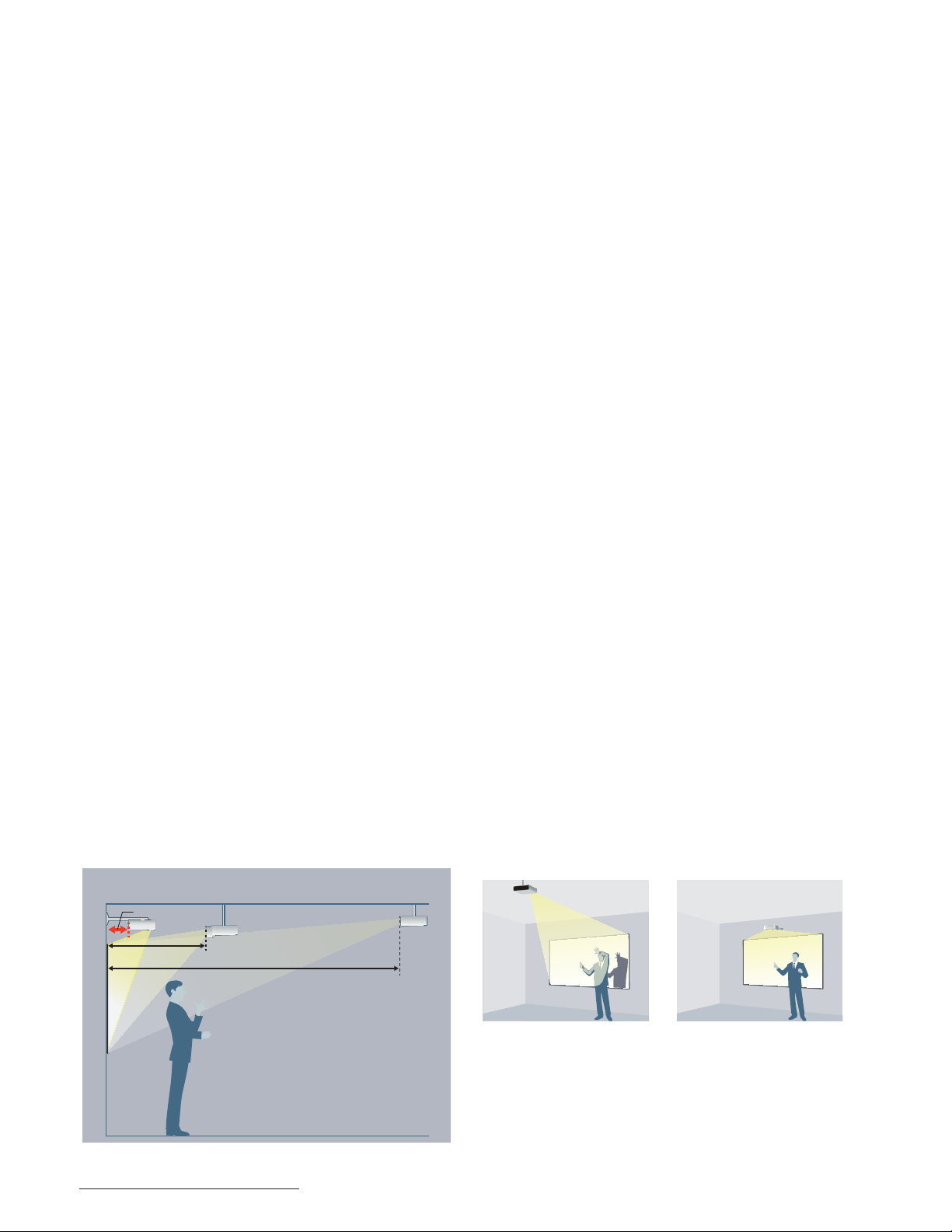
Ultra-short Projection Distance
The VPL-SW500/SX500 Series projectors come equipped with
an ultra-short focal length lens, which makes it possible to
project images from a very short distance.
VPL-SW500 Series
(Ultra short throw)
0.17 – 0.18 m
1.06 m
80-inch
image
VPL-SW125
(Short throw)
2.55 – 2.88 m
VPL-EW7
(Normal throw)
A short projection distance has two key benefits. The presenter
will not be distracted by the projected image, and it’s easier
for the audience to see the projected image because screen
shadow is minimized.
With conventional models
(Normal throw)
With the VPL-SW500/SX500
Series (Ultra short throw)
The values are approximate.
2
Page 3
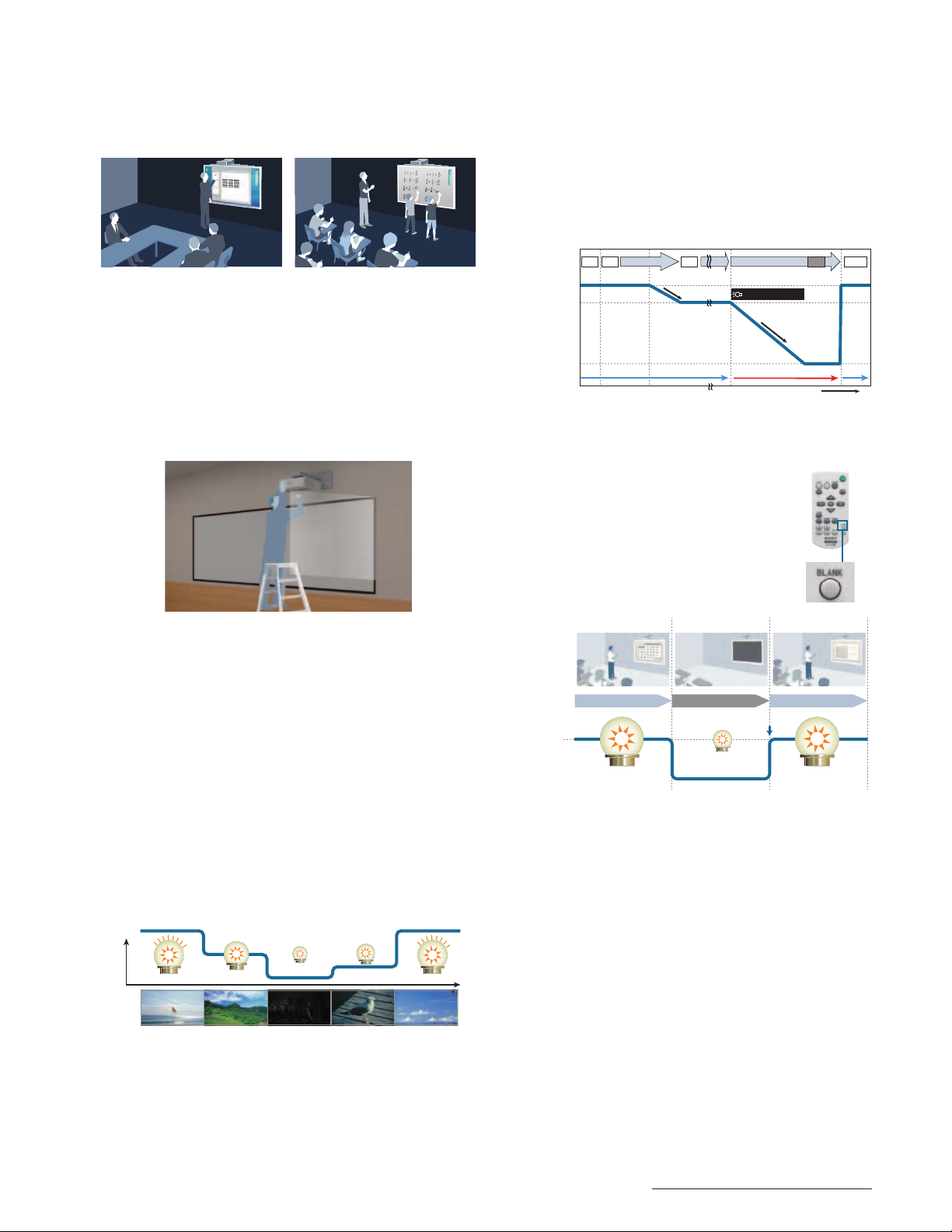
Interactive Function
The Interactive function of the VPL-SW536CM allows presentation
files to be controlled using an interactive pen. In addition, two
users can draw concurrently on the projection surface using
dual interactive pens.
•Lamp Dimming Function
The VPL-SW500/SX500 Series projectors are equipped with a
lamp dimming function. After 10 seconds of a static signal
feed, the lamp dims by approximately 15% which is hardly
noticeable.
If one of these projectors is left powered on while not in
use, after a set period of time it will automatically detect
there’s been no change and will dim the lamp to as low
as approximately 30% of the original brightness to help
significantly reduce energy consumption.
File control by interactive pen Dual-pen
Installation Advantages
The VPL-SW500/SX500 Series projectors are equipped with an
optical zoom and lens shift capability. Using this function, the
position of the projected image can be easily adjusted to the
desired settings during installation. This greatly reduces the time
and hassle of fine-tuning the image position without having to
physically move the projector or sacrifice image quality.
“Blend-in” Design
The VPL-SW500/SX500 Series projectors showcase a new lowprofile chassis, so these projectors appear to blend into the
ceiling or wall on which they are mounted.
Good TCO, Energy-efficient Design
Auto Power Saving Function
•Auto Mode (Auto Brightness Adjustment Function)
The brightness of the lamp’s output is automatically
adjusted depending on the brightness of the projected
image, to avoid unnecessary power consumption.
When showing darker images that don’t require high
brightness, lamp output decreases.
Lamp drive
High
Input (image)
Lamp power*
A B B CB
100%
85%
Automatically Automatically
(-15%)
30%
(-70%)
Slowly
5/10/15/20 min.0 sec. 10 sec.
Lamp dimming
Slowly
Quickly
(Restart)
In useNot in useIn use
Time
Lamp dimming scheme
•Blank (Picture Muting)
The VPL-SW500/SX500 Series projectors can
temporarily disable video signal output. This
function can be easily operated with just the
touch of a button on the supplied Remote
Commander™ unit. In addition, this function
allows blank image projection with low power
consumption using lamp control technology.
Class time Recess time Class time
Example of
classroom
Lamp Drive
Normal
condition
(100%)
Projection Blank Projection
Quick restartQuick restart
Lamp 30% with blank image
The values are approximate.
Energy Saving Design
The VPL-SW500/SX500 Series projectors offer remarkably
low power consumption, allowing users to make significant
savings on their electricity expenses.
Simulated images
ECO MODE Key
With a single push of the ECO MODE key on either the
projector or the supplied Remote Commander unit, users can
select an energy-saving setting from the ECO Mode menu.
Long-lasting Lamp
By incorporating a high-performance lamp and advanced
lamp-control technology, the VPL-SW500/SX500 Series
projectors deliver an extremely long lamp replacement time
of 6,000 hours.*
* Approximate recommended period, in low mode.
3
Page 4
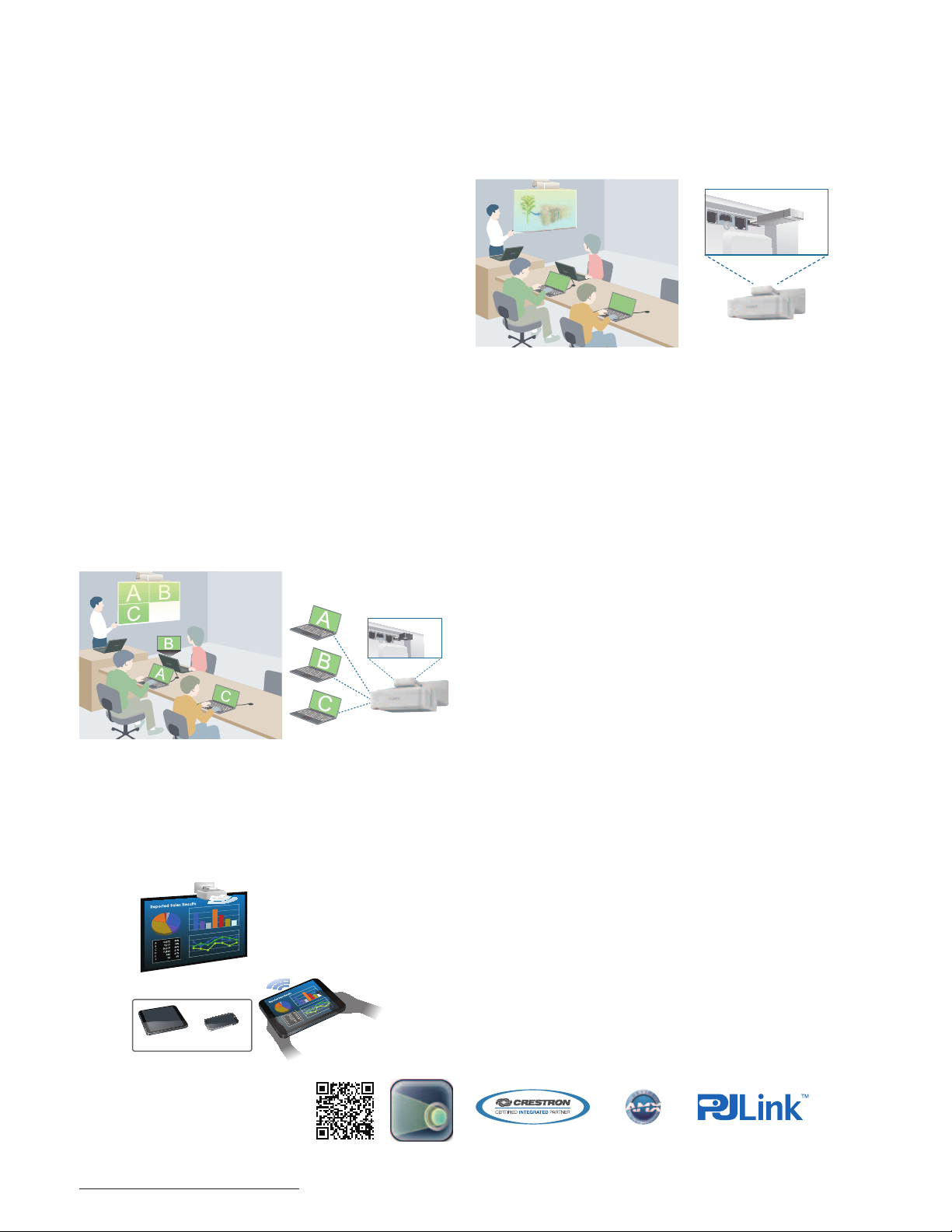
Lamp and Filter Synchronized Maintenance
The expected lamp maintenance time for each model can
reach up to 6,000 hours depending on the selected lamp
mode, and dust filters require the same maintenance interval.
Synchronizing the timing of lamp and filter maintenance
enables users to reduce the numbers of “ladder climbs” for
maintenance.
A Variety of Network Functions
– Via LAN Cable or Wirelessly
Web Control
When VPL-SW500/SX500 Series projectors are installed in a
local area network (LAN), their versatile network functions are
available to any PC on that network.
Installation can be via a LAN cable, and there is no need to
install additional software on the PC.
USB Media Viewer
By attaching a USB memory device* to the VPL-SW500/SX500
Series USB connector, the operator can directly project data
files stored on the USB memory device.
Supported file formats are JPG, BMP, PNG, TIF, and GIF.
* USB memory device is not included.
Network Presentation
When VPL-SW500/SX500 Series projectors are installed on
a LAN, presentations can be projected from any PC on the
network
– whether connected via a LAN cable or wirelessly.*
*1 The optional IFU-WLM3 is required.
1
Up to four users can project PC images simultaneously;
up to eight users*2 can connect to one projector.
*2 Up to seven users for wireless.
WLAN (wireless)
Tablet Device and Smart Phone Connection (wireless)
The wireless presentation capability makes it easy to present
files from your tablet device or smart phone. You can project
jpg, pdf, PowerPoint, and other supporting formats. This
requires a simple software download.*
Superb Picture Quality
Brilliant Color Performance
The VPL-SW500/SX500 Series projectors adopt a 3LCD
projection system incorporating three LCD panels. This system
enables each projector to present bright and natural images.
By combining an advanced generation of inorganic LCD
panels that utilize Sony’s BrightEra™ technology with a 3LCD
projection system, the VPL-SW500/SX500 Series projectors offer
high picture quality and brightness.
12-bit 3D Gamma Correction
The VPL-SW500/SX500 Series projectors incorporate 12-bit
3D gamma correction circuitry to perform highly accurate
gamma correction, achieving smoother gradations and a
richer gray scale.
Film mode
Smooth, high-quality images are reproduced using a
high-performance processor for I/P conversion.
Source signals suitable for I/P conversion are processed
automatically, and extremely accurate images are
reproduced.
Other Features
Multiple Inputs & Outputs
VPL-SW500/SX500 Series projectors include a high wattage
speaker (16 W) and a variety of interfaces (2xRGB, HDMI,
S-Video, RS-232C, RJ-45, USB Type-A, USB Type-B, and
Microphone inputs) that accept a wide variety of input
signals, greatly expanding system connection possibilities.
Wi-Fi
Smartphone
Tablet
* The application is provided by Pixelworks
and can be downloaded from the App.
Store on the web. For details, please visit
the following website.
http://PWPresenter.pixelworks.com
4
Smartphone / Tablet
Terminal
Closed Captioning
Official teletext broadcasting, developed by the NCI, USA.
Network and Control
Controls and monitors projector status.
Compatible with various control systems.
Page 5
SPECIFICATIONS
Display system 3 LCD system
Display device Size of effective
display area
0.75” (19 mm) x 3
BrightEra
Aspect ratio: 16:10
Number of pixels
3,072,000 (1280 x 800 x 3) pixels
Projection lens Zoom Optical: Manual (Approx. x 1.05), Digital: x4
Focus Manual
Lens shift Manual, Vertical: +/- 4%, Horizontal: +/- 2% Manual, Vertical: +/- 4%, Horizontal: +/- 3%
Throw ratio 0.27:1 to 0.29:1 0.34:1 to 0.36:1
Light source High-pressure mercury lamp 210 W type
Recommended lamp replacement time*
Filter cleaning cycle*
1
1
3000 H / 4500 H / 6000 H (Lamp mode: High / Standard / Low)
Max. 6000 H, Same time as the lamp replacement is recommended
Screen size 70” to 130” (1.78 m to 3.30 m) 60” to 110” (1.52 m to 2.79 m)
Light output
(Lamp mode: High / Standard / Low)*
Color light output
(Lamp mode: High / Standard / Low)
Contrast ratio (full white / full black)*
Displayable scanning
frequency
Horizontal 15 kHz to 92 kHz
Vertical
Display resolution Computer signal
input
3100 lm / 2400 lm / 2000 lm 3000 lm / 2400 lm / 2000 lm
6
3100 lm / 2400 lm / 2000 lm 3000 lm / 2400 lm / 2000 lm
2
2500:1
48 Hz to 92 Hz
Maximum display resolution: UXGA 1600 x 1200 dots*
Panel display resolution: 1280 x 800 dots Panel display resolution: 1024 x 768 dots
Video signal input NTSC, PAL, SECAM, 480/60i, 576/50i, 480/60p, 576/50p, 720/60p, 720/50p, 1080/60i, 1080/50i, 1080/60p, 1080/50p
Color system NTSC3.58, PAL, SECAM, NTSC4.43, PAL-M, PAL-N
Keystone correction Max. Vertical: +/- 5 degrees
OSD language 24-languages (English, Dutch, French, Italian, German, Spanish, Portuguese, Turkish, Polish, Russian, Swedish, Norwegian, Japanese, Simplified Chinese,
Traditional Chinese, Korean, Thai, Vietnamese, Arabic, Farsi, Finnish, Indonesian, Hungarian, Greek)
Computer and video
signal input/output
INPUT A RGB / Y P
INPUT B RGB input connector: Mini D-sub 15-pin (female)
Audio input connector: Stereo mini jack
INPUT C HDMI input connector: HDMI 19-pin, HDCP support
Audio input connector: HDMI audio support
S VIDEO IN S video input connector: Mini DIN 4-pin, Audio input connector: Pin jack (x2) (shared with VIDEO IN)
VIDEO IN Video input connector: Pin jack, Audio input connector: Pin jack (x2) (shared with S VIDEO IN)
OUTPUT Monitor output connector*
Control signal input/output RS-232C connector: D-sub 9-pin (male)
LAN connector: RJ-45, 10BASE-T/100BASE-TX
USB: Type-A, Type-B
Microphone input: Mini jack
Speaker 16 W x 1 (monaural)
Operating temperature (Operating humidity) 32°F to 104°F / 0°C to 40°C (35% to 85%; no condensation)
Storage temperature (Storage humidity) -4°F to +140°F / -20°C to +60°C (10% to 90%)
Power requirements AC 100 to 240 V,
3.0 A to 1.3 A, 50 Hz / 60 Hz
Power consumption
(Lamp mode: High /
Standard / Low)
Standby mode power
consumption (Standby
mode: Standard / Low)
AC 100 V to 120 V
AC 220 V to 240 V
AC 100 V to 120 V
AC 220 V to 240 V
292 W / 261 W / 232 W 291 W / 258 W / 229 W 306 W / 259 W / 230 W
283 W / 251 W / 223 W 282 W / 249 W / 221 W 296 W / 248 W / 220 W
6.0 W / 0.5 W 5.7 W / 0.5 W 5.7 W / 0.5 W
6.2 W / 0.5 W 5.9 W / 0.5 W 5.9 W / 0.5 W
Heat dissipation AC 100 V to 120 V 996 BTU 993 BTU 1044 BTU
AC 220 V to 240 V 965 BTU 962 BTU 1010 BTU
Outside dimensions W 384.4 x H 122.5 x D 423.4 mm (W 384.4 x H 122.5 x D 423.4 mm) (without protrusion)
Weight (without wall mount) 15 lb 7 oz / 7.0 kg
Supplied accessories RM-PJ8 Remote Commander (1), Lithium battery: CR2025 (1), AC Power Cord (1), Operation Instructions (CD-ROM) (1), Quick Reference Manual (1),
Projector Station for Network Presentation application (CD-ROM) (1), Interactive pen device (2) (VPL-SW536C), Size AAA (R03) manganese batteries
(4) (VPL-SW536C), USB A-B cable (5 m) (1) (VPL-SW536C), Interactive Presentation Utility 2 application (CD-ROM) (1) (VPL-SW536C)
Replacement lamp LMP-E212
Replacement Interactive pen device IFU-PN200M, IFU-PN200S – –
*1 The figures are the expected maintenance time and not guaranteed. They will depend on the environment or how the projector is used.
*2 This value is average.
*3 Available for the VESA Reduced Blanking signal.
*4 Not available in standby. From INPUT A and INPUT B.
*5 Works as an audio switcher function. Output from a selected channel; not available in standby.
*6 ISO 21118.
VPL-SW536CM VPL-SW536M VPL-SX536M
0.63” (16 mm) x 3
BrightEra
Aspect ratio: 4:3
2,359,296
(1024 x 768 x 3) pixels
3
B PR input connector: Mini D-sub 15-pin (female), Audio input connector: Stereo mini jack
4
: Mini D-sub 15-pin (female), Audio output connector*5: Stereo mini jack (variable out)
AC 100 V to 240 V,
3.1 A to 1.4 A, 50 Hz / 60 Hz
5
Page 6
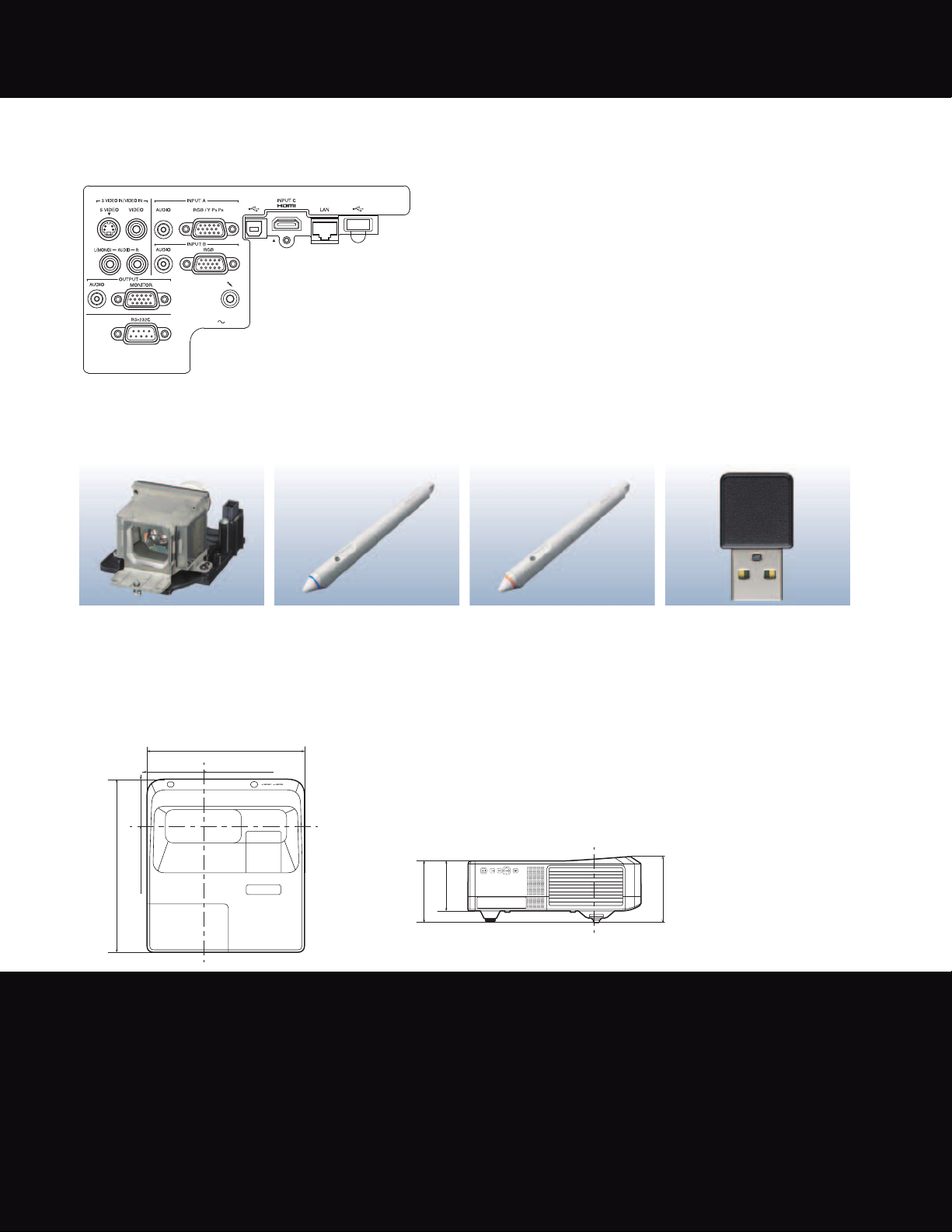
CONNECTOR PANELS
VPL-SW536CM / VPL-SW536M / VPL-SX536M
OPTIONAL ACCESSORIES
LMP-E212
Projector Lamp (for replacement)
IFU-PN200M
Interactive Pen Device
(VPL-SW536CM)
DIMENSIONS
Top Side
15 1/8 (384.4)
13
/32 (137.7)
5
/32 (115.3)
/32 (423.4)
17
21
4
16
Sony Electronics Inc.
1 Sony Drive
Park Ridge, NJ 07656
sony.com/projectors
DI-0294A (MK10887V5)
IFU-PN200S
Interactive Pen Device
(VPL-SW536CM)
Unit: inches (mm)
/16
13
4
(122.5)
/16 (150.5)
15
5
Reproduction in whole or in part without written permission is prohibited.
Features and specifications are subject to change without notice.
“SONY” and “make.believe”, “BrightEra” and “Remote Commander” are
Trademark PJLink is a trademark applied for trademark rights in Japan, the
The terms HDMI and HDMI High-Definition Multimedia Interface,
and the HDMI Logo are trademarks or registered trademarks of
All other trademarks are the property of their respective owners.
The values for mass and dimension are approximate.
United States of America and other countries and areas.
HDMI Licensing LLC in the United States and other countries.
Pixelworks and VueMagic™ are trademark of Pixelworks Inc.
IFU-WLM3
USB wireless LAN module
/32
11
6
(161.1)
©2013 Sony Corporation. All rights reserved.
trademarks of Sony Corporation.
App Store is a service mark of Apple Inc.
Issued (12/13)
 Loading...