

Page 1
2 34
5 67
LT30p__Booklet_EN_1263-5432.1.pdf 1 of 2
Startup guide
Xperia™ T
LT30p
Sony Mobile Communications AB
SE-221 88 Lund, Sweden
www.sonymobile.com
1263-5432.1
Welcome
Important information
Please read the Important information leaflet
before you use your mobile phone.
Assembly
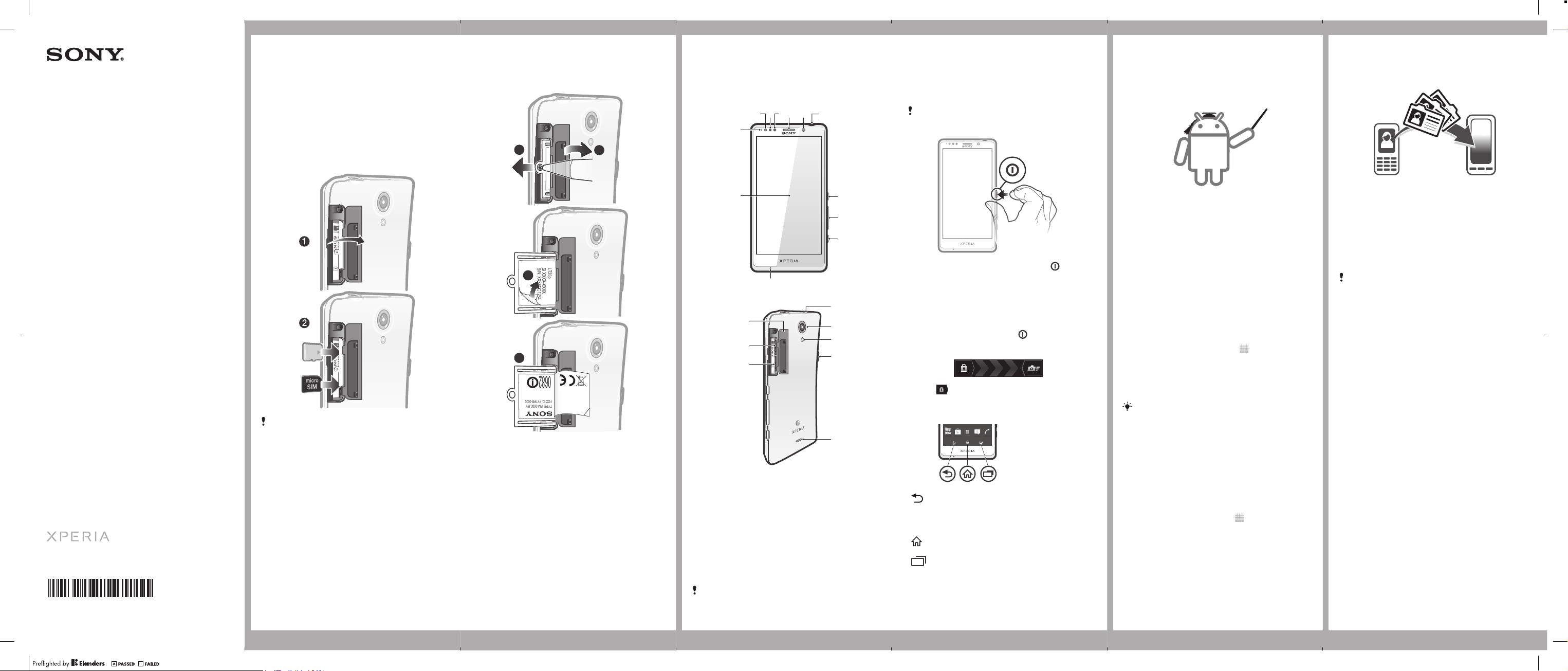
To insert the memory card and the micro
SIM card
The memory card may not be included at
purchase in all markets.
To view the CE mark
2
3
4
1
Open the memory card and the micro SIM
card cover.
2
Insert the tip of a pen or a similar object into
the hole, then drag out the tray.
3
Open the peel & read label to view the CE
mark.
1
Phone basics
Phone overview
1
12
11
20
19
18
1. Notification LED
2. Light sensor
3. Proximity sensor 1
4. Proximity sensor 2
5. Ear speaker
6. Front camera lens
7. Headset connector
8. Power key
9. Volume/Zoom key
10. Camera key
Use the accessories provided with your phone,
or other compatible accessories, for optimal
performance.
11. Main microphone
12. Touchscreen
13. Second microphone
14. Camera lens
15. Camera LED light
16. Connector for
charger/USB cable
17. Speaker
18. SIM card slot
19. microSD™ card slot
20. SIM card/microSD™
card cover
8
9
10
13
14
15
16
17
Turning on the phone
To turn on the phone
Make sure that the battery is charged for at
least 30 minutes before you turn on the
phone for the first time.
1
Press and hold down the power key on the
right side of the phone until the phone
vibrates.
2
Wait a while for the phone to start.
Waking up the screen
To activate the screen
•
Briefly press the power key .
To unlock the screen
•
Drag to the right across the screen.
Using the keys
Back
•
Go back to the previous screen
•
Close the on-screen keypad, a dialog
box, an options menu, or the
Notification panel
Home
•
Go to the Home screen
Task
•
Tap to open a window showing your
most recently used applications and a
small apps bar
Set up your phone
What is Android™?
Android is your phone's operating system. Since
it's developed by Google™, your phone is
preloaded with several Google™ services, such as
Google Maps™ and Google™ web search. To use
some of the services provided by Google™, you
need a Google account.
What is different about Android?
Android™ is an open system, which means that
you're not limited to using applications and
services from only one provider.
Google™ account
With a Google™ account, you can use Gmail™ to
send emails, Google Talk™ to chat with friends,
and Google Play™ to download applications and
games, music, movies and books.
To set up a Google™ account in your phone
1
From your Home screen, tap .
2
Find and tap Settings > Accounts & sync > Add
account > Google.
3
Follow the registration wizard to create a
Google™ account, or sign in if you already have
an account. Your phone is now ready to use with
Gmail™ , Google Talk™ and Google Calendar™.
You can also sign in or create a Google™
account from the setup guide the first time you
start your phone. Or you can go online and
create an account at
www.google.com/accounts.
Basic settings
The first time you start your phone, a setup guide
explains basic phone functions and helps you enter
essential settings. You can also access the setup
guide later.
To access the setup guide manually
1
From the Home screen, tap .
2
Find and tap Setup guide.
Transferring contacts
to your new phone
Transferring contacts to your new phone can
sometimes be complicated, but help is available.
You can transfer contacts from several phone
brands, including iPhone, Samsung, HTC and
Nokia.
You need:
•
An Internet-connected PC running Windows®
•
A USB cable for your old phone
•
A USB cable for your new Android™ phone
•
Your old phone
•
Your new Android™ phone
If you don't have access to all of the items listed
above, go to www.sonymobile.com to find out
about other ways to transfer your contacts.
Get started transferring your
contacts
Use the PC Companion program to transfer your
contacts. It's free, and the installation files are
already saved on your new phone. PC Companion
also offers a range of other features, including help
to update your phone software.
To install PC Companion
1
New phone: Turn on your new Android™ phone
and connect it to a PC using a USB cable.
2
New phone: Tap Install to install PC Companion
on the PC.
3
Computer: If a popup window appears, select
Run Startme.exe. In the new popup window that
appears, click Install to start the installation and
then follow the instructions to complete the
installation.
To transfer contacts to your new phone
using PC Companion
1
Make sure that PC Companion is installed on
your PC.
2
Open the PC Companion program on the PC,
then click Contacts Setup and follow the
instructions to transfer your contacts.
July 5, 2012 13:49:00
Page 2
LT30p__Booklet_EN_1263-5432.1.pdf 2 of 2
Finding your way
Home screen
Your phone Home screen is the equivalent of the
desktop on a computer. You can customise your
Home screen with widgets, shortcuts, folders,
themes, wallpaper and other items.
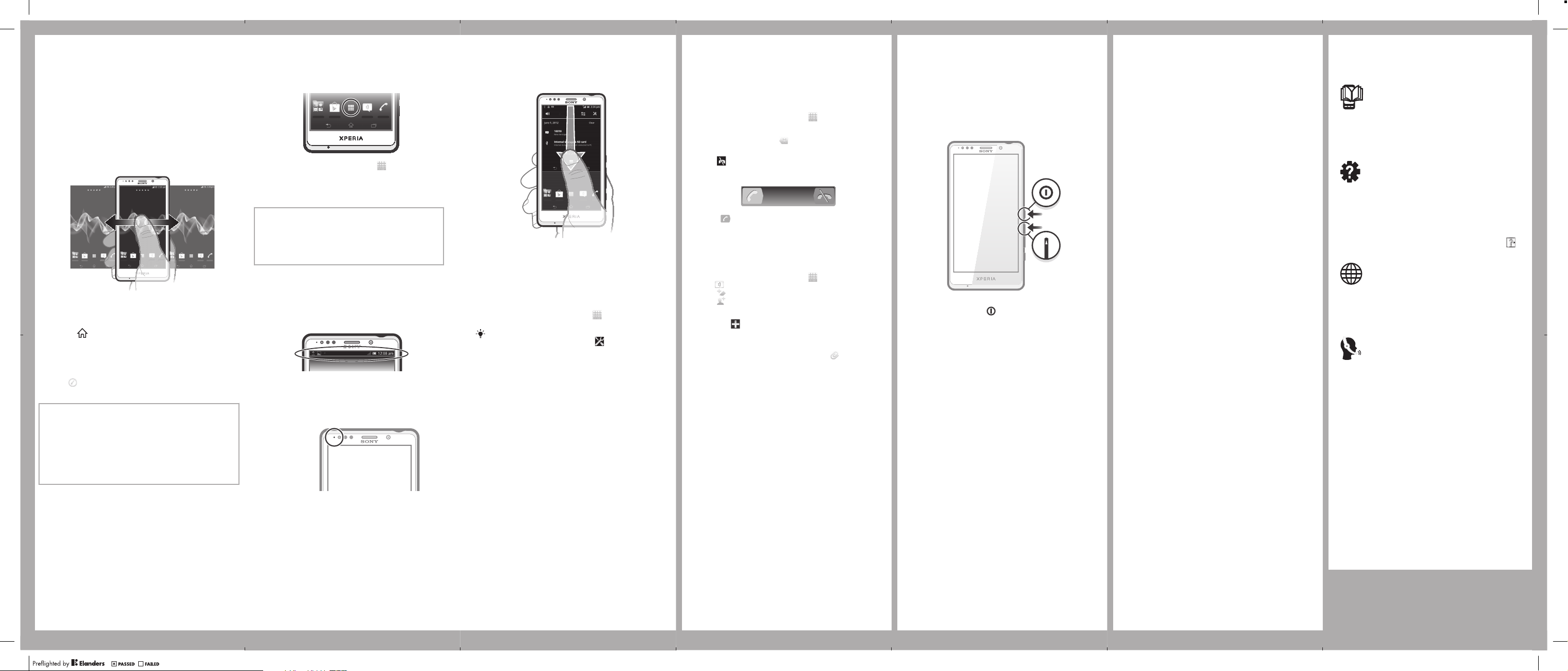
The Home screen extends beyond the regular
screen display width, so you need to flick left or
right to view content in one of the screen's four
extensions.
The items in the bar at the bottom of the screen are
always available for quick access.
To go to the Home screen
•
Press .
To browse the Home screen
•
Flick right or left.
To change your Home screen wallpaper
1
Tap an empty area on your Home screen, then
.
tap
2
Tap Wallpaper and select an option.
Widgets
Widgets are small applications that you can use
directly on your Home screen. For example, the
Music player widget allows you to start playing
music directly.
Some widgets are resizable, so you can expand
them to view more content or shrink them to save
space on your Home screen.
To open the Application screen
•
From your Home screen, tap .
To open an application
•
From your Home screen or the Application
screen, tap the application.
Applications
An application is a phone program that helps
you perform a task. For example, there are
applications to make calls, take photos and
download more applications.
Status and notifications
The status bar at the top of your screen shows
what's going on in your phone. For example,
new message and calendar notifications appear
here.
A notification light also gives you battery status
information and some notifications. For
example, a flashing blue light means there is a
new message or a missed call. The notification
light may not work when the battery level is low.
To open the Notification panel
•
Drag the status bar downwards.
Phone settings menu
View and change your phone settings from the
Settings menu.
To access the phone settings
1
From your Home screen, tap .
2
Tap Settings.
You can also drag the status bar downwards
on the Home screen and tap to access
the phone settings.
More basics
Calling
To make a call by dialling
1
From your Home screen, tap
2
Find and tap Phone.
3
Enter the number of the recipient and tap Call. To
delete a number, tap .
To end a call
•
Tap .
To answer a call
•
Drag to the right across the screen.
Multimedia and text
messaging
To create and send a message
1
From your Home screen, tap , then find and
tap .
2
Tap .
3
Tap , then select the desired recipients from
the Contacts list. If the recipient is not listed as a
contact, enter the contact's number manually
and tap .
4
When you are finished adding recipients, tap
Done.
5
Tap Write message and enter your message text.
6
If you want to add a media file, tap and select
an option.
7
To send the message, tap Send.
.
Troubleshooting
My phone is not responding
If your phone hangs, or if you cannot restart it
normally, you can force restart the phone.
To force the phone to restart
1
Press and hold down both the volume up key
and the power key for five seconds.
2
After your phone vibrates once, release the keys.
The phone restarts automatically.
Legal information
Sony LT30p
Google Play™ is not available in all countries. Some of the services
and features described in this Startup guide are not supported in all
countries/regions or by all networks and/or service providers in all
areas. Without limitation, this applies to the GSM International
Emergency Number 112. Please contact your network operator or
service provider to determine availability of any specific service or
feature and whether additional access or usage fees apply.
This Startup guide is published by Sony Mobile Communications AB
or its local affiliated company, without any warranty. Improvements
and changes to this Startup guide necessitated by typographical
errors, inaccuracies of current information, or improvements to
programs and/or equipment, may be made by Sony Mobile
Communications AB at any time and without notice. Such changes
will, however, be incorporated into new editions of this Startup
guide.
© 2012 Sony Mobile Communications AB. All rights reserved.
Publication number: 1263-5432.1
Your mobile phone has the capability to download, store and
forward additional content, e.g. ringtones. The use of such content
may be restricted or prohibited by rights of third parties, including
but not limited to restriction under applicable copyright laws. You,
and not Sony, are entirely responsible for additional content that you
download to or forward from your mobile phone. Prior to your use of
any additional content, please verify that your intended use is
properly licensed or is otherwise authorized. Sony does not
guarantee the accuracy, integrity or quality of any additional content
or any other third party content. Under no circumstances will Sony
be liable in any way for your improper use of additional content or
other third party content.
This Startup guide may reference services or applications provided
by third parties. Use of such programming or services may require
separate registration with the third party provider and may be
subject to additional terms of use. For applications accessed on or
through a third-party website, please review such websites’ terms of
use and applicable privacy policy in advance. Sony does not warrant
or guarantee the availability or performance of any third-party
websites or offered services.
See regulatory information such as the CE mark on the back of the
phone.
All product and company names mentioned herein are the
trademarks or registered trademarks of their respective owners. Any
rights not expressly granted herein are reserved. All other
trademarks are property of their respective owners.
Visit www.sonymobile.com for more information.
All illustrations are for illustration only and may not accurately depict
the actual phone.
This product is protected by certain intellectual property rights of
Microsoft. Use or distribution of such technology outside of this
product is prohibited without a license from Microsoft.
Get support
User guide
A User guide is available in the Help application in
your phone and at www.sonymobile.com.
Support in the phone
Get user support directly in your phone using the
Help application.
To access the Help application
1
From your Application screen, find and tap .
2
Find and tap the required support item.
Support on the web
Visit www.sonymobile.com to access a range of
support and get the most from your phone.
Customer support
Customer support – if all else fails. Access the
relevant support number at www.sonymobile.com
by clicking the Contact us link at the bottom of the
page. You can also find the relevant support
number in the supplied Important information
leaflet.
Application screen
The Application screen, which you open from your
Home screen, contains the applications that come
installed with your phone as well as the
applications you download.
The Application screen extends beyond the regular
screen width, so you need to flick left and right to
view all content.
July 5, 2012 13:49:01
Checking notifications and
ongoing activities
You can drag down the status bar to open the
Notification panel and get more information. For
example, you can use the panel to open a new
message or view a calendar event. You can also
open some applications that run in the
background, such as the music player.
www.sonymobile.com
Page 3
FCC Statement
Declaration of Conformity
Sony LT30p
UMTS HSPA Band 1 2 4 5 8 GSM GPRS/EDGE
850/900/1800/1900
Page 4
Important Information
Un
ited States & Canada
THI S PHO NE MO DEL HAS BEEN CERT IFIED IN
COM PLIAN CE WI TH THE GOVER NMENT ’S RE QUIREME NTS
FOR EXPO SURE TO RADI O WAV ES.
The LT30 p Ser ies mob ile p hones have been d esign ed to
com ply w ith a pplicab le sa fety requi rements for expos ure t o
rad io wa ves. Your wi reles s pho ne is a radi o tra nsmit ter a nd
rec eiver . It is desi gned to no t exc eed the limi ts* o f exp osure t o
rad io fr equen cy (RF) ener gy se t by governm ental auth oriti es.
The se li mits establi sh pe rmitt ed le vels of RF e nergy for the
gen eral popul ation. The g uidel ines are bas ed on stan dards
tha t wer e dev eloped by in terna tiona l scien tific orga nizat ions
thr ough perio dic and thor ough evalu ation o f sci entif ic st udies.
The stan dards includ e a s afety marg in desi gned to as sure the
saf ety o f all indivi duals , reg ardle ss of a ge an d hea lth.
The radi o wav e expos ure g uidel ines employ a uni t of
mea surem ent k nown as the Speci fic A bsorpti on Ra te (S AR).
Tes ts fo r SAR are co nduct ed us ing s tandard ized metho ds wi th
the phon e tra nsmitti ng at its highe st cert ified powe r lev el in a ll
use d fre quenc y bands . Whi le th ere m ay be d iffer ences
bet ween the S AR leve ls of vari ous p hone mo dels, they are all
des igned to m eet the rele vant guide lines f or ex posur e to radio
wav es. F or mo re info rmati on on SAR, please refe r to the s afe
and effi cient use ch apter in t he Us er Guid e.
The high est S AR valu e as repor ted t o the a uthor ities for this
pho ne mo del w hen tes ted f or us e by the ear is 1 .07 W /kg*,
and when worn on the body is 0 .88 W /kg* fo r spe ech a nd
1.1 2 W/k g* fo r data calls . For body -worn o perat ion, the p hone
has been test ed when posi tione d a m inimum of 15 mm f rom
the body with out any meta l par ts in the vi cinit y of the p hone or
whe n pro perly used w ith a n app ropri ate Son y acc essor y and
wor n on the b ody. Fo r dev ices which includ e “Wi Fi ho tspot ”
fun ction ality , SAR m easur ement s for the de vice opera ting in
WiF i hot spot mode we re ta ken u sing a separ ation dist ance of
2
Page 5
10m m. Us e of third-p arty acces sorie s may r esult in d iffer ent
SAR leve ls th an thos e rep orted .
**B efore a ph one mod el is avai lable for sa le to the publi c in
the US, it mu st be t ested and certi fied by the Feder al
Com munic ation s Commi ssion (FCC ) tha t it do es no t exc eed
the limi t est ablishe d by the g overn ment-ad opted requ ireme nt
for safe expo sure*. The t ests are p erforme d in posit ions and
loc ation s (i. e., by the e ar an d wor n on th e bod y) as requ ired by
the FCC for e ach mod el. T he FC C has grante d an Equip ment
Aut horiz ation for th is ph one m odel with al l rep orted SAR levels
eva luate d as in comp lianc e wit h the FCC RF expo sure
gui delin es. W hile th ere m ay be diff erences betw een t he SA R
lev els o f var ious ph ones, all mobil e phone s gra nted an FC C
equ ipmen t aut horizat ion m eet t he go vernmen t req uirem ent f or
saf e exp osure . SAR i nform ation on t his pho ne mo del i s on file
at the F CC an d can b e fou nd un der t he Disp lay G rant secti on
of http: //www .fcc.go v/oet /fcci d aft er sear ching on F CC
ID PY7PM -0030 . Addit ional info rmati on on S AR ca n be found
on the C ellul ar Tele commu nicat ions & Inter net A ssoci ation
(CT IA) w ebsit e at ht tp:// www.p honef acts.ne t.
* I n the Unit ed Stat es an d Can ada, the SAR limi t for mobi le
pho nes u sed b y the p ublic is 1 .6 wa tts/kil ogram (W/k g)
ave raged over one gr am of tiss ue. T he stan dard incor porat es a
mar gin o f saf ety to give addit ional protec tion for t he pu blic an d
to accou nt fo r any v ariat ions in me asureme nts.
**T his p aragr aph is only appli cable to aut horit ies a nd
cus tomer s in the Uni ted S tates .
3
Page 6
Renseignements importants
Ét
ats-Unis et Canada
CE MODÈL E DE TÉLÉPHO NE A ÉTÉ C ERTIF IÉ CONF ORME
AUX EXIG ENCES GOUVER NEMEN TALES RELA TIVES À
L'E XPOSI TION AUX OND ES RA DIOÉL ECTRI QUES.
Les télé phone s mobil es de la L T30p ont été conç us po ur
rép ondre aux normes de sé curit é en vigueur en m atièr e
d'e xposi tion aux ond es ra dioél ectri ques. V otre télép hone sans fi l
est un é mette ur et u n réc epteu r rad io. Il est c onçu de ma nière à
ne pas d épass er les limit es* d 'expo sition à l'é nergi e des
fré quenc es ra dio (RF ) éta blies par les aut orité s
gou verne menta les. Ce s lim ites fixen t les n iveau x max imaux
d'é nergi e RF auxquel s peu t êtr e sou mis le grand publ ic. C es
lig nes d irect rices s ont b asées sur des nor mes q ui on t été
éla borée s par des or ganis ation s sci entifiq ues i ntern ation ales pa r
le biais d'év aluatio ns pé riodi ques et appr ofond ies d es ét udes
sci entif iques . Ces n ormes prév oient une ma rge d e séc urité visant
à a ssure r la protect ion d e tou s les indivi dus, peu i mport e leur
âge et l eur é tat de santé .
Les lign es di rectric es re lativ es à l'expos ition aux ondes
rad ioéle ctriq ues uti lisen t une unit é de me sure appel ée « Taux
d'a bsorp tion spécifi que » (TAS ). Le s tests de T AS so nt ef fectués
sel on de s mét hodes s tanda rdisé es da ns lesq uelle s le télép hone
éme t dan s tou tes les band es de fréq uences utili sées, à la plus
for te pu issan ce pour laqu elle il a été hom ologu é. Bi en qu e le
TAS puis se êt re diff érent d'un modè le de t éléph one à un a utre,
tou s les appa reils s ont c onçus pour respec ter l es li gnes
dir ectri ces r elative s aux onde s rad ioélect rique s. Po ur en savoir
plu s sur le T AS, rep ortez -vous au c hapitre sur l'uti lisat ion
eff icace et s ans dan ger d u gui de de l'util isate ur.
Le TAS l e plu s élevé rele vé pa r les autori tés p our c e mod èle de
tél éphon e est de 1.0 7 W/k g* lo rsqu' il est testé en u tilis ation p rès
de l'ore ille, et de 0.88 W/kg* pour les ap pels vocau x et de
1.1 2 W/k g* po ur les trans missi ons d e donné es lo rsqu' il es t porté
sur le c orps. En mod e d’u tilis ation porté sur l e cor ps, l e
tél éphon e a é té test é lor squ’i l est à au m oins 15 mm du c orps et
4
Page 7
à l ’écar t de toute p ièce en mé tal, ou lors qu’il est utili sé de f açon
adé quate avec un acc essoi re So ny et porté sur l e cor ps. P our
les appa reils munis de la fonc tionn alité « poin t d'a ccès WiFi »,
les mesu res d u TAS d e l'a ppare il en mode W iFi o nt ét é pri ses à
une dist ance de sécu rité de 10 mm. L'utili satio n d'a ccess oires
tie rs pe ut pr oduire des n iveau x de TAS dif féren ts de ceux
rel evés.
**A vant qu'un modèle de t éléph one n e soit mis e n ven te
aup rès d u pub lic aux État s-Uni s, la Commis sion fédér ale d es
com munic ation s (CFC) doit le t ester et cer tifie r qu' il re specte les
lim ites fixée s dans les e xigen ces g ouverne menta les d 'expo sition
san s dan ger*. Pour c haque modè le, l es test s son t eff ectué s en
pos ition et a ux endr oits d'usa ge (c .-à-d. près de l' oreil le et p orté
sur le c orps) , tel q ue re quis par l a CFC. La CF C a a ccord é une
aut orisa tion d'équip ement pour ce m odèle d e tél éphon e, ap rès
que tous les niveaux de T AS in diqué s aient été évalu és et
con sidér és co nformes aux ligne s dir ectrice s de la CF C en
mat ière d'exp osition aux radio fréqu ences. Même s'il peut y avoir
des diff érenc es entr e les nive aux d e TAS d es di ffére nts
tél éphon es, t ous les télé phone s mob iles au xquel s la CFC a
acc ordé une a utorisa tion d'équ ipeme nt répo ndent aux norme s
gou verne menta les en matiè re d' expos ition s ans d anger . La CFC
con serve dans ses do ssier s l'i nform ation r elati ve au x TAS relevé s
pou r ce modèl e de té lépho ne. V ous p ouvez l a con sulte r au
htt p://w ww.fc c.gov/o et/fc cid s ous l a rubri que « Disp lay G rant »,
apr ès av oir e ffectué une reche rche sur CFC ID P Y7PM- 0030.
Vou s tro uvere z des r ensei gneme nts s uppléme ntair es co ncern ant
le TAS s ur le site W eb de la C ellul ar Tele commu nicat ions &
Int ernet Asso ciation (CTI A) au http ://www. phone facts .net.
* A ux Ét ats-U nis et au Ca nada, la l imite d e TAS des
tél éphon es mo biles u tilis és pa r le public est d e 1,6 watt /kg
(W/ kg) e n moy enne su r un gramm e de tissus. Cett e nor me
com porte une marge i mport ante de sé curité afin d'ass urer une
pro tecti on su pplémen taire et d e ten ir comp te de tout e var iation
dan s les mesu res.
**C e par agrap he ne c oncer ne qu e les autori tés e t les clie nts
des État s-Uni s.
5
Page 8
Información importante
Es
tados Unidos y Canadá
EST E MOD ELO D E TELÉF ONO H A SID O CER TIFICAD O
CON FORME A LO S REQUI SITOS GUBE RNAME NTALES PARA
LA EXPOS ICIÓN A ONDA S DE RADIO .
Los telé fonos móvile s de la Se rie L T30p ha n sid o dis eñado s
seg ún lo s req uisitos de s eguri dad a plicabl es pa ra la expo sición a
ond as de radi o. Su t eléfo no in alámb rico es un t ransm isor y
rec eptor de r adio. E stá d iseña do pa ra no s upera r los lími tes* de
exp osici ón a energía de r adiof recue ncia (R F) fi jados por las
aut orida des g ubernam ental es. E stos límites esta blece n los
niv eles permi tidos d e ene rgía de RF para l a pob lació n gen eral.
Las espe cific aciones se b asan en lo s están dares desa rroll ados
por orga nizac iones c ientí ficas inte rnacion ales media nte
eva luaci ones periódi cas y minu ciosa s de es tudio s cie ntífi cos.
Los está ndare s inclu yen u n mar gen d e segur idad desti nado a
gar antiz ar la seguri dad d e tod as la s perso nas,
ind epend iente mente d e la edad y de la salu d.
Las espe cific aciones de l a exp osici ón a on das d e rad io
emp lean una u nidad d e med ida c onoci da como la T asa
esp ecífi ca de absorc ión ( SAR, por s u sigla en i nglés ). La s
pru ebas de SA R se ll evan a cab o med iante e l uso de m étodo s
est andar izado s con l a tra nsmis ión t elefóni ca al más alto nivel d e
ene rgía regis trado e n tod as la s ban das de frecu encia util izadas.
Aun que e s pos ible qu e hay a dif erenc ias ent re lo s niv eles de SAR
de los d ifere ntes mo delos de t eléfo nos, to dos e stán diseñ ados
par a cum plir con las espe cific acion es corr espon dient es de la
exp osici ón a ondas d e rad io. P ara o btener más i nform ación
sob re SA R, co nsulte el ca pítul o sob re uso segur o y e ficaz que se
enc uentr a en la Guía del usuar io.
Seg ún se repo rtó a l as au torid ades, el val or má s alt o de SAR
de este model o de te léfon o cua ndo s e probó usán dolo cerca del
oíd o es de 1. 07 W/kg * y a l usa rlo e n el cu erpo es de 0.88 W/kg*
par a hab lar y 1.12 W /kg* para llama das de datos . Par a su uso
cer ca de l cue rpo, el telé fono ha si do prob ado p ara s u
fun ciona mient o a una dist ancia míni ma de 1 5 mm (0,59 pulg .)
6
Page 9
del cuer po, s in que haya pieza s met álicas cerca del teléf ono o
cua ndo s e uti liza co rrect ament e con el acc esori o ade cuado
Son y. En lo q ue resp ecta a los disp ositivo s que cuen tan c on la
fun ciona lidad “Zona activ a WiF i”, l as medi das S AR de l
dis posit ivo q ue func iona, en m odo d e zona activ a WiF i, se
tom aron media nte el uso d e una dist ancia d e sep araci ón de 10
mm. El u so de acceso rios de te rcero s puede resu ltar en ni veles
de SAR d ifere ntes a aquel los q ue se report aron.
**A ntes de qu e un mo delo de te léfon o se en cuent re di sponi ble
par a la venta al púb lico en lo s Est ados Un idos, la C omisi ón
fed eral de te lecomun icaci ones (FCC) debe a proba rlo y cert ificar
que no s upera el lím ite e stabl ecido por el requ isito adop tado po r
el gobie rno p ara una expo sició n seg ura*. L as pr uebas se l levan a
cab o en posic iones y ubic acion es (e s decir , cer ca de l oíd o y
cer ca de l cue rpo) se gún l o req uiere la FCC para cada mode lo.
La FCC h a oto rgado u na Au toriz ación de equ ipo p ara e ste
mod elo d e tel éfono c on to dos l os ni veles d e SAR repo rtado s, los
cua les f ueron evalua dos c onfor me a las esp ecifi cacio nes d e
exp osici ón a RF de l a FCC . Aun que e s posib le qu e hay a
dif erenc ias e ntre lo s niv eles de SA R de lo s dif erent es te léfonos ,
tod os lo s tel éfonos móvil es qu e cue ntan co n una auto rizac ión de
equ ipo d e la FCC cum plen con l os re quisito s gub ernam ental es
par a la expos ición s egura . La infor mación sobre SAR de es te
mod elo d e tel éfono e stá a rchiv ada e n la FC C y p uede
enc ontra rla e n la se cción Disp lay G rant (M ostra r sub venci ón) en
htt p://w ww.fc c.gov/o et/fc cid d espué s de bu scar la
ID PY7PM -0030 de la FCC. Puede enco ntrar i nform ación
adi ciona l sob re SAR en el siti o Web de la Asoci ación de
Tel ecomu nicac iones C elula res e Inte rnet (C TIA) en
htt p://w ww.ph onefact s.net .
* E n los Esta dos Uni dos y Cana dá, e l límit e de SAR d e los
tel éfono s móv iles ut iliza dos p or el públic o es de 1. 6
wat ts/ki logra mo (W/k g) pr omedi ados sobre u n gra mo de teji do.
El están dar i ncluye un ma rgen de se guridad para prop orcio narle
una prot ecció n adici onal al pú blico y para toma r en cuent a
cua lquie r var iación en la s med idas.
7
Page 10
**E ste p árraf o se ap lica única mente a auto ridad es y clien tes de
los Esta dos U nidos.
8
Page 11
Important Information
La
tin & South America
Rad io wa ve ex posure and S pecif ic Ab sorptio n Rat e (SA R)
inf ormat ion
The LT30 p Ser ies mob ile p hones have been d esign ed to
com ply w ith a pplicab le sa fety requi rements for expos ure t o
rad io wa ves. These r equir ement s are based on sc ienti fic
gui delin es th at incl ude s afety marg ins des igned to a ssure the
saf ety o f all person s, re gardl ess o f age a nd he alth.
The radi o wav e expos ure g uidel ines employ a uni t of
mea surem ent k nown as the Speci fic A bsorpti on Ra te, o r SAR .
Tes ts fo r SAR are co nduct ed us ing s tandard ised metho ds wi th
the phon e tra nsmitti ng at its highe st cert ified powe r lev el in a ll
use d fre quenc y bands .
Whi le th ere m ay be d iffer ences betw een the SAR level s of
var ious phone models , the y are all designe d to meet the
rel evant guid elines for e xposu re to radio waves .
For more info rmation on S AR, p lease refer to th e saf ety
cha pter in th e User Guide .
SAR data info rmation for resid ents in coun tries that have
ado pted the S AR limi t rec ommen ded b y the I ntern ation al
Com missi on on Non-Io nizin g Rad iatio n Prote ction (ICN IRP),
whi ch is 2 W/ kg aver aged over ten ( 10) gra m of tissu e (fo r
exa mple Europ ean Uni on, J apan, Braz il and New Z ealan d):
The high est S AR valu e for this mode l phone when test ed by
Son y for use at the ear i s 0.8 5 W/k g (10g) .
9
Page 12
Información importante
La
tinoamérica y América del Sur
Inf ormac ión a cerca d e la expos ición a onda s de radio y la
Tas a esp ecífi ca de a bsorc ión ( SAR)
El teléf ono m óvil LT 30p h a sid o dis eñado p ara c umpli r con los
req uisit os de seguri dad a plica bles de expo sició n a l as on das de
rad io. D ichos requis itos se ba san e n direc trice s cie ntífi cas que
est ablec en má rgenes de se gurid ad co n el fi n de evita r per juicos
a t odas las p ersonas , ind epend iente mente d e su edad o est ado
de salud .
Las dire ctric es de e xposi ción a ond as de r adio utili zan u na
uni dad d e med ida den omina da co efici ente de abso rción
esp ecífi ca o SAR. La s pru ebas de SA R se lí evan a cab o
uti lizan do mé todos n ormal izado s, co n el te léfon o tra nsmit iendo
en el ni vel m ás elev ado d e pot encia autori dado en to das l as
ban das d e fre cuencia util izada s.
Aun que p uede existir dife renci as en tre los nive les d e SAR de
dif erent es mo delos d e tel éfono , tod os han sido diseñ ados para
cum plir las d irectri ces p ertin entes sobre expos ición a on das de
rad io.
Par a obt ener más inf ormac ión s obre el SAR, cons ulte el
cap ítulo sobr e segur idad en la guía del us uario .
Inf ormac ión s obre da tos d e SAR para reside ntes de pa íses en
los que se ha ya adop tado el li mite de SAR recom endad o por la
Int ernat ional Commis sion on No n-Ion izing R adiat ion P rotec tion
(IC NIRP, Comi sión in terna ciona l de protecc ión c ontra la
rad iació n no ionizan tes ( ICNIR P, In ternati onal Commi ssion on
Non -Ioni zing Radiati on Pr otect ion), es 2 W /kg p romed io po r
cad a die z (10 ) gramo s de tejid o (po r ejemp lo, l a Uni ón Eu ropea,
Jap ón, B rasil y Nuev a Zel anda) :
El valor de S AR más eleva do pa ra es te mode lo de telé fono
cua ndo S ony r ealizó la pr ueba para su uso en la orej a era de
0,8 5 W/k g (10 g).
10
Page 13
Informação importante
Am
érica do Sul e Latina
Inf ormaç ões s obre SA R (Ta xa de Abso rção Es pecíf ica) e
exp osiçã o à r adiofre qüênc ia
O c elula r LT3 0p foi proje tado para cumprir os r equis itos de
seg uranç a apl icáveis para expo sição à radi ofreq üênci a. Es ses
req uisit os tê m como base diret rizes cientí ficas que inclu em as
mar gens de se gurança para gara ntir a segur ança de to das a s
pes soas, inde pendent ement e da idade e da s aúde.
As diret rizes de exp osiçã o à r adiof reqüênc ia us am um a
uni dade de me dida co nheci da co mo SA R ou Ta xa de Abso rção
Esp ecífi ca. O s teste s de SAR s ão co nduzido s por méto dos
pad roniz ados com a t ransm issão tele fônica em se u nív el
cer tific ado d e energ ia ma is al to em todas as fa ixas de fr eqüênci a
usa das.
Emb ora p ossa haver d ifere nças entre os nív eis d e SAR de
vár ios m odelo s de te lefon e, to dos f oram pr ojeta dos p ara a tender
as diret rizes releva ntes de ex posiç ão à ra diofr eqüên cia.
Par a obt er ma is info rmaçõ es so bre S AR, con sulte o ca pítul o
de segur ança do Guia do U suári o.
Inf ormaç ões s obre os dado s de SAR p ara mor adore s de
paí ses q ue ad otaram o lim ite S AR re comenda do pe lo IC NIRP
(In terna tiona l Commi ssion on N on-Io nizing Radia tion Prote ction)
que é o limit e médio de 2 W/kg em d ez (10) gram as de teci do
(po r exe mplo, União Europ éia, Japão , Brasi l e N ova Z elând ia).
Qua ndo t estad o pela Sony, o va lor d e SAR m ais a lto p ara e ste
mod elo d e tel efone p ara u so ju nto a o ouvid o foi de
0,8 5 W/k g (10 g).
11
Page 14
FCC Statement
Th
is devic e com plies w ith P art 1 5 of the FCC rule s.
Ope ratio n is subject to t he fo llowi ng two condi tions :
(1) This devi ce may not c ause harmf ul inte rfere nce,
and (2) This device must accep t any interf erenc e rec eived ,
inc ludin g int erferen ce th at ma y cau se unde sired oper ation .
Any chan ge or modifi catio n not expr essly a pprov ed by Sony
may void the user's autho rity to op erate t he eq uipme nt.
Thi s equ ipmen t has b een t ested and found t o com ply w ith
the limi ts fo r a Cla ss B digit al de vice, p ursua nt to Part 15 of
the FCC Rules . These limi ts ar e des igned t o pro vide
rea sonab le pr otectio n aga inst harmf ul inte rfere nce i n a
res ident ial i nstalla tion. This equi pment g enera tes, uses and
can radi ate r adio fr equen cy en ergy and, if not insta lled and
use d in accor dance w ith t he in struc tions, may c ause harmf ul
int erfer ence to radi o com munic ation s. Howe ver, there is n o
gua rante e tha t inter feren ce wi ll no t occur in a part icula r
ins talla tion.
If this equip ment do es ca use h armfu l inter feren ce to radi o or
tel evisi on re ception , whi ch ca n be determi ned b y tur ning the
equ ipmen t off and on , the user is e ncourag ed to try to co rrect
the inte rfere nce by one o r mor e of the fol lowin g mea sures :
•
Reo rient or r elocate the recei ving antenna .
•
Inc rease the separat ion b etwee n the equipm ent a nd
rec eiver .
•
Con nect the e quipmen t int o an outle t on a circu it di ffere nt
fro m tha t to which t he re ceive r is connect ed.
•
Con sult the d ealer o r an exper ience d radio /TV t echni cian for
hel p.
12
Page 15
Industry Canada Statement
Thi
s d evice comp lies wi th RS S-210 of I ndustry Cana da.
Ope ratio n is subject to t he fo llowi ng two condi tions : (1) this
dev ice m ay no t cause inte rfere nce, and (2) this devi ce mu st
acc ept a ny in terfere nce, inclu ding interfe rence that may cause
und esire d ope ration of th e dev ice.
Thi s Cla ss B digital appa ratus comp lies wi th Ca nadia n
ICE S-003 .
Cet appa reil numériq ue de la c lasse B est confo rme à la
nor me NM B-003 du Can ada.
Avis d’industrie Canada
Le prése nt ap pareil est c onfor me au x CNR d 'Indu strie Cana da
app licab les a ux appa reils radi o exe mpts de lice nce.
L'e xploi tatio n est a utori sée a ux de ux cond ition s sui vante s:
(1) l'ap parei l ne do it pa s pro duire de bro uilla ge, e t, an d (2)
l'u tilis ateur de l'a ppare il do it ac cepter tout broui llage
rad ioéle ctriq ue subi , mêm e si le br ouillag e est susc eptib le
d'e n com prome ttre le fonc tionn ement .
13
Page 16
Declaration of Conformity for LT30p
Pär Thur esson ,
Qua
lit y Off icer, Head o f Qua lity & Val idation
We fulfi l the requir ement s of the R &TTE Di recti ve (1 999/5 /EC).
Ce produ it es t confo rme a ux di recti ves de R&TTE (199 9/5/E C).
Cum plimo s con los re quisi tos d e la Directi va R& TTE – Norm as
sob
re equip os de termin ales de ra dio y teleco munic acion es
(19 99/5/ EC).
14
So ny Mo bile Communi catio ns AB of
We,
Nya Vatt entor net
SE- 221 8 8 Lun d, Swed en
dec lare under our so le re spons ibili ty that our produ ct
Son y typ e PM- 0030-BV
and in c ombin ation w ith o ur ac cesso ries, t o whi ch th is
dec larat ion r elates is in conf ormit y with the a pprop riate
sta ndard s EN 301 511 :V9.0 .2, E N 301 908-1: V5.2. 1,
EN 301 908 -2:V5 .2.1, E N 300 328: V1.7. 1, EN 3 00 44 0-2:V 1.4.1 ,
EN 30 1 489 -3:V1 .4.1, E N 301 489- 7:V1. 3.1, EN 301 489-1 7:V2. 1.1,
EN 301 4 89-24 :V1.5.1 , EN 301 8 93: V 1.6.1,
EN 302 291 -2:V1 .1.1, E N 62 209-1 :2006 and
EN 60 950- 1:200 6+A11:2 009+A 1:201 0+A12 :2011 f ollow ing t he
pro visio ns of , Radio Equi pment and Telecom munic ation
Ter minal Equi pment d irect ive 1 999/5 /EC.
Lun d, Au gust 2012
Page 17
Ate ndemo s aos requis itos da Di retri z R&TTE (199 9/5/E C).
15
Page 18
www.sonymobile.com
Sony Mobile Communications AB
SE-221 88 Lund, Sweden
1263-8011.1
Page 19
Legal-Leaflets---Generic_EN_1222-9266.9.pdf 1 of 2
Important information
Sony Consumer Web site
At www.sonymobile.com/support there is a support
section where help and tips are only a few clicks away.
Here you will find the latest computer software updates
and tips on how to use your product more efficiently.
Service and support
You have access to a portfolio of exclusive service
advantages such as:
•
Global and local Web sites providing support.
•
A global network of Contact Centers.
•
An extensive network of Sony service partners.
•
A warranty period. Learn more about the warranty
conditions in theLimited warrantysection.
At www.sonymobile.com/support, you can find the
latest support tools and information. For operatorspecific services and features, please contact your
network operator.
You can also contact our Contact Centers. If your
country/region is not represented in the list below,
please contact your local dealer. (Calls are charged
according to national rates, including local taxes,
unless the phone number is a toll-free number.)
If your product needs service, please contact the
dealer from whom it was purchased, or one of our
service partners. For warranty claims, save proof of
purchase.
Guidelines for Safe and Efficient Use
Please follow these guidelines. Failure to do so
might entail a potential health risk or product
malfunction. If in doubt as to its proper function, have
the product checked by a certified service partner
before charging or using it.
Recommendations for care and safe use of our
products
•
Handle with care and keep in a clean and dust-free
place.
•
Warning! May explode if disposed of in fire.
•
Do not expose to liquid or moisture or excess
humidity.
•
For optimum performance, the product should
not be operated in temperatures below
-10°C(+14°F) or above +45°C(+113°F). Do not expose
the battery to temperatures above +60°C(+140°F).
•
Do not expose to flames or lit tobacco
products.
•
Do not drop, throw or try to bend the product.
•
Do not paint or attempt to disassemble or
modify the product. Only Sony authorised
personnel should perform service.
•
Consult with authorised medical staff and the
instructions of the medical device manufacturer
before using the product near pacemakers or other
medical devices or equipment.
•
Discontinue use of electronic devices, or disable the
radio transmitting functionality of the device, where
required or requested to do so.
•
Do not use where a potentially explosive atmosphere
exists.
•
Do not place the product, or install wireless
equipment, in the area above an air bag in a car.
2
3
www.sonymobile.com
Sony Mobile Communications AB
SE-221 88 Lund, Sweden
1222-9266.10
•
Caution: Cracked or broken displays may create
sharp edges or splinters that could be harmful upon
contact.
•
Do not use the Bluetooth Headset in positions where
it is uncomfortable or will be subject to pressure.
Children
Warning! Keep out of the reach of children. Do
not allow children to play with mobile phones or
accessories. They could hurt themselves or others.
Products may contain small parts that could become
detached and create a choking hazard.
Power supply (Charger)
Connect the charger to power sources as marked on
the product. Do not use outdoors or in damp areas. Do
not alter or subject the cord to damage or stress.
Unplug the unit before cleaning it. Never alter the plug.
If it does not fit into the outlet, have a proper outlet
installed by an electrician. When a power supply is
connected there is a small drain of power. To avoid
this small energy waste, disconnect the power supply
when the product is fully charged. Use of charging
devices that are not Sony branded may pose increased
safety risks.
Battery
New or idle batteries can have short-term reduced
capacity. Fully charge the battery before initial use.
Use for the intended purpose only. Charge the battery
in temperatures between +5°C(+41°F) and
+45°C(+113°F). Do not put the battery into your mouth.
Do not let the battery contacts touch another metal
object. Turn off the product before removing the
battery. Performance depends on temperatures, signal
strength, usage patterns, features selected and voice
or data transmissions. Only Sony service partners
should remove or replace built-in batteries. Use of
batteries that are not Sony branded may pose
increased safety risks. Replace the battery only with
another Sony battery that has been qualified with the
product per the standard IEEE-1725. Use of an
unqualified battery may present a risk of fire,
explosion, leakage or other hazard.
Personal medical devices
Mobile phones may affect implanted medical
equipment. Reduce risk of interference by keeping a
minimum distance of 15 cm(6 inches) between the
phone and the device. Use the phone at your right ear.
Do not carry the phone in your breast pocket. Turn off
the phone if you suspect interference. For use in
proximity to personal medical devices, please consult
a physician and the device manufacturer.
Driving
Some vehicle manufacturers forbid the use of phones
in their vehicles unless a handsfree kit with an external
antenna supports the installation. Check with the
vehicle manufacturer's representative to be sure that
the mobile phone or Bluetooth handsfree will not affect
the electronic systems in the vehicle. Full attention
should be given to driving at all times and local laws
and regulations restricting the use of wireless devices
while driving must be observed.
4
5
GPS/Location based functions
Some products provide GPS/Location based
functions. Location determining functionality is
provided “As is” and “With all faults”. Sony does not
make any representation or warranty as to the
accuracy of such location information.
Use of location-based information by the device may
not be uninterrupted or error free and may additionally
be dependent on network service availability. Please
note that functionality may be reduced or prevented in
certain environments such as building interiors or areas
adjacent to buildings.
Caution: Do not use GPS functionality in a manner
which causes distraction from driving.
Emergency calls
Calls cannot be guaranteed under all conditions. Never
rely solely upon mobile phones for essential
communication. Calls may not be possible in all areas,
on all networks, or when certain network services
and/or phone features are used.
Antenna
Use of antenna devices not marketed by Sony could
damage the phone, reduce performance, and produce
SAR levels above the established limits. Do not cover
the antenna with your hand as this affects call quality,
power levels and can shorten talk and standby times.
Radio Frequency (RF) exposure and Specific
Absorption Rate (SAR)
When the phone or Bluetooth handsfree is turned on, it
emits low levels of radio frequency energy.
International safety guidelines have been developed
through periodic and thorough evaluation of scientific
studies. These guidelines establish permitted levels of
radio wave exposure. The guidelines include a safety
margin designed to assure the safety of all persons
and to account for any variations in measurements.
Specific Absorption Rate (SAR) is used to measure
radio frequency energy absorbed by the body when
using a mobile phone. The SAR value is determined at
the highest certified power level in laboratory
conditions, but because the phone is designed to use
the minimum power necessary to access the chosen
network, the actual SAR level can be well below this
value. There is no proof of difference in safety based
on difference in SAR value.
Products with radio transmitters sold in the US must
be certified by the Federal Communications
Commission (FCC). When required, tests are
performed when the phone is placed at the ear and
when worn on the body. For body-worn operation, the
phone has been tested when positioned a minimum of
15 mm from the body without any metal parts in the
vicinity of the phone or when properly used with an
appropriate Sony accessory and worn on the body.
When operating with “Hotspot” functionality engaged,
a separation distance of 10mm was used.
For more information about SAR and radio frequency
exposure, go to: www.sonymobile.com/health.
Flight mode
Bluetooth and WLAN functionality, if available in the
device, can be enabled in Flight mode but may be
prohibited onboard aircraft or in other areas where
radio transmissions are prohibited. In such
6
7
environments, please seek proper authorisation before
enabling Bluetooth or WLAN functionality even in Flight
mode.
Malware
Malware (short for malicious software) is software that
can harm the mobile phone or other computers.
Malware or harmful applications can include viruses,
worms, spyware, and other unwanted programs. While
the device does employ security measures to resist
such efforts, Sony does not warrant or represent that
the device will be impervious to the introduction of
malware. You can however reduce the risk of malware
attacks by using care when downloading content or
accepting applications, refraining from opening or
responding to messages from unknown sources, using
trustworthy services to access the Internet, and only
downloading content to the mobile phone from known,
reliable sources.
Accessories
Use only Sony branded original accessories and
certified service partners. Sony does not test thirdparty accessories. Accessories may influence RF
exposure, radio performance, loudness, electric safety
and other areas. Third-party accessories and parts
may pose a risk to your health or safety or decrease
performance.
Accessible Solutions/Special Needs
In the US, compatible Sony Xperia phones may offer
compatibility with TTY terminals (with use of necessary
accessory). For more information call the Sony Special
Needs Center on 877 878 1996 (TTY) or 877 207 2056
(voice), or go to www.sonyericsson-snc.com.
Disposal of old electrical and electronic
equipment and battery
This symbols on the electronic product or on its
packaging indicates that the electronic product
inclusive the battery should not be treated as
household waste. Instead it should be handed over to
the applicable collection point for the recycling of
electrical and electronic equipment. Do not attempt to
remove internal batteries. Internal batteries shall be
removed only by a waste treatment facility or trained
service professional.
By ensuring this product is disposed of correctly, you
will help prevent potential negative consequences for
the environment and human health, which could
otherwise be caused by inappropriate waste handling
of this product. The recycling of materials will help to
conserve natural resources. For more detailed
information about recycling of this product, please
contact your local city office, your household waste
disposal service or the shop where you purchased the
product, by calling a Sony Contact Center or at
www.sonymobile .com/recycling.
Memory card
If the product comes complete with a removable
memory card, it is generally compatible with the
handset purchased but may not be compatible with
other devices or the capabilities of their memory cards.
Check other devices for compatibility before purchase
or use. If the product is equipped with a memory card
8
9
reader, check memory card compatibility before
purchase or use.
Memory cards are generally formatted prior to
shipping. To reformat the memory card, use a
compatible device. Do not use the standard operating
system format when formatting the memory card on a
PC. For details, refer to the operating instructions of
the device or contact customer support.
SIM card
If your phone is equipped with a standard-sized SIM
card slot, inserting an incompatible SIM card (for
example, a micro SIM card, a micro SIM card with a
non-Sony adapter, or a standard SIM card cut into a
micro SIM card size) in the SIM card slot may damage
your SIM card or your phone permanently. Sony does
not warrant and will not be responsible for any damage
caused by use of incompatible or modified SIM cards.
For Devices Supporting 3D Viewing capabilities
In viewing 3D images shot with this phone on a 3Dcompatible monitor, you may experience discomfort in
the form of eye strain, fatigue, or nausea. To prevent
these symptoms, we recommend that you take regular
breaks. However, you need to determine for yourself
the length and frequency of breaks you require, as they
vary according to the individual. If you experience any
type of discomfort, stop viewing the 3D images until
you feel better, and consult a physician as necessary.
Also refer to the operating instructions supplied with
the device or software you have connected or are
using with this phone. Note that a child’s eyesight is
still at the development stage (particularly children
below the age of 6). Consult a pediatrician or
ophthalmologist before letting your child view 3D
images, and make sure he/she observes the above
precautions when viewing such images.
Warning!
If the device requires an adapter for insertion into the
handset or another device, do not insert the card
directly without the required adapter.
Precautions on memory card use
•
Do not expose the memory card to moisture.
•
Do not touch terminal connections with your hand or
any metal object.
•
Do not strike, bend, or drop the memory card.
•
Do not attempt to disassemble or modify the memory
card.
•
Do not use or store the memory card in humid or
corrosive locations or in excessive heat such as a
closed car in summer, in direct sunlight or near a
heater, etc.
•
Do not press or bend the end of the memory card
adapter with excessive force.
•
Do not let dirt, dust, or foreign objects get into the
insert port of any memory card adapter.
•
Check you have inserted the memory card correctly.
•
Insert the memory card as far as it will go into any
memory card adapter needed. The memory card may
not operate properly unless fully inserted.
•
We recommend that you make a backup copy of
important data. We are not responsible for any loss or
damage to content you store on the memory card.
10
11
•
Recorded data may be damaged or lost when you
remove the memory card or memory card adapter,
turn off the power while formatting, reading or writing
data, or use the memory card in locations subject to
static electricity or high electrical field emissions.
Protection of personal information
Erase personal data before disposing of the product.
To delete data, perform a master reset. Deleting data
from the phone memory does not ensure that it cannot
be recovered. Sony does not warrant against recovery
of information and does not assume responsibility for
disclosure of any information even after a master reset.
Loudness warning!
Avoid volume levels that may be harmful to your
hearing.
End User Licence Agreement
Software delivered with this device and its media is
owned by Sony Mobile Communications AB, and/or its
affiliated companies and its suppliers and licensors.
Sony grants you a non-exclusive limited licence to
use the Software solely in conjunction with the Device
on which it is installed or delivered. Ownership of the
Software is not sold, transferred or otherwise
conveyed.
Do not use any means to discover the source code
or any component of the Software, reproduce and
distribute the Software, or modify the Software. You
are entitled to transfer rights and obligations to the
Software to a third party, solely together with the
Device with which you received the Software, provided
the third party agrees in writing to be bound by the
terms of this Licence.
This licence exists throughout the useful life of this
Device. It can be terminated by transferring your rights
to the Device to a third party in writing.
Failure to comply with any of these terms and
conditions will terminate the licence immediately.
Sony and its third party suppliers and licensors retain
all rights, title and interest in and to the Software. To
the extent that the Software contains material or code
of a third party, such third parties shall be beneficiaries
of these terms.
This licence is governed by the laws of Sweden.
When applicable, the foregoing applies to statutory
consumer rights.
In the event Software accompanying or provided in
conjunction with your device is provided with
additional terms and conditions, such provisions shall
also govern your possession and usage of the
Software.
Export regulations
Export regulations: Goods delivered under this
Agreement may be the subject to import and export
regulations of the European Union, the United States
and other countries. Purchaser will comply with these
applicable laws and regulations and will obtain and
maintain any export and import license required for the
delivery of goods to Purchaser under this Agreement.
Without limiting the foregoing, and as an example,
Purchaser will not knowingly export or re-export goods
to destinations identified pursuant to Articles in
12
13
Chapter II of European Council Regulation (EC)
428/2009 and specifically, and without limitation,
Purchaser will also comply with U.S. government
Export Administration Regulations (“EAR”, 15 C.F.R.
§§ 730-774, http://www.bis.doc.gov/) administered by
Department of Commerce, Bureau of Industry and
Security and economic sanctions regulations (30
C.F.R. §§ 500 et. seq., http://www.treas.gov/offices/
enforcement/ofac/) administered by the U.S.
Department of Treasury, Office of Foreign Assets
Control.
Limited Warranty
Sony Mobile Communications AB, SE-221 88 Lund,
Sweden, (Sony) or its local affiliated company,
provides this Limited Warranty for your mobile phone,
original accessory delivered with your mobile phone,
and/or your mobile computing product (hereinafter
referred to as “Product”).
Should your Product need warranty service, please
return it to the dealer from whom it was purchased, or
contact your local Sony Contact Center (national rates
may apply) or visit www.sonymobile.com to get further
information.
Our warranty
Subject to the conditions of this Limited Warranty,
Sony warrants this Product to be free from defects in
design, material and workmanship at the time of its
original purchase by a consumer. This Limited
Warranty will last for a period of one (1) year as from
the original date of purchase of the Product.
14
What we will do
If, during the warranty period, this Product fails to
operate under normal use and service, due to defects
in design, materials or workmanship, Sony authorised
distributors or service partners, in the country/region*
where you purchased the Product, will, at their option,
either repair or replace the Product in accordance with
the terms and conditions stipulated herein.
Sony and its service partners reserve the right to
charge a handling fee if a returned Product is found not
to be under warranty according to the conditions
below.
Please note that some of your personal settings,
downloads and other information may be lost when
your Sony Product is repaired or replaced. At present,
Sony may be prevented by applicable law, other
regulation or technical restrictions from making a
backup copy of certain downloads. Sony does not take
any responsibility for any lost information of any kind
and will not reimburse you for any such loss. You
should always make backup copies of all the
information stored on your Sony Product such as
downloads, calendar and contacts before handing in
your Sony Product for repair or replacement.
Conditions
1.
This Limited Warranty is valid only if the original proof
of purchase for this Product issued by a Sony
authorised dealer specifying the date of purchase and
serial number**, is presented with the Product to be
repaired or replaced. Sony reserves the right to refuse
warranty service if this information has been removed
15
June 28, 2012 13:17:46
Page 20
Legal-Leaflets---Generic_EN_1222-9266.9.pdf 2 of 2
or changed after the original purchase of the Product
from the dealer.
2.
If Sony repairs or replaces the Product, the repair for
the defect concerned, or the replaced Product shall
be warranted for the remaining time of the original
warranty period or for ninety (90) days from the date
of repair, whichever is longer. Repair or replacement
may involve the use of functionally equivalent
reconditioned units. Replaced parts or components
will become the property of Sony.
3.
This warranty does not cover any failure of the
Product due to normal wear and tear, or due to
misuse, including but not limited to use in other than
the normal and customary manner, in accordance
with the Sony instructions for use and maintenance of
the Product. Nor does this warranty cover any failure
of the Product due to accident, software or hardware
modification or adjustment, acts of God or damage
resulting from liquid.
A rechargeable battery can be charged and
discharged more than a hundred times. However, it
will eventually wear out – this is not a defect and
corresponds to normal wear and tear. When the talktime or standby time is noticeably shorter, it is time to
replace the battery. Sony recommends that you use
only batteries and chargers approved by Sony.
Minor variations in display brightness and colour
may occur between phones. There may be tiny bright
or dark dots on the display. It occurs when individual
dots have malfunctioned and can not be adjusted.
Two defective pixels are deemed acceptable.
Minor variations in camera image appearance may
occur between phones. This is nothing uncommon
and is not regarded as a defective camera module.
4.
Since the cellular system on which the Product is to
operate is provided by a carrier independent from
Sony, Sony will not be responsible for the operation,
availability, coverage, services or range of that
system.
5.
This warranty does not cover Product failures caused
by installations, modifications, or repair or opening of
the Product performed by a non-Sony authorised
person.
6.
The warranty does not cover Product failures which
have been caused by use of accessories or other
peripheral devices which are not Sony branded
original accessories intended for use with the
Product.
7.
Tampering with any of the seals on the Product will
void the warranty.
8.
THERE ARE NO EXPRESS WARRANTIES, WHETHER
WRITTEN OR ORAL, OTHER THAN THIS PRINTED
LIMITED WARRANTY. ALL IMPLIED WARRANTIES,
INCLUDING WITHOUT LIMITATION THE IMPLIED
WARRANTIES OF MERCHANTABILITY OR FITNESS
FOR A PARTICULAR PURPOSE, ARE LIMITED TO
THE DURATION OF THIS LIMITED WARRANTY. IN
NO EVENT SHALL SONY OR ITS LICENSORS BE
LIABLE FOR INCIDENTAL OR CONSEQUENTIAL
DAMAGES OF ANY NATURE WHATSOEVER,
INCLUDING BUT NOT LIMITED TO LOST PROFITS
OR COMMERCIAL LOSS TO THE FULL EXTENT
THOSE DAMAGES CAN BE DISCLAIMED BY LAW.
16
17
Some countries/states do not allow the exclusion or
limitation of incidental or consequential damages, or
limitation of the duration of implied warranties, so the
preceding limitations or exclusions may not apply to
you.
The warranty provided does not affect the
consumer’s statutory rights under applicable
legislation in force, nor the consumer’s rights against
the dealer arising from their sales / purchase contract.
*Geographical scope of the warranty
If you have purchased your Product in a country
member of the European Economic Area (EEA) or in
Switzerland or the Republic of Turkey, and such
Product was intended for sale in the EEA or in
Switzerland or in Turkey, you can have your Product
serviced in any EEA country or in Switzerland or in
Turkey, under the warranty conditions prevailing in the
country in which you require servicing, provided that
an identical Product is sold in such country by an
authorised Sony distributor. To find out if your Product
is sold in the country you are in, please call the local
Sony Contact Center. Please observe that certain
services may not be available outside the country of
original purchase, for example, due to the fact that
your Product may have an interior or exterior which is
different from equivalent models sold in other
countries. Please note in addition that it may
sometimes not be possible to repair SIM-locked
Products.
Our goods come with guarantees that cannot be
excluded under the Australian Consumer Law. If you
purchased your product in Australia, you are entitled to
a replacement or refund for a major failure and
compensation for any other reasonably foreseeable
loss or damage. You are also entitled to have the
goods repaired or replaced if the goods fail to be of
acceptable quality and the failure does not amount to a
major failure. For warranty service in Australia, please
contact 1300 650 050 or Sony Service Centre, 320
Princes Hwy, ROCKDALE NSW 2216.
** In some countries/regions additional information
(such as a valid warranty card) may be requested.
Trademarks and acknowledgements
The Liquid Identity logo and Xperia are trademarks or
registered trademarks of Sony Mobile Communications
AB.
Sony is a trademark or a registered trademark of Sony
Corporation.
Ericsson is a trademark or registered trademark of
Telefonaktiebolaget LM Ericsson.
Bluetooth is a trademark or a registered trademark of
Bluetooth SIG Inc. and any use of such mark by Sony
is under license.
Other product and company names mentioned herein
may be the trademarks of their respective owners.
Any rights not expressly granted herein are reserved.
18
19
Anguilla
Antigua
and
Barbuda
Argentina
Australia
The
Bahamas
Barbados
Belgique/
België
Belize
Bermuda
Bolivia
Brasil
1-800-080-95
18 (Toll Free)
1-800-081-95
18 (Toll Free)
0800-333-74
27 (número
gratuito)
1300 650-050
(Toll Free)
1-800-205-60
62 (Toll Free)
1-800-082-95
18 (Toll Free)
02-0745 1611 [email protected]
AN 815, PIN
5597 (Toll
Free)
1-800-083-95
18 (Toll Free)
800-100-542
(número
gratuito)
4001-0444
(Capitais e
regiões
[email protected]
bile.com
[email protected]
bile.com
[email protected]
bile.com
[email protected]
bile.com
[email protected]
bile.com
[email protected]
bile.com
bile.com
[email protected]
bile.com
[email protected]
bile.com
[email protected]
bile.com
[email protected]
bile.com
metropolitana
s)
0800 884
0444 (Demais
Canada
Cayman
Islands
Central
and
Southern
Africa
Česká
republika
Chile
Colombia
Costa
Rica
Danmark
Deutschla
nd
20
regiões)
1 866 766
9374 (Toll
Free / sans
frais)
1-800-084-95
18 (Toll Free)
+27 11 506
0123
844 550 055 [email protected]
800-646-425
(número
gratuito)
01800-0966080 (número
gratuito)
0 800 011
0400 (número
gratuito)
3331 2828 [email protected]
0180 534
2020
[email protected]
bile.com
[email protected]
bile.com
[email protected]
bile.com
bile.com
[email protected]
bile.com
[email protected]
bile.com
[email protected]
bile.com
bile.com
[email protected]
bile.com
21
Dominica
Ecuador
Eesti
Egypt/
رصم
Ελλάδα 801 11 810 810
El
Salvador
España
France
Guatemal
a
Haïti/Ayiti
(ortsübliche
Gebühren)
1-800-085-95
18 (Toll Free)
1-800-0102-5
0 (número
gratuito)
06 032 032 [email protected]
16727 [email protected]
+30 210 899 19 19
(από κινητό
τηλέφωνο)
800-6323
(número
gratuito)
902 180 576
(tarifa local)
09 69 32 21
21
09 69 32 21
22 (Xperia™
uniquement)
1-800-300-00
57 (número
gratuito)
AN 193, PIN
5598 (numéro
gratuit /
[email protected]
bile.com
[email protected]
bile.com
bile.com
bile.com
[email protected]
bile.com
[email protected]
bile.com
[email protected]
bile.com
[email protected]
bile.com
[email protected]
bile.com
[email protected]
bile.com
nimewo
Honduras
Hong
Kong/香
港
Hrvatska
India/ 1800 11 1800
Indonesia
Ireland
Italia
Jamaica
Κύπρος/
Kıbrıs
Latvija
Lietuva
22
gratis)
AN 8000122,
PIN 5599
(número
gratuito)
+852 8203
8863
062 000 000 [email protected]
(Toll Free)
+91 (011)
39011111
+62 21 2935
7669
1850 545 888
(Local rate)
06 48895206
(tariffa locale)
1-800-442-34
71 (Toll Free)
0800 90 909 [email protected]
67 21 43 01 [email protected]
8 700 55030 [email protected]
[email protected]
bile.com
[email protected]
bile.com
bile.com
[email protected]
ile.com
[email protected]
ile.com
[email protected]
ile.com
[email protected]
ile.com
[email protected]
bile.com
bile.com
bile.com
bile.com
23
Magyaror
szág
Malaysia
Maroc/
México
Nederland
Nederland
se Antillen
New
Zealand
Nicaragua
Norge
Österreich
Pakistan/
Panamá
01 880 47 47 [email protected]
1
800-88-7666
+212 2 2958
344
0 1800 000
4722 (número
gratuito)
0900
8998318
001-866-5098660 (gratis
nummer)
0800-100-15
0 (Toll Free)
AN
1800-0166,
PIN 5600
(número
gratuito)
815 00 840
(lokaltakst)
0810 200 245 [email protected]
021 - 111 22
55 73
00800-787-0
009 (número
gratuito)
bile.com
[email protected]
bile.com
[email protected]
bile.com
[email protected]
bile.com
[email protected]
bile.com
[email protected]
bile.com
[email protected]
bile.com
[email protected]
bile.com
[email protected]
bile.com
bile.com
[email protected]
bile.com
bile.com
Paraguay
Perú
Philippine
s/Pilipinas
Polska
Portugal
República
Dominica
na
România
Saint Kitts
and Nevis
Saint
Vincent
and the
Grenadine
s
Schweiz/
Suisse/
Svizzera
24
009 800 54
20032
(número
gratuito)
0800-532-38
(número
gratuito)
+632 479
9777 or 1800
1 853 7669
+48 22 22 77
444
808 204 466
(chamada
local)
1-800-751-33
70 (número
gratuito)
+40 21 401
0401
1-800-087-95
18 (Toll Free)
1-800-088-95
18 (Toll Free)
0848 824 040 [email protected]
[email protected]
bile.com
[email protected]
bile.com
[email protected]
bile.com
[email protected]
bile.com
[email protected]
bile.com
[email protected]
bile.com
[email protected]
bile.com
[email protected]
bile.com
[email protected]
bile.com
bile .com
25
Singapore
Slovenia
Slovensko
South
Africa
South
Κorea/대
한민국
Suomi
Sverige
Thailand
Trinidad
and
Tobago
Türkiye
United
Kingdom
United
States
+65 6744
0733
0800 81291 [email protected]
02 5443 6443 [email protected]
0861 632222 [email protected]
(+82) 1588
4170
09 299 2000 [email protected]
013 24 45 00
(lokal taxa)
001 800 852
7663 or
02401 3030
1-800-080-95
21 (Toll Free)
+90 212 473
77 77
08705 237
237 (Local
rate)
1 866 766
9374
[email protected]
bile.com
le.com
bile.com
bile.com
[email protected]
bile.com
ile.com
[email protected]
bile.com
[email protected]
bile.com
[email protected]
bile.com
[email protected]
bile.com
[email protected]
bile.com
[email protected]
bile.com
Uruguay
Venezuela
Việt Nam
България
Россия
Україна
000-401-787013 (número
gratuito)
0-800-1-00-2
250 (número
gratuito)
1900 1525
(miễn phí)
0800 1 8778 [email protected]
+38 044 590
1515
+971 4 3919
880
+971 4 3919
880 (UAE)
[email protected]
bile.com
[email protected]
bile.com
[email protected]
bile .com
bile.com
bile.com
[email protected]
bile.com
[email protected]
bile.com
[email protected]
bile.com
+971 4 3919
880
[email protected]
bile.com
bile.com
26
27
中国
台灣
ไทย
+86 400 810
0000
+886 2
25625511
02 2483 030 [email protected]
[email protected]
bile.com
bile.com
28
June 28, 2012 13:17:47
 Loading...