

Page 1
4-180-191-E3(1)
LCD
Digital Color TV
Setup Guide (Operating Instructions)
Setting up your TV
To watch TV
Additional Information
Sony Customer Support
http://esupport.sony.com/ES/LA/
Call the number on the warranty card.
Please Do Not Return
the Product to the Store
KDL-52EX707 / 46EX707 / 46EX705 / 46EX607 / 46EX605 / 40EX707 / 40EX705
KDL-40EX607 / 40EX605 / 32EX707 / 32EX705 / 32EX607 / 32EX605
Page 2
Registro de propiedad
El modelo y el número de serie están
situados en la parte lateral y en la
posterior del televisor. Anote esos
números en el espacio que tiene a
continuación. Refiérase a ellos cuando
contacte con su distribuidor Sony
acerca de este televisor.
Nombre de modelo
N° de serie
ADVERTENCIA
Para reducir el riesgo de incendio o descarga
eléctrica, no exponga este televisor a la
humedad ni la lluvia.
CAUTION
RISK OF ELECTRIC SHOCK
DO NOT OPEN
ATTENTION
RISQUE DE CHOC ELECTRIQUE,
NE PAS OUVRIR
PRECAUCION
RIESGO DE CHOQUE ELECTRICO
NO ABRIR
Este símbolo pone sobre aviso al
usuario de la presencia de “voltaje
peligroso” sin aislamiento en el
interior del televisor, el cual puede
ser de tal intensidad que podría
presenter riesgo de descarga
eléctrica.
Este símbolo tiene por objeto
advertir al usuario que la
documentación que acompaña a
este televisor contiene
instrucciones importantes de
operación y mantenimiento
(servicio).
El televisor no debe estar expuesto a goteos
ni salpicaduras, ni se deben colocar sobre él
objetos con líquidos como floreros.
PRECAUCIÓN
Para evitar las descargas eléctricas, no utilice
este enchufe polarizado de corriente alterna
con un cable de extensión, receptáculo u otro
tomacorriente a menos que, al conectarse, los
contactos queden completamente
introducidos y no queden expuestos.
Seguridad
Use el televisor únicamente con ca de
❑
110 - 240 V
❑ Evite operar con temperaturas inferiores
a 5°C
❑ Utilice el cable de alimentación de ca
especificado por Sony y que
corresponda al voltaje de la zona donde
vaya a utilizarlo.
❑ Por razones de seguridad, el enchufe
está diseñado de tal forma que sólo
puede conectarse en una dirección en
los tomacorrientes de pared. Si no
puede introducir completamente los
contactos del enchufe en el
tomacorriente, póngase en contacto con
su distribuidor.
❑ Si se introduce algún objeto sólido o cae
líquido en la unidad, desenchufe el
televisor inmediatamente y haga que sea
revisado por personal especializado
antes de volver a operarlo.
❑ Desconecte el televisor si no va a
utilizarlo durante algunos días. Para
ello, tire del enchufe, nunca del cable.
❑ Consulte la información sobre
seguridad en Folleto de instrucciones de
seguridad.
Audio
Evite el uso prolongado del aparato con
volumen superior a 85 decibeles, porque esto
podrá perjudicar su audición.
Nota sobre Closed Captions
El uso del televisor con finalidades distintas a
la visualización privada de emisiones de
programas en UHF o VHF o transmisiones
vía cable dirigidas al público en general
puede requerir la autorización de la compañía
de emisión por cable y/o del propietario del
programa.
~
• Las ilustraciones del control remoto
utilizadas en este manual pertenecen
al RM-YD047 a menos que se
indique lo contrario.
La clase 32 ofrec e un tamaño de imagen
de 31,5 pulgadas (80,01 cm) medidos
en sentido diagonal.
La experiencia BRAVIA® Full HDTV
¡Gracias por elegir a Sony! Su Nuevo TV BRAVIA® le abre
la puerta a la “Experiencia de TV HD completa”. Este
documento lo ayudará a aprovechar su TV al máximo.
Registre su TV en:
http://esupport.sony.com/LA/perl/
registration.pl
Los cuatro pasos para una experiencia de
alta definición completa
TV, fuente, sonido y configuración
1 TV
Ahora que ya hizo la mejor elección en tecnología LCD
de TV, retire todos los accesorios del empaque antes de
configurar su TV.
2 Fuente
Para disfrutar los increíbles detalles de su TV BRAVIA
debe tener acceso a programación HD.
• Mejore la señal o la fuente de contenido, solicite la
alta definición (HD) a su proveedor de servicios de
HD.
Este TV muestra todas las señales de video de entrada con una resolución de 1.920 puntos × 1.080 líneas.
• Reciba las emisiones de HD por aire a través de una
antena para TV de alta definición (HD) conectada
directamente a la parte posterior del TV.
Visite www.antennaweb.org para recibir más
información sobre la selección y configuración de
antena.
• Descubra la riqueza del entretenimiento disponible
en la actualidad a través de los reproductores Bluray Disc™ de súper alta resolución y demás
equipos HD de Sony.
3 Sonido
Complete la experiencia de alta definición con un
sistema de sonido envolvente BRAVIA Sync™ o un
receptor de audio/video de Sony.
4 Ajustes
Instale su TV y conecte sus fuentes. Consulte la
página 6 para ver diagramas de conexión de muestra.
Para obtener la más alta calidad de experiencia HD,
utilice los cables de HDMI (Interfaz multimedia de alta
definición) de Sony.
2
Page 3
Table of Contents
Checking the accessories..............................................................................................................4
Inserting batteries into the remote control .....................................................................................4
Setting up your TV
Attaching the Table-Top Stand......................................................................................................5
Connecting the TV.........................................................................................................................6
Securing the TV...........................................................................................................................10
Organizing the AC power cord ....................................................................................................11
Running initial setup....................................................................................................................11
Detaching the Table-Top Stand from the TV...............................................................................12
Using a Wall-Mount Bracket........................................................................................................13
Installing the TV Against a Wall or Enclosed Area......................................................................13
To watch TV
To watch programs......................................................................................................................14
To use the TV features................................................................................................................14
To use i-Manual...........................................................................................................................15
Additional Information
Troubleshooting...........................................................................................................................16
Specifications ..............................................................................................................................18
• Operating instructions are built into your BRAVIA TV. Refer to “To use i-Manual” for operation
(page 15).
• Retain this manual for future reference.
3
Page 4
Checking the accessories
AC power cord (1)
Table-Top Stand (1)*
Stand Rear Cover (1)*
Fixing screws for Table-Top Stand
(M5 × 16) (4)
Assembling Screws for Table-Top Stand
(M5 × 16) (4)
(for KDL-40/32EX707, KDL-40/32EX705,
KDL-40/32EX607 and KDL-40/32EX605
models)
Remote control (1)*
Size AAA batteries (2)
*1 The 32" and 40" models require assembling.
Refer to other leaflet to assemble the Table-Top
Stand.
*2 The Stand Rear Cover is attached to the Table-
Top Stand for 46" and 52" models.
*3 Please refer to the model name printed on the
remote control.
1
2
3
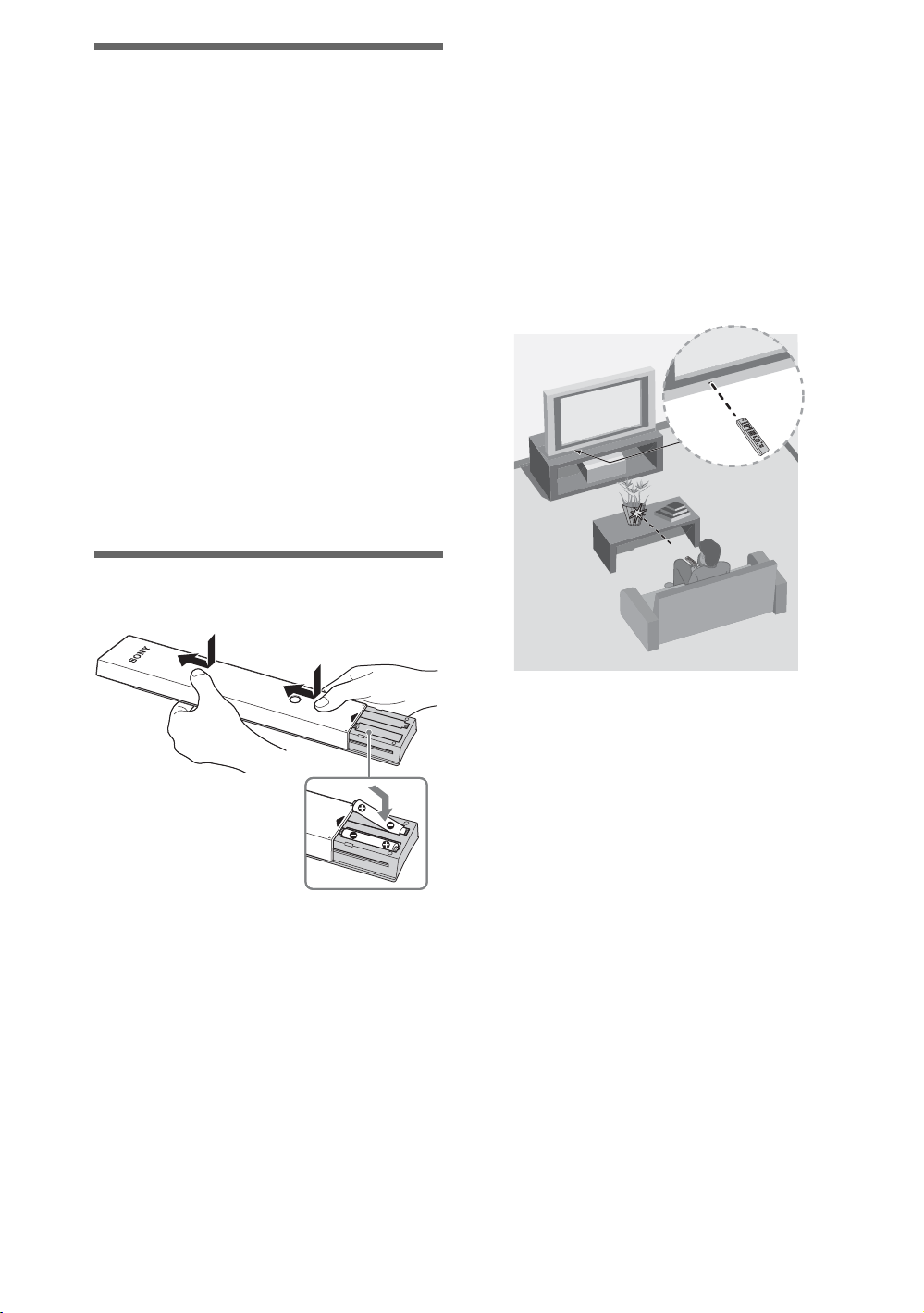
Inserting batteries into the remote control
Guidelines for Remote Control
• Point your remote control directly at the IR
sensor located on your TV.
• Make sure that no objects are blocking the
path between the remote control and the IR
sensor on your TV.
• Fluorescent lamps can interfere with your
remote control; try turning off the fluorescent
lamps.
• If you are having problems with the remote
control, reinsert or replace your batteries and
make sure that they are correctly inserted.
1 Remove the protection sheet.
2 Push and slide the cover upward.
4
Page 5
Setting up your TV
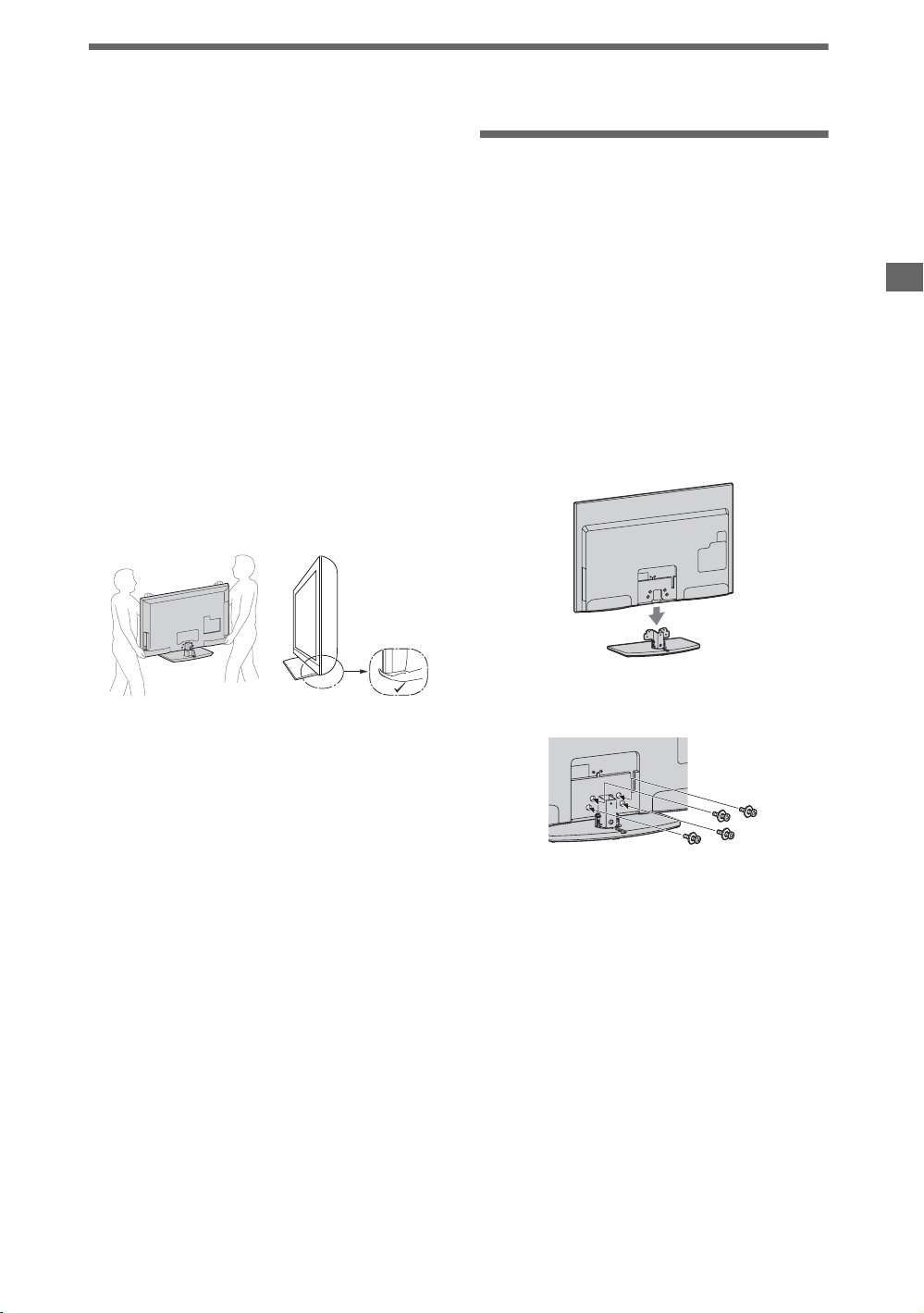
Some TV models are packaged with a detached
Table-Top Stand so you can mount your TV to
a wall right away. If you are not mounting the
TV to a wall, you will need to attach the
Table-Top Stand. You will need a Phillips
screwdriver and the supplied screws to
complete the task. Look for the attachment
instructions provided with the TV.
Be sure to consider the following while setting
up your TV:
• Disconnect all cables when carrying the
TV.
• Carry the TV with the adequate number of
people; larger size TVs require two or more
people.
• Correct hand placement while carrying the
TV is very important for safety and to avoid
damage.
Attaching the Table-Top Stand
Refer to the supplied Table-Top Stand
instruction leaflet for proper attachment.
1 Gently slide the TV unit onto the
Table-Top Stand and align the screw
holes.
~
• Do not put stress on the LCD panel or the frame
around the screen.
• Be careful to not pinch your hands or the AC
power cord when you install the TV unit to the
Table-Top Stand.
Setting up your TV
• Ensure your TV has adequate ventilation,
see page 13.
• For best picture quality, do not expose the
screen to direct illumination or sunlight.
• Avoid installing the TV in a room with
reflective wall and floor materials.
• Avoid moving the TV from a cold area to a
warm area. Sudden room temperature
changes may cause moisture condensation.
This may cause the TV to show poor picture
and/or poor color. Should this occur, allow
moisture to evaporate completely before
powering the TV on.
2 Use the supplied screws to attach the
TV unit to the Table-Top Stand.
~
• If you use an electric screwdriver, set the
tightening torque at approximately 1.5 N·m
{15 kgf·cm}.
3 After all the screws are tighten cover
the Table-Top Stand with the supplied
Stand Rear Cover.
~
• You can attach the TV to the Table-Top Stand
with the Stand Rear Cover on with the
exception of the 32" and 40" models. The 32"
and 40" models must follow the above
instructions.
5
Page 6
Connecting the TV
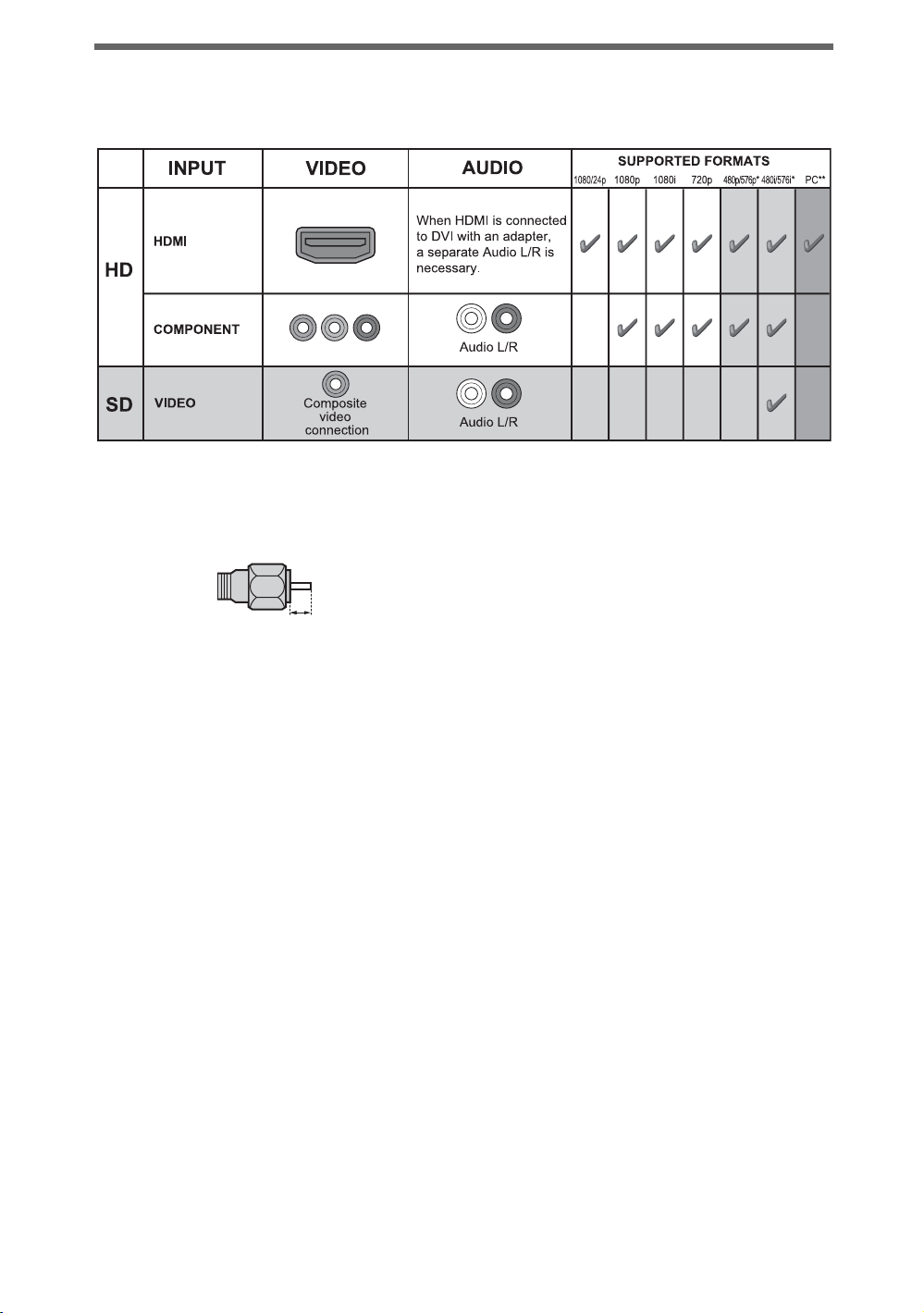
The following chart shows the high-definition (HD) and standard-definition (SD) video formats
supported by your BRAVIA TV inputs.
* 576i, 576p: Not available with EX707 and EX607 models.
** For supported PC formats refer to the i-Manual.
Recommendation of the F type plug
Projection of the inner wire from the
connection part must be less than 1.5 mm.
1.5 mm
6
Page 7
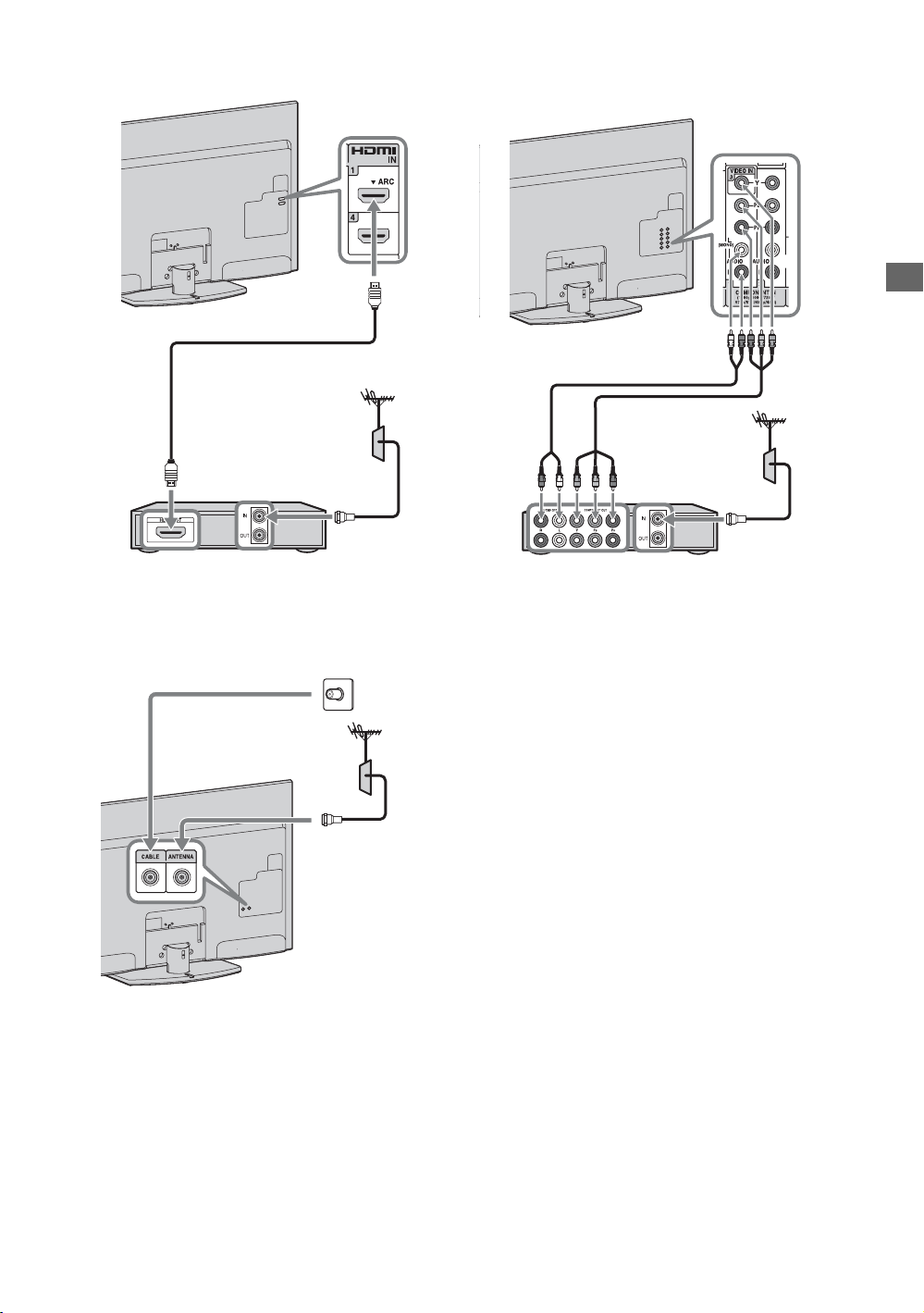
Shown with a Set Top Box with HDMI
connection
Shown with a Set Top Box with
COMPONENT connection
Setting up your TV
Set Top Box
Cable System or VHF/UHF Antenna System
Cable
Antenna
Set Top Box
(Continued)
7
Page 8
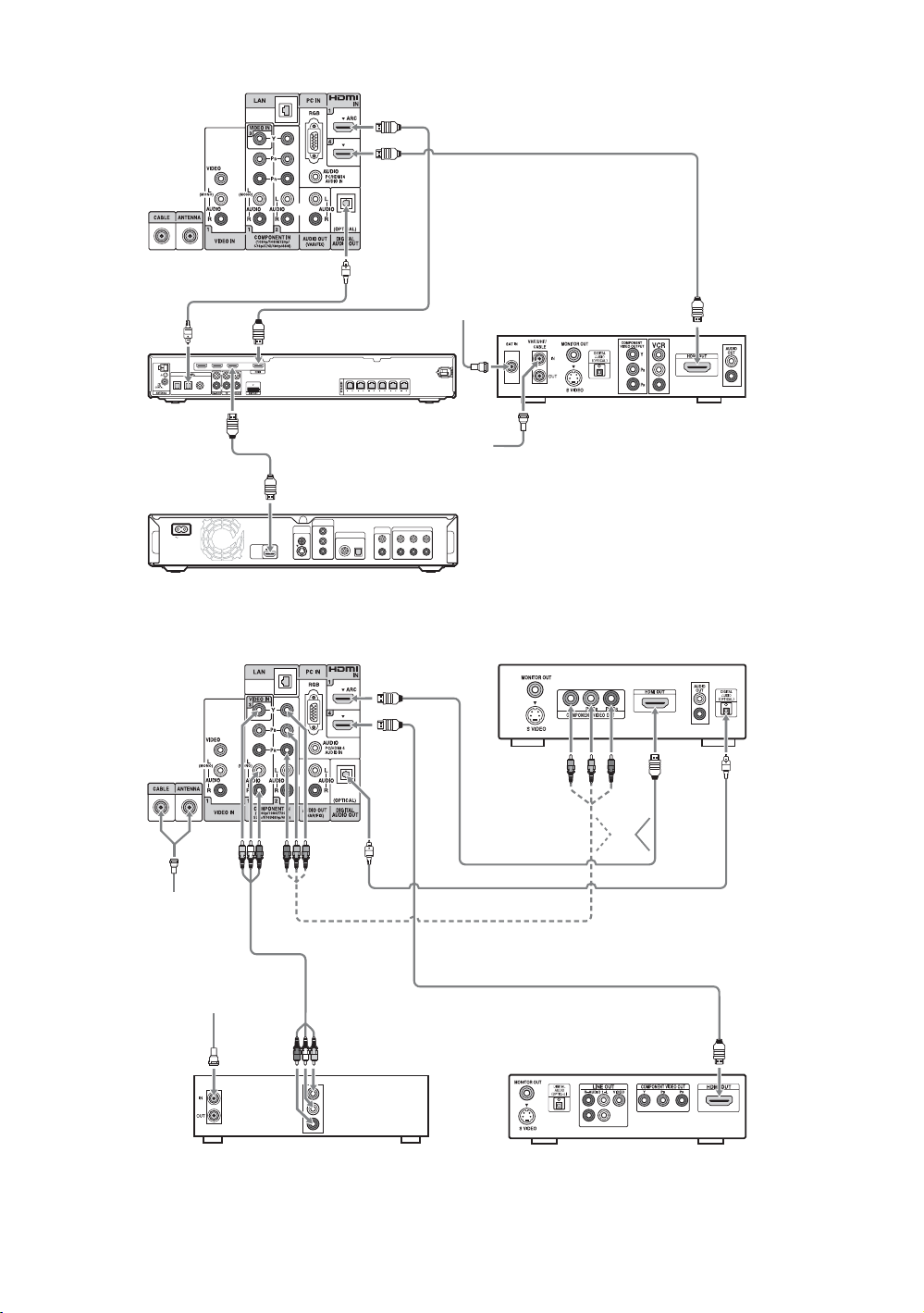
Shown with HD BRAVIA® Sync™ Basic Connection
*Rear of TV
SAT
(Dish)
*A/V Receiver
AM
* Signifies a BRAVIA Sync capable device.
DVD INSAT IN VIDEO 2/BD IN OUT
L
RLR
OPT IN
OPT IN
COAX IN AUDIO IN
AUDIO IN AUDIO IN
SAT
VIDEO 1
DVD
FRONT R
FRONT L SUR R SUR L CENTER SUBWOOFER
Cable/
Antenna
*Blu-ray Disc
COMPONENT
VIDEO OUT
VIDEO
OUT
Y
DIGITAL OUT
VIDEO
AC IN
HDMI
OUT
PCM/DTS/DOLBY DIGITAL
COAXIAL OPTICAL
B
B
/
P
C
R
/
R
P
C
S VIDEO
L
R
AUDIO
OUT
5.1CH OUTPUT
FRONT REAR CENTER
L
R
WOOFER
HD Cable Box or
HD Satellite Receiver
Shown with HD Basic Connection with Home Theater System
Rear of TV
Cable/
Antenna
Cable/SAT
(Dish)
SD Cable Box or
SD Satellite Receiver
Home Theater System
Blu-ray Disc/DVD
or
8
Page 9

Shown with PC Connection with SD VCR/DVD
Rear of TV Notebook PC
or
Setting up your TV
Splitter
Cable/Antenna
PC
DVDVCR
VCR/DVD Combo
9
Page 10

Securing the TV
Sony strongly recommends
taking measures to prevent the
TV from toppling over.
Unsecured TVs may topple and
result in property damage,
serious bodily injury or even
death.
Preventing the TV from
Toppling
• Secure the TV to a wall and/or stand.
• Do not allow children to play or climb on
furniture and TV sets.
• Avoid placing or hanging items on the TV.
• Never install the TV on:
– slippery, unstable and/or uneven surfaces.
– furniture that can easily be used as steps,
such as a chest of drawers.
• Install the TV where it cannot be pulled,
pushed, or knocked over.
• Route all AC power cords and connecting
cables so that they are not accessible to
curious children.
Recommended Measures to
Secure the TV
Consider the following measures when
securing your TV to a TV stand (not supplied).
1 Secure the Stand for the TV.
Make sure the TV stand can adequately
support the weight of the TV. Use two angle
braces (not supplied) to secure the stand. For
each angle brace use the appropriate hardware
to:
• Attach one side of the angle brace to the
wall stud.
• Attach the other side to the TV stand.
Angle brace
(not supplied)
Stand
2 Secure the TV to the Stand.
Use the optional hardware listed below (not
supplied):
• M4 × 16 machine screw (screwed into the
TV’s Table-Top Stand)
• A screw or similar (attach it to the TV
stand)
• Rope or chain (strong enough to support the
weight of the TV). Make sure that there is
no excess slack in the rope or chain.
10
An alternative way to secure the TV is with an
optional Sony Support Belt Kit.
M4 × 16
machine
screw (not
supplied)
Rope or
chain (not
Screw hole on
the Table-Top
Stand
~
Contact Sony Customer Support to obtain the
optional Support Belt Kit by providing your TV
model name.
• Visit: http://esupport.sony.com/ES/LA/
supplied)
Screw
(not supplied)
Page 11

3 Anchor the TV to the Wall.
Anchor the TV to the wall by using bolts, wall
anchor and chain (or rope).
~
• Your TV is shipped with screws attached to the
rear of the TV. (They are fastened in the screw
holes for wall mounting.) Be sure to remove the
upper two screws prior to anchoring the TV on a
wall.
• Securing the TV to the stand without securing
the TV and the stand to the wall provides
minimum protection against the TV toppling
over. For further protection, be sure to follow the
three measures recommended.
Anchor bolts (not supplied)
Wallmount
holes
Rope
or
chain
(not
supplied)
Running initial setup
Initial Setup
Bem-vindo! Selecione um idioma
Continue
Português
Choose
EX707/EX705
models only
POWER
1 Complete your cable connections
before proceeding with the Initial
Setup.
Connect the TV to your nearest power
outlet.
2 For EX707 and EX705 models, check
the ENERGY SAVING SWITCH
setting is on (z).
Setting up your TV
Wall-anchor
(not supplied)
Organizing the AC power cord
3 Press POWER on the TV.
When you switch the TV on for the first
time, the Language menu appears on
the screen.
Initial Setup
Bem-vindo! Selecione um idioma
Português
Continue
Choose
4 Follow the instructions on the screen.
~
• The ENERGY SAVING SWITCH must be
on (z) to set the clock.
• Home mode sets the TV to display the settings
optimized for home viewing.
11
Page 12

Detaching the Table-Top Stand from the TV
Remove only the screws marked with on
the TV.
~
• KDL-32EX707/32EX705/32EX607/32EX605
models must remove the stand rear cover prior to
detaching the Table-Top Stand.
• Do not remove the Table-Top Stand for any
reason other than to install corresponding
accessories on the TV.
• For EX707 and EX705 models:
– When installing the TV on a wall, remove the
four screws from the rear of the TV. (They are
fastened in the screw holes for wall mounting.)
Be sure to store the removed screws in a safe
place, keeping them away from children.
– When attaching the Table-Top Stand again, be
sure to fasten the four screws (previously
removed) to the original holes on the rear of the
TV.
• Do not hold by the Stand Rear Cover while
carrying the Table-Top Stand to prevent dropping
the stand which may cause an injury or damage to
the property.
• For instructions on using the Wall-Mount bracket
with your TV please go to
http://esupport.sony.com
download “Additional Information for Using Sony
Wall-Mount Bracket”.
for your TV model and
12
Page 13

Using a Wall-Mount Bracket
Your TV can be mounted on a wall using a
Wall-Mount Bracket (not supplied) out of the
box as packaged. Some larger size TV may
require detaching the Table-Top Stand; see
“Detaching the Table-Top Stand from the TV”
(page 12).
Prepare the TV for the Wall-Mount Bracket
before making cable connections.
For product protection and safety reasons,
Sony strongly recommends that you use the
Wall-Mount Bracket designed for your TV
and the installation should be performed by
a Sony dealer or licensed contractor.
• Follow the instruction guide provided with
the Wall-Mount Bracket for your model.
Sufficient expertise is required in installing
this TV, especially to determine the
strength of the wall for withstanding the
TV’s weight.
• Be sure to use the screws supplied with the
Wall-mount bracket when attaching the
mounting hooks to the TV set.
The supplied screws are designed so that
they are 8 mm to 12 mm in length when
measured from the attaching surface of the
mounting hook.
The diameter and length of the screws differ
depending on the Wall-mount bracket
model. Use of screws other than those
supplied may result in internal damage to
the TV set or cause it to fall, etc.
8-12 mm
Installing the TV Against a Wall or Enclosed Area
Make sure that your TV has adequate
ventilation. Allow enough space around the
TV as shown below. Avoid operating the TV at
temperatures below 41 °F (5 °C).
Installed with stand
30 cm
10 cm
Leave at least this much space around the set.
Installed on the wall
30 cm
10 cm
10 cm
10 cm
10 cm
Never install the TV set as follows:
Air circulation is blocked.
Wall Wall
Air circulation is blocked.
6 cm
Leave at
least this
much space
around the
set.
Setting up your TV
Screw
(supplied with the
Wall-mount bracket)
Mounting Hook
Hook attachment on rear of TV
set
• Be sure to store the unused screws and
Table-Top Stand in a safe place until you
are ready to attach the Table-Top Stand.
Keep the screws away from small children.
~
• Read the supplied Safety Booklet for additional
safety information.
~
• Inadequate ventilation can lead to overheating of
the TV and may cause damage to your TV or
cause a fire.
13
Page 14

To watch TV
To watch programs
1-2
Turn on the TV.
1
GUIDE
OPTIONS
HOME
0-9
ENT
2
1 For EX707 and EX705 models, check
the ENERGY SAVING SWITCH
setting is on (z).
2 Press POWER on the TV or on the
remote control to turn on the TV. (You
may use the 1 button located on the
front or back of the remote control.)
Select a TV channel.
2
Use with 0-9 and ENT to select digital
channels. For example, to enter 2.1, press
, *, and ENT.
* Depending on the country you reside, this button may
not function as described above. If this is the case,
press only the 0-9 buttons and ENT to find your
channel.
To use the TV features
Press HOME to display TV Home Menu/
XMB
to access TV Settings and other
™
media and network related content.
Settings
Picture & Display
Adjust the picture and screen settings
Press for:
Picture Adjustments
Ambient Sensor
Screen
Pro Picture Setup
14
Press
OPTIONS
to display a list of convenient
functions and menu shortcuts. The Options menu
items vary based on current input and/or content.
Picture Adjustments
Sound Adjustments
Add to Favorites
Speakers
TV
Page 15

To use i-Manual
1
Your BRAVIA TV comes with an on-screen
manual. You can browse your i-Manual anytime
you need to find the varieties of convenient
functions.
Press i-MANUAL.
1
2
x Welcome to i-Manual
x BRAVIA TV Features
x Watching TV
Introduces convenient features as Favorites.
x Using the Home Menu
You can find how to customize your TV
settings, etc.
Press F/f/G/g/ to navigate and
2
select items.
i-Manual
Welcome to i-Manual
BRAVIA TV Features
Watching TV
Using the Home Menu
Fun Features with Connected Equipment
Parts Description
Troubleshooting
Index
x Fun Features with Connected
Equipment
Introduces how to connect and enjoy optional
equipment.
x Parts Description
x Troubleshooting
You can find solutions for your problems.
x Index
RETURN
To watch TV
Back
~
• Images and illustrations may differ from what you are watching on this TV.
15
Page 16

Additional Information
Troubleshooting
The TV will indicate any problems with the STANDBY indicator flashing in red.
When the STANDBY indicator is flashing
The self-diagnosis function is activated.
1 Count how many times the STANDBY indicator flashes between each three second
break.
For example, the indicator may flash three times, go off for three seconds, then flash
again three times.
2 Press POWER on the TV to turn it off, disconnect the AC power cord, and inform your
dealer or Sony service center of how the indicator flashes (number of flashes).
When the STANDBY indicator is not flashing
1 Check the items in the tables below. (Also refer to “Troubleshooting” in the i-Manual.)
2 If the problem persists, contact Sony Customer Support (information provided on the
front cover).
Condition Explanation/Solution
Picture
There is no picture (screen
is dark) and no sound.
Tiny black dots and/or
bright dots appear on the
screen.
General
The TV’s power cannot be
turned on (EX707 and
EX705 models only).
The TV turns off
automatically (the TV
enters standby mode).
The remote does not
function.
The “Parental Lock”
password has been
forgotten.
• Check the antenna/cable connection.
• Connect the TV to the AC power, and press POWER on the TV.
• If the STANDBY indicator lights up in red, press POWER on the
remote control.
• The screen is composed of pixels. Tiny black dots and/or bright
dots (pixels) on the screen do not indicate a malfunction.
• Check to see the (z) mark on the ENERGY SAVING SWITCH
is pressed.
• Check if the Sleep Timer, Timer, or Idle TV Standby is
activated.
• Replace the batteries.
• Your TV may be in SYNC mode. Press SYNC MENU, select TV
Control and then select Home (Menu) or Options to control
the TV.
• For EX705 and EX605 models, enter 4357 for the PIN code. (PIN
code 4357 is always accepted.)
• For EX707 and EX607 models, enter 9999 instead.
16
Page 17

How to Care for Your BRAVIA
Safety is very important, please read and follow the safety documentation (Safety Booklet)
separately provided.
Unplug the TV and other connected equipment from the wall
outlet before you begin cleaning your TV.
• Wipe the LCD screen gently with a soft cloth.
• Stubborn stains may be removed with a cloth slightly moistened with a
solution of mild soap and warm water.
• If using a chemically pretreated cloth, please follow the instruction
provided on the package.
• Never use strong solvents such as a thinner, alcohol or benzine for cleaning.
• Do not plug in the TV into the wall outlet until the moisture from cleaning has evaporated.
The TV should also be placed on a stable surface to prevent it from toppling over (see page 10).
If you have young children or pets at home, check regularly to insure the TV is securely fastened.
Additional Information
17
Page 18

Specifications
System
Television system Analog: NTSC 3.58 (for EX707/EX607 models)
Channel coverage VHF: 2-13, UHF: 14-69
Panel system LCD (Liquid Crystal Display) Panel
Speaker output 10 W + 10 W
Input/Output jacks
CABLE/ANTENNA 75-ohm external terminal for RF inputs
VIDEO IN 1/2/3 VIDEO / AUDIO
COMPONENT IN 1/2 YP
HDMI IN 1/2/3/4 HDMI: Video: 480i, 480p, 720p, 1080i, 1080p, 1080/24p (for EX707/EX607 models)
AUDIO OUT 500 mVrms (typical)
HEADPHONE Stereo mini jack
DIGITAL AUDIO OUT
(OPTICAL)
PC IN D-sub 15-pin, analog RGB
PC/HDMI 4 AUDIO IN Stereo mini jack
LAN
USB/DLNA Refer to the i-Manual for supported format.
* For LAN connections, use a Category 7 10BASE-T/100BASE-TX cable (not supplied).
NTSC 3.58 / PAL-M / PAL-N (for EX705/EX605 models)
Digital: DVB-T (for EX707/EX607 models)
SBTVD (for EX705/EX605 models)
CATV (Analog): 1-125
BPR (Component Video)
Signal format: 480i, 480p, 720p, 1080i, 1080p (for EX707/EX607 models)
480i, 480p, 576i, 576p, 720p, 1080i, 1080p (for EX705/EX605 models)
AUDIO
480i, 480p, 576i, 576p, 720p, 1080i, 1080p, 1080/24p (for EX705/EX605 models)
HDMI: Audio: Two channel linear PCM 32, 44.1 and 48 kHz, 16, 20 and 24 bits, Dolby Digital
AUDIO (HDMI IN 4)
PCM/Dolby Digital optical signal
10BASE-T/100BASE-TX connector (Connection speed may differ depending on the network environment.
10BASE-T/100BASE-TX communication rate and communication quality are not guaranteed for this TV.)*
18
Page 19

Model name KDL- 52EX707 46EX707
46EX705
46EX607
46EX605
Power and others
Power requirement 110-240 V AC, 50/60 Hz
Power consumption
in use
1
in DAM*
in standby Less than 0.23 W
Screen size
(inches measured diagonally)
Display resolution 1,920 dots (horizontal) × 1,080 lines (vertical)
Speaker
Full range with speaker box
Dimensions with stand
without stand (mm) 1,252 × 775 × 65 1,118 × 698 × 65 1,085 × 656 × 74
wall-mount hole pattern (mm)
wall-mount screw size (mm)
Mass with stand (kg) 27.0 21.3 18.4
without stand (kg) 22.7 18.4 16.1
Supplied accessories
Optional accessories Connecting cables / Support Belt Kit
Wall-Mount Bracket*
(mm)
(2)
(mm) 1,252 × 805 × 350 1,118 × 730 × 280 1,085 × 688 × 260
See “Checking the accessories” (page 4).
2
142 W 125 W 121 W
15 W
(You may hear a clicking noise during the download but this is normal.)
52 inches 46 inches 46 inches
34 × 160
300 × 300
M6 (length: refer to diagram on page 13.)
SU-WL500
Additional Information
Model name KDL- 40EX707
40EX705
40EX607
40EX605
32EX707
32EX705
32EX607
32EX605
Power and others
Power requirement 110-240 V AC, 50/60 Hz
Power consumption
in use
1
in DAM*
in standby Less than 0.2 W
Screen size
(inches measured diagonally)
Display resolution 1,920 dots (horizontal) × 1,080 lines (vertical)
Speaker
Full range with speaker box
Dimensions with stand
without stand
wall-mount hole pattern (mm)
wall-mount screw size (mm)
Mass with stand (kg) 17.8 14.9 12.7 11.1
without stand (kg) 14.9 12.7 10.7 9.1
Supplied accessories
Optional accessories Connecting cables / Support Belt Kit
Wall-Mount Bracket*
*1 Download Acquisition Mode (DAM) is used for software updates.
*2 In some regions/countries, Wall-Mount Bracket (SU-WL500) may not be available.
• Optional accessories availability depends on its stock.
• Design and specifications are subject to change without notice.
(mm)
(2)
(mm) 985 × 655 × 280 952 × 613 × 250 811 × 539 × 250 764 × 507 × 250
(mm) 985 × 623 × 64 952 × 581 × 74 811 × 507 × 65 764 × 475 × 73
2
107 W 98 W 91 W 80 W
(You may hear a clicking noise during the download but this is normal.)
40 inches 40 inches
300 × 300 200 × 200
M6 (length: refer to diagram on page 13.)
See “Checking the accessories” (page 4).
15 W
31.5 inches
(32 class)
34 × 160
SU-WL500
31.5 inches
(32 class)
19
Page 20

Page 21

Page 22

Page 23

Page 24

Para su conveniencia
Registro en
Registre su televisor en:
http://esupport.sony.com/LA/perl/registration.pl
línea:
Su televisor puede recibir actualizaciones de software.
Actualizaciones
de software:
Información de licencias
Macintosh es una marca comercial de Apple Inc., registrada en EE. UU. y otros países.
HDMI, el logotipo de HDMI y High-Definition Multimedia Interface son marcas comerciales o marcas comerciales registradas de HDMI
Licensing, LLC.
Fergason Patent Properties, LLC:
Nº de patente de EE. UU. 5.717.422
Nº de patente de EE. UU. 6.816.141
Fabricado bajo licencia de Dolby Laboratories. Dolby y el símbolo de la doble D son marcas comerciales de Dolby Laboratories.
Blu-ray Disc es una marca comercial.
“BRAVIA” y , S-Force, Motionflow, BRAVIA Sync y son marcas comerciales o marcas registradas de Sony Corporation.
“XMB” y “XrossMediaBar” son las marcas comerciales de Sony Corporation y Sony Computer Entertainment Inc.
“PlayStation” es una marca comercial registrada y “PS3” es una marca comercial de Sony Computer Entertainment Inc.
®
DLNA
, el logotipo de DLNA y DLNA CERTIFIED™ son marcas comerciales, marcas de servicio o marcas de certificación de Digital Living
Network Alliance.
Si desea conocer la información más reciente sobre
actualizaciones de software para su televisor, visite:
http://esupport.sony.com/LA/
Only for KDL-46EX705/KDL-40EX705/KDL-32EX705 models
AstroTV is a software developed by TQTVD Software Ltd., which implements the interactivity standard of the Brazilian Digital TV System
“Ginga” NBR-15606
Oracle, Java and all Java-based trademarks and logos are trademarks or registered trademarks of Oracle and/or its affiliates. Other names may
be trademarks of their respective owners.
© 2010 Sony Corporation
Printed in U.S.A.
 Loading...