

Page 1
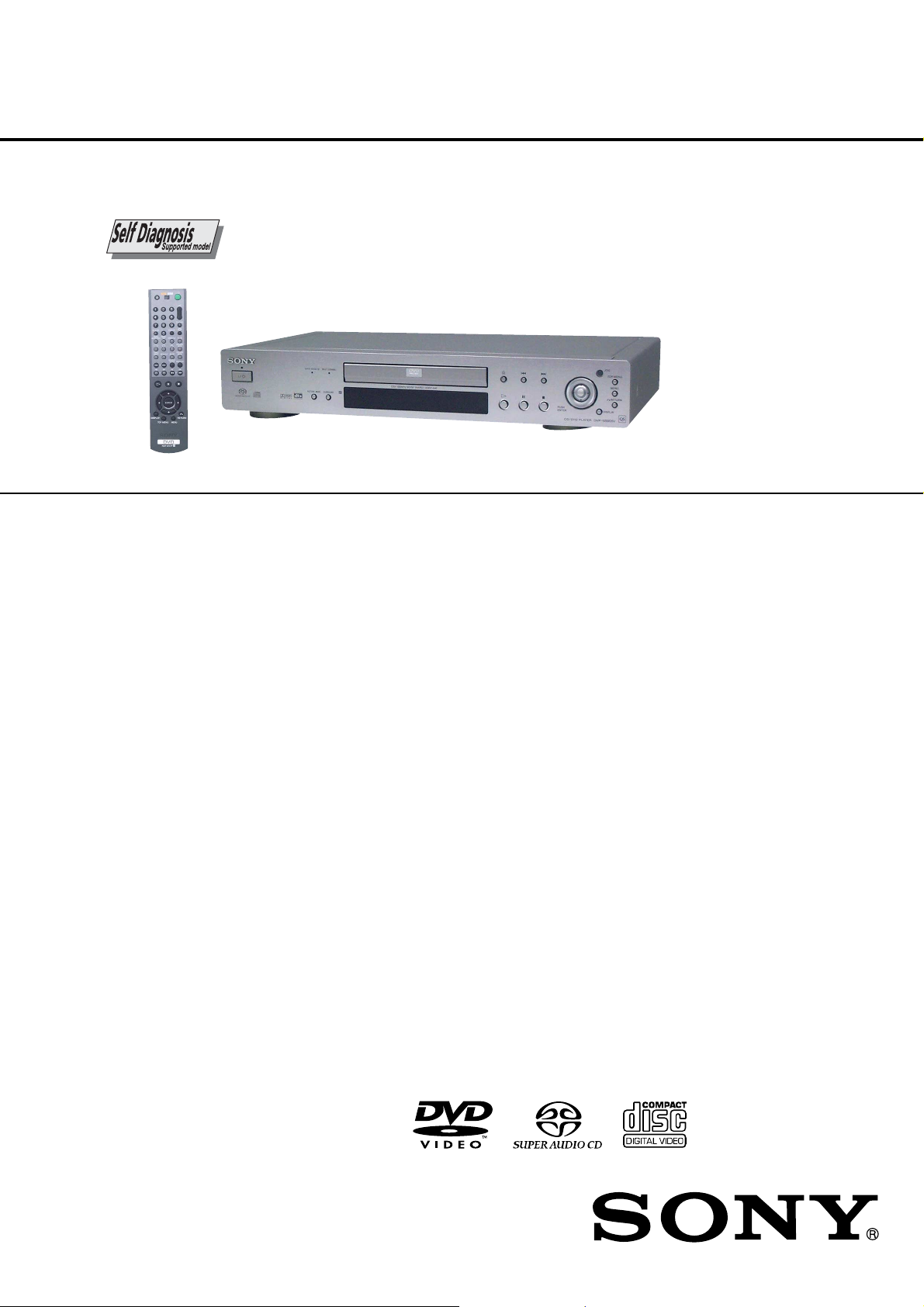
DVP-NS705V/NS755V/
(
NS905V/NS915V
RMT-D146P/D147A/D147E/D1470/D147P
SERVICE MANUAL
Photo: DVP-NS905V (Silver type)
SPECIFICATIONS
System
Laser: Semiconductor laser
Signal format syst em :
DVP-NS705V/NS905V: PAL (NTSC)
DVP-NS755V: NTSC
DVP-NS915V: NTSC/PAL (To change the
color system)
Audio characteristics
Frequency response: DVD VIDEO (PCM
96 kHz): 2 Hz to 44 kHz (44 kHz: –2 dB
±1 dB)/Super Audio CD: 2 Hz to
100 kHz (5 0 kHz: – 3 dB ±1dB)/CD:
2Hz to 20 kHz (±0.5 dB)
Signal-to-noise ratio (S/N ratio): 115 dB
(LINE OUT L/R (AUDIO) 1/2 jacks
only
) (EXCEPT AEP, UK, Russian)
(LINE OUT L/R (AUDIO) jacks only)
(AEP, UK, Russian)
Harmonic distortion: 0.003 %
Dynamic range: DVD VIDEO/Super Au dio
CD: 103 dB/CD: 99 dB
Wow and flutter: Less than detected value
(±0.001% W PEAK)
Outputs
AEP, UK, Russian:
(
Jack name: Jack type/Output level/Load
impedance)
LINE OUT (AUDIO): Phono jack/2 Vrms/
10 kilohms
DIGITAL OUT (OPTICA L): Optical
output jack/–18 dBm (wave length :
660 nm)
DIGITAL OUT (COAXIAL): Phono jack/
0.5 Vp-p/75 ohms
5.1CH OUTPUT: Phono jack/2 Vrms/
10 kilohms
LINE OUT (VIDEO): Phono jack/1.0 Vp-p/
75 ohms
S VIDEO OUT: 4-pin mini DIN/Y: 1.0
Vp-p, C: 0.3 Vp-p (PAL), 0.286 Vp-p
NTSC)/75 ohms
EXCEPT AEP, UK, Russian:
(Jack name: Jack type/Outpu t level/Load
impedance)
LINE OUT (AUDIO) 1/2: Phono jack/
2Vrms/10 kilohms
DIGITAL OUT (OPTICAL): Optical
output jack/–18 dBm (wave length:
660 nm)
DIGITAL OUT (COAXIAL): Phono jack/
0.5 Vp-p/75 ohms
5.1CH OUTPUT: Ph ono ja ck/2 Vrms/
10 kilohms
COMPONENT VIDEO OUT(Y, P
R
): Phono jack/Y: 1.0 Vp-p/PB/CB, PR/
C
CR: 0.7 Vp-p/75 ohms
LINE OUT (VIDEO) 1/2: Phono jack/
1.0 Vp-p/75 ohms
S VIDEO OUT 1/2: 4-pin mini DIN/Y:
1.0 Vp-p, C: 0.3 Vp-p (PAL), 0.286Vp-p
(NTSC)/75 ohms
General
Power requirements:
110 V AC, 60 Hz
120 V AC, 60 Hz
220 V AC, 60 Hz
22
0–240 V AC, 50/60Hz
110–240 V AC, 50/60 Hz
See page 1-1 for further information
Power consumption:
15 W
16 W
17
W
18 W
See page 1-1 for further information
B/CB
Saudi Arabia Model
New Zealand Model
Dimensions (approx.):
DVP-NS705V/NS755V:
430 × 74 × 257 mm (17 × 3 × 10
DVP-NS905V/NS915V:
430 × 77 × 257 mm (17 × 3
in.) (width/height/depth) incl. projecting
parts
Mass (approx.):
DVP-NS705V/NS755V:
DVP-NS905V/NS915V:
, PR/
Operating temperatu re: 5 ° C to 35 ° C
Operating humidity: 25 % t o 80 %
Supplied accessories
Check that you have the following items:
•Audio/video cord (pinplug × 3 y pinplug
× 3) (1)
•Remote commander (remote) (1)
•Size AA (R6) batteries (2)
Specifications and design are subject to
change without notice.
ENERGY STAR
As an
Corporation has determined that this product
meets the
energy efficiency.
47
2.6 kg (5
2.8 kg (6
(41
/
3
/
16
°
F to 95°F)
64
lb)
lb)
ENERGY STAR
ENERGY STAR
R
is a U.S. registered mark.
US Model
Canadian Model
DVP-NS755V
AEP Model
UK Model
DVP-NS705V/NS905V
E Model
DVP-NS915V
Russian Model
Middle East Model
Australian Model
DVP-NS905V
1
/
8
in.)
1
1
/
8
× 10
/
8
R
Partner, Sony
R
guidelines for
CD/DVD PLAYER
Page 2
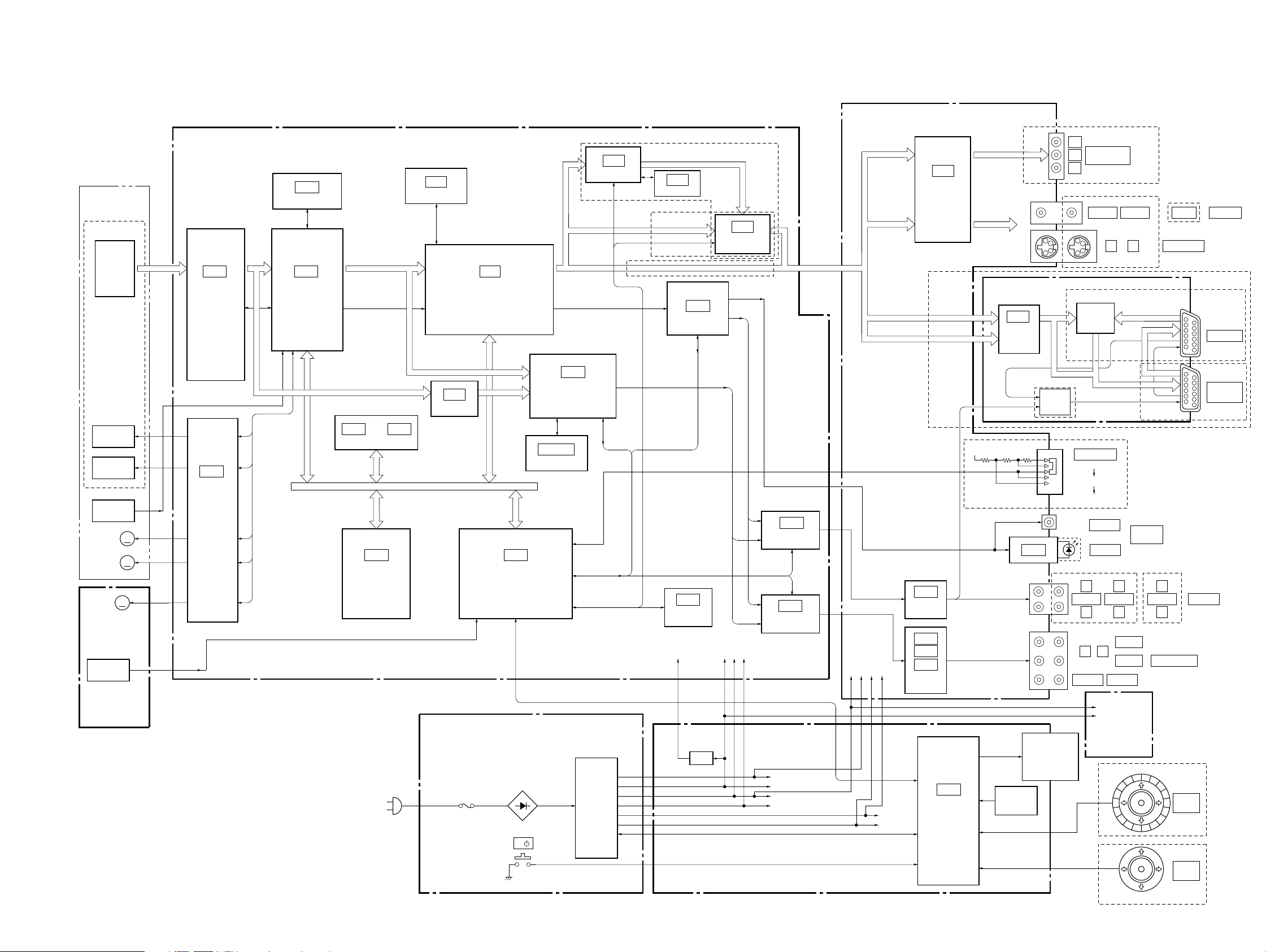
3-1. OVERALL BLOCK DIAGRAM
MB-105 BOARD
(SEE PAGE 4-11 to 4-32)
BASE UNIT
KHM-270AAA/
SERVICE ASSY
OPTICAL DEVICE
DVD/CD
PD IC
FOCUS
COIL
TRACKING
COIL
INLIMIT
SW
SPINDLE
MM
MOTOR
SLED
MM
MOTOR
M001
MM
LOADING
MOTOR
S001
CHUCK/TRAY
DETECT
MS-81 BOARD
(SEE PAGE 4-6)
RF
IC201
DVD/CD RF AMP,
SERVO ERROR
PROCESS
IC202
FOCUS/
TRACKING
COIL DRIVE,
SPINDLE/
SLED/
LOADING
MOTOR DRIVE
• Abbreviation
CND : Canadian
EA : Saudi Arabia
HK : Hong Kong
IA : Indonesia
KR : Korea
LA : Latin-America
ME : Middle East
MY : Malaysia
: New Zealand
NZ
PH : Philippines
SP : Singapore
VTM : Vietnam
SIGO
AUS : Australian
RUS : Russian
TH : Thailand
TW : Taiwan
SECTION 3
BLOCK DIAGRAMS
IC303
16M DRAM
IC301
ARP,
SERVO DSP
SDI 0 – 7
CDDOUT, CDDATA,
CDBCK, CDLRCK
IC106
32M FLASH
PARALLEL BUS
IC108
1M SRAM
SIGO
or
AC IN
64M SDRAM
SDI 0 – 7
IC107
OTP
05
NS755V/NS915V
IC602
IC406
IC403
AV DECODER
IC906
AMP
IC104
SYSTEM
CONTROL
SERIAL BUS
POWER SUPPLY BLOCK
(ETXNY393N2F) (NS705V/NS905V/NS915V : HK, SP, MY, TH, PH, IA,VTM, KR)
(SEE PAGE 4-57)
POWER BLOCK
(HS12S1U) (NS755V/NS915V : TW)
(SEE PAGE 4-61)
POWER BLOCK
(HS12S1F) (NS915V : LA)
(SEE PAGE 4-65)
SACD DECODER
IC903
16M SDRAM
I/P CONVERTER
CDDOUT, ACH12,
ACH34, ACH56,
BCK, LRCK
IC905
SERIAL BUS
IIC BUS
SWITCHING
REG
NS705V
I/
IC603
16M SDRAM
NS905V
EEPROM
IF-94 BOARD
(SEE PAGE 4-49)
IC501
AUDIO DSP
IC101
+1.8V
REG
IC604
VIDEO
ENCORDER
SPDIF
M+11V
+5V
SW+3.3V
IC504
AUDIO
D/A CONVERTER
IC502
AUDIO
D/A CONVERTER
EVER+3.3V
SW+3.3V
+5V
SW+11V
AV-64 BOARD
(SEE PAGE 4-39 to 4-44)
AI+5V
EVER+3.3V
P-CONT
Y, Cb, Cr
V, Y, C
SW–13V
AU+11V
EVER+11V
EVER–13V
IC103
VIDEO
BUFFER
IC303
AUDIO
AMP
IC201
IC202
IC203
5.1CH AUDIO
AMP
V, Y, C
R, G, B
IC404
IF CON
DVP-NS705V/NS755V/NS905V/NS915V
EXCEPT NS705V/NS905V :AEP, UK, RUS
+5V
J103
J102 (1/2)
J101
ER-19 BOARD
(SEE PAGE 4-53)
IC901
VIDEO
BUFFER,
SELECT SW
NS905V:AEP,UK,RUS
IC301
J102 (2/2)
J201
FLUORESCENT
INDICATOR TUBE
FUNCTION
KEY
Y
COMPONENT
PB
VIDEO OUT
PR
EXCEPT NS705V/NS905V :AEP, UK, RUS
2
1
V/Y, R/C,
G, B
RY901 – 903
SW
V/Y, R/C, G, B
RY904
SW
NS755V/NS915V
S101
SCAN SELECT
SELECTABLE
INTERLACE
PROGRESSIVE
J301
COAXIAL
OPTICAL
EXCEPT NS705V/NS905V :AEP, UK, RUS
L
L
AUDIO 2
AUDIO 1
R
R
FRONT
LR
REAR
WOOFER
ND401
CENTER
SW+5V
+3.3V
LE-34 BOARD
(SEE PAGE 4-34)
JOG SHUTTLE
CURSOR STICK
NS705V/NS905V:
AEP, UK, RUS
S VIDEO OUT
NS705V/NS905V:
AEP, UK, RUS
NS905V:AEP,UK,RUS
R, G, B
V
DIGITAL
OUT
L
AUDIO 1
NS705V/NS905V:AEP, UK, RUS
5.1CH OUTPUT
LINE OUT
R
EXCEPT NS705V
PUSH
ENTER
NS705V
PUSH
ENTER
LINE OUTVIDEO 1VIDEO 2 VIDEO
CNJ901
LINE 2
CNJ902
LINE 1
(RGB) –TV
NS705V
3-1 3-2
Page 3
DVP-NS705V/NS755V/NS905V/NS915V
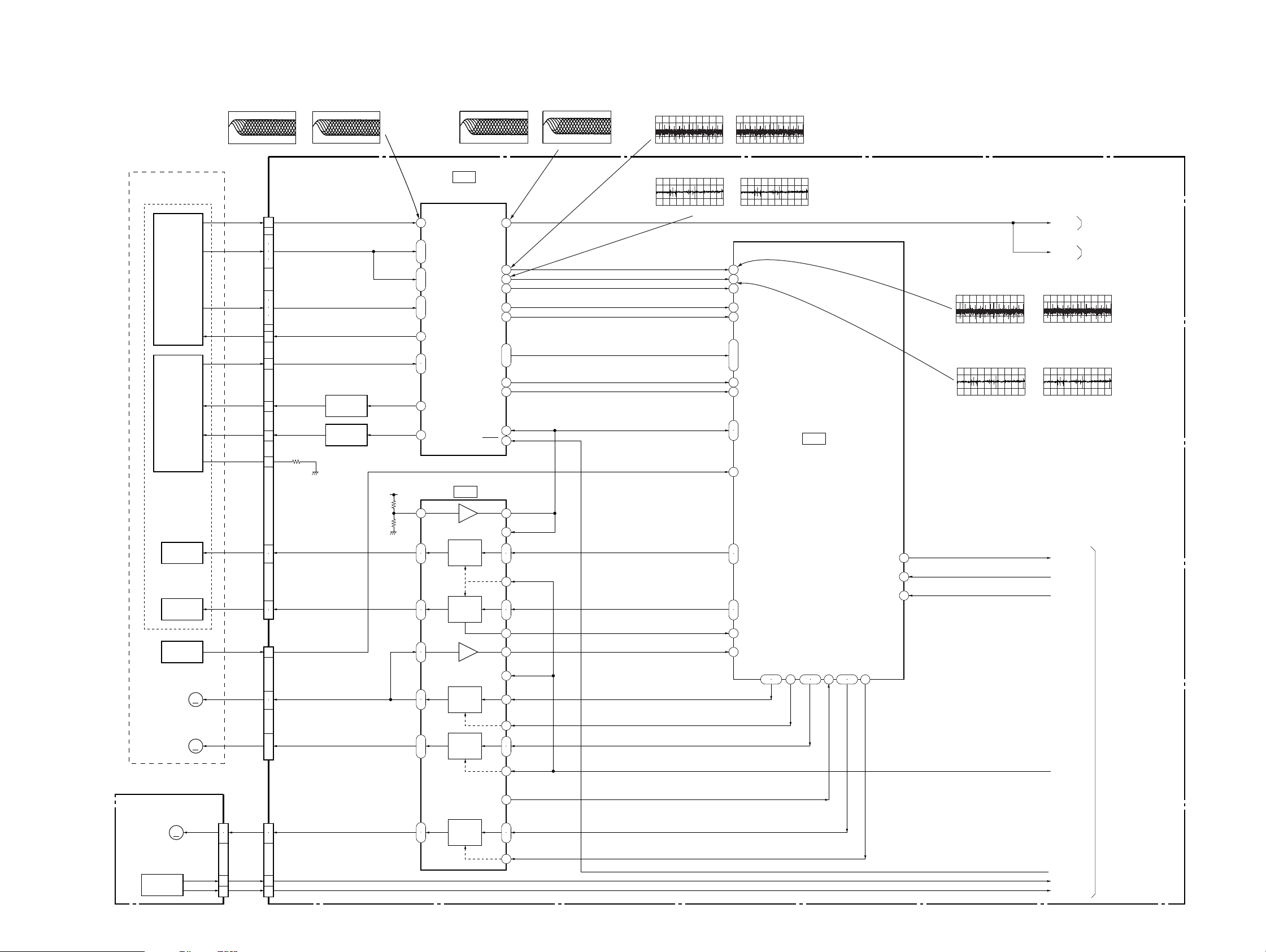
3-2. RF/SERVO BLOCK DIAGRAM
BASE UNIT
KHM-270AAA/SERVICE ASSY
OPTICAL DEVICE
DVD/CD
PD IC
DVD/CD
LD MODULE
IC201 2 (DVD play)
200 mV/DIV 50 ns/DIV
570 mVp-p
MB-105 BOARD (1/5)
(SEE PAGE 4-11, 13, 17)
RF
A – D
E – H
VC
PD
DVD LD
CD LD
VR
CN203
22
24
25
17
16
15
23
18
26
20
13
8
6
12
IC201 2 (CD play)
200 mV/DIV 200 ns/DIV
550 mVp-p
Q201
DVD LD DRIVE
Q202
CD LD DRIVE
+3.3V
IC201 tl (DVD play)
500 mV/DIV 50 ns/DIV
IC201
DVD/CD RF AMP,
DIGITAL ERROR PROCESS
2
RF IN
14
ı
A – D
11
7
ı
A2 – D2
10
15
ı
E – H
18
19
VC
21
DVDPD
22
CDPD
25
DVD LD
CD LD
26
IC202
1.4 Vp-p
SIGO
FE
TE
PI
MIRR
TZC
SRD
SWD
SCLK
SDEN
DFT
MON
LDON
IC201 tl (CD play)
500 mV/DIV 200 ns/DIV
1.4 Vp-p
59
42
41
36
33
37
45
ı
48
38
44
39VCI
27
SSDFCTI
SS MON
IC201 rs (DVD play)
100 mV/DIV 50 ms/DIV
IC201 ra (DVD play)
500 mV/DIV 50 ms/DIV
FE
TE
PI
180 mVp-p
1.5 Vp-p
IC201 rs (CD play)
500 mV/DIV 50 ms/DIV
860 mVp-p
IC201 ra (CD play)
500 mV/DIV 200 ms/DIV
1.7 Vp-p
ADC1
125
ADC0
124
ADC2
126
148
MIRR
TZC
152
GIO6/SDI
159
GIO7/SDO
161
GIO8/SCK
162
GIO13
167
DFCTI
147
ADC7
131
129
ADC5, 6
130
GIO0/INT2
153
IC301
SERVO DSP
(1/2)
IC301 <zxb (DVD play)
100 mV/DIV 50 ms/DIV
160 mVp-p
IC301 <zxv (DVD play)
500 mV/DIV 50 ms/DIV
1.4 Vp-p
SIGNAL PROCESSOR
SIGO
SIGO
IC301 <zxb (CD play)
500 mV/DIV 50 ms/DIV
(SEE PAGE 3-5)
AUDIO 1
(SEE PAGE 3-13)
860 mVp-p
IC301 <zxv (CD play)
500 mV/DIV 200 mV/DIV
1.7 Vp-p
FOCUS
TRACKING
INLIMIT
SPINDLE
MOTOR
SLED
MOTOR
MS-81 BOARD (SEE PAGE 4-6)
M001
LOADING
MM
MOTOR
S001
CHUCK/TRAY
DETECT
05
COIL
COIL
SW
MM
MM
CN001
FCS±
TRK±
INLIM
SPM±
SLA±, SLB±
1
2
CKSW1
OCSW1
5
LDM±
4
3
2
1
7
9
8
1
ı
4
5
4
24
1
CN204
CN201
4042
VREF
43
37
36
35
34
47
46
27
28
32
ı
29
25
24
FOCUS
COIL
DRIVE
TRACKING
COIL
DRIVE
SPINDLE
MOTOR
DRIVE
SLED
MOTOR
DRIVE
LOADING
MOTOR
DRIVE
TSD-M
48
1
19
3
4
5
45
PS
39
13
21
7
10
20
22
16
17
15
FDRV±
TDRV±
SLE
SPFG
MDSO, MDPO
SPMUTE
SLDA, SLDB
TSD
LMP, LMM
LMCTL
20
POM 2, 3
22
15
POM 0, 1
17
127 A D C 3
ADC4
128
MDSO
MDPO
GIO1/INT3
PWM0, 1
154 146
155
143 14432 33
GIO9/GREF
GIO2/INT4
163 164
XRESET
GIO10/FGIN
PWM2
HINT
HCS
11
12
61
XSDPIT
XSDPCS
XRST
XDRVMUTE
XLDON
CKSW1
OCSW1
SYSTEM CONTROL
(SEE PAGE 3-7)
3-3 3-4
Page 4
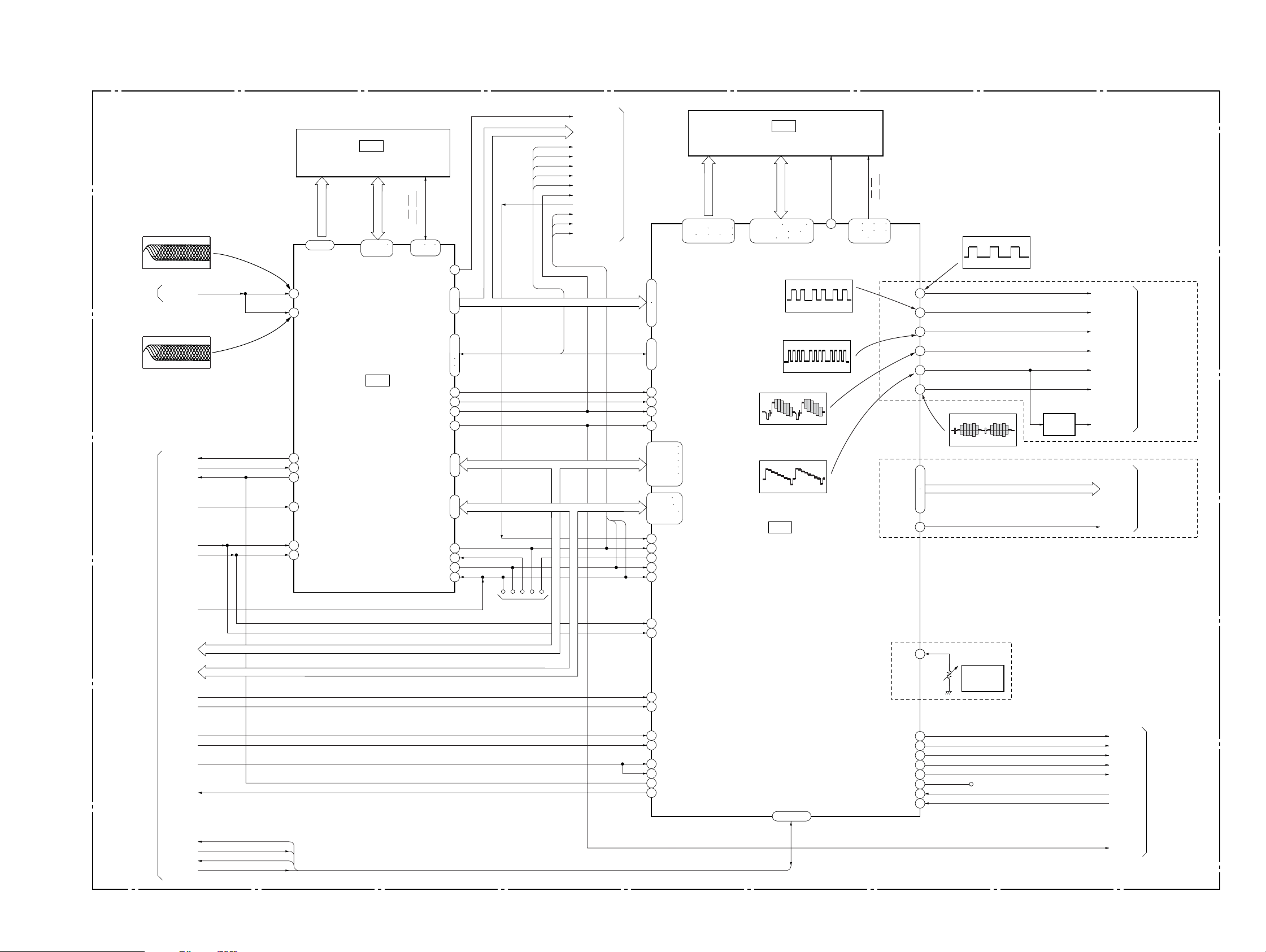
3-3. SIGNAL PROCESSOR BLOCK DIAGRAM
DVP-NS705V/NS755V/NS905V/NS915V
MB-105 BOARD (2/5)
(SEE PAGE 4-13 to 4-16)
IC301 <zzz (DVD play)
500 mV/DIV 100 ns/DIV
1.4 Vp-p
RF/SERVO
(SEE PAGE 3-4)
SIG0
IC301 <zzc (CD play)
500 mV/DIV 200 ns/DIV
1.4 Vp-p
XARPIT
XARPCS
XWAIT
33MARP
XWRH
XRD
PCLK
SDI 0 – 7
IC303
16M DRAM
WE, RAS
(2/2)
LCAS, UCAS
29 31
30
87
PLCKO
77
ı
SD 0 – 7
84
SDCK
57
XSHD
ı
XSRQ
59
XSAK
63
SDEF
64
DATA/EMU1
BCLK/EMU0
LRCK/TDO
169
170
175
D OUT
2
ı
A 0 – 7 HA 0 – 7
9
134
ı
141
TCK
174
TDI
173
172
TMS
171
HD 8 – 15
SDI 0 – 7
SDCK, XSHD,
XSRQ, XSAK, SDEF
RAMA 0 – 9
65 – 74
MA 0 – 9
111
RFIN1
113
RFIN2
XINT
26
XCS
27
XWAT
28
CLKIN
150
XWR
24
XRD
25
RAMD 0 – 15
36 – 43
46 – 53
MD 0 – 15
IC301
ARP
SDI 0 – 7
XSRQ
XSHD
SDCK
XSAK
SDEF
COLRCK/TDOKT
TDOSA
TCK
TMS
XFRRST
HD 0 – 15D 0 – 7
AUDI0 1
(SEE PAGE 3-13)
37
ı
40
DTI 0 – 7
42
ı
45
ICLKI
IERRIn
47
ı
ISTARTIn
51
IVALIn
IREQON
32 CDIN1I
34 CDBCKI
35 CDLRKI
31 CDIN2156
168-169
171-174
176-179
181-184
186-189
191-194
2 – 5
7 – 10
12 – 15
17 – 20
97
TDI
99
TCK
TDO
98
101
TMS
102TRST
TRST
ADAD 0 – 11
105-108 110-113
115 116 118 120
HAD 0 – 21HA 0 – 21
H DATA 0 – 15
IC406
64M SDRAM
ADDT 0 – 15
135-138 140-143
145-148 150
151 153 154
SDDQ 0 – 15
660 mVp-p (H)
IC403 yg
1.1 Vp-p (H)
IC403 tg
940 mVp-p (H)
IC403
AV DECODER
A11
121
IC403 tl
660 mVp-p (H)
IC403 ya
122 124 125
127 129 130
SD CS1On
CLK, LKE,
LDQM, UDQM
132 133
CS, WE,
CAS, RAS
COMPOUT
DVDO – 7
D1CLKO
G OUT
R OUT
B OUT
Y OUT
C OUT
IC403 tj
660 mVp-p (H)
57
59
61
65
55
63
IC403 yd
Q401
BUFFER
810 mVp-p (H)
84
ı
87
89
ı
92
95
Y/G
CB/R
CR/B
COMPOUT
YOUT
COUT
Y_BUFF_CXD
DVDO – 7
27M CLK
NS705V
VIDEO 1
(SEE PAGE 3-10)
EXCEPT NS705V
VIDEO 1
(SEE PAGE 3-9)
05
SYSTEM CONTROL
(SEE PAGE 3-7)
XFRRST
HA 0 – 21
HD 0 – 15
XRST
512FSAVD
XAVDCS2
XAVDCS3
27MAVD
XAVDIT
DREQ0
DACK0
DREQ1
DACK1
HA 0 – 21
HD 0 – 15
LAND
(FOR J TAG)
XRD
XWRH
196
197
207
22
166
167
158
160
200
199
HCSn
HRWn
RSTn
ACLK
HAD23I
HAD22I
CLKI
SCLKIN
HWAIT0n
HIRQ0n
DM ACK1In
DM RQ1On
202 – 205
DM ACK0In
DM RQ0On
70
VREFI
24
ACH12O
25
ACH34O
26
ACH56O
28
LRCKO
29
BCKO
30DO LAND
76DSPACK0
77DSPACK1
3-5 3-6
RV401
VIDEO
LEVEL
ADJ
NS705V
ACH12
ACH34
ACH56
LRCK
BCK
38ACK0
38ACK1
CDDOUT
AUDIO 1
(SEE PAGE 3-13)
Page 5
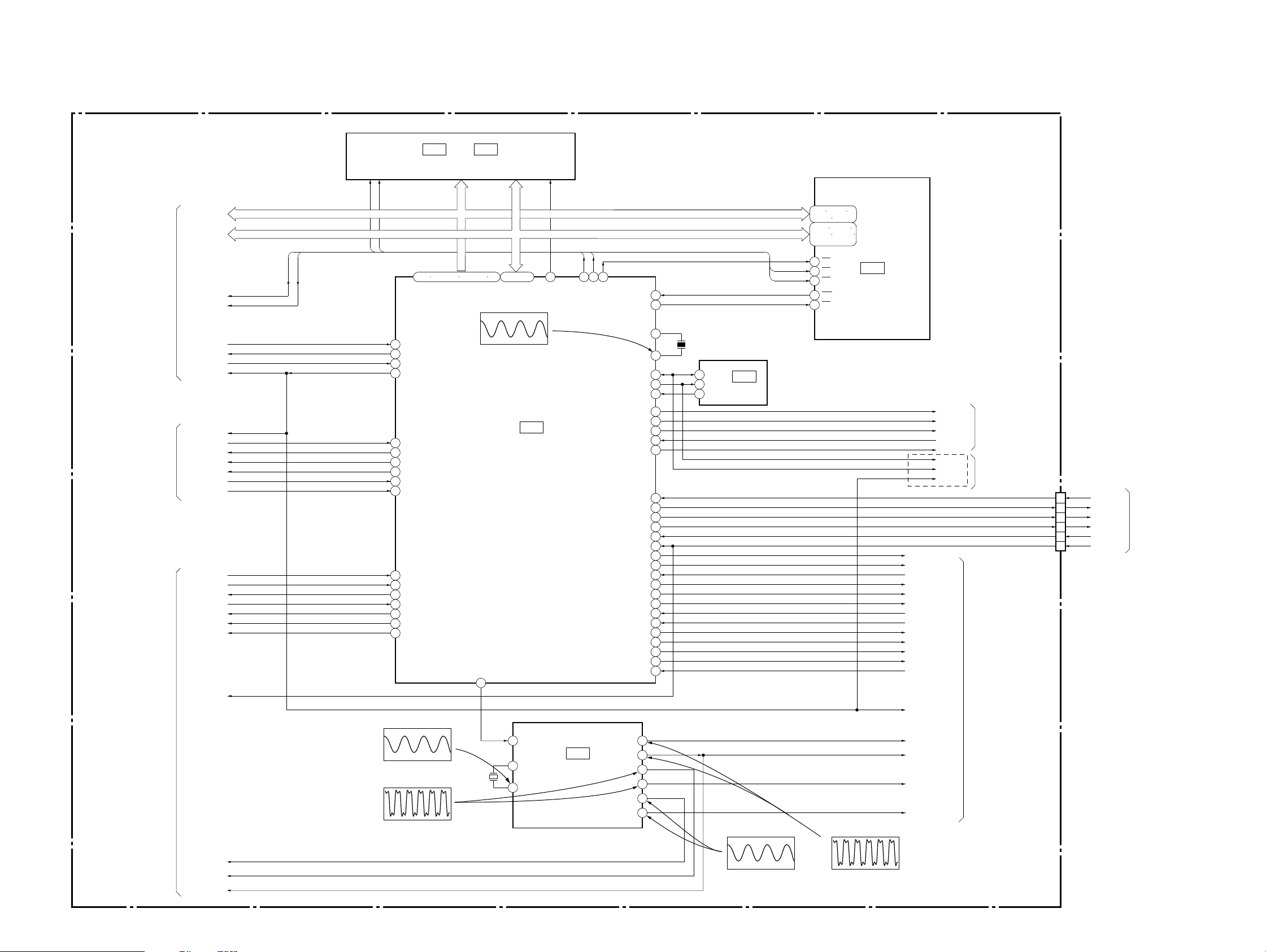
DVP-NS705V/NS755V/NS905V/NS915V
3-4. SYSTEM CONTROL BLOCK DIAGRAM
MB-105 BOARD (3/5)
(SEE PAGE 4-19, 22)
HA 0 – 21
HD 0 – 15
SIGNAL PROCESSOR
(SEE PAGE 3-5)
RF/SERVO
(SEE PAGE 3-4)
SIGNAL PROCESSOR
(SEE PAGE 3-5)
HA 0 – 21
HD 0 – 15
XRD
XWRH
XARPIT
XARPCS
XWAIT
XRST
XRST
XSDPIT
XSDPCS
XDRVMUTE
XLDON
CKSW1
OCSW1
XAVDIT
DREQ0
DACK0
DREQ1
DACK1
XAVDCS2
XAVDCS3
XFRRST
XRD
XWRH
XRD
XWRH
17
62
67
35
18
63
48
82
56
57
16
46
47
49
50
60
61
1.5 Vp-p (27 MHz)
IC103 3, 4
3.5 Vp-p (27 MHz)
IC106
32M FLASH
1 – 5 102 – 109 111 – 118 120
INT1
CS4X
XWAIT
XRST
INT2
CS5X
XDRVMUTE
XLDON
CKSW1/TSW1
OCSW1/TSW2
INTO
DREQ0
DACK0
DREQ1
DACK1
CS2X
CS3X
IC103 8
or
HA 0 – 21 HA 1 – 21
HA 0 – 21 HD 0 – 15
IC107
OTP
IC104 tf
1.7 Vp-p (16.5 MHz)
48/44.1k
81
X102
27MHz
HA 1 – 16
HD 0 – 15
HD 0 – 15 HD 0 – 15
CSOX
IC103
PLL
7058 71 72
XRD
XWRH
XWRL
EXT/DSEL
MA_MUTE
512-2OUT
512-1OUT
27-2OUT
XSRWE
84 17 WE
CS1X
59 6 CS
X1
SDA
SCL
WP
RGBSEL
EUROVY
AN3
WIDE
SO0
SCO
XIFCS
INT4
XFRRST
X38CS
SO1
SC1
XDACS
INT5
INT6
XSARST
XSACS
SMUTE
SI0
SI1
10
1533-1OUT
13 33MSA33-2OUT
53
X2
54
38
39
7
42
37
41
15
36
25
26
27
51
20
76
83
80
28
29
30
79
21
22
40
8
78
33DVD/SACD
23INT7
9
4
3 27M3827-1OUT
X101
16.5MHz
5
6
7
SDA
SCL
WP
IC101
EEPROM
IC103 qd, qg
85 – 100
IC104
SYSTEM
CONTROL
14
FSEL 512FS8CH
XTI
7
8
XTO
XWRH
XRD
1 – 5 18 – 21
24 – 27 42 – 44
7 – 10 13 – 16
18 – 21 29 – 32
35 – 38
39
LB
40
UB
41
OE
A 0 – 15
I/O 0 – 15
IC108
1M SRAM
SI0
SO0
SC0
XIFCS
IFBSY
XFRRST
IC103 9, 0
EXT/DSEL
RGBSEL
EUROVY
IP_SW
WIDE
SCL
SDA
XRST
EXCEPT NS705V
MA_MUTE
X38CS
SI1
SO1
SC1
XDACS
X38IT
CMDREQ
XSARST
XSACS
SMUTE
DVD/SACD
XSARDY
XRST
512FS38
VIDEO 1
(SEE PAGE 3-10)
VIDEO 1
(SEE PAGE 3-9)
AUDIO 1
(SEE PAGE 3-13)
CN101
12
13
14
11
10
9
SI0
SO0
SC0
XIFCS
IFBSY
XFRRST
INTERFACE
CONTROL
(SEE PAGE 3-17)
33MARP
27MAVD
512FSAVD
05
3.2 Vp-p (33.87 MHz)
DVD: 3.3 Vp-p (24.57 MHz)
CD: 3.3 Vp-p (22.58 MHz)
3-7 3-8
Page 6

3-5. VIDEO (1) BLOCK DIAGRAM
DVP-NS705V/NS755V/NS905V/NS915V
MB-105 BOARD (4/5)
(SEE PAGE 4-23, 25)
EXCEPT NS705V
NS755V/NS915V
SIGNAL
PROCESSOR
(SEE PAGE 3-6)
DVD 0 – 7
27M CLK
14
7
ı
2
PI 2 – 9
CLKI
MA 0 – 11
MD 0 – 15
80 – 83
86 – 89
94 – 97
110 – 113
116 – 119
122 – 125
129 – 132
NS705V
COMPOUT
YOUT
SIGNAL
PROCESSOR
(SEE PAGE 3-6)
IC602 <z/c
1.6 Vp-p (66 MHz)
104WE
103MCLK
A 0 – 11
IC603
16M SRAM
DQ 0 – 15
100RAS
101CKE
102CAS
SYSTEM
CONTROL
(SEE PAGE 3-8)
COUT
Y/G
CR/B
CB/R
Y_BUFF_CXD
RGBSEL
EUROVY
EXT/DSEL
WIDE
IP_SW
CN601
NS705V/NS905V:AEP, UK, RUS
1
3
7
9
21
17
19
15
11
13
10
2
5
RGBSEL
EUROVY
DISCEXT
WIDE
V
Y
C
G
B
R
VMUTE
ERAUDIOL
ERAUDIOR
VIDEO 2
(SEE PAGE 3-11)
SYSTEM
CONTROL
(SEE PAGE 3-8)
SDA
SCL
XRST
135
136
137
4
SDA
SCL
SRN
PLL_EN
IC602
I/P CONVERTOR
YO 0 – 9
CO 0 – 9
PO 2 – 9
41 – 45
48 – 52
56 – 60
63 – 67
22 – 25
28 – 31
CLKO
44DAC A
43DAC B
42DAC C
39DAC D
38DAC E
37DAC F
47RSET 1
35RSET 2
IC604 rf
1.1 Vp-p (H)
PR_V
PR_Y
PR_C
PR_Y/G
PR_CB/B
PR_CR/R
IC604 ej
650mVp-p (H)
RV601
V-ADJ
RV602
Comp – Y
NS905V
Q601
BUFFER
CN602
(1/3)
18
20
19
11
7
9
5
3
1
2
14
EURO_R
EURO_L
VMUTE
V
Y
C
Y/G
Cb/R
Cr/B
WIDE
IP_SW
AUDIO 2
(SEE PAGE 3-16)
VIDEO 2
(SEE PAGE 3-11)
2 – 9
Y 0 – 9
CBCR 0 – 9
PO 0 – 7
40
32
63
21
22
P_Y (0) – (9)
12 13
14 – 18
P_C (0) – (9)
26 – 30
53 – 55
S (2) – (9)
58 – 62
IC604 es
3.4 Vp-p (27 MHz)
CLKIN
CLKIN – 2
SDA
SCLK
IC604 rd
950mVp-p (H)
IC604 rs
850m Vp-p (H)
IC604
VIDEO ENCORDER
IC604 el
950mVp-p (H)
IC604 ek
650mVp-p (H)
NS905V
SIGNAL
PROCESSOR
(SEE PAGE 3-6)
05
27M CLK
DVD 0 – 7
RESET B33
3-9 3-10
Page 7
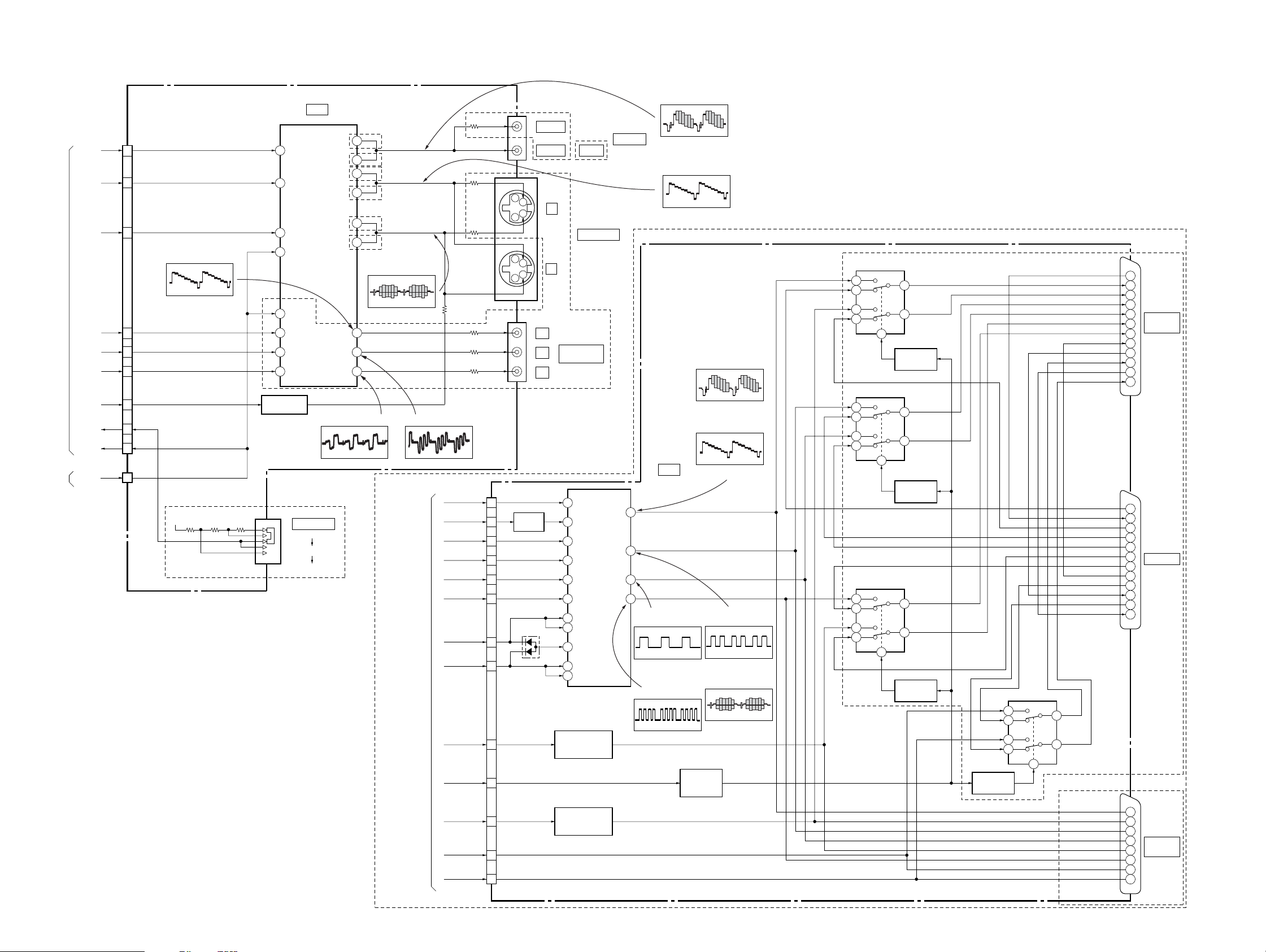
DVP-NS705V/NS755V/NS905V/NS915V
3-6. VIDEO (2) BLOCK DIAGRAM
AV-64 BOARD (1/2)
(SEE PAGE 4-39)
VIDEO 1
(SEE PAGE 3-10)
INTERFACE
CONTROL
(SEE PAGE 3-17)
Y/G
Cb/R
Cr/B
WIDE
IP_SW
VMUTE
V_MUTE
CN301 (1/3)
V
19
23
Y
21
C
IC103 wf
: EXCEPT AEP, UK, RUS
2.0 Vp-p (H)
25
27
29
28
16
11
CN302
(1/2)
1
+5V
V
Y
C
Y
Cb
Cr
Q104, 105
WIDE SWITCH
3
8
6
7
16
12
15
17
VIDEO IN
Y IN
C IN
MUTE1
MUTE2
Y IN
Cb IN
Cr IN
* IC103 36 pin : EXCEPT AEP, UK, RUS
IC103
VIDEO BUFFER
VIDEO OUT
Y OUT
C OUT
Y OUT
Cb OUT
Cr OUT
: EXCEPT AEP, UK, RUS
1.3 Vp-p (H)
NS755V/NS915V
S101
SCAN SELECT
SELECTABLE
INTERLACE
PROGRESSIVE
24 pin : AEP, UK, RUS
21
AEP, UK, RUS
33
EXCEPT AEP, UK, RUS
17
AEP, UK, RUS
29
EXCEPT AEP, UK, RUS
AEP, UK, RUS
19
EXCEPT
31
AEP, UK, RUS
IC103 ql : AEP, UK, RUS
ea : EXCEPT
AEP, UK, RUS
1.8 Vp-p (H)
24
22
20
IC103 w;
VIDEO 1
(SEE PAGE 3-10)
IC103 ws
: EXCEPT AEP, UK, RUS
1.3 Vp-p (H)
V
Y
C
R
G
B
VMUTE
EUROVY
WIDE
DISCEXT
RGBSEL
ERAUDIOL
ERAUDIOR
J102 (1/2)
J101
J103
CN901
1
5
3
9
7
11
12
19
13
15
21
20
17
EXCEPT
AEP, UK, RUS
VIDEO 1
VIDEO 2 VIDEO
EXCEPT AEP, UK, RUS
Y
C
Y
C
Y
P
B
P
R
Q911
BUFFER
D907
AEP, UK, RUS
1
S VIDEO OUT
2
COMPONENT
VIDEO OUT
13
V IN
15 Y IN
534C IN
7 R IN
9 29G IN
11 B IN
33 MUTE1
24 MUTE3
28 MUTE2
30 SW1
12 SW2
Q906 – 908
FUNCTION SIGNAL
GENERATOR
Q901 – 903
BLANKING SIGNAL
GENERATOR
V/Y OUT
R/C OUT
G OUT
LINE OUT
25
27B OUT
(LINE : RGB mode)
(LINE : RGB mode)
IC103 wa : AEP, UK, RUS
ed : EXCEPT
AEP, UK, RUS
2.4 Vp-p (H)
IC103 qj : AEP, UK, RUS
wl : EXCEPT
AEP, UK, RUS
2.0 Vp-p (H)
ER-19 BOARD
(SEE PAGE 4-53)
(LINE : S VIDEO mode)
IC901
VIDEO BUFFER,
SELECT SWITCH
IC901 wl
1.4 Vp-p (H)
IC901 wj
1.4 Vp-p (H)
(LINE : S VIDEO mode)
Q909, 910
LINE SELECT
CONTROL
IC901 wg
2.4 Vp-p (H)
IC901 wg
2.0 Vp-p (H)
V/Y
R/C
G
B
IC901 ef
(LINE : RGB mode)
1.4 Vp-p (H)
IC901 ef
1.7 Vp-p (H)
• Abbreviation
RUS : Russian
NS705V/NS905V:AEP, UK, RUS
NS905V:AEP,UK,RUS
RY903
6
5
7
8
7
8
6
5
7
8
6
5
1
RY901
1
RY902
1
3
10
Q914
RELAY DRIVE
10
3
Q912
RELAY DRIVE
10
3
Q913
RELAY DRIVE
Q915
RELAY DRIVE
FUNCTION SW OUT
FUNCTION SW IN
RY904
6
5
7
8
3
10
1
FUNCTION SW OUT
V IN
V/Y OUT
BLANKING OUT
R/C OUT
G OUT
B OUT
AVLINKO
A(L)IN
A(L)OUT
A(R)IN
A(R)OUT
V IN
V OUT
BLANKING IN
R IN
G IN
B IN
AVLINKI
A(L)IN
A(L)OUT
A(R)IN
A(R)OUT
V/Y OUT
BLANKING OUT
R/C OUT
G OUT
B OUT
A (L) OUT
A (R) OUT
20
19
16
15
CNJ902
11
LINE 1
8
(RGB) –TV
7
10
6
3
2
1
20
19
16
15
11
CNJ901
8
LINE 2
7
10
6
3
2
1
NS705V
19
16
15
CNJ902
11
LINE 1
8
(RGB) –TV
7
3
1
05
3-11 3-12
Page 8
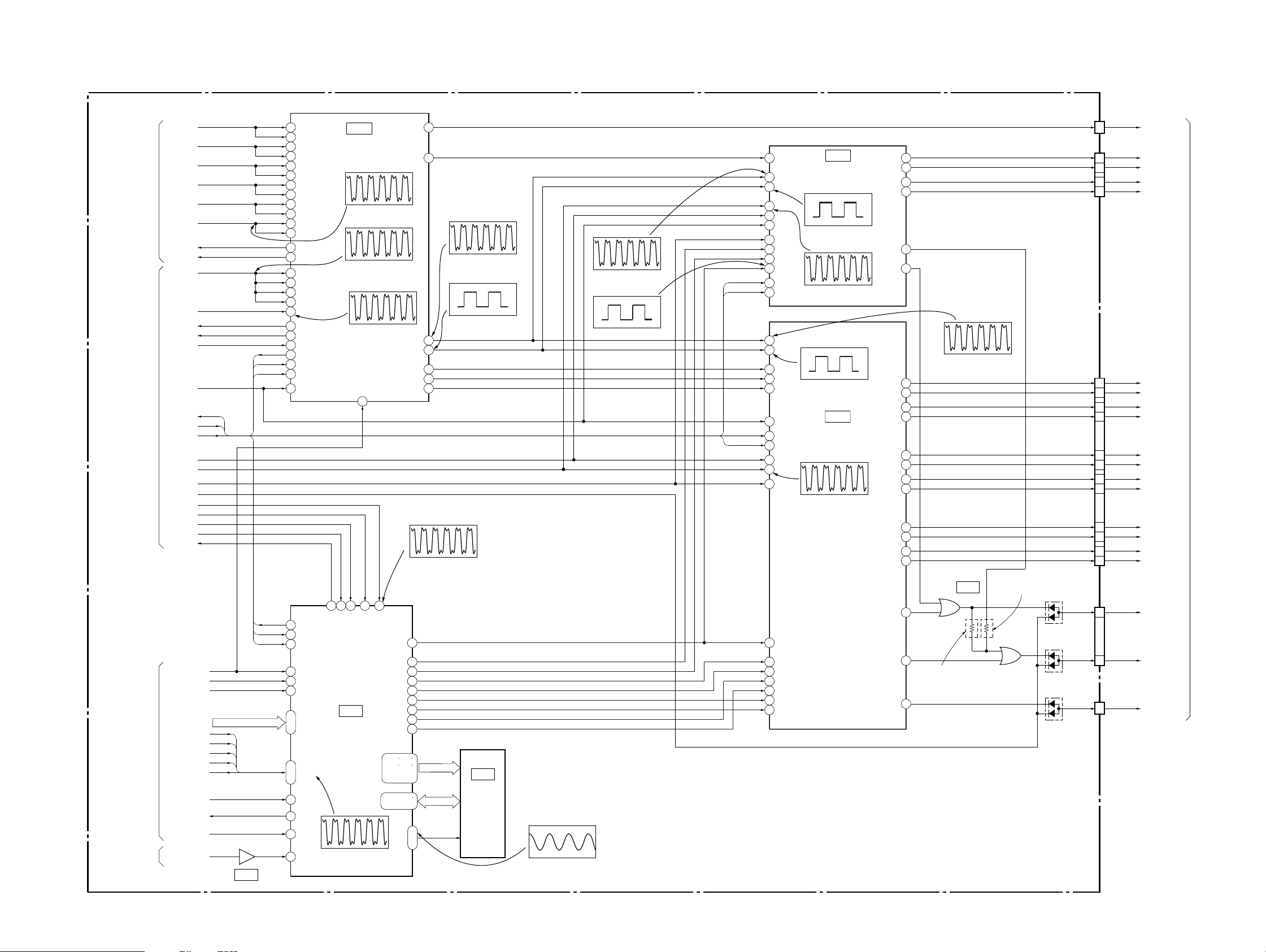
3-7. AUDIO (1) BLOCK DIAGRAM
MB-105 BOARD (5/5)
(SEE PAGE 4-27, 29, 31)
CDDOUT
ACH12
ACH34
SIGNAL PROCESSOR
(SEE PAGE 3-6)
SIGNAL PROCESSOR
(SEE PAGE 3-6)
(SEE PAGE 3-4)
05
SYSTEM
CONTROL
(SEE PAGE 3-8)
RF/SERVO
ACH56
LRCK
BCK
38ACK0
38ACK1
512FS38
27M38
X38IT
CMDREQ
X38CS
XRST
SI1
SO1
SC1
XDACS
512FS8CH
DVD/SACD
MA_MUTE
33MSA
XSACS
SMUTE
XSARST
XSARDY
XFRRST
TMS
TCK
SDI 0 – 7
XSRQ
XSHD
SDCK
XSAK
SDEF
COLRCK/TDOKT
TDOSA
PCLK
SIGO
SI1
SO1
SC1
SI1
SO1
SC1
SDI 0 – 7
13
IC906
DSP1DII
10
32 DSP2DII
160 DSP1CH12I
56 DSP2CH12I
159 DSP1CH34I
57 DSP2CH34I
158 DSP1CH56I
58 DSP2CH56I
161 DSP1LRCKI
55 DSP2LRCKI
147 DSP1BCKI
69
DSP2BCKI
4 DSP1ACKO0
3 DSP1ACKO1
149 DSP1ACKI
8 DSP1DIACKI (NC)
67 DSP2ACKI
34 DSP2DIACKI (NC)
22 SCLKI
107 CMD ACKNO
108 CMD REQNO
118 SH CSNI
119 SH SOO
117 SH SII
115 SH CLKI
RESET NI
6
7
6 MSDATO
4 MSDATI
3 MSCK
TRST
31
30
TMS
TCK
26
169
SD 0 – 7
ı
176
XSRQ
XSHD
164
SDCK
ı
168
XSAK
SDEF
TDI
27
TDO
29
123
WCK
126 WARFI
MSREADY
DECODER
4.5 Vp-p (4.2 MHz)
IC501 ws
11
MCKI
XMSLAT
PHREFO
DSADML
DSADMR
DSP2DO
DSP2CH12O
DVD: 3.3 Vp-p (24.57 MHz)
CD: 3.3 Vp-p (22.58 MHz)
62
55
56
64
DSAL
DSAR
66
69
DSAC
DSASW
71
74
DSALS
76DSARS
148 149
151 152
154 – 157
159 – 162
131 – 134
136 – 139
141
ı
145
IC501
AUDIO DSP
IC501 yl, <zvm
4.1 Vp-p (3.1 MHz)
IC501 8, ef, yj, <zv.
DVD: 3.3 Vp- p (24.57 MHz)
CD: 3.3 Vp-p (22.58 MHz)
3.5 Vp-p (27 MHz)
TRST
142
2
9
10
XRST
SMUTE
IC905
SACD
A 0 – 11
DQ 0 – 7
IC905 <znn
45
51DSP2CH78O
DVD: 4.4 Vp- p (3.1 MHz)
CD: 4.4 Vp-p (2.8 MHz)
DVD: 4.3 Vp- p (48.1 kHz)
CD: 4.3 Vp-p (44.1 kHz)
43DSP2BCKO
42DSP2LRCKO
48
49DSP2CH34O
50DSP2CH56O
IC905 qa
A 0 – 11
16M SDRAM
DQ 0 – 7
DCLK, DCKE,
XWES, XCAS,
XRAS
IC501 rd
IC501 rs
IC903
IC905 <zvz
4.9 Vp-p (33.78 MHz)
IC504 2
DVD: 4.4 Vp- p (3.1 MHz)
CD: 4.4 Vp-p (2.9 MHz)
IC504 9
4 Vp-p (2.84 MHz)
SC1
SO1
SC1
SO1
SDTI/DSDL
3
BICK/DCLK2
LRCK/DSDR4
MCLK1
CSN6
PDN5
DVD: 4.3 Vp- p (48.1 kHz)
CD: 4.3 Vp-p (44.1 kHz)
DSDM
12
DSDL
10
DSDR
11
9
DCLK
CCLK7
DVD: 3.3 Vp- p (24.57 MHz)
CDTI
8
CD: 3.3 Vp-p (22.58 MHz)
9
BICK
17
LRCK
14
SDTI1
15 SDTI2
DVD: 4.3 Vp-p (48.1 kHz)
16 SDTI3
CD: 4.3 Vp-p (44.1 kHz)
8 PDN
19 CCLK
20 CDTI
21 CSN
10 MCLK
22 DSDM
DVD: 3.3 Vp- p (24.57 MHz)
CD: 3.3 Vp-p (22.58 MHz)
23 DCLK
25 DSDL1
DSDR1
26
27
DSDL2
DSDR2
28
29
DSDL3
30 DSDR3
IC504
AUDIO
D/A CONVERTER
IC504 4
IC504 1
IC502 qj
IC502
AUDIO
D/A CONVERTER
IC502 q;
AOUTL+
AOUTL–
AOUTR+
AOUTR–
LOUT1+
LOUT1–
ROUT1+
ROUT1–
LOUT2+
LOUT2–
ROUT2+
ROUT2–
LOUT3+
LOUT3–
ROUT3+
ROUT3–
DZF23
16
15
14
13
19DZFR
20DZFL
DVD: 4.4 Vp-p (3.1 MHz)
CD: 4.4 Vp-p (2.9 MHz)
2
1
48
47
46
45
44
43
42
41
40
39
1
2
3DZFL1
4DZFR1
EXCEPT
NS705V/
NS905V : AEP, UK, RUS
5
DVP-NS705V/NS755V/NS905V/NS915V
CN501
IC502 9
IC503
7
NS705V/
NS905V : AEP, UK, RUS
5
6
D501
D502
3
D503
(1/3)
CN602
(2/3)
CN501
(2/3)
CN602
(3/3)
CN501
(3/3)
16
24
23
28
29
11
10
13
14
6
5
7
8
2
1
3
4
21
22
17
SPDIF
ALT+
ALT–
ART+
ART–
FL+
FL–
FR+
FR–
SL+
SL–
SR+
SR–
C+
C–
SW+
SW–
LMUTE
RMUTE
MA_6CH_MUTE
• Abbreviation
RUS : Russian
AUDIO 2
(SEE PAGE 3-15)
3-13 3-14
Page 9
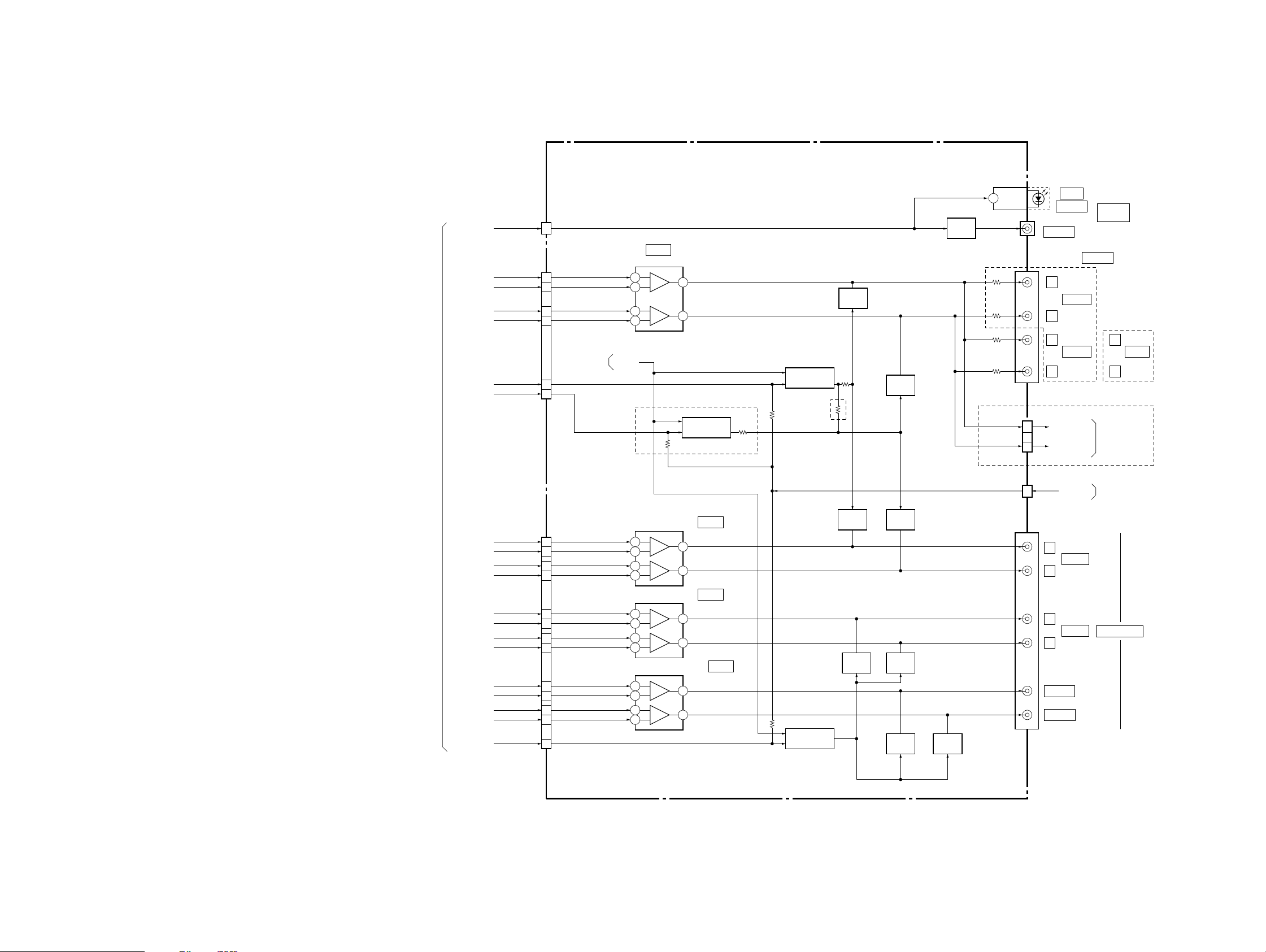
DVP-NS705V/NS755V/NS905V/NS915V
3-8. AUDIO (2) BLOCK DIAGRAM
AV-64 BOARD (2/2)
(SEE PAGE 4-41, 43)
AUDIO 1
(SEE PAGE 3-14)
SPDIF
ALT+
ALT–
ART+
ART–
LMUTE
RMUTE
FR+
FR–
SL+
SL–
SR+
SR–
SW+
SW–
MA_6CH_MUTE
FL+
FL–
1
D IN
CN201 (2/2)
2
IC303
MUTE V
AUDIO AMP
3
2
5
6
3
2
5
6
3
2
5
6
3
2
5
6
+
1
–
+
7
–
Q307, 308, 309
MUTE DRIVE
NS705V/NS905V:AEP, UK, RUS
IC201
+
–
+
–
+
–
+
–
+
–
+
–
5.1CH FRONT
AUDIO AMP
1
7
IC202
5.1CH REAR
AUDIO AMP
1
7
5.1CH CENTER/WOOFER
AUDIO AMP
1
7
IC203
Q302, 303, 304
MUTE DRIVE
EXCEPT NS705V/
NS905V:
AEP, UK, RUS
Q201, 202, 203
MUTE DRIVE
Q306
MUTE
Q208
MUTE
Q204
MUTE
Q305
MUTE
Q209
MUTE
Q205
MUTE
Q206
MUTE
CN301 (2/3)
6
7
2
1
POWER 2
(SEE PAGE 3-21)
9
8
CN201 (1/2)
7
8
5
4
12
13
11
10
C+
C–
16
17
15
14
1
Q207
MUTE
Q301
BUFFER
J102 (2/2)
CN301 (3/3)
10
12
CN302 (2/2)
2
J201
IC301
OPTICAL
J301
COAXIAL
LINE OUT
L
AUDIO 1
R
L
AUDIO 2
R
EXCEPT NS705V/
NS905V:AEP, UK, RUS
EURO_L
EURO_R
NS705V/NS905V:AEP, UK, RUS
A_MUTE
L
FRONT
R
L
REAR
R
CENTER
WOOFER
DIGITAL
OUT
NS705V/NS905V:AEP, UK, RUS
L
AUDIO
R
VIDEO 1
(SEE PAGE 3-10)
INTERFACE
CONTROL
(SEE PAGE 3-17)
5.1CH OUTPUT
05
3-15 3-16
• Abbreviation
RUS : Russian
Page 10
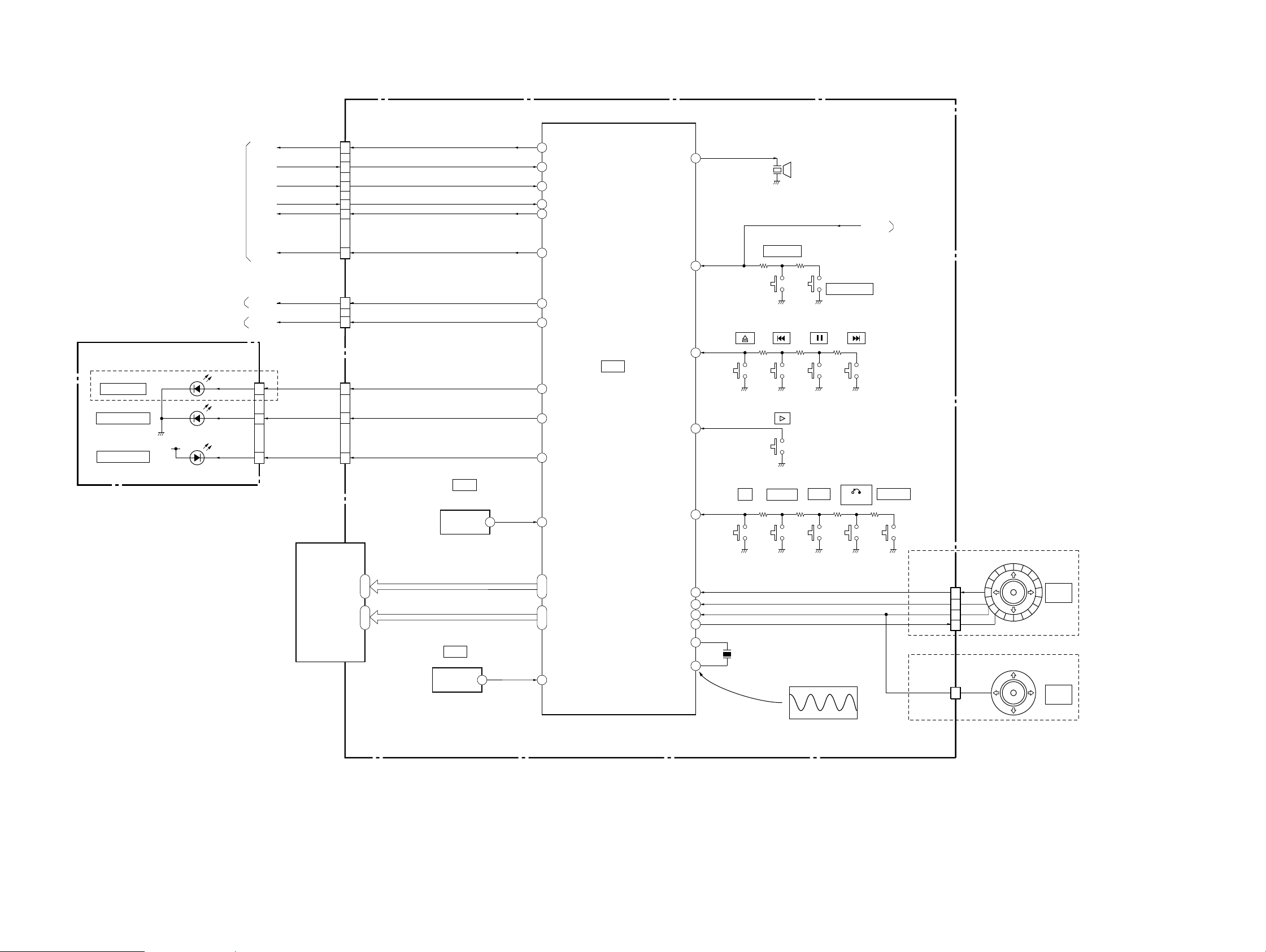
3-9. INTERFACE CONTROL BLOCK DIAGRAM
CN403
SYSTEM CONTROL
(SEE PAGE 3-8)
AUDIO 2
(SEE PAGE 3-16)
VIDEO 2
(SEE PAGE 3-11)
SO0
SC0
XIFCS
IFBSY
XFRRST
A_MUTE
V_MUTE
SI0
12
13
14
11
10
9
CN402
2
1
IF-94 BOARD
(SEE PAGE 4-49)
SI0
SO0
SC0
XIFCS
IFBSY
XFRRST
16
15
17
14
27
7
23
24
SO
SI
/SC
/CS
BUSY
/FRRST
/AMUTE
/VMUTE
BUZ
POWER
DVP-NS705V/NS755V/NS905V/NS915V
21
SURROUND
37
S409
S411
S408
BZ401
BUZZER
S407
S410
PICTURE MODE
S406
POWER
POWER 1
(SEE PAGE 3-20)
LE-34 BOARD
(SEE PAGE 3-34)
D001
PROGRESSIVE
D002
SUPER AUDIO CD
D004
MULTI CHANNEL
+5V
NS755V/NS915V
CN001
34O/C
IC404
IF CON
JOGCW
XIN
XOUT
S412
35PLAY
S405
36DISPLAY
20
18JOGCCW
33CURSOR
79JOG
2
3
X401
8MHz
S404
DISPLAY
x
MENU
IC404 3
S402
RETURN
S401S403
TOP MENU
JOG_CW
JOG_CCW
AN5
LED_C
AN5
CN406
CN406
JOG SHUTTLE
2
1
5
6
CURSOR STICK
3
EXCEPT NS705V
PUSH
ENTER
NS705V
PUSH
ENTER
ND401
7
4
1
CN407
PRO
41
43 SA
80
MULT
IC406
REMOTE COMMANDER
RECEIVER
11
47
ı
64
77
ı
65
8
IR
SEG 1 – 18
DIG 1 – 13
/RST
OUT
1
58
ı
41
5
ı
17
IC405
RESET
VOUT
1
1
4
7
PRO
SA
MULT
FLUORESCENT
INDICATOR TUBE
3.4 Vp-p (8 MHz)
05
3-17 3-18
Page 11
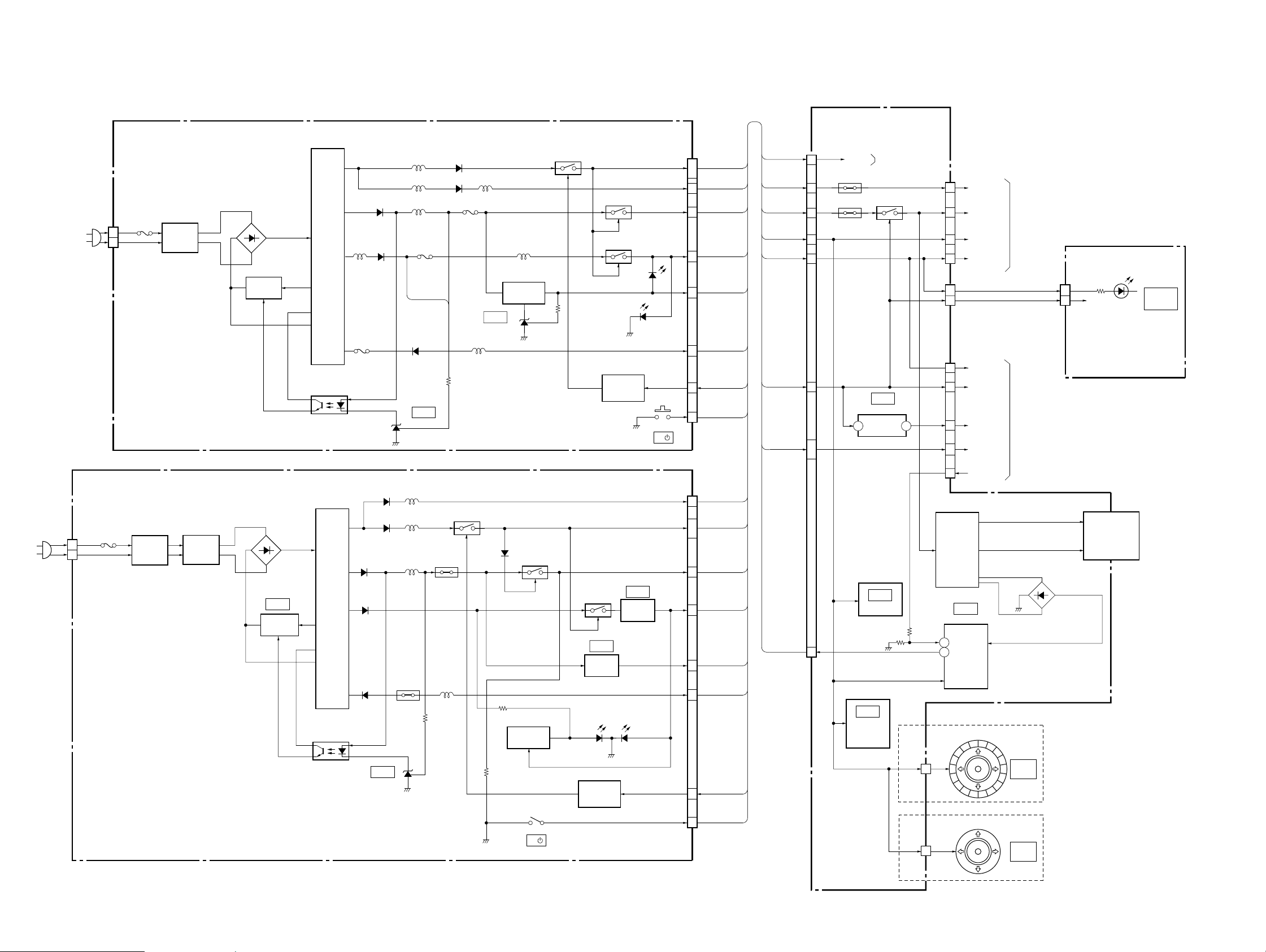
DVP-NS705V/NS755V/NS905V/NS915V
3-10. POWER (1) BLOCK DIAGRAM
POWER SUPPLY BLOCK
(ETXNY393N2F) (NS705V/NS905V/NS915V : HK, SP, KR)
(SEE PAGE 4-57)
AC IN
AC IN
CN101
1
2
POWER BLOCK
(HS12S1U) (NS755V/NS915V : TW)
(HS12S1F) (NS915V : E)
(SEE PAGE 4-61, 65)
CN101
F101
1
2
05
F101
L101
LINE
FILTER
L101, 102
LINE
FILTER
L102
LINE
FILTER
D104 – 107
IC101
SWITCH
IC101
SWITCHING
CONTROL
D101
T101
PC101
PHOTO COUPLER
T101
PC101
PHOTO COUPLER
L203
F203
D311
D611
D511
D202
D203
D221
D211
IC301
SHUNT REG
L301
L205
L202
F202
D204
IC202
SHUNT REG
L221
L211
L311
P511
P311
L511
D301
D201
F201
Q211
L201
IC201
SHUNT REG
L204
L206
Q202
+3.3V REG
D313
Q311
Q621
LED DRIVE
SW201
IF-94 BOARD
(SEE PAGE 4-49)
CN401
1
PS402
13
PS401
3
11
12
8 7
6
•
7
EVER+3.3V
2
INTERFACE CONTROL
POWER
Q404, 405
IC403
+1.8V REG
3
VIN
IC405
RESET
IC406
REMOTE
COMMANDER
RECEIVER
EVER+3.3V
(SEE PAGE 3-18)
CN402
CN407 CN001
CN403
2VOUT
SW–13V
CN406
4
CN406
2
5
7
3
6
2
5
5
3
1
8
Q401, 402,
T401
DC/DC
CONVERTER
IC404
IF CON
30 PONCHK
26
PCONT
JOG SHUTTLE
CURSOR STICK
AU+11V
SW–13V
EVER+3.3V
AI+5V
+5V
SW+3.3V
+1.8V
+11V
3.3V MNT
POWER 2
(SEE PAGE 3-21)
+5V
S3.3V
POWER 2
(SEE PAGE 3-21)
F1
F2
D403 – 406
VKK
EXCEPT NS705V
PUSH
ENTER
NS705V
PUSH
ENTER
LE-34 BOARD
(SEE PAGE 3-34)
6
3
+3.3V
ND401
FLUORESCENT
INDICATOR TUBE
D004
MULTI
CHANNEL
• Abbreviation
AUS : Australian
CND : Canadian
EA : Saudi Arabia
HK : Hong Kong
KR : Korea
ME : Middle East
RUS : Russian
+5V
POWER
+11V (AUDIO)
EVER–13V
EVER+3.3V
+5V
SW+3.3V
SW+11V
P-CONT
Q301
Q203
Q204
PD202
(STANDBY)
POWER
CONTROL
Q611
IC411
EVER
+3.3V REG
D621/D622
(ON/STANDBY)
Q712
POWER
CONTROL
Q205
+3.3V REG
PD201
(ON)
IC611
SW
SW201
I/
CN201
CN201
6
•
7
13
12
8
11
3
2
1
13
6
•
7
12
8
11
3
2
1
SW+11V
+11V (AUDIO)
SW+3.3V
EVER+3.3V
EVER–13V
P-CONT
POWER
+11V (AUDIO)
SW+11V
+5V
SW+3.3V
EVER+3.3V
EVER–13V
P-CONT
POWER
I/
SP : Singapore
TW : Taiwan
3-19 3-20
Page 12
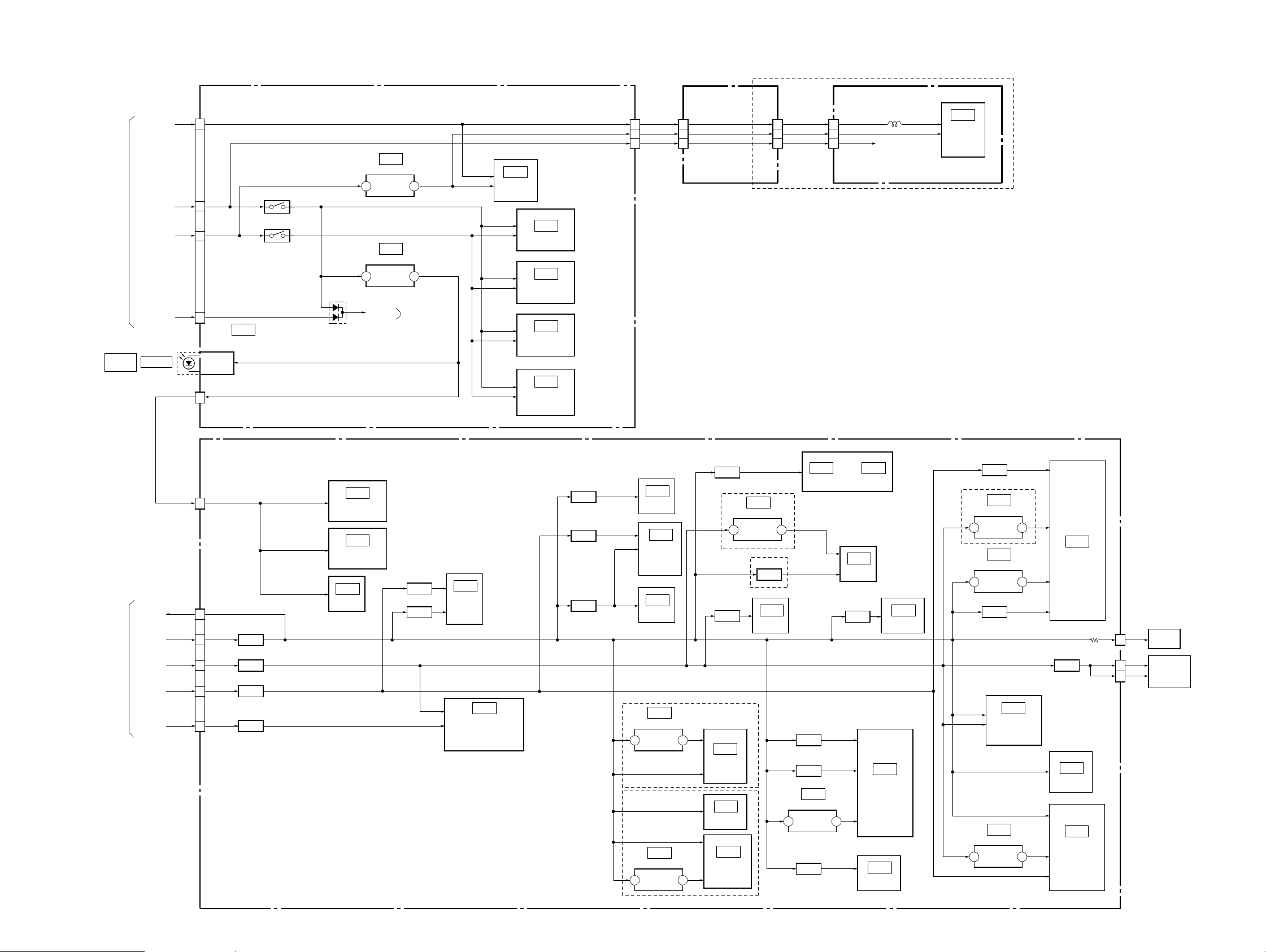
3-11. POWER (2) BLOCK DIAGRAM
DVP-NS705V/NS755V/NS905V/NS915V
POWER 1
(SEE PAGE 3-20)
DIGITAL
OUT
AI+5V
AU+11V
SW–13V
EVER+3.3V
OPTICAL
AV-64 BOARD
(SEE PAGE 4-39 to 4-44)
CN302
6
5
7
3
IC301
OPTICAL DIGITAL
OUT
CN301 (2/2)
4
Q310
Q311, 312
D303
2
1
IC102
–5V REG
IN
IC302
+5V REG
IN
MUTE V
3OUT
3OUT
AUDIO 2
(SEE PAGE 3-15)
IC103
VIDEO
BUFFER
CENTER/WOOFER
IC303
AUDIO AMP
IC201
5.1CH FRONT
AUDIO AMP
IC202
5.1CH REAR
AUDIO AMP
IC203
5.1CH
AUDIO AMP
CN301
(1/2)
VIDEO+5V
15
VIDEO–5V
13
VIDEO+11V
14
MB-105 BOARD
(SEE PAGE 4-25)
15
17
16
8
20
6
–5V
+11V
14
2
16
CN901CN602 CN601
+5V
ER-19 BOARD
L905
+11V
(SEE PAGE 4-53)
IC901
VIDEO
BUFFER,
SELECT
SWITCH
NS705V/NS905V:AEP, UK, RUS
• Abbreviation
RUS : Russian
POWER 1
(SEE PAGE 3-20)
AUDIO+5V
3.3V MNT
SW+3.3V
+5V
+1.8V
+11V
MB-105 BOARD
(SEE PAGE 4-11 to 4-32)
CN602
26
CN101
8
7
5
3
1
05
FL108
FILTER
FL103
FILTER
FL104
FILTER
FL107
FILTER
IC502
AUDIO
D/A CONVERTER
IC504
AUDIO
D/A CONVERTER
IC503
OR
FL501
FILTER
FL502
FILTER
IC501
AUDIO
DSP
IC202
FOCUS/TRACKING
COIL DRIVE,
SPINDLE/SLED/LOADING
MOTOR DRIVE
FL109
FILTER
FL106
FILTER
FL102
FILTER
IC108
1M SRAM
IC104
SYSTEM
CONTROL
IC101
EEPROM
EXCEPT NS705V
IC605
+2.5V REG
5
VIN
IC601
+2.5V REG
5
VIN
NS755V/NS915V
4VOUT
4VOUT
FL105
FILTER
EXCEPT NS705V
5
VIN
NS705V
FL905
FILTER
IC604
VIDEO
ENCORDER
IC603
16M SDRAM
IC602
I/P CONVERTER
IC102
+3.3V REG
FL101
FILTER
IC906
AMP
4VOUT
6
IC106
32M FLASH
FL901
FILTER
FL903
FILTER
IC901
+2.5V REG
FL902
FILTER
4VOUTVIN
or
IC103
PLL
FL404
FILTER
IC107
OTP
IC406
64M SDRAM
IC905
SACD DECODER
IC903
16M SDRAM
NS705V
5
5
5
FL403
FILTER
IC402
+3.3V REG
VIN
IC401
+1.8V REG
VIN
FL402
FILTER
IC201
DVD/CD RF AMP,
DIGITAL
SERVO
IC302
+3.3V REG
VIN
4VOUT
IC403
AV DECODER
4VOUT
CN204
5
FL201
FILTER
16M DRAM
4VOUT
SERVO DSP
CN203
19
11
IC303
IC301
ARP,
LED
VCC
MOD
INLIMIT
SENSOR
OPTICAL
DEVICE
3-21 3-22 E
Page 13

DVP-NS705V/NS755V/NS905V/NS915V
4-1. FRAME SCHEMATIC DIAGRAM
1
2
3
4
5
6
7
8
9
10
11
12
13
7
6
5
4
3
2
1
5
HARNESS
(PF-130)
FFC
(FLE-001)
1
2
3
4
5
6
7
8
9
10
11
12
13
1
2
3
4
5
6
7
POWER
P-CONT
EVER-13V
M_GND
M_GND
SW+11V
SW+11V
SW+3.3V
D_GND
D_GND
EVER+3.3V
+5V
+11V(AUDIO)
CN407
MULT
5V
GND
SA
S3.3V
GND
PRO
13PCN401
:NS705V/NS905V5P
:NS755V/NS915V
7P
76 16
1
2
3
4
5
15P
CN403
SOO
GND
SCO
15
3 151 112
A
HS12S1U BOARD
(NS755V/NS915V:TW)
HS12S1F BOARD
(NS915V:LA)
B
C
ETXNY393N2F
BOARD
(NS705V/NS905V/NS915V
:HK,SP, MY, TH, PH, IA, VTM, KR)
1
AC_IN(L)
2
AC_IN(N)
LE-34 BOARD
D
CN001
5
4
3
2
1
4
:NS705V/NS905V
5P
:NS755V/NS915V7P
POWER
P-CONT
EVER-13V
M_GND
M_GND
SW+11V
SW+11V
SW+3.3V
D_GND
D_GND
EVER+3.3V
+11V(AUDIO)
MULT
S3.3V
13PCN201
+5V
5V
GND
SA
GND
PRO
BASE UNIT
81410
123456789
XFRRST
XIFBUSY
DOWNLOAD
XIFCS
SIO
SOO
(JIG)
10PCN405
3.3V_MNT+5V
IF-94 BOARD
XIFCS
XIFBUSY
1011121314
XFRRST
3.3V_MNT
SW+3.3V
SIO
B to B
+1.8V
GND
M_GND
+11V
GND
123456789
10
SC0
GND
IFRST
PCONT
1
2
3
4
5
CN406
5P7P:NS705V
:EXCEPT NS705V
JOG_CW
JOG_CCW
EVER+3.3V
LED-C
LED-A
GND
AN5
CN402
7P
SW-13V
AI+5V
AU+11V
GND
EVER+3.3V
A_MUTE
V_MUTE
1
2
3
4
5
6
CURSOR
7
STICK
7
6
5
4
3
2
1
PUSH
ENTER
12
HARNESS
(AF-123)
7
6
5
4
3
2
1
CN302
SW_-13V
AI+5V
AU+11V
D_GND_VIDEO
EVER+3.3V
A_MUTE
VMUTE
139
7P
AV-64 BOARD
KHM-270AAA/SERVICE ASSY
1011121314
SI0
SO0
IFBSY
XIFCS
XFRRST
+3.3V
3.3V_MNT
+5V
GND
15P
CN101
15
SC0
GND
E
26P
TRK-
26
TRK+
25
FCS-
24
FCS+
23
N.C
22
CD LD
DVD LD
LD GND
SPM+
INLIM
MOD
SPM-
SLA-
SLB-
SLB+
SLA+
21
N.C
20
19
18
SW
17
16
VR
15
PD
14
FFC
GND
VCC
GND
GND
LED
(FMO-001)
13
E
12
D
11
C
10
G
9
8
VC
7
6
RF
5
F
4
A
3
B
2
H
1
9P
1
2
3
4
FFC
5
(FMO-002)
6
7
8
9
F
OPTICAL
DEVICE
G
H
I
SPINDLE
MOTOR
SLED
MOTOR
INLIMIT
SWITCH
M
M
J
1
2
3
4
5
6
7
8
9
10
11
12
13
14
15
16
17
18
19
20
21
22
23
24
25
26
9
8
7
6
5
4
3
2
1
CN203 26P
TRK-
TRK+
FCS-
FCS+
N.C
CD LD/N.C
N.C
DVD LD
LD GND
SW/N.C
MOD
VR
PD
GND
E
D
C
G
VCC
VC
GND
RF
F
A
B
H
SPM+
SPM-
INLIM
GND
LED
SLA-
SLB-
SLB+
SLA+
9PCN204
MS-81 BOARD
M001
M
LOADING
K
05
MOTOR
LDM+
LDM-
CKSW1
OCSW1
5PCN001
1
2
GND
3
(FMM-035)
4
5
FFC
5
4
3
2
1
LDM+
LDM-
GND
CKSW1
OCSW1
5PCN201
123456789
GND
+11V
+1.8V
M_GND
MB-105 BOARD
(JIG)
CN104
6P
TXD
6
RXD
5
GND
4
+3.3V
3
GND
2
RF MON
1
29PCN301
Cb/R
WIDE
Cr/B
272829
1234567
29PCN602
Cr/B
Cb/R
WIDE
D_GND_VIDEO
Y/G
D_GND_VIDEO
Y/G
D_GND_VIDEO
D_GND_VIDEO
Y
Y
C
D_GND_VIDEO
9
8
C
D_GND_VIDEO
D_GND_VIDEO
V
RGBSEL
10
11
121314
V
RGBSEL
D_GND_VIDEO
IP_SW
DSEL
VIDEO+5V
FFC
(FMA-034)
151617
DSEL
IP_SW
VIDEO+5V
VIDEO-5V
VIDEO+11V
VIDEO-5V
VIDEO+11V
VMUTE
EURO_L
EURO_R
LMUTE
1011121314151617181920212223242526
1819202122
LMUTE
VMUTE
EURO_L
EURO_R
RMUTE
RMUTE
AUDIO+5V
ALT+
ALT-
P_GND
23242526272829
ALT-
ALT+
P_GND
AUDIO+5V
AEP,UK,RUS
CN601
D_GND_VIDEO
D_GND_VIDEO
D_GND_VIDEO
D_GND_VIDEO
ERAUDIOR
P_GND_AUDIO
ERAUDIOL
P_GND
P_GND
VMUTE
DISCEXT
EUROVY
RGBSEL
WIDE
+11V
17PCN201
SW-
SW+
C+
ART-
ART+
123456789
ART-
ART+
C-
17
123456789
C-
C+
17PCN501
SW-
SW+
SR-
SL+
GND
SR+
SL-
SL-
SL+
10111213141516
FFC
(FMA-033)
SR-
SR+
9
GND
FR+
FL+
FL-
GND
8
10111213141516
FL-
FL+
FR+
GND
MA_6CH_MUTE
SPDIF
FR-
GND
1234567
17
FR-
GND
SPDIF
MA_6CH_MUTE
ER-19 BOARD
21P
21
V
20
-5V
19
C
18
17
Y
16
G
15
14
R
13
12
11
10
9
8
7
6
5
4
3
2
1
FFC
(FAE-009)
B
+5V
1
2
3
4
5
6
7
8
9
10
11
12
13
14
15
16
17
18
19
20
21
CN901
V
-5V
C
D_GND_VIDEO
Y
D_GND_VIDEO
Y/G
D_GND_VIDEO
R
D_GND_VIDEO
B
VMUTE
WIDE
+5V
DISCEXT
+11V
ERAUDIOR
P_GND_AUDIO
EUROVY
ERAUDIOL
RGBSEL
21P
FRAME
4-3 4-4
Page 14
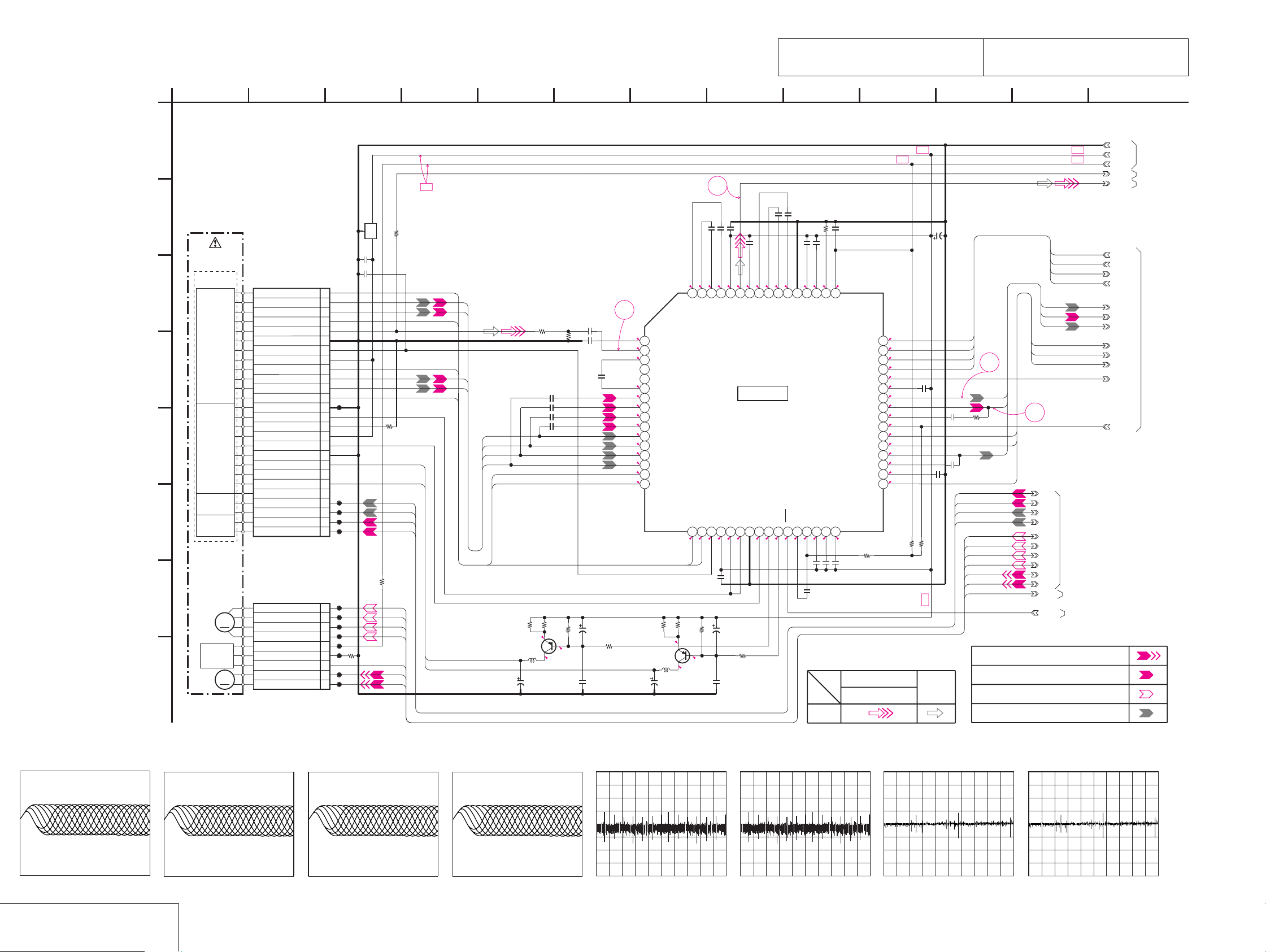
DVP-NS705V/NS755V/NS905V/NS915V
MB-105 (RF AMP, SERVO) SCHEMATIC DIAGRAM • See page 4-7 for printed wiring board.
– Ref. No.: MB-105 board; 2,000 series –
The components identified by mark 0 or dotted
line with mark 0 are critical for safety.
Replace only with part number specified.
Les composants identifiés par une marque 0 sont
critiques pour la sécurité. Ne les remplacer que
par une pièce portant le numéro spécifié.
• Wavef orms
MB-105 BOARD (1/11)
NO MARK:PB MODE
A
B
BASE UNIT
KHM-270AAA/
SERVICE ASSY
OPTICAL
DEVICE
C
DVD/CD
PD IN
D
E
F
DVD/CD
LD MODULE
FOCUS
COIL
TRACKING
COIL
G
SLED
M
MOTOR
INLIMIT
SW
SPINDLE
MOTOR
M
H
05
CN203 26P
CD LD/N.C
9PCN204
SW/N.C
LD GND
DVD LD
INLIM
SPM-
SPM+
GND
GND
MOD
FCS+
FCS-
TRK+
TRK-
SLA+
SLB+
SLB-
SLA-
31 112
R211
FL201
C201
0.01u
C202
0.01u
H
26
B
25
A
24
F
23
RF
22
21
VC
20
VCC
19
G
18
C
17
D
16
E
15
JL201
14
PD
13
12
VR
11
10
9
8
7
N.C
6
N.C
5
JL202
4
JL203
3
JL204
2
JL205
1
JL206
1
JL207
2
JL208
3
JL209
4
JL210
5
LED
JL211
6
GND
7
JL212
8
JL213
9
R206
4700
R212
100
R210
330
SLA+
SLB+
INLIM
SPM-
SPM+
DVD_LD
FCS+
FCS-
TRK+
TRK-
SLB-
SLA-
100
CD_LD
B+
DVD_LD
CD_LD
4
5
76
810
12
B+B+
B+
B+
2
C251
0.1u
C252
C247
0.1u
0.01u
0.1u
C241
C244
C248
0.01u
3.6
4.1
4.1
4.8
2.7
2.4
3.3
3.3
H
B
A
F
R235
100
R244
C232
4700p
1k
1
3.3
R246
100
3.3
3.4
3.4
2.5
2.5
2.5
2.5
2.5
2.5
2.5
2.5
2.5
2.5
Q202
2SB1132-T100-QR
CD LD DRIVE
C238
10u
16V
C233
4700p
G
C
D
E
D
C
B
A
E
F
R234
R236
33
4.5
Q201
2SB1132-T100-QR
DVD LD DRIVE
L201
C221
2.2
47uH
10u
16V
C236
560p
C210
2200p
C211
2200p
C212
2200p
C213
2200p
R245
C234
47u
6.3V
47k
33
3.8
C235
0.01u
3.6
6364
AIP
AIN
VPA
ATOP
ATON
12345678
RFIP
RFIN
WIN
WPP
CN
A2
B2
910111213141516
C2
D2
D
C TZC
B
A
E
F
G
H
17 18
2.5
H
G
C245
0.01u
R248
R249
33
33
R251
47k
4.8
4.8
0.5
L202
47uH
SIGO
CDPD
DVDPD
VC
VPBCPVNB
19 20 21 22 23 24 25 26 27 28 29 30 31 32
0.2
0.2
4.8
2.5
C242
47u
6.3V
R256
100
C243
0.01u
57
5859606162
DIN
BYP
IC201
SERVO ERROR
PROCESS
IC201
SP3728ACB
LDSELO
4.7
3.8
DIP
DVDLD
2.2
FNP
CDLD
0
4.8
0.1u
0.001u
2.1
FNN
VNA
MEVO
LDON
2.5
C254
0.01u
R260
12k
C253
0.1u
C255
3.3
3.2
0.6
4950515253545556
RX
TPA
MEV
MP
MB
MIN
2.2
2.4
3.4
C256
0.047u
C257
0.047u
SIGNAL PATH
PB
C260
0.01u
3.4
V33
MLPF
2.62.5
C261
330p
VIDEO SIGNAL
SDEN
SCLK
SWD
SRD
MON
TPH
FE
TE
TZIN
VCI
DFT
PI
PII
BYP2
MIRR
R263
2.2M
Y/CHROMA
C263
10u
16V
0
3.4
3.4
3.4
SSCS
SSCK
SSWD
SSRD
3
SSCK
SSWD
SSRD
SSCS
PI
TE
FE
MIRR
TZC
SSDFCTI
0
3.2
1.7
1.7
41 42 43 44 45 46 47 48
2.5
1.7
0
3.0
1.8
0
2.6
0
33 34 35 36 37 38 39 40
R264
100k
R265
0.1u
C262
C265
0.1u
C264
0.01u
TRK-
TRK+
FCS-
FCS+
27k
B+
C266
0.01u
SLB+
SLA-
SLB-
SLA+
SPM-
SPM+
INLIM
SSDFCTI
R273
FE
TE
0
TZC
4
PI
MIRR
TRK-
TRK+
FCS-
FCS+
SLB+
MB-105 BOARD (4/11)
SLA-
SLB-
SLA+
SPM-
SPM+
MB-105 BOARD (2/11)
INLIM
MB-105 BOARD (5/11)
XLDON
SPINDLE SERVO(SPEED AND PHASE)
AUDIO
SIGNAL
TRACKING SERVO DVD/CD CDV
SLED SERVO DVD/CD
FOCUS SERVO
GND
+5V
+3.3V
RFMON
RF+
SSCK
SSWD
SSRD
SSCS
PI
TE
FE
MIRR
TZC
SSDFCTI
SS_MON
SVC
139
MB-105 BOARD
(6/11)
MB-105 BOARD
(5/11)
MB-105 BOARD
(2/11,11/11)
MB-105 BOARD
(2/11)
1 IC201 2 (DVD play)
200 mV/DIV 50 ns/DIV
570 mVp-p
RF AMP, SERVO
MB-105 (1/11)
1 IC201 2 (CD play)
200 mV/DIV 200 ns/DIV
550 mVp-p
2 IC201 tl (DVD play)
500 mV/DIV 50 ns/DIV
1.4 Vp-p
2 IC201 tl (CD play)
500 mV/DIV 200 ns/DIV
1.4 Vp-p
3 IC201 rs (DVD play)
100 mV/DIV 50 ms/DIV
180 mVp-p
3 IC201 rs (CD play)
500 mV/DIV 50 ms/DIV
860 mVp-p
4 IC201 ra (DVD play)
500 mV/DIV 50 ms/DIV
4-11 4-12
1.5 Vp-p
4 IC201 ra (CD play)
500 mV/DIV 200 ms/DIV
1.7 Vp-p
Page 15

MB-105 (ARP, SERVO DSP) SCHEMATIC DIAGRAM • See page 4-7 for printed wiring board.
– Ref. No.: MB-105 board; 2,000 series –
DVP-NS705V/NS755V/NS905V/NS915V
MB-105 BOARD (2/11)
NO MARK:PB MODE
A
MB-105 BOARD
XRST
(5/11)
B
MB-105 BOARD
PCLK
(11/11)
C
MB-105 BOARD
CDDOUT
(3/11,9/11)
XSRQ
SDCK
MB-105 BOARD
XSHD
(3/11,11/11)
XSAK
SDEF
SDI7
MB-105 BOARD
(3/11,11/11)
MB-105 BOARD
(6/11)
MB-105 BOARD
(1/11)
SDI6
SDI5
SDI4
SDI3
SDI2
SDI1
SDI0
B+
+3.3V
+5V
B+
GND
RF+
D
E
F
G
H
MB-105 BOARD
MB-105 BOARD
MB-105 BOARD
I
TE
FE
(1/11)
PI
SLE
SPFG
(4/11)
SVC
SVC
SS_MON
(1/11)
J
K
L
05
5
R360
100
B+
CDDOUT
XSRQ
SDCK
XSHD
XSAK
SDEF
SDI7
SDI6
SDI5
SDI4
SDI3
SDI2
SDI1
SDI0
R301
0
R302
0
C302
10u
16V
IC302
+3.3V REG
IC302
TK11133CSCL-G
4.8
123
CONT
VIN
4.8
GND
1.3
C309
0.1u
VOUTNOISE
R313
470
R318
470
45
3.3
R314
470
R315
470
R316
4700
R317
10k
R325
6800
C311
0.01u
R319
10k
0.5%
100p
C310
R320
100
R311
33k
0.5%
C321
0.01u
C312
0.068u
R321
22k
C322
0.5%
0.01u
220
R312
0.5%
C315
R322
R358
C317
0.1u
(6/11)
MB-105 BOARD
(3/11)
MB-105 BOARD
(4/11)
(1/11)
0.01u
1k
0.5%
R323
2200
10k
10k
R326
R324
C327
10k
0.01u
R359
10k
0.01u
C314
C329
0.01u
C319
0.01u
C318
C320
4700p
4700p
C316
4700p
33MARP
HD8
HD9
HD10
HD11
HD12
HD13
HD14
HD15
SLDA
SLDB
LMCTL
SSDFCTI
MIRR
TZC
B+
C308
100u
6.3V
C304
0.01u
C305
4700p
C313
0.033u
MB-105 BOARD
MB-105 BOARD
B+
B+
R327
10k
0.5%
VSSA0
8990919293949596979899100101102103104105106107108109110111112113114115116117118119120121122123124125126127128129130131132
1.7
R332
2200
R333
150k
R328
27k
R329
2200
R330
2200
R331
2200
1800R334
0.5%
C323
0.01u
C324
0.1u
C325
0.01u
C326
0.01u
CL301
CL302
C328
0.01u
R335
4700
C330
4700p
VCO
0.7
R1
2.4
R2
3.3
VDDA0 3.3V
1.7
1.7
INP
1.7
FR1
1.7
FR2
1.7
FR3
1.7
Y
3.3
VDDA1 3.3V
1.0
IREF
0.5
AOUT
VSSA2
3.3
VDDA2 3.3V
2.5
BIAS
1.0
VREF
VSSD0
3.4
VDDD0 3.3V
2.7
VRT
1.6
RFIN1
3.3
VDDA3 3.3V
1.6
RFIN2
VSSA3
0.6
VSSD1
3.4
VDDD1 3.3V
VSSD2
B+
VDDD2 3.3V
3.4
VRBA TESTK0
VSSA4 HCS
3.4
VDDA4 3.3V
3.4
VRTA
1.7
ADC0
1.6
ADC1
1.8
ADC2
1.7
ADC3
2.3
ADC4
JL339
1.7
ADC5
1.7
ADC6
0
ADC7
VSSA5
C334
0.01u
B+
76 16
SDI7
C331
R338
0.1u
22
CL305
R336
10k
0.6
1.5
JL309
JL308
RFD
SD7
VSS
PLCKO
JITPWM
1
2
3
4
D3
D1
VDDA5 3.3V
D2
D0
133134 135 136137 138 139140 141 142143 144 145146 147 148149 150 151152 153 154155 156 157158 159 160161 162 163164 165 166167 168 169170 171 172173 174 175176
3.4
1.1
0.8
1.6
1.4
81410
SDI6
SDI5
SDI4
SDI3
SDI2
SDI1
SDI0
RAMA9
1.7
SD6
D4
0.9
1.501.501.7
SD4
SD5
D6
D5
0.7
0.7
SD3
D7
1.2
0.3
1.7
1.7
1.7
1.7
SD2
SD0
SD1
VSS
MA9
VDD1.8V
PWM1
PWM0
DFCTI
VDD3.3V
PWM2
VSS
000
3.4
1.7
1.7
JL310
JL311
JL312
CL306
CL307
RAMA8
0.3
VDD3.3V
VDD1.8V
TESTK3
VDD3.3V
TESTK2VRB
TESTK1
VDD1.8V
139
B+ B+
XWAIT
XARPCS
XARPIT
XRD
XWRH
XSDPCS
XSDPIT
HA7
HA6
HA5
HA4
HA3
HA2
HA1
HA0
FDRV-
FDRV+
TDRV-
TDRV+
RAMA0
RAMA1
RAMA2
RAMA3
RAMD0
RAMD1
RAMD2
RAMD3
RAMD4
RAMD5
RAMD6
RAMD7
C333
0.01u
MB-105 BOARD
R352
0
C332
0.01u
MB-105 BOARD
(5/11)
MB-105 BOARD
(5/11)
(4/11)
CDDATA/EMU1
CDBCK/EMU0
XFRRST
TMS
TCK
TDIKT
CDLRCK/TDOKT
SSCS
LMM
LMP
SSCK
SSWD
SSRD
TSD
SPMUTE
INLIM
3.4
3.2
3.0
2.8
2.7
3.4
2.7
3.0
2.9
2.8
B+
3.4
2.8
0.3
0.3
0.3
0.3
3.4
MB-105 BOARD
MB-105 BOARD
MB-105 BOARD
MB-105 BOARD
MB-105 BOARD
MB-105 BOARD
MB-105 BOARD
(5/11,11/11)
(1/11)
(4/11)
(1/11)
(4/11)
(1/11)
B+
3.4
2.8
MD7
2.9
MD6
3.0
MD5
2.7
MD4
2.7
MD3VSSA1
2.8
MD2INM
3.0
MD1
3.2
MD0
VSS
1.7
JL326
2.3
MDP0
JL327
1.6
MDS0
JL340
2.8
XRAS
JL341
3.2
XCAS
JL342
3.4
XMWR
JL328
3.4
XWAT
JL329
3.4
XCS
JL330
3.4
XINT
JL331
1.0
XRD
JL332
2.2
XWR
VSS
JL333
1.7
PDM3
0
JL334
1.7
PDM2
3.4
JL335
1.7
PDM1
JL336
1.7
PDM0
VSS
JL337
3.4
JL338
3.4
HINT
1.7
2.5
A7
0.9
A6
0.8
A5
1.6
A4
1.4
A3
2.0
A2
1.2
A1
0.2
A0
1234567891011121314 15 16 17 18 19 20 21 22 23 24 25 26 27 28 29 30 31 32 33 34 35 36 37 38 39 40 41 42 43 44
VSS
B+
RAMD7
RAMD6
RAMD5
RAMD4
RAMD3
RAMD2
RAMD1
RAMD0
C343
0.01u
FDRV-
TESTK3
FDRV+
C344
0.01u
GND
TDRV-
GND
TDRV+
GND
FDRV-
FDRV+
TDRV-
TDRV+
GND
GND
GND
B+
TESTK3
JL343
XFRRST
TMS
TCK
TDIKT
CDLRCK/TDOKT
R349
10k
12
SDEF
XSAK
RAMA7
RAMA6
RAMA5
RAMA4
RAMA3
RAMA2
RAMA1
RAMA0
0.3
0.3
MA7
MA8
MA6
MIRR
CLKIN
VDD1.8V
1.7
1.6
C337
0.01u
0.3
MA5
VSS
0.3
MA4
IC301
ARP,SERVO DSP
3.1 0.3
TZC
0
CL308
JL313
1k
R310
MA3
IC301
CXD9703R
GIO0/INT2
3.4
JL314
0.300.3
MA2
GIO1/INT3
3.4
JL315
0.3
MA1
GIO2/INT4
JL316
3.4
MA0
GIO3/INT5
JL317
2.6
SDEF
XSAK
GIO5/PGIN
GIO4/PGREF
JL318
SDCK
XSHD
XSRQ
CDDOUT
C335
0.01u
R337
10k
C338
0.01u
3.4
3.4
2.6
VSS
XSRQ
XRESET
VDD3.3V
GIO7/SDO
VDD3.3V
GIO8/SCK
GIO6/SDI
3.4
3.4
3.4
JL319
C339
0.01u
JL320
JL321
3.4
3.4
JL322
1.7
XSHD
GIO9/GREF
3.4
JL323
1.7
SDCK
GIO10/FGIN
JL324
C340
0.01u
CL309
LOCK
DOUT
GIO11/TMC2
GIO12/BUSY
0
JL325
RAMD15
1.7
3.0
MD15
VDD1.8VGIO13
VSS
0
CL310
RAMD14
2.8
MD14
DATA/EMU1
RAMD13
3.0
MD13
BCLK/EMU0
1.7
RAMD12
2.8
3.4
XFRRST
RAMD9
RAMD8
RAMD10
RAMD11
2.8
2.8
2.8
2.8
4546474849505152535455565758596061626364656667686970717273747576777879808182838485868788
VSS
MD9
MD8
MD12
MD11
MD10
TDI
LRCK/TDO
TMS
TRST
VDD1.8V
TCK
1.7
0
3.0
1.7
1.7
TCK
TMS
TDIKT
CDLRCK/TDOKT
174
IC303
16M DRAM
GM71V18160CT-6TRIC303
12345678
VDD
I/O0
I/O1
I/O2
I/O3
VDD
I/O5
91016171819202122
I/O6
I/O7
N.C
1115
N.C
N.C
WE
RAS
N.C
N.C
A1
A2
23
A3
24
VDD
25
SIGNAL PATH
(3/11)
MB-105 BOARD
(3/11,11/11)
GND
I/O15
I/O14
I/O13
I/O12
GND
I/O11I/O4
I/O10
I/O9
I/O8
N.C
N.C
LCAS
UCAS
OE
A9
A8
A7A0
A6
A5
A4
GND
VIDEO SIGNAL
Y/CHROMA
PB
SPINDLE SERVO(SPEED AND PHASE)
TRACKING SERVO DVD/CD CDV
SLED SERVO DVD/CD
FOCUS SERVO
183 15 191 112
MDPO
MB-105 BOARD
(4/11)
MDSO
GND
R351
0
RAMD15
3.0
RAMD14
2.8
RAMD13
3.0
47 48 49 50
RAMD12
2.8
RAMD11
2.8
RAMD10
2.8
43 44 45 46
RAMD9
2.8
RAMD8
2.8
36 40
3.2
3.2
RAMA9
0.3
RAMA8
0.3
RAMA7
0.3
RAMA6
0.3
29 30 31 32 33 34 35 41 42
RAMA5
0.3
RAMA4
0.3
26 27 28
AUDIO
SIGNAL
MB-105 BOARD
(6/11)
+1.8V
• Waveforms
1 IC301 <zzz> (DVD play)
500 mV/DIV 100 ns/DIV
1.4 Vp-p
2 IC301 <zzc> (CD play)
500 mV/DIV 200 ns/DIV
1.4 Vp-p
4-13 4-14
3 IC301 <zxv> (DVD play)
500 mV/DIV 50 ms/DIV
1.4 Vp-p
3 IC301 <zxv> (CD play)
500 mV/DIV 200 ms/DIV
1.7 Vp-p
4 IC301 <zxb> (DVD play)
100 mV/DIV 50 ms/DIV
160 mVp-p
4 IC301 <zxb> (CD play)
500 mV/DIV 50 ms/DIV
860 mVp-p
ARP, SERVO DSP
MB-105 (2/11)
Page 16

DVP-NS705V/NS755V/NS905V/NS915V
MB-105 (AV DECODER) SCHEMATIC DIAGRAM • See page 4-7 for printed wiring board.
– Ref. No.: MB-105 board; 2,000 series –
MB-105 BOARD (3/11)
NO MARK:PB MODE
A
XRD
XWRH
XAVDIT
(5/11)
MB-105 BOARD
(7/11)
MB-105 BOARD
(5/11)
MB-105 BOARD
(2/11,5/11)
MB-105 BOARD
(9/11)
(2/11)
MB-105 BOARD
(2/11)
MB-105 BOARD
(7/11)
MB-105 BOARD
(6/11)
(7/11)
512FSAVD
CDDOUT
CDDATA/EMU1
CDBCK/EMU0
CDLRCK/TDOKT
Y_BUFF_CXD
COMPOUT
27MCLK
XWAIT
DACK0
DREQ0
DACK1
DREQ1
ACH12
ACH34
ACH56
XRST
HD0
HD1
HD2
HD3
HD4
HD5
HD6
HD7
HD8
HD9
HD10
HD11
HD12
HD13
HD14
HD15
LRCK
BCK
SDI0
SDI1
SDI2
SDI3
SDI4
SDI5
SDI6
SDI7
SDCK
SDEF
XSHD
XSAK
XSRQ
DVD0
DVD1
DVD2
DVD3
DVD4
DVD5
DVD6
DVD7
+1.8V
+3.3V
GND
+5V
YOUT
Y/G
CB/R
CR/B
COUT
HD0
HD1
HD2
HD3
HD4
HD5
HD6
HD7
HD8
HD9
HD10
HD11
HD12
HD13
HD14
HD15
SDI0
SDI1
SDI2
SDI3
SDI4
SDI5
SDI6
SDI7
DVD0
DVD1
DVD2
DVD3
DVD4
DVD5
DVD6
DVD7
JL401
B+
JL402
B+
C401
1u
50V
NS705V
R401
0
B+
C402
C403
10u
0.01u
16V
IC401
TK11118CSCL-G
3.3
123
CONT VIN
GND
1.2
NOISE VOUT
IC401
+1.8V REG
C404
0.1u
IC402
TK11133CSCL-G
4.8
123
CONT
GND
1.2
NOISE
VOUT
MB-105 BOARD
B
C
D
E
F
MB-105 BOARD
(6/11)
G
MB-105 BOARD
H
MB-105 BOARD
(2/11)
I
J
K
L
M
MB-105 BOARD
N
(8/11)
MB-105 BOARD
05
45
VIN
45
5
R407
100
C408
0.01u
76
C417
0.01u
B+
B+
3.4
3.4
3.4
3.4
3.4
3.4
3.4
1.7
RSTn
IOVSS13
IOVDD13
3.4
123456789101112131415161718192021222324252627282930313233343536
HD0
HD1
HD2
HD3
HD4
HD5
HD6
HD7
HD8
HD9
HD10
HD11
HD12
HD13
HD14
HD15
C410
0.01u
C411
0.01u
SDI0
SDI1
SDI2
SDI3
C413
0.01u
SDI4
SDI5
SDI6
SDI7
C414
0.01u
3.3
R402
0
1.8
FL403
FL402
C405
10u
16V
4.8
3.3
B+
C406
100u
4V
IC402
C407
10u
16V
+3.3V REG
Q401
2SA1162-YG-TE85L
SWITCH
EXCEPT
NS705V
R404
1k
R436
1k
IOVDD00
0.7
HDATA0
0.7
HDATA1
0.7
HDATA2
0.7
HDATA3
CVS00
0.5
HDATA4
0.5
HDATA5
0.4
HDATA6
0.7
HDATA7
1.7
CVD00
1.6
HDATA8
1.4
HDATA9
1.1
HDATA10
0.8
HDATA11
IOVSS00
0.9
HDATA12
0.7
HDATA13
0.7
HDATA14
1.2
HDATA15
CVS01
1.8
ACLK
1.7
CVD01
0
ACH12O
0
ACH34O
0
ACH56O
3.4
IOVDD01
1.7
LRCKO
1.7
BCKO
JL405
DO
1.7
CDIN2I
0
CDIN1I
IOVSS01
1.7
CDBCKI
1.7
CDLRKI
CVS02
1.7
DT0I
1.7
DT1I
1.7
DT2I
1.7
DT3I
3.4
IOVDD02
1.5
DT4I
1.5
DT5I
1.7
DT6I
4452 4351 4250 4149 4048 3947 3846 3745
1.5
DT7I
1.7
CVD02
1.7
ICLKI
3.4
IERRIn
3.4
ISTARTIn
2.6
IVALIn
2.6
IREQON
IOVSS02
B+
1234
YOUT
IOAVSS00
AVDD00
53 54 55 56 57 58 59 60 61 62 63 64 65 66 67 68 69 70 71 72 73 74 75 76 77 78 79 80 81 82 83 84 85 86 87 88 89 90 91 92 93 94 95 96 97 98 99 100 101 102103 104
3.4
0.6
B+
C416
0.01u
0.5%
0.5%
0.5%
0.5%
0.5%
0.5%
R409 220
R412 220
R408 220
R410 220
R413 220
R411 220
DMRQ0On
AVSS00
0.6
DMACK0In
GOUT
3.4
DMRQ1On
AVDD01
0.6
DMACK1In
ROUT
CVD08
AVSS01
HWAITOn
BOUT
0.6
81410
HA1
HA2
HA3
HA4
HA0
R414
10k
0.2
2.2
HCPUMDI
1.2
1.0
HCSn
HRWn
HAD0I
IOVSS12
3.4
3.4
HIRQOn
HA5
2.0
1.4
1.6
0.8
HAD3I
HAD1I
HAD2I
HAD4I
CVS08
5
6
AVDD02
COUT
AVSS02
3.4
0.6
C418
0.01u
COMPOUT
0.5
R431
NS705V
IOAVDD00
DVSS33
DVDD33
VGO
IREFI
IOVDD03
VREFI
0
3.4
3.4
3.4
3.4
3.4
JL403
C419
0.01u
C420
0.1u
R416
6800
EXCEPT
NS705V
R417
0
RV401
1k
VIDEO
LEVEL
R418
ADJ
1200
C421
0.1u
470
12
HA6
HA7
HA8
HA9
HA10
HA11
HA12
HA13
HA14
HA15
HA16
HA17
HA18
HA19
HA20
HA21
C429
0.01u
C423
0.01u
0.9
2.5
HAD7I
HAD6I
HAD5I
HSYNCOn
CVS03
FLDO
00
JL404
3.4
0.9
IOVDD12
IC403
AV DECODER
DSPACK0
0.8
HAD8I
IC403
CXD1935Q
DSPACK1
1.7
HAD9I
CVD03
0.9
HAD10I
IOVSS03
JL407
2.5
C424
0.01u
HAD11I
I2C_CLK
1.7
0.8
2.3
2.3
2.3
2.2
0.5
0.2
0.7
CVD07
CVS04
HAD13I
HAD12I
HAD14I
I2C_DATA
IOVDD04
DVO0
0.9
3.4
JL408
DVD0
HAD18I
HAD15IDVO1
1.2
DVD1
0.4
DVD2
IOVSS11
DVO2
HAD19I
HAD16I
HAD17ICVD04
DVO4
DVO5
DVO3
1.1
1.7
1.7
1.0
C426
0.01u
DVD3
DVD4
DVD5
C427
0.01u
3.4
3.4
0.4
3.0
3.4
CVS07
HAD20I
HAD21I
HAD22I
HAD23I
IOVDD11
SCAN_EN
DVO6
1.1
DVD6
IOVSS04
TDI
BF_ID
NC
DVO7
1.8
JL410
JL409
R419
10
DVD7
TCK MBIST_EN
1.7
TDO SCAN_MODE
0
3.3
IOVDD05 PAVSS18G
3.4
0.01u
C430
R426
10k
D1CLKO
1.5
139
R430
10k
1.7
1.8
1.7
3.4
157158159160161162163164165166167168169170171172173174175176177178179180181182183184185186187188189190191192193194195196197198199200201202203204205206207208
CLKI
TESTIn
SCLKIN
PAVDD18P
CRPCLKI
IOVSS10
SDDQ0
SDDQ15
IOVDD10
SDDQ1
SDDQ14
IOVSS09
SDDQ2
SDDQ13
SDDQ3
SDDQ12
IOVDD09
SDDQ4
SDDQ11
SDDQ5
SDDQ10
CVD06
SDDQ6
SDDQ9
SDDQ7
SDDQ8
IOVSS08
SDDQM0O
SDDQM1O
CVS06
SDWEOn
SDCASOn
IOVDD08
SDCLKO
IOVSS07
SDRASOn
SDCKEO
IOVDD07
SDCS0On
SDCS1On
SDAD11O
IOVSS06
SDAD9O
SDAD12O
SDAD10O
SDAD8O
IOVDD06
SDAD0O
SDAD7O
SDAD1O
SDAD6O
CVD05
SDAD2O
SDAD5O
SDAD3O
SDAD4O
TMS
IOVSS05
TRST
CVS05
3.4
3.0
B+
JL411
JL412
JL413
JL414
JL415
B+
B+
1.8
2.2
3.4
2.0
1.9
1.2
2.0
1.9
2.0
145146 147 148149 150 151152 153 154155 156
3.4
2.0
1.9
2.0
1.1
1.7
1.9
2.0
2.2
1.7
0.1
0.1
3.1
2.7
3.4
0.6
2.5
3.4
3.4
2.8
3.1
1.6
0.1
0.1
0.1
3.4
0.1
1.8
0.7
2.1
1.7
1.4
1.6
1.6
1.5
105106 107 108109 110 111112 113 114115 116 117118 119 120121 122 123124 125 126127 128 129130 131 132133 134 135136 137 138139 140 141142 143 144
ADDT0
ADDT15
C431
0.01u
ADDT1
ADDT14
ADDT2
ADDT13
ADDT3
ADDT12
C432
0.01u
ADDT4
ADDT11
ADDT5
ADDT10
C433
0.01u
ADDT6
ADDT9
ADDT7
ADDT8
R434
10
ADAD11
ADAD9
ADAD10
ADAD8
C436
0.01u
ADAD0
ADAD7
ADAD1
ADAD6
C437
0.01u
ADAD2
ADAD5
ADAD3
ADAD4
SIGNAL PATH
VIDEO SIGNAL
CHROMA YPBY/CHROMA
AUDIO
SIGNAL
16
ADAD11
ADAD10
ADAD0
ADAD1
ADAD2
ADAD3
ADDT0
ADDT1
ADDT2
ADDT3
ADDT4
ADDT5
ADDT6
ADDT7
C445
0.01u
174
HA3
HA0
HA2
HA1
HA4
HA5
HA6
HA7
HA8
HA9
HA10
HA11
HA12
HA13
HA14
HA15
HA16
HA17
HA18
HA19
HA20
HA21
IC406
B+
3.4
1.8 2.2
3.4
2.0
1.2
1.9
2.0
3.4
2.0
1.9
2.2
3.4
0.1
3.1
2.7
2.5
2.8
1.6
0.1
0.1
0.7
1.4
1.6
3.4
C446
0.01u
64M SDRAM
IC406 HY57V641620HGT-P-TR-V
123456789101112131415161718192021222324252627
VDD
DQ0
VDDQ
DQ1
DQ2
VSSQ
DQ3
DQ4
VDDQ
DQ5
DQ6
VSSQ
DQ7
VDD
LDQM
WE
CAS
RAS
CS
BA0
BA1
A10/AP
A0
A1
A2
A3
VDD
UDQM
183 15 191 112
XAVDCS3
MB-105 BOARD
(5/11)
XAVDCS2
MB-105 BOARD
27MAVD
(6/11)
HA3
HA0
HA2
HA1
HA4
HA5
HA6
HA7
HA8
HA9
HA10
MB-105 BOARD
HA11
(5/11)
HA12
HA13
HA14
HA15
HA16
HA17
HA18
HA19
HA20
HA21
FL404
VSS
DQ15
VSSQ
DQ14
DQ13
VDDQ
DQ12
DQ11
VSSQ
DQ10
DQ9
VDDQ
DQ8
VSS
N.C.
CLK
LKE
N.C.
A11
A9
A8
A7
A6
A5
A4
VSS
28 29 30 31 32 33 34 35 36 37 38 39 40 41 42 43 44 45 46 47 48 49 50 51 52 53 54
ADDT15
ADDT14
1.9
ADDT13
2.0
C449
3.4
0.01u
ADDT12
2.0
ADDT11
1.9
ADDT10
1.1
2.0
3.4
1.7
0.1
1.4
3.4
3.1
2.0
1.7
2.2
1.9
2.0
2.0
ADDT9
ADDT8
ADAD9
ADAD8
ADAD7
ADAD6
ADAD5
ADAD4
B+
MB-105 BOARD
XFRRST
(5/11,9/11)
TMS
MB-105 BOARD
TCK
(2/11)
TDIKT
TDO38
MB-105 BOARD
(9/11)
38ACK1
38ACK0
SLED SERVO DVD/CD
AV DECODER
MB-105 (3/11)
4-15 4-16
Page 17
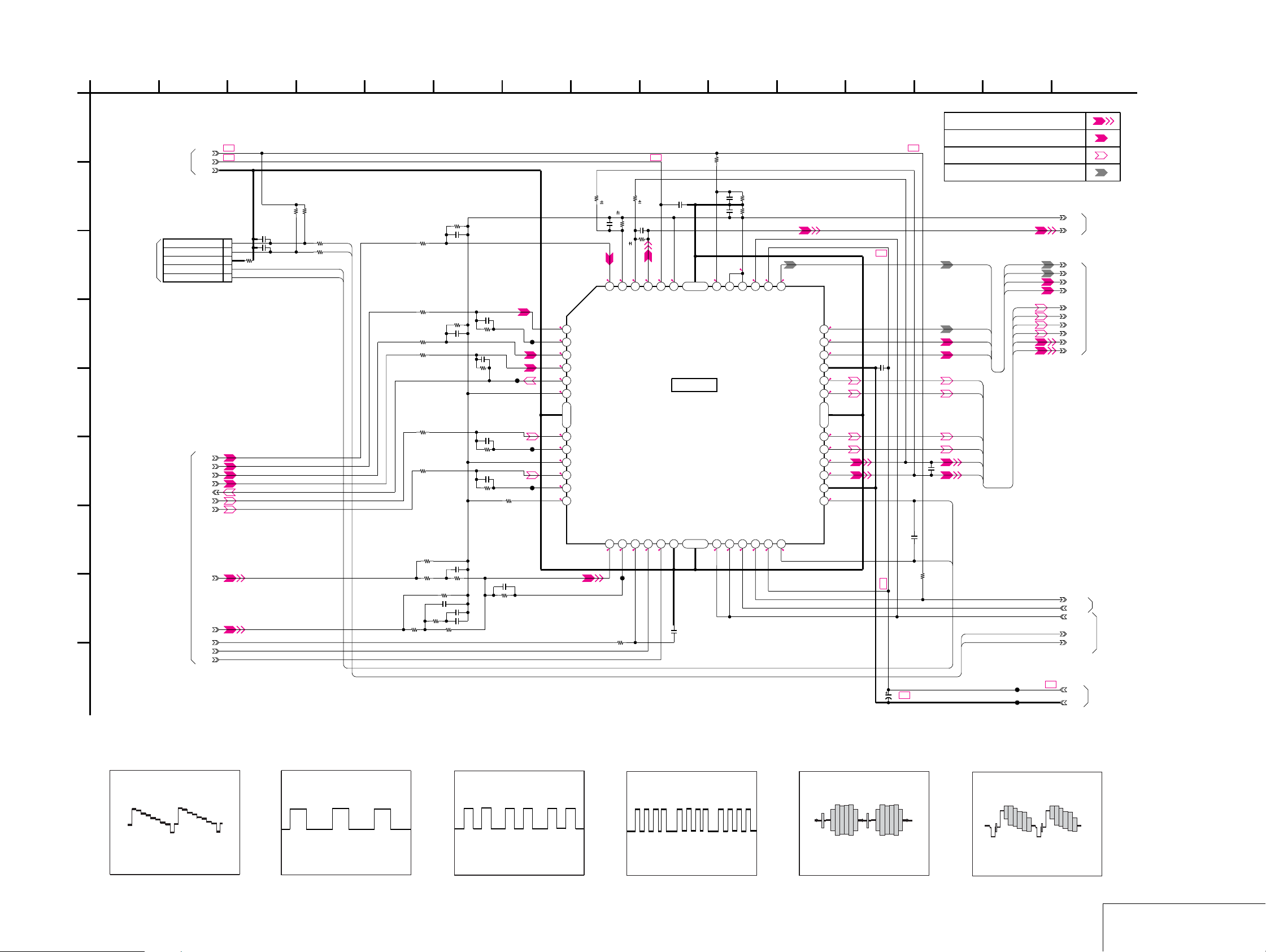
MB-105 (MOTOR DRIVE) SCHEMATIC DIAGRAM • See page 4-7 for printed wiring board.
– Ref. No.: MB-105 board; 2,000 series –
3 151 112
4
5
76
81410
12
DVP-NS705V/NS755V/NS905V/NS915V
139
MB-105 BOARD (4/11)
NO MARK:PB MODE
A
MB-105 BOARD
(6/11)
B
CN201
5P
MS-81 BOARD
CN001
C
D
E
F
G
H
I
(SEE PAGE 4-6)
FDRV+
FDRV-
TDRV+
TDRV-
MB-105 BOARD
(2/11)
MDSO
MDPO
LMCTL
05
+3.3V
SLDA
SLDB
LMM
+5V
GND
SLE
LMP
OCSW1
CKSW1
LDM+
LDM-
SIGNAL PATH
SPINDLE SERVO(SPEED AND PHASE)
B+
B+
R250
100k
0.5%
R214
R213
10k
10k
C214
0.015u
R224
270k
R223
R218
120k
R219
120k
R220
150k
R221
150k
R222
C203
R207
0.001u
C204
0.001u
100
1
2
GND
3
4
5
R216
R217
1k
OCSW1
CKSW1
1k
LDM-
LDM+
R232
33k
C216
220p
R230
33k
C215
100p
56k
56k
R225
10k
C218
1500p
R233
R226
R229
470k
470k
10k
R227
120k
R231
680k
C226
220p
R239
33k
C225
100p
R238
C219
0.1u
C220
0.1u
CL202
33k
C228
0.001u
R240
33k
C229
0.001u
R241
33k
R242
220k
R243
470k
1.7 5.2
12345
IN1-
1.7
OUT1
1.7
IN2+
1.7
IN2-
1.7
OUT2
1.7
6
IN3+
49
1.7
IN3-
1.7
OUT3
1.7
IN4+
1.7
IN4-
1.7
OUT4
1112 910 78
1.7
IN5+
C230
4700p
CL201
CL203
CL204
R253
C240
0.033u
1.7
IN1+
IN5-
13
1.7 0
R252
33k
B+
R254
100k
56k
0.5%
C246
0.033u
0.5%
R255
56k
3.4
3.4
4748
OPIN1-
OPIN1+
OUT5
CTL
15 16 17 18 19 20 21
14
1.4
CL205
C249
0.01u
0.5%
1.7
4.8
3.2
3.4
OPOUT1
FWD
SVCC
REV
3.4
52
VREF
IC202
FOCUS/TRACKING
COIL DRIVE
SPINDLE/SLED/
LOADING
MOTOR DRIVE
IC202
FAN8034
SGND
50
C250
0.01u
1.7
3.4
R259
10k
C258
0.01u
C259
0.001u
OPIN2+
MUTE12
3.4
1.7
OPIN2-
MUTE34
R261
40414243444546
OPOUT2
MUTE5
3.4
10k
R262
330
3.4
PS
TSD-M
22 23 24
3.4
10.5
10.5
PVCC1
PVCC2
5.1
373839
DO1+
DO1-
5.1
DO2+
5.2
DO2-
PGND1
5.1
DO3+
32 33 34 35 36
5.3
DO3-
31
51
5.1
DO4+
30
5.2
DO4-
29
3.7
DO5+
6.5
DO5-
27 28
PGND2
26
5.1
DO6+
25
DO6-
C270
0.01u
5.1
B+
B+
C273
0.1u
B+
B+
C271
16V47u
TRACKING SERVO DVD/CD CDV
SLED SERVO DVD/CD
FOCUS SERVO
FCS+
TRK+
TRK-
SLA+
SLA-
SLB+
SLB-
SPM-
LDM+
LDM-
SPM+
OCSW1
CKSW1
C272
0.1u
R269
10k
SVC
MB-105 BOARD
(2/11)
SPFG
FCS+
FCS-
TRK+
TRK-
SLA+
SLA-
JL247
JL248
SLB+
SLB-
SPM-
SPM+
FCS-
FCS+
FCS-
TRK+
TRK-
MB-105 BOARD
SLA+
(1/11)
SLA-
SLB+
SLB-
SPM-
SPM+
TSD
MB-105 BOARD
SPMUTE
XDRVMUTE
OCSW1
CKSW1
B+
+11V
M_GND
(2/11)
MB-105 BOARD
MB-105 BOARD
(6/11)
(5/11)
• Waveforms
1 IC403 tg
940 mVp-p (H)
2 IC403 tj : NS705V
660 mVp-p (H)
4-17 4-18
3 IC403 tl : NS705V
660 mVp-p (H)
4 IC403 ya : NS705V
660 mVp-p (H)
5 IC403 yd
810 mVp-p (H)
6 IC403 yg
1.1 Vp-p (H)
MOTOR DRIVE
MB-105 (4/11)
Page 18
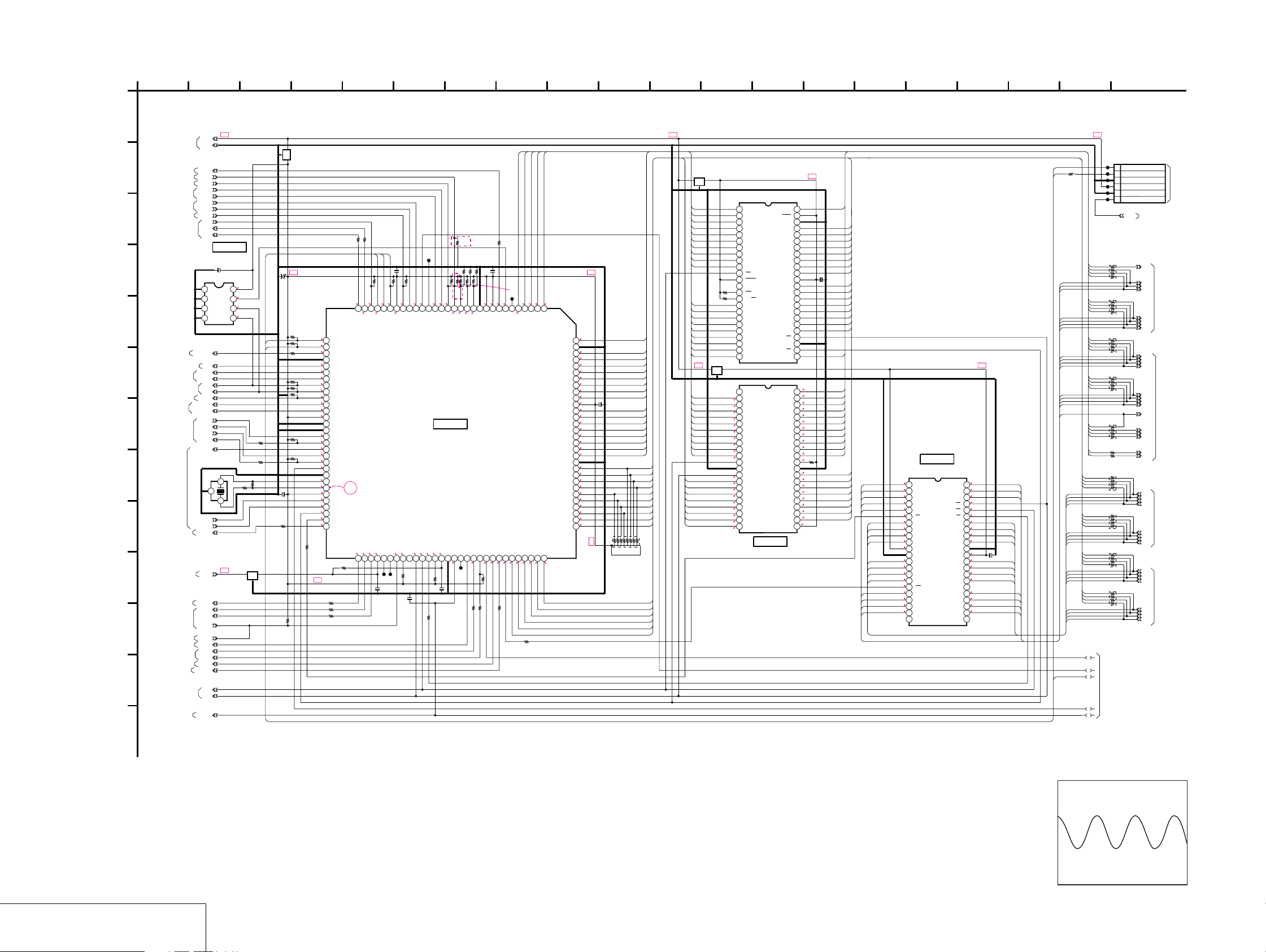
DVP-NS705V/NS755V/NS905V/NS915V
MB-105 (SYSTEM CONTROL) SCHEMATIC DIAGRAM • See page 4-7 for printed wiring board.
– Ref. No.: MB-105 board; 2,000 series –
MB-105 BOARD (5/11)
XX MARK:NO MOUNT
A
NO MARK:PB MODE
B+ B+ B+
MB-105 BOARD
(9/11,11/11)
(10/11)
MB-105 BOARD
(7/11,8/11)
MB-105 BOARD
(2/11,3/11)
(2/11,3/11)
CMDREQ
XSARDY
DVD/SACD
RGBSEL
XSARST
EUROVY
EXT/DSEL
XDRVMUTE
XAVDCS2
XAVDCS3
XARPCS
XSDPCS
MA_MUTE
XSACS
XAVDIT
XARPIT
XSDPIT
DREQ0
DACK0
DREQ1
DACK1
CKSW1
OCSW1
XWAIT
SMUTE
XDACS
XLDON
XFRRST
IP_SW
XWAIT
X38CS
XWRH
+3.3V
X38IT
XRST
WIDE
+1.8V
GND
SO1
SC1
SDA
SCL
16.5MHz
XRD
SI1
1234
X101
C102
0.01u
IC101
BR24C64F-E2
A0
A1
A2
GND
2
IC101
EEPROM
VCC
WP
SCL
SDA
1
3
B+
3.4
3.4
3.4
3.3
5678
R188
100
R189
100
R110
1k
FL106
C109
100u
4V
SI2
SO2
R113
22k
C108
0.01u
B
C
D
E
F
G
H
I
J
K
L
M
MB-105 BOARD (6/11)
MB-105 BOARD (11/11)
MB-105 BOARD (8/11)
MB-105 BOARD (3/11)
MB-105 BOARD (2/11)
MB-105 BOARD (9/11)
MB-105 BOARD (11/11)
(2/11,8/11,9/1110/11)
MB-105 BOARD (8/11)
MB-105 BOARD (11/11)
MB-105 BOARD (8/11)
MB-105 BOARD (3/11)
MB-105 BOARD (3/11)
MB-105 BOARD (6/11)
MB-105 BOARD (6/11)
MB-105 BOARD (2/11)
MB-105 BOARD (3/11)
MB-105 BOARD (11/11)
MB-105 BOARD (9/11)
MB-105 BOARD (1/11)
MB-105 BOARD (9/11)
05
MB-105 BOARD
MB-105 BOARD
MB-105 BOARD
(4/11)
MB-105 BOARD
IC106
12345678
A15
A14
A13
A12
A11
A10
A9
A8
910111213141516171819202122
A19
A20
WE
RESET
N.C.
WP/ACC
RY/BY
A18
A17
A7
A6
A5
A4
A3
A2
2324
A1
IC107
12345678
N.C.
A18
A17
A7
A6
A5
A4
A3
9101314151617181920
A2
A1
A0
1112
CE
VSS
OE
D0
D8
D1
D9
D2
D10
D3
21
D11
22
IC107
*
MR27V3202F-CNTPZ04B
MR27V3202F-7UTPZ04B
IC107
OTP
139
174
B+
XX
A16
BYTE
VSS
DQ15/A-1
DQ7
DQ14
DQ6
DQ13
DQ5
DQ12
DQ4
VCC
DQ11
DQ3
DQ10
DQ2
DQ9
DQ1
DQ8
DQ0
OE
VSS
CE
A0
*
HA21
A19
A8
A9
A10
A11
A12
A13
A14
A15
A16
BYTE
VSS
D15/A-1
D7
D14
D6
D13
D5
D12
D4
VCC
:NS705V
:EXCEPT NS705V
HAI17
HDI15
HDI7
HDI14
HDI6
41 42 43 44 45 46 47 48
27 28 29 30 31 32 33 34 35 36 37 38 39 40
25 26
41 42 43 44
37 38 39 40
33 34
23 24 25 26 27 28 29 30 31 32 35 36
HDI13
HDI5
HDI12
HDI4
C128
0.01u
HDI11
HDI3
HDI10
HDI2
HDI9
HDI1
HDI8
HDI0
HAI1
B+B+
HAI21
0.4
HAI20
3.0
HAI9
0.8
HAI10
0.9
HAI11
2.5
HAI12
0.8
HAI13
2.3
HAI14
2.3
HAI15
2.3
HAI16
2.2
HAI17
0.5
R171
3.4
10k
1.2
HDI15
0.7
0.7
0.4
0.7
0.5
0.9
0.5
3.4
HDI7
HA5
HDI14
HA4
HDI6
HA3
HDI13
HA2
HDI5
HA1
HDI12
HDI4
HD0
HD1
HD2
HD3
HD4
HD5
HD6
HD7
HA16
HA15
HA14
HA13
0.8
1.6
1.4
2.0
1.2
2.0
0.7
0.7
0.7
0.7
3.4
0.5
0.5
0.4
0.7
3.4
2.2
2.3
2.3
2.3
IC108
1M SRAM
IC108
IDT71V016SA15PH8(SCD2994)
12345678
A4
A3
A2
A1
A0
CS
I/O0
I/O1
9101314151617181920
I/O2
I/O3
VCC10k
1112
GND
I/O4
I/O5
I/O6
I/O7
WE
A15
A14
A13
A12
21
N.C.
22
0.9
A5
2.5
A6
0.9
A7
1.0
OE
41 42 43 44
2.2
UB
2.0
LB
1.2
I/O15
0.7
I/O14
37 38 39 40
0.7
I/O13
0.9
I/O12
GND
3.4
VCC
33 34
0.8
I/O11
1.1
I/O10
1.4
I/O9
1.6
I/O8
N.C.
0.8
A8
0.9
A9
2.5
A10
0.8
A11
N.C.
23 24 25 26 27 28 29 30 31 32 35 36
183 15 19 201 112
CN104
6P
SO2
SI2
R172
1k
HA1
HA2
HA3
HA4
HA5
HA6
HA7
HA8
HA9
HA10
HA11
HA12
HA13
HA14
HA15
HA16
HA6
HA7
HA8
HD15
HD14
HD13
HD12
C130
0.01u
HD11
HD10
HD9
HD8
HA9
HA10
HA11
HA12
HD0
HD1
HD2
HD3
HD4
HD5
HD6
HD7
HD8
HD9
HD10
HD11
HD12
HD13
HD14
HD15
JL123
TXD
6
JL124
RXD
5
JL125
GND
4
JL126
+3.3V
3
JL127
2
GND
JL128
1
RF MON
RFMON
RB103
100
1
2
HAI0
4
3
HAI1
6
5
HAI2
7
8
HAI3
RB104
100
1
2
HAI4
4
3
HAI5
6
5
HAI6
7
8
HAI7
RB105
100
HAI8
1
2
HAI9
4
3
HAI10
6
5
HAI11
7
8
RB106
100
1
2
HAI12
4
3
HAI13
6
5
HAI14
7
8
HAI15
RB107
100
1
2
HAI16
4
3
HAI17
6
5
HAI18
7
8
HAI19
R138
100
HAI20
HAI21
R148
100
RB108
100
HDI0
8
7
HDI1
5
6
HDI2
3
4
HDI3
2
1
RB109
100
8
7
HDI4
5
6
HDI5
3
4
HDI6
2
1
HDI7
RB110
100
HDI8
1
2
HDI9
4
3
HDI10
6
5
HDI11
7
8
RB111
100
1
2
HDI12
4
3
HDI13
6
5
HDI14
7
8
HDI15
1
4
5
MB-105 BOARD
(6/11)
3
2
MB-105 BOARD (1/11)
HA0
HA1
HA2
HA3
MB-105 BOARD
HA4
HA5
HA6
HA7
HA8
HA9
HA10
HA11
HA12
HA13
HA14
HA15
HA16
HA17
HA18
HA19
HA20
HA21
HD0
HD1
HD2
HD3
MB-105 BOARD
HD4
HD5
HD6
HD7
HD8
HD9
HD10
HD11
MB-105 BOARD
HD12
HD13
HD14
HD15
(2/11)
MB-105 BOARD
(3/11)
(3/11)
(2/11,3/11)
DIAG
(JIG)
5
FL102
100R198
R197
100
C115
SI0
SC0
SO0
0.01u
JL108
10k
3300
3300
R124
R123
R126
1.5
3.4
3.4
3.5
3.4
3.4
SI1
SC1
SO1
3.4
R112
3.3
100k
SI2
3132
R107
3.3
100k
0/SACD3.3
R102
R176
100
3334353637383940414243444546
100
3.4
0
R129
3.3
1k
R115
3.1
1k
R140
3.3
10k
3.4
3.4
3.4
3.4
R117
3.4
10k
4748495051525354555657585960
3.4
3.4
R118
3.4
10k
3.1
1.7
1.6
3.4
0 1.1
3.4
1.6-2.0
2.0
3.4
R193
100
B+
R111
1k
SO2
DVD/SACD
VSS
XRST
WIDE
RGBSEL
SDA
SCL
XSARST
EUROVY
EXT/DSEL
MD0
MD1
MD2
DREQ0
DACK0
XDRVMUTE
DREQ1
DACK1
XIFCS
VSS
X1
X2
VCC
CKSW1/TSW1
OCSW1/TSW2
CS0X
CS1X
CS2X
R191
R177
100
R178
100
R179
100
0
P3.3/N0/C0
1
3.4
1.7
3.4
3.4
CS5X
CS4X
CS3X
61 62 63 64 65 66 67 68
C113
0.01u
0
2324252627282930
SI0
SC0
SO0
VCC
3.4
INT4
INT5
INT6
INT7
2.2
1.0
3.4
3.4
XRD
BRQ
BGRNTX
XWAIT
CS7X
CS6X
VCCI
JL106
JL129
XWRH
69 70 71 72 73 74 75 76 77 78 79 80 81 82
R125
10k
C118
0.01u
R183
INT3
MB91307RPFV-G-BND-E1
3.4
2.0
XWRL
10k
R133
100
76 16
*R164
12k
:NS705V/NS905V:
AEP,UK
:NS905V:RUS
4.7k
:NS905V:EA,ME
820
:NS905V:AUS,NZ
470
:NS915V:LA
22k
2.2k
:NS915V:EXCEPT LA
NS755V/
R173
NS915V
4.7k
*
*
*
R166
R164
R169
10k
3300
3300
3300
R156
R153
3300
R174
3.4
3.4
R139
R150
141516171819202122
0
AN3
AN2
AN1
AN0
3.4
3.4
2.0
INT1
INT2
INT0
AVSS
IC104
SYSTEM CONTROL
IC104
XDACS
SMUTE
CPUCK
1.7
VCCI
NMIX
C122
0.01u
X38CS
XFRRST
VSS
3.4
3.4
CL102
R159
100
100
R196
R195
81410
HAI20
HAI21
HAI19
HAI18
HAI17
R160
100
C120
0.01u
NS705V/
NS905V
3.4
3.4
10k
AVRH
48/44.1K
0
3.0
3.4
3.4
JL109
910111213
WP
0.4
HA21
HA22
AVCC
XSACS
XSRWE
MA_MUTE
XLDON
HD0
HD1
83 84 85 86 87 88 89 90
0.7
0.700.7
3.4 3.4
3.4
0
R108
R187
100
0.7
0.2
0.53.4
12345678
HA18
HA20
HA17
HA19
HD2
HD3
HD5
HD4
0.5
0.7
0.5
*R166
:NS705V
3.3k
:NS755V/NS915V
1.3k
:NS905V
820
*R169
:NS705V/NS905V:AEP,UK,EA,ME
47k
:NS905V:RUS
6.8k
:NS905V:AUS,NE/NS915V:LA
12k
:NS915V:EXCEPT LA
22k
HA16
VSS
119120
HA15
HA14
HA13
HA12
HA11
HA10
HA9
HA8
VCC
HA7
HA6
HA5
HA4
HA3
105106 107 108109 110 111112 113 114115 116 117118
HA2
HA1
HA0
VSS
HD15
HD14
HD13
HD12
HD11
HD10
HD9
HD8
HD7
HD6
91 92 93 94 95 96 97 98 99 100101 102 103104
B+B+
C121
0.01u
2345789
1
HAI16
HAI15
HAI14
HAI13
HAI12
HAI11
HAI10
HAI9
HAI8
HAI7
HAI6
HAI5
HAI4
HAI3
HAI2
HAI1
HAI0
HDI15
HDI14
HDI13
HDI12
HDI11
HDI10
HDI9
HDI8
HDI7
HDI6
10
6
RB102
HDI5
HDI4
HDI3
HDI2
HDI1
HDI0
2.2
2.3
2.3
2.3
0.8
2.5
0.9
0.8
0.9
3.4
2.5
0.9
0.8
1.6
1.4
2.0
1.2
0.2
1.2
0.7
0.7
0.9
0.8
1.4
1.6
0.7
0.4
B+
12
FL105
HAI16
HAI15
HAI14
HAI13
HAI12
HAI11
HAI10
HAI9
HAI20
HAI21
R152
10k
R165
10k
HAI19
HAI18
HAI8
HAI7
HAI6
HAI5
HAI4
HAI3
HAI2
FL109
HAI19
HAI18
0.7
HAI8
0.2
HAI7
0.9
HAI6
2.5
HAI5
0.9
HAI4
0.8
HAI3
1.6
HAI2
1.4
HAI1
1.2
1.6-2.0
HDI0
HDI8
HDI1
HDI9
HDI2
HDI10
HDI3
HDI11
1.0
0.7
1.6
0.7
1.4
0.7
1.1
0.7
0.8
• Wavef orm
1 IC104 tf
SYSTEM CONTROL
MB-105 (5/11)
1.7 Vp-p (16.5 MHz)
4-19 4-20
Page 19

MB-105 (CLOCK GENERATOR) SCHEMATIC DIAGRAM • See page 4-7 for printed wiring board.
– Ref. No.: MB-105 board; 2,000 series –
31 112
4
5
MB-105 BOARD (6/11)
A
B
C
D
NO MARK:PB MODE
NS905V/NS915V
B+
IC102
TK11133CSCL-G
VOUT
C103
100u
4V
VIN
3.4
3.3
45
C106
12p
C107
22p
3.4
123
CONT
GND
1.2
C129
0.01u
R104
FL101
2.2
B+
NS705V/
NS755V
C104
0.01u
C105
0.01u
IC102
+3.3V REG
X102
27MHz
CL101
JL101
R109
10
R106
10
IC103
1
3.4
1.7
1.7 1.6
3.4
*
1.5
R114
1500
IC103
12345678
VDD
VSS
27-1OUT
27-2OUT
VDD
VSS
XTI
XTO 512-2OUT
2
PLL
CY24233ZCT
33-1OUT
33-2OUT
512-1OUT
FSEL
VDD
VSS
DVP-NS705V/NS755V/NS905V/NS915V
• Waveforms
76
810
9
FB101
0uH
FB103
0uH
27MAVD
27M38
MB-105 BOARD (3/11)
MB-105 BOARD (9/11)
1 IC103 3, 4
3.5 Vp-p (27 MHz)
2 IC103 8
4
C111
0.01u
R119
R120
R121
R122
22
22
R146
10
10
22
R144
10
33MARP
33MSA
512FS38
512FSAVD
512FS8CH
MB-105 BOARD (2/11)
MB-105 BOARD (11/11)
MB-105 BOARD (9/11)
MB-105 BOARD (3/11)
MB-105 BOARD (10/11)
1.5 Vp-p (27 MHz)
3 IC103 9, 0
N.C
1.7
3.4
JL102
JL103
3.4
1.6
1.6
910111213141516
JL104
JL105
3
1
5
SC0
FL108
SO0
SI0
FB112
FB111
E
F
G
05
MB-103 BOARD
MB-105 BOARD
(1/11,4/11,5/11,
7/11,9/11,11/11)
MB-105 BOARD
(1/11,3/11,4/11,11/11)
MB-105 BOARD
(2/11,5/11,9/11)
MB-105 BOARD (4/11)
MB-105 BOARD (4/11)
MB-105 BOARD
(2/11,4/11,
7/11,9/11,11/11)
(5/11)
+3.3V
+1.8V
+11V
M_GND
GND
3
4
2
B+
B+
+5V
B+
B+
B+
FB110
C124
100u
6.3V
L001
10uH
FB104
FL103
FB105
FB106
C125
47u
FL104
FB107
FL107
FB108
C126
4V
47u
16V
FB109
C127
220u
4V
R154
100
R167
100
R155
100
JL110
JL111
JL112
JL113
JL114
JL115
JL130
B+
JL131
B+
B+
JL132
B+
JL133
B+B+
JL134
JL116
JL117
JL118
JL119
JL120
JL121
JL122
15PCN101
GND
15
SC0
14
SO0
13
SI0
12
XIFCS
11
IFBSY
10
XFRRST
9
3.3V_MNT
8
+3.3V
7
GND
6
+5V
5
GND
4
+1.8V
3
M_GND
2
+11V
1
IF-94 BOARD
CN403
(SEE PAGE 4-50)
DVD: 3.3 Vp-p (24.57 MHz)
CD : 3.3 Vp-p (22.58 MHz)
4 IC103 qd, qg
3.2 Vp-p (33.87 MHz)
4-21 4-22
CLOCK GENERATOR
MB-105 (6/11)
Page 20

DVP-NS705V/NS755V/NS905V/NS915V
MB-105 (I/P CONVERTER) SCHEMATIC DIAGRAM • See page 4-7 for printed wiring board.
– Ref. No.: MB-105 board; 2,000 series –
MB-105 BOARD (7/11)
NO MARK:PB MODE
A
27MCLK
XRST
DVD0
DVD1
DVD2
DVD3
DVD4
DVD5
DVD6
DVD7
+3.3V
SDA
SCL
B+
GND
MB-105 BOARD
(5/11)
B
C
D
MB-105 BOARD
(3/11)
E
F
G
H
I
J
MB-105 BOARD
(6/11)
05
EXCEPT NS705V
R601
0
R603
100
C601
0.1u
3 151 112
NS905V
0
R6060R607
R605
R604
0
PO7
PO6
PO5
PO4
PO3
PO2
PO1
PO0
NS755V/NS915V
B+
IC601
TK11125CSCL-G
3.4
123
CONT
GND
1.3 2.5
NOISE
C602
0.01u
0
+2.5V REG
IC601
C603
0.001u
R6080R6090R610
VIN
VOUT
4
NS755V/NS915V
R612
100
R613
100
C604
47u
4V
C605
0.01u
C606
0.1u
0
0
R611
45
C607
47u
4V
C608
0.1u
C609
47u
4V
CL609
3.3
3.4
SDA
OVDD
NS755V/NS915V
76
DQ0
DQ15
R619
22
22
R621
R620
CL611
CL613
SLV
CSB
2.6
1.5
MD0
MD15
YO3
YO2
YO4
OVSS
0.2
1.3
1.300.3
Y4Y3Y2Y1Y0
81410
DQ1
DQ14
R622
22
22
C614
0.1u
3.4
CL615
CL617
129130131132133134135136137138139140141142
1.3
1.6
MD1
MD14
IC602
I/P CONVERTER
NS755V/NS915V
YO0
YO1
53 54 55 56 57 58 59 60 61 62 63 64 65 66 67
3.4
CVSS
OVDD
IC602
CXD9698R
CVSS
OVDD
R623
OVSS
OVSS
0
DQ13
22
CL619
1.3
CBCR0
MD13
CO0
R624
DQ2
22
CL621
0.7
0.2
CBCR1
DQ3
MD12
CO2
CL625
1.7
1.0
CBCR3
MD3
CO3
R626
CBCR4
DQ11
22
22
R627
3.4
CL628
1.2
OVSS
MD11
OVDD
OVSS
OVDD
CO4
0.7
3.4
C615
0.01u
NS755V/
NS915V
DQ12
22
R625
CL623
1.4
MD2
CO1
0.5
CBCR2
R628
DQ4
22
CL629
1.8
0.7
CBCR5
DQ5
DQ10
22
R629
CL631
CL633
1.0
1.9
MD4
MD10
CO6
CO5
1.3
1.0
R630
22
MD5
OVSS
CO8
CO7
1.0
DQ6
DQ9
22
22
R632
R631
CL637
CL638
1.5
1.3
3.4
114115116117118119120121122123124125126127128
MD9
OVDD
FILM
CO9
68 69 70 71 72
2.4
JL603
R633
MD6
W31F
DQ8
22
CL639
0.8
MD8
OVSS
DQ7
CL640
1.3
2.5
MD7
CVDD
R634
109110111112113
22
C617
0.1u
B+
2.5
CVDD
B+
3.4
OVDD
OVSS
TEST4
TEST3
CL641
3.3
WE
1.8
MCLK
1
IVDD
3.4
OVSS
OVDD
MA11
MA10
OVDD
CVSS
OVSS
OVSS
OVDD
OVSS
OVDD
MD16
MD17
MD18
MD19
OVDD
CL642
3.1
CAS
CL643
3.4
CKE
101 102103 104 105106 107 108
CL644
0.3
RAS
1.7
CL645
0.3
MA9
1.7
CL646
0.3
MA8
CL647
1.7
A9
A11
A8
A10
3.4
IVSS
CL648
1.6
MA7
CL649
0.2
MA0
CL650
1.6
MA6
87 88 89 90 91 92 93 94 95 96 97 98 99 100
CL651
0.2
MA1
3.4
CL652
1.5
MA5
CL653
0.3
MA2
CL654
1.6
MA4
CL655
2.0
MA3
C618
A7
A0
A6
A1
0.1u
A5
A2
A4
A3
3.4
3.4
73 74 75 76 77 78 79 80 81 82 83 84 85 86
B+B+
B+
C616
0.01u
NS755V/NS915V
CBCR6
CBCR7
CBCR8
CBCR9
5
C611
47u
C612
4V
0.01u
B+
B+
3.4
3.4
12345678
OVDD
CL601
1.5
CLKI
PLL_TEST
3.4
PLL_EN
PI0
PI1
0.9
PI2
1.2
PI3
0.4
910111213141516171819202122
PI4
1.0
PI5
1.7
PI6
1.1
PI7
1.1
PI8
1.8
PI9
NHSI
NVSI
OVSS
IVSS
CVSS
JL601
NVSO
JL602
NHSO
1.8
PO9
1.1
PO8
23
1.1
PO7
242526
1.7
PO6
3.4
OVDD
OVSS
27
1.0
PO5
28
0.4
PO4
29
1.2
PO3
30313233
0.9
PO2
CL602
PO1
CL603
PO0
TSET0
343536
OVSS
3.4
OVDD
2.5
B+
NS755V/NS915V
R614
0
NS755V/NS915VNS755V/NS915V
C610
47u
4V
C613
0.01u
R615
75
R617
20k
2.5
0.9
143144
0.9
2.5
IVDD
VCOIN
CPOUT
PLL_GND
CLKO
TEST2
TEST1
CVDD
39 40 41 42 43 44 45 46 47 48 49 50 51 52
37 38
1.9
1.3
R618
0
Y9Y8Y7Y6Y5
R616
0
NS905V
PLL_VDD
YO9
1.3
CVDD
YO8
3.2
3.4
SCL
SRN
OVSS
YO7
YO6
YO5
1.3
1.3
1.3
12
NS755V/NS915V
B+
R640
A11
A10
A0
A1
A2
A3
2.2
C619
47u
4V
139
NS755V/NS915V
IC603
16M SDRAM
IC603
B+
DQ0
DQ1
DQ2 DQ13
DQ3
DQ4
DQ5
DQ6
DQ7
C621
0.1u
3.4
1.5
1.6
0.7
1.7
3.4
1.8
1.9
1.5
1.3
3.4
3.3
3.1
3.3
1.7
1.7
0.2
0.2
0.3
2.0
3.4
C620
0.1u
1
2
3
4
5
HY57V161610DTC-7TR
12345678
VCC
DQ0
DQ1
VSSQ
DQ2
DQ3
VCCQ
DQ4
910111213141516171819202122
DQ5
VSSQ
DQ6
DQ7
VCCQ
DQML
WE
CAS
RAS
CS
A11(BA)
A10/AP
A0
A1
A2
232425
A3
VCC
SIGNAL PATH
PB
MB-105 BOARD
(8/11)
VSS
50
2.6
DQ15
1.3
DQ14
48 49
VSSQ
47
1.3
DQ13
1.4
DQ12
3.4
VCCQ
1.2
DQ11
43 44 45 46
1.0
DQ10
VSSQ
1.3
DQ9
0.8
DQ8
3.4
VCCQ
38 39 40 41 42
N.C.
DQMU
36 37
1.8
CLK
3.4
CKE
34 35
N.C.
33
0.3
A9
0.3
A8
1.6
A7
1.6
A6
29 30 31 32
1.5
A5
1.6
A4
VSS
26 27 28
VIDEO SIGNAL
Y
• Wavef orm
1 IC602 <z/c>
DQ15
DQ14
DQ12
C622
0.1u
DQ11
DQ10
C623
0.1u
B+
Y/CHROMACHROMA
DQ9
DQ8
A9
A8
A7
A6
A5
A4
I/P CONVERTER
MB-105 (7/11)
1.6 Vp-p (66 MHz)
4-23 4-24
Page 21

MB-105 (VIDEO ENCODER, AUDIO D/A CONVERTER) SCHEMATIC DIAGRAM • See page 4-7 for printed wiring board.
– Ref. No.: MB-105 board; 2,000 series –
DVP-NS705V/NS755V/NS905V/NS915V
MB-105 BOARD (8/11)
NO MARK:PB MODE
A
B
C
NS905V
R001
0
R002
0
R003
0
R004
0
D
E
F
G
MB-105 BOARD
H
I
(7/11)
MB-105 BOARD
(5/11)
R005
0
R006
0
R007
0
R008
0
R009
0
R010
0
R011
0
R012
0
R013
0
1
2
3
4
5
SCL
SDA
3 151 112
5
76 16
81410
12
139
174
SIGNAL PATH
VIDEO SIGNAL
CHROMA
Y
Y/CHROMA
PB
PO7
PO6
PO5
PO4
PO3
PO2
PO1
PO0
B+
EXCEPT NS705V
C626
47u
4V
Y0
Y1
Y2
Y3
Y4
Y5
Y6
Y7
Y8
Y9
CBCR0
CBCR1
CBCR2
C624
0.01u
0.22u
C625
3.4 3.3
12345678910111213141516
VDD_IO
0
P_Y[0]
0.3
P_Y[1]
1.3
P_Y[2]/SCANEN
1.3
P_Y[3]/TESTMODE
0.1
P_Y[4]
1.3
P_Y[5]
2.0
P_Y[6]
1.3
P_Y[7]
2.5
VDD
GND
1.3
P_Y[8]
1.3
P_Y[9]
0
P_C[0]
0.2
P_C[1]
0.5
P_C[2]
B+
B+
C627
EXCEPT NS705V
0.22u
EXCEPT NS705V
B+
SCL
SDA
JL604
1.8
1.9
1.1
1.1
1.7
1.0
2.5
0.4
S[6]
S[9]
S[8]
S[5]
S[7]
GND_IO
CLKIN_2
EXCEPT NS705V
P_C[3]
SPI_12C_EN
SDA
ALSB
P_C[4]
17 18 19 20 21 22 23 24 25 26 27 28 29 30 31 32
NS905V
1.0
R014
0
CBCR3
0.7
CBCR4
R015
3.0
3.3
3.3
C628
470p
R659
100
0
SDA
IC604
VIDEO ENCODER
ADV7300AKST
SCLK
000
3.0
470p
C629
R661
100
SCL
IC604
P_HSYNC
R6630R664
R016
GND
P_VSYNC
0
R665
0
VDD
P_BLANK
0.7
0
CBCR5
R0170R018
S[4]P_C[5]
1.2
1.3
CBCR6
S[3]
P_C[6]
0
0.9
1.0
CBCR7
R019
S[2]
P_C[7]
0
S[1]
7
P_C[8]
1.0
CBCR8
S[0]
3
6
P_C[9]
2.4
CBCR9
R020
JL607
JL605
49505152535455565758596061626364
S_HSYNC
2
5
1.8
2.5
RTC/SCRESET/TR
JL606
0
S_VSYNC
4
CLKIN
AUDIO
SIGNAL
S_BLANK
RSET1
COMP1
DAC A
DAC B
DAC C
DAC D
DAC E
COMP2
RSET2
EXT_LF
RESETB
VREF
DAC F
1
COMPOUT
COUT
Y_BUFF_CXD
YOUT
R700
JL616
JL619
JL629
JL640
Y/G
CR/B
CB/R
JL610
JL611
JL612
JL613
JL614
JL615
JL617
JL618
JL620
JL621
JL622
JL623
JL624
JL625
JL626
JL627
JL628
JL630
0
JL631
JL632
JL633
B+
B+
B-
JL634
JL635
JL636
JL637
JL638
JL639
JL641
JL642
C634
0.22u
IP_SW
RGBSEL
MB-105 BOARD
(5/11)
R021
10k
JL608
1.3
JL609
C631
0.1u
1.5
0.5
0.5
0.6
2.5
VAA
41 42 43 44 45 46 47 48
GND
0.5
0.6
38 39 40
0.6
1.5
1.2
1.3
3.1
33 34 35 36 37
B+
R674
C633
680
820p
C630
3900p
C632
0.1u
EXCEPT NS705V
C636
0.22u
R676
C637
0.001u
B+
C635
100u
4V
C638
0.22u
R675
1k
RV601
1k
VIDEO
LEVEL ADJ
1k
RV602
1k
COMP-Y
R677
100
2SA1162-YG-TE85L
NS905V
3.4
2.5
R678
300
0.5%
R026
1k
Q601
IC605
+2.5V REG
IC605
TK11125CSCL-G
VIN
45
NOISEVOUT
R679
300
0.5%
EXCEPT NS705V
CONT
GND
R680
300
0.5%
123
R681
300
0.5%
R682
EXCEPT NS705V
3.4
1.3
C639
0.01u
R683
300
0.5%
300
0.5%
B+
+3.3V
GND
XRST
EUROVY
EXT/DSEL
WIDE
MB-105 BOARD
MB-105 BOARD
(6/11)
(5/11)
NS905V
NS705V
NS705V
R602
EXCEPT NS705V
R697
R687
R686 0uH
R028
R029
R689
R688
R691
0
B+
NS705V
R694
0
R692
0
R696
0
0
0
0
0
0
0uH
0
R690
NS705V
EXCEPT NS705V
EXCEPT NS705V
NS705V
EXCEPT NS705V
0
R693
0
R695
0
B+
B-
NS705V/
NS905V
B-B+B+
L_MUTE
R_MUTE
ALT-
MB-105 BOARD
(10/11)
P_GND
AUDIO+5V
ALT+
ART+
B+
ART-
1
2
3
4
5
6
7
8
9
10
11
12
13
14
15
16
17
18
19
20
21
1
2
3
4
5
6
7
8
9
10
11
12
13
14
15
16
17
18
19
20
21
22
23
24
25
26
27
28
29
MB-105 BOARD
21PCN601
RGBSEL
ERAUDIOL
EUROVY
P_GND_AUDIO
ERAUDIOR
+11V
DISCEXT
+5V
WIDE
VMUTE
B
D_GND_VIDEO
R
D_GND_VIDEO
G
D_GND_VIDEO
Y
D_GND_VIDEO
C
-5V
V
29PCN602
Cr/B
WIDE
Cb/R
D_GND_VIDEO
Y/G
D_GND_VIDEO
Y
D_GND_VIDEO
C
D_GND_VIDEO
V
RGBSEL
DSEL
IP_SW
VIDEO+5V
VIDEO+11V
VIDEO-5V
EURO_R
VMUTE
EURO_L
LMUTE
RMUTE
ALT-
ALT+
P_GND
AUDIO+5V
P_GND
ART+
ART-
(3/11)
NS705V/NS905V:AEP.UK,RUS
ER-19 BOARD
CN901
(SEE PAGE 4-53)
AV-64 BOARD (2/3)
CN301
(SEE PAGE 4-41)
05
• Wavef orms
1 IC604 es
3.9 Vp-p (27 MHz)
2 IC604 rs
850 mVp-p (H)
3 IC604 rd
950 mVp-p (H)
4 IC604 rf
1.1 Vp-p (H)
5 IC604 ej
650 mVp-p (H)
6 IC604 ek
650 mVp-p (H)
7 IC604 el
950 mVp-p (H)
4-26
VIDEO ENCODER, AUDIO D/A CONVERTER
4-25
MB-105 (8/11)
Page 22

DVP-NS705V/NS755V/NS905V/NS915V
MB-105 (AUDIO DSP) SCHEMATIC DIAGRAM • See page 4-7 for printed wiring board.
– Ref. No.: MB-105 board; 2,000 series –
3 151 112
4
5
MB-105 BOARD (9/11)
NO MARK:DVD/CD PLAY
A
B
C
D
E
F
G
H
I
J
K
L
05
D:DVD PLAY
C:CD PLAY
P:PAL DVD PLAY
N:NTSC DVD PLAY
MB-105 BOARD (3/11)
MB-105 BOARD (11/11)
MB-105 BOARD (3/11)
MB-105 BOARD (3/11)
MB-105 BOARD (6/11)
MB-105 BOARD (2/11)
MB-105 BOARD (5/11)
TDO38
TDOSA
XFRRST
38ACK1
38ACK0
CDDOUT
MA_MUTE
+1.8V
+3.3V
GND
SIGNAL PATH
AUDIO
SIGNAL
PB
B+
B+
FL501
B+
B+ B+
GND29
GND30
DATAIO4
DATAIO5
DATAIO6
133134135136137138139140141142143144145146147148149150151152153154155156157158159160161162163164165166167168169170171172173174175176
JL501
DATAIO7
3.3
IOVDD16
GND31
1.8
CVD11
3.3
XSCAN
TDO
TDI
TMS
TRST
3.3
TCK
3.3
IOVDD17
GND32
1.8
CVD12
1.6
DSP1BCKI
1
GND33
1.6
DSP1ACKI
GND34
DSP1NMII
GND35
DSP1REQI0
3.3
IOVDD18
GND36
1.8
CVD13
DSP1EMPI
0
DSP1CH56I
0
DSP1CH34I
DSP1CH12I
1.6
DSP1LRCKI
3.3
IOVDD19
GND37
1.8
CVD14
DSP1CH78O
DSP1CH56O
DSP1CH34O
DSP1CH12O
1.8
IOVDD20
GND38
DSP1DO
DSP1EMP0
DSP1BCK0
DSP1LRCK0
3.3
IOVDD21
GND39
2
CVD00
DSP1ACKO2
DSP1ACKO1
DSP1ACKO0
1234567891011121314151617181920212223242526272829303132333435363738394041424344
1.6
00
JL502
C508
0.01u
C501
0.01u
R501
0
R507
0
C504
0.01u
C502
0.01u
D0/C0.8
C505
0.01u
C503
0.01u
FL502
B+
B+
3.3 1.81.8
GND28
DATAIO2
DATAIO3
IOVDD15
GND00
RESET_NI
GND01
DSP1DIACKI(NC)
3.3
1.6
C509
0.01u
R520
100
C510
0.01u
3.3
3.3
CVD10
GND27
DATAIO0
DATAIO1
IOVDD14
2
GND02
DSP1DII
IOVDD0
GND03
CVD01
1.6
3.3
3.3
1.8
R525
10k
C511
0.01u
76
3.3
SH_SOO
SH_CSNI
PLL27_CLNI
PLL_ENNI
3.3
R524
0
R527
P3.3/N0/C0
3.3
10k
3.3
SH_SII
GND25
GND26
SH_CLKI
PLL_CLNI(SCAN_SHIFT)
GND04
PLL_CLKO
IOVDD1
3.3
3.3
JL503
B+
B+
C513
0.01u
C512
0.01u
81410
C514
0.01u
C516
0.01u
1.8
3.3
3.3
JL504
CVD09
STCCLKI
IC501
AUDIO DSP
CXD1938AR
PLL_AVDD
GND05
GND24
IOVDD13
IC501
3
SCLKI
GND06
1.603.3
R530
10k
DMA_ACKNO
CMD_REQNO
PLL_TST1I
PLL_TST2I
10k
R531
R532
CMD_ACKNO
PLL_TST3I
3.3
3.3
10k
R547
10k
GND23
SRM_WRNO
PLL_TST4I
PLL_AVSS
3.3
IOVDD12
IOVDD2
ADDRO0
SRM_RDNO
GND07
CVD02
1.8
C515
0.01u
ADDRO1
2
DSP2DII
1.6
CVD08
ADDRO2
GND08
DSP2DIACKI(NC)
1.6
GND22
GND09
3.33.30
IOVDD11
DSP2ACKO0
JL505
C517
0.01u
ADDRO3
DSP2ACKO1
JL506
ADDRO4
DSP2ACKO2
JL507
C518
0.01u
3.3
ADDRO5
IOVDD3
ADDRO6
4
GND10
1.8
GND21
CVD03
3.3
IOVDD10
2
5
DSP2LRCKO
1.6
1.6
8990919293949596979899100101102103104105106107108109110111112113114115116117118119120121122123124125126127128129130131132
ADDRO7
1
DSP2BCKO
DSP2EMPO ADDRO8
JL508
ADDRO9
ADDRO10
CVD07
GND20
IOVDD9
ADDRO11
ADDRO12
ADDRO13
ADDRO14
GND19
IOVDD8
ADDRO15
ADDRO16
ADDRO17
ADDRO18
CVD06
GND18
IOVDD7
GND17
DSP2BCKI
GND16
DSP2ACKI
GND15
DSP2NMII
GND14
DSP2REQIO
CVD05
GND13
IOVDD6
DSP2EMPI
DSP2CH56I
DSP2CH34I
DSP2CH12I
DSP2LRCKI
IOVDD5
GND12
CVD04
DSP2CH78O
DSP2CH56O
DSP2CH34O
DSP2CH12O
GND11
IOVDD4
DSP2DO
B+
74 75 76 77 78 79 80 81 82 83 84 85 86 87 88
73
45 46 47 48 49 50 51 52 53 54 55 56 57 58 59 60 61 62 63 64 65 66 67 68 69 70 71 72
1.8
3.3
3.3
1.8
3.3
1.6
1.6
1.8
3.3
0
0
D0/C1.2
1.6
3.3
1.8
D0/C0.8
0
0
D0/C1.2
3.3
0
• Wavef orms
12
B+
C521
0.01u
C519
0.01u
C522
0.01u
C523
0.01u
C520
0.01u
B+
139
1 IC501 yl, <zvm
LRCK
ACH12
ACH34
MB-105 BOARD (3/11)
ACH56
BCK
MB-105 BOARD (6/11)
512FS38
SI1
2
6
5
4
3
1
7
8
X38CS
SO1
SC1
CMDREQ
X38IT
SO1
SC1
27M38
XRST
MB-105 BOARD (5/11)
MB-105 BOARD (10/11)
MB-105 BOARD (10/11)
MB-105 BOARD (6/11)
MB-105 BOARD (5/11)
4.1 Vp-p (3.1 MHz)
2 IC501 8, ef, yj, <zv.
DVD: 3.3 Vp-p (24.57 MHz)
CD: 3.3 Vp-p (22.58 MHz)
3 IC501 ws
3.5 Vp-p (27 MHz)
4 IC501 rs
DVD: 4.3 Vp-p (48.1 kHz)
CD : 4.3 Vp-p (44.1 kHz)
5 IC501 rd
DVD: 4.4 Vp-p (3.1 MHz)
CD : 4.4 Vp-p (2.8 MHz)
FB501
FB502
0uH
0uH
AUDIO DSP
MB-105 (9/11)
4-27 4-28
Page 23

DVP-NS705V/NS755V/NS905V/NS915V
MB-105 (2ch/6ch DAC) SCHEMATIC DIAGRAM • See page 4-7 for printed wiring board.
– Ref. No.: MB-105 board; 2,000 series –
MB-105 BOARD (10/11)
A
NO MARK:DVD/CD PLAY
D:DVD PLAY
C:CD PLAY
P:PAL DVD PLAY
N:NTSC DVD PLAY
B
MB-105 BOARD (5/11)
MB-105 BOARD (9/11)
XRST
SC1
SO1
C
31 112
1
2
3
4
5
2
R540
C537
0.001u
3
1
D0.4/C1.2
100
P3.3/N0/C0
4
D
C525
C527
47u
0.47u
6.3V
MB-105 BOARD (9/11)
E
R541
10
4
F
IC503
D0/
D0/C5
C5
BUS BUFFER
IC503
TC7W32FU(TE12R)
1234
D0/C5
G
DZFL
DZFL1
D0/C5
C524
0.01u
H
B+
5
6
7
8
EXCEPT
NS705V/NS905V
:AEP,UK,RUS
B+
5
D0/C5
R554
DZFR1
0
5678
DZFR
R556
D0/
0
C5
NS705V/NS905V:AEP,UK,RUS
DZF23
D501
DAP202K-T-146
D502
DAP202K-T-146
D503
DAP202K-T-146
L_MUTE
R_MUTE
MUTE_23
SIGNAL PATH
I
05
AUDIO
SIGNAL
PB
0
0
1.6
JL509
3.3
3.3
1.6
B+ B+
1.6
0.4
1.6
3.3
3.3
3.3
1.6
1.6
C529
0.001u
DVSS
13
D0/C5
SDTI1
14
SDTI2
15161718192021222324
SDTI3
LRCK
SMUTE
CCLK
P3.3/N0/C0
CDTI
CSN
0/SACD3.3
DSDM
DCLK
NC
76
12345678
910
MCLK
BICK/DCLK
SDTI/DSDL
LRCK/DSDR
PDN
CSN
CCLK
CDTI
DCLK
IC504
2ch DAC
CXD9674TN-E2IC504
1.6
NC
DVDD
3
DSDR1
DSDL1
25 26 27 28
810
D0/C5
DZFL
D0/C5
DZFR
5
VDD
VSS
2.3
2.3
2.3
2.3
13 14 15 16 17 18 19 20
0/SACD3.3
1.3
DSDRDSDL
11 12
DZF23
B+
JL510
3.3
0555
PDN
CAD0
CAD1
DZF23
IC502
6ch DAC
IC502
CXD9675R-L
DIF1
DSDL3
DSDR3
DIF0
29 30 31 32 33 34 35 36
R542
100
MCLK
DSDL2
AOUTL+
AOUTL-
AOUTR+
AOUTR-
DSDM
1.6
9101112
BICK
DSDR2
51.6
NS905V/NS915V
DZFL1
DZFR1
JL513
DZFR1
D0.7/C5
D0.7/C5
DIF2
55
DZFL1
VREFH
LOUT1+
2.3
LOUT1+
AVDD
LOUT1-
2.3
12345678
LOUT1-
AVSS
JL511
JL512
C526
0.1u
C532
0.47u
ROUT1+
ROUT1-
LOUT2+
ROUT2+
ROUT2-
LOUT3+
ROUT3+
ROUT3-
B+
LOUT2-
LOUT3-
AVSS
AVSS
C533
0.1u
DZFL
DZFR
C530
0.1u
C538
0.47u
2.3
2.3
47 48
2.3
2.3
2.3
2.3
2.3
2.3
2.3
2.3
37 38 39 40 41 42 43 44 45 46
C531
0.1u
NS905V/NS915V
ALT+
ALT-
ART+
ART-
C534
6.3V
C535
R555
0
47u
ROUT1+
ROUT1-
LOUT2+
LOUT2-
ROUT2+
ROUT2-
LOUT3+
LOUT3-
ROUT3+
ROUT3-
R557
47u
6.3V
0
MUTE_23
L_MUTE
R_MUTE
LOUT3-
LOUT3+
ROUT3+
ROUT3-
LOUT2-
LOUT2+
ROUT2+
ROUT2-
LOUT1-
LOUT1+
ROUT1+
ROUT1-
• Wavef orms
1 IC504 4, IC502 qj
12
DSCK
DSADML
XDACS
512FS8CH
ALT+
ALT-
ART+
ART-
B+
ALT+
ALT-
ART+
ART-
DVD/SACD
DSADMR
AUDIO+5V
P_GND
L_MUTE
R_MUTE
1
2
3
4
5
6
7
8
9
10
11
12
13
14
15
16
17
B+
DSASW
DSAC
DSARS
DSALS
DSAR
DSAL
MB-105 BOARD (11/11)
MB-105 BOARD (5/11)
MB-105 BOARD (6/11)
MB-105 BOARD (8/11)
MB-105 BOARD (5/11)
MB-105 BOARD (11/11)
MB-105 BOARD (8/11)
17PCN501
C-
C+
SW+
SW-
SL-
SL+
SR+
SR-
GND
FL-
FL+
GND
FR+
FR-
GND
SPDIF
MA_6CH_MUTE
MB-105 BOARD (11/11)
139
AV-64 BOARD (3/3)
CN201
(SEE PAGE 4-43)
DVD: 4.3 Vp-p (48.1 kHz)
CD : 4.3 Vp-p (44.1 kHz)
2 IC504 2, IC502 9
DVD: 4.4 Vp-p (3.1 MHz)
CD : 4.4 Vp-p (2.9 MHz)
3 IC504 1, IC502 0
DVD: 3.3 Vp-p (24.57 MHz)
CD: 3.3 Vp-p (22.58 MHz)
4 IC504 9
4 Vp-p (2.84 MHz)
4-29 4-30
2ch/6ch DAC
MB-105 (10/11)
Page 24

DVP-NS705V/NS755V/NS905V/NS915V
MB-105 (SACD DECODER) SCHEMATIC DIAGRAM • See page 4-7 for printed wiring board.
– Ref. No.: MB-105 board; 2,000 series –
MB-105 BOARD (11/11)
NO MARK:DVD/CD PLAY
A
B
C
D
E
F
G
H
I
J
K
L
D:DVD PLAY
C:CD PLAY
*:IMPOSSIBLE TO MEASURE THE
VOLTAGE AT THE MARKED POINTS.
MB-105 BOARD (2/11)
MB-105 BOARD (6/11)
MB-105 BOARD
SDA1
SDA0
SDA2
SDA3
C901
0.01u
D0/C0/SACD0.5
D*/C0/SACD1.6
D*/C0/SACD1.6
D*/C0/SACD1.6
232425
A3A2A1
A0
VCC
VSSA4A5A6A7A8A9
29
30 31 32 33 343536 37 38 39 40 41 42
26 27 28
00 3.3
D*/C0/SACD1.6
D*/C0/SACD1.6
D*/C0/SACD1.6
D*/C0/SACD1.6
SDA7
SDA4
SDA6
SDA5
MB-105 BOARD
MB-105 BOARD
MB-105 BOARD
MB-105 BOARD (5/11)
MB-105 BOARD (6/11)
MB-105 BOARD
(2/11)
MB-105 BOARD (9/11)
05
(1/11)
SDA10
SDA11
XRSDAS
3.3
D0/C0/SACD3.2
D0/C0/SACD3.2
CS
A10/AP
A11(BA)
N.C.
SDA9
SDA8
DCKE
(2/11)
(6/11)
(5/11)
CDLRCK/TDOKT
PCLK
XWES
XCSDAS
3.3
3.3
CAS
RAS
CKE
CLK
1.5
DCLK
XSRQ
XSHD
SDCK
XSAK
SDEF
SDI0
SDI1
SDI2
SDI3
SDI4
SDI5
SDI6
SDI7
+3.3V
GND
XSACS
SC1
SO1
XSARDY
XSARST
SMUTE
33MSA
TCK
TMS
XFRRST
TDOSA
+5V
B+
RF+
SDD7
SDD6
D0/C0.4/SACD1.6
D0/C0.4/SACD1.6
3.3
WE
DQ7
DQ6
VCCQ
DQML
DQMU
N.C.
VCCQ
DQ8
DQ9
3.3 0 0 00
C902
0.01u
10k
10k
R904
R903
B+
SI1
3 151 112
SDD5
SDD2
SDD4
SDD3
C904
0.01u
D0/C0/SACD1.6
D0/C0/SACD1.6
D0/C0/SACD1.6
D0/C0/SACD1.6
3.3
910111213141516171819202122
DQ5
DQ4
DQ3
VSSQ
VSSQ
DQ2
VCCQ
DQ10
DQ11
VCCQ
DQ12
DQ13
43 44 45 46 47 48 49 50
00 00
3.3
10k
10k
10k
R908
R911
R905
R907
SDI0
SDI1
SDI2
SDI3
SDI4
SDI5
SDI6
SDI7
C934
0.033u
SDD1
D0/C0/SACD1.6
DQ1
VSSQ
VSSQ
DQ14
10k
10k
R912
SDD0
C909
0.01u
B+
3.3
D0/C0/SACD1.6
12345678
VCC
DQ0
DQ15
VSS
B+
10k
R914
FL902
B+
IC901
B+
B+
MT48LC1M16A1TG-6STRIC903
+2.5V REG
C903
10u
16V
R910
6800
C905
0.22u
5
B+
R909
12k
4.8 4.8
5
VCC
IC906
out
LMH6642MFX
1
2.3 1.8
R913
33
C935
0.033u
IC903
16M SDRAM
TK11225CMCL
123
CONT
GND
NOISE
C907
0.01u
IC906
AMP
4
VEE2IN+
3
IC901
IN-
GND
VOUT
R915
1k
VIN
C936
0.01u
R916
3300
3.33.3
2.51.2
456
FL901
76 16
B+
FL905
B+
SDD5
SDD4
C914
0.01u
SDD3
SDD2
SDD1
SDD0
DCLK
DCKE
XWES
XCSDAS
XRSDAS
C915
0.01u
SDA11
SDA10
B+
SDA9
SDA8
SDA7
SDA6
SDA5
SDA4
SDA3
SDA2
SDA1
SDA0
R917
0
B+
C910
100u
4V
FL903
SDI0
SDI1
SDI2
SDI3
SDI4
SDI5
C912
SDI6
0.22u
SDI7
B+
C913
100u
4V
B+
C917
0.01u
C916
0.01u
D3.3/C0/SACD2.8
D1.6/C3.3/SACD1.6
D3.3/N*/C3.3/SACD2.8
P0/N*/C0
P0/N*/C3.3
P0/N*/C0
P0/N*/C3.3
P0/N*/C0
P0/N*/C0
P0/N*/C0
B+
81410
SDD6
SDD7
B+
B+
D0/C1.7/
SACD1.6
D0/C1.7/
SACD1.6
D0/C0.6/SACD1.6
DQ5
133134135136137138139140141142143144145146147148149150151152153154155156157158159160161162163164165166167168169170171172173174175176
D0/C0.6/SACD1.6
DQ4
3.3
VDIO
D0/C0.6/SACD1.6
DQ3
D0/C0.6/SACD1.6
DQ2
D0/C0.6/SACD1.6
DQ1
D0/C0.6/SACD1.6
DQ0
VSIO
1.5
DCLK
3.3
DCKE
3.3
XWE
3.3
XCAS
D0/C0/SACD0
XRAS
3.3
VDIO
JL902
TESTO
B+
D0/C0/SACD0
A11
D0/C0/SACD0
A10
VSC
0
A9
0
A8
2.5
VDC
D*/C2.5/SACD1.6
A7
D*/C2.5/SACD1.6
A6
D*/C2.5/SACD1.6
A5
D*/C2.5/SACD1.6
A4
VSIO
D*/C3.3/SACD2.8
A3
D*/C0/SACD1.6
A2
D*/C0/SACD0.5
A1
D*/C0/SACD0.5
B+
A0
3.3
VDIO
XSRQ
3.3
XSHD
SDCK
XSAK
3.3
SDEF
SD0
SD1
SD2
SD3
P0/N*/C0
SD4
SD5
SD6
SD7
C919
0.01u
DQ7
DQ6
3
2
VSC
XMSLAT
1234567891011121314151617181920212223242526272829303132333435363738394041424344
3.3
3.3
R922
10k
R921
10k
1.3
VSIO
WAVSS
WAVSS
WAVRB
MSCK
MSDATI
VDC
MSDATO
P3.3/N0/C0/SACD0
2.5
3.3
3.3
C920
0.01u
C921
0.01u
2.5
WARFI
MSREADY
JL903
C922
0.01u
R925
100
WAVDD
XMSDOE
12
C923
0.01u
C925
0.01u
139
C926
0.01u
C928
0.01u
B+
B+
2.5
2.5
1.6
0
WAD7
EXCKO1
JL905
1
WAD6
EXCKO2
JL906
VSC
VSIO
WAD4
WAD5
LRCK
FRAME
VDIO
MNT0
3.3
JL907
JL908
C924
0.01u
VDC
WCK
TESTI
WAVDD
XRST
SMUTE
MCKI
VSIO
3.3
3.3
1.6
JL904
JL909
WAD3
MNT1
WAD2
MNT2
JL910
WAD0
WAD1
IC905
SACD DEODER
IC905
CXD2753R
MNT3
TESTO
JL911
JL912
3.3
JL913
000 000000
VSIO
VDIO
TESTO
JL914
TESTI
TESTO
JL915
TESTI
TESTO
0
TESTI
TESTI
TESTI
TESTI
TCK
TDI
VSC
TDO
TMS
1.6
3.3
2.1
2.5
3.3
3.3
0
JL916
VDC
TESTI
TESTI
TESTI
TESTI
TESTI
TESTI
TESTO
TRST
TEST1
TEST2
TEST3
VDC
TESTO
XBIT
SUPDT0
3.3
2.5
JL917
JL919
JL918
C927
0.01u
JL920
JL921
VSC
SUPDT1
JL922
JL923
TESTO
SUPDT2
JL924
JL925
TESTO
SUPDT3
TESTO
VSIO
JL926
3.3
0
8990919293949596979899100101102103104105106107108109110111112113114115116117118119120121122123124125126127128129130131132
VDIO
SUPDT4
JL927
0
TESTI
JL928
TESTO
VSIO
JL929
TESTO
JL930
TESTO
2.5
VDC
JL931
TESTO
JL932
TESTO
VSC
JL933
TESTO
JL934
TESTO
3.3
VDDSD
1.6
DSARS
JL935
ZDFRS
1.6
DSALS
74 75 76 77 78 79 80 81 82 83 84 85 86 87 88
JL936
73
ZDFLS
VSDSD
72
1.6
DSASW
JL937
ZDFLFE
1.6
DSAC
JL938
ZDFC
3.3
VDDSD
1.6
DSAR
JL939
ZDFR
65 66 67 68 69 70 71
1.6
DSAL
JL940
ZDFL
1.6
PHREFO
PHREFI
BCKAO
BCKAI
VSDSD
0
BCKASL
1.6
DSADMR
1.6
DSADML
2.5
VDC
JL942
TESTO
0
TESTI
0
TESTI
JL901
DSAEXR
VSC
JL943
XSUPAK
JL944
SUPDT7
JL945
SUPDT6
3.3
VDIO
45 46 47 48 49 50 51 52 53 54 55 56 57 58 59 60 61 62 63 64
SUPDT5 TESTI
B+
C929
0.01u
C930
R955
0.01u
100
R956
100
R957
100
R958
100
C931
R959
0.01u
100
R960
100
R923
100
R961
100
R962
C932
100
0.01u
C933
0.01u
B+
B+
DSARS
DSALS
DSASW
DSAC
DSAR
DSAL
DSCK
DSADMR
DSADML
174
MB-105 BOARD
(10/11)
• Wavef orms
1 IC905 qa
DVD: 3.3 Vp-p (24.57 MHz)
CD: 3.3 Vp-p (22.58 MHz)
2 IC905 <znn
4.5 Vp-p (4.2 MHz)
SIGNAL PATH
VIDEO SIGNAL
Y/CHROMA
AUDIO
SIGNAL
3 IC905 <zvz
PB
SACD DECODER
MB-105 (11/11)
4.9 Vp-p (33.78 MHz)
4-31 4-32
Page 25

DVP-NS705V/NS755V/NS905V/NS915V
AV-64 (VIDEO BUFFER) SCHEMATIC DIAGRAM • See page 4-35 for printed wiring board.
– Ref. No.: AV-64 board; 1,000 series –
31 112
4
5
AV-64 BOARD (1/3)
C109
0.047u
LA73051-TLM
LA73053-TLM-E
0.5
0.6
0.6
3.4
0.5
1.1
0.5
1.1
0.6
3.4
0.5
-5.0
A
NO MARK:PB MODE
L101
22uH
D109
1SR154-400TE-25
B-
B
V
C
VMUTE
Y
C
Y/G
CB/R
D
E
AV-64 BOARD (2/3)
CR/B
WIDE
IP_SW
AI+5V
B-
B+
-5V
B-
EXCEPT NS705V/NS905V:AEP,UK,RUS
Q105
UN2111-TX
Q104
UN2213-TX
4.7
0
B+
4.5
R103
3300
R141
C107
47u
0
0
16V
C108
47u
16V
Q104,105
WIDE SWITCH
F
IC102
NJM79M05DL1A(TE2)
IC102
-5V REG
G
05
SW-13V
D_GND
AU+11V
R140
GND2IN3OUT
1
33
1W
C105
0.1u
-5
-10.5
C106
C101
47u
16V
47u
25V
D108
1SR154-400TE-25
B+
B-B-
76
*IC103
:NS705V/NS905V:AEP,UK,RUS(24PIN)
:NS755V/NS905V:EA,ME,AUS,NZ/NS915V(36PIN)
IC103
*
12345678
NC
NC
VIDEO_IN
DCCNT1
GND
C_IN
MUTE1
9101112131415161718
NC(DCCNT2) -5V
NC(GND)
NC
DCCNT2
GND
Cb_IN
MUTE2
Cr_IN
NC
NC
+5V
VIDEO_OUT
GND
C_OUT
NC
Y_OUTY_IN
-5V
NC
+5V(NC)Y_IN(NC)
Y_OUT
GND
Cb_OUT
NC
Cr_OUT
-5V-5V
IC103
C110
47u
16V
VIDEO BUFFER
C111
The components identified by mark 0 or dotted
line with mark 0 are critical for safety.
Replace only with part number specified.
81410
SIGNAL PATH
VIDEO SIGNAL
Y/CHROMA
YCHROMA
R108
10k
PB
B+B+
B-
1
C113
0.1u
2
4
R109
R110
R111
R112
68
68
68
68
HZM6.8ZWA1TL
4.5
0.6
0.1
0.6
29 30 31 32 33 34 35 36
-5.0
-5.0
4.5
3
0.6
0.1
2120
0.1
-5.0
19 22 23 24 25 26 27 28
B-
C112
0.1u
47u
16V
5
6
R113
R114
R115
68
R116
68
R117
68
R118
68
JL107
R119
68
JL108
R120
68
JL109
EXCEPT NS705V/
NS905V:AEP,UK,RUS
68
68
HZM6.8ZWA1TL
AUDIO
SIGNAL
EXCEPT NS705V/
NS905V:AEP,UK,RUS
D101
D102
EXCEPT NS705V/
NS905V:AEP,UK,RUS
R124
1k
JL101
JL102
D106
HZM6.8ZWA1TL
D107
HZM6.8ZWA1TL
R136
1k
R137
R1
RGND
R2
L1
LGND
1CGND
2CGND
2YGND
1YGND
VGND
L2
V1
V2
1C
2C
S1
2Y
1Y
10
S2
1
2
3
4
R101
0
JL103
JL104
JL105
JL106
JL107
JL108
JL109
1k
Les composants identifiés par une marque 0 sont
critiques pour la sécurité. Ne les remplacer que
par une pièce portant le numéro spécifié.
12
JL134
JL135
JL136
JL137
J102
1
3
2
4
6
5
7
9
8
4
2
8
6
G
9
G
5
7
1
3
J103
3P
1R-Y
2RYGND
3B-Y
4BYGND
5Y
6YGND
S101
r
C
b
C
Y
S1
SELECTABLE
INTERLACE SCAN SELECT
PROGRESSIVE
S2
EXCEPT NS705V/
NS905V:AEP,UK,RUS
AUDIO 2
VIDEO 2RVIDEO 1
YC
21
COMPONENT
VIDEO OUT
EXCEPT NS705V/
NS905V:AEP,UK,RUS
139
2L
1L
P_GND
2R
1R
L
AV-64 BOARD (2/3)
R
AUDIO 1
L
EXCEPT NS705V/NS905V:AEP,UK,RUS
J101
G
G
NS755V/NS915V
NS705V/NS905V:AEP,UK,RUS
R
AUDIO
L
VIDEO
C
Y
S VIDEO OUT
VIDEO BUFFER
AV-64 (1/3)
• Wavef orms
1 IC103 wa : AEP, UK, RUS
IC103 ed : EXCEPT AEP, UK, RUS
2.4 Vp-p (H)
4-39 4-40
2 IC103 ql : AEP, UK, RUS
IC103 ea : EXCEPT AEP, UK, RUS
1.8 Vp-p (H)
3 IC103 qj : AEP, UK, RUS
IC103 wl : EXCEPT AEP, UK, RUS
2.0 Vp-p (H)
4 IC103 wf : EXCEPT AEP, UK, RUS
2.0 Vp-p (H)
5 IC103 ws : EXCEPT AEP, UK, RUS
1.3 Vp-p (H)
6 IC103 w; : EXCEPT AEP , UK, RUS
1.3 Vp-p (H)
Page 26

AV-64 (AUDIO AMP) SCHEMATIC DIAGRAM • See page 4-35 for printed wiring board.
– Ref. No.: AV-64 board; 1,000 series –
DVP-NS705V/NS755V/NS905V/NS915V
AV-64 BOARD (2/3)
A
NO MARK:PB MODE
B
C
D
E
F
G
H
I
J
K
05
AV-64 BOARD (1/3)
MB-105 BOARD (8/11)
CN601
(SEE PAGE 4-26)
AV-64 BOARD (1/3)
DIGITAL OUT
AV-64 BOARD (3/3)
IC301
OPTICAL DIGITAL
OUTPUT
COAXIAL
OPTICAL
SW-13V
AU+11V
SPDIF_GND
SPDIF
VMUTE
D_GND
AI+5V
IP_SW
Y/G
CB/R
WIDE
CR/B
29PCN301
D_GND_VIDEO
D_GND_VIDEO
D_GND_VIDEO
D_GND_VIDEO
-5V
J301
1P
V
C
Y
VIDEO+11V
WIDE
RGBSEL
IP_SW
VIDEO+5V
VIDEO-5V
EURO_R
VMUTE
EURO_L
LMUTE
RMUTE
P_GND
AUDIO+5V
P_GND
B-
B-
B+
B+
GP1FA551TZ
Cr/B
Cb/R
Y/G
Y
C
V
DSEL
ALT-
ALT+
ART+
ART-
2SC2712-YG-TE85L
D IN
VCC
GND
IC301
5
R306
1k
0.5%
R307
3900p
1k
0.5%
IC303
AUDIO AMP
∗
IC303
BA4558F-E2
:NS705V/NS755V
BA15532F-E2
:NS905V/NS915V
EXCEPT NS905V:
AEP,UK,RUS
R308
1k
0.5%
JL301
29
JL302
28
JL303
27
JL304
26
JL305
25
JL306
24
JL307
23
JL308
22
JL309
21
20
JL311
19
JL313
18
17
16
JL312
B+
15
JL316
B+
14
JL310
B-
13
JL324
12
11
JL314
10
JL322
9
JL318
8
JL315
7
JL317
6
5
JL325
4
JL320
3
JL321
2
JL323
1
FB301
*
B+
R370
*
R309
3900p
1k
0.5%
*R370,FB301
0
:EXCEPT NS705V
:NS705V
0uH
76 16
EXCEPT NS905V:AEP,UK,RUS
R311
NS705V/
1k
NS755V
0.5%
C306
C333
C334
4700p
R312
R316
1k
2400
4700p
R317
C307
NS905V/
NS915V
2400
0.5%
C336
0.5%
470p
C309
470p
NS705V/
NS755V
C339
470p
C310
470p
0.5%
R313
1k
0.5%
R314
1k
0.5%
B+
B+
R315
0
B-
R303
1k
C357
Q301
BUFFER
1
2
3
5
1.8
R302
68
R301
220
C302
47u
63V
JL326
JL327
1.7
JL328
5.1
JL329
C301
47u
25V
47u
16V
2.5
B+
R310
C303
1k
47u
63V
R304
1k
C356
47u
16V
R305
10k
B+
81410
R322
R320
C335
4700p
B+
2400
680
0.5%
R318
680
1.3
*
IC303
-10.1 0
C338
4700p
NS905V/
C312
NS915V
470p
C337
470p
1.3
0
5678
1.3
1.3
R321
680
R323
680
R325
4700
D303
DAN202K-T-146
NS705V/NS905V
:AEP,UK,RUS
R326
4700
IC302
+5V REG
IC302
NJM78M05DL1A-TE1
IN1GND2OUT
10.8 5.1
C311
0.01u
3
C314
0.1u
C316
0.01u
NS705V/
NS755V
B+
10.6
1234
B-
C340
NS905V/NS915V
470p
C313
470p
R324
2400
0.5%
0.6
B+
C315
47u
63V
C317
0.01u
NS705V/NS755V
C349
47u
16V
C318
47u
63V
NS905V/NS915V
TRANSISTOR2SD1938(F)-
ST(TX).SO
TRANSISTOR2SD1938(F)-
NS905V/NS915V
C321
47u
63V
C350
47u
16V
C322
1u
50V
R329
10k
Q302
UN2213-TX
B+
C353
47u
16V
NS705V/NS755V
NS905V/NS915V
Q305
Q306
ST(TX).SO
NS705V/
NS755V
R331
10k
R334
10k
6
R332
47k
R327
470
R333
47k
R328
470
R330
47k
9.910
2SB709A-QRS-TX
9.2
0
Q303
DTC124TKA-T146
NS705V/NS905V:AEP,UK,RUS
0.6
UN2213-TX
0
EXCEPT NS705V/
NS905V:AEP,UK,RUS
0
Q304
R335
Q307
10
C323
1u
50V
10k
6.9
NS705V/NS905V
:AEP,UK,RUS
0.8
0.8
Q305,306
MUTE
Q302-304
MUTE DRIVE
2SB709A-QRS-TX
12
139
SIGNAL PATH
VIDEO SIGNAL
CHROMA Y/CHROMAY
PB
R343
R341
100k
100k
R338
4700
R336
4700
R337
4700
Q309
R339
10k
9.5
R342
10k
10.2
0
Q308
DTC124TKA-T146
Q307-309
MUTE DRIVE
NS705V/NS905V:AEP,UK,RUS
C354
100p
B+
B+
R347
470
R348
470
EXCEPT NS705V/NS905V:AEP,UK,RUS
R349
470
R350
470
C355
100p
B-
Q310
2SB709A-QRS-TX
Q311-313
-9V REG
C346
R364
330u
10k
6.3V
11
R363
5600
R365
100k
-8.7
-9.3
Q312
-10
2SB710A-RTX
R351
0
+9V REG
10.9
Q311
2SC2712YG-TE85L
D301
1SS355TE-17
R362
10.2
-9.2
-9.3
0
C359
1u
50V
C343
0.01u
R352
0
174
AUDIO
SIGNAL
L301
100uH
B+
B+
C361
47u
B+
25V
B-B-
R368
100k
R353
0
-10.5
R366
470
R367
10k
C348
47u
25V
JL330
JL331
JL332
JL333
JL334
JL335
JL336
183 15 191 112
B+
OPAMP+9V
OPAMP-9V
2R
1R
2L
1L
P_GND
MUTE_V
L_MUTE
R_MUTE
A_MUTE
7P
SW_-13V
AI+5V
AU+11V
D_GND_VIDEO
EVER+3.3V
A_MUTE
VMUTE
P_GND
AV-64 BOARD (3/3)
AV-64 BOARD (1/3)
AV-64 BOARD (3/3)
AV-64 BOARD (3/3)
IF-94 BOARD
CN402
(SEE PAGE 4-50)
B-B-
CN302
7
6
5
4
3
2
1
4-41 4-42
AUDIO AMP
AV-64 (2/3)
Page 27

DVP-NS705V/NS755V/NS905V/NS915V
AV-64 (5.1CH AUDIO AMP) SCHEMATIC DIAGRAM • See page 4-35 for printed wiring board.
– Ref. No.: AV-64 board; 1,000 series –
AV-64 BOARD (3/3)
NO MARK:DVD/CD PLAY
A
B
C
D
E
F
G
H
I
J
K
L
05
D:DVD PLAY
C:CD PLAY
MB-105 BOARD (10/11)
CN501
(SEE PAGE 4-30)
AV-64 BOARD (2/3)
17PCN201
MA_6CH_MUTE
SPDIF_GND
MUTE_V
A_MUTE
SPDIF
SPDIF
3 151 112
JL213
C-
17
JL211
C+
16
JL208
SW+
15
JL206
SW-
14
JL204
13
SL-
JL202
SL+
12
JL201
SR+
11
JL203
10
SR-
JL209
GND
9
JL205
8
FL-
JL207
7
FL+
GND
6
JL210
5
FR+
JL212
4
FR-
3
GND
2
JL214
1
4
R201
4700
5
EXCEPT NS905V:AEP,UK,RUS
R206
1k
0.5%
R207
1k
0.5%
R208
1k
0.5%
R209
1k
0.5%
R210
1k
0.5%
R211
1k
0.5%
R212
1k
0.5%
R213
1k
0.5%
R214
1k
0.5%
R215
1k
0.5%
R216
1k
R217
1k
R218
C255
3900p
R219
EXCEPT NS905V:
AEP,UK,RUS
R220
C256
3900p
R221
R222
C257
3900p
R223
R224
C258
3900p
R225
R226
C259
3900p
R227
1k
0.5%
1k
0.5%
1k
0.5%
1k
0.5%
1k
0.5%
1k
0.5%
1k
0.5%
1k
0.5%
1k
0.5%
1k
0.5%
76 16
C260
4700p
R230
NS905V/
2400
NS915V
0.5%
C208
C261
470p
470p
NS705V/
-8.7
NS755V
*
IC201
5678
R233
2400
0.5%
R240
C214
470p
680
R245
680
C263
4700p
C266
4700p
R231
2400
0.5%
C209
470p
C267
470p
NS705V/
NS755V
-8.7 0
*
IC202
5678
1.3 10.8
NS705V/
NS755V
C269
470p
R242
C215
680
470p
C270
C218
4700p
4700p
C272
4700p
R232
2400
0.5%
C210
470p
C273
470p
NS705V/
NS755V
-8.7
*
IC203
5678
C216
0.01u
R234
2400
0.5%
R235
3900
NS905V/
NS915V
NS905V/
NS915V
81410
NS905V/
NS915V
C219
470p
C262
470p
0
10.81.3
R246
2400
C220
470p
C268
470p
R248
2400
C221
470p
C274
470p
0
10.81.9
NS705V/
NS755V
0.5%
0.5%
NS705V/NS755V
IC201
5.1CH FRONT
AUDIO AMP
BA4558F-E2
BA15532F-E2
NS905V/NS915V
IC202
5.1CH REAR
AUDIO AMP
BA4558F-E2
BA15532F-E2
NS905V/
NS915V
IC203
5.1CH WOOFER
AUDIO AMP
BA4558F-E2
BA15532F-E2
C226
NS905V/NS915V
47u
63V
C242
47u
16V
NS705V/NS755V
*IC201
:NS705V/NS755V
:NS905V/NS915V
NS705V/NS755V
C253
47u
16V
C227
47u
63V
NS905V/NS915V
C275
47u
16V
C230
47u
63V
*IC202
:NS705V/NS755V
:NS905V/NS915V
NS905V/NS915V
C231
47u
63V
C276
47u
16V
C277
47u
16V
C234
47u
63V
NS905V/
NS915V
*IC203
:NS705V/NS755V
:NS905V/NS915V
C235
47u
16V
C201
1000u
16V
NS705V/NS755V
C229
0.1u
NS905V/NS915V
C264
470p
4700p
R247
R236
680
1.3
1.3
C212
R237
680
1.301.3
1.3
680
C213
4700p
R238
680
1.3
1.9
R244
2400
0.5%
R239
680
1.3
1234
0
C265
470p
C222
470p
NS905V/
NS915V
R249
2400
0.5%
R241
680
1234
C271
470p
C223
470p
R250
2400
0.5%
R243
680
1.3
1234
0
C224
0.01u
R251
3900
*C249,250
:NS705V
220p
:EXCEPT NS705V
100p
R255
C239
0.01u
C238
0.01u
R256
C232
0.1u
NS705V/NS755V
C233
R257
0.1u
C241
0.01u
C240
0.01u
D6/C0
D0.5/
C0.6
Q201
UN2213-TX
12
Q208
R253
470
C237
0.01u
C236
0.01u
R254
470
470
TRANSISTOR2SD1938
(F)-ST(TX).SO
B-
0
R258
C249
*
47k
C250
R259
*
47k
*C251,252
:NS705V
220p
:EXCEPT NS705V
100p
D0.7/
C-10.1
Q208,209
EXCEPT NS705V
/NS905V:
AEP,UK,RUS
D0.7/
C-10.1
0
TRANSISTOR2SD1938
(F)-ST(TX).SO
MUTE
Q209
R266
3300
R267
3300
R228
3300
NS705V/NS905V:
AEP,UK,RUS
B+
139
B-
OPAMP-9V
B+
OPAMP+9V
L_MUTE
AV-64 BOARD (2/3)
R_MUTE
B-
Q204
TRANSISTOR2SD1938
0.7
Q204,205
MUTE
0.7
Q206
0.7
Q206,207
MUTE
0.7
Q207
TRANSISTOR2SD
1938(F)-
ST(TX).SO
(F)-ST(TX).SO
R264
3300
R265
3300
R268
3300
R269
3300
1GND
2GND
J201
6P
2
1L
3
1
1R
5
2L
6
4
2R
8
A1
9
B
7
A2
FRONT
R
REAR REAR
WOOFER
FRONT
L
CENTER
R271
JL215
*
R272
JL216
*
R273
JL217
*
R274
JL218
*
R275
JL219
*
R276
JL220
*
*R271-275
:NS755V/NS915V
0
:NS705V
0uH
:NS905V
B+
100
*R276
:NS755V/NS915V
0
:NS705V/NS915V
0uH
B-
AV-64 BOARD (2/3)
P_GND
SIGNAL PATH
AUDIO
B+
SIGNAL
R260
C245
47k
100p
C246
R261
100p
47k
0
C251
*
C252
*
0
470
*C248
:NS705V
220p
:EXCEPT NS705V
100p
470
Q205
TRANSISTOR2SD1938
(F)-ST(TX).SO
TRANSISTOR2SD1938
(F)-ST(TX).SO
0
C247
100p
C248
R262
*
47k
0
C254
0.001u
R263
47k
PB
R252
470
R203
10k
C202
R202
1u
10k
50V
R204
47k
D10.2/
D6.0/
C6.0
2SB709A-QRS-TX
C10.3
Q203
D10/
C-10.2
R205
10k
D0/C0
DTC124TKA-T146
Q202
Q201-203
MUTE DRIVE
R270
100k
5.1CH OUTPUT
5.1CH AUDIO AMP
AV-64 (3/3)
4-43 4-44
Page 28

IF-94 (IF CON) SCHEMATIC DIAGRAM
– Ref. No.: IF-94 board; 1,000 series –
DVP-NS705V/NS755V/NS905V/NS915V
IF-94 BOARD
A
NO MARK:DVD/CD PLAY
B
ETXNY393N2F BOARD
CN201
(SEE PAGE 4-58)
HS12S1U BOARD
CN201
C
(SEE PAGE 4-62)
HS12S1F BOARD
CN201
(SEE PAGE 4-66)
D
E
F
G
H
I
J
K
L
M
N
05
*:IMPOSSIBLE TO MEASURE THE
VOLTAGE AT THE MARKED POINTS.
13PCN401
1
POWER
2
P-CONT
3
EVER-13V
4
M_GND
5
M_GND
6
SW+11V
7
SW+11V
8
SW+3.3V
9
D_GND
10
D_GND
11
EVER+3.3V
12
+5V
13
+11V(AUDIO)
5
76
B+
JL401
JL402
JL403
B-
JL404
B+
JL405
B+
JL406
JL407
JL408
B+
JL409
B+
JL410
B+
B-
B+
R423
S401
TOP MENU
S406
B-
B+
-12.3 -12.3
PS401
1.0A
PS402
1.0A
S410
PICTURE MODE
R422
22k
S402
R427
8200
3900
S403
R428
R431
8200
3900
S407
S408
R424
33
Q404
2SD1766-T100-QR
SWITCH
-11.6
R415
1800
R418
10k
R426
3900
S404
DISPLAYMENURETURN
3.3
R416
1800
R421
2700
SURROUND
S411
R430
2700
S405
R414
2700
S409
3.4
Q405
UN2111-TX
SWITCH
R433
10k
R434
10k
R435
10k
R437
120
C407
0.01u
C409
0.01u
C401
0.01u
B+
R401
4700
BZ401
(BUZZER)
S412
OUT
IC406
REMOTE
123
COMMANDER
RECEIVER
2.9
R496
C440
47
0.01u
C441
47u
25V
B+ B+ B+
B-
3.5
C419
220u
25V
IC406
GP1UD28SYK
R497
100k
81410
IC403
+1.8V REG
IC403
LMS8117ADTX-1.8/NOPB
12
VIN
VOUT
GND
123
C403
22u
3.4
C426
22u
25V
B+
25V
1.8
139
B- B-
B+
B+
B-
C412
C411
0.01u
100u
25V
R448
10k
C427
X401
0.01u
8MHz
R455
10k
R444
100
C429
C414
100u
0.01u
25V
C416
0.01u
1
JL445
R450
10k
JL438
JL439
JL441
JL440
B+
B+
12345678
VSS
XIN
1.6
XOUT
0
TEST
3.5
VDD
0
SEL2
3.4
/FRRST
3.5
/RST
910111213141516171819202122
/STOP
2.5
SELF_CHECK
2.9
IR
N.C
N.C
3.1
/CS
1.5
SI
3.3
SO
3.4
/SC
3.4
JOGCCW
N.C
3.4
JOGCW
3.3
BUZ
N.C
3.4
/AMUTE
2324
3.4
/VMUTE
NS755V,NS915V
B-
C437
R488
0.01u
22k
DIG1
DIG2
DIG3
JL454
JL455
JL453
3.5
-28.8
-28.8
3.0
7980
JOG
VCC
DIG1
DIG2
MULT
SEL1
SEL0
PCONT
STATUS
BUSY
27 28 29 30 31 32 33 34 35 36 37 38 39 40
25 26
3.5
3.5
3.5
3.5
JL444
10k
10k
R473
R470
NS705V/NS905V
NS905V
10k
10k
R472
R471
DIG4
DIG5
JL456
JL457
-28.8
-28.8
-28.8
DIG3
DIG4
DIG5
IC404
IF CON
IC404
86CK74AFG-3V35(M
AN6
PONCHK
N.c
0
2.7
0.1
0.1
10k
10k
R408
R409
C420
0.01u
EXCEPT
NS905V
R425
100
R481
100
R482
100
R483
100
R484
100
R485
100
R474
100
DIG6
DIG7
DIG8
DIG9
DIG10
DIG11
DIG12
DIG13
JL458
JL459
JL460
JL461
JL462
JL463
JL464
JL465
JL466
-28.8
3.5
-28.8
-28.8
-28.8
-28.8
-28.8
-28.80.2
6566676869707172737475767778
DIG7
DIG8
DIG9
DIG13
DIG10
DIG11
DIG12
JL467
SEG18
-17.4
SEG18
SEG17
SEG16
SEG15
SEG14
SEG13
SEG12
SEG11
SEG10
SEG9
SEG8
SEG7
SEG6
SEG5
SEG4
SEG3
SEG2
SEG1
N.C
N.C
N.C
SA
N.C
PRO
POWER
DISPLAY
PLAY
AVSS
O/C
VREF
VKK
-31.5
3.5
3.5
3.5
3.5
10k
100k
R449
C432
0.01u
HZM6.8ZWA1TL
C402
C404
0.01u
0.01u
EXCEPT NS705V
JL468
SEG17
-22.8*
JL469
SEG16
-28.4
JL470
SEG15
-22.9
JL471
SEG14
-12.2
JL472
SEG13
-30.8
JL473
SEG12
-30.8
JL474
SEG11
-28.1
57 58 59 60 61 62 63 64
JL475
SEG10
-20.1
JL476
JL477
JL478
JL479
JL480
JL481
JL482
JL483
JL484
JL452
JL451
JL450
JL449
JL448
JL447
D402
HZM6.8ZWA1TL
SEG9
SEG8
SEG7
SEG6
SEG5
SEG4
SEG3
SEG2
SEG1
R413
R419
10k
10k
-28.1
-28.1
-25.7
-20.3
-12.2
-31.2
-31.2
-31.2
-22.9
-0.3
43 44 45 46 47 48 49 50 51 52 53 54 55 56
-0.3
41 42
D401
R411
100
R412
100
-28.8
DIG6
CURSOR
R489
B- B-
16
7PCN402
JL411
7
SW-13V
JL412
B+
6
AI+5V
JL413
B+
5
AU+11V
JL414
4
GND
JL415
B+
3
EVER+3.3V
JL416
2
A_MUTE
JL417
1
V_MUTE
B+
B+
B+
B+
B+
B+
B+
B+
B+
R420
120
EXCEPT NS705V
ND401
F1
1
15PCN403
JL422
1
+11V
JL423
2
M_GND
JL418
3
+1.8V
JL420
4
GND
JL419
5
+5V
6
GND
JL421
7
SW+3.3V
8
3.3V_MNT
9
XFRRST
10
XIFBUSY
11
XIFCS
12
SIO
13
SOO
14
SCO
15
GND
10PCN405
JL424
1
3.3V_MNT
JL425
2
XFRRST
JL426
3
XIFBUSY
JL427
4
XIFCS
JL428
5
SIO
JL429
6
SOO
JL430
SC0
7
8
GND
JL431
9
IFRST
JL432
10
PCONT
5P
:NS705V/NS905V
:NS755V/NS915V
7P
CN407
JL442
1
MULT
JL443
2
5V
JL485
3
GND
JL486
SA
4
JL487
S3.3V
5
JL488
GND
6
JL489
PRO
7
5P
:NS705V
:EXCEPT NS705V
7PCN406
JL433
JOG_CCW
1
JL435
JOG_CW
2
JL434
GND
3
JL436
EVER+3.3V
4
JL437
AN5
5
JL490
LED-C
6
JL491
LED-A
7
FLUORESCENT INDICATOR TUBE
G1
G3
G443G6
G2
9
5
6
8
DIG5
DIG4
DIG3
DIG2
DIG1
G5P5G7
2
R446
100k
Q401
R417
3900
Q401,402
CONVERTER
2SC5053T100Q
-12.5
B-
-12.5
2SC5053T100Q
DC/DC
-0.2
-12.2
C417
0.01u
-0.2
Q402
174
AV-64 BOARD (2/3)
(SEE PAGE 4-42)
MB-105 BOARD (6/11)
(SEE PAGE 4-22)
DOWNLOAD
(JIG)
1
2
LE-34 BOARD
3
4
(SEE PAGE 4-34)
5
1
2
3
4
5
G11
G10
G12
G846G9
1511
12
10
13
1714 167
DIG10
DIG9
DIG12
DIG11
DIG8
DIG7
DIG6
L401
47uH
3
CONVERTER
2
3
4
6
5
DIG13
T401
DC/DC
183 15 19 201 112
CN302
CN101
CN001
PUSH
ENTER
CURSOR
STICK
P13
P17
P18
G13
41
42
SEG18
SEG17
10
1
7
8
9
P12P4P10
P14F2P11
P16
P15
47
45 62F16154
44 58
48
SEG16
SEG15
SEG14
SEG13
SEG12
D405
MA113-(TX)
D406
MA113-(TX)
D403
MA113-(TX)
D404
MA113-(TX)
49
SEG11
SEG10
IC405
P92P8
P7
P6
52 57
50 55
51
SEG9
SEG8
SEG7
SEG6
RESET
C425
C422
47u
0.1u
50V
P3
P2
5653
SEG2
SEG5
SEG4
SEG3
IC405
S-80830ANUP-EDT-T2
VCC
GND
B+
R490
27k
P1
SEG1
VOUT
123
3.5
3.5
D412
MA8068-L-TX
• Wavef orms
1 IC404 3
F2
3.4 Vp-p (8 MHz)
2 ND401 1, 2
C421
0.001u
C431
0.1u
8 Vp-p (200 kHz)
3 T401 3
The components identified by mark 0 or dotted
line with mark 0 are critical for safety.
Replace only with part number specified.
Les composants identifiés par une marque 0 sont
critiques pour la sécurité. Ne les remplacer que
par une pièce portant le numéro spécifié.
4-49 4-50
20 Vp-p (409 kHz)
IF CON
IF-94
Page 29

ER-19 (EAURO AV) SCHEMATIC DIAGRAM
– Ref. No.: EAURO AV board; 4,000 series –
– NS705V/NS905V: AEP, UK, RUS –
DVP-NS705V/NS755V/NS905V/NS915V
ER-19 BOARD
NO MARK:PB MODE
A
B
MB-105 BOARD (8/11)
CN601
(SEE PAGE 4-26)
C
D
E
F
G
H
SIGNAL PATH
I
PB
05
CHROMA
21PCN901
VIDEO SIGNAL
Y
VMUTE
WIDE
DISCEXT
ERAUDIOR
GND(AU)
EUROVY
ERAUDIOL
RGBSEL
Y/CHROMA
5
JL933
V
1
JL934
-5V
2
JL935
C
3
JL936
GND
4
JL937
Y
5
GND
6
JL938
Y/G
7
GND
8
JL939
Cb/R
9
GND
10
JL941
Cr/B
11
JL942
12
JL943
13
JL944
+5V
14
JL945
15
JL946
+11V
16
JL947
17
18
JL948
19
JL949
20
JL950
21
B+
B+
B+
D907
DAP202K-T-146
22uHL905
1SR154-400TE-25
R950
22k
D906
NS905V:AEP,UK,RUS
C901
47u
16V
C902
R946
47u
1k
16V
0
0
R905
47k
Q911
2SA1162-YG-TE85L
76 16
C905
47u
16V
R919
0
C903
47u
16V
R906
47k
B+
B+
Q901-904
AUDIO
SIGNAL
Q901
UN2213-TX
3.3
I SIG GEN
R907
47k
Q902
2SD601A-QRS-TX
0
0
R908
220k
5.1
5.1
UN2111-TX
0
1SS355TE-17
R909
330
Q903
R910
330
D901
R911
330
R912
330
81410
0
0
B+
4.9
12345678
9101112131415161718
Q906
UN2213-TX
DCCNT1
GND
DCCNT2
GND
C_IN
R_IN
G_IN
NC
B_IN
SW2
V_IN
NC
Y_IN
NC
DCCNT3
GND
Q907
UN2111-TX
0.1
0
IC901
VIDEO BUFFER
LA73052-TLMIC901
R914
1800
R/C_OUT
MUTE1
G_OUTNC
MUTE2
B_OUT
V/Y_OUT
MUTE3
10.8
R916
R915
680
10.8
+5V
NC
GND
NCNC
SW1
NC
NC
NC
-5V
NC
-5V
Q906-908
AV CONT GEN
1800
Q908
UN2211-TX
C913
0.22u
1.2
0.6
0.6
0.6
0.6
0.6
3.4
R926
0
12
1
NS705V
R904
0
Q912
RELAY DRIVE
NS705V
R934
0
12
1
NS705V
R921
0
Q913
RELAY DRIVE
R937
0
12
1
Q914
RELAY DRIVE
R945
0
12
1
NS705V
R925
0
Q915
RELAY DRIVE
139
8
10
7
RY901
56
3
JL901
8
10
7
RY902
56
3
8
10
7
RY903
56
3
NS705V
R922
0
NS705V
8
10
7
RY904
56
3
JL902
FB907
FB908
FB909
FB910
C938
100p
C940
100p
0uH
0uH
0uH
0uH
C943
100p
C945
100p
D917
HZM6.8ZWA1TL
D918
HZM6.8ZWA1TL
D929
UDZSTE-176.2B
D930
UDZSTE-1713B
D919
HZM6.8ZWA1TL
D920
HZM6.8ZWA1TL
FB916
0uH
FB918
0uH
FB901
FB903
D926
UDZSTE-176.2B
D927
UDZSTE-1713B
FB904
FB905
FB911
FB913
D922
HZM6.8ZWA1TL
D924
HZM6.8ZWA1TL
100pC962
C963
68
R939
100p
C950
100p
C951
100p
R938
68
12
R930
4700
C927
0.01u
B+
R931
4700
B+
R932
4700
B+
R933
4700
0.8
0.8
0.8
0.8
NS705V
D902
1SS355TE-17
D903
1SS355TE-17
0.1
NS905V:AEP,UK,RUS
NS705V
D904
1SS355TE-17
0.1
D905
1SS355TE-17
0.1
0.1
2SD601A-QRS-TX
2SD601A-QRS-TX
2SD601A-QRS-TX
2SD601A-QRS-TX
B-B-
B+
C907
47u
1
16V
4.8
R927
0
3.5
68
B+
2
3.3
0
29 30 31 32 33 34 35 36
3.4
0
0.1
3.4
FB919
*
-5
2120
-5
19 22 23 24 25 26 27 28
C914
0.22u
UN2111-TX
4.9
0
Q909
UN2213-TX
R917
1800
R923
470
R924
470
0uH
RELAY DRIVE CONT
Q910
4.8
0
4
*FB919
:NS905V:AEP,UK,RUS
0
:NS705V
Q909,910
R928
68
R929
68
R918
68
3
NS905V:AEP,UK,RUS
B+
174
JL917
JL918
JL919
JL920
JL921
JL922
JL923
JL924
JL925
JL926
JL927
JL928
JL929
JL930
JL931
JL932
0
R957
JL903
JL904
JL905
JL906
JL907
JL908
JL909
JL910
JL911
JL912
JL913
JL914
JL915
JL916
CNJ901
21PCNJ902
21 GND(E)
20 V_IN
19 V/Y_OUT
18 GND(E)
17 GND(E)
16 BLANKING_OUT
15 R/C_OUT
14 GND(E)
13 GND(E)
12 N.C.
11 G_OUT
10 AVLINK0
9 GND(E)
8 FUNCTION_SW_OUT
7 B_OUT
6A(L)IN
5 GND(E)
4 GND(A)
3A(L)OUT
2A(R)IN
1A(R)OUT
GND(E)21
V_IN20
V_OUT19
GND(E)18
GND(E)17
BLANKING_IN16
R_IN15
GND(E)14
GND(E)13
N.C.12
G_IN11
AVLINKI10
GND(E)9
FUNCTION_SW_IN8
B_IN7
A(L)IN6
GND(E)5
GND(A)4
A(L)OUT3
A(R)IN2
A(R)OUT1
183 15 191 112
LINE 1
(RGB)-TV
NS905V:AEP,UK,RUS
LINE 2
• Waveforms
1 IC901 ef (LINE : RGB mode)
1.4 Vp-p (H)
1 IC901 ef (LINE : S VIDEO mode)
1.7 Vp-p (H)
2 IC901 wl (LINE : RGB mode)
1.4 Vp-p (H)
3 IC901 wj (LINE : RGB mode)
1.4 Vp-p (H)
4-53 4-54
4 IC901 wg
2.4 Vp-p (H)
4 IC901 wg (LINE : S VIDEO mode)
2.0 Vp-p (H)
EURO AV
ER-19
Page 30

ETXNY393N2F (SWITCHING REGULATOR) SCHEMATIC DIAGRAM
– Ref. No.: ETXNY393N2F board; 5,000 series –
– NS705V/NS905V/NS915V: HK, SP, MY, TH, PH, IA, VTM, KR –
DVP-NS705V/NS755V/NS905V/NS915V
1
2 3 4 5 6 7 8
ETXNY393N2F BOARD
A
2A 125V
B
AC IN
+11 (AUDIO)
C
D
IF-94 BOARD
CN401
EVER+3.3V
SW201
I/
D_GND
D_GND
EVER–13V
(SEE PAGE 4-49)
E
The components identified by mark 0 or dotted
line with mark 0 are critical for safety.
Replace only with part number specified.
05
Les composants identifiés par une marque 0 sont
critiques pour la sécurité. Ne les remplacer que
par une pièce portant le numéro spécifié.
SWITCHING REGULATOR
4-57 4-58
ETXNY393N2F
Page 31

DVP-NS705V/NS755V/NS905V/NS915V
HS12S1U (SWITCHING REGULATOR) SCHEMATIC DIAGRAM • See page 4-37 for printed wiring board.
– Ref. No.: HS12S1U board; 5,000 series –
– NS755V/NS915V: TW –
1
HS12S1U BOARD
NO MARK: E-E MODE
A
C110
+
120uF
200V
B
C151
150pF
2kV
MIP2E4DMY
303.5
D
C
S
C117
50V
IC101
1.5
1uF
2 3 4 5 6 7 8
T101
D211
S3L20U
D213
D1NS4/6
D221
D1NL20U
IC101
SWITCH
L110
45
D103
MTZJ7.5
R113
100
+
C112
47uF
35V
D312
D1N60
D311
D1NS4
D612
D1N60
R110
10
D110
D1NL20U
C111
+
10uF
50V
D611
D2S4M
C611
330uF
35V
B+
C311
150uF
35V
+
C221
100uF
35V
B+
+
C
The components identified by mark 0 or dotted
line with mark 0 are critical for safety.
Replace only with part number specified.
Q211
R212
47k
+
2SJ525
B+ SWITCH
11
S
R621
680
11
1
R313
270
Q311
5.2
2SD1768S
B+ SWITCH
3.6
DTC143ESA
LED DRIVE
D313
1SS270A
5.9
3.5
B+
Q621
D621
SLR-343VC
R613
220
1/2W
5.1
Q611
2SC2655
B+ SWITCH
4.2
3.4
R622
120
D622
SLR-343MC
IC611
SHUNT REG
C613
47uF
35V
3.4
IC611
PQ12RF11
I
G
+
B+
CT
R622
(SHORT)
O
R631
2.2k
R633
1.2k
C314
22uF
50V
R213
680
+
R311
1k
3.4
B+
C614
47uF
35V
0
2.6
Q712
DTC143ESA
POWER
CONTROL
L211
10uH
C211
+
150uF
35V
B+
L221
100uH
+
L311
39uH
C313
47uF
35V
C223
47uF
35V
+
C213
+
47uF
35V
+
P311
1A/125V
B+
IC411
B+
SHUNT REG
IC411
XC6201P352TH
3.5
I
O
3.5
G
C413
47uF
35V
Les composants identifiés par une marque 0 sont
critiques pour la sécurité. Ne les remplacer que
par une pièce portant le numéro spécifié.
B+B+
R211
1.5k
B+
SW201
I/
B–
B+
B+
B+
B+
B+
B+
+
R711
1.8k
C711
+
47uF
35V
1
2
3
4
5
6
7
8
9
10
11
12
13
CN201
13P
POWER
P-CONT
EVER–13V
MGND
MGND
SW+11V
SW+11V
SW+3.3V
D_GND
D_GND
EVER+3.3V
SW+5V
+11V (AUDIO)
IF-94 BOARD
CN401
(SEE PAGE 4-49)
D
05
D621,622
(ON/STANDBY)
C511
R304
1.2k
R305
390
R306
1.5k
100uF
35V
P511
1.5A/125V
L511
10uH
D212
RD33F
CN101
2P
AC IN
F101
2A 125V
1
C101
0.1uF
250V
2
L101
18mH
C103
100pF
250V
+
C104
100pF
250V
L102
18mH
D101
S1WBA60
PC101
TLP421F
13
0
5.1
4.1
IC301
FG101
C107
1000pF
250V
C302
10uF
50V
SHUNT REG
+
AN1431T
IC301
4.1
2.5
R303
C301
+
2.2k
1uF
50V
D511
D2L20U
R301
68
B–
E
+ +
C513
47uF
35V
B–
B–
FG201
4-61
4-62
SWITCHING REGULATOR
HS12S1U
Page 32

DVP-NS705V/NS755V/NS905V/NS915V
HS12S1F (SWITCHING REGULATOR) SCHEMATIC DIAGRAM • See page 4-37 for printed wiring board.
– Ref. No.: HS12S1F board; 5,000 series –
– NS915V: LA –
1
HS12S1F BOARD
NO MARK: E-E MODE
A
C110
+
120uF
200V
B
C151
150pF
2kV
MIP2E4DMY
303.5
D
C
S
C117
50V
IC101
1.5
1uF
2 3 4 5 6 7 8
T101
D211
S3L20U
D213
D1NS4/6
Z150
IC101
SWITCH
L110
45
D103
MTZJ7.5
ST020 - 170
L150
(SHORT)
R113
100
+
C112
47uF
35V
R110
10
D110
D1NL20U
C111
+
10uF
50V
D221
D1NL20U
D1N60
D311
D1NS4
D1N60
D611
D2S4M
330uF
D312
D612
C611
35V
B+
C311
150uF
35V
+
C221
100uF
35V
B+
+
C
The components identified by mark 0 or dotted
line with mark 0 are critical for safety.
Replace only with part number specified.
Q211
R212
47k
+
2SJ525
B+ SWITCH
11
S
R621
680
11
1
R313
270
Q311
5.2
2SD1768S
B+ SWITCH
3.6
DTC143ESA
LED DRIVE
D313
1SS270A
5.9
3.5
B+
Q621
D621
SLR-343VC
R613
220
1/2W
5.1
Q611
2SC2655
B+ SWITCH
4.2
3.4
R622
120
D622
SLR-343MC
IC611
SHUNT REG
C613
47uF
35V
3.4
IC611
PQ12RF11
I
G
+
B+
CT
R622
(SHORT)
O
R631
2.2k
R633
1.2k
C314
22uF
50V
R213
680
+
R311
1k
3.4
B+
C614
47uF
35V
0
2.6
Q712
DTC143ESA
POWER
CONTROL
L211
10uH
C211
+
150uF
35V
B+
L221
100uH
+
L311
39uH
C313
47uF
35V
C223
47uF
35V
+
C213
+
47uF
35V
+
P311
1A/125V
B+
IC411
B+
SHUNT REG
IC411
XC6201P352TH
3.5
I
O
3.5
G
C413
47uF
35V
Les composants identifiés par une marque 0 sont
critiques pour la sécurité. Ne les remplacer que
par une pièce portant le numéro spécifié.
B+B+
R211
1.5k
B+
SW201
I/
B–
B+
B+
B+
B+
B+
B+
+
R711
1.8k
C711
+
47uF
35V
1
2
3
4
5
6
7
8
9
10
11
12
13
CN201
13P
POWER
P-CONT
EVER–13V
MGND
MGND
SW+11V
SW+11V
SW+3.3V
D_GND
D_GND
EVER+3.3V
SW+5V
+11V (AUDIO)
IF-94 BOARD
CN401
(SEE PAGE 4-49)
D
05
D621,622
(ON/STANDBY)
C511
R304
1.2k
R305
390
R306
1.5k
100uF
35V
P511
1.5A/125V
L511
10uH
D212
RD33F
CN101
2P
AC IN
F101
2A 125V
1
C101
0.1uF
250V
2
R101
1M
R102
1M
L101
18mH
C103
100pF
250V
+
C104
100pF
250V
L102
18mH
D101
S1WBA60
PC101
TLP421F
13
0
5.1
4.1
IC301
FG101
C107
1000pF
250V
C302
10uF
50V
SHUNT REG
+
AN1431T
IC301
4.1
2.5
R303
C301
+
2.2k
1uF
50V
D511
D2L20U
R301
68
B–
RD33F
D212
E
+ +
C513
47uF
35V
B–
B–
FG201
SWITCHING REGULATOR
4-66 E4-65
HS12S1F
Page 33

DVP-NS705V/NS755V/NS905V/NS915V
SECTION 6
TEST MODE
6-1. GENERAL DESCRIPTION
The T est Mode allo ws you to mak e diagnosis and adjustment easily using the remote commander and monitor TV. The instructions,
diagnostic results, etc. are given on the on-screen display (OSD).
6-2. STARTING TEST MODE
Press the [TOP MENU], [CLEAR], [POWER] keys on the remote
commander in this order with the power of main unit in OFF status, and the Test Mode starts, then “DIAG START” will be displayed on the fluorescent display tube and the menu shown below
will be displayed on the TV screen. At the bottom of menu screen,
the model name and revision number are displayed. Last Off at
the lower right of screen indicates the information code concerning the last power off.
To execute each function, select the desired menu and press its
number on the remote commander.
To exit from the Test Mode, press the [I/ ] key.
Test Mode Menu
0. Syscon Diagnosis
1. Drive Auto Adjustment
2. Drive Manual Operation
3. Mecha Aging
4. Emargency Hisory
5. Version Information
6. Video Level Adjustment
Exit: Power Key
_
Model:DPX-16xxxx
Revision:x.xxx Last Off: xx
Power Off Information Code List
00 : Primary Power Off
01 : Power Off Request from SYSTEM CONTROL
02 : Power Off by Emergency Power Of f Command from SYS-
TEM CONTROL
(if information is sent from SYSTEM CONTROL)
03 : IF CON Judged that SYSTEM CONTROL is Faulty
04 : Power Off from Diagnosis Mode of IF CON
05 : Forced Power Off by the User
06 : Power Off by Power Supply Voltage Monitor
1
6-3. SYSCON DIAGNOSIS
The same contents as board detail check by serial interface can be
checked from the remote commander.
On the T est Mode Menu screen, press [0] key on the remote commander, and the following check menu will be displayed.
### Syscon Diagnosis ###
Check Menu
0. Quit
1. All
2. Version
3. Peripheral
4. Servo
5. Supply
6. AV Decoder
7. Video
8. Audio
_
0. Quit
Quit the Syscon Diagnosis and return to the Test Mode Men u.
1. All
All items continuous check
This menu checks all diagnostic items continuously. Normally, all
items are checked successively one after another automatically
unless an error is found, but at a certain item that requires judgment through a visual check to the result, the following screen is
displayed for the key entry.
### Syscon Diagnosis ###
Diag All Check
No. 2 Version
2-3. ROM Check Sum
Check Sum = xxxx
Press NEXT Key to Continue
Press PREV Key to Repeat
_
For the ROM Check, the check sum calculated by the Syscon is
output, and therefore you must compare it with the specified value
for confirmation.
Following the message, press > key to go to the next item,
or . key to repea t the same check again. To quit the diagnosis
and return to the Check Menu screen, press x or [ENTER] key.
If an error occurred, the diagnosis is suspended and the error code
is displayed as shown below.
### Syscon Diagnosis ###
3-3. EEPROM Check
Error 03: EEPROM Write/Reed N
Address : 00000001
Write Data : 2492
Read Data : 2490
Press NEXT Key to Continue
Press PREV Key to Repeat
_
Press x key to quit the diagnosis, or . key to repeat the same
item where an error occurred, or > key to continue the check
from the item next to faulty item.
6-1
Page 34

Submenu
Selecting 2 and subsequent items calls the submenu screen of each
item.
Indication of “–” in the submenu means the check is not supported
with the model.
For example, if “5. Supply” is selected, the following submenu
will be displayed.
### Syscon Diagnosis ###
Check Menu
No. 5 Supply
0. Quit
1. All
2. ARP Register Check
3. ARP to RAM Data Bus
4. ARP to RAM Address Bus
5. ARP RAM Check
_
0. Quit
Quit the submenu and return to the main menu.
1. All
All submenu items continuous check.
This menu checks 2 and subsequent items successively . At the item
where visual check is required for judgment or an error occurred,
the checking is suspended and the message is output for key entry .
Normally, all items are checked successiv ely one after another automatically unless an error is found.
Selecting 2 and subsequent items executes respective menus and
outputs the results.
For the contents of each submenu, see “General Description of
Checking Method” and “Check Items List”.
General Description of Checking Method
2. V ersion
(2-2) Revision
ROM revision number is displayed.
Error: Not detected.
The revision number defined in the source file of ROM
(IC106 or 107) is displayed with four digits.
(2-3) ROM Check Sum
Check sum is calculated.
Error: Not detected.
8-bit data are added up to the ROM (IC106 or 107) address
0x000F0000 to 0x002EFFFF, and the result is displayed
with 4-digit hexadecimal number. Error is not detected.
Compare the result with the specified value.
(2-4) Model Type
Model code is displayed.
Error: Not detected.
The model code read from the EEPROM is displayed with
2-digit hexadecimal number.
(2-6) Mount resistance confirmation check
Error 22: region code discord.
Accordance between region codes, one is detected with
model resistance and destination resistance, and the other
is detected with region resistance, is check.
If an error is detected, the region code determined with region resistance is displayed at “write data” and the region
code determined with model resistance and destination resistance is displayed at “read data”.
3. Peripheral
(3-2) EEPROM Check
Data write → read, and accord check
Error 03: EEPROM write/read discord.
0x9249, 0x2942 and 0x4294 are written to the address 0x00
to 0xFF of the EEPROM and then read for checking. Before writing, the data are saved, then after checking, they
are written to restore the contents of EEPROM.
(3-5) SACD check
Device reset → internal organs RAM check
Error 50: Write and read data discord.
(3-6) Venc Check (NS755V/NS915V)
Data write → read, and accord check
Error 52: Write and read data discord.
Accessing to the SYSCON may be defective.
(3-7) ––––––– (not support)
(3-8) External RAM Check
Test Data write → read, and accord check
Error 02: The external RAM used in the system control is
checked.
4. Servo
(4-2) Servo DSP Check
Data write → read, and accord check
Error 12: Read data discord
0x9249, 0x2942 and 0x4294 are written to the RAM address 0x602 of the Servo DSP and then read for checking.
Also, OPT type “1 LASER” or “2 LASER” is displayed.
(4-3) Check is not supported.
(4-4) RF Amp Register Check
Date write → read and accord check
Error 13: RF Amp resister write, and read data discord.
After 0x01 is shifted to register which can read and write
RF Amp for 8 bit operation, if write and read data are discord once, the check is performed unsuccessfully.
There may be a single piece of hardware is defective,
mounted imperfect or not mounted.
(2-5) Region
Region code is displayed.
Error: Not detected.
The region code determined from the model code is displayed.
6-2
Page 35

5. Supply
(5-2) ARP Register Check
Data write → read, and accord check
Error 08: ARP register write, and read data discord
Data 0x00 to 0xFF is written sequentially to the ARP TMAX
register (address 0xC6) and then read for checking.
(5-3) ARP to RAM Data Bus
Data write → read, and accord check
Error 09: ARP ←→ RAM data bus error
Data 0x0001 to 0x8000 where one bit each is set to 1 are
written to the address 0 of RAM (IC303) connected to the
ARP (IC301) through the bus, then they are read and
checked. In case of discord, written bit pattern and read
data are displayed. If data where multiple bits are 1 are
read, the bits concerned may touch each other. Further, if
data where certain bit is always 1 or 0 regardless of written
data, the line could be disconnected or shorted.
(5-4) ARP to RAM Address Bus
Data write → other address read discord check
Error 10: ARP ←→ RAM address bus error
Caution: Address and data display in case of an error is
different from the display of other diagnosis (de-
scribed later).
Before starting the test, all addresses of RAM (IC303) are
cleared to 0x0000.
First, 0xA55A is written to the address 0x00000, and the
address data are read and checked from addresses 0x00001
to 0x80000 while shifting 1 bit each. Next, the data at that
address is cleared, and it is written to the address 0x00001,
and read and checked in the same manner. This check is
repeated up to the address 0x80000 while shifting the address data by 1 bit each.
If data other than 0 is read at the addresses except written
address, an error is given because all addresses were already cleared to 0. In this check, the error display pattern is
different from that of other diagnosis; read data, written
address, and read address are displayed in this order. Ho wever, the message uses same template, and accordingly exchange Address and Data when reading. The follo wing display, for example,
(5-5) ARP RAM Check
Data write → read, and accord check
Error 11: ARP RAM read data discord
The program code data stored in ROM are copied to all
areas of RAM (IC303) connected to the ARP (IC301)
through the bus, then they are read and checked if they accord. If the detail check was selected initially, the data are
written to all areas and read, then the same test is conducted
once again with the data where all bits are inverted between
1 and 0. If discord is detected, faulty address, written data,
and read data are displayed following the error code 11,
and the test is suspended.
6. AV Decoder
(6-2) 1935 RAM
Data write → read, and accord check
Error 14: AVD RAM read data discord
The program code data stored in ROM (IC106 or 107) are
copied to all areas of RAM (IC404, IC406) connected to
the AVD (IC403) through the bus, then they are read and
checked if they accord. Further, the same test is conducted
once again with the data where all bits are inverted between
1 and 0. If discord is detected, faulty address, written data,
and read data are displayed following the error code 14,
and the test is suspended.
During the test, OSD display becomes blank as the OSD
area is also checked.
(6-3) 1935 SP
ROM → AVD RAM → Video OUT
Error: Not detected.
The data including sub picture streams in ROM (IC106 or
IC107) are transferred to the RAM (IC404, IC406) in AVD
(IC403), and output as video signals from the AVD (IC403).
Though OSD display becomes blank, the output of video
signals continues until the key is pressed.
They are output from all video terminals (Composite, Y/
C, Component) except EURO AV terminal.
### Syscon Diagnosis ###
5-4. ARP to RAM Address Bus
Error 10: ARP - RAM Address B
Address : 0000A55A
Write Data : 00000000
Read Data : 00080000
Press NEXT Key to Continue
Press PREV Key to Repeat
_
shows the data 0xA55A was read from address 0x00080000
though it was written to the address 0x00000000. This implies that these addresses are in the form of shadow. Also,
if the read data is not 0xA55A, another error will be present.
6-3
Page 36

7. Video
(7-2) Color Bar
AVD color bar command write → Video OUT
Error: Not detected.
The command is transferred to the AVD, and the color bar
signals are output from video terminals.
They are output from all video terminals (Composite, Y/C,
Component) except EURO AV terminal.
Check Items List
2) Version
(2-2) Revision
(2-3) ROM Check Sum
(2-4) Model Type
(2-5) Region
(2-6) M’t Check
(7-3) Composite Out (AEP, UK, RUS Model)
EURO-AV Composite video output check
AVD color bar command write → Video (EURO-AV Com-
posite) OUT
Error: Not detected.
With the Component of video output turned off, the color
bar signals are output from the EURO-AV terminal.
(7-4) Y/C Out (AEP, UK, RUS Model)
EURO-AV Y/C video output check
AVD color bar command write → Video (EURO-AV Y/C)
OUT
Error: Not detected.
With the Y/C of video output turned on, the color bar signals are output from the EURO-AV terminal.
(7-5) RGB Out (AEP, UK, RUS Model)
EURO-AV RGB video output check
AVD color bar command write → Video (EURO-AV RGB)
OUT
Error: Not detected.
With the RGB of video output turned on, the color bar signals are output from the EURO-AV terminal.
(7-6) Component Out (AEP, UK, RUS Model)
EURO-AV Component video output check
AVD color bar command write → Video (EURO-AV Com-
ponent) OUT
Error: Not detected.
With the Component of video output turned on, the color
bar signals are output from the EURO-AV terminal.
(7-7) Euro AV Through (AEP, UK, RUS Model)
AV Through output On/Off
Error: Not detected.
AV Through output is turned on.
3) Peripheral
(3-2) EEPROM Check
(3-5) SACD Check
(3-6) Venc Check (NS755V/NS915V)
(3-7) Not support
(3-8) External RAM check
4) Servo
(4-2) Servo DSP Check
(4-3) ––––––– (function not support)
(4-4) RF Amp Register Check
5) Supply
(5-2) ARP Register Check
(5-3) ARP to RAM Data Bus
(5-4) ARP to RAM Address Bus
(5-5) ARP RAM Check
6) AV Decoder
(6-2) 1935 RAM
(6-3) 1935 SP
7) Video
(7-2) Color Bar
(7-3) Composite Out (AEP, UK, RUS Model)
(7-4) Y/C Out (AEP, UK, RUS Model)
(7-5) RGB Out (AEP, UK, RUS Model)
(7-6) Component Out (AEP, UK, RUS Model)
(7-7) Euro AV Through (AEP, UK, RUS Model)
8) Audio
(8-2) ARP → 1935
(8-3) Test Tone
8. Audio
(8-2) ARP → 1935
Error15 : ARP → 1935 video NG
16 : ARP → 1935 audio NG
(8-3) Test Tone
Pink noise output
Error: not detected
Test tone is output, from only L and R2 channels of the
model without DD output function, and from Ls and Rs of
two channels of DD model.
After setting all outputs to ON, check for each channel is
performed individually by pressing > to switch the output channel.
6-4
Page 37

Error Codes List
00: Error not detected
01: RAM write/read data discord
03: EEPROM NG
04: Flash memory clear error
05: Flash memory write error
06: Flash memory read data discord
08: ARP register read data discord
09: ARP ←→ RAM data bus error
10: ARP ←→ RAM address bus error
11: ARP RAM read data discord
12: Servo DSP NG
13: RF Amp NG
14: SDRAM NG
15: ARP → 1935 video NG
16: ARP → 1935 audio NG
19: 1901UCODE Download NG
1A: System call error (function not supported)
1B: System call error (parameter error)
1C: System call error (illegal ID number)
20: System call error (time out)
22: Resistance incorrect mounting
50: SACD Decoder W/R NG
52: Video Encoder W/R NG
55: External RAM W/R NG
90: Error occurred
91: User verification NG
92: Diagnosis cancelled.
6-5
Page 38

6-4. DRIVE AUTO ADJUSTMENT
On the T est Mode Menu scr een, press [1] key on the remote commander, and the drive auto adjustment menu will be displayed.
1. DVD-SL (single layer)
Select [1], insert DVD single layer disc, and press [ENTER] key,
and the adjustment will be made through the following steps, then
adjusted values will be written to the EEPROM.
## Drive Auto Adjustment ##
Adjustment Menu
0. ALL
1. DVD-SL
2. CD
3. DVD-DL
4. LCD
Exit: RETURN
Normally, [0] is selected to adjust DVD (single layer), CD, DVD
(dual layer) in this order. But, indi vidual items can be adjusted for
the case where adjustment is suspended due to an error. In this
mode, the adjustment can be made easily through the operation
following the message displayed on the screen. Which disc is currently adjusted is displayed on the fluorescent display tube.
The disc used for adjustment must be the one specified for adjustment.
0. ALL
You will be asked if EEPROM data are initialized or not, and for
this prompt, select [0] and press the [ENTER] key. First , the servo
setting data in EEPROM, Emergency History and Hour Meter are
cleared to initialize. Then, 1. DVD-SL disc, 2. CD disc, and
3. DVD-DL disc are adjusted in this order . Each time one disc was
adjusted, it is ejected, and therefore exchange the disc following
the message. You can exit the adjustment by pressing the
x button.
In adjusting each disc, the mirror time is measured to check the
disk type. In the auto adjustment, whether the disc type is correct
is not checked unlike conventional models, and accor dingly, take
care not to insert a different type of disc.
DVD Single Layer Disc Adjustment Ste ps
1. Sled Reset
2. Disc Check Memory SL
3. Set Disc Type SL
4. Spdl Start
5. LD ON
6. Focus Error Check
7. Focus ON 0 with PI Level Musure
8. Auto Track Offset Adjust L0
9. Trv Level Check
10. Tracking ON
11. CLVA ON
12. Sled ON
13. Auto Focus Balance Adjust
14. Auto Loop Filter Offset Adjust
15. Auto Focus Gain Adjust L0
16. Auto Focus Balance Adjust L0
17. EQ Boost Adjust
18. Auto Loop Filter Offset Adjust
19. Auto Track Gain Adjust
20. RF Level Measure
21. Jitter Measure
22. Eep Copy Loop Filter Offset
23. All Servo Stop
6-6
Page 39

2. CD
Select [2], insert CD disc, and press [ENTER] key, and the adjustment will be made through the following steps, then adjusted values will be written to the EEPROM.
3. DVD-DL (dual layer)
Select [3], insert DVD dual layer disc, and press [ENTER] key,
and the adjustment will be made through the following steps, then
adjusted values will be written to the EEPROM.
CD Adjustment Steps
1. Sled Reset
2. Disc Check Memory CD
3. Set Disc Type CD
4. Spdl Start
5. LD ON
6. Focus Error Check
7. Fcs ON 0 with PI Level Mesure
8. Auto Track Offset Adjust L0
9. Trv Level Check
10. Tracking ON
11. CLVA ON
12. Sled ON
13. Auto focus Blance Adjust
14. Auto Loop Filter Offset Adjust
15. Auto Focus Gain Adjust L0
16. Auto Focus Balance Adjust L0
17. Eq Boost Adjust
18. Auto Loop Filter Offset Adjust
19. Auto Track Gain Adjust
20. Copy Adjustment Data to LCD
21. RF Level Measure
22. Jitter Measure
23. All Servo Stop
DVD Dual Layer Disc Adjustment Steps
1. Sled Reset
2. Disc Check Memory DL
3. Set Disc Type DL
DVD DL Layer 1 Adjust
4. Spdl Start
5. LD ON
6. Fcs ON 1 with PI Level Mesure
7. Auto Track Offset Adjust L1
8. Tracking ON
9. Clva ON
10. Sled ON
11. Auto Focus Balance Adjust
12. Auto Focus Gain Adjust L1
13. Auto Focus Balance Adjust L1
14. Eq Boost Adjust L1
15. Auto Track Gain Adjust L1
16. Jitter Measure
DVD DL Layer 0 Adjust
17. Focus Jump (L1 → L0)
18. Auto Track Offset Adjust L0
19. Tracking ON
20. Clva ON
21. Sled ON
22. Auto Focus Balance Adjust
23. Auto Focus Gain Adjust L0
24. Auto Focus Balance Adjust L0
25. Eq Boost Adjust L0
26. Auto Track Gain Adjust L0
27. Jitter Measure
28. All Servo Stop
4. LCD (SACD)
No adjustments, because the adjusted data of CD are reflected to
LCD disc and the adjusted data of CD and DVD-DL are reflected
to SACD (hybrid disc).
6-7
Page 40

6-5. DRIVE MANUAL OPERATION
0. Disc Check Memory
On the T est Mode Men u screen, select [2], and the manual operation menu will be displayed. For the manual operation, each servo
on/off control and adjustment can be executed manually.
## Drive Manual Operation ##
1. Disc type
2. Servo Control
3. Track/Layer Jump
4. Manual Adjustment
5. Auto Adjustment
6. Memory Check
0. Disc Check Memory
Operation Menu
Exit: RETURN
In using the manual operation menu, take care of the following
points. These commands do not provide protection, thus requiring
correct operation. The sector address or time code field is displayed when a disc is loaded.
1. Set correctly the disc type to be used on the Disc Type
screen.
The disc type must be set after a disc was loaded.
The set disc type is cleared when the tray is opened.
2. After power ON, if the Drive Manual Operation was selected, first perform “Reset SLED TILT” by opening 1.
Disc Type screen.
3. In case of an alarm, immediately press the x button to
stop the servo operation, and turn the power OFF.
Basic operation (controllable from front panel or remote commander)
[I/ ] Power OFF
1
x Servo stop
A Stop+Eject/Loading
[ RETURN] Return to Operation Menu or Test Mode
O
Menu
> , . Transition between sub modes of menu
[1] to [9], [0] Selection of menu items
Cursor↓/
↑
Increase/Decrease in manually adjusted
value
Disc Check
1. SL Disc Check
2. CD Disc Check
3. DL Disc Check
0. Reset SLED TILT
On this screen, the mirror time is measured and written to the
EEPROM to check the disc type. First, set a DVD SL disc and
press [1], then set a CD disc and press [2], and finally set a DVD
DL disc and press [3]. The measured mirror time is displayed respectively.
The adjustment must be executed more than once after default
data were written.
From this screen, you can go to another mode by pressing > or
. key, but you cannot enter this mode from another mode.
You can enter this mode from the Operation Menu screen only.
1. Disc T ype
Disc Type
Disc Type
1. Disc Type Auto Check
2. DVD SL 12cm
3. DVD DL 12cm
4. CD 12cm
5. SACD 12cm
6. DVD SL 8cm
7. DVD DL 8cm
8. CD 8cm
9. LCD 8cm
0. Reset SLED TILT
EMG. 00
On this screen, select the disc type. To select the disc type, press
the number of the loaded disc. The selected disc type is displayed
at the bottom. Selecting [1] automatically selects and displays the
disc type. In case of wrong display, retry “Disc Check Memory”.
Also, opening the tray causes the set disc type to be cleared. In
this case, set the disc type again after loading.
In performing manual operation, the disc type must be set.
Once the disc type has been selected, the sector address or time
code display field will appear as shown below. These values are
displayed when PLL is locked.
1. Disc Type Auto Check
2. DVD SL 12cm
3. DVD DL 12cm
4. CD 12cm
5. SACD 12cm
6. DVD SL 8cm
7. DVD DL 8cm
8. CD 8cm
9. LCD 8cm
0. Reset SLED TILT
SA.------ SI.-- EMG.00
DVD SL 12cm
Disc Type
Display when DVD SL 12cm disc was selected
6-8
Page 41

1. Disc Type Auto Check
Disc Type
2. DVD SL 12cm
3. DVD DL 12cm
4. CD 12cm
5. SACD 12cm
6. DVD SL 8cm
7. DVD DL 8cm
8. CD 8cm
9. LCD 8cm
0. Reset SLED TILT
TC. --:--:-- EMG.00
CD 12cm
Display when CD 12cm disc was selected
[0] Reset SLED TILT Reset the Sled and Tilt to initial
position.(This model does not have T ilt
device, so reset only the Sled to initial
position.)
[3] Focus Search the focus and turn on the focus.
[4] TRK Turn ON/OFF the tracking servo.
[5] Sled Turn ON/OFF the sled servo.
If PLL is not locked (or can not be
locked), the sled servo does not be
turned ON. (Indication remains as OFF)
[6] CLVA Turn ON/OFF normal servo of spindle
servo.
[7] FCS. Srch Apply same voltage as that of focus
search to the focus drive to check the
focus drive system.
→ Sled FWD Move the sled outward. Perform this
operation with the tracking servo turned
off.
[1] Disc Type Check Judge automatically the loaded disc. As
the judged result is displayed at the bottom of screen, make sure that it is correct.
If Disc Check Memory menu has not
been executed after EEPROM default
setting, the disc type cannot be judged.
In this case, return to the initial menu
and make a check for three types of
discs (SL, DL, CD).
[2] to [9] Select the loaded disc. The adjusted
value is written to the address of selected disc. No further entry is necessary if [1] was selected.
2. Servo Control
Servo Control
1. LD Off R. Sled FWD
2. SP Off L. Sled REV
3. Focus Off
4. TRK. Off
5. Sled Off
6. CLVA Off
7. FCS. Srch Off
0. Reset SLED TILT
SA.------ SI.-- EMG. 00
DVD SL 12 cm
← Sled REV Mov e the sled inward. Perform this op-
eration with the tracking servo turned
off.
3. Track/Layer Jump
Tracking/Layer Jump
1. 1Tj FWD R. Fj (L1 → L0)
2. 1Tj REV L. Fj (L0 → L1)
3. 2Tj FWD U. Lj (L1 → L0)
4. 2Tj REV D. Lj (L0 → L1)
5. NTj FWD
6. NTj REV
7. 500Tj FWD
8. 500Tj REV
9. 10k/20k FWD
0. 10k/20k REV
SA.------ SI.-- EMG. 00
DVD SL 12 cm
On this screen, track jump, etc. can be performed. Only for the
DVD-DL, the focus jump and layer jump are displayed in the right
field.
[1] 1Tj FWD 1-track jump forward.
[2] 1Tj REV 1-track jump reverse.
[3] 2Tj FWD 2-track jump forward.
[4] 2Tj REV 2-track jump reverse.
On this screen, the servo on/off control necessary for replay is
executed. Normally, turn on each servo from 1 sequentially and
when CLV A is turned on, the usual trace mode becomes acti v e. In
the trace mode, DVD sector address or CD time code is displayed.
This is not displayed where the spindle is not locked.
The spindle could run overriding the control if the spindle system
is faulty or RF is not present. In such a case, do not operate CL VA.
[0] Reset SLED TILT Reset the Sled and Tilt to initial
position.(This model does not have T ilt
device, so reset only the Sled to initial
position.)
[1] LD Turn ON/OFF the laser.
[2] SP Turn ON/OFF the spindle.
[5] NTj FWD N-track jump forward.
[6] NTj REV N-track jump reverse.
[7] 500Tj FWD Fine search forward.
[8] 500Tj REV Fine search reverse.
[9] 10k/20k FWD Direct search forward.
[0] 10k/20k REV Direct search reverse.
– The following commands are valid for DVD-DL disc only –
→ Fj (L1 → L0) Focus jump forward.
(Trk/Sled Servo OFF)
6-9
Page 42

← Fj (L0 → L1) Focus jump reverse.
(Trk/Sled Servo OFF)
↑ Lj (L1 → L0) Layer jump forward.
(Trk/Sled Servo ON)
↓Lj (L0 → L1) Layer jump r everse.
(Trk/Sled Servo ON)
4. Manual Adjustment
5. Auto Adjustment
Auto Adjustment
1. Auto TRK. Offset
2. Auto Focus Balance
3. Auto Focus Offset
4. Auto Focus Gain
5. Auto TRK. Gain
6. Auto EQ
7. Auto L.F. Offset
8. Auto Group Delay
Manual Adjustment:Up/Down
1. TRK. Offset
2. Focus Gain
3. TRK. Gain
4. Focus Offset
5. Focus Balance
6. L.F. Offset
7. Analog FRSW
8. PLL Dac Gain
9. EQ BOOST
0. GD ADJ
Adjustment: Up/Down
SA. ------ SI. -- EMG. 00
DVD SL 12cm Jitter FF
On this screen, each item can be adjusted manually. Select the
desired number [1] to [0] from the remote commander, and current setting for the selected item will be displayed, then increase
or decrease numeric value with ↑key or↓key. This value is
stored in the EEPROM. If CLV has been applied, the jitter is displayed for reference for the adjustment.
[1] TRK. Offset Adjusts tracking offset.
[2] Focus Gain Adjusts focus gain.
[3] TRK. Gain Adjusts track gain.
[4] Focus Offset Adjusts focus offset.
[5] Focus Balance Adjusts focus balance.
[6] L.F. Offset Adjusts loop filter offset.
[7] Analog FRSW Sets the shifting switch for analog feed-
back circuit.
[8] PLL Dac Gain Adjusts PLL D/A converter gain.
[9] EQ BOOST Adjusts amount of boost of equalizer.
[0] GD ADJ Adjusts amount of group delay
SA.------ SI.-- EMG. 00
DVD SL 12 cm
On this screen, each item can be adjusted automatically . Select the
desired number [1] to [8] from the remote commander, and selected item is adjusted automatically.
[1] Auto TRK. Offset Adjusts tracking offset.
[2] Auto Focus Balance Adjusts focus balance.
[3] Auto Focus Offset Adjusts focus offset.
[4] Auto Focus Gain Adjusts focus gain.
[5] Auto TRK. Gain Adjusts track gain.
[6] Auto EQ
[7] Auto L.F. Offset Adjusts loop filter offset.
[8] Auto Group Delay
6. Memory Check
Display images are shown as follows, and all three screens are
able to switch.
EEPROM DATA 1 -– DL -–
CD LCD SL L0 L1
Focus Gain xx xx xx xx xx
TRK. Gain xx xx xx xx xx
FCS Balnce xx xx xx xx xx
Focus Bias xx xx xx xx xx
TRV Offset xx xx xx xx xx
L.F. Offset xx xx xx xx xx
EQ. Boost xx xx xx xx xx
_
UP : Last Data
DOWN : Next Data
CLEAR: Default Set page.1/3
EEPROM DATA 2 -– DL -–
RF Jitter xx -- xx xx xx
RF Level xx -- xx -- -FE Level xx -- xx -- -FE Balance xx -- xx -- -TRV.Level xx -- xx -- -TE Gain xx xx -- -- -PI Level xx -- xx xx -_
UP : PREV Data
DOWN : Next Data
CLEAR: Default Set page.2/3
CD LCD SL L0 L1
6-10
Page 43

EEPROM DATA 3 -– DL -–
CD LCD SL L0 L1
Analog FRSW xx xx xx xx xx
PLL Dac Gain xx xx xx xx xx
Mirror Time xx xx xx xx xx
_ THR A&L xx xx xx/xxxx xx
UP : PREV Data
DOWN : First Data
CLEAR: Default Set page.3/3
On this screen, current servo adjusted data stored in the EEPROM
are displayed. The adjusted data are initialized by pressing the
[CLEAR] key, but be careful that they are not recoverable after
initialization.
Before clearing the adjusted data, make a note of the set data. This
screen will also appear if [0] All is selected in the Drive Auto
Adjustment. In this case, default setting cannot be made.
Data of “THR A & L” on page 3/3 can not be changed if default
set is done.
6-6. MECHA AGING
### Mecha Aging ###
Press OPEN key
Abort: STOP key
6-7. EMERGENCY HISTORY
### EMG. History ###
Laser Hours CD xxhxxm
DVD xxhxxm
1. 00 00 00 00 00 00 00 00
00 00 00 00 00 00 00 00
2. 00 00 00 00 00 00 00 00
00 00 00 00 00 00 00 00
Select: 1-9 Scroll: UP/DOWN
(1: Last EMG.) Exit: RETURN
On the Test Mode Menu scr een, selecting [4] displays the information such as servo emergency history. The history information
from last 1 up to 10 can be scrolled with ↑key or↓key . Also,
specific information can be displayed by directly entering that
number with ten keys.
The upper two lines display the laser ON total hours. Data below
minutes are omitted.
Clearing History Information
Clearing laser hours
Press [DISPLAY] and [CLEAR] keys in this order.
Both CD and DVD data are cleared.
Clearing emergency history
Press [TOP MENU] and [CLEAR] keys in this order.
Initializing set up data
Press [MENU] and [CLEAR] keys in this order.
The data have been initialized when “Set Up Initialized” message is displayed. The EMG. History screen will be restored
soon.
On the Test Mode Menu screen, selecting [3] executes the aging
of mechanism. First, open the tray and load a disc. Press
the H key, and the aging will start. During aging, the repeat cycle
is displayed. Aging can be aborted at any time by pressing
the x key. After the operation has stopped, unload the disc and
press again the x key or the [ RETURN] key to retur n to the
O
Test Mode Menu.
6-11
Page 44

6-8. VERSION INFORMATION
6-10. IF CON SELF DIAGNOSTIC FUNCTION
### Version Infomation ###
IF con. Ver.x.xxx(xxxx)
Group xx
SYScon. Ver.x.xxx(xxxx)
Model xx
Region 0x
Servo DSP Ver: x.xxx
AVD ucode Ver: xxxxxxxx
OPT TYPE : x LASER
Exit : RETURN
The ROM version, region code, OPT type, etc. are displayed if
[5] is selected in the Test Mode Menu.
The parenthesized hexadecimal number in the version number field
indicates the checksum value of the ROM.
Note : After down loading ROM data, sometimes it happens that
checksum is not the same as that of ROM data which has
been down loaded. In such a case, go back to the menu
and select “0. Syscon Diagnosis”, then select “1. All” in
“2. Version”. If the result of this operation does not give
an agreement, it must be either Down Load error or ROM
error.
6-9. VIDEO LEVEL ADJUSTMENT
On the Test Mode Menu screen, selecting [6] displays color bars
for video level adjustment. During display of color bars, OSD disappears but the menu screen will be restored if pressing any key.
1. IF-94 BOARD (IF CON) TEST MODE
The front board test mode is the IF CON self diagnostic mode.
The IF CON can diagnose the functions of the front panel boards
that the IF CON controls. Normally, the IF CON makes a serial
communication with the SYSTEM CONTROL and operates following the commands from the SYSTEM CONTROL, but in the
Test mode, the IF CON operates independently from the SYSTEM CONTROL.
In the Test mode, the following functions can be checked.
1. Button function
2. Remote commander receiving function
3. SYSTEM CONTROL-IF CON serial communication
4. Click shuttle function
5. Fluorescent display tube lighting check
Grid check
Anode check
6. LED control function
In the Test mode, the set operates same as usual, except voltage
monitoring, communication monitoring, display of fluorescent
display tube, and LED control.
1. The routine that monitors +3.3 V (P-CONT) of MB-105 board
is not provided.
2. The monitoring timer for serial communication with the SYSTEM CONTROL is not provided. The set is not placed in the
Standby mode, even if the communication with SYSTEM
CONTROL is normal.
3. Display of fluorescent display tube (normally, display is made
following the commands from SYSTEM CONTROL)
4. LED control (normally, control is made following the commands from SYSTEM CONTROL)
2. OPERATION OF SELF CHECK MODE
The Self Check mode is the function to conduct the basic test to
the FL display and DVD panel section.
2-1. Self Check Mode Transition Processing
At the A C Po wer ON after IF CON (IC404) was reset, the input to
10pin (SELF CHECK) is judged and if “Low” is entered, the main
unit transits to the Self Check mode. In this port input judgment,
the result of 3-time attempts must be same (assuming that the MB105 and AV-64 boards are not connected). W hile pressing the x key
on the main unit with the IF CON in STANDBY mode, enter
O
[ RETURN] → [DISPLAY] (or [SET UP]) on the remote com-
mander, and the unit transits to the Self Check Mode. The Self
Check mode terminates when the IF CON transits to the ST ANDBY
mode.
6-12
Page 45

2-2. Operation of Auto Self Check
VCD
PROGRESSIVE
MULTI
MP 3
SHUFFLE
REPEAT
1
;Digital
PGM
GROUP TITLE
TRACK
CHAP INDEX
ANGLE
NTSC HOUR
MIN
SEC
A-
B
DVD
CD
GROUP
TITLE
TRACK
CHAP
INDEX
ANGLE NTSC
HOUR
MIN
SEC
VCD
PROGRESSIVE
MULTI
MP 3
SHUFFLE
REPEAT
1
;Digital
PGM
A-
B
DVD
CD
VCD
PROGRESSIVE
MULTI
MP 3
SHUFFLE
REPEAT
1
;Digital
PGM
A-
B
DVD
CD
GROUP
TITLE
TRACK CHAP INDEX
ANGLE NTSC
HOUR
MIN
SEC
When the Self Check mode becomes active at the AC Power ON
or by key input, the test display of the following steps (1) to (4) is
repeated.
(1) FLD and LED all ON (for 5 seconds)
MP 3
;Digital
REPEAT
PGM
A-
VCD
PROGRESSIVE MULTI
DVD
CD
SHUFFLE
(2) MODEL display (for 2 seconds)
(3) Version display (for 2 seconds)
(4) ROM creation date display (for 2 seconds)
GROUP TITLE
1
B
TRACK
CHAP
INDEX ANGLE
NTSC HOUR MIN
SEC
6-13
Page 46

2-3. Each Self Check Function
VCD
PROGRESSIVE
MP 3
MULTI
SHUFFLE
REPEAT
1
;Digital
PGM
GROUP TITLE
TRACK CHAP
INDEX ANGLE
NTSC
HOUR
MIN
SEC
A-
B
DVD
CD
Each Self Check function tests the FLD display , LED display , and
key input.
Input
Voltage [V]
0 – 0.2 ENTER OPEN/CLOSE PLAY STOP POWER
0.6 – 0.82 DOWN PREVIOUS – DISPLAY TVS
1.16 – 1.47 LEFT PAUSE – MENU PVEQ
1.8 – 2.12 UP NEXT – RETURN –
2.48 – 2.7 RIGHT – – TOP MENU –
3.3 – – – – –
2-3-1. FLD and LED All ON
2-3-1-1. Transition Keys in Self Check Mode
x key and A key on the main unit
•
• ← key on the main unit and the remote commander
2-3-1-2. Operation and Display
In this mode, all LEDs except STANDBY LED and all segments
of FLD turn ON.
Example of FLD all ON
Pin ed (CURSOR) Pin ef (O/C) Pin eg (PLAY) Pin eh (DISPLAY) Pin ej (POWER)
IC404: Pin No. (Signal)
MP 3
;Digital
REPEAT
PGM
A-
VCD
PROGRESSIVE MULTI
DVD
CD
SHUFFLE
2-3-2. Main Unit Key Name Display and Key Code Display
2-3-2-1. Transition Keys in Self Check Mode
•Keys on main unit except keys transited in self check
2-3-2-2. Operation and Display
When a key on the main unit is pressed in the Self Check mode,
the name of that key is displayed on the FLD. Also, the key name
display and the key code display can be switched with the
1
B
GROUP TITLE
TRACK
CHAP
[DISPLAY] key on the remote commander. “NOTHING” is dis-
played when nothing is entered. Also, VIDEO CD, DVD, and CD
segments turn on when a communication error occurred.
FLD display (at input of H key on the main unit)
INDEX ANGLE
NTSC HOUR MIN
SEC
6-14
Page 47

Key code display (at input of H key, Key code: 0Ah)
VCD
PROGRESSIVE
MULTI
MP 3
SHUFFLE
REPEAT
1
;Digital
PGM
GROUP TITLE
TRACK
CHAP INDEX
ANGLE
NTSC HOUR
MIN
SEC
A-
B
DVD
CD
PROGRESSIVE
MULTI
MP 3
SHUFFLE
REPEAT
1
;Digital
PGM
GROUP TITLE
TRACK
CHAP INDEX
ANGLE
NTSC HOUR
MIN
SEC
A-
B
PROGRESSIVE
MULTI
MP 3
SHUFFLE
REPEAT
1
;Digital
PGM
GROUP TITLE
TRACK
CHAP INDEX
ANGLE
NTSC HOUR
MIN
SEC
A-
B
PROGRESSIVE
MULTI
MP 3
SHUFFLE
REPEAT
1
;Digital
PGM
GROUP TITLE
TRACK
CHAP
INDEX
ANGLE
NTSC HOUR
MIN
SEC
A-
B
PROGRESSIVE
MULTI
MP 3
SHUFFLE
REPEAT
1
;Digital
PGM
GROUP TITLE
TRACK
CHAP INDEX
ANGLE
NTSC HOUR
MIN
SEC
A-
B
At input of faulty voltage
VCD
DVD
CD
When two keys are pressed
VCD
DVD
CD
2-3-3. Remote Commander Key Name Display and Key
Code Display
2-3-3-1. Transition Keys in Self Check Mode
• Remote commander keys except keys transited in self check
2-3-3-2. Operation and Display
When a key on the remote commander is pressed in the Self Check
mode, the name of that key is displayed on the FLD. Also, the key
name display and the key code display can be switched with the
[DISPLAY] key on the remote commander. “NOTHING” is dis-
played when nothing is entered. Also, VIDEO CD, DVD, and CD
segments turn on when a communication error occurred.
Remote commander key name display (at input of X key)
VCD
DVD
CD
Remote commander key code display (at input of X key, Key code: 39h)
VCD
DVD
CD
6-15
Page 48

2-3-4. Communication Monitoring Display
PROGRESSIVE
MULTI
MP 3
SHUFFLE
REPEAT
1
;Digital
PGM
GROUP
TITLE
TRACK
CHAP
INDEX
ANGLE NTSC
HOUR
MIN
SEC
A-
B
PROGRESSIVE
MULTI
MP 3
SHUFFLE
REPEAT
1
;Digital
PGM
GROUP TITLE
TRACK
CHAP INDEX ANGLE
NTSC
HOUR
MIN
SEC
A-
B
PROGRESSIVE
MULTI
MP 3
SHUFFLE
REPEAT
1
;Digital
PGM
GROUP
TITLE
TRACK CHAP INDEX ANGLE NTSC HOUR MIN SEC
A-
B
VCD
DVD
CD
VCD
PROGRESSIVE
MULTI
MP 3
SHUFFLE
REPEAT
1
;Digital
PGM
GROUP TITLE
TRACK CHAP INDEX ANGLE NTSC HOUR MIN
SEC
A-
B
DVD
CD
The communication state is monitored and displayed while the
key name on the main unit and the remote commander is displayed.
When the communication to the System Controller failed, VIDEO
CD, DVD, and CD segments turn on.
Communication error display (at no key input)
VCD
DVD
CD
Communication error display (at code display without input of
the remote commander)
VCD
DVD
CD
2-3-5. FLD Anode Test Display and SHUTTLE Click
Operation Test
2-3-5-1. Transition Keys in Self Check Mode
→ on the main unit and the remote commander
•
• SHUTTLE on the remote commander during Anode Test display
(This model does not provide JOG/SHUTTLE, and therefore
use another DVD remote commander having the JOG/
SHUTTLE)
2-3-5-2. Operation and Display
The Self Check mode transits to this mode when → key is entered. Only the first segment of each grid of FLD turns on, and
each time the SHUTTLE is entered, the segment of each grid is
switched in order. When SHUTTLE input is clockwise, the segment switches in 1 → 2 → 3 direction, or counterclockwise it
switches in 3 → 2 → 1 direction. This tests whether each segment
turns on individually.
Display at the start of Anode Test
↓ (Input in CW direction)
6-16
Page 49

2-3-6. FLD Grid Test Display and SHUTTLE Click
VCD
PROGRESSIVE MULTI
MP 3
SHUFFLE
REPEAT
1
;Digital
PGM
GROUP TITLE
TRACK CHAP INDEX ANGLE NTSC HOUR MIN SEC
A- B
DVD
CD
VCD
PROGRESSIVE MULTI
MP 3
SHUFFLE
REPEAT
1
;Digital
PGM
TITLE TRACK CHAP INDEX ANGLE NTSC HOUR MIN
SEC
A-
B
DVD
CD
VCD
PROGRESSIVE MULTI
MP 3
SHUFFLE
REPEAT
1
;Digital
PGM
GROUP TITLE
TRACK CHAP INDEX ANGLE NTSC HOUR MIN SEC
A-
B
DVD
CD
Operation Test
2-3-6-1. Transition Keys in Self Check Mode
• ↑on the main unit and the remote commander
• SHUTTLE on the remote commander during Grid Test display
(This model does not provide JOG/SHUTTLE, and therefore
use another DVD remote commander having the JOG/
SHUTTLE)
2-3-6-2. Operation and Display
The Self Check mode transits to this mode when ↑ key is entered. The first grid of FLD all turns on and other grids turn off.
Each time the SHUTTLE is entered, the grid is switched in order.
When SHUTTLE input is clockwise, the grid switches in 1 → 2
→ 3 direction, or counterclockwise it switches in 3 → 2 → 1 direc-
tion. This tests whether each grid turns on individually.
Display at the start of Grid Test
↓ (Input in CW direction)
GROUP
2-3-7. LED Test Display
2-3-7-1. Transition Keys in Self Check Mode
• ↓ on the main unit and the remote commander
• SHUTTLE on the remote commander during LED Test display
(This model does not provide JOG/SHUTTLE, and therefore
use another DVD remote commander having the JOG/
SHUTTLE)
2-3-7-2. Operation and Display
LED is switched in order by the input of JOG/SHUTTLE. Also,
LED ON/OFF is switched by the input of same key as the function
that turns on the LED concerned.
FLD display during LED Test
2-3-8. Beep Sound Test
2-3-8-1. Transition Keys in Self Check Mode
• Input of a key on main unit
2-3-8-2. Operation and Display
In the Self Check mode, each time a key on the main unit is entered, a beep sound of 1kHz (100ms) is generated.
6-17
Page 50

VCD
DVD
CD
MP 3
MULTI
SHUFFLE
PROGRESSIVE
REPEAT
1
B
A-
PGM
; Digital
GROUP TITLE
CHAP INDEX
ANGLE NTSC
HOUR
MIN
SEC
TRACK
GROUP
TITLE
TRACK9GCHAP8GINDEX7GANGLE6GNTSC5GHOUR
MIN
SEC
VCD
PROGRESSIVE
MULTI
MP 3
SHUFFLE
REPEAT 1
;Digital
PGM
A-
B
DVD
CD
13G
12G
11G
10G
4G 3G
2G 1G
a
f
h
j
k
b
col
g
r
e
s
m
n
p
c
Dp
d
ANODE CONNECTION
13G
P1
P2
P3
P4
P5
P6
P7
P8
P9
P10
P11
P12
P13
P14
P15
P16
P17
P18
( 12G~1G )
12G
k
e
n
p
r
c
-
9G
a
h
j
k
b
f
m
s
g
e
n
p
r
c
d
Dp
---
-
-
dddddd
-
col
2G3G4G5G6G7G8G10G11G
aaaaaaaaaa
hhhhhhhhhh
kkkkkkkkk
bbbbbbbbbb
mmmmmmmmmm
ssssssssss
gggggggggg
eeeeeeeee
nnnnnnnnn
ppppppppp
ccccccccc
dddd
DpDp DpDpDpDpDp Dp Dp
-
-
col
Dp
1G
a
h
jjjjjjjjjj
ffffffffff
rrrrrrrrr
-
-
j
k
b
f
m
s
g
e
n
p
r
c
d
-
-
6-18
Page 51

6-11. TROUBLESHOOTING
6-11-1. Cannot Enter Test Mode
You cannot enter the Test mode when either button has been pressed
by any reason with the board assembled in the front panel. In this
state, the power does not turn on even under normal condition (the
unit is kept in standby state), and also no button is active and the
remote commander is not accepted. In this case, disconnect the
MB-105 board and AV-64 board, and with the SELF CHECK (pin
0) of IF CON (IC404) on the IF-94 board kept in low state, supply A C, and the IF CON self-diagnosis mode will be forcibly activated. The IF CON (IC404) checks the SELF CHECK port only
after the power on reset (only at AC supply, not in standby state).
If any button is pressed, its name is displayed on the fluorescent
display tube. But, if other than “NOTHING” is displayed though
no button is pressed, it means that any button has been pressed.
6-11-2. Faults in Test Mode (MB-105 board)
1. The test mode menu is not displayed.
1-1. Board visual check
Check that the ICs of SYSCON (IC104), ROM (IC106 or
IC107), AVD (IC403), ARP & SERVO (IC301) are working
correctly.
Check that outside appearance of the ICs is normal.
Check that IC pins are not short-circuited.
Check that there is no soldering error.
Check that outside appearance of the capacitors and resistors
is normal.
1-2. Power supply voltage check
Check the power voltage of the power connector (CN101).
Check the power voltage of SYSCON (IC104).
Check the power voltage of ROM (IC106 or IC107).
Check the power voltage of AVD (IC403).
Check the power voltage of ARP & SERVO (IC301).
If the power voltage has any abnormality t
Check that the power supply lines are not shorted.
Check that there is no soldering error.
If any abnormality cannot be found still t
Check that each IC is working normally.
1-3. Clock signal check
Measure the clock signal frequency at CPUCK (CL101) of
SYSCON (IC104) with an oscilloscope.
If the 8.25 MHz signal appears. t Check the machine according to section 1-3-1
If the 33 MHz signal appears. t Check the machine according to section 1-3-2.
If other frequencies are output.
R110 and R113 have defective soldering , X101 crystal oscillator is defective.
If the measurement point is fixed to either “H” or “L”. t
Observe XFRRST (pin-uh) of SYSCON (IC104) with an
oscilloscope.
If the measurement point is “L”, check the following items.
If the IC has defective soldering, if the IC is short-circuited.
If the measurement point is “H”,
t Component X101 or SYSCON (IC104) is defective.
1-3-1. When the 8.25 MHz signal appears at CPUCK
• Check the XRD, XWRH and CS0X signal.
Observe XRD (pin-u;), XWRH (pin-ua), and CS0X (pin-tk)
of SYSCON (IC104) with an oscilloscope.
If these pins are fixed to either “L” (0V) or “H” (3.3V), or if
these pins stay in the center voltage, check the followings.
Check if the signal line does not have the defectiv e solder-
ing.
Check if the signal line is short-circuited with other signal
lines.
If you cannot find any problem t SYSCON (IC104) is
defective.
• HA [0 to 21] signal and HD [0 to 15] signal check
Observe HA [0 to 21] (pins-<z/x to <z/. , <zzz to <zz, , <zx/ , 1 to 5)
of SYSCON (IC104) and HD [0 to 15] (pins-ig to <z// ) with
an oscilloscope.
If these pins are fixed to either “L” (0V) or “H” (3.3V), or if
the HA pin stays in the center voltage, check the followings.
(HD stays in the center voltage when it is normal.)
t Check if the signal line does not have the defective
soldering, or is short-circuited with other signal line or
SYSCON (IC104) is defective.
• Reset signal check
Check if XFRRST (pin-uh) of SYSCON (IC104) normal or
not.
The signal starts up at the same time as Vcc t Defective
soldering.
If the trouble does not apply to any of the above-described phenomenon, SYSCON (IC104) or ROM (IC106 or IC107) is defective.
6-19
Page 52

1-3-2. When the 33 MHz signal appears at CPUCK
• WAIT signal check
Observe XWAIT (pin-yj) of SYSCON (IC104) with an os-
cilloscope.
If it is fixed to “L” (0V). t Observe CS2X to CS5X (pinsy; to yd).
If CS2X or CS3X is “L”. t AVD (IC403) has defective sol-
dering or AVD is defective.
If CS4x or CS5X is “L”. t ARP & SERVO (IC301) has
defective soldering or ARP & SERVO is defective .
If any one of the above is not “L”. t XWAIT or CSnX is
short-circuited or has the defective soldering or AVD (IC403)
is defective or ARP & SERVO (IC301) is defective .
Center voltage t The XWAIT line has defective soldering
or is short-circuited or AVD (IC403) is defective or ARP &
SERVO (IC301) is defective or SYSCON (IC104) is defective.
• CSnX signal check
Observe CS0X to CS5X (pins-tk to yd) of SYSCON (IC104)
with an oscilloscope.
If they are fixed to “L” (0V) or if to center voltage t Check
that the ICs do not have the defective soldering or is shortcircuited with the other signal lines or SYSCON (IC104) is
defective.
CS0X: ROM (IC106 or IC107)
CS2X, CS3X: AVD (IC403)
CS4X, CS5X: ARP & SERVO (IC301)
If the trouble symptom does not apply to any of the above phenomenon, SYSCON (IC104) or ROM (IC106 or IC107) is defective.
2. Test mode menu is displayed but the machine stops
when menu is selected
2-1. AVD (IC403) check
Observe SDCLKO (pin-<zxm ) of A VD (IC403) with an oscillo-
scope.
95 MHz t No problem
27 MHz t Observe the XRST , HA, HD, XRD, XWRH INT
and CS signal waveform at the respective pins of AVDEC,
AVD (IC403) is defective.
If the signal is other than the above frequencies t AV D
(IC403) 27MHz signal line (CLKI (pin-<zb, ), SCLKIN (pin<zn/ )) is short-circuited, IC mount is defecti ve, AVD (IC403) is
defective, PLL (IC103) is defective.
2-2. INT signal check
Observe INT0 to 2 (pins-qh to qk) of SYSCON (IC104) with
an oscilloscope.
If they are fixed to “L” (0V) or fix ed to the center v oltage t
Check that the ICs do not have the defectiv e soldering, or are
short-circuited, SYSCON (IC104) is defective, or the following ICs are not defective.
INT0: AVD (IC403)
INT1, INT2: ARP & SERVO (IC301)
2-3. If any abnormality cannot be confirmed by the
above-described checks, check the CS signal that
is currently output.
The CS signal other than CS0X is being output. t IC mount
is defective or the IC is defective depending on the moving
CS signal.
CS2X, CS3X: AVD (IC403)
CS4X, CS5X: ARP & SERVO (IC301)
3.If the message “SDSP No Ack” appear s after the menu
is displayed.
3-1. ARP & SERVO clock signal check
Check frequency of CLKIN (pin-<zb/ )
33 MHz t Normal
Frequency other than 33 MHz t CLKIN is short-circuited
or defective soldering or PLL (IC103) is defective or ARP &
SERVO (IC301) is defective
3-2. ARP & SERVO (IC301) PLL oscillation check
Observe PLCKO (pin-ij) of ARP & SER V O (IC301) with an
oscilloscope.
If the pin is fixed to either “L” (0V) or “H” (3.3V).
If XRST if fixed to “L”. XRST has the defective soldering, In all other cases. ARP & SERVO (IC301) is defective
If it is oscillating.
HA [0 to 7] are HD [8 to 15] are short-circuited, check
XSDSPIT and XSDSPCS or ARP & SERVO (IC301) is
defective.
4. If trouble occurs at the specific item of the “Diag All
Check”.
IC mount of the NG item is defective or IC is defective.
5. Picture and audio are not output.
Check connection of CN601 (AEP, UK, RUS) CN602
Check for the defective connection of flat cable and check of
damage of the flat cable.
6. Picture is output but audio is not output.
Check the audio data output (at pins-wf, wk, and wl) of AVD
(IC403)
The audio data is not output. t AVD (IC403) or audio
DAC (IC502, 504) mount is defective or power supply is
defective or AVD (IC403) or audio DAC (IC502, 504) is
defective.
PLL (IC103) 512fs output check
If the frequency or waveform has abnormality . t The sig-
nal line has defective soldering or the signal line is shortcircuited with other signal lines or PLL (IC103) is defective.
7. Audio is output but picture is not output.
(EXCEPT NS705V)
Observe pins-ej, ek, el, rs , rd and rf of VDAC (IC604)
with an oscilloscope.
If the analog signal is not output. t The signal line has the
defective soldering or is short-circuited or parts are defective
or VDAC (IC604) is defective.
Audio is output but picture is not output. (NS705V)
Observe pins-tg, tj, tl, ya, yd and yg of A VD (IC403) with
an oscilloscope.
If the analog signal is not output. t The signal line has the
defective soldering or is short-circuited or parts are defective
or AVD (IC403) is defective.
If the trouble is not applicable to any of the above phenomenon,
SYSCON (IC104) or ROM (IC106 or IC107) is defective.
6-20
Page 53

6-11-3. Drive Auto Adjustment stops due to error.
The ARP & SERVO (IC301) analog circuit of MB-105 board is
defective or RF-Amp (IC201) or M-Driv er (IC202) peripheral circuit is defective or optical pickup block is defective or flat cable
connection is defective
3-2. Check XFRRST (pin-9) at CN101 on the MB-105
board.
If it is fixed to “L”. t The signal line has defective solder-
ing, or is short-circuited with other signal lines, or parts are
defective.
6-11-4. The product itself is defective.
• If MB-105 does not have any problem,
The board other than MB-105 board is defective or connection is defective or optical pickup block is defectiv e or mechanism deck is defective
1. Power LED does not light in Red when the AC power
is turned on.
Check the EVER –13V (pin-3), EVER+3.3V (pin-qa),
+11V (AUDIO) (pin-qd) voltage of the power supply block
CN201.
If voltage is abnormal. t The power supply block is defec-
tive.
2.Power LED does not light in green after transmitting
the POWER on command. It remains lighting in red (in
the STANDBY mode).
2-1. Check the EVER -13V (pin-3), EVER+3.3V (pin-qa),
+11V (AUDIO) (pin-qd) v oltage at CN201 of the power
supply block/
If voltage is abnormal. t The power supply block is defec-
tive.
2-2. Check if the fuse on the IF board has blown of not.
If the fuse has blown t Replace the fuse.
2-3. Check the P-CONT (pin-2) at CN401 of the IF-94
board when the POWER button is pressed.
If it remains at “L”,
t The signal line has the defective soldering or it is shortcircuited with other signal lines or capacitor or resistor is defective or IFCON is defectiv e or connection between the power
supply block and the IF-94 board is defective, or connector
installation is defective, or the power supply block is defective.
2-4. Check if the button is kept depressed in the IFCON
self mode.
If the button is kept depressed. t The front panel is defec-
tive, or IF-94 board is defective.
3-3. Check IFBSY (pin-0), XIFCS (pin-qa), SI0 (pin-qs),
SO0 (pin-qd) and SC0 (pin-qf) at CN101
If they are fixed to “H” or “L”.
t The signal line has defective soldering, or is short-circuited with other signal line, or parts are defective, or
SYSCON (IC104) is defective
If they change between “L/H”.
Connector installation is defective, or the IF-94 board is defective, or SYSCON (IC104) is defective.
If they stay in the center voltage.
Poor connection of flexible wiring board such as it is inserted
in an angle diagonally, or defective soldering, or is short-circuited with other signal line.
3-4. Check PONCHK (pin-e;) of IFCON (IC404) on the
IF-94 board.
If rise-up time from 0.5 V to 1.5 V or more tak es longer time,
or it does not exceed 1.5 V or more. t The IF board is defec-
tive.
4.The LED lights in green but the FL display does not
light when the POWER button is pressed.
Connection between the power supply block and the IF-94
board is defective, or connector installation is defective , or
the IF-94 board is defective.
5.Both picture and audio are not output.
Connection between the power supply block and the IF-94
board is defective, or connection between the IF-94 board and
the AV-64 board is defective, or connection between the AV64 board and the MB-105 board is defective, or connector
installation is defective, or AV-64 board is def ective.
6.Picture is not normal. (Block noise or others appear.)
The MB-105 board AVD (IC403) or SDRAM (IC404, IC405)
is defective, or ARP & SERVO (IC301) is defective.
2-5. Check PONCHK (pin-e;) of IFCON (IC404) on the IF-
94 board.
If it is 0.5 V or more. t The power supply is defective, or IF-
94 board is defective.
3.Power LED becomes red (STANDBY mode) in at once
through Power LED lights in Green once when the
POWER button is pressed.
3-1. Check CN201 voltage of the power supply block
when the LED lights in green.
If voltage is abnormal. t The power supply block is defec-
tive, or the IF-94 board is defective, or MB-105 is defective
6-21 E
6-21
Page 54

DVP-NS705V/NS755V/NS905V/NS915V
SECTION 7
ELECTRICAL ADJUSTMENT
In making adjustment, refer to 7-6. Adjustment
Related Parts Arrangement.
Note: During diagnostic check, the characters and color bars can
be seen only with the NTSC monitor. Therefore, for diagnostic check, use the monitor that supports both NTSC and
PAL modes.
Use the reference disc for P AL for check, and use the refer ence disc for NTSC for adjustment.
This section describes procedures and instructions necessary for
adjusting electrical circuits in this set.
Instruments required:
1) Color monitor TV
2) Oscilloscope 1 or 2 phenomena, band width over 100 MHz,
with delay mode
3) Frequency counter (over 8 digits)
4) Digital voltmeter
5) Standard commander (RMT-D146P/D147A/D147E/D1470/
D147P)
6) DVD reference disc
HLX-501 (J-6090-071-A) (dual layer) (NTSC)
HLX-503 (J-6090-069-A) (single layer) (NTSC)
HLX-504 (J-6090-088-A) (single layer) (NTSC)
HLX-505 (J-6090-089-A) (dual layer) (NTSC)
HLX-506 (J-6090-077-A) (single layer) (PAL)
HLX-507 (J-6090-078-A)(dual layer) (PAL)
7) SACD reference disc
HLXA-509 (J-6090-090-A)
8) Extention Cable (J-6090-107-A)
7-1. POWER SUPPLY CHECK
1. ETXNY393N2F Board: NS705V/NS905V/
NS915V: HK, SP, MY,
TH, PH, IA, VTM, KR
HS12S1U Board : NS755V/NS915V: TW
HS12S1F Board : NS915V: LA
Mode E-E
Instrument Digital voltmeter
EVER +3.3 V Check
Test point CN201 pin qa
Specification 3.5 ± 0.2 Vdc
SW +3.3 V Check
Test point CN201 pin 8
Specification 3.5 ± 0.2 Vdc
+5 V Check
Test point CN201 pin qs
Specification 5.0 ± 0.3 Vdc
SW +11 V Check
Test point CN201 pin 6, 7
Specification 11.0 ± 1.0 Vdc
+11 V (AUDIO) Check
Test point CN201 pin qd
Specification 11.0 ± 1.0 Vdc
EVER –13 V Check
Test point CN201 pin 3
Specification –13.0 ± 1.0 Vdc
Checking method:
1) Confirm that each voltage satisfies the specification.
! Caution
Never touch the heat sink that is the primary part. It is feared that
you may get an electric shock.
•Abbreviation
AUS: Australian model
CND : Canadian model
EA : Saudi Arabia model
HK : Hong Kong model
IA : Indonesia model
KR : Korean model
LA : Latin-America model
ME : Middle East model
MY : Malaysia model
NZ : New Zealand model
PH : Philippines model
RUS: Russian model
SP : Singapore model
TH : Thailand model
TW : Taiwan model
VTM : Vietnam model
7-1
Page 55

7-2. ADJUSTMENT OF VIDEO SYSTEM
1. Video Level Adjustment (MB-105 BOARD)
<Purpose>
This adjustment is made to satisfy the NTSC standard, and if not
adjusted correctly, the brightness will be too large or small.
Mode Video level adjustment in test mode
Signal Color bars
Test point
Instrument Oscilloscope
Adjusting element RV401 (NS705V)
Specification 1.00 Vp-p
Adjusting method:
1) In the test mode initial menu “6” Video Level Adjustment, set
so that color bars are generated.
2) Adjust the RV601 (or RV401) to attain 1.00 Vp-p.
LINE OUT (VIDEO) connector
(75 Ω terminated)
RV601 (Except NS705V)
+0.04
–0.02
+ 0.04
– 0.02
+0.04
1.00 Vp-p
–0.02
3. Checking S Video Output S-Y
<Purpose>
Check S-terminal video output. If it is incorrect, pictures will not
be displayed correctly in spite of connection to the TV with a Sterminal cable.
Mode Video level adjustment in test mode
Signal Color bars
Test point
S VIDEO OUT (S-Y) connector
(75 Ω terminated)
Instrument Oscilloscope
Specification 1.00 ± 0.05 Vp-p
Checking method:
1) In the test mode initial menu “6” Video Level Adjustment, set
so that color bars are generated.
2) Confirm that the S-Y level is 1.00 ± 0.05 Vp-p.
1.00 ± 0.05 Vp-p
Figure 7-3
Figure 7-1
2. Progressive Video Output Level Adjustment
(MB-105 BOARD) (Except NS705V)
<Purpose>
This adjustments progressive video output. If it is incorrect, correct brightness will not be attained when connected to, for instance,
projector.
Mode Video level adjustment in test mode
Signal Color bars
Test point
COMPONENT VIDEO OUT (Y)
connector (75 Ω terminated)
Instrument Oscilloscope
Adjusting element RV602
Specification 1.00 Vp-p
+ 0.04
– 0.02
Adjusting method:
1) In the test mode initial menu “7” Prog Level Adjustment, set
so that color bars are generated.
2) Adjust the RV602 to attain 1.00 Vp-p
+ 0.04
– 0.02
4. Checking S Video Output S-C
<Purpose>
This checks whether the S-C satisfies the NTSC Standard. If it is
not correct, the colors will be too dark or light.
Mode Video level adjustment in test mode
Signal Color bars
Test point
S VIDEO OUT (S-C) connector
(75 Ω terminated)
Instrument Oscilloscope
Specification A = 286 ± 30 mVp-p (NTSC)
Checking method:
1) In the test mode initial menu “6” Video Level Adjustment, set
so that color bars are generated.
2) Confirm that the S-C burst is “A”.
A
Figure 7-4
Figure 7-2
+ 0.04
1.00 Vp-p
– 0.02
7-2
Page 56

5. Checking Component Video Output Y
<Purpose>
This checks component video output Y. If it is incorrect, correct
brightness will not be attained when connected to, for instance,
projector.
7. Checking Component Video Output R-Y
<Purpose>
This checks component video output R-Y. If it is incorrect, correct colors will not be displayed when connected to, for instance,
projector.
Mode Video level adjustment in test mode
Signal Color bars
Test point
COMPONENT VIDEO OUT (Y)
connector (75 Ω terminated)
Instrument Oscilloscope
Specification 1.00 ± 0.05 Vp-p
Checking method:
1) In the test mode initial menu “6” Video Level Adjustment, set
so that color bars are generated.
2) Confirm that the Y level is 1.00 ± 0.05 Vp-p.
1.00 ± 0.05 Vp-p
Figure 7-5
6. Checking Component Video Output B-Y
<Purpose>
This checks component video output B-Y. If it is incorrect, correct colors will not be displayed when connected to, for instance,
projector.
Mode Video level adjustment in test mode
Signal Color bars
Test point
COMPONENT VIDEO OUT (P
connector (75 Ω terminated)
)
R
Instrument Oscilloscope
Specification B = 646 ± 50 mVp-p
(For US, Canadian, E)
B = 700 ± 50 mVp-p (Others)
Checking method:
1) In the test mode initial menu “6” Video Level Adjustment, set
so that color bars are generated.
2) Confirm that the R-Y level is B.
B
Figure 7-7
Mode Video level adjustment in test mode
Signal Color bars
Test point
COMPONENT VIDEO OUT (P
connector (75 Ω terminated)
)
B
Instrument Oscilloscope
Specification A = 646 ± 50 mVp-p
(For US, Canadian, E)
A = 700 ± 50 mVp-p (Others)
Checking method:
1) In the test mode initial menu “6” Video Level Adjustment, set
so that color bars are generated.
2) Confirm that the B-Y level is A.
A
Figure 7-6
7-3
Page 57

7-3. ADJUSTMENT RELATED PARTS ARRANGEMENT
RV401 (NS705V),
RV601 (EXCEPT NS705V)
RV601
RV602 (EXCEPT NS705V)
RV602
RV401
IC403
COMP OUT
VIDEO LEVEL ADJ
13 1
CN201
MB-105 BOARD (SIDE A)
ETXNY393N2F/HS12S1U/HS12S1F BOARD (SIDE A)
7-6 E
 Loading...