

Page 1
Usage Guide
DSC-
R1
Page 2

Usage Guide
Page 2 COSTAR - CONFIDENTIAL/TRADE SECRET
DSC-
R1
Knobs, Buttons and Wheels
(Getting to Know the R1)
Main Command Dial
The Main Command Dial, located on the back of the camera, behind the
Advanced Accessory Shoe, is one of the most important exterior features of the
camera. Any setting changes that relate to the Mode Dial are made by rotating
the Main Command Dial. The
MMaaiinn CCoommmmaanndd DDiiaall
is also used to adjust
settings for the Flash, White Balance, Metering, and ISO.
Mode Dial
(p. 29)
The Mode Dial allows the user to change between shooting modes.
Focus Switch
(p. 48)
Used to switch between Manual Focus and Auto Focus.
Introduction
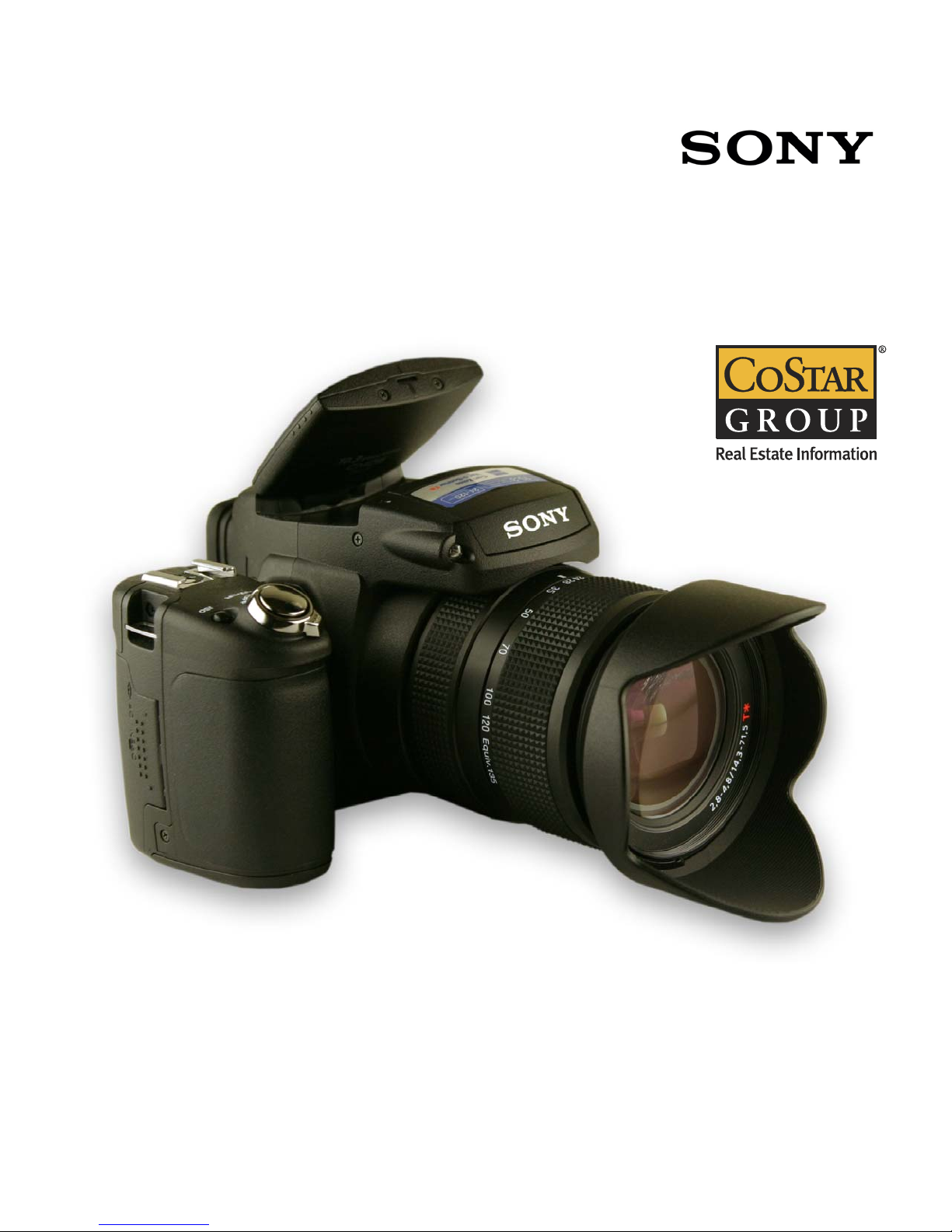
This Usage Guide is meant to highlight some of the
features of the Sony DSC-R1 in a easy-to-find format. Any
page numbers referenced are located in Sony’s User’s
Guide that was included with your camera.
The R1 represents a high quality, 10 megapixel digital
camera that should meet all of our needs in the field.
We’ve tested many cameras that fall into the performance
range of the R1 and concluded that it best fits our current
needs for field research photography.
If you should have any questions concerning settings or
other operational features of the R1, please don’t hesitate
to contact your manager.
Kurt Liestenfeltz
Field Research Manager, Retail
(301) 280-7342
[email protected]
Diane Reynolds
Field Research Manager, Retail
(301) 215-8337
[email protected]
Brian Weaver
Field Research Manager, Retail
(301) 664-9177
[email protected]
Andrew Jenness
Field Research Supervisor
(301) 664-9136
[email protected]
Jarrod Young
Field Research Supervisor
(301) 280-4704
[email protected]
Nicole Wilkum
Field Research Supervisor
(301) 280-3803
[email protected]
Richard Baillieul
Field Research Supervisor
(301) 280-3812
[email protected]
Main
Command Dial
Focus Switch
Mode Dial
Page 3
Usage Guide
COSTAR - CONFIDENTIAL/TRADE SECRET Page 3
DSC-
R1
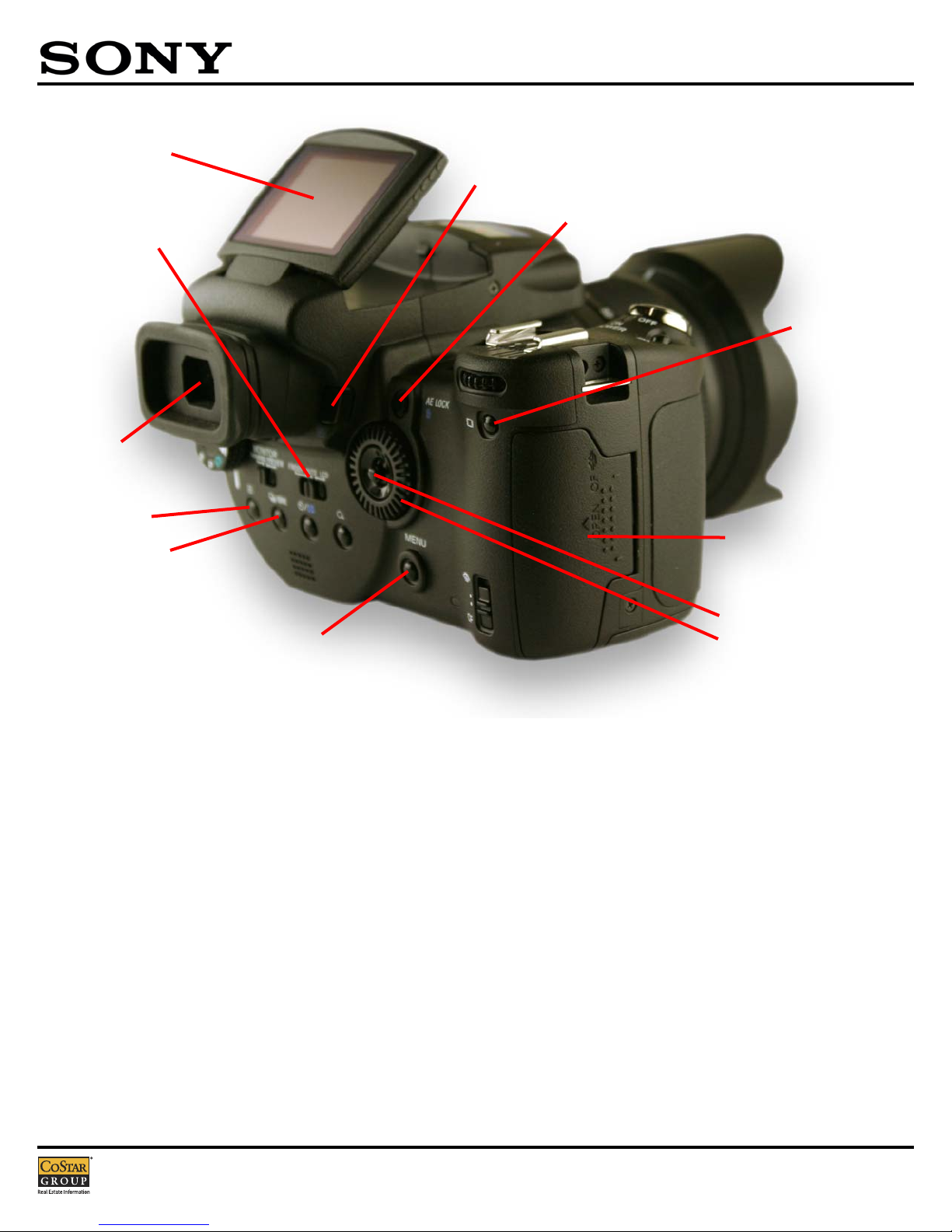
Electronic Viewfinder (EVF)
Similar to SLR 35mm film cameras, the EVF allows the user to frame the shot
through-the-lens, except a small color LCD screen is used to display the image
and additional information. Playback and menu controls are also viewable
through the EVF.
The R1 has additional functionality with an auto sensing EVF that will switch
between the main LCD Screen and EVF when the user’s eye approaches the
EVF. For battery-conscious users, the auto sensing feature should be turned
off.
Display Mode Switch
The Display Mode Switch allows the user to chose where the image will be
displayed - through the EVF, LCD Monitor or automatically switching between
the two.
Playback Button
Used to view previous images already saved to the memory card.
AE Lock Button/Delete Button
(p. 43)
Used to lock exposure while photographing. Used to delete images from the
memory card when in Playback Mode
Compact Flash Compartment
Houses the Compact Flash or Memory Stick memory card.
Multi-Selector/Sub-Command Dial
(p. 28, 31)
Also known as The Joystick/The Wheel. Used to navigate through menu
selections and control playback options. Pushing the Multi-Selector down is
used as an “Enter” key.
Screen Status Button
(p. 22)
The Screen Status Button allows the user to change the information displayed
on screen, including a display a Real-Time Histogram of the image.
Menu Button
(p. 31)
Used to access menu options specific to the different operation modes. To
access shooting options, select the Shooting Mode prior to pressing the Menu
Button. To access playback options, press the Playback Button prior to
pressing the Menu Button.
Metering Button/Auto-Bracketing Button
(p. 40, 44, 58)
Used in conjunction with the Main Command Dial these buttons allow the user
to select alternate metering options or turn the auto-bracketing on or off.
These options are not available for all shooting modes.
Electronic
Viewfinder
AE Lock Button/Delete Button
Compact Flash Compartment
Display Mode Switch
Screen Status Button
Playback Button
Multi-Selector
Sub-Command Dial
Menu Button
Metering Button
Auto-Bracketing Button
Flip-Up LCD Screen
Page 4
Usage Guide
Page 4 COSTAR - CONFIDENTIAL/TRADE SECRET
DSC-
R1
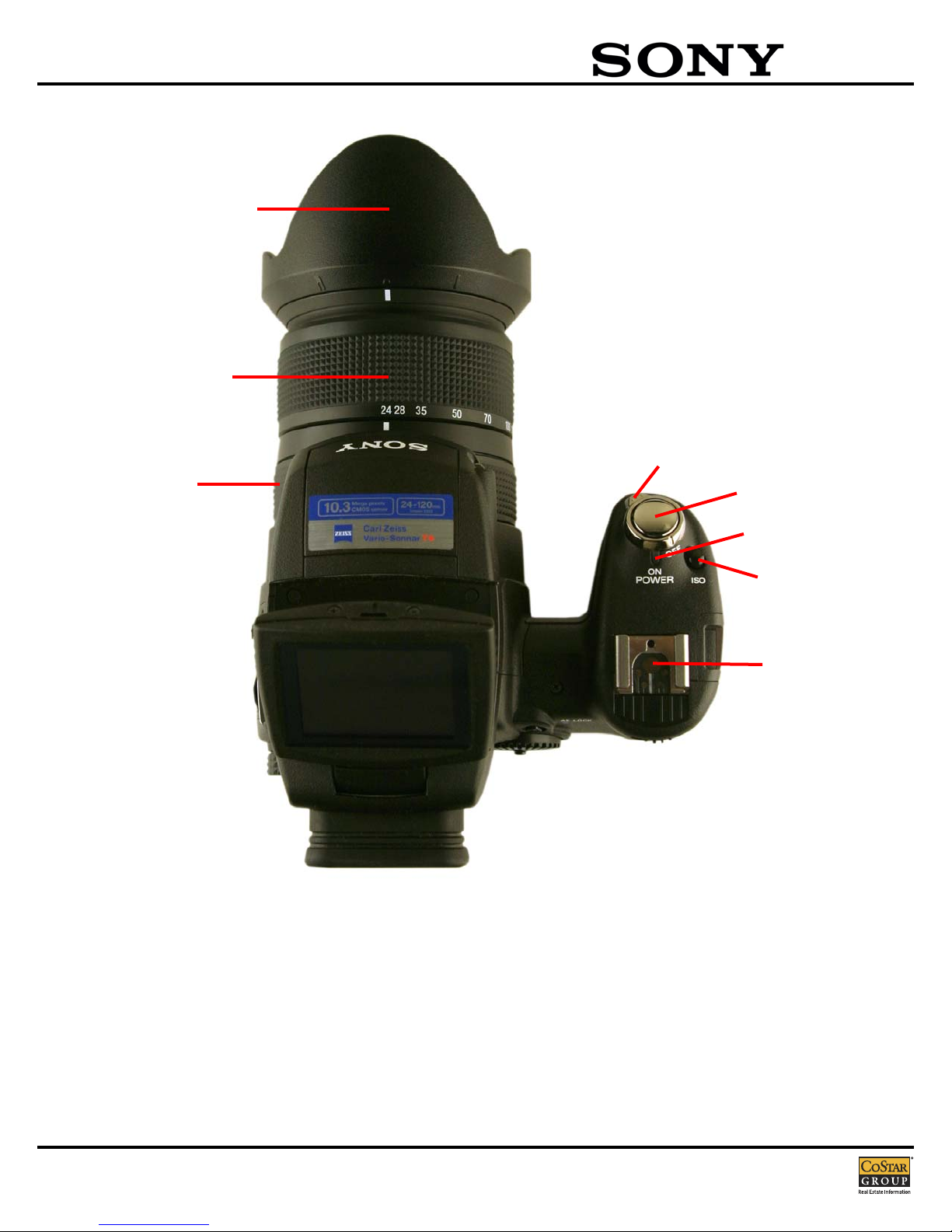
Zooming Ring
(p. 71)
Twisting the Zooming Ring allows the user to change the focal length of the
camera’s lens system between 24mm to 120mm (135mm equivalent).
Manual Focus Ring
(p. 48)
When the camera is engaged in Manual Focus Mode, turning this ring will focus
the camera.
Shutter Button
Depressing the shutter button halfway will engage the cameras autofocus and
exposure systems. Holding the button at halfway will freeze the focus and
exposure settings. Pressing the button completely will snap a photo.
Lens Hood
(p. 18)
Using the Lens Hood during bright lighting conditions can reduce image quality
deteriation caused by unnecessary light.
ISO Button
(p. 45)
This button, when used with the Main Command Dial, allows the user to chose
a luminous sensitivity with units of ISO.
Advanced Accessory Shoe
(p. 52)
The Advanced Accessory Shoe allows the user to attach various add-on
accessories such as an External Flash.
Advanced Accessory Shoe
Shutter Button
Power Switch
ISO Button
Power Lamp
Zooming Ring
Lens Hood
Manual Focus Ring
Page 5
Usage Guide
COSTAR - CONFIDENTIAL/TRADE SECRET Page 5
DSC-
R1
Menu Settings (Recording)
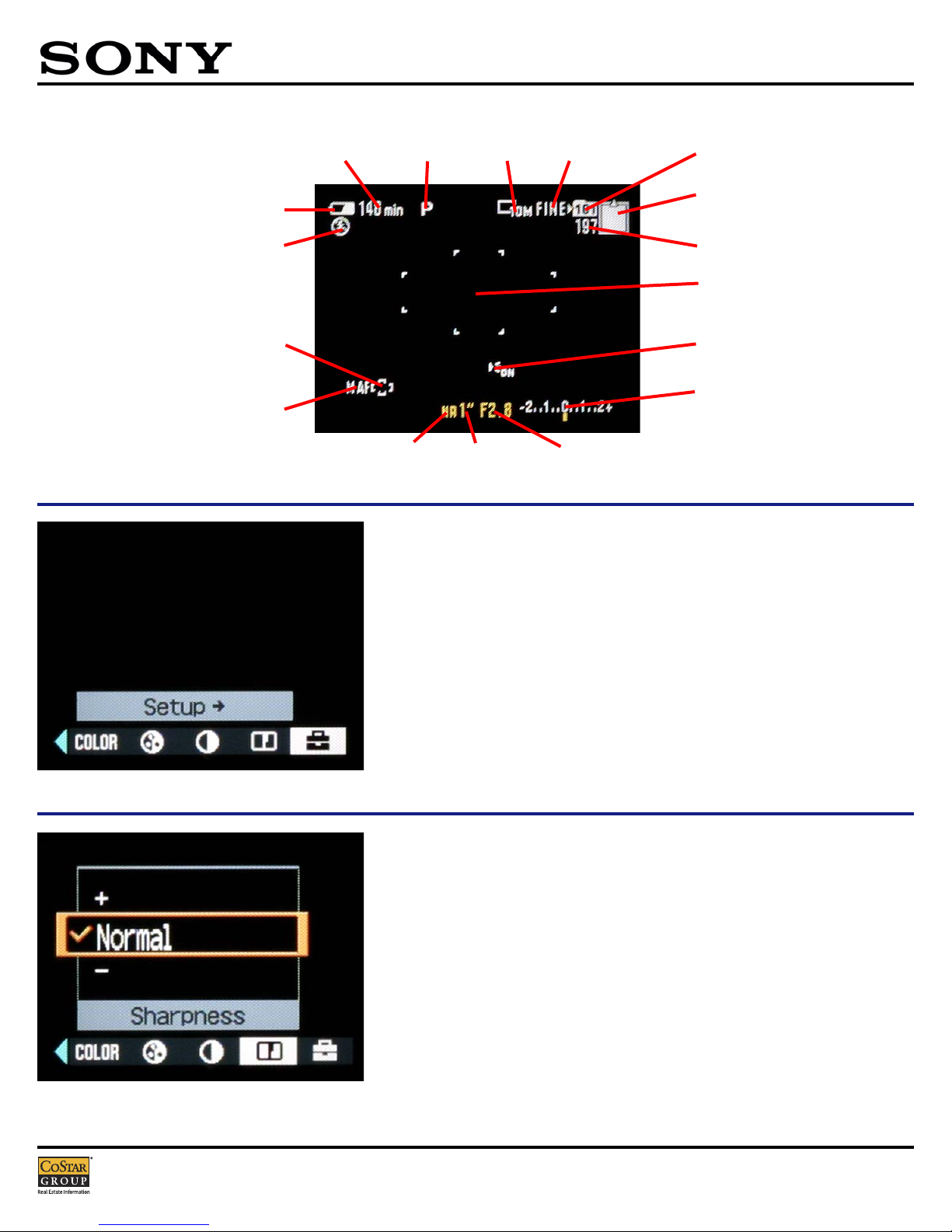
Display Information
Using the Multi-Selector, the user can access the Setup
Menus by rocking the Multi-Selector to the right.
Rocking the Multi-Selector to the left will allow the user
to set parameters for several image recording settings
and options.
Sharpness should be set to Normal.
Remaining Compact
Flash Card capacity
Remaining number
of recordable images
Auto-Focus range
finder frame
Auto-Focus range
finder frame indicator
Flash mode
Battery remaining
indicator
Battery minutes
remaining indicator
Auto-Focus illuminatior
Exposure value bar
Aperture valueShutter speedNR slow shutter
AF mode
Recording folder
Mode dial Image size Image quality
Page 6
Usage Guide
Page 6 COSTAR - CONFIDENTIAL/TRADE SECRET
DSC-
R1
Menu Settings (Recording)
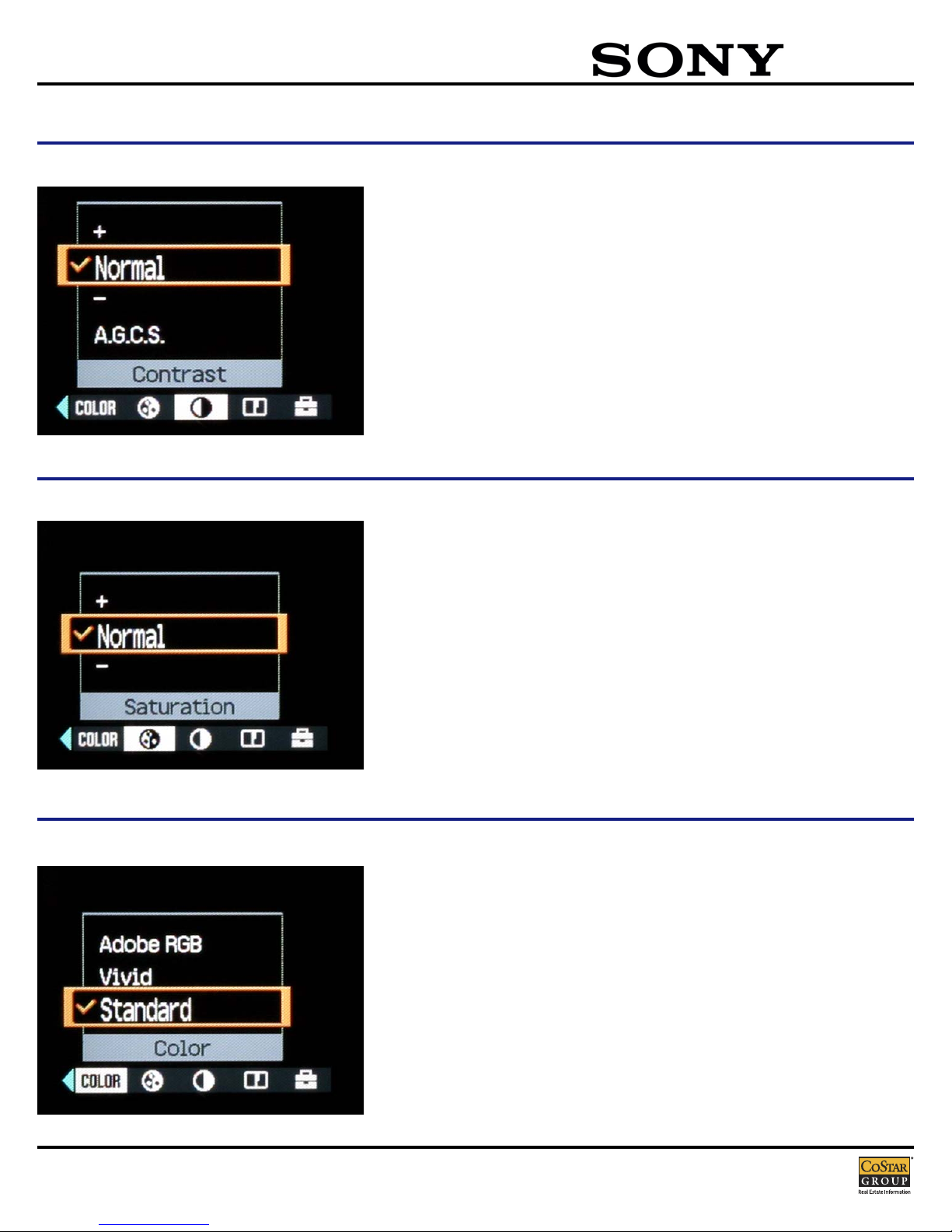
Contrast should be set to Normal.
Saturation should be set to Normal.
C0lor should be set to Standard.
Page 7
Usage Guide
COSTAR - CONFIDENTIAL/TRADE SECRET Page 7
DSC-
R1
Menu Settings (Recording)
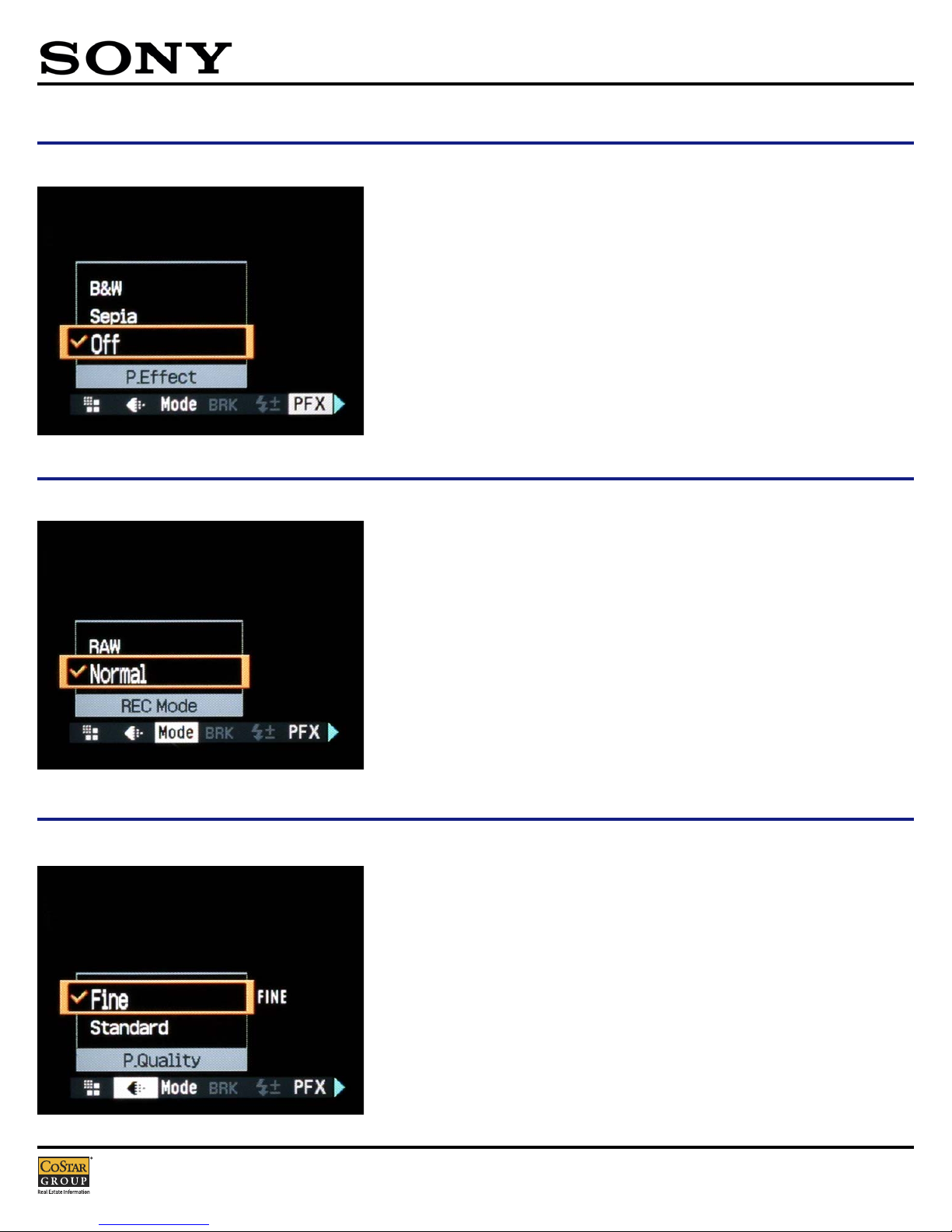
Picture Effects should be turned Off.
Recording Mode should be set to Normal.
Picture Quality should be set to Fine.
Page 8
Usage Guide
Page 8 COSTAR - CONFIDENTIAL/TRADE SECRET
DSC-
R1
Menu Settings (Recording)
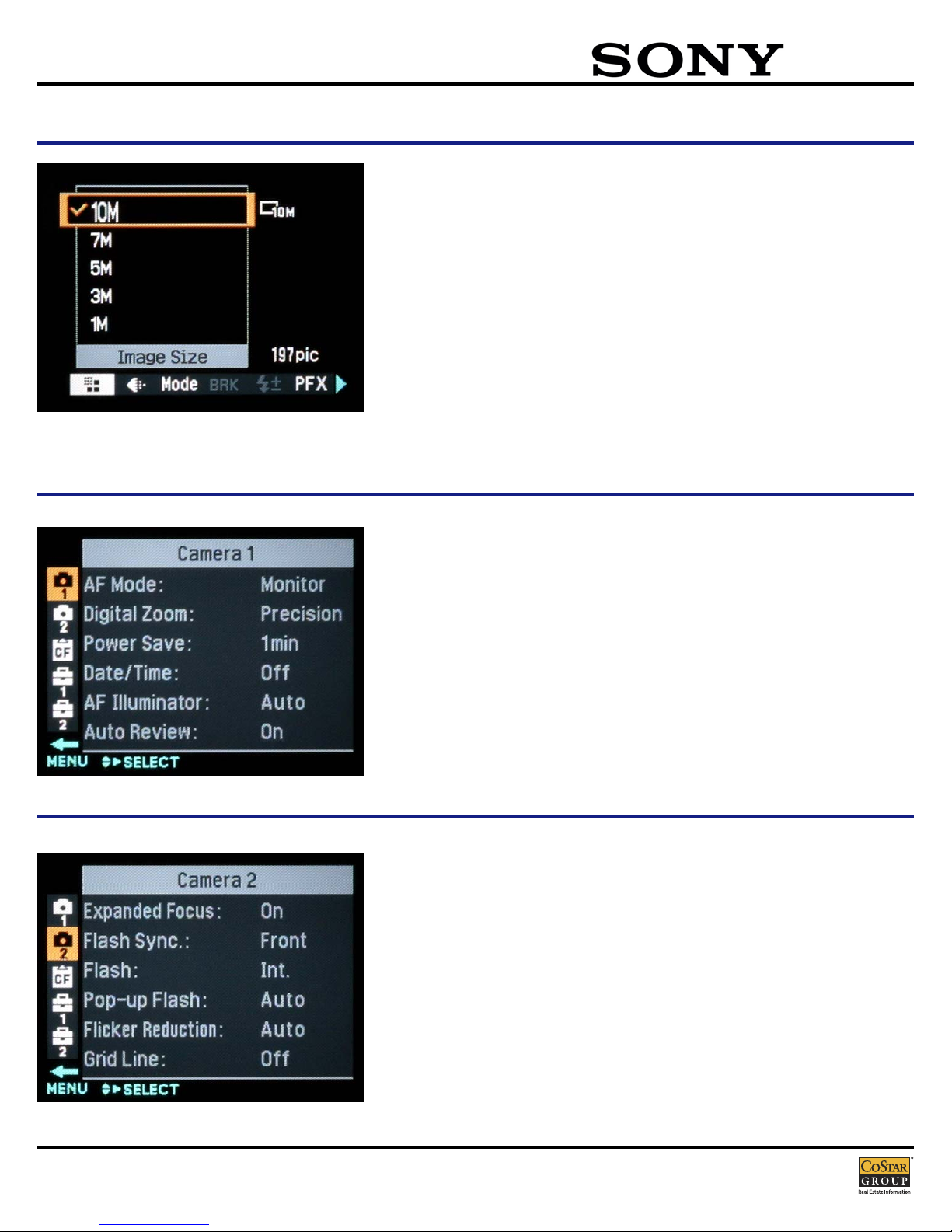
Image Size should be set to 10M.
CCaammeerraa 11 MMeennuu
AF Mode: Monitor
Digital Zoom: Precision
Power Save: 1min
Date/Time: Off
AF Illuminator: Auto
Auto Review: On
CCaammeerraa 22 MMeennuu
Expanded Focus: On
Flash Sync: Front
Flash: Int.
Pop-up Flash: Auto
Flicker Reduction: Auto
Grid Line: Off
Menu Settings (Setup)
Page 9
Usage Guide
COSTAR - CONFIDENTIAL/TRADE SECRET Page 9
DSC-
R1
Menu Settings (Setup)
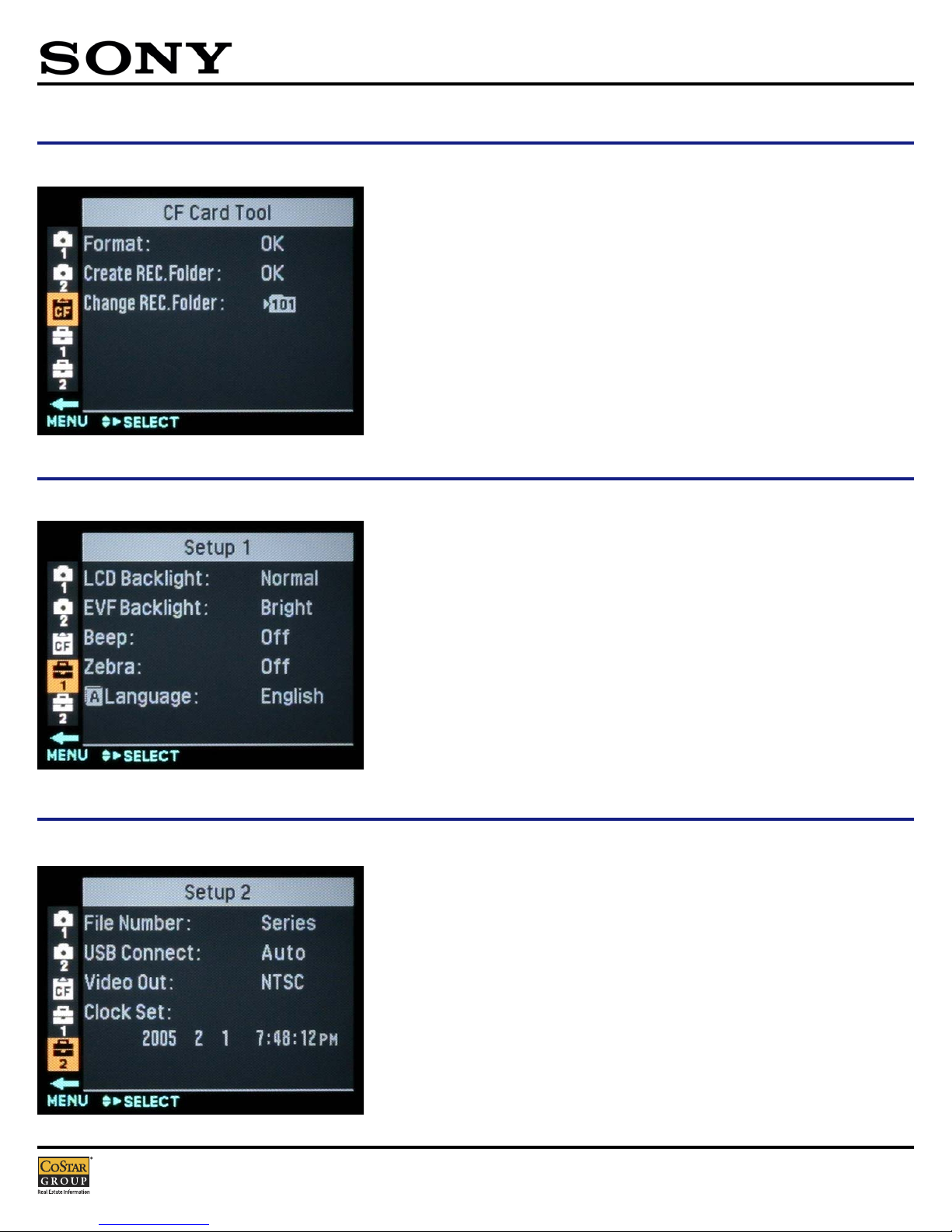
CCFF CCaarrdd TTooooll MMeennuu
Format: OK
Create REC Folder: OK
Change REC Folder
SSeettuupp 11 MMeennuu
LCD Backlight: Normal
EVF Backlight: Bright
Beep: Off
Zebra: Off
Language: English
SSeettuupp 22 MMeennuu
File Number: Series
USB Connect: Auto
Video Out: NTSC
Clock Set
Page 10

Usage Guide
Page 10 COSTAR - CONFIDENTIAL/TRADE SECRET
DSC-
R1
Features at a glance
Imaging Device: 1/1.6" 10.3 (effective) CMOS Sensor; 21.5 x 14.4 mm effective; RGB primary color filter
Chipset: Real Imaging Processor™ LSI with Advanced Gradation Control System (AGCS)
Recording Media: Memory Stick®/Memory Stick PRO™ media; CompactFlash™ Type I/ CompactFlash Type II / Microdrive™ media
Lens Type: Carl Zeiss, Vario Sonnar T*; 12 elements in 10 groups (4 aspherical)
Zoom: 5x Optical (Mechanical Manual); 10x Precision Digital Zoom, Smart Zoom Feature: 1-15.0X (at 1 Megapixel Resolution)
Filter Diameter: 67 mm filter diameter
Focal Length: 14.3 mm-71.5 mm
35mm Conversion: 24 mm-120 mm
Aperture: F2.4-4.8 (minimum F16)
Aperture Range: 16-step F2.8~16.0
Focus: 5 Area Multi-Point AF, Center AF, Flexible Spot, Manual Focus select Focal Distance: Macro Mode: WIDE: 1-3/8"-infinity
(35 mm-infinity); TELE: 1-6/8"-infinity (40 mm-infinity)
Focal Length: Minimum Focal Distance: 19.7" (50cm), Macro: 13.7" (35 cm)
Shutter Speed: 49-step 30 ~ 1/2000 sec, with Bulb (up to 3 minutes)
Exposure: Manual Exposure: Yes, w/EV indicator
EV Compensation: ±2.0 EV, 1/3 EV Steps
ISO: Auto/160/200/400/800/1600/3200
LCD: 2.0-inch TFT (134k pixels) Free Angle LCD (Upward 85 degrees, Downward 20 degrees, Right/Left 90 degrees), Eye-
Level Finder: 0.44 inches (235k pixels); 100% coverage; Eye sensor
Display: Histogram: Yes, Live, RGB Playback
Microphone/Speaker: No/ Yes (Dynamic)
Red-Eye Reduction: Yes: On/ Off
White Balance: Auto, Daylight, Cloudy, Fluorescent, Incandescent, Flash, One Push (White Balance Adjustment: -3/+3 IRE, by step)
Burst Mode: 3-shot, 3fps, 10MP
Picture Effects: Sepia, Black & White
Scene Modes: Twilight, Twilight Portrait, Portrait, Landscape
Self Timer: Yes, 10 Seconds
Still Image Mode(s): Normal (JPEG Fine/Standard), High-speed Burst (JPEG), RAW (.SR2)
Memory Stick PRO™ Media Compatibility: Tested to support up to 4GB media capacity; does not support Access Control security function
Flash Modes: Auto, Forced Flash, No Flash, Slow Synchro, Rear Syncro
Flash Effective Range: WIDE 1'8"-12'10" (0.5-3.9 m); TELE: 1'8"-7'10" (0.5-2.4 m)
Output(s): Video: Yes, NTSC/PAL Selectable USB Port(s): Yes, Supports USB 2.02
Battery Type: NP-FM50 InfoLithium® rechargeable battery
Battery Capacity: CIPA standard: approx. 500 pictures with supplied NP-FM50 InfoLithium® battery 3
Supplied Software: Picture Package™ for Sony v1.6 (Windows), Pixela™ ImageMixer VCD2 (Macintosh), Sony Image Data Converter SRF Ver.
1.0 (Windows & Macintosh), USB Driver
Operating System Compatibility: Microsoft® Windows® 98, 98SE, 2000 Professional, ME, XP Home and Professional; Macintosh® OS X (v 10.1.5 or
later). OS must be installed at the factory.
Limited Warranty: 1 Year Parts & Labor
Weight: 2lbs 2 oz (926 g) body; 2 lbs., 6 oz. (1047 g) including battery and Memory Stick media
Dimensions (WHD): (WHD) 5 1/2" x 3 7/8" x 6 1/8" (139.4 x 97.7 x 156 mm)
Supplied Accessories: NP-FM50 InfoLithium, Battery, AC-L15 AC Adapter, Video Cable, USB Cable, Sony Picture Package software, Sony Image
Data Converter .SRF software, Neck Strap
Page 11

Page 12
The WWedding CCeremony
of
Kimberly AAnn GGattie
and
William EEverett BBaillieul
Saturday, JJune 22, 22001
Two-tthirty oo’clock iin tthe aafternoon
Reverend JJohn TTizio, CC.S.S.R.
Saint JJohn NNeumannChurch
620 North BBestgate RRoad
Annapolis, MMaryland
TToo OOuurr FFrriieennddss aanndd FFaammiillyy::
Thank yyou ffor ssharing oour sspecial dday wwith uus. WWe ssincerely aappreciate yyour llove aand
support.
TToo OOuurr PPaarreennttss::
Thank yyou ffor aall yyour uunconditional llove aand ssupport. IIt iis ffrom yyour ddedication tto
each oother aand yyour ffamily tthat wwe hhave llearned tto llove oone aanother.
Kim aand BBill wwill rreside aat:
417 PPeach CCourt
Annapolis, MMaryland 221401
Program DDesigned bby RRichard BBaillieul
Page 13

The CCeremony
PPrreelluuddee
PPrroocceessssiioonnaall
Jesu JJoy oof MMan’s ddesire
Canon iin DD
Trumpet VVoluntary
GGrreeeettiinngg aanndd DDeellaarraattiioonn
PPrraayyeerr
FFiirrsstt RReeaaddiinngg
Love iis SStrong aas DDeath Song oof SSongs
Read bby PPatrick AAnsaldi
NNeeww TTeessttaammeenntt RReeaaddiinngg
The GGreatest oof TThese iis LLove I Corinthians
Read bby JJoanne SSeward
GGoossppeell
Mark 110:6-99
HHoommiillyy
EEsscchhaannggee ooff VVoowwss
BBlleessssiinngg aanndd EExxcchhaannggee ooff RRiinnggss
LLiigghhttiinngg ooff tthhee UUnniittyy CCaannddllee
DDeeddiiccaattiioonn ttoo TThhee BBlleesssseedd MMootthheerr
Ave MMaria
PPrraayyeerr ooff TThhee FFaaiitthhffuull
NNuuppttiiaall BBlleessssiinngg
FFiinnaall BBlleessssiinngg
HHoorrnn PPiippee
The WWedding PParty
Celebrant Reverend JJohn TTizio, CC.S.S.R.
Parents oof tthe BBride MMr. aand MMrs. JJ. DDonald GGattie, JJr.
Parents oof tthe GGroom Mr. aand MMrs. KKeith BBaillieul
Matron oof HHonor Kristen TTripodi
Best MMan Andrew HHersman
Bridesmaids Cynthia HHall
Amy HHewitt
Kellie HHeaney
Jennifer GGattie
Groomsmen Richard BBaillieul
Norman RRandall
Kevin GGattie
J.D. GGattie
Organist Harry TThompson
Page 14
Page 15

Sunday
Saturday
Friday
Thursday
Wednesday
Tuesday
Monday
October
1
26
27
28
29
30
31
2524
23
22
21
20
19
1817
16
15
14
13
12
5
6
7
8
9
10 11
4
2
3
SMTWTFS
1
2345678
9101112131415
16 17 18 19 20 21 22
24 25 26 27 28 29
SMTWTFS
12 3 456
78910111213
14 15 16 17 18 19 20
21 22 23 24 25 26 27
28 29 30
NOVEMBER
SEPTEMBER
30
23
Yom Kippur
Columbus Day
Uncle Paul’s Birthday
Halloween
 Loading...