

Page 1
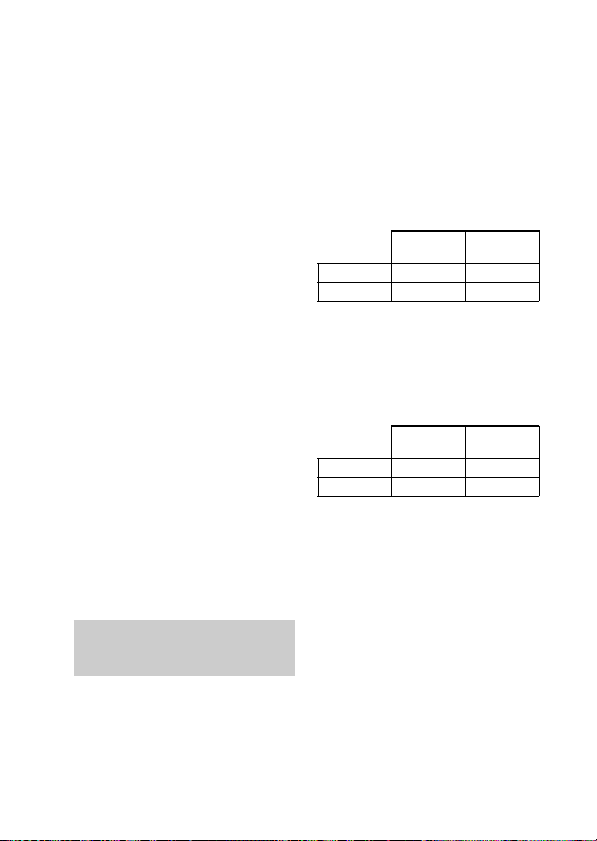
3-268-834-51(1)
Wireless Stereo
Headset
Operating Instructions
Manual de instrucciones
DR-BT22
© 2007 Sony Corporation
US
ES
Page 2

WARNING
To reduce the risk of fire or electric
shock, do not expose this
apparatus to rain or moisture.
To reduce the risk of electrical
shock, do not open the cabinet.
Refer servicing to qualified
personnel only.
Do not install the appliance in a confined
space, such as a bookcase or built-in
cabinet.
To reduce the risk of fire, do not cover the
ventilation of the apparatus with
newspapers, tablecloths, curtains, etc.
And do not place lighted candles on the
apparatus.
To reduce the risk of fire or electric
shock, do not place objects filled with
liquids, such as vases, on the apparatus.
Connect the AC power adaptor to an
easily accessible AC outlet. Should you
notice an abnormality in the AC power
adaptor, disconnect it from the AC outlet
immediately.
Do not expose the battery to excessive
heat such as direct sunlight, fire or the
like.
Excessive sound pressure from
headphones can cause hearing loss.
For the customers in the USA
Owner’s Record
The model number is located at the front
of both housing and the serial number is
located at the left of the headband.
Record these numbers in the spaces
provided below. Refer to them whenever
you call upon your Sony dealer regarding
this product.
Model No. DR-BT22
Serial No.
2
US
Information
This device complies with Part 15 of FCC
Rules and RSS-Gen of IC Rules.
Operation is subject to the following two
conditions: (1) this device may not cause
interference, and (2) this device must
accept any interference, including
interference that may cause undesired
operation of this device.
You are cautioned that any changes or
modifications not expressly approved in
this manual could void your authority to
operate this equipment.
This equipment must not be co-located or
operated in conjunction with any other
antenna or transmitter.
This equipment complies with FCC/IC
radiation exposure limits set forth for
uncontrolled equipment and meets the
FCC radio frequency (RF) Exposure
Guidelines in Supplement C to OET65
and RSS-102 of the IC radio frequency
(RF) Exposure rules. This equipment has
very low levels of RF energy that it is
deemed to comply without testing of
specific absorption ratio (SAR).
The Bluetooth word mark and logos are
owned by the Bluetooth SIG, Inc. and any
use of such marks by Sony Corporation is
under license.
Other trademarks and trade names are
those of their respective owners.
MPEG Layer-3 audio coding technology
and patents licensed from Fraunhofer IIS
and Thomson.
Page 3
For the customers in the USA
RECYCLING LITHIUM-ION
BATTERIES
Lithium-Ion batteries
are recyclable.
You can help preserve
our environment by
returning your used
rechargeable batteries
to the collection and recycling location
nearest you.
For more information regarding
recycling of rechargeable batteries, call
toll free 1-800-822-8837, or visit
http://www.rbrc.org/
Caution: Do not handle damaged or
leaking Lithium-Ion batteries.
Informations
Cet appareil est conforme à la section 15 de
la réglementation FCC ainsi qu’à la RSSGen de la réglementation IC. Son utilisation
est autorisée seulement aux conditions
suivantes : (1) il ne doit pas produire de
brouillage et (2) l’utilisateur du dispositif
doit être prêt à accepter tout brouillage
radioeléctrique reçu, même si ce brouillage
est susceptible de compromettre le
fonctionnement du dispositif.
Vous devez savoir que tout changement ou
toute modification non expressément
approuvé dans ce mode d’emploi risque
d’annuler votre pouvoir d’utiliser cet
appareil.
Cet équipement est conforme aux limitations
concernant l’exposition aux radiations
établies par la FCC/IC définies dans un
environnement non contrôlé ainsi qu’aux
directives relatives à l’exposition aux
fréquences radio (RF) FCC du supplément C
du bulletin OET65 et au règlement RSS- 102
relatif à l’exposition aux radiofréquences
(RF) IC. Cet équipement présente des
niveaux d’énergie RF très bas considérés
comme conformes et ne nécessite pas de test
du débit d’absorption spécifique (SAR).
Table Of Contents
What is Bluetooth wireless
technology? .................. 4
Welcome! .......................... 5
3 steps to Bluetooth function .... 6
Location and Function of
Parts............................... 7
Folding and unfolding the
headset .................................. 8
Charging the unit ............. 9
Pairing ............................. 11
What is pairing? ...................... 11
Procedures of pairing .............. 11
Wearing the headset ...... 13
Indications of Bluetooth
function ....................... 14
Listening to music ......... 15
Controlling the audio device –
AVRCP ............................... 16
Calling ............................. 17
Controlling the Bluetooth mobile
phone – HFP, HSP .............. 19
Calling while playing
back music .................. 20
Disposing of the unit ..... 21
Precautions .................... 22
Troubleshooting ............. 24
Initializing the unit ......... 26
Specifications ................. 27
US
3
US
Page 4

What is Bluetooth wireless
technology?
Bluetooth™ wireless technology is
a short-range wireless technology
that enables wireless data
communication between digital
devices, such as a computer or
digital camera. Bluetooth wireless
technology operates within a range
of about 10 meters (about 30 feet).
Connecting two devices as
necessary is common, but some
devices can be connected to
multiple devices at the same time.
You do not need to use a cable for
connection, nor is it necessary for
the devices to face one another, such
is the case with infrared technology.
For example, you can use such a
device in a bag or pocket.
Bluetooth standard is an
international standard supported by
thousands of companies all over the
world, and employed by various
companies worldwide.
Communication System
and Compatible Bluetooth
Profiles of this unit
Profile is standardization of the
function for each Bluetooth device
specification. This unit supports the
following Bluetooth version and
profiles:
Communication System :
Bluetooth Specification version 2.0
Compatible Bluetooth Profiles:
– A2DP (Advanced Audio Distribution
Profile): Transmitting or receiving
audio content of high-quality.
– AVRCP (Audio Video Remote Control
Profile): Controlling A/V equipment;
pausing, stopping, starting playback,
volume control, etc.
– HSP (Headset Profile)*: Talking on the
phone/Operating the phone.
– HFP (Hands-free Profile)*: Talking on
the phone/Operating the phone by
hands-free.
* When you use a Bluetooth mobile
phone supported by both HFP (Handsfree Profile) and HSP (Headset Profile),
set to HFP.
Notes
• To be able to use the Bluetooth
function, the Bluetooth device to be
connected requires the same profile as
the unit’s.
Note also that even if the same profile
exists, devices may vary in function
depending on their specifications.
• Due to the characteristic of Bluetooth
wireless technology, the sound played
on this unit is slightly delayed from the
sound played on the Bluetooth device
during talking on the telephone or
listening to the music.
4
US
Page 5
Welcome!
Thank you for purchasing this Sony Wireless Stereo Headset. This unit uses
Bluetooth wireless technology.
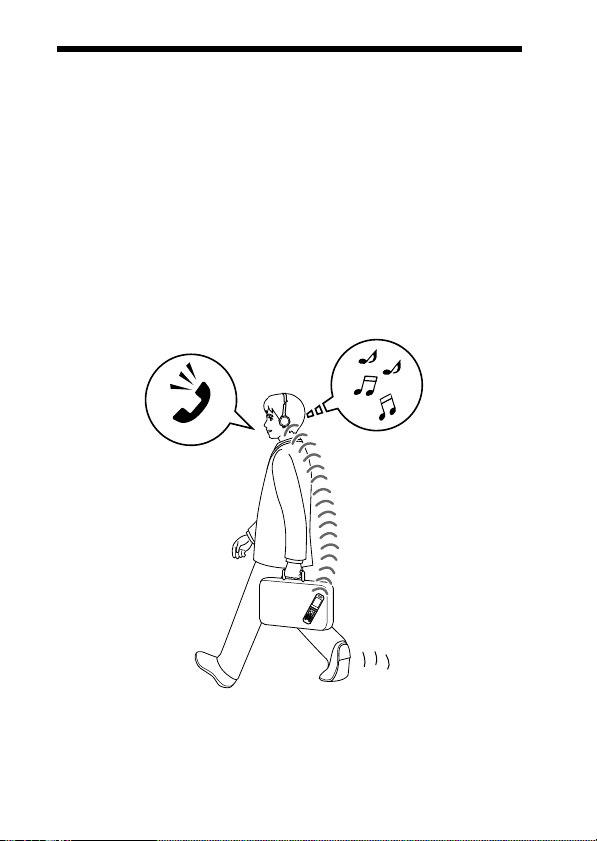
• Enjoy music wirelessly with Bluetooth music player such as Bluetooth
mobile phone, Bluetooth digital music player, or digital music player
connected to the Bluetooth transmitter.*
• Hands-free conversation can be enjoyed on your Bluetooth mobile phone
without taking it out of your bag.*
• For convenience, you can remotely operate the basic functions of a
Bluetooth music player (Play, Stop, etc.).*
• Useful rechargeable function.
• Convenient foldable type for easy carrying.
For details on Bluetooth wireless technology, see page 4.
1
2
3
Talking on the phone
*1The connected Bluetooth device is required to support A2DP (Advanced Audio
Distribution Profile).
2
The connected Bluetooth device is required to support HSP (Headset Profile) or HFP
*
(Hands-free Profile).
3
The connected Bluetooth device is required to support AVRCP (Audio Video Remote
*
Control Profile).
Listening to music
5
US
Page 6

3 steps to Bluetooth function
Pairing
First, register (“pair”) a Bluetooth device (mobile phone, etc.) and this
unit with each other. Once pairing is established, there is no need for
pairing again.
Bluetooth
mobile phone,
etc.
Listening to music
V
Bluetooth connection
Operate the Bluetooth device to
make the Bluetooth connection.
Connection
A2DP
AVRCP
V
Listening to music
You can listen to music played on
the Bluetooth device.
Playback, stop, or pause is
possible from this unit.
Music
6
US
Pairing
c Page 15
Wireless Stereo
Headset
c Page 11
Calling
V
Bluetooth connection
When the unit is turned on, the
unit starts making the Bluetooth
connection to the recognized
mobile phone automatically.
Connection
HFP HSP
c Page 17 - 18
V
Talking on the phone
You can make and receive a call
by operating this unit.
Voice
c Page 18 - 20c Page 15 - 16
Page 7
GETTING STARTED
Location and Function of Parts
qg
qf
L
qd
qs
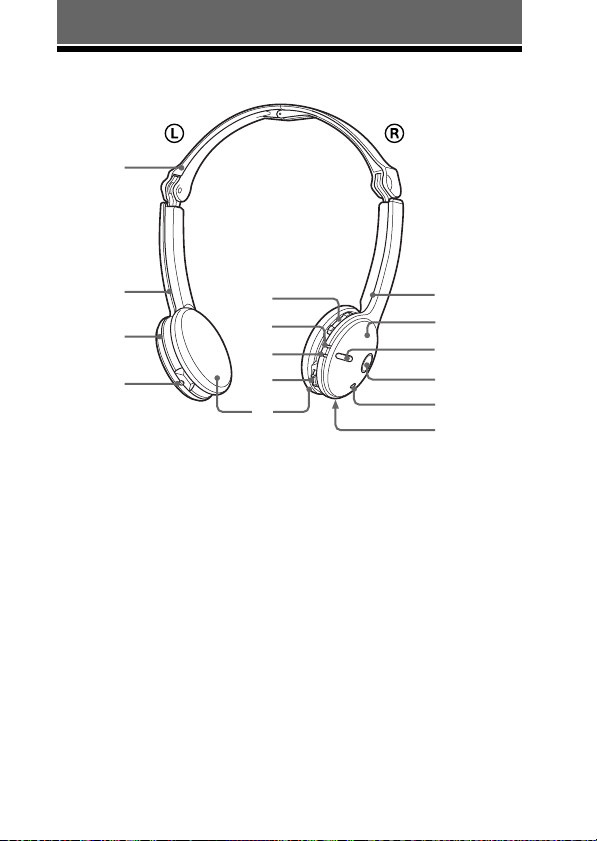
1 R (right) indication
2 Right (R) unit
3 Multi function button
Controls various call functions.
4 POWER button
5 Microphone
6 RESET button
Push this button when this unit
does not operate properly.
Pairing information is not
deleted by this operation.
7 VOL (volume) +*⁄–
buttons
8 Indicator (blue)
Indicates the communication
status of the unit.
7
8
9
0
qa
9 Indicator (red)
Indicates the power status of
the unit.
0 Jog switch
Controls various functions
when listening to music.
qa Ear pad
qs DC IN 3 V jack
qd Left (L) unit
qf L (left) indication
qg Headband
* This button has a tactile dot.
R
1
2
3
4
5
6
7
US
Page 8
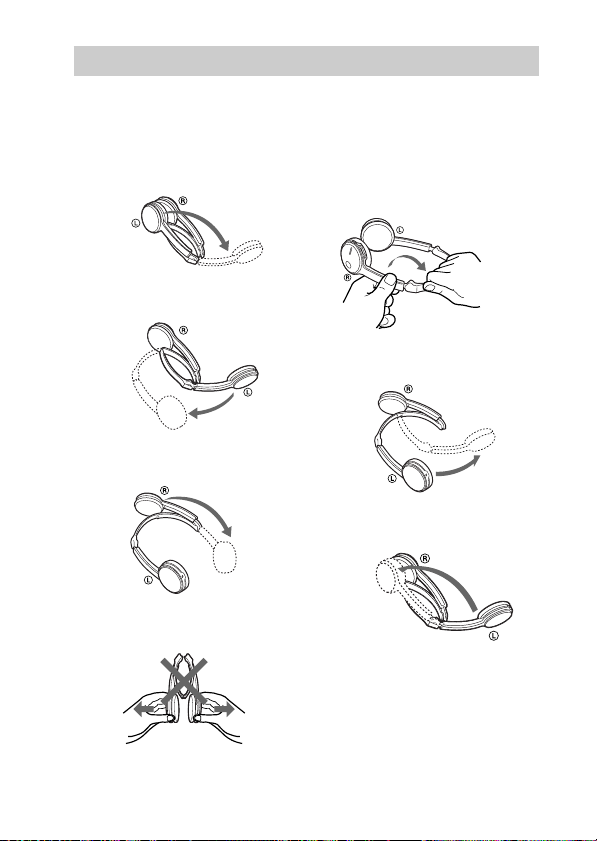
Folding and unfolding the headset
Unfolding
1 Unfold the left unit of
the headband as
illustrated.
2 Expand the center part
of the headband.
3 Unfold the right unit of
the headband.
Notes
• Do not pull open this way.
Folding
1 Hold near the foldable
part with both hands
and lift up the right unit
to fold it as illustrated.
2 Close the center part of
the headband.
3 Fold the left unit of the
headband.
• Be careful not to hit your face or eyes
with the top of the headband.
8
US
Page 9
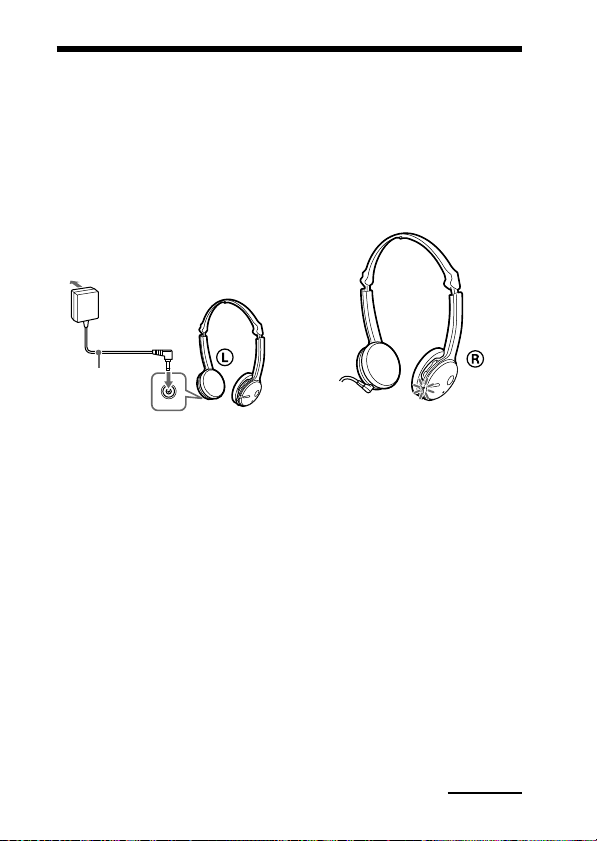
Charging the unit
The unit contains a rechargeable Lithium-Ion battery, which should be
charged before using for the first time.
1 Connect the supplied
AC power adaptor to the
DC IN 3 V jack on the
unit.
To an
AC outlet
To DC IN
3 V jack
AC power
adaptor
(supplied)
When the AC power adaptor is
connected to an AC outlet,
charging starts.
Tips
• If the AC power adaptor is
connected to an AC outlet while the
unit is turned on, the unit will be
turned off automatically.
• This unit cannot be turned on while
charging.
Wireless Stereo
Headset
2 Make sure that indicator
(red) lights up while
charging.
Charging is completed in about
3 hours* and the indicator (red)
goes off automatically.
* Time required for empty battery to
recharge.
Caution
If this unit detects a problem while
charging, the indicator (red) may
turn off, although charging is not
complete.
Check for the following causes:
– Ambient temperature exceeds the
range of 0 °C – 40 °C (32 °F –
104 °F).
– There is a problem with the
battery.
In this case, charge again within the
above-mentioned temperature range.
If the problem persists, consult your
nearest Sony dealer.
Continued
9
US
Page 10

Notes
• If the battery is not used for a long time,
battery may be quickly depleted,
however, after a few recharges, battery
life will improve.
• If the life of the built-in rechargeable
battery drops to half the normal length,
the battery should be replaced. Consult
your nearest Sony dealer for
replacement of the rechargeable battery.
• Avoid exposure to temperature
extremes, direct sunlight, moisture,
sand, dust or mechanical shock. Never
leave in a car parked in the sun.
• Use only the supplied AC power
adaptor. Do not use any other AC
power adaptor.
Usage hours
Status
*
Approx.
usage hours
Communication
11 hours
time (including
music playback
time) (up to)
Standby time
100 hours
(up to)
* Time stated above may vary, depending
on ambient temperature or conditions of
use.
Checking the remaining
battery
When pressing the POWER button
while the unit is turned on, the
indicator (red) flashes. You can
check the remaining battery by the
number of times the indicator (red)
flashes.
Indicator (red)
3 times
2 times
1 time
Note
You cannot check the remaining battery
immediately after the unit is turned on, or
while pairing.
When the battery is almost empty
The indicator (red) flashes slowly
automatically.
When the battery becomes empty, a
beep sounds and the unit will turn
off automatically.
Status
Full
Mid
Low (needs to
charge)
10
US
Page 11
Pairing
What is pairing?
Bluetooth devices need to be
“paired” with each other
beforehand.
Once Bluetooth devices are paired,
there is no need for pairing again,
except in the following cases:
• Pairing information is deleted
after repair, etc.
• This unit is paired with 9 or more
devices.
This unit can be paired with up to
8 devices; if a new device is
paired after 8 devices have been
paired, the device whose latest
connection time is the oldest
among the 8 paired devices is
replaced by the new one.
• When recognition of the unit by
the device to be connected is
deleted.
• This unit is initialized (page 26).
All pairing information is deleted.
Procedures of pairing
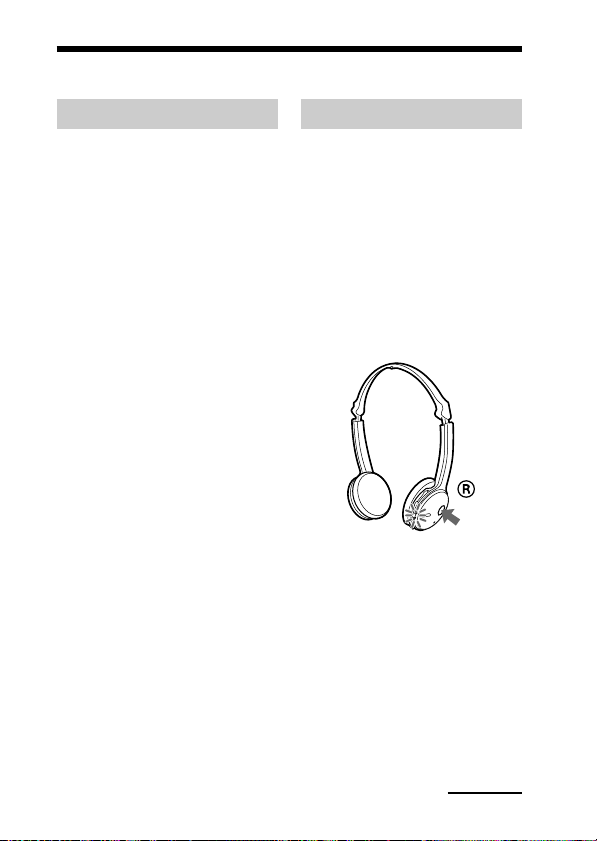
1 Place the Bluetooth
device within 1 m (3 ft)
of this unit.
2 Press and hold the
POWER button for
7 seconds or more to
standby for pairing
while the unit is turned
off.
Notes
• After about 3 seconds, power is
turned on and the indicator (blue)
and indicator (red) flash together
twice. Keep the POWER button
pressed without releasing. The
indicator (blue) starts flashing.
When both indicators start flashing
together again, release the button.
This unit enters into pairing mode.
• If pairing is not established within
about 5 minutes, pairing mode will
be cancelled and this unit will turn
off. In this case, start over from
step 1.
Continued
11
US
Page 12

3 Perform pairing
procedure on the
Bluetooth device to
detect this unit.
The list of detected devices
appears on the display of the
Bluetooth device. This unit is
displayed as “DR-BT22.”
If “DR-BT22” is not displayed,
repeat from step 1.
Notes
• For details, refer to the operating
instructions supplied with the
Bluetooth device.
• When pairing with a Bluetooth
device that cannot display a list of
detected devices or that has no
display, you may pair the device by
setting both this unit and the
Bluetooth device to pairing mode.
At this time, if passcode is set
besides “0000” on the Bluetooth
device, pairing cannot be done with
this unit.
4 Select “DR-BT22” on
the display of the
Bluetooth device.
5 If Passcode* input is
required on the display
of a Bluetooth device,
input “0000.”
Pairing is complete when the
indicator (blue) flashes slowly.
The message standing for
“Pairing complete” appears on
the display of some Bluetooth
devices.
* Passcode may be called “Passkey,”
“PIN code,” “PIN number,” or
“Password.”
6 Start the Bluetooth
connection from the
Bluetooth device.
This unit memorizes the device
as the last connected device.
Some Bluetooth devices may
connect with the unit
automatically when pairing is
complete.
Tips
• To pair with other Bluetooth devices,
repeat steps 1 to 5 for each device.
• To delete all pairing information, see
“Initializing the unit” (page 26).
12
US
Page 13
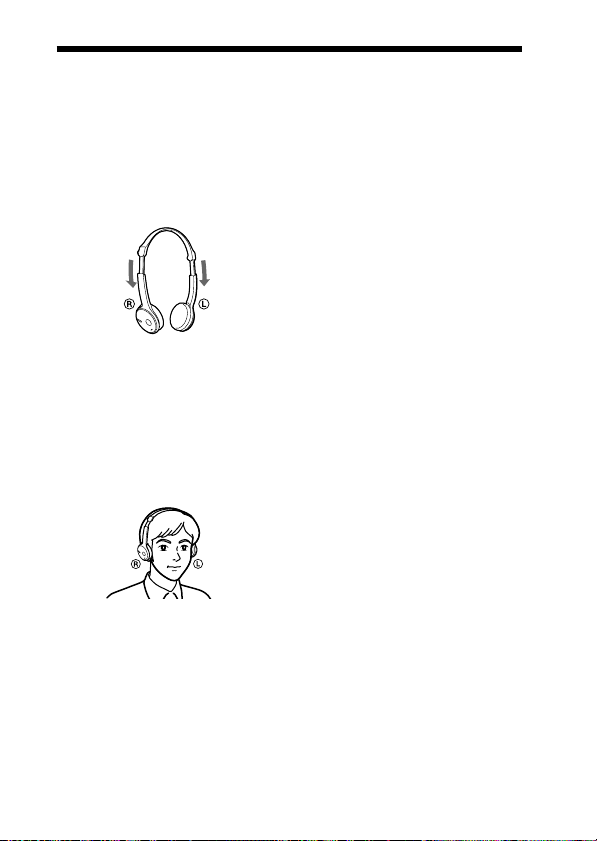
Wearing the headset
1 Unfold the headset
according to the
procedures on page 8,
then extend the headset
to adjust the length.
2 Put the unit with L
indication on your left
ear and R indication on
your right ear, then
place the headset over
your head.
13
US
Page 14
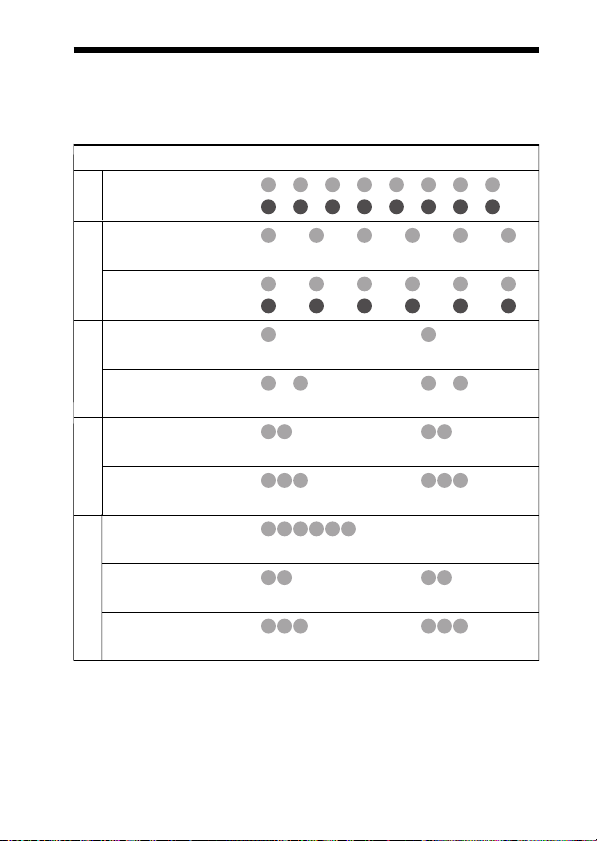
Indications of Bluetooth function
B : Indicator (blue)
R : Indicator (red)
Status Flashing patterns
Searching
Pairing
Connectable
Connecting
Connecting
HFP/HSP or A2DP
(standby for receiving audio signal)
HFP/HSP and A2DP
(standby for receiving audio signal)
Connected
Listening
Music
Listening during standby
for telephone call
Incoming call
Talking
Phone
Calling while
playing back music
– – – – – – – –
B
– – – – – – – –
R
– – – – – – – – – –
B
–
R
– – – – – – – – – –
B
– – – – – – – – – –
R
– – – – – – – – – – – – – –
B
–
R
– – – – – – – – – – – –
B
–
R
B
R
B
R
B
R
B
R
B
R
– – – – – – – – – – – –
–
– – – – – – – – – –
–
...
–
– – – – – – – – – – – –
–
– – – – – – – – – –
–
...
...
...
...
...
...
...
...
...
...
...
14
US
Page 15
OPERATING THE UNIT
Listening to music
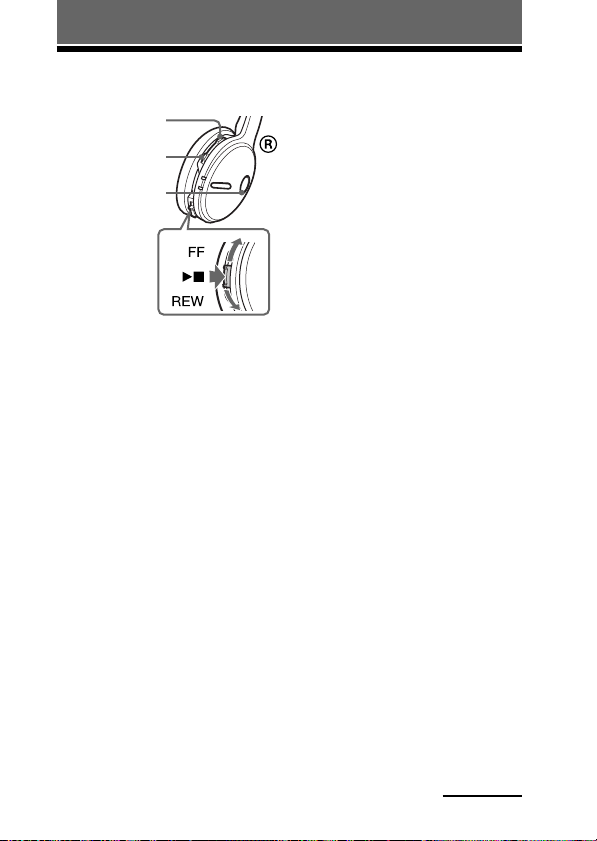
VOL + button
VOL – button
POWER button
Check the following before
operating the unit.
– The Bluetooth device is turned
on.
– Pairing of this unit and the
Bluetooth device is complete.
– The Bluetooth device supports the
transmitting music function
(profile: A2DP*).
1 Press and hold the
POWER button for
about 3 seconds while
the unit is turned off.
The indicator (blue) and
indicator (red) flash together
twice and the unit is turned on.
Notes
• Do not press and hold the POWER
button for more than 7 seconds,
otherwise pairing mode is entered.
• After the unit is turned on, the unit
attempts to connect to the last
connected Bluetooth device
automatically with HFP or HSP.
When not calling with this unit, do
not make the last connected
Bluetooth device ready for HFP or
HSP connection. To make or
receive a call while playing back
music, see page 20.
2 Make the Bluetooth
connection (A2DP) from
a Bluetooth device to
this unit.
Refer to the operating
instructions supplied with the
Bluetooth device on how to
operate it.
3 Start playback on the
Bluetooth device.
Tip
Bluetooth connection of A2DP
(Advanced Audio Distribution Profile)
can also be operated with the jog switch
from this unit to the Bluetooth device
except when making a call on this unit.
Notes
• When you play music by connecting the
unit to a Bluetooth device using HSP
(Headset Profile), sound quality will not
be high. For better sound, change the
Bluetooth connection to A2DP by
operating the Bluetooth device.
• If this unit is turned off while an A2DP
Bluetooth connection is established,
operate the unit again from step 1 to
make the A2DP Bluetooth connection
again.
* For detail on profiles, see page 4.
Continued
15
US
Page 16

To adjust the volume
Press the VOL + or – button while
listening to the music.
Tips
• Depending on the connected device, it
may be necessary to adjust the volume
on the connected device as well.
• Volume for calling and listening to
music can be adjusted independently.
Even if you change the volume while
calling, the volume for music playback
does not change.
To stop use
1 Terminate the Bluetooth
connection by operating
the Bluetooth device.
2 Press and hold the
POWER button for
about 3 seconds.
The indicator (blue) and
indicator (red) light up together,
and the unit turns off.
Tip
When you finish playing music, the
Bluetooth connection may terminate
automatically, depending on the
Bluetooth device.
16
US
Controlling the audio
device – AVRCP
If the Bluetooth audio device
connected with this unit supports
AVRCP (Audio Video Remote
Control Profile), you can control by
using the unit buttons.
Refer to the operating instructions
supplied with the Bluetooth device
on how to operate it.
Note
Operation of the Bluetooth connecting
device by this unit will vary depending on
its specification.
Status: In stop or pause mode
Nx
FF / REW
1 Starts playback*
2 Stop
3 Skip to next/previous
4 Fast-forward/Fast-rewind*
Status: In play mode
Nx
FF / REW
5 Pause*
6 Stop
7 Skip to next/previous
8 Fast-forward/Fast-rewind*
*1You may need to press the button
*2Some
Note
You cannot adjust the volume of the
Bluetooth device by the unit volume
buttons.
Short Press Long Press
1
3
Short Press Long Press
5
7
1
twice depending on the Bluetooth
device.
Bluetooth
operate.
devices may not
2
4
1
6
8
2
2
Page 17

Calling
VOL + button
VOL – button
Multi function
button
POWER button
Check the following before
operating the unit.
– The Bluetooth function is active
on the mobile phone.
– Pairing of this unit and the
Bluetooth mobile phone is
complete.
1 Press and hold the
POWER button for
about 3 seconds while
the unit is turned off.
The indicator (blue) and
indicator (red) flash together
twice, the unit turns on and then
this unit tries to connect to the
last Bluetooth mobile phone that
was used.
Note
Do not press and hold the POWER
button for more than 7 seconds,
otherwise pairing mode is entered.
Tip
This unit will stop trying to connect
to the Bluetooth mobile phone after 1
minute. In such a case, press the multi
function button to try to connect
again.
When this unit does not
connect to a Bluetooth
mobile phone automatically
You can make a connection by
operating Bluetooth mobile phone
or by operating this unit to connect
the last connected Bluetooth device.
A To make a connection
by operating Bluetooth
mobile phone
1 Make the Bluetooth
connection (HFP or
HSP*) from the
Bluetooth mobile phone
to this unit.
Refer to the manual supplied
with your Bluetooth mobile
phone for operation details.
The list of recognized devices
appears on the display of the
Bluetooth mobile phone. This
unit is displayed as
“DR-BT22.”
When you use the Bluetooth
mobile phone features both HFP
(Hands-free Profile) and HSP
(Headset Profile), set to HFP.
Note
When connecting to a Bluetooth
mobile phone which is different from
the last connected one, make the
connection following the above
procedure.
* For details on profiles, see
page 4.
Continued
17
US
Page 18

B To make a connection
with the last connected
Bluetooth device by
operating this unit
1 Press the multi function
button.
The indicator (blue) and
indicator (red) start flashing at
the same time, and the unit
performs the connection
operation for about 5 seconds.
Note
When listening to music with this unit, a
Bluetooth connection cannot be made
with the multi function button.
To call
1 Use the buttons on your
mobile phone when
making a call.
If no dial tone is heard on this
unit, press and hold the multi
function button for about 2
seconds.
Tip
You can call in the following way,
depending on the Bluetooth mobile
phone. Refer to the manual supplied with
your mobile phone on operating details.
– When not communicating, you can call
using the voice-dial function by
pressing the multi function button.
– You can call the last dialed number by
pressing the multi function button for
about 2 seconds.
To receive a call
When an incoming call arrives, a ring
tone will be heard from the unit.
1 Press the multi function
button on the unit.
The ring tone differs in the
following ways, depending on
your mobile phone.
18
US
– ring tone set on the unit
– ring tone set on the mobile
phone
– ring tone set on the mobile
phone only for Bluetooth
connection
Note
If you received a call by pressing the
button on the Bluetooth mobile phone,
some Bluetooth mobile phones may have
handset use priority. In this case, set to
talk with the unit by pressing and holding
the multi function button for about 2
seconds, or by operating the Bluetooth
mobile phone. For details, refer to the
manual supplied with your Bluetooth
mobile phone.
To adjust the volume
Press the VOL + or – button.
Tips
• You cannot adjust the volume when not
communicating.
• Volume for calling and listening to
music can be adjusted independently.
Even if you change the volume while
playing back the music, the volume of a
call does not change.
To terminate a call
You can end a call by pressing the
multi function button on the unit.
To stop use
1
Terminate Bluetooth
connection by the
Bluetooth mobile phone.
2
Press and hold the
POWER button for about
3 seconds to turn off the
power.
The indicator (blue) and
indicator (red) light up together,
and the unit turns off.
Page 19
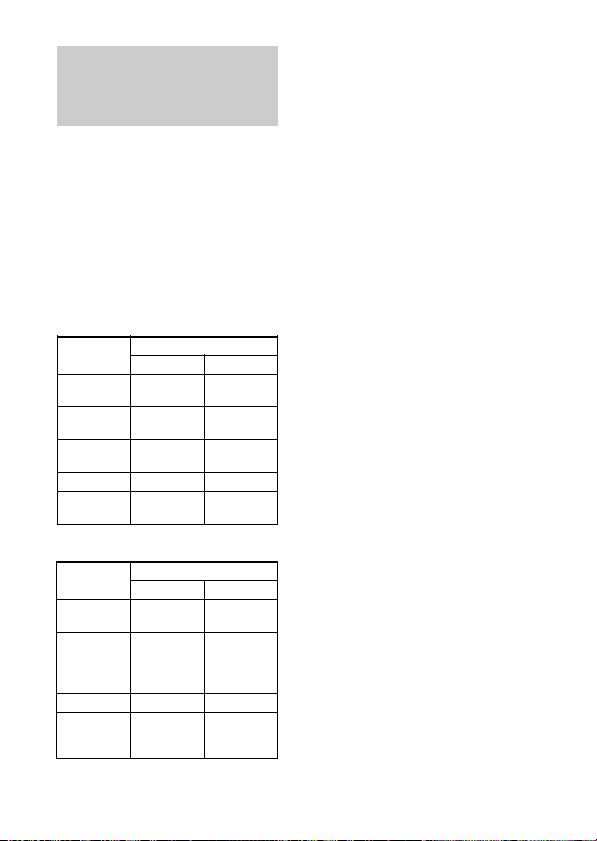
Controlling the
Bluetooth mobile
phone – HFP, HSP
The operation of the buttons on this
unit varies depending on your
mobile phone.
HFP (Hands-free Profile) or HSP
(Headset Profile) is used for
Bluetooth mobile phone. Refer to
the operating instructions supplied
with your Bluetooth mobile phone
on supported Bluetooth profiles or
how to operate.
HFP (Hands-free Profile)
Status Multi function button
Standby
Voice Dial
active
Outgoing call
Incoming call
During call
HSP (Headset Profile)
Status Multi function button
Standby
Outgoing call
Incoming call
During call
Short Press
Start Voice
1
Dial*
Cancel Voice
1
Dial*
End outgoing
call
Answer
End call
Short Press
–
End outgoing
1
call
*
Answer
End call
*
Last number
End outgoing
call or change
call device to
3
Long Press
redial
–
–
Reject
Change call
device
Long Press
1
Dial
*
headset*
–
Change call
device to
headset
*1Some functions may not be supported
depending on the Bluetooth mobile
phone. Refer to the operating
instructions supplied with your mobile
phone.
*2This may vary, depending on the
Bluetooth mobile phone.
3
Some functions may not be supported
*
when calling using the Bluetooth
mobile phone.
2
19
US
Page 20

Calling while playing back music
The Bluetooth connection using HFP or HSP as well as A2DP is necessary
to make a call while playing back music.
For example, to make a call using a Bluetooth mobile phone while listening
to music on a Bluetooth compatible music player, this unit needs to be
connected to the mobile phone using HFP or HSP.
Make a Bluetooth connection between this unit and the
device in use following the procedures outlined below.
1 Make a Bluetooth connection between this unit and
the mobile phone in use with HFP or HSP following
the procedures outlined in “Calling” (see page 17).
2 Operate the Bluetooth device (music player or mobile
phone) used for playing the music to make a
Bluetooth connection to this unit using A2DP.
To make a call while
playing back music
1 Press the multi function
button while playing
back music (page 19), or
operate your Bluetooth
mobile phone to make a
telephone call.
If no dial tone is heard on this
unit, press and hold the multi
function button for about 2
seconds.
20
US
To receive a call while
playing back music
When an incoming call arrives, the
music pauses and the ring tone is
heard from this unit.
1 Press the multi function
button and talk.
After finishing the call, press the
multi function button. This unit
is switched back to music
playback.
When no ring tone is heard
even if an incoming call
arrives
1 Stop music playback.
2 When ringing, press the
multi function button
and talk.
Page 21
ADDITIONAL INFORMATION
1
2
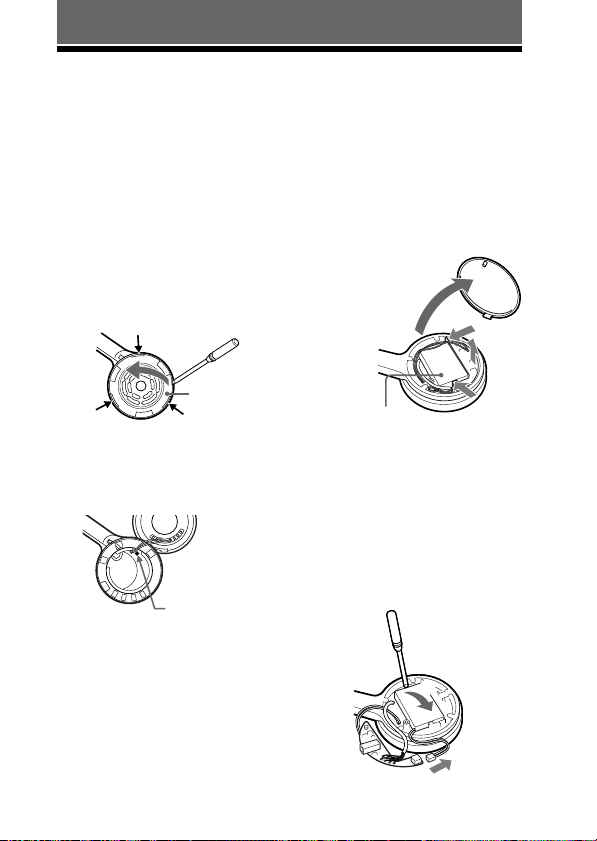
Disposing of the unit
This unit has a Lithium-lon rechargeable battery built in the left unit.
For environmental conservation, be sure to remove the built-in rechargeable
battery from the unit before disposing, and dispose of the battery
appropriately.
1 Remove the ear pad on
the left unit, and then
detach the left unit.
The unit is fixed with claws (3
places). As illustrated, insert an
object such as flathead
screwdriver into the gap and lift
up the unit to detach it.
Left
housing
Claws
2 Remove the screw
which fixes the external
cover.
Fixed screw
3 Open the external cover
and remove the inside
circuit board.
1 The external cover can be
detached by hand.
2 The circuit board is fixed
with claws (2 places). Push
the claws in the arrow
direction as illustrated to
remove the circuit board.
3 Lift the circuit board and
detach.
1
2
3
Rechargeable
battery
2
4 Pull out the connector
and remove the
rechargeable battery.
The rechargeable battery is fixed
with adhesive tape. Insert an
object such as flathead
screwdriver and lift up the
battery to remove it.
21
US
Page 22
Precautions
On Bluetooth communication
• Bluetooth wireless technology operates
within a range of about
10 meters (about 30 feet).
Maximum communication range may
vary depending on obstacles (person,
metal, wall, etc.) or electromagnetic
environment.
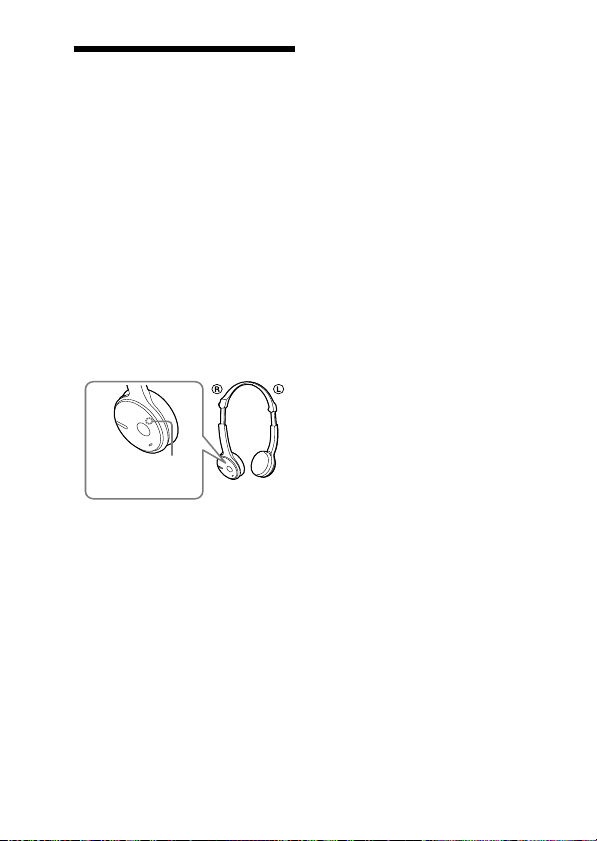
• The aerial of this unit is built into the
right unit as illustrated in the dotted
line. The sensitivity of Bluetooth
communication will improve by placing
a connected Bluetooth device on your
right side.
The communication distance shortens
when the obstacles are between the
aerial of the connected device and this
unit.
Location of
built-in aerial
• The following conditions may affect the
sensitivity of Bluetooth communication.
– There is an obstacle such as a person,
metal, or wall between this unit and
Bluetooth device.
– A device using 2.4 GHz frequency,
such as a wireless LAN device,
cordless telephone, or microwave
oven, is in use near this unit.
• Because Bluetooth devices and wireless
LAN (IEEE802.11b/g) use the same
frequency, microwave interference may
occur and resulting in communication
speed deterioration, noise, or invalid
connection if this unit is used near a
wireless LAN device. In such as case,
perform the following.
– Use this unit at least 10 m (about
30 ft) away from the wireless LAN
device.
22
US
– If this unit is used within 10 m (about
30 ft) of a wireless LAN device, turn
off the wireless LAN device.
– Install this unit and Bluetooth device
as near to each other as possible.
• Microwaves emitting from a Bluetooth
device may affect the operation of
electronic medical devices. Turn off
this unit and other Bluetooth devices in
the following locations, as it may cause
an accident.
– where inflammable gas is present, in
a hospital, train, airplane, or a petrol
station
– near automatic doors or a fire alarm
• This unit supports security capabilities
that comply with the Bluetooth standard
to provide a secure connection when the
Bluetooth wireless technology is used,
but security may not be enough
depending on the setting. Be careful
when communicating using Bluetooth
wireless technology.
• We do not take any responsibility for
the leakage of information during
Bluetooth communication.
• Connection with all Bluetooth devices
cannot be guaranteed.
– A device featuring Bluetooth function
is required to conform to the
Bluetooth standard specified by
Bluetooth SIG, and be authenticated.
– Even if the connected device
conforms to the above mentioned
Bluetooth standard, some devices
may not be connected or work
correctly, depending on the features
or specifications of the device.
– While talking on the phone hands
free, noise may occur, depending on
the device or communication
environment.
• Depending on the device to be
connected, it may require some time to
start communication.
Page 23

On the supplied AC power
adaptor
• Use the AC power adaptor supplied
with this unit. Do not use any other AC
power adaptor since it may cause the
unit to malfunction.
Polarity of the plug
• If you are not going to use this unit for
a long time, unplug the AC power
adaptor from the AC outlet. To remove
the AC power adaptor from the wall
outlet, grasp the adaptor plug itself;
never pull the cord.
Others
• Do not place this unit in a place
exposed to humidity, dust, soot or
steam, subject to direct sunlight, or in a
car waiting at a traffic signal. It may
cause a malfunction.
• Be careful not to pinch your fingers
when folding the headset.
• Using the Bluetooth device may not
function on mobile phones, depending
on radio wave conditions and location
where the equipment is being used.
• If you experience discomfort after using
the Bluetooth device, stop using the
Bluetooth device immediately. Should
any problem persist, consult your
nearest Sony dealer.
• Listening with this unit at high volume
may affect your hearing. For traffic
safety, do not use this unit while driving
or cycling.
• Do not put weight or pressure on this
unit as it may cause the unit to deform
during long storage.
• The ear pads are consumable. They may
deteriorate due to long-term storage or
use. Replace with new ones if they are
damaged.
• If you have any questions or problems
concerning this unit that are not covered
in this manual, please consult your
nearest Sony dealer.
23
US
Page 24
Troubleshooting
If you run into any problems using this unit, use the following checklist and
read the product support information on our website.
Should any problem persist, consult your nearest Sony dealer.
Common
The unit is not turned on.
, Charge the battery of the unit.
, The unit is not turned on while
charging. Unplug the unit from AC
power adaptor and then turn on the
unit.
Pairing cannot be done.
, Bring this unit and the Bluetooth
device closer together.
Cannot make the Bluetooth
connection.
, Check that this unit is turned on.
, Check that the Bluetooth connecting
device is turned on and the Bluetooth
function is on.
, Connection with the Bluetooth device
may not be memorized on this unit.
Make the Bluetooth connection from
the Bluetooth device to this unit soon
after pairing is complete.
, This unit or Bluetooth connecting
device is in sleep mode.
, The Bluetooth connection is
terminated. Make the Bluetooth
connection again (when listening to
music: see page 15, when calling: see
page 17).
Distorted sound
, Ensure that this unit is not receiving
interference from a wireless LAN,
other 2.4 GHz wireless device, or
microwave oven.
24
US
The correspondence
distance is short. (Sound
skips.)
, If a device that generates
electromagnetic radiation, such as a
wireless LAN, other Bluetooth
device(s), or a microwave oven is
nearby, move away from such
sources.
The unit does not operate
properly.
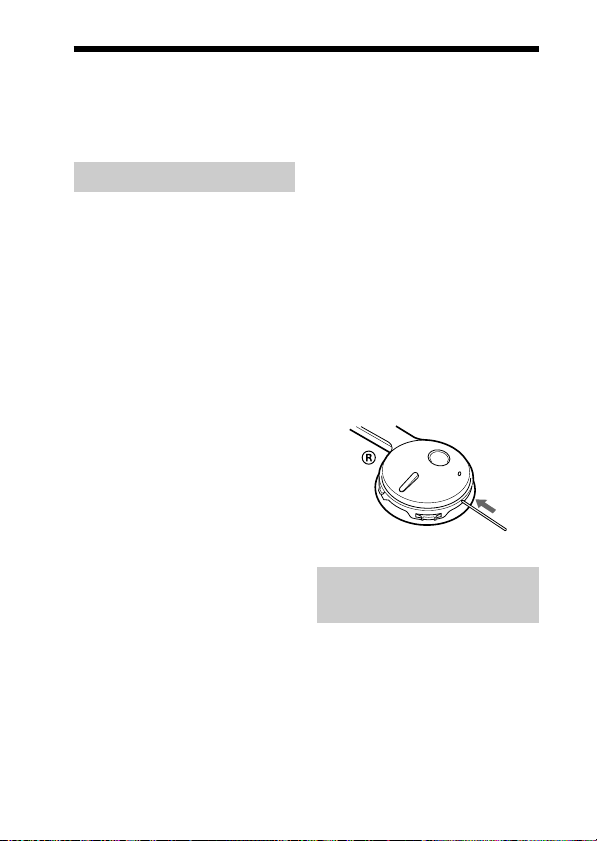
, Reset the unit. Pairing information is
not deleted by this operation.
Insert a small pin, etc., into the hole,
and push until you feel a click.
When listening to
music
No sound
, Check that both this unit and the
Bluetooth device are turned on.
,
A2DP Bluetooth connection is not
made between this unit and the
Bluetooth device. Make an A2DP
Bluetooth connection (page 15).
, Check that music is being played
back by the Bluetooth device.
Page 25

, Check that the volume of the unit is
not set too low.
, Turn up the volume on the connected
device if necessary.
, Pair this unit and Bluetooth device
again (page 11).
Low sound level
, Turn up the volume of this unit.
, Turn up the volume on the connected
device if necessary.
Low sound quality
, Switch the Bluetooth connection to
A2DP (Advanced Audio Distribution
Profile) when HSP (Headset Profile)
is set.
Cannot make the Bluetooth
connection from Bluetooth
device to this unit.
, The Bluetooth device is not equipped
with SCMS-T content protection*.
With the unit turned off, press and
hold POWER and Nx for about 7
seconds to deactivate the SCMS-T
protection. The indicator (blue)
flashes once.
* The SCMS-T content protection
method is one of the methods to
protect the contents transmitted on
the Bluetooth wireless technology.
This unit can receive the contents
protected by this method. Press and
hold the POWER button and Nx
again for about 7 seconds to
reactivate the SCMS-T content
protection method on this unit. The
indicator (blue) flashes twice.
Sound skips frequently
during playback.
, Reception condition of this unit may
have become unstable due to
improper matching of the bit-rate
setting for the music transmitted from
the Bluetooth device and the
environment in which this unit is
1
used. *
Terminate A2DP Bluetooth
connection by operating the
Bluetooth device. While this unit is
turned on, press and hold Nx for
about 7 seconds to lower the setting
of receivable bit rate. *
*1Bit rate is a numerical value which
represents data transmission
volume per second. The higher the
bit rate, in general, the better
quality the sound will be. This unit
can receive high bit rate music but
sound skipping may occur
depending on the usage
environment.
2
When bit rate setting is completed,
*
the indicator (blue) flashes once.
The above operations may not
reduce the sound skip depending on
the usage environment. To reset to
the original setting, press and hold
Nx again for about 7 seconds.
The indicator (blue) flashes twice.
2
When calling
The recipient’s voice
cannot be heard.
, Check that both this unit and the
Bluetooth mobile phone are turned
on.
, Check the connection between this
unit and the Bluetooth mobile phone.
Make a Bluetooth connection (HFP
or HSP) again (page 17).
, Check that output of the Bluetooth
mobile phone is set for this unit.
, Check that the volume of the unit is
not set too low.
, Turn up the volume on the connected
Bluetooth mobile phone if necessary.
, If you are listening to music using
this unit, stop playback, press the
multi function button and talk.
Low sound from recipient
, Turn up the volume of this unit.
, Turn up the volume on the connected
Bluetooth mobile phone if necessary.
25
US
Page 26

Initializing the
unit
You can reset this unit to its default
(such as volume setting) and delete
all pairing information.
1 If this unit is turned on,
press and hold the
POWER button for
about 3 seconds to turn
off this unit.
2 Press and hold the
POWER button and
multi function button
together for about
7 seconds.
The indicator (blue) and
indicator (red) flash together
four times, and this unit is reset
to the default setting. All pairing
information is deleted.
26
US
Page 27

Specifications
General
Communication System
Bluetooth Specification version 2.0
Output
Bluetooth Specification Power Class 2
Maximum communication range
Line of sight approx. 10 m (30 ft) *
Frequency band
2.4 GHz band (2.4000 GHz – 2.4835 GHz)
Modulation method
FHSS
Compatible Bluetooth Profiles*
A2DP (Advanced Audio Distribution
Profile)
AVRCP (Audio Video Remote Control
Profile)
HSP (Headset Profile)
HFP (Hands-free Profile)
Supported Codecs
SBC
*4, MP3
Supported content protection
method
SCMS-T
Transmission range (A2DP)
20 - 20,000 Hz (Sampling frequency
44.1 kHz)
Supplied accessory
AC power adaptor (1)
Operating instructions (this book) (1)
1
*
The actual range will vary depending
on factors such as obstacles between
devices, magnetic fields around a
microwave oven, static electricity,
reception sensitivity, aerial’s
performance, operating system,
software application, etc.
2
Bluetooth standard profiles indicate
*
the purpose of Bluetooth
communication between devices.
3
Codec: Audio signal compression and
*
conversion format
4
Subband Codec
*
3
*
1
2
Headset
Power source
DC 3.7 V: Built-in lithium-ion
rechargeable battery
Mass
Approx. 78 g (2.8 oz)
Receiver
Type
Open air, dynamic
Driver unit
30 mm dome type
Reproduction frequency range
14 – 24,000 Hz
Microphone
Type
Omni directional, electret condenser
Effective frequency range
100 – 4,000 Hz
Design and specifications are subject to
change without notice.
27
27
US
Page 28

ADVERTENCIA
Para reducir el riesgo de incendios
o electrocución, no exponga el
aparato a la lluvia ni a la humedad.
Para evitar descargas eléctricas, no
abra la unidad. En caso de avería,
solicite los servicios de personal
cualificado.
No sitúe el aparato en un espacio cerrado,
como una estantería o un armario
empotrado.
Para reducir el riesgo de incendios, no
cubra la ventilación del aparato con
periódicos, manteles, cortinas, etc. ni
coloque velas encendidas encima del
mismo.
Para reducir el riesgo de incendio o
sacudida eléctrica, no ponga objetos que
contengan líquido, tal como floreros,
encima del aparato.
Conecte el adaptador de alimentación de
ca a una toma de ca de fácil acceso. Si
percibe alguna anormalidad en el
adaptador de alimentación de ca,
desconéctelo inmediatamente de la toma
de ca.
No exponga la pila a fuentes de calor
excesivo como luz solar directa, fuego o
similar.
Una presión acústica excesiva de los
auriculares puede provocar pérdidas
auditivas.
Información
Se le advierte de que la realización de
cambios o modificaciones no aprobados
explícitamente en este manual pueden
anular su autoridad para utilizar este
equipo.
El equipo no debe colocarse ni utilizarse
junto con ninguna otra antena o
transmisor.
La marca de la palabra Bluetooth y sus
logotipos son propiedad de Bluetooth
SIG, Inc. y cualquier uso de los mismos
por parte de Sony Corporation se realiza
bajo licencia.
Las demás marcas y nombres comerciales
pertenecen a sus respectivos propietarios.
Tecnología de codificación de audio
MPEG Layer-3 y patentes bajo licencia de
Fraunhofer IIS y Thomson.
2
ES
Page 29
Para clientes de los EE UU
RECYCLADO DE BATERIAS
DE IONES DE LITIO
Las baterías de
iones de litio son
reciclables. Usted
podrá ayudar a
conservar el medio
ambiente
devolviendo las
baterías usadas al
punto de reciclaje
mas cercano.
Para más información sobre el
reciclado de baterías, llame al
número gratuito
1-800-822-8837, o visite
http://www.rbrc.org/
Precaución: No utilice baterías de
iones de litio dañadas o con fugas.
Índice
¿Qué es la tecnología
inalámbrica
Bluetooth? .................... 4
Bienvenido ........................ 5
Funcionamiento del dispositivo
Bluetooth en sólo 3 pasos ..... 6
Ubicación y función de los
componentes ................ 7
Plegado y desplegado de los
auriculares ............................ 8
Carga de la unidad ........... 9
Emparejamiento ............. 11
¿Qué es el emparejamiento? ... 11
Procedimientos de
emparejamiento .................. 11
Utilización de los
auriculares .................. 13
Indicaciones de la función
Bluetooth ..................... 14
Escuchar música ........... 15
Control de audio del dispositivo
– AVRCP ............................ 16
Realización de
llamadas ...................... 17
Control del teléfono móvil
Bluetooth – HFP y HSP ..... 19
Realización de llamadas
durante la reproducción
de música .................... 20
Desecho de la unidad .... 21
Precauciones .................. 22
Solución de problemas ... 24
Inicialización de la
unidad .......................... 26
Especificaciones ............ 27
ES
3
ES
Page 30

¿Qué es la tecnología inalámbrica
Bluetooth?
Bluetooth™ es una tecnología
inalámbrica de corto alcance que
permite la comunicación
inalámbrica de datos entre
dispositivos digitales como, por
ejemplo, un ordenador o una cámara
digital. La tecnología inalámbrica
Bluetooth funciona en un rango de
aproximadamente 10 metros. Lo
habitual es conectar dos
dispositivos, pero algunos
dispositivos admiten la conexión a
varios dispositivos a la vez. No es
necesario utilizar un cable para
realizar la conexión, ni tampoco es
necesario encarar los dispositivos
entre sí, como sucede con la
tecnología de infrarrojos. Por
ejemplo, puede utilizar los
dispositivos en una bolsa o en un
bolsillo. El estándar Bluetooth es
una convención internacional
reconocida y utilizada por miles de
empresas de todo el mundo.
Sistema de comunicación
y perfiles Bluetooth
compatibles de la unidad
Un perfil es una estandarización de
la función para cada especificación
del dispositivo Bluetooth. Esta
unidad es compatible con el perfil y
la versión Bluetooth siguientes:
Sistema de comunicación:
Especificación Bluetooth versión 2.0
Perfiles Bluetooth compatibles:
– A2DP (Advanced Audio Distribution
Profile): Transmisión o recepción de
contenido de audio de alta calidad.
– AVRCP (Audio Video Remote Control
Profile): Control del equipo de A/V;
pausa, detención, inicio de la
reproducción, control de volumen, etc.
– HSP (Headset Profile)*: Hablar por
teléfono/funcionamiento del teléfono.
– HFP (Hands-free Profile)*: Hablar por
el teléfono/Uso del teléfono mediante la
función de manos libres.
* Cuando utilice un teléfono móvil
Bluetooth compatible con las funciones
HFP (Hands-free Profile) y HSP
(Headset Profile), ajústelo en HFP.
Notas
• Para poder utilizar la función Bluetooth,
el dispositivo Bluetooth que desea
conectar debe tener el mismo perfil que
la unidad.
Tenga en cuenta también que aunque
exista el mismo perfil, el
funcionamiento de los dispositivos
puede variar dependiendo de las
especificaciones de estos.
• Debido a las características de la
tecnología inalámbrica Bluetooth, el
sonido que se reproduce en esta unidad
sufre un ligero retardo respecto al
sonido que se reproduce en el
dispositivo Bluetooth cuando se habla
por teléfono o se escucha música.
4
ES
Page 31
Bienvenido
Gracias por adquirir los auriculares estéreo inalámbricos de Sony. Esta
unidad utiliza la tecnología inalámbrica Bluetooth.
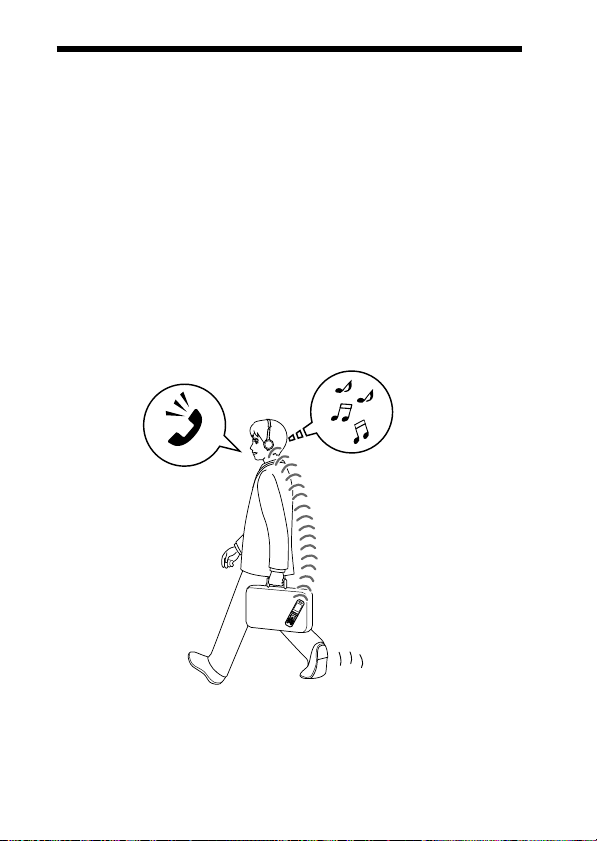
• Disfrute de música sin cables con un reproductor de música Bluetooth,
como un teléfono móvil Bluetooth, un reproductor de música digital
Bluetooth o un reproductor de música digital conectado al transmisor
Bluetooth.*
• Puede disfrutar de una conversación de manos libres con su móvil
Bluetooth sin sacarlo del bolso o maletín.*
• Para su comodidad, puede controlar las funciones básicas de un
reproductor de música Bluetooth (reproducción, detención, etc.) de manera
remota.*
• Práctica función de recarga.
• Cómodo diseño plegable fácil de transportar.
Para obtener más información sobre la tecnología inalámbrica Bluetooth,
consulte la página 4.
1
2
3
Hablando por
Escuchar música
teléfono
*1El dispositivo Bluetooth conectado debe ser compatible con el perfil A2DP
(Advanced Audio Distribution Profile).
2
El dispositivo Bluetooth conectado debe ser compatible con el perfil HSP (Headset
*
Profile) o HFP (Hands-free Profile).
3
El dispositivo Bluetooth conectado debe ser compatible con el perfil AVRCP
*
(Audio Video Remote Control Profile).
5
ES
Page 32
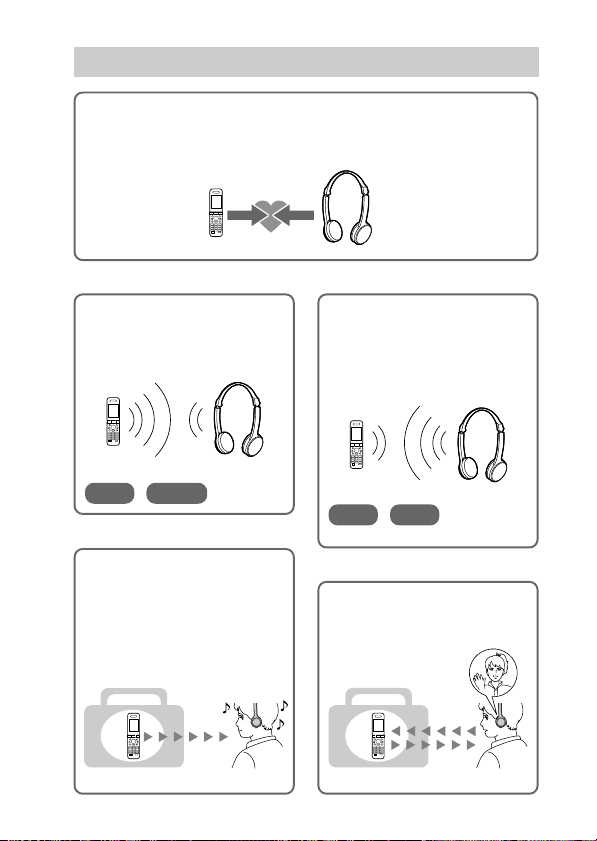
Funcionamiento del dispositivo Bluetooth en sólo 3 pasos
Emparejamiento
En primer lugar, registre (“empareje”) un dispositivo Bluetooth (teléfono
móvil, etc.) y esta unidad entre sí. Una vez que se haya establecido el
emparejamiento, no será necesario volver a realizarlo.
Teléfonos
móviles
Bluetooth, etc.
Emparejamiento
Escuchar música
V
Conexión Bluetooth
Utilice el dispositivo Bluetooth
para realizar la conexión
Bluetooth.
Conexión
A2DP
AVRCP
c Página 15
V
Escuchar música
Es posible escuchar música
reproducida en el dispositivo
Bluetooth.
Esta unidad permite las
operaciones de reproducción,
detención e inserción de una pausa.
Auriculares
estéreo
inalámbricos
c Página 11
Realizar llamadas
V
Conexión Bluetooth
Cuando la unidad se enciende,
ésta empieza a realizar la
conexión Bluetooth con el
teléfono móvil reconocido
automáticamente.
Conexión
HFP HSP
c Páginas 17 - 18
V
Hablar por teléfono
Puede realizar y recibir llamadas
mediante esta unidad.
Música
6
ES
Voz
c Páginas 18 - 20c Páginas 15 - 16
Page 33
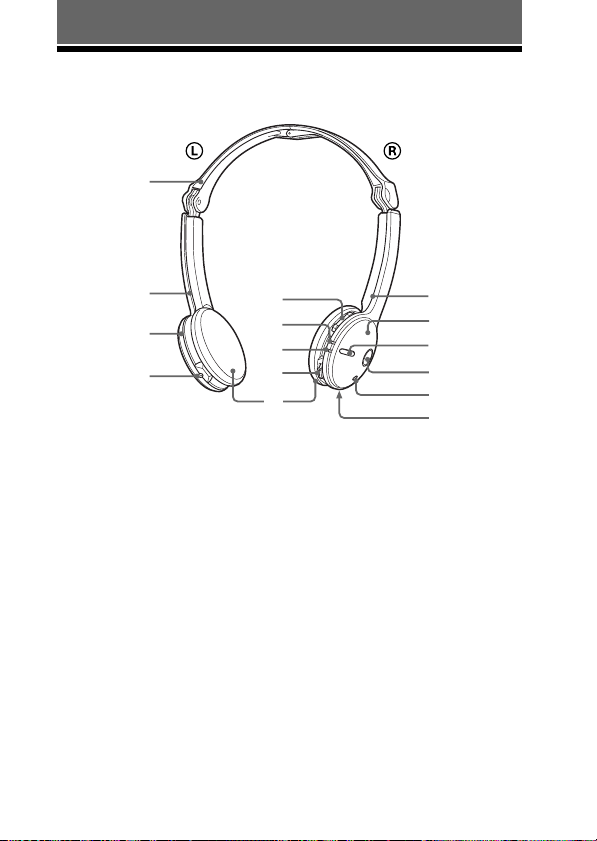
PROCEDIMIENTOS INICIALES
Ubicación y función de los
componentes
qg
qf
L
qd
qs
1 Indicación R (derecha)
2 Unidad derecha (R)
3 Botón multifunción
Controla varias funciones de
llamada.
4 Botón POWER
5 Micrófono
6 Botón RESET
Pulse este botón si la unidad no
funciona correctamente. Al
realizar esta operación, la
información del
emparejamiento no se elimina.
7 Botónes VOL
(volumen) +*⁄–
8 Indicador (azul)
Indica el estado de la
comunicación de la unidad.
7
R
8
9
0
qa
9 Indicador (rojo)
Indica el estado de la
alimentación de la unidad.
0 Interruptor de
desplazamiento
Controla varias funciones
cuando se escucha música.
qa Almohadilla para las
orejas
qs Toma DC IN 3 V
qd Unidad izquierda (L)
qf Indicación L
(izquierda)
qg Diadema
* Este botón tiene un punto táctil.
1
2
3
4
5
6
7
ES
Page 34
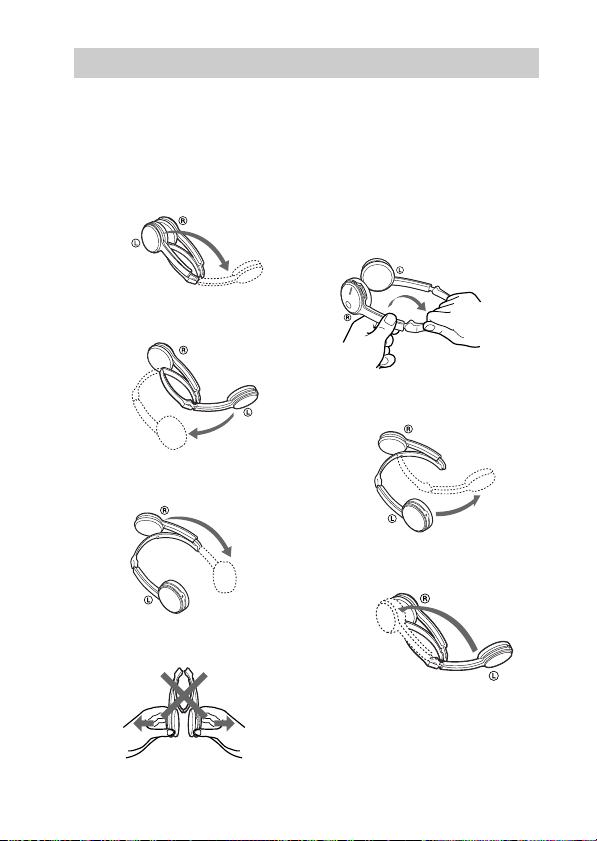
Plegado y desplegado de los auriculares
Desplegado
1 Despliegue la unidad
izquierda de la diadema
como se muestra en la
ilustración.
2 Extienda la parte central
de la diadema.
3 Despliegue la unidad
derecha de la diadema.
Notas
• No la abra de esta forma.
Plegado
1 Sujete la parte plegable
con ambas manos y
levante la unidad
derecha para doblarla
como se muestra en la
ilustración.
2 Cierre la parte central
de la diadema.
3 Pliegue la unidad
izquierda de la diadema.
• Tenga cuidado de no golpearse la cara o
los ojos con la parte superior de la
8
diadema.
ES
Page 35
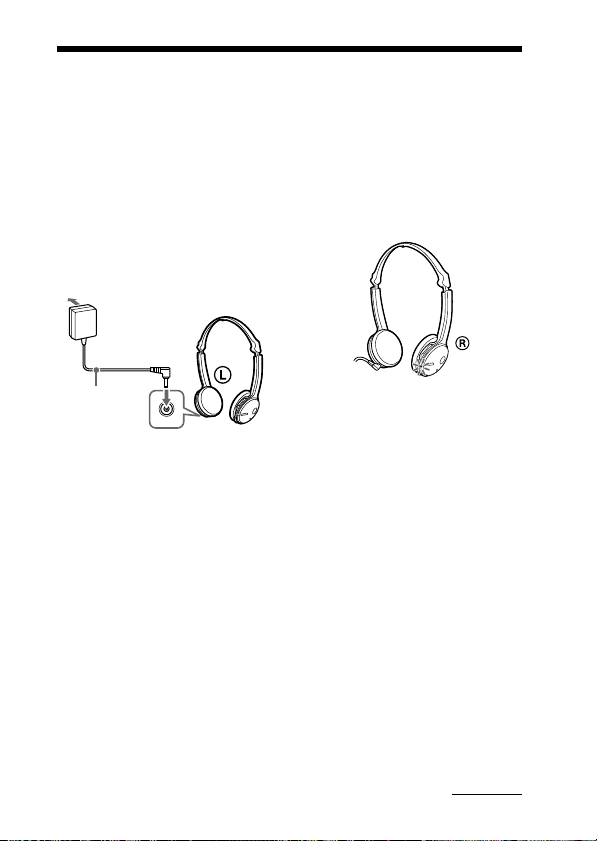
Carga de la unidad
La unidad contiene una batería de iones de litio recargable, que se debe
cargar antes de utilizarla por primera vez.
1 Conecte el adaptador de
alimentación de ca
suministrado a la toma
DC IN 3 V de esta
unidad.
a una toma
de ca
adaptador de
alimentación
de ca
(suministrado)
La carga comienza al conectar el
adaptador de alimentación de ca
a una toma de corriente de ca.
Sugerencias
• Si el adaptador de alimentación de
ca está conectado a una toma de ca
mientras la unidad está encendida,
ésta se apagará automáticamente.
• Esta unidad no puede encenderse
mientras se está cargando.
a la toma
DC IN 3 V
auriculares estéreo
inalámbricos
2 Asegúrese de que el
indicador (rojo) se
ilumina durante el
proceso de carga.
La carga se completa
transcurridas aproximadamente
3 horas* y el indicador (rojo) se
apaga automáticamente.
* Tiempo necesario para volver a
cargar una batería agotada.
Precaución
Si la unidad detecta un problema
durante la carga, es posible que el
indicador (rojo) se apague aunque
no haya finalizado la carga.
Compruebe si se debe a las causas
siguientes:
– La temperatura ambiental excede
la gama entre los 0 °C y los
40 °C.
– La batería tiene un problema.
En este caso, cárguela de nuevo
entre las temperaturas indicadas
anteriormente.
Si el problema persiste, póngase en
contacto con el distribuidor Sony
más cercano.
Continúa
9
ES
Page 36

Notas
• Si no se utiliza la batería durante un
período de tiempo prolongado, es
posible que la carga se agote
rápidamente. Sin embargo, después de
varias recargas, aumentará la duración.
• Si la vida útil de la batería recargable
incorporada disminuye hasta la mitad
de la duración normal, la batería deberá
reemplazarse. Para reemplazar la
batería recargable, póngase en contacto
con el distribuidor Sony más cercano.
• Evite la exposición de la unidad a
temperaturas extremas, la luz solar
directa, la humedad, la arena, el polvo o
los golpes. No la deje nunca en un
automóvil estacionado al sol.
• Utilice únicamente el adaptador de
alimentación de ca suministrado. No
utilice ningún otro adaptador de
alimentación de ca.
Duración
Estado
*
Duración
aproximada
Tiempo de
11 horas
comunicación
(incluido el tiempo
de reproducción de
música) (máximo)
Tiempo en
100 horas
espera
(máximo)
* Estos tiempos pueden variar según la
temperatura ambiente o las condiciones
de uso.
Comprobación de la
batería restante
Si pulsa el botón POWER mientras
la unidad está encendida, el
indicador (rojo) parpadeará. Puede
comprobar la batería restante
mediante el número de veces que
parpadea el indicador (rojo).
Indicador (rojo)
3 veces
2 veces
1 vez
Nota
No puede comprobar la carga restante
inmediatamente después de encender la
unidad o durante el emparejamiento.
Cuando la batería está
prácticamente agotada
El indicador (rojo) parpadea
lentamente de forma automática.
Cuando la batería se agota por
completo, suena un pitido y la
unidad se apaga automáticamente.
Estado
Completa
Media
Baja (debe
cargarla)
10
ES
Page 37
Emparejamiento
¿Qué es el
emparejamiento?
Los dispositivos Bluetooth deben
“emparejarse” previamente entre sí.
Una vez que los dispositivos
Bluetooth se han emparejado, no es
necesario volver a hacerlo excepto
en los casos siguientes:
• La información de
emparejamiento se elimina tras
una reparación, etc.
• La unidad está emparejada con 9
dispositivos o más.
Esta unidad se puede emparejar
hasta con 8 dispositivos; si se
empareja un noveno dispositivo,
éste reemplazará al más antiguo
de los 8 restantes.
• Cuando se elimina el
reconocimiento de la unidad en el
dispositivo que desea conectar.
• Se ha inicializado esta unidad
(página 26).
Se elimina toda la información de
emparejamiento.
Procedimientos de
emparejamiento
1 Coloque el dispositivo
Bluetooth a menos de 1
metro de esta unidad.
2 Mantenga pulsado el
botón POWER durante
más de 7 segundos para
poner en espera el
emparejamiento
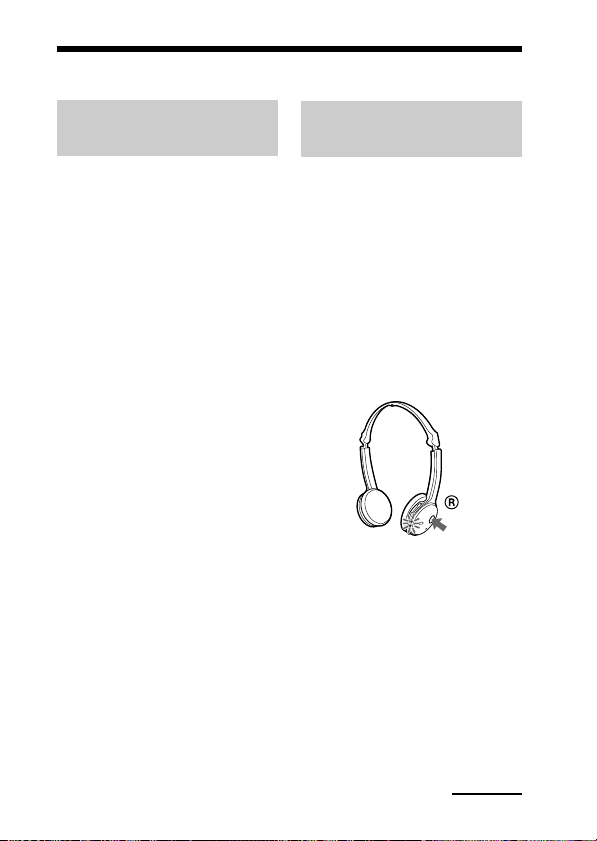
mientras la unidad se
desconecta.
Notas
• Transcurridos 3 segundos, la
alimentación se enciende y los
indicadores (azul) y (rojo)
parpadean juntos dos veces.
Mantenga pulsado el botón
POWER. El indicador (azul)
empieza a parpadear. Cuando
ambos indicadores comiencen a
parpadear juntos, suelte el botón.
La unidad pasa al modo de
emparejamiento.
Continúa
11
ES
Page 38

• Si el emparejamiento no se ha
establecido en unos 5 minutos, el
modo de emparejamiento se
cancelará y la unidad se apagará.
En tal caso, vuelva a comenzar
desde el paso 1.
3 Realice el
procedimiento de
emparejamiento en el
dispositivo Bluetooth
para que detecte esta
unidad.
La lista de los dispositivos
detectados aparecerá en la
pantalla del dispositivo
Bluetooth. Esta unidad se
muestra como “DR-BT22”.
Si no aparece “DR-BT22”,
repita el procedimiento desde el
paso 1.
Notas
• Para obtener más información,
consulte el manual de
instrucciones que se suministra
junto con el dispositivo Bluetooth.
• Cuando realice el emparejamiento
con un dispositivo Bluetooth que
no pueda mostrar una lista de
dispositivos detectados o no
disponga de pantalla, puede
emparejar el dispositivo mediante
el ajuste de la unidad y del
dispositivo Bluetooth en modo de
emparejamiento. En este
momento, si la clave de acceso no
está ajustada en “0000” en el
dispositivo Bluetooth, no es
posible emparejar la unidad.
4 Seleccione
“DR-BT22” en la
pantalla del dispositivo
Bluetooth.
5 Si se solicita la
introducción de una
contraseña* en la
pantalla del dispositivo
Bluetooth, introduzca
“0000”.
El emparejamiento finaliza
cuando el indicador (azul)
parpadea lentamente. En la
pantalla de algunos dispositivos
Bluetooth aparece un mensaje
que indica “emparejamiento
finalizado”.
* La contraseña puede denominarse
“clave de acceso”, “código PIN”,
“número PIN” o “código de
acceso”.
6 Inicie la conexión
Bluetooth desde el
dispositivo Bluetooth.
La unidad memoriza este
dispositivo como el último al
que se ha conectado.
Es posible que algunos
dispositivos Bluetooth se
conecten automáticamente a esta
unidad al finalizar el
emparejamiento.
Sugerencias
• Para realizar un emparejamiento con
otros dispositivos Bluetooth, repita los
pasos del 1 al 5 para cada dispositivo.
• Para eliminar toda la información de
emparejamiento, consulte
“Inicialización de la unidad”
(página 26).
12
ES
Page 39
Utilización de los auriculares
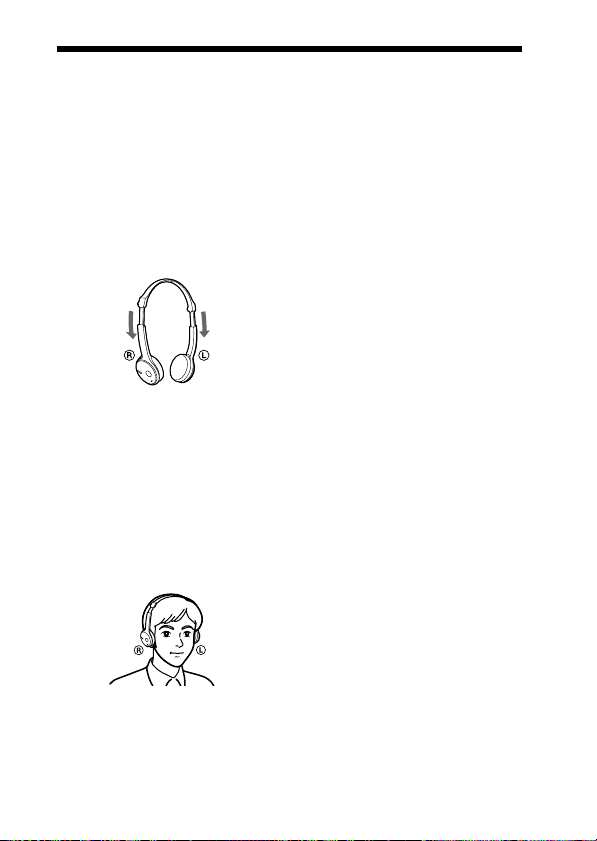
1 Despliegue los
auriculares siguiendo el
procedimiento descrito
en la página 8 y, a
continuación, extienda
los auriculares para
ajustar la longitud.
2 Coloque la unidad con
la marca L en la oreja
izquierda y la unidad
con la marca R en la
oreja derecha y, a
continuación, póngase
los auriculares en la
cabeza.
13
ES
Page 40
Indicaciones de la función Bluetooth
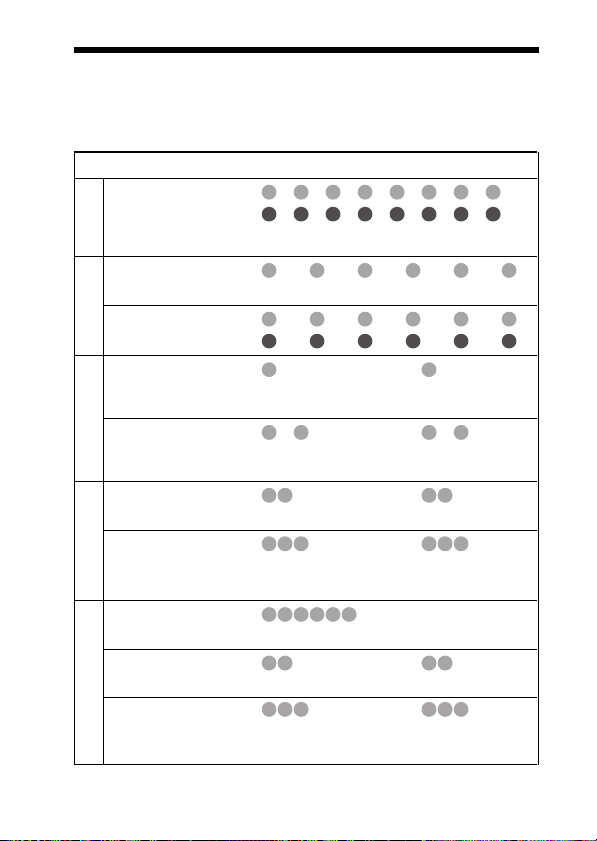
B : Indicador (azul)
R : Indicador (rojo)
Estado Patrones de parpadeo
Búsqueda
– – – – – – – –
B
– – – – – – – –
R
...
...
14
ES
Emparejamiento
Conexiones
disponibles
En proceso de
Conexión
conexión
HFP/HSP o A2DP
(en espera para recibir señal de
audio)
HFP/HSP y A2DP
(en espera para recibir señal de
audio)
Conexión establecida
Escucha
Escucha durante tiempo
Música
de espera para llamada de
teléfono
Llamada entrante
Conversación
Teléfono
Realización de
llamadas durante la
reproducción de música
– – – – – – – – – –
B
–
R
– – – – – – – – – –
B
– – – – – – – – – –
R
– – – – – – – – – – – – – –
B
–
R
– – – – – – – – – – – –
B
–
R
B
R
B
R
B
R
B
R
B
R
– – – – – – – – – – – –
–
– – – – – – – – – –
–
...
–
– – – – – – – – – – – –
–
– – – – – – – – – –
–
...
...
...
...
...
...
...
...
...
Page 41
USO DE LA UNIDAD
Escuchar música
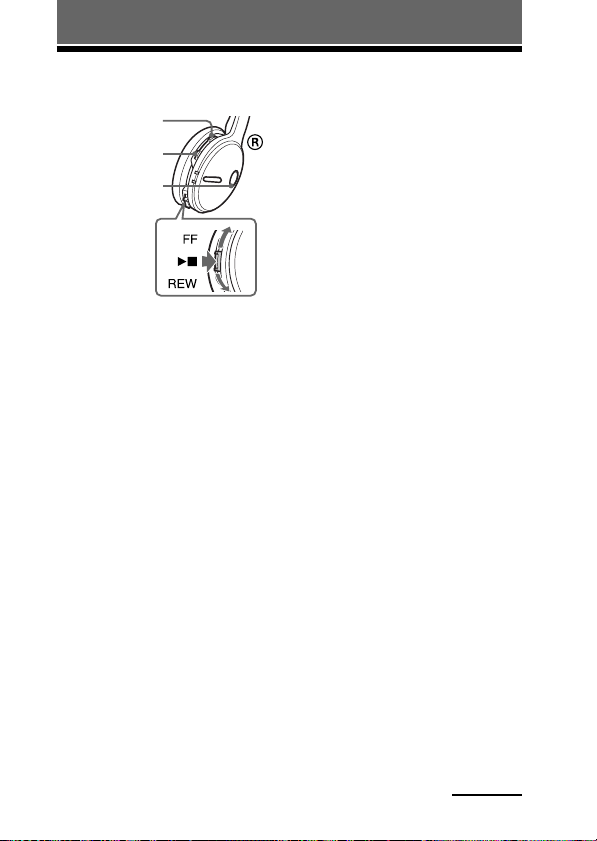
Botón VOL +
Botón VOL –
Botón
POWER
Antes utilizar la unidad, compruebe
los puntos siguientes.
– El dispositivo Bluetooth está
encendido.
– Ha finalizado el emparejamiento
de esta unidad y el dispositivo
Bluetooth.
– El dispositivo Bluetooth admite la
función de transmisión de música
(perfil: A2DP*).
1 Con la unidad apagada,
mantenga pulsado el
botón POWER durante
aproximadamente
3 segundos.
Los indicadores (azul) y (rojo)
parpadean dos veces juntos y la
unidad se enciende.
Notas
• No debe mantener pulsado el botón
POWER durante más de 7
segundos, en ese caso, la unidad
pasará al modo de emparejamiento.
• Una vez activada la unidad, ésta
intenta conectarse automáticamente
al último dispositivo Bluetooth al
que se conectó con HFP o HSP.
Cuando no realice llamadas con la
unidad, no deje el último
dispositivo Bluetooth conectado
preparado para realizar una
conexión HFP o HSP. Para realizar
o recibir llamadas mientras escucha
música, consulte la página 20.
2 Realice la conexión
Bluetooth (A2DP) desde
un dispositivo
Bluetooth a esta unidad.
Consulte el manual de
instrucciones suministrado con
el dispositivo Bluetooth para
saber como realizarla.
3 Inicie la reproducción
del dispositivo
Bluetooth.
Sugerencia
La conexión Bluetooth de A2DP
(Advanced Audio Distribution Profile)
también se puede realizar utilizando el
selector de desplazamiento de esta unidad
al dispositivo Bluetooth excepto cuando
se haga una llamada a dicha unidad.
Notas
• Cuando reproduzca música mediante la
conexión de la unidad a un dispositivo
Bluetooth con HSP (Headset Profile), la
calidad del sonido no será alta. Para una
mejor calidad de sonido, cambie la
conexión Bluetooth a A2DP utilizando
el dispositivo Bluetooth.
• Si se apaga la unidad cuando se ha
establecido una conexión Bluetooth
A2DP, vuelva a ponerla en
funcionamiento desde el paso 1 para
realizar de nuevo la conexión Bluetooth
A2DP.
* Para obtener más información sobre los
perfiles, consulte la página 4.
Continúa
15
ES
Page 42
Para ajustar el volumen
Pulse el botón VOL + o – mientras
esté escuchando música.
Sugerencias
• En función del dispositivo que conecte,
es posible que también deba ajustar el
volumen en dicho dispositivo.
• El volumen para realizar llamadas y
escuchar música se puede ajustar de
forma independiente. Aunque
modifique el volumen mientras realiza
una llamada, el volumen de la
reproducción de música no variará.
Para detener el uso
1 Para finalizar la
conexión Bluetooth
haga funcionar el
dispositivo Bluetooth.
2 Mantenga pulsado el
botón POWER durante
unos 3 segundos.
Los indicadores (azul) y (rojo)
se iluminan a la vez y la unidad
se apaga.
Sugerencia
Cuando finalice la reproducción de
música, es posible que la conexión
Bluetooth finalice automáticamente,
según el dispositivo Bluetooth que se
utilice.
Control de audio del
dispositivo – AVRCP
Si el dispositivo de audio Bluetooth
conectado con esta unidad admite
AVRCP (Audio Video Remote
Control Profile), podrá controlarlo
mediante los botones de la unidad.
16
ES
Consulte el manual de instrucciones
suministrado con el dispositivo
Bluetooth para saber como
realizarla.
Nota
La utilización del dispositivo Bluetooth
que desea conectar variará dependiendo
de las especificaciones.
Estado: En modo de detención o
de pausa
Pulsar Mantener
Nx
FF / REW
1 Inicia la reproducción*
2 Parada
3 Saltar a la siguiente/a la anterior
4 Avance/rebobinado rápido*
Estado: En modo de
reproducción
Pulsar Mantener
Nx
FF / REW
5 Pausa*
6 Parada
1
7 Saltar a la siguiente/a la anterior
8 Avance/rebobinado rápido*
*1Es posible que necesite pulsar el
botón dos veces según el dispositivo
Bluetooth.
2
Es posible que algunos dispositivos
*
Bluetooth no funcionen.
Nota
No es posible ajustar el volumen del
dispositivo Bluetooth con los botones de
volumen de la unidad.
pulsado
1
3
5
7
2
4
1
2
pulsado
6
8
2
Page 43

Realización de llamadas
Botón VOL +
Botón VOL –
Botón
multifunción
Botón POWER
Antes de utilizar la unidad,
compruebe los puntos siguientes.
– La función Bluetooth está
activada en el teléfono móvil.
– Ha finalizado el emparejamiento
de esta unidad y el teléfono móvil
Bluetooth.
1 Con la unidad apagada,
mantenga pulsado el
botón POWER durante
aproximadamente
3 segundos.
Los indicadores (azul) y (rojo)
parpadean juntos dos veces, la
unidad se enciende y, a
continuación, ésta intenta
conectarse automáticamente al
último teléfono móvil Bluetooth
que se ha usado.
Nota
No debe mantener pulsado el botón
POWER durante más de 7 segundos,
en ese caso, la unidad pasará al modo
de emparejamiento.
Sugerencia
Esta unidad dejará de intentar
establecer conexión con el teléfono
móvil Bluetooth transcurrido 1
minuto. En ese caso, pulse el botón
multifunción para intentar conectar
de nuevo.
Si la unidad no se conecta
a un teléfono móvil
Bluetooth automáticamente
Puede realizar una conexión
utilizando el teléfono móvil
Bluetooth o esta unidad para
conectarse al último dispositivo
Bluetooth al que se ha conectado.
A Para usar el teléfono
móvil Bluetooth para
realizar la conexión
1 Realice la conexión
Bluetooth (HFP o HSP*)
desde el teléfono móvil
Bluetooth a esta unidad.
Para obtener más información
sobre el procedimiento a seguir,
consulte el manual suministrado
con el teléfono móvil Bluetooth.
La lista de dispositivos
reconocidos aparecerá en la
pantalla del teléfono móvil
Bluetooth. Esta unidad aparece
como “DR-BT22”.
Cuando utilice las funciones
HFP (Hands-free Profile) y HSP
(Headset Profile) del teléfono
móvil Bluetooth, ajústelo en
HFP.
Nota
Si desea conectarse con un teléfono
móvil Bluetooth distinto del que se
conectó la última vez, siga el
procedimiento anterior.
* Para obtener más información
sobre los perfiles, consulte la
página 4.
Continúa
17
ES
Page 44

B Para usar esta unidad
para realizar una
conexión con el último
dispositivo Bluetooth al
que se ha conectado
1 Pulse el botón
multifunción de la
unidad.
Los indicadores (azul) y (rojo)
empiezan a parpadear a la vez y
la unidad realiza la conexión
durante unos 5 segundos.
Nota
No es posible establecer una conexión con
el botón multifunción mientras se escucha
música en esta unidad.
Para llamar
1 Utilice los botones del
teléfono móvil para
realizar llamadas.
Si la unidad no emite ningún
tono de llamada, mantenga
pulsado el botón multifunción
durante unos 2 segundos.
Sugerencia
Puede realizar llamadas de la manera
siguiente, dependiendo del teléfono móvil
Bluetooth que utilice. Para obtener más
información sobre el funcionamiento,
consulte el manual suministrado con el
teléfono móvil Bluetooth.
– Cuando se realicen comunicaciones,
podrá llamar utilizando la función de
marcación por voz si pulsa el botón
multifunción.
– Para llamar al último número marcado,
pulse el botón multifunción durante
unos 2 segundos.
Para recibir una llamada
Al recibir una llamada entrante, oirá
un tono de llamada de la unidad.
1
Pulse el botón
multifunción de la unidad.
El tono de llamada varía de las
formas siguientes, dependiendo
del teléfono móvil.
– tono de llamada ajustado en la
unidad
– tono de llamada ajustado en el
teléfono móvil
– tono de llamada ajustado en el
teléfono móvil sólo para la
conexión Bluetooth
Nota
Si pulsó el botón del teléfono móvil
Bluetooth para recibir una llamada, tenga
en cuenta que es probable que algunos
teléfonos tengan activada la prioridad
para utilizar el teléfono. En este caso,
ajústelo para hablar con la unidad
manteniendo pulsado el botón
multifunción durante unos 2 segundos o
bien realice el ajuste desde el teléfono
móvil Bluetooth. Para obtener más
información, consulte el manual
suministrado con el teléfono móvil
Bluetooth.
Para ajustar el volumen
Pulse los botones VOL + o –.
Sugerencias
• No puede ajustar el volumen cuando no
se realicen comunicaciones.
• El volumen para realizar llamadas y
escuchar música se puede ajustar de
forma independiente. Aunque
modifique el volumen mientras
reproduce música, el volumen de la
llamada no variará.
18
ES
Page 45
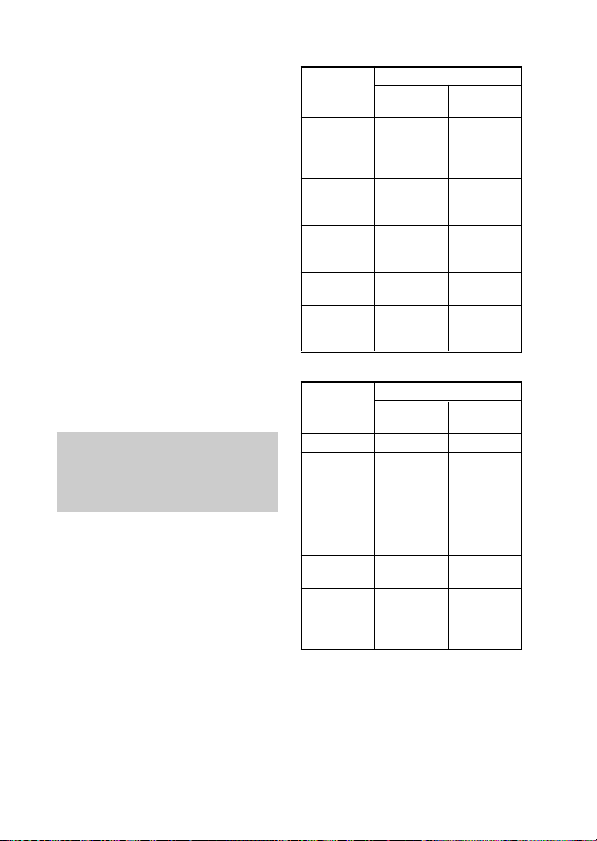
Para finalizar una llamada
Para finalizar una llamada puede
presionar el botón multifunción de
la unidad.
Para detener el uso
1 Termine las
comunicaciones
Bluetooth en el teléfono
móvil.
2 Para apagar la
alimentación de la
unidad, mantenga
pulsado el botón
POWER durante unos
3 segundos.
Los indicadores (azul) y (rojo)
se iluminan a la vez y la unidad
se apaga.
Control del teléfono
móvil Bluetooth –
HFP y HSP
El uso de los botones de esta unidad
varía dependiendo del teléfono
móvil que utilice.
Para efectuar el emparejamiento con
un teléfono móvil Bluetooth se
utiliza el perfil HFP (Hands-free
Profile) o HSP (Headset Profile).
Consulte el manual de instrucciones
suministrado junto con el teléfono
móvil para obtener información
sobre los perfiles Bluetooth
admitidos y cómo funcionan.
HFP (Hands-free Profile)
Estado Botón multifunción
En espera
Activa la
marcación por
voz
Llamada
saliente
Llamada
entrante
Durante la
llamada
Pulsar
Inicia la
marcación
por voz*
Cancela la
marcación
por voz*
Fin de la
llamada
saliente
Responde a la
llamada
Finaliza la
llamada
marcación del
1
1
Rechaza la
Cambio de
dispositivo de
Mantener
pulsado
Repite la
último
número
–
–
llamada
llamada
HSP (Headset Profile)
Estado Botón multifunción
En espera
Llamada
saliente
Llamada
entrante
Durante la
llamada
*1Es posible que algunas funciones no
se admitan dependiendo del teléfono
móvil Bluetooth. Consulte las
instrucciones de uso suministradas
con su teléfono móvil.
2
Puede variar en función del teléfono
*
móvil Bluetooth utilizado.
*3Es posible que algunas funciones no
se admitan cuando se realice una
llamada mediante el teléfono móvil
Bluetooth.
Pulsar
–
Fin de la
llamada
saliente*
Responde a la
llamada
Finaliza la
llamada*
Marcación*
1
cambio del
dispositivo de
llamada a los
auriculares*
Cambio del
3
dispositivo de
llamada a los
auriculares
Mantener
pulsado
Fin de la
llamada
saliente o
–
1
2
19
ES
Page 46

Realización de llamadas durante la
reproducción de música
La conexión Bluetooth con HFP o HSP, así como con A2DP, es necesaria
para realizar una llamada mientras reproduce música.
Por ejemplo, para realizar una llamada con un teléfono móvil Bluetooth
mientras escucha música en un reproductor de música compatible con
Bluetooth, esta unidad debe estar conectada al teléfono móvil con HFP o
HSP.
Para realizar una conexión Bluetooth entre esta unidad y
el dispositivo que utiliza, siga el procedimiento que se
describe a continuación.
1 Realice una conexión Bluetooth entre esta unidad y el
teléfono móvil que utiliza con HFP o HSP a través de
los procedimientos que se describen en “Realización
de llamadas” (consulte la página 17).
2 Utilice el dispositivo Bluetooth (reproductor de
música o teléfono móvil) que utiliza para reproducir
música para realizar una conexión Bluetooth con esta
unidad mediante A2DP.
Para realizar una llamada
mientras escucha música
1 Pulse el botón
multifunción durante la
reproducción de música
(página 19) o utilice el
teléfono móvil
Bluetooth para hacer
una llamada.
Si la unidad no emite ningún
tono de llamada, mantenga
pulsado el botón multifunción
durante unos 2 segundos.
Para recibir una llamada
mientras escucha música
Al recibir una llamada entrante, la
música se detendrá y se oirá un tono
de llamada de la unidad.
20
ES
1 Pulse el botón
multifunción de la
unidad y hable.
Cuando termine la llamada,
pulse el botón multifunción. La
unidad vuelve a reproducir la
música.
Si no se oye el tono de
llamada al recibir una
llamada entrante
1 Detenga la
reproducción de
música.
2 Cuando suene el tono,
pulse el botón
multifunción de la
unidad y hable.
Page 47
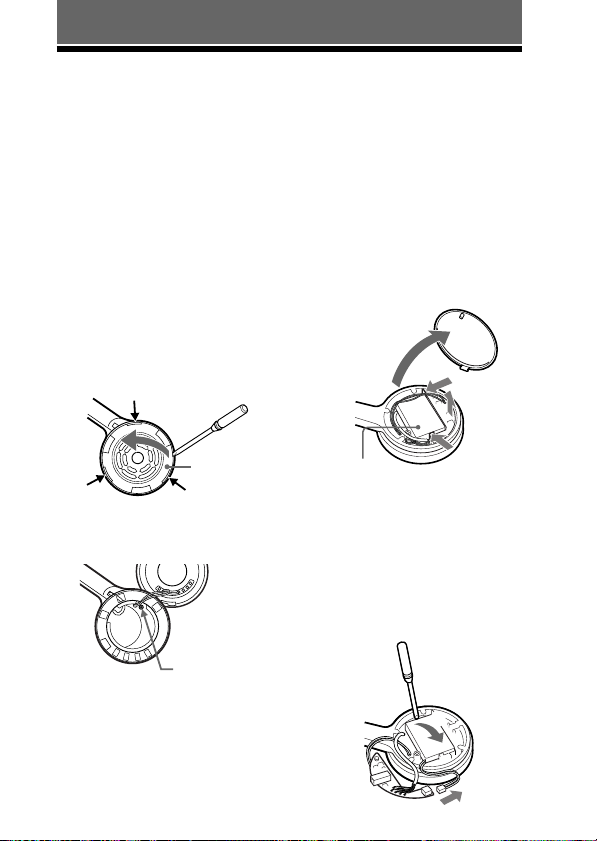
INFORMACIÓN COMPLEMENTARIA
1
2
Desecho de la unidad
Esta unidad incorpora una batería recargable de iones de litio en la unidad
izquierda.
Para una mejor conservación del medio ambiente, asegúrese de retirar la
batería recargable incorporada antes de deshacerse de la unidad y proceda al
desecho de dicha batería de la forma adecuada.
1 Retire la almohadilla de
la oreja de la unidad
izquierda y, a
continuación, separe la
unidad.
La unidad se fija con ganchos
(3 lugares). Inserte un objeto en el
orificio, por ejemplo
un destornillador plano, para
levantar la unidad y separarla,
como se muestra en la ilustración.
Receptáculo
izquierdo
Ganchos
2 Retire el tornillo con el
que se fija la tapa.
Presione los ganchos en la
dirección que indica la
flecha tal y como se muestra
en la ilustración para retirar
la placa base.
3 Levante la placa base y
retírela.
1
2
3
Batería
recargable
2
4 Separe el conector y
extraiga la batería
recargable.
La batería recargable está
ajustada con cinta adhesiva.
Inserte un objeto, por ejemplo
un destornillador plano, y
levante la batería para extraerla.
Tornillo fijo
3 Abra la tapa y retire la
placa base interna.
1 La tapa puede extraerse
manualmente.
2 La placa base está ajustada
con ganchos (2 lugares).
21
ES
Page 48
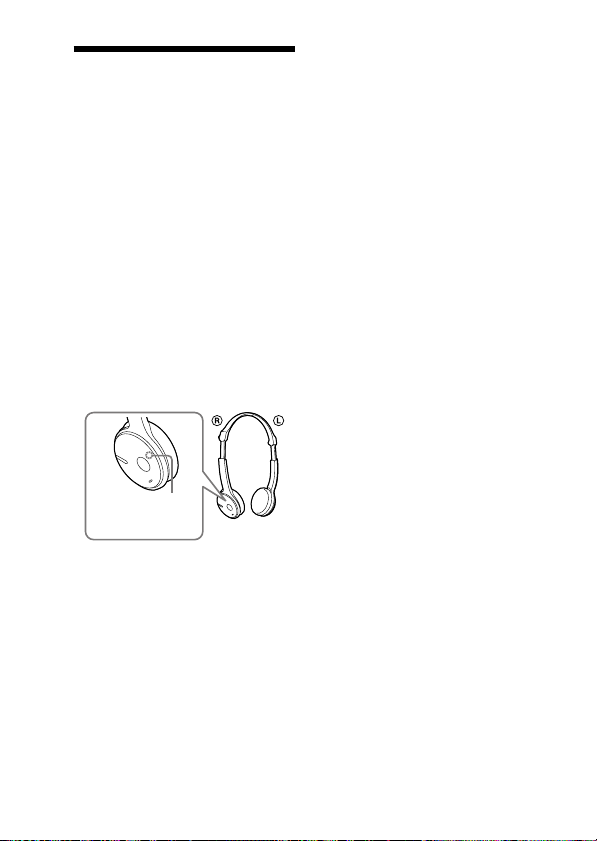
Precauciones
Comunicación Bluetooth
• La tecnología inalámbrica Bluetooth
funciona en un rango de
aproximadamente 10 metros.
El rango máximo de comunicación
puede variar en función de los
obstáculos (personas, objetos metálicos,
paredes, etc.) o del entorno
electromagnético.
• La antena de esta unidad está
incorporada en la unidad derecha como
se muestra con la línea de puntos. La
sensibilidad de la comunicación
Bluetooth mejorará al colocar el
dispositivo Bluetooth conectado en la
oreja derecha.
La distancia de comunicación se reduce
cuando existen obstáculos entre la
antena del dispositivo conectado y esta
unidad.
Ubicación de la
antena
incorporada
• Las condiciones siguientes pueden
afectar la sensibilidad de la
comunicación Bluetooth.
– La existencia de obstáculos como,
por ejemplo, una persona, un objeto
metálico o una pared entre esta
unidad y el dispositivo Bluetooth.
– El uso de dispositivos que utilicen
una frecuencia de 2,4 GHz como, por
ejemplo, un dispositivo LAN
inalámbrico, un teléfono inalámbrico
o un microondas cerca de la unidad.
• Como los dispositivos Bluetooth y las
LAN inalámbricas (IEEE802.11b/g)
utilizan la misma frecuencia, pueden
producirse interferencias de
microondas que provoquen el
deterioro de la velocidad de la
comunicación, la aparición de ruido o
una conexión no válida si la unidad se
utiliza cerca de un dispositivo LAN
inalámbrico. En este caso, realice el
procedimiento siguiente.
– Utilice esta unidad a una distancia
mínima de 10 m del dispositivo
LAN inalámbrico.
– Si utiliza esta unidad a menos de
10 m de un dispositivo LAN
inalámbrico, apague el dispositivo
LAN inalámbrico.
– Instale esta unidad y el dispositivo
Bluetooth a la distancia más corta
posible entre sí.
Las microondas que emite un
•
• Esta unidad admite capacidades de
• No se aceptan responsabilidades por
Bluetooth
dispositivo
el funcionamiento de dispositivos
médicos electrónicos. Apague esta
unidad y los demás dispositivos
Bluetooth
ya que podrían provocar un accidente:
– donde exista gas inflamable, en un
hospital, tren, avión o gasolinera
– cerca de puertas automáticas o
alarmas de incendios
seguridad que cumplen con el
estándar Bluetooth para proporcionar
una conexión segura al utilizar la
tecnología inalámbrica Bluetooth,
pero es posible que la seguridad no
sea suficiente según el ajuste. Tenga
cuidado al realizar una comunicación
con la tecnología inalámbrica
Bluetooth.
la pérdida de información que pudiera
producirse durante una comunicación
Bluetooth.
pueden afectar
en los lugares siguientes,
22
ES
Page 49
• No se puede garantizar la conexión con
todos los dispositivos Bluetooth.
– Un dispositivo que disponga de la
función Bluetooth debe cumplir el
estándar Bluetooth especificado por
Bluetooth SIG y estar autenticado.
– Incluso en el caso de que el
dispositivo conectado cumpla el
estándar Bluetooth mencionado
anteriormente, es posible que algunos
dispositivos no puedan conectarse o
funcionar correctamente, según las
características o las especificaciones
del dispositivo.
– Mientras esté hablando con el manos
libre del teléfono, puede producirse
ruido, según el dispositivo o el
entorno de comunicación.
• En función del dispositivo que vaya
conectarse, es posible que transcurra
cierto tiempo antes de que se inicie la
comunicación.
Adaptador de alimentación de ca
suministrado
• Utilice solamente el adaptador de
alimentación de ca suministrado con
esta unidad. No utilice ningún otro
adaptador de alimentación de ca, ya que
puede causar un mal funcionamiento de
la unidad.
Polaridad de la clavija
• Si no va a utilizar la unidad durante un
período prolongado de tiempo,
desconecte el adaptador de
alimentación de ca de la toma de ca.
Para retirar el adaptador de
alimentación de ca de la toma de
corriente de pared, tire del adaptador,
nunca del cable.
Otros
• No coloque esta unidad en lugares
expuestos a humedad, polvo, hollín,
vapor o luz solar directa, ni la deje en
un automóvil en espera ante una señal
de tráfico. Se pueden producir fallos de
funcionamiento.
• Tenga cuidado de no pillarse los dedos
al plegar los auriculares.
• Es posible que el dispositivo Bluetooth
no funcione en teléfonos móviles
dependiendo del estado de las ondas de
radio y del lugar donde se utilice el
equipo.
• Si no se siente cómodo después de
utilizar el dispositivo Bluetooth, deje de
utilizarlo inmediatamente. Si el
problema persiste, consulte con el
distribuidor Sony más cercano.
• Si usa la unidad a un volumen alto,
puede sufrir daños en los oídos. Por
razones de seguridad vial, no la utilice
mientras conduce o va en bicicleta.
• No coloque ningún peso ni ejerza
presión sobre la unidad, ya que ésta
podría deformarse durante períodos de
almacenamiento prolongado.
• Las almohadillas son consumibles.
Pueden deteriorarse debido a un
almacenamiento o uso prolongado.
Cámbielas por otras nuevas cuando se
estropeen.
• Si desea realizar alguna consulta o
solucionar algún problema relativo a la
unidad que no se trate en este manual,
póngase en contacto con el distribuidor
Sony más cercano a su domicilio.
23
ES
Page 50

Solución de problemas
Si tiene dificultades para utilizar esta unidad, sírvase de la siguiente lista de
comprobaciones y consulte la información de ayuda del producto en nuestro
sitio Web.
Si el problema persiste, consulte con el distribuidor Sony más cercano.
Común
La unidad no está
encendida
, Cargue la batería de la unidad.
, La unidad no está encendida mientras
se carga. Desenchufe la unidad del
adaptador de corriente de ca y, a
continuación, encienda la unidad.
No se puede llevar a cabo
el emparejamiento
, Acerque esta unidad y el dispositivo
Bluetooth.
No se ha realizado la
conexión Bluetooth
, Compruebe que la unidad está
encendida.
, Compruebe que el dispositivo
Bluetooth que desea conectar está
encendido y que la función Bluetooth
está activada.
, Es posible que la unidad no
memorice la conexión con el
dispositivo Bluetooth. Realice la
conexión Bluetooth del dispositivo
Bluetooth a la unidad inmediatamente
después de finalizar el
emparejamiento.
, Esta unidad o el dispositivo Bluetooth
que desea conectar está en modo en
espera.
, Ha finalizado la conexión Bluetooth.
Realice la conexión Bluetooth de
nuevo (cuando escuche música:
consulte la página 15 y cuando
realice llamadas: consulte la
página 17).
El sonido aparece
distorsionado
, Asegúrese de que la unidad no está
recibiendo interferencias de una red
LAN inalábrica, de algún otro
dispositivo inalámbrico de 2,4 GHz
ni de un microondas.
La distancia de
correspondencia es
demasiado corta. (Se
producen saltos del
sonido.)
, Si hay cerca un dispositivo que
genera radiación electromagnética
como, por ejemplo, una LAN
inalámbrica, otro dispositivo
Bluetooth o un microondas, aleje la
unidad de estas fuentes.
La unidad no funciona
correctamente.
, Reinicie la unidad. La información de
los pares no se borra con esta
operación.
Inserte un pequeño pasador, etc., en
el orificio con cierto ángulo y empuje
hasta escuchar un chasquido.
24
ES
Page 51

Al escuchar música
No hay sonido
, Compruebe que tanto la unidad como
el dispositivo Bluetooth están
encendidos.
, No se ha establecido la conexión
Bluetooth A2DP entre la unidad y el
dispositivo Bluetooth. Realice una
conexión Bluetooth A2DP (página 15).
, Compruebe que se reproduce música
en el dispositivo Bluetooth.
, Compruebe que el volumen de la
unidad no está demasiado bajo.
, Si es necesario, suba el volumen del
dispositivo conectado.
, Vuelva a emparejar la unidad y el
dispositivo Bluetooth (página 11).
El nivel del sonido es bajo
, Suba el volumen de la unidad.
, Si es necesario, suba el volumen del
dispositivo conectado.
Sonido de baja calidad
, Cambie la conexión Bluetooth a
A2DP (Advanced Audio Distribution
Profile) cuando se ajuste HSP
(Headset Profile).
No es posible realizar una
conexión Bluetooth desde
un dispositivo Bluetooth a
esta unidad.
, El dispositivo Bluetooth no dispone
de protección de contenido
SCMS-T*. Mantenga pulsado el
botón POWER y Nx durante unos
7 segundos para desactivar la
protección SCMS-T mientras la
unidad está apagada. El indicador
(azul) parpadeará una vez.
* El sistema de protección de
contenido SCMS-T es uno de los
métodos de protección de
contenidos transmitidos mediante
la tecnología inalámbrica
Bluetooth. Esta unidad está
preparada para recibir contenido
protegido por este sistema.
Mantenga pulsado el botón
POWER y Nx otra vez durante
unos 7 segundos para activar de
nuevo el sistema de protección de
contenido SCMS-T en la unidad. El
indicador (azul) parpadeará dos
veces.
Se producen saltos
frecuentes en el sonido
durante la reproducción.
, Es posible que la recepción de la
unidad se haya vuelto inestable
debido a que los ajustes de la
velocidad de bits de la música
transmitida no corresponden a los del
dispositivo Bluetooth y el entorno en
que se utiliza la unidad. *
Finalice la conexión Bluetooth A2DP
mediante el dispositivo Bluetooth.
Con la unidad encendida, mantenga
pulsado Nx durante
aproximadamente 7 segundos para
reducir la velocidad de bits. *
*1La velocidad de bits es un valor
numérico que expresa el volumen
de transmisión de datos por
segundo. Como norma general,
cuanto más alta sea la velocidad de
bits, mejor será la calidad del
sonido. Esta unidad está preparada
para recibir música con una alta
velocidad de bits; no obstante, es
posible que se produzcan saltos en
el sonido en función del entorno en
que se utilice.
1
2
Continúa
25
ES
Page 52

2
Cuando se completa el ajuste de
*
velocidad de bits, el indicador
(azul) parpadea una vez. En
función del entorno en que se
utilice la unidad, es posible que las
operaciones anteriores no reduzcan
los saltos en el sonido. Para
restablecer los ajustes originales,
mantenga pulsado Nx de nuevo
durante unos 7 segundos. El
indicador (azul) parpadeará dos
veces.
Al realizar llamadas
No se escucha la voz del
destinatario de la llamada.
, Compruebe que tanto la unidad como
el teléfono móvil Bluetooth están
encendidos.
, Compruebe la conexión de la unidad
con el teléfono móvil Bluetooth.
Vuelva a realizar una conexión
Bluetooth (HFP o HSP) (página 17).
, Compruebe que la salida del teléfono
móvil Bluetooth está ajusta para esta
unidad.
, Compruebe que el volumen de la
unidad no está demasiado bajo.
, Si es necesario, aumente el volumen
del teléfono móvil Bluetooth
conectado.
, Si escucha música en la unidad,
detenga la reproducción, pulse el
botón multifunción y hable.
El sonido del destinatario
de la llamada es bajo
, Suba el volumen de la unidad.
, Si es necesario, aumente el volumen
del teléfono móvil Bluetooth
conectado.
Inicialización de
la unidad
Puede restablecer la unidad a la
configuración predeterminada (así
como el volumen) y eliminar la
información de emparejamiento.
1 Si la unidad está
encendida, mantenga
pulsado el botón
POWER durante unos
3 segundos para
apagarla.
2 Mantenga pulsados los
botones POWER y
multifunción a la vez
durante unos
7 segundos.
Los indicadores (azul) y (rojo)
parpadearán juntos cuatro veces
y la unidad se restablecerá a los
ajustes predeterminados. Toda la
información de emparejamiento
se elimina.
26
ES
Page 53

Especificaciones
Generales
Sistema de comunicación
Especificación Bluetooth versión 2.0
Salida
Clase de potencia 2 de especificación
Bluetooth
Rango de comunicación máximo
Línea de vista de aprox. 10 m*
Banda de frecuencia
Banda de 2,4 GHz (2,4000 GHz –
2,4835 GHz)
Método de modulación
FHSS
Perfiles Bluetooth compatibles
A2DP (Advanced Audio Distribution
Profile)
AVRCP (Audio Video Remote Control
Profile)
HSP (Headset Profile)
HFP (Hands-free Profile)
Códecs admitidos
SBC
*4, MP3
Sistema de protección de
contenido admitido
SCMS-T
Intervalo de transmisión (A2DP)
20 – 20.000 Hz (frecuencia de muestreo
de 44,1 kHz)
Accesorio suministrado
Adaptador de corriente de ca (1)
Manual de instrucciones
(este documento) (1)
1
*
El rango real variará en función de
factores como, por ejemplo, los
obstáculos que puedan interponerse entre
los dispositivos, los campos magnéticos
que puedan existir en torno a hornos
microondas, la electricidad estática,
interferencias, las condiciones de las
ondas radioeléctricas, la sensibilidad de
recepción o el rendimiento de la antena,
1
*
3
*
del sistema operativo, de la aplicación de
software, etc.
*2Los perfiles estándar
la finalidad de la comunicación
Bluetooth
*3Códec: formato de conversión y
*4Códec de banda secundaria
entre dispositivos.
compresión de señales de audio
Auriculares
Fuente de alimentación
cc de 3,7 V: batería recargable de iones de
litio incorporada
Masa
2
Aprox. 78 g
Receptor
Tipo
Abierto, dinámico
Unidad auricular
30 mm, tipo cúpula
Gama de frecuencias de
reproducción
14 – 24.000 Hz
Micrófono
Tipo
Condensador de electreto omnidireccional
Gama de frecuencia efectiva
100 – 4.000 Hz
El diseño y las especificaciones están
sujetos a cambios sin previo aviso.
Bluetooth
indican
27
ES
Page 54

Page 55

Page 56

Printed in Malaysia
 Loading...