

Page 1

Film-Tech
The information contained in this Adobe Acrobat pdf
file is provided at your own risk and good judgment.
These manuals are designed to facilitate the
exchange of information related to cinema
projection and film handling, with no warranties nor
obligations from the authors, for qualified field
service engineers.
If you are not a qualified technician, please make no
adjuatments to anything you may read about in these
Adobe manual downloads
www.film-tech.com
Page 2

SDDS Player System
DIGITAL FILM SOUND READER
DFP-R2000
DIGITAL FILM SOUND DECODER
DFP-D2000
USER GUIDE
1st Edition
Page 3

Introduction – general use
The SDDS sound format
without any audible artefacts.
SDDS (Sony Dynamic Digital Sound) is designed to
reproduce up to 8 channels of high quality audio in
cinema theatres.
The audio data is stored on the film strip, on both outer
edges, outside the perforation holes. The SDDS track is
printed in the cyan colour layer of the film, and will
appear as small pixels in a blueish or greenish colour.
The two tracks are called the P-track and S-tracks,
indicating which is closest two the picture and which is
closest to the conventional analogue sound track.
A unique SDDS back-up feature makes it possible for the
system to play with one track only over short periods
The DFP-2000 System
The DFP-D2000 has been designed to play back SDDS digital sound tracks in cinemas already
equipped with cinema processors for playback of other sound formats.
As the last sound processor in the audio chain prior to the power amplifiers and/or crossover
networks, the DFP-2000 decoder acts like a gate that keeps the signal flow from the central
cinema processor open as long as no SDDS data is detected.
The moment SDDS data is decoded, this gate for the central cinema processor (referred to as
”bypass inputs”) is closed. Instead the gate for the SDDS audio is opened so that the SDDS
audio is routed to the power amplifiers and speakers.
As soon as the SDDS data stream stops, the DFP-2000 will switch back to the bypass inputs.
This state is referred to as ”soft bypass” to distinguish it from the state, where the operator
actively presses the bypass button on the front panel, forcing the DFP-2000 to ”hard bypass”.
In this hard bypass mode, the SDDS decoder will not resume SDDS playback unless the
bypass button is pressed again. The same can be accomplished by switching off the mains
power of the DFP-2000.
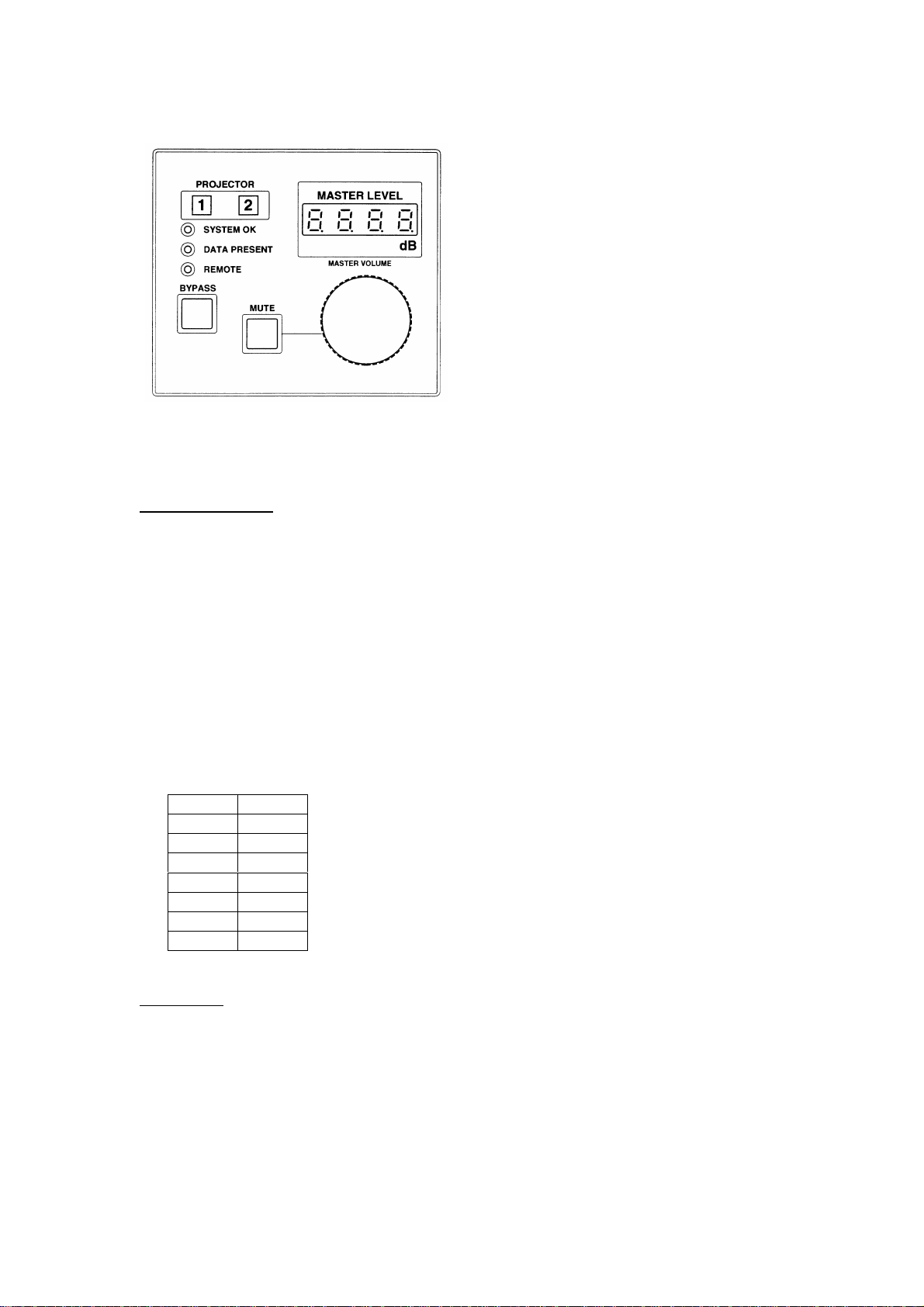
The playback mode (SDDS or soft bypass) can be checked by monitoring the Data present
indicator on the front panel.
2
Page 4
⇐⇐
If the Data present indicator is off, the film is
not running through the reader at the right
speed.
If it is flashing, the film is running, but no
SDDS data can be decoded.
When it is solidly on, the unit plays back
SDDS through the sound system unless the
bypass button has been activated (button is
lit).
The mute button can be activated to stop the SDDS playback and achieve complete silence.
However, the button is only relevant if the bypass button is not activated.
Master level control
The master level control is calibrated in true dB steps. 0.0 dB is the reference level and will
match fader-setting 7.0 on most other cinema processors.
Below is a table for level setting comparisons between the SDDS decoder and other common
cinema processors.
To make sure that the playback level is uniform during your entire show, please ensure that
the master level control of the other cinema processor is always set to a level, which matches
the selected SDDS playback volume according to this table.
Note that this level comparison will only be correct if all systems are correctly set-up and
aligned.
SDDS Others
+ 10.0 10
+ 6.6 9
+ 3.3 8
0.0 7
- 3.3 6
- 6.6 5
- 10.0 4
Please note: The DFP-2000 level scale is limited to +/- 10 dB. If –10 dB is not sufficient
attenuation to achieve a comfortable listening level, contact your service personnel to check
that your system is correctly aligned.
Reference level, calibrated to 85 dBC
3
Page 5
Maintenance
Reader
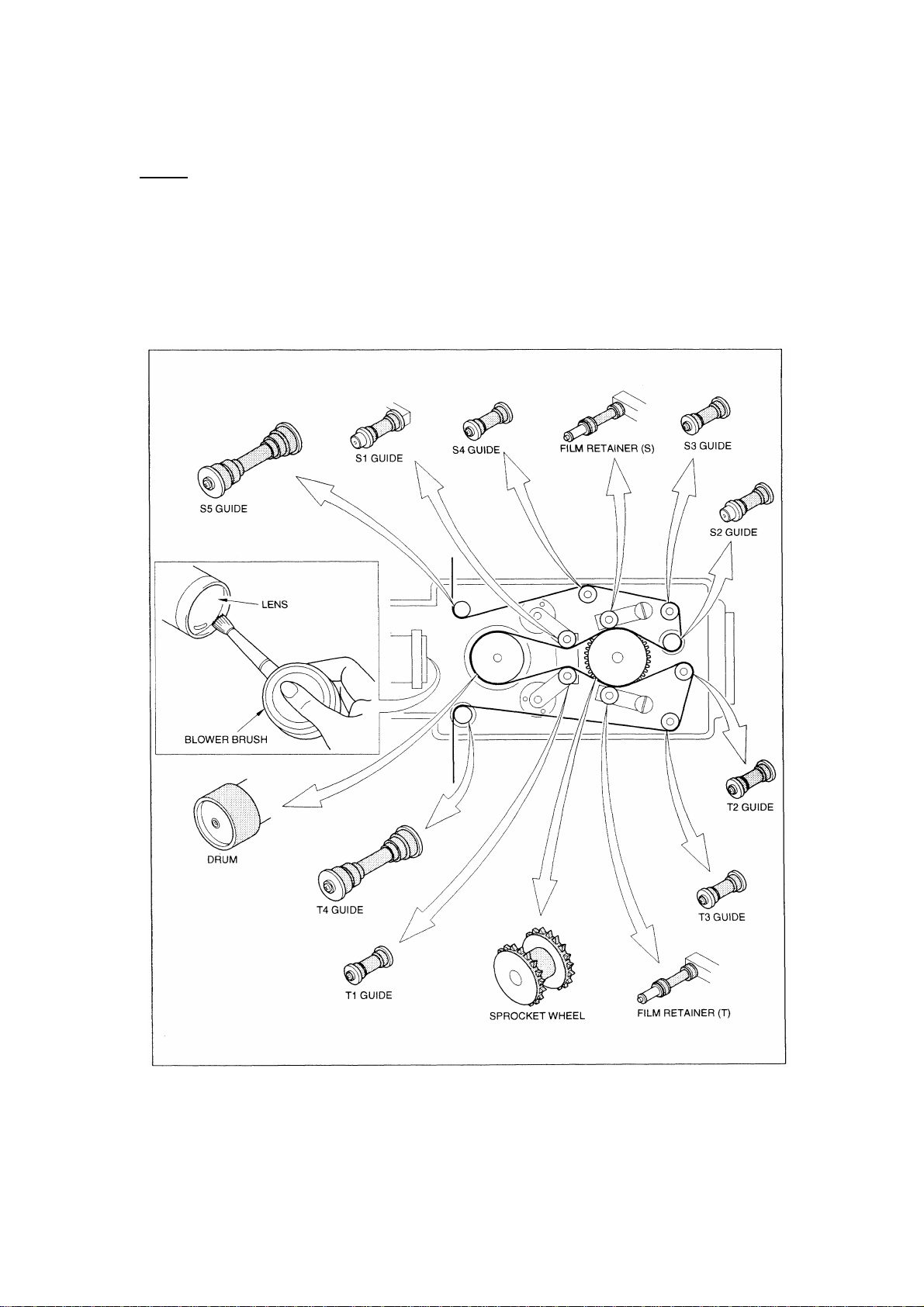
The SDDS reader lenses and the light source fibre optics must be kept clean at all times. A
combination of using a blower brush and cotton buds is recommended for this purpose. See
the SDDS Quick Reference Guide for further details about cleaning the SDDS optics.
Additionally, the entire reader film path must be kept clean at all times. All surfaces marked
grey on the below illustration will touch the film and must therefore be free from dust.
4
Page 6
Decoder
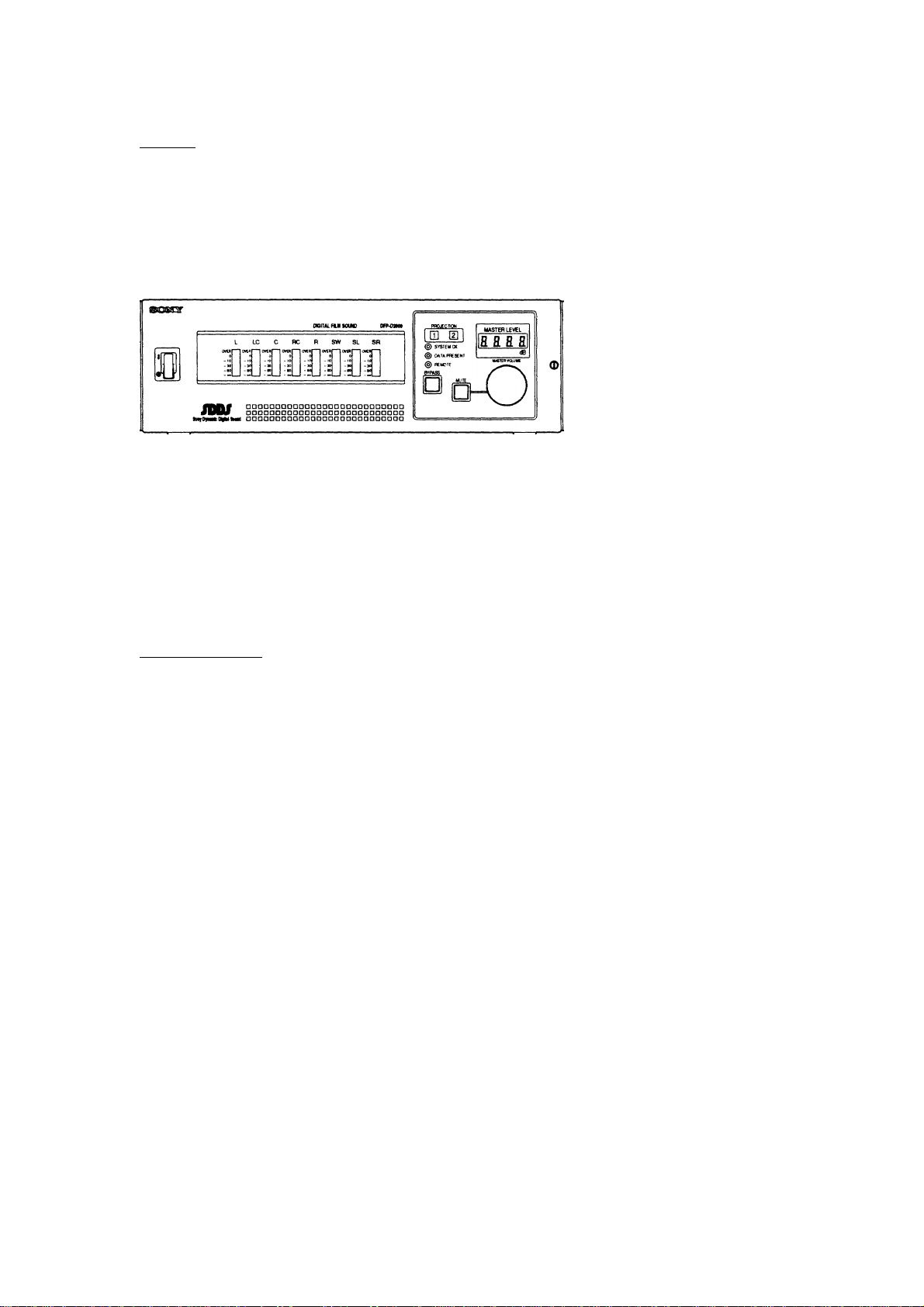
The air intake filter of the SDDS decoder must be kept clean at all times to avoid
that clogging stops the airflow.
Open the front panel of the DFP-2000 decoder and remove the air filter in the front panel
door, clean it and re-insert it.
↑↑
Air filter
How often this must be done depends on the density of dust in the air in your projection
room.
A clean working environment will contribute to making this procedure necessary on a
quarterly basis only.
Service procedure
The following service procedure is required and should be performed yearly by your qualified
service personnel.
• Checking and adjusting the Video level of the SDDS reader, changing LED’s if necessary.
• Checking the SDDS error rate using a calibrated SDDS alignment film.
• Confirming that all reader rollers and other mechanical parts are in working order and
replace if necessary
• Check that the channel levels and frequency response are correct
• Securing system settings and replacing the SRAM battery (every 2nd year only)
5
Page 7
Troubleshooting
If the SDDS playback is unstable (i.e. the DFP-2000 switches frequently between SDDS
playback and playback of the bypass inputs), press the bypass button to avoid that the
switching is compromising the film presentation.
After the show, always check with known good SDDS film material to verify whether the
problem was print- or system related.
It is recommended to always keep a loop of the SDDS alignment film at hand (alternatively
another loop of film with good SDDS data blocks) for this purpose.
Make sure that the reader lenses and the light source fibre optics are clean before playing
your SDDS test loop.
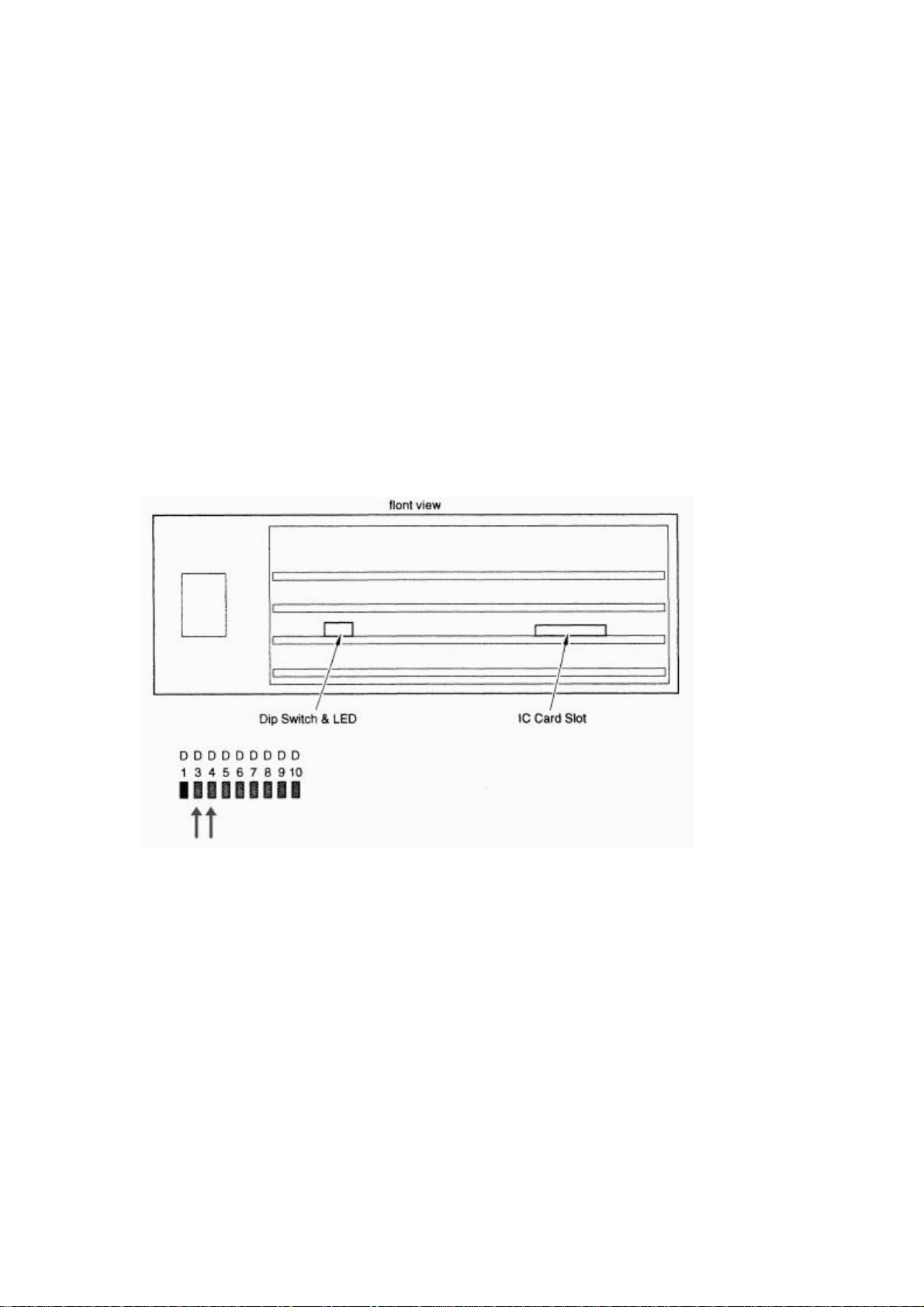
Then open the hinged front panel door of the DFP-2000 and monitor the bank of red LED
indicators. D3 and D4 indicate the condition of the S-track and P-track on the film
respectively.
S P
With a good SDDS print played on a fully working SDDS system, these two LED’s should be
on all the time, apart from through splices. Frequent dark bursts indicate a faulty print or a
faulty SDDS system.
With your SDDS reference loop, the LED’s should stay on at all times apart from through the
splice. If this is not the case, please contact your qualified service personnel to have your
SDDS system checked.
If the system works normally with your reference film, but fails during the show, contact your
print provider to let them know that they have delivered a faulty print. SDDS tracks are very
resilient from wear and tear, and print problems are most likely caused by issues with the
printing or subtitling process. Therefore, it is instrumental that you let your print provider/film
distributor know to make sure that such issues are resolved.
Additionally, you may fill in the SDDS Film Print Form and send to Sony to make us able to
provide technical assistance to the relevant laboratory.
 Loading...