

Page 1
HCB-300_UG_EN.book Page 1 Monday, March 8, 2004 10:16 AM
Bluetoothtm Car Handsfree
HCB-300 PA10
English
Spanish
Portuguese
German
French
Simplified Chinese
Italian
Dutch
Page 2

HCB-300_UG_EN.book Page 2 Monday, March 8, 2004 10:16 AM
Page 3
HCB-300_UG_EN.book Page 1 Monday, March 8, 2004 10:16 AM
Bluetoothtm Car Handsfree
HCB-300
Greek
Swedish
Finnish
Russian
Hungarian
Polish
Turkish
Traditional Chinese
Page 4

HCB-300_UG_EN.book Page 2 Monday, March 8, 2004 10:16 AM
Page 5

HCB-300_UG_EN.book Page 1 Monday, March 8, 2004 10:16 AM
Draft for Sony Ericsson Internal Use Only
Contents
English . . . . . . . . . . . . . . . . . . . . . . . . . 4
Contents
1
Page 6
HCB-300_UG_EN.book Page 2 Monday, March 8, 2004 10:16 AM
Draft for Sony Ericsson Internal Use Only
1.
2
Page 7
HCB-300_UG_EN.book Page 3 Monday, March 8, 2004 10:16 AM
Draft for Sony Ericsson Internal Use Only
2.
3
Page 8

HCB-300_UG_EN.book Page 4 Monday, March 8, 2004 10:16 AM
English
English
Introduction 5
First–time use 6
Everyday use 8
Troubleshooting 10
Additional information 13
Declaration of conformity 17
4
Draft for Sony Ericsson Internal Use Only
Sony Ericsson HCB-300
First edition (March 2004)
This user guide is published by Sony Ericsson Mobile
Communications AB, without any warranty.
Improvements and changes to this user guide
necessitated by typographical errors, inaccuracies of
current information, or improvements to programs
and/or equipment, may be made by Sony Ericsson
Mobile Communications AB at any time and without
notice. Such changes will, however, be incorporated
into new editions of this user guide.
All rights reserved.
©Sony Ericsson Mobile Communications AB, 2004
Publication number: LZT 108 6827 R1A PA10
Some of the services in this user guide are not
supported by all networks. This also applies to the
GSM International Emergency Number 112.
Contact your network operator or service provider if
you are in doubt whether you can use a particular
service or not.
The Bluetooth word mark and logos are owned by the
Bluetooth SIG, Inc. and any use of such marks by
Sony Ericsson is under license.
Page 9
HCB-300_UG_EN.book Page 5 Monday, March 8, 2004 10:16 AM
Draft for Sony Ericsson Internal Use Only
Introduction
The Bluetooth™ Car
Handsfree HCB-300 is
designed for in-car use and
provides a safe and convenient way to make and
receive calls while driving. Please read the Safe
and efficient use and Limited warranty before using
your car handsfree.
How can I use my car handsfree?
When you turn the ignition key, the car handsfree
recognizes your mobile phone and they
automatically connect. The devices are ready to
make and answer calls. You can use your car
handsfree with up to five phones.
Please note that the car handsfree should be installed
by authorized personnel. Check with your car dealer
for recommended installation engineers. See “Installing” on page 11.
What phones can I use with my car
handsfree?
You can use any Bluetooth-enabled phone. HCB300 is compatible with Bluetooth-enabled phones
from Sony Ericsson, as well as from, for example,
Nokia, Motorola and Siemens.
Accessories
HCB-300 supports a range of accessories to
enhance your user experience:
• Advanced Music Mute HCE-16 – to connect the
• Gooseneck Microphone HCE-14 – to bring the
If you use a Sony Ericsson phone with HCB-300,
the following accessories are available:
• A dedicated Car Holder, for example, HCH-38
• Cigarette Lighter Adapter CLA-11 – to charge
Instructions
Instructions in this user guide are based on car
handsfree buttons and phone keys. For example,
you can use the button on the car handsfree or
the keys on the phone to answer a call.
English
audio from your phone to your car stereo
speakers.
microphone closer to your mouth.
to K700 together with Antenna Cable Connector
HCE-12 for better network reception.
the phone.
5
Page 10
HCB-300_UG_EN.book Page 6 Monday, March 8, 2004 10:16 AM
English
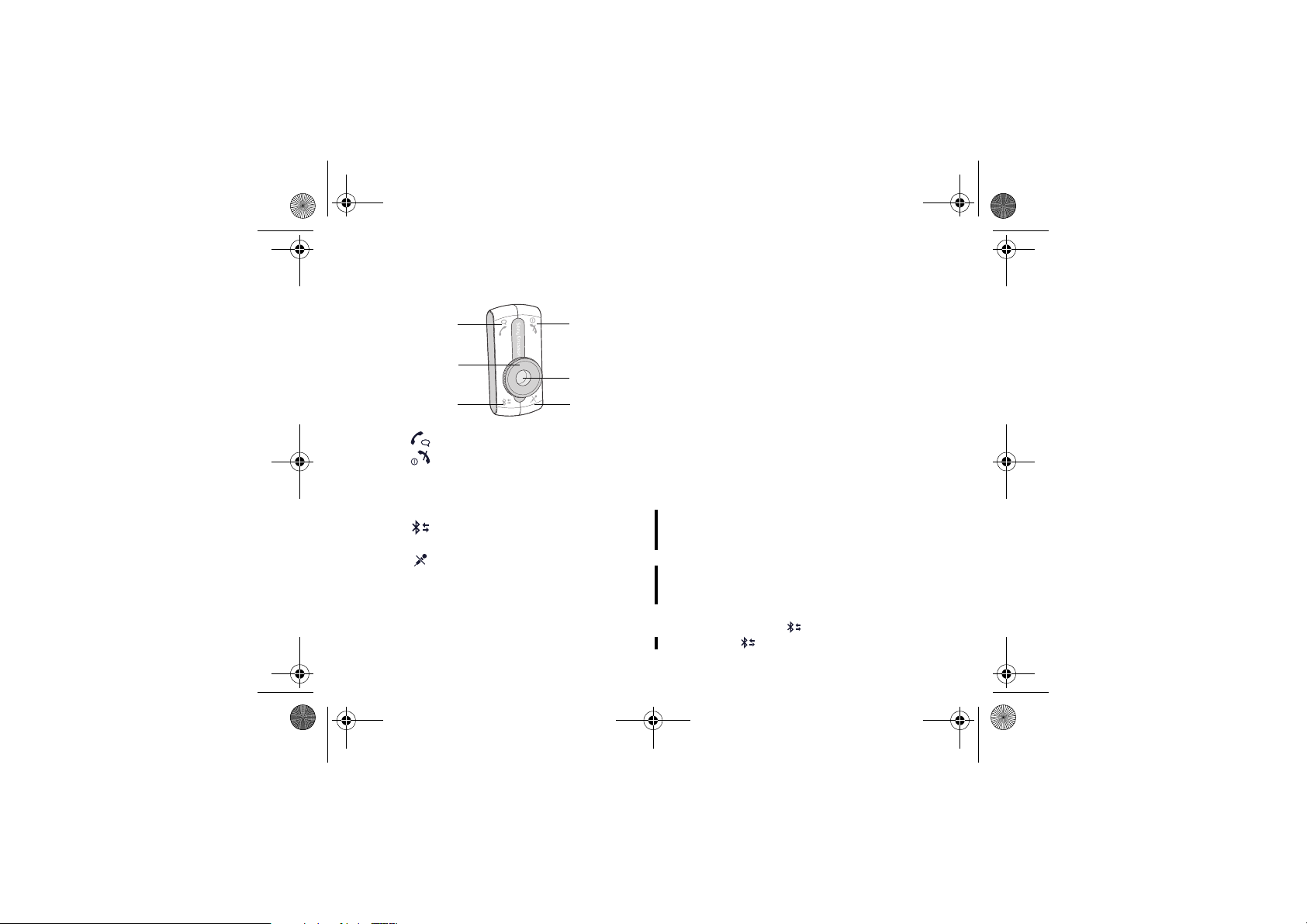
Control panel overview
1
3
5
1 Make and answer calls
2 Turn On/Off. End and reject calls
3 Volume dial, control the volume
4 ColorID, five colours each represent an
added phone
5 Select a phone. Add the handsfree to a
phone. Select a colour.
6 Mute/unmute the microphone
6
2
4
6
Draft for Sony Ericsson Internal Use Only
First–time use
Before you use the car handsfree with a phone for
the first time, you need to make sure that:
• The car handsfree kit is properly installed and
turned on.
• Bluetooth is turned on in your phone.
• The car handsfree is added to the list of devices
in the phone.
Adding the car handsfree
Once the car handsfree is added to the list of
devices in the phone, they automatically recognize
each other when, for example, the ignition is turned
on.
You can select a specific ColorID for each
phone you use with the car handsfree. You can also
replace a phone with another phone for a specific
Color ID. A free colour is indicated by the ColorID
is flashing slowly. A colour already in use is
indicated by the ColorID is flashing quickly.
To add the car handsfree to a phone
1 Turn on the car handsfree.
2 Press and hold until the ColorID flashes.
3 Press repeatedly to select a colour.
Page 11

HCB-300_UG_EN.book Page 7 Monday, March 8, 2004 10:16 AM
Draft for Sony Ericsson Internal Use Only
4 Prepare your phone according to the phone’s
user guide. The car handsfree passkey is 0000.
To change and fine-tune a ColorID
1 Press and hold until the ColorID flashes.
2 Press repeatedly to select a colour.
3 Rotate the volume control to fine-tune the
colour.
4 Press and hold to save the colour.
Turning on or off
When the car handsfree is turned on, the ColorID is
also turned on. You can turn on or off the car
handsfree either with the ignition or with the
button independently of each other.
• If the ignition is turned off during an ongoing
call, the car handsfree will turn off automatically
after the call has ended.
• If ignition is off and the car handsfree is turned
on with the button, the car handsfree
automatically turns off one minute after the last
action.
• If the car handsfree is turned off with the
button, an ongoing call will be transferred to the
phone.
To turn the car handsfree on or off
Turn the ignition key or press and hold .
English
7
Page 12

HCB-300_UG_EN.book Page 8 Monday, March 8, 2004 10:16 AM
English
Everyday use
Once you have added the car handsfree to your
phone, you can make and receive calls using the
control panel of the car handsfree, as long as it is
turned on and within range of the phone, with no
solid objects in between.
When using a Bluetooth accessory, make sure to
always have the Bluetooth on in your phone.
Selecting a phone
You can use your car handsfree with up to five
phones, each represented by a colour.
When turned on, the car handsfree automatically
searches for phones, starting with the last used.
To manually select a phone
Press repeatedly until the ColorID is the colour
representing your phone.
Making calls
You can make a call using the control panel of the
car handsfree, using voice dialling or using the
phone keys.
8
Draft for Sony Ericsson Internal Use Only
Before voice dialling, you must turn on the voice
dialling function and record voice commands in
your phone. Please refer to the phone’s user guide.
To make a call using the phone
1 Use the phone’s keypad or phone book.
2 End the call by pressing .
To make a call using voice dialling
1 Press . It may take a while to set up the
connection between the phone and the car
handsfree. During this time, you might hear a
repeated tone.
2 After the tone, voice dial as you normally
would.
3 End the call by pressing .
To redial a number using the button
1 Press and hold until you hear a tone, to
redial a number.
2 End the call by pressing .
Answering calls
When you receive a call, the car stereo is muted
automatically. You can answer the call using the
control panel or using automatic answering mode.
Page 13

HCB-300_UG_EN.book Page 9 Monday, March 8, 2004 10:16 AM
Draft for Sony Ericsson Internal Use Only
Please refer to the phone’s user guide regarding
automatic answering mode.
To answer a call
When the car handsfree rings, press .
To reject a call
When the car handsfree rings, press .
To mute the microphone
1 During a call, press to mute the
microphone. You hear a tone when the
microphone has been turned off.
2 Press again to resume the conversation.
Adjusting the volume
You can both adjust the car handsfree speaker
volume and the ring volume. You hear a tone when
you reach the maximum and minimum volume
levels.
To adjust the speaker volume
During a call, rotate the volume control to increase
or decrease the speaker volume.
To adjust the ring volume
When you are not engaged in a call, rotate the
volume control to increase or decrease the ring
volume.
Transferring sound
Depending on the type of phone, you can transfer
the sound from the phone to the car handsfree
during a call.
To transfer the sound to the car
handsfree
During a call, press on the car handsfree.
the phone, please refer to the phone’s user guide.
English
To transfer the sound from the car handsfree to
9
Page 14

HCB-300_UG_EN.book Page 10 Monday, March 8, 2004 10:16 AM
English
Troubleshooting
This section lists some problems that you might
encounter while using your car handsfree.
Cannot add the car handsfree to the
list of devices in the phone
The Bluetooth function in your phone must be
turned on. Your phone should be inside the car
during the procedure and the car handsfree must be
on.
Cannot connect to the car handsfree
The car handsfree may be connected to another
Bluetooth device. Select manually another
ColorID, see “Adding the car handsfree”
on page 6.
Your phone may be connected to another
Bluetooth device, such as a headset. Disconnect the
other Bluetooth device.
You may have added another handsfree device
to the list of devices in your phone. Some phones
can only have one handsfree device in the list at a
time. Please refer to the phone’s user guide.
10
Draft for Sony Ericsson Internal Use Only
Connection interrupted
You hear a short sound if the connection between
the phone and the car handsfree is interrupted. Try
connecting them again by pressing .
Using headset and car handsfree
Please refer to the phone’s user guide on how to
use your phone with several Bluetooth devices.
Resetting the car handsfree
You may want to reset the car handsfree to default
settings.
To reset the car handsfree
1 Turn on the car handsfree.
2 Press and hold until the ColorID flashes
and you hear a long high tone.
3 Press and hold until you hear a long high
tone.
4 The car handsfree is now reset.
Some car handsfree functions do not
work
If you notice that you cannot make use of all the
features in the Bluetooth Car Handsfree HCB-300,
please check in the phone’s user guide whether
your phone supports the function. You can also
Page 15
HCB-300_UG_EN.book Page 11 Monday, March 8, 2004 10:16 AM
Draft for Sony Ericsson Internal Use Only
check with a Sony Ericsson service partner. For
information about support and for user guides for
Ericsson and Sony Ericsson mobile phones, see
www.SonyEricsson.com.
Installing
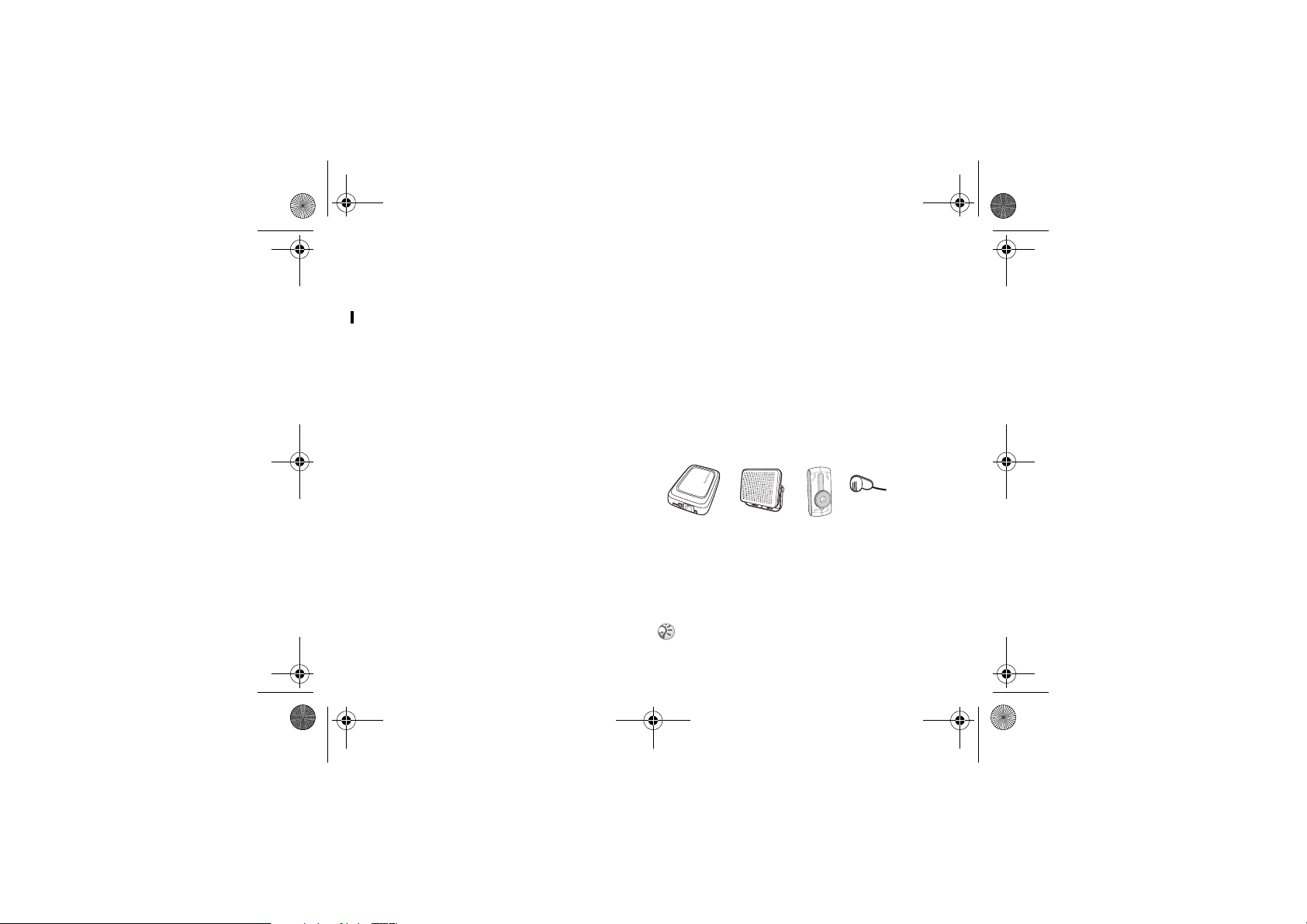
The Bluetooth Car Handsfree HCB-300 kit
includes:
• electronic box with velcro (1.)
• external loudspeaker (2.)
• control panel with adhesive tape (3.)
• microphone (4.)
• cables (power cables, ignition sense, music
• User Guide.
1
Please make sure that all equipment of the
Bluetooth car handsfree is installed in a safe
location. If your car is equipped with an air bag,
check that the handsfree equipment does not
interfere with its function.
The car handsfree should be installed by authorised
personnel.
mute)
English
2
.
4
3
.
.
11
Page 16

HCB-300_UG_EN.book Page 12 Monday, March 8, 2004 10:16 AM
English
To install the car handsfree
1 Disconnect the car battery.
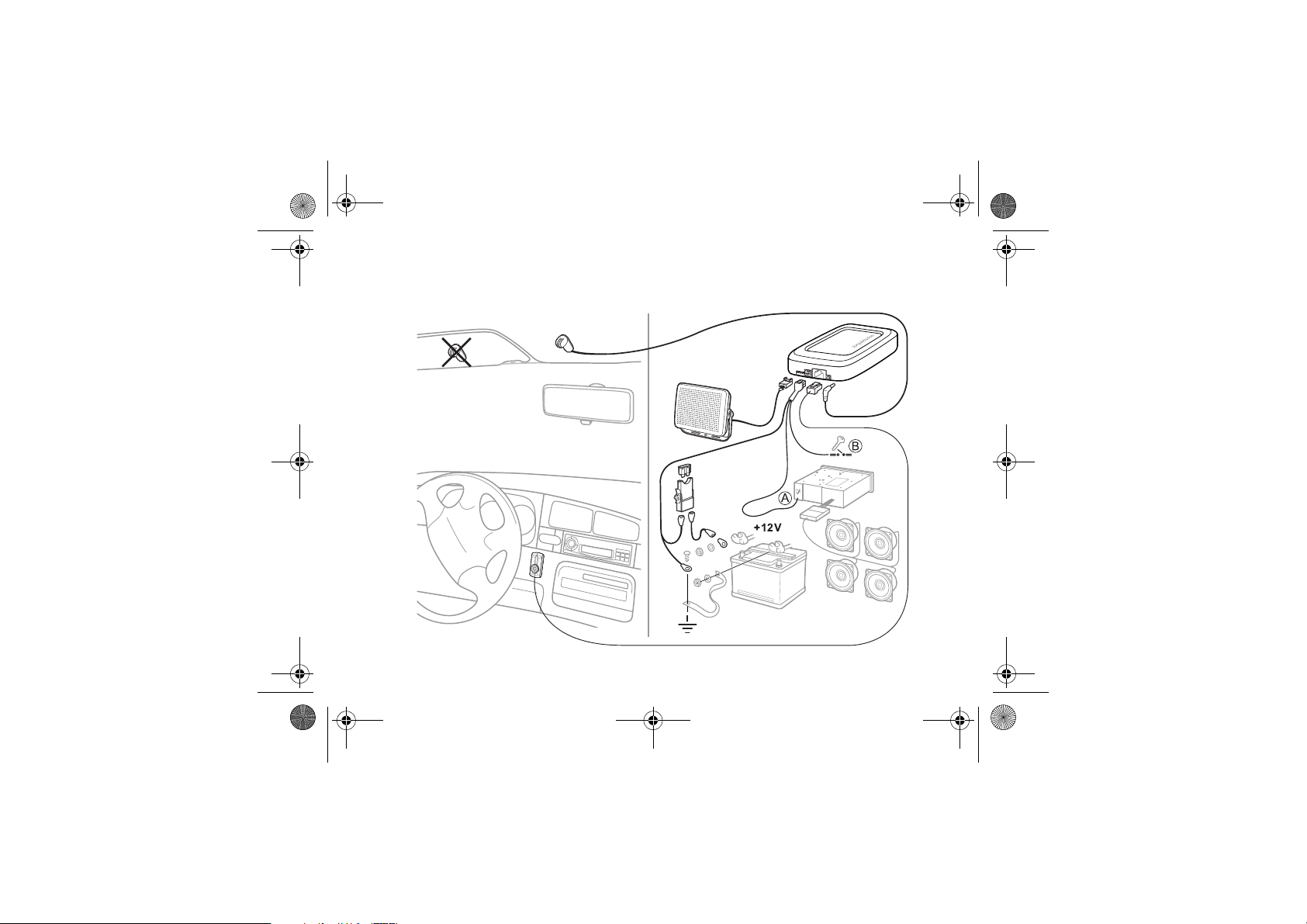
2 Place the electronic box under the dashboard
of the car. See also installation chart “1.” on
page 2. We recommend that the upper side of
the electronic box faces the driver with no
metallic barrier between the box and the driver.
Use the velcro enclosed in the kit to fasten the
electronic box.
3 Connect the bundle of power cables (red and
black), music mute cable (yellow) and ignition
sense cable (blue) to the electronic box.
4 Connect the black power cable to negative
ground. Connect the red power cable, with the
integrated fuse, to the positive pole at the car
battery. Please note that supply voltages other
than 12 Volts may cause damage to the
equipment.
5 Connect the yellow music mute cable to the
car stereo. See A in installation chart “1.” on
page 2.
6 Connect the blue ignition sense cable to the
ignition of the car. See B in installation chart
“1.” on page 2.
12
Draft for Sony Ericsson Internal Use Only
7 Place the microphone on a fixed part of the car
interior, and directed towards the driver. Make
sure that the cable is long enough to reach the
electronic box. Connect the microphone to the
electronic box.
8 Place the loudspeaker at least 50 cm
(20 inches) from the microphone. Make sure
that the cable is long enough to reach the
electronic box. Connect the external
loudspeaker to the electronic box.
9 Choose a suitable location on the dashboard of
the car for the control panel. The driver must
be able to reach the keys of the control panel
from the normal driving position. Make sure
that the cable is long enough to reach the
electronic box. Remove the adhesive tape from
the control panel. Place the control panel in the
location you have chosen. Connect the control
panel to the electronic box.
10 Connect the car battery.
To install an advanced music mute
with the car handsfree
You can buy an advanced music mute separately.
1 Disconnect the car battery.
Page 17

HCB-300_UG_EN.book Page 13 Monday, March 8, 2004 10:16 AM
Draft for Sony Ericsson Internal Use Only
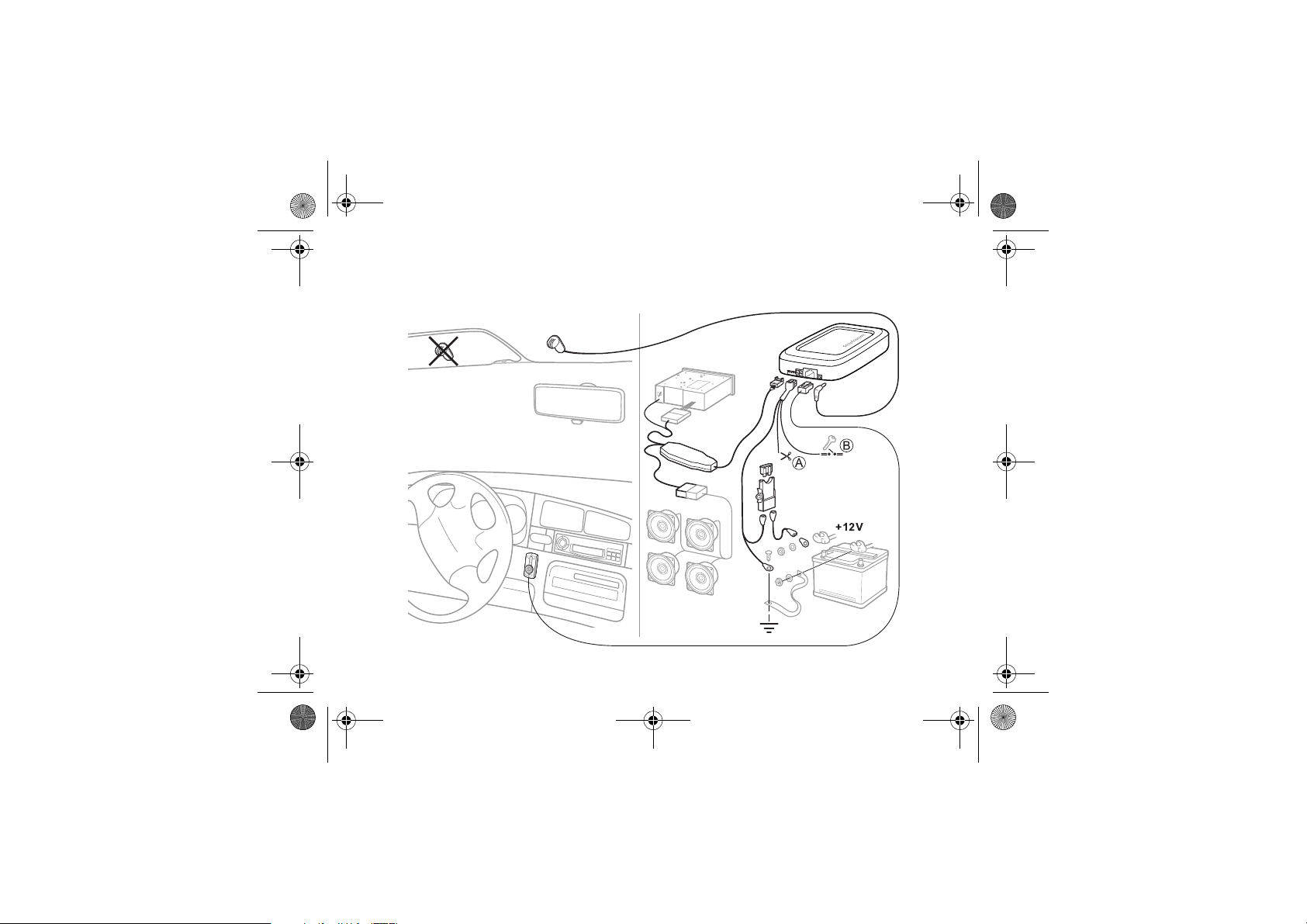
2 See installation chart “2.” on page 3. Proceed
as in steps 2-4 in the instructions “To install the
car handsfree” on page 12.
3 Cut the yellow music mute cable since it is not
needed when you have an advanced music
mute. See A in installation chart “2.” on
page 3.
4 Connect the blue ignition sense cable to the
ignition of the car. See B in installation chart
“2.” on page 3.
5 Connect the brown end of the advanced music
mute cable to the car stereo loudspeakers.
6 Connect the black and yellow ends of the
advanced music mute cable to the car stereo.
7 Proceed as in steps 8-9 in “To install the car
handsfree” on page 12.
Additional information
Safe and efficient use
Read this information before using your Bluetooth car handsfree.
Changes or modifications to this Bluetooth car handsfree not
expressly approved by Sony Ericsson may render void the
user's authority to operate the equipment. Please check for
exceptions, due to national requirements or limitations, in
usage of Bluetooth equipment before using this product.
Product care
• Do not expose your product to liquid, moisture or humidity.
• Do not expose your product to extreme high or low
temperatures.
• Do not expose your product to lit candles, cigarettes, or
cigars, or to open flames.
• Do not drop, throw or try to bend the product as rough
treatment could damage it.
• Do not use any other accessory than Sony Ericsson or
Ericsson originals intended for use with this product. Use of
non-original accessories may result in loss of performance,
damage to the product, fire, electric shock or injury. The
warranty does not cover product failures which h ave been
caused by use of non-original accessories.
• Do not attempt to disassemble your product. The product
does not contain consumer serviceable or replaceable
components. Only Sony Ericsson service partners should
perform this service.
• Do not keep the product in an area prone to dust and dirt.
Use a soft damp cloth to clean your product.
English
13
Page 18

HCB-300_UG_EN.book Page 14 Monday, March 8, 2004 10:16 AM
English
• If you will not be using the product for a while, store it in a
place that is dry, and dust free; and avoid extreme
temperatures.
• To reduce risk of electric shock, unplug the unit from any
power source before attempting to clean it.
Installation
Please note that onl y authorised per sonnel should inst all the
Bluetooth car handsfree. Please check with your car dealer for
recommendations on professional installation engineers. It is
recommended that the Bluetooth car handsfree be installed
under the dashboard of the car. The control panel of the
Bluetooth car handsfree should be installed on the dashboard
of the car, so that you can reach the keys from your normal
driving position. Some car manufacturers require that you use
an external antenna for your phone. Check with your car
manufacturer's representative to be sure that all equipment for
the Bluetooth car handsfree, including additional accessories,
are placed in a safe location. If your car is equipped with an air
bag, check that the handsfree equipment does not interfere
with its functi on. The Bluetooth car handsfree equipment is
made for use in cars with a 12 volt electrical system. Other
supply voltag es may cause damag e to the equipment.
Radio frequency exposure
Your Bluetooth car handsfree is a radio transmitter and
receiver. When in operation, it communicates with a Bluetooth
equipped mobile device by receiving and transmitting radio
frequency (RF) electromagnetic fields (microwaves) in the
frequency range 2400 to 2500 MHz. The output power of the
radio transmitter is low, 0.001 watt. Your Bluetooth car
handsfree is designed to operate in compliance with the RF
exposure guidelines and limits set by national authorities and
14
Draft for Sony Ericsson Internal Use Only
international health agencies when used with any compatible
Sony Ericsson or Ericsson mobile phone.
Driving
Check the laws and regulations on the use of mobile phones
and handsfree equipment in the areas where you drive.
Always give full attention to driving and pull off the road and
park before making or answering a call if driving conditions so
require. RF energy may affect some electronic systems in
motor vehicles such as car stereo, and safety equipment.
Check with your vehicle manufacturer's representative to be
sure that your mobile phone or Bluetooth car handsfree will
not affect the electronic systems in your vehicle.
Electronic equipment
Most modern electronic equipment is shielded from RF
energy. However, certain electronic equipment is not,
therefore:
Do not use your Bluetooth car handsfree near medical
equipment witho ut permission. If y ou are using any personal
medical device, such as a pacemaker or a hearing aid, please
check in your mobile phone's User's Guide for related
information.
Blasting areas
Turn off all your electronic devices when in a blasting area or
in areas posted turn off two-way radio to avoid interfering
with blasting operations. Construction crews often use remote
control RF devices to set off explosives.
Page 19

HCB-300_UG_EN.book Page 15 Monday, March 8, 2004 10:16 AM
Draft for Sony Ericsson Internal Use Only
Potentially explosive atmospheres
Turn off your electronic device when in any area with a
potentially explosive atmosphere. It is rare, but your electronic
device could generate sparks. Sparks in such areas could
cause an explosion or fire resulting in bodily injury or even
death. Areas with a potentially explosive atmosphere are
often, but not always, clearly marked.
Children
Do not allow chi ldren to play with your Bluetooth car handsfree
since it contains small parts that could become detached and
create a choking hazard.
Emergency calls
IMPORTANT!
This Bluetooth car handsfree and the electronic device
connected to the handsfree operate using radio signals,
cellular, and lan dline networks as well as user- programmed
functions, which cannot guarantee connection under all
conditions. Therefore do not rely solely upon any electronic
device for essential communications (such as medical
emergencies). Remember, in order to make or receive calls,
the handsfree and the el ectronic devic e connected to the
handsfree must be switched on in a service area with
adequate cellular signal strength. Emergency calls may not be
possible on all cellular phone networks or when certain
network services and/or phone features are in use. Check with
your local service provider.
Limited Warranty
Subject to the conditions of this Limited Warranty, Sony
Ericsson Mobile Communications AB (Sony Ericsson), S-221
88 Lund, Sweden warrants this product to be free from defects
in design, material, and workmanship at the time of its original
purchase by a consumer, and for a subsequent period of one
(1) year. Should your Product need warranty service, please
return it to the dealer from whom it was purchased or contact
your local Sony Ericsson Customer Care Center to get further
information.
What we will do
If, during the warranty period, this Product fails to operate
under normal use and service, due to defects in materials or
workmanship, the Sony Ericsson authorized distributors or
service partners will, at their option, either repair or replace the
Product in accordance with the conditions stipulated herein.
Conditions
1 The warranty is valid only if the original receipt issued to
2 If Sony Ericsson repairs or replaces the Product, the
English
the original purchaser by the dealer, specifying the date of
purchase and serial number, is presented with the Product
to be repaired or replaced. Sony Ericsson reserves the
right to refuse warranty service if this information has been
removed or changed after the original purchase of the
Product from the dealer.
repaired or replaced Product shall be warranted for the
remaining time of the original warranty period or for ninety
(90) days from the date of repair, whichever is longer.
Repair or replac ement may involv e the use of functionally
equivalent reconditioned units. Replaced parts or
components will become the property of Sony Ericsson.
15
Page 20

HCB-300_UG_EN.book Page 16 Monday, March 8, 2004 10:16 AM
English
3 This warranty does not cover any failure of the Product due
to normal wear and tear, or due to misuse, including but
not limited to use in other than the normal and customary
manner, in accordance with instructions for use and
maintenance of the Product. Nor does this warranty cover
any failure of the product due to accident, modification or
adjustment, acts of God or damage resulting from liquid.
4 This warranty does not cover Product failures due to
improper repair installations, modifications or service
performed by a non-Sony Ericsson authorized person.
5 This warranty does not cover the car installation of the
product.
6 Tampering with any of the seals on the Product will render
void the warranty.
7 THERE ARE NO EXPRESS WARRANTIES, WHETHER
WRITTEN OR ORAL, OTHER THAN THIS PRINTED
LIMITED WARRANTY. ALL IMPLIED WARRANTIES,
INCLUDING WITHOUT LIMITATION THE IMPLIED
WARRANTIES OF MERCHANTABILITY OR FITNESS
FOR A PARTICULAR PURPOSE, ARE LIMITED TO THE
DURATION OF THIS LIMITED WARRANTY. IN NO
EVENT SHALL SONY ERI CSSON OR ITS VENDORS BE
LIABLE FOR INCIDENTAL OR CONSEQUENTIAL
DAMAGES OF ANY NATURE WHATSOEVER,
INCLUDING BUT NOT LIMITED TO LOST PROFITS OR
COMMERCIAL LOSS, TO THE FULL EXTENT THOSE
DAMAGES CAN BE DISCLAIMED BY LAW.
Some countries/s tates do not allow t he exclusion or limitation
of incidental or consequential damages, or limitation of the
duration of implied warranties, so the preceding limitations or
exclusions may not apply to you. The warranty provided does
not affect the consumer's statutory rights under applicable
national legislation in force, nor the consumer's rights against
the dealer arising from their sales/ purchase contract.
16
Draft for Sony Ericsson Internal Use Only
Supported Bluetooth functions
This product supports the headset profile and the handsfree
profile.
Page 21

HCB-300_UG_EN.book Page 17 Monday, March 8, 2004 10:16 AM
Draft for Sony Ericsson Internal Use Only
FCC Statement
This device complies with Part 15 of the FCC rules.
Operation is subject to the following two conditions:
(1) This device may not cause harmful interference,
and
(2) This device must accept any interference
received, including interference that may cause
undesired operation.
Declaration of conformity
We, Sony Ericsson
Mobile Communications AB of
Nya Vattentornet
221 88 Lund, Sweden
declare under our sole responsibility that our product
Sony Ericsson type DEA-0001001
to which this declaration relates is in conformity with
the appropriate standards EN 60 950, EN 300 328,
EN 301 489-7 and EN 301 489-17 following the
provisions of Radio Equipment and
Telecommunication Equipment directive 1995/5/EC
with requirements covering EMC directive 89/336/
EEC and Low Voltage directive 73/23/EEC.
Lund, February 2004
0682
Ulf Persson, Head of Product Business Unit
Accessories
17
Page 22

HCB-300_UG_EN.book Page 18 Monday, March 8, 2004 10:16 AM
Draft for Sony Ericsson Internal Use Only
18
Page 23

HCB-300_UG_EN.book Page 1 Monday, March 8, 2004 10:16 AM
Page 24
HCB-300_UG_EN.book Page 2 Monday, March 8, 2004 10:16 AM
www.SonyEricsson.com
Sony Ericsson Mobile Communications AB, SE-221 88 Lund, Sweden
LZT
108 6827 R1A PA10
R1A. Printed in Taiwan.
 Loading...