

Page 1
HBH-PV700-UG-R1A-EN-ES-ZS-ZT.fm Page 1 Friday, August 26, 2
0
Bluetooth™ Headset
HBH-PV
700
English
Español
简体中文
繁體中文
PPreflighted byreflighted byPreflighted by
( )( )( )
Page 2
HBH-PV700-UG-R1A-EN-ES-ZS-ZT.fm Page 2 Friday, August 26, 2
0
Bluetooth™ Headset
HBH-PV700
User Guide
Guía del usuario
用户指南
使用手冊
FCC statement
This device complies with part 15 of the FCC rules. Operation is
subject to the following two conditions: (1) This device may not cause
harmful interference, and (2) This device must accept any interference
received, including interference that may cause undesired operation.
Sony Ericsson HBH-PV700
This manual is published by Sony Ericsson Mobile Communications
AB, without any warranty. Improvements and changes to this manual
necessitated by typographical errors, inaccuracies of current
information, or improvements to programs and/or equipment, may be
made by Sony Ericsson Mobile Communications AB at any time and
without notice. Such changes will, however, be incorporated into new
editions of this manual. All rights reserved.
©Sony Ericsson Mobile Communications AB, 2005
Publication number: LZT 108 7416/1 R1A
Some of the services in this manual are not supported by all networks.
This also applies to the GSM International Emergency Number 112.
Contact your network operator or service provider if you are in doubt
whether you can use a particular service or not.
The Bluetooth word mark and logos are owned by the Bluetooth SIG,
Inc. and any use of such marks by Sony Ericsson is under license.
This product is leadfree and halogenfree.
PPreflighted byreflighted byPreflighted by
( )( )( )
Page 3
HBH-PV700-UG-R1A-EN-ES-ZS-ZT.fm Page 3 Friday, August 26, 2
0
Introduction
Introducción
简介
簡介
Bluetooth™ Headset HBH-PV700
The Bluetooth™ Headset HBH-PV700 can be connected
to any device with Bluetooth wireless technology that
supports the handsfree or headset profile. This user guide
focuses on usage with a Sony Ericsson mobile phone.
Auricular Bluetooth™ HBH-PV700
El auricular Bluetooth™ HBH-PV700 puede conectarse
a cualquier dispositivo que disponga de tecnología
inalámbrica Bluetooth y que admita perfiles de manos
libres o de auricular. Esta guía del usuario se centra en
la utilización del dispositivo con un teléfono móvil de
Sony Ericsson.
Bluetooth™ ( 蓝牙 ) 耳机 HBH-PV700
利用蓝牙无线技术, Bluetooth™ ( 蓝牙 ) 耳机
HBH-PV700 可以与支持免提或耳机模式的任何设备
连接。本用户指南着重介绍在索尼爱立信手机上的
使用方法。
Bluetooth™ ( 藍芽 ) 耳機 HBH-PV700
Bluetooth™ ( 藍芽 ) 耳機 HBH-PV700 可經 Bluetooth
( 藍芽 ) 無線技術,連上任何支援免持及耳機模式的
裝置。本使用手冊特別說明如何在 Sony Ericsson 手機
上使用本耳機。
PPreflighted byreflighted byPreflighted by
( )( )( )
Page 4
HBH-PV700-UG-R1A-EN-ES-ZS-ZT.fm Page 4 Friday, August 26, 2
0
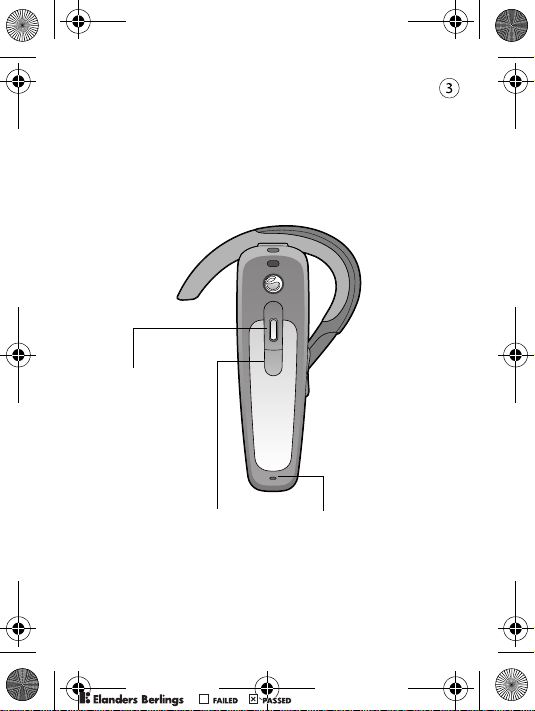
Front
Parte delantera
正面
正面
Indicator light
Indicador luminoso
指示灯
顯示燈號
PPreflighted byreflighted byPreflighted by
Call handling button
Botón de gestión de llamadas
呼叫操作按钮
通話處理鈕
( )( )( )
Microphone
Micrófono
话筒
麥克風
Page 5
HBH-PV700-UG-R1A-EN-ES-ZS-ZT.fm Page 5 Friday, August 26, 2
0
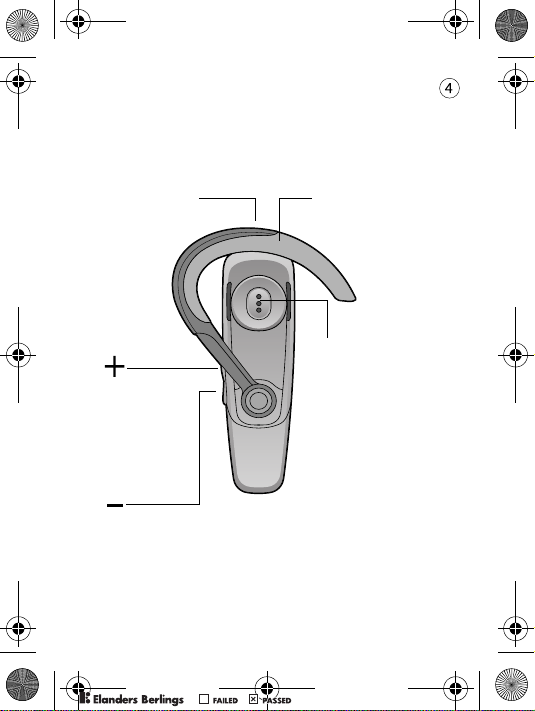
Back
Parte posterior
背面
背面
Charging connector
Conector de carga
充电连接器
充電接口
Increase volume
Subir volumen
增加音量
放大音量
Decrease volume
Bajar volumen
降低音量
降低音量
Ear hook
Enganche para la oreja
耳挂
配戴耳鉤
Speaker
Altavoz
扬声器
擴音器
PPreflighted byreflighted byPreflighted by
( )( )( )
Page 6
HBH-PV700-UG-R1A-EN-ES-ZS-ZT.fm Page 6 Friday, August 26, 2
0
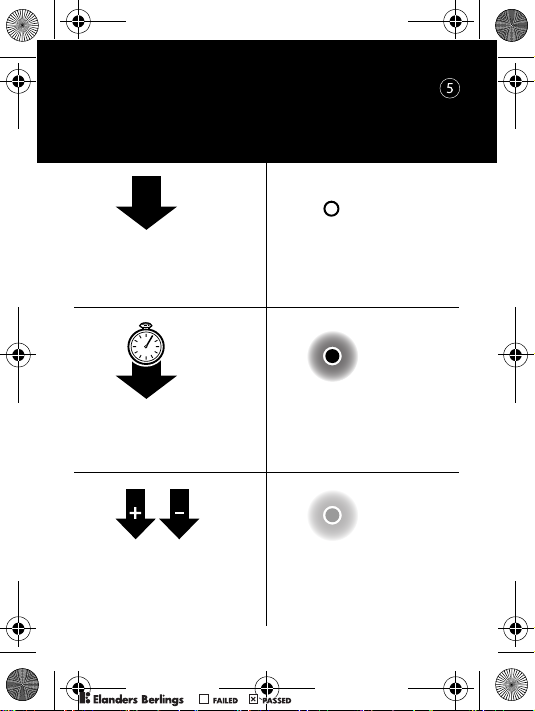
User Guide symbols
Símbolos de la guía del usuario
《用户指南》符号
使用手冊符號
PPreflighted byreflighted byPreflighted by
Press and release
Pulsar y soltar
按下后松开
壓放
Press and hold
Mantener pulsado
按下并保持
按住
Press simultaneously
Pulsar simultáneamente
同时按住
同時按
( )( )( )
Indicator light
Indicador luminoso
指示灯
顯示燈號
Steady red light
Luz roja fija
持续红灯亮
持續的紅燈
Steady green light
Luz verde fija
持续绿灯亮
持續的綠燈
Page 7
HBH-PV700-UG-R1A-EN-ES-ZS-ZT.fm Page 7 Friday, August 26, 2
0
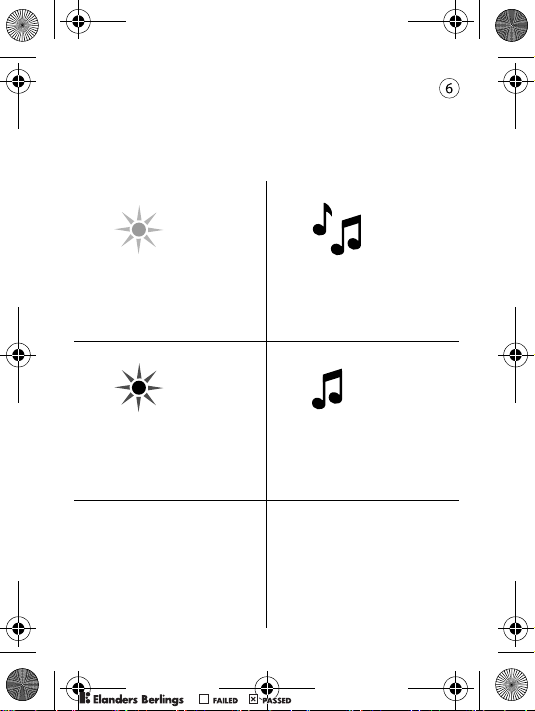
User Guide symbols (continued)
Símbolos de la guía del usuario
(continuación)
《用户指南》符号 (续)
使用手冊符號 (續前)
PPreflighted byreflighted byPreflighted by
Green flash
Flash verde
绿灯闪烁
閃綠燈
Red flash
Flash rojo
红灯闪烁
閃紅燈
( )( )( )
Ring signal
Señal de timbre
响铃信号
鈴聲
Beep tone
Tono de pitido
蜂鸣声
嗶聲
Page 8
HBH-PV700-UG-R1A-EN-ES-ZS-ZT.fm Page 8 Friday, August 26, 2
0
Getting started
Introducción
入门
準備開始
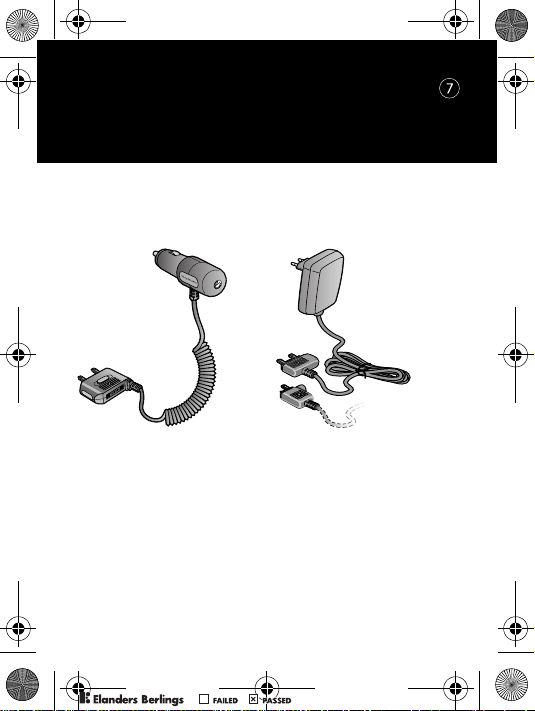
Chargers
Cargadores
充电器
充電器
PPreflighted byreflighted byPreflighted by
CLA-60
CST-60
CST-61
First time use: Charge approximately 8 hours before
using the headset. (For battery capacity see p. 30.)
Utilización por primera vez: Cárguelo
aproximadamente durante 8 horas antes de utilizar
el auricular. (Consulte en la p. 31 la capacidad
de la batería.)
首次使用:首次使用手机前,请将电池充电约
8 小时。(有关电池容量的信息,请参见第 31 页。)
首次使用時:使用耳機前,請先充電 8 小時左右。
(電池容量的說明,見第 32 頁。)
( )( )( )
Page 9
HBH-PV700-UG-R1A-EN-ES-ZS-ZT.fm Page 9 Friday, August 26, 2
0
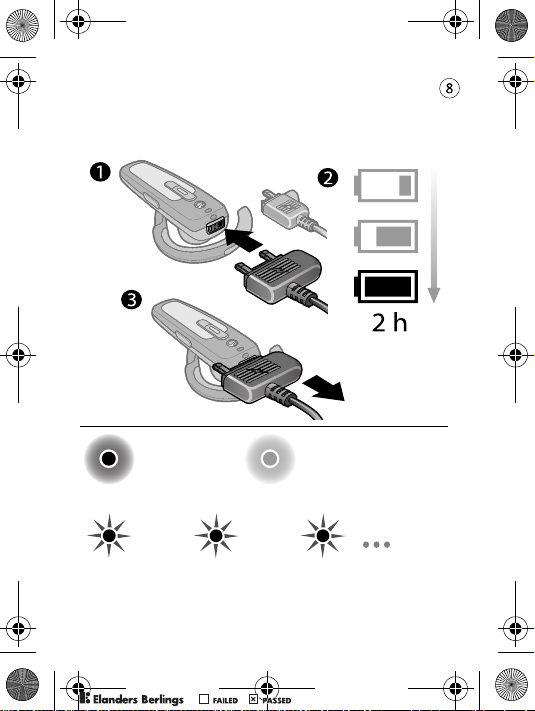
Charging
Carga
充电
充電中
PPreflighted byreflighted byPreflighted by
Charging
Carga
充电
充電中
Battery needs charging
Debe cargar la batería
电池需要充电
電池需要充電
( )( )( )
Fully charged
Completamente cargado
已充满
電已充足
Page 10
HBH-PV700-UG-R1A-EN-ES-ZS-ZT.fm Page 10 Friday, August 26,
2
Adding the headset to the phone
Añadir el auricular al teléfono
将耳机添加到手机上
將耳機連上手機
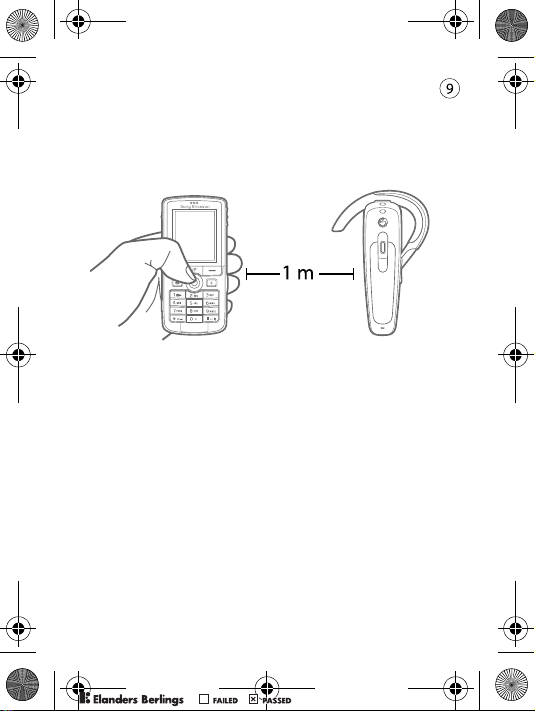
Before you can use your Bluetooth headset with your
phone it has to be added once to the phone:
1. Prepare your headset according to A or B (see p. 12).
2. Follow the instructions from the phone user guide on
how to turn on and then add a Bluetooth device to your
phone. The passkey of the headset is 0000.
After you have added the headset to the list of Bluetooth
devices in the phone, it will automatically connect to the
phone as soon as it is turned on and within range.
PPreflighted byreflighted byPreflighted by
( )( )( )
Page 11
HBH-PV700-UG-R1A-EN-ES-ZS-ZT.fm Page 11 Friday, August 26,
2
Para poder utilizar el auricular Bluetooth con el
teléfono, debe añadirlo al teléfono:
1. Prepare el auricular según A o B (consulte la p. 12).
2. Siga las instrucciones de la guía de usuario del teléfono
sobre la forma de encender y posteriormente añadir un
dispositivo Bluetooth a su teléfono. La clave maestra
del auricular es 0000.
Después de añadir el auricular a la lista de dispositivos
Bluetooth del teléfono, se conectará automáticamente al
teléfono tan pronto como se encienda y dentro del alcance.
在将蓝牙耳机用于手机之前,必须将它添加到手机
上一次:
1. 依照 A 或 B (参见第 12 页)将耳机准备好。
2. 按照手机用户指南中的说明,正确开启蓝牙设备,
然后将它添加到手机上。耳机的识别码是 0000。
将耳机添加到手机的蓝牙设备列表中后,耳机将在
手机开启并处于服务区后自动连接手机。
PPreflighted byreflighted byPreflighted by
( )( )( )
Page 12
HBH-PV700-UG-R1A-EN-ES-ZS-ZT.fm Page 12 Friday, August 26,
2
Bluetooth (藍芽)耳機可用於手機前,
需先加入手機一次,方法如下:
1. 按第 12 頁 A 或 B 的說明,將耳機準備好。
2. 按手機使用手冊的指令,將 Bluetooth (藍芽)
裝置開啟並加入手機。耳機的識別碼為 0000。
將耳機加入手機的 Bluetooth (藍芽)裝置清單後,
只要耳機開機且在有效範圍內,就會自動連上手機。
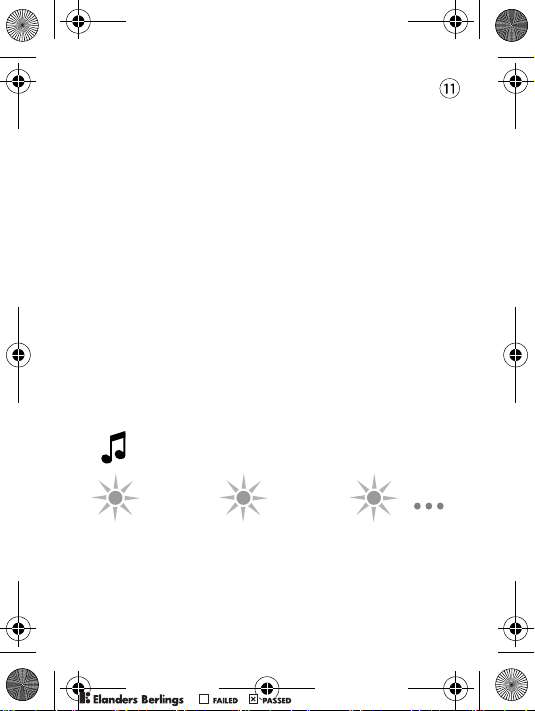
The headset beeps and flashes green when successfully added
El auricular emite un pitido y parpadea en color verde cuando
se añade correctamente
成功连接后,耳机会发出蜂鸣声,同时绿灯闪烁。
耳機加入後會發出嗶聲並閃綠燈
PPreflighted byreflighted byPreflighted by
( )( )( )
Page 13
HBH-PV700-UG-R1A-EN-ES-ZS-ZT.fm Page 13 Friday, August 26,
2
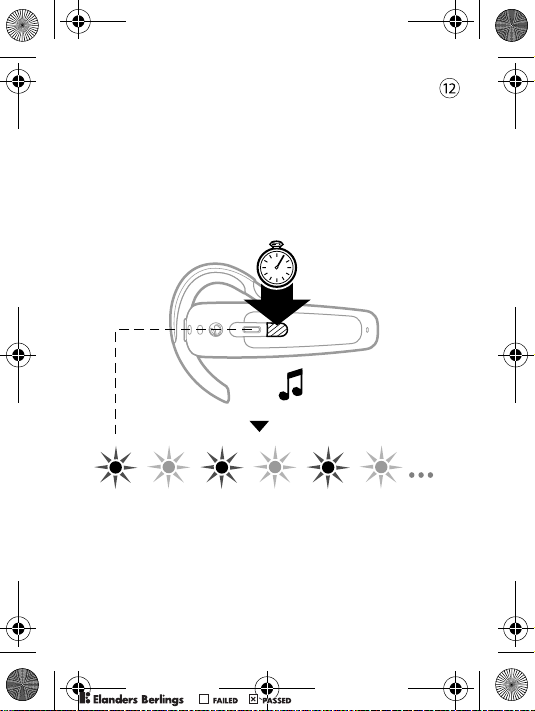
A – Adding the headset for the first time
or after a reset
A – Añadir el auricular por primera vez
o después de reiniciar
A – 首次添加耳机,或在重新设定后添加耳机
A – 首次或重設後加入耳機
(5 s)
PPreflighted byreflighted byPreflighted by
( )( )( )
Page 14
HBH-PV700-UG-R1A-EN-ES-ZS-ZT.fm Page 14 Friday, August 26,
2
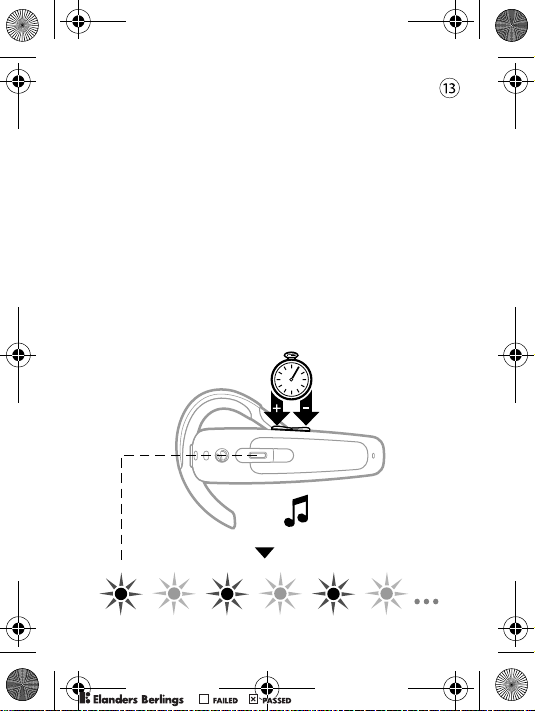
B – Adding the headset again or to
another phone
B – Añadir el auricular de nuevo o añadirlo
a otro teléfono
B – 重新添加耳机,或将耳机添加到另一手机
B – 耳機再次加入或加入另一台手機
Make sure the headset is turned on. (See p. 16.)
Asegúrese de que el auricular está encendido.
(Consulte la página 16.)
确保耳机已开启。(请参见第 16 页)
務請先將耳機開機,請參考第 16 頁。
5
)s
(
PPreflighted byreflighted byPreflighted by
( )( )( )
Page 15
HBH-PV700-UG-R1A-EN-ES-ZS-ZT.fm Page 15 Friday, August 26,
2
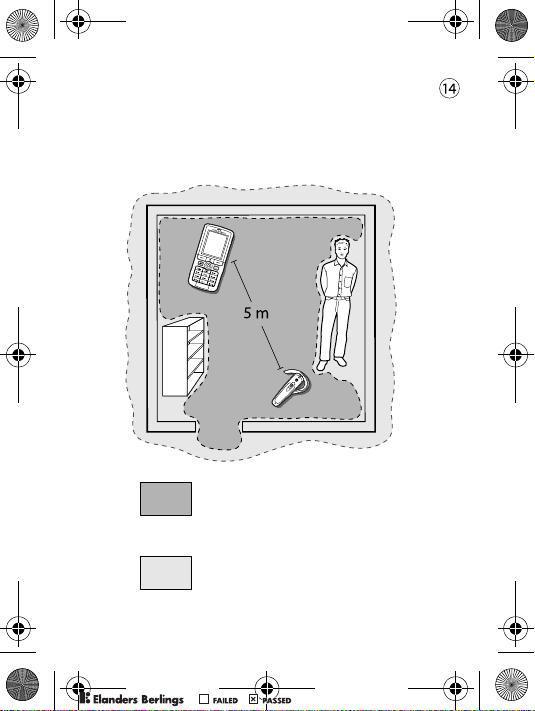
Range
Alcance
范围
範圍
Optimal performance
Rendimiento óptimo
最佳性能
最佳的作業範圍
Limited performance
Rendimiento limitado
有限性能
可接受的作業範圍
PPreflighted byreflighted byPreflighted by
( )( )( )
Page 16
HBH-PV700-UG-R1A-EN-ES-ZS-ZT.fm Page 16 Friday, August 26,
2
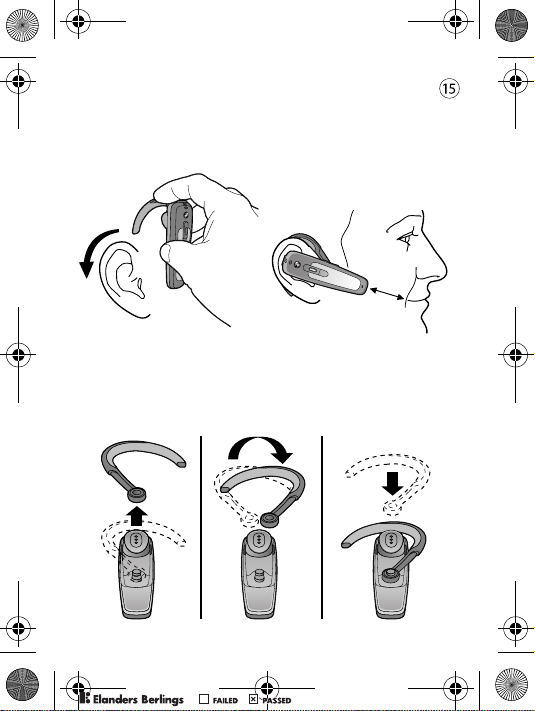
Putting the headset on
Forma de colocarse el auricular
戴上耳机
戴上耳機
Left-ear use
Utilización en la oreja izquierda
使用左耳
戴在左耳時
PPreflighted byreflighted byPreflighted by
( )( )( )
Page 17
HBH-PV700-UG-R1A-EN-ES-ZS-ZT.fm Page 17 Friday, August 26,
2
Calling
Llamadas
拨叫
通話
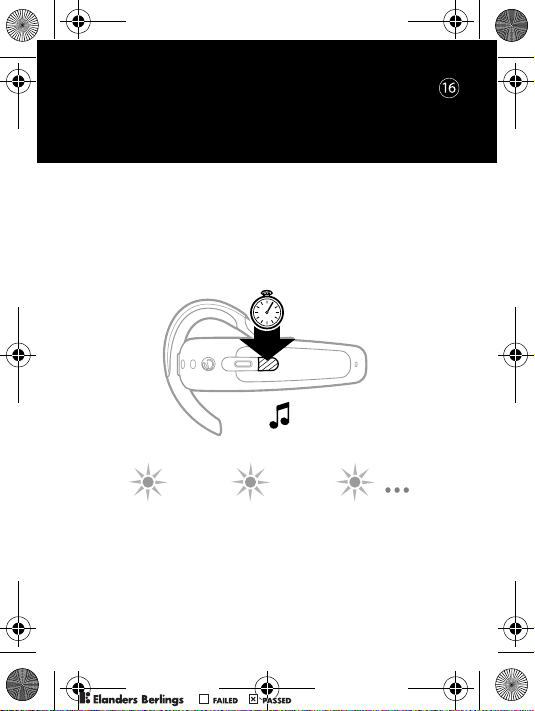
Turning the headset on (and off)
Encender el auricular (y apagar)
打开和关闭耳机
開關耳機
)s 5(
Indicator light when headset is on
Indicador luminoso cuando el auricular está encendido
耳机开启后,指示灯亮
耳機開機時的指示燈號
PPreflighted byreflighted byPreflighted by
( )( )( )
Page 18
HBH-PV700-UG-R1A-EN-ES-ZS-ZT.fm Page 18 Friday, August 26,
2
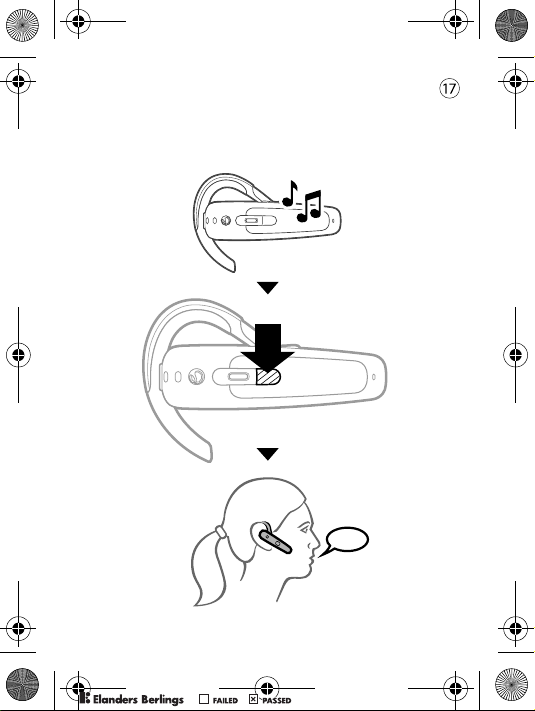
Answering a call
Contestar llamadas
接听电话
受話
PPreflighted byreflighted byPreflighted by
( )( )( )
Page 19
HBH-PV700-UG-R1A-EN-ES-ZS-ZT.fm Page 19 Friday, August 26,
2
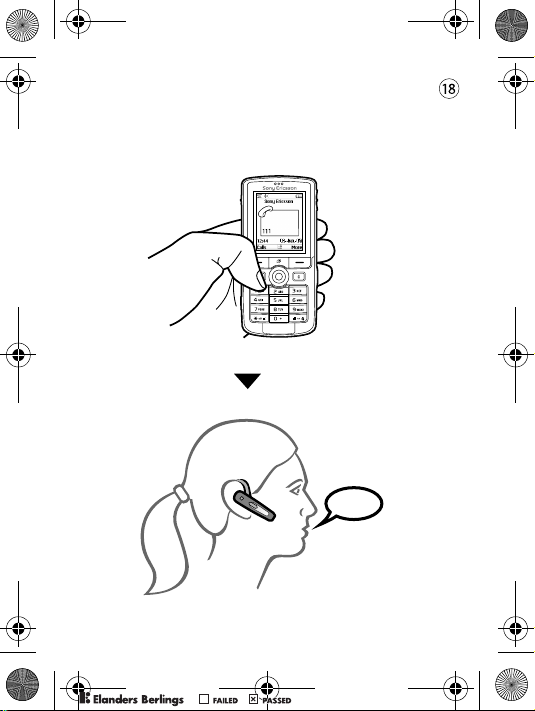
Making a call
Realizar llamadas
拨叫电话
發話
PPreflighted byreflighted byPreflighted by
( )( )( )
Page 20
HBH-PV700-UG-R1A-EN-ES-ZS-ZT.fm Page 20 Friday, August 26,
2
Using voice commands
Utilizar los comandos de voz
使用语音命令
使用語音指令
Voice commands, such as dial, redial, answer and reject,
can be very useful when you are using the headset.
For more information on voice commands, and if your
phone supports it, refer to the phone user guide.
Las funciones por comandos de voz, tales como marcar,
remarcar, responder o rechazar una llamada, pueden ser
muy útiles cuando se está utilizando el auricular.
Si desea obtener más información sobre los comandos
de voz, y si el teléfono lo admite, consulte la guía del
usuario proporcionada con el teléfono.
语音命令如拨号、重拨、接听和拒绝等,在使用
耳机时非常有用。有关语音命令的更多信息
(如果手机支持),请参考手机的用户指南。
使用耳機時,撥號、重撥、接聽及拒接等語音指令
會非常有用。語音指令的詳細說明 (手機支援語音
指令時),請參考手機的使用手冊。
PPreflighted byreflighted byPreflighted by
( )( )( )
Page 21
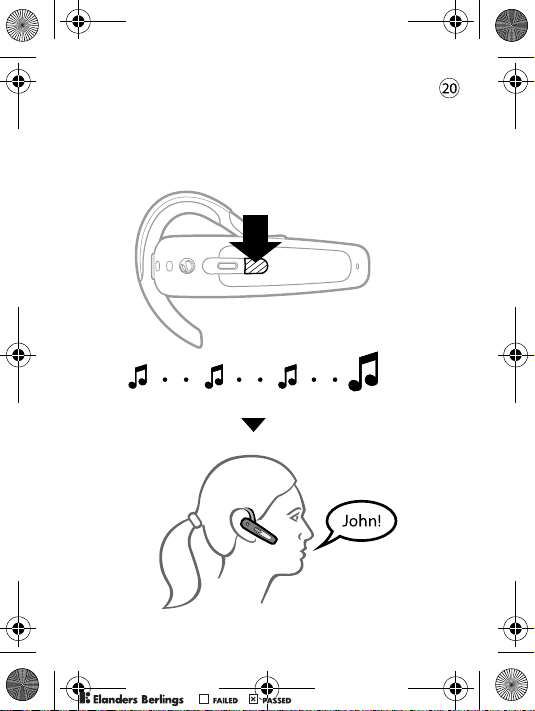
HBH-PV700-UG-R1A-EN-ES-ZS-ZT.fm Page 21 Friday, August 26,
2
Making a call using voice commands
Realizar llamadas mediante comandos
de voz
使用语音命令拨叫电话
用語音指令發話
PPreflighted byreflighted byPreflighted by
( )( )( )
Page 22
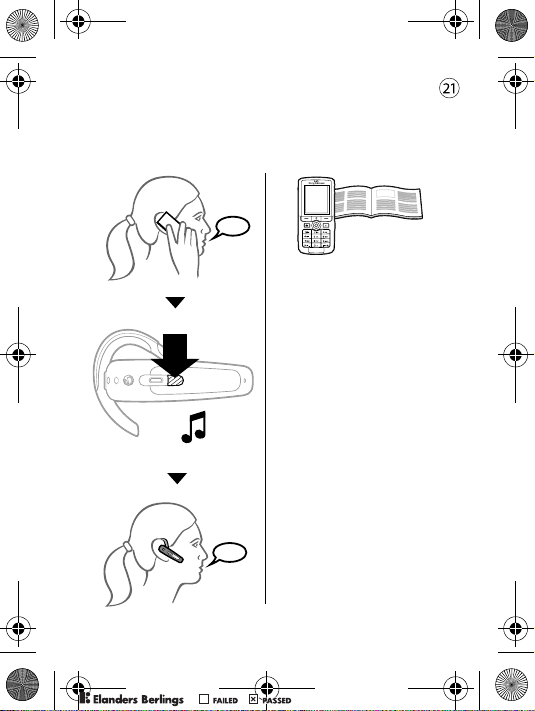
HBH-PV700-UG-R1A-EN-ES-ZS-ZT.fm Page 22 Friday, August 26,
2
Transferring sound
Transferir sonidos
传送声音
傳送聲音
To transfer from headset
to phone, refer to the
phone user guide.
Si desea transferir
sonidos del auricular
al teléfono, consulte
la guía del usuario.
要将声音从耳机传送到
手机,请参考手机的
用户指南。
將聲音自耳機轉到手機
的方法,請參考手機的
使用手冊。
PPreflighted byreflighted byPreflighted by
( )( )( )
Page 23
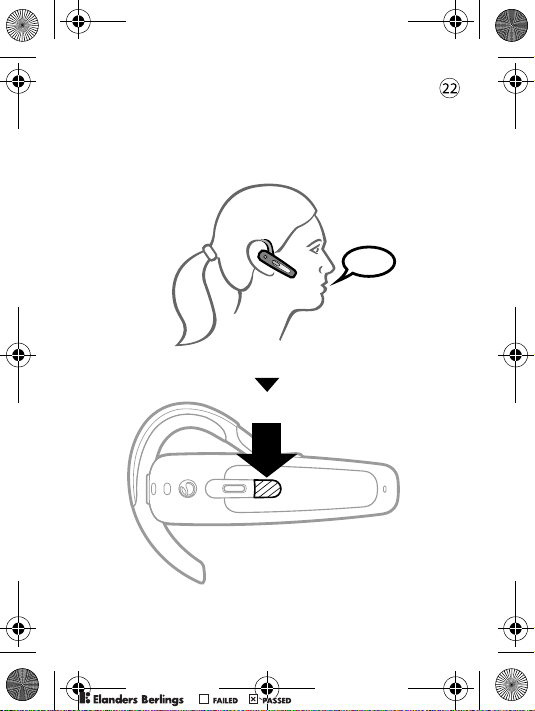
HBH-PV700-UG-R1A-EN-ES-ZS-ZT.fm Page 23 Friday, August 26,
2
Ending a call
Finalizar llamadas
挂断电话
結束通話
PPreflighted byreflighted byPreflighted by
( )( )( )
Page 24
HBH-PV700-UG-R1A-EN-ES-ZS-ZT.fm Page 24 Friday, August 26,
2
Rejecting a call
Rechazar llamadas
拒听电话
拒接來電
PPreflighted byreflighted byPreflighted by
( )( )( )
Page 25
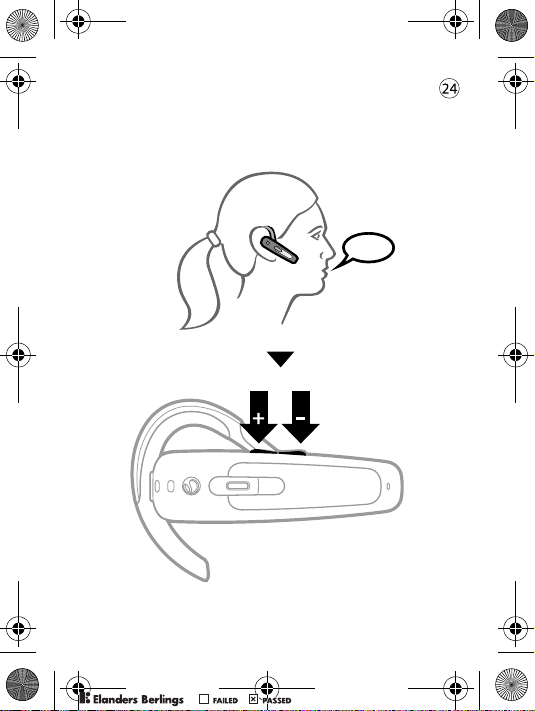
HBH-PV700-UG-R1A-EN-ES-ZS-ZT.fm Page 25 Friday, August 26,
2
Turning the microphone off (and on)
Apagar (o encender) el micrófono
关闭和打开话筒
開關麥克風
PPreflighted byreflighted byPreflighted by
( )( )( )
Page 26
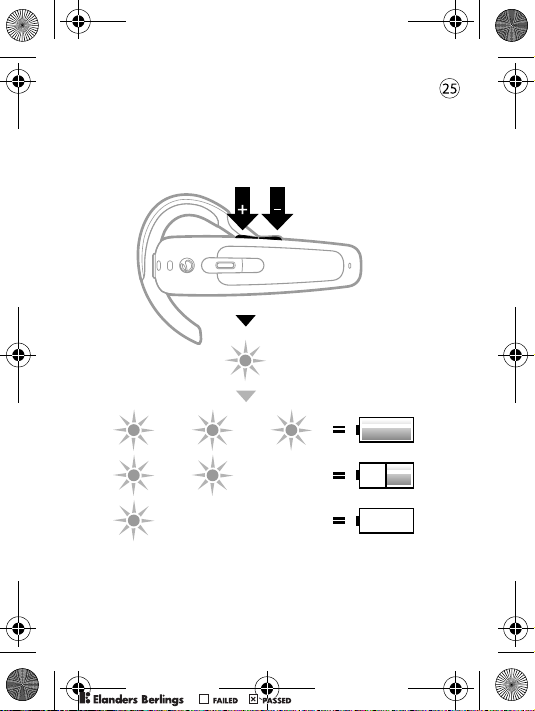
HBH-PV700-UG-R1A-EN-ES-ZS-ZT.fm Page 26 Friday, August 26,
2
Battery status
Estado de la batería
电池状态
電池狀態
PPreflighted byreflighted byPreflighted by
( )( )( )
Page 27
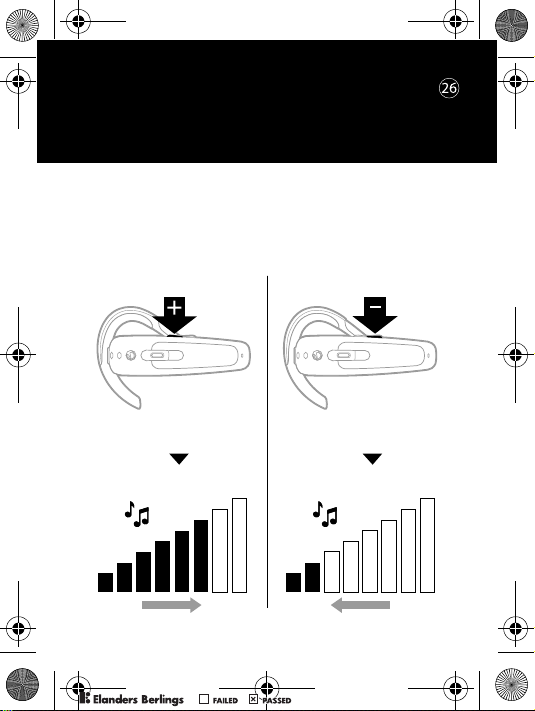
HBH-PV700-UG-R1A-EN-ES-ZS-ZT.fm Page 27 Friday, August 26,
2
Settings
Preferencias
手机设定
設定
Adjusting ring volume (in standby mode)
Ajustar el volumen del timbre (en modo de espera)
调整铃声音量 (待机模式)
待機模式下調整鈴聲音量
PPreflighted byreflighted byPreflighted by
( )( )( )
Page 28
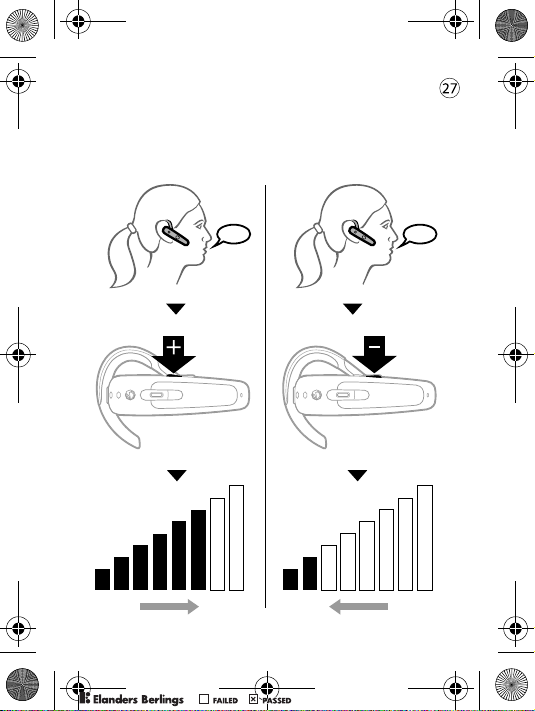
HBH-PV700-UG-R1A-EN-ES-ZS-ZT.fm Page 28 Friday, August 26,
2
Adjusting speaker volume
Ajustar el volumen del altavoz
调整扬声器音量
調整擴音器的音量
PPreflighted byreflighted byPreflighted by
( )( )( )
Page 29
HBH-PV700-UG-R1A-EN-ES-ZS-ZT.fm Page 29 Friday, August 26,
2
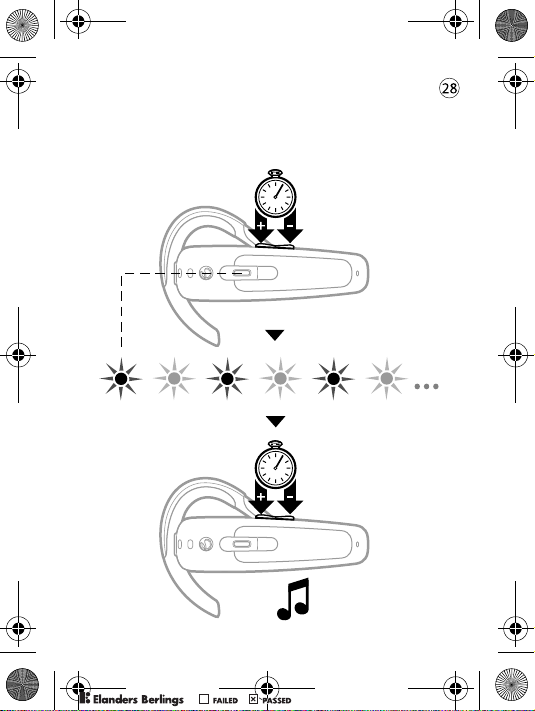
Resetting the headset
Reiniciar el auricular
重设耳机
重設耳機
5
)s
(
5
)s
(
PPreflighted byreflighted byPreflighted by
( )( )( )
Page 30
HBH-PV700-UG-R1A-EN-ES-ZS-ZT.fm Page 30 Friday, August 26,
2
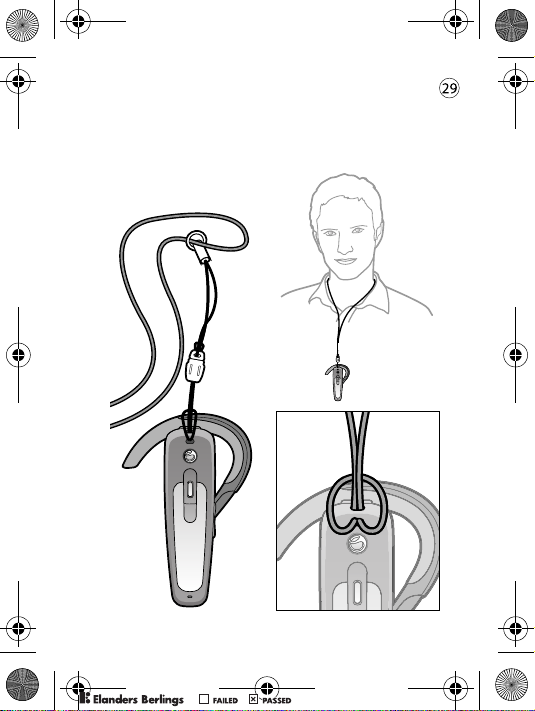
Attaching strap
Colocar el cordón
连接挂绳
安裝吊帶
PPreflighted byreflighted byPreflighted by
( )( )( )
Page 31
HBH-PV700-UG-R1A-EN-ES-ZS-ZT.fm Page 31 Friday, August 26,
2
Troubleshooting
Resolución de problemas
疑难解答
疑難排解
No connection to phone
Make sure the headset is charged and within range
of the phone. Check or redo the Bluetooth settings
in the phone.
The headset is automatically switched off
• The battery is too low. The indicator light on the
headset flashes red and you hear a low beep.
• The headset switches off if you do not add it to
the phone within 10 minutes.
Unexpected behaviour
Reset the headset (see p. 28).
Battery capacity
A battery that has been infrequently used or a new one,
could have reduced capacity. It may need to be recharged
a number of times.
No hay conexión con el teléfono
Asegúrese de que el manos libres esté cargado y dentro
del alcance del teléfono. Compruebe los ajustes de
Bluetooth o vuelva a configurarlos en el teléfono.
PPreflighted byreflighted byPreflighted by
( )( )( )
Page 32
HBH-PV700-UG-R1A-EN-ES-ZS-ZT.fm Page 32 Friday, August 26,
2
El auricular se apaga solo
• La batería tiene poca carga. El indicador
luminoso del auricular parpadea en rojo y se oye
un ligero pitido.
• El auricular se apaga si se tarda en enlazar un teléfono
más de diez minutos.
Comportamiento imprevisto
Reinicie al auricular (consulte la p. 28).
Capacidad de la batería
Una batería que no se ha utilizado con frecuencia
o una batería nueva pueden tener reducida la capacidad.
Es posible que deba recargarla varias veces.
无法与手机连接
确保耳机已充好电,并且在手机的有效范围内。
检查或重新设定手机的蓝牙设置。
耳机自动关闭
• 电池电量不足。耳机上的指示灯闪红灯,
并可听到低蜂鸣音。
• 如果 10 分钟内未将耳机添加到手机上,
耳机将关闭。
意外操作
重新设定耳机 (请参见第 28 页)。
电池容量
新电池或很久未用的电池可能达不到额定容量。
它们可能需要多充几次电。
PPreflighted byreflighted byPreflighted by
( )( )( )
Page 33
HBH-PV700-UG-R1A-EN-ES-ZS-ZT.fm Page 33 Friday, August 26,
2
無法連上手機
務請將耳機充電並置於手機的有效範圍內。
檢查或重定手機的 Bluetooth (藍芽)設定。
耳機自動關機
• 電池電量過低。耳機的顯示燈號閃紅燈且發出
微嗶聲。
• 耳機未在 10 分鐘內加入手機時即自動關機。
非預期的現象
重設耳機,(請參考第 28 頁)。
電池容量
新的或不常使用的電池,電池容量可能較低。
重複充電幾次後,可能有所改善。
PPreflighted byreflighted byPreflighted by
www.sonyericsson.com/support/
( )( )( )
Page 34
HBH-PV700-UG-R1A-EN-ES-ZS-ZT.fm Page 34 Friday, August 26,
2
Declaration of conformity
We, Sony Ericsson Mobile Communications AB of
Nya Vattentornet
221 88 Lund, Sweden
declare under our sole responsibility that our product
Sony Ericsson type DDA-0002001
to which this declaration relates is in conformity with
the appropriate standards EN 300 328, EN 301 489-17,
EN 301 489-7 and EN 60950 following the provisions
of Radio Equipment and Telecommunication Equipment
directive 1999/5/EC with requirements covering
EMC directive 89/336/EEC and Low Voltage directive
73/23/EEC.
Lund, July 2005
Ulf Persson, Head of Product Business Unit Accessories
We fulfill the R&TTE Directive.
Cumplimos con la directiva R&TTE.
我们符合 R&TTE 指令要求。
我們符合 R&TTE Directive 規範的要求。
PPreflighted byreflighted byPreflighted by
( )( )( )
Page 35
HBH-PV700-UG-R1A-EN-ES-ZS-ZT.fm Page 36 Thursday, August 18,
PPreflighted byreflighted byPreflighted by
( )( )( )
Page 36

PPreflighted byreflighted byPreflighted by
( )( )( )
Page 37

PPreflighted byreflighted byPreflighted by
( )( )( )
Page 38

PPreflighted byreflighted byPreflighted by
( )( )( )
Page 39

PPreflighted byreflighted byPreflighted by
( )( )( )
Page 40
HBH-PV700-UG-R1A-EN-ES-ZS-ZT.fm Page 35 Friday, August 26,
2
www.SonyEricsson.com
Sony Ericsson Mobile Communications AB
SE-221 88 Lund, Sweden
LZT 108 7416/1 R1A
Printed in XXXX
PPreflighted byreflighted byPreflighted by
( )( )( )
 Loading...