

Page 1
PROFESSIONAL VIDEO MONITOR
BVM-F250A
BVM-F170A
付属の CD-ROM には、BVM-F250A/F170A のオペレーションマニュアル(日本語、英語、フランス語、ドイツ
語、イタリア語、スペイン語、中国語(簡体字)、中国語(繁体字)、韓国語)が記録されています。詳しくは、
「CD-ROM マニュアルの使いかた」(3 ページ)をご覧ください。
The supplied CD-ROM includes the Operation Manual for the BVM-F250A/F170A (English, French,
German, Italian, Spanish, Simplified Chinese, Traditional Chinese, Korean, and Japanese versions). For
more details, see “Using the CD-ROM Manual” on page 22.
電気製品は、安全のための注意事項を守らないと、
火災や人身事故になることがあります。
このオペレーションガイドには、事故を防ぐための重要な注意事項と製品の取
り扱いかたを示してあります。このオペレーションガイドをよくお読みのうえ、
製品を安全にお使いください。お読みになったあとは、いつでも見られるとこ
ろに必ず保管してください。
OPERATION GUIDE [Japanese/English]
1st Edition (Revised 1)
Page 2

日本語
安全のために
電気製品は、安全のための注意事項を守らないと、火災や感電などにより死亡や大
けがなど人身事故につながることがあり、危険です。
事故を防ぐために次のことを必ずお守りください。
安全のための注意事項を守る
4 〜 7 ページの注意事項をよくお読みください。製品全般の安全上の注意事項が記
されています。8 〜 9 ページの「使用上のご注意」もあわせてお読みください。
定期点検をする
5 年に 1 度は、内部の点検を、お買い上げ店またはソニーのサービス窓口にご依頼
ください(有料)。
故障したら使わない
すぐに、お買い上げ店またはソニーのサービス窓口にご連絡ください。
万一、異常が起きたら
• 異常な音、におい、煙が出たら
• 内部に水、異物が入ったら
• モニターを落としたり、キャビネットを破損したときは
警告表示の意味
このオペレーションガイドおよび
製品では、次のような表示をして
います。表示の内容をよく理解し
てから本文をお読みください。
この表示の注意事項を守らないと、
火災や感電などにより死亡や大け
がなど人身事故につながることが
あります。
この表示の注意事項を守らないと、
感電やその他の事故によりけがを
したり周辺の物品に損害を与えた
りすることがあります。
注意を促す記号
m
a 電源を切る。
b 電源コードや接続ケーブルを抜く。
c お買い上げ店またはソニーのサービス窓口に連絡する。
行為を禁止する記号
行為を指示する記号
2
安全のために
Page 3
目次
警告...................................................................................... 4
注意...................................................................................... 5
その他の安全上のご注意 .......................................................... 7
使用上のご注意(性能を保持するために)............................. 8
設置環境 .................................................................................. 10
別売品 ...................................................................................... 10
仕様(BVM-F250A)........................................................... 11
仕様(BVM-F170A)........................................................... 13
JP
この説明書の読みかた
このオペレーションガイドは、BVM-F250A と BVMF170A について記載しています。
2 機種で異なる項目には機種名を表示してあります。
(例:仕様(BVM-F250A)など)
機種名が表示してない項目は、2 機種の共通の内容とし
てお読みください。
CD-ROMマニュアルの使いかた
AdobeReader がインストールされたコンピューター
で、取扱説明書を閲覧できます。
AdobeReaderは、Adobe のウェブサイトから無償でダ
ウンロードできます。
1
CD-ROM に収録されている index.htm ファイルを開
く。
2
読みたい取扱説明書を選択してクリックする。
◆ CD-ROMが破損または紛失した場合は、お買い上げ店また
はソニーのサービス窓口経由で購入できます。
目次
3
Page 4
警告
指定の電源電圧で使う
取扱説明書に記されている電源電圧でお
使いください。
規定外の電源電圧での使用は、火災や感
電の原因となります。
油煙、湯気、湿気、ほこりの
多い場所では設置・使用しな
い
内部を開けない
内部には電圧の高い部分があり、キャビ
ネットや裏ぶたを開けたり、改造したり
すると、火災や感電の原因となることが
あります。内部の調整や設定、点検、修
理は、お買い上げ店またはソニーのサー
ビス窓口にご依頼ください。
内部に水や異物を入れない
水や異物が入ると火災や感電の原因とな
ります。
万一、水や異物が入ったときは、すぐに
電源を切り、電源コードや接続ケーブル
を抜いて、お買い上げ店またはソニーの
サービス窓口にご相談ください。
電源コードを傷つけない
電源コードを傷つけると、火災や感電の
原因となることがあります。
• 設置時に、製品と壁やラック、棚など
の間に、はさみ込まない。
• 電源コードを加工したり、傷つけたり
しない。
• 重いものをのせたり、引っ張ったりし
ない。
• 熱器具に近づけたり、加熱したりしな
い。
• 電源コードを抜くときは、必ずプラグ
を持って抜く。
万一、電源コードが傷んだら、お買い上
げ店またはソニーのサービス窓口に交換
をご依頼ください。
上記のような場所に設置すると、火災や
感電の原因となります。
取扱説明書に記されている使用条件以外
の環境での使用は、火災や感電の原因と
なります。
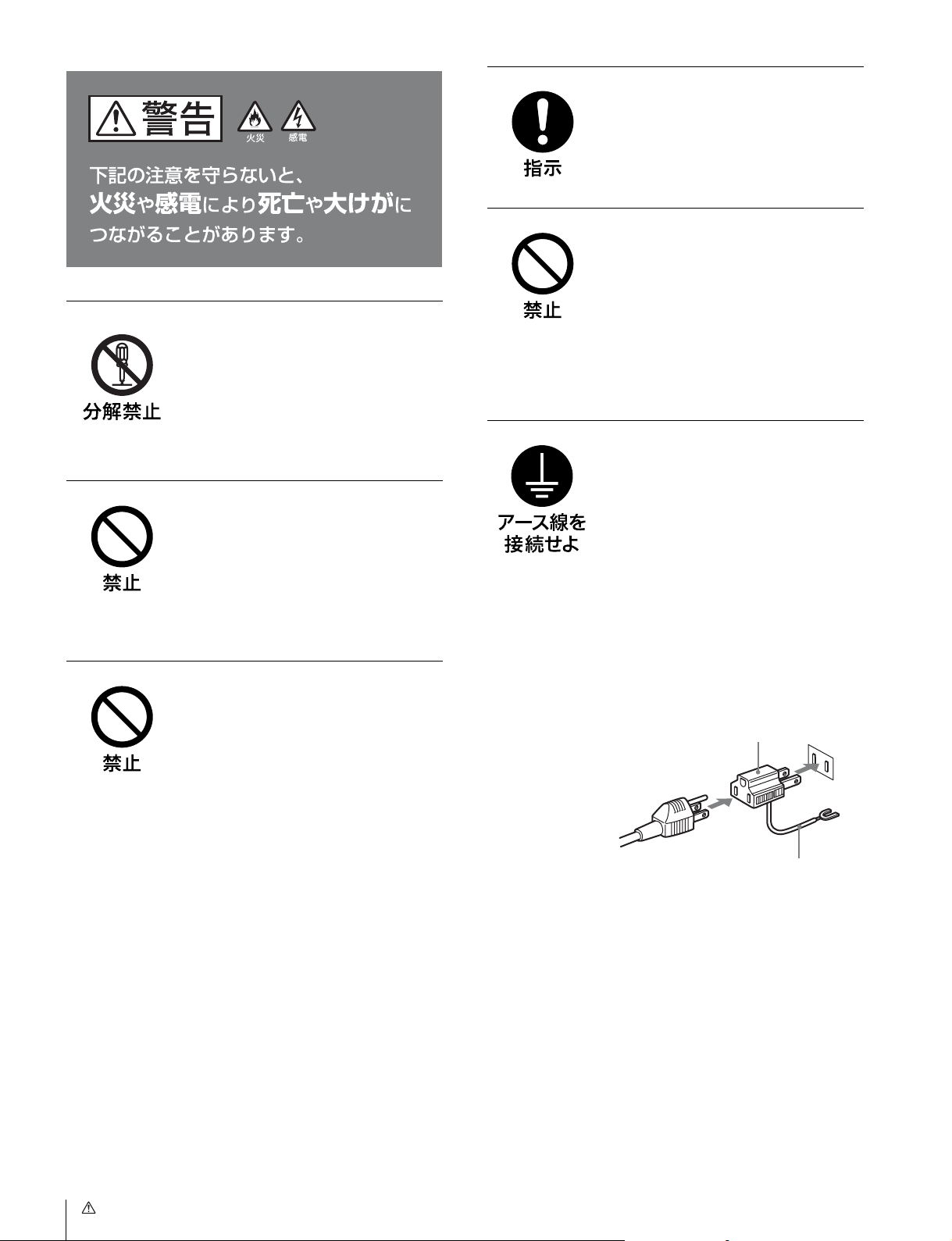
安全アースを接続する
安全アースを接続しないと、感電の原因
となることがあります。
次の方法でアースを接続してください。
• 電源コンセントが 3 極の場合
付属の電源コードを使用することで安
全アースが接続されます。
• 電源コンセントが 2 極の場合
付属の 3 極 t2 極変換プラグを使用
し、変換プラグから出ているアース線
を建物に備えられているアース端子に
接続してください。
変換プラグアダプター
アース線
安全アースを取り付けることができない
場合は、お買い上げ店またはソニーの
サービス窓口にご相談ください。
4
警告
Page 5
注意
指定された電源コード、接続
ケーブルを使う
付属の、あるいは取扱説明書に記されて
いる電源コード、接続ケーブルを使わな
いと、感電や故障の原因となることがあ
ります。
他の電源コードや接続ケーブルを使用す
る場合は、お買い上げ店またはソニーの
サービス窓口にご相談ください。
通気孔をふさがない
ぬれた手で電源プラグをさわ
らない
ぬれた手で電源プラグを抜き差しする
と、感電の原因となることがあります。
転倒、移動防止の処置をする
モニターをラックに取り付け・取りはず
しするときは、転倒・移動防止の処置を
しないと、倒れたり、動いたりして、け
がの原因となることがあります。
安定した姿勢で注意深く作業してくださ
い。
また、ラックの設置状況、強度を充分に
お確かめください。
製品の上に乗らない、重いも
のを載せない
倒れたり、落ちたり、壊れたりして、け
がの原因となることがあります。
通気孔をふさぐと内部に熱がこもり、火
災や故障の原因となることがあります。
風通しをよくするために次の項目をお守
りください。
• 壁から 10cm 以上離して設置する。
• 密閉された狭い場所に押し込めない。
• 毛足の長い敷物(じゅうたんや布団な
ど)の上に設置しない。
• 布などで包まない。
• あお向けや横倒し、逆さまにしない。
不安定な場所に設置しない
ぐらついた台の上や傾いたところなどに
設置すると、モニターが落ちたり、倒れ
たりして、けがの原因となることがあり
ます。また、設置・取り付け場所の強度
を充分にお確かめください。
直射日光の当たる場所や熱器
具の近くに設置・保管しない
内部の温度が上がり、火災や故障の原因
となることがあります。
お手入れの際は、電源を切っ
て電源プラグを抜く
電源を接続したままお手入れをすると、
感電の原因となることがあります。
接続の際は電源を切る
電源コードや接続ケーブルを接続すると
きは、電源を切ってください。感電や故
障の原因となることがあります。
移動の際は電源コードや接続
コードを抜く
コード類を接続したまま本機を移動させ
ると、コードに傷がついて火災や感電の
原因となることがあります。
注意
5
Page 6
定期的に内部の掃除を依頼す
る
密閉環境に設置する際は注意
する
長い間掃除をしないと内部にホコリがた
まり、火災や感電の原因となることがあ
ります。1 年に 1 度は、内部の掃除をお
買い上げ店またはソニーのサービス窓口
にご依頼ください(有料)。
特に、湿気の多くなる梅雨の前に掃除を
すると、より効果的です。
入力アダプターおよびコント
ロールユニットを取り付ける
際には電源を切って電源プラ
グを抜く
モニターを電源に接続したまま各種入力
アダプターおよびコントロールユニット
の取り付けを行うと、感電の原因になる
ことがあります。入力アダプターおよび
コントロールユニットの取り付けの際に
はモニターの電源を切り、電源プラグを
抜いてください。
入力アダプターなどの取り付
け、取りはずしは注意深く
本機をラックやモニター棚に収納した
際、上下および周辺の機器によりモニ
ター周辺の通気孔が妨げられ動作温度が
上がり、故障や発熱の原因となる可能性
があります。本機の動作条件温度 0 ℃か
ら 35 ℃を保つように上下に 1U の隙間
をあけ、また周辺機器との隙間を充分に
とり、通気孔の確保や通気ファンの設置
などの配慮をしてください。
設置は専門の工事業者に依頼
する
設置については、必ずソニーのサービス
担当者または営業窓口にご相談くださ
い。
壁面や天井などへの設置は、本機と取り
付け金具を含む重量に充分耐えられる強
度があることをお確かめください。充分
な強度がないと、落下して、大けがの原
因となります。
また、一年に一度は、取り付けがゆるん
でないことを点検してください。
各種入力アダプターや、コントローラー
アタッチメントスタンドの取り付け、取
りはずしの際に部品や基板の角などで手
や指にけがをすることがあります。保護
手袋などをして注意深く作業してくださ
い。
コード類は正しく配置する
電源コードや接続ケーブルは、足に引っ
かけると本機の落下や転倒などによりけ
がの原因となることがあります。
十分注意して接続・配置してください。
電源コードのプラグおよびコ
ネクターは突き当たるまで差
し込む
真っ直ぐに突き当たるまでさしこまない
と、火災や感電の原因となります。
BVM-F170Aのみ
DCIN端子に規格以外の入力
電圧をかけない
DCIN 端子に規格以外の入力電圧をかけ
ると火災や感電の原因となることがあり
ます。
指定された方法でラックマウ
ントする
本機をラックに取り付ける際には付属の
ブラケットを使用し取扱説明書に記載さ
れた方法で取り付けてください。
指定された以外の方法でラックマウント
すると落下してケガや損害の原因となる
ことがあります。
6
注意
Page 7
指定以外の機器には使用しな
い
付属のラックマウントブラケットは本機
専用です。指定以外の機器に使用すると
搭載した機器が落下してケガの原因にな
ることがあります。
組み立て・取り付けは注意深
く
付属のラックマウントブラケットを使用
する際、または前面保護板の着脱の際に
は部品のかどやエッジで手や指にけがを
しないように注意深く作業してくださ
い。
作業の際には保護手袋を着用することを
おすすめします。
その他の安全上のご注意
BVM-F250A
本機の電源スイッチは、左側面に備えられています。
設置の際には、電源スイッチに容易にアクセスできるよう
にしてください。
MAINPOWER(主電源)スイッチの機能
" 側に押すとモニターは動作状態になります。System
Configuration メニューの Power メニューの設定により、こ
のスイッチを入れたときに、モニターをスタンバイ状態に
することもできます。
SystemConfiguration メニューの Power メニューについて
は、オペレーションマニュアルをご覧ください。
機器を水滴のかかる場所に置かないでください。また水の
入った物、花瓶などを機器の上に置かないでください。
注意
付属の電源コードは本機の専用品です。
他の機器には使用できません。
LAN 端子について
ご注意
安全のために、周辺機器を接続する際は、過大電圧を持つ
可能性があるコネクターをこの端子に接続しないでくださ
い。
接続についてはオペレーションマニュアルの指示に従って
ください。
注意
LAN ケーブルご使用の際は、輻射ノイズによる誤動作を防
ぐため、シールドタイプのケーブルを使用してください。
BVM-F170A
警告
設置の際には、容易にアクセスできる固定配線内に専用遮
断装置を設けるか、使用中に、容易に抜き差しできる、機
器に近いコンセントに電源プラグを接続してください。
万一、異常が起きた際には、専用遮断装置を切るか、電源
プラグを抜いてください。
機器を水滴のかかる場所に置かないでください。また水の
入った物、花瓶などを機器の上に置かないでください。
その他の安全上のご注意
7
Page 8

注意
付属の電源コードは本機の専用品です。
他の機器には使用できません。
LAN 端子について
使用上のご注意(性能を保持する
ために)
ご注意
安全のために、周辺機器を接続する際は、過大電圧を持つ
可能性があるコネクターをこの端子に接続しないでくださ
い。
接続についてはオペレーションマニュアルの指示に従って
ください。
注意
LAN ケーブルご使用の際は、輻射ノイズによる誤動作を防
ぐため、シールドタイプのケーブルを使用してください。
画面について
• 画面を太陽にむけたままにすると、画面を傷めてしまい
ます。窓際や室外に置くときなどはご注意ください。
• 画面を強く押したり、ひっかいたり、上にものを置いた
りしないでください。画面にムラが出たり、パネルの故
障の原因になります。
• 使用中に画面やキャビネットがあたたかくなることがあ
りますが、故障ではありません。
焼き付きについて
一般に、有機 EL パネルは、その特性上、焼き付き、輝度
低下などが発生することがあります。
これらは故障ではありませんので、ご了承の上本機をお使
いください。
長時間の表示で焼き付きが発生しやすい画像
• 画面縦横比 16:9 以外のマスク処理された画像
• カラーバーや長時間静止した画像
• 設定や動作状態を示す文字やメッセージなどの表示
• センターマーカー、セーフエリアマーカーなどの表示
焼き付きを軽減するには
• 文字表示やマーカー表示を消す
MENU ボタンを押して、文字表示を消します。接続した
機器の文字表示やマーカー表示を消すには、接続した機
器を操作してください。詳しくは、接続した機器の取扱
説明書をご覧ください。
• 電源をこまめに切る
長時間使用しないときは、電源を切ってください。
スクリーンセーバーについて
本機には、焼き付きを軽減するためのスクリーンセーバー
機能が内蔵されています。ほぼ静止した画像を表示したま
ま 10 分以上経過すると、自動的にこの機能が働き、画面の
輝度を下げます。
長時間の使用について
固定された画像または静止画などの長時間連続表示や、高
温環境下で連続運用した場合、有機 EL パネルの構造上お
よび材料の特性上、残像や焼き付き、しみ、すじ、輝度低
下などを発生することがあります。
使用上のご注意(性能を保持するために)
8
Page 9

特に、アスペクト変更などで表示エリアよりも狭いサイズ
で表示し続けた場合、パネル劣化の進行が早まるおそれが
あります。
静止画などの長時間連続表示、または密閉された空間や空
調機器の吹き出し口付近など高温多湿環境下における連続
運用を避けてください。
モニター使用時に輝度を少し下げたり、モニター未使用時
に電源を切ったりするなどして、上記のような現象を未然
に防ぐことをおすすめします。
結露
本機を寒いところから急に暖かいところに持ち込んだとき
など、機器表面や内部に水滴がつくことがあります。これ
を結露といいます。結露が起きたときは電源を切り、結露
がなくなるまで放置し、結露がなくなってからご使用くだ
さい。結露時のご使用は機器の故障の原因となる場合があ
ります。
設置について(BVM-F250A)
輝点・滅点について
本機の有機 EL パネルは有効画素 99.99%以上の非常に精密
度の高い技術で作られていますが、画面上に黒い点が現れ
たり(画素欠け)、常時点灯している輝点(赤、青、緑な
ど)や滅点がある場合があります。また、有機 EL パネル
の特性上、長期間ご使用の間に画素欠けが生じることもあ
ります。これらの現象は故障ではありませんので、ご了承
の上本機をお使いください。
画面の取り扱いとお手入れについて
画面には、反射による映りこみを抑えるため、特殊な表面
処理を施しています。誤ったお手入れをした場合、性能を
損なうことがありますので、次のことを必ずお守りくださ
い。また、画面は傷つきやすいので固い物などでこすった
り、たたいたり、物をぶつけたりしないでください。
• お手入れをする前に、必ず電源プラグをコンセントから
抜いてください。
• 画面には特殊な表面処理をしているので、シールなどの
粘着物は絶対に貼らないでください。
• 画面には特殊な表面処理をしているので、なるべく直接
手で触れないようにしてください。
• 画面の汚れは、クリーニングクロスなどの乾いた柔らか
い布でそっと拭いてください。
• 画面の汚れがひどいときは、クリーニングクロスやメガ
ネ拭きなどの柔らかい布に、水で薄めた中性洗剤を少し
含ませて軽く拭いてください。
• クリーニングクロスにゴミなどが付着したまま強く拭く
と、画面に傷が付くことがあります。
• アルコールやベンジン、シンナー、酸性洗浄液、アルカ
リ性洗浄液、研磨剤入り洗浄液、化学ぞうきんなどは、
画面を傷めますので絶対に使用しないでください。
• 画面の表面からほこりを取り除くときは、ブロアーをお
使いください。
設置時には、通気やサービス性を考慮して設置スペースを
確保してください。
• ファンの排気部や通気孔をふさがない。
• 通気のためにセット周辺に空間をあける。
• 作業エリアを確保するため、セット後方は、40cm 以上の
空間をあける。
机上などの平面に設置する場合は、上下に 1U(4.4cm)以
上の空間をそれぞれ確保してください。なお、セット上部
はサービス性を考慮し 40cm 以上の空間を確保することを
推奨します。
設置について(BVM-F170A)
本機をラックに設置するときは、ラックと本機の間に、上
下に1 U(4.4cm)以上、左右に 1.0cm 以上の空間を確保
してください。
廃棄するときは
一般の廃棄物と一緒にしないでください。
ごみ廃棄場で処分されるごみの中にモニターを捨てないで
ください。
使用済みのモニターは、国または地域の法令に従って廃棄
してください。
ファンエラーについて
本機には冷却用ファンが内蔵されています。前面パネルの
OPERATE ランプが赤で点滅し、OVERRANGE ランプが
アンバーで点滅、ECO ランプがマゼンタで点灯した場合
(ファンエラー警告)は、電源を切り、お買い上げ店または
ソニーのサービス窓口にご連絡ください。
使用上のご注意(性能を保持するために)
9
Page 10
設置環境
別売品
照明環境
モニターの色再現は、モニターそのものの性能だけではな
く、周囲の環境光(照明)に大きく影響を受けます。
このため周囲光を調整し、黒が浮かない環境下で使用する
ことをおすすめします。
視野角
オペレーターから画面全体を見る場合の角度は画面中心か
ら上下左右 0°± 5°以内が理想です。± 15°以上ずれない
ようにしてください。
操作部関連
モニターコントロールユニット BKM-16R
BVM-F250A/F170A を操作するためのコントローラーで
す。1 台で複数台のモニターを同時にコントロールすること
ができます。
本書では、BKM-16R のことを「コントローラー」と呼んで
います。
設置用
コントローラーアタッチメントスタンド BKM-37H、
BKM-38H(BVM-F250A 用)
BVM-F250A と BKM-16R を一体化するための組み立てスタ
ンドです。
BKM-37H を使うとモニターの角度を上下に調節することも
できます。
コントローラーアタッチメントスタンド BKM-39H
(BVM-F170A 用)
BVM-F170A と BKM-16R を一体化するための組み立てスタ
ンドです。
モニターインターフェースケーブル SMF-700
BVM-F250A/F170A と BKM-16R を接続するためのイン
ターフェースケーブルです。
入力アダプター
本機の入力オプションポートに装着して、入出力端子パネ
ルを構成します。4 枚まで装着できます。
各入力アダプターで入出力する信号の種類は、入出力端子
パネルの構成に応じて ChannelConfiguration メニューで選
択します。
ご注意
入力アダプターを装着したときは、ChannelConfiguration
メニューで、入力チャンネルの設定を行ってください。設
定を行わないと装着した入力アダプターが正しく動作しな
いことがあります。
◆ ChannelConfiguration メニューについては、オペレーションマ
ニュアルをご覧ください。
◆ 各入力アダプターの詳細については、それぞれの取扱説明書を
ご覧ください。
10
設置環境/別売品
Page 11
SDI4:2:2 入力アダプター BKM-220D
シリアルデジタル(525/625 コンポーネント)信号用のデ
コーダーを搭載しています。入出力端子としては、シリア
ルデジタル信号用を 2 チャンネル、モニターアウト出力用
を 1 チャンネル装備しています。
仕様(BVM-F250A)
画像系
NTSC/PAL 入力アダプター BKM-227W
NTSC/PAL/PAL-M/SECAM 信号用のデコーダーを搭載し
ています。入出力端子としてはコンポジット信号用と Y/C
信号用を各 1 チャンネル装備しています。
アナログコンポーネント入力アダプター BKM-229X
アナログコンポーネント信号およびアナログ RGB 信号用の
デコーダーを搭載しています。入力端子としては 1 チャン
ネルを装備しています。
HD/D1-SDI入力アダプター BKM-243HS
シリアルデジタルコンポーネント信号用のデコーダーを搭
載しています。入出力端子としては、シリアルデジタル信
号用を 2 チャンネル、モニター出力用を 1 チャンネル、装
備しています。
HD/SD-SDI クローズドキャプションアダプター BKM244CC
シリアルデジタルコンポーネント信号用のデコーダーを搭
載しています。SDI 信号に重畳された EIA/CEA-608、
EIA/CEA-708 規格のクローズドキャプション信号をデコー
ドし表示することができます。入出力端子としては、シリ
アルデジタル信号用を 2 チャンネル、モニター出力用を 1
チャンネル装備しています。
3G/HD/SD-SDI 入力アダプター BKM-250TG
シリアルデジタルコンポーネント信号用のデコーダーを搭
載しています。SDI 信号に重畳されたタイムコードおよび
エンベディッドオーディオのオーディオレベルを表示する
ことができます。また、3D 信号アナライズ機能にも対応し
ています。入出力端子としては、シリアルデジタル信号用
を 2 チャンネル、モニター出力用を 2 チャンネル装備して
います。
ご注意
• BKM-220D、BKM-243HS、BKM-244CC、BKM-250TG の
MONITOROUT 出力は、本線系出力としての規格を満足
していません。
• 入力アダプターによっては、指定したシリアル番号の製
品を使用する必要があります。本機で使用できる入力ア
ダプターのシリアル番号について詳しくは、オペレー
ションマニュアルの「入力アダプターについて」を参照
してください。
パネル 有機 EL パネル
画像サイズ 24.5 型
表示エリア(H × V)
543.4 × 305.6mm
解像度(H × V)
1920 × 1080ピクセル(FullHD)
アスペクト比 16:9
有効画素数 99.99%
パネルドライバー
RGB10-bit
パネル表示フレームレート
48Hz、50Hz、60Hz、72Hz、75Hz
オペレーションマニュアルの「画像・
フレーム表示」を参照してください。
1) 48Hz、60Hz、72Hz は、フレームレート
1/1.001 にも対応します。
視野角 ( パネルの仕様 )
89°/89°/89°/89°
(上/下/左/右、コントラスト >10:1)
ノーマルスキャン
0%スキャン
ネイティブスキャン
信号のピクセルをパネルのピクセルに 1:1
でマッピング表示、または非スクエア
ピクセルの SD信号(信号システムの
Hピクセル数が 720または 1440)また
は HDMI/DisplayPortビデオの 640×
480の SD信号を、V方向は 2倍、H方
向は画面アスペクト比が正しくなるよ
うスケーリング処理し、同時にアパー
チャー係数、フィルター係数などを補
正して画質を最適化した表示
アンダースキャン
3%アンダースキャン
オーバースキャン
0%スキャンに対して 5%オーバースキャ
ン部をマスク表示
色温度 D65、D93(他の色温度にも設定可)
標準輝度 100cd/m
(100%白色信号入力時)
カラースペース
ITU-RBT.709、EBU、SMPTE-C、
2
(Preset1〜Preset5)
F250Native
2) BVM-F250A 独自の色度点です。BVMF250A として最も広色域のカラースペー
ス設定です。
2)
1)
仕様(BVM-F250A)
11
Page 12
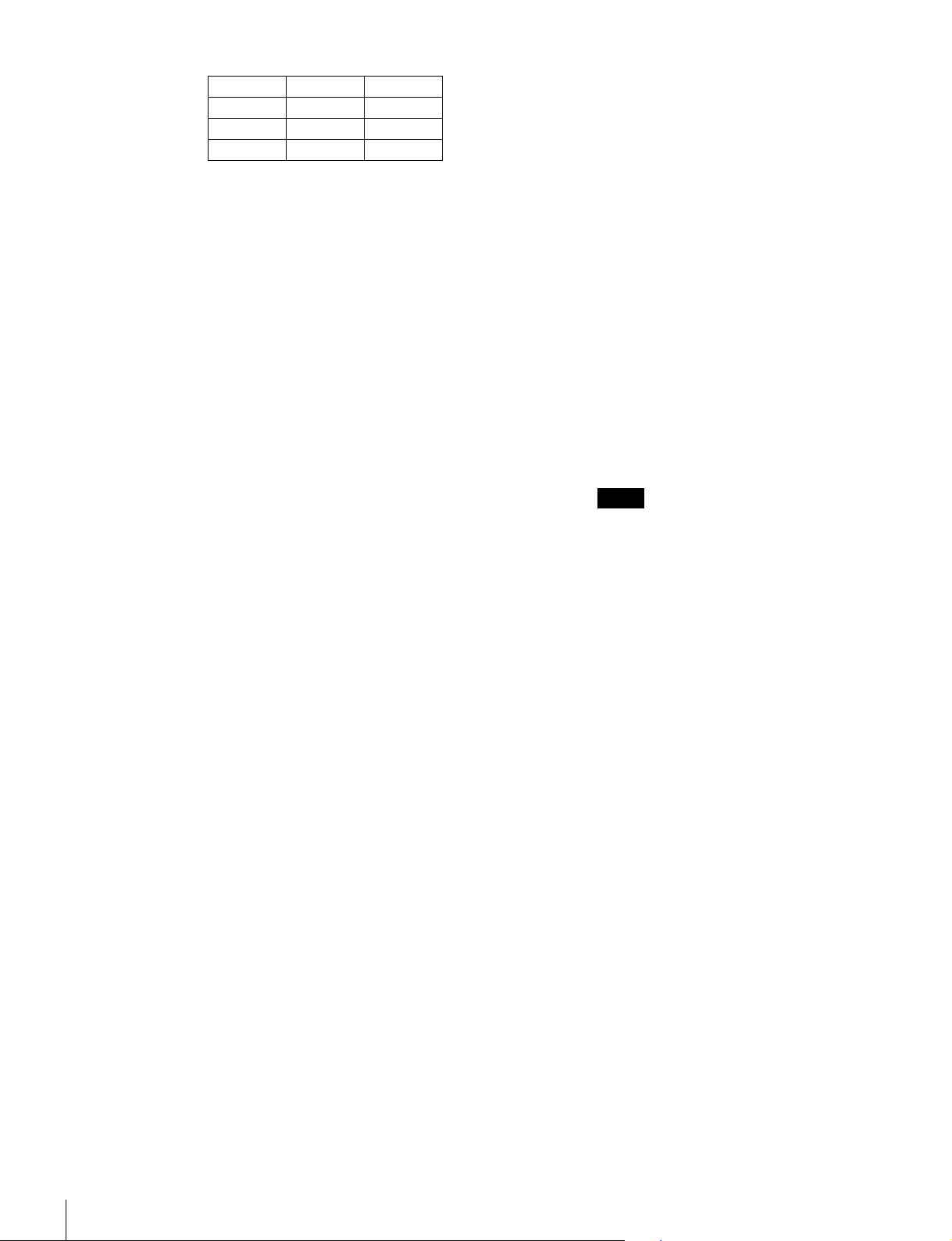
Xy
R 0.681 0.319
G 0.189 0.724
B 0.141 0.051
ウォームアップ時間
30 分
入力
SDI 入力 BNC(× 2)
入力インピーダンス:75Ω 不平衡
信号フォーマット
オペレーションマニュアルの「対応信
号システム」、「対応信号フォーマッ
ト」を参照してください。
サンプリング周波数
3G-SDI:
Y/Cb/Cr(4:2:2)
148.5MHz/74.25MHz/74.25MHz
Y/Cb/Cr(4:4:4)
148.5MHz/148.5MHz/148.5MHz
G/B/R(4:4:4)
148.5MHz/148.5MHz/148.5MHz
HD-SDI:
Y/Cb/Cr(4:2:2)
74.25MHz/37.125MHz/37.125
MHz
SD-SDI:
Y/Cb/Cr(4:2:2)
13.5MHz/6.75MHz/6.75MHz
量子化
3G-SDI:10 ビット/サンプル、12 ビッ
ト/サンプル
HD-SDI:10 ビット/サンプル
SD-SDI:10 ビット/サンプル
HDMI 入力 HDMI コネクター(× 1)
HDCP 対応、DeepColor 対応
信号フォーマット
オペレーションマニュアルの「対応信
号フォーマット」の「HDMI/
DisplayPort」を参照してください。
DisplayPort 入力
DisplayPort コネクター(× 1)
HDCP 対応、18/24/30bpp(bitsper
pixel)対応
信号フォーマット
オペレーションマニュアルの「対応信
号フォーマット」の「HDMI/
DisplayPort」を参照してください。
(Typical)
オプションポート
4 ポート
信号フォーマット
オペレーションマニュアルの「対応信
号システム」、「対応信号フォーマット」
を参照してください。
パラレルリモート
D-sub9 ピン(凹)(× 1)
シリアルリモート(LAN)
Ethernet(10BASE-T/100BASE-TX):
RJ-45(× 1)
出力
SDI 出力 BNC(× 1)(モニター出力)
出力信号振幅:800mVp-p± 10%
出力インピーダンス:75Ω 不平衡
伝送距離:
3G-SDI: 最大 70m
HD-SDI: 最大 100m
SD-SDI: 最大 200m
3)
3)
4)
ご注意
MONITOROUT 出力は、本線系出力とし
て規格を満足していません。
3) (株)フジクラ製の同軸ケーブル 5C-FB また
は同等品使用時
4) (株)フジクラ製の同軸ケーブル 5C-2V また
は同等品使用時
DC5VOUT 丸型 4 ピン(凹)(× 1)
一般
電源 AC100V-240V
1.6A-0.8A、50/60Hz
消費電力 約 145W(最大)
約 72W(平均消費電力、工場出荷時)
動作温度 0°C〜35°C
推奨使用温度:20°C〜30°C
動作湿度 0%〜90%(結露のないこと)
保存・輸送温度 −20°C〜 +60°C
保存・輸送湿度 0%〜90%
動作・保存・輸送気圧
700hPa〜1060hPa
質量 約 13.0kg
付属品 AC 電源コード(1)
3 極→ 2 極変換プラグ(1)
ACプラグホルダー(1)
オペレーションガイド(本書)
CD-ROM(1)
保証書(1)
別売品 モニターコントロールユニット BKM-16R
(1)
仕様(BVM-F250A)
12
Page 13
コントローラーアタッチメントスタンド
BKM-37H、BKM-38H
モニターインターフェースケーブル SMF-
700
SDI4:2:2入力アダプター BKM-220D(シ
リアル番号 2100001以降)
NTSC/PAL入力アダプター BKM-227W
(シリアル番号 2100001以降)
アナログコンポーネント入力アダプター
BKM-229X(シリアル番号 2200001以
降)
HD/D1-SDI入力アダプター BKM-243HS
(シリアル番号 2108355以降)
HD/SD-SDIクローズドキャプションアダ
プター BKM-244CC
3G/HD/SD-SDI入力アダプター BKM-
250TG(シリアル番号 7300001以降)
ご注意
入力アダプターによっては、指定したシリアル番号の製品を
使用する必要があります。本機で使用できる入力アダプター
のシリアル番号について詳しくは、オペレーションマニュア
ルの「入力アダプターについて」を参照してください。
本機は「高調波電流規格 JISC61000-3-2 適合品」です。
本機の仕様および外観は、改良のため予告なく変更するこ
とがありますが、ご了承ください。
この装置は、クラス A 情報技術装置です。この装置を家
庭環境で使用すると電波妨害を引き起こすことがありま
す。この場合には使用者が適切な対策を講ずるよう要求
されることがあります。
VCCI-A
• 必ず事前に記録テストを行い、正常に記録されている
ことを確認してください。本機や記録メディア、外部
ストレージなどを使用中、万一これらの不具合により
記録されなかった場合の記録内容の補償については、
ご容赦ください。
• お使いになる前に、必ず動作確認を行ってください。
故障その他に伴う営業上の機会損失等は保証期間中お
よび保証期間経過後にかかわらず、補償はいたしかね
ますのでご了承ください。
• 本製品を使用したことによるお客様、または第三者か
らのいかなる請求についても、当社は一切の責任を負
いかねます。
• 本機内、記録メディア、外部のストレージ等に記録さ
れたデータの損失、修復、複製の責任は負いかねます。
• 諸事情による本製品に関連するサービスの停止、中断
について、一切の責任を負いかねます。
仕様(BVM-F170A)
画像系
パネル 有機 EL パネル
画像サイズ 16.5 型
表示エリア(H × V)
365.8 × 205.7mm
解像度(H × V)
1920 × 1080ピクセル(FullHD)
アスペクト比 16:9
有効画素数 99.99%
パネルドライバー
RGB10-bit
パネル表示フレームレート
48Hz、50Hz、60Hz、72Hz、75Hz
オペレーションマニュアルの「画像・
フレーム表示」を参照してください。
1) 48Hz、60Hz、72Hz は、フレームレート
1/1.001 にも対応します。
視野角 ( パネルの仕様 )
89°/89°/89°/89°
(上/下/左/右、コントラスト >10:1)
ノーマルスキャン
0%スキャン
ネイティブスキャン
信号のピクセルをパネルのピクセルに 1:1
でマッピング表示、または非スクエア
ピクセルの SD信号(信号システムの
Hピクセル数が 720または 1440)また
は HDMI/DisplayPortビデオの 640×
480の SD信号を、V方向は 2倍、H方
向は画面アスペクト比が正しくなるよ
うスケーリング処理し、同時にアパー
チャー係数、フィルター係数などを補
正して画質を最適化した表示
アンダースキャン
3%アンダースキャン
オーバースキャン
0%スキャンに対して 5%オーバースキャ
ン部をマスク表示
色温度 D65、D93(他の色温度にも設定可)
標準輝度 100cd/m
(100%白色信号入力時)
カラースペース
ITU-RBT.709、EBU、SMPTE-C、
2
(Preset1〜Preset5)
F170Native
2)
1)
仕様(BVM-F170A)
13
Page 14
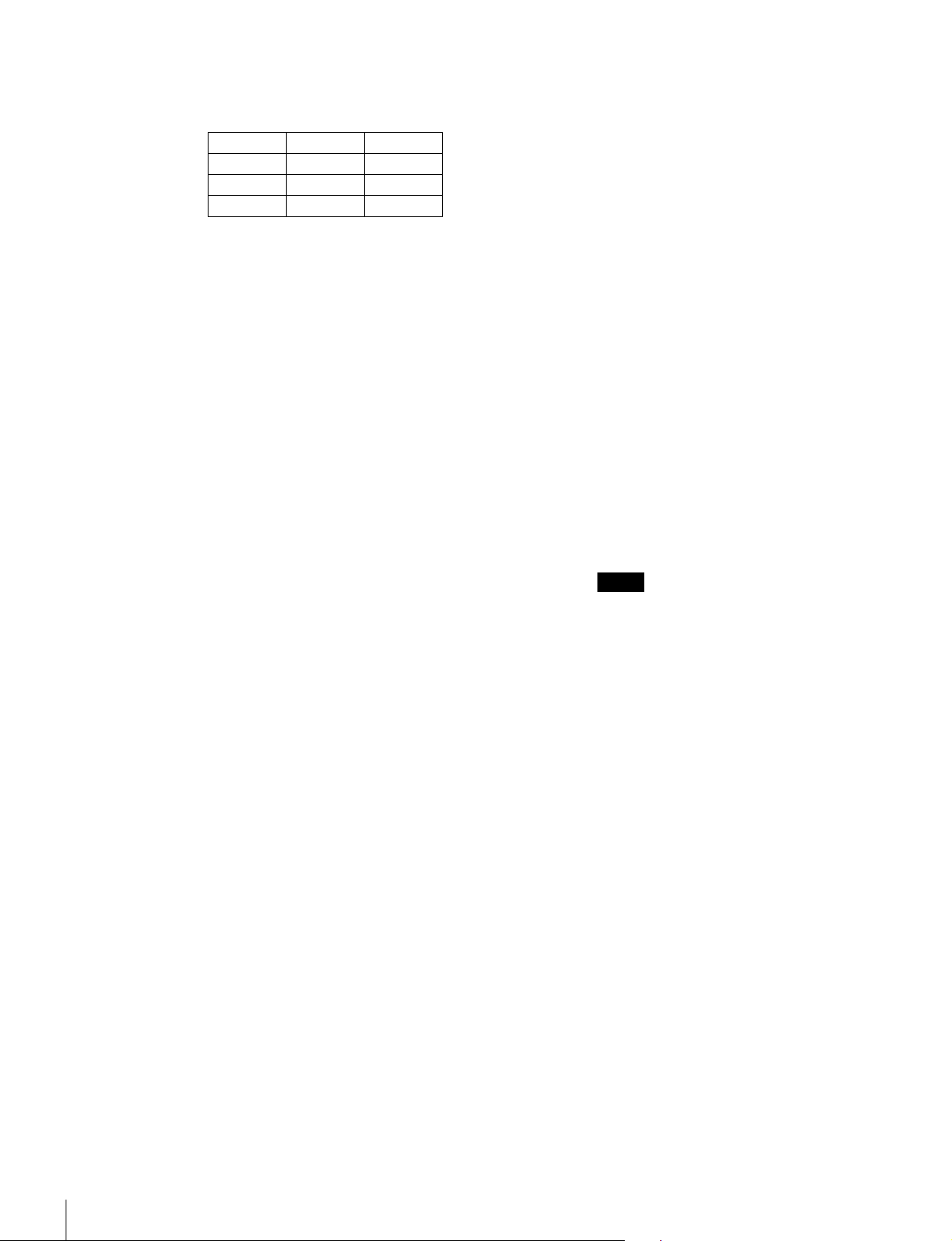
2) BVM-F170A独自の色度点です。BVMF170A として最も広色域のカラースペー
ス設定です。
Xy
R 0.681 0.319
G 0.189 0.724
B 0.141 0.051
ウォームアップ時間
30 分
入力
SDI 入力 BNC(× 2)
入力インピーダンス:75Ω 不平衡
信号フォーマット
オペレーションマニュアルの「対応信
号システム」、「対応信号フォーマッ
ト」を参照してください。
サンプリング周波数
3G-SDI:
Y/Cb/Cr(4:2:2)
148.5MHz/74.25MHz/74.25MHz
Y/Cb/Cr(4:4:4)
148.5MHz/148.5MHz/148.5MHz
G/B/R(4:4:4)
148.5MHz/148.5MHz/148.5MHz
HD-SDI:
Y/Cb/Cr(4:2:2)
74.25MHz/37.125MHz/37.125
MHz
SD-SDI:
Y/Cb/Cr(4:2:2)
13.5MHz/6.75MHz/6.75MHz
量子化
3G-SDI:10 ビット/サンプル、12 ビッ
ト/サンプル
HD-SDI:10 ビット/サンプル
SD-SDI:10 ビット/サンプル
HDMI 入力 HDMI コネクター(× 1)
HDCP 対応、DeepColor 対応
信号フォーマット
オペレーションマニュアルの「対応信
号フォーマット」の「HDMI/
DisplayPort」を参照してください。
DisplayPort 入力
DisplayPort コネクター(× 1)
HDCP 対応、18/24/30bpp(bitsper
pixel)対応
(Typical)
信号フォーマット
オペレーションマニュアルの「対応信
号フォーマット」の「HDMI/
DisplayPort」を参照してください。
オプションポート
4 ポート
信号フォーマット
オペレーションマニュアルの「対応信
号システム」、「対応信号フォーマット」
を参照してください。
パラレルリモート
D-sub9 ピン(凹)(× 1)
シリアルリモート(LAN)
Ethernet(10BASE-T/100BASE-TX):
RJ-45(× 1)
出力
SDI 出力 BNC(× 1)(モニター出力)
出力信号振幅:800mVp-p± 10%
出力インピーダンス:75Ω 不平衡
伝送距離:
3G-SDI: 最大 70m
HD-SDI: 最大 100m
SD-SDI: 最大 200m
3)
3)
4)
ご注意
MONITOROUT 出力は、本線系出力とし
て規格を満足していません。
3) (株)フジクラ製の同軸ケーブル 5C-FB また
は同等品使用時
4) (株)フジクラ製の同軸ケーブル 5C-2V また
は同等品使用時
DC5VOUT 丸型 4 ピン(凹)(× 1)
一般
電源 AC100V-240V
1.2A-0.7A、50/60Hz
DC24V-28V
4.5A-3.9A
消費電力 約 110W(AC 運用時)/約 100W(DC
運用時)(最大)
約 60W(AC 運用時)/約 60W(DC 運
用時)(平均消費電力、工場出荷時)
動作温度 0°C〜35°C
推奨使用温度:20°C〜30°C
動作湿度 0%〜90%(結露のないこと)
保存・輸送温度 −20°C〜 +60°C
保存・輸送湿度 0%〜90%
動作・保存・輸送気圧
700hPa〜1060hPa
質量 約 8.6kg
仕様(BVM-F170A)
14
Page 15
付属品 AC 電源コード(1)
3 極→ 2 極変換プラグ(1)
ACプラグホルダー(1)
ラックマウントブラケット(左右各 1)
ラックマウントブラケット取り付け用
ネジ(4)
オペレーションガイド(本書)
CD-ROM(1)
保証書(1)
別売品 モニターコントロールユニット BKM-16R
コントローラーアタッチメントスタンド
BKM-39H
モニターインターフェースケーブル SMF-
700
SDI4:2:2入力アダプター BKM-220D(シ
リアル番号 2100001以降)
NTSC/PAL入力アダプター BKM-227W
(シリアル番号 2100001以降)
アナログコンポーネント入力アダプター
BKM-229X(シリアル番号 2200001以
降)
HD/D1-SDI入力アダプター BKM-243HS
(シリアル番号 2108355以降)
HD/SD-SDIクローズドキャプションアダ
プター BKM-244CC
3G/HD/SD-SDI入力アダプター BKM-
250TG(シリアル番号 7300001以降)
(1)
• 必ず事前に記録テストを行い、正常に記録されている
ことを確認してください。本機や記録メディア、外部
ストレージなどを使用中、万一これらの不具合により
記録されなかった場合の記録内容の補償については、
ご容赦ください。
• お使いになる前に、必ず動作確認を行ってください。
故障その他に伴う営業上の機会損失等は保証期間中お
よび保証期間経過後にかかわらず、補償はいたしかね
ますのでご了承ください。
• 本製品を使用したことによるお客様、または第三者か
らのいかなる請求についても、当社は一切の責任を負
いかねます。
• 本機内、記録メディア、外部のストレージ等に記録さ
れたデータの損失、修復、複製の責任は負いかねます。
• 諸事情による本製品に関連するサービスの停止、中断
について、一切の責任を負いかねます。
ご注意
入力アダプターによっては、指定したシ
リアル番号の製品を使用する必要があり
ます。本機で使用できる入力アダプター
のシリアル番号について詳しくは、オペ
レーションマニュアルの「入力アダプ
ターについて」を参照してください。
本機は「高調波電流規格 JISC61000-3-2 適合品」です。
本機の仕様および外観は、改良のため予告なく変更するこ
とがありますが、ご了承ください。
この装置は、クラス A 情報技術装置です。この装置を家
庭環境で使用すると電波妨害を引き起こすことがありま
す。この場合には使用者が適切な対策を講ずるよう要求
されることがあります。
VCCI-A
仕様(BVM-F170A)
15
Page 16
English
Before operating the unit, please read this manual
thoroughly and retain it for future reference.
For BVM-F250A/F170A
Important Safety Instructions
• Read these instructions.
• Keep these instructions.
• Heed all warnings.
• Follow all instructions.
• Do not use this apparatus near water.
• Clean only with dry cloth.
• Do not block any ventilation openings.
Install in accordance with the manufacturer's
instructions.
• Do not install near any heat sources such as radiators,
heat registers, stoves, or other apparatus (including
amplifiers) that produce heat.
• Do not defeat the safety purpose of the polarized or
grounding-type plug. A polarized plug has two blades
with one wider than the other. A grounding-type plug
has two blades and a third grounding prong. The wide
blade or the third prong are provided for your safety. If
the provided plug does not fit into your outlet, consult an
electrician for replacement of the obsolete outlet.
• Protect the power cord from being walked on or pinched
particularly at plugs, convenience receptacles, and the
point where they exit from the apparatus.
• Only use attachments/accessories specified by the
manufacturer.
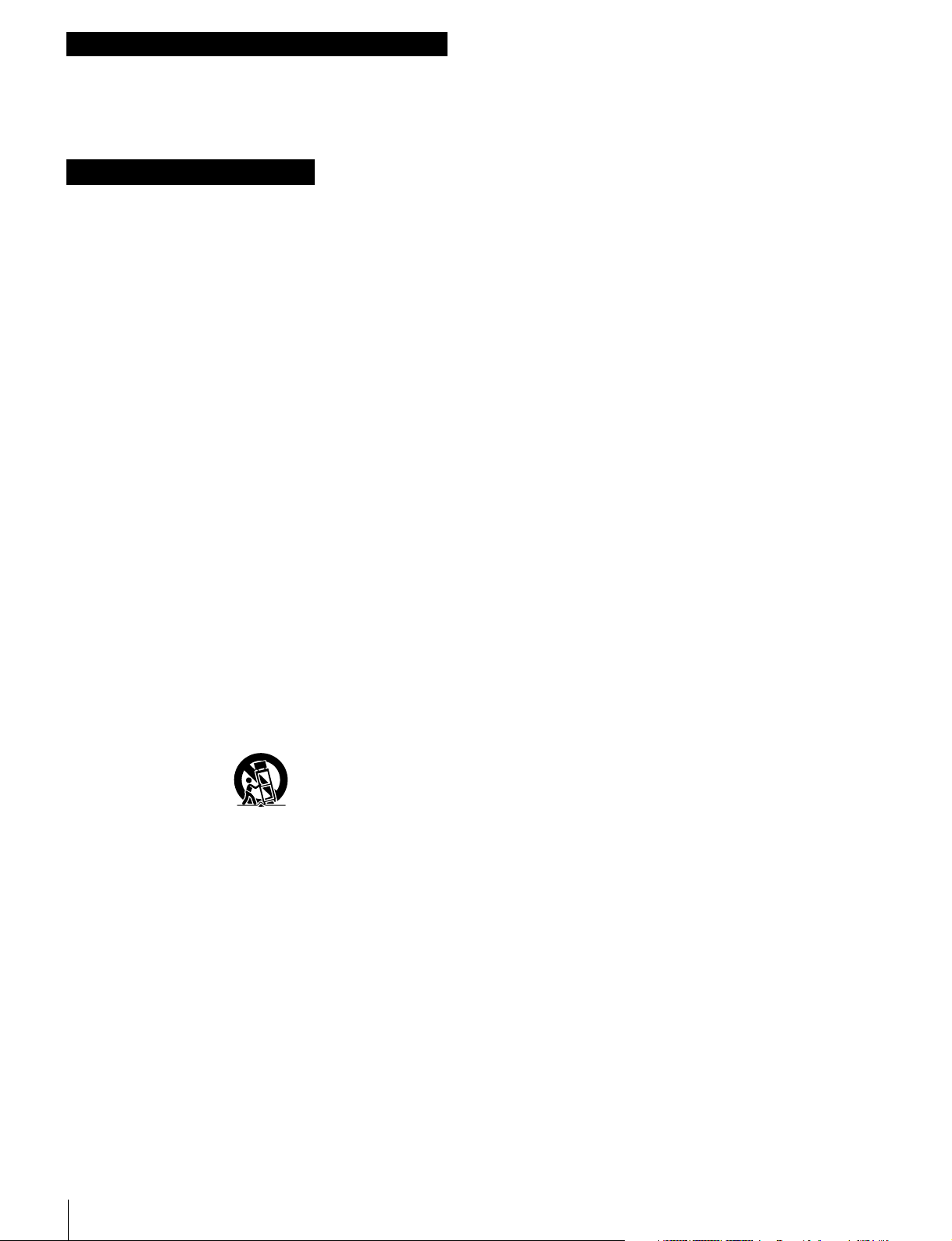
• Use only with the cart, stand, tripod, bracket, or table
specified by the manufacturer, or sold with the
apparatus. When a cart is used, use caution when
moving the cart/apparatus combination to avoid injury
from tip-over.
WARNING
To reduce the risk of fire or electric shock, do not
expose this apparatus to rain or moisture.
To avoid electrical shock, do not open the
cabinet. Refer servicing to qualified personnel
only.
THIS APPARATUS MUST BE EARTHED.
For BVM-F250A only
This apparatus is provided with a main switch on the left
side panel.
Install this apparatus so that user can access the main
switch easily.
MAIN POWER switch function
When turned on ("), the monitor enters operation mode. By
setting in the Power menu of the System Configuration
menu, the monitor can also be set to enter standby mode
when the MAIN POWER switch is turned on.
For information about the Power menu of the System
Configuration menu, refer to the Operation Manual.
For BVM-F170A only
WARNING
When installing the unit, incorporate a readily accessible
disconnect device in the fixed wiring, or connect the power
plug to an easily accessible socket-outlet near the unit. If
a fault should occur during operation of the unit, operate
the disconnect device to switch the power supply off, or
disconnect the power plug.
For BVM-F250A/F170A
• Unplug this apparatus during lightning storms or when
unused for long periods of time.
• Refer all servicing to qualified service personnel.
Servicing is required when the apparatus has been
damaged in any way, such as power-supply cord or plug
is damaged, liquid has been spilled or objects have fallen
into the apparatus, the apparatus has been exposed to
rain or moisture, does not operate normally, or has been
dropped.
16
CAUTION
The apparatus shall not be exposed to dripping or
splashing. No objects filled with liquids, such as vases,
shall be placed on the apparatus.
CAUTION
The unit is not disconnected from the AC power source
(mains) as long as it is connected to the wall outlet, even if
the unit itself has been turned off.
Page 17
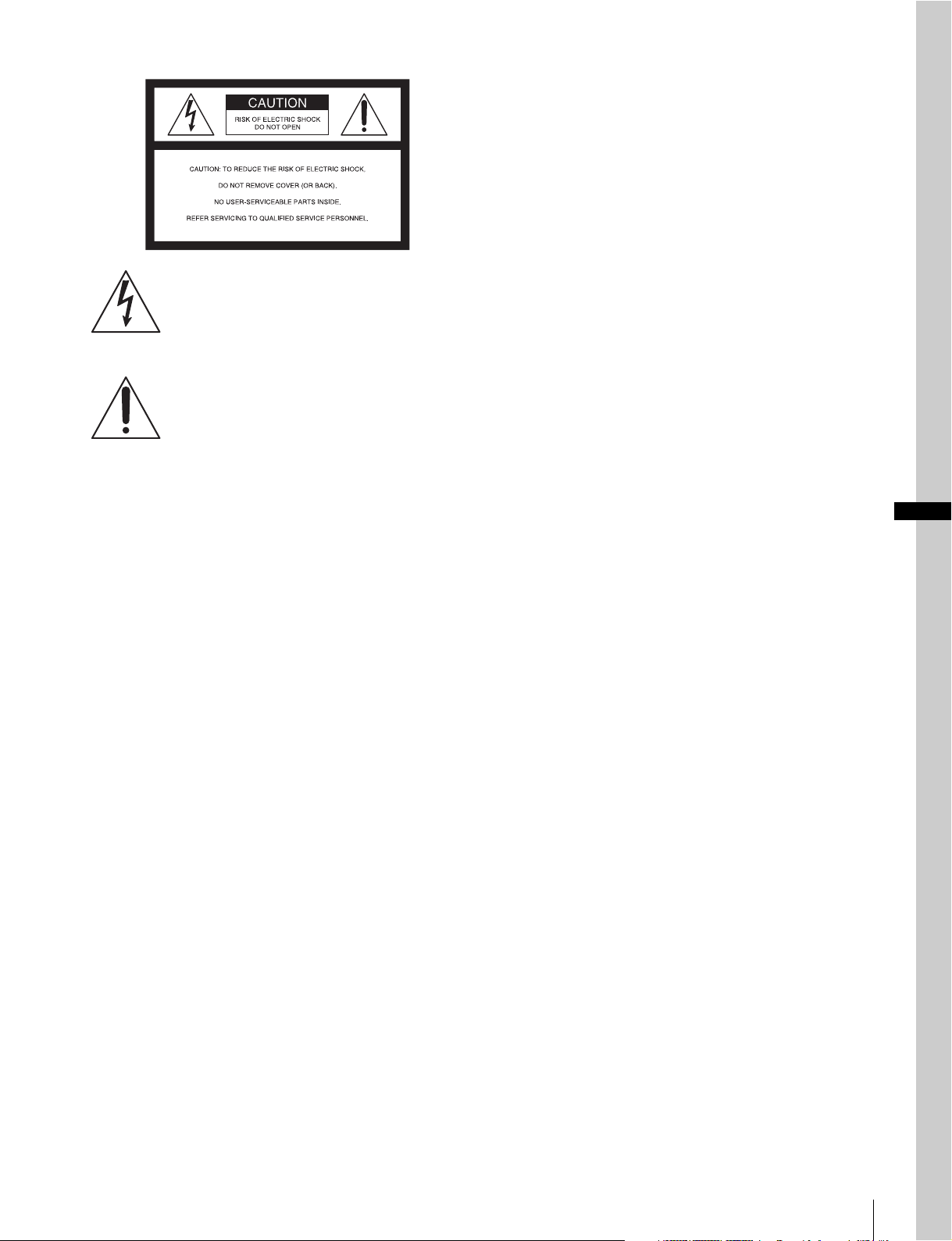
This symbol is intended to alert the user to
the presence of uninsulated “dangerous
voltage” within the product’s enclosure that
may be of sufficient magnitude to constitute
a risk of electric shock to persons.
This symbol is intended to alert the user to
the presence of important operating and
maintenance (servicing) instructions in the
literature accompanying the appliance.
For the customers in the U.S.A.
This equipment has been tested and found to comply with
the limits for a Class A digital device, pursuant to part 15
of the FCC Rules. These limits are designed to provide
reasonable protection against harmful interference when
the equipment is operated in a commercial environment.
This equipment generates, uses, and can radiate radio
frequency energy and, if not installed and used in
accordance with the instruction manual, may cause
harmful interference to radio communications. Operation
of this equipment in a residential area is likely to cause
harmful interference in which case the user will be
required to correct the interference at his own expense.
You are cautioned that any changes or modifications not
expressly approved in this manual could void your
authority to operate this equipment.
Plug Cap Parallel blade with ground pin
(NEMA 5-15P Configuration)
Cord Type SJT or SVT, three 16 or 18 AWG wires
Length Minimum 1.5 m (4 ft 11 in), Less than 2.5 m
(8 ft 3 in)
Rating Minimum 10A, 125V
Using this unit at a voltage other than 120V may require
the use of a different line cord or attachment plug, or both.
To reduce the risk of fire or electric shock, refer servicing
to qualified service personnel.
WARNING: THIS WARNING IS APPLICABLE FOR
OTHER COUNTRIES.
1. Use the approved Power Cord (3-core mains lead) /
Appliance Connector / Plug with earthing-contacts that
conforms to the safety regulations of each country if
applicable.
2. Use the Power Cord (3-core mains lead) / Appliance
Connector / Plug conforming to the proper ratings
(Voltage, Ampere).
If you have questions on the use of the above Power Cord
/ Appliance Connector / Plug, please consult a qualified
service personnel.
For the customers in Canada
This Class A digital apparatus complies with Canadian
ICES-003.
For the customers in Europe
This product with the CE marking complies with the EMC
Directive issued by the Commission of the European
Community.
Compliance with this directive implies conformity to the
following European standards:
• EN55103-1 : Electromagnetic Interference (Emission)
• EN55103-2 : Electromagnetic Susceptibility (Immunity)
This product is intended for use in the following
Electromagnetic Environment: E4 (controlled EMC
environment, ex. TV studio).
GB
All interface cables used to connect peripherals must be
shielded in order to comply with the limits for a digital
device pursuant to Subpart B of part 15 of FCC Rules.
This device complies with part 15 of the FCC Rules.
Operation is subject to the following two conditions: (1)
This device may not cause harmful interference, and (2)
this device must accept any interference received,
including interference that may cause undesired operation.
WARNING: THIS WARNING IS APPLICABLE FOR
USA ONLY.
If used in USA, use the UL LISTED power cord specified
below.
DO NOT USE ANY OTHER POWER CORD.
This product has been manufactured by or on behalf of
Sony Corporation, 1-7-1 Konan Minato-ku Tokyo, 1080075 Japan. Inquiries related to product compliance based
on European Union legislation shall be addressed to the
authorized representative, Sony Deutschland GmbH,
Hedelfinger Strasse 61, 70327 Stuttgart, Germany. For any
service or guarantee matters, please refer to the addresses
provided in the separate service or guarantee documents.
This apparatus shall not be used in the residential area.
17
Page 18
For BVM-F170A only
Apparatet må tilkoples jordet stikkontakt
Attention-when the product is installed in Rack:
1.
Prevention against overloading of branch circuit
When this product is installed in a rack and is supplied
power from an outlet on the rack, please make sure that the
rack does not overload the supply circuit.
2.Providing protective earth
When this product is installed in a rack and is supplied
power from an outlet on the rack, please confirm that the
outlet is provided with a suitable protective earth
connection.
3.Internal air ambient temperature of the rack
When this product is installed in a rack, please make sure
that the internal air ambient temperature of the rack is
within the specified limit of this product.
4.Prevention against achieving hazardous
condition due to uneven mechanical loading
When this product is installed in a rack, please make sure
that the rack does not achieve hazardous condition due to
uneven mechanical loading.
5.Install the equipment while taking the operating
temperature of the equipment into consideration
For the operating temperature of the equipment, refer to
the specifications of the Operation Guide.
6.When performing the installation, keep the
following space away from walls in order to
obtain proper exhaust and radiation of heat.
Lower, Upper: 4.4 cm (1
Right, Left: 1.0 cm (
3
/4 inches) or more
13
/32 inches) or more
Suomessa asuville asiakkaille
Laite on liitettävä suojamaadoituskoskettimilla
varustettuun pistorasiaan
För kunderna i Sverige
Apparaten skall anslutas till jordat uttag
For the customers in the U.S.A.
SONY LIMITED WARRANTY
www.sony.com/psa/warranty for important
information and complete terms and conditions of
Sony’s limited warranty applicable to this product.
For the customers in Canada
SONY LIMITED WARRANTY
www.sonybiz.ca/solutions/Support.do for important
information and complete terms and conditions of
Sony’s limited warranty applicable to this product.
For the customers in Europe
Sony Professional Solutions Europe - Standard
Warranty and Exceptions on Standard Warranty.
Please visit http://www.pro.sony.eu/warranty
important information and complete terms and
conditions.
For the customers in Korea
SONY LIMITED WARRANTY
bpeng.sony.co.kr/handler/BPAS-Start for important
information and complete terms and conditions of
Sony’s limited warranty applicable to this product.
- Please visit http://
- Please visit http://
for
- Please visit http://
Pour le BVM-F250A/F170A
For BVM-F250A/F170A
For the customers in Europe, Australia and New
Zealand
WARNING
This is a Class A product. In a domestic environment, this
product may cause radio interference in which case the
user may be required to take adequate measures.
For LAN connector
CAUTION
For safety, do not connect the connector for peripheral
device wiring that might have excessive voltage to this
port. Follow the instructions for this port.
CAUTION
When you connect the LAN cable of the unit to peripheral
device, use a shielded-type cable to prevent malfunction
due to radiation noise.
For kundene i Norge
Dette utstyret kan kobles til et IT-strømfordelingssystem.
Importantes consignes de sécurité
• Lisez ces consignes.
• Conservez ces consignes.
• Tenez compte de tous les avertissements.
• Suivez toutes les consignes.
• N’utilisez pas cet appareil à proximité d’un point d’eau.
• Nettoyez uniquement avec un chiffon sec.
• Ne bloquez pas les ouvertures de ventilation.
Installez l’appareil conformément aux consignes du
fabricant.
• N’installez pas l’appareil à côté d’une source de chaleur
telle qu’un radiateur, une grille de chauffage, un réchaud
ou un autre appareil (y compris un amplificateur)
produisant de la chaleur.
• Ne retirez en aucun cas le dispositif de sécurité de la
fiche polarisée ou une fiche avec terre. Une fiche
polarisée comporte deux lames, dont l’une est plus large
que l’autre. Une fiche avec terre comporte deux lames et
une troisième broche de mise à la terre. La lame large ou
la troisième broche est fournie à des fins de sécurité. Si
la fiche fournie ne rentre pas dans votre prise, consultez
un électricien pour remplacer la prise obsolète.
18
Page 19
• Empêchez le piétinement ou le pincement du cordon
d’alimentation, en particulier au niveau des fiches, des
prises de courant et du point de sortie de l’appareil.
• Utilisez uniquement les fixations/accessoires spécifiés
par le fabricant.
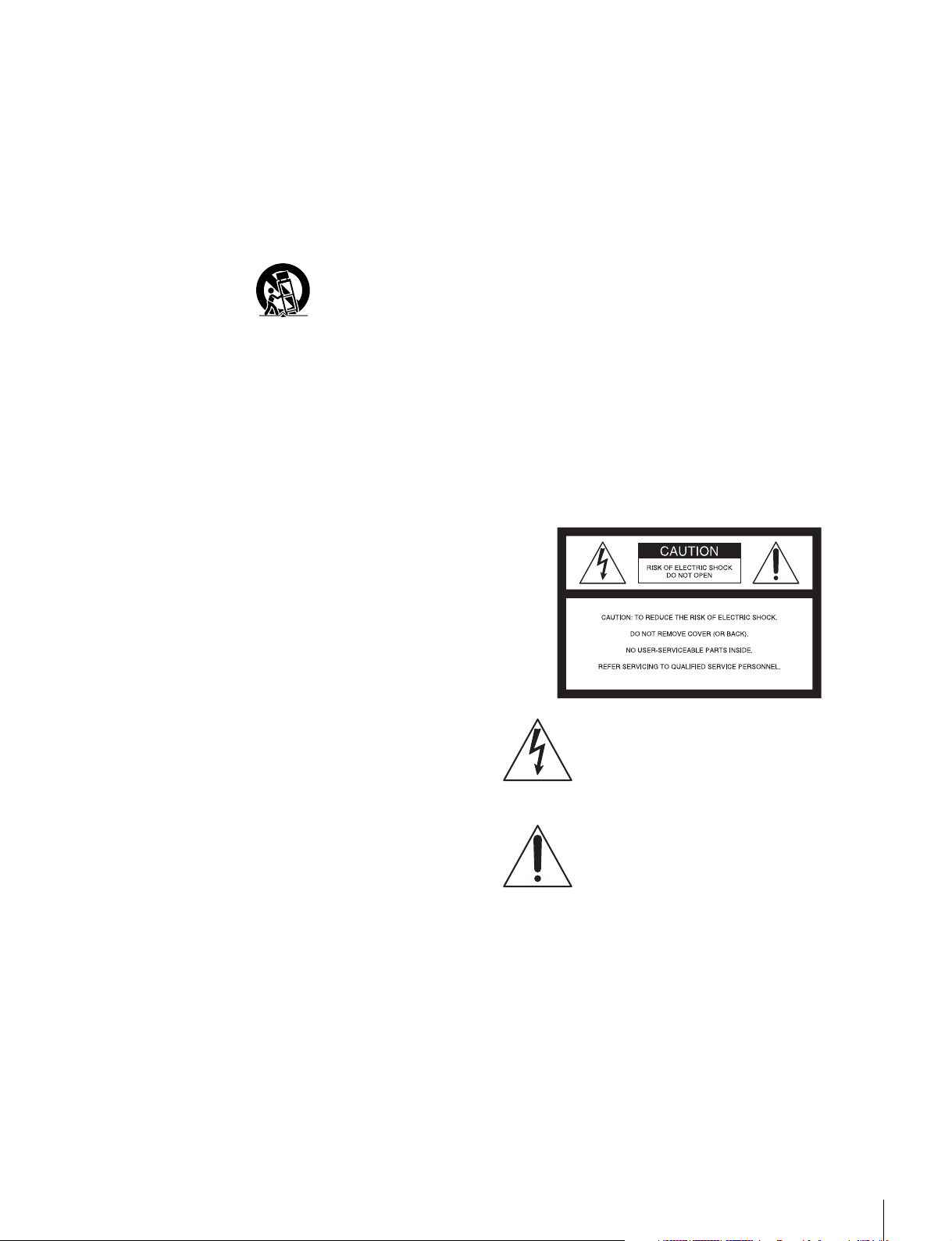
• Utilisez uniquement le chariot, le support, le trépied, la
console ou la table spécifié(e) par le fabricant ou
vendu(e) avec l’appareil. Si vous placez l’appareil sur un
chariot, veillez à le déplacer avec précaution pour éviter
qu’il bascule et vous blesse.
• Débranchez l’appareil pendant un orage ou une longue
période de non-utilisation.
• Confiez toute réparation à du personnel qualifié. Des
réparations sont nécessaires si l’appareil est endommagé
d’une façon quelconque, par exemple : cordon ou prise
d’alimentation endommagé, liquide renversé ou objet
tombé, à l’intérieur de l’appareil, exposition de
l’appareil à la pluie ou à l’humidité, appareil qui ne
marche pas normalement ou que l’on a fait tomber.
Pour le BVM-F170A uniquement
AVERTISSEMENT
Lors de l’installation de l’appareil, incorporer un dispositif
de coupure dans le câblage fixe ou brancher la fiche
d’alimentation dans une prise murale facilement
accessible proche de l’appareil. En cas de problème lors du
fonctionnement de l’appareil, enclencher le dispositif de
coupure d’alimentation ou débrancher la fiche
d’alimentation.
Pour le BVM-F250A/F170A
ATTENTION
Eviter d’exposer l’appareil à un égouttement ou à des
éclaboussures. Ne placer aucun objet rempli de liquide,
comme un vase, sur l’appareil.
ATTENTION
Cet appareil n’est pas déconnecté de la source
d’alimentation secteur tant qu’il est raccordé à la prise
murale, même si l’appareil lui-même a été mis hors
tension.
AVERTISSEMENT
Afin de réduire les risques d’incendie ou
d’électrocution, ne pas exposer cet appareil à la
pluie ou à l’humidité.
Afin d’écarter tout risque d’électrocution, garder
le coffret fermé. Ne confier l’entretien de
l’appareil qu’à un personnel qualifié.
CET APPAREIL DOIT ÊTRE RELIÉ À LA TERRE.
Pour le BVM-F250A uniquement
Cet appareil est doté d’un interrupteur principal sur son
panneau gauche.
Installez l’appareil de sorte que l’utilisateur puisse
facilement accéder à l’interrupteur principal.
Fonction de l’interrupteur MAIN POWER
Une fois allumé ("), le moniteur passe en mode de
fonctionnement. Dans le menu Power du menu System
Configuration, vous pouvez également régler le moniteur
pour qu’il passe en mode veille lorsque vous activez
l’interrupteur MAIN POWER.
Pour plus d’informations sur le menu Power du menu
System Configuration, reportez-vous au Operation
Manual.
Ce symbole signale la présence d’une
« tension dangereuse » non isolée à
l’intérieur de l’appareil pouvant présenter
une intensité suffisante pour constituer un
risque d’électrocution.
Ce symbole signale la présence de
consignes d’utilisation et de maintenance
(entretien) importantes dans la
documentation jointe.
Pour les clients au Canada
Cet appareil numérique de la classe A est conforme à la
norme NMB-003 du Canada.
Pour les clients en Europe
Ce produit portant la marque CE est conforme à la
Directive sur la compatibilité électromagnétique (EMC)
émise par la Commission de la Communauté européenne.
La conformité à cette directive implique la conformité aux
normes européennes suivantes:
19
Page 20
• EN55103-1: Interférences électromagnétiques
(émission)
• EN55103-2: Sensibilité électromagnétique (immunité)
Ce produit est prévu pour être utilisé dans l’environnement
électromagnétique suivant: E4 (environnement EMC
contrôlé, ex. studio de télévision).
Ce produit a été fabriqué par ou pour le compte de Sony
Corporation, 1-7-1 Konan Minato-ku Tokyo, 108-0075
Japon. Toutes les questions relatives à la conformité des
produits basées sur la législation européenne doivent être
adressées à son représentant, Sony Deutschland GmbH,
Hedelfinger Strasse 61, 70327 Stuttgart, Allemagne.
Pour toute question relative au Service Après-Vente ou à
la Garantie, merci de bien vouloir vous référer aux
coordonnées qui vous sont communiquées dans les
documents « Service (SAV) » ou Garantie.
Ne pas utiliser cet appareil dans une zone résidentielle.
Pour le BVM-F170A uniquement
Attention lorsque l’appareil est monté en rack :
1. Prévention contre la surcharge du circuit de
dérivation
Lorsque cet appareil est installé dans un rack et alimenté à
partir d’une prise située sur le rack, veillez à ce que le rack
ne surcharge pas le circuit d’alimentation.
Pour le BVM-F250A/F170A
AVERTISSEMENT
1. Utilisez un cordon d’alimentation (câble secteur à 3
fils)/fiche femelle/fiche mâle avec des contacts de mise
à la terre conformes à la réglementation de sécurité
locale applicable.
2. Utilisez un cordon d’alimentation (câble secteur à 3
fils)/fiche femelle/fiche mâle avec des caractéristiques
nominales (tension, ampérage) appropriées.
Pour toute question sur l’utilisation du cordon
d’alimentation/fiche femelle/fiche mâle ci-dessus,
consultez un technicien du service après-vente qualifié.
Pour les clients en Europe, Australie et NouvelleZélande
AVERTISSEMENT
Il s’agit d’un produit de Classe A. Dans un environnement
domestique, cet appareil peut provoquer des interférences
radio, dans ce cas l’utilisateur peut être amené à prendre
des mesures appropriées.
Pour le connecteur LAN
ATTENTION
Par mesure de sécurité, ne raccordez pas le connecteur
pour le câblage de périphériques pouvant avoir une tension
excessive à ce port. Suivez les instructions pour ce port.
2. Mise à la terre de protection
Lorsque cet appareil est installé dans un rack et alimenté à
partir d’une prise située sur le rack, vérifiez que la prise
fournie comporte une fiche de mise à la terre adaptée.
3. Température ambiante de l’air intérieur du rack
Lorsque cet appareil est installé dans un rack, assurez-vous
que la température ambiante de l’air intérieur du rack se
trouve dans la limite spécifiée pour l’appareil.
4. Prévention contre tout danger dû à un
chargement mécanique inégal
Lorsque cet appareil est installé dans un rack, assurez-vous
que le rack n’atteint pas un état dangereux dû à un
chargement mécanique inégal.
5. Installez l’appareil en tenant compte de sa
température de fonctionnement
Pour connaître la température de fonctionnement de
l’appareil, reportez-vous aux spécifications du Manuel
d’utilisation.
6. Pendant l’installation, laissez l’espace suivant
entre les murs et l’appareil afin d’obtenir une
évacuation et une propagation correctes de la
chaleur.
Bas, haut : 4,4 cm (1
Droite, gauche : 1,0 cm (
3
/4 pouce) ou plus
13
/32 pouce) ou plus
Pour les clients au Canada
GARANTIE LIMITÉE DE SONY
http://www.sonybiz.ca/solutions/Support.do
obtenir les informations importantes et l’ensemble des
termes et conditions de la garantie limitée de Sony
applicable à ce produit.
- Rendez-vous sur
pour
Beim BVM-F250A/F170A
WARNUNG
Um die Gefahr von Bränden oder elektrischen
Schlägen zu verringern, darf dieses Gerät nicht
Regen oder Feuchtigkeit ausgesetzt werden.
Um einen elektrischen Schlag zu vermeiden, darf
das Gehäuse nicht geöffnet werden. Überlassen
Sie Wartungsarbeiten stets nur qualifiziertem
Fachpersonal.
DIESES GERÄT MUSS GEERDET WERDEN.
Nur beim BVM-F250A
Dieses Gerät verfügt über einen Hauptschalter an der
linken Seite.
Installieren Sie das Gerät so, dass der Benutzer leicht auf
den Hauptschalter zugreifen kann.
20
Page 21

Funktion Schalter MAIN POWER
Nach dem Einschalten (") arbeitet der Monitor im
Betriebsmodus. Im Untermenü Power des Menüs System
Configuration kann der Monitor auch so eingestellt
werden, dass er nach dem Einschalten mit dem Schalter
MAIN POWER sofort in den Bereitschaftsmodus
übergeht.
Informationen zum Power-Menü des Menüs System
Configuration finden Sie im Operation Manual.
WARNUNG
1. Verwenden Sie ein geprüftes Netzkabel (3-adriges
Stromkabel)/einen geprüften Geräteanschluss/einen
geprüften Stecker mit Schutzkontakten entsprechend
den Sicherheitsvorschriften, die im betreffenden Land
gelten.
2. Verwenden Sie ein Netzkabel (3-adriges Stromkabel)/
einen Geräteanschluss/einen Stecker mit den geeigneten
Anschlusswerten (Volt, Ampere).
Nur beim BVM-F170A
WARNUNG
Beim Einbau des Geräts ist daher im Festkabel ein leicht
zugänglicher Unterbrecher einzufügen, oder der
Netzstecker muss mit einer in der Nähe des Geräts
befindlichen, leicht zugänglichen Wandsteckdose
verbunden werden. Wenn während des Betriebs eine
Funktionsstörung auftritt, ist der Unterbrecher zu betätigen
bzw. der Netzstecker abzuziehen, damit die
Stromversorgung zum Gerät unterbrochen wird.
Beim BVM-F250A/F170A
VORSICHT
Das Gerät ist nicht tropf- und spritzwassergeschützt. Es
dürfen keine mit Flüssigkeiten gefüllten Gegenstände, z.
B. Vasen, darauf abgestellt werden.
VORSICHT
Solange das Netzkabel an eine Netzsteckdose
angeschlossen ist, bleibt das Gerät auch im
ausgeschalteten Zustand mit dem Strommetz verbunden.
Für Kunden in Europa
Dieses Produkt besitzt die CE-Kennzeichnung und erfüllt
die EMV-Richtlinie der EG-Kommission.
Angewandte Normen:
• EN55103-1: Elektromagnetische Verträglichkeit
(Störaussendung)
• EN55103-2: Elektromagnetische Verträglichkeit
(Störfestigkeit)
Für die folgende elektromagnetische Umgebung: E4
(kontrollierter EMV-Bereich, z.B. Fernsehstudio).
Wenn Sie Fragen zur Verwendung von Netzkabel/
Geräteanschluss/Stecker haben, wenden Sie sich bitte an
qualifiziertes Kundendienstpersonal.
Für Kunden in Europa, Australien und
Neuseeland
WARNUNG
Dies ist eine Einrichtung, welche die Funk-Entstörung
nach Klasse A besitzt. Diese Einrichtung kann im
Wohnbereich Funkstörungen verursachen; in diesem Fall
kann vom Betreiber verlangt werden, angemessene
Maßnahmen durchzuführen und dafür aufzukommen.
Für LAN-Anschluss
VORSICHT
Aus Sicherheitsgründen nicht mit einem PeripheriegerätAnschluss verbinden, der zu starke Spannung für diese
Buchse haben könnte. Folgen Sie den Anweisungen für
diese Buchse.
Dieses Produkt wurde von oder für Sony Corporation, 1-71 Konan Minato-ku Tokio, 108-0075 Japan hergestellt.
Bei Fragen zur Produktkonformität auf Grundlage der
Gesetzgebung der Europäischen Union kontaktieren Sie
bitte den Bevollmächtigten Sony Deutschland GmbH,
Hedelfinger Strasse 61, 70327 Stuttgart, Deutschland. Für
Kundendienst oder Garantieangelegenheiten wenden Sie
sich bitte an die in den Kundendienst- oder
Garantiedokumenten genannten Adressen.
Dieser Apparat darf nicht im Wohnbereich verwendet
werden.
21
Page 22
Table of Contents
Precautions ...................................................... 23
On Safety............................................................23
On Installation....................................................23
Handling the Screen ...........................................23
On Burn-in .........................................................23
On a Long Period of Use....................................24
Handling and Maintenance of the Screen ..........24
On Dew Condensation .......................................24
On Repacking.....................................................24
Disposal of the Unit ...........................................24
On Fan Error ......................................................24
Environments of the Installation Location.... 25
Options ............................................................. 25
Specifications (BVM-F250A)........................... 26
Specifications (BVM-F170A)........................... 29
Using This Manual
This Operation Guide includes explanations for the
BVM-F250A and BVM-F170A.
The model name is specified where there is a difference
between the two models. (Example: Specifications
(BVM-F250A))
Please note that the explanations are common to both
models where no model name is specified.
Using the CD-ROM Manual
The manual can be read on a computer with Adobe
Reader installed.
You can download Adobe Reader free from the Adobe
website.
1 Open the index.htm file in the CD-ROM.
2 Select and click on the manual that you want to read.
Note
If you have lost or damaged the CD-ROM, you can
purchase a new one from your Sony dealer or Sony
service counter.
22
Table of Contents
Page 23

Precautions
• Laissez un espace autour de l’appareil pour la
ventilation.
• Laissez plus de 40 cm d’espace à l’arrière de l’appareil
pour délimiter la zone de service.
On Safety
• Operate the unit only with a power source as specified in
the “Specifications” section.
• A nameplate indicating operating voltage, power
consumption, etc., is located on the rear panel.
• Should any solid object or liquid fall into the cabinet,
unplug the unit and have it checked by qualified
personnel before operating it any further.
• Do not drop or place heavy objects on the power cord. If
the power cord is damaged, turn off the power
immediately. It is dangerous to use the unit with a
damaged power cord.
• Unplug the unit from the wall outlet if it is not to be used
for several days or more.
• Disconnect the power cord from the AC outlet by
grasping the plug, not by pulling the cord.
• The socket-outlet shall be installed near the equipment
and shall be easily accessible.
On Installation
• Allow adequate air circulation to prevent internal heat
build-up.
Do not place the unit on surfaces (rugs, blankets, etc.) or
near materials (curtains, draperies) that may block the
ventilation holes.
• Do not install the unit in a location near heat sources such
as radiators or air ducts, or in a place subject to direct
sunlight, excessive dust, mechanical vibration or shock.
For BVM-F250A only
When installing the installation space must be secured in
consideration of the ventilation and service operation.
• Do not block the ventilation slots, and vents of the fans.
• Leave a space around the unit for ventilation.
• Leave more than 40 cm of space in the rear of the unit to
secure the operation area.
When the unit is installed on the desk or the like, leave at
least 1U (4.4 cm) or more of space above and below the
unit. Leaving 40 cm or more of space above the unit is
recommended for service operation.
Pour le BVM-F250A uniquement
Pendant l’installation, prenez en compte l’espace
d’installation requis pour la ventilation et la maintenance.
• Ne bloquez pas les fentes de ventilation, ni les évents des
ventilateurs.
Lorsque l’appareil est installé sur un bureau ou équivalent,
laissez un espace d’au moins 1U (4,4 cm) au-dessus et en
dessous de l’appareil. Il est recommandé de laisser un
espace de 40 cm ou plus au-dessus de l’appareil à des fins
de maintenance.
Handling the Screen
• The OLED panel fitted to this unit is manufactured with
high precision technology, giving a functioning pixel
ratio of at least 99.99%. Thus a very small proportion of
pixels may be “stuck”, either always off (black), always
on (red, green, or blue), or flashing. In addition, over a
long period of use, because of the physical characteristics
of the panel, such “stuck” pixels may appear
spontaneously. These problems are not a malfunction.
• Do not leave the screen facing the sun as it can damage
the screen. Take care when you place the unit by a
window.
• Do not push or scratch the monitor’s screen. Do not place
a heavy object on the monitor’s screen. This may cause
the screen to lose uniformity.
• The screen and the cabinet become warm during
operation. This is not a malfunction.
On Burn-in
Due to the characteristics of the material used in the OLED
panel, permanent burn-in or reduction in brightness may
occur.
These problems are not a malfunction.
Images that may cause burn-in
• Masked images with aspect ratios other than 16:9
• Color bars or images that remain static for a long time
• Character or message displays that indicate settings or
the operating state
• On-screen displays such as center markers or area
markers
To reduce the risk of burn-in
• Turn off the character and marker displays
Press the MENU button to turn off the character displays.
To turn off the character or marker displays of the
connected equipment, operate the connected equipment
accordingly. For details, refer to the operation manual of
the connected equipment.
• Turn off the power when not in use
Turn off the power if the monitor is not to be used for a
prolonged period of time.
Precautions
23
Page 24

Screen saver
This product has a built-in screen saver function to reduce
burn-in. When an almost still image is displayed for more
than 10 minutes, the screen saver starts automatically and
the brightness of the screen decreases.
On a Long Period of Use
Due to an OLED’s panel structure and characteristics of
materials in its design, displaying static images for
extended periods, or using the unit repeatedly in a high
temperature/high humidity environments may cause image
smearing, burn-in, areas of which brightness is
permanently changed, lines, or a decrease in overall
brightness.
In particular, continued display of an image smaller than
the monitor screen, such as in a different aspect ratio, may
shorten the life of the unit.
Avoid displaying a still image for an extended period, or
using the unit repeatedly in a high temperature/high
humidity environment such an airtight room, or around the
outlet of an air conditioner.
To prevent any of the above issues, we recommend
reducing brightness slightly, and to turn off the power
whenever the unit is not in use.
Handling and Maintenance of the
Screen
The surface of the screen is specially coated to reduce
image reflection. Make sure to observe the following
points as improper maintenance procedures may impair the
screen’s performance. In addition, the screen is vulnerable
to damage. Do not scratch or knock against it using a hard
object.
• Be sure to disconnect the AC power cord from the AC
outlet before performing maintenance.
• The surface of the screen is specially coated. Do not
attach adhesive objects, such as stickers, on it.
• The surface of the screen is specially coated. Do not
touch the screen directly.
• Wipe the screen surface gently with the supplied
cleaning cloth or a soft dry cloth to remove dirt.
• Stubborn stains may be removed with the supplied
cleaning cloth, or a soft cloth slightly dampened with a
mild detergent solution.
• The screen may become scratched if the cleaning cloth is
dusty.
• Never use strong solvents such as alcohol, benzene,
thinner, acidic or alkaline detergent, detergent with
abrasives, or chemical wipe as these may damage the
screen.
• Use a blower to remove dust from the screen surface.
On Dew Condensation
If the unit is suddenly taken from a cold to a warm location,
or if ambient temperature suddenly rises, moisture may
form on the outer surface of the unit and/or inside of the
unit. This is known as condensation. If condensation
occurs, turn off the unit and wait until the condensation
clears before operating the unit. Operating the unit while
condensation is present may damage the unit.
On Repacking
Do not throw away the carton and packing materials. They
make an ideal container which to transport the unit.
Disposal of the Unit
Do not dispose of the unit with general waste.
Do not include the monitor with household waste.
When you dispose of the monitor, you must obey the law
in the relative area or country.
On Fan Error
The fan for cooling the unit is built in. When the fan stops
and the OPERATE lamp flashes in red, the OVER RANGE
lamp flashes in amber, and the ECO lamp lights in magenta
on the front panel for fan error indication, turn off the
power and contact an authorized Sony dealer.
If you have any questions about this unit, please contact
your Sony service representative.
24
Precautions
Page 25
Environments of the
Installation Location
Options
For external control
Illumination environments
The apparent color reproduction on the monitor is greatly
affected by ambient light or glare.
Viewing angle
The ideal viewing angle is within 5 degrees (up/down/left/
right) off the center of the monitor screen when the
operator views the entire monitor screen. Keep the
viewing angle within 15 degrees off the center of the
monitor screen.
BKM-16R Monitor Control Unit
The BKM-16R is a controller of the BVM-F250A/F170A
and you can control multiple monitors from one controller.
In this manual, the BKM-16R is referred to as the
controller.
For installation
BKM-37H/BKM-38H Controller Attachment
Stand (for BVM-F250A only)
Used to join a BKM-16R and the BVM-F250A.
Using the BKM-37H, you can adjust the monitor angle up
or down.
BKM-39H Controller Attachment Stand (for
BVM-F170A only)
Used to join a BKM-16R and the BVM-F170A.
SMF-700 Monitor Interface Cable
Used to connect the BVM-F250A/F170A to the BKM16R.
Input adaptors
The input connector panel is composed by installing the
optional input adaptor into the input option port on the
monitor. Up to four adaptors can be installed to the
monitor.
The input signal type for each connector of the adaptor is
set with the Channel Configuration menu, in accordance
with the configuration of the connector panel.
Note
When installing the adaptor, be sure to perform the
necessary input signal setup with the Channel
Configuration menu. If the setup is not performed, the
adaptors may not function correctly.
For information about the Channel Configuration menu,
refer to the Operation Manual.
For details of each input adaptor, refer to the operating
instructions of each model.
BKM-220D SDI 4:2:2 Input Adaptor
Includes a decoder for serial digital signals (525/625
component). Input/output connectors for two serial digital
channels and output connector for one monitor channel are
equipped.
Environments of the Installation Location / Options
25
Page 26
BKM-227W NTSC/PAL Input Adaptor
Includes a decoder for NTSC/PAL/PAL-M/SECAM
signals. Input/output connectors for each one composite
signal channel and Y/C signal channel are equipped.
BKM-229X Analog Component Input Adaptor
Includes a decoder for analog component signals and
analog RGB signals. Input connector for one channel is
equipped.
BKM-243HS HD/D1-SDI Input Adaptor
Includes a decoder for serial digital component signals.
Input/output connectors for two serial digital channels and
output connector for one monitor channel are equipped.
BKM-244CC HD/SD-SDI Closed Caption
Adaptor
Includes a decoder for serial digital component signals.
EIA/CEA-608 or EIA/CEA-708 standard closed caption
signals superimposed on the SDI signals are decoded and
displayed. Input/output connectors for two serial digital
channels and output connector for one monitor channel are
equipped.
BKM-250TG 3G/HD/SD-SDI Input Adaptor
Includes a decoder for serial digital component signals.
Time code and audio level of the embedded audio signals
superimposed on the SDI signals are displayed. 3D signal
analyzing function is also supported. Input/output
connectors for two serial digital channels and output
connector for two monitor channels are equipped.
Notes
• The signal from the MONITOR OUT connector of the
BKM-220D, BKM-243HS, BKM-244C and BKM250TG does not satisfy the ON-LINE signal
specifications.
• An input adaptor with a specified serial number may be
required for your intended use. For the serial numbers of
the input adaptors available for this unit, see “Input
Adaptors” on the Operation Manual.
Specifications
(BVM-F250A)
Picture performance
Panel OLED panel
Picture size (diagonal)
623.4 mm (24
Effective picture size (H × V)
543.4 × 305.6 mm
1
(21
/2 × 12 1/8 inches)
Resolution (H × V)
1920 × 1080 pixels (Full HD)
Aspect 16:9
Pixel efficiency 99.99%
Panel drive RGB 10-bit
Panel frame rate 48 Hz, 50 Hz, 60 Hz, 72 Hz, 75 Hz
See “Picture Frame Display” on the
Operation Manual.
1) 48 Hz, 60 Hz and 72 Hz are also compatible with a
frame rate of 1/1.001.
Viewing angle (Panel specification)
89º/89º/89º/89º (typical)
(up/down/left/right, contrast > 10:1)
Normal scan 0% scan
Native scan Mapping the pixels of the signal to the
panel to one-to-one mode, or
displaying an SD signal of nonsquare pixels (the number of H pixels
of the signal system is 720 or 1440) or
a 640 × 480 SD signal of HDMI/
DisplayPort video by scaling
processing of doubling for the V
direction and correct aspect ratio for
the H direction and also optimizing
and displaying a picture by modifying
the aperture coefficient value, filter
coefficient value, etc.
Under scan 3% under scan
Over scan Mask of 5% over scan portion in the
normal scan
Color temperature
D65, D93 (Setting possible in other color
temperature)
Standard luminance
100 cd/m
(100% white signal input)
Color space (color gamut)
ITU-R BT.709, EBU, SMPTE-C,
F250 Native
2) The BVM-F250A individual chromaticity points.
The widest color space setting of the signal
reproduced by the BVM-F250A
5
/8 inches)
2
(Preset1 to Preset5)
2)
1)
Specifications (BVM-F250A)
26
Page 27
xy
R 0.681 0.319
G 0.189 0.724
B 0.141 0.051
Warm-up time Approx. 30 minutes
Input
SDI BNC (×2)
Input impedance: 75 ohms unbalanced
Signal format
See “Available Signal Systems” and
“Available Signal Formats” on the
Operation Manual.
Sampling frequency
3G-SDI:
Y/Cb/Cr (4:2:2)
148.5MHz/74.25MHz/74.25MHz
Y/Cb/Cr (4:4:4)
148.5MHz/148.5MHz/148.5MHz
G/B/R (4:4:4)
148.5MHz/148.5MHz/148.5MHz
HD-SDI:
Y/Cb/Cr (4:2:2)
74.25MHz/37.125MHz/37.125MHz
SD-SDI:
Y/Cb/Cr (4:2:2)
13.5MHz/6.75MHz/6.75MHz
Quantization
3G-SDI: 10 bit/sample, 12 bit/sample
HD-SDI: 10 bit/sample
SD-SDI: 10 bit/sample
HDMI HDMI (×1)
HDCP correspondence, Deep Color
correspondence
Signal format
See “HDMI/DisplayPort” of
“Available Signal Formats” on the
Operation Manual.
DisplayPort DisplayPort connector (×1)
HDCP correspondence, 18/24/30bpp
(bits per pixel) correspondence
Signal format
See “HDMI/DisplayPort” of
“Available Signal Formats” on the
Operation Manual.
Option port Four (4) ports
Signal format
See “Available Signal Systems” and
“Available Signal Formats” on the
Operation Manual.
Parallel remote D-sub 9-pin (female) (×1)
Serial remote (LAN)
Ethernet (10BASE-T/100BASE-TX),
RJ-45 (×1)
(Typical)
Output
SDI BNC (×1) (monitor output)
Output signal amplitude:
800 mVp-p±10%
Output impedance: 75 ohms unbalanced
Transmission distance
3G-SDI: 70 m max.
HD-SDI: 100 m max.
SD-SDI: 200 m max.
Note
3)
3)
4)
The signal from the monitor output
connector does not satisfy the ON-LINE
signal specifications.
3) When using the 5C-FB coaxial cable made by
Fujikura Ltd. or equivalent
4) When using the 5C-2V coaxial cable made by
Fujikura Ltd. or equivalent
DC 5V OUT Circle 4-pin (female) (×1)
General
Power requirements
100 V to 240 V AC,
1.6 A to 0.8 A, 50/60 Hz
Power consumption
Approx. 145 W (max.)
Approx. 72 W (average power
consumption in the default status)
Inrush current (1) Maximum possible inrush current at
initial switch-on (Voltage changes
caused by manual switching):
53 A peak, 17 A r.m.s. (240V AC)
(2) Inrush current after a mains
interruption of five seconds (Voltage
changes caused at zero-crossing):
39 A peak, 6 A r.m.s. (240V AC)
Operating temperature
0 °C to 35 °C (32 °F to 95 °F)
Recommended: 20 °C to 30 °C (68 °F to
86 °F)
Operating humidity
0% to 90% (no condensation)
Storage/transport temperature
–20 °C to +60 °C (–4 °F to +140 °F)
Storage/transport humidity
0% to 90%
Operating/storage/transport pressure
700 hPa to 1060 hPa
Mass Approx. 13.0 kg (28 lb 11 oz)
Supplied accessories
AC power cord (1)
AC plug holder (1)
Operation Guide (this manual) (1)
CD-ROM (1)
Specifications (BVM-F250A)
27
Page 28
Optional accessories
BKM-16R Monitor Control Unit
BKM-37H/BKM-38H Controller
Attachment Stand
SMF-700 Monitor Interface Cable
BKM-220D SDI 4:2:2 Input Adaptor
(with serial number 2100001 or
higher)
BKM-227W NTSC/PAL Input Adaptor
(with serial number 2100001 or
higher)
BKM-229X Analog Component Input
Adaptor (with serial number 2200001
or higher)
BKM-243HS HD/D1-SDI Input Adaptor
(with serial number 2108355 or
higher)
BKM-244CC HD/SD-SDI Closed
Caption Adaptor
BKM-250TG 3G/HD/SD-SDI Input
Adaptor (with serial number 7300001
or higher)
Note
An input adaptor with a specified serial
number may be required for your
intended use.
For the serial numbers of the input
adaptors available for this unit, see “Input
Adaptors” on the Operation Manual.
\Design and specifications are subject to change without
notice.
Notes
• Always make a test recording, and verify that it was
recorded successfully.
SONY WILL NOT BE LIABLE FOR DAMAGES
OF ANY KIND INCLUDING, BUT NOT
LIMITED TO, COMPENSATION OR
REIMBURSEMENT ON ACCOUNT OF
FAILURE OF THIS UNIT OR ITS RECORDING
MEDIA, EXTERNAL STORAGE SYSTEMS OR
ANY OTHER MEDIA OR STORAGE SYSTEMS
TO RECORD CONTENT OF ANY TYPE.
• Always verify that the unit is operating properly
before use. SONY WILL NOT BE LIABLE FOR
DAMAGES OF ANY KIND INCLUDING, BUT
NOT LIMITED TO, COMPENSATION OR
REIMBURSEMENT ON ACCOUNT OF THE
LOSS OF PRESENT OR PROSPECTIVE
PROFITS DUE TO FAILURE OF THIS UNIT,
EITHER DURING THE WARRANTY PERIOD
OR AFTER EXPIRATION OF THE
WARRANTY, OR FOR ANY OTHER REASON
WHATSOEVER.
• SONY WILL NOT BE LIABLE FOR CLAIMS OF
ANY KIND MADE BY USERS OF THIS UNIT
OR MADE BY THIRD PARTIES.
• SONY WILL NOT BE LIABLE FOR THE LOSS,
REPAIR, OR REPRODUCTION OF ANY DATA
RECORDED ON THE INTERNAL STORAGE
SYSTEM, RECORDING MEDIA, EXTERNAL
STORAGE SYSTEMS OR ANY OTHER MEDIA
OR STORAGE SYSTEMS.
• SONY WILL NOT BE LIABLE FOR THE
TERMINATION OR DISCONTINUATION OF
ANY SERVICES RELATED TO THIS UNIT
THAT MAY RESULT DUE TO
CIRCUMSTANCES OF ANY KIND.
Specifications (BVM-F250A)
28
Page 29
Specifications
(BVM-F170A)
Color space (color gamut)
ITU-R BT.709, EBU, SMPTE-C, F170
Native
2) The BVM-F170A individual chromaticity points.
The widest color space setting of the signal
reproduced by the BVM-F170A
2)
Picture performance
Panel OLED panel
Picture size (diagonal)
419.7 mm (16
Effective picture size (H × V)
365.8 × 205.7 mm
1
(14
/2 × 8 1/8 inches)
Resolution (H × V)
1920 × 1080 pixels (Full HD)
Aspect 16:9
Pixel efficiency 99.99%
Panel drive RGB 10-bit
Panel frame rate 48 Hz, 50 Hz, 60 Hz, 72 Hz, 75 Hz
See “Picture Frame Display” on the
Operation Manual.
1) 48 Hz, 60 Hz and 72 Hz are also compatible with a
frame rate of 1/1.001.
Viewing angle (Panel specification)
89º/89º/89º/89º (typical)
(up/down/left/right, contrast > 10:1)
Normal scan 0% scan
Native scan Mapping the pixels of the signal to the
panel to one-to-one mode, or
displaying an SD signal of nonsquare pixels (the number of H pixels
of the signal system is 720 or 1440) or
a 640 × 480 SD signal of HDMI/
DisplayPort video by scaling
processing of doubling for the V
direction and correct aspect ratio for
the H direction and also optimizing
and displaying a picture by modifying
the aperture coefficient value, filter
coefficient value, etc.
Under scan 3% under scan
Over scan Mask of 5% over scan portion in the
normal scan
Color temperature
D65, D93 (Setting possible in other color
temperature)
Standard luminance
100 cd/m
(100% white signal input)
1
/2 inches)
2
(Preset1 to Preset5)
1)
xy
R 0.681 0.319
G 0.189 0.724
B 0.141 0.051
(Typical)
Warm-up time Approx. 30 minutes
Input
SDI BNC (×2)
Input impedance: 75 ohms unbalanced
Signal format
See “Available Signal Systems” and
“Available Signal Formats” on the
Operation Manual.
Sampling frequency
3G-SDI:
Y/Cb/Cr (4:2:2)
148.5MHz/74.25MHz/74.25MHz
Y/Cb/Cr (4:4:4)
148.5MHz/148.5MHz/148.5MHz
G/B/R (4:4:4)
148.5MHz/148.5MHz/148.5MHz
HD-SDI:
Y/Cb/Cr (4:2:2)
74.25MHz/37.125MHz/37.125MHz
SD-SDI:
Y/Cb/Cr (4:2:2)
13.5MHz/6.75MHz/6.75MHz
Quantization
3G-SDI: 10 bit/sample, 12 bit/sample
HD-SDI: 10 bit/sample
SD-SDI: 10 bit/sample
HDMI HDMI (×1)
HDCP correspondence, Deep Color
correspondence
Signal format
See “HDMI/DisplayPort” of
“Available Signal Formats” on the
Operation Manual.
DisplayPort DisplayPort connector (×1)
HDCP correspondence, 18/24/30bpp
(bits per pixel) correspondence
Signal format
See “HDMI/DisplayPort” of
“Available Signal Formats” on the
Operation Manual.
Option port Four (4) ports
Signal format
Specifications (BVM-F170A)
29
Page 30

See “Available Signal Systems” and
“Available Signal Formats” on the
Operation Manual.
Parallel remote D-sub 9-pin (female) (×1)
Serial remote (LAN)
Ethernet (10BASE-T/100BASE-TX),
RJ-45 (×1)
Output
SDI BNC (×1) (monitor output)
Output signal amplitude:
800 mVp-p±10%
Output impedance: 75 ohms unbalanced
Transmission distance
3G-SDI: 70 m max.
HD-SDI: 100 m max.
SD-SDI: 200 m max.
Note
3)
3)
4)
The signal from the monitor output
connector does not satisfy the ON-LINE
signal specifications.
3) When using the 5C-FB coaxial cable made by
Fujikura Ltd. or equivalent
4) When using the 5C-2V coaxial cable made by
Fujikura Ltd. or equivalent
DC 5V OUT Circle 4-pin (female) (×1)
General
Power requirements
100 V to 240 V AC,
1.2 A to 0.7 A, 50/60 Hz
24 V to 28 V DC,
4.5A to 3.9A
Power consumption
Approx. 110 W (AC power supply)/
approx. 100 W (DC power supply)
(maximum)
Approx. 60 W (AC power supply)/
approx. 60 W (DC power supply)
(average power consumption in the
default status)
Inrush current (1) Maximum possible inrush current at
initial switch-on (Voltage changes
caused by manual switching):
55 A peak, 15 A r.m.s. (240V AC)
(2) Inrush current after a mains
interruption of five seconds (Voltage
changes caused at zero-crossing):
36 A peak, 7 A r.m.s. (240V AC)
Operating temperature
0 °C to 35 °C (32 °F to 95 °F)
Recommended: 20 °C to 30 °C (68 °F to
86 °F)
Operating humidity
0% to 90% (no condensation)
Storage/transport temperature
–20 °C to +60 °C (–4 °F to +140 °F)
Storage/transport humidity
0% to 90%
Operating/storage/transport pressure
700 hPa to 1060 hPa
Mass Approx. 8.6 kg (18 lb 15 oz)
Supplied accessories
AC power cord (1)
AC plug holder (1)
Rack mount bracket (Left, right, each 1)
Rack mount attachment screws (4)
Operation Guide (this manual) (1)
CD-ROM (1)
Optional accessories
BKM-16R Monitor Control Unit
BKM-39H Controller Attachment Stand
SMF-700 Monitor Interface Cable
BKM-220D SDI 4:2:2 Input Adaptor
(with serial number 2100001 or
higher)
BKM-227W NTSC/PAL Input Adaptor
(with serial number 2100001 or
higher)
BKM-229X Analog Component Input
Adaptor (with serial number 2200001
or higher)
BKM-243HS HD/D1-SDI Input Adaptor
(with serial number 2108355 or
higher)
BKM-244CC HD/SD-SDI Closed
Caption Adaptor
BKM-250TG 3G/HD/SD-SDI Input
Adaptor (with serial number 7300001
or higher)
Note
An input adaptor with a specified serial
number may be required for your
intended use.
For the serial numbers of the input
adaptors available for this unit, see “Input
Adaptors” on the Operation Manual.
\Design and specifications are subject to change without
notice.
Specifications (BVM-F170A)
30
Page 31

Notes
• Always make a test recording, and verify that it was
recorded successfully.
SONY WILL NOT BE LIABLE FOR DAMAGES
OF ANY KIND INCLUDING, BUT NOT
LIMITED TO, COMPENSATION OR
REIMBURSEMENT ON ACCOUNT OF
FAILURE OF THIS UNIT OR ITS RECORDING
MEDIA, EXTERNAL STORAGE SYSTEMS OR
ANY OTHER MEDIA OR STORAGE SYSTEMS
TO RECORD CONTENT OF ANY TYPE.
• Always verify that the unit is operating properly
before use. SONY WILL NOT BE LIABLE FOR
DAMAGES OF ANY KIND INCLUDING, BUT
NOT LIMITED TO, COMPENSATION OR
REIMBURSEMENT ON ACCOUNT OF THE
LOSS OF PRESENT OR PROSPECTIVE
PROFITS DUE TO FAILURE OF THIS UNIT,
EITHER DURING THE WARRANTY PERIOD
OR AFTER EXPIRATION OF THE
WARRANTY, OR FOR ANY OTHER REASON
WHATSOEVER.
• SONY WILL NOT BE LIABLE FOR CLAIMS OF
ANY KIND MADE BY USERS OF THIS UNIT
OR MADE BY THIRD PARTIES.
• SONY WILL NOT BE LIABLE FOR THE LOSS,
REPAIR, OR REPRODUCTION OF ANY DATA
RECORDED ON THE INTERNAL STORAGE
SYSTEM, RECORDING MEDIA, EXTERNAL
STORAGE SYSTEMS OR ANY OTHER MEDIA
OR STORAGE SYSTEMS.
• SONY WILL NOT BE LIABLE FOR THE
TERMINATION OR DISCONTINUATION OF
ANY SERVICES RELATED TO THIS UNIT
THAT MAY RESULT DUE TO
CIRCUMSTANCES OF ANY KIND.
Specifications (BVM-F170A)
31
Page 32

Page 33

このマニュアルに記載されている事柄の著作権は当社にあ
り、説明内容は機器購入者の使用を目的としています。
従って、当社の許可なしに無断で複写したり、説明内容
(操作、保守等)と異なる目的で本マニュアルを使用する
ことを禁止します。
The material contained in this manual consists of information
that is the property of Sony Corporation and is intended solely
for use by the purchasers of the equipment described in this
manual. Sony Corporation expressly prohibits the duplication
of any portion of this manual or the use thereof for any
purpose other than the operation or maintenance of the
equipment described in this manual without the express
written permission of Sony Corporation.
Page 34

Sony Corporation
BVM-F250A (WW)
BVM-F170A (WW)
4-461-925-02 (1)
Printed in Japan
2013.12 08
© 2013
 Loading...