

Page 1
4-723-927-11(1)
Television
Reference Guide
Guide de référence
Справочник
GB
FR
RU
KD-77A1 / 65A1 / 55A1
Page 2

Table of Contents
Note
Safety Information . . . . . . . . . . . . . . . . . . . . . 2
Precautions . . . . . . . . . . . . . . . . . . . . . . . . . . . 5
Protecting the TV Screen (OLED TV) . . . . . . . 6
Parts and Controls . . . . . . . . . . . . . . . . . . . 7
Controls and Indicators . . . . . . . . . . . . . . . . . 7
Using Remote Control . . . . . . . . . . . . . . . . 8
Remote Control Parts Description. . . . . . . . . 8
Connection Diagram . . . . . . . . . . . . . . . . 10
Installing the TV to the Wall . . . . . . . . . . 12
SU-WL450 . . . . . . . . . . . . . . . . . . . . . . . . . . . 17
Troubleshooting. . . . . . . . . . . . . . . . . . . . 19
Troubles and Solutions. . . . . . . . . . . . . . . . . 19
Specifications . . . . . . . . . . . . . . . . . . . . . . 20
Introduction
Thank you for choosing this Sony product.
Before operating the TV, please read this manual thoroughly and
retain it for future reference.
• Before operating the TV, please read the “Safety Information”
(page 2).
• Instructions about “Installing the TV to the Wall” are included
within this TV’s instruction manual.
• Images and illustrations used in the Setup Guide and this
manual are for reference only and may differ from the actual
product.
Location of the Setup Guide
Setup Guide is placed on top of the cushion inside the TV carton.
Help/Help Guide
Help feature offers a lot of informat ion about your TV. To use the
Help feature, press HELP on the remote co ntrol. You can f ind how
to and troubleshooting from the list or keyword search. Select
[Help Guide] on Help menu to view the manual. If you connect
your TV to the internet, the Help feature and information will be
updated.
Location of the identification label
Labels for the TV Model No. and Power Supply rating are located
on the rear of the TV. They can be found by removing the centre
cover.
Notice for customers in Thailand
This telecommunication equipment conforms to NTC technical
requirement.
Notes for Australia and New Zealand model
This product is ENERGY RATING qualified in the default mode.
ENERGY RATING is a programme designed to promote energy
efficient products and practices.
• When the TV is initially set up, it is designed to meet ENERGY
RATING requirements while main taining optimum picture
quality.
• Changes to certain features, settings and functionalities of this
TV (e.g. TV Guide, Picture/Sound, Eco setting) can slightly
change the power consumption.
Depending upon suc h changed settings (e.g. Shop mode), the
power consumption may vary which possibly could exceed the
stated energy rating.
To reset the TV to ENERGY RATING qualified settings, complete
the initial set-up procedure in [Settings] [Storage & reset]
[Factory data reset].
After factory data reset, down loaded application data will be
deleted. Please download them again.
Safety Information
WARN ING
Batteries must not be exposed to excessive heat such as
sunshine, fire or the like.
Never place a television set in an unstable location . A television
set may fall, causing serious personal injury or death. Many
injuries, particularly to children, can be avoided by taking simple
precautions such as:
Using cabi nets or stands recommended by the manufacturer of
the television set.
Only using furniture that can safely support the television set.
Ensuring the television set is not overhanging the edge of the
supporting furniture.
Not placing the television set on tall furniture (for example,
cupboards or bookcases) without anchoring both the furniture
and the television set to a suitable support.
Not placing the television set on cloth or other materials that
may be located between the television set and supporting
furniture.
Educating c hildren about the dangers of climbing on furniture
to reach the television set or its controls.
GB
2
Page 3
GB
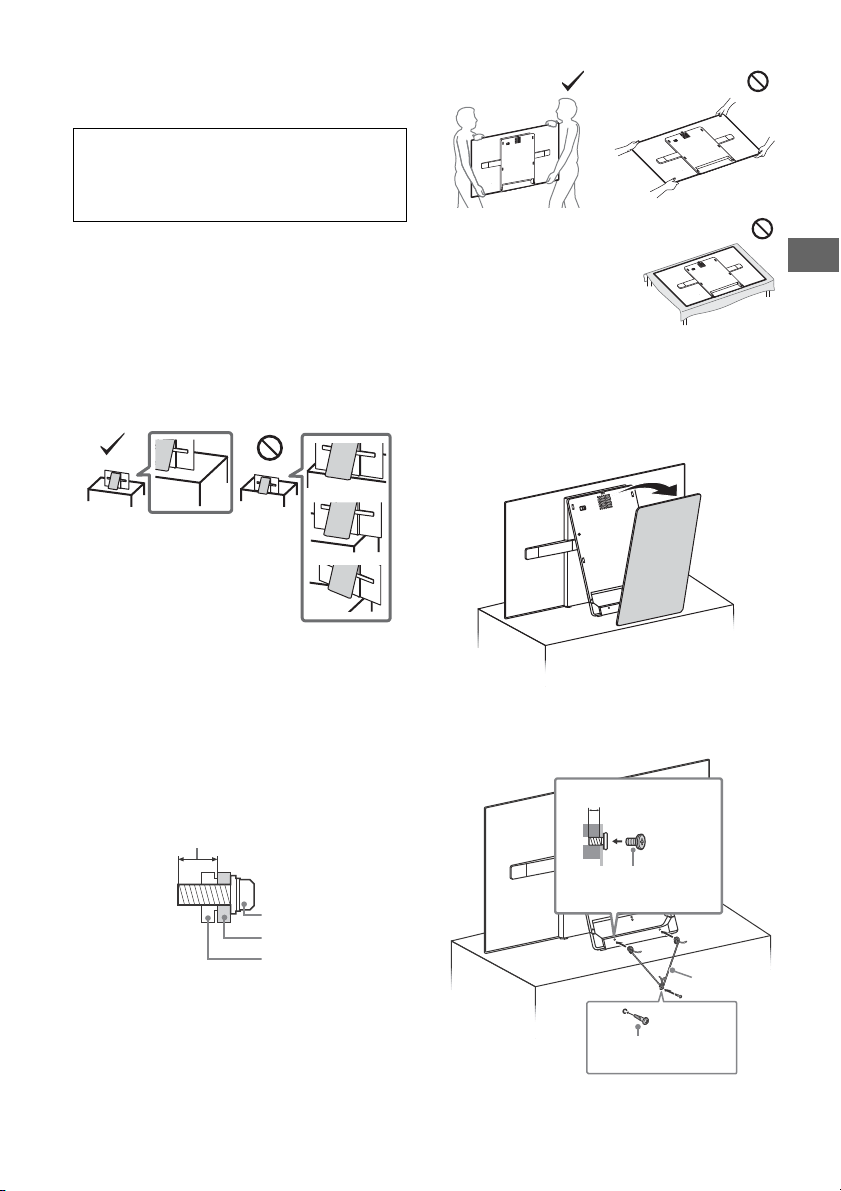
Screw (M6)
Wall-Mount Bracket
10 mm - 14 mm
TV’s rear cover
10 mm - 14 mm
M6 screw
(not supplied)
Screw (not supplied)
Cord (not
supplied)
If your existing television set is being retained and relocated, the
same considerations as above should be applied.
Installation/Set-up
Sufficient expertise is required when installing th e TV to the
Table-Top Stand.
Refer to the Setup Guide supplied with the TV for stand
installation.
Sony is not liable for any damage or injury caused by
mishandling or improper installation.
Install and use the TV set in accordance with the instruction s
below in order to avoid any risk of fire, electric shock or damage
and/or injuries.
Installation
• The TV set should be installed near an easily accessible AC
power outlet (mains socket).
• Place the TV on a stable, level surface to prevent it from falling
over and causing personal injury or property damage.
• Install the TV where it cannot be pulled, pushed, or knocked
over.
• Install the TV so that the TV bottom does not protrude out from
the TV stand (not supplied). If the TV bottom protrudes out from
the TV stand, it may cause TV set to topple over, fall down, and
cause personal injury or damage to the TV.
• For safety reaso ns, be sure to attach the centre cover to the rear
of the TV w hen TV in Table-Top condition.
• Only qualified service personnel should carry out wall-mount
installations.
• For safety reasons, it is strongly recommended that yo u use
Sony accessories, including:
Wall-Mount Bracket SU-WL450
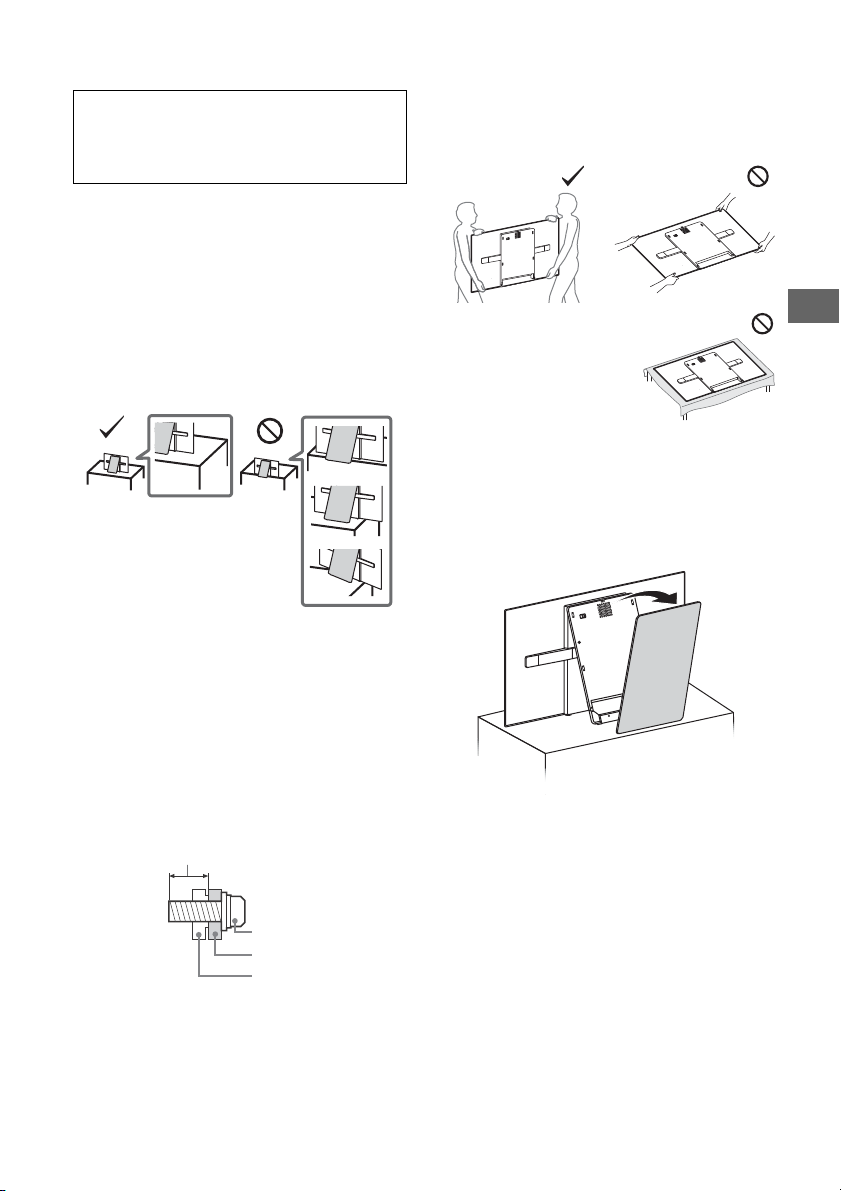
• Be sure to use the screws supplied with the Wall-Mount Bracket
when attaching the Wall-Mount Bracket to the TV set. The
supplied screws are designed as indicated by illustration when
measured from the attaching surface of the Wall-Mount Bracket.
The diameter and length of the screws differ depending on the
Wall-Mount Bracket model.
Use of screws other than t hose supplied may result in internal
damage to the TV set or cause it to fall, etc.
• When handling or mounting the
TV set, do not lay down the TV.
• When transporting the TV set, do not subject it to jolts or
excessive vibration.
• When transporting the TV set for repairs o r when moving, pack
it using the original carton and packing material.
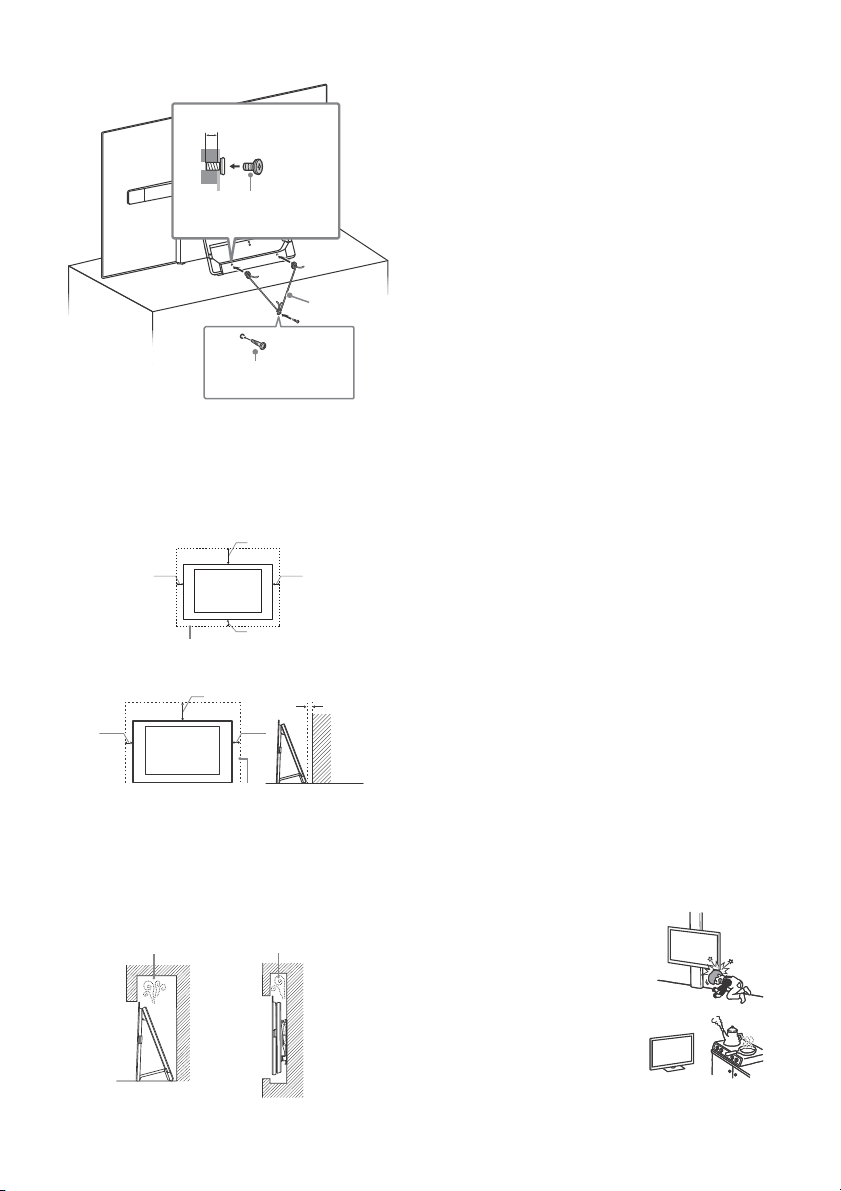
Topple prevention
1
Remove the centre cover.
2 Secure the TV to the TV stand.
Tran spo rti ng
• Before transporting the TV set, disconnect all cables.
• Two or three people are needed to transport a large TV set.
• When transporting the TV set by hand, hold it as shown below.
Do not put stress on the panel and the frame around th e screen.
GB
3
Page 4
Ventilation
Note
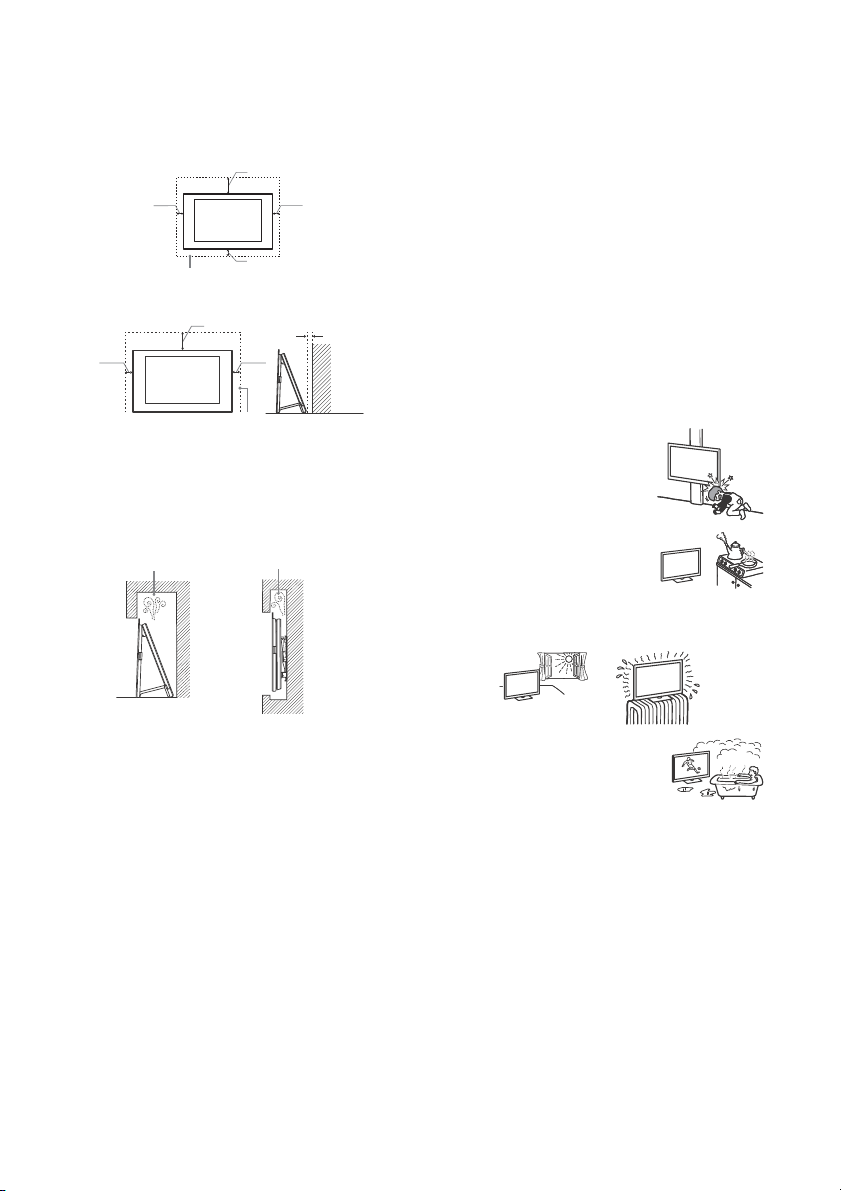
30 cm
10 cm
10 cm
10 cm
Leave at least this space around the set.
30 cm
10 cm 10 cm
Leave at least this space around the set.
1 cm
Wall
Air circulation is blocked.
Wall Wall
• Never cover the ventilation holes or inser t anything in the
cabinet.
• Leave space around the TV set as shown below.
• It is strongly recommended that you use a Sony Wall-Mount
Bracket in order to provide adequate air circulation .
Installed on the wall
Installed with stand
• To ensure proper ventilation and prevent the collection of dirt or
dust:
Do not lay the TV set flat, install upside down, backwards, or
sideways.
Do not place the TV set on a shelf, rug, bed or in a closet.
Do not cover the T V set with a cloth, such as curta ins, or items
such as newspapers, etc.
Do not install the TV set as shown below.
• Do not pull on the AC power cord (mains lead) itself when
disconnecting the AC power cord (mains lead).
• Do not connect too many appliances to the same AC power
outlet (mains socket).
• Do not use a poor fitting AC power outlet (mains socket).
Prohibited Usage
Do not install/use the TV set in locations, environments or
situations such as those listed below, or the TV set may
malfunction and cause a fire, electric shock, damage and/or
injuries.
Locations:
• Outdoors (in direct sunlight), at the seashore, on a ship or other
vessel, inside a vehicle, in medical institutions, unstable
locations, near water, rain, moisture or smoke.
Environments:
• Places that are hot, humid, or excessively dusty; where insects
may enter; where it migh t be exposed to mechanical vibration,
near flammable objects (candles, etc). The TV set shall not be
exposed to dripping or splashing and no objects filled with
liquids, such as vases, shall be placed on the TV.
Situations:
• Use when yo ur hands are wet, with the cabinet removed, or
with attachments not recommended by the manufacturer.
Disconnect the TV set from AC power outlet (mains socket) and
antenna (aerial) during lightning storms.
• Install the TV so that it sticks out into an
open space. Injury or damage from a
person or object bumping into the TV
may result.
• Place the TV in a humid or dusty space, or
in a room with oily smoke or steam (near
cooking tables or humidifiers). Fire,
electric shock, or warping may result.
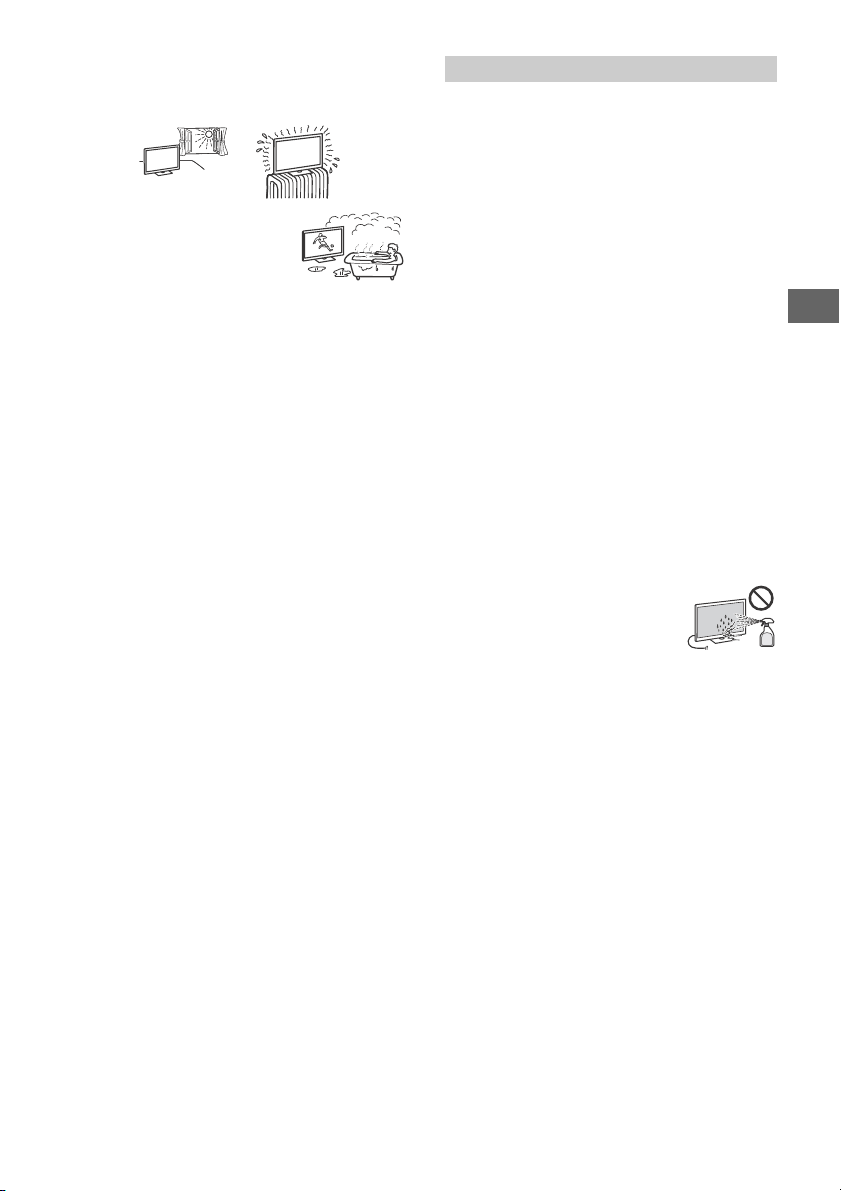
• Install the TV in places subject to extreme
temperature, such as in direct sunlight, near a radiator or a
heating vent. The TV may overheat in such conditions which can
cause deformation of the enclosure and/or TV malfunction.
AC power cord (mains lead)
Handle the AC power cord (mains lead) and outlet (mains socket)
as follows in order to avoid any risk of fire, electric shoc k or
damage and/or injuries:
The shape of AC power plug (mains plug), which is supplied
with the TV set, varies depending on the region. Be sure to
connect the appropriate supplied AC power cord (mains lead)
with the plug that fits into th e AC power outlet (mains socket).
Use only Sony supplied AC power cords (mains lead), not those
of other brands.
Insert the plug fully into the AC power outlet (mains socket).
Operate the TV set on a 110 V - 240 V AC supply only.
When wiring cables, be sure to unplug the AC power cord
(mains lead) for yo ur safety and take care not to catch your feet
on the cables.
Disconnect the AC power cord (mains lead) from the AC power
outlet (mains socket) before working on or moving the TV set.
Keep the AC power cord (mains lead) away from heat sources.
Unplug the AC power plug (mains plug) and clean it regularly. If
the plug is covered with dust and it picks up moisture, its
insulation may deterio rate, which could result in a fire.
• Do not use the supplied AC power cord (mains lead) on any
other equipment.
• Do not pinch, bend, or twist the AC power cord (m ains lead)
excessively. The core conductors may be exposed or broken.
• Do not modify the AC power cord (mains lead).
• Do not put anything heavy on the AC power cord (mains lead).
GB
4
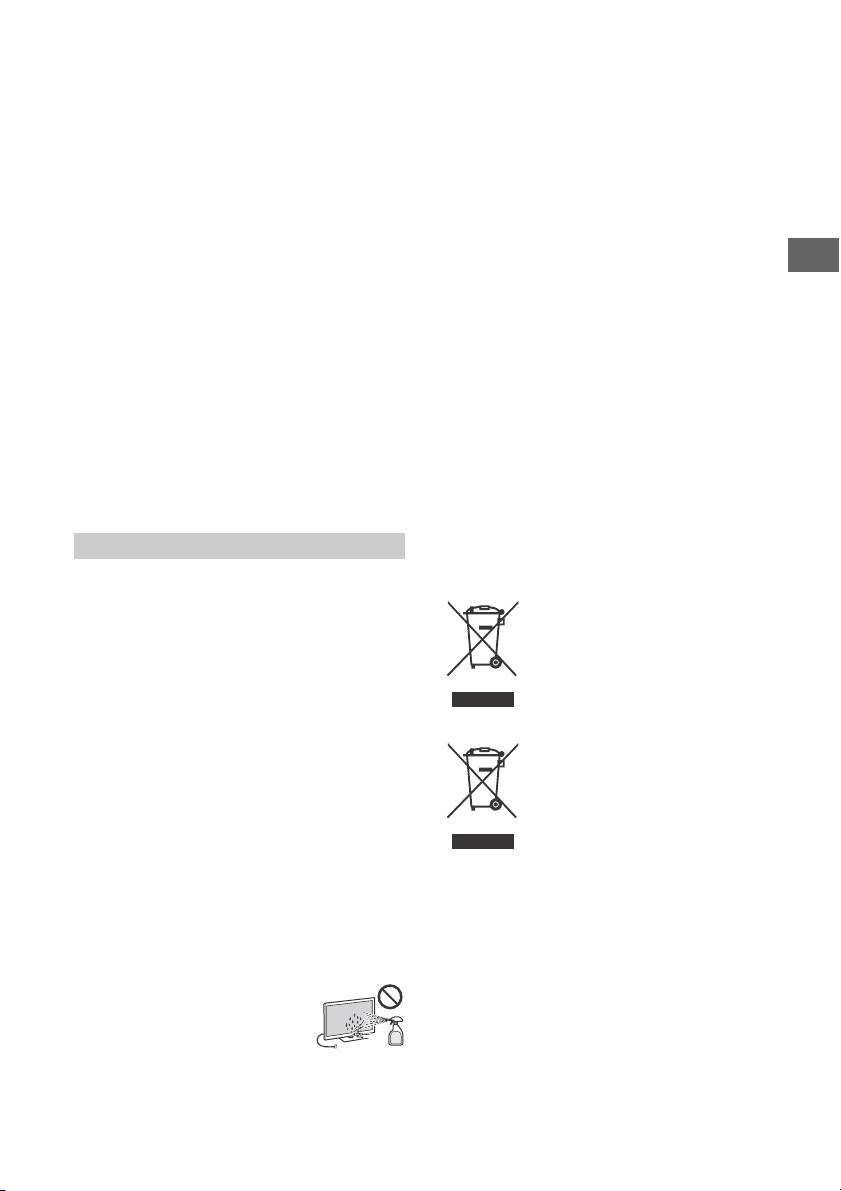
• If th e TV is placed in the changing room of a
public bath or hot spring, the TV may be
damaged by airborne sulfur, etc.
• For best picture quality, do not expose the screen to direct
illumination or sunlight.
• Avoid moving the TV from a cold area to a warm area. Sudden
room temperature changes ma y cause moisture condensation .
This may cause the TV to show poor picture and/or poor colour.
Should this occur, allow moisture to evaporate completely
before powering the TV on.
Broken pieces:
• Do n ot throw anything at the TV set. T he screen glass may break
by the impact and cause serious injury.
• If the surface of the TV set cracks, do not touch it until you have
unplugged the AC power cord (mains lead). Other wise this may
cause an electric shock.
Page 5
GB
When not in use
• If you will not be using the TV set for several days, the TV set
should be disconnected from the AC power (mains) for
environmental and safety reasons.
• As the TV set is not disconnected from the AC power (mains)
when the TV set is just turned off, pull the plug from the AC
power outlet (mains socket) to disconnect the TV set
completely.
• Some TV sets may have features that require the TV set to be
left in standby to work correctly.
For children
• Do not allow children to climb on the TV set.
• Keep small accessories ou t of the reach of children, so that they
are not mistakenly swallowed.
If the following problems occur...
Turn off the TV set and unplug the AC power cord (mains lead)
immediately if any of the following problems occur.
Ask your dealer or Sony service centre to have it checked by
qualified service personnel.
When:
AC power cord (mains lead) is damaged.
Poor fitting of AC power outlet (mains socket).
TV set is damaged by being dropped, hit or having something
thrown at it.
Any liquid or solid object falls through openings in the cabinet.
About TV Temperature
When the TV is used for an extended period, the panel surrounds
become warm. You may feel hot when touching there by the
hand.
Precautions
Viewing the TV
• Vi ew the TV i n moderate li ght, as view ing the TV i n poor ligh t or
during long period of time, strains your eyes.
• When using headphones, adjust the volume so as to avoid
excessive levels , as hearing damage may result.
OLED Screen
• Although th e OLED screen is made with high-precision
technology and 99.99 % o r more of the pixels are effective,
black dots may appear or bright points of light (white, red, blue,
or green) may appear constantly on the OLED screen. This is a
structural property of the OLED screen and is not a malfunction.
• Do not push or scratch the front filter, or place objects on top of
this TV set. The image may be uneven or the OLED screen may
be damaged.
• The screen an d cabinet get warm when this T V set is in use. This
is not a malfunction.
• W hen disposin g of your TV be sure to follo w your local l aws and
regulations.
Handling and cleaning the screen surface/
cabinet of the TV set
Be sure to unplug the AC power cord (mains lead) connected to
the TV set from AC power outlet (mains socket) before cleaning.
To avoid material degradation or screen coating degradation,
observe the following precautions.
• To remove dust from the screen surface/cabinet, wipe gently
with a soft cloth. If dust is persistent, wipe with a soft cloth
slightly moistened with a diluted mild detergent solution.
• Never spray water or detergent directly on
the TV set. It may drip to the bottom of the
screen or exterior parts and enter the TV
set, and may cause da mage to the TV set.
• Never use any type of abrasive pad, alkaline/acid cleaner,
scouring powder, or volatile solvent, such as alcohol, benzene,
thinner or in secticide. Us ing such materials or maintaining
prolonged contact with rubber or vinyl materials may result in
damage to the screen surface and cabinet material.
• Do not touch the TV if your hand is covered in any chemical
substance such as hand cream or sunblock.
• Periodic vacuuming of the ventilation openings is
recommended to ensure proper ventilation.
• When adjusting the angle of the TV set, move it slowly so as to
prevent the TV set from moving or slipping off from its table
stand.
Optional Equipment
Keep optional components or any equipment emitting
electromagnetic radiation away from the TV set. Otherwise
picture distortion and/or noisy sound may occur.
Wireless Function of the unit
• Do not operate this u nit near medical equipment (pacemaker,
etc.), as this may result in the malfunction of the medical
equipme nt.
• Altho ugh this unit transmits/receives scrambled signals, be
careful of unauthorised interception. We cannot be responsible
for any trouble as a result.
Caution about handling the remote control
• Observe the correct polarity when inserting batteries.
• Do not use different types of batteries together or mix old and
new batteries.
• Dispose of batteries in an environmentally friendly way. Certain
regions may regulate the disposal of batteries. Please consult
your local authority.
• Handle the remote control with care. Do not drop or step on it,
or spill liquid of any kind onto it.
• Do not pla ce the remote control in a location near a heat source,
a place subject to direct sunlight, or a damp room.
Disposal of the TV set
Disposal of Old Electrical &
Electronic Equipment (Applicable in
the European Union and other
European countries with separate
collection systems)
Disposal of Old Electrical &
Electronic Equipment (Applicable
in Republic of India)
This symbol and its var iations indicate that this
product and its componen ts, consumables,
parts or spares thereof sha ll not be treated as
household waste and may not be dropped in
garbage bins. Product owners are advised to
point for the recycling of electrical and electronic equipment.
Your co-operation shall facilitate prop er disposal and help p revent
potential negative consequences/hazards to the environment
and human health, which could otherwise be caused by
inappropriate waste disposal including improper handling,
accidental breakage, damage and/or improper recycling of ewaste. The recycling of materials will help to conserve natural
resources. For more detailed information about recycling of this
product, please contact your local civic office, your household
waste disposal service provider or the store where you made the
purchase. You may contact our company’s toll free number in
India for assistance.
Toll Free: 1800-103-7799
Visit: www.sony.co.in for product recycling
deposit their product at the nearest collection
GB
5
Page 6
Reduction in the Use of Hazardous Substances
in Electrical & Electronic Equipment (Applicable
in Republic of India)
This product and its components, consumables, parts or
spares comply with the hazardous substances restriction of
India’s E-Waste (Management) Rules. The ma ximum allowable
concentrations of the restricted substances are 0.1% by weight
in homogenous materials for Lead, Mercury, Hexavalent
Chromium, Polybrominated Biphenyls (PBB) and
Polybrominated Diphenyl Ethers (PBDE), and 0.01% by weight
in homogenous materials for Cadmium, except for the
exemptions specified in Schedule II of the aforesaid Rules.
Notice for customer in UAE
TRA
REGISTERED No: ER35215/14
DEALER No:
Protecting the TV Screen (OLED TV)
Precautions to Protect the Screen from
Damage
Image retention
OLED TV‘s are suscep tible to image retention (burn-in) due to the
characteristics of the m aterials used. Image retention may occur if
images are displayed in the same location on the screen
repeatedly or over extended periods of time. This is not a
malfunction of the TV. Avoid displaying images that may cause
image retention.
The following are examples of images that may
cause image retention:
• Content with black bars either on the top and bottom and/or
the left and righ t sides of the screen. (for example, Letterboxed,
4:3 screen, Standard definition)
• Static images suc h as photos.
• Video games that might have static content in some part of the
screen.
• On-screen menus, programme guides, channel logos etc.
• Static content from applications.
• On-screen tickers, such as those used for news and headlines.
To reduce the risk of image retention:
• Sony recomm ends that you turn off the TV normally by p ressing
the power button on the remote control or the TV.
• Fill the screen by changing [Wide mode] to eliminate the black
bars. Select [Wide mode] other than [Normal].
• Turn off the OSD (On Screen Display) by pressing the /
button, and turn off the menus from connected equipment. For
details, refer to the instruction manuals for the connected
equipment.
• Avoid displaying static images with bright colours (including
white), clocks or logos on any portion of the screen.
• Set the picture settings based on the ambient conditions. The
Standard Picture is recommended for home use and when
viewing content that often displays the station logos, etc.
The TV has following features to help reduce/ prevent image
retention.
DA0065531/11
Panel ref resh
Panel refresh will automatically run to a djust the uniformity of the
TV screen after it has been in use for long periods of time. Panel
refresh can also be performed manually and should only be used
if image retention is very noticeable or you see the following
message: [Panel refresh did not finish…]
Caution:
• The Panel refresh function m ay affect the panel. As a reference,
perform the Panel refresh only once a year, do not perform it
more than once a year as it may affect the usable life of the
panel.
• Panel refresh takes about one hour to complete.
• A white line may be displayed on the screen during the Panel
refresh, this is not a malfunction of the TV.
• Panel refresh will only work when the room temperature is
between 10 ºC and 40 ºC.
Pixel shift
Automatically moves the image on the screen to prevent image
retent ion.
Other feature
The screen brightness is automatically reduced when displaying
still images, clocks, bright colours or lo gos etc.
GB
6
Page 7
GB
Parts and Controls
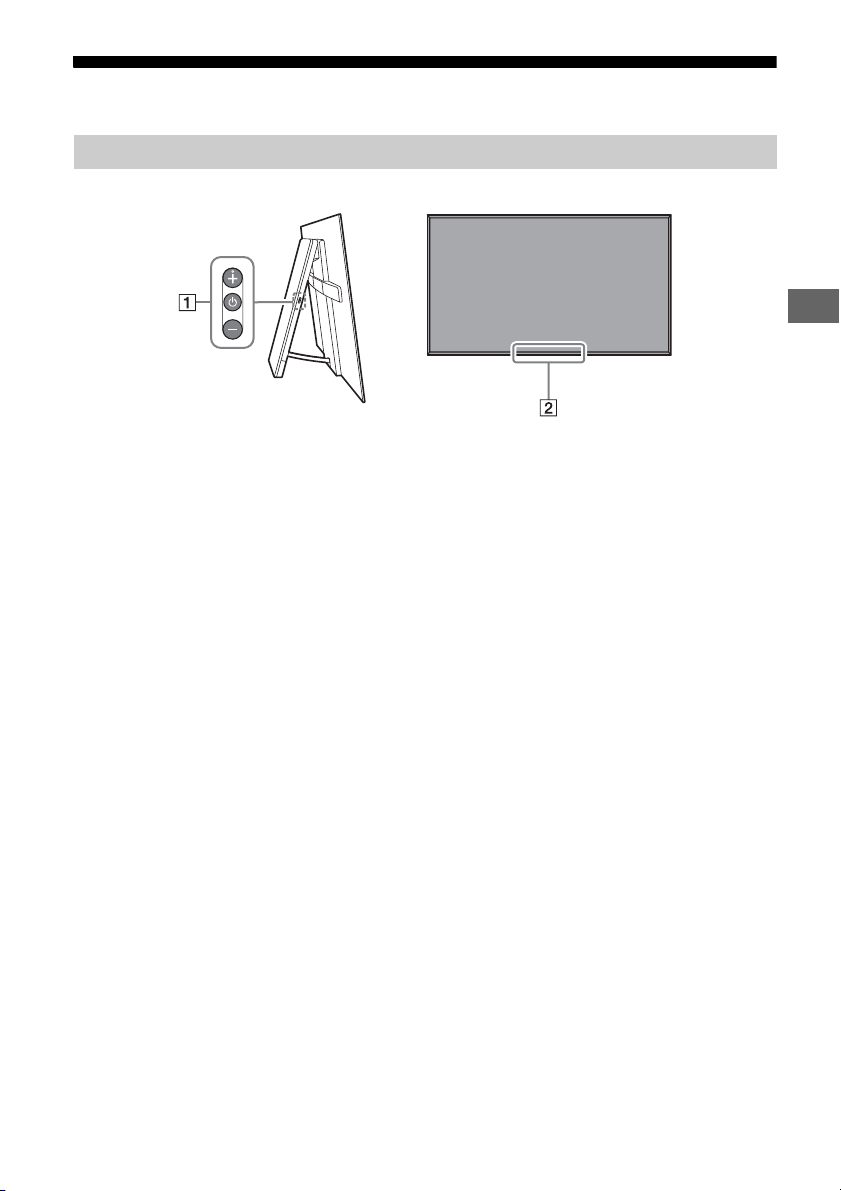
Controls and Indicators
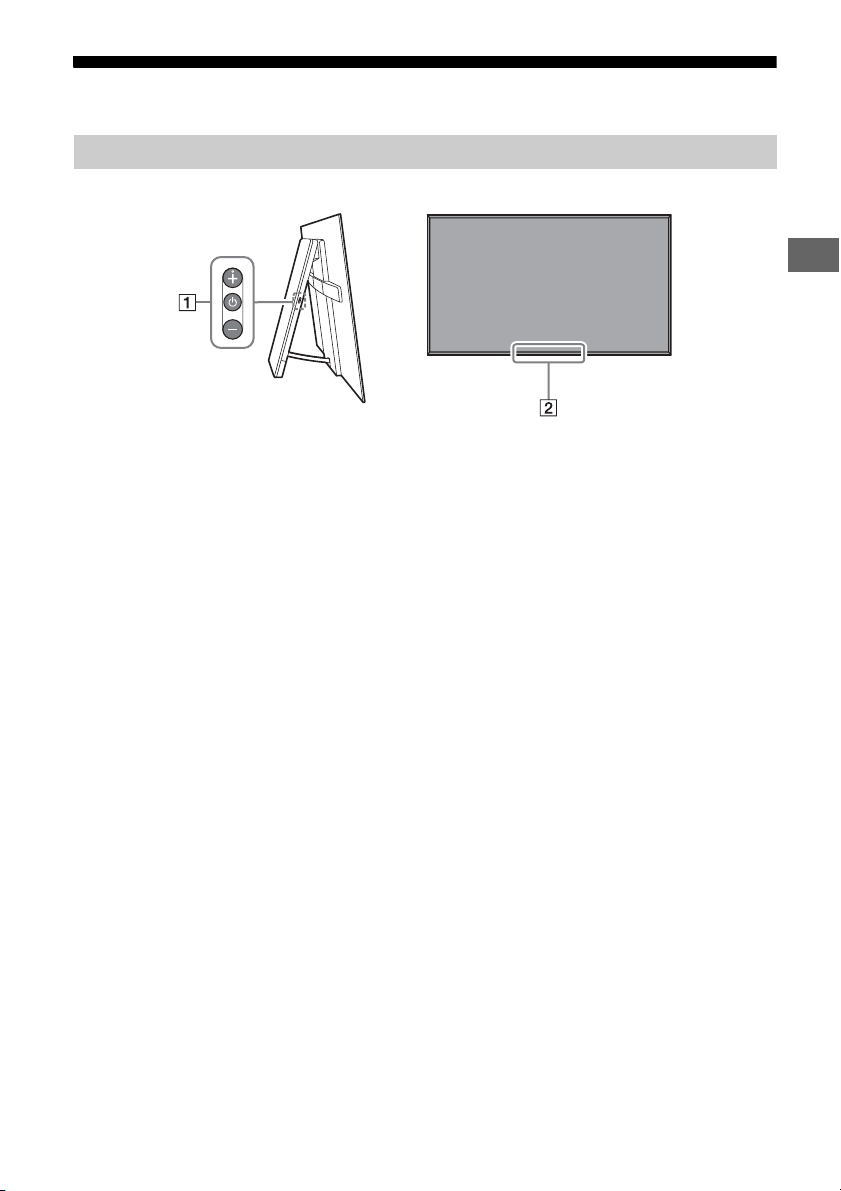
(Power) / + / –
When the TV is off,
Press to power on.
When the TV is on,
Press and hold to power off.
Press repeatedly to change the function,
then press + or - button to:
•Adjust the volume.
• Select the channel.
• Select the input source of TV.
Remote Control sensor* /
Light sensor* / Illumination LED
The illumination LED lights up or blinks
according to the status of the TV.
For more information, refer to the Help
Guide.
* Do not place anything near the sensor.
GB
7
Page 8
Using Remote Control
MIC
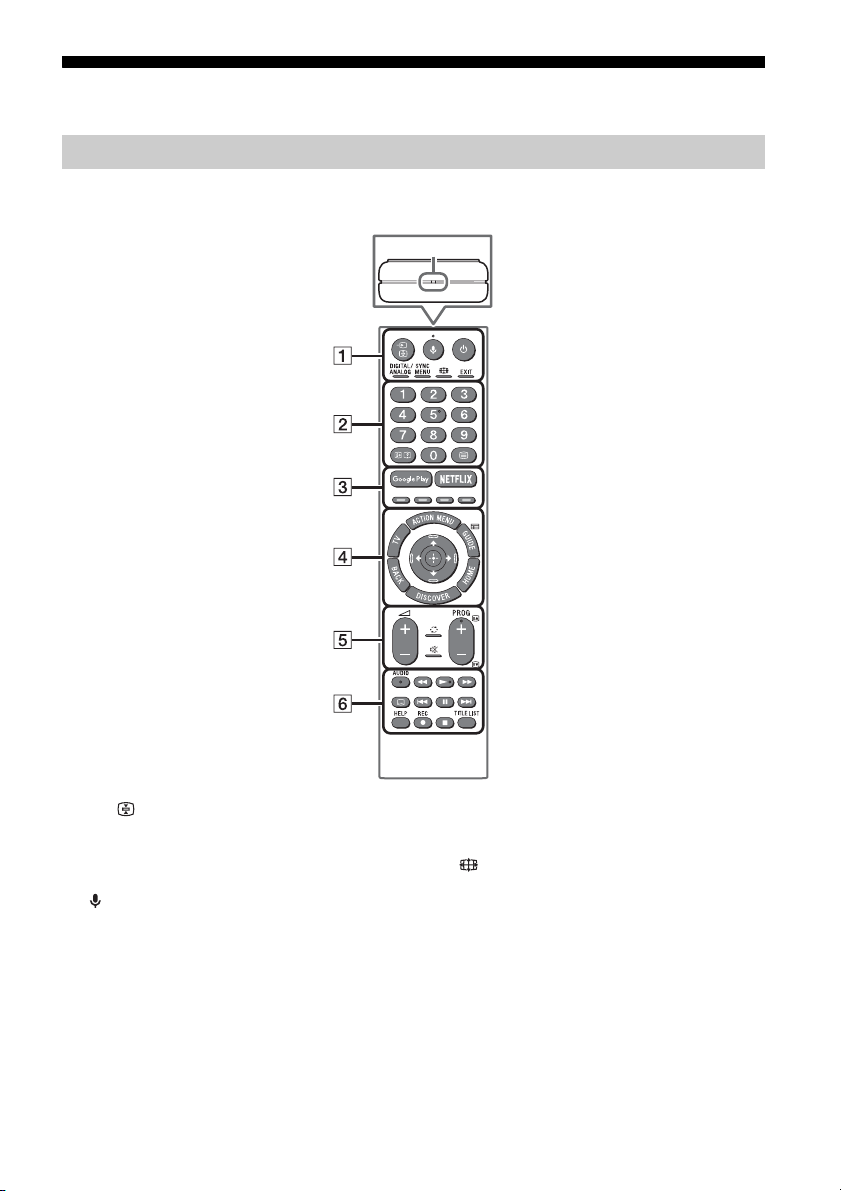
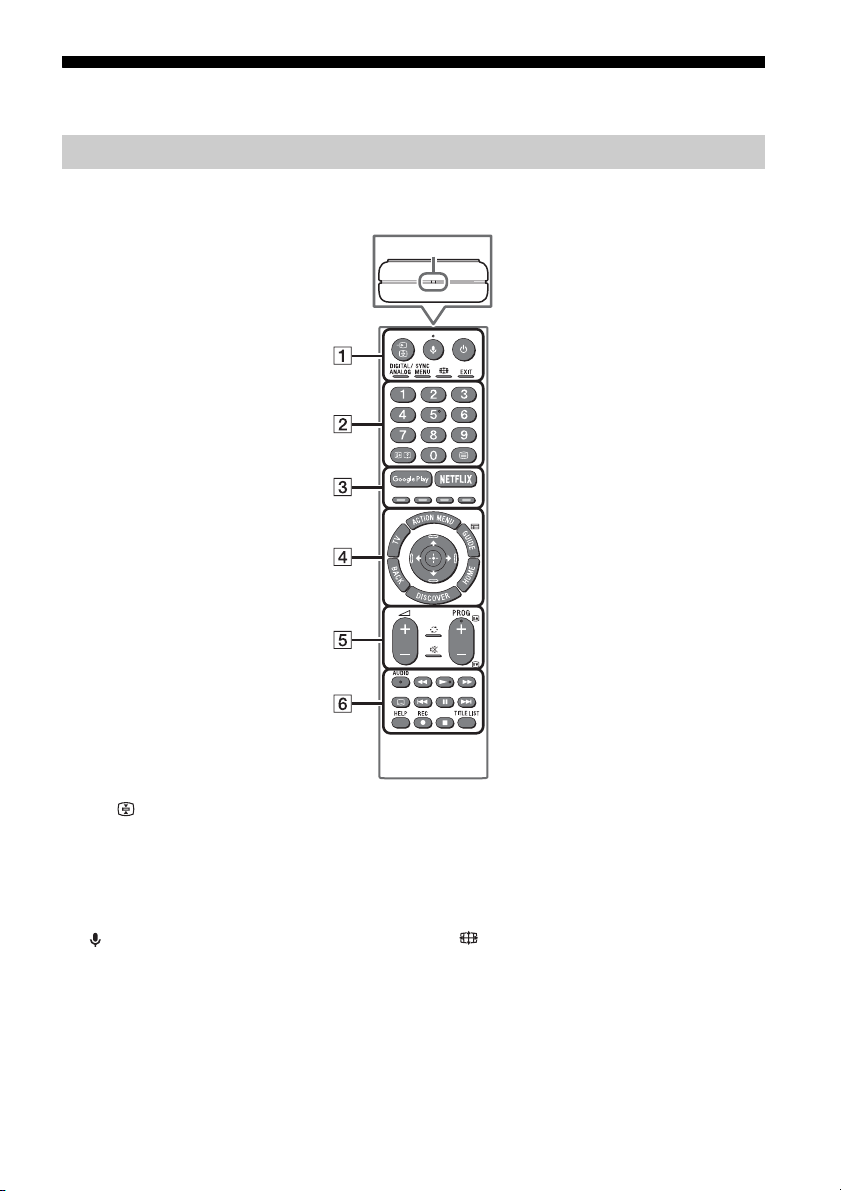
Remote Control Parts Description
The remote control shape, location, availability and function of remote control button may vary
depending on your region/country/TV model.
/ (Input select/Text hold)
In TV mode: Display and select the input
source.
In Text mode: Hold the current page.
(Microphone)
Use Voice Function. (e.g., Search various
content by voice.)
(TV standby)
Turn on or turn off the TV (standby mode).
DIGITAL/ANALOG
Switch between digital and analogue mode.
GB
8
SYNC MENU
Display the BRAVIA Sync Menu.
(Wide mode)
Change the screen format.
EXIT
Return to the previous screen or exit from
the menu. When an Interactive Application
service is available, press to exit from the
service.
Page 9
GB
Number buttons
/ (Info/Text reveal)
Display information.
(Text)
Display text information.
Google Play
Access the “Google Play” online service.
NETFLIX (Only on limited region/
country/TV model)
Access the “NETFLIX” online service.
Colour buttons
Execute corresponding function at that time.
ACTION MENU
Display a list of contextual functions.
TV
• Switch to a TV channel or input from other
applications.
• Turn on the TV to display TV channel or
input.
GUIDE/
Display the digital programme guide.
BACK
Return to previous screen.
HOME
Display the TV Home Menu.
DISCOVER
Bring up the Content Bar to search for
content.
//// (Item select/Enter)
+/– (Volume)
Adjust the volume.
(Jump)
Jump back and forth between two channels
or inputs. The TV alternates between the
current channel or input and the last
channel or input that was selected.
(Muting)
Mute the sound. Press again to restore the
sound.
PROG +/–//
In TV mode: Select the channel.
In Text mode: Select the next () or
previous () page.
AUDIO
Change the language for the programme
currently being viewed.
//////
Operate media contents on TV and
connected BRAVIA Sync-compatible device.
(Subtitle setting)
Turn subtitles on or off (when the feature is
available).
HELP
Display Help menu. Help Guide can be
accessed from here.
REC
Record the current programme with the USB
HDD recording function.
TITLE LIST
Display the Title list.
GB
9
Page 10
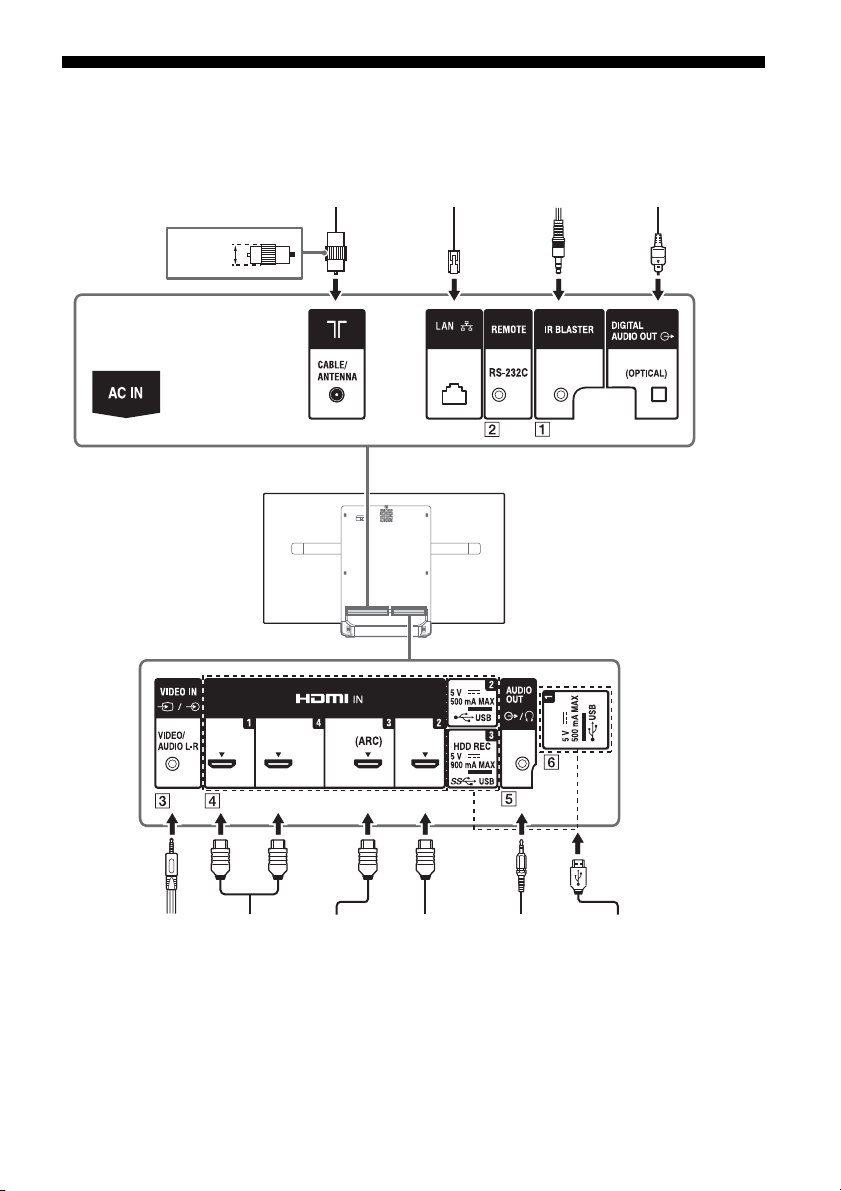
Connection Diagram
VCR/Video game
equipment/DVD
player/Camcorder
Home Audio
System with
ARC/HDMI
Device
HDMI
Device
<14 mm
Cable/Antenna
Headphone/
Home Audio
System/
Subwoofer
Digital still
camera/
Camcorder/USB
storage media
HDMI
Device
Home Audio
System with
Optical
Audio Input
Router IR Blaster
For more information on connections, refer to the Help Guide by pressing HELP on the remote control.
10
GB
Page 11
GB
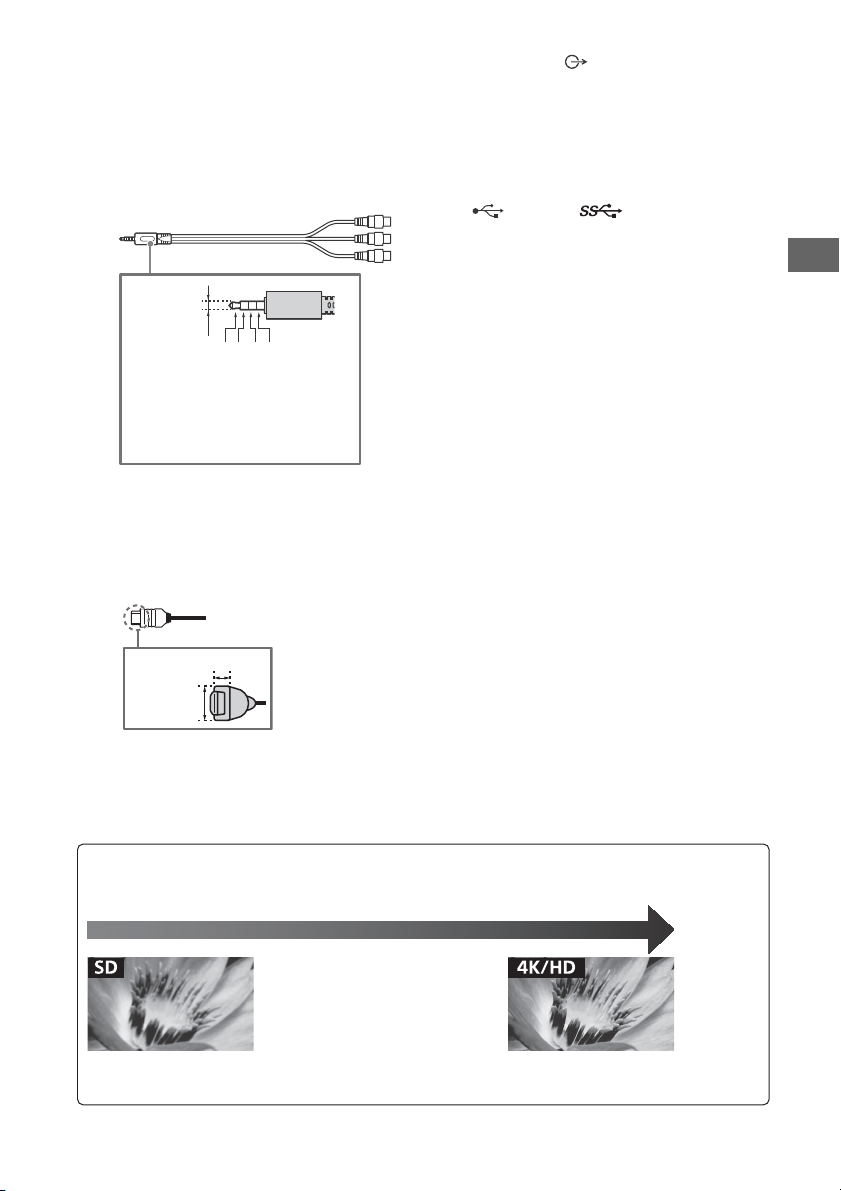
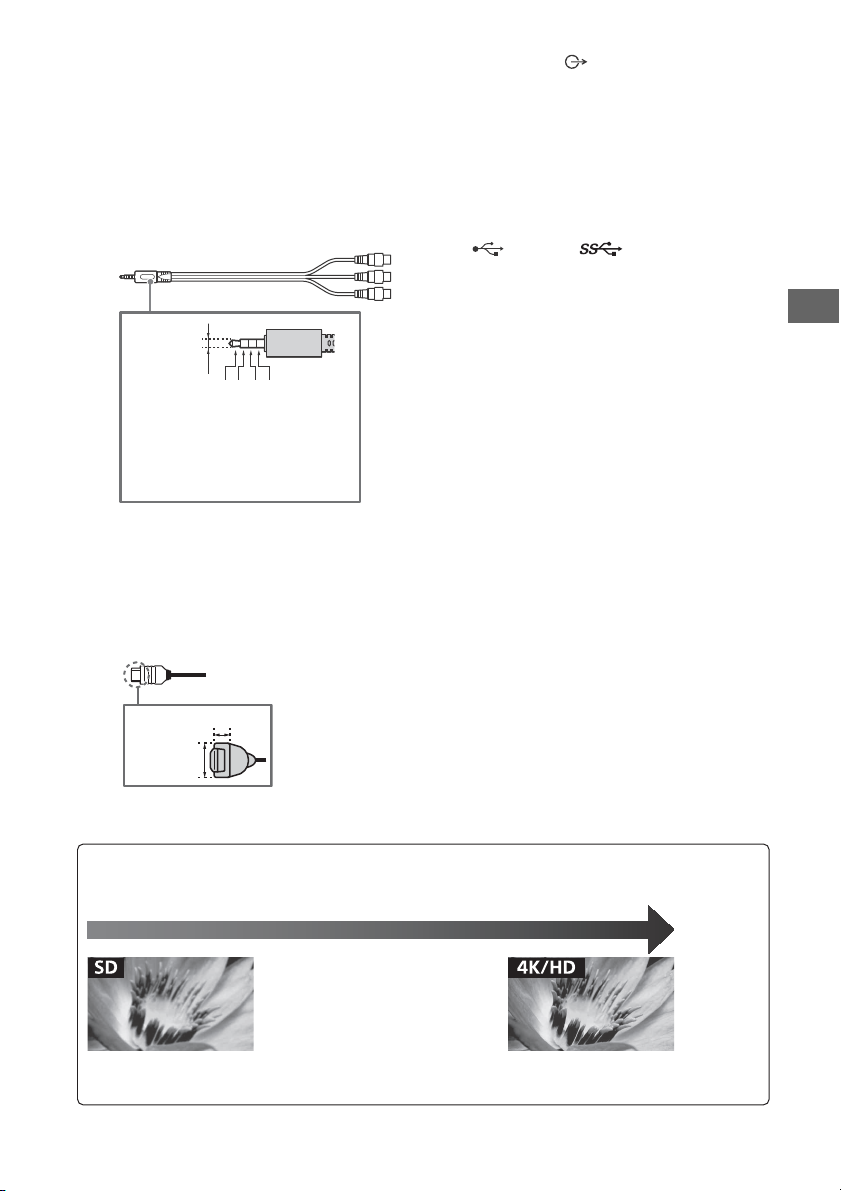
Note
3.5 mm
1234
1: L
2: Video
3: Ground
4: R
< 21 mm
< 12 mm
Standard definition (SD) videos have picture signals with a
vertical resolution of 480 (NTSC) or 576 (PAL/SECAM) lines.
High definition (HD) videos have picture signals
with a vertical resolution of 720 or 1,080 lines.
(For 4K vertical resolution: 2,160 lines)
Picture Quality
• AV composite cable
• Antenna (aerial) cable
• Component cable
•HDMI cable
IR BLASTER*
REMOTE RS-232C
This terminal is for service use only.
/ VIDEO IN
• For a composite connection, use an
Analogue Extension Cable (not supplied).
•
HDMI IN 1/2/3/4
• If connecting a digital audio system that is
compatible with Audio Return Channel
(ARC) technology, use HDMI IN 3. If not, an
additional connection with DIGITAL AUDIO
OUT (OPTICAL) is necessary.
•
AUDIO OUT /
• Supports 3-pole stereo mini jack only.
• To listen to the TV's sound through the
connected equipment, press HOME.
Select [Settings] [Sound]
[Headphone/Audio out] and then select
the desired item.
USB 1/2, USB3 (HDD REC)*
• Connecting a large USB device may
interfere with other connected devices
beside it.
• When connecting a large USB device,
connect to the USB 1 port.
* Only on limited region/country/TV model.
• Be sure to store the side cover in a safe place for
future use.
GB
11
Page 12
Installing the TV to the Wall
Note
This TV’s instruction manual only shows the steps on preparing the installation of the TV before
installing to the wall.
To Custo m ers:
For product protection and safety reasons, Sony strongly recommends that installation of your
TV be performed by Sony dealers or licensed contractors. Do not attempt to install it yourself.
To Sony Dealers and Contractors:
Provide full attention to safety during the installation, periodic maintenance and examination of
this product.
Sufficient expertise is required for installing this product, especially to determine the strength of the wall for
withstanding the TV’s weight. Be sure to entrust the attachment of this product to the wall to Sony dealers or
licensed contractors and pay adequate attention to safety during the installation. Sony is not liable for any
damage or injury caused by mishandling or improper installation.
Use the Wall-Mount Bracket SU-WL450 (not supplied) to install the TV to the wall.
When installing the Wall-Mount Bracket, also refer to the Operating Instructions and Installation Guide
supplied with the Wall-Mount Bracket.
• Be sure to store the removed screws in a safe place, keeping them away from children.
• Be sure to hold the TV while preparing it for wall-mount installation.
• Please remove the corner guards after installing the TV to the wall.
GB
12
Page 13
GB
Note
WM1
WM2
M4L12
WM1
M4L12
WM2
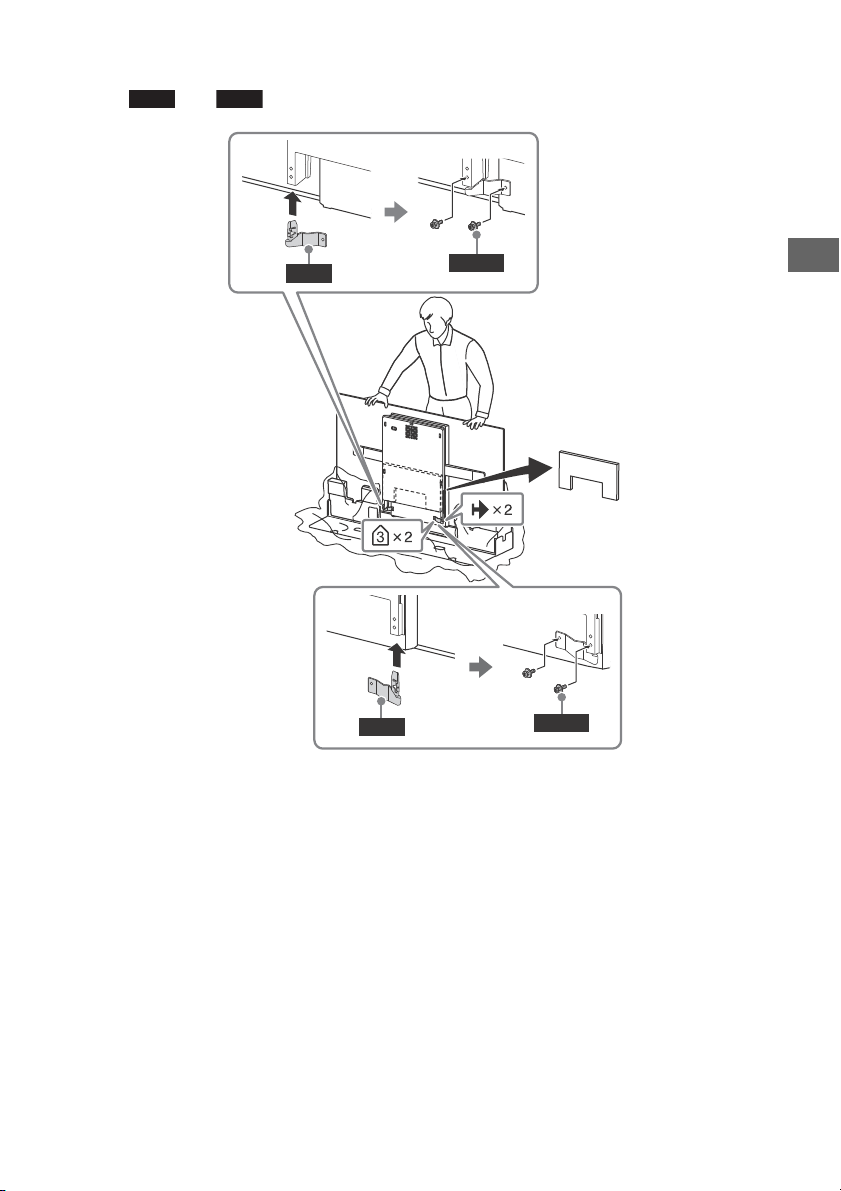
Installing the TV to the Wall from Carton
Attach and (supplied with the TV) to the rear of the TV.
• If using an electric screwdriver, set the torque at approximately 1.5 N·m {15 kgf·cm}.
GB
13
Page 14
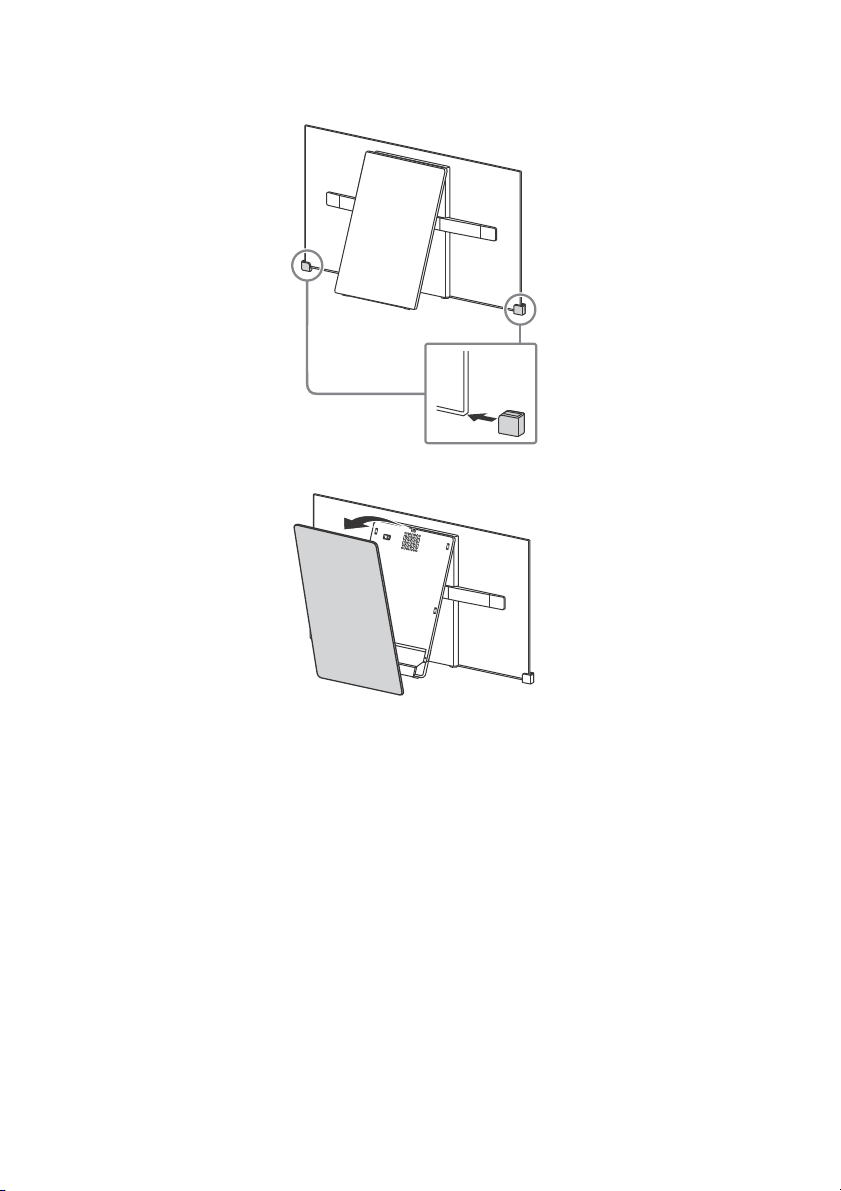
Installing the TV to the Wall from Table-Top Stand
1 Insert the corner guards.
2 Remove the centre cover.
GB
14
Page 15
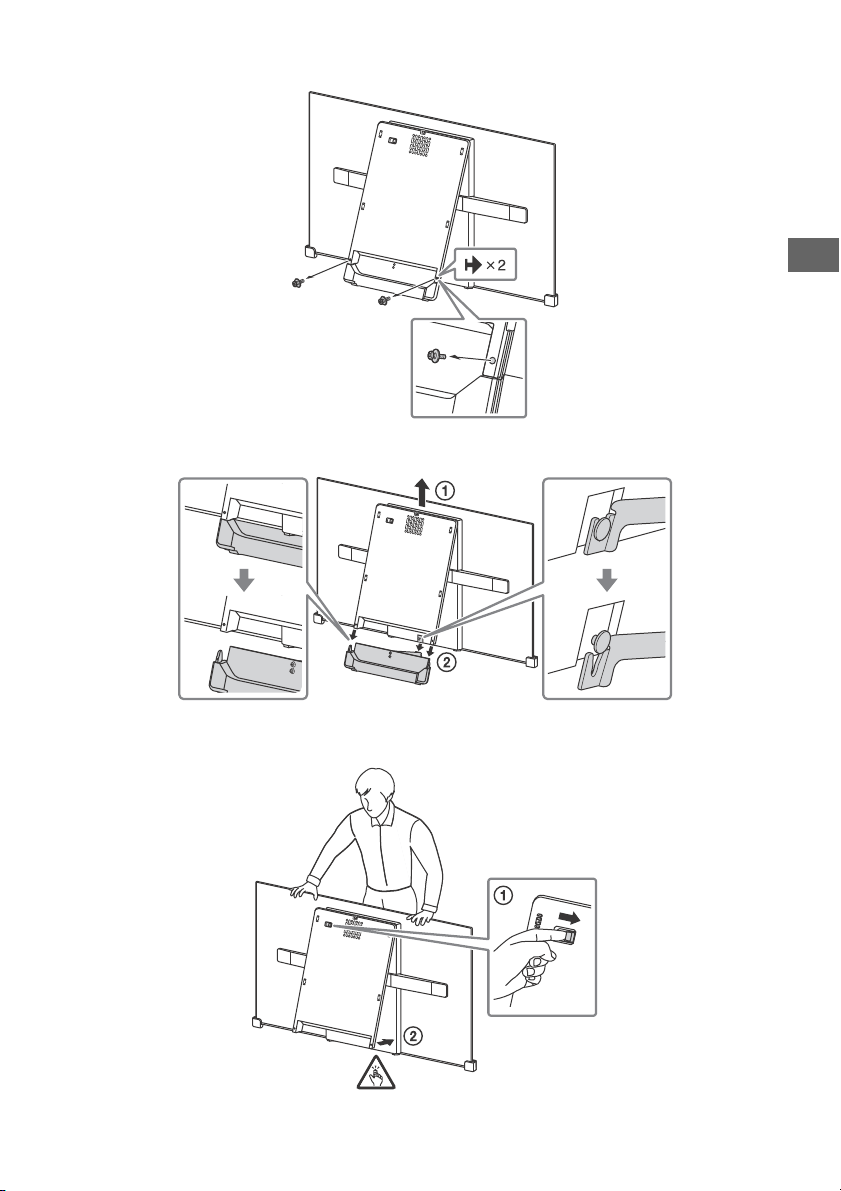
GB
3 Remove the screws.
4 Detach the stand base.
5 Close the centre block by releasing the hinge lock.
GB
15
Page 16
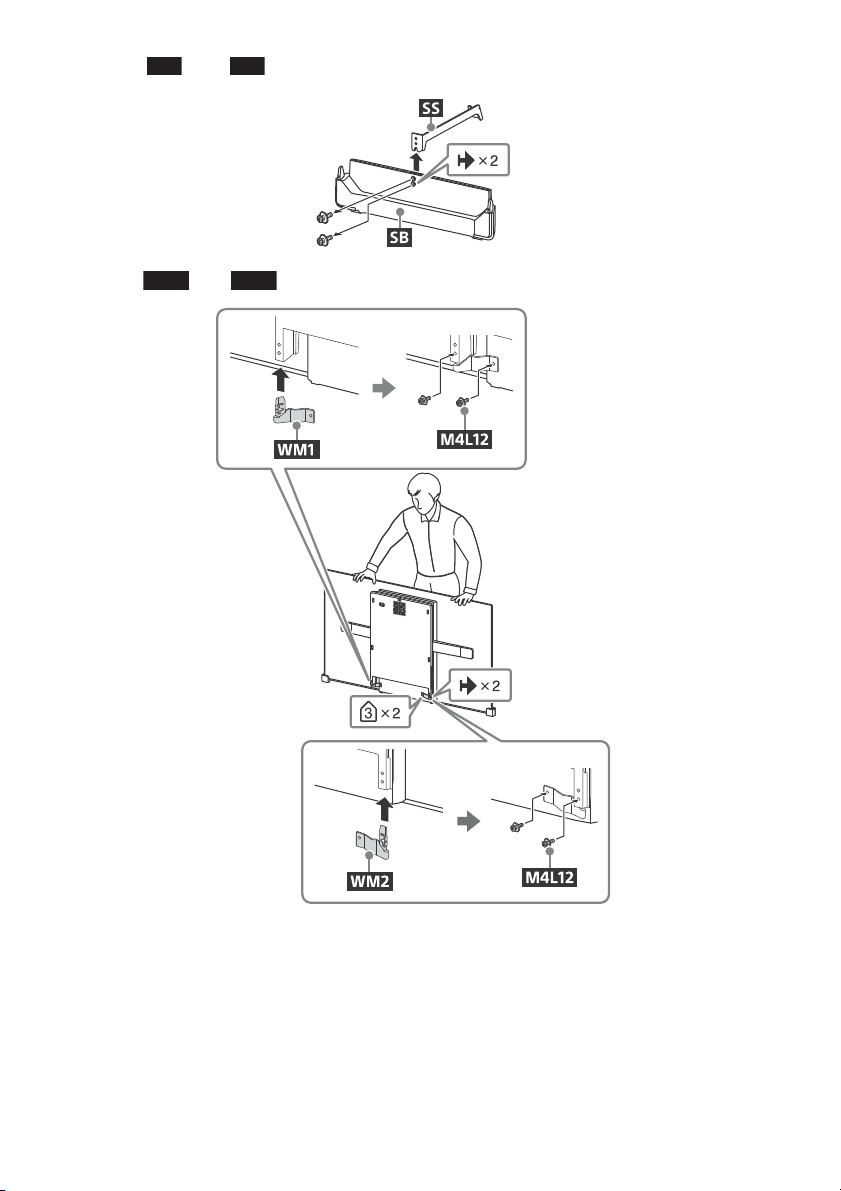
6 Detach from .
Note
SS
SB
WM1
WM2
7 Attach and (supplied with the TV) to the rear of the TV.
• If using an electric screwdriver, set the torque at approximately 1.5 N·m {15 kgf·cm}.
GB
16
Page 17
GB
Note
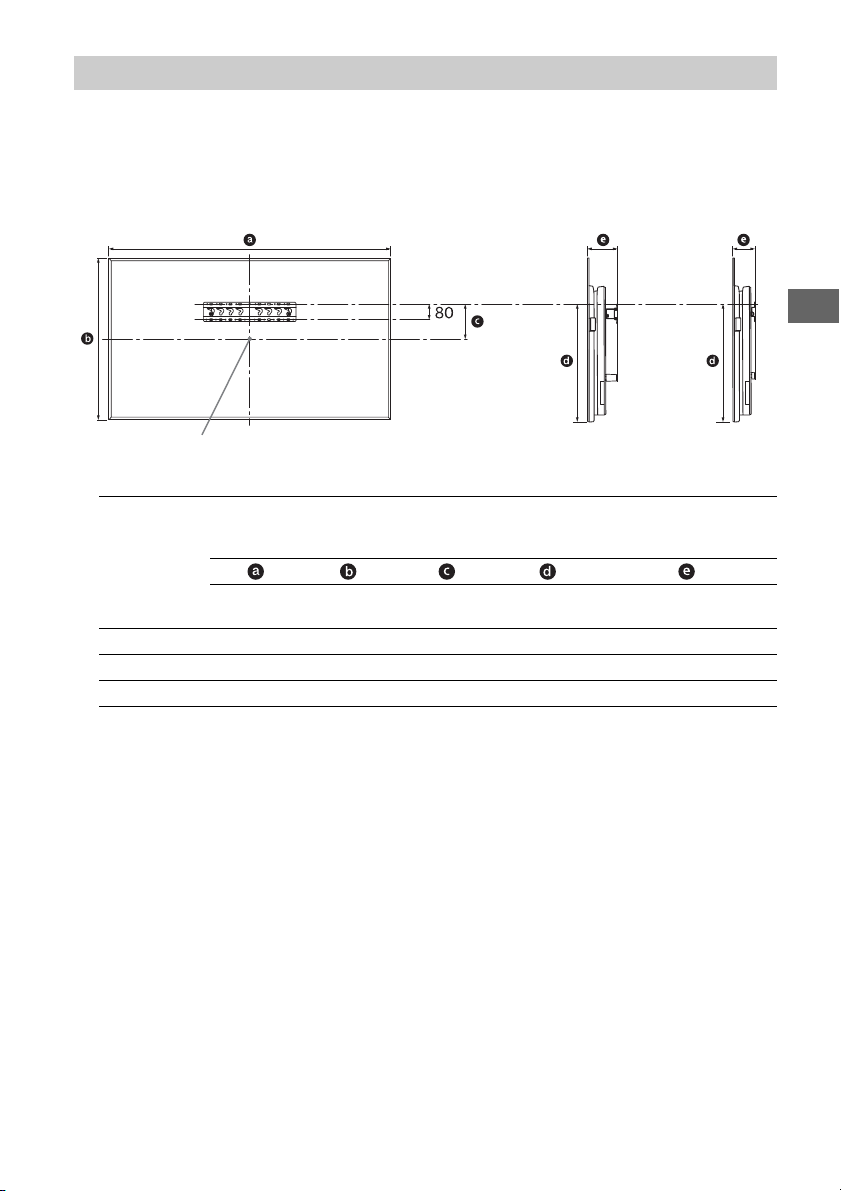
Screen centre point
Standard
mounting
Slim
mounting
SU-WL450
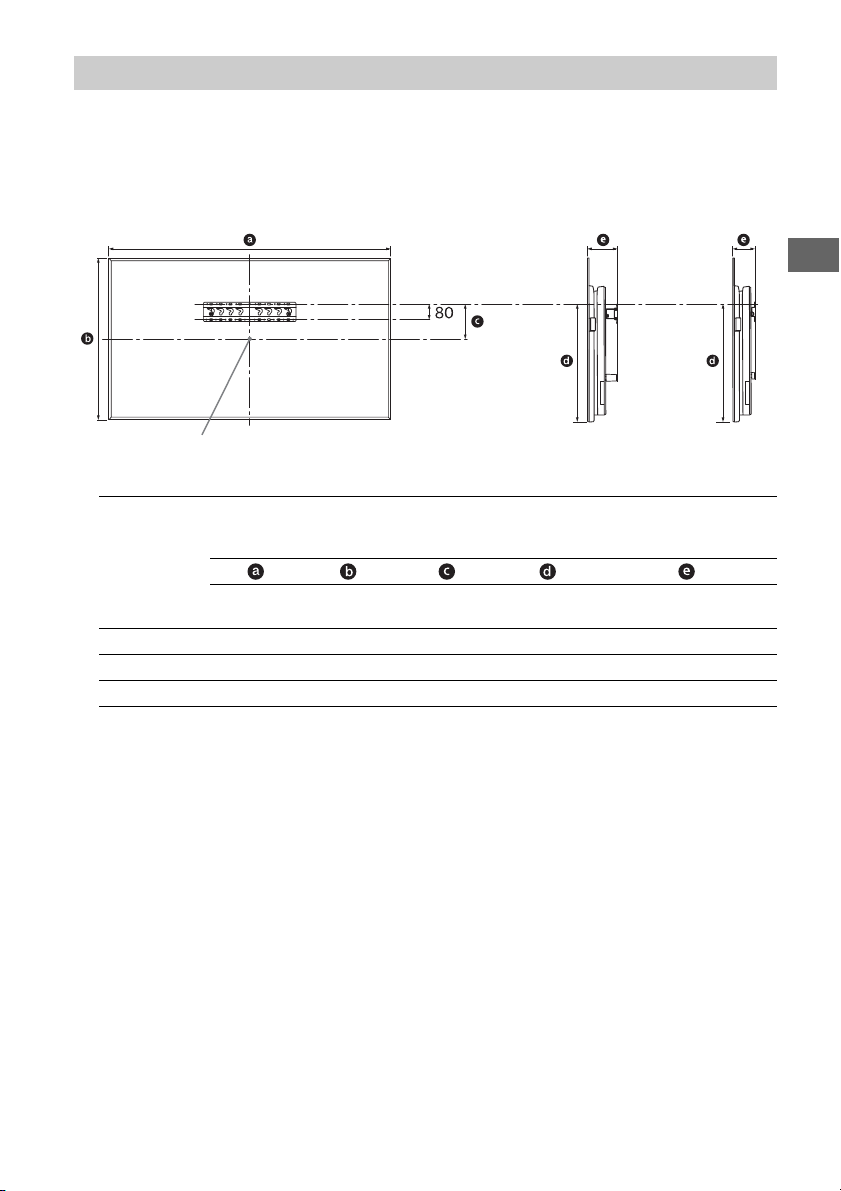
1 Make sure that the wall has enough space for the TV and is capable of supporting a
weight of at least four times that of the TV.
Refer to the following table on installing the TV to the wall. See page 20-22 (Specifications)
for the TV’s weight.
Display dimensions
Model Name
KD-
77A1 1,721 997 99 604 162 120
65A1 1,451 834 93 514 149 107
55A1 1,228 711 153 514 149 107
Screen
centre
dimension
Length for mounting
Standard
mounting
mounting
Unit: mm
Slim
• Figures in the table may differ slightly depending on the installation.
• When your TV is installed on the wall, the upper side of the TV slightly leans forward.
GB
17
Page 18
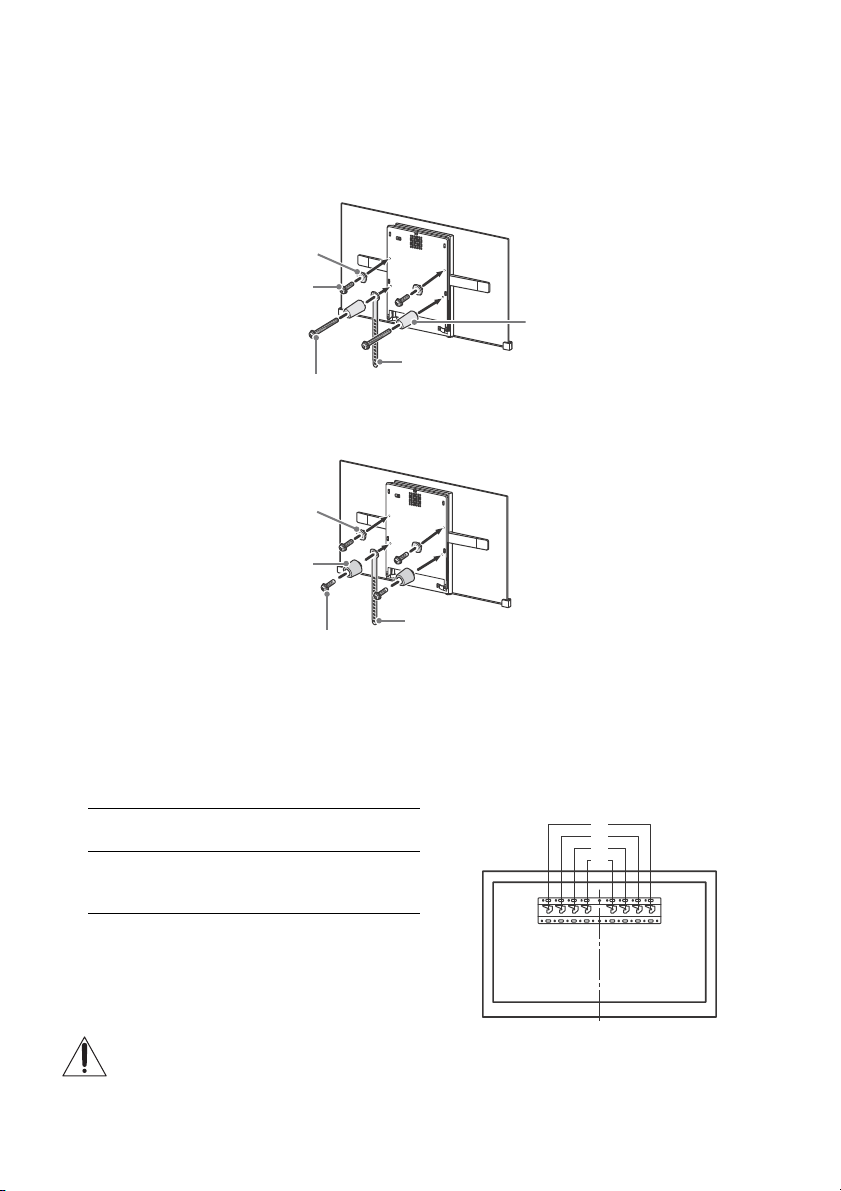
2 Attach the Attachment parts for Wall-Mount Bracket. Check the Attachment parts by
Note
Note
Screw (+PSW 6 x 20)
Pulley
Spacer (60 mm)
Screw (+PSW 6 x 50)
Belt
Pulley
Spacer (20 mm)
Screw (+PSW 6 x 20)
Belt
a
b
c
d
referring to “1” of the Wall-Mount Bracket Installation Guide.
• If using an electric screwdriver, set the torque at approximately 1.5 N·m {15 kgf·cm}.
• Be sure to store the unused parts in a safe place for future use. Retain this manual for future reference.
Standard mounting
Slim mounting
3 Connect necessary cables to the TV.
• You cannot access to any terminal after installing the TV to the wall.
4 Install the TV to the Base. Refer to “5” of Installation Guide and “Installing the TV to the
Wall” of Operating Instructions supplied with the Wall-Mount Bracket.
Model Name
KD-
77A1
65A1
55A1
Refer to the instructions supplied with the Wall-Mount Bracket for your model to install the TV on the wall.
GB
18
Hook location
a
Page 19
GB
Note
Updating...
Troubleshooting
General troubleshooting for issues like: black
screen, no sound, frozen picture, TV does not
respond, or network is lost, do the following
steps.
1 Restart your TV by pressing the power button
on the remote control until a message
appears. The TV will restart. If the TV does not
recover, try unplugging the TV from the AC
power cord (mains lead) for three minutes
and then plug it in again.
2 Refer to the Help menu by pressing HELP on
the remote control.
3 Connect your TV to the Internet and perform
a software update.
4 Visit Sony support website (information
provided on the back cover).
When [A new TV system software update is
available…] message is displayed.
Sony strongly recommends you to update the
TV software by selecting [Update Now]. These
software updates improve your TV performance
or add new features.
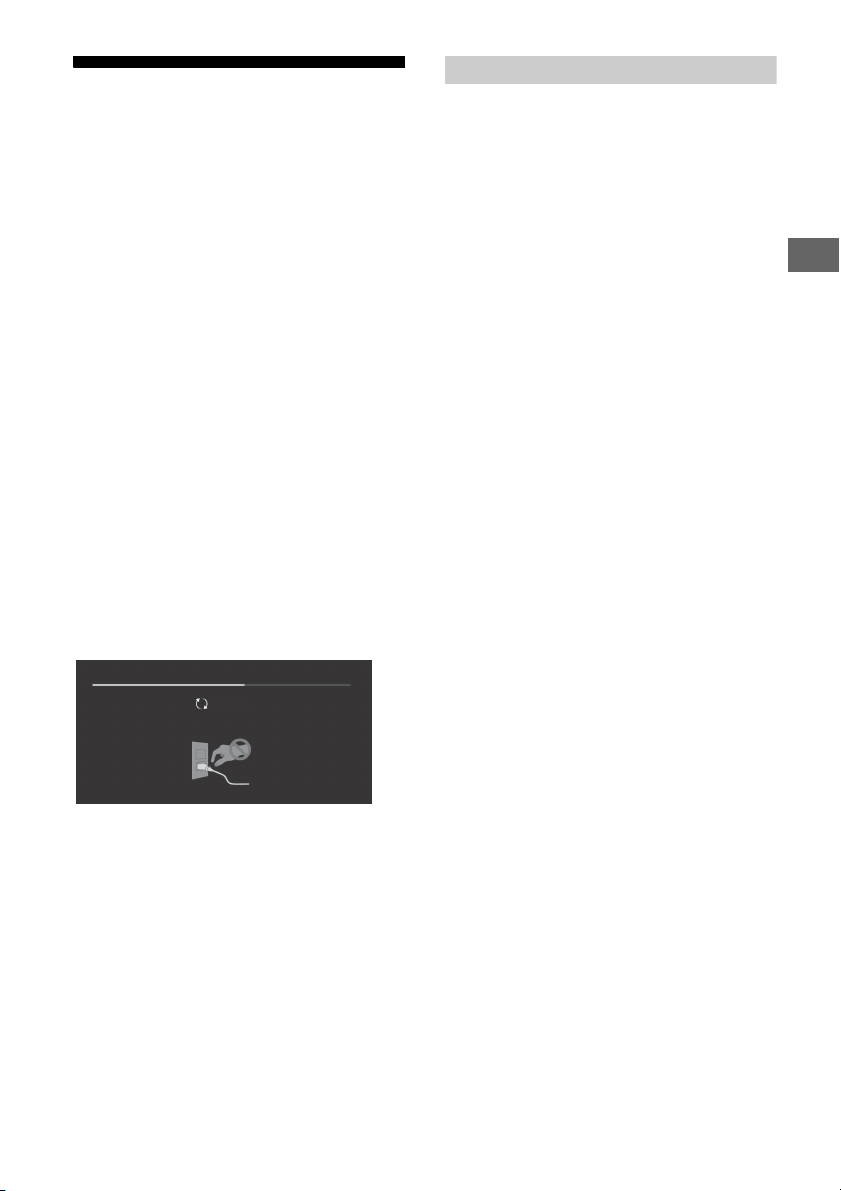
The following screen with [Updating…] will
appear and the illumination LED flashes white
while software is updating.
Do not unplug the AC power cord (mains lead)
during the software update. If you do, the
software update may not finish completely, and
it may cause a software malfunction. Software
updates can take up to 15 minutes.
When you plug in TV, the TV may not be able
to turn on for a while even if you press the
power button on the remote control or the TV.
It takes time to initialize the system. Wait for
about one minute, then operate it again.
Troubles and Solutions
When the illumination LED is flashing in red.
Count how many times it flashes (interval time is
three seconds).
Reboot the TV by disconnecting the AC power
cord (mains lead) for three minutes, then turn on
the TV.
If the problem persists, disconnect the AC power
cord (mains lead), and contact your dealer or Sony
service centre with the number of times the
illumination LED flashes.
There is no picture (screen is dark) and no
sound.
Check the antenna (aerial)/cable connection.
Connect the TV to the AC power (mains), and
press on the TV or remote control.
Some programmes cannot be tuned.
Check the antenna (aerial)/cable connection.
The remote control does not function.
Replace the batteries.
The parental lock for broadcast password has
been forgotten.
Enter 9999 for the PIN code and select [Change
PIN Code].
The TV surrounds become warm.
When the TV is used for an extended period, the
TV surrounds become warm.
You may feel hot when touching there by the
hand.
The screen becomes darker while watching
TV.
If the whole image or part of the image remains
still, the screen brightness will be gradually
reduced to prevent image retention. This is not a
malfunction of the TV.
You are concerned about image retention.
If the same image is displayed repeatedly or for
long periods of time, image retention may occur.
You can manually perform a Panel refresh to
reduce image retention.
• Perform Panel refresh only when image retention is
particularly noticeable. As a reference, perform it only
once a year. Avoid performing it more than once a
year because it may affect the usable life of the panel.
• Images that include clocks, logos and bright colours
(including white) easily cause image retention. Avoid
displaying these types of images for long periods of
time, otherwise image retention may occur.
GB
19
Page 20

A white line appears on the screen.
Panel refresh automatically runs after the TV has
been used for long periods of time to reduce
image retention. Panel refresh starts after the TV
is turned off and takes about one hour to
complete. A white line may be displayed on the
screen during the Panel refresh. This is not a
malfunction of the TV.
The message [Panel refresh did not finish…] is
displayed.
Panel refresh automatically runs after the TV has
been used for long periods of time to reduce
image retention. If the TV is turned on, the AC
power cord (mains lead) is unplugged, or the
room temperature falls outside of the range
between 10 ºC and 40 ºC during the Panel
refresh, the process will not be completed and
this message will appear.
If Panel refresh started automatically, it will restart
when you turn off the TV with the remote control.
If Panel refresh initiated manually, you must
select it again.
Specifications
System
Panel system
OLED (Organic Light Emitting Diode) Panel
TV system
Depend on your country/area selection
Analogue: B/G, I, D/K, M
Digital: DVB-T/DVB-T2
Colour system
PAL, SECAM, NTSC3.58, NTSC4.43
Channel coverage
Depend on your country/area selection
Analogue: UHF/VHF/Cable
Digital: UHF/VHF
Sound output
10 W + 10 W + 10 W + 10 W + 10 W
Wireless technology
Protocol IEEE802.11ac/a/b/g/n
(IEEE802.11ac may not be available depending on
countries/regions.)
Bluetooth Version 4.1
Input/Output jacks
Antenna (aerial)/cable
75 ohm external terminal for VHF/UHF
/ VIDEO IN
Video/Audio input (mini jack)
HDMI IN 1, 2, 3, 4 (support 4K resolution, HDCP
2.2-compatible)
Video:
4096 × 2160p (50, 60 Hz)*
1
(24 Hz)*
, 3840 × 2160p (50, 60 Hz)*2,
3840 × 2160p (24, 25, 30 Hz), 1080p (30, 50,
60 Hz), 1080/24p, 1080i (50, 60 Hz), 720p (30,
50, 60 Hz), 720/24p, 576p, 576i, 480p, 480i, PC
Formats *
*1When 4096 x 2160p is input and [Wide
*
*
Audio: 5.1 channel linear PCM: 32, 44.1, 48, 88.2,
96, 176.4 and 192 kHz, 16, 20 and 24 bits, Dolby
Digital, Dolby Digital Plus and DTS
3
mode] is set to [Normal], the resolution is
displayed as 3840 x 2160p. To display 4096 x
2160p, set [Wide mode] setting to [Full 1] or
[Full 2].
2
HDMI IN 2 / 3 only.
3
Refer to the Help Guide for details.
ARC (Audio Return Channel) (HDMI IN 3 only)
(Two channel linear PCM: 48 kHz, 16 bits, Dolby
Digital, Dolby Digital Plus, DTS)
DIGITAL AUDIO OUT (OPTICAL)
Digital optical jack (Two channel linear PCM: 48
kHz, 16 bits, Dolby Digital, DTS)
1*2
, 4096 × 2160p
20
GB
Page 21
GB
Note
AUDIO OUT / (Stereo mini jack)
Headphone, Audio output, Subwoofer
1, 2, 3 (HDD REC)*
USB device port. ( 3 USB HDD device for
REC feature)
USB port 1 and 2 support High Speed USB
(USB2.0).
USB port 3 supports Super Speed USB (USB3.0).
1
LAN
10BASE-T/100BASE-TX connector (Depending on
the operating environment of the network,
connection speed may differ. 10BASE-T/
100BASE-TX communication rate and
communication quality are not guaranteed for
this TV.)
REMOTE
RS-232C, mini jack
(This terminal is for service use only.)
IR BLASTER*
IR Blaster Cable input (mini jack)
1
Others
Optional accessories
Wall-Mount Bracket: SU-WL450
Operating temperature
0 ºC – 40 ºC
Power and others
Power requirements
110 V - 240 V AC, 50/60 Hz
Energy Efficiency Class*
KD-65A1: A
KD-55A1: B
Screen size (measured diagonally) (Approx.)
KD-77A1: 77 inches / 194.7 cm
KD-65A1: 65 inches / 163.9 cm
KD-55A1: 55 inches / 138.8 cm
Power consumption
Indicated on the rear of the TV
Power Consumption*
In [Standard] mode
KD-65A1: 154 W
KD-55A1: 135 W
In [Vivid] mode
KD-65A1: 477 W
KD-55A1: 357 W
Average annual energy consumption*2*
KD-65A1: 214 kWh
KD-55A1: 187 kWh
Standby power consumption*2*4*
0.50 W
Display resolution
3,840 pixels (horizontal) × 2,160 lines (vertical)
2
2
3
5
Output Rating
USB 1/2: 5 V, 500 mA MAX
USB 3: 5 V, 900 mA MAX
Dimensions (Approx.) (w × h × d)
with Table-Top Stand
KD-77A1: 1,721 × 993 × 399 mm
KD-65A1: 1,451 × 832 × 339 mm
KD-55A1: 1,228 × 710 × 339 mm
without Table-Top Stand
KD-77A1: 1,721 × 997 × 99 mm
KD-65A1: 1,451 × 834 × 86 mm
KD-55A1: 1,228 × 711 × 86 mm
Mass (Approx.)
with Table-Top Stand
KD-77A1: 45.3 kg
KD-65A1: 36.2 kg
KD-55A1: 28.8 kg
without Table-Top Stand
KD-77A1: 37.8 kg
KD-65A1: 29.8 kg
KD-55A1: 25.0 kg
1
*
Only on limited region/country/TV model.
2
*
This information is for EU and other countries
whose relevant regulation is based on EU energy
labelling regulation.
3
*
Energy consumption per year, based on the
power consumption of the television operating 4
hours per day for 365 days. The actual energy
consumption will depend on how the television is
used.
4
*
Specified standby power is reached after the TV
finishes necessary internal processes.
5
*
Standby power consumption will increase when
your TV is connected to the network.
• Optional accessories availability depends on
countries/region/TV model/stock.
• Design and specifications are subject to change
without notice.
Notes on Digital TV function
• Any functions related to Digital TV ( )
will only work in countries or areas where
DVB-T/DVB-T2 (MPEG-2 and H.264/
MPEG-4 AVC) digital terrestrial signals are
broadcast. Please confirm with your local
dealer if you can receive a DVB-T/DVB-T2
signal where you live.
• This TV set complies with DVB-T/DVB-T2
specifications, but compatibility with future
DVB-T/DVB-T2 digital terrestrial broadcasts
are not guaranteed.
GB
21
Page 22
• Some Digital TV functions may not be
available in some countries/areas.
Trademark Information
• The terms HDMI and HDMI High-Definition
Multimedia Interface, and the HDMI Logo
are trademarks or registered trademarks of
HDMI Licensing LLC in the United States
and other countries.
• Manufactured under license from Dolby
Laboratories.
Dolby, Dolby Audio, and the double-D
symbol are trademarks of Dolby
Laboratories.
• “BRAVIA” and are trademarks of
Sony Corporation.
• Gracenote, Gracenote eyeQ, Gracenote
VideoID, Gracenote Video Explore, the
Gracenote logo and logotype, and the
“Powered by Gracenote” logo are either
registered trademarks or trademarks of
Gracenote in the United States and/or
other countries.
• Opera® Devices SDK. Copyright 1995-2016
Opera TV AS. All rights reserved.
• Wi-Fi, Wi-Fi Direct, Miracast, Wi-Fi
Protected Setup and Wi-Fi CERTIFIED Logo
are trademarks or registered trademarks of
Wi-Fi Alliance.
• For DTS patents, see
http://patents.dts.com. Manufactured
under license from DTS, Inc.
DTS, the Symbol, & DTS and the Symbol
together are registered trademarks, and
DTS Digital Surround is a trademark of DTS,
Inc. © DTS, Inc. All Rights Reserved.
• The Bluetooth® word mark and logos are
registered trademarks owned by the
Bluetooth SIG, Inc. and any use of such
marks by Sony Corporation is under
license. Other trademarks and trade names
are those of their respective owners.
• TUXERA is a registered trademark of Tuxera
Inc. in the US and other countries.
• USB-IF SuperSpeed USB Trident logo is a
registered trademark of USB Implementers
Forum, Inc.
GB
22
Page 23

Page 24

Table des matières
Remarque
Consignes de sécurité . . . . . . . . . . . . . . . . . . 2
Précautions . . . . . . . . . . . . . . . . . . . . . . . . . . . 5
Protection de l’écran du téléviseur
(Téléviseur OLED) . . . . . . . . . . . . . . . . . . . . . .6
Pièces et commandes . . . . . . . . . . . . . . . . 7
Commandes et voyants . . . . . . . . . . . . . . . . . 7
Utilisation de la télécommande . . . . . . . . 8
Description des pièces de la
télécommande . . . . . . . . . . . . . . . . . . . . . . . . 8
Schéma de connexion . . . . . . . . . . . . . . . 10
Installation du téléviseur au mur . . . . . . 12
SU-WL450 . . . . . . . . . . . . . . . . . . . . . . . . . . . 17
Dépannage . . . . . . . . . . . . . . . . . . . . . . . . 20
Problèmes et solutions . . . . . . . . . . . . . . . .20
Spécifications . . . . . . . . . . . . . . . . . . . . . . 21
Introduction
Sony vous remercie d’avoir choisi ce téléviseur.
Avant de l’utiliser, nous vous invitons à lire attentivement ce
manuel et à le conserver pour vous y référer ultérieurement.
• Avant d’utiliser le téléviseur, lisez les « Consignes de sécurité »
(page 2).
• Les ins tructions relatives à l’ « Installation du téléviseur au mur »
sont incluses dans le mode d’emploi du téléviseur.
• Les images et illustrations reprises dans ce manuel et dans le
Guide d’installati on sont fournies pour référence un iquement et
peuvent présenter des différences par rapport au produit
proprement dit.
Emplacement du Guide d’installation
Le Guide d’installation est placé au-dessus du rembourrage à
l’intérieur du carton du téléviseur.
Aide/Guide d’aide
La fonction Aide contient un grand nombre d’informations
concernant votre téléviseur. Pour utiliser la fonction Aide,
appuyez sur la touche HELP de la télécommande. Vous trouverez
des solutions et le dépannage dans la liste ou la recherche par
mot-clé. Sélectionnez [Guide d’aide] en haut du menu Aide pour
afficher le manuel. Si vous connectez votre téléviseur à Internet, la
fonction Aide et les informations qu’elle contient seront m ises à
jour.
Emplacement de l’étiquette d’identification
Les étiquettes reprenant le numéro de modèle et les
caractéristiques nominales de l’alimentation du téléviseur se
trouvent a l’arrière du téléviseur. Vous les trouverez en retirant le
couvercle central.
Consignes de sécurité
AVERTISSEMENT
Les piles ne doivent pas être exposées à une chaleur excessive,
par exemple rayon du soleil, feu ou toute source de chaleur
similaire.
Ne placez jamais un téléviseur dans un endroit instable. Un
téléviseur peut tomber et occasionner de graves blessures
corporelles, voire la mort. De nombreuses blessures, notamment
chez les enfants, peuvent être évitées en prenant de simples
précautions telles que :
Utiliser les meubles ou les supports recommandés par le
fabricant du téléviseur.
N’utiliser que des meubles capables de supporter le téléviseur
en toute sécurité.
S’assurer que le téléviseur ne dépasse pas du bord du meuble
qui le supporte.
Ne pas placer le téléviseur sur un meuble haut (par exemple,
armoires ou bibliothèques) sans ancrer à la fois le meuble et le
téléviseur à un suppor t adapté.
Ne pas placer le téléviseur sur du tissu ou autre matériau placé
entre le téléviseur et le meuble de support .
Apprendre aux enfants qu’il est dangereux de monter sur le
meuble pour atteind re le téléviseur ou ses touch es de
commande.
Si vous conservez et déménagez votre téléviseur existant, les
points ci-dessus doivent également être pris en compte et
appliqués.
FR
2
Page 25
FR
Vis (M6)
Support de fixation
murale
10 mm - 14 mm
Cache arrière du
télévi seur
Installation/Mise en place
L’installation du téléviseur sur le suppo rt de table exige un
certain savoir-faire.
Reportez-vous au Guide d’installation fourni avec le téléviseur
pour l’installation du support.
Sony n’est responsable d’aucun dégât ou blessure provoqué par
une erreur de manipulation ou installation incorrecte.
Installez et utilisez le téléviseur conformément aux instructions cidessous afin d’éviter tout risque d’incendie, d’électrocution ou
autre dommage et/ou blessure.
Installation
• Le téléviseur doit être installé à proximité d’une prise de courant
aisément accessible.
• Positionnez le téléviseur sur une surface stable et horizontale
afin d’éviter qu’il ne tombe, n’entraîne des blessures ou
n’endommage des biens.
• Installez le téléviseur à un endroit où il ne peut pas être tiré,
poussé ou renversé.
• Installez le téléviseur de façon à ce que sa base ne dépasse pas
du meuble TV (non fourni). Si la base du téléviseur dépasse du
meuble TV, le téléviseur risque d’être renversé, de tomber,
d’être endommagé ou de provoquer des blessures.
• Pour des raisons de sécurité, assurez-vous de fixer le centre du
panneau arrière du téléviseur lorsque le téléviseur est posé sur
le dessus d'une table.
• L’installation murale du téléviseur doit être confiée à un
technicien spécialisé.
• Pour des raisons de sécurité, il est vivement recommandé
d’utiliser les accessoires Sony, notamment :
Support de fixation murale SU-WL450
• Veillez à bien utiliser les vis fournies avec le support de fixation
murale lors de la mise en place du support de fixation murale
sur le téléviseur. Les vis fournies sont con çues de la manière
illustrée, mesurées à partir de la surface de fixation du support
de fixation murale.
Leur diamètre e t leur longueur varient su ivant le modèle de
support de fixation murale.
L’utilisation de vis autres que celles fournies peut occasionner
des dégâts à l’intérieur du téléviseur ou provoquer sa chute, etc.
Tran spo rt
• Avant de transporter le téléviseur, débranchez tous ses câbles.
• La présence de deux ou trois personnes est nécessaire pour le
transport des téléviseur s de grande taille.
• Pour transporter le téléviseur à la main, saisissez-le de la
manière illustrée. N’exercez aucune pression sur le panneau le
cadre qui entoure l’écran.
• Lors de la manipulation ou du
montage du téléviseur, ne couchez
pas le téléviseur.
• Lorsque vous transportez le téléviseur, ne le soumettez pas à
des secousses ou des vibrations excessives.
• Lorsque vous transportez le téléviseur pour le po rter à réparer
ou lorsque vous déménagez, glissez-le dans son emballage et
son carton d’origine.
Prévention des basculements
1
Retirez le couvercle central.
FR
3
Page 26
2 Fixez le téléviseur au suppor t TV.
Remarque
10 mm - 14 mm
Vis M6
(non fournie)
Vis (non fournie)
Cordon
(non fourni)
30 cm
10 cm
10 cm
10 cm
Laissez au moins cet espace libre autour du téléviseur.
30 cm
10 cm 10 cm
Laissez au moins cet espace libre autour du téléviseur.
1 cm
Mur
La circulation de l’air est bloquée.
Mur Mur
Aération
• Vous ne devez jamais obstruer les orifices d’aération du boîtier
ni y introduire un objet quelconque.
• Laissez un espace libre autour du téléviseur, comme indiqué
ci-dessous.
• Il est vivement recommandé d’utiliser le support de fixation
murale Sony pour favoriser la circulation adéquate de l’air.
Installation murale
Installation sur pied
• Pour une ventilation correcte, sans accumulation de salissures ni
de poussière :
Ne placez pas le téléviseur à plat, à l’envers, vers l’arrière ou
sur le côté.
Ne placez pas le téléviseur sur une étagère, un tapis, un lit ou
dans un placard.
Ne couvrez pas le téléviseur avec des tissus tels que des
rideaux, pas plus qu’avec des journaux, etc.
N’installez pas le téléviseur comme illustré ci-dessous.
FR
4
Cordon d’alimentation secteur
Manipulez le cordon et la prise d’alimentation secteur comme
indiqué ci-dessous afin d’éviter tout risque d’incendie,
d’électrocution ou autre dommage et/ou blessure :
La forme de la fiche du cordon d'alimentation secteur, fournie
avec le téléviseur, varie en fonction de la région. Assurez-vous
de brancher le cordon d'alim entation secteur approprié fourni à
la fiche qui s'insère dans la prise de courant.
Utilisez uniquement les cordons d'alimentation secteur fournis
par Sony, et non ceux d'autres marques.
Insérez la fiche à fond dans la prise de courant.
Utilisez le téléviseur sur une alimentation de 110 V – 240 V CA
uniquement.
Pour votre propre sécurité, assurez-vous que le cordon
d’alimentation secteur est débranché lorsque vous réalisez des
branchements et veillez à ne pas trébucher dans les câbles.
Débranchez le cordon d’alimentation de la prise de courant
avant toute intervention ou tout déplacement du téléviseur.
Maintenez le cordon d’alimentation éloigné des sources de
chaleur.
Débranchez la fiche du cordon d’alimentation secteur et
nettoyez-la régulièrement. Si la fiche accumule de la poussière
ou est exposée à l’humidité, son isolation peut se détériorer et
un incendie peut se déclarer.
• N’utilisez pas le cordon d’alimentation secteur fourni avec un
autre appareil.
• Ne pl iez pas et n e tordez pas exagérément le cordon
d’alimentation secteur. Cela pourrait mettre à nu ou rompre les
fils conducteurs.
• Ne modifiez pas le cordon d’alimentation secteur.
• Ne posez jama is d’objet lourd sur le cordon d’alimentation
secteur.
• Ne tirez jamai s sur le cordon d’alimentation secteur pr oprement
dit pour le débrancher.
• Veillez à ne pas brancher un trop grand nombre d’appareils sur
la même prise de courant.
• Pour la prise de courant, n’utilisez pas une prise de mauvaise
qualité.
Ce qu’il ne faut pas faire
N’installez/n’utilisez pas le téléviseur dans des lieux,
environnements ou situations comparables à ceux réper toriés
ci-dessous car sinon, il risque de ne pas fonctionner correctement
ou de provoquer un incendie, une électrocution, d’autres
dommages et/ou des blessures.
Lieu :
• A l’extér ieur ( en ple in so leil) , au bo rd de l a mer, s ur un b ateau ou
voilier, à l’intérieur d’un véhicule, dans des établissements
hospitaliers, d es sites instables, exposés à la pluie, l’ humidité ou
à la fumée.
Environnement :
• Endroits excessivement chauds, humides ou poussiéreux ;
accessibles aux insectes ; soumis à des vibrations mécaniques,
à proximité d’objets inflammables (bougies, etc.). Le téléviseur
ne doit être exposé à aucune forme d’écoulement ou
d’éclaboussure. C’est pourquoi aucun objet rempli d’un liquide
quelconque, comme un vase, ne doit être placé sur le téléviseur.
Situation :
• À utiliser lorsque vos mains sont mouillées, en l’absence de
boîtier, ou avec des accessoires non recommandés par le
fabricant.
• Installez le téléviseur de manière
saillante dans un espace ouvert. Des
personnes pourraient se blesser ou
l’endommager ou des objets pourraient
se heurter au téléviseur.
• Placer le téléviseur dans un endroit
humide ou poussiéreux, ou dans une
pièce pleine de vapeur ou de fumée
grasse (près de tables de cuisson ou
d’humidificateurs). Il pourrait en
résulter un incendie, des risques
d’électrocution ou des déformations.
Page 27
FR
• Installez le téléviseur à des endroits soumis à des températures
extrêmes, par exemple la lumière directe du soleil, ou près d’un
radiateur ou d’un ventilateur soufflant de l’air chaud. Il peut en
résulter une surchauffe d u téléviseur, susceptible de déformer le
boîtier et/ou d’entraîner le dysfonctionnement du téléviseur.
• Si le téléviseur est placé dans les
vestiaires de thermes ou de bains publics,
le soufre dans l’atmosphère, etc., risque
de l’endommager.
• Pour une qualité d’image optimale, n’exposez pas l’écran à un
éclairage direct ou a ux rayo ns directs du soleil .
• Évitez de déplacer le téléviseur d’une zone à une zone chaude.
Les changements brusques de température ambiante peuvent
entraîner une condensation de l’humidité. Le téléviseur peut
alors diffuser des images et/ou des couleurs de qualité
médiocre. Dans une telle éventualité, laissez l’humidité
s’évaporer complètement avant de mettre le téléviseur sous
tension.
Eclats et projections d’objets :
• Ne projetez aucun objet en direction du téléviseur. Le verre de
l’écran pourrait être brisé lors de l’impact et provoquer des
blessures graves.
• Si la surface de l’écran se fissure, ne touchez pas le téléviseur
avant d’avoir débranché le cordo n d’alimentation secteur. Sinon,
cela pourrait entraîner un risque d’électrocution.
Au repos
• Si vous envisagez de n e pas utiliser le téléviseur pendant
plusieurs jours, il est conseillé de le débrancher de
l’alimentation secteur pour des raisons de sécurité et de
protection de l’environnement.
• Le téléviseur étant toujours sous tension lorsqu ’il est
simplement éteint, débranchez la fiche d’alimentation secteur
de la prise de courant pour le mettre complètement hors
tension.
• Certains téléviseurs possèdent des caractéristiques dont le bon
fonctionnement peut exiger que l’appareil demeure sous
tension lorsqu’il est en mode veille.
Avec les enfants
• Ne laissez pas les enfants grimper sur le téléviseur.
• Conservez les petits accessoires hors de portée des enfants
pour éviter tout risque d’ingestion accidentelle.
Si vous rencontrez les problèmes suivants...
Eteignez le téléviseur et débranchez immédiatement le cordon
d’alimentation secteur de la prise de courant si l’un des
problèmes suivants devait survenir.
Contac tez votre revendeur ou le ce ntre de service après-ve nte
Sony pour faire contrôler votre téléviseur par un technicien
spécialisé.
Si :
Le cordon d’alimentation secteur est endommagé.
La prise de courant est de mauvaise qualité.
Le téléviseur est endommagé après avoir subi une chute, un
impact ou la projection d’un objet.
Un obj et liquide ou solide a pénétré à l’intérieu r des ouvertures
du boîtier.
À propos de la température du téléviseur
Si vous utilisez le téléviseur penda nt une période prolongée, la
température augmente dans la zon e entourant le panneau. Si
vous le touchez, vous remarquerez peut-être qu’il est chaud.
Précautions
Regarder la télévision
• Regarder la télévision dans une pièce modérément éclairée ou
peu éclairée ou pendant une période prolongée soumet vos
yeux à un effort.
• Si vous utilisez un casque, réglez le volume de façon à éviter un
niveau sonore excessif qui pourrait altérer votre capacité
auditive.
Ecran OLED
• Bien que l’écran OLED soit fabriqué avec une technologie de
haute précision et soit doté d’une définition de pixels effectifs
de 99,99 % ou supérieure, il est possible que quelques points
noirs ou points lumineux (blancs, rouges, bleus ou verts)
apparaissent constamment sur l’écran. Ce phénomène est
inhérent à la structure de l’écran OLED et n’in dique pas un
dysfonctionnement.
• N’appuyez pas sur le filtre avant, ne l’éraflez pas et ne placez
pas d’objets sur ce téléviseur. L’image pourrait être in stable ou
l’écran OLED être endommagé.
• L’écran et le boîtier se réchauffent lorsque le téléviseur est en
cours d’utilisation. Ceci n’a rien d’anormal.
• Lors de la mise au rebut de votre téléviseur,assurezvous de res
pecter les lois et les réglementations locales.
Traitement et nettoyage du boîtier et de la
surface de l’écran du téléviseur
Assurez-vous que le cordon d’alimentation secteur relié au
téléviseur est débranché de la prise de courant avant
d’entreprendre toute opération de nettoyage.
Pour éviter toute dégradation du matériau ou du revêtement de
l’écran, respectez les précautions suivantes.
• Pour ôter la poussière du boîtier ou de la surface de l’écran,
frottez délicatement avec un linge do ux. En cas de saleté
tenace, frottez avec un linge doux légèrement imprégné d’une
solution à base de détergent doux dilué.
• Ne jamais vaporiser d’eau ou de détergent
directement sur le téléviseur. Le liquide
pourrait couler au bas de l’écran ou sur les
parties extérieures, voire pénétrer dans le
téléviseur et l’endommager.
• N’utilisez jamais d’éponge abrasive, de produit de nettoyage
alcalin/acide, de poudre à récurer ou de solvant volatil, qu’il
s’agisse d’alcool, d’essence, de diluant ou d’insecticide.
L’utilisation de ces produits ou tout contact prolongé avec des
matériaux en caoutchouc ou en vinyle peut endommager la
surface de l’écran et le matériau du boîtier.
• Ne touchez pas le téléviseur si votre main est recouverte d’une
substance chimique quelconque, comme de la crème pour les
mains ou de l’écran total.
• Le nettoyage régulier des ouvertures de ventilation est
recommandé pour assurer une ventilation correcte.
• Si l’angle du téléviseur doit être réglé, déplacez lentement ce
dernier pour éviter qu’il ne se désolidarise et tombe de son
pied.
Appareils optionnels
Éloignez le téléviseur de tout appareil ou équipement optionnel
émettant des rayonnements électromagnétiques. Sinon, cela
pourrait entraîner une déformation de l’image et/ou un bruit.
Fonction sans fil de l’appareil
• N’utilisez pas cet appareil à proximité d’un équipement médical
(stimulateur cardiaque, par exemple), car cela pourrait altérer le
bon fonctionnement de ce dernier.
• Même si cet appareil émet/reçoit des signaux brouillés, soyez
attentif aux éventuelles interceptions non autorisées. Nous n e
pouvons être tenus responsables de tout problème que cela
pourrait entraîner.
FR
5
Page 28

Faire attention lors de l’utilisation de la
télécommande
• Respectez les polarités lors de l’insertion de piles.
• Ne mélangez pas des piles de types différents, ni des piles
usagées avec des piles neuves.
• Respectez l’environnement lorsque vous jetez les piles.
L’élimination des piles peut être réglementée dans certaines
régions. Consultez les autorités locales.
• Manipulez la télécommande avec soin. Ne la laissez pas tomber,
ne la piétinez pas et ne renversez aucun liquide sur celle-ci.
• Ne placez pas la télécommande à proximité d’une source de
chaleur, dans un endroit exposé à la lumière directe du soleil ou
dans une pièce humide.
Protection de l’écran du téléviseur
(Téléviseur OLED)
Précautions à prendre pour protéger l’écran
des dommages
Rémanence d’image
Les téléviseurs OLED sont s ensibles à la rémanence d’image en
raison des caractéristiques des matériaux utilisés. La rémanence
d’image peut survenir si des images s’affichent plusieurs fois au
même emplacement sur l’écran ou pendant des périodes
prolongées. Il ne s’agit pas d’un dysfonctionnement du téléviseur.
Évitez d’afficher des images pouvant causer une rémanence
d’image.
Voici des exemples d’images pouvant causer une
rémanence d’image :
• Contenu avec des bandes noires en haut et en bas et/ou sur la
gauche et la droite de l’écran. (ex : écran 4:3 « letterboxé »,
définition Standard)
• Images statiques, comme des photos.
• Jeux vidéo pouvant avoir un contenu statique sur une partie de
l’écran.
• Menus à l’écran, guides des programmes, logos des chaînes,
etc.
• Contenu statique des applications.
• Téléscripteurs à l’écran, comme ceux utilisés dans les journaux
télévisés et les titres.
Pour réduire le risque de rémanence d’image :
• Sony vous recomma nde de mettre le téléviseur hors tension
normalement en appuyant sur le bouton marche de la
télécommande ou du téléviseur.
• Remplissez l’écran en modifiant [Mode Large] pour éliminer les
bandes noires. Sélectionnez un [Mode Large] autre que
[Normal].
• Désactivez l’OSD (affichage sur écran) en appuyant sur le
bouton / puis désactivez les menus de l’appareil
raccordé. Pour plus de détails, reportez-vous au mode d’emploi
de l’appareil raccordé.
• Évitez d’afficher des images statiques aux couleurs vives (y
compris du blanc), des horloges ou des logos sur une partie de
l’écran.
• Configurez les réglages de l’image en fonction des conditions
ambiantes. L’image Standard est recommandée pour un usage
domestique et lors de la visualisation d’un contenu a ffichant
souvent les logos de la station, etc.
Le téléviseur possède les fonctionnalités suivantes pour aider à
réduire/empêcher la rémanence d’image.
Actualisation du panneau
L’actualisation du panneau s’exécute automatiquement pour
ajuster l’uniformité de l’écran du téléviseur après qu’il a été utilisé
pendant de longues périodes. L’actualisation du panneau peut
également être effectuée manuellement et ne doit être utilisée
que si la rémanence d’image est très visible ou si vous voyez le
message suivant : [L'actu alisation du panneau ne s'est pas
terminée…]
Attention :
• La fonction Actualisation du panneau peut affecter le panneau.
En guise de référence, effectuez l’actualisation du panneau une
seule fois par an et pas plus, car elle peut réduire la durée de vie
du panneau.
• L’actualisation du panneau dure environ une heure.
• Une ligne blanche peut s’afficher sur l’écran lors de
l’actualisation du panneau ; il ne s’agit pas d’un
dysfonctionnement du téléviseur.
• L’actualisation du panneau ne fonctionne que lorsque la
température ambiante est comprise entre 10 ºC et 40 ºC.
Décalage des pixels
Place automatiquement l’image sur l’écran pour empêcher la
rémanence d’imag e.
Autre fonctionnalité
La luminosité de l’écran est automatiquemen t réduite lors de
l’affichage d’images fixes, d’horloges, de couleurs vives ou de
logos, etc.
FR
6
Page 29
FR
Pièces et commandes
Commandes et voyants
(Alimentation) / + / –
Lorsque le téléviseur est éteint,
Appuyez sur pour l’allumer.
Lorsque le téléviseur est allumé,
Maintenir la touche enfoncée pour
éteindre.
Appuyez sur plusieurs fois pour changer
de fonction, puis appuyez sur la touche + ou
– pour :
•Réglage du volume.
• Choix du canal.
• Sélection de la source d’entrée du
téléviseur.
Capteur de télécommande* /
Capteur de lumière* / Affichage LED
L’affichage LED s’allume ou clignote selon
l’état du téléviseur.
Pour plus d’informations, consultez le Guide
d’aide.
* Ne posez aucun objet à proximité du capteur.
FR
7
Page 30
Utilisation de la télécommande
MIC
Description des pièces de la télécommande
La forme de la télécommande, l’emplacement, la disponibilité et la fonction des touches de la
télécommande peuvent varier selon votre région/pays/modèle de téléviseur.
/ (Sélection de l’entrée/Maintien
du Télétexte)
En mode TV : Pour afficher et sélectionner la
source d’entrée.
En mode Télétexte : Maintenez la page en
cours.
(Microphone)
Pour utiliser la fonction vocale. (Par
exemple, pour rechercher du contenu à
l’aide de la voix.)
(Veille du téléviseur)
Pour mettre le téléviseur sous ou hors
tension (mode veille).
FR
8
DIGITAL/ANALOG
Passez du mode numérique au mode
analogique et vice versa.
SYNC MENU
Affichez le menu BRAVIA Sync.
(Mode écran large)
Modifiez le format d’écran.
EXIT
Revenez à l’écran précédent ou quittez le
menu. Quand un service d’application
interactive est disponible, appuyez sur cette
touche pour quitter le service.
Page 31
FR
Touches numériques
/ (Affichage des infos/du Télétexte)
Affichez des informations.
(Télétexte)
Affichez les informations de Télétexte.
Google Play
Accédez au service en ligne « Google Play ».
NETFLIX (Uniquement pour certaines
régions, certains pays ou certains
modèles de téléviseur)
Accédez au service en ligne « NETFLIX ».
Touches de couleurs
Exécutez la fonction correspondante à ce
moment.
ACTION MENU
Pour afficher la liste des fonctions
contextuelles.
TV
• Commutez sur une chaîne télévisée ou
une entrée provenant d’autres
applications.
• Allumez le téléviseur pour afficher l’entrée
ou la chaîne télévisée.
GUIDE/
Affichez le guide des programmes
numériques.
BACK
Revenez à l’écran précédent.
HOME
Affichez le menu Accueil du téléviseur.
DISCOVER
Affichez la barre de contenu pour rechercher
du contenu.
//// (Sélection/validation des
options)
(Coupure du son)
Coupez le son. Appuyez à nouveau sur la
touche pour rétablir le son.
PROG +/–//
En mode TV : Sélectionnez la chaîne.
En mode Télétexte : Sélectionnez la page
suivante () ou précédente ().
AUDIO
Modifiez la langue du programme en cours
de visionnage.
//////
Utilisez du contenu multimédia sur le
téléviseur et le périphérique compatible
BRAVIA Sync raccordé.
(Réglage sous-titres)
Activez ou désactivez les sous-titres
(lorsque cette fonction est disponible).
HELP
Affichez le menu Aide. Le Guide d’aide est
accessible à partir de là.
REC
Enregistrez le programme en cours à l’aide
de la fonction d’enregistrement sur USB
HDD.
TITLE LIST
Affichez la liste des titres.
+/– (Volume)
Réglez le volume.
(Saut)
Basculez entre deux chaînes ou entrées. Le
téléviseur affiche successivement la chaîne
ou l’entrée en cours et la dernière chaîne ou
entrée sélectionnée.
FR
9
Page 32
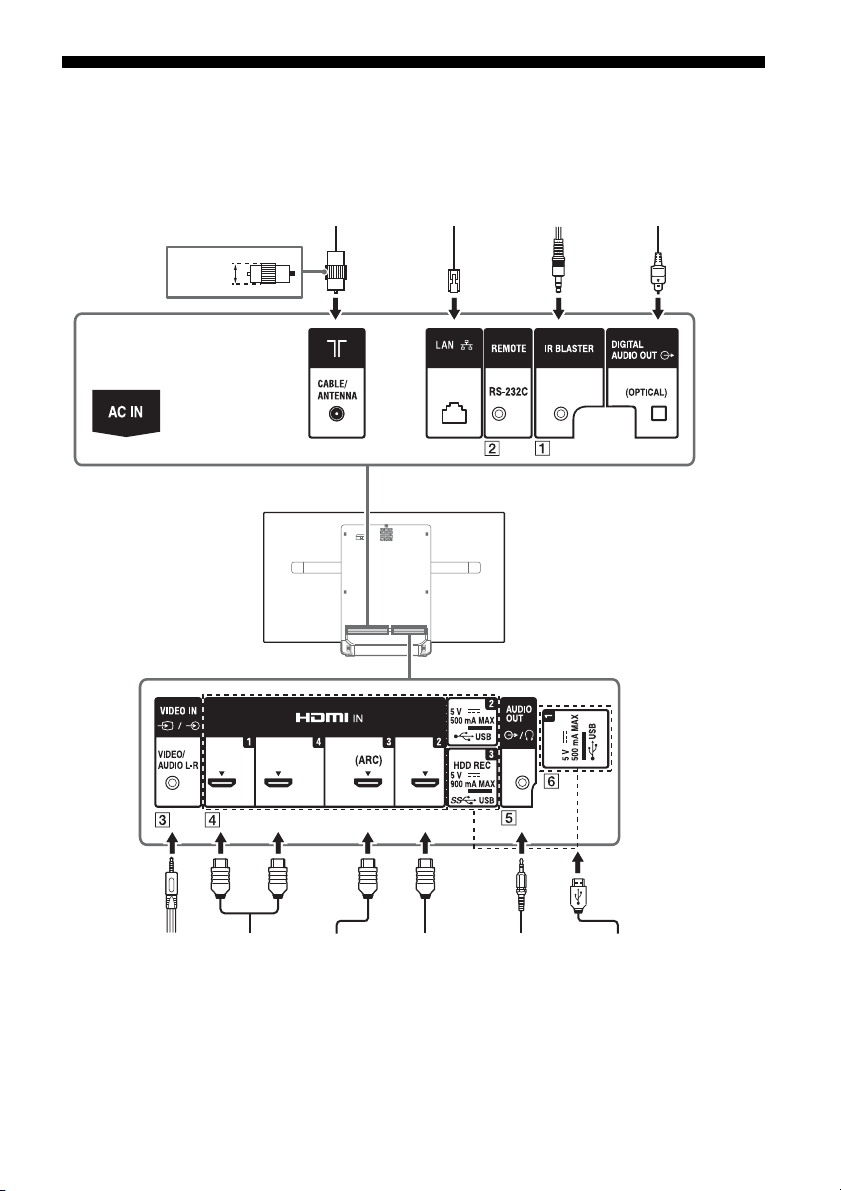
Schéma de connexion
Magnétoscope/
Matériel de jeu
vidéo/Lecteur DVD/
Caméscope
Système audio à
domicile avec
périphérique
ARC/HDMI
Périphér ique
HDMI
<14 mm
Câble/Antenne
Casque/Système
audio à domicile/
Caisson de graves
Appareil photo
numérique/
caméscope/support
de stockage USB
Péri phéri que
HDMI
Système audio
à domicile
avec entrée
audio optique
Routeur IR Blaster
Pour plus d’informations sur les connexions, référez-vous Guide d’aide en appuyant sur la touche
HELP de la télécommande.
10
FR
Page 33
FR
Remarque
3,5 mm
1234
1 : L
2 : Vidéo
3 : Terre
4 : R
< 21 mm
< 12 mm
Les signaux d’image des vidéos en définition standard (SD)
possèdent une résolution verticale de 480 (NTSC) ou 576
(PAL/SECAM) lignes.
Les signaux d’image des vidéos en haute définition (HD)
possèdent une résolution verticale de 720 ou 1 080 lignes.
(Pour la résolution verticale 4K : 2 160 lignes)
Qualité d’image
•Câble composite AV
• Câble d’antenne
•Câble composante
•Câble HDMI
IR BLASTER*
REMOTE RS-232C
Cette borne est réservée à l’utilisation du
service.
/ VIDEO IN
• Dans le cas d’une connexion composite,
utilisez un câble d’extension analogique
(non fourni).
•
HDMI IN 1/2/3/4
• En cas de raccordement à un système
audio numérique compatible avec la
technologie Audio Return Channel (ARC),
utilisez HDMI IN 3. Sinon, un raccordement
supplémentaire avec DIGITAL AUDIO OUT
(OPTICAL) est nécessaire.
•
AUDIO OUT /
• Prend en charge une prise stéréo mini à 3
pôles uniquement.
• Pour écouter le son du téléviseur par
l’intermédiaire de l’appareil raccordé,
appuyez sur HOME. Sélectionnez
[Paramètres] [Son] [Sortie casque/
audio], puis sélectionnez l’élément de
votre choix.
USB 1/2, USB3 (HDD REC)*
• Le raccordement d’un grand périphérique
USB peut interférer avec les autres
périphériques raccordés.
• Pour raccorder un grand périphérique
USB, branchez-le à la prise USB 1.
* Uniquement pour certaines régions, certains pays ou
certains modèles de téléviseur.
• Assurez-vous de conserver la protection latérale dans
un endroit sûr pour utilisation ultérieure.
FR
11
Page 34
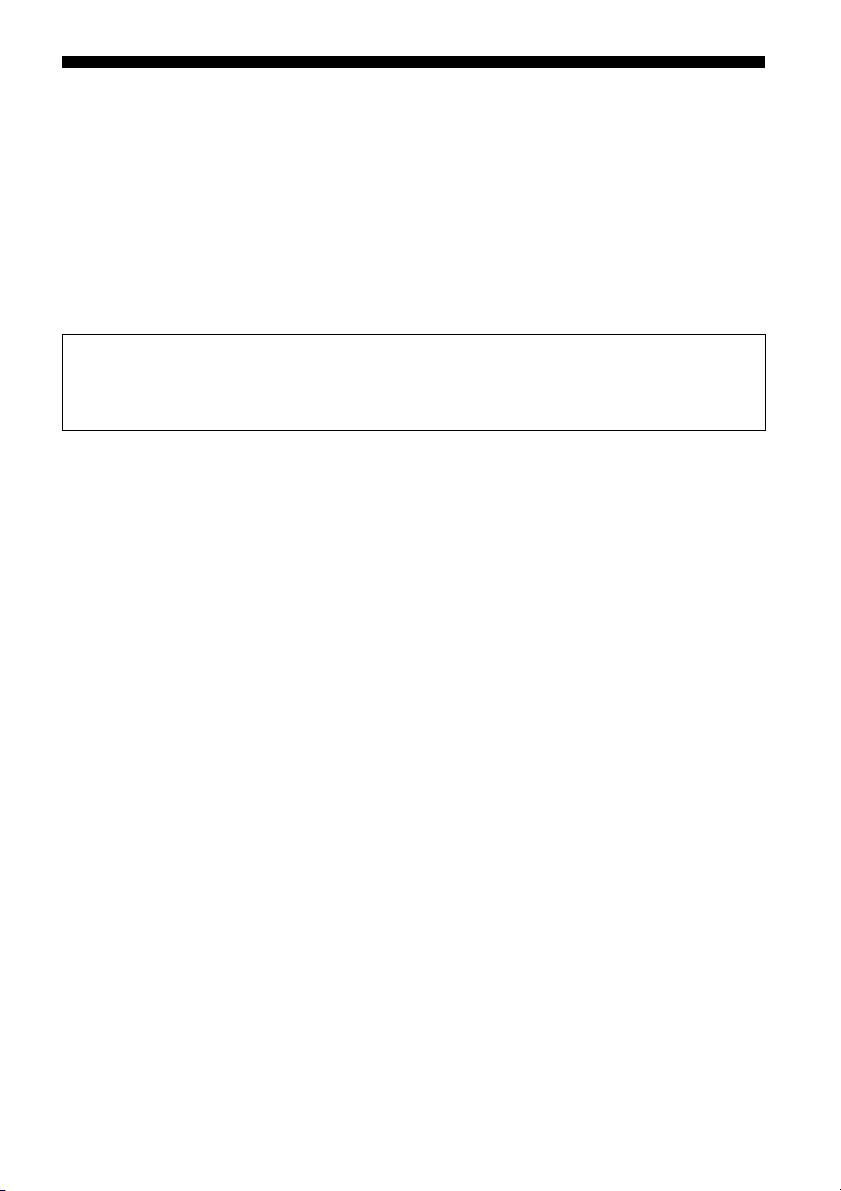
Installation du téléviseur au mur
Remarque
Ce mode d’emploi du téléviseur illustre seulement les étapes nécessaires à la préparation de
son installation avant sa fixation au mur.
A l’attention des clients :
Pour protéger le produit et pour des raisons de sécurité, Sony conseille vivement de confier
l’installation de votre téléviseur à des revendeurs ou des installateurs agréés Sony. N’essayez
pas de l’installer vous-même.
A l’attention des revendeurs et installateurs Sony :
Soyez particulièrement attentif à la sécurité pendant l’installation, l’entretien périodique et
l’examen du produit.
Une certaine expérience est requise pour installer ce produit, en particulier pour déterminer la résistance du
mur qui devra supporter le poids du téléviseur. Veillez à confier la fixation de ce produit au mur à un
revendeur Sony ou un installateur agréé et apportez une attention suffisante à la sécurité pendant
l’installation. Sony n’est responsable d’aucun dégât ou blessure provoqué par une erreur de manipulation ou
installation incorrecte.
Utilisez le support de fixation murale SU-WL450 (non fourni) pour installer le téléviseur au mur.
Lorsque vous installez le support de fixation mural, reportez-vous également au Mode d’emploi et au
Guide d’installation fournis avec le support de fixation mural.
• Les vis que vous retirez doivent être rangées en lieu sûr, hors de portée des enfants.
• Veillez à tenir le téléviseur lorsque vous le préparez à l’installation murale.
• Veuillez insérer les protections de coin après avoir fixé le téléviseur au mur.
FR
12
Page 35
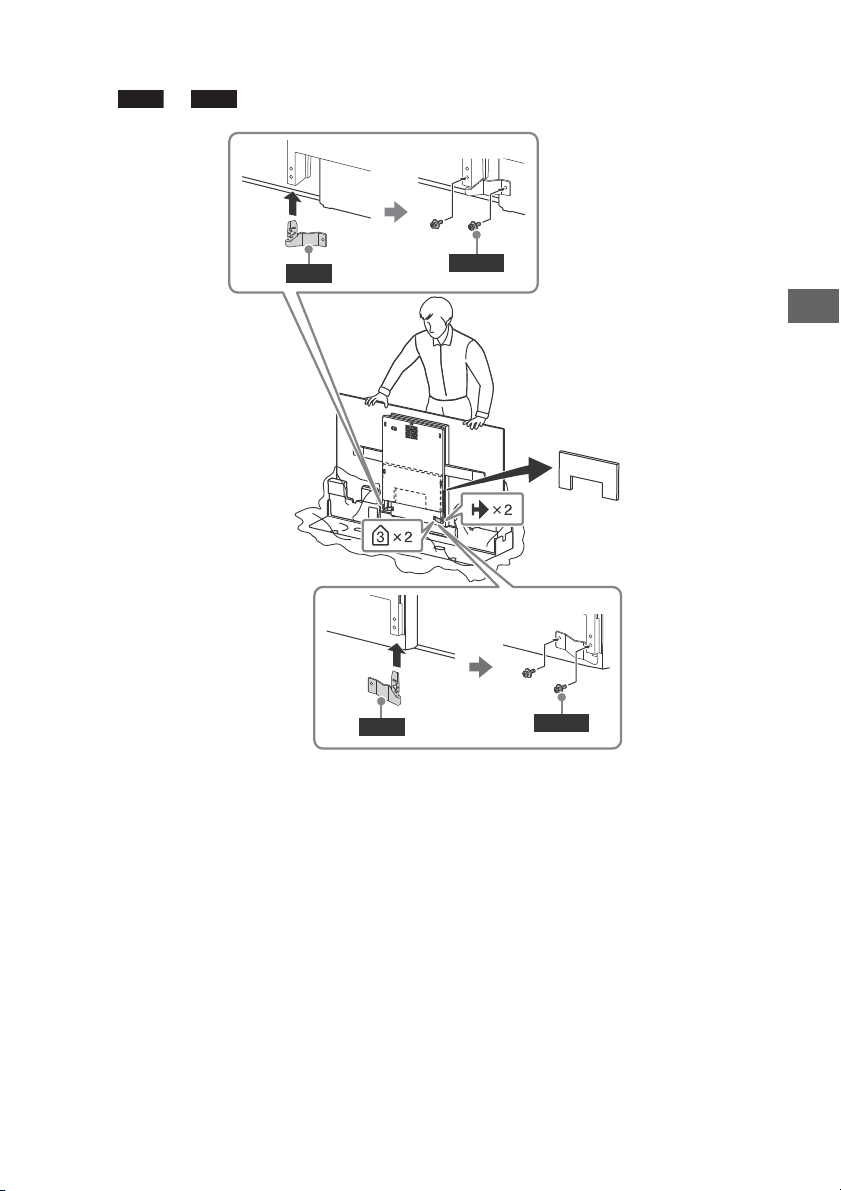
FR
Remarque
WM1
WM2
M4L12
WM1
M4L12
WM2
Installation du téléviseur au murà partir du carton
Fixez et (fournis avec le téléviseur) à l’arrière du téléviseur.
• Si vous utilisez un tournevis électrique, réglez le couple à environ 1,5 N·m {15 kgf·cm}.
FR
13
Page 36
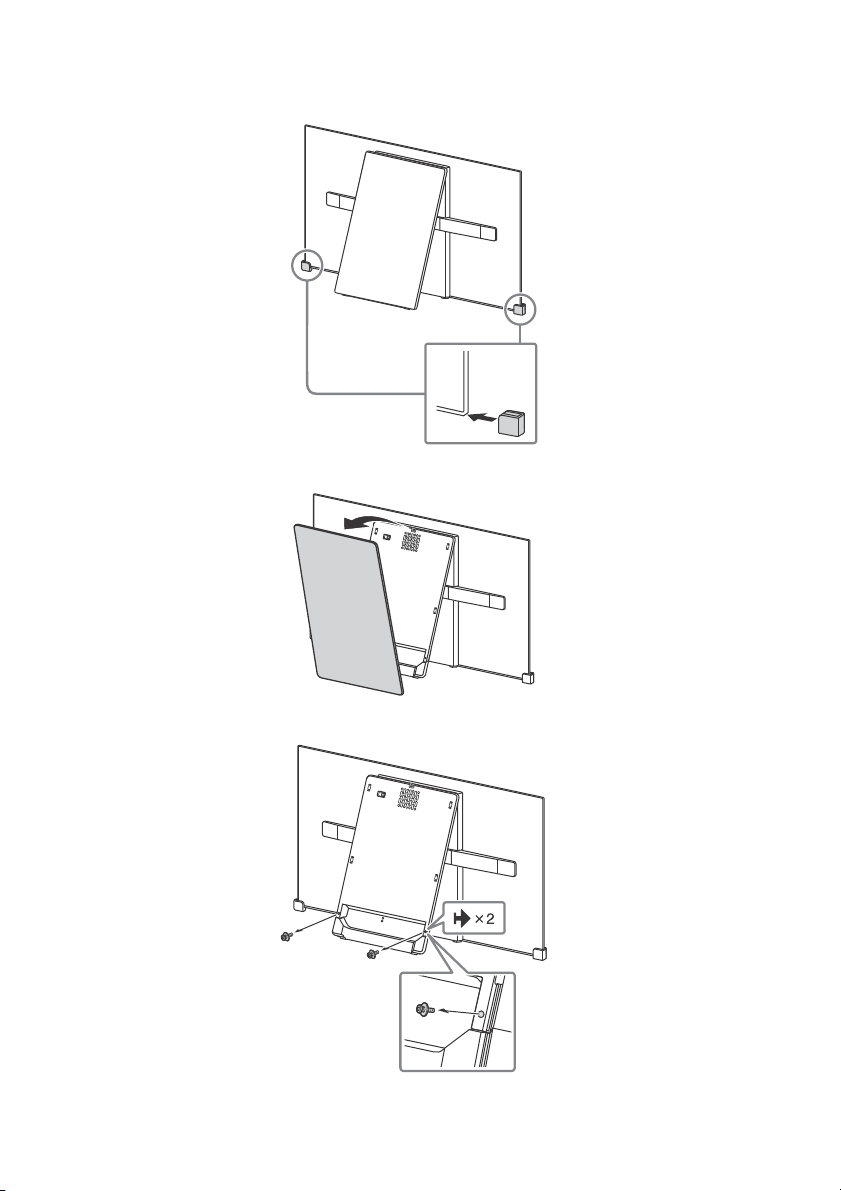
Installation du téléviseurau mur à partir dusupport de table
1 Insérez les protections de coin.
2 Retirez le couvercle central.
3 Retirez les vis.
FR
14
Page 37
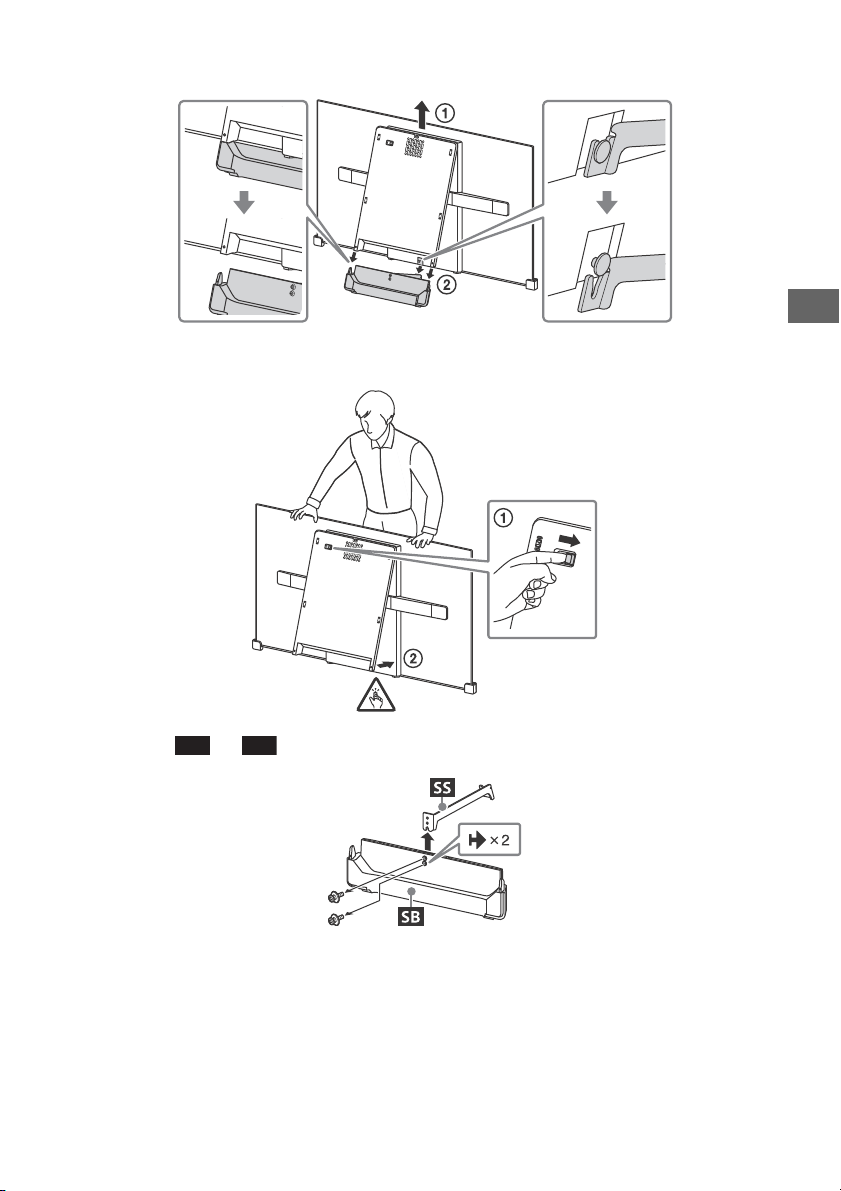
FR
4 Détachez la base du support.
SS
SB
5 Fermez le bloc central en relâchant le verrou de charnière.
6 Détachez de .
FR
15
Page 38
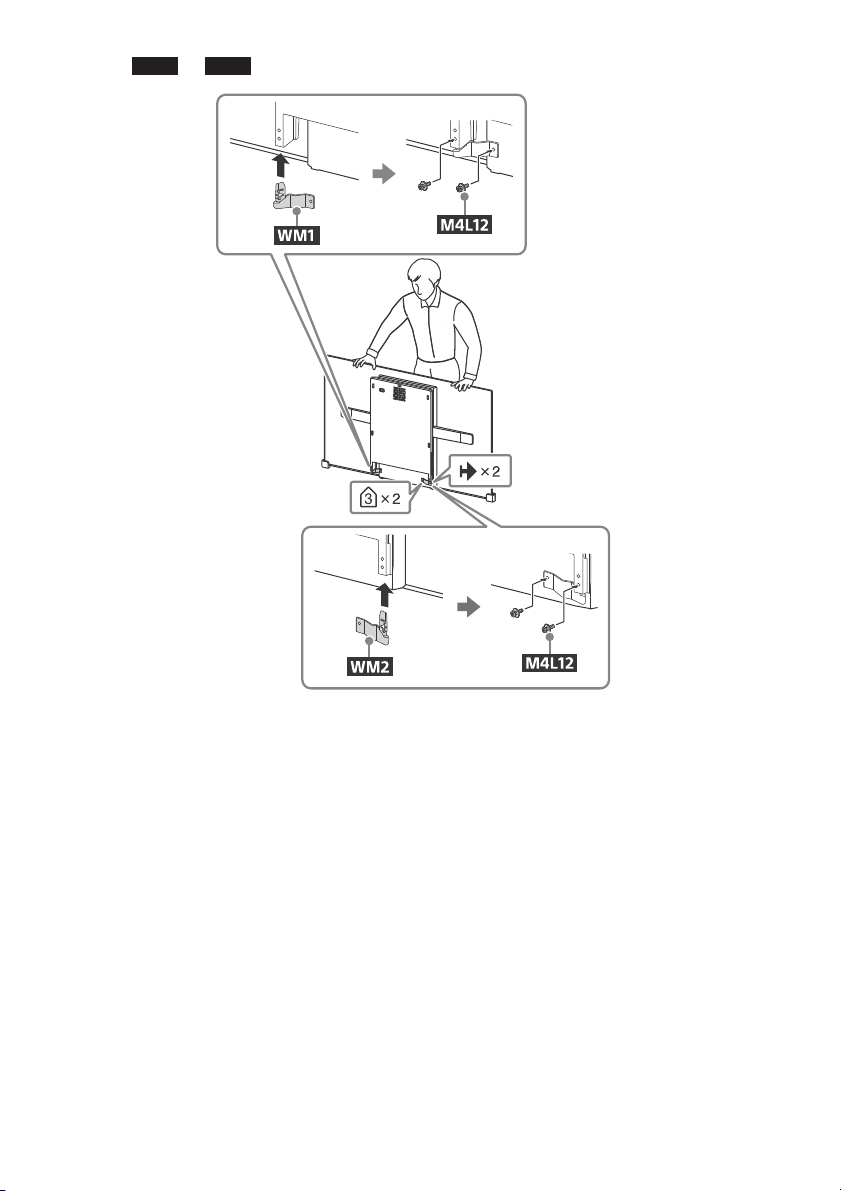
7 Fixez et (fournis avec le téléviseur) à l’arrière du téléviseur.
Remarque
WM1
WM2
• Si vous utilisez un tournevis électrique, réglez le couple à environ 1,5 N·m {15 kgf·cm}.
FR
16
Page 39
FR
Remarque
Point central de l’écran
Fixation
standard
Montage
fin
SU-WL450
1 Assurez-vous que le mur dispose d’un espace suffisant pour le téléviseur qu’il peut
supporter un poids équivalent à au moins quatre fois celui du téléviseur.
Reportez-vous au tableau suivant lorsque vous installez le téléviseur au mur. Voir
page 21-23 (Spécifications) pour connaître le poids du téléviseur.
Unité : mm
Nom du
Dimensions d’affichage
modèle
KD-
77A1 1 721 997 99 604 162 120
65A1 1 451 834 93 514 149 107
55A1 1 228 711 153 514 149 107
Dimension
du centre
écran
Longueur pour le montage
Fixation
standard
Montage
fin
• Les valeurs indiquées dans le tableau peuvent être légèrement différentes selon l’installation.
• Lorsque votre téléviseur est installé au mur, sa partie supérieure est légèrement inclinée vers l’avant.
FR
17
Page 40
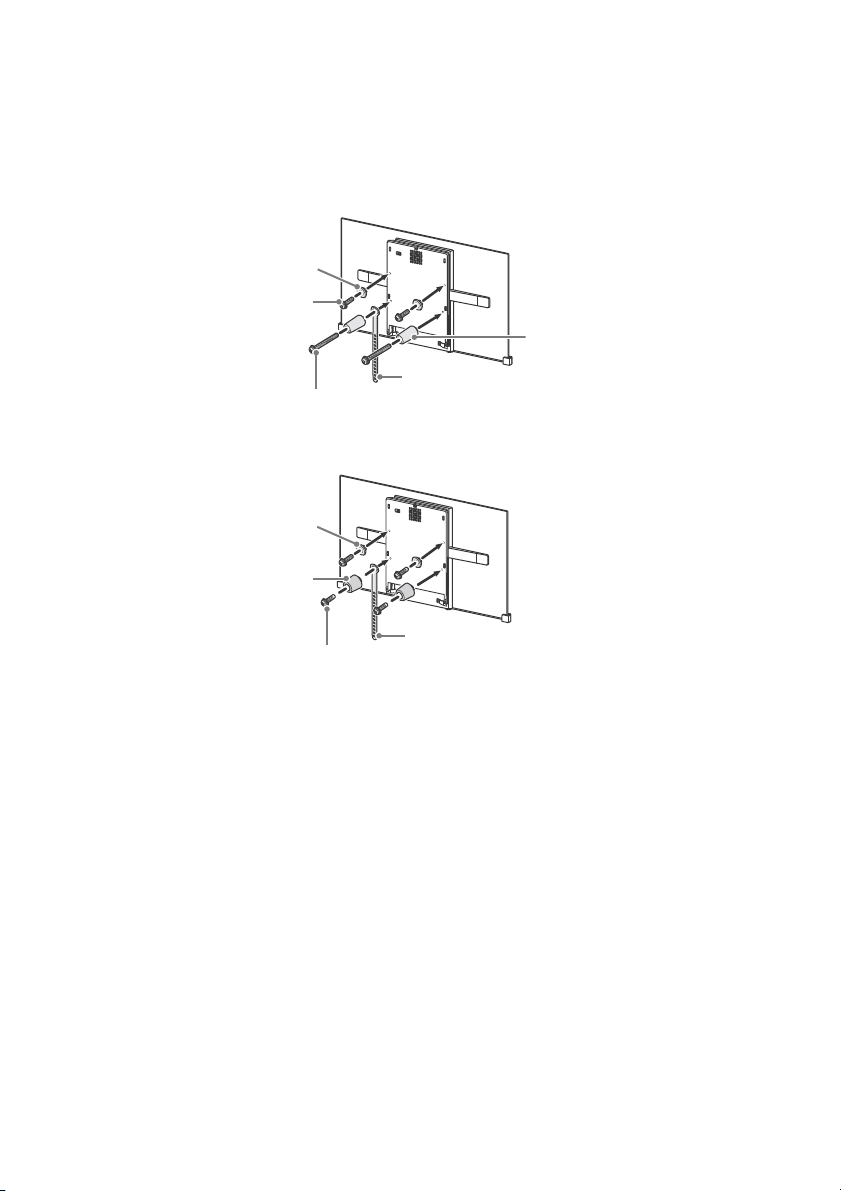
2 Fixez les éléments de l’accessoire du support de fixation mural. Vérifiez les éléments de
Remarque
Remarque
Vis (+PSW 6 x 20)
Poulie
Entretoise (60 mm)
Vis (+PSW 6 x 50)
Courroie
Poulie
Entretoise (20 mm)
Vis (+PSW 6 x 20)
Courroie
l’accessoires en vous reportant à « 1 » du Guide d’installation du support de fixation mural.
• Si vous utilisez un tournevis électrique, réglez le couple à environ 1,5 N·m {15 kgf·cm}.
• Veillez à ranger en lieu sûr les pièces excédentaires en vue d’une utilisation future. Conservez ce manuel pour
toute référence ultérieure.
Fixation standard
Montage fin
3 Raccordez les câbles requis au téléviseur.
• Une fois le téléviseur fixé au mur, vous ne pouvez plus accéder à aucune des bornes.
FR
18
Page 41
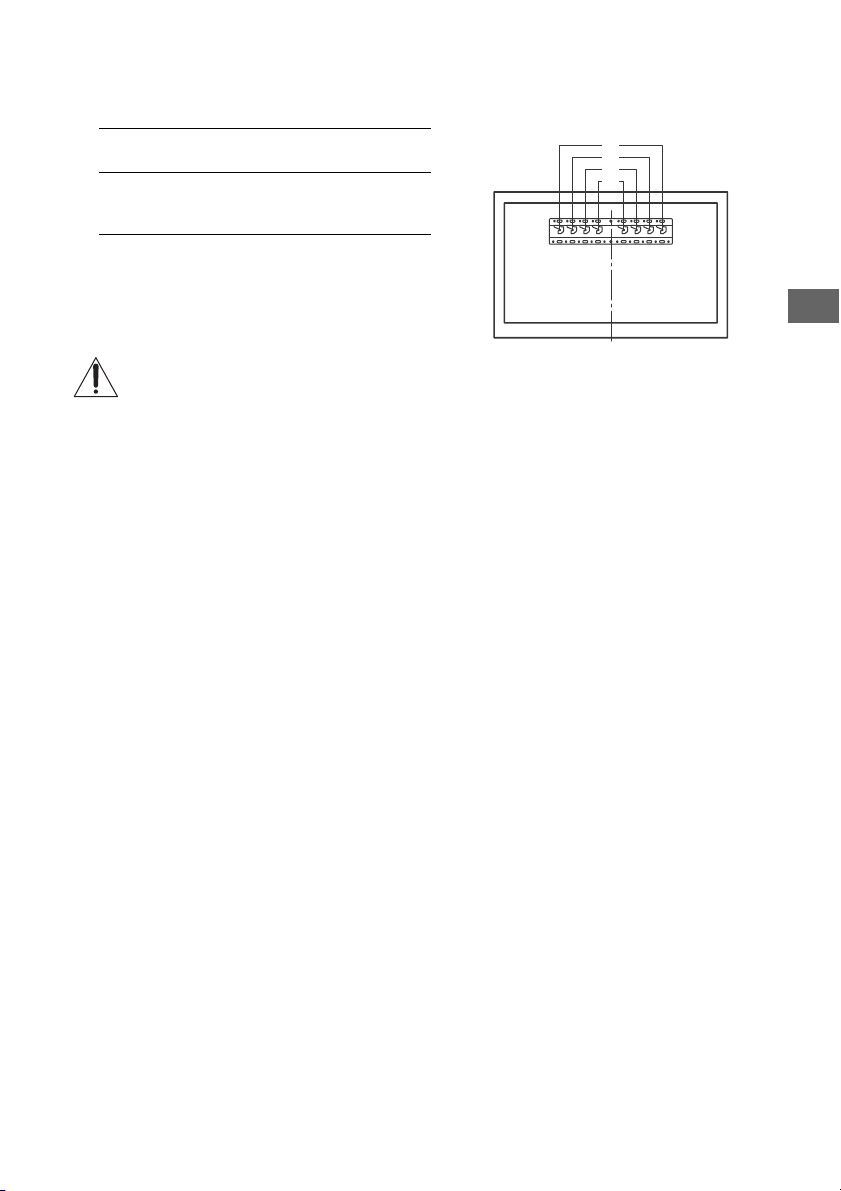
FR
a
b
c
d
4 Installez le téléviseur sur la base. Reportez-vous à « 5 » dans le Guide d’installation et à
« Installation du téléviseur au mur » dans le Mode d’emploi fourni avec le support de
fixation mural.
Nom du modèle
KD-
77A1
65A1
55A1
Reportez-vous aux instructions qui accompagnent le support de fixation murale de votre modèle pour installer le
téléviseur au mur.
Emplacements des
crochets
a
FR
19
Page 42
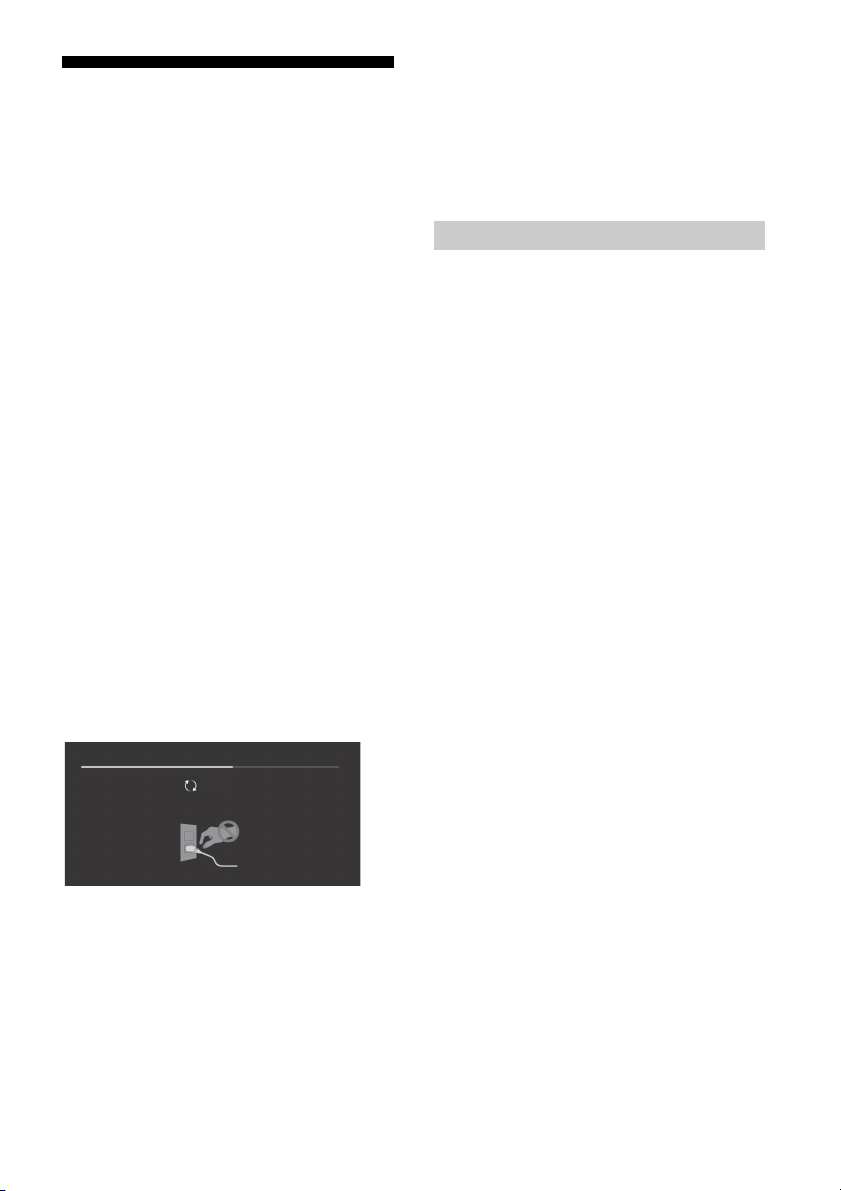
Dépannage
Updating...
Dépannage général pour les problèmes tels
que : écran noir, absence de son, image figée,
téléviseur ne réagissant pas ou perte de réseau,
suivez les étapes suivantes.
1 Redémarrez votre téléviseur en appuyant sur
la touche d’alimentation de la télécommande
jusqu’à ce qu’un message s’affiche. Le
téléviseur redémarre. Si le téléviseur n’est pas
rétabli, essayez de débrancher le cordon
d’alimentation secteur du téléviseur pendant
trois minutes puis rebranchez-le.
2 Référez-vous au menu d’aide en appuyant
sur la touche HELP de la télécommande.
3 Raccordez votre téléviseur à Internet et
effectuez une mise à jour du logiciel.
4 Visitez le site Web de support Sony
(informations fournies sur le couvercle
arrière).
Lorsque le message [Une nouvelle mise à jour
logicielle du système de la TV est
disponible…] s’affiche.
Sony vous recommande de mettre à jour le
logiciel du téléviseur en sélectionnant [Mise à
jour maint.]. Ces mises à jours du logiciel
améliorent la performance de votre téléviseur
ou ajoutent de nouvelles fonctionnalités.
L’écran suivant avec [Updating…] (Mise à jour…)
s’affiche et l’éclairage LED clignote en blanc
pendant la mise à jour du logiciel.
Ne débranchez pas le cordon d’alimentation
secteur pendant la mise à jour du logiciel. En
effet, la mise à jour du logiciel risquerait de ne
pas être menée à son terme et cela pourrait
altérer le bon fonctionnement du logiciel. Les
mises à jour du logiciel peuvent prendre jusqu’à
15 minutes.
Lorsque vous branchez le téléviseur, ce
dernier risque de ne pas pouvoir se mettre
sous tension immédiatement même si vous
appuyez sur la touche d’alimentation de la
télécommande ou du téléviseur.
L’initialisation du système prend du temps.
Patientez environ une minute, puis
recommencez.
Problèmes et solutions
Lorsque la LED d’éclairage clignote en rouge.
Comptez le nombre de clignotements (le temps
d’intervalle est de trois secondes).
Réinitialisez le téléviseur en débranchant le
cordon d’alimentation secteur pendant trois
minutes, puis allumez le téléviseur sous tension.
Si le problème persiste, déconnectez le cordon
d’alimentation secteur et contactez votre
revendeur ou le Centre de Service Après-Vente
Sony en indiquant le nombre de clignotements la
LED d’éclairage.
Absence d’image (écran noir) et de son.
Vérifiez le raccordement de l’antenne/câble.
Raccordez le téléviseur à l’alimentation secteur et
appuyez sur la touche du téléviseur ou de la
télécommande.
Impossible de syntoniser certains
programmes.
Vérifiez le raccordement de l’antenne/câble.
La télécommande ne fonctionne pas.
Remplacez les piles.
Le contrôle parental pour le mot de passe de
diffusion a été oublié.
Saisissez 9999 comme code PIN et sélectionnez
[Modifiez le code PIN].
La température augmente autour du
téléviseur.
Si vous utilisez le téléviseur pendant une période
prolongée, la température augmente dans la
zone qui l’entoure.
Si vous le touchez, vous remarquerez peut-être
qu’il est chaud.
L’écran s’assombrit alors que vous regardez le
téléviseur.
Si l’image entière ou une partie de l’image
demeure immobile, la luminosité de l’écran est
progressivement réduite afin d’éviter la
rémanence d’image. Il ne s’agit pas d’un
dysfonctionnement du téléviseur.
20
FR
Page 43
FR
Remarque
La rémanence d’image vous inquiète.
Si la même image s’affiche plusieurs fois ou
pendant une période prolongée, la rémanence
d’image est possible. Vous pouvez effectuer
manuellement une actualisation du panneau
pour réduire la rémanence d’image.
• Effectuez une actualisation du panneau uniquement
lorsque la rémanence d’image est particulièrement
visible. Effectuez-la une seule fois par an. Évitez de
l’effectuer plus souvent, car elle peut réduire la durée
de vie du panneau.
• Les images comportant des horloges, logos ou
couleurs vives (y compris du blanc) causent
facilement la rémanence d’image. Évitez d’afficher
ces types d’images pendant des périodes
prolongées, car cela pourrait provoquer une
rémanence d’image.
Une ligne blanche apparaît à l’écran.
L’actualisation du panneau s’exécute
automatiquement pour réduire la rémanence
d’image après que le téléviseur a été utilisé
pendant des périodes prolongées. L’actualisation
du panneau démarre après la mise hors tension
du téléviseur et dure environ une heure. Une ligne
blanche peut s’afficher à l’écran lors de
l’actualisation du panneau. Il ne s’agit pas d’un
dysfonctionnement du téléviseur.
Le message [L'actualisation du panneau ne
s'est pas terminée…] s’affiche.
L’actualisation du panneau s’exécute
automatiquement pour réduire la rémanence
d’image après que le téléviseur a été utilisé
pendant des périodes prolongées. Si le
téléviseur est mis sous tension, le cordon
d’alimentation secteur est débranché ou la
température ambiante sort de la plage de 10 ºC
à 40 ºC pendant l’actualisation du panneau, le
processus ne se termine pas et ce message
apparaît.
Si l’actualisation du panneau a démarré
automatiquement, elle redémarre lorsque vous
mettez le téléviseur hors tension avec la
télécommande.
Si l’actualisation du panneau a été lancée
manuellement, vous devez la sélectionner à
nouveau.
Spécifications
Norme
Type d’affichage
Panneau OLED (diode électroluminescente
organique)
Norme de télévision
Selon le choix de votre pays/région
Analogique : B/G, I, D/K, M
Numérique : DVB-T/DVB-T2
Système de couleurs
PAL, SECAM, NTSC3.58, NTSC4.43
Canaux couverts
Selon le choix de votre pays/région
Analogique : UHF/VHF/Câble
Numérique : UHF/VHF
Sortie son
10 W + 10 W + 10 W + 10 W + 10 W
Technologie sans fil
Protocole IEEE802.11ac/a/b/g/n
(Il est possible que IEEE802.11ac ne soit pas
disponible dans tous les pays/régions.)
Bluetooth Version 4.1
Prises d’entrée/sortie
Câble d’antenne
Borne 75 ohms externe pour VHF/UHF
/ VIDEO IN
Entrée audio/vidéo (mini-prise)
HDMI IN 1, 2, 3, 4 (accepte une résolution de 4k,
Compatible HDCP 2.2)
Vidéo :
4096 × 2160p (50, 60 Hz)*
1
(24 Hz)*
, 3840 × 2160p (50, 60 Hz)*2,
3840 × 2160p (24, 25, 30 Hz), 1080p (30, 50,
60 Hz), 1080/24p, 1080i (50, 60 Hz), 720p (30,
50, 60 Hz), 720/24p, 576p, 576i, 480p, 480i,
Formats PC*
*1Si la valeur d’entrée est 4096 x 2160p et que
2
*
3
*
Audio : PCM linéaire 5,1 canaux : 32, 44,1, 48, 88,2,
96, 176,4 et 192 kHz, 16, 20 et 24 bits, Dolby
Digital, Dolby Digital Plus et DTS
3
[Mode Large] est réglé sur [Normal], la
résolution s’affiche à 3840 x 2160p. Pour afficher
au format 4096 x 2160p, réglez le paramètre
[Mode Large] sur [Etiré 1] ou [Etiré 2].
HDMI IN 2 / 3 uniquement.
Reportez-vous au Guide d’aide pour plus de
détails.
ARC (Audio Return Channel) (HDMI IN 3
uniquement)
(PCM linéaire deux canaux : 48 kHz, 16 bits, Dolby
Digital, Dolby Digital Plus, DTS)
1*2
, 4096 × 2160p
FR
21
Page 44
DIGITAL AUDIO OUT (OPTICAL)
Remarque
Prise optique numérique (PCM linéaire deux
canaux : 48 kHz, 16 bits, Dolby Digital, DTS)
AUDIO OUT / (mini-prise stéréo)
Casque, sortie audio, caisson de graves
1, 2, 3 (HDD REC)*
1
Port de périphérique USB. ( 3 Disque dur
USB pour la fonction REC)
Les ports USB 1 et 2 prennent en charge la High
Speed USB (USB2.0).
Le port USB 3 prend en charge la Super Speed
USB (USB3.0)
LAN
Connecteur 10BASE-T/100BASE-TX (La vitesse de
connexion du réseau peut varier en fonction de
l’environnement d’exploitation. Le débit et la
qualité de la communication 10BASE-T/
100BASE-TX ne sont pas garantis pour ce
téléviseur.)
REMOTE
RS-232C, mini-prise
(Cette borne est réservée à l’utilisation du
service.)
IR BLASTER*
1
Entrée de câble IR Blaster (mini-prise)
Autres
Accessoires en option
Support de fixation murale : SU-WL450
Températures de fonctionnement
0 ºC – 40 ºC
Alimentation et autres
Tension d’alimentation
110 V - 240 V CA, 50/60 Hz
Classe d’efficacité énergétique*
KD-65A1 : A
KD-55A1 : B
Taille d’écran (mesurée en diagonale) (Environ.)
KD-77A1 : 77 pouces / 194,7 cm
KD-65A1 : 65 pouces / 163,9 cm
KD-55A1 : 55 pouces / 138,8 cm
Consommation électrique
Indiqué à l’arrière du téléviseur
Consommation électrique*
En mode [Standard]
KD-65A1 : 154 W
KD-55A1 : 135 W
En mode [Intense]
KD-65A1 : 477 W
KD-55A1 : 357 W
Consommation électrique annuelle
moyenne*
2*3
KD-65A1 : 214 kWh
KD-55A1 : 187 kWh
2
2
Consommation électrique en veille*2*4*
5
0,50 W
Résolution d’affichage
3 840 points (horizontal) × 2 160 lignes (vertical)
Puissance de sortie nominale
USB 1/2 : 5 V, 500 mA MAX
USB 3 : 5 V, 900 mA MAX
Dimensions (Environ.) (l × h × p)
Avec support de table
KD-77A1 : 1 721 × 993 × 399 mm
KD-65A1 : 1 451 × 832 × 339 mm
KD-55A1 : 1 228 × 710 × 339 mm
Sans support de table
KD-77A1 : 1 721 × 997 × 99 mm
KD-65A1 : 1 451 × 834 × 86 mm
KD-55A1 : 1 228 × 711 × 86 mm
Poids (Environ.)
Avec support de table
KD-77A1 : 45,3 kg
KD-65A1 : 36,2 kg
KD-55A1 : 28,8 kg
Sans support de table
KD-77A1 : 37,8 kg
KD-65A1 : 29,8 kg
KD-55A1 : 25,0 kg
*1Uniquement pour certaines régions, certains pays ou
certains modèles de téléviseur.
2
Ces informations s’appliquent à l’UE ainsi qu’aux pays
*
dont la législation applicable est conforme aux
règlements de l’UE en matière d’étiquetage
énergétique.
3
Consommation électrique par an, en considérant que
*
le poste reste allumé 4 heures par jour pendant 365
jours. La consommation réelle dépendra du mode
d’utilisation du téléviseur.
4
La consommation spécifiée en mode de veille est
*
atteinte une fois que le téléviseur a terminé tous les
processus internes nécessaires.
5
La consommation électrique en veille augmentera
*
lorsque votre téléviseur sera connecté au réseau.
• La disponibilité des accessoires en option varie selon
les pays, les régions, les modèles de téléviseur et les
stocks.
• La conception et les spécifications sont sujettes à
modification sans préavis.
FR
22
Page 45
FR
Remarques sur la fonction de télévision
numérique
• Toutes les fonctions relatives à la télévision
numérique ( ) ne sont valables que
dans les pays ou les régions où sont
diffusés des signaux numériques terrestres
DVB-T/DVB-T2 (MPEG-2 H.264/MPEG-4
AVC). Vérifiez auprès de votre revendeur si
vous pouvez capter un signal DVB-T/DVBT2 là où vous vivez.
• Ce téléviseur est conforme aux
spécifications DVB-T/DVB-T2, mais sa
compatibilité avec les émissions
numériques terrestres DVB-T/DVB-T2
futures n’est pas garantie.
• Il est possible que certaines fonctions de
télévision numérique ne soient pas
disponibles dans tous les pays/régions.
Informations sur les marques
commerciales
• Les termes HDMI et High-Definition
Multimedia Interface ainsi que le logo
HDMI sont des marques commerciales ou
des marques déposées de HDMI Licensing,
LLC aux États-Unis et dans d’autres pays.
• Fabriqué sous licence de Dolby
Laboratories.
Dolby, Dolby Audio et le symbole double-D
sont des marques de Dolby Laboratories.
• « BRAVIA » et sont des marques
de Sony Corporation.
• Gracenote, Gracenote eyeQ, Gracenote
VideoID, Gracenote Video Explore, le logo
et le graphisme Gracenote ainsi que le logo
« Powered by Gracenote » sont des
marques commerciales ou des marques
déposées de Gracenote aux États-Unis et/
ou dans d’autres pays.
• Opera® Devices SDK. Copyright 1995-2016
Opera TV AS. All rights reserved.
• Wi-Fi, Wi-Fi Direct, Miracast, Wi-Fi
Protected Setup et le logo Wi-Fi CERTIFIED
sont des marques commerciales ou des
marques déposées de Wi-Fi Alliance.
• Pour les brevets DTS, visitez
http://patents.dts.com. Fabriqué sous
licence de DTS, Inc.
DTS, le symbole, & DTS et le symbole
utilisés conjointement sont des marques
déposées tandis que DTS Digital Surround
est une marque commerciale de DTS, Inc.
© DTS, Inc. Tous droits réservés.
• Les logos et le mot de marque Bluetooth®
sont des marques déposées appartenant à
Bluetooth SIG, Inc. et toute utilisation de
ces marques par Sony Corporation est
couverte par une licence. Les autres
marques commerciales et noms de marque
appartiennent à leurs propriétaires
respectifs.
• TUXERA est une marque déposée de
Tuxera Inc. aux États-Unis et dans d’autres
pays.
• Le logo USB-IF SuperSpeed USB Trident est
une marque déposée de USB
Implementers Forum, Inc.
23
FR
Page 46

FR
Résolution actuelle :
3 840 x 2 160 pixels.
24
Page 47

Page 48

Содержание
Примечание
Сведения по безопасности . . . . . . . . . . . . . 2
Меры предосторожности . . . . . . . . . . . . . . 5
Защита экрана телевизора (OLED-
телевизор) . . . . . . . . . . . . . . . . . . . . . . . . . . . 6
Детали и элементы управления . . . . . . 7
Элементы управления и индикаторы. . . . 7
Использование пульта
дистанционного управления . . . . . . . . . 8
Описание частей пульта ДУ . . . . . . . . . . . . 8
Схема подключения . . . . . . . . . . . . . . . 10
Установка телевизора на стену. . . . . . 12
SU-WL450 . . . . . . . . . . . . . . . . . . . . . . . . . . . 17
Поиск неисправностей . . . . . . . . . . . . . 20
Поиск и устранение неисправностей . . .20
Технические характеристики. . . . . . . . 22
Введение
Благодарим Вас за то, что Вы выбрали этот телевизор Sony.
Перед первым включением телевизора внимательно
ознакомьтесь с данной инструкцией по эксплуатации и
сохраните ее для консультаций в будущем.
• Перед началом работы с телевизором прочитайте раздел
“Сведения по безопасности” (стр. 2).
• Инструкции “Установка телевизора на стену” содержатся в
данном руководстве по эксплуатации телевизора.
• Рисунки и изображения, используемые в документе
“Руководство по установке” и в настоящем руководстве,
представлены только для справки и могут отличаться от
фактического изделия.
Расположение руководства по установке
Руководство по установке расположено сверху упаковки в
картонной коробке телевизора.
Справка/справочное руководство
В справке содержится большой объем информации об этом
телевизоре. В справке содержится большой объем
информации об этом телевизоре. Для использования
справки, нажмите кнопку HELP на пульте дистанционного
управления. Сведения об использовании, а также поиске
неисправностей можно найти в списке или с помощью поиска
по ключевым словам. Выберите пункт [Справочное
руководство] в меню справки для просмотра руководства.
Если телевизор подключен к Интернету, справка и
информация будут обновляться.
Расположение идентифицирующей
этикетки
Наклейки с номером модели и потребляемой мощностью
расположены на задней панели телевизора. Они
расположены под центральной крышкой.
Сведения по безопасности
ПРЕДУПРЕЖДЕНИЕ
Батарейки не должны подвергаться чрезмерному нагреву,
например, вследствие воздействия солнечных лучей, огня и
т.п.
Никогда не устанавливайте телевизор на неустойчивой
поверхности. Телевизор может упасть и стать причиной
серьезных травм и даже смерти. Во избежание различных
травм, в особенности для детей, необходимо соблюдать
следующие меры предосторожности.
Используйте стойки или подставки, рекомендованные
производителем телевизора.
Испо льзуйте только такую мебе ль, которая может надежно
поддерживать устройство.
Убедитесь, что телевизор не выступает за края опорной
мебели.
Не устанавливайте устройство на высокой мебели
(например, на стенных или книжных шкафах) без
надлежащего крепления мебели и телевизора к
подходящей о порной конструкции.
Перед установкой телевизора на по ддерживающую мебель
убедитесь, что на ней нет предметов из ткани или других
подобных материалов.
Разъясните детям, что влезать на мебель, чтобы добраться
до телевизора или его элементов управления, опасно.
Если телевизор установлен и его требуется переместить,
необходимо учесть указанные выш е факторы.
RU
2
Page 49
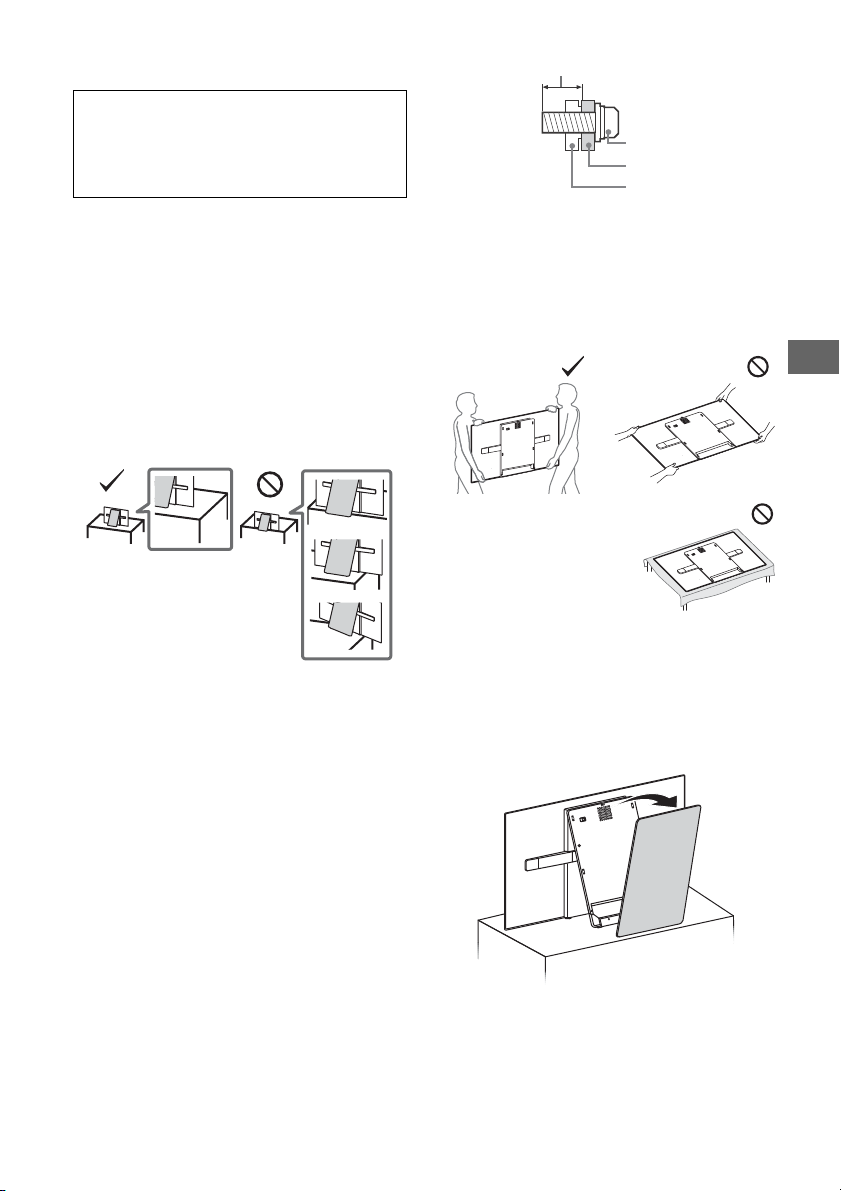
RU
Винт (M6)
Кронштейн для
настенной установ ки
10 мм - 14 мм
Задняя крышка
телевизора
Установка/подключение
Требуется существенный опыт при установке телевизора на
настольную подставку.
См. Руководство поустановке, прилагаемое к телевизору, дл
яустановкиподставки.
Компания Sony не несет ответственности за любые поломки
или травмы, вызван ные неправильным об ращением с
изделием или его неправильной установкой.
Во избежание возгорания, поражения электрическим током,
повреждения телевизора и/или травм выполняйте установку
и эксплуатацию телевизора в соответствии с
нижеследующими указаниями.
Установка
• Телевизор следует устанавливать вблизи легкодоступной
электророзетки переменного тока.
• Во избежание опрокидывания устройства, получения
травмы или повреждения имущества установите телевизор
на устойчивую ровную поверхность.
• Установите телевизор в таком месте, где его нельзя задеть
или опрокину ть.
• Установите телевизор таким образом, чтобы его нижняя
часть не выступала за подставку для телевизора (не
прилагается). Если нижняя часть телевизора выступает за
подставку для те левизора, телевизор может оп рокинуться и
упасть, что может привести к травме или повреждению
телевизора.
• В целях безопасности прикрепляйте центральную крышку к
задней панели телевизора, когда телевизор находится на
подставке.
• Настенная установка телевизор а должна выполняться
только квалифицированными специалистами сервисной
службы.
• По соображениям безопа сности настоятельно
рекомендуется использовать аксессуары Sony, в том числе:
Кронштейн для настенной установки SU-WL450
• Обязательно используйте винты, прилагаемые к
кронштейну для настенной установки, когда будете
прикреплять кронштейн для настен ной установки к
телевизору. При при соединении Кронштейн для настенной
установки к телевизору используйте только винты,
входящие в комплект кронштейна для настенной установки.
Конструкция поставляемых в комплекте винтов показана на
иллюстрации, где размеры указаны от поверхности
Кронштейн для настенной установки.
Использование винтов, отличных от входящих в комплект
поставки, может привести к повреждению телевизора или
вызвать его падение и т. д..
Перемещение
• Перед перемещением телевизора отсоедините от него все
кабели.
• Для перемещения большого тел евизора требуются два ил и
три человека.
• При переноске телевизора вручную держите его, как
показано ниже. Не прилагайте чрезмерных усилий к панели
и рамке вокруг экрана.
• При установке телевизора не
кладите его экраном вниз.
• При перевозке берегите телевизор от ударов и сильной
вибрации.
• Если необходимо доставить телевизор в ремонтную
мастерскую или перевезти в другое место, упакуйте его в
картонную коробку и упаковочный материал, в которых он
поставлялся изначально.
Предотвращение опрокидывания
1
Снимите центральную крышку.
RU
3
Page 50
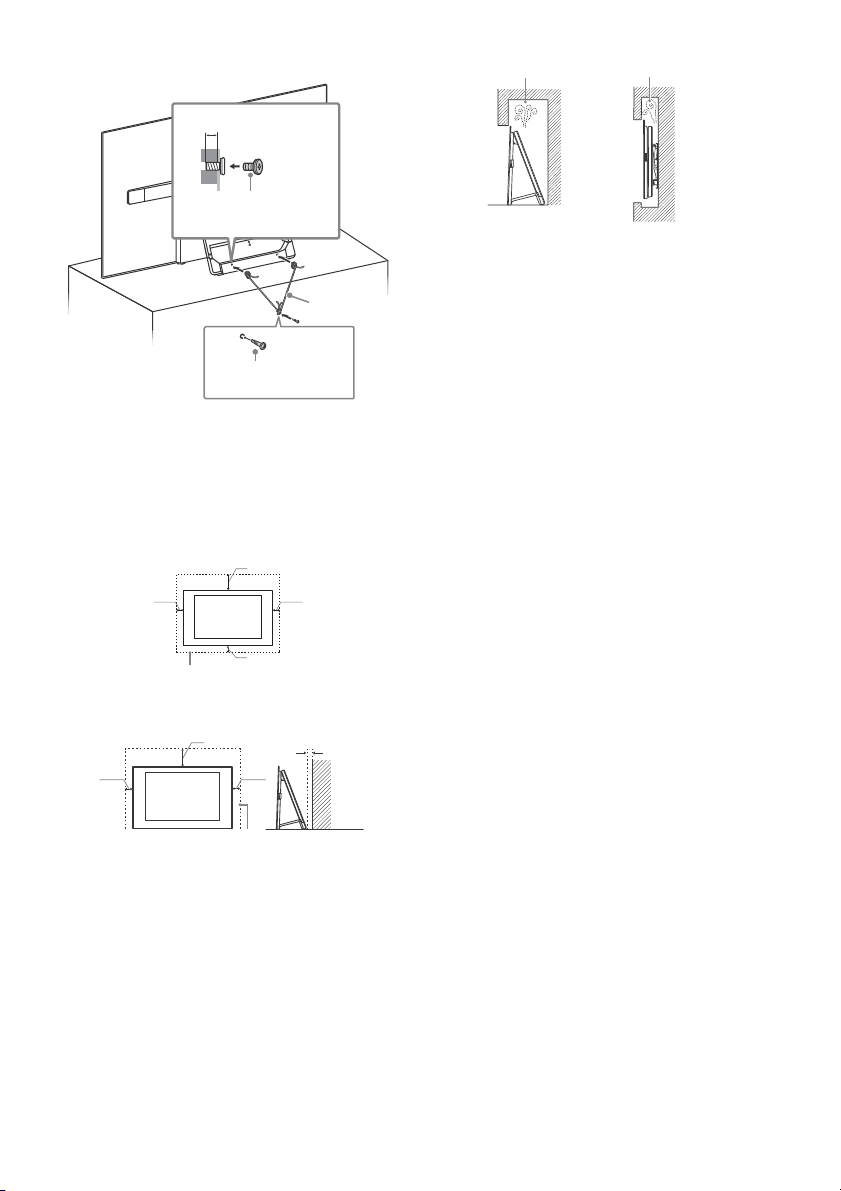
2 Закрепите телевизор на подставке для телевизора.
Примечание
10 мм - 14 мм
Винт M6 (не входит в
комплект)
Винт (не входит
в комплект)
Кабель (не
входит в
комплект)
30 см
10 см
10 см
10 см
Обеспечьте вокруг телевизора расстояние не
меньше указанного.
30 см
10 см 10 см
Обеспечьте вокруг телевизора ра сстояние
не меньше указанного.
1 см
Стена
Циркуляция воздуха нарушена.
Стена Стена
Вентиляция
• Никогда не перекрывайте вентиляционные отверстия и не
вставляйте в них никакие предметы.
• Остав ляйте свободное пространст во вокруг телевизора, как
показано на рисунке ниже.
• Для обеспечения надлежащей циркуляции воздуха
настоятельно рекомендуется использовать специальный
кронштейн для настенной установки производства
компании Sony.
Настенная установка
Кабель питания переменного тока
Во избежание возгорания, поражения электрическим током,
повреждения телевизора и/или травм обращайтесь со
шнуром питания переменного тока и электророзеткой в
соответствии с нижеследующими указаниями:
Форма вилки кабеля питания, которая поставляется вместе
с телевизором, зависит от региона. Подключите
прилагаемый кабель питания переменного тока с
соответствующей вилкой к электрической розетке.
Используйте только прилагаемый кабель питания
переменного тока Sony (не от других производителей).
Вста вляйте вилку в электрор озетку переменного то ка до
конца.
Используйте для питания телевизора только сеть
переменного тока напряжением 110 В – 240 В.
Выполняя кабельные соединения между оборудованием, в
целях безопасности выньте шнур питания переменного
тока из электророзетки и будьте осторожны, чтобы не
запнуться о кабели.
Перед выполнением каких-либо работ с телевизором или
его переноской отсоедините шнур питания переменного
тока от электророзетки переменного тока.
Шнур питания переменного тока не должен находиться
рядом с источниками тепла.
Регулярно чистите вилку ш нура питания переменного тока,
предварительно вынимая ее из розетки. Если на вилке
имеется пыль, в которой скапливается влага, это может
привести к повреждению изоляции и, как следствие, к
возгоранию.
Установка на подставке
• Для обеспечения надлежащей вентиляции и
предотвращения скопления грязи и пыли:
Не кла дите телевизор экраном вниз; не устанавливайте
телевизор перевернутым нижней стороной вверх, задом
наперед или набок.
Не устанавливайте телевизор на полке, ковре, кровати
или в шкафу.
Не накрывайте телевизор тканью, например,
занавесками, а также газетами и т.п.
Не устанавливайте телевизор так, как показано на
RU
4
рисунке ниже.
• Не используйте прилагаемый кабель питания переменного
тока с другим оборудованием.
• Не пережимайте, не перегибайте и не перекручивайте
шнур питания переменного тока, прилагая излишние
усилия. В противном случае могут оголиться или
переломиться внутренние жилы кабеля.
• Не изменяйте конструкцию шнура питания переменного
тока.
• Не ставьте и не кладите никакие тяжелые предметы на
шнур питания переменного тока.
• Вынимая шнур питания переменного тока из
электророзетки, не тяните за сам шнур.
• Не подключайте слишком много приборов к одной
электророзетке переменного тока.
• Не пользуйтесь электророзеткой переменного тока с
плохими контактами.
Page 51
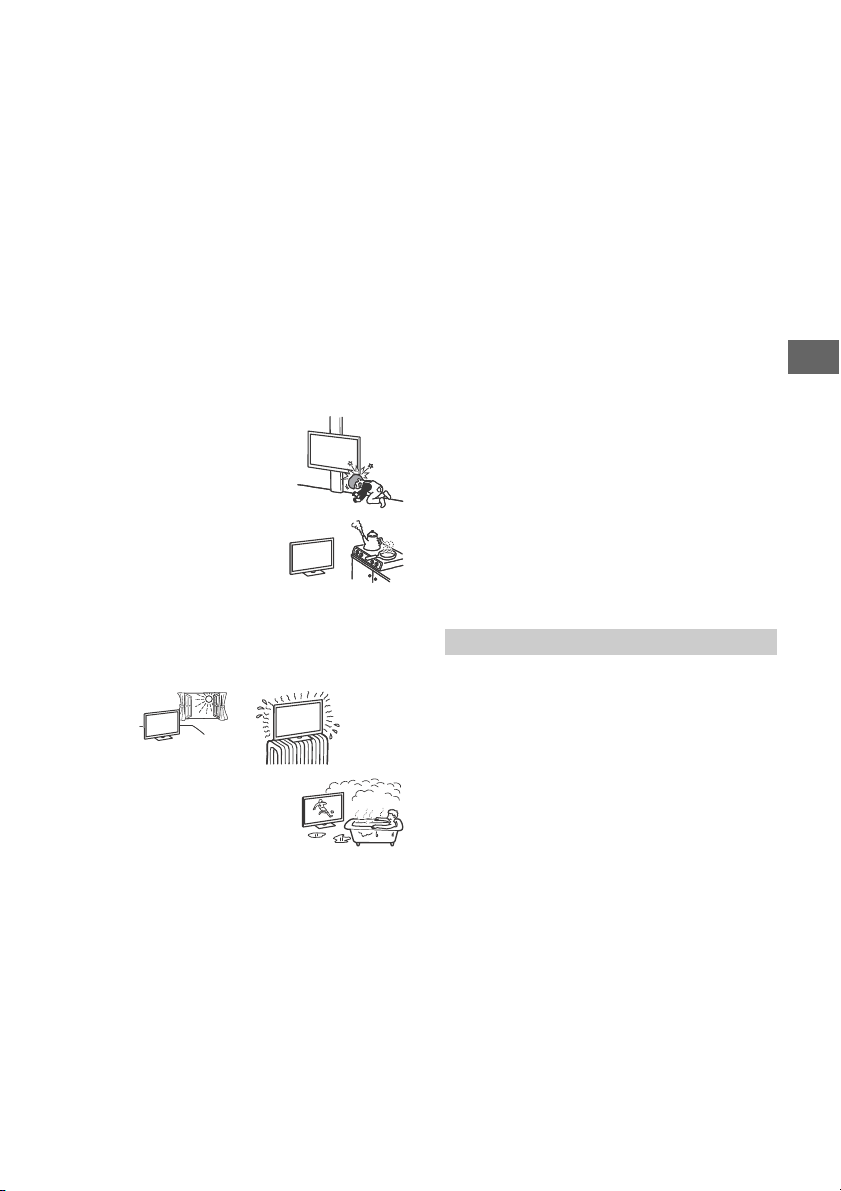
RU
Запрещенные типы установки
Во избежание возгорания, поражения электрическим током,
повреждения телевизора и/или травм не устанавлив айте/не
эксплуатируйте телевизор в таких местах, помещениях и
ситуациях, которые перечислены ниже.
Местоположения:
• На открытом воздухе (под прямыми солнечными лучами),
на берегу моря, на корабле или другом судне, в
автомобиле, в медицинских учреждениях, в неустойчивом
положении; вблизи воды, или там, где возможно
воздействие на него дождя, влаги или дыма.
Среды:
• В жарких, влажных или слишком запыленных помещениях;
в местах, где могут быть насекомые; в таких местах, в
которых телевизор может быть подвержен механической
вибрации; вблизи огнеопасных объектов (свечей и др.). На
телевизор не должны попадать какие-либо капли или
брызги; нельзя ставить на него предметы, содержащие
жидкости, например вазу с цветами.
Ситуации:
• Использ ование изделия, когда мокрые руки; снят ко рпус
или установлены дополнительные аксессуары, не
рекомендованные изготовителем. Во время грозы
отключайте тел евизор от электророзетки пере менного тока
и антенны.
• Устанавливать телевизор так, чтобы
он выдавался в открытое
пространств о. Столкновение челове ка
или предмета с телевизором может
привести к травме или ущербу.
• Устанавливать телевизор во
влажных или пыльных помещениях
или в помещениях с масляным
дымом или паром (неподалеку от
кухонных столов или увлажнителей
воздуха). Иначе может произойти
возгорание, удар электрическим током или деформация.
• Устанавливать телевизор там, где возможно сильное
повышение температуры, например под прямыми
солнечными лучами, рядом с отопительными приборами
или обогревателями. В таких условиях телевизор может
перегреться, что приведет к деформации корпуса и/или
повреждению телевизора.
• При установке в раздевалке бассейна
или горячего источника
присутствующие в воздухе сера и т. п.
могут вызвать повреждения
телевизора.
• Для обеспечения наилучшего качества изображения не
подвергайте экран воздействию прямого освещения или
солнечного света.
• Телевизор не рекомендуется переносить из холодного
помещения в теплое. Резкие изменения температуры в
помещении могут вызвать конденсацию влаги. Это может
привести к снижению качества изображения телевизора
и/или искажению цветов. В этом случае дождитесь полного
испарения влаги, прежде чем включать телевизор.
Осколки:
• Не бросайте никакие предметы в телевизор. От удара
экранное стекло может разбиться и нанести серьезную
травму.
• Если на поверхности телевизора образовались трещины,
перед тем как прикоснуться к нему, выньте вилку шнура
питания переменного тока из электророзетки . В противном
случае это может привести к удар у электрическим током.
Если телевизор не используется
• Если Вы не собираетесь пользоваться телевизором в
течение нескол ьких дней, по соображени ям безопасности и
энергосбережения его следует отключить от электросети
переменного тока.
• Так как телевизор не отключается от электросети
переменного тока при выключении кнопкой, для его
полного отключения от электросети выньте вилку шнура
питания из электророзетки переменного тока.
• Некоторые телевизоры оснащены функциями, для
корректной работы которых требуется оставлять телевизор
в режиме ожидания.
Меры предосторожности в отношении
детей
• Не позволяйте детям взбираться на телевизор.
• Храните мелкие детали вне досягаемости детей, чтобы они
не могли случайно проглотить их.
Если имеют место следующие
неисправности...
Немедленно выключите телевизор и выньте вилку шнура
питания переменного тока из электророзетки в следующих
случаях.
Обратитесь к своему дилеру или в сервисный центр Sony для
того, чтобы квалифицированные специалисты сервисной
службы выполнили проверку телевизора.
В случае, если:
Поврежден шнур пит ания переменного тока.
Плохие контакты электророзетки переменного тока.
Телевизор получил повреждения в результате падения,
удара или попадания брошенным в него предметом.
Внутрь корпуса телевизора через отверстия попала
жидкость и ли какой-либо пред мет.
Температура телевизора
При длительной эксплуатации телевизора панель вокруг него
нагревается. На ощупь она кажется горячей.
Меры предосторожности
Просмотр телевизора
• Смотрите телевизор при достаточном освещении;
просмотр при плохом освещении или в течение чрезмерно
продолжительного времени утомляет глаза.
• При пользовании наушн иками не устанавливайте слишком
большую громкость, чтобы не повредить слух.
OLED-экран
• OLED-экран изготовлен по прецизионной технологии,
99,99 % или более пикселей рабочие, тем не менее на
OLED-экране могут быть черные точки или яркие световые
пятна (белые, красные, синие или зеленые). Это
конструктивная особенность OLED-экрана, которая не
является неисправностью.
• Не нажимайте на защитный фильтр, не царапайте его и не
ставьте на телевизор какие-либо предметы. Изображение
может быть неравномерным или даже возможно
повреждение OLED-экрана.
• Во время работы телевизора экран и корпус нагреваются.
Это не является признаком неисправности.
• При утилизации телевизора обязательно соблюдайте
местные законы и нормы.
Уход за поверхностью экрана, корпусом
телевизора и их чистка
Перед чисткой телевизора или вилки кабеля питания
отсоедините кабель от сети.
Для обеспечения сохранности конструкционных материалов
и покрытия экрана телевизора соблюдайте следующие меры
предосторожности.
RU
5
Page 52
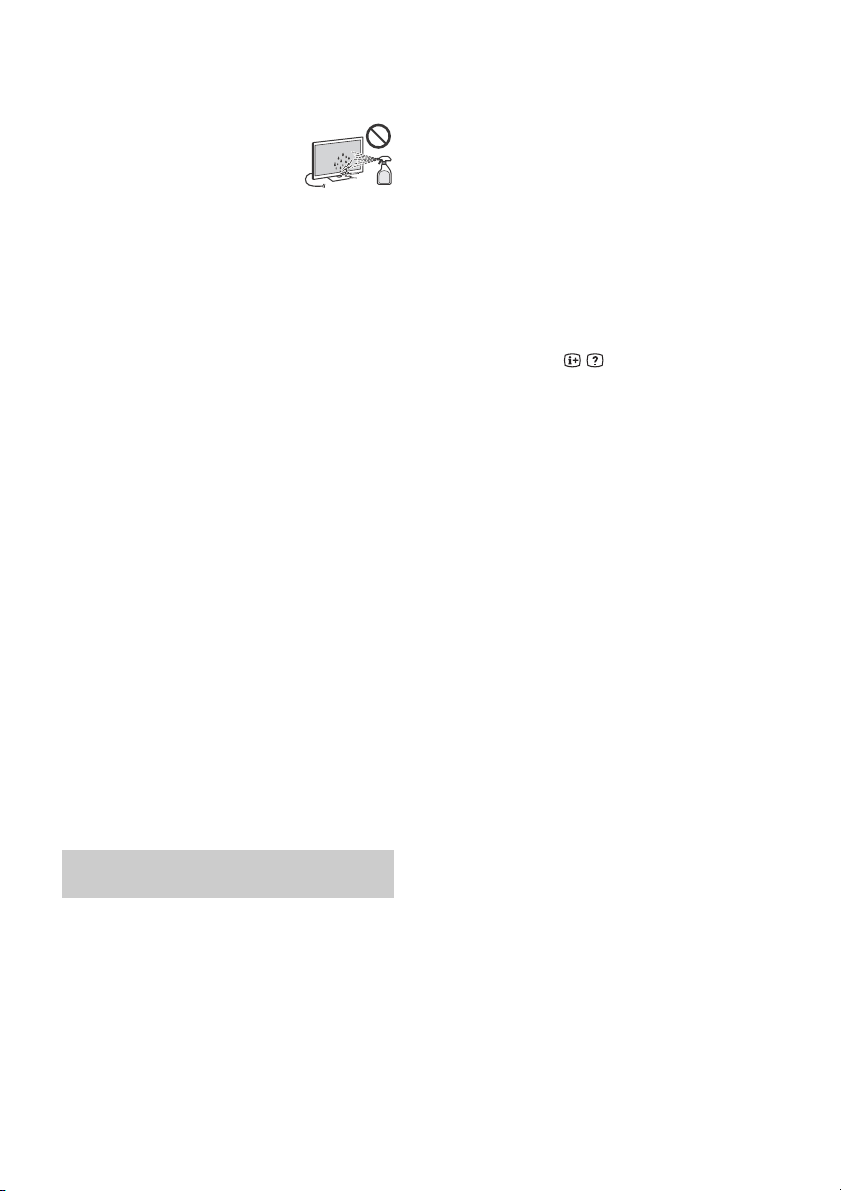
• Для удаления пыли с поверхности экрана/корпуса
телевизора осторожно протирайте его мягкой ткань. Если
пыль не удаляется полностью, протрите экран мягкой
тканью, слегка смоченной в слабом растворе мягкого
моющего средства.
• Никогда не разбрызгивайте воду или
моющее средство прямо на телевизор.
Скопление жидкости внизу экрана или на
наружных по верхностях и прони кновение
внутрь телевизора может привести к
выходу телевизора из строя.
• Ни в коем случае не используйте никакие абразивные
материалы, щелочные/кислотные очистители, чистящие
порошки и такие летучие растворители, как спирт, бензин,
разбавитель или инсектициды. Применение этих веществ
или длительный контакт с изделиями из резины/винила
могут повредить покрытие корпуса или поверхность экрана.
• Не дотрагивайтесь до телевизора, если на руках имеются
какие-либо химические вещества, например, крем или
средство против загара.
• Для обеспечения надлежащей вентиляции рекомендуется
периодически прочищать вентиляционные отверстия с
помощью п ылесоса.
• При регулировке угла наклона телевизора изменяйте его
положение медленно и осторожно во избежание
соскальзывания телевизора с подставки.
Дополнительные устройства
Держите дополнительные компоненты или оборудование,
излучающее электромагнитные волны, на расстоянии от
телевизора. В противном случае может иметь место
искажение изображения и/или звука.
Беспроводная функция устройства
• Не используйте устройство вблизи медицинского
оборудования (электронных стимуляторов сердца и т. д.),
поскольку это может привести к неисправности последнего.
• Несмотря на то, что данное устройство передает/получает
зашифрованные сигналы, остерегайтесь
несанкционированного перехвата сигнала. Мы не несем
ответственност и за любую проблему такого рода.
Предупреждение относительно
использования пульта ДУ
• Вставляя батарейки, соблюдайте полярность.
• Не используйте одновременно батарейки различных типов
или старые и новые батарейки.
• При утилизации батареек всегда соблю дайте правила
охраны окружающей среды. В некоторых регионах прави ла
утилизации батареек могут быть регламентированы.
Просьба обращаться по этому поводу в местные органы
власти.
• Бережно обращайтесь с пультом ДУ. Не бросайте его, не
становитесь на него и не лейте на него никаких жидкост ей.
• Не оставля йте пульт ДУ вблизи источников тепла или в
месте, подверженном прямому воздействию солнечных
лучей, или во влажном помещении.
Защита экрана телевизора (OLEDтелевизор)
Меры предосторожности для защиты
экрана от повреждений
Эффект остаточного изображения
Из-за свойств и спользуемых материалов в OLED-те левизорах
возникает эффект остаточного из ображения (пятна на
экране). Эффект остаточного изоб ражения может возникать,
если изображения отображаются в одном и том же месте
повторно или на протяжении длительного времени. Это не
является неисправностью телевизора. Не допускайте
отображения изображений, способных вызва ть эффект
остаточного изображения.
Ниже приведены примеры изображений,
способных вызвать эффект остаточного
изображения:
• Содержимое с черными полосами вверху и внизу и/или
слева и справа на экране. (например, форматы экрана
Letterboxed, 4:3 при стандартном разрешении)
• Неподвижные изображения, например фотографии.
• Видеоигры, в которых могут быть неподвижное
содержимое в некоторых местах экрана.
• Экранные меню, телепрограммы, логотипы каналов и т. п.
• Неподвижное содержимое в приложениях.
• Экранные тикеры, например в новостях и заголовках.
Для снижения риска возникновения эффекта
остаточного изображения:
• Sony рекомендует выключить телевизор обычным образом,
нажав кнопку питания на пульте дистанционного
управления или на телевизоре.
• Заполняйте экран, переключая [Широкоэкранный режим],
чтобы исключить черные полосы. Выберите
[Широкоэкранный режим] вместо [Нормальный].
• Выключите OSD (отображение выполняемых функций на
экране), нажав кнопку / , а также вык лючите меню на
подключенном оборудовании. Подробнее см. в
руководствах по эксплуатации подключенного
оборудования.
• Старайтесь не отображать неподвижные изображения с
яркими цветами (включая белый), часы или логотипы в
любом месте экрана.
• Установите настройки изображения исходя из условий
окружающей среды. Для домашнего просмотра, а также
для просмотра содержимого с отображением логотипов
станций и т. п. рекомендуется стандартное изображение.
В телевизоре предусмотрены следующие функции для
уменьшения/предотвращения эффекта остаточного
изображения.
Обновление панели
Обновление панели выполняется автоматически с целью
корректировки однородности экрана телевизора после
длительного использования. Обновление панели можно
также выполнить вручную; этот вариант следует
использовать только при появлении заметных признаков
эффекта остаточного изображения или при появлении
сообщения: [Обновление панели не завершено…]
Осторожно:
• Функция Обновление панели может оказать влияние на
панель. Рекомендуется выполнят ь Обновление панели
один раз в год, не чаще, поскольку это влияет на срок
службы панели.
• Обновление панели занимает примерно час.
• При выполнении функции Обновление панели на экране
может появл яться белая полоса, это не является признаком
неисправности телевизора.
• Обновление панели работает только при температурах от
10 ºC до 40 ºC.
Попиксельное смещение
Автоматическое смещение изображения на экране для
предотвращения эффекта остаточного изображения.
Прочие функции
Яркость экрана уменьшается автоматически при
отображении фотографий, часов, ярких цветов или
логотипов и т. п.
RU
6
Page 53
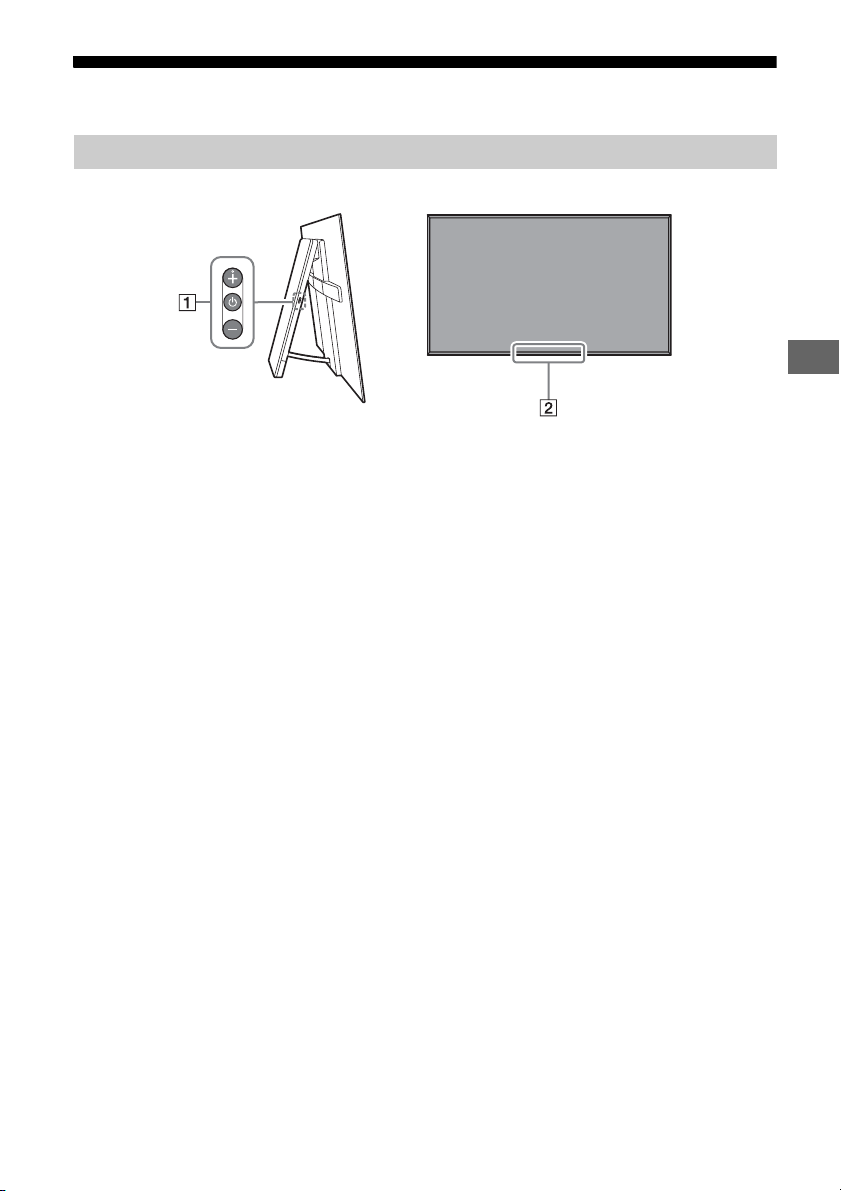
RU
Детали и элементы управления
Элементы управления и индикаторы
(питание) / + / –
Если телевизор выключен,
Нажмите для включения питания.
Если телевизор включен,
Для выключения нажмите и удерживайте
кнопку .
Нажимайте , чтобы изменить функцию.
Затем нажмите кнопку + или – для
следующих действий:
• Регулировка громкости.
•Выбор канала.
• Выбор источника входного сигнала
телевизора.
Датчик пульта дистанционного
управления* / светочувствительный
датчик* / светодиодный индикатор
Индикатор подсветки загорается или
мигает в соответствии с состоянием
телевизора.
Для получения дополнительной
информации см. справочное
руководство.
* Не следует размещать какие-либо предметы
около датчика.
RU
7
Page 54
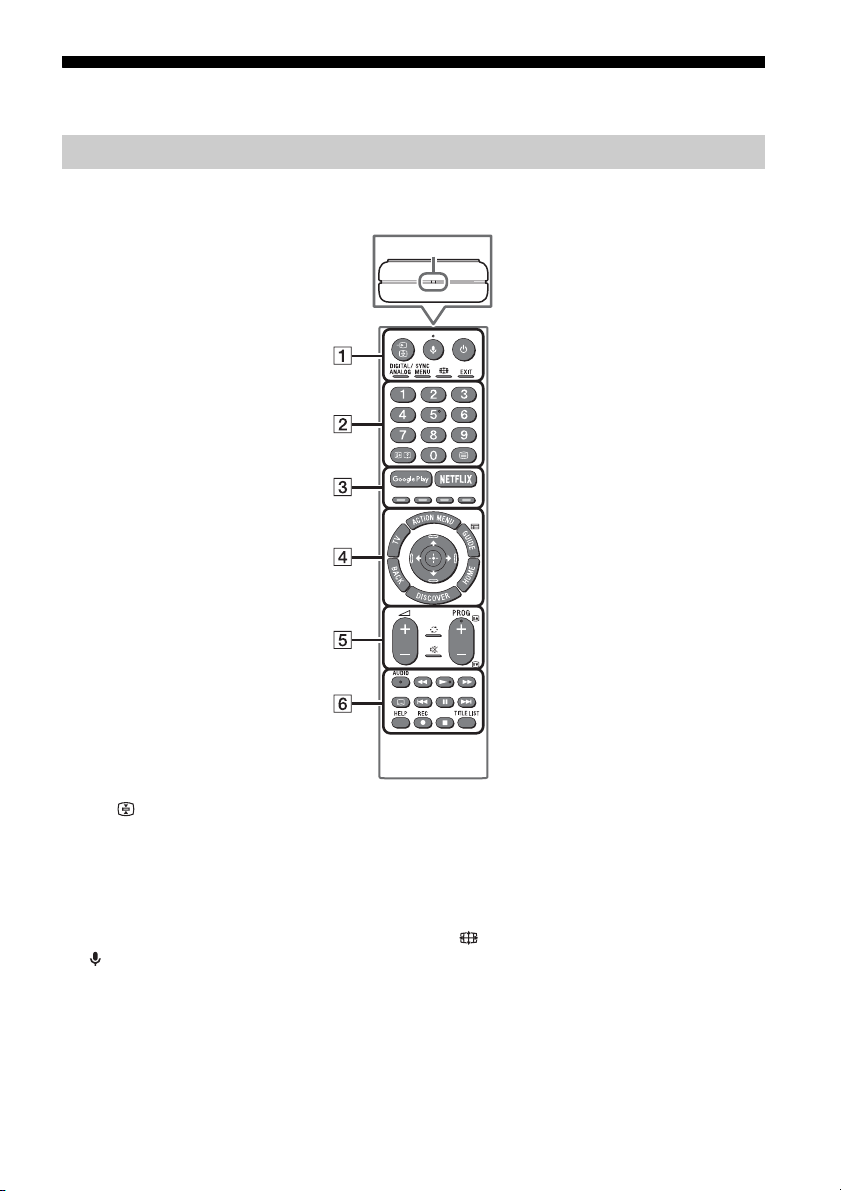
Использование пульта дистанционного управления
MIC
Описание частей пульта ДУ
Форма, положение, наличие и функция кнопки пульта дистанционного управления зависят от
региона/страны/модели телевизора.
/ (выбор источника входного
сигнала/удержание текста)
В режиме телевизора: Служит для
отображения и выбора источника
входного сигнала.
В режиме телетекста: отображение
текущей страницы.
(Микрофон)
Использование голосовой функции.
(Например, для поиска различного
содержимого с помощью голоса.)
(Режим ожидания телевизора)
Включение или выключение телевизора
(режим ожидания).
RU
8
DIGITAL/ANALOG
Переключение между цифровым и
аналоговым режимами.
SYNC MENU
Отображение меню BRAVIA Sync.
(Широкоэкранный режим)
Изменение формата экрана.
EXIT
Возврат к предыдущему экрану или
выход из меню. Если доступна служба
интерактивного приложения, нажмите
эту кнопку, чтобы выйти из службы.
Page 55
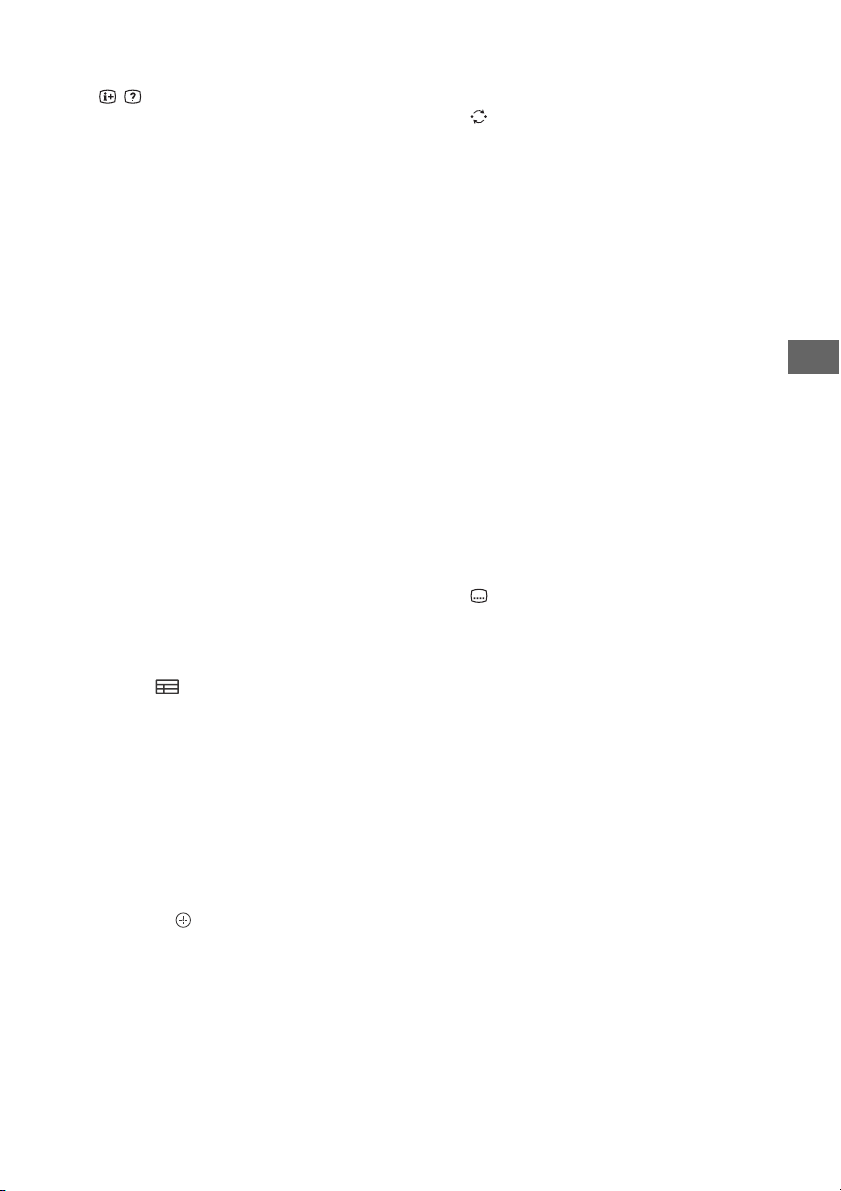
RU
Цифровые кнопки
/ (Информация/Вывод скрытого
текста)
Отображение информации.
(Текст)
Отображение текстовой информации.
Google Play
Доступ к интерактивной службе “Google
Play”.
NETFLIX (Только в определенных
регионах/странах/моделях
телевизора)
Доступ к интерактивной службе “NETFLIX”.
Цветные кнопки
Выполнение соответствующей функции в
момент нажатия.
ACTION MENU
Отображение списка контекстных
функций.
TV
• Переключение на канал телевизора
или входной сигнал от других
устройств.
• Включите телевизор для отображения
канала телевизора или входного
сигнала.
GUIDE/
Отображение цифрового телегида.
BACK
Возврат к предыдущему экрану.
HOME
Отображение меню “Дом” телевизора.
DISCOVER
Вывод строки содержимого для поиска
содержимого.
//// (Выбор параметров /
Ввод)
+/– (Громкость)
Регулировка громкости.
(Переход)
Переход вперед и назад между двумя
каналами или входами. Телевизор
переключается между текущим каналом
или входом и последним выбранным
каналом или входом.
(Отключение звука)
Отключение звука. При повторном
нажатии звук включается.
PROG +/–//
В режиме телевизора: выбор канала.
В режиме телетекста: выбор следующей
() или предыдущей () страницы.
AUDIO
Изменение языка просматриваемой в
данный момент программы.
//////
Управление содержимым мультимедиа
на телевизоре и подключенном
устройстве с поддержкой технологии
BRAVIA Sync.
(Установка субтитров)
Включение или выключение субтитров
(если эта функция доступна).
HELP
Отображение меню справки. Со
справочным руководством можно
ознакомиться здесь.
REC
Запись текущей программы с помощью
функции записи жесткого диска USB HDD.
TITLE LIST
Отображение списка заголовков.
RU
9
Page 56
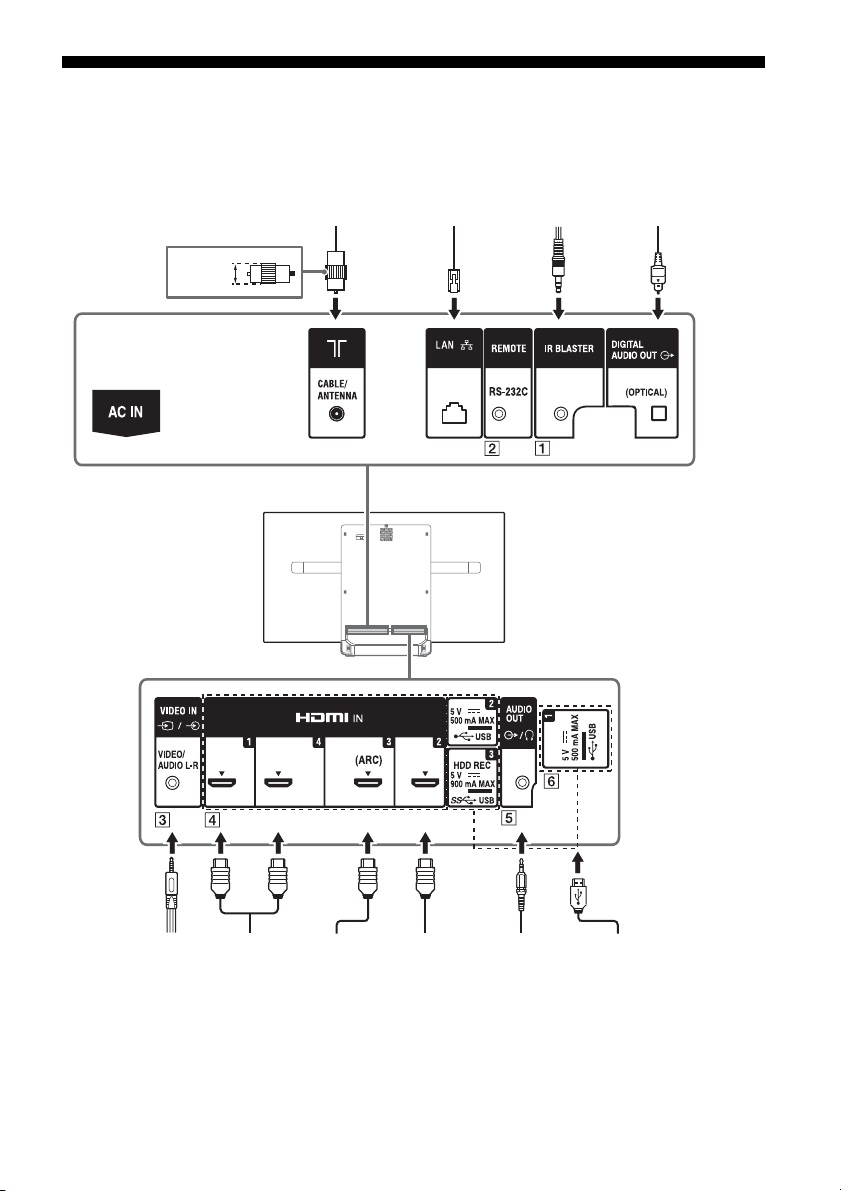
Схема подключения
Видеомагнитофон/
оборудование для
видеоигр/DVDпроигрыватель/
видеокамера
Домашняя
акустическая
система с
устройством
ARC/HDMI
Устройство
HDMI
<14 мм
Кабель/антенна
Наушники/
домашняя
акустическая
система/
сабвуфер
Цифровая
фотокамера/
видеокамера/
USB-накопитель
Устройство
HDMI
Домашняя
акустическая система
с оптическим
аудиовходом
Маршрутизатор
IR Blaster
Для получения дополнительной информации о подключениях см. справочное руководство,
нажав на пульте дистанционного управления кнопку HELP.
10
RU
Page 57
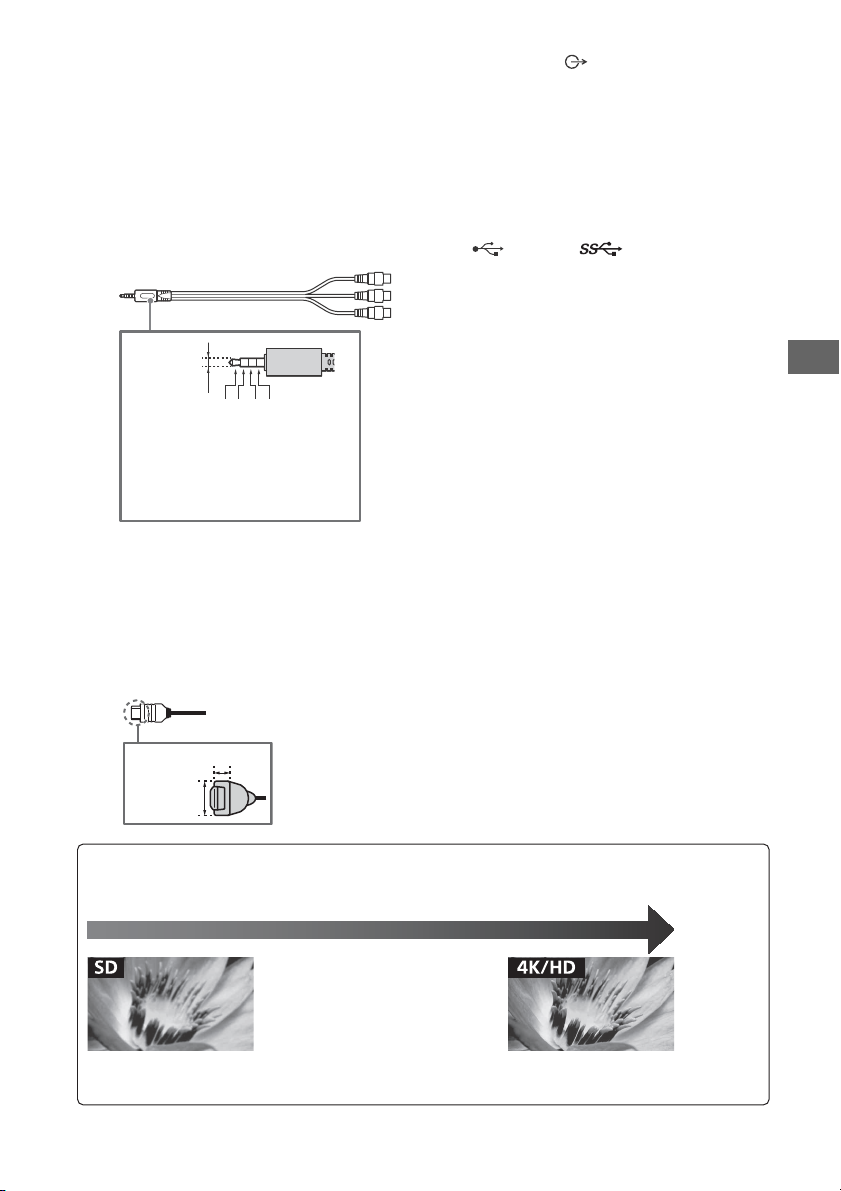
RU
Примечание
3,5 мм
1234
1: L
2: Видео
3: Заземление
4: R
< 21 мм
< 12 мм
Видеофильмы стандартной четкости (SD — Standard
Definition) имеют сигналы изображения с разрешением
480 (NTSC) или 576 (PAL/SECAM) строк по вертикали.
Видеофильмы высокой четкости (HD — High Definition) имеют
сигналы изображения с разрешением 720 или 1080 строк по
вертикали. (для разрешения 4K по верти кали: 2160 строк)
Качество изображения
•
Композитный аудио-/видеокабель
•
Кабель антенны
• Компонентный
кабель
•Кабель HDMI
IR BLASTER*
REMOTE RS-232C
Данный разъем предназначен только для
сервисного обслуживания.
/ VIDEO IN
• Для композитного подключения
используйте аналоговый
удлинительный кабель (не входит в
комплект).
•
HDMI IN 1/2/3/4
• При подключении цифровой
аудиосистемы, поддерживающей
технологию Audio Return Channel (ARC),
используйте вход HDMI IN 3. В
противном случае потребуется
дополнительное подключение к
DIGITAL AUDIO OUT (OPTICAL).
•
AUDIO OUT /
• Поддержка только 3-полюсного стерео
мини-гнезда.
• Чтобы воспроизводить звук телевизора
с помощью подключенного
оборудования, нажмите HOME.
Выберите [Настройки] [Звук]
[Наушники/линейный аудиовыход], а
затем выберите требуемый пункт.
USB 1/2, USB3 (HDD REC)*
• Подключение крупного устройства USB
может привести к помехам для других
подключенных устройств,
расположенных рядом с ним.
• При подключении крупного устройства
USB подключайте его к порту USB 1.
* Только в определенных регионах/странах/
моделях телевизора.
• Храните боковую крышку в безопасном месте для
использования в дальнейшем.
RU
11
Page 58
Установка телевизора на стену
Примечание
В данном руководстве по эксплуатации телевизора представлены только шаги по
подготовке к установке телевизора перед монтажом на стену.
К сведению покупателей:
Для обеспечения сохранности изделия и из соображений безопасности компания Sony
настоятельно рекомендует привлекать для установки телевизора только дилеров или
лицензированных подрядчиков Sony. Не пытайтесь выполнить установку самостоятельно.
К сведению дилеров и подрядчиков Sony:
Уделяйте повышенное внимание безопасности во время установки, периодического
обслуживания и осмотра данного изделия.
Для правильной установки данного изделия необходим достаточный опыт, в особенности при
определении того, в состоянии ли стена выдержать вес телевизора. Обязательно привлеките для
установки этого изделия на стену дилеров или лицензированных подрядчиков Sony и строго
соблюдайте технику безопасности при выполнении работ по установке. Компания Sony не несет
ответственности за любые поломки или травмы, вызванные неправильным обращением с изделием
или его неправильной установкой.
Используйте кронштейн для настенной установки SU-WL450 (не входит в комплект) для
установки телевизора на стену.
При установке кронштейна для настенной установки см. также инструкцию по эксплуатации и
руководство по установке, прилагаемые к кронштейну для настенной установки.
• Храните извлеченные винты в надежном недоступном для детей месте.
• Обязательно придерживайте телевизор при подготовке его к установке на стену.
• Снимите угловые защитные накладки после установки телевизора на стену.
12
RU
Page 59
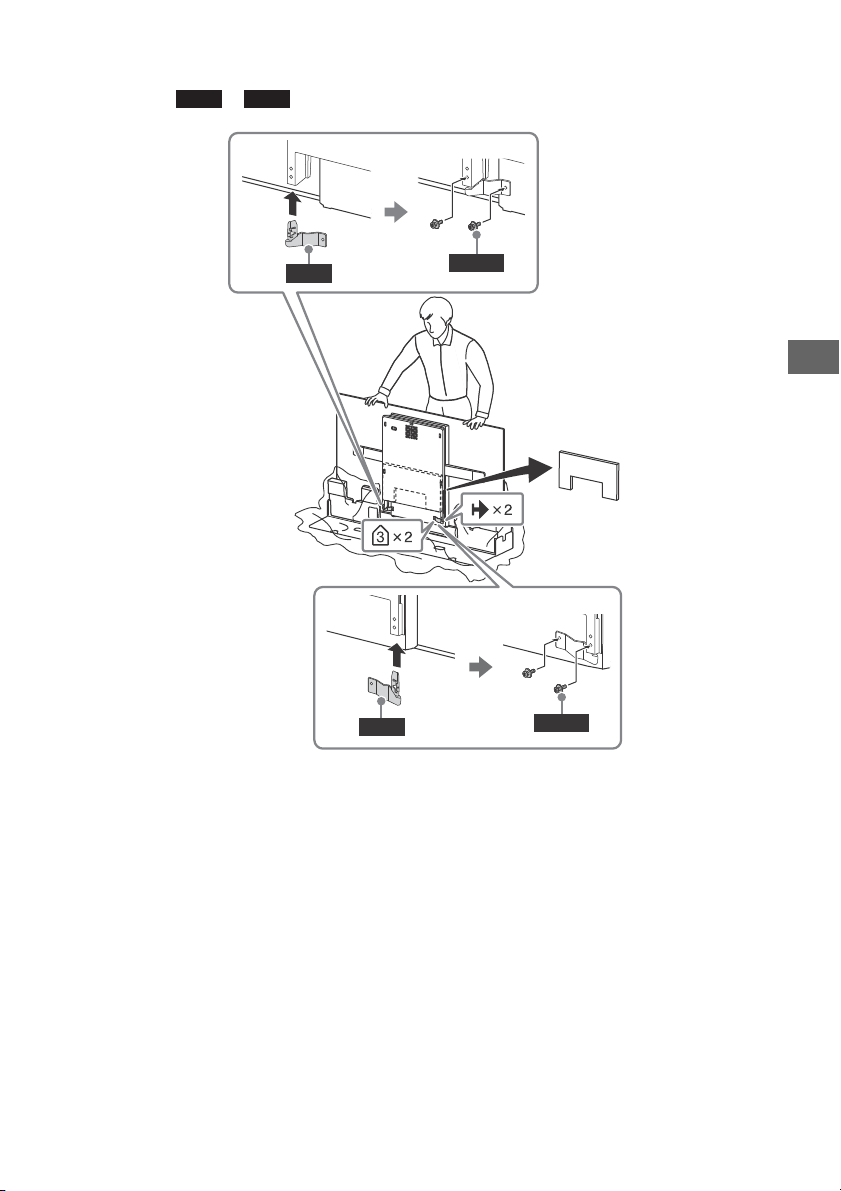
RU
Примечание
WM1
WM2
M4L12
WM1
M4L12
WM2
Установка телевизора на стену из коробки
Прикрепите и (прилагается к телевизору) к задней панели телевизора.
• При использовании электрической отвертки задайте момент затяжки, равный приблизительно 1,5 Н·м
{15 кгс·см}.
RU
13
Page 60
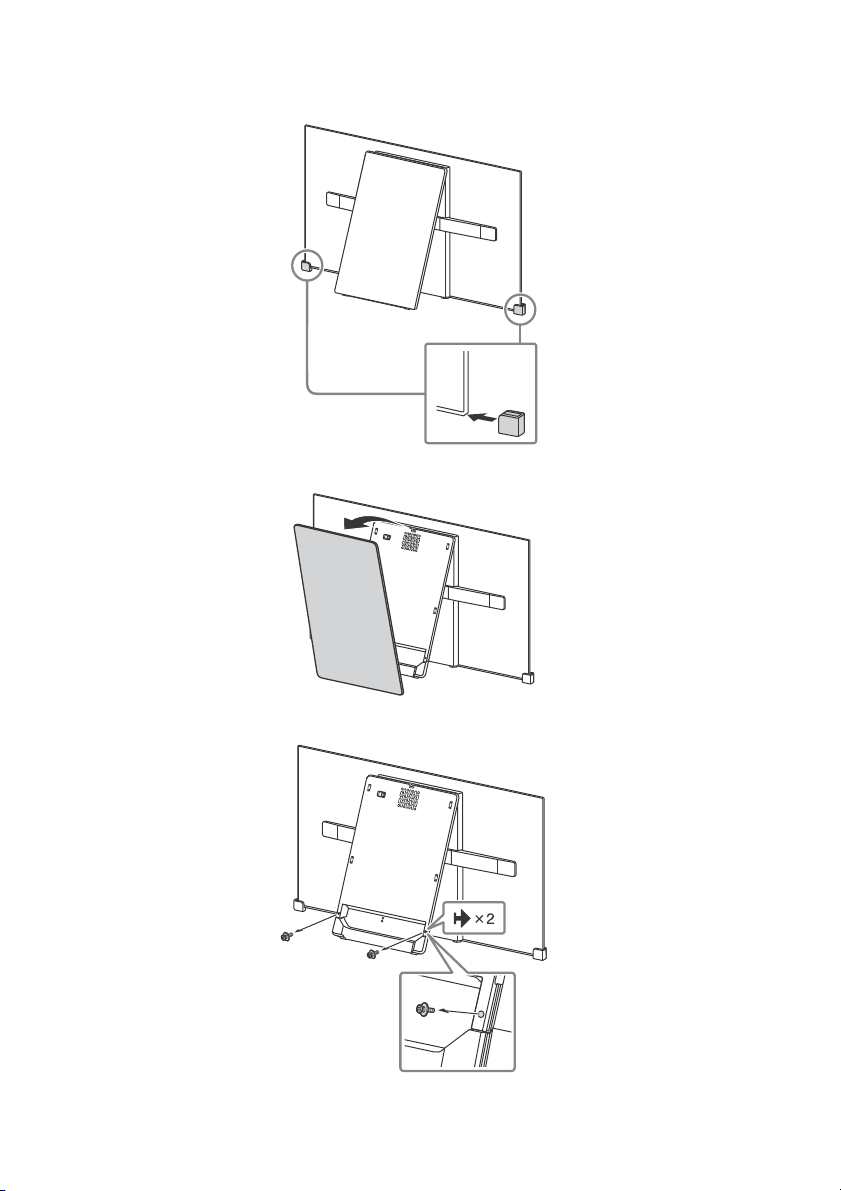
Установка телевизора на стену с настольной подставки
1 Вставьте угловые защитные накладки.
2 Снимите центральную крышку.
3 Выверните винты.
RU
14
Page 61
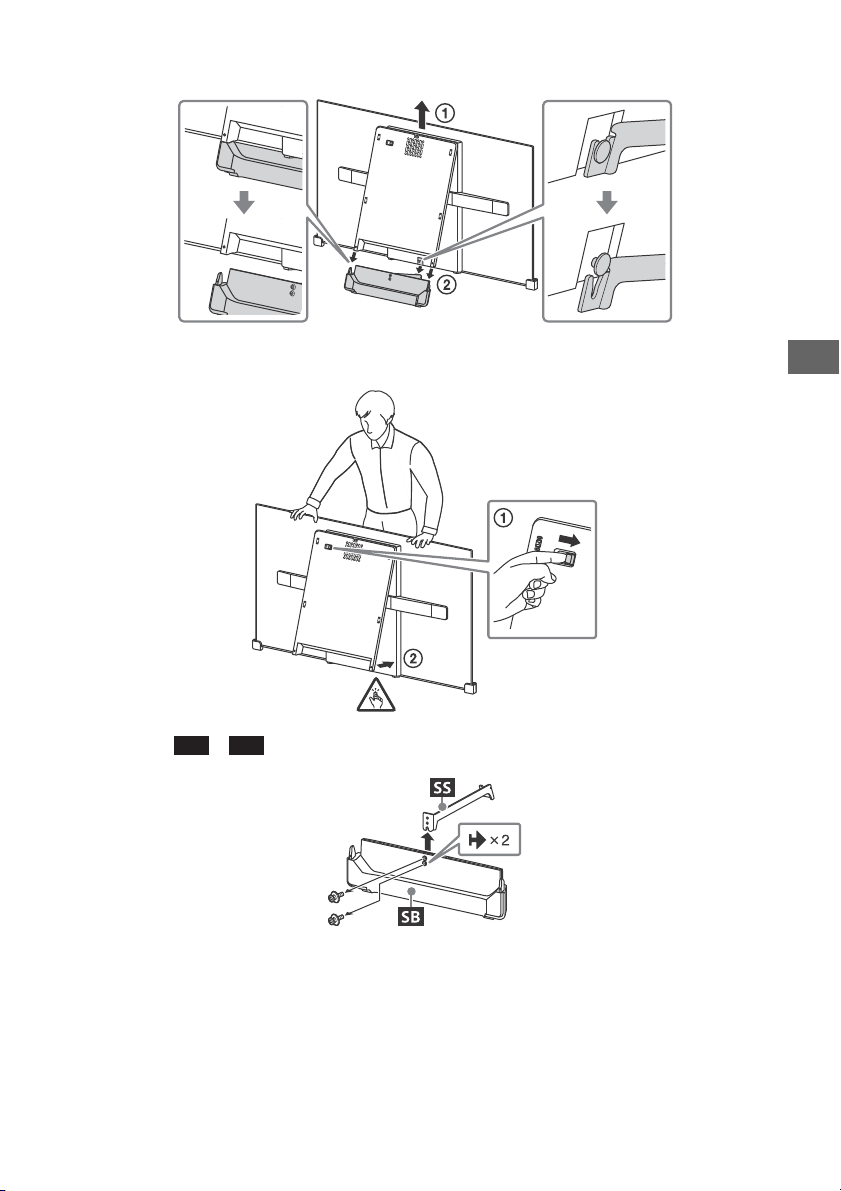
RU
4 Снимите основание подставки.
SS
SB
5 Закройте центральный блок, отпустив фиксатор петли.
6 Снимите с .
RU
15
Page 62
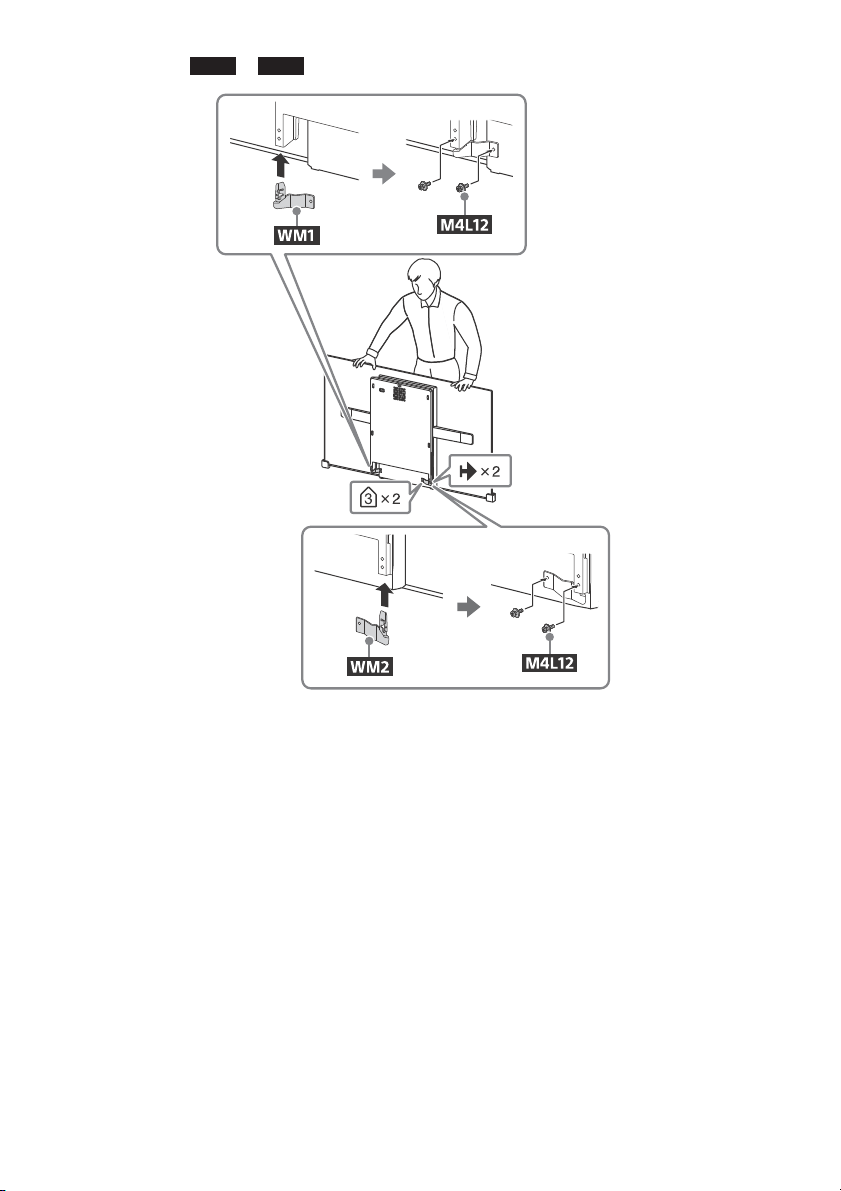
7 Прикрепите и (прилагается к телевизору) к задней панели телевизора.
Примечание
WM1
WM2
• При использовании электрической отвертки задайте момент затяжки, равный приблизительно 1,5 Н·м
{15 кгс·см}.
RU
16
Page 63
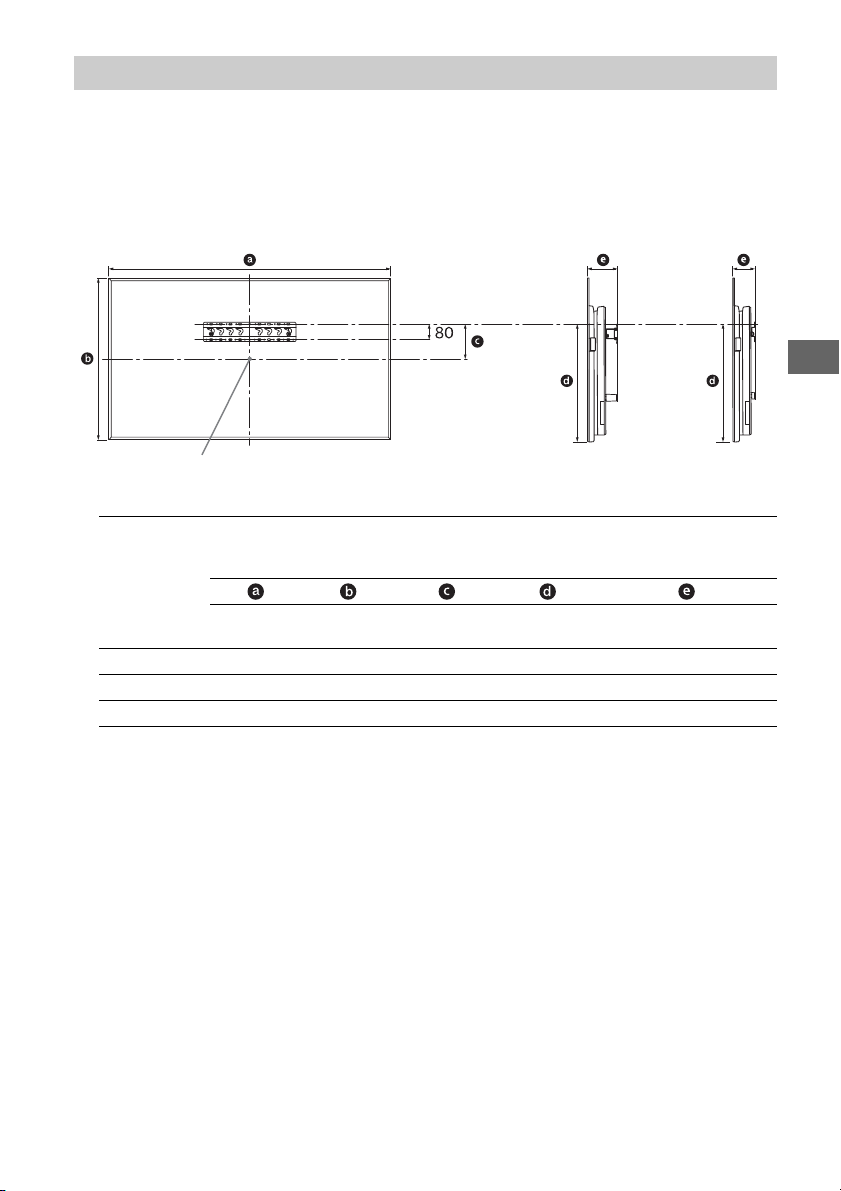
RU
Примечание
Центральная точка экрана
Стандартное
крепление
Узкое
крепление
SU-WL450
1 Убедитесь, что на стене имеется достаточно места для телевизора и она достаточно
прочная, чтобы выдержать вес по крайней мере в четыре раза превышающий вес
устанавливаемого телевизора.
См. следующую таблицу по установке телевизора на стену. Вес телевизора см. на
стр. 22-23 (Технические характеристики).
Основной блок: мм
Название
Размеры экрана
модели
KD-
77A1 1721 997 99 604 162 120
65A1 1451 834 93 514 149 107
55A1 1228 711 153 514 149 107
Положение
центра
экрана
Длина для установки
Стандартное
крепление
крепление
Узкое
• Рисунки в таблице могут немного отличаться в зависимости от установки.
• Если телевизор крепится на стене, верхняя его часть слегка выступает вперед.
RU
17
Page 64
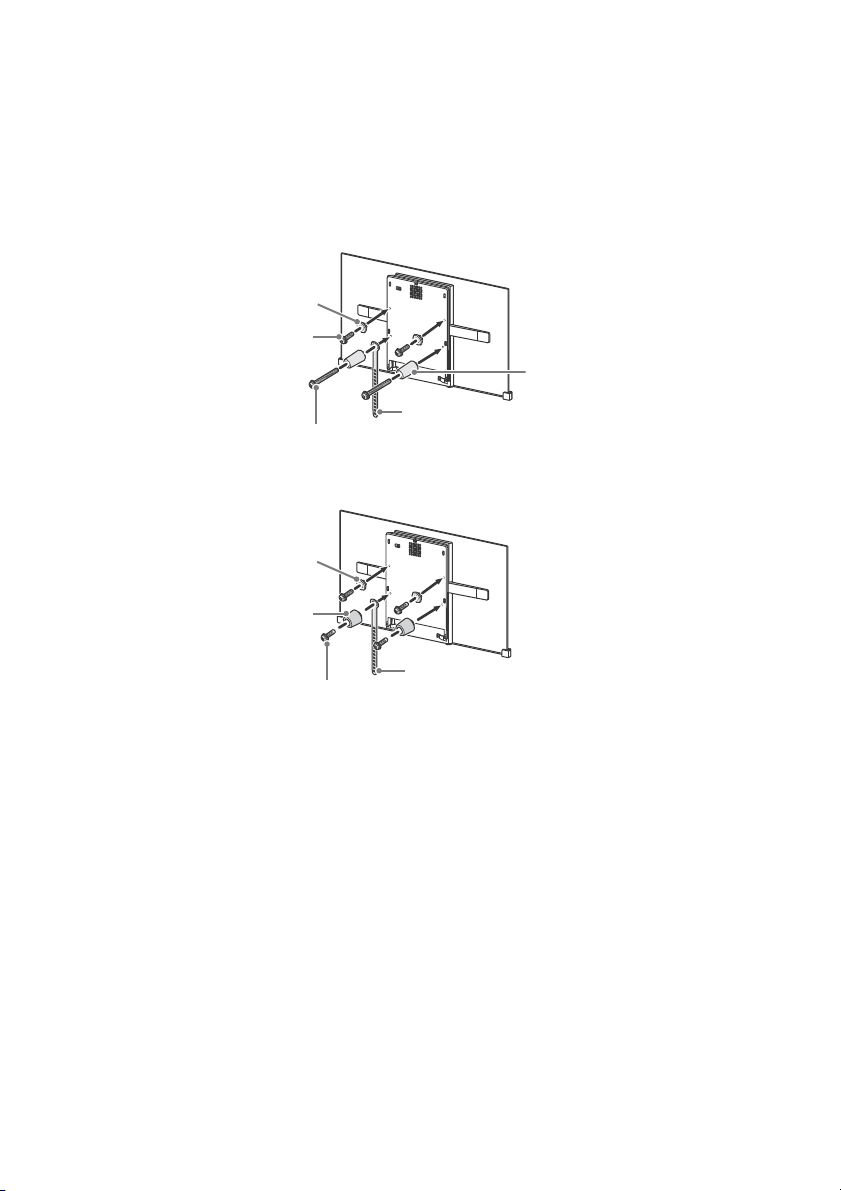
2 Прикрепите детали крепления кронштейна для настенной установки. Для
Примечание
Примечание
Винт (+PSW 6 x 20)
Шкив
Прокладка (60 мм)
Винт (+PSW 6 x 50)
Лента
Шкив
Прокладка (20 мм)
Винт (+PSW 6 x 20)
Лента
получения информации о деталях крепления см. пункт “1” руководства по установке
кронштейна для настенной установки.
• При использовании электрической отвертки задайте момент затяжки, равный приблизительно 1,5 Н·м
{15кгс·см}.
• Храните неиспользованные детали в надежном месте, чтобы в будущем их можно было использовать.
Сохраните это руководство для обращения к нему в дальнейшем.
Стандартное крепление
Узкое крепление
3 Подключите необходимые кабели к телевизору.
• После установки на стену доступ к разъемам телевизора будет заблокирован.
RU
18
Page 65
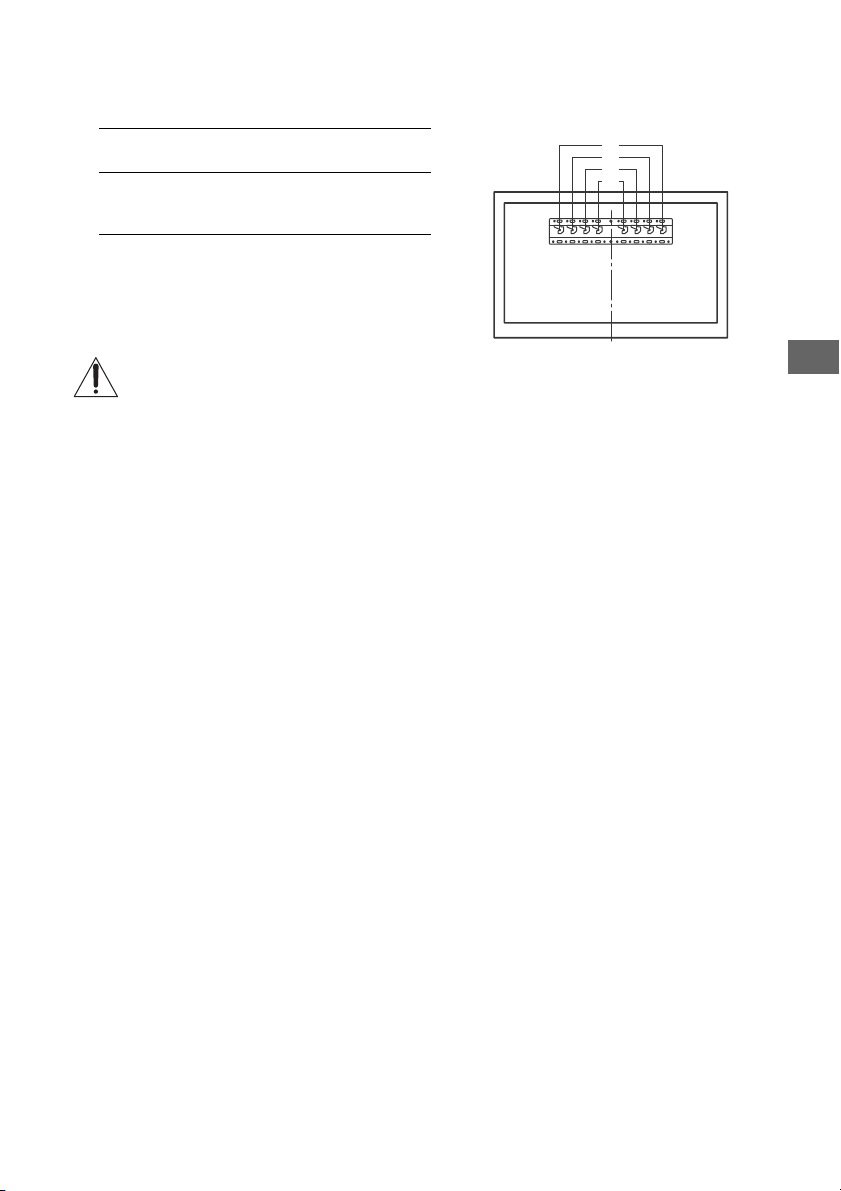
RU
a
b
c
d
4 Установите телевизор на основание. См. раздел “5” в руководстве по установке и
раздел “Установка телевизора на стену” в инструкции по эксплуатации,
прилагаемым к кронштейну для настенной установки.
название модели
KD-
77A1
65A1
55A1
При креплении телевизора на стене, см. входящие в комплект кронштейна для настенной установки
инструкции, относящиеся к данной модели.
Положение скоб
a
RU
19
Page 66
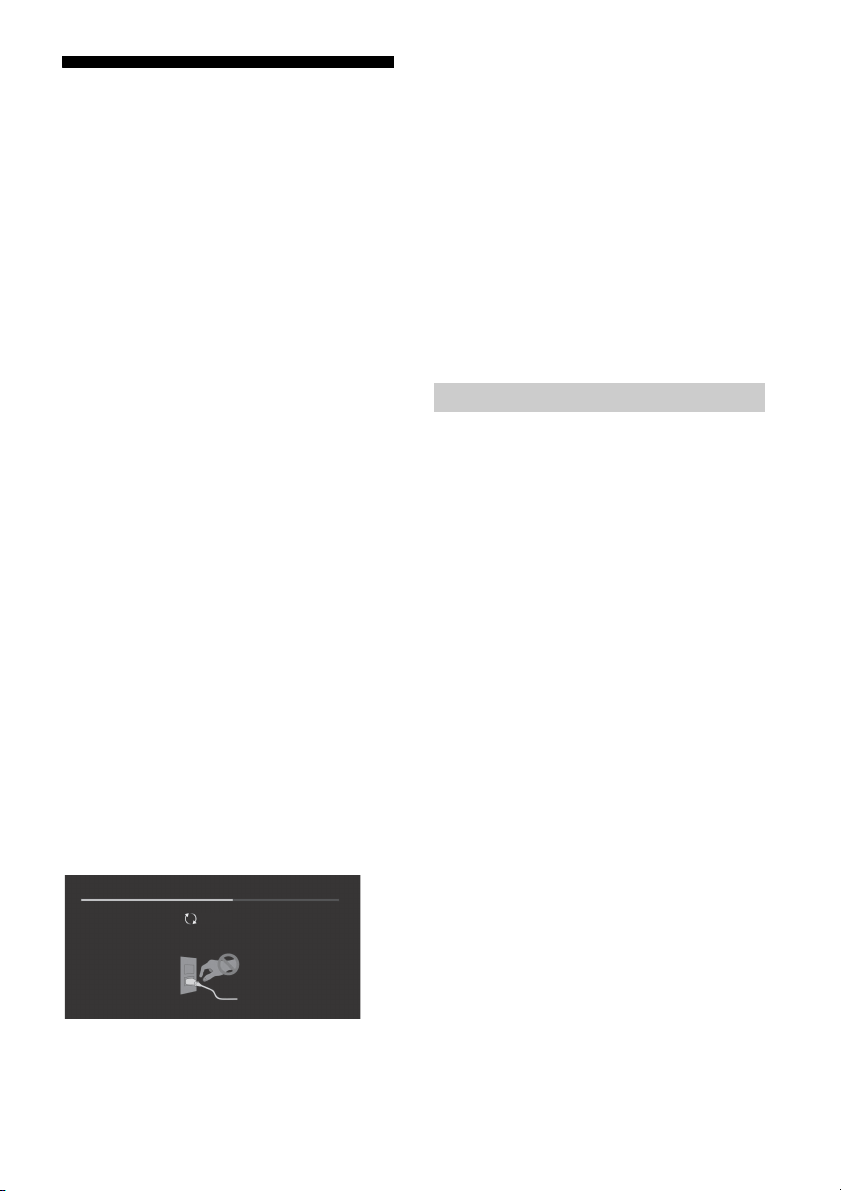
Поиск неисправностей
Updating...
Основные способы поиска и устранения
неисправностей для следующих проблем:
пустой экран, отсутствие звука, замерзший
кадр, отсутствие реакции телевизора при
нажатии кнопок, потеря сети. При
возникновении данных проблем выполните
следующие действия.
1 Перезапустите телевизор, нажимая кнопку
питания на пульте дистанционного
управления, пока не отобразится
сообщение. Телевизор перезапустится.
Если не удается возобновить работу
телевизора, попробуйте отсоединить
кабель питания переменного тока от
телевизора на три минуты, затем снова
подключите его.
2 См. меню справки, нажав на пульте
дистанционного управления кнопку HELP.
3 Подключите телевизор к Интернету и
выполните обновление программного
обеспечения.
4 Посетите веб-сайт поддержки Sony
(информация на задней крышке).
Если отображается сообщение [Доступно
новое обновление для ТВ-системы…].
Sony настоятельно рекомендует обновить
программное обеспечение телевизора,
выбрав [Обнов. сейчас]. Благодаря
обновлению программного обеспечения
улучшаются рабочие характеристики
телевизора, а также доступны новые
функции.
При обновлении программного обеспечения
отобразится следующий экран [Updating…]
(Обновление…), а также светодиодная
подсветка будет мигать белым цветом.
Не отсоединяйте кабель питания
переменного тока во время обновления
программного обеспечения. В противном
случае обновление программного
обеспечения может не завершиться, что
может стать причиной его некорректной
работы. Обновление программного
обеспечения может занять до 15 минут.
При включении телевизор может
некоторое время не включаться — даже
при нажатии кнопки питания на пульте
дистанционного управления или самом
телевизоре.
Для инициализации системы требуется
некоторое время. Подождите примерно
одну минуту, затем повторите попытку.
Поиск и устранение неисправностей
Если светодиодная подсветка мигает
красным цветом.
Подсчитайте, сколько раз она мигает
(с интервалом в три секунды).
Перезагрузите телевизор, отсоединив кабель
питания переменного тока на три минуты,
затем включите телевизор.
Если проблему не удалось устранить,
отсоедините кабель питания переменного
тока и обратитесь к дилеру или в сервисный
центр Sony, указав число миганий
светодиодной подсветки.
Нет ни изображения (темный экран), ни
звука.
Проверьте подключение антенны или кабеля.
Подключите телевизор к электросети и
нажмите на телевизоре или пульте ДУ.
Некоторые каналы не настраиваются.
Проверьте подключение антенны или кабеля.
Не работает пульт ДУ.
Замените батарейки.
Забыли пароль для функции “Замок от
детей”.
Введите 9999 в качестве PIN-кода и выберите
[Смена PIN кода].
Поверхности телевизора нагреваются.
При длительном использовании телевизора
его поверхности нагреваются.
Они становятся горячими на ощупь.
20
RU
Page 67

RU
Примечание
Экран темнеет во время просмотра
телевизора.
Если все изображение или его часть
неподвижны, яркость экрана постепенно
снижается, чтобы предотвратить эффект
остаточного изображения. Это не является
неисправностью телевизора.
Вас беспокоит эффект остаточного
изображения.
Если одно и то же изображение повторяется
или остается на экране в течение длительного
времени, может возникнуть эффект
остаточного изображения. Для уменьшения
эффекта остаточного изображения можно
выполнить Обновление панели вручную.
• Выполняйте Обновление панели только в том
случае, если эффект остаточного изображения
становится заметен. Рекомендуется выполнять эту
функцию не чаще раза в год. Не выполняйте ее
чаще одного раза в год, так как это может
повлиять на срок службы панели.
• Изображения, содержащие часы, логотипы и
яркие цвета (включая белый) могут быстро
привести к появлению эффекта остаточного
изображения. Не допускайте длительного
отображения подобных изображений, в
противном случае может возникнуть эффект
остаточного изображения.
На экране отображается белая полоса.
Обновление панели запускается
автоматически после длительного
использования телевизора, чтобы уменьшить
эффект остаточного изображения.
Обновление панели запускается после
выключения телевизора и занимает примерно
час. При выполнении функции Обновление
панели на экране может появляться белая
полоса. Это не является неисправностью
телевизора.
Отображается сообщение [Обновление
панели не завершено…].
Обновление панели запускается
автоматически после длительного
использования телевизора, чтобы
уменьшить эффект остаточного
изображения. При включении телевизора,
отсоединении кабеля питания переменного
тока или выходе температуры окружающей
среды за пределы диапазона 10 – 40 ºC при
выполнении функции Обновление панели,
процесс не будет завершен, и появится это
сообщение.
Если функция Обновление панели включилась
автоматически, она снова включится после
выключения телевизора с пульта
дистанционного управления.
Если функция Обновление панели была
запущена вручную, необходимо выбрать ее
заново.
RU
21
Page 68
Технические характеристики
Система
Система панели
Панель OLED (органический светоизлучающий
диод)
Система телевещания
В зависимости от выбранной страны/региона
Аналоговый: B/G, I, D/K, M
Цифровой: DVB-T/DVB-T2
Система телевидения
PAL, SECAM, NTSC3.58, NTSC4.43
Диапазон принимаемых каналов
В зависимости от выбранной страны/региона
Аналоговый: UHF/VHF/кабель
Цифровой: UHF/VHF
Выход звука
10 Вт + 10 Вт + 10 Вт + 10 Вт + 10 Вт
Беспроводная технология
Протокол IEEE802.11ac/a/b/g/n
(функция IEEE802.11ac может быть недоступна в
некоторых странах/регионах.)
Bluetooth версии 4.1
Входные/выходные разъемы
Антенна/кабель
Разъем 75 Ом для VHF/UHF
/ VIDEO IN
Видео-/аудиовход (мини-гнездо)
HDMI IN 1, 2, 3, 4 (с поддержкой разрешения
4K и HDCP 2.2)
Видео:
4096 × 2160p (50, 60 Гц)*
1
(24 Гц)*
, 3840 × 2160p (50, 60 Гц)*2,
3840 × 2160p (24, 25, 30 Гц), 1080p (30, 50,
60 Гц), 1080/24p, 1080i (50, 60 Гц), 720p (30,
50, 60 Гц), 720/24p, 576p, 576i, 480p, 480i,
Форматы ПК*
*1При вводе сигнала 4096 × 2160p и установке
для параметра [Широкоэкранный режим]
значения [Нормальный], отображается
разрешение 3840 × 2160p. Для получения
изображения 4096 × 2160p установите для
параметра [Широкоэкранный режим]
значение [Полный 1] или [Полный 2].
2
Только HDMI IN 2 / 3.
*
3
*
Для получения подробной информации см.
справочное руководстве.
Аудио: 5,1-канальный линейный PCM: 32, 44,1,
48, 88,2, 96, 176,4 и 192 кГц, 16, 20 и 24 бит,
Dolby Digital, Dolby Digital Plus и DTS
3
ARC (Audio Return Channel) (только HDMI IN 3)
(Двухканальный линейный PCM: 48 кГц, 16 бит,
Dolby Digital, Dolby Digital Plus, DTS)
1*2
, 4096 × 2160p
DIGITAL AUDIO OUT (OPTICAL)
Цифровой оптический разъем (Двухканальный
линейный PCM: 48 кГц, 16 бит, Dolby Digital,
DTS)
AUDIO OUT / (стерео мини-джек)
Наушники, аудиовыход, сабвуфер
1, 2, 3 (HDD REC)*
Порт устройства USB. (При наличии жесткого
диска USB 3 для функции REC)
USB-порты 1 и 2 поддерживают
высокоскоростное соединение USB (USB2.0).
USB-порт 3 поддерживает сверхскоростное
соединение USB (USB3.0)
1
LAN
Разъем 10BASE-T/100BASE-TX (Скорость
соединения зависит от операционной среды
сети. Скорость и качество передачи данных
интерфейса 10BASE-T/100BASE-TX для данного
телевизора не гарантируются.)
REMOTE
RS-232C, разъем типа minijack
(Данный разъем предназначен только для
сервисного обслуживания.)
IR BLASTER*
Вход для кабеля IR Blaster (разъем типа
minijack)
1
Прочее
Дополнительные аксессуары
Кронштейн для настенной установки:
SU-WL450
Рабочая температура:
0 °C – 40 °C
Электропитание и прочее
Электропитание
110 В – 240 В пер. тока, 50/60 Гц
Класс энергопотребления*
KD-65A1: A
KD-55A1: B
Размер экрана (по диагонали) (Прибл.)
KD-77A1: 77 дюймов / 194,7 см
KD-65A1: 65 дюймов / 163,9 см
KD-55A1: 55 дюймов / 138,8 см
Потребляемая мощность
Указана на задней панели телевизора
Энергопотребление*
В режиме [Стандартный]
KD-65A1: 154 Вт
KD-55A1: 135 Вт
в режиме [Яркий]
KD-65A1: 477 Вт
KD-55A1: 357 Вт
2
2
RU
22
Page 69
RU
Примечание
Среднее ежегодное энергопотребление*2*
KD-65A1: 214 кВт-ч
KD-55A1: 187 кВт-ч
Мощность, потребляемая в дежурном
режиме*
2*4*5
0,50 Вт
3
Разрешение экрана
3840 точек (по горизонтали) × 2160 строк (по
вертикали)
Выходные параметры
USB 1/2: 5 В, 500 мA MAX
USB 3: 5 В, 900 мA MAX
Размеры (Прибл.) (ш × в × г)
С настольной подставкой
KD-77A1: 1721 × 993 × 399 мм
KD-65A1: 1451 × 832 × 339 мм
KD-55A1: 1228 × 710 × 339 мм
Без настольной подставки
KD-77A1: 1721 × 997 × 99 мм
KD-65A1: 1451 × 834 × 86 мм
KD-55A1: 1228 × 711 × 86 мм
Масса (Прибл.)
С настольной подставкой
KD-77A1: 45,3 кг
KD-65A1: 36,2 кг
KD-55A1: 28,8 кг
Без настольной подставки
KD-77A1: 37,8 кг
KD-65A1: 29,8 кг
KD-55A1: 25,0 кг
*1Только в определенных регионах/странах/
моделях телевизора.
2
Эта информация предназначена для стран ЕС и
*
других стран, в основе соответствующих норм
которых лежат нормы по энергетической
маркировке ЕС.
3
За потребление электроэнергии в год принято
*
энергопотребление телевизора, работающего 4
часа в день в течение 365 дней. Фактическое
потребление электроэнергии будет напрямую
зависеть от способа использования телевизора.
4
Указанная величина мощности потребления в
*
режиме ожидания достигается после того, как
телевизор выполнит необходимые внутренние
процессы.
5
Потребляемая мощность в режиме ожидания
*
увеличится при подключении телевизора к сети.
• Доступность дополнительных аксессуаров зависит
от страна/региона/модели телевизора/наличия в
продаже.
• Конструкция и технические характеристики могут
быть изменены без уведомления.
Примечание относительно цифрового
ТВ
• Все функции, относящиеся к цифровому
ТВ ( ), будут действовать только в тех
странах или регионах, в которых ведется
эфирная цифровая трансляция сигналов
DVB-T/DVB-T2 (MPEG-2 и H.264/MPEG-4
AVC). Уточните у своего дилера,
обеспечен ли прием сигнала DVB-T/
DVB-T2 по вашему месту жительства.
• Несмотря на то что данный телевизор
удовлетворяет характеристикам DVB-T/
DVB-T2, не гарантируется его
совместимость с цифровым эфирным
вещанием в формате DVB-T/DVB-T2 в
будущем.
• Некоторые из функций цифрового ТВ
могут быть недоступны в некоторых
странах/регионах.
Информация о торговых марках
• Термины HDMI, HDMI High-Definition
Multimedia Interface и логотип HDMI
являются товарными знаками или
зарегистрированными товарными
знаками HDMI Licensing LLC в США и
других странах.
• Произведено по лицензии Dolby
Laboratories.
Название Dolby, Dolby Audio и символ с
двойной буквой D являются торговыми
марками Dolby Laboratories.
•“BRAVIA” и являются
торговыми марками компании Sony
Corporation.
• Gracenote, Gracenote eyeQ, Gracenote
VideoID, Gracenote Video Explore,
эмблема и логотип Gracenote, а также
логотип “Powered by Gracenote”
являются зарегистрированными
товарными знаками или товарными
знаками Gracenote в США и/или других
странах.
• Opera® Devices SDK. Copyright 1995-2016
Opera TV AS. All rights reserved.
• Wi-Fi, Wi-Fi Direct, Miracast, Wi-Fi
Protected Setup и логотип Wi-Fi CERTIFIED
являются торговыми марками или
зарегистрированными торговыми
марками Wi-Fi Alliance.
RU
23
Page 70
• Сведения о патентах DTS см.
http://patents.dts.com.
Изготовлено по лицензии DTS, Inc.
DTS, символ, а также DTS и символ
вместе являются зарегистрированными
товарными знаками, а DTS Digital
Surround является товарным знаком DTS,
Inc. © DTS, Inc. Все права защищены.
• Знак Bluetooth® и логотипы являются
зарегистрированными торговыми
марками, которые принадлежат
Bluetooth SIG, Inc., любое их
использование Sony Corporation
лицензировано. Все остальные
торговые марки и торговые
наименования являются
собственностью соответствующих
владельцев.
• TUXERA является зарегистрированным
товарным знаком Tuxera Inc. в США и
других странах.
• Логотип USB в форме трезубца USB-IF
SuperSpeed является
зарегистрированным товарным знаком
USB Implementers Forum, Inc.
Фактическое разрешение:
3840 x 2160 пикселей.
24
RU
Page 71
یرﺎﺠﺗ کرﺎﻣ ﻪﺑ طﻮﺑﺮﻣ تﺎﻋﻼﻃا
هﺪﺷ ﺖﺒﺛ یرﺎﺠﺗ ﻢﺋﻼﻋ ﺎﯾ یرﺎﺠﺗ ﻢﺋﻼﻋ HDMI مرآ و Interface
ﯽﻣ ﺎﻫرﻮﺸﮐ ﺮﯾﺎﺳ و هﺪﺤﺘﻣ تﻻﺎﯾا رد HDMI Licensing LLC
.ﺪﻨﺷﺎﺑ
یرﺎﺠﺗ یﺎﻫ کرﺎﻣ ،D ود دﺎﻤﻧ و Dolby Audio ،Dolby
.ﺪﻨﺘﺴﻫ Dolby Laboratories
و "BRAVIA"
.ﺪﻨﺷﺎﺑ ﯽﻣ
نﺎﺸﻧ و تﻮﻧ ﺲﯾﺮﮔ هراﻮﻣﺎﻧ و یرﺎﺠﺗ نﺎﺸﻧ ،Video Explore تﻮﻧ
یرﺎﺠﺗ ﻢﺋﻼﻋ ﺎﯾ هﺪﺷ ﺖﺒﺛ یرﺎﺠﺗ ﻢﺋﻼﻋ "Powered by Gracenote"
.ﺖﺳ ﺮﮕﯾد یﺎﻫ رﻮﺸﮐ ﺎﯾ/و ﺎﮑﯾﺮﻣآ هﺪﺤﺘﻣ تﻻﺎﯾا رد تﻮﻧ ﺲﯾﺮﮔ
® Devices SDK. Copyright 1995-2016
Opera TV AS. All rights reserved.
یرﺎﺠﺗ یﺎﻫ کرﺎﻣ ﺎﯾ یرﺎﺠﺗ یﺎﻫ کرﺎﻣ ،Wi-Fi CERTIFIED مرآ
.ﺪﻨﺘﺴﻫ Wi-Fi Alliance هﺪﺷ ﺖﺒﺛ
.زﻮﺠﻣ ﺖﺤﺗ هﺪﺷ ﺪﯿﻟﻮﺗ .ﺪﯿﻨﮐ ﻪﻌﺟاﺮﻣ
کرﺎﻣ ﯽﮕﻤﻫ Symbol و & DTS ،Symbol ،DTS .DTS, Inc.
کرﺎﻣ DTS Digital Surround و ﺪﻨﺘﺴﻫ هﺪﺷ ﺖﺒﺛ یرﺎﺠﺗ یﺎﻫ
.ﺖﺳا ظﻮﻔﺤﻣ قﻮﻘﺣ ﻪﯿﻠﮐ ©DTS, Inc. .ﺖﺳا DTS, Inc. یرﺎﺠﺗ
ﯽﻼﻋ ﻦﯿﻨﭼ زا هدﺎﻔﺘﺳا ﻪﻧﻮﮔﺮﻫ و ﺪﻨﺘﺴﻫ Bluetooth SIG ،Inc.
کرﺎﻣ ﺮﯾﺎﺳ .دﻮﺷ ﯽﻣ مﺎﺠﻧا زﻮﺠﻣ ﺎﺑ Sony Corporation ﻂﺳﻮﺗ
.ﺪﻨﺘﺴﻫ ﻪﻃﻮﺑﺮﻣ نﺎﺒﺣﺎﺻ ﻪﺑ ﻖﻠﻌﺘﻣ ،یرﺎﺠﺗ یﺎﻫ مﺎﻧ و یرﺎﺠﺗ یﺎﻫ
.ﺖﺳا ﺎﻫرﻮﺸﮐ ﺮﯾﺎﺳ و هﺪﺤﺘﻣ
.ﺖﺳا USB ﻦﻤﺠﻧا و ﺖﮐﴍ هﺪﺷ هﺪﺷ
• HDMI High-Denition Multimedia و HDMI یﺎﻫ ترﺎﺒﻋ
•.Dolby Laboratories ﺲﻧﺎﺴﻴﻟ ﺖﺤﺗ هﺪﺷ ﺪﻴﻟﻮﺗ
• Sony Corporation یرﺎﺠﺗ ﻢﺋﻼﻋ
• ﺲﯾﺮﮔ ،VideoID تﻮﻧ ﺲﯾﺮﮔ ،eyeQ تﻮﻧ ﺲﯾﺮﮔ ،تﻮﻧ ﺲﯾﺮﮔ
•Opera
• و Wi-Fi Protected Setup ،Miracast ،Wi-Fi Direct ،Wi-Fi
• http://patents.dts.com ﻪﺑ ،DTS ﺖﺒﺛ قﻮﻘﺣ زا عﻼﻃا یاﺮﺑ
• ﻪﺑ ﻖﻠﻌﺘﻣ هﺪﺷ ﺖﺒﺛ یرﺎﺠﺗ یﺎﻫ کرﺎﻣ ،Bluetooth® مرآ و ﺖﻣﻼﻋ
• تﻻﺎﯾا رد Tuxera Inc. هﺪﺷ ﺖﺒﺛ یرﺎﺠﺗ کرﺎﻣ ﮏﯾ TUXERA
• ﺖﺒﺛ یرﺎﺠﺗ ﺖﻣﻼﻋ ﮏﯾ USB Trident ﻊﯾﴎ قﻮﻓ USB-IF یﻮﮔﻮﻟ
PR
22
Page 72
PR
ﮐاﺪﺣ ﺮﭙﻣآ ﯽﻠﯿﻣ 500 ،ﺖﻟو 5 :USB 1/2
ﯽﺟوﺮﺧ یﺪﻨﺑ ﻪﺒﺗر
ﮐاﺪﺣ ﺮﭙﻣآ ﯽﻠﯿﻣ 900 ،ﺖﻟو 5 :USB 3
(لﻮﻃ × عﺎﻔﺗرا × ضﺮﻋ) (ًﺎﺒﯾﺮﻘﺗ) دﺎﻌﺑا
یﺰﯿﻣور ﻪﯾﺎﭘ ﺎﺑ
ﱰﻣ ﯽﻠﯿﻣ 399 × 993 × 1,721 :KD-77A1
ﱰﻣ ﯽﻠﯿﻣ 339 × 832 × 1,451 :KD-65A1
ﱰﻣ ﯽﻠﯿﻣ 339 × 710 × 1,228 :KD-55A1
یﺰﯿﻣور ﻪﯾﺎﭘ نوﺪﺑ
ﱰﻣ ﯽﻠﯿﻣ 99 × 997 × 1,721 :KD-77A1
ﱰﻣ ﯽﻠﯿﻣ 86 × 834 × 1,451 :KD-65A1
ﱰﻣ ﯽﻠﯿﻣ 86 × 711 × 1,228 :KD-55A1
(ًﺎﺒﯾﺮﻘﺗ) مﺮﺟ
یﺰﯿﻣور ﻪﯾﺎﭘ ﺎﺑ
مﺮﮔﻮﻠﯿﮐ 45.3 :KD-77A1
مﺮﮔﻮﻠﯿﮐ 36.2 :KD-65A1
مﺮﮔﻮﻠﯿﮐ 28.8 :KD-55A1
یﺰﯿﻣور ﻪﯾﺎﭘ نوﺪﺑ
مﺮﮔﻮﻠﯿﮐ 37.8 :KD-77A1
مﺮﮔﻮﻠﯿﮐ 29.8 :KD-65A1
مﺮﮔﻮﻠﯿﮐ 25.0 :KD-55A1
.ﺖﺳا ﺎﭘورا ﻪﯾدﺎﺤﺗا یژﺮﻧا ﺐﺴﭼﺮﺑ تارﺮﻘﻣ سﺎﺳا ﺮﺑ ﺎﻬﻧآ
هﻮﺤﻧ ﻪﺑ یژﺮﻧا فﴫﻣ ﯽﻌﻗاو ناﺰﯿﻣ .ﺪﻨﮐ رﺎﮐ زور 365 تﺪﻣ ﻪﺑ ﺖﻋﺎﺳ 4 زور ﺮﻫ
.دراد ﯽﮕﺘﺴﺑ نﻮﯾﺰﯾﻮﻠﺗ زا هدﺎﻔﺘﺳا
.ﺪﺳر ﯽﻣ رﺎﮐ ﻪﺑ هدﺎﻣآ ﺖﻟﺎﺣ ﻩﮋﯾو
.ﺪﺑﺎﯿﻣ ﺶﯾاﺰﻓا
لﺎﺘﯿﺠﯾد نﻮﯾﺰﯾﻮﻠﺗ دﺮﮑﻠﻤﻋ هرﺎﺑرد ﯽﺗﺎﮑﻧ
ﯽﻨﯿﻣز لﺎﺘﯿﺠﯾد یﺎﻫ لﺎﻨﮕﯿﺳ ﻪﮐ دراد دﺮﺑرﺎﮐ ﯽﻘﻃﺎﻨﻣ ﺎﯾ ﺎﻫرﻮﺸﮐ
(H.264/MPEG-4 AVC و MPEG-2) DVB-T/DVB-T2
لﺎﻨﮕﯿﺳ ﺪﯿﻧاﻮﺗ ﯽﻣ نﺎﺘﯿﮔﺪﻧز ﻞﺤﻣ رد ﺮﮔا .ﺪﻧﻮﺷ ﯽﻣ ﺶﺨﭘ ﺎﻬﻧآ رد
هﺪﻨﺷوﺮﻓ ﺎﺑ ار درﻮﻣ ﻦﯾا ًﺎﻔﻄﻟ ،ﺪﯿﻨﮐ ﺖﻓﺎﯾرد DVB-T/DVB-T2
.ﺪﯿﻨﮐ ﺪﯿﯾﺄﺗ نﺎﺘﯿﻠﺤﻣ
هﺪﻨﯾآ رد DVB-T/DVB-T2 ﯽﻨﯿﻣز لﺎﺘﯿﺠﯾد یﺎﻫ ﺶﺨﭘ ﺎﺑ یرﺎﮔزﺎﺳ
.دﻮﺷ ﯽ ﻦﯿﻤﻀﺗ
.ﺪﻨﺷﺎﺒﻧ سﱰﺳد رد ﺖﺳا ﻦﮑﻤﻣ
ﻪﺘﮑﻧ
(ﻮﯾﱰﺳا ﮏﭼﻮﮐ ﺶﯿﻓ) / AUDIO OUT
1
(REC ﯽﮔﮋﯾو یاﺮﺑ USB درﺎﻫ هﺎﮕﺘﺳد 3 ) .USB هﺎﮕﺘﺳد ترﻮﭘ
لﺎﺼﺗا ﺖﻋﴎ ،ﻪﮑﺒﺷ دﺮﮐرﺎﮐ ﻂﯿﺤﻣ ﻪﺑ ﻪﺘﺴﺑ) 10BASE-T/100BASE-TX ﻂﺑار
و 10BASE-T/100BASE-TX طﺎﺒﺗرا ﺖﻋﴎ .ﺪﺷﺎﺑ توﺎﻔﺘﻣ ﺖﺳا ﻦﮑﻤﻣ
*1 .دوﺪﺤﻣ نﻮﯾﺰﯾﻮﻠﺗ یﺎﻫ لﺪﻣ/ﺎﻫرﻮﺸﮐ/ﻖﻃﺎﻨﻣ ﯽﻀﻌﺑ رد ﻂﻘﻓ
*2 ﻪﻃﻮﺑﺮﻣ تارﺮﻘﻣ ﻪﮐ ﺖﺳا ﯽﯾﺎﻫرﻮﺸﮐ ﺮﯾﺎﺳ و ﺎﭘورا ﻪﯾدﺎﺤﺗا یاﺮﺑ تﺎﻋﻼﻃا ﻦﯾا
*3 رد ﻪﮐ ﯽﻧﻮﯾﺰﯾﻮﻠﺗ قﺮﺑ فﴫﻣ ناﺰﯿﻣ ﻪﺑ ﻪﺘﺴﺑ لﺎﺳ ﺮﻫ رد یژﺮﻧا فﴫﻣ ناﺰﯿﻣ
*4 یژﺮﻧا ﻪﺑ ،ﺪﺷ مﺎ نﻮﯾﺰﯾﻮﻠﺗ یروﴐ و ﯽﻠﺧاد ﻞﺣاﺮﻣ نﻮﯾﺰﯾﻮﻠﺗ ﻪﮑﻨﯾا زا ﺪﻌﺑ
*5 ﻪﮑﺒﺷ ﻪﺑ نﻮﯾﺰﯾﻮﻠﺗ لﺎﺼﺗا مﺎﮕﻨﻫ رﺎﮐ ﻪﺑ هدﺎﻣآ ﺖﻟﺎﺣ رد یژﺮﻧا فﴫﻣ ناﺰﯿﻣ
•.دراد ﯽﮕﺘﺴﺑ رازﺎﺑ/نﻮﯾﺰﯾﻮﻠﺗ لﺪﻣ/ﻪﻘﻄﻨﻣ/رﻮﺸﮐ ﻪﺑ یرﺎﯿﺘﺧا ﯽﺒﻧﺎﺟ مزاﻮﻟ دﻮﺟو
•.ﺪﻨﻨﮐ ﺮﯿﯿﻐﺗ ﯽﻠﺒﻗ عﻼﻃا نوﺪﺑ ﺖﺳا ﻦﮑﻤﻣ تﺎﺼﺨﺸﻣ و ﯽﺣاﺮﻃ
(ًﺎﺒﯾﺮﻘﺗ) (ﺖﺳا هﺪﺷ یﺮﯿﮔ هزاﺪﻧا ﯽﺳﺪﻨﻫ ترﻮﺻ ﻪﺑ) ﻪﺤﻔﺻ هزاﺪﻧا
*(HDD REC) 3 ، 2 ، 1
.High Speed USB (USB2.0) زا ﯽﻧﺎﺒﯿﺘﺸﭘ ﺎﺑ 2 و USB 1 ترﻮﭘ
.Super Speed USB (USB3.0) زا ﯽﻧﺎﺒﯿﺘﺸﭘ ﺎﺑ USB 3 ترﻮﭘ
(.دﻮﺷ ﯽ ﻦﯿﻤﻀﺗ نﻮﯾﺰﯾﻮﻠﺗ ﻦﯾا یاﺮﺑ طﺎﺒﺗرا ﺖﯿﻔﯿﮐ
ﺮﻓوو بﺎﺳ ،ﯽﺗﻮﺻ ﯽﺟوﺮﺧ ،نﻮﻓﺪﻫ
(.ﺖﺳا تﺎﻣﺪﺧ زا هدﺎﻔﺘﺳا ﻂﻘﻓ یاﺮﺑ ﻪﻧﺎﯾﺎﭘ ﻦﯾا)
(ﮏﭼﻮﮐ ﺶﯿﻓ) IR Blaster ﻞﺑﺎﮐ یدورو
SU-WL450 :یراﻮﯾد ﺐﺼﻧ ﻪﯾﺎﭘ
ﺰﺗﺮﻫ 60/50 ،بوﺎﻨﺘﻣ قﺮﺑ ﺖﻟو 240 ﺎﺗ ﺖﻟو 110
ﱰﻣ ﯽﺘﻧﺎﺳ 194.7 / ﭻﻨﯾا 77 :KD-77A1
ﱰﻣ ﯽﺘﻧﺎﺳ 163.9 / ﭻﻨﯾا 65 :KD-65A1
ﱰﻣ ﯽﺘﻧﺎﺳ 138.8 / ﭻﻨﯾا 55 :KD-55A1
ﺖﺳا هﺪﺷ ﺺﺨﺸﻣ نﻮﯾﺰﯾﻮﻠﺗ ﺖﺸﭘ رد
• رد ﻂﻘﻓ ( ) لﺎﺘﯿﺠﯾد نﻮﯾﺰﯾﻮﻠﺗ ﺎﺑ ﻂﺒﺗﺮﻣ یﺎﻫدﺮﮑﻠﻤﻋ ﻪﻤﻫ
3*2
• ﺎﻣا ،ﺪﻨﮐ ﯽﻣ ﺖﯿﻌﺒﺗ DVB-T/DVB-T2 تﺎﺼﺨﺸﻣ زا نﻮﯾﺰﯾﻮﻠﺗ ﻦﯾا
• ﻖﻃﺎﻨﻣ/ﺎﻫرﻮﺸﮐ ﯽﻀﻌﺑ رد لﺎﺘﯿﺠﯾد نﻮﯾﺰﯾﻮﻠﺗ یﺎﻫدﺮﮑﻠﻤﻋ زا ﯽﻀﻌﺑ
*یژﺮﻧا ﻪﻧﺎﯿﻟﺎﺳ فﴫﻣ ﻂﺳﻮﺘﻣ ناﺰﯿﻣ
ﺖﻋﺎﺳ رد تاوﻮﻠﯿﮐ 214 :KD-65A1
ﺖﻋﺎﺳ رد تاوﻮﻠﯿﮐ 187 :KD-55A1
5*4*2
*رﺎﮐ ﻪﺑ هدﺎﻣآ ﺖﻟﺎﺣ رد قﺮﺑ فﴫﻣ
(یدﻮﻤﻋ) ﻂﺧ 2,160 × (ﯽﻘﻓا) ﻞﺴﮑﯿﭘ 3,840
LAN
REMOTE
ﮏﭼﻮﮐ ﺶﯿﻓ ،RS-232C
1
*IR BLASTER
دراﻮﻣ ﺮﯾﺎﺳ
یرﺎﯿﺘﺧا ﯽﺒﻧﺎﺟ مزاﻮﻟ
دﺮﮐرﺎﮐ یﺎﻣد
داﺮﮔ ﯽﺘﻧﺎﺳ ﻪﺟرد 40 ﺎﺗ 0
دراﻮﻣ ﺮﯾﺎﺳ و قﺮﺑ
زﺎﯿﻧ درﻮﻣ قﺮﺑ
2
*یژﺮﻧا ﯽﯾآرﺎﮐ هوﺮﮔ
A :KD-65A1
B :KD-55A1
قﺮﺑ فﴫﻣ ناﺰﯿﻣ
2
*قﺮﺑ فﴫﻣ ناﺰﯿﻣ
[دراﺪﻧﺎﺘﺳا] ﺖﻟﺎﺣ رد
تاو 154 :KD-65A1
تاو 135 :KD-55A1
[ﻦﺷور] ﺖﻟﺎﺣ رد
تاو 477 :KD-65A1
تاو 357 :KD-55A1
تاو 0.50
ﺶﯾﺎ حﻮﺿو
PR
21
Page 73

تﺎﺼﺨﺸﻣ
ﻢﺘﺴﯿﺳ
(ﯽﻟآ رﻮﻧ ﻊﻃﺎﺳ دﻮﯾد) OLED ﻞﻧﺎﭘ
دراد ﯽﮕﺘﺴﺑ ﯽﺑﺎﺨﺘﻧا ﻪﻘﻄﻨﻣ/رﻮﺸﮐ ﻪﺑ
M ،D/K ،I ،B/G :گﻮﻟﺎﻧآ
DVB-T/DVB-T2 :لﺎﺘﯿﺠﯾد
NTSC4.43 ،NTSC3.58 ،SECAM ،PAL
دراد ﯽﮕﺘﺴﺑ ﯽﺑﺎﺨﺘﻧا ﻪﻘﻄﻨﻣ/رﻮﺸﮐ ﻪﺑ
ﯽﻠﺑﺎﮐ/VHF/UHF :گﻮﻟﺎﻧآ
تاو 10 + تاو 10 + تاو 10 + تاو 10 + تاو 10
IEEE802.11ac/a/b/g/n ﻞﮑﺗوﺮﭘ
سﱰﺳد رد ﻒﻠﺘﺨﻣ ﻖﻃﺎﻨﻣ/ﺎﻫرﻮﺸﮐ ﻪﺑ ﻪﺘﺴﺑ ﺖﺳا ﻦﮑﻤﻣ IEEE802.11ac)
ﯽﺟوﺮﺧ/یدورو یﺎﻫ ﺶﯿﻓ
UHF/VHF یاﺮﺑ ﻢﻫا 75 ﯽﺟرﺎﺧ ﻪﻧﺎﯾﺎﭘ
(ﮏﭼﻮﮐ ﺶﯿﻓ) اﺪﺻ/ﺮﯾﻮﺼﺗ یدورو
(HDCP 2.2 ﺎﺑ رﺎﮔزﺎﺳ ،ﺪﻨﮐ ﯽﻣ ﯽﻧﺎﺒﯿﺘﺸﭘ 4K حﻮﺿو زا) HDMI IN 1, 2, 3, 4
،1*(ﺰﺗﺮﻫ 24) 2160p × 4096 ،2*1*(ﺰﺗﺮﻫ 60 ،50) 2160p × 4096
،(ﺰﺗﺮﻫ 30 ،25 ،24) 2160p × 3840 ،2*(ﺰﺗﺮﻫ 60 ،50) 2160p × 3840
،(ﺰﺗﺮﻫ 60 ،50) 1080i ،1080/24p ،(ﺰﺗﺮﻫ 60 ،50 ،30) 1080p
PC ،480i ،480p ،576i ،576p ،720/24p ،(ﺰﺗﺮﻫ 60 ،50 ،30) 720p
یاﺮﺑ .دﻮﺷ ﯽﻣ هداد نﺎﺸﻧ 2160p × 3840 ترﻮﺻ ﻪﺑ حﻮﺿو ،ﺖﺳا ﻢﯿﻈﻨﺗ
ﺎﯾ [1 ﻞﻣﺎﮐ] یور ار [ﺾﯾﺮﻋ ﺖﻟﺎﺣ] تﺎﻤﯿﻈﻨﺗ ،ﻞﺴﮑﯿﭘ 2160p × 4096 ﺶﯾﺎﻤﻧ
.ﺪﯿﻫد راﺮﻗ [2 ﻞﻣﺎﮐ]
،ﺰﺗﺮﻫﻮﻠﯿﮐ 192 و 176.4 ،96 ،88.2 ،48 ،44.1، 32 :ﻪﻟﺎﻧﺎﮐ 5.1 ﯽﻄﺧ PCM :اﺪﺻ
DTS و Dolby Digital Plus ،Dolby Digital ،ﺖﯿﺑ 24 و 20 ،16
(HDMI IN 3 ﻂﻘﻓ) ARC (Audio Return Channel)
Dolby ،Dolby Digital ،ﺖﯿﺑ 16 ،ﺰﺗﺮﻫﻮﻠﯿﮐ 48 :ﻪﻟﺎﻧﺎﮐ ود ﯽﻄﺧ PCM)
DIGITAL AUDIO OUT (OPTICAL)
Dolby ،ﺖﯿﺑ 16 ،ﺰﺗﺮﻫﻮﻠﯿﮐ 48 :ﻪﻟﺎﻧﺎﮐ ود ﯽﻄﺧ PCM) لﺎﺘﯿﺠﯾد یرﻮﻧ ﺶﯿﻓ
ﻞﻧﺎﭘ ﻢﺘﺴﯿﺳ
نﻮﯾﺰﯾﻮﻠﺗ ﻢﺘﺴﯿﺳ
ﮓﻧر ﻢﺘﺴﯿﺳ
لﺎﻧﺎﮐ ﺶﺷﻮﭘ
VHF/UHF :لﺎﺘﯿﺠﯾد
اﺪﺻ ﯽﺟوﺮﺧ
ﻢﯿﺳ ﯽﺑ یروآ ﻦﻓ
4.1 ﻪﺨﺴﻧ Bluetooth
(ﺪﺷﺎﺒﻧ
ﯽﻠﺑﺎﮐ/(ﯽﯾاﻮﻫ) ﻧآ
VIDEO IN t/o
:ﻮﯾﺪﯾو
3
*یﺎﻫ ﺖﻣﺮﻓ
*1 [لﺎﻣﺮﻧ] یور ﺮﺑ [ﺾﯾﺮﻋ ﺖﻟﺎﺣ] و ﺖﺳا 2160p × 4096 یدورو ﻪﮐ ﯽﻧﺎﻣز
*2 .HDMI IN 2 / 3 ﻂﻘﻓ
*3 .ﺪﯿﻨﮐ ﻪﻌﺟاﺮﻣ ﮏﻤﮐ یﺎﻤﻨﻫار ﻪﺑ ﺮﺘﺸﯿﺑ تﺎﻴﺋﺰﺟ یاﺮﺑ
(DTS ،Digital Plus
(DTS ،Digital
.دﻮﺷ ﯽﻣ نﺎﯾﺎ ﺶﯾﺎ ﻪﺤﻔﺻ رد یﺪﯿﻔﺳ ﻂﺧ
نﻮﯾﺰﯾﻮﻠﺗ زا تﺪﻣ ﯽﻧﻻﻮﻃ هدﺎﻔﺘﺳا زا ﺲﭘ رﺎﮐدﻮﺧ ترﻮﺻ ﻪﺑ ﻞﻧﺎﭘ یزﺎﺳ هزﺎﺗ
زا ﺲﭘ ﻞﻧﺎﭘ یزﺎﺳ هزﺎﺗ .دﻮﺷ ﯽﻣ یزاﺪﻧا هار ﺮﯾﻮﺼﺗ ﺮﺛا یرﺎﮔﺪﻧﺎﻣ ﺶﻫﺎﮐ یاﺮﺑ
ﯽﻣ نﺎﻣز ﺖﻋﺎﺳ ﮏﯾ دوﺪﺣ و ﺪﻨﮐ ﯽﻣ رﺎﮐ ﻪﺑ عوﴍ نﻮﯾﺰﯾﻮﻠﺗ نﺪﺷ شﻮﻣﺎﺧ
نﺎﯾﺎ ﺶﯾﺎ ﻪﺤﻔﺻ یور یﺪﯿﻔﺳ ﻂﺧ ﺖﺳا ﻦﮑﻤﻣ ﻞﻧﺎﭘ یزﺎﺳ هزﺎﺗ مﺎﮕﻨﻫ .دﺮﺑ
.ﺖﺴﯿﻧ نﻮﯾﺰﯾﻮﻠﺗ رد ﯽﻨﻓ ﺺﻘﻧ ﮏﯾ ﻦﯾا .دﻮﺷ
.دﻮﺷ ﯽﻣ نﺎﯾﺎ [...ﺪﺸﻧ مﺎ ﻞﻧﺎﭘ یزﺎﺳ هزﺎﺗ] مﺎﯿﭘ
نﻮﯾﺰﯾﻮﻠﺗ زا تﺪﻣ ﯽﻧﻻﻮﻃ هدﺎﻔﺘﺳا زا ﺲﭘ رﺎﮐدﻮﺧ ترﻮﺻ ﻪﺑ ﻞﻧﺎﭘ یزﺎﺳ هزﺎﺗ
ﻞﻧﺎﭘ یزﺎﺳ هزﺎﺗ مﺎﮕﻨﻫ ﺮﮔا .دﻮﺷ ﯽﻣ یزاﺪﻧا هار ﺮﯾﻮﺼﺗ ﺮﺛا یرﺎﮔﺪﻧﺎﻣ ﺶﻫﺎﮐ یاﺮﺑ
جرﺎﺧ قﺎﺗا یﺎﻣد ﺎﯾ ﺪﺷﺎﺑ هﺪﺷ اﺪﺟ (ﯽﻠﺻا ﻂﺑار) قﺮﺑ ﻞﺑﺎﮐ ،ﺪﺷﺎﺑ ﻦﺷور نﻮﯾﺰﯾﻮﻠﺗ
مﺎﯿﭘ ﻦﯾا و ﺪﺷ ﺪﻫاﻮﺨﻧ ﻞﻣﺎﮐ ﺪﻨﯾاﺮﻓ ،ﺪﺷﺎﺑ داﺮﮔ ﯽﺘﻧﺎﺳ ﻪﺟرد 40 ﺎﺗ 10 هدوﺪﺤﻣ زا
.ﺪﺷ ﺪﻫاﻮﺧ نﺎﯾﺎ
نﻮﯾﺰﯾﻮﻠﺗ ﺷ ﻪﮐ ﯽﻧﺎﻣز ،ﺪﺷﺎﺑ هﺪﺷ اﺮﺟا رﺎﮐدﻮﺧ ترﻮﺻ ﻪﺑ ﻞﻧﺎﭘ یزﺎﺳ هزﺎﺗ ﺮﮔا
.دﺮﮐ ﺪﻫاﻮﺧ یزاﺪﻧا هار هرﺎﺑود ،ﺪﯿﻨﮐ شﻮﻣﺎﺧ رود هار زا لﱰﻨﮐ ﺎﺑ ار
بﺎﺨﺘﻧا ار نآ هرﺎﺑود ﺪﯾﺎﺑ ،ﺪﺷﺎﺑ هﺪﺷ اﺮﺟا ﯽﺘﺳد ترﻮﺻ ﻪﺑ ﻞﻧﺎﭘ یزﺎﺳ هزﺎﺗ ﺮﮔا
.ﺪﯿﻨﮐ
PR
20
Page 74
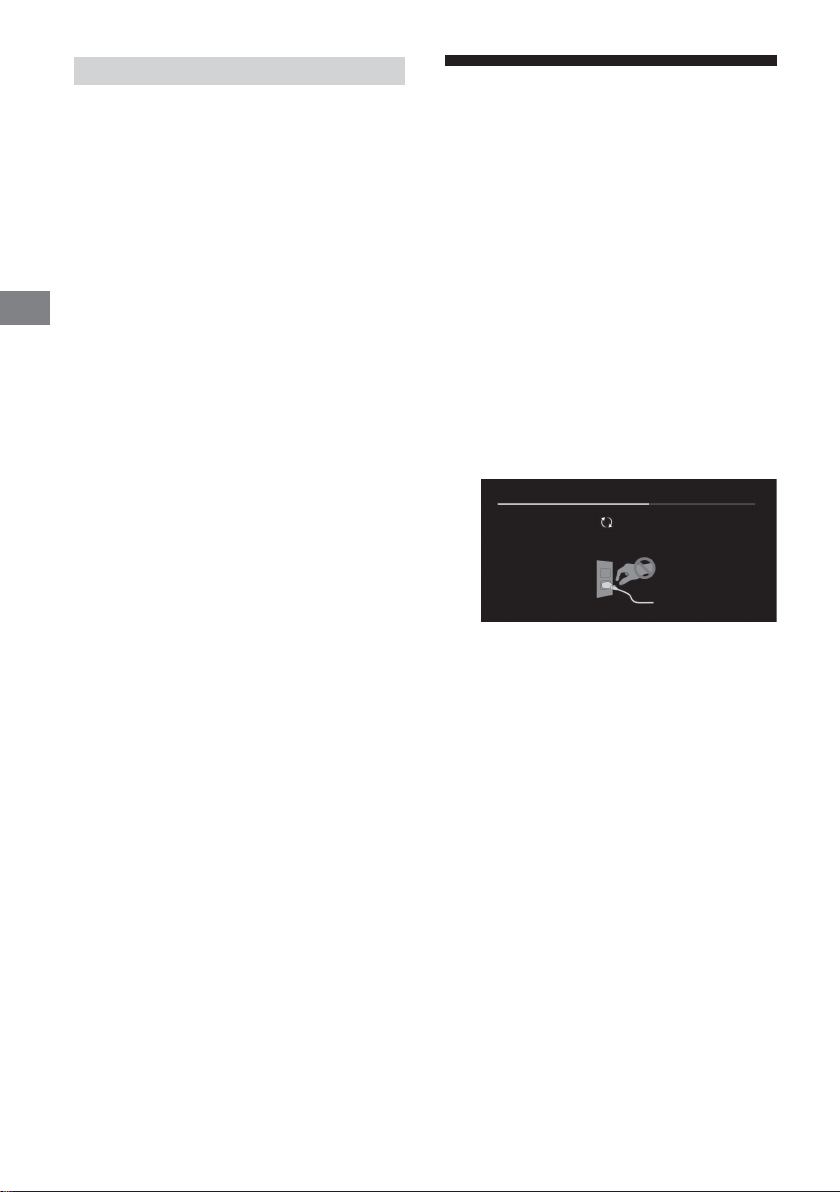
.ﺪﻧز ﯽﻣ ﮏﻤﺸﭼ ﺰﻣﺮﻗ ﮓﻧر ﻪﺑ LED غاﺮﭼ ﻪﮐ ﯽﻧﺎﻣز
ﻪﻘﯿﻗد ﻪﺳ تﺪﻣ ﻪﺑ ار (ﯽﻠﺻا ﻂﺑار) قﺮﺑ ﻞﺑﺎﮐ ،نﻮﯾﺰﯾﻮﻠﺗ دﺪﺠﻣ یزاﺪﻧا هار یاﺮﺑ
.ﺪﯿﻨﮐ ﻦﺷور ار نﻮﯾﺰﯾﻮﻠﺗ ﺲﭙﺳ و ﺪﯿﻨﮐ اﺪﺟ
هﺪﻨﺷوﺮﻓ ﺎﺑ و ﺪﯿﻨﮐ اﺪﺟ ار بوﺎﻨﺘﻣ قﺮﺑ ﻢﯿﺳ ،ﺖﺳا ﯽﻗﺎﺑ نﺎﻨﭽﻤﻫ ﻞﮑﺸﻣ ﺮﮔا
ﮏﻤﺸﭼ LED غاﺮﭼ ﻪﮐ ﯽﺗﺎﻌﻓد داﺪﻌﺗ و ﺪﯾﺮﯿﮕﺑ سﺎﻤﺗ Sony تﺎﻣﺪﺧ ﺰﮐﺮﻣ ﺎﯾ
ﯽ ﺶﺨﭘ ﺰﯿﻧ ﯽﯾاﺪﺻ و (ﺖﺳا ﺦﯾرﺎﺗ ﻪﺤﻔﺻ) دﻮﺷ ﯽ هداد نﺎﺸﻧ یﺮﯾﻮﺼﺗ
PR
.ﺪﯿﻨﮐ ﻢﯿﻈﻨﺗ ﺪﯿﻧاﻮﺗ ﯽ ار ﺎﻫ ﻪﻣﺎﻧﺮﺑ زا ﯽﻀﻌﺑ
.ﺖﺳا هﺪﺷ شﻮﻣاﺮﻓ ﺶﺨﭘ یاﺮﺑ ﻦﯾﺪﻟاو ﻞﻔﻗ رﻮﺒﻋ ﺰﻣر
.ﺪﯿﻨﮐ سﺎﺴﺣا ار ﺎﻣﺮﮔ ﺖﺳا ﻦﮑﻤﻣ ،ﺪﯿﻨﮐ ﯽﻣ ﺲﳌ ار نآ نﺎﺘﺘﺳد ﺎﺑ ﯽﺘﻗو
.دﻮﺷ ﯽﻣ ﺮﺗ هﺮﯿﺗ نﻮﯾﺰﯾﻮﻠﺗ یﺎﺷﺎ مﺎﮕﻨﻫ ﺶﯾﺎ ﻪﺤﻔﺻ
ﺺﻘﻧ ﮏﯾ ﻦﯾا .ﺪﻨﮐ ﯽﻣ اﺪﯿﭘ ﺶﻫﺎﮐ ﺞﯾرﺪﺗ ﻪﺑ ﺮﯾﻮﺼﺗ ﺮﺛا یرﺎﮔﺪﻧﺎﻣ زا یﺮﯿﮔﻮﻠﺟ
.ﺪﯿﺘﺴﻫ ناﺮﮕﻧ ﺮﯾﻮﺼﺗ ﺮﺛا یرﺎﮔﺪﻧﺎﻣ ﺎﺑ ﻪﻄﺑار رد ﺷ
ﻪﺑ ﺮﯾﻮﺼﺗ ﺮﺛا یرﺎﮔﺪﻧﺎﻣ ﺶﻫﺎﮐ یاﺮﺑ ﺪﯿﻧاﻮﺗ ﯽﻣ .ﺪﻫد خر ﺮﯾﻮﺼﺗ ﺮﺛا یرﺎﮔﺪﻧﺎﻣ
.ﺪﯿﻨﮐ اﺮﺟا ار ﻞﻧﺎﭘ یزﺎﺳ هزﺎﺗ ﯽﺘﺳد ترﻮﺻ
زا ﺶﯿﺑ یاﺮﺟا زا .ﺪﯿﻨﮐ هدﺎﻔﺘﺳا نآ زا لﺎﺳ رد رﺎﺑ ﮏﯾ ﺎﻬﻨﺗ ،ﻊﺟﺮﻣ ناﻮﻨﻋ ﻪﺑ .ﺪﯿﻨﮐ
.دراﺬﮕﺑ ﺮﯿﺛﺄﺗ ﻞﻧﺎﭘ ﺪﯿﻔﻣ ﺮﻤﻋ رد ﺖﺳا ﻦﮑﻤﻣ اﺮﯾز ﺪﯿﻨﮐ یراددﻮﺧ نآ لﺎﺳ رد رﺎﺑ ﮏﯾ
ﯽﻧﻻﻮﻃ نﺎﻣز تﺪﻣ یاﺮﺑ ﺮﯾوﺎﺼﺗ عﻮﻧ ﻦﯾا ﺶﯾﺎ زا .ﺪﻧﻮﺷ ﯽﻣ ﺮﯾﻮﺼﺗ ﺮﺛا یرﺎﮔﺪﻧﺎﻣ
.ﺪﻫد خر ﺮﯾﻮﺼﺗ ﺮﺛا یرﺎﮔﺪﻧﺎﻣ ﺖﺳا ﻦﮑﻤﻣ ترﻮﺻ ﻦﯾا ﺮﯿﻏ رد ،ﺪﯿﻨﮐ یراددﻮﺧ
ﺎﻫ ﻞﺣ هار و تﻼﮑﺸﻣ
.ﺪﯿﻨﮐ ناﻮﻨﻋ ار ﺪﻧز ﯽﻣ
دﻮﺷ
.ﺪﯿﻫد رﺎﺸﻓ رود هار زا
.ﺪﻨﮐ ﯽ رﺎﮐ رود هار زا لﱰﻨﮐ
.دﻮﺷ ﯽﻣ مﺮﮔ نﻮﯾﺰﯾﻮﻠﺗ فاﺮﻃا
.دﻮﺷ مﺮﮔ نآ فاﺮﻃا ﻪﺤﻔﺻ
.ﺖﺴﯿﻧ نﻮﯾﺰﯾﻮﻠﺗ رد ﯽﻨﻓ
ﻪﺘﮑﻧ
.(ﺖﺳا ﻪﯿﻧﺎﺛ ﻪﺳ ﺎﻬﻧآ ﻦﯿﺑ ﻪﻠﺻﺎﻓ) ﺪﯾرﺎﻤﺸﺑ ار نآ ندز ﮏﻤﺸﭼ تﺎﻌﻓد داﺪﻌﺗ
.ﺪﯿﻨﮐ ﯽﺳرﺮﺑ ار ﯽﻠﺑﺎﮐ/(ﯽﯾاﻮﻫ)ﻧآ لﺎﺼﺗا
لﱰﻨﮐ ﺎﯾ نﻮﯾﺰﯾﻮﻠﺗ یور زا ار و ﺪﯿﻨﮐ ﻞﺻو بوﺎﻨﺘﻣ قﺮﺑ ﻊﺒﻨﻣ ﻪﺑ ار نﻮﯾﺰﯾﻮﻠﺗ
ﻮﮕﺨﺳﺎﭘ ،ﺖﺑﺎﺛ ﺮﯾﻮﺼﺗ ،اﺪﺻ نوﺪﺑ ،هﺎﯿﺳ ﻪﺤﻔﺻ :ﺪﻨﻧﺎﻣ ﯽﻠﮐ ﯽﺑﺎﯾ ﺐﯿﻋ یاﺮﺑ
.ﺪﯿﻫد مﺎﺠﻧا ار ﺮﯾز ﻞﺣاﺮﻣ ،ﻪﮑﺒﺷ لﺎﺼﺗا نﺪﺷ ﻊﻄﻗ ﺎﯾ نﻮﯾﺰﯾﻮﻠﺗ ندﻮﺒﻧ
ﺮﺘﻬﺑ نﻮﯾﺰﯾﻮﻠﺗ ﺖﯿﻌﺿو ﺮﮔا .دﻮﺷ ﺮﻫﺎﻇ مﺎﯿﭘ ﮏﯾ ﻪﮑﻨﯾا ﺎﺗ ﺪﯿﻨﮐ دﺪﺠﻣ یزاﺪﻧا هار
ﺲﭙﺳ و ﺪﯿﻨﮐ اﺪﺟ AC بوﺎﻨﺘﻣ قﺮﺑ ﻢﯿﺳ زا ار نﻮﯾﺰﯾﻮﻠﺗ ﻪﻘﯿﻗد ﻪﺳ تﺪﻣ ﻪﺑ ،ﺪﺸﻧ
.ﺪﯿﻨﮐ ﻞﺻو ﺰﯾﺮﭘ ﻪﺑ ار نآ هرﺎﺑود
سﱰﺳد رد نﻮﯾﺰﯾﻮﻠﺗ ﻢﺘﺴﯿﺳ راﺰﻓا مﺮﻧ یزﺎﺳﺪﻣآزور ﮏﯾ] مﺎﯿﭘ ﻪﮐ ﯽﻧﺎﻣز
.ﺪﯿﻨﮐ ﯽﺳرﺮﺑ ار ﯽﻠﺑﺎﮐ/(ﯽﯾاﻮﻫ)ﻧآ لﺎﺼﺗا
ﻪﺑ [ﯽﻧﺎﺳرزور ﻪﺑ نﻮﻨﮐا] بﺎﺨﺘﻧا ﺎﺑ ار نﻮﯾﺰﯾﻮﻠﺗ راﺰﻓا مﺮﻧ ﺪﻨﮐ ﯽﻣ ﺪﯿﮐﺄﺗ Sony
ﯽﻣ ﱰﻬﺑ ار نﻮﯾﺰﯾﻮﻠﺗ دﺮﮑﻠﻤﻋ راﺰﻓا مﺮﻧ یﺎﻫ ﯽﻧﺎﺳر زور ﻪﺑ ﻦﯾا .ﺪﯿﻨﮐ ﯽﻧﺎﺳر زور
.ﺪﯿﻨﮐ ﺾﯾﻮﻌﺗ ار ﺎﻫ یﺮﺗﺎﺑ
.ﺪﻨﮐ ﯽﻣ ﻪﻓﺎﺿا یﺪﯾﺪﺟ یﺎﻫ ﯽﮔﮋﯾو ﺎﯾ ﺪﻨﮐ
مﺮﻧ ﻪﮐ ﯽﻧﺎﻣز و دﻮﺷ ﯽﻣ ﺮﻫﺎﻇ (…ﯽﻧﺎﺳرزور ﻪﺑ) [Updating…] ﺎﺑ ﺮﯾز ﻪﺤﻔﺻ
.ﺪﯿﻨﮐ بﺎﺨﺘﻧا ار [ﺪﯿﻫد ﺮﯿﯿﻐﺗ ار PIN ﺰﻣر] و ﺪﯿﻨﮐ دراو ﻦﯿﭘ ﺪﮐ یاﺮﺑ ار 9999
.ﺪﻧز ﯽﻣ ﮏﻤﺸﭼ ﺪﯿﻔﺳ ﮓﻧر ﻪﺑ LED غاﺮﭼ ﺖﺳا ﯽﻧﺎﺳر زور ﻪﺑ لﺎﺣ رد راﺰﻓا
ﺖﺳا ﻦﮑﻤﻣ ،ﺪﯿﻨﮐ ﯽﻣ هدﺎﻔﺘﺳا ﯽﻧﻻﻮﻃ ﯽﻧﺎﻣز تﺪﻣ یاﺮﺑ نﻮﯾﺰﯾﻮﻠﺗ زا ﺮﮔا
یاﺮﺑ ﺶﯾﺎ ﻪﺤﻔﺻ ﯽﯾﺎﻨﺷور ،ﺪﻧﺎ ﯽﻗﺎﺑ ﺖﺑﺎﺛ نآ زا ﯽﺘﻤﺴﻗ ﺎﯾ ﺮﯾﻮﺼﺗ مﺎ ﺮﮔا
Updating...
ﻦﯾا ﺮﮔا .ﺪﯿﻨﮑﻧ اﺪﺟ ار AC بوﺎﻨﺘﻣ قﺮﺑ ﻢﯿﺳ ،راﺰﻓا مﺮﻧ ﯽﻧﺎﺳر زور ﻪﺑ ﻦﯿﺣ رد
مﺎﺠﻧا ﻞﻣﺎﮐ رﻮﻃ ﻪﺑ ﺖﺳا ﻦﮑﻤﻣ راﺰﻓا مﺮﻧ ﯽﻧﺎﺳر زور ﻪﺑ ،ﺪﯿﻫد مﺎﺠﻧا ار رﺎﮐ
ﺖﺳا ﻦﮑﻤﻣ ،دﻮﺷ هداد ﺶﯾﺎ تﺪﻣ ﯽﻧﻻﻮﻃ ﺎﯾ رﺮﮑﻣ ترﻮﺻ ﻪﺑ یﺮﯾﻮﺼﺗ ﺮﮔا
راﺰﻓا مﺮﻧ یﺎﻫ ﯽﻧﺎﺳر زور ﻪﺑ .دﻮﺷ دﺎﺠﯾا راﺰﻓا مﺮﻧ دﺮﮑﻠﻤﻋ رد ﯽﺼﻘﻧ و دﻮﺸﻧ
.ﺪﺸﮑﺑ لﻮﻃ ﻪﻘﯿﻗد 15 ﮐاﺪﺣ ﺖﺳا ﻦﮑﻤﻣ
ﯽﺗﺪﻣ یاﺮﺑ نﻮﯾﺰﯾﻮﻠﺗ ﺖﺳا ﻦﮑﻤﻣ ،ﺪﯿﻨﮐ ﯽﻣ ﻞﺻو ﺰﯾﺮﭘ ﻪﺑ ار نﻮﯾﺰﯾﻮﻠﺗ ﯽﺘﻗو
ﺎﯾ رود هار زا لﱰﻨﮐ یور زا ار شﻮﻣﺎﺧ – ﻦﺷور ﻪﻤﮐد ﺮﮔا ﯽﺘﺣ دﻮﺸﻧ ﻦﺷور
• اﺮﺟا ﺖﺳا ﻪﺟﻮﺗ ﻞﺑﺎﻗ ًاﺪﯾﺪﺷ ﺮﯾﻮﺼﺗ ﺮﺛا یرﺎﮔﺪﻧﺎﻣ ﻪﮐ ﯽﻧﺎﻣز ﺎﻬﻨﺗ ار ﻞﻧﺎﭘ یزﺎﺳ هزﺎﺗ
و ﺪﯿﻧﺎ ﺮﻈﺘﻨﻣ ﻪﻘﯿﻗد ﮏﯾ .دﻮﺷ یزاﺪﻧا هار ﻢﺘﺴﯿﺳ ﺎﺗ ﺪﺸﮐ ﯽﻣ لﻮﻃ ﯽﺗﺪﻣ
• ﺚﻋﺎﺑ ﯽﮔدﺎﺳ ﻪﺑ (ﺪﯿﻔﺳ ﺪﻨﻧﺎﻣ) ﻦﺷور یﺎﻫ ﮓﻧر و ﺎﻫ مرآ ،ﺎﻫ ﺖﻋﺎﺳ یوﺎﺣ ﺮﯾوﺎﺼﺗ
ﯽﺑﺎﯾ ﺐﯿﻋ
1 ار نﻮﯾﺰﯾﻮﻠﺗ ،رود هار زا لﺮﺘﻨﮐ ﺎﯾ نﻮﯾﺰﯾﻮﻠﺗ یور ﻦﺷور شﻮﻣﺎﺧ ﺪﯿﻠﮐ ندﺮﺸﻓ ﺎﺑ
2 .ﺪﯿﻫد رﺎﺸﻓ رود هار زا لﱰﻨﮐ یور ﺮﺑ ار HELP و ﻪﺘﻓر ﻨﻫار یﻮﻨﻣ ﻪﺑ
3 .ﺪﯿﻨﮐ ﯽﻧﺎﺳر زور ﻪﺑ ار راﺰﻓا مﺮﻧ و ﺪﯿﻨﮐ ﻞﺻو ﺖﻧﱰﻨﯾا ﻪﺑ ار نﻮﯾﺰﯾﻮﻠﺗ
4 ﻪﺋارا ﯽﺘﺸﭘ روﺎﮐ یور ﺮﺑ تﺎﻋﻼﻃا) ﺪﯿﻨﮐ ﻪﻌﺟاﺮﻣ Sony ﯽﻧﺎﺒﯿﺘﺸﭘ ﺖﯾﺎﺳ بو ﻪﺑ
.(ﺖﺳا هﺪﺷ
.دﻮﺷ هداد نﺎﺸﻧ [...ﺖﺳا
.ﺪﯿﻫد رﺎﺸﻓ نﻮﯾﺰﯾﻮﻠﺗ
.ﺪﯿﻨﮐ رﺎﮐ هرﺎﺑود ﺲﭙﺳ
PR
19
Page 75
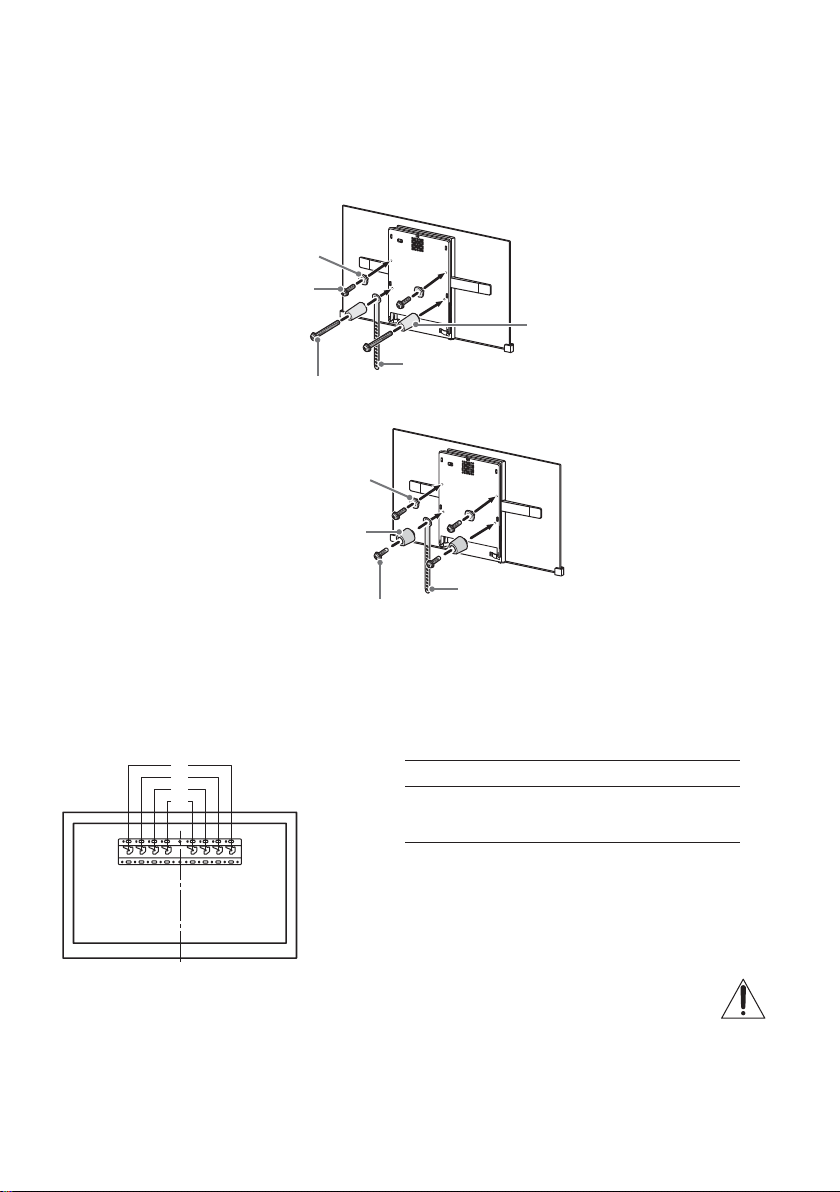
هﺮﻗﺮ ﻗ
(+PSW 6 x 20) ﭻﯿﭘ
(+PSW 6 x 50) ﭻﯿﭘ
(ﱰﻣ ﯽﻠﯿﻣ 20) ﴍاو
2 لﺎﺼﺗا یﺎﻫ ﺖﻤﺴﻗ ،یراﻮﯾد ﺐﺼﻧ ﻪﯾﺎﭘ ﺐﺼﻧ یﻨﻫار رد "1 ﺖﻤﺴﻗ" ﻪﺑ ﻪﻌﺟاﺮﻣ ﺎﺑ .ﺪﯿﻨﮐ ﻞﺻو ار یراﻮﯾد ﺐﺼﻧ ﻪﯾﺎﭘ ﻪﺑ طﻮﺑﺮﻣ لﺎﺼﺗا یﺎﻫ ﺶﺨﺑ
.ﺪﯿﻨﮐ ﯽﺳرﺮﺑ ار
ﻪﺘﮑﻧ
•.ﺪﯿﻨﮐ ﻢﯿﻈﻨﺗ {ﱰﻣ ﯽﺘﻧﺎﺳ·وﺮﯿﻧ مﺮﮔﻮﻠﯿﮐ 15} ﱰﻣ ﻦﺗﻮﯿﻧ 1.5 ﯽﺒﯾﺮﻘﺗ راﺪﻘﻣ یور ار (ﺶﺧﺮﭼ ناﺰﯿﻣ) روﺎﺘﺸﮔ ،ﺪﯿﻨﮐ ﯽﻣ هدﺎﻔﺘﺳا ﯽﻗﺮﺑ رﺎﭼآ زا ﺮﮔا
•.ﺪﯾراﺪﻬﮕﻧ نﺎﺗدﻮﺧ دﺰﻧ یﺪﻌﺑ یﺎﻫ ﻪﻌﺟاﺮﻣ یاﺮﺑ ار ﻪﭼﱰﻓد ﻦﯾا .ﺪﯿﻨﮐ یراﺪﻬﮕﻧ ﻦﻣا ﯽﻠﺤﻣ رد یﺪﻌﺑ یﺎﻫ هدﺎﻔﺘﺳا یاﺮﺑ ار هﺪﺸﻧ هدﺎﻔﺘﺳا یﺎﻫ ﺶﺨﺑ ًﺘﺣ
دراﺪﻧﺎﺘﺳا ﺐﺼﻧ
(ﱰﻣ ﯽﻠﯿﻣ 60) ﴍاو
ﺪﻨﺑﺮﻤﮐ
ﮏﯾرﺎﺑ ﺐﺼﻧ
هﺮﻗﺮ ﻗ
ﺪﻨﺑﺮﻤﮐ
(+PSW 6 x 20) ﭻﯿﭘ
3 .ﺪﯿﻨﮐ ﻞﺻو نﻮﯾﺰﯾﻮﻠﺗ ﻪﺑ ار یروﴐ یﺎﻫ ﻞﺑﺎﮐ
ﻪﺘﮑﻧ
•.ﺪﯿﺷﺎﺑ ﻪﺘﺷاد ﯽﺳﱰﺳد یا ﻪﻧﺎﯾﺎﭘ ﭻﯿﻫ ﻪﺑ ﺪﯿﻧاﻮﺗ ﯽ ،راﻮﯾد یور نﻮﯾﺰﯾﻮﻠﺗ ﺐﺼﻧ زا ﺪﻌﺑ
4 ﻪﯾﺎﭘ ﺎﺑ هاﺮﻤﻫ هﺪﺷ ﻪﺋارا یﻨﻫار ﻪﭼﱰﻓد رد "راﻮﯾد یور نﻮﯾﺰﯾﻮﻠﺗ ﺐﺼﻧ" ﺖﻤﺴﻗ و ﺐﺼﻧ یﻨﻫار "5 ﺖﻤﺴﻗ" ﻪﺑ .ﺪﯿﻨﮐ ﺐﺼﻧ ﻪﯾﺎﭘ یور ار نﻮﯾﺰﯾﻮﻠﺗ
.ﺪﯿﻨﮐ ﻪﻌﺟاﺮﻣ یراﻮﯾد ﺐﺼﻧ
a
b
c
d
a
.ﺪﯿﻨﮐ ﻪﻌﺟاﺮﻣ یراﻮﯾد ﺐﺼﻧ ﻪﯾﺎﭘ ﺎﺑ هاﺮﻤﻫ هﺪﺷ ﻪﺋارا یﺎﻫ ﻞﻤﻌﻟارﻮﺘﺳد ﻪﺑ ،راﻮﯾد نﺎﺘﻧﻮﯾﺰﯾﻮﻠﺗ لﺪﻣ ﺐﺼﻧ هﻮﺤﻧ زا عﻼﻃا یاﺮﺑ
KD- لﺪﻣ مﺎﻧبﻼﻗ ﻞﺤﻣ
77A1
65A1
55A1
PR
18
Page 76
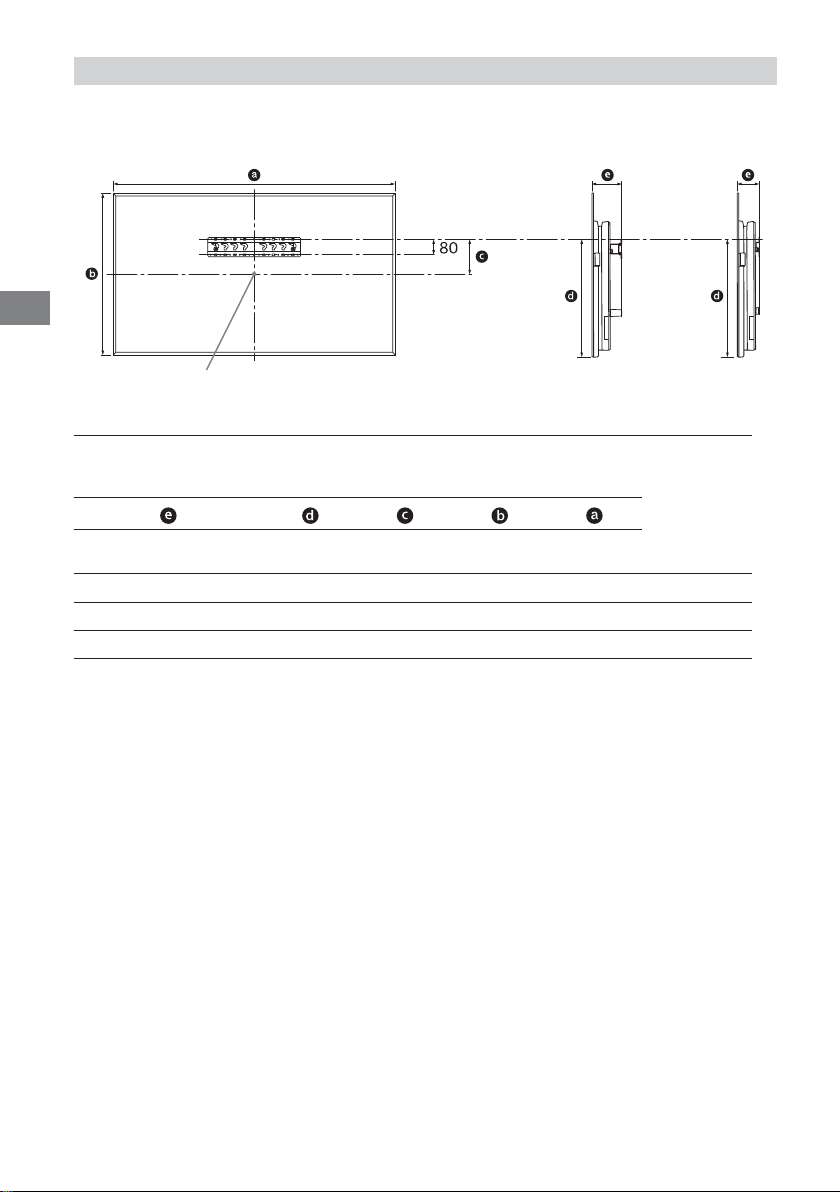
PR
ﱰﻣ ﯽﻠﯿﻣ :ﺪﺣاو
SU-WL450
.ﺪﯿﻨﮐ ﻪﻌﺟاﺮﻣ (تﺎﺼﺨﺸﻣ) 21 - 20 ﻪﺤﻔﺻ ﻪﺑ نﻮﯾﺰﯾﻮﻠﺗ نزو زا عﻼﻃا یاﺮﺑ .ﺪﯿﻨﮐ ﻪﻌﺟاﺮﻣ ﺮﯾز لوﺪﺟ ﻪﺑ راﻮﯾد یور ﺮﺑ نﻮﯾﺰﯾﻮﻠﺗ ﺐﺼﻧ یاﺮﺑ
دراﺪﻧﺎﺘﺳا ﺐﺼﻧ
ﻪﺤﻔﺻ ﺰﮐﺮﻣ ﻪﻄﻘﻧ
ﺶﯾﺎ دﺎﻌﺑاﻪﺤﻔﺻ ﺰﮐﺮﻣ دﺎﻌﺑاﺐﺼﻧ یاﺮﺑ لﻮﻃ
دراﺪﻧﺎﺘﺳا ﺐﺼﻧﮏﯾرﺎﺑ ﺐﺼﻧ
ﮏﯾرﺎﺑ ﺐﺼﻧ
لﺪﻣ مﺎﻧ
KD-
77A11,72199799604162120
65A11,45183493514149107
55A11,228711153514149107
ﻪﺘﮑﻧ
•.ﺪﻨﺷﺎﺑ توﺎﻔﺘﻣ ﯽﻤﮐ ،ﺐﺼﻧ ﻪﺑ ﻪﺘﺴﺑ ﺖﺳا ﻦﮑﻤﻣ لوﺪﺟ رد دﻮﺟﻮﻣ یﺎﻫ هزاﺪﻧا
•.دﻮﺷ ﯽﻣ ﻞﯾﺘﻣ ﻮﻠﺟ ﺖﻤﺳ ﻪﺑ ﯽﻤﮐ نﻮﯾﺰﯾﻮﻠﺗ یﻻﺎﺑ ﺖﻤﺴﻗ ،ﺪﯿﻨﮐ ﯽﻣ ﺐﺼﻧ راﻮﯾد یور ار نﻮﯾﺰﯾﻮﻠﺗ ﯽﺘﻗو
1 .ﺪﻨﮐ ﻞﻤﺤﺗ ار نﻮﯾﺰﯾﻮﻠﺗ نزو ﺮﺑاﺮﺑ رﺎﻬﭼ ﻞﻗاﺪﺣ ﺪﻧاﻮﺘﺑ و ﺪﺷﺎﺑ ﻪﺘﺷاد ار نﻮﯾﺰﯾﻮﻠﺗ یاﺮﺑ ﯽﻓﺎﮐ یﺎﻀﻓ راﻮﯾد ﺪﯿﻨﮐ اﺪﯿﭘ نﺎﻨﯿﻤﻃا
PR
17
Page 77
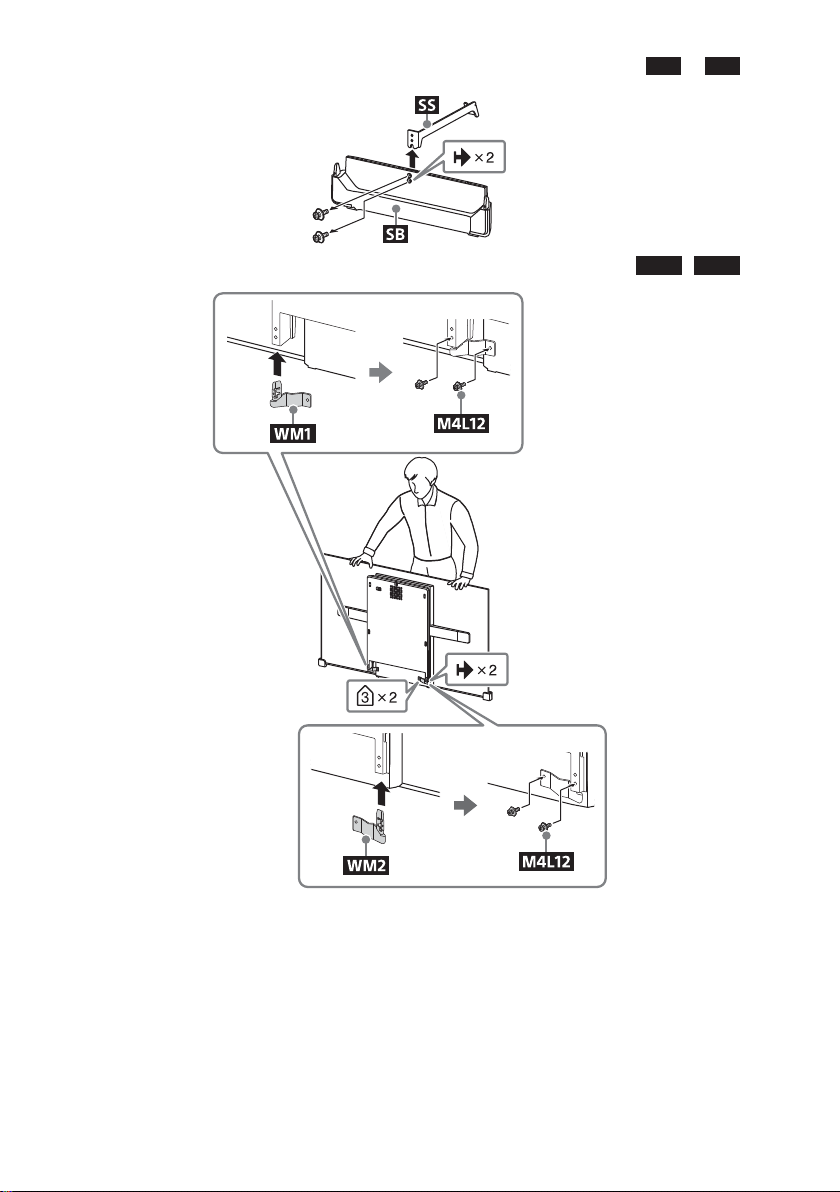
SB
زا ار
SS
6 .ﺪﯿﯾﺎ اﺪﺟ
WM2
و
WM1
7 .ﺪﯿﻨﮐ ﻞﺻو نﻮﯾﺰﯾﻮﻠﺗ ﺖﺸﭘ رد ار (نﻮﯾﺰﯾﻮﻠﺗ ﺎﺑ هﺪﺷ ﻦﯿﻣﺄﺗ)
ﻪﺘﮑﻧ
•.ﺪﯿﻨﮐ ﻢﯿﻈﻨﺗ {ﱰﻣ ﯽﺘﻧﺎﺳ·وﺮﯿﻧ مﺮﮔﻮﻠﯿﮐ 15} ﱰﻣ ﻦﺗﻮﯿﻧ 1.5 ﯽﺒﯾﺮﻘﺗ راﺪﻘﻣ یور ار (ﺶﺧﺮﭼ ناﺰﯿﻣ) روﺎﺘﺸﮔ ،ﺪﯿﻨﮐ ﯽﻣ هدﺎﻔﺘﺳا ﯽﻗﺮﺑ رﺎﭼآ زا ﺮﮔا
PR
16
Page 78
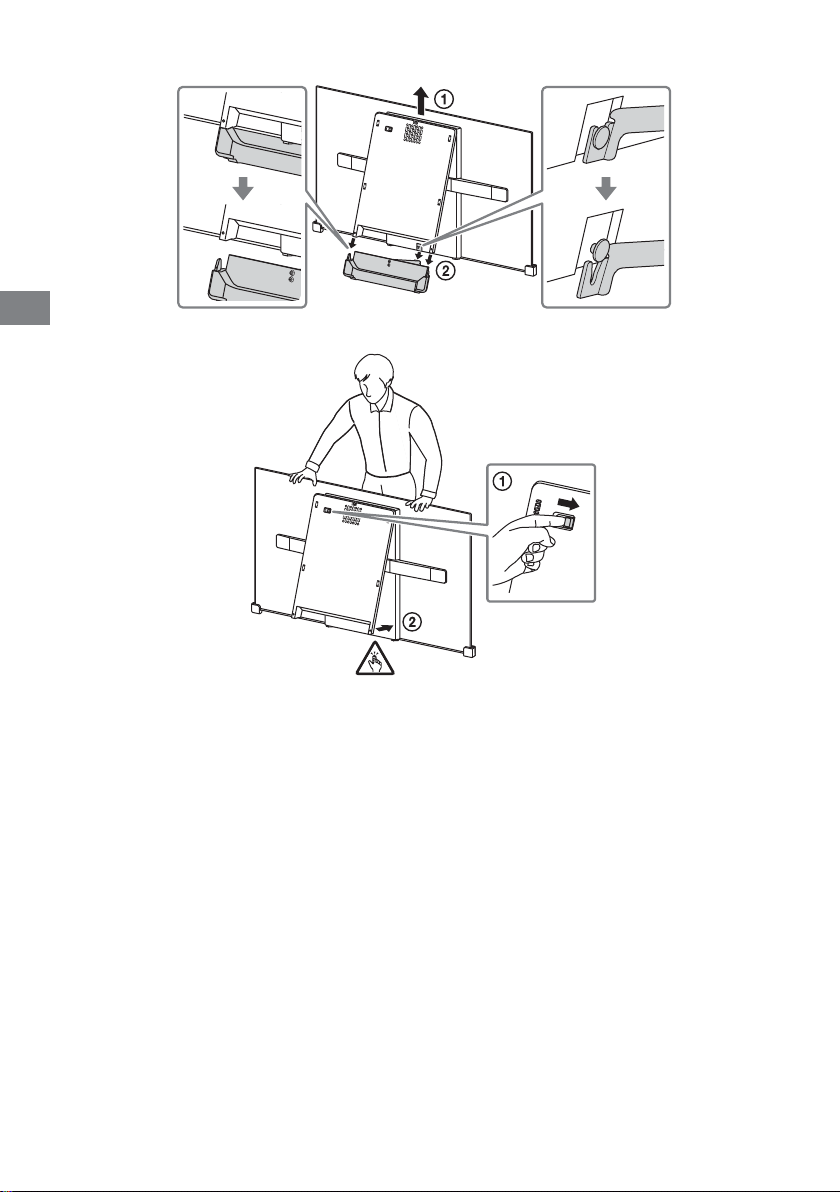
PR
4 .ﺪﯿﻨﮐ اﺪﺟ ار ﻪﯾﺎﭘ
5 .ﺪﯾﺪﻨﺒﺑ ﻞﺼﻔﻣ ﻞﻔﻗ ندﺮﮐ دازآ ﺎﺑ ار یﺰﮐﺮﻣ داﺪﺴﻧا
PR
15
Page 79
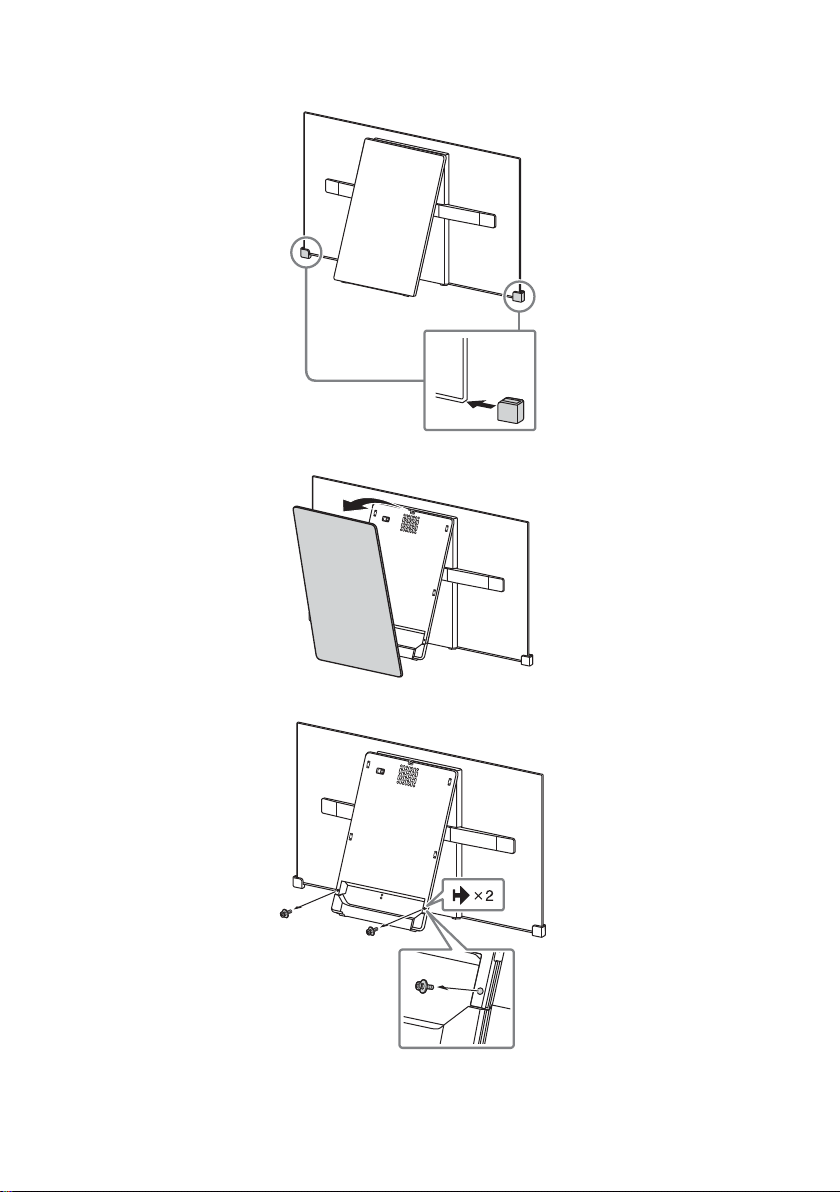
یﺰﯿﻣ ور ﻪﯾﺎﭘ زا راﻮﯾد یور نﻮﯾﺰﯾﻮﻠﺗ ﺐﺼﻧ
1 .ﺪﯿﻨﮐ جرد ار ﺎﻫ ﻪﺷﻮﮔ ظﺎﻔﺣ
2 .ﺪﯿﻨﮐ اﺪﺟ ار یﺰﮐﺮﻣ ﺶﺷﻮﭘ
3 .ﺪﯿﻨﮐ اﺪﺟ ار ﺎﻫ ﭻﯿﭘ
PR
14
Page 80
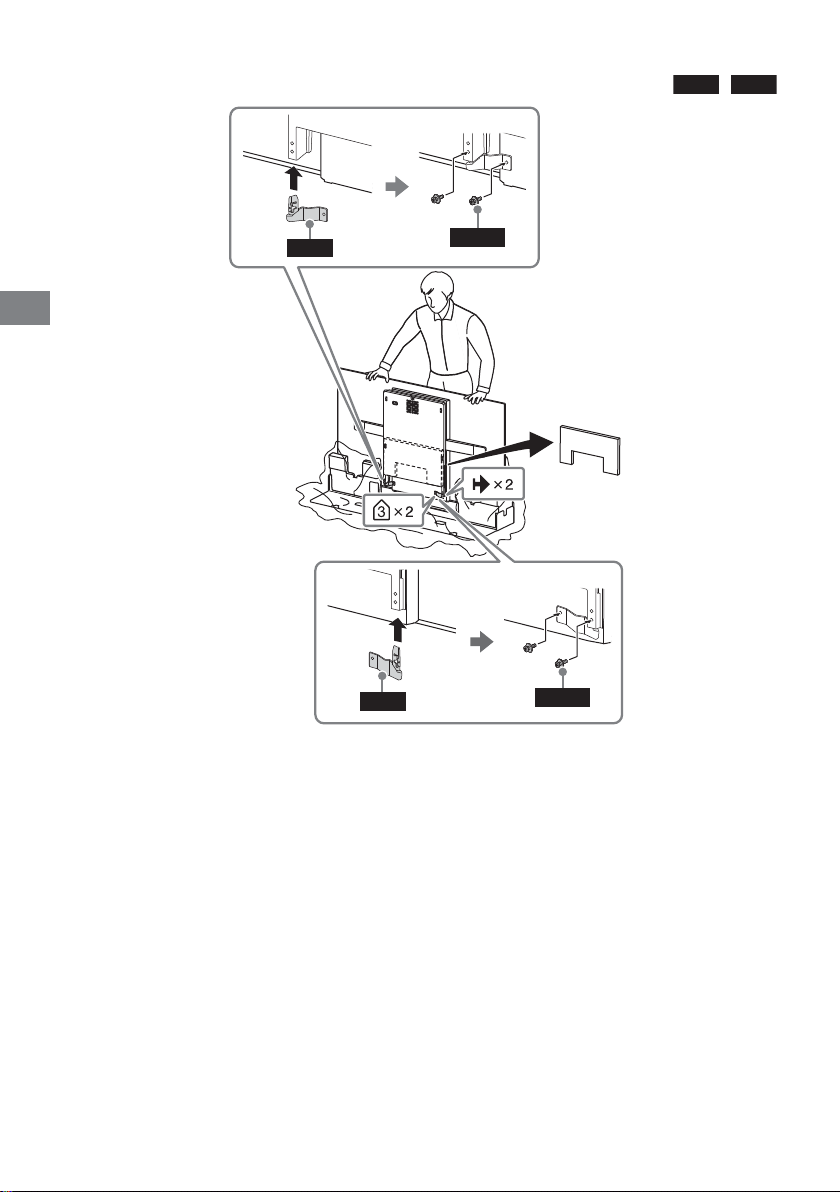
ﻦﺗرﺎﮐ زا راﻮﯾد یور نﻮﯾﺰﯾﻮﻠﺗ ﺐﺼﻧ
.ﺪﯿﻨﮐ ﻞﺻو نﻮﯾﺰﯾﻮﻠﺗ ﺖﺸﭘ رد ار (نﻮﯾﺰﯾﻮﻠﺗ ﺎﺑ هﺪﺷ ﻦﯿﻣﺄﺗ)
WM2
و
WM1
PR
WM1
WM2
M4L12
M4L12
ﻪﺘﮑﻧ
•.ﺪﯿﻨﮐ ﻢﯿﻈﻨﺗ {ﱰﻣ ﯽﺘﻧﺎﺳ·وﺮﯿﻧ مﺮﮔﻮﻠﯿﮐ 15} ﱰﻣ ﻦﺗﻮﯿﻧ 1.5 ﯽﺒﯾﺮﻘﺗ راﺪﻘﻣ یور ار (ﺶﺧﺮﭼ ناﺰﯿﻣ) روﺎﺘﺸﮔ ،ﺪﯿﻨﮐ ﯽﻣ هدﺎﻔﺘﺳا ﯽﻗﺮﺑ رﺎﭼآ زا ﺮﮔا
PR
13
Page 81
راﻮﯾد یور نﻮﯾﺰﯾﻮﻠﺗ ﺐﺼﻧ
.ﺖﺳا هﺪﺷ هداد ﺢﯿﺿﻮﺗ راﻮﯾد یور ﺐﺼﻧ زا ﻞﺒﻗ نﻮﯾﺰﯾﻮﻠﺗ ﺐﺼﻧ یاﺮﺑ یزﺎﺳ هدﺎﻣآ ﻪﺑ طﻮﺑﺮﻣ ﻞﺣاﺮﻣ ﻂﻘﻓ نﻮﯾﺰﯾﻮﻠﺗ ﻦﯾا ﻞﻤﻌﻟارﻮﺘﺳد ﻪﭼﱰﻓد رد
:نﺎﯾﱰﺸﻣ یاﺮﺑ
زا ًﺎﺼﺨﺷ .دﺮﯿﮔ ترﻮﺻ زﺎﺠﻣ داﺮﻓا ﺎﯾ Sony نﺎﮔﺪﻨﺷوﺮﻓ ﻂﺳﻮﺗ نﻮﯾﺰﯾﻮﻠﺗ ﺐﺼﻧ ﻪﮐ ﺪﻨﮐ ﯽﻣ ﻪﯿﺻﻮﺗ ًاﺪﯿﮐا Sony ،ﯽﻨﻤﯾا ﻆﻔﺣ یاﺮﺑ و هﺎﮕﺘﺳد زا ﺖﻈﻓﺎﺤﻣ یاﺮﺑ
.ﺪﯿﻨﮐ یراددﻮﺧ هﺎﮕﺘﺳد ﺐﺼﻧ
:Sony زﺎﺠﻣ نارﺎﮑﻧﯿﭘ ﺎﯾ هﺪﻨﺷوﺮﻓ یاﺮﺑ
.ﺪﯿﺷﺎﺑ ﻪﺘﺷاد ﻞﻣﺎﮐ ﺖﻗد ،هﺎﮕﺘﺳد ﻦﯾا ﯽﺳرﺮﺑ و یا هرود تاﺮﯿﻤﻌﺗ ،ﺐﺼﻧ ﻦﯿﺣ رد
یور ﺮﺑ هﺎﮕﺘﺳد ﻦﯾا ﺐﺼﻧ یاﺮﺑ ًﺘﺣ .ﺪﻨﮐ ﻞﻤﺤﺗ ار نﻮﯾﺰﯾﻮﻠﺗ نزو ﺪﻫاﻮﺧ ﯽﻣ ﻪﮐ یراﻮﯾد ترﺪﻗ ﻦﯿﯿﻌﺗ یاﺮﺑ ًﺎﺻﻮﺼﺨﻣ ،ﺪﯿﺷﺎﺑ ﻪﺘﺷاد ﯽﻓﺎﮐ ﻪﺑﺮﺠﺗ ﺖﺳا مزﻻ هﺎﮕﺘﺳد ﺐﺼﻧ یاﺮﺑ
ﺐﺼﻧ ﺎﯾ ﺖﺳردﺎﻧ هدﺎﻔﺘﺳا ﻪﺠﯿﺘﻧ رد ﺖﺣاﺮﺟ ﺎﯾ ﺐﯿﺳآ زوﺮﺑ ترﻮﺻ رد .ﺪﯿﺷﺎﺑ ﻪﺘﺷاد ﺖﻗد ﯽﻨﻤﯾا لﻮﺻا ﻪﺑ ﺐﺼﻧ ﻦﯿﺣ رد و ﺪﯿﻨﮐ دﺘﻋا Sony زﺎﺠﻣ داﺮﻓا ﺎﯾ نﺎﮔﺪﻨﺷوﺮﻓ ﻪﺑ راﻮﯾد
.دﻮﺑ ﺪﻫاﻮﺨﻧ لﻮﺌﺴﻣ Sony ،ﺐﺳﺎﻨﻣﺎﻧ
.ﺪﯿﻨﮐ ﻪﻌﺟاﺮﻣ ﺰﯿﻧ یراﻮﯾد ﺐﺼﻧ ﻪﯾﺎﭘ ﺎﺑ هاﺮﻤﻫ هﺪﺷ ﻪﺋارا ﺐﺼﻧ یﻨﻫار و ﻨﻫار ﻪﭼﱰﻓد ﻪﺑ ،ﺪﯿﻨﮐ ﯽﻣ ﻞﺻو ار یراﻮﯾد ﺐﺼﻧ ﻪﯾﺎﭘ ﯽﺘﻗو
.ﺪﯿﻨﮐ هدﺎﻔﺘﺳا راﻮﯾد یور ﺮﺑ نﻮﯾﺰﯾﻮﻠﺗ ﺐﺼﻧ یاﺮﺑ (ﺖﺴﯿﻧ ﻪﻤﯿﻤﺿ) SU-WL450 یراﻮﯾد ﺐﺼﻧ ﻪﯾﺎﭘ زا
ﻪﺘﮑﻧ
•.ﺪﯾراﺪﻬﮕﻧ رود نﺎﮐدﻮﮐ سﱰﺳد زا ار ﺎﻬﻧآ و ﺪﯿﻨﮐ یراﺪﻬﮕﻧ ﻦﻣا ﯽﻠﺤﻣ رد ﺪﯾا هدﺮﮐ جرﺎﺧ ﻪﮐ ار ﯽﯾﺎﻫ ﭻﯿﭘ ًﺘﺣ
•.ﺪﯾراد ﻪﮕﻧ ًﺘﺣ یراﻮﯾد ﺐﺼﻧ یاﺮﺑ نآ نﺪﺷ هدﺎﻣآ مﺎﮕﻨﻫ ار نﻮﯾﺰﯾﻮﻠﺗ
•.ﺪﯿﯾﺎ اﺪﺟ ار ﺎﻫ ﻪﺷﻮﮔ ظﺎﻔﺣ ،راﻮﯾد یور نﻮﯾﺰﯾﻮﻠﺗ ﺐﺼﻧ زا ﺲﭘ ًﺎﻔﻄﻟ
PR
12
Page 82
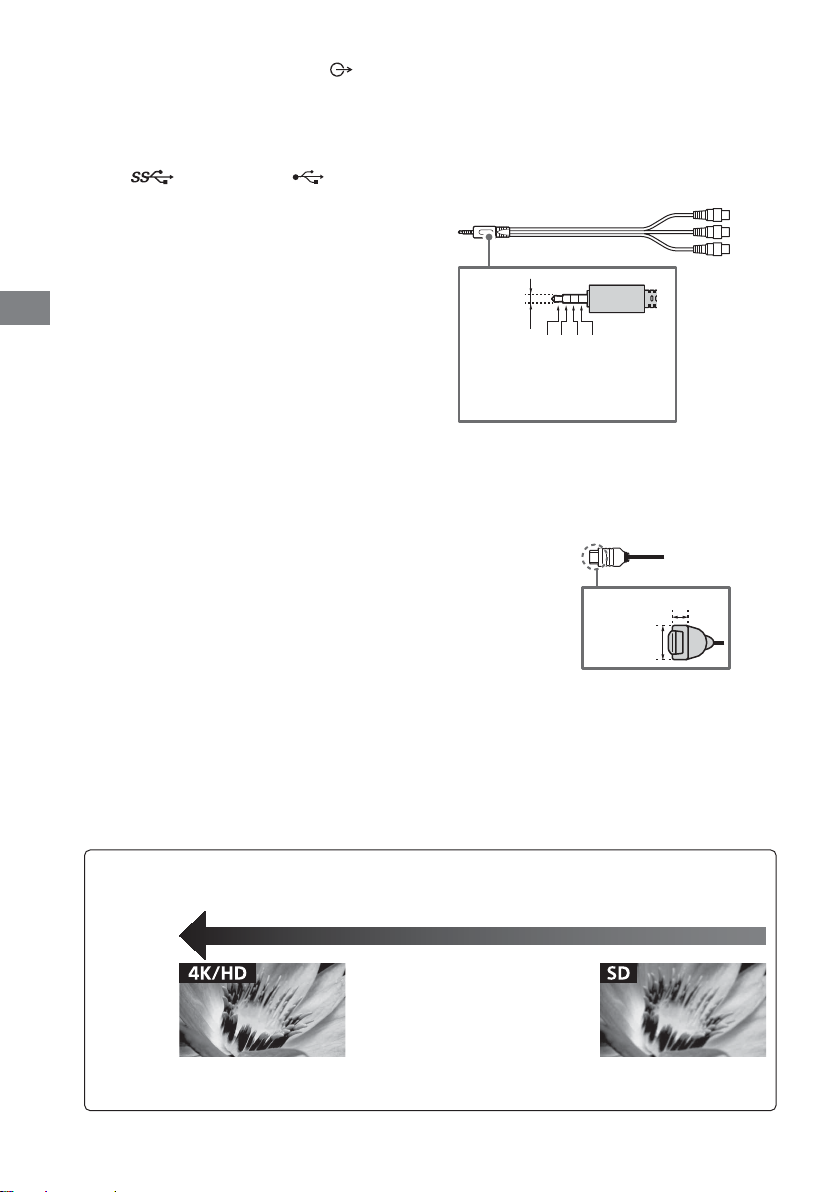
AUDIO OUT /
/نﻮﻓﺪﻫ] T [اﺪﺻ] T [تﯿﻈﻨﺗ] .ﺪﯿﻫد رﺎﺸﻓ ار HOME
.ﺪﯿﻨﮐ بﺎﺨﺘﻧا ار هاﻮﺨﻟد درﻮﻣ ﺲﭙﺳ و ﺪﯿﻨﮐ بﺎﺨﺘﻧا ار [اﺪﺻ ﯽﺟوﺮﺧ
USB 3 (HDD REC)* ، USB 1/2
.ﺪﻨﮐ درﻮﺧﺮﺑ ﺪﻧا هﺪﺷ ﻞﺻو نآ رﺎﻨﮐ رد ﻪﮐ ﯽﯾﺎﻫ هﺎﮕﺘﺳد
.ﺪﯿﻨﮐ ﻞﺻو
IR BLASTER*
•.ﺪﻨﮐ ﯽﻣ ﯽﻧﺎﺒﯿﺘﺸﭘ ﯽﺒﻄﻗ 3 یﻮﯾﱰﺳا ﮏﭼﻮﮐ ﺶﯿﻓ زا ﻂﻘﻓ
• ،ﻞﺼﺘﻣ هﺎﮕﺘﺳد ﻖﯾﺮﻃ زا نﻮﯾﺰﯾﻮﻠﺗ یاﺪﺻ ﻪﺑ ندﺮﮐ شﻮﮔ یاﺮﺑ
.ﺖﺳا تﺎﻣﺪﺧ زا هدﺎﻔﺘﺳا ﻂﻘﻓ یاﺮﺑ ﻪﻧﺎﯾﺎﭘ ﻦﯾا
TE RS-232C
REMO
/ VIDEO IN
• هدﺎﻔﺘﺳا (هﺪﺸﻧ ﻦﯿﻣﺄﺗ) گﻮﻟﺎﻧآ ﻂﺑار ﻞﺑﺎﮐ زا ﺐﮐﺮﻣ لﺎﺼﺗا ﮏﯾ یاﺮﺑ
• ﺮﯾﺎﺳ ﺎﺑ ﺖﺳا ﻦﮑﻤﻣ ،ﺪﯿﻨﮐ ﻞﺻو ار گرﺰﺑ USB هﺎﮕﺘﺳد ﮏﯾ ﺮﮔا
.ﺪﯿﻨﮐ
•
• USB 1 ترﻮﭘ ﻪﺑ ،ﺪﯿﻨﮐ ﯽﻣ ﻞﺻو ار گرﺰﺑ USB هﺎﮕﺘﺳد ﮏﯾ ﯽﺘﻗو
PR
.ﺪﯿﻨﮐ ﯽﻣ یراد ﻪﮕﻧ ﱧﻤﻄﻣ
*.دوﺪﺤﻣ نﻮﯾﺰﯾﻮﻠﺗ یﺎﻫ لﺪﻣ/ﺎﻫرﻮﺸﮐ/ﻖﻃﺎﻨﻣ ﯽﻀﻌﺑ رد ﻂﻘﻓ
ﻪﺘﮑﻧ
• ﯽﻧﺎﮑﻣ رد ﯽﺗآ یﺎﻫدﺮﺑرﺎﮐ یاﺮﺑ ار ﯽﺒﻧﺎﺟ ﺶﺷﻮﭘ ﻪﮐ ﺪﯿﻨﮐ ﻞﺻﺎﺣ نﺎﻨﯿﻤﻃا
ﱰﻣ ﯽﻠﯿﻣ 3.5
3214
L :1
ﻮﺋﺪﯾو :2
ﻦﯿﻣز ﻪﺑ لﺎﺼﺗا :3
R :4
هدﺎﻔﺘﺳا HDMI IN 3 زا ،ﺖﺳا رﺎﮔزﺎﺳ Return Channel (ARC)
ﺎﺑ ﯽﻓﺎﺿا لﺎﺼﺗا ،ترﻮﺼﻨﯾا ﺮﯿﻏ رد .ﺪﯿﻨﮐ
.ﺖﺳا یروﴐ DIGITAL AUDIO OUT (OPTICAL)
ﱰﻣ ﯽﻠﯿﻣ 21 >
• ﻪﻔﻟﺆﻣ ﻞﺑﺎﮐ • HDMI ﻞﺑﺎﮐ
HDMI IN 1/2/3/4
• یروآ ﻦﻓ ﺎﺑ ﻪﮐ ﺪﯿﻨﮐ ﯽﻣ ﻞﺻو ار ﯽﻟﺎﺘﯿﺠﯾد ﯽﺗﻮﺻ ﻢﺘﺴﯿﺳ ﺮﮔا
•
ﱰﻣ ﯽﻠﯿﻣ 12 >
ﺮﯾﻮﺼﺗ ﺖﯿﻔﯿﮐ
•AV ﺐﮐﺮﻣ ﻞﺑﺎﮐ
•(ﯽﯾاﻮﻫ) ﻧآ ﻞﺑﺎﮐ
حﻮﺿو ﺎﺑ یﺮﯾﻮﺼﺗ یﺎﻫ لﺎﻨﮕﯿﺳ یاراد (HD) ﻻﺎﺑ ﺖﯿﻔﯿﮐ ﺎﺑ ﯽﯾﺎﻫﻮﯾﺪﯾو
PR
11
.ﺪﻨﺘﺴﻫ ﻂﺧ 1,080 ﺎﯾ 720 یدﻮﻤﻋ
(ﻂﺧ 2,160 :4K یدﻮﻤﻋ عﻮﺿو یاﺮﺑ)
480 یدﻮﻤﻋ حﻮﺿو ﺎﺑ یﺮﯾﻮﺼﺗ یﺎﻫ لﺎﻨﮕﯿﺳ یاراد (SD) دراﺪﻧﺎﺘﺳا ﺖﯿﻔﯿﮐ ﺎﺑ ﯽﯾﺎﻫﻮﯾﺪﯾو
.ﺪﻨﺘﺴﻫ ﻂﺧ (PAL/SECAM) 576 ﺎﯾ (NTSC)
Page 83
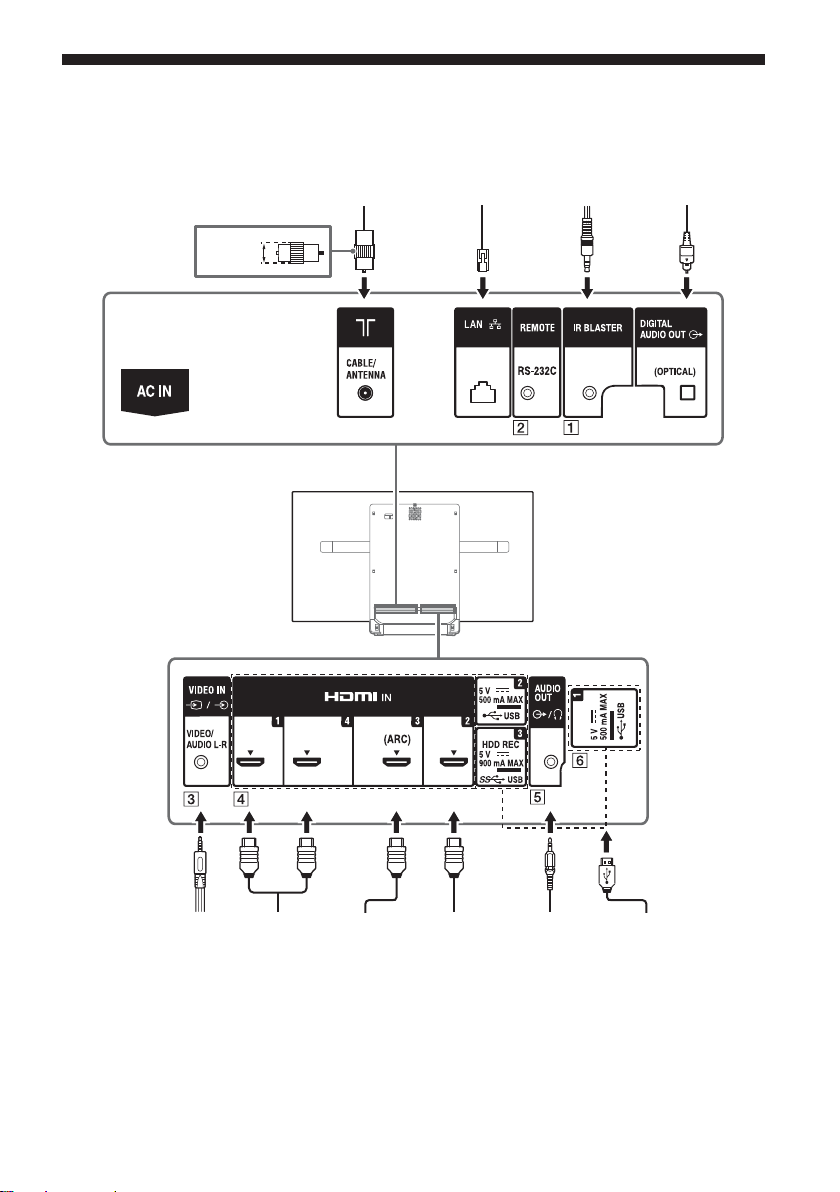
.ﺪﯿﻫد رﺎﺸﻓ رود هار زا لﱰﻨﮐ یور ﺮﺑ ار HELP و هدﺮﮐ ﻪﻌﺟاﺮﻣ ﮏﻤﮐ یﻨﻫار ﻪﺑ ،تﻻﺎﺼﺗا ﻪﺑ طﻮﺑﺮﻣ تﺎﻋﻼﻃا ﺖﻓﺎﯾرد یاﺮﺑ
ﯽﮕﻧﺎﺧ یاﺪﺻ ﻢﺘﺴﯿﺳ
ﯽﺗﻮﺻ یدورو ﺎﺑ هاﺮﻤﻫ
ﱰﻣ ﯽﻠﯿﻣ 14 >
ﻧآ/ﻞﺑﺎﮐ
ﺮﺗور
IR Blaster
لﺎﺼﺗا رادﻮ
یزﺎﺑ تاﺰﯿﻬﺠﺗ/VCR
ﺶﺨﭘ هﺎﮕﺘﺳد/یﻮﯾﺪﯾو
یرادﱪﻤﻠﯿﻓ ﻦﯿﺑرود/DVD
HDMI هﺎﮕﺘﺳد HDMI هﺎﮕﺘﺳد
ﯽﮕﻧﺎﺧ یاﺪﺻ ﻢﺘﺴﯿﺳ
ARC هﺎﮕﺘﺳد ﺎﺑ هاﺮﻤﻫ
HDMI هﺎﮕﺘﺳد/
یاﺪﺻ ﻢﺘﺴﯿﺳ/نﻮﻓﺪﻫ
ﺮﻓوو بﺎﺳ/ﯽﮕﻧﺎﺧ
/لﺎﺘﯿﺠﯾد یرادﱪﺴﮑﻋ ﻦﯿﺑرود
ﻪﻧﺎﺳر/یرادﱪﻤﻠﯿﻓ ﻦﯿﺑرود
USB یزﺎﺳ هﺮﯿﺧذ
PR
10
Page 84

PR
TITLE LIST
.ﺪﯿﻫد ﺶﯾﺎ ار ناﻮﻨﻋ ﺖﺴﯿﻟ
ﯽﮕﻧر یﺎﻫ ﻪﻤﮐد
.ﺪﻨﮐ ﯽﻣ اﺮﺟا نﺎﻣز نﻫ رد ار ﻪﻃﻮﺑﺮﻣ دﺮﮑﻠﻤﻋ
ACTION MENU
.ﺪﯿﻫد ﺶﯾﺎ ار ﯽﻨﺘﻣ و یاﻮﺘﺤﻣ یﺎﻫدﺮﮑﻠﻤﻋ زا ﯽﺘﺴﯿﻟ
.دﻮﺷ هداد
GUIDE/
.ﺪﯿﻫد ﺶﯾﺎ ار لﺎﺘﯿﺠﯾد ﻪﻣﺎﻧﺮﺑ یﻨﻫار
.ﺪﯾدﺮﮔﺮﺑ ﯽﻠﺒﻗ ﻪﺤﻔﺻ ﻪﺑ
.ﺪﯿﻫد ﺶﯾﺎ ار نﻮﯾﺰﯾﻮﻠﺗ ﯽﻠﺻا ﻪﺤﻔﺻ یﻮﻨﻣ
DISCOVER
.ﺪﯿﻨﮐ ﻮﺠﺘﺴﺟ ار اﻮﺘﺤﻣ ﺪﯿﻧاﻮﺘﺑ ﺎﺗ ﺪﯿﻫد ﺶﯾﺎ ار اﻮﺘﺤﻣ راﻮﻧ
(درﻮﻣ ندﺮﮐ دراو/بﺎﺨﺘﻧا) ////
(اﺪﺻ ناﺰﯿﻣ) +/–
.ﺪﯿﻨﮐ ﻢﯿﻈﻨﺗ ار اﺪﺻ ناﺰﯿﻣ
نﻮﯾﺰﯾﻮﻠﺗ .ﺪﯾﻮﺷ ﺎﺠﺑﺎﺟ ﻮﻠﺟ ﺎﯾ ﺐﻘﻋ ﻪﺑ یدورو ﺎﯾ لﺎﻧﺎﮐ ود ﻦﯿﺑ
،ﯽﺑﺎﺨﺘﻧا یدورو ﺎﯾ لﺎﻧﺎﮐ ﻦﯾﺮﺧآ و ﯽﻠﻌﻓ یدورو ﺎﯾ لﺎﻧﺎﮐ ﻦﯿﺑ
.ﺪﯿﻫد رﺎﺸﻓ هرﺎﺑود ،اﺪﺻ ﯽﺑﺎﯾزﺎﺑ یاﺮﺑ .ﺪﻨﮐ ﯽﻣ ﻊﻄﻗ ار اﺪﺻ
.دﻮﺷ ﯽﻣ ﺎﺠﺑﺎﺟ
(ندﺮﮐ اﺪﺻ ﯽﺑ)
PROG +/–//
.ﺪﯿﻨﮐ بﺎﺨﺘﻧا ار (
.ﺪﯿﻫد ﺮﯿﯿﻐﺗ ار ﺪﯿﺘﺴﻫ نآ هﺪﻫﺎﺸﻣ لﺎﺣ رد ﻪﮐ یا ﻪﻣﺎﻧﺮﺑ نﺎﺑز
.ﺪﯿﻨﮐ بﺎﺨﺘﻧا ار لﺎﻧﺎﮐ :نﻮﯾﺰﯾﻮﻠﺗ ﺖﻟﺎﺣ رد
) ﯽﻠﺒﻗ ﺎﯾ () یﺪﻌﺑ ﻪﺤﻔﺻ :ﯽﻨﺘﻣ ﺖﻟﺎﺣ رد
//////
ﺎﺑ رﺎﮔزﺎﺳ هﺎﮕﺘﺳد و نﻮﯾﺰﯾﻮﻠﺗ یور ار یا ﻪﻧﺎﺳر یاﻮﺘﺤﻣ
.ﺪﯿﻨﮐ اﺮﺟا BRAVIA Sync
(ﺲﯾﻮﻧﺮﯾز ﻢﯿﻈﻨﺗ)
دﻮﺟو ﯽﮔﮋﯾو ﻦﯿﻨﭼ ﺮﮔا) ﺪﯿﻨﮐ شﻮﻣﺎﺧ ﺎﯾ ﻦﺷور ار ﺎﻫ ﺲﯾﻮﻧﺮﯾز
ﻪﺑ ﺪﯿﻧاﻮﺗ ﯽﻣ ﺰﯿﻧ ﺖﻤﺴﻗ ﻦﯾا زا .ﺪﯿﻫد ﺶﯾﺎ ار ﻨﻫار یﻮﻨﻣ
.ﺪﯿﺷﺎﺑ ﻪﺘﺷاد ﯽﺳﱰﺳد ﻨﻫار
.ﺪﯿﻨﮐ ﻂﺒﺿ USB HDD ﻂﺒﺿ دﺮﮑﻠﻤﻋ ﺎﺑ ار ﯽﻠﻌﻓ ﻪﻣﺎﻧﺮﺑ
.(ﺪﺷﺎﺑ ﻪﺘﺷاد
TV
•.ﺪﯿﻨﮐ دراو ﺮﮕﯾد یﺎﻫ ﻪﻣﺎﻧﺮﺑ زا ﺎﯾ ﺪﯾﻮﺷ ﺎﺠﺑﺎﺟ نﻮﯾﺰﯾﻮﻠﺗ لﺎﻧﺎﮐ ﮏﯾ ﻪﺑ
• ﺶﯾﺎ نآ یدورو ﺎﯾ نﻮﯾﺰﯾﻮﻠﺗ لﺎﻧﺎﮐ ﺎﺗ ﺪﯿﻨﮐ ﻦﺷور ار نﻮﯾﺰﯾﻮﻠﺗ
BACK
HOME
(شﺮﭘ)
AUD IO
HELP
REC
PR
9
Page 85
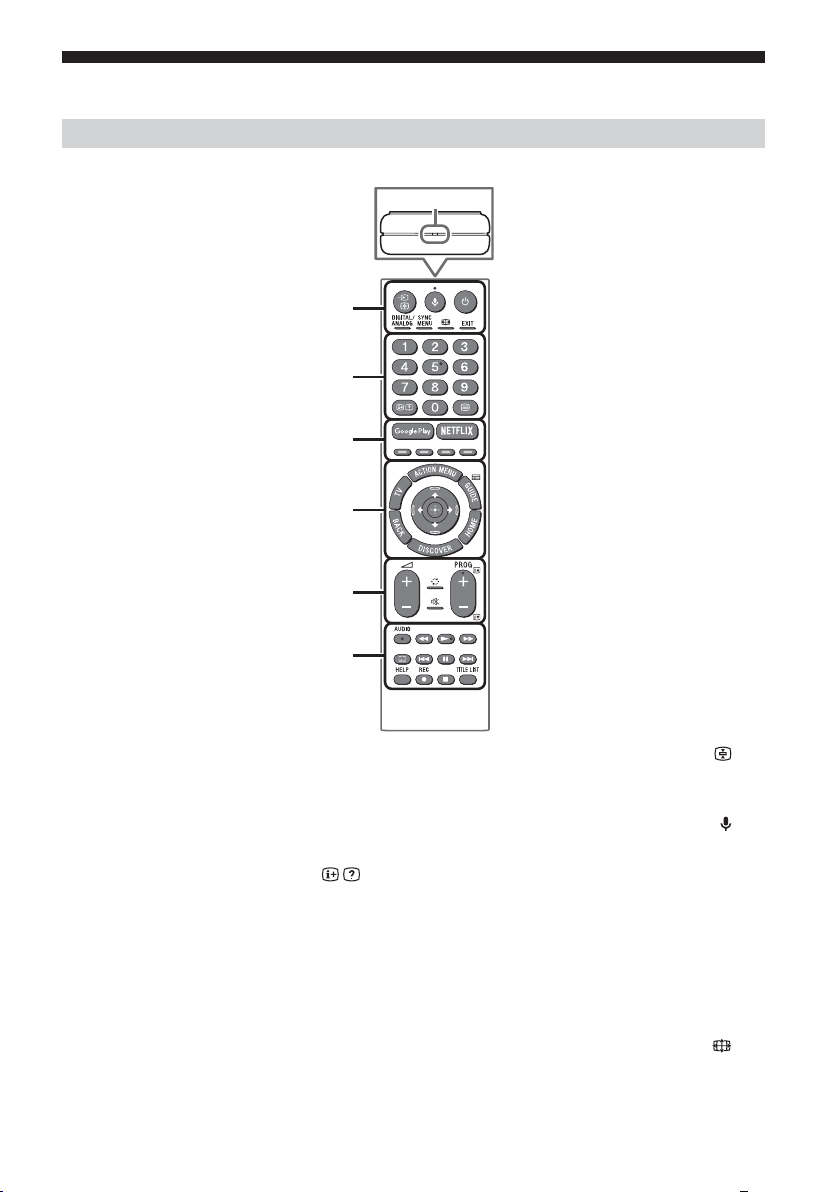
رود هار زا لﱰﻨﮐ زا هدﺎﻔﺘﺳا
رود هار زا لﱰﻨﮐ ﻒﻠﺘﺨﻣ یﺎﻫ ﺶﺨﺑ ﻒﯿﺻﻮﺗ
.ﺪﺷﺎﺑ توﺎﻔﺘﻣ ﺖﺳا ﻦﮑﻤﻣ نﻮﯾﺰﯾﻮﻠﺗ لﺪﻣ/رﻮﺸﮐ/ﻪﻘﻄﻨﻣ ﻪﺑ ﻪﺘﺴﺑ رود هار زا لﱰﻨﮐ ﻪﻤﮐد دﺮﮑﻠﻤﻋ و ﯽﺳﱰﺳد نﺎﮑﻣا ،ﻞﺤﻣ ،رود هار زا لﱰﻨﮐ یﺮﻫﺎﻇ ﻞﮑﺷ
MIC
ȩ
Ȫ
ȫ
Ȭ
ȭ
Ȯ
EXIT
ﺲﯾوﴎ زا ﯽﺘﻗو .ﺪﯾﻮﺷ جرﺎﺧ ﻮﻨﻣ زا ﺎﯾ ﺪﯾدﺮﮔزﺎﺑ ﯽﻠﺒﻗ ﻪﺤﻔﺻ ﻪﺑ
ﻦﯾا ،ﺲﯾوﴎ ﻦﯾا زا جوﺮﺧ یاﺮﺑ ،ﺪﯿﻨﮐ ﯽﻣ هدﺎﻔﺘﺳا ﯽﻠﻣﺎﻌﺗ ﻪﻣﺎﻧﺮﺑ
.ﺪﯿﻫد رﺎﺸﻓ ار ﻪﻤﮐد
یدﺪﻋ یﺎﻫ ﻪﻤﮐد
(ﻣ/تﺎﻋﻼﻃا ﺶﯾﺎ) /
.ﺪﯿﻫد ﺶﯾﺎ ار تﺎﻋﻼﻃا
(ﻣ)
.ﺪﯿﻫد ﺶﯾﺎ ار ﯽﻨﺘﻣ تﺎﻋﻼﻃا
Google Play
.ﺪﯿﺷﺎﺑ ﻪﺘﺷاد ﯽﺳﱰﺳد "Google Play" ﻦﯾﻼﻧآ ﺲﯾوﴎ ﻪﺑ
نﻮﯾﺰﯾﻮﻠﺗ یﺎﻫ لﺪﻣ/ﺎﻫرﻮﺸﮐ/ﻖﻃﺎﻨﻣ ﯽﻀﻌﺑ رد ﻂﻘﻓ) NETFLIX
(دوﺪﺤﻣ
.ﺪﯿﺷﺎﺑ ﻪﺘﺷاد ﯽﺳﱰﺳد "NETFLIX" ﻦﯾﻼﻧآ ﺲﯾوﴎ ﻪﺑ
(ﻣ ﺷاﺪﻬﮕﻧ/یدورو بﺎﺨﺘﻧا) /
.ﺪﯿﻨﮐ بﺎﺨﺘﻧا و ﺪﯿﻫد ﺶﯾﺎ ار یدورو ﻊﺒﻨﻣ :نﻮﯾﺰﯾﻮﻠﺗ ﺖﻟﺎﺣ رد
.ﺪﯾراﺪﻬﮕﻧ ار ﯽﻠﻌﻓ ﻪﺤﻔﺻ :ﯽﻨﺘﻣ ﺖﻟﺎﺣ رد
(ﻦﻓوﺮﮑﯿﻣ)
یﺎﻫاﻮﺘﺤﻣ یﻮﺠﺘﺴﺟ ﻞﺜﻣ) .ﺪﯿﻨﮐ هدﺎﻔﺘﺳا ﯽﺗﻮﺻ دﺮﮑﻠﻤﻋ زا
(.اﺪﺻ زا هدﺎﻔﺘﺳا ﺎﺑ ﻒﻠﺘﺨﻣ
(رﺎﮐ ﻪﺑ هدﺎﻣآ نﻮﯾﺰﯾﻮﻠﺗ)
.(رﺎﮐ ﻪﺑ هدﺎﻣآ ﺖﻟﺎﺣ) ﺪﯿﻨﮐ شﻮﻣﺎﺧ ﺎﯾ ﻦﺷور ار نﻮﯾﺰﯾﻮﻠﺗ
DIGITAL/ANALOG
.ﺪﯾﻮﺷ ﺎﺠﺑﺎﺟ گﻮﻟﺎﻧآ و لﺎﺘﯿﺠﯾد ﺖﻟﺎﺣ ﻦﯿﺑ
SYNC MENU
.ﺪﯿﻫد ﺶﯾﺎ ار BRAVIA یزﺎﺴﻣﺎﮕﻤﻫ یﻮﻨﻣ
(ﺾﯾﺮﻋ ﺖﻟﺎﺣ)
.ﺪﯿﻫد ﺮﯿﯿﻐﺗ ار ﻪﺤﻔﺻ ﺖﻣﺮﻓ
PR
8
Page 86
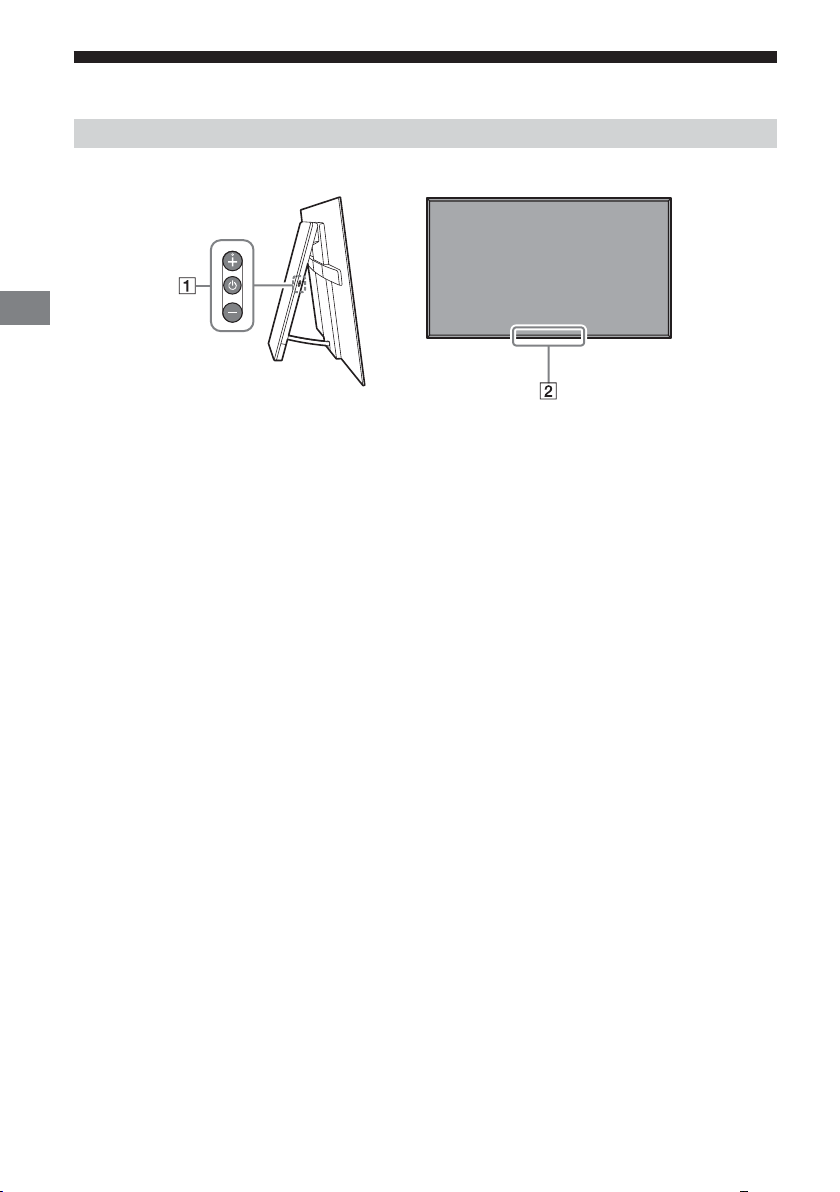
PR
ﺎﻫ لﱰﻨﮐ و ﻒﻠﺘﺨﻣ یﺎﻫ ﺶﺨﺑ
ﺎﻫﺮﮕﻧﺎﺸﻧ و ﺎﻫ لﱰﻨﮐ
-/+/ (شﻮﻣﺎﺧ-ﻦﺷور)
،ﺖﺳا شﻮﻣﺎﺧ نﻮﯾﺰﯾﻮﻠﺗ ﻪﮐ ﯽﻧﺎﻣز
.ﺪﯿﻫد رﺎﺸﻓ ندﺮﮐ ﻦﺷور یاﺮﺑ ار
،ﺖﺳا ﻦﺷور نﻮﯾﺰﯾﻮﻠﺗ ﻪﮐ ﯽﻣﺎﮕﻨﻫ
.ﺪﯾراد ﻪﮕﻧ و ﺪﯿﻫد رﺎﺸﻓ ار نﺪﺷ شﻮﻣﺎﺧ یاﺮﺑ
دراﻮﻣ یاﺮﺑ ﺲﭙﺳ و ﺪﯿﻫد رﺎﺸﻓ ًﺎﺒﺗﺮﻣ ار
،دﺮﮑﻠﻤﻋ ﺮﯿﯿﻐﺗ یاﺮﺑ
:ﺪﯿﻫد رﺎﺸﻓ ار – ﺎﯾ + ﻪﻤﮐد ،ﺮﯾز
LED غاﺮﭼ / *یرﻮﻧ ﺮﮕﺴﺣ / *رود هار زا لﱰﻨﮐ ﺮﮕﺴﺣ
ﺎﯾ دﻮﺷ ﯽﻣ ﻦﺷور ،نﻮﯾﺰﯾﻮﻠﺗ ﺖﯿﻌﺿو ﻪﺑ ﻪﺟﻮﺗ ﺎﺑ LED غاﺮﭼ
.ﺪﯿﻨﮐ ﻪﻌﺟاﺮﻣ ﮏﻤﮐ یﻨﻫار ﻪﺑ ﱰﺸﯿﺑ تﺎﻋﻼﻃا ﺖﻓﺎﯾرد یاﺮﺑ
.ﺪﻧز ﯽﻣ ﮏﻤﺸﭼ
•.اﺪﺻ ﻢﯿﻈﻨﺗ
•.لﺎﻧﺎﮐ بﺎﺨﺘﻧا
•.نﻮﯾﺰﯾﻮﻠﺗ ﻊﺒﻨﻣ یدورو بﺎﺨﺘﻧا
*.ﺪﯿﻫﺪﻧ راﺮﻗ ﺮﮕﺴﺣ ﯽﮑﯾدﺰﻧ رد ار یﺰﯿﭼ ﭻﯿﻫ
PR
7
Page 87

(OLED نﻮﯾﺰﯾﻮﻠﺗ) نﻮﯾﺰﯾﻮﻠﺗ ﺶﯾﺎ ﻪﺤﻔﺻ زا ﺖﻇﺎﻔﺣ
ﺶﯾﺎ ﻪﺤﻔﺻ نﺪﯾد ﻪﻣﺪﺻ زا ﺖﻈﻓﺎﺤﻣ یاﺮﺑ مزﻻ یﺎﻫ یﺮﯿﮕﺸﯿﭘ
ﺮﺛا یرﺎﮔﺪﻧﺎﻣ ﺮﻄﺧ ضﺮﻌﻣ رد ﺎﻫ نآ رد هﺪﺷ هدﺎﻔﺘﺳا داﻮﻣ ﯽﮔﮋﯾو ﻞﯿﻟد ﻪﺑ OLED یﺎﻫ نﻮﯾﺰﯾﻮﻠﺗ
تﺪﻣ ﯽﻧﻻﻮﻃ ﺎﯾ رﺮﮑﻣ ﺶﯾﺎ ﺖﻠﻋ ﻪﺑ ﺖﺳا ﻦﮑﻤﻣ ﺮﯾﻮﺼﺗ ﺮﺛا یرﺎﮔﺪﻧﺎﻣ .ﺪﻨﺘﺴﻫ (ﺧﻮﺳ) ﺮﯾﻮﺼﺗ
ﺶﯾﺎ زا .ﺖﺴﯿﻧ نﻮﯾﺰﯾﻮﻠﺗ رد ﯽﻨﻓ ﺺﻘﻧ ﮏﯾ ﻦﯾا .ﺪﻫد خر ﺶﯾﺎ ﻪﺤﻔﺻ زا ﯽﺻﺎﺧ ﺖﻤﺴﻗ رد ﺮﯾوﺎﺼﺗ
.ﺪﯿﻨﮐ یراددﻮﺧ ﺪﻧﻮﺷ ﺮﯾﻮﺼﺗ ﺮﺛا یرﺎﮔﺪﻧﺎﻣ دﺎﺠﯾا ﺚﻋﺎﺑ ﺖﺳا ﻦﮑﻤﻣ ﻪﮐ یﺮﯾوﺎﺼﺗ
ﺮﺛا یرﺎﮔﺪﻧﺎﻣ ﺚﻋﺎﺑ ﺖﺳا ﻦﮑﻤﻣ ﻪﮐ یﺮﯾوﺎﺼﺗ زا ﺪﻨﺘﺴﻫ ﯽﯾﺎﻫ لﺎﺜﻣ ﺮﯾز تﺎﮑﻧ
(دراﺪﻧﺎﺘﺳا ﻒﯾﺮﻌﺗ ،4:3 ﺶﯾﺎ ﻪﺤﻔﺻ ،Letterboxed
:ﺮﯾﻮﺼﺗ ﺮﺛا یرﺎﮔﺪﻧﺎﻣ ﺮﻄﺧ ﺶﻫﺎﮐ یاﺮﺑ
ﻞﺼﺘﻣ تاﺰﯿﻬﺠﺗ یﻨﻫار ﻪﭼﱰﻓد ﻪﺑ ﱰﺸﯿﺑ تﺎﯿﺋﺰﺟ یاﺮﺑ .ﺪﯿﻨﮐ لﺎﻌﻓ ﺮﯿﻏ ﻞﺼﺘﻣ تاﺰﯿﻬﺠﺗ ﻖﯾﺮﻃ
.دﻮﺷ ﯽﻣ ﻪﯿﺻﻮﺗ ،ﺪﻨﻫد ﯽﻣ ﺶﯾﺎ ار هﺮﯿﻏ و ﺎﻫ هﺎﮕﺘﺴﯾا مرآ مواﺪﻣ ترﻮﺻ ﻪﺑ ﻪﮐ یﺮﯾوﺎﺼﺗ ﺶﯾﺎ
.ﺖﺳا ﺮﯾز یﺎﻫ ﯽﮔﮋﯾو یاراد ﺮﯾﻮﺼﺗ ﺮﺛا یرﺎﮔﺪﻧﺎﻣ زا یﺮﯿﮕﺸﯿﭘ/ﺶﻫﺎﮐ یاﺮﺑ نﻮﯾﺰﯾﻮﻠﺗ
یﺎﻫ هدﺎﻔﺘﺳا زا ﺲﭘ نﻮﯾﺰﯾﻮﻠﺗ ﺶﯾﺎ ﻪﺤﻔﺻ یزﺎﺳ نﺎﺴﻤﻫ یاﺮﺑ رﺎﮐدﻮﺧ ترﻮﺻ ﻪﺑ ﻞﻧﺎﭘ یزﺎﺳ هزﺎﺗ
دﺮﮐ اﺮﺟا ﯽﺘﺳد ترﻮﺻ ﻪﺑ ناﻮﺗ ﯽﻣ ﻦﯿﻨﭽﻤﻫ ار ﻞﻧﺎﭘ یزﺎﺳ هزﺎﺗ .دﻮﺷ ﯽﻣ یزاﺪﻧا هار نآ زا تﺪﻣ ﯽﻧﻻﻮﻃ
:دﻮﺷ هﺪﯾد ﺮﯾز مﺎﯿﭘ ﻪﮑﻨﯾا ﺎﯾ ﺪﺷﺎﺑ ﻪﺟﻮﺗ ﻞﺑﺎﻗ ﺮﯾﻮﺼﺗ ﺮﺛا یرﺎﮔﺪﻧﺎﻣ ﻪﮐ دﻮﺷ هدﺎﻔﺘﺳا ﺪﯾﺎﺑ ﯽﻧﺎﻣز ﺎﻬﻨﺗ و
ﺮﻤﻋ رد ﺖﺳا ﻦﮑﻤﻣ اﺮﯾز ﺪﯿﻨﮑﻧ هدﺎﻔﺘﺳا نآ زا لﺎﺳ رد رﺎﺑ ﮏﯾ زا ﺶﯿﺑ .ﺪﯿﻨﮐ اﺮﺟا ار ﻞﻧﺎﭘ یزﺎﺳ هزﺎﺗ
.ﺪﻨﮐ یﺮﯿﮔﻮﻠﺟ ﺮﯾﻮﺼﺗ ﺮﺛا یرﺎﮔﺪﻧﺎﻣ زا ﺎﺗ ﺪﻨﮐ ﯽﻣ ﺎﺠﺑﺎﺟ ﺶﯾﺎ ﻪﺤﻔﺻ رد رﺎﮐدﻮﺧ ترﻮﺻ ﻪﺑ ار ﺮﯾﻮﺼﺗ
مرآ ﺎﯾ ﻦﺷور یﺎﻫ ﮓﻧر ،ﺎﻫ ﺖﻋﺎﺳ ،ﺖﺑﺎﺛ ﺮﯾوﺎﺼﺗ ﺶﯾﺎ مﺎﮕﻨﻫ رﺎﮐدﻮﺧ ترﻮﺻ ﻪﺑ ﺶﯾﺎ ﻪﺤﻔﺻ ﯽﯾﺎﻨﺷور
ﺮﯾﻮﺼﺗ ﺮﺛا یرﺎﮔﺪﻧﺎﻣ
:ﺪﻧﻮﺷ ﺮﯾﻮﺼﺗ
.ﺪﯿﻨﮐ شﻮﻣﺎﺧ نﻮﯾﺰﯾﻮﻠﺗ ﺎﯾ رود هار
.ﺪﯿﻨﮐ بﺎﺨﺘﻧا ]لﺎﻣﺮﻧ[ ﻪﺑ ﺖﺒﺴﻧ
.ﺪﯿﻨﮐ ﻪﻌﺟاﺮﻣ
.ﺪﯿﻨﮐ یراددﻮﺧ ﺶﯾﺎ ﻪﺤﻔﺻ
ﻞﻧﺎﭘ یزﺎﺳ هزﺎﺗ
[...ﺪﺸﻧ مﺎ ﻞﻧﺎﭘ یزﺎﺳ هزﺎﺗ]
:طﺎﯿﺘﺣا
.دراﺬﮕﺑ ﺮﯿﺛﺄﺗ ﻞﻧﺎﭘ ﺪﯿﻔﻣ
ﻞﺴﮑﯿﭘ ﺮﯿﯿﻐﺗ
ﺮﮕﯾد ﯽﮔﮋﯾو
.ﺪﻨﮐ ﯽﻣ اﺪﯿﭘ ﺶﻫﺎﮐ هﺮﯿﻏ و ﺎﻫ
• ،لﺎﺜﻣ یاﺮﺑ) .ﺶﯾﺎ ﻪﺤﻔﺻ ﺖﺳار و ﭗﭼ ﺖﻤﺳ ﺎﯾ/و ﻦﯿﯾﺎﭘ و ﻻﺎﺑ رد هﺎﯿﺳ یﺎﻫراﻮﻧ یوﺎﺣ ﺮﯾوﺎﺼﺗ
•.ﺎﻫ ﺲﮑﻋ ﺪﻨﻧﺎﻣ ﺖﺑﺎﺛ ﺮﯾوﺎﺼﺗ
•.ﺪﻨﺷﺎﺑ ﺶﯾﺎ ﻪﺤﻔﺻ زا ﯽﯾﺎﻫ ﺖﻤﺴﻗ رد ﺖﺑﺎﺛ ﺮﯾوﺎﺼﺗ ﻞﻣﺎﺷ ﺖﺳا ﻦﮑﻤﻣ ﻪﮐ ﯽﯾﻮﯾﺪﯾو یﺎﻫ یزﺎﺑ
•.هﺮﯿﻏ و ﺎﻫ لﺎﻧﺎﮐ مرآ ،ﺎﻫ ﻪﻣﺎﻧﺮﺑ یﻨﻫار ،ﺶﯾﺎ ﻪﺤﻔﺻ یور یﺎﻫﻮﻨﻣ
•.ﺖﺑﺎﺛ ﺮﯾوﺎﺼﺗ یوﺎﺣ یﺎﻫ ﻪﻣﺎﻧﺮﺑ
•.دﻮﺷ ﯽﻣ هدﺎﻔﺘﺳا ﺎﻫ ﻂﺧﴎ و رﺎﺒﺧا رد ﻪﮐ یدراﻮﻣ ﺪﻨﻧﺎﻣ ،ﺶﯾﺎ ﻪﺤﻔﺻ یور یﺎﻫﺮﮑﯿﺗ
• زا لﱰﻨﮐ یور شﻮﻣﺎﺧ/ﻦﺷور ﻪﻤﮐد نداد رﺎﺸﻓ ﺎﺑ ﯽﻟﻮﻤﻌﻣ شور ﻪﺑ ار نﻮﯾﺰﯾﻮﻠﺗ ﺪﻨﮐ ﯽﻣ ﻪﯿﺻﻮﺗ Sony
• ار ]ﺾﯾﺮﻋ تﺎﺣ[ .ﺪﻧوﺮﺑ ﻦﯿﺑ زا هﺎﯿﺳ یﺎﻫراﻮﻧ ﺎﺗ ﺪﯿﻨﮐ ﺮﭘ ]ﺾﯾﺮﻋ ﺖﻟﺎﺣ[ ﺮﯿﯿﻐﺗ ﺎﺑ ار ﺶﯾﺎ ﻪﺤﻔﺻ
• زا ار ﺎﻫﻮﻨﻣ و ﺪﯿﻨﮐ لﺎﻌﻓ ﺮﯿﻏ / ﻪﻤﮐد نداد رﺎﺸﻓ ﺎﺑ ار (ﻪﺤﻔﺻ رد ﺶﯾﺎ) OSD ﺖﻟﺎﺣ
• زا یا ﻪﻄﻘﻧ ﺮﻫ رد ﺎﻫ مرآ ﺎﯾ ﺎﻫ ﺖﻋﺎﺳ ،(ﺪﯿﻔﺳ ﺪﻨﻧﺎﻣ) ﻦﺷور یﺎﻫ ﮓﻧر ﺎﺑ ﺖﺑﺎﺛ ﺮﯾوﺎﺼﺗ ﺶﯾﺎ زا
• مﺎﮕﻨﻫ و ﯽﮕﻧﺎﺧ فﴫﻣ یاﺮﺑ دراﺪﻧﺎﺘﺳا ﺮﯾﻮﺼﺗ ﺖﻟﺎﺣ .ﺪﯿﻨﮐ ﻢﯿﻈﻨﺗ ﯽﻄﯿﺤﻣ ﻂﯾاﴍ ﺎﺑ ﻖﺑﺎﻄﻣ ار ﺮﯾﻮﺼﺗ
• لﺎﺳ رد رﺎﺑ ﮏﯾ ﺎﻬﻨﺗ ،ﻊﺟﺮﻣ ناﻮﻨﻋ ﻪﺑ ،دراﺬﮕﺑ ﺮﯿﺛﺄﺗ ﻞﻧﺎﭘ یور ﺖﺳا ﻦﮑﻤﻣ ﻞﻧﺎﭘ یزﺎﺳ هزﺎﺗ دﺮﮑﻠﻤﻋ
•.دﺮﺑ ﯽﻣ نﺎﻣز ﺖﻋﺎﺳ ﮏﯾ دوﺪﺣ ﻞﻧﺎﭘ یزﺎﺳ هزﺎﺗ
•.ﺖﺴﯿﻧ نﻮﯾﺰﯾﻮﻠﺗ رد ﯽﻨﻓ ﺺﻘﻧ ﮏﯾ ﻦﯾا ،دﻮﺷ نﺎﯾﺎ ﻞﻧﺎﭘ یزﺎﺳ هزﺎﺗ مﺎﮕﻨﻫ یﺪﯿﻔﺳ ﻂﺧ ﺖﺳا ﻦﮑﻤﻣ
•..دﻮﺷ ﯽﻣ مﺎﺠﻧا ﺪﺷﺎﺑ داﺮﮔ ﯽﺘﻧﺎﺳ ﻪﺟرد 40 ﺎﺗ 10 ﻦﯿﺑ قﺎﺗا یﺎﻣد ﻪﮐ ﯽﻄﯾاﴍ رد ﺎﻬﻨﺗ ﻞﻧﺎﭘ یزﺎﺳ هزﺎﺗ
PR
6
Page 88
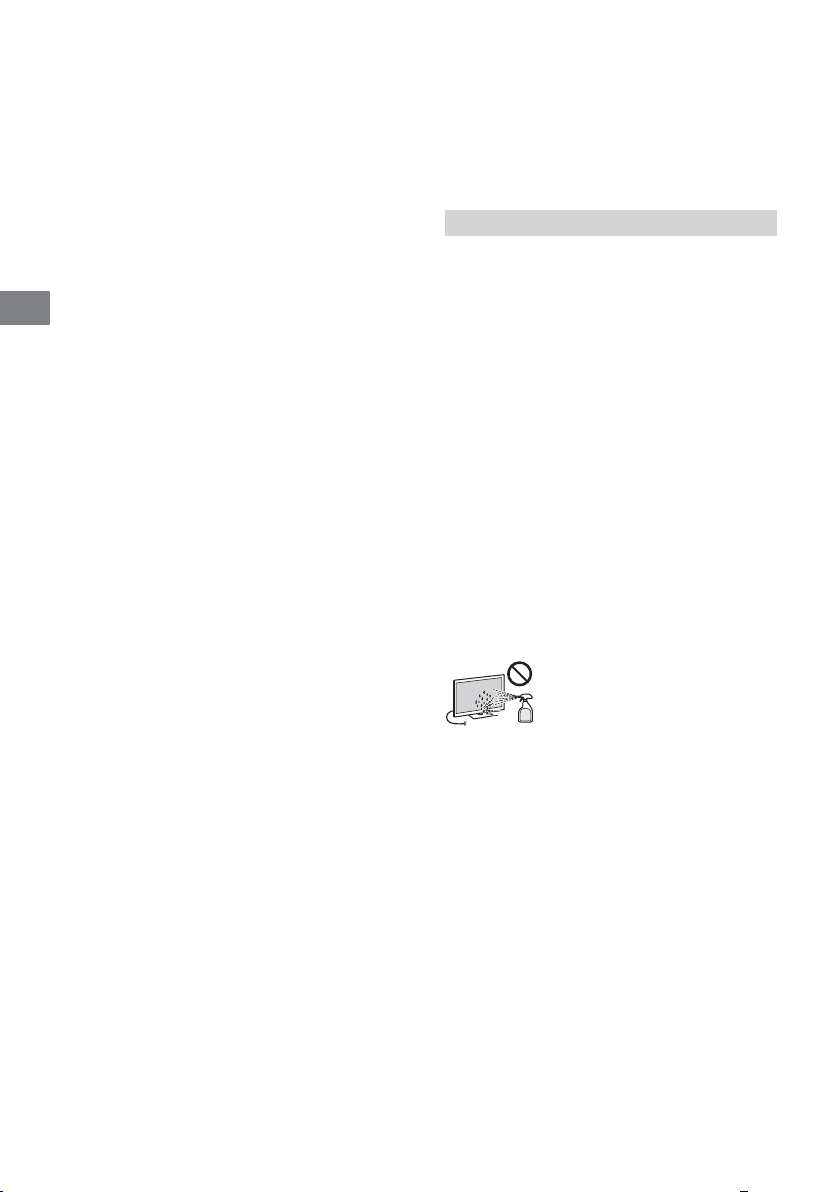
رود هار زا لﱰﻨﮐ ﺎﺑ ندﺮﮐ رﺎﮐ درﻮﻣ رد طﺎﯿﺘﺣا
.ﺪﯾﺮﯿﮕﺑ سﺎ نﺎﺘﯿﻠﺤﻣ تﺎﻣﺎﻘﻣ ﺎﺑ ًﺎﻔﻄﻟ .ﺖﺳا دﻮﺟﻮﻣ ﺎﻫ یﺮﺗﺎﺑ ﺨﯾر
.ﺪﯾﺰﯾﺮﻧ نآ یور ار ﯽﺗﺎﻌﯾﺎﻣ
.کﺎﻨ یﺎﻫ قﺎﺗا رد ﺎﯾ ﺖﺳا ﺪﯿﺷرﻮﺧ رﻮﻧ ﻢﯿﻘﺘﺴﻣ ﺶﺑﺎﺗ
•.ﺪﯿﻨﮐ ﻪﺟﻮﺗ ﺎﻬﻧآ ﺖﯿﺒﻄﻗ ﻪﺑ ،ﺪﯾراﺬﮔ ﯽﻣ هﺎﮕﺘﺳد رد ار ﺎﻫ یﺮﺗﺎﺑ ﻪﮐ ﯽﻣﺎﮕﻨﻫ
•.ﺪﯿﻨﮑﻧ هدﺎﻔﺘﺳا ﺮﮕﯾﺪﮑﯾ ﺎﺑ ﻪﻨﻬﮐ و ﻮﻧ یﺎﻫ یﺮﺗﺎﺑ ﺎﯾ ﺮﮕﯾﺪﮑﯾ رﺎﻨﮐ رد یﺮﺗﺎﺑ ﻒﻠﺘﺨﻣ عاﻮﻧا زا
• رود درﻮﻣ رد ﯽﺗارﺮﻘﻣ ،صﺎﺧ ﻖﻃﺎﻨﻣ ﯽﻀﻌﺑ رد .ﺪﯾﺰﯾﺮﺑ رود ﻂﯿﺤﻣ راﺪﺘﺳود شور ﻪﺑ ار ﺎﻫ یﺮﺗﺎﺑ
• عﻮﻧ ﭻﯿﻫ ﻦﯿﻨﭽﻤﻫ ،ﺪﯾوﺮﻧ هار نآ یور و ﺪﯾزاﺪﻨﯿﻧ ﻦﯿﻣز ار نآ .ﺪﯿﻨﮐ رﺎﮐ طﺎﯿﺘﺣا ﺎﺑ رود هار زا لﱰﻨﮐ ﺎﺑ
ﺎﻫ ﺖﻤﺴﻗ نآ ﺮﮔا .دﻮﺷ ﯽﻣ مﺮﮔ ﻞﻧﺎﭘ فاﺮﻃا ،دﻮﺷ هدﺎﻔﺘﺳا ﯽﻧﻻﻮﻃ نﺎﻣز تﺪﻣ یاﺮﺑ نﻮﯾﺰﯾﻮﻠﺗ زا ﯽﺘﻗو
• ضﺮﻌﻣ رد ﻪﮐ ﯽﯾﺎﺟ ﻦﯿﻨﭽﻤﻫ ،ﺪﺷﺎﺑ ﺎﻣﺮﮔ ﻊﺑﺎﻨﻣ ﻪﺑ ﮏﯾدﺰﻧ ﻪﮐ ﺪﯿﻫﺪﻧ راﺮﻗ ﯽﯾﺎﺟ رد ار رود هار زا لﱰﻨﮐ
نﻮﯾﺰﯾﻮﻠﺗ یﺎﻣد ناﺰﯿﻣ هرﺎﺑرد
.ﺪﺷ ﺪﻫاﻮﺧ مﺮﮔ نﺎﺘﺘﺳد ًﻻﺘﺣا ﺪﯿﻨﮐ ﺲﳌ ار
:ﺮﯾز ﻂﯾاﴍ رد
طﺎﯿﺘﺣا دراﻮﻣ
– .ﺪﺷﺎﺑ هﺪﯾد ﺐﯿﺳآ AC بوﺎﻨﺘﻣ قﺮﺑ ﻢﯿﺳ ﯽﺘﻗو
– .ﺖﺴﯿﻧ هدﺎﻔﺘﺳا ﻞﺑﺎﻗ ﯽﺑﻮﺧ ﻪﺑ بوﺎﻨﺘﻣ قﺮﺑ ﺰﯾﺮﭘ ﺮﮔا
– .ﺖﺳا هﺪﯾد ﺐﯿﺳآ نآ ﻪﺑ ﯽﺌﯿﺷ بﺎﺗﺮﭘ ﺎﯾ ﻪﺑﴐ ،ندﺎﺘﻓا ﺮﻃﺎﺧ ﻪﺑ نﻮﯾﺰﯾﻮﻠﺗ ﺮﮔا
– .ﺪﺘﻔﯿﺑ هﺎﮕﺘﺳد رود ﻪﺴﻔﻗ یدورو یﺎﻫ ﻪﻈﻔﺤﻣ یور ﺮﺑ یﺪﻣﺎﺟ ﺎﯾ ﻊﯾﺎﻣ ﻢﺴﺟ ﻪﻧﻮﮔﺮﻫ ﺮﮔا
PR
نﻮﯾﺰﯾﻮﻠﺗ یﺎﺷﺎ
.دروآ ﯽﻣ رﺎﺸﻓ ﺎﻫ ﻢﺸﭼ ﻪﺑ ،ﯽﻧﻻﻮﻃ نﺎﻣز تﺪﻣ یاﺮﺑ ﺎﯾ ﺐﺳﺎﻨﻣﺎﻧ
.دﻮﺷ دراو ﺐﯿﺳآ نﺎﺘﯿﯾاﻮﻨﺷ ﻪﺑ ﺖﺳا ﻦﮑﻤﻣ
OLED ﻪﺤﻔﺻ
طﺎﻘﻧ ﺎﯾ هﺎﯿﺳ طﺎﻘﻧ مواﺪﻣ ترﻮﺻ ﻪﺑ ﺖﺳا ﻦﮑﻤﻣ OLED ﺶﯾﺎ ﻪﺤﻔﺻ رد ،ﺪﻨﺘﺴﻫ ﺪﻣآرﺎﮐ ﺎﻫ ﻞﺴﮑﯿﭘ
OLED ﺶﯾﺎ ﻪﺤﻔﺻ رﺎﺘﺧﺎﺳ زا ﯽﺋﺰﺟ ﻦﯾا .ﺪﻧﻮﺷ نﺎﯾﺎ (ﺰﺒﺳ ﺎﯾ ﯽﺑآ ،ﺰﻣﺮﻗ ،ﺪﯿﻔﺳ) ﯽﻨﺷور ﯽﮕﻧر
.ﺪﺷﺎﺑ هﺪﯾد ﻪﻣﺪﺻ OLED ﺶﯾﺎ ﻪﺤﻔﺻ ﺎﯾ ﺪﺷﺎﺑ ﮓﻨﻫﻫﺎﻧ ﺖﺳا ﻦﮑﻤﻣ ﺮﯾﻮﺼﺗ .ﺪﯿﻨﮐ یراددﻮﺧ
.ﺪﯾآ ﯽ بﺎﺴﺣ ﻪﺑ ﯽﻨﻓ ﺺﻘﻧ ﮏﯾ و ﺖﺳا
.ﺖﺴﯿﻧ
ندﺮﮐ ﺰﯿ و نﻮﯾﺰﯾﻮﻠﺗ ﯽﻧوﺮﯿﺑ ﻪﻈﻔﺤﻣ/ﻪﺤﻔﺻ ﺢﻄﺳ ﺎﺑ ندﺮﮐ رﺎﮐ
.ﺪﯿﺸﮑﺑ نوﺮﯿﺑ بوﺎﻨﺘﻣ قﺮﺑ ﺰﯾﺮﭘ زا هﺎﮕﺘﺳد ندﺮﮐ ﺰﯿ زا ﻞﺒﻗ ار AC بوﺎﻨﺘﻣ قﺮﺑ ﻢﯿﺳ ًﺘﺣ
ﺮﻈﻧ رد ار ﺮﯾز طﺎﯿﺘﺣا دراﻮﻣ ،دﻮﺸﻧ دراو ﯽﺒﯿﺳآ ﻪﺤﻔﺻ ﺶﮐور ﺎﯾ هﺎﮕﺘﺳد هﺪﻧزﺎﺳ داﻮﻣ ﻪﺑ ﻪﮑﻨﯾا یاﺮﺑ
هﺪﻨﯾﻮﺷ ﻊﯾﺎﻣ و بآ ﺐﯿﮐﺮﺗ ﺎﺑ ﯽﻤﮐ ﻪﮐ مﺮﻧ ﻪﭼرﺎﭘ ﮏﯾ زا ،دﻮﺷ ﯽ کﺎﭘ ﯽﺘﺣار ﻪﺑ کﺎﺧ و دﺮﮔ ﺮﮔا .ﺪﯿﻨﮐ
دراو هﺎﮕﺘﺳد ﻞﺧاد ﻪﺑ و ﺪﺳﺮﺑ ﯽﺟرﺎﺧ یﺎﻫ ﺶﺨﺑ ﺎﯾ ﻪﺤﻔﺻ ﻦﯿﯾﺎﭘ ﻪﺑ
داﻮﻣ ﺎﺑ تﺪﻣ ﯽﻧﻻﻮﻃ سﺎ ﺎﯾ یداﻮﻣ ﻦﯿﻨﭼ زا هدﺎﻔﺘﺳا .ﺪﯿﻨﮑﻧ هدﺎﻔﺘﺳا ﺶﮐ هﴩﺣ ﺎﯾ ﯿﺗ ،ﻦﯾﺰﻨﺑ ،ﻞﮑﻟا
.ﺪﻨﮐ دراو ﺐﯿﺳآ هﺎﮕﺘﺳد ﻪﻧﺪﺑ هﺪﻧزﺎﺳ داﻮﻣ و ﯽﯾور ﻪﺤﻔﺻ ﻪﺑ ﺖﺳا ﻦﮑﻤﻣ ﻞﯿﻨﯾو ﺎﯾ ﯽﮑﯿﺘﺳﻼﭘ
.ﺪﯿﻨﮐ ﺰﯿ ار نآ ،ﺖﺳا هﺪﺷ ﺲﯿﺧ
.ﺪﻧﺎﺳﺮﺑ ﺐﯿﺳآ هﺎﮕﺘﺳد ﻪﺑ ﻪﺠﯿﺘﻧ رد ،دﻮﺷ
.ﺪﯿﺷﺎﺑ ﻪﺘﺷاد
.ﺪﯿﻨﮑﻧ ﺲﳌ
.ﺪﺘﻔﯿﻧ و دﻮﺸﻧ ﺎﺠﺑﺎﺟ
یرﺎﯿﺘﺧا تاﺰﯿﻬﺠﺗ
رد .ﺪﯿﻨﮐ رود نﻮﯾﺰﯾﻮﻠﺗ زا ار ﺪﻨﻨﮐ ﯽﻣ ﺶﺨﭘ ﯽﺴﯿﻃﺎﻨﻐﻣوﱰﮑﻟا جاﻮﻣا ﻪﮐ ﯽﺗاﺰﯿﻬﺠﺗ ﺎﯾ یرﺎﯿﺘﺧا یﺎﻫ ﻪﻔﻟﺆﻣ
.ﺪﺷ ﺪﻫاﻮﺧ دﺎﺠﯾا ﺮﯾﻮﺼﺗ یور ﯽﻓﺎﺿا طﻮﻄﺧ ﺎﯾ/و دﻮﺷ ﯽﻣ جﺎﺟﻮﻋا رﺎﭼد ﺮﯾﻮﺼﺗ ترﻮﺼﻨﯾا ﺮﯿﻏ
هﺎﮕﺘﺳد ﻢﯿﺳ ﯽﺑ دﺮﮑﻠﻤﻋ
.دﻮﺷ ﯽﮑﺷﺰﭘ تاﺰﯿﻬﺠﺗ دﺮﮑﻠﻤﻋ رد ﺺﻘﻧ زوﺮﺑ ﺚﻋﺎﺑ ﺖﺳا ﻦﮑﻤﻣ اﺮﯾز
نآ ﺖﯿﻟﻮﺌﺴﻣ ﺎﻣ ،داد یور ﯽﻠﮑﺸﻣ ،ﯽﺘﻟﺎﺣ ﻦﯿﻨﭼ زوﺮﺑ ﻪﺠﯿﺘﻧ رد ﺮﮔا .ﺪﯿﺷﺎﺑ زﺎﺠﻣﺮﯿﻏ یﺎﻫ ﻞﺧاﺪﺗ
.ﻢﯾﺮﯾﺬﭘ ﯽ ار
• رﻮﻧ ﺎﺑ ﯽﻄﯾاﴍ رد نﻮﯾﺰﯾﻮﻠﺗ ﺮﯾﻮﺼﺗ هﺪﻫﺎﺸﻣ اﺮﯾز ﺪﯿﻨﮐ هدﺎﻔﺘﺳا ﻂﺳﻮﺘﻣ رﻮﻧ زا نﻮﯾﺰﯾﻮﻠﺗ یﺎﺷﺎ یاﺮﺑ
• ترﻮﺼﻨﯾا ﺮﯿﻏ رد ،ﺪﺷﺎﺒﻧ ﺪﻨﻠﺑ ﯽﻠﯿﺧ ﺎﺗ ﺪﯿﻨﮐ ﻢﯿﻈﻨﺗ ار اﺪﺻ ناﺰﯿﻣ ،ﺪﯿﻨﮐ ﯽﻣ هدﺎﻔﺘﺳا نﻮﻓﺪﻫ زا ﯽﺘﻗو
• زا ﱰﺸﯿﺑ ﺎﯾ 99.99٪ و ﺖﺳا هﺪﺷ ﻪﺘﺧﺎﺳ ﯽﻘﯿﻗد ﯽﻠﯿﺧ یژﻮﻟﻮﻨﮑﺗ ﺎﺑ OLED ﺶﯾﺎ ﻪﺤﻔﺻ ﺪﻨﭼﺮﻫ
• نﻮﯾﺰﯾﻮﻠﺗ یﻻﺎﺑ رد مﺎﺴﺟا نداد راﺮﻗ ﺎﯾ و نآ نﺪﯿﺷاﺮﺧ ﺎﯾ ﯽﯾﻮﻠﺟ ﱰﯿﻠﻓ یور ﺮﺑ ندروآ دراو رﺎﺸﻓ زا
• دﺮﮑﻠﻤﻋ رد ﺺﻘﻧ ﺖﻟﺎﺣ ﻦﯾا .دﻮﺷ ﯽﻣ مﺮﮔ ﻪﻈﻔﺤﻣ و ﻪﺤﻔﺻ ،ﺖﺳا هدﺎﻔﺘﺳا لﺎﺣ رد نﻮﯾﺰﯾﻮﻠﺗ ﯽﺘﻗو
•.ﺪﯿﻨﮐ ﺖﯾﺎﻋر ار ﯽﻠﺤﻣ تارﺮﻘﻣ و ﻦﯿﻧاﻮﻗ ًﺘﺣ نﻮﯾﺰﯾﻮﻠﺗ ﺧاﺪﻧا رود مﺎﮕﻨﻫ
نآ
• ﺰﯿ ار نآ ﯽﻣارآ ﻪﺑ مﺮﻧ ﻪﭼرﺎﭘ ﮏﯾ ﺎﺑ ،هﺎﮕﺘﺳد ﻪﻧﺪﺑ/ﻪﺤﻔﺻ ﺢﻄﺳ یور زا کﺎﺧ و دﺮﮔ ندﺮﺑ ﻦﯿﺑ زا یاﺮﺑ
• ﺖﺳا ﻦﮑﻤﻣ .ﺪﯿﺷﺎﭙﻧ نﻮﯾﺰﯾﻮﻠﺗ یور ًﯿﻘﺘﺴﻣ ار هﺪﻨﯾﻮﺷ ﻊﯾﺎﻣ ﺎﯾ بآ ﺰﮔﺮﻫ
• ﺪﻨﻧﺎﻣ راﺮﻓ یﺎﻫ لﻼﺣ ﺎﯾ هﺪﻨﯾﺎﺳ ردﻮﭘ ،یﺪﯿﺳا هﺪﻨﻨﮐ کﺎﭘ/ﻦﯿﻟﺎﮑﻟآ ،هﺪﻨﯾﺎﺳ ﻪﺤﻔﺻ عﻮﻧ ﭻﯿﻫ زا ﺰﮔﺮﻫ
• ار نﻮﯾﺰﯾﻮﻠﺗ ،بﺎﺘﻓآ ﺪﺿ مدﺮﮐ ﺎﯾ ﺖﺳد مﺮﮐ ًﻼﺜﻣ ،ﺖﺳا ﯽﯾﺎﯿﻤﯿﺷ داﻮﻣ ﻦﯾا ﻪﺑ ﻪﺘﺸﻏآ نﺎﺘﺘﺳد ﺮﮔا
•.دﻮﺷ مﺎﺠﻧا ﯽﺑﻮﺧ ﻪﺑ ﻪﯾﻮﻬﺗ ﺎﺗ ﺪﯿﻨﮐ کﺎﭘ ار ﻪﯾﻮﻬﺗ یﺎﻫ ﻪﻈﻔﺤﻣ ًﺎﺒﺗﺮﻣ دﻮﺷ ﯽﻣ ﻪﯿﺻﻮﺗ
• ﻪﯾﺎﭘ ﺰﯿﻣ یور زا نﻮﯾﺰﯾﻮﻠﺗ ﺎﺗ ﺪﯿﻫد ﺖﮐﺮﺣ ﯽﻣارآ ﻪﺑ ار نآ ،ﺪﯿﻨﮐ ﯽﻣ ﻢﯿﻈﻨﺗ ار نﻮﯾﺰﯾﻮﻠﺗ ﻪﯾواز ﯽﺘﻗو
• ﺪﯿﻨﮑﻧ هدﺎﻔﺘﺳا (دراﻮﻣ ﺮﯾﺎﺳ ﺎﯾ ﺐﻠﻗ نﺎﺑﴐ هﺪﻨﻨﮐ ﻢﯿﻈﻨﺗ) ﯽﮑﺷﺰﭘ تاﺰﯿﻬﺠﺗ ﯽﮑﯾدﺰﻧ رد هﺎﮕﺘﺳد ﻦﯾا زا
• ﺐﻗاﺮﻣ ﺎﻣا ،ﺪﻨﮐ ﯽﻣ ﺖﻓﺎﯾرد/لﺎﺳرا هﺪﺷ یراﺬﮔﺪﮐ ترﻮﺻ ﻪﺑ ار ﺎﻫ لﺎﻨﮕﯿﺳ هﺎﮕﺘﺳد ﻦﯾا ﺪﻨﭼﺮﻫ
PR
5
Page 89
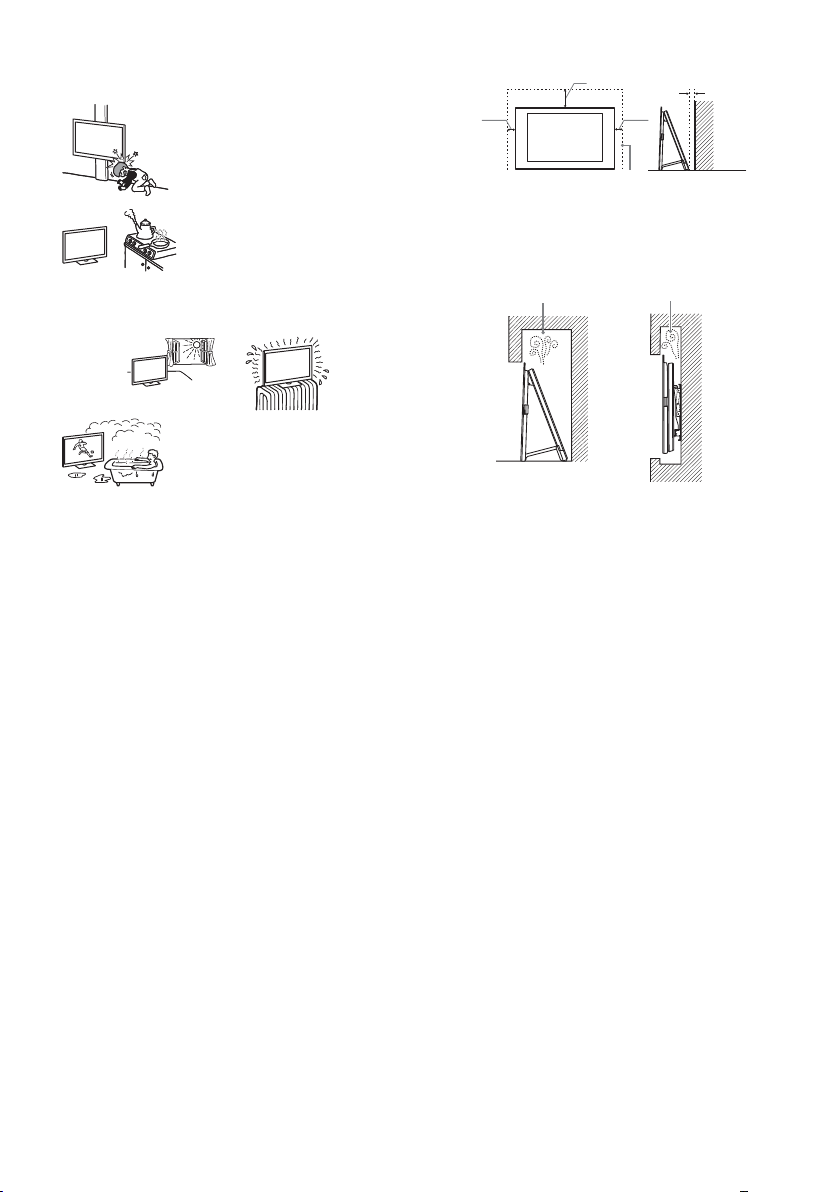
قﺮﺑ ﺰﯾﺮﭘ زا ار نﻮﯾﺰﯾﻮﻠﺗ ،قﺮﺑ و ﺪﻋر دﻮﺟو ترﻮﺻ رد .ﺪﯿﻨﮐ هدﺎﻔﺘﺳا ﺖﺳا هﺪﺸﻧ ﻪﯿﺻﻮﺗ هﺪﻧزﺎﺳ
ﺪﺣ زا ﺶﯿﺑ ﯽﻄﯾاﴍ ﻦﯿﻨﭼ رد نﻮﯾﺰﯾﻮﻠﺗ ﺖﺳا ﻦﮑﻤﻣ .ﺪﻧراد راﺮﻗ ﺶﻳﺎﻣﺮﮔ ﻪﭽﯾرد ﺎﻳ رﻮﺗﺎﻳدار ﮏﯾدﺰﻧ
.دﻮﺷ دﺎﺠﯾا نآ دﺮﮑﻠﻤﻋ رد ﯽﺼﻘﻧ ﺎﯾ/و ﺪﻫﺪﺑ ﻞﮑﺷ ﺮﯿﯿﻐﺗ نآ بﺎﻗ ﻪﺠﯿﺘﻧ رد و دﻮﺷ مﺮﮔ
.ﺪﯿﻨﮐ اﺪﺟ ﺰﯿﻧ ار (ﯽﯾاﻮﻫ) ﻧآ ،ﺪﯿﻨﮐ اﺪﺟ بوﺎﻨﺘﻣ
ﻦﮑﻤﻣ نﻮﯾﺰﯾﻮﻠﺗ ﻪﺑ داﺮﻓا ﺎﯾ ءﺎﯿﺷا درﻮﺧﺮﺑ ﻪﺠﯿﺘﻧ رد .ﺪﺷﺎﺑ ﺮﮕﯾد
(زﺎﺳ رﺎﺨﺑ ﺎﻳ زﺎﮔ قﺎﺟا ﮏﻳدﺰﻧ) ﯽﻨﻏور رﺎﺨﺑ ﺎﻳ دود یوﺎﺣ یﺎﻫ
قﺮﺑ رﺎﭼد ،ﺪﻫد یور یزﻮﺳ ﺶﺗآ ﺖﺳا ﻦﮑﻤﻣ .ﺪﯿﻫد راﺮﻗ
.دﻮﺷ دﺎﺠﯾا ﺐﯿﺳآ ﺎﯾ ﺖﺣاﺮﺟ ﺖﺳا
.دﻮﺷ ﺞﮐ ﺎﯾ ﺪﯾﻮﺷ ﯽﮕﺘﻓﺮﮔ
• ﻂﺳﻮﺗ ﻪﮐ ﯽﯾﺎﻫ ﻪﻤﯿﻤﺿ ﺎﺑ ﺎﯾ ،ﺖﺳا هﺪﺷ ﻪﺘﺷادﺮﺑ ﻪﻈﻔﺤﻣ ،ﺖﺳا ﺲﯿﺧ ﺷ یﺎﻫ ﺖﺳد ﻪﮐ ﯽﻧﺎﻣز
ﱰﻣ ﯽﺘﻧﺎﺳ 30
• زﺎﺑ یﺎﻀﻓ ﮏﯾ رد نآ زا ﯽﺸﺨﺑ ﻪﮐ ﺪﯿﻨﮐ ﺐﺼﻧ یرﻮﻃ ار نﻮﯾﺰﯾﻮﻠﺗ
• قﺎﺗا نورد ﺎﻳ ،رﺎﺒﻏ و دﺮﮔ ﺮﭘ ﺎﻳ بﻮﻃﺮﻣ ﻂﻴﺤﻣ رد ار نﻮﻳﺰﻳﻮﻠﺗ
• ،ﺪﻴﺷرﻮﺧ ﻢﻴﻘﺘﺴﻣ رﻮﻧ ﺪﻨﻧﺎﻣ ،ﺪﻳﺪﺷ تراﺮﺣ ضﺮﻌﻣ رد ﻪﮐ ﺪﯿﻨﮐ ﺐﺼﻧ ﯽﯾﺎﻫ نﺎﮑﻣ رد ار نﻮﻳﺰﻳﻮﻠﺗ
ﱰﻣ ﯽﺘﻧﺎﺳ 10
.ﺪﯾﺮﯿﮕﺑ ﺮﻈﻧ رد هﺎﮕﺘﺳد فاﺮﻃا رد ار ﺎﻀﻓ راﺪﻘﻣ ﻦﯾا ﻞﻗاﺪﺣ
.ﺖﺳا دوﺪﺴﻣ اﻮﻫ ﻪﻈﻔﺤﻣ
راﻮﯾد راﻮﯾد
ﱰﻣ ﯽﺘﻧﺎﺳ 10
ﺖﺳا هﺪﺷ ﺐﺼﻧ ﻪﯾﺎﭘ ﺎﺑ
ﱰﻣ ﯽﺘﻧﺎﺳ 1
.ﺪﺷﺎﺑ رﺎﻨﮐ
•:کﺎﺧ و دﺮﮔ نﺪﺷ ﻞﻤﺟ زا یﺮﯿﮔﻮﻠﺟ و ﺐﺳﺎﻨﻣ ﻪﯾﻮﻬﺗ زا نﺎﻨﯿﻤﻃا یاﺮﺑ
– زا ﺎﯾ ﺖﺸﭘ ﻪﺑ ﻪﮐ یرﻮﻃ ﺪﯿﻨﮐ ﺐﺼﻧ ﻪﻧوراو ترﻮﺻ ﻪﺑ ار نآ ،ﺪﯿﻧﺎﺑاﻮﺨﻧ ﻦﯿﻣز یور ار نﻮﯾﺰﯾﻮﻠﺗ
– .ﺪﯾراﺬﮕﻧ ﺪﻤﮐ رد ﺎﯾ ﺖﺨﺗ ،شﺮﻓ ،ﻪﺴﻔﻗ یور ار نﻮﯾﺰﯾﻮﻠﺗ
– .ﺪﯿﻧﺎﺷﻮﭙﻧ ﺮﮕﯾد یﺎﻫﺰﯿﭼ ﺎﯾ ﻪﻣﺎﻧزور ﻞﺜﻣ یدراﻮﻣ ﺎﯾ هدﺮﭘ ﻞﺜﻣ ﯽﯾﺎﻫ ﻪﭼرﺎﭘ ﺎﺑ ار نﻮﯾﺰﯾﻮﻠﺗ
– .ﺪﯿﻨﮑﻧ ﺐﺼﻧ ﺖﺳا هﺪﺷ هداد نﺎﺸﻧ ﺮﯾز رد ﻪﮐ یرﻮﻃ ار نﻮﯾﺰﯾﻮﻠﺗ
ﺎﯾ دﻮﺷ ﺶﯾﺎﺳﺮﻓ رﺎﭼد رﻮﻔﻟﻮﺳ دﻮﺟو ﻪﻄﺳاو ﻪﺑ ﺖﺳا ﻦﮑﻤﻣ ،ﺖﺳا
ﯽﺒﺳﺎﻨﻣﺎﻧ ﮓﻧر ﺎﯾ/و ﺮﯾﻮﺼﺗ ﺖﯿﻔﯿﮐ نﻮﯾﺰﯾﻮﻠﺗ دﻮﺷ ﯽﻣ ﺚﻋﺎﺑ ﺖﻟﺎﺣ ﻦﯾا .دﻮﺷ ﺖﺑﻮﻃر نﺎﻌﯿﻣ دﺎﺠﯾا
رﻮﻃ ﻪﺑ ﺖﺑﻮﻃر ﺪﯿﻫد هزﺎﺟا نﻮﯾﺰﯾﻮﻠﺗ نﺪﺷ ﻦﺷور زا ﻞﺒﻗ ،ﺖﻟﺎﺣ ﻦﯾا زوﺮﺑ ترﻮﺻ رد .ﺪﺷﺎﺑ ﻪﺘﺷاد
.دﻮﺷ دﺎﺠﯾا ﻪﺑﺎﺸﻣ یﺎﻫ ﺖﻟﺎﺣ
.ﺪﯿﻫﺪﻧ راﺮﻗ ﺪﯿﺷرﻮﺧ رﻮﻧ
.دوﺮﺑ ﻦﯿﺑ زا ﻞﻣﺎﮐ
:ﻪﺘﺴﮑﺷ یﺎﻫ ﻪﮑﺗ
.ﺪﻨﮐ دﺎﺠﯾا یﺪﯾﺪﺷ ﺖﺣاﺮﺟ و ﺪﻨﮑﺸﺑ
.ﺪﯾﻮﺷ ﯽﮕﺘﻓﺮﮔ قﺮﺑ رﺎﭼد ﺖﺳا ﻦﮑﻤﻣ ترﻮﺼﻨﯾا ﺮﯿﻏ رد .ﺪﯿﻨﮐ اﺪﺟ
ﺪﯿﻨﮐ ﯽ هدﺎﻔﺘﺳا هﺎﮕﺘﺳد زا ﯽﺘﻗو
.ﺪﯿﻨﮐ ﻊﻄﻗ بوﺎﻨﺘﻣ قﺮﺑ ﻊﺒﻨﻣ زا
.دﻮﺷ ﻊﻄﻗ قﺮﺑ ﻊﺒﻨﻣ زا ﻞﻣﺎﮐ رﻮﻃ ﻪﺑ نﻮﯾﺰﯾﻮﻠﺗ لﺎﺼﺗا ﺎﺗ ﺪﯿﺸﮑﺑ نوﺮﯿﺑ بوﺎﻨﺘﻣ قﺮﺑ ﺰﯾﺮﭘ
.ﺪﻨﻨﮐ رﺎﮐ ﯽﺘﺳرد ﻪﺑ ﺎﺗ ﺪﯿﻨﮐ ﺎﻫر رﺎﮐ ﻪﺑ هدﺎﻣآ ﺖﻟﺎﺣ
نﺎﮐدﻮﮐ یاﺮﺑ
...داد یور ﺮﯾز تﻼﮑﺸﻣ ﺮﮔا
ًارﻮﻓ ار AC بوﺎﻨﺘﻣ قﺮﺑ ﻢﯿﺳ و ﺪﯿﻨﮐ شﻮﻣﺎﺧار نﻮﯾﺰﯾﻮﻠﺗ ،ﺮﯾز تﻼﮑﺸﻣ زا ماﺪﮐﺮﻫ زوﺮﺑ ترﻮﺻ رد
درﻮﻣ بﺮﺠﻣ رﺎﮐ ﺲﯾوﴎ ﺺﺼﺨﺘﻣ ﮏﯾ ﻂﺳﻮﺗ ار هﺎﮕﺘﺳد ﺎﺗ ﺪﯿﻫاﻮﺨﺑ Sony تﺎﻣﺪﺧ ﺰﮐﺮﻣ ﺎﯾ هﺪﻨﺷوﺮﻓ زا
.ﺪﯿﺸﮑﺑ
.ﺪﻨﻫد راﺮﻗ ﯽﺳرﺮﺑ
• مﺮﮔ بآ ﻪﻤﺸﭼ ﺎﯾ ﯽﻣﻮﻤﻋ مﺣ ﮏﯾ ﻦﮑﺘﺧر قﺎﺗا رد نﻮﯾﺰﯾﻮﻠﺗ ﺮﮔا
• ﺶﺑﺎﺗ ﺎﯾ ﻢﯿﻘﺘﺴﻣ رﻮﻧ ضﺮﻌﻣ رد ار ﻪﺤﻔﺻ ،ﺪﯿﺷﺎﺑ ﻪﺘﺷاد رﺎﯿﺘﺧا رد ار ﺲﮑﻋ ﺖﯿﻔﯿﮐ ﻦﯾﱰﻬﺑ ﻪﮑﻨﯾا یاﺮﺑ
• ﺚﻋﺎﺑ ﺖﺳا ﻦﮑﻤﻣ قﺎﺗا یﺎﻣد رد ﯽﻧﺎﻬﮔﺎﻧ ﺮﯿﯿﻐﺗ .ﺪﯾﱪﻧ مﺮﮔ ﯽﻧﺎﮑﻣ ﻪﺑ دﴎ ﯽﻧﺎﮑﻣ زا ار نﻮﯾﺰﯾﻮﻠﺗ
• هﺪﺷ دﺎﺠﯾا رﺎﺸﻓ ﺮﻃﺎﺧ ﻪﺑ ﺖﺳا ﻦﮑﻤﻣ ﻪﺤﻔﺻ ﻪﺸﯿﺷ .ﺪﯿﻨﮑﻧ تﺮﭘ نﻮﯾﺰﯾﻮﻠﺗ ﺖﻤﺳ ﻪﺑ ار یﺰﯿﭼ ﭻﯿﻫ
• ار AC بوﺎﻨﺘﻣ قﺮﺑ ﻢﯿﺳ ﻪﮐ ﯽﻧﺎﻣز ﺎﺗ ﺪﯿﻧﺰﻧ ﺖﺳد نآ ﻪﺑ ،ﺖﺳا ﻪﺘﺷادﺮﺑ کﺮﺗ نﻮﯾﺰﯾﻮﻠﺗ ﯽﯾور ﺢﻄﺳ ﺮﮔا
• ار نﻮﯾﺰﯾﻮﻠﺗ ﺪﯾﺎﺑ ،ﯽﺘﯿﻨﻣا و ﯽﻄﯿﺤﻣ ﻞﯾﻻد ﻪﺑ ،ﺪﯿﻨﮐ هدﺎﻔﺘﺳا زور ﺪﻨﭼ یاﺮﺑ هﺎﮕﺘﺳد زا ﺪﯿﻫاﻮﺧ ﯽ ﺮﮔا
• زا ار ﻪﺧﺎﺷود ،دﻮﺷ ﯽﻣ شﻮﻣﺎﺧ ﻂﻘﻓ و دﻮﺷ ﯽ ﻊﻄﻗ بوﺎﻨﺘﻣ قﺮﺑ ﻊﺒﻨﻣ زا نﻮﯾﺰﯾﻮﻠﺗ ﻪﮑﻨﯾا ﻞﯿﻟد ﻪﺑ
• رد ار نﻮﯾﺰﯾﻮﻠﺗ ﺪﺷﺎﺑ مزﻻ ﺎﻬﻧآ یاﺮﺑ ﻪﮐ ﺪﻨﺷﺎﺑ ﻪﺘﺷاد ﯽﯾﺎﻫ ﯽﮔﮋﯾو ﺎﻫ نﻮﯾﺰﯾﻮﻠﺗ زا ﯽﻀﻌﺑ ﺖﺳا ﻦﮑﻤﻣ
•.ﺪﻧوﺮﺑ ﻻﺎﺑ نﻮﯾﺰﯾﻮﻠﺗ زا نﺎﮐدﻮﮐ ﺪﯿﻫﺪﻧ هزﺎﺟا
•.ﺪﻧرﻮﺨﻧ ار ﺎﻬﻧآ هﺎﺒﺘﺷا ﻪﺑ ﺎﺗ ﺪﯾراﺪﻬﮕﻧ رود نﺎﮐدﻮﮐ سﱰﺳد زا ار ﮏﭼﻮﮐ ﯽﺒﻧﺎﺟ مزاﻮﻟ
قﺮﺑ ،یزﻮﺳ ﺶﺗآ زوﺮﺑ لﺘﺣا ﻪﻧﻮﮔﺮﻫ ﺎﺗ ﺪﯿﻨﮐ رﺎﮐ ﺮﯾز ﺪﻨﻧﺎﻣ ار قﺮﺑ ﺰﯾﺮﭘ و AC بوﺎﻨﺘﻣ قﺮﺑ ﻢﯿﺳ ﺎﺑ
ﺰﯾﺮﭘ ﺎﺑ ﺐﺳﺎﻨﺘﻣ ﻪﮐ ﺪﯿﻨﮐ ﻞﺻو یا ﻪﺧﺎﺷود ﻪﺑ ار ﺐﺳﺎﻨﻣ AC بوﺎﻨﺘﻣ قﺮﺑ ﻢﯿﺳ .ﺖﺳا توﺎﻔﺘﻣ
ﺖﺳا ﻦﮑﻤﻣ ﺖﻟﺎﺣ ﻦﯾا ،ﺪﺷﺎﺑ ﻪﺘﻓر ﻦﯿﺑ زا نآ ﻖﯾﺎﻋ ﺖﺳا ﻦﮑﻤﻣ ،ﺪﻨﮐ ﯽﻣ بﺬﺟ ﺖﺑﻮﻃر و ﺖﺳا
،ﺪﯿﻨﮐ یراددﻮﺧ ﺮﯾز رد هﺪﺷ ناﻮﻨﻋ دراﻮﻣ ﺪﻨﻧﺎﻣ ﯽﻄﯾاﴍ ﺎﯾ ﺎﻫ نﺎﮑﻣ رد نﻮﯾﺰﯾﻮﻠﺗ زا هدﺎﻔﺘﺳا/ﺐﺼﻧ زا
دﺎﺠﯾا ﯽﮕﺘﻓﺮﮔ قﺮﺑ ﺎﯾ یزﻮﺳ ﺶﺗآ و هﺪﺷ دﺎﺠﯾا ﺺﻘﻧ هﺎﮕﺘﺳد دﺮﮑﻠﻤﻋ رد ﺖﺳا ﻦﮑﻤﻣ ترﻮﺼﻨﯾا ﺮﯿﻏ رد
.دود ﺎﯾ ﺖﺑﻮﻃر ،نارﺎﺑ شرﺎﺑ ،بآ ﯽﮑﯾدﺰﻧ رد ،تﺎﺒﺛ نوﺪﺑ یﺎﻫ نﺎﮑﻣ ،ﯽﮑﺷﺰﭘ یﺎﻫ نﺎﮑﻣ رد ،ﻦﯿﺷﺎﻣ
ﺪﯾﺎﺒﻧ .(هﻏ و ،ﻊﻤﺷ) لﺎﻌﺘﺷا ﻞﺑﺎﻗ ﻞﻳﺎﺳو تروﺎﺠﻣ رد ؛ﺪﻨﺘﺴﻫ ﯽﻜﻴﻧﺎﻜﻣ یﺎﻬﺷزﺮﻟ ضﺮﻌﻣ رد ﻪﻛ
ار ،ناﺪﻠﮔ ﻞﺜﻣ ،بآ زا ﺮﭘ مﺎﺴﺟا ﻦﯿﻨﭽﻤﻫ ،ﺪﯿﻫد راﺮﻗ تﺎﻌﯾﺎﻣ ﺶﺨﭘ ﺎﯾ ﻪﮑﭼ ضﺮﻌﻣ رد ار نﻮﯾﺰﯾﻮﻠﺗ
:دوﺮﺑ ﻦﯿﺑ زا ﺖﺣاﺮﺟ زوﺮﺑ ﺎﯾ/و هﺎﮕﺘﺳد ﻪﺑ ﺐﯿﺳآ ﺎﯾ ﯽﮕﺘﻓﺮﮔ
.ﺪﯾﻮﺸﻧ در ﺎﻫ ﻢﯿﺳ یور زا ﺪﯿﺷﺎﺑ ﺐﻗاﺮﻣ
.ﺪﺷﺎﺑ ﻪﺘﺴﮑﺷ ﻪﮑﻨﯾا ﺎﯾ ﺪﺷﺎﺑ ﻆﻓﺎﺤﻣ نوﺪﺑ یﺰﮐﺮﻣ یدﺎﻫ
.دﻮﺷ دﺎﺠﯾا ﯽﺼﺨﺷ تﺎﺣاﺮﺟ ﺎﯾ هﺪﺷ دراو ﺐﯿﺳآ هﺎﮕﺘﺳد ﻪﺑ ،دﻮﺷ
AC بوﺎﻨﺘﻣ قﺮﺑ ﻢﯿﺳ
.ﺪﺷﺎﺑ بوﺎﻨﺘﻣ قﺮﺑ
.ﺪﯿﻨﮐ هدﺎﻔﺘﺳا
.ﺪﯿﻨﮐ اﺪﺟ
.دﻮﺷ یزﻮﺳ ﺶﺗآ دﺎﺠﯾا ﺚﻋﺎﺑ
فﴫﻣ ﻊﻨﻣ دراﻮﻣ
:ﺎﻫ نﺎﮑﻣ
:ﺎﻫ ﻂﯿﺤﻣ
.ﺪﯾراﺬﮕﻧ نﻮﯾﺰﯾﻮﻠﺗ یور ﺮﺑ
:ﻂﯾاﴍ
ﻪﺘﮑﻧ
– ،ﻒﻠﺘﺨﻣ ﻖﻃﺎﻨﻣ ﻪﺑ ﻪﺘﺴﺑ دﻮﺷ ﯽﻣ ﻪﺋارا نﻮﯾﺰﯾﻮﻠﺗ ﺎﺑ هاﺮﻤﻫ ﻪﮐ بوﺎﻨﺘﻣ قﺮﺑ ﻪﺧﺎﺷود ﻞﮑﺷ
– یﺮﮕﯾد کرﺎﻣ ﭻﯿﻫ ﻪﻧ و ﺪﯿﻨﮐ هدﺎﻔﺘﺳا Sony ﻂﺳﻮﺗ هﺪﺷ ﻪﺋارا AC بوﺎﻨﺘﻣ قﺮﺑ ﻢﯿﺳ زا ﻂﻘﻓ
– .ﺪﯿﻨﮐ دراو بوﺎﻨﺘﻣ قﺮﺑ ﺰﯾﺮﭘ رد ﻞﻣﺎﮐ ار ﻪﺧﺎﺷود
– نﻮﯾﺰﯾﻮﻠﺗ دﺮﮐرﺎﮐ یاﺮﺑ هﺪﺷ ﻪﺘﻓﺮﮔ ﺮﻈﻧ رد بوﺎﻨﺘﻣ قﺮﺑ ﺖﻟو 240 ﺎﺗ ﺖﻟو 110 ژﺎﺘﻟو زا ﻂﻘﻓ
– و ﺪﯿﻨﮐ اﺪﺟ ار AC بوﺎﻨﺘﻣ قﺮﺑ ﻢﯿﺳ ًﺘﺣ نﺎﺗدﻮﺧ ﯽﻨﻤﯾا ﻆﻔﺣ یاﺮﺑ ،ﺎﻫ ﻢﯿﺳ ﺴﺑ مﺎﮕﻨﻫ
– بوﺎﻨﺘﻣ قﺮﺑ ﺰﯾﺮﭘ زا ار AC بوﺎﻨﺘﻣ قﺮﺑ ﻢﯿﺳ ،نآ ندﺮﮐ ﺎﺠﺑﺎﺟ ﺎﯾ نﻮﯾﺰﯾﻮﻠﺗ ﺎﺑ ندﺮﮐ رﺎﮐ زا ﻞﺒﻗ
– .ﺪﯾراﺪﻬﮕﻧ رود ﯽﺗراﺮﺣ ﻊﺑﺎﻨﻣ زا ار AC بوﺎﻨﺘﻣ قﺮﺑ ﻢﯿﺳ
– کﺎﺧ و دﺮﮔ زا ﺮﭘ ﻪﺧﺎﺷود ﺮﮔا .ﺪﯿﻨﮐ ﺰﯿ ار نآ ًﺎﺒﺗﺮﻣ و ﺪﯿﺸﮑﺑ نوﺮﯿﺑ ار بوﺎﻨﺘﻣ قﺮﺑ ﻪﺧﺎﺷود
•.ﺪﯿﻨﮑﻧ هدﺎﻔﺘﺳا یﺮﮕﯾد هﺎﮕﺘﺳد ﭻﯿﻫ یاﺮﺑ هﺎﮕﺘﺳد ﻦﯾا ﺎﺑ هﺪﺷ ﻪﺋارا AC بوﺎﻨﺘﻣ قﺮﺑ ﻢﯿﺳ زا
• ﺶﺨﺑ ﺖﺳا ﻦﮑﻤﻣ .ﺪﯿﻨﮐ یراددﻮﺧ AC بوﺎﻨﺘﻣ قﺮﺑ ﻢﯿﺳ دﺎﯾز نداد رﺎﺸﻓ و نﺪﻧﺎﭽﯿﭘ ،ندﺮﮐ ﻢﺧ زا
•.ﺪﯿﻨﮑﻧ دﺎﺠﯾا AC بوﺎﻨﺘﻣ قﺮﺑ ﻢﯿﺳ رد یﺮﯿﯿﻐﺗ
•.ﺪﯾراﺬﮕﻧ AC بوﺎﻨﺘﻣ قﺮﺑ ﻢﯿﺳ یور ﯽﻨﯿﮕﻨﺳ ﻢﺴﺟ ﭻﯿﻫ
•.ﺪﯿﺸﮑﻧ ار AC بوﺎﻨﺘﻣ قﺮﺑ ﻢﯿﺳ ،ﺪﯿﻨﮐ ﯽﻣ اﺪﺟ ار بوﺎﻨﺘﻣ قﺮﺑ ﻢﯿﺳ ﯽﺘﻗو
•.ﺪﯿﻨﮐ یراددﻮﺧ کﱰﺸﻣ بوﺎﻨﺘﻣ قﺮﺑ ﻢﯿﺳ ﮏﯾ ﻪﺑ هﺎﮕﺘﺳد یدﺎﯾز داﺪﻌﺗ لﺎﺼﺗا زا
•.ﺪﯿﻨﮑﻧ هدﺎﻔﺘﺳا ،ﺖﺴﯿﻧ هدﺎﻔﺘﺳا ﻞﺑﺎﻗ ﯽﺘﺳرد ﻪﺑ ﻪﮐ ﯽﺑوﺎﻨﺘﻣ قﺮﺑ ﺰﯾﺮﭘ زا
• ﻞﺧاد ،ﻖﯾﺎﻗ ﺎﯾ ﯽﺘﺸﮐ رد ،ﻞﺣﺎﺳ رد ،(ﺪﯿﺷرﻮﺧ رﻮﻧ ﻢﯿﻘﺘﺴﻣ ﺶﺑﺎﺗ رد) نﺘﺧﺎﺳ زا نوﺮﯿﺑ یﺎﻀﻓ
• ﯽﻳﺎﻬﻠﺤﻣ ؛دراد دﻮﺟو تاﴩﺣ دﻮﺟو لﺘﺣا ﻪﻜﻴﻳﺎﻫﺎﺟ ؛دﺎﻳز رﺎﺒﻏ و دﺮﮔ ﺎﺑ ﺎﻳ ،ﯽﺟﴍ ،مﺮﮔ یﺎﻬﻧﺎﻜﻣ
PR
4
Page 90
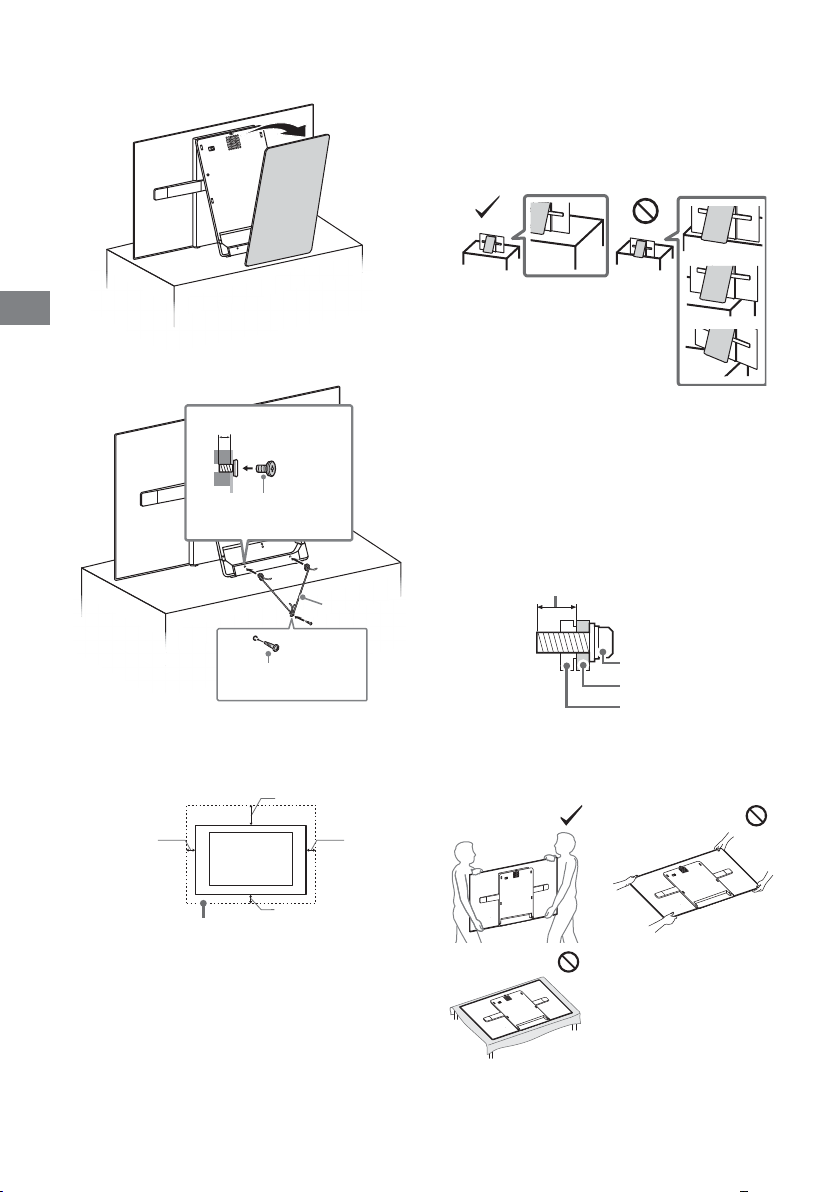
PR
.ﺪﯿﻨﮐ ﻞﺼﺘﻣ نﻮﯾﺰﯾﻮﻠﺗ ﻪﯾﺎﭘ ﻪﺑ ﻢﮑﺤﻣ ار نﻮﯾﺰﯾﻮﻠﺗ 2
ﱰﻣ ﯽﻠﯿﻣ 14 ﺎﺗ 10
(ﺖﺴﯿﻧ ﻪﻤﯿﻤﺿ) ﭻﯿﭘ M6
ندﺎﺘﻓا زا یﺮﯿﮔﻮﻠﺟ
.ﺪﯿﻨﮐ اﺪﺟ ار یﺰﮐﺮﻣ ﺶﺷﻮﭘ 1
(ﺖﺴﯿﻧ ﻪﻤﯿﻤﺿ) ﻢﯿﺳ
.ﺪﯾﺎﯿﻧ دراو ﻞﯾﺎﺳو
.ﺪﺷﺎﺑ
نﻮﯾﺰﯾﻮﻠﺗ ندﺎﺘﻓا ﺚﻋﺎﺑ ﺖﺳا ﻦﮑﻤﻣ ،دﺮﯿﮕﺑ راﺮﻗ نﻮﯾﺰﯾﻮﻠﺗ ﻪﯾﺎﭘ زا ﺮﺗﻮﻠﺟ نﻮﯾﺰﯾﻮﻠﺗ ﻪﻤﮐد ﺮﮔا .دﺮﯿﮕﻧ
یﺮﯿﮔ هزاﺪﻧا ﯽﻣﺎﮕﻨﻫ ،دﻮﺷ ﯽﻣ هداد نﺎﺸﻧ ﺮﯾﻮﺼﺗ رد ﻪﮐ رﻮﻄﻧﻫ هﺪﺷ ﻪﺋارا یﺎﻫ ﭻﯿﭘ .ﺪﯿﻨﮐ هدﺎﻔﺘﺳا
ﯽﻠﺧاد ﺶﺨﺑ ﻪﺑ نﺪﻧﺎﺳر ﻪﻣﺪﺻ ﺚﻋﺎﺑ ﺖﺳا ﻦﮑﻤﻣ هﺪﺷ ﻪﺋارا دراﻮﻣ ﺰﺟ ﻪﺑ ﯽﯾﺎﻫ ﭻﯿﭘ زا هدﺎﻔﺘﺳا
ﱰﻣ ﯽﻠﯿﻣ 14 ﺎﺗ 10
.دﻮﺷ ﺮﺠﻨﻣ نﻮﯾﺰﯾﻮﻠﺗ ترﺎﺴﺧ ﺎﯾ یدﺮﻓ ﺐﯿﺳآ ﻪﺑ و دﻮﺷ
.ﺪﯾا هدﻮ ﻞﺼﺘﻣ نﻮﯾﺰﯾﻮﻠﺗ
.ﺪﻨﺷﺎﺑ ﻞﺻو یراﻮﯾد ﺐﺼﻧ ﻪﯾﺎﭘ ﺢﻄﺳ ﻪﺑ ﻪﮐ ﺪﻧﻮﺷ ﯽﻣ
.ﺖﺳا توﺎﻔﺘﻣ ،یراﻮﯾد ﺐﺼﻧ ﻪﯾﺎﭘ لﺪﻣ ﻪﺑ ﻪﺘﺴﺑ ﺎﻫ ﭻﯿﭘ لﻮﻃ و ﺮﻄﻗ
.دراﻮﻣ ﺮﮕﯾد ﺎﯾ ،ﺪﺘﻔﯿﺑ هﺎﮕﺘﺳد ﻪﮐ دﻮﺷ ﺚﻋﺎﺑ ﺎﯾ هﺪﺷ نﻮﯾﺰﯾﻮﻠﺗ
ﺐﺼﻧ
•.ﺪﺷﺎﺑ ﯽﺳﱰﺳد ﻞﺑﺎﻗ ﯽﺘﺣار ﻪﺑ ﻪﮐ ﺪﯿﻫد راﺮﻗ بوﺎﻨﺘﻣ قﺮﺑ ﺰﯾﺮﭘ ﮏﯾ ﮏﯾدﺰﻧ ﺪﯾﺎﺑ ار نﻮﯾﺰﯾﻮﻠﺗ
• ﺮﮕﯾد ﻪﺑ ﯽﺒﯿﺳآ ﺎﯾ دﻮﺸﻧ دﺎﺠﯾا ﯽﺘﺣاﺮﺟ و ﺪﺘﻔﯿﻧ ﺎﺗ ﺪﯿﻫد راﺮﻗ ﺖﺑﺎﺛ و فﺎﺻ ﯽﺤﻄﺳ یور ار نﻮﯾﺰﯾﻮﻠﺗ
• ﻪﺘﺷاﺪﻧ دﻮﺟو نآ ﺎﺑ درﻮﺧﺮﺑ ﺎﯾ نآ ﻪﺑ ندروآ رﺎﺸﻓ و نﺪﯿﺸﮐ نﺎﮑﻣا ﻪﮐ ﺪﯿﻫد راﺮﻗ ﯽﯾﺎﺟ ار نﻮﯾﺰﯾﻮﻠﺗ
• راﺮﻗ (هﺪﺸﻧ ﻪﺋارا) نﻮﯾﺰﯾﻮﻠﺗ ﻪﯾﺎﭘ زا ﺮﺗﻮﻠﺟ نﻮﯾﺰﯾﻮﻠﺗ ﻪﻤﮐد ﻪﮐ ﺪﯿﻨﮐ ﺐﺼﻧ یا ﻪﻧﻮﮔ ﻪﺑ ار نﻮﯾﺰﯾﻮﻠﺗ
• ﺖﺸﭘ ﻪﺑ ار ﯽﻧﺎﯿﻣ ﺶﺷﻮﭘ ﺪﯾﻮﺷ ﱧﻤﻄﻣ دراد راﺮﻗ ﺰﯿﻣ یور نﻮﯾﺰﯾﻮﻠﺗ ﻪﮐ ﯽﻣﺎﮕﻨﻫ ﯽﻨﻤﯾا ﻞﯾﻻد ﻪﺑ ﺎﻨﺑ
•.دﻮﺷ مﺎﺠﻧا بﺮﺠﻣ رﺎﮐ ﺲﯾوﴎ ﻞﻨﺳﺮﭘ ﻂﺳﻮﺗ ﺪﯾﺎﺑ ﻂﻘﻓ راﻮﯾد یور ﺮﺑ ﺐﺼﻧ
•:ﻪﻠﻤﺟ زا ،ﺪﯿﻨﮐ هدﺎﻔﺘﺳا Sony ﯽﺒﻧﺎﺟ مزاﻮﻟ زا ﻂﻘﻓ ﻪﮐ دﻮﺷ ﯽﻣ ﻪﯿﺻﻮﺗ ًاﺪﯿﮐا ،ﯽﺘﯿﻨﻣا ﻞﯾﻻد ﻪﺑ
– SU-WL450 یراﻮﯾد ﺐﺼﻧ ﻪﯾﺎﭘ
• یراﻮﯾد ﺐﺼﻧ ﻪﯾﺎﭘ ﺎﺑ هاﺮﻤﻫ هﺪﺷ ﻪﺋارا یﺎﻫ ﭻﯿﭘ زا ًﺘﺣ ،نﻮﯾﺰﯾﻮﻠﺗ ﻪﺑ یراﻮﯾد ﺐﺼﻧ ﻪﯾﺎﭘ ﺐﺼﻧ مﺎﮕﻨﻫ
ﱰﻣ ﯽﺘﻧﺎﺳ 10 ﱰﻣ ﯽﺘﻧﺎﺳ 10
.ﺪﯾﺮﯿﮕﺑ ﺮﻈﻧ رد هﺎﮕﺘﺳد فاﺮﻃا رد ار ﺎﻀﻓ راﺪﻘﻣ ﻦﯾا ﻞﻗاﺪﺣ
PR
3
(ﺖﺴﯿﻧ ﻪﻤﯿﻤﺿ) ﭻﯿﭘ
ﱰﻣ ﯽﺘﻧﺎﺳ 30
ﱰﻣ ﯽﺘﻧﺎﺳ 10
اﻮﻫ ﻪﯾﻮﻬﺗ
ﺖﺳا هﺪﺷ ﺐﺼﻧ راﻮﯾد یور
(M6) ﭻﯿﭘ
یراﻮﯾد ﺐﺼﻧ ﻪﯾﺎﭘ
نﻮﯾﺰﯾﻮﻠﺗ ﺖﺸﭘ ﺶﺷﻮﭘ
•.ﺪﯿﻨﮑﻧ دراو هﺎﮕﺘﺳد ﻪﻧﺪﺑ ﻞﺧاد ار یﺰﯿﭼ ﭻﯿﻫ و ﺪﯿﻧﺎﺷﻮﭙﻧ ار ﻪﯾﻮﻬﺗ یﺎﻫ ﻪﻈﻔﺤﻣ ﺰﮔﺮﻫ
•.ﺪﯾﺮﯿﮕﺑ ﺮﻈﻧ رد ﻪﻠﺻﺎﻓ نﻮﯾﺰﯾﻮﻠﺗ فاﺮﻃا رد ،ﺖﺳا هﺪﺷ هداد نﺎﺸﻧ ﺮﯾز رد ﻪﮐ رﻮﻄﻧﻫ
•.ﺪﻨﮐ اﺪﯿﭘ نﺎﯾﺮﺟ ﯽﺑﻮﺧ ﻪﺑ اﻮﻫ ﺎﺗ ﺪﯿﻨﮐ هدﺎﻔﺘﺳا Sony یراﻮﯾد ﺐﺼﻧ ﻪﯾﺎﭘ زا دﻮﺷ ﯽﻣ ﻪﯿﺻﻮﺗ ًاﺪﯿﮐا
.ﺪﯿﻨﮑﻧ دراو رﺎﺸﻓ ﺶﯾﺎ ﻪﺤﻔﺻ رود بﺎﻗ و ﻞﻧﺎﭘ ﻪﺑ .ﺪﯾﺮﯿﮕﺑ ﺖﺳد
.ﺪﯾﺪﻨﺒﺑ ار نآ ،یﺪﻨﺑ ﻪﺘﺴﺑ داﻮﻣ و شا ﻪﯿﻟوا
ﯽﯾﺎﺠﺑﺎﺟ
.ﺪﯿﻧﺎﺑاﻮﺨﻧ ﻦﯿﻣز یور ار
•.ﺪﯿﻨﮐ اﺪﺟ ار ﺎﻫ ﻞﺑﺎﮐ ﻪﻤﻫ ،نﻮﯾﺰﯾﻮﻠﺗ ﯽﯾﺎﺠﺑﺎﺟ زا ﻞﺒﻗ
•.ﺖﺳا زﺎﯿﻧ ﺮﻔﻧ ﻪﺳ ﺎﯾ ود ﻪﺑ ،گرﺰﺑ ﯽﻧﻮﯾﺰﯾﻮﻠﺗ ندﺮﮐ ﺎﺠﺑﺎﺟ یاﺮﺑ
• رد ،ﺖﺳا هﺪﺷ هداد نﺎﺸﻧ ﺮﯾز رد ﻪﮐ رﻮﻄﻧﻫ ار نآ ،ﺪﯿﻨﮐ ﯽﻣ ﺎﺠﺑﺎﺟ ﺖﺳد ﺎﺑ ار نﻮﯾﺰﯾﻮﻠﺗ ﯽﺘﻗو
• نﻮﯾﺰﯾﻮﻠﺗ ًﺎﻔﻄﻟ ،نﻮﯾﺰﯾﻮﻠﺗ ﺐﺼﻧ ﺎﯾ ندﺮﮐ ﺎﺠﺑﺎﺟ مﺎﮕﻨﻫ رد
•.ﺪﯿﻨﮐ یراددﻮﺧ دﺎﯾز رﺎﯿﺴﺑ شزﺮﻟ و نداد نﺎﮑﺗ زا ،ﺪﯿﻨﮐ ﯽﻣ ﺎﺠﺑﺎﺟ ار نﻮﯾﺰﯾﻮﻠﺗ ﯽﺘﻗو
• ﻦﺗرﺎﮐ زا هدﺎﻔﺘﺳا ﺎﺑ ،ﺪﯿﻫد ﯽﻣ ﺖﮐﺮﺣ ار نآ ﯽﺘﻗو ﺎﯾ ﺪﯿﻨﮐ ﯽﻣ ﺎﺠﺑﺎﺟ تاﺮﯿﻤﻌﺗ یاﺮﺑ ار نﻮﯾﺰﯾﻮﻠﺗ ﯽﺘﻗو
Page 91
تﺎﻌﺟاﺮﻣ یاﺮﺑ ار نآ و ﺪﯿﻧاﻮﺨﺑ ﻞﻣﺎﮐ رﻮﻃ ﻪﺑ ار ﻨﻫار ﻪﭼﱰﻓد ﻦﯾا ًﺎﻔﻄﻟ ،نﻮﯾﺰﯾﻮﻠﺗ ﺎﺑ ندﺮﮐ رﺎﮐ زا ﻞﺒﻗ
.ﺪﻨﺷﺎﺑ ﻪﺘﺷاد توﺎﻔﺗ ﯽﻌﻗاو لﻮﺼﺤﻣ ﺎﺑ ﺖﺳا ﻦﮑﻤﻣ و ﺪﻧراد دﺮﺑرﺎﮐ
.ﺪﯾدﺮﮐ بﺎﺨﺘﻧا ار Sony لﻮﺼﺤﻣ ﻦﯾا ﻪﮐ ﻢﯾﺮﮑﺸﺘﻣ
.ﺪﯾراﺪﻬﮕﻧ نﺎﺗدﻮﺧ دﺰﻧ یﺪﻌﺑ
.ﺖﺳا دﻮﺟﻮﻣ
ﺐﺼﻧ یﻨﻫار ﻞﺤﻣ
ﯽﻓﺮﻌﻣ
.ﺖﺳا نﻮﯾﺰﯾﻮﻠﺗ ﻦﺗرﺎﮐ ﻞﺧاد ﻦﺳﻮﮐ یﻻﺎﺑ رد ﺐﺼﻧ یﻨﻫار
ﮏﻤﮐ یﻨﻫار/ﻨﻫار
دﺮﮑﻠﻤﻋ زا هدﺎﻔﺘﺳا ىاﺮﺑ .ﺪﻫد ﯽﻣ راﺮﻗ نﺎﺗرﺎﯿﺘﺧا رد نﻮﯾﺰﯾﻮﻠﺗ هرﺎﺑرد یدﺎﯾز تﺎﻋﻼﻃا ﻨﻫار دﺮﮑﻠﻤﻋ
ﺪﯿﻧاﻮﺗ ﯽﻣ ﻪﻧﻮﮕﭼ ﺪﯿﻨﯿﺒﺑ ﺪﯿﻧاﻮﺗ ﯽﻣ ﺖﺴﯿﻟ زا .ﺪﻴﻫد رﺎﺸﻓ رود هار زا لﺮﺘﻨﮐ ىور ﺮﺑ ار HELP ،ﺎﻤﻨﻫار
ﺪﻴﻳﺎ بﺎﺨﺘﻧا ار [ﮏﻤﮐ یﻨﻫار] ،ﻨﻫار ىﻮﻨﻣ ىور ﺮﺑ .ﺪﯿﻨﮐ ﯽﺑﺎﯾ ﺐﯿﻋ
و ﺎﻤﻨﻫار دﺮﮑﻠﻤﻋ ،ﺪﻴﻨﮐ ﻞﺼﺘﻣ ﺖﻧﺮﺘﻨﻳا ﻪﺑ ار دﻮﺧ نﻮﻳﺰﻳﻮﻠﺗ ﺮﮔا .ﺪﯿﻨﮐ هﺪﻫﺎﺸﻣ ار ﻨﻫار ﻪﭼﱰﻓد ﺎﺗ
ژاو ﺪﯿﻠﮐ یﻮﺠﺘﺴﺟ ﮏﻤﮐ ﺎﺑ
،ه
ا
.ﺪﺷ ﺪﻨﻫاﻮﺧ ﻰﻧﺎﺳر زور ﻪﺑ ﻪﻃﻮﺑﺮﻣ تﺎﻋﻼﻃا
ﯽﯾﺎﺳﺎﻨﺷ ﺐﺴﭼﺮﺑ ﻞﺤﻣ
ﺎﺑ .ﺪﻨﺘﺴﻫ نﻮﯾﺰﯾﻮﻠﺗ ﺖﺸﭘ رد قﺮﺑ ﻊﺒﻨﻣ یﺪﻨﺑ ﻪﺟرد و نﻮﯾﺰﯾﻮﻠﺗ لﺪﻣ هرﺷ ﻪﺑ طﻮﺑﺮﻣ یﺎﻫ ﺐﺴﭼﺮﺑ
.ﺪﺷ ﺪﻨﻫاﻮﺧ اﺪﯿﭘ یﺰﮐﺮﻣ ﺶﺷﻮﭘ ندﺮﮐ اﺪﺟ
ﯽﻨﻤﯾا تﺎﻋﻼﻃا
راﺪﺸﻫ
.ﺪﯿﻫد راﺮﻗ ﻪﺑﺎﺸﻣ دراﻮﻣ ﺎﯾ ﺶﺗآ ،ﺪﯿﺷرﻮﺧ رﻮﻧ ﺪﻨﻧﺎﻣ ﺪﯾﺪﺷ ﺶﺑﺎﺗ ضﺮﻌﻣ رد ﺪﯾﺎﺒﻧ ار ﺎﻫ یﺮﺗﺎﺑ
دﻮﺟو نﻮﯾﺰﯾﻮﻠﺗ هﺎﮕﺘﺳد ندﺎﺘﻓا لﺎﻤﺘﺣا .ﺪﯿﻫﺪﻧ راﺮﻗ راﺪﯾﺎﭘﺎﻧ نﺎﮑﻣ ﮏﯾ یور ار نﻮﯾﺰﯾﻮﻠﺗ هﺎﮕﺘﺳد ﺰﮔﺮﻫ
ﺪﻨﻧﺎﻣ هدﺎﺳ ﯽﻃﺎﯿﺘﺣا تﺎﻣاﺪﻗا مﺎﺠﻧا ﺎﺑ .دﻮﺷ گﺮﻣ ﺎﯾ ﺺﺨﺷ ﻪﺑ یﺪﺟ ﺐﯿﺳآ ﻪﺑ ﺮﺠﻨﻣ ﺪﻧاﻮﺗ ﯽﻣ ﻪﮐ دراد
:ﺪﯿﻨﮐ یﺮﯿﮔﻮﻠﺟ ،نﺎﮐدﻮﮐ یاﺮﺑ ﻩﮋﯾو ﻪﺑ ،ﺎﻫ ﺐﯿﺳآ زا یرﺎﯿﺴﺑ زا ﺪﯿﻧاﻮﺗ ﯽﻣ ﺮﯾز دراﻮﻣ
.ﺪﯿﻨﮐ ﻢﮑﺤﻣ ﺐﺳﺎﻨﻣ نﺎﺒﯿﺘﺸﭘ ﮏﯾ ﻪﺑ ار نﻮﯾﺰﯾﻮﻠﺗ هﺎﮕﺘﺳد و بﺎﺒﺳا
.ﺪﯿﻫﺪﻧ راﺮﻗ ﺪﺷﺎﺑ ﻪﺘﺷاد راﺮﻗ
.ﺪﯿﻨﮐ دﺰﺷﻮﮔ ار
ﺪﯾﺎﺑ ،دﺮﯿﮕﺑ راﺮﻗ هدﺎﻔﺘﺳا درﻮﻣ یﺮﮕﯾد یﺎﺟ رد ﺎﯾ دﻮﺧ یﺎﺟ رد هرﺎﺑود دﻮﺟﻮﻣ نﻮﯾﺰﯾﻮﻠﺗ هﺎﮕﺘﺳد ﺮﮔا
.دﻮﺷ ﻪﺘﻓﺮﮔ ﺮﻈﻧ رد ﺪﺷ ناﻮﻨﻋ ﻻﺎﺑ رد ﻪﮐ ﯽﺗﺎﻈﺣﻼﻣ
یزاﺪﻧا هار/ﺐﺼﻧ
.ﺖﺳا زﺎﯿﻧ ﯽﻓﺎﮐ ﺺﺼﺨﺗ ﻪﺑ یﺰﯿﻣور ﻪﯾﺎﭘ ﻪﺑ نﻮﯾﺰﯾﻮﻠﺗ ﺐﺼﻧ مﺎﮕﻨﻫ
.ﺪﯿﻨﮐ ﻪﻌﺟاﺮﻣ نﻮﯾﺰﯾﻮﻠﺗ هاﺮﻤﻫ ﻪﺑ هﺪﺷ ﻪﺋارا ﺐﺼﻧ یﻨﻫار ﻪﺑ ،ﻪﯾﺎﭘ ﺐﺼﻧ یاﺮﺑ
لﻮﺌﺴﻣ Sony ،ﺐﺳﺎﻨﻣﺎﻧ ﺐﺼﻧ ﺎﯾ ﺖﺳردﺎﻧ هدﺎﻔﺘﺳا ﻪﺠﯿﺘﻧ رد ﺖﺣاﺮﺟ ﺎﯾ ﺐﯿﺳآ زوﺮﺑ ترﻮﺻ رد
زوﺮﺑ لﺘﺣا ﻪﻧﻮﮔﺮﻫ ﺎﺗ ﺪﯿﻨﮐ هدﺎﻔﺘﺳا نآ زا و ﺪﯿﻨﮐ ﺐﺼﻧ ﺮﯾز یﺎﻫ ﻞﻤﻌﻟارﻮﺘﺳد ﻪﺑ ﻪﺟﻮﺗ ﺎﺑ ار نﻮﯾﺰﯾﻮﻠﺗ
.دوﺮﺑ ﻦﯿﺑ زا ﺖﺣاﺮﺟ ﺎﯾ/و نﺪﻣآ دراو ﺐﯿﺳآ ﺎﯾ ﯽﮕﺘﻓﺮﮔ قﺮﺑ ،یزﻮﺳ ﺶﺗآ ﺮﻄﺧ
.دﻮﺑ ﺪﻫاﻮﺨﻧ
ﻪﺘﮑﻧ
•.(2 ﻪﺤﻔﺻ).ﺪﯿﻧاﻮﺨﺑ ار "ﯽﻨﻤﯾا تﺎﻋﻼﻃا" ًﺎﻔﻄﻟ ،نﻮﯾﺰﯾﻮﻠﺗ ﺎﺑ ندﺮﮐ رﺎﮐ زا ﻞﺒﻗ
• نﻮﯾﺰﯾﻮﻠﺗ ﻞﻤﻌﻟارﻮﺘﺳد ﻪﭼﱰﻓد رد "راﻮﯾد یور نﻮﯾﺰﯾﻮﻠﺗ ﺐﺼﻧ" ﻪﺑ طﻮﺑﺮﻣ یﺎﻫ ﻞﻤﻌﻟارﻮﺘﺳد
2 . . . . . . . . . . . . . . . . . . . . . . . . . . . . . . . . . . . . . . . ﯽﻨﻤﯾا تﺎﻋﻼﻃا
5 . . . . . . . . . . . . . . . . . . . . . . . . . . . . . . . . . . . . . . . . طﺎﯿﺘﺣا دراﻮﻣ
• ﻊﺟﺮﻣ ناﻮﻨﻋ ﻪﺑ ﻂﻘﻓ ،ﻨﻫار ﻪﭼﱰﻓد ﻦﯾا و ﺐﺼﻧ یﻨﻫار رد ﻪﺘﻓر رﺎﮐ ﻪﺑ یﺎﻫ ﺲﮑﻋ و ﺮﯾوﺎﺼﺗ
6 . . . . . . . . . . . .(OLED نﻮﯾﺰﯾﻮﻠﺗ) نﻮﯾﺰﯾﻮﻠﺗ ﺶﯾﺎ ﻪﺤﻔﺻ زا ﺖﻇﺎﻔﺣ
7 . . . . . . . . . . . . . . . . . . . . . . . . . . .ﺎﻫ لﱰﻨﮐ و ﻒﻠﺘﺨﻣ یﺎﻫ ﺶﺨﺑ
7 . . . . . . . . . . . . . . . . . . . . . . . . . . . . . . . . . . . ﺎﻫﺮﮕﻧﺎﺸﻧ و ﺎﻫ لﱰﻨﮐ
8 . . . . . . . . . . . . . . . . . . . . . . . . . . . . .رود هار زا لﱰﻨﮐ زا هدﺎﻔﺘﺳا
8 . . . . . . . . . . . . . . . . . . . رود هار زا لﱰﻨﮐ ﻒﻠﺘﺨﻣ یﺎﻫ ﺶﺨﺑ ﻒﯿﺻﻮﺗ
10 . . . . . . . . . . . . . . . . . . . . . . . . . . . . . . . . . . . . . لﺎﺼﺗا رادﻮ
12 . . . . . . . . . . . . . . . . . . . . . . . . . . . . راﻮﯾد یور نﻮﯾﺰﯾﻮﻠﺗ ﺐﺼﻧ
12 . . . . . . . . . . . . . . . . . . . . . . یرﺎﯿﺘﺧا یراﻮﯾد ﺐﺼﻧ ﻪﯾﺎﭘ زا هدﺎﻔﺘﺳا
17 . . . . . . . . . . . . . . . . . . . . . . . . . . . . . . . . . . . . . . . SU-WL450
20 . . . . . . . . . . . . . . . . . . . . . . . . . . . . . . . . . . . . . . . ﯽﺑﺎﯾ ﺐﯿﻋ
20 . . . . . . . . . . . . . . . . . . . . . . . . . . . . . . . . . ﺎﻫ ﻞﺣ هار و تﻼﮑﺸﻣ
21 . . . . . . . . . . . . . . . . . . . . . . . . . . . . . . . . . . . . . . . تﺎﺼﺨﺸﻣ
– .ﺪﯿﻨﮐ هدﺎﻔﺘﺳا ﺖﺳا هدﺮﮐ ﻪﯿﺻﻮﺗ نﻮﯾﺰﯾﻮﻠﺗ هﺎﮕﺘﺳد هﺪﻧزﺎﺳ ﻪﮐ ﯽﯾﺎﻫ ﻪﯾﺎﭘ ﺎﯾ ﺎﻫ ﺖﻨﯿﺑﺎﮐ زا
– .ﺪﻧراد ﯽﻣ ﻪﮕﻧ ار نﻮﯾﺰﯾﻮﻠﺗ هﺎﮕﺘﺳد ﯽﻨﻤﯾا ﺎﺑ ﻪﮐ ﺪﯿﻨﮐ هدﺎﻔﺘﺳا ﯽﺑﺎﺒﺳا زا ﻂﻘﻓ
– .ﺪﺷﺎﺒﻧ ناﺰﯾوآ هﺪﻧراﺪﻬﮕﻧ بﺎﺒﺳا ﻦﯾا ﻪﺒﻟ زا نﻮﯾﺰﯾﻮﻠﺗ هﺎﮕﺘﺳد ﺪﯿﻨﮐ ﺖﻗد
– ﻦﯾا ﻪﮑﻨﯾا ﺮﮕﻣ ﺪﯿﻫﺪﻧ راﺮﻗ (بﺎﺘﮐ ﻪﺴﻔﻗ ﺎﯾ ﻪﺠﻨﮔ ًﻼﺜﻣ) ﺪﻨﻠﺑ بﺎﺒﺳا یور ار نﻮﯾﺰﯾﻮﻠﺗ هﺎﮕﺘﺳد
– هﺪﻧراﺪﻬﮕﻧ بﺎﺒﺳا و نﻮﯾﺰﯾﻮﻠﺗ هﺎﮕﺘﺳد ﻦﯿﺑ ﺖﺳا ﻦﮑﻤﻣ ﻪﮐ ﯽﻠﯾﺎﺳو ﺎﯾ ﻪﭼرﺎﭘ یور ار نﻮﯾﺰﯾﻮﻠﺗ
– نآ یﺎﻫ لﱰﻨﮐ ﺎﯾ نﻮﯾﺰﯾﻮﻠﺗ هﺎﮕﺘﺳد ﻪﺑ ﯽﺳﱰﺳد یاﺮﺑ بﺎﺒﺳا ﻦﯾا زا ﻓر ﻻﺎﺑ ﺮﻄﺧ نﺎﮐدﻮﮐ ﻪﺑ
ﺐﻟﺎﻄﻣ ﺖﺳﺮﻬﻓ
PR
2
Page 92

Page 93

Page 94
AR
ﺔﻳرﺎﺠﺘﻟا تﺎﻣﻼﻌﻟا ﻦﻋ تﺎﻣﻮﻠﻌﻣ
ﺔﻳرﺎﺠﺗ تﺎﻣﻼﻋ وأ ﺔﻳرﺎﺠﺗ تﺎﻣﻼﻋ ﻲﻫ HDMI رﺎﻌﺸﻟاو ،Interface
لودو ةﺪﺤﺘﳌا تﺎﻳﻻﻮﻟا ﰲ HDMI Licensing LLC ﺔﻛﴩﻟ ﺔﻠﺠﺴﻣ
.ىﺮﺧأ
ﺔﻛﴩﻟ ﺔﻳرﺎﺠﺗ تﺎﻣﻼﻋ جودﺰﳌا D ﺰﻣرو Dolby Audioو Dolby
.Dolby Laboratories
و “BRAVIA”
.Corporation
و رﺎﻌﺸﻟا عﻮﻧو Gracenote رﺎﻌﺷو Gracenote Video Explore
وأ ﺔﻠﺠﺴﻣ ﺔﻳرﺎﺠﺗ تﺎﻣﻼﻋ ﺎﻣإ "Powered by Gracenote" رﺎﻌﺷ
لوﺪﻟا وأ/و ةﺪﺤﺘﳌا تﺎﻳﻻﻮﻟا ﰲ Gracenote ﺔﻛﴩﻟ ﺔﻳرﺎﺠﺗ تﺎﻣﻼﻋ
.ىﺮﺧﻷا
Opera TV AS. All rights reserved.
ﺔﻳرﺎﺠﺗ تﺎﻣﻼﻋ وأ ﺔﻳرﺎﺠﺗ تﺎﻣﻼﻋ ﻲﻫ Wi-Fi CERTIFIED رﺎﻌﺷو
.Wi-Fi Alliance ـﻟ ﺔﻌﺑﺎﺗ ﺔﻠﺠﺴﻣ
.DTS, Inc. ﻦﻣ ﺺﻴﺧﺮﺗ ﺐﺟﻮ عﻮﻨﺼﻣ http://patents.dts.com.
ﺪﻌُﺗو ،ﺔﻠﺠﺴﻣ ﺔﻳرﺎﺠﺗ تﺎﻣﻼﻋ ﺎﻌُﻣ ﺰﻣﺮﻟاو DTS و ﺰﻣﺮﻟاو DTS ﺪﻌُﺗ
قﻮﻘﺣ .DTS, Inc. ﺔﻛﴩﻟ ﺔﻳرﺎﺠﺗ ﺔﻣﻼﻋ DTS Digital Surround
.ﺔﻇﻮﻔﺤﻣ قﻮﻘﺤﻟا ﻊﻴﻤﺟ .DTS, Inc. ﺔﻛﴩﻟ © ﴩﻨﻟا
تﺎﻣﻼﻌﻟا ﻚﻠﺘﻟ ماﺪﺨﺘﺳا يأو ،Bluetooth SIG, Inc. ﺔﻛﴩﻟ ﺔﻛﻮﻠﻤﻣ
ىﺮﺧﻷا ﺔﻳرﺎﺠﺘﻟا تﺎﻣﻼﻌﻟا .ﺺﻴﺧﱰﻠﻟ ﻊﻀﺨﻳ Sony ﺔﻛﴍ ﺔﻄﺳاﻮﺑ
.ﻴﻨﻌﳌا ﻜﻟﻠﻟ ﻌﺑﺎﺗ ﺔﻳرﺎﺠﺘﻟا ءﺳﻷاو
.ىﺮﺧأ ناﺪﻠﺑو ةﺪﺤﺘﳌا تﺎﻳﻻﻮﻟا ﰲ ﺎﻫﺮﻘﻣ ﻊﻘﻳو
.USB Implementers Forum, Inc. ﺔﻛﴩﻟ ﺔﻌﺑﺎﺗ ﺔﻠﺠﺴﻣ
• HDMI High-Denition Multimedia و HDMI تﺎﺤﻠﻄﺼﳌا
• .Dolby Laboratories ﻦﻣ ﺺﻴﺧ ﺮﺗ ﺐﺟ ﻮ ﻊﻴﻨﺼﺘﻟا ﻢﺗ
• Sony ﺔﻛﴩﻟ ﺔﻳرﺎﺠﺗ تﺎﻣﻼﻋ ﻲﻫ
•و Gracenote VideoIDو Gracenote eyeQ و Gracenote ﺪﻌُﺗ
•Opera® Devices SDK. Copyright 1995-2016
• Wi-Fi Protected Setup و Miracast و Wi-Fi Direct و Wi-Fi
• ﺮﻈﻧا ،DTS عاﱰﺧا تاءاﺮﺑ ﲆﻋ فﺮﻌﺘﻠﻟ
• ﺔﻠﺠﺴﻣ ﺔﻳرﺎﺠﺗ ﺔﻣﻼﻋ ﻲﻫ تارﺎﻌﺸﻟاو Bluetooth® ﺔﻤﻠﻛ ﺔﻣﻼﻋ
• ،Tuxera Inc. ﺔﻛﴩﻟ ﺔﻌﺑﺎﺗ ﺔﻠﺠﺴﻣ ﺔﻳرﺎﺠﺗ ﺔﻣﻼﻋ ﻲﻫ TUXERA
• ﺔﻳرﺎﺠﺗ ﺔﻣﻼﻋ ﻮﻫ USB-IF SuperSpeed USB Trident رﺎﻌﺷ
:ﺔﻴﻠﻌﻔﻟا ﺔﻗﺪﻟا
.ﻞﺴﻜﺑ 2160 × 3840
AR
23
Page 95

500 mA MAX ،ﺖﻟﻮﻓ 5 :USB 1/2
جﺮﺨﻟا لﺪﻌﻣ
900 mA MAX ،ﺖﻟﻮﻓ 5 :USB 3
(ﻖﻤﻋ × عﺎﻔﺗرا × ضﺮﻋ) (ﻲﺒﻳﺮﻘﺗ) دﺎﻌﺑﻷا
ﺔﻟوﺎﻄﻟا ﲆﻋأ ﻞﻣﺎﺣ ﻊﻣ
ﻢﻣ 399 × 993 × 1,721 :KD-77A1
ﻢﻣ 339 × 832 × 1,451 :KD-65A1
ﻢﻣ 339 × 710 × 1,228 :KD-55A1
ﺔﻟوﺎﻄﻟا ﲆﻋأ ﻞﻣﺎﺣ نوﺪﺑ
ﻢﻣ 99 × 997 × 1,721 :KD-77A1
ﻢﻣ 86 × 834 × 1,451 :KD-65A1
ﻢﻣ 86 × 711 × 1,228 :KD-55A1
(ﻲﺒﻳﺮﻘﺗ) ﺔﻠﺘﻛ
ﺔﻟوﺎﻄﻟا ﲆﻋأ ﻞﻣﺎﺣ ﻊﻣ
ﻢﺠﻛ 45.3 :KD-77A1
ﻢﺠﻛ 36.2 :KD-65A1
ﻢﺠﻛ 28.8 :KD-55A1
ﺔﻟوﺎﻄﻟا ﲆﻋأ ﻞﻣﺎﺣ نوﺪﺑ
ﻢﺠﻛ 37.8 :KD-77A1
ﻢﺠﻛ 29.8 :KD-65A1
ﻢﺠﻛ 25.0 :KD-55A1
.وروﻷا دﺎﺤﺗﻼﻟ ﺔﻌﺑﺎﺘﻟا ﺔﻗﺎﻄﻟا تﺎﻣﻼﻋ ﻊﺿو ﺢﺋاﻮﻟ ﲆﻋ ﺔﻠﺼﻟا وذ
ماﺪﺨﺘﺳا ﺔﻴﻔﻴﻛ ﲆﻋ ﺔﻗﺎﻄﻠﻟ ﲇﻌﻔﻟا كﻼﻬﺘﺳﻻا ﺪﻤﺘﻌﻳ .ﺎًﻣﻮﻳ 365 ةﺪﳌ ﺎًﻴﻣﻮﻳ تﺎﻋﺎﺳ
.نﻮﻳﺰﻔﻠﺘﻟا
.ﺔﻣزﻼﻟا ﺔﻴﻠﺧاﺪﻟا
ﺔﻴﻤﻗﺮﻟا نﻮﻳﺰﻔﻠﺘﻟا ﺔﻔﻴﻇو لوﺎﻨﺘﺗ تﺎﻈﺣﻼﻣ
و MPEG-2) DVB-T/DVB-T2 ﻲﺘﻟا ﻖﻃﺎﻨﳌا وأ ناﺪﻠﺒﻟا
.ﺔﻴﻤﻗﺮﻟا ﺔﻴﺿرﻷا تارﺎﺷﻹا ﺎﻬﻴﻓ ﺚﺒُﺗ (MPEG-4 AVC/H.264
ةرﺎﺷإ مﻼﺘﺳا ﻚﻧﺎﻜﻣﺈﺑ نﺎﻛ اذإ ﲇﺤﳌا ﻊﺋﺎﺒﻟا ﻊﻣ ﺪﻴﻛﺄﺘﻟا ﻰﺟﺮﻳ
.ﻦﻄﻘﺗ ﺚﻴﺣ DVB-T/DVB-T2
ﴈرﻷا ﺚﺒﻟا تﺎﻴﻠﻤﻋ ﻊﻣ ﺔﻴﻘﻓاﻮﺘﻟا نﺿ ﻦﻜ ﻻ ﻦﻜﻟو ،DVB-T2
.DVB-T/DVB-T2 ﺔﻴﻠﺒﻘﺘﺴﳌا ﺔﻴﻤﻗﺮﻟا
.ﻖﻃﺎﻨﳌا
ﺔﻈﺣﻼﻣ
(ﻢﺴﺠﻣ ﻮﺻ مﺎﻈﻨﻟ ﻐﺻ ﺲﺒﻘﻣ) /i AUDIO OUT
تﻮﺼﻟا ﻢﺨﻀﻣ ،تﻮﺼﻟا جﺮﺧ ،ﺔﻋﺴﻟا
1
(ﻞﻴﺠﺴﺘﻟا ةﺰﻴ ﺺﺘﺨﻳ USB HDD 3 زﺎﻬﺟ ) .USB ـﻟ زﺎﻬﺠﻟا ﺬﻔﻨﻣ
.USB (USB2.0) ـﻠﻟ ﺔﻴﻟﺎﻌﻟا ﺔﻋﴪﻟا ﻢﻋﺪﻳ USB ـﺑ صﺎﺨﻟا 1،2 ﺬﻔﻨﻣ
ﻒﻠﺘﺨﺗ ﺪﻗ ،ﺔﻜﺒﺸﻠﻟ ﻞﻴﻐﺸﺘﻟا ﺔﺌﻴﺒﻟ ﺎًﻌﺒﺗ) 10BASE-T/100BASE-TX ﻞﺻﻮﻣ
ﻏ لﺎﺼﺗﻻا ةدﻮﺟو لﺎﺼﺗﻻا لﺪﻌﻣ 10BASE-T/100BASE-TX .ﻞﻴﺻﻮﺘﻟا ﺔﻋﴎ
*1 .نﻮﻳﺰﻔﻠﺘﻟا ﻞﻳدﻮﻣ/ﺪﻠﺑ/دوﺪﺤﻣ ﻢﻴﻠﻗﻹ ﺎًﻘﻓو ﻂﻘﻓ
*2 ﺎﻬﻣﺎﻈﻧ ﺪﻤﺘﻌﻳ ﻲﺘﻟا ناﺪﻠﺒﻟا ﻦﻣ ﺎﻫﻏو وروﻷا دﺎﺤﺗﻻا ناﺪﻠﺒﻟ ﺔﻬﺟﻮﻣ تﺎﻣﻮﻠﻌﳌا
*3 4 ﻞﻤﻌﻳ يﺬﻟا نﻮﻳﺰﻔﻠﺘﻟا ﺔﻗﺎﻃ كﻼﻬﺘﺳا ﲆﻋ ﺪﻤﺘﻌﻳ ،ﺎًﻳﻮﻨﺳ ﺔﻗﺎﻄﻟا كﻼﻬﺘﺳا
*4 تﺎﻴﻠﻤﻌﻟا نﻮﻳﺰﻔﻠﺘﻟا ﻲﻬﻨُﻳ نأ ﺪﻌﺑ ةدﺪﺤﳌا ﺔﻴﻃﺎﻴﺘﺣﻻا ﺔﻗﺎﻄﻟا ﲆﻋ لﻮﺼﺤﻟا ﻢﺘﻳ
*5 .ﺔﻜﺒﺸﻟﺎﺑ نﻮﻳﺰﻔﻠﺘﻟا ﻞﺼﺘﻳ ﺎﻣﺪﻨﻋ ﺔﻴﻃﺎﻴﺘﺣﻻا ﺔﻗﺎﻄﻟا كﻼﻬﺘﺳا دادﺰﻳ
•.نوﺰﺨﳌا/نﻮﻳﺰﻔﻠﺘﻟا ﻞﻳدﻮﻣ/ﻢﻴﻠﻗﻹا/ناﺪﻠﺒﻟا ﲆﻋ ﺔﻳرﺎﻴﺘﺧﻻا تﺎﻘﺤﻠﳌا ﺮﻓاﻮﺗ ﺪﻤﺘﻌﻳ
•.رﺎﻄﺧإ نود ﻴﻐﺘﻠﻟ ﺔﻴﻨﻔﻟا تﺎﻔﺻاﻮﳌاو ﻢﻴﻤﺼﺘﻟا ﻊﻀﺨﻳ
*(HDD REC) 3 ، 2 ، 1
.USB (USB3.0) ـﻠﻟ ﺔﻴﻟﺎﻌﻟا ﺔﻋﴪﻟا ﻢﻋﺪﻳ USB ـﺑ صﺎﺨﻟا 3 ﺬﻔﻨﻣ
(.اﺬﻫ نﻮﻳﺰﻔﻠﺘﻟا زﺎﻬﺠﻟ ﺔﻧﻮﻤﻀﻣ
(.ﻂﻘﻓ ﺔﻣﺪﺨﻟا ماﺪﺨﺘﺳﻻ ﺔﻴﻓﺮﻄﻟا ﺔﻄﻘﻨﻟا هﺬﻫ)
(ﻐﺻ ﺲﺒﻘﻣ) IR Blaster ﻞﺒﻛ ﻞﺧﺪﻣ
SU-WL450 :ﺔﻳراﺪﺠﻟا ﺖﻴﺒﺜﺘﻟا ﺔﻔﻴﺘﻛ
ﺰﺗﺮﻫ 50/60 ،ددﱰﳌا رﺎﻴﺘﻟﺎﺑ ﺖﻟﻮﻓ 240 - ﺖﻟﻮﻓ 110
(ﻲﺒﻳﺮﻘﺗ) (ﺎًﻳﺮﻄﻗ سﺎﻘﻣ) ﺔﺷﺎﺸﻟا سﺎﻘﻣ
ﻢﺳ 194.7 / ﺔﺻﻮﺑ 77 :KD-77A1
ﻢﺳ 163.9 / ﺔﺻﻮﺑ 65 :KD-65A1
ﻢﺳ 138.8 / ﺔﺻﻮﺑ 55 :KD-55A1
• ﰲ ﻂﻘﻓ ﻞﻤﻌﺗ ( ) ﻲﻤﻗﺮﻟا نﻮﻳﺰﻔﻠﺘﻟﺎﺑ ﻖﻠﻌﺘﺗ ﻒﺋﺎﻇو ﺔﻳأ
•DVB-T/ ﺔﻴﻨﻔﻟا تﺎﻔﺻاﻮﳌا ﻊﻣ اﺬﻫ نﻮﻳﺰﻔﻠﺘﻟا زﺎﻬﺟ ﻖﻓاﻮﺘﻳ
•/ناﺪﻠﺒﻟا ﺾﻌﺑ ﰲ ﻲﻤﻗﺮﻟا نﻮﻳﺰﻔﻠﺘﻟا ﻒﺋﺎﻇو ﺾﻌﺑ ﺔﺣﺎﺗإ ﻦﻜ ﻻ
3*2
*يﻮﻨﺴﻟا ﺔﻴﺋﺎﺑﺮﻬﻜﻟا ةرﺪﻘﻟا كﻼﻬﺘﺳا ﻂﺳﻮﺘﻣ
ﺔﻋﺎﺴﻟا ﰲ طاو ﻮﻠﻴﻛ 214 :KD-65A1
ﺔﻋﺎﺴﻟا ﰲ طاو ﻮﻠﻴﻛ 187 :KD-55A1
5*4*2
(يدﻮﻤﻋ) ﻂﺧ 2,160 × (ﻲﻘﻓأ) تﻼﺴﻜﻴﺒﻟا 3,840
LAN
REMOTE
ﻐﺻ ﺲﺒﻘﻣ ،RS-232C
1
*IR BLASTER
ىﺮﺧأ
ﺔﻳرﺎﻴﺘﺧا تﺎﻘﺤﻠﻣ
ﻞﻴﻐﺸﺘﻟا ةراﺮﺣ ﺔﺟرد
م º 40 – م º 0
ﺎﻫﻏو ﺔﻗﺎﻄﻟا
ﺔﻗﺎﻄﻟا تﺎﺒﻠﻄﺘﻣ
2
*ﺔﻗﺎﻄﻟا كﻼﻬﺘﺳا ﰲ ةءﺎﻔﻜﻟا ﺔﺌﻓ
A :KD-65A1
B :KD-55A1
ﺔﻴﺋﺎﺑﺮﻬﻜﻟا ةرﺪﻘﻟا كﻼﻬﺘﺳا
نﻮﻳﺰﻔﻠﺘﻟا ﻒﻠﺧ ﺎﻬﻴﻟإ رﺎﺸﻣ
2
*ﺔﻴﺋﺎﺑﺮﻬﻜﻟا ةرﺪﻘﻟا كﻼﻬﺘﺳا
[ﳼﺎﻴﻗ] ﻊﺿو ﰲ
طاو 154 :KD-65A1
طاو 135 :KD-55A1
[يﻮﻴﺣ] ﻊﺿو ﰲ
طاو 477 :KD-65A1
طاو 357 :KD-55A1
*ﺔﻴﻃﺎﻴﺘﺣﻻا ﺔﻗﺎﻄﻟا كﻼﻬﺘﺳا
طاو 0.50
ضﺮﻌﻟا ﺔﺷﺎﺷ ﺔﻗد
AR
22
Page 96

(OLED) ءﻮﻀﻠﻟ ﺔﻌﺸﳌا ﺔﻳﻮﻀﻌﻟا ﺔﻴﺋﺎﻨﺜﻟا تﺎﻣﺼﻟا ﺔﺣﻮﻟ
ﺔﻘﻄﻨﳌا ﺪﻳﺪﺤﺗ/ﺪﻠﺒﻟا ﲆﻋ ﺪﻤﺘﻌﻳ
AR
NTSC4.43 ،NTSC3.58 ،SECAM ،PAL
ﺔﻘﻄﻨﳌا ﺪﻳﺪﺤﺗ/ﺪﻠﺒﻟا ﲆﻋ ﺪﻤﺘﻌﻳ
طاو 10 + طاو 10 + طاو 10 + طاو 10 + طاو 10
IEEE802.11ac/a/b/g/n لﻮﻛﻮﺗوﺮﺑ
(.ﻢﻴﻟﺎﻗﻷا/دﻼﺒﻟا ﲆﻋ اًدﺘﻋا حﺎﺘﺗ ﻻ ﺪﻗ IEEE802.11ac)
VHF/UHF ـﺑ صﺎﺨﻟا موأ 75 ﻲﺟرﺎﺨﻟا فﺮﻄﻟا
(ﻐﺻ ﺲﺒﻘﻣ) ﻮﺼﻟا/ﻮﻳﺪﻴﻔﻟا ﻞﺧﺪﻟا
(HDCP 2.2 ﻊﻣ ﺔﻘﻓاﻮﺘﳌا ،4K ﺔﻗﺪﻟا ﻢﻋد) HDMI IN 1, 2, 3, 4
،1*(ﺰﺗﺮﻫ 24) 2160p × 4096 ،2*1*(ﺰﺗﺮﻫ 60 ،50) 2160p × 4096
،(ﺰﺗﺮﻫ 30 ،25 ،24) 2160p × 3840 ،2*(ﺰﺗﺮﻫ 60 ،50) 2160p × 3840
،(ﺰﺗﺮﻫ 60 ،50) 1080i ،1080/24p ،(ﺰﺗﺮﻫ 60 ،50 ،30) 1080p
تﺎﻘﻴﺴﻨﺗ ،480i ،480p ،576i ،576p ،720/24p ،(ﺰﺗﺮﻫ 60 ،50 ،30) 720p
داﺪﻋﻹا ﻴﻌﺘﺑ ﻢﻗ ،2160p × 4096 ضﺮﻌﻟ .2160p × 3840 ﺔﻗﺪﺑ ضﺮﻌﻟا
.[2 ﻞﻣﺎﻛ] وأ [1 ﻞﻣﺎﻛ] ﲆﻋ [ﺾﻳﺮﻋ ﻊﺿو]
،96 ،88.2 ،48 ،44.1 ،32 :PCM ﺔﻀﺒﻨﻟا دﻮﻛ ﻞﻳﺪﻌﺗ ﺔﻄﺤﳌا ﻂﺧ 5.1 :ﻮﺼﻟا
Dolby Digital Plus ،ﻲﺒﻟود ﻲﻤﻗر ،تﺎﺘﺑ 24 و 20 ،16 ،ﺰﺗﺮﻫﻮﻠﻴﻛ 192 و 176.4
(ﻂﻘﻓ HDMI IN 3) (تﻮﺼﻟا عﺎﺟرإ ةﺎﻨﻗ) ARC
ﻲﻤﻗر ،تﺎﺘﺑ 16 ،ﺰﺗﺮﻫﻮﻠﻴﻛ 48 :PCM ﺔﻀﺒﻨﻟا دﻮﻛ ﻞﻳﺪﻌﺗ ،ةﺎﻨﻘﻟا ﻂﺧ ﻦﻣ نﺎﻨﺛا)
(DTS و Dolby Digital Plus ،ﻲﺒﻟود
DIGITAL AUDIO OUT (OPTICAL)
:PCM ﺔﻀﺒﻨﻟا دﻮﻛ ﻞﻳﺪﻌﺗ ،ةﺎﻨﻘﻟا ﻂﺧ ﻦﻣ نﺎﻨﺛا) ﻲﻤﻗﺮﻟا يﴫﺒﻟا ﺲﺒﻘﳌا
(DTS و ،ﻲﺒﻟود ﻲﻤﻗر ،تﺎﺘﺑ 16 ،ﺰﺗﺮﻫﻮﻠﻴﻛ 48
ﺔﻴﻨﻔﻟا تﺎﻔﺻاﻮﳌا
مﺎﻈﻨﻟا
(ﺔﺷﺎﺸﻟا) ﺔﺣﻮﻠﻟا مﺎﻈﻧ
نﻮﻳﺰﻔﻠﺘﻟا مﺎﻈﻧ
M ،D/K ،I ،B/G :ﲇﺛﺎ
DVB-T/DVB-T2 :ﻲﻤﻗر
ناﻮﻟﻷا مﺎﻈﻧ
تاﻮﻨﻘﻟا ﺔﻴﻄﻐﺗ
ﻞﺑﺎﻛ/VHF/UHF :ﲇﺛﺎ
VHF/UHF :ﻲﻤﻗر
تﻮﺼﻟا جﺮﺧ
ﺔﻴﻜﻠﺳﻼﻟا ﺔﻴﻨﻘﺘﻟا
Bluetooth 4.1 راﺪﺻإ
جاﺮﺧﻹا/لﺎﺧدﻹا ﺲﺑاﻮﻗ
(لﺎﻳرﻹا) اﻮﻬﻟا/ﻞﺒﻛ
VIDEO IN t/o
:ﻮﻳﺪﻴﻔﻟا
3
*ﴢﺨﺸﻟا ﺮﺗﻮﻴﺒﻤﻜﻟا
*1 ﻢﺘﻳ ،[يدﺎﻋ] ﲆﻋ [ﺾﻳﺮﻋ ﻊﺿو] ﻴﻌﺗو ،2160p × 4096 لﺎﺧدإ ﺪﻨﻋ
*2 .ﻂﻘﻓ HDMI IN 2 / 3
*3 .ﻞﻴﺻﺎﻔﺗ ﻰﻠﻋ لﻮﺼﺤﻠﻟ ةﺪﻋﺎﺴﻤﻟا ﻞﻴﻟد ﻊﺟار
DTS و
.ﺔﺷﺎﺸﻟا ﲆﻋ ﺾﻴﺑأ ﻂﺧ ﺮﻬﻈﻳ
ﻴﺋﺎﻘﻠﺗ ﺔﺣﻮﻠﻟا ﺚﻳﺪﺤﺗ ﺔﻔﻴﻇو ﻞﻤﻌﺗ
ﺪﻌﺑ ﻻإ ﺔﺣﻮﻠﻟا ﺚﻳﺪﺤﺗ ﺔﻔﻴﻇو ﻞﻴﻐﺸﺗ ﻢﺘﻳ ﻻو .ةرﻮﺼﻟا ءﺎﻘﺒﺘﺳا ﻞﻴﻠﻘﺘﻟ ﺔﻠﻳﻮﻃ
ﺮﻬﻈﻳ ﺪﻗ .ﻞﻤﺘﻜﺗ ﻰﺘﺣ ةﺪﺣاو ﺔﻋﺎﺳ ﱄاﻮﺣ قﺮﻐﺘﺴﺗو نﻮﻳﺰﻔﻠﺘﻟا ﻞﻴﻐﺸﺗ فﺎﻘﻳإ
ﺮﻣﻷا اﺬﻫ ﻞﺜ ﻻو .ﺔﺣﻮﻠﻟا ﺚﻳﺪﺤﺗ ﺔﻔﻴﻇو ﻞﻴﻐﺸﺗ ءﺎﻨﺛأ ﺔﺷﺎﺸﻟا ﲆﻋ ﺾﻴﺑأ ﻂﺧ
ً
.نﻮﻳﺰﻔﻠﺘﻟا ﰲ ًﻼﻠﺧ
. […ﺔﺣﻮﻠﻟا ﺚﻳﺪﺤﺗ ءﺎﻬﻧإ ﻢﺘﻳ ] ﺔﻟﺎﺳﺮﻟا ﺮﻬﻈﺗ
ﺔﻠﻳﻮﻃ ﺔﻴﻨﻣز تاﱰﻔﻟ نﻮﻳﺰﻔﻠﺘﻟا ماﺪﺨﺘﺳا ﺪﻌﺑ ﺎًﻴﺋﺎﻘﻠﺗ ﺔﺣﻮﻠﻟا ﺚﻳﺪﺤﺗ ﺔﻔﻴﻇو ﻞﻤﻌﺗ
ددﱰﳌا رﺎﻴﺘﻟا ﻚﻠﺳ ﺲﺑﺎﻗ ﻞﺼﻓ وأ نﻮﻳﺰﻔﻠﺘﻟا ﻞﻴﻐﺸﺗ ﻢﺗ اذإ .ةرﻮﺼﻟا ءﺎﻘﺒﺘﺳا ﻞﻴﻠﻘﺘﻟ
ﺔﻳﻮﺌﻣ تﺎﺟرد 10 ﺑ حواﱰﻳ يﺬﻟا قﺎﻄﻨﻟا جرﺎﺧ ﺔﻓﺮﻐﻟا ةراﺮﺣ ﺔﺟرد ﺖﺤﺒﺻأ وأ
ﺮﻬﻈﺘﺳو ﺔﻠﻴﻤﻌﻟا ﻞﻤﺘﻜﺗ ﻦﻠﻓ ،ﺔﺣﻮﻠﻟا ﺚﻳﺪﺤﺗ ﺔﻔﻴﻇو ﻞﻴﻐﺸﺗ ءﺎﻨﺛأ ﺔﻳﻮﺌﻣ ﺔﺟرد 40و
ﻴﺋﺎﻘﻠﺗ ﺔﺣﻮﻠﻟا ﺚﻳﺪﺤﺗ ﺔﻔﻴﻇو ﻞﻴﻐﺸﺗ ﻢﺗ ﺪﻗ نﺎﻛ اذإ
ً
.ﺪﻌﺑ ﻦﻋ ﻢﻜﺤﺘﻟا ةﺪﺣو ماﺪﺨﺘﺳﺎﺑ نﻮﻳﺰﻔﻠﺘﻟا ﻞﻴﻐﺸﺗ فﺎﻘﻳإ ﺪﻨﻋ
ﻳوﺪﻳ ﺔﺣﻮﻠﻟا ﺚﻳﺪﺤﺗ ﺔﻔﻴﻇو ءﺪﺑ ﻢﺗ ﺪﻗ نﺎﻛ اذإ
ً
.ﺔﻴﻟﺎﺘﻟا ﺔﻟﺎﺳﺮﻟا
ﺔﻴﻨﻣز تاﱰﻔﻟ نﻮﻳﺰﻔﻠﺘﻟا ماﺪﺨﺘﺳا ﺪﻌﺑ ﺎ
ﺎﻬﻠﻴﻐﺸﺗ ةدﺎﻋإ ﻢﺘﺘﺴﻓ ،ﺎ
.ﺔﻴﻧﺎﺛ ﺎﻫدﺪﺤﺗ نأ ﺐﺠﻴﻓ ،ﺎ
AR
21
Page 97
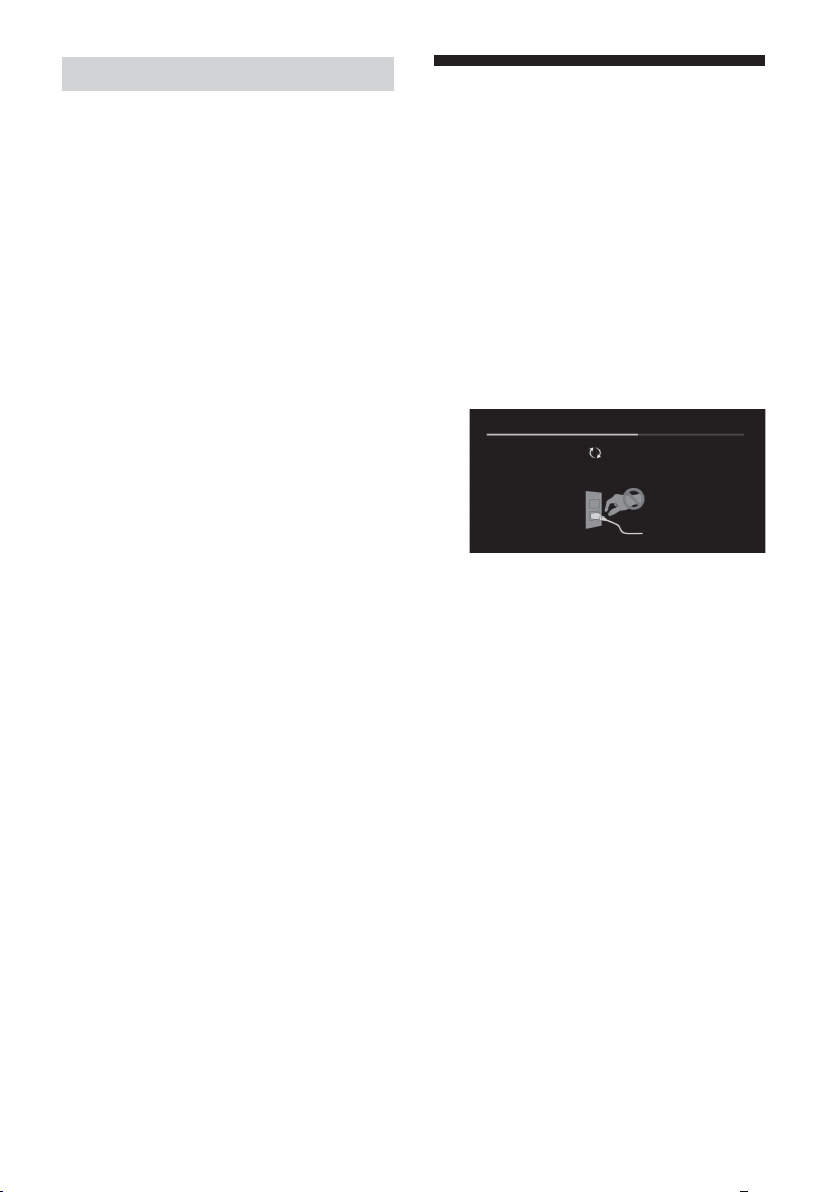
لﻮﻠﺤﻟاو تﻼﻜﺸﳌا
.ﺮﻤﺣﻷا نﻮﻠﻟﺎﺑ LED حﺎﺒﺼﻣ ﺾﻴﻣو ﺪﻨﻋ
ٍ
،ﻖﺋﺎﻗد ثﻼﺛ ةﺪﳌ ددﱰﳌا رﺎﻴﺘﻟا ﻚﻠﺳ ﺲﺑﺎﻗ ﻞﺼﻓ لﻼﺧ ﻦﻣ نﻮﻳﺰﻔﻠﺘﻟا ﺪﻴﻬ ﺪﻋأ
ناﻮﺛ ثﻼﺛ ﻮﻫ ﻲﻨﻣﺰﻟا ﻞﺻﺎﻔﻟا) ﺾﻴﻣﻮﻟا تاﺮﻣ دﺪﻋ ءﺎﺼﺣإ ﻚﻴﻠﻋ
.نﻮﻳﺰﻔﻠﺘﻟا ﻞﻴﻐﺸﺘﺑ ﻢﻗ ﻢﺛ
ﻢﺛ ،(ﴘﻴﺋﺮﻟا ﻞﺻﻮﳌا) ددﱰﳌا رﺎﻴﺘﻟا ﻚﻠﺳ ﺲﺑﺎﻗ ﻞﺼﻓﺎﻓ ،ﺔﻠﻜﺸﳌا تﺮﻤﺘﺳا اذإ
.LED حﺎﺒﺼﻣ ﺾﻴﻣو تاﺮﻣ دﺪﻌﺑ ﻢﻬﻐﻠﺑأو Sony ﺔﻣﺪﺧ ﺰﻛﺮﻣ وأ عزﻮﳌﺎﺑ ﻞﺼﺗا
.تﻮﺻ ﺪﺟﻮﻳ ﻻو (ﺔﻤﺘﻌﻣ ﺔﺷﺎﺸﻟا) ةرﻮﺻ ﺪﺟﻮﻳ ﻻ
.ﺪﻌﺑ ﻦﻋ ﻢﻜﺤﺘﻟا ةﺪﺣو
.ﺞﻣاﱪﻟا ﺾﻌﺑ ﻂﺒﺿ رﺬﻌﺘﻳ
.ﺪﻌﺑ ﻦﻋ ﻢﻜﺤﺘﻟا ةﺪﺣو ﻞﻤﻌﺗ ﻻ
.ﺚﺒﻠﻟ يﻮﺑﻷا ﻞﻔﻘﻟا روﺮﻣ ﺔﻤﻠﻛ ﺖﻴﺴﻧ
.ﺔﺌﻓاد ﺖﺤﺒﺻأ نﻮﻳﺰﻔﻠﺘﻟﺎﺑ ﺔﻄﻴﺤﳌا ﺔﺌﻴﺒﻟا
.يﺪﻳﻷﺎﺑ ﺲﻤﻠﻟا ﺪﻨﻋ ةراﺮﺤﻟﺎﺑ ﺮﻌﺸﺗ ﺪﻗ
.نﻮﻳﺰﻔﻠﺘﻟا ةﺪﻫﺎﺸﻣ ﺪﻨﻋ ﺔﺷﺎﺸﻟا ﻖﻤﻐﺗ
ﺘﺑﺎﺛ ﺎﻬﻨﻣ ءﺰﺟ وأ ﺎﻬﻠﻛ ةرﻮﺼﻟا ﺖﻠﻇ اذإ
ً
.نﻮﻳﺰﻔﻠﺘﻟا ﰲ ًﻼﻠﺧ ﺮﻣﻷا اﺬﻫ ﻞﺜ ﻻو .ةرﻮﺼﻟا ءﺎﻘﺒﺘﺳا ثوﺪﺤﻟ ﺎًﻳدﺎﻔﺗ ﺎًﻴﺠﻳرﺪﺗ
.ةرﻮﺼﻟا ءﺎﻘﺒﺘﺳا نﺄﺸﺑ ﻖﻠﻗ كروﺎﺴﻳ
ءﺎﻘﺒﺘﺳا ﻞﻴﻠﻘﺘﻟ ﺎًﻳوﺪﻳ ﺔﺣﻮﻠﻟا ﺚﻳﺪﺤﺗ ﺔﻔﻴﻇو ﻞﻴﻐﺸﺗ ﻚﻨﻜ .ةرﻮﺼﻟا ءﺎﻘﺒﺘﺳا
.ةرﻮﺼﻟا
ﺔﻈﺣﻼﻣ
ﻻو .ﺔﻨﺴﻟا ﰲ ﻂﻘﻓ ةﺪﺣاو ةﺮﻣ ﻻإ ﺔﻔﻴﻇﻮﻟا ﻚﻠﺗ ﻞﻴﻐﺸﺘﺑ ﻢﻘﺗ ﻻ ،ﻚﻟ ﻊﺟﺮﻤﻛ .ةﺪﺸﺑ
.ﺔﺣﻮﻠﻟا ماﺪﺨﺘﺳا ﺮﻤﻋ ﲆﻋ ﺮﺛﺆﺗ ﺎر ﺎﻬﻧﻷ ﺔﻨﺴﻟا ﰲ ةﺪﺣاو ةﺮﻣ ﻦﻣ ﻛأ ﺎﻬﻠﻴﻐﺸﺘﺑ ﻢﻘﺗ
ﺎًﻳدﺎﻔﺗ ﺔﻠﻳﻮﻃ ﺔﻴﻨﻣز تاﱰﻔﻟ هﺬﻫ رﻮﺼﻟا عاﻮﻧأ ضﺮﻌﺗ ﻻو .ﺔﻟﻮﻬﺴﺑ ةرﻮﺼﻟا ءﺎﻘﺒﺘﺳا
.ةرﻮﺼﻟا ءﺎﻘﺒﺘﺳا ثوﺪﺣ ﺔﻴﻟﺘﺣﻻ
ﻪﺣﻼﺻإو ﻞﻠﺨﻟا يﺮﺤﺗ
وأ تﻮﺻ روﺪﺻ مﺪﻋ وأ ءادﻮﺳ ﺔﺷﺎﺷ رﻮﻬﻇ :ﻞﺜﻣ تﻼﻜﺸﻤﻟ مﺎﻋ ﻪﺟﻮﺑ ﻪﺣﻼﺻإو ﻞﻠﺨﻟا يﺮﺤﺘﻟ
.(
.ﻞﻴﻐﺸﺘﻟا ةدﺎﻋﺈﺑ نﻮﻳﺰﻔﻠﺘﻟا مﻮﻘﻴﺳ .ﺔﻟﺎﺳر ﺮﻬﻈﺗ ﻰﺘﺣ ﺪﻌُﺑ ﻦﻋ ﻢﻜﺤﺘﻟا ةﺪﺣو ﻲﻓ
ﻲﺴﻴﺋﺮﻟا ﻞﺻﻮﻤﻟا ﺲﺑﺎﻗ ﻦﻣ نﻮﻳﺰﻔﻠﺘﻟا ﻞﺼﻓ بﺮﺠﻓ ،نﻮﻳﺰﻔﻠﺘﻟا ﻞﻴﻐﺸﺗ ﻢﺘﻳ ﻢﻟ اذإ
.ﻞﺒﻜﻟﺎﺑ لﺎﺼﺗﻻا/(لﺎﻳرﻹا) اﻮﻬﻟا ﻦﻣ ﻖﻘﺤﺗ
وأ نﻮﻳﺰﻔﻠﺘﻟا ﲆﻋ 1 ﻂﻐﺿاو ،(ﴘﻴﺋﺮﻟا ﻞﺻﻮﳌا) ددﱰﳌا رﺎﻴﺘﻟﺎﺑ نﻮﻳﺰﻔﻠﺘﻟا ﻞﺻ
.ﻞﺒﻜﻟﺎﺑ لﺎﺼﺗﻻا/(لﺎﻳرﻹا) اﻮﻬﻟا ﻦﻣ ﻖﻘﺤﺗ
.تﺎﻳرﺎﻄﺒﻟا لﺪﺒﺘﺳا
.[PIN ﺰﻣر ﻴﻐﺗ] دﺪﺣو PIN ﺰﻣﺮﻟ 9999 ﻞﺧدأ
.ﺔﺌﻓاد ﻪﺑ ﺔﻄﻴﺤﳌا ﺔﺌﻴﺒﻟا ﺢﺒﺼﺗ ،ﺔﻠﻳﻮﻃ ةﱰﻔﻟ نﻮﻳﺰﻔﻠﺘﻟا ماﺪﺨﺘﺳا ﺪﻨﻋ
ﻞﻘﺘﺳ ﺔﺷﺎﺸﻟا عﻮﻄﺳ ﺔﺟرد نﺈﻓ ،ﺎ
ثﺪﺤﻳ ﺎﺮﻓ ،ﺔﻠﻳﻮﻃ ﺔﻴﻨﻣز ةﱰﻔﻟ وأ رﺮﻜﺘﻣ ﻞﻜﺸﺑ ﺎﻬﺴﻔﻧ ةرﻮﺼﻟا ﺖﺿﺮﻋ اذإ
• ﺎًﻇﻮﺤﻠﻣ ةرﻮﺼﻟا ءﺎﻘﺒﺘﺳا نﻮﻜﻳ ﺎﻣﺪﻨﻋ ﻻإ ﺔﺣﻮﻠﻟا ﺚﻳﺪﺤﺗ ﺔﻔﻴﻇو ﻞﻴﻐﺸﺘﺑ ﻢﻘﺗ ﻻ
• ﺐﺒﺴﺗ نأ (ﺾﻴﺑﻷا ﻚﻟذ ﰲ ﺎ) ﺔﻌﻃﺎﺳ ناﻮﻟأو تارﺎﻌﺷو تﺎﻋﺎﺳ ﺎﻬﺑ ﻲﺘﻟا رﻮﺼﻠﻟ ﻦﻜ
.ﺔﻴﻟﺎﺘﻟا تاﻮﻄﺨﻟا ﻊﺒﺗا ،ﺔﻜﺒﺸﻟا ﺪﻘﻓ وأ نﻮﻳﺰﻔﻠﺘﻟا ﺔﺑﺎﺠﺘﺳا مﺪﻋ وأ ةرﻮﺼﻟا ﺪﻤﺠﺗ
.ىﺮﺧأ ةﺮﻣ ﻪﻠِﺻ ﻢﺛ ،ﻖﺋﺎﻗد ثﻼﺛ ةﺪﻤﻟ
ﺑ ﻦﻋ ﻢﻜﺤﺘﻟا زﺎﻬﺟ ﰲ HELP ﲆﻋ ﻂﻐﻀﻟا ﻖﻳﺮﻃ ﻦﻋ ةﺪﻋﺎﺴﳌا ﺔﺎﻗ ﻊﺟار
ُ
ﺪﺣو ﺖﻧﱰﻧﻹﺎﺑ نﻮﻳﺰﻔﻠﺘﻟا ﻞِﺻ
ّ
.[...حﺎﺘﻣ ﺞﻣﺎﻧﱪﻠﻟ ﺪﻳﺪﺟ ﺚﻳﺪﺤﺗ] ﺔﻟﺎﺳر ضﺮﻋ ﺪﻨﻋ
.[نﻵا ﺚﻳﺪﺤﺘﻟا] ﺪﻳﺪﺤﺗ ﻖﻳﺮﻃ ﻦﻋ نﻮﻳﺰﻔﻠﺘﻟا ﺞﻣﺎﻧﺮﺑ ثﺪﺤﺗ نأ ةﺪﺸﺑ Sony ﺔﻛﴍ ﴆﻮﺗ
نﻮﻠﻟﺎﺑ LED ﺢﻴﺑﺎﺼﻣ ﺾﻣﻮﺗو (…ﺚﻳﺪﺤﺗ) [Updating...] ضﺮﻌﺗو ﺔﻴﻟﺎﺘﻟا ﺔﺷﺎﺸﻟا ﺮﻬﻈﺘﺳ
ﻲﻬﺘﻨﻳ ﻻ ﺪﻗ ،ﻚﻟذ ﺖﻠﻌﻓ اذإ .ﺞﻣﺎﻧﱪﻟا ﺚﻳﺪﺤﺗ ءﺎﻨﺛأ (ﴘﻴﺋﺮﻟا ﻞﺻﻮﳌا) ددﱰﳌا رﺎﻴﺘﻟا ﻚﻠﺳ عﺰﻨﺗ ﻻ
.ةﺪﻳﺪﺟ تاﺰﻴﻣ ﻒﻴﻀﺗ وأ نﻮﻳﺰﻔﻠﺘﻟا ءادأ ﻦﺴﺤﺗ هﺬﻫ ﺞﻣاﱪﻟا تﺎﺜﻳﺪﺤﺘﻓ
Updating...
.ﺔﻘﻴﻗد 15 ﺞﻣﺎﻧﱪﻟا تﺎﺜﻳﺪﺤﺗ قﺮﻐﺘﺴﺗ .ﺞﻣﺎﻧﱪﻟﺎﺑ ًﻼﻄﻋ ثﺪﺤﻳ ﺪﻗو ﺎًﻣﺎ ﺞﻣﺎﻧﱪﻟا ﺚﻳﺪﺤﺗ
ﻰﺘﺣ ﺖﻗﻮﻟا ﻦﻣ ةﱰﻔﻟ نﻮﻳﺰﻔﻠﺘﻟا ﻞﻤﻌﻳ ﻻ ﺪﻗ ،ءﺎﺑﺮﻬﻜﻟﺎﺑ نﻮﻳﺰﻔﻠﺘﻟا ﻞﻴﺻﻮﺗ ﺪﻨﻋ
.نﻮﻳﺰﻔﻠﺘﻟا وأ ﺪﻌﺑ ﻦﻋ ﻢﻜﺤﺘﻟا ةﺪﺣو ﰲ دﻮﺟﻮﳌا ﻞﻴﻐﺸﺘﻟا رز ﲆﻋ ﻂﻐﻀﻟا ﺪﻨﻋ
.ىﺮﺧأ ةﺮﻣ ﻪﻠﻐﺷ ﻢﺛ ،ةﺪﺣاو ﺔﻘﻴﻗد ﱄاﻮﺣ ﺮﻈﺘﻧا .ﺖﻗﻮﻟا ﺾﻌﺑ مﺎﻈﻨﻟا ﺔﺌﻴﻬﺗ قﺮﻐﺘﺴﺗ ﺪﻗ
1 دﻮﺟﻮﻤﻟا ﻞﻴﻐﺸﺘﻟا رز ﻰﻠﻋ ﻂﻐﻀﻟا ﻖﻳﺮﻃ ﻦﻋ ﻚﻳﺪﻟ نﻮﻳﺰﻔﻠﺘﻟا زﺎﻬﺟ ﻞﻴﻐﺸﺗ ﺪﻋأ
2 .ﺪﻌ
3 .ﺞﻣﺎﻧﱪﻟا ث
4 .(ﻲﻔﻠﺨﻟا ءﺎﻄﻐﻟا ﲆﻋ ﺔﺣﺎﺘﻣ تﺎﻣﻮﻠﻌﳌا) Sony ﻢﻋد ﺐﻳو ﻊﻗﻮﻣ ةرﺎﻳﺰﺑ ﻞﻀﻔﺗ
.ﺞﻣﺎﻧﱪﻟا ﺚﻳﺪﺤﺗ ءﺎﻨﺛأ ﺾﻴﺑﻷا
AR
20
Page 98
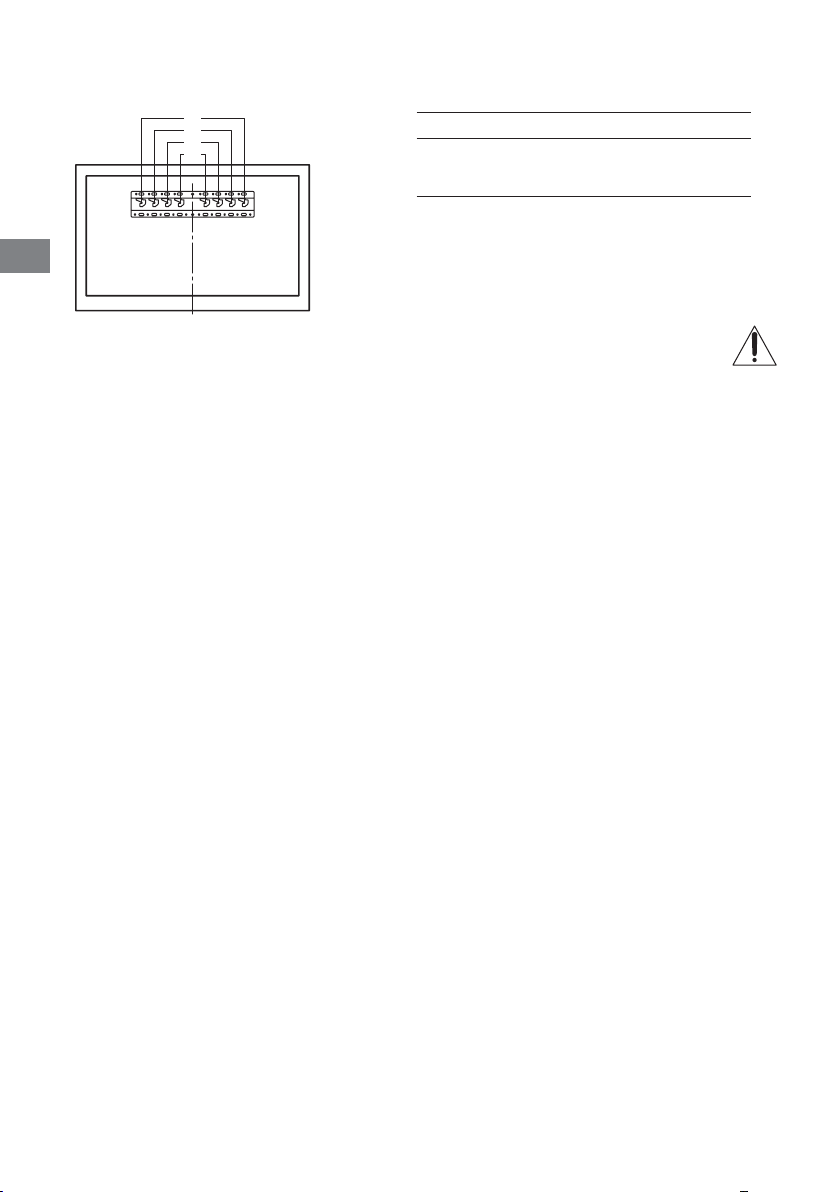
AR
4 ﺔﻘﻓﺮﳌا ﻞﻴﻐﺸﺘﻟا تﻴﻠﻌﺘﺑ ﺔﺻﺎﺨﻟا « راﺪﺠﻟا ﰲ نﻮﻳﺰﻔﻠﺘﻟا ﺐﻴﻛﺮﺗ » ةﺮﻘﻓ ضﺮﻌﺘﺳاو ﺐﻴﻛﱰﻟا ﻞﻴﻟد ﻦﻣ "5" ﱃإ ﻊﺟرا .ةﺪﻋﺎﻘﻟا ﰲ نﻮﻳﺰﻔﻠﺘﻟا ﺐﻛر
.ﺔﻳراﺪﺠﻟا ﺖﻴﺒﺜﺘﻟا ﺔﻔﻴﺘﻜﺑ
a
b
c
d
.راﺪﺠﻟا ﰲ نﻮﻳﺰﻔﻠﺘﻟا ﺐﻴﻛﱰﻟ ،ﻚﻳﺪﻟ ﻞﻳدﻮﳌﺎﺑ ﺔﺻﺎﺨﻟا ﺔﻳراﺪﺠﻟا ﺖﻴﺒﺜﺘﻟا ﺔﻔﻴﺘﻜﺑ ﺔﻘﻓﺮﳌا تﻴﻠﻌﺘﻟا ﻊﺟار
a
KD- ﻞﻳدﻮﳌا ﻢﺳافﺎﻄﺨﻟا ﻊﺿﻮﻣ
77A1
65A1
55A1
AR
19
Page 99
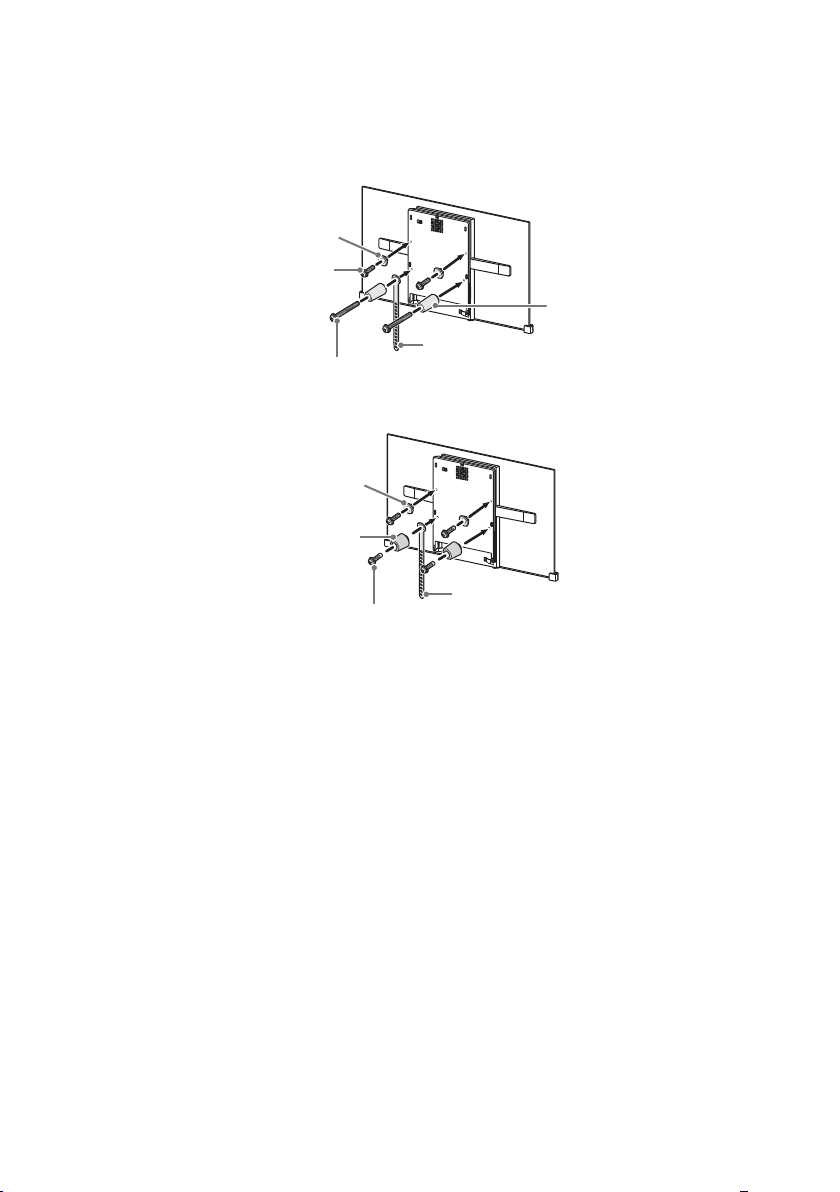
ةﺮﻜﺒﻟا
(+PSW 6 x 20) ﻲﻏﺮﺑ
(ﻢﻣ 20) ﺰﺟاﻮﺤﻟا
2 .ﺔﻳراﺪﺠﻟا ﺖﻴﺒﺜﺘﻟا ﺔﻔﻴﺘﻛ ﺐﻴﻛﺮﺗ ﻞﻴﻟد ﻦﻣ "1" ﱃإ عﻮﺟﺮﻟﺎﺑ ﺔﻘﻓﺮﳌا ءاﺰﺟﻷا ﻦﻣ ﺪﻛﺄﺗ .ﺔﻳراﺪﺠﻟا ﺖﻴﺒﺜﺘﻟا ﺔﻔﻴﺘﻜﺑ ﺔﻘﻓﺮﳌا ءاﺰﺟﻷا ﻂﺑرا
ﺔﻈﺣﻼﻣ
•.(ﻢﺳ.ق ﻢﺠﻛ 15) م.ن 1.5 ﺪﻨﻋ ناروﺪﻟا مﺰﻋ ﻴﻌﺘﺑ ﻢﻗ ،ﺎﺑﺮﻬﻜﻟا ﻒﻠﳌا ماﺪﺨﺘﺳا ﺔﻟﺎﺣ ﰲ
•.ًﻼﺒﻘﺘﺴﻣ ﻪﻴﻟإ عﻮﺟﺮﻠﻟ ﻞﻴﻟﺪﻟا اﺬﻬﺑ ﻆﻔﺘﺣا .ًﻼﺒﻘﺘﺴﻣ ﺎﻬﻣاﺪﺨﺘﺳﻻ ﻦﻣآ نﺎﻜﻣ ﰲ ﺔﻣﺪﺨﺘﺴﳌا ﻏ ءاﺰﺟﻷا ﻦﻳﺰﺨﺗ ﻦﻣ ﺪﻛﺄﺗ
يرﺎﻴﻌﳌا ﺐﻴﻛﱰﻟا
(ﻢﻣ 60) ﺰﺟاﻮﺤﻟا
ماﺰﺣ
(+PSW 6 x 50) ﻲﻏﺮﺑ
ﻂﻴﺴﺒﻟا ﺐﻴﻛﱰﻟا
ةﺮﻜﺒﻟا
(+PSW 6 x 20) ﻲﻏﺮﺑ
ماﺰﺣ
ﺔﻈﺣﻼﻣ
•.راﺪﺠﻟﺎﺑ نﻮﻳﺰﻔﻠﺘﻟا ﺐﻴﻛﺮﺗ ﺪﻌﺑ فﺮﻃ يأ ﻰﻟإ لﻮﺻﻮﻟا ﻚﻨﻜﻤﻳ ﻻ
3 .نﻮﻳﺰﻔﻠﺘﻟﺎﺑ ﺔﻳروﴬﻟا تﻼﺑﺎﻜﻟا ﻞﺻ
AR
18
Page 100
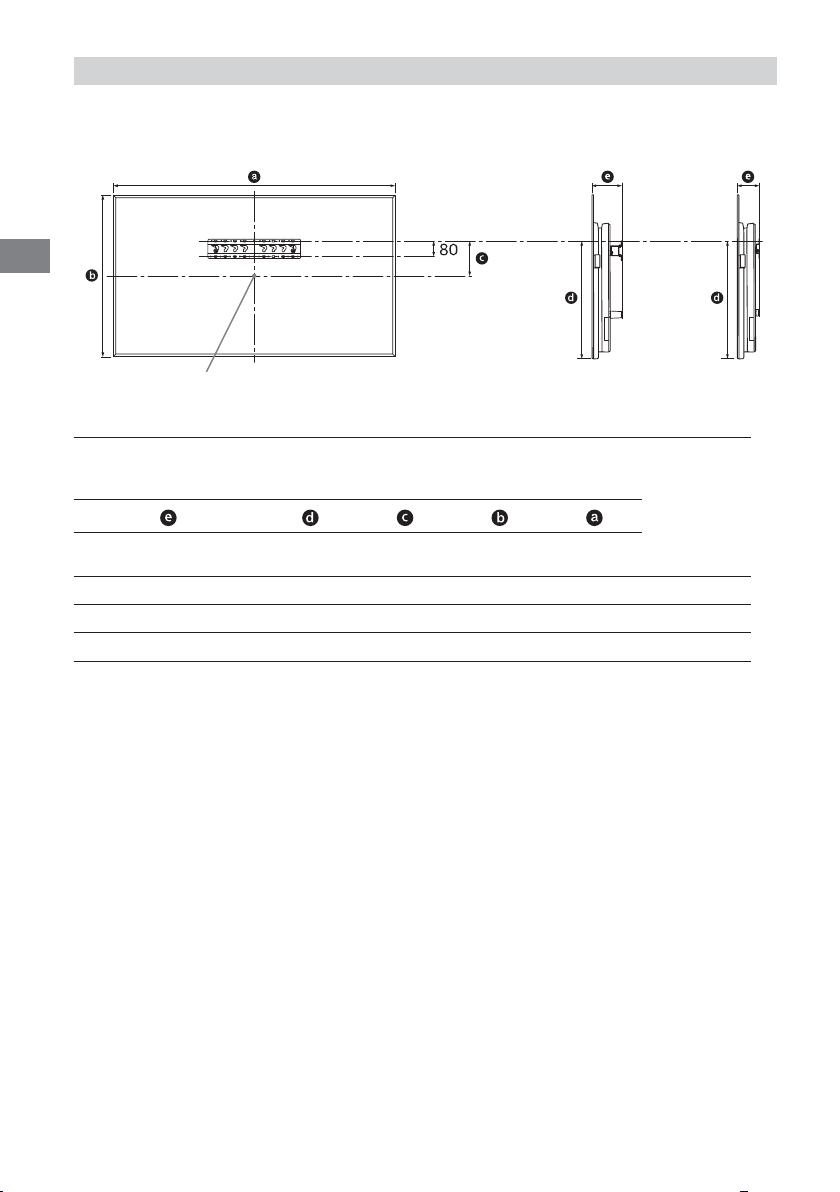
AR
SU-WL450
1 .ﻞﻗﻷا ﲆﻋ تاﺮﻣ ﻊﺑرأ نﻮﻳﺰﻔﻠﺘﻟا نزو قﻮﻔﻳ نزو ﻢﻋد ﲆﻋ ردﺎﻗو نﻮﻳﺰﻔﻠﺘﻠﻟ ﺔﻴﻓﺎﻛ ﺔﺣﺎﺴﻣ ﻪﻳﺪﻟ راﺪﺠﻟا نأ ﻦﻣ ﺪﻛﺄﺗ
.نﻮﻳﺰﻔﻠﺘﻟا نزﻮﺑ ﺔﺻﺎﺨﻟا (تﺎﻔﺻاﻮﳌا) 21-20 ﻊﺟار .راﺪﺠﻟﺎﺑ نﻮﻳﺰﻔﻠﺘﻟا ﺐﻴﻛﺮﺗ ﺪﻨﻋ ﱄﺎﺘﻟا لوﺪﺠﻟا ﱃإ ةرﺎﺷﻹا ﻰﺟﺮﻳ
يرﺎﻴﻌﳌا ﺐﻴﻛﱰﻟا ﻂﻴﺴﺒﻟا ﺐﻴﻛﱰﻟا
ﺔﺷﺎﺸﻟا ﺰﻛﺮﻣ ﺔﻄﻘﻧ
ﻢﻣ :ةﺪﺣﻮﻟا
ضﺮﻌﻟا ﺔﺷﺎﺷ ﺔﻗدﺔﺷﺎﺸﻟا ﺰﻛﺮﻣ ﺪﻌُﺑﺐﻴﻛﱰﻟا لﻮﻃ
ﻞﻳدﻮﳌا ﻢﺳا
KD-
يرﺎﻴﻌﳌا ﺐﻴﻛﱰﻟاﻂﻴﺴﺒﻟا ﺐﻴﻛﱰﻟا
77A11,72199799604162120
65A11,45183493514149107
55A11,228711153514149107
ﺔﻈﺣﻼﻣ
•.ﺐﻴﻛﱰﻠﻟ ﺎًﻌﺒﺗ ًﻼﻴﻠﻗ ﻒﻠﺘﺨﺗ ﺪﻗ لوﺪﺠﻟا ﰲ مﺎﻗرﻷا
•.مﺎﻣﻷا ﱃإ ًﻼﻴﻠﻗ ﻞﻴ نﻮﻳﺰﻔﻠﺘﻠﻟ يﻮﻠﻌﻟا ﺐﻧﺎﺠﻟا نﺈﻓ ،راﺪﺠﻟا ﰲ نﻮﻳﺰﻔﻠﺘﻟا ﺐﻴﻛﺮﺗ ﺪﻨﻋ
AR
17
 Loading...