

Page 1
Page 2

Contents
1. Welcome 4
2. Getting to know your Roger Clip-On Mic 6
2.1 Check the package content 6
2.2 How the Roger Clip-On Mic works 7
2.3 Descriptions of the devices 8
2.4 Indicator lights (LED status) 9
3. Getting started 10
3.1 Setting up the docking station 10
3.2 Charging your Roger Clip-On Mic 15
3.3 Switching on and o 18
3.4 Using your Roger receiver 19
3.5 Connecting a receiver 20
4. Using Roger Clip-On Mic 22
4.1 Wearing Roger Clip-On Mic 22
4.2 Using the lanyard 24
4.3 Connecting to multimedia devices 27
2
Page 3

5. Special functions 30
5.1 Mute 30
5.2 Disconnecting Roger devices (NewNet)s 31
5.3 Verication mods 31
6. Adding additional microphones 33
6.1 Connect 33
6.2 Using additional microphones 37
7. Troubleshooting 40
8. Important information 44
9. Service and warranty 50
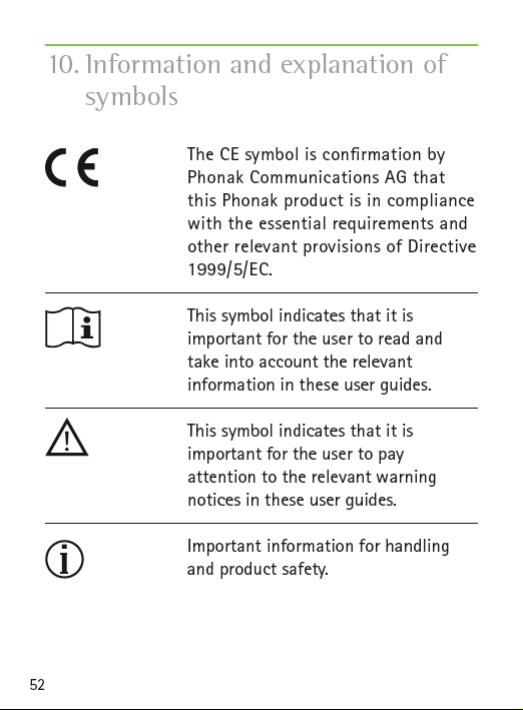
10. Information and explanation of symbols 52
3
Page 4

1. Welcome
Congratulations on choosing the Roger Clip-On Mic
from Phonak. This compact microphone uses adaptive
wireless transmission to help people with a hearing
loss understand more speech in noise and over distance.
It is ideal for use by a partner or friend, plus it includes
an audio input for listening to multimedia and TV
connectivity. It can also be used alongside other Roger
Clip-On Mics and Roger Pens in a microphone network.
Your Roger Clip-On Mic is a Swiss premium-quality
product developed by Phonak, the world’s leading hearing
healthcare company.
4
Page 5

Please read this User Guide thoroughly to benet from
all the possibilities your Roger Clip-On Mic oers.
If you have any questions, please consult your hearing
care professional or local Phonak support center.
Phonak – life is on www.phonak.com
5
Page 6
Page 7
Page 8
Page 9
Page 10
Page 11
Page 12
Page 13
Page 14

3. Getting started
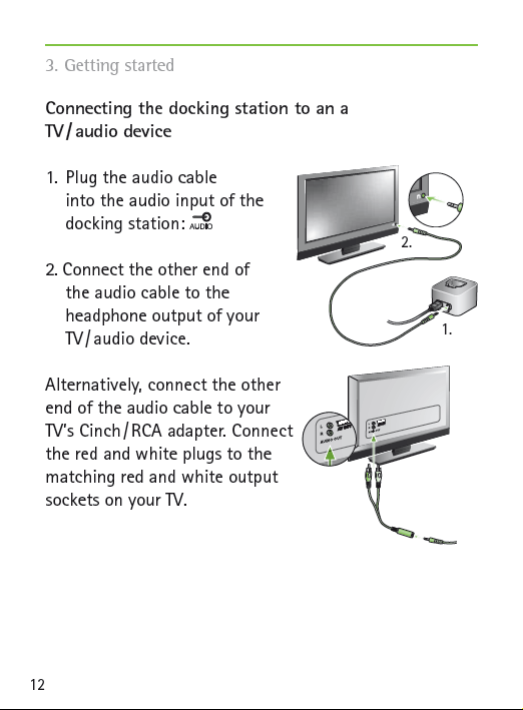
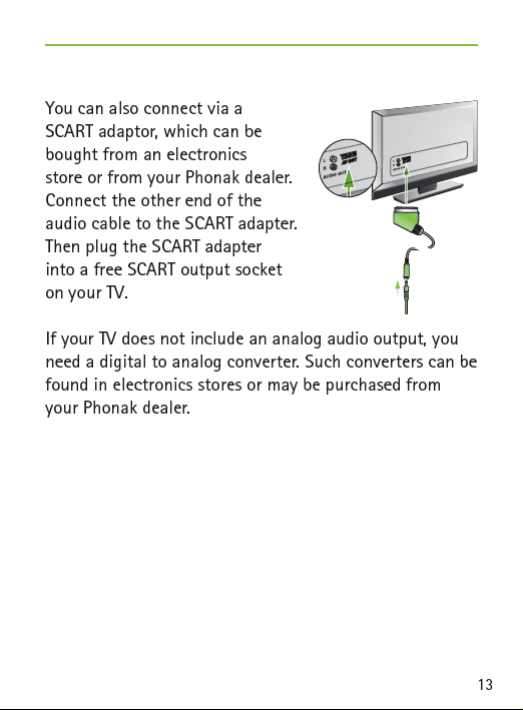
When the docking station is plugged into the headset
socket of your TV, you can adjust the volume via your
TV’s remote control.
Some TVs will switch o their loudspeakers when you
plug the jack into the headset socket – meaning
the TV will not be audible for other people. In such a
case use the Cinch / RCA or SCART output socket as
described above.
The Roger Clip-On Mic docking station can also be
connected to any other audio device such as an MP3
player, PC or HiFi system using the audio cable.
14
Page 15
Page 16
Page 17
Page 18
Page 19
Page 20
Page 21
Page 22
Page 23
Page 24
Page 25
Page 26
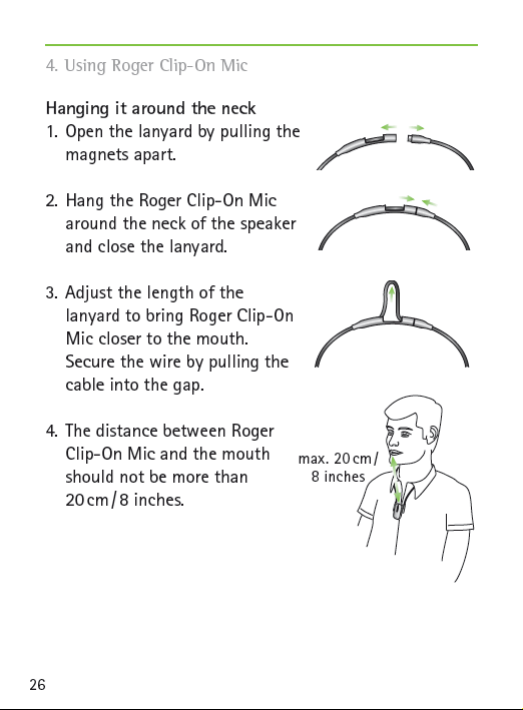
Page 27
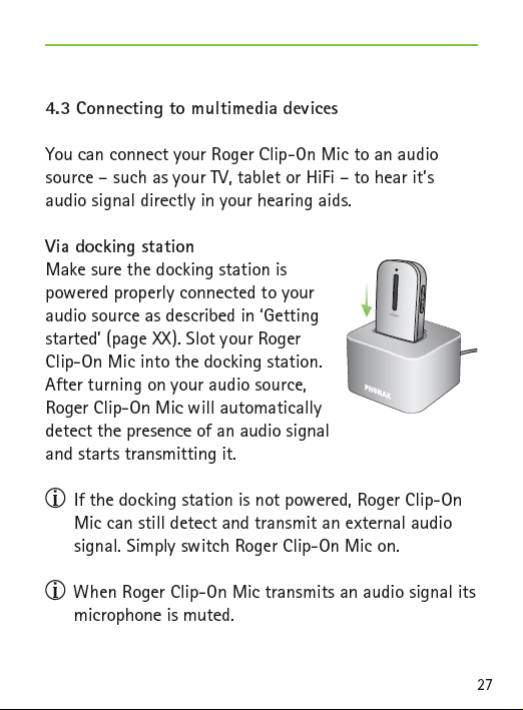
Page 28
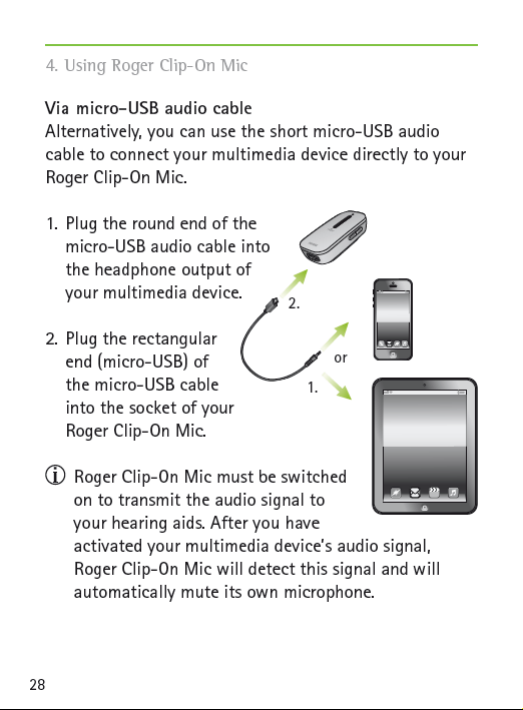
Page 29

29
Page 30
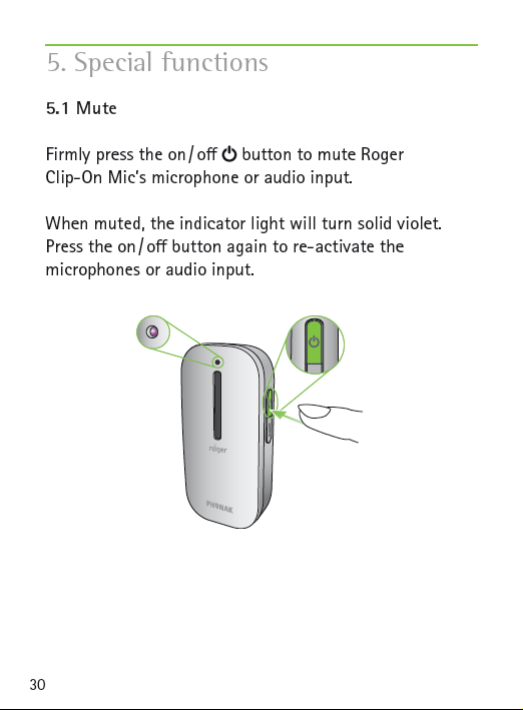
Page 31
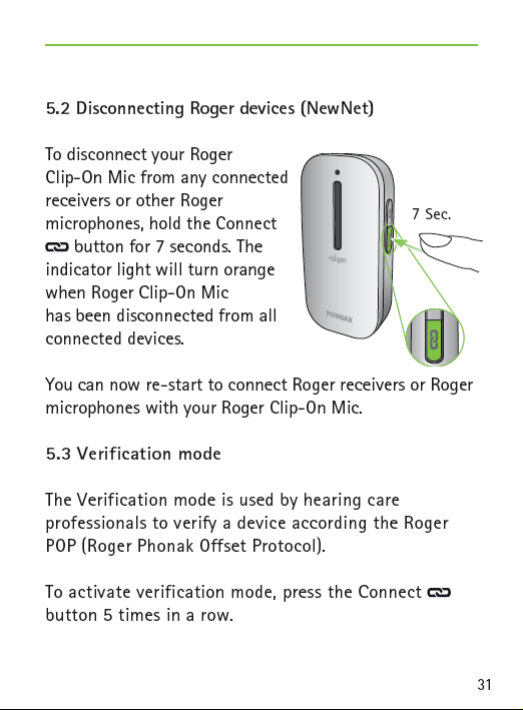
Page 32
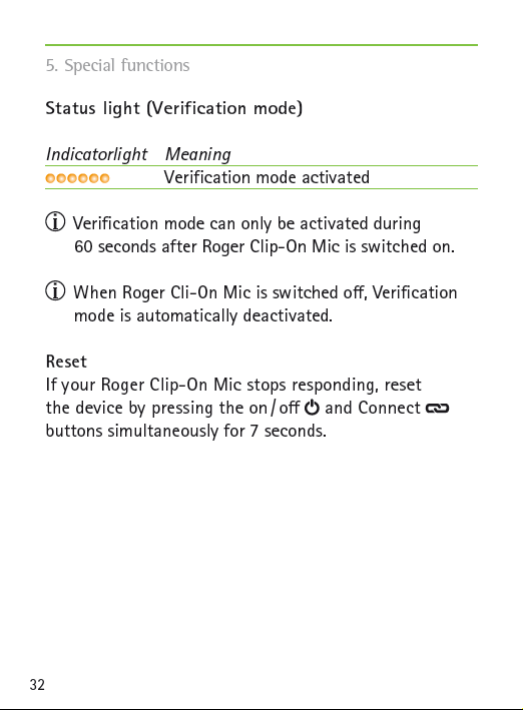
Page 33
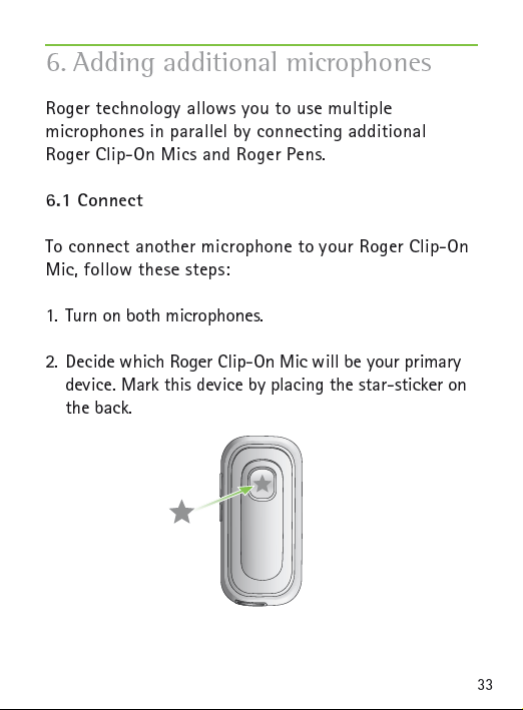
Page 34
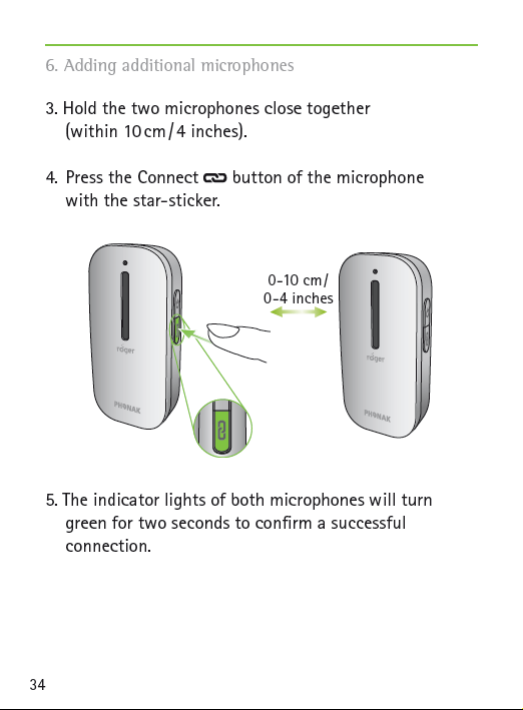
Page 35

Once you have connected another microphone to
your primary microphone, it can only be used
together with the primary. The other microphone will
blink red if it does not nd your primary Roger
Clip-On Mic. If you want to disconnect it from your
primary Roger Clip-On Mic, use the NewNet function
(see chapter ‘Special Functions’).
If you want to connect your Roger Clip-On Mic with
a Roger Pen, it is recommended to press the Connect
button of the Roger Pen, making that the primary
microphone.
It is possible to connect up to 10 Roger microphones
to your Roger Clip-On Mic.
35
Page 36
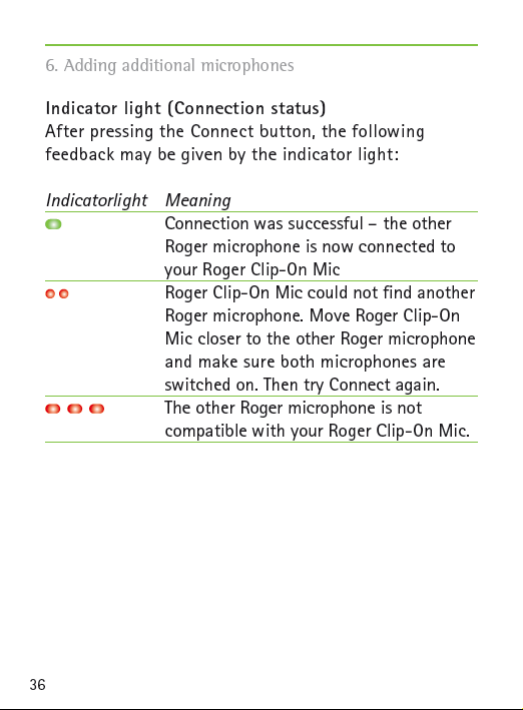
Page 37
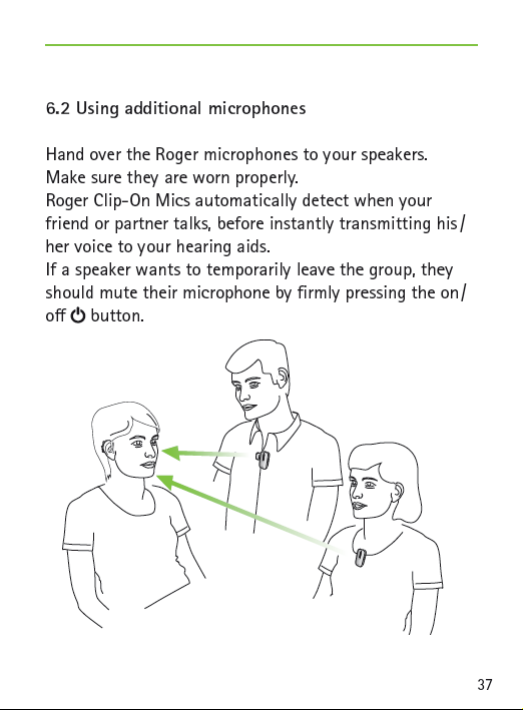
Page 38

6. Adding additional microphones
Only one speaker can be heard at a time. When two
people speak at the same time, the person who talked
rst will be heard. When they stop talking, the other
speaker will be heard.
The speaker with the primary microphone (the one
with the
-sticker on the back) should never move
more than 10 m / 30 feet away from the group as
this may disable the other Roger microphones.
If the primary Roger Clip-On Mic is turned o or
moves out of range, the secondary Roger
microphones will start blinking red and will stop
transmitting.
38
Page 39
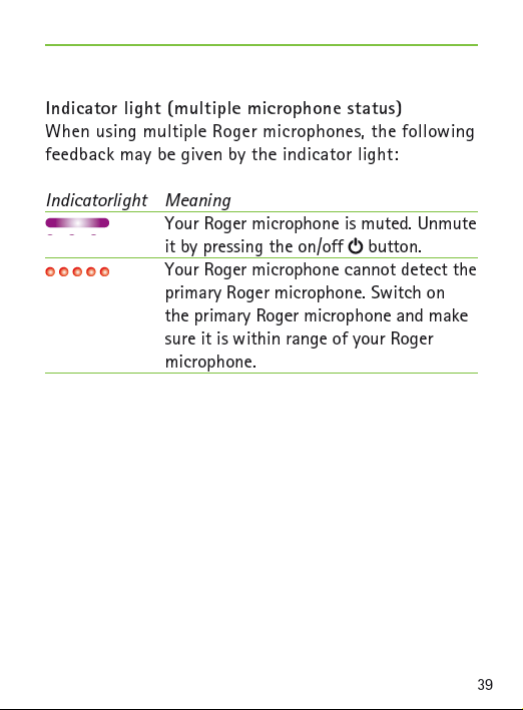
Page 40

7. Troubleshooting
Most probable cause(s)
I cannot switch Roger Clip-On Mic on
J The battery is empty
Poor speech intelligibility
J The microphone is not
positioned correctly
J The microphone openings are
covered by ngers or clothing
I cannot understand the speaker
J The microphone has been
muted
Solution(s)
J Charge Roger Clip-On Mic for
J Move Roger Clip-On Mic
J Make sure Roger Clip-On Mic
J Make sure the microphone
J Check the indicator light – if
at least two hours
closer to the speaker’s mouth
is pointing towards the
speaker’s mouth
openings are not covered by
ngers, clothing or dirt
it is violet, briey press the
on / o button to activate the
microphones
J Your hearing aids are not set to
the correct program
J Your Roger receivers are not
connected to Roger Clip-On Mic
40
J Check that your hearing aids
are set to the correct program
(Roger/FM/DAI/EXT)
J Hold Roger Clip-On Mic close
to each Roger receiver in turn
and briey press the Connect
button
Page 41

Most probable cause(s) Solution(s)
J In case of multiple microphones,
the primary microphone may
not be switched on or may be
out of range
I keep losing the audio signal
J Distance between Roger Clip-On
Mic and Roger receiver is too
large
J Check the indicator light – if
it is blinking red, switch on
the primary microphone and
check that it is within range
J Move closer to the Roger
Clip-On Mic
J There are obstacles between
you and Roger Clip-On Mic
The volume from my multimedia device is too low
J Incorrect volume settings
I cannot hear my multimedia device
JThe audio source is muted
J Roger Clip-On Mic is using
micro-USB audio cable but is
not switched on
J Make sure you can see the
Roger Clip-On Mic (line of
sight)
J Increase the volume of your
audio sourc
J Unmute the audio source
J Switch on Roger Clip-On Mic
to listen to the audio source
via the micro-USB audio cable
41
Page 42

7. Troubleshooting
Most probable cause(s) Solution(s)
Roger Clip-On Mic’s light is blinking red (single ash)
J Your Roger Clip-On Mic has
been connected to another
microphone which is no
longer available
The Roger Clip-On Mic’s light is blinking red (double ash)
J It’s battery charge is low
My Roger Clip-On Mic is not responding
J Software issue
J Create a NewNet (press the
Connect button fro 7 seconds)
to make Roger Clip-On Mic a
standalone transmitter again
J Charge Roger Clip-On Mic as
soon as possible
J Reboot Roger Clip-On Mic by
simultaneously pressing it’s
two buttons
42
Page 43

43
Page 44
Page 45
8.2 Hazard warnings
Keep this device out of reach of children aged under
3 years.
Opening the device might damage it. If problems
occur that cannot be resolved by following the
guidelines in the Troubleshooting section of this
User Guide, consult your hearing care professional.
Your device should only be repaired by an authorized
service center. Changes or modications to this device
that were not explicitly approved by Phonak are not
permitted.
Please dispose of electrical components in accordance
with your local regulations.
Do not use your device in areas where electronic
equipment is prohibited. If in doubt, please ask the
person in charge.
Device should not be used on aircrafts unless
specically permitted by ight personnel.
45
Page 46
8. Important information
External devices should only be connected if they
have been tested in accordance with corresponding
IECXXXXX standards.
Only use accessories that are approved by Phonak AG.
Using your device’s cables in any way contradictory to
their intended purpose (e. g., wearing the USB cable
around the neck) can cause injury.
When operating machinery, ensure that no parts of
your device can get caught in the machine.
Do not charge device while it is on your body.
Caution: electric shock. Do not insert plug alone into
electrical outlets.
46
Page 47

8.3 Product safety information
Protect the device from excessive shock and vibration.
Do not expose your device to temperatures and
humidity outside of the recommended conditions
stated in this User Guide.
Never use a microwave or other heating devices to
dry the device.
Clean the device using a damp cloth. Never use
household cleaning products (washing powder, soap,
etc.) or alcohol to clean the device.
Only recharge your device using chargers supplied
by Phonak or by stabilized chargers providing 5VDC
and ≥500 mA.
Do not connect an USB or audio cable to your device
that exceeds 3 meters (9ft) in length.
When the device is not in use, turn it OFF and store it
safely.
47
Page 48

8. Important information
Protect the device from excessive moisture (bathing,
swimming), heat (radiator, car dashboard), and direct
contact with skin when sweating (workout, tness,
sport).
X-ray radiation, CT or MRI scans may destroy or
adversely aect the correct functioning of the device.
Do not use excessive force when connecting your
device to its dierent cables.
Protect all openings (microphones, audio input and
charger) from dirt and debris.
If the device has been dropped or damaged, if it
overheats during charging, has a damaged cord or
plug, or has been dropped into liquid, stop using your
device and contact your hearing care professional.
The device has a built-in rechargeable battery. This
battery can be charged and discharged hundreds of
times but may eventually wear out. The battery may
then only be replaced by authorized personnel.
48
Page 49

8.4 Other important information
S Persons with pacemakers or other medical devices
should ALWAYS consult their physician or the
manufacturer of their device BEFORE using the device.
The use of the device with a pacemaker or other
medical devices should ALWAYS be in accordance with
the safety recommendations of the physician responsible
for your pacemaker or the pacemaker manufacturer.
S Device collects and stores internal technical data.
This data may be read by a hearing care professional in
order to check the device, as well as to help you use
your device correctly.
S The digital signal sent from the device to a connected
receiver cannot be overheard by other devices which
are not in the microphone’s network.
49
Page 50

9. Service and warranty
9.1 Local warranty
Please ask the hearing care professional, where you
purchased your device, about the terms of the local
warranty.
9.2 International warranty
Phonak oers a one year limited international warranty,
valid as of the date of purchase. This limited warranty
covers manufacturing and material defects. The warranty
is valid only if proof of purchase is shown.
50
Page 51

9.3 Warranty limitation
This warranty does not cover damage from improper
handling or care, exposure to chemicals, immersion in
water or undue stress. Damage caused by third parties
or non-authorized service centers renders the warranty
null and void. This warranty does not cover any services
performed by a hearing care professional in his/her
oce.
Serial number:
Date of purchase:
Authorized hearing
care professional
(stamp / signature):
51
Page 52
Page 53
Page 54

10. Information and explanation of symbols
The symbol with the crossed-out
garbage bin is to make you aware
that this device may not be thrown
away as normal household waste.
Please dispose of old or unused device,
at waste disposal sites intended for
electronic waste, or give your device
to your hearing care professional
for disposal. Proper disposal protects
the environment and health.
This product has an embedded, nonreplaceable battery. Do not attempt
to open the product or remove the
battery as this may cause injury an
damage the product.
Please contact the local recycling
facility for removal of the battery.
54
Page 55

Manufacturer:
Phonak Communications AG
Laenggasse 17
CH-3280 Murten
Switzerland
EU Representative:
Phonak GmbH
D-70736 Fellbach-Oeffingen
Germany
www.phonak.com/phonak-roger
029-0277-02/V1.00/2013-08/A+W Printed in Vietnam © Phonak AG All rights reserved
Page 56
Page 57
Page 58
Using your device’s cables in any way contradictory to their intended purpose
i
i
i
i
i
i
i
i
i
i
i
(e. g., wearing the USB cable around the neck) can cause injury.
When operating machinery, ensure that no parts of your device can get
caught
in the machine.
Do not charge device while it is on your body.
Caution: electric shock. Do not insert plug alone into electrical outlets.
1.2 Product safety information
Protect the device from excessive shock and vibration.
Do not expose your device to temperatures and humidity outside
recommended conditions stated in this User Guide.
Never use a microwave or other heating devices to dry the device.
Clean the device using a damp cloth. Never use household cleaning products
(washing powder, soap, etc.) or alcohol to clean the device.
Only recharge your device using chargers supplied by Phonak or by stabilized
chargers providing 5VDC and ≥500 mA.
Do not connect an USB or audio cable to your device that exceeds 3 meters
(9ft) in length.
When the device is not in use, turn it OFF and store it safely.
Protect the device from excessive moisture (bathing, swimming), heat (radi-
ator,
car dashboard), and direct contact with skin when sweating (workout,
fitness, sport).
X-ray radiation, CT or MRI scans may destroy or adversely aect the correct
functioning of the device.
Do not use excessive force when connecting your device to its dierent cables.
Protect all openings (microphones, audio input and charger) from dirt and
debris.
of the
3
Page 59

i
If the device has been dropped or damaged, if it overheats during charging,
i
has a damaged cord or plug, or has been dropped into liquid, stop using
your device and contact your hearing care professional.
The device has a built-in rechargeable battery. This battery can be charged
and discharged hundreds of times but may eventually wear out. The battery
may then only be replaced by authorized personnel.
1.3 Other important information
Persons with pacemakers or other medical devices should ALWAYS
consult
their physician or the manufacturer of their device BEFORE using the device.
The use of the device with a pacemaker or other medical devices should
ALWAYS
be in accordance with the safety recommendations of the physician
responsible
Device collects and stores internal technical data. This data may
hearing care professional in order to check the device,
for your pacemaker
or the pacemaker manufacturer.
be read by a
as well as to help you
use your device correctly.
The digital signal sent from the device to a connected receiver cannot be
overheard by other devices which are not in the microphone’s network.
2 Declaration of Conformity
In body worn operation, the devices have been found in compliance with the
requirements of EN 62209-2, FCC rule paragraph 2.1093, the ANSI/IEEE
C95.1:1999, the NCRP Report Number 86 for uncontrolled environment, according
to the Health Canada’s Safety Code 6 and the Industry Canada Radio Stan-
dards Specification RSS-102 for General Population/Uncontrolled
Hereby, Phonak Communications AG, Länggasse 17, CH-3280 Murten,
exposure.
declares
that these Phonak products are in compliance with the essential requirements
and other relevant provisions of Directive 1999/5/EC. To obtain a copy of the
Declaration of conformity, please contact the manufacturer or the local Phonak
representative whose address can be taken from the list on www.phonak.com
(worldwide locations).
4
Page 60

This device complies with Part 15 of the FCC Rules and with RSS210 of Industry
Canada. Operation is subject to the following two conditions: (1) This device may
not cause harmful interference, and (2) this device must accept any interference
received, including interference that may cause undesired operation. The device
has been tested and found to comply with the limits for a Class B digital device,
pursuant to Part 15 of the FCC Rules. These limits are designed to provide reasonable protection against harmful interference in a residential installation. The
device generates uses and can radiate radio frequency energy and, if not installed
and used in accordance with the instructions, may cause harmful interference to
radio communications. However, there is no guarantee that interference
occur in a particular installation. If the device does cause harmful interference
will
not
to
radio or television reception, which can be determined by turning the device o
and on, the user is encouraged to try to correct the interference by one of the
following measures:
– Reorient or relocate the receiving antenna.
– Increase the separation between the device and receiver.
– Connect the device into an outlet on a circuit dierent from that to which the
receiver is connected.
– Consult the dealer or an experienced radio/TV technician for help.
FCC Caution: Any changes or modifications not expressly ap proved by the
party responsible for compliance could void the user’s authority to operate
the device.
5
Page 61

3 Service and Warranty
Local warranty
Please ask the hearing care professional, where you purchased your device,
about the terms of the local warranty.
International warranty
Phonak oers a one year limited international warranty, valid as of the date of
purchase. This limited warranty covers manufacturing and material defects. The
warranty is valid only if proof of purchase is shown.
Warranty limitation
This warranty does not cover damage from improper handling or care, exposure
to chemicals, immersion in water or undue stress. Damage caused by third parties
or non-authorized service centers renders the warranty null and void. This warranty
does not cover any services performed by a hearing care professional in his/her
oce.
Serial number:
Purchase date:
Authorized hearing
care professional
(stamp/signature):
6
Page 62
Page 63
Utiliser les câbles de votre appareil de manière contraire à leur usage prévu
i
i
i
i
i
i
i
i
i
(par ex. porter le câble USB autour du cou) peut provoquer des blessures.
Lors de l’utilisation de machines, assurez-vous qu’aucune partie de votre
appareil ne puisse se coincer dans la machine.
Ne chargez pas l’appareil lorsqu’il est sur votre corps.
Avertissement : électrocution. N’insérez pas la fiche seule dans des prises électriques.
1.2 Informations sur la sécurité du produit
Protégez l’appareil des chocs et vibrations excessifs.
N’exposez pas votre appareil à des températures et une humidité
ditions recommandées dans le présent Mode d’emploi.
N’utilisez jamais de four à micro-ondes ou d’autres appareils de chauage
pour sécher l’appareil.
Nettoyez l’appareil avec un chion humide. N’utilisez jamais de produits de
nettoyage domestiques (lessive en poudre, savon, etc.) ou d’alcool pour nettoyer l’appareil.
Ne rechargez votre appareil qu’avec les chargeurs fournis par
chargeurs stabilisés fournissant 5 VCC et ≥ 500 mA.
Ne connectez pas de câble USB ou audio de plus de 3 mètres de long à votre
appareil.
Quand l’appareil n’est pas utilisé, éteignez-le et conservez-le en lieu sûr.
Protégez l’appareil contre l’humidité excessive (bain, natation), la chaleur
(radiateur,
tableau de bord de voiture) et le contact direct
vous transpirez (musculation, exercice, sport).
Les radiographies, tomodensitométries ou IRM peuvent détruire
impact négatif sur le bon fonctionnement de l’appareil.
hors des con-
Phonak ou des
avec la peau lorsque
ou avoir un
8
Page 64
i
N’exercez pas de force excessive lors de la connexion de votre appareil à ses
i
i
i
diérents câbles.
Protégez toutes les ouvertures (microphones, entrée audio et chargeur) de la
saleté et des impuretés.
Si l’appareil est tombé ou a été endommagé, s’il surchaue pendant
gement, si son cordon ou sa fiche est endommagé ou s’il est tombé dans un
liquide, arrêtez de l’utiliser et contactez votre audioprothésiste.
L’appareil a une pile rechargeable intégrée. Celle-ci peut être chargée et
déchargée des centaines de fois mais peut finir par
remplacée que par un personnel autorisé.
1.3 Autres informations importantes
Les personnes portant un stimulateur cardiaque ou d’autres appareils médicaux
doivent TOUJOURS consulter leur médecin ou le fabricant de leur appareil
d’utiliser l’appareil. L’utilisation
d’autres appareils médicaux doit TOUJOURS être conforme aux recommandations
de sécurité du médecin responsable de votre stimulateur cardiaque
cant du stimulateur cardiaque.
L’appareil recueille et stocke les données techniques internes. Ces
vent être lues par un audioprothésiste afin de contrôler
à l’utiliser correctement.
Le signal numérique envoyé par l’émetteur de l’appareil au récepteur
peut pas être entendu par d’autres appareils non intégrés au réseau de l’émetteur.
2 Déclaration de Conformité
Pour l’utilisation sur le corps, cet appareil a été jugé conforme aux exigences
62209-2, Réglementation de la FCC paragraphe 2.1093, l’ANSI/IEEE C95.1:1999, le
rapport numéro 86 du NCRP pour l’environnement non contrôlé, conformément
code de sécurité 6 de Santé Canada et la norme radio CNR-102
pour l’exposition non contrôlée/de la population en général.
de l’appareil avec un stimulateur cardiaque ou
s’user. La pile ne peut être
l’appareil et de vous aider
d’Industrie Canada
le char-
AVANT
ou du fabri-
données peu-
connecté ne
d’EN
au
9
Page 65

Par la présente, Phonak Communications AG, Länggasse 17, CH-3280 Murten, déclare que le produit Phonak est conforme aux
pertinentes de la directive
1999/5/CE. Pour obtenir une copie de la Déclaration de
exigences principales et autres dispositions
conformité, veuillez contacter le fabricant ou le représentant Phonak local dont l’adresse figure sur la liste du site www.phonak.com (sites à travers le monde).
Cet appareil est conforme aux sections 15 des réglements de la FCC et à CNR-210
d’Industrie Canada. Le fonctionnement aux deux conditions suivantes : (1) Cet
appareil ne doit pas provoquer d’interférences gênantes et (2) l’utilisateur de cet
appareil doit accepter les interférences reçues, y compris les interférences pouvant
provoquer un fonctionnement non désiré. Cet équipement a été testé et jugé en
conformité avec les limites aérentes à un appareil numérique de classe B, en
vertu de la section 15 des règlements de la FCC. Ces
assurer une protection raisonnable contre
les interférences nuisibles dans un en-
normes sont conçues pour
vironnement résidentiel. Cet appareil génère, utilise et peut émettre de l’énergie
radioélectrique et, s’il n’est pas installé ou utilisé selon les directives, peut causer
des interférences nuisibles aux communications radio. Cependant, il n’existe aucune garantie que des interférences ne se produiront pas dans une installation
particulière. Si cet appareil est la source d’interférences nuisibles pour la réception des
ondes de radio ou de télévision, ce qui peut être déterminé en mettant l’appareil
hors
tension, puis sous tension, il est recommandé de tenter d’éliminer ces interférences
en appliquant l’une ou plusieurs des mesures suivantes :
– Réorienter ou déplacer l’antenne réceptrice.
– Éloigner l’appareil du récepteur.
– Brancher l’appareil dans une prise d’un circuit diérent de celui qui alimente le
récepteur.
–
Consulter le détaillant ou un technicien radio ou télévision qualifié
pour obtenir de
l’aide.
Avertissement de la FCC : tout changement ou toute modification non expressément approuvés par la partie responsable de la
entraîner l’annulation des droits d’utilisation
de cet appareil.
conformité pourrait
10
Page 66

3 Service et garantie
Garantie locale
Veuillez consulter l’audioprothésiste à l’endroit où vous avez acheté votre appareil
au sujet des conditions de la garantie locale.
Garantie internationale
Phonak propose une garantie internationale limitée d’un an, valide à compter de la
date d’achat. Cette garantie limitée couvre tous les défauts de fabrication et matériels. La garantie est uniquement valide sur présentation d’une preuve d’achat.
La garantie internationale n’aliène aucun des droits légaux dont vous pouvez
bénéficier selon votre législation nationale régissant la vente de produits de
consommation.
Limitation de garantie
Cette garantie ne couvre pas les dommages dus à une manipulation ou un entretien
inadaptés, l’exposition à des produits chimiques, l’immersion dans l’eau ou une
sollicitation excessive. Les dommages causés par des tiers ou des centres de service
non autorisés annulent
la garantie. Cette garantie ne couvre pas les services
eectués par un audioprothésiste dans son bureau.
Numéro de série:
Date d’achat :
Audioprothésiste
autorisé
(tampon/signature) :
11
Page 67

029-3180 / V1.00 / 2013-06 / visu’l Printed in Vietnam © Phonak AG All rights reserved
 Loading...