

Page 1
User manual V1.0
Wi-Fi Smart Dimmer Switch
· 中 文 --- --- -- --- ---1 - 3
· Deu tsch ---- ---------8-11
· Fra nçais ------ --- -16-19
· Рус ски й язы к---- -24-27
· Engl ish -------- 4 - 7
· Esp añol ------12-15
· Italia no -------20-23
Page 2
SONO FF TE CHN OLO GIE S CO., LTD.
Engl ish
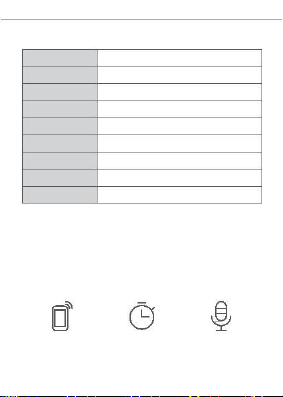
Spe cifications
Model
Inpu t
D1
100 -240VAC50/6 0Hz
100 -240VAC50/6 0Hz
Out put
Ligh t Loa d
Inca nde scen t: 200W LED:15 0W
Operating systems (An dr oid 4.1 & iOS 9.0) or highe r
Wi-Fi
IEEE 802.1 1 b/g/n 2. 4GH z
PC
Materia l
Dime nsi on
62x4 7x3 2.5 mm
Features
D1 is a Wi-Fi smart dimmer switch that is used to adjust
the light bri ghtn ess and set various atmosphere for your
room. You can remotel y turn on/off light of your home
anywhere, schedul e it on/off , or share it with your family
to control toget her.
Remo te Co ntro l
Sing le/ Coun tdo wn
Timin g
Voice Cont rol
1
Page 3
SONO FF TE CHN OLO GIE S CO., LTD.
Engl ish
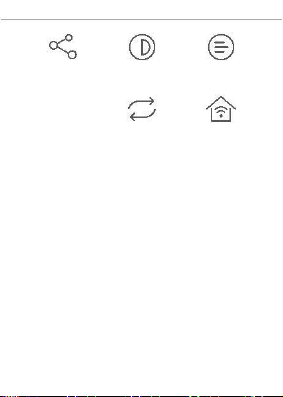
Shar e Cont rol
Bri ghtne ss Adjust men t
Scen e Mod e Sync Stat us
LAN Co ntr ol
2
Page 4
SONO FF TE CHN OLO GIE S CO., LTD.
Engl ish
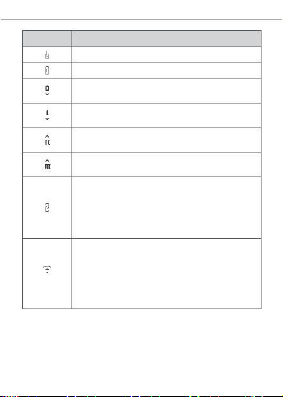
Buttons
Func tio ns
On
Off
Shor t pre ss fo r the low br ightnes s, long press
to turn do wn th e bri ght ness
Shor t pre ss fo r the medium br ight ness, long
pres s to turn down the br igh tness
Sho rt pre ss for the higher bright ne ss , lo ng
pre ss to tur n up the bri gh tness
Shor t pre ss fo r the high brightness, long pres s
to turn up the brigh tne ss
Lon g pre ss fo r 5s until you h ear “ Bi Bi ” and
rel eas e, then the rem ot e co nt ro ller is cle ar ed
suc ces sfu ll y. If you n eed to use, sh ort pr ess
any but to n wi th in 5s a fte r powe ri ng on a gai n
and you will hear “Bi ”, whi ch indicat es the
rem ote con tr ol ler is paired succes sfu ll y.
Lon g p res s f or 5s u nt il the conne ct ed light
enters the br ea thin g mode , which indic ate s
the devi ce e nte rs quic k pa iri ng mod e (Tou ch),
then you can add t he l ight on eWeLink APP.
In q ui ck pairi ng mo de, yo u can s hor t p re ss
any bu tton on th e re mote contr oller to exit this
mode.
3
Page 5
SONO FF TE CHN OLO GIE S CO., LTD.
Engl ish
Factory Reset
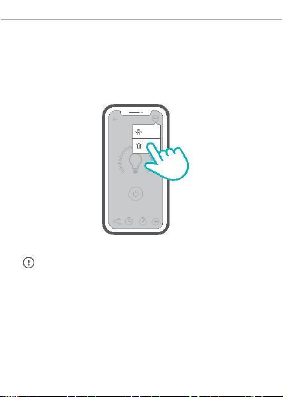
Turn on an d off 3 ti me s on r epe at edl y or d el ete t he
connected light on eWeLink APP until it enters “breat hing
mode ”, then the device is reset succes sfully and enters
quick pairing mode (Tou ch).
D1
Setting
Delete
Plea se re set the sw itch to fact ory defaults if you want to
use ot her Wi-Fi network s, th en re con nect the netw ork .
4
Page 6
Shenzhe n Son off Technologies Co., Ltd.
Room 1001, 10F, Buildin g 8, Lianhu a Industrial Park,
Lon gyuan Road, Lo nghua Di st ri ct , Shen zh en, GD,
Chi na
https://sonoff .te ch
MADE IN CHINA
FCC Warning
This device complies with part 15 of the FCC rules. Operation is subject to the following two conditions: (1)
this device may not cause harmful interference, and (2) this device must accept any inte rference received,
including interference that may cause undesired operation.
Changes or modifications not expressly approved by the party responsible for compliance could void the
user's authority to operate the equipment.
NOTE: This equipment has been tested and found to comply with the limits for a Class B digital device,
pursuant to part 15 of the FCC Rules. These limits are designed to provide reasonable protection against
harmful interference in a residential installation. This equipment generates uses and can radiate radio
frequency energy and, if not installed and used in accordance with the instructions, may cause harmful
interference to radio communications. However, there is no guarantee that interference will not occur in a
particular installation. If this equipment does cause harmful interferenceto radio or television reception, which
can be determined by turning the equipment off and on, the user is encouraged to try to correct the
interference by one or more of the following measures:
•Reorient or relocate the receiving antenna.
•Increase the separation between the equipment and receiver.
•Connect the equipment into an outlet on a circuit different from that to which the receiver is connected.
•Consult the dealer or an experienced radio/TV technician for help.
Radiation Exposure Statement
This equipment complies with FCC radiation exposure limits set forth for an uncontrolled environment. This
equipment should be installed and operated with minimum distance 20cm between the radiator and your body.
Radiation Exposure Statement
The device has been evaluated to meet general RF exposure requirement. The device can be used in portable
exposure condition without restriction.
FCC ID: 2APN5D1
 Loading...