

Page 1
Us er man ua l V1 .1
4-gan g Wi-Fi Smar t Switch wi th RF Control
中文--- ----- -------- 1-4
Deu tsch- ------- --- 9-12
Fra nçai s----------17-20
Рус ский язык-- --25-28
Eng lish --- --- ----- ---5- 8
Espa ñol----------- 13-16
Ita liano ----- ------- 21-24
Page 2
SON OFF TEC HNOLO GIES CO., LTD.
中 文
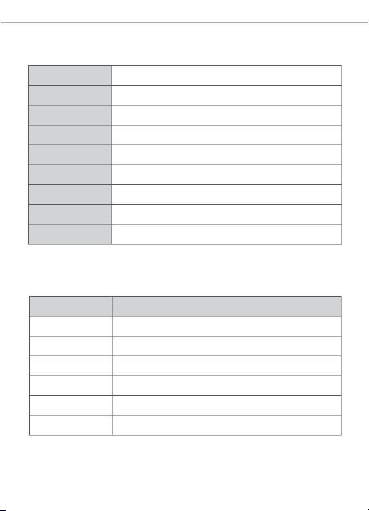
产品 参数
产品型号
DC输入
4CHP ROR3
9-23V
AC输入
100-240V 50/ 60Hz
10A/通道 40A/ 总负载:
IEE E 802.11 b/ g/n 2.4GH z
最大负载
Wi-Fi
支持平台
产品材料
产品规格
(An droid 4. 1 & iOS 9.0) 或者更高 版本
PC
145x 90x34 mm
指示 灯状 态说 明
指示灯状 态
状态描述
蓝灯两短 一长闪烁 配网模式
蓝灯常亮
设备已连 接
蓝灯快闪 一下
蓝灯快闪 两下
蓝灯快闪 三下
红灯亮/灭
找不到路 由
连接上路 由,但没 连上外网
升级中
设备开/关
1
Page 3
SON OFF TEC HNOLO GIES CO., LTD.
中 文
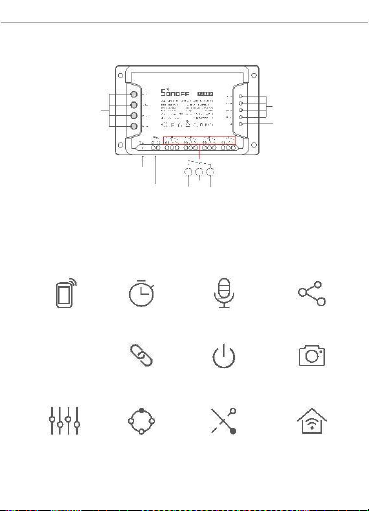
产品 介绍
(R1 /R2/R 3/R4 )
(R1 /R2/R 3/R4 )
开关指示灯(红色)
手动开关/配置按钮
Wi-Fi信号指示 灯(蓝色)
DC 输入
AC 输入
NO COM
NC
公共
常开
常闭
产品 特点
4CHP ROR3是一款支持互锁/自锁/ 点动3种工作模 式相互切 换的四通
道智能开 关。可随时随 地通过手机 远程打开或 关闭家里的 设备,设置
定时开关 、分享给您的 家人一起控 制等等。
远程控制
智能定 时
场景联 动
语音控 制
分享控 制
上电状 态设置
添加摄 像头
自锁模 式
互锁模 式
点动模 式
局域网 模式
2
Page 4

SON OFF TEC HNOLO GIES CO., LTD.
中 文
RF(遥控)配对
学习配 对遥控 器方法 :
长按将 要配对的 通道开关 键3秒直到 对应的红 色开关指 示灯“快闪 一
下”, 松开, 然后短按 遥控器上 要配对的 按键,红 色开关指 示灯“ 快
闪一下”则表示 配对成功 。其它 按键按照 此方法重 复学习配 对即可。
清除遥 控器配 对方法 :
长按将 要清除 配对的 通道开关 键5秒 直到对 应的红 色开关 指示灯 “快
闪两下”, 松 开,然后 短按遥控 器上对应 所需清除 配对的按 键,红 色
开关指示 灯“快闪一 下”则表示 清码完成。 其它按键按照 此方法清码
即可。
3
Page 5
SON OFF TEC HNOLO GIES CO., LTD.
中 文
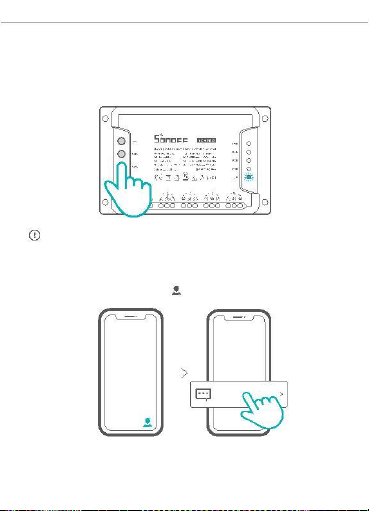
恢复 出厂 设置
长按任意配置按钮5秒直到Wi-Fi指示灯呈“两短一 长闪烁”再松开,
此时设备重置成功,默认进入快速配网模式(Touch)。
更换新的 网络环境 使用时, 需要恢复出 厂设置, 再重新进行 网络连接 。
常见问题
在“eWeLink”app端,点击“ ”,选择“ FAQ”查看。
FAQ
Pairing fail ed...
4
Page 6
SON OFF TEC HNOLO GIES CO., LTD.
Engl ish
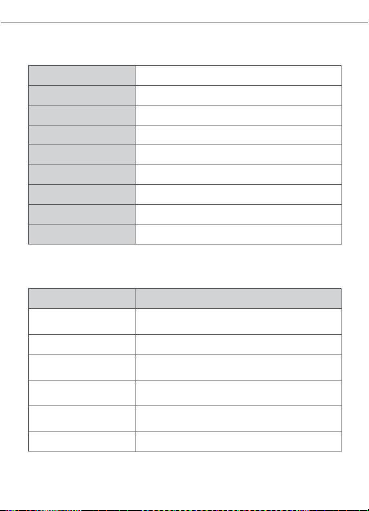
Specifications
Mod el
4CHP ROR3
DC Input
AC Input
9-23V
100-240V 50/ 60Hz
10A/gang 40A/ Total
IEE E 802.11 b/ g/n 2.4GH z
Max . Load
Wi-Fi
Ope rating systems
(An droid 4. 1 & iOS 9.0 )or high er
Mat erial
PC
Dime nsion
145x 90x34 mm
LED indicator st at us instruction
LED indicat or stat us
Stat us ins truct ion
Bl ue LED flas he s (o ne
long and two sho rt )
Quic k pair ing mod e
Blue LED keep s on
Dev ice is conn ected succes sfull y
Blue LED flas hes qu ickly
onc e
Unab le to disc over th e router
Blue LED flas hes qu ickly
twi ce
Conn ect to the rou ter but fai l to connec t to Wi-Fi
Blue LED flas hes qu ickly
thre e times
Upgr ading
Red LE D is on/of f
Dev ice is on/o ff
5
Page 7
SON OFF TEC HNOLO GIES CO., LTD.
Engl ish
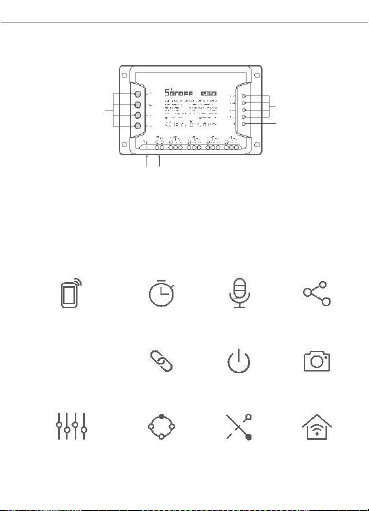
Product Intr oduction
(R1 /R2/R 3/R4 )
Pairi ng butto n/Manu al swit ch
(R1 /R2/R 3/R4 )
On/Off LE D indic ator(R ed)
Wi-Fi LED in dicato r(Blue )
DC input AC input
Features
4CHPROR3 is a 4-gang Wi-Fi smart switch with self-locking, interlock
and inching that allow you to remotely turn on/off connected devic es
via your s mar tpho ne, sc hedu le on or off, shar e to you r fam ily to
con trol toget her.
Remo te Cont rol
Sing le/Co untdow n
Timi ng
Voic e Contro l
Shar e Contr ol
Smar t Scene
Pow er-on Sta te
Came ra Feat ure
LAN Control
Self -loc king
Interl ock
Inc hing
6
Page 8

SON OFF TEC HNOLO GIES CO., LTD.
Engl ish
RF Remot e Controll er Pairing
Pai ring Meth od:
Long press the chan nel switch that you want to pair for 3s unti l the
LE D “fl as hes qu ick ly o nc e ” and r ele ase , t hen sh ort pre ss t he
remot e cont roll er but ton t hat your want to pair . The r ed c han nel
swit ch button LED “flashe s quickly once” indica tes that the pair ing
is su cce ssf ul. Ot her rem ote con tro lle r b utt ons can be pai red
acc ording to this method.
Cle aring Met hod:
Long pre ss the channel sw itc h that you wa nt to clea r for 5s un til
the LED “fla she s quick ly tw ice” and rele ase, the n short pre ss the
rem ote con troll er butt on that you r want to clear. The red cha nnel
swit ch button LED “flashe s quickly once” indica tes that the clea ring
is suc ces sful . Oth er re mote cont roller butt ons can be clea red
acc ording to this method.
7
Page 9
SON OFF TEC HNOLO GIES CO., LTD.
Engl ish
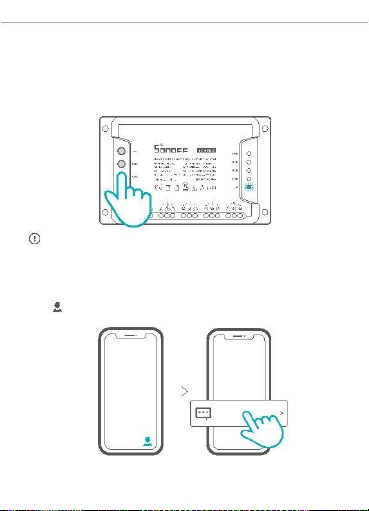
Factory Rese t
Lo ng pr ess the pair ing butt on f or ab out 5s u ntil the Wi-Fi LED
in dica tor ch ang es in a cycl e of two s hort and on e long fla sh and
relea se, then the res et is s ucc es sfu l. T he d evic e en ters qui ck
pa irin g mode (T ouch).
Plea se rese t the swit ch to fac tory def aults if yo u want to change Wi-Fi
the net work, th en recon nect the new netwo rk.
Common Pro bl em s
Tap “
” on eWeLink APP and selec t “FAQ” to chec k.
FAQ
Pairing fail ed...
8
Page 10
SON OFF TEC HNOLO GIES CO., LTD.
Deut sch
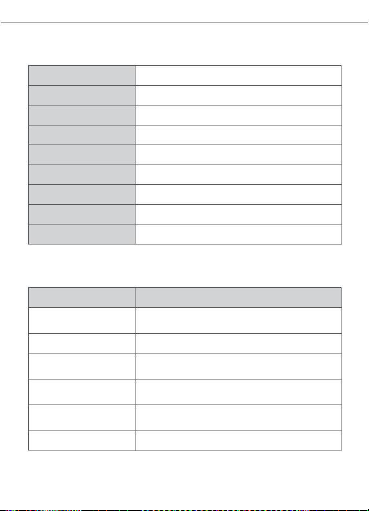
Tec hnische Dat en
Mod ell
4CHP ROR3
DC Einga ng
AC Einga ng
9-23V
100-240V 50/ 60Hz
Max . Belast ung
10A/ Einze lschal ter 40A/ Alle Sc halter
WLAN -Stan dard
Betriebssy steme
IEE E 802.11 b/ g/n 2.4GH z
(Android 4.1 und iOS 9.0) oder höher
Mat erialie n
PC
Abm essung en
145x 90x34 mm
LED-Anzeige St at usan ze ige Anweisung
LED -Anze ige Stat us
Stat us-A nweis ung
Blau e LED bli nkt (ei nmal
lang und zw eimal kurz)
Sch nellk opplun gsmod us
Ger ät ist erfolg reich verbun den
Blaues LED ist immer an
Blau es LED bli nkt ein mal De r Rout er konn te nich t gefun den we rden
sch nell
Blau es LED bli nkt
zwe imal sc hnell
Erf olgrei che Ver bindu ng zum Router , aber Wi-Fi
ist nicht ve rbunde n
Blau es LED blink t dreim al
schne ll
Akt ualis ierung
Rote s LED is t an/aus
Das Gerät is t ein-/aus gesc haltet
9
Page 11
SON OFF TEC HNOLO GIES CO., LTD.
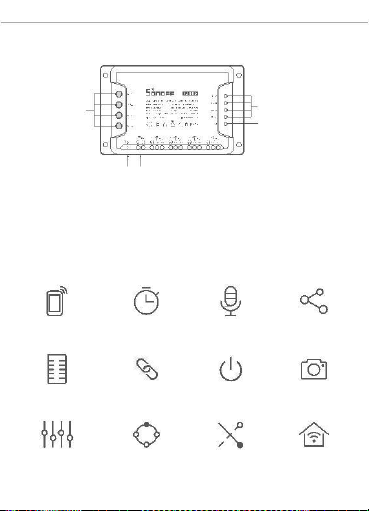
Deut sch
Produktvorstellung
(R1 /R2/R 3/R4 )
Ein /Aus -LED- Anze ige( rote )
(R1 /R2/R 3/R4 )
Kopp lung stas te/
Manu elle r Scha lte r
WLA N-LE D-Anz eige (blau en)
DC Eingan g AC Eingan g
Merkmale
4CHPROR3 ist ein 4fach Wi-Fi-Smart-Switch mit Selbstverriegelung,
Ve rri ege lung und Ti ppb etri eb, mi t dem Si e an ges chl oss ene
Ger äte über Ihr Smar tphon e ferng esteu ert ein - und aussc halte n,
zei tgest euert ein- u nd auss chalt en, an Ihre Fami lie w eiter geben
und geme insam ste uer n kön nen .
App Fe rnbed ienu g
Zeit plän e
Spra chst eueru ng
Frei gabes teuer ung
Kame ra hinz ufü gen
Funk fernb edien ung Intel ligen te Szen arien Eins chalt stat us
Selb stve rrieg elung
Verr iegel ung
Tipp betri eb
LAN -Steu erung
10
Page 12

SON OFF TEC HNOLO GIES CO., LTD.
Deut sch
Kopplung der Funkfer nbedienung
Kop plung smeth oden:
Hal ten S ie den K ana lsch alter , den Sie für 3 Sekunde n kop peln
möc hten, so lange gedr ück t, bis die LED „bli nkt ei nmal schn ell “
und dann wiede r los lasse n, und drü cken Si e dann k urz die Taste
der F ern bed ien ung, di e S ie k opp eln mö ch te n. Die rote
Kana lumschal ttast e LED „blink t einma l schn ell“ und zeigt an, das s
die Kop plung erfo lgreich is t. Ande re Tast en der Fern bedi enu ng
kön nen nach die sem Verf ahren g eko ppelt wer den.
Lös chm eth ode n:
Drücken S ie den Kanalsc halter, den S ie für 5 Sekunden löschen
möchte n, so lange, bis di e LED „zweimal sc hnell blinkt“ und lassen
Sie sie lo s, dann dr ücken Sie kurz die Taste der Fernb edienung,
die Sie lös chen m öchten. Die r ote Kana lumschaltt aste LED „blink t
einmal schnell“ zei gt an, dass die Löschung erfolg reich war. Andere
Tasten der Fernbed ienung können nach diesem Verf ahren gelöscht
werden.
11
Page 13
SON OFF TEC HNOLO GIES CO., LTD.
Deut sch
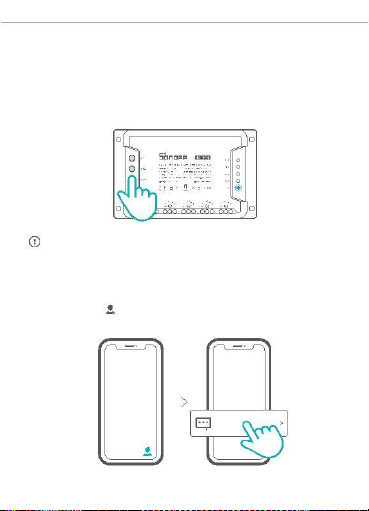
Zurücksetzen auf Werkseinstellungen
Drücke n Sie die Kopp lungst aste am Scha lter lä nger , die
zur ück ges etzt we rde n soll, ca. 5 Sek. lang, bis die WLA N-LED -
Anz eige zu ein em Inte rvall von zwei malig em kurz en Blin ken und
ein em lang en Blin ken wec hselt , dann war das Zur ück set zen
erf olgre ich. Das Ger ät wechs elt in den Schnel lkoppl ungsm odus
(Tou ch).
Bitt e setzen Sie den Schal ter auf d ie W erkse instel lungen zu rück ,
wenn Sie ander e WLAN- Netzwer ke verw enden mö chte n, und stel len
Sie da nach di e Verbindu ng zum neuen Netzw erk her.
Häufige Pro bl em e
Tipp en Sie auf „ “ in der eWeLink APP und wähl en Sie „F AQ“ zur
Über prüf ung .
FAQ
Pairing fail ed...
12
Page 14
SON OFF TEC HNOLO GIES CO., LTD.
Espa ñol
Especificaciones
Mod elo
4CHP ROR3
DC Entr ada
9-23 V
AC Entr ada
Car ga máxim a
100-240 V 50/ 60Hz
10 A/Con exió n 40A/To tal
IEE E 802.11 b/ g/n 2.4GH z
Est ánda r Wi-Fi
Sis temas operat ivos
(An droid 4. 1 e iOS 9.0) o pos terio r
Mat eriale s
PC
Dime nsion es
145x 90x34 mm
Instrucciones de l indi cador de estado LED
Indi cador de Estado LED I nstr ucc ión de estado
La luz LED azu l parpa dea
Modo de empare jamie nto ráp ido
(uno largo y dos cor tos)
Lalu zLED azulsie mprees tá
El dispo sitiv o está conec tado co rrect ament e
encen dida
La luz LED azu l parpa dea
Inc apaz de enc ontrar el router
rápidamente una sola vez
La luz LED azu l parpa dea
rápid ament e dos veces
Cone ctado al router cor rect amente
pero el Wi-Fi no est á cone ctado
La luz LED azu l parpa dea
rápidam ente tres vece s
Act uali zac ión
La luz LED roj a está
enc endida /apag ada
El dispo sitiv o está encen dido/a pagad o
13
Page 15
SON OFF TEC HNOLO GIES CO., LTD.
Espa ñol
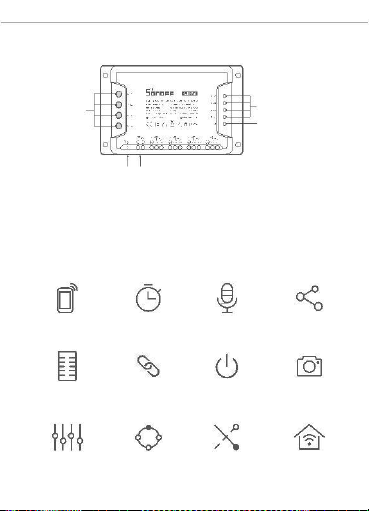
Introducción al produc to
(R1 /R2/R 3/R4 )
Indic ador LED de encendid o/
apagad o(rojo )
(R1 /R2/R 3/R4 )
Botón de empareja miento /
Inter ruptor manual
Indic ador LED de Wi-Fi (azul)
DC Entrad a AC Entrad a
Características
4CHP ROR3 es un inte rruptor int eligente Wi-Fi de
4 teclas co n
encl avamient o que le permite encende r/apagar de manera remota
disp ositivos conect ados a través de su Smartp hone; pr ograme el
ence ndido/ap agado y compárt alo con su fami lia para manejar lo
junt os.
Cont rol rem oto
des de plica ción
Pro gramas
Cont rol por
voz
Cont rol
com partid o
Cont rol rem oto RF
Bloq ueo aut omá tico
Esc enas
Indi cador de
enc endido
Agre gar cám ara
Enc lavam iento
Marc ha lent a
Cont rol vía
14
Page 16

SON OFF TEC HNOLO GIES CO., LTD.
Espa ñol
Emparejamiento del control remoto por RF
Mét odo de empa rej amient o:
Pre sione de man era so steni da el int err uptor de canal qu e quie ra
empare jar dur ante 3 seg undos hast a qu e la lu z LED “ par pad ea
rápidamen te una vez”
y suel te; lue go pres ione br eve mente el
bot ón del contr ol remot o que quie ra empar ejar. El bot ón LED roj o
del inter ruptor de canal qu e “parp ade a ráp ida mente una vez”
ind ica que el emp areja mie nto fue exit oso. O tros boto nes del
con trol remo to se puede n empar ejar de acu erdo a este métod o.
Mét odo de borr ado:
Pr esi one sost enida ment e el inte rruptor de can al que qu iere
des peja r por has ta 5 segu ndo s hast a que la luz LED “ parpa dee
rápid ame nt e dos vec es ” y su elt e; luego pres ione bre veme nte el
bot ón del cont rol re moto que quiera de speja r. El botón LED roj o
del i nter rupt or de can al que “pa rp ade a rápi dam en te una vez”
ind ica que la rem oc ión fue ex itosa . O tros b oto nes del co ntro l
remot o se pueden despej ar usa ndo es te mé to do.
15
Page 17
SON OFF TEC HNOLO GIES CO., LTD.
Espa ñol
Restableci mi en to de los ajustes de fábrica
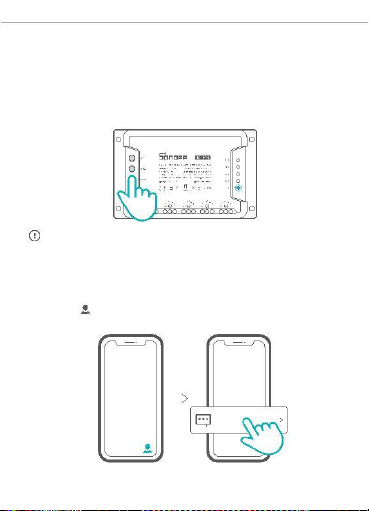
Manten ga pre siona do el bot ón de em parej amien to dur ante un os
5 s, hasta que el indi cador LED de Wi-Fi camb ie a un cic lo de dos
par padeo s cort os y uno l argo, y suél tel o; esto si gni fica que el
res table cimie nto se ha r ealiz ado corre ctame nte. El dispo sitivo
se pone en modo de empar ejami ento rápid o (Tou ch).
Rest ablez ca el disp ositiv o a los va lores pr edeter minad os de fábr ica
si desea uti lizar otr as redes Wi-F i. A cont inu ació n, vue lva a cone ctar
la red.
Problemas fr ec ue nt es
Pre sione “ ” en la apl ica ció n eWe Link y sel eccio ne “Pre gun tas
Fre cuente s” para veri fica r.
FAQ
Pairing fail ed...
16
Page 18
SON OFF TEC HNOLO GIES CO., LTD.
Franç ais
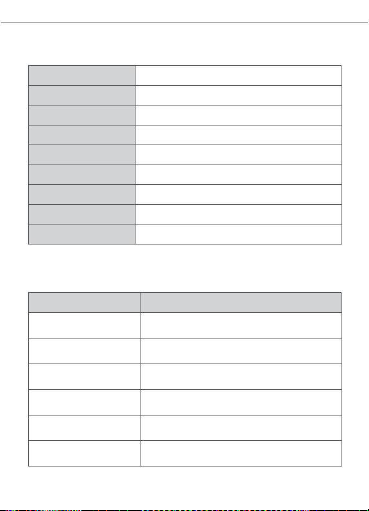
Caractéristiques techniques
Mod èle
4CHP ROR3
DC Entr ée
AC Entr ée
Char ge max.
9-23 V
100-240 V 50/ 60Hz
10 A/gang 4 0A/Tota l
Wi-Fi
IEE E 802.11 b/ g/n 2.4GH z
Systèmes d'exploitation (Androi d 4.1 & iOS 9.0) ou plus récent
Mat éria ux
PC
Dime nsion s
145x 90x34 mm
Instruction d' ét at du voya nt
Statut de l'indicateur LED
Ins truct ion d'ét at
La DEL bleue clignote (une
longu e et deux cou rtes)
Mode de coupla ge rapi de
La DEL bleue est toujou rs
allu mée
L'ap parei l est con nec té ave c succ ès
La DEL bleue cli gnote
rapi demen t une foi s
Impo ssibl e de trouv er le route ur
La DEL bleue cli gnote
rapi demen t deux fois
Conn exion réuss ie au rout eur, mais le Wi-Fi
n'es t pas conne cté.
La DEL bleue cli gnote
rapi demen t trois fois
Mis e à jour
La DEL roug e est allum ée/
étei nte
L'ap parei l est all umé / étein t
17
Page 19
SON OFF TEC HNOLO GIES CO., LTD.
Franç ais
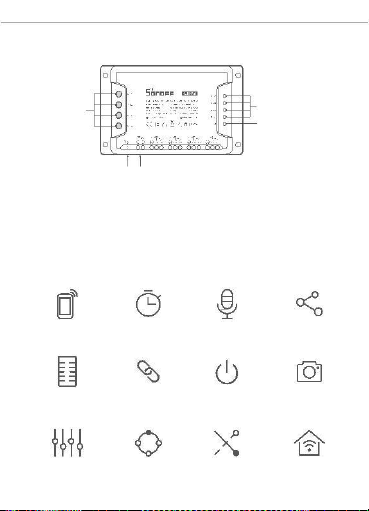
Présentation du prod ui t
(R1 /R2/R 3/R4 )
Indica teur DEL Marche/ Arrêt
(rouge )
(R1 /R2/R 3/R4 )
Bouton d'associati on/
Interru pteur manue l
Indica teur DEL Wi-Fi (bleu )
DC Entrée AC Entrée
Caractéristiques
4CH PROR3 est un commu tateu r intel ligen t Wi-Fi 4 gro upes avec
ver rouillage automat ique, int er-ve rroui llage et enc hev êtr eme nt
qui vo us p ermet d'al lumer et d'ét ei ndr e à dista nce l es app areil s
connect és via votre téléphon e intelligent, de progra mmer l'al lumage
ou l'ext incti on, de les partager ave c votr e fami lle pour les contr ôler
ens emble .
Appl i téléc omm ande
Télé comm and e FR
Auto -bloquant
Plan ific atio n
Cont rôl e voca l
Cont rôl e part agé
Scè nes
inte llige ntes
État de
mis e sous te nsion
Ajou ter une caméra
Inte rver rouill age
Ava nce len te
Cont rôl e via LA N
18
Page 20

SON OFF TEC HNOLO GIES CO., LTD.
Franç ais
Association de la télécom mand e FR
com munic ation sans fil
rés eau Wi-Fi.
à co urt e por té e, ma is n'u til ise pas le
Mét hodes d'as socia tion :
Appuyez lon guement sur le commutat eur de canal que vous voulez
cou pler pen dant 3s jus qu' à ce que la DEL « cl ignote rapi dement
une foi s » et relâche z, p uis app uyez b riè vem ent sur le bouto n de
la télécom mande que vous voulez coupler. La DEL rouge « clignote
rapi dement un e fois » i ndique que l'appai rage est ré ussi. D'au tres
tou ches de la tél éc ommande pe uvent être a ppa rié es s elon c ette
mét hod e.
Mét hod es de désas soc iat ion :
Appuyez longuem ent sur le commutat eur de canal que vous voulez
eff ac er pe nda nt 5 se co ndes j us qu 'à ce que la DEL « cl ign ote
rapi dement deux fois » et r elâc hez, puis appu yez bri èvem ent sur
le bou ton de la téléc ommande que vous v oulez effacer. La DEL
roug e du b outon d e co mmutat ion de canal "clig note rapid ement
une foi s" indique que l 'effa cem ent est r éuss i. Les autre s touch es
de la téléc omma nde pe uvent êt re eff acée s sel on cette méth ode.
19
Page 21
SON OFF TEC HNOLO GIES CO., LTD.
Franç ais
Rétablissement des paramè tres d'usine
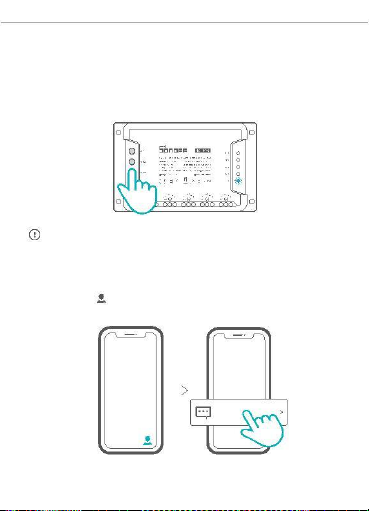
Main tenez le bo uton d'ass ociati on penda nt e nvir on 5 s jusqu'à
que l'in dicateu r DEL Wi-Fi cligno te deux fois ra pideme nt puis une
fois rapidement. Relâchez le bouton, la réi nitialisat ion est terminée.
L'ap pareil entr e en mod e d'as sociat ion rapi de (Touch).
Rét abli ssez les par amè tres d'usi ne pour vous déconne cter d'un
rés eau Wi-Fi po ur vous con necte r à un autr e.
Problèmes co uran ts
Appuyez sur « » sur l'application eWeLink et sélectionnez « FAQ »
pour vérifier.
FAQ
Pairing fail ed...
20
Page 22
SON OFF TEC HNOLO GIES CO., LTD.
Ital iano
Specifiche
Mod ello
4CHP ROR3
DC Ingr esso
AC Ingr esso
9-23 V
100-240 V 50/ 60Hz
10A /Cana le 40A/To tale
Car ico max
Wi-Fi
IEE E 802.11 b/ g/n 2.4GH z
Sis tem i oper ativ i
Mat eriale
(Android 4.1 e iOS 9.0) o versioni successive
PC
Dime nsion i
145x 90x34 mm
Istruzioni sullo sta to dell’indicatore LED
Stat o dell' indic atore LED Ist ruzio ni sull o stato
Il LED bl u lampeg gia (i n
form a prolu ngata una vol ta Modal ità di acc oppiam ento ra pido
e brev ement e due vo lte)
Il LED bl u costa ntemen te
acc esa
Il colle gamen to del disp ositi vo è stat o esegu ito
cor retta mente
Il LED blu ch e lampegg ia
rapidament e una volta sola
Impo ssibi le trov are il rou ter
Il LED bl u che lamp eggia
rapi damen te per du e volte
Il colle gamen to con il rout er è sta to esegu ito
cor retta mente ma il Wi-Fi non è conn esso.
Il LED bl u che lamp eggia
rapi damen te per tr e volt e
Aggi ornam ento
Il LED ross a accesa /spent a Il dis posi tivo è ac ceso/ spent o
21
Page 23
SON OFF TEC HNOLO GIES CO., LTD.
Ital iano
Introduzione al prodotto
(R1 /R2/R 3/R4 )
Indicatore LED acceso/
spento(rosso)
(R1 /R2/R 3/R4 )
Pulsante di accoppiamento/
interr uttore manuale
Indicatore LED Wi-Fi (blu)
DC Entrée AC Entrée
Caratteristiche
4CH PROR3 è uno Smart Swit ch Wi- Fi a 4 ca nali c on f unzio ni di
auto-b loccaggio, interbl occo e inching che ti permette di accender e/
spegner e a dista nza i dispositiv i collegati tramite il tuo smart phone,
progra mmare l'ac censi one/l o spe gni mento e con div idere il lor o
ut iliz zo con la tua fam iglia.
Tele coman do
via APP
Prog ramma zione
Cont rollo vocale
Cont rollo della
con divis ione
Tele coman do a RF Sc ene int ellig enti
Stat o di
acc ensio ne
Aggi unger e fotoc amera
Auto -bloc caggi o
Inte rbloc co
A impul si
Cont rollo LAN
22
Page 24

SON OFF TEC HNOLO GIES CO., LTD.
Ital iano
Accoppiamento telecomando RF
Met odi di acco ppiam ent o:
Prem ere a lung o il puls ante d el cana le che si desi dera associ are
per 3s e rilasciar e quando il LED "lampeggia rapidamente una volta",
qui ndi preme re b revem ente il pu lsan te del telecom ando che si
desi dera ass ociare . Qua ndo il LED ros so "lampeggi a rapidam ente
una v olta " s ig nifi ca ch e l' accoppi amento è rius cito. S egue ndo
questo metodo è possibile accoppiare altri pulsanti del telecomando.
Met odi di canc ellaz ione:
Pr eme re a lungo il pulsa nte del can ale ch e si des idera reset tare
per 5s e rila scia re quando il LE D "l ampeg gia rapidam ente due
vol te", quindi prem ere bre vemente il puls ante del t ele coma ndo
che si d esid era r ese ttar e. Qu and o il LED r oss o "lam pegg ia
rapid amente una volt a" sig nifi ca che la canc ella zion e è ri usci ta.
Seg uend o ques to me tod o è pos sibile r ese ttar e altr i puls anti del
te lec oman do.
23
Page 25
SON OFF TEC HNOLO GIES CO., LTD.
Ital iano
Ripristino impostazi on i di fabbrica
Tenere premuto il pul sante di a ccop piamen to per cir ca 5 sec ondi
fino a quando l' indicato re LED del Wi-Fi pass a a un cicl o di due
lamp eggi bre vi e uno lungo, quindi rilas ciarlo : il ripr istino ha avuto
esit o po sitivo. Il disp ositiv o ent ra in modal ità di accop piamen to
rapi do (Touch).
Reim posta re l'int errutt ore sui valori pr edefin iti di fabb rica se si
des ideran o utiliz zare al tre reti Wi-Fi, quindi r icolle gare la re te.
Problemi com un i
Toccare " " sull'app eWeLink e selez ionare le "FAQ" per ricercar e
una soluzion e.
FAQ
Pairing fail ed...
24
Page 26
SON OFF TEC HNOLO GIES CO., LTD.
Рус ский язык
Тех нические хар акте рист ик и
Моде ль
4CHP ROR3
DC Вход
9-23 B
AC Вход
100-240 B 50/ 60Hz
10A/ каж д. 40A /Всег о
Мак с.На груз ка
Стан дар т Wi-Fi
Опе рац ион ные систе мы
Мат ериа лы
Разм еры
IEE E 802.11 b/ g/n 2.4G Hz
(An droid 4. 1, iOS 9.0 ) и выше
PC
145x 90x34 мм
Инструкция режима светодиодного индикатора
Режи м св етод иодно го
Опи сан ие ре жима
инди като ра
Мигает голубой светодиодная
лампоч ка (один длинны й и два Реж им быс тро го соп ряж ения
коротких)
све тоди одна я син его цв ета
Уст ройс тво у спеш но под клю чено
всегда горит
све тоди одна я син его цв ета
Нев озмо жно найти роуте р
быс тро м игае т один раз
све тоди одна я син его цв ета
быс тро м игае т два ра за
Усп ешно е подк люч ение к марш рути зато ру,
но Wi-Fi не подкл юче н
све тоди одна я син его цв ета
быс тро м игае т три раз а
Обн овле ние
светод иодн ая кра сно го цве та
вкл ./от кл.
Уст ройс тво в кл. / в ыкл .
25
Page 27
SON OFF TEC HNOLO GIES CO., LTD.
Рус ский язык
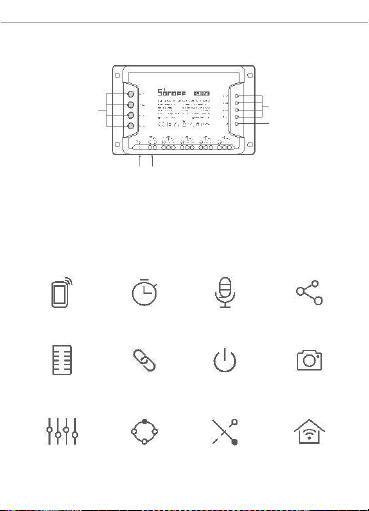
Знакомство с изделием
(R1/R 2/R3/R 4)
Кно пка соп ряжен ия/
перек лючени я вручну ю
(R1/R2 /R3/R 4)
Светоди одный инди катор
включе ния/вы ключен ия(кр асный )
Свет одио дный индик атор
Wi-Fi (Сини й)
DC Вход AC Вход
Функции
4CH PROR 3 – это 4х гру ппо во й эл ек тро нн ый п ере клю чат ель
Wi-Fi с авт ом ат ич еской б ло ки ро вк ой, пер е- блок ир ов ко й и
рег ул ировк ой, к от оры е п озволя ют Вам у дал енн о в кл юча ть /
вы кл юч ат ь подк лю че нн ые ус тр ойст в а с пом ощ ью Ва ше го
смартфо на, устанавливать порядок, а та кже делиться доступом
к сов мес тно му управл ению с Ваш ей се мье й.
Упр ав. пр илож .
Рас писа ния
Упр авл. голос ом
Дос туп д/уп равл .
Доба вит ь кам еру
Упр авл. пров . сеть ю
РЧ-пул ьт
Сма рт-с юже ты
Режим вклю чен ия
Рег улир овк а
Авт омат ичес кая
бло киров ка
Пере -бл окир овка
26
Page 28

SON OFF TEC HNOLO GIES CO., LTD.
Рус ский язык
Сопряжение с пом ощью РЧ-пульта
Спос обы сопря жен ия:
Уде ржи вай те кно пку вкл юч ени я ка на лов , ко торую Вы хот ите
синхрон изиров ать, в течении 3 секун д до тех пор пока светодиод
«м игнет б ыс тр о один р аз », з ате м отп уст ит е кноп ку , зате м
быстро нажмите на кнопку дистанционного управ ления, который
Вы хо тит е с ин хро ни зир ова ть . Когд а к рас на я с вет оди одн ая
кноп ка вк лючения «мигнет бы стро один раз», это будет з начит,
что си н х р о н и з ац и я про ш л а ус п е ш но. Д р уг и е кн о п к и
дис та нц ион ного упра вл ени я мог ут бы ть синх рониз иро ва ны
тем же методом.
Спос обы сброс а соп ряже ния:
Для р есинх рони зации удер живай те кн опку включ ения кана лов
в теч ении 5 се кун д до тех п ор п ока светод иод «б ыс тро мигае т
дваж ды», затем от пус тите к нопку , затем быстр о нажмит е на
кн оп ку ди ст ан ц ио нн ог о уп р авл е ния, кот ор ый Вы хот ит е
си нх ро н из ир о ва ть . Ко гд а кр ас на я св ет од ио дн ая к но пк а
вклю чени я «мигн ет быст ро один раз», эт о будет зн ачит, что
р е с и н хр о н из а ц и я пр о шл а у с п е ш н о. Д р у г и е к н о п к и
дист анционн ого управ лени я мо гут быть ресин хрон изир ован ы
тем же методом.
27
Page 29
SON OFF TEC HNOLO GIES CO., LTD.
Рус ский язык
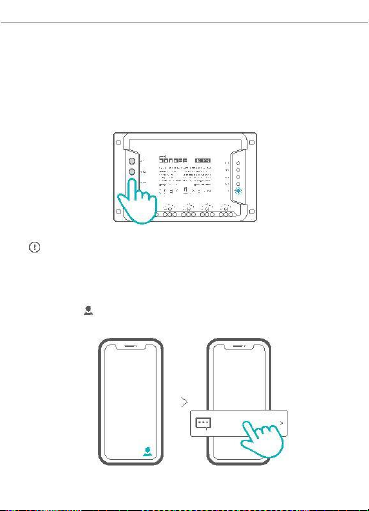
Сброс до заводских настроек
Для сопря жения удержива йте кноп ку сопря жения примерно
5 секу нд, пока све тоди одный индик атор Wi-Fi не начнет мигать
в
режим е «два раз а коротко, один раз длинно», после чег о
отпу стите кнопку д ля сброса на стро ек. Устрой ство п ерей дет
в режим быстр ого соп ряжен ия.
Если вы хотите по дключить ся к другой сети Wi-Fi, выпол ните сброс
до заводских настроек , после чего подключите сь к сети.
Станд артные проблемы
Нажм ите « » в пр ило жен ии eWeLin k и выберите «FA Q» для
пров ерк и.
FAQ
Pairing fail ed...
28
Page 30

Warning
1) This product conforms with standard EN50332.
2) This product can be used across EU member states.
3) WIFI frequency range: 2412-2472MHz, Maximum E.I.R.P: 17.38dBm
Declaration of Conformity
Hereby, Shenzhen Sonoff Technologies Co.,Ltd. declares that this 4-gang Wi-Fi
Smart Switch with RF Control is in compliance with the essential requirements and
other relevant provisions of directive 2014/53/EU.
Page 31

She nzhen Son off Technologi es Co., L td.
Room 1001, 10F, Bu ilding 8, Lianhua Indust rial Par k, Longy uan
Road, Longhua Dist rict , Shen zhen, GD, China
htt ps://s onoff.tech
MADE INCHI NA
FCC Warning
This device complies with part 15 of the FCC rules. Operation is subject to the following two conditi ons: (1)
this device may not cause harmful interference, and (2) this device must accept any inte rference received,
including interference that may cause undesired operation.
Changes or modifications not expressly approved by the party responsible for compliance could void the
user's authority to operate the equipment.
NOTE: This equipment has been tested and found to comply with the limits for a Class B digital device,
pursuant to part 15 of the FCC Rules. These limits are designed to provide reasonable protection against
harmful interference in a residential installation. This equipment generates uses and can radiate radio
frequency energy and, if not installed and used in accordance with the instructions, may cause harmful
interference to radio communications. However, there is no guarantee that interference will not occur in a
particular installation. If this equipment does cau se harmful interferenceto radio or television reception,
which can be determined by turning the equipment off and on, the user is encouraged to tr y to correct the
interference by one or more of the following measures:
•Reorient or relocate the receiving antenna.
•Increase the separation between the equipment and receiver.
•Connect the equipment into an outlet on a circuit different from that to which the receiver i s connected.
•Consult the dealer or an experienced radio/TV technician for help.
Radiation Exposure Statement
This equipment complies with FCC radiation exposure limits set forth for an uncontrolled environment. Thi s
equipment should be installed and operated with minimum distance 20cm between the radiator and your body.
Radiation Exposure Statement
The device has been evaluated to meet general RF exposure requirement. The device can be used in portable
exposure condition without restriction.
FCC ID: 2APN54CHPROR3
 Loading...