

Page 1
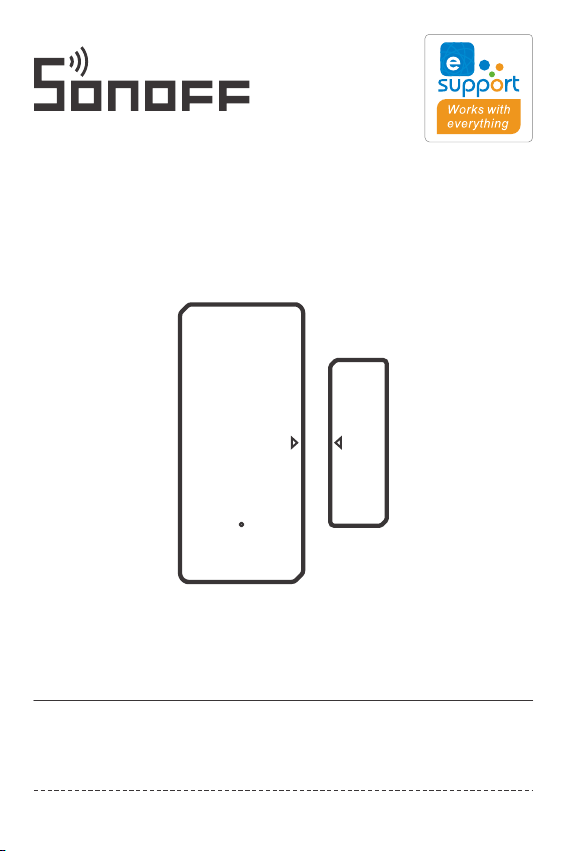
DW2-Wi-Fi
User manual V1.1
Wi-Fi Wireless Door/Window Sensor
· 中 文 -------------- --- --- - -1-5
· Deutsch -------- --- --- -- 11- 15
· Français------------ --- -- 21-25
· Русский язык---- --- --- 31-35
· FCC Warning---------------36
· English--------------------6-10
· Español-----------------16- 20
· Italiano--- ------------- 26-30
Page 2
SON OFF T ECH NOL OGI ES CO ., LTD.
使⽤说明
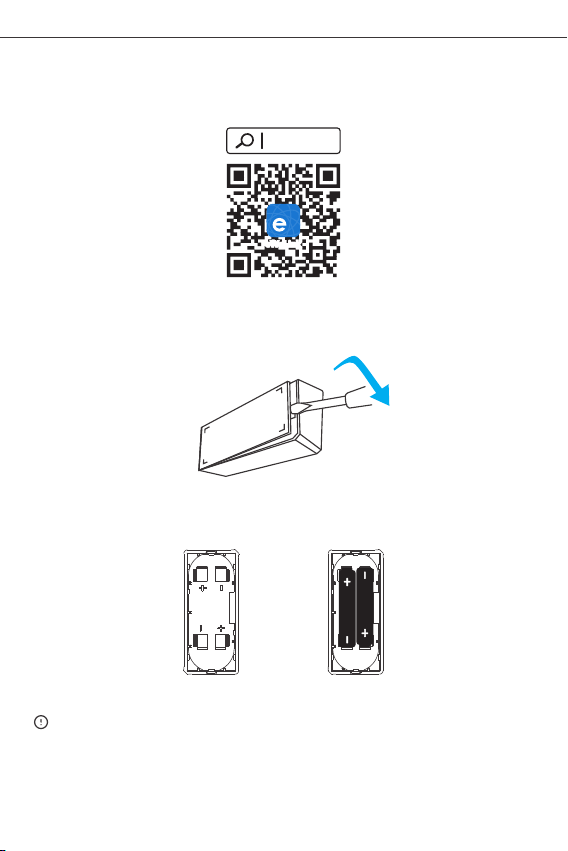
1.下载“易微联”APP
2.安 装电池
2-1.打开发 射器后盖
2-2.根据正 负极标识,装上电 池
中 文
易 微 联
eWeLink
And roid™ & i OS
2-3.合上后 盖
电池需 另⾏购买 。
>
1
Page 3
SON OFF T ECH NOL OGI ES CO ., LTD.
3.进⼊ 配⽹模式
⻓按 发射器 配对 按钮5秒直到LE D指⽰ 灯 闪烁”状态,设备 进⼊ 配⽹模 式。
4.添加 设备
添加设备
快速添加
适用于大部分易微联生态设 备
扫码添加
GSM 类设备和附带二维码的 设备,
可使用该模式添加
蓝牙配 网
适用于蓝牙 配网
点击“+”,选择“蓝⽛配 ⽹”,再根据app提⽰进⾏操作 。
安装设备
1.撕 下3M胶保护 膜。
中 文
2
Page 4
SON OFF T ECH NOL OGI ES CO ., LTD.
2.安 装时发射 器和磁铁 上的安装 对位标识尽量对⻬。
3.分 别粘贴在 所需开合 区域。
<5mm
发射器 和磁铁安 装间隙⻔ 窗在闭合 状态下⼩于5mm。
产品参数
中 文
产品型 号
电池型 号
⼯作电 压
静态电 流
发射电 流
Wi- Fi
⽀持平 台
安装距 离
⼯作温 度
材料
产品尺 ⼨
DW2 -Wi-Fi
AAA(7号1.5 V)
DC3V(2节1 .5V电池 )
≤40u A
≤15m A
IEE E 802.1 1 b 2.4GH z
And roid & iO S
<5m m
-10℃~40℃
PC
发射器:70x31 x19mm磁 铁:42x14x16m m
3
Page 5
SON OFF T ECH NOL OGI ES CO ., LTD.
中 文
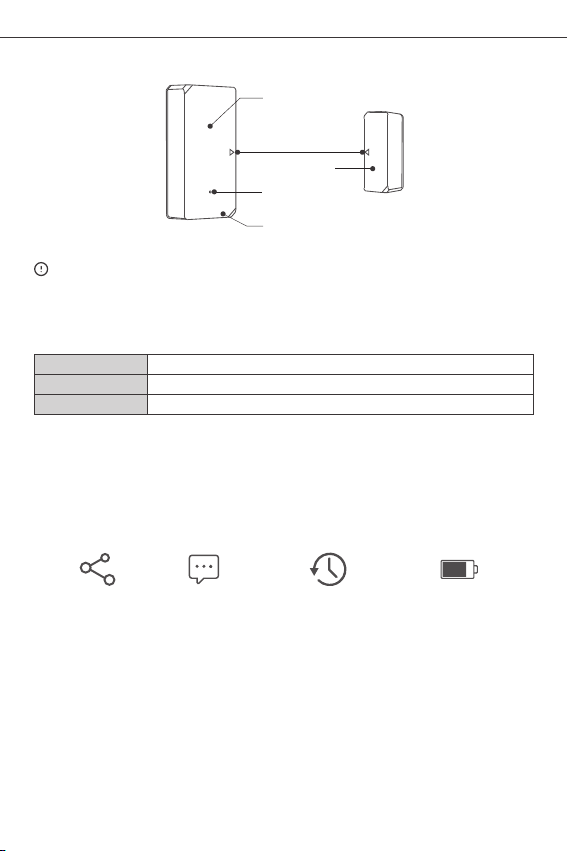
产品介绍
LED指⽰灯
安装对 位标识
磁铁
配对按 钮
发射器
设备重 量<1Kg,建 议安装⾼ 度<2⽶。
LED指⽰灯状态说明
闪烁
快闪1下
快闪2下
蓝⽛配 对模式
连不上 路由器
连不上 服务器
产品特点
DW2-Wi-Fi是⼀线⻔传,过铁和发离超过20mm发发,发射器
发出触发消息,及时推送⾄APP。您也可分享给家⼈⼀起查看家 ⾥的⻔和窗开/关的状态。
分享功 能
消息推 送
操作历 史记录
4
电量显 ⽰
Page 6
SON OFF T ECH NOL OGI ES CO ., LTD.
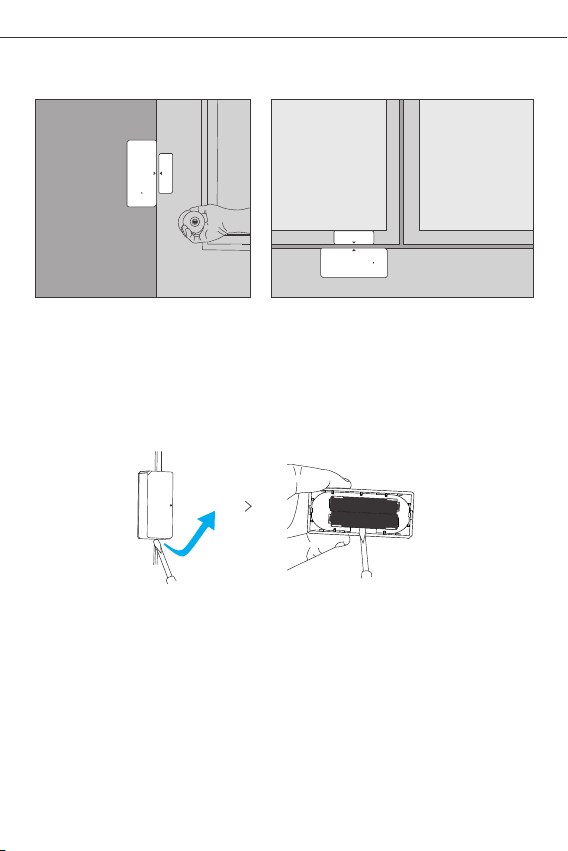
使⽤场景
⻔ 窗⼾
注意事 项:
请勿安 装在⼾外 容易被破 坏的位置 ;
请勿安 装在基础 不牢固或 有⾬淋的 位置;
请勿安 装在线路 旁或磁性 物体附近 ;
更换电池
中 文
5
Page 7
SON OFF T ECH NOL OGI ES CO ., LTD.
Operation instruction
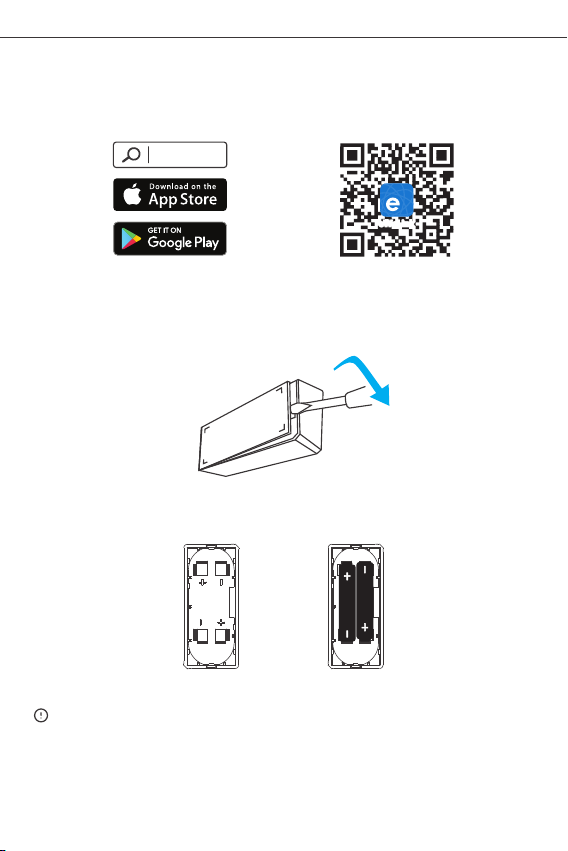
1. Download the “eWeLink”APP
eWeLink
eWeLink
And roid™ & iOS
2. Install batteries
2-1 . Remove the ba ck cover of the transmi tter.
2-2 . Inse rt bat terie s into the ba ttery compa rtmen t base d on id entifi ers of
po sitiv e and n egati ve pol es.
Eng lis h
>
2-3 . Clos e the b ack cover.
The b atter y is not in clude d, plea se purchase it sep arately.
6
Page 8
SON OFF T ECH NOL OGI ES CO ., LTD.
Eng lis h
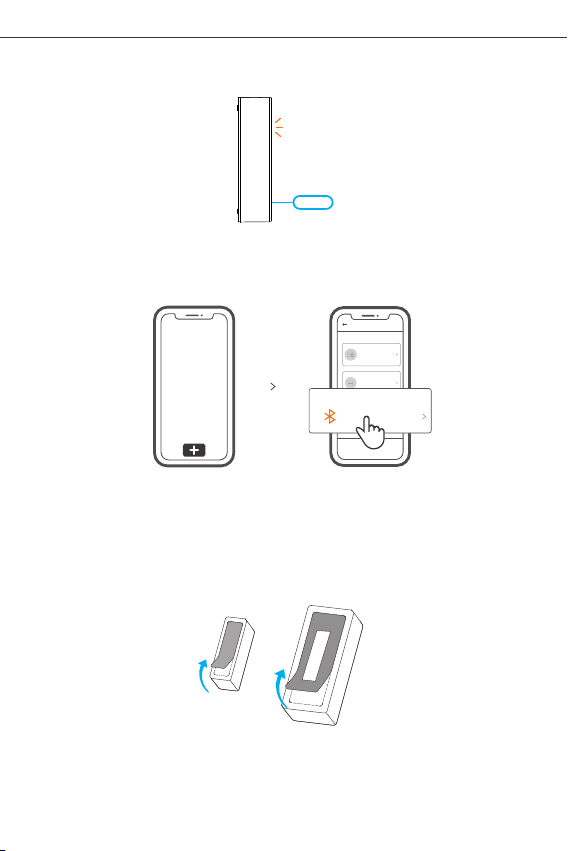
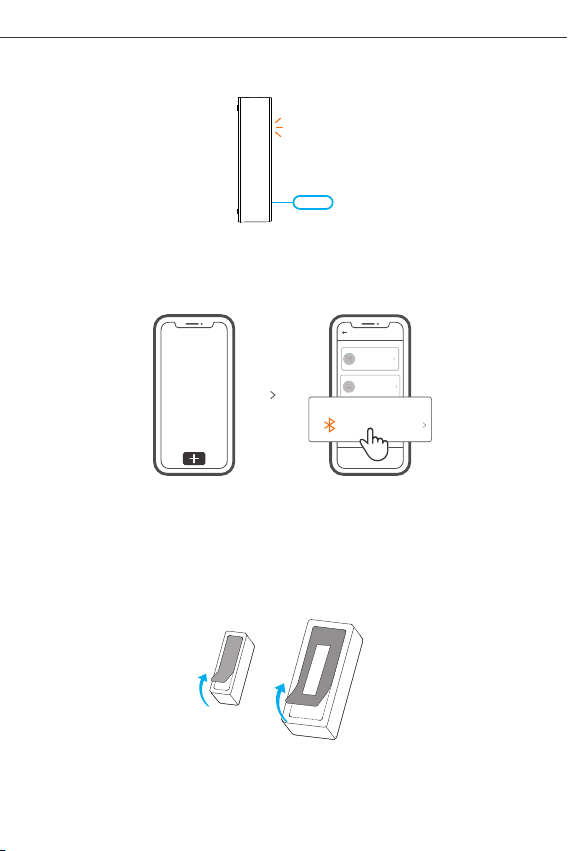
3.Enter pairing mode
Long press the pairing button on the transmitter for 5s with the eject pin until the LED
indicator flas hes , the n the de vice e nters t he pair ing m ode.
4.Add the device
Add Devic e
Quick Pai ring
WIFI devices can be a dded in t his mo
de(make sure the de vice is i n pairi ng
mode).
Scan QR co de
GSM devices and dev ices w ith QR co
de can be added in thi s mode.
Blue tooth Pa iring
Availa ble for b lueto oth
conne ction .
Tap “+” and select “Bluetooth connect ”, then operate following the prompt on the APP.
Install the device
1. Tear off the protective fil m of th e 3M ad hesiv e.
7
Page 9
SON OFF T ECH NOL OGI ES CO ., LTD.
Eng lis h
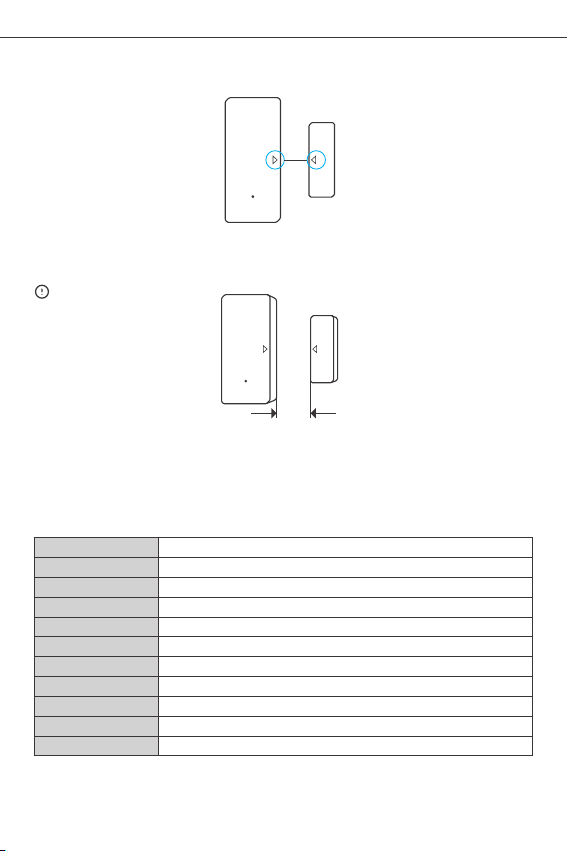
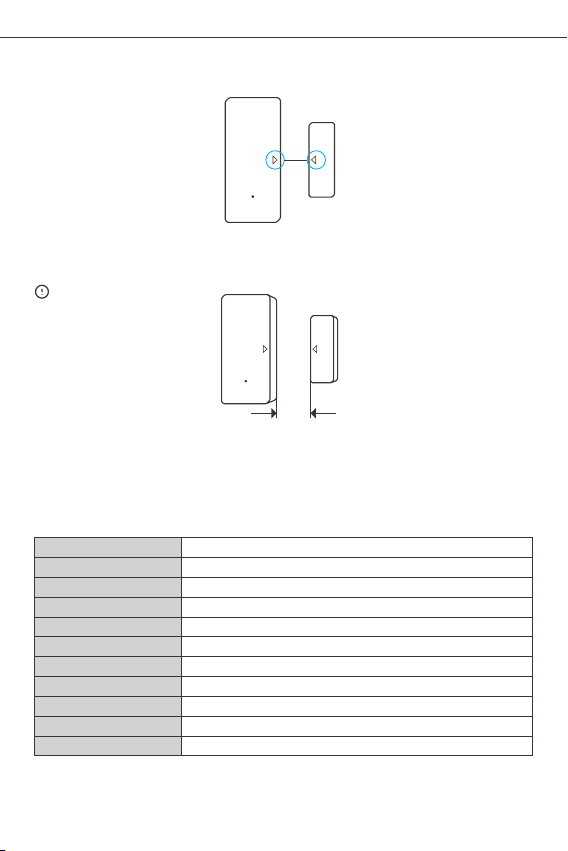
2. Try t o ali gn th e mar k lin e on the m agnet with that o n the tra nsmitter during
in sta llation.
3. I nstal l them in the openi ng and closi ng area separately.
<5mm
Make sure the installation gap is less than 5mm when the door or the window is closed.
Specifications
Mod el
Bat tery mo del
Wor king vo ltage
Qui escen t curre nt
Emi ssion c urren t
Wi- Fi
Ope ratin g syste ms
Ins talla tion ga p
Wor king te mperat ure
Mat erial
Dim ensio n
DW2 -Wi-Fi
AAA 1 .5V
DC3 V (2 x 1.5V b atter y)
≤40u A
≤15m A
IEE E 802.1 1 b 2.4GH z
And roid & iO S
<5m m
-10℃~40℃
PC
Tran smitt er: 70x 31x19 mm Magn et: 42x 14x16 mm
8
Page 10
SON OFF T ECH NOL OGI ES CO ., LTD.
Eng lis h
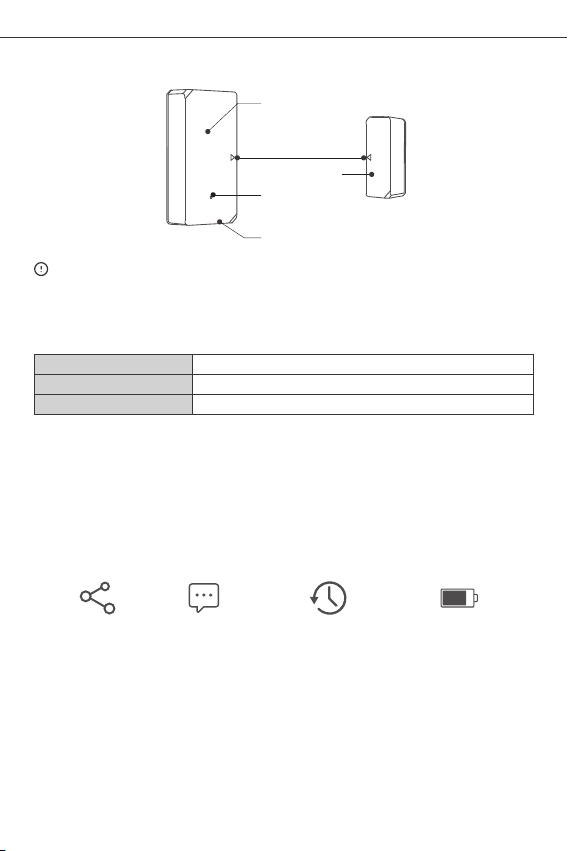
Product Introduction
LED i ndica tor
Ali gn the ma rk line s
Mag net
Pai ring bu tton
Tran smitt er
The d evice weight is le ss than 1 k g.
The i nstal latio n heigh t of less t han 2 m is recommend ed.
LED indicator status instruction
Fla shes
Fla shes qu ickly o nce
Fla shes qui ckly tw ice
Blu etoot h Pairi ng Mode
Una ble to di scove r the rout er
Connect to the router but fail to connect to Wi-Fi
Features
DW2-Wi-F i is a Wi-Fi wireless door/window transmitter which triggers the transmitter
by se par ati ng t he m agn et f or m ore th an 2 0mm from the transmi tt er, th en t he
transmitt er will se nd an al arm mes sag e and pu she s it to APP. You c an share t he
device with yo ur famil y to check t he door/ wind ow sta tus toge ther .
Sha re Cont rol
Ala rm push
not ificat ion
His toric al oper ation
rec ords
9
Bat tery le vel
Page 11
SON OFF T ECH NOL OGI ES CO ., LTD.
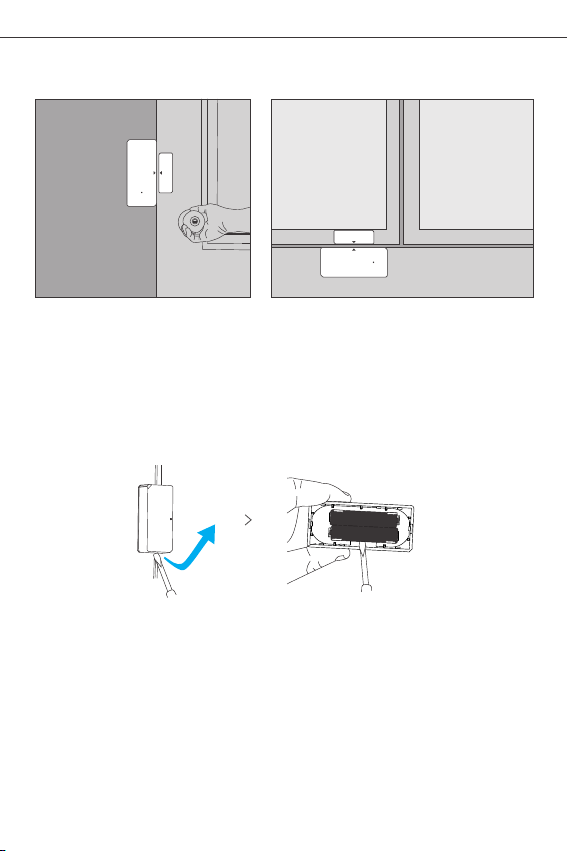
Application
Eng lis h
Doo r
Not e:
● Do no t insta ll outs ide the d oor/w indow.
● Do no t insta ll in the u nstab le posi tion or i n the pla ce exposed to
rain or moistu re.
● Do no t insta ll near w iring o r magne tic obj ect.
Replace batteries
10
Win dow
Page 12
SON OFF T ECH NOL OGI ES CO ., LTD.
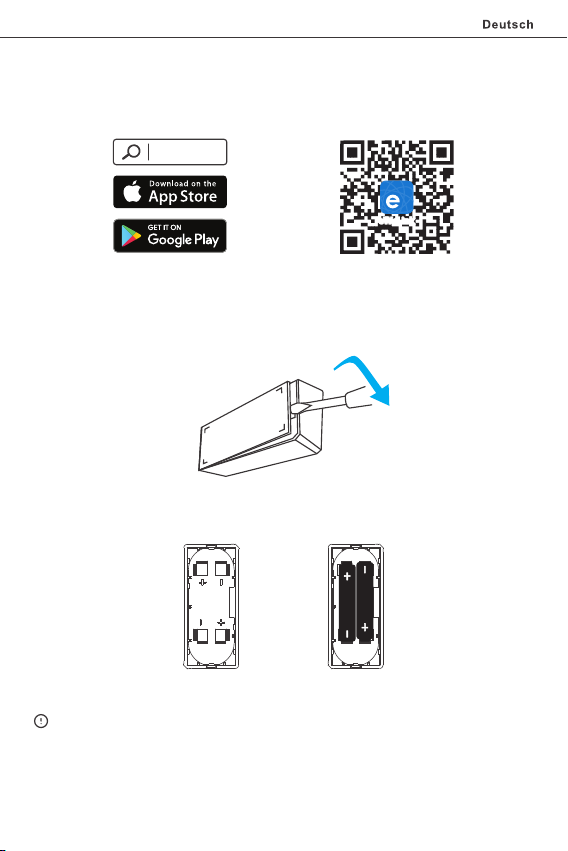
Betriebsanweisung
1. APP herunterladen
eWeLink
eWeLink
And roid™ & iOS
2. Batterien einbauen
2-1 . Entfe rnen Si e die Rüc kwand d es Send ers.
2-2 . Batte rien in d as Batt erief ach ein legen a nhand d er Kenn zeich nung de r
Plu s- und Mi nuspo le.
>
2-3 . Schli eßen Si e die Rüc kabde ckung .
Die B atter ie ist ni cht im Li eferu mfang e nthal ten, bi tte kau fen Sie s ie sepa rat.
11
Page 13
SON OFF T ECH NOL OGI ES CO ., LTD.
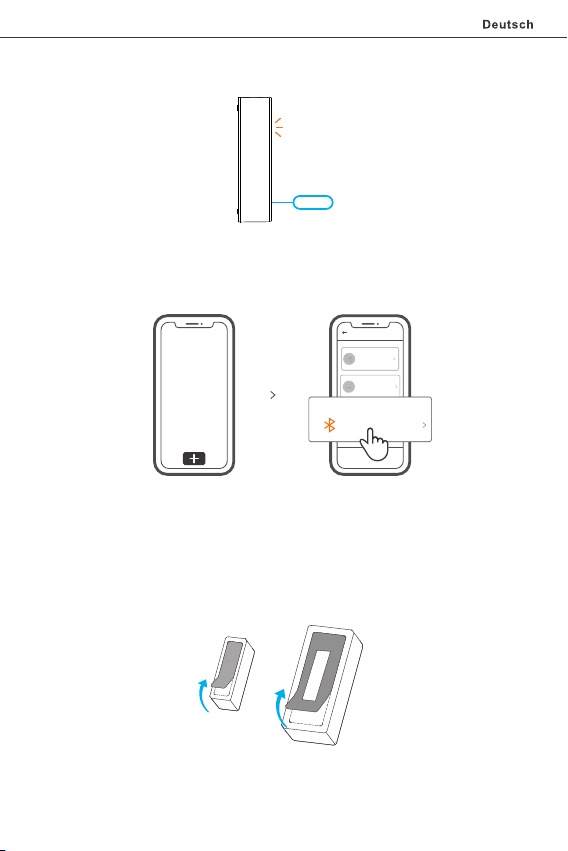
3.Kopplungsmodus eingeben
Drü cken Sie die Kopplung staste am Sen der 5 Sekunde n lang mit dem Au swurfstif t,
bis die LED-Anzeig e blinkt, dan n geht das Gerät in den K opplungsmodu.
4. Gerät hinzufügen
Add Devic e
Quick Pai ring
WIFI devices can be a dded in t his mo
de(make sure the de vice is i n pairi ng
mode).
Scan QR co de
GSM devices and dev ices w ith QR co
de can be added in thi s mode.
Blue tooth Pa iring
Availa ble for b lueto oth
conne ction .
Tip pen Sie a uf „+“, w ählen S ie „Blu etoot h verbi nden“ u nd arbe iten Si e dann ge mäß
der A ufforderung auf d er APP.
Installieren Sie das Gerät
1. Di e Schut zfoli e des 3M- Klebs toffs ab reißen.
12
Page 14
SON OFF T ECH NOL OGI ES CO ., LTD.
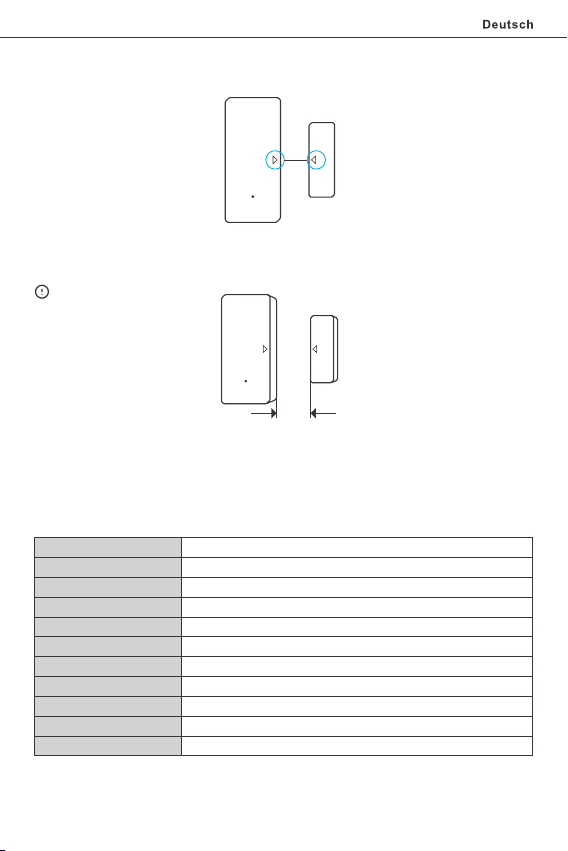
2. Ver suchen Sie die Markierungsli nie auf dem Magneten bei der Montage mit der auf
dem Se nder au szuri chten .
3. In stall ieren Sie sie im Öffn ungs- u nd Schl ießbe reich getrennt.
<5mm
Ach ten Sie d arauf, dass der Ei nbaus palt be i gesch losse ner Tür od er gesc hloss enem
Fen ster we niger a ls 5 mm bet rägt.
Technische Daten
Mod ell
Bat terie M odell
Arb eitss pannu ng
Ruh estro m
Emi ssion sstro m
WLA N
Bet riebs syste me
Ein bausp alt
Arb eitst emper atur
Mat erial ien
Abm essun gen
DW2 -Wi-Fi
AAA 1 ,5 V
DC 3 V (2 x 1 ,5 V-Ba tteri e)
≤40u A
≤15m A
IEE E 802.1 1 b 2.4GH z
And roid & iO S
<5m m
-10℃~40℃
PC
Sen der: 70 x31x1 9mm Mag net: 42 x14x1 6mm
13
Page 15
SON OFF T ECH NOL OGI ES CO ., LTD.
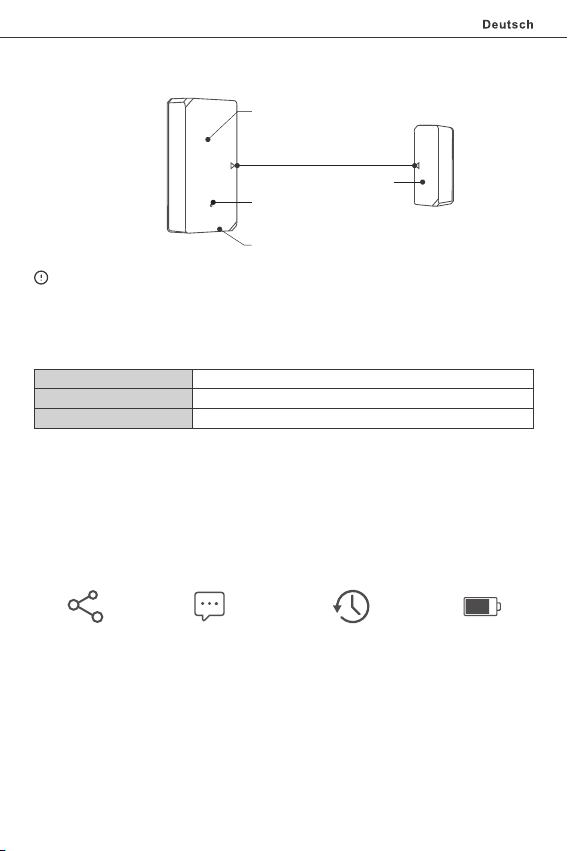
Produktvorstellung
LED -Anze ige
Ausrichten der Markieru ngslinien
Kopplungstaste
Sen der
Mag net
Das G erätegewi cht bet rägt weniger als 1 kg.
Es wi rd eine Installa tions höhe vo n wenig er als 2 m em pfohl en.
LED-Anzeige Statusanzeige Anweisung
Bli nken
Ein mal sch nell bl inken
2 Mal s chnel l blink en
Blu etoot h-Paa rungs modus
De r Rout er kon nte ni cht g efun den we rden
Ver bindu ng zum Se rver fe hlgesc hlage n
Merkmale
DW2-Wi-Fi ist ein drahtloser Wi-Fi-Tür /Fenstersensor, der den Sender auslöst, indem
der Ma gnet mehr als 20 mm vom Sender getrennt wird, dann sendet der Sender eine
Al armmeldu ng und g ibt s ie via P ush a uf die A PP. Sie kö nnen da s Gerät mit Ihrer
Fam ilie te ilen, u m den Tür/ Fenst ersta tus gem einsa m zu über prüfe n.
Fre igabe steue rung
Ben achri chtig ung
His toris che
Bet riebs aufze ichnu ngen
14
Der A kkust andAla rm-Pu sh-
Page 16
SON OFF T ECH NOL OGI ES CO ., LTD.
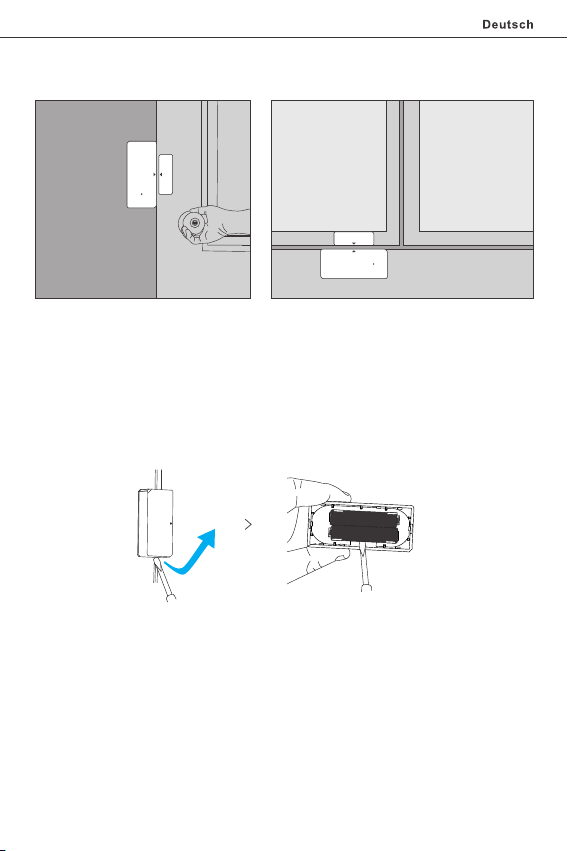
Anwendung
Tür Fen ster
Hin weis:
● Nic ht auße rhalb d er Tür / Fen ster in stall ieren.
● Nicht in einer instabilen Position oder an einem Ort instal lieren, an dem es Regen
oder Feuchtigkeit ausge setzt i st.
● Nic ht in der N ähe von L eitun gen ode r magne tisch en Obje kten in stall ieren.
Batterien austauschen
15
Page 17
SON OFF T ECH NOL OGI ES CO ., LTD.
Instrucciones de funcionamiento
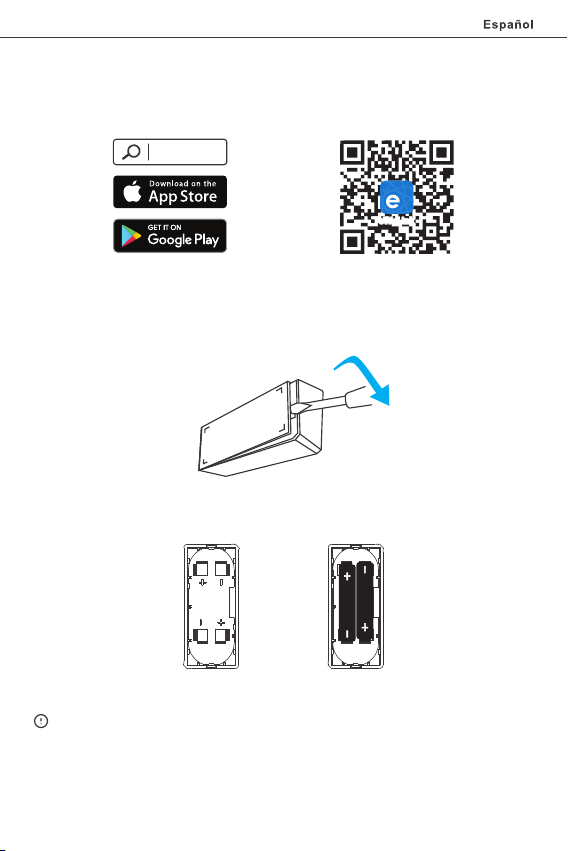
1. Descargar la aplicación
eWeLink
eWeLink
And roid™ & iOS
2. Coloque las baterías
2-1 . Quit e la ta pa trasera del transmiso r.
2-2 . Colo que la s bate rías d entro del comp artim ento d e bate ría En funci ón de
lo s iden tifica dores de polos posit ivos y negat ivos.
>
2-3 . Cier re la tapa trasera.
La ba tería n o está in cluid o; por fa vor, có mprelo por separado.
16
Page 18
SON OFF T ECH NOL OGI ES CO ., LTD.
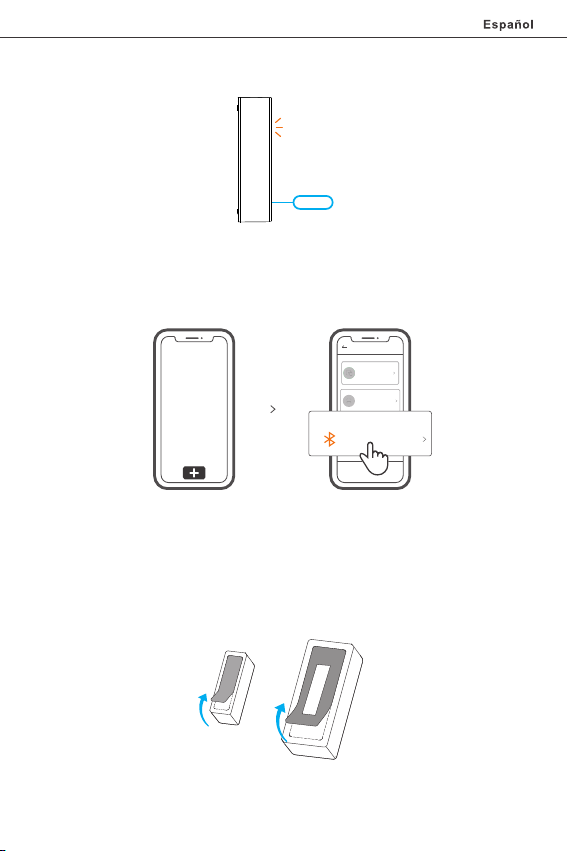
3.Entre en modo emparejamiento
Presione de man era sosten ida el botón de emparejam iento del transmisor durante
5 se gun dos co n el pin de expulsión ha sta que el i ndic ador L ED par pade e, lue go el
dispositivo en tra en mo do de emparejamiento.
4. Añadir el dispositivo
Add Devic e
Quick Pai ring
WIFI devices can be a dded in t his mo
de(make sure the de vice is i n pairi ng
mode).
Scan QR co de
GSM devices and dev ices w ith QR co
de can be added in thi s mode.
Blue tooth Pa iring
Availa ble for b lueto oth
conne ction .
Pulse “+” y seleccione “Conectar al Bluet ooth”, luego opere siguiendo las indicaciones
de la aplicación.
Inst ale el dispositivo
1. Qu ite la la mina protectora del adhes ivo 3M.
17
Page 19
SON OFF T ECH NOL OGI ES CO ., LTD.
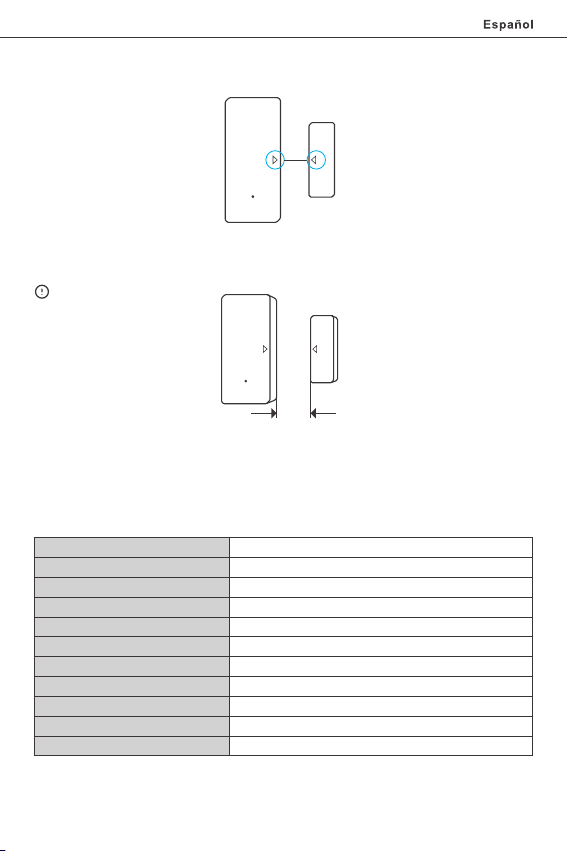
2. In tente aline ar la lín ea del im án con la q ue se enc uentra en el transmisor durante
la in stala ción.
3. In stále los por s eparado en el área de apertura y de cierre.
<5mm
Asegú rese de que la brech a de ins tala ción sea menor a 5mm cuand o la puerta o
ventana es té cerrad a.
Especificaciones
Mod elo
Bat ería mo delo
Tens ión de fu ncion amien to
Cor rient e estát ica
Cor rient e de emis ión
Est ándar W i-Fi
Sis temas o perat ivos
Bre cha de in stala ción
Temp eratur a de func ionam iento
Mat erial es
Dim ensio nes
DW2 -Wi-Fi
AAA 1 ,5 V
DC3 V (bact eria 2 x 1, 5V)
≤40u A
≤15m A
IEE E 802.1 1 b 2.4GH z
And roid & iO S
<5m m
-10℃~40℃
PC
Tran smiso r: 70x3 1x19m m Imán: 4 2x14x 16mm
18
Page 20
SON OFF T ECH NOL OGI ES CO ., LTD.
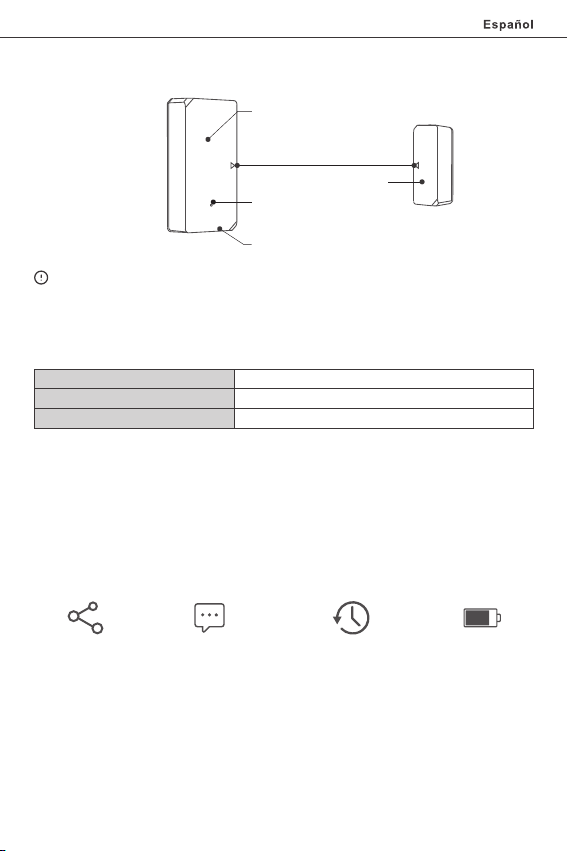
Introducción al producto
Ind icado r LED
Niv ele las l íneas d e marca
Imá n
Bot ón de emp areja mient o
Tran smiso r
El pe so del di sposi tivo es i nferi or a 1 kg.
Se recomiend a una alt ura de instalaci ón infe rior a 2 m.
Instrucciones del indicador de estado LED
Par padeo
Par padea r ápida mente u na vez
Par padea r ápida mente d os vece s
mod o de empa rejam iento p or Blue tooth
Fal la al con ectar c on el rou ter
Fal la al con ectar c on el ser vidor
Características
DW2-W i-Fi es un sen sor inal ámbr ico Wi-F i de pu erta /ventana acciona el transmisor
al separar el imán más de 20mm con respecto al transmisor; luego el transmisor enviará
un m ensaje de alarma y a parecerá en la aplicaci ón. Pu ede compa rtir el di spositiv o
con s u familia para contro lar juntos e l estado de su puer ta/venta na.
Con trol co mpart ido Not ificac ión de
ala rma
Reg istro d e
fun ciona mient o histó rico
19
Niv el de bat ería
Page 21
SON OFF T ECH NOL OGI ES CO ., LTD.
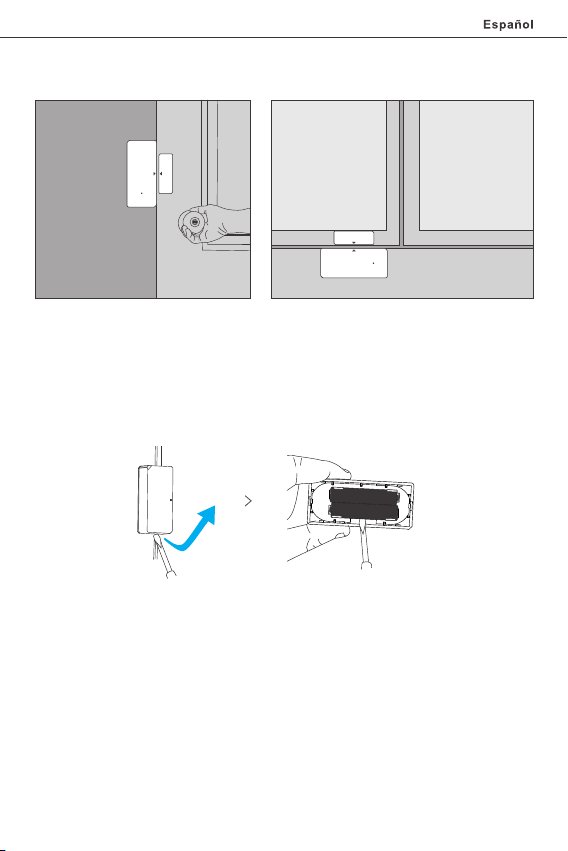
Aplicación
Pue rta
Nota:
● No lo instale fuera de la puerta/ven tana .
● No lo instale en superficies inestables o en lugares expuestos a la lluvia o la humedad.
● No lo instale cerc a de objetos inalá mbri cos o magn éticos.
Ventana
Cambie las baterías
20
Page 22
SON OFF T ECH NOL OGI ES CO ., LTD.
Inst ruction d'opérati on
1. Télécharger l'application
eWeLink
eWeLink
And roid™ & iOS
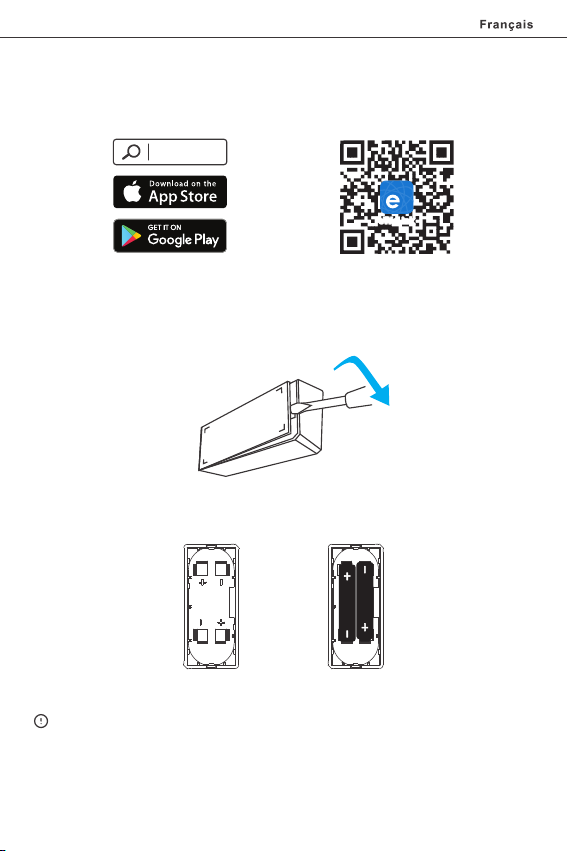
2. Installer les piles
2-1 . Reti rer le couvercle arriè re de l'émet teur.
2-2. Insérer les piles dans le compart iment à piles en fonction des identificateurs
des pôles positif et négatif.
>
2-3 . Ferm er le c ouvercle arri ère.
La ba tteri e n'est pas incluse , veuil lez l'ac heter s éparément.
21
Page 23
SON OFF T ECH NOL OGI ES CO ., LTD.
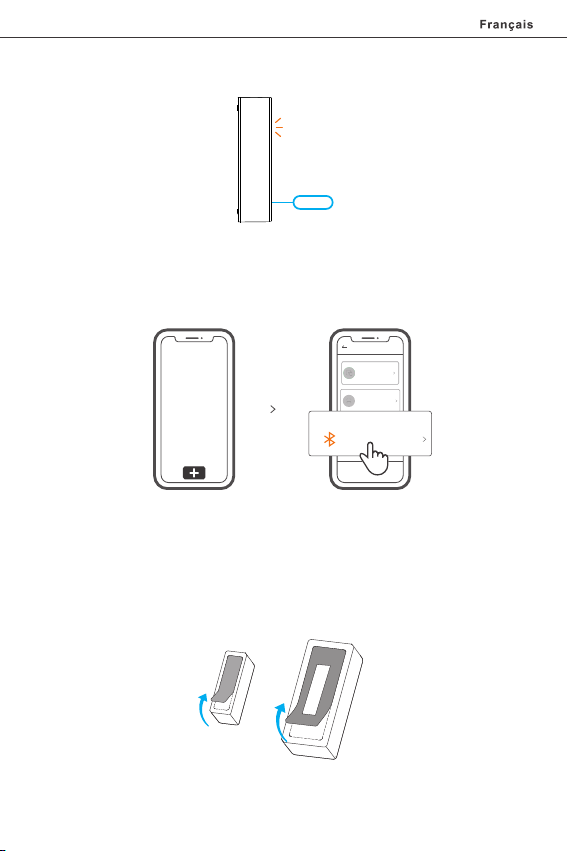
3.Entrer en mode d'appariement
Appuyer lon guemen t sur l e Bou ton d'appairagedu l'éme tteur pend ant 5 s avec la
broch e d'éjec tion ju squ'à ce qu e le v oyan t LED cl ignote , puis l 'app arei l passe en
mo de d'ap paira ge.
4. Ajouter l'appareil
Add Devic e
Quick Pai ring
WIFI devices can be a dded in t his mo
de(make sure the de vice is i n pairi ng
mode).
Scan QR co de
GSM devices and dev ices w ith QR co
de can be added in thi s mode.
Blue tooth Pa iring
Availa ble for b lueto oth
conne ction .
Tap ez sur « + » et s éle cti onn ez « C on nexion B lue too th » , puis s uiv ez l' inv ite sur
l'application.
Installer l'appareil
1. Dé chirer le film protecteur de l 'adhés if 3M.
22
Page 24
SON OFF T ECH NOL OGI ES CO ., LTD.
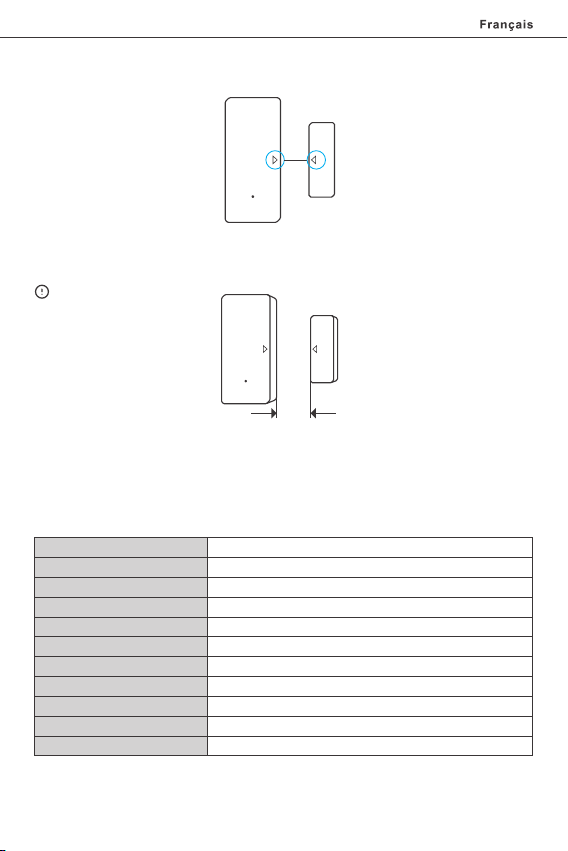
2. Es sayer d 'aligner la l igne de repère sur l'aimant av ec cell e du l'éme tteur lors du
mon tage.
3. Le s insta ller sé parément dans la z one d'ouverture et de fermet ure.
<5mm
S'assurer que l'espace d'installation est inférieur à 5 mm lorsque la porte ou la fenêtre
est fermée.
Caractéristiques techniques
Mod èle
Bat terie m odèle
Tens ion de se rvice
Cou rant de re pos
Cou rant d'ém issio n
Wi- Fi
Sys tèmes d 'exploi tatio n
Esp ace d'i nstal latio n
Temp ératur e de trava il
Mat ériau x
Dim ensio ns
DW2 -Wi-Fi
AAA 1 ,5 V
DC3 V (batt erie 2 x 1, 5V)
≤40u A
≤15m A
IEE E 802.1 1 b 2.4GH z
And roid & iO S
<5m m
-10℃~40℃
PC
Eme tteur : 70x31 x19 mm Ai mant: 4 2x14x 16 mm
23
Page 25
SON OFF T ECH NOL OGI ES CO ., LTD.
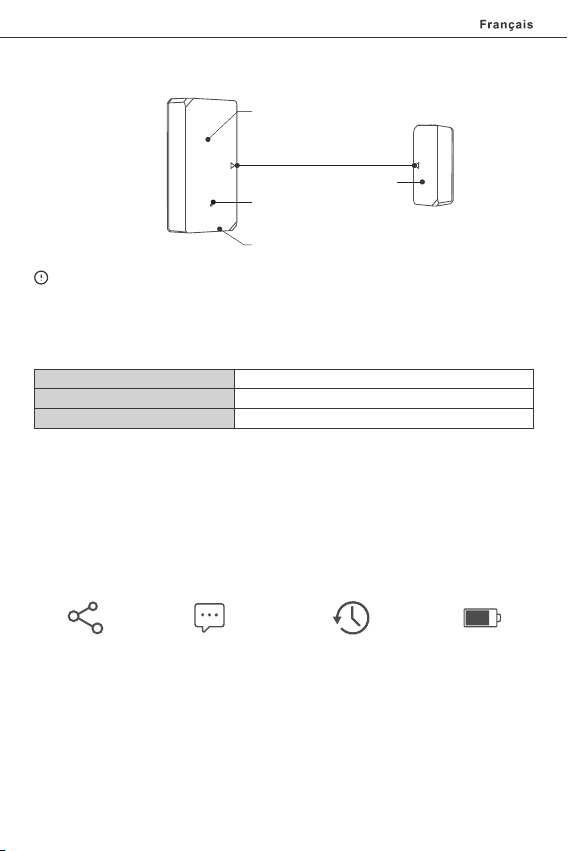
Présentation du produit
Ind icate ur DEL
Ali gner le s ligne s de repè re
Aim ant
Bou ton d'as socia tion
Eme tteur
Le po ids du di sposi tif est i nféri eur à 1 kg.
Il es t recommandé d'i nstal ler le di sposi tif à une h auteu r infér ieure à 2 m.
Instruction d'état du voyant
Fla sh
Fla sh rapi de une fo is
Fla sh rapi de 2 fois
mod e d'appa irage B lueto oth
Éch ec de la co nnexi on au rout eur
Éch ec de la co nnexi on au ser veur
Caractéristiques
DW2-Wi-Fi est un capteur de port e/fenêtre sans fil Wi-Fi q ui déclenche l'éme tteur en
séparant l'aimant de plus de 20 mm de l'émetteur, alors l'émetteur envoie un message
d'alarme et le pousse vers l'APP. Vous pouvez partager le dispositif avec votre famille
pour vérifie r ensemble l'état de la porte/fenêtre.
Con trôle p artag é Not ificat ion de
pou ssée d'a larme
24
His toriq ue des
opé ratio ns
Niv eau de la b atter ie
Page 26
SON OFF T ECH NOL OGI ES CO ., LTD.
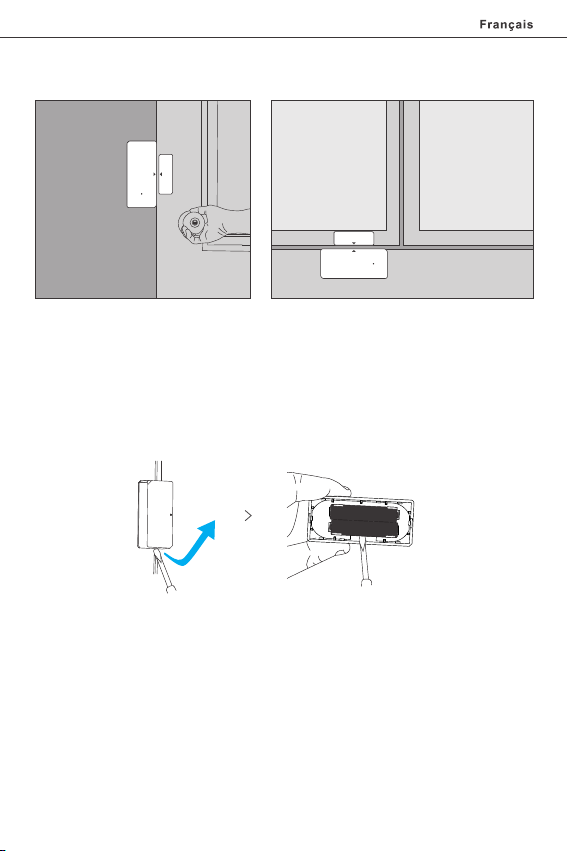
Application
Porte
Remarque :
● Ne p as insta lle r à l'extér ieur de la p orte/fenê tre.
● Ne pas installer da ns la pos ition i nstable ou dans l'endroit expo sé à la pluie ou à
l'humidité.
● Ne p as insta lle r près du câ blag e ou objet mag nét ique.
Fen êtr e
Remplacer les piles
25
Page 27
SON OFF T ECH NOL OGI ES CO ., LTD.
Istr uzioni per l'uso
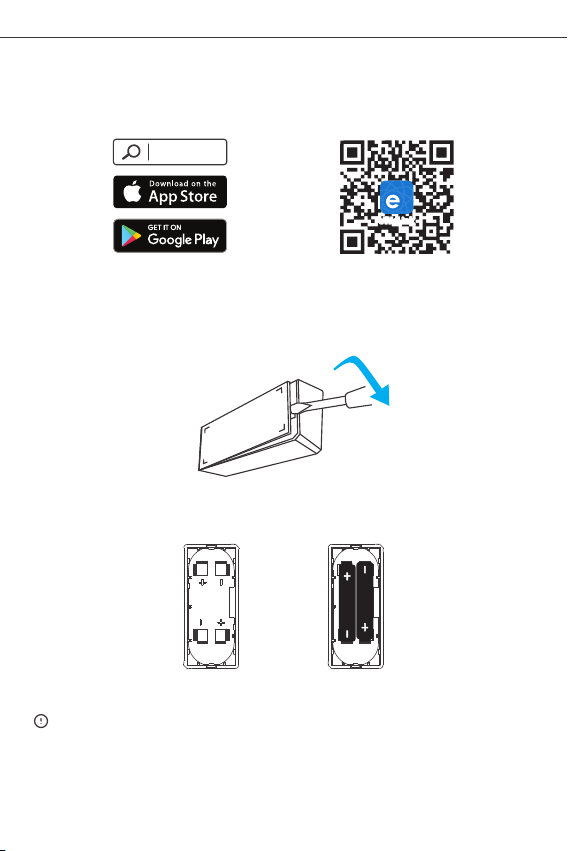
1. Scarica la APP
eWeLink
eWeLink
And roid™ & iOS
2. Installazione delle batterie
2-1 . Rimu overe il co perchio posteriore del tra smett itore.
2-2 . Inse rire le batter ie nel vano b atter ie in b ase ag li ide ntific atori dei po li
po sitiv o e neg ativo .
Ita lia no
>
2-3 . Chiu dere il coperchio post eriore.
La ba tteri a non è inc luso, s i prega di acquist arlo se paratamente.
26
Page 28
SON OFF T ECH NOL OGI ES CO ., LTD.
Ita lia no
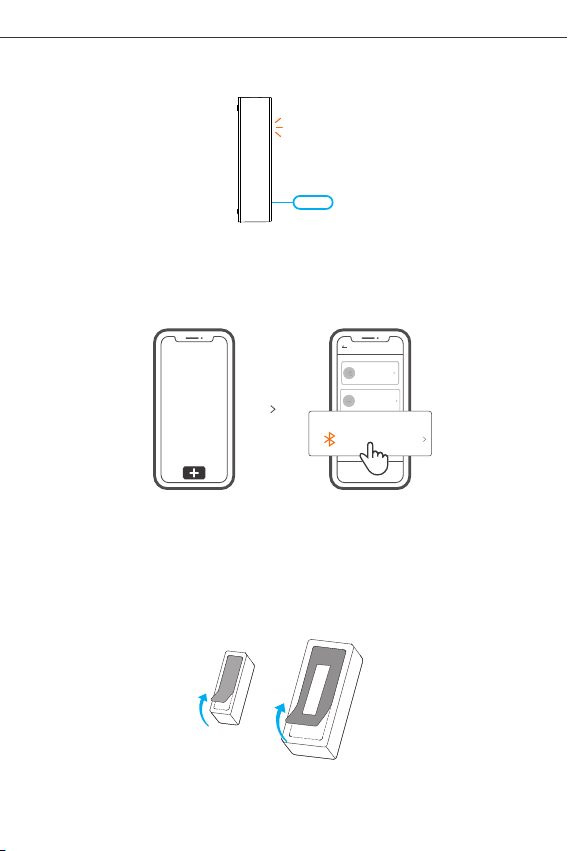
3.Entrare in modalità di accoppiamento
Prem ere a lungo il Pulsante di accoppiame nto sul trasmett itore per 5 sec. con il pin
di espulsi one fino a quando l'indicatore LED lampeggia, in ques to modo il di spositivo
entra in modalità di accoppiamento .
4. Aggiungere il dispositivo
Add Devic e
Quick Pai ring
WIFI devices can be a dded in t his mo
de(make sure the de vice is i n pairi ng
mode).
Scan QR co de
GSM devices and dev ices w ith QR co
de can be added in thi s mode.
Blue tooth Pa iring
Availa ble for b lueto oth
conne ction .
Toccare “+ ” e selezionare “Connessi one Blu etoot h”, quindi procedere s eguen do le
ind icazi oni del l'APP.
Installazione del dispositivo
1. R imuovere l a pell icola protettiva de ll'adesivo 3 M.
27
Page 29
SON OFF T ECH NOL OGI ES CO ., LTD.
Ita lia no
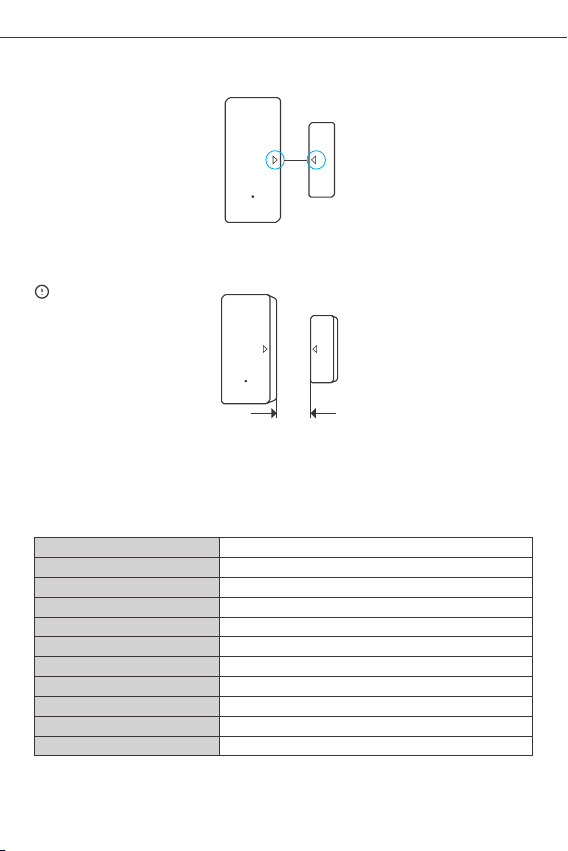
2. Cercare di allineare la linea di riferimento sul magnete con quella del trasmettitore,
durante l'installazione.
3. I nstal larli separatament e nell 'area di apertu ra e di chiusura.
<5mm
as sicur arsi che la dis tanza di insta llazione s ia in ferior e a 5 mm quan do la p orta
o la fine stra son o chi use.
Specifiche
Mod ello
Bat teria m odell o
Tens ione di f unzio namen to
Cor rente d i ripos o
Cor rente e messa
Wi- Fi
Si stem i oper ativ i
Dis tanza d i insta llazi one
Temp eratur a di funz ionam ento
Mat erial e
Dim ensio ni
DW2 -Wi-Fi
AAA 1 ,5 V
DC3 V (2 batt erie da 1 ,5V)
≤40u A
≤15m A
IEE E 802.1 1 b 2.4GH z
And roid & iO S
<5m m
-10℃~40℃
PC
Tras metti tore: 70 x31x1 9 mm Magn ete: 42 x14x1 6 mm
28
Page 30
SON OFF T ECH NOL OGI ES CO ., LTD.
Ita lia no
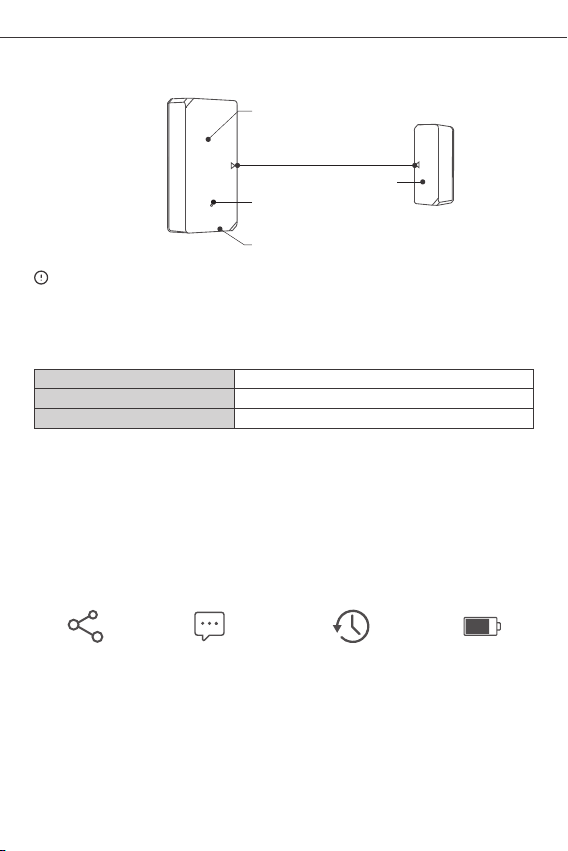
Introduzione al prodotto
Ind icato re LED
All inear e in base a lle lin ee di
rif erime nto
Mag nete
Puls ante di acco ppiamen to
Tras metti tore
Il peso del d ispo siti vo è infer iore a 1 kg.
Si racc oman da un'alt ezza d i inst allazione inferi ore a 2 m.
Istruzioni sullo stato dell’indicatore LED
Lam peggi are
Lam peggi a rapid ament e una vol ta
Lam peggi a rapid ament e 2 volte
Mod alità d i assoc iazio ne Blue tooth
Non è p ossib ile con nette rsi al ro uter
Non è p ossib ile con nette rsi al se rver
Caratteristiche
DW2-Wi-Fi è un sensore Wi- Fi wireles s per porte/finestre che attiva il trasmet titore
qua nd o il ma gn et e vi en e s ep ar an do p er p iù di 2 0 m m da l t ra sm et ti to re ,
successivamente il trasmettitore invia un segnale di allarme che viene automaticamente
notifi cato attravers o l'APP. Sa rà possib ile condivi dere i l dispos iti vo con la propria
fam iglia p er cont rollare con giunt ament e lo stat o delle porte/ finestre.
Con troll o della
con divis ione
Not ifica au tomat ica
di al larme
Cro nolog ia dell e
29
ope razio ni
Liv ello de lla bat teria
Page 31
SON OFF T ECH NOL OGI ES CO ., LTD.
Ita lia no
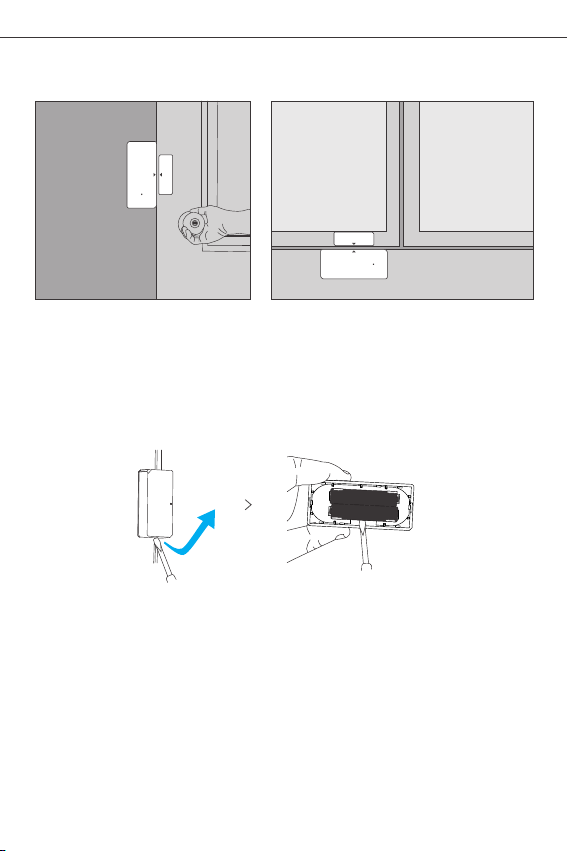
Applicazione
Por ta Fin estra
Not a:
● Non i nstal lare all'est erno de lla por ta/fin estra.
● No n ins tal lare in con diz ioni in stabili o inl uog hi es pos ti al la pi oggia o a ll'umidit à.
● Non i nstal lare in pross imità d i cavi od i oggetti magn etici.
Sostituire le batterie
30
Page 32
SON OFF T ECH NOL OGI ES CO ., LTD.
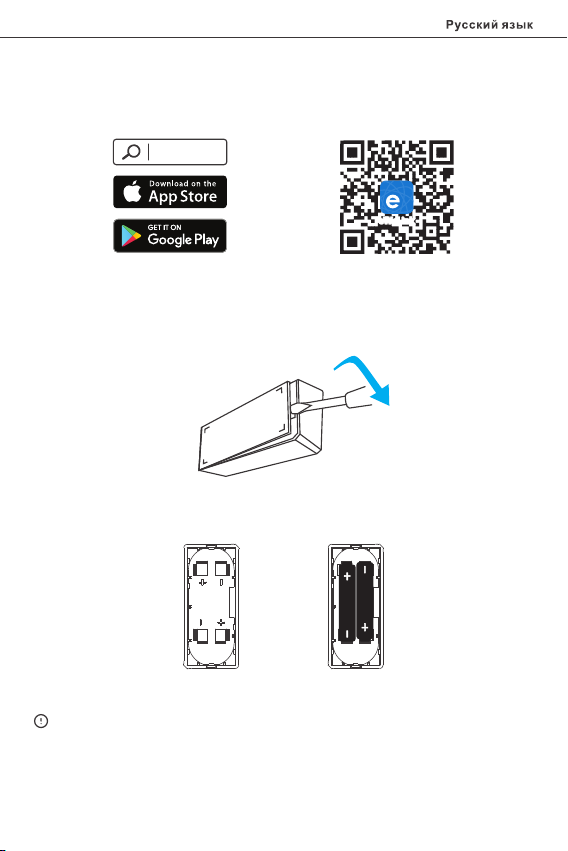
Инструкция по эксплуатации
1. Cкачать приложение
eWeLink
eWeLink
And roid™ & iOS
2. Установка батареек
2-1 . Удалите заднюю кр ышку п ереда тчика .
2-2 . Вста вьте ба тарейки в отсек д ля бат ареекс учетом идентификаторов
по ложительн ого и отрицательного п олюсо в.
>
2-3 . Закр ойте заднюю кр ышку.
Если Ба тарейк а не входит в комп лект, прио бретит е его отдельн о.
31
Page 33
SON OFF T ECH NOL OGI ES CO ., LTD.
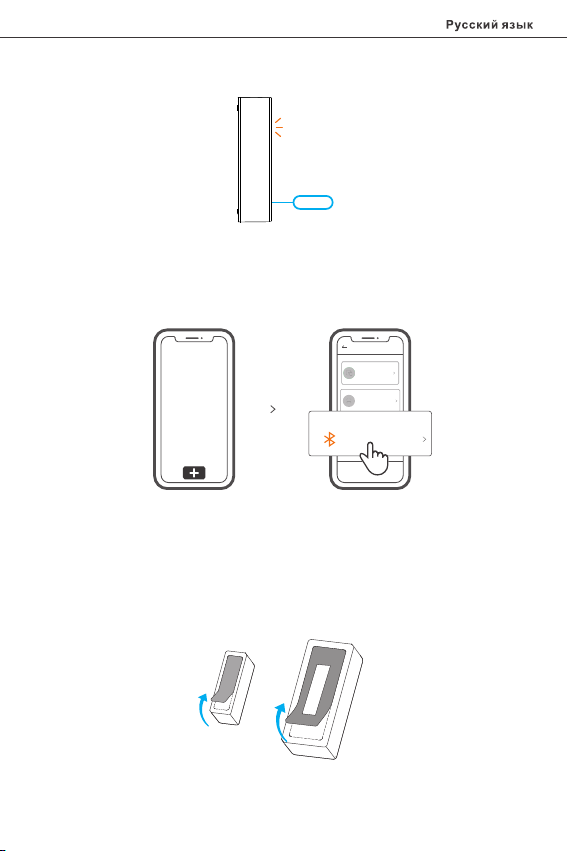
3.Вход в ре жим связыв ани я уст ройств
Вып олняй те долг ое нажати е на пе редат чике в течени е 5 с кно пка соп ряжен ия
выт алкив ающей шпи лько й, пока н е нач нет ми гат ь све тодио дный инд ика тор.
Пос ле этог о устр ойств о перех одит в режи м связыван ия устр ойств .
4. Добавить устрой ств о
Add Devic e
Quick Pai ring
WIFI devices can be a dded in t his mo
de(make sure the de vice is i n pairi ng
mode).
Scan QR co de
GSM devices and dev ices w ith QR co
de can be added in thi s mode.
Blue tooth Pa iring
Availa ble for b lueto oth
conne ction .
Кос нитес ь «+» и в ыбер ите «Со едине ние Blu etoot h», зат ем выполн яйте де йст вия
пос ле появ ления п одска зки в при ложении.
Установите устройство
1. О торви те защит ную пл енку н аклей ки 3M.
32
Page 34
SON OFF T ECH NOL OGI ES CO ., LTD.
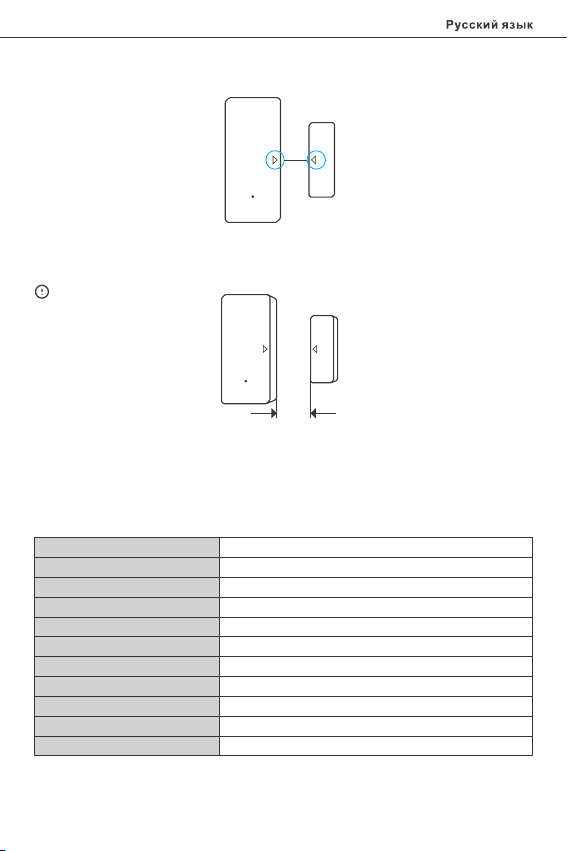
2. Во время установки попытайтесь совместить линию отметки на магните с линией
на передатчике.
3. У станавл ивайт е их в обл асти о ткр ытия и за кры тия отдел ьно.
<5mm
за зор при уст ано вке дол жен б ыть мен ее 5 мм , когд а зак рыта дверь или о кно .
Технические характеристики
Мод ель
Мод ель бат арейк и
Раб очее на пряжен ие
Ток в ра бочей то чке
Ток эм иссии
Ста ндарт W i-Fi
Опе рацио нные си стемы
Уст ановоч ный заз ор
Раб очая те мпера тура
Мат ериал ы
Раз меры
DW2 -Wi-Fi
AAA 1 ,5 V
3 В постоянного тока (2 батарейк и x 1,5 В)
≤40u A
≤15m A
IEE E 802.1 1 b 2.4GH z
And roid & iO S
<5 мм
-10℃~40℃
PC
Пер едатч ик: 70x 31x19 м м Магни т: 42x1 4x16 мм
33
Page 35
SON OFF T ECH NOL OGI ES CO ., LTD.
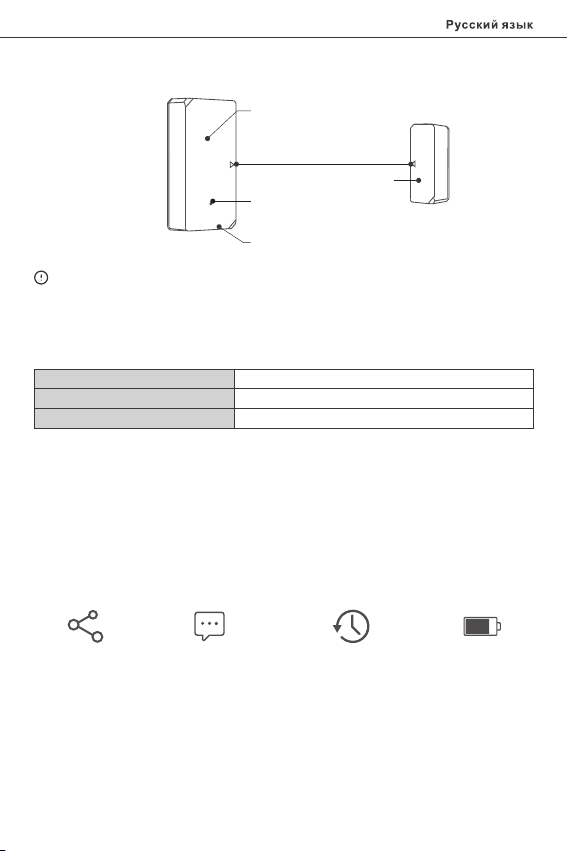
Знакомство с изделием
Све тодио дный инд икато р
Сов мести те лини и отмет ки
Маг нит
Кно пка соп ряжен ия
Пер едатч ик
Вес устр ойства составляе т менее 1 kg.
Рекомендуется устанавл ивать устройство на высоте менее 2 м.
Инструкция режима светодиодного индикатора
Миг ание
Быс трое ми гание о дин раз
Быс трое ми гание д ва раза
реж им сопр яжени я Bluet ooth
Сбо й подкл ючени я к маршр утиза тору
Сбо й подкл ючени я к серве ру
Функции
DW2-Wi- Fi — это Wi-Fi бе спр ово дно й д атчик дв ери/ок на, кото рый вызыв ает
сраба тыв ани е пе ред атч ика пос ред ств ом отдал ения магнит а от пере дат чик а
бо ле е ч ем н а 2 0 м м. за те м пе ре да тчи к о тп рав ит тр евожно е с ообщ ен ие и
переда ст его в приложение. Также вы можете совмест но использ овать устр ойство
с чле нами свое й семь и, что бы вместе прове рять состояни е двер и/окн а.
Дос туп д/у правл . Трев ожное уд аленн ое
уве домле ние
Арх ивные з аписи
исп ользо вания
34
Уро вень за ряда
бат ареек
Page 36
SON OFF T ECH NOL OGI ES CO ., LTD.
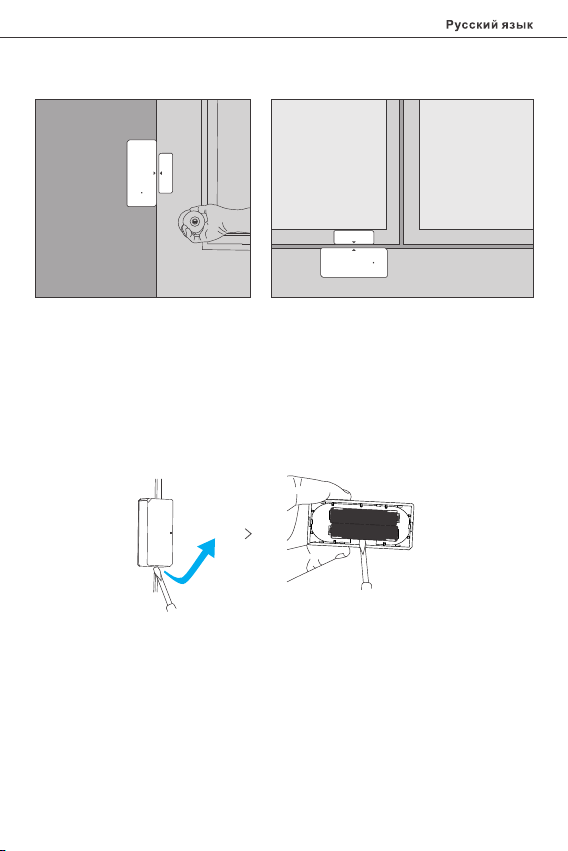
Применение
две ри
При мечан ие:
● Не ус танав ливай те снар ужи двери /окна .
● Не ус танав ливай те в неус тойчиво м положе нии или в м есте, п одвер женн ом
воз дейст вию дож дя либо вла ги.
● Не ус танав ливай те побл изо сти от п ровод ки или пр едм ета, обла даю щего
маг нитны ми свой ствам и.
окн а
Замена батареек
35
Page 37

SON OFF T ECH NOL OGI ES CO ., LTD.
FCC Warn ing
FCC Warning
Ch ang es o r mo difications not expressly approve d by th e pa rty re spo nsi ble fo r
com plian ce coul d avoid t he user ’s authori ty to operate the equi pment .
This device complies with part 15 of the FCC Rules. Operation is subject to the following
tw o con dit ions: ( 1) Th is devi ce may n ot ca use harmf ul inte rfe renc e, and ( 2) this
device must accept any interferenc e received, including interf erenc e that may cause
und esired operation.
FCC R adiatio n Expos ure Sta tement:
This equipment complies with FCC radiation exposure limits set forth for an uncontrolled
en vironment. Th is e qui pme nt should be in sta lle d and oper ate d with minimum
di sta nce 20c m between th e rad iat or & your b ody. This tr ans mit ter must no t be
co-located or operating in conjunction wit h any other a ntenna or transmitter.
Not e:
This equi pment ha s been te ste d and fou nd to com ply with the limi ts for a Clas s B
di gital devi ce, pur suant t o par t 15 o f the FCC Ru les. Th ese li mits are de signed to
provide reasonable protection against harmful interference in a residential installation.
Thi s equipment generates, use s and can radiate radio f requency energy and, if not
installed and used in accordance with the instructions, may cause harmful interference
to ra dio communication s. However, there is no gu aran tee that interferen ce will not
occ ur in a par ticular instal lation. If this equipment does c ause ha rmful int erference
to radio or television recept ion, wh ich can be deter mined by turning the equipm ent
off and on , the user is enc oura ged to try to cor rect the i nterferen ce by on e or m ore
of th e following mea sures:
— Reo rient o r relocate the receiving an tenna .
— Inc rease the separation betw een the e quipment and recei ver.
— Con nect th e equip ment in to an out let on a ci rcuit different from that to which t he
receiver is co nnect ed.
— Con sult th e deale r or an experience d radio/TV techn ician for help .
36
Page 38

Hereby, Sh enzhe n Sonoff Technolog ies Co. , Ltd. de clares that the radio equip ment
typ e DW2-Wi-Fi is in co mplia nce wit h Directive 2014 /53/E U.The full text of the EU
dec laration of conf ormit y is avai lable a t the fol lowing interne t address:
https ://so noff.t ech/u serma nuals
TX Fr equency :
WiF i: 2412 -2472 MHz
RX Fr equency :
WiF i: 2412 -2472 MHz
BLE F reque ncy:240 2-248 0MHz
WiF i Outpu t Power : 12.62dB m(802 .11b)
BLE O utput P ower: 1.9dBm/M HZ
Shenzhen Sonoff Tech nologies Co., Ltd.
1001, BLDG8, Lia nhua I ndustr ial Par k, shenzhen , GD, Ch ina
ZIP code: 5 1800 0 Webs ite: son off.t ech
MADE IN CHINA
 Loading...