

Page 1
Reference Guide
Professional
Foot / Inch / Fraction
Calculator
SONIN INC.
Phone: 800-223-7511 Website: www.sonin.com
© 2003 Sonin Inc. All Rights Reserved
Printed in China 110-1400-0070 Rev.2
InchMate®+
Model DT110
InchMate®+
Introduction ............................................... 2
Getting Started ......................................... 3
Key Pad Information
General Purpose Keys .............................. 5
Dimension Keys ........................................ 7
Triangle Keys ............................................. 8
Example Problems
Working In Inches & Fractions ................. 10
Normal Calculator Use ............................. 11
Carpentry - Rough Opening .................... 12
Carpentry - Rafter Length ........................ 13
Carpentry - Stair Risers ........................... 14
Carpentry - Board Cutting ........................16
Carpentry - Joist Numbers .......................17
Roof Rise ................................................ 18
Roof Slope - Given Rise & Run .............. 19
Squaring a Foundation ........................... 20
Masonry - Brick Coursing ........................ 21
Area of a Bearing Plate ........................... 22
Area of a Circle ....................................... 23
Area of a Rectangle ................................ 24
Area of a Square ..................................... 25
Matting a Picture ..................................... 26
Converting Dimensions ........................... 27
Reference
Chaining ................................................... 28
Rounding ................................................. 29
Error / Overflow ........................................ 30
Care and Batteries ................................... 31
Appendix
Conversions ............................................. 32
Area Formulas ......................................... 33
Volume Formulas ..................................... 34
Lumber Sizes ........................................... 35
FCC Statement & Warranty ..................... 36
CONTENTS
- 1 -
INTRODUCTION
- 2 -
If you build or design things you know the
importance of working with accurate dimensions.
The most frustrating and costly construction
headaches can usually be traced to dimensional
errors.
INCHMATE+ is a calculator for people who work
with dimensions. The simple measurements
Foot-Inch-Fraction (or fif) you make with rulers
and tape measures become difficult and tedious
when you try to add and subtract them ... let alone
multiply and divide.
INCHMATE+ calculates these dimensions
automatically.
INCHMATE+ was designed to be incredibly easy
to use. It has a patented "self-prompting" system
leading you through the process of entering Foot-
inch-Fraction (or fif) dimensions.
INCHMATE+ accepts inputs to 1/16"... the practical
limit of accuracy for common building and design
projects.
Page 2
- 3 -
GETTING STARTED
If you are familiar with simple hand-held
calculators, the INCHMATE+ keyboard looks
similar, with one exception: the 6 gray and green
keys are used to enter dimensions of Foot-inch-
Fraction (or fif). Detailed functional definitions
for these and other keys are found on pages 5 -
9. However, the best way to get to know your
INCHMATE+ is to start off by solving a simple
dimensioning Problem.
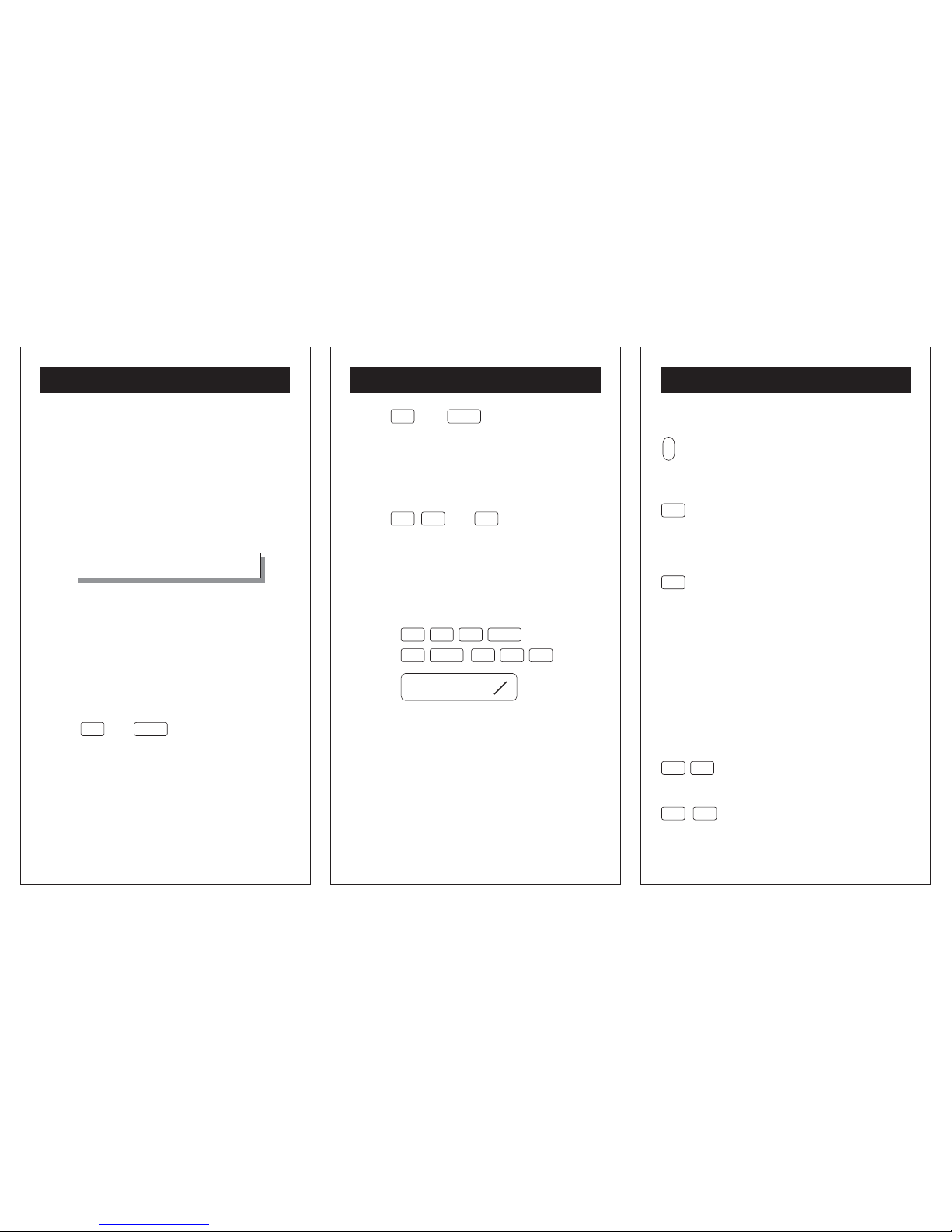
2'- 9 11/16" + 17'- 5 3/4" = ??
Turn INCHMATE+ on with the switch located to
the right of the label. The mode indicator in the
upper left corner of the display indicates it's in the
Foot-Inch-Fraction mode.
The blinking "FT" is prompting you to enter the
number of FEET in the first dimension.
Press:
2 and
ENTER
to move to the INCH
field.
The display shows the number of FEET and the
blinking "IN" is prompting you to enter INCHES:
- 4 -
GETTING STARTED
Press: 9 and
ENTER
to move to the
NUMERATOR field.
Now both the FOOT and INCH digits are showing
in the display, and the numerator (upper half) of
the FRACTION is blinking:
Press:
1 1
and
/ 16
to complete the
entry.
The first dimension, 2'- 9 11/16", now appears in
the display, just as you would write it. The function
and second dimension are entered in the same
left-to-right order, beginning with the function sign:
Press:
Answer:
1
1 7
ENTER
5
35 / 4
ENTER
7
16
20- 3
' ''
- 5 -
KEY PAD INFORMATION
GENERAL PURPOSE KEYS
on
off
Turns calculator ON and OFF. To save
the battery, calculator will turn off
automatically after about 5 minutes
of non use.
CE
C
Pressing this key once clears the
current entry. Pressing it twice clears
display to "0". Memory register is not
affected.
STO
Stores the value displayed to the
memory register, where it remains
until another value is stored.
"MEMORY" label on the display
signals a value is in the memory
register. Values stay in memory even
after calculator is turned off. To clear
memory label store "0" into memory.
Note: The [STO] function is not
available for Number mode
calculations.
2nd
FN
STO
RCL
Recalls to the display the value stored
in memory register, without clearing
that value.
0 9
to
Enters the numbers 0 thru 9 into the
display.
Page 3
- 6 -
KEY PAD INFORMATION
1 2
3 4
Performs arithmetic operation the
display "blinks" to confirm the key
press.
5
Completes all previously entered
arithmetic operations and displays
the result. See page 21 for the use
of this key with constants.
·
Enters a decimal point when in the
df, m or number mode.
2nd
FN
Activates the "2nd function" of
designated keys. Display blinks after
press until a "2nd function" key is
pressed. Press again to stop blinking.
5
X
2
2nd
FN
Calculates the square of the value
displayed. A fif or if display will
automatically change to df when
squared.
2nd
FN
C
X
%&
Calculates the square root of the value
displayed. A fif or if display will
automatically change to df when the
square root is taken.
- 7 -
KEY PAD INFORMATION
DIMENSION KEYS
fifdfm
modes
Converts between Foot-Inch-
Fraction (fif), Decimal Feet (df) and
Meters (m). The small labels at the
top of the display indicate which mode
you're in. Switching modes works in
both directions.
ENTER
When in fif mode, this key ends a
FEET or INCH entry and advances
to the next input position.
/ 2 / 4
/ 8 / 16
When in fif mode, these denominator
keys will complete your FRACTION
entries.
2nd
FN
A
fif if
Changes display format between
Foot-Inch-Fraction (fif) and InchFraction (if). Functional only when
starting in the fif or if modes.
Puts calculator into the number
modes where it works as a normal
calculator (no dimensions) Return to
the fif mode anytime by pressing
fifdfm
modes
again.
2ndFNfifdfm
modes
number mode
- 8 -
KEY PAD INFORMATION
TRIANGLE KEYS
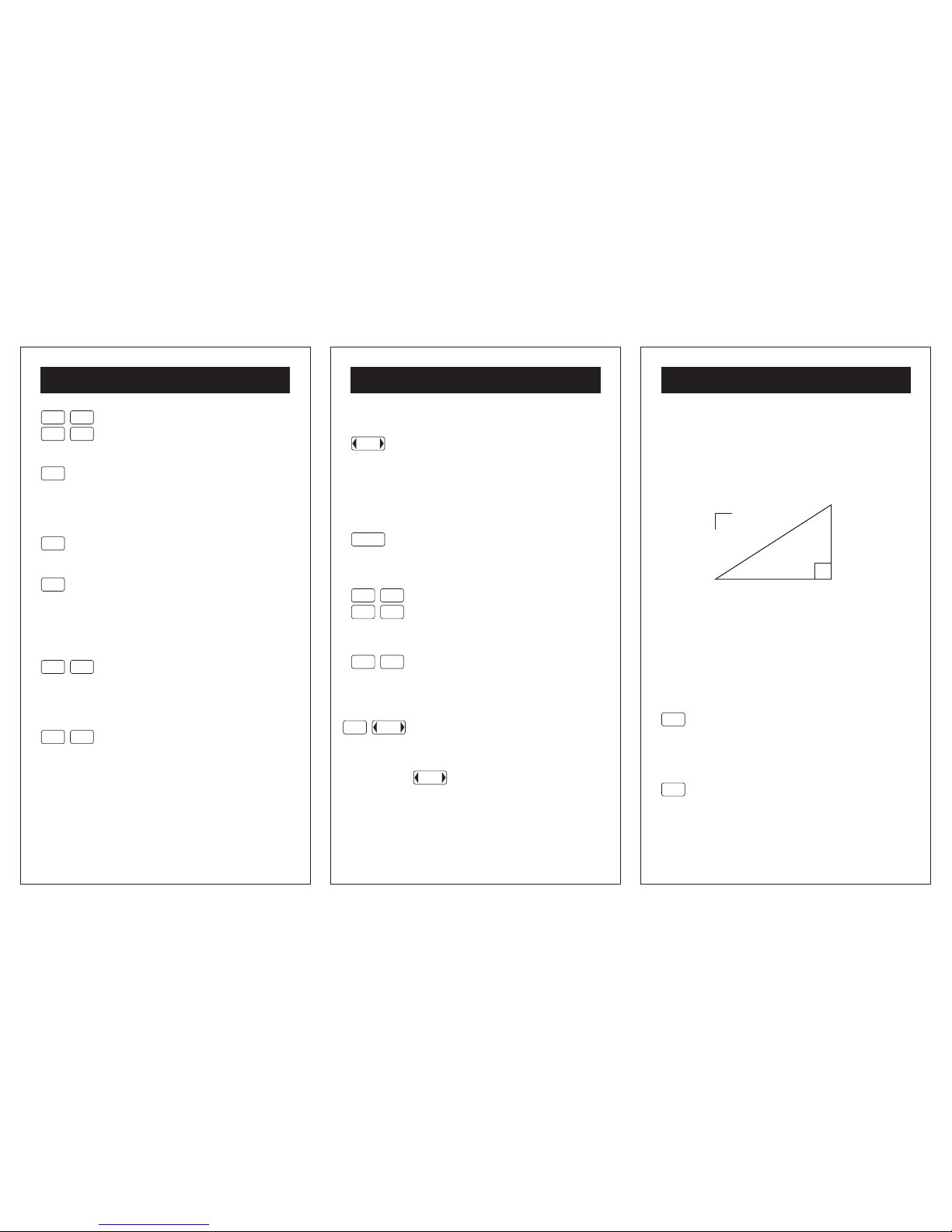
Enter any 2: A, B, C, or S and automatically solve
for the other 2.
C
diagonal
run
A
rise
B
12"
S
S = slope in inches
If any 2 of the above values are entered pressing
A, B, C, or S will display the calculated or stored
value of the key.
The triangle key values are retained in memory
even after INCHMATE+ is turned off.
A
"run" Press keys after an entry or
a calculated result is displayed to
enter that value into "run" memory
or to recall.
B
"rise" Press keys after an entry or
a calculated result is displayed to
enter that value into "rise" memory
or to recall.
Page 4
- 9 -
KEY PAD INFORMATION
C
"diagonal" Press keys after an
entry or a calculated result is
displayed to enter that value into
"diagonal" memory or to recall.
2nd
FN
B
S
"slope" Press keys after an entry
or a calculated result is displayed to
enter that value into "slope" memory
or to recall.
Remember: "slope" is always "rise"
in INCHES over a "run" of 12 inches.
- 10 -
EXAMPLE PROBLEM
WORKING IN INCHES & FRACTIONS
Given a string of dimensions in inches and fractions
find the total.
39 5/8" + 147 3/16" = ??
From the Foot-inch-Fraction mode...
Press:
Note: From now on all entries will be in inches
and fractions.
Press:
Answer:
To return to Foot-inch-Fraction mode
Press:
If there is a value in the display it will toggle
between the fif and if formats.
3
9
ENTER
5 / 8
ENTER
1
1 4 7
5
3 / 16
13
16
186
''
2nd
FN
A
fif if
2nd
FN
A
fif if
- 11 -
EXAMPLE PROBLEM
NORMAL CALCULATOR USE
56.75 x 18 = ??
From any mode ...
Press:
Note: From now on all entries will be non
dimensional.
Press:
Answer:
Return to fif mode anytime by ...
Pressing:
2ndFNfifdfm
modes
number mode
5
·
1
5 6
3
785
1021.5
fifdfm
modes
number mode
Page 5
- 12 -
EXAMPLE PROBLEM
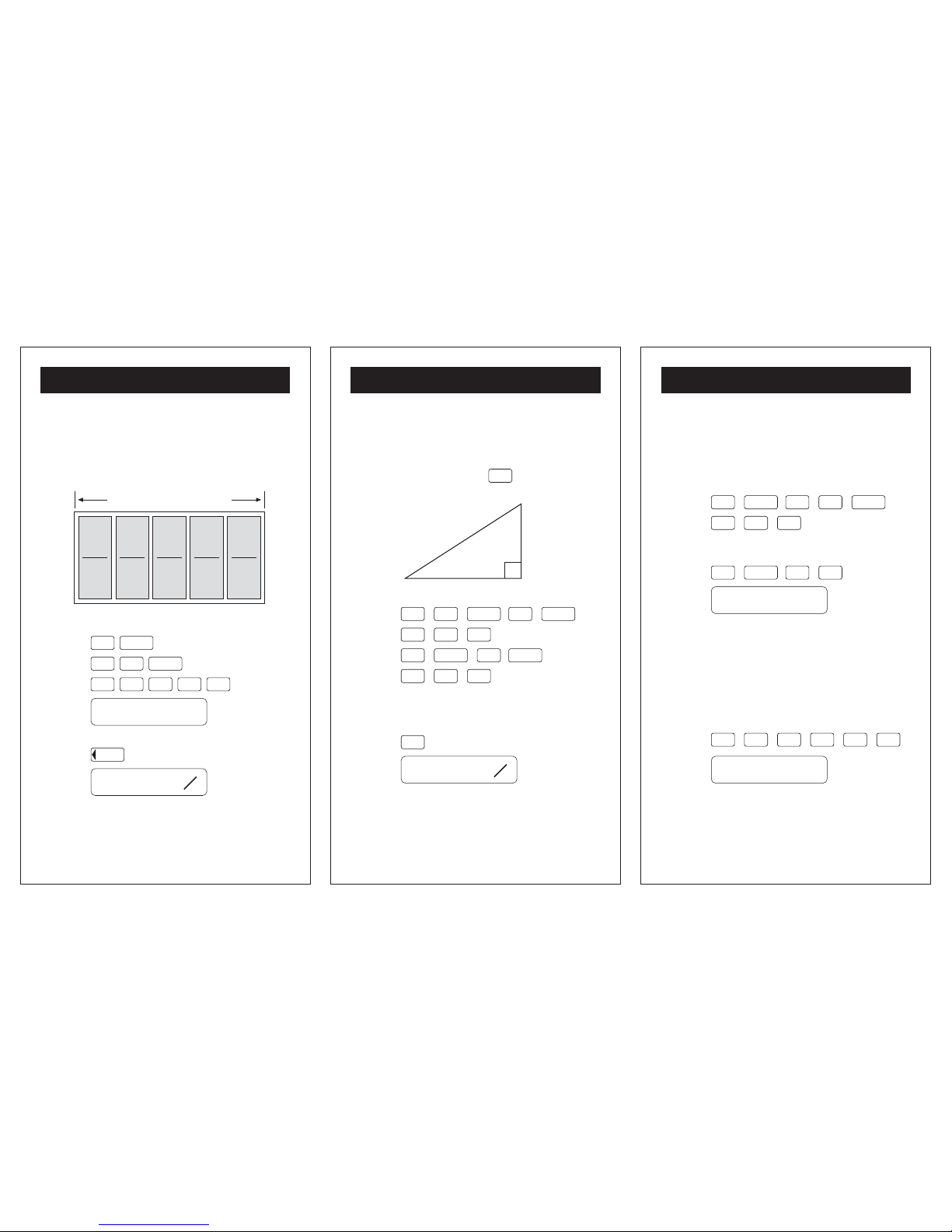
CARPENTRY - ROUGH OPENING
Given 5 windows, each 2'- 11 7/16 wide, find their
overall width if they are placed side-by-side in a
wall.
Press:
Answer:
Press: to see the fif answer
2' 11 7/16" × 5 = ??
1
2
ENTER
1
ENTER
3
7 / 16
5
5
14.765625
'
3
16
14- 9
' ''
fifdfm
modes
- 13 -
EXAMPLE PROBLEM
CARPENTRY - RAFTER LENGTH
Right triangle problems are easy with
INCHMATE+. In this example enter the two known
sides, A and B, and press
C
to automatically
solve for the 3rd side:
Press:
To find the unknown Rafter Length:
Press:
Answer:
Note: Press A, B, C, or S to review the 4 variables
associated with this right triangle.
C = ??
diagonal
run
A = 12' - 2 1/2"
rise
B = 4' - 6 1/4"
2
ENTER
1 2
ENTER
A1 / 2
6
ENTER
4
ENTER
B1 / 4
C
1
4
13- 0
' ''
- 14 -
EXAMPLE PROBLEM
CARPENTRY - STAIR RISERS
Given 8'- 10 3/ 4" for a Floor-to-Floor dimension,
how many risers will be required approximately
8" high? What is the exact height of each riser?
Press:
Remember: Store in memory for later use.
Press:
Answer:
Remember: The answer reads as 13 units (risers)
plus a remainder. If the answer is 13.4 or less
round down to 13 risers.
To find the dimension of each riser you must now
recall the Floor-to-Floor dimension from memory...
Press:
Answer:
13.34375
'
0.6842948
'
ENTER
018
ENTER
STO3 / 4
2nd
FN
1 3
4
STO
RCL
5
5
8
4
ENTER
Page 6
- 15 -
EXAMPLE PROBLEM
Remember: To see the answer in fif you must
convert from Decimal Feet (or df).
Press:
fifdfm
modes
to see the fif answer :
Important: Turn to page 29-30 for help with
possible rounding errors in division problems.
3
16
0- 8
' ''
- 16 -
EXAMPLE PROBLEM
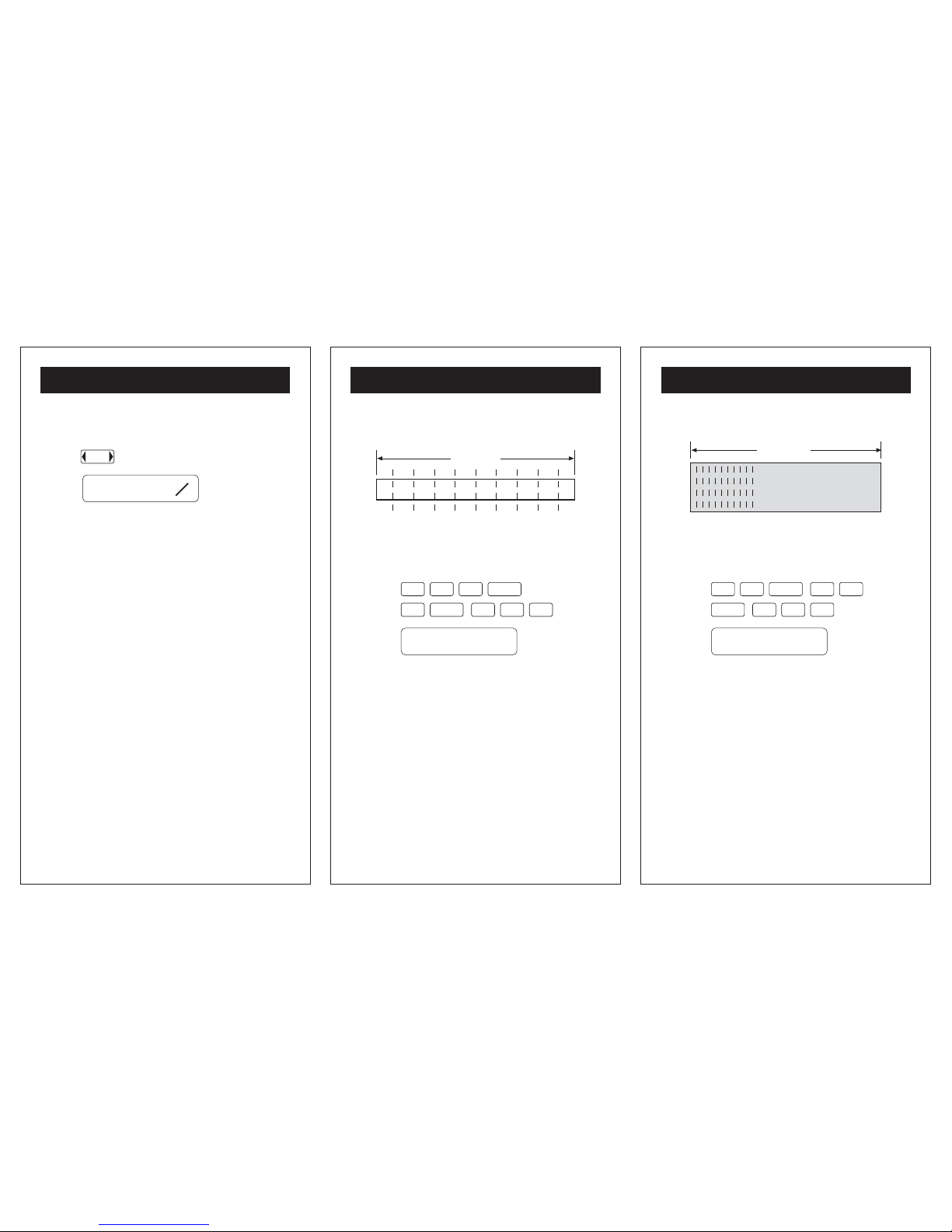
CARPENTRY - BOARD CUTTING
How many 9 1/2" pieces can be cut from a 16'
long 2" x 4".
Press:
Answer:
(Round down to twenty whole pieces.)
16' - 0"
20.210526
'
1 6
9
4
ENTER
5
1 / 2
ENTER
- 17 -
EXAMPLE PROBLEM
32' - 4"
CARPENTRY - JOIST NUMBERS
Find the number of joists on 16" centers needed
for a 32'- 4" long room.
Press:
Answer:
(Add 1 for the end = 25.25 and round up to 26.)
24.25
'
5
1 6
ENTER
23 4
4
ENTER
Page 7
- 18 -
EXAMPLE PROBLEM
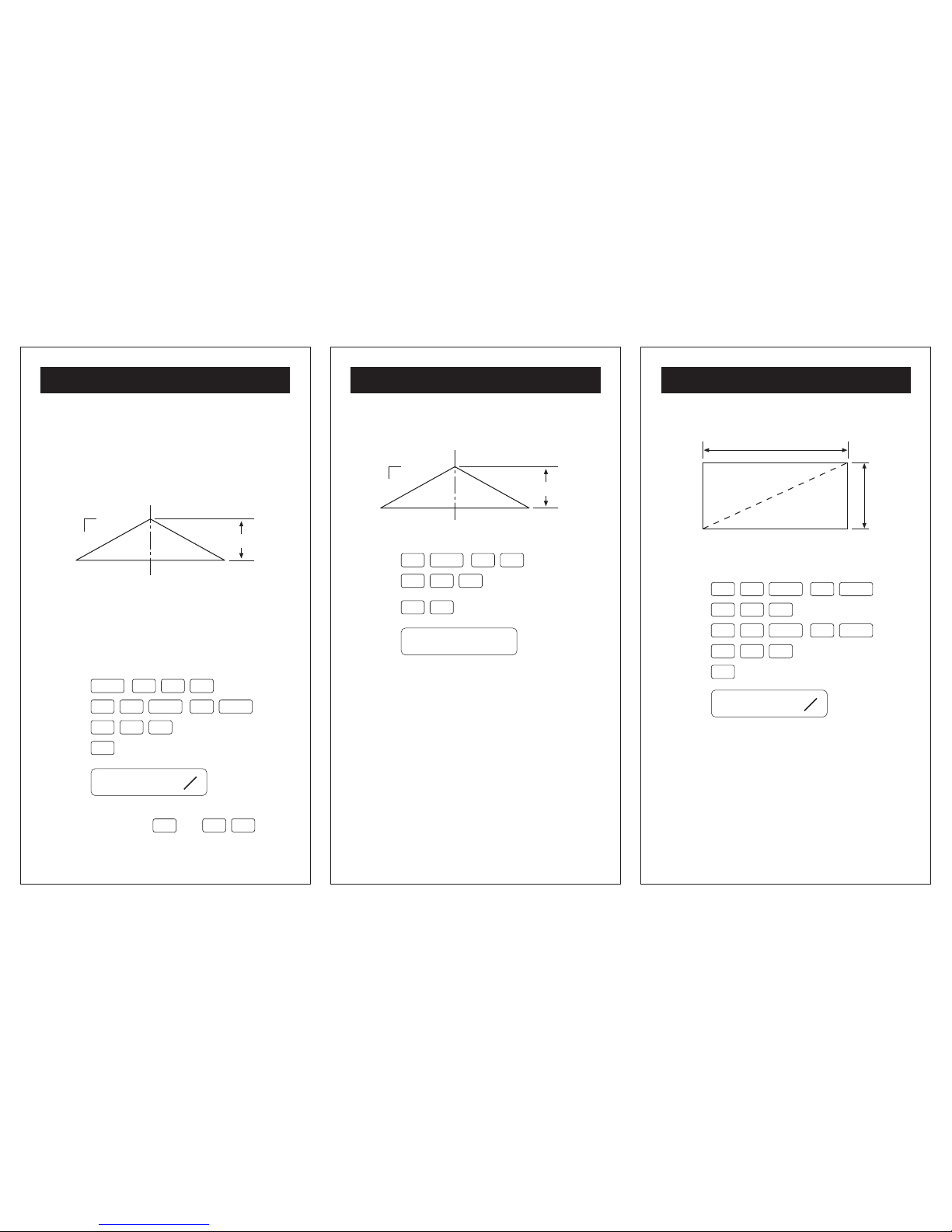
ROOF RISE
This is a useful calculation in determining wall
heights. This example will figure the RISE of a
roof knowing the SLOPE is 4 in 12 and the RUN
is 13'- 2 3/8"
Remember: The SLOPE of a roof equals its RISE
in INCHES over a RUN of 12", thus a 4/12 roof
has a SLOPE of "4".
When using the SLOPE function always enter it
in INCHES.
Press:
Answer:
Note: Inputs may be reviewed by
pressing the or keys.
13
16
4- 4
' ''
rise
A = 13- 2 3/8
B = ??
4
slope
12
run
ENTER
2nd
FN
1 3
4
ENTER
B
S
B
A
2
3 / 8
ENTER
A
2nd
FN
B
S
- 19 -
EXAMPLE PROBLEM
ROOF SLOPE - GIVEN RISE & RUN
Press:
Answer:
Remember: "slope" is always "rise" in INCHES
over a "run" of 12 inches.
4
''
rise
A = 20- 0
B = 6 8
slope = ??
12
run
02
6 B8
A
ENTER
2nd
FN
B
S
- 20 -
EXAMPLE PROBLEMS
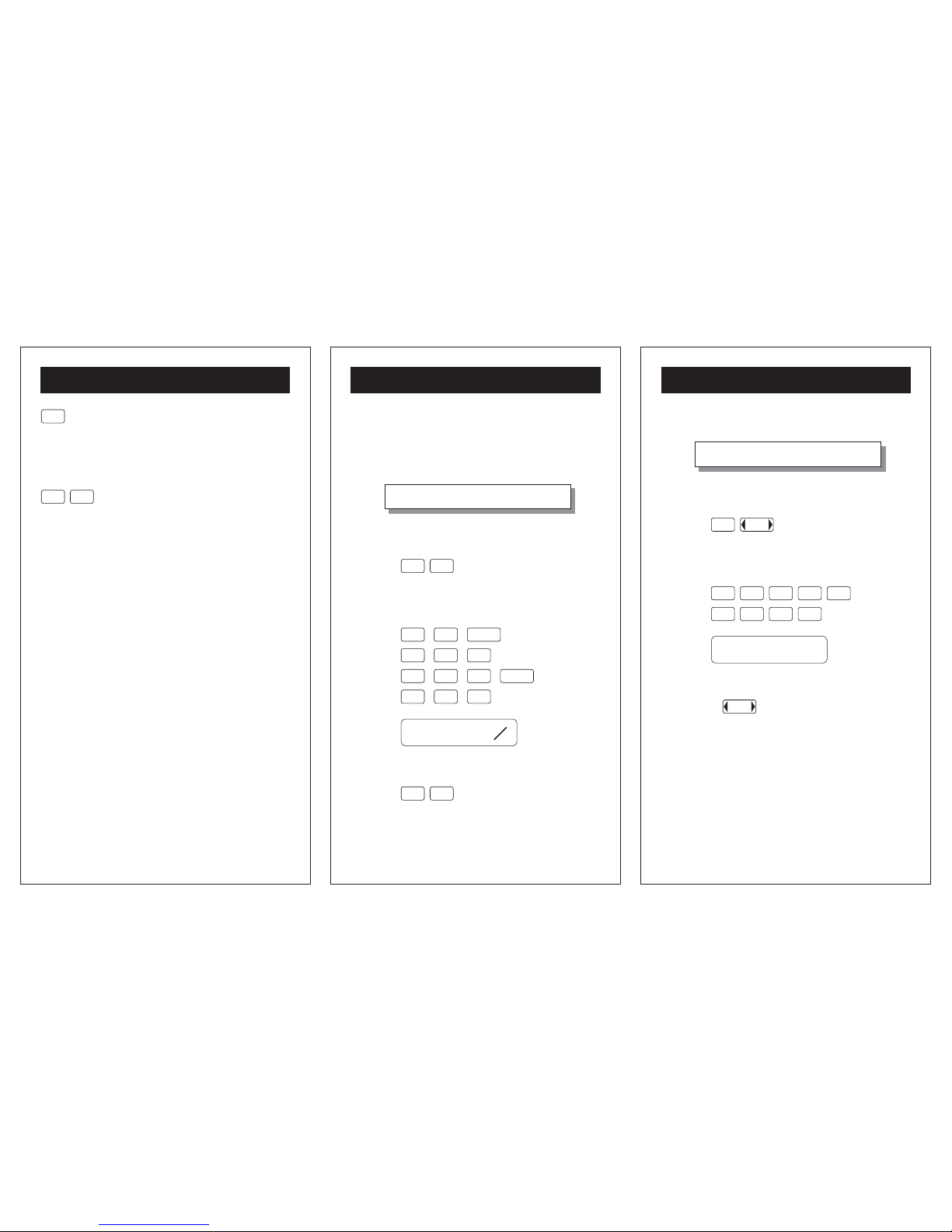
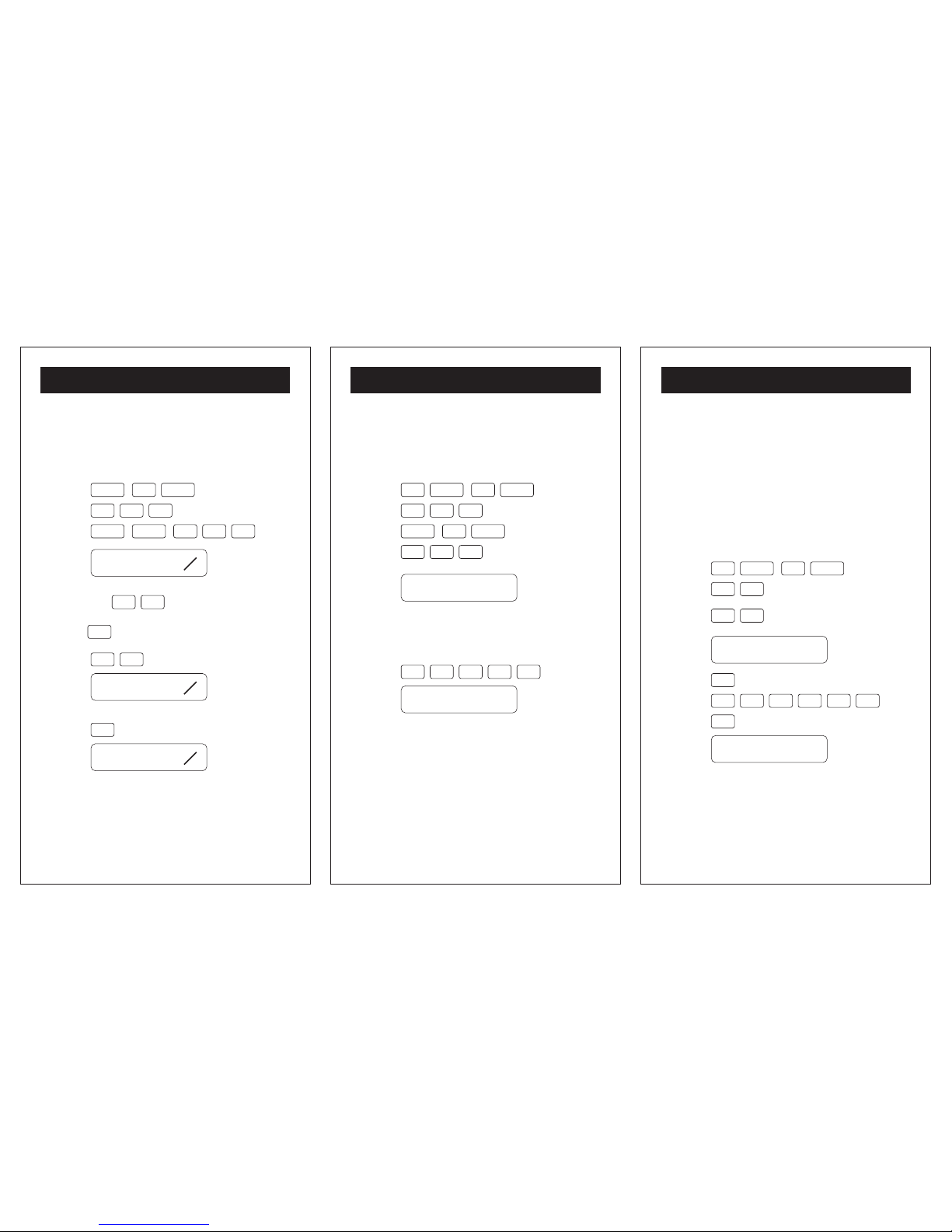
SQUARING A FOUNDATION
Calculate the DIAGONAL of the above rectangle.
Press:
Answer:
The sides will be SQUARE when the DIAGONAL
measures 68'- 6 1/8".
1
8
68- 6
' ''
65' - 8 1/2"
A
19' - 4 3/4"
B
diagonal
C
1
9
A
ENTER
1
56 8
/ 2
ENTER
C
B
ENTER
34/ 4
ENTER
Page 8
- 21 -
EXAMPLE PROBLEMS
MASONRY - BRICK COURSING
Using a standard brick of 2 1/4" and a 3/8 joint,
create a "Coursing Table".
Press:
Answer:
Remember:
1 5
takes the value in the
display and adds it to itself then each successive
press of
5
adds 0'- 2 5/8" to the current total.
Press:
Answer:
Press:
Answer:
This technique can be applied to any repetitive
dimensioning problem, such as studs spaced at
16" on center.
5
8
0- 2
' ''
1
4
0- 5
' ''
7
8
0- 7
' ''
1 5
5
ENTER
1
12/ 4
ENTER
5
ENTER
3 / 8
ENTER
- 22 -
EXAMPLE PROBLEMS
AREA OF A BEARING PLATE
Find the area (in square inches) of a bearing plate
measuring 1'- 2 3/4" x 8 5/8.
Press:
Answer: (Sq. Ft.)
Remember: This answer is expressed in sq. feet.
For sq. inches multiply by 144.
Press:
Answer: (Sq. In.)
0.8834635
'
127.21875
'
ENTER
1 2
33/ 4
ENTER
5
ENTER
5 / 8
ENTER
8
5
41 4
3
- 23 -
EXAMPLE PROBLEMS
AREA OF A CIRCLE
Given a circle with a radius of 7'- 7 7/8" find the
area in square feet.
A = p r
2
p = 3.1416
Note: These formulas are found in the Appendix,
on pages 34 and 35.
Press:
Answer:
Press:
Answer: (Sq. Ft.)
58.618164
'
184.15482
'
7
ENTER
7
ENTER
7 / 8
5
X
2
2nd
FN
5
1 6· 13 4
3
Page 9
- 24 -
EXAMPLE PROBLEMS
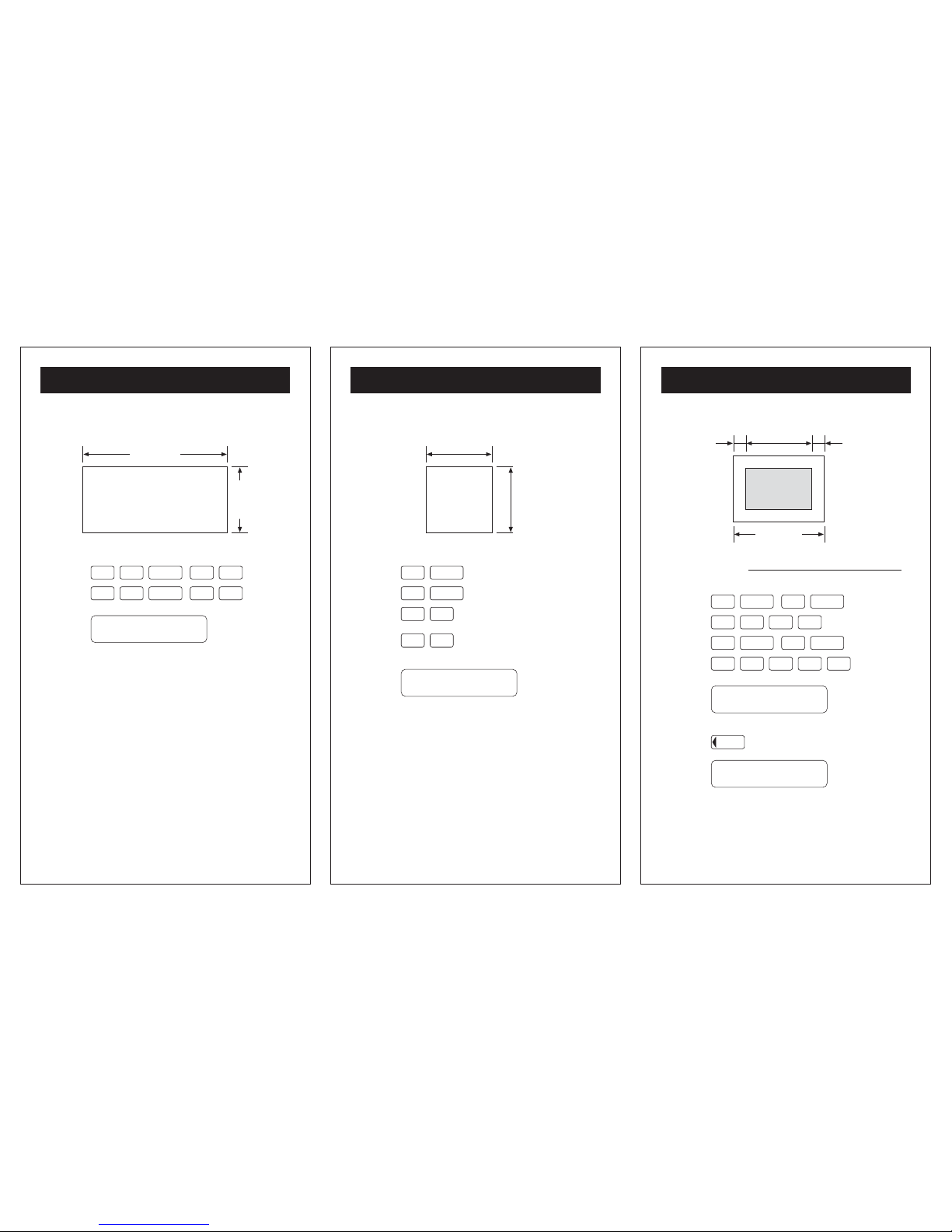
AREA OF A RECTANGLE
Press:
Answer: (Sq. Ft.)
Remember: Areas can only be expressed in
Decimal format, not Foot-Inch-Fraction format.
536.85416
'
29' - 5"
18' - 3"
Area ??
5
ENTER
1
2
3
5
3
8
9
ENTER
- 25 -
EXAMPLE PROBLEMS
AREA OF A SQUARE
Press:
Answer: (Sq. Ft.)
21.294379
'
4' - 7 3/8"
4' - 7 3/8"
Area ??
ENTER
3
4
7
/ 8
ENTER
5
X
2
2nd
FN
- 26 -
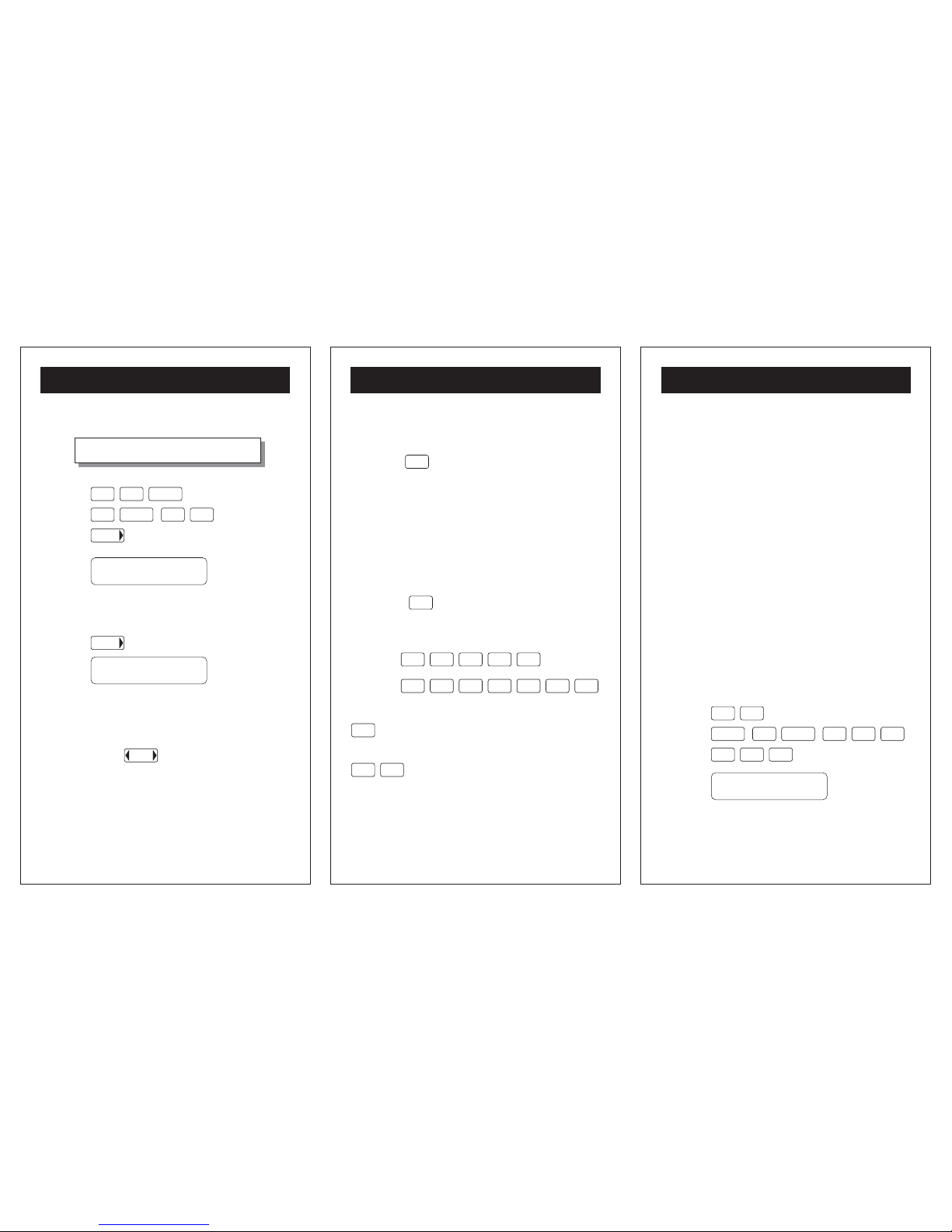
EXAMPLE PROBLEMS
MATTING A PICTURE
Press:
Answer:
Press To see the fif answer
This is the mat space on each side of the picture.
? 1' - 3 5/8" ?
2' - 9 11/16"
frame width
Frame Width - Picture Width
2
MATT WIDTH =
0.7526041
'
0- 9
' ''
fifdfm
modes
2 9
ENTER ENTER
11
2
/ 16
5
ENTER
1
2
3
54/ 8
ENTER
Page 10
- 27 -
EXAMPLE PROBLEMS
CONVERTING DIMENSIONS
Press:
Answer: (Dec. Ft.)
To convert the original dimension to Meters ...
Press:
Answer: (Meters)
Remember: The label at the top of the display
tells you what dimension mode you are working
in. You may switch modes in either direction by
depressing the
fifdfm
modes
button as the arrows
indicate.
21'- 7 3/16" = ?? Decimal Feet
21.598958
'
6.5833625
fifdfm
modes
ENTER
12
37 / 16
ENTER
fifdfm
modes
- 28 -
REFERENCE
CHAINING
INCHMATE+ utilizes chaining logic allowing you
to carry out successive intermediate operations
using the 5 key to finalize operations.
Since the chaining logic works from left to right,
you must use care when combining operations
such as addition and multiplication by first
addressing operations within brackets.
Example: 1 + 2 x 3 + 4 = 13
Enter the values and operators as they are written
and press
5
to get the answer.
Example: (1 + 2) x (3 + 4) = 21
Press:
Press:
STO
Puts current display into memory.
2nd
FN
STO
RCL
Can be used anytime in the midst of
a chain operation and acts like a
typical numerical entry.
5
STO
1
1 2
3 4
31
STO
RCL
5
2nd
FN
- 29 -
REFERENCE
ROUNDING
INCHMATE+ rounds Foot-Inch-Fraction answers
to the nearest 1/16" in the display, but an accurate
decimal value is always contained in the internal
memory.
In DIVISION problems, an error of up to 1/32"
may be contained in answers if the numerator is
not exactly divisible by 1/16". If you use such an
answer repetitively, as in a stair riser calculation,
this rounding error could accumulate into a larger
error. There is an easy way to check if this is
occurring...
Example: In the STAIR RISER problem found on
page 14-15, a floor-to-floor height of 8'- 10 3 /4"
is divided by 13 risers, displaying a riser height
of 8 3/16 ". To check for an error in this answer,
first clear the calculator. Then enter 8 3/16" and
multiply it by 13 risers...
Press:
Answer:
8.8697916
'
CE
C
CE
C
ENTER ENTER
8
5
1
33/ 16
3
Page 11
- 30 -
REFERENCE
Since this result is 5/16" less than the original 8'10 3/4", YOU must lay out each riser a hair more
than 8 3/16.
Remember: Only calculations using the DIVISION
function can produce an error. The error will never
exceed 1/32", so you only need to check the result
of such calculations if you intend to multiply it by
a large enough number to accumulate a significant
error.
ERROR / OVERFLOW
An error/overflow condition occurs when the result
of a calculation has more than 8 digits to the left
of the decimal point, or when you attempt to divide
a value by zero.
An error/overflow condition is indicated by the
"ERROR" label in the upper right corner of the
display. You must clear the calculator display by
pressing the
CE
C
key twice before continuing
operations. Clearing an error/overflow condition
will not clear values stored in the memory registers.
CARE
Don't leave calculator in direct sunlight for long
periods, or store it where excessive temperatures
are possible.
- 31 -
REFERENCE
Don't leave the calculator on when not in use.
(NOTE - To save the battery, calculator will turn
off automatically after about 5 minutes of non
use.)
BATTERIES
This unit requires one 3V lithium battery (CR2016
or equivalent) The average battery operating life
is 1000 hours. When the display slows down
and/or becomes dim, it is time for a new battery.
To change batteries:
1. Turn power off.
2. Remove screw from battery lid.
3. Before removing battery, be sure to touch a
metal object. This is to avoid any accidental
discharge of static electricity, which may harm
the circuit board.
4. Install new battery with the (+) side up.
RESETTING YOUR CALCULATOR
To reset your calculator, turn unit over and see
RESET. Press with point of ball point pen. You
calculator is now reset.
NOTE: RESETTING YOUR CALCULATOR WILL
ERASE ANYTHING IN MEMORY.
- 32 -
APPENDIX
CONVERSION TABLES
1 square inch = 6.4515 sq centimeters
1 square foot = 144 square inches
1 square foot = 0.92903 sq meters
1 square yard = 9 square feet
1 square yard = 0.836127 sq meters
1 cubic inch = 16.3871 cu centimeters
1 cubic foot = 1728 cubic inches
1 cubic foot = 0.02831 cu meters
1 cubic yard = 27 cubic feet
1 cubic yard = 0.76455 cu meters
1 mile = 5,280 feet
1 mile = 1.609344 kilometers
1 acre = 43,560 square feet
1 ounce = 28.349532 grams
1 pound = 0.4535924 kilograms
1 (U.S.) gallon = 3.7854118 liters
1 (U.K.) gallon = 4.546090 liters
1 fluid ounce = 29.574 milliliters
Fahrenheit = 9/5 (C) + 32
Centigrade = 5/9 (F - 32)
pi (p) = 3.141593
Page 12
- 33 -
APPENDIX
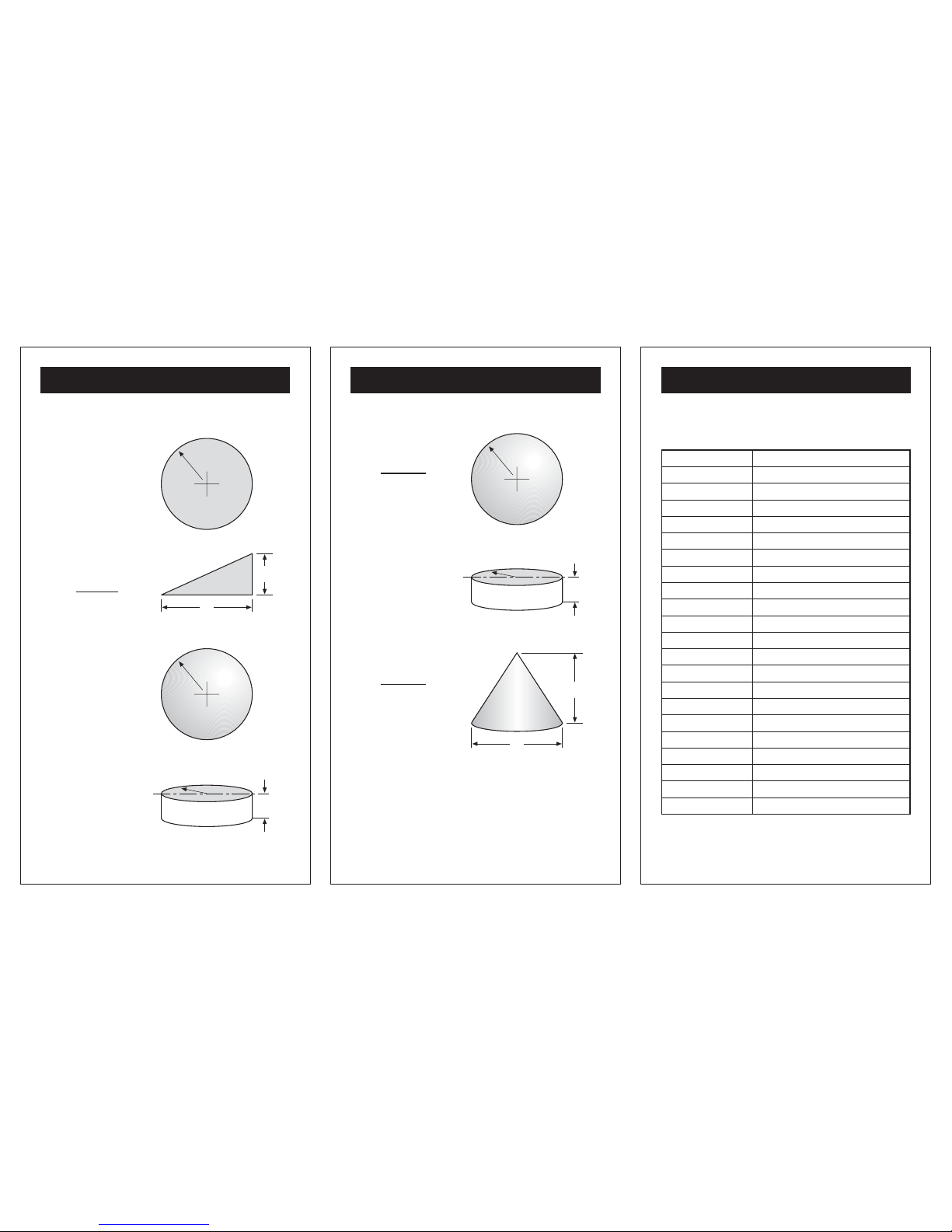
AREA FORMULAS
Circle
Triangle
Sphere
Cylinder
ab
2
r
a
b
r
I
r
p r
2
4p r
2
2p r(r+I)
- 34 -
APPENDIX
VOLUME FORMULAS
Sphere
Cylinder
Cone
4p r
3
3
p b2 a
12
r
I
a
b
r
p r2I
- 35 -
APPENDIX
LUMBER SIZES
Normal Size Actual Size (S4S)
1" x 2" 3/4" x 1 1/2"
1" x 3" 3/4" x 2 1/2"
1" x 4" 3/4" x 3 1/2"
1" x 6" 3/4" x 5 1/2"
1" x 8" 3/4" x 7 1/4"
1" x 10" 3/4" x 9 1/4"
1" x 12" 3/4" x 11 1/4"
2" x 2" 1 1/2" x 1 1/2"
2" x 3" 1 1/2" x 2 1/2"
2" x 4" 1 1/2" x 3 1/2"
2" x 6" 1 1/2" x 5 1/2"
2" x 8" 1 1/2" x 7 1/4"
2" x 10" 1 1/2" x 9 1/4"
2" x 12" 1 1/2" x 11 1/4"
4" x 4" 3 1/2" x 3 1/2"
4" x 6" 3 1/2" x 5 1/2"
4" x 8" 3 1/2" x 7 1/4"
4" x 10" 3 1/2" x 9 1/4"
4" x 12" 3 1/2" x 11 1/2"
Page 13
- 37 -
CUSTOMER SERVICE
- 36 -
APPENDIX
FCC STATEMENT
This device has been tested and found to comply
with the limits for a Class B device, pursuant to
part 15 of the FCC Rules. These limits are
designed to provide reasonable protection against
harmful interference in a residential installation.
This device generates, uses and can radiate radio
frequency energy and, if not used in accordance
with the instructions, may cause harmful
interference to radio communications. However,
there is no guarantee that interference will not
occur in a particular installation. If this equipment
does cause harmful interference to radio or
television reception, which can be determined by
turning the device off and on, the user is
encouraged to try to correct the interference by
one or more of the following measures:
- Reorient or relocate the receiving antenna
- Increase separation between the device and
receiver
TECHNICAL ASSISTANCE
If you have any questions or need technical
assistance, e-mail to:
CUSTOMER SERVICE
SONIN takes pride in offering unmatched customer
service to owners of SONIN products. If you have
any questions or would like additional information,
please call:
or e-mail to:
1 - 800 - 223 - 7511 (USA)
 Loading...