

Page 1

Sonance SONAMP 875 Crestron Module V2
Application Guide
Description
This module allows a Sonance SONAMP 875 amplifier to be controlled by any X-Generation or
2-series Crestron control processor
NOTE: The amplifier must be properly configured to enable RS-232 control. Refer to
the Amplifier’s Instruction Manual for specific instructions. The amplifier’s power
switch must be in the “On” position and the “A.C. On” indicator illuminated for the
amplifier to be controlled or monitored.
Supported Processors
(no compact flash support required)
Any X-Generation or 2-Series Crestron Processor
Page 2

Module Application
It is strongly suggested that you load the supplied demonstration program and touchpanel to
gain an understanding of the application of the module before you attempt to implement the
module in your own program.
This module provides control for four zones (consisting of a total of eight individual
channels) on the Sonance SONAMP 875, including power, mute, BBE and feedback for fault
indication, front panel trim pot levels, and audio and voltage trigger input status.
This module allows you to set the volume and mute for either a zone or channel (a zone is a
left and right pair. For example, Zone 1 is channels 1 and 2, Zone 2 is channels 3 and 4,
etc).
You should use only the zone or channel volume controls for each channel or channel pair on
the amplifier, they should not be used simultaneously. The power for a zone, however, must
be on to control either of the channels that belong to that zone.
Zone Number Channel Number
Zone 1
Zone 2
Zone 3
Zone 4
If a fault is reported, the amplifier’s power feedback will automatically be forced low. You
may attempt to clear the fault by pulsing the [zoneX_power_on] or [zoneX_power_tog]
digital inputs.
It is suggested that you pulse the [poll_all] input once at program startup to determine the
current status of the amplifier, most status changes will be automatically reported by the
amplifier and processed by the module when the module is running.
(Note: Audio and Voltage Triggers are not automatically reported by the amplifier. If you are
utilizing these inputs, it is necessary to periodically poll the amplifier by pulsing either the
[poll_all] digital input to pull all inputs, or alternatively, pulsing the
[zoneX_poll_voltage_trigger] or [zoneX_poll_audio_trigger] inputs. The accuracy of the audio
trigger varies depending on program volume level, content, and the setting of the “Auto On”
trim pot on the amplifier’s front panel.
Channel 1
Channel 2
Channel 3
Channel 4
Channel 5
Channel 6
Channel 7
Channel 8
Page 3
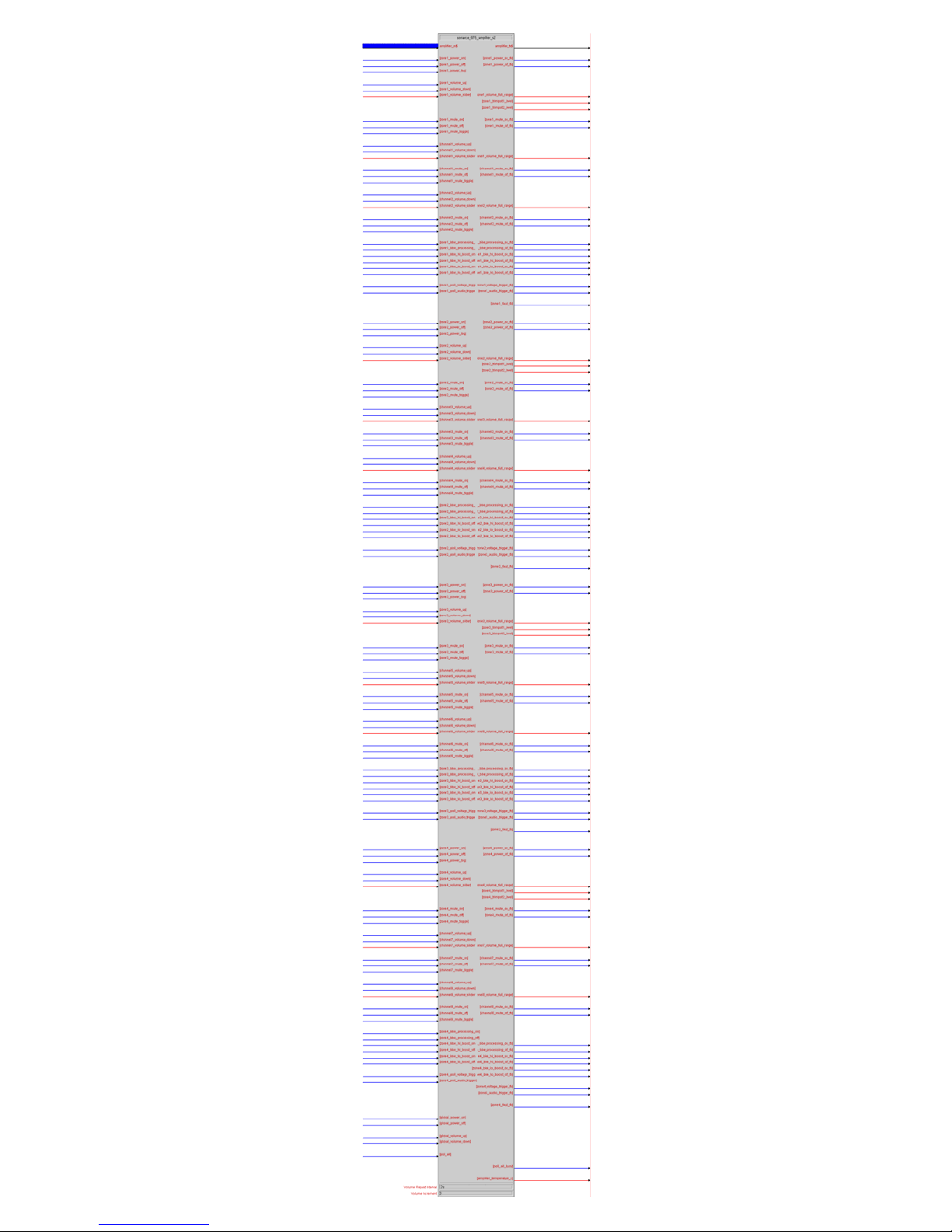
Page 4

Signal & Parameter Descriptions
Note: For any pair of channels, either the Zone or Channel controls may be used, however, you should not use
both controls simultaneously for the same zone (For example use either the Zone 4 Volume and Mute controls
or the Channel 7 and 8 Volume and Mute controls)
DIGITAL INPUTS
[zoneX_power_on].................................................... Pulse to turn the respective amplifier zone (1-4) on.
[zoneX_power_off] ................................................... Pulse to turn the respective amplifier zone (1-4) off.
[zoneX_power_tog]...................................................Pulse to toggle the amplifier zone’s power
[zoneX_volume_up].................................................. Pulse to increment the zone volume by the number of
units specified in Volume Increment; hold high to send
the volume down command repeatedly (speed
controlled by the Volume Repeat Interval parameter)
[zoneX_volume_down].............................................. Pulse to decrement the zone volume; hold high to
send the volume down command repeatedly
[zoneX_mute_on]..................................................... Pulse to activate mute on the respective zone
[zoneX_mute_off]..................................................... Pulse to deactivate mute on the respective zone
[zoneX_mute_toggle]................................................ Pulse to toggle mute on the respective zone
[channelX_volume_up].............................................. Pulse to increment the channel volume by the number
of units specified in Volume Increment; hold high to
send the volume down command repeatedly (speed
controlled by the Volume Repeat Interval parameter).
[channelX_volume_down]..........................................Pulse to decrement the channel volume; hold high to
send the volume down command repeatedly.
[channelX_mute_on]................................................. Pulse to activate mute on the respective channel
[channelX_mute_off] ................................................ Pulse to deactivate mute on the respective channel
[channelX_mute_toggle]............................................ Pulse to toggle mute on the respective channel
[zoneX_bbe_processing_on]....................................... Pulse to turn BBE processing on the respective zone on
[zoneX_bbe_processing_off] ...................................... Pulse to turn BBE processing on the respective zone off
[zoneX_bbe_hi_boost_on] ......................................... Pulse to set high frequency boost on the respective
zone to +9dB
[zoneX_bbe_hi_boost_off] ......................................... Pulse to set high frequency boost on the respective
zone to +6dB
[zoneX_bbe_lo_boost_on]..........................................Pulse to set low frequency boost on the respective
zone to +9dB
[zoneX_bbe_lo_boost_off] ......................................... Pulse to set low frequency boost on the respective
zone to +6dB
[zoneX_poll_voltage_trigger] ..................................... Pulse to poll for the current status of the voltage
trigger on the respective zone
[zoneX_poll_audio_trigger]........................................Pulse to poll for the current status of the audio trigger
on the respective zone
[global_power_on].................................................... Pulse to turn all amplifier channels on
[global_power_off] ................................................... Pulse to turn all amplifier channels off
[global_volume_up].................................................. Pulse to increment the volume in all zones by one unit;
hold high to send the volume up command repeatedly
(speed controlled by the Volume Repeat Interval
parameter)
[global_volume_down]..............................................Pulse to decrement the volume in all zones by one
unit; hold high to send the volume down command
repeatedly (speed controlled by the Volume Repeat
Interval parameter)
[poll_all] ................................................................. Pulse to poll the amplifier for the status of all settings.
Page 5

ANALOG INPUTS
[zoneX_volume_slider].............................................. Full range (0-100%) input to set the volume of the
respective zone on the amplifier
[channelX_volume_slider].......................................... Full range (0-100%) input to set the volume of the
respective channel on the amplifier
SERIAL INPUTS
amplifier_rx$ ...........................................................Tie to the RX$ line of the RS-232 port symbol.
DIGITAL OUTPUTS
[zoneX_power_on_fb] ............................................... High when the respective amplifier zone (1-4) is on.
[zoneX_power_off_fb]............................................... High when the respective amplifier zone (1-4) is off.
[zoneX_mute_on_fb] ................................................ High when the respective amplifier zone is muted*
[zoneX_mute_off_fb] ................................................ High when the respective amplifier zone is not muted*
[channelX_mute_on_fb] ............................................ High when the respective amplifier channel is muted*
[channelX_mute_off_fb]............................................High when the respective amplifier channel is not
muted*
[zoneX_bbe_processing_on_fb] .................................. High when BBE processing is active on the respective
zone
[zoneX_bbe_processing_off_fb].................................. High when BBE processing is not active on the
respective zone
[zoneX_bbe_hi_boost_on_fb]..................................... High when the zone’s high frequency boost is +9dB
[zoneX_bbe_hi_boost_off_fb].....................................High when the zone’s high frequency boost is +6dB
[zoneX_bbe_lo_boost_on_fb].....................................High when the zone’s low frequency boost is +9dB
[zoneX_bbe_lo_boost_off_fb]..................................... High when the zone’s low frequency boost is +6dB
[zoneX_voltage_trigger_fb]........................................ High when the zone’s voltage trigger is active.
[zoneX_audio_trigger_fb] .......................................... High when the zone’s audio trigger is active.
[zoneX_fault_fb].......................................................High when the zone has reported a fault condition.
[poll_all_busy] ......................................................... High when the amplifier is busy polling for all settings
ANALOG OUTPUTS
[zoneX_volume_full_range]........................................Full range (0-100%) output containing the current
volume level of that zone*.
[channelX_volume_full_range] ................................... Full range (0-100%) output containing the current
volume level of that channel*.
[zoneX_trimpot1_level].............................................Full range (0-100%) output containing the current
level of the zone’s trim pot (“L”)
[zoneX_trimpot2_level].............................................Full range (0-100%) output containing the current
level of the zone’s trim pot (“R”)
[amplifier_temperature_c] ......................................... Amplifier’s current reported temperature, in degrees
Celsius
* = When using the zone controls to affect the amplifier’s output, only the zone feedback for those channels
will be updated; when using the channel controls to affect the amplifier’s output, only the channel
feedback for that channel will be updated.
SERIAL OUTPUTS
amplifier_tx$ ........................................................... Tie to TX$ line of RS-232 port symbol
PARAMETERS
Volume Repeat Interval.............................................Amount of time, in seconds, to wait before repeating a
volume up or down command, if held.
Volume Increment .................................................... Number of increments (1-5) to adjust the volume up or
down by on each Volume Repeat Interval
Page 6

Contents
The distribution package for this module should include:
Sonance_875_Amplifier_v2.umc ................................. Crestron User Module for controlling SONAMP 875
amplifier.
Sonance_875_feedback_processor_v2.usp................... SIMPL+ file used within the amplifier module
Sonance_875_feedback_processor_v2.ush................... SIMPL+ header file
Sonance_875D_v2.vtp .............................................. Demo XPanel touchpanel file
Sonance_875_demo_v2.smw ..................................... Demo program for Pro2 processor
Sonance_875_module_v2_Help.pdf.............................This help file
Revision History
V2 lincoln 2006.11.09
Added channel control features; updated help file to reflect the importance of using only zone or channel
controls.
V1 lincoln 2006.06.21
Initial release
Development Environment
Version 1 of this module was developed on the following hardware and software. Different versions of hardware
or software may or may not operate properly. If you have questions, please contact us.
Hardware
Crestron PRO2 Processor ..................................................... v3.155.1143
Crestron TPMC-10 Touchpanel..............................................v1.1.0801
Software
Crestron SIMPL Windows .....................................................Version 2.07.36
Crestron Vision Tools Pro-e ..................................................Version 3.5.1.7
Crestron Database.............................................................. Version 18.2.6
Crestron Symbol Library......................................................Version 396
Crestron Device Library .......................................................Version 396
 Loading...