

Page 1
Water Level Meter: Op Instructions
Model 101B
Printed in Canada
June 22, 2015
(#112205)
For further information contact: Solinst Canada Ltd.
Fax: +1 (905) 873-1992; (800) 516-9081 Tel: +1 (905) 873-2255; (800) 661-2023
35 Todd Road, Georgetown, Ontario Canada L7G 4R8
Web Site: www.solinst.com E-mail: [email protected]
®
Solinst is a registered trademark of Solinst Canada Ltd.
Equipment Check
1. Submerse the probe in tap water to test
the probe. This completes the circuit
and activates the buzzer and light.
Routine Care
1. After the depth to water has been
recorded, the tape should be carefully
rewound onto the reel, the probe
wiped dry and placed into the probe
holder.
2. The probe, tape and reel can be
wiped clean with phosphate free
(non-abrasive) detergent and water.
Do not submerge the reel.
Battery Replacement
• Battery type - alkaline, 9 volt.
1. The battery is housed within the
faceplate of the reel.
2. Using a Phillips screwdriver, remove
the three screws on the faceplate.
3. Carefully remove the faceplate so as
to not unwind the tape.
Replacement Parts
The following parts can be provided should
components become lost or damaged.
1. Splice kits
2. Electronics
3. Faceplate and backplate
4 Tapes
5. Probes
6. Probe holders, brakes, etc.
4. Replace the battery.
5. Carefully place the faceplate back
onto the hub and line up the holes.
Troubleshooting
SYMPTOM CAUSE REMEDY
No sound when probe
immersed in water.
Dead battery. Replace with 9V Alkaline.
Water Conductivity is very low. Try a different Solinst 101 Water Level Meter.
Disconnected wires on circuit
board.
Check all connections inside hub of reel for
loose/disconnected wires - solder or reconnect.
Broken wire in tape. Locate break in tape - splice and seal, or replace.
(Contact Solinst)
Damaged probe. Contact Solinst to obtain parts/repair instructions.
Instrument continuously
sounds after being
immersed in water.
Probe may be dirty which
could interfere with the circuit
connection.
Contact Solinst for instructions to remove, clean
and replace the probe.
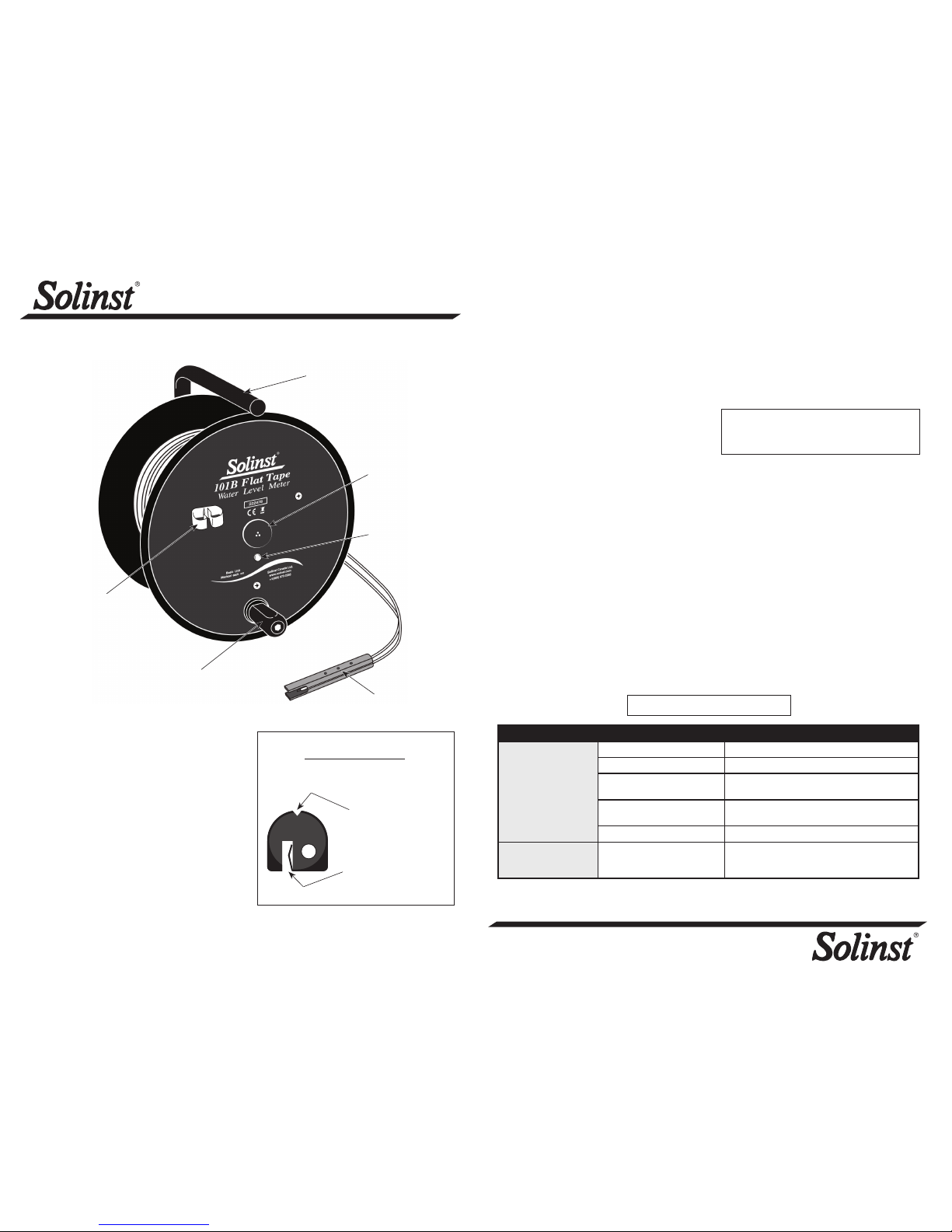
Probe
Holder
Note: Before screwing the faceplate back
onto the hub, make sure no wires are
outside the hub.
6. Once the screws have been tightened
and the faceplate is secure, test the
water level meter.
Water Level Measurements
1. The zero measurement point on the
101B P1 Probe is at the tip of the
conductor pins.
2. Feed the tape into the well. If a tape
guide is used, lay the tape onto the
groove on the top. Measurements will
be read at the point of the V-notch on
the tape guide. Remember to deduct
2/10 ft or 6.0 cm.
3. The light and buzzer activate when the
probe conductor pins enter water. To
ensure accuracy, lower and raise the
probe a few times and then record the
depth measurement from the tape at
the top of the well.
Carry
Handle
LED Light
Winding
Handle
Tape Guide (Optional)
Fit onto well casing
Measurement point
(Deduct 2/10 ft or 6.0 cm)
Sonalert
101B P1
Probe
Page 2
Water Level Meter: Op Instructions
Model 101B
Printed in Canada
June 22, 2015
(#112205)
For further information contact: Solinst Canada Ltd.
Fax: +1 (905) 873-1992; (800) 516-9081 Tel: +1 (905) 873-2255; (800) 661-2023
35 Todd Road, Georgetown, Ontario Canada L7G 4R8
Web Site: www.solinst.com E-mail: [email protected]
®
Solinst is a registered trademark of Solinst Canada Ltd.
Equipment Check
1. Submerse the probe in tap water to test
the probe. This completes the circuit
and activates the buzzer and light.
Routine Care
1. After the depth to water has been
recorded, the tape should be carefully
rewound onto the reel, the probe
wiped dry and placed into the probe
holder.
2. The probe, tape and reel can be
wiped clean with phosphate free
(non-abrasive) detergent and water.
Do not submerge the reel.
Battery Replacement
• Battery type - alkaline, 9 volt.
1. The battery is housed within the
faceplate of the reel.
2. Using a Phillips screwdriver, remove
the three screws on the faceplate.
3. Carefully remove the faceplate so as
to not unwind the tape.
Replacement Parts
The following parts can be provided should
components become lost or damaged.
1. Splice kits
2. Electronics
3. Faceplate and backplate
4 Tapes
5. Probes
6. Probe holders, brakes, etc.
4. Replace the battery.
5. Carefully place the faceplate back
onto the hub and line up the holes.
Troubleshooting
SYMPTOM CAUSE REMEDY
No sound when probe
immersed in water.
Dead battery. Replace with 9V Alkaline.
Water Conductivity is very low. Try a different Solinst 101 Water Level Meter.
Disconnected wires on circuit
board.
Check all connections inside hub of reel for
loose/disconnected wires - solder or reconnect.
Broken wire in tape. Locate break in tape - splice and seal, or replace.
(Contact Solinst)
Damaged probe. Contact Solinst to obtain parts/repair instructions.
Instrument continuously
sounds after being
immersed in water.
Probe may be dirty which
could interfere with the circuit
connection.
Contact Solinst for instructions to remove, clean
and replace the probe.
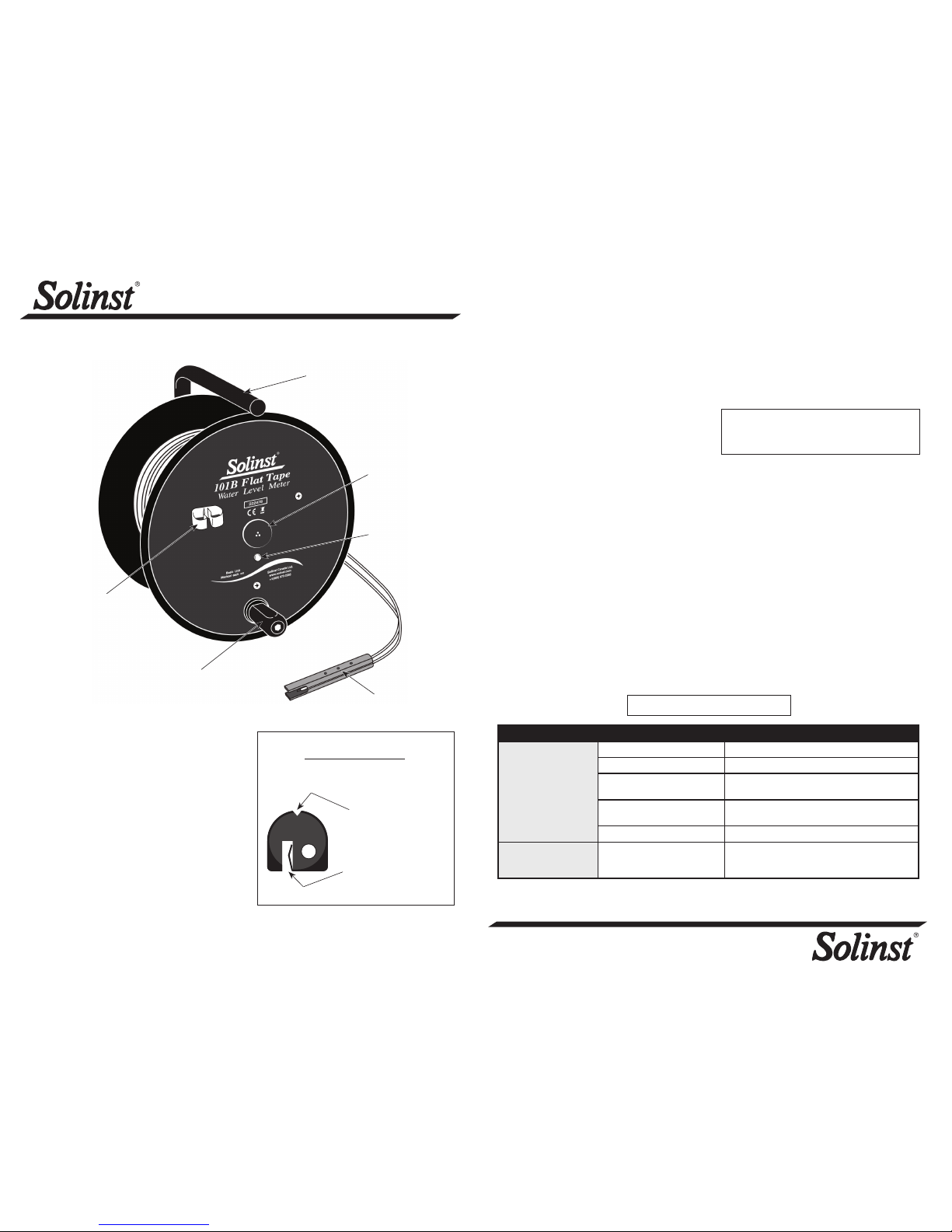
Probe
Holder
Note: Before screwing the faceplate back
onto the hub, make sure no wires are
outside the hub.
6. Once the screws have been tightened
and the faceplate is secure, test the
water level meter.
Water Level Measurements
1. The zero measurement point on the
101B P1 Probe is at the tip of the
conductor pins.
2. Feed the tape into the well. If a tape
guide is used, lay the tape onto the
groove on the top. Measurements will
be read at the point of the V-notch on
the tape guide. Remember to deduct
2/10 ft or 6.0 cm.
3. The light and buzzer activate when the
probe conductor pins enter water. To
ensure accuracy, lower and raise the
probe a few times and then record the
depth measurement from the tape at
the top of the well.
Carry
Handle
LED Light
Winding
Handle
Tape Guide (Optional)
Fit onto well casing
Measurement point
(Deduct 2/10 ft or 6.0 cm)
Sonalert
101B P1
Probe
 Loading...