

Page 1
R o c k K i n g ®
USER MANUAL
SMT Health Systems, Inc.
1380 Legion Road
Detroit Lakes, MN 56501
800-725-7761
www.smths.com
The Rock King® promotes resident satisfaction
and positive outcomes through these unique
features:
Rocking Motion: The Rock King has a unique rocking feature
that provides soothing comfort to the user which often has a
calming effect. The need for restraints may be eliminated or
reduced. Also, wellness is promoted when rocking by maintaining
good posture and by shifting body weight slightly, thereby reducing
seating pressure.
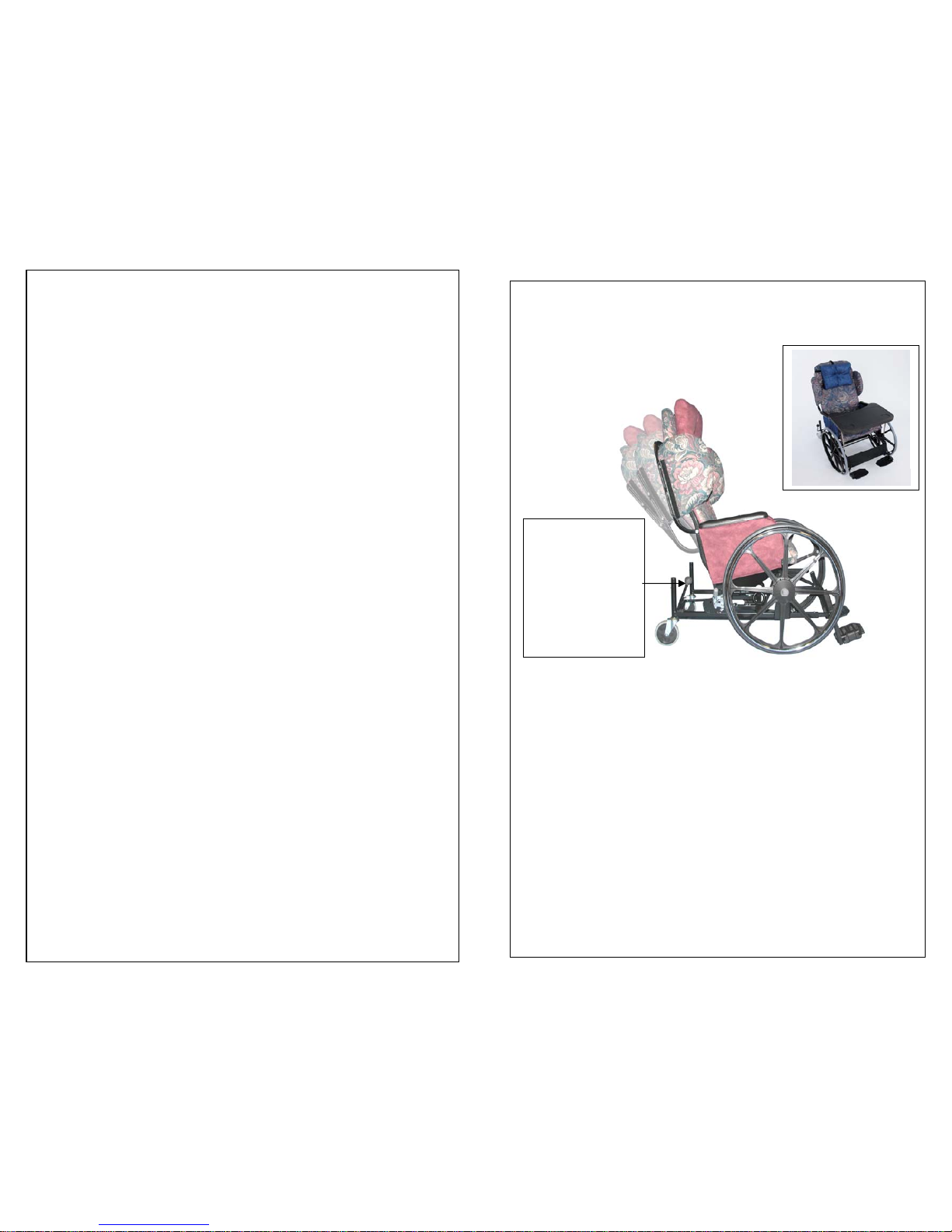
Tilt-In-Space: This feature allows you to create a “deep wedge”
by locking the chair in a semi-reclined position; degree of tilt is
approximately 30º. This position is desirable if you are attempting
to reduce “slide out”, seating pressure or concerned about posture.
Height adjustable seat: This feature is useful in fitting the
chair to the height of the person using it. Most users will be fitted
comfortably in the low position. Taller users may require raising
the seat which is easily done by with a ¾ inch socket on the 24-inch
front wheels. Note: Lighter weight users may need to adjust
rocking tension by lowering the back casters and raising the front
seat height to facilitate easier rocking. Reverse for heavier users.
Standard Footrests: Footrests can be vertically adjusted to
accommodate the various positions of the chair (upright or
reclined), and the leg length of the user.
Elevating Legrests (option): The elevating legrest is designed
to be articulating (telescoping) to help prevent patient “foot drop”
which can occur when foot plates cannot be kept in place due to
reduction in the knee angle. Note: Adjustment handles have a
built in ratchet. After tightening pull out to reposition.
Lateral Supports: For those users requiring lateral support;
side panels are included as part of the standard “kit” package.
Stability: The wheelbase on the Rock King is 9 inches longer
than a standard wheelchair. This additional length is more than
ample to provide the necessary stability in either the rocking mode
or tilt-in-space position.
Seat Belt (option): For added security, a seat belt option (Fabric
Safety Strap) may be placed around the waist of the patient and
attached behind the back of the chair with either a buckle (Part
#RY2019Y) or Velcro (Part #2019Y-1) attachment.
The Locking Lever
shown in the
‘neutral’, unlocked
position. This lever
is used to lock the
seat in either an
upright or semireclined, tilt-inspace position.
Page 2
Instructions
The following feature description assumes you are standing in
front of the chair, looking into the seat:
Locking Mechanism:
The locking lever is located in the left rear
corner of the chair. It is used to lock the seat in either an upright or
semi-reclined position. Important: It’s a friction lock, which
means to lock or unlock, the seat must be in the proper position in
relation to the locking device. For example, if sitting in the chair in
the upright position, move the seat slightly while at the same time
pulling up on the locking lever. When the seat is properly aligned,
the locking arm will raise approximately two inches, holding the seat
in a fairly secure, but not rigid, upright position. To lock the chair in
a semi-reclined position tilt the chair back approximately 30º, pull up
on the locking lever, move the seat slightly until the locking
mechanism engages. Caution! When unlocking the chair from the
reclined position, grasp the backrest firmly and allow the seat to
return to the upright position in a controlled manner.
The Ro ck King has three operating modes that allow the user
to change his position through movement while sitting in the
chair.
Upright Position: The normal operating mode. The chair can be
either locked or unlocked in this mode, depending on what the user is
doing at the time. For self-propulsion or transport, however; the
chair should always be in the locked position.
Rocking Mode: With the locking lever in the down position, the
chair is in rocking mode. Always engage the brakes when in the
rocking mode.
Tilt-In-Space: Most users will not be able to place the seat in this
position without assistance. It can be done safely with the user in the
chair by following the instructions given in “Locking Mechanism” at
the top of this page. Important! Use caution when unlocking to
return the chair to the upright position. The attendant should
place one hand on the back of the chair, moving the seat slightly
as suggested above, while pushing down on the lock lever. When
the locking lever is in the down position, allow the seat to return
to the upright position in a controlled manner. Always engage
brakes while using the Tilt-In-Space mode.
8-12-09
Warranty: Frame 7 years; parts 1 year
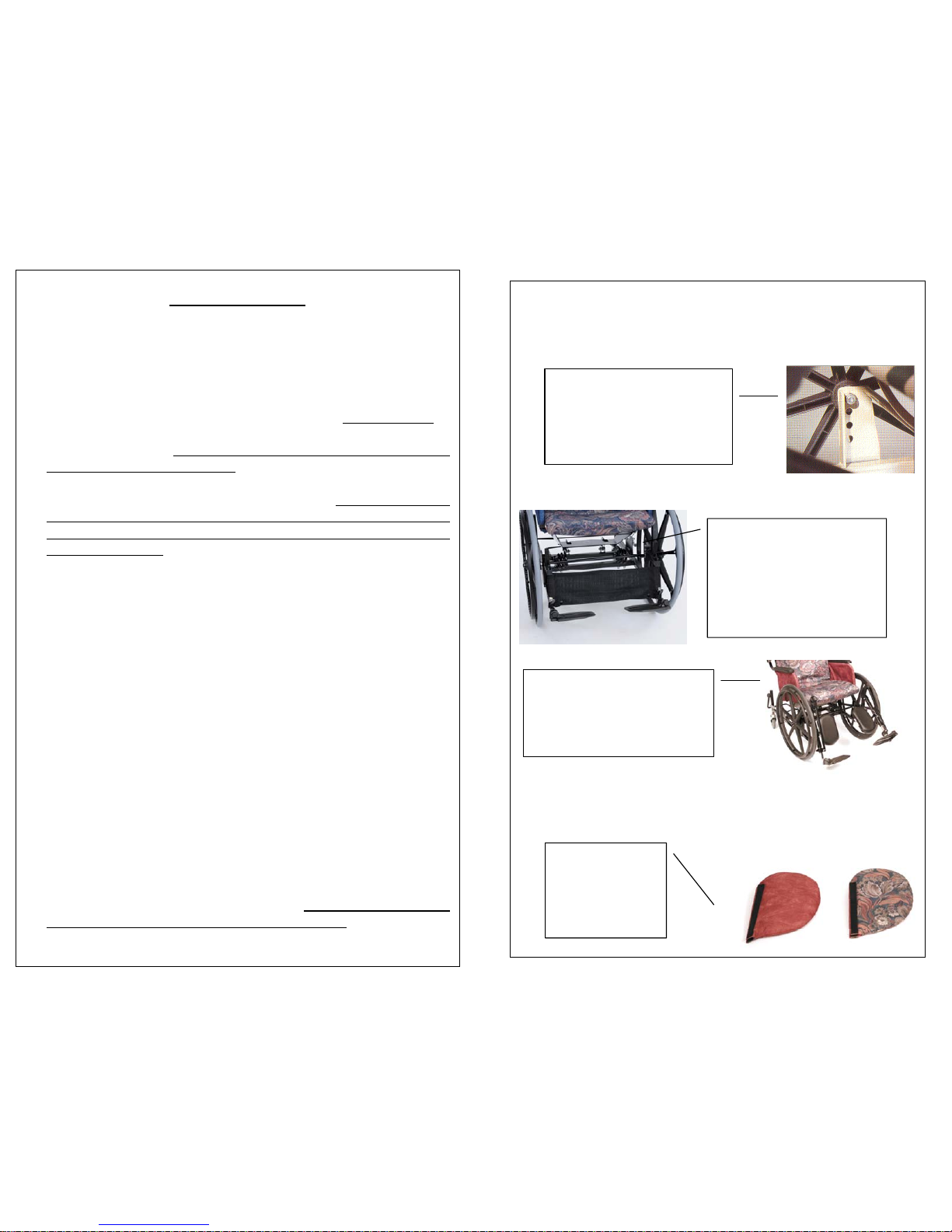
Height Adjustable Seat:
Standard Footrests (R2010F):
Elevating Legrests (RY2012F):
Lateral Supports (RY1515C):
The X3000 shown here in the low
position. Seat height from the
floor is approximately 16 inches.
Change position of axle bolt to
raise seat. (Frame shown in
contrasting white for clarity.).
There are four inches of
adjustment available with the
footrest mounted in the lower
mounting bracket on the base of
the chair; more can be achieved
by moving the footrest from the
lower to the upper mounting
b
racket.
The RY2012F leg rest is designed
to be articulating (telescoping) to
help prevent patient “foot drop”
which occurs when foot plates are
moved out of the way.
Like the cushion, the
lateral supports are
reversible and come
standard when the
chair is ordered as a
“kit”.
 Loading...