

Page 1
PadDock™ Pivot
Dual Arm Locking Tablet Stand
(VP3670)
Congratulations on your purchase of your new PadDock™ Pivot Dual Arm Locking
Tablet Stand. PadDock™ Pivot installation takes just minutes.
Simply follow our four easy steps.
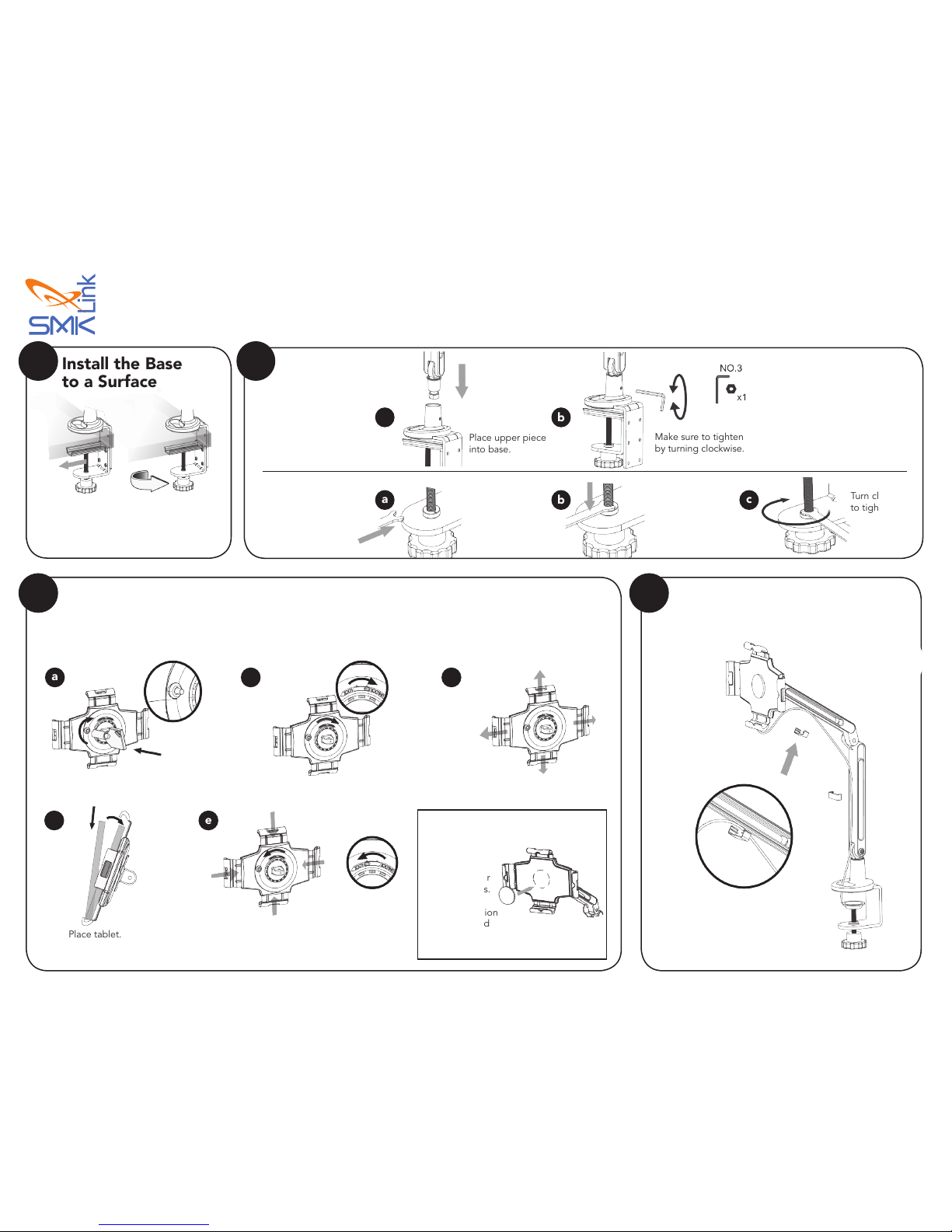
Route the Cable
Install
the Arm
A. Normal
Installation
B. Secure Base
Installation
(Optional)
Place upper piece
into base.
Place the security
key into the base
mount with the
teeth facing down.
Place the
teeth into the
corresponding
hole on the
security ring.
Turn clockwise
to tighten.
Make sure to tighten
by turning clockwise.
a
a
b
b
c
2
Use key to unlock the security lock. Unlock the claw. Extend each claw.
Note:
Extra cushion
is available in
the package for
thinner devices.
Paste the cushion
in the indicated
position.
Place tablet. Lock the claws, then push the claw towards
the tablet to x its position. Lock the security
lock by pressing the knob.
a
d
b
e
c
Secure the Tablet
Note: Paddock™ Pivot can only be adjusted when unlocked.
YOUR PIVOT CLAW KEYS ARE NOT REPLACEABLE.
Be sure to store them in a safe place to ensure access to your tablet.
3 4
Install the Base
to a Surface
1
Table thickness
up to 60mm
Route your tablet charge/sync cable using
the cable managment clamps provided.
Page 2
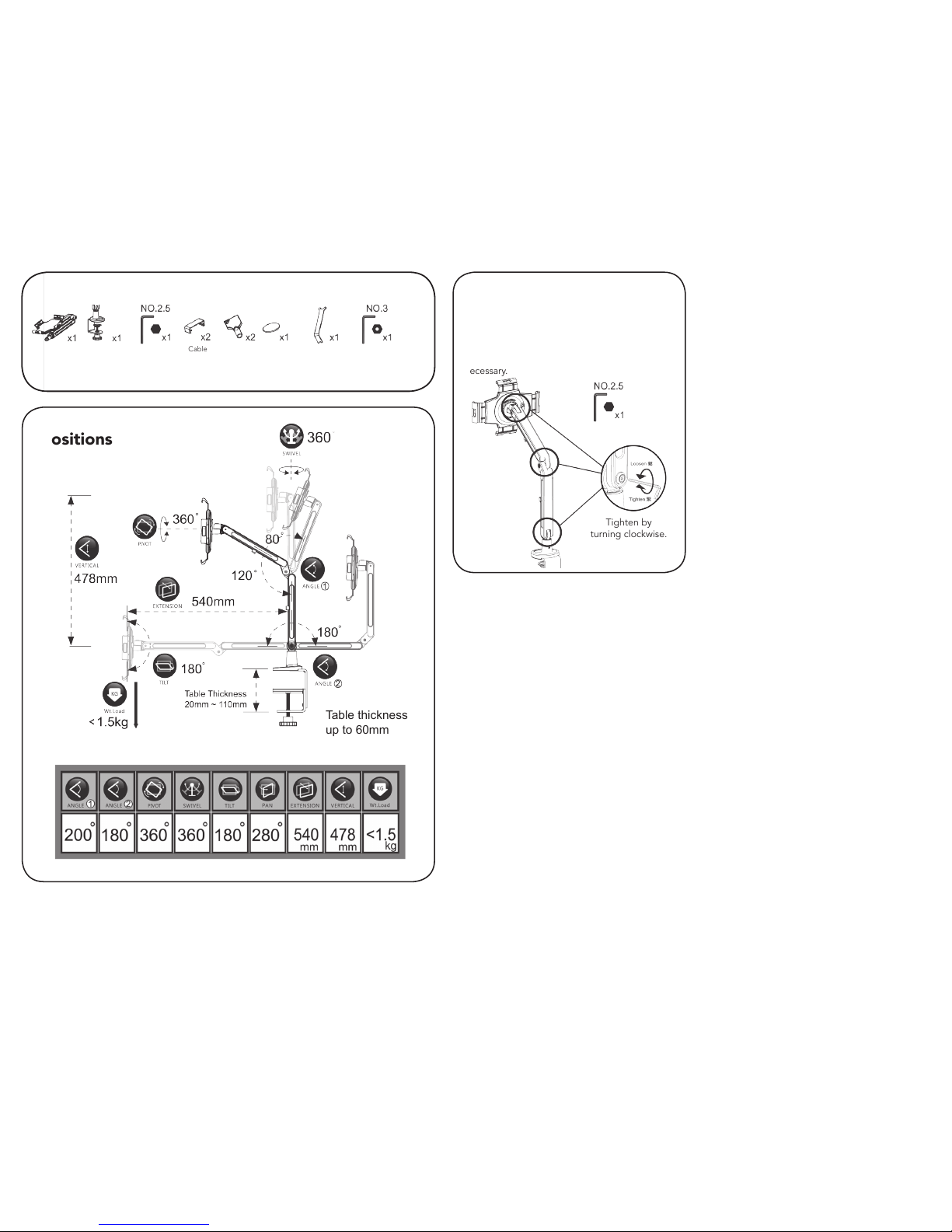
Table thickness
up to 60mm
Limited Warranty
SMK-Link Support
SMK-Link Electronics Corporation (SMK-Link)
warrants to the original end-user purchaser of
the Product (“you”) that the Product, excluding
batteries, will be free from defects in materials
and workmanship under normal use and service
for one-year from date of purchase. If the product
becomes defective in materials or workmanship
during the warranty period, SMK-Link will, at its
option, either repair or replace it. The replacement
unit may be a more current or upgraded model
if the originally purchased model is not available.
Any Product repaired or replaced under the terms
of the warranty is covered for the remainder of
the original warranty period or ninety (90) days
from the date of return shipment, whichever is
longer. This warranty does not cover products
which have been subjected to misuse, accident,
physical damage, improper installation, abnormal
operation or handling, neglect, inundation or
re or when product regulator label has been
removed, altered or rendered illegible; nor does it
cover accessory or consumable items.
SMK-Link shall not be liable for any indirect
special, incidental, or consequential damages.
SMK-Link’s total liability for damages for any cause related to, or arising out of, the use or inability to use
the product shall not exceed the original price paid for the product even if SMK-Link has been informed of
such possibility.
If your product requires service under warranty, you must rst contact SMK-Link product support to receive
an RMA number. Shipping of defective units back to SMK-Link is at your expense. The contact information
can be found on the SMK-Link website: www.smklink.com.
This warranty does not affect your statutory rights and you may have other rights which vary from state
to state and country to country. This warranty is understood to be the complete and exclusive agreement
between the parties, superseding all prior agreements, oral or written, and all other communications
between the parties relating to the matter of this warranty.
The above warranty does not apply to products sold in Australia. Products sold in Australia by an authorized
reseller will contain an Australia specic warranty statement.
3601-B Calle Tecate
Camarillo, CA, 93012
(888) 696-3500
[email protected]
Tension Adjustment
Note: All products are adjusted to the
most suitable tension before leaving the
factory. Do not alter unless necessary.
Screws & hinges will loosen during use.
Use the tools provided to tighten them as
necessary.
Tighten by
turning clockwise.
Positions
Package Contents
Body Base Tention
Tool
Key Cushion Security
Tool
Base
Tool
Cable
Management
(VP3670)
SMK-Link, the SMK-Link logo, and Paddock
are trademarks of SMK-Link Electronics
 Loading...