

Page 1

User Manual
Diode laser hair removal system
Model No.: Artemis600S
Manufacturer:Wuhan Lotuxs Technology Co.,Ltd
Address :5th Floor,E2 Building,Future City,
No.999 High-tech Avenue, East Lake High-tech Zone,
Wuhan 430206, Hubei
Tel:0086-27-88189920
Fax:0086-27-87515058
Please read the user manual before use.
Page 2

Contents
1. Safety ................................................................................ 错误!未定义书签。
1.1 Intruduction .............................................................................................. 1
1.2 Brief introduction ..................................................................................... 2
1.2.1 Eye protection ............................................................................... 2
1.2.2 Patient protection .......................................................................... 3
1.2.3 Operator protection ..................................... 错误!未定义书签。
1.2.4 Treatment room Requirements ..................................................... 3
1.3 Main warning ........................................................................................... 3
1.4 Warning labels ......................................................................................... 5
1.4.1 Warning lablels on machine .......................................................... 5
1.4.2 Warning labels in treatment room................................................. 6
1.5 Laser, electrical and mechanical safety ................................................... 6
1.5.1 Laser safety ................................................................................... 6
1.5.2 Electrical and mechanical safety ................................................... 7
1.6 Fire Hazards ............................................................................................. 8
1.7 Safety setting ............................................................................................ 9
1.8 Safety class ............................................................................................... 9
2 Machine introduction ................................................................................................ 11
2.1Brief introduction .................................................................................... 11
2.1.1 Machine outlook ......................................................................... 11
2.1.2 Handle piece outlook .................................................................. 11
2.1.3 Machine specification ................................................................. 12
2.2 Parameter ............................................................................................... 12
2.3 Working environment ............................................................................ 13
3 Installation................................................................................................................. 14
3.1 Installation environment requirements .................................................. 14
3.2 Unpacking and inspection ...................................................................... 14
3.3 Installation requirements ........................................................................ 15
3.4 Movement .............................................................................................. 16
3.5 Transportation requirements .................................................................. 16
3.5.1 Original package ......................................................................... 16
3.5.2 Other package ............................................................................. 16
4. Operation instruction ............................................................... 错误!未定义书签。
4.1 Instruction .............................................................................................. 18
4.1.1 System start-up ............................................................................ 18
4.1.2 User login .................................................................................... 18
4.1.3 Treatment mode and parameter setting ....................................... 20
Page 3

4.1.4 System ready ............................................................................... 22
4.2 Other functions....................................................................................... 22
4.2.1 Track customer treatment record ................................................ 22
4.2.2 Log out/Switch operation ............................................................ 23
4.2.3 Save or modify treatment parameter ........................................... 23
4.2.4 System setting ............................................................................. 24
4.3 Treatment ............................................................................................... 25
5. Maintenance and repair ............................................................................................ 27
5.1 Machine cleaning ................................................................................... 27
5.2 Water changing ...................................................................................... 27
5.3 Regular maintenance .............................................................................. 28
5.4 Troubleshooting ..................................................................................... 29
5.5 Attention ................................................................................................ 30
6. Application guide ..................................................................................................... 31
6.1 Indications and contraindications .......................................................... 31
6.2 Side effects ............................................................................................. 31
6.3 Post-hair removal care ........................................................................... 32
Page 4

Chapter 1. Safety
It shows the safety considerations when using the Artemis 600S diode laser hair
removal system in this Chapter, especially the safety for the optical and electrical
system.
Warning
It may cause personal injury if not adjust or use the machine as
required by this manual. So both the operators and the technicians who
use this machine must be familiar with the safety requirements and
1.1 Introduction
The Artemis 600S diode laser hair removal system is a precise laser medical
system, which is suitable for aesthetic medical applications for hair reduction
treatment. There are strict safety inspections for the machines before leaving the
factory, it will not cause safety problems if follow the instructions. In order to protect
the operators or patients from being hurt by the laser radiation, please read this
instruction carefully, and the related operators should have professional training for
laser medical devices.
It is class 4 laser device for the Artemis 600S diode laser machine.
The class 4 laser is high power laser, during usage, please pay more attention in
case of danger. Avoid any flammable items close to the laser beam absolutely.
1
Page 5

1.2 Brief introduction
Safety is one of the main concerns of product design that should also be alert on.
Please find partial safety instructions and precautions as follows:
◆The laser beam only emits from the front face of the sapphire wafer, and the
energy is conducted to the skin and hair through enclosed sapphire wafer.
◆The independent safety circuit will power off automatically when there is
much energy.
◆The Emergency Off button can cut off the power instantly
◆The key cylinder switch can abstain from misuse.
1.2.1 Eye Protection
Warnings
Do not observe the laser beam or the reflected beam directly, otherwise
irreversible damage may be caused to the retina.
Nominal Ocular Hazard Distance (N.O.H.D.)
This is the distance from the source at which the intensity or the energy per
surface unit becomes lower than the Maximum Permissible Exposure (M.P.E.) on the
cornea and on the skin. The laser beam can thus be considered as dangerous if the
operator is closer from the source than the N.O.H.D. And the N.O.H.D of Artemis
600S is 4.57m.
When looking at the beam with an optical system, one has to consider the
possible higher intensity entering the eye, and thus to expand the evaluated N.O.H.D.
The place to store the safety glasses should be marked with striking signs,
ensuring all the personnel to put it on before powered on.
2
Page 6

Artemis 600S is equipped with safety glasses with proper wavelength.
1.2.2 Patient Protection
The safety of the patient mainly lies on a practiced beautician and a proper office
treatment. The patient should also have knowledge of the basic principles.
The patient should wear the protective glasses and know the precautions.
1.2.3 Operator Protection
The operator should read this manual carefully and receive the training of Wuhan
Lotuxs Technology, Co., Ltd. The operator should also know the correct operation
and the possible risks.
1.2.4 Treatment room Requirements
There should be clear warning signs in the office.
When class 4 laser machine works, there should be warning signs on each
entrance of the office.
◆There should be laser safety warnings signs on each door with the wavelength
◆There should be warning light on the entrance. When the machine starts, the
light is on.
◆Ensure there is no highly reflective material in the office, otherwise the
radiations will do harm to the body.
1.3 Main Warnings
Artemis 600S can only be operated when the system inspection is done and no
alarm generated. Please carefully read the following warnings
3
Page 7

Attention!
◆Laser beam radiation through window should be avoided when device is
in use.
◆Do not open the cover to adjust or repair the system by yourself. Only the
authorized person by Lotuxs could do so.
◆To make sure that rated voltage of Artemis 600S agree with the
commercial voltage (AC200-240V) in your country.
◆Power off the machine and disconnect the main lead before maintaining
the machine, otherwise personal injury or damage to the machine may be
generated.
◆Keep the treatment head clean and do not let the cooling gel infiltrated to
the inside.
◆Do not use the machine if the treatment head leaks; if the machine is on,
please powered it off immediately.
Warnings about laser
Avoid laser beams’ exposing on eyes or combustible materials, as it will cause
eye damage or burning.
◆It is strictly forbidden to use the laser one the same area for long time to avoid
skin thermal damage.
◆Operators and patients should wear laser goggles during diode laser treatment.
◆Avoid looking at direct laser beams even wearing laser goggles.
◆Do not pint the treatment head towards the air, put the handle piece in the
handle holder if not use, during treatment, the treatment head should contact the target
skin firmly.
◆Hands should be away from the handle piece when turn on the machine.
4
Page 8
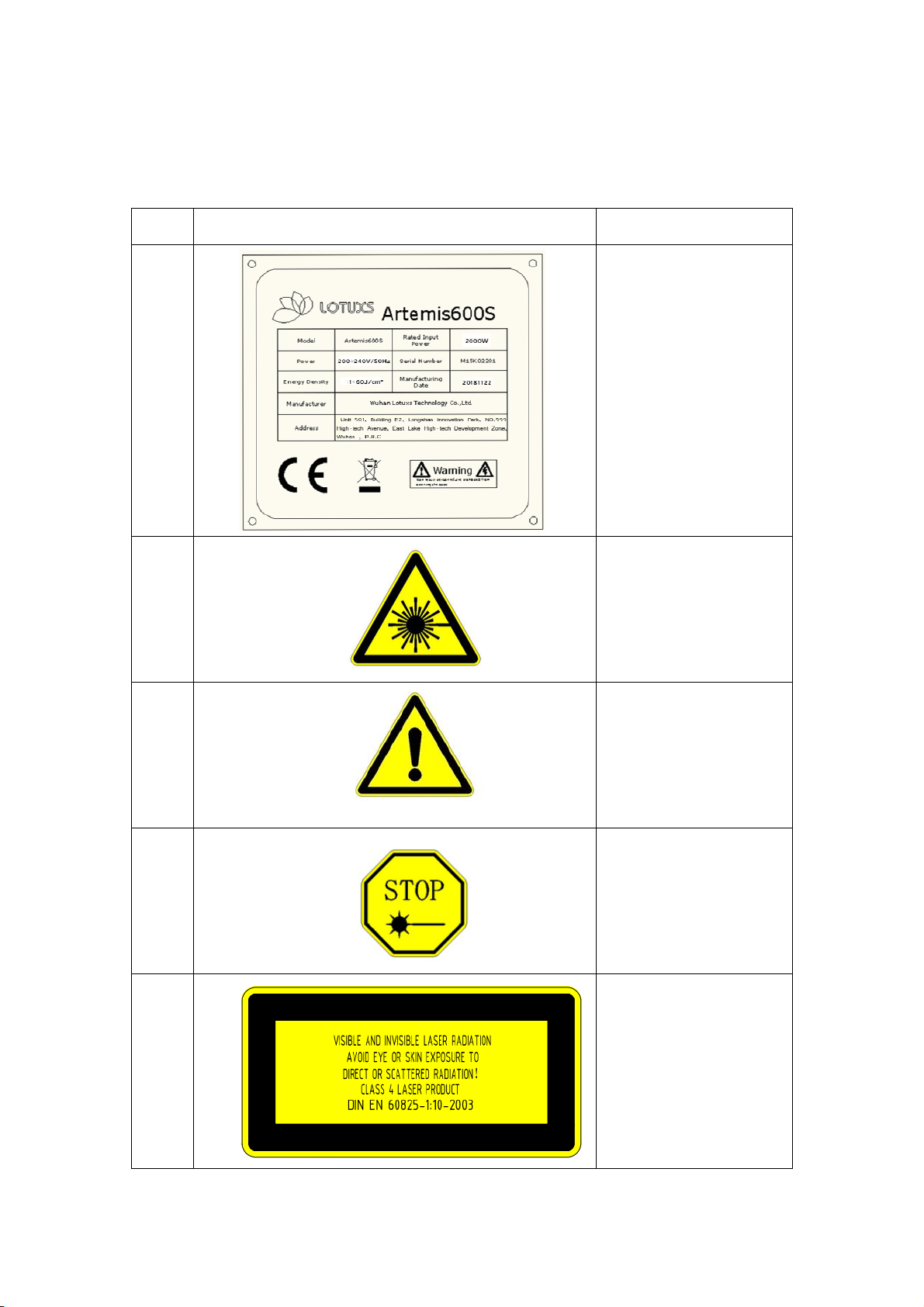
1.4 Warning labels
1.4.1 Sample for warning labels
No. Labels Remark
1
2
3
4
5
Name plate
Information and
technical information
for machine and
manufacturer
Laser warning label
Remind there is laser
radiation near the
device.
Attention: Check the
document along with
the machine
Please follow the user
manual to operate the
machine
Emergency Shut-down
Label
Press the button to shut
down the machine in
the case of
an emergency
Laser Radiation and Type of
Laser Beam label
Under the control panel
Invisible radiation
5
Page 9
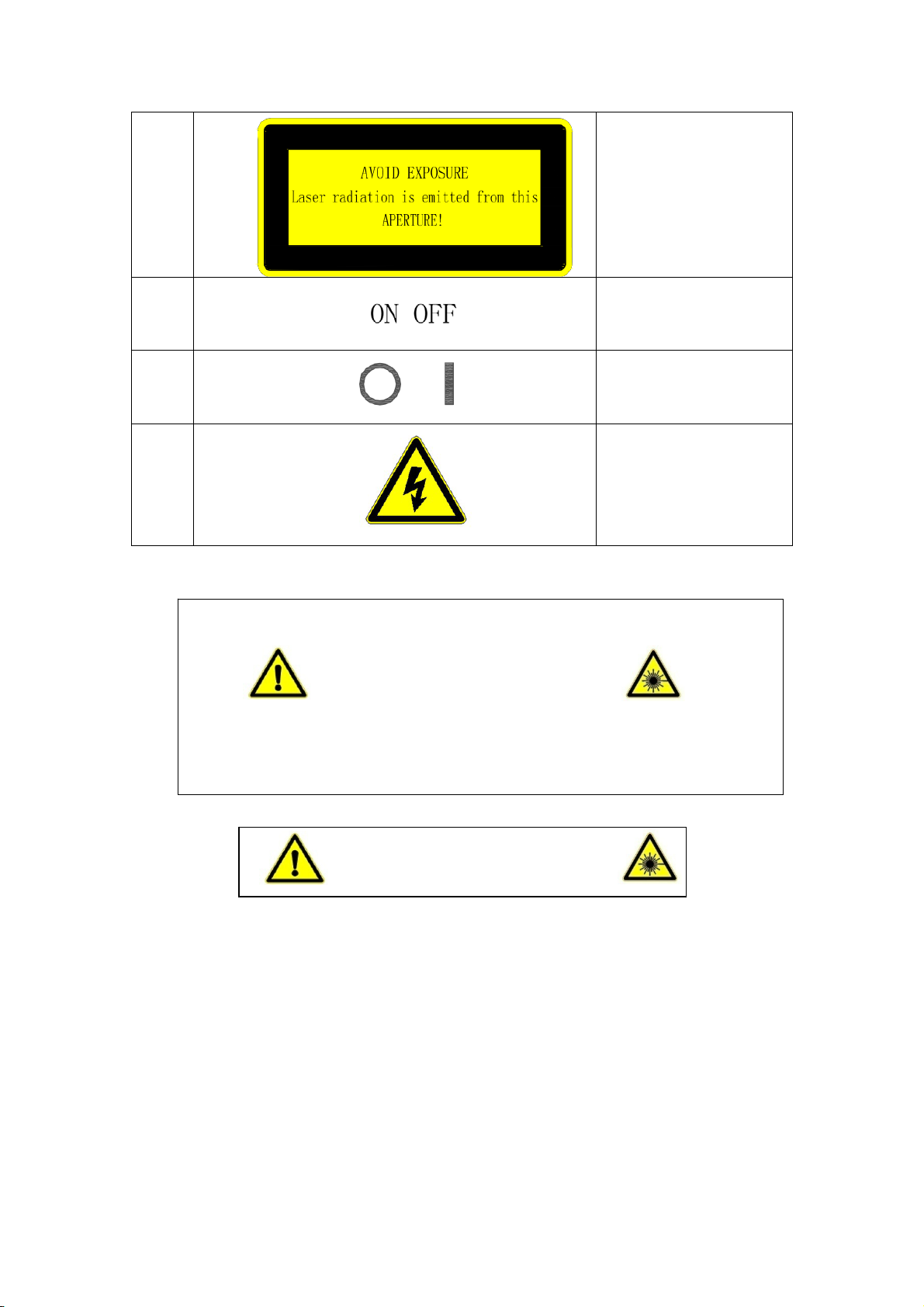
g
6
7
8
9
Laser Beam Exit
Located at the front of
the treatment head
There is laser beam
here.
Key switch label
Located around the key
switch
Air switch label
Located around the air
switch
Warning of electric
shock label
On the back of the
machine
1.4.2 Warning labels in treatment room
Warning
High power laser device
Both operators and patients should wear laser goggles
Picture 1.7 Warning to wear goggles
durin
treatment
Beware of laser
Picture 1.8 Warning for laser beam1.5 Laser, Electrical and Mechanical Safety
1.5 Laser, electrical and mechanical safety
1.5.1 Laser safety
The Artemis 600S diode laser hair removal machine is a high-tech laser device,
operators should pay attention to the laser safety when use the machine, follow the
below instructions:
6
Page 10

◆Both operators and patients should wear protective goggles during diode laser
treatment in case of eye damage. If anyone can not wear goggles, it is necessary to
protect her/his eyes with some opaque materials.
◆Make sure the laser beam is closed or hard to approach.
◆Please do not turn on the machine if the case of the system is opened, or it will
cause malfunction, and make the operators exposure to laser radiation, which causes
safety problems.
◆The laser system will stop emitting light to ensure the operators’ safety if the
environment temperature is too high, the treatment head is overheat by lack of water
or other malfunctions.
◆Only the necessary, well-trained personnel is allowed to approach the
machine.
◆Make sure all staff in the treatment room know how to use and shut down the
diode laser hair removal machine.
◆The Artemis 600S diode laser hair removal machine should be operated by the
professional staff.
◆Do not use the handle piece beyond the scope of this user manual.
◆Please do not use the diode laser hair removal machine in the environment
with explosive anesthetics or other flammable materials.
◆Please do not point the treatment head towards areas other than the target
treatment area.
◆Prevent reflectors such as jewelry, watches, beauty devices or mirrors from
reflecting the strong lasers.
1.5.2 Electrical and Mechanical Safety
◆Disconnect the plug after treatment.
◆Disconnect the plug before cleanse or maintenance.
◆Keep all the panels and cover plates enclosed.
◆There is high voltage in the machine, even turn off the machine, there is still
7
Page 11

voltage, and only authorized personnel by Lotuxs can open the cover plates.
◆Do not open the power supply or the cover plates while maintaining, or leave
it untended.
◆The machine has is well-balanced, and can be moved with caution.
◆The ground electrode in the power protection sheath should be connected with
earth through wall Line; A well earthed circuit is very crucial to safe operation;
◆Take care and to avoid scratch, while opening the outer packaging of the
machine.
◆Check it out if the handle is well connected with the machine main body.
◆Check the water level before starting the machine, if it is low, add to the drain
level.
◆Pull up the air switch and screw the key clockwise for recovery, if the machine
trips because of overload.
◆The water should be distilled water.
◆Drain off the water if long time not use the machine.
◆Stop emitting by pressing the emergency button if necessary.
◆Add antifreeze to the water tank under low temperature environment.
1.6 Fire Hazards
Keep away from the inflammable materials, because the temperature will get
higher once observed the laser energy.
Please clean the skin with soap and water instead of alcohol or acetone. The
treatment should begin only when the skin is dry after cleansing.
Keep the laser treatment room away of papers or plastic materials, those
materials will burn by absorbing enough power in certain distance.
If do not use the diode laser machine, or during the interval not use the machine,
please switch to “Standby” mode, and do not use the handle piece.
8
Page 12

1.7 Safety setting
Artemis 600S is equipped with a few safety device that the operator should be
familiar with.
Key Switch: It is used to turn on or off the Artemis 600S diode laser hair
removal machine. Only the key of Lotuxs can open the machine, which can prohibit
illegal use. Make sure the key is pulled out after every use.
Emergency shut-down Switch: Press the red mushroom button, the machine
will be shut down immediately. Slew the Emergency shut-down Switch clockwise, or
the machine will keep the state of power interruption.
! Attention: This button is only used under emergency condition to ensure
safety.
Interlock: The machine can work when connecting with interlock.
Semi-automatic air switch: The air switch is installed on the back panel. When the
working current is over 10A, the Switch is disconnected to protect the system. Pull the switch upwards,
the electricity will be restored.
1.8 Safety class
◆Protection against electric shock: Class I
◆Protection against electric shock:Type B
◆Laser radiation class:Class 4
◆Protection against corrosive liquid: Common
◆It cannot be used in the environment of inflammable gas.
◆Working Mode: Continuous
。
◆Rated voltage and frequency: Single-phase AC200-240V, 50Hz ± 10%; input
power: 2000W.
◆The power socket for the machine should conforms to the national standards,
and it should be 10A.
9
Page 13

The network power supply connected to this unit must use a single-phase
three-wire power socket that conforms to the national standard and has good
grounding, and the specification is 10A.
◆There is no application part that protects against defibrillation discharge
effects.
◆Non-permanent installation equipment, which is mobile.
10
Page 14

Chapter 2 Machine introduction
This chapter is the general introduction for Artemis 600S diode laser hair removal
machine
2.1Brief introduction
2.1.1Machine outlook
Picture 2.1 Artemis Front Picture 2.2 Artemis Back
2.1.2Handle piece outlook
Picture 2.3 Artemis Handle piece
11
Page 15

2.1.3 Machine specification
Artemis 600S laser hair removal utilize the unique 810nm diode laser with long pulse
width and the right wavelength to penetrate into the hair follicle. Using the theory of
selective laser absorption, laser can be preferentially absorbed by the melanin of the
hair. And then the hair shaft and the hair follicle are heated rapidly in order to destroy
the oxygen-supply organization of and around the hair follicle. The treatment window
of the handle is designed with sapphire dynamic cooling system, which could bring
about pain-free effect to the epidermis with pain free treatment.
2.2 Parameter
Main parameter for Artemis600S diode laser hair removal machine as follows;
Table 2-1 Main parameter
Items Contents
Laser type Diode laser
Wavelength 810nm
Spot size 12X12mm
Power density 1-120J/cm²
Frequency 1-10Hz
Water cooling, air cooling and
Cooling methods
semi-conductor cooling
Power source
AC200~240V/50Hz
Input power 2KW
530x450x1120mm(1320mm vertical
Dimension
screen)
Weight 40kg
12
Page 16

2.3Working environment
◆Working environment
A.Environment temperature : 10℃~40℃;
B.Relative Humidity: ≤80%;
C.Atmospheric Pressure: 860hPa~1060hPa;
D.Power Supply: AC200~240V/50Hz.
◆Transportation and Storage Environment
A.Environment Temperature::0℃~60℃;
B.Relative Humidity: ≤100%;
C.Atmospheric Pressure: 500hPa~1060hPa
13
Page 17

Chapter 3. Installation
The Artemis 600S diode laser hair removal machine is used in beauty salon and
beauty clinics.
3.1 Installation environment requirements
Select a place to install the Machine
While selecting the place, you have to consider the following factors:
◆Keep the machine away from the inflammables, the explosives and corrosives,
such as alcohol, sulfur and so on.
◆Keep the machine away from the heat source and the sun. Rapid change of
temperature can water vapor may accumulate inside of the machine.
◆Put the machine in somewhere level without other goods around, and it should
be at least 0.2m away from the wall.
◆Keep the office clean and other things in good order.
◆Keep the machine away from strong electromagnetic wave interference
sources.
◆Keep away from obvious vibrations and shocks;
◆The office should be with good ventilation.
◆Keep the machine away from other goods for at least 60cm.
3.2 Unpacking and inspection
If the package is broken, please check if there is any deformation, scratch or
damage of the panel. Should there be any damage, please contact us or out dealer
immediately and keep the package for us to judge the reason. Please do not send back
the machine without inform Lotuxs or its Dealer.
Please check if the goods are included according to the following list
◆Main body
◆Handle piece
14
Page 18

◆User manual
◆Key switch and interlock
◆Water funnel
◆Laser protective goggles;
3.3 Installation Requirements
Before open the package of the diode laser machine, please check the whether
the installation position qualified or not.
Space requirement
The dimension of Artemis 600s Diode laser hair removal machine is
53cm×45cm×132cm (vertical screen)
Electrical Requirements
The rated voltage of Artemis 600S diode laser is in accordance with the
requirement of the user. And the electrical requirements are as follows
Single-phase AC200~240V, 50Hz10%
The grounded circuit contributes a lot to safe operation.
The machine should have its own transmission line and air switch. For the input
power supply allows for no transient voltage, current spikes or surges.
The main safety is a 20A circuit breaker (air switch). When it is down, the power
is cut off. Pull it up, the power is connected again.
Electrical interference: If use the diode laser machine in hospital or beauty
clinics, it may cause interference to some surrounding equipment, the diode laser
can’t be used around strong magnetic fields or strong microwave fields, and should
not be shared with interference devices such as MRI and CT.
Environment requirements
Air quality: There should be no corrosive particles in the air. Corrosive particles
such as acids can damage the surfaces of wires, electrical components and optical
components.
15
Page 19

The dust in the air should be as less as possible. The dust can absorb light energy
and be heated. The dust on the surface of sapphire may damage the sapphire when it
was being hearted. The metal particles may damage electrical components.
Temperature: To ensure the best working status of the machine, the indoor
temperature should be kept between 20C and 25C, and relative humidity should be
not exceed 80%.
Temperature: To ensure the best working condition of the machine, the indoor
temperature should be kept between 20 C and 25 C, and the relative humidity
should not exceed 80%.
3.4 Movement
Please observe the following step when you need to move the machine
1.Disconnect the power cord
2.Put the treatment handle on the handle holder.
3.Loosen the brake wheels
4.Push the hand grip of the machine slowly, and do not push the display
3.5 Transportation Requirements
3.5.1 Original Package
Please reserve the original package. If the machine need to be returned to Lotuxs
for maintenance, please use the original package, and contact the customer service
department of Lotuxs in advance.
3.5.2 Other package
If you can find the original package, please do as the following instructions
A.Pack the machine with plastic bags firstly
B.Put the machine in the wood case or strong carton that can bear the weight of
60kg.
16
Page 20

C. The machine should be protected with 70mm to 100mm shock-proof
materials. The front panel should be protected with thick foam plastic, especially the
LCD.
D.Enclose the case properly
E.Label the remarks “Fragile! Take Care!”
17
Page 21

Chapter 4. Operation Instruction
This chapter shows how to use the Artemis 600S diode laser hair removal
machine
4.1 Instruction
4.1.1 System start-up
Connect to power supply, and push the air switch upwards to the position“I”,
turn the key switch clockwise to turn on the machine, and go to the main interface, as
picture 4.1.
Picture 4.1 Main interface
4.1.2 User login
●Save new customer data
When go to the main interface, press the button “Data” on the right corner, if it
was new customer use the machine for the first time, need to press the button “New
customer” to save the basic information, such as gender, telephone number to login
the system, as picture 4.2
18
Page 22
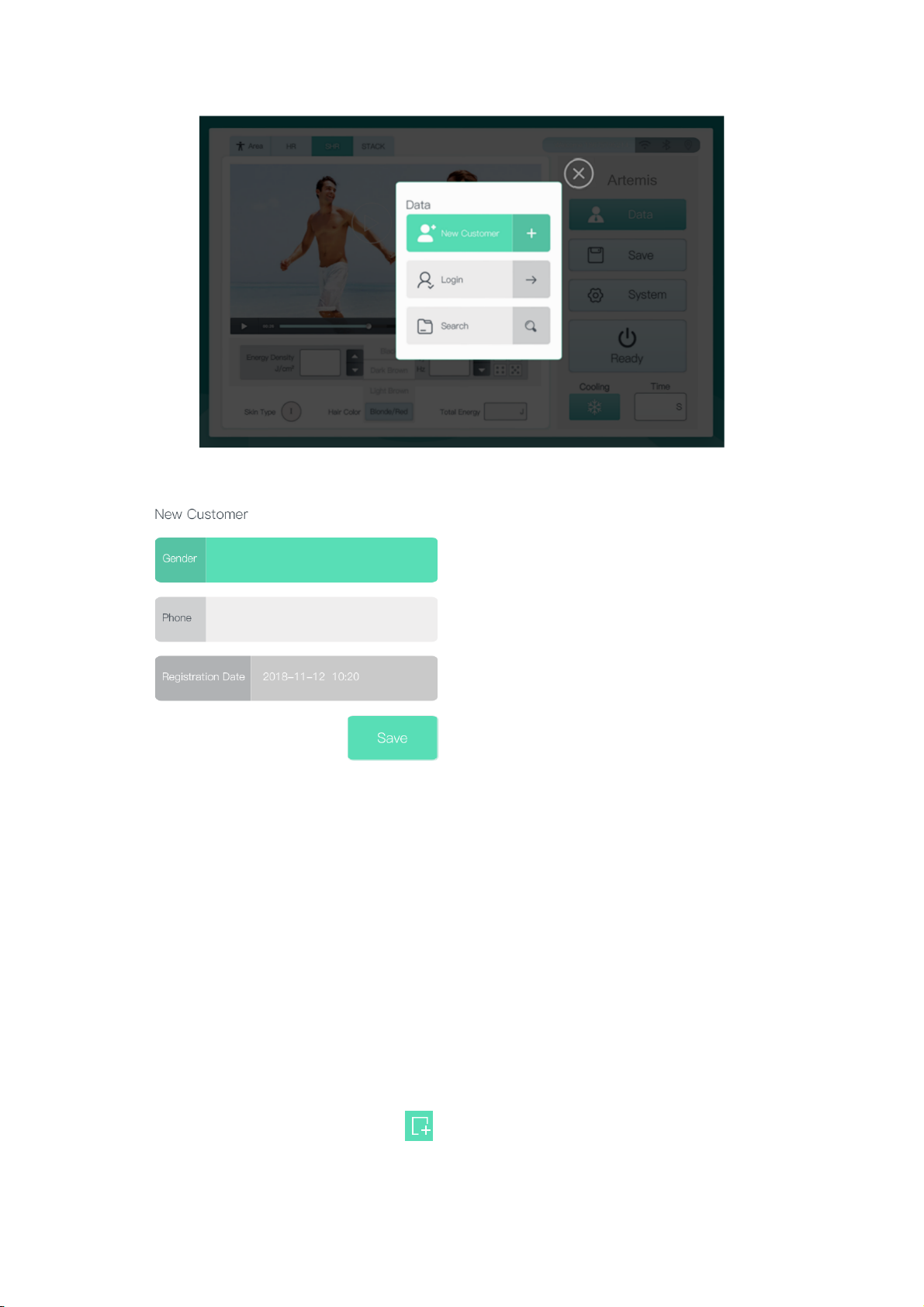
Picture 4.2 Customer data interface
Press gender, to choose “Male” or “Female”, and
enter the customer’s phone number, then press
“Save”, see as picture 4.3
Picture4.3 Save new customer data
●Ways to login
Way 1: Go back to main interface after saved new customer data, press the
button “Data” and press button “Login”, login the system by entering the customer
phone number.
Remark: If the same customer use the machine next time, can enter phone
number directly to login the system.
Way 2 Press the button ‘Data” and “Search” on the main interface, enter the
phone number or search the phone number on the interface, click the picture of phone
number, and then press the button “
” on the right corner, can login the system.
19
Page 23

Picture 4.4 Customer search interface
Remark: On the upper right corner of the phone number there is a green icon
“Reminder”, which shows it is time to remind the customer to do next treatment
session. And press the red delete button on the phone number can delete the
customer data.
4.1.3 Treatment mode and parameter setting
Choose the treatment area, treatment mode and parameter after login the system.
●Press the upper left corner to choose the treatment area, there is 6 treatment
areas for option (such as face, underarm, arm, leg, finger and bikini), choose any area,
and it will show the guide video for the related area on the interface.
●Choose the treatment mode on the upper left corner, there are three treatment
modes: HR mode, SHR mode and STACK mode. Under each mode, there are 6 skin
types and 4 hair colors for choice. Customers can choose the right treatment mode,
skin type and hair color by different treatment areas or their own requirements.
HR mode is used for hairline, beard, bikini area, limbs, torso and other areas.
Feature for HR mode is higher power density, traditional spot and spot treatment,
the power density is up to 60J/cm2.
SHR mode is used for large area hair removal treatment.
20
Page 24

Feature for SHR mode is lower power density, higher average power
STACK MODE is used for facial hair treatment (hair line, lip hair), bikini area,
finger, foot and other smaller area treatment.
Parameter scope for three treatment modes(Press the button “ ” to set the power
density and frequency)
HR MODE: Power density:1-60J/cm2 Frequency:1-5Hz
SHR MODE:Power density:1-20J/cm2 Frequency:1-10Hz
2
STACK MODE:Power density:1-10J/cm
Frequency:
Picture 4.5 6 treatment areas,3treatment modes
Press the button “Hair color” to choose the related hair color, and press the button
“Skin type” to choose the skin type, from darker to lighter skin.
Picture 4.6 Choose hair color
Picture 4.7 Choose skin type
21
Page 25

Tips: During the treatment, the operator should adjust the power from lower to
higher, make sure the customer can tolerate, according to customer’s feeling, if
feel too hot, can press the cooling button “ ” on the lower right corner.
4.1.4 System Ready
The machine is in ready status after chosen the treatment mode and set the
treatment parameter, shown as picture 4.8, press the button “Ready” and the machine
goes to “Standby” status. The handle can emit laser beam only when the machine is in
Standby status. At the same time, the other setting is locked in case of disoperation.
Picture 4.8 System ready Picture 4.9 System standby
4.2 Other functions
4.2.1 Track customer treatment record
Press the button “Data” and the button “Search”, enter or search the phone
number, and double click the icon of the phone number can track the treatment record,
like the treatment area, treatment time and etc. shown as picture 4.10
Picture 4.10 Customer treatment record
22
Page 26
Remark:1. Slid the screen up and down to track more customers’ treatment
record.
2. Press the button “Customer” , can go back to the
search page as picture 4.4
3. Press the button “Home” , can go back to the main interface.
4. Press the area “Note”, can remark the related treatment information
for the customer.
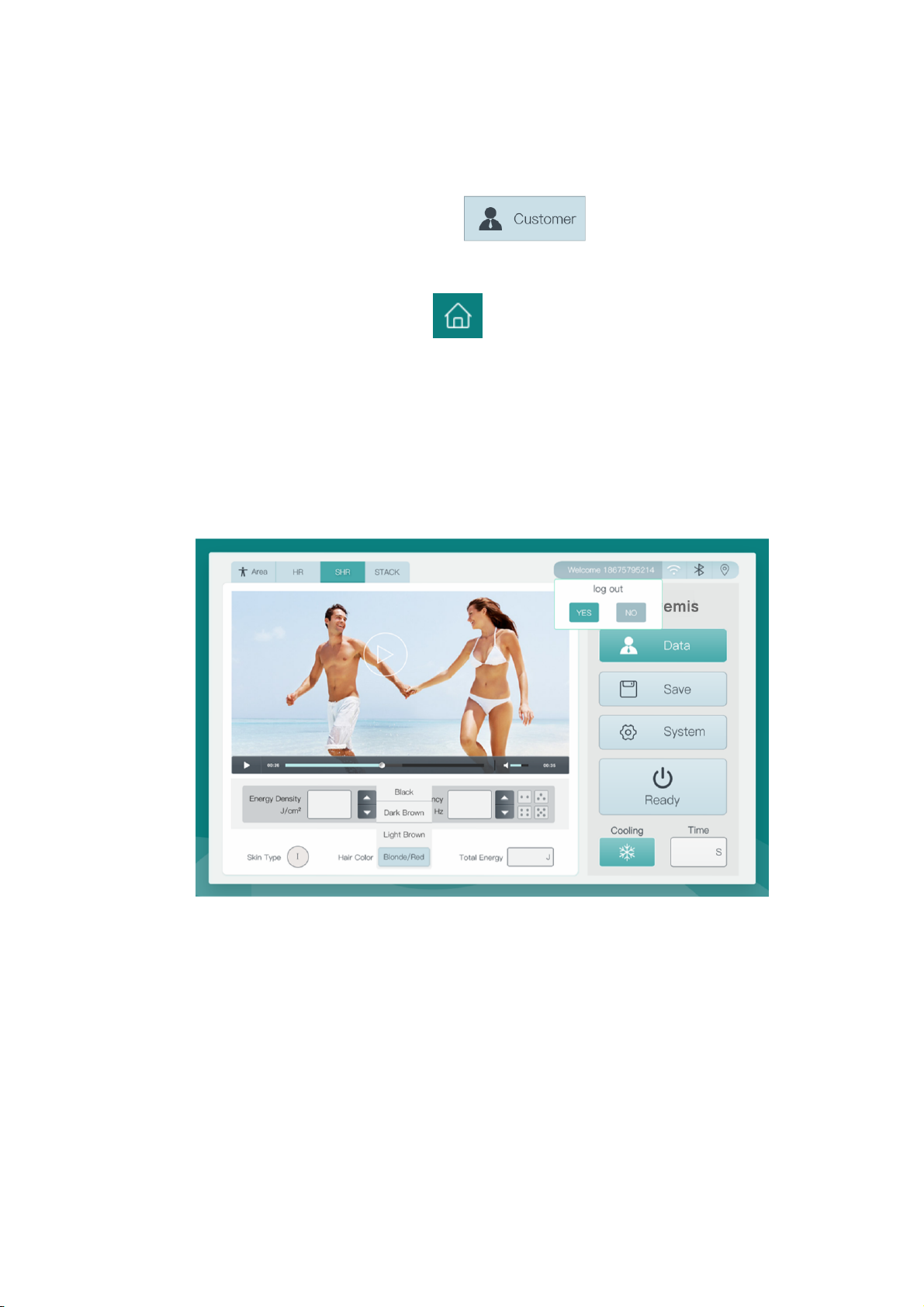
4.2.2 Log out/Switch operation
Customer can press the button “Welcome xxxx” to choose Yes or No. Switch to
other customer’s interface, shown as picture 4.11
Picture 4.11 Log out/Switch
4.2.3 Save or modify treatment parameter.
It is suggested not to edit the factory setting. Experienced operators can adjust
slightly, normally from lower to higher.
After adjustment, press the button ‘Save”
23
Page 27
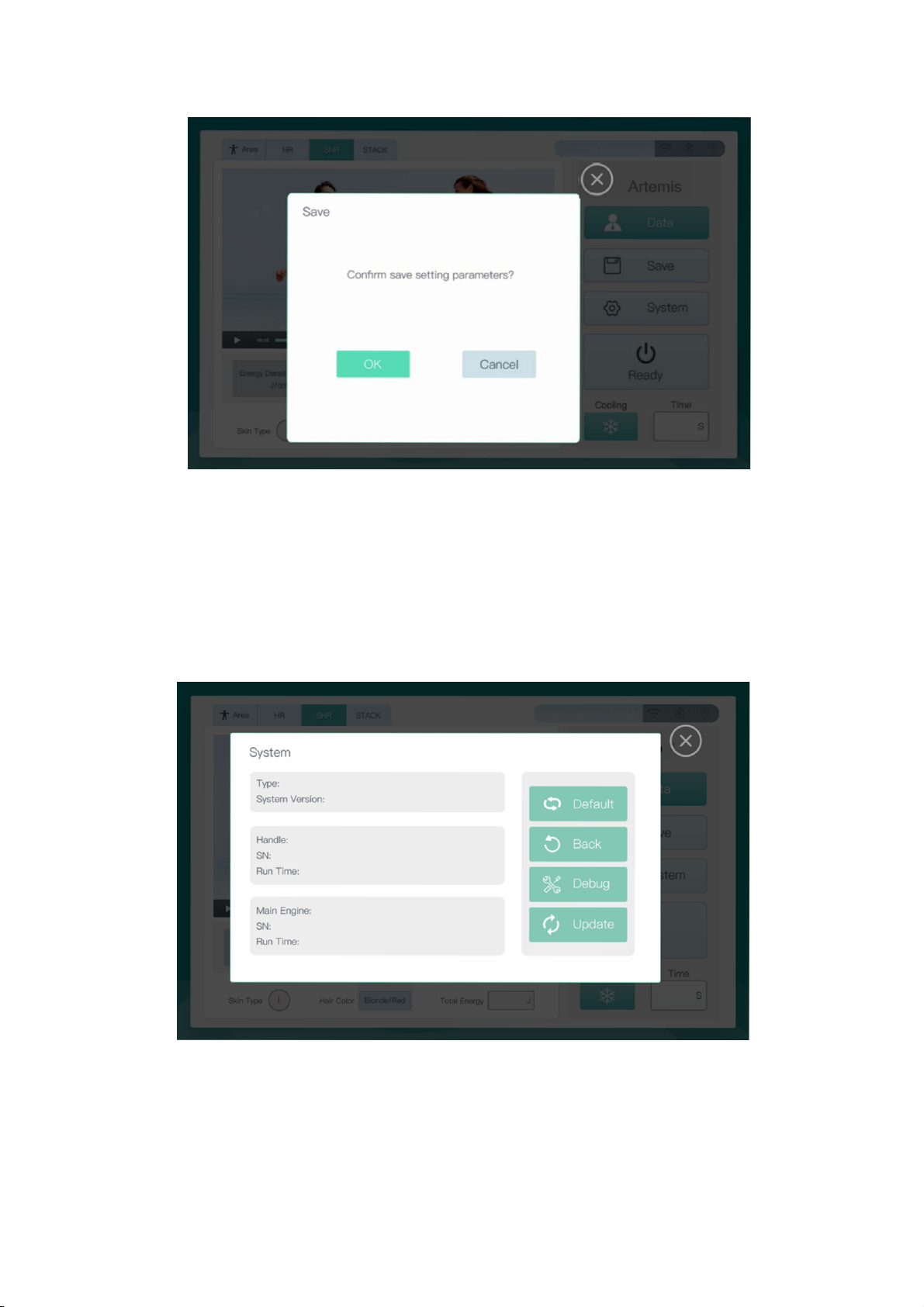
Picture 4.12 save setting parameters
4.2.4 System setting
Press the button “System” you will see the system setting, it shows the machine
SN number, software version, main engine SN number, Handle piece SN number,
working time and etc. Shown as picture 4.13
Picture 4.13 System setting
Default: Restore the power density and frequency in all working modes to the
factory settings.
24
Page 28
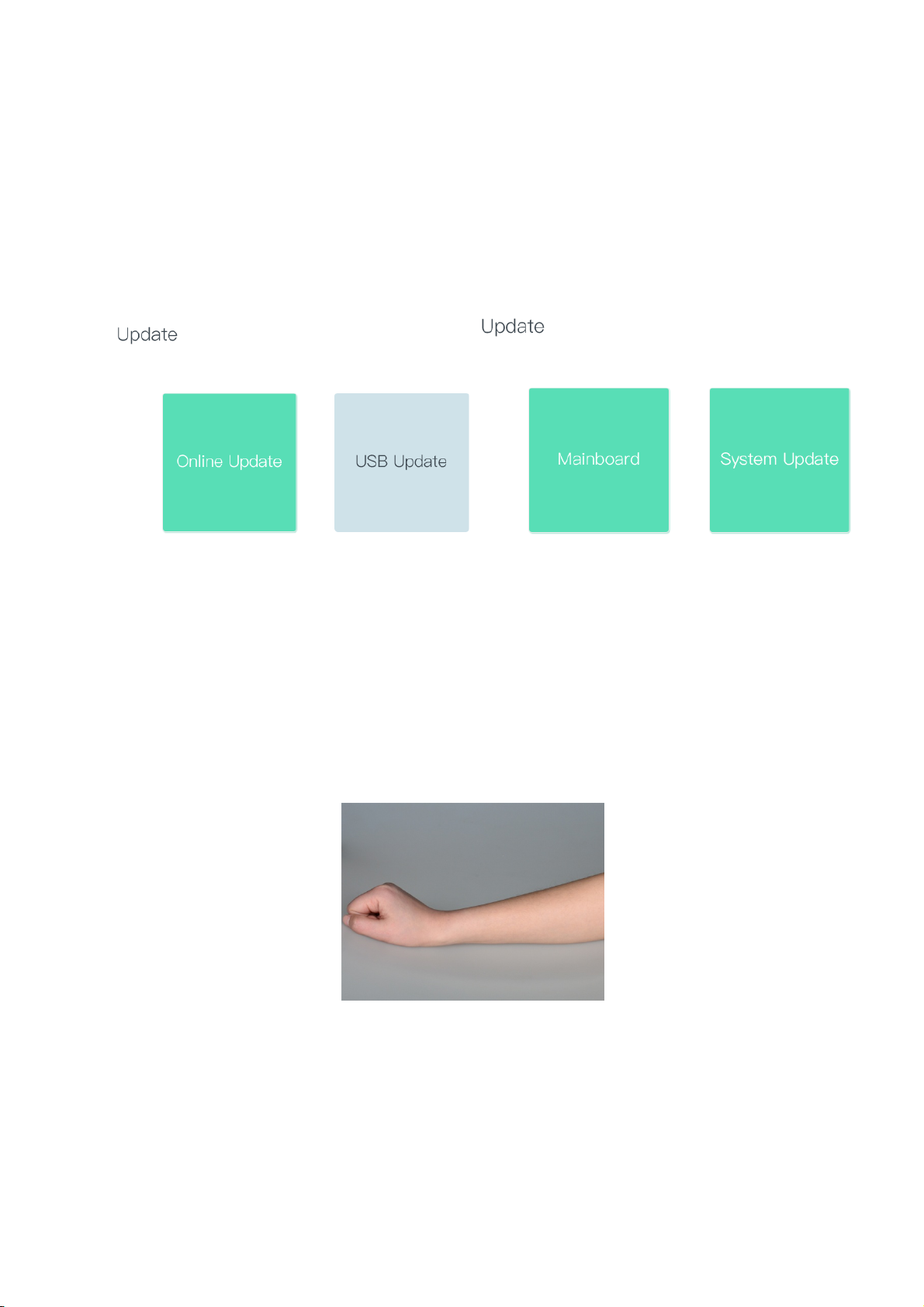
Back:Back to the previous interface。
Debug: Monitor the current threshold current, maximum power, maximum
current and temperature for laser module and skin.
Update: Update the machine control board or system version online or by USB.
Shown as picture 4.12
Picture 4.14 System update
4.3 Treatment
Step1: Cleanse
Clean the treatment area before laser hair removal treatment, till the target area is
dry enough to do next step.
Step 2:Shave the hair
Shave the hair before treatment.
Picture 4.12 Cleanse
25
Page 29
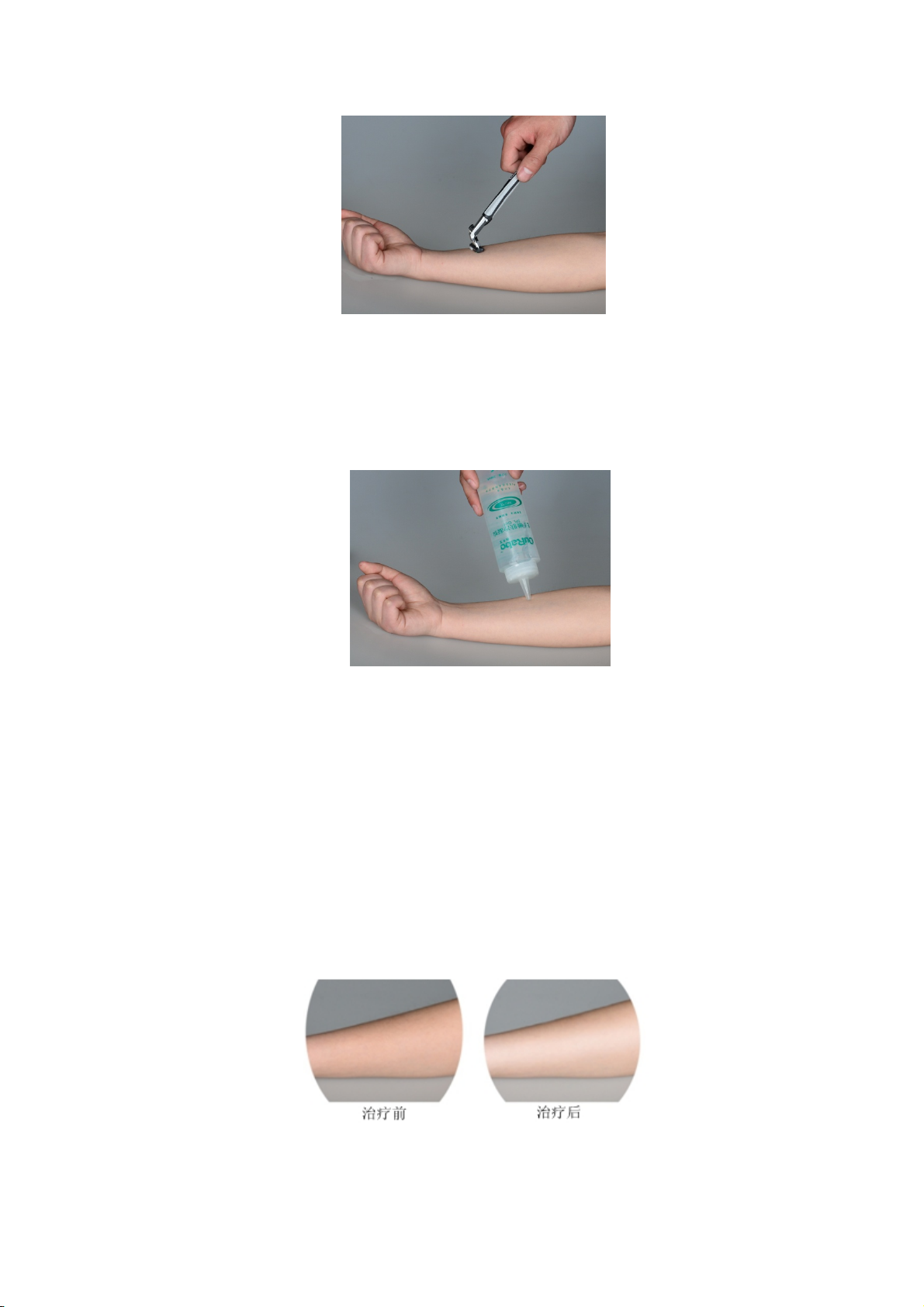
Picture 4.13 Shave the hair
Step 3:Apply cooling gel
Apply cooling gel on the target treatment area to protect the skin, minimizing
discomfort and protecting your skin during the treatment.
Picture 4.14 Apply cooling gel
Step 4:Set the treatment parameter
Adjust the power density and frequency.
Step 5:Hair removal
Hair removal method: The handle piece contact the skin firmly, slid the
treatment head on the target treatment area 6 to 7 times.
Step 6:Cleanse
After treatment, apply ice compress on the skin for 3-5 minutes
Picture 4.15 before and after treatment pictures for arm
26
Page 30

Chapter 5. Maintenance and repair
In this chapter the methods to maintain the machine and the solutions for
common fault is included.
The user could only carry out the following maintenance work, while the other
can only be done by technician authorized by Lotuxs.
5.1Machine cleaning
Clean the surface of the machine with wet cotton ball once a week. Neutral
cleanser can be used, but do let the liquid soak into the inside. Clean the treatment
window after each treatment.
Good habits can help you to apply the machine favorably and length the life
cycle of the machine. The following suggestions are for effective clinical treatment.
Attention:
Please make sure the machine is off or in standby mode when cleaning the
system.
Do not switch the machine frequently
Don’t power it off immediately; you can clean the treatment area first. Keep the
water cooling system working for about 15min, and then turn off the machine. It will
be ready for the next treatment after about 15min. If there are many treatments, just
keep the machine in the operation interface during the interval, which will contribute
to water cooling.
Keep the cooling gel cool all the time
Keep the cooling gel in the refrigerator. Spread it on the skin according the size
of treatment area.
5.2 Water changing
◆Change the water in the water tank every 6 months to ensure the water quality,
it is suggested to use pure water.
Procedure to change water:
27
Page 31

1. Turn off the machine and disconnect the power cord.
Check whether the machine is off and power cord is disconnected before
changing water to avoid danger.
2.Lock the universal wheel
There are four universal wheels at the bottom of the machine, two of which has
locks. Lock the universal wheels by treading the pedal.
3. Drain off water
Water outlet (WATER OUT) is on the back of the case, connect the water pipe to
the water outlet position, and put the funnel downwards to a container, till there is no
water flowing out.
4. Fill water
Connect the pipe to the water in position, and put the funnel upwards, and fill
pure water to the funnel.
5. Finish changing water
Stop filling water till there is water flowing from the over flow position, and
disconnect the pipe.
5.3 Regular Maintenance
To ensure the machine on its best state, periodical maintenance from professional
personnel is needed, as well as daily care. It is suggest that the maintenance should be
carried out every 6 months, which including the following items.
◆Overall system inspection
◆Internal inspection, includes cleaning dust of all the components
◆Output power inspection
◆Cooling system inspection and cleaning.
◆Radiator cleaning.
◆Air fan cleaning.
28
Page 32

◆Inspection or replacement for the “O” shape ring of the handle connection
position.
Warranty: Wuhan Lotuxs Technology Co., Ltd offers one year free warranty.
Environmental protection and disposal: Please do not discard the old machine to
public waste bin. Please dispose or recycle your old electronic devices to local
authorized garbage can.
5.4 Troubleshooting
Problem Probable causes Solution
Check whether the power cord is well
Power supply looseness
connected.
No display
Air switch shut off
No reflection when you
press the button on the
screen.
The system cannot go to
main interface.
E-STOP on the screen
E-KEY on the screen
E-LOCK on the screen
E-LD on the screen
E-SKIN on the screen Skin temperature overheat
E-FLOW on the screen
Emergency button is
Key switch was not turned
The interlock is not
connected
The temperature for the
laser module is overheat
Water flow alarm (Water
cycle blocked)
Contact our after sales department.
Contact our after sales department
pressed
on
Push the air switch upward, turn on the
machine again, if the air switch shut off
again, please contact our after sales
department.
Release the emergency button
Screw the key switch clockwise
Connect the interlock
Stop using the machine till the
temperature decreased.
Stop using the machine till the
temperature decreased.
Contact our after sales department.
E-STAGE on the screen Water level alarm (not
Fill water to the water tank.
29
Page 33

enough water inside water
tank)
SN number for machine
E-TYPE on the screen
main body and handle not
match.
Contact our after sales department.
5.5 Attention
Attention:
1. There is high voltage when using the Artemis 600S diode laser hair removal
system, the operator should follow the user manual strictly, it is forbidden to
touch the parts with electricity to avoid electric shock.
2. The system is grounded through the grounding conductor in the power cable.
This protective grounding is essential for safe operation.
3. The operator should follow the user manual strictly in case of damages.
4. Do not use flammable anesthetic or oxidizing gases such as nitrous oxide and
oxygen.
5. It is recommended to check the integrity of the transmission system before use
30
Page 34

Chapter 6 Application guide
Artemis 600S should be operated by practiced beautician or other professional
personnel. Wuhan Lotuxs Technology Co., Ltd will hold such trainings regularly
around the country. It is recommended that the beauticians should participate in the
training.
6.1 Indications and contraindications
Scope of applications:
Underarm hair removal, leg hair removal, arm hair removal and etc.
Contraindications:
Customers has below conditions can’t have laser treatment such as heart disease,
psychosis, hypertension, diabetes or someone who is not suitable for treatment after
inspection.
6.2 Side effects
There may be side effects during treatment, and the responding is as follows;
Pain
Patients may feel different levels of discomfort, which is bearable for the adult.
The sensation of burning may last for 1h at most.
Excessive Redness and Swelling
The skin may get red and swollen after the treatment for a short period, which
will be reduced in 3-7 days.
Fragility of the skin
The skin may get fragile after the treatment. Please do not make up or rub the target
area.
31
Page 35

6.3 Post-hair removal care
Cold compress rather than ice compress can release the swelling and discomfort.
The temperature of the pack for cold compress cannot be lower than 4 C.
The blisters and ulcers on the skin after hair removal treatment can be treated
with antibiotic ointments and burn ointments (e.g. Silverol or Biafine and etc). Lower
concentrations of steroid ointments can also be used to reduce swelling.
Pay attention to avoid trauma within 4-5 days after hair removal treatment. Do
not have hot showers, do not do aerobics or massages and etc.
If the blisters are scarred, use moisturizing ointment such as petrolatum to keep it
wet.
If side effects occurred during treatment, please do not continue treatments
before the target treatment area healed.
If the hair was removed partially after the treatment area healed, it is suggested
to lower the power density for continuous treatments.
If there is side effects and the hair was not removed after 4 weeks, the customer
should wait another 2 to 4 weeks for review. If the hair is partially removed,
continuous treatment can be performed, and it is better to lower the power density
during treatment.
If the hair was not removed by second review, maybe the side effect is caused by
the sunburn of the patient’s skin. If so, the patient should continue treatment after skin
recovery.
End treatment
It is up to the beautician to decide whether to end the treatment or not. Normally
when the hair was removed clearly or the patient is satisfied with the treatment result,
it is OK to end the treatment.
32
 Loading...