

Page 1
7661E-2
U 8000
Operating Instructions
Congratulations on the purchase of a SLIK U 8000 Tripod.
SLIK Corporation has designed your tripod to be a sturdy, rugged,
dependable product that will provide you with many years of satisfactory use.
Please take a few moments to read this instruction sheet carefully so
you can take full advantage of your Tripod's many fine features.
Retain this instruction sheet in case you might want to refer back to it.
Caution
This caution icon refers to information pertaining to important safety
procedures in preventing injuries, and damages which may occur as
a result of mishandling this product.
Prohibited
This prohibited icon refers to information pertaining to prohibited contents. Please refer to instructions closely to avoid accidents.
Specification
Length folded 590mm
(23 1/4")
Max. operating height 1,500mm
(59 1/12")
Max. center column ext.
300mm
(11 5/6")
Weight 1.5kg
(3 lbs 5 oz)
This product has been designed
to handle equipment weighing
under 2 kgs (4 lbs 6 oz).
Do not overload.
Some equipment weighing under
2 kgs (4 lbs 6 oz), such as long
lenses, may not balance well due
to its weight distribution. In such
case, please use a larger tripod.
Equipment that can be
used with this tripod
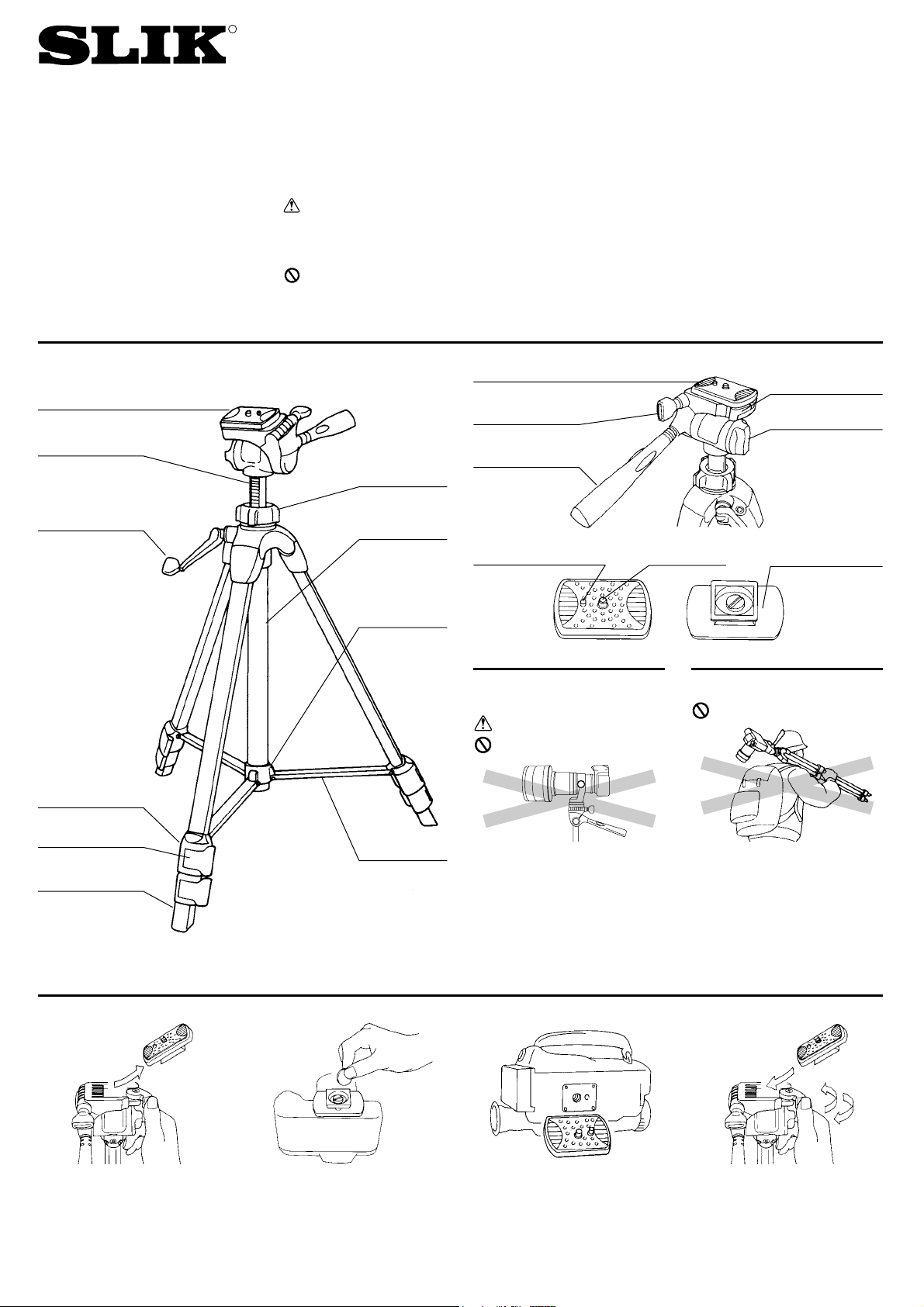
Carrying the tripod
Carrying a tripod with a camera
left on can result in unexpected
accidents.
We therefore, recommend you to
remove your camera while carrying
the tripod.
Prohibited
Attaching camera to the Quick release platform
To remove the Quick release platform
from the Pan head, turn Quick
release lock lever counterclockwise,
and lift Platform out at an angle from
the side closest to the lever.
The retractable Camera positioning pin enables you to mount
either a video, or a still camera on
to the Quick release platform.
For still cameras, align the length of
the Platform along the baseplate of
the camera body, and tighten screw
into the tripod socket with a coin.
For video cameras, match the
Camera positioning pin of the
Platform to the corresponding hole
beneath the camera, and then tighten
screw into tripod socket with a coin.
Replacement Quick release platform
for the U 8000 is available. Cat. No.
618-731
Return Quick release platform back
onto the Pan head by inserting at
an angle from the side closest to
the Quick release lock lever.
Quick release platform
Pan & Tilt handle
Retractable
camera positioning pin
Camera post
Quick release
platform
Panning lock knob
Quick release
lock lever
Vertical tilt knob
Center column
Pan head
Leg lock
Components
Elevation
crank handle
Rubber leg tip
Leg brace
Center column
locking collar
Center column
cover
Center column
ring
Leg lock lever
Caution
Prohibited
R
Page 2
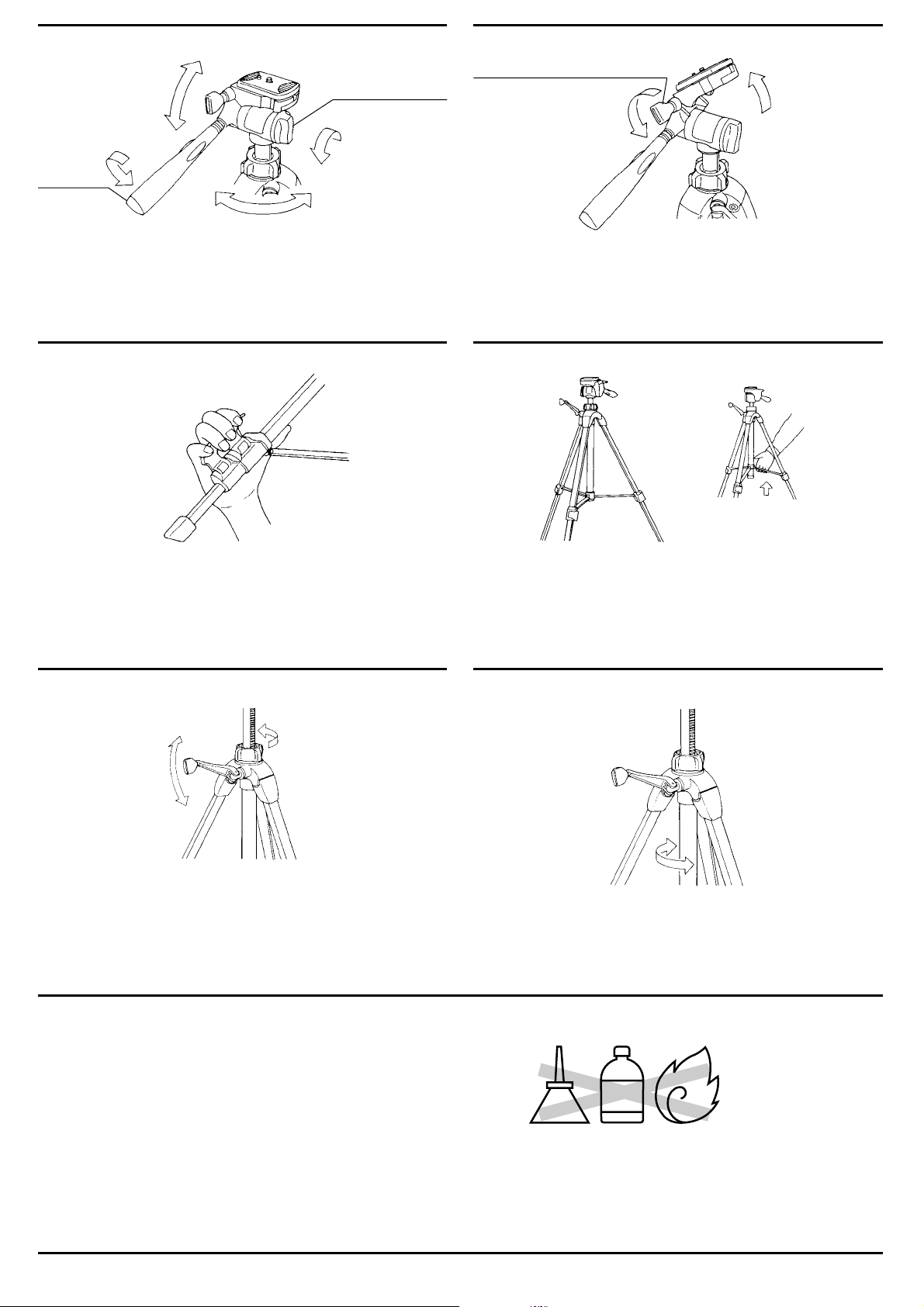
To rotate the camera left or right, loosen the Panning lock knob. When
you want to lock in at a certain position, tighten the Knob.
For vertical position shots with your still camera, Ioosen the Vertical tilt
lock knob, and tilt the Camera platform to the desired position.
Then lock the vertical tilt lock knob.
Loosen the Center column locking collar, and turn the Elevation crank
handle to raise or lower the Center column.
Always be certain to tighten the Locking collar before taking your hands
off the Crank handle to prevent accidental falls.
The “Center lock” mechanism featured in this model prevents unwanted
camera movements which often occurs when tightening the center column.
Holding two legs, one in each hand, tilt the tripod on its third leg.
Pull the two legs you are holding outward, and all three legs will open at
once. Open until the Center column ring is seated at the very bottom of
the Center column.
To close the legs, be sure to first raise the Center column ring up slightly,
and then push the legs close.
Flip up the Leg lock lever to extend or shorten any of the individual leg
sections to the desired length, and press the leg lock lever flush against
the leg to lock.
For greater stableness, use the thicker leg columns first.
Use the Center column tension adjustment tube located around the
Center column if you wish to adjust the tension of the center column
movement.
Rotate the tube counterclockwise to increase tension.
For less tension, rotate clockwise.
How to use the 3 Way pan head
How to open and close the tripod legs
Slik’s 3 way Pan head allows your still, or video camera, three independent movements.
Turn the Pan handle barrel counterclockwise until you feel it loosen, and
you can tilt the camera up and down. When you have the angle you want,
tighten the Handle in a clockwise direction until it locks in.
Panning lock knob
Pan handle
Vertical tilt lock knob
Extending the tripod legs
Elevating the center column Adjusting elevation tension
Care of the Tripod
・DO NOT apply any grease or oil to this product.
・Clean with a mild detergent and a soft cloth only.
・DO NOT use close to flame. Avoid extreme heat.
Slik Corporation reserves the right to make changes in design and/or improvements on the products without any obligation and advanced notice.
SLIK CORPORATION
853 Kayama, Hidaka City, Saitama 350-1231 Japan Phone 81-42-989-2141, Fax. 81-42-985-0210 ©2006
OIL
THINNER
 Loading...