

Page 1
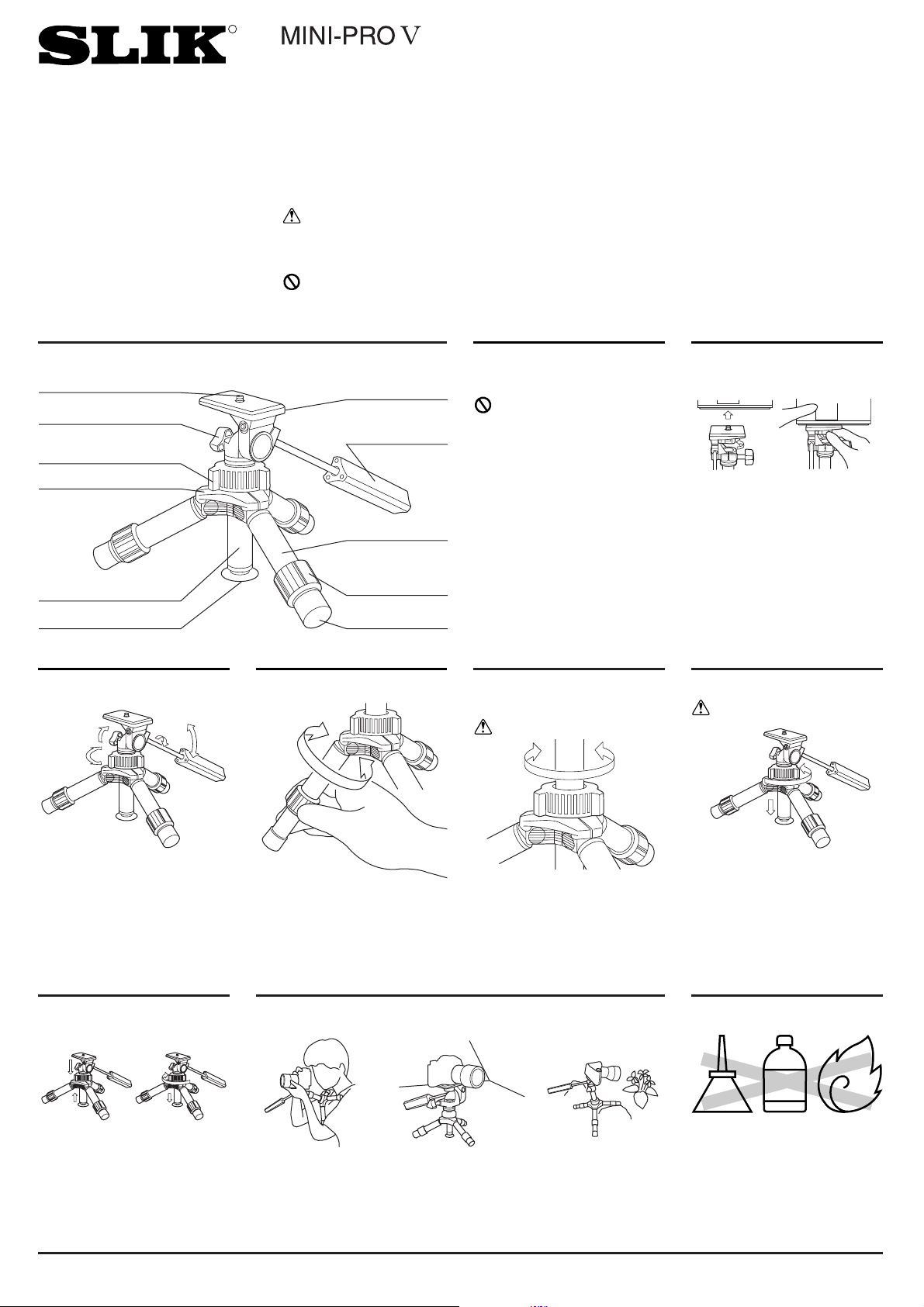
Components
H172T
Operating Instructions
Thank you very much for choosing SLIK MINI-PRO Ⅴ tripod.
The SLIK Corporation has designed your tripod to be a sturdy,
rugged, dependable product that will provide you with many years of
satisfactory use.
Please take a few moments to read this operating instruction carefully before use so that you can take full advantage of your Tripod's
many fine features.
Retain this operating instruction in case you might want to refer back to it.
Caution
This caution icon refers to information pertaining to important safety
procedures in preventing injuries, or damages which may occur as a
result of mishandling this product.
Prohibition
This prohibited icon refers to information pertaining to prohibited contents. Please refer to instructions closely to avoid accidents.
Specification
Folded length 20 cm
(7 11/12")
Max. operating height 21.8 cm
(8 7/12")
Max. center column ext. 4.5 cm
(1 3/4")
Weight 0.354 kg
(12 oz)
This product has been designed
to handle equipment weighing
under 2 kgs (4 lbs 6 oz). Do not
overload.
Some equipments weighing under
2 kgs (4 lbs 6 oz), such as long
lenses, may not balance well due
to its weight distribution. In such
case, please use a larger tripod.
Equipment that can be
loaded on this Tripod
Attaching a camera
Attach camera by rotating Camera
Mounting Screw counterclockwise
until camera is firmly seated on
tripod platform.
Prohibition
Care of the Tripod
Extending the Center
Column
Loosen the Center Column
Locking Collar by turning it
counterclockwise. Raise the
Center Column to the desired
height and lock in place by turning
the collar clockwise.
Caution
A. Release the Center Column
Locking Collar.
B. Place the Suction Cup against
a smooth surface.
Note: The surface must be
smooth and flat to use the
Suction Cup.
Caution
Using the Suction Cup
C. Press the tripod down
against the surface and pull
the Center Column up slightly.
D. Lock the Center Column
Locking Collar.
Use as a chest pod
provides extra support
for your Camera.
Set it up on car hood
by using suction cup.
ldeal for low position
photography.
Using the Pan Head
Loosen the Pan & Tilt Handle to
tilting, the Panning Lock Knob to
panning and move the camera
into the desired shooting position.
Turn the Handle and the Knob
clockwise to lock the camera in
position.
To extend any leg, turn the Leg Lock
Nut one helf turn counterclockwise.
Extending the Tripod Legs
Using Your MINI-PRO
Ⅴ
Printed in Thailand
・DO NOT apply any grease or
oil to this product.
・Clean with a mild detergent and
a soft cloth only.
・DO NOT use close to flame.
Avoid extreme heat.
Slik corporation reserves the right to make changes in design and/or improvements on the products without any obligation and advanced notice.
SLIK CORPORATION
853 Kayama, Hidaka-shi, Saitama, 350-1231 Japan Phone 81-42-989-2141, Fax. 81-42-985-0210 ©2004
OIL
THINNER
R
Camera Mounting Screw (U1/4")
Panning Lock Knob
Centar Column
Locking Collar
Main Body
Center Column
Suction Cup
Camera Platform
Pan & Tilt Handle
Leg
Leg Lock Nut
Rubber Leg Tip
Loosens
Tightens
 Loading...