

Page 1
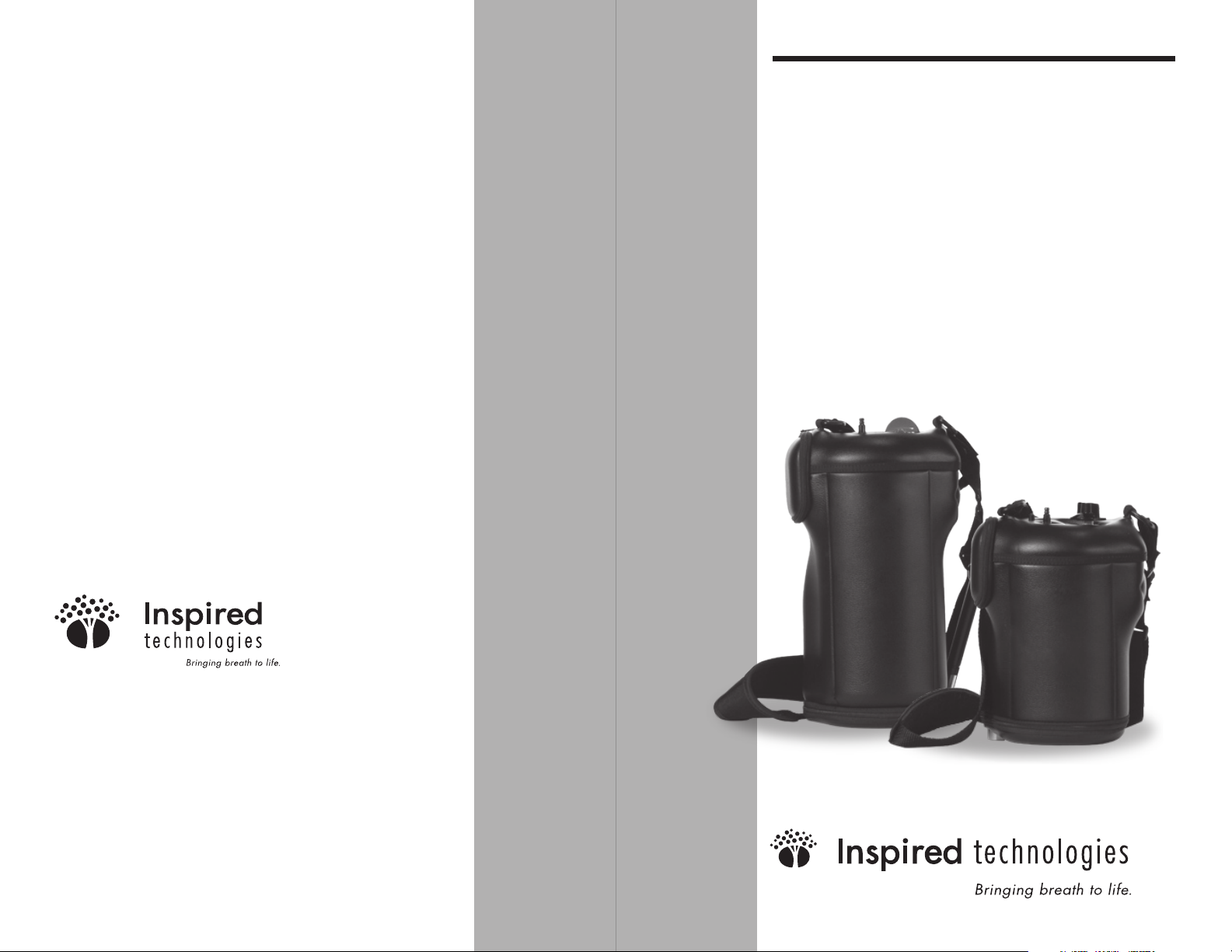
VIAspireTM
Oxygen Portables
300 and 600 Product Manual
CAUTION
Federal (USA) law restricts this device
to sale by or on the order of a physician.
1061 Main Street #24
North Huntingdon, PA 15642
office 724.861.5510
fax 724.861.5530
ww w.inspiredtechnologiesinc .com
©
2007 Inspired Technologies, Inc.
* VIAspire Liquefier, SmartDose
technology, patent pending.
VIA spire and SmartDose are trademarks
of Inspired Technologies, Inc.
300P-LT07 REV 0
Page 2

Welcome!
Welcome to the VIAspire™ Personal Oxygen System from
Inspired Technologies. The VIAspire™ Liquefi er creates
a steady supply of liquid oxygen in your home, making
deliveries of oxygen to your home no longer necessary. By
docking the VIAspire™ Oxygen Portables, you can fi ll and
transport your liquid oxygen quickly and easily, letting you
use the portable for your daily oxygen needs. You no longer
need to run oxygen tubing through your house, and you are
free to go wherever your day may take you. This manual is
for the VIAspire™ Oxygen Portables 300 and 600.
Before You Begin
Please read this entire manual before you use your VIAspire
Liquid Oxygen Portables 300 and/or 600. If you are unable
to understand the warnings, cautions, and instructions,
contact your medical equipment provider before using this
equipment. Otherwise, injury or damage to the equipment
may occur.
When using electrical and oxygen products, especially when
children are present, you must follow some important safety
precautions. Please read the following before you start using
your VIAspire Portable.
Product Classifi cation
The VIAspire Liquid Oxygen Portable is classifi ed as:
IEC Class II equipment Type B Applied Part
Not suitable for use in the presence of a fl ammable
anesthetic mixture with air, or with nitrous oxide.
300P-LT07 REV 0 VIAspire Oxygen Portable Manual 1
Page 3
Terms, Abbreviations, and Symbols
General Dangers and Warnings
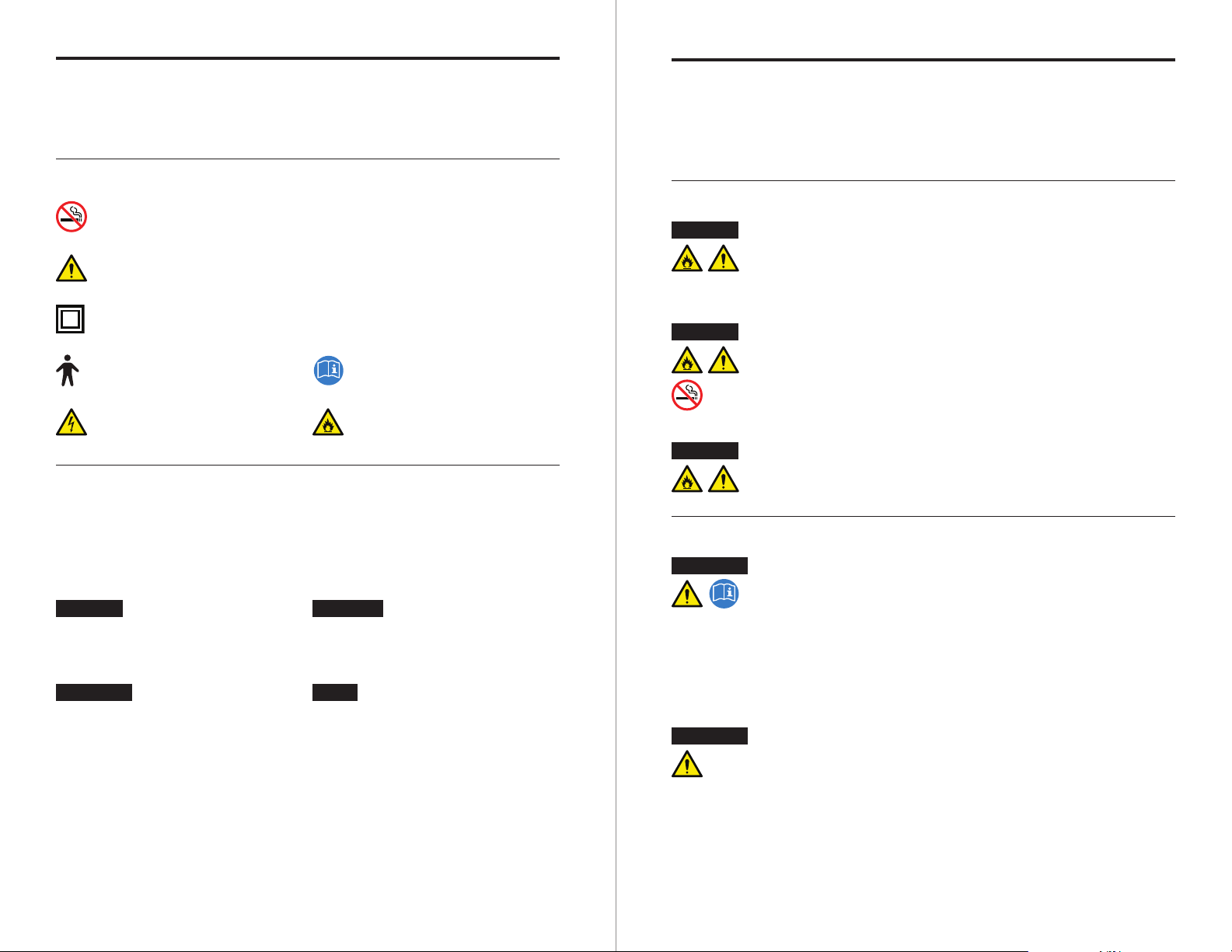
This guide and the VIAspire Portable product labeling uses
the following terms, abbreviations, and symbols:
IEC Symbols
Smoking is not
allowed in the area
General
warning sign
Class II
Equipment
Type B
Equipment
Warning:
dangerous voltage
REF
SN
LOX
Indicates a
Model Number
Indicates a
Serial Number
Indicates
Liquid Oxygen
Follow Operating
Instructions
Fire
Hazard
Important Safeguards
When using electrical products, especially when children are
present, basic safety precautions should always be followed.
Read all instructions before using. Important information is
highlighted by these terms:
DANG ER
WARNING
Important safeguards are indicated throughout this
Urgent safety
information for hazards
that will cause serious
injury or death.
Important safety
information for hazards
that might cause serious
injury.
guide; pay special attention to all safety information.
CAUTION
NOTE
Information for
preventing damage
to the product.
Information to which
you should pay special
attention.
In order to ensure the safe installation, assembly, and opera-
tion of the VIAspire Liquid Oxygen Portable, these instructions MUST be followed.
Dangers
DANG ER
DANG ER
DANG ER
Fire hazard. Do not lubricate. Do not allow grease
or oil from your hands or other source to come into
contact with the internal tubing of the VIAspire
Liquid Oxygen Portable. These solutions may be
fl ammable and cause injury.
Oxygen causes rapid burning. Do not smoke in
the vicinity of your VIAspire Liquid Oxygen Portable
or when you are near a person utilizing oxygen
therapy. Keep the VIAspire Liquid Oxygen Portable
at least 5 feet (1.6M) from hot, sparking objects or
open sources of fl ame.
Do not lay the cannula down. Do not lay the
cannula down while the oxygen is fl owing. High
concentrations of oxygen can cause rapid burning.
Warnings
WARNING
WARNING
Read instruction manual fi rst. Do not install,
assemble, or operate this equipment without fi rst
reading and understanding this instruction manual
and the warning labels on the product. If you are
unable to understand the warnings, cautions and
instructions, contact your medical equipment provider
or technical personnel if applicable before attempting
to install or use this equipment; otherwise, injury or
damage may occur.
Liquid Oxygen used ONLY by patient. The use
of this device is limited to an oxygen patient. Liquid
oxygen MUST be used ONLY by an oxygen patient
and is not intended to be distributed to any other
individual for any purpose.
Read all instructions before using. Save these
instructions.
2 VIAspire Oxygen Portable Manual 300P-LT07 REV 0 300P-LT07 REV 0 VIAspire Oxygen Portable Manual 3
Page 4
WARNING
WARNING
Use only authorized parts. Do not use parts,
accessories, or adapters other than those authorized
by Inspired Technologies, Inc.
Do not use if...
Do not use the VIAspire Portable 300 or 600 if it:
Is not working properly.
•
Has been dropped or damaged.
•
•
Has been submersed in water.
Warnings About Handling
WARNING
WARNING
Use extreme care when fi lling. Use extreme care
when fi lling your VIAspire Liquid Oxygen Portable.
Keep unit is in an upright position. Always
ensure that the portable is in an upright position.
Turning the portable on its side will cause venting of
oxygen from the relief valves.
WARNING
WARNING
WARNING
WARNING
WARNING
Call a qualifi ed technician for examination
and repair.
Unintended oxygen leakage. If any unintended
leakage of oxygen is detected, do not attempt to use
the product. Turn the product off. If leakage persists,
place the product outdoors and notify your Home
Health Care Provider or Service Representative of this
condition.
High pressure relief valves. The VIAspire Liquid
Oxygen Portable is equipped with several High
Pressure Relief Valves to ensure the user’s safety.
When activated, this safety feature will make a loud
noise. If this noise occurs and persists, turn the unit
off and contact your Home Health Care Provider or
Service Representative.
Always supervise children. Children should
always be supervised around the VIAspire Liquid
Oxygen Portable. Failure to do so may result in
damage to the unit or personal injury.
Use in accordance with your prescription.
For your safety, the VIAspire Liquid Oxygen Portable
must be used in accordance with the prescription
determined by your physician.
Seek medical advice before using oxygen.
Under certain circumstances, oxygen therapy can
be hazardous. Seeking medical advice before using
oxygen is advisable.
Cautions and Notes
CAUTION
CAUTION
CAUTION
WARNING
NOTE
NOTE
Do not disassemble. The VIAspire Liquid Oxygen
Portable contains no user serviceable parts. If service
is required, contact your home medical equipment
provider or authorized service center.
Use only AA Alkaline type batteries. Only use
AA Alkaline type batteries. Inspired Technologies
does not recommend use of rechargeable batteries.
Federal law restricts this device to sale by or on
order of a physician.
Not for use in emergency transport vehicles.
The VIAspire Liquid Oxygen Portable is not intended
to be used in emergency transport vehicles (ambulances or helicopters), or other similar areas where
high levels of Electromagnetic Interference (EMI)
may be expected.
Have a full cylinder of oxygen on hand. Inspired
Technologies recommends the medical equipment provider leaving a full cylinder of oxygen with the patient
after setting up the VIAspire Portable, and instructing
the patient to always keep a full cylinder on hand.
Allow portable to rest for at least ½ hour after
fi lling. Inspired Technologies recommends that the
VIAspire Portable be allowed to rest for at least ½
hour after fi lling prior to being used. This allow the
LOX to vaporize in the inner container and you will be
able to better maintain your prescription fl ow setting.
4 VIAspire Oxygen Portable Manual 300P-LT07 REV 0 300P-LT07 REV 0 VIAspire Oxygen Portable Manual 5
Page 5
Indications for Use
VIAspire Portable Overview
The Model 300P and/or 600P Liquid Oxygen Portable will
provide a source of supplemental oxygen for ambulatory
home healthcare patients, by vaporizing medical grade liquid
oxygen and then dispensing it to the patient via an integral
electronic conserving device. The Model 300P and/or 600P
Liquid Oxygen Portable is neither a life-sustaining nor a
life-supporting device.
Provider Checklist
Before leaving the VIAspire Liquid Oxygen Portable with a
patient, the following checklist MUST be completed:
Check all parts for shipping damage. In case of damage,
£
do not use. Contact Inspired Technologies, Inc. for further
instructions.
£
Make sure the VIAspire Liquid Oxygen Portable is compatible with the liquid oxygen source. Use a liquid oxygen
reservoir with a compatible coupler.
£
Instruct the patient on the safe operation of the VIAspire
Liquid Oxygen Portable and all associated accessories, and
review ALL warnings.
Leave a copy of this instruction guide with the patient.
£
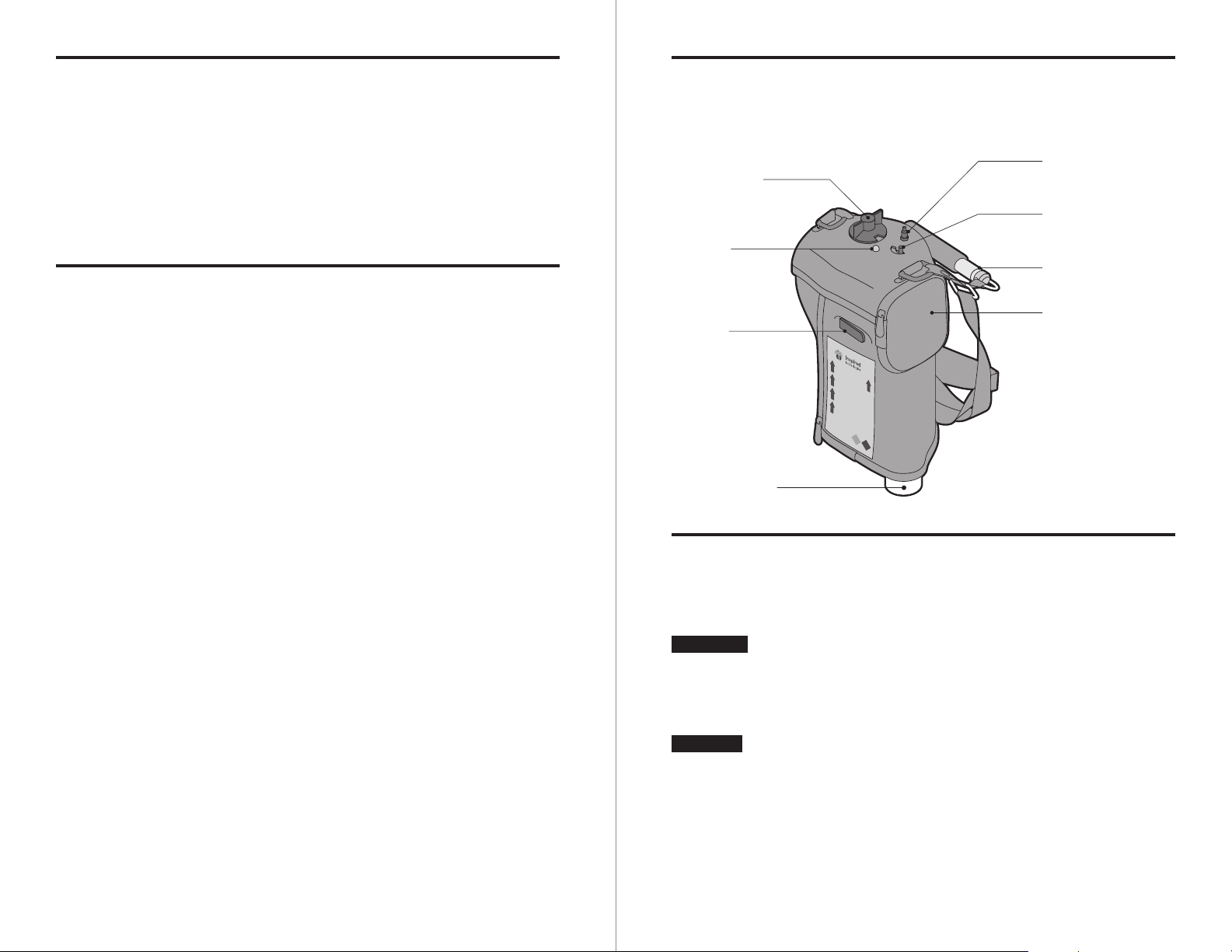
The illustration shows the parts of the VIAspire Portable.
Flow Rate
Selector Knob
LED Battery
Indicator
Fill Valve
LOX Fill Coupler
0
Oxygen Outlet
Connector
Continuous Flow/
SmartDose Switch
Contents Indicator
Batteries (4 AA cells)
ALKALINE ONLY
Filling a VIAspire Portable 300 or 600
After the VIAspire Liquefi er has liquefi ed enough oxygen,
you can fi ll your portable by following these instructions.
WARNING
CAUTION
6 VIAspire Oxygen Portable Manual 300P-LT07 REV 0 300P-LT07 REV 0 VIAspire Oxygen Portable Manual 7
If the Liquid Oxygen Coupler Access Door on top of
the VIAspire Liquefi er is opened and the unit
continues to run, do not fi ll the portable. Contact
your medical equipment provider to service the
equipment.
The VIAspire Portable is designed to accept 93%
pure liquid oxygen from the VIAspire Liquefi er.
Most oxygen portables are not compatible.
Attempting to use an incompatible portable device
may damage the VIAspire Portable or Liquefi er,
or could lead to injury.
Page 6
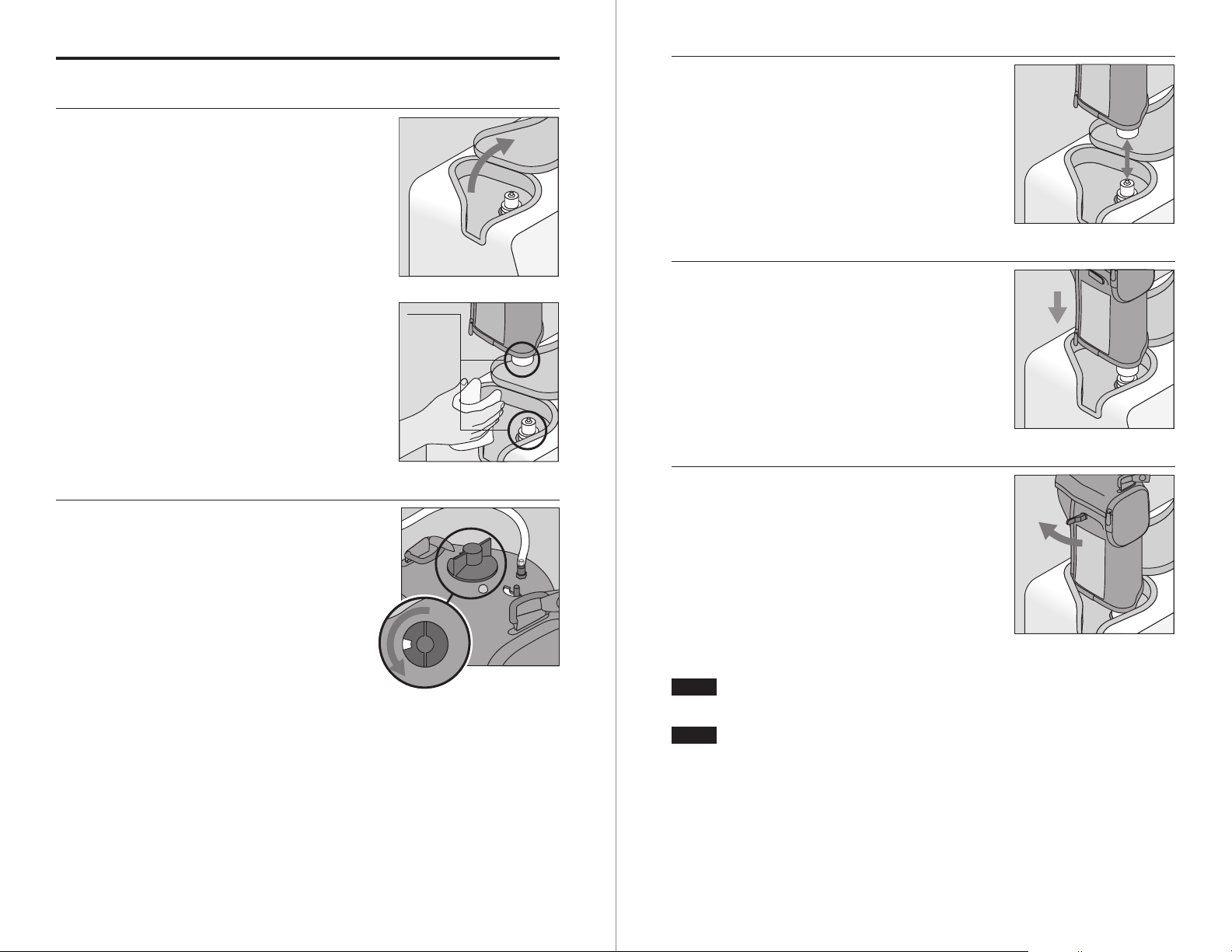
Instructions
1
Open the Liquid Oxygen Coupler
Access Door on the top of the
VIAspire Liquefi er. This will stop
the liquefi cation process.
3
Align the coupler on the bottom
of the VIAspire Portable with the
coupler in the dock area on top of
the Liquefi er.
4
Press fi rmly on the top of the
VIAspire Portable, keeping it in
Use a clean, dry, oil-free,
lint-free cloth to clean and dry the
couplers on both units.
Clean
and dry
an upright position. The VIAspire
Liquefi er and Portable are now
connected.
with cloth
5
Open the Vent Valve on the
VIAspire Portable to begin fi lling
2
On the VIAspire Portable, turn
the portable.
the Patient Flow Indicator to the 0
position and assure that the CF/SD
switch is in the “SD” position.
Hold down the VIAspire Portable
in place throughout the fi lling
process.
0
NOTE
The hissing sound you hear is the sound of some
oxygen escaping; this is normal.
NOTE
8 VIAspire Oxygen Portable Manual 300P-LT07 REV 0 300P-LT07 REV 0 VIAspire Oxygen Portable Manual 9
You may see vapor around the connection. This is
normal and due to the great difference in temperatures between the liquid oxygen and the warm air
surrounding the VIAspire Portable.
Page 7
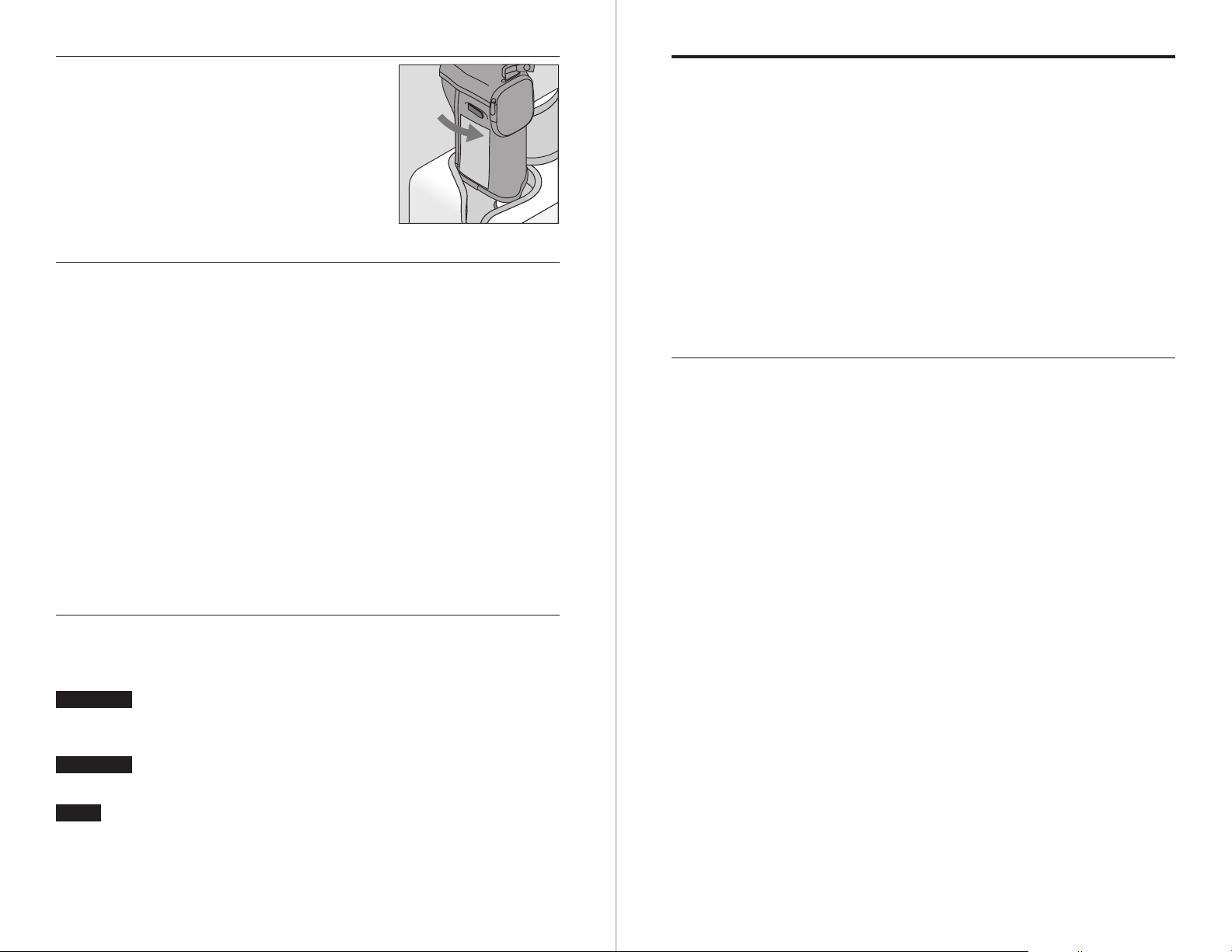
6
When the portable is full, close the
valve. You will know that it is full
when the hissing sound changes
tone, and some liquid comes out of
the vent line.
7 Lift the portable off of the VIAspire Liquefi er.
If the portable does not separate easily, do not use force.
The VIAspire Liquefi er and Portable may be frozen together,
which sometimes occurs. A slight twisting motion will
release them.
Selecting the Oxygen Delivery Mode
The VIAspire Portables 300 and 600 automatically dose in
two modes of pulsed oxygen delivery as well as continuous
fl ow modes.
When you are resting and your breath rate is slower, the
VIAspire Portable 300 and/or 600 are designed to deliver
oxygen at the lowest fl ow rate possible. This minimizes
nasal dryness and also results in quieter therapy. If you
notice a change in the velocity of oxygen on each breath, or
a quieter delivery of oxygen, you have probably slowed down
your breathing pattern and the SmartDose Technology has
adjusted the fl ow of oxygen to the appropriate level.
Sport Delivery Mode with SmartDose technology
Wait until the units warm up for 3 to 5 minutes, and then
•
they will separate with slight effort.
Do not touch any frosted parts.
•
If any liquid is leaking from the liquefi er reservoir or the
•
VIAspire Portable after separation, reattach the portable
immediately, then separate the units again.
If liquid continues to leak, leave the units connected and call
•
your medical equipment provider.
8 Close the Coupler Access Door. After a short period of time,
the VIAspire Liquefi er will begin liquefying to replenish the
liquid oxygen level.
WARNING
WARNING
NOTE
Should any excessive leakage occur, to the point that
a stream of liquid is present, leave the area and call
your medical equipment provider immediately.
Liquid or cold gaseous oxygen can cause frostbite on
the skin. Oxygen will result in increased fi re hazard.
For additional information and instructions on
proper use of your VIAspire Liquefi er, refer to the
user guide that came with it.
The VIAspire Portables 300 and 600 have SmartDose tech-
nology, which will track your breath rate to determine if you
are exerting more energy and therefore may need additional
oxygen. When you are at rest, the VIAspire Portables 300
and 600 will deliver a resting volume of oxygen. As you
begin to exert, your breath rate will climb, and the portable
will deliver additional oxygen.
While many oxygen portables require the patient to turn the
oxygen fl ow rate selector knob up and down as they move
and rest, the VIAspire Portables 300 and 600 will adjust
oxygen volumes to your needs automatically.
10 VIAspire Oxygen Portable Manual 300P-LT07 REV 0 300P-LT07 REV 0 VIAspire Oxygen Portable Manual 11
Page 8
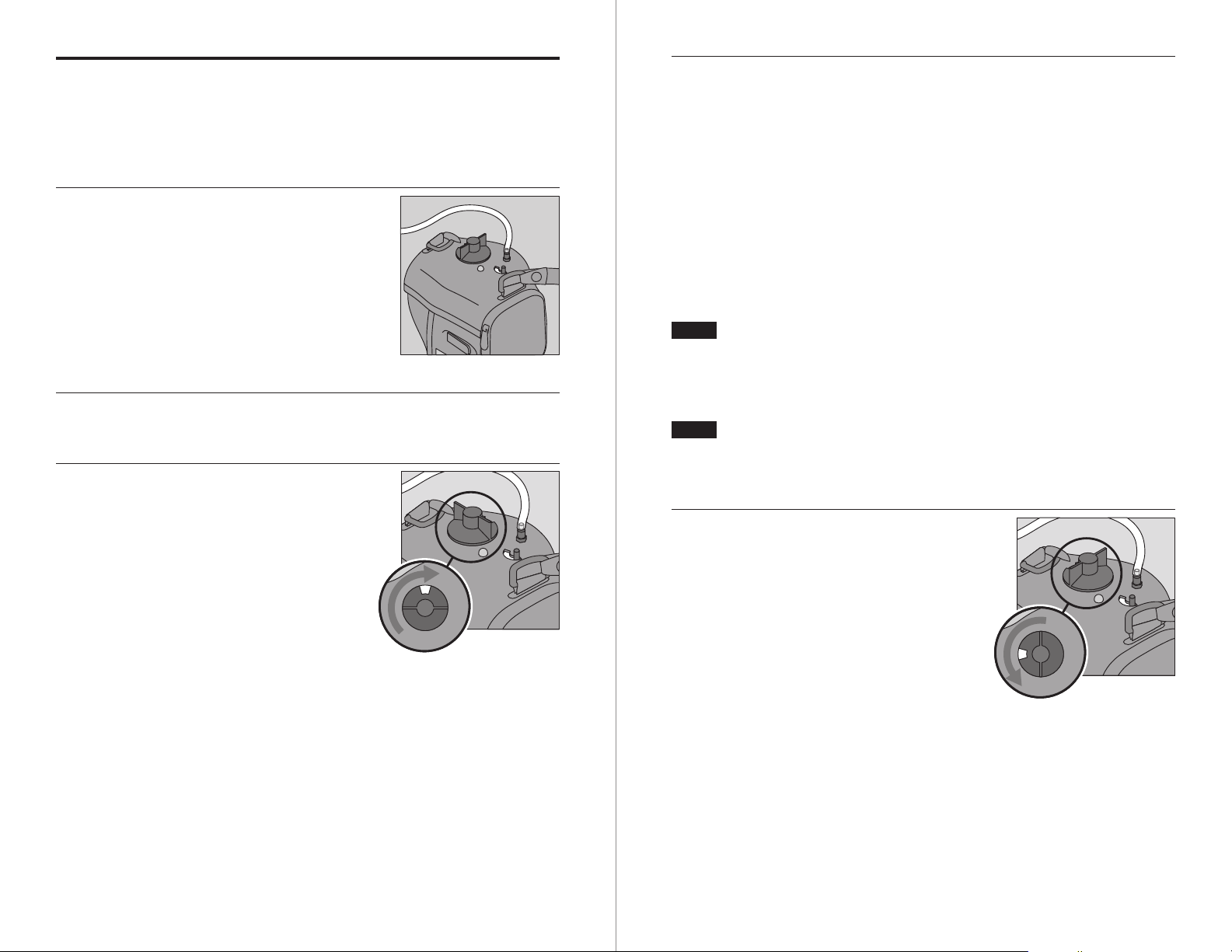
Starting Oxygen Delivery from the
VIAspire Portable
To receive oxygen from your VIAspire Portable, follow
these steps.
1
Push the cannula breathing tube
fi rmly onto the oxygen outlet port.
4 With each breath, you should now be receiving a set dosage
of gaseous oxygen.
•
The green LED battery indicator will light up with each
breath, signaling that the VIAspire Portable is being triggered to deliver oxygen. The LED monitors only battery
power and does not indicate level of liquid oxygen available
in reservoir.
When it is time to replace the batteries, the red LED
•
battery indicator will light up with each breath. The red
LED battery indicator will be lit solid (not blinking with
each breath) if the batteries are totally depleted.
NOTE
2
3
Adjust the cannula breathing tube to the proper position so
that you will be able to breathe the oxygen comfortably.
Turn the fl ow rate selection knob
NOTE
When the red LED indicator lights up, replace the
batteries as soon as possible or switch to continuous
fl ow by changing the CF/SD (Continuous Flow/
SmartDose) switch to the CF setting. Continuous
Flow mode does not require batteries.
The green LED battery indicator will light up with
each breath, regardless of the liquid oxygen contents, even if the portable has no liquid oxygen left.
clockwise until the prescribed fl ow
rate (from 0 to 5) appears in the
window. Assure that the CF/SD
switch is in the “SD” position.
5
3
To stop the oxygen delivery system,
turn the fl ow rate selection knob
counter-clockwise back to the off
(0) position.
0
12 VIAspire Oxygen Portable Manual 300P-LT07 REV 0 300P-LT07 REV 0 VIAspire Oxygen Portable Manual 13
Page 9
Monitoring Battery Power
Checking the Level of Liquid Oxygen
The VIAspire Oxygen Portables 300
and 600 are each powered by four
AA alkaline batteries. A blinking
red light on the LED means it is
time to replace the batteries. If this
happens, replace the batteries or
Red lightRed light
switch to continuous fl ow by changing the CF/SD (Continuous Flow/
SmartDose Delivery) switch to the
CF setting. Continuous Flow mode does not require batteries and the VIAspire Portable will now deliver a continuous
fl ow of oxygen.
If the indicator displays a non-blinking (solid) red light,
this means the batteries are dead and no oxygen is being
delivered in SmartDose mode.
WARNING
NOTE
Using the VIAspire Portable 300 or 600 in continuous fl ow (CF) mode will use up oxygen at a faster
rate. Monitor the contents indicator as described
under “Checking the Level of Liquid Oxygen” to be
sure that you do not run out of oxygen.
When using the VIAspire Portable in continuous
fl ow (CF) mode, the LED indicator will NOT light up
green or red with each breath. Turning the fl ow
selector knob to zero will not affect the fl ow. Turn
the CF/SD switch to “SD” mode to stop fl ow.
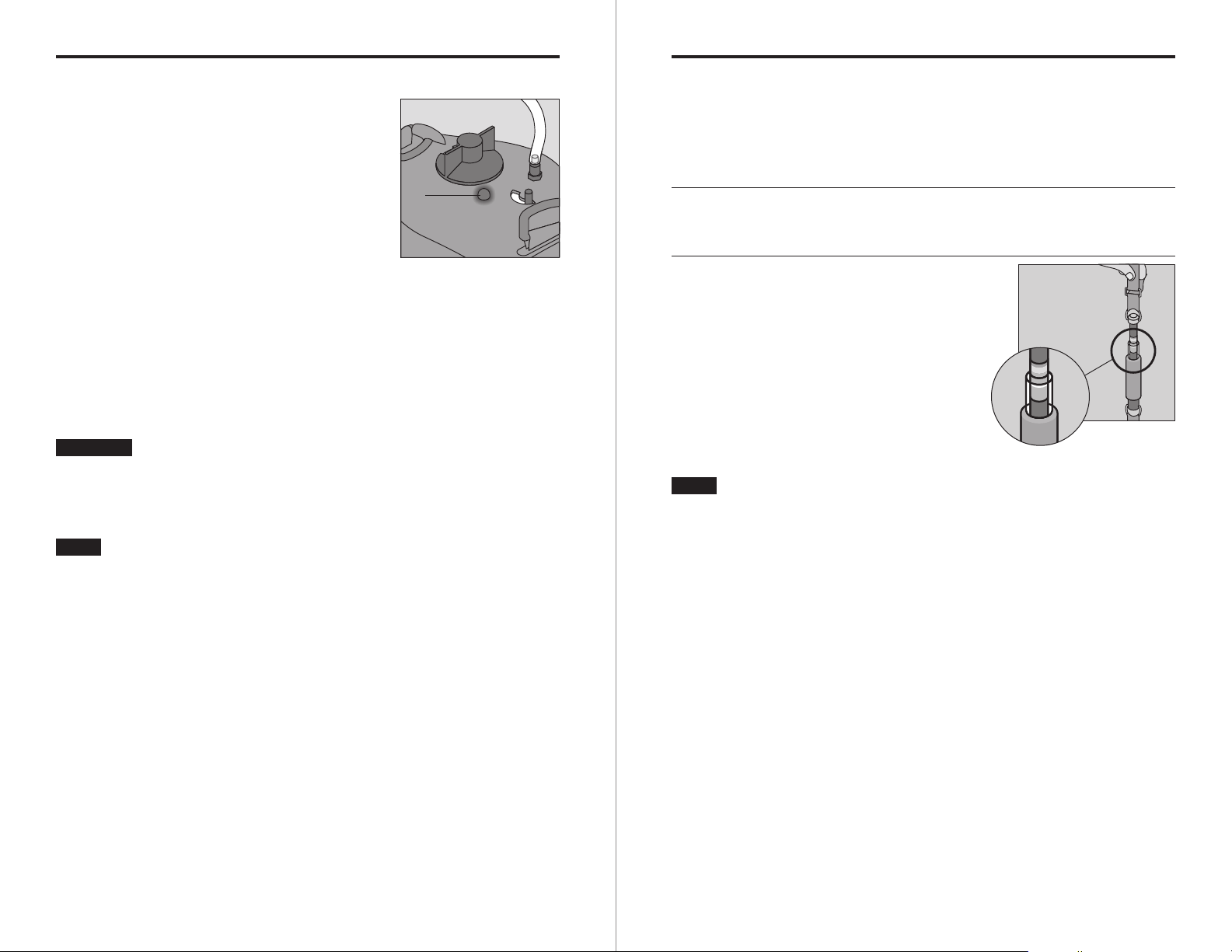
The VIAspire Portable has a built-in tool to check the
amount of liquid oxygen. Follow these steps for using the
Content Indicator.
1 Hold the short strap directly above the black Content Indi-
cator spring scale chamber on the portable as shown below.
2
NOTE
Let the portable stabilize (do not
bounce or shake it), then read the
exposed color scale for the approximate amount of liquid oxygen.
If the portable is empty, only the red colored band
of the scale will be exposed. In this case, you need
to fi ll the portable before you can use it.
Content
indicator
14 VIAspire Oxygen Portable Manual 300P-LT07 REV 0 300P-LT07 REV 0 VIAspire Oxygen Portable Manual 15
Page 10

Troubleshooting
Cleaning and Maintenance
The following troubleshooting chart will help you analyze
and correct minor system malfunctions. If the suggested
procedures do not help, call your medical equipment provider. Do not attempt any other maintenance.
WARNING
To avoid electric shock hazard, do not remove the portable
case. The case should only be removed by a qualifi ed
technician.
Problem Solution
No indicator lights Check that there are new batteries
•
in the unit (four AA-Alkaline
Batteries).
•
Check that the cannula tubing is
properly connected and that the
tube is not blocked.
•
Check that the CF/SD switch is in
the SD (SmartDose) position.
Removing Frost
Under certain environmental conditions, frost may form
on the vaporizer coil and on the case. You can remove it by
tapping the portable or wiping the case.
After allowing the portable to warm to room temperature,
unzip the bottom and remove the condensation pad. Wring
out and allow it to dry thoroughly before replacing.
Preventative Maintenance
Contact your medical equipment provider annually to sched-
ule preventative maintenance for the VIAspire Portable 300
or 600. There are no user-serviceable components inside the
portable (with the exception of the condensation pad).
Keep the exterior of the VIAspire Portable 300 or 600 clean
using a clean, damp, oil-free, lint-free cloth.
Clean and dry the couplers on both the VIAspire Liquefi er
reservoir and the VIAspire Portable 300 or 600 with a clean,
dry, oil-free, lint-free cloth before each portable fi ll.
Accessories
Inspired Technologies recommends using only cannula spe-
cifi cally intended to be used with Oxygen delivery systems.
Cannula should be capable of delivering up to 8 LPM of continuous fl ow; maximum length that can be used is 10 meters
(35 ft.). Contact your homecare dealer for recommendations
and details. Refer to the cannula manufacturer’s instructions for proper cleaning and maintenance procedures.
16 VIAspire Oxygen Portable Manual 300P-LT07 REV 0 300P-LT07 REV 0 VIAspire Oxygen Portable Manual 17
Page 11

Transporting & Storing VIAspire Portables
Preparing for Shipping
Prior to shipping the VIAspire Portable 300 or 600, remove
the batteries and empty any residual oxygen from the unit.
Allow the portable to sit for at least 8 hours to allow it to
empty.
Storage
Store the VIAspire Portable 300 or 600 in a cool, clean, dry
area when not in use. Avoid storing in direct sunlight.
Battery disposal
Dispose of all alkaline batteries in accordance with local,
state, and federal regulations.
Specifi cations
Batteries
Required
Oxygen
Pressure
LOX Content
Volume
Weight
(empty)
Temperature Storage/ Transport
Humidity
(non-condensing)
18 VIAspire Oxygen Portable Manual 300P-LT07 REV 0
4 AA-Cell
(alkaline only)
22 – 25 psig
Model 300
Model 600
Model 300
Model 600
Operating
Storage
Operating
0.33 liters (approx)
0.6 liters (approx)
3.5 lb
4.5 lb
-20 to 50°C
+ 5 to 40°C
0 to 95% RH,
15 to 95% RH,
Page 12

VIAspire™ Oxygen Portables
300 and 600 Product Manual Insert
This insert applies to the use of the 300 and 600 Liquid
Oxygen Portable with PB coupler.
The VIAspire 300 and 600 Liquid Oxygen Portable with SmartDose
technology is also available with a PB coupler suitable for use with
liquid oxygen (LOX) systems which have a male PB Coupler (100%
LOX). These portables with a PB coupler cannot, however, be used
with the VIAspire Liquefier. This inserts applies to the following
Inspired Technologies part numbers:
300P-0601 and 600P-0601
All the pages in the VIAspire Oxygen Portable 300 and 600 Product
Manual still apply except for the following:
Page 1: The portables with the PB Coupler are not compatible
with the VIAspire Liquefier. Another source of LOX is required.
Pages 7-10: Filling a VIAspire Portable 300 or 600. These
directions are not applicable because the Portable will be filled
from another liquid oxygen system, not the VIAspire Liquefier.
Follow the instructions from the Liquid Oxygen System on filling a
portable.
All terms, abbreviations and symbols, safeguards, cautions,
warnings, notes, and Indications for Use in this manual
still apply.
 Loading...