

Page 1

Nox
User Manual for Smart Sleep Light
Page 2

Brief Introduction
Functions
Thank you for purchasing this smart sleep light. Nox works by itself or in combination
with the Sleepace App and can help you fall asleep easily and wake up naturally with
its gentle light and soothing music. It can also monitor your bedroom environment.
For more intelligent monitoring as well as assistance with going to sleep or waking up,
a smart sleep monitor, like RestOn can be used. The Sleepace App can monitor your
sleep data when used by itself and can also provide sleep analysis and sleep tips
when used together with Nox.
Place your Nox Smart Sleep Light on your nightstand and plug it into the wall. The red
light, which helps your brain produce melatonin and soothing music and sounds will
help you fall asleep faster. In the morning Nox will wake you up slowly at the lightest
stage of your sleep by simulating a sunrise gradient effect and by playing soft music.
Nox will also monitor your bedroom temperature, humidity, sound, luminosity and
other parameters. In addition, Nox also has a USB port to charge your phone, tablet
or other electronic devices.
The Nox Smart Sleep Light works with the Sleepace App and provides daily, weekly,
monthly and quarterly reports by analyzing your sleep quality. The App will also
render sleep advice and suggestions according to your vital and environmental data.
You can follow your relatives and friends' sleep status remotely via the Cloud share
01
02
Sleepace App
Nox Smart Sleep Light
1
Page 3

A smart sleep monitor, like RestOn from Sleepace can monitor your vital parameters
during your sleep. When used in combination with Nox, the sleep monitor can analyze
your sleep quality comprehensively. Once the monitor has detected that you have
fallen asleep, Nox will stop its sleep- aid mode automatically. In the morning, Nox will
wake you up with its soft light and soothing sounds as soon as RestOn detects your
lightest sleep stage.
function. The Nox firmware as well as the App are constantly updated and can
therefore provide you with more comprehensive sleep health benefits.
Nox and a smart sleep monitor
2
Page 4
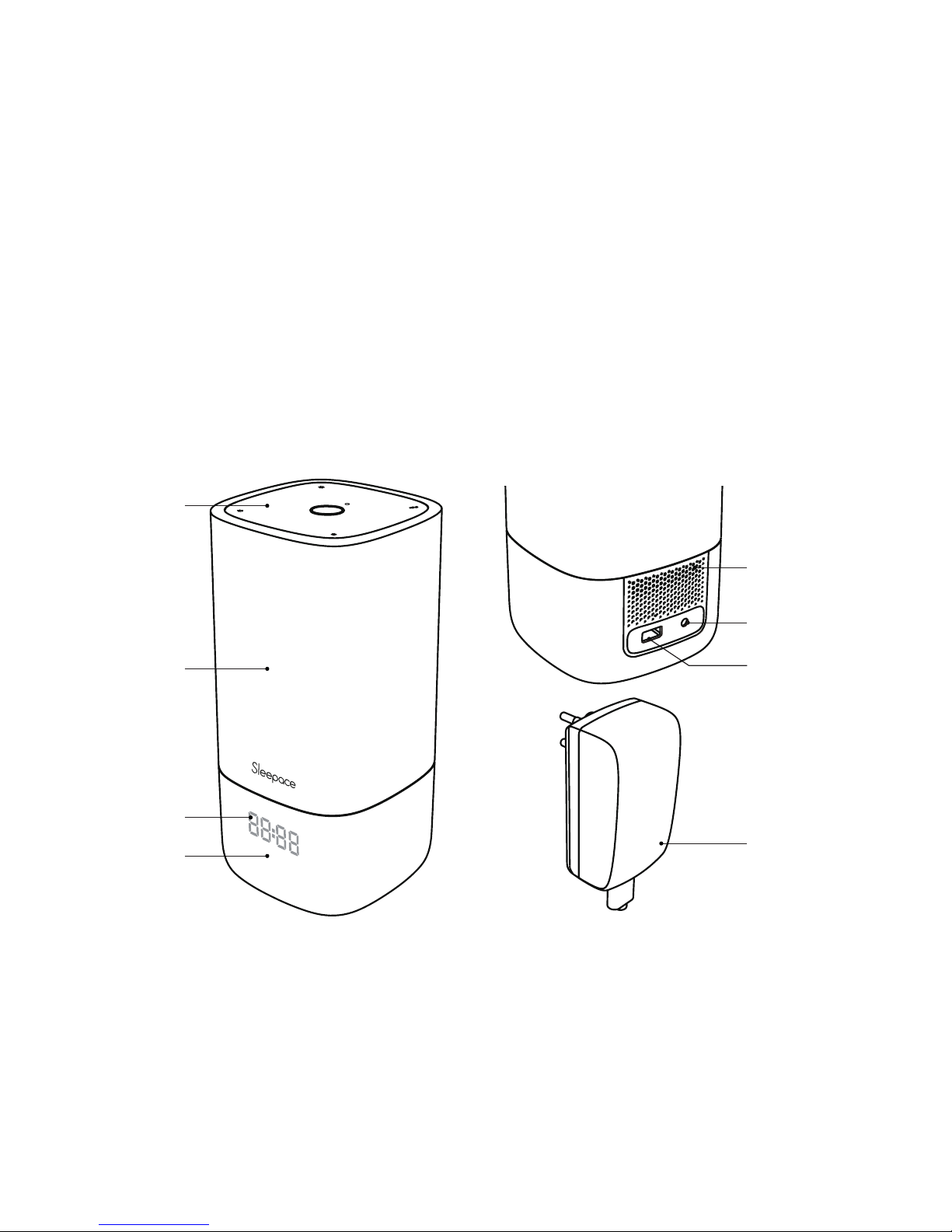
Contents
1x Nox
1x Power Adapter (12V, 1.5A)
1x User Manual
1x Warranty Card
03
3
Touch Keys
Lampshade
Base
USB Charger
Speaker
Power Adapter
Power Input
Nox Overview
LED Display
Page 5
4
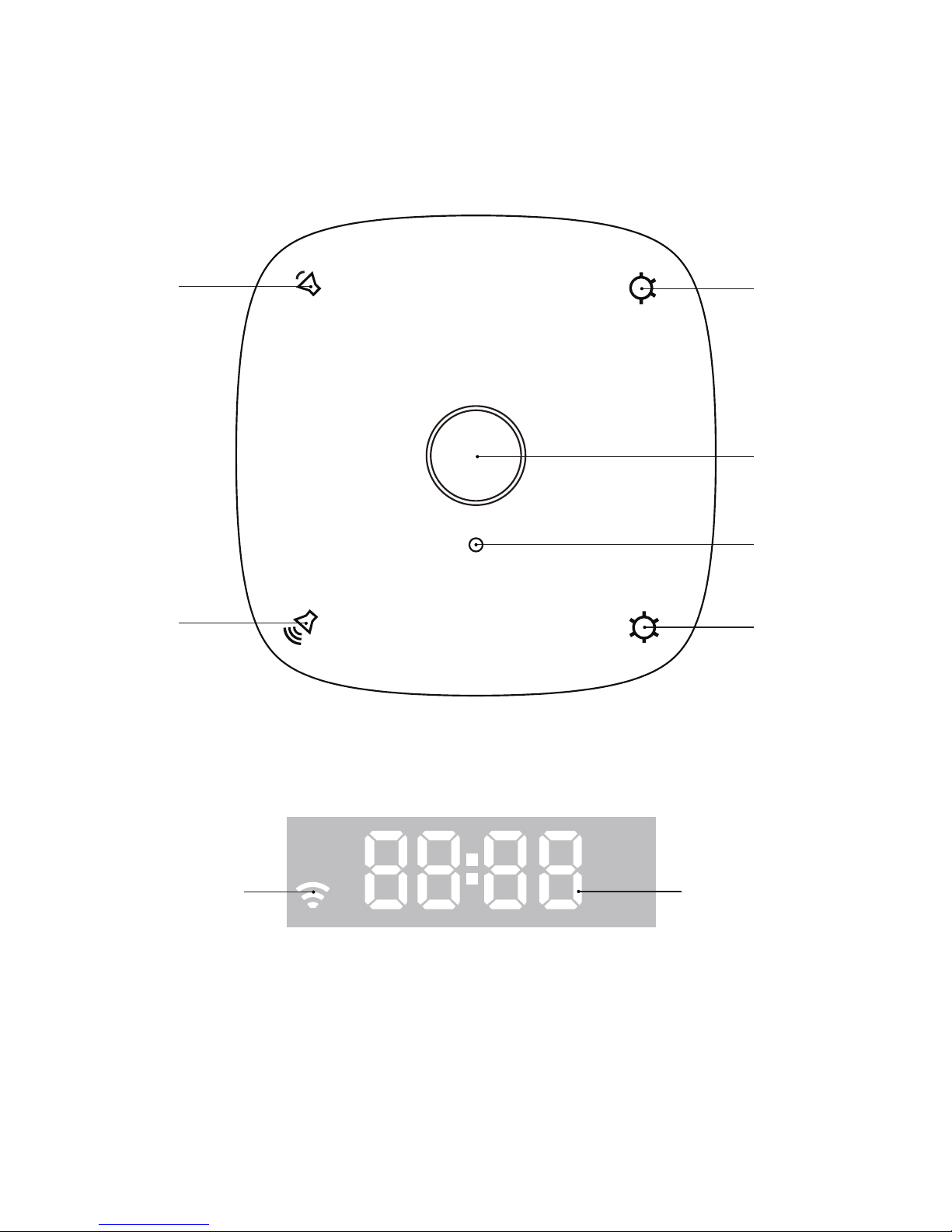
Volume -
Brightness -
Brightness +
Power Button
Light Input
Volume +
Nox Touch Keys
Nox LED Display
Wi- Fi
Clock
Page 6
User Requirements
04
5
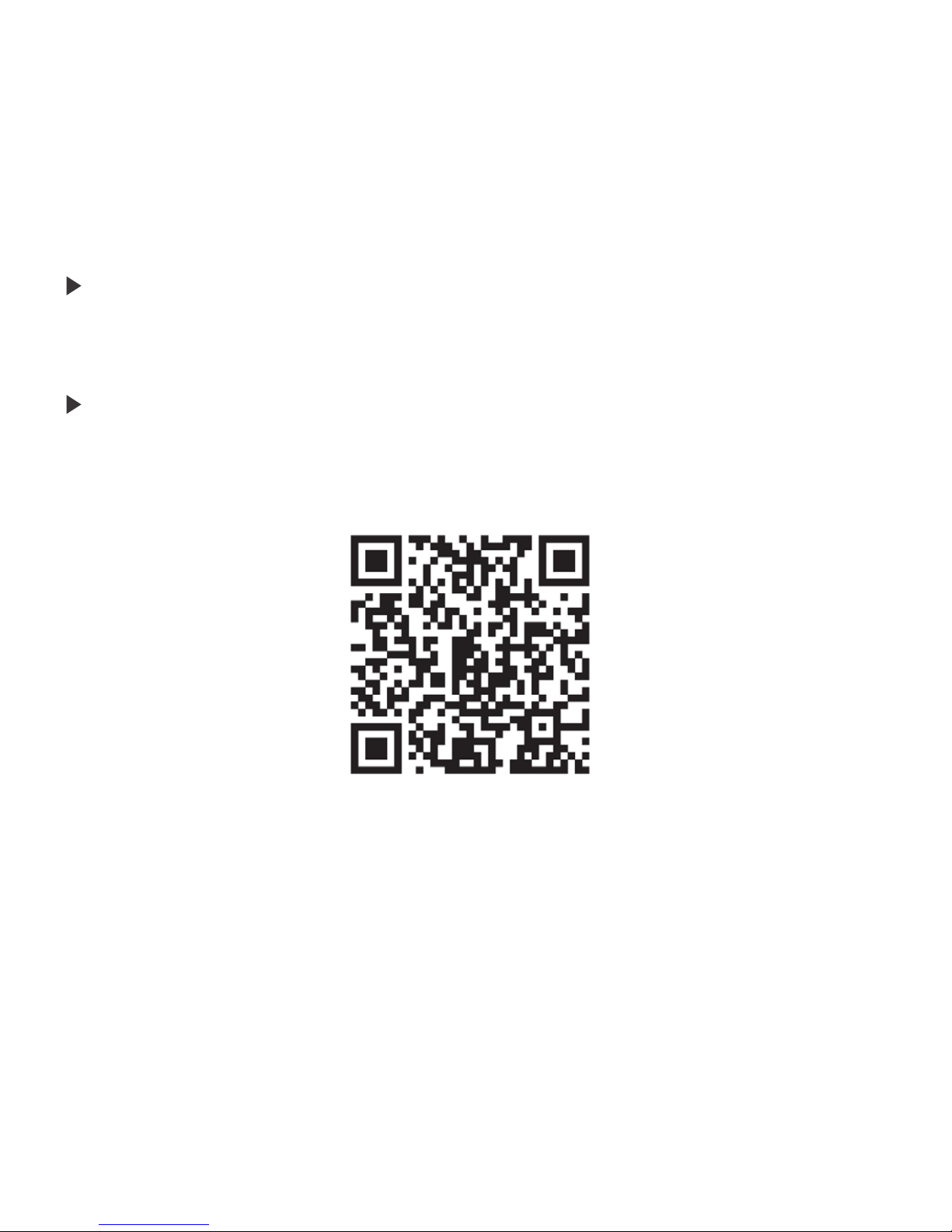
2. Download via www.mysleepace.com.
3. Search " Sleepace " in GooglePlay or iTunes store for download .
You will need a Wi- Fi router to set the sleep light system, update your firmware and
to upload sleep data.
You will need a smart phone with Bluetooth 4.0 that supports iOS 7.1 or later or
Android 4.3 or later.
There are three ways to download the Sleepace App:
1. Scan the QR Code.
Wi-Fi Router
Installation of App
Page 7
Installation Guide
05
6
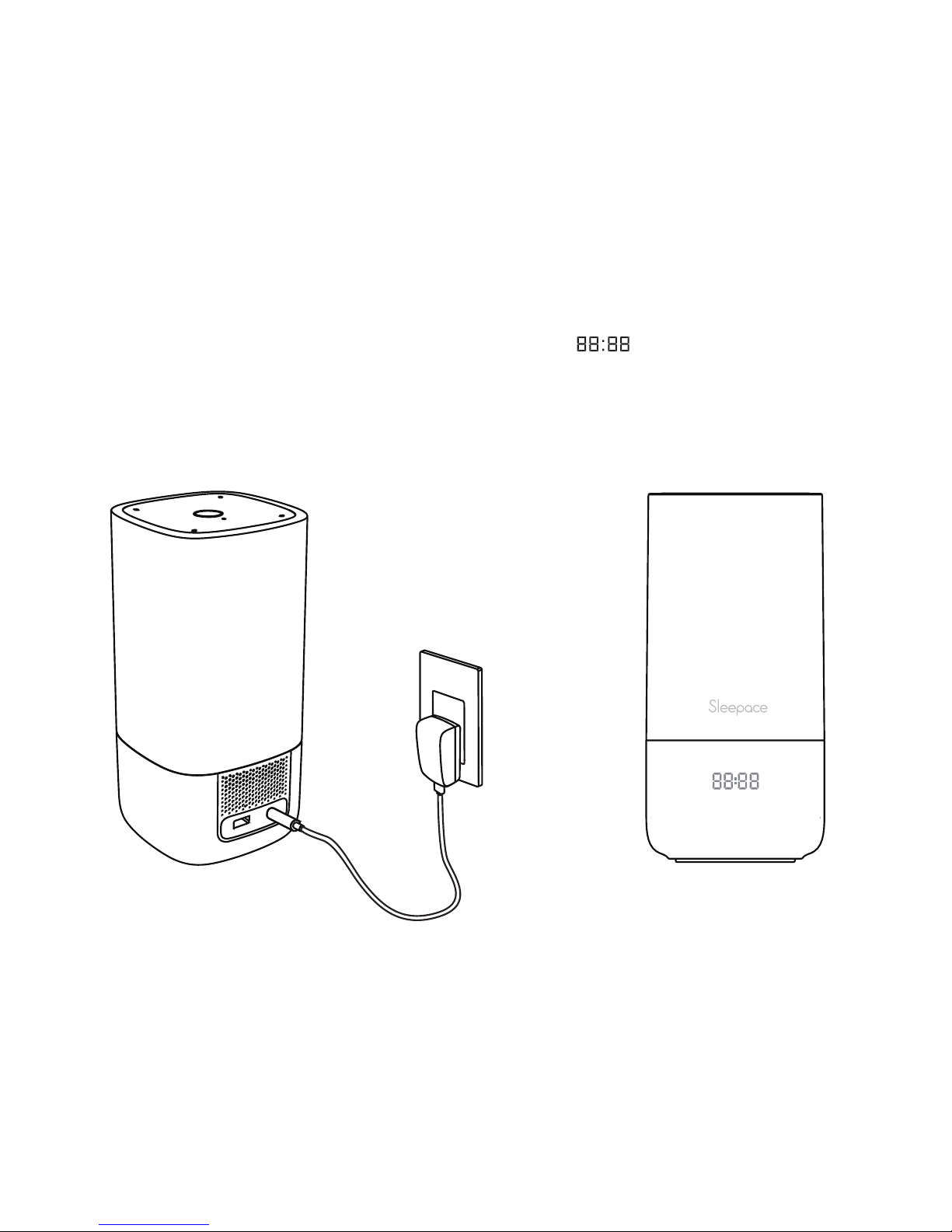
Power Supply Connection LED Display
Put Nox on your nightstand and plug it into the wall.
Make sure the power cord is plugged into Nox as well.
Once you power on Nox, the LED should display " "to let you know that you
have successfully installed Nox.
Page 8
User Manual
06
7
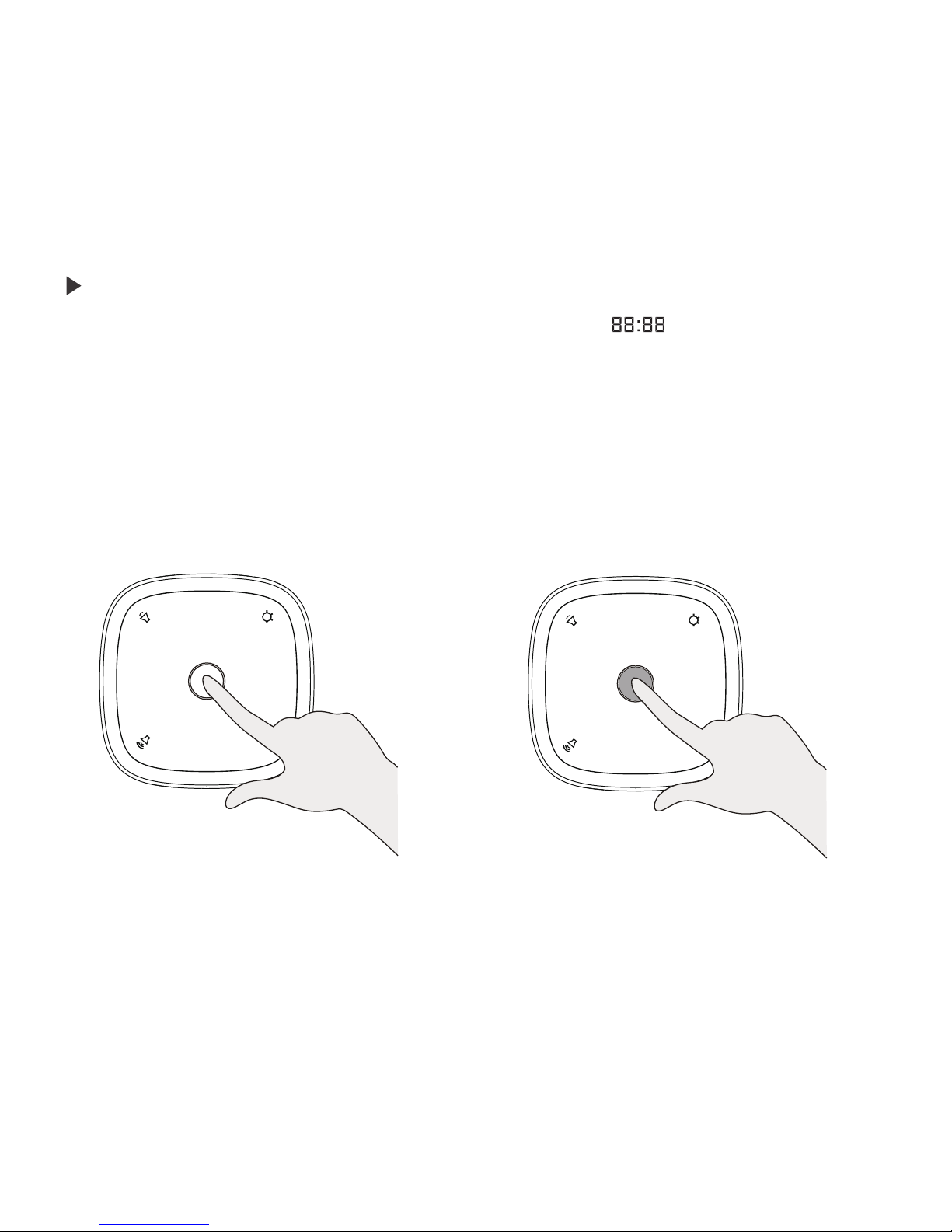
Touch to Power On/Off Touch to switch to sleep-aid mode
As soon as Nox is turned on, the display will be showing" ". This means that Nox
is in test mode. To turn on the light, touch the button on top of the lamp. Touch the
center button again to turn off Nox.
Touch the center button for 3 seconds to switch to the Sleep- aid mode. The Sleepaid music as well as a red light will come on. A slight touch of the center button will
stop the Sleep- aid mode.
Test Mode
Page 9
8
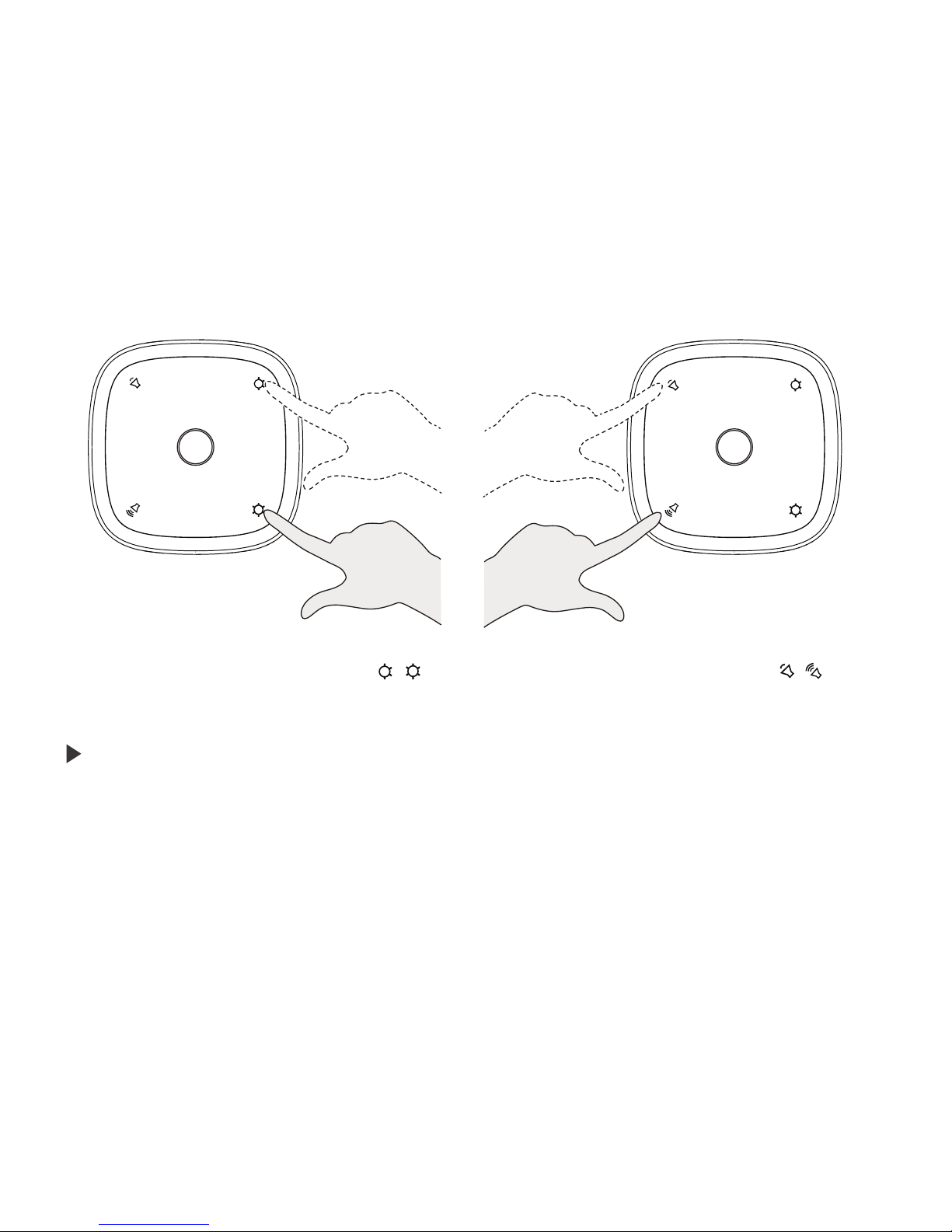
Touch to adjust the brightness( / )
Touch to adjust the volume( / )
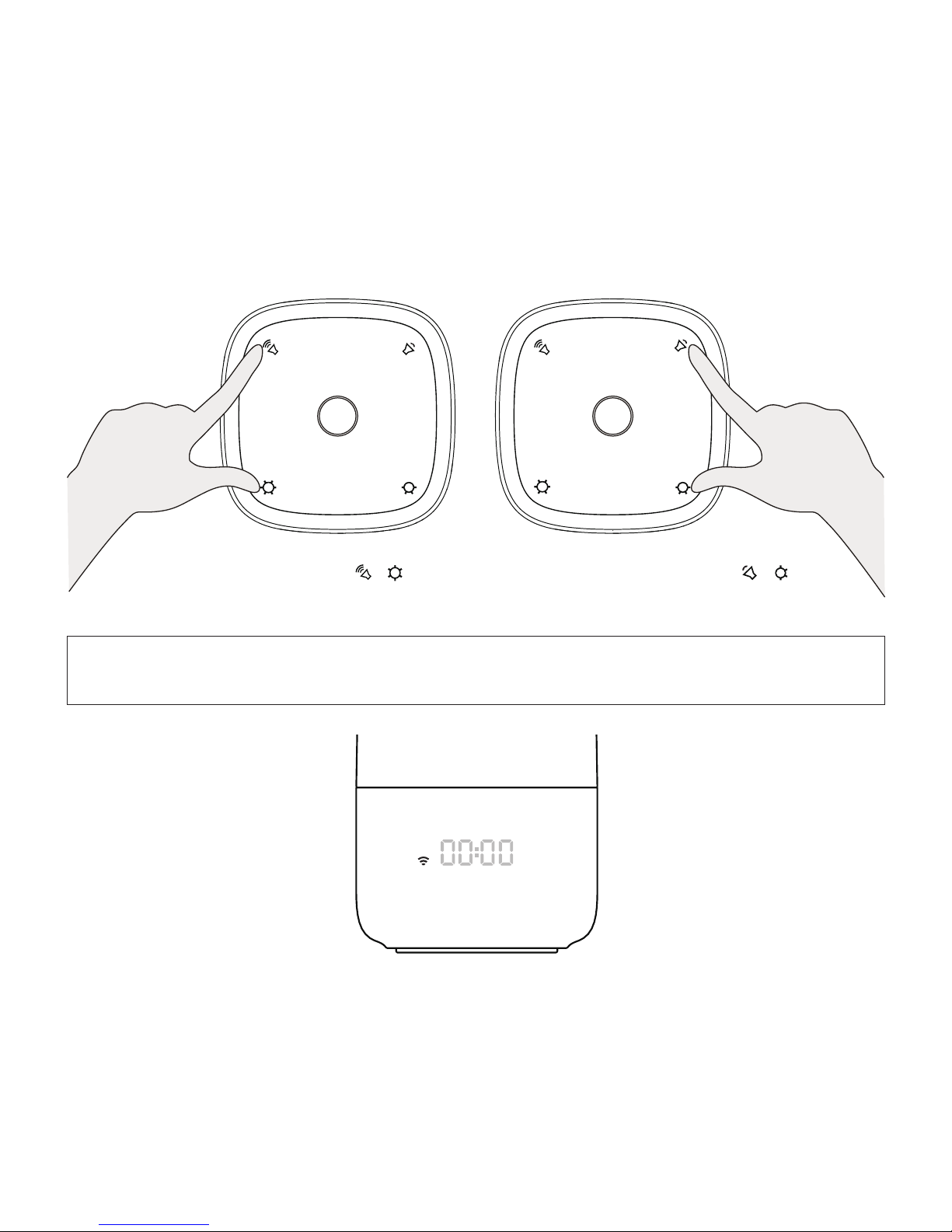
When Nox is in test mode, please log into your Sleepace App. If you connect Nox
after you have registered or logged in to the App, the App will prompt you to press
Volume + and Brightness + at the same time for the one- key set- up mode of Nox.
When the LED display shows "00:00", you can choose your network, enter your
password and connect to your Wi- Fi through the App.
Should the one- key set- up fail, you can also select the network through the App in
the Manual mode. Press Volume- and Brightness- at the same time; once the LED
display shows ":" go to the settings in your phone and select the Wi- Fi hotspot
Touch Volume + / Volume - to adjust the volume.
Touch Brightness + / Brightness - to adjust the brightness.
More functions can be accessed through the Sleepace App.
Connect Nox to the Internet
Page 10
9
One- key set- up mode( + )
Successfully connected
Manual
set- up mode( + )
※Important: The Sleepace App will only work properly if Nox and your
smart phone are both connected to your Wi-Fi.
"Sleepace Nox" (you can skip this step for Android). Go back to the Sleepace App,
choose your network, enter your password and connect to your Wi- Fi.
Page 11
10
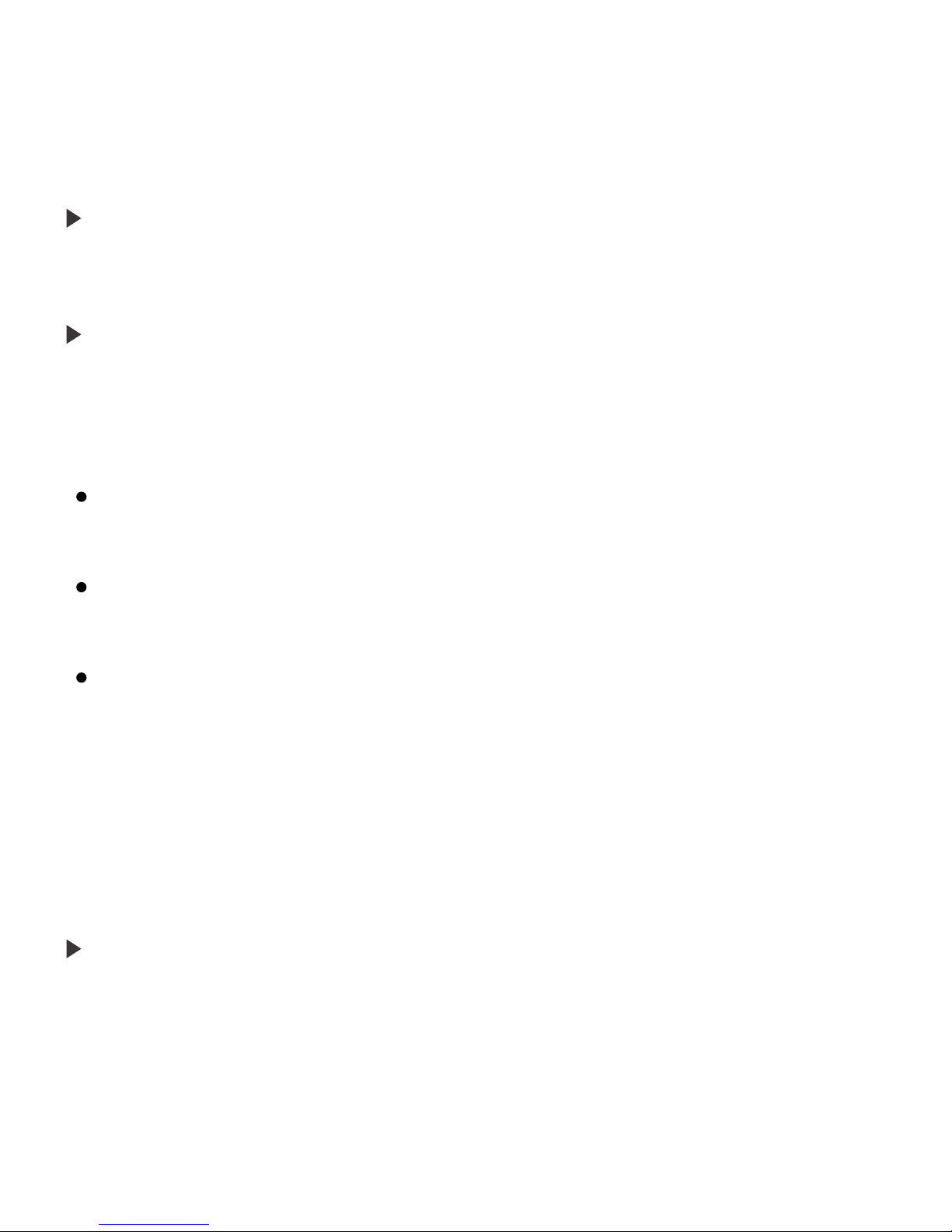
Slightly touch the center button on top to turn on the lamp. Touch Brightness + or
Brightness - to adjust the brightness. Touch the center button again to turn Nox off.
Nox’s Sleep- aid setting will help you fall asleep easily with its soothing lights and
music. You can also customize the settings and change the music and/or sound and
light through the Sleepace App.
Nox supports 3 sleep- aid modes:
The Nox Smart Alarm feature can wake you up naturally with light and music; you can
Once you have started the Sleep-aid mode, touch Volume + / Volume - to adjust
the volume and Brightness + / Brightness - to adjust the brightness. Touch the
center button to stop the Sleep- aid mode. You can also change the settings through
the Sleepace App.
Sleep- aid Timer: Touch the center button for 3 seconds to access the Sleep- aid mode;
set the time when you want the Sleep- aid mode to stop from the App. Once set up, Sleepaid mode will stop automatically at the set time.
Smart Sleep- aid mode 1: Simply start monitoring by pushing 'start sleep' in the App. Nox
will start the Sleep- aid mode and automatically stop it once it has detected that you have
fallen asleep. Do not stop the Sleepace App in this mode.
Smart Sleep- aid mode 2 (for the smart sleep system): Simply start monitoring by pushing
'start sleep' in the App. Nox will start the Sleep- aid mode and automatically stop it once the
smart sleep monitor detected that you have fallen asleep. Do not stop the Sleepace App in
this mode.
Daily Operation of Nox
Nox Sleep-aid Set-up
Nox Smart Alarm Set-up
Page 12
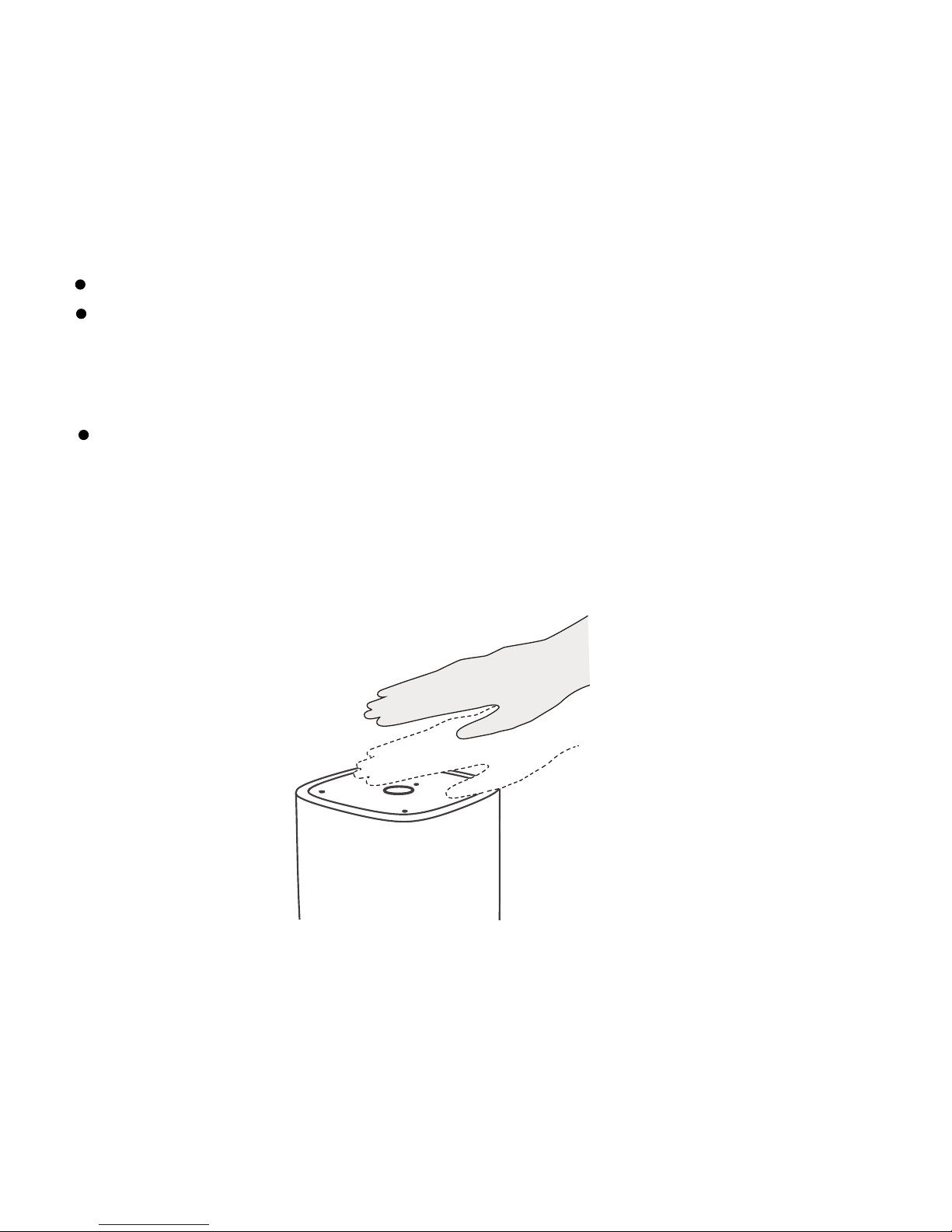
Tap to snooze
11
customize the wake up music or sound as well as the light from your Sleepace App.
Nox supports 3 Smart Alarm modes:
Alarm Timer: Simply set your desired alarm time from the Sleepace App.
Smart Alarm mode 1: Set the alarm through the App. Nox will wake you up automatically
within 30 minutes of your set alarm time when you are at the lightest stage of your sleep in
the morning. In case you are not in a light sleep phase within the range, Nox will wake you at
your set time. Do not stop the Sleepace App in this mode.
Smart Alarm mode 2 (for smart sleep system): Set the alarm through the App. Smart
sleep monitor' s sleep monitoring function will let Nox know when you are at the lightest stage
of your sleep in the morning so Nox can wake you up at the right time for you. In case you
are not in a light sleep phase within the range, Nox will wake you at your set time. Do not stop
the Sleepace App in this mode.
Page 13
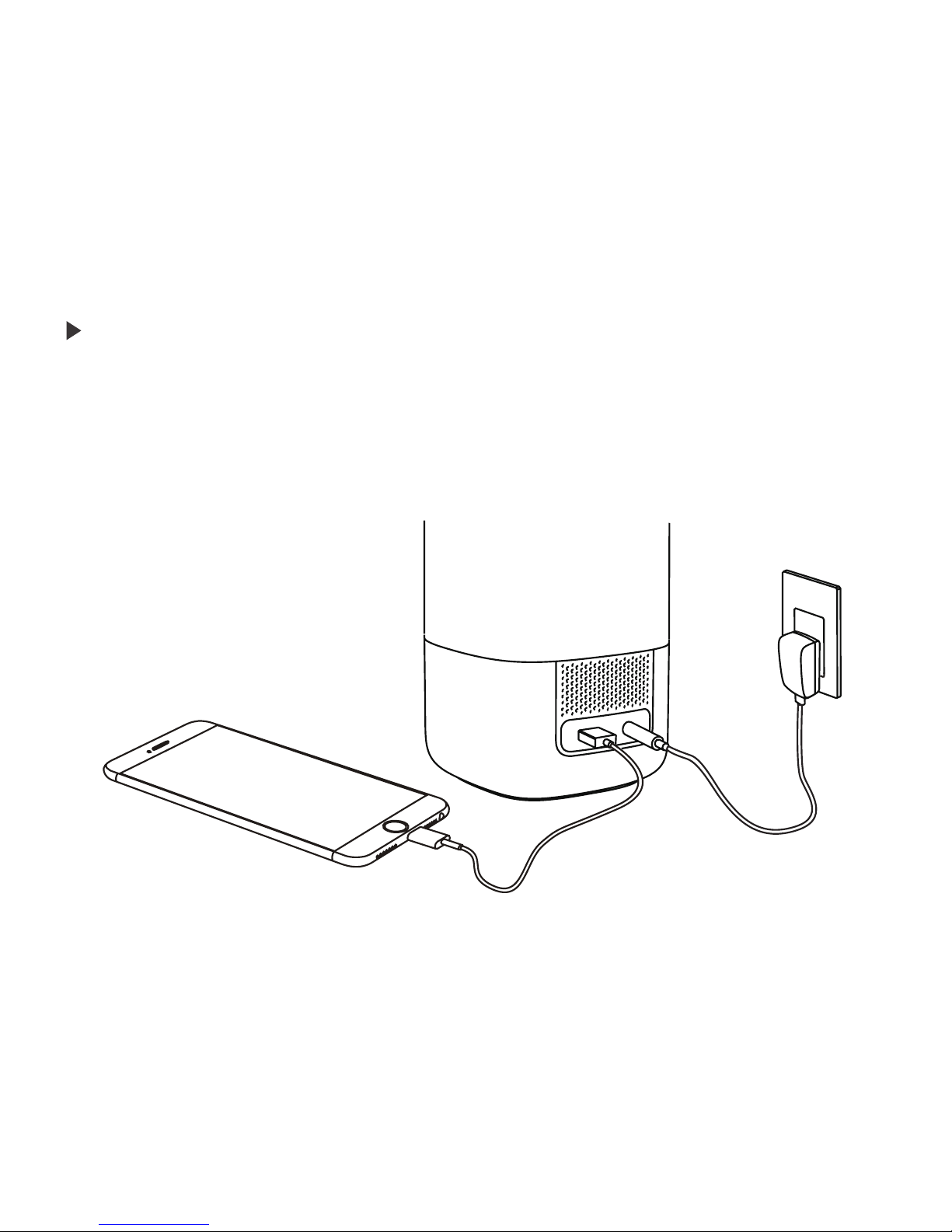
Nox Charger
12
Nox has a USB port with an output of 5V- 1A that lets you charge your electronic
devices. Simply connect your device with the USB port and Nox will charge your
device.
Push the center button to turn off the alarm. You can also turn it off through the
Sleepace App. To snooze, just slightly tap the top, Nox will resume the alarm again
later.
Nox Charger
Page 14

13
Please log into the Sleepace App to check your daily, weekly, monthly or quarterly
sleep report. The App will analyze your sleep and provide suggestions according to
your sleep status and environment parameters.
The Sleepace App supports smart phones to monitor your sleep quality. The App in
conjunction with Nox can be used as a sleep- aid as well as a smart alarm.
Sleepace App User Guide
Page 15
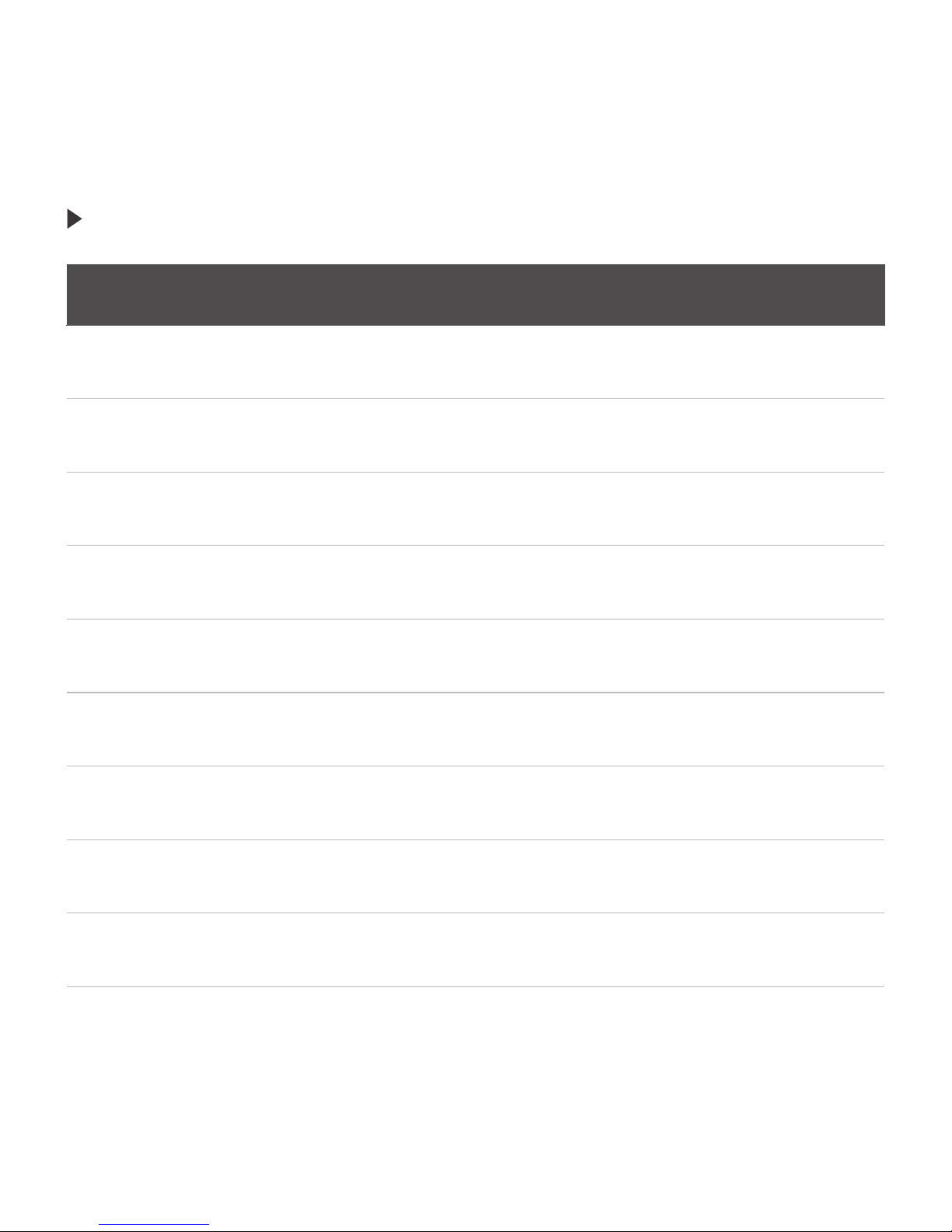
Nox Touch Keys
Touch the center button once
Touch the center button for 3 seconds
Slightly touch the center button once
Simultaneously touch Volume + and
Brightness + for 3 seconds
Simultaneously touch Volume- and
Brightness- for 3 seconds
Touch Brightness + or Brightness -
Touch Volume + or Volume -
Slightly touch the center button once
Tap the top once
Power On / Off
Turn On Sleep-aid Mode
Turn Off Sleep-aid Mode
One-touch Set-up
Manual Set-up
Adjust Brightness
Adjust Volume
Turn Off Alarm After Waking Up
Snooze
Feature
Action
14
Page 16
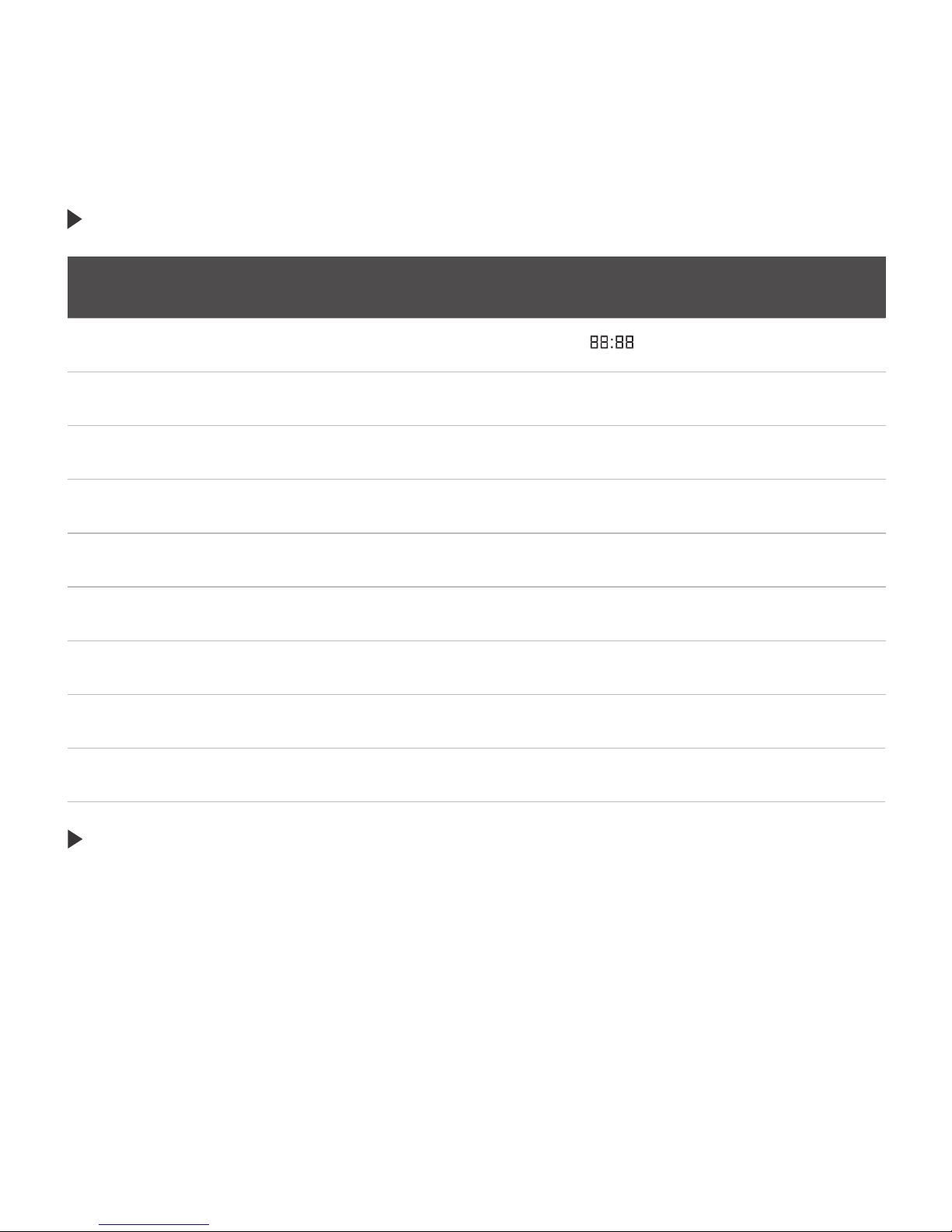
Status Display
Clock shows "
"
Clock shows time, Wi- Fi icon lights up
Clock shows time
Clock shows time
Clock shows time, alarm icon lights up
Clock shows time
Clock shows "00:00"
Clock shows time, the middle ":" flashes
Clock shows ":"
Test Mode
Wi-Fi Connected
Turn On Sleep Mode
Turn Off Sleep Mode
Start Wake Up Mode
Turn Off Wake Up
Go To One-key Set-up
Snooze
Go To Manual Set-up
Nox LED Display
15
1.Battery can prevent the damage of TF card in case of the sudden power blackout.
2.With Bluetooth, Nox can communicate with other sleep monitoring products of
Sleepace.
3.TF card is for music storage.
4.USB port can be used to charge other electronic equipment.
Other functional instructions
Page 17
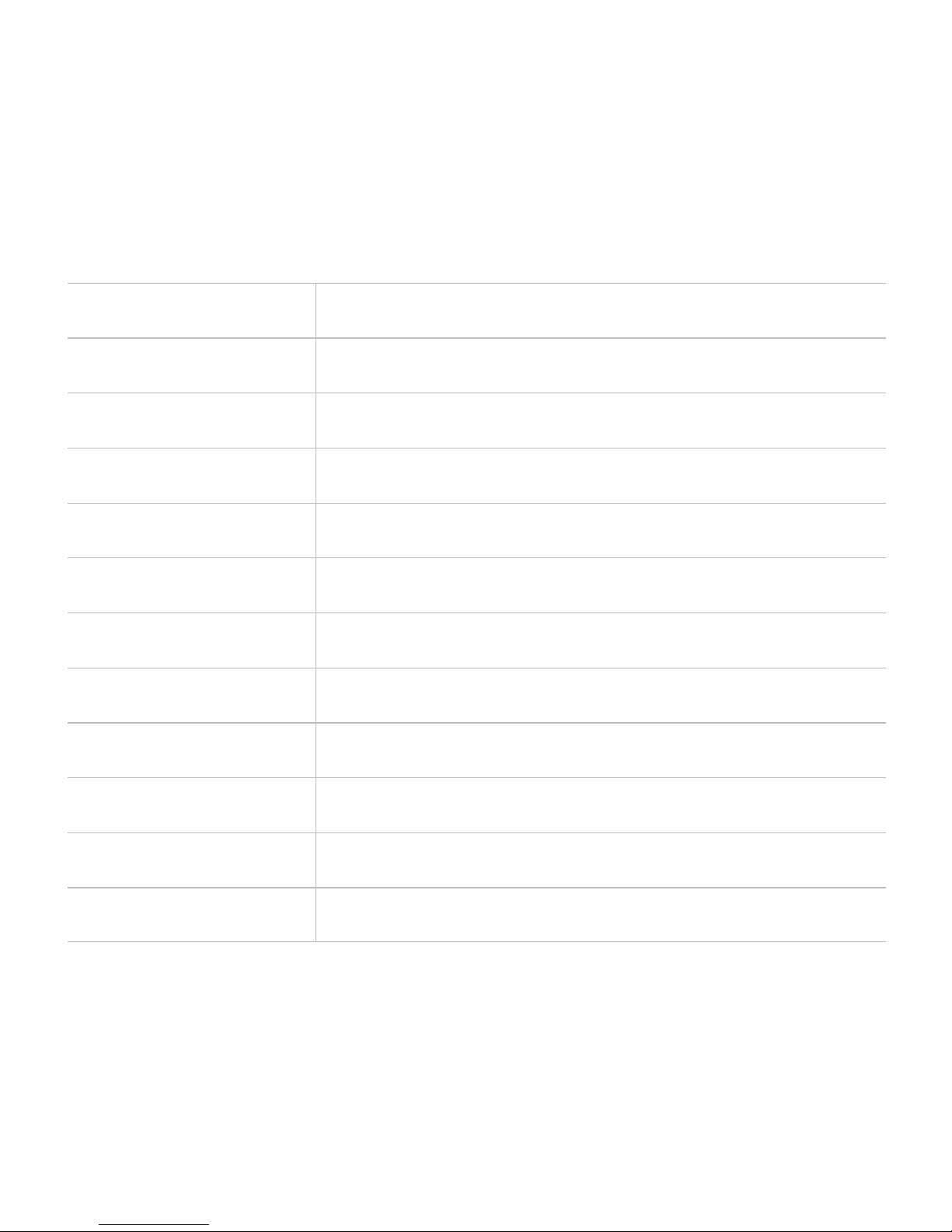
Model
Rated input
N101
100~240V 50/60Hz 0.6A
Size
Output
Weight
Lifetime
Color
Data transmission
Color
USB output
Power
Display
4.02 x 4.02 x 8.09 inches
12V 1.5A
23oz
25,000 hours
Grey
16.7 billion
Wi- Fi, Bluetooth 4.0(33ft. reach indoors)
5V 1A
15W
Time, Wi- Fi connection
16
Specifications
07
Page 18
Problem
App does not
control Nox
Unable to register
account
1. Nox is not turned on
2. Nox is not connected to
the Internet
3. Smart phone is not
connected to the Internet
Smart phone is
disconnected from the
Internet
1.Please ensure Nox is
powered on
2.Connect Nox to the
Internet
3.Make sure your smart
phone is connected to the
Internet
Please connect to your
Wi- Fi or open GPRS
Symptom Solution
17
Please read the user manual and the safety notices on the lamp carefully to avoid
potential dangers. Please use the lamp according to the instructions.
Device should only be used at the predetermined voltage and frequency; the lamp
is for indoor use only and should not be used outdoors.
In case of any unexpected occurrences, stop using Nox immediately, cut off the
power and check the device.
Recommended usage temperature range is between 14° F and 113° F.
Nox is not waterproof.
FAQs
Safety Notice
08
09
Page 19

18
Avoid turning the device upside down.
Please unplug the power if you do not use Nox for an extended period of time.
Appendix
10
Sleepace reserves the right, without prior notice, to make changes and improvements
of the product description in this document.
The content of this manual is provided by the manufacturer. Unless an applicable law
provides, the document does not make any kind of promises regarding the accuracy,
reliability and content.
This manual is protected by copyright laws and regulations, any reproduction in any
form, transmission, distribution and use of any of the contents of this manual without
written permission is prohibited.
Page 20

Tel:400- 6910- 998 Email:[email protected]
Web:www.mysleepace.com Fax: +86-755-26632411
Add:2F Building A, Tongfang Information Harbor, No. 11,East Langshan Road,
Nanshan District, Shenzhen, P.R. China
Shenzhen Medica Technology Development Co ., Ltd.
Page 21

Nox Warranty
Page 22

1
Nox consists of a lamp, a power cable with adapter, and a mobile App, which must be
downloaded separately. This Limited Warranty covers ONLY the lamp and adapter.
This limited warranty covers any defects in material or workmanship under normal
use. It does not cover normal wear and tear or damage of the product resulting from
negligence, unauthorized modification, repair or disassembly, water, natural disaster
or theft or loss of the product. The warranty period for Nox and all of Sleepace’s
products is one year from the date of purchase.
Returns for any reason other than a defective unit will be honored for free for 15 days
after the purchase. In case of a defective product, customers may return the unit
during the one- year warranty period for a replacement or a partial or full refund of the
amount paid. We will replace the defective unit at our sole discretion with a new or
refurbished one. If we replace your product, the replaced product will continue to be
warranted for the remaining time of the initial warranty period. All returned parts for
which a refund or replacement was issued will become the property of Sleepace.
In order to make a warranty claim, customers must obtain a Return Merchant
Authorization (RMA) from Sleepace and present the following: (a) the model number
of your product, (b) your full address and contact information and (c) your proof of
purchase. The product must be returned in its original packaging including its original
accessories. Customers are responsible for paying the shipping costs for returning
the item. Shipping costs are non- refundable. Contact customer support at support@
mysleepace.com for more information.
Limited Warranty
Returns
Exchange a Defective Unit/ Warranty Claims
Page 23

2
Refunds are only granted for up to 90 days from purchase date. Once we have
received the defective item, your refund will be processed, and a credit will
automatically be applied to your credit card or original method of payment.
This limited warranty is the only express warranty Sleepace provides for Nox,
and the above remedy is your sole remedy. To the maximum extent permitted by
applicable law, Sleepace expressly disclaims all other warranties and remedies of
any kind, whether express, statutory, or implied. Except that any implied warranties
of merchantability and fitness for particular purpose are limited in duration to the oneyear period of the express warranty.
You expressly understand and agree that, to the maximum extent permitted by
applicable law, Sleepace shall not be liable to you under any theory of liability, whether
contract, tort (including negligence) or otherwise for any indirect, incidental, special,
consequential, or exemplary damages that may be incurred by you in connection
with Nox or these terms, including any loss of data, whether or not Sleepace or its
representatives have been advised of or should have been aware of the possibility of
any such losses arising. You expressly understand and agree that, to the maximum
extent permitted by applicable law, Sleepace’s total liability in connection with Nox
or this limited warranty will not exceed the purchase price that you actually paid
for your Nox. Some states do not allow the exclusion or limitation of incidental or
consequential damages, or allow limitations on how long an implied warranty lasts,
so the above limitations or exclusions may not apply to you. This warranty gives you
specific legal rights, and you may also have other rights that vary from state to state.
Refunds
Consumer Protection
Limitations and Exclusions
Page 24

3
No employee or representative of Sleepace or any third party is authorized to modify,
extend, or add to this Limited Warranty. If any term for this Limited Warranty is held to
be illegal or unenforceable, the remaining terms of this Limited Warranty will remain in
full force and effect.
Page 25

Federal Communication Commission (FCC) Radiation Exposure Statement
When using the product, maintain a distance of 20cm from the body to ensure compliance with
RF exposure requirements.
FCC statements:
This device complies with part 15 of the FCC rules. Operation is subject to the
following two conditions: (1) this device may not cause harmful interference, and (2)
this device must accept any interference received, including interference that may
cause undesired operation.
NOTE: The manufacturer is not responsible for any radio or TV interference caused
by unauthorized modifications or changes to this equipment. Such modifications or
changes could void the user’s authority to operate the equipment.
NOTE: This equipment has been tested and found to comply with the limits for a
Class B digital device, pursuant to part 15 of the FCC Rules. These limits are designed
to provide reasonable protection against harmful interference in a residential
installation. This equipment generates uses and can radiate radio frequency energy
and, if not installed and used in accordance with the instructions, may cause harmful
interference to radio communications. However, there is no guarantee that
interference will not occur in a particular installation. If this equipment does cause
harmful interference to radio or television reception, which can be determined by
turning the equipment off and on, the user is encouraged to try to correct the
interference by one or more of the following measures:
‐ Reorient or relocate the receiving antenna.
‐ Increase the separation between the equipment and receiver.
‐Connect the equipment into an outlet on a circuit different from that to which the
receiver is connected.
‐Consult the dealer or an experienced radio/TV technician for help.
 Loading...