

Page 1
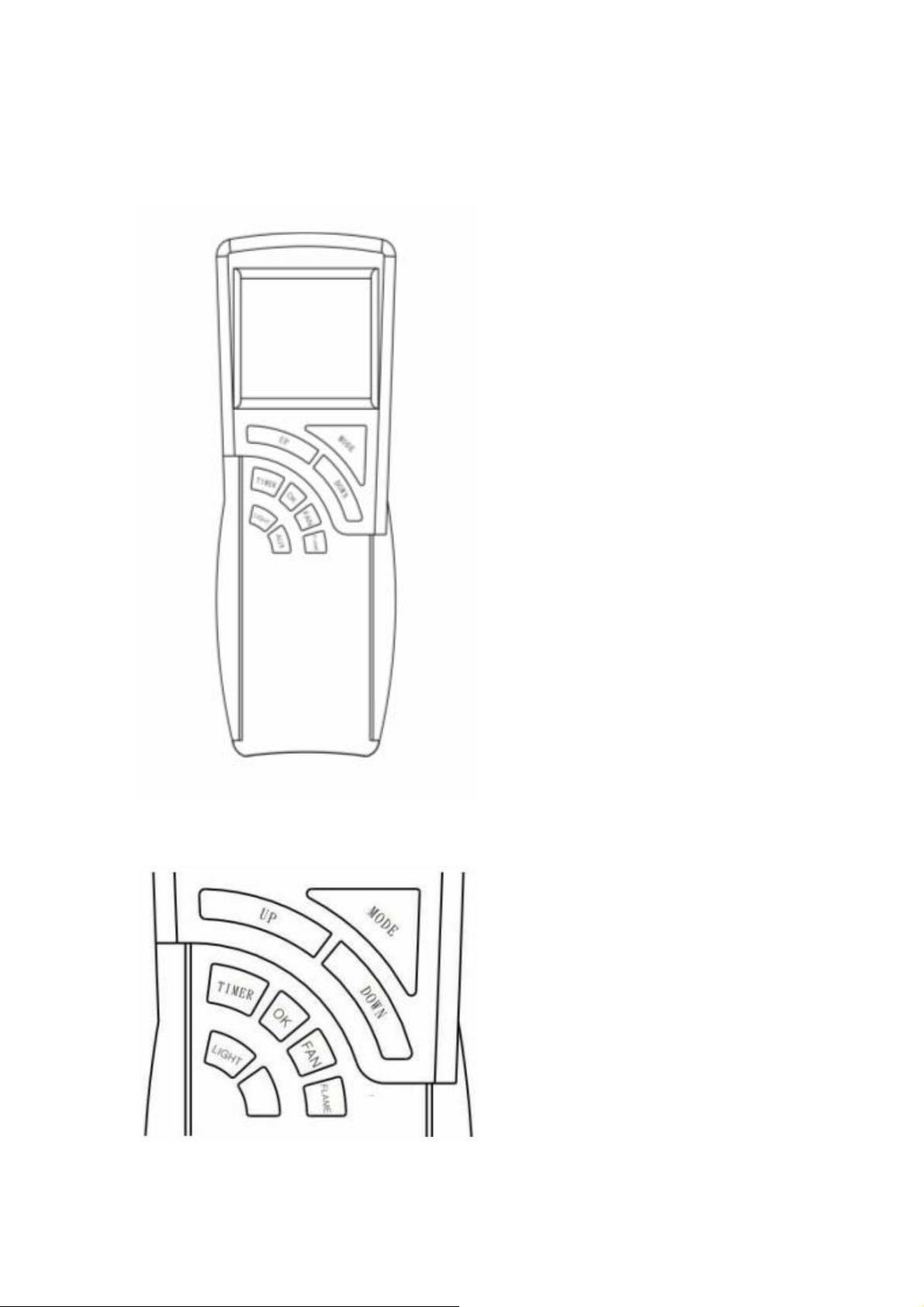
3003TR User’s Manual
This remote control SYSTEM offers the user a
battery-operated remote control that operates most
millivolt gas valves used in some heater rated gas
logs, gas fireplaces and other gas heating
appliances.
The transmitter operates on (2) 1.5V AAA batteries.
It is recommended that ALKALINE batteries
always be used for longer battery life and maximum
operational performance.
Before using the transmitter, install the (2) AAA
transmitter batteries into the battery compartment.
KEY SETINGS
(Use caution that batteries are installed in the proper
direction)
MODE – Changes unit to ON / Thermo / OFF
mode position.
UP / DOWN – Changes temperature, time(r)
and other functions’ value.
TIMER / FAN / FLAME / LIGHT - Changes
each function to enable or disable.
OK - Sets temperature, time(r) and other
functions.
Page 2
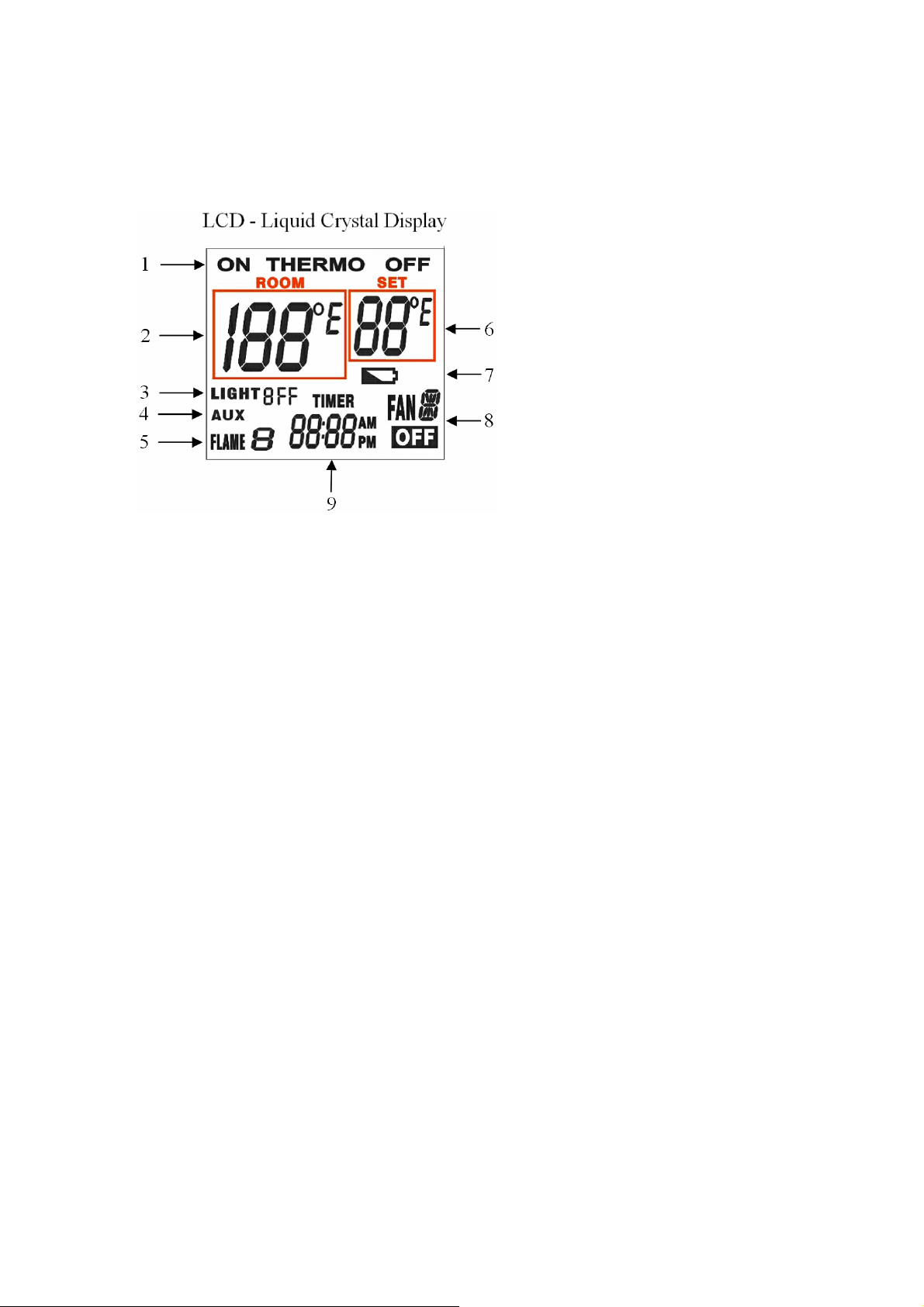
LCD
1. ON / THERMO / OFF
Indicates current mode.
2. ROOM °F OR °C
Indicates current room temperature.
3. LIGHT
Indicates light/valve in operation.
4. AUX
Indicates auxiliary function
enable/disable..
5. FLAME
Indicates burner/valve in operation.
6. SET °F OR °C
Appears the desired temperature to indicate setting room temperature during the time of setting in the
thermo operation.
7. Battery icon
Indicates the battery is low or not.
8. FAN
Indicates fan/valve in operation.
9. TIMER / TIME
Appears the time and the countdown timer.
MANUAL FUNCTION
Initial Setup
Press the “ “ key and the “LIGHT” key on the transmitter at the same time. this will into the initial setup
mode. Each function scale setting is changed by “UP” or “DOWN” key.
1. Setting °F / °C Scale
The setting is for changing temperature °F / °C.
2. Setting Swing Scale
The setting is for swing temperature.
3. Setting Gas Type
The setting is for gas type NG / LP.
4. Setting Time
The setting is for time.
Page 3

Mode
To operate the system in the manual “MODE” does the following.
ON OPERATION
Press the “MODE” key into the ON mode. The appliance flame and fan will come on. During this
time the screen will show ON. All the functions, FAN / FLAME / TIMER, will be active.
THERMO OPERATION
Press the “MODE” key into the THERMO mode. The transmitter will check the ROOM temperature
and SET temperature to decide the situation THERMO ON or THERMO OFF. After 2 seconds the LCD
screen will display the situation by temperature detected that is comparing with the SWING temperature
scale.
OFF OPERATION
Press the “MODE” key into the OFF mode. The appliance flame and fan will shut off. During this
time the screen will show OFF. All the functions, FAN / FLAME / TIMER, will be shut down exception of
LIGHT function.
THERMOSTAT FUNCTION
SETTING DESIRED ROOM TEMPERATURE
This remote control system can be thermostatically controlled when the transmitter is in the
THERMO mode. To set the THERMO MODE and DESIRED room temperature,
During the THERMO mode, Press “Up” / “DOWN” key the LCD screen set numbers will increase /
decrease between 45° and 99°(*) then loop the temperature.
THERMO ON situation
During this mode the screen will display the set flame/valve and fan/value at the same time enable the
functions setting.
THERMO OFF situation
Page 4

During the situation the functions, FAN / FLAME / TIMER, will be shut down exception of LIGHT
function
NOTE: (*) The highest SET temperature is 99°
Fahrenheit (6° Celsius)
Fahrenheit (32° Celsius) and the lowest temperature is (45°
¾ FCC Compliance Statement:
This device complies with Part 15 of the FCC Rules. Operation is subject to the
following two conditions: (1) This device may not cause harmful interference, and (2)
This device must accept any interference received, including interference that may
cause undesired operation.
Note: The manufacturer is not responsible for any radio or TV interference caused by
unauthorized modifications to this equipment. Such modifications could void the
user’s authority to operate the equipment.
 Loading...