

Page 1
WWW.SIEMSEN.COM.BR
METALÚRGICA SIEMSEN LTDA.
Rodovia Ivo Silveira - km 12, nº 9525, Galpão 1 - Bairro: Bateas - CEP: 88355-202
Fone: +55 47 3211 6000 - Fax: +55 47 3211 6020
www.siemsen.com.br - [email protected]
Due to the constant improvements introduced to our equipments , the informaon contained in the present Instrucon Manual
Besides this equipment, a complete range of other products are manufactured , consult our dealers
CNPJ: 82.983.032/0001-19
Brusque - Santa Catarina - Brasil
54949.5 - INGLÊS
Data de Correção: 28/01/2016
may be modified without previous noce .
INSTRUCTION MANUAL
STAINLESS STEEL MEAT GRINDER MOUNTH # 10
MODEL
PS-10
Page 2
SUMMARY
1. Introducon ......................................................................................3
1.1 Security ................................................................................................................. 3
1.2 Main components .................................................................................................. 5
1.3 Technical Characteriscs ........................................................................................ 6
2. Installaon and pre Operaon ........................................................... 6
2.1 Installaon ............................................................................................................ 6
2.2 Pre Operaon ........................................................................................................ 7
3. Operaon ..........................................................................................8
3.1 Funconing ............................................................................................................ 8
3.2 Procedure for Operaon ........................................................................................ 8
3.3 Mounng of internal components of the mouth .................................................... 9
3.4 Cleaning and sanizing .........................................................................................10
3.5 Cauons with Stainless Steel: ..............................................................................11
4. General Safety Pracces .................................................................. 12
4.1 Basic Operaon Procedures ..................................................................................12
4.2 Safety Procedures and Notes before Switching the Machine ON ...........................13
4.3 Roune Inspecon ................................................................................................14
4.4 Operaon .............................................................................................................14
4.5 Aer Finishing The Work .......................................................................................14
4.6 Maintenance ........................................................................................................15
4.7 Warning ................................................................................................................15
5. Analysis and troubleshoong ...........................................................16
5.1 Problems, causes and soluons. ...........................................................................16
5.2 Adjustment and replacement of components .......................................................16
6. Maintenance ...................................................................................18
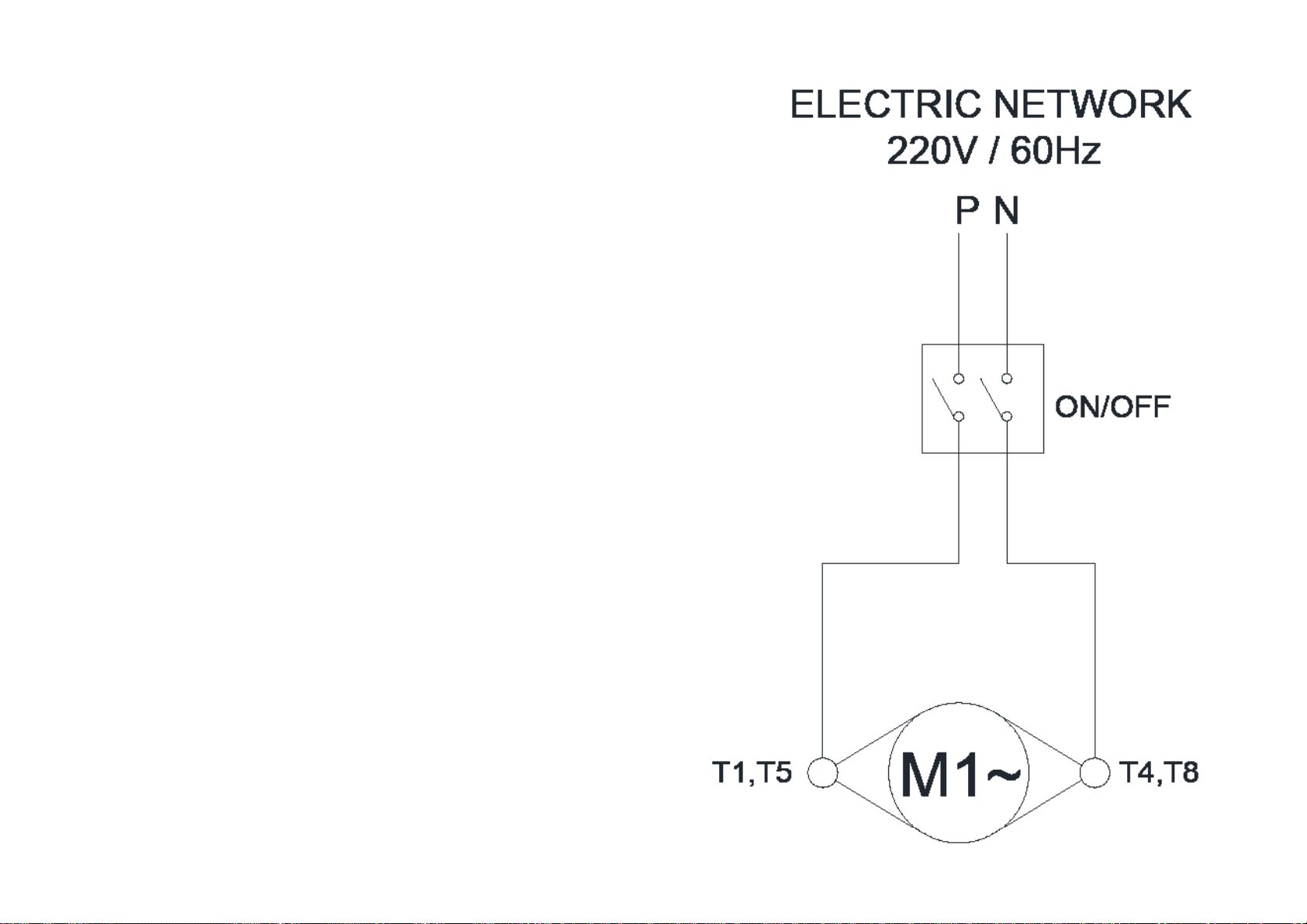
7. Electric Diagram ...............................................................................19
7. Electric Diagram
2
19
Page 3

6. Maintenance
1. Introducon
The maintenance must be considered a set of procedures that aims to keep the equipment
in opmum operang condions, resulng in increased service life and safety.
* Cleaning – Check item 3.3 of this manual Cleaning.
* Wiring-Check all the cables on the decay and all contacts (terminals) on the grip and
electric corrosion.
* Contacts – on/off switch, emergency stop buon, reset buon, electronic circuits,
etc. Check the equipment so that all components are funconing properly and that the
operaon of the appliance is normal.
* Installaon – check the installaon of your equipment according to item 2.1, Installaon
of this manual.
* Product life-2 years, to a nomal working turrno.
1-items to check and perform monthly:
-Check the wiring;
-Measure the voltage from the socket;
-Measure the operang current and compare with the nominal;
-Check ghtness of all electrical terminals of the unit, to avoid possible bad contacts;
-Check possible furloughs electric motor sha;
-Check the wiring and electrical cable for signs of overheang, poor insulaon or
mechanical failure.
2-checking Items or perform every 3 months:
1.1 Security
This equipment is suitable for grinding meat boneless and unfrozen, and is potenally
dangerous when used improperly. It is necessary to perform maintenance, cleaning and/or
any service by a qualified person and with the equipment disconnected from the electrical
network.
The instrucons below should be followed to avoid injury:
1.1.1 read all instrucons.
1.1.2 to protect against risk of electrical shock and equipment damage, never use the same
with: clothes or wet feet and/or in damp or wet surface, do not immerse in water or any
other liquid and do not use water jet directly on the equipment.
1.1.3 should always be supervised when using any equipment, especially when it is being
used near children.
1.1.4 Disconnect the equipment from power when: it’s not in use, before cleaning,
removing accessories, introducon of accessories, maintenance and any other type of
service.
1.1.5 do not use the equipment if you are with damaged cord or plug. Make sure that the
power cord does not remain on the edge of the table/counter or touch hot surfaces.
1.1.6 when the equipment suffer a fall, is damaged in any way or does not work it is
necessary to take it to an authorized service center for examinaon, repair, electrical or
mechanical adjustment.
1.1.7 the use of accessory aachments not recommended by the appliance manufacturer
may cause injury.
-Check electrical components like power switch, emergency stop buon, reset buon and
electronic circuit for signs of overheang, poor insulaon or mechanical failure.
-Check possible clearances in bearings and bearings.
-Check seals, rings o’rings, v rings rings and other fencing systems.
18
1.1.8 keep hands and any utensil away from moving parts of the appliance while it is
running to prevent personal injury or damage to equipment.
1.1.9 Never wear with wide sleeves, especially on the wrists during the operaon.
1.1.10 before connecng the equipment, check if the mouth N° 02 (fig. 01) is firm in its
posion, and if all its internal components are mounted correctly as shown in Figure 03.
1.1.11 this product was developed for use in commercial kitchens. Is used, for example, in
restaurants, canteens, hospitals, bakeries, butchers and similar.
The use of this equipment is not recommended when:
-The producon process is connuously on an industrial scale;
-The workplace is an environment with corrosive atmosphere, explosive, contaminated
with steam, dust or gas.
3
Page 4

IMPORTANT
Make sure that the power cord is in perfect condion for use. If the same is not,
do the replacement of the damaged cable on the other that meets the technical
specificaons and safety requirements.
This substuon should be performed by a qualified professional and must comply
with the local safety standards.
IMPORTANT
This appliance is not intended for use by persons (including children) with reduced
physical, sensory or mental capabilies, or lack of experience and knowledge,
unless they have received instrucons concerning use of the appliance or are
supervised by a person responsible for their safety.
PROBLEMS CAUSES SOLUTIONS
-The unit will not turn on.
-Burning odor and/or smoke.
TABLE 02
-Lack of electrical energy;
-Worn or broken Gears;
-Problem in the internal or
external electrical circuit of the
equipment.
-Problem in the internal or
external electrical circuit of the
equipment.
-Check if there is Power;
Call authorized technical
assistance (ATA);
Call authorized technical
assistance (ATA);
Call authorized technical
assistance (ATA);
IMPORTANT
Drilled discs with oval shape or with larger diameter than the originals should not
be used.
IMPORTANT
Keep the equipment out of the reach of children.
IMPORTANT
In case of emergency pull the plug out of the power socket.
IMPORTANT
Never use water jets directly on the equipment.
-Alloy equipment but when
the product is placed on the
equipment, the same for or
revolves low rotaon.
-Electric Cable damaged.
-Strange noises. -Defecve Bearings
-The processed product comes
out crushed.
-The nut screw to during
operaon
-Worn or broken Gears;
-Problems with the Electric
Motor.
-Transport of the product failure. Call authorized technical
-One of the components of the
mouth or incorrect mounng of
the same;
-Disks or Crosses blunt.
-Lack of electrical power on the
equipment;
-Problem in the internal or
external electrical circuit of the
equipment;
-Worn or broken Gears.
Call authorized technical
assistance (ATA);
Call authorized technical
assistance (ATA);
assistance (ATA);
Call authorized technical
assistance (ATA);
-Check the mounng
sequence according to (fig.
03);
-See item 5.2.1 of this manual.
-Check that the plug is plugged
into the socket, and if there
is power to the electrical
network;
* Call authorized technical
assistance (ATA).
* Oil leak in the gearbox.
- Sealing System of the damaged
equipment.
4
* Call authorized technical
assistance (ATA).
17
Page 5
5. Analysis and troubleshoong
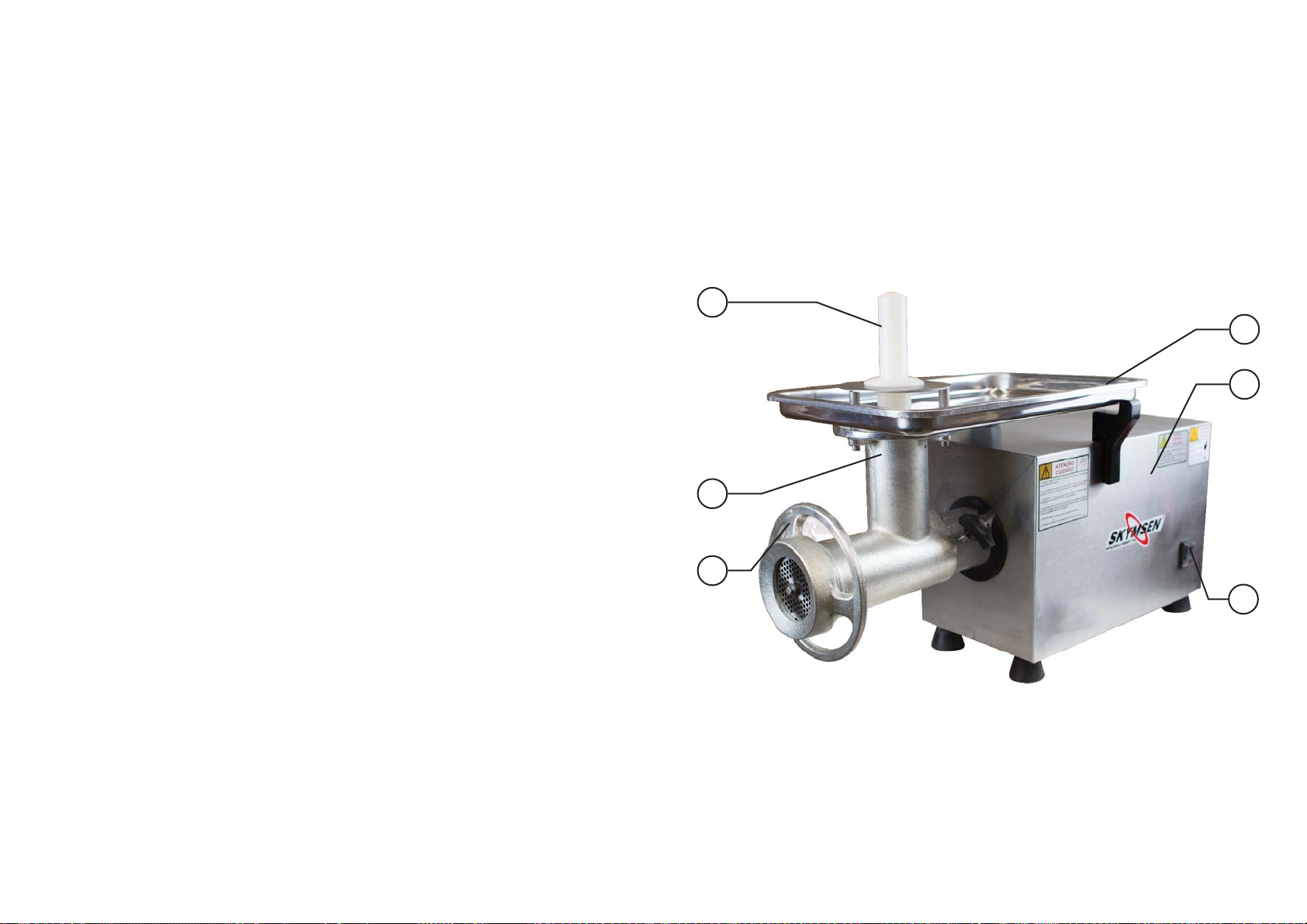
1.2 Main components
5.1 Problems, causes and soluons.
This equipment has been designed to require minimum maintenance. However, there may
be some irregularies in its funconing, due to natural wear caused by its use.
If there is a problem with your equipment, check the following table, where they are
described some possible recommended soluons.
In addion, Metalúrgica Siemsen Ltda. provides your enre network of Authorized
Technical Assistant, which will have as much pleasure to serve you. The relaonship of
Authorized Technical Assistant can be consulted on the sitewww.siemsen.com.br.
5.2 Adjustment and replacement of components
5.2.1 Edging of the disks and crosses.
The good discs and edging of crosses, causes the equipment to work with less effort,
and consequently increases the lifespan of your components. To do this, browse to the
SKYMSEN authorized technical assistance (ATA), to make the correct sharpening.
5.2.2 gearbox
The meat Mincer is an equipment that works with oil lubricated reducon box.
All components that incorporate the equipment are constructed with materials carefully
selected for each role, within the standards of tesng and experience Siemsen.
The mouth Nr 02 (fig. 01) and the worm Screw N° 03 (fig. 03), receive cursory treatment to
isolate and make cleaning easier.
The cross and the discs are made of hardened material to ensure the quality of the cut for
much longer.
PICTURE 01
01
04
05
02
To ensure the life of the equipment for much longer, check every 5,000 hours oil level, to
both take the equipment to Skymsen authorized technical assistance (ATA).
The amount of oil used in the meat Mincer is 250 ml, being recommended to use
140-UNITRON oil CASTROL or similar with viscosity (SAE140, APIGL-4, ANP 1006).
16
03
01-Socket
02-Mouth
03-Wheel
04-security Tray
06
05-Housing
06-On/Off switch
5
Page 6
1.3 Technical Characteriscs
4.6 Maintenance
TABLE 01
CARACTERÍSITCAS UNIT PS-10
Average Producon kg/h 300
Tension V 220
Frequency Hz 60
Power CV
Height mm 510
Width mm 320
Depth mm 700
Net Weight kg 41
Gross Weight kg 50
1
2. Installaon and pre Operaon
2.1 Installaon
2.1.1 Posioning
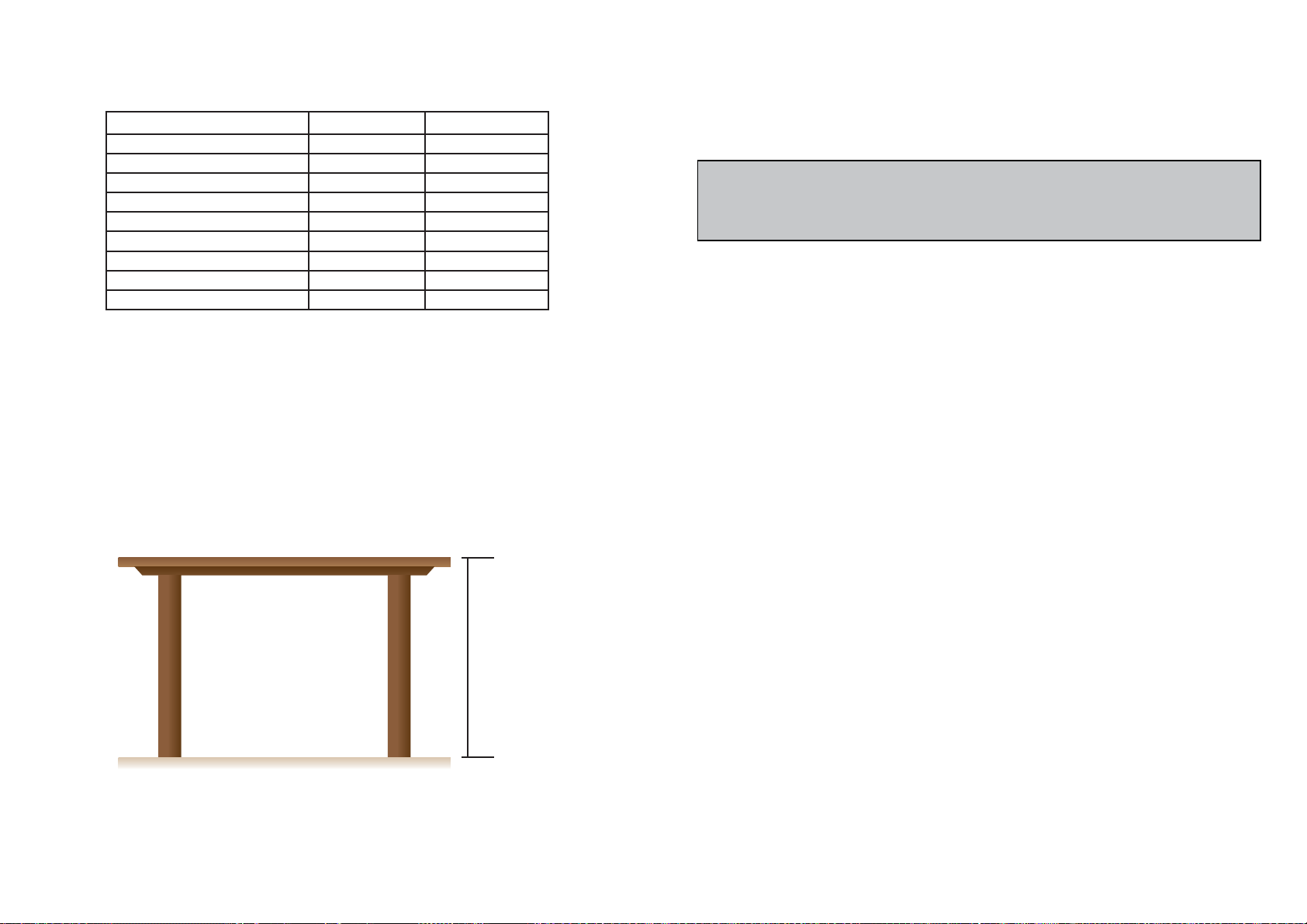
Your equipment must be placed and leveled on a dry surface and firm with preferably 850
mm high.
PICTURE 02
4.6.1 Danger
Any maintenance with the machine in working situaon is dangerous. TURN IT OFF BY
PULLING THE PLUG OFF THE SOCKET DURING MAINTENANCE.
IMPORTANT
Always remove the plug from the socket in any emergency situaon.
4.7 Warning
Electrical or mechanical maintenance has to be undertaken by qualified personnel.
The person in charge of maintenance has to be sure that the machine is under TOTAL
SAFETY condions when working.
850 mm
6
15
Page 7

4.3 Roune Inspecon
Floor plan of the area recommended for installaon of the equipment.
4.3.1 Advice
When checking the tension of the belts or chains, DO NOT insert your fingers between the
belts and the pulleys and nor between the chain and the gears.
4.3.2 Precauons
Check the motor and sliding or turning parts of the machine in case of abnormal noises.
Check the tension of the belts and chains and replace the set when belts or chains show
signs of wearing.
When checking the tension of belts or chains DO NOT insert your fingers between belts
and pulleys, nor between the chains and gears.
Check protecons and safety devices to make sure they are working properly.
4.4 Operaon
4.4.1 Warnings
Do not use the machine with long hair that could touch any part of the machine. This might
lead to a serious accident. Tie your hair up well and/or cover it with a scarf.
Only trained or skilled personnel shall operate this machine.
Never touch turning parts with your hands or any other way ,
NEVER operate the machine without any original safety devices under perfect condions.
700mm
Área para
instalação
2.1.2 electrical installaon
This equipment was developed for 220 Volts (50 Hz). Upon receiving the equipment check
the voltage listed on the label electric cable.
The power cord has 3 (three) pins, where the center pin is the ground pin-earthed
(grounded). It is mandatory that the three points are properly connected before the
equipment.
IMPORTANT
Make sure that the voltage of the power source where the equipment will be
installed is compable with the voltage indicated on the label on the power cord.
2.2 Pre Operaon
FRENTE
350mm
4.5 Aer Finishing The Work
4.5.1 Precauons
Always TURN THE MACHINE OFF before cleaning by removing the plug from the socket.
Never clean the machine unless it has come to a complete stop.
Put all the components back to their funconal posions before turning the machine ON
again.
Check the level of liquids.
Do NOT insert your fingers in between belts and pulleys nor chains and gears.
14
Before using your equipment, should you wash all parts that come into contact with the
product to be processed, with water and neutral SOAP (see item 3.4 cleaning).
Verify that the equipment this firm in your workplace.
IMPORTANT
When mounng the full mouth, do not over ghten the wheel no. 03 (fig. 01), thus
avoiding locking or breaking of the internal components.
7
Page 8

3. Operaon
given for each operaon step. Every step of the operaon shall be taken only if a sign has
been made and responded.
3.1 Funconing
IMPORTANT
Turn off the equipment at any me to remove your mouth. The equipment is
silent. Don’t let utensils such as knives, hooks and others, about the security Tray.
Make sure that the constuent Assembly of the mouth, is in the correct sequence, as
shown in (fig. 03)
The firing is done as described below:
1 put the plug of the equipment in electric power socket.
2-check that the safety Tray N° 04 (fig. 01) is properly posioned in its place of work;
3-Press the on/off switch N° 06 (fig. 01) to the posion “I” making that call equipment.
3.2 Procedure for Operaon
IMPORTANT
Under no circumstances use strange instruments (cutlery, cables, etc.) to push
the product to be rendered to the inside of the mouth, much less your hands. Use
the socket N° 01 (fig. 01) to do this operaon. The product to be rendered inside
the mouth, it has the funcon to lubricate and cool the components of same.
Therefore, do not leave connected equipment on empty, because in this way, warm
too, and will damage your components.
4.1.3 Advices
* In case of power shortage, immediately switch the machine off.* Use recommended or
equivalent lubricants, oils or greases.
* Avoid mechanical shocks, once they may cause damages or bad funconing.
* Avoid water, dirt or dust contact to the mechanical and electrical components of the
machine.
* DO NOT change the standard characteriscs of the machine.
* DO NOT remove, tear off or maculate any safety or idenficaon labels stuck on the
machine. If any labels have been removed or are no longer legible, contact your nearest
dealer for replacement.
4.2 Safety Procedures and Notes before Switching the Machine ON
IMPORTANT
Carefully read ALL INSTRUCTIONS of this manual before turning the machine ON.
Be sure to well understand all the informaon contained in this manual. If you
have any queson contact your supervisor or your nearest Dealer.
4.2.1 Danger
An electric cable or electric wire with damaged jacket or bad insulaon might cause
electrical shocks as well as electrical leak. Before use, check the condions of all wires
and cables.
4.2.2 Advices
Be sure to well understand all the informaon contained in this manual. Every operaon
funcon or procedure has to be thoroughly clear.
The meat mincer is an equipment that works at high speed and to do so requires that the
power supply is also fast.
To feed him, put the meat on the tray N° 04 Security (fig. 01), and drive the same with
hands unl the entry of the power nozzle. With the help of the socket number 01 (fig. 01)
push them to the inside of the mouth, where they will be pulled by the worm screw.
8
Before using any commands (switch, buons, lever), be sure it is the correct one. In case
of doubt, consult this manual.
4.2.3 Precauons
The electric cable has to be compable with the power required by the machine.
Cables touching the floor or close to the machine need to be protected against short
circuits.
13
Page 9
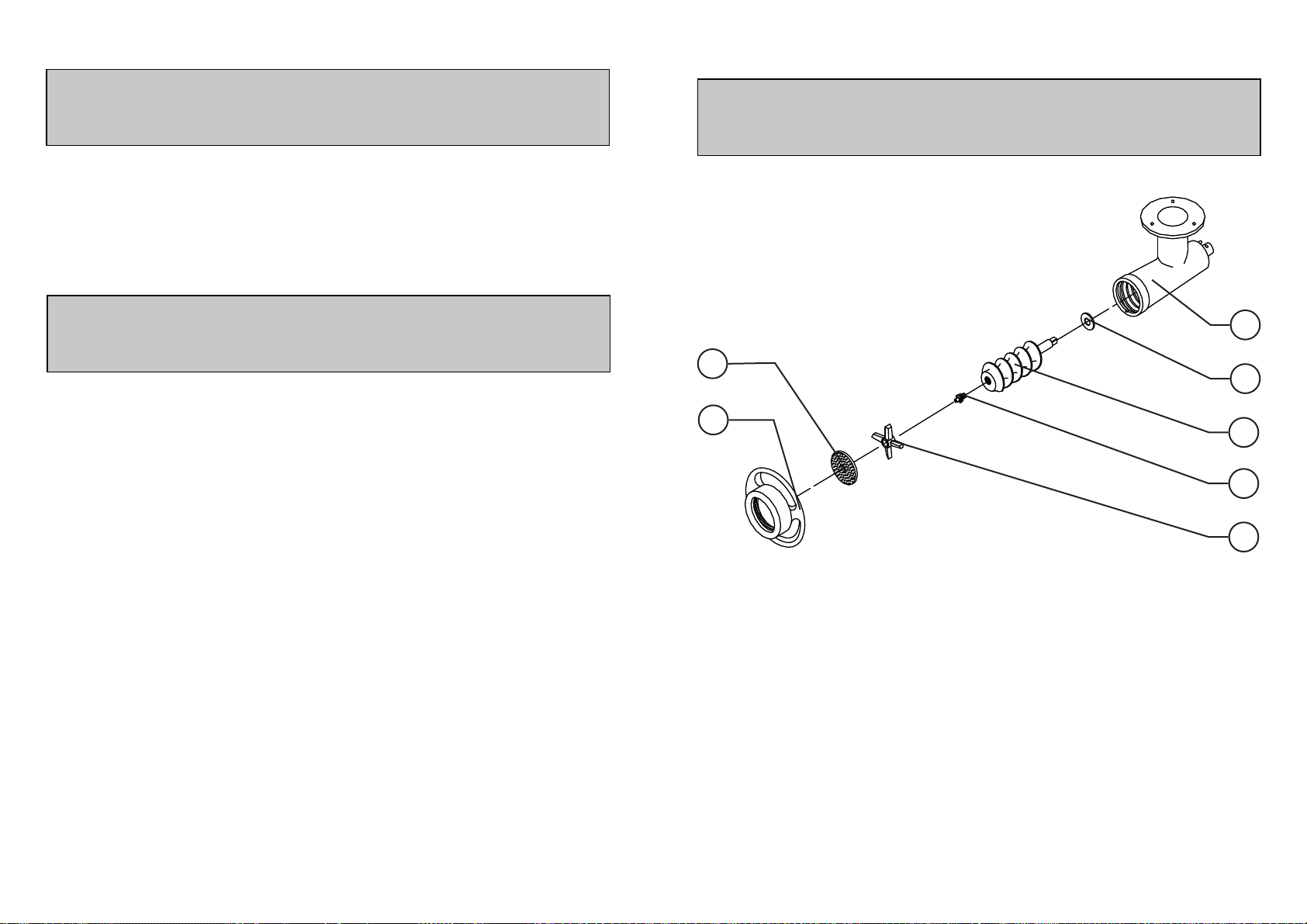
4. GENERAL SAFETY PRACTICES
3.3 Mounng of internal components of the mouth
IMPORTANT
If any recommendaon is not applicable to your equipment , please ignore it .
The following safety instrucons are addressed to both the operator of the machine as
well as the person in charge of maintenance.
The machine has to be delivered only in perfect condions of use by the Distributor to the
user. The user shall operate the machine only aer being well acquainted with the safety
procedures described in the present manual. READ THIS MANUAL WITH ATTENTION.
IMPORTANT
Any change in the protecon systems and safety devices will during operaon,
create serious risks to the operator physical integrity
4.1 Basic Operaon Procedures
4.1.1 Dangers
Some areas of the electric device have parts that are connected or have parts connected
to high voltage. These parts when touched may cause severe electrical shocks or even be
lethal.
Never touch manual commands such as switches, buons, turning keys and knobs with
your hands wearing wet clothes and/or wet shoes. By not following these instrucons
operator could be exposed to severe electrical shocks or even to a lethal situaon.
4.1.2 Warnings
IMPORTANT
Note the posion of the internal components of the mouth for no inversions of the
same, because if this happens, irreparable harm will occur.
FIGURA 03
06
07
01 - Mouth
02 - fiber Washer
03 - worm Screw
04 - worm screw Pin
05 - Blade
06 - 5 mm Disk, (oponal 3 mm and 8 mm)
07 - Wheel
01
02
03
04
05
* The operator has to be well familiar with the posion of ON/OFF Switch to make sure the
Switch is easy to be reached when necessary.
* Before any kind of maintenance, physically remove plug from the socket.
* Provide space for a comfortable operaon thus avoiding accidents.
* Water or oil spilled on the floor will turn it slippery and dangerous. Make sure the floor
is clean and dry.
* Before using any commands (switch, buons, lever), be sure it is the correct one. In case
of doubt, consult this manual.
* Never touch any manual commands (switch, buons, lever) unadvisedly.
* If any work is to be made by two or more persons, coordinaon signs will have to be
12
9
Page 10

3.4 Cleaning and sanizing
3.5 Cauons with Stainless Steel:
IMPORTANT
Pull the plug out of the socket before starng the cleaning process.
The equipment must be totally clean and sanized:
-Before being used for the first me;
-Aer the operaon of each day;
-Whenever it is not used for a prolonged period;
-Before pung it into operaon aer a prolonged downme.
Some part of the equipment can be removed for cleaning as:
-Pan, socket, and Its internal components
-Remove the socket N° 01 (fig. 01) security tray N° 04 (fig. 01), to facilitate the withdrawal
of the mouth.
-To remove the Mouth, proceed as below:
-Remove the wheel N° 03 (fig. 01) and then its internal components, in order to do so, pull
them out.
-Holding the Mouth N° 02 (fig. 01) loosen the lever located on the le side of the equipment,
moving it alternately to the sides and front.
Wash all parts with warm water and neutral SOAP.
The Stainless Steel may present rust signs, which ARE ALWAYS CAUSED BY EXTERNAL
AGENTS, especially when the cleaning or sanizaon is not constant and appropriate.
The Stainless Steel resistance towards corrosion is mainly due to the presence of
chrome, which in contact with oxygen allows the formaon of a very thin protecve coat.
This protecve coat is formed through the whole surface of the steel, blocking the acon
of external corrosive agents.
When the protecve coat is broken, the corrosion process begins, being possible to
avoid it by means of constant and adequate cleaning.
Cleaning must always be done immediately aer using the equipment. For such
end, use water, neutral soap or detergent, and clean the equipment with a so cloth or a
nylon sponge. Then rinse it with plain running water, and dry immediately with a so cloth,
this way avoiding humidity on surfaces and especially on gaps.
The rinsing and drying processes are extremely important to prevent stains and
corrosion from arising.
IMPORTANT
Acid soluons, salty soluons, disinfectants and some sterilizing soluons
(hypochlorites, tetravalent ammonia salts, iodine compounds, nitric acid and
others), must be AVOIDED, once it cannot remain for long in contact with the
stainless steel:
These substances aack the stainless steel due to the CHLORINE on its composion, causing
corrosion spots (ping).
Even detergents used in domesc cleaning must not remain in contact with the stainless
steel longer than the necessary, being mandatory to remove it with plain water and then dry
the surface completely.
10
IMPORTANT
Do not store the mouth with product in its interior, where it can freeze
IMPORTANT
Do not use water jet directly on the equipment
Use of abrasives:
Sponges or steel wool and carbon steel brushes, besides scratching the surface and
compromising the stainless steel protecon, leave parcles that rust and react contaminang
the stainless steel. That is why such products must not be used for cleaning and sanizaon.
Scrapings made with sharp instruments or similar must also be avoided.
Main substances that cause stainless steel corrosion:
Dust, grease, acid soluons such as vinegar, fruit juices, etc., saltern soluons (brine),
blood, detergents (except for the neutral ones), common steel parcles, residue of sponges or
common steel wool, and also other abrasives.
11
 Loading...