

Page 1
SkyMate 100 SentryMate
Release 1.0
Installation Guide
SkyMate, I nc.
14000 Willard Road
Chantilly, VA 20151 USA
Part Number IGSM-10-001
Page 2

2
Installation Guide
CONFIDENTIAL AND PROPRIETARY Release 1.0
Legal Notice
Copyright © 2004 SkyMate, Inc. All rights reserved.
The contents of this document constitute valuable proprietary and confidential property of SkyMate, Inc. and are provided subject to
specific obligations of confidentiality set forth in one or more binding legal agreements.
For technical information on SkyMate, Inc. products, go to:
http://www.skymate.com
Page 3

Release 1.0 CONFIDENTIAL AND PROPRIETARY Installation Guide 1
Contents
1 Installation 3
Installation Overview 3
Selecting a Location for the Communicator 3
Selecting a Location for the VHF Antenna 4
Unpacking Your SkyMate SentryMate Communicator 5
Installing the SkyMate SentryMate Communicator 6
Installing the Optional Reserve Battery 7
Installing the VHF Antenna 7
Connecting the Serial Cable and the GPS Cable 7
Connecting the VHF Antenna Cable and the Main Harness Assembly 8
Connecting the Main Harness Assembly 8
Connecting the Power Cable 9
Connecting the VHF Antenna Cable 9
Connecting the Communicator to the PC 9
Installing the Mode Control Switch 9
Installing the Shore Power and the Auxiliary Shore Power Sensors 10
Connecting the Shore Power and the Auxiliary Shore Power Sensors 10
Connecting the Mode Control Switch 10
Connecting the Bilge Level Sensor 10
Connecting DC Power 11
Verifying that Communicator is Operating 12
Installing the Software 12
Activating Your SkyMate Communicator Account 13
Checking Satellite Availability 15
Coverage 15
2 Service and Maintenance 17
Adjustments or Repair 17
Maintenance 17
Requirements and Notices 17
FCC Compliance Statement 18
Safety Notice 18
Warranty 18
Contacting SkyMate 18
Technical Support 18
Internet Support 19
Page 4

Contents
2 Installation Guide CONFIDENTIAL AND PROPRIETARY Release 1.0
Accessories and Parts 19
Specifications 19
A Appendix 21
Page 5

1
Release 1.0 CONFIDENTIAL AND PROPRIETARY Installation Guide 3
1Installation
This Guide explains the basics for installing the hardware and software for your
SkyMate 100 SentryMate.
Installation Overview
Thank you for choosing the SkyMate 100 SentryMate. This document provides
step by step instructions on installing and activating the SkyMate 100 SentryMate
system for your vessel. The steps required to complete the installation and
activation are:
• Install the SkyMate 100 SentryMate hardware on your vessel
• Install the SkyMate 100 SentryMate software on the PC that will be connected
to your SkyMate 100 SentryMate Communicator
• Use a computer connected to the Internet to activate your account on
www.skymate.com.
NOTE Activating your SkyMate SentryMate account requires an internet
connection and can be performed either before or after you install the SkyMate
100 SentryMate system on your vessel.
Selecting a Location for the Communicator
Before unpacking your Communicator, you should choose a location for installing
the Communicator, its optional reserve battery, and the VHF antenna.
When selecting a location, consider the following:
❍ Select a location that is dry, well ventilated, and protected from the
elements and from high temperatures and excessive vibration.
❍ Make sure there is enough space on either side of the Communicator for
the cables.
❍ Locate the Communicator near a power source.
❍ Make sure the Communicator is not near electronic devices such as motors
and generators that may cause interference.
❍ Make sure the Communicator is within ten feet of the PC.
Page 6

Installation
Selecting a Location for the VHF Antenna
1
4 Installation Guide CONFIDENTIAL AND PROPRIETARY Release 1.0
❍ Select a location to install the reserve battery. Typically, the reserve battery
is installed on the top surface of the Communicator, within easy reach of
the one foot cable that connects the reserve battery to the Communicator.
If you choose a different location, ensure that the reserve battery cable is
within reach.
❍ Select a location that provides a panel for mounting the message indicator
light, which must be installed within four feet of the Communicator.
Selecting a Location for the VHF Antenna
1 Choose a location with a clear view of the sky, free of any obstructions.
2 Position the SkyMate SentryMate VHF antenna at least four feet (preferably six
feet) from any other VHF band antenna and at least three feet from any metal
structure. Antennas closer than four feet, whether active or not, can cause
distortion of the antenna pattern and cause poor performance. The following
antennas are considered VHF antennas: VHF radio, Loran, differential GPS,
AIS, and 2-meter band.
3 You must ensure that any other installed antennas are placed an appropriate
distance from your SkyMate SentryMate VHF antenna. We recommend the
following:
You must consider the following when installing the VHF antenna:
❍ The same guidelines that apply to standard marine VHF antennas apply to
your SkyMate SentryMate VHF antenna.
❍ The coaxial VHF antenna connects to the SkyMate SentryMate antenna
with a BNC VHF connector.
❍ If a longer cable length is required, use an RG-58 (50 OHM) coaxial cable
or the equivalent, up to a maximum length of 50 feet.
VHF radio antenna 6-8 feet
Loran antenna 6-8 feet
Differential GPS antenna
6-8 feet
AIS antenna 6-8 feet
2-meter band antenna 6-8
feet
Structure (tower, mast) 4
feet
GPS antenna (L-band) 1
foot
Cellular antenna 3 feet
SSB or HF antenna 4 feet
GEO satellite radome 4
feet
Page 7

Release 1.0 CONFIDENTIAL AND PROPRIETARY Installation Guide 5
Installation
Unpacking Your SkyMate SentryMate Communicator
1
❍ If a cable length greater than 50 feet is required, we recommend you use a
low loss RG-8x or equivalent cable to avoid signal loss.
❍ If the RF connector or the antenna is exposed to the marine environment,
apply a protective coating of grease such as Dow Corning DC-4 or the
equivalent.
❍ Other extensions or adaptors in the cable run must also be protected by
silicon grease and wrapped in waterproof tape.
Unpacking Your SkyMate SentryMate Communicator
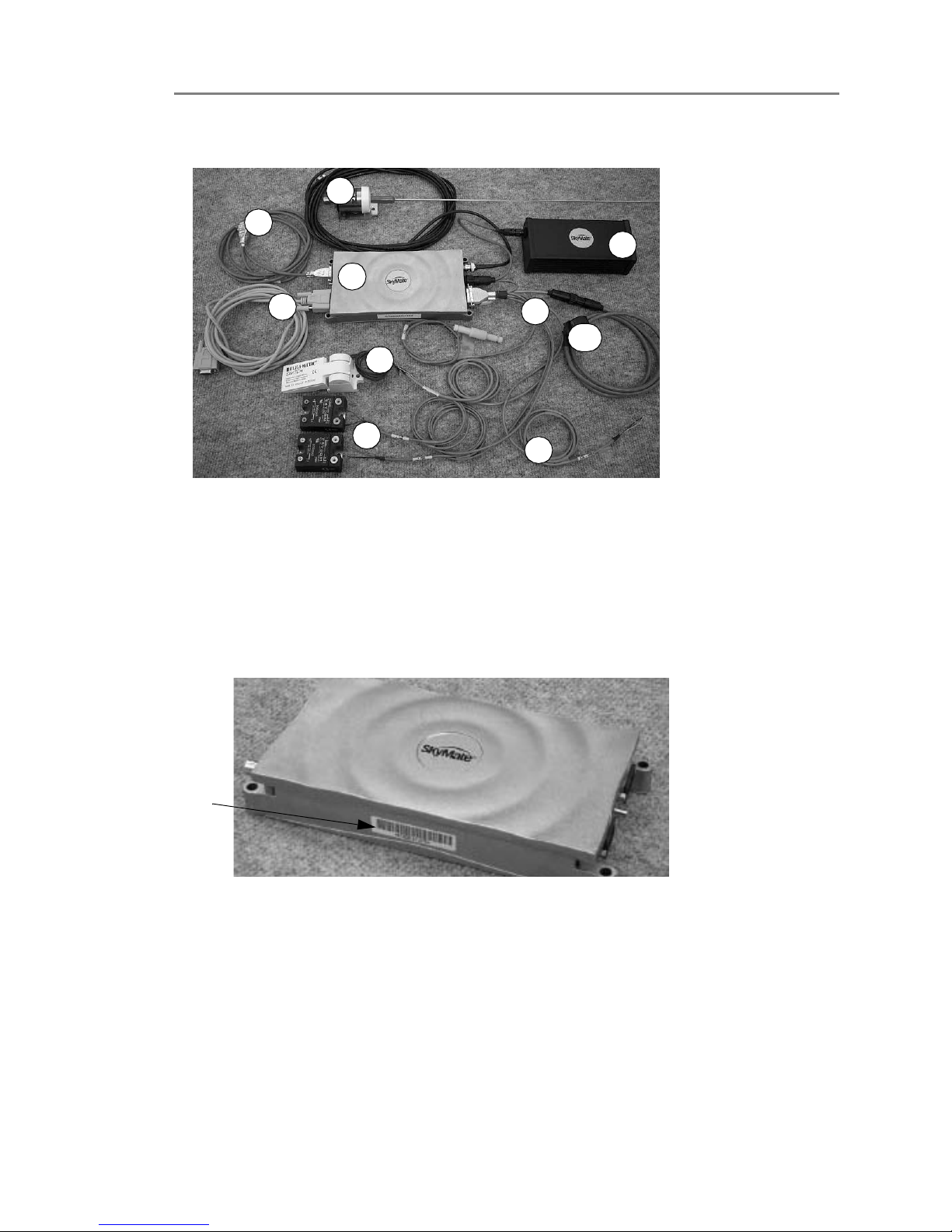
When you unpack your SkyMate SentryMate Communicator, make sure you have
all the parts listed below. See Figure 1-1 on page 6 for an overview of the
Communicator parts. If any parts are missing, contact SkyMate SentryMate before
proceeding with installation. We recommend that you keep the shipping material in
case you need to return your SkyMate SentryMate Communicator for any reason.
1. SkyMate SentryMate Communicator
2. Main harness assembly, which includes the following:
❍ 12 Volt power cable
❍ 4-pin twist lock connector for the power cable
❍ 2-pin twist lock connector for the reserve battery cable
❍ 3-pin twist lock connector for the message indicator light
❍ Shore power and auxiliary shore power sensors cable
❍ Bilge level sensor cable
3. Mode control switch
4. Optional reserve battery
5. VHF antenna with cable assembly
6. Serial cable for connection to PC
7. Bilge sensor
8. Shore power and auxiliary shore power sensors
9. Cable provided for optional security sensor (security sensor is not
supplied)
10. GPS or GPS Y cable
11. Software CD (not shown)
12. User documentation (not shown)
Page 8
Installation
Installing the SkyMate SentryMate Communicator
1
6 Installation Guide CONFIDENTIAL AND PROPRIETARY Release 1.0
Figure 1-1. Overview of Communicator Parts
IMPORTANT
Make a note of the Dealer code and the SCID code for your
SkyMate 100 SentryMate. You must have this information available when you
install your SkyMate SentryMate software and activate the unit. See Figure 1-2
for the location of the SCID code. You will find the Dealer code listed in your
Quick Start guide and a space to write the SCID code.
Figure 1-2. SCID Code Location
Installing the SkyMate SentryMate Communicator
Typically the Communicator is mounted on a shelf, in a cabinet, or on a bulkhead.
1 Place the Communicator on the mounting surface.
IMPORTANT If you are installing the reserve battery on the top surface of the
Communicator (as recommended) perform this step now, before attaching the
Communicator to the mounting surface. This allows you to secure the reserve
battery to the Communicator with the supplied dual lock fasteners.
1
2
3
4
5
6
7
8
9
10
SCID
Code
Location
Page 9
Release 1.0 CONFIDENTIAL AND PROPRIETARY Installation Guide 7
Installation
Connecting the Serial Cable and the GPS Cable
1
2 Attach the flange to the mounting surface.
Installing the Optional Reserve Battery
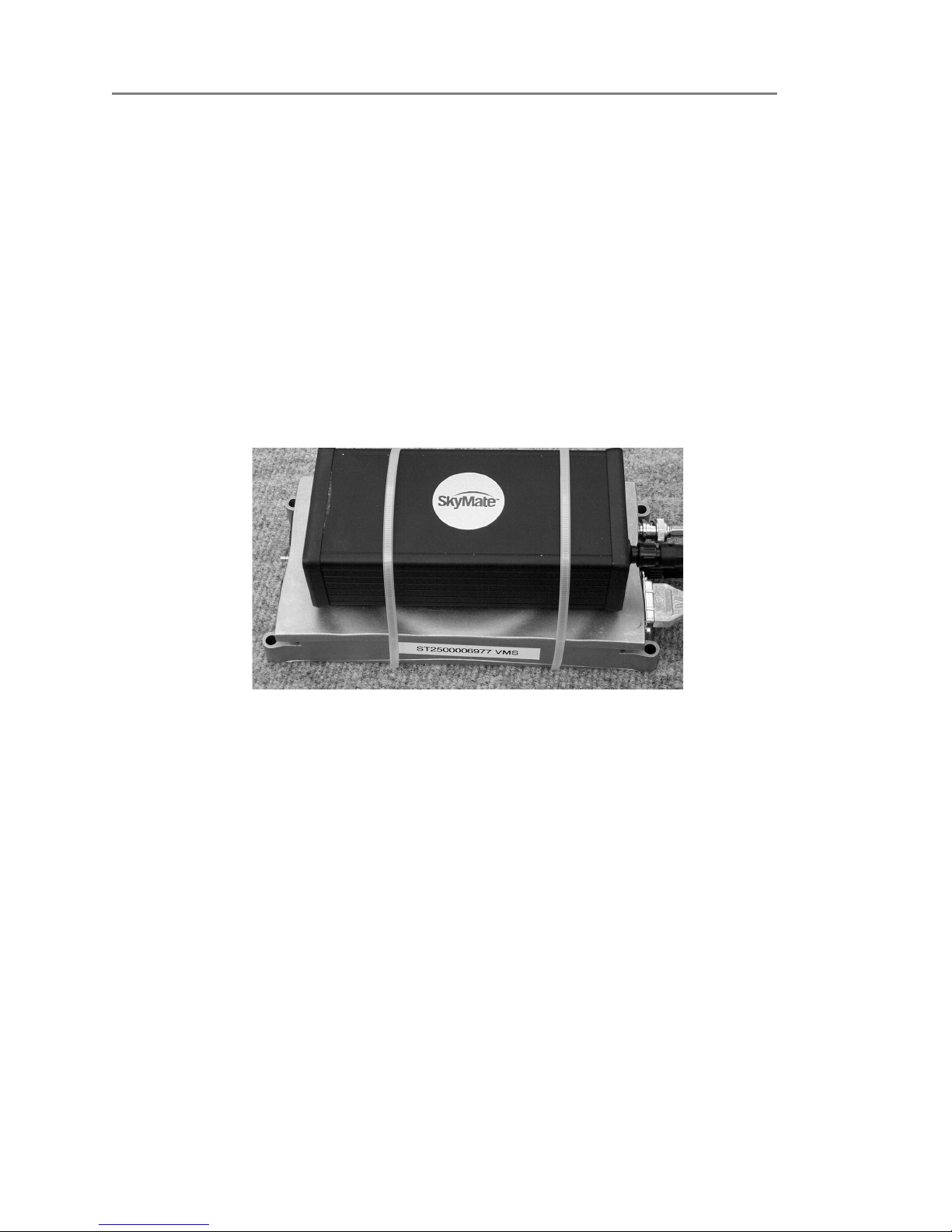
Typically the reserve battery is attached to the Communicator using the supplied
Dual Lock Reclosable 3M fasteners and cable ties. See Figure 1-3. To install the
reserve battery:
1 Place the reserve battery on the top surface of the Communicator.
IMPORTANT Make sure that the reserve battery is oriented to face the power
connector on the Communicator labeled “PWR”.
2 Attach the reserve battery to the Communicator’s top surface using the dual
lock fasteners.
3 Place the cable ties around the reserve battery and secure the cable ties.
Figure 1-3. View of Installing the Optional Reserve Battery
Installing the VHF Antenna
1 Connect the coaxial cable to the base of the VHF antenna using the black tool
provided. (The other end of the cable plugs into the Communicator.)
2 Mount the VHF antenna on a standard 1 1/4 inch threaded mount.
There must be a clear view of the sky. You must ensure that no other VHF
antenna (active or inactive) is within four feet (preferably six feet) of the
SkyMate SentryMate VHF antenna.
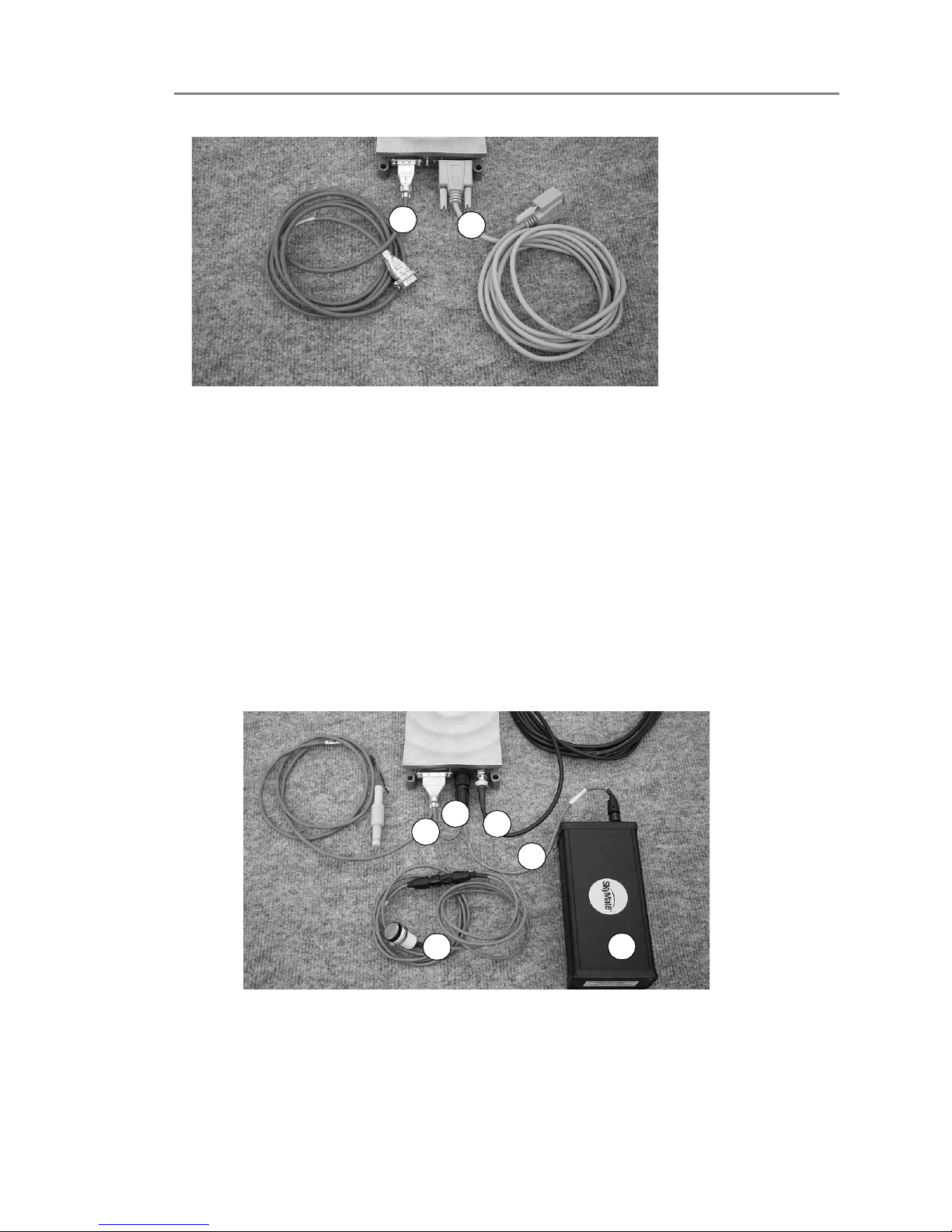
Connecting the Serial Cable and the GPS Cable
1 Attach the serial cable (1) to the serial cable connector on the Communicator
marked “Serial”.
2 For an external GPS connection, connect the high density 15-pin end of the
GPS cable (2) to the connector marked “AUX”. Connect the standard 9-pin
end to the external GPS device (not supplied).
Page 10
Installation
Connecting the VHF Antenna Cable and the Main Harness Assembly
1
8 Installation Guide CONFIDENTIAL AND PROPRIETARY Release 1.0
Figure 1-4. View of Serial and GPS Cables
Connecting the VHF Antenna Cable and the Main Harness Assembly
The main harness assembly includes cables for power, for the optional reserve
battery, and for the message indicator light. Figure 1-5 shows an overview of the
main harness assembly, the reserve battery, and the VHF antenna cable.
1. Main harness assembly
2. Optional reserve battery
3. Mode control switch and cable
4. Power cable
5. Reserve battery cable
6. VHF antenna cable
Figure 1-5. Overview of Main Harness Assembly, Optional Reserve Battery, and VHF
Antenna
Connecting the Main Harness Assembly
To connect the main harness assembly:
2
1
1
3
6
4
5
2
Page 11

Release 1.0 CONFIDENTIAL AND PROPRIETARY Installation Guide 9
Installation
Connecting the Communicator to the PC
1
1 Connect the main harness assembly to the connector marked “I/O “on the
Communicator.
2 Connect the 4-pin twist lock connector of the main harness assembly to the
connector labeled “PWR” on the Communicator.
3 Connect the 2-pin twist lock connector of the main harness assembly (labeled
battery) to the connector on the reserve battery.
Connecting the Power Cable
To connect the power cable:
1 Connect the power cable end (from the main harness assembly) to the
connecter marked “PWR” on the Communicator.
Connecting the VHF Antenna Cable
To connect the VHF antenna cable:
1 Connect the cable marked VHF antenna to the connector marked “VHF” on
the Communicator.
Connecting the Communicator to the PC
To connect the Communicator to the PC:
1 Connect the female end of the serial cable to the serial port on your PC.
❍ If you prefer to use a USB cable, you can purchase the USB to Serial
RS-232 DB-9 Adapter Cable accessory. This cable converts a USB port into
a 9-pin male RS-232 port.
Installing the Mode Control Switch
The mode control switch activates and deactivates the monitoring functions of
your SkyMate system. You can install the mode control switch in a spare or
auxiliary rocker switch location if such a location is available, or cut a hole for the
switch.
To install the Mode control switch:
1 Select a location such as a spare or auxiliary rocker switch location. If such a
location is not available, go to step 2.
2 Cut a rectangular hole 1.45 inches x 0.83 inches hole in a panel or bulkhead and
insert the switch.
3 Connect the 3-pin twist lock cable from the main harness assembly to the
Mode control switch by plugging the cable into the 3-pin round connector on
the Communicator cable.
4 Connect the mode control switch to the main power/data cable using the 5-pin
round connector. If additional cable is required, eight foot extension cables are
available.
Page 12

Installation
Connecting the Communicator to the PC
1
10 Installation Guide CONFIDENTIAL AND PROPRIETARY Release 1.0
NOTE The Mode control switch must be installed for your SkyMate 100
SentryMate to work properly.
Installing the Shore Power and the Auxiliary Shore Power Sensors
To install the shore power and auxiliary shore power sensors:
1 Attach the shore power and auxiliary shore power sensors to a bulhead within
reach of the cables.
Connecting the Shore Power and the Auxiliary Shore Power Sensors
To connect the shore power and the auxiliary shore power sensors:
1 Connect the red wire for the sensor coming from the main harness assembly to
the positive (+) output on the sensor to input terminal 1.
2 Connect the black wire for the sensor coming from the main harness assembly
to the negative (-) output on the sensor to input terminal 2.
3 Connect your AC power to input terminals 3 and 4.
IMPORTANT If the AC cable run is longer than six inches, we recommend that
you install a 0.5A fuse in the AC cable to protect against faults.
CAUTION When connecting AC power, ensure that the power is turned off.
Connecting the Mode Control Switch
To connect the mode control switch:
1 Connect the twist lock connector for the mode control switch to the mode
control cable of the main harness assembly.
See Installing the Mode Control Switch on page 9 for the procedure to install the
mode control switch.
The bilge level sensor detects for water intrusion into your vessel.
1 Install the float switch sensor in the bilge area of the boat 4 to 6 inches above
the normal bilge level according to the instructions on the package.
Connecting the Bilge Level Sensor
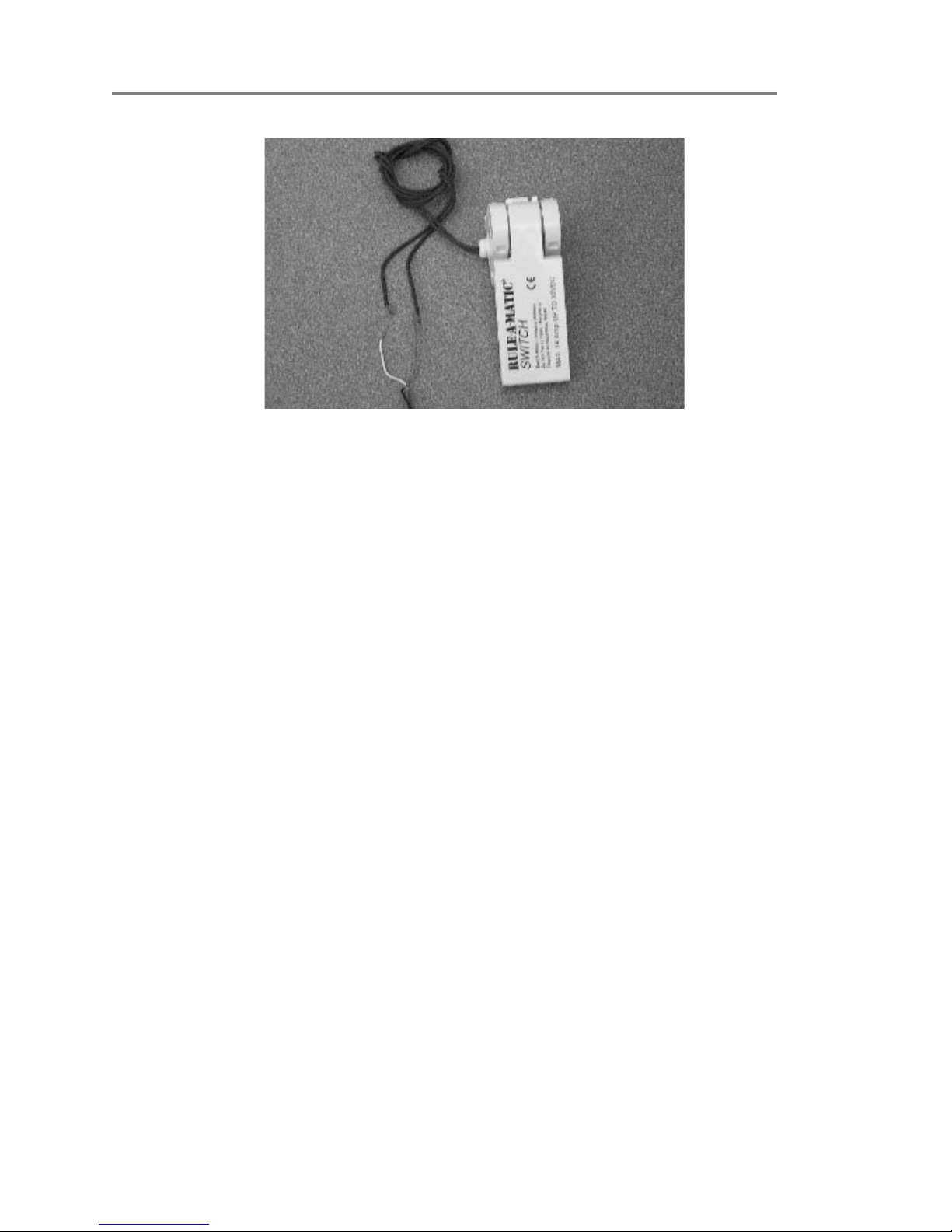
1 Connect the red and white wires to the two grey leads in the bilge sensor. The
bilge level sensor is not polarized. See Figure 1-6.
❍ Additional cable should be at least #26 AWG and connections should be
solidly crimped and sealed with shrink-wrap tubing.
❍ If the vessel is equipped with an existing bilge alarm, you may connect it to
the SkyMate system in place of the bilge level sensor.
Page 13
Release 1.0 CONFIDENTIAL AND PROPRIETARY Installation Guide 11
Installation
Connecting DC Power
1
Figure 1-6. Bilge Sensor Connections
Connecting DC Power
Connect your SkyMate SentryMate Communicator to the nearest primary source
of DC power (12 to 24 volts). A typical source is a circuit breaker on the power
panel or a fuse block near the Communicator.
You must consider the following:
❍ When connecting to either or these sources, make sure the circuit breaker
or in-line fuse is rated at 3 amps (fast acting).
❍ We recommend that you use crimp or lug connectors to connect the power
cable to the DC supply.
❍ Special grounding is not required, but it is good marine practice to properly
ground all electronic equipment to the ship’s earth ground system.
CAUTION Reversing the connections described below can damage the
Communicator. Check the polarity with a Voltage Ohm Meter before
connecting the wires.
1 Connect the red (+) wire to the positive terminal of the power supply.
2 Connect the black (-) wire to the negative terminal of the power supply.
3 Connect the SkyMate SentryMate Communicator to ground by running
number 20 AWG wire from one of the mounting screws to the nearest ground
connection point.
4 Apply power to the Communicator.
Page 14
Installation
Installing the Software
1
12 Installation Guide CONFIDENTIAL AND PROPRIETARY Release 1.0
Verifying that Communicator is Operating
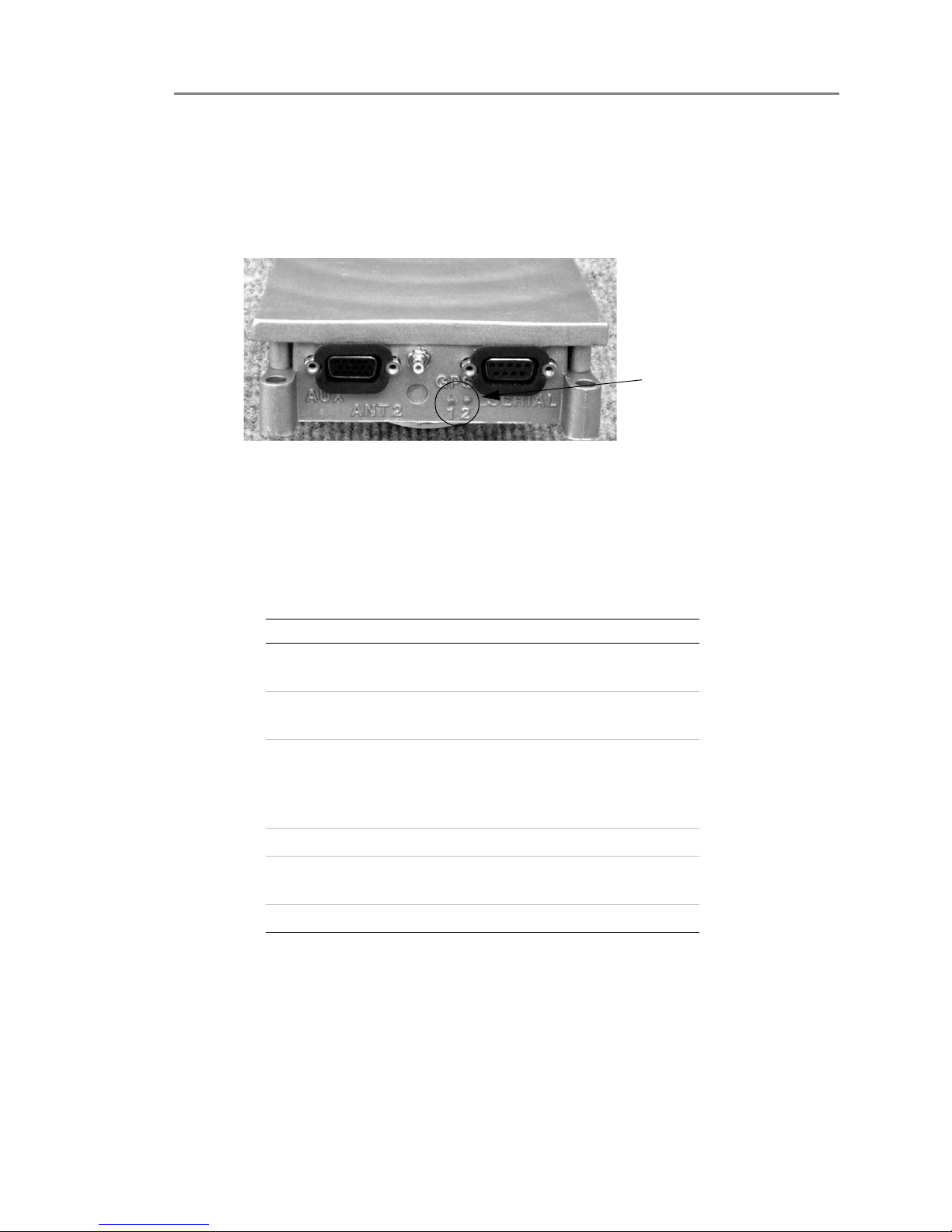
Verify that the Communicator is working properly by observing the LEDs on the
side of the unit. If LED 1 is flashing red or amber, the Communicator is currently
searching for a satellite above the horizon. When LED 1 turns green, a satellite is in
view. See Figure 1-7 for the location of the LEDs.
Figure 1-7. Location of the LEDs
Installing the Software
1 Insert the CD in the CD drive of your computer. See Table 1-1 for the system
requirements.
2 If the Setup.exe file does not begin automatically, navigate to the CD drive
location and open the software folder on the CD. Double-click the setup.exe
file. The setup.exe automatically begins to run.
3 Follow the on-screen prompts.
4 When the software is installed, a SkyMate icon appears on your desktop. You
can start the SkyMate program by double-clicking the icon, or by going to
Start>Programs>SkyMate.
LEDs
Ta bl e 1- 1. System Requirements
Recommended Minimum
Operating
System
Windows
ME/XP/NT/2000
Windows 98
Browser Internet Explorer 6.0 Internet
Explorer 5.0
Processor 1GHz Pentium III,
Celeron, Duron, Athlon
or equivalent
400MHz
Pentium II,
Celeron, K6 or
equivalent
Memory 256MB Memory 64MB Memory
Screen
Resolution
1024X768 1024X768
Disk Space 250MB 50MB
Page 15
Release 1.0 CONFIDENTIAL AND PROPRIETARY Installation Guide 13
Installation
Activating Your SkyMate Communicator Account
1
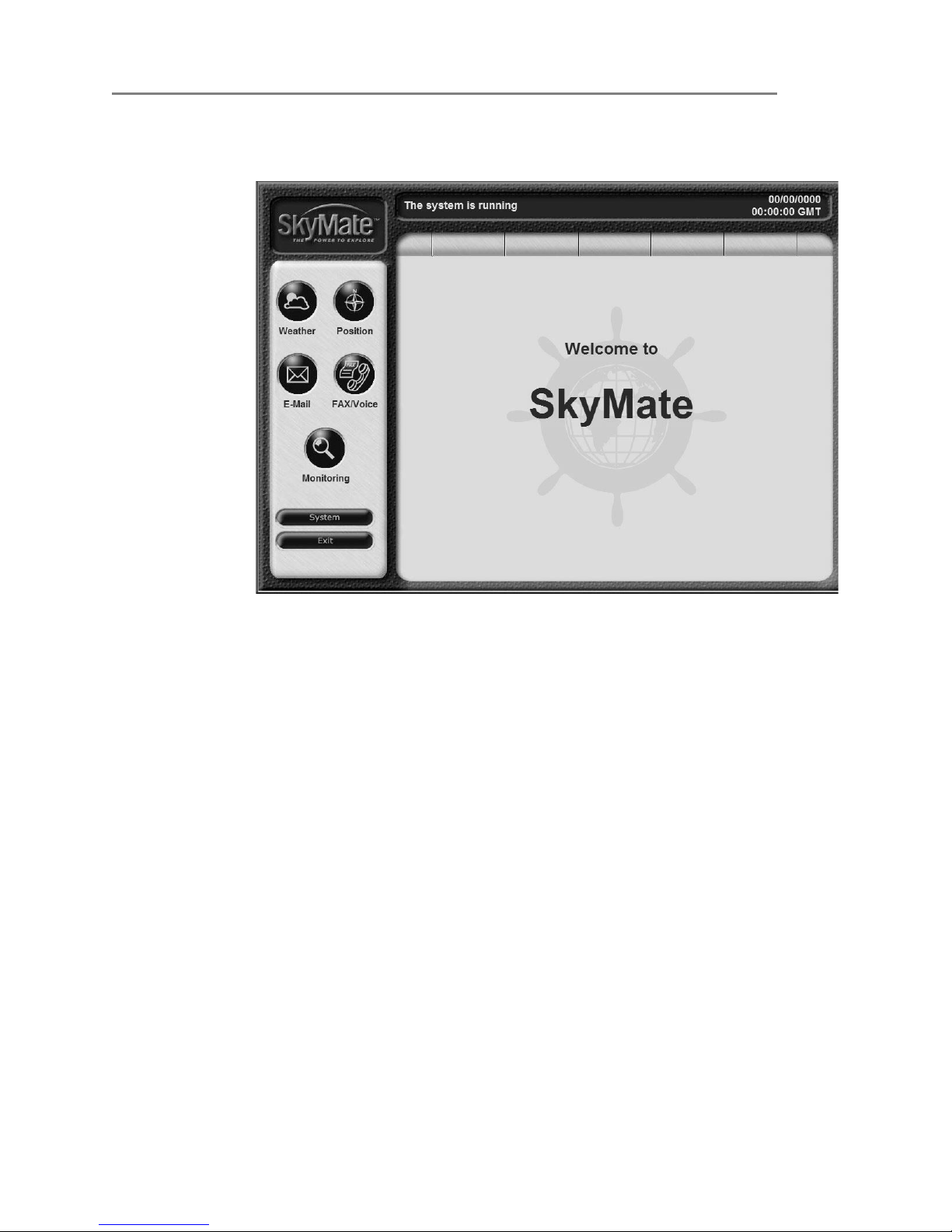
5 When you start the SkyMate program, you will see a Welcome screen, as shown
in Figure 1-8.
Figure 1-8. SkyMate Welcome Screen
Activating Your SkyMate Communicator Account
You must activate your SkyMate Communicator account to use your
Communicator’s data services.
1 From a computer that is connected to the internet, open Internet Explorer.
NOTE At this time, you cannot activate your account over the Satellite network.
2 Enter the following URL in Internet Explorer’s Address field:
www.skymatewireless.com/activation
The Activate Your SkyMate screen opens as shown in Figure 1-9 on page 14.
Page 16

Installation
Activating Your SkyMate Communicator Account
1
14 Installation Guide CONFIDENTIAL AND PROPRIETARY Release 1.0
Figure 1-9. Activate Your SkyMate Screen
3
Enter the dealer code. The dealer code is a seven character alphanumeric code
that uniquely identifies your Communicator. You will find the Dealer code in
your Quick Start guide.
4 Enter the SCID code. The SCID code is a Satellite Communicator
identification code that uniquely identifies your Communicator.
An SCID code typically begins with ST25 followed by eight digits. For
example:
SCID2500000000
5 Click the Submit button.
6 Choose your service plan using the radio button in the next screen.
7 Follow the on-screen prompts to accept the terms of the Service Agreement.
8 Choose a username.
The username can be any combination of letters, numbers and the dot, dash,
and underscore characters ('.', '-' and '_').
NOTE It is not necessary to enter @skymate.com when entering your username.
The username will be your email address (for example,
username@skymate.com) and will gain you access to the SkyMate web site to
view usage, billing and configuration information.
9 Click the submit button after choosing your user name.
10 Follow the on-screen prompts to enter a password. Make a note of the
username.
The password can be any combination of letters, numbers and the dot, dash,
Page 17

Release 1.0 CONFIDENTIAL AND PROPRIETARY Installation Guide 15
Installation
Coverage
1
and underscore characters ('.', '-' and '_').
11 Click the submit button after choosing your password.
NOTE Make note of your username and password and keep it in a safe location.
12 Follow the on-screen prompts to enter information about your vessel and to
enter your credit card information.
13 Click the continue button after entering this information.
14 Verify that the information you entered is correct. Choose the Complete order
radio button to finish activating your Communicator.
15 The Activation complete screen provides a summary of your order
information. You can print a copy for your records from this screen.
Checking Satellite Availability
To check Satellite availability:
1 Go to System>Statistics.
❍ The parameter “Satellite Availability” is the average amount of time a
satellite has been in view since the communicator has been powered on or
rebooted.
❍ For a reliable measurement, leave the unit powered on for at least 3 hours.
Satellite availability should be greater than 50 percent for reliable service. If
satellite availability is less than 50 percent, check the VHF antenna location
and all coax cable connections.
Coverage
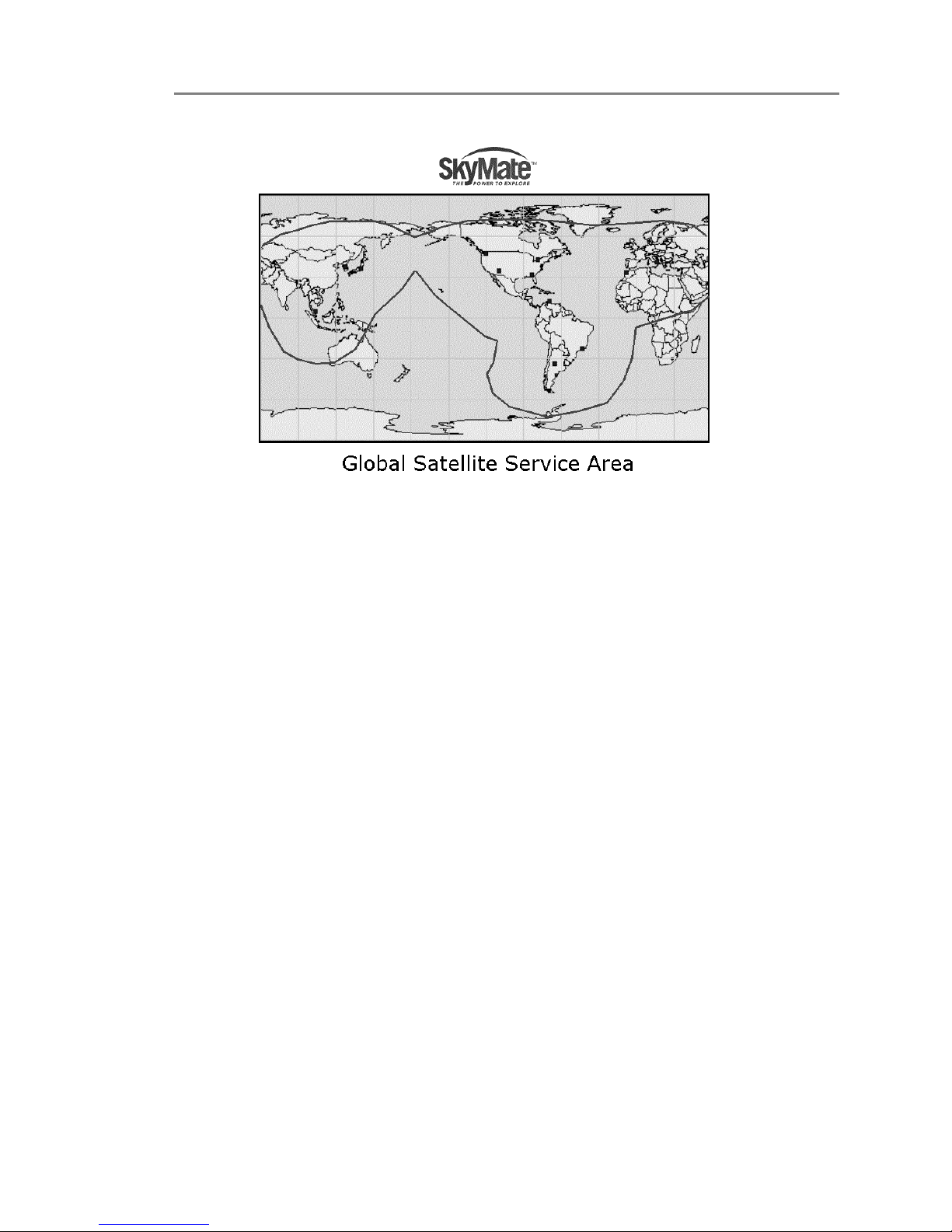
The coverage map in Figure 1-10 identifies where SkyMate services are available.
Please contact [email protected] if you plan to leave the area
surrounding the United States, as you must have authorization to receive service in
other locations.
Page 18
Installation
Coverage
1
16 Installation Guide CONFIDENTIAL AND PROPRIETARY Release 1.0
Figure 1-10. Global Satellite Service Area
Page 19

2
Release 1.0 CONFIDENTIAL AND PROPRIETARY Installation Guide 17
2Service and M aintenance
Adjustments or Repair
Adjustments require specialized service procedures and tools only available to
qualified service technicians – there are no user serviceable parts or adjustments.
The operator should never remove the cover or attempt to service the equipment.
SkyMate products are supported by the manufacturer. For product information
contact:
SkyMate, Inc.
14000 Willard Road
Chantilly, VA 20151, USA
Telephone: 703-636.4220, Toll free: 866-646-4932
Fax: 703-814-8585
Email:
support@ skymate.com.
Maintenance
Your SkyMate Communicator is designed to be virtually maintenance free. Your
attention to a few basic points should assure many years of service.
1. Keep the Communicator as dry as possible.
2. Clean the exterior of the Communicator with a tissue or soft non-abrasive
cloth.
NOTE Do not use solvents or other chemicals for cleaning the equipment.
3. Inspect the case an antenna periodically for any damage.
Requirements and Notices
This section describes the FCC compliance, the safety notice, and maintenance
information.
Page 20

Service and Maintenance
Contacting SkyMate
2
18 Installation Guide CONFIDENTIAL AND PROPRIETARY Release 1.0
NOTE System requirments are listed in the Installation chapter. You can also
find system requirments on the CD that is shipped with the SkyMate system,
and on the SkyMate Web site at this URL:
http://www.skymate.com/products/system_req.asp
FCC Compliance Statement
This device complies with Parts 15 and 80 of the FCC Rules. Operation is subject
to the conditions that this device does not cause harmful interference. Changes or
modifications to this equipment not expressly approved in writing by SkyMate,
Inc., could violate compliance with FCC rules and void the operator’s authority to
operate the equipment.
Safety Notice
This device is only an aid to operation of your boat. Its performance can be affected
by many factors including equipment failure or defects, environmental conditions,
and improper handling or use. It is the user’s responsibility to exercise common
prudence and navigational judgment, and this device should not be relied upon as a
substitute for such prudence and judgment. Your SkyMate Communicator
generates and radiates radio frequency (RF) electromagnetic energy (EME). This
equipment must be installed and operated in accordance with the instructions
contained in this handbook. Failure to do so can result in personal injury or
product malfunction or both.
Warranty
Your SkyMate equipment is covered by a one year warranty. If the equipment fails
within one year, it will be repaired or replaced. If the equipment requires service,
return it to your authorized dealer or to SkyMate’s Product Repair Center at the
address below:
SkyMate, Inc.
Product Repair Center
14000 Willard Road, #2
Chantilly, VA 20151
Contacting SkyMate
You can contact SkyMate in a number of ways if you need assistance with your
SkyMate Communicator.
Technical Support
Call 1-866-SkyMate or 1-703-636-4220.
Service hours are Monday to Friday from 8am to 6pm Eastern Standard Time. Our
technical support specialists are available to answer installation, operation, and
troubleshooting questions about your SkyMate Communicator.
Page 21

Release 1.0 CONFIDENTIAL AND PROPRIETARY Installation Guide 19
Service and Maintenance
Specifications
2
Internet Support
You can reach customer support by sending email to:
Login using your SkyMate user name and password and you will have access to the
subscriber services area of the web site. There, you can view and change your email
options, update your payment information, view your message history, and view
your previous service bills. You can also view your vessel’s position plotted on a
map and have web access to your SkyMate mailbox.
Accessories and Parts
You can obtain SkyMate accessories and parts through your authorized dealer or
from our web site at www.skymatewireless.com. In addition, feel free to contact
our Customer Service department at 1-866-SkyMate Monday through Friday from
8am to 6pm Eastern Standard Time.
Specifications
Table 2-1 lists the specifications.
Ta bl e 2- 1. Specifications
Frequency band VHF
Transmit frequency 148 - 150 Mhz
Receive frequency 137 - 138 Mhz
Antenna impedance 50 Ohms
Input voltage 8-15V DC
Transmit current 2.5 A (1% duty cycle)
Receive current 170 milliamps
Data interface DB9 female RS232 level
Satellite network ORBCOMM
Operating conditions -40 to 185°F
Humidity 95%
Length 7.08 in (180 mm)
Width 4.06 in (104 mm)
Height 1.42 in (30 mm)
Weight 24.9 oz (800 grams
Page 22

Service and Maintenance
Specifications
2
20 Installation Guide CONFIDENTIAL AND PROPRIETARY Release 1.0
Page 23

A
Release 1.0 CONFIDENTIAL AND PROPRIETARY Installation Guide 21
AAppendix
By accessing any areas of the SkyMate Internet site, using the SkyMate communication
system, loading the SkyMate Software on your computer, user agrees with SkyMate that
user is bound by the terms set forth below. The terms of this agreement include terms on
use of the SkyMate Internet site (The Internet Site) and communication system, terms on
the purchase of products and services, and terms regarding copyright and trademark
matters.
1. Copyright and Trademark
© 2004 SkyMate, Inc. All rights reserved. SkyMate and its logo are trademarks of SkyMate,
Inc.
This Internet site and communication system contains information, data, software,
photographs, graphs, videos, graphics, music, sounds and other material (collectively,
"Content") that are protected by copyrights, trademarks, trade secrets or other proprietary
rights. These rights are valid and protected in all forms, media and technologies existing
now or hereafter developed. All Content is copyrighted as a collective work under the U.S.
copyright laws, and T SkyMate owns a copyright in the selection, coordination,
arrangement, and enhancement of such Content. User may not modify, remove, delete,
augment, add to, publish, transmit, participate in the transfer or sale of, create derivative
works from, or in any way exploit any of the Content, in whole or in part. All Content is
copyrighted and SkyMate owns a copyright in the selection, coordination, arrangement and
enhancement of the Content, page headers, custom graphics and button icons.
SkyMate grants you permission to copy electronically and to print in hard copy portions of
the Content for (1) personal use if you maintain all copyright notices, trademark legends
and other proprietary rights notices, (2) using this Internet site and communication system
as a personal shopping resource, (3) communicating with SkyMate about a company
product or service, or (4) placing an order with SkyMate. Any other use of materials on this
site, including reproduction for purposes other than permitted above, uploading,
modification or distribution, is prohibited without SkyMate’s prior written permission.
All other trademarks, product names, and company names and logos appearing on SkyMate
are the property of their respective owners. User must obtain permission from those
owners before copying or using the owner’s trademarks, product names and company
names and logos.
Page 24

Appendix
A
22 Installation Guide CONFIDENTIAL AND PROPRIETARY Release 1.0
3. Third Party Content SkyMate is a distributor and not a publisher of Content supplied by
third parties and has no editorial control over such Content. SkyMate is not responsible for
any opinions, advice, statements, services, weather data or other information that constitute
Content and is provided by third parties. SkyMate does not guarantee the accuracy,
completeness or usefulness of that Content. The user is responsible for evaluating such
Content. 4. On Line Conduct Any conduct by a user that in SkyMate’s sole discretion
restricts or inhibits any other user from using or enjoying this Internet site or using the
SkyMate communication system will not be permitted. User will use this Internet site and
communication system only for lawful purposes. User may not post on or transmit
through this Internet site or the SkyMate communication system any unlawful, harmful,
threatening, abusive, harassing, defamatory, vulgar, obscene, sexually explicit, profane,
hateful, racially, ethnically, or otherwise objectionable material of any kind, including any
material that encourages conduct that would constitute a criminal offense, give rise to civil
liability, or otherwise violate applicable laws. SkyMate may prohibit conduct,
communication, or Content that it, in its sole discretion, believes to be harmful or
objectionable to individual users, SkyMate or to violate applicable laws. Notwithstanding
the foregoing, SkyMate cannot ensure prompt editing or removal of questionable Content.
Accordingly SkyMate, nor any of its affiliates, nor the officers, directors, employees and
other representatives of any of them, assume liability for any action or inaction with respect
to conduct, communication, or Content on this Internet site and communication system. 5.
No Warranties; Limitation of Liability Use of this Internet site and communication system
is at user's sole risk. Neither SkyMate, nor its affiliates, nor any of its officers, directors, or
employees, agents, third-party content providers, vendors, licensers, or the like, warrant
that this Internet site or communications service will be uninterrupted or error-free; nor do
they make any warranty as to the results that may be obtained from the use of this Internet
site or communication system, or as to the accuracy, reliability, or currency of any
information content, service, or merchandise provided through this Internet site or
communication system (see below regarding product warranties provided by handset
manufacturers). SKYMATE IS PROVIDING THIS INTERNET SITE AND
COMMUNICATION SYSTEM AND ITS CONTENT ON AN "AS IS" BASIS AND
MAKES NO REPRESENTATIONS OR WARRANTIES OF ANY KIND WITH
RESPECT TO THIS INTERNET SITE AND COMMUNICATION SYSTEM OR ITS
CONTENT. SKYMATE DISCLAIMS ALL THOSE REPRESENTATIONS AND
WARRANTIES, INCLUDING FOR EXAMPLE WARRANTIES OF
MERCHANTIBILITY AND FITNESS FOR A PARTICULAR PURPOSE.
FURTHER, SKYMATE DOES NOT REPRESENT OR WARRANT THAT THE
INFORMATION ACCESSIBLE ON OR THROUGH THIS INTERNET SITE AND
COMMUNICATION SYSTEM IS ACCURATE, COMPLETE OR CURRENT, AND
ALL INFORMATION, INCLUDING PRICES AND AVAILABILITY, IS SUBJECT
TO CHANGE WITHOUT PRIOR NOTICE TO USER.
Except as otherwise specifically stated on this Internet site, neither SkyMate nor any of its
affiliates, nor the directors, employees or other representatives of any of them, is liable for
damages arising out of or in connection with the use of this Internet site or the SkyMate
communication system, including mistakes, omissions, interruptions, deletion of files or
email, errors, defects, viruses, or delays in operation or transmission. This is a
comprehensive limitation of liability that applies to all damages of any kind, including
compensatory, direct, indirect or consequential damages, loss of data, income or profit, loss
of or damage to property and claims of third parties.
6. Security Policy
Page 25

Release 1.0 CONFIDENTIAL AND PROPRIETARY Installation Guide 23
Appendix
A
SkyMate uses reasonable precautions to protect the privacy of your credit card and other
ordering information by utilizing a Secure Socket Layer ("SSL") connection. Accordingly,
your credit card and other ordering information, such as your name and address, is
encrypted using the SSL connection and is not expected to be read in an intelligible form as
it travels to SkyMate’s order processing system.
Many web browsers support the use of an SSL connection, but if your browser does not
support the use of an SSL connection or if you prefer not to send your credit card number
over the Internet, you can place your order by calling SkyMate toll free at
1-866-SKYMATE (U.S. only).
7. Privacy Policy
SkyMate respects the privacy of its customers, and other individuals and businesses using
the Web sites owned and operated by us and our affiliates.
SkyMate protects the privacy of its customers consistent with the Federal
Telecommunications Act and rules and regulations issued by the Federal Communications
Commission.
SkyMate may ask you to provide personally identifiable information such as your name,
address, telephone number and e-mail address when you use our site to: purchase a service
or product online, ask to receive information, respond to a survey, register for service,
access your account, ask for a personalized service, request customer service online, or
apply for a job. You always have the alternative of mailing or calling SkyMate with the
information requested if you do not wish to provide it online. Personally identifiable
information provided at our site to order services will be protected in the same manner as
when the information is provided by other means such as over the telephone or by mail. We
use personally identifiable information provided at on our site in the following ways unless
otherwise specified: 1. For its intended purpose (such as to complete an online order for
service), 2. To provide you with information about new SkyMate products and services or
products and services offered in conjunction with SkyMate business partners.
DISCLOSURE TO THIRD PARTIES SkyMate will not sell or disclose to outside parties
any personally identifiable information obtained from a SkyMate online service or the
registration at our site without your consent except under the following circumstances: 1.
When required by law, 2. When disclosure is necessary to protect the safety of a customer,
third party or SkyMate’s property, 3. If it is required in connection with any sale or transfer
of all or a portion of SkyMate's assets. When SkyMate uses agents, contractors or other
companies to perform services on its behalf, we will require that they protect your
personally identifiable information consistent with this Privacy Policy. SkyMate may share
the anonymous information described in this Privacy Policy with third parties from
time-to-time. E-MAIL COMMUNICATIONS E-mail is an increasingly popular
communication tool through which you and your business may communicate with
SkyMate. Likewise, SkyMate may use e-mail to communicate with you, respond to your
e-mail, and to tell you about new products and services. If you do not wish to receive e-mail
promotions and new products and service announcements from SkyMate, please contact us
to have your name removed from the list.
SECURITY
SkyMate utilizes encryption methods to ensure that the data you submit on our site is
secure. Through this "secure session," information that you input into a SkyMate online
order form will be sent and will arrive privately and unaltered at to our server. This security
prohibits access to your information by other companies and Web users.
ACCOUNT INFORMATION
You may always contact us at [email protected] or by telephone or mail to
verify your name, address, e-mail address, telephone number and/or billing information.
SkyMate will correct any information that is inaccurate.
Page 26

Appendix
A
24 Installation Guide CONFIDENTIAL AND PROPRIETARY Release 1.0
QUESTIONS
If you have questions or comments regarding this Privacy Policy, you may contact us at
[email protected]. If you have submitted personally identifiable information,
and would like that information deleted from our records, please contact us at our e-mail
address, [email protected]. We will use reasonable efforts to delete that
information from our files.
UPDATES
SkyMate may amend this Privacy Policy from time-to- time. These changes will be posted
online.
8. Purchases
Limitation of Liability. Neither SkyMate nor any of its affiliates, nor the directors,
employees or other representatives of any of them, is liable for damages arising out of or in
connection with the use of the products or services obtained through this Internet site and
communication system. This is a comprehensive limitation of liability that applies to all
damages of any kind, including compensatory, direct, indirect or consequential damages,
loss of data, income or profit, loss of or damage to property and claims of third parties.
Charging Your Credit Card. SkyMate charges your credit card within one day after it
receives your order and performs the credit check. If a product cannot be shipped within 3
business days of your order, SkyMate will notify you of the planned ship date and will
undertake all reasonable efforts to ship the product on the planned date. If the product is
still not available for shipment five business days after the planned ship date, you may
cancel your order and SkyMate will refund your money. If your credit card is rejected
when SkyMate charges it, SkyMate is not obligated to ship any products or activate any
service for your account. SkyMate will contact you by email or any other reasonable means
to advise you of the situation and will request you to call SkyMate at 1-866-SKYMATE.
Prices, Taxes and Shipping & Handling. All prices are stated and payable in US dollars. The
prices for products and services quoted on this Internet site and communication system do
not include taxes. SkyMate charges all applicable taxes on products and Services. A shipping
and handling charge of $15.00 will be applied all orders up to 10 lbs. For larger orders,
shipping and handling will be charged at 20% above the actual shipping costs. Return
Policy. If the user is dissatisfied with a product purchased directly from SkyMate, product
may be returned within 30 days of purchase (or 10 days of activation, whichever is earlier)
for a refund of the purchase price. Activation fees and service charges are not refundable.
Product must be in original condition with all receipts, product packaging, disks, and
documentation. Products purchased from SkyMate resellers and authorized dealers must be
returned to the dealer. Warranty. SkyMate warrants to the original purchaser or, for
products purchased from a reseller or authorized dealer, to the original end-user, that
SkyMate products will be free from defects in materials and workmanship from the date of
shipment for 12 months from the date of shipment or invoice. During the warranty period,
SkyMate will, at its option: (1) provide replacement parts necessary to repair the product,
(2) repair the product, (3) replace the product with a comparable product, or (4) refund the
amount you paid for the product. In order to obtain warranty service for a SkyMate
product, you must return the product at your expense in a undamaged condition and
complete with all accessories that came with the product in the original box with all
materials and package inserts. A copy of your receipt must accompany the return. 9.
SkyMate Terms and Conditions of Service If you have questions about your SkyMate
Service, call SkyMate Customer Service at 1-866- skymate or visit our Web site at
www.sky-mate.com. Agreement. Your agreement ("Agreement") with SkyMate and any of
its affiliates providing SkyMate Service ("Services") to you is made up of these Terms and
Conditions of Service ("Terms") and the Service Plan that we agree to provide you. Your
"Service Plan" is described in our marketing materials, and includes the rates and features
we set for that Service Plan.
Page 27

Release 1.0 CONFIDENTIAL AND PROPRIETARY Installation Guide 25
Appendix
A
Provision of Service. Your purchase of SkyMate Communicator or other equipment does
not mean that we must provide Services to you. We may decide not to provide Services to
you for any lawful reason. We may request that you provide us with any information we
reasonably require to determine whether you qualify for Services. Some Services may not
be available or may operate differently in certain international areas.
Credit Verification. You must have and keep satisfactory credit to receive and continue to
receive Services. We will verify your credit before agreeing to provide Services to you and
we may verify your credit at any time while we provide Services to you. Credit verification
may include a review of credit reports that we receive from commercially available credit
bureaus. We may require a guarantee of payment by an individual or entity approved by us.
If at any time we determine, in our sole discretion, that payment for Services may not be
made when due, we may suspend Services to your Communicator and require that you
provide payment on account or a guarantee of payment before we resume Services.
Changes to Agreement. We may change this Agreement at any time (but see Service Plan).
Any changes to the Terms are effective when we publish the revised Terms. If you use our
Services or make any payment to us on or after the effective date of the changes, you accept
the changes. If you do not accept the changes, you may terminate Services (but see
Termination and Changing Service Plans). For purposes of the Agreement, "use" includes
keeping the right to access SkyMate Services by not terminating Services. You may not
modify the Agreement except for your Service Plan (see Termination and Changing Service
Plans).
Service Plan. We may offer non-identical Service Plans to different individuals or entities.
Services and coverage under some Service Plans may be more limited than available under
other Service Plans. Your Service Plan sets out the charges for Services and is your Service
Plan until that Service Plan is changed, you switch to a different Service Plan, or your
Services terminate.
Changing Service Plans. You may change to a different Service Plan no later than 15 days
before the end of the current billing cycle. Any change is effective at the start of your next
full billing cycle. If you change or add a different Service Plan or service feature and the
change is effective prior to the start of your next full billing cycle, you will be invoiced a
prorated amount. We may require a service charge for implementing any change directed
by you as well as the Service Plan or optional service features you select.
Use of Services and Equipment; Availability. You must be at least 18 years old to subscribe
to our Services. We may require you to provide proof of your age and identity. Services and
equipment may not be used for any unlawful, fraudulent or abusive purpose. By requesting
Services, you agree that you will not use Services and equipment in any unlawful,
fraudulent or abusive manner. You may not resell or lease Services or equipment to anyone.
Services are available within the operating range of the ORBCOMM Satellite Network.
Coverage and quality of Services may be affected by conditions within or beyond our
control, including atmospheric, geographic, or topographic conditions. We do not
guarantee that there will be no interruptions or delays in Services. Username. We assign a
Username to the Communicator used by you on the SkyMate system. We may change the
Username without compensation by giving you prior notice. You do not own the
Username. You may not modify the Username we program into any equipment, transfer or
duplicate the Username to any equipment other than that authorized by us. Activation Fee.
You may be required to pay a non-refundable activation fee when you activate a new
account, have us switch a Username to a different Communicator, we activate a different
Communicator on your existing account or your Service Plan says so. Details on any
applicable activation fee are set out in your Service Plan or can be obtained by calling
SkyMate Customer Care. Usage accounting. SkyMate will keep an accounting of the
number of email and data characters used by you during the billing cycle. This will be used
to determine your billing amount. Monitoring messages that are sent autonomously from a
Page 28

Appendix
A
26 Installation Guide CONFIDENTIAL AND PROPRIETARY Release 1.0
Communicator equipped with a Monitoring Kit are not included in the accounting of usage
charges. Position reports are counted as 20 characters each. Invoicing. Invoicing cycles
follow the calendar month. Except as otherwise provided in your Service Plan, monthly
recurring charges (MRCs) and charges for usage are invoiced at the end of the month.
Payment. If you have authorized payment for Services or equipment by credit card or by
debiting a bank account, no additional notice or consent is required before we invoice the
credit card or debit the bank account for all amounts due to us or billed by us on behalf of a
third party. You must promptly notify us of any change in your invoicing address or of the
credit card or bank account used for payment. We reserve the right to require payment by
money order, cashier's check or other secured form of payment. If we take action to receive
payment beyond invoicing you for charges for Services or equipment, you must pay our
costs and expenses of collection, including attorneys' fees and expenses, the fees of any
collection agency and court costs. If we act as an invoicing agent for a third-party service
provider, payments received are first applied to amounts due and owing to us and any
remaining amounts are applied to sums due and owing to the third-party service provider.
We may charge an additional fee for any check or other negotiable instrument endorsed by
you and returned unpaid by a financial institution for any reason. You may be charged fees
for certain methods of payment.
Late Payment Charges. Payment is past due if we do not receive it by the due date shown
on your invoice. Any payment for Services and equipment not made when due accrues late
charges until paid at the rate of 5% per month or at the highest rate allowed by law.
Acceptance of late or partial payments (even if marked "paid in full") does not waive our
right to collect all amounts that you owe us.
Disputed Charges. You must raise any dispute that you have about any charges invoiced to
you within 15 days of the date of the invoice or you have accepted the invoice. You may
notify us of any dispute by notifying SkyMate Customer Care. Calls to our sales or general
business offices are not notice of a dispute. If disputed invoice procedures are described on
the invoice, you must follow them.
Termination. You may terminate Services at any time by giving us notice. Subject to the
terms of this Agreement, we may terminate Services at any time, with or without notice.
We may deactivate any Username before you receive notice of termination without liability
to you. Termination by either of us may be with or without cause. We may terminate or
suspend Services to you without liability (1) if you breach any provision of this Agreement
(including if you fail to pay any charges for Services), or (2) if you fail to pay any charges
due us for equipment or otherwise. If you promptly cure the breach, we may, but are not
obligated to, reactivate Services to you. You must pay all charges for (a) Services provided
before termination of a Number, and (b) equipment, regardless of who terminates Services.
If Services are terminated before the end of your current invoicing cycle (i) the monthly
recurring charge is not prorated to the date of termination, and (ii) you will not receive a
credit or refund for any unused usage in your Service Plan.
Taxes and Other Regulatory-Related Charges. We invoice you for taxes, fees and other
charges levied by federal, state or local authorities, or foreign government on Services. If
you claim any tax exemption, you must provide us with a valid tax-exempt document. Any
tax exemption applies only from the date we receive a valid tax-exempt document.
Roaming. System usage obtained outside of North America is called "roaming" usage.
Your SkyMate Communicator is provisioned to operate on the US Gateway of the
ORBCOMM satellite system. It works in other ORBCOMM Gateway regions (Europe,
South America, Asia) only when it has been specifically provisioned for roaming in the
designated Gateway region. Certain features are not available when roaming. Roaming
rates may be different from and higher than the rates you pay for usage within the US
Gateway region. When roaming, you are subject to the limitation of liability provisions and
other applicable rules imposed by the roaming service provider. Interruption of Service. We
Page 29

Release 1.0 CONFIDENTIAL AND PROPRIETARY Installation Guide 27
Appendix
A
may give credit for a continuous interruption of Services for more than 24 hours on a
case-by-case basis. Interruptions caused by your negligent or willful actions, or by failure
of equipment or service not provided by us, or by causes beyond our reasonable control, do
not qualify for credit. Lost or Stolen Equipment. If your equipment is lost or stolen, you
must notify us by calling SkyMate Customer Service. You are responsible for all charges for
Services provided to the Number for the lost or stolen equipment before you notify us of
the loss or theft. We will deactivate Services to the Username upon notification to us of any
loss or theft. You may be required to provide evidence of the loss or theft (for example, a
police report or sworn statement). If the equipment is later found, we may require that you
exchange it for other equipment before we reactivate Services (if we do reactivate Services),
as well as require you to pay a reactivation fee. We will deactivate Services to any Username
without prior notice to you if we suspect any unlawful or fraudulent use of the equipment.
You agree to cooperate reasonably with us in investigating suspected unlawful or
fraudulent use. Limitation of Liability. Except as otherwise provided in this section, our
sole liability to you for any loss or damage arising out of providing or failing to provide
Services (including mistakes, omissions, interruptions, delays, errors, or defects) does not
exceed (1) in cases related to a specific piece of equipment, the prorated monthly recurring
charge for Services to the piece of equipment during the affected period, or (2) in cases not
related to a specific piece of equipment, the prorated monthly recurring charges for Services
to you during the affected period. Neither we nor our vendors, suppliers or licensors are
liable for any damage arising out of or in connection with: * a) any act or omission of any
other service provider other than us; * b) any directory listing; * c) any lost messages or
inability to send or receive email; * d) any interruption of Services, including interruptions
caused by equipment or facilities failure or shortages, transmission limitations or system
capacity limitations; * e) traffic or other accidents, or any health-related claims allegedly
arising from the use of Services, equipment or accessories used in connection with the
Services;
* f) the use of Data Services, including the accuracy or reliability of any weather or other
navigational information obtained from the Internet using SkyMate;
* g) any late or failed message delivery;
* h) the installation or repair of any products or equipment by parties who are not our
authorized employees or agents;
* i) events due to factors beyond our control, including acts of God (including, without
limitation, weather-related phenomena, fire or earthquake), war, riot, strike, or orders of
governmental authority;
* k) any act or omission of any third party or independent contractor that offers products
or services in conjunction with or through the Services; or
* j) your negligent or intentional act or omission.
NO CONSEQUENTIAL OR OTHER DAMAGES. UNDER NO
CIRCUMSTANCES ARE WE LIABLE FOR ANY INCIDENTAL,
CONSEQUENTIAL, PUNITIVE OR SPECIAL DAMAGES OF ANY NATURE
WHATSOEVER ARISING OUT OF OR IN CONNECTION WITH PROVIDING
OR FAILING TO PROVIDE SERVICES OR EQUIPMENT USED IN
CONNECTION WITH THE SERVICES, INCLUDING, WITHOUT LIMITATION,
LOST PROFITS, LOSS OF BUSINESS, OR COST OF REPLACEMENT PRODUCTS
AND SERVICES. THIS SECTION SURVIVES TERMINATION OF THIS
AGREEMENT.
Page 30

Appendix
A
28 Installation Guide CONFIDENTIAL AND PROPRIETARY Release 1.0
Indemnification. You indemnify and defend us, our partners, directors, officers, employees
and agents from and against any claim, action, damage, liability and expense arising out of
or in connection with: (1) your acts or omissions that occur in connection with your use of
the Services or equipment used in connection with the Services, and (2) any
communications you make or receive using the Services. This indemnification extends to
and includes any attorney's fees and costs incurred by us arising from any actions or claims
to which this indemnification applies, or from the contesting of the applicability of this
provision. This section survives termination of this Agreement.
MANDATORY ARBITRATION OF DISPUTES. ANY CLAIM, CONTROVERSY
OR DISPUTE, WHETHER SOUNDING IN CONTRACT, STATUTE, OR TORT,
INCLUDING FRAUD, MISREPRESENTATION, OR ANY OTHER LEGAL
THEORY, RELATED DIRECTLY OR INDIRECTLY TO THE SERVICES,
WHETHER BETWEEN THE COMPANY AND THE CUSTOMER OR BETWEEN
THE COMPANY OR THE CUSTOMER, ON THE ONE HAND, AND
EMPLOYEES, AGENTS OR AFFILIATED BUSINESSES OF THE OTHER PARTY,
ON THE OTHER HAND, SHALL BE RESOLVED BY ARBITRATION AS
PRESCRIBED IN THIS SECTION. THE FEDERAL ARBITRATION ACT, NOT
STATE LAW, GOVERNS THE QUESTION OF WHETHER A CLAIM IS SUBJECT
TO ARBITRATION.
A single arbitrator engaged in the practice of law will conduct the arbitration under the
rules of the American Arbitration Association. The arbitrator will be selected in accordance
with AAA procedures from a list of qualified people maintained by the AAA. All expedited
procedures prescribed by the AAA rules will apply, and each party will bear their own
costs and attorney's fees.
The arbitrator will have authority only to award compensatory damages and will not have
authority to award punitive damages, lost profits, or other non-compensatory damages.
The arbitrator's decision and award will be final and binding, and judgment on the award
rendered by the arbitrator may be entered in any court with jurisdiction. The arbitrator's
decision must not contain findings of fact or conclusions of law.
If any party files a judicial or administrative action asserting a claim that is subject to
arbitration and another party successfully stays such action or compels arbitration, the
party filing that action must pay the other party's costs and expenses incurred in seeking
such stay or compelling arbitration, including attorney's fees.
Notices. You may get our current address for written notice by calling SkyMate Customer
Care. Written notice to you is sent to your last known address in our invoicing records.
Written notice is deemed delivered 3 days after deposit in the U.S. mail, postage prepaid,
and properly addressed. Unless required by this Agreement or Applicable Laws, (1) you
may notify us by calling SkyMate Customer Care, and (2) we may notify you by leaving a
message for you on your answering machine or with your answering service. Notice
addresses may be changed by giving notice as provided in this section.
Choice of Law; Jurisdiction. This Agreement is governed by and must be construed under
federal law and the laws of the State of Virginia, without regard to choice of law principles.
You agree to submit yourself to the personal jurisdiction of the courts in the State of
Virginia.
10 Change in User Agreement
This Internet site is subject to change without prior notice and your use of this site after a
change means that you have agreed to that change.
SkyMate may modify this User Agreement at any time by posting the revised agreement on
the Internet site. Any revised User Agreement is effective upon the user accessing this
Internet.
 Loading...