

Page 1
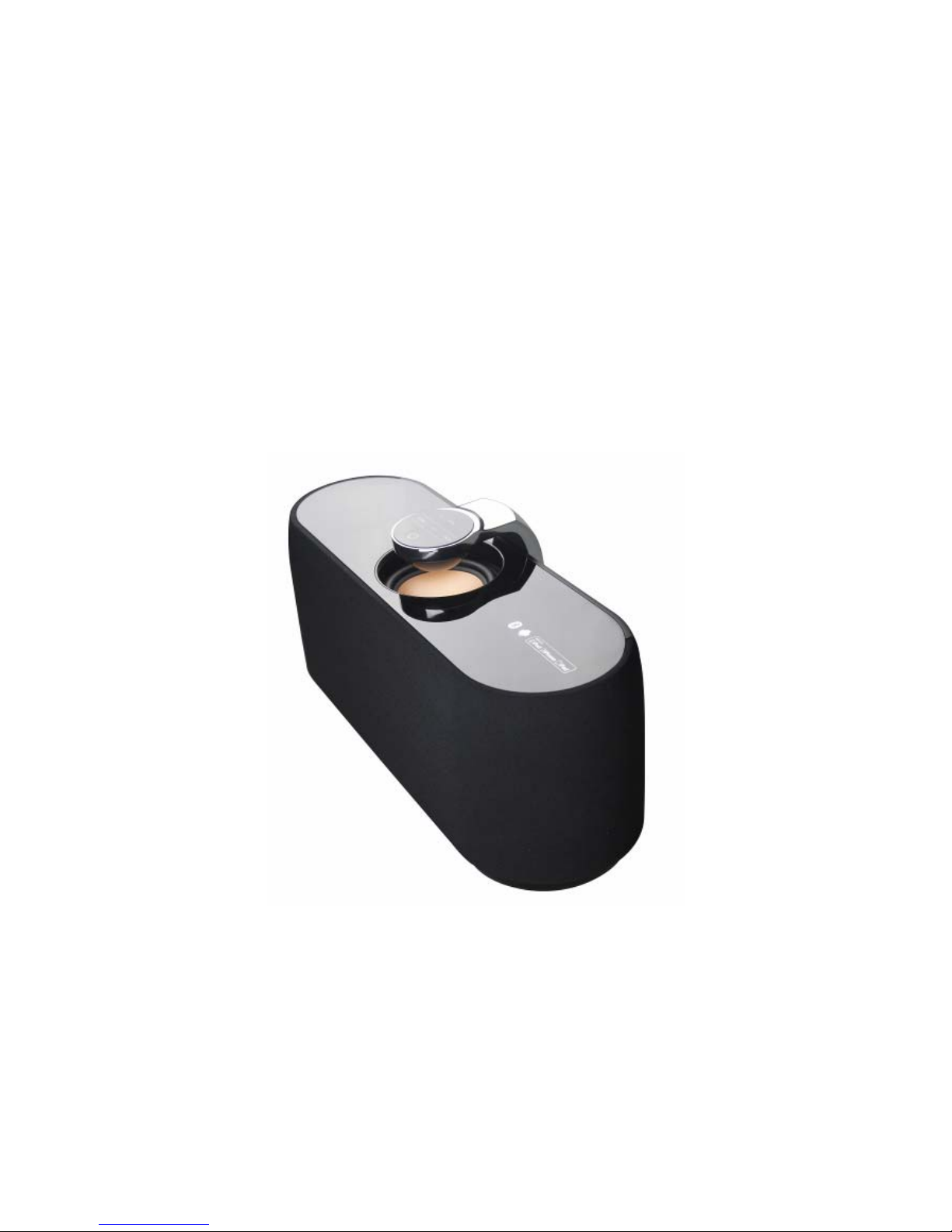
User's Manual of Bluetooth
Speaker – BC203
The picture is for re feren ce only , if it differs from the actu al machine , su bject to the
actual machine!
Please keep this manual properly; any updates are subject to no prior notice!
Page 2

Table of Contents
Notes.............................................................................. 2
Warning.......................................................................... 2
Definition of Buttons and Jacks...................................... 3
Remote control function ................................................. 4
Startup ........................................................................... 5
Shutdown....................................................................... 6
Bluetooth pairing mode .................................................. 6
Search mode.................................................................. 7
Standby mode................................................................ 7
Connection mode........................................................... 7
AUX IN mode................................................................. 8
Supported mobile phones .............................................. 8
Product Specification ..................................................... 9
1
Page 3

Introduction
This product is a kind of portable Bluetooth stereo which supports music player, it
adopts digital signal processing technology and is applicable in different
environment such as office, home, it can realize wireless connection with the
majority of Bluetooth-supporting devices and mobile phones to play musics with
high quality from the devices and mobile phones.
Notes
Firstly, thank you for choosing the digital audio product of our company!
Read the manual before use to ensure using this product in a proper way.
In order to offer better service, contents of this manual may be altered without
notice due to the change of performance and functionality of the product.
In order to maintain good performance, please do not use the product in too
cold, too hot, dusty or humid places, m ore attention should be paid in the fol low ing
situations:
1. Wet or underwater-operating environment
2. Heater or high-temperature operating environment
3. Environment expose to sunlight
4. Environment easy to cause dropping
5. Do not disassemble the machine without authorization, which will result
in losing the right of warranty
Warning
1. Be careful to avoid water, the product should not be exposed to water
drips or splashes, the body can not be placed on with articles filled with
2
Page 4
liquid such as vase to avoid accidents.
2. If using power plug as disconnecting device, the disconnecting device
should be easy to operate.
Definition of Buttons and Jacks
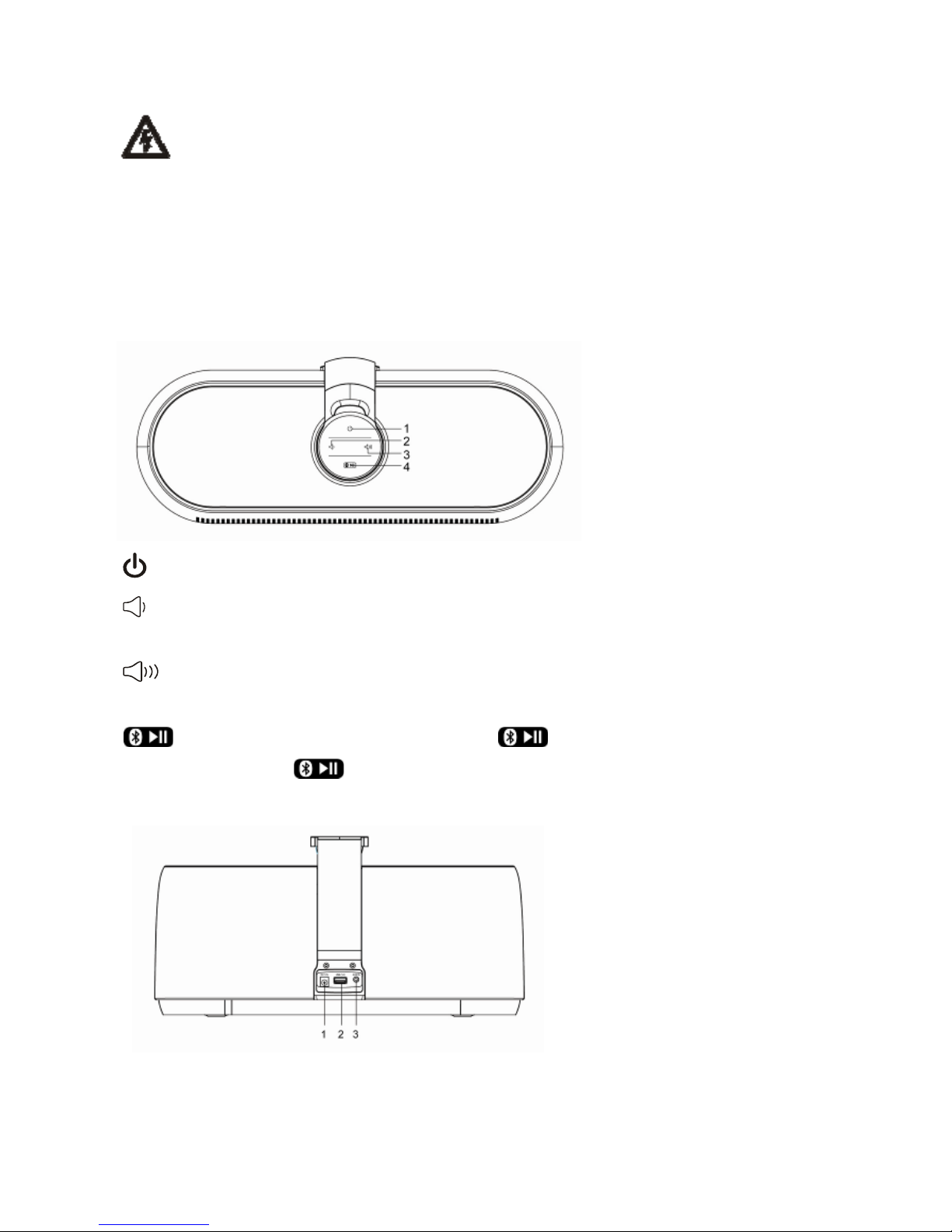
There are 4 buttons and 3 jacks, which are defined as follows:
1. : short press Power on/off button
2.
:short press to decrease the volume; long press to quickly decrease
the volume
3. :short press to increase the volume; long press to quickly increase
the volume
4.
:in the search mode, long press " " button for 3 seconds to enter
pairing; short press "
" button in the playing state of the Bluetooth to
pause/play music.
1.DC 12V:DC 12V power supply jack
2.USB(1A):charging jack of a variety of mobile phones and iPod / iPhone
models
3
Page 5
3.AUX IN:external audio source input jack (3.5mm jack)
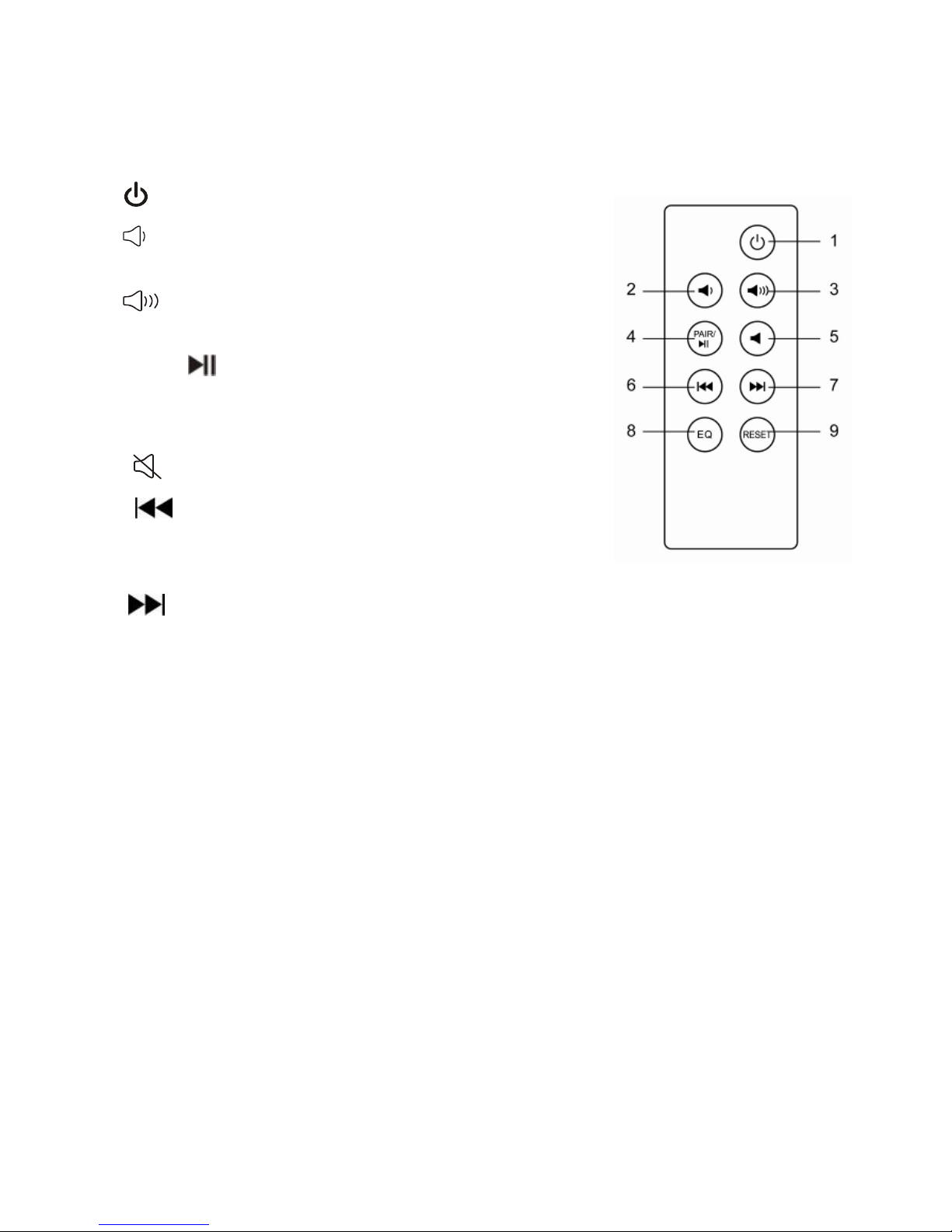
Remote control function
1. :short press Power on/off button
2.
:short press to decrease the volume; long
press to quickly decreas e the volume
3.
:short press to increase the volume; long
press to quickly increase the volume
4. PAIR/ :short press in the playing state of the
Bluetooth to pause/play music; in the search mode,
long press for 3 seconds to enter pairing;.
5. :mute button
6. :short press in the Bluetooth state to swi tch
to the last music; short press/
long press in the AUX
IN input playing state has no function
7. :short press in the Bluetooth state to
switch to the nex t m usic; i t
has no functio n w hen
short press/long press in the AUX IN input
playing state
8. EQ:
audio settings button
9. RESET:
start up in the Bluetooth state and
long press for more than 10 seconds to
exclude Bluetooth device connected, at this
time, the blue light flashes rapidly
How to use remote control:
1.
Pull the PVC insulation film out of the battery buckle before you use the remote
control, now the battery inside the battery buckle starts formal power supply for
the remote control, hold the remote control and face it to the display screen of the
host so as to effect each function of the remote control;
2. When
the remote control does not w ork due to running ou t of pow er after being
used for a long time, open the buckle door by the method shown in below figure,
4
Page 6
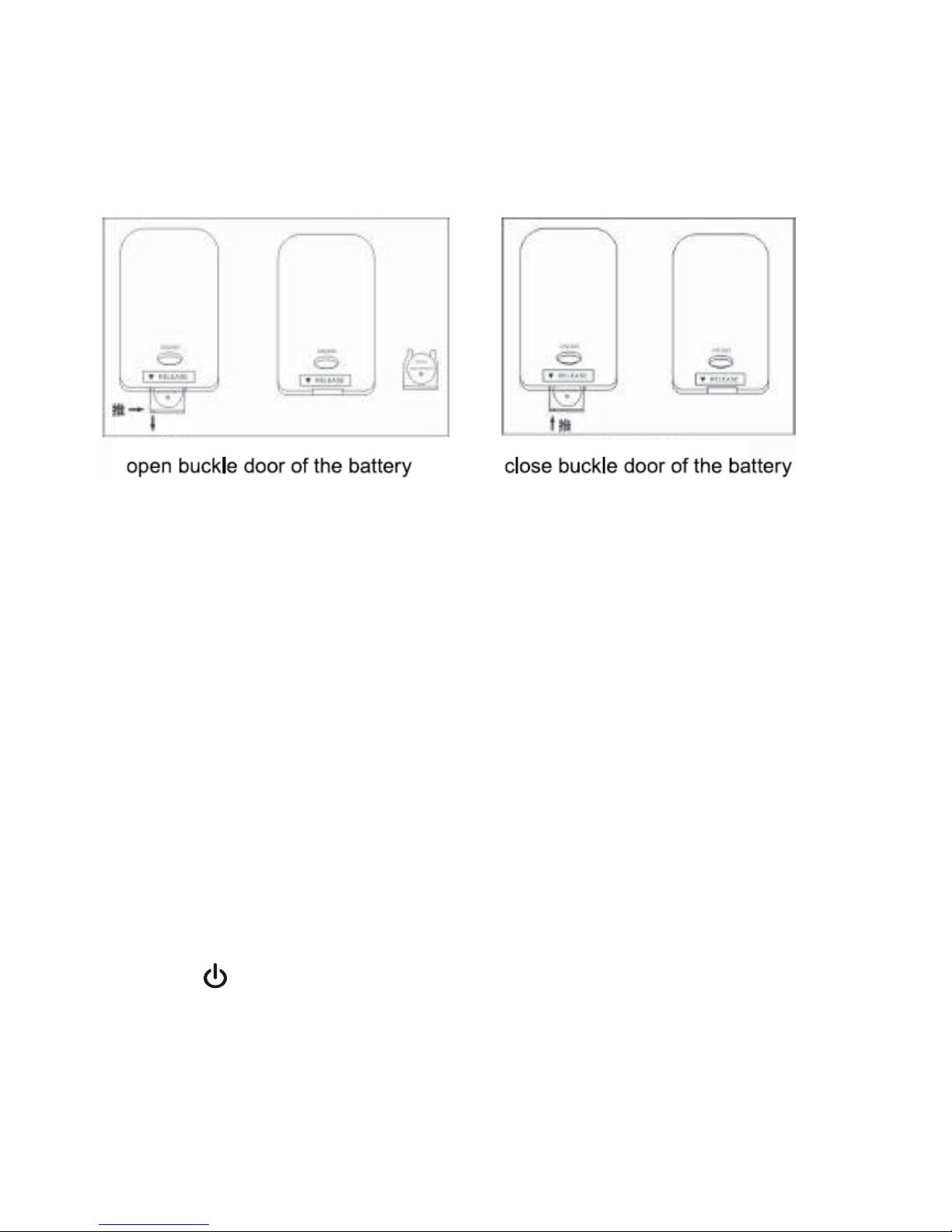
take out the old battery and replace it by a new one, pay attention to the "+/-"
direction when making replacement, push the battery into the remote control
according to the direction shown in the Figure, then the rep lacement i s completed .
open buckle door of the battery
close buckle door of the battery
LED indicator light:
LED (Red): in the standby mode, the red LED indicator light flashes once every
three seconds (in the front of the machine)
LED (Blue): the blue LED indicator light flashes in the pairing process of
Bluetooth connection; the blue indicator light will remain lit after the pairing (in the
front of the machine)
Startup
Insert the DC 12V power adapter i nto the DC 12V jack on the b ack of the machine,
then the red LED power indicator will be lit up ( flash once every three seconds),
press the "
" button to start up the machine.
1. At the the first time of use, the blue LED light will flash and enter the pairing
mode.
5
Page 7

2. If the pairing has been successfully completed before, the blue LED light
flashes once every 1 second, the machine goes into the search mode, the
Bluetooth automatically connects with devices and mobile phones used last time.
3. Enter into the search mode, the Bluetooth will automatically connect with
devices and mobile phones used last time, if the connection is successful in 10
seconds, it will enter into th e connection mode; if fails to connect, the machine will
go into the standby mode.
Shutdown
In the running state, press the " " button to shut down the machine, it will go
into the standby mode.
Bluetooth pairing mode
There are two conditions enabling the machine to enter this mode:
1. In the search mode or standby mode, long press " " button for more
than 3 seconds;
2. When starting up the machine at the first time of use:
1) place your mobile phone within three meters away;
2) long press "
" button for 3 seconds, the blue light flashes, then enter
into the pairing mode;
3) activate the Bluetooth function of your mobile phone, the phone will start to
search for Bluetooth dev ice (please refer to the u ser's manual of the mobile ph one
for more details);
4) select "samesay-BC20" from the device found in the phone;
5) for some phones which require you to input identification number "0000"
and then press the Enter button to make the machine match the phone, the blue
LED light will remain lit after the pairing is successful.
6) press Return button of the phone to exit the phone menu, make sure there
is no obstruction within 10 meters away from the phone, then you can play music
through the machine.
Notes:
6
Page 8

1. When starting up the machine in the Bluetooth mode, if it is not connected to
Bluetooth device after 40 seconds, the machine will automatically shut down and
go into the standby mode.
2. If the pairing is successful, the machine will enter the connection mode.
3. If the paired devices exceed the maximum capacity (maximum 8 units), the
machine will automatically exclude the first device memorized.
Search mode
At startup time or in pairing mode, long press " " button to go into this
mode, the blue light flashes once every 1 second, if in the search mode, it will
attempt to connect with the device connected last time, if finding it, the machine
will go into the connection mode.
If the search time exceeds 10 seconds, the machine will go into the standby
mode.
Standby mode
The blue LED light flashes slowly and flashes once every 5 seconds while in
the standby mode. It will accept connections from all paired devices ( record 8
devices at most).
Connection mode
The blue LED light will keep lit after the pairing is completed, if there is no
headset mark appearing on the phone screen before use, please follow below
steps to activate the Bluetooth connection.
(1) Select "samesay-BC20" from the pairing list of the phone for connection;
(2) Short press "
" button, select "accept connection" on the phone screen.
(3) To disconnect, long press "
" button or select disconnection from the
phone, the machine will go into the standby mode.
In the play mode of Bluetooth music, you can:
Short press or long press "
" or " " button to turn up/down the sound.
Press "
" button to play/pause operation.
7
Page 9

AUX IN mode
As long as you use AUX IN line to connect with AUX IN Jack, the system
will automatically suspend the Bluetooth, the blue LED will go off and go into the
AUX IN mode, you can short press or long press "
" or " " button to turn
up/down the sound.
After you pull the AUX IN line completely out of the AUX IN Jack, the system
will reenter the Bluetooth search mode to search for the last device connected.
Supported mobile phones
iPad 1
iPad 2
iPad 3
iPhone 4
iPhone 4S
iPhone 3G
iPhone 3GS
NOKIA N95
NOKIA N78
Android OS
NOKIA 5800
NOKIA 6110
NOKIA 5300
NOKIA 6230
Blackberry 8310
Blackberry 9700
SAMSUNG Galaxy
SAMSUNG gt-s5628
Sony Ericsson W910i
8
Page 10

Note: In addition to mobile phones mentioned above, it also supports devices with
Bluetooth music players in theory.
Product Specification
Bluetooth Specification: Bluetooth 2.1 + EDR
Output Power: Output Level 2, the maximum connection distance of 10 m
Power Adapter: 12V/3A
Range of Operating Frequency: 2.402GHz ~ 2.480GHz unlicensed ISM band
Profiles Supported: HSP, HFP 1.5, A2DP and AVRCP
Dimension: length 420 × width 160 × height 200 (mm)
Weight: about 3.65KG (the host)
9
 Loading...